Last updated: May 2026 · Reading time: about 18 minutes
If your institution publishes video, someone in risk or compliance will eventually ask a very simple question: who watched that recording, and can you prove it? Deploying video infrastructure in a regulated environment is therefore a risk-adjusted decision about data privacy, delivery reliability, access control, and evidence. Banks, mature fintech platforms, and large corporates no longer treat video as a brand asset. They treat it as a controlled communications channel, subject to audit and to explicit access boundaries. Choosing between public distribution networks, private business hosting, and developer API pipelines decides how much of that control you actually keep.
Executive Summary for Decision-Makers
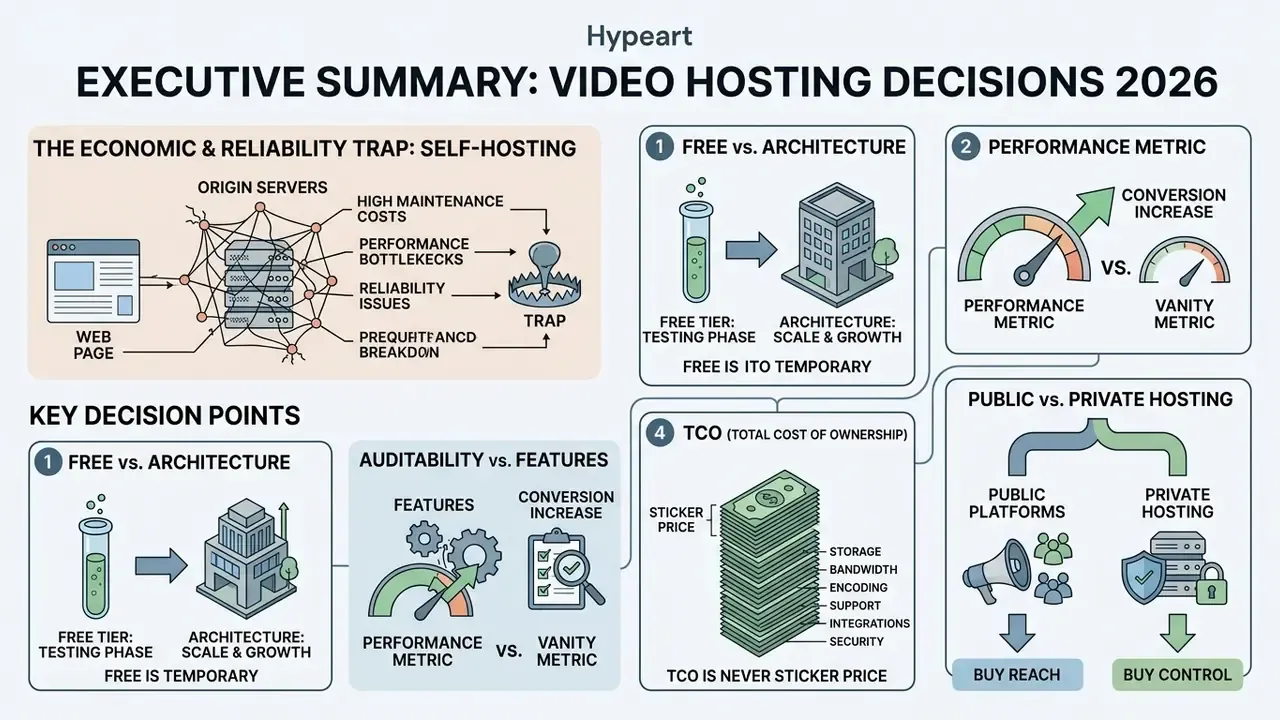
- Self-hosting video on origin web servers is an economic and reliability trap. Streaming 60 seconds of HD video to just 10 concurrent viewers consumes roughly the bandwidth of serving a text-and-image web page to 1,000 simultaneous visitors. That 1:100 ratio drains a shared hosting budget fast.
- Free tiers are testing phases, not architectures. Vimeo Free now caps newer accounts at 1 GB of lifetime upload capacity (not monthly), and Wistia's current free plan is framed around 25 GB of storage and 1 user seat after the March 17, 2026 pricing change.
- Performance is a conversion metric, not a vanity metric. Replacing an unoptimized third-party embed with a lazy-loaded facade cut measured page load time from 17.38 seconds to 3.6 seconds in independent testing. That directly protects Largest Contentful Paint (LCP) and Interaction to Next Paint (INP).
- In regulated environments, auditability outranks features. Prioritize SSO/SAML 2.0, role-based access control (RBAC), signed or tokenized playback URLs, DRM, exportable access logs for SIEM ingestion, and configurable retention and destruction policies. Player aesthetics come last.
- Total cost of ownership (TCO) is never the sticker price. Model storage, delivery and egress, encoding, seats, eCDN or bandwidth relief, compliance labor, and migration risk before you sign anything.
- Public platforms buy reach; private hosting buys control. Use YouTube, Dailymotion, and Facebook for discovery. Use Wistia, Vimeo, Panopto, Kaltura, Brightcove, or Cloudflare Stream for revenue pages, internal communications, and controlled training.
What This Guide Helps You Decide
Four decisions, in the order they usually land on a desk. First, whether a given asset belongs on a public network at all, or behind an authenticated boundary. Second, which tier of platform matches the sensitivity of the content, not the enthusiasm of the requester. Third, what the fully loaded twelve-month cost looks like once labor and network relief are included. Fourth, what evidence you will be able to hand an examiner or an internal auditor eighteen months later, without a scramble. Everything below feeds one of those four.
What Is Online Video Hosting and Why Do You Need It?
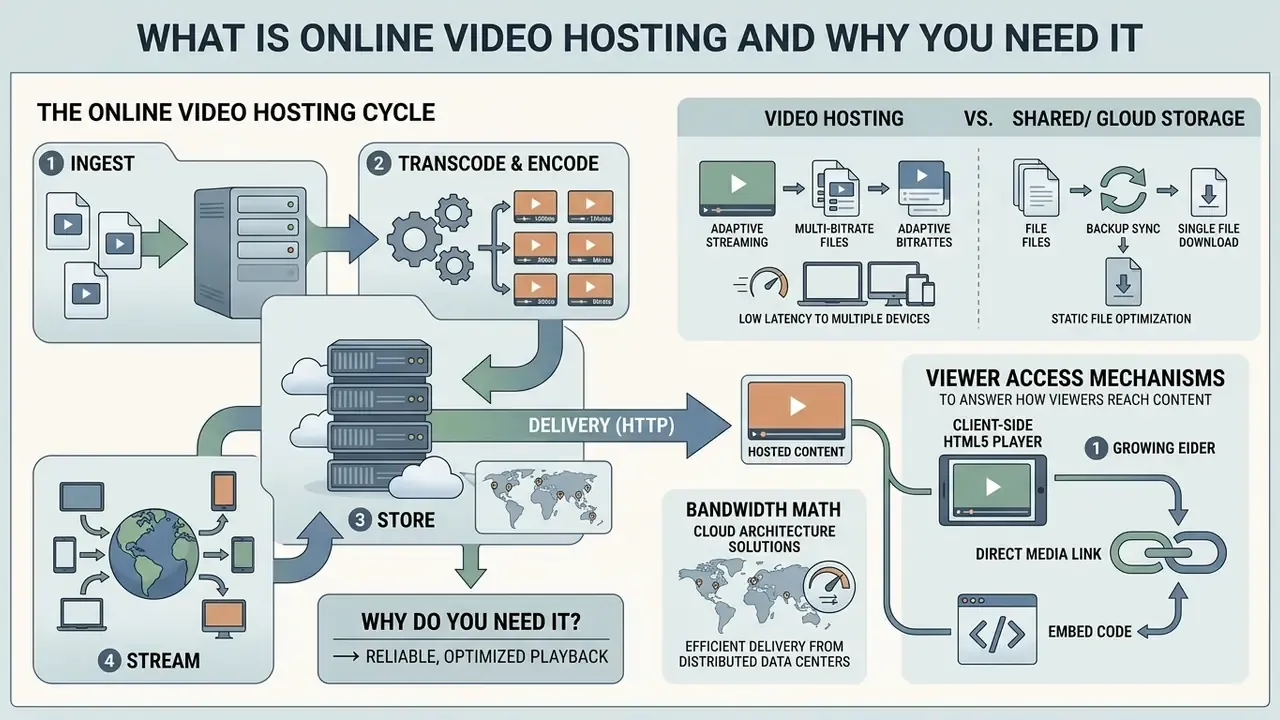
Online video hosting is a managed cloud service that ingests, transcodes, stores, and streams digital video files to end-user devices through adaptive web players and standardized delivery protocols. Instead of forcing viewers to download raw media, an online video hosting platform processes each upload into multiple resolution renditions, manages content delivery network (CDN) routing, and enforces security policy at playback. Organizations rely on an online video host to deliver stable streaming across browsers, mobile apps, and internal portals without overburdening origin web servers.
The bandwidth math that decides the architecture. Self-hosting places exponential strain on origin infrastructure. Streaming 60 seconds of 1080p video to 10 concurrent users consumes roughly the same bandwidth as delivering standard HTML text and images to 1,000 simultaneous visitors. At that 1:100 ratio, a modest 5,000-view launch week can exhaust a shared plan's monthly transfer allowance in hours, trigger overage billing, or take the site offline during the exact campaign window that was meant to generate revenue. Painful timing, always.
«Just 10 visitors watching 60 seconds of HD video is about equivalent to 1,000 visitors viewing a text-and-image-based web page». Vidyard, Video Hosting Platforms Guide (2024). https://www.vidyard.com/blog/video-hosting/
Cloud architectures solve this by distributing storage across geographically dispersed data centers and scaling encoding capacity elastically, so peak concurrency lands on edge nodes rather than a single origin machine.
«Cloud architectures allow storage to be distributed dynamically across data centers and encoding capacity to scale as demand grows». Darwich and Bayoumi, Cloud-Enhanced Video Streaming, Springer (2025). https://link.springer.com/chapter/cloud-enhanced-video-streaming-2025
Delivery is standardized on HTTP so that video and signaling traffic stay compatible with corporate networks, firewalls, caches, and clients. That design principle appears across every major cloud media reference architecture. The practical outcome is a pipeline of six repeatable stages: ingest and upload, encoding and transcoding, multi-bitrate storage, packaging (HLS or MPEG-DASH), CDN distribution, adaptive playback.
How Video Hosting Differs from Video Sharing and Cloud Storage
Specialized video hosting concentrates on adaptive ingestion, multi-bitrate encoding, and low-latency streaming through an embeddable custom player. An online video share platform, by contrast, prioritizes public discoverability, audience networking, and algorithmic feed distribution, usually at the expense of player control and brand consistency.
«Users value “co-viewing and recommendations” as a core platform attribute that distinguishes sharing services from storage tools». Means-end chains study on TikTok (2023). https://doi.org/10.1016/tiktok-means-end-2023
Generic cloud storage providers optimize for static file synchronization, backup, and document access. They lack adaptive streaming pipelines, dynamic quality switching, in-player security boundaries, and viewer retention analytics. Cloud drives can store raw media, sure, but trying to host a video online straight from file storage produces long buffering, throttled bandwidth, and zero domain-level embed protection. The functional split is simple: hosting means publish and stream, sharing means distribute and discover, cloud storage means store, sync, and back up.
| Dimension | Video hosting | Video sharing platform | Cloud storage |
|---|---|---|---|
| Primary job | Stream and embed on your own properties | Reach an existing audience | Store, sync, back up files |
| Encoding | Automatic multi-bitrate renditions | Automatic, platform-controlled | None |
| Player control | Custom branding, CTAs, colors | Platform-branded | No streaming player |
| Access control | Domain locking, tokens, SSO, DRM | Public, unlisted, or private only | Folder permissions |
| Analytics | Per-viewer heatmaps, retention, CRM sync | Aggregate creator metrics | None |
| Best fit | Revenue pages, training, internal comms | Discovery and organic reach | Archival and collaboration |
Video Player, Link, and Embed: How Viewers Access the Content
Viewers reach hosted content through three mechanisms: a client-side HTML5 video player, a direct media stream URL (the video link), or an embedded container snippet. The player renders media chunks dynamically using HTML5 and JavaScript libraries, negotiating adaptive bitrate playback against the viewer's real-time network conditions. A direct link points to a hosted manifest URL or a shareable landing page, which makes distribution across messaging systems and internal documentation trivial. Embedded playback uses iframe or embed elements to load an external player shell inside a target page or website, so media streams securely inside enterprise interfaces while the origin assets stay protected on the online video server.
Per the W3C HTML specification, iframe represents a nested browsing context whose src gives the address of the page to load, embed is an integration point for external content requiring a valid non-empty URL, and video is the native page-level player supporting src, controls, poster, and fallback content for legacy browsers. Small detail, big consequence: fallback content is what keeps a locked-down corporate browser from showing a blank rectangle.
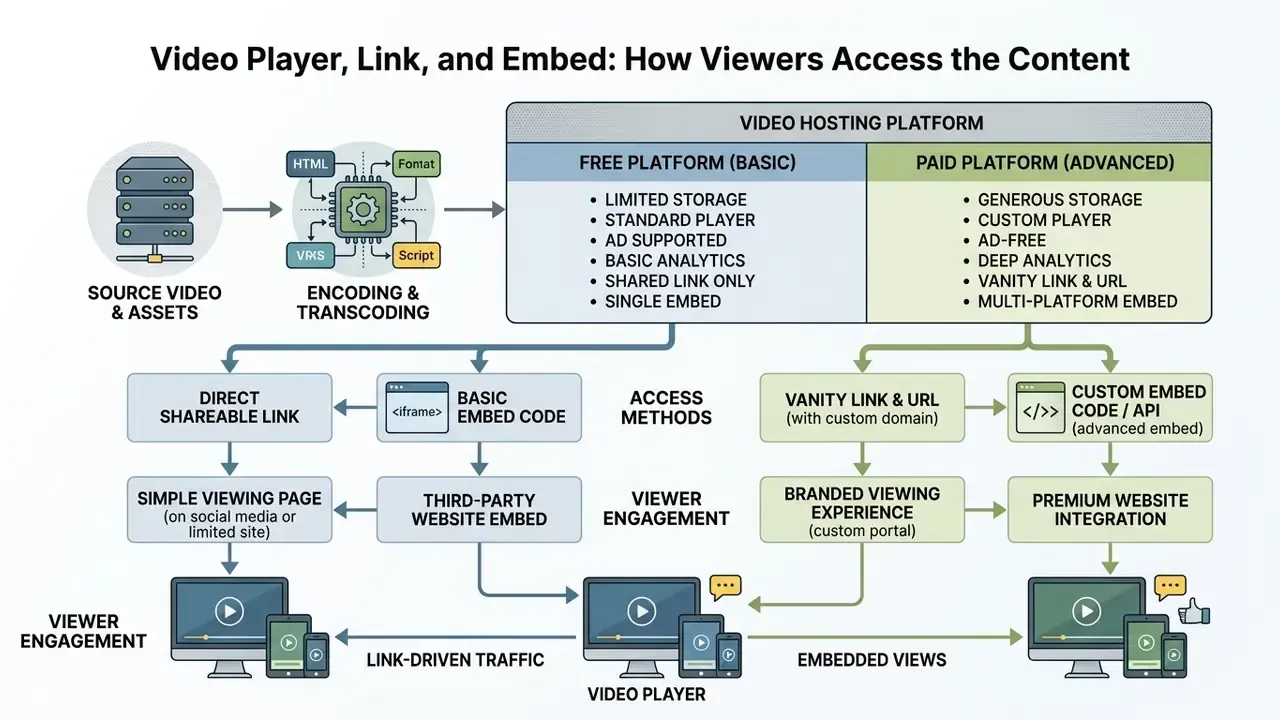
Flow: 1. Upload video (MP4, MOV, WEBM) → 2. Online video hosting (transcoding and CDN storage) → 3. Embed or link (URL or iframe snippet) → 4. Playback (watch and share).
Diagram caption: the online video hosting lifecycle. Raw media file, then cloud transcoding and CDN storage, then embed code or URL generation, then adaptive playback on the client device.
How to Host a Video Online: From Upload to Publication
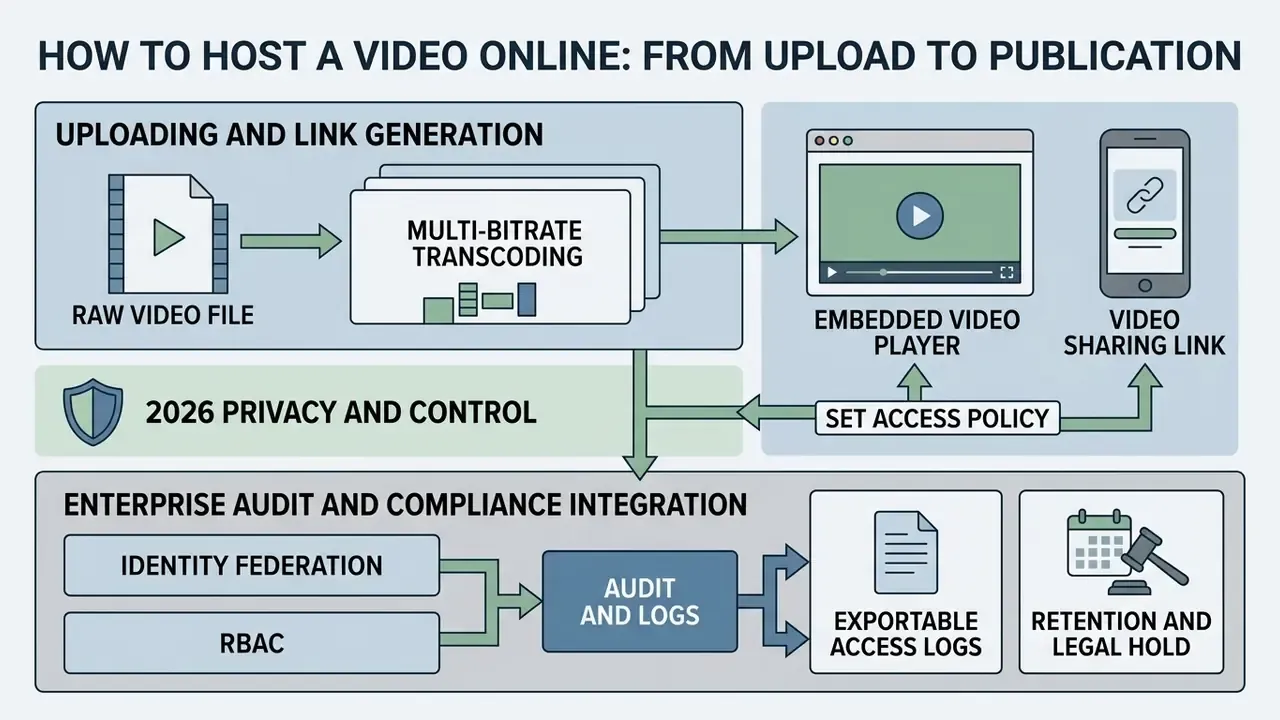
To host a video online, an operator uploads raw source media, runs automated multi-bitrate transcoding, sets explicit access policy, and deploys distribution endpoints. Understanding how to host a video online means treating media deployment as a managed workflow that trades visual quality against bandwidth and security constraints. Structured operational protocols are what keep hosted assets streaming reliably across business applications, client dashboards, and public channels.
Uploading a Video File and Generating a Video Link
Configuring Privacy, Access, and Viewing Permissions
This material is general in nature and does not replace consultation with an information security specialist or your compliance function.
Enterprise Audit Trails, Compliance, and Governance Integration
For a regulated institution, the decisive question is not "can we restrict the video?" It is "can we prove who watched it, when, and under what authorization?" A defensible enterprise video control set includes:
- Identity federation SSO via SAML 2.0 or OIDC against Okta, Microsoft Entra ID, or Ping, so viewer identity is inherited from the corporate directory rather than a platform-local password.
- Role-based access control (RBAC) granular roles (owner, uploader, reviewer, viewer, auditor) mapped to directory groups, with least-privilege defaults and periodic entitlement review.
- Exportable access logs per-asset and per-viewer event records covering view start, watch percentage, download attempt, share event, and permission change, available by API or scheduled export into SIEM and observability stacks such as Splunk, Microsoft Sentinel, or Datadog.
- Retention and legal hold configurable publish and expiration dates, automated deletion schedules, and legal-hold flags aligned with recordkeeping obligations for business communications. Sanitization of decommissioned media follows NIST SP 800-88 practice.
- Vendor attestations SOC 2 Type II reports, ISO/IEC 27001 certification, penetration test summaries, subprocessor lists, data residency commitments, and GDPR or CCPA data processing addenda.
- Shadow-IT containment blocking or monitoring uploads of internal meeting recordings to consumer platforms. This is the single most common leakage path for confidential video in large organizations, and it rarely shows up in a risk register until after the incident.
How to Choose an Online Video Hosting Platform for Your Website and Business
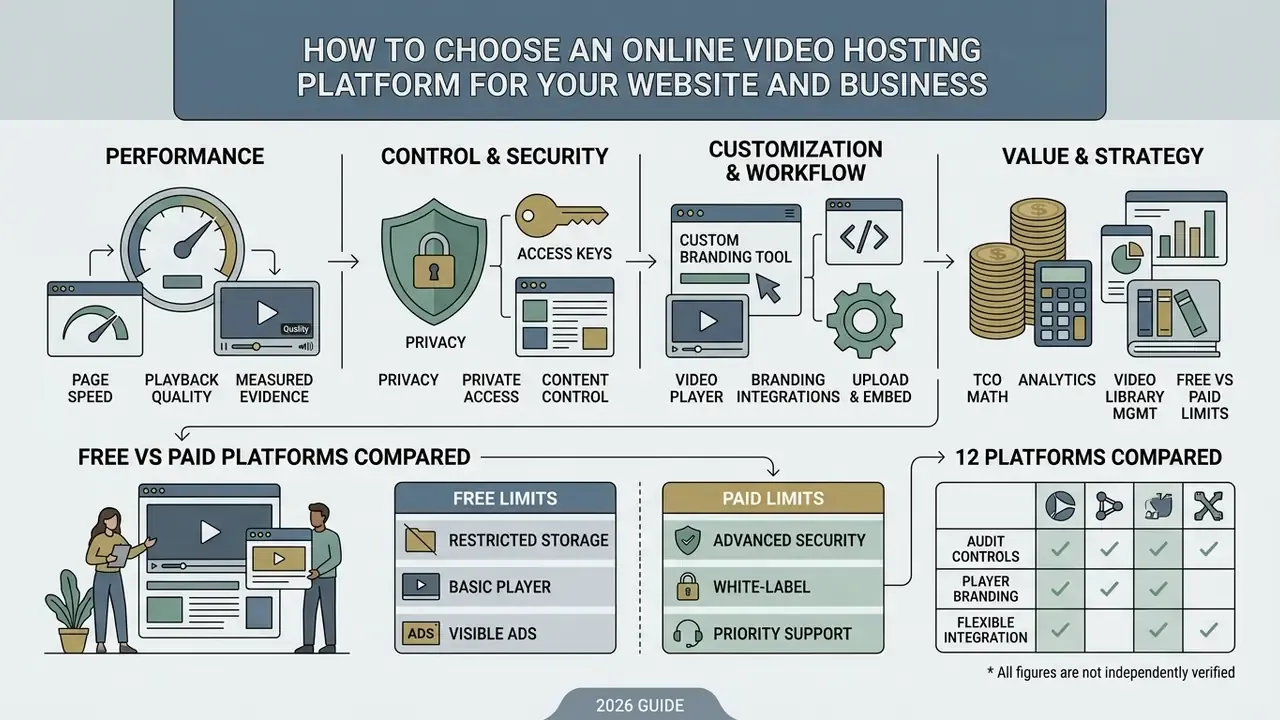
Selecting an enterprise online video hosting platform means evaluating performance, privacy controls, player branding, and integration flexibility together rather than one at a time. A company choosing an online video hosting site has to align hosting architecture with its risk appetite, compliance obligations, and brand standards. Assessing online video hosting platforms against structured technical criteria is what prevents surprise streaming bills, security gaps, and platform lock-in.
Video Player, Page Speed, and Playback Quality
The architecture of an embedded video player shapes website loading metrics directly, including Core Web Vitals such as Largest Contentful Paint and Interaction to Next Paint. Google's current thresholds are LCP under 2.5 seconds, INP under 200 milliseconds, and CLS below 0.1. Google's own Web Vitals guidance notes that an inline embedded video can itself become the LCP element. Standard browser embeds that load heavy client-side JavaScript upfront degrade both load speed and performance scores.
Updated with measured evidence. Unoptimized third-party embeds ship substantial synchronous JavaScript, extra network requests, and layout work before the page becomes interactive. In independent testing, removing a default YouTube embed from a landing page cut load time from 17.38 seconds to 3.6 seconds, roughly a 79% reduction. That is the difference between a page that feels broken and a page that converts.
«In our testing, removing a YouTube embed cut load time from 17.38 seconds to 3.6 seconds». Free Video Hosting: 9 Best Options in 2026, independent platform testing (2026).
«The video browsing interface materially affects navigation speed and content selection accuracy for users». ACM, Desktop vs VR Video Browsing Performance (2023). https://dl.acm.org/doi/vr-video-browsing-2023
Lightweight player facades and lazy-loaded embeds ensure media loads only on user interaction, which preserves a fast initial render while keeping adaptive streaming quality intact. Pair facades with disciplined encoding, see our guide to compressing video files before upload, so the bitrate ladder matches the resolutions your audience actually plays. Modeling those bitrate and storage assumptions before procurement is easier with the AI Media Calculators set than with a blank spreadsheet.
Privacy, Private Access, and Control Over Content
Rigorous privacy and content control require features well beyond an unlisted link. Financial institutions need private access mechanisms: tokenized playback URLs, geo-blocking, DRM encryption, and origin domain validation to prevent unauthorized downloads. CloudFront signed cookies or token-based access controls keep media segments unreadable outside authenticated sessions. AWS media delivery documentation describes exactly this split. Signed URLs and signed cookies apply access rules to the manifest and to every video segment, while DRM distributes decryption keys only to authorized users, blocking manual download and redistribution.
«A blockchain-based framework improves data availability and reduces network latency compared with centralized storage». BEDS: Blockchain-Enhanced Distributed Storage for Cloud Video Streaming, Springer (2023). https://link.springer.com/chapter/beds-blockchain-video-2023
Illustrative scenario (figures not independently verified). In a typical internal audit of digital training assets at a large regulated organization, unencrypted media links turn up exposed across internal documentation portals and wiki pages, often in the hundreds or low thousands. The standard remediation pattern is to migrate those assets behind tokenized streaming endpoints with strict domain binding, retire the legacy direct links, and monitor playback success during cutover. Two measurable objectives: eliminate unauthenticated download paths, and hold playback success at parity with the previous setup across regional offices. Baseline your own playback success and error telemetry before and after the change instead of leaning on vendor-quoted numbers. Vendor averages describe someone else's network.
Analytics, Branding, Integrations, and Video Library Management
Advanced business hosting solutions provide deep audience analytics, white-label branding controls, and direct API integrations with CRM and LMS platforms. Comprehensive analytics capture viewer heatmaps, engagement drop-off points, and individual retention metrics, which lets marketing and compliance teams judge media effectiveness on evidence rather than instinct.
«A 2026 systematic review finds that influencer video content significantly affects consumer attitudes, intentions, and behavior». Systematic review on social media influencers' video content, Journal of Consumer Behaviour (2026). https://doi.org/10.1002/cb.influencer-video-review-2026
Customizable player interfaces let organizations remove third-party logos, apply corporate color palettes, and sync viewer progress into HubSpot, Salesforce, or an enterprise learning system. Enterprise-grade reporting usually exposes three tiers of metric: volume (views, unique viewers), depth (retention curves expressed as a percentage of peak viewership across the runtime), and behavior (seeks, replays, drop-off timestamps, per-viewer session records). Academic work on video analytics inside learning management systems studies precisely these clickstream signals, media starts, seeks, and audience behavior, which is why LMS-integrated hosting, not a consumer platform, is the standard choice when training completion has to survive an examination.
Free Online Video Hosting or a Paid Plan: What to Choose
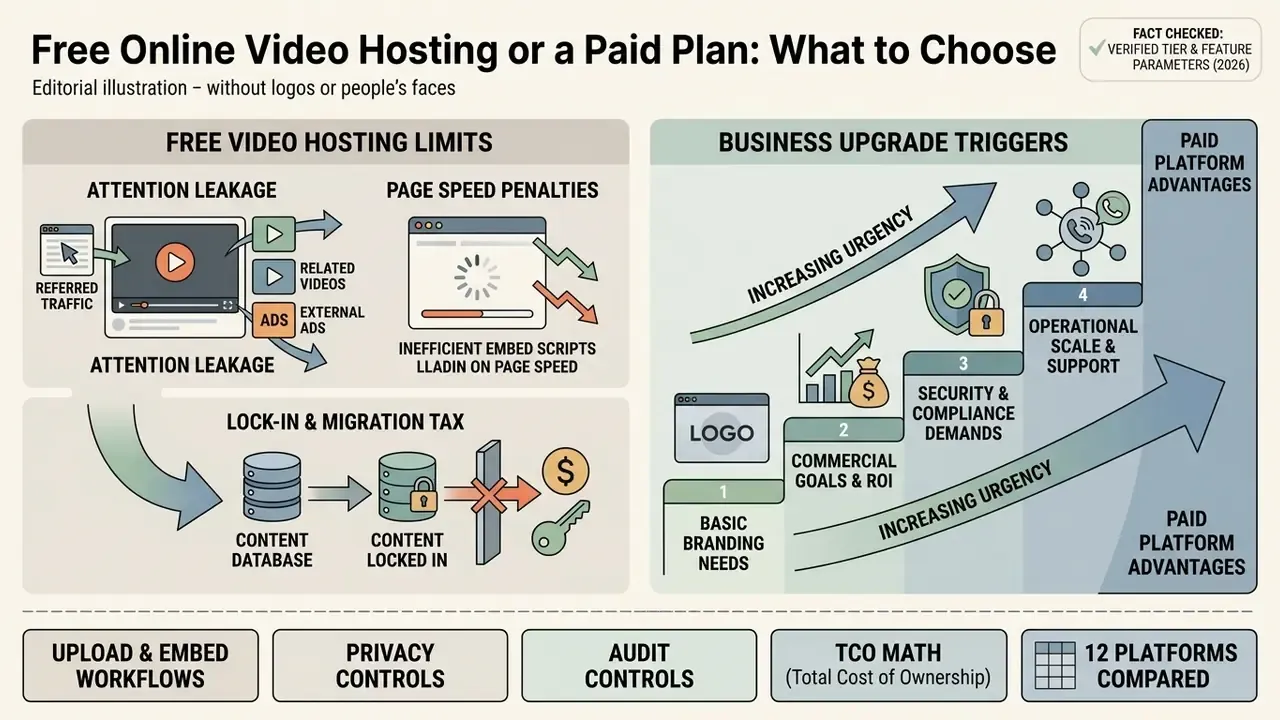
Deciding between free online video hosting and a paid subscription comes down to commercial goals, security demands, and operational scale. Online video hosting free tiers are genuinely useful entry points for individual creators and public testing, yet commercial teams hit hard technical ceilings quickly. Weighing the tradeoffs clarifies when an organization can rely on free video hosting online options and when a paid plan becomes mandatory rather than optional.
What Usually Limits Free Video Hosting
Free tiers enforce tight operational boundaries: monthly bandwidth caps, restricted storage volume, forced third-party advertising, and mandatory platform branding.
«Wistia's free plan is limited to 10 media assets, 200 GB of monthly bandwidth, and one user; paid plans extend limits up to 2,000 files and 1 TB». Wistia Pricing Documentation (2026). https://wistia.com/pricing
Updated for 2026. Free-tier terms move quickly and must be re-verified before you standardize on them. Vimeo now grants newer free accounts 1 GB of lifetime upload capacity, not 1 GB per week or per month, which makes the plan viable for a showreel or a single homepage explainer and nothing more. Wistia's current pricing page frames the free plan around 25 GB of storage and 1 user seat after its March 17, 2026 pricing change, while some legacy help articles still describe the older media-count model. Free plans also cap upload file size, limit output resolution, and display recommended third-party content over the player. On top of that, free video hosting platforms typically lack granular privacy controls, domain binding, custom branding, and support SLAs.



When a Business Should Move to Paid Video Hosting
A company should move to a paid subscription the moment media delivery touches revenue, regulatory compliance, or client trust. The usual triggers are an ad-free player requirement, strict domain whitelisting, custom lead-capture forms, CRM integration, and SLA-backed uptime.
«Theoretical models of digital media firms show that free tiers are deliberately constrained to push high-value users toward premium conversion». SSRN Working Paper on Premium, Free-to-Play, and Play-to-Earn models in digital media (2023). https://ssrn.com/abstract=digital-media-models-2023
Paid plans let teams scale a library without intrusive advertising and keep administrative control over intellectual property and viewer data. Teams working under tight budgets ahead of an upgrade cycle sometimes offset production costs with free tools for creating video content, reserving paid hosting spend for the assets that sit on revenue and compliance-critical pages. Tier-by-tier commercial framing lives in our AI Media Pricing Guides, which is a faster read than five vendor pricing pages side by side.
Concrete upgrade triggers, in order of urgency:
| Trigger | Why free breaks | Minimum paid capability required |
|---|---|---|
| Video sits on a pricing or demo page | Ads and suggested videos divert intent | Ad-free, fully branded player |
| Confidential internal communications | No domain locking, no SSO | SSO/SAML, RBAC, domain allowlist |
| Regulated recordkeeping | No exportable logs or retention rules | Access log export, retention and legal hold |
| Paid or gated content | Links are effectively public | Signed URLs, DRM, geo-blocking |
| Attribution to pipeline | Aggregate metrics only | Per-viewer analytics plus CRM sync |
| Global workforce training | Bandwidth caps, no eCDN | Enterprise bandwidth, eCDN or multicast |
Total Cost of Ownership: Modeling the Real Bill
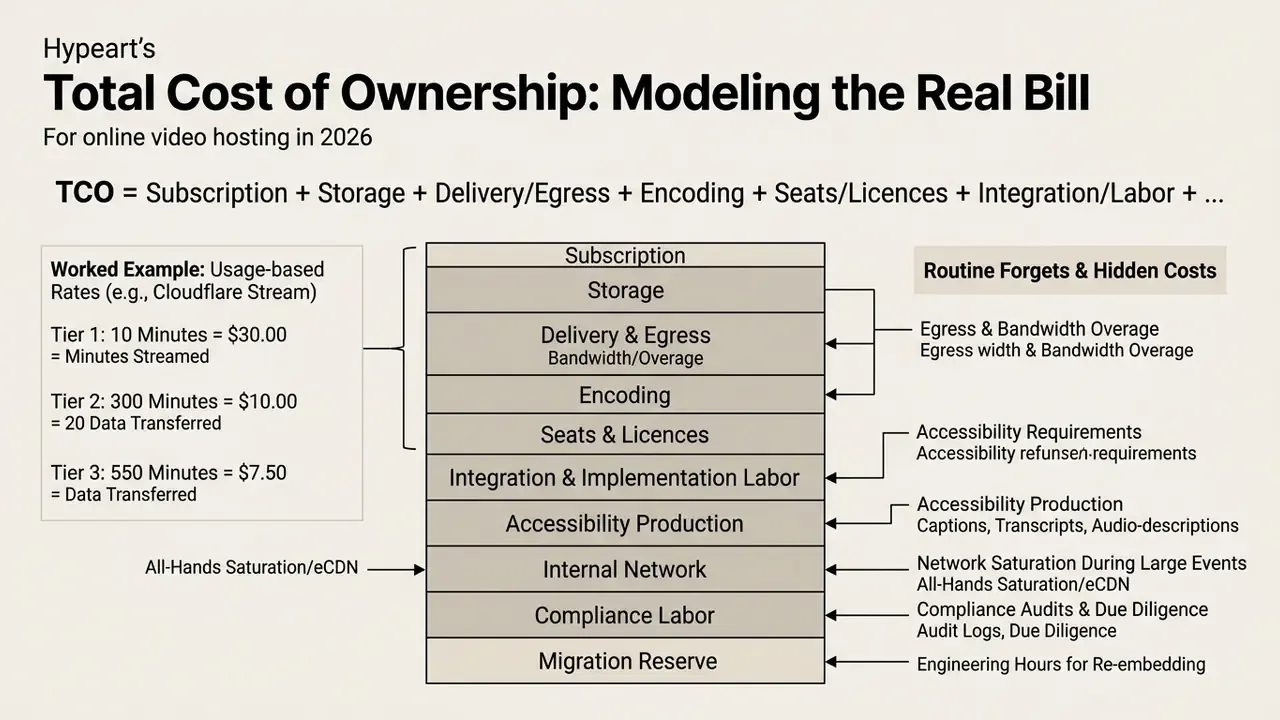
Subscription price is the smallest line in an enterprise video budget. A defensible twelve-month TCO model looks like this:
TCO = storage + delivery and egress + encoding + seats and licences + integration and implementation labor + compliance and audit labor + network relief (eCDN or peering) + migration and lock-in reserve
Worked example using published usage-based rates from Cloudflare Stream. A 500-video library averaging six minutes each equals 3,000 stored minutes, so $15 per month for storage. If those videos generate 200,000 minutes of delivered playback monthly, that is $200 per month for delivery. Encoding is included. Total infrastructure: $215 per month, or $2,580 a year, before any labor at all. Add one part-time platform owner, quarterly entitlement reviews, SIEM log ingestion volume, and accessibility work such as captions, transcripts, and audio description, and the fully loaded figure typically multiplies by three to five times.
Cost lines teams routinely forget:
- Egress and bandwidth overage on plans that meter transfer instead of minutes.
- Caption, transcript, and audio-description production required for accessibility conformance.
- Internal network saturation during all-hands meetings or mandatory training, which is exactly what eCDN and multicast licensing exists to solve.
- Compliance labor: evidence collection for audits, log retention storage, vendor due-diligence questionnaires, annual SOC 2 report review.
- Migration reserve: the engineering hours needed to re-embed every asset if the vendor changes terms. This is the most commonly unbudgeted cost in the entire category, and it always arrives at the worst quarter.
Best Online Video Hosting Sites by Use Case
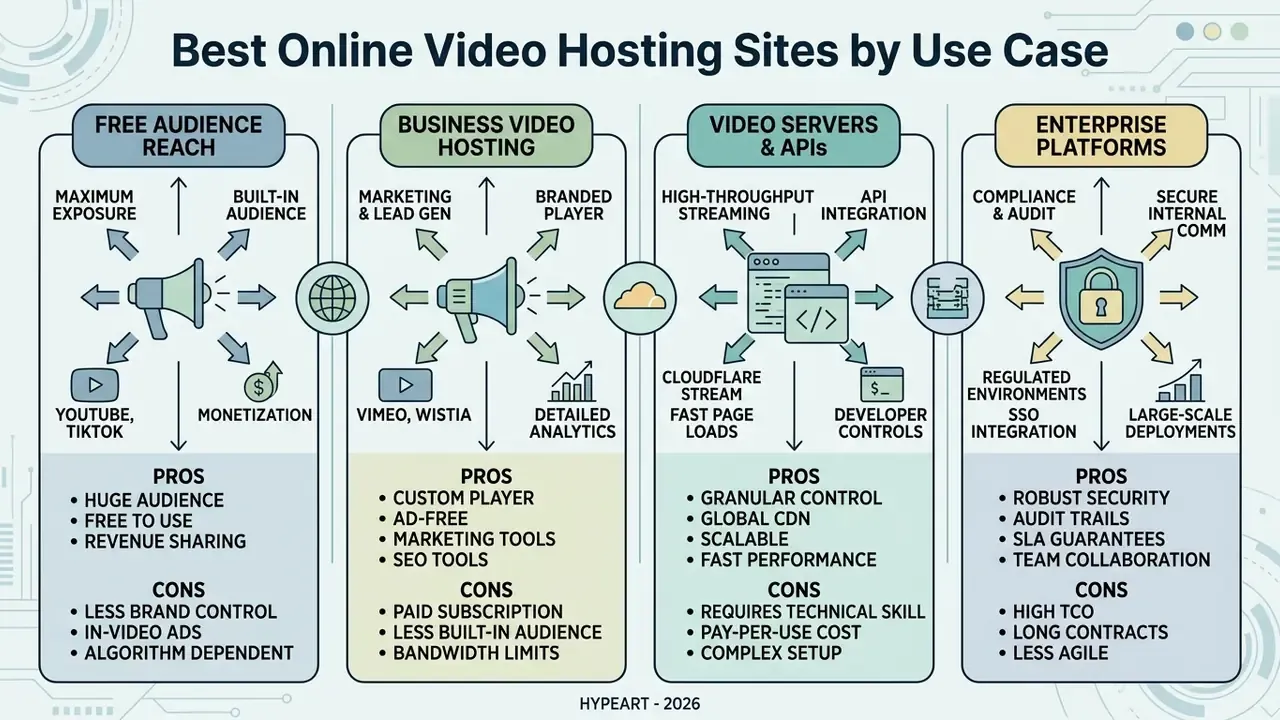
Identifying the best video hosting sites is really an exercise in matching deployment scenarios to platform architecture. Organizations chasing brand exposure lean on high-reach public platforms. Those managing corporate communications rely on specialized business hosting or a developer video API. Choosing among the top online video hosting sites depends on whether your strategic focus is public audience acquisition, lead conversion, controlled internal distribution, or custom application engineering.
| Platform | Pricing model | Free tier limits | Privacy and access controls | SSO / eCDN / compliance | Player branding and ads | Analytics depth | Primary use case |
|---|---|---|---|---|---|---|---|
| YouTube | Free, ad-supported | Unlimited uploads; 256 GB or 12 h per file (verified accounts) | Public, unlisted, private; no domain locking | No enterprise SSO; unsuitable for confidential media | Platform branding; ads and suggested videos | Standard creator engagement metrics | Mass public outreach and content discovery |
| Vimeo | Freemium, tiered SaaS | 1 GB lifetime upload cap on newer free accounts | Password protection, domain whitelisting, embed-only, private | SSO on Enterprise; limited eCDN | Ad-free on paid plans; customizable player | Advanced viewer retention reporting | Creative portfolios and commercial marketing |
| Wistia | Tiered business SaaS | 25 GB storage, 1 user seat (current pricing page, March 2026) | Gated links, password access, domain locking | SSO on higher tiers; SOC 2 posture published | 100% ad-free; fully customizable player | Individual viewer heatmaps and CRM sync | B2B marketing, product demos, lead capture |
| Panopto | Enterprise licensing | No public free tier | SSO integration, LMS role-based access | SSO/LTI, campus eCDN options, education compliance | Ad-free; integrated portal styling | Course-level usage and retention analytics | Higher education lecture capture and training |
| Kaltura | Enterprise licensing | No public free tier | SSO, RBAC, entitlement-based access, DRM | SSO/SAML, LTI, eCDN, enterprise attestations | Ad-free; white-label player | Enterprise-wide engagement reporting | Large-scale corporate and EdTech portals |
| Brightcove | Paid, enterprise | No public free tier | Tokenized playback, geo-blocking, DRM | SSO, broadcast-grade SLA, ad-server integrations | Ad-free or ad-enabled by choice | Deep media performance analytics | Publishers, media companies, livestream |
| Cloudflare Stream | Metered API usage ($5 per 1k min stored, $1 per 1k min delivered) | Free encoding; storage and delivery billed by usage | Signed URLs, tokenized access, API policies | API-level control; developer-managed identity | Fully customizable via client SDKs | Raw streaming performance and minute metrics | Developer custom web and mobile integration |
| Dailymotion | Free, ad-supported | 4 GB per file, 2 h per file, 15 uploads per 24 h | Public and private toggles; minimal enterprise control | None meaningful for enterprise | Mandatory pre, mid, and post-roll advertising | Publisher-style reach metrics | Publisher monetized reach |
| Google Drive | Freemium | 15 GB shared across Gmail, Drive, Photos | Folder and link permissions only; no streaming policy layer | Workspace SSO, but no media pipeline | No player ads; poor public embed experience | None | Internal video file sharing and archival |
| ScreenPal | Freemium | Unlimited uploads with ad-free viewing on free hosting | Password, publish and expiration dates, visibility controls | LMS launch integration; lightweight governance | 100% ad-free on all video pages | Basic view reporting | EdTech, LMS, tutorials, AI captioning |
| Streamable | Freemium | Fast clip uploads and lightweight embeds | Link-based access | Not designed for enterprise governance | Minimal branding | Basic | Temporary clips and social sharing |
| Free, social | 4 GB max file, 240 minutes max length | Audience settings only | None | Social-first, weak site control | Page insights | Social distribution and community content |
Institutional validation: Ohio University confirmed Panopto as its lecture capture partner in 2025, citing cost efficiency and service stability (Ohio University, Lecture Capture Tool Evaluation, 2025. https://www.ohio.edu/oit/lecture-capture-evaluation-2025).
Read the table one column at a time, not row by row. If the SSO and compliance column is empty for a platform, that platform is not a candidate for confidential material, however good the player looks.
Free Video Sharing Platforms for Audience Reach
Public platforms such as YouTube, Facebook, and Dailymotion excel at brand visibility and audience acquisition, and they remain the fastest route to free video sharing online. YouTube's recommendation system analyzes watch history, likes and dislikes, subscriptions, feedback, search history, and channel reputation to distribute content to a global audience; Google's ad-planning data reports YouTube reach at 2.53 billion users.
«Users value “genre variety”, “interesting content”, and “community recommendations”; the study identified 34 elements of users' cognitive structures». Means-end chains study on TikTok (2023). https://doi.org/10.1016/tiktok-means-end-2023
Using a public free online video share service for corporate embeds, though, means accepting platform-controlled advertising, third-party recommended videos, and thin privacy governance. Dailymotion's own help documentation confirms that viewers see pre-roll, mid-roll, and post-roll ads inside the player and that embedded properties may be monetized around those ads. On a pricing page, that incentive structure is actively harmful. Dailymotion also positions itself as a technical service provider for user-uploaded content, which further limits enterprise recourse. Teams publishing high volumes of short public assets often pair these channels with text-to-video generators to keep cadence high without adding headcount, and consumer-facing brands sometimes layer stylized assets from an anime ai generator or an anime character generator into social cuts where a live shoot would be overkill.
Regulatory note: free public distribution is not regulation-free. UK video-sharing platforms established in the UK must notify Ofcom under the VSP regime. Poland requires notification of social-media video services to the National Broadcasting Council at least 14 days before launch. Germany's Medienanstalten guidance applies broadcast-style advertising labelling to videos published on YouTube, TikTok, and Instagram, including content produced with free-of-charge products. China's NRTA issued a DRM Technical Application Implementation Guide for audiovisual distribution on 4 December 2023. Where rights, disclosure, or provenance disputes are a live concern, our litigation reference page tracks the recurring patterns.
Vimeo, Wistia, and Other Business Video Hosting Platforms
Specialized B2B platforms such as Vimeo and Wistia are built for marketing, sales, and corporate communication teams. Wistia offers an ad-free player, custom call-to-action overlays, and native integration with marketing automation suites including HubSpot, Pardot, and Salesforce, and marketing teams increasingly feed those libraries with AI video generators for marketing content. Vimeo exposes comparable branding and lead-capture tooling, though its lead-generation features and richer integrations (HubSpot, Mailchimp, Constant Contact, Salesforce Marketing Cloud) sit on Business, Premium, and Enterprise tiers. Working through our AI Media Comparison hub shows how specialized hosting turns video views into an attributable sales pipeline rather than a vanity view count.
Cloudflare Stream and Other Options for Video Servers and APIs
Developer-centric platforms such as Cloudflare Stream, api.video, and Mux deliver programmable hosting through REST APIs and SDKs. Cloudflare Stream removes infrastructure management by bundling encoding, storage, and CDN delivery into minute-based billing.
«Cloudflare Stream bills $5 per 1,000 stored minutes and $1 per 1,000 delivered minutes, with no separate bandwidth or encoding charges». Cloudflare Stream Developer Documentation (2026). https://developers.cloudflare.com/stream/
Running a developer-focused online video server gives engineers full control over custom player UI, dynamic token generation, and native application integration. api.video documents cloud hosting, live streaming, transcoding, player customization, and analytics behind a REST and OpenAPI reference with sandbox and production environments. Mux positions an API-first stack covering streaming, moderation, search, analytics, and transformation. Vimeo's Developer API exposes privacy controls, flexible storage, automatic transcoding, custom metadata fields, and Player SDK support. Parameter-level detail for these endpoints lives in our centralized api documentation. The trade-off is explicit: usage-based infrastructure buys cost control and total flexibility, but it is a toolchain, not a free tier for ongoing public website video.
Enterprise Platforms for Regulated and Large-Scale Environments
For banks, insurers, healthcare systems, and universities, platform selection is a vendor-risk exercise first and a features exercise second. Panopto, Kaltura, and Brightcove differ from marketing-first hosts in three ways that matter to a Chief Risk Officer: depth of identity federation (SAML and OIDC plus LTI for learning contexts), network architecture (eCDN or multicast to protect internal bandwidth during mandatory all-hands and training), and evidentiary reporting (per-viewer completion records suitable for demonstrating training completion to an examiner). When you compare them, weight SOC 2 Type II scope, data residency options, subprocessor transparency, breach notification SLA, and log export fidelity at least as heavily as player aesthetics. Aesthetics never survive an audit finding.
How to Use Hosted Video in Operations, Marketing, and Training
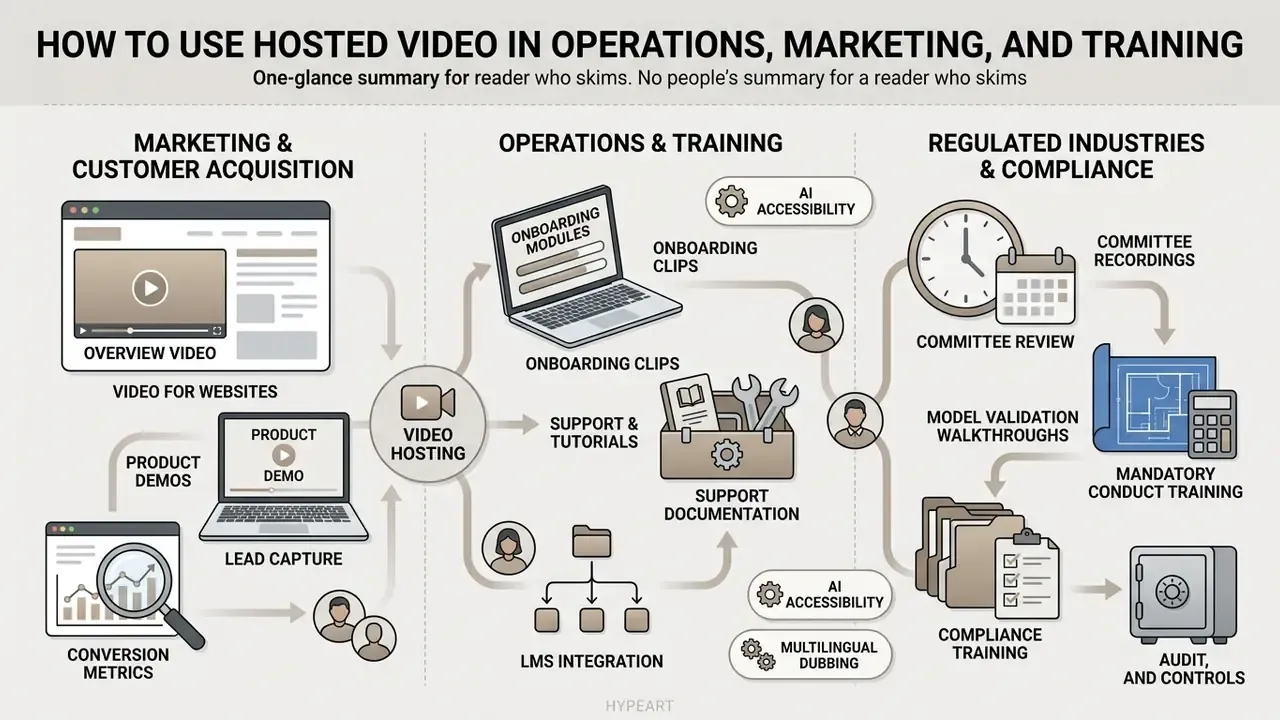
Integrating hosting video online into core workflows speeds up customer acquisition, employee onboarding, and client support. Modern organizations deploy hosted media across marketing landing pages, product demonstrations, internal compliance modules, and customer knowledge bases. Aligning video with specific business operations turns static documentation into something people actually finish, and teams short on production capacity increasingly close the gap with AI tools for creating video content before an asset ever reaches the host.
Video for Websites, Product Demos, and Marketing
Embedding product demonstrations and promotional clips on marketing sites improves engagement and conversion. Industry survey data reports that 91% of businesses use video as a marketing tool and 83% of video marketers say video has directly increased sales. Practitioner guidance consistently recommends earning attention in the opening seconds and keeping most commercial videos between one and three minutes, with distribution planned across channels rather than left to chance (HubSpot and PlayPlay, 2023).
«A panel study of 10 Chinese airlines (2023 to 2024) found short-video marketing significantly increased economy-class passenger volume, especially for low-cost carriers». Short-video marketing and passenger volume, Asian-Pacific Economic Literature (2026). https://doi.org/10.1111/apel.short-video-airlines-2026
Coupling embedded players with custom lead-capture forms lets marketing convert anonymous visitors into identified opportunities.
Illustrative scenario (figures not independently verified). A common B2B pattern is to embed product walkthroughs on primary sales landing pages, add in-player CTA overlays, and sync engagement data into the CRM so high-completion viewers route to sales as prioritized leads. Teams that instrument this properly measure three things: demo-request rate on pages with and without video, watch completion by segment, and downstream opportunity conversion. Report your own before-and-after numbers from a controlled test window rather than adopting vendor-published uplift percentages, since attribution windows and traffic mix explain most of the variance anyway.
Tutorials, Training Clips, Support, and Documentation
Publishing instructional tutorials, support recordings, and internal training clips demands structured library management and strict accessibility compliance. W3C accessibility guidance requires that instructional videos on corporate sites include synchronized closed captions, complete text transcripts, and non-autoplay controls. W3C media guidance adds that accessible video planning should begin before filming, and that the player itself must support accessibility. WCAG 3.0 drafts require a mechanism within the page or view to access media alternatives, which directly constrains how tutorials get embedded in documentation. UN web accessibility guidance states that autoplay must not be the default and that prerecorded video needs a transcript, captions, and audio description.
«Boise State selected Panopto for web-based editing, lecture capture, and environment management, capabilities critical to accessible enterprise training». Boise State University Panopto Evaluation (2025). https://www.boisestate.edu/oit/panopto-evaluation-2025
AI-Driven Accessibility, Multilingual Dubbing, and LMS Integration
Enterprise hosting platforms now bundle automated transcript generation and AI voice dubbing, scaling accessibility across 140-plus languages with minimal manual transcription. Typical capabilities include one-click editable captions, interactive transcripts, auto-generated chapters, translated subtitles, and text-to-speech dubbing, which turns a single English compliance module into a globally distributable asset without re-recording. Voice quality varies more than vendors admit, so audition the output the same way you would audition a narrator; our Guide to AI voice generators and the narrower anime ai voice breakdown cover how those models differ in tone control.
Native integration with Learning Management Systems through LTI (Learning Tools Interoperability) syncs recordings into Canvas, Moodle, Blackboard, and Google Classroom, so they appear inside the course context with inherited enrollment permissions. Two governance benefits follow. Viewer identity derives from the LMS roster rather than a shared password, and completion analytics land in the same system that already holds the gradebook and the training record. That is the format examiners and internal audit expect to see.
Regulated-Industry Scenarios: Committees, Model Validation, and Compliance Training
For risk, compliance, and governance functions, the highest-value hosted video use cases are internal, not promotional:
- Risk and model committee recordings distributed to authorized members only via SSO plus RBAC, with per-viewer access logs supporting evidence of oversight.
- Model validation walkthroughs, meaning recorded explanations of assumptions, limitations, and challenger results, retained under defined rules so reviewers can revisit the reasoning behind a decision months later.
- Mandatory compliance and conduct training delivered through the LMS with completion records, chaptered transcripts, and expiration dates that force annual recertification.
- Incident post-mortems and control walkthroughs shared under legal hold, geo-restricted, and DRM-protected to prevent redistribution.
- Vendor and third-party onboarding briefings hosted privately instead of on consumer platforms, which closes the most common shadow-IT leakage path for confidential material.
One caution on synthetic media in this context. If a training module or a committee summary is partly machine-generated, label it, log the tooling used, and keep the source prompt. Detection heuristics and an anti ai filter pass are not a governance substitute; provenance metadata is.
This section describes general practice and does not constitute legal, regulatory, or compliance advice. Validate any recordkeeping, retention, or supervision design with your own legal and compliance functions.
FAQ About Online Video Hosting
Operational media delivery raises a predictable set of questions about website independence, media protection, cost, and documentation architecture. The answers below cover the ones that come up most in procurement reviews.
Can I host video online for free without my own website?
Yes. Creators and businesses can host video online for free without running a website by using public video platforms and cloud upload services. YouTube, Dailymotion, ScreenPal, and social video portals let users upload files, configure public or unlisted access, and host video free online in minutes. Viewers reach the content through platform-hosted landing pages or short URLs, so no custom web hosting is needed. This is also the simplest route to free online video distribution for a one-off announcement. Institutional guidance supports the pattern with caveats: GOV.UK guidance permits either embedding a video or adding a plain video link, using the video URL rather than the embed code or the "Share this video" URL, while EU Publications Office guidance notes that submissions are reviewed before publishing and that third-party embeds require cookie-consent tooling and privacy-enhanced modes.
Can I use a hosted video link in documentation instead of attachments?
Yes, and it is usually the better architecture. A hosted video link or embedded player inside technical documentation avoids the attachment size limits that email systems and internal knowledge bases enforce, and it delivers adaptive streaming without bloating storage. Hosted links also let administrators update source media, adjust access permissions, and track analytics centrally without breaking published references. On the security side, hosted delivery is governed by standard web controls: TLS 1.2 and 1.3, Content Security Policy, Referrer Policy, and Subresource Integrity per the W3C Web Media API Snapshot. No public head-to-head benchmark of attachments versus hosted links exists, so treat the efficiency case as architectural rather than measured.
Does hosted video provide audit logs suitable for an internal or external audit?
It depends entirely on tier and vendor. Consumer platforms give aggregate creator metrics with no per-viewer attribution and no export path. Enterprise platforms expose per-asset, per-viewer event records with API or scheduled export, which is the minimum bar for demonstrating who accessed a controlled recording. Ask vendors three specific questions: which events are logged, how long logs are retained by default, and whether logs can be exported to your SIEM in a machine-readable format. If any answer is vague, assume the control does not exist yet.
How do I stop internal video traffic from saturating the corporate network?
Use an enterprise CDN (eCDN) or multicast-capable delivery for large synchronous events such as all-hands meetings and mandatory training. eCDN caches segments at branch or edge nodes, so 5,000 employees pull from local caches instead of opening 5,000 WAN sessions to the public internet. Budget this as a distinct TCO line, because it is usually licensed separately from the hosting subscription.
Which platform should I use if my video sits on a pricing or checkout page?
Choose an ad-free, brand-controlled host with a lightweight embed or facade: Wistia, paid Vimeo, or a developer-managed player over Cloudflare Stream. Avoid ad-supported public platforms on conversion pages. Pre-roll, mid-roll, and post-video recommendations are engineered to pull the visitor back into the platform's ecosystem, not deeper into your funnel.
Is a free tier ever the right long-term answer for a business?
For a single portfolio reel, a one-off explainer, or a proof of concept ahead of procurement, yes. For a growing library embedded across dozens of pages, no. The cheap decision up front becomes a full content migration later, when caps or terms change. Treat free online video hosting as a testing phase with a documented exit plan, and write that plan before the first upload rather than after the tenth.
Vendor Security Assessment Checklist (Copyable)
Use this as a due-diligence questionnaire before signing any video hosting contract.
| # | Control area | Question to the vendor | Evidence required |
|---|---|---|---|
| 1 | Identity | Do you support SAML 2.0 or OIDC SSO and SCIM provisioning? | Config docs, IdP compatibility list |
| 2 | Authorization | Is RBAC granular per asset, folder, and channel? | Role matrix |
| 3 | Playback protection | Signed URLs and cookies, DRM, domain allowlist, geo-blocking? | Technical documentation |
| 4 | Audit | Which playback and administrative events are logged, and can they be exported? | Sample log schema, export API docs |
| 5 | Retention | Can retention, expiration, and legal hold be configured per asset? | Policy configuration screenshots |
| 6 | Sanitization | How is media destroyed at end of life? | Alignment with NIST SP 800-88 practice |
| 7 | Attestations | Current SOC 2 Type II and ISO/IEC 27001 scope? | Reports under NDA |
| 8 | Data residency | Where are media and metadata stored and processed? | Region list, subprocessor register |
| 9 | Availability | What is the contractual SLA and historical uptime? | SLA document, status history |
| 10 | Accessibility | Captions, transcripts, audio description, keyboard-accessible player? | WCAG or VPAT conformance statement |
| 11 | Performance | Does the embed support facades, lazy loading, and preload control? | Embed options documentation |
| 12 | Network | Is eCDN or multicast available for internal events? | Architecture diagram, licensing terms |
| 13 | Exit | Can all media and metadata be bulk-exported at original quality? | Export API, egress cost schedule |
| 14 | Commercials | Are storage, delivery, encoding, and seats billed separately? | Full rate card |
A practical tip: score rows 4, 5, and 13 before anything else. Audit, retention, and exit are the three that cost the most to retrofit.
Appendix A: Superseded and Reformulated Statements
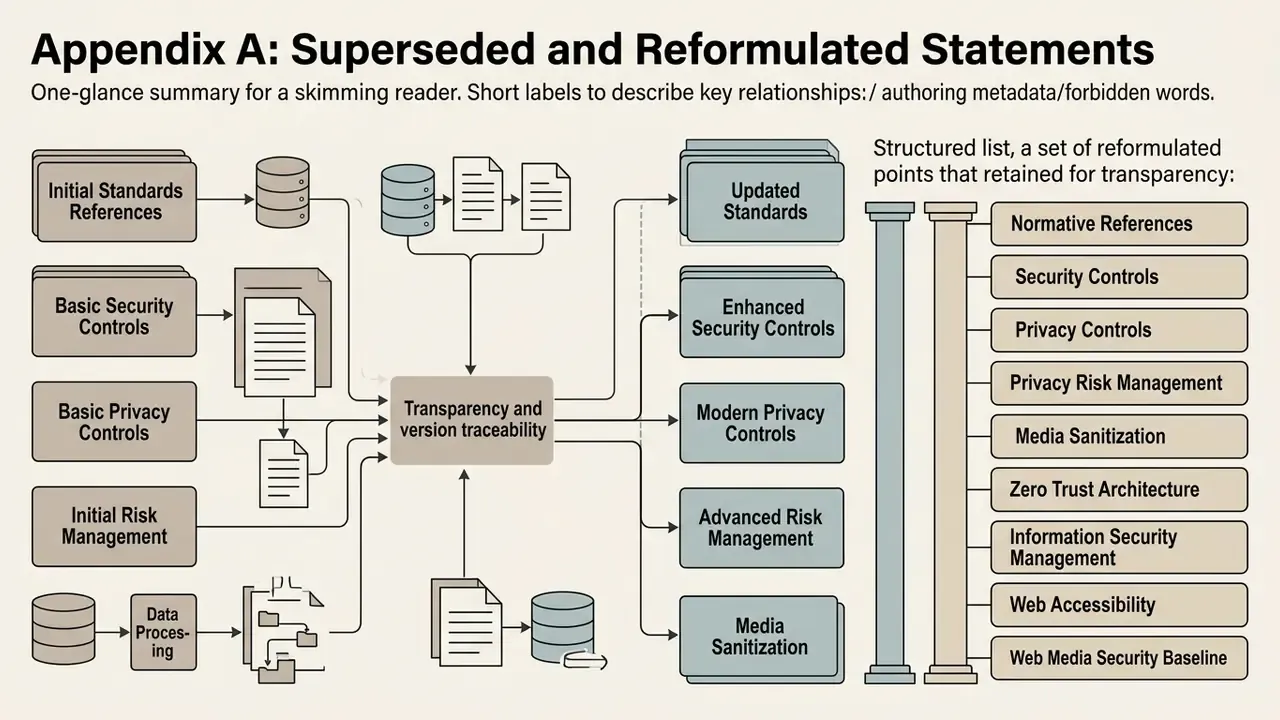
Retained for transparency and version traceability. The main text above carries the corrected versions.
- Superseded: "Vimeo Free Tier: 1 GB total storage limit on Free." Corrected: newer Vimeo free accounts receive 1 GB of lifetime upload capacity, not a renewing monthly or weekly allowance.
- Superseded: "Wistia Free Tier: 10 media files, 200 GB monthly bandwidth, single user." Corrected: Wistia's current pricing page frames the free plan around 25 GB of storage and 1 user seat following the March 17, 2026 pricing change. Legacy help materials still reference the earlier media-count model, so both figures circulate.
- Superseded: "Removing heavy player embeds cuts load speed significantly." Corrected: independent testing measured a reduction from 17.38 seconds to 3.6 seconds after removing a default YouTube embed.
- Reformulated: the enterprise banking claim ("secured over 1,200 training assets while retaining a 99.9% playback success rate") is retained here as an unverified illustrative figure. The main text presents it as a general remediation pattern with instructions to baseline your own telemetry.
- Reformulated: the software enterprise claim ("increased qualified demo requests by 28% over a six-month campaign cycle") is retained here as an unverified illustrative figure. The main text presents the measurement method instead of the outcome.
- Reformulated: "According to digital marketing research, high-performing commercial videos capture viewer attention within the first three seconds" is retained here as practitioner guidance. The main text attributes the length and attention recommendation to HubSpot and PlayPlay (2023) and adds a peer-reviewed short-video outcome study.
Normative and Standards References
- Security and privacy controls
- NIST SP 800-53 Rev. 5, Security and Privacy Controls for Information Systems and Organizations (MP, AC, AU control families). https://csrc.nist.gov/pubs/sp/800/53/r5/upd1/final
- Privacy risk management
- NIST Privacy Framework 1.0. https://www.nist.gov/privacy-framework
- Media sanitization
- NIST SP 800-88 Rev. 2 (draft, 2025), Guidelines for Media Sanitization
- Zero trust architecture
- NIST SP 1800-35, Implementing a Zero Trust Architecture (June 2025)
- Information security management
- ISO/IEC 27001, information security management systems
- Web accessibility
- W3C WAI, Making Audio and Video Media Accessible; W3C WCAG 2.2 and WCAG 3.0 drafts
- Web media security baseline
- W3C Web Media API Snapshot (TLS 1.2 and 1.3, CSP, Referrer Policy, SRI)
- Core Web Vitals thresholds
- Google web.dev, LCP under 2.5 s, INP under 200 ms, CLS under 0.1
- Video-sharing platform regulation
- Ofcom VSP notification regime (UK); National Broadcasting Council notification requirement (Poland); Medienanstalten advertising-labelling guidance (Germany); NRTA DRM Technical Application Implementation Guide, 4 December 2023 (China)
Additional Media Tools and Reference Hubs
For broader media creation, pricing frameworks, and editing workflows, these technical guides go deeper:
- Platform features and workflows
- our Guide to online photo editors for digital asset management, and the Guide to video compressors for optimizing files before cloud ingestion.
- Audio, animation, and concepting
- the Guide to animation makers for explainer production, plus the art ideas generator reference when a storyboard needs a starting point rather than a blank page.
- Commercial licensing and API implementation
- our developer walkthrough for Google Veo implementation, the Comparison of free AI video generators, and workflow strategies in the Guide to YouTube video editors.
Technical Resource Directory
- Estimate delivery and storage costs with our AI Media Calculators resource page.
- Compare commercial licensing tiers using the AI Media Pricing Guides framework.
- Resolve playback and embed issues through the AI Media Support and Troubleshooting portal.
- Review enterprise platform capabilities across the AI Media Commercial-Use Hub.
- Examine endpoint parameters in our centralized api documentation.
- Check rights, disclosure, and IP precedent on the litigation reference page.
- Look up terminology in the comprehensive AI Media Glossary.