Why does a file-conversion utility deserve a governance read? Because a two-click upload can move a recorded client call, a board briefing, or a KYC interview onto infrastructure nobody in your organisation has assessed. That is the practical stake for a US financial-services decision-maker. The mechanics are simple; the control questions are not.
Executive Summary
- What it does: An online video to mp3 converter demultiplexes a video container (MP4, MOV, MKV, WebM), isolates the audio elementary stream, decodes it to raw PCM, and re-encodes it as an MPEG-1 Layer III (MP3) bitstream. All visual tracks are discarded, reducing asset size by roughly 80-95%.
- Quality recommendation: Use 192 kbps for general music and podcast distribution, 256 kbps CBR / 44.1 kHz when the source audio was already compressed (to avoid audible double-compression artifacts), and 96-128 kbps mono for speech-only transcription feeds. Speech intelligibility for ASR stays stable down to roughly 24 kbps.
- If you cannot lose quality: MP3 is lossy by definition. Archive-grade workflows should target WAV (LPCM) or FLAC instead of the mp3 format.
- Streaming platform limits: Direct URL ingestion works only for public, unencrypted media endpoints (links ending in
.mp4,.webm, or raw manifests). YouTube, TikTok, and Twitch pages are not supported by mainstream converters, both because of Terms of Service restrictions and because of encrypted stream wrappers. - Security risk: File-upload endpoints are a primary web attack surface. Unrestricted File Upload (UFU) vulnerabilities remain widespread, and most organizations do not run multi-engine scanning on uploads. Sensitive or regulated media (PII, MNPI, client recordings) should never transit an unvetted public converter. Route it through an isolated, self-hosted pipeline instead.
- Legal risk: Creating a permanent audio copy of third-party video engages the exclusive reproduction and distribution rights under 17 U.S.C. § 106. Fair Use (§ 107) is a four-factor defense, not a quota and not a commercial licence.
How to Read This Guide
Three audiences usually land here, and they need different depths.
Individual users who simply want to convert video to mp3 online can stop after the settings section: source, bitrate, download. Media and content teams should also read the quality and licensing parts, because double compression and rights clearance cause most of the rework we see in editorial pipelines. Risk, security, and AI governance owners will find the material they actually need in the privacy, shadow-AI, and enterprise-pipeline sections, where the question shifts from «how do I get an mp3 file?» to «who approved this data leaving the perimeter, and for how long is it stored?»
One caveat before we start. Audience assumptions in this guide are hypotheses drawn from search behaviour and editorial interviews, not from verified customer research.
What Is an Online Video to MP3 Converter?
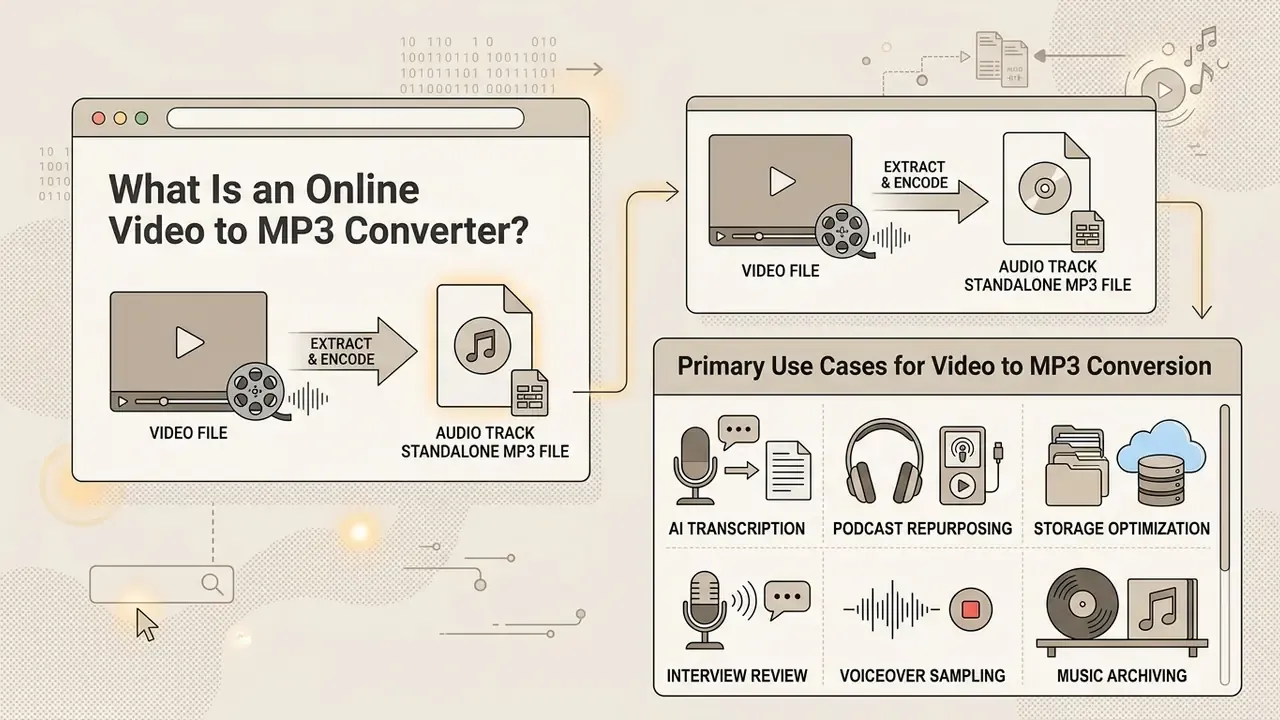
An online video to mp3 converter is a web-based utility that extracts the audio track from a video source and encodes it into a standalone MP3 audio file. Unlike a standard video downloader that preserves both visual and sound streams, a dedicated online mp3 converter from video isolates the audio payload, strips away the visual data, and writes the resulting stream into the mp3 format.
Digital video files such as MP4, WebM, and MKV function as multimedia containers. According to the ISO/IEC 14496-14 standard, these containers multiplex video streams (H.264 or AV1, for example) with audio streams (AAC or Opus) alongside subtitles and structural metadata (ISO/IEC 14496-14:2020). Every elementary stream is stored as its own media track with a unique track identifier, which is precisely what makes clean audio separation possible.
So what actually happens when you convert video to mp3 online? The converter’s backend demultiplexes (demuxes) the container, isolates the elementary audio stream, and decodes it into raw PCM audio data. The engine then passes this raw audio through a psychoacoustic encoder to generate a structured mp3 audio file (FFmpeg Documentation, current release).
This process fundamentally changes how the file is stored, transmitted, and played. A video file carries high data overhead because of visual frames, whereas an extracted mp3 file contains only compressed audio data and ID3 metadata tags (title, artist, track details). As documented by the Library of Congress in its Sustainability of Digital Formats resource, MP3 remains a de facto universal audio format wrapped in MPEG-1 Layer III bitstreams, which makes the converted output lightweight and playable on virtually any media playback system without specialized video codecs (Library of Congress, Sustainability of Digital Formats, FDD000105).
The MP3 bitstream itself is highly regular. Each Layer III frame represents 1,152 samples and carries a sync header, optional CRC, side information, main data, and ancillary data. Because Layer III main data can span frame boundaries, the format natively supports variable bitrate (VBR) encoding. That is why modern converters can offer both CBR and VBR output profiles from the same source video.
Primary Use Cases for Video to MP3 Conversion
Extracting standalone audio from video containers serves several core professional and personal workflows:
- AI transcription and note-taking prep Feeding lightweight MP3 files into automated speech-to-text engines (Whisper, Otter.ai) reduces processing latency and avoids transport errors associated with bulky MP4 uploads. Many transcription, podcast-hosting, language-learning, and AI note-taking platforms prioritise audio-only input formats. Once a transcript exists, teams often push it straight into an ai writing generator to draft summaries or follow-up notes.
- Podcast and educational content repurposing Converting recorded webinars, video lectures, classroom discussions, and video podcasts into MP3 audio lets users build offline learning libraries playable during commutes without screen use. Long recordings become easier to sort, rename, archive, and revisit later.
- Storage and bandwidth optimization Discarding visual tracks reduces overall asset file size by 80% to 95%, which makes audio notes easier to distribute via email attachments, mobile storage, or client preview links.
- Interview and research review Analysts and journalists convert recorded video interviews and brainstorming sessions into MP3 so they can scan for quotes, review decisions, and keep compact backups of important conversations.
- Social media and voiceover sampling Sound designers and video editors pull clean dialogue bites, narration tracks, or background beds from video clips for reuse in secondary production, presentations, and short-form content. Extracted narration frequently ends up under an animated explainer video or a short intro built with an animated logo maker.
- Music and performance archiving Concert recordings, live sessions, and music videos are converted to audio for personal offline listening libraries, subject to the copyright constraints described later in this guide.
Which Video Files and Links Can Be Converted to MP3?
Most web-based converters support a broad spectrum of local video formats as well as direct web URLs. Standard input formats include MP4, AVI, MOV, MKV, WebM, M4V, and MPEG-TS. Broader engines extend coverage to legacy and specialised containers (FLV, WMV, 3GP, OGV, RAM, Apple ProRes sources) plus pure audio inputs such as WAV, PCM, WMA, OGG/Vorbis, ALAC, FLAC, and M4A, with mature services advertising well over 150 recognised source formats.
Users working with generated footage from AI video generators can convert those exports the same way, and so can teams animating stills through tools like akool image to video. You can convert local files directly or supply a public video link to retrieve and transcode remote online media.
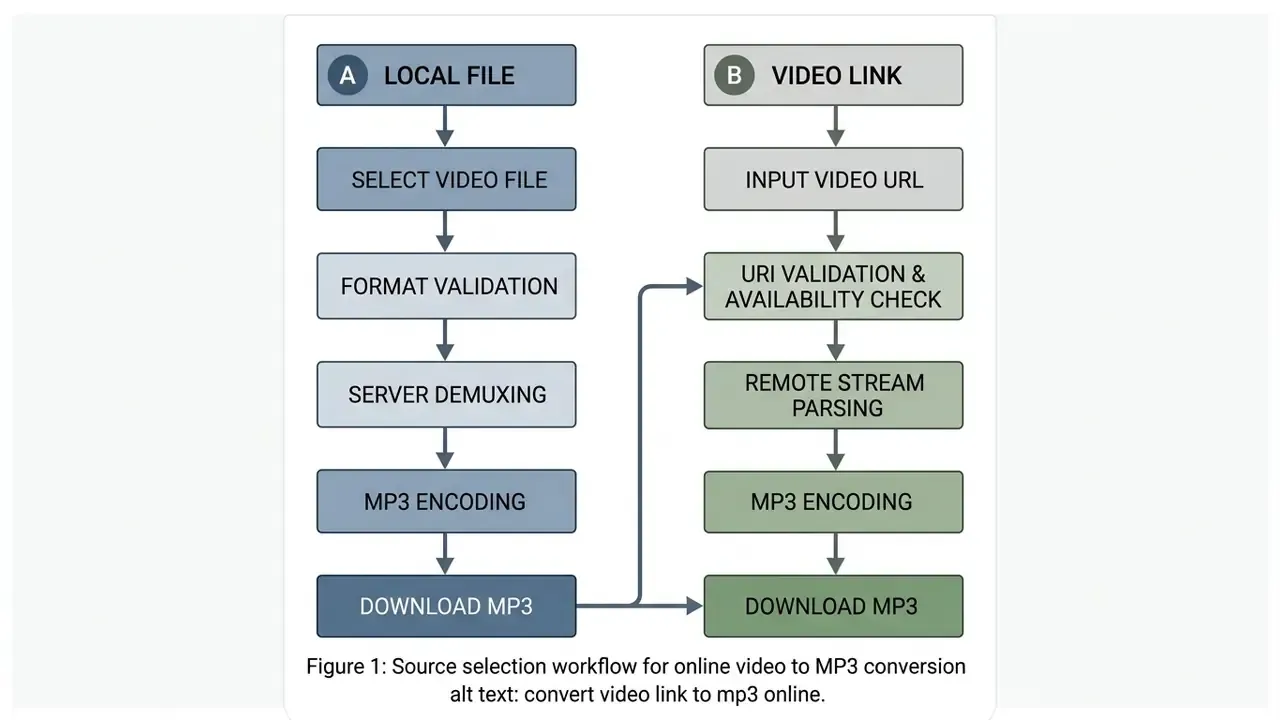
The distinction between uploading a file and supplying a video link rests on where input validation and stream retrieval occur:
Technical limitations apply when handling protected media. Videos protected by Digital Rights Management (DRM) or encrypted streaming protocols (encrypted HLS or DASH with Widevine/PlayReady) cannot be parsed by standard converters without authorization keys. Vendor documentation for converter services states it plainly: exotic or DRM-protected files may fail to open at all. Regional geo-blocking, paywalls, and restrictive authentication tokens will also block server-side link ingestion. For technical definitions of container structures and stream parsing, the AI Media Glossary is the reference index.
Format Compatibility and Lossless Audio Alternatives
While MP3 is the global standard for compressed audio distribution, certain archiving workflows require lossless preservation. If your source video contains uncompressed or high-bitrate audio (LPCM in MOV files, for instance), re-encoding to MP3 applies lossy psychoacoustic compression that cannot be reversed. Claims of «lossless MP3 output» on some converter landing pages are technically incorrect. MP3 is lossy by design.
| Input Source Format | Container Type | Native Audio Codec | Target Audio Output Options | Best For |
|---|---|---|---|---|
| MP4 / M4V | ISO Base Media | AAC, Opus | MP3 (lossy) / AAC (passthrough) | Web playback, general podcasts |
| MOV / QT | QuickTime | LPCM, AAC, ProRes audio | WAV (lossless) / MP3 (320 kbps) | Studio editing, transcription |
| MKV / WebM | Matroska | Vorbis, Opus, FLAC | FLAC (lossless) / MP3 (192+ kbps) | Master archiving, speech analysis |
| AVI / WMV / FLV / 3GP | Legacy containers | MP3, WMA, PCM, AMR | MP3 (128-256 kbps) | Legacy video asset recovery |
| MPEG-TS / OGV | Broadcast and open containers | AC-3, AAC, Vorbis | MP3 (192 kbps) / FLAC | Broadcast capture, archive normalisation |
Rule of thumb: if the extracted audio will be re-edited, mastered, or preserved long-term, export WAV or FLAC. If it will be listened to, transcribed, or distributed, MP3 at 192 kbps or higher is the pragmatic choice.
Convert MP4 Video Files to MP3 Audio
Convert an Online Video Link to MP3
When you convert video link to mp3 online, the conversion backend acts as an HTTP client and parses the target resource. The server validates the URI, resolves streaming manifests, and streams the raw media data straight into the transcoding pipeline. Teams that produce source footage with free AI video generators usually host those exports on public endpoints, which makes link-based ingestion straightforward.
Important ingestion notice regarding streaming platforms. Direct URL conversion requires public, unencrypted media file endpoints: links ending in .mp4, .webm, or raw stream manifests. Standard online converters do not support direct ingestion from proprietary streaming platforms such as YouTube, TikTok, Instagram, or Twitch. Two reasons stack here: platform Terms of Service (ToS) prohibit extraction, and encrypted stream wrappers cannot be demuxed without authorization keys. To process assets from these services, media creators must first export their own authorized source files locally, then run the MP3 extraction job. Any converter advertising one-click ripping from these platforms operates outside those platforms’ terms, and the user carries the resulting legal exposure.
Server-side ingestion of remote links is also subject to strict bandwidth and connection controls. Media platforms often deploy rate-shaping at the TCP level to bound streaming rates as a function of target rate and RTT (Trickle streaming specifications, Google), or cap transmission per client connection according to average file bitrate (NGINX MP4 module parameters). Because those caps are enforced per request, two simultaneous connections can effectively double throughput. If a conversion request exceeds endpoint rate limits or bandwidth allocations, the remote host returns HTTP 429 (Too Many Requests) or RTSP 453 (Not Enough Bandwidth), and the link conversion job terminates (RFC 2326 § 11.3.14; GetStream API rate-limit guidelines). These are distinct failure classes. A 429 signals request-quota exhaustion; a 453 signals insufficient reserved bandwidth.
How to Convert Video to MP3 Online
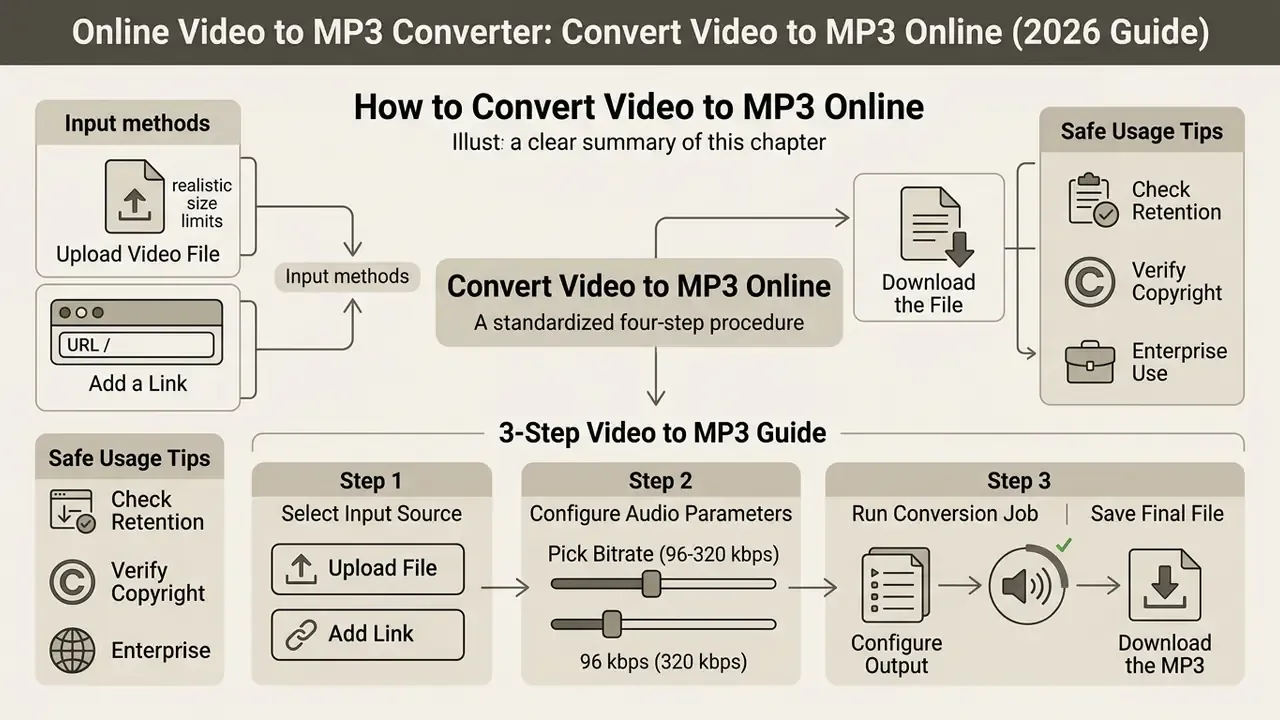
To convert video online to mp3, follow a standardized four-step procedure: select your input source, configure audio output parameters, run the conversion job, and save the final audio asset.
3-Step Video to MP3 Guide
Checklist0 / 3
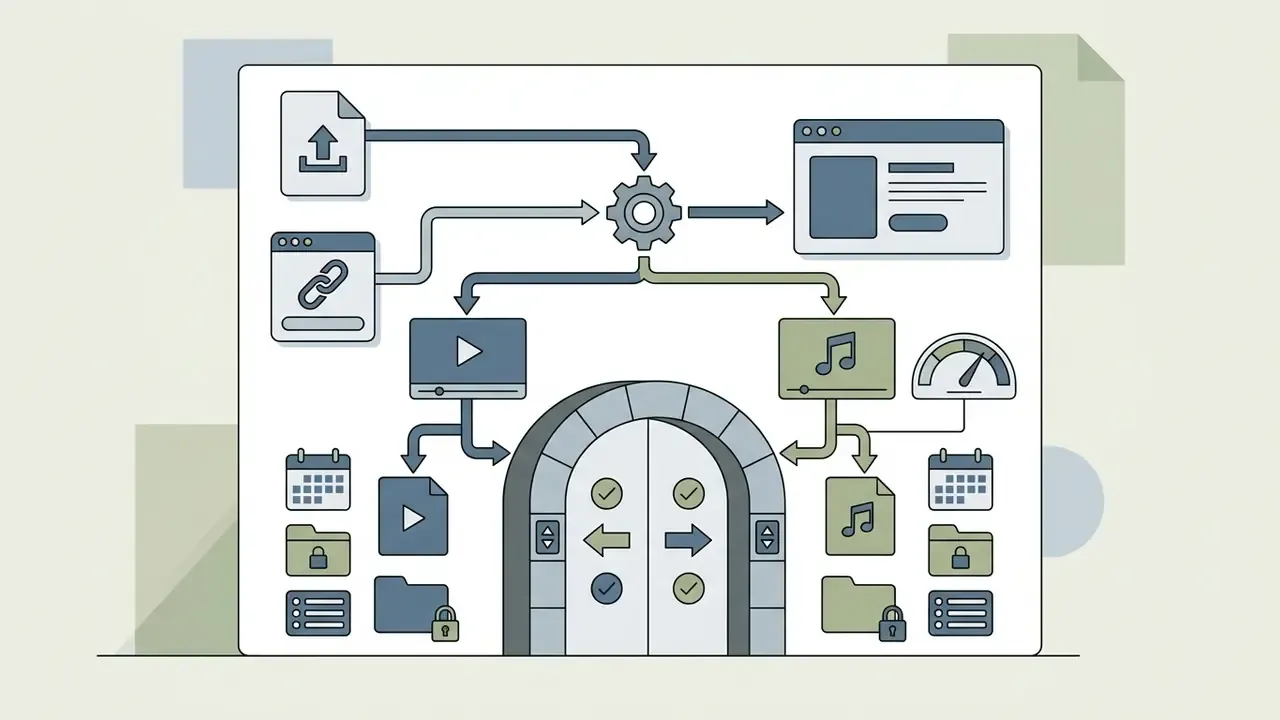
Architectural view for engineering teams. Those same clicks map onto a four-stage server pipeline: Ingest (validated file upload or authorised URL fetch), Parse/Demux (container inspection, soun track selection, PCM decode), Extract/Encode (psychoacoustic MP3 encoding at the configured profile, ID3 tag mapping), and Store/Deliver (temporary encrypted storage, signed download URL, timed purge). Documented job-based conversion APIs follow exactly this model: import a remote URL or direct upload, execute conversion, poll job status until completed, then read the output URI for retrieval.
Instrument each stage separately, because failure modes differ. Ingest fails on ToS, DRM, or rate limits. Parse fails on corrupt containers. Encode fails on unsupported channel layouts. Delivery fails on retention expiry. Mixing those into one «conversion error» metric hides the only signal worth alerting on.
International users search for these exact steps in their own languages: convertir video a mp3 online, convertidor de video a mp3 online, convertir video a audio online, converter video em mp3 online, or simply convert video a mp3 online. Some also type vendor-flavoured queries such as convertio video to mp3 online. Regardless of regional UI translations, the core execution sequence stays identical across browser platforms, including for creators who publish through YouTube video editors and need an audio-only version of the same master.
Upload a Video File or Add a Link
Choose MP3 Settings and Download the File
Before launching the conversion process, users can adjust key audio settings to balance fidelity against final file size. The configurable parameters that actually matter:
- Bitrate: Constant Bitrate (CBR) or Variable Bitrate (VBR) spanning 32 kbps to 320 kbps. The full MPEG-1 Layer III ladder is 32, 40, 48, 56, 64, 80, 96, 112, 128, 160, 192, 224, 256, and 320 kbit/s.
- Sample Rate: Standard sampling frequencies of 32 kHz, 44.1 kHz, and 48 kHz, the three rates defined for MPEG-1 Layer III.
- Channels: Stereo, Joint Stereo, or Mono. Mono halves the payload for single-speaker recordings.
Once parameters are set, clicking «Start» or «Convert» executes the processing job. On completion, the server exposes a secure HTTP link to download mp3 from video online. Individual output files download straight through the browser, while bulk jobs are usually packaged into a single ZIP archive for efficient retrieval. Teams building custom automated media workflows can review our AI Media API Guides to integrate transcode endpoints into software pipelines. If you need synthetic narration rather than extracted dialogue, evaluate AI voice generators instead.
Audio Quality, Bitrate, and Compression When Converting to MP3
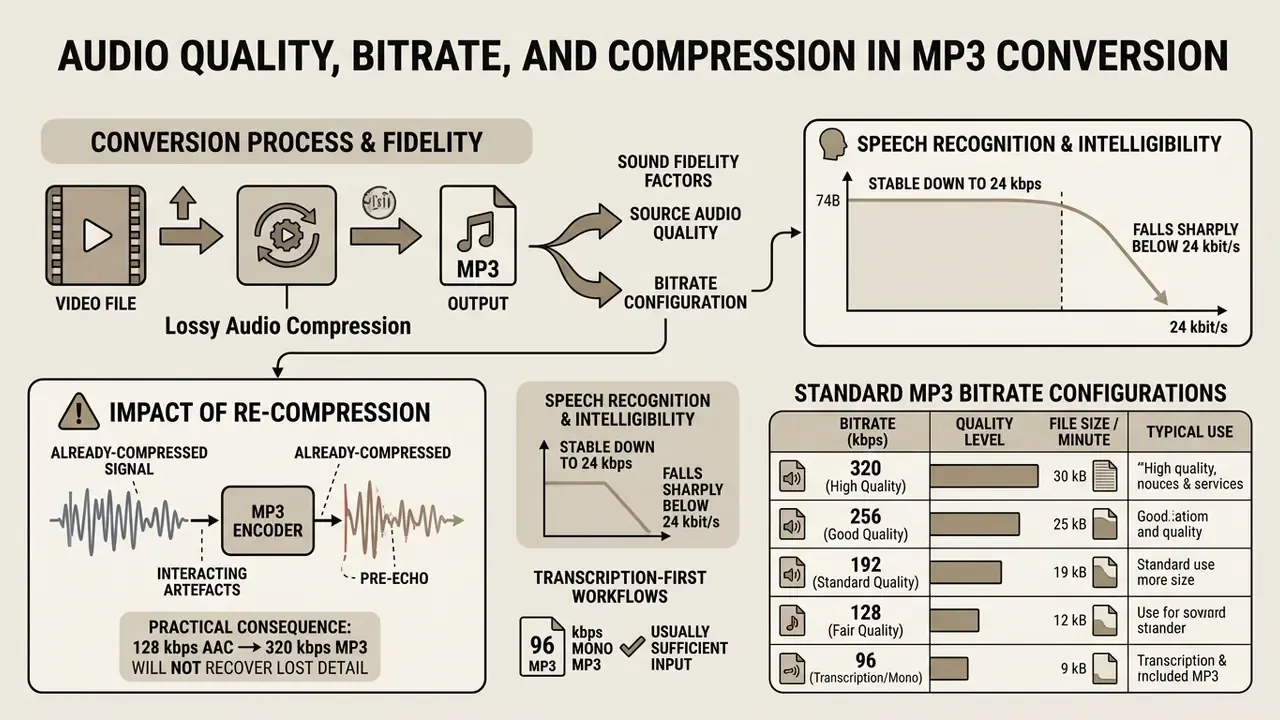
Converting video to MP3 involves lossy audio compression. MP3 encoding uses psychoacoustic models to discard frequency components that are less perceptible to human hearing, trading bit-exact signal preservation for reduced file size (ISO/IEC 11172-3).
When you convert online video to mp3, sound fidelity depends on two factors: the quality of the source audio stream and the target bitrate chosen during conversion. If the original video uses low-bitrate compressed audio, re-encoding into MP3 introduces «double compression» (lossy-to-lossy transcoding). This secondary encoding stage accumulates quantization noise and can produce subtle high-frequency artifacts, no matter how high you set the target MP3 bitrate.
A practical consequence: converting a 128 kbps AAC soundtrack to 320 kbps MP3 will not recover lost detail. The output ceiling is always set by the weakest link in the chain. Source the highest-fidelity master available before extraction, then decide the profile.
The table below outlines standard MP3 bitrate configurations, expected file sizes per minute of audio, and recommended operational use cases:
| Target Bitrate (kbps) | Perceived Audio Fidelity | Avg File Size / Minute | Recommended Use Case |
|---|---|---|---|
| 96 kbps | Low-to-Fair (speech optimized) | ~0.72 MB / min | Voice notes, low-bandwidth dictation, simple spoken podcasts |
| 128 kbps | Fair-to-Good (standard baseline) | ~0.96 MB / min | General web audio, speech broadcasts, draft audio previews |
| 192 kbps | Very Good (music baseline) | ~1.44 MB / min | Standard music playback, general podcasting, mobile listening |
| 256 kbps | High Quality (near-transparent) | ~1.92 MB / min | High-fidelity music archiving, media asset libraries |
| 320 kbps | Maximum MP3 Quality (transparent) | ~2.40 MB / min | Professional audio editing copies, critical listening environments |
Experimental evaluations show that non-expert listeners rarely perceive quality differences between uncompressed audio and MP3 encodings at 192 kbps or higher in standard acoustic environments.
«In a double-blind test with 100 listeners, no statistically significant difference in perceived noise was found between uncompressed PCM, MP3 and AAC at moderate-to-high bitrates». Lin et al., ACER Codec Evaluation Study (2019)
Speech recognition research points the same way: intelligibility stays stable down to 24 kbps before accuracy degrades sharply.
For transcription-first workflows, that means a 96 kbps mono MP3 is usually sufficient input for Whisper-class engines, and it cuts storage by roughly 60% versus a 192 kbps stereo file. To model custom storage and bandwidth requirements across large media catalogs, use our AI Media Calculators.
Case study (illustrative, internal training library). A corporate media team needed to convert 400 internal video training modules into audio podcasts. The first automated run used default 128 kbps settings, and it produced noticeable high-frequency distortion during musical intro stingers, caused by double compression from the source AAC tracks. The team moved the transcode profile to 256 kbps CBR at 44.1 kHz. That single adjustment removed the audible artifacts while still cutting total asset storage volume by 82% relative to the original MP4 containers. Post-extraction, the same team used standard video editing tools to re-attach the cleaned audio to short promotional cuts, and compared codec-level size trade-offs against the guidance in our video compressor reference. Figures are hypothetical and illustrative, not a documented client result.
Is a Free Online Video to MP3 Converter Suitable for Commercial Use?
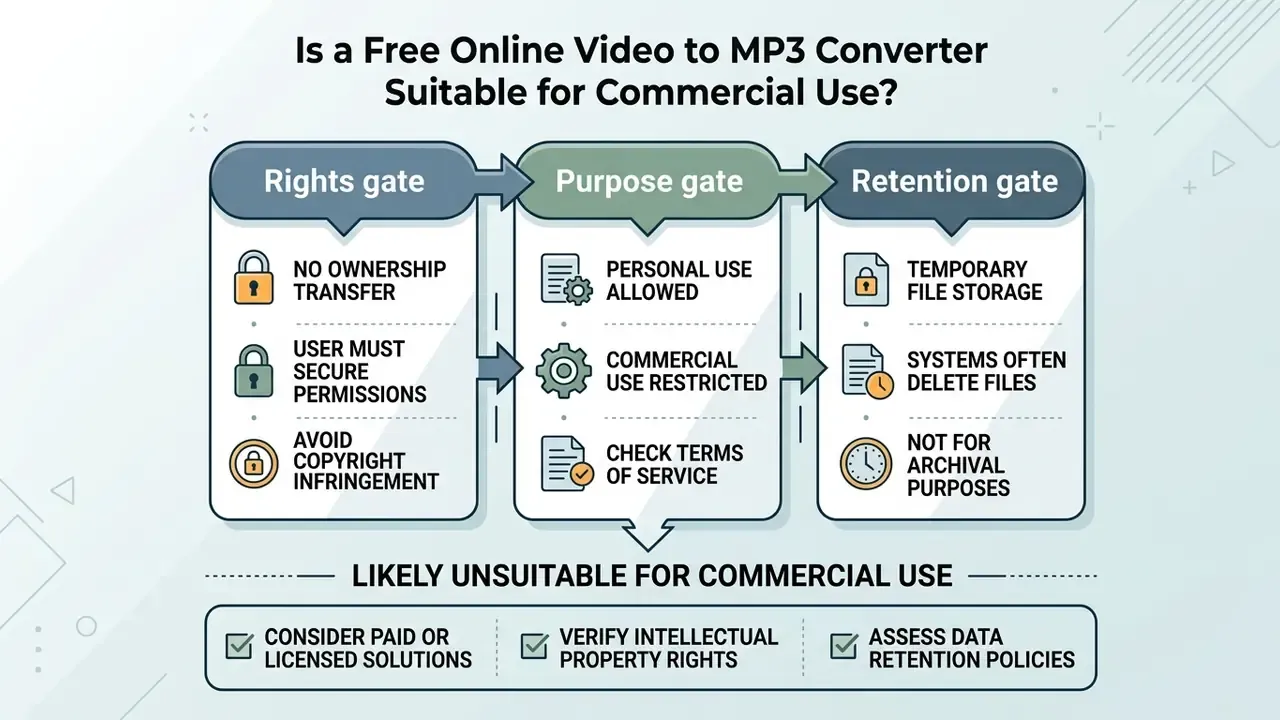
Using a free online video to mp3 converter for commercial projects requires strict adherence to copyright law and service licensing terms. The conversion software itself is a neutral technical tool. Extracting audio from third-party videos without authorization is not.
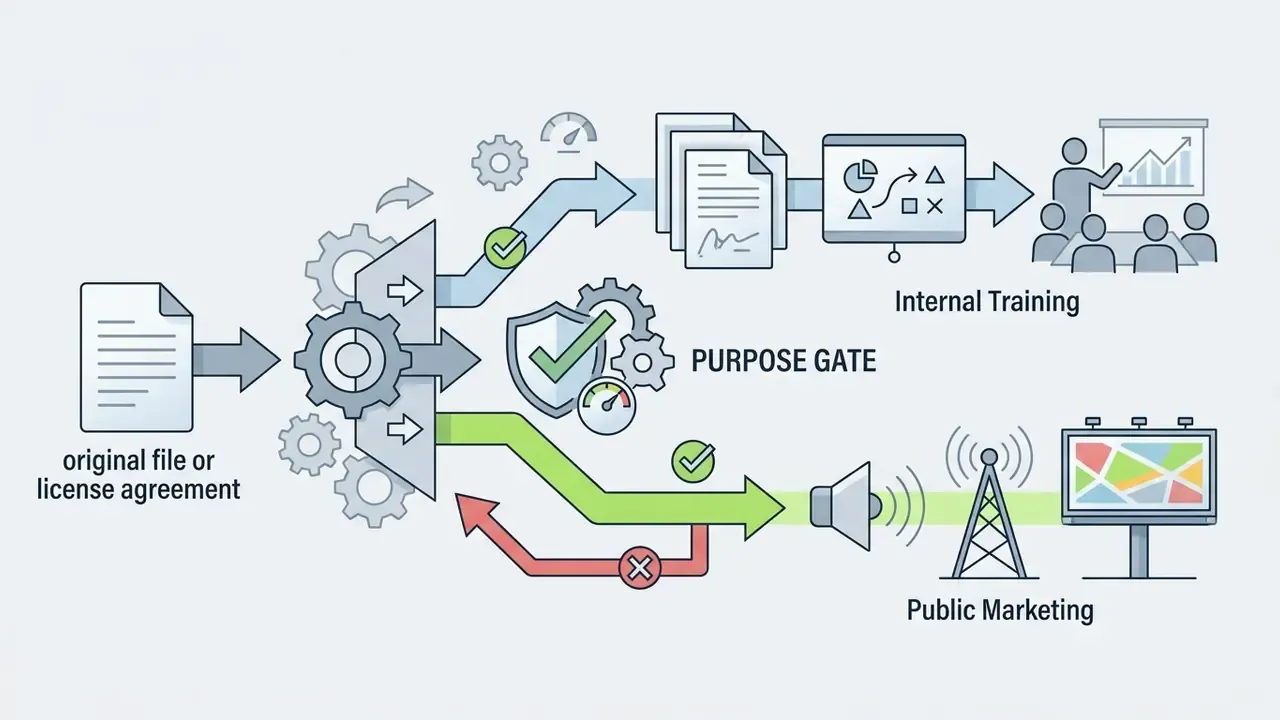
Under United States copyright law (17 U.S.C. § 106), creating a permanent audio copy of a copyrighted video engages the exclusive rights of reproduction and distribution (U.S. Copyright Office guidance). Re-using extracted audio in commercial podcasts, advertisements, or monetization workflows without a licence is generally non-compliant, even when the conversion itself was free.
«Stream-ripping is the preferred method of accessing pirated music in most EU countries, accounting for more than a third of all access to unlicensed music content». EUIPO, Online Copyright Infringement in the European Union (2023)
That statistic matters operationally. Because stream-ripping is the dominant infringement channel, rights holders and platforms actively monitor it, so enterprise use of ripped audio carries elevated detection and enforcement risk.
The doctrine of Fair Use (17 U.S.C. § 107) offers a four-factor balancing defense, weighing purpose, nature of the work, amount used, and market effect. It provides no automatic immunity and no fixed percentage quota for commercial reuse. The U.S. Copyright Office states explicitly that no fixed amount of copied content is automatically permissible, and that uploading or downloading protected works without authorization can infringe reproduction and distribution rights. Where music is involved, use of a sound recording generally requires a licence, a statutory licence, or an applicable exemption. Statutory mechanisms introduced under the Music Modernization Act are separate licensing channels, not blanket permission to use a free converter.
«A survey of 5,000 UK internet users found that 25% had infringed music copyright within a three-month window, with content variety and the cost of legal alternatives cited as primary motivations». UK Intellectual Property Office, Online Copyright Infringement Tracker, Wave 12 (2022)
Commercial operators must also read converter Terms of Service. Standard vendor terms state that users assume sole legal liability for uploaded content and must hold all necessary distribution rights (FreeConvert ToS; OnlineConvert legal terms; OnlineConverter.com terms). The allocation across vendors is unambiguous: the service disclaims responsibility, and the uploader bears it. Free tiers, ad-supported tiers, and paid tiers rarely differ on that point.
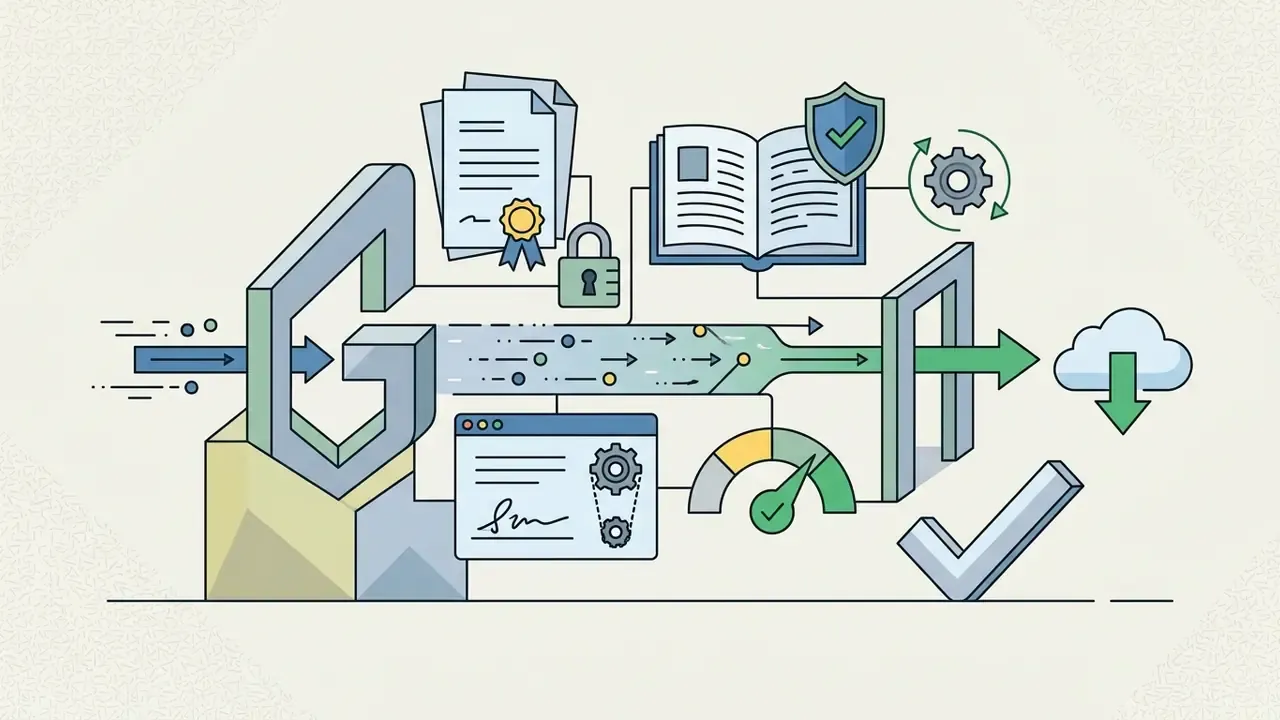
Institutional approval pattern. Regulated organisations typically resolve this with a three-gate internal workflow before any converted audio ships:
Before deploying converted audio in commercial campaigns, review our AI Media Commercial-Use Hub, evaluate adjacent production tooling such as free video editing software or an animated explainer video production partner, and track ongoing copyright precedents through the AI Litigation and Case Timelines. For licensing tiers and cost comparisons, consult the AI Media Pricing Guides.
Privacy and Data Handling During Video Conversion
Data privacy during online conversion rests on three things: transport security, processing isolation, and server-side retention. When you upload a video file to a web converter, the asset crosses external networks and sits temporarily on remote infrastructure you do not control.
Reputable online conversion services implement multi-layered controls to protect user data:
- Transport encryption Encrypted transit using TLS 1.2 or TLS 1.3 with HTTP Strict Transport Security (HSTS) to prevent eavesdropping and interception (Convertio security specs). Modern browser media stacks are expected to conform to CSP2, HSTS, Referrer Policy, Subresource Integrity, TLS 1.2/1.3, Upgrade Insecure Requests, and the Web Cryptography API (W3C Web Media API Snapshot).
- Storage protection Encryption of temporary assets at rest using AES-256 (ConversionTools security architecture).
- Isolated execution Sandboxed processing environments that segregate user tasks and prevent cross-tenant data access (CoolUtils compliance documentation).
- Automated data purging Retention schedules that delete uploaded source videos and generated MP3 files within 15 minutes to 24 hours after conversion. Convertio documents immediate deletion of input and temporary files, with output removal after 24 hours; ConversionTools offers an optional 15-minute purge.
That finding generalises directly to video conversion. Staff often do not know that a «temporary» upload has been replicated into a third-party cloud bucket, a CDN edge cache, or a browser sync folder on a personal laptop.
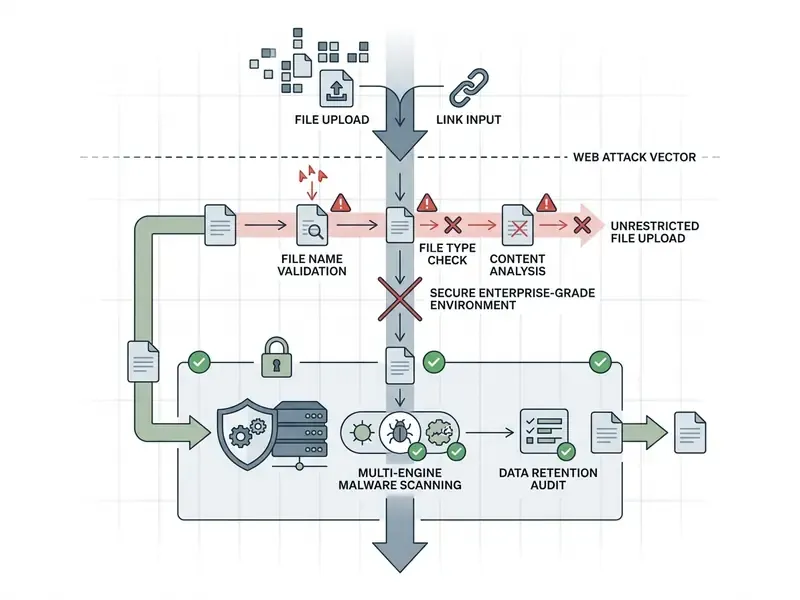
Case study (illustrative, regulated financial services). A financial services firm needed to convert internal recorded briefings into audio for mobile executive review, without exposing that data to public web servers. The team stood up an isolated media processing pipeline using HTTPS over TLS 1.3, strict HSTS headers, and an automated 15-minute file purge. The framework supported secure audio extraction across 150 hours of video while keeping evidence aligned with corporate data protection standards. Storage and processing controls were mapped to NIST SP 800-171 Rev. 3 requirements for protecting controlled unclassified information in non-federal systems, which remains the closest published federal baseline for backend media processing security. The scenario is hypothetical and composite, offered as a control pattern rather than a verified engagement. Teams weighing whether audio extraction or compression is the right remediation should also review the trade-offs in our video compressor guide.
Shadow AI Risk Mitigation Checklist for CRO, Security, and AI Governance Owners
Unsanctioned use of public converters by employees is a classic Shadow AI and Shadow IT pattern. A recorded client call becomes an MP3 on an unknown server in two clicks. No ticket, no owner, no retention record. Recommended controls:
- Categorise and gate the domain class.Add «file conversion / media conversion» categories to your web proxy, secure web gateway, or CASB policy set. Allow only an approved internal endpoint, by exception.
- DLP inspection on upload.Apply content inspection to multipart/form-data uploads for PII, MNPI, account numbers, and client identifiers. Block, rather than log-only, for regulated data classes.
- Publish a sanctioned alternative.Shadow usage persists when no approved path exists. Provide an internal FFmpeg-based extraction service or an approved vendor endpoint with documented retention.
- Endpoint telemetry.Monitor browser upload events from managed devices to non-sanctioned conversion domains. Alert on files above a size threshold.
- Retention verification.Require written vendor retention terms (deletion window, encryption at rest, sub-processor list) before approval, then verify with a test asset.
- Awareness with a concrete example.Train staff on the specific scenario, «recorded board briefing, free converter, third-party retention», rather than generic upload warnings.
- Copyright and licence attestation.Require the requesting team to record the rights basis for any third-party source video before conversion.
One more thing that is easy to miss. Mobile photo and media utilities, from an android photo editor to a browser converter, often hold read access to the same gallery that stores screenshots of internal dashboards. Scope your mobile policy accordingly.
Public Web Converter vs Enterprise Self-Hosted Pipeline
| Evaluation Criterion | Public Web Converter | Enterprise Self-Hosted / Private-Cloud Pipeline |
|---|---|---|
| Data sovereignty | Source video leaves the perimeter; storage region often undisclosed | Processing stays in a controlled VPC or region of record |
| Retention control | Vendor-defined (15 min to 24 h), rarely auditable | Policy-defined purge, logged and auditable |
| Threat surface | Shared multi-tenant upload endpoint; documented UFU risk class | Isolated container or worker, private ingress, malware scanning under your control |
| Compliance evidence | Marketing security page; SOC 2 / ISO evidence variable | Mapped to internal controls and NIST SP 800-171 Rev. 3 style requirements |
| Throughput and batch size | 100-500 MB per file typical; queue contention at peak | Horizontally scaled FFmpeg workers; batch limited only by capacity |
| Cost model | Free, ad-supported, or freemium tiers | Compute plus storage plus engineering maintenance |
| SLA and support | Best-effort, no guaranteed uptime | Internal SLA, on-call ownership |
| Best fit | Personal media, non-sensitive public content, one-off conversions | Client recordings, regulated data, high-volume transcription pipelines |
Decision rule: if the source video would require an NDA, a data-processing agreement, or a records-retention entry, it belongs in a self-hosted pipeline, not a public converter. Everything else is a matter of convenience.
Limits worth stating plainly. Self-hosting removes third-party retention risk, but it transfers patching, capacity, and monitoring duties to your own team. Nobody should present that as a free win.
Video to MP3 Converter FAQ
Browser-based converters use standard modern web APIs to process files across operating systems, with no local software installation. Front-end interfaces rely on the W3C File API to access local media securely inside the browser sandbox, reading only files the user explicitly supplies through an input element or drag-and-drop (W3C File API Specification). That architecture is what makes an online video converter mp3 workflow behave consistently on Windows, macOS, Linux, ChromeOS, iOS, and Android.
How Does an MP3 File Differ From an MP4 File?
An mp3 file is a dedicated, single-stream audio bitstream (MPEG-1 Layer III) built exclusively for sound storage and playback, with metadata carried in ID3 tags. An MP4 file is a multimedia container (ISO/IEC 14496-14) that multiplexes visual frames, audio tracks, subtitles, and structural metadata into a unified stream, with metadata stored in container atoms. Converting MP4 to MP3 strips away all visual streams, cutting total asset size by up to 90% and producing a lightweight audio-only file that plays on virtually anything: car stereos, smart speakers, phones, DAWs. Short version? MP4 is optimised for watching, MP3 for listening.
Can I Convert a YouTube or TikTok Link to MP3?
Not through standard, compliant converters. You can paste a direct URL to a media file (a link ending in .mp4, .webm, or a raw manifest) and the service will fetch and transcode it. Streaming platform page URLs from YouTube, TikTok, Instagram, or Twitch are not supported, because platform Terms of Service prohibit extraction and the streams arrive wrapped in encrypted, DRM-protected delivery. If you own or have licensed the content, export the authorized master from the platform's own creator dashboard first, then convert the local file.
Will Converting to MP3 Reduce Audio Quality, and What If I Cannot Lose Quality?
Yes, some quality is lost, because MP3 is a lossy format. At 192 kbps the difference is imperceptible for most listeners in typical environments, and at 256-320 kbps it is effectively transparent. Conversion cannot improve audio that was already compressed, though. If the source video carried 128 kbps AAC, that is your ceiling. When lossless preservation is mandatory (music mastering, forensic audio, long-term archiving), export WAV (LPCM) or FLAC rather than MP3.
Can I Use the Converter on a Phone?
Yes. An online video converter to mp3 can be opened directly in mobile browsers such as iOS Safari and Android Chrome. On mobile platforms, users pick video files from the device photo library or file storage. Android devices support direct background downloads to local storage. iOS Safari instead opens an audio preview window, and the user taps «Share», then «Save to Files», to store the converted mp3 file (ytmp3.gg mobile workflow documentation). Support is not uniform: at least one vendor states its converter works in Chrome on iPhone but not yet in Safari, so test the specific service on the specific browser before relying on it. Note the governance implication too. Personal-device conversion of corporate recordings bypasses managed-device DLP entirely, and mobile-use policy should say so explicitly.
Can I Convert Multiple Video Files at Once?
Yes. Many modern web tools support batch conversion, letting users queue several video files or URLs at the same time. During batch processing, the server pipeline iterates through the queued inputs, converting each asset sequentially or concurrently depending on available core capacity. To simplify file management, systems compress the batch output into a single downloadable ZIP archive (IBM Datacap ZIP processing architecture). Practical ceilings vary sharply by architecture: browser tools often cap a run at 25-100 URLs, ZIP-based enterprise conversion actions document a maximum of 1,296 files per ZIP input (extendable to 999,999 files per batch with alternate naming patterns), and API batch frameworks scale to tens of thousands of queued requests inside a 24-hour processing window. Some lightweight converters still process strictly one file at a time: upload, download, repeat. Users comparing alternative software configurations can explore our AI Media Comparison Matrices, or visit the AI Media Support and Troubleshooting portal for resolution steps on failed jobs.
How Long Are My Files Kept on the Server?
Published vendor retention windows cluster between immediate deletion after conversion and 24 hours for output files, with some services offering an optional 15-minute purge. Input and temporary files are frequently deleted first, outputs later. For regulated content, treat any undocumented retention window as indefinite until proven otherwise in writing.
Appendix A: Editorial Correction and Source Attribution Log
For transparency, the following attributions were corrected in this edition. Superseded formulations are recorded here rather than silently removed.
| Location | Superseded attribution | Corrected treatment |
|---|---|---|
| Sections 1 and 3 | "FFmpeg Documentation, 2026" / "FFmpeg Formats Documentation, 2026" | Cited as FFmpeg Documentation, current release, since FFmpeg docs are versioned continuously rather than dated by year |
| Section 1 | "Library of Congress, 2026" | Cited as Library of Congress, Sustainability of Digital Formats, FDD000105 |
| Section 2 | "FreeVideoGenerator, 2026" | Vendor citation removed; the DRM limitation is restated as a general vendor-documented constraint |
| Section 6 | "FDA eSubmitter Guidelines" (10 GB / 250 MB), "NIH attachment limits" (100 MB), "U.S. Copyright Office eCO system" (500 MB) cited as converter upload thresholds | Restated as vendor-operational thresholds (100-500 MB public tiers, up to 1 GB enterprise). The federal figures are genuine but govern regulatory submission portals, not media converters, and the analogy was inappropriate |
| Section 8 | "Lin et al., ACER Evaluation Study, 2019" cited for double-compression artefacts | Reattributed: Lin et al. (2019) supports listener transparency at moderate-to-high bitrates; cascaded-encoding artefacts are attributed to perceptual-coding cascade analysis instead |
Internal Linking and Footnotes
For media teams evaluating adjacent processing and governance utilities, see our specialised coverage on video compressors for size-versus-quality trade-offs, YouTube video editors for publish-side workflows, AI voice generators for synthetic narration as an alternative to extracting third-party audio, AI video generators for first-party footage you own outright, and free video editing software for post-extraction assembly.