Why does this matter to a risk or finance leader? Because an emailed video cannot be revoked, logged, watermarked or expired. A hosted link can.
Last updated: April 2026. Reviewed by the AI Media editorial desk for technical accuracy, hosting limits and compliance references.
Executive summary
- Limits decide the workflow.Email attachments cap out between 10 MB and 50 MB, generic cloud drives preview video up to roughly 100 GB, and dedicated hosts accept multi-gigabyte or multi-terabyte assets through chunked, resumable uploads. If your file exceeds 50 MB, a hosted link is the only reliable channel.
- Security is configuration, not default.A hosted URL is public unless you add password protection, tokenized expiry, SSO or domain restrictions, encryption at rest and in transit, plus an
X-Robots-Tag: noindexheader to keep private media out of search indexes. - ROI comes from control and reuse.One hosted link supports streaming, embedding, QR-code distribution, LMS delivery, AI captions in 140+ languages, engagement telemetry and exportable audit logs. An attachment provides none of that.
Who this guide serves
The practical intent is the same for everyone, but the stakes differ. A marketer wants a fast, free online video sharing flow with a clean preview card. A model-risk or compliance owner wants the same link to carry identity, expiry and a log line. A support engineer just wants the 300 MB recording to reach the customer without a bounce message.
This page covers all three: how to upload video file online, what file size and file formats actually pass, how to share video online free without leaking it, and when a paid video hosting plan becomes a procurement decision rather than a preference.
Upload video online: what video hosting and sharing links do
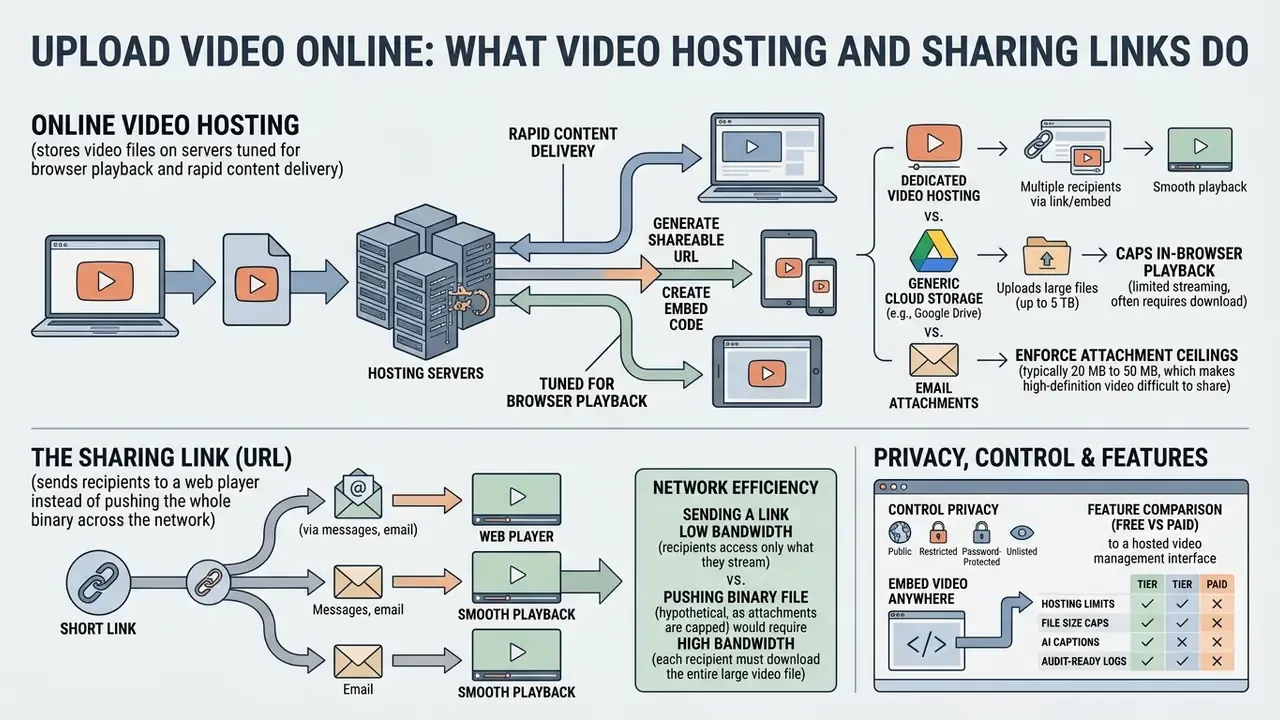
Online video hosting stores video files on servers tuned for browser playback and rapid content delivery. When you run a free online video upload, the platform ingests the raw file, processes it, and issues a shareable link.
That URL sends recipients to a web player instead of pushing the whole binary across the network. Viewers stream high-definition content on any device without burning local storage or tripping messaging limits. One file, one address, many audiences.
Video hosting versus cloud storage and file attachments
Dedicated video hosting differs from generic cloud storage and from email attachments in two ways: network efficiency and playback behaviour. Cloud drives store raw files for download. Video platforms transcode media into adaptive streaming bitrates, then serve the closest edge node.
Email networks enforce hard attachment ceilings, typically 20 MB to 50 MB, which makes high-definition video distribution by inbox technically impractical.
By contrast, Google Drive stores individual video files up to 5 TB but caps in-browser playback at 1920x1080, while Dropbox previews video files under 100 GB with a 375 GB web upload ceiling (Google Drive Help, 2026; Dropbox Help Center, 2026). Dedicated hosts sit above both models because they build adaptive bitrate ladders and offload delivery to global CDNs. For architectural breakdowns side by side, review our AI Media Comparison Matrices.
How to upload a video online and get a shareable link
To upload a video file online successfully, pick a host, process the media, configure access rights, then copy the streaming URL. Modern interfaces lean on drag-and-drop ingestion, which hides a fairly involved pipeline behind one gesture.
A standardized sequence protects file integrity, prevents failed deliveries, and keeps internal recordings out of the wrong hands.
- Select and inspect the media assetconfirm that the format and resolution match the host's capabilities.
- Initiate the web uploaddrag the file into the upload zone, or use the platform file browser to start the transfer.
- Wait for server transcodinglet the system build browser-compatible streaming renditions.
- Configure privacy permissionsset access to public, password-protected, unlisted, or domain-restricted.
- Generate and distribute the linkcopy the HTTPS video link and send it through email, chat or your ticketing system.
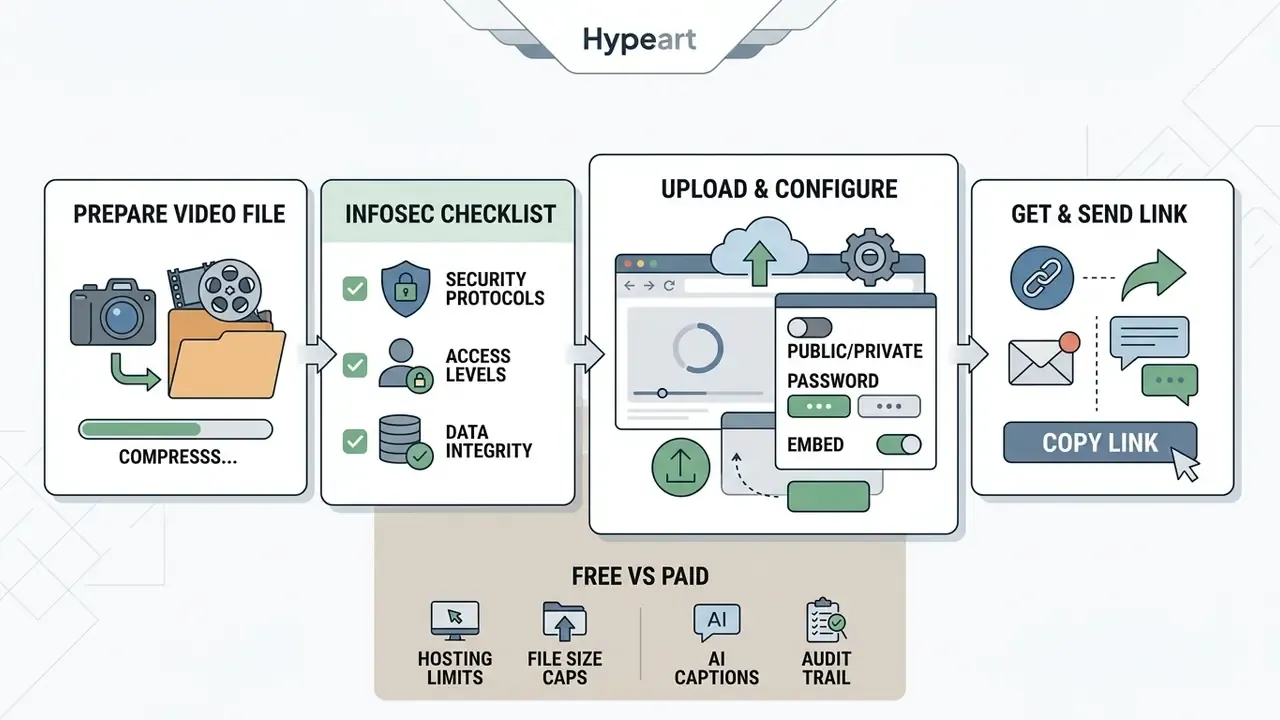
Prepare a video file before upload
Before you upload files of any size, verify that the file size, aspect ratio and container format match platform requirements. Pre-compressing oversized footage cuts transfer time and shortens server-side transcoding queues. As a practical reference, the W3C Web Media Application Developer Guidelines (2023) list example web delivery encodes of 3 to 5 Mbps for 1080p and 1 to 2 Mbps for 720p, while near-lossless mezzanine masters such as Apple ProRes 422 can reach 145 to 220 Mbps at 1080p.
Checking integrity with cryptographic checksums confirms that raw media arrived uncorrupted; NIST guidance recommends a checksum providing at least 128 bits, optionally paired with a digital signature or MAC. Creators building standardized thumbnails and promo frames alongside the footage usually finish that work in a browser-based video editor first. Presenter stills and channel art often come from an ai portrait generator, while printed launch collateral can be laid out with an ai poster generator.
InfoSec pre-upload checklist (run it before generating any link)
Checklist0 / 7
That last line is the one teams skip. Then, months later, nobody can say who approved the recording or when it should disappear.
Upload video and configure access settings
Once you upload video content to a web host, set the resource privacy before you share anything. Platform settings decide whether the asset appears in public search indexes or stays limited to authorized link holders.
Always read the service privacy policy to confirm how long uploaded media persists on server infrastructure, including backups. For enterprise-facing licensing and usage questions, see our AI Media Commercial-Use Hub.
Copy and send the video link
After processing finishes, copy the generated shareable link from the host interface. Sending a clean HTTPS link through chat, a ticket system or email gives instant access without payload bloat, which is the short answer to how to send a video online at scale.
To point viewers at a specific moment, append time-stamped parameters to the link. Microsoft 365 surfaces this as "Copy link at current time" for Teams and SharePoint recordings. Treat shortened URLs with caution: Singapore's Cyber Security Agency advises verifying the full destination domain before clicking, which matters doubly when the payload is confidential footage. If link generation misbehaves, our support portal covers the common failure modes.
Video file formats and file size limits for online upload
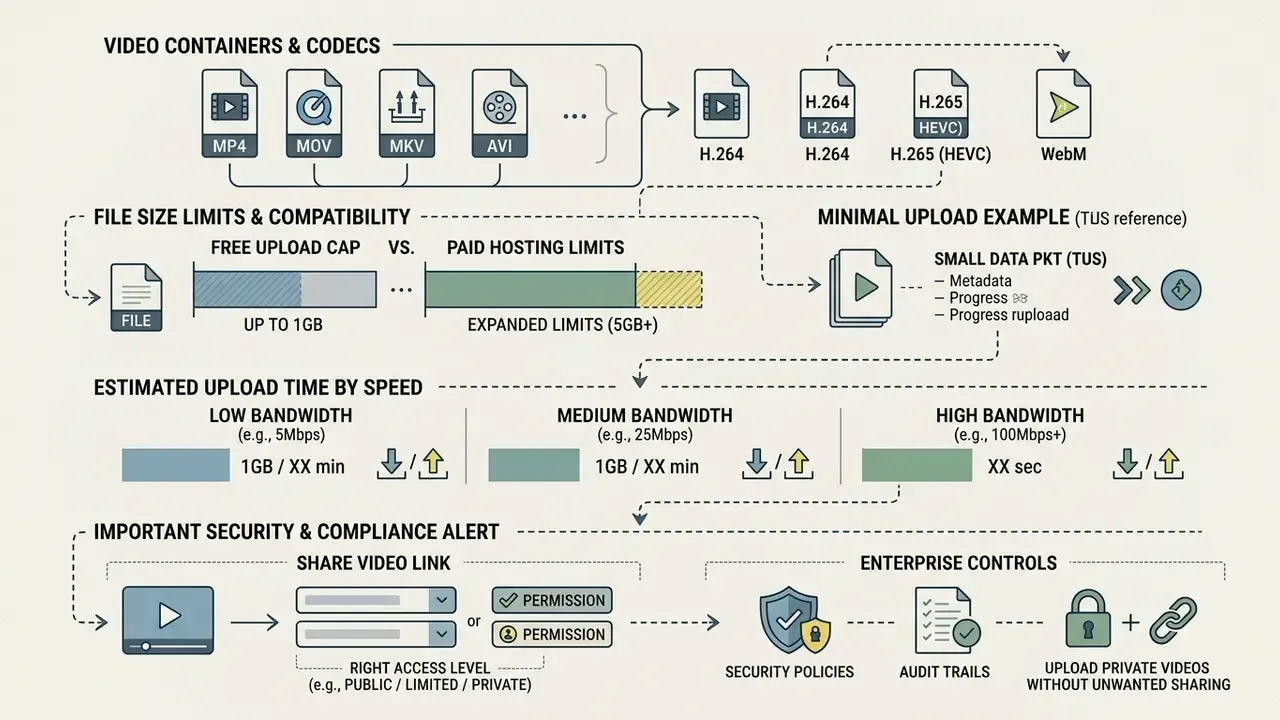
Understanding container compatibility and platform file size caps prevents upload errors and dead players. Web platforms accept many media formats, yet only a few containers render quickly without re-encoding. A pass through a video compressor often removes transfer failures entirely.
Managing a large video file means choosing between smarter compression and chunked upload protocols. Usually both.
Supported file types and video formats
Most platforms accept standard file types including MP4, MOV, AVI, WebM, MKV and FLV. For universal browser playback without mandatory re-encoding, MP4 containers with H.264 video and AAC audio remain the global baseline.
AV1 now works across modern browsers, with Safari limited to devices carrying a hardware decoder, while HEVC/H.265 support stays vendor-specific and should not be treated as a safe upload default (MDN Web Docs; Chromium codec documentation, 2026). Teams building creative media pipelines can automate pre-upload transcoding with our AI Media API Guides.
IMPORTANT SECURITY AND COMPLIANCE ALERT
How to share video online securely
Share a video link with the right access level
The correct permission model follows the sensitivity of the content, nothing else. Choose between public visibility, unlisted link access, email allowlists, or single-sign-on restrictions.
NIST SP 800-171r3 requires role-based access control and transport encryption for protected digital assets.
When distributing sensitive operational walk-throughs, restrict playback to authenticated corporate accounts. Vendor naming differs, but implementations converge on the same four models: Vimeo separates viewing privacy (private, password, unlisted) from embed privacy (specific domains, up to 50 approved hosts), while Kinescope exposes private links, passwords, corporate email-domain checks and domain allowlists as separate switches.
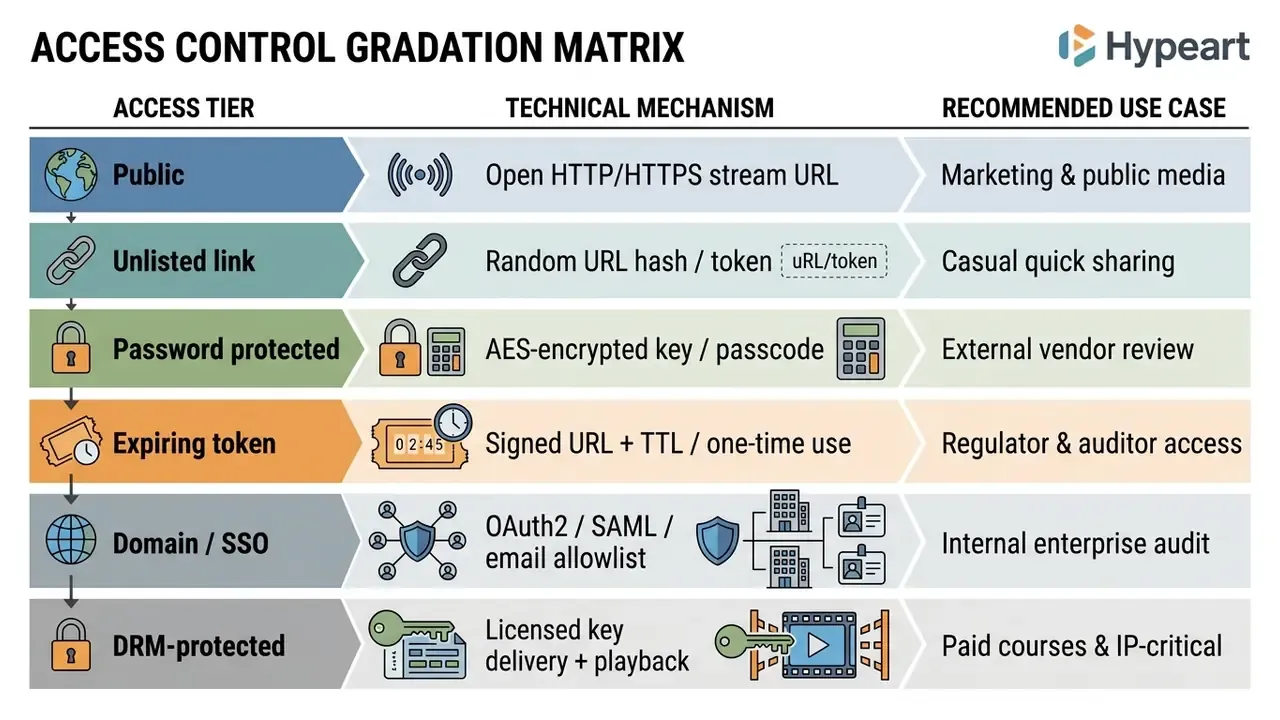
Enterprise security and compliance controls
Upload private videos online without unwanted sharing
To upload private video assets safely, enforce domain-restricted embedding and disable the download flag inside the player. Domain restrictions stop third-party sites from framing your hosted player on pages you do not control.
To keep private URLs out of search results, the host must inject X-Robots-Tag: noindex into the HTTP response header (Google Search Central, 2026). Google treats video as a non-HTML resource, so an in-page meta robots tag does nothing here. Only the header counts. And remember that robots.txt governs crawling, not confidentiality: a direct URL stays retrievable unless server-side authorization sits in front of the file. To track how legal standards around digital content protection keep shifting, see our AI Litigation and Case Timelines.
Vendor assessment checklist before your first upload
| Assessment area | Question to answer | Pass condition |
|---|---|---|
| Identity | Does the host support SAML/SSO and SCIM provisioning? | Enterprise IdP integration available |
| Encryption | Is AES-256 at rest and TLS 1.3 in transit documented? | Written in the security whitepaper |
| Residency | Can you pin storage and edge caching to a region? | Contractual region lock |
| Logging | Are per-viewer logs exportable via API? | JSON/CSV export or webhook stream |
| Retention | How and when is deleted media purged from backups? | Defined purge window, deletion certificate |
| Subprocessors | Which CDNs and transcoders touch the media? | Published subprocessor list |
| Exit plan | Can you bulk-export originals and metadata? | API-based bulk export, no lock-in |
| SLA | What uptime and support response is guaranteed? | Financially backed SLA on paid tiers |
Share, publish and embed video links anywhere
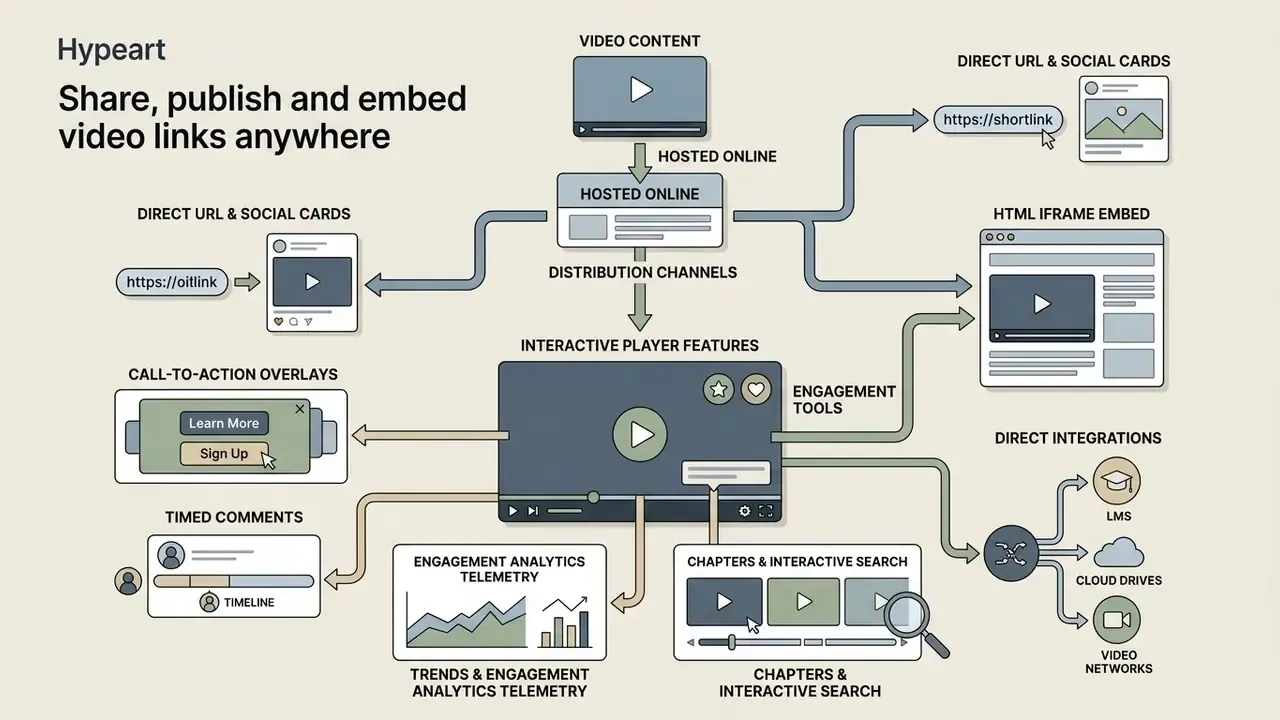
Once a video is hosted online, you can distribute it by direct URL, social media card, or HTML iframe embed. Separating storage from display surfaces lets one uploaded file reach many external applications at once.
Modern CMS tools and knowledge bases turn hosted video links into responsive players on their own, usually without a plugin.
How to post a video online using a direct link
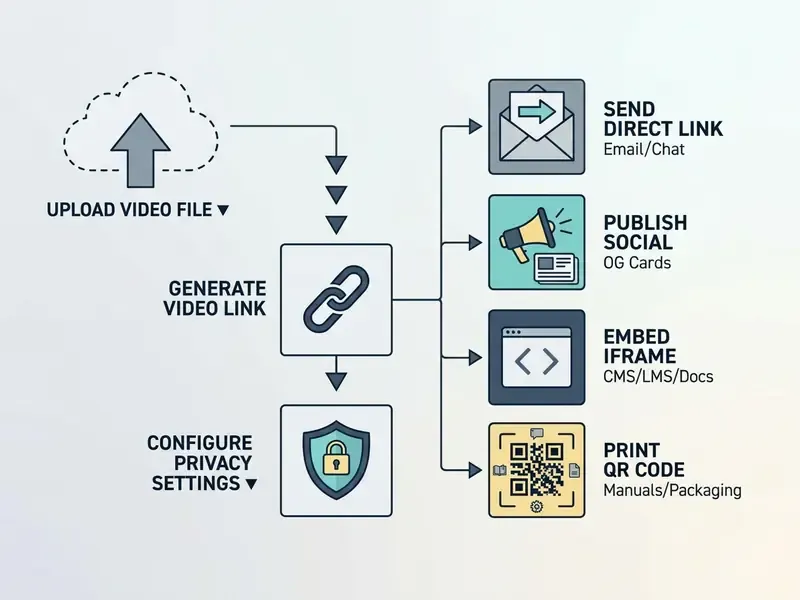
Diagram: how to share video online from a single upload, through link generation and privacy configuration, to sending, publishing, embedding or printing a QR code.
Direct integrations: LMS, cloud drives and video networks
Leading hosting engines remove manual file exports by integrating with the systems your teams already run:
- Learning Management Systemsembed videos into Canvas, Blackboard or Moodle courses through LTI (Learning Tools Interoperability), keeping grades and completion data inside the course shell.
- Cloud drive syncingingest media directly from Google Drive, Dropbox or OneDrive without downloading binaries locally, then publish finished renders back to the same drive.
- Multi-destination publishingpush edited videos from the host library to YouTube, Vimeo or an enterprise portal with one authorization token, a pattern ScreenPal, Wistia and Brightcove all document.
- Library structureorganize assets into folders for storage, playlists for sequenced playback, and galleries or channels for presenting several videos through one shared URL (Brightcove Studio documentation, 2026; EdgeCenter Streaming Platform, 2026).
Free video hosting features, editing tools and paid plans
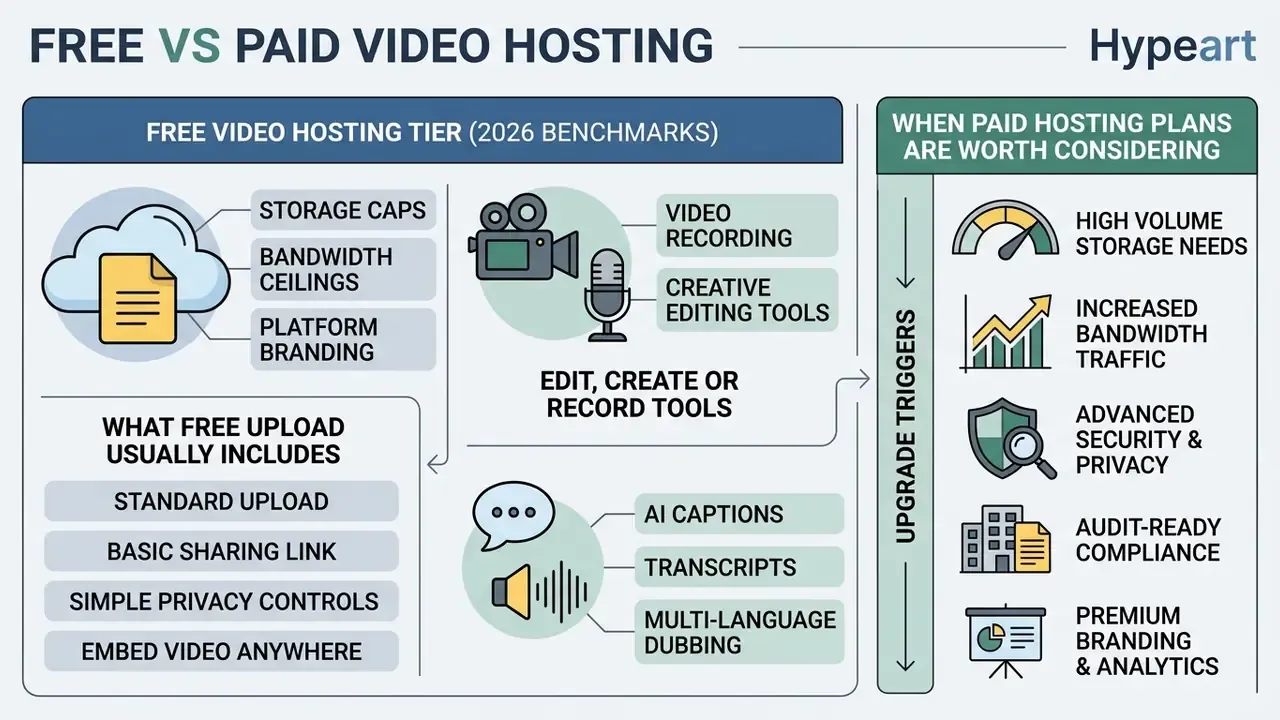
Free video hosting trades immediate accessibility against operational constraints: storage caps, bandwidth ceilings, platform branding. Weighing those trade-offs tells you when a free tier is fine and when a business subscription becomes unavoidable.
Knowing the plan structure in advance also prevents the worst kind of disruption, the kind that hits mid-campaign when bandwidth runs out.
Standard free vs paid video hosting tier limits (2026 benchmarks)
When choosing a hosting architecture, compare storage ceilings, maximum single-file upload limits and automatic retention rules:
| Account tier | Max file size limit | Total storage allowance | Link expiration / retention | Best use case |
|---|---|---|---|---|
| Guest / anonymous | 250 MB per file | Temporary buffer only | Auto-deleted after 24 hours | One-off secure file transfers |
| Free registered | 1 GB to 2 GB per file | 5 GB total storage | Permanent unless inactive over 12 months | Personal demos, quick internal clips |
| Pro / creator | 5 GB to 20 GB per file | 100 GB to 250 GB | Permanent plus custom branding | Freelancers, marketing content |
| Business / team | 100 GB per file | 500 GB to 2 TB | Permanent plus audit log access | Corporate training, documentation |
| Enterprise | Unlimited (chunked tus) | 1 TB to 5 TB+ per team | Custom SLA, SAML/SSO enforcement | Regulatory compliance, AI pipelines |
These bands mirror published vendor documentation. Canva caps single video uploads at 1 GB with 5 GB of free media storage, 100 GB on Pro, 500 GB per Business team and 1 to 5 TB per Enterprise team (Canva Help Center, 2026). Jumpshare's anonymous tool limits each file to 250 MB with two shares per day and 24-hour auto-deletion (Jumpshare FAQ, 2026). Kinescope's free tier allows up to 100 minutes and 200 GB of monthly traffic, while Wave.video's free plan covers 5 embedded videos and 20 GB of monthly bandwidth (vendor pricing pages, 2026). For consumer comparison, YouTube accepts single uploads up to 256 GB or 12 hours, whichever is smaller (YouTube Help, 2026).
What free online video upload usually includes
A standard free video upload online tier gives you basic cloud storage, automatic web transcoding and simple link sharing. Playback resolution is typically capped at 720p or 1080p, with account storage between 500 MB and 5 GB. Those figures match the published free-plan documentation of Canva (5 GB), Jumpshare (250 MB per file), Wave.video (20 GB monthly bandwidth) and Kinescope (100 minutes, 200 GB traffic) in 2026.
Consumer platforms often monetise free hosting by inserting advertising before or during playback. Business-focused hosts such as ScreenPal and Wistia advertise permanently ad-free players instead, in exchange for tighter quotas. Before committing, compare the creation side of the stack too: our roundup of the best free AI video generators shows which tools bundle hosting and link sharing at no cost.
Edit, create or record video before sharing
Many hosting platforms ship browser toolkits for trimming, recording and cropping before the upload is final. A built-in screen recorder turns a five-minute software question into a shareable walk-through. Microsoft Clipchamp, for example, records a tab, window or full screen, then allows trimming, splitting and music insertion before the "Finish" upload step, while Canva exposes its video recorder from the Uploads tab and exports to MP4 or a share link (vendor documentation, 2026). Microsoft Stream, by contrast, only offers trimming after upload and processing. A small workflow-timing difference, but you feel it on a 20 GB file.
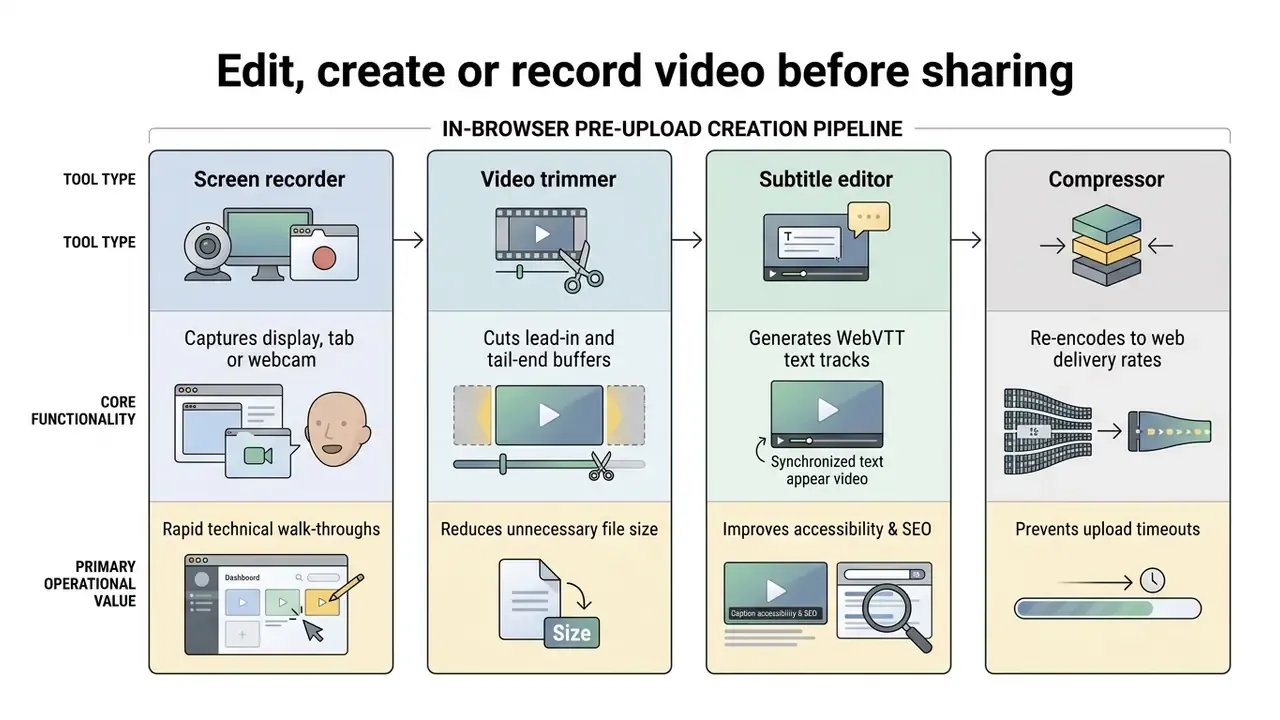
For cost estimates on media processing infrastructure, run the numbers with our AI Media Calculators.
AI captions, transcripts and multi-language dubbing
Modern pipelines process the uploaded audio track automatically to produce closed captions (WebVTT or SRT) and an interactive transcript. Automating that step supports WCAG 2.1 and ADA accessibility expectations without manual transcription cost, and the text layer becomes indexable metadata for internal search.
Advanced hosting engines stack text-to-speech models on the transcript to deliver translated voice dubbing in over 140 languages, a capability ScreenPal documents for its own platform in 2026. Viewers toggle alternative audio tracks, switch auto-translated caption languages, or search the transcript to jump to a timestamp inside the embedded player. For training libraries and regulated disclosures, keep those captions editable. Automated output still needs human review before it becomes the accessible record of what was actually said.
When video hosting plans are worth considering
A paid tier becomes necessary when the business needs white-label player customization, ad-free playback, or granular viewer analytics. Commercial plans lift storage limits, allow custom domain mapping, and open API access for programmatic uploads. Vendor documentation shows the same trigger set market-wide: Kinescope reserves full white-label for paid plans starting around €10 per month, Wistia bundles an ad-free customizable player with detailed analytics in its business product, and Boomstream separates pay-as-you-go storage from packaged plans that include branding (vendor pricing pages, 2026).
Organizations under strict supervisory oversight need audit logs, SSO integration and custom SLA protection, all of which sit on commercial tiers only. If the decision also covers content production, our comparison of the best AI video generators maps creation features against business requirements, and full plan breakdowns live in our AI Media Pricing Guides.
Upgrade triggers, in order of urgency: storage or bandwidth overage warnings, then ads appearing on client-facing content, then a request for viewer-level analytics, then a procurement demand for SSO, audit-log export or a signed SLA, and finally a legal requirement for data residency or DRM.
FAQ: frequently asked questions about uploading and sharing videos online
Can I use a hosted video link in documentation?
Yes. Inserting a hosted video link or iframe embed into technical documentation is standard practice. External hosting keeps documentation databases lean while playback stays smooth across devices. Adobe Acrobat, for instance, lets authors reference a video URL or stream rather than embedding the binary into the PDF, which keeps the document light and the media updatable.
Is video hosting better than sending a video file as an attachment?
Yes, mainly because it sidesteps mail server ceilings, typically 20 MB to 50 MB, and centralizes access management. Public-sector guidance shows the constraint clearly: NIH restricts email attachments to 10 MB, NYC Buildings instructs applicants to split anything above 20 MB across several emails and notes this happens "most often" with videos, and NIST recommends that organizations cap accepted message size outright. Hosted links also let you update content without asking anyone to resend a file.
Can I upload and share more than one video in one place?
Yes. Most video hosting platforms let you organize multiple media files into folders, playlists or public galleries. Sharing one playlist link gives recipients an entire collection through a single streaming interface, and several hosts support FTP or API batch ingestion for bulk library builds.
Should I host forum video uploads on my own web server or a dedicated video service?
Use a dedicated service. Self-hosting large video files on your primary web or forum server exhausts HTTP worker processes, eats storage quotas, and produces severe slowdowns during traffic spikes. Dedicated hosts handle adaptive bitrate transcoding and push delivery to global content delivery networks, so the forum stays responsive no matter how many people press play.
How long do free uploaded video links remain online before auto-deletion?
It depends on authentication status. Anonymous uploads on free utility tools usually expire and auto-delete after 24 hours. Registered free-account uploads generally stay active indefinitely, as long as the account remains active and within fair-use storage and bandwidth policies. Confirm the retention clause before uploading anything you cannot re-render.
How do I stop a private video from appearing in Google Search?
Serve the media with the X-Robots-Tag: noindex HTTP header, since video is a non-HTML resource and an in-page meta robots tag will not apply. Blocking the path in robots.txt prevents crawling but not direct retrieval, so pair the header with server-side authorization, a signed expiring URL, or SSO enforcement.
What is the safest way to send a video to an external auditor or regulator?
Use a signed, time-limited URL bound to an authenticated identity, disable download in the player, apply a dynamic viewer watermark, and export the access log at review close. That combination gives you a revocable link plus a defensible record of who watched what, and when.
Can a hosted video link be turned into a QR code?
Yes. Convert the HTTPS playback URL into a high-resolution vector QR code for printed manuals, packaging, posters, event badges and equipment labels. Because the destination is a link rather than a file, you can replace the video later without reprinting anything.
Limitations and open questions
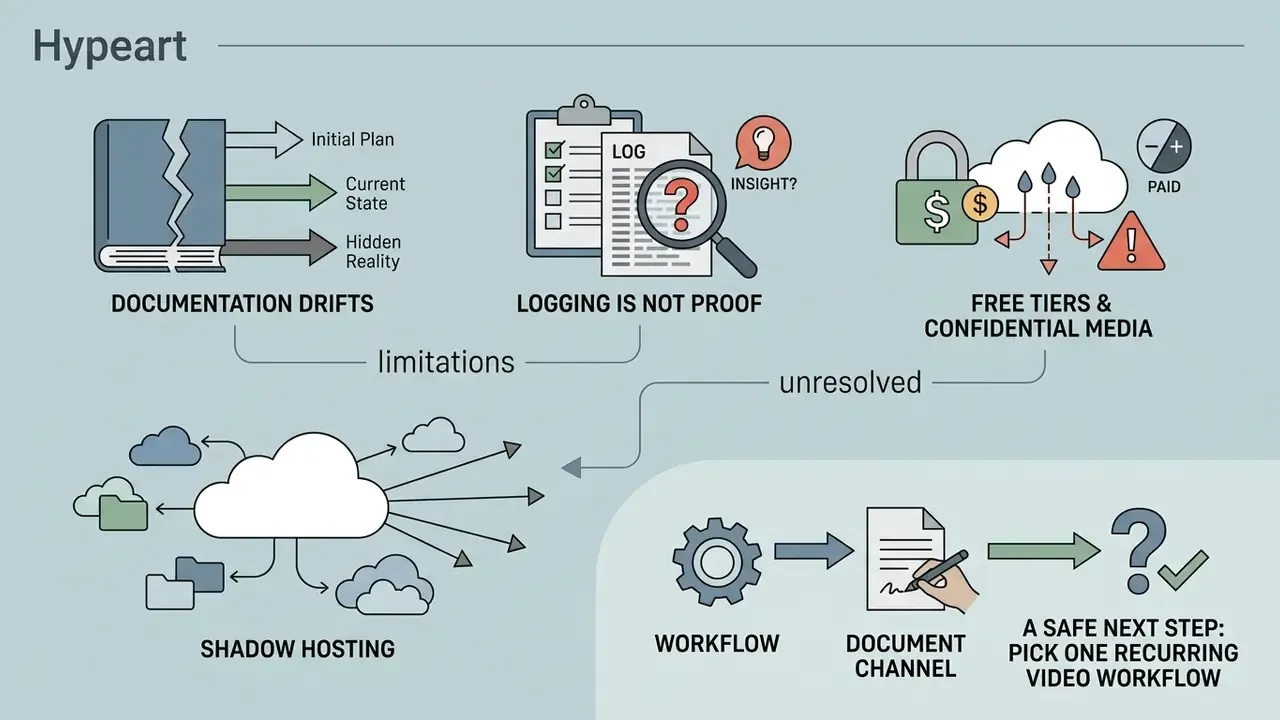
Three caveats belong on the record, because vendor marketing rarely states them.
Documentation drifts. Every limit quoted here comes from vendor or agency documentation current in 2026. Storage tiers, bandwidth allowances and codec support change quarterly. Re-verify before you sign, and keep the source page archived with the contract.
Logging is not proof by itself. An exportable access log answers who opened a link. It does not prove that the viewer was the authorized person, that nobody recorded the screen, or that the asset was not re-shot on a phone. Dynamic watermarking narrows the gap; it does not close it.
Free tiers and confidential media rarely mix. A free plan that satisfies a marketing team can quietly fail a bank's data-residency, retention or subprocessor requirements. Treat "free online video sharing" as a category for public content, and route regulated material through a contracted host with a named owner and a defined expiry.
One more unresolved item: shadow hosting. When approved tooling feels slow, people upload to whatever consumer service works, and the asset leaves your inventory entirely. That is a governance problem before it is a security problem, and the fix is usually a faster sanctioned path rather than another policy memo.
A safe next step, if you own this area: pick one recurring video workflow, document its current channel, and compare it against the vendor assessment checklist above. Small scope, measurable outcome.