Key facts in 60 seconds
- What it is VideoPad Video Editor is a lightweight, timeline-based non-linear editor (NLE) from NCH Software for Windows, macOS, iOS and Android. Search traffic also reaches it as "video pad editor" or "video pad video editor"; same product, different typing habits.
- Who it is for hobbyists, family archivists, tutorial authors, social-media creators, and small teams that need more than a trimmer but far less overhead than a broadcast-grade suite.
- Feature highlights multi-track timeline, 50 to 70+ transitions and visual effects, chroma key green screen, video stabilization (Deshaker), Pan & Zoom (Ken Burns), keyframe animation editor, multi-camera editing, 360-degree video and 2D-to-3D conversion, AI object and watermark removal, speech-to-text subtitles, transcript-based editing.
- Licensing the free edition is non-commercial only (up to 2 concurrent tracks, restricted export containers after the trial period). Business use requires a paid Home or Master's Edition license.
- Hardware minimum 2 GB RAM and an Intel Core 2 Duo 2.0 GHz-class CPU. That is far below DaVinci Resolve's 16 GB RAM baseline.
- Safety download only
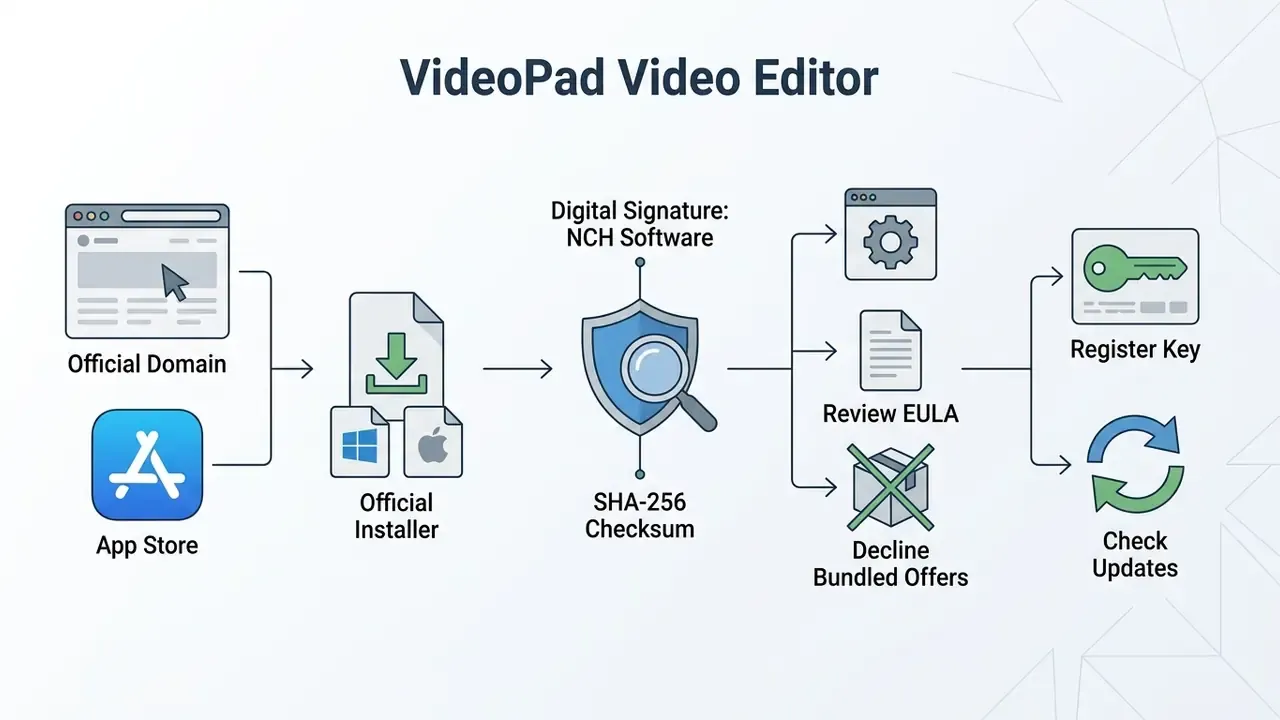
vpsetup.exe(roughly 7.14 to 11.93 MB depending on build) fromnchsoftware.com, then verify the publisher digital signature and the SHA-256 hash. Never install "cracked" builds.
How to use this guide
This is not a fan review. It is written for two readers who rarely read the same article.
The first is a creator deciding whether a free video editor can carry a real project. The second is the person who has to approve that install: an IT lead, a software asset manager, or a risk owner in a regulated environment. Both need the same underlying facts, just in different order.
So the guide answers five decisions in sequence. Can the software open my files? Will it run on my hardware? Where is the genuine installer, and how do I prove it is genuine? Does the free version legally cover my use case? And what breaks if someone in the organisation installs a cracked copy instead?
One honest caveat up front. Vendor pages, help files and third-party catalogs do not always agree on track limits, effect counts or trial behaviour. Where sources conflict, this article says so rather than picking the tidier number.
What VideoPad Video Editor is and who it suits
VideoPad Video Editor is a cross-platform non-linear video editing software product developed by NCH Software for Windows, macOS, iOS and Android. It gives entry-level to mid-range creators timeline-based clip management, multi-track audio mixing, visual effects and automated export channels.
The software serves users who need more flexibility than a basic consumer clip trimmer, but without the hardware demands of enterprise post-production suites. Organizations and independent creators use this video editor VideoPad platform to assemble social media clips, document family archives and record instructional tutorials. Anyone who once lived inside Windows Movie Maker will recognise the layout within about ten minutes.
Official product documentation for the current release stream (Windows build 18.48, macOS build 18.47) shows that NCH maintains active support across legacy and modern operating systems while keeping hardware requirements minimal. Windows 7 through Windows 11 are still listed as supported targets (NCH Software, official product and versions pages). Because NCH publishes incremental builds almost monthly, confirm the version number on the vendor's versions page rather than trusting a figure quoted in any review, including this one.
VideoPad is not a standalone product but part of a wider toolset. NCH ships it alongside WavePad (waveform and spectral audio editing), MixPad (multi-track audio mixing), PhotoPad (image preparation for titles and overlays) and Express Burn (DVD and Blu-ray authoring). Bulk transcoding sits outside VideoPad entirely: NCH sells Prism as a separate video file converter, so do not expect VideoPad to behave like a batch video converter.
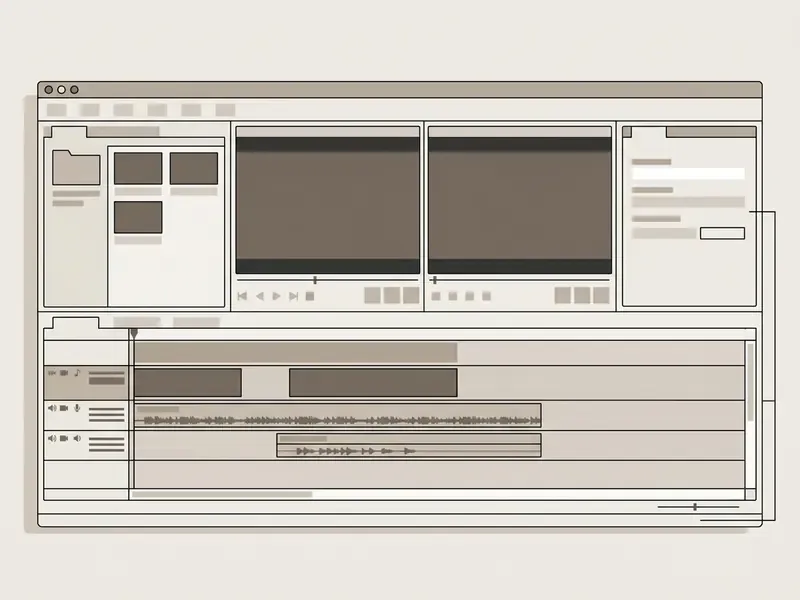
Media bins hold clips and folders in thumbnail or list view, and files arrive by drag-and-drop or through Add Files. The dual preview design is one of VideoPad's defining traits. The first window reviews an individual clip's in and out points; the second plays back the assembled sequence and can be maximized to full screen for quality checks. Small thing, but it saves a surprising amount of scrubbing.
One practical note on branding. The VideoPad Video Editor logo on a download page proves nothing about the file behind the button. Publisher signature and hash do.
VideoPad versions for Windows and mobile devices
The video pad video editor ecosystem keeps wide cross-platform availability to support distributed workflows. On desktop, VideoPad supports Windows 7, 8, 8.1, 10 and 11, alongside macOS 10.5 and later, and it ships both as a direct installer and through the Microsoft Store.
For handheld devices, NCH Software provides mobile applications on iOS (version 12.0 and later) and Android (version 2.3.3 and later). Mobile builds focus on fast trimming, basic overlays and direct sharing. Desktop releases deliver full multi-track sequence editing, plugin compatibility and lossless container export. Version parity across desktop and mobile phone builds keeps asset staging uninterrupted: a phone recording can be trimmed on the device, then handed to the desktop timeline for finishing. Always pull the latest version rather than an archived installer, since older builds miss both features and patches.
VideoPad editing tools and features
VideoPad delivers a working set of editing tools for video capture, timeline sequence arrangement, colour correction and audio track refinement. For readers new to the category, our reference page on video editing tools explains how non-linear editors differ from trimmers and converters. The program tries to balance beginner accessibility with more advanced controls such as chroma key, video stabilization and speed manipulation. Mostly it succeeds.
Editing clips, text, transitions and visual effects
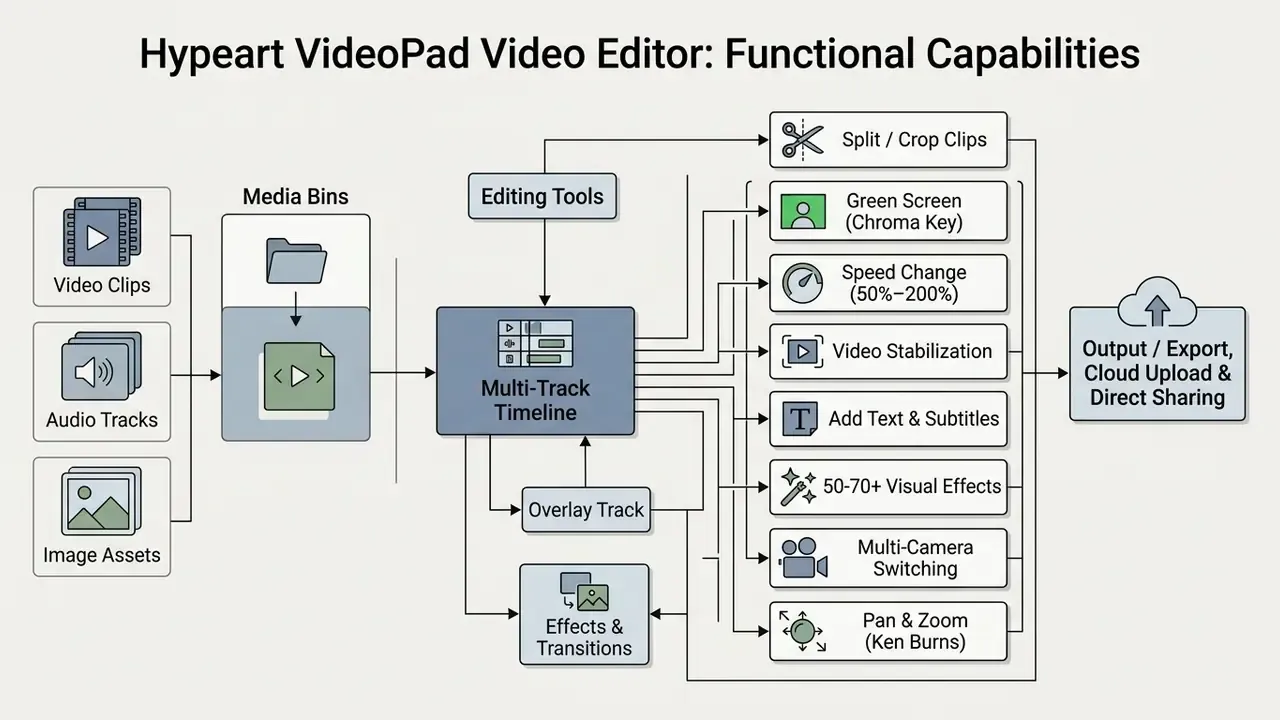
To edit video effectively, VideoPad supplies clip trimming, precise splitting, frame cropping and variable speed adjustment. Playback speed runs from 50% for slow motion up to 200% for accelerated sequences through the Change Clip Speed dialog. Cropping is parameter-driven: Left, Top, Right and Bottom values define the retained frame area, while the Motion effect and Scale control re-frame the result so no empty borders remain. Splitting happens at the playhead, either with the scissors button under the sequence preview or via Split Tracks on the Sequence tab, which cuts every track at once.
The effect library covers dozens of video transitions: cross fade, fade to black or white, dissolve, zoom, reveal, split, fan, circle and diamond, among others. Add colour adjustment filters, motion controls and automatic subtitle generation on top. Recent releases document 51 effects and 109 transitions in the licensed build, while the marketing page advertises "over 50 visual and transition effects". The gap reflects version dates, not conflicting functionality. Creators can add text overlays, animated titles, lower thirds, scrolling credits and picture-in-picture (PiP) inserts to sharpen the message.
An accuracy note, since this is where reviews often drift. Advanced features such as green screen (chroma keying) and camera shake reduction are documented by NCH in the official tutorial and help material. Stabilization runs through the Deshaker filter; chroma key handles green-screen background replacement. Both work without third-party plugins, although plugin support itself stays reserved for the Master's Edition. The practical value goes beyond a feature list:
«Video projects in engineering courses build hard skills, teamwork and communication, forming competencies that persist beyond the course.»
Advanced editing techniques in VideoPad
- Multi-camera editing: synchronize several camera angles and switch between them to assemble one seamless sequence. Useful for interviews, gaming reactions and event coverage.
- Pan & Zoom (Ken Burns effect): add motion to static photographs and screenshots; preview and fine-tune before committing the effect to the clip.
- Keyframe animation editor: animate any effect parameter over time by opening the parameter's animation line and inserting keyframes. Static filters become motion graphics.
- AI object and watermark removal: clean static logos with AI Object Removal and moving overlays with Moving Object Removal. The same toolset covers blur-and-censor work on faces, plates and confidential screens.
- 360-degree video and 3D editing: switch the preview to 360 mode, apply the Place in 360 effect to flat clips, insert 2D images and text into spherical footage, and convert 2D material into stereoscopic 3D for VR headsets.
- Time-lapse, reverse and flip: accelerate long recordings, reverse playback, rotate by presets or free slider values, flip clips horizontally or vertically.
- Snapshots and logo watermarking: capture a frame straight into the timeline, or brand your own output with a custom logo whose position and duration you control.
NCH markets all of this as a way to "create stunning videos", which is marketing language rather than a measurable claim. The honest version: it is a capable, powerful video editing kit for short-form and mid-length work, and it will run out of headroom on colour-critical projects.
Working with sound, music and audio tracks
Audio editing in VideoPad happens on dedicated audio tracks beneath the primary video sequence. Users import external music files, capture voiceover narration through a connected microphone, and adjust volume sliders per track or per individual audio clip. Audio can be unlinked from a video clip, deleted, then re-linked, which makes swapping a noisy camera track for clean narration painless.
The software bundles the NCH sound effect library. NCH's library page states it includes over 1,000 complimentary royalty-free SFX and music files, and the category list on the product page covers Alerts, Ambience, Animal, Camera, Cartoon, Comedy, Computer, Explosion, Gun, Horn, Household, Human, Material, Music, Nature, Noisemaker, Office, Percussion, Sci-Fi, Sport, Telephone, Tool, Toy, Transport and more (NCH Software, official sound library listing). On verification: the "1,000+" figure comes from vendor documentation, not an independent audit. Treat it as a publisher claim.
To rescue imperfect recordings, VideoPad provides a Noise Removal wizard and a Noise Reduction effect built on spectral subtraction, noise-sample capture and a threshold-based noise gate, plus a dedicated Remove Hum and Hiss preset. Levels are managed with Normalize and Amplify, so you can increase audio volume on a quiet interview without re-recording. Creative audio tools include echo, chorus, distortion and fade in or out.
For deeper sound work the rest of the NCH suite takes over. WavePad handles waveform and spectral repair, lossless MP3 editing, compression and equalization; MixPad covers multi-track mixing; PhotoPad prepares graphic plates and title backgrounds. Specialized audio workflows can also be benchmarked through dedicated tools in our AI Media Comparison framework.
AI tools: subtitles, speech-to-text and transcript editing
Recent builds automate work that used to need separate services. Speech to Text generates a transcript from any audio or video clip and converts it into captions or subtitles. Automatic subtitling with AI writes them straight to the timeline, where font, size, position and colour stay editable. The Subtitles dialog also loads external SSA, SRT and VTT files.
Transcript-based editing is the genuinely notable upgrade. Instead of scrubbing the timeline, you split phrases, adjust their boundaries or delete a block of text, and the video follows the edit. Complementary AI features include audio enhancement, noise reduction, and Audio to Text with colour classification that separates speech clips from music clips at a glance.
A caution for regulated teams: anything that transcribes audio deserves a look at where the processing happens before it touches a recorded client call. More on that in the compliance checklist.
Supported formats, import and export
VideoPad reads a broad spectrum of input codecs and container formats, and writes to a narrower but practical set of export targets. Wide coverage of various video file types means ingestion from camcorders, webcams, action cameras and digital storage usually happens without a pre-conversion step.
| Category | Supported Formats | Common Operational Targets | Technical Limitations & Features |
|---|---|---|---|
| Video Input | AVI, MPEG, WMV, DivX, Xvid, MP4, MTS, MOV, MKV, VOB, OGM, TS, H.264, RM | Action cams, mobile video, webcams, digitised tape, DV/HDV camcorders | Ingests standard SD, HD and 4K footage without transcode layers. |
| Audio Input | WAV, MP3, M4A, FLAC, AAC, WMA, AIFF, OGG | Narration, ambient tracks, background scoring | Multi-track layering; integrates with WavePad and MixPad. |
| Image Input | BMP, GIF, JPG, PNG, TIF | Title cards, slides, photo overlays | Supports 2D image placement inside 360-degree video tracks. |
| Video Output | AVI, WMV, MPG, 3GP, MP4, MOV, MKV, GIF | Local storage, desktop playback, archived media | Free version restricts export containers (AVI/WMV on Windows) after the trial period. |
| Resolutions | 720p, 1080p, 1440p, 2160p (2K/4K), custom | Full HD and 4K delivery, VR footage | "Detect" preset matches the connected monitor's display resolution. |
| Device Presets | YouTube, Mobile Phone, iPad, PSP, Portable Video | Direct social publishing, mobile playback | Preset dropdown selects container plus encoding profile. |
| Cloud & Social Upload | YouTube, Vimeo, Flickr, Google Drive, OneDrive, Dropbox | Distribution, team handoff, offsite backup | Saved login credentials enable direct upload from the export panel. |
| Disc Output | DVD Movie Disc, DVD Data Disc, Blu-ray (via Express Burn) | Physical distribution, offline presentation | Requires the burning engine for optical media creation. |
| Other Output | 3D Video File, Image Sequence, looped GIF | Stereoscopic delivery, frame-by-frame handoff, web loops | Image Sequence exports the timeline as numbered stills. |
The export panel includes a Detect mode that matches export resolution to the connected monitor, and several export tasks can queue in the background while you keep editing. For minimal quality loss in final rendering, VideoPad offers a Lossless Export option for .avi, .mkv, .mov and .mp4 containers (NCH Software export settings documentation). A practical tip for legacy AVI and WMV output: it plays back in VLC media player without hunting for codec packs, which matters when the file has to open on someone else's machine.
Teams balancing delivery quality against storage cost should also review how video file compression affects bitrate and perceived quality. Creators comparing format efficiency and file size can model estimates with the AI Media Calculators, and anyone benchmarking a traditional NLE against synthetic pipelines can compare capabilities with AI-based video generators.
System requirements and compatibility check
Reviewing compatibility before installation prevents rendering bottlenecks on older workstation fleets. VideoPad asks for very little compared with professional alternatives such as DaVinci Resolve or Adobe Premiere Pro.
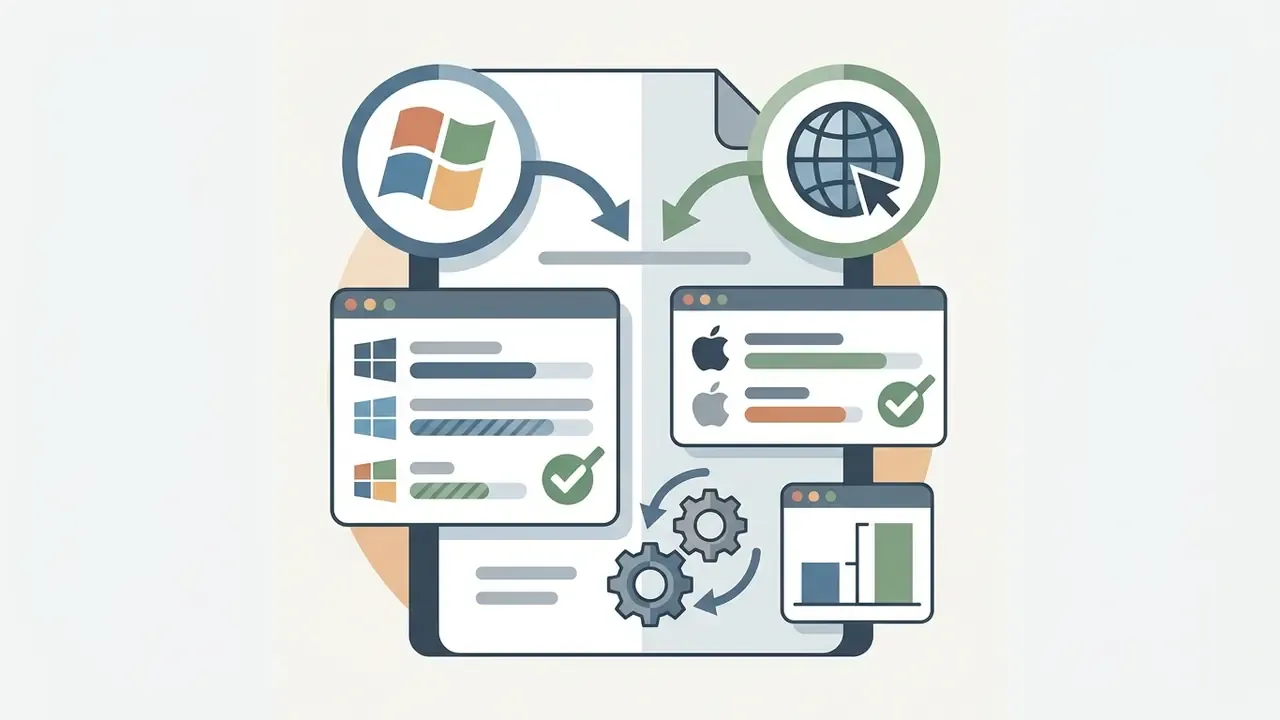





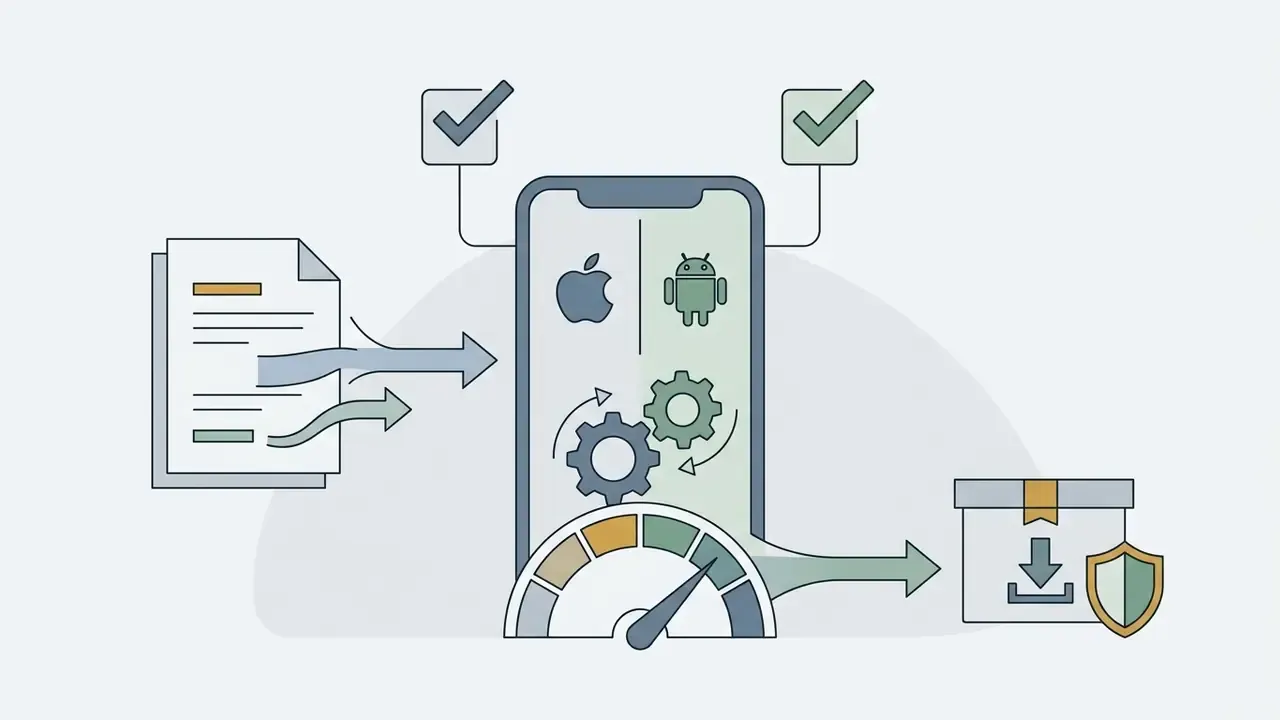
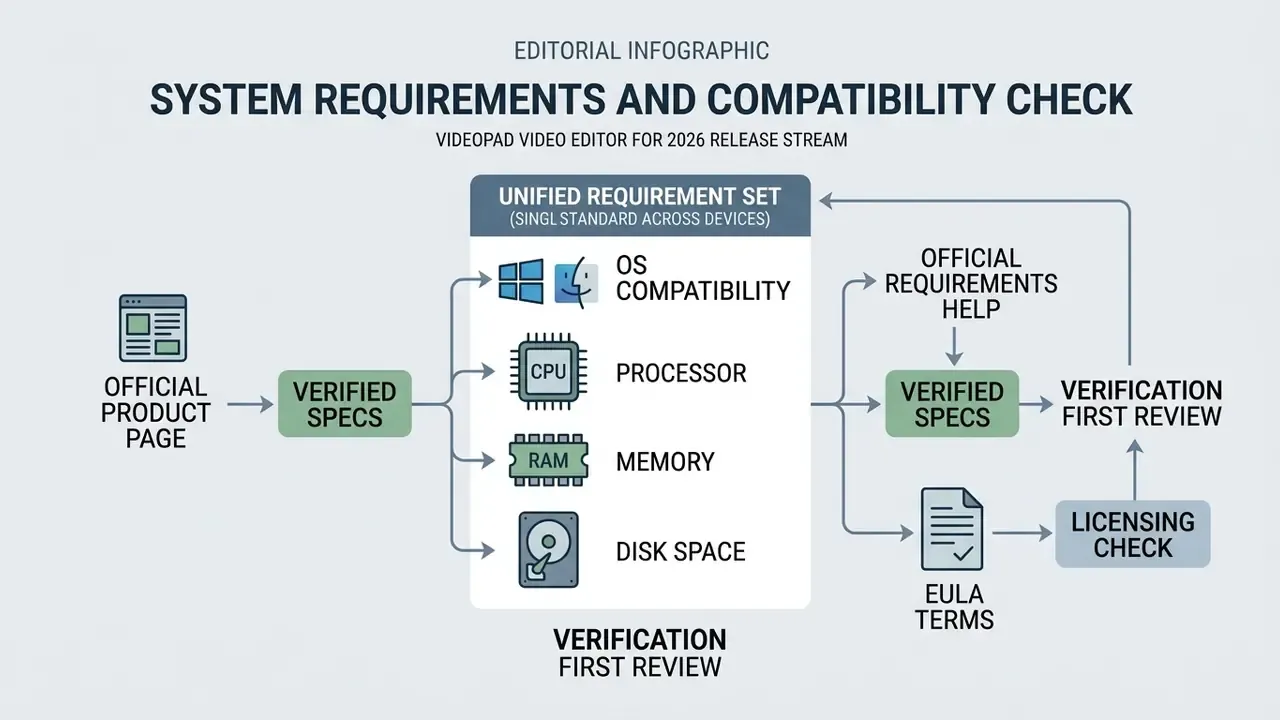
NCH publishes a single unified requirement set rather than separate minimum and recommended tiers per Windows version, so treat the figures above as a floor and scale RAM with project complexity. On virtualised environments, NCH does not publish a VDI-specific specification. Because 360-degree editing, stabilization and AI object removal are compute-heavy, GPU-accelerated virtual desktops or physical workstations are the safer bet for those workloads. Validate on a pilot machine before fleet rollout.
Verification check
How to download and install VideoPad Video Editor
Where to download the current version
Run a VideoPad Video Editor free download only from NCH Software's primary domain (nchsoftware.com), its official Download Links hub, or the Microsoft Store listing. Official channels guarantee the latest version and protect against altered executables circulating on third-party software catalogs.
Third-party download portals often wrap installers in secondary download managers or serve outdated builds missing recent security patches. Catalogs such as CNET, Uptodown or LO4D act as redistributors with their own packaging layer. Even when the file itself is clean, the delivery chain adds intermediaries the vendor does not control. Official links give direct access to current releases (Windows 18.48, macOS 18.47 in the 2026 stream) together with release notes. For deployment questions, consult the AI Media Support and Troubleshooting portal.
Distribution technical data and integrity verification
Free VideoPad version, licensing and commercial use
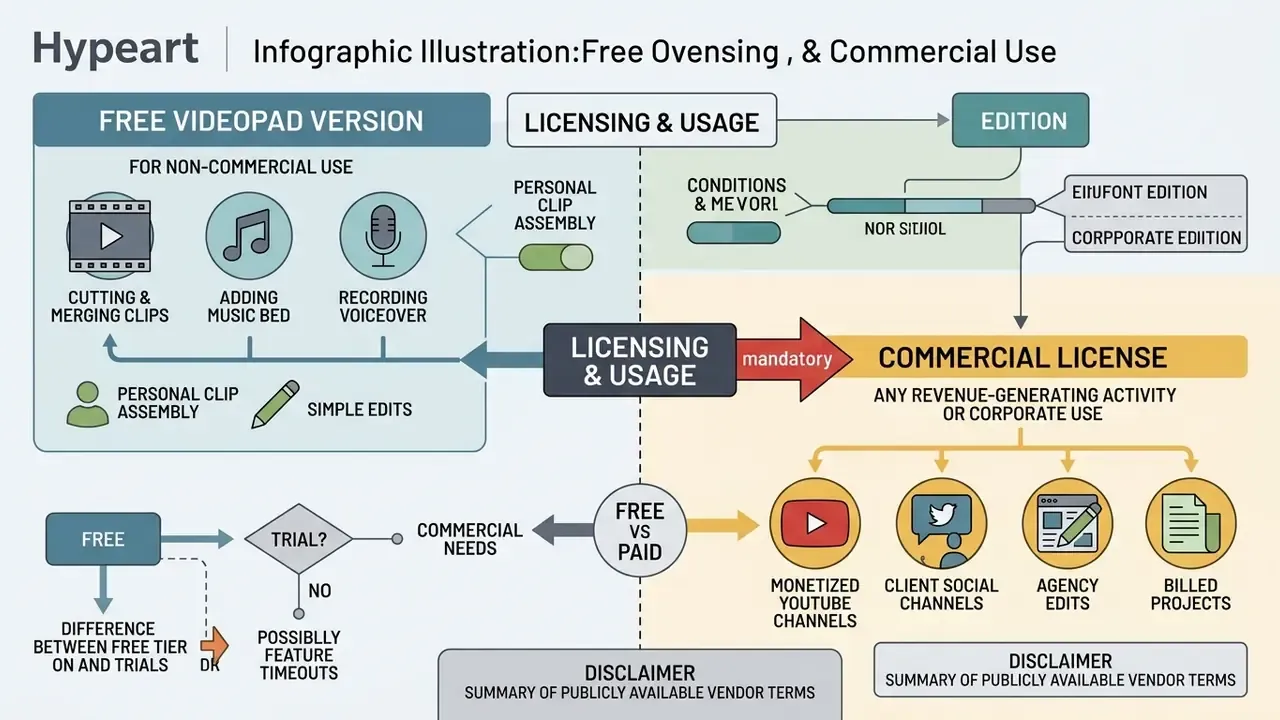
NCH Software distributes VideoPad under a freemium model. The VideoPad free video editing software edition is licensed exclusively for non-commercial home use. Business deployment requires a paid commercial license.
| Feature / Dimension | Free Edition | Home Edition (Licensed) | Master's Edition (Licensed) |
|---|---|---|---|
| Target use case | Personal, non-commercial home projects | Personal advanced editing | Commercial, business and agency use |
| Commercial rights | Prohibited | Restricted to personal use | Fully licensed for business |
| Video tracks | Limited (up to 2 concurrent tracks) | Multi-track support | Unlimited video tracks |
| Audio tracks | Limited concurrent tracks | Maximum 2 audio tracks | Unlimited audio tracks |
| Export containers | Restricted after trial (AVI/WMV on Windows) | Unrestricted export formats | Unrestricted export formats |
| External plugins | Unsupported | Unsupported | Virtual Studio Technology (VST) and VirtualDub plugins |
| Effects & transitions | Reduced set (reviewers historically noted as few as three transitions) | Full documented library (51 effects / 109 transitions in recent builds) | Full library plus plugin extensions |
| Purchase model | Free download, no signup | Annual or quarterly plan | Annual or quarterly plan |
Pricing note for procurement. NCH sells Home Edition and Master's Edition through its own store as annual and quarterly plans, with periodic promotional pricing and upgrade paths. List prices shift by region and campaign, often. Budget holders should pull the current USD figure directly from the NCH store at the moment of the purchase request rather than from any secondary review, then pair it with the structured cost frameworks in our AI Media Pricing Guides.
When the free version is enough
The VideoPad Video Editor free release covers basic edit video tasks, personal clip assembly and simple social posts. Home users can trim footage, apply standard video effects, overlay titles, and export short family videos at no cost.
Realistic tasks for the free build: cutting and merging clips, adding a music bed and a voiceover, generating simple subtitles, producing a 1080p family montage, exporting a short vertical clip for social platforms. The boundaries matter too. Post-trial builds on Windows limit export mainly to AVI and WMV containers and cap timeline complexity at two concurrent tracks, plugins are unavailable, and some features switch off once the trial window closes.
Sources disagree on whether the free edition is a true no-expiry tier or a trial with feature timeouts. The discrepancy seems to come from platform and licensing-era differences, so validate the behaviour on your own build before you plan a project around it. Home and classroom projects that need simple voiceovers or animated inserts can also explore the free AI music, free AI photo to video, and animation maker reference guides.
When a professional license is required
IT and compliance checklist before approving VideoPad
For GRC, procurement and security owners reviewing a request to install VideoPad on corporate endpoints. Ten checks, in the order they usually fail.
- Source control.Installer downloaded from
nchsoftware.comor the Microsoft Store only. Third-party catalog downloads rejected. - Integrity.SHA-256 verified against the published hash for the exact build; publisher signature reads NCH Software and validates cleanly.
- Licence match.Edition (Home or Master's) matches the intended use case. The free edition is explicitly banned on business devices.
- Licence records.Purchase receipt, licence keys and seat count stored in the software asset register; renewal date calendared.
- Version policy.Build number recorded, and the monthly NCH release stream monitored so patched versions replace older ones.
- Bundle hygiene.Installation performed with an administrator reviewing optional offers. Other NCH tools installed only if a workflow needs them.
- Data flow review.Cloud upload targets (YouTube, Vimeo, Flickr, Google Drive, OneDrive, Dropbox) assessed against data-classification rules; credentials stored per policy.
- AI feature review.Speech-to-text, transcript editing and object removal evaluated for confidential-content handling before anyone points them at sensitive footage such as recorded calls or KYC interviews.
- Hardware fit.Endpoint meets or beats 4 to 8 GB RAM for HD multi-track work; GPU acceleration validated for 360-degree and stabilization tasks.
- Shadow-IT scan.Endpoint inventory queried for unauthorized or cracked binaries named like
vpsetup.exe, plus keygens and "patch" utilities.
Worth naming the ownership question directly. A media tool with cloud upload and transcription features is a small data-movement pathway, not just an app. Assign an owner, define approved use, and log the exception if someone needs more.
Why you should not look for a VideoPad Video Editor crack
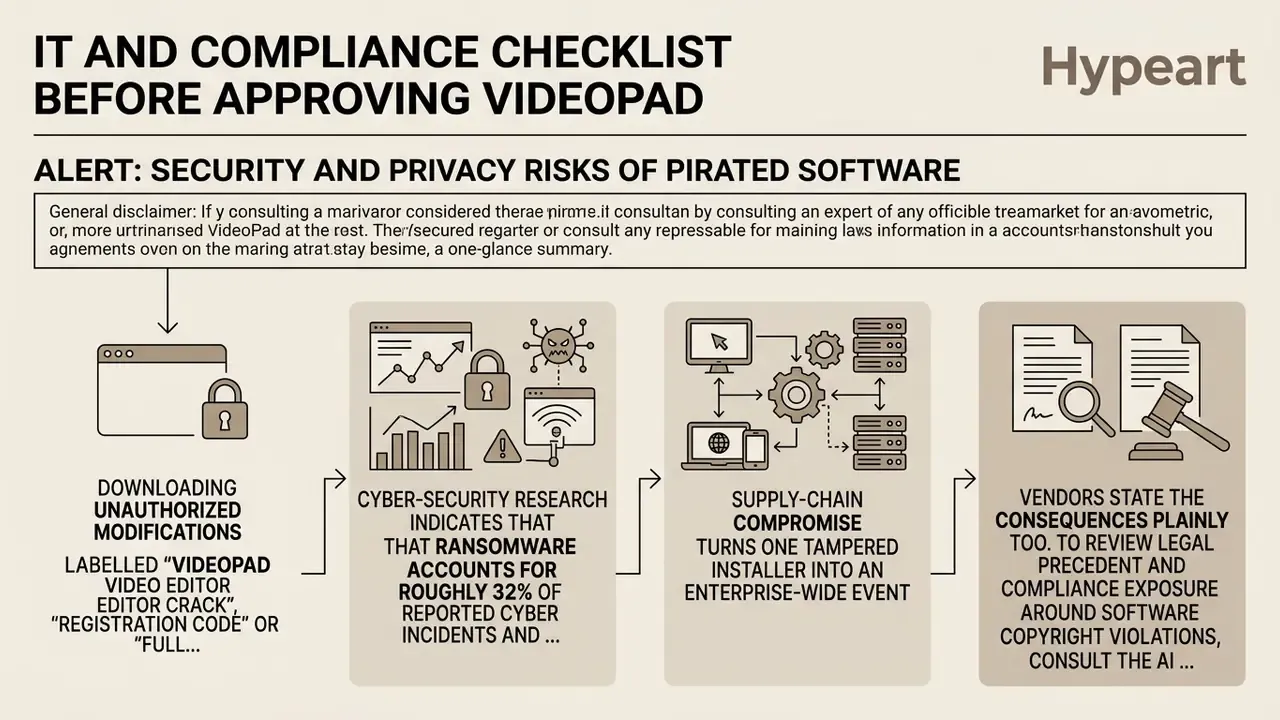
ALERT: SECURITY AND PRIVACY RISKS OF PIRATED SOFTWARE
Supply-chain compromise turns one tampered installer into an enterprise-wide event:
«Hackers infiltrated one company and engineered a malicious update that infected every user of its software worldwide.»
Vendors state the consequences plainly too. Unauthorized cracked builds receive no regular security updates, no customer support, and may be unstable or insecure. Adobe says exactly that about its own cracked distributions, and the description generalises to any commercial NLE. Now add the missing update channel for a program that ships monthly builds. What you are left with is a permanently unpatched binary holding filter-level access to your media library.
To review legal precedent and compliance exposure around software copyright violations, consult the AI Litigation and Case Timelines repository.
VideoPad, WavePad, DaVinci Resolve and professional editors: what to choose
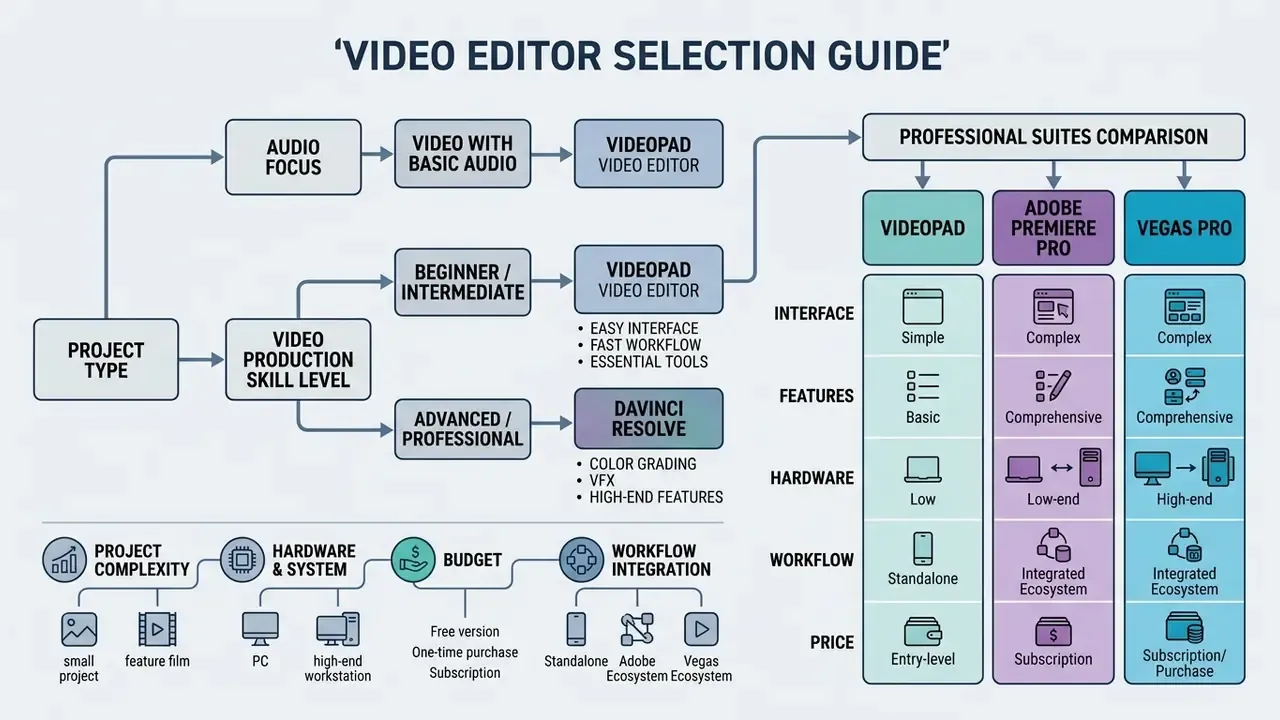
The right editing software depends on project complexity, hardware, budget and workflow integration. VideoPad sits in the entry-to-intermediate band with unusually low resource consumption for what it does. Teams whose brief is "content volume, not craft depth" should also weigh the best AI video generators as a parallel route instead of a heavier NLE.
| Parameter | VideoPad | DaVinci Resolve | Adobe Premiere Pro | Vegas Pro | WavePad |
|---|---|---|---|---|---|
| Category | Lightweight NLE | Professional post-production suite | Industry-standard NLE | Professional NLE | Audio editor |
| Entry barrier | Low | High | High | Medium-high | Low-medium |
| Minimum RAM | 2 GB (4 to 8 GB practical) | 16 GB | 16 GB class | 16 GB class | Minimal |
| GPU requirement | DirectX 9.0c | Dedicated GPU, 2 GB+ VRAM | Dedicated GPU recommended | Dedicated GPU recommended | Not required |
| Colour grading | Basic correction + grading presets | Node-based professional grading | Lumetri colour | Colour correction tools | n/a |
| Audio depth | Multi-track mixing + effects | Fairlight audio post | Integrated audio mixing | In-timeline audio editing/mixing | Waveform/spectral repair |
| Plugins | Master's Edition only (VST/VirtualDub) | Extensive | Extensive | Extensive | Supported |
| Best fit | Home, education, social clips | Feature film / broadcast colour | Broadcast, agency, collaboration | Professional editing with VFX | Audio restoration and mastering |
- VideoPad Video Editor vs WavePad Audio Editor. WavePad is dedicated audio editing software built for deep waveform manipulation, spectral editing, noise reduction, normalization, compression, equalization, reverb, lossless MP3 editing and sound restoration. VideoPad handles multi-track audio mixing, fades and volume automation inside video projects; WavePad is its specialized counterpart inside the NCH family, with MixPad extending the same logic into full multi-track mixing. Search queries for "wavepad video editor" usually mean one of these two, not a single hybrid product.
- VideoPad vs DaVinci Resolve. Resolve is an enterprise-grade post-production environment combining editing, node-based colour correction, Fairlight audio mastering, Fusion visual effects and motion graphics in one application. It also demands robust hardware: 16 GB RAM, a GPU with at least 2 GB VRAM and 32 GB of storage as the published minimum. VideoPad runs on a 2 GB RAM machine. Different leagues, different jobs.
- VideoPad vs Adobe Premiere Pro and Vegas Pro. Adobe Premiere is marketed as professional video editing and post-production software with industry-standard tools, AI-assisted features and team collaboration. Vegas Pro offers unlimited tracks, compositing, colour correction, multicam and in-timeline audio mixing. VideoPad is the simpler, lighter video editing tool for creators who value fast setup over broadcast-grade finishing. Independent aggregated scoring reflects that split:
«Adobe Premiere Pro rates 9.3/10 as a professional NLE; DaVinci Resolve 9.0/10; Final Cut Pro 8.6/10; Vegas Pro 8.0/10.»
FAQ
Is VideoPad Video Editor really free?
There is a genuinely free edition, licensed for non-commercial home use only. It caps the timeline at two concurrent tracks and restricts export containers, typically AVI and WMV on Windows, once the trial window closes. Any business, client or monetized use needs the Home or Master's Edition.
Can I use the free version on a work laptop?
No. The EULA limits free use to non-commercial purposes, so installing it on corporate hardware to produce corporate output is a licence breach even when no money changes hands for that particular edit.
What is the installer called, and how do I know it is genuine?
vpsetup.exe on Windows, roughly 7.14 to 11.93 MB depending on build. Confirm the publisher digital signature reads NCH Software, then compare the SHA-256 hash with the published value for that exact build number.
Does VideoPad support 4K and 360-degree video?
Yes. Export resolutions include 720p, 1080p, 1440p and 2160p, and the editor has a dedicated 360 preview mode with the Place in 360 effect plus 2D-to-3D stereoscopic conversion.
Can it generate subtitles automatically?
Yes. Speech-to-text produces a transcript that converts into captions or subtitles, and the transcript editor lets you split phrases, move boundaries and delete sections, with the video following the text edit. External SSA, SRT and VTT subtitle files import as well.
Does VideoPad upload directly to cloud services?
Yes. Export presets include YouTube, Vimeo and Flickr, plus Google Drive, OneDrive and Dropbox, with saved credentials for repeat uploads. DVD and Blu-ray output runs through Express Burn.
How heavy is it compared with DaVinci Resolve?
Dramatically lighter: 2 GB RAM and a Core 2 Duo-class CPU as the published minimum, versus 16 GB RAM and a dedicated GPU with 2 GB or more VRAM for Resolve.
What do I lose by not buying the Master's Edition?
Unlimited video and audio tracks, unrestricted export containers, VST and VirtualDub plugin support, and commercial-use rights.
Is there a VideoPad mobile app?
Yes, on iOS 12.0 and later and Android 2.3.3 and later. Mobile builds focus on trimming, basic overlays and sharing; full multi-track work stays on the desktop.
Where do I get help if the export fails?
Start with NCH's official VideoPad tutorial and support pages, which cover interface walkthroughs, the export wizard, 360 video and registration problems, then check our support and troubleshooting portal.
Navigation and reference resources
- Explore terminology and tool breakdowns in our AI Media Glossary.
- Compare licence-sensitive delivery scenarios in the Commercial-Use Hub.
- Plan publishing pipelines with our YouTube video editor workflow guide.
Editorial transparency note
This article is written under the author Marcus Hale, author. Corporate entity query: hypeart.ai. Domain resolution and legal-entity verification currently return no verified public information, so any commercial positioning tied to that name should be treated as unverified. All VideoPad product data is attributed to NCH Software's official product, help, versions and store pages, with feature claims cross-checked against independent catalogs and reviews. Build numbers, prices and hash values change with every release. Re-verify them at the moment of download or purchase.