Generative artificial intelligence has introduced scalable methods to transform single static images into temporal video sequences. Modern free ai image to video workflows let content creators, enterprise growth managers, and risk analysts produce dynamic video assets without a traditional motion-graphics pipeline. That convenience is exactly why the topic reaches a governance desk: a browser tab plus a corporate email can create a new external data dependency in under a minute.
Executive summary for decision-makers and risk owners
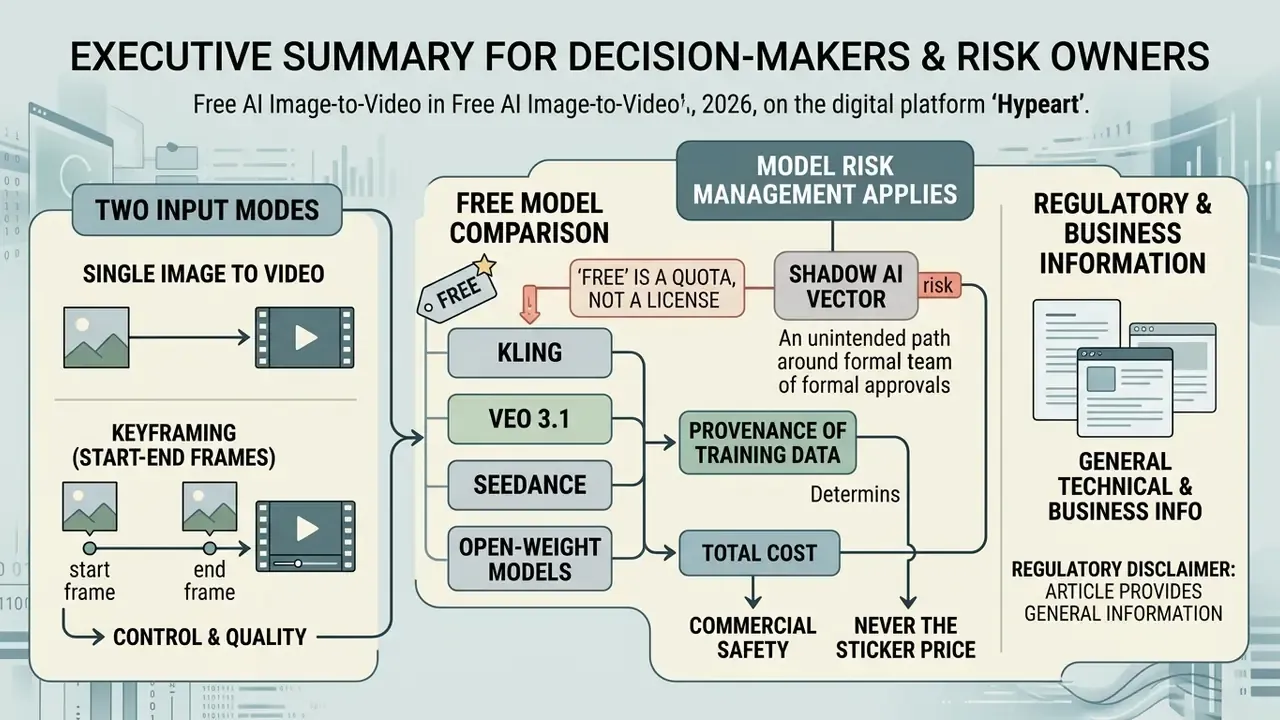
- "Free" is a quota, not a license. Free tiers meter access through daily or monthly credits (roughly 20–125 credits depending on vendor), cap clips at 3–10 seconds, restrict resolution to 480p–720p, and frequently limit output to non-commercial evaluation. Commercial deployment almost always requires a paid tier.
- Two input modes matter, not one. Single-frame (I₀) generation predicts motion forward in time. Start-frame to end-frame keyframing (I₀ → I_N) interpolates between two supplied images and is the mode required for controlled reveals, before/after transformations, and exact scene continuity.
- Free consumer tools are a Shadow AI vector. Uploading customer documents, internal dashboards, unreleased product renders, or employee photographs to a public freemium endpoint can constitute an unapproved third-party data transfer. Treat free image-to-video platforms as external processors, not as desktop software.
- Model risk management applies. If generated video appears in customer-facing communication, disclosures, or training material, it becomes an artifact requiring documentation: prompt text, model version, random seed, reviewer sign-off, and an audit trail consistent with SR 11-7 / OCC 2011-12 model governance expectations and the NIST AI Risk Management Framework.
- Provenance of training data determines commercial safety. Clean-dataset engines, trained on licensed stock and expired-copyright public-domain assets, reduce third-party infringement exposure compared with open-web-scraped or open-weight checkpoints. Some enterprise vendors also attach contractual indemnity.
- Total cost is never the sticker price. Risk-adjusted cost per clip must include legal review, artifact verification, upscaling, editorial time, and re-roll credit burn. In practice that lands at several multiples of raw generation cost.
Regulatory disclaimer: this article provides general technical and business information. It is not legal, compliance, or investment advice, and it does not replace consultation with qualified counsel or your institution's compliance function.
Who this guide is for, and which decisions it helps you make
Most readers arrive with one of five open questions. This piece is organized around them rather than around vendor marketing.
- Approval question.Can a marketing, HR, or learning team use a free image-to-video generator without a formal vendor assessment? Short answer: only with synthetic or already-public source imagery.
- Mode question.Should the team animate one frame, or supply both a first and last frame? The answer changes control, duration ceiling, and review effort.
- Cost question.What does one published clip actually cost once re-rolls, upscaling, and sign-off hours are counted?
- Rights question.Does the platform license permit commercial use, and can you evidence clearance for the input image, the depicted person, and the audio bed?
- Evidence question.If an auditor asks how a specific clip was produced six months from now, can you reconstruct it? Without an exposed seed, honestly, no. Record that as a gap.
Everything below maps back to those five. Practitioners who only need the operational recipe can skip to the step-by-step section; reviewers and control owners will find the governance material in the risk and licensing sections.
What is free AI image to video and how generation works
An image to video system uses an initial static input frame as its primary structural anchor. The video generator calculates temporal transitions, synthesis trajectories, and synthetic camera angles across consecutive frames. Users provide a source image, optional text instructions, and desired motion settings, then the pipeline produces the generate video output automatically.
Modern architectures rely on spatial-temporal diffusion models. If you are mapping the category before selecting a vendor, our reference material on image-to-video AI tools breaks down architecture families, control surfaces, and usage rights in more depth. Unlike legacy keyframe animation software, a generative free ai video pipeline constructs new visual data between frames while attempting to hold visual identity, object geometry, and lighting consistent across time.
How AI creates motion from a single image
Generative models interpret a single image by establishing a spatial reference grid across its subject, background, and lighting layers. According to research presented at CVPR 2025 (Controlling Video Generation with Motion Trajectories), models use the initial frame as a spatial conditioning anchor while applying point tracks or directional trajectory vectors to control localized movement.
Related CVPR 2025 work on mask-based motion trajectories evaluates output stability by measuring frame-to-frame coherence with CLIPFrame similarity. That metric sits behind the marketing phrase "temporal consistency." A 2025 survey on spatiotemporal consistency in video generation defines the property plainly: smooth, coherent change between consecutive frames, with no abrupt jumps in object motion or lighting.
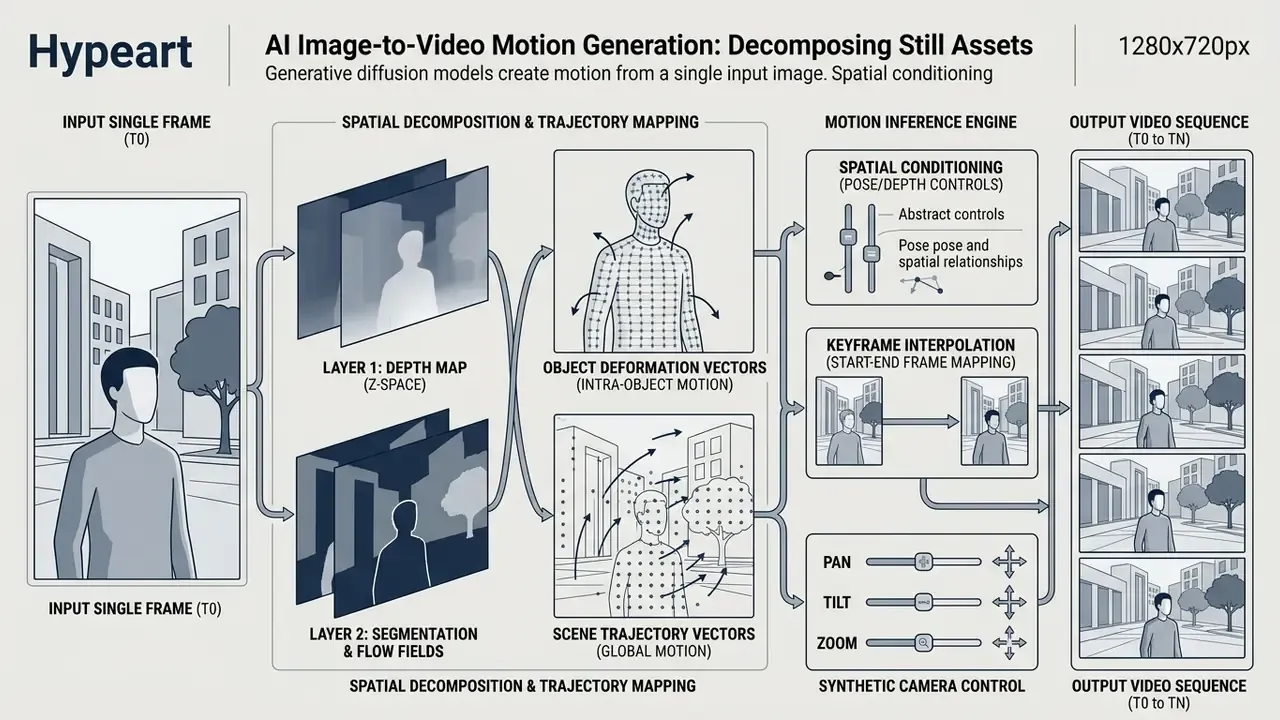
Depth estimation algorithms calculate background geometry to simulate realistic parallax when the virtual camera moves. Motion-prompting research builds a point cloud from monocular depth estimation, then projects it through a user-defined camera trajectory. That is why background geometry, not subject detail, drives believable camera movement. When processing a complex subject, the model also predicts obscured pixel data behind moving objects, which is what prevents visual warping and background tearing.
First-frame vs. first-and-last-frame (keyframe) generation
Standard image-to-video uses a single starting frame (I₀) to predict motion forward in time. Advanced workflows support start-frame and end-frame keyframing (I₀ → I_N). In keyframe mode the user supplies both an initial image and a destination image. The diffusion model then calculates spatial interpolation vectors to bridge the visual gap over a set duration, typically 3 to 5 seconds. This mode is critical for controlled visual transitions: product transformation reveals, sketch-to-render animations, and exact scene continuity across cuts.
Where each mode wins:
| Generation mode | Input | Typical duration on free/entry tiers | Best-fit scenarios | Main limitation |
|---|---|---|---|---|
| Single-frame I2V (I₀) | One image + prompt | 3–10 seconds | Product hero shots, portrait animation, ambient background motion, social clips | Ending state is unpredictable; the model chooses where motion lands |
| Start-end keyframe (I₀ → I_N) | Two images + prompt | Commonly capped at 5 seconds even on paid tiers | Before/after reveals, packaging redesign comparisons, sketch to final render, dashboard state A to state B, seamless scene stitching | Requires two visually compatible frames; extreme geometry mismatch causes morphing artifacts |
| Text-to-video (no image) | Prompt only | 4–8 seconds | Concept exploration where no asset exists | Weakest control over exact logos, dimensions, faces |
Practical constraints observed across current platforms: keyframe mode is often restricted to shorter durations than plain I2V, with many vendors capping start-end frame output at 5 seconds and offering 1080p only on higher tiers. Both frames should also share aspect ratio, lens characteristics, and lighting direction. When the two frames diverge sharply, say a wide product shot paired with a macro close-up, the interpolation path usually produces visible melting rather than a clean transition.
For corporate use cases the strongest applications are stepwise process visualizations (state to state), compliance-safe before/after comparisons, and animated diagram reveals where the final frame must be exact and pre-approved. One practical detail that saves credits: get the end frame signed off before generation. Approving a destination image costs minutes. Re-rolling a five-second interpolation twenty times costs a whole free quota.
How image-to-video differs from text-to-video and video-to-image
The key distinction between generative video workflows lies in input constraints and structural control:
- Image-to-Video (I2V) Takes an existing photo or artwork as the spatial anchor and applies motion vectors. It preserves visual identity, product framing, and brand aesthetics far more reliably than text-driven alternatives.
- Text-to-Video (T2V) Generates frames entirely from textual prompts. Maximum conceptual freedom, minimum control over specific product dimensions, logos, or precise facial structures. Vendor documentation is explicit that this mode uses prompt only, with no conditioning image. For a deeper breakdown of that pipeline, see our overview of text-to-video AI tools.
- Video-to-Image (V2I) Operates in reverse by extracting, upscaling, or modifying static keyframes from existing video streams for asset repurposing: frame capture, thumbnail selection, reference stills. Teams searching for video to image ai free options are usually after exactly this. To evaluate broader still-image workflows, explore our guide on free photo editors.
Enterprise risks of free AI tools: Shadow AI, data leakage, and model governance
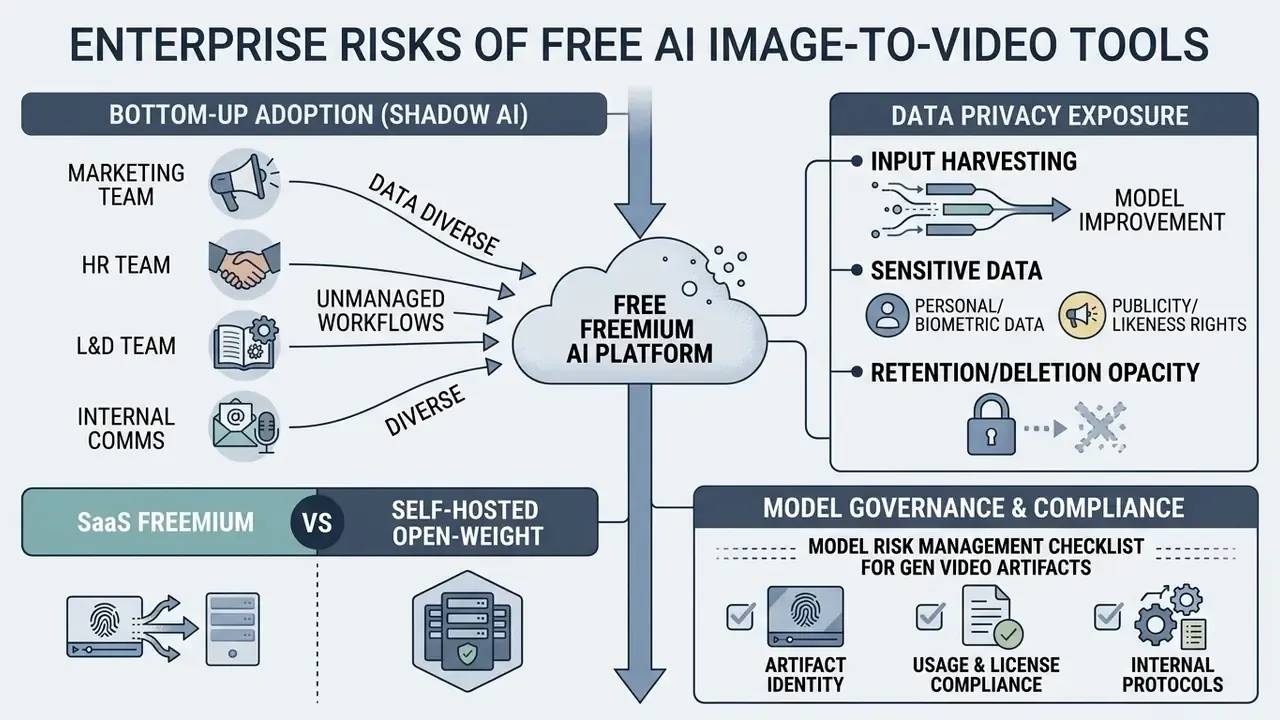
Free image-to-video platforms are frequently adopted bottom-up by marketing, HR, learning-and-development, and internal-communications teams long before any formal review. That pattern is the textbook definition of Shadow AI: an unapproved external processing dependency created by an employee with a browser and a corporate email address.
Data privacy exposure on freemium endpoints
Four exposures dominate:
- Input harvesting for model improvement.Many consumer tiers reserve the right to use uploaded assets to improve services. An uploaded org chart, a photograph of a client meeting, a screenshot of an unreleased dashboard, or a scanned document therefore leaves the controlled perimeter. Where the upload contains personal data, a lawful basis is required: the UK ICO position is that consent must be clear and specific to the stated purpose, and several jurisdictions require written consent for defined processing categories.
- Personal and biometric data.Employee or customer facial imagery uploaded to a generative endpoint may constitute processing of personal, and in some jurisdictions biometric, data. That engages GDPR, CCPA/CPRA, and sector rules such as GLBA for non-public personal information at US financial institutions.
- Publicity and likeness rights.Using a person's name, likeness, photo, or voice for commercial purposes without prior consent can breach US right-of-publicity doctrine and image-protection rules elsewhere.
- Retention and deletion opacity.Free tiers rarely publish deletion SLAs, tenant isolation guarantees, or sub-processor lists. Some explicitly retain generated media for fixed windows.
Practical control set: publish an allow-list of approved generative video tools; block unapproved endpoints at the network layer; require synthetic or already-public source imagery for any free-tier experimentation; prohibit upload of customer data, non-public financials, unreleased product assets, and identifiable employee photographs; and log every generation used externally. One more control is easy to forget: name an owner. A tool with a quota but no accountable owner will keep producing artifacts that nobody can defend.
SaaS freemium vs. self-hosted open-weight deployment
| Selection criterion | Public freemium SaaS (consumer tiers of hosted engines) | Enterprise SaaS (contracted tier) | Self-hosted open-weight (SVD, Wan 2.1) |
|---|---|---|---|
| Data residency & isolation | Not guaranteed; shared multi-tenant | Contractual; region selection common | Full control inside own VPC or on-prem GPU |
| Input reuse for training | Often permitted by ToS | Usually contractually excluded | Not applicable |
| Reproducibility (seed control) | Rarely exposed | Sometimes exposed via API | Full seed, scheduler, and checkpoint control |
| Audit trail | Browser history only | API logs, admin console | Complete local logging of prompt, seed, weights hash |
| Certification (SOC 2 / ISO 27001) | Typically absent for free tier | Typically available | Inherits your own control environment |
| Commercial indemnity | Almost never | Sometimes offered | None; you own the training-data risk |
| Cost profile | Zero cash, high governance cost | Subscription + seat costs | GPU capex/opex + MLOps headcount |
| Output quality ceiling | 480p–720p, short clips | Up to 1080p/4K, longer clips | Depends on checkpoint; strong at short 480p–720p clips |
Open-weight checkpoints solve the data-egress problem and the reproducibility problem at the same time, which is why regulated pilots often start there even when hosted quality is higher. They do not solve training-data provenance. Before selecting an engine class, compare the field against the criteria your review board actually applies, using our analysis of the best AI video generators.
Model risk management checklist for generative video artifacts
If a generated clip informs, trains, or persuades a customer or an employee, it is an output requiring controls. A minimum viable documentation package:
- Artifact identitymodel name and version (for example Veo 3.1, Kling Video 3.0, or an SVD checkpoint hash), engine tier, generation date.
- Reproducibility recordexact prompt text, negative prompt, motion-intensity value, camera parameters, aspect ratio, frame rate, and random seed where the platform exposes it. Where seeds are not exposed, record that limitation explicitly as a reproducibility gap.
- Input lineagesource image origin, ownership evidence, consent records for any depicted individual.
- Human-in-the-loop evidencereviewer name, review date, defect list (facial drift, text corruption, anatomical error), and disposition (approved, re-rolled, rejected).
- Validation criteriadocumented acceptance thresholds for temporal consistency, subject fidelity, and factual accuracy of any on-screen text or figures.
- Disclosure controlwhether the asset requires AI-content labelling. Under EU AI Act transparency provisions, providers of generative systems must make AI-generated content identifiable, which affects advertising and internal-communication practice.
- Framework mappingmap each control to your existing model-risk taxonomy (SR 11-7 / OCC 2011-12 conceptual soundness, ongoing monitoring, outcomes analysis) and to the NIST AI RMF functions (Govern, Map, Measure, Manage).
A short caveat on scope. Marketing B-roll and a customer disclosure video do not deserve the same control weight. Tiering by audience and consequence keeps the checklist usable instead of ceremonial.
Risk-adjusted cost per clip (TCO formula)
Free generation is not free production. A workable estimate:
Risk-Adjusted Cost per Published Clip =
  ( Generation Cost × Re-roll Factor )
+ Editorial Labour (prompt engineering + review, hours × loaded rate)
+ Post-Processing (upscaling, color match, audio clearance)
+ Compliance Review (legal/brand sign-off, hours × loaded rate)
+ Amortised Governance Overhead (tool assessment, DPIA, vendor due diligence ÷ clips per year)
+ Expected Residual Risk (probability of claim × estimated remediation cost)
Two variables dominate in practice. The re-roll factor, meaning how many generations are consumed before one is publishable, commonly sits between 2× and 5× for constrained brand or product shots. That is why free credit pools evaporate in an afternoon. And compliance review dominates whenever the clip contains a recognizable person, a trademark, on-screen figures, or a claim. Model those two before assuming a cost advantage over stock footage or a conventional motion-graphics vendor. For unit-economics modelling, our AI Media Calculators provide a starting template.
What "free" means in AI image to video generators
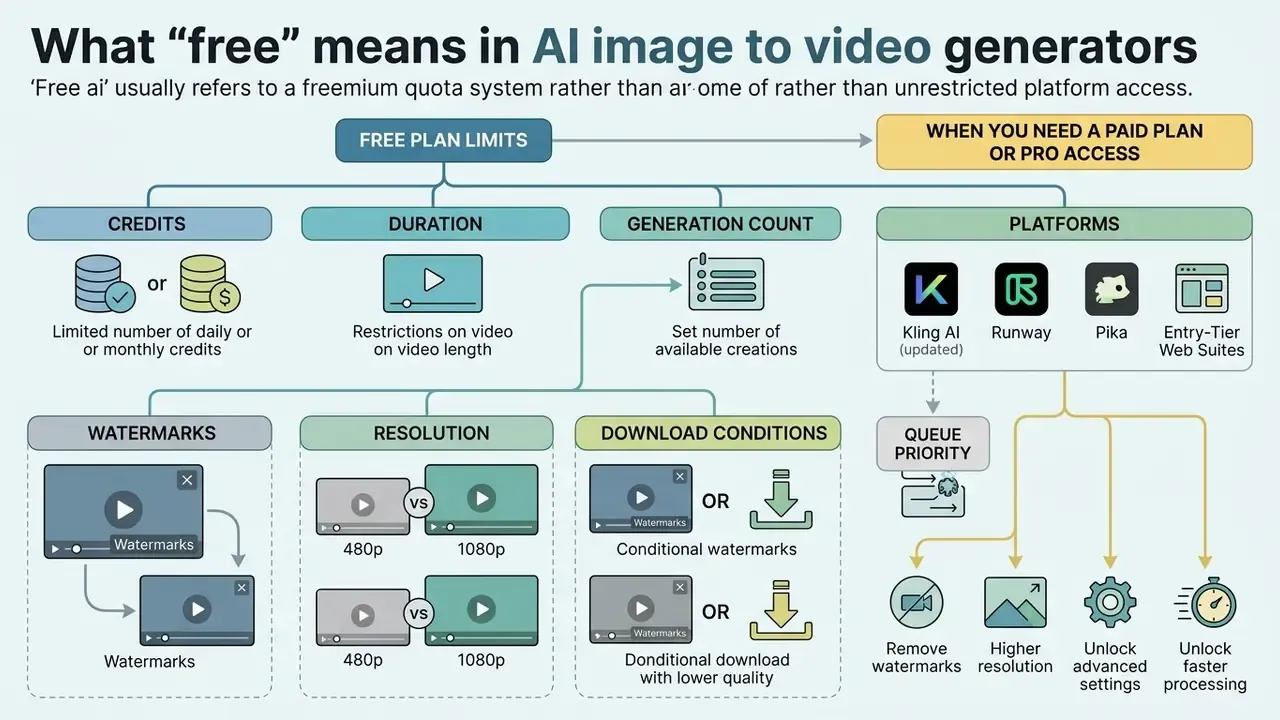
The label free ai in generative video usually refers to a freemium quota system rather than unrestricted platform access. Vendors provide complimentary entry points so the model can be tested, then place technical constraints on rendering priority, monthly allocations, and export configurations.
When testing an ai image to video fre offering (a very common misspelling in search, and it lands on the same freemium pages), monitor three things: daily credit depletion, queue latency, and licensing boundaries. Platforms balance server compute loads by restricting high-compute features, such as native 1080p rendering or multi-frame extensions, to paid subscribers.
Free plan limits: credits, duration, and generation count
Generative platforms distribute trial access through recurring allowances or one-time bonus credits:


Free clips are typically restricted to shorter durations, 3 to 5 seconds, occasionally up to 10. Extending clip length or rerolling prompts consumes standard credit pools quickly. Because quotas shift frequently, verify allowances at sign-up rather than trusting cached comparisons. Our roundup of free AI video generators tracks the moving parts across vendors.
Watermarks, resolution, and download conditions
Export parameters on complimentary plans vary by provider policy:
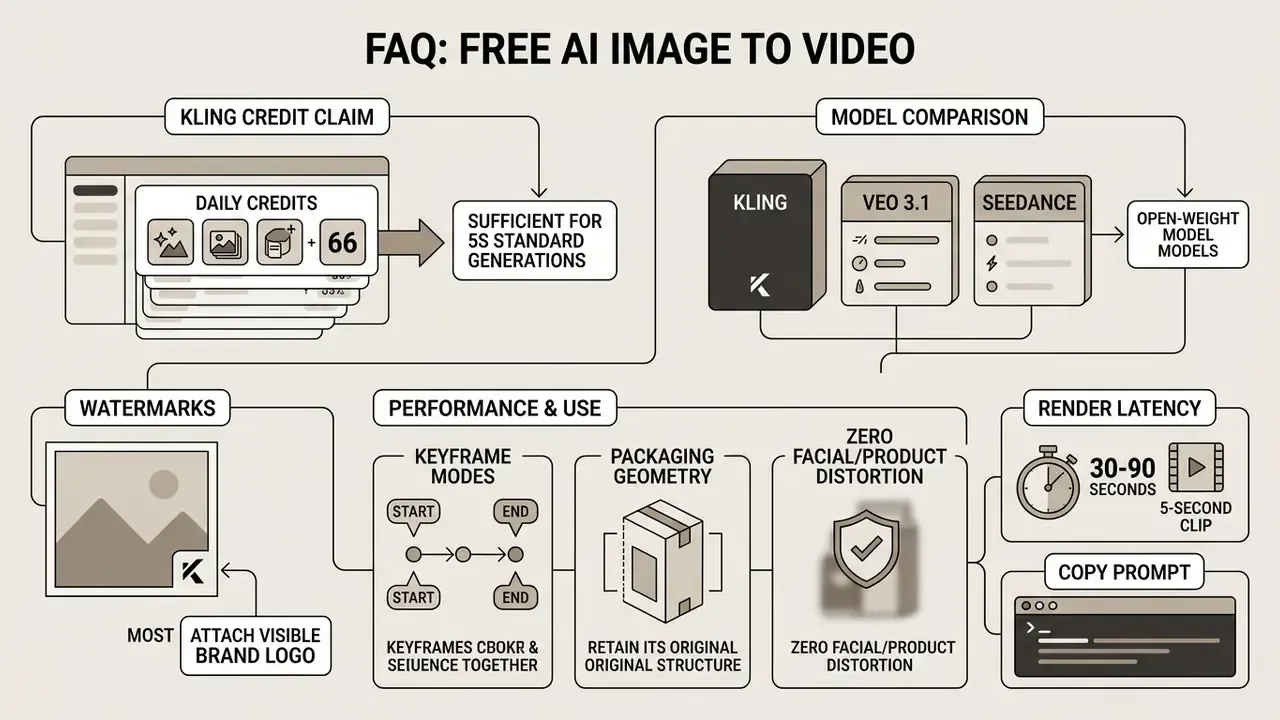
- Watermarks (updated): Most standalone engines enforce a visible brand logo on free-tier exports, usually anchored to a bottom corner. Select integrated web editors, however, offer watermark-free exports during promotional or trial tiers. Pixlr's AI video generator, for example, states that every generated video exports as a clean HD MP4 with no watermarks on free accounts, and several browser suites use no-watermark exports deliberately as a retention lever. Always open the export modal and confirm branding settings before spending credits on the final render.
- Resolution: Free exports are commonly locked to 480p or 720p standard definition. Native 1080p HD or 4K rendering requires a subscription upgrade.
- Download formats: Standard exports provide compressed MP4 files; some tools additionally offer GIF output. Advanced formats such as raw ProRes or transparent video are restricted. You can review detailed platform options in our AI Media Comparison Matrices.
When you need a paid plan or pro access
Moving from a free account to a pro tier becomes necessary when operational demand exceeds trial allocations. Key triggers:
- Queue priority.Free jobs enter public processing queues, so execution stalls during peak server load. Paid plans grant fast-track GPU priority, and several vendors now market this explicitly as a "fast mode" or priority-processing tier.
- Commercial licensing rights.Many freemium terms state that free-tier outputs are restricted to personal, non-commercial evaluation.
- Advanced control.Custom seed control, long clips (10+ seconds), high-bitrate downloads, keyframe mode at 1080p, and precise camera trajectory painting all require active subscription tiers. For pricing breakdowns, consult our AI Media Pricing Guides.
- Auditability.Seed exposure, API logging, and admin consoles, the prerequisites for a defensible audit trail, are paid-tier features almost universally. This is the trigger most often missed during procurement, and the one an internal auditor will find first.
| Parameter | Free Tier Access | Paid Pro Access |
|---|---|---|
| Credit Allocation | ~20–66 daily / 80–125 one-time or monthly | Monthly recurring or pay-as-you-go top-ups |
| Clip Duration | 3–5 seconds typical (up to 10s on some engines) | 10–20+ seconds with temporal extension |
| Output Resolution | 480p–720p standard | 1080p HD to 4K upscaled |
| Keyframe (Start-End) Mode | Often available but capped at 480p / 4–5s | 1080p, typically still capped near 5s |
| Watermark Placement | Visible vendor logo applied (exceptions: some web editors export clean) | Clear export without watermarks |
| Queue Latency | Standard public queue (high delay) | Priority fast-track processing |
| Seed / Reproducibility | Rarely exposed | Seed control and API logs commonly available |
| Commercial Usage Rights | Often limited to personal use | Full commercial clearance granted by ToS |
How to choose an AI image-to-video model for the desired result
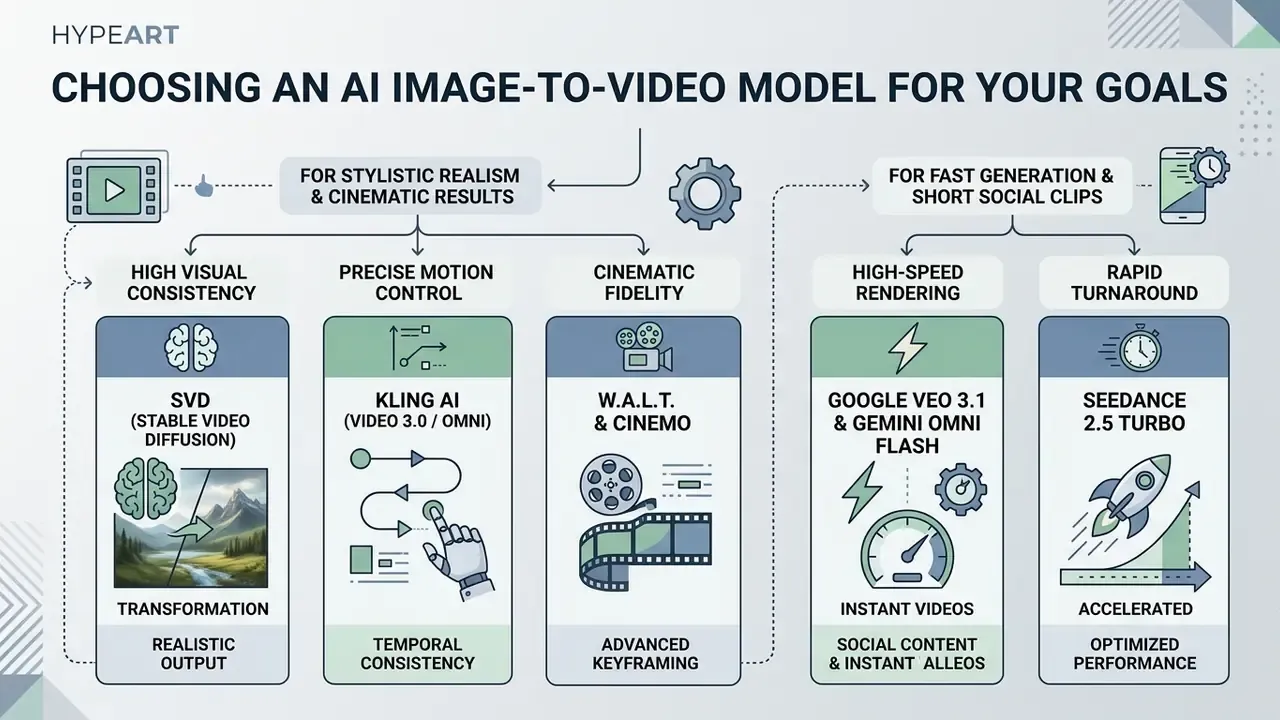
Selecting an ai image animation model depends on whether the priority is stylistic realism, visual consistency, fast rendering, or precise motion control. Evaluating the underlying models first prevents wasted computational credits on unsuited generation tasks. If you are shortlisting vendors for a formal evaluation, our comparison of the best AI video generators organizes candidates by control surface and licensing posture.
Modern benchmark frameworks rate models across multiple distinct axes rather than a single quality score.
«UI2V-Bench evaluates image-to-video models on visual fidelity, temporal consistency, motion smoothness, and prompt adherence.»
Because scores decompose into image quality, aesthetic quality, motion smoothness, video-text alignment, video-image similarity, and image understanding, no single engine leads every category. "Best" is therefore a function of the axis your use case cannot compromise on: geometry fidelity for product work, motion smoothness for social, prompt adherence for storyboarded corporate sequences.
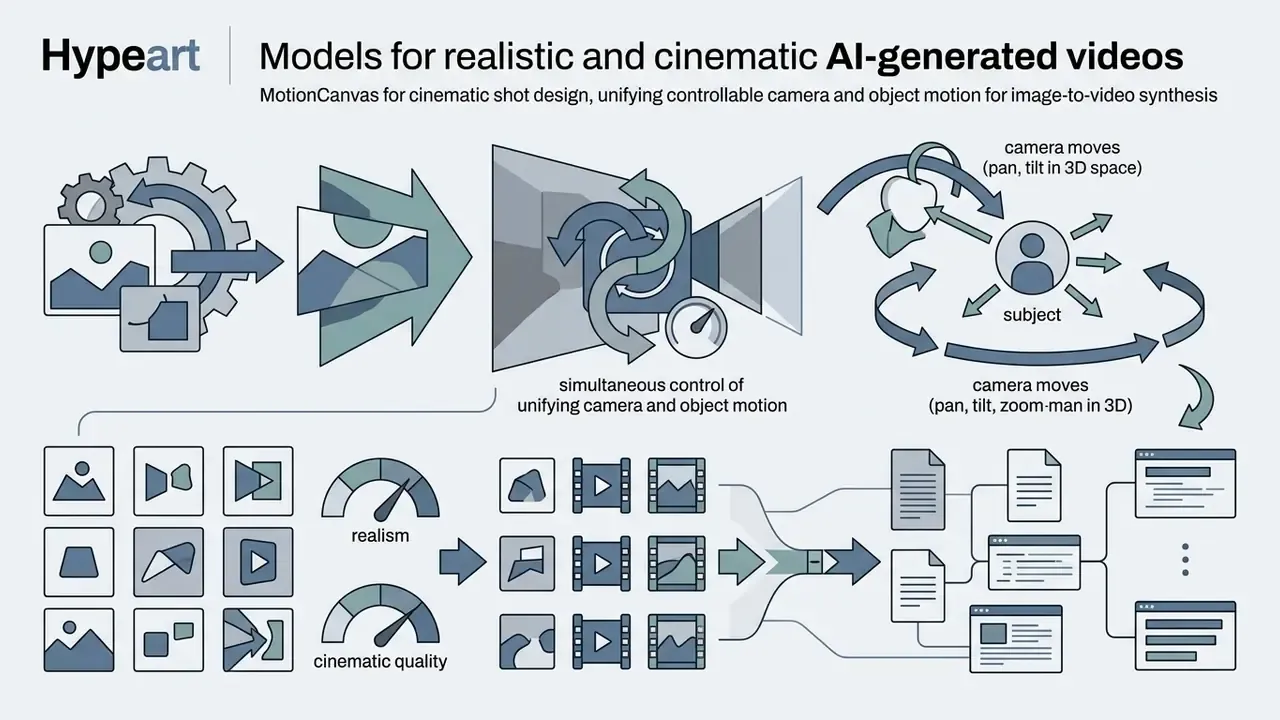
Models for realistic and cinematic AI-generated videos
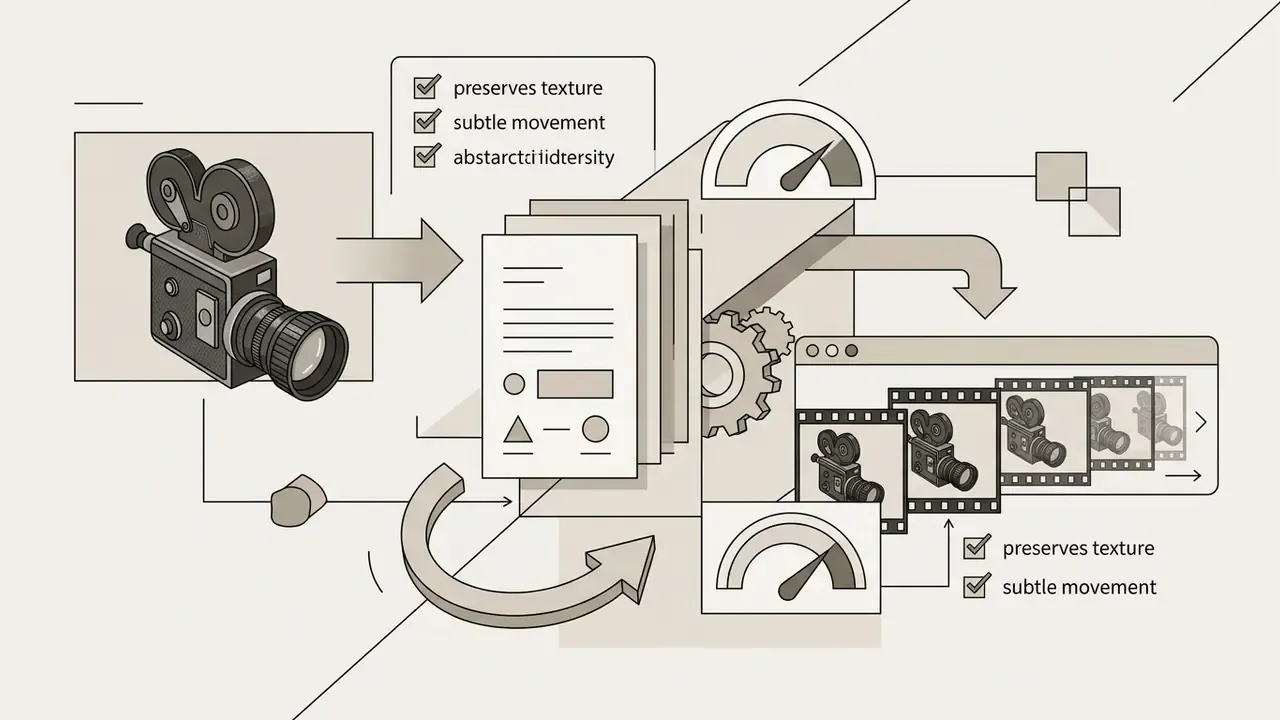
For high-end production quality, certain architecture families excel at maintaining photorealism:
Explore cinematic creation workflows in our guide to animation makers, and weigh model-by-model output limits in our comparison of free AI video generators.

Which model parameters to compare before generation
Before executing a generation, verify these operational specifications:
- Aspect ratio support. Confirm native support for vertical 9:16, widescreen 16:9, square 1:1, or 21:9 without forced cropping. Current api endpoints expose fixed enumerations rather than free-form dimensions.
- Native frame rate (FPS). Standard output ranges between 24 FPS and 30 FPS. Lower frame rates introduce visible jitter during dynamic scenes.
- Duration ceiling. Model families cap at roughly 4–8, 5–8, or 4–15 seconds. Keyframe modes are usually capped tighter than single-frame modes.
- Audio co-generation. Next-generation models produce synchronized ambient sound alongside visual motion, removing a separate audio synthesis step; others output silent video only. Check custom sound options in our guide on AI voice generators.
- Seed and determinism. Confirm whether the platform exposes a random seed. Without it, identical re-generation is impossible and your audit trail carries a permanent reproducibility gap.
- Input frame constraints. Some APIs accept first and last frame images across wide dimension ranges (for example 256–5760 px per side within a 2:5 to 5:2 ratio window), which determines how much cropping the engine applies to your source.
Fact check and specification verification (as of Q1 2026):
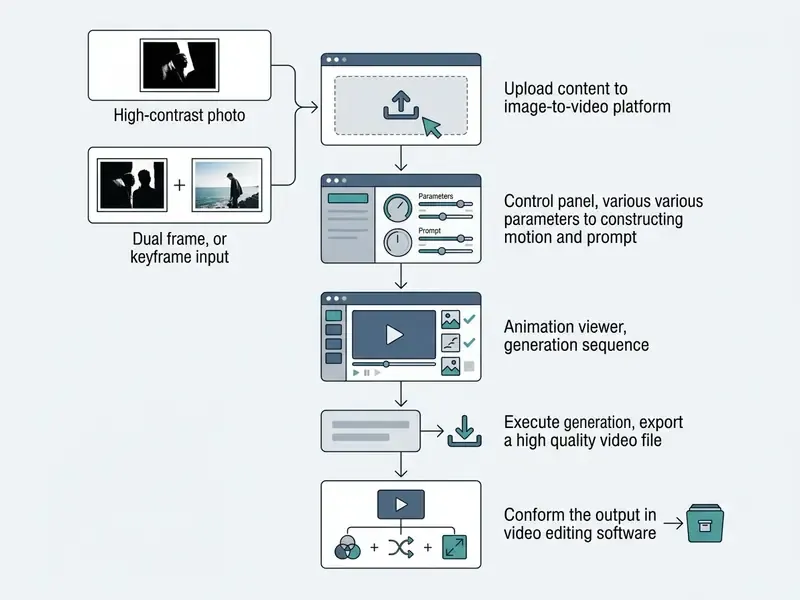
How to create video from image for free: step-by-step process
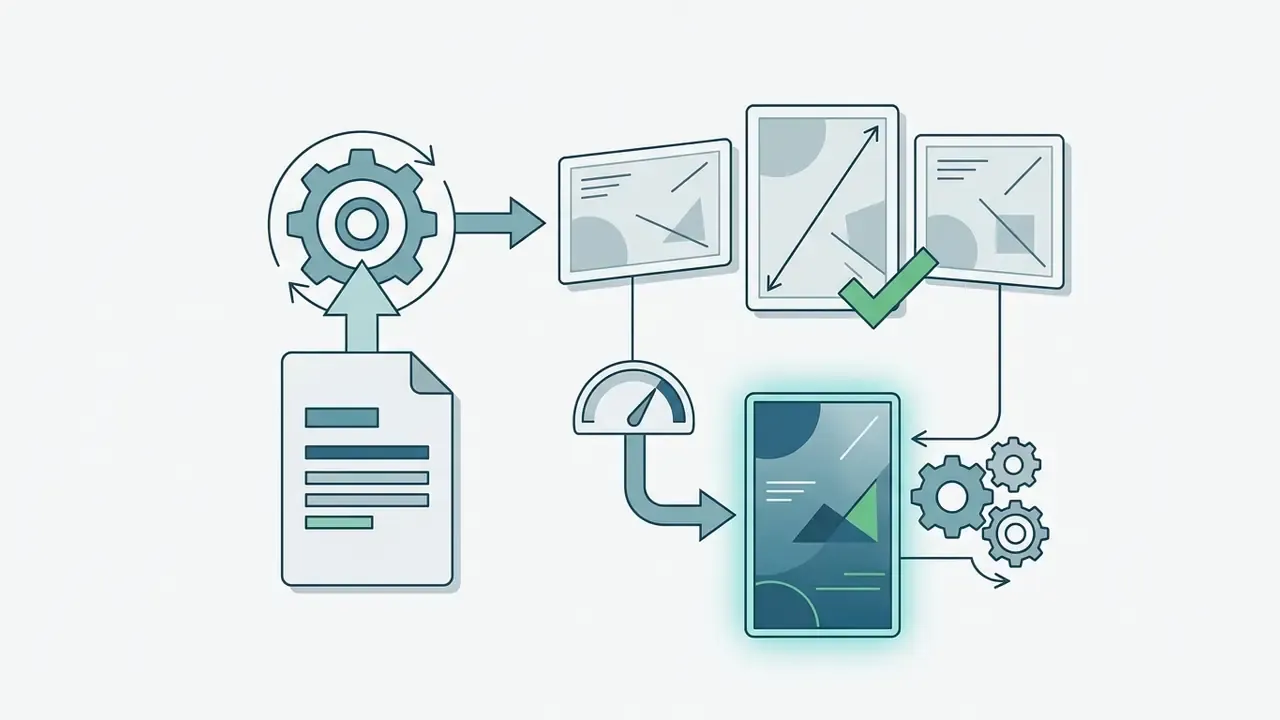
Creating dynamic clips from static photos requires a structured preparation process. A systematic pipeline reduces generation failures and prevents credit waste on flawed source inputs.
Upload image and choose the format of the future video
Begin by selecting a high-resolution source photo, minimum 1080p, in standard JPG, PNG, or WEBP format. Match the initial image dimensions directly to your target destination:
Avoid uploading images with severe JPEG compression artifacts or extreme aspect ratio mismatches. Mismatched inputs trigger automatic stretching or center-cropping by the generative engine, and aspect ratio is preserved by delivery pipelines rather than corrected downstream. For source image editing techniques, refer to our overview of online photo editors.


How to write a prompt and describe the required motion
Effective motion prompting requires separating static visual description from dynamic action commands. Follow a structured formula:
[Subject Description] + [Primary Action] + [Environmental Motion] + [Camera Trajectory & Speed] + [Lighting & Style]
- Weak prompt: "Make this car drive fast."
- Optimized prompt: "A sleek blue sports car accelerates along a coastal highway, ocean waves crash gently in the background, slow camera pan right following the vehicle, warm golden hour sunset lighting, cinematic 35mm film aesthetic."
Vendor prompting guides converge on the same decomposition: subject action, environmental motion, camera motion, motion style and timing, then direction and speed. Refer to characters and objects with general, isolating language so the model can bind motion to a single entity. Describe isolated physical movements instead of overwhelming the model with competing actions.
Generate, review, and download the finished output
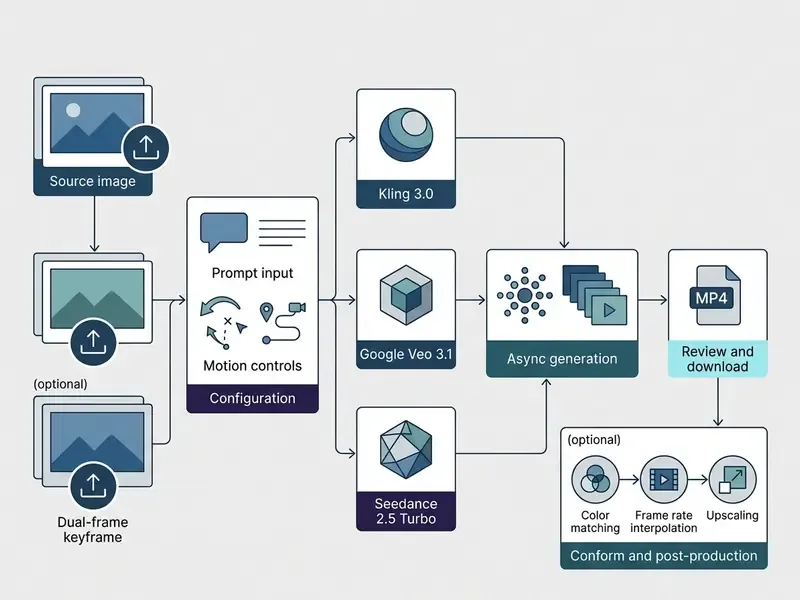
- Execute render. Submit your configuration. Generation runs as an asynchronous job: the platform returns a job identifier and a status you poll until completion. Updated: vendor documentation and FAQs commonly state that most clips complete in under 60 seconds, with lightweight-model tiers fastest and premium cinematic tiers slower. Treat any single latency figure as load-dependent rather than a specification. Measure your own median across 20 jobs before promising turnaround times internally.
- Preview efficiently. Completed jobs can often be inspected via thumbnail or spritesheet assets before you pull the full file, which conserves bandwidth during batch review.
- Review output. Examine the preview for temporal anomalies, facial blurring, background distortion, and corrupted on-screen text.
- Re-roll if needed. Adjust motion magnitude sliders or prompt phrasing before committing further credits. Re-rolling means submitting a new render job, or a remix identifier where the API supports it. Log each attempt if the asset is destined for external use.
- Export output. Select the target resolution and download the final MP4 to local storage. Signed download URLs frequently expire, commonly within one hour of generation, so archive immediately. For troubleshooting steps, visit our AI Media Support and Troubleshooting portal.
Post-processing: integrating AI video clips into non-linear editors (NLEs)
Free-tier output is rarely a finished deliverable. Treat every clip as B-roll, an insert, or a transition element that must be conformed to your master timeline:
- Color matching.Match the color space of the AI-generated MP4 to your main timeline using LUTs or automatic color match in Premiere Pro or DaVinci Resolve. Generated clips frequently arrive with elevated contrast and shifted white balance relative to camera footage.
- Frame rate interpolation.AI generators output at fixed 24 FPS or 30 FPS. Use optical-flow interpolation (DAIN-class tooling or Topaz Video AI, for example) when conforming clips to 60 FPS timelines, rather than letting the NLE duplicate frames.
- Upscaling.Because free tiers export at 480p–720p, apply spatial AI upscaling before dropping clips onto 1080p or 4K master timelines. Upscale once, at the highest available bitrate, and avoid repeated re-encoding.
- Audio layering.If the engine produced no native audio, add licensed music or synthesized narration on a separate track, so the audio license is documented independently of the video asset.
- Delivery compression.Encode the final master once for each destination. See our reference on video compressors for bitrate targets, and our YouTube video editor workflow guide for publishing-side settings.
- Metadata and archival.Embed or attach the generation record (model, version, prompt, seed, reviewer) alongside the project file, so the artifact stays auditable after the browser session is gone.
Step-by-step execution checklist
- Prepare the source asset. Image resolution at least 1080p, clear subject separation, and documented rights to use it.
- Select platform mode. Set the tool explicitly to Image-to-Video (I2V) or Start-End Frame mode.
- Input prompt parameters. Combine subject action, background motion, and explicit camera commands.
- Configure render settings. Frame rate (24 FPS), target aspect ratio, camera velocity, and seed if exposed.
- Preview and export. Review frame coherence, re-roll if artifacts appear, then download the MP4.
- Conform and log. Color match, interpolate, upscale, then record model version, prompt, seed, and reviewer sign-off.
Motion, camera, and style settings for high-quality AI video
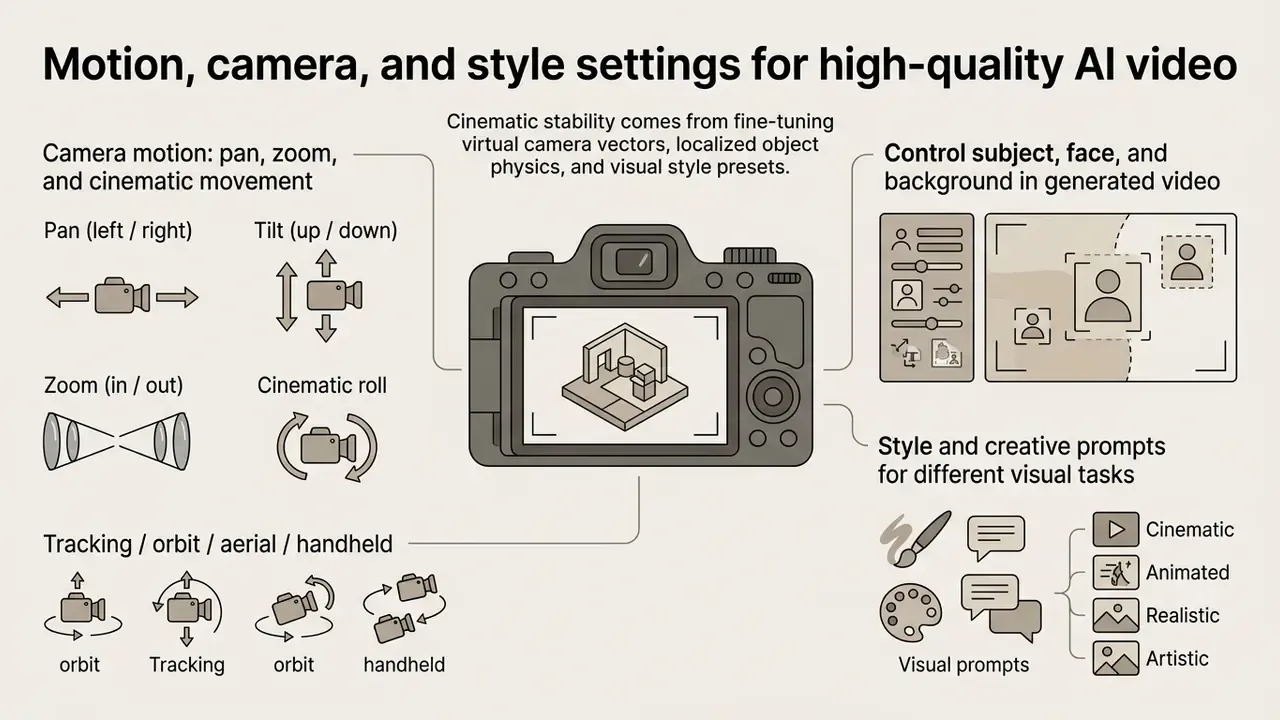
Cinematic stability comes from fine-tuning virtual camera vectors, localized object physics, and visual style presets. Modern interfaces provide graphical control panels alongside prompt-driven camera movement flags. Vendor guidance converges on a fixed prompt order: shot size, angle, movement, direction, speed, subject and action, lens and look, lighting and mood, then what the shot reveals. Style stays in a separate block.
Camera motion: pan, zoom, and cinematic movement
Controlling the virtual camera trajectory prevents random frame drift and keeps viewer focus where you put it:
- Pan (left / right) Rotates the camera horizontally across the scene. Useful for sweeping landscape reveals, tracking moving subjects, or scanning a wide diagram.
- Tilt (up / down) Shifts the camera angle vertically to emphasize height, architecture, or a dramatic character reveal.
- Zoom (in / out) Adjusts focal length to draw attention toward a specific detail or widen the environment.
- Cinematic roll Rotates the camera along its optical axis for a stylized dynamic effect. Professional camera documentation defines roll as a distinct axis from pan, tilt, and zoom.
- Tracking / orbit / aerial / handheld Additional documented movement families, each with controllable direction, path, and pacing.
Combining smooth single-axis camera controls yields far more stable output than requesting multi-axis maneuvers at once. Two axes at high speed is where most free-tier renders fall apart.
Control subject, face, and background in generated video
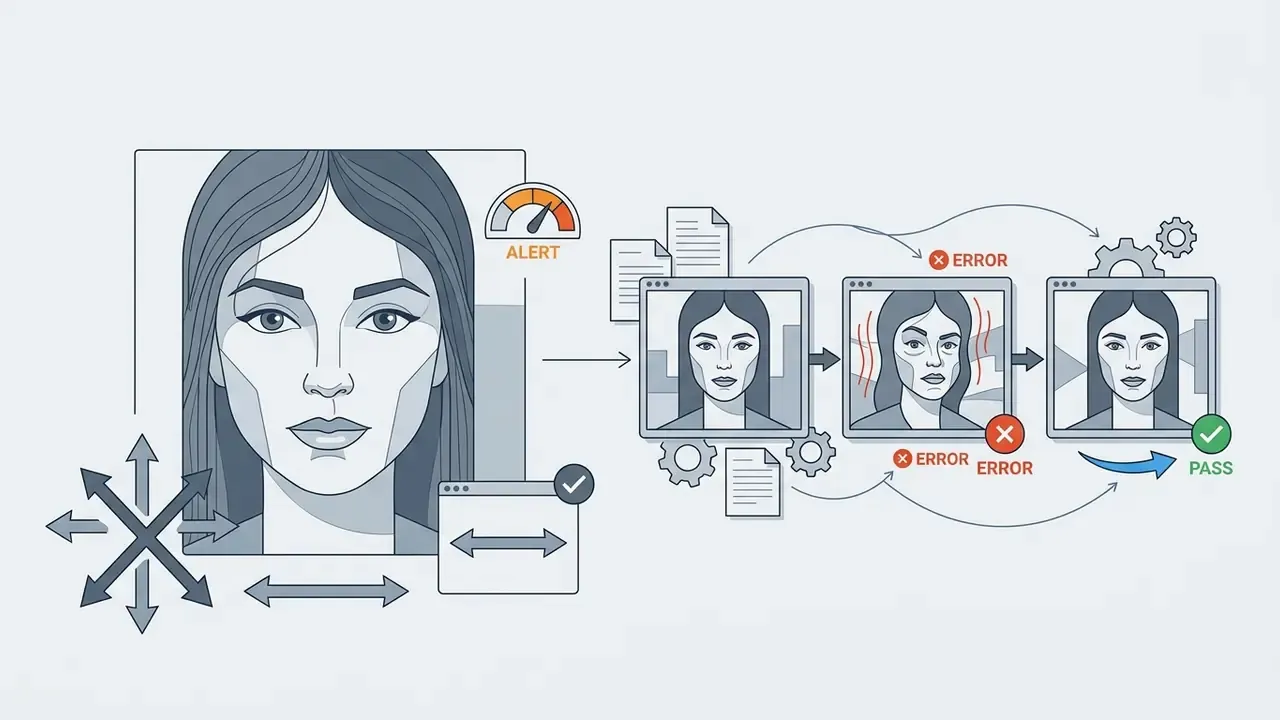
Maintaining facial structure and human anatomy during motion generation remains a major technical challenge.
Follow-up work reinforces the same three levers. Identity-preserving pose-guided animation research converts 2D landmarks into a 3D face model and projects them back to 2D, keeping facial geometry aligned with the reference identity. Diffusion-based facial video editing work (IP-FaceDiff, WACV workshop 2025) formalizes the temporal loss as the average ℓ₁ distance between warped and next frames, enforcing frame-to-frame stability. In short: add face-geometry guidance, enforce temporal consistency, keep motion magnitude modest.
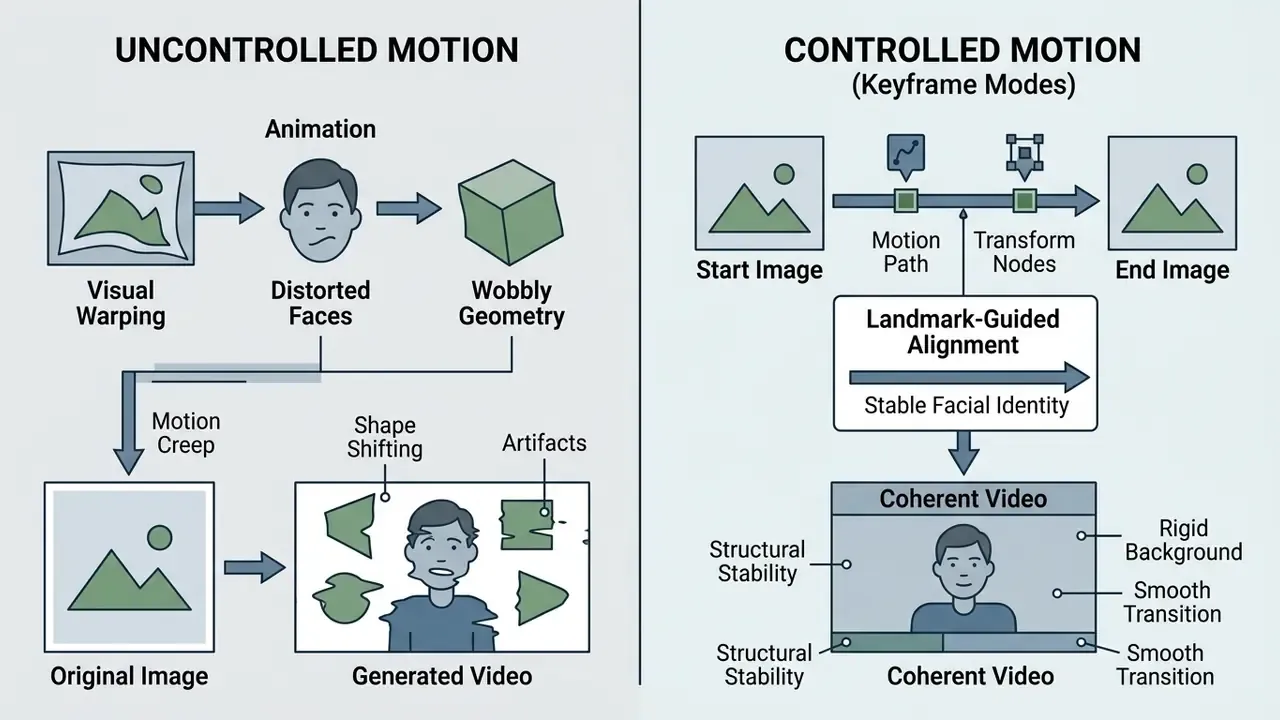
To maintain subject stability:

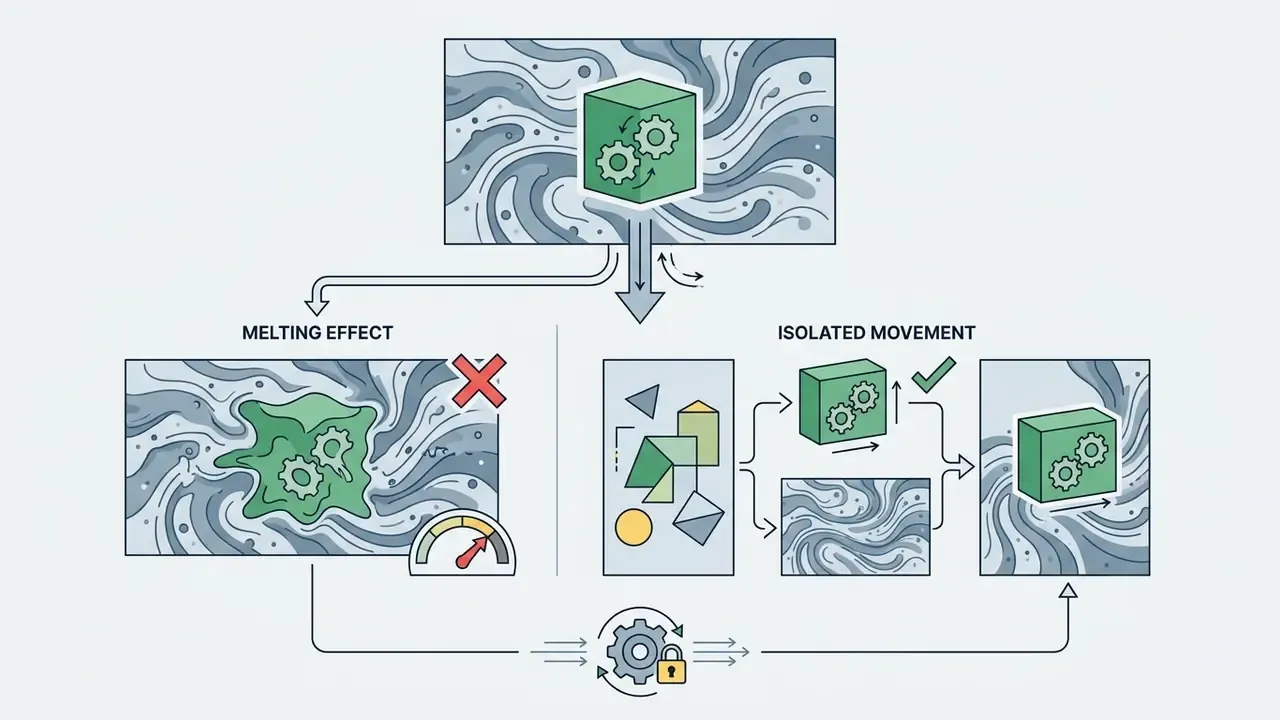

Style and creative prompts for different visual tasks
Tailoring style markers keeps output aligned with the project aesthetic:
Copy-paste prompt recipes by industry
Five production-tested templates. Replace bracketed variables, keep the clause order intact, and change one variable at a time when tuning.
1. E-commerce product showcase
- Source asset: Static product photo on a clean background.
- Prompt:
[Product name] centered on a matte surface, 360-degree slow turntable camera rotation, soft studio key light sweep, micro-reflections, high detail 8k product render, smooth motion, 24 fps. - Notes: Keep motion intensity low. Turntable rotation is the single most stable product motion because it preserves silhouette continuity.
2. Corporate onboarding and HR / L&D training (from a static slide)
- Source asset: Technical diagram, process flowchart, or infographic.
- Prompt:
Slow pan across architectural flowchart, subtle pulse effect on active data nodes, clean corporate aesthetic, modern motion graphics style, 4k crisp edge rendering. - Notes: Generative engines corrupt small rendered text. Where a diagram carries labels that must stay legible, generate the motion layer only and composite the original vector text back over it in your NLE.
3. UI/UX and mobile app prototype
- Source asset: High-fidelity mobile screen mockup.
- Prompt:
Macro close-up, smooth finger tap motion, subtle screen light reflection, seamless UI transition, clean studio lighting, realistic depth of field. - Notes: Ideal candidate for start-end keyframe mode. Supply screen state A and screen state B, so the transition lands exactly on an approved layout.
4. Concept art and style transformation (sketch to motion)
- Source asset: Digital illustration or line art.
- Prompt:
Dynamic cinematic motion, line art pencil shading morphing into vibrant anime lighting, glowing energy particles, slow motion camera pull-out. - Notes: Sketch-to-render is the flagship keyframe use case. Frame one is the line art, frame N is the finished render, and the model interpolates the reveal.
5. Financial and analytics storytelling (regulated-environment variant)
- Source asset: Approved chart export or report cover, containing no non-public data.
- Prompt:
Slow push-in across approved chart panel, gentle depth parallax between layers, restrained corporate palette, even diffuse lighting, no text distortion, 24 fps. - Notes: Never upload unpublished figures to a public free tier. Generate the motion treatment from a placeholder or an already-published visual, then overlay live figures locally in the NLE. That keeps sensitive numbers inside your perimeter and keeps on-screen data verifiable.
Image-to-video generation errors and ways to improve results
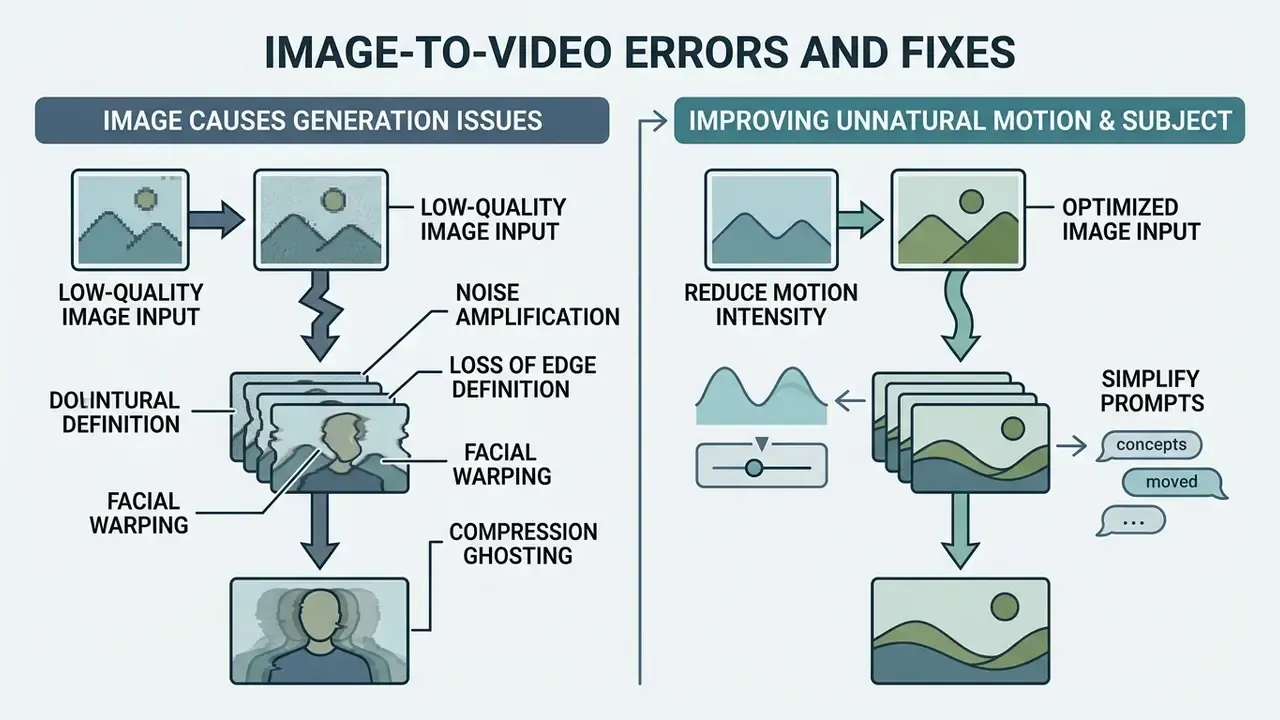
Generative video pipelines occasionally produce visual distortion, frame flickering, or anatomical warping. Understanding why these artifacts appear lets operators correct source inputs and prompt configurations efficiently. Survey and benchmark literature groups failures into three recurring classes: appearance artifacts, temporal flicker, and unstable camera or object motion. Annotation datasets such as GeneVA catalogue them as texture corruption, object deformation, flicker, motion discontinuity, and erratic camera trajectory. Research that adds geometric constraints, for example epipolar-geometry conditioning, reports fewer artifacts and smoother motion. That explains why geometry-respecting prompts outperform vague ones.
Why a low-quality image degrades video output
Generative diffusion models rely on source frame clarity to calculate spatial motion vectors. Input images below 720p, or carrying heavy JPEG compression or severe digital noise, cause predictable failures:
- Noise amplification. The model interprets pixel noise as intentional texture, turning static grain into chaotic motion flicker.
- Loss of edge definition. Soft or blurry subject edges let the background bleed into the foreground during animation.
- Facial warping. Low-resolution facial features lack sufficient landmark detail, so eyes and mouths deform during head movement.
- Compression ghosting. Lossy compression removes original detail and introduces small false structures. Restoration research explicitly builds low-quality training samples by downscaling and compressing high-resolution footage at low bitrates, which is precisely the degradation your source photo carries after it has been re-saved through messaging apps or a CMS pipeline.
Pre-process source images with dedicated enhancement software before video generation. See our comparison of AI image upscalers for pre-processing options, and our comparative analysis of the best free AI art generators if you need to originate the source asset instead.
How to fix unnatural motion and an inaccurate subject
When generated clips show jittery movement or floating geometry:
- Reduce motion intensity.Lower the motion scale (for example from 8/10 to 3/10) to force subtle temporal steps.
- Simplify prompts.Remove conflicting movement instructions. Specify one primary action for the main subject and one camera trajectory. Vendor prompt handbooks structure this as Subject + Primary Action + Environmental Motion + Camera Motion, followed by an explicit review pass for anatomy, motion clarity, and subject consistency.
- Refine subject masking.Use regional brush tools, where the interface provides them, to isolate moving elements and keep the background frozen.
- Smooth motion traces.Where the platform exposes point tracks, smooth and moderate the trajectory magnitude before generation rather than after. Research implementations apply exactly this smoothing step.
- Switch to keyframe mode.If the model keeps drifting toward an unacceptable end state, supply the end frame explicitly and let the engine interpolate instead of improvise.
- Re-anchor with a cleaner source.If two or three re-rolls fail identically, the fault is usually in the input, not the prompt. Worth remembering before the fourth attempt burns the daily quota.
Commercial use: can you use free AI video in advertising and social media
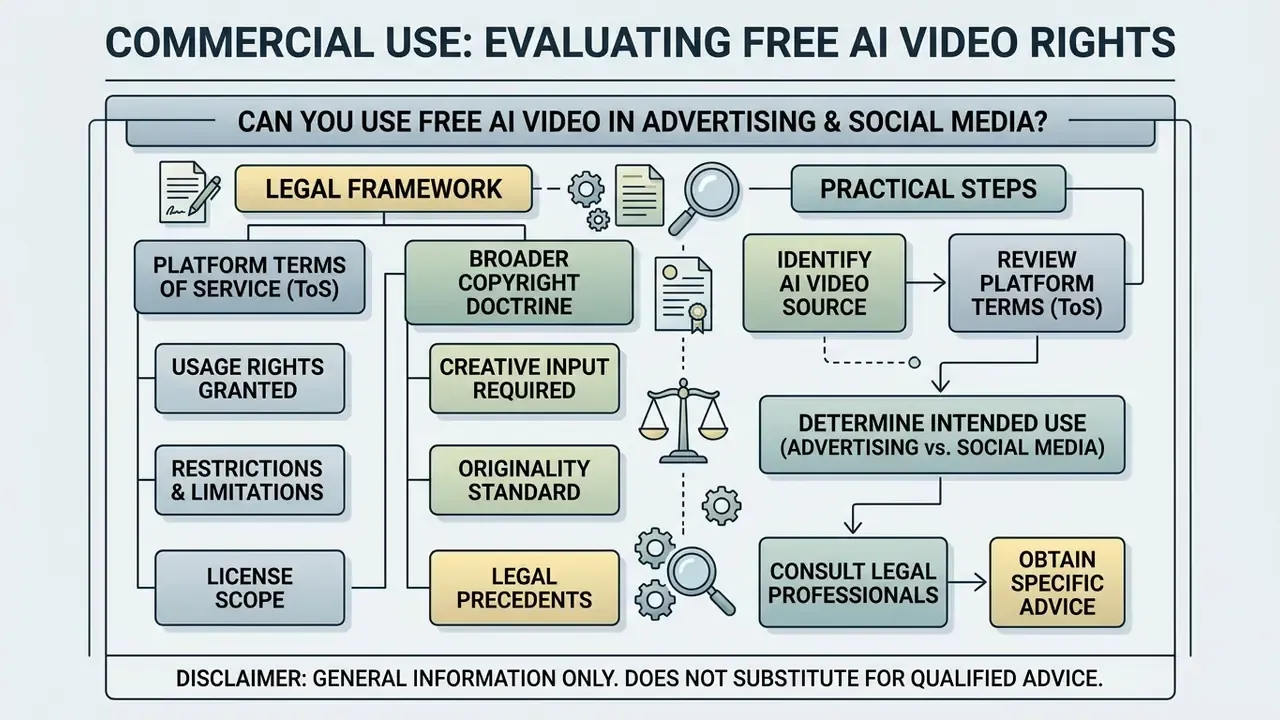
Evaluating commercial rights for AI-generated video means separating platform Terms of Service from broader copyright doctrine. Creating a video on a free generator tier does not automatically grant full rights for commercial monetization. Two independent questions must both be answered yes: does the platform license permit commercial use, and are all inputs and embedded components cleared?
What to check before commercial use of AI-generated videos
Before launching advertising campaigns, social assets, or commercial products using generated clips, verify these conditions:
- Platform account license. Confirm whether your plan permits commercial monetization. Most standard freemium tiers restrict output to non-commercial evaluation. Paid upgrades are usually required for ad campaigns, and using a free-tier clip commercially against the terms is a contract breach independent of any copyright question. For adjacent licensing questions on still assets, review our guidance on commercial use of AI image generators.
- Copyright ownership standards. Under current US Copyright Office guidance, purely machine-generated outputs created without substantial human creative input do not receive federal copyright protection.
«The US Copyright Office confirms purely machine-generated output without substantial human creative input is not protected by copyright.» , US Copyright Office Guidance on AI-Generated Works (2026). https://www.copyright.gov/ai/
European Parliament analysis reaches a parallel conclusion for the EU: outputs produced without substantial human intervention are not eligible for copyright protection. Competitors may therefore be free to reuse un-edited raw AI clips, which is why documented human authorship (prompt iteration, editing, compositing) matters commercially as well as legally.
- Model training data provenance (clean datasets vs. open-web scrapes). Commercial viability depends heavily on how the underlying architecture was trained. Enterprise platforms such as Adobe Firefly state that their video models are trained exclusively on licensed stock media and public-domain assets with expired copyright, and market that output as commercially safe. Conversely, open-weight models (SVD, Wan 2.1) and web-scraped engines may carry proprietary or copyrighted media in their latent space. Teams deploying AI video for commercial campaigns must verify whether the generator provides legal indemnity against third-party copyright claims, and record that determination in the vendor file. It is the single question most likely to be asked during a post-incident review.
- Source asset clearance. Ensure the initial static photo does not violate publicity rights, trademark law, or third-party copyright. Review specialized considerations in our guide on AI Media Commercial-Use.
- Integrated audio and watermarking. Confirm that background audio shipped with the video is cleared for commercial broadcast, and verify that all vendor watermarks are gone. Check background audio licensing options in our guide on AI lyrics generators.
- Disclosure and labelling. EU AI Act transparency provisions require generative AI content to be identifiable, and advertising standards bodies increasingly expect synthetic-media disclosure. Decide the labelling policy before publication, not after a complaint.
| Checkpoint Category | Requirement for Commercial Clearing | Risk Factor if Ignored |
|---|---|---|
| Source Image Rights | Full ownership or commercial license for the input photo | Copyright or publicity-right infringement claims |
| Platform Account Tier | Active paid tier explicitly granting commercial ToS rights | Breach of platform service contract |
| Training-Data Provenance | Vendor statement on licensed or public-domain training data; indemnity clause where available | Third-party infringement claim with no vendor backstop |
| Watermark Removal | Output completely free of vendor branding logos | Rejection by ad platforms and brand damage |
| Audio Track Clearance | Licensed commercial audio or royalty-free tracks | Automated copyright strikes on social media |
| Human Creative Input | Documented prompt refinement, editing, or composite work | Inability to register copyright for generated assets |
| Personal Data & Consent | Written consent for depicted individuals; no PII or NPI in uploads | GDPR / GLBA / CCPA exposure and regulatory findings |
| Synthetic-Media Disclosure | Labelling decision recorded per jurisdiction and channel | Transparency-rule breach; advertising-standards complaint |
| Audit Trail | Model version, prompt, seed, reviewer sign-off retained | Inability to reconstruct or defend the artifact |
Limitations and open questions
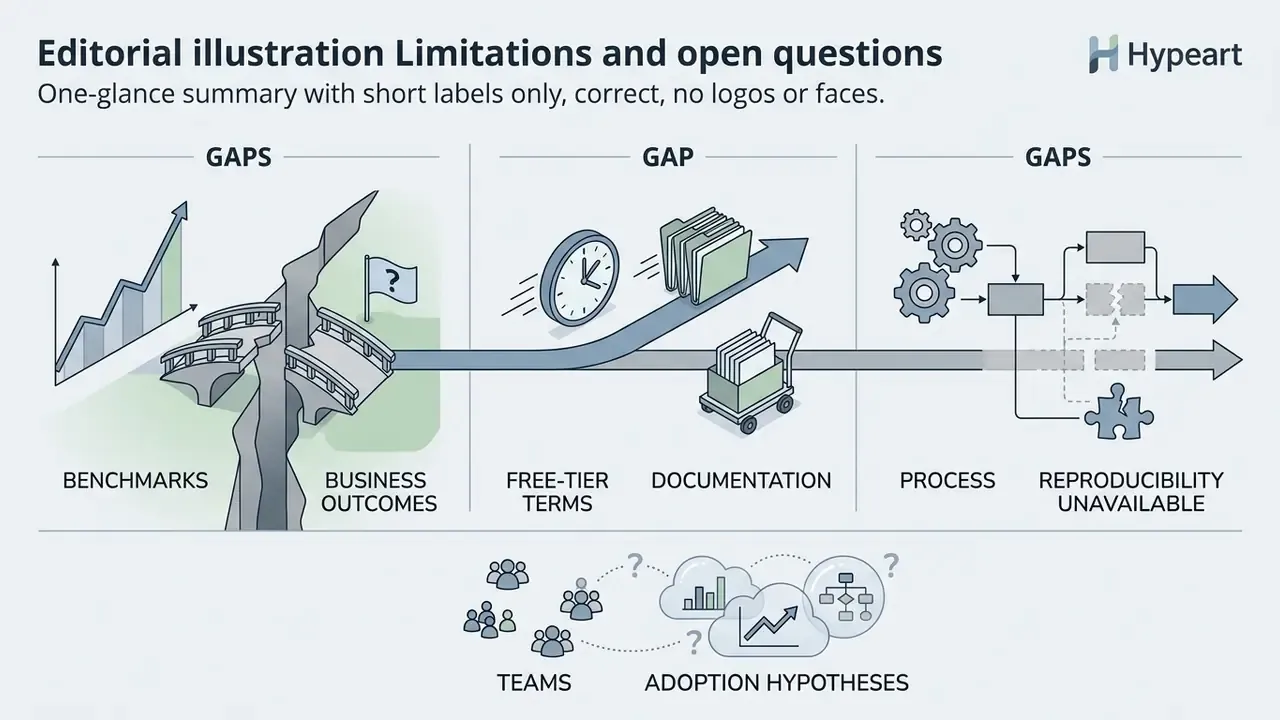
Three gaps are worth stating plainly, because they affect how much weight this guidance can carry.
- Benchmarks do not equal business outcomes. UI2V-style scores measure fidelity and smoothness, not whether a clip converted a customer or trained an employee correctly. Nobody has published a clean link between the two.
- Free-tier terms move faster than documentation. Quotas, watermark rules, and commercial permissions changed repeatedly through 2025 and continue to shift in 2026. Verify at sign-up, then re-verify at renewal.
- Reproducibility is partly unavailable. Where seeds are hidden, an artifact cannot be regenerated identically, full stop. The honest control is to document that limitation rather than to claim reproducibility you do not have.
Audience assumptions in this article, including which teams adopt free generators first, remain hypotheses until confirmed by your own analytics, interviews, or vendor logs.
Key technical takeaways for generative video workflows
- Input quality directs output fidelity.High-resolution source images (1080p and above) with distinct foreground-background separation yield smoother temporal motion and fewer facial artifacts. Compression damage in the source reappears as flicker in the output.
- Choose the right input mode.Single-frame I2V predicts motion forward; start-end keyframing interpolates to an approved destination frame. Pick keyframing whenever the final state must be exact.
- Freemium constraints require monitoring.Track daily credit quotas, resolution caps, and watermark rules, including the exceptions where web editors export clean. Commercial deployment typically requires moving from free accounts to paid pro plans.
- Prompt architecture demands separation.Structure prompts by separating subject action from virtual camera vectors (pan, zoom, tilt, roll) to preserve object geometry across frames.
- Treat output as B-roll, not a deliverable.Color match, interpolate frame rate, and upscale before the clip touches a master timeline.
- Governance is part of the workflow.Log model version, prompt, seed, and reviewer for anything published externally, and keep confidential inputs off public free tiers entirely.
- Legal compliance is mandatory.Verify source asset licensing, training-data provenance, platform ToS commercial permissions, audio clearance, and disclosure obligations before publishing generated assets in advertising.
A safe next step, if the topic is new to your control environment: run one time-boxed pilot on synthetic imagery, document the six artifact fields above, and review the result with model risk and legal before anything reaches a customer.
FAQ: free AI image to video
What is image-to-video AI?
It is a generative system that turns a still image into a short animated clip by predicting motion, camera movement, and lighting change across frames, using the uploaded image as a spatial conditioning anchor.
Can I turn an image into video completely free?
Yes, within quotas. Free tiers typically provide 20–125 credits (one-time, monthly, or daily), 3–10 second clips, and 480p–720p output. Some browser suites export without watermarks on free accounts; most standalone engines do not.
What is start-end frame mode and when should I use it?
You supply both the first and last image, and the model interpolates between them. Use it for before/after reveals, product transformations, sketch-to-render animations, UI state transitions, and any case where the closing frame must match an approved visual. It is usually capped near five seconds.
How long does generation take?
Most vendors state under 60 seconds for short clips, with fast or lite models quickest and premium cinematic models slower. Free-tier jobs also sit in a shared queue, so wall-clock time can exceed compute time substantially at peak hours.
Can I use free AI video commercially?
Only if the platform's terms grant it. Many free tiers restrict output to personal, non-commercial evaluation. Separately, purely machine-generated output may not qualify for copyright protection in the US or EU, so documented human editing strengthens your position.
Is it safe to upload company material to a free generator?
Assume no, unless the terms say otherwise. Free tiers frequently reserve rights to use uploads for service improvement, rarely publish deletion SLAs, and usually sit outside your vendor due-diligence perimeter. Use synthetic or already-public imagery for experimentation.
Which models are best for realistic output?
Stable Video Diffusion for texture-preserving self-hosted work, Kling Video 3.0/Omni for prompt adherence and multi-object dynamics, Veo 3.1 for photoreal short clips with native audio, and Seedance 2.5 Turbo for fast, motion-stable product and portrait animation.
Can generated clips be edited in Premiere Pro or DaVinci Resolve?
Yes. Exports are standard MP4. Conform them by matching color space, interpolating frame rate if your timeline is 60 FPS, and upscaling before placing them on a 1080p or 4K master.
What evidence should we keep for an internal audit?
At minimum: model name and version, prompt and negative prompt, motion and camera parameters, seed where exposed, source image lineage and consent records, reviewer name with disposition, and the labelling decision. Store it with the project file, not in a chat thread.
Appendix A: Revision log (original phrasings retained for transparency)
Metadata and technical schema
Security-checked { "title": "Free AI Image to Video: Free Generator Guide, Keyframe Modes and Governance (2026)", "description": "Turn still images into video with free AI tools. Compare Kling, Veo, Seedance and open-weight models, master start-end frame keyframing, industry prompt recipes, NLE post-processing, enterprise data risks and commercial licensing rules.", "canonical_topic": "free ai image to video", "secondary_keyphrases": [ "ai image to video free", "ai image to video fre", "video to image ai free", "start end frame ai video", "image to video keyframe generation", "free ai video generator no watermark", "commercially safe ai video model", "ai video governance checklist" ], "audience": "Enterprise leaders, CROs, CCOs, heads of model risk and AI governance, marketing transformation leads, content strategists", "author": "Marcus Hale", "company_status": "hypeart.ai: No verified information available", "content_type": "Informational / Technical Guide", "schema_type": "TechArticle", "last_updated": "2026-Q1", "word_count_estimate": 5400 }