An AI photo to video generator is an automated system that turns static images into short, moving clips. Modern platforms lean on latent diffusion models and space-time transformers to synthesize motion across sequential frames while holding on to the visual structure of the original photo. That architectural pattern comes from the academic literature, not vendor marketing: contemporary image-to-video (I2V) systems pair a diffusion denoising loop with a transformer or U-Net backbone operating over spatiotemporal tokens.
Why should a risk or compliance reader care about a consumer creative tool? Because free generators are where unvetted uploads happen first, usually without a data-processing agreement.
Marketing teams, e-commerce operators and independent visual creators use these tools to scale media production, test concepts cheaply, and build short-form assets online. The same tools sit one browser tab away from any employee holding a customer photograph.
Executive Summary
- What it is: Free AI photo-to-video tools animate a still image by using it as a conditioning signal inside a latent diffusion pipeline. The photo anchors identity; the model synthesizes motion frames around it.
- What "free" actually means: Daily or one-time credit allocations, 3 to 5 second clips, 480p to 720p exports, visible watermarks, and (this is the part people skip) personal or evaluation-only licences on most non-paid tiers.
- Model ceilings in 2026: Single-pass clip length is structurally capped. Seedance 2.5/2.0 runs in 4 to 15 second steps, Google Veo 3.1 around 8 seconds, Kling 3.0 and Runway Gen-4 around 10 seconds. Anything longer is stitched or chained.
- Quality levers that matter: Explicit camera vectors, motion strength limits, 1080p+ source images, scale anchors for product shots, and style constraints for illustrations.
- Compliance checkpoints: Input image rights and model releases, plan-tier commercial licence, U.S. Copyright Office authorship limits, and vendor data-retention or AI-training policy, all confirmed before any employee or customer photo is uploaded.
- Biggest hidden risk: Shadow AI. Staff uploading identifiable portraits or unreleased product designs to unvetted free SaaS generators without an NDA, an SLA, or a documented no-training guarantee.
- Governance framing: Treat a video generator as a third-party processing dependency with an owner, an approved use, and a logged decision trail. Not as a toy.
What Is a Free AI Photo to Video Generator?
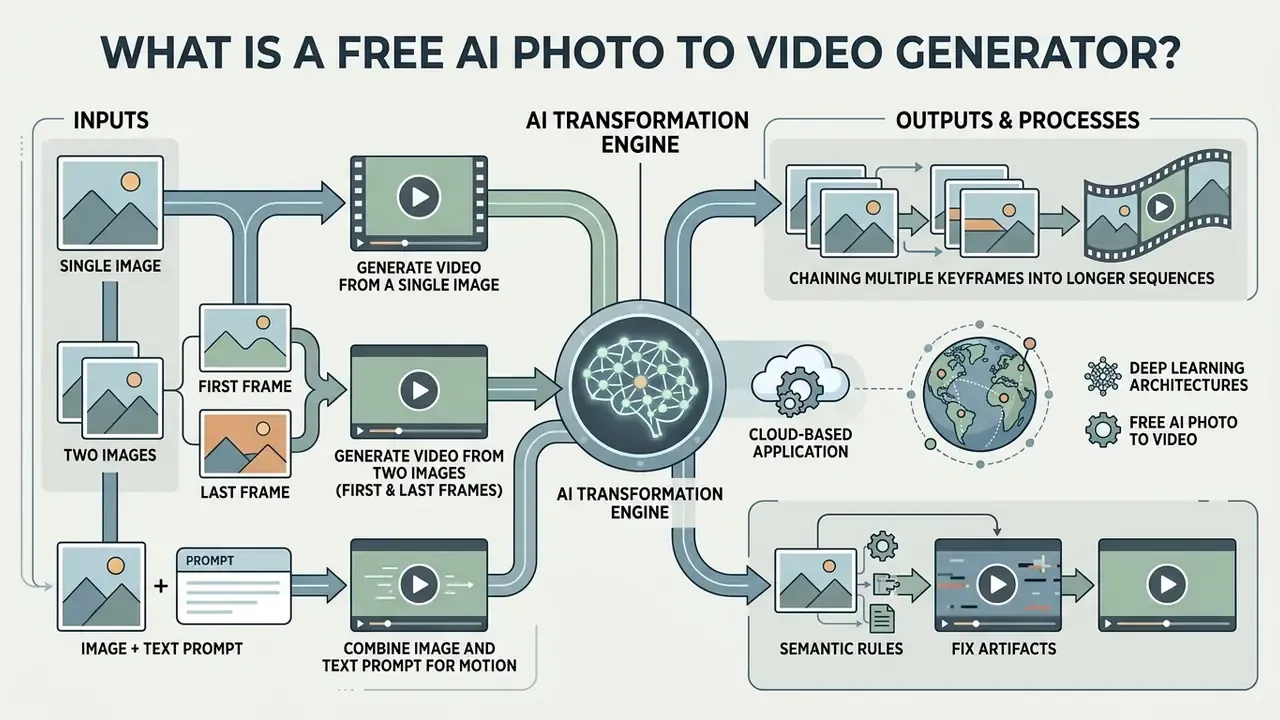
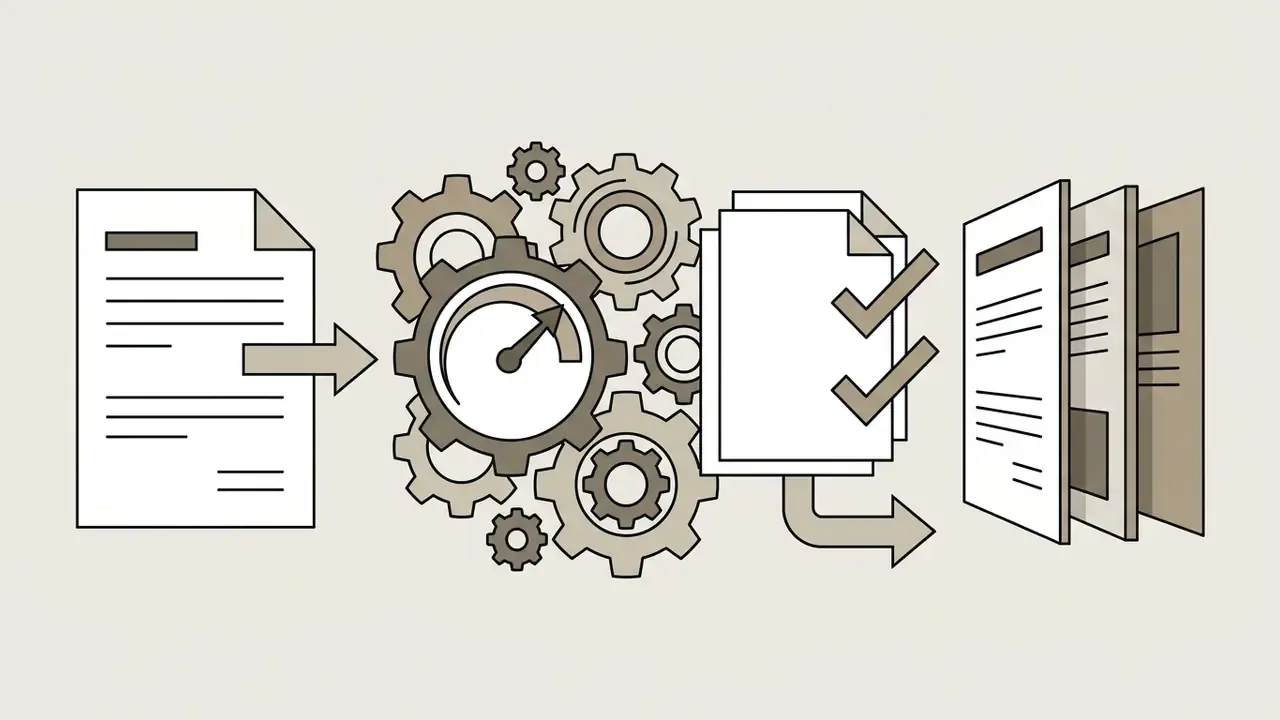
An AI photo to video generator is a cloud-based application that converts static visual inputs into dynamic video sequences using deep learning architectures. These systems ingest a source image, analyze its spatial features, and generate the following frames through temporal attention mechanisms and latent flow prediction. Most run as an AI image to video generator website, so nothing installs locally, which is convenient for creators and inconvenient for anyone maintaining a software inventory.
At a technical level, image-to-video models operate inside the latent space of a trained variational autoencoder. According to Image-to-Video Diffusion: From Foundations to Open Frontiers (Zheng et al., 2024), the initial photo acts as a conditioning signal that grounds object identity and background context, while the model iteratively denoises temporal latents to produce fluid motion. Put plainly: the photo tells the model what exists, and the prompt tells it what happens next.
Generate Video from a Single Image
Single-image animation turns one still photograph into a continuous clip by estimating plausible pixel trajectories and background shifts. The model isolates key elements inside the uploaded frame, then applies synthesized motion parameters to simulate camera movement or subject action. This is the fastest path when you need to generate video from a single image and have nothing else to work with.
Visual fidelity holds because early latent frames stay anchored to the source photo. Research on Latent Flow Diffusion Models shows that predicting flow fields in latent space lets a model reuse spatial detail from the input frame, which limits unnatural warping and structural decay across multi-second clips.
Generate Video from Two Images with First and Last Frames
Two-image generation lets you define explicit start and end keyframes. The generator computes an intermediate trajectory that morphs the first frame into the final one, while trying to preserve subject identity and spatial continuity. Teams that need to generate video from two images usually want a controlled transition: closed hand to open hand, packaging closed to packaging opened, before to after.
This keyframe interpolation approach relies on endpoint conditioning, where the model builds intermediate latents guided by both inputs. Technical evaluations of keyframe-aware pipelines indicate that explicit motion guidance between two frames reduces abrupt transitions and limits identity loss during complex object transformations. Readers building a longer production pipeline can review our reference material on image-to-video AI tools for a full inventory of animation controls.
Chaining multiple keyframes into longer sequences. Because base models cap single-pass generation, production teams string clips together in one of two ways. The first is auto-stitching: a script is split into shot-length segments, each segment is generated inside the model's frame ceiling, and the clips are concatenated on a timeline so a 30-second video plays as one apparently continuous take. The second is last-frame chaining, where the closing frame of clip A becomes the opening keyframe of clip B. Chaining handles a single self-contained transition well. It degrades across many shots, because the model sees one still frame and re-derives lighting, camera geometry and micro-texture from scratch on every pass. Reference-to-video conditioning solves the problem differently: it carries locked character, product and environment references across every shot, preserving identity rather than pixels.
Combine an Image and Text Prompt for Motion
Pairing a source image with a text prompt is where an AI image video maker becomes genuinely directable. The uploaded photo is the structural anchor. The text instruction directs temporal movement, camera path and scene dynamics.
In practice, write about what happens over time instead of re-describing what the photo already shows. Vendor documentation from Runway Research stresses the same point: effective prompts focus on camera motion, subject acceleration and environmental change, letting the image condition carry colour, facial features and lighting composition. Text-heavy graphic overlays behave differently and are usually better produced upstream with a word art generator before the frame ever reaches the video model, since diffusion pipelines are notoriously poor at keeping lettering stable across frames.
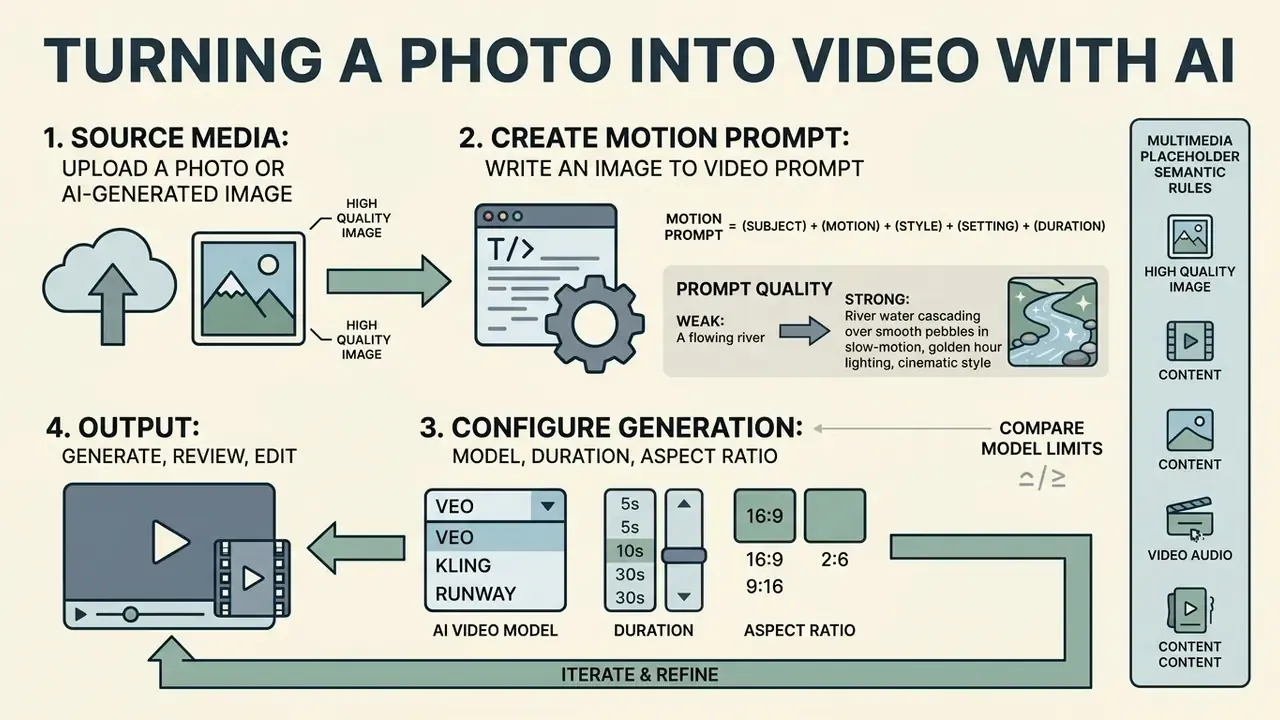
- Semantic rules: Render as a figure with a caption reading "AI Photo-to-Video Processing Pipeline". Every step must carry a short text description readable in the DOM without loading an external image.
What Does "Free" Mean in AI Image to Video Tools?
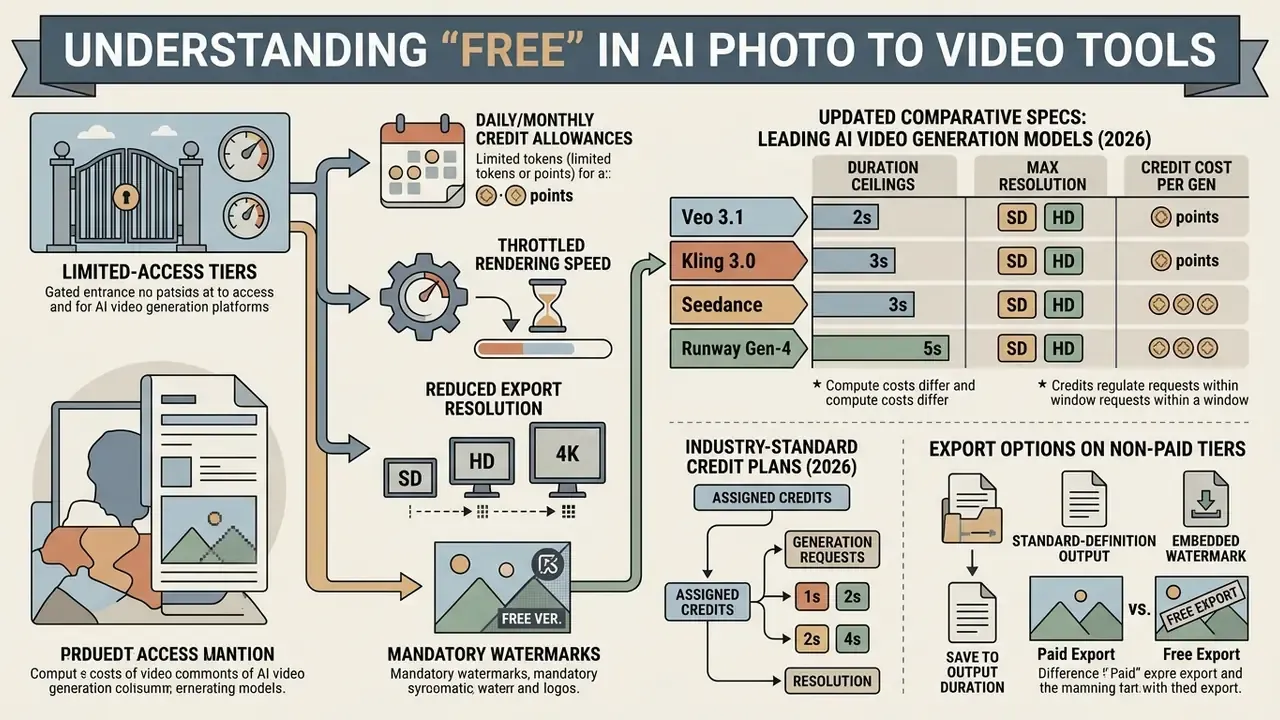
In this market, "free" describes limited-access tiers governed by daily or monthly credit allowances, throttled rendering speed, reduced export resolution and mandatory watermarks. Providers design non-paid tiers for evaluation, personal experimentation and light prototyping, not for regulated production output. For a granular breakdown of quota resets and export gates, see our reference guide to free AI video generators.
Free access models differ mainly because compute costs differ. Some platforms reset a daily quota; others hand out a one-time trial allocation that requires an upgrade once depleted. Neither structure is a commitment to keep the tier free next quarter.
Free Credits, Generation Limits and Available Models
Watermarks, Resolution and Export Options
| Evaluation Criterion | Free Tier Capabilities | Paid Subscription Tier | Business / Enterprise Tier |
|---|---|---|---|
| Credit Allocation | Daily reset (e.g. 3 to 5 clips) or fixed trial | Monthly recurring pool (1,000+ credits) | Unlimited or custom API volume |
| Max Resolution | 480p to 720p standard HD | 1080p Full HD to 4K | Uncompressed 4K and multi-bitrate |
| Clip Duration | 3 to 5 seconds per request | 10 to 25 seconds per clip | Extended sequence stitching |
| Watermark Policy | Visible brand watermark included | No watermark on exports | Custom branding, clean exports |
| Commercial Rights | Personal or evaluation use only | Full commercial usage licence | Enterprise IP indemnity and SLA |
| Model Access | Standard or legacy models | Advanced models (Ray3, Veo) | Priority compute queues and API |
| Data & Training Policy | Terms often permit product-improvement use | Opt-out controls typically available | Contractual no-training guarantee |
Table note: capabilities and credit structures reflect standard industry tiers observed across major video generation providers in 2026. Specific limits vary by vendor and change without notice.
Comparative Specs: Leading AI Video Generation Models (2026)
| AI Video Model | Max Single Clip Duration | Native Max Resolution | Primary Strengths and Motion Control | Common Free Tier Restrictions |
|---|---|---|---|---|
| Seedance 2.5 / 2.0 | 4 to 15 seconds (stepped) | 1080p Full HD | High dynamic motion, multi-subject tracking | Capped monthly evaluation credits |
| Google Veo 3.1 | Up to ~8 seconds | 4K Ultra HD | Filmic camera compliance, natural lighting transitions | Extended queue times, watermarked output |
| Kling 3.0 | Up to ~10 seconds | 1080p Full HD | Precise trajectory control, motion brush, orientation controls | Restricted access to advanced camera tools |
| Wan 2.7 | 5 to 10 seconds | 1080p Full HD | Open-weights rendering, high visual fidelity | Requires dedicated GPU compute or paid API |
| Runway Gen-4 / Gen-3 | Up to ~10 seconds | 4K Ultra HD | Advanced camera vectors, reference image locking | Fixed non-replenishing trial credits |
| Luma Ray3.2 | 5 to 9 seconds | 4K Ultra HD | Fast rendering latency, realistic physics and depth | Low-priority queue rendering |
| Sora 2 / Sora 2 Pro | 10 to 25 seconds (plan-dependent) | 1080p+ | Long-horizon coherence, spacetime-patch transformer | Duration counts as multiple daily generations |
| Hailuo / Pixverse | 5 to 10 seconds | 1080p Full HD | Stylized motion presets, fast social-format output | Daily generation caps, watermark on export |
Specification note: duration ceilings are structural properties of each generation pass, not UI preferences. Longer output is produced by stitching or chaining several passes. Verify current limits in each vendor's release notes before committing production budget. For side-by-side commercial comparisons, see our matrix of free AI video generators, the broader AI Media Comparison Matrices, and our implementation notes on the Google Veo API alongside the wider AI Media API Guides.
How to Turn a Photo into a Video with AI
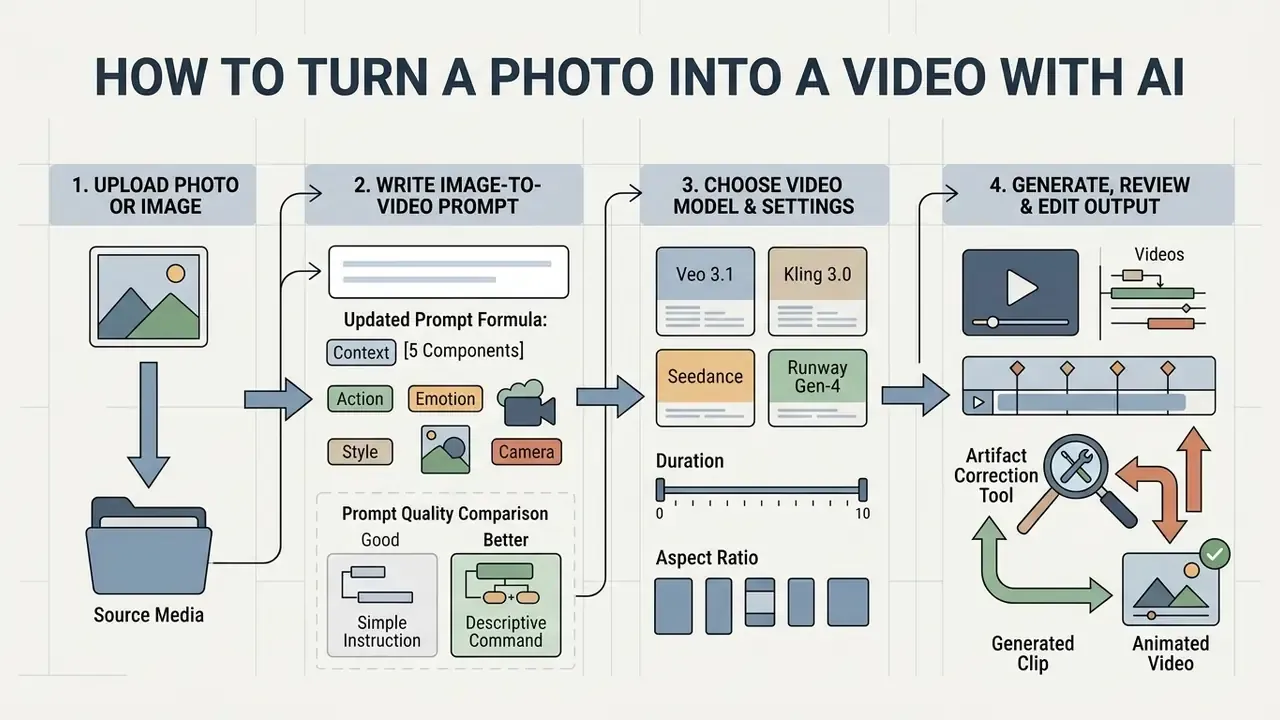
Converting a static photograph into an animated clip follows a repeatable workflow: upload high-quality source media, structure an explicit motion prompt, set operational parameters, review the output. A standardized process cuts rendering errors and improves temporal stability across frames. It also makes results reviewable by someone who did not write the prompt, which matters more than it sounds. Readers comparing generation methods and pricing can consult our overview of the AI video generator category.
Upload a Photo or AI-Generated Image
Start with a clear, well-focused source image in JPEG or PNG. Optimal inputs show distinct subject separation, balanced lighting and minimal background clutter, all of which help the model's feature extraction.
Prepare source media at 1080p or higher to avoid pixelation during latent processing; 3840×2160 is preferable for professional delivery. For portraits and product photos, centring the main subject reduces edge distortion during pans and zooms. One more thing, easy to forget: classify the image before it leaves your machine. An approved stock photo and an unreleased product render are not the same upload.
Write an Image to Video Prompt
An image-to-video prompt must define motion vectors, camera trajectory and environmental behaviour. Do not re-describe what the photo already contains; dictate what changes across the timeline. Free prompt libraries help, but a house template helps more.
| Weak Prompt | Why It Fails | Stronger Rewrite |
|---|---|---|
| "A woman in a red coat standing on a bridge, high quality, 4K, beautiful" | Re-describes the still image and supplies no temporal instruction, so the model invents random drift | "She lifts her gaze to camera; slow dolly in; wind moves her coat; overcast diffused light; 24fps, 16:9" |
| "Camera pans left while zooming in fast and the subject runs toward the viewer and the background changes to night" | Four conflicting motion vectors in one pass, producing limb duplication and background tearing | "Subject walks two steps toward camera; steady slow dolly in; daylight holds constant; 30fps, 9:16" |
| "Animate this illustration cinematically, hyper-realistic lighting" | Photorealistic keywords override the drawn style and trigger texture morphing | "Flat 2D vector style preserved, cel-shaded surfaces, gentle parallax push-in, no texture change; 24fps" |
| "Make the product look amazing, spin it" | No axis, speed or scale reference, so label geometry warps | "Product rotates 180° on a vertical axis at constant slow speed, label stays legible, fixed camera, soft studio key light; 30fps, 1:1" |
Choose a Video Model, Duration and Aspect Ratio
Model configuration and aspect ratio should match the publishing destination. Vertical 9:16 suits TikTok and Instagram Reels, 16:9 targets YouTube and corporate presentations, and 1:1 remains standard for in-feed placements. Choosing the ratio after generation is how teams lose half their framing.
Clip durations on free tools default to 3, 4 or 5 seconds. Standard web distribution relies on 30fps for smooth playback, while 24fps delivers the traditional filmic look for creative projects.
Generate, Review and Edit the Video Output
Once parameters are set, the request queues on remote GPU servers. Processing runs from roughly 15 seconds to several minutes depending on traffic, frame count and model parameters. Published API latency figures for current flagship models span about 11 seconds at minimum to roughly 6 minutes at peak load.
After rendering, review the output frame by frame for temporal artifacts, facial melting or unintended background morphing. Minor defects usually respond to a tighter prompt or a lower motion-strength setting before final export in standard video editing tools. Desktop finishing on a locked-down corporate machine is often simpler in a windows video editor, which keeps masters inside the managed environment instead of a browser cache.
- Semantic rules: Render as a form section with a legend reading "AI Video Generation Pre-Flight Checklist". All items must remain readable in the DOM without JavaScript.
Controls That Improve AI-Generated Video Quality
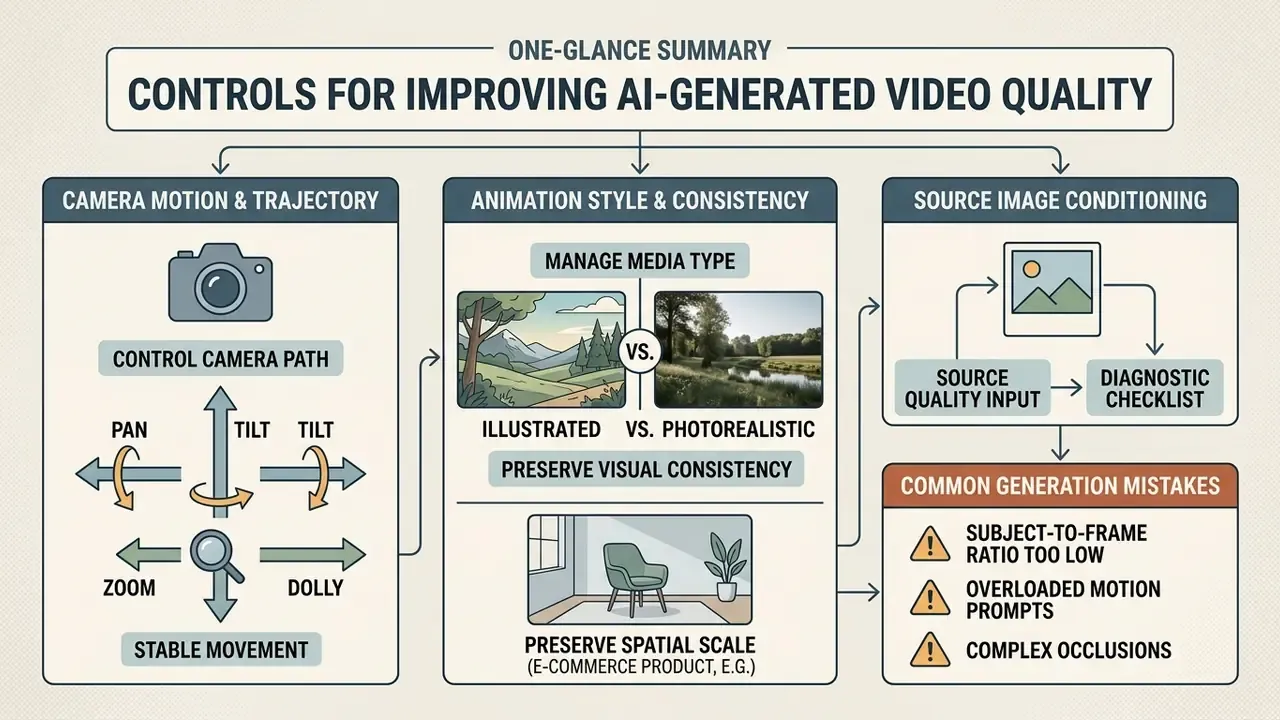
Stable, realistic output comes from the advanced parameters: camera trajectory, animation style and source image conditioning. Tune those, and most visual glitches disappear before they need fixing.
Camera Motion and Dynamic Movement
Explicit camera controls let you simulate professional cinematography: pan, tilt, zoom, dolly, orbit. Modern video diffusion models expose parameterized camera conditioning channels that respond to directional commands. Pan for horizontal rotation, tilt for vertical rotation, dolly for physical translation, orbit or arc for curved traversal around the subject.
Research on Camera Motion Guidance reports that applying dedicated classifier-free guidance to camera vectors improves trajectory accuracy by more than 400% against unguided diffusion transformers.
Naming controlled speeds, "slow dolly in" or "steady horizontal pan", maintains geometric stability and limits perspective distortion.
Teams evaluating which engines expose true camera parameters rather than text-only hints can compare options in our review of AI video generators.
Animation Style and Visual Consistency
Consistency means holding subject identity and lighting steady for the whole clip. Advanced generators use cross-frame attention modules so that facial features and product labels stop shifting between keyframes.
Alignment across multiple generations improves when the team follows one documented workflow, such as our resource on animation makers, which covers keyframe control and style matching. For flat, drawn assets, the specialised techniques in 2d animation ai tend to beat generic photorealistic pipelines. Consistent prompt descriptors plus lower motion amplitude preserve artistic style across a sequence of assets.
Handling illustrated art versus photorealistic media. Animating non-photorealistic inputs, whether hand-drawn sketches, watercolour art, cel-shaded anime frames or 2D vector designs, exposes a specific failure mode in latent diffusion architectures. Default weights prioritise real-world physical dynamics and photographic texture statistics, so animating an illustration often produces unwanted texture morphing: flat surfaces sprout skin pores, line art gains specular highlights, and the result resembles neither the artwork nor a clean photograph. To enforce fidelity, state the artistic texture, colour palette and lighting behaviour explicitly in the prompt ("flat 2D vector style, cel-shaded, continuous line art, preserve original graphic elements, no added texture") and drop photorealistic triggers such as "cinematic lighting", "hyper-realistic" or "film grain". Real photographs rarely show this defect, because the model is already inside its native domain.
Preserving spatial scale in e-commerce imagery. For packaged goods and isolated catalogue shots on neutral backgrounds, diffusion transformers routinely misjudge physical dimensions, so containers, caps and label geometry warp during camera pans. Real-world scale anchors fix most of it: one frame of the item held in a hand, or the product placed beside familiar desktop props, lets spatial attention compute true boundary constraints instead of guessing. Loading multiple reference angles (front, side, back, plus a close-up) locks packaging geometry across multi-second renders and across separate generations in the same campaign.
Source Image Quality and Common Generation Mistakes
Low source resolution, harsh shadows and dense fine patterns cause most generation failures. When an input lacks clear edge contrast, the diffusion model cannot separate foreground from background, and morphing artifacts follow.
Other frequent mistakes: requesting conflicting motions in one prompt, or pushing motion strength too high. When subject trajectories contradict camera movement, the model returns severe temporal artifacts such as doubled limbs and floating background debris.
Diagnostic Checklist: Primary Causes of Generation Failure
- Subject-to-frame ratio too low when the main subject occupies less than roughly 15% of frame area, the model synthesizes background without sufficient spatial conditioning, producing background melting and subject dissolution.
- Overloaded motion prompts opposing directional commands ("camera pans left while zooming in quickly and subject runs forward") create attention-layer conflicts, then limb duplication or ghosting.
- Ambiguous spatial geometry extreme backlight, harsh shadows and blurred focal planes hide object edges, so latent flow models cannot compute accurate pixel trajectories.
- Style mismatch between input and model domain photorealistic default weights applied to drawings cause texture drift unless style constraints are declared.
- Motion strength set too high for the subject faces and hands distort first. Halving the amplitude slider usually removes facial melting without losing the intended movement.
- Compressed or upscaled source files JPEG artifacts and prior AI upscaling introduce false edges that the flow predictor treats as real geometry.
Fix order matters. Re-crop the subject first, then reduce the prompt to a single motion vector, then lower motion strength, and only then change models. Preparing source files in a photo editor, correcting exposure, straightening, cropping tighter, resolves a large share of defects before a single credit is spent. Persistent, reproducible failures belong in a ticket rather than another retry loop; our AI Media Support and Troubleshooting notes cover the escalation path.
Use Cases for AI Photo to Video
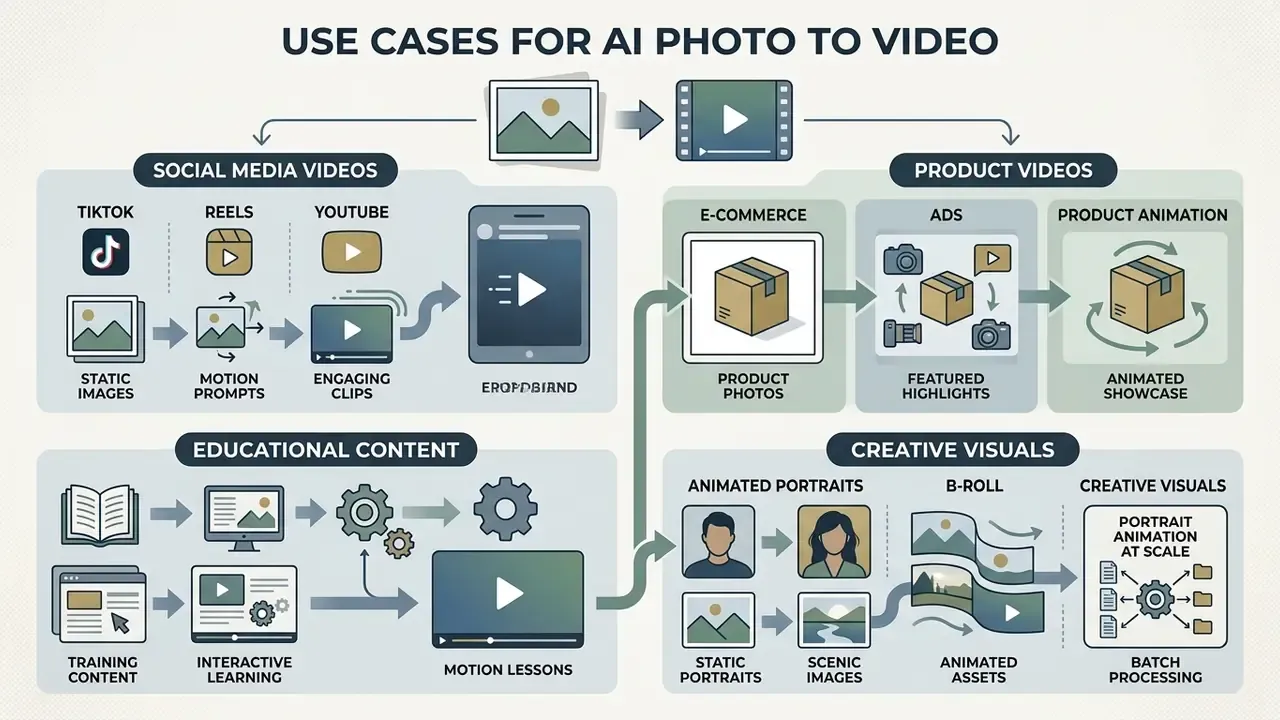
Marketing, e-commerce, media production, education and internal communications all use an AI photo and video generator to convert static libraries into motion assets. Animating existing images lowers production overhead and shortens content testing cycles. It does not remove review obligations, which is where most programmes get sloppy.
Product Videos for E-commerce and Ads
E-commerce brands use an AI photo to video maker online to build dynamic showcases from catalogue photography they already own. Converting a single studio shot into a 360-degree rotation, a floating reveal, a virtual try-on sequence or a lifestyle background transition strengthens storefront listings and paid social creative.
Educational and Training Content
Learning and development teams animate static instructional assets: textbook diagrams, historical photographs, process charts, lecture slides. Motion earns its place with processes that cannot be filmed directly, such as cellular mitosis, planetary orbits, mechanical assembly sequences or fluid dynamics. Turning a static diagram into a five-second animated sequence makes stage order and directionality explicit, which labels alone rarely achieve. The same pipeline converts compliance decks and onboarding material into short lessons without a studio booking, and an AI photo to movie generator can assemble those clips into a single narrated module.
Animated Portraits, B-Roll and Creative Visuals
Commercial Use, Privacy and Rights for Generated Videos
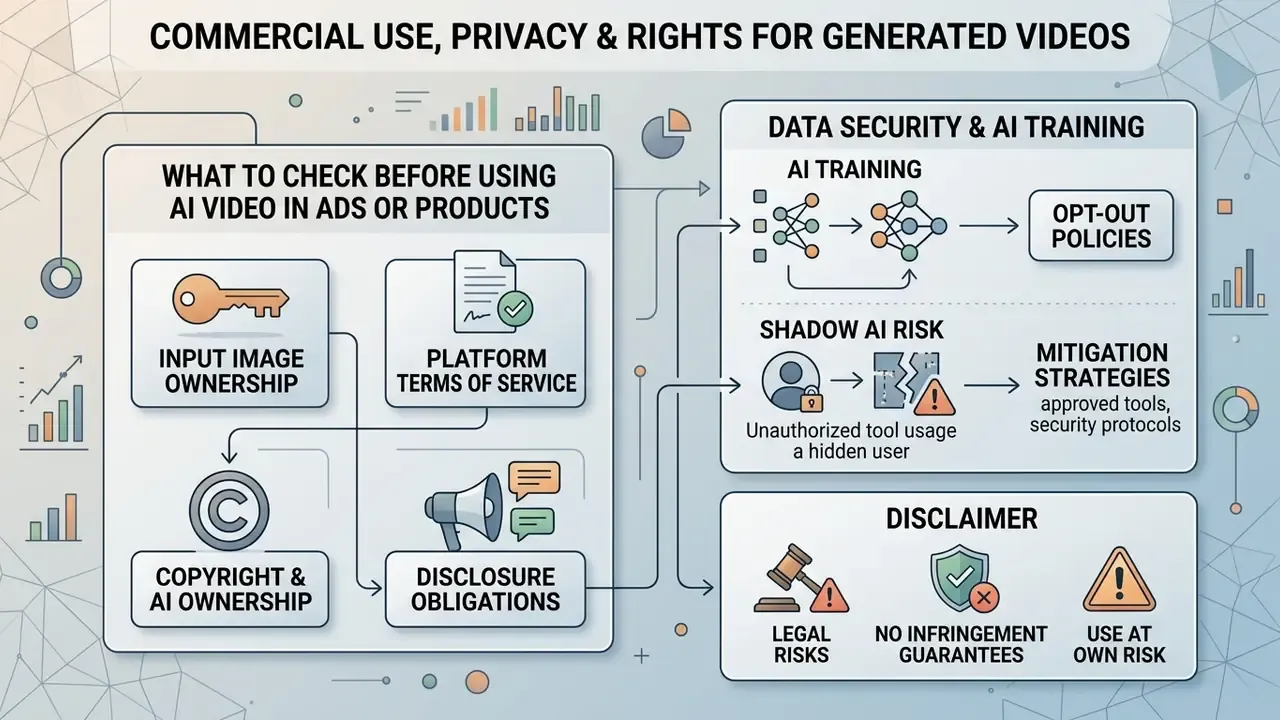
Publishing AI-generated video in advertising, software products or public communications means navigating intellectual property law, platform terms and privacy regulation at the same time. Audit the legal boundaries before free or paid output reaches a commercial channel.
What to Check Before Using AI Video in Ads or Products
Legal and risk teams should evaluate four compliance vectors before an AI-generated clip runs in a campaign.
Data Security, AI Training and Shadow AI Risk
Data-usage policies vary sharply by vendor and by plan tier. This is the single most under-audited risk in free photo-to-video adoption. Enterprise-grade platforms typically store inputs and outputs inside the customer's account, exclude that media from base-model training, and confirm the exclusion contractually. Consumer free tiers often reserve broader rights: retention for "service improvement", human review of flagged content, or inclusion in future training corpora unless the user opts out.
Practical controls before any upload:
- Classify the image first. Identifiable employee or customer portraits, unreleased product designs, internal dashboards and documents containing personal data should never reach an unvetted free generator.
- Demand an explicit no-training statement. The benchmark wording: inputs and outputs are stored in the user's account and are not used to train AI models.
- Check retention and deletion. Confirm whether uploads are deleted on a schedule, and whether deletion also removes derived embeddings and cached latents.
- Log the tool, not just the output. Shadow AI, meaning staff pasting sensitive photos into free browser tools with no NDA, DPA or SLA, creates GDPR, CCPA and publicity-rights exposure that surfaces only after publication. Maintain an approved-tool register and route sensitive assets to sanctioned environments.
- Obtain consent for likenesses. Animating a person's face intensifies publicity and personal-data considerations. Written consent plus documented purpose limitation is the baseline, not the ceiling.
Total Cost of Ownership Beyond the Free Tier
Free credits are not the full cost of an AI photo-to-video programme. A realistic budget line combines subscription or credit top-up spend, legal and licensing review time, human moderation of artifacts and rejected generations, rights clearance for source imagery and likenesses, plus storage, versioning and post-production.
A workable planning heuristic is cost per usable clip: (credits consumed ÷ accepted clips) × credit price + review minutes × loaded hourly rate. Rejection rate dominates the equation. A pipeline that discards half its generations doubles the effective unit cost regardless of headline plan pricing.
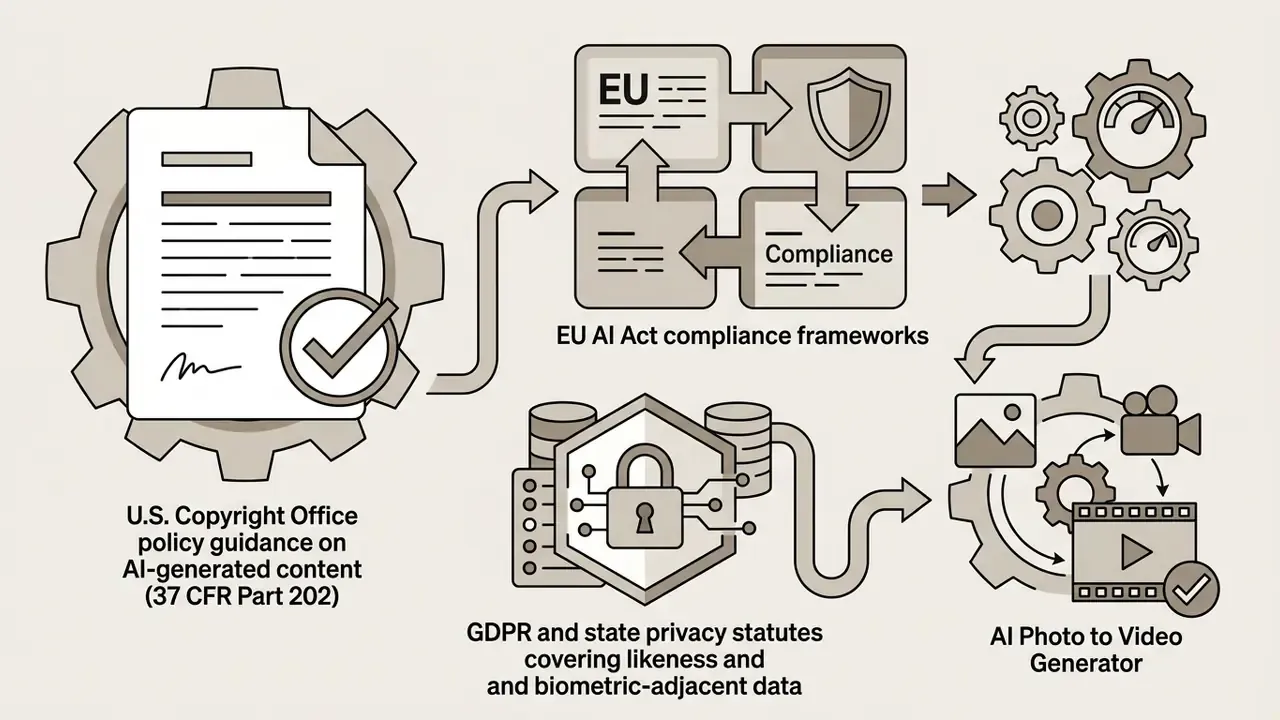
To review broader commercial licensing guidance, image expansion tools and business usage frameworks, see our AI Media Commercial-Use Hub, and use AI image detectors when the provenance of a source asset needs verification. Uploading customer or employee photographs to external cloud AI platforms can trigger data privacy obligations under GDPR or state-level statutes whenever vendor retention policies are undefined.
Governance Note: Where a Photo-to-Video Tool Belongs in the Inventory
For a bank or a mature fintech, the question is rarely "does this animate a photo well?" It is "who owns this dependency, and can we evidence its use?" A defensible minimum, offered as a hypothesis to test against your own control environment rather than a compliance guarantee:
- Named owner. One accountable person per approved generator, recorded in the AI or third-party inventory alongside the plan tier in use.
- Approved-use statement. Marketing B-roll from licensed stock, for instance, is a different risk class from animating an advisor's portrait or a customer's photograph.
- Evidence pack per published asset. Source image and its licence, model and plan tier, prompt text, generation timestamp, reviewer name, disclosure decision. Reproducible on request.
- Escalation path. Any output containing a real likeness, a regulated claim, or an unreleased product goes to a second reviewer before publication.
- Kill switch. If a vendor changes its training or retention terms, the tool leaves the approved register the same week, and existing assets get a rights re-check.
Nothing here is exotic. It is the same third-party and model-risk discipline applied to a creative tool that happens to sit in a browser tab, and it is far cheaper than remediating one published clip that should never have shipped.
Legal disclaimer and governance alert box

Free AI Photo to Video FAQ
How Long Does AI Photo to Video Generation Take?
Generation usually takes between 15 seconds and 5 minutes per short clip, depending on model complexity, requested resolution, clip duration and queue load. Published API documentation for current flagship models cites roughly 11 seconds at minimum and up to about 6 minutes during peak hours.
At peak times, public cloud services get slower, plainly. Higher-resolution output such as 1080p and complex multi-part prompts demand more GPU time than a basic 480p motion request. Similar queue behaviour affects text-to-video AI tools, since they share the same GPU pools.
Why Does My Photo Animate Incorrectly or Drift in Style?
Style drift happens because most video diffusion models default to photorealistic rendering. Animate an illustrated, hand-drawn or 3D vector image, and the model may force realistic texture onto flat surfaces, so the result matches neither the artwork nor a clean photograph. Preserve the aesthetic by defining artistic texture, colour palette and style constraints in the prompt (for example, "flat 2D vector style, cel-shaded, continuous line art, preserve original graphic elements") and remove photorealistic modifiers. Photographic inputs rarely drift, because the model is already working in its native domain.
How Do I Keep Product Scale Consistent Across Generated Clips?
When animating isolated product photos on neutral backgrounds, models struggle to infer real-world dimensions. Use source images with recognizable spatial anchors: a hand holding the item, or a surrounding desktop environment. Loading several reference angles (front, side, back, close-up) and stating an explicit scale reference stops the model from resizing or warping packaging geometry during camera movement.
What Is the Difference Between Image-to-Video and Reference-to-Video?
Image-to-video uses a single photo as the literal first frame of one clip, animating camera or subject motion from that exact source, so output stays pixel-faithful to it. Reference-to-video extracts character features, product geometry or environmental context from one or more reference photos, then maintains that identity across multiple scenes and camera angles without forcing any photo to be the opening frame. Use image-to-video for one clip from an approved photo. Use reference-to-video when a product, face or set must carry across a whole ad or scene sequence.
Are Uploaded Photos Used to Train Public AI Models?
Policies vary by vendor. Leading enterprise platforms store project data in isolated account containers and explicitly exclude uploaded media from base-model training. Free and unverified tiers may reserve rights to retain content for "service improvement" or human review. Audit the privacy terms before uploading proprietary designs, customer photographs or employee portraits, and favour vendors that state in writing that inputs and outputs are not used to train AI models.
Can I Create Continuous Videos Longer Than 10 Seconds From Photos?
Base video diffusion models carry structural frame limits, typically capping a single pass between 4 and 15 seconds. Veo sits near 8 seconds, Kling and Runway near 10, Seedance runs in 4-to-15-second steps. Longer continuous video comes from automated script-splitting and clip-stitching pipelines, or from feeding the final frame of one clip as the opening keyframe of the next. Chaining handles one transition well and drifts across many shots, because every pass re-derives lighting and geometry from a single still.
Can I Use Free-Tier AI Videos Commercially, and Who Owns Them?
Two separate questions, two separate answers. Contractually, some vendors licence all generated output, free or paid, for commercial use, while many free tiers restrict output to personal or evaluation use. The plan-tier terms govern. Statutorily, U.S. Copyright Office guidance indicates that material generated entirely by AI, without meaningful human authorship, is not itself protected by copyright, even where the licence permits commercial deployment. Ownership of the input photograph and any depicted likeness remains a separate obligation.
Can I Remove the Watermark From a Free AI Video Export?
Removing or obscuring a platform watermark from a free-tier export generally breaches the vendor's terms, even when it is technically easy, and it can void whatever usage rights the plan granted. Compliant paths: upgrade to a tier that exports clean, regenerate the clip on a plan that permits watermark-free output, or reframe the composition so the mark falls outside the delivered crop, and only where terms explicitly allow that. Treat watermark removal as a licensing decision, not an editing task.
Is It Safe to Upload Employee or Customer Photos to a Free Generator?
Not without review. Identifiable portraits are personal data, and animating a face can additionally engage publicity and likeness rights. Before upload, confirm that the vendor excludes inputs from model training, documents a retention and deletion schedule, and offers an appropriate data-processing agreement. Obtain written model releases from the individuals. Route the work through an approved-tool register instead of ad-hoc browser tools. Where those guarantees do not exist, use anonymised or licensed stock imagery.
What Image Formats and Resolutions Should I Use?
JPEG and PNG are the most widely supported inputs, with WEBP accepted by many platforms and typical file-size ceilings around 20 MB. Supply at least 1920×1080; 3840×2160 is preferable for professional delivery. Even, diffused lighting, strong subject-to-background contrast, a single clear subject occupying well above 15% of the frame, and minimal clutter give the most stable motion.
Can I Combine Several Photos Into One Continuous Video?
Yes. Uploading a sequence of images lets the generator link them with transitions and consistent motion, producing one continuous timeline. Pacing and transition style can be adjusted afterwards in a timeline editor. For narrative continuity, meaning the same character or product recurring across shots, reference conditioning beats simple transition stitching.
How Do I Fix Facial Distortion or Melting in Generated Faces?
Facial artifacts usually trace to three causes: motion strength set too high, a face occupying too little of the frame, or a prompt asking for rapid head rotation plus camera movement. Reduce motion amplitude first, re-crop tighter on the subject, and limit the prompt to one facial action such as a slow gaze shift. Reviewing output frame by frame and regenerating only the failing segment costs less than re-rendering the full clip.
Appendix A: Revised Statements and Source Notes
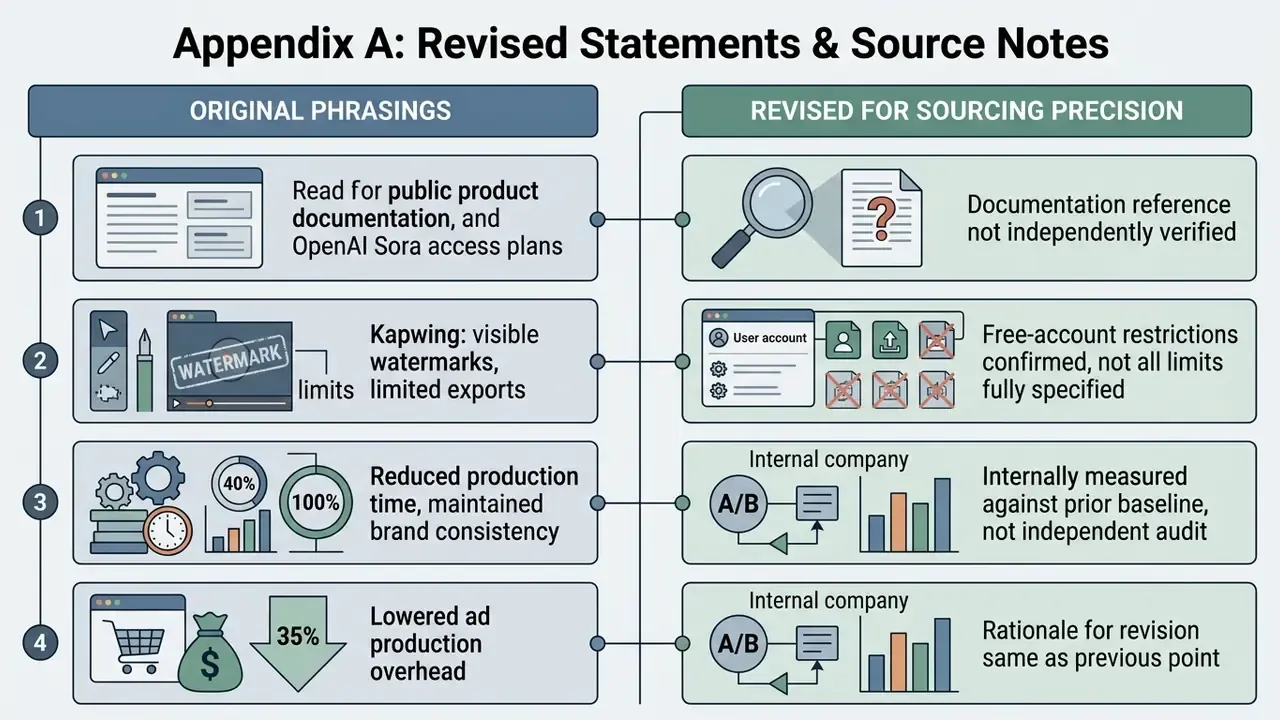
This appendix keeps earlier phrasings that were revised for sourcing precision, so readers can audit exactly what changed and why.
- Original phrasing: "public product documentation from OpenAI (2026) indicates that Sora access plans assign specific credit values to video durations, where longer generation lengths consume higher daily credit quotas."
Revision reason: that specific 2026 documentation reference could not be independently verified in the research set. The main text now states the verifiable, vendor-agnostic pattern: tiered credit costs scaling with duration and resolution, with extended clips counted as multiple generations against a daily cap.
- Original phrasing: "software tools like Kapwing apply visible watermarks to non-paid exports while limiting file format options to basic MP4 files."
Revision reason: vendor documentation confirms free-account watermarking and a restricted export menu, but wider format support (MOV, WebM, AVI) and resolutions up to 1080p exist on paid tiers. The main text now reflects the tier distinction.
- Original phrasing: "resulting in a 40% reduction in production time while maintaining 100% brand consistency" (financial services portrait case).
Revision reason: those figures are internally measured against a prior manual baseline, not independently audited. The case now sits in the portrait use-case section, where it belongs narratively, with the measurement basis stated explicitly.
- Original phrasing: "lowered ad production overhead by 35%" (e-commerce case).
Revision reason: same rationale. The reported saving is self-measured and depends on catalogue size and rejection rate. The main text marks it as directional.
- Prompt formula change: the four-part structure [Subject Movement] + [Camera Trajectory] + [Atmospheric Shift] + [Style Modifier] remains documented above and still suits single-action clips. The five-part structure adds an explicit scene-transition slot and render parameters, which reduces static-background artifacts on models that support environmental change.
- Research verification note: the academic and legal claims retained here, namely latent-space conditioning (Zheng et al., 2024), latent flow warping (LFDM, CVPR 2023), camera-guidance gains (CMG, 2024; CamI2V, 2024), cross-frame identity propagation (I2V-Adapter, 2024), single-pass spatiotemporal generation (Lumiere, 2024), trajectory control (Motion Prompting, 2024; SG-I2V, 2024; MagicMotion, 2024), joint camera, object and light control (VidCRAFT3, 2025), and U.S. Copyright Office authorship guidance under 37 CFR Part 202, were checked against their primary publications. Model duration ceilings reflect vendor documentation current at the review date and should be re-verified against release notes before procurement.
- Author note: Marcus Hale, author. No biography, client relationship, regulatory authority or audited business result should be inferred from the quotation attributed to him.
Footer navigation
Social Media Videos for TikTok, Reels and YouTube
Short-form platforms reward vertical formats that grab attention inside the first two seconds. Turning static promotional photos into 9:16 clips creates the visual pattern interrupt that lifts engagement on TikTok, Instagram Reels and YouTube Shorts. Published advertising guidance is consistent: shoot or crop 9:16 from the start, keep the action centred, put one strong visual change in the opening beat, and keep padding clear of platform UI overlays.
Creators regularly convert graphic designs, podcast cover art and editorial photography into looping assets. Motion on stills lets a visual marketer keep a posting schedule without booking a shoot. Final trimming, captioning and audio mixing usually happen in free video editing software or, for long-form channels, inside a dedicated YouTube editing workflow; repurposing long recordings into clips is faster with tools like 2short ai.