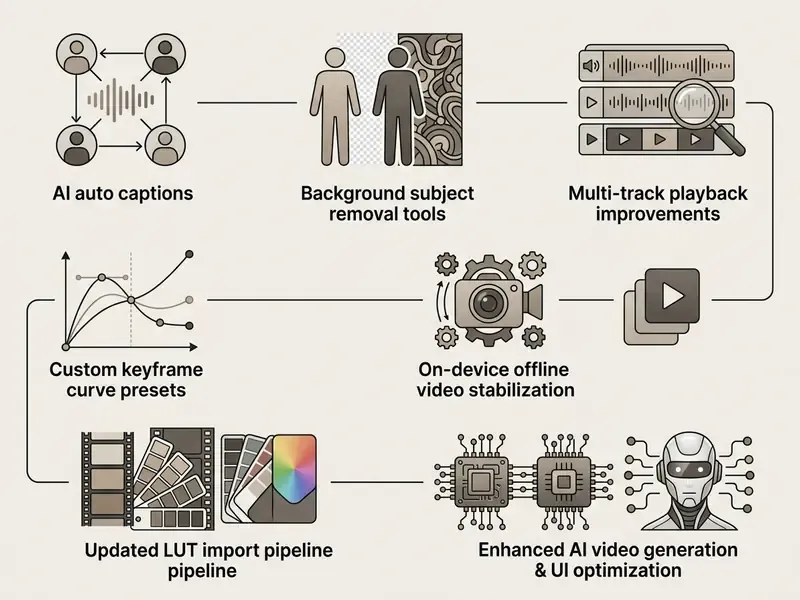
This guide covers the workspace layout, the editing toolset, current pricing, verified publisher data, install paths for Android, Windows and macOS, and the points where VN stops being enough.
Five Things to Know About the VN Video Editor App Interface
VN Video Editor App Interface: Layout and Navigation
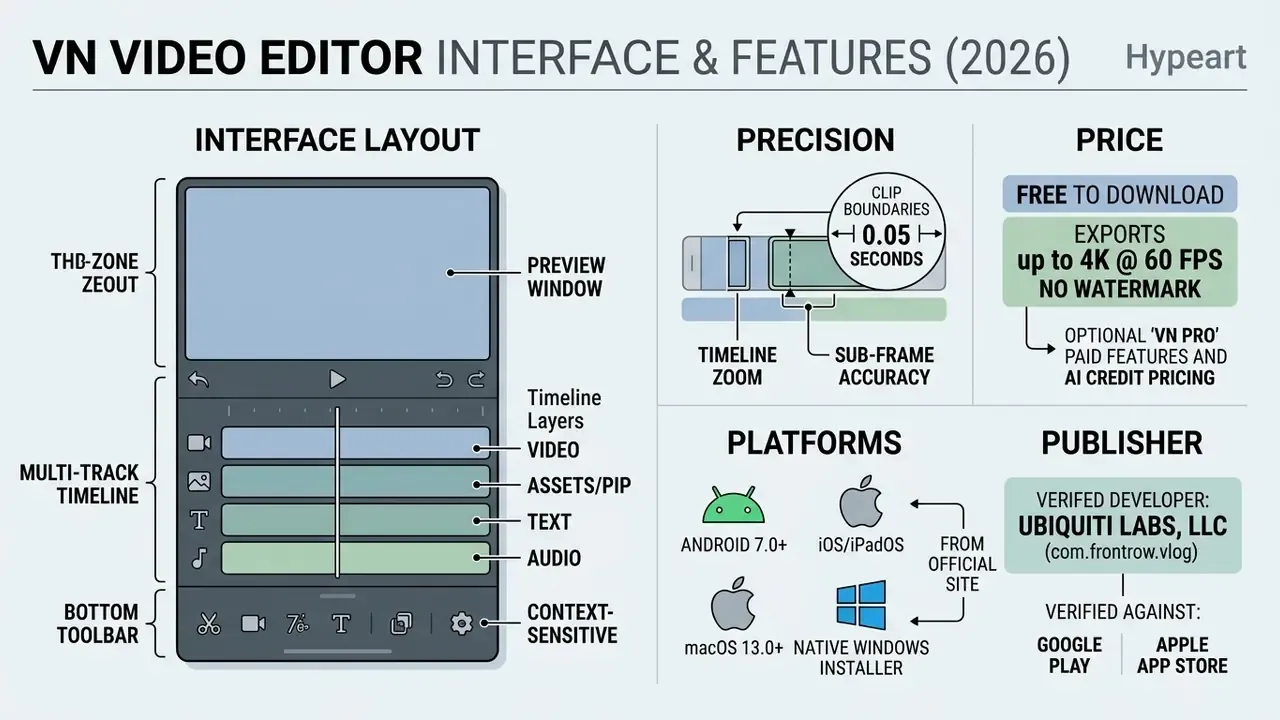
The VN video editor app interface uses a non-linear editor layout built around a top preview screen, a multi-layer timeline, and contextual bottom toolbars. That architecture keeps the editing tool approachable for beginners while preserving frame-accurate precision for prosumer work.
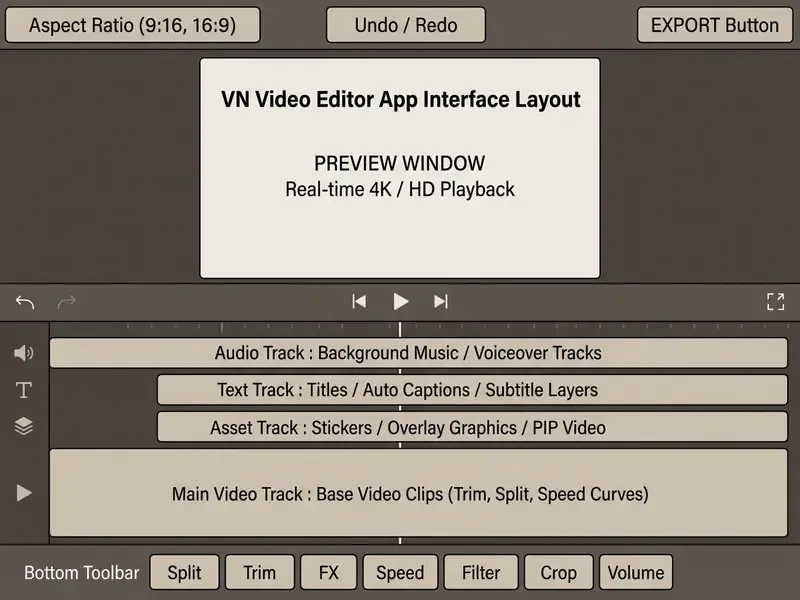
Navigation relies on direct touch or mouse interaction. Tapping a track element activates the relevant editing functions in the lower strip, hiding inactive tools so the workspace stays readable during video editing. Inactive controls simply vanish. That is the whole trick.
«Approachable, but it expects the editor to understand tracks.»
Home Screen and Creating a New Project
The home screen of the editor video app centers on project management, showing existing drafts plus a prominent action button to create videos. Selecting a new project opens the system gallery, so users can import multiple video clips, photos, and audio files at once. Some builds also let you start from a music track first, then attach footage to the beat grid.
Unfinished work is preserved automatically in the local project and draft dashboard. This prevents data loss during multitasking and lets creators duplicate, rename, or archive project files for a later editing session. Your download history and import folders stay on device, which matters if client footage cannot leave local storage.
Beyond project management, the home screen also hosts the VN Discover / social feed. Users publish finished templates and video work there, and other creators download editing presets, fonts, and effects in a single tap. It is a built-in inspiration and asset-distribution layer that most standalone editors lack. Teams building repeatable visual identities can pair that feed with an ai sticker generator for branded overlay packs.
Timeline, Layers, and the Editing Panel
The timeline architecture uses a stacked multi-track structure, where the primary video track forms the foundation for higher overlay layers. Distinct sub-tracks handle visual assets, subtitle texts, picture-in-picture clips, and audio files.
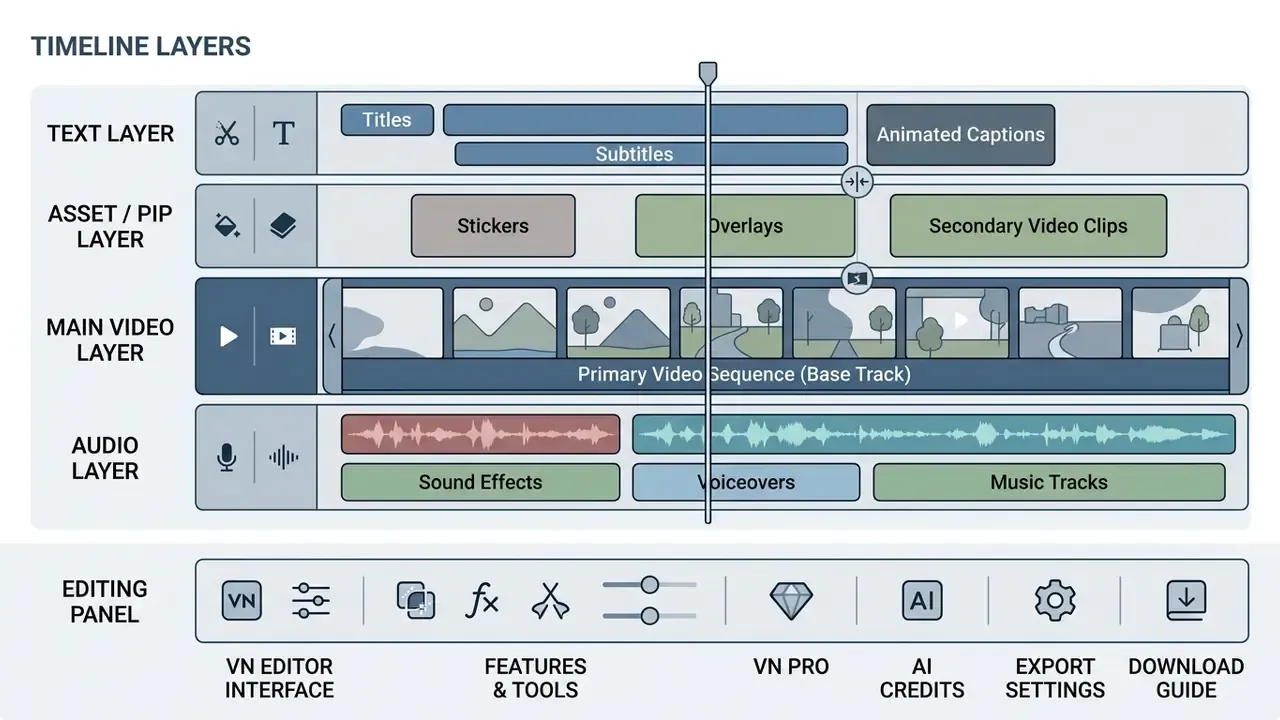
Users can adjust clip boundaries with sub-frame precision down to 0.05 seconds. Track controls allow toggling visibility, locking layers against accidental edits, and applying independent keyframe animations across individual visual elements.
Timeline zoom reaches roughly 30x, which is what makes 0.05-second trims practical on a phone screen rather than theoretical. Without that zoom, the precision claim would be marketing.
Preview and Exporting the Finished Video
The upper preview window plays back complex timeline edits in real time, including speed curves, masks, and color LUTs. Controls sitting directly above the preview allow instant aspect ratio switching and project frame rate checks.
The export engine renders output up to 4K video resolution at 60 frames per second. Users can configure custom bitrates manually (up to 80 Mbps for 4K SDR) to trim file size without losing visual clarity. See our guidance on export settings for YouTube for platform-matched presets, and on video compression trade-offs when delivery file size is capped. If you need to model storage and render cost across a fleet of devices, our AI Media Calculators cover the arithmetic.
Keyboard Shortcuts for the Desktop Version (Updated)
The native desktop build adds mouse-and-keyboard editing, which changes throughput on long timelines in a way that is hard to overstate.
| Action | Windows | macOS |
|---|---|---|
| Split clip at playhead | Ctrl + B | Cmd + B |
| Play / Pause preview | Space | Space |
| Undo last action | Ctrl + Z | Cmd + Z |
| Redo | Ctrl + Shift + Z | Cmd + Shift + Z |
| Delete selected element | Del | Delete |
| Save project | Ctrl + S | Cmd + S |
What Is VN Video Editor & Maker (VlogNow)
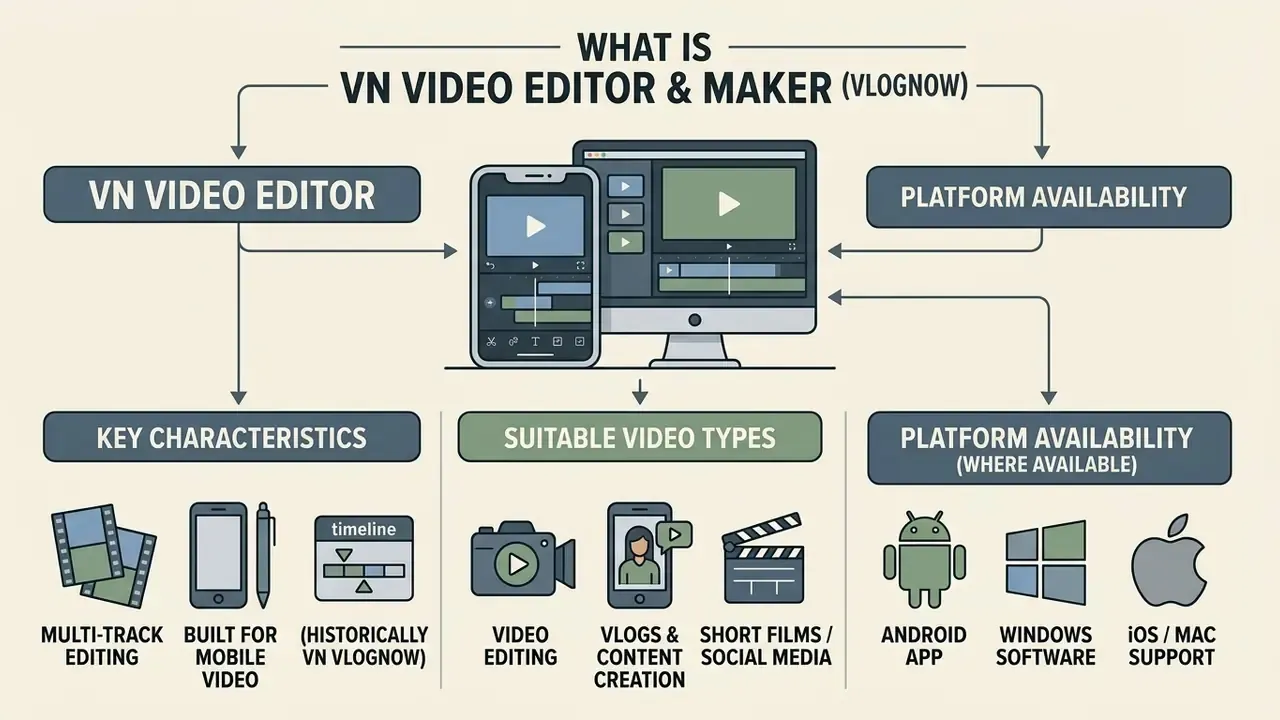
VN Video Editor, published as VN Video Editor & Maker and historically known as VN Video Editor (VlogNow), is a multi-track video editing app built for mobile video editing and desktop media workflows. Developed by Ubiquiti Labs, LLC, the software offers non-linear video editor timeline controls without enforcing mandatory export watermarks.
The platform works as an all-in-one video editing app and video maker, combining standard cutting tools with AI-assisted utilities. VN positions itself as a cross-platform, multi-track non-linear editor for social video creators who want desktop-grade control on mobile hardware. Creators use the application to edit videos, apply precision speed curves, manage visual overlays, and build multi-layer compositions across mobile and desktop devices.
Field deployment note (internal observation, not an audited benchmark). When one enterprise media team evaluated lightweight editing software for rapid field reporting, it deployed VN Video Editor across 45 mobile units. During the pilot, the team standardized export presets and local asset-management rules across the fleet, then documented both in a one-page internal runbook. According to the team's own turnaround logs, self-reported, without third-party verification or published methodology, clip delivery time for verified field footage fell by roughly a third. No vendor lock-in was introduced either, because project files and exports stayed in standard MP4 containers on local storage. Treat the figure as directional, not as a benchmark. Actually, treat it as a hypothesis until someone audits the logs.
What Types of Video the VN Editor Suits Best
VN Video Editor is optimized for short-form social media video clips, multi-segment vlogs, and mobile video campaigns that need clean visual output. The tool supports vertical (9:16), square (1:1), and widescreen (16:9) aspect ratios tailored for platforms like TikTok, Instagram Reels, and YouTube Shorts.
The platform performs well in free video editing workflows that require multi-track audio, beat-synced cuts, and color grading LUTs. Creators can combine high-frame-rate video clips with graphic overlays, automated captions, and custom typography, no external plugins needed. Narrative-heavy formats often start earlier, in scripting: an ai story generator can rough out a beat sheet before a single clip lands on the timeline.
Where VN Video Editor Is Available
VN Video Editor runs on multiple operating systems, including Android, iOS, iPadOS, macOS, and Windows. Users reach official mobile releases through the VN Video Editor & Maker Google Play store page and the VN Video Editor & Maker App Store link.
Desktop distribution includes native application builds for macOS via the Mac App Store and Windows installer packages hosted on the official vlognow.me platform. Cross-device project compatibility lets creators start edits on mobile hardware and finish timeline adjustments on a desktop workstation, with transfer handled via AirDrop or iCloud on Apple devices.
VN Video Editor & Maker Features for Editing
The VN Video Editor & Maker features span essential cutting tools, multi-layer compositing, chroma keying, color correction, and AI-assisted automation. Together they let creators turn raw footage into finished social media assets in one app.
| Feature Category | Core Tools & Controls | Primary Output Use Case |
|---|---|---|
| Clip Manipulation | Split, frame-accurate trim, freeze frame, reverse playback, 30x timeline zoom | Short-form pacing, action sequences |
| Speed Control | Curve-based speed ramping, uniform speed (0.025x to 8x), time remapping | Cinematic slow-motion, time-lapses |
| Visual Effects (FX) | 19 keyframe presets, mask overlays (linear/radial/rectangle), blending modes, PIP compositing | Dynamic transitions, visual callouts |
| Chroma Key | Green/blue screen keying with Intensity and Spill controls, AI background removal | Reaction videos, tutorials, virtual sets |
| Color Grading | 50+ built-in filters, custom 3D LUT (.cube) import | Brand color matching, cinematic looks |
| Audio Tools | Voiceover recording, beat markers, Auto Beats, audio extraction | Music synchronization, narration |
| AI Automation | Auto captions, text-to-speech, subject background removal, scene detection | Accessibility, automated subtitle generation |
These integrated capabilities remove the need for secondary editing software in standard mobile video workflows.
Trimming, Splitting, and Working with Video Clips
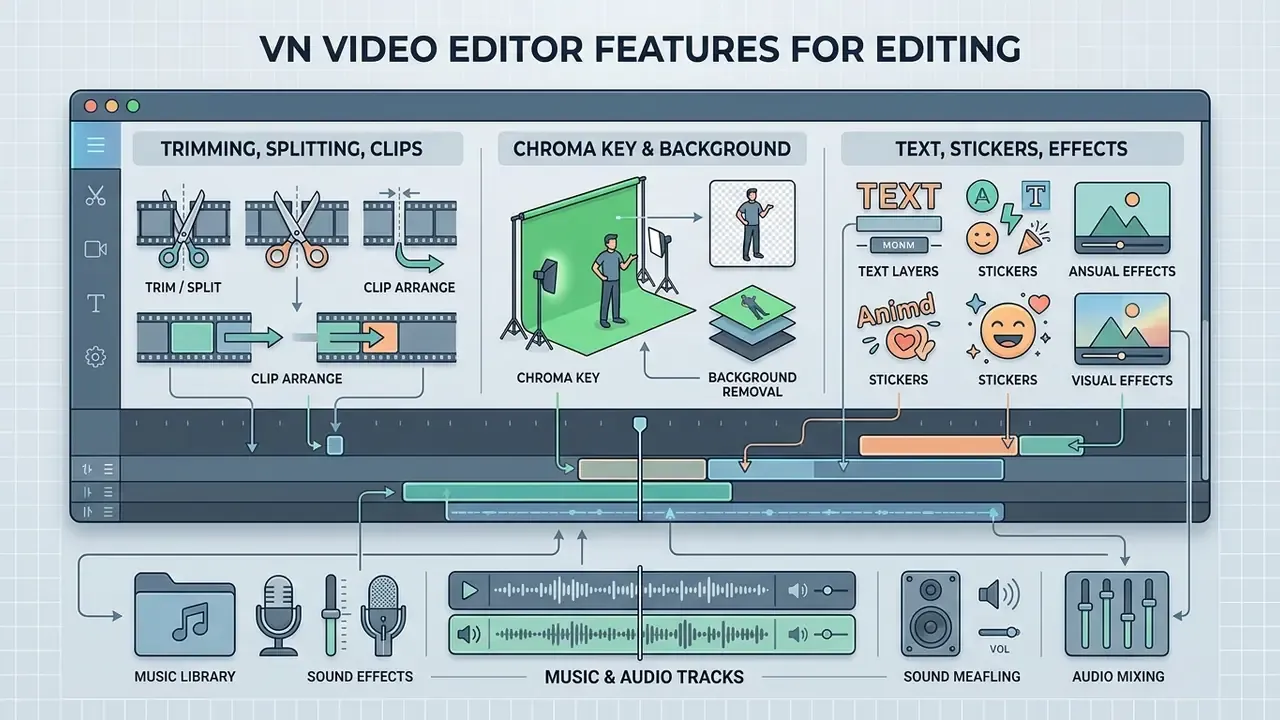
Basic clip management relies on precise split and trim tools sitting on the primary toolbar. Selecting a video clip lets users split footage at the playhead position, or drag clip handles to adjust start and end points.
Speed manipulation supports both static multipliers and dynamic curve ramping. Curve presets create smooth speed transitions inside a single clip, which enables dramatic acceleration or slow-motion without pitch distortion.
Chroma Key and Background Isolation (Green Screen)
VN includes a built-in Chroma Key tool for removing a solid green or blue background from video clips. The panel exposes Intensity (how aggressively the selected hue is keyed out) and Spill (suppression of green reflections on hair, shoulders, and edges). That second slider is what separates a usable key from a halo-heavy mess on phone footage.
For creators without a physical screen, VN also offers AI background removal, isolating the subject on-device with no green backdrop at all. Combined with the PIP layer, this powers layered reaction videos, product explainers, and tutorial overlays where the presenter floats above screen-recorded footage.
Practical guidance: light the backdrop evenly, keep the subject at least a meter away from it to reduce spill, and raise Intensity only until the background disappears. Push further and it starts eating the subject's edges.
Text, Stickers, Effects, and Visual Elements
The text engine supports custom typography, system font imports, animated title presets, and automated subtitle generation. Titles behave as independent timeline layers, so keyframe positioning, scaling, and opacity can change over time. Creators who mix generated footage into edits can compare workflows against AI video generation tools and Google Veo's API-based pipeline; broader integration patterns sit in our AI Media API Guides.
Visual assets include built-in stickers, custom graphical overlays, and mask templates (linear, radial, rectangle). Users can import external .cube LUT files to hold exact color consistency across different camera sources.
Local import on desktop also accepts video, music, sound effects, fonts, and stickers, including ZIP batch import on macOS. Handy for brand kits that ship as asset bundles. If your storyboard frames come from generative tools, an ai story generator with pictures produces still plates that drop straight onto the asset track.
Music, Sound, and Audio Tracks
Audio management provides dedicated tracks for background music, sound effects, and direct voiceover recording. The built-in beat detection tool places markers on audio waveforms automatically, which simplifies rhythmic clip trimming. Markers can be tapped manually or generated with Auto Beats, then nudged in 0.05-second steps.
Users can extract audio tracks straight from imported video clips for re-use or editing. Pitch preservation plus fade-in and fade-out handles keep sound transitions smooth across complex multi-clip timelines. For narration produced outside the app, compare options in our overview of AI voice generators before committing to a synthetic read.
Is VN Video Editor Free and How Much Does the App Cost
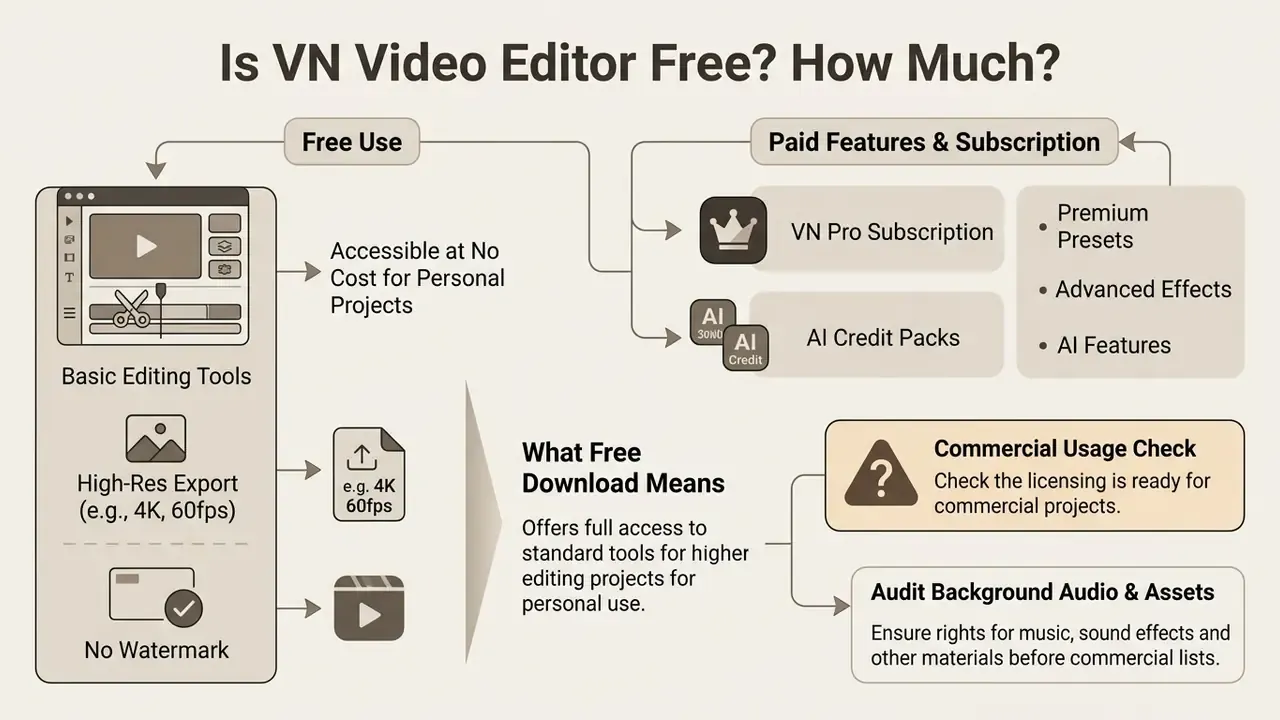
VN Video Editor runs a freemium monetization model: core editing features and high-resolution exports are available without compulsory payment or export watermarks. Answering is VN Video Editor free or how much is VN Video Editor still requires checking regional store pricing for the optional Pro tiers.
| License Tier | Cost Structure | Included Features | Commercial Considerations |
|---|---|---|---|
| Free Version | $0.00 (free download) | Multi-track editing, up to 4K/60fps export, no mandatory watermark, basic AI tools | Verify stock music/asset usage rights before publishing monetized ads |
| VN Pro (Monthly) | ~$7.99 / month (Mac: ~$6.99) | Advanced AI features, cloud project sync, expanded template/asset libraries | Suits high-volume content teams that need cloud backup |
| VN Pro (Annual) | ~$69.99 / year (Mac: ~$49.99) | Full feature unlock, priority rendering presets, unlimited draft storage | Subject to regional App Store / Google Play price adjustments |
| AI Credit Packs | From $1.00 (100 credits) to $10.00 (1000 credits) | AI image generation, auto captions, text-to-speech synthesis | One-time consumable credits; generated assets remain usable inside projects |
Note: pricing and licensing terms reflect verified listings on Google Play and the Apple App Store in 2026. Always confirm current pricing on the app store page.
For a side-by-side view of how this pricing lands against other no-cost tools, see our comparison of free video and AI video generators and the wider AI Media Pricing reference.
What "Free Download" Means for VN
A free download designation lets users install the free app on mobile or desktop devices with no upfront fee. Core non-linear editing tools, including speed ramping, multi-layer timeline access, and 4K export options, stay fully operational in the free video editor tier.
Unlike many competing free video maker apps, VN Video Editor does not stamp forced watermarks on rendered exports in its base distribution. Optional paid upgrades mostly cover cloud storage expansions, advanced AI processing, premium asset packs, and consumable AI credits. One caveat worth repeating: "free" describes the app, not every asset inside it.
What to Check Before Using Your Video Commercially
Before publishing edits commercially, inspect licensing terms for integrated assets, stock audio, and decorative fonts. User-owned video clips keep full commercial rights, yet built-in sound libraries may carry non-commercial restrictions.
COMMERCIAL COMPLIANCE CHECKLIST
Checklist0 / 6
How to Download VN Video Editor on Android via Google Play
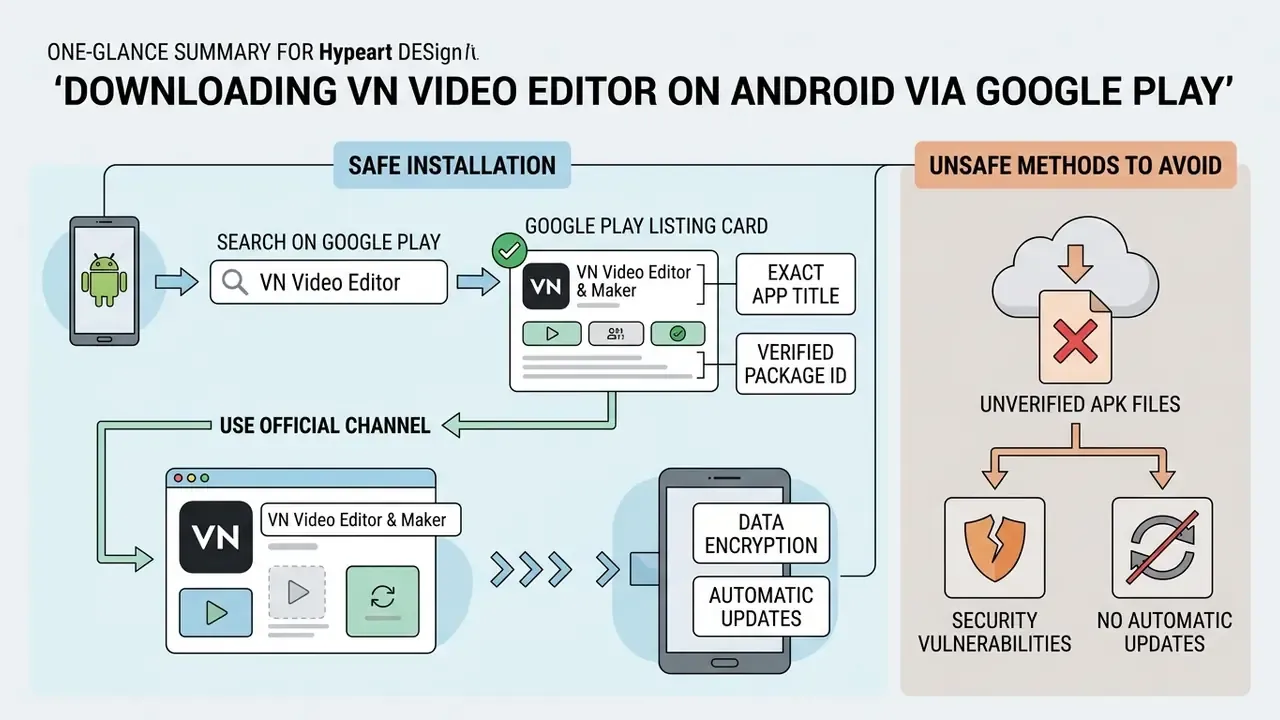
Installing VN Video Editor Android safely means using the official Google Play distribution channel and avoiding modified binaries.
Official distribution guarantees automatic software updates, data safety encryption in transit, and compatibility with system-level protections such as Google Play Protect.
How to Verify the Official Google Play Card
To find the official VN Video Editor & Maker Google Play listing, search for "VN Video Editor" and check the publisher details on the store card.
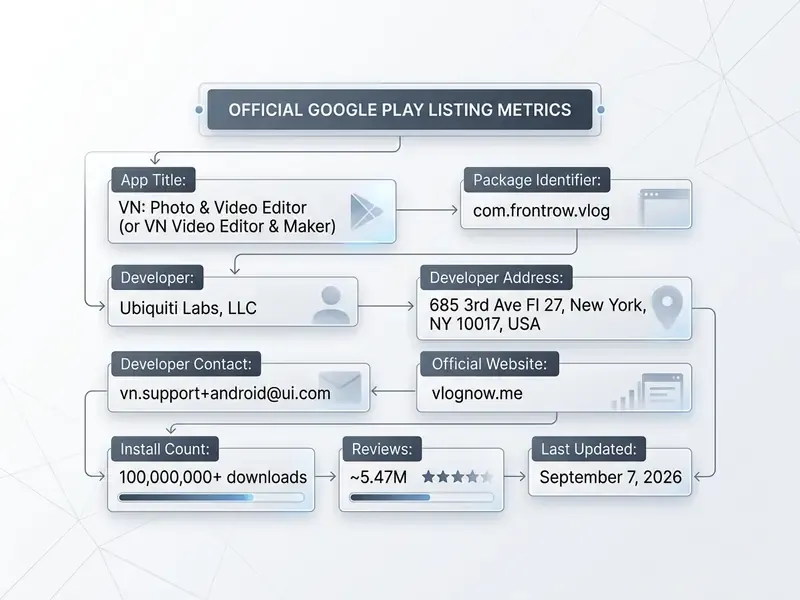
Confirming these credentials on the VN Video Editor & Maker Google Play store link guarantees installation of the authentic, unaltered multimedia app. Two minutes of checking. Cheaper than an incident report.
Why You Should Avoid Unverified APK Files
Downloading standalone APK or XAPK files from unverified mirrors exposes devices to security vulnerabilities and unstable software builds. Modified binaries may alter permissions, reach local media files without authorization, or inject background ads.
Official releases from the VN Video Editor & Maker Google Play store receive regular patch updates that address stability issues, optimize GPU rendering, and close potential security flaws. Google's own developer-verification policy now extends identity checks to sideloaded packages, precisely because repackaged APKs remain the dominant vector for mobile fraud. If an install fails on a managed device, our AI Media Support and Troubleshooting notes cover the usual causes before you reach for a mirror site.
Can You Download VN Video Editor for PC and Windows
You can run VN Video Editor on desktop computers through native desktop software builds or Android emulation platforms. Searching for download VN Video Editor for PC or download VN Video Editor for Windows mostly comes down to picking the right installation pathway for your hardware.
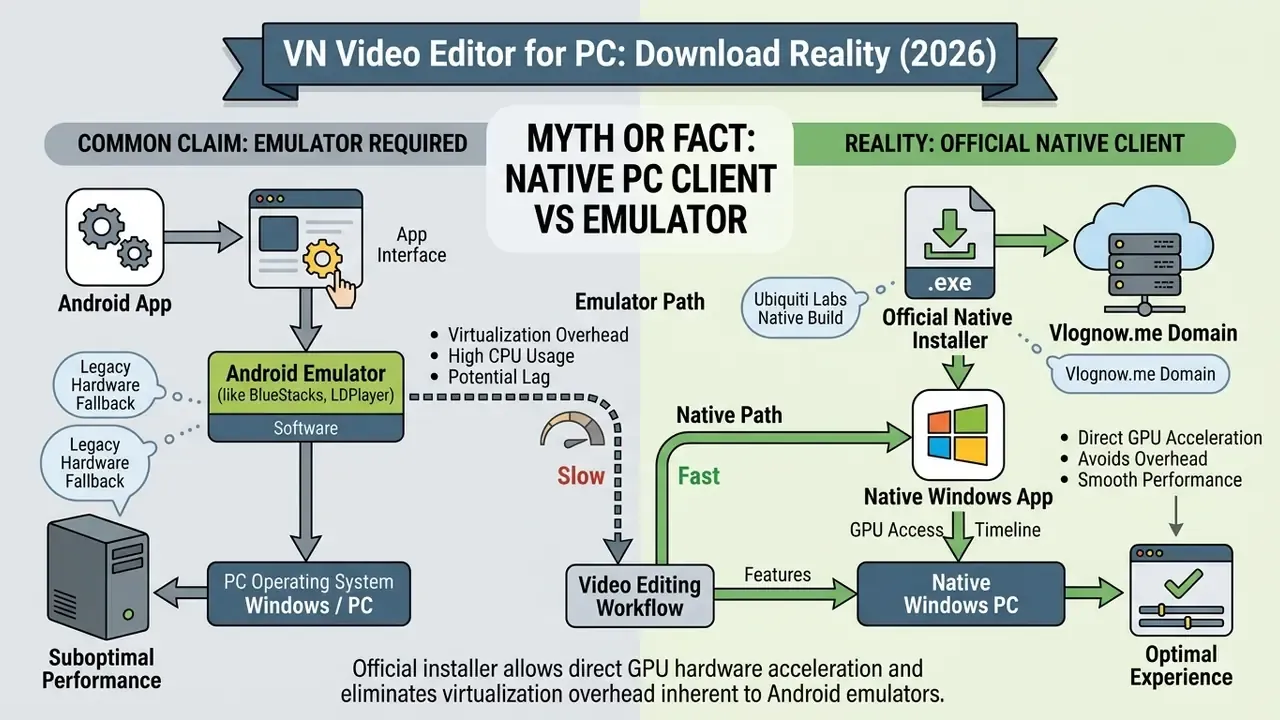
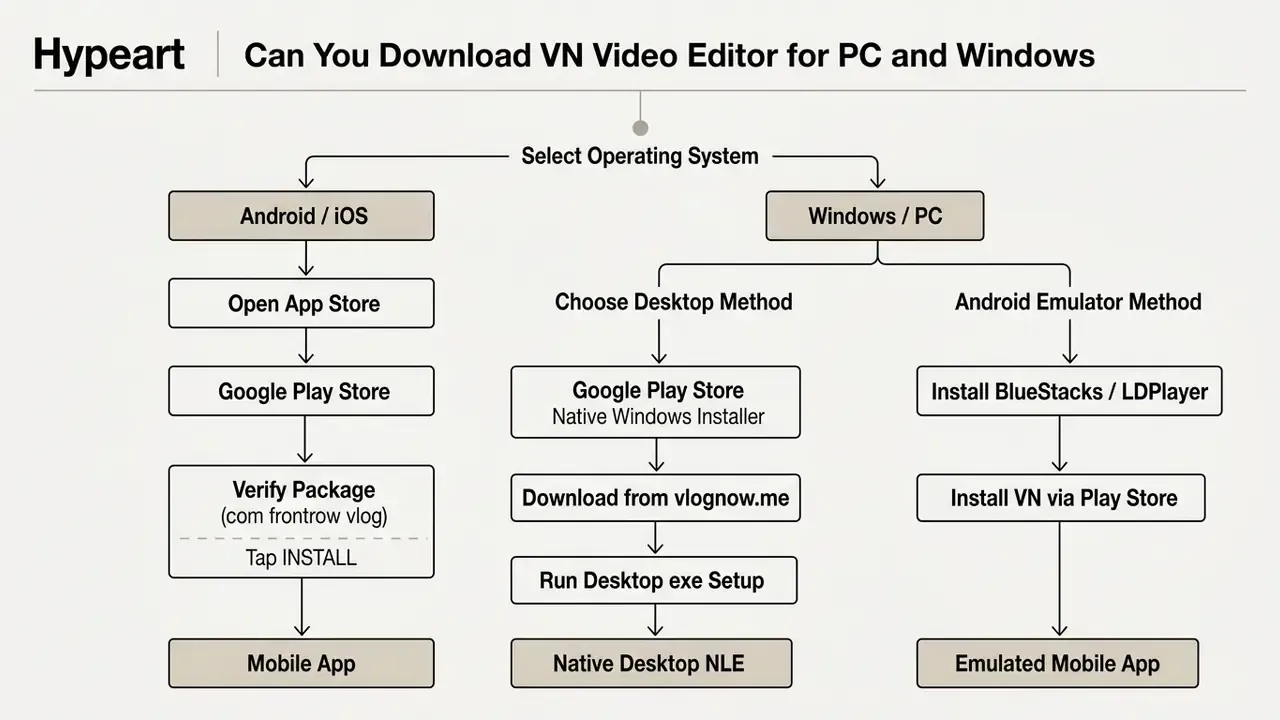
Native installations deliver higher GPU rendering efficiency, desktop keyboard shortcuts, and easier file system navigation than virtualized environments. If your desktop pipeline is more AI-first than timeline-first, weigh the trade-offs against free AI video tools for desktop and the tool matrix in our AI Media Comparison hub.
Native Windows Build vs Running the Android App on PC
The official website (vlognow.me) hosts a native Windows program installer that deploys a dedicated desktop NLE interface on PC hardware. This native build uses system RAM and a dedicated graphics card for multi-track previewing, with no mobile emulation overhead, and adds desktop conveniences such as auto-save, project management, and undo/redo history.
Users on older systems can still run the Android mobile editing app on PC through virtualization software like BlueStacks or LDPlayer. Emulation, however, increases CPU overhead, consumes extra disk space, complicates file importing, and may limit hardware acceleration during 4K video rendering. Emulators also need their own updates and permissions, adding a maintenance burden that native installs avoid.
System Requirements to Check Before Installing
Running desktop editing software effectively means verifying minimum hardware specifications before installation.
| Component | Minimum System Requirements | Recommended System Specifications |
|---|---|---|
| Operating System | Windows 10 (64-bit) / macOS 13.0+ | Windows 11 (64-bit) / macOS 14+ |
| Processor | Intel Core i3 / AMD Ryzen 3 (quad-core) | Intel Core i7 / AMD Ryzen 7 / Apple Silicon M-Series |
| Memory (RAM) | 4 GB RAM | 16 GB RAM or higher |
| Graphics (GPU) | Integrated Intel HD Graphics 6000 | Dedicated NVIDIA GTX 1660 / AMD Radeon RX 580+ |
| Storage (HDD/SSD) | 5 GB free disk space (HDD) | 20 GB+ free disk space on NVMe SSD |
Mobile requirements: Android 7.0 or higher (XAPK install package around 343 MB); iOS/iPadOS 13.0 or higher, with recent store listings requiring iOS 16.0+ for the newest builds; macOS 13.0 or later for the Mac App Store version.
Matching the recommended hardware keeps multi-track timeline scrubbing fluid and video export processing quick. Minimum specs technically work, but 4 GB of RAM and a 4K timeline is a slow afternoon.
VN Video Editor and Alternatives for Video Editing
Choosing a VN Video Editor alternative depends on whether a creator prioritizes manual timeline control, template-driven automation, or ecosystem integration.
| Feature / Metric | VN Video Editor | CapCut | InShot | VITA - Video Editor & Maker | Wink Video |
|---|---|---|---|---|---|
| Supported Platforms | Android, iOS, macOS, Windows, Web | Android, iOS, macOS, Windows, Web | Android, iOS | Android, iOS | Android, iOS |
| Free Watermark Export | Yes (clean native export) | Requires manual end-clip deletion | Requires Pro or ad view | Yes (selectable in settings) | Limited on free tier |
| Timeline Controls | Multi-track with sub-frame precision | Multi-track with heavy AI templates | Single-track primary focus | Template-centric multi-layer | Retouching and frame enhance focus |
| Chroma Key / Green Screen | Yes (Intensity + Spill, plus AI background removal) | Yes (chroma key + background remover) | Basic / limited | Limited | Not a core feature |
| Color LUT Support | Yes (custom .cube import) | Yes (in-app presets) | Limited built-in filters | Basic filter presets | Facial/color enhancement |
| 4K / 60fps Export | Yes (fully supported) | Yes (supported) | Yes (supported) | Up to 1080p / 4K limited | Up to 4K enhanced |
| Indicative Paid Tier | ~$7.99/mo, ~$69.99/yr; AI credits $1 to $10 | Pro subscription (regional pricing) | Pro subscription (regional pricing) | Pro/asset unlocks (regional pricing) | Pro/coin-based unlocks |
| Primary Focus | Prosumer NLE manual control | Viral social templates and AI | Quick mobile crop and cut | Beginner template editing | AI portrait and video retouch |
When to Choose VN Over CapCut, VITA, InShot, or Wink
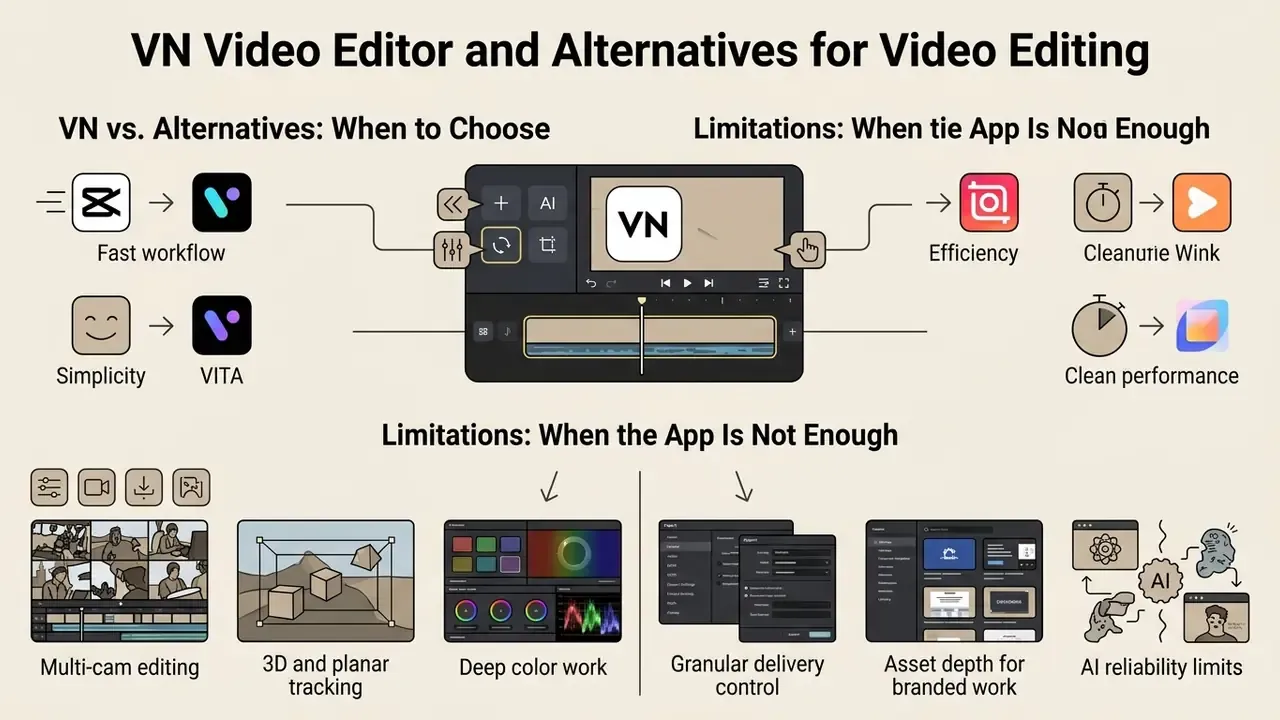
VN Video Editor is the stronger choice for creators who need non-destructive timeline control, custom LUT import, speed curve customization, and clean exports without social network lock-in.
CapCut ships broader viral template libraries, and Wink concentrates on automated portrait retouching. VN, by contrast, offers a neutral, desktop-like editing environment that respects professional video production workflows. It also beats InShot when free clean exports matter, since InShot usually requires Pro to strip its watermark. VITA sits in between: friendly for beginners, thinner on manual control.
Limitations of VN Video Editor: When the App Is Not Enough
Despite the broad feature set, VN cannot fully replace desktop professional NLEs in these scenarios:
- Multi-cam editingVN does not sync multiple camera angles automatically by audio waveform, so multi-angle interviews need manual alignment.
- 3D and planar trackingAttaching graphics to complex moving surfaces, such as perspective signage, moving screens, or clothing, needs manual keyframing rather than automated tracking.
- Deep color workThere is no vectorscope, RGB parade, or RAW-video pipeline, which limits broadcast-grade grading and QC.
- Granular delivery controlExport presets cover mainstream social delivery well, but codec-level and container-level control is narrower than on desktop suites.
- Asset depth for branded workThe built-in effects and template library targets social creators, not high-end commercial campaigns.
- AI reliability limitsAuto-caption accuracy varies by language and audio quality, and background removal can struggle with fine hair detail or long clips. Budget review time instead of trusting one-click output.
Hit two or more of these limits and the pragmatic move is simple: cut and assemble in VN, then finish color and tracking in a desktop suite.
FAQ: VN Video Editor Interface, Versions and Search Variants
Search queries often arrive as v video editor or vm video editor, usually mobile keyboard typos. Both refer to the same official VN Video Editor platform published by Ubiquiti Labs, LLC.
Does VN add a watermark to free exports?
No. Free exports render clean up to 4K/60 fps. The watermark-free policy appears on the official listings and was confirmed by independent 2026 reviews.
Is there a real Windows version, or only an emulator?
There is a native Windows installer on vlognow.me. Emulators are a fallback for legacy machines, not a requirement.
Can I use VN for client work?
Yes for your own footage. Built-in music, fonts, and AI-generated assets need a separate rights check before paid campaigns; see the compliance checklist above.
Does VN support green screen?
Yes, through Chroma Key with Intensity and Spill controls, plus AI background removal for shooting without a physical screen.
Is there a social component?
Yes. The home screen includes the VN Discover feed for sharing work and downloading community templates and presets.
Where do I find old versions and download history?
Official store pages list the current build only. Your own download history sits in your Google Play or App Store account, and archived builds on third-party mirrors fall outside the official security channel.
How to Check Your Current Version and Update History
You can verify the installed version in the app settings menu or on the store page listing. Official updates are logged in the app store changelog, with feature additions and bug fixes noted per release. Creators experimenting with generative pipelines can also compare VN's automation against dedicated text-to-video and AI generation tools.
In late 2025, VN added AI captions, background removal, object cutout, and AI scene detection, features that automate the most labor-intensive tasks in social video editing. AI Chat Daily, VN Video Editor overview (2026).
Checking official store pages, whether the VN Video Editor & Maker App Store link or the Google Play card, keeps devices on the latest version with current security and rendering enhancements. Third-party archives such as APK mirrors often list older builds with republished dates; they sit outside the official update and security channel.
Next Steps
- Verify the publisher (
com.frontrow.vlog/ Ubiquiti Labs, LLC) before installing on any device, corporate or personal. - Choose your install path from the decision flow: store install on mobile, native
.exeon Windows, Mac App Store on macOS. - Build one export preset per destination platform and save it as a team standard.
- Run the commercial compliance checklist once per project before publishing paid or branded content.
- Re-test the AI caption and background-removal tools on your own footage and language before relying on them in a deadline workflow.
Small, boring steps. They are also the ones that keep a publishing pipeline out of trouble.
Terminology used across this guide, from non-linear editor to LUT and chroma key, is defined in our glossary.