Executive Summary
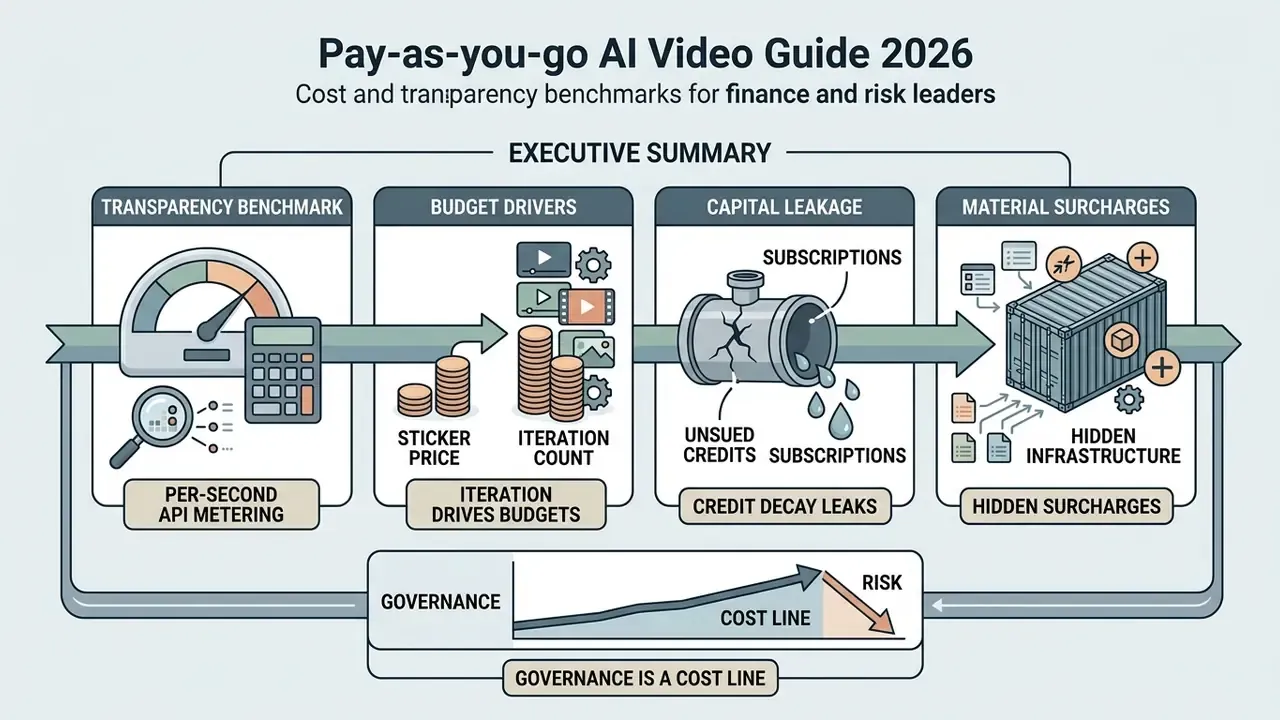
- Per-second API metering is now the transparency benchmark. Published 2026 tariffs run from $0.03/sec (Google Veo 3.1 Lite, 720p video-only) to $0.70/sec (OpenAI
sora-2-pro, 1080p), while subscription tiers cluster between $7.99 and $249.99 per month with wildly unequal output caps. - Iteration count, not sticker price, drives budgets. With realistic acceptance rates of 20–40%, the effective cost of an approved clip lands at 2.5x to 5x the raw generation fee.
- Subscriptions leak capital through credit decay. Under 30-day "use-it-or-lose-it" rules, burning 200 of 1,000 purchased credits quadruples effective unit cost from $0.05 to $0.20.
- Hidden infrastructure surcharges are material. Express render queues carry a 2.9x multiplier during peak hours, archived assets accrue roughly $0.03/GB/month after 30 days, and character or style consistency modules add $12–$25/month.
- Governance is a cost line, not an afterthought. Uncontrolled card purchases create Shadow AI exposure. Compliance review labor, audit-trail retention, and zero-data-retention terms belong inside the total cost of ownership (TCO) model, not in a footnote.
What Is Pay-as-you-go AI Video and How Generation-Based Billing Works
Pay-as-you-go AI video is a usage-based financial model where cost scales with generation volume instead of calendar intervals. You fund a balance, or connect a metered billing account, and it decrements only when a model turns a prompt into output.
Market intelligence data puts the global AI video generator market at USD 554.9 million in 2023, compounding at a CAGR of 19.9% through 2030. As enterprise adoption scales, the shift from unmanaged flat subscriptions to granular consumption billing becomes the main lever for controlling video production overhead.
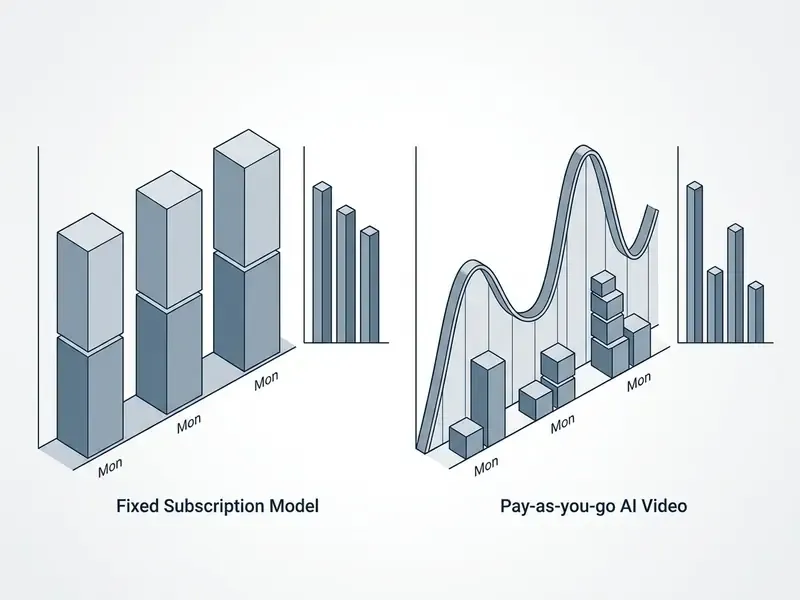
Unlike a fixed software licence, generation-based billing measures computational intensity. An eight-second clip with complex physics simulation eats far more compute than a static background plate. Same duration, different bill.
The mechanics rest on real-time transaction metering. When a prompt executes through a user interface or an application programming interface (API), the platform calculates resource allocation from model tier, resolution, and clip duration, then debits accordingly.
Billing units are not standardized across vendors, and that is where procurement gets bitten. Some platforms meter raw output seconds. Others meter billed seconds: Seedance 2.5 defines billed seconds as output duration plus the duration of any reference video supplied as conditioning input, then charges 17 credits per billed second at 480p and 38 credits at 720p. Creatify prices Aurora at 1 credit per second and Aurora Fast at 0.5 credits per second, while URL-to-Video consumes 5 credits per 30-second block. Normalize every vendor into a single per-second denominator before you compare anything. Otherwise you are comparing invoices, not prices.
Credits, Generations, and the Real Cost of a Single Video
The true cost of one AI-generated video equals the unit cost of consumed credits multiplied by the number of attempts needed to reach approval. Platforms abstract raw computation into tokens or credits so billing stays consistent across different hardware clusters.
On Runway, text-to-video and image-to-video processing on the Gen-4.5 model consumes 12 credits per output second according to official 2026 documentation. At an API credit price of $0.01, a single 10-second raw render costs exactly $1.20.
Cost per Approved Clip = (Total Credits per Attempt × Attempt Count) × Unit Credit Cost
If an enterprise marketing workflow needs four draft iterations on a cheaper model such as Gen-4 Turbo (5 credits per second) before a final pass on Gen-4.5, total consumption reaches 220 credits. The fully loaded generation cost for that one approved 10-second clip is $2.20. Still cheap. Multiply by 400 clips a quarter and the conversation changes.
Pay-as-you-go, APIs, and Platforms for AI Video
Pay-as-you-go behaves differently in graphical user interface (GUI) web platforms than in developer APIs. Web platforms bundle infrastructure, cloud storage, and editing tools into credit packages. APIs expose raw inference endpoints metered in fractions of a cent per second.
Developer APIs publish granular per-second tariffs. Google Gemini Developer API documentation lists Google Veo 3.1 Fast at $0.10 per second for 720p output and $0.12 per second for 1080p as of August 2026. Teams building automated media pipelines can review implementation patterns in our Google Veo API implementation guide.
End-user interfaces usually hide those compute rates behind subscription tiers. D-ID Studio and comparable platforms use shared balance wallets where UI operations and API endpoints draw from the same credit pool, which keeps organizational balance management unified and, more usefully, keeps reconciliation simple. Session-based and participant-minute models add a third variant: infrastructure vendors such as Stream bill from $0.30 per audio-only participant minute up to $12.00 for 4K streams, with the first $100 of monthly usage waived. That is a packaged platform structure, not a pure inference tariff, and it should be modelled separately.
Why AI Video Subscriptions Create Subscription Fatigue
AI video subscriptions produce subscription fatigue when flat monthly fees disconnect software cost from creative output. You pay for capacity that sits idle through low-volume periods, and finance notices.

Verified figures. The strongest evidence for subscription fatigue still comes from the streaming proxy market.
«Roughly 40% of US consumers cancelled at least one paid streaming service in the previous six months, and 36% said the content was not worth its price.»
Deloitte's same research programme found that 48% of subscribers would cancel outright after a $5 monthly price increase, and that respondents report real fatigue from administering overlapping subscriptions. Ampere Analysis reported in May 2024 that 45% of consumers across 30 markets felt overwhelmed by the number of online video services, a 25% year-over-year rise in that sentiment. In professional media production the same dynamic shows up as recurring commitments that generate zero incremental assets during planning phases.
When a creative team keeps active subscriptions across several specialized AI video generators plus voice synthesis and image editing tools, fixed overhead compounds quickly. Teams looking for leaner tooling often start with our breakdown of Cheaper AI Video options before renewing anything.
Unused Credits and the "Use-It-or-Lose-It" Rule
The "use-it-or-lose-it" rule means allocated monthly credits expire at the end of the billing cycle with no rollover. During light production months this quietly inflates your effective cost per second.
Official support documentation for platforms such as Vimeo confirms that paid non-enterprise AI credits expire 30 days from the grant date, with no renewal or rollover. Use 200 credits out of a 1,000-credit bundle priced at $50, and effective cost per used credit jumps from $0.05 to $0.20. Nothing changed technically. Your unit economics just got four times worse.
«45% of US subscribers believe they hold too many subscriptions, and 42% intend to cancel at least one within the next 12 months.»
Procurement should check whether credit terms permit multi-month rollover, or whether balance decay penalizes project-based work. Google Flow's help documentation states that AI credits may expire after a period disclosed at the point of acquisition, while some pay-as-you-go packages (PDF2Go-style credit bundles, for example) explicitly roll unused credits forward for up to a year. Without written rollover protection, a subscription is really a variable cost wearing a fixed-cost costume.
«A 2023 study of OTT services found that subscription fatigue and price sensitivity significantly raise cancellation intent, while perceived functional quality moderates that effect.»
Shadow AI and Governance Controls for Pay-as-you-go Purchases
For a regulated institution, the dominant pay-as-you-go risk is not overspending. It is unobserved spending. Because credit packs cost $10–$50 on a personal or departmental card, individual contributors onboard generative video vendors outside procurement, security review, and the model inventory. That is the classic Shadow AI failure mode, and it turns a trivial line item into an unbounded data-governance liability.
Three control layers reduce the exposure:
- Procurement gating. Route every credit purchase, however small, through a single billing entity or a corporate virtual card programme, so vendor usage appears in the model inventory expected under model risk management frameworks such as Federal Reserve and OCC Supervisory Letter SR 11-7 and related OCC model risk guidance.
- Prompt-level data controls. Prohibit customer PII, account numbers, and confidential deal data in prompts. Require a documented zero-data-retention or no-training-on-input agreement before any production API key is issued.
- Spend caps and alerting. Configure hard monthly ceilings at vendor level, since most metered APIs expose spend limits natively, so a runaway automation loop cannot produce an uncapped invoice.
Minimum audit trail specification for each generation event:
| Log field | Purpose | Retention driver |
|---|---|---|
| Requester identity (SSO subject ID) | Attribution and accountability | Access review, insider risk |
| Full prompt plus negative prompt text | Reconstruct model input | Model risk validation, IP review |
| PII/DLP scan result and verdict | Prove pre-submission screening | Privacy regulation, GDPR |
| Model ID, version, resolution, duration | Reproducibility of output | Change management, SR 11-7 |
| Exact billed amount and credit balance delta | Financial reconciliation | Finance controls, audit |
| Reviewer sign-off before publication | Human-in-the-loop evidence | Marketing compliance, disclosure |
| Output hash and storage location | Provenance and takedown capability | Records management |
Vendor security audit checklist before funding a pay-as-you-go balance:
- Zero-data-retention or explicit no-training clause covering both prompts and outputs.
- SSO/SAML support and role-based access control (RBAC) on the tier you actually intend to buy, not only on top enterprise plans.
- Exportable, immutable usage logs via API, not screenshot-only dashboards.
- Documented data residency and sub-processor list.
- Written commercial usage rights and watermark policy for that specific plan tier.
- Named escalation path and an incident notification commitment.
- Published, dated pricing page with change-notification terms.
One caveat worth stating plainly: item 2 fails more often than buyers expect. SSO is frequently gated behind a tier three times the price of the tier your team wanted.
Data Verification and Pricing Audit Standards
What Determines the Cost of AI Video Generation
The cost of AI video generation is driven by model architecture, output resolution, frame rate, audio synthesis, and iteration frequency. Once controllers understand those variables, forecasting stops being guesswork.
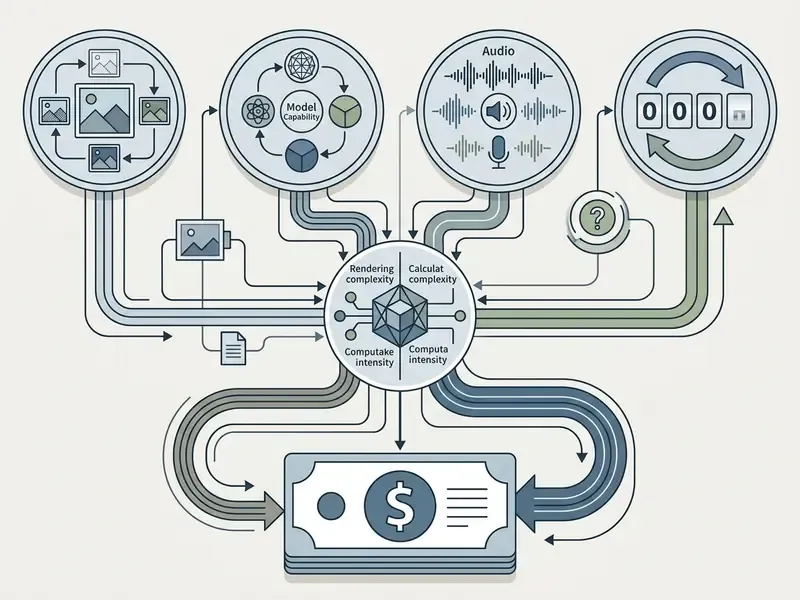
An illustrative case: a mid-tier regional bank evaluating automated video for customer compliance communications imposed strict prompt validation rules. By restricting draft iterations to 720p Fast endpoints before final 1080p renders, the institution cut generation token spend by 64% over a 90-day pilot while holding audit-compliant output quality. The lever was workflow discipline, not a cheaper vendor.
Input modality shifts the consumption matrix too. Ingesting high-resolution reference video for video-to-video translation demands more memory bandwidth than a text prompt, which inflates raw inference billing.
Model Tier, Output Quality, and Video Format
Higher-tier foundation models and premium resolutions introduce steep multipliers, because flagship models burn far more GPU runtime per frame.
OpenAI API Sora 2 pricing shows the gradient clearly: standard sora-2 at 720p is billed at $0.10 per second, while sora-2-pro runs from $0.30 per second at 720p to $0.70 per second at 1080p. Google Veo 3.1 API charges $0.10/sec for 720p Fast output against $0.60/sec for Standard 4K with integrated audio. Independent hosted endpoints repeat the pattern: LTX-2.5 is listed at $0.09/sec for 720p, $0.15/sec for 1080p, $0.19/sec for 2K, and $0.37/sec for 4K, a fourfold spread driven purely by resolution.
Avatar pipelines price by the minute instead. HeyGen documentation lists standard avatar generation at $1 per minute for 720p or 1080p, 4K surcharges of $0.15/min at 30 fps and $0.30/min at 60 fps, and premium Avatar IV output at $4 per minute at 1080p.
Table 1: Technical factors driving AI video generation expenses
| Cost factor | Technical parameters | Billing impact and metric | Optimization strategy |
|---|---|---|---|
| Model tier | Base / Turbo vs. Pro / flagship (Sora 2 vs Sora 2 Pro) | 2x to 7x rate multiplier per rendered second | Restrict high-parameter models to final master approvals |
| Spatial resolution | 720p, 1080p, 2K, 4K UHD | 1.5x (1080p) to 4x (4K) compute surcharge | Draft at 720p; upscale approved finals with dedicated tools |
| Audio synthesis | Spatial audio, voiceover, sound effects | Plus $0.02 to $0.20 per second API surcharge | Synthesize audio in a dedicated pipeline when cheaper |
| Input modality | Text-to-video vs image-to-video vs video-to-video | Up to 50% premium for multi-frame conditioning; reference-video duration may be added to billed seconds | Prefer static high-resolution image inputs over raw video references |
| Frame rate | 24fps vs 30fps vs 60fps output | Up to 2x surcharge at 4K/60fps on avatar and cinematic pipelines | Lock 24–30fps for dialogue; reserve 60fps for motion-heavy shots |
| Consistency modules | Persistent character avatars, brand style lock | Plus $12 to $25/month per persistent asset | Consolidate brand assets into the fewest locked identities |
| Queue priority | Standard queue vs express processing | 2.9x multiplier during 9:00–17:00 peak windows | Batch non-urgent renders into off-peak windows |
| Iteration count | Prompt adjustments, seed variations, discarded takes | Linear multiplier on total balance deductions | Enforce prompt engineering guidelines and negative constraints |
Read the table one way and the message is simple: resolution and tier set the floor, iteration sets the ceiling. Selecting media tools involves a further trade-off between integrated platforms and standalone microservices. Design teams weighing that choice often cross-reference features using our analysis of the Canva AI generator.
Repeated Generations and Workflow Costs
Iteration is the single largest unmanaged expense in AI video production. Diffusion models are stochastic, so hitting a specific composition usually takes several prompt variations and seeds.
Published benchmarks put practical acceptance rates for raw generations between 20% and 40%, depending on prompt complexity. If a 5-second clip at $0.12/sec needs five attempts before the camera motion is acceptable, effective cost for that clip climbs from $0.60 to $3.00.
Acceptance rate is a measurable operating metric, not a vibe. If 4 of 20 generations are usable, acceptance is 20%, failure ratio is 80%, and the multiplier on every approved asset is 1/0.20, so 5x. Published 2026 modelling puts finished output between $13 and $220 per finished minute depending on model tier and iteration discipline. A 17x spread, produced almost entirely by workflow governance rather than tariff selection.
In multi-shot sequences, unmanaged retries drain reserves fast. Test prompts in low-cost preview environments before authorizing high-resolution runs, and benchmark your pipeline against established text-to-video AI tools to confirm retry rates are tool-driven rather than prompt-driven. Often it is the prompt. Sometimes it genuinely is the model.
Pay-as-you-go vs Subscription vs API: Pricing Model Comparison
Choosing between pay-as-you-go, subscriptions, and direct API access means matching generation volume against model availability and administrative overhead. This pay-as-you-go ai video guide comparison starts with predictability, then adds governance, because in financial services the second one usually decides the first.
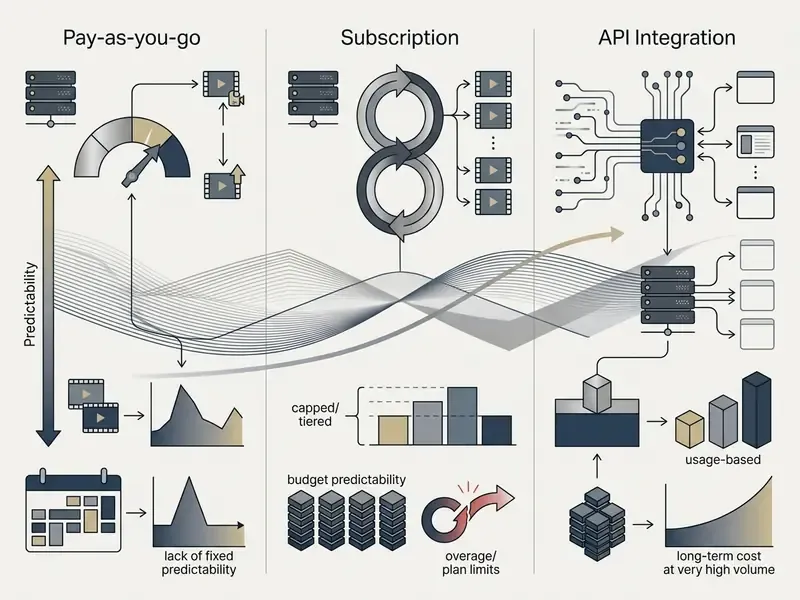
«Companies with usage-based pricing grow 29.9% annually versus 21.7% for seat-based models, with net revenue retention near 120% against roughly 110%.»
Understanding the structural trade-offs prevents capital misallocation across media production pipelines. Readers weighing individual platforms head to head can consult our broader AI video generator comparison for quality-versus-price positioning.
When Pay-as-you-go Is More Advantageous Than a Monthly Plan
Pay-as-you-go credit purchasing wins when production is project-based, seasonal, or volume-unpredictable. It protects capital by removing recurring obligations through inactive cycles.
Break-even Point (Clips) = Monthly Subscription Cost / Pay-as-you-go Unit Cost per Clip
If a company generates 15 clips a month during launches and zero clips mid-quarter, metered balance purchasing eliminates the idle overhead entirely. Independent creators comparing flexible options can review our guide to pay as you go ai video tools.
The same arithmetic appears in adjacent metered AI markets, and it is worth quoting to a finance committee: at 50 document pages per month, a pay-as-you-go rate produces a $3 invoice against a $9 minimum subscription floor. The crossover only reverses once monthly volume approaches the bundle allowance. Microsoft's Copilot Studio pay-as-you-go documentation shows the mechanic cleanly at $0.01 per credit, billed in arrears, no upfront commitment.
Metered access also lets you test emerging foundation models without long-term vendor lock-in. For an institution running a model inventory, that optionality has governance value beyond the invoice.
When a Subscription Is Justified
Fixed monthly subscriptions pay off when an in-house team maintains predictable, high-volume output that consistently exhausts its credit quota.
Vendors structure enterprise tiers to discount unit cost per credit in exchange for guaranteed recurring revenue. For high-volume publishing operations, the effective cost per second on a fully consumed Pro or Enterprise tier sits well below standard pay-as-you-go API tariffs. Annual commitments deepen the discount: Pictory's annual billing allocates between 2,400 and 21,600 video minutes per year, and Runway's annual-billed Standard tier is listed at $12/month for 625 monthly credits, scaling to 2,250 and 9,500 credits on higher tiers. Return on investment peaks only when those allowances are genuinely exhausted. Partially used allowances are simply a discount you failed to collect.
Subscriptions also bundle platform features that matter operationally: workspace permissions, dedicated cloud storage, priority queue processing, and explicit commercial usage rights.
When to Choose API-Based Pricing
API-based metering is the right answer for engineering teams building custom applications, automated content pipelines, or customer-facing SaaS products.
Table 2: Structural comparison of AI video pricing models
| Evaluation dimension | Pay-as-you-go credits | Monthly subscription plans | Developer API metering |
|---|---|---|---|
| Payment mechanism | Prepaid credit balance top-ups | Fixed recurring monthly or annual fee | Post-paid or metered usage billing |
| Cost predictability | High per project; variable monthly | Fixed predictable baseline | Variable with application calls |
| Risk of credit loss | Low (credits often valid 365 days) | High ("use-it-or-lose-it" 30-day reset) | Zero (no credit decay; pure usage) |
| Minimum entry capital | Low ($10–$50 single pack) | Medium ($29–$249 per month) | Zero setup; scales with API key |
| Target user profile | Agencies, project-based creators | In-house media teams, daily creators | Software engineers, product builders |
| Feature access scope | Standard UI features included | Full platform tools and priority queue | Raw inference endpoints; custom UI |
| Governance maturity | Weakest, high Shadow AI exposure | Medium, SSO usually gated to top tiers | Strongest, programmatic logs and spend caps |
Direct API integration gives you programmatic control, so applications trigger renders from webhooks or user input with no manual interface work. Product teams choosing input modalities should benchmark against dedicated image-to-video AI endpoints, since static-image conditioning is materially cheaper than video-to-video translation.
«Usage-based models show roughly 8% annual logo churn versus about 12% for subscription-only vendors, yet introduce two hidden churn modes: zero-consumption dormancy and bill-shock after unexpectedly large invoices.»
Mitigating bill shock is an engineering task, not a billing task. Enforce hard spend ceilings, alert at 50, 75, and 90% of monthly budget, and cache approved renders so identical prompts never bill twice.
Table 3: Commercial mid-tier and agentic AI video platform pricing (2026 audit)
| Platform | Pricing structure | Entry / mid tier cost | Allocation and limits | Key hidden limitation |
|---|---|---|---|---|
| InVideo AI | Tiered subscription | Plus: $20/mo; Max: $48/mo | 50 mins/mo (Plus); 200 mins/mo (Max) | iStock media access hard-capped (80/mo on Plus); max 1 seat |
| DeepAI | Hybrid PAYG / Pro | PAYG: $5 deposit; Pro: $4.99/mo | 30 video calls per $5 (PAYG); 30 video calls/mo (Pro) | Genius Mode limited to 60 calls/mo on Pro tier |
| Magic Hour AI | Annual subscription | Creator: $10/mo ($120/yr); Pro: $30/mo ($360/yr) | Tiered credit pools across multi-model generators | Higher volume forces a jump to the $66/mo Business plan |
| Digen AI Agent | Autonomous agent fee | $89/month base | Autonomous long-form generation at roughly $0.33/minute | Best rates require a 6-month contract commitment |
| Replicate / Segmind | Pure developer API | $0 setup; per-second compute metering | Raw model inference (LTX Video, Hunyuan) | No native UI; needs a custom integration pipeline |
| Leonardo AI | Free / Pro / Enterprise | Free tier; Professional and Enterprise priced on request | Collaborative workspaces; custom model training | No public per-second tariff, so forecasting requires sales contact |
Agent-based platforms are the fastest-growing structural category. Roughly 29% of business users now prefer autonomous multi-step video agents that handle scripting, B-roll retrieval, and assembly, cutting manual editing time by an estimated 58% in 2026 case studies. The trade-off is contractual. The best per-minute rates sit behind six-month minimums, which quietly reintroduces the fixed-cost exposure that pay-as-you-go was adopted to avoid. Also worth noting for governance teams: an autonomous agent needs a named owner, an approved role, and a shutdown mechanism before it needs a discount.
How to Compare AI Video Generators and Their Plans
Evaluating platforms means comparing effective output quality against real total expenditure. Comparing sticker prices without measuring generation fidelity leads straight to a bad procurement conclusion. Any credible pay-as-you-go ai video guide plans review therefore scores quality per dollar, not dollars alone.
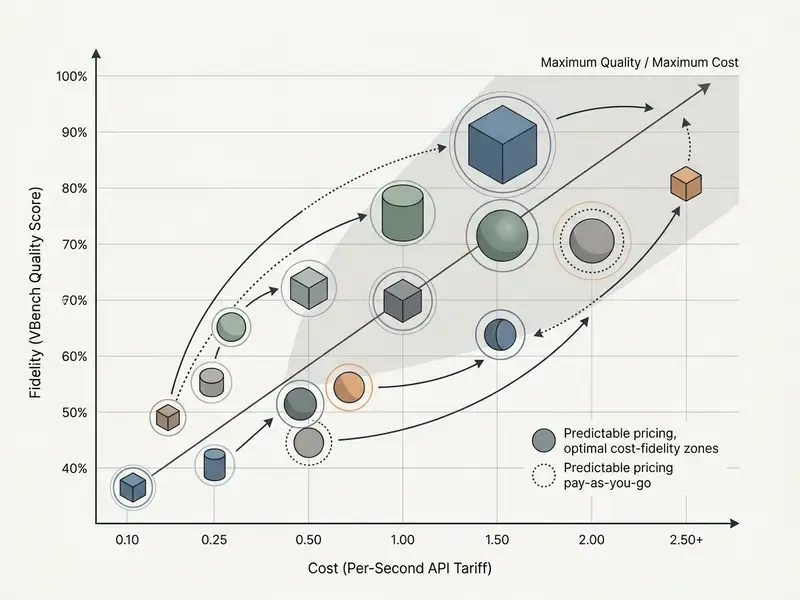
A corporate training department ran a controlled trial across three commercial tools. By measuring prompt fidelity, temporal consistency, and resolution alongside credit consumption, the team found that a more expensive per-second model reduced total project spend, because it needed 50% fewer retries. Counter-intuitive on the invoice line. Obvious in the budget.
Technical benchmarks give this comparison a vocabulary. VBench decomposes video quality into 16 measurable dimensions including motion smoothness, temporal flickering, and subject identity consistency. EvalCrafter applies 17 objective metrics across visual quality, content quality, motion quality, and text-video alignment, then calibrates coefficients against human preference votes. Comparative platforms normalize price as published USD per minute of generated video and convert pairwise preference votes into an Elo-style score, which is the closest available approximation of functional value per dollar.
Comparing Veo, Sora, and Kling Models
Leading 2026 foundation models sit inside quite different commercial frameworks, so normalize everything to a per-second unit before comparing.
- Google Veo 3.1. Primarily API tariffs. Lite 720p video-only starts at $0.03/sec, Fast 1080p with audio at $0.12/sec, Standard 4K with audio at $0.60/sec. Consumer access runs from Google AI Plus at $7.99/month up to Google Ultra at $249.99/month. Persistent brand style locking adds $12/month.
- OpenAI Sora 2. Billed via developer API from $0.10/sec (
sora-2720p) to $0.70/sec (sora-2-pro1080p), alongside consumer ChatGPT Plus access at $20/month subject to generation caps. Persistent character consistency runs about $15/month per avatar. - Kuaishou Kling AI. Combines web credit plans ($10 for 660 credits, $180 for 26,000 credits) with API metering (Kling 3.0 Turbo at roughly ¥0.8/sec, about $0.126–$0.168/sec). Standard 5-second 720p generations consume around 106 credits without audio. Kling's quality-scaling model spans roughly $0.07/sec at 480p to $0.18/sec at 4K, a 61% spread that rewards deliberate resolution discipline per shot.
Teams that want a zero-cost baseline testing environment can review platform constraints in our directory of free AI video generators.
Features That Change Plan Value
Platform utility depends on the features that either expand output capability or cut manual editing time. That is the practical core of any pay-as-you-go ai video guide features assessment.
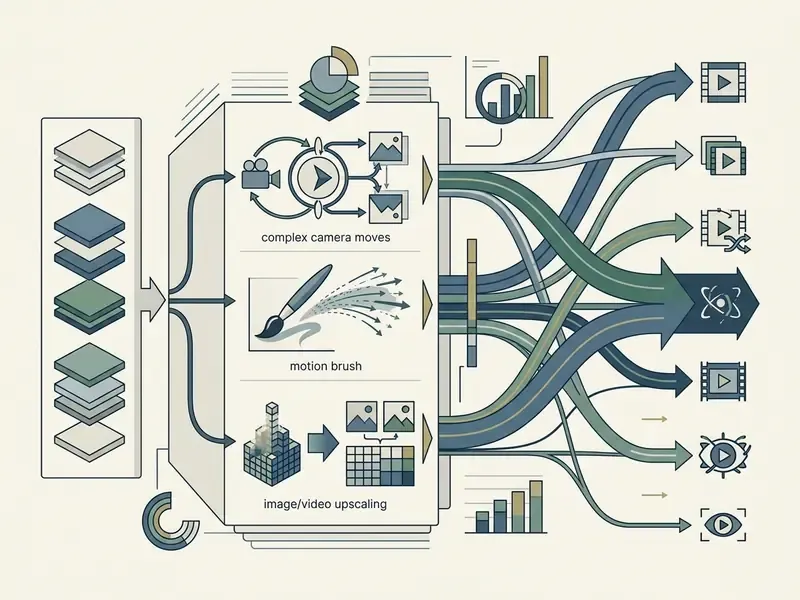
Capabilities like Motion Brush, precise Camera Control, image conditioning, and integrated 4K upscaling are usually restricted to premium tiers or metered as credit multipliers. Runway's Gen-4 upscaling consumes extra credits per rendered second, which lands directly in your workflow budget. Kling's launch documentation shows the same gating in credit terms: a 5-second Standard clip costs 20 credits and a 10-second clip 40, while Professional mode escalates the same durations to 35 and 70.
Organizations that need commercial licensing guarantees must audit low tiers carefully, because platforms such as Pika reserve watermark-free commercial rights for high-tier subscriptions only. Teams publishing to a single primary channel should also cost the downstream stage. Our YouTube video editor workflow guide covers where generated clips still need trimming, captioning, and thumbnail work before release.
How to Calculate Real Pay-as-you-go AI Video Cost
Calculating Cost per Clip and Cost per Video
To get an accurate cost per finished asset, add every underlying generation attempt to post-processing labor and control functions.
Automating TCO Calculation: A Script for Financial Modeling
// Enterprise AI Video Cost, Compliance & ROI Calculation Script
function calculateVideoProjectCost({
  videoCount,               // Number of completed video assets
  clipsPerVideo,            // Clips required per asset
  avgDurationSec,           // Target duration per clip in seconds
  retryMultiplier,          // Average retries needed per approved clip (e.g., 2.5)
  costPerSecondUSD,         // Model tariff per second (e.g., $0.12)
  laborHoursPerVideo,       // Human editor time per finished asset
  editorHourlyRate,         // Hourly loaded labor rate
  complianceHoursPerVideo,  // Legal / risk / brand review hours per asset
  complianceHourlyRate,     // Loaded hourly rate for reviewer (risk, legal)
  storageGbPerVideo,        // Retained master + variants per asset in GB
  storageCostPerGbMonth,    // Retention fee beyond free window (e.g., $0.03)
  retentionMonths,          // Months assets remain in hot storage
  riskBuffer                // Fractional buffer, e.g., 0.15 for 15%
}) {
  const totalApprovedClips = videoCount * clipsPerVideo;
  const totalAttemptedGenerations = totalApprovedClips * retryMultiplier;
  const totalBilledSeconds = totalAttemptedGenerations * avgDurationSec;
  const directComputeCost = totalBilledSeconds * costPerSecondUSD;
  const directLaborCost = videoCount * laborHoursPerVideo * editorHourlyRate;
  const complianceReviewCost =
    videoCount * complianceHoursPerVideo * complianceHourlyRate;
  const storageOverhead =
    videoCount * storageGbPerVideo * storageCostPerGbMonth * retentionMonths;
  const subtotal =
    directComputeCost + directLaborCost + complianceReviewCost + storageOverhead;
  const totalProjectTCO = subtotal * (1 + riskBuffer);
  const effectiveCostPerVideo = totalProjectTCO / videoCount;
  return {
    totalBilledSeconds,
    directComputeCost,
    directLaborCost,
    complianceReviewCost,
    storageOverhead,
    riskAdjustedTCO: totalProjectTCO,
    effectiveCostPerVideo
  };
}
// Example Execution: 5 corporate videos, 4 clips each, 6s per clip,
// 3x retry rate, $0.12/sec model rate, 2h editing at $65/h,
// 0.5h compliance review at $120/h, 4 GB retained for 6 months, 15% risk buffer.
const projectFinancials = calculateVideoProjectCost({
  videoCount: 5,
  clipsPerVideo: 4,
  avgDurationSec: 6,
  retryMultiplier: 3.0,
  costPerSecondUSD: 0.12,
  laborHoursPerVideo: 2,
  editorHourlyRate: 65.00,
  complianceHoursPerVideo: 0.5,
  complianceHourlyRate: 120.00,
  storageGbPerVideo: 4,
  storageCostPerGbMonth: 0.03,
  retentionMonths: 6,
  riskBuffer: 0.15
});
Run the numbers and one thing becomes obvious: compute is a minority share of the budget. Human editing, prompt tuning, quality assurance, and regulated-industry sign-off are the heavy terms. Teams that standardize post-production in shared video editing tools usually compress the labor term far more effectively than they ever compress the compute term.
Risk-adjusted ROI. Divide the value produced (media buy avoided, agency invoice avoided, or attributable pipeline) by risk-adjusted TCO rather than by raw compute spend.
An agency-produced 60-second brand film quoted at $4,000, replaced by an internal pipeline with a risk-adjusted TCO of $860, yields roughly 365% ROI. But only if the compliance review term is genuinely funded. Unreviewed generative output in a regulated sector carries remediation and reputational costs that dwarf any compute saving, and boards tend to remember the remediation.
The Point Where a Monthly Subscription Becomes Cheaper
Breakeven sits at the monthly volume where cumulative pay-as-you-go spend equals the fixed subscription price.
Suppose a commercial subscription costs $149 per month and includes credits equivalent to 1,500 seconds of generation, an effective $0.099/sec, while the equivalent pay-as-you-go tariff is $0.20/sec. The simple crossover is:
Below 745 seconds of video per month, metered billing minimizes spend. The structure mirrors the classic unit break-even formula published by the U.S. Small Business Administration, fixed costs divided by contribution per unit, with one caveat: vendor bundles differ so much that the crossover must be recalculated per quote rather than assumed. Recalculate it after every tariff change too.
How to Choose the Best Payment Format for Creators and Teams
The best payment format depends on production frequency, seat concurrency, security limits, and how much budget predictability your finance function demands.
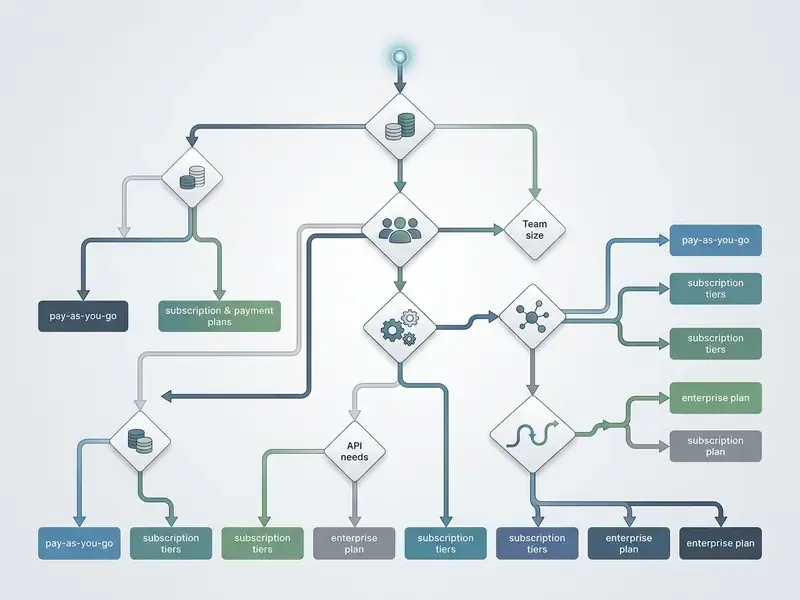
- Step 1: production frequency.
- Project-based or irregular output leads to pay-as-you-go credit packs or APIs.
- Continuous weekly output leads to Step 2.
- Step 2: concurrency and access requirements.
- Workflow automation or API integration leads to developer API metering.
- Multi-seat workspace UIs for human editors lead to tiered enterprise subscriptions.
- Step 3: governance threshold check.
- If the workload touches customer data, regulated disclosures, or brand-critical claims, require SSO, RBAC, exportable audit logs, and a zero-data-retention clause before funding any balance, whatever Steps 1 and 2 recommended.
Seat-based team platforms show why volume alone is not enough. Alibaba Cloud Model Studio Team Edition binds each seat to one member and one API key across Standard (25,000 credits/month), Pro (100,000), and Max (250,000) tiers, with a shared 625,000-credit pack for pooled use, and quotas that reset monthly without carryover. Team size multiplies cost linearly. The quota tier follows generation volume; the shared pack absorbs burst variance.
Getting this fit right also removes a chronic source of friction between creative teams and finance.
Pay-as-you-go for Creators with Irregular Production
Solo creators, freelancers, and boutique agencies gain most from metered billing. Irregular client schedules make recurring subscriptions inefficient during gaps between engagements. Many pair metered generation with free video editing software to keep fixed tooling near zero between contracts.
Non-expiring balance top-ups keep deployed capital available until a project actually starts, so a creator can test a specialized model without watching a monthly allowance evaporate during a planning week. Documentation across the metered-software market states the trade-off consistently: no fixed monthly cost and rollover of unused credits, commonly with a 365-day expiry, but the highest per-unit rate of any billing model. You pay a premium for optionality. Often it is worth it.
Metered access also lets independent operators run different specialized models for different project requirements without stacking active subscriptions.
Plans and APIs for Teams with Continuous Workflows
Enterprise marketing departments, production houses, and SaaS engineering teams need scaling features that credit packs simply do not provide.
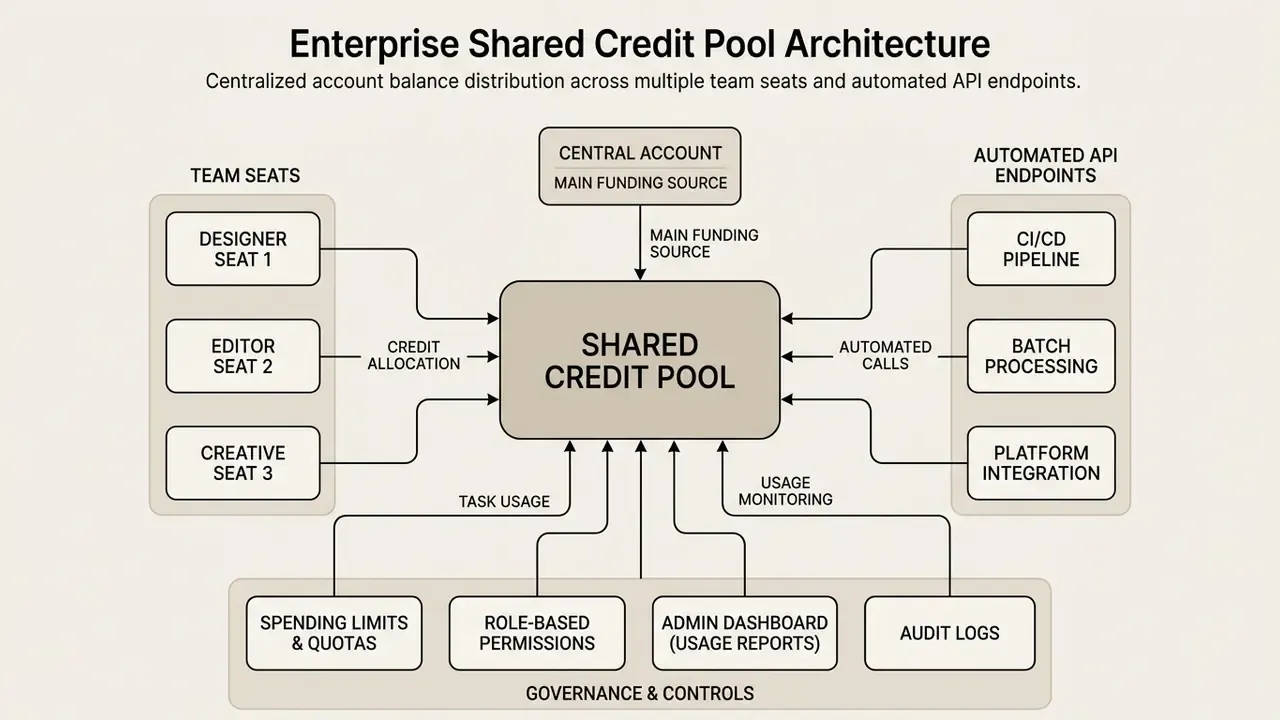
An enterprise digital media agency managing several corporate brands centralized its credit pool. By running a master organization wallet through billing APIs, the agency distributed usage caps across 12 creative accounts while keeping single-dashboard governance over total spend. The governance gain mattered more than the discount.
The technical primitives already exist across major billing stacks. Stripe Connect exposes per-account operations through the Stripe-Account header. AWS documents credit-sharing preferences across selected accounts. Google Apigee provides an API method to credit a developer's account balance directly. Adobe meters Shared Credits consumed by technical accounts against a pooled organizational allowance. Agency pricing reflects the same split: one vendor lists agency plans from $499/month with additional creator seats at $15/month, where seats grant workspace access without increasing the shared AI budget.
Enterprise plans carry the controls a regulated buyer actually needs: single sign-on, centralized credit allocation, RBAC permissions, and dedicated audit trail logging for model compliance verification. Teams benchmarking alternatives with comparable controls frequently evaluate PixVerse AI alongside the incumbent set.
Tactical Cost Optimization Strategies for Creators and Teams
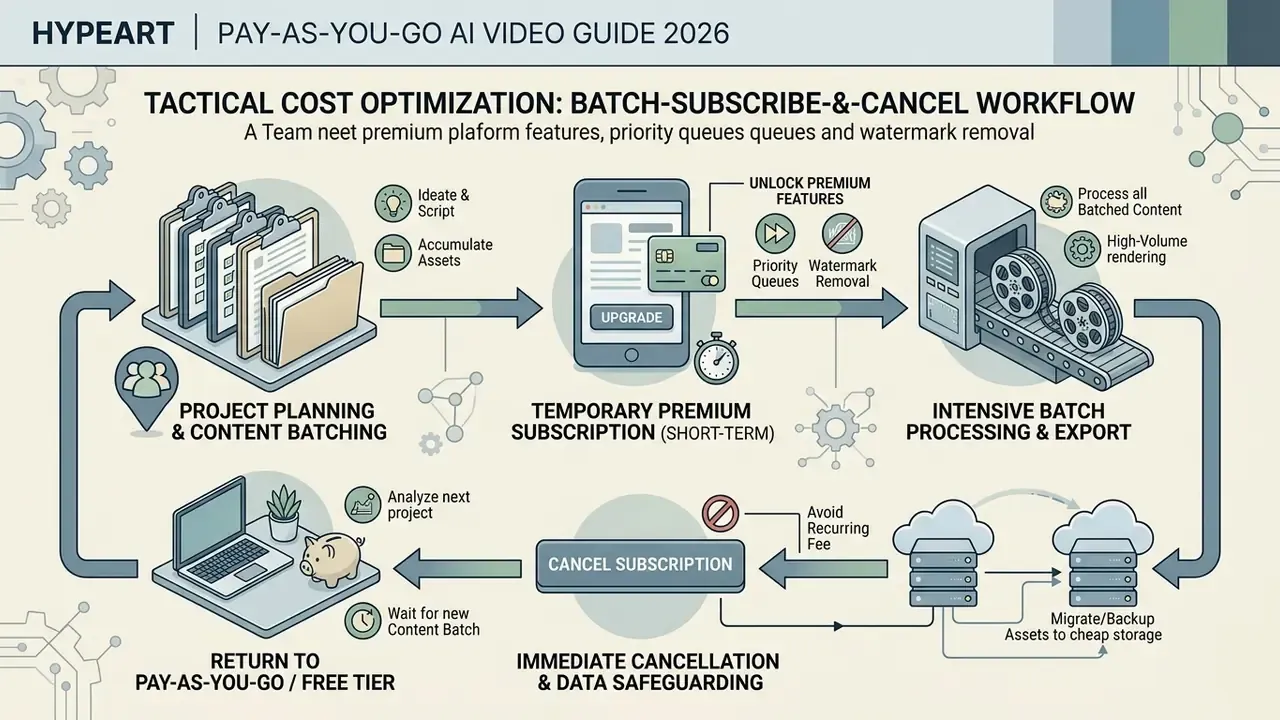
1. The "Batch-Subscribe-and-Cancel" Workflow
For project teams that need premium platform features, such as priority queues or watermark removal, without an ongoing commitment: aggregate prompt scripts into monthly cycles. Buy one 30-day tier, render everything in a single batch window, export final masters, then cancel immediately to block passive auto-renewal. Check credit expiry terms first. If credits reset monthly, the plan is functionally a subscription and any unused balance is forfeited at cancellation.
2. Off-Peak Rendering Window Scheduling
Queue non-urgent batches outside standard US hours, roughly 22:00 to 05:00 EST. API response delays drop by up to 40% in those windows, which lets teams skip the 2.9x express multiplier without losing throughput. Distributed teams can push this further by routing renders into Asia-Pacific night windows.
3. Resolution Laddering
Draft every shot at the cheapest available tier (Veo 3.1 Lite at $0.03/sec, or Kling 480p at roughly $0.07/sec), lock composition and motion, then re-render only approved shots at delivery resolution. On a ten-shot sequence with a 3x retry rate, laddering cuts compute spend by 55–70% versus drafting natively at 1080p.
4. Selective 4K Allocation
Reserve 4K for hero shots. Default to 1080p or 720p for B-roll, background plates, and transitions. Documentary and real-estate teams using quality-scaling models report average savings near $47/month from that one policy change.
5. Storage Lifecycle Automation
Automate migration of delivered masters to cold storage ($0.01/GB/month) or on-premise archives at day 25, before the 30-day retention fee window opens at $0.03/GB/month. Compress delivery variants instead of holding several full-resolution renders.
6. Industry Benchmark: Real-World Asset Cost
Based on normalized 2026 pricing across mid-tier models, a standard 1-minute 1080p YouTube intro video (ten 6-second motion shots at typical retry rates) needs a realistic budget of $2.10 to $3.80 in direct compute, excluding editor hours. Add premium voiceover or custom 3D assets and that rises by roughly $4–$9. Across the wider market, finished output ranges from $13 to $220 per completed minute once labor and iteration discipline are included.
Organizational Readiness Checklist for Pay-as-you-go AI Video
Checklist0 / 12
FAQ About Pay-as-you-go AI Video Pricing
Can You Test an AI Video Generator for Free Before Buying Credits?
Yes. Most commercial platforms offer limited free tiers or trial credits so you can judge output quality before spending. Free evaluation comes with strict constraints on resolution, duration, watermarking, and commercial licensing. Synthesia offers a zero-card trial with up to 10 minutes of web video rendering monthly for template evaluation. Adobe Firefly provides daily resetting generative credits that support basic text-to-video and image-to-video exploration. Terms vary sharply between foundation model vendors:
- OpenAI Sora 2. Access is tied to ChatGPT Plus ($20/mo) or Pro accounts; pure free public generation endpoints are restricted. Plus and Business tiers are documented at up to 480p and 10-second outputs, while Pro unlocks 1080p, 20-second clips, and watermark-free downloads.
- Runway ML. A one-time allocation of 125 free credits at registration, capped at 720p export with watermarked output.
- Kuaishou Kling AI. 66 daily resetting free credits on standard web accounts, supporting 720p watermarked generation.
- Google Veo 3.1. Free experimental access via daily allocations on Google Flow; direct developer API usage has no free tier and requires metered billing setup.
- Pika. Commonly reported at 80 monthly credits with 480p output on the free plan. One licensing caveat matters commercially: free trial outputs usually prohibit commercial use, so you must move to a paid credit or subscription tier before any public client distribution.
What Are the Actual Limitations of Free AI Video Tiers in 2026?
Free tiers across major platforms now average about 12 seconds of generation output per day, down from roughly 30 seconds in 2025. Beyond duration, 38% of free-tier engines enforce mandatory mid-roll watermarking (1–2 second brand overlays every 15 seconds of playback) and cap resolution at 480p or 360p at 24fps, which rules out commercial distribution. Some platforms have moved to inaudible audio watermarks instead of visual overlays. Educational accounts remain the highest-value free tier: verified .edu addresses often receive roughly 3x the daily allowance plus watermark removal for non-commercial coursework.
Are There Technology Access Fees Attached to Annual AI Video Subscriptions?
Yes, and they are easy to miss. Annual contracts discount 17% to 29% nominally, but roughly 43% of commercial vendors charge mandatory platform maintenance or "technology access" fees of 5% to 8% of annual agreement value when you upgrade to a new architecture release, such as a Sora 2 or Veo 3.1 upgrade. Read the version-upgrade and feature-entitlement clauses before signing. Newly released motion control or lip-sync modules are frequently excluded from legacy annual plans.
How Much Does Character Consistency Cost Across Platforms?
Persistent characters typically add $12–$25 per month per identity. Sora 2 bundles basic consistency into its mid tier, Veo 3.1 and Kling charge roughly $15/month per persistent avatar, and agent platforms such as Digen AI include unlimited character slots in an $89/month plan. Advanced derivatives, age progression or emotional-state tracking, add a further $8–$15 per character monthly.
Which Model Offers the Cheapest High-Resolution Output?
Quality-scaling models currently deliver the lowest 4K rates, with Kling near $0.18/sec, provided you accept lower resolutions on non-critical segments. Google Veo 3.1 charges more for 4K but includes stronger style transfer, and Sora 2 Pro remains the fidelity leader for human-centric content at $0.70/sec at 1080p. For consistent 4K across an entire sequence, budget the premium: 4K workflows still command roughly a 73% uplift over 1080p, although improved neural rendering has narrowed the multiplier from 3x in early 2025 to as low as 1.8x on efficient architectures.
Do Pay-as-you-go Credits Expire?
It depends on the vendor, and on whether credits were purchased or granted. Purchased balances commonly stay valid for 365 days and roll over. Subscription-granted credits often reset monthly with no carryover: Vimeo's paid non-enterprise AI credits expire 30 days from grant date, and enterprise allocations renew annually without rollover. Practical rule for budgeting, treat any plan whose credits reset monthly as a subscription, however it is marketed.
How Should Regulated Organizations Control Pay-as-you-go AI Video Spend?
Route all purchases through a single billing entity. Register each vendor in the model inventory consistent with SR 11-7 and OCC model risk management expectations. Enforce hard vendor-level spend caps. Require zero-data-retention terms plus SSO and RBAC before issuing production keys. Then retain the full audit trail specified earlier: requester identity, prompt text, DLP verdict, model version, billed amount, reviewer sign-off, and output hash. If any of those is missing, the control story will not survive an internal audit walkthrough. To match a payment structure to your own generation volume and budget limits, try our interactive plan selector.