The same discipline applies to brand governance. A documented prompt template behaves like a style guide clause. Lock the medium, palette, lighting family, and aspect ratio inside a reusable prompt skeleton, and generated assets stay inside brand tolerances. Outputs become auditable. Designers stop inventing private syntax in private chat windows, which is where most shadow AI usage quietly begins.
One caveat before we start: platform behavior changes fast. Treat every parameter below as a hypothesis to verify in current vendor documentation.
Last updated: February 2026.
How AI Art Generators Interpret Text Prompts
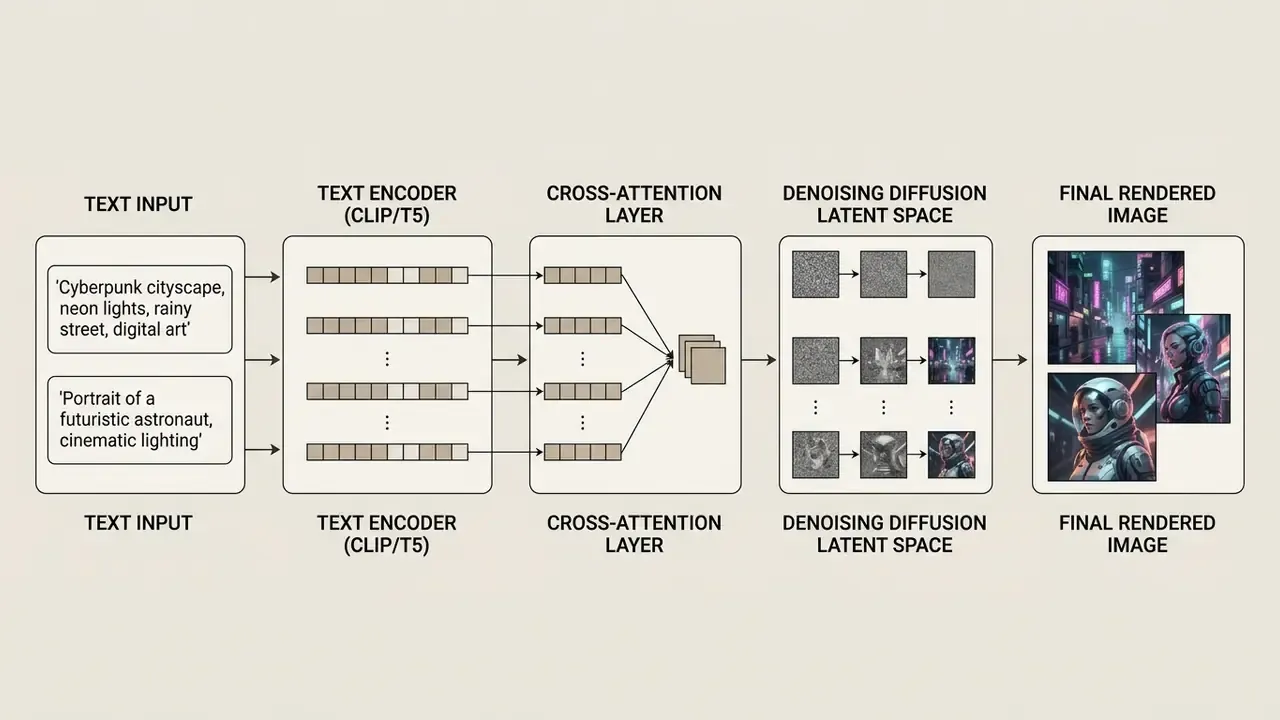
An ai art generator converts written instructions into visual features through text encoders and diffusion models. Understanding that pipeline is what separates a lucky render from a repeatable one, because it tells you which words the underlying ai model can actually act on.
What an AI Art Prompt Tells the Model
A text prompt provides conditional guidance that steers latent noise toward recognizable patterns. It tells the system what to render, in which visual medium, arranged how, under what light. Nothing more mystical than that.
Text encoders like CLIP tokenize the input string and pad or truncate it, usually at 77 tokens, mapping words into high-dimensional vector space. Newer architectures use T5 encoders to process longer, more complex conditioning statements. Stable Diffusion 3, for instance, combines two CLIP encoders with a T5 text embedder to improve prompt adherence and typography. When a prompt specifies subject, action, and environment, cross-attention layers bind those text embeddings to visual features during the denoising steps. That binding is why word choice, not word count, drives quality.
"Participants could judge prompt quality but lacked the stylistic vocabulary that actually drives visual differences in outputs."
That finding matters operationally. Prompt performance is limited less by writing skill than by the breadth of your style, lighting, and material lexicon. The vocabulary tables later in this guide exist to close exactly that gap, and they double as a shared reference so two designers describe the same lighting setup with the same words.
Why the Same Prompt Can Produce Different AI Images
Run one identical string ten times and you get ten images. The cause is stochastic noise initialization: the initial latent state begins as Gaussian noise sampled from a random seed value.
"Diffusion models start from random noise and iteratively refine the image under prompt guidance, so different seeds yield different results even for identical text."
Variance also depends on sampling algorithms and Classifier-Free Guidance (CFG) scales. The CFG scale decides how aggressively the model follows text conditioning versus unconditioned output space (Ho & Salimans, Classifier-Free Diffusion Guidance, 2022). Sampler choice changes the numerical denoising path itself, which is why one prompt with one fixed seed can still diverge across DPM++, Euler a, and DDIM.
Different ai tools also ship distinct text encoders and training datasets, so the same phrase yields unique compositions across generator platforms. Same words, different priors.
"Negative prompts operate through a delayed effect and concept neutralisation in latent space; their behaviour depends on the architecture of the specific model."
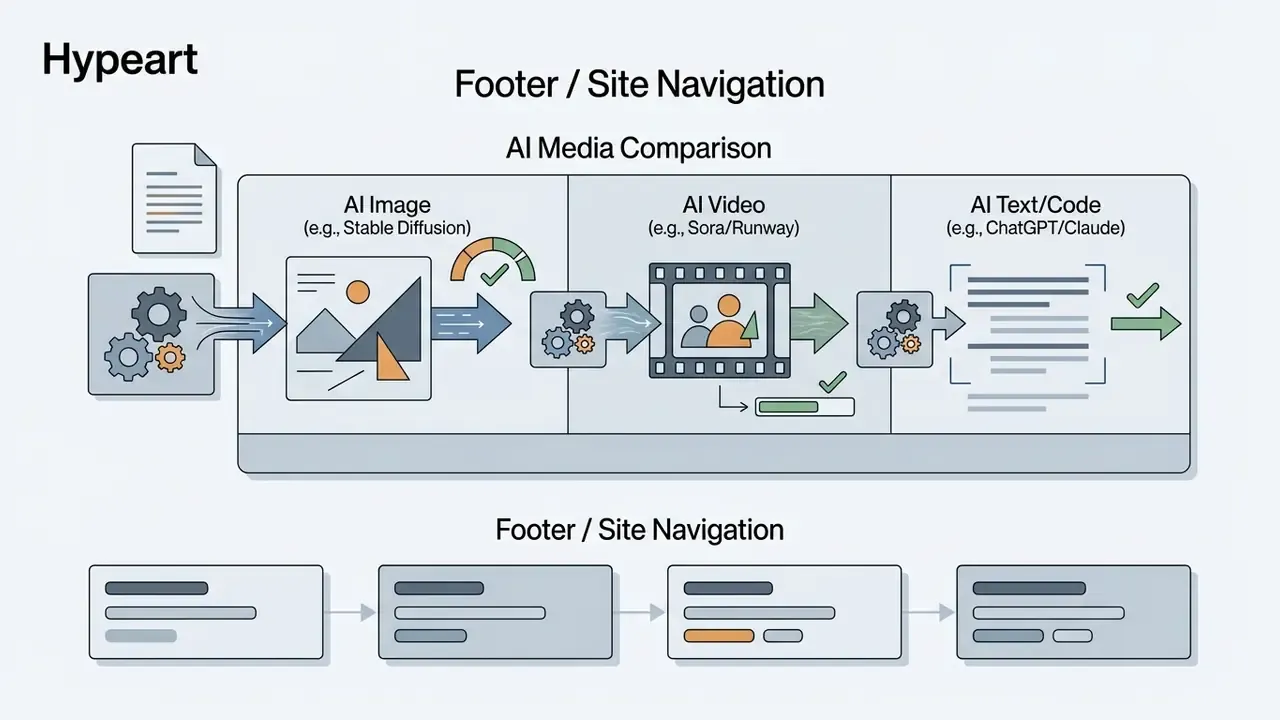
To measure that spread rather than argue about it, teams often test workflows against AI Media Comparison benchmarks and record variance across architectures.
How Detailed Should an AI Art Prompt Be?
Optimal prompt length depends on the target outcome and the encoder. Concise inputs hand the model creative latitude. Densely detailed conditioning constrains composition, styling, and framing.
Better framing: stop optimizing for a raw character count and optimize for the number and orientation of explicit visual goals inside the prompt.
"The number of goals in a prompt and their orientation correlate with design ratings more strongly than text length or editing time."
Empirical analyses of Midjourney logs are genuinely mixed. One 2024 preprint found prompts under roughly 200 characters scored highest on combined quality, while a separate 2023 log study of Midjourney and DiffusionDB reported that longer prompts correlated with higher user-rated quality. Both correlations are weak. The practical conclusion holds either way: structure beats length.
One claim circulating in beginner guides deserves correcting. "Prompts should be at least 3 to 7 words because too many details confuse the generator" is simply wrong for modern diffusion systems. Three to seven words push the model toward averaged, default aesthetics: the visual equivalent of a stock photo nobody chose. Midjourney v6/v7, SDXL, SD 3.5, and DALL·E 3 all handle 40 to 100 words of coherent conditioning, and DALL·E 3 accepts prompt strings up to 4,000 characters via API. Write developed descriptions of roughly 150 to 200 characters as a working baseline, then extend only while every new clause stays non-contradictory.
Adding functional keywords helps: camera lens choices, lighting angles, materials. Those improve concept alignment without degrading visual quality. Generic praise words do not. Before standardizing on one platform, compare candidate AI image generators on prompt responsiveness and parameter depth, not on marketing galleries.
AI Art Prompt Structure: A Simple Formula for Better Results
A standardized ai art prompt structure turns unpredictable generations into a repeatable production process. Order the descriptors logically and the model processes each element without semantic overlap. These are the ai art prompt best practices that survive contact with a real content calendar.
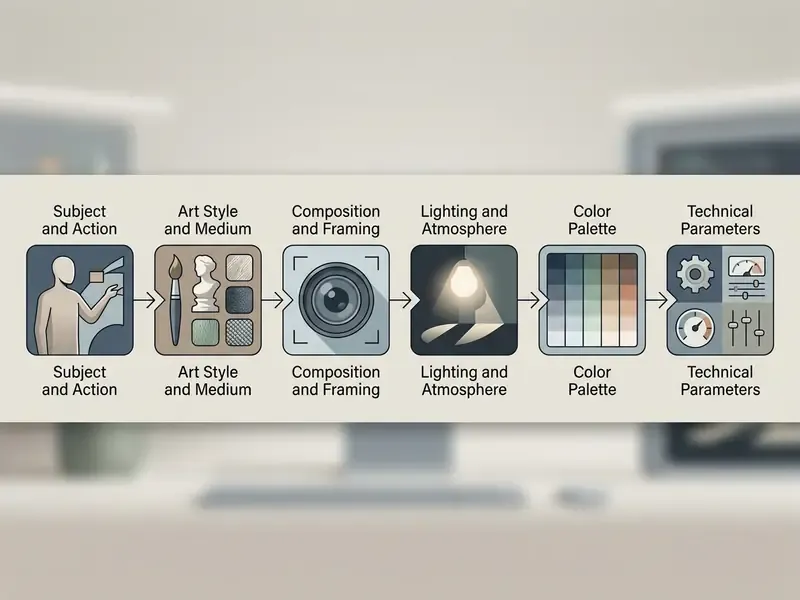
- Subject and action
- Art style and medium
- Composition and framing
- Lighting and atmosphere
- Color palette and specific colors
- Technical parameters, including aspect ratio
Start with the Subject or Scene
Every effective prompt opens with a clearly defined primary subject or scene. Name the main noun phrase first, then layer secondary details on top of it.
Use explicit nouns and active verbs rather than passive description. "A forensic accountant reviewing digital ledgers" gives far stronger structural guidance than "a busy office scene." Clear subject boundaries stop the text encoder from smearing background elements into the foreground object. Prompt-authoring guidance from Kennesaw State University (2026) formalizes this as a three-part opening, Subject plus Action plus Environment, producing compact structures such as "a firefighter rescuing a cat in a smoky alley at dusk."
Token order carries weight too. Earlier tokens get stronger influence in the encoder and the cross-attention stream, so whatever you place first tends to dominate the frame. Weighted syntax makes that emphasis explicit: (token:1.3) raises attention in Stable Diffusion pipelines, token::2 raises it in Midjourney multi-prompts, and values below 1.0 suppress influence.
Add Art Style, Medium, and Visual References
The visual medium tells the model which surface textures and rendering rules apply. Naming a specific artistic style keeps the generator off its default aesthetic preset, which is usually a soft, glossy, slightly plastic look nobody asked for.
"Art style and medium modifiers are the most frequent categories in successful prompts and correlate most strongly with distinctive visual outcomes."
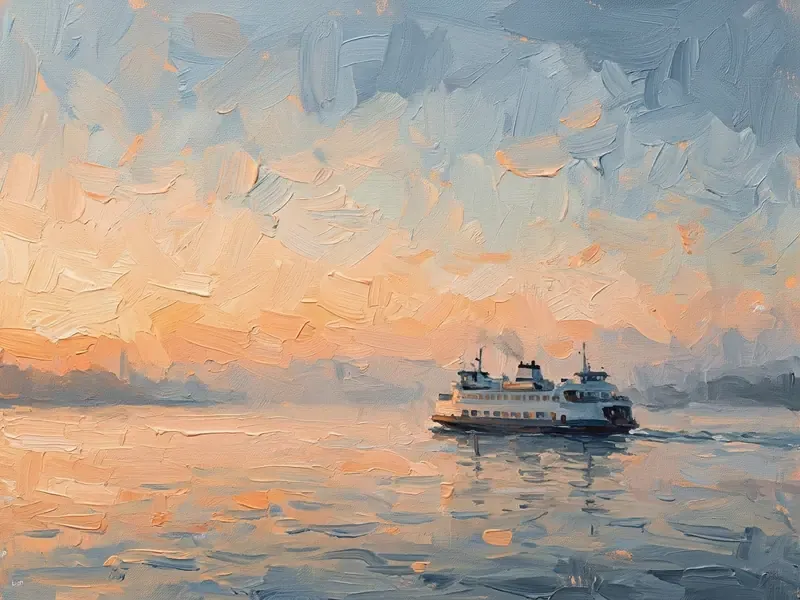
Specify traditional or modern mediums such as digital art, oil painting, or impressionist oil painting to control edge definition and brushwork. "Impressionist oil painting" produces visible brushstrokes, broken color, and soft atmospheric blending. "Woodcut" pushes toward high-contrast carved black-and-white areas. "Gouache" gives opaque, matte pigment. Art movements work as compact shorthand for a whole bundle of visual rules, which is why they belong in your shared vocabulary list.
When building specialized visual pipelines, creative teams reuse prompts for ai asset generation templates to keep batches consistent, and they compare the best AI art generators when a particular style family matters more than raw resolution.
Define Mood, Composition, and Color Palette
Atmospheric and spatial descriptors set emotional tone and structural layout. Lighting conditions and framing angles tell the model where elements sit and how hard the shadows fall.
Specify framing choices like a bird's eye view to establish elevation, or request natural light during golden hour to enforce warm, low-angle illumination.
Define explicit color relationships using vibrant colors or structured color schemes so chromatic output stays inside brand guidelines. Named schemes behave predictably: complementary and split-complementary palettes raise contrast, analogous and monochromatic palettes flatten it, and explicit HEX values or Pantone-style color names give the tightest control of all. If your brand book already lists two accent colors, paste them in. It works.
Ready-to-Use Master Prompt Templates
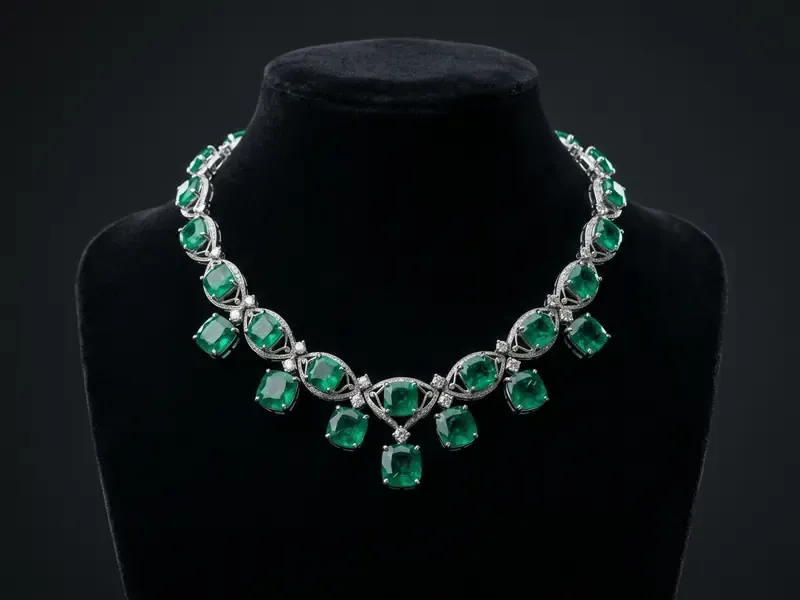
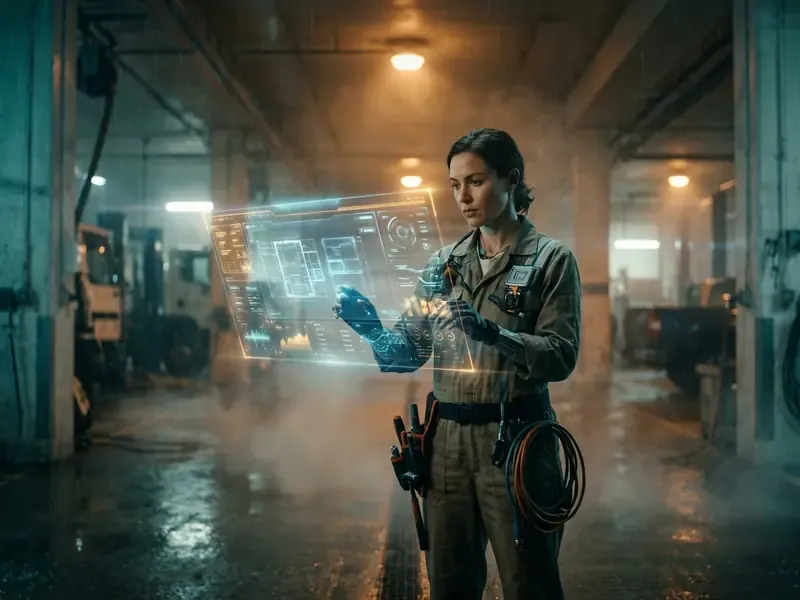
Copy these, replace the bracketed variables, keep the parameter tail intact. Each one contains all six architecture layers, so results stay stable across batches.
Write Commercial Product and eCommerce Prompt Patterns
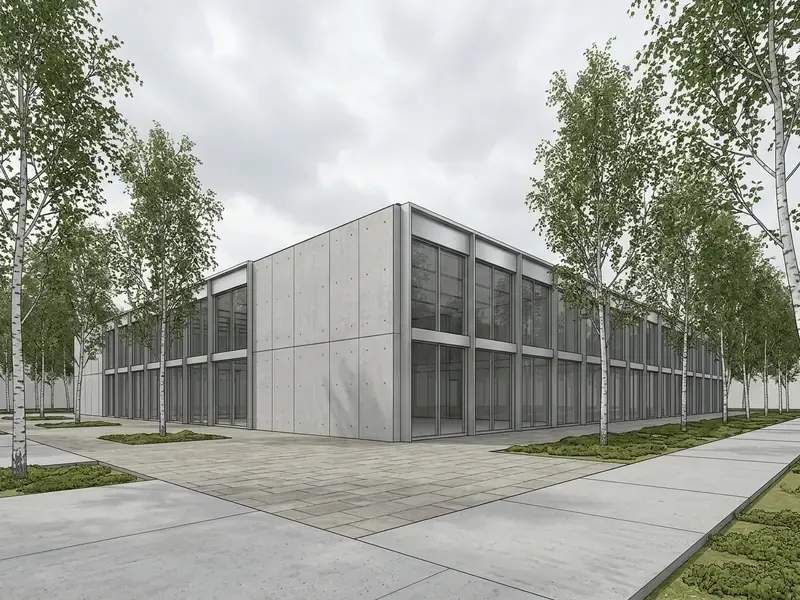
Catalogue and marketplace imagery needs repeatability more than creativity. So fix the lighting setup and the background before you describe the item. Combine product nouns with explicit studio lighting: Product shot of [item] on a white seamless backdrop, soft diffuse lighting from a large overhead softbox, isometric perspective, no visible props, high commercial polish --ar 1:1.
Three rules keep eCommerce sets coherent. First, lock one aspect ratio per channel: square for grid listings, 4:5 for social placements, 16:9 for banners. Second, name the material explicitly ("brushed aluminium," "frosted glass," "matte recycled cardboard"), because surface finish controls specular response far more than any quality buzzword ever will. Third, hold the seed and the lighting phrase constant across a product family, so twelve SKUs read as one shoot instead of twelve unrelated renders.
Generated product imagery still needs factual review. Never present an AI render as a photograph of a physical unit if the render alters shape, finish, or included accessories. That is a claims problem, not an art problem.
How to Create Prompts for AI Art Step by Step
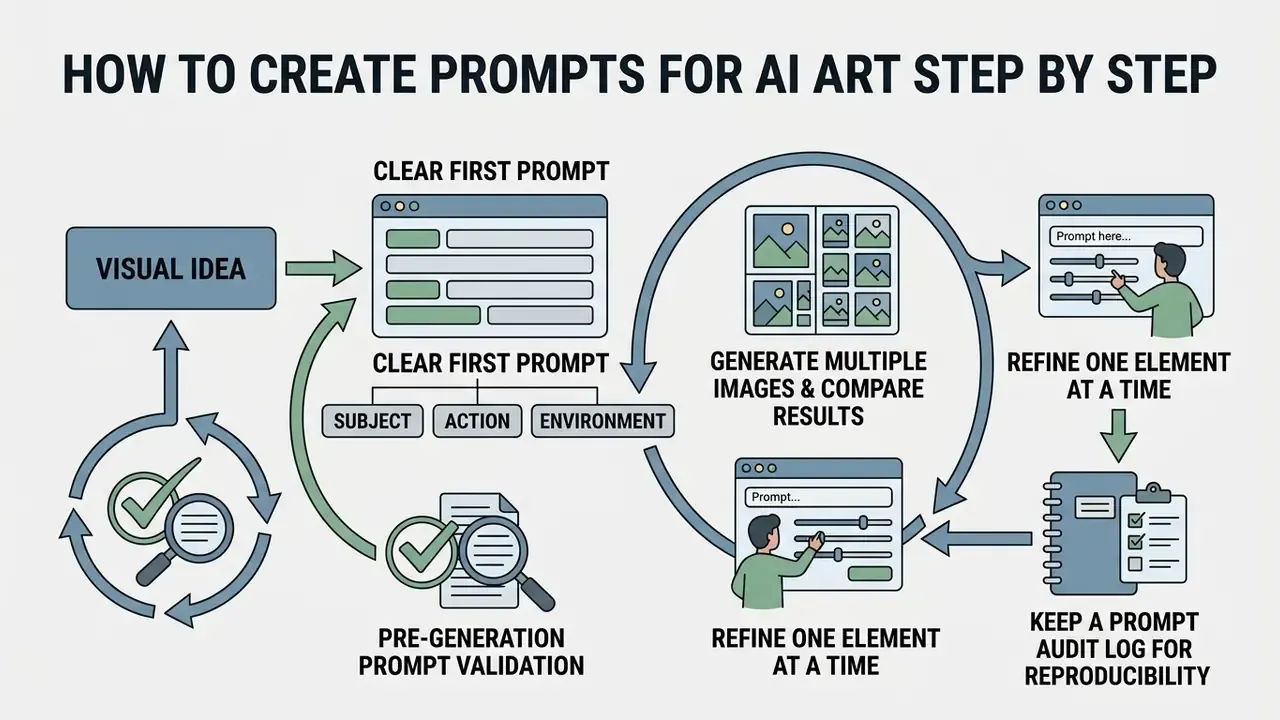
Learning how to create prompts for ai art is really about adopting an iterative workflow. Move deliberately from first draft to parameter tuning and you avoid token confusion, wasted credits, and that familiar afternoon of generating forty near-identical images.
Turn a Visual Idea into a Clear First Prompt
Turning a concept into a working prompt starts with isolating one core visual objective. Stack three unrelated ideas into a single string and the text encoder overloads, producing hybrid artifacts: a castle that is also a ship, a face with two competing light sources.
"Users who begin with vague prompts gradually learn to narrow focus to a single subject, which improves results as experience accumulates."
Draft a base prompt that carries subject, basic environment, and primary style. Nothing else yet. Add technical parameters and secondary lighting once the base composition reads correctly. Teams running large content pipelines often wire a Starter API Workflow into this stage to automate base prompt testing across rendering nodes.
Generate Multiple Images and Compare Results
Single generations rarely land, thanks to seed randomness. Batch runs give you a sample set wide enough to judge subject accuracy, composition quality, and style adherence honestly.
"Multi-criteria prompts during early exploration produce a broader yet still feasible design space than single-goal prompts."
Score batch outputs on three explicit axes rather than gut feeling. Concept fidelity: is every named object present and correct? Aesthetic alignment: does the style match the reference? Structural correctness: are anatomy, perspective, and any text legible? Published evaluation frameworks split these dimensions the same way, with fidelity measuring realism and alignment measuring prompt match (Toward Verifiable and Reproducible Human Evaluation for Text-to-Image Generation, CVPR 2023).
During an internal workflow audit, our media team generated 10 variations per prompt string while keeping seeds fixed across parameter edits. Holding the seed constant meant every visual change could be attributed to a specific wording edit rather than to noise, which shortened the path to an approved frame. We did not instrument exact iteration savings, so we report the method and not a percentage. Honest beats tidy.
Refine the Prompt One Element at a Time
Prompt optimization should follow single-variable testing. Change four descriptors at once and you learn nothing about which one moved the image.
"VisualPrompter detects missing concepts in generated images and selectively corrects the corresponding prompt words, improving text-image alignment better than full rewrites."
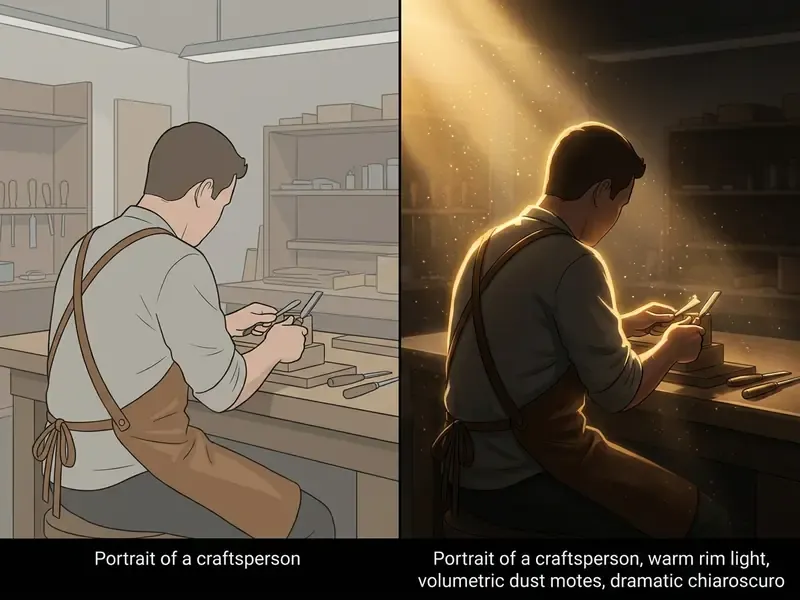
Keep the base prompt constant and adjust one variable per pass, for example shifting the lighting term from "soft studio light" to "dramatic chiaroscuro." Record each version so keyword performance can be measured against your visual baseline. A practical order of operations: composition first, lighting second, fine surface detail last. Early structural edits invalidate later cosmetic ones, so doing it the other way round wastes work. Cost-sensitive teams can run these cycles on free AI art generators before spending paid credits on final renders.
Keep a Prompt Audit Log for Reproducibility
Reproducibility is a governance requirement, not a nicety. A generation log lets a reviewer reconstruct any published asset, show that outputs were controlled, and answer provenance questions eight months later without archaeology.
| Asset ID | Prompt (base) | Variable changed | Seed | CFG / Stylize | Model + version | Aspect ratio | Timestamp | Reviewer status |
|---|---|---|---|---|---|---|---|---|
| IMG-0142 | Studio photograph of emerald necklace… | key light 45° to 30° | 4281 | CFG 7.5 | SD 3.5 Large | 4:3 | 2026-02-11 09:14 | Approved |
| IMG-0143 | Studio photograph of emerald necklace… | backdrop charcoal to ivory | 4281 | CFG 7.5 | SD 3.5 Large | 4:3 | 2026-02-11 09:21 | Rejected, glare |
| IMG-0144 | Medium shot of cybernetic engineer… | lens 50mm to 85mm | 91077 | --stylize 250 | Midjourney v7 | 16:9 | 2026-02-11 10:02 | Pending review |
Store the log beside the exported files, and record the negative prompt string in the same row whenever one was used. Reviewers ask about exclusions more often than you would expect.
Pre-Generation Prompt Validation
Checklist0 / 9
Add Visual Details That Make AI Art Prompts More Precise
Specific technical descriptors improve output consistency and lift the quality of the generated art. Photographic terms speak directly to lens mechanics, surface finishes, and atmospheric properties, which the model has seen labelled thousands of times in training data.
| Visual Category | Descriptor Keywords | Visual Effect on Output |
|---|---|---|
| Atmospheric Lighting | Volumetric lighting, rim light, golden hour, chiaroscuro | Adds light shafts, separates subjects from background, warms color tones |
| Camera Perspective | 85mm lens, bird's eye view, low angle, macro shot | Compresses depth, establishes elevation, emphasizes subject scale |
| Surface Textures | Frosted glass, brushed aluminum, iridescent velvet | Controls light reflection, surface roughness, and material specular response |
| Artistic Mediums | Impressionist oil, watercolor wash, digital vector, gouache | Defines stroke texture, edge hardness, and pigment transparency |
Describe Lighting, Time of Day, and Atmosphere
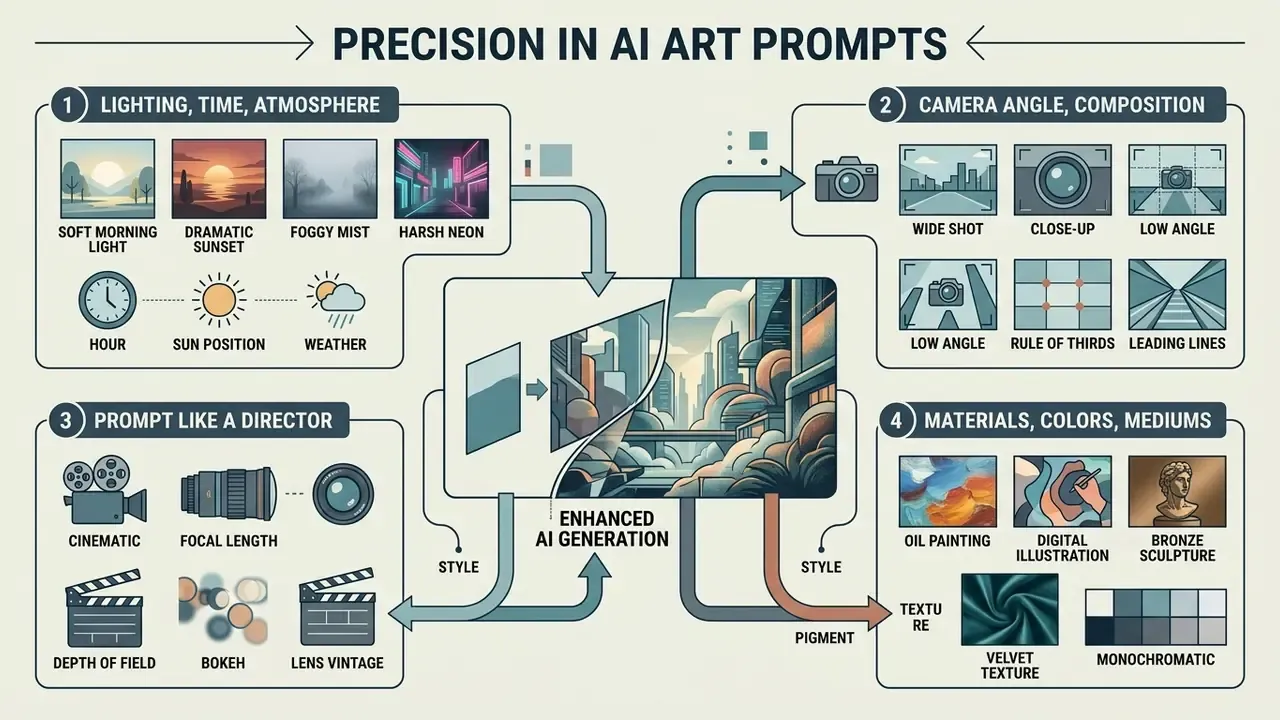
Lighting controls surface contrast, shadow hardness, and depth perception. Name the light source or accept flat, uninteresting illumination by default.
"Lighting and time-of-day modifiers, such as 'golden hour', 'natural light', and 'cinematic lighting', correlate consistently with specific color palettes and contrast levels."
Use photographic lighting terms: "volumetric lighting" for visible rays through mist, "rim lighting" to outline a subject against a dark background. A large-scale analysis of 72,980 Stable Diffusion prompts identified medium and mise-en-scène descriptors, things like "photograph," "radiant light," and "pink and gold tones," as the highest-value prompt elements for scene realism (What's in a text-to-image prompt? The potential of stable diffusion prompts, PMC, 2023). Requesting natural light under overcast conditions gives soft, diffused shadows that suit realistic portraits, while "studio softbox" flattens shadow edges and adds clean catchlights.
Specify Camera Angle and Composition
Camera parameters define perspective, depth of field, and spatial framing. Exact photographic terminology gives clearer structural instruction than generic orientation words like "nice angle."
Specify focal lengths. An "85mm lens" gives natural portrait proportions with soft background blur; Adobe's camera fundamentals documentation notes that 85mm compresses the scene while 24mm widens the field of view. A bird's eye view places the camera directly above the scene. A "low angle shot" looks upward and makes subjects imposing. A canted or Dutch angle tilts the frame and reads as instability, which is useful when the brief says "tense."
Prompt Like a Film Director
Cinematic and video prompts respond to shot-list vocabulary rather than adjectives. Direct the virtual camera explicitly and you get frames that read as production stills.
| Director Parameter | Prompt Keyword | Visual Result |
|---|---|---|
| Shot type | Extreme close-up, close-up, medium shot, wide shot, over-the-shoulder | Establishes spatial hierarchy and subject intimacy |
| Camera angle | Low angle, high angle, eye level, Dutch (canted) angle | Controls perceived power, vulnerability, and frame stability |
| Camera movement | Slow tracking shot back, panning camera, crane shot, handheld push-in | Essential for generative video tools such as Sora, Veo, and Runway |
| Lens choice | 24mm wide, 35mm documentary, 85mm portrait, 200mm telephoto compression | Dictates background blur (bokeh) and spatial distortion |
| Aperture / depth | f/1.8 shallow depth of field, f/11 deep focus | Determines how much of the scene stays sharp |
| Grade / film stock | Teal-and-orange grade, bleach bypass, 35mm film grain | Sets color identity and texture of the frame |
A fully directed image prompt reads like a slate entry: "Over-the-shoulder medium shot of a woman in a flowing white cloak walking toward the viewer, sleek pale towers reflecting ambient light behind her, muted orange and violet sky, ethereal warm glow, minimalist ultra-modern aesthetic, 50mm lens." The matching motion prompt adds only the movement clause: "Slow tracking shot backward as the subject walks toward the camera, background elements swaying in a gentle breeze." One clause. That is the whole trick.
Use Materials, Colors, and Artistic Mediums
Physical surface properties govern how light interacts with objects. Brushed aluminum, frosted glass, polished marble: each gives rendered assets a distinct tactile signature.
Pair specific material descriptions with curated vibrant colors or tightly controlled palettes for chromatic harmony. "Brushed steel" plus "monochromatic slate blue" yields a clean industrial language that works well for commercial product concepts. Art-cataloguing vocabularies supply a dependable medium list worth keeping open in a second tab: canvas, glass, bronze, marble, wood, charcoal, ink, egg tempera, watercolor, gouache, gold leaf, graphite. Each term carries its own specular and edge behavior.
Post-generation, AI photo editors can correct residual color casts and unify material tone across a set. When assets feed a video deliverable, artists often route generated imagery into an outro maker to assemble branded closing sequences without rebuilding the palette from scratch.
AI Art Commands, Negative Prompts, and Prompt Controls
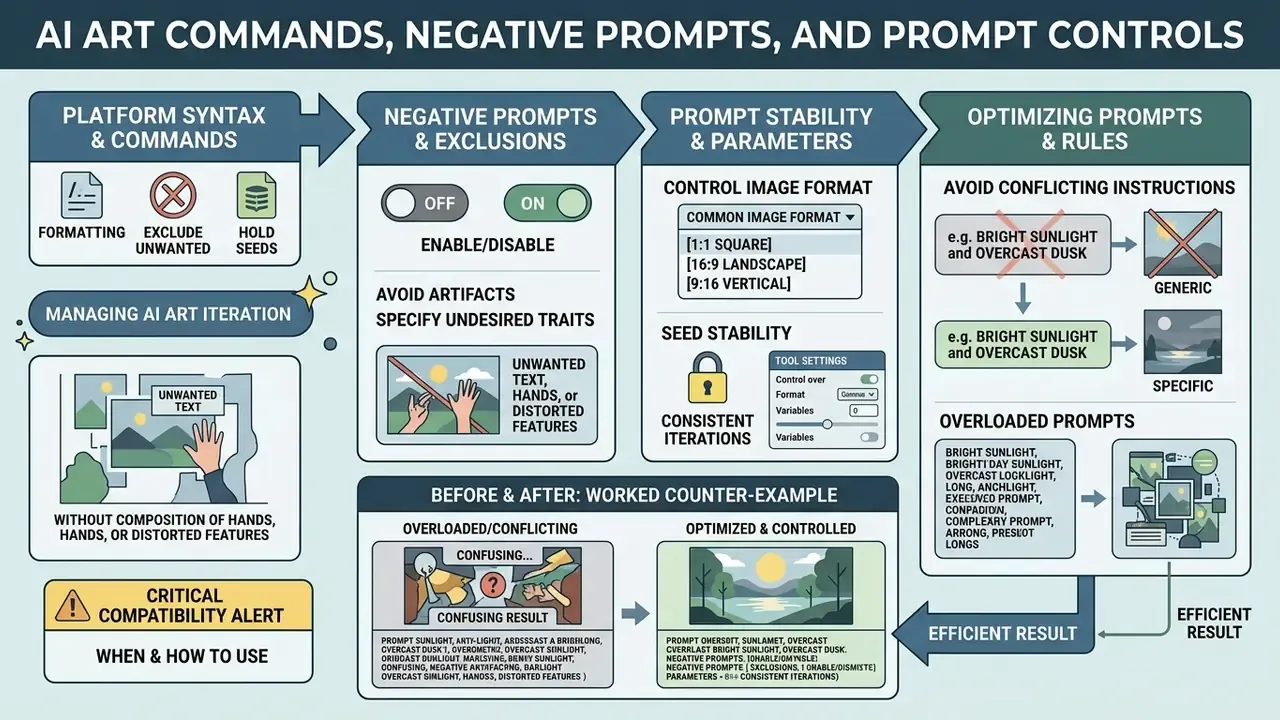
Platform syntax and ai art commands let you control formatting, exclude unwanted elements, and hold seeds steady across iterations. This is where prompting stops feeling like writing and starts feeling like configuration.
CRITICAL COMPATIBILITY ALERT
When and How to Use Negative Prompts
Negative conditioning removes specific unwanted objects, styles, or artifacts from the generation pipeline. Terms entered into negative prompts fields subtract those vector concepts during latent denoising.
"Negative prompts act through two mechanisms: a delayed effect, where influence appears after positive content is rendered, and neutralisation of concepts in latent space."
Use negative terms against recurring failures: "watermarks, blurry text, extra limbs, oversaturated colors." Syntax differs by platform. Stable Diffusion and Leonardo.AI expose a dedicated negative field, while Midjourney appends --no watermark, text to the prompt tail. Midjourney's own documentation notes that --no is equivalent to giving the excluded term a weight of -0.5, which explains why it weakens a concept rather than banning it outright.
Do not stuff the field. Excessive exclusions over-constrain the model and flatten overall image quality, and the fix for a bad image is usually a better positive prompt. Attention-steering research offers a lighter alternative to brute-force guidance:
Control Image Format with Aspect Ratio and Tool Settings
Setting the right aspect ratio keeps generated images fitting their target display format without stretching or awkward crops. Platforms implement ratio control either through prompt flags or API parameter fields, and mixing the two is a common first-week mistake.
Midjourney uses command flags such as --ar 16:9 or --ar 4:5 appended to the prompt string (Midjourney Docs, 2026), with 1:1 as the default and custom ratios available in the Editor and Zoom Out tools. APIs like DALL·E 3, by contrast, require explicit pixel dimension parameters such as 1792x1024 or 1024x1792 inside the JSON payload. Newer OpenAI image models accept arbitrary WIDTHxHEIGHT strings as long as both values divide by 16 and the ratio stays between 1:3 and 3:1. Stability AI enforces dimensions divisible by 64 px with engine-specific maximums. For post-processing, many creators manage final asset ratios in a dedicated photo editor for desktop environments before publication.
Avoid Conflicting Instructions and Overloaded Prompts
Contradictory keywords create semantic ambiguity and drag quality down. "Photorealistic watercolor painting" asks the encoder to blend two incompatible rendering rule sets, and it will compromise on something muddy.
"Users who try to cover too many ideas in a single prompt gradually simplify it and split distinct concepts into separate generations."
Trim redundant buzzwords such as "hyperrealistic, 8k resolution, photorealistic." Modern generative models read specific lighting and camera terms far more effectively than generic quality claims, and vendor prompt-engineering guidance consistently recommends splitting oversized context instead of stacking prose.
Before and after, a worked counter-example:
BAD PROMPT
Create a landscape with a city on a hill, and a medieval castle opposite,
across a raging river, which leads to a big stormy sea, hyperrealistic,
8k, ultra quality, photorealistic watercolor, masterpiece
Failure modes: four competing focal subjects, no single spatial anchor, mutually exclusive media ("photorealistic watercolor"), and four quality buzzwords carrying zero visual instruction.
GOOD PROMPT (split into two generations)
1) Wide shot of a ruined medieval castle on a jungle-covered hillside above a
   fast-flowing river, overcast diffused light, moss green and wet stone grey
   palette, 35mm lens, deep focus --ar 16:9
2) Wide shot of a storm-lit coastal city on a hill seen across dark water,
   breaking waves in the foreground, dramatic chiaroscuro lighting,
   cold slate and amber palette, 35mm lens --ar 16:9
Two clean images beat one confused one. Composite later, in the editor, where you control the seam.
Choose an AI Art Generator for Your Prompting Workflow
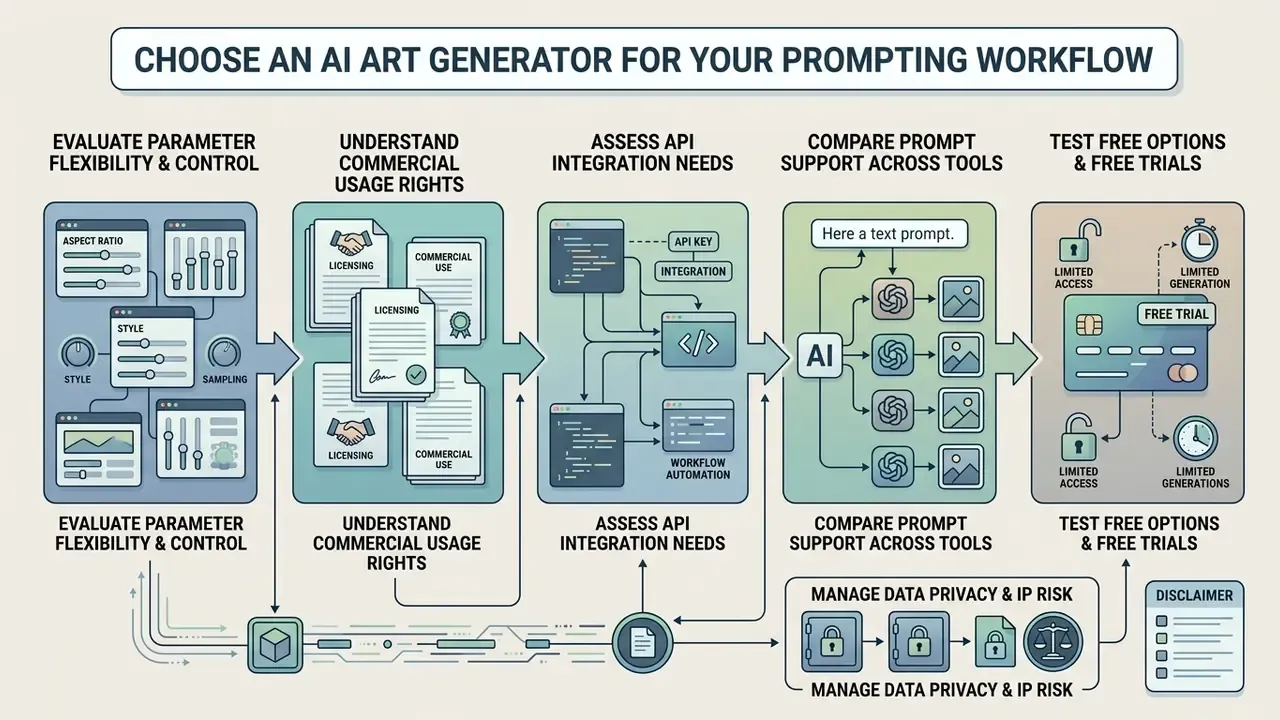
Choosing an ai art generator comes down to parameter flexibility, commercial usage rights for AI image generators, and API integration needs. Platform architectures optimize differently: some for prompt responsiveness, others for ease of use by non-specialists.
| AI Generator | Text Prompt Interpretation | Negative Prompt Support | Aspect Ratio Control | Data Privacy & Training Policy | Pricing Model & Licensing |
|---|---|---|---|---|---|
| Midjourney (v7) | High precision; responds strongly to artistic modifiers | Native command (--no) | Flexible (--ar flag) | Public generation by default; private/stealth mode on higher tiers | Subscription only ($10 to $120/mo); commercial rights on paid tiers |
| DALL·E 3 | Conversational; automatically rewrites input prompts | No explicit negative field | Fixed presets (1024x1024, 1792x1024, etc.) | API inputs not used for training by default; consumer settings differ | Pay-per-prompt / API credits; commercial rights granted |
| Stable Diffusion (SD3.5) | Technical; raw token parser using CLIP + T5 | Dedicated negative prompt field | Custom width/height (multiples of 64px) | Self-hosting keeps prompts and assets fully on-premise | Open-source / self-hosted free; commercial license depends on revenue |
| Leonardo.AI | Balanced; fine-tuned models with style presets | UI negative prompt field | Custom aspect ratios & dimensions | Private-generation options on paid plans; check current terms | Free daily credits / paid tiers; commercial usage supported |
| Bing Image Creator | Natural language; powered by OpenAI architecture | Limited UI controls | Standard square / fixed presets | Consumer service tied to Microsoft account telemetry | Free access via Microsoft account; non-commercial personal use focus |
In plain terms: Midjourney gives the richest command vocabulary but the weakest default privacy; Stable Diffusion gives full control and on-premise confidentiality at the cost of setup effort; DALL·E 3 is the friendliest for non-specialists and the least controllable; Leonardo.AI sits in between; Bing Image Creator is for practice, not for production.
Compare Prompt Support Across AI Art Tools
Generators handle identical text inputs differently because of their encoders and interface design. Raw token parsers reward strict keyword ordering. Conversational tools happily interpret prose and sometimes rewrite your prompt behind the scenes, which is convenient until reproducibility matters.
"PRISM shows that automatically generated prompts can match or exceed hand-written ones in accuracy and transferability across Stable Diffusion, DALL·E, and Midjourney."
Midjourney excels at stylistic rendering and complex parameter commands, which keeps it popular for creative concepting. Stable Diffusion offers granular control over negative prompts, seeds, and local diffusion models, making it the practical choice for technical teams that need self-hosted infrastructure. For a broader platform view, consult our guide to AI Media Commercial-Use terms across major generative systems.
Evaluate Free AI Art and Free Trial Options
Testing syntax on platforms offering free ai art generation or a free trial lets you refine technique before committing budget. Useful, with limits.
Bing Image Creator and Leonardo.AI provide free daily generation credits for initial prompt testing, and several no-sign-up AI image generators let you validate a prompt skeleton before creating any account at all. Adobe Firefly runs a free daily allowance alongside paid tiers. Midjourney remains subscription-only with no free trial. Production work almost always needs paid tiers anyway, for commercial licensing, faster generation, and private modes. Free tools are for learning the vocabulary, not for shipping the campaign.
Test the Same Prompt in More Than One Generator
Running a standardized prompt across several tools exposes model-specific aesthetic bias and spatial rendering strengths. A prompt tuned for photorealistic product renders may shine in one generator while artistic illustration work lands better in another.
"Some prompts show high transferability between models, others lose effectiveness, because models interpret the same style modifiers differently."
To benchmark properly, hold the base text string identical and adjust only platform-specific parameters such as aspect ratio flags. Generate at least three images per prompt per model so your score reflects a distribution rather than one lucky seed. Readers weighing a single platform can review Midjourney versus competing image generators before standardizing a pipeline. When visual assets cross into motion, teams often connect art pipelines with openai sora video workflows, or run a video compressor for community asset distribution. Integration engineers can review AI Media API Guides to automate cross-platform image generation end to end.
Manage Data Privacy and IP Risk in Prompt Workflows
Prompts are data. Anything typed into a hosted generator leaves your perimeter, so classify prompt text the way you classify documents: no client names, unreleased product specifications, internal codenames, regulated customer data, or confidential financial figures in public-tier tools. Where confidentiality is mandatory, prefer self-hosted Stable Diffusion or enterprise tiers with contractual no-training and short-retention terms. Then document the decision. Undocumented consumer-tool usage is the most common form of shadow AI in creative teams, and it surfaces at the worst possible moment, usually mid-audit.
Intellectual property carries a parallel risk. Naming living artists, protected characters, or trademarked brand assets inside a prompt can produce outputs that are commercially unusable even when the platform grants broad license terms. Safer practice is to describe the visual attributes you want, meaning medium, brushwork, palette, lighting, era, rather than borrowing a person's or brand's name. Clear every generated asset through the same IP review you would apply to stock or commissioned artwork, and keep the prompt audit log as evidence of provenance.
This section is general information on risk practice, not legal advice. Consult qualified counsel for licensing, trademark, and data-protection decisions in your jurisdiction.
How to Use Image-to-Image (Img2Img) and Image Blending Prompts
Text prompts can be combined with visual input so structure and style are guided together. Instead of describing a composition from nothing, you supply a reference frame and let the prompt govern only what should change. For iteration-heavy work, this is usually the faster route. Short, imperative prompts win in this mode. Proven one-line edits include "remove the clouds," "convert to right-side profile view," "convert this photo into a realistic pencil sketch," and "change the background to a softly lit concrete studio wall." If a source image contains identifiable people or third-party artwork, confirm you hold the rights to transform it before publishing anything.
- Image weighting (
--iw/ denoising strength).This value sets how closely the generator follows the source image versus the text. Low strength (roughly0.2to0.35) makes minor edits and preserves layout. Mid-range (0.5to0.65) restyles while keeping silhouettes. High strength (0.8to0.9) effectively reimagines the frame. Stability AI exposes this as thestrengthparameter on its image-to-image endpoint; Midjourney uses--iwalongside an image URL. - Multi-image blending.Upload two or three base assets and fuse them: composition from source A, color grading from source B, material or wardrobe detail from source C, under one unifying prompt. Keep the text short here. Blending already carries most of the conditioning, and long prose pulls the result away from both references.
- Inpainting and area editing.Isolate a bounding box or brush mask and prompt only inside it, for example
replace background with dark oak library shelvesorremove the sunglasses. Outpainting works the same way outward, generating plausible surroundings beyond the original frame. - Style and character reference.Reference flags such as Midjourney's style reference and omnireference lock aesthetic or character identity across a set. That is how teams keep a recurring figure consistent through an entire campaign instead of re-casting the character every render.
Essential AI Prompting Glossary
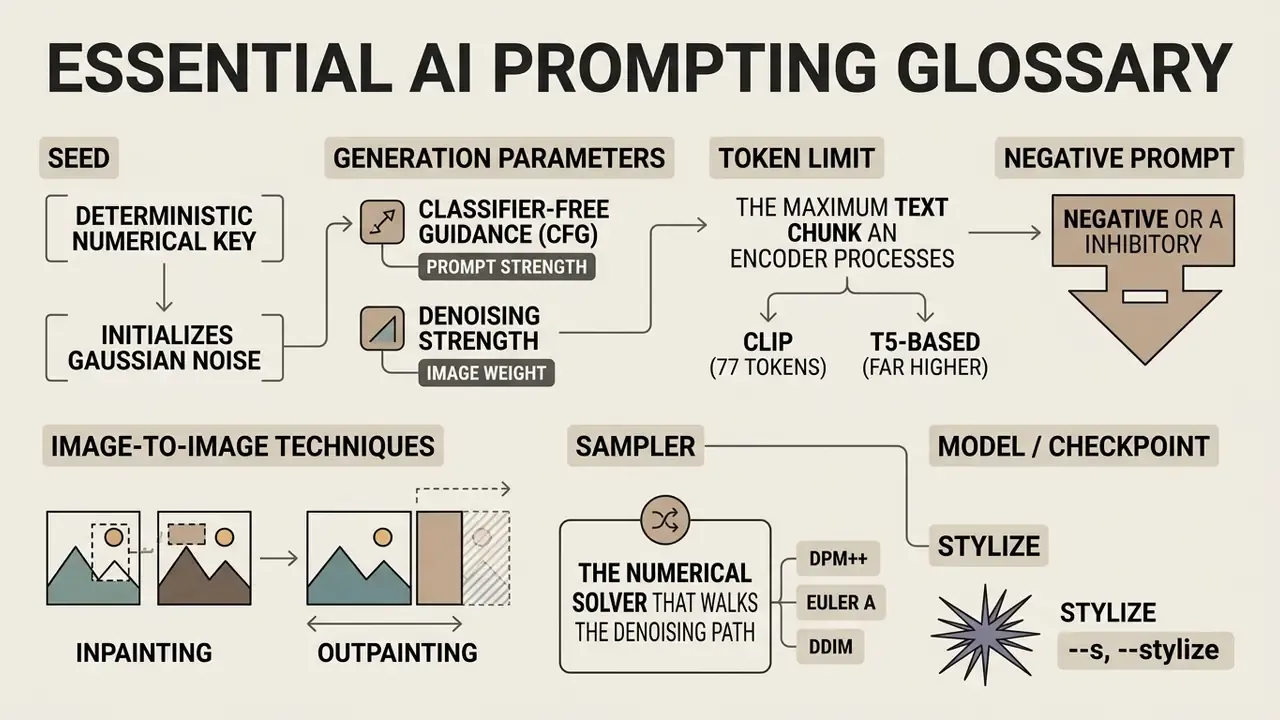
- Seed. A deterministic numerical key that initializes Gaussian noise. Fixing the seed (for example
--seed 4281) locks image structure across prompt edits; changing it produces a fresh variation of the same description. - Classifier-Free Guidance (CFG) / prompt strength. A scale defining how strictly the model conforms to the text input. Values roughly between 7 and 11 give strong prompt alignment without the oversaturation and edge artefacts that appear higher up.
- Denoising strength / image weight. In image-to-image runs, how far the output may depart from the uploaded reference. Low values edit. High values reinvent.
- Token limit. The maximum text chunk an encoder processes: 77 tokens for CLIP, far higher for T5-based encoders. Words at the start carry greater attention weight.
- Negative prompt. A separate conditioning field, or the
--noflag in Midjourney, listing concepts to suppress, such asblurry, watermark, text, extra fingers. - Inpainting / outpainting. Masked regeneration inside an existing frame, or generation beyond its original borders.
- Sampler. The numerical solver that walks the denoising path (DPM++, Euler a, DDIM). Change it and the result changes, even with an identical seed and prompt.
- Model / checkpoint. The specific trained framework used for generation, such as Midjourney v7, SD 3.5 Large, or DALL·E 3, each with distinct style priors and prompt behavior.
- Stylize (
--stylize/--s). A Midjourney parameter controlling how much of the model's own aesthetic training overrides literal prompt adherence. - Prompt weighting. Explicit emphasis syntax:
(token:1.3)in Stable Diffusion pipelines,token::2in Midjourney multi-prompts.
AI Art Prompts FAQ
What is the most effective formula for an AI art prompt?
The most reliable formula follows a 6-part structure: Subject + Action/Details + Art Style/Medium + Mood/Lighting + Composition/Framing + Technical Parameters. Placing the primary subject first ensures the text encoder prioritizes the main visual entity. You can validate the formula in minutes on free AI image generators before scaling it into a paid workflow.
How do negative prompts work in AI image generation?
Negative prompts name elements the model should exclude during latent denoising. They subtract unwanted vector features, things like text, blur, or duplicate limbs, from the positive conditioning stream. In Midjourney the equivalent control is --no, which applies a negative weight rather than an absolute ban, so stubborn artifacts sometimes survive it.
Why does the same prompt generate different images each time?
Generators start from Gaussian noise initialized by a random seed number. Unless the seed value, sampler settings, and model version stay identical, every run produces a different visual result. That variance is a feature during exploration and a problem during approval.
How do I change or lock the seed to get consistent results?
Supply the seed explicitly, using --seed 4281 in Midjourney or the seed field in Stable Diffusion and Leonardo.AI, and keep model version, sampler, and CFG scale unchanged. Reuse the same seed when testing one wording edit. Change only the seed when you want fresh variations of an already approved description.
How long should an AI art prompt be?
Aim for a developed description of roughly 40 to 80 words covering all six structural layers, then stop as soon as new clauses repeat or contradict earlier ones. Very short prompts of three to seven words push models toward averaged defaults, while extremely long strings introduce semantic conflict without improving accuracy.
Can I use AI-generated images commercially?
It depends on platform tier and license. Midjourney grants commercial rights on paid plans, OpenAI grants them for images created through its image APIs and consumer tools, and self-hosted Stable Diffusion terms depend on the specific model license and revenue thresholds. Free consumer services such as Bing Image Creator lean toward personal use. Confirm current terms in official documentation, and avoid prompts naming protected brands, characters, or living artists.
Should I use quality buzzwords like "hyperrealistic" or "8K resolution"?
Generally no. Modern AI art generators largely ignore generic quality claims. Use explicit camera specs ("85mm lens"), lighting styles ("volumetric studio light"), and material details instead. Those terms have visual referents in the training data; "masterpiece" does not.
Do the same commands work across every generator?
No. --ar, --no, --seed, and --stylize are Midjourney prompt parameters. OpenAI expects pixel dimensions in the API payload and offers no negative-prompt field. Stability AI uses separate prompt, negative_prompt, aspect_ratio, and strength inputs. Pass Midjourney flags into an API request and you get either an error or the flag text rendered as part of your image.
Summary & Key Recommendations
For additional asset processing work, estimate compute requirements with our generation calculators, or review performance data in the AI Media Benchmarks and Review Proof repository.
Appendix A: Superseded Source Attributions
For transparency, the following weak or non-verifiable attributions appeared in earlier versions of this guide and have been replaced by the peer-reviewed and preprint sources cited in the main text: "(CVPR, 2024)" for seed initialisation; "Midjourney Empirical Study, 2024" for prompt length; "Cataloging Cultural Objects Standard, 2026" for diffusion style rendering; "NIST Photography Guide, 2026" and "Adobe Camera Specs, 2026" for camera descriptors; "Google T2I Guidelines, 2026" for base prompt drafting; "arXiv: Human Preference Alignment, 2026" plus the unmeasured "35% fewer iteration cycles" figure for batch evaluation; "Adobe Prompt Engineering Guide, 2026" for single-variable refinement; "arXiv: Negative Prompts Impact, 2024" and "NASA Attention Steering Study, 2025" for negative prompting; "Azure Prompt Engineering Guide, 2026" for overloaded prompts; and "Vice et al. Evaluation Framework, 2024" for cross-model benchmarking.
Footer / Site Navigation
Explore complete platform documentation and production guides: