The Short Version
A prompt for an AI art generator is a written instruction set that conditions a diffusion or transformer model to synthesize a specific image. The highest-performing prompts follow one fixed parameter order, subject → environment → visual style → lighting → color palette → composition → technical constraints, and rely on concrete, measurable visual language (focal lengths, material finishes, color temperatures) rather than vague quality adjectives such as "beautiful," "4K," or "hyperrealistic."
Four operational rules summarize the entire guide below:
- Stay within 50 to 250 tokens.Below 50 tokens the model falls back on training-set defaults; above 250 to 400 tokens text encoders truncate and spatial accuracy degrades.
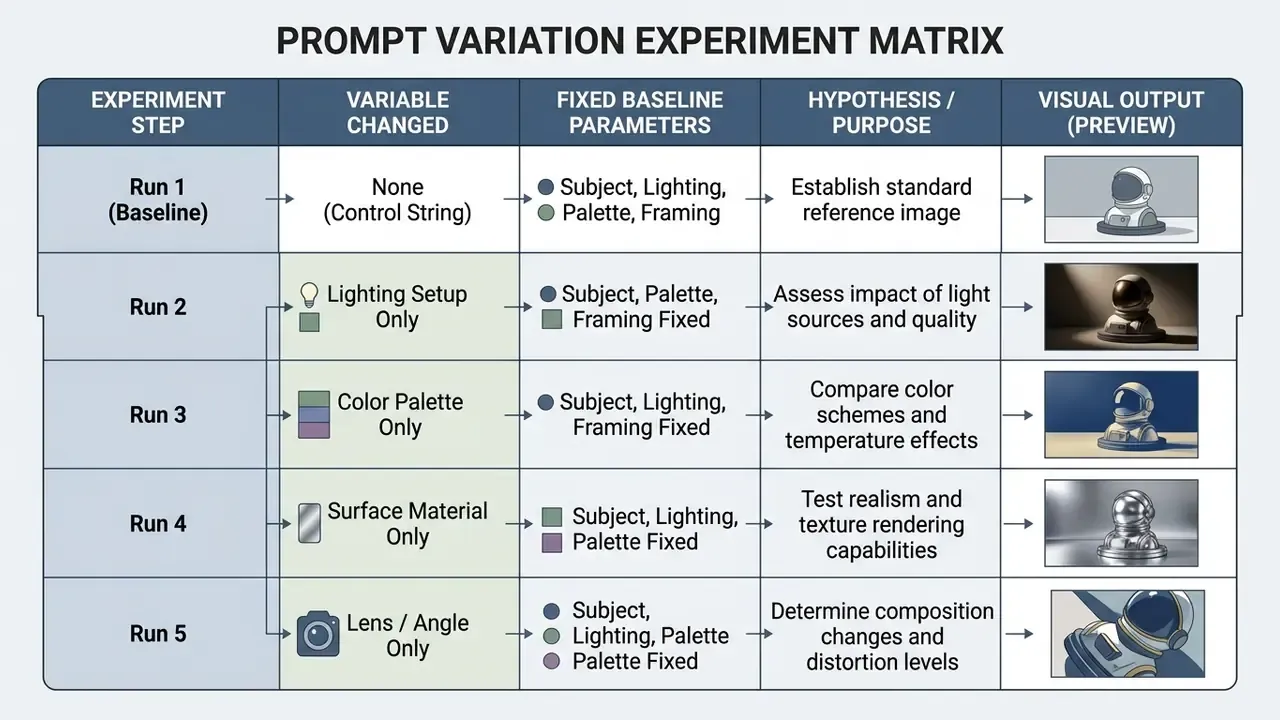
- Change one variable per iteration.Lock the seed, aspect ratio and subject; vary only lighting, palette, or material to isolate what actually improved the frame.
- Declare exclusions in a dedicated negative field, not inside the descriptive block.
- Never paste confidential, personal or regulated data into a public generator.Prompts are text inputs to third-party systems and must be governed like any other outbound data flow.
Amazing ai art prompts rarely come from adjectives. They come from parameters.
How to Use This Guide
Three reading paths, depending on what you came for.
One more practical note before we start. Every example here is written to be model-agnostic first and platform-specific second, because engine flags change far faster than the underlying logic of describing a scene.
Author profile and testing methodology (E-E-A-T)
Marcus Hale's editorial framework applies model-risk governance principles to generative media workflows. Comparative prompt assessments are evaluated using a controlled, repeated-measures framework: identical prompt strings are processed across target models while holding guidance scale, random seed, and aspect ratios constant. Output images are rated against a standardized compliance rubric measuring semantic attribute binding, edge artifacting, color spectrum fidelity, and spatial relationship accuracy based on ISO 20462 visual quality rating metrics. Evaluation design also references the NIST GenAI image-generator evaluation plan (2025), which specifies fixed task prompts, repeated runs, and structured reporting, plus ISO 12640-3:2022 large-gamut reference images for baseline color comparison. Marcus Hale, author.

What Are Prompts for AI Art Generator?
Text prompts for an AI art generator serve as natural-language instruction sets that condition diffusion and transformer models to synthesize specific visual outputs. The primary function of a text prompt is to translate user intent into structured token sequences that guide spatial composition, object attributes, medium textures, and rendering styles.
When evaluating generative systems, an ai image generator converts natural text into vector embeddings within a latent space. Research on prompt-modifier taxonomy demonstrates that descriptive modifiers alter model behavior by binding visual attributes, such as color, surface finish, and edge sharpness, to specific subject tokens.
«Practitioners routinely add short style phrases to base descriptions to obtain desired visual qualities, with seemingly minor textual changes producing large perceptual differences». — Oppenländer, A Taxonomy of Prompt Modifiers for Text-To-Image Generation (2023). https://arxiv.org/abs/2204.13988
The generated image depends directly on how clearly these text elements define boundaries, avoiding semantic ambiguity during the diffusion process. Ambiguity is not neutral. The model resolves it for you, using whatever its training data considered typical.
The Core Elements of an AI Image Prompt
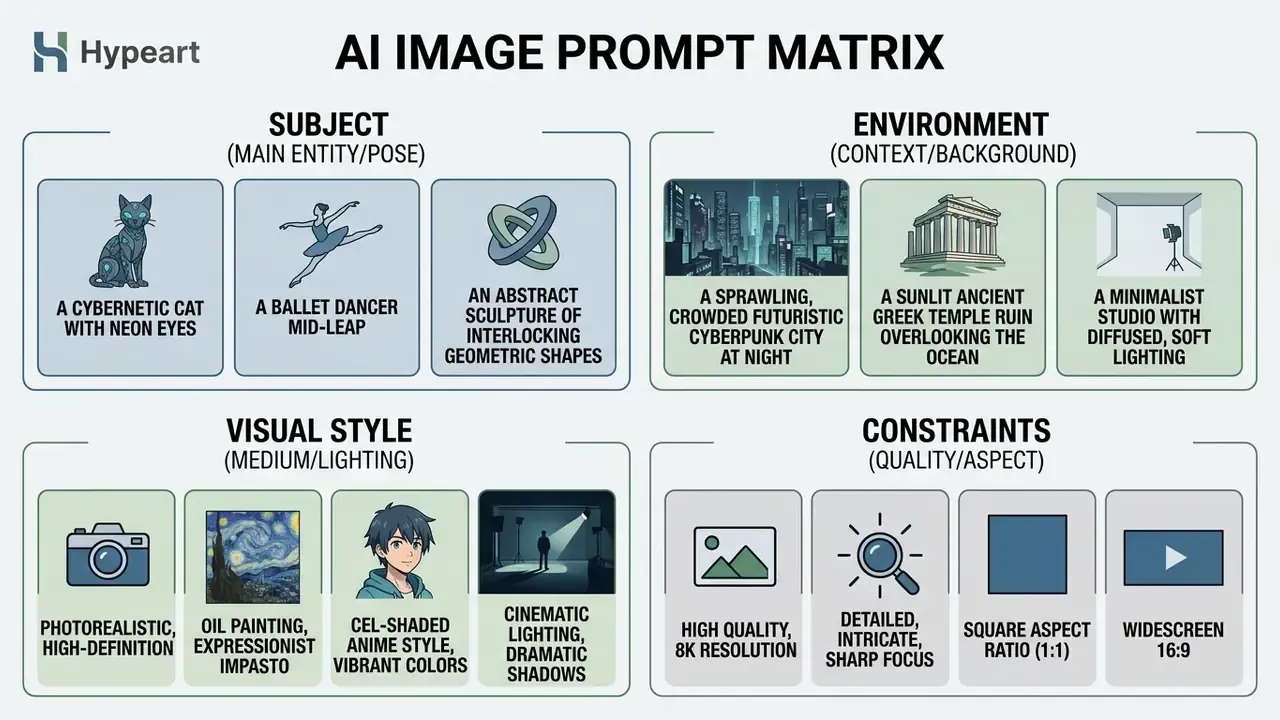
An effective AI image prompt consists of eight fundamental parameters: subject, environment, visual style, color palette, lighting, camera angle, composition, and detail level. Structuring these fields systematically prevents attribute bleeding and helps the underlying model interpret complex visual requests accurately.
- Subject The primary focus or focal point (for example, an architect, a vintage watch, a mountain ridge).
- Environment The context, background, or setting surrounding the subject.
- Visual Style The targeted medium or aesthetic (photorealistic, watercolor, line art).
- Color Palette The specific color scheme and contrast ratio (warm tones, earth tones, monochrome).
- Lighting The directional intensity and quality of light (studio lighting, golden hour, volumetric light).
- Angle The optical positioning of the viewer (low angle, eye-level, macro close-up).
- Composition The structural framing of the scene (rule of thirds, centered, shallow depth of field).
- Detail Level Surface textures, material clarity, and output resolution parameters.
Vendor guidelines from platforms like Adobe Firefly and Runway Gen-4 confirm that placing key attributes in a fixed sequence improves prompt adherence (Runway, 2026; Adobe, 2025). Runway's Gen-4 documentation enumerates Subject, Scene, Composition, Lighting, Color, Style, Focus and Angle as discrete prompt fields, while Adobe Firefly publishes a literal template: [Style] image of [subject], [composition/angle], [lighting], [color palette], [mood/atmosphere], [additional details]. Ordering attributes logically reduces ambiguity during latent decoding.
Before committing a parameter set to production, it is worth benchmarking candidate platforms; our editorial team maintains a running index of the best AI image generators by prompt adherence and licensing terms.
Why Detailed Prompts Produce Better Results
Detailed prompts work best because text-to-image diffusion models rely on explicit token conditioning to steer spatial structures and surface attributes. Providing specific descriptions of materials, optical behavior, and environmental lighting reduces the range of random interpretations the model can make.
«Models trained on highly descriptive captions show significantly stronger prompt following». — OpenAI, DALL·E 3 Technical Report (2023). https://cdn.openai.com/papers/dall-e-3.pdf
Adding precise optical metadata is measurably effective, not merely stylistic:
«SSP improves semantic consistency by an average of 16%, enhances text-image alignment by 5%, and increases safety metrics by 48.9% compared to robust baselines, without altering underlying content». — SSP: Simple and Safe Automatic Prompt Engineering with Camera Descriptions (2025). https://arxiv.org/abs/2402.01345
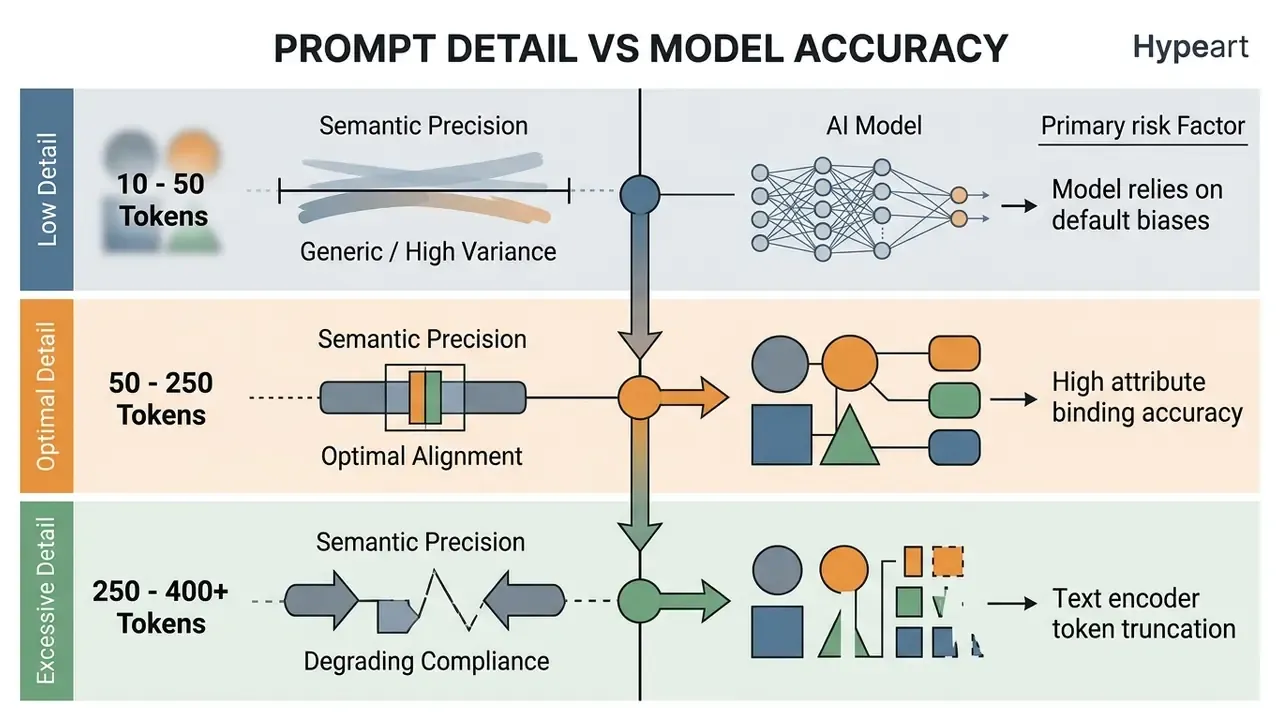
However, benchmark research reveals a critical trade-off: when prompts exceed 250 to 400 tokens, model accuracy across spatial reasoning and entity relationships degrades due to text encoder capacity limits.
«DetailMaster's 4,116 long prompts (averaging 284.89 tokens) show all evaluated models achieve only ~50% accuracy on attribute binding and spatial reasoning, with performance declining as prompt length increases». — DetailMaster Benchmark (2025). https://arxiv.org/abs/2501.05955
Optimal results require concise, highly specific vocabulary rather than repetitive filler text. In practical terms, CLIP-based encoders truncate at roughly 77 tokens and T5-based encoders at roughly 225 tokens, which means anything appended past those ceilings is silently discarded. The model does not warn you. It simply "forgets" the tail of your instruction.
Token Truncation: Before and After
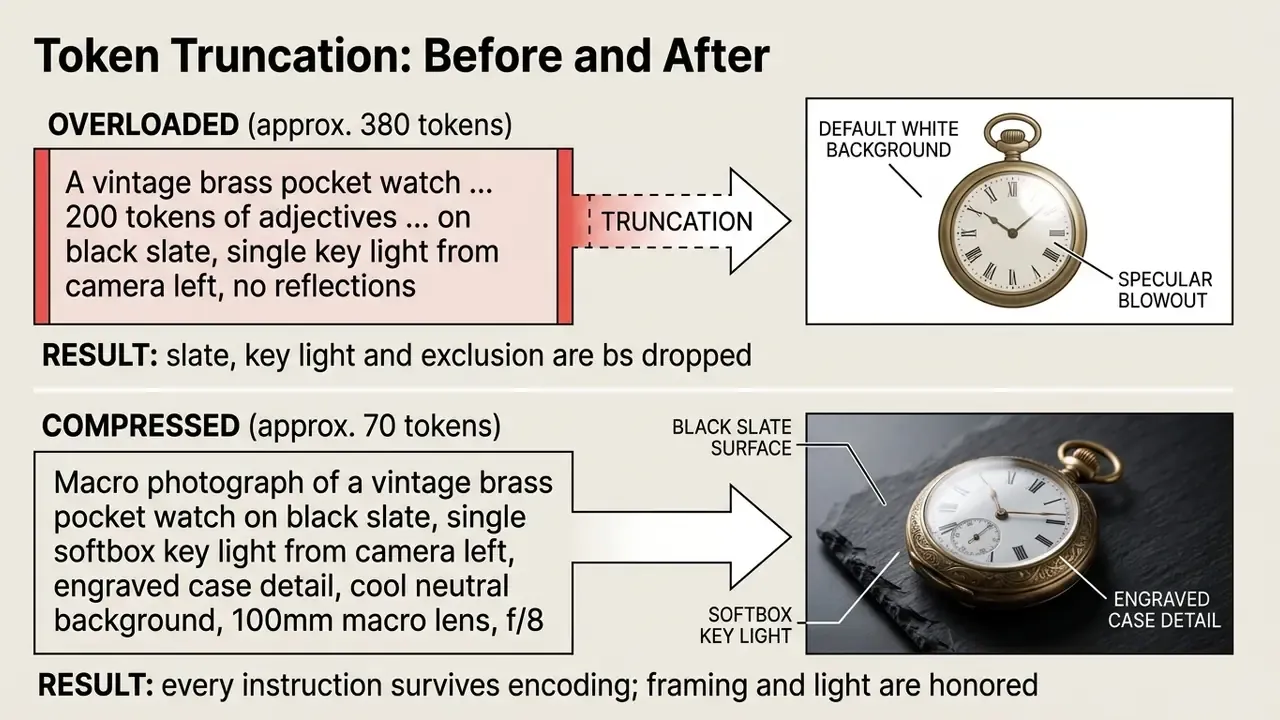
The rule that follows is operational, not aesthetic: front-load the parameters you cannot afford to lose. Amazon's Nova Canvas guidance states the same principle from the opposite direction, advising teams to place least-important details near the end of long prompts, because that is precisely where truncation begins.
Aspect Ratio Quick Reference for Target Platforms
Different diffusion models process spatial boundaries based on target aspect ratio parameters. Use this cheat sheet to set structural framing before compiling prompt modifiers:
| Target Medium / Platform | Recommended Aspect Ratio | Parameter Tag (Midjourney/SD) | Recommended Lens / Framing Modifiers |
|---|---|---|---|
| Instagram Feed / Commercial Headshots | 4:5 | --ar 4:5 | 85mm lens, shallow depth of field, centered vertical framing |
| Cinematic Hero Headers / Web Displays | 16:9 | --ar 16:9 | 24mm wide-angle lens, panoramic perspective, rule of thirds |
| TikTok / Instagram Stories / Mobile UI | 9:16 | --ar 9:16 | Full-body vertical shot, high-angle or low-angle perspective |
| Product Catalogs / Social Grid | 1:1 | --ar 1:1 | 100mm macro lens, studio lighting, isolated central subject |
| Anamorphic Film Still / Landscape Panorama | 2.39:1 | --ar 239:100 | Ultra-wide composition, long-exposure atmospheric haze |
Setting the aspect ratio before the descriptive block matters because the model allocates latent space according to the canvas geometry: a wide-angle landscape prompt rendered at 9:16 will crop the very horizon line you described, while a full-body character prompt rendered at 16:9 compresses the figure into the centre third of the frame.
How to Write Better AI Art Prompts
To write better AI art prompts, organize descriptions in a standardized order: scene context, primary subject, visual style, lighting setup, color palette, and technical constraints. Removing semantic contradictions and using positive descriptive terms instead of vague phrasing ensures predictable visual outputs.
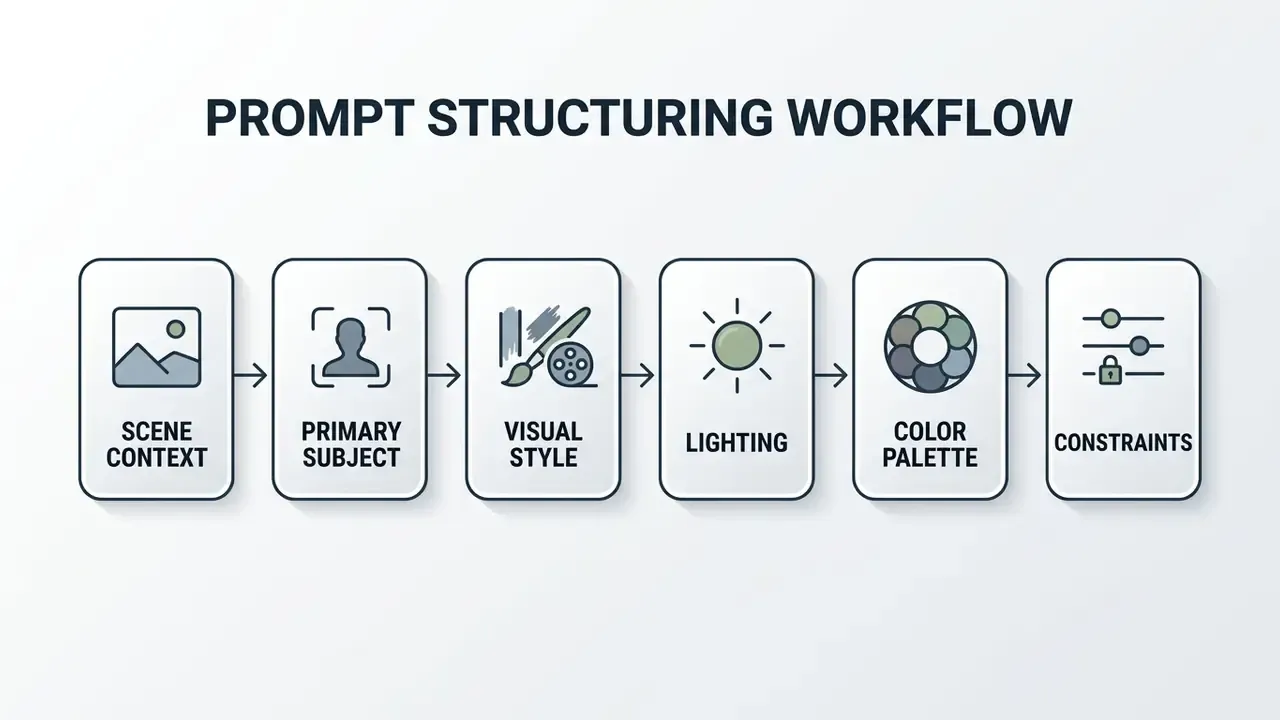
When building complex queries, state what must remain invariant and avoid mixing contradictory medium descriptors (such as requesting a "photorealistic oil painting"). For explicit exclusions, use dedicated negative prompt fields or parameter flags rather than embedding negative phrases like "no shadows" into the primary prompt block (Amazon Nova Canvas Guide, 2025). OpenAI's GPT image prompting guidance adds a complementary iteration rule: state "change only X" plus "keep everything else the same," and repeat the preserve list on every pass to prevent drift.
Teams that want to validate these habits at zero cost can run the same structures through several free AI art generators before committing to a paid pipeline.
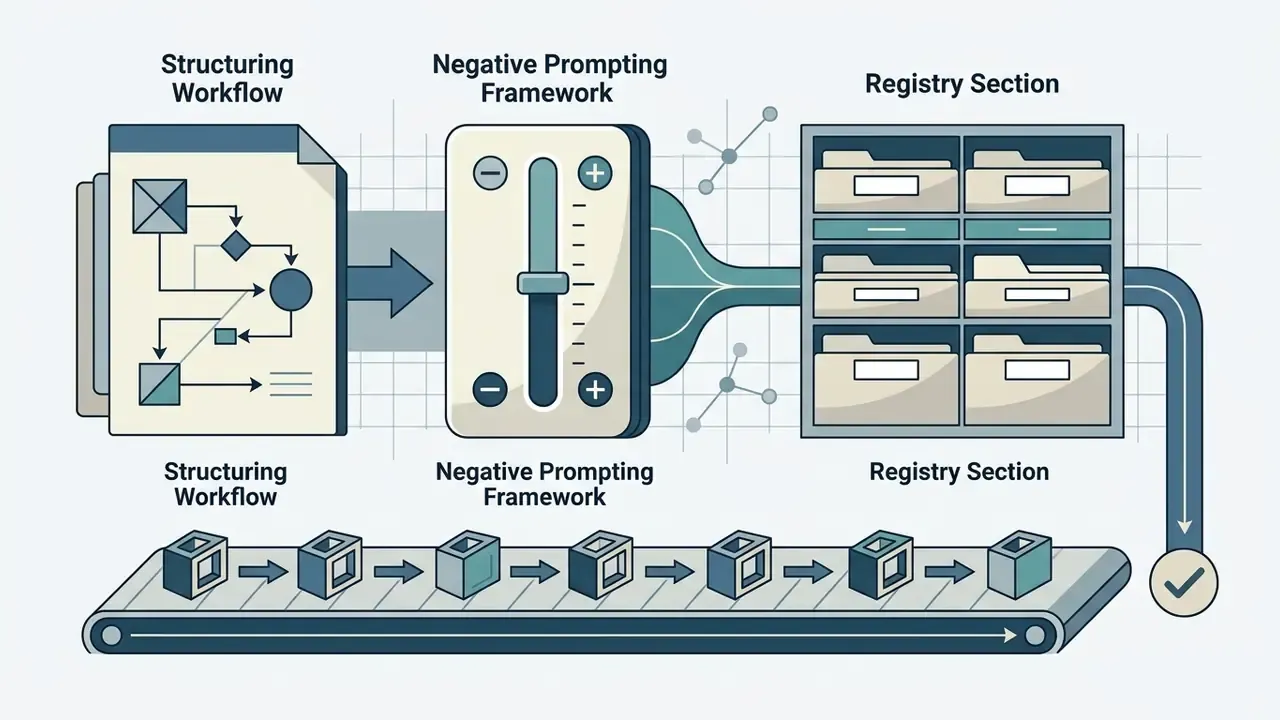
Sequential Prompt Assembly: Order of Operations
The assembly order below is the text-native equivalent of the flowchart used in production briefs. Follow it top to bottom; each step narrows the model's search space before the next one is applied.
- Base Subject and Actionname the entity and what it is doing (
a mature artisan shaping clay). - Setting and Environment Contextanchor the scene (
in a sunlit workshop cluttered with tools). - Visual Style and Medium Selectiondeclare exactly one medium (
photorealistic editorial photograph). - Lighting and Atmospheric Setupdirection, quality, temperature (
soft window key light, faint airborne dust). - Color Palette and Tone Adjustmentspalette family and contrast level (
warm earth tones, moderate contrast). - Compositional and Lens Specificationsframing and optics (
85mm lens, shallow depth of field, rule of thirds). - Technical Parameters and Negative Constraintsaspect ratio, seed, exclusions (
--ar 4:5 --no text, watermark).
Universal Negative Prompting Framework
Negative prompts remove unwanted artifacts, anatomical distortions, and unwanted default styles. Syntax varies across primary generative engines:
Midjourney:       --no blur, oversaturated, extra limbs, text, watermark
Stable Diffusion: (deformed iris, extra fingers, mutated hands:1.4), poorly drawn, low quality, draft
DALL-E 3 / Flux:  Include explicit negative constraints directly in the primary prompt block:
                  "Ensure scene is free of text overlays, watermarks, or distorted features."
Standard Exclusion Checklist for Photorealism
blurry, overexposed, plastic skin, asymmetric eyes, extra digits, distorted geometry, low-contrast shadows, unnatural limbs, stock photo aesthetic, signature, watermark.
Error and Fix: Diagnosing Attribute Bleeding
Attribute bleeding occurs when a modifier migrates from its intended token to a neighbouring one, the classic symptom of an unstructured prompt. The pattern is reproducible and correctable:
| Failure Mode | Broken Prompt | Observed Artifact | Corrected Prompt |
|---|---|---|---|
| Color bleed | a woman in a red dress next to a white vintage car | Car turns red; dress turns pink | a woman wearing a crimson silk dress, standing beside a white vintage car with cream leather interior, colors strictly separated |
| Material bleed | a marble statue in a glass room | Statue becomes translucent glass | a polished Carrara marble statue with visible grey veining, inside a room enclosed by clear plate glass walls |
| Medium conflict | photorealistic oil painting of a harbour | Muddy hybrid, neither photo nor paint | oil painting of a harbour, visible impasto brushstrokes, linen canvas texture (choose one medium) |
| Negation misread | a bedroom with no lamps | Lamps appear prominently | Main prompt: a minimalist bedroom, daylight only; Negative field: lamps, light fixtures, sconces |
| Count drift | three identical ceramic vases | Four or five vases render | exactly three ceramic vases arranged in a single row, evenly spaced, nothing else on the shelf |
A Simple Prompt Formula for Any Image Generator
A universal prompt formula across Midjourney, Stable Diffusion, DALL-E 3, and Flux follows a modular architecture: [Subject] + [Scene Context] + [Visual Style] + [Lighting] + [Composition] + [Technical Parameters]. This structure aligns with verified vendor documentation and ensures model-agnostic compatibility. In practice, the best ai prompts for art are the boring ones, because every slot is filled deliberately.
[Subject] + [Context] + [Style] + [Lighting] + [Composition] + [Parameters]
Midjourney's own documentation decomposes a prompt into Subject, Medium, Environment, Lighting, Color, Mood and Composition, with technical parameters appended at the end of the line: the same architecture, expressed in vendor vocabulary. Applying this standardized formula allows creators to test various art ai prompts consistently across multiple free ai art generator tools without rewriting the underlying narrative logic.
Prompt Templates to Copy, Adapt and Test
Prompt templates allow creators to swap specific variables, such as objects, materials, and lighting, while preserving the underlying structural compliance of the query. Using modular placeholders speeds up visual iteration and maintains consistent aesthetic quality across generation batches.
- Template 1 (Studio Product Focus)
[Product/Object] on a seamless [Material] background, illuminated by [Lighting Type], [Camera Shot/Angle], [Color Palette], highly detailed surface texture, sharp focus across the full product. - Template 2 (Cinematic Portrait)
A portrait of a [Subject/Role] in [Environment], natural light during [Time of Day], [Visual Style], shot on 85mm lens, shallow depth of field, [Color Tone], clean lines. - Template 3 (Architectural and Environment)
An architectural view of [Building/Structure] set within [Landscape], [Lighting Condition], [Art Style/Medium], wide-angle perspective, [Color Palette], high contrast. - Template 4 (Editorial Character)
Full-body illustration of [Character Description] engaging in [Action], set in [Setting], [Art Style], bold outlines, studio lighting, [Color Palette]. - Template 5 (Abstract Texture and Material)
Macro photograph of [Material 1] merged with [Material 2], lit by volumetric light, earth tones, high contrast, crisp edges, subtle reflections. - Template 6 (Surreal Material Swap)
[Everyday Object] made entirely of [Impossible Material], [Lighting Type], [Color Palette], studio background, crisp specular highlights. - Template 7 (Brand Asset / Vector)
Flat vector [Asset Type] of [Subject], clean geometric line work, [Two-Color Palette], isolated on solid white background, no text or typography. - Template 8 (Sci Fi Concept Art)
Wide concept art frame of [Structure/Vehicle] on [Planetary Environment], [Atmospheric Condition], sci fi industrial design language, [Lighting Type], [Two-Tone Palette], scale reference figure in foreground.
«UF-FGTG's fine-grained prompt templates aligned with model training distributions yield a 5% average improvement across six quality and aesthetic metrics compared to unstructured baseline prompts». — UF-FGTG: A User-Friendly Framework for Generating Model-Preferred Prompts (2024). https://arxiv.org/abs/2402.12760
AI Art Prompt Ideas by Use Case
Different production use cases require tailored prompt strategies depending on whether the asset is intended for portraiture, landscape rendering, commercial product displays, concept art or social media campaigns. Adapting parameters to specific end-use requirements ensures generated assets meet technical distribution standards. Treat the sections below as an ai art prompts list you can raid selectively, not as a sequence to read straight through.
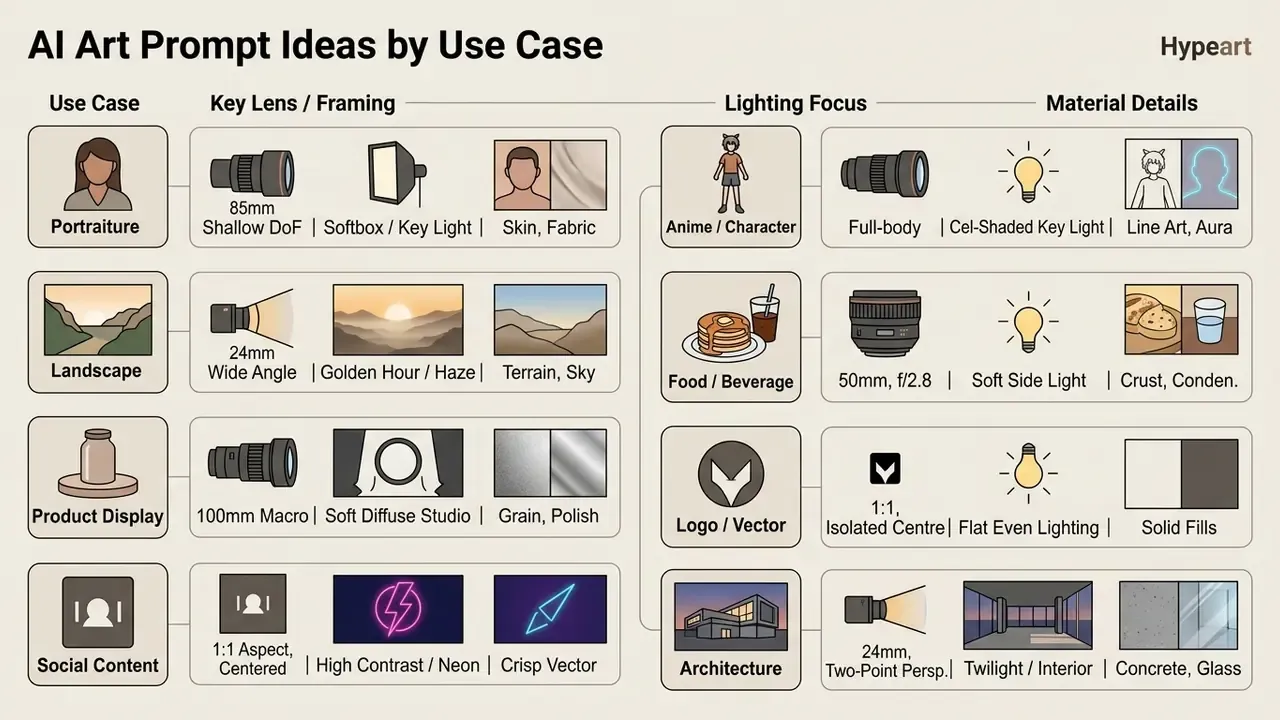
Portrait, Character and Lifestyle Prompt Ideas
Portrait and character prompts require clear specifications for focal length, facial lighting control, and depth of field to isolate the subject from background elements. Specifying key optical parameters prevents unnatural distortion around facial features.
- Studio Portrait Idea: "A portrait of a mature artisan in a workshop, 85mm lens, shallow depth of field, soft studio lighting key light with subtle rim reflection, earth tones, high resolution."
- Lifestyle Scene Idea: "A candid lifestyle photograph of a founder working at a wooden desk near a large window, natural light, golden hour, warm tones, soft background blur, clean composition."
- Character Concept Idea: "A character portrait of a futuristic researcher in a high-tech lab, low angle, crisp lines, cool tones, subtle volumetric light, highly detailed fabric texture."
- Sci Fi Concept Art Idea: "Concept art of an orbital station technician in a worn pressure suit, helmet under one arm, sci fi hangar interior with exposed cabling, cold rim light from a viewport, teal and rust palette, 35mm lens, painterly digital illustration."
- Editorial Golden-Hour Portrait: "Portrait of a woman with auburn hair, mid-30s, soft natural smile, standing in an English cottage garden with foxgloves in bloom, golden hour rim lighting, shallow depth of field, shot on Hasselblad 80mm, photorealistic editorial style, 35mm film grain."
- Corporate Headshot: "Professional headshot of a man in his early 40s, navy suit, clean white studio background, soft Rembrandt lighting with subtle catchlights, sharp focus, slight confident smile, high-end commercial photography, no props."
- High-Contrast Fashion Portrait: "Fashion editorial portrait of a model with sharp cheekbones, oversized cream blazer, minimal jewelry, grey textured concrete backdrop, dramatic split lighting, high-contrast black and white conversion, 50mm lens."
Using established photographic terms like "85mm lens" and "shallow depth of field" signals diffusion models to emulate physical camera optics accurately.
«SSP demonstrates that appending camera descriptors, focal length, angle and shot type, improves semantic consistency by 16% and text-image alignment by 5% across large vision models». — SSP: Simple and Safe Automatic Prompt Engineering with Camera Descriptions (2025). https://arxiv.org/abs/2402.01345
For teams producing staff imagery at volume, purpose-built AI headshot generators apply many of these optical presets automatically.
Camera Gear and Optical Modifiers Matrix
| Visual Intent | Camera / Lens Keyphrase | Depth and Shadow Effect |
|---|---|---|
| Editorial Portrait | shot on Hasselblad H6D-100c, 80mm lens, f/2.0 | Ultra-crisp iris details, smooth natural background blur |
| Cinematic Street | shot on 35mm Leica M10, natural film grain, f/1.4 | Authentic street photography feel, organic shadow falloff |
| Macro Material | 100mm macro lens, f/8, extreme close-up detail | Deep depth-of-field across surface textures, razor-sharp edge definition |
| Dynamic Action | 24mm wide-angle lens, low-angle perspective, motion blur | Exaggerated spatial depth, kinetic energy in foreground elements |
| Lifestyle Candid | Sony A7IV, 85mm f/1.8, available window light | Natural skin tones, creamy separation from cluttered backgrounds |
| Product Detail | 50mm f/2.8, tabletop framing, single softbox | Controlled specular highlights, readable label typography |
Landscape, Nature and Cinematic Scene Prompts
Cinematic landscape prompts achieve depth and atmospheric realism by combining specific times of day, weather conditions, low-angle perspectives, and earth-toned color balances.
- Mountain Ridge Idea: "A cinematic landscape of rugged mountain peaks at golden hour, amber backlight, long directional shadows, subtle mountain haze, warm earth tones, wide-angle 24mm perspective."
- Coastal Environment Idea: "A dramatic coastal cliff scene under an overcast sky, natural light, high contrast, cool blue and slate tones, crisp wave textures, low angle view."
- Forest Path Idea: "A dense pine forest trail illuminated by early morning volumetric light rays, soft atmospheric dust, natural green and brown tones, deep shadows, balanced composition."
- Alpine Sunrise Panorama: "Panoramic view of jagged alpine peaks at sunrise, wildflowers blooming in the foreground, layers of mist filling the valleys below, warm golden light painting the summit, ultra-wide composition, photorealistic landscape photography, no people, --ar 16:9."
- Aurora Reflection: "Aurora borealis over a frozen lake, emerald and violet ribbons of light reflected in glassy ice, silhouette of a single pine tree at the left edge, long exposure, full starfield visible, ultra-sharp detail."
- Desert Bloom: "High desert plateau in rare bloom season, endless carpet of purple and yellow wildflowers to the horizon, clear blue sky, midday sun casting sharp clean shadows, wide flat perspective, sharp across the frame."
Terms like "golden hour" and "volumetric light" reliably introduce directional warmth and atmospheric depth into generated outdoor scenes. Practically, golden hour is the interval roughly thirty minutes before sunset or shortly after sunrise: warm amber backlight, long directional shadows, light haze and occasional horizontal flare.
«Oppenländer's taxonomy identifies lighting modifiers, "natural light," "golden hour," "dramatic shadows", as among the most frequently used prompt components controlling atmosphere and volumetric depth». — Oppenländer, A Taxonomy of Prompt Modifiers for Text-To-Image Generation (2023). https://arxiv.org/abs/2204.13988
Anime, Manga and Character Design Prompts
Anime prompts rely on a specialized production vocabulary: cel shading, screen tones, speed lines, line-art weight and studio-era aesthetics. Naming the rendering technique matters more than naming a franchise.
- Shonen Action Scene "Full-body character illustration of a teenage kinetic hero with spiky crimson hair, wearing torn tactical martial arts gear, dynamic mid-air action pose, cel-shaded anime aesthetic, sharp line art, glowing aura energy effect, pristine white background."
- Hand-Painted Pastoral Landscape "Pastoral rural village in classic hand-painted animation style, rolling green meadows filled with buttercups, a stone cottage with chimneys smoking gently, towering ancient oak tree, soft afternoon lighting, fluffy cumulus clouds, warm nostalgic atmosphere."
- Neon Character Portrait "Anime portrait of a young woman with neon pink twin-tail hair, visor reflecting a neon cityscape, jacket with LED strip accents, dramatic underlighting casting colored shadows across her face, manga-style portrait composition, crisp ink outlines."
- Chibi Mage Sticker Set "Cute chibi-style mage character, oversized pointed hat with star decorations, very large expressive eyes, holding a glowing crystal wand, pastel lavender and cream palette, rounded simple proportions, soft anime illustration style, isolated on transparent background."
- Monochrome Manga Panel "Black and white manga panel, swordsman in mid-strike battle pose, dramatic background speed lines converging on the blade, heavy hatching in shadow regions, screen-tone texture on the ground, expressive strained facial detail, classic serialized panel layout."
Food, Beverage and Culinary Product Prompts
Culinary prompts succeed on texture and condensation cues. Specify surface state (crisp, glossy, dusted, melting) and a single directional light source to avoid the flat, over-lit look of generic stock imagery.
- Artisanal Bakery Display "Close-up hero shot of a freshly baked sourdough bread loaf dusted with flour, crisp scored crust, resting on a rustic dark slate surface, soft side lighting highlighting surface crunch, warm ambient background, 50mm f/2.8 lens."
- Gourmet Beverage Photography "Macro shot of a crystal glass filled with iced cold-brew coffee, condensation droplets glistening on the glass exterior, splashing milk swirl, warm amber backlight, deep dark wooden tabletop, editorial food magazine quality."
- Ceramic Tea Still Life "Realistic close-up photograph of a Japanese ceramic tea mug shot with a 50mm lens, shallow depth of field, steam rising from the surface, loose tea leaves scattered on a wooden counter, softly defocused background, textured glaze detail."
- Restaurant Menu Flat Lay "Overhead flat lay of a seasonal grain bowl in a matte stoneware dish, roasted vegetables with visible char marks, olive oil sheen, linen napkin at frame edge, soft diffused daylight, warm earth tones, 1:1 crop for social grid."
Logo, Vector and Branding Visual Prompts
Vector-style prompts must suppress photographic depth cues entirely. State "flat," "isolated," "solid background" and "no text" explicitly, because diffusion models default to dimensional shading and hallucinated lettering.
- Minimalist Mascot Logo "Flat vector mascot logo of a geometric fox head, clean sharp lines, dual-tone terracotta and charcoal color palette, isolated on a solid white background, modern tech startup aesthetic, no text or typography."
- Luxury Brand Packaging Mockup "Symmetrical studio presentation of a matte black cosmetic serum bottle with gold foil typography, set against a smooth warm beige concrete block, soft directional shadows, premium minimalist aesthetic."
- Monoline Icon Set "Set of four monoline vector icons on a single row (leaf, droplet, sun, mountain), uniform 2px stroke weight, single deep teal color, generous negative space, isolated on white, resolution-independent flat design."
- Retro Badge Emblem "Circular vintage badge emblem for a coffee roastery, bold sans-serif arc lettering replaced with placeholder shapes, cream and burnt-orange two-color palette, subtle halftone texture, flat print aesthetic, centered composition."
Architecture and Interior Design Prompts
Architectural prompts need explicit vantage points and material pairings. Naming the perspective (two-point, worm's-eye, eye-level) prevents warped verticals and impossible geometry.
- Modernist Glass Villa "Exterior architectural photograph of a modern cantilevered concrete and glass villa at twilight, interior warm lights glowing through floor-to-ceiling windows, reflective infinity pool in foreground, surrounded by pine forest, wide-angle 24mm view."
- Biophilic Minimalist Interior "Sunlit minimalist living room featuring a curved oat-colored linen sofa, large potted monstera plant casting soft shadows on smooth plaster walls, warm morning natural light, high ceiling, Scandinavian interior design style."
- Adaptive Reuse Warehouse "Interior of a converted brick warehouse office, exposed steel trusses, polished concrete floor, mezzanine walkway, north-facing clerestory daylight, cool neutral palette with warm timber accents, two-point perspective, 24mm lens."
- Urban Section Study "Cutaway architectural section illustration of a four-storey mixed-use building, flat vector line work with muted pastel fills, labeled placeholder blocks, isometric-adjacent orthographic projection, technical drawing aesthetic."
Copy-Paste Prompt Library: Editable Variable Reference
Every template in this guide uses the same replaceable slots. Swap the bracketed values and keep the surrounding syntax intact:
[SUBJECT]      -> the primary entity and its action
[ENVIRONMENT]  -> location, surface, background treatment
[STYLE]        -> exactly one medium (photograph / oil painting / flat vector)
[LIGHTING]     -> direction + quality + temperature
[PALETTE]      -> named color family or explicit hex values
[OPTICS]       -> focal length, aperture, camera body
[ASPECT RATIO] -> --ar 4:5 | 16:9 | 9:16 | 1:1 | 239:100
[NEGATIVE]     -> exclusions placed in the dedicated negative field
Aesthetic Prompts for AI Art: Color, Light and Materials
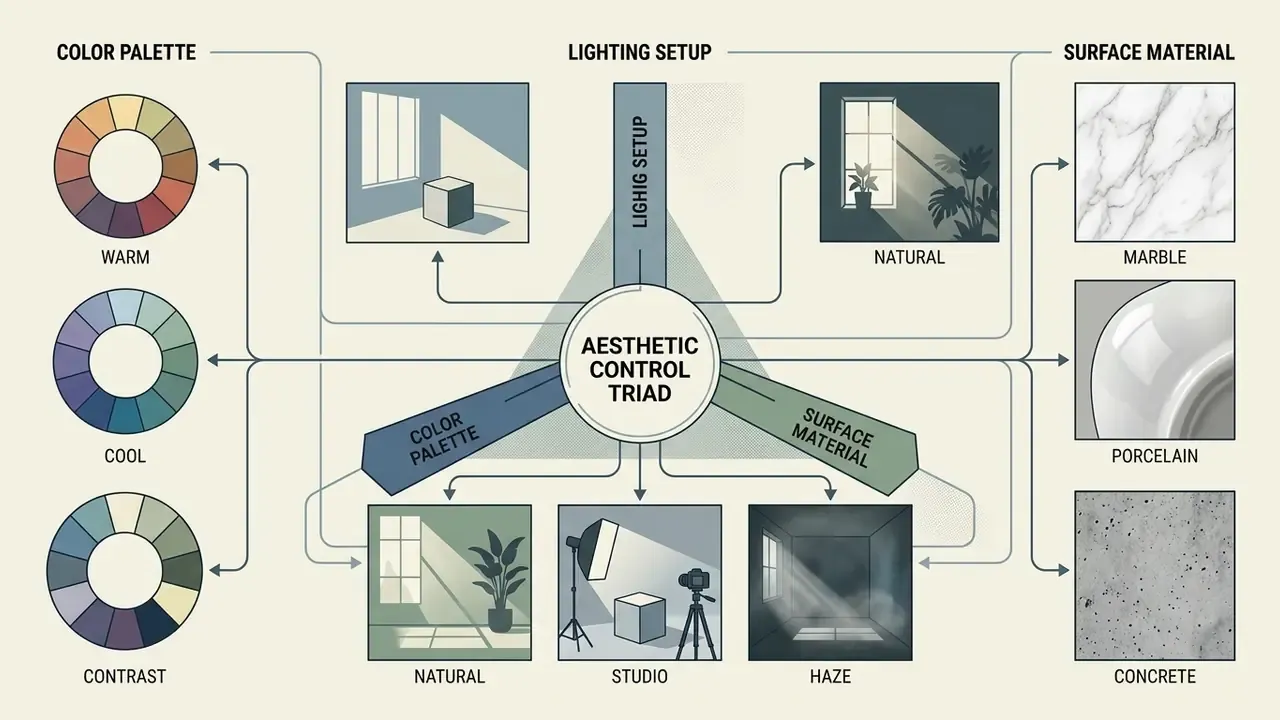
Controlling visual aesthetics in AI art requires explicit instructions covering color palette parameters, directional light quality, and physical surface textures. Defining these attributes explicitly prevents the generator from relying on default training dataset styles.
Color Palette Prompts for Mood and Contrast
Color palette prompts set the emotional temperature and visual hierarchy of an image through specific color combinations, contrast ratios, and tonal groupings.
- Warm Tones Descriptors like "amber, terracotta, golden hour warmth, soft warm tones" create inviting, nostalgic, or energetic visual atmospheres.
- Cool Tones Terms such as "slate blue, frosted silver, deep indigo, cool ambient glow" evoke calmness, technical precision, or isolation. Cool prompts for ai art tend to read as more clinical, which is exactly right for fintech and infrastructure visuals.
- Earth Tones Palette cues like "olive green, warm ochre, charcoal, muted sand" ground scenes in natural, organic realism.
- High Contrast Formulations using "stark black and white, deep shadows with vivid accent lighting, high contrast" emphasize graphic drama and structural clarity.
- Jewel Tones Cues such as "deep emerald, sapphire, ruby, saturated amethyst" produce rich, premium editorial atmospheres.
- Pastels and Muted Phrases like "soft candy pastels" or "desaturated vintage tones" reduce saturation for gentle or retro moods.
- Explicit Hex Values Brand-critical work can specify hex codes directly (for example,
#0F3B2E and #E8D8B7 palette only) to constrain drift across a campaign batch.
«Oppenländer's taxonomy identifies color modifiers, "warm tones," "cool tones," "earth tones," "high contrast", as commonly used phrases steering images toward particular emotional and aesthetic atmospheres». — Oppenländer, A Taxonomy of Prompt Modifiers for Text-To-Image Generation (2023). https://arxiv.org/abs/2204.13988
Lighting Prompts: Natural Light, Golden Hour and Studio Lighting
Lighting descriptors direct how shadow gradients, volumetric haze, and surface highlights define three-dimensional form within a synthesized image.
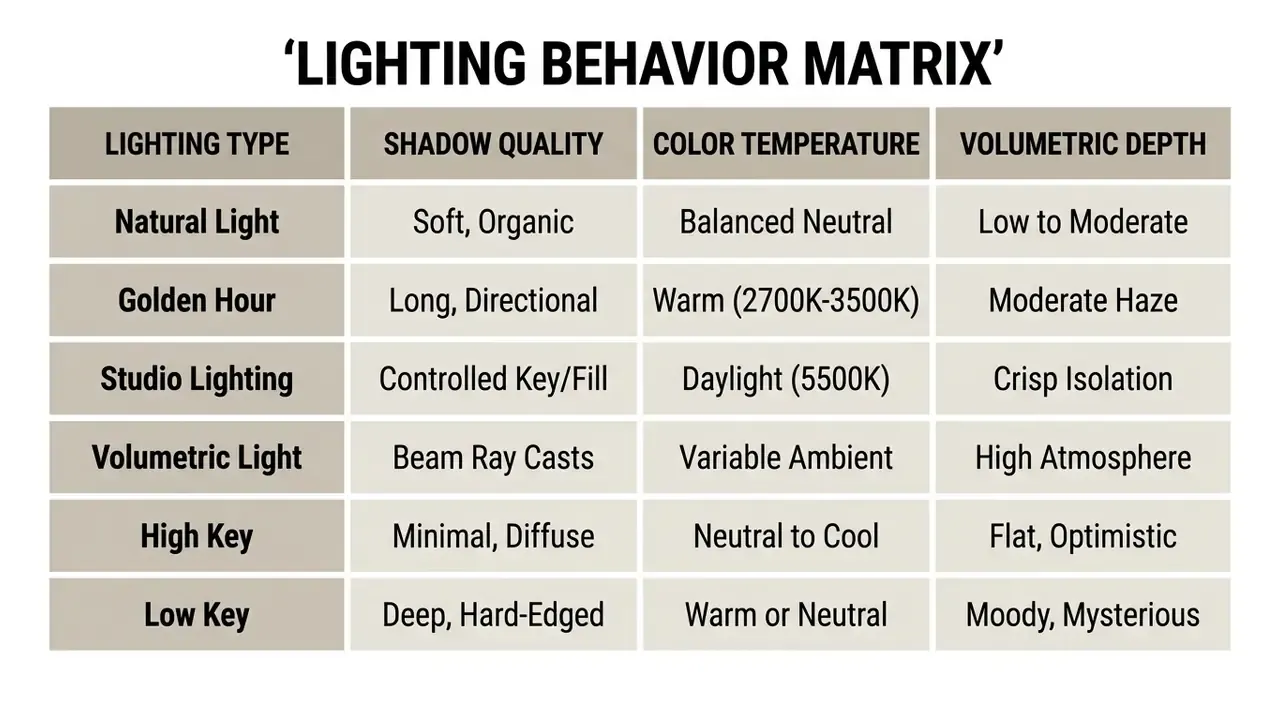
Studio setups build form through a three-light logic worth naming explicitly in the prompt: a large softbox key light establishes the primary modelling, a fill light controls shadow density, and a subtle rim light separates the subject from the background. Volumetric light behaves differently. It needs a participating medium (fog, dust, haze) in the prompt for the beams to become visible at all.
Specifying a lighting setup, such as key light position or atmospheric diffusion, directly affects how realistic the final asset appears. Pairing light descriptors with framing rules and correct output settings, including how to make an image higher resolution through proper parameter configuration, yields better visual fidelity than adding more adjectives. For final delivery at print dimensions, dedicated AI image upscalers recover detail that generation alone cannot resolve.
Material Prompts for Tactile AI-Generated Art
Material prompts define physical surface properties, light reflectivity, and tactile textures, transforming flat shapes into believable physical representations.
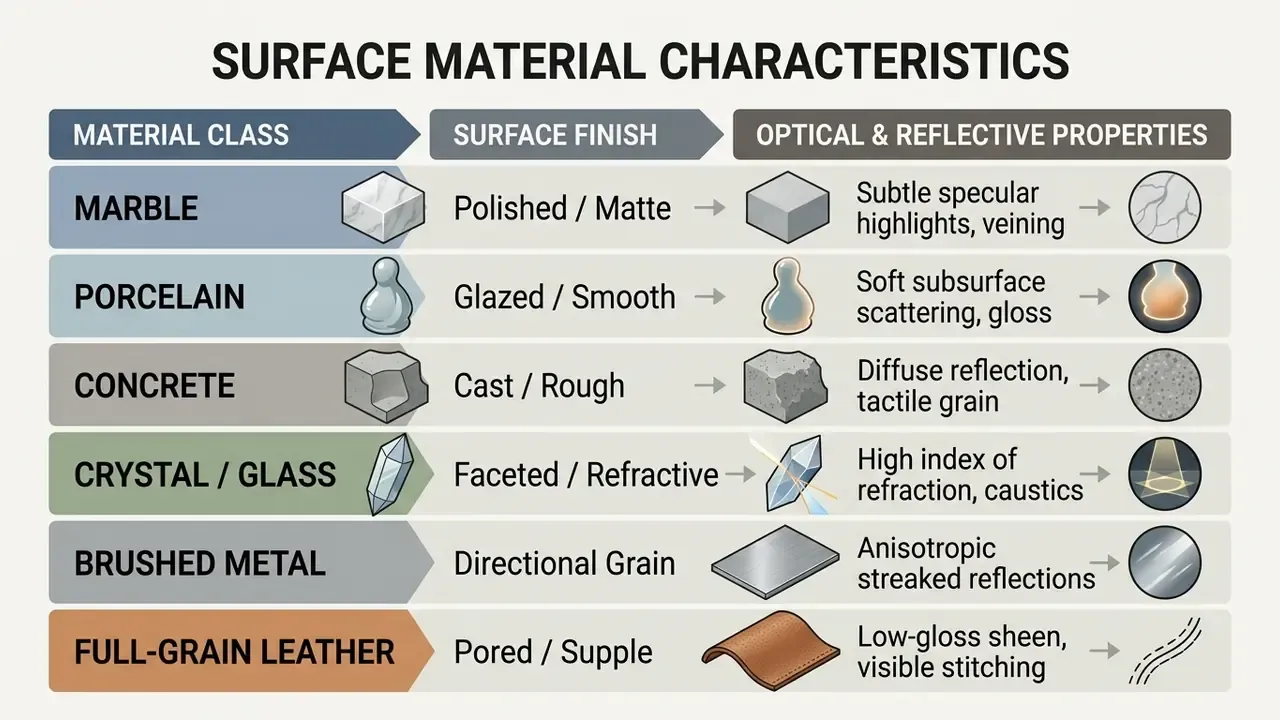
The reliable descriptor formula is material + finish + texture + reflectivity + tone + scale. For example: "polished Carrara marble with grey veining," "celadon porcelain glaze," "frosted plate glass," "board-formed cast concrete," "faceted lead crystal."
A 2025 study on generative tactile textures published by ACM demonstrated strong alignment between visual surface descriptions (bumpiness, stickiness, uniformity, isotropy) and human tactile perception, while noting divergence for hardness, roughness and scratchiness (TactStyle Study, 2025). Updated: because that finding is medium-specific, the broader prompt-level evidence base is the modifier taxonomy:
«Oppenländer's taxonomy identifies material modifiers, "marble," "candy," "concrete," "crystals", as a distinct prompt component controlling reflectance, roughness, and subsurface scattering in generated images». — Oppenländer, A Taxonomy of Prompt Modifiers for Text-To-Image Generation (2023). https://arxiv.org/abs/2204.13988
Incorporating exact material terms ensures accurate surface rendering. Vague ones ("nice texture") ensure nothing at all.
Avant-Garde and Surreal Material Descriptors
To override standard rendering defaults, introduce non-traditional material states to familiar subjects using the made of [Material] syntax. The explicit "made of" construction matters: without it, the model frequently treats the material as a separate object placed next to the subject rather than as its substance. These are also where the most creative ai art prompts usually come from.
- Ethereal Light
"A geometric sculpture made of woven light, glowing neon filaments, translucent beams, ambient dark void background, volumetric radiance." - Fluid Glass and Bubbles
"An anatomical heart made of iridescent soap bubbles and liquid glass, delicate rainbow refraction, crisp specular highlights, soft macro bokeh." - Tactile Papercraft and Quilling
"A majestic owl portrait made of intricate layered papercraft and quilling, folded textured cardstock, crisp cast shadows, 3D relief effect." - Confectionery Realism
"A futuristic sports car made entirely of glossy hard candy and translucent sugar glass, vibrant magenta and amber tones, studio lighting reflections." - Bubble Wrap and Sand
"The letter B made of bubble wrap, even cell pattern, soft overhead light"/"A vintage typewriter made of compacted desert sand, crumbling edges, raking side light." - Water and Rain
"A blooming peony made of falling water, frozen mid-splash, high-speed flash freeze, black background, crisp caustics."
AI Image Generator Style Prompts and Art Styles
Choosing explicit art styles, from classical oil painting techniques to modern digital illustrations, overrides general model presets and delivers predictable artistic visual styles.
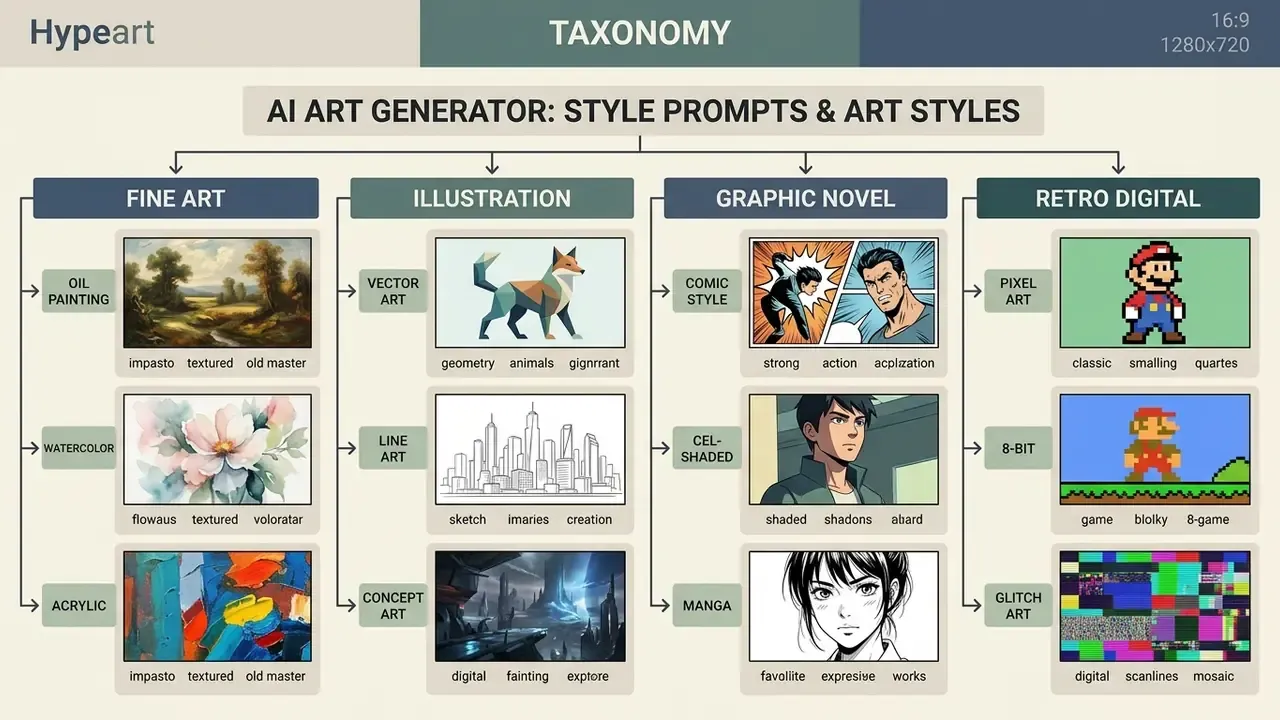
No vendor publishes a single universal style taxonomy, because each platform exposes style differently: as free prompt text, as a preset panel, or as a reference-image control. Google's Vertex AI image guide, for example, treats style as either general or specific (painting, photograph, sketch, pastel painting, charcoal drawing, isometric 3D), while Adobe Firefly lets users type style directly into the prompt or select an art movement from a control panel.
Fine Art and Traditional Medium Style Prompts
Traditional medium prompts leverage classical art historical terms to steer generative output toward authentic physical paint textures, paper grain, and brushwork styles.
- Oil Painting Prompts including "oil painting, visible impasto brushstrokes, rich canvas texture, chiaroscuro lighting" emulate traditional oil canvas techniques.
- Watercolor Queries specifying "watercolor wash, translucent layers, soft bleeds, textured cold-press paper" generate delicate watercolor aesthetics.
- Linocut and Woodblock Terms like "linocut print, carved block texture, bold relief lines, high contrast dual-tone ink" yield carved printmaker aesthetics.
- Risograph Prompt cues such as "risograph print, vibrant spot colors, subtle misregistration, coarse paper grain" emulate retro mechanical printing presses.
- Ink Wash and Charcoal Descriptors like "sumi-e ink wash, gradient dilution, generous negative space" or "charcoal drawing, smudged tonal blending, visible newsprint tooth" recreate dry and wet drawing media.
When designing fine art prompts, specifying the substrate ("cold-press cotton paper" or "linen canvas") reinforces physical texture rendering across the image. Risograph in particular behaves as a layered-ink process: naming the number of spot colors and the misregistration offset produces far more convincing output than the word "risograph" alone.
«Oppenländer's ethnographic study shows style modifiers are among the most frequently used prompt components, with practitioners developing nuanced combinations of medium and quality descriptors to achieve specific visual effects». — Oppenländer, A Taxonomy of Prompt Modifiers for Text-To-Image Generation (2023). https://arxiv.org/abs/2204.13988
Illustration, Comic Book and Digital Art Prompts
Digital illustration prompts control linework weight, color fills, and shading techniques to produce crisp vector graphics, comic panels, or three-dimensional stylized renders.
- Vector and Digital Illustration: Prompts using "clean vector illustration, flat color palette, sharp geometric lines, minimal shading" produce clean graphic assets. Vector styling is resolution-independent by definition, so avoid pixel-dimension language here.
- Comic Book and Graphic Novel: Formulations specifying "graphic novel panel art, bold ink outlines, halftone Ben-Day dot shading, dramatic dynamic action lines" recreate sequential art styles.
- 3D Clay Illustration: Queries adding "3D clay illustration, soft tactile plasticine surface, rounded smooth edges, warm studio lighting" produce cheerful, tactile 3D models.
- Pixel Art: Formulations like "16-bit pixel art, limited color palette, clean grid alignment, retro video game sprite style, single distant light source above and slightly in front" enforce pixel-grid aesthetics with coherent shading.
- Noir and Stencil Graphics: "stark black-and-white noir comic illustration, hard cast shadows" or "stencil street-art style, flat overlapping spray layers, bold minimal silhouette" deliver high-contrast graphic assets from simple subjects.
To understand commercial licensing and model performance differences across platforms, teams frequently consult a structured AI art generator comparison alongside the broader AI Media Comparison index.
Art Styles Comparison Matrix
| Art Style / Medium | Characteristic Prompt Descriptors | Target Use Case | Recommended Lighting and Palette |
|---|---|---|---|
| Oil Painting | Impasto brushstrokes, canvas grain, glazing, chiaroscuro | Gallery art, historical portraits, high-end concept art | Natural light, warm earth tones, deep contrast |
| Watercolor | Translucent washes, soft wet-on-wet edges, paper texture | Book illustrations, floral prints, editorial spot art | Soft natural light, pastel or warm muted palette |
| Line Art | Clean outlines, vector precision, minimal shading, crisp edges | Product schematics, icon design, technical manuals | Uniform flat lighting, high contrast black-and-white |
| Comic Book | Halftone patterns, heavy ink linework, dynamic action framing | Storyboarding, character sheets, graphic novels | Dramatic directional lighting, saturated primary colors |
| Pixel Art | 8-bit/16-bit grid, sprite aesthetics, sharp pixel edges | Game UI assets, retro icons, digital collectibles | Single distant light source, strictly limited palette |
| 3D Clay | Tactile plasticine, soft rounded forms, fingerprint textures | Mascot design, explanatory graphics, children's UI | Softbox studio lighting, warm vibrant color set |
| Risograph | Spot-color ink layers, misregistration, coarse paper grain | Posters, zines, event promo art | Flat even lighting, 2 to 3 fluorescent spot colors |
| Cel-Shaded Anime | Flat shadow zones, sharp line art, screen tones | Character design, key visuals, social illustration | Directional key light, saturated or pastel palette |
Key takeaway: Selecting explicit medium keywords prevents the image generator from applying generic 3D or photorealistic default styles, ensuring predictable visual art alignment.
Choosing an AI Art Generator and AI Models for Your Workflow
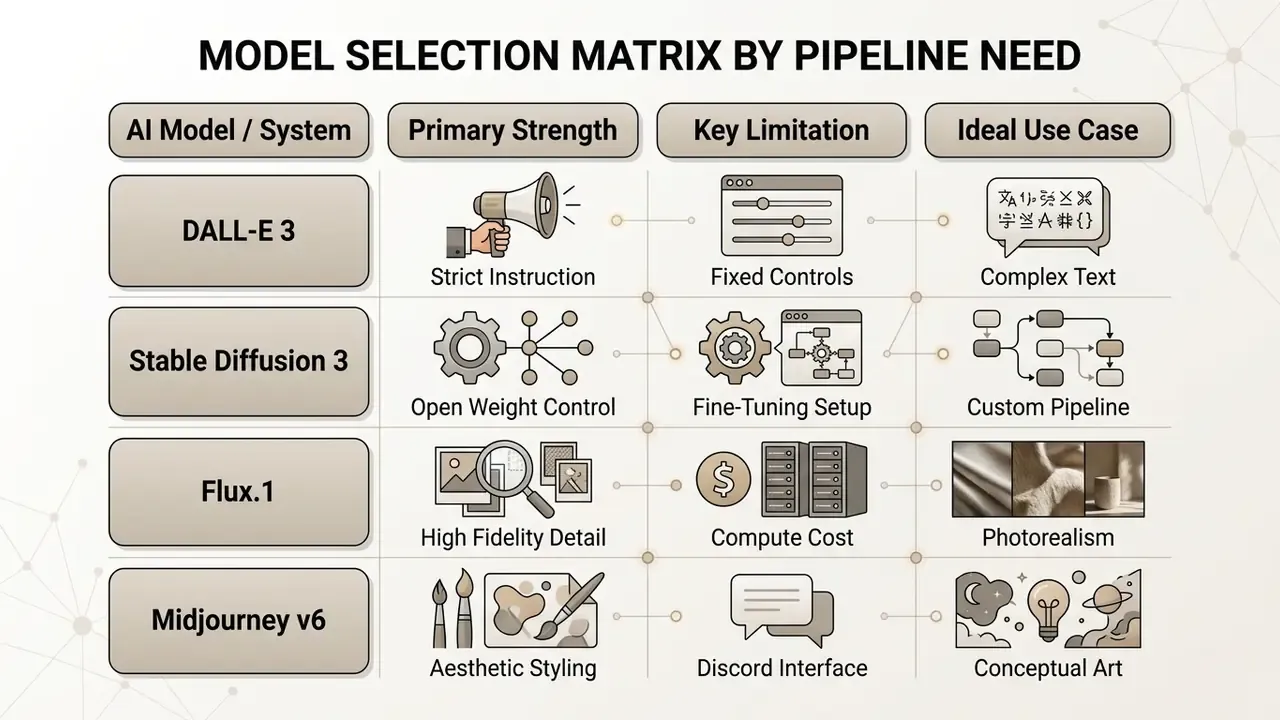
Selecting an appropriate AI art generator depends on your technical pipeline requirements: precise text instruction compliance, open-source checkpoint fine-tuning, or high-speed asset generation at volume.
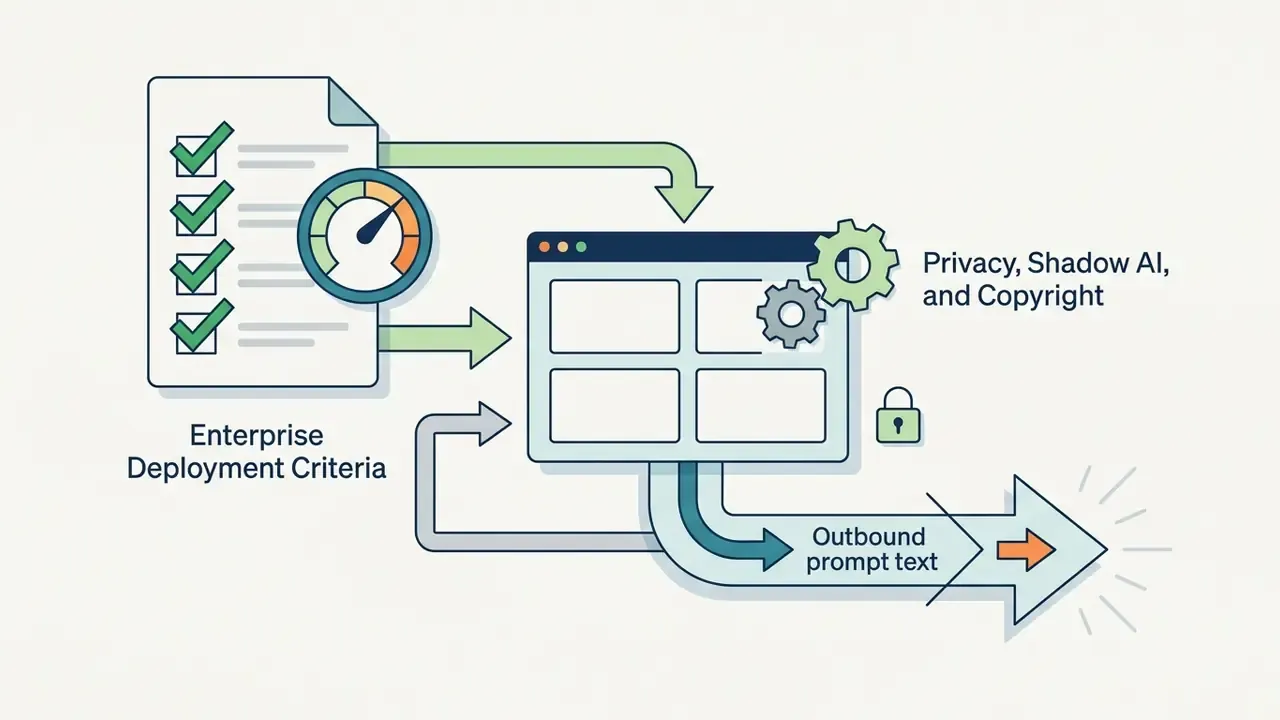
Enterprise Deployment Criteria Beyond Image Quality
For regulated environments, output aesthetics are only one of several selection axes. The parameters below should be verified against current vendor documentation before any production rollout, since terms change frequently:
| Deployment Criterion | What to Verify | Why It Matters |
|---|---|---|
| Prompt and output retention | Whether inputs are logged, and for how long | Determines exposure if a prompt inadvertently contains sensitive text |
| Training-data usage | Whether prompts or outputs feed future model training; availability of opt-out | Controls leakage of proprietary concepts into a shared model |
| Zero-retention / enterprise tier | Existence of a contractual no-retention API tier | Common precondition for approval in financial and healthcare settings |
| Security attestations | SOC 2, ISO 27001 or equivalent third-party reports | Supports vendor due-diligence and audit evidence |
| Data residency | Processing region and cross-border transfer terms | Required for GDPR and local data-sovereignty rules |
| Indemnification and output rights | Commercial-use grant and IP indemnity scope | Defines who bears copyright risk for generated assets |
| Deployment model | Hosted API vs. self-hosted open weights | Self-hosting (open Stable Diffusion checkpoints, for instance) removes third-party data flow entirely |
Verify each item against the vendor's current terms of service and data-processing addendum; this table describes the questions to ask, not a certification of any specific platform.
Match the Image Model to the Use Case
Matching the generative image model to your precise production goal ensures optimal resource utilization and higher output acceptance rates.
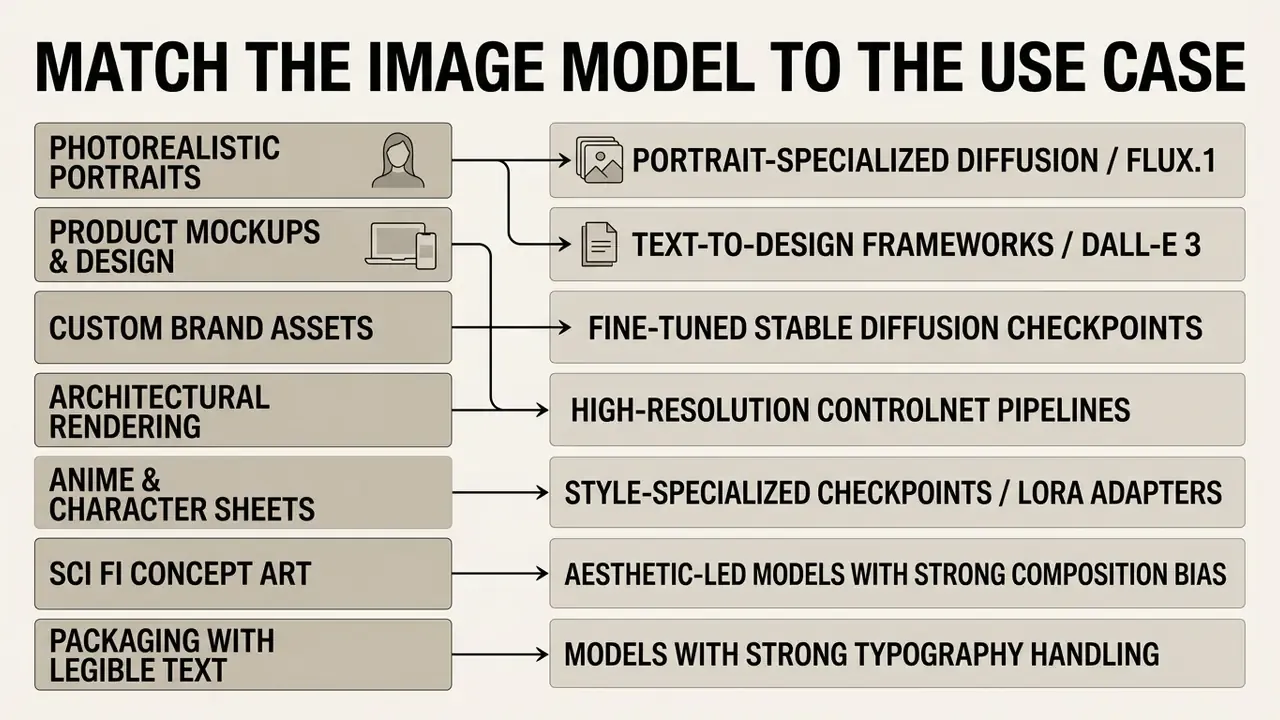
For instance, comparative benchmark papers show DALL-E 3 leading in complex prompt instruction compliance, while open models like Stable Diffusion 3 offer deep pipeline customization via ControlNet and LoRA adapters (OpenAI, 2023; Stability AI, 2024). Stability's SD3 paper documents the MMDiT architecture and Rectified Flow training that make model-level control possible, and the 2025 "Demystifying Flux Architecture" paper describes Flux as a three-phase sampling pipeline exposing text, guidance scale, inference steps and resolution as explicit inputs.
«GenAI-Bench's evaluation of six T2I models, including SD v2.1, SD-XL, DeepFloyd-IF, Midjourney v6, and DALL·E 3, shows significant variation in compositional reasoning and attribute binding across architectures». — GenAI-Bench (2024). https://arxiv.org/abs/2406.13743
Because rankings are benchmark- and prompt-set dependent, treat published comparisons as directional rather than absolute. Readers weighing a specific platform can review our head-to-head analysis of Midjourney image generation against competing tools.
Test One Prompt Across Different AI Tools
Evaluating a standardized prompt across multiple AI tools establishes an objective benchmark for visual interpretation, color rendering accuracy, and keyword adherence.
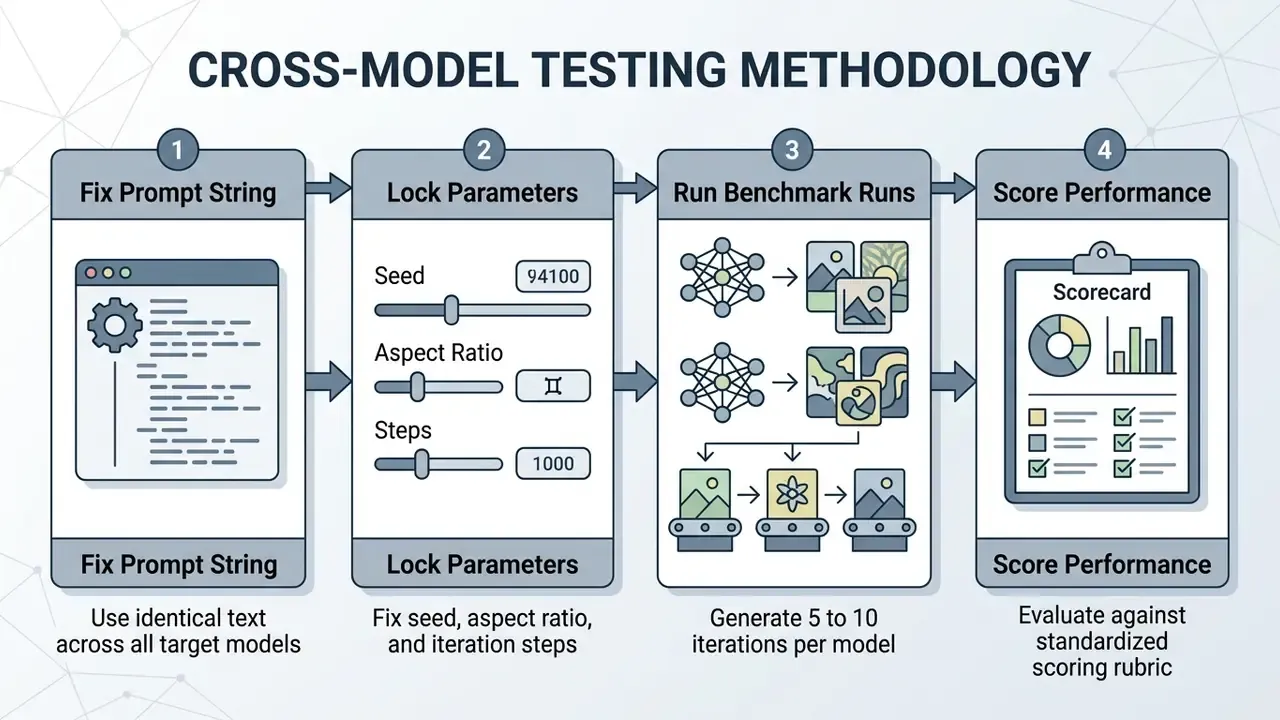
Systematic testing reveals how different text encoders interpret ambiguous phrasing. The formal method is a controlled repeated-measures design: submit the identical prompt under fixed settings to each system, then score outputs with a shared rubric covering style match, keyword interpretation and run-to-run consistency.
«HRS-Bench evaluates nine T2I models on 3,000 prompts per skill across 13 skills, revealing that models differ significantly in color accuracy, spatial reasoning, and compositional generalization». — HRS-Bench, ICCV (2023). https://arxiv.org/abs/2304.05390
When preparing media across diverse presentation platforms, workflows often require adjusting layout parameters, including knowing how to make an image transparent in google slides, to maintain presentation quality.
Build a Repeatable Prompt Workflow
A repeatable prompt workflow relies on version-controlled prompt registries, structured evaluation rubrics, and systematic variation testing to maintain production quality standards.
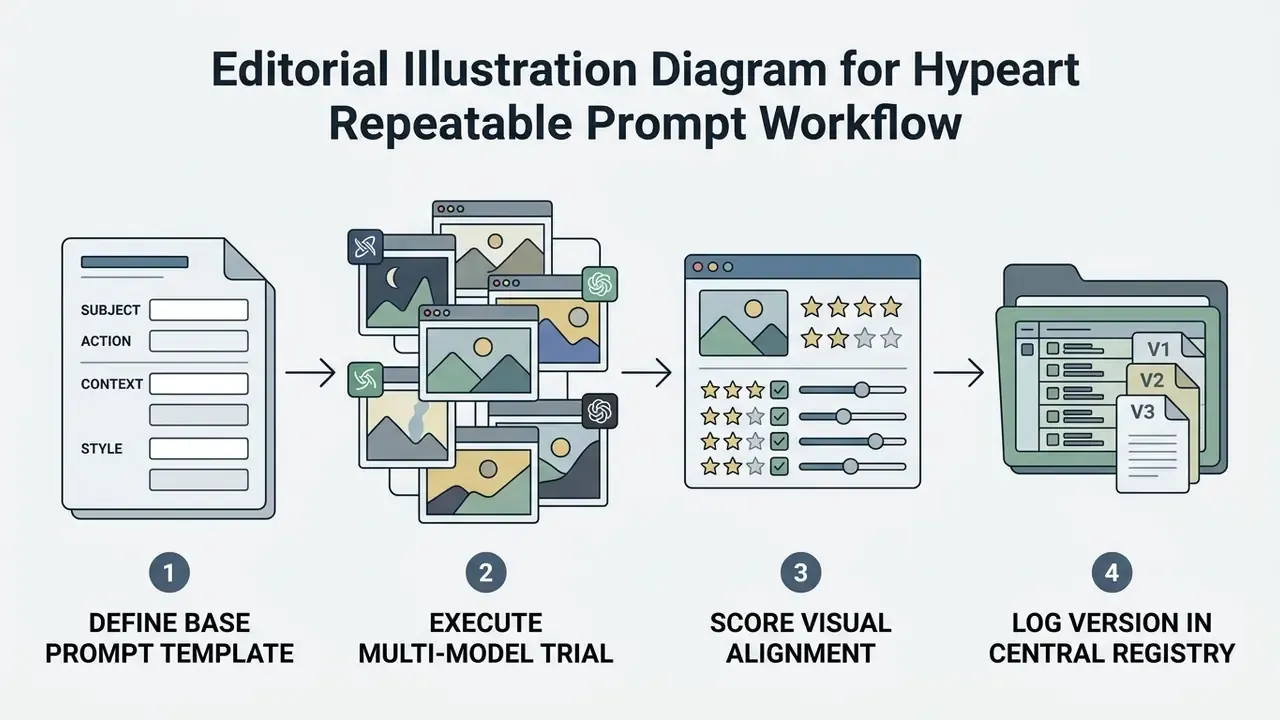
Enterprise prompt governance standards recommend treating prompts as production code assets, versioning them within a central repository alongside explicit performance logs and output criteria (AWS Prescriptive Guidance, 2025). A minimum viable registry record contains prompt name, purpose, target model, author, date, test results and a change log, so that any published asset can be traced back to the exact string and parameters that produced it. That traceability is the difference between a creative habit and a controllable process.
«NeuroPrompts encodes prompt-engineering expertise in a language model trained on human-engineered prompts, demonstrating that successful workflows can be codified, versioned, and reused across projects». — NeuroPrompts, EACL (2024). https://arxiv.org/abs/2311.12229
Data Privacy, Shadow AI and Copyright Governance
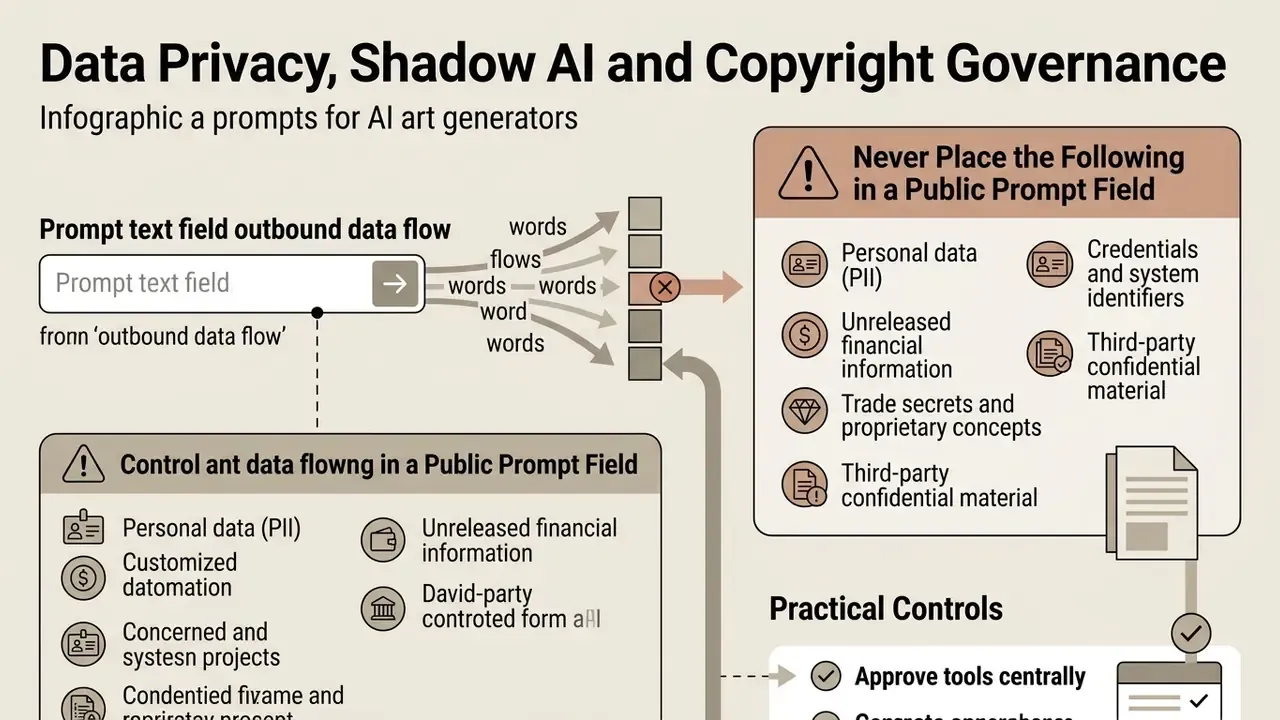
Prompt text is an outbound data flow. Every character typed into a hosted generator leaves the organizational perimeter and may be logged, retained, reviewed by human moderators, or, depending on the tier, used to improve future models. Treating prompt fields as harmless creative scratchpads is how Shadow AI exposure begins.
Never Place the Following in a Public Prompt Field
- Personal data (PII) customer names, account numbers, addresses, identification numbers, health details, or any data subject to GDPR, HIPAA or equivalent regimes.
- Unreleased financial information pre-publication results, internal forecasts, pricing models, deal codenames, or counterparty identities.
- Trade secrets and proprietary concepts unreleased product designs, roadmap language, source code fragments, or confidential campaign strategy.
- Credentials and system identifiers API keys, internal URLs, infrastructure names, ticket IDs.
- Third-party confidential material anything received under an NDA, including client briefs and licensed assets.
Practical Controls
- Approve tools centrally.Publish a short list of sanctioned generators; unsanctioned consumer accounts are the primary Shadow AI vector.
- Route generation through governed API keyson an enterprise tier with contractual no-retention terms, rather than through individual consumer logins.
- Anonymize before prompting.Replace real entities with generic placeholders (
a regional bank branchinstead of the actual institution). - Log prompts internally, not externally.Keep the audit trail in your own registry so you can demonstrate what was submitted without depending on the vendor's logs.
- Train the requesters, not just the operators.Marketing and product teams draft prompts far more often than the AI team does.
- Review data residency and subprocessorsbefore onboarding, and re-review when vendor terms change.
Copyright and Intellectual Property Constraints in Prompts
Prompt wording carries legal exposure independent of image quality. Three documented constraints apply:
- Prompts alone generally do not establish authorship of the output. The U.S. Copyright Office's 2025 guidance treats prompts as instructions, closer to unprotectable ideas than to protected expression, with copyright attaching only to human-authored contributions or meaningful subsequent edits.
- Naming living artists, studios or protected characters is a compliance risk. Adobe's Generative AI User Guidelines (2026) prohibit prompts that aim to generate copyrighted, trademarked or privacy-violating content. Prefer descriptive technique language ("cel-shaded animation, hand-painted background, warm nostalgic palette") over "in the style of [named artist]."
- Trademarks, logos and recognizable likenesses require clearance. Do not prompt for competitor marks, celebrity faces, or identifiable private individuals without rights.
Where a specific aesthetic is genuinely required for a licensed project, evaluate platforms that document their training data and usage rights. Our breakdown of Ghibli-style AI image generators, for example, covers style accuracy alongside licensing terms.
Prompt Production Readiness Checklist
Run this checklist before any generated asset enters a published campaign or client deliverable.
Checklist0 / 14
Free AI Art Prompts: FAQ
Can Free Prompts Work in Any AI Image Generator?
Yes, free prompts for ai art work across different AI image generators if they rely on universal descriptive terms rather than platform-specific parameter tags. However, because different tools use distinct text encoders (CLIP versus T5, for example), minor adaptations to prompt length, lighting terms, or negative prompts may be required when moving between systems.
«PRISM's cross-model experiments show that human-interpretable prompts emphasising generic style descriptors transfer effectively across Stable Diffusion, DALL·E, and Midjourney, though style and fidelity differences remain». — PRISM: Automated Black-box Prompt Engineering for Personalized Text-to-Image Generation, TMLR (2025). https://arxiv.org/abs/2403.14401 The portable unit is the structure, not the string: goal, context, constraints, output format and quality bar transfer cleanly, while engine-specific syntax (weighted tokens,
--flags, transparency parameters) does not. Readers who want to validate transferability quickly can start with no-sign-up AI image generators before provisioning accounts. For automated integration or programmatic asset generation, developers should consult technical resources such as AI Media API Guides to understand system limits and parameter structures.
How Many Prompt Variations Should You Try?
You should typically test 3 to 9 prompt variations when refining an AI art concept, changing only one variable parameter per iteration cycle: lighting, color palette, or material. Keeping the base subject and framing fixed while varying single modifiers allows you to isolate which wording yields the best visual result. Public free AI image generators are well suited to this exploratory phase, before committing paid credits. Updated: the sampling range is supported by benchmark evidence on candidate ranking rather than by generic guidance.
«GenAI-Bench shows that ranking 3–9 candidate images by VQAScore is 2–3× more effective than other scoring methods for identifying best-performing prompt variations». — GenAI-Bench (2024). https://arxiv.org/abs/2406.13743 The operating loop is Generate → Analyze → Adjust → Regenerate with a fixed random seed, a single targeted edit per pass, and explicit version tracking. Separate "what changes" from "what must remain unchanged," and restate the preserve list (geometry, perspective, shadow direction, material finish) on every iteration to stop drift. Commercial deployment guidelines, legal framework overviews, and usage rights references are detailed further within AI Media Commercial-Use resources, with empirical testing documentation in AI Media Benchmarks and Review Proof.
Where Should a Team Store Its Best AI Art Prompts?
In one registry, not in twelve chat histories. The practical minimum is a shared table with the prompt string, target model, seed, aspect ratio, approval status and a link to the delivered asset. Keeping your best ai art prompts in a versioned store does two jobs at once: it shortens the next brief, and it gives internal audit a reproducible answer to "how was this image produced?" Most teams discover, once they start logging, that fewer than twenty base strings cover the majority of their recurring output.
Why Do My Prompts Produce Text and Watermarks I Never Asked For?
Hallucinated lettering and watermark-like marks are training-distribution artifacts, most common in product, poster and logo prompts. Three mitigations work in combination: state no text or typography inside the descriptive block for DALL·E-class models, add text, watermark, signature, logo to the negative field for Midjourney and Stable Diffusion, and avoid words that imply printed surfaces ("poster," "packaging label," "book cover") unless typography is genuinely wanted. Where legible copy is required, generate the artwork clean and composite the type in a layout tool afterwards.
Should I Include "4K", "8K" or "Hyperrealistic" in Prompts?
Generally no. These tokens describe an outcome rather than a mechanism, and they consume budget inside a constrained token window without binding to a specific visual attribute. Replace them with the parameters that actually produce perceived quality: focal length and aperture, light direction and temperature, material finish, and surface-detail nouns. If output pixel dimensions matter, set them through resolution parameters and then upscale during post-processing rather than asking the text encoder for them.
Technical Appendix and Additional Resources
When scaling media operations, creators often leverage specialized tools for post-processing, asset governance, and distribution:
- File Optimization: Learn how to make an image smaller for web delivery without sacrificing visual fidelity.
- Post-Processing and Retouching: Compare AI photo editors for correcting artifacts, cleaning backgrounds and finishing generated frames to brand standard.
- Brand and Layout Workflows: Review online photo editor capabilities covering core features, platform support and commercial workflows.
- Frame Extension: Evaluate AI outpainting tools when a generated asset needs additional canvas for a different aspect ratio.
- Asset Provenance Checks: Use AI reverse-image-search tools to verify that a generated frame does not closely replicate an existing protected work before publication.
- Video and Channel Workflows: Extend still-image pipelines into motion with structured YouTube video editor workflows, or test prompt-driven motion on a low-stakes format such as how to make bigfoot ai videos before touching brand channels.
- Calculators and Planning: Access interactive planning tools via the dedicated calculators hub.
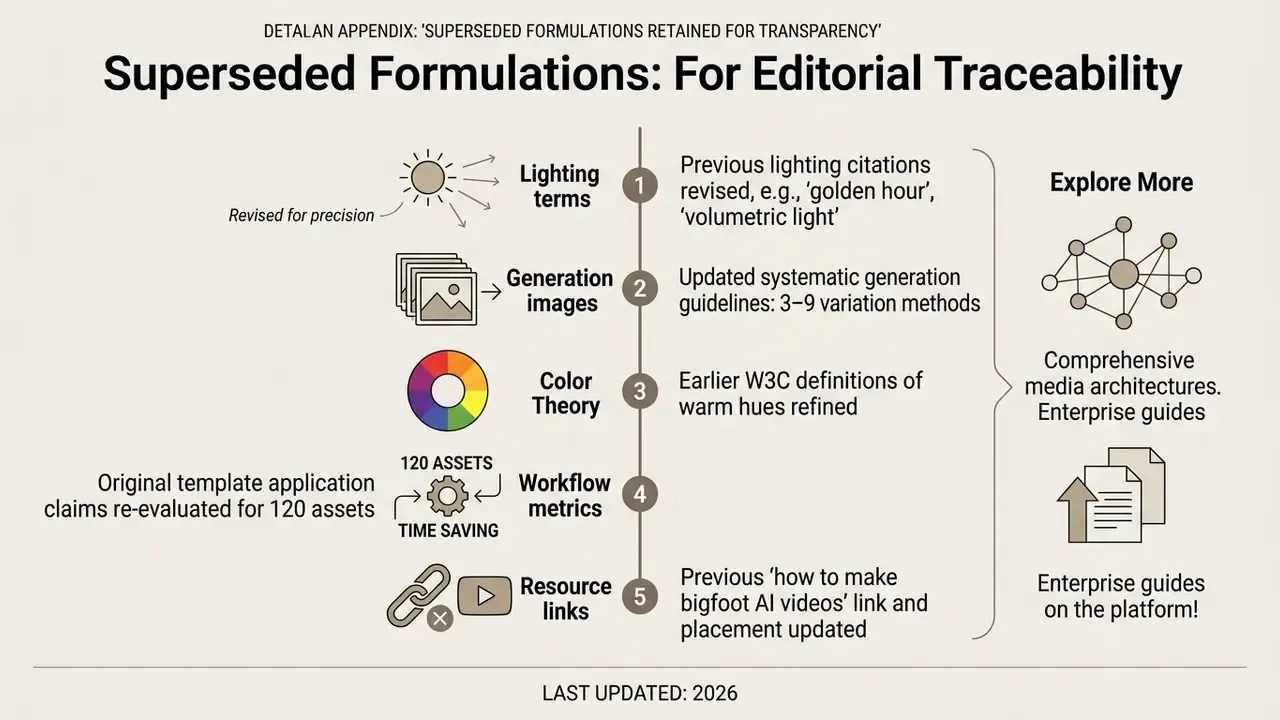
Appendix A: Superseded Formulations Retained for Transparency