Online media workflows increasingly need clean video assets, free of legacy branding, hardcoded timestamps, or channel overlays. Viewed through a risk-adjusted operational lens, modern no watermark ai video tools use generative inpainting and spatial-temporal reconstruction to restore the underlying pixels without touching frame dimensions. For broader media transformation capabilities, see the overview of commercial AI media processing frameworks.
Quick Summary
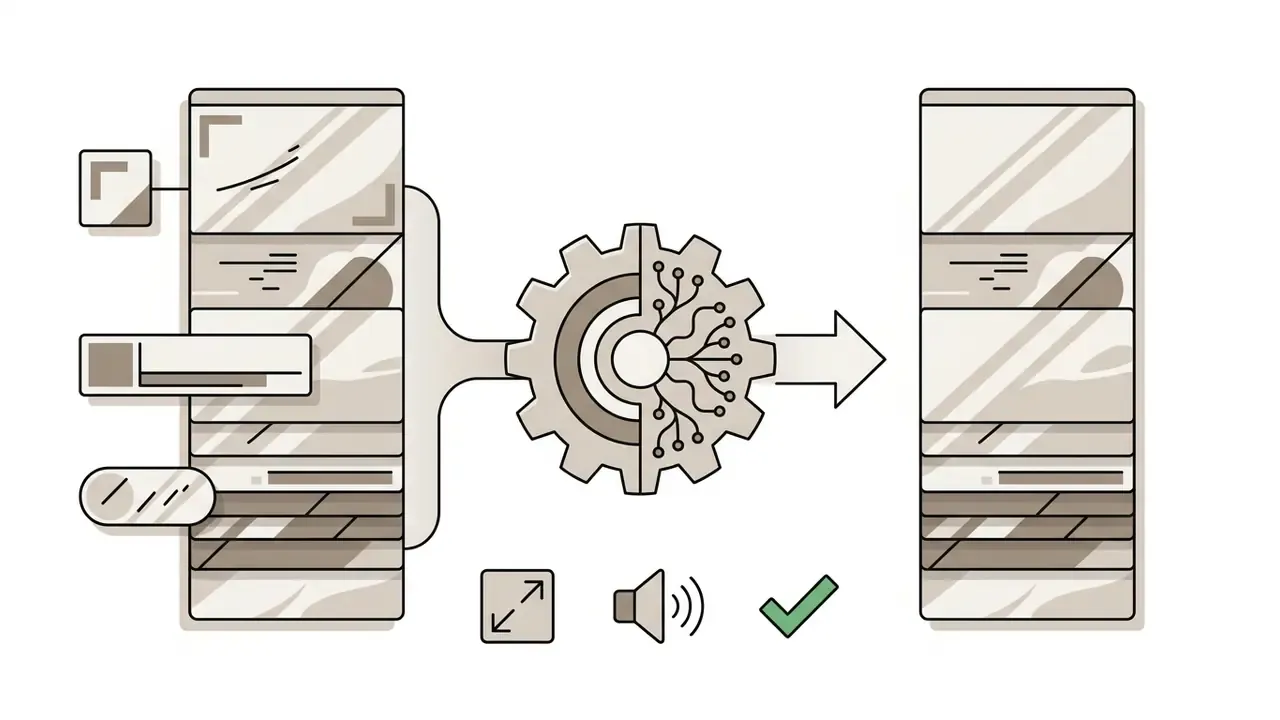
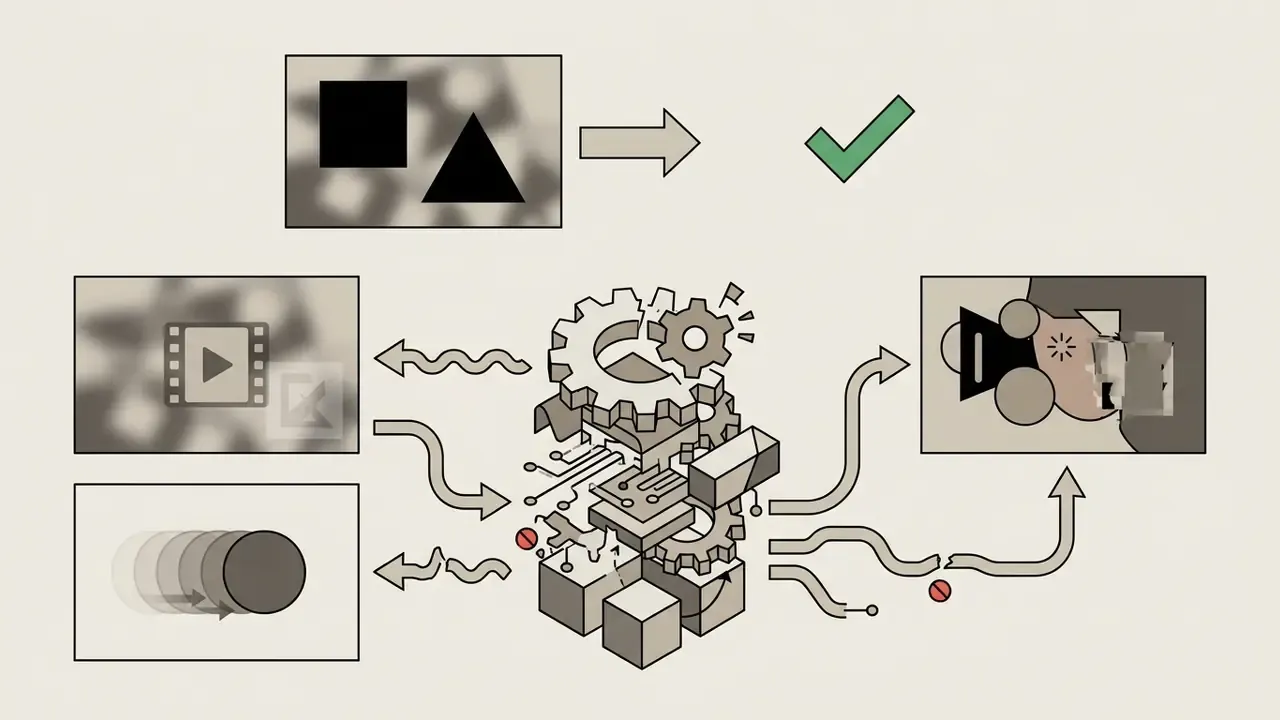


What Changed by 2026 for Watermark Removal Workflows
Three shifts matter if you are choosing a free online tool remove watermark from video this year.
First, provenance rules hardened. EU transparency obligations for AI-generated and AI-modified content apply from 2 August 2026, so an erased badge does not erase a disclosure duty. Second, invisible provenance signals spread: C2PA-style content credentials and embedded metadata may survive a visual cleanup that looks flawless to the eye. Third, detection research matured. Forensic benchmarks now localise inpainted regions, which means "clean" is not the same as "untraceable".
The practical consequence is boring but important. Keep the untouched master, log the edit, and treat AI cleanup as a documented processing step rather than a silent one.
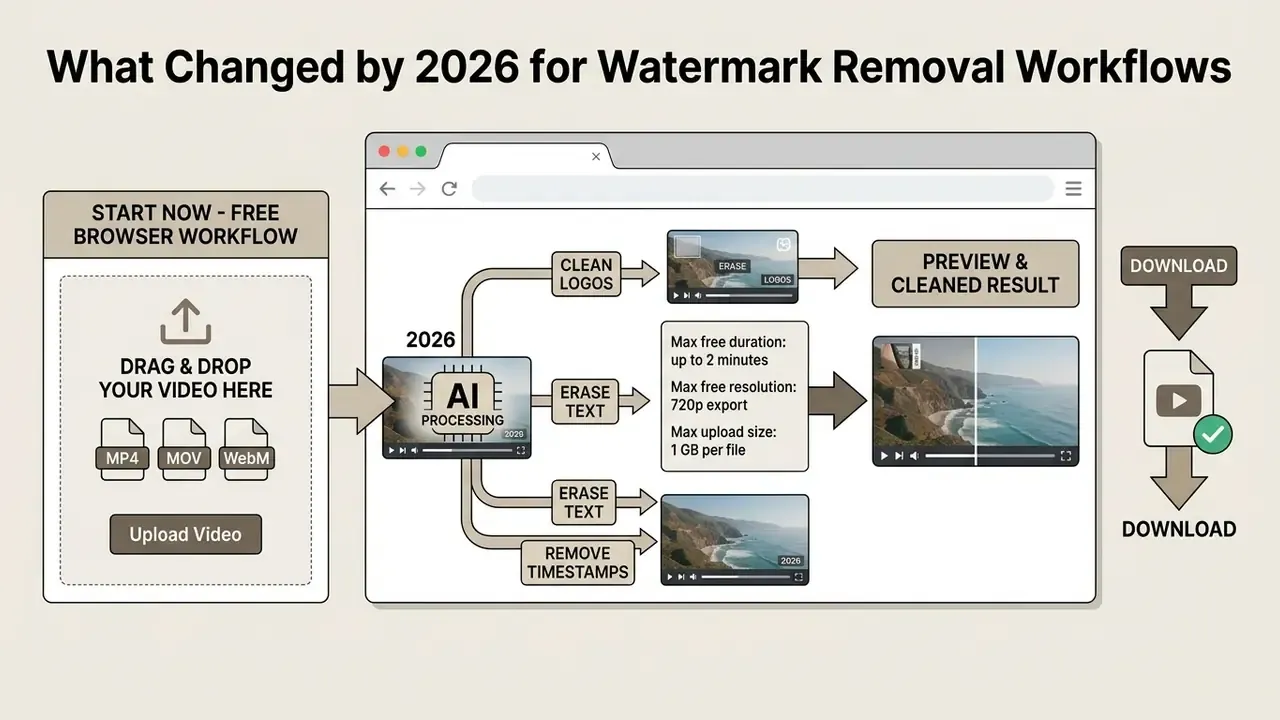
Try the online watermark remover now: browser-based, no installation, no desktop GPU required. Uploading confirms that you own the footage or hold documented rights to edit it.
What an AI Video Watermark Remover Can Remove
An AI video watermark remover identifies and reconstructs pixels obscured by static corner logos, moving lower-third banners, hardcoded captions, burned-in timestamps, and semi-transparent overlays. Unlike manual cloning or spatial cropping, deep learning models read contextual spatial detail plus adjacent temporal frames, then synthesise plausible background content beneath the target region.
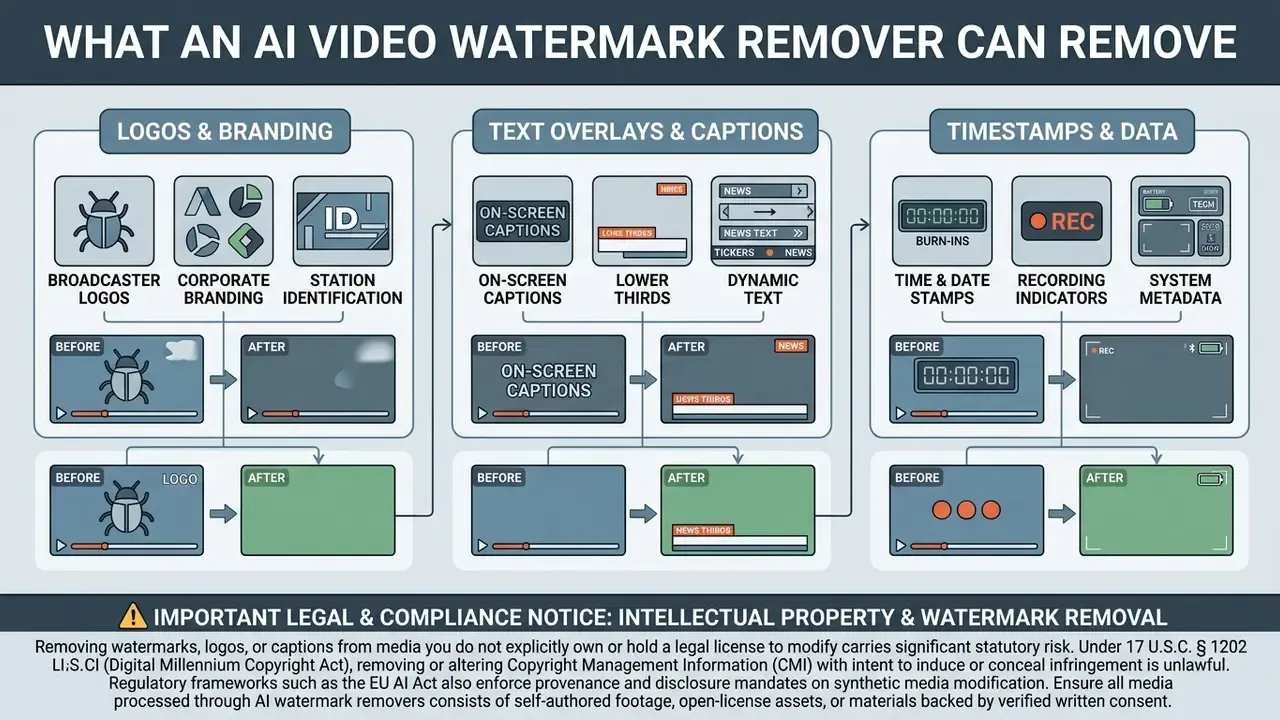
Logos, Text, Captions and Timestamps
AI video watermark removers isolate the pixel boundaries of text overlays, date stamps, burned-in captions and static logos, then rebuild the background frame by frame. Neural architectures treat hardcoded lower-thirds and date stamps as target masks, substituting the obscured pixels with texture synthesised from surrounding spatial context.
Research into dense visible watermark removal shows that multi-stage pipelines isolate overlay structures before propagating clean background features. Modern blind-removal work formalises this as a three-stage sequence: segment the mark, inpaint the masked region, then restore local colour and texture continuity.
«PVWRNet uses dual attention modules to balance spatial text boundaries against background textures, delivering measurable gains in background restoration quality.»
«RIRCI separates watermark component identification from imaginative background recovery through a two-path network, outperforming prior methods on two large-scale benchmarks.» Leng et al., Removing Interference and Recovering Content Imaginatively for Visible Watermark Removal, AAAI 2024. https://arxiv.org/abs/2312.14383
Web implementations adapt these models to work directly on the browser frame. The user sees only the mask-selection layer, while the heavy reconstruction runs on cloud GPUs. Teams that also need timeline trimming, colour work or captioning around the cleanup step can compare browser and desktop options in our guide to free video editing software.
Typical artifact set to inspect after text and logo removal: blur halos at mask edges, texture smearing on gradients and skin, ghost outlines where the original glyph stroke was brightest, and temporal flicker when adjacent frames are rebuilt inconsistently. Static, low-detail backgrounds such as walls, sky and studio backdrops produce the cleanest results. Scene cuts directly beneath the overlay produce the worst.
Static, Moving and Semi-Transparent Video Watermarks
Static watermarks stay fixed across video frames, which allows simple mask propagation. Moving and semi-transparent marks need dynamic temporal tracking and alpha-channel signal separation. A static corner logo lets a single spatial mask be reused across the whole clip timeline, which keeps compute overhead low.
Moving watermarks change pixel coordinates over time, so the algorithm must estimate trajectory and hold temporal consistency across sequential frames. Semi-transparent marks pose a different mathematical problem, because the underlying content is blended with the overlay:
To restore the original frame, the model has to decouple mixed colour layers rather than replace pixels wholesale. Lose temporal tracking on a moving or blended mark and you get flicker plus ghost edges across neighbouring frames.
«Video inpainting models must enforce appearance consistency and motion coherence across frames; otherwise flicker artifacts appear in dynamic scenes.»
Peer-reviewed work on visible video watermark removal arrives at the same point from the opposite direction. Single-frame methods break down precisely because they ignore temporal dynamics and the diversity of watermark opacity, scale and motion.
Watermarks Near Faces, Products and Detailed Backgrounds
Removal near human faces, detailed product packaging or intricate background textures raises the risk of generative hallucination and semantic edge distortion. AI models depend on surrounding context to fill masked gaps. When the overlay intersects critical anatomical or product detail, the model simply lacks enough context to rebuild the exact original geometry.
«Deep learning has advanced complex scene restoration substantially, yet faithful reconstruction of fine facial detail and reflective surfaces remains an open problem.»
Networks trained mostly on landscape or urban footage often generate structural artifacts on faces, hands and specular product surfaces. Models specialised on face datasets, in turn, degrade on natural scenes. Rebuilding shadows, highlights and high-frequency texture behind an overlay remains unsolved in generative vision. For critical commercial assets, unexpected smearing or unnatural smoothing near subject boundaries needs manual quality validation before release. In identity-sensitive workflows, forensic guidance still insists that the original unprocessed frame stays the authoritative reference.
How to Remove Watermark From Video Online for Free
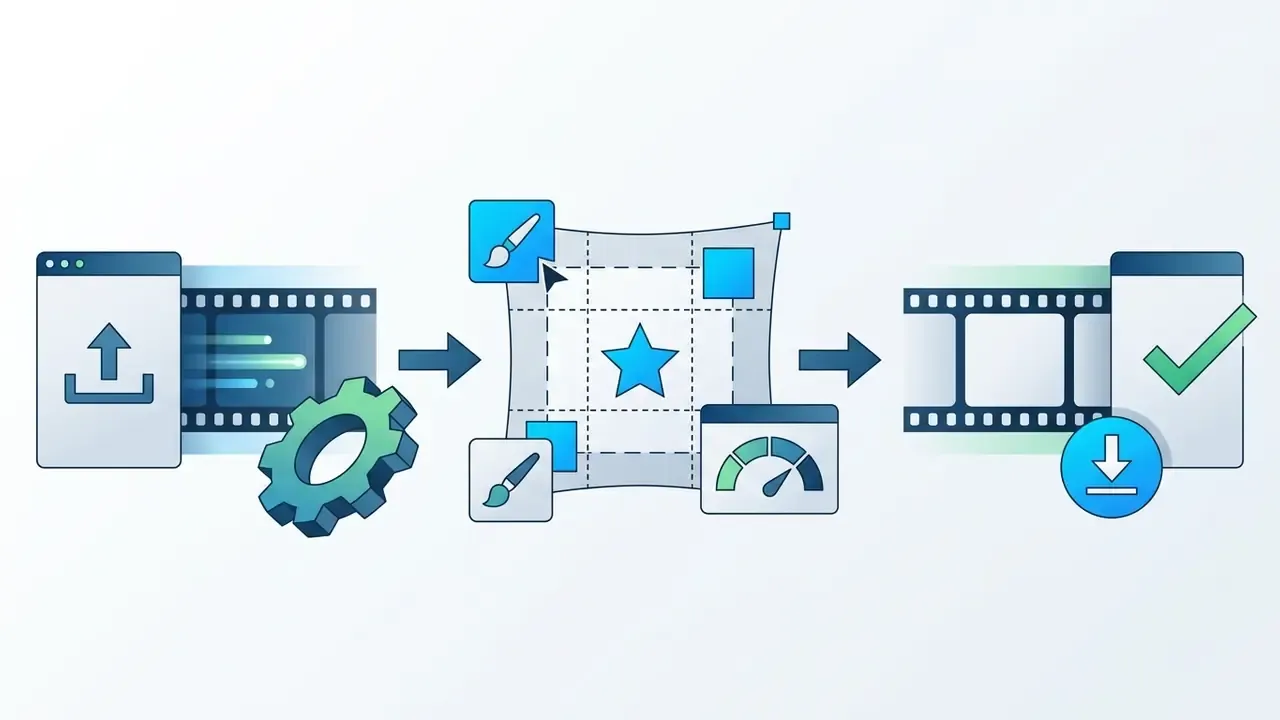
Removing a watermark from video online means three things: upload the source file, designate the watermark area for neural inpainting, then download the cleaned stream after server-side processing. Web architectures run inference on remote cloud GPUs and return a reconstructed video file with no local install. If you are still weighing browser tools against installed apps, our reference entry on video editing tools maps where each category fits.
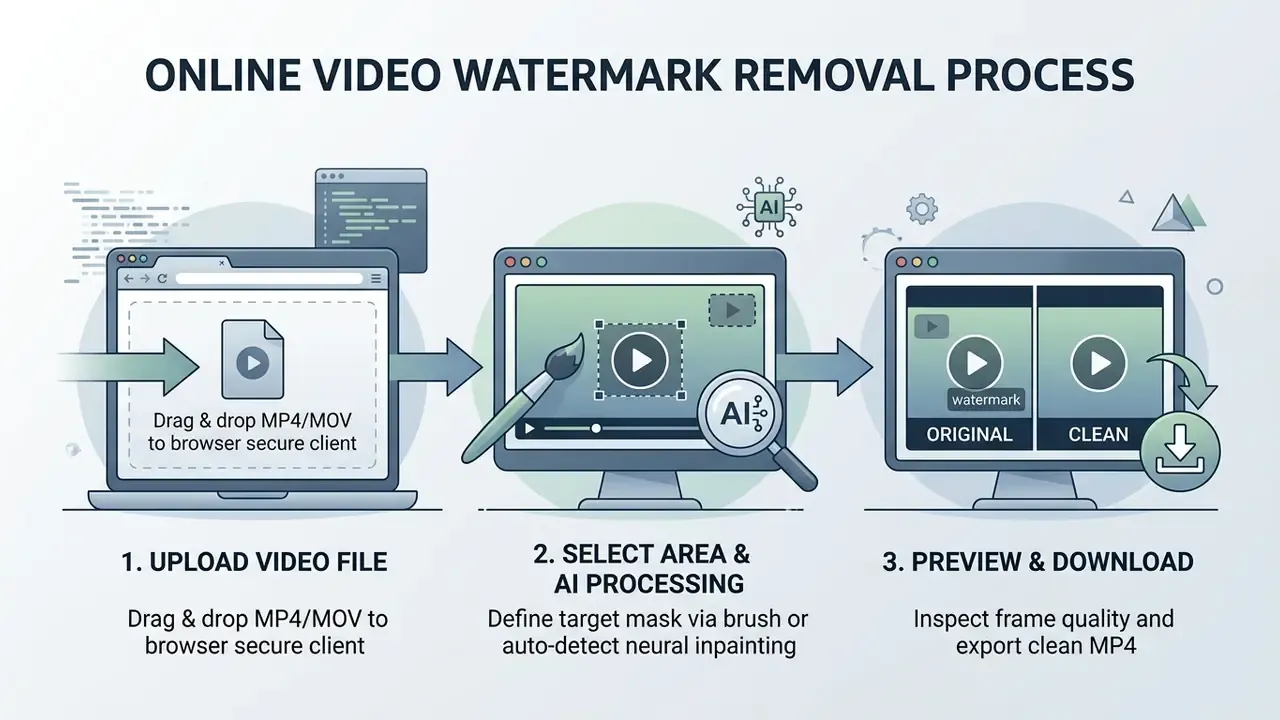
Figure 1: Three-stage online workflow for automated video watermark detection, neural inpainting, and quality review. Accessible step list: (1) upload video, (2) select watermark area and run AI processing, (3) preview the cleaned result and download.
Upload the Original Video File
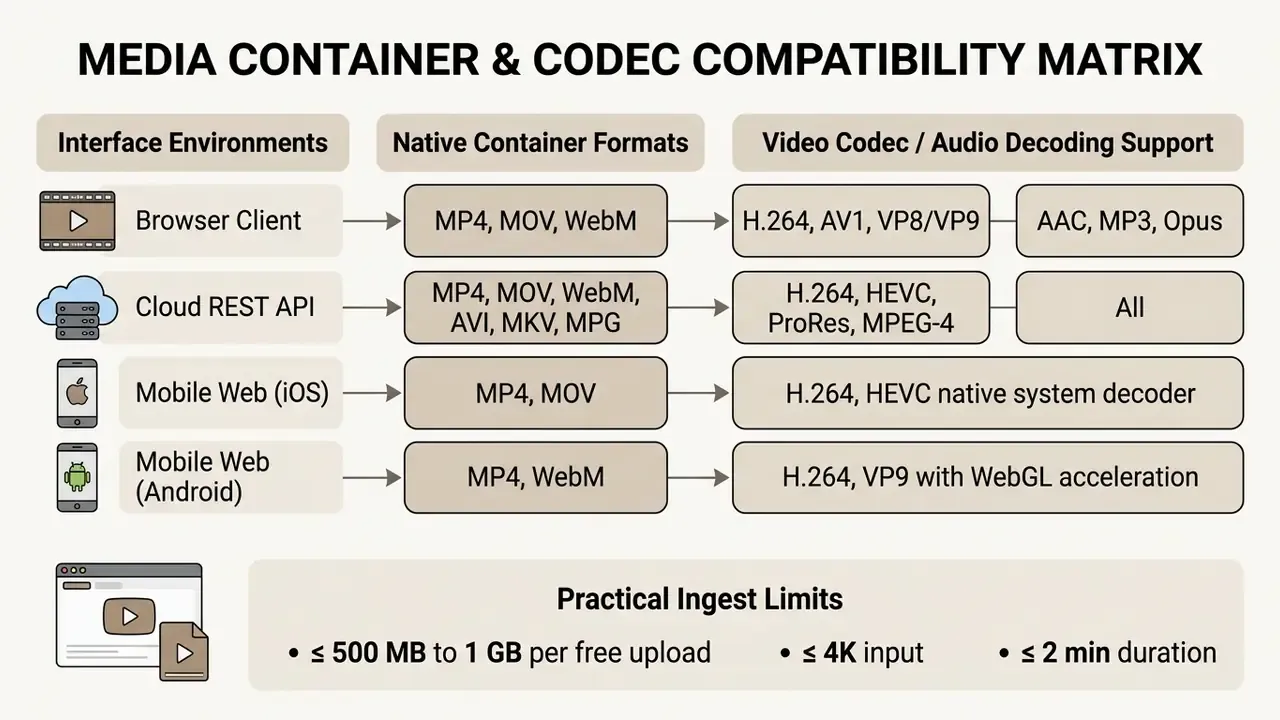
To start, upload a supported container through the browser using drag-and-drop or the file picker. Modern online pipelines accept the common web video formats: MP4, MOV, WebM and AVI. The exact list depends on whether you work in the browser client or through the REST API.
Select the Watermark Area and Start AI Processing
You define the watermark area by drawing a bounding box or brush mask, or you let AI find it. Automated neural detection locates visible logos and text on its own. Manual boxes give precise limits for static overlays; brush tools handle irregular text shapes.
Automatic systems scan the first keyframes and recognise recurring text overlays, lower-thirds or brand badges. Once the mask is confirmed, the neural video inpainting pipeline starts. The model reads surrounding spatial pixels and adjacent frames, then fills the masked region with background detail that matches the motion vectors and lighting of the original clip.
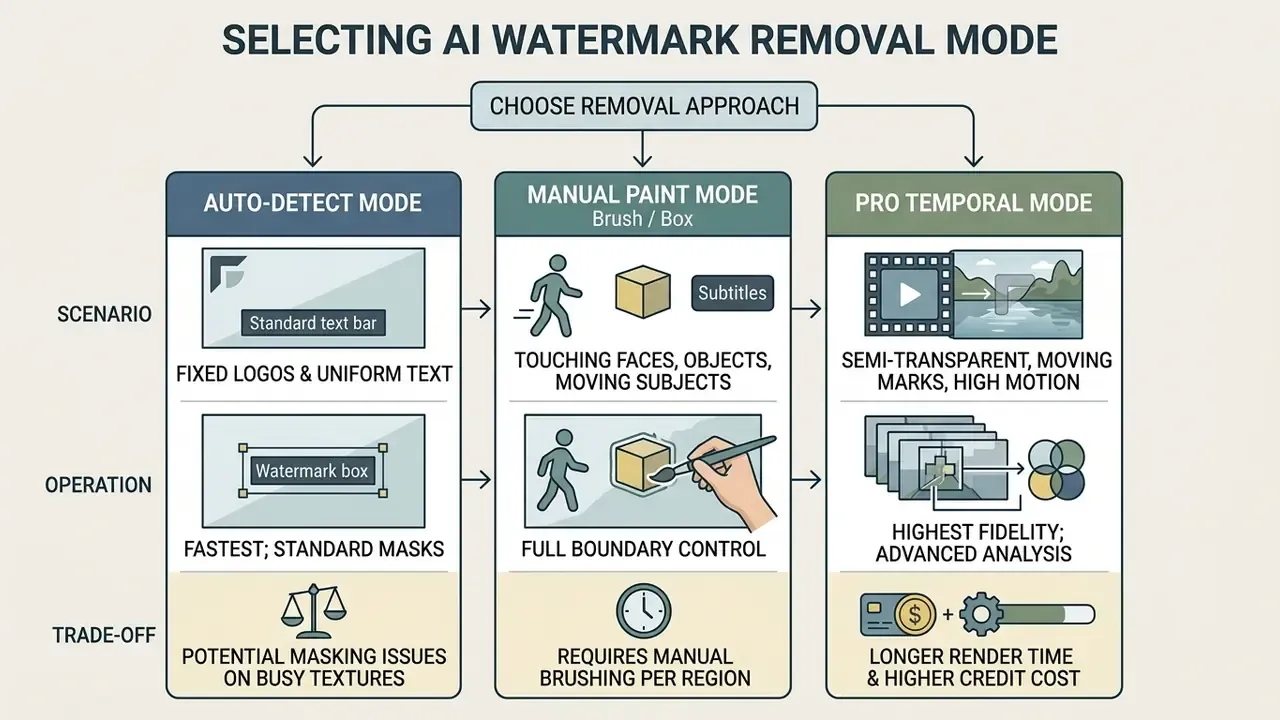
A practical rule of thumb. Start in Auto-Detect on the first 30 seconds and judge the mask preview. Escalate to Manual Paint when the detector clips subject detail, and to Pro Temporal Mode when playback shows edge shimmer, patch drift or ghosting.
Preview the Result and Download the Clean Video
Before you spend bandwidth on export, review the processed stream with frame-accurate controls and look for spatial artifacts or temporal flicker. Quality assurance layers generate downsampled keyframe previews that show the reconstructed region across scene changes.
Thumbnail selection algorithms pick representative keyframes using motion scoring, blur metrics and texture evaluation. Standard multimedia assessment procedures, including ITU-T P.910 subjective testing protocols, stress inspecting high-motion frames, where inpainting artifacts show up first.
«Internal video inpainting that jointly learns appearance consistency and motion coherence reaches visual quality comparable to unmasked source frames.»
When the preview looks right, export and download the processed MP4 to local storage. Aspect ratio, framing, dialogue, music and sound effects stay untouched, because inpainting works strictly inside the mask and never on container geometry.
Batch Processing: Removing Watermarks from Multiple Videos Simultaneously
For high-volume campaigns or ecommerce catalogues, uploading clips one at a time becomes the bottleneck. Advanced browser pipelines use parallel cloud queuing to run bulk removal across whole asset folders instead of single files.
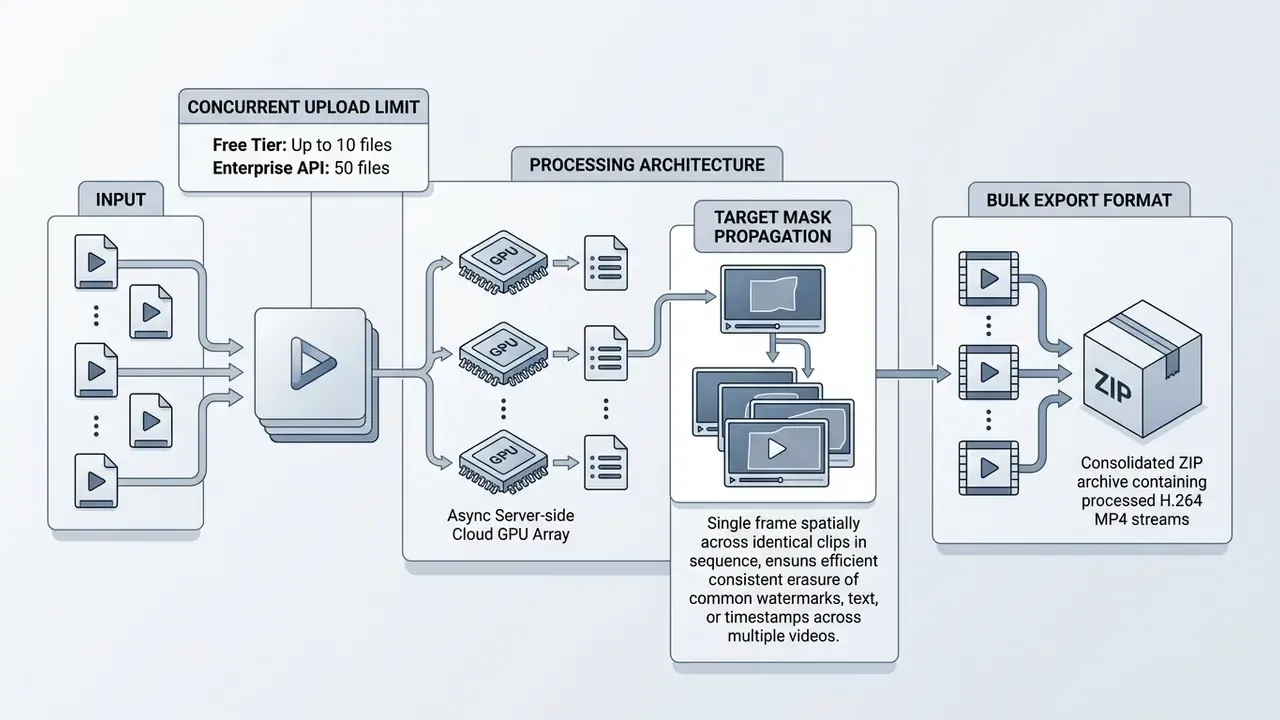
To run a batch, drag a whole folder into the upload container. The detector applies keyframe recognition across every selected stream. You can apply one static mask globally, which is ideal when the same channel badge sits in the same corner of every clip, or fine-tune individual temporal tracking boundaries before queuing. Enterprise integrations follow the queued-job pattern documented for cloud batch schedulers: files are accepted, queued, executed on automatically provisioned GPU resources, then returned as a single archive. OData-style multipart batching is the usual transport for submitting many jobs in one request.
Batch mode is where free tiers diverge most sharply from paid plans. Public free access usually limits you to sequential single-file jobs, while simultaneous multi-file removal and folder uploads sit behind premium or API tiers. Review current thresholds in AI Media Pricing before planning a catalogue-scale run.
Video Watermark Removal Quality: AI vs Blur, Crop and Mosaic
Generative AI inpainting preserves frame dimensions and aspect ratio, and generally delivers higher visual fidelity than cropping, Gaussian blur or mosaic masking. Traditional editing hides the mark by destroying spatial data or changing composition. AI reconstruction synthesises the missing pixels and keeps full frame context.
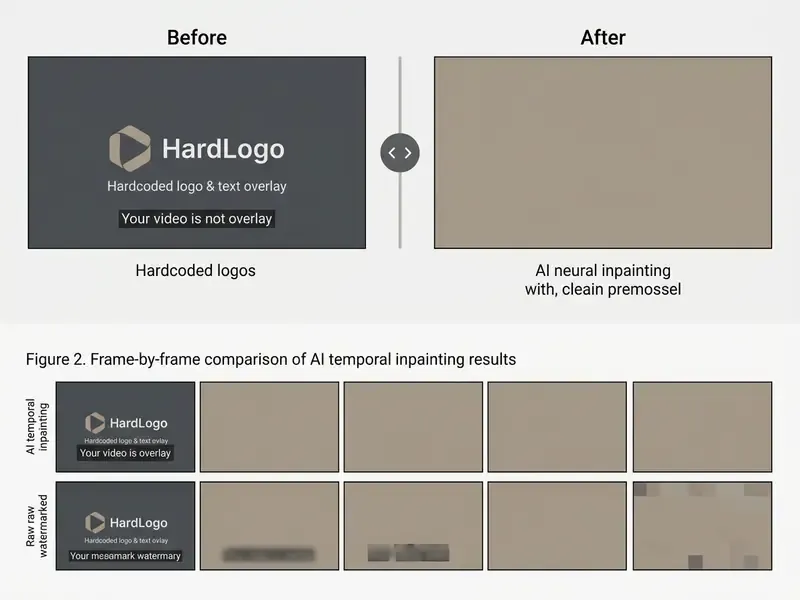
Recommended comparison scenarios for the slider: (1) a static corner logo on a studio wall, (2) burned-in caption text over a moving handheld scene, (3) a semi-transparent badge over reflective product packaging. Those three cases expose the whole quality range, from trivial to near-impossible.
When AI Removal Preserves the Original Frame Better
AI-powered removal keeps full composition, original aspect ratio and native resolution, because it restores content strictly inside the masked region. The outer canvas stays untouched.
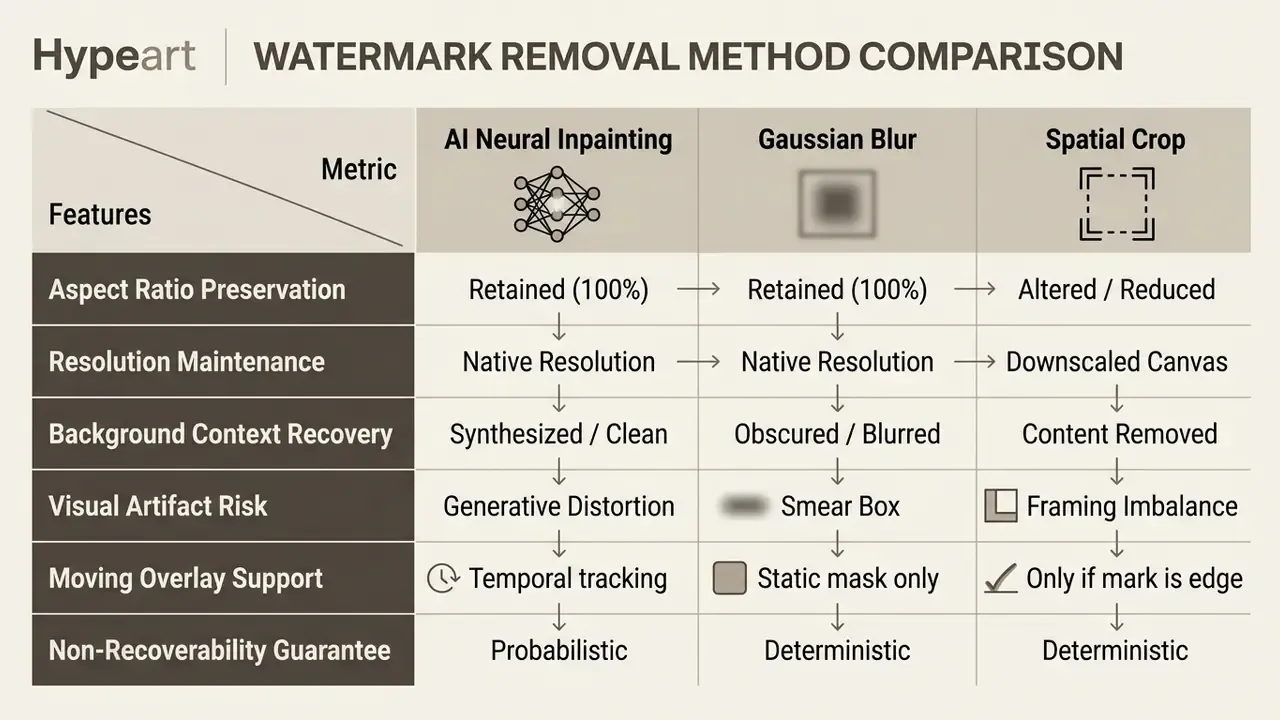
Read in plain text: AI inpainting wins on video quality and moving overlays, blur wins on certainty, crop wins on nothing except speed, and mosaic behaves like blur with coarser cells.
«AVID performs any-length video inpainting with a diffusion model, reconstructing spatiotemporal regions without canvas expansion or frame cropping.»
This matters for high-definition clips where framing and edge context carry the narrative. Classic inpainting theory supports the same distinction: structure surrounding the hole is continued inward, so borders and composition survive, whereas outpainting or "uncrop" deliberately extends past the original frame. Teams building generation workflows without default platform badges can explore a free ai video generator no watermark, and our roundup of free AI video generators documents which platforms brand free exports at all.
One internal technical evaluation illustrates the trade-off. An operations team processed 45 legacy promotional clips carrying hardcoded lower-third text. Instead of cropping 15% of the lower frame, they applied targeted neural inpainting and kept the original 16:9 framing across every asset, with no edge distortion. Treat that as illustrative rather than a benchmarked guarantee.
When Blur, Crop or Mosaic May Be the Safer Option
Free AI Video Watermark Remover: Limits, Processing and Privacy
Free online AI video watermark removers run under practical technical limits: duration caps, credit allocations, export resolution ceilings and server-side retention schedules. Cloud GPU compute costs real money, so providers enforce structured usage tiers for non-paying users. Nothing sinister there, just arithmetic.
Free Mode, Credits and Video Upload Limits
Public free tiers restrict asset length, cap exports at 720p or 480p, and meter processing frequency through daily or monthly credit balances. These constraints match standard cloud media business models across the industry.
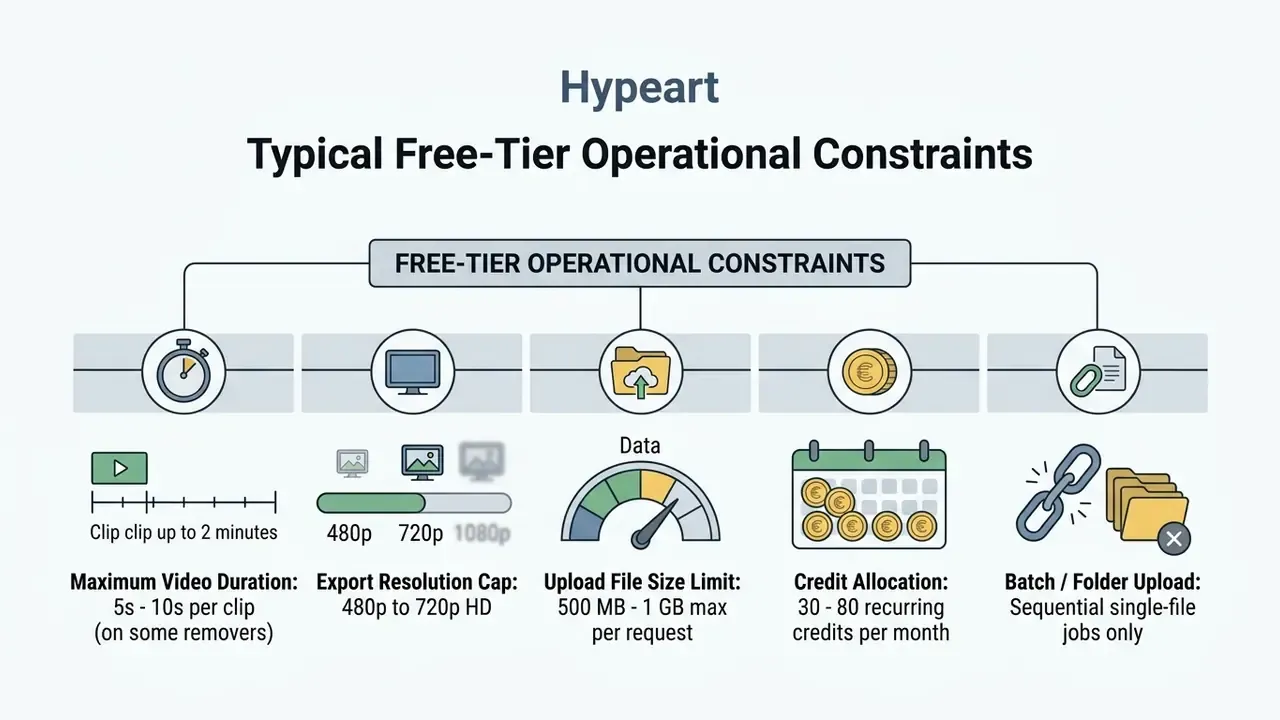
Major web platforms show similar structures. VEED limits free exports to 720p with a 1 GB upload cap. Generative tools such as Pika restrict free tiers to 80 monthly credits at 480p with roughly 5-second clips, while Kling allocates around 66 daily credits for short clips. Infrastructure vendors apply the same logic to delivery rather than generation: Mux, for example, permits up to 10 on-demand assets and 100,000 free delivery minutes at up to 1080p. Video length is usually the first wall you hit, not resolution. For commercial subscription tiers and credit pricing, review AI Media Pricing.
What Happens to Uploaded and Processed Videos
Responsible cloud platforms protect uploads with HTTPS/TLS and purge processed files automatically after the job completes. Privacy standards expect services to shield user assets from unauthorised third-party access and from indefinite storage.
Retention policies vary a lot. Privacy documentation for services like WhisperAPI specifies automatic deletion 24 hours after processing, while enterprise platforms such as Pipe Docs retain media logs for up to 28 days for diagnostic recovery. Institutional defaults in Microsoft 365 environments can stretch to 60 days unless changed manually. Meanwhile, some public free tools reserve model-training rights over uploaded prompts and output frames. A few editor privacy policies state plainly that prompts, editing actions and generated content may train the vendor's own models.
«Data minimization and explicit user consent should precede any use of uploaded content for training generative AI models.»
Compare Online AI Video Watermark Remover Alternatives
Choosing a watermark remover tool means weighing online AI removers, manual retouching, and professional desktop non-linear editing suites. Each path trades speed against hardware dependency, output quality and user control. For a broader toolchain view, see our comparison of free video editing software.
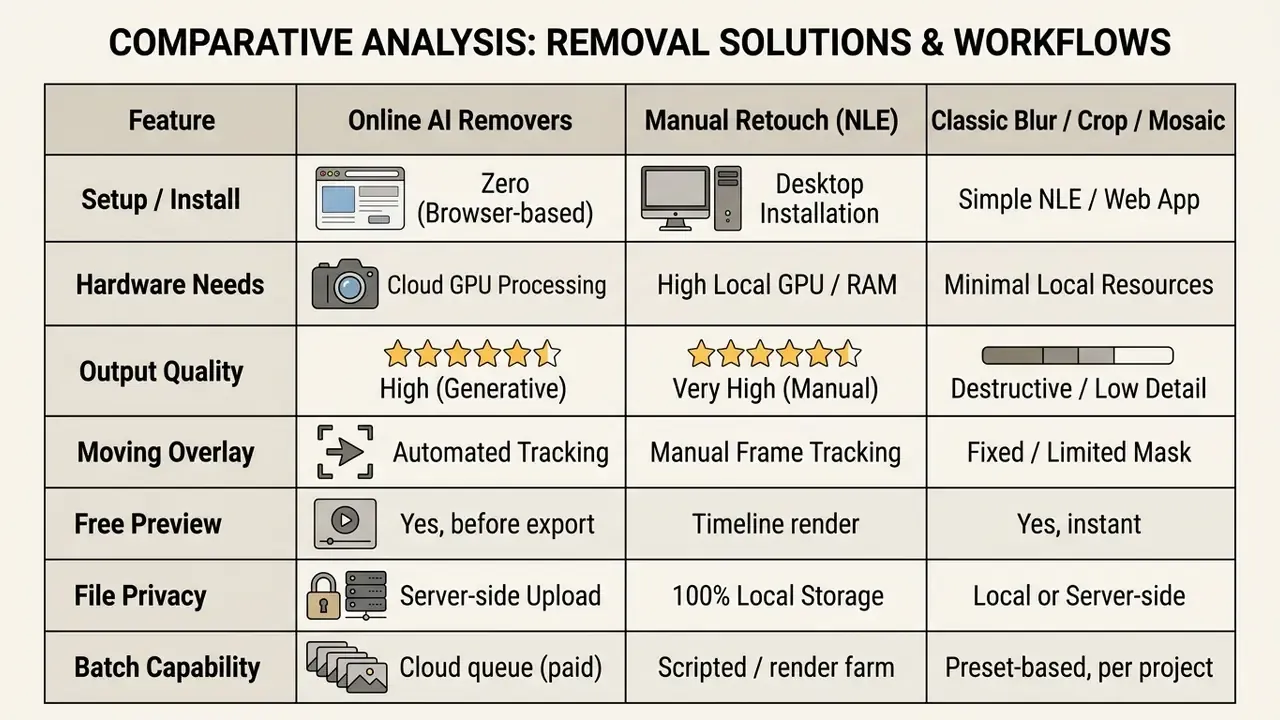
Summary under the table: online AI removers win on convenience and moving marks, desktop NLEs win on control and local privacy, and blur or mosaic win only when irreversibility is the requirement.
AI Removal vs Manual Watermark Area Selection
Automated detection speeds up high-volume processing. Manual selection gives you the boundary control that complex or dynamic backgrounds demand. Neural models scan frame structures and isolate standard corner badges or centred text overlays without intervention.
In scenes with reflections, moving subjects or transparent overlays, automatic detection produces imprecise masks more often than vendors like to admit. Drawing a bounding box or brush mask constrains the inpainting boundary explicitly and keeps the model away from adjacent subject detail.
«Automatic watermark detection handles standard logos efficiently, while manual mask refinement improves contour accuracy in visually complex scenes.»
Adobe documentation describes the same two-stage pattern in still-image work: automatic object selection followed by human refinement. Detector output is rarely final on hair, fur, glass or overlapping objects. Peer-reviewed segmentation research supplies the counterweight, since fully manual tracing is slow and error-prone, and hybrid interactive selection extracts accurate contours fastest. For wider tool benchmarking, consult the AI Media Comparison directory.
Online Tools vs Desktop Video Editing Software
Browser-based removers work across platforms with no installation. Desktop applications such as Adobe Premiere Pro, DaVinci Resolve and CapCut offer multi-track timeline control and local privacy. Web editors push inference to cloud servers, which makes them usable on Windows, macOS, Linux and Chromebook devices alike.
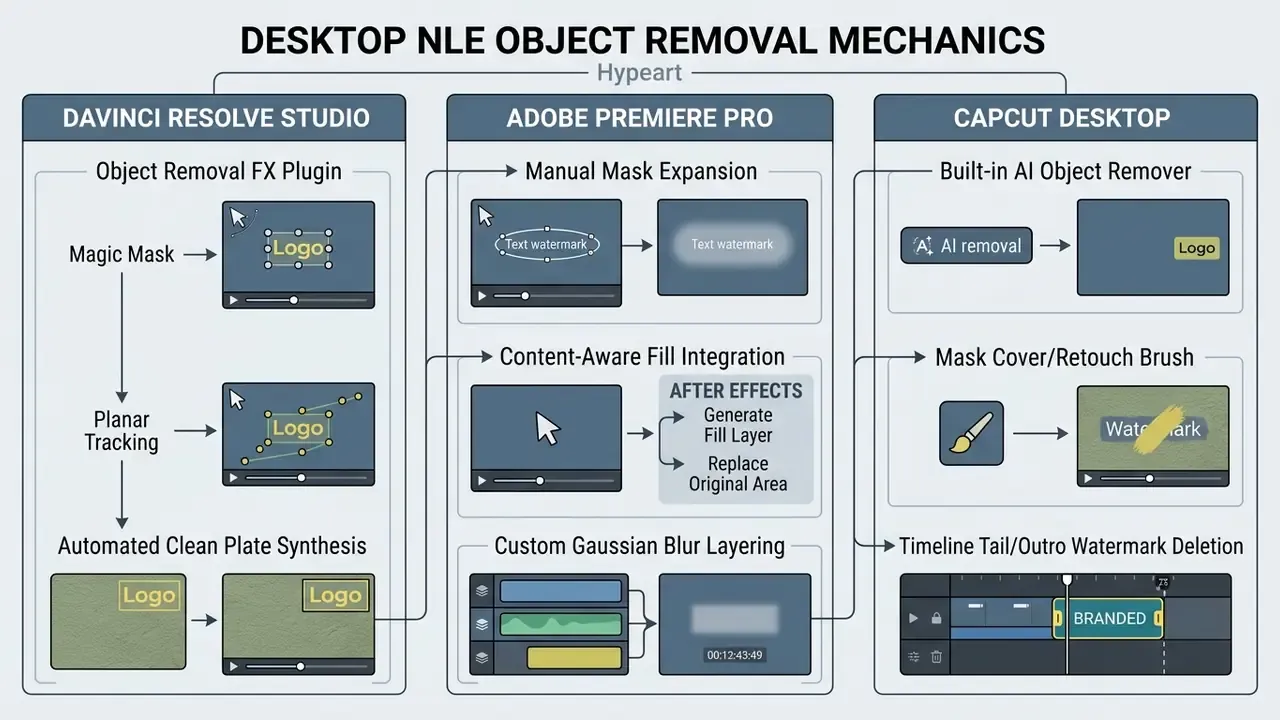
Desktop suites remove network transfer bottlenecks and keep client data on local storage. They also demand serious local GPU power and manual planar tracking to composite clean background plates. Feature exposure differs sharply by vendor: CapCut documents one-click AI removal plus export-time watermark controls, while Adobe and Blackmagic treat the task as compositing, that is masking, tracking, scene analysis and clean-plate generation, rather than one "remove watermark" button. A detailed capability breakdown sits in the AI Media Versus matrix, and platform-level output quality is benchmarked in our review of the best AI video generators.
Choose the Best Watermark Removal Method for Your Video
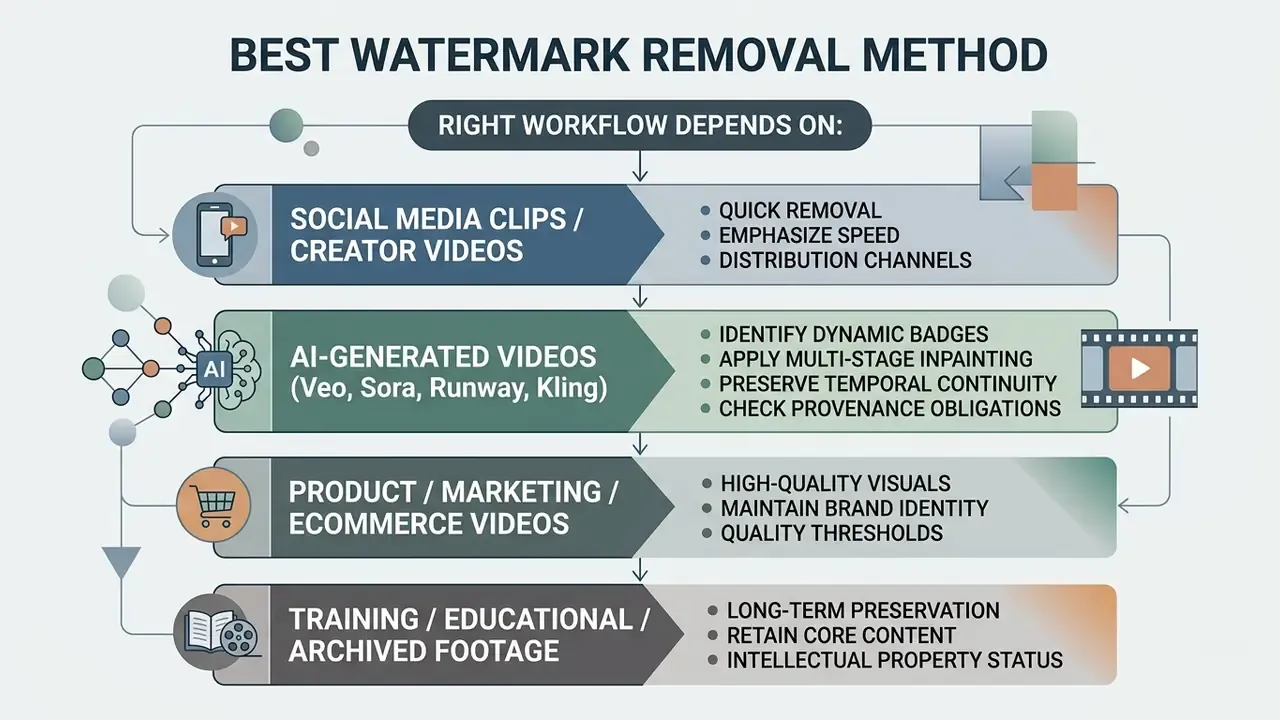
The right workflow depends on media class, distribution channel, quality threshold and intellectual property status. Match the method to the asset type and you cut processing time while protecting composition.
Removing Watermarks from AI-Generated Videos (Veo, Sora, Runway, Kling)
Generative platforms frequently burn discrete badges, semi-transparent logos or moving end-frame overlays into draft exports. Cleaning synthetic footage from architectures like Google Veo, OpenAI Sora, Runway Gen-3 or Kling AI raises specific problems, because background motion is complex and AI textures are high-frequency.
Unlike a static TV logo, an AI video watermark often repositions itself or hides in subtle alpha-blended noise. To restore AI drafts effectively:
The cheapest fix is often not generating a branded draft in the first place. Verify credit and badge policies at the generation stage: see the Veo capability and cost breakdown in our Google Veo implementation guide and compare unbranded free tiers among AI video generators.
Product, Marketing and Ecommerce Videos
Commercial clips demand strict spatial and temporal continuity, so inpainting must not distort packaging, brand text or background lighting. Clearing outdated promotional badges or legacy pricing overlays needs high visual integrity, because consumer trust sits on the line.
Current research defines video object removal as erasing specified objects and filling the region with contextually consistent background while preserving spatio-temporal consistency. Follow-up work adds shadow-free, flicker-free output and tolerance to imperfect masks. Physical-consistency benchmarks test whether secondary traces, meaning shadows, glass reflections and edge sharpness, survive the edit. That is exactly what matters for product footage.
«Localization benchmarks for video inpainting show AI restoration can be visually convincing yet still leave detectable, physically inconsistent traces in commercial scenes.»
Generative artifacts near product contours can misrepresent a physical item, which creates compliance risk for online retailers under advertising-accuracy rules. When refreshing commercial portfolios, teams can evaluate free video editing tools and our comparison of free video editing tools to keep asset libraries clean.
One catalogue restoration example: 120 product demonstration videos carried an outdated 2024 discount badge in the upper-right quadrant. A cloud batch inpainting workflow cleared the badge across all clips in under two hours, keeping product reflections intact and avoiding re-shoot costs. Still frames pulled from the cleaned clips were then upgraded for listing pages using the retouching sequence in our guide to online photo editors. If your listing template needs the cleaned frame to replace a text block, the markup pattern in how to display image instead of text in html is the safer accessible route.
Training, Educational and Archived Footage
Archival recordings, corporate training modules and educational webinars often carry hardcoded speaker names, obsolete date stamps or burned-in subtitles that need pixel-level inpainting. Soft subtitle tracks live in separate metadata files. Burned-in text is fused into frame pixels permanently.
Documentation from media processing vendors such as Telestream notes that altering hardcoded text requires full re-encoding, because the underlying pixels change. Caption timing edits, by contrast, can be handled in the timed-text file before output. An AI video text remover isolates burned-in captions frame by frame and synthesises background texture without corrupting presentation slides or lecture backdrops.
«Forensic datasets such as HTVD pair authentic and inpainted HEVC video with ground-truth masks, enabling assessment of how detectable AI restoration remains.»
For institutional archives, that detectability is a feature rather than a flaw. Document the edit, retain the untouched master, and record the restoration step in asset metadata so provenance stays auditable.
Decision Checklist: AI, Blur or Desktop NLE
Use this as a pre-flight gate before you process any clip.
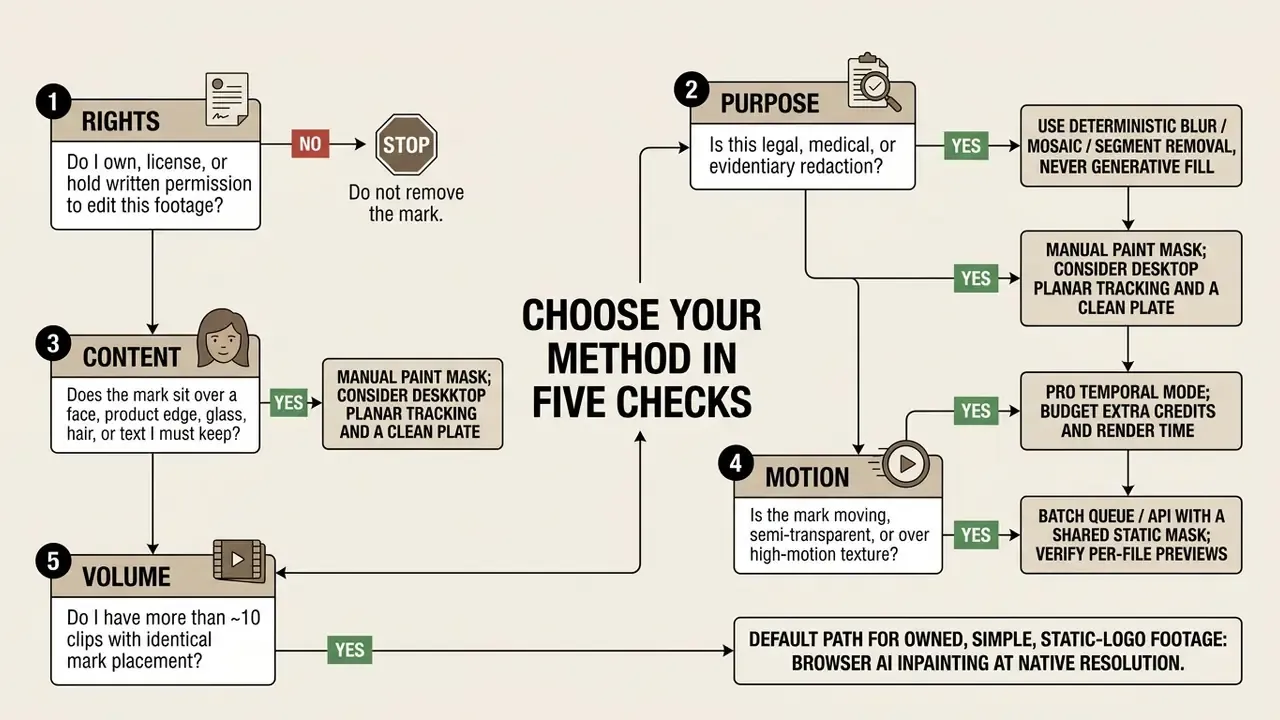
Quality-control pass before publishing: scrub the three highest-motion seconds frame by frame, check mask edges at 100% zoom, confirm aspect ratio and audio are unchanged, then compare a still from the cleaned clip against the original master.
FAQ: Frequently Asked Questions About Video Watermark Remover Tools
Which Video Formats Does an Online Watermark Remover Support?
Online AI video watermark removers universally support MP4 and WebM. MOV, AVI and HEVC compatibility depends on browser decoding and on the server-side ingestion pipeline. Modern browsers handle MP4 with H.264 video and AAC audio natively. According to MDN Web Docs compatibility tables, HEVC (H.265) playback varies: Chrome and Edge need hardware-assisted decoding extensions on Windows, while Safari provides native system-level HEVC support on macOS and iOS. WebM with VP8 or VP9 works across all modern Chromium browsers. Formats outside the browser matrix, including AVI, MKV, MPG and MPEG, are generally handled only through the REST API. For integration documentation, consult AI Media API Guides. For context on how generated footage is encoded in the first place, see our reference entry on AI video generators.
«Congress should adopt federal protection against unauthorized distribution of digital replicas created or altered with AI.» U.S. Copyright Office, Copyright and Artificial Intelligence, Part 1: Digital Replicas (2024). https://www.copyright.gov/ai/copyright-and-artificial-intelligence-part-1-digital-replicas-report.pdf Disclaimer: format and rights information here is general in nature and does not replace advice from a qualified intellectual-property specialist.
Can I Remove Watermarks From Multiple Videos on Mobile?
Mobile browsers on iOS and Android process uploads sequentially through the web interface. Client-side batch processing of several files at once is limited by device RAM and browser hardware acceleration. HTML5 media capture behaves differently per operating system. iOS Safari routes upload requests through the system Photos picker or camera capture, while Android browsers allow direct access to device storage and let the user pick a recording app. WebGL, WebGPU, WebNN and TensorFlow.js enable light inference in mobile browsers, but high-throughput multi-file inpainting still depends on cloud queuing for heavy GPU loads. Practical guidance for phones: keep clips under roughly 60 seconds per job, avoid 4K sources on older devices, keep the tab in the foreground during upload, and use a stable connection for files above 200 MB.
When Should I Use Auto-Detect Versus Manual Brush Selection?
Auto-detection handles static, high-contrast corner logos and standard text overlays on uniform backgrounds well. When the overlay touches faces, fine product texture, moving subjects or transparent glass, switch to manual brush masking. Manual selection constrains the inpainting boundary explicitly and prevents generative distortion on critical elements. The pragmatic compromise: run auto-detection first, then brush-correct the mask edges where it clips detail you need.
What Is the Difference Between Standard Inpainting and Pro Temporal Mode?
Standard inpainting rebuilds frames using local spatial reconstruction, which suits short clips with minimal camera movement. Pro Temporal Mode analyses bidirectional frames across the whole timeline. By computing forward and backward optical flow, it suppresses flicker and ghosting on high-motion footage, complex reflections and moving watermarks. The trade-off is compute: Pro renders run longer and consume more credits, so reserve them for clips where the standard preview visibly shimmers.
Can I Process GIF Animations and Short Animated Clips?
Yes. Online AI watermark removers decode animated GIFs into individual frame buffers. The engine applies spatiotemporal background synthesis across every frame in the loop, preserving colour palette, frame delays and cyclic continuity before re-encoding the clean GIF. Because GIF uses an indexed palette, inspect the loop seam, meaning the transition between last and first frame, where reconstructed texture most often breaks. Repeated marks and corner labels across looping frames are the most common GIF cleanup case, alongside short AI-generated drafts reused as animated assets.
Will Removing a Watermark Reduce Video Quality or Change the Aspect Ratio?
No cropping or canvas change occurs. Inpainting edits only the masked region, so resolution, framing, frame rate, dialogue, music and sound effects survive intact. Perceived quality depends on mark size, background complexity, motion and source encoding. Because pixels inside the frame change, the file is re-encoded on export, so keep the untouched master if you may need a higher-bitrate re-render later. Budget for one extra compression pass if your distribution platform enforces size limits. Our guide to video compressors covers quality-safe settings.
Methodology and Editorial Verification
Social Media Clips and Creator Videos
Short-form clips for TikTok, Instagram Reels or YouTube Shorts often need fast scrubbing of platform logos or legacy usernames before cross-posting. Short clips carry high temporal dynamics, so automated inpainting cleans corner overlays without disturbing the central action.
Platform moderation rules on reposting are strict. TikTok's intellectual property policy mandates removal of media that infringes third-party copyright or trademarks. Clearing platform badges from your own footage to republish across channels is legitimate asset management. Stripping logos from third-party media to conceal attribution is not, and it can create DMCA §1202 exposure independently of any fair-use argument. A content creator working on mobile can review free video editing apps like capcut, or follow the publishing sequence in our YouTube video editor workflow guide.