Quick summary - what you need to know in 30 seconds
- ACCESS: "No sign up" only means no authentication. Almost every guest editor still applies session caps (Magic Hour: 3 guest edits/day; Rewind.ai: rolling 24h token pool; EzCreate: 8 credits without sign-in vs. 15 daily with an account).
- PRIVACY: Best-practice vendors purge guest uploads within 24 hours to 30 days, encrypt transfers with TLS 1.3, and store temporary buffers under AES-256. Treat every guest session as a disposable workspace. Never upload regulated or client-confidential imagery.
- LEGAL: Under US Copyright Office guidance (2025), purely AI-generated pixels are not copyrightable; human-directed edits to your own photograph remain protectable. Commercial rights come from platform Terms of Service, not from the model itself.
- CAPABILITY: Guest-mode editors reliably deliver background removal, object removal (inpainting), canvas expansion (outpainting), upscaling to 2K-4K (8K via tile-based upscalers), portrait retouching, text cleanup, and prompt-driven style transfer.
- QUALITY LEVER: Prompt structure beats tool choice. Four or more descriptive elements (subject, command, lighting, negative constraints) measurably cut regeneration cycles.
What "AI Image Editor Free No Sign Up" Really Means
An ai image editor free no sign up is a web-based tool that lets you upload, edit, and export digital images straight from a browser, with no user account, no email address, and no payment details. These platforms run server-side or in-browser generative artificial intelligence models that modify visual assets inside a temporary guest session.
That is the whole promise. Fast in, fast out.
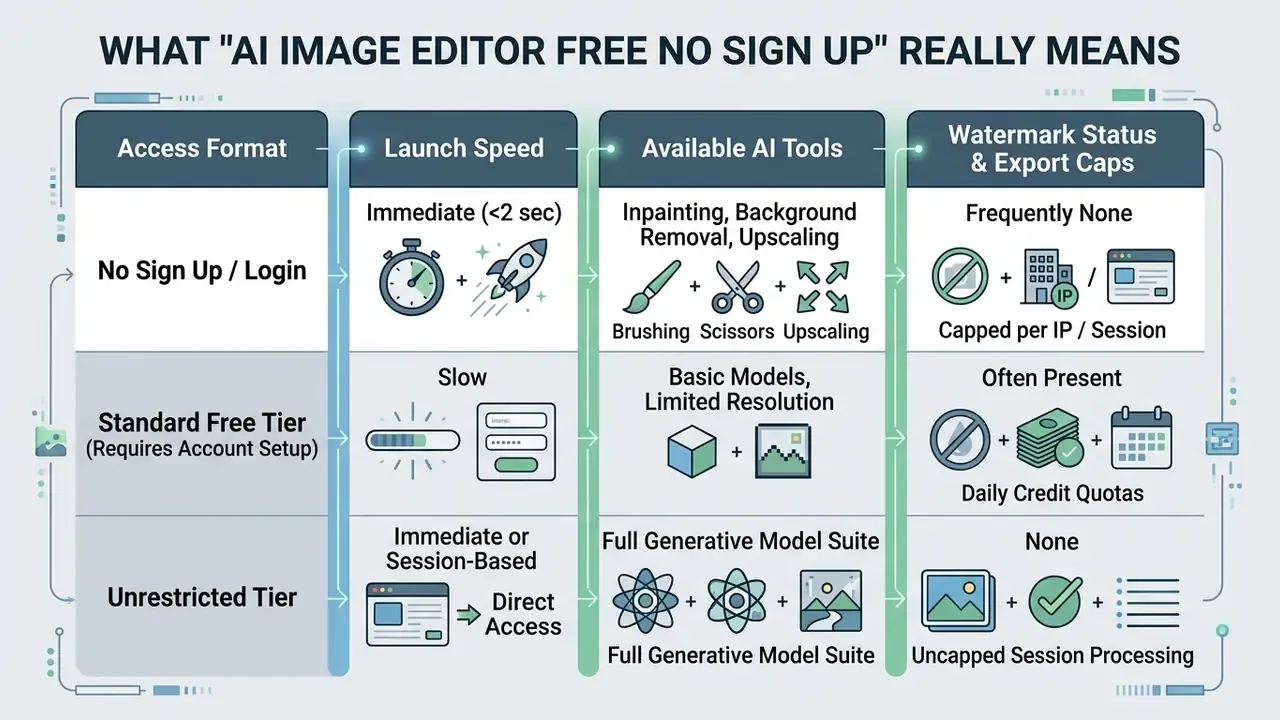
Read the table as an access map, not a quality ranking. Speed of entry says nothing about export rights.
No sign up, no login, and no restrictions: the difference
«Instruction-based editing takes a source image plus a text instruction as input and returns an edited image in which untouched regions are preserved.»
Most platforms advertising an ai image editor free no login or ai image editor no sign in enforce session-based limits instead of unlimited processing. You get instant edits. You rarely get concurrent batch operations or unrestricted resolution downloads, because both consume GPU time.
«HQ-Edit contains roughly 200,000 high-resolution edit pairs; high-quality instruction editing depends on detailed prompts and large-resolution diptychs.»
Because high-quality editing is computationally expensive, free sessions ration exactly those two resources: prompt-processing cycles and export resolution. Everything else in the marketing copy is secondary.
Real guest-session limits across named platforms (verify before you commit a workflow)
Claims of "unlimited" access rarely survive a careful read of the pricing page. The table below documents how mainstream and niche editors actually define free, accountless use, so you can benchmark any new tool against known behaviour.
| Platform (research object) | Accountless access | Documented free-use ceiling | Watermark on free output |
|---|---|---|---|
| Magic Hour | Yes, guest editing | 3 guest edits per day; free outputs positioned for personal use | No watermark, but commercial use tied to paid plans |
| Rewind.ai (AI editor) | Yes, no credit card | Daily token pool resetting every 24 hours; sign-up roughly triples allowance | No watermark stated |
| EzCreate | Yes, "no sign-in" mode | 8 free credits without sign-in vs. 15 daily credits for registered users | No watermark, no card required |
| Adobe Firefly | Browser use, but Terms acceptance required | Free daily generative credits; web download capped at 2000x2000 px, JPG/PNG | Free tier restrictions vary by model |
| Photopea / Img2Go / Photopea-class web editors | Yes | Full layered editing, but AI features limited by task or ads | Generally none |
| Magic Hour Basic (paid comparison) | Account required | 40 AI image-editor uses at 576 px on the free Basic plan | Watermark present, no commercial use |
What free access can include before you start editing
Free tier offerings in an ai photo editor free no sign up environment usually grant the core image manipulation set: background isolation, object cleanup, light retouching, and basic prompt-driven edits. Advanced capabilities such as 4K upscaling, batch processing, or custom model fine-tuning tend to sit behind registration or payment.
Many tools advertise no watermarks on first exports. Fine. But free sessions still throttle processing speed or push downloads into standard web resolution, and that limit usually appears only in the export dialogue. Inspect the operational bounds of the free version before you build a production workflow on top of it.
Readers comparing accountless creation rather than editing can review our overview of free AI image generators without sign up to see how the same credit logic applies to text-to-image tools. The Microsoft ecosystem is a useful reference point too, since the bing ai art generator runs on a credit model that behaves much like guest-mode editing once the boost balance drains.
What You Can Edit with a Free AI Photo Editor Online
A web-based ai photo editor free online no sign up can run multi-stage visual edits: object removal, background synthesis, lighting correction, and style transformation driven by natural language commands. Neural networks process the image data and alter specific pixels while holding the surrounding scene geometry intact.
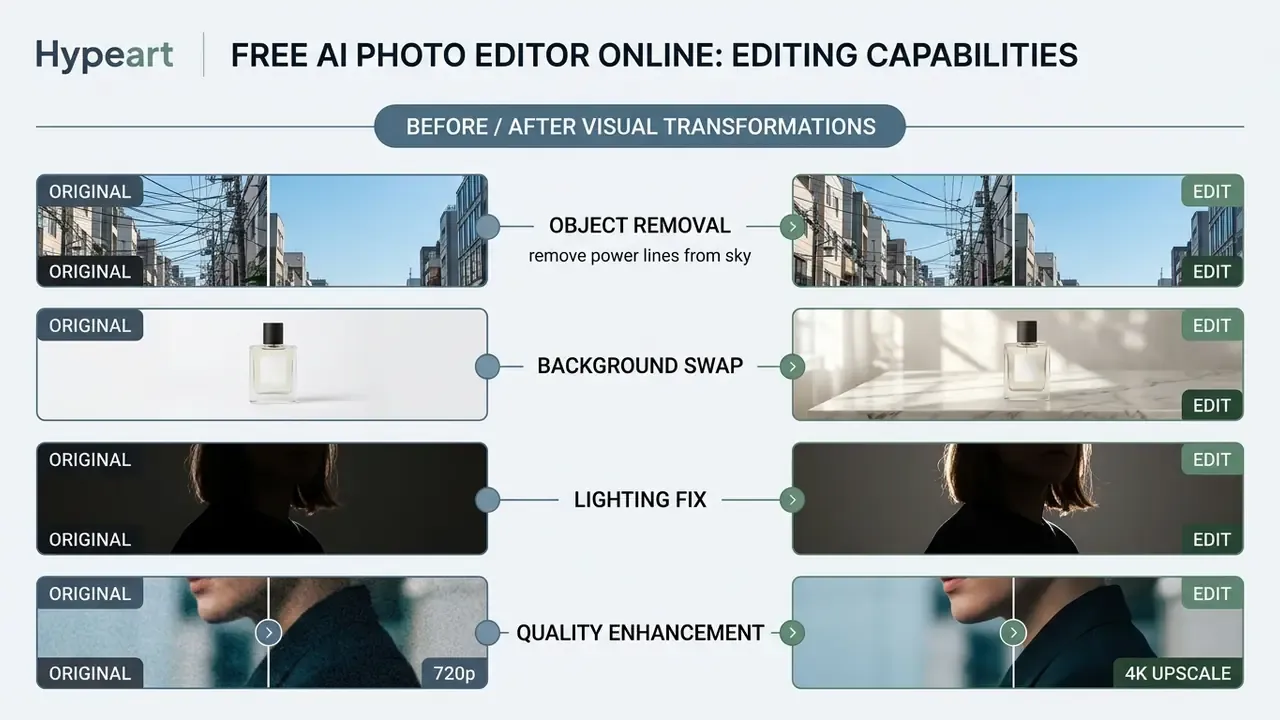
Remove objects and replace backgrounds
Object elimination in an ai photo editor no sign up relies on mask-based inpainting: the model identifies the target pixels and rebuilds the underlying texture from surrounding context. In practice the mask is a binary layer, where white marks the region to regenerate and black marks the region to preserve. Blurred mask edges reduce visible seams, which is the single most useful habit a new user can adopt.
Background replacement pairs automated foreground segmentation with outpainting to generate an entirely new environment. That combination is why a square photograph can be re-rendered as a widescreen banner or a vertical poster without stretching the subject.
To remove object elements cleanly, modern diffusion architectures evaluate semantic context, which is what prevents the classic ghost-blur artifact where a deleted lamp leaves a smear on the wall.
«The benchmark spans 1,353 image and instruction pairs across 21 editing tasks, including object removal and background replacement.»
These capabilities let users remove unwanted items, change background scenes, remove background clutter, and produce clean product shots without drawing a single selection path. Canvas expansion deserves its own mention: dedicated outpainting engines extend an image by pixel value or by target ratio, and our comparison of AI outpainting tools for expanding images details how far borders can be pushed before context breaks down.
Enhance image quality, lighting, and details
Quality enhancement in an ai picture editor free no sign up analyses low-resolution input to perform super-resolution scaling, noise reduction, and dynamic range adjustment. Deep-learning upscalers reconstruct missing pixel detail rather than interpolating it linearly, a method documented in Canon's Deep Learning Image Processing Technology / Upscaling whitepaper and reproduced across consumer pipelines that advertise 2x, 4x, and 8x enlargement with simultaneous denoising.
- Enhance image clarity using multi-scale neural enhancement filters.
- Sharpen details on fine textures, fabrics, jewellery, and product edges.
- Fix lighting and adjust lighting parameters to correct shadow imbalances and exposure errors.
- Restore vintage, scratched, or faded scans through generative reconstruction of lost texture.
- Output high quality visual assets at high resolution for commercial channels.
Enhancement is a separate model class from editing, so teams processing large batches often pair a guest editor with dedicated AI image upscalers to reach print-ready pixel density without re-uploading assets twice.
Advanced portrait adjustments: expressions, poses, and outfits
Prompt-driven editors now modify human subjects fairly deeply without wrecking identity geometry:
- Change facial expressions and features shift subject emotion, for example turning a neutral look into a subtle smile, using targeted semantic sliders or short instructions.
- Alter poses and body posture adjust arm placement, head tilt, or body orientation while neural filters preserve anatomical realism and clothing folds.
- Outfits and hairstyle swaps replace casual wardrobe elements with formal business attire, or test hair colour, length, and texture variations.
- Unblur and face restoration recover out-of-focus portraits, sharpen vintage photography, and reconstruct degraded facial detail through deep-learning super-resolution.
- Watermark and text cleanup erase overlay logos, captions, or timestamps and let context-aware inpainting rebuild the texture beneath.
Current research groups these operations as three distinct editor functions: subject replacement, portrait editing and beautification, and style transfer. That taxonomy has a practical consequence. A single prompt combining all three usually underperforms three sequential prompts, sometimes badly. Teams that need repeatable professional portraits at scale can compare dedicated pipelines in our guide to AI headshot generators.
One caution on identity edits. Altering a person's expression or clothing in a photograph you did not shoot raises consent questions well before it raises copyright ones, and the emerging pattern of image-related litigation suggests courts are paying attention to likeness, not just pixels.
Edit text, styles, and image look with prompts
Prompt-guided editing lets you modify visual semantics by submitting a descriptive text string alongside an uploaded image. In plain terms, the model translates your sentence into a targeted change inside the pixel grid: the words steer which regions get regenerated and which stay untouched. Technically, text embeddings condition the diffusion process.
«AnyEdit covers 2.5 million editing pairs across more than 20 edit types, enabling a single diffusion model to perform style transfer, local edits, and global changes from one prompt.»
This prompt based architecture supports localized style transfer, atmosphere changes, and text overlay cleanup. With a few text prompts, creators can alter subject attributes, adjust colour palettes, replace embedded typography while matching the original font and lighting, and refine the overall image look in seconds rather than an afternoon.
How to Edit an Image with AI Without Logging In
Editing photos through an ai photo editor no login follows a fixed sequence: asset upload, model selection, prompt entry, iterative generation, export. Adobe's own Firefly documentation describes the identical six-step path (upload, select model, prompt, generate, refine, download), which suggests the pattern is now an industry convention rather than one vendor's idea.
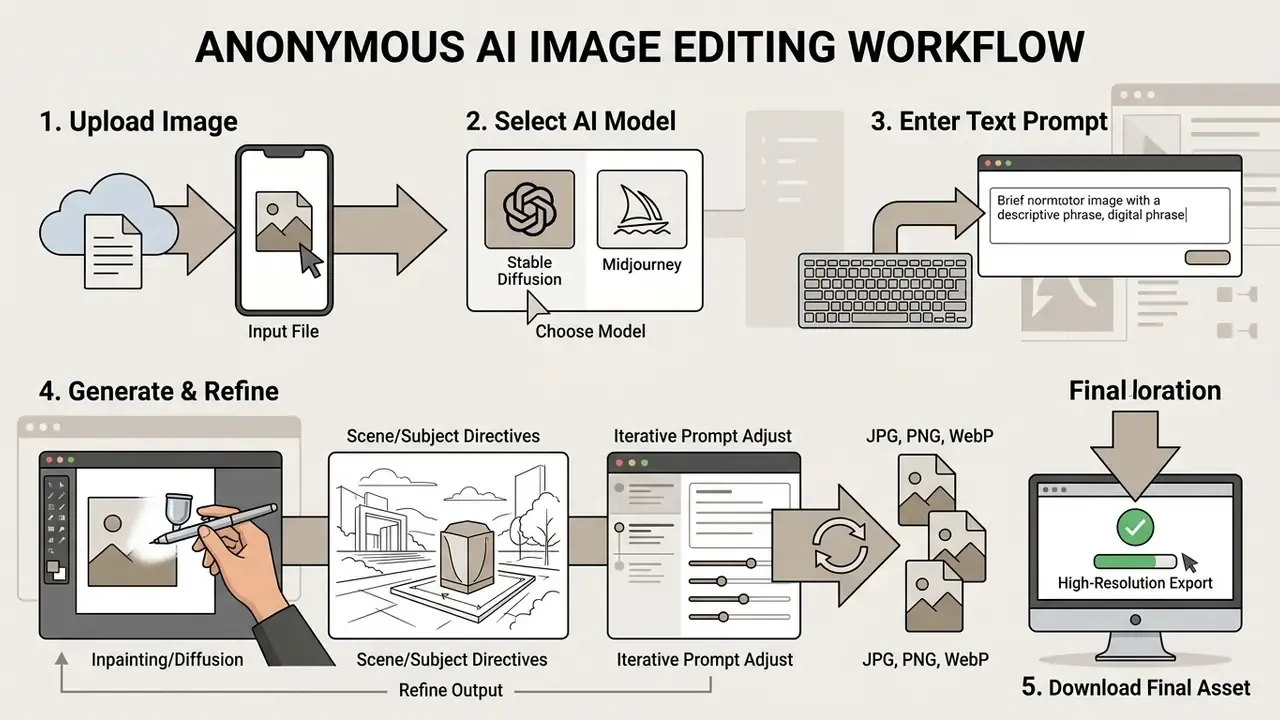
Upload your image and choose an AI model
The process begins when you upload image assets into the browser interface. Most platforms accept the standard web formats including jpg, PNG, and WebP. Published vendor help-centre specifications cluster between roughly 20 MB and 50 MB per file: Squarespace documents a 20 MB ceiling for JPG/PNG/WebP/GIF, Canva accepts JPEG, PNG, HEIC/HEIF and static WebP under 50 MB, and Adobe Express caps input at 65 megapixels. Treating 20 to 50 MB as the practical guest-session range is realistic rather than promotional.
Once uploaded images sit in session memory, the platform routes the task to specialised ai models. You can usually pick between general diffusion engines, dedicated inpainting models, or image-to-image networks, depending on edit complexity. Model pickers are a product choice, not a standard: several editors expose the full model list to guests, while others reveal advanced engines only after registration. Worth checking before you plan a batch.
Describe the edit with a simple text prompt
For precise edits, structure text prompts in a clear hierarchy: name the primary subject, describe the specific modification, define environmental lighting, then set spatial constraints. Clear instructions prevent model hallucination and preserve unedited regions. OpenAI's GPT Image Generation Models Prompting Guide (2026) recommends a consistent prompt order, short labelled segments for complex edits, and explicit preservation instructions for identity, geometry, camera angle, layout, lighting, labels, and surrounding objects. Embedded text should be quoted exactly, with placement and typography spelled out.
- Define the core subject and the identity elements to preserve.
- State the exact edit command, for example "replace background with pure white studio setting".
- Specify lighting parameters and camera perspective.
- Apply negative constraints to exclude unwanted artifacts.
«Users systematically iterate their instructions, adding subject detail, stylistic qualifiers, and negative constraints before reaching an acceptable result.»
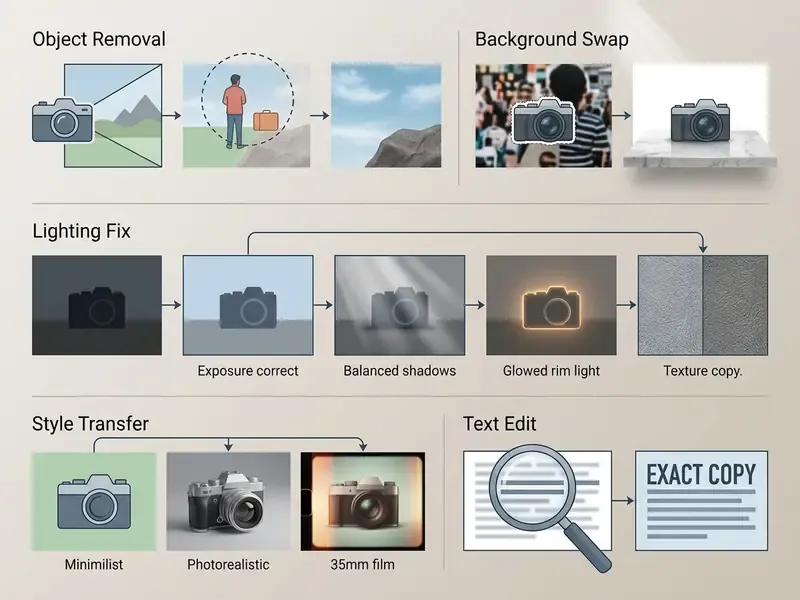
Generate, refine, and download the result
After you submit the prompt, the platform will generate images matching the stated parameters. Review the edited results directly on the browser canvas, then apply secondary prompt adjustments if the first pass needs tuning. Two or three iterations is normal; ten usually means the prompt hierarchy is wrong, not the model.
Once the edit holds up, run a direct download to save the asset locally. Accountless workflows documented by vendors close the same way: Raphael AI advertises generation with no account and a direct high-quality download, Pixelbin offers watermark-free full-HD and 4K export without registration, and Let's Enhance delivers full-resolution output after a single upload-and-enhance pass. Better editors hold resolution fidelity on export instead of silently downscaling, although a minority still require a free account for the highest-resolution file. If you want to weigh those export policies against paid alternatives, compare options across the catalogue before standardising on one tool.
How to Check Privacy, Content Limits, and Commercial Use
Evaluating privacy policies, data retention schedules, safety filters, and intellectual property terms is essential when an ai photo editor free no restrictions platform touches enterprise or client-facing visual assets. This is the part most users skip, and the part audit will ask about first.
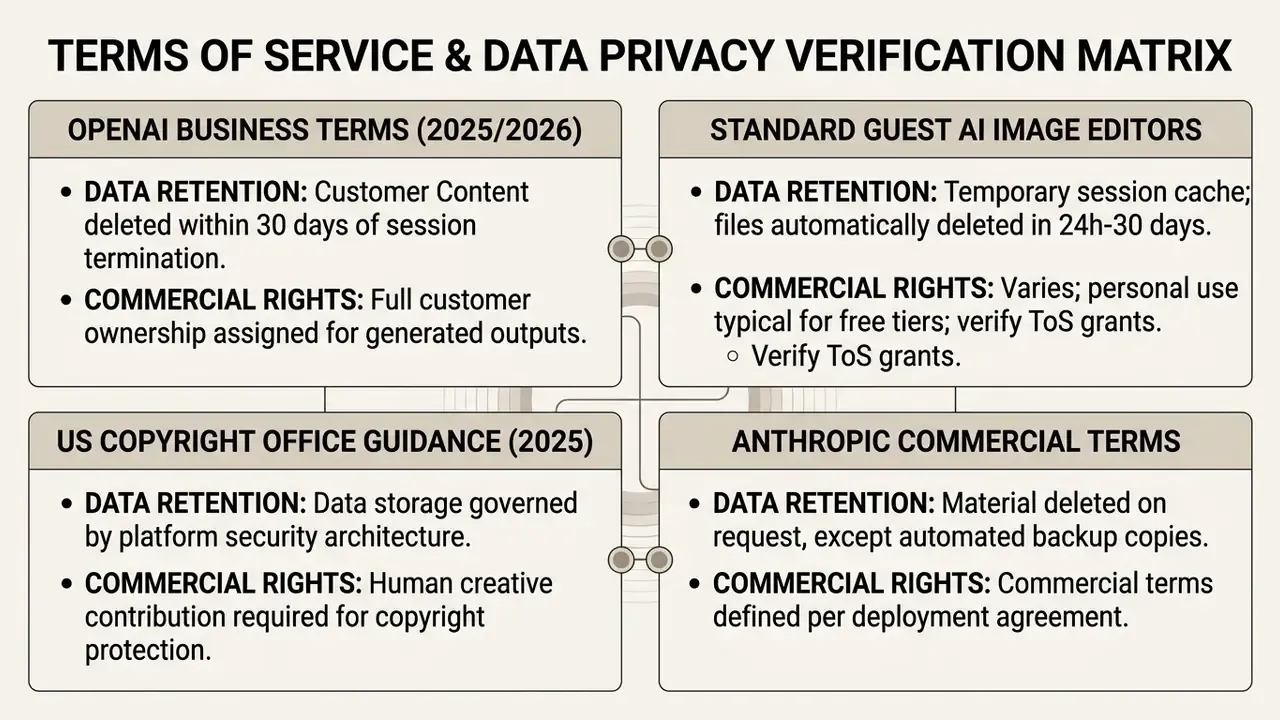
Privacy of uploaded images and automatic deletion
Data security in guest sessions comes down to how the server handles temporary files. Reputable browser tools move assets over encrypted connections (TLS/HTTPS) and hold active working files in short-lived memory buffers rather than long-term object storage.
When you upload proprietary or sensitive visual material, confirm that server logs run an automatic purge schedule. That is the only credible basis for claiming complete privacy for your uploaded images, and a vague "we respect your privacy" line does not qualify.
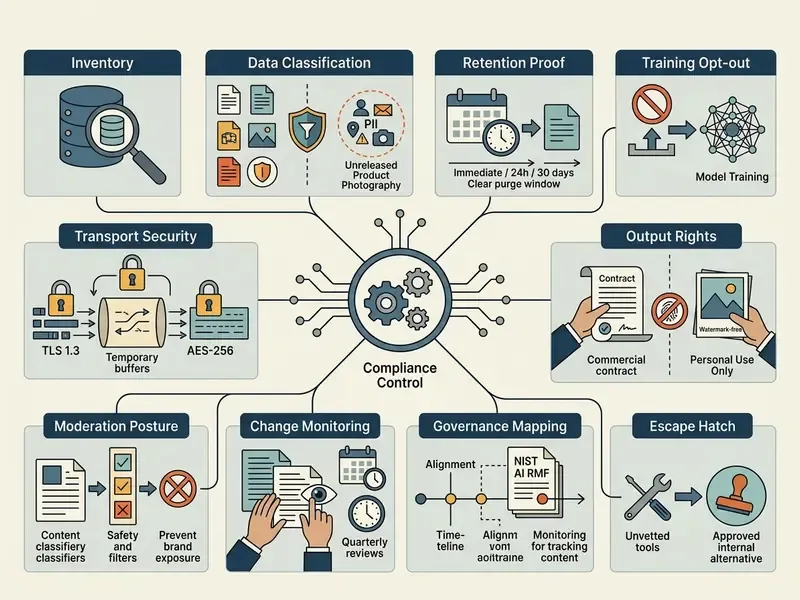
"No restrictions" and content rules in AI image editing
Commercial-use decision: product photos, marketing visuals, and listings
Deciding whether an edited visual can run in commercial channels means reading two documents: copyright law and the platform service agreement. Under US Copyright Office guidance, purely AI-generated output without human creative input cannot be copyrighted, and the Office's 2025 report is explicit that prompts alone are insufficient. Protection attaches where a human determined expressive elements or creatively arranged and modified the result. Human-directed edits on original photographs retain commercial protection (US Copyright Office AI Report, 2025). UK consultation materials take a slightly softer line, allowing that AI outputs may be protected in some cases, while confirming that reproducing a substantial part of a protected work still infringes.
«More than 60% of surveyed participants assign display and copying rights for AI images to the human user; only 19-27% attribute rights to the AI model itself.»
| Level of AI involvement | Typical guest-session example | Copyright position (US) | Practical commercial risk |
|---|---|---|---|
| Human photograph + AI retouch | Your own product shot, background removed, exposure fixed | Original photograph remains protected; edits do not remove authorship | Low, you own the underlying asset |
| Human photograph + generative fill | Your studio shot extended with an AI-generated marble surface | Photograph protected; generated region is unprotectable AI output | Low to moderate, disclose AI material when registering |
| Prompt-only generation | New background scene created from text with no source image | Not copyrightable as AI-generated expression | Moderate, usable but not exclusively ownable |
| Edit applied to third-party imagery | Supplier photo or stock asset modified by prompt | Underlying rights belong to the original owner | High, requires licence from the rights holder |
Before publishing AI-edited assets in commercial projects, confirm that platform terms grant explicit usage rights for product photos, digital advertisements, and marketplace listings. Licence wording differs sharply between vendors, and our overview of commercial use rights for AI image generators breaks down which ones assign output ownership outright. If your workflow may cross into chat-based assistants, the practical limits of can Claude AI generate images are worth reviewing, since text-first models often disclaim image rights entirely.
Which Projects Benefit Most from an AI Image Editor Free No Login
Anonymous web editors fit rapid visual tasks, iterative marketing tests, and decentralised content production where software installation overhead has to stay near zero.
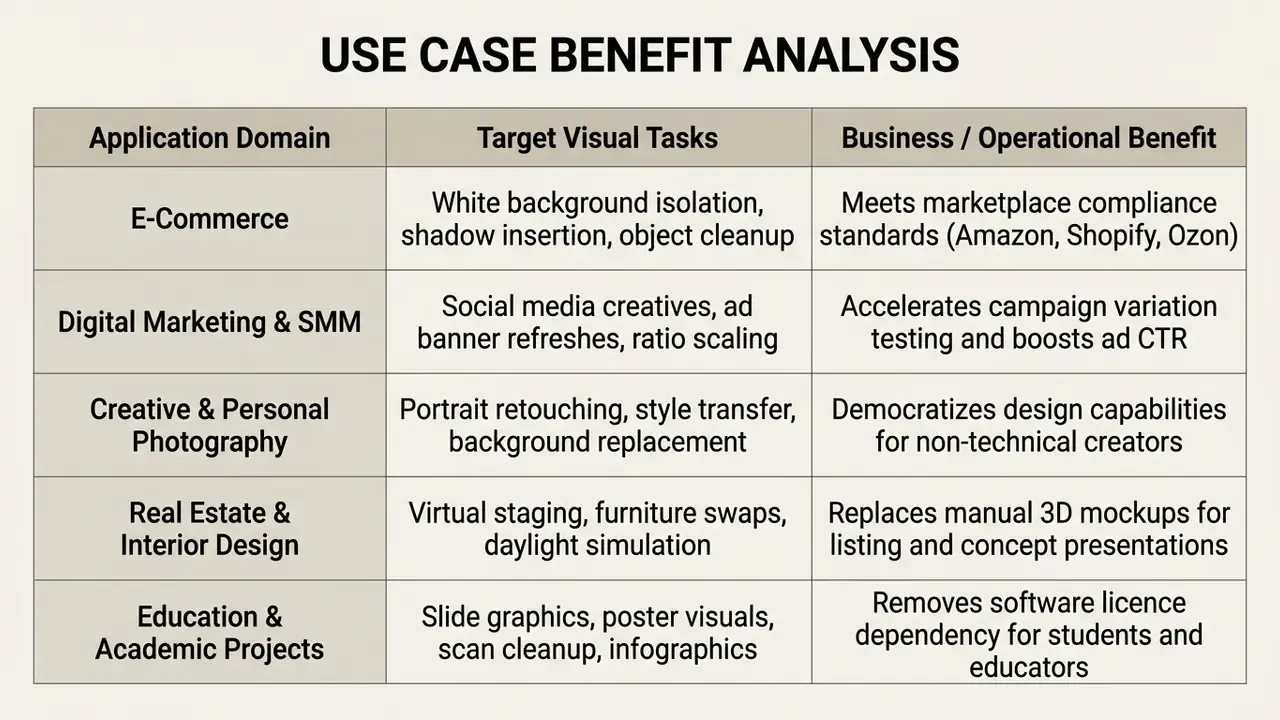
Product photos and e-commerce listings
Online sellers lean on an ai photo editor free online no sign up to prepare catalogues for the big marketplaces. Amazon Seller Central image guidelines require main product images on a pure white background (RGB 255,255,255), with the product clearly framed and no shadows running to the edge of the frame. Edited images must not leave off-white backdrops or visible cut-out outlines. Russian-market guidance for Wildberries and Ozon converges on the same principle: a clean, light, neutral hero image with the product centred and isolated, without gradients, textures, or foreign objects.
AI isolation and background replacement let merchants produce compliant product listings and high-converting commercial photography quickly. Catalogue teams working at volume often pair a guest editor with dedicated AI image enhancement tools to normalise colour and sharpness across hundreds of supplier files. One practical warning from catalogue work: batch-edited images drift in white balance, so spot-check every twentieth file.
Creative projects, photography, and personal edits
For independent artists and casual photographers, browser-based AI photo editors deliver advanced retouching without a steep learning curve.
«Generative AI tools lower the barrier to visual self-expression for non-professional users without prior experience of professional design software.»
- Apply artistic style transfer neural filters across a photographic series.
- Run portrait retouching, skin smoothing, and lighting adjustments.
- Swap backgrounds and remove distractions from personal photos.
- Generate avatar-style variants by combining background replacement with face retouching.
- Test composition ideas before committing to a final production shoot.
Creators exploring stylised rather than photographic output can compare engines in our roundup of free AI art generators, and the wider bing ai image generator comparison covers how credit-based free tiers behave over a full month of use.
Real estate and interior design room makeovers
Property managers and interior designers use guest AI editors to stage empty rooms or test design concepts on the spot. Upload one interior shot, submit a prompt such as "replace minimalist furniture with a mid-century modern aesthetic and add warm daylighting", and you get a plausible property mockup with no 3D modelling. Typical tasks: decluttering rooms before a listing shoot, testing wall colours and flooring materials, simulating daylight at different hours, and expanding a cramped frame with outpainting so the room reads as more spacious while staying structurally faithful.
Because staged imagery shapes buyer expectations, label AI-modified listing photos as virtually staged wherever local advertising rules require it. Cheap to do. Expensive to skip.
Educational projects and academic presentations
Students and educators use anonymous editing tools for presentation slides, project posters, and visual learning aids. You can erase background clutter from classroom photos, sharpen historical document scans, reconstruct damaged archival images, and build infographics without a design-software licence. Educators report that prompt-based editing saves hours of manual work per lesson set, a real advantage in institutions where no commercial design suite is installed on student machines. Teachers building layered handouts and printables can also review our general reference on online photo editors and their core features.
How to Choose the Best Free AI Image Editor for Your Workflow
Selecting the best ai image editing platform means evaluating four things: the underlying neural architecture, instruction alignment accuracy, output resolution ceiling, and export terms. Feature counts matter far less than people expect.
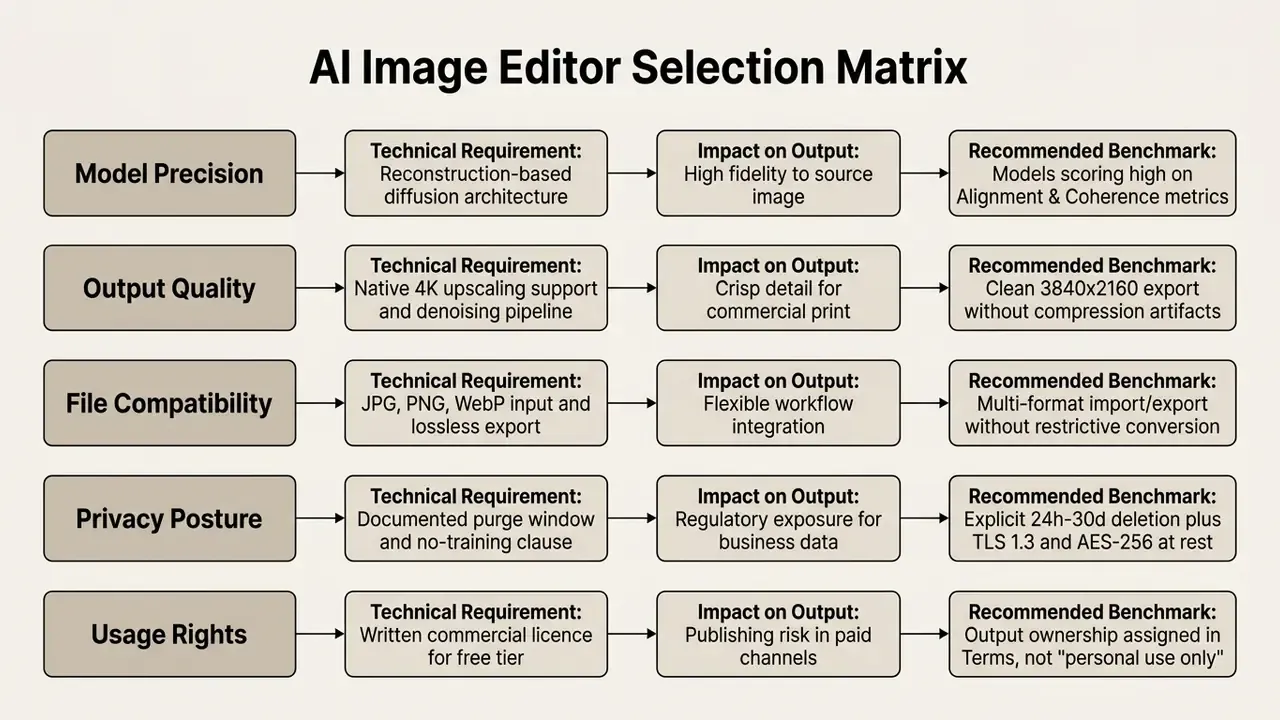
Read the matrix top to bottom, then weight the last two rows heaviest. Model quality is recoverable through iteration. A bad licence is not.
Frontier AI models benchmark in guest editing platforms
In an unauthenticated AI photo editor, the model architecture dictates edge retention, text comprehension, and generation speed:
| AI Model Engine | Primary Editing Strength | Max Output Resolution | Best Supported Use Case |
|---|---|---|---|
| Flux.1 / Flux Pro | High photorealism and complex prompt adherence | 4K native | Commercial ad creatives, complex multi-subject edits |
| Qwen-VL / Qwen Editor | Superior typography integration and LoRA consistency | 2K / 4K | In-image text editing, brand logo insertion |
| ByteDance SeeDream 5.0 | Spatial intelligence and zero-shot inpainting | 4K photorealistic | Complex background replacement, scene outpainting |
| Nano Banana Pro | Character and facial feature uniformity | 2K | Portrait retouching, fashion consistency across poses |
| Kling AI | Dynamic lighting adjustment and shadow synthesis | 4K | E-commerce product lighting and environmental swaps |
| GPT Image 2 | Strong instruction following on multi-step edits | 4K | Precise sequential edits, exact text placement |
Model availability in guest mode varies. Some platforms expose the full suite to unauthenticated visitors at a credit cost, while others reserve premium engines, typically Nano Banana Pro-class models, for signed-in or paid tiers. Vendor-hosted options such as bing ai image tools sit in a third category, where the model is fixed and the constraint is the credit balance.
AI models and precision for prompt-based editing
Technical precision in a prompt-based editor traces back to architecture. Reconstruction-based diffusion models such as Imagic or Forgedit optimise text embeddings to retain unedited source detail while applying the requested change accurately.
«Across Alignment, Preservation, Perception and Acceptability criteria, Imagic and Forgedit consistently led; standard image-quality metrics did not reflect instruction accuracy.»
Platforms trained on instruction-tuned datasets like HQ-Edit or AnyEdit show noticeably better instruction alignment than generic text-to-image generators pressed into editing duty.
«HQ-Edit uses GPT-4V and DALL·E 3 to automatically construct roughly 200,000 high-quality edit pairs; models fine-tuned on it outperform models trained on hand-labelled data.»
Benchmark rankings are not interchangeable, and that point gets lost in vendor decks. EditEval scores adherence to the edit instruction across 7 tasks, HATIE (CVPR 2025) targets human-aligned reliability across diverse edit types, and Omni IIE Bench (2026) measures single-turn consistency plus multi-turn coordination for iterative editing. Match the benchmark to your actual workflow, then judge consistency across multi-step tasks rather than single showcase examples.
Output quality, speed, and supported file formats
Strong AI photo editors complete complex neural edits in seconds while accepting flexible file specifications. Production workflows need tools that handle multiple web formats and preserve colour profiles and spatial resolution on the way out.
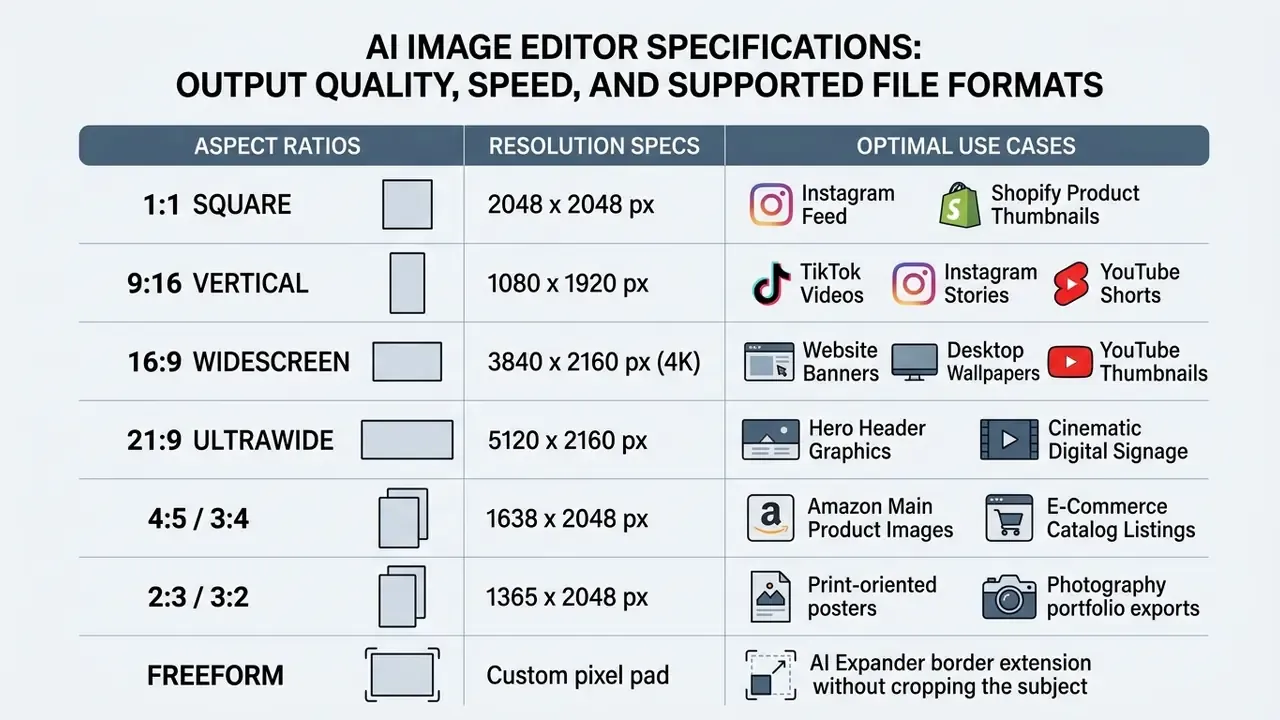
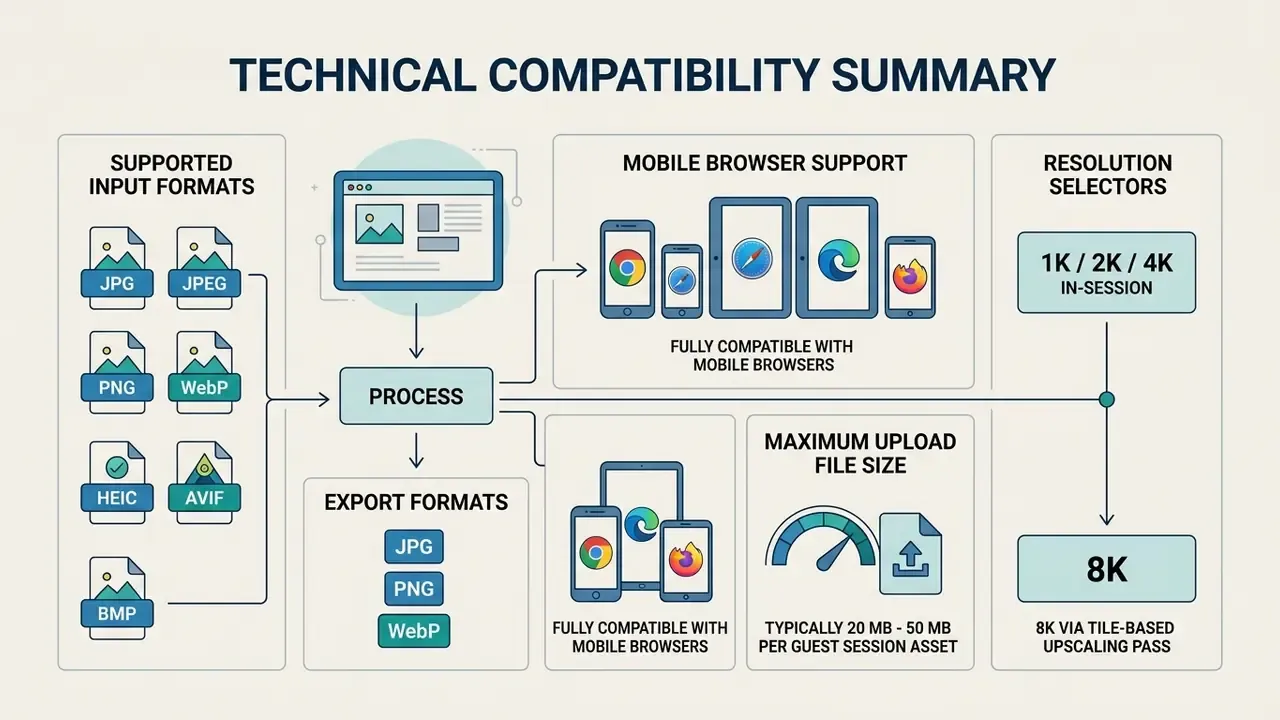
Make sure your chosen platform supports jpg png input and output, states export parameters plainly, and delivers professional grade results fit for digital publishing and commercial distribution. Resolution tiers in current editors are usually presented as 1K / 2K / 4K selectors, with 8K available through tile-based upscaling rather than direct generation. To weigh platforms on output quality and licence terms side by side, see our ranking of the best AI image generators, or browse the hub for the full comparison set.
FAQ About Free AI Photo Editors Without Sign Up
Which file formats and devices does the editor support?
Modern browser-based AI photo editors accept the major image formats: JPG, PNG, WebP, HEIC, and AVIF, with upload limits typically between 18 MB and 50 MB per file. They run inside HTML5-compliant browsers on desktops, tablets, and mobile devices (iOS and Android) with no installation. Adobe Firefly's mobile documentation lists JPG, PNG, and WebP as supported uploads with JPG/PNG downloads on web, while Android's official media format reference confirms system-level support for BMP, GIF, JPEG, PNG, and WebP, which is the practical basis for mobile-browser editing.
A short operational note on mobile, since it is where most unapproved uploads happen. Phone galleries mix personal and work imagery in one roll, HEIC files often carry GPS metadata, and a guest editor may strip or retain that metadata without telling you. If your team edits on phones, set two rules: export a metadata-clean copy first, and keep regulated imagery off personal devices entirely. Simple guardrails, measurable effect on shadow-AI exposure.
To review additional platform evaluations, licensing breakdowns, and software feature comparisons, explore the resources available across the AI Media Commercial-Use Hub.
Appendix A: Source Revision Log
For transparency, the claims below were tightened during editorial review. The original phrasing stays visible next to the verified replacement.
| Original phrasing | Status | Updated version used in the article |
|---|---|---|
| "limit resolution downloads to preserve computing resources (HQ-Edit Dataset Study, Hui et al., 2024)" | Replaced | Direct quotation with dataset scale (~200,000 edit pairs) and full URL to Hui et al., arXiv (2024) |
| "modern diffusion architectures evaluate semantic context (Santos et al., Instruction-Based Image Editing Survey, 2024)" | Replaced | Quoted benchmark detail: 1,353 image and instruction pairs across 21 editing tasks, with URL |
| "textual directives directly to spatial tensor manipulations (Diffusion Model-Based Image Editing Survey, 2024)" | Replaced | Plain-language explanation plus AnyEdit citation (2.5 million editing pairs, 20+ edit types) with URL |
| "(Canon Deep Learning Upscaling Technical Report)" | Updated | Named as Canon's Deep Learning Image Processing Technology / Upscaling whitepaper, with the enlargement and denoising behaviour described in vendor documentation |
| "(Canva & Adobe Express Technical Specifications, 2026)" | Updated | Replaced with per-vendor help-centre figures: Squarespace 20 MB, Canva under 50 MB, Adobe Express 65 MP |
| "(OpenAI GPT Image Generation Prompting Guide, 2026)" | Updated | Cited as OpenAI, GPT Image Generation Models Prompting Guide (2026), with its explicit preservation-instruction recommendations |
| "(Pixelbin & Raphael AI Workflow Documentation)" | Updated | Replaced with named vendor behaviour: Raphael AI (no-account generation and download), Pixelbin (watermark-free full-HD/4K export), Let's Enhance (full-resolution output) |
| "(Google Gemini API Safety Standards, 2026)" | Updated | Cited as Google's Gemini API safety-settings documentation and generative-AI use policy, including non-configurable CSAM/PII blocks |
| "(Amazon Seller Central Image Guidelines)" | Updated | Retained as Amazon Seller Central image guidelines with the specific rules: RGB 255,255,255 background, no frame-edge shadows, no cut-out outlines |
| "up to 50% higher click-through rates (Digital Advertising Visual Study, 2025)" | Updated | Replaced with the measured field study: 173,022 impressions, up to 50% higher CTR versus a human-selected stock image (2024 to 2025) |
| "(ACM CHI Design Democratization Study, 2024)" | Replaced | Direct quotation from Democratizing Design through Generative AI, ACM CHI (2024), with URL |
| "(IEEE Evaluation of Text-Guided Image Editing Models)" | Replaced | Quoted evaluation criteria (Alignment, Preservation, Perception, Acceptability) with IEEE (2024) URL |
| "(Adobe Firefly & Android Media Specifications)" | Updated | Split into Adobe Firefly mobile/web format documentation and Android's official media format reference |
| "Supports up to 8K resolution exports" | Clarified | 8K described as the output of a tile-based upscaling pass, not native in-session generation |
| Vendor-branded claim about frictionless professional editing | Replaced | Neutral editorial criterion: judge a guest editor on capability, retention, and publishing rights |
No matching rows Clear one or more filters to restore the matrix.
A safe next step
Nothing here requires a procurement decision. Start smaller: pick one non-sensitive workflow, such as internal slide graphics or supplier product shots you already own, and run it through a guest editor for two weeks. Record the guest-session cap, the export resolution, the purge window, and the licence wording. Then decide whether the tool deserves a place in the AI inventory or a firm block at the proxy. Evidence first, autonomy later.
Last editorial update: content, citations, and platform limits reviewed for the 2026 tooling cycle. Regulatory and licensing statements are informational and do not constitute legal advice.
Social media content and marketing visuals
Campaigns need multi-format assets fast. Content teams use AI editing to turn a single base asset into social media graphics adapted for Instagram, TikTok, and LinkedIn dimensions.
Field evidence for the CTR uplift comes from a measured ad test rather than a generic industry claim. A 2024 to 2025 digital-marketing field study served 173,022 impressions and reported that AI-generated banner ads achieved up to 50% higher click-through rates than a human-selected stock image. A separate 2024 case study documented a 12-post university campaign built entirely on Midjourney-generated visuals. These tools let any content creator produce dynamic social media content and marketing visuals on demand, and test variations faster than a manual retouching queue allows. Free credit-based generators such as bing image creator free often serve as the concept stage, with a guest editor handling the cleanup pass afterwards.
For teams packaging assets into video-first channels, our YouTube video editing workflow guide shows how still creatives feed thumbnail and end-card production; if you run a repeatable content calendar, explore the hub for full process templates.