Author: Marcus Hale, AI Governance & Model Risk Editorial Lead · Reviewed by: Visual Tooling & Compliance Desk · Last updated: February 2026
Image to Text Art in Six Lines
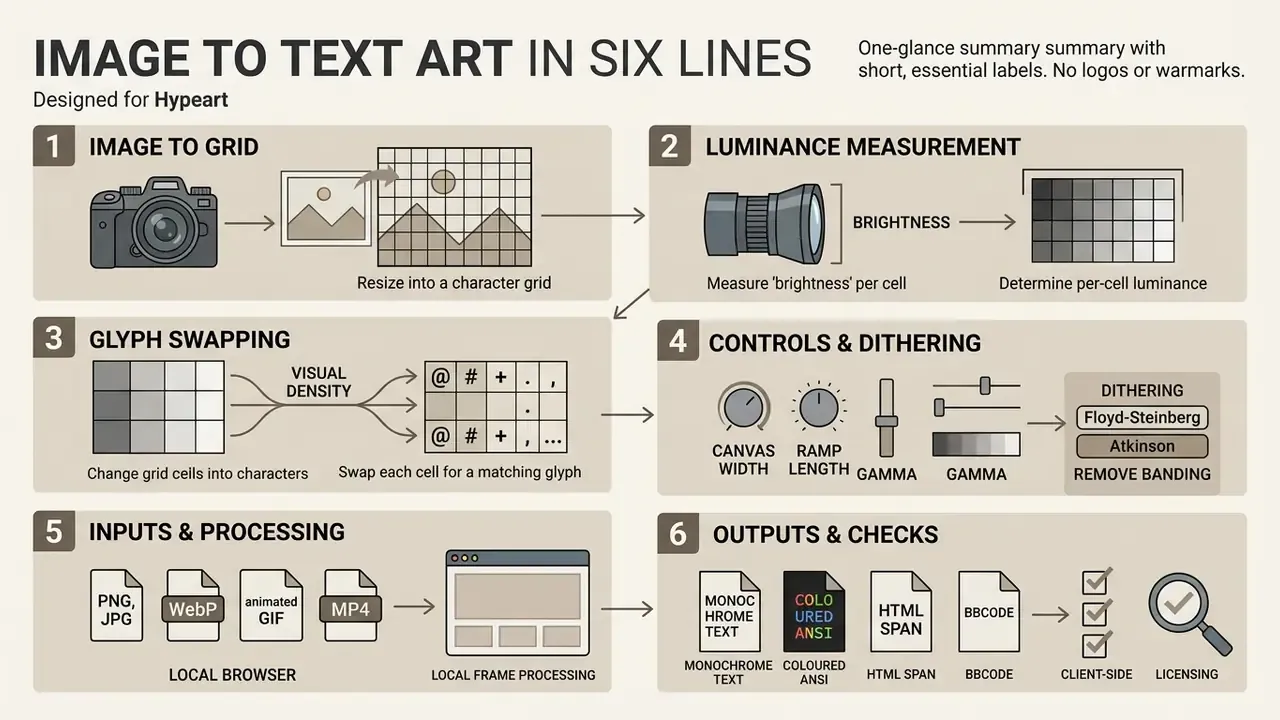
- An ASCII art generator resizes an image into a character grid, measures per-cell luminance, and swaps each cell for a glyph of matching visual density.
- Detail depends on canvas width (columns), character ramp length, aspect-ratio compensation, gamma, and contrast. Source megapixels alone decide very little.
- Dithering algorithms (Floyd-Steinberg, Atkinson, JJN, Stucki) remove banding in smooth gradients that plain per-cell mapping cannot resolve.
- Modern browser converters accept PNG, JPG, WebP, animated GIF, and MP4, processing frames locally through the HTML5 Canvas API.
- Output can be monochrome plain text, colorized ANSI for terminals, coloured HTML
<span>markup, BBCode, or a rasterized PNG. - For commercial deployment, confirm client-side processing in the browser Network tab, verify licensing terms, and attach a WCAG 2.2-compliant text alternative.
Why a Text-Art Tool Reaches a Risk Desk at All
A converter that turns a logo into characters sounds like a designer's toy. It usually is. But the moment someone drags an internal product mock, a client-branded asset, or a pre-release screenshot into a browser tool, three familiar questions appear.
Where did the file go? Who owns the output? And what happens when a downstream model reads that output and reports something confidently wrong?
That is the honest reason this guide carries a governance frame. Marketing wants retro banners for release notes. Engineering wants a shell startup logo. Neither team wants a quiet data-transfer incident attached to it. So the practical answer is a documented pipeline: local processing, recorded parameters, explicit licence terms, and an accessible text alternative. Small tool. Same controls as any other.
What Is Image to Text Art and How an ASCII Art Generator Works
Image to text art converts raster pixel data into a structured grid of printable typographic characters that represent visual shapes, luminance gradients, and edge contours. An ascii art generator from image samples pixel intensity, maps grayscale values to character density sequences, and outputs plain text or graphic formats.
To convert an image into textual art, the pipeline first resizes the source file into a character grid. Each cell corresponds to a spatial block of pixels. The engine then calculates average cell brightness using a standard luminance formula, typically ITU-R BT.709 (). Some legacy implementations still apply the older NTSC weighting (). The mapping principle stays identical; only the coefficient balance shifts, which slightly changes how red and green regions read as dark or light.
«After grayscale conversion, the image is divided into 10×10 pixel tiles, each mapped to a single ASCII character by brightness and structure.»
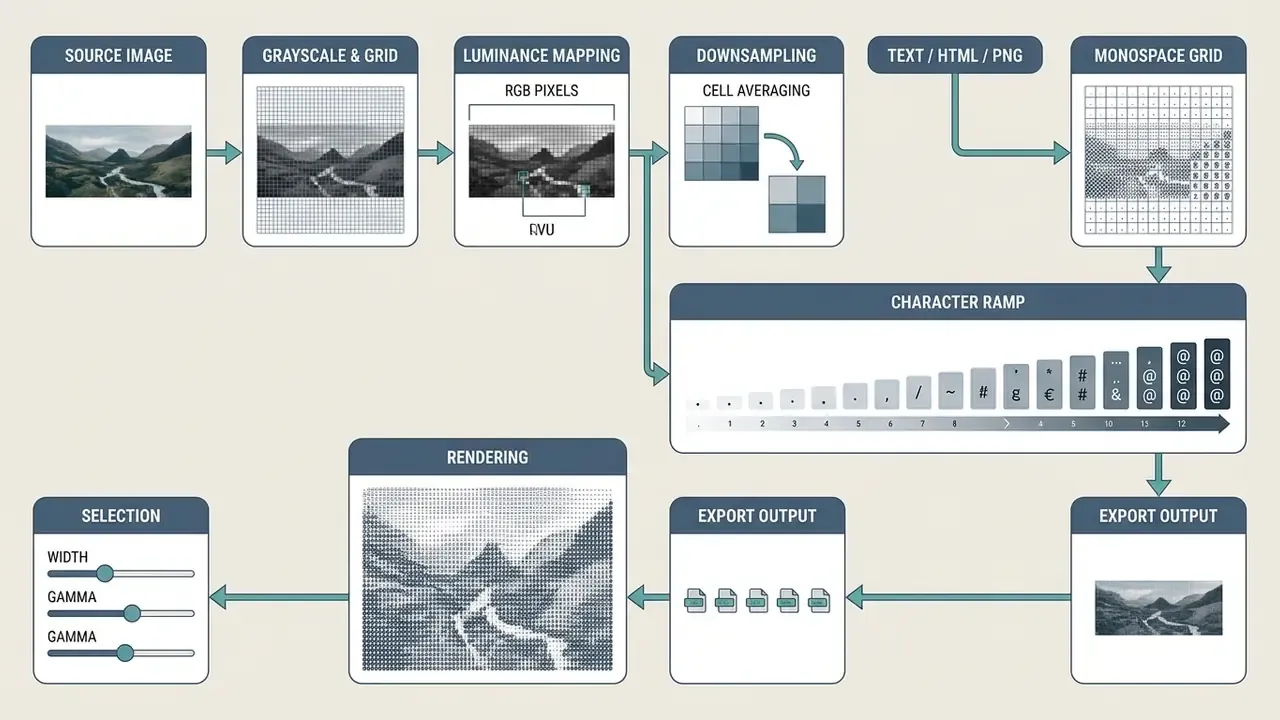
The system assigns dense characters like @ or # to low-luminance regions and sparse characters like . or whitespace to high-luminance areas. A dedicated ascii image to text converter maintains spatial proportions by adjusting cell height ratios, compensating for non-square monospace font dimensions. Modern web utilities run this in client-side JavaScript over the HTML5 Canvas API, without uploading media to external servers. Readers comparing adjacent transformation pipelines can review image-to-image generators for non-textual conversion workflows.
How ASCII Characters Form Contours and Image Tones
ASCII characters create shading and structural outlines through varying ink density and stroke orientation. Character ramps sort glyphs by the ratio of occupied pixel space to empty background inside a monospace font cell.
In a standard 70-character brightness ramp, glyphs run from empty spaces for light tones to heavy characters like W or @ for deep shadows. Smooth midtone transitions depend on the variety of glyphs available in the selected ramp, which is why short ramps posterize.
«A standard grey-scale ramp is ordered black to white, with dense characters representing dark tones and sparse characters representing light tones.»
Edge detection algorithms, such as Canny filters, evaluate local directional gradients. The converter then picks directional characters like /, \, |, and _ to match identified boundary angles. This dual mapping of luminance and stroke orientation lets an ascii image art generator preserve both shadow depth and edge definition.
Monospace typography is the hidden dependency here. Fonts such as Courier New, Consolas, and Fira Code guarantee fixed character cell widths, and Unicode reserves the Box Drawing block (U+2500 to U+257F, 128 assigned characters) specifically for line, corner, and junction glyphs used in text graphics. Render the same output in a proportional font and the joins between adjacent glyphs break. The grid collapses. Nothing else is wrong with the art; the container simply failed it.
How ASCII Art Differs from Pixel Art
ASCII art uses alphanumeric symbols and punctuation marks as visual primitives. Pixel art relies on uniform square colour blocks arranged on a coordinate raster grid.
ASCII graphics depend directly on typography metrics, monospace alignment, and character set density. Pixel art depends on colour palettes and fixed grid resolution, with no typographic constraints at all.
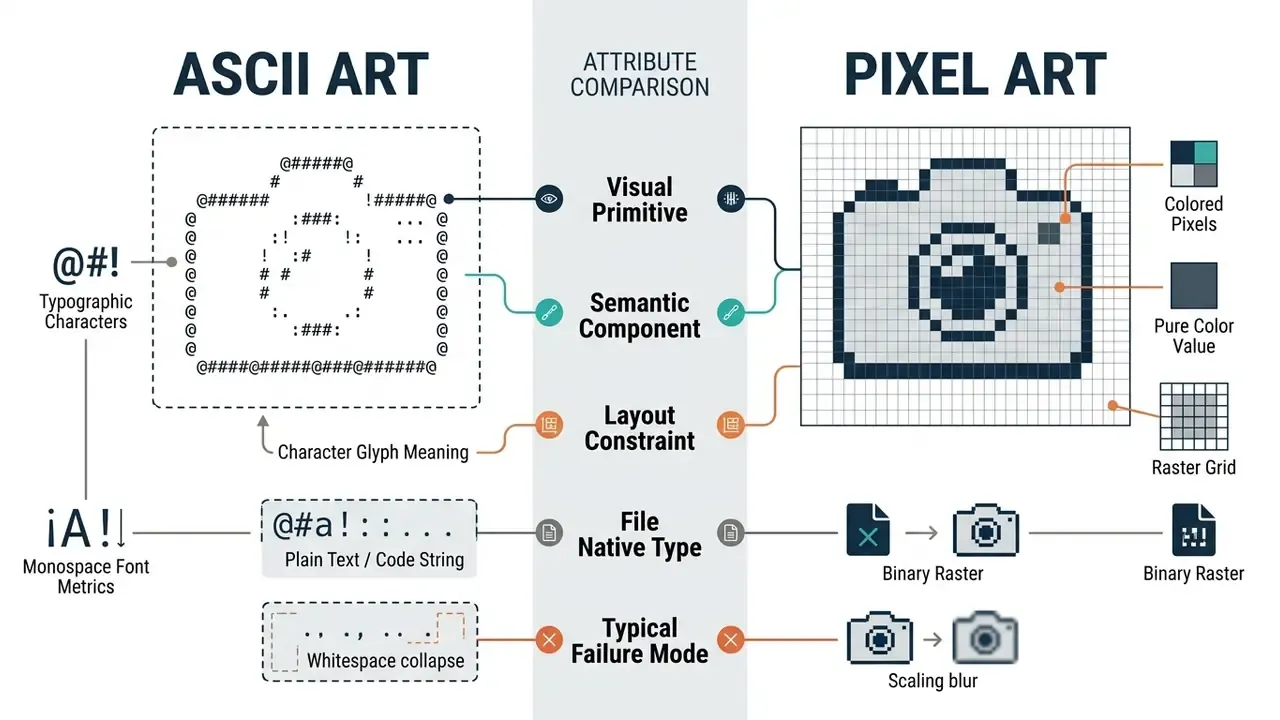
«ASCII art sits at the intersection of the textual and the visual, where characters act as visual primitives rather than semantic tokens, demanding table-like structural regularity.»
That intersection is exactly where machine readers stumble. Language models and vision systems often hit semantic conflicts when analysing ASCII graphics, because each glyph carries both typographic and spatial meaning.
«GPT-3.5 can interpret ASCII art in some settings, but performance degrades sharply under complex visual transformations.»
Why Convert an Image to ASCII Text
«Random forests deliver ASCII conversion quality comparable to deep neural networks at substantially lower computational cost.»
Typical production use cases fall into five repeatable categories:
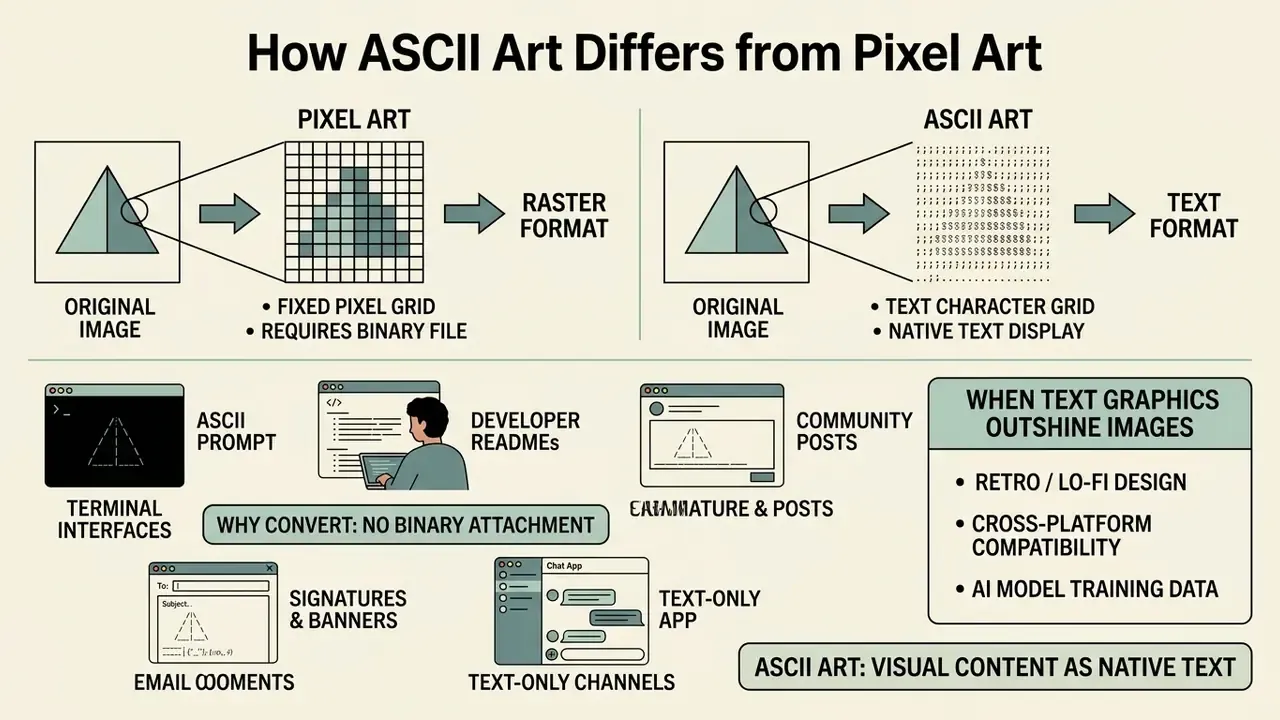
- Developer READMEs and terminals. A project logo converted into characters ships inside a GitHub README, a shell startup banner, or a code comment, with no binary attachment.
- Text-only channels. SMS, plain-text email, syslog output, and CI build logs cannot embed image files. Character art renders in all of them.
- Retro and lo-fi design. Zine culture, creative coding, and cyberpunk visual identities exploit the specific texture of glyph-built imagery.
- Signatures and banners. Forum signatures, bot message headers, and decorative dividers inside plain-text documents.
- Community posts. A converted photo in a Discord channel or Reddit comment interrupts the scroll pattern of uniform image feeds.
When evaluating interactive media tools or automated visual systems, teams often explore specialized generation workflows. You can test specialized generative capabilities on the gemini ai image generator page. For broader automation frameworks, technical leads can see the overview of scalable pipeline implementations, and editorial teams standardizing pre-processing steps can consult our guide to online photo editors.
When Text Graphics Outshine Standard Images
Text graphics beat raster images in low-bandwidth interfaces, terminal applications, inline source code comments, and deliberately retro layouts.
Design practice and vendor documentation converge on the same input profile. High-contrast images with bold silhouettes and clean backgrounds (portraits, corporate logos, line art, architectural outlines) convert most predictably into ASCII character maps, because a wide luminance spread separates subject from background before character selection ever happens. Published converter guides recommend tonal ramps for portraits and block character sets for logos and silhouettes. Worth noting: these are documented editorial recommendations, not quantified benchmark results.
Detailed photographic landscapes with soft colour gradients tend to lose clarity when mapped to sparse ramps. High-contrast inputs convert predictably, producing legible typographic structure across a range of font sizes. Where the source file is too soft or too noisy, pre-processing with AI image enhancers restores the tonal separation the character mapper needs.
Engineers weighing deterministic against generative visual pipelines can compare feature sets in our AI art generator comparison. To review broader options, team leads can open the hub for structured operational comparisons.
How to Use an Image to ASCII Art Generator: Step-by-Step
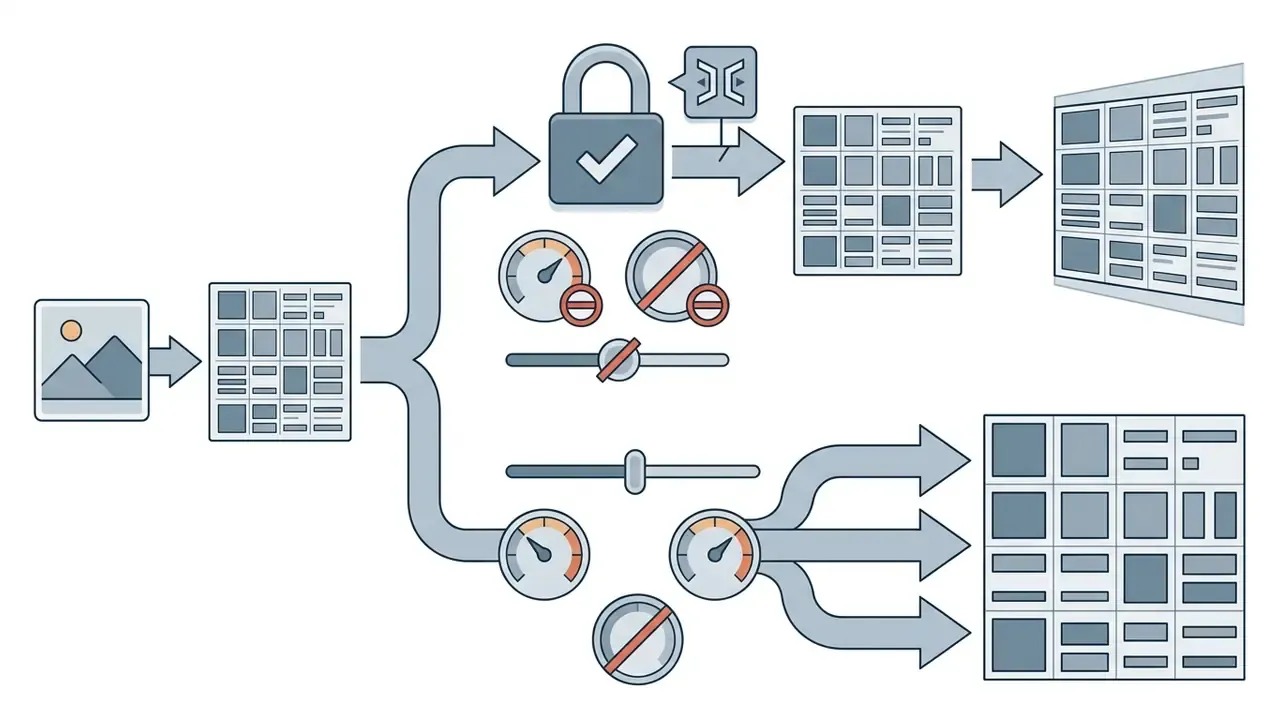
Using an image to ascii art generator online means loading a target media file, selecting a character density preset, tuning grid parameters in real time, and exporting the result.
A modern browser-based workflow looks like this: With animated GIF or video inputs, client-side generators extract sequential frames onto the HTML5 Canvas and run luminance-to-character mapping frame by frame. The result can be an animated ASCII code block, a looping text animation, or a continuous stream. Frame count multiplies output size linearly, so animated exports usually sit at 40 to 80 columns to keep payloads manageable.
Illustrative example: a financial technology team needed plain-text visual dividers for automated terminal reports. They configured a client-side conversion script using an image ascii art generator algorithm to process corporate icons into monochromatic character blocks. Reporting pipelines then emitted branded headers directly inside terminal logs, with no external image dependency and, critically, no internal brand asset routed through a third-party host.
- Drag and drop a PNG, JPG, WebP, BMP, or animated GIF/MP4 file into the browser interface canvas.
- Select an initial density preset, such as Standard ASCII, High Contrast Blocks, or Line Art.
- Adjust target column width to match the destination display.
- Fine-tune brightness, contrast, gamma, and aspect-ratio compensation sliders.
- Choose a dithering mode if the source contains smooth gradients.
- Inspect the live monospace preview panel for character legibility.
- Copy the raw plain-text output or download the rendered PNG, TXT, or HTML file.
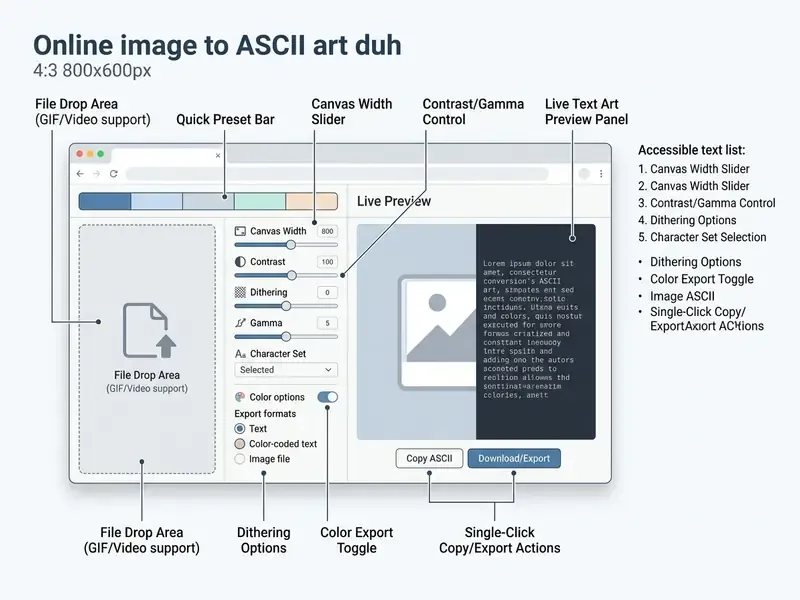
Loading Source Images and Selecting Quick Presets
The workflow begins by loading source media into local browser memory. The engine initializes image parameters without transmitting data anywhere. One detail catches people out: PNG files carrying alpha transparency should be composited onto a solid background before mapping, otherwise transparent pixels read as maximum luminance and the subject floats in a field of spaces.
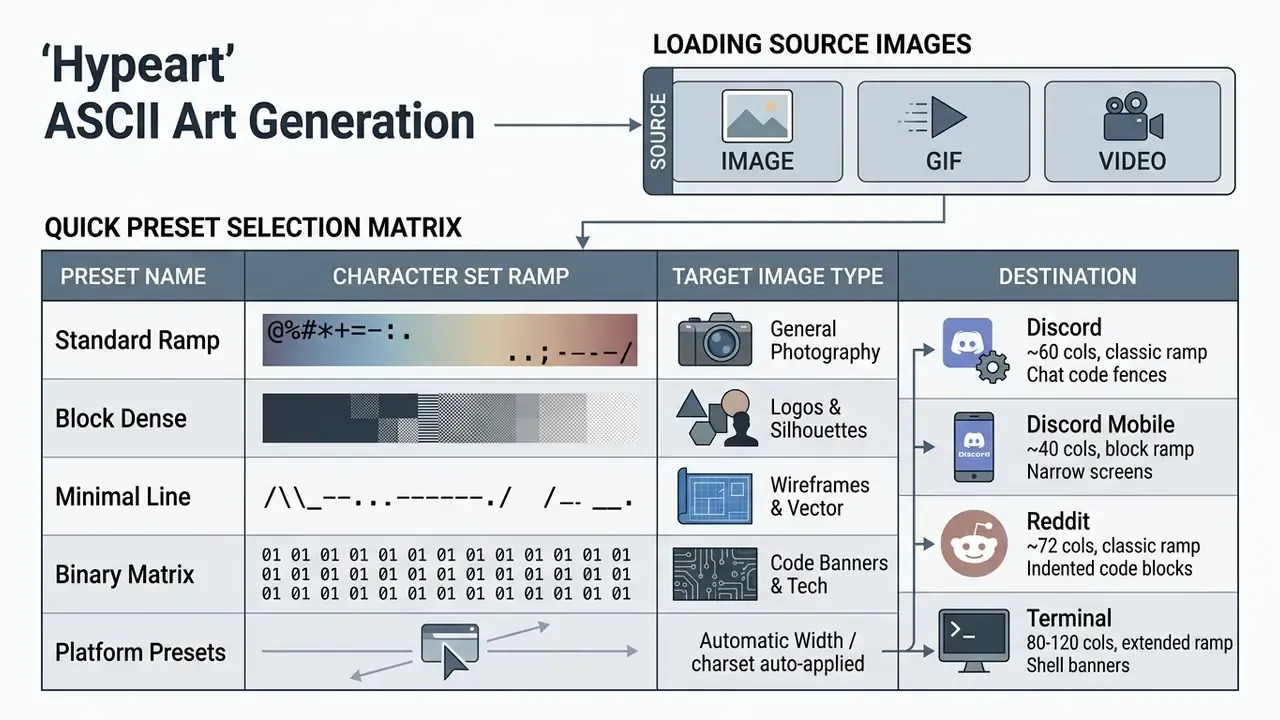
Quick presets apply pre-configured ramps and contrast settings in one click. Selecting a preset recalibrates luminance mapping for a specific artwork style, and platform presets additionally lock width, so the result never wraps in the destination client.
Real-Time Preview and Parameter Adjustment
Interactive preview systems update output text continuously as controls move. Modern applications use client-side rendering loops to recompute cell brightness values almost instantly.
That real time feedback lets operators settle grid dimensions and character selection before export, which protects legibility across target terminal widths. Large canvases behave differently, though. At letter-size output a regeneration pass can take several seconds, so the practical habit is to tune at small widths first and only then re-render at final resolution.
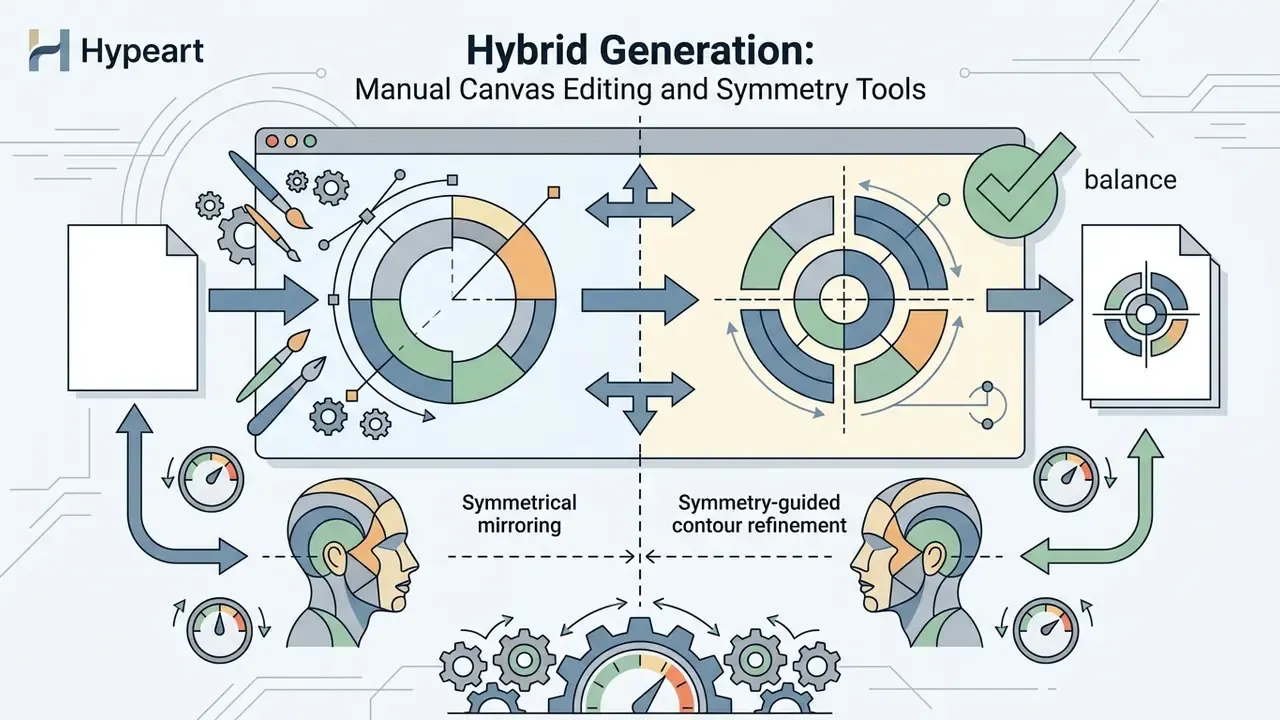
Hybrid Generation: Manual Canvas Editing and Symmetry Tools
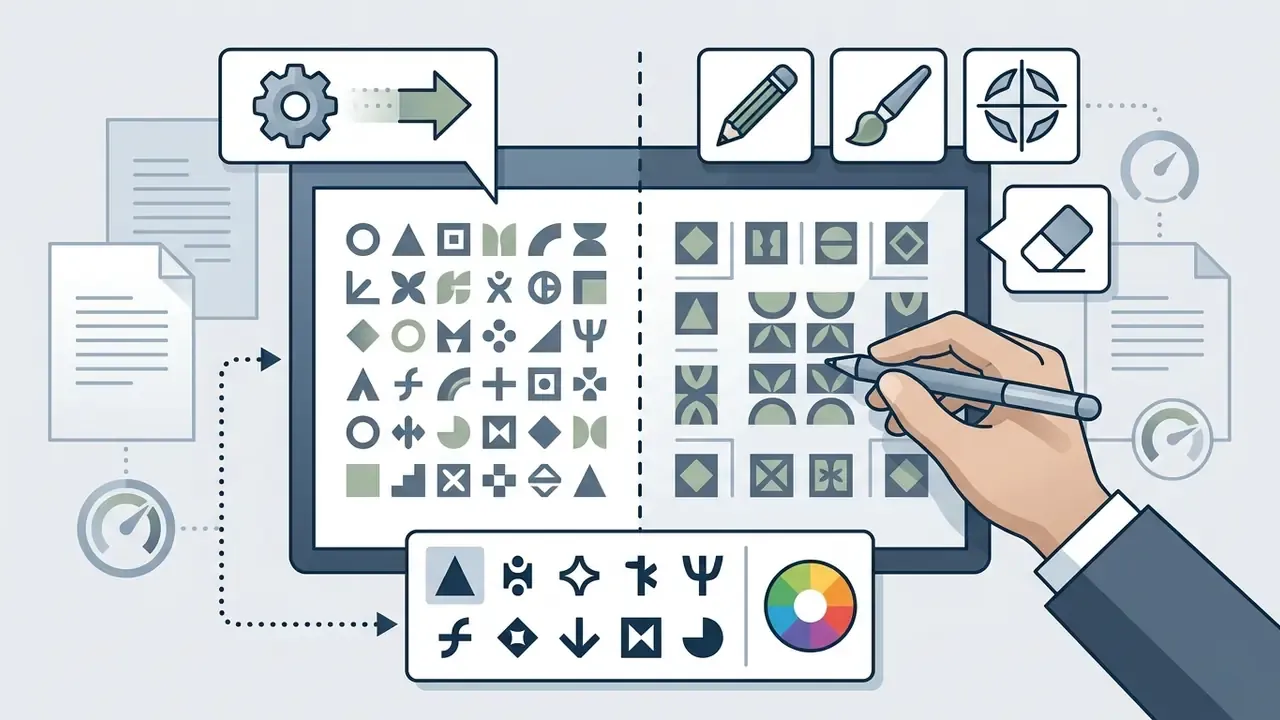
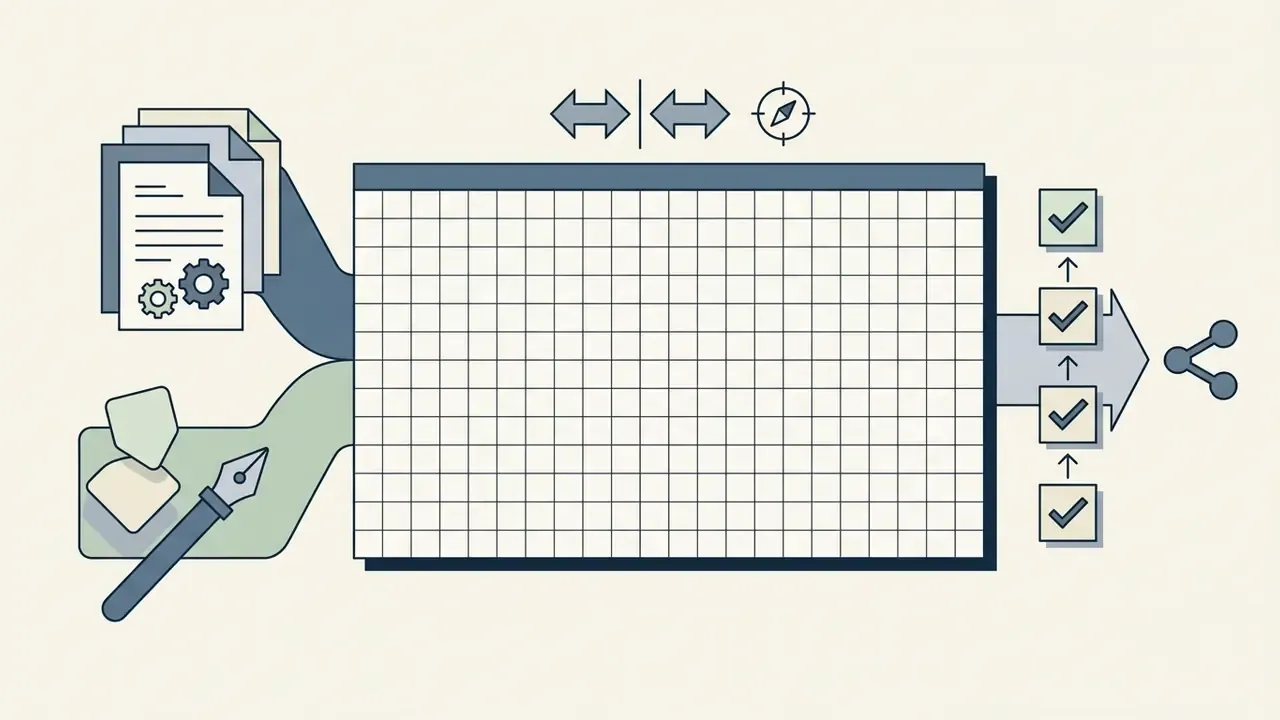
Automated conversion sometimes leaves stray characters along high-contrast edges. Advanced browser generators answer that with a secondary draw or edit mode:
Symmetry and Fine-Tuning for Graphics and Portraits
Converting portrait photos into recognizable ASCII graphics needs targeted edge detection and symmetric axis alignment. Eyes and jaw outlines demand precise character selection, or the face stops reading as a face.
Fine-tuning controls let operators adjust edge sensitivity thresholds independently from background shading. Symmetric filtering along the central composition axis stabilizes portrait geometry and prevents skewed character output. Lower the edge-detection threshold to recover thin contours in soft portraits; raise it to suppress sensor noise in low-light photographs. Selfies, studio photos, and flat graphics each want a slightly different setup, so save the parameter set once you like it.
ASCII Art Generator Settings for Readable Results
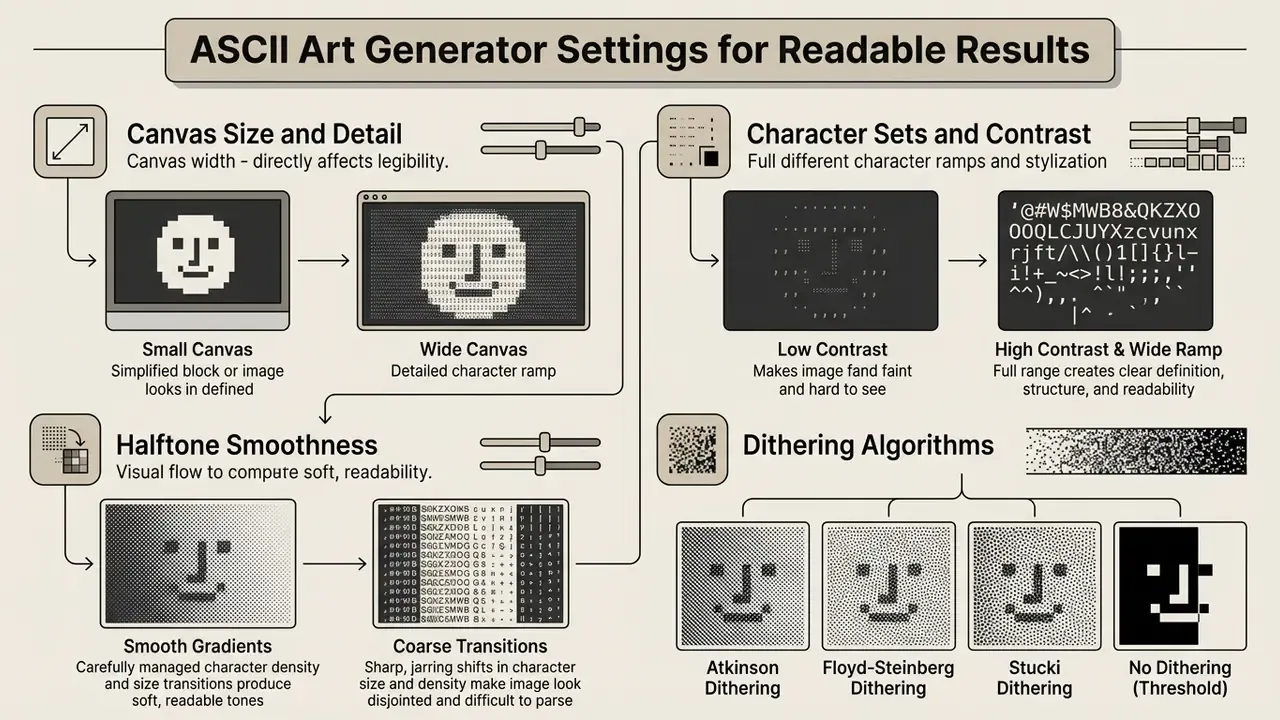
Legible text art comes from matching generator settings to output layout constraints. Canvas column width, character density ramps, gamma, and contrast thresholds all move structural fidelity directly.
An ascii art generator image utility typically exposes canvas dimensions, character set selection, luminance inversion, histogram endpoints, and aspect ratio scaling.
«Resolution is a strong and systematic predictor of detection failure: nearly 60% of 62 tested strata showed statistically significant accuracy loss under rescaling.»
Table: technical settings in an ASCII art generator and their impact on text output quality.
| Setting parameter | Technical definition | Impact on text art legibility | Operational recommendation |
|---|---|---|---|
| Canvas width (columns) | Number of horizontal characters in the output grid. | Higher column count increases structural detail but expands line length, raising wrapping risk. | Use 60 to 80 columns for mobile and documentation; 120+ for desktop terminals. |
| Character ramp | Ordered array of characters mapped from dark to light luminance. | Determines tonal smoothness and visual texture. Extended ramps improve midtone shading. | Short block ramps for logos; extended 70-character ramps for portraits. |
| Aspect ratio correction | Vertical height scaling factor applied to offset non-square font metrics. | Prevents vertical stretching or squashing of converted proportions. | Set the ratio multiplier between 0.45 and 0.55 for standard monospace fonts. |
| Contrast threshold | Luminance redistribution curve applied before character selection. | Separates dark background elements from primary subject outlines. | Increase contrast on low-light inputs to sharpen structural edges. |
| Gamma correction | Non-linear luminance scaling applied to the grayscale pass. | Adjusts midtone brightness without clipping highlights or shadows. | Set gamma between 1.2 and 1.8 for dark photographic inputs. |
| Blackpoint / whitepoint | Threshold boundaries defining minimum and maximum character mapping limits. | Strips background noise and forces solid fills inside subject areas. | Elevate the blackpoint to isolate subjects on noisy or textured backgrounds. |
| Sharpness / edge detection | Convolution kernel strength applied before cell averaging. | Recovers thin contours and hard boundaries lost during downsampling. | Raise sharpness for line art; keep it low for skin tones to avoid speckle. |
| Saturation / hue | Colour channel adjustments applied before grayscale conversion. | Changes which coloured regions read as dark or light after luminance weighting. | Desaturate red-dominant images so subjects do not merge into backgrounds. |
| Luminance inversion | Reverses light-to-dark character density mapping order. | Adapts legibility between light documents and dark terminal themes. | Invert the character map when moving output from a dark IDE to a light web page. |
| Space density / transparent frame | Spacing between glyphs and padding applied around the grid. | Controls perceived airiness and stops edge glyphs touching container borders. | Add a 1 to 2 character frame before embedding art inside code blocks. |
Read the table as a dependency chain, not a menu. Gamma changes what contrast has to fix; contrast changes which ramp positions ever get used; ramp length decides whether your midtones exist.
Canvas Size and Detail in ASCII Images
Canvas width controls the spatial resolution of textual artwork. A wider grid lets each character cell sample a smaller pixel block, which captures finer line detail.
«An autoencoder approach matches colour distributions inside local patches well, but underperforms other methods on structure-based ASCII art with crisp contours.»
Wider is not simply better, though. Larger text blocks risk line-wrapping distortion on constrained displays, and the failure is total rather than graceful. Published ASCII-art synthesis experiments span outputs from roughly 124 to 1,056 pixels wide and from 69 to 4,309 characters, which shows how fast payload grows relative to visual gain. Standard technical documentation frameworks still recommend keeping width below 72 characters for layout stability across plain-text viewers. Where the source file is too small to support a wide grid, AI image upscalers raise input resolution before conversion.
Character Sets, Contrast, and Art Stylization
Ramp choice sets the visual style. Minimalist sets create high-contrast posterized graphics; extended Unicode sets deliver detailed tonal depth.
«Experiments across eight character sets, from dense block glyphs to embedded words, show charset choice materially changes perceived contours and detection robustness.»
«A 70-character ramp mapping brightness values to symbols increases tonal resolution in the midtones.» Source: Columbia University, COMS 4995 ASCII Art Converter Report (2021). https://www.cs.columbia.edu/~sedwards/classes/2021/4995-fall/reports/AAC.pdf
Adjusting contrast before character mapping clarifies ambiguous midtones, and inverting the map keeps output legible when you switch between light and dark themes. Ramp families worth testing: alphabetic, alphanumeric, arrow, Code Page 437, math symbols, extended grayscale, and pure black-and-white threshold sets. Post-processing effects such as a light bloom or a scanline overlay belong at the very end, after the character grid is locked.
Halftone Smoothness and Dithering Algorithms
Standard luminance mapping converts each cell independently. That independence is what produces visible banding across a smooth sky. Error diffusion dithering fixes it:
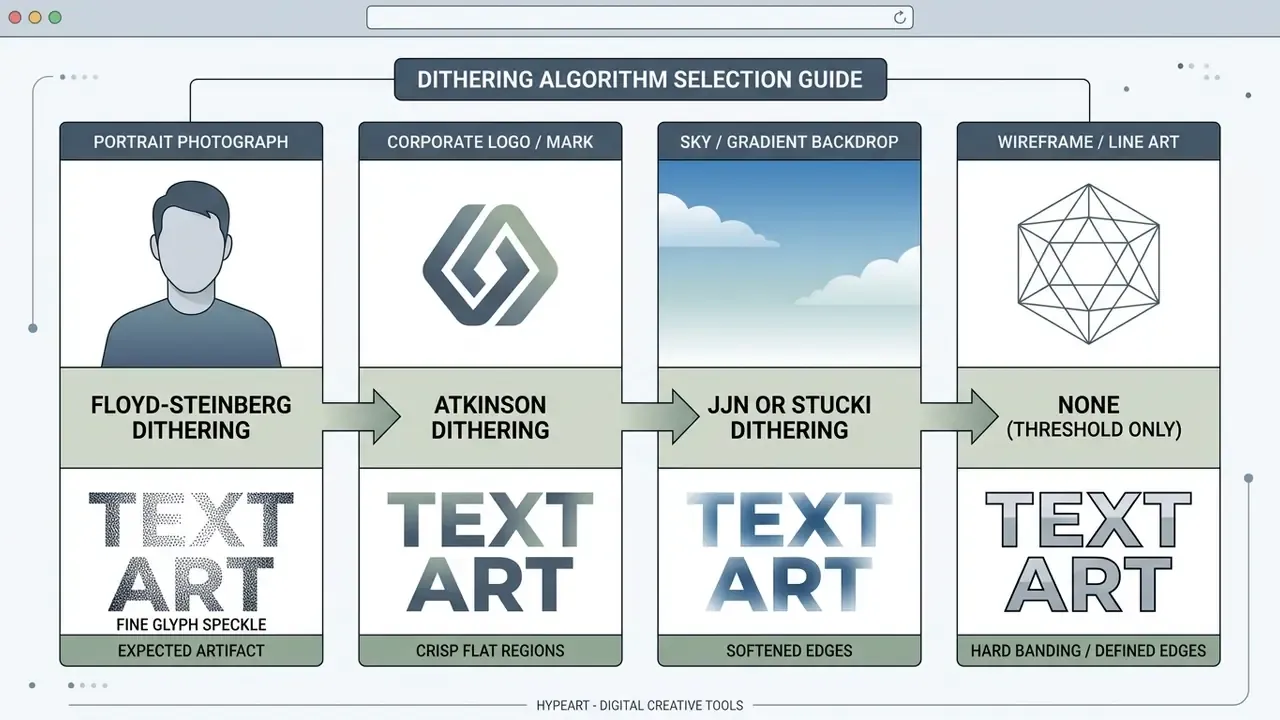
- Floyd-Steinberg dithering. Pushes quantization error to neighbouring pixels (right, down-left, down, down-right), creating balanced transitions that suit photographic portraits.
- Atkinson dithering. Propagates only three quarters of the error, preserving contrast and keeping background space clean. Ideal for minimalist text graphics and logo work.
- Jarvis, Judice and Ninke (JJN) or Stucki. Use a wider three-row error distribution matrix, producing smooth continuous-tone shading at the cost of slightly softer edges.
- No dithering (threshold only). Fastest option, and the right one for line art, wireframes, and binary
01matrix styles where banding is a feature.
How to Save and Publish ASCII Art: Text, Image, HTML, BBCode, ANSI
Exporting ASCII graphics means choosing a format the destination platform actually honours. An ascii image to text converter normally supports plain-text export, image rasterization, and structured markup.
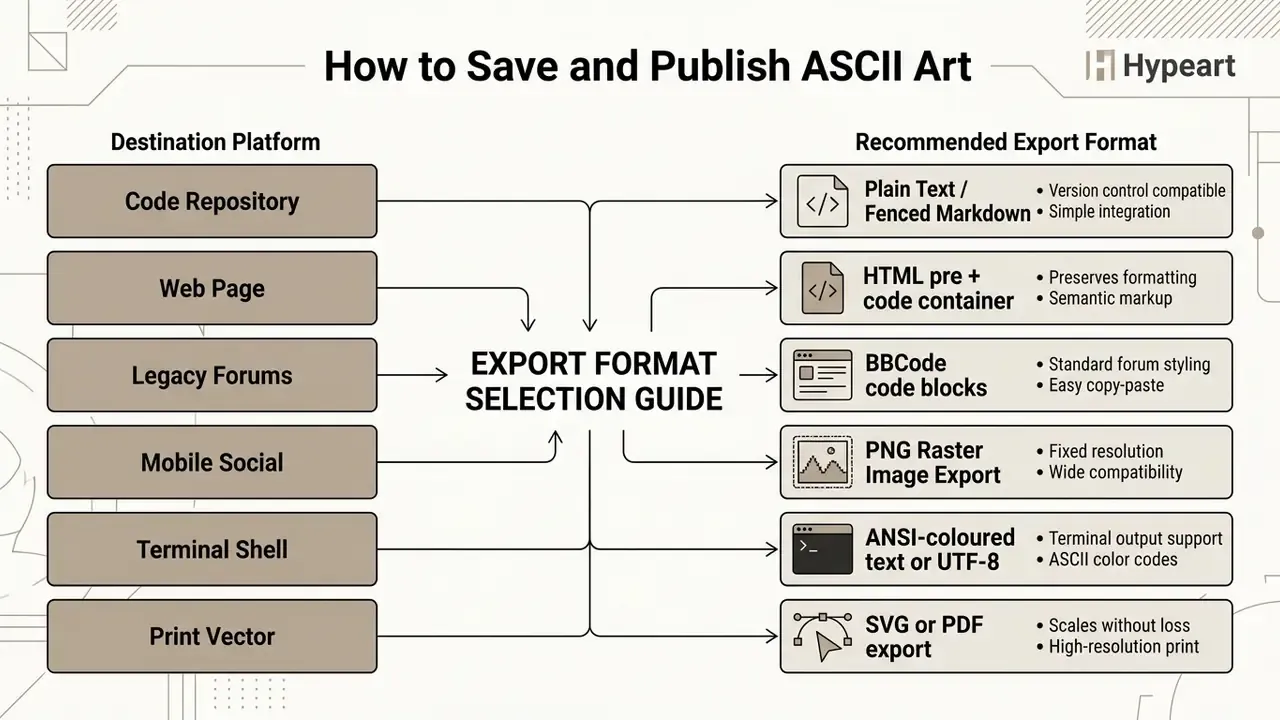
When publishing across varied web platforms, pick the format that preserves monospace alignment. Markdown is a plain-text syntax family converted to HTML on render, which is precisely why code fences are the only dependable Markdown container for character art. You can review commercial usage rights for alternate digital generators on the google ai image analysis page.
Exporting as Raster Image or Basic Text
Plain-text export (.txt) preserves raw character strings at minimal file size, which makes output easy to copy, edit, and drop into code comments. It carries only character information. No colour, offset, or effect metadata survives unless in-band escape codes are added, and rendering depends entirely on the destination font settings.
Exporting as PNG locks typography metrics, background colour, and alignment into a fixed raster. That removes line-wrapping risk on platforms without monospace support. The trade-off is resolution dependence: raster exports cannot be enlarged cleanly, and JPEG compression softens thin glyph strokes on top of that. SVG sits between the two, keeping glyphs selectable and scalable while staying stylable with CSS.
Monochrome vs. Colorized ASCII Art (ANSI and HTML Colour)
Classic ASCII art leans purely on stroke density for luminance. Modern web tools add full colour:
- ANSI colour codes. Escape sequences such as
\033[38;2;R;G;Bmproject 24-bit RGB text into modern Linux, macOS, and Windows Terminal windows. - Coloured HTML output. Each glyph is wrapped in an inline CSS span, for example
<span style="color:#ff0000;">@</span>. Coloration survives, but payload can grow by up to ten times compared with raw text. - BBCode colour tags. Output wrapped in
[color=#hex]tags suits legacy forum signatures and bulletin boards, where coloured ASCII signatures remain a convention. - Monochrome mode. Maximum portability. It survives copy-paste into any plain-text field, email body, or commit message with no markup loss.
Choose colour only where the destination guarantees a monospace renderer. A coloured span grid pasted into a proportional-font field loses alignment and meaning at the same time.
ASCII Art for Social Media and Online Communities
Publishing ASCII graphics on social media requires deliberate formatting, because standard feeds collapse whitespace and default to variable-width fonts. Platform documentation is explicit about the mechanics. Reddit's Markdown merges adjacent lines into one paragraph unless a line ends with two spaces or a backslash, and Discord does not support Markdown line-break syntax at all, so new lines are entered with Shift+Enter.
To keep layout integrity, wrap output in code fences or preformatted blocks. Reddit needs four-space indentation or fenced code blocks for monospace spacing. Discord needs triple backticks. Telegram and legacy forums rely on fixed-width or [code] containers respectively.
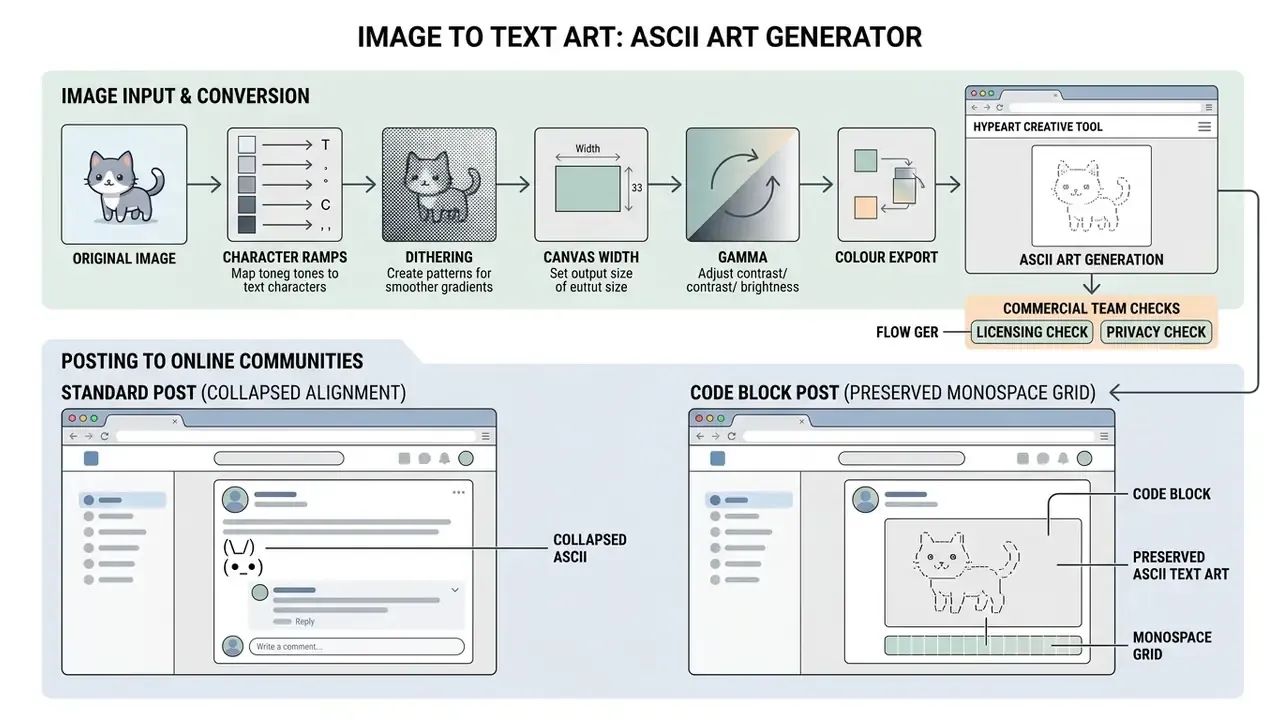
Plain-text export gives you instant copy-paste deployment. Alternatively, a high-contrast PNG render preserves exact alignment even on non-monospace mobile interfaces. For narrow mobile clients, generate at 40 columns rather than trusting the client to wrap gracefully. It will not.
HTML, Markdown, Reddit, and BBCode Formatting Rules
Structural alignment survives across platforms only inside preformatted containers.
- HTML: wrap output in
.... The - Markdown and Reddit: indent every line with four spaces, or enclose the whole graphic in triple backtick code fences.
- BBCode forums: enclose text between
[code]and[/code]to force fixed-width rendering.
<!-- Standard HTML markup for ASCII art -->
<pre><code style="font-family: monospace; line-height: 1.0;">
  /\_/\
 ( o.o )
  > ^ <
</code></pre>
Precise markup keeps parsers from stripping leading whitespace or fusing multiple lines into one continuous string.
Accessible Publication Template (WCAG 2.2, Technique H86)
How to Choose an Image to Text Art Tool for Commercial Use
Selecting an image text art generator for commercial workflows means evaluating data privacy mechanisms, processing architecture, licensing terms, and export flexibility. Prioritize browser-based converters that process files locally and never transmit proprietary media to cloud servers.
«Proprietary models exceed 70% accuracy in several ASCII categories, while open multimodal models trail by more than 20 percentage points.»
That gap has operational weight. If character art is later consumed by an automated review model, the reliability of the downstream interpretation depends heavily on which model family reads it.
An ascii generator picture system fit for enterprise use must state clear terms about generated output. Browser Canvas operations run client-side, yes, but legal rights to the output depend on vendor terms and on who owns the source image. Vendor policies diverge sharply here. Some declare generated ASCII art free for personal and commercial use. Others place responsibility for source-material rights entirely on the user. At least one service claims a perpetual, worldwide, royalty-free, sublicensable licence over content submitted through it. Read the clause before the designer uploads the client logo. Procurement teams comparing licence language across adjacent categories can review AI image generators for commercial use.
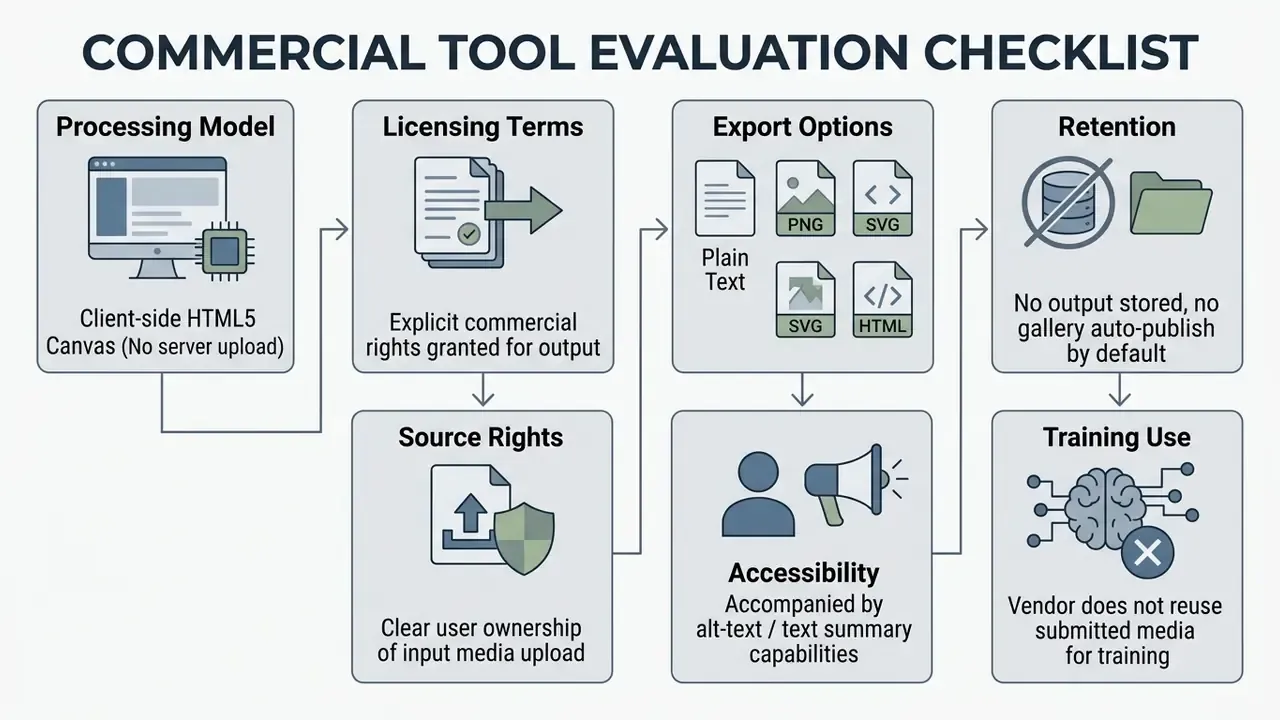
For details on corporate AI governance and asset generation terms, developers can see the overview of enterprise deployment models, and legal reviewers can view the guide on intellectual-property considerations in digital media creation.
Practical Checklist for Evaluating Generators Prior to Publication
Before wiring an ASCII art utility into production, run a structured verification pass:
- Verify local client-side processing.Inspect browser network traffic and confirm media stays local. During generation, zero image requests should fire. Provenance of the source file itself can be checked with AI image detectors before publication.
- Review output licensing terms.Confirm the Terms of Service do not claim ownership of user-generated character output.
- Assess export versatility.Ensure the utility supports plain text, HTML markup, SVG, and high-resolution PNG.
- Test monospace alignment stability.Validate rendering across multiple IDEs, terminal apps, and browsers, including at least one mobile client.
- Implement accessibility text alternatives.Under W3C WCAG 2.2 (Technique H86), ASCII art needs adjacent descriptive text so screen readers can interpret or skip multi-line graphics. https://www.w3.org/WAI/WCAG22/Techniques/html/H86
«Multimodal models including GPT-4o, Claude and Gemini systematically prioritise character semantics over global visual patterns in ASCII art.»
For moderation-sensitive publishing that finding has a direct consequence. Automated filters may wave through ASCII imagery that a human reviewer would reject, so text-art assets bound for public channels deserve a manual approval step. Not a heavy one. Just a named owner and a recorded decision.
To explore additional creative asset creation tools, teams can examine the ghibli ai image generator documentation or browse the complete asset directory on the open the hub page.
Limitations and Open Questions
Three things in this guide are weaker than they look, and it is fairer to name them.
First, the quality evidence is thin. Published comparisons of ASCII conversion methods cover small sample sets and rarely define "readable" the same way twice. Treat ramp and dithering recommendations as working defaults, not settled findings.
Second, the machine-reading picture is moving. Benchmarks from 2024 through 2026 agree that multimodal models read glyphs before shapes, but accuracy figures shift with every model release. Any control that assumes an automated reviewer understands character art should be re-tested, say, each quarter.
Third, licensing practice is inconsistent across vendors, and terms change without notice. A screenshot of the Terms of Service page, dated, stored with the asset, is a cheap piece of audit evidence. Unglamorous, and it has saved more than one review.
A Short History of Text Graphics
Character-built imagery predates computing. Typewriter artists were composing pictures from keyboard strokes by the 1890s, arranging asterisks, slashes, and letters on fixed-pitch mechanical grids. Line printers and teletype terminals inherited the technique. By the 1980s, bulletin board systems had turned ANSI and ASCII art into a full subculture, complete with signature styles, art groups, and distribution packs. The modern revival runs through GitHub READMEs, terminal banners, Discord channels, and lo-fi web design. More than 130 years of continuous practice under one constraint: a fixed character cell.
Two published works give the longer context. Karin Wagner's From ASCII Art to Comic Sans (MIT Press) traces typography and computing from early terminals through internet culture, while Rozita Fogelman's ASCII Graphic Glitch Art collects black-and-white graphics built entirely from keyboard symbols. Academic work runs in parallel: structure-based ASCII art synthesis was formalised at ACM SIGGRAPH in 2010, fast text-placement schemes followed in 2022, and machine-learning comparisons appeared in 2025.
FAQ: Image to Text Art and ASCII Conversion
What is an ASCII art generator from an image?
An ASCII art generator from an image is a software tool or web application that converts raster images into text graphics composed of ASCII characters. It samples pixel brightness and maps lighter or darker regions to characters of corresponding visual density inside a monospace font grid.
Which file formats can I convert to ASCII art?
Most browser generators accept anything the browser can decode: JPG, PNG, WebP, BMP, and animated GIF. Video inputs such as MP4 work in tools that extract frames to the Canvas sequentially. PNG files with alpha transparency should be composited onto a solid background before mapping.
Can I convert a GIF or video into animated ASCII art?
Yes. Frame-based converters run the same luminance-to-character pipeline on every extracted frame, then replay the sequence as animated text, an animated GIF of the rendered glyph grid, or a video export. Keep animated output narrow, roughly 40 to 80 columns, because payload scales with frames times columns times rows.
What is dithering and do I need it?
Dithering distributes quantization error to neighbouring pixels so gradients do not collapse into visible bands. Use Floyd-Steinberg for photographic portraits, Atkinson for logos and clean backgrounds, and JJN or Stucki for wide smooth gradients. Line art and wireframes usually look better with dithering off.
Does converting an image to ASCII text upload my data to a server?
Client-side generators process images inside your browser using HTML5 Canvas and JavaScript APIs. With a fully client-side tool, source images stay in local memory and are not uploaded. Verify it rather than assume it: open the Network tab and confirm that no image request appears during generation.
Why does ASCII art look distorted when copied into social media posts?
It distorts on platforms that use variable-width fonts or collapse consecutive spaces. To hold alignment, format the text inside monospace code blocks, such as Markdown code fences or HTML tags, or export the artwork as a PNG image.
How do I make coloured ASCII art?
Enable colorized mode and pick an output channel: ANSI escape sequences for terminals, inline CSS colours for web pages, or [color=#hex] BBCode for forums. Colour output is larger and less portable than monochrome, so keep a plain-text version for copy-paste channels.
Can I edit the generated art by hand?
Yes, in generators that include a draw or edit mode. Brush, eraser, fill, glyph picker, and symmetry tools clean stray characters along high-contrast edges. Lock the grid after editing. Otherwise, nudging the width or gamma slider re-renders from the original photo and discards your corrections.
Can I legally use generated ASCII art for commercial projects?
Rights depend on your ownership of the source image and on the generator's Terms of Service. Many browser tools grant full rights to user output, provided you hold the intellectual property rights to the input media, yet some services claim a broad royalty-free licence over submitted content. Review vendor terms before publishing; licensing conditions across adjacent categories are compared in our roundup of the best AI image generators.
What type of image produces the best ASCII art results?
High-contrast images with bold silhouettes, distinct outlines, and clean backgrounds work best: corporate logos, line art, flat graphics, and stylized portraits. Low-contrast images with subtle colour gradients tend to look blurry once mapped to character density scales.
How do I keep ASCII art accessible?
Attach a short text alternative immediately before or after the art, mark the glyph grid aria-hidden="true", and expose the description through a figcaption or adjacent paragraph. Screen-reader users can then understand or skip the block, in line with W3C Technique H86.
Appendix A: Superseded Passages (Revision Log)
Retained for editorial transparency after the February 2026 update:
- Previous citation wording: "A 2025 benchmark study on ASCII art representation published on arXiv established that characters in textual graphics function as visual primitives rather than semantic tokens." Replaced by the named ASCIIBench (arXiv, 2025) citation with its stated definition of ASCII art as the intersection of the textual and the visual.
- Previous unsupported claim: "High-contrast input images with recognizable silhouettes, such as portraits, corporate logos, and architectural outlines, translate cleanly into ASCII character maps." Reformulated as documented editorial practice from converter guides rather than a quantified benchmark result.
- Previous input-format line: "Drag and drop a PNG, JPG, or WebP image file into the browser interface canvas." Extended to include BMP, animated GIF, and MP4 frame extraction.
- Previous navigation element: an anchored table of contents. Replaced by a governance framing section explaining why a text-art converter reaches a risk review at all.