For a bank or a mature fintech, the question is rarely "can it draw a banner?". The question is whether a creative tool can sit inside a controlled perimeter with documented rights, logged prompts and a named approver. That is the lens used here.
Last reviewed: February 2026. Scope of review: the official Picsart product, pricing, help-center and API documentation, plus peer-reviewed and preprint research on generative visual production.
Executive summary for decision makers
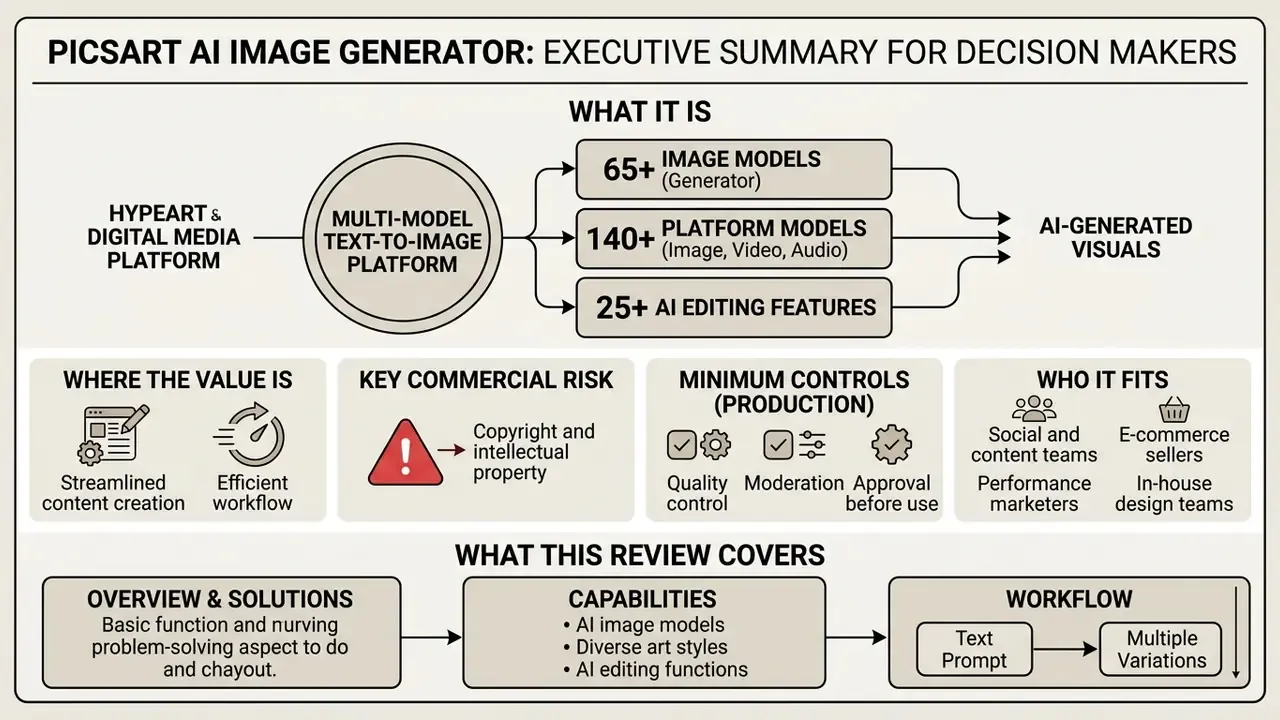
- What it is. A multi-model text-to-image platform (65+ image models in the generator, 140+ image, video and audio models across the platform, 25+ AI editing features) where the AI generator and the photo editor share one canvas. A prompt becomes a production asset without tool switching.
- Where the value is. Research attributes up to a 19% CTR lift to fully AI-generated ads, but also a 31.5% CTR drop when AI generation is disclosed (Ghose et al., NYU Stern, 2024). Cost per generated image is roughly $0.005, which makes high-volume A/B testing economically viable (Taboola / Harvard Business School AI Institute, 2024).
- The single biggest commercial risk. Images generated on the free tier are published as
#FreeToEdit, meaning other Picsart users may remix, edit and duplicate them. Exclusive brand assets need a paid tier and a fresh reading of the current terms. - Minimum controls before production use. A named owner per creative workflow, human-in-the-loop (HITL) approval, prompt, model and version logging for the audit trail, NSFW and trademark moderation checks, and a documented licensing position for every published asset.
- Who it fits. Social and content teams, e-commerce sellers, performance marketers, in-house design teams and small businesses. Regulated-industry teams (banking, insurance, health) can use it for marketing creative with governance controls, not as an unsupervised pipeline.
What this review covers
- What the Picsart AI image generator is and what it solves.
- Capabilities: AI image models, art styles and AI editing.
- Practical workflow: from text prompt to multiple variations.
- Aspect ratios and channel formats.
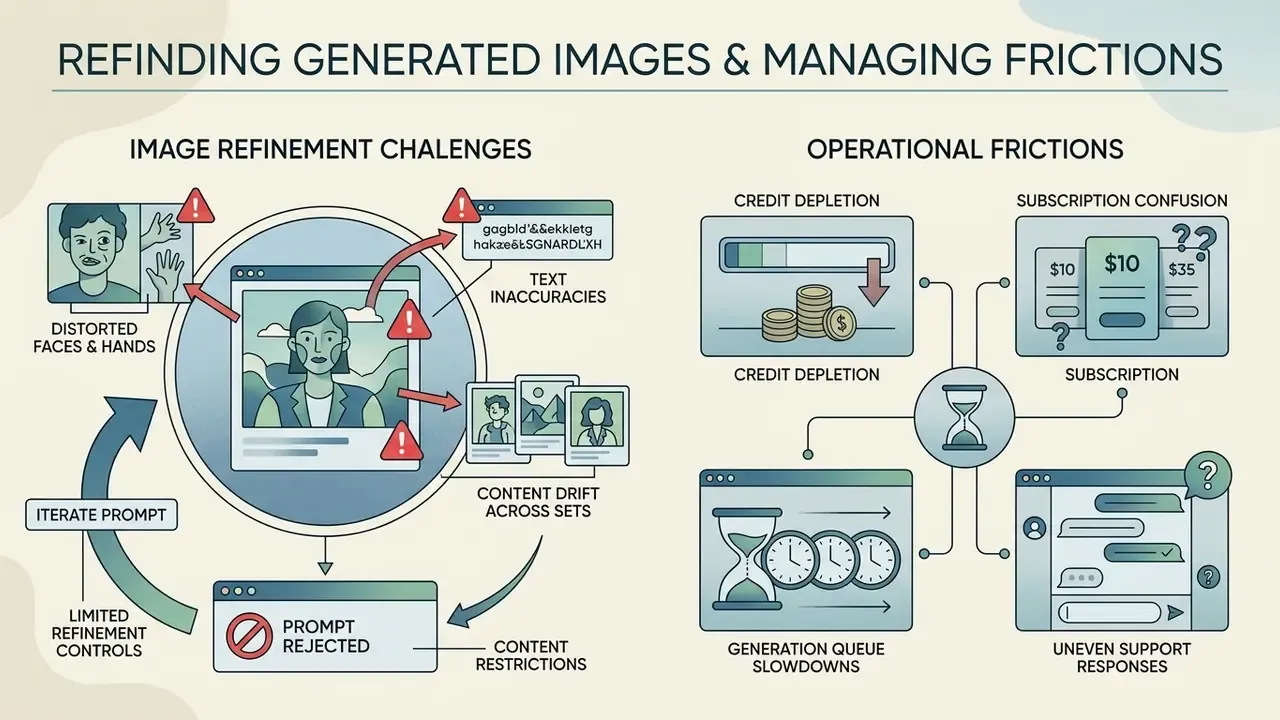
- Troubleshooting, limits and prompt rejections.
- Data governance, IP rights and the
#FreeToEditwarning. - Free and Pro capabilities for regular generation.
- Picsart AI for brands, creators teams and commercial content.
- Automation, API access and creative AI agents.
- FAQ, review methodology and version notes.
What Picsart AI Image Generator is and what it solves
The Picsart AI image generator is a multi-model synthetic media platform that turns text prompts into commercial visual assets. It wires generative model pipelines straight into downstream photo and video editing tools, so campaign production does not stall between two apps.
Modern financial institutions and fintech platforms need fast visual production for digital campaigns, educational material, onboarding screens and localized product announcements. Volume is the problem, not ambition.
«Diffusion and transformer models have fundamentally changed the economics of visual production in advertising and design since 2022.»
Using an AI generator Picsart pipeline, teams move from a raw image idea to polished promotional graphics without booking a studio. Before committing to a single vendor, procurement and creative leads usually benchmark several platforms. Our overview of AI image generators for commercial tasks puts licensing, output quality and control parameters side by side.
Generating AI art, AI photo and content imagery
The Picsart AI generator produces photorealistic assets (AI photo) and stylized creative graphics (AI art) from natural language input alone. Marketing departments use it to generate eye-catching promotional material, product shot backgrounds, and social media graphics at scale, often from a single phone photo. Picsart's own tutorials recommend realism-focused models plus camera-style prompt language and "imperfection" keywords such as film grain or natural skin texture when photorealism is the goal, and artistic models such as Flux 2 Pro or SDXL-class engines for stylized output. A portrait brief behaves differently again: the picsart ai portrait generator path leans on face-aware models and the AI avatar tool rather than generic scene prompts.
«Fully AI-generated ads achieve up to a 19% increase in click-through rates versus human-created baselines, yet disclosing AI generation reduces CTR by 31.5%.»
This two-sided result matters operationally. Performance gains from synthetic creative can be partly or fully erased by mandatory AI-disclosure rules in some jurisdictions and ad networks. So visual realism, avoiding an overly synthetic look, and planning the disclosure line in advance all feed consumer trust rather than sit beside it.
A regional financial services provider (illustrative composite case) evaluated synthetic ad banners for a mobile lending campaign. The team used text prompts to auto generate baseline background options across photorealistic models, then passed them into the editor for brand asset overlay. Reported effect: roughly 35% less external agency spend, with campaign compliance review unchanged. Numbers like that are self-reported, so treat them as a hypothesis to test on your own templates. Teams that want a broader vendor shortlist can review the best AI image generators by output quality, price and rights, or explore free generative AI options to test baseline generation speed first.
Who Picsart AI is for
The platform serves creator teams, corporate marketing departments, and digital growth managers who need scalable asset generation. It supports everyday creative work by automating the boring parts: background removal, resizing, personalized brand imagery.
«Designers use AI tools as creative partners for idea generation, variations and strategic prompting inside team workflows.»
Concrete user segments and their typical jobs to be done:
Vendor evaluation, not market rumour. Any external creative tool entering a corporate perimeter deserves assessment on verifiable criteria rather than marketing claims: published security posture and certifications, data-retention and model-training policy for uploaded assets, SSO and role management, admin control over seats and exports, documented commercial licensing, and an incident and support SLA. If a vendor cannot produce documentation on those points, the tool belongs in a sandbox, not in a production campaign pipeline. That rule sounds harsh. It also prevents most shadow AI incidents. Enterprise teams comparing generative platforms on visual quality, control parameters and operational safety can compare options across categories, compare documented tool evaluations, or review adjacent tooling such as online photo editors.
Capabilities of Picsart AI: models, styles and AI editing
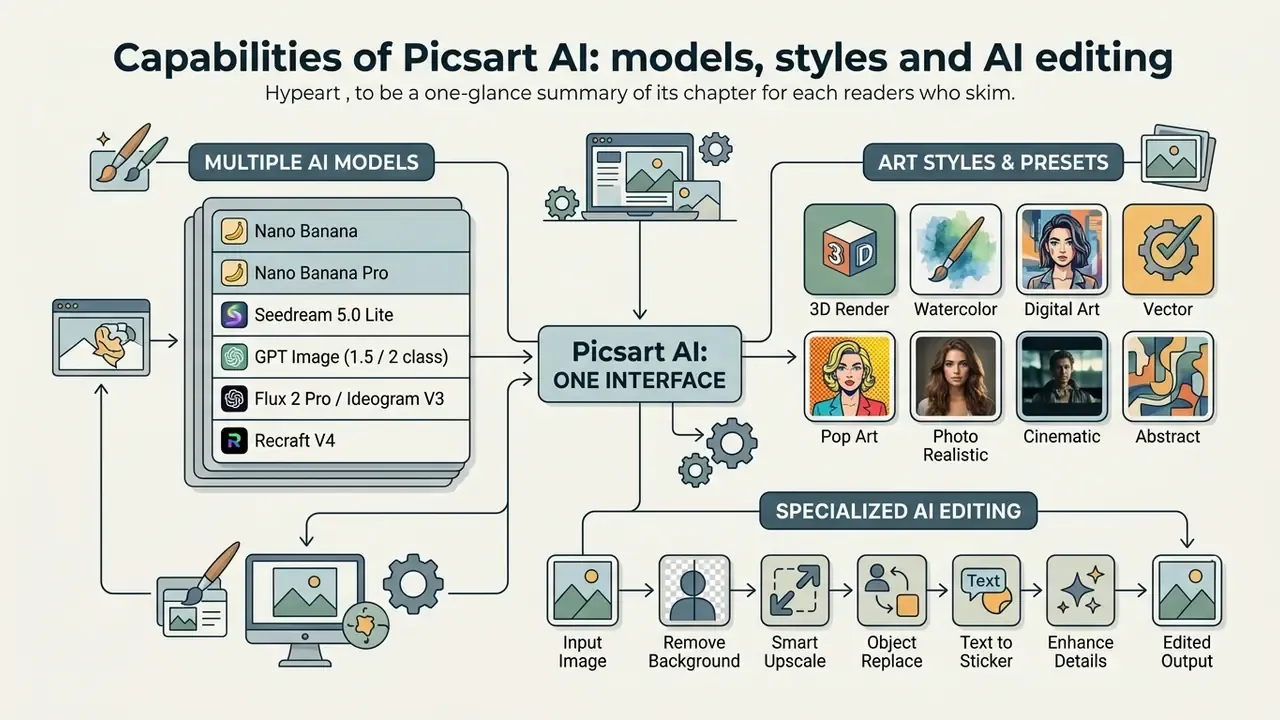
The Picsart AI art generator bundles a large catalogue of generative image models with specialized editing tools inside one interface. Picsart's pricing page lists 140+ leading AI video, image and audio models, the AI Photo Editor page lists over 25 AI-powered features, and the AI Playground page lists 69 image models with style transfer, multi-image references, inpainting, background removal and upscaling. In practice this means you can synthesize visual content and post-process it without leaving the canvas.
| Tool | Function | Typical output | Application scenario |
|---|---|---|---|
| AI Image Models | Synthesis via top-tier generative engines | 4K photo or stylized visual asset | Primary creative asset generation |
| AI Art Styles | Pre-configured artistic style layers | Vector art, watercolor, 3D render | Brand-aligned social media visuals |
| Image Enhancer | Automated resolution and contrast boost | Sharper detail, enhanced face quality | Upscaling low-resolution source images |
| AI Replace | Inpainting element swap via text prompt | Swapped objects matching ambient light | Product placement and localized edits |
| Object Removal | Erases unwanted foreground distractions | Cleaned background with filled texture | Cleaning stock photography or product shots |
| AI Background | Automated segment and swap of scene backdrops | Product placed in a new studio context | E-commerce product shot creation |
| AI Avatar | Stylized persona generation from photos | Professional profile or character art | Executive headshots and AI characters |
| Text / Sticker generation | Prompt-based typography and sticker assets | Branded stickers, matched replacement text | Localized overlays and campaign decoration |
Teams that want to understand the wider tool class before locking a vendor can study AI photo editors for professional tasks and how those feature sets map onto generation platforms.
Multiple AI image models and generation styles
Picsart offers access to multiple AI image models, including Google-backed Nano Banana and Nano Banana Pro, ByteDance's Seedream family, GPT Image engines, Flux 2 Pro, Imagen 4 Ultra, Ideogram 3.0 Flash, MiniMax H3 and Recraft with vector and SVG output. Each model trades speed against prompt adherence and photorealistic detail. There is no universally best engine, only a best fit per brief.
- Nano Banana fast 4K generation with search-grounded contextual accuracy, handy for high-speed editorial graphics. Picsart's API documentation maps it to Google's Gemini 2.5 Flash Image.
- Nano Banana Pro premium 4K output with precise multilingual text rendering, tuned for international ad banners; mapped to Gemini 3 Pro Image in Picsart's API docs. Banana Pro generations consume more credits, so reserve them for finals.
- Seedream 5.0 Lite quick 3K output with negative prompt support and dual-image input, built for rapid concept exploration.
- GPT Image (1.5 / 2 class) high-fidelity photorealism with strict adherence to complex multi-subject text prompts. Picsart markets GPT Image 2 as "4K photorealism with 99% text accuracy".
- Flux 2 Pro / Ideogram V3 artistic style control and text-heavy compositions such as packaging, posters and banners with legible copy.
- Recraft V4 Styles style-consistent generation that builds a reusable style from 1 to 10 reference images, which is useful for brand-locked visual systems.
Video sits next door in the same catalogue: Kling 3.0, Seedance 2.5 videos and similar leading AI video models cover motion assets, with parallel video generations available on higher tiers. Most brand teams start with static creative, then extend to short-form video once the review workflow holds.
Art styles and presets: what you can actually ask for
Instead of an abstract "dozens of AI art styles", it helps to see the preset families sitting next to the model picker. Picsart's blog describes 48 style presets in the AI Playground.
- Classical art: Monet-style impressionism, Picasso-style cubism, Van Gogh-style post-impressionism, Baroque, Renaissance oil painting.
- Modern and pop: Pop Art (Warhol-style), abstract expressionism (Pollock-style), surrealism, minimalism, Bauhaus poster.
- Digital and commercial: Cyberpunk, Steampunk, 3D Render, Vector Art, Isometric, Flat Illustration, Claymation, Low Poly.
- Photographic: Product studio shot, editorial fashion, cinematic still, macro, drone and aerial, film-grain analogue.
- Media styles: Watercolor, Ink sketch, Anime and manga, Comic halftone, Pixel art.
Picking the engine and the style preset depends on campaign parameters and channel requirements, not on taste alone. Technical teams planning custom integration can review our workflow analysis hub or open the hub to evaluate model governance principles. For direct positioning against other engines, see our comparisons of Midjourney image generation and Canva AI Generator.
Enhancing and modifying existing images
Raw synthetic output rarely clears corporate publishing guidelines on the first pass. Integrated tools such as the 1-tap image enhancer, advanced background and object removal, and instant AI photo editing let editors adjust framing, kill artifacts and apply brand elements in seconds. Picsart's model documentation names picsart-enhance as its enhancement model with upscaling plus face enhancement; the background remover returns a PNG with a transparent or white background after detecting the dominant foreground object.
Systematic research suggests generative tools deliver the highest operational value when paired with layer-based interactive editing (Tang et al., 2024, arXiv:2404.18144).
Rather than betting on one-shot prompting, operators reach consistent quality by editing synthetic layers with dedicated photo editing tools. Creators who need to sharpen low-resolution marketing assets without manual retouching can use free AI enhance utilities, apply a dedicated free AI image enhancer during post-processing, or compare AI tools for image quality improvement across vendors.
How to use Picsart AI Image Generator: from text prompt to variations
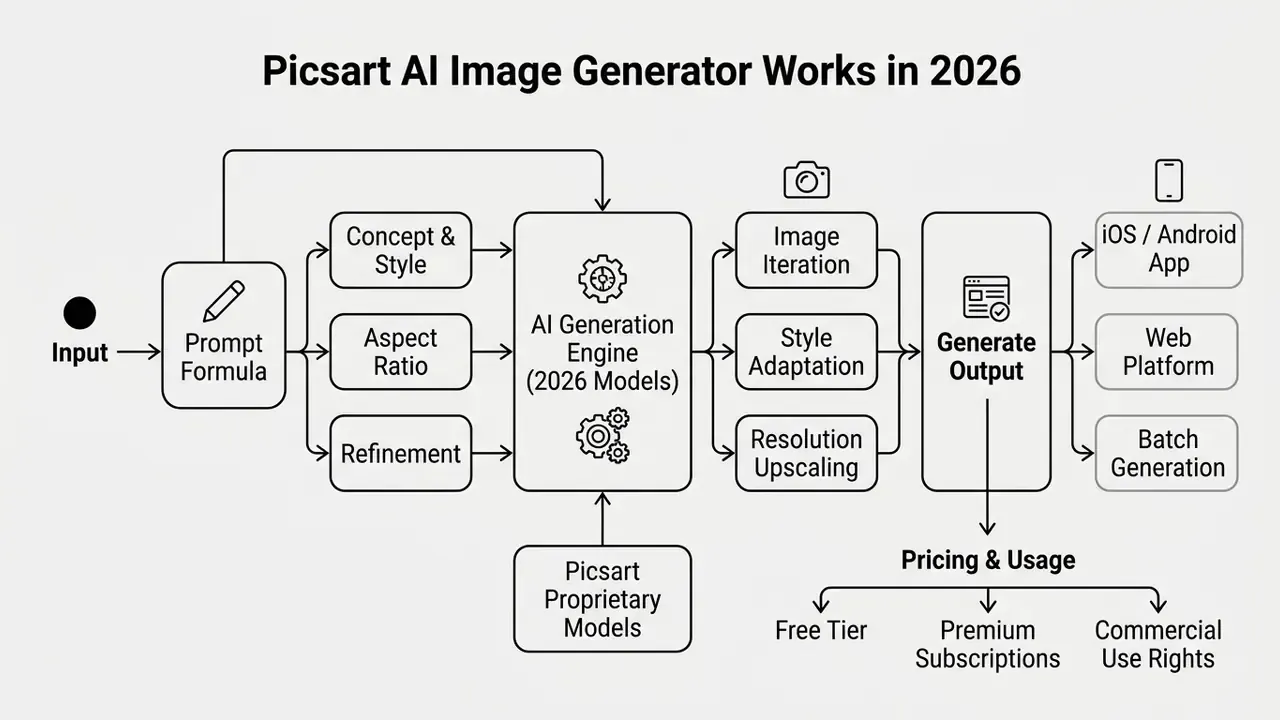
Generating commercial visuals with the Picsart AI photo generator follows a short sequence: model selection, prompt construction, format setup, multi-variant generation, editing, export.
- Select the generative engine.Choose the model by project spec: Nano Banana Pro for crisp text, GPT Image for photorealism, Seedream for artistic drafts.
- Formulate the text prompt.Describe subject, environment, lighting, framing and style parameters in one structured line.
- Set the aspect ratio.Pick the canvas format under the prompt box before you generate. Regenerating in the wrong ratio simply burns credits.
- Generate multiple variations.Run the prompt with a batch count of 3 to 9 variants to see the model's real range. Picsart returns up to four variations per prompt in the consumer interface; the API
countparameter controls batch size programmatically. - Select and refine.Open the strongest generated image in the Picsart photo editor and apply AI Replace, object removal or the image enhancer.
- Export production assets.Save high-resolution images (PNG, JPG, WEBP) sized for each target channel.
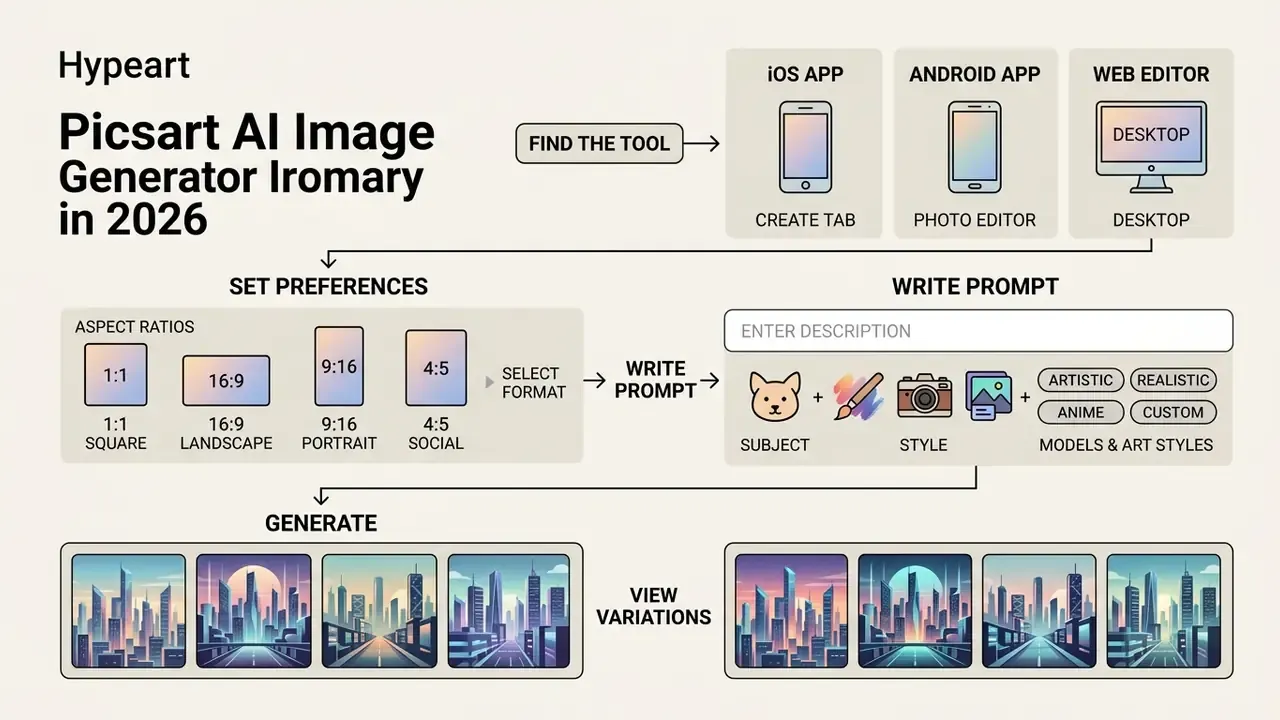
Where to find the tool on each platform
The interface path differs by device, and that is the most common reason first-time users cannot locate the generator at all.
- iOS app open Picsart, tap the
+button in the centre of the bottom bar, choose Text to Image in the AI Tools block, type your prompt or pick a suggested one, then wait for generation. - Android app open Picsart, tap
+, select Text to Image, enter a specific prompt, wait for the image set. - Web (desktop editor) open the Picsart Web Editor, choose Create New or upload an image, click AI Image Generator in the left toolbar, enter the prompt, then keep editing on the same canvas.
Aspect ratios: choose the format before you spend credits
The aspect-ratio selector sits directly under the prompt field and supports these formats.
| Ratio | Orientation | Primary use |
|---|---|---|
| 1:1 | Square | Instagram and Facebook feed posts, product cards, marketplace thumbnails |
| 4:5 | Portrait | Higher-reach Meta feed placements, catalogue creative |
| 3:4 | Portrait | Standard catalogue and lookbook photography |
| 4:3 | Landscape | Presentation slides, blog inline imagery, classic photo framing |
| 16:9 | Landscape | YouTube covers, website hero banners, display ads |
| 9:16 | Vertical | Stories, Reels, TikTok, vertical mobile ads |
| 3:1 | Wide banner | Profile headers, email banners, narrow site placements |
For multi-channel campaigns, the Picsart Flow batch workflow exports one concept in 1:1, 9:16 and 4:5 for Meta, TikTok and Google Display. Manual resizing leaves the cycle entirely.
How to write a text prompt for the result you need
Effective prompting rewards descriptive clarity, not elaborate syntax. Empirical studies on prompt engineering show that models respond mainly to specific subject and style keywords rather than subtle grammatical changes (Oppenlaender et al., 2023, arXiv:2303.13534).
An effective prompt formula has five elements, the same structure Picsart's tutorials recommend:
Ready-to-use business prompts
Add negative prompts where the model supports them, Seedream for instance: exclude "text artifacts, distorted hands, extra fingers, watermark, logo". For localized variants, keep the visual prompt in English and replace only the overlay copy in the editor. That keeps model behaviour stable across markets.



An asset management firm (illustrative case) prepared social graphics for a digital savings product. By standardizing prompt structure across five designers, the team cut prompt revision iterations from seven to two per asset, and internal compliance sign-off moved faster because reviewers saw a predictable format. Teams that want to rehearse prompt structures at zero cost can test approaches with free AI image generators or a free AI image app before committing paid credits.
How to refine a generated image after generation
Post-generation editing is what turns a rough synthetic output into a finished commercial asset. Inside the photo editor, designers erase distractions with object removal, change scenes with AI Background, swap elements through inpainting-based AI Replace, and overlay typography using trendy fonts, text styles, stickers or generated sticker packs. Picsart's text tools can also detect existing copy automatically and replace it with new text that matches font, size and style. That single feature is what makes localized variants quick.
Organizations publishing synthetic images need content safety filters that actually bite. Picsart applies its own moderation layer and rejects prompts referencing explicit material; enterprise teams should layer their own review on top, covering trademark usage, likeness of real people, and sector-specific advertising rules.
«Automated quality metrics correlate with human ratings but fail to capture cultural sensitivity and topical appropriateness of content.»
A workable corporate moderation policy: block prompts naming public figures, competitor brands or protected characters; prohibit generation of documents, certificates, badges and currency; require a second reviewer for any creative featuring human faces; and log every rejected prompt so recurring policy gaps become visible instead of folkloric.
The information here is general in nature and does not replace consultation with a lawyer or compliance specialist when assessing the admissibility of AI content in regulated industries.
To evaluate broader tool categories across safety, licensing and output quality, teams can see the overview of enterprise-grade creative suites.
Troubleshooting and limitations
Data governance, IP rights and the #FreeToEdit warning
This is the section most reviews of AI generators skip. It also decides whether the tool is usable inside a regulated organization at all.
Commercial licensing. Picsart states that output created with its generative tools may be used commercially, and names use cases including social media, merchandise, promotional products and ads. Paid tiers carry commercial rights; the free tier is the risk zone because of the #FreeToEdit status. Licensing terms for generative output shift frequently across the whole market, so treat any licence statement as version-dated and re-verify at every renewal. Readers evaluating tiers can also review commercial rights for AI art as a category primer.
Human-in-the-loop (HITL) approval workflow
- Brief. The owner defines objective, channel, ratio, brand kit and prohibited elements.
- Generate. The operator runs 3 to 9 variants on the locked model and style.
- Technical QA. Check artifacts, hands, faces, text legibility, resolution for the target placement.
- Brand QA. A designer validates against the brand kit: colour, type, logo clear space.
- Compliance QA. A reviewer checks claims, likeness, trademarks, regional advertising rules and disclosure requirements.
- Sign-off and publish. The named approver is recorded and the asset is versioned in the shared workspace.
Checklist0 / 9
Audit trail: what to log for every published asset
| Field | Example value |
|---|---|
| Asset ID / version | FY26-Q1-lending-banner-v3 |
| Model and tier used | Nano Banana Pro, Teams plan |
| Full prompt plus negative prompt | stored verbatim |
| Aspect ratio / export format | 9:16, PNG |
| Post-processing steps | AI Replace (terminal), enhancer (face), text layer |
| Reviewers | technical QA, brand QA, compliance QA (names) |
| Licence basis at publication date | paid-tier commercial rights, verified 2026-02 |
| Disclosure applied | yes or no, plus channel |
Keeping that table populated is the difference between "we used AI" and "we can demonstrate how each asset was produced". Most model-risk and advertising-audit questions reduce to exactly that distinction.
This information is general in nature and does not replace consultation with a lawyer on copyright, local AI-content regulation, or disclosure requirements.
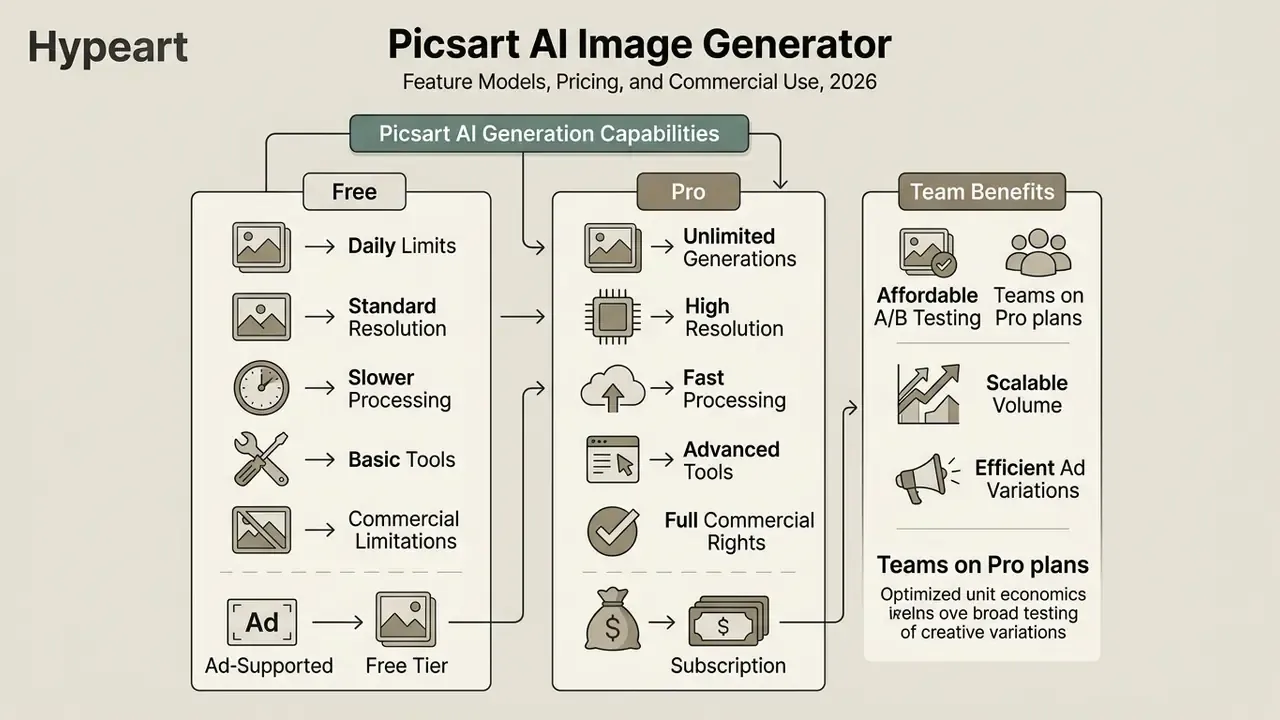
Free and Pro capabilities of Picsart AI for regular generation
Picsart splits the platform into Free, Pro and Teams subscription tiers. The tier dictates daily generation allowances, processing speed, access to advanced AI image models, credit top-ups, priority queues, premium templates and commercial rights.
| Parameter | Free tier | Pro tier | Teams tier |
|---|---|---|---|
| Indicative price | $0 / month | ~$10.50 per seat / month, billed yearly | |
| Credits | 5 credits / week | 500 credits / month | Shared credit pool per seat, top-ups available |
| Image generation | Basic speed limits | Priority generation queue | Unlimited image generations (Flex-class models) |
| Model access | Core models | Extended model catalogue | Broadest access, including premium 4K engines |
| Bulk edit | Not available | Up to 50 images at once | Up to 100 images at once |
| Brand kits | Not available | 3+ brand kits | 10+ brand kits, shared across seats |
| Cloud storage | 100 MB | 5 GB to 100 GB | Expanded team workspace storage per seat |
| Team access | Individual account | 1 seat | Multiple seats, shared workspaces, centralized billing |
| Commercial use | Restricted; outputs tagged #FreeToEdit | Commercial rights granted | Enterprise commercial licensing |
Conditions above reflect documentation reviewed in February 2026.
Fact check: tariff and feature verification
Cost per image, corrected. Large-scale advertising data indicates generative AI brings image production cost down to roughly $0.005 per image, not "fractions of a cent".
«AI-generated images cost roughly $0.005 per unit, which allows large-scale A/B testing without proportional cost growth.»
For teams on Pro or Teams plans, that unit economics makes broad A/B testing across ad variations affordable. Total cost of ownership is another matter. Budget for review time (technical, brand and compliance QA), occasional legal review, storage of prompts and audit logs, and the credit burn that comes with heavy AI usage on premium engines. A rough planning rule from our own tracking: control and review effort tends to cost more than the subscription itself once volume passes a few hundred published assets per quarter.
Picsart AI for brands, teams and commercial content
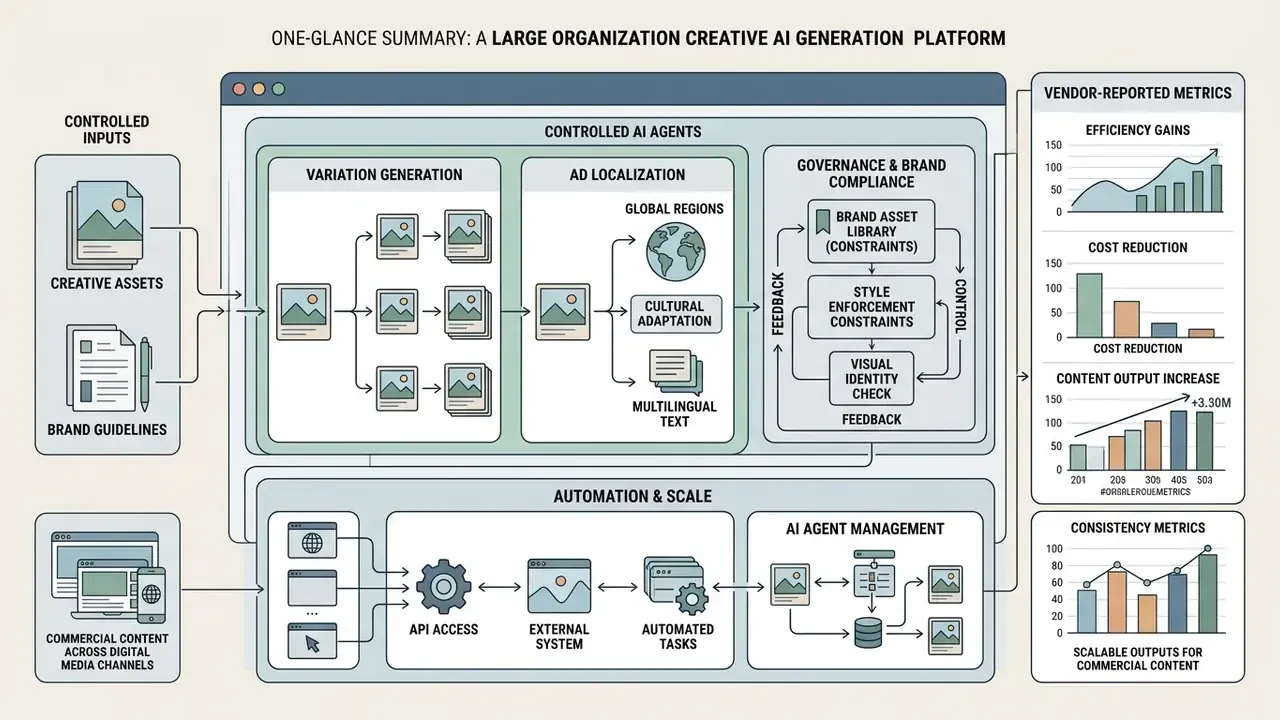
Enterprise adoption of synthetic generation stands or falls on governance features that enforce visual brand identity. Teams benchmarking control depth can compare the best AI art generators for branding on style consistency and admin capabilities.
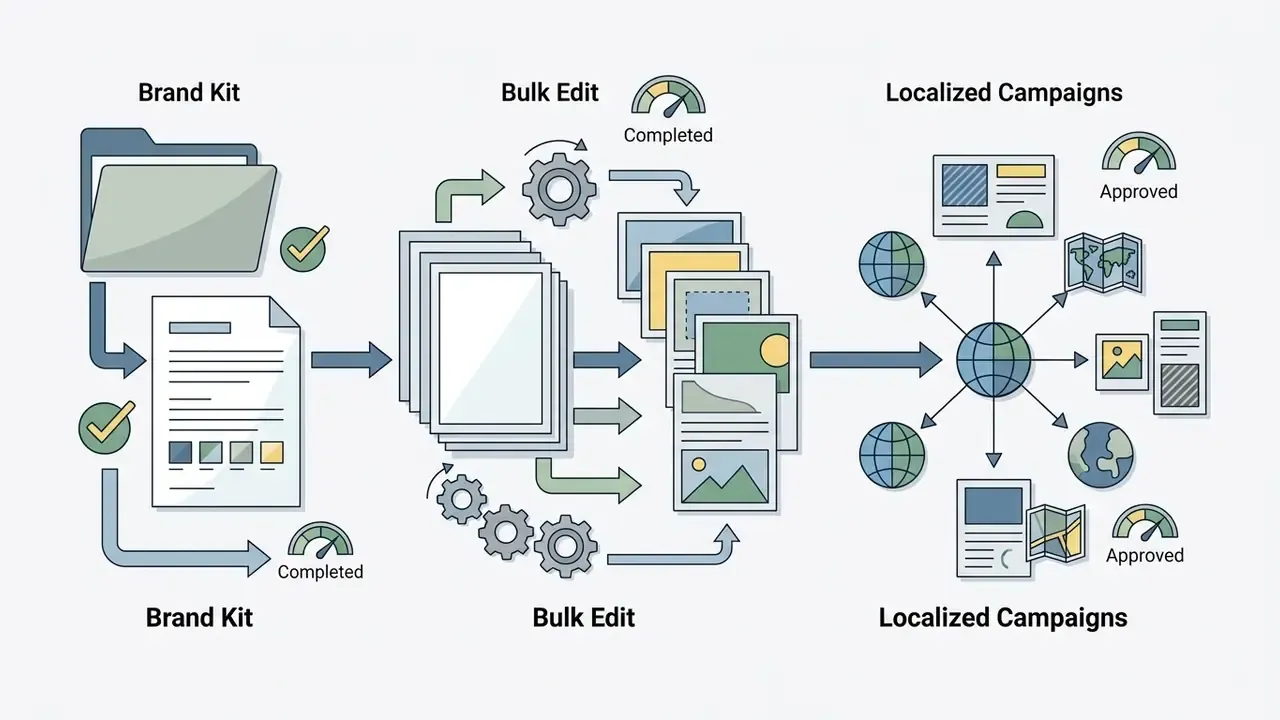
Picsart supports commercial operations through centralized brand kits, bulk edit, seat management, the option to add team seats as demand grows, and tools to track ads performance. Its avatar and persona features cover the professional-portrait case as well; for a category view, see AI generators for professional headshots. Stock coverage matters for hybrid workflows too: higher tiers include access to Getty stock videos and a library reported at 6.5 million Getty video clips, which lets teams mix licensed footage with generated stills.
Creative variation generation and ad localization
The Picsart Flow environment lets marketing teams create ad variations from a single master layout. Picsart's own tutorial describes a batch workflow producing 50+ ad variants and exporting them in 1:1, 9:16 and 4:5 for Meta, TikTok and Google Display, which is where ad variations localize into channel-ready sets.
Vendor-reported figures. According to Picsart's product documentation, its Localization Agent adapts text overlays, currency and date formats, and layout direction, including right-to-left layouts for Arabic and Hebrew, across 30+ languages, at roughly 30 to 60 seconds per market. Those figures are vendor-stated and were not independently benchmarked for this review. Measure throughput on your own asset templates before you plan campaign timelines around them.
Illustrative workflow. In a cross-border payments scenario reported by a design lead on a Teams-style plan, regionalized digital ad variations were needed for six Latin American markets. Using bulk edit and automated text replacement, the team deployed roughly 60 brand-compliant visual variations inside one working session. The pattern matches Picsart's documented batch capabilities, though the specific numbers are self-reported and not independently verified.
When you ship localized campaigns, watch the models for demographic and cultural bias (Masrourisaadat et al., 2024, arXiv:2407.00138).
«Higher-capacity models produce better image quality but exhibit substantial gender and social biases in occupational and everyday scenarios.»
Human review stays necessary to confirm that localized imagery fits regional regulatory requirements and internal ethical guidelines. No filter substitutes for a reviewer who knows the market.
«AI assistance increases ratings of creativity and originality in advertising material but does not improve visual appeal or brand fit.»
That finding is the strongest argument for keeping brand QA human. Models widen the idea space; people still enforce brand fit. Legal and risk officers overseeing generative deployment should track evolving precedents and copyright rulings in our AI Litigation and Case Timelines tracker.
Automation, API access and controlled creative AI agents
FAQ
Does Picsart AI generate images in batches?
Yes. A single prompt returns up to four variations in the app interface, each differing in pose, background or setting. Via the API, the count parameter controls batch size, for example 10 outputs per prompt.
Can I resize images for different platforms?
Yes. Set the aspect ratio under the prompt box before generating: 1:1, 3:4, 4:3, 16:9, 9:16 and 3:1 are supported, and campaign batch flows also export 4:5 for Meta placements.
What image types can I create?
Product photos, AI characters and character art, cinematic stills, website graphics, comic illustrations, model shots, stickers, avatars and backgrounds.
Which export formats are available?
PNG, JPG and WEBP, with high-resolution images on premium models, typically 3K to 4K depending on the engine.
Is output usable commercially?
Paid tiers grant commercial rights. Free-tier generations carry the #FreeToEdit status, which permits other Picsart users to remix them. Verify current terms before publishing brand assets.
Why was my prompt rejected?
Public-figure names, protected trademarks and NSFW terms are blocked by moderation. Rephrase with neutral descriptive language and remove one clause at a time to find the trigger.
Does the free AI image generator Picsart offers cover business use?
For drafts and internal concept work, yes. For published brand assets, no: the free tier's #FreeToEdit status and speed limits make it a testing environment, not a production pipeline.
About this review
This analysis was prepared by our commercial-use research desk, which evaluates generative media tools on four axes: output quality, operational controls, licensing clarity and governance readiness. Sources used: official Picsart product, pricing, help-center and API documentation (2026); public user reviews on independent review platforms; and peer-reviewed or preprint research cited inline. Where vendor claims could not be independently verified, they are labelled vendor-reported. Audience statements about buyer priorities remain hypotheses until confirmed by analytics, interviews or CRM data. Pricing and licence terms change often, so re-verify on the vendor's official pages before purchase.
Appendix A: corrections and version notes
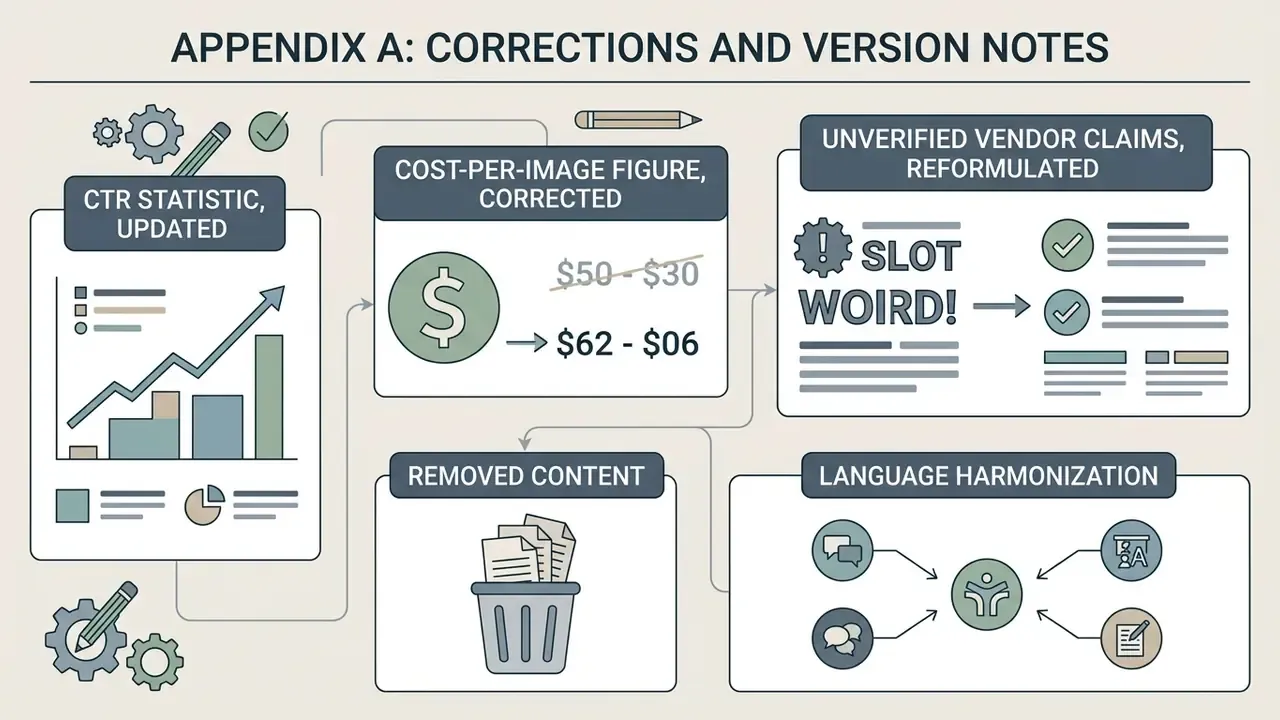
- CTR statistic, updated. The earlier version cited only the positive finding: "fully AI-generated ads can achieve up to a 19 percent increase in click-through rates compared to human-crafted baselines (Ghose et al., NYU Stern, 2024)". That citation was incomplete; the same study reports a 31.5% CTR decline when AI generation is disclosed. Both figures now appear together.
- Cost-per-image figure, corrected. The earlier phrasing "fractions of a cent per variation" understated the source value. The Taboola / Harvard Business School AI Institute (2024) figure is approximately $0.005 per image.
- Unverified vendor claims, reformulated. Localization throughput (30+ languages, 30 to 60 seconds per market) and the 60-variation campaign case are explicitly labelled vendor-reported or self-reported rather than independently measured.
- Removed content. An unverified third-party company mention and out-of-scope adult-content references were replaced with a vendor due-diligence framework and a corporate content-moderation policy block.
- Language harmonization. Headings, captions, prompts and body copy were unified into a single publication language.
A safe next step
Do not start with a platform decision. Start with one campaign, one owner and one logged pipeline. That sequence keeps generation speed aligned with your risk appetite, which is usually the real constraint. For the wider category and licensing context behind these decisions, see our research on commercial use of generative tools.
- Pick a low-risk asset class, for example internal presentation imagery or organic social creative.
- Run a 30-day pilot on a paid seat, with prompts, models and approvers logged in the audit-trail table above.
- Measure three numbers: cost per published asset, review hours per asset, rejection rate at compliance QA.
- Only then decide whether to widen access, add team seats, or keep the tool sandboxed.