Author note: Marcus Hale writes about AI governance and model risk for this publication.
The short version
- Two architectures, not one. Either you add a synthetic narration track to footage you already own (Clipchamp, VEED, CapCut, Clideo), or you generate the entire clip (visuals, avatar, voice, subtitles) from a script, prompt, or even a web URL (Vmaker, Synthesia, HeyGen, Canva).
- Free tiers are bounded by characters, not just minutes. Canva caps speech conversion at 1,000 characters per request, VEED Pro allows 5,000 characters per audio clip, and Clideo limits a single text-to-speech segment to 500 characters.
- Watermarks decide credibility. Microsoft Clipchamp exports 1080p watermark-free on its free tier; VEED and Kapwing brand free exports.
- You do not need SSML to control delivery. An ellipsis (
...) creates a long pause, an exclamation mark (!) adds vocal energy, intentional misspelling fixes proper nouns, and written-out numbers prevent digit misreads. - Audio-only output is a valid pipeline. Clipchamp and VEED let you export standalone
.MP3narration plus.SRT/.TXTtranscripts without rendering a video canvas. - Enterprise buyers must audit the vendor, not the voice. Ask for ISO 27001, GDPR, SOC 2, or CyberGRX posture, SSO/SAML support, and written confirmation that your scripts and voice clones are excluded from public model training.
How this comparison was built
Every functional claim below was checked against the vendor's own product, pricing, or documentation pages during the 2026 audit cycle, and each claim is dated in the fact-check block in section 7. Where a vendor states something we cannot independently verify (security certifications, retention behaviour, watermark policy on trial tiers), the statement is labelled as a vendor claim rather than a fact. Research citations are used only for measurable quality and perception findings, never as a substitute for reading the terms of service. Two things are deliberately treated as equal criteria: what the tool can produce, and what your institution is contractually allowed to do with the output. That second question is the one procurement usually asks last and regrets first.
AI video tools with text to speech capabilities combine neural voice synthesis with timeline video editing or generative video modeling. These platforms convert written text scripts into spoken digital narration and automatically synchronize audio with visual scenes.
That rigor matters before any technical comparison begins. A browser-based speech generator is, from a governance standpoint, an external inference endpoint. Corporate scripts, unreleased product names, employee voice samples, and regulated disclosure language all leave your perimeter the moment a marketing associate pastes them into a free web editor. Three risk classes recur in procurement reviews: Shadow AI (unsanctioned free tools used on confidential scripts), licensing drift (assets produced on a free tier and later monetized without commercial rights), and identity risk (cloned voices of named executives circulating without an audit trail). The functional criteria below are therefore paired throughout with security and rights criteria.
Organizations evaluate these tools to automate video creation, localize training content for a global audience, and reduce post-production overhead. Choosing the right tool requires evaluating voice quality, export limitations, copyright licensing, and workflow integration. You can compare options across creative AI platforms to align software features with your governance model.
What are AI video tools with text to speech capabilities?
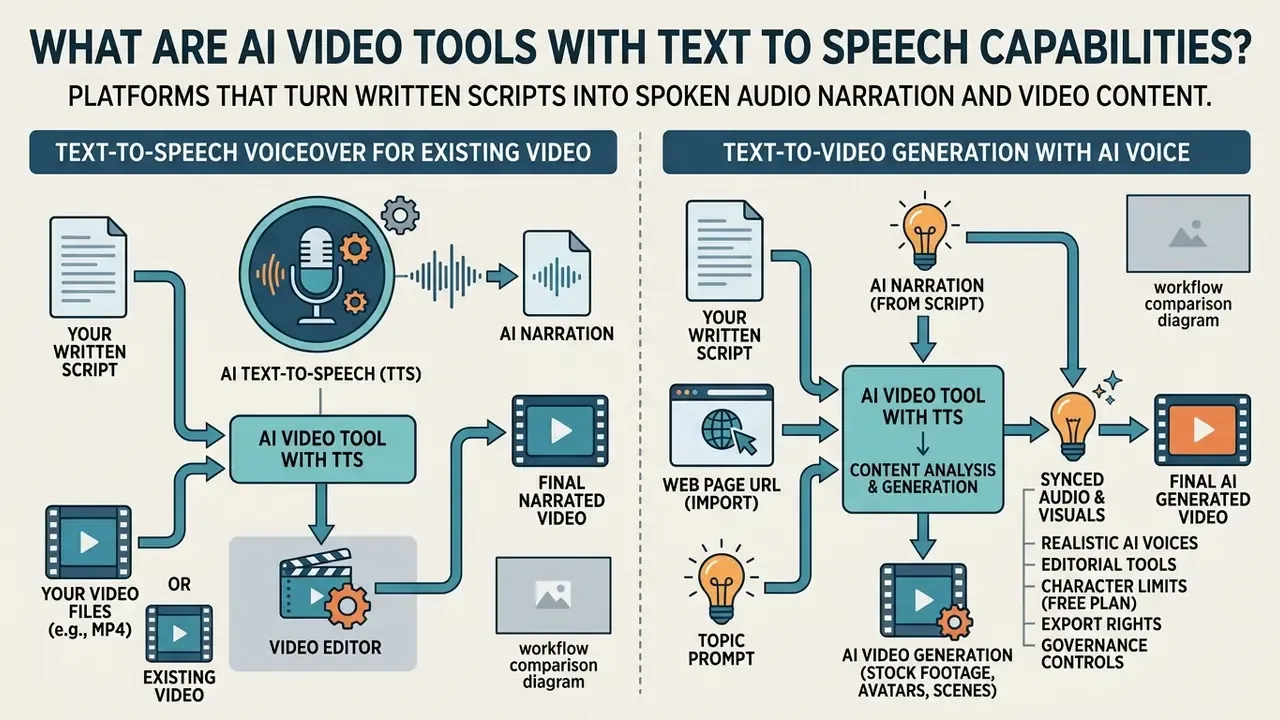
AI video tools with text to speech capabilities are software platforms that turn written scripts into spoken audio narration while simultaneously editing or generating corresponding video content. These systems replace manual voice recording by integrating neural speech synthesis directly into a video editing timeline or text-to-video diffusion pipeline.
Modern architectures process written content through a text encoder, pass semantic tokens to a speech generator, and map synthesized speech against visual frames. Research in multimodal generation, such as the TAVGBench framework by Mo et al. (2024), demonstrates that unified text-to-audio-video models align audio frequencies with scene changes to maintain temporal consistency across modalities.
«TAVGBench contains 1.7 million clips totalling 11,800 hours of aligned audio-video data for training multimodal generation models.»
That scale explains why commercial tools behave differently. A platform trained and evaluated on aligned audio-video corpora can place emphasis on a scene change, whereas a simple voice module merely plays audio over unrelated frames. In practical terms, these platforms operate either by adding an ai voiceover track to imported media, or by converting text prompts into complete video clips with built-in voice tracks.
Text-to-speech voiceover for an existing video
Text-to-speech voiceover for an existing video involves importing pre-recorded video files into an online video editor, placing script text on a timeline, and generating a synthetic voice track that matches visual cuts. The editor converts the written script into synthetic speech while automatically generating matching timecodes for subtitles.
This workflow relies on precise timeline control. Editors allow users to set pause durations, adjust speech tempo, and assign specific speech voices to different segments. Professional editors expose a defined tempo envelope: Microsoft Clipchamp, for example, allows speeding up or slowing down a generated voiceover from 0.5x to 2x, which is the practical range between step-by-step instructional narration and dense advertising disclaimers.
The ADx3 accessibility research framework by GenAD (2025) demonstrates that inserting AI narration during natural visual pauses, or briefly pausing video playback, prevents audio overlap and improves content comprehension.
«Human-refined automatic descriptions score between 3.78 and 4.05 out of 5 on appropriateness and consistency in user evaluation.»
You can see the overview of backend voice generation APIs to understand how timeline editors communicate with voice models.
Text-to-video generation with AI voice included
Text-to-video generation with AI voice included creates a complete video clip directly from a written prompt, slide deck, or script without requiring raw video uploads. The platform uses a script generator to structure scenes, builds synthetic visuals or an ai avatar, generates an ai voiceover, and attaches auto-synced subtitles in one unified process. Readers who want the underlying mechanics can study text-to-video AI tools in more depth.
Systems like Synthesia and Vmaker use dual-tower diffusion models, such as BridgeDiT (Guan et al., 2024), to separate video visual conditions from audio script conditions.
«BridgeDiT applies Hierarchical Visual-Grounded Captioning (HVGC), generating separate video and audio captions to remove modality interference during joint generation.»
This separation eliminates modal interference and allows the system to generate automatic lip-syncing for photorealistic avatars alongside synthetic speech.
URL-to-video and web page import. Script-to-video platforms increasingly accept a source address instead of typed prose. Vmaker AI, for instance, lets a creator paste a live web URL, a blog post, or a full article into the text-to-speech video tool. The platform extracts primary headings, condenses body copy into a narration summary, assigns an avatar and voice, and matches B-roll footage to each section topic. The same pathway covers knowledge-base documents, cart-reminder emails, and product user guides, which is why customer-support and e-commerce teams use it to recycle written assets into narrated clips without a new script pass. Comparable document-first flows exist elsewhere: Synthesia accepts a prompt, link, PDF, or PPT and builds a draft, while HeyGen converts brochures and catalog PDFs into scripted, narrated scenes.
You can see the overview of commercial media rights to evaluate compliance requirements when deploying generated visual agents.
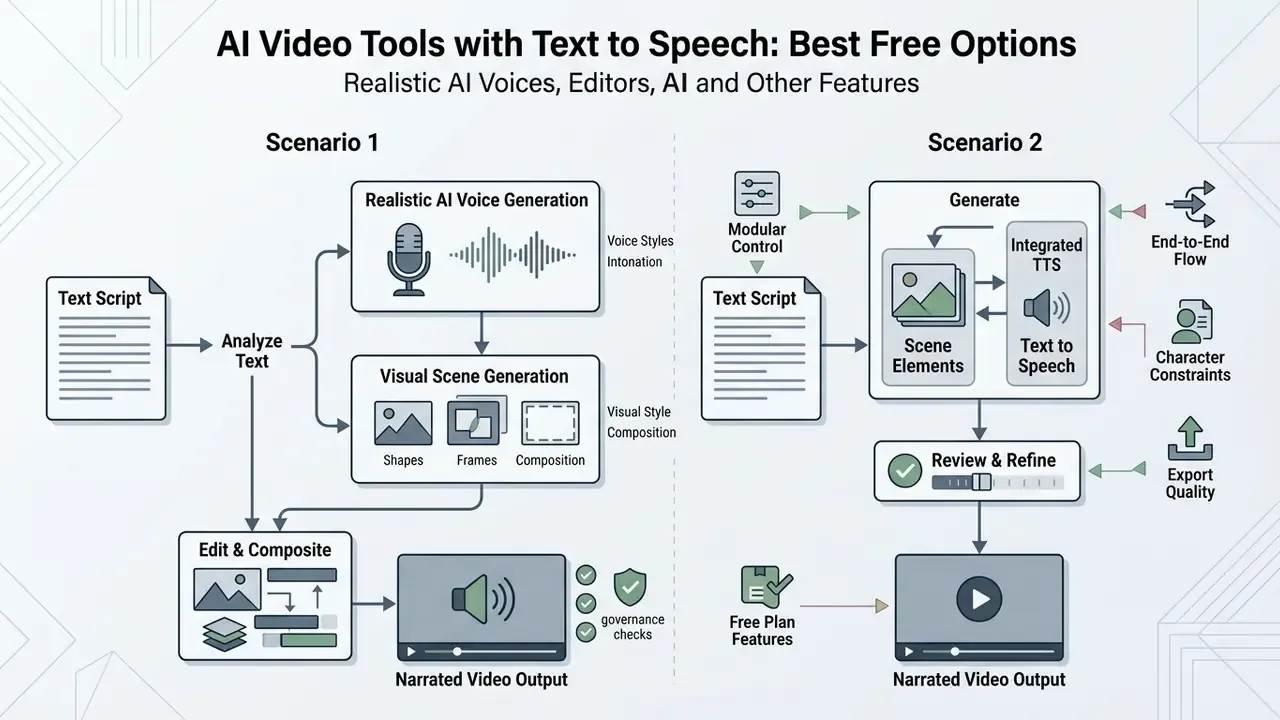
Track A, voiceover on existing footage: upload finished video, paste script or captions, select AI voice, language, pitch and pace, generate narration, align waveform on the timeline, export MP4 or MP3-only.
Track B, end-to-end text-to-video: enter prompt, script, PDF or URL, AI script generator builds scenes, avatar and voice selected, visuals, lip-sync and subtitles generated together, review and export.
- Accessibility requirement: every step must exist as readable text in the page, not only inside an image.
How to choose an AI text-to-speech video maker
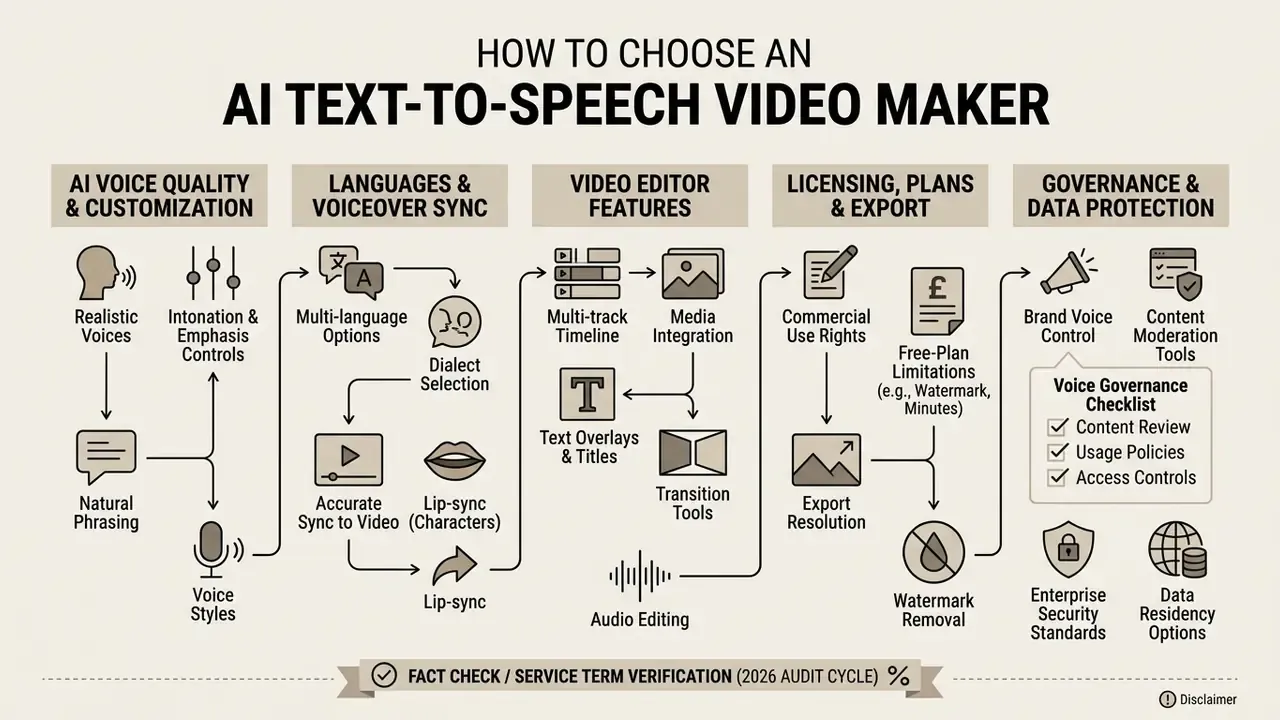
To choose an ai text to speech video maker, evaluate the naturalness of its voices, the depth of its timeline editor, its multi-language capabilities, and the licensing terms of its free plan. Selecting the right platform requires matching voice fidelity with institutional risk tolerance and production standards.
Organizations must look beyond basic text conversion. A platform may offer high-quality voice models but restrict commercial licensing, impose rigid export watermarks, or fail to support complex pronunciation adjustments. Evaluating tools across structural metrics ensures that deployed software aligns with your overall production workflow.
AI voice quality, languages and voice customization
Evaluating voice quality requires testing prosody, emotional expression, pitch stability, and support for multiple languages to serve a global audience. High-fidelity tools feature realistic ai voices that handle sentence emphasis, custom pauses, and phonetic pronunciations without robot distortion. Vendor libraries differ sharply in depth: Clipchamp exposes 400 voices across 80+ languages with masculine, feminine and neutral timbres; CapCut advertises 200+ voices with tone, accent and language selection plus speed, pitch and volume sliders; Kapwing responds to punctuation for tone and intensity across 40+ voice languages; and Vmaker resells two external engines, Amazon Polly and ElevenLabs, inside its own interface across 120+ languages and dialects.
The RW-Voice-EQ real-world benchmark (2025) measures TTS systems across expressiveness, voice identity, and code-switching stability.
«RW-Voice-EQ collected 785,679 individual ratings across 31 TTS system configurations along seven dimensions, including expressiveness, voice identity and multilingual code-switching.»
Quality is also decomposable rather than monolithic, which is what allows procurement teams to test a vendor claim instead of accepting it.
«TTSDS evaluates 35 TTS systems from 2008 to 2024, decomposing quality into prosody, speaker identity, intelligibility and overall distribution, correlated with human ratings.»
While specialized voice engines like ElevenLabs Multilingual v2 achieve lower word error rates (WER) in complex speech tests, deepfake detection studies such as DOSS-Select (2025) highlight that highly realistic generative voices require strict audit logging.
«The XLS-R-1B detector reaches only 76.40% accuracy on Qwen3 synthetic speech, while accuracy exceeds 98% for Google and Microsoft voices.»
Enterprise teams often require voice cloning and custom phonetic dictionaries to maintain brand consistency across regions, and they should log every cloned identity in a model inventory with consent records, revocation dates, and a named owner. A broader comparison of engines and licence structures is available in our guide to AI voice generators.
Voice governance checklist. Before a cloned voice enters production: written consent from the voice owner; scope of permitted content types; an expiry or renewal date; storage location of the voice embedding; whether the vendor uses the embedding for training; a documented revocation procedure; and a disclosure statement telling audiences the voice is synthetic, as Microsoft's synthetic-voice guidance requires. One more line worth adding, and it is usually the forgotten one: who is authorised to approve a new clone, and who reviews that approval quarterly.
Video editor features that matter for voiceover production
Essential video editor features for voiceover production include multi-track timeline management, automated caption generation, stock media access, and multi-format aspect ratio controls. A robust video editing tool must allow creators to fine-tune audio alignment against specific video frames; our reference material on video editing tools covers the timeline primitives in detail.
Subtitle generation must follow strict readability standards, such as Netflix timed-text guidelines requiring 42 characters per line, white proportional sans-serif type, bottom-heavy line breaks, and delivery in TTML formats (.dfxp, .xml, .ttml). BBC guidance instead expects STL and EBU-TT-D for broadcast and online distribution. Editors like Microsoft Clipchamp and Kapwing automate caption formatting and allow users to export downloadable .srt files, while Kapwing additionally exports transcripts as .txt and .vtt. If you are still selecting a baseline application, our comparison of free video editing software maps these caption and export features across products.
Built-in aspect ratio presets (16:9, 9:16, 1:1) ensure that narrated videos conform instantly to mobile, web, or corporate presentation standards. Stock libraries matter more than they appear: a 10M+ asset library, as offered by Vmaker, removes the licensing ambiguity of sourcing B-roll externally. Teams interested in motion graphics can evaluate the best ai animation software to combine animated visual tracks with synthetic audio.
Export, commercial use and free-plan limitations
Free plans for AI video tools typically enforce export restrictions, including visual watermarks, resolution caps at 720p, and strict monthly limits on generated speech minutes. Validating commercial use rights is critical, because many free tiers prohibit commercial monetization of generated voices.
| Platform Feature Filter | Free Plan Standard | Enterprise / Paid Standard | Governance Risk Factor |
|---|---|---|---|
| Export Watermark | Present on most platforms (e.g., VEED, Kapwing) | Completely removed | Brand exposure and professional credibility |
| Max Resolution | 720p or 1080p (Clipchamp allows 1080p free) | 4K HD export enabled | Visual fidelity on corporate displays |
| Commercial Rights | Restricted to personal/testing use | Full commercial assignment | Copyright infringement and licensing breach |
| Voice Quotas | 3 to 10 minutes per month | Unlimited or high credit allocations | Unplanned operational bottlenecks |
| Character Cap per Request | 500 to 1,000 characters (Clideo, Canva) | 5,000 characters per clip (VEED Pro) and above | Script fragmentation, inconsistent prosody between segments |
| Data Security & Compliance | Consumer terms, limited transparency on retention | ISO 27001, GDPR, SOC 2 or CyberGRX posture, SSO/SAML, contractual no-training clause | Proprietary voice clones and corporate scripts ingested into public model training sets |
| Audio-Only Export (MP3/SRT) | Available free in Clipchamp and VEED | Available with higher bitrates and batch export | Rework cost when only narration is needed |
Enterprise data-protection criteria. Confirm that the vendor holds ISO 27001, GDPR alignment, SOC 2 Type II, or a CyberGRX assessment, and that the contract states your recordings, scripts, and cloned voices are neither stored beyond the processing window nor used to train public models. Vmaker, for example, publicly states it is ISO, GDPR, and CyberGRX certified and that it does not store or share user recordings. That is a claim worth requesting in contract language rather than accepting from a marketing page. Add SSO/SAML provisioning, regional data residency, retention windows, and audit-log export to the same requirements list, then publish an approved-tools list so employees do not route confidential scripts through unsanctioned free generators.
Fact Check / Service Term Verification (2026 audit cycle):
Best AI video tools with text to speech: comparison by task
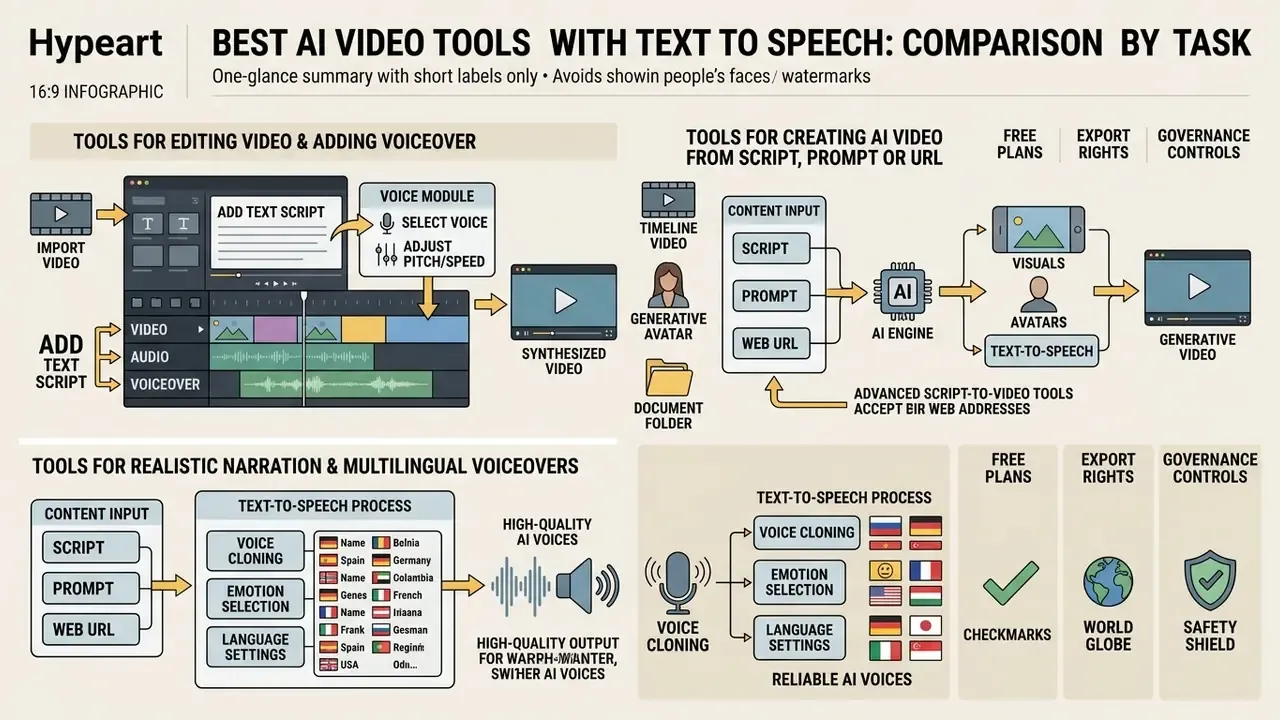
The best AI video tools with text to speech vary by production intent, ranging from timeline video editors with integrated voice modules to generative avatar platforms. Selecting an optimal platform depends on whether your project requires editing existing footage, generating videos from text prompts, or producing multi-language dubbing.
The comparison table below outlines leading software solutions evaluated by voice controls, editing capabilities, free tier allowances, character limits, voice engine backends, and target operational tasks. A wider field of products is covered in our review of AI video generators.
| Platform | Text-to-Speech Status | Voice Engine Backend | Video Editor Features | AI Avatars | Auto Subtitles | Supported Languages | Character Limit per Request | Free Tier Terms | Watermark | Max Export | Audio-Only Export | Stated Security Posture | Recommended Use Case |
|---|---|---|---|---|---|---|---|---|---|---|---|---|---|
| Clipchamp | Integrated (Azure TTS) | Microsoft Azure AI Speech | Full timeline, transitions, stock | No | Yes (80+ langs) | 400+ voices | No published character cap; timeline-limited | Unlimited free exports | No | 1080p | Yes, MP3 plus transcript, free | Microsoft enterprise tenancy, SSO via Microsoft account | Existing video editing, corporate clips |
| VEED | Integrated TTS | Proprietary plus partner models | Multi-track timeline, green screen | Yes | Yes | 100+ langs / 50+ TTS langs | 5,000 chars per audio clip (Pro) | Limited credits/month | Yes | 720p (Free) | Yes, project download as MP3 | Paid-tier admin controls; verify DPA | Social media content, quick explainers |
| CapCut | Integrated TTS | Proprietary | Rich effects, speed ramping | Limited | Yes | 200+ voices | Not published | Free web/mobile tools | Platform specific | 1080p / 4K | Partial (extract audio) | Consumer terms; review before corporate use | Short-form video (Shorts, Reels, TikTok) |
| Kapwing | Script-to-voice | Proprietary | Collaborative timeline, meme tools | No | Yes | 40+ voice langs, 100+ subtitle langs | Script-length based | 3 TTS minutes/mo | Yes | 720p (Free) | Yes, TXT/SRT/VTT transcripts | Team workspaces on paid tiers | Collaborative social media production |
| Vmaker | Script-to-video plus URL-to-video | Amazon Polly plus ElevenLabs | Trimming, screen recording | Yes (100+) | Yes | 120+ voices | ~2,000 chars per free render (vendor-stated) | Limited free trial | Yes | 720p (Free) | Via editor export | ISO, GDPR, CyberGRX certified (vendor claim) | Product walkthroughs, corporate demos, blog-to-video |
| Canva | Integrated TTS | Partner models plus Google Veo for video | Template-based design editor | Limited | Yes | Global languages | 1,000 chars per speech conversion | Asset and credit caps | Elements marked | 1080p | Via design export | Canva Shield / enterprise controls on paid tiers | Marketing presentations, branded clips |
| Clideo | Basic TTS (500 char) | Proprietary | Quick join, crop, basic editor | No | Basic text | Language dependent | 500 chars per TTS segment | Character limit per clip | Yes | 720p (Free) | Timeline audio editing | Consumer terms | Simple clip editing, quick narration |
Reading the table in one line: Clipchamp wins on free export rights, VEED and CapCut on speed for social formats, Vmaker and Synthesia on document-to-video, and none of them removes the need to read the licence.
Tools for editing a video and adding an AI voiceover
Tools like Microsoft Clipchamp, VEED, CapCut, and Clideo excel at taking pre-existing footage and adding a synthetic voice track over an established timeline. These editors allow content creators to import video clips, type narrative scripts directly into audio generator windows, and visually adjust audio placements.
Clipchamp uses Microsoft Azure AI Speech to provide 400 natural-sounding voices with advanced pitch and pace controls, and its 2026 release notes add audio-only MP3 exports, an improved resizer, and accurate editing timestamps. Clideo, at the lighter end, accepts up to 500 characters per text-to-speech segment, with the number of available voices varying by language, then allows volume, fade, noise-reduction, and duration edits on the generated clip.
Consider an illustrative scenario, composite rather than a named client:
For teams building advertising campaigns, you can explore the best ai ad tools for creative content creation to streamline promotional video production, or review free AI video generators when campaign budgets are fixed.
Tools for creating an AI video from a script, prompt or URL
Platforms such as Vmaker, VEED, Canva, and Kapwing turn raw written scripts or text prompts into complete video presentations with voice synthesis and AI presenters. Users input an outline, and the system automatically compiles visual scenes, applies template layouts, and generates voiceovers.
Vmaker provides over 100 photorealistic digital avatars that synchronize lip movements with synthesized audio scripts, and supports "Text prompt to video", "Script to video", and "Audio to video" paths, plus 50+ subtitle presets across 120+ languages. Canva integrates Google's Veo AI video generation model, allowing users to create 8-second video clips with embedded sound and narration tracks directly inside a design project. Kapwing's AI script generator converts a topic or prompt into a structured script with hooks and talking points before narration is applied, and its script-to-video flow detects input language, assigns a narrator voice, and exports transcripts.
Advanced script-to-video tools also accept a web address in place of a script. The platform extracts primary article headers, condenses body text into a voiceover summary, and automatically matches visual B-rolls to section topics. That is the fastest route for repurposing an existing blog archive, help-center article, or landing page into narrated video. One caution for regulated teams: a URL import pulls whatever is on the page, including outdated rate tables or superseded disclosures, so the draft still needs a compliance read before render. Teams looking for specialized mobile workflows can review the best ai art app for iphone to compare portable generative engines.
Tools for realistic narration and multilingual voiceovers
Kapwing, Clipchamp, and specialized speech engines prioritize natural prosody, tone adjustment, and multilingual voice generation for international communication. These tools analyze punctuation to introduce natural pauses, pitch shifts, and emotional inflections.
Kapwing supports full video translation and voice dubbing across 40+ languages, preserving speech rhythms while swapping language tracks, and applies brand glossary rules so product names survive translation intact. Clipchamp allows granular adjustments to pitch, speaking speed, and emotional voice styles (such as calm or empathetic). ReadSpeaker reports 90+ languages and 300+ voices for workplace training, while SpeechGen advertises 150 languages with document upload for long-form course material. To benchmark visual generation quality alongside speech, you can check the AI Media Benchmarks for empirical performance scores.
Free AI text-to-speech video makers: what you can create online
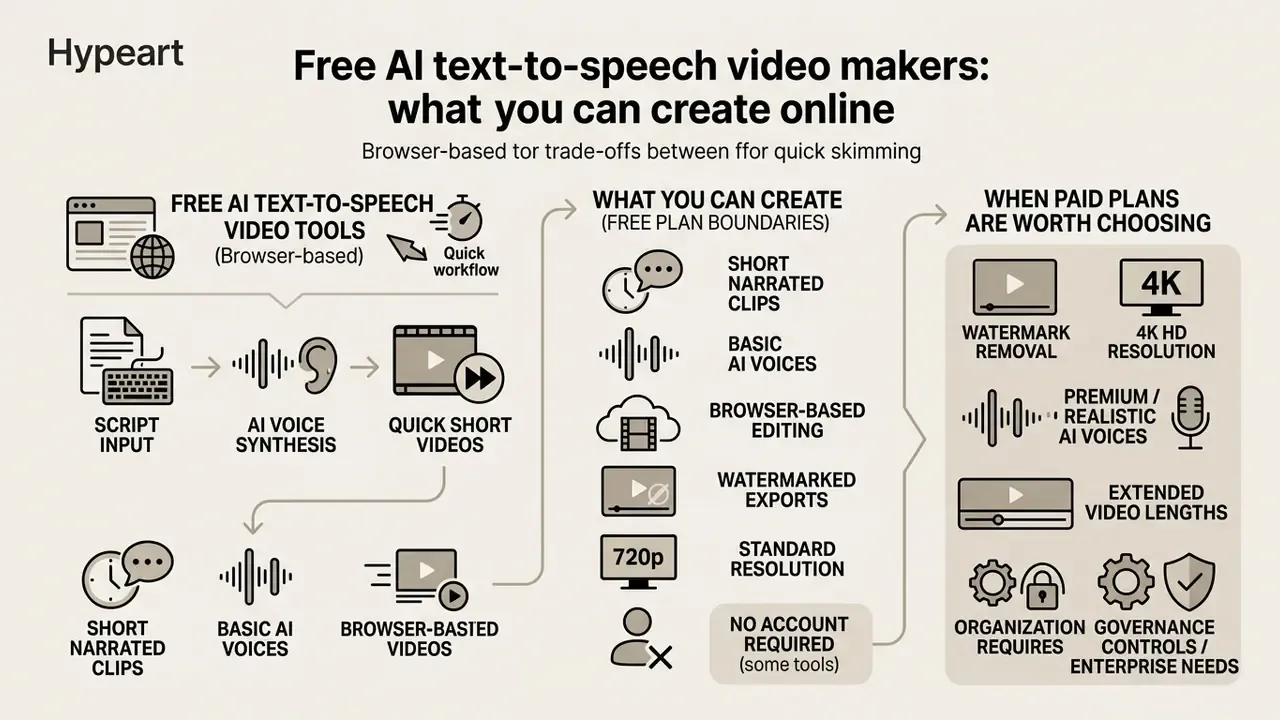
Free AI text-to-speech video tools allow creators to build short, narrated video clips directly in a web browser without installing specialized desktop software. However, free usage tiers come with functional boundaries regarding clip length, voice access, character volume per request, and export rights. Those boundaries are documented further in our overview of free AI video generators.
Understanding these boundaries prevents wasted effort during production. Current vendor data illustrates the range: Fliki's free plan grants 3 to 5 minutes of monthly output at 720p with a watermark, Runway issues a one-time 125-credit allowance with watermarked exports, Murf offers 10 minutes of voice generation, ElevenLabs provides 10,000 monthly credits, Descript allows 5 minutes of TTS with 720p watermark-free export, and Kapwing limits free users to 3 text-to-speech minutes. While free online tools are sufficient for internal drafts, quick social posts, or testing voice quality, scaling video production usually requires upgrading to a commercial plan. The mechanics and business applications are summarized in our guide to AI video generator capabilities.
Free online tools for quick text-to-speech videos
Browser-based platforms like Clipchamp, Canva, and Fliki enable users to turn script text into an ai voice video in a few clicks. These free tools provide basic speech synthesis engines, standard templates, and simple stock media libraries.
For example, Clipchamp offers browser-based text-to-speech without charging for basic voice synthesis or applying visual watermarks on standard 1080p exports, and it lets free users save transcripts and MP3 audio only. Canva allows free users to test AI voice generation and preview audio tracks directly on video presentation slides, with a 1,000-character ceiling per conversion. Fliki advertises 2,000+ voices across 80+ languages with no credit card required, Flixier runs an AI voice-over generator with no account or download, and Synthesia's free plan includes AI voiceovers with up to 10 minutes of video per month. Creators working on mobile can review the best ai art generator app options to combine synthetic visual backgrounds with voice tools.
A practical note for enterprise readers: "no account required" is convenient and also unlogged. If nobody authenticates, nobody can prove later who generated which asset.
When a paid plan is worth choosing
Upgrading to a paid subscription becomes necessary when your organization requires watermark removal, 4K HD export resolutions, custom voice cloning, or commercial redistribution rights. Paid plans unlock unlimited speech generation minutes and grant access to high-fidelity generative voices.
How much better those voices actually are is measurable rather than anecdotal:
«NeuralSBS correctly predicts human preference between two synthetic speech samples in 73.7% of cases; WhisperBert reaches RMSE ≈ 0.40 when predicting MOS.»
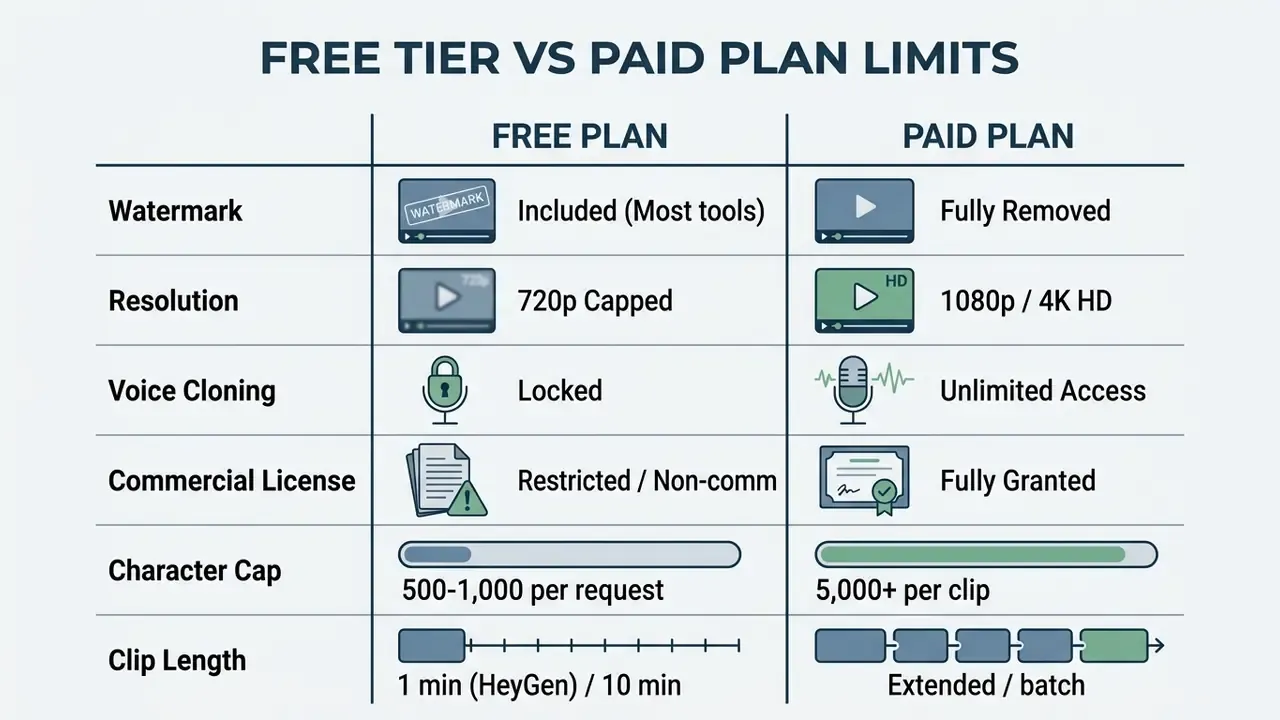
Platforms like HeyGen and VEED restrict voice cloning and watermark removal exclusively to paid tiers. HeyGen's free plan caps videos at one minute, three videos per month, and 1080p, with 4K reserved for paid tiers. If an asset is intended for external marketing or legal training, paid tiers ensure that the generated voice assets comply with intellectual property regulations. You can check our detailed breakdown of platform pricing models to estimate long-term operational costs, and view the guide to model per-minute production cost against seat and credit fees before committing to an annual contract.
One line that belongs in any business case: control costs count. Review time, pronunciation sheets, consent records, and audit logging are part of the per-video cost, not overhead to be discovered in month three.
How to add text to speech to a video online
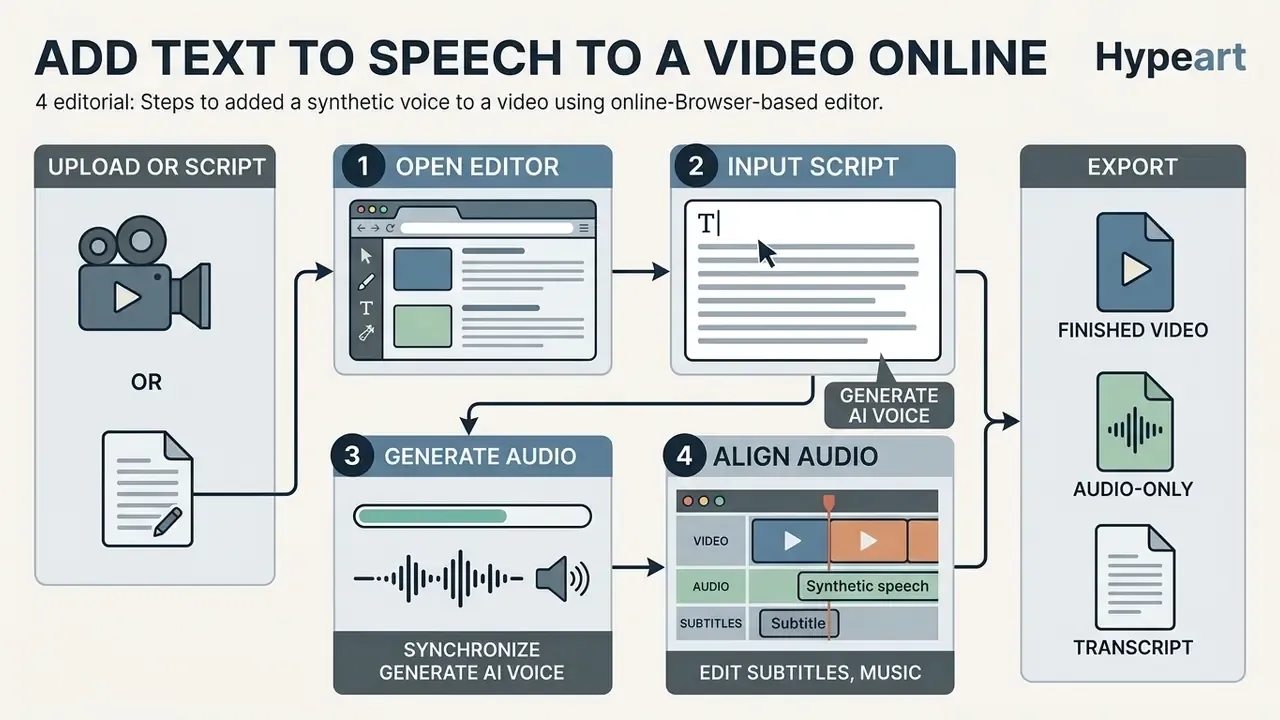
To add text to speech to a video online free, upload your source video into a browser editor, paste your written script, select a synthetic voice, generate the speech track, and align the audio on the timeline. Following a structured editing sequence ensures accurate audio-visual alignment and clean caption formatting.
Modern web editors simplify this process by executing voice synthesis in the cloud. Below is the step-by-step technical execution path required to generate and integrate synthetic narration into any video project.
Upload a video or start with a script
Begin by uploading your raw video file (in MP4 or MOV format) into the browser video editor, or select a pre-formatted template tailored for YouTube or social media aspect ratios. Alternatively, paste your full script into the script generator window if building a video from scratch, or paste the URL of an existing article if the platform supports web import.
For vertical platforms like YouTube Shorts or TikTok, configure your canvas aspect ratio to 9:16 (1080x1920 pixels) before adding media assets. Selecting the correct canvas dimensions early prevents visual stretching and ensures that automated text overlays fit within mobile safe zones; long-form YouTube uploads accept files up to 256 GB or 12 hours. Creators building long-form video campaigns can check specialized apps to edit youtube videos for dedicated publishing integrations, and our documentation of YouTube video editing workflows covers publishing settings end to end.
Generate an AI voice and synchronize narration
Navigate to the speech generator tool inside the editor, select your target language and desired voice model, paste your narration text, and click generate. Once the audio track appears, drag it onto the timeline directly beneath your video footage. Note the per-request ceiling before pasting: 500 characters in Clideo, 1,000 in Canva, 5,000 per clip on VEED Pro. Long scripts should be split at sentence boundaries, not mid-clause, so prosody remains continuous between segments.
To maintain natural pacing, insert punctuation breaks (dashes, ellipses) or SSML tags (<break time="1.0s"/>) to control pause duration between key sentences. Align audio waveform peaks with visual cuts or scene transitions in the video track, then set speech rate inside the 0.5x to 2x band according to content density. If you need specialized motion elements alongside audio, you can explore best ai animation tools 2025 for automated asset generation.
Edit subtitles, music and export the finished video
Generate automatic captions from your synthetic voice track, customize the font style for high contrast readability, and balance background music audio levels so the voiceover remains clear. Finally, export the completed video file in your target resolution.
When mixing background music with synthetic narration, reduce the music track volume by 12 to 15 decibels relative to the primary voice track to prevent masking. Review the caption timeline to correct proper noun spellings before executing the final render, and export subtitles as .srt (or .vtt/.ttml where the distribution platform requires it) so captions remain editable downstream.
Audio-only and transcript exports. If your production pipeline only requires the vocal track, for podcasts, IVR prompts, audiobooks, or narration destined for an external NLE, platforms such as Clipchamp and VEED support exporting standalone audio files (.MP3) and timed transcripts (.SRT / .TXT) without rendering the full MP4 video canvas. Clipchamp states that AI voiceover transcripts and MP3-only audio can be exported free; VEED allows downloading a project as an MP3 when only the audio is needed. This audio-first path also reduces render time on long-form training modules where visuals are updated separately from narration.
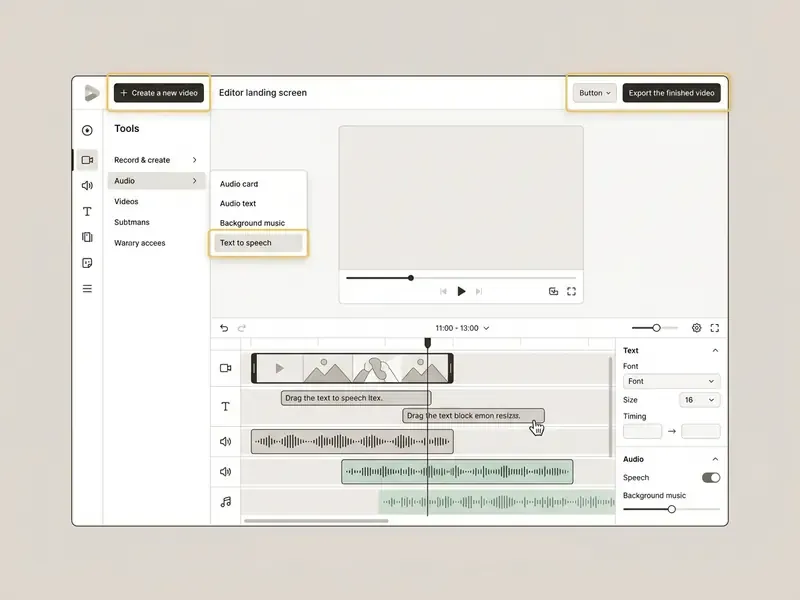
Step 1: Open the online editor
Open a browser-based video editor (for example Clipchamp or VEED) and create a new video project.
Which AI text-to-speech video tool is best for your use case?
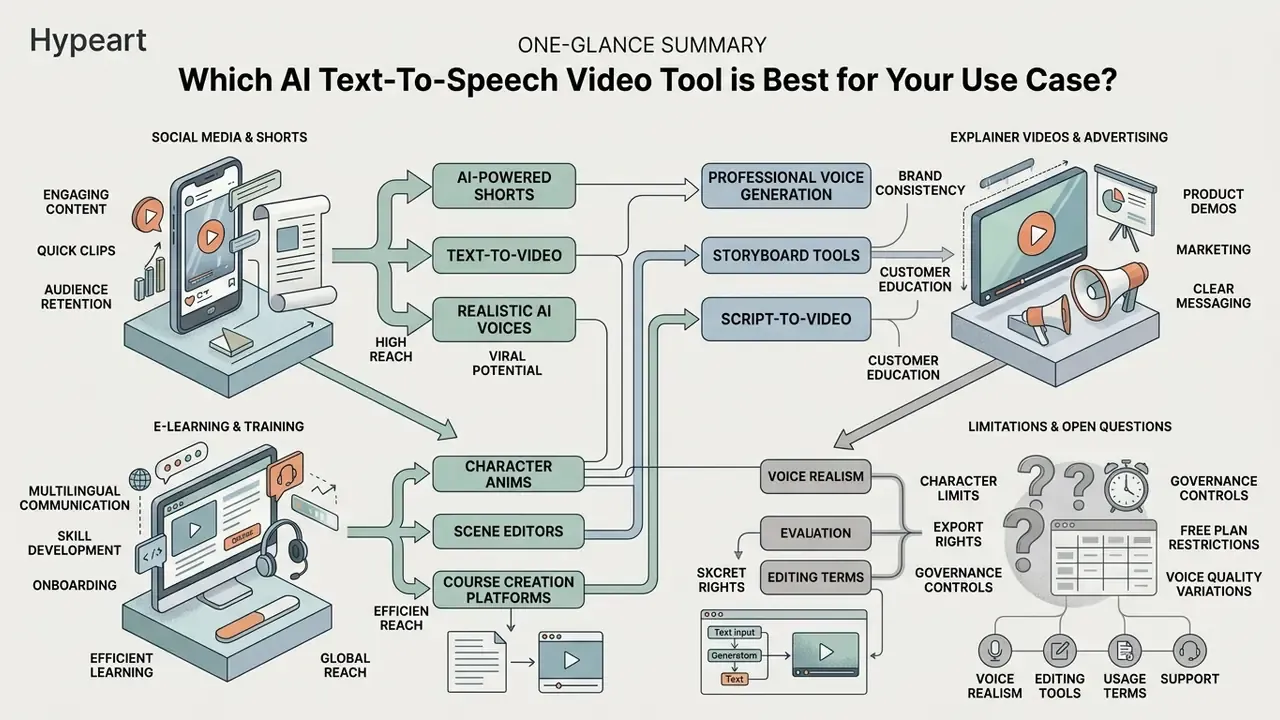
The best AI text-to-speech video tool depends on your target channel, audience expectations, and distribution goals. Marketing teams require punchy, expressive voices for social platforms, while corporate educators prioritize multi-language clarity and formal tone consistency.
Evaluating software based on end-use cases prevents mismatching tool capabilities with operational goals. Below is a breakdown of platform selection based on primary media channels.
Explainer videos, product demos and advertising
«Human voices outperformed AI voices on trust (3.73 vs 3.26) and perceived effectiveness in advertising contexts.»
The practical implication for advertising teams: reserve synthetic voices for informational segments, such as feature walkthroughs, instructions, disclaimers, and localized variants, and A/B test them against human reads on trust-sensitive claims. Disclosure also matters. Microsoft's avatar guidance requires context-appropriate notice when users interact with a text-to-speech avatar, and some jurisdictions, such as Saudi Arabia's SDAIA deepfake guidance, require visible on-screen labeling at the start or end of synthetic media. If you need alternative software platforms, you can see the overview of generative business tools.
E-learning, training and multilingual communication
Corporate L&D programs and educational courses require natural prosody, stable long-form narration, and multi-language synthesis. ReadSpeaker, ElevenLabs, and Clipchamp offer expansive language sets designed for educational clarity.
ElevenLabs Multilingual v2 models support 29 languages, allowing organizations to translate corporate training modules while maintaining consistent synthetic voice characteristics across regions.
«An exploratory study found no significant negative perception of AI voiceovers in explainer videos among university students when similarity to human speech was sufficient.»
Automated subtitle generation supports accessibility compliance with international e-learning standards, and PDF, PPT and DOCX-to-video flows in Synthesia and AI Studios let instructional designers convert existing course decks into narrated modules with LMS publishing.
«Multilingual pre-training with source-language selection reaches MOS 3.72 for intelligibility and 3.44 for naturalness, outperforming monolingual baselines.»
Limitations and open questions
Three gaps remain honest gaps, not solved problems. First, detection of synthetic speech is uneven: the DOSS-Select figures above show accuracy swinging from 76% to 98% depending on the generator, so external attestation cannot be your only control. Second, no vendor publishes an audit-grade log format for voice generation events, which means traceability usually has to be reconstructed from workspace activity data. Third, licence terms change faster than procurement cycles; a plan reviewed in one quarter may carry different commercial rights in the next. Plan re-verification, not one-time approval.
FAQ: AI text-to-speech video tools
Disclaimer. This information is general in nature and does not replace advice from a qualified specialist. Speech-synthesis capabilities and the rules for commercial use of AI voices vary by jurisdiction and by platform terms.
AI text-to-speech video tools turn written text into audio narration using synthetic neural models. These tools process scripts, apply language rules, and align speech with video tracks. Below are the questions that come up most often in tool selection and in governance review.
Can AI text-to-speech pronounce names, pauses and emphasis correctly?
Yes. Modern AI text-to-speech systems handle complex names, customized pauses, and word emphasis through SSML tags, phonetic spellings, and punctuation cues.
Engineers use SSML tags or break commands ( ) to force exact pronunciations when default speech models misread acronyms or foreign proper nouns. W3C SSML 1.1 defines break by time or strength, prosody for rate and pitch, and phoneme for phonemic sequences. Amazon Polly supports IPA and X-SAMPA inside phoneme, ElevenLabs documents pauses up to three seconds via break time="x.xs", and Azure adds vendor-specific emotion control through mstts:express-as. Adding commas, ellipses, or dashes into written scripts also inserts natural breathing pauses, which keeps the synthetic voice clear across long narration.
«TTSDS isolates prosody as a separately measurable quality factor, scored through log F₀ RMSE, the standard metric for pitch variation over time.» TTSDS: Text-to-Speech Distribution Score Benchmark (2024). https://arxiv.org/abs/2407.12707
SSML quick-reference cheat sheet
| Goal | Markup | Practical note |
|---|---|---|
| Insert a timed pause | | ElevenLabs supports up to 3 s; longer gaps are better cut on the timeline |
| Insert a weighted pause | | Use when sentence weight matters more than exact duration |
| Force pronunciation | Naomi | Polly accepts IPA and X-SAMPA; always keep a readable fallback |
| Change rate and pitch | … | Keep within the 0.5x to 2x equivalent range to avoid artefacts |
| Apply emotion or style | … | Vendor extension, not part of the W3C standard |
| Spell out an acronym | SLA | Prevents the engine reading acronyms as words |
How do I fix intonation and pronunciation without writing code?
If your AI video tool does not expose direct SSML editing, adjust speech cadence using visual punctuation instead. Insert an ellipsis (...) to create a long pause, add an exclamation mark (!) to increase vocal energy on a key word, and write complex numbers as full words, "twenty twenty-six" rather than "2026", "nineteen ninety-eight" rather than "1998", so the engine does not read digits as a sequence. For proper nouns and brand names, use intentional phonetic spelling: writing "Nay-oh-mee" for "Naomi" or "Kap-wing" for an unfamiliar product name forces the correct output even in editors with no phoneme support. Commas and dashes create short breaths, ellipses create longer ones, and many editors additionally offer an emotion or style dropdown in advanced settings as an alternative to punctuation-driven emphasis. Volume is handled on the property panel rather than in the script: move the audio slider down for a narration bed under music, up for a dominant voice-forward mix.
Keep a project-level pronunciation sheet listing every brand term, executive name, acronym, and unit of measurement together with its approved phonetic spelling. This turns pronunciation from a per-clip fix into a reusable asset and prevents the same error recurring across a localization batch.
Who owns the commercial rights to an AI-generated voice track?
Ownership and usage rights are set by the platform's terms, not by the fact that you typed the script. Free tiers frequently grant personal or evaluation use only, and several vendors explicitly reserve commercial licensing for paid plans; watermark presence is a signal, not a licence. Before monetizing an asset, confirm four points in writing: whether commercial use is permitted on your specific plan, whether the voice is a stock library voice or a cloned identity, whether attribution is required, and whether the licence survives plan downgrade or cancellation. For cloned voices of real people, add documented consent and a revocation path; for regulated content, add a disclosure statement that the voice is synthetic.
How much text can I convert to speech in one request?
Limits are enforced per request, per clip, and per month, and they differ by product. Clideo accepts a maximum of 500 characters per text-to-speech segment, Canva allows up to 1,000 characters per speech conversion, and VEED Pro converts up to 5,000 characters per audio clip with separate monthly audio allowances by plan. Clipchamp does not publish a character ceiling for its free text-to-speech tool but is bounded by project and timeline constraints. For long-form narration, split scripts at paragraph boundaries, keep voice, pitch, and rate settings identical across segments, and reassemble on the timeline to avoid audible tonal drift.
How do we prevent Shadow AI when teams use free browser tools?
Treat every free speech generator as an external processor. Publish an approved-tools list naming the specific plan tier that has been reviewed, block unapproved domains for teams handling regulated material, and require that confidential scripts, unreleased product names, customer data, and executive voice samples never be pasted into consumer tiers. Maintain a model inventory entry for each approved tool recording the vendor, engine backend (for example Amazon Polly or ElevenLabs inside a reseller interface), data residency, retention window, contractual no-training clause, and the internal owner. Pair this with audit logging of who generated which voice asset, so any disputed clip can be traced to a request rather than a rumor. That is the same control deepfake detection research recommends, given uneven detector accuracy across generators.
Can I export only the audio without rendering the video?
Yes. Clipchamp exports AI voiceover transcripts and MP3-only audio on its free tier, and VEED allows downloading a project as an MP3 when only narration is required. This is the preferred route for podcasts, audiobooks, IVR prompts, and narration destined for an external editing suite, and it removes render time from projects where visuals change independently of the voice track. Export timed transcripts (.SRT, .VTT, .TXT) alongside the audio so captions can be reused when the visual layer is assembled later.
Pre-publication risk and quality verification checklist
Run this list before any AI-narrated video leaves the organization.
Checklist0 / 9
A safe next step, if you are starting from zero: pick one workflow, one approved tool, and one owner. Run ten videos through the checklist, measure review time honestly, then decide whether to scale.
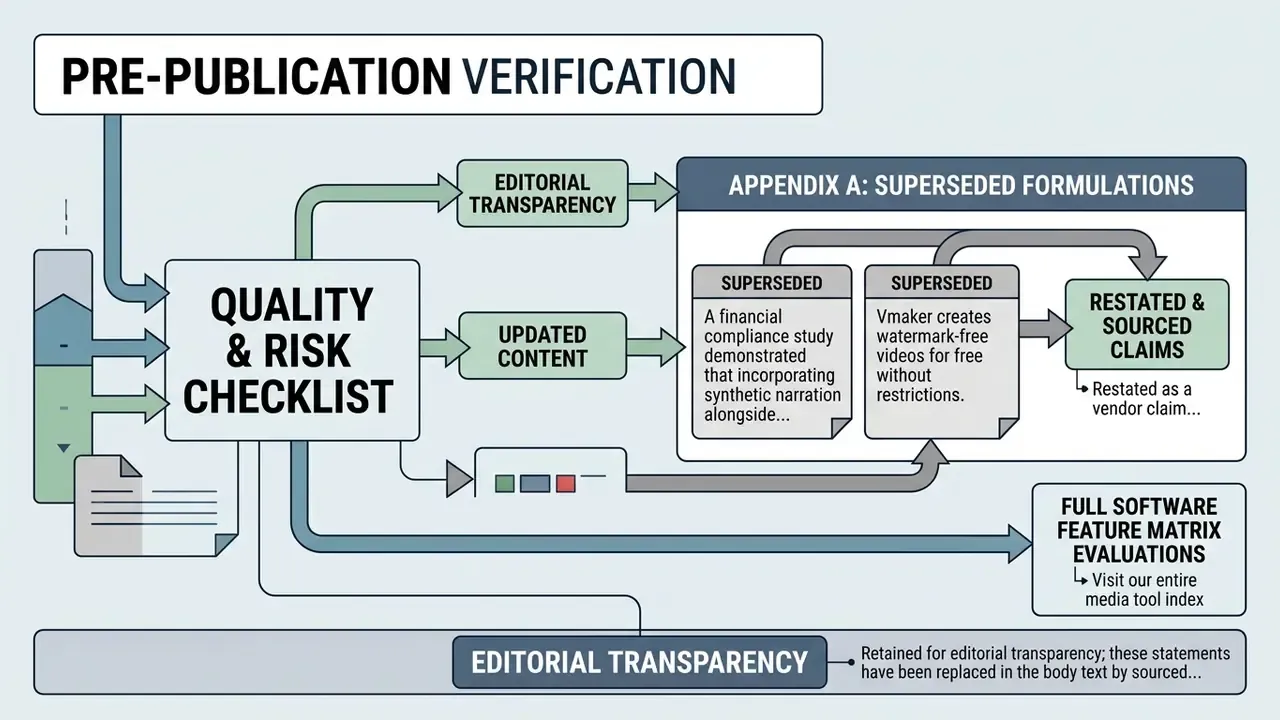
Appendix A: superseded formulations
Retained for editorial transparency; these statements have been replaced in the body text by sourced alternatives.
- Superseded: "A financial compliance study demonstrated that incorporating synthetic narration alongside structured product demos increased viewer retention by 35% compared to static slide decks." Withdrawn: no identifiable study, methodology, or sample. Replaced in the explainer and advertising section by measured trust and effectiveness ratings for AI versus human voiceover.
- Superseded: "Vmaker creates watermark-free videos for free without restrictions." Restated as a vendor claim limited to selected free trial tiers, with advanced avatar features requiring a subscription.
Social media, Shorts and YouTube videos
Short-form video content created for YouTube Shorts, Instagram Reels, and TikTok requires fast speech pacing, eye-catching captions, vertical 9:16 aspect ratios, and dynamic voice profiles. Editors like CapCut and VEED are optimized for these formats.
CapCut provides energetic synthetic voices, automated trending subtitle animations, and one-click aspect ratio switching designed for mobile consumption. Keep captions above the platform interface strip so the bottom UI never covers narration text, and keep the speech rate intelligible rather than maximally fast. Comprehension, not compression, drives retention. Creators working across artistic media formats can also examine free ai art generators to build custom visual thumbnails and background layers.