Executive Summary: What an AI Fat Filter Actually Does
- What it is: an ai fat filter is an editing model, not a generator working from a blank canvas. Your photo is inverted into a latent space, weight-related attributes are shifted, and the same person is re-rendered with a fuller face or body while identity anchors stay fixed.
- What drives realism: front-facing, evenly lit, high-resolution input; moderate intensity (roughly +10-25% volume); mask-guided separation of subject, clothing, and background.
- Beyond static photos: current tools also expose a manual weight gain brush, image-to-video progressive morphing, and text-to-image synthesis of plus-size characters with no source photo at all.
- What it is not: a medical, metabolic, or dietary forecast. Outputs are visual simulations. Editing another person's photo requires consent, and biometric processing sits under GDPR and BIPA-style rules.
Quick decision guide
| If you want to... | Use this mode | Check this first |
|---|---|---|
| Soften a face slightly in your own portrait | Automatic slider, low intensity | Export resolution and watermark policy |
| Reshape a full-body photo proportionally | 3D-mesh or depth-guided body edit | Clothing and background preservation |
| Change only cheeks, chin, or waist | Manual fatify brush with a mask | Whether the brush exists on the free tier |
| Publish a plus-size character commercially | Text-to-image, no real person | Commercial licence for outputs |
| Post a before-and-after clip | Image-to-video morphing | Clip length caps and identity drift in mid-frames |
| Process employee or customer photos | Approved vendor only | Retention window, training opt-out, security attestation |
What an AI Fat Filter Is and Why People Use It
An ai fat filter is a specialized generative image-editing tool that alters facial geometry and body proportions to simulate weight gain. Unlike text-to-image systems that invent a synthetic portrait from scratch, an ai weight gain filter works on an existing photograph. It encodes the original pixels into a latent space, then adjusts volumetric features while preserving the subject's core identity.
«The AI fat filter is an editing task: the input photo is inverted into latent space, and shape is then edited along semantic directions while identity is preserved.»
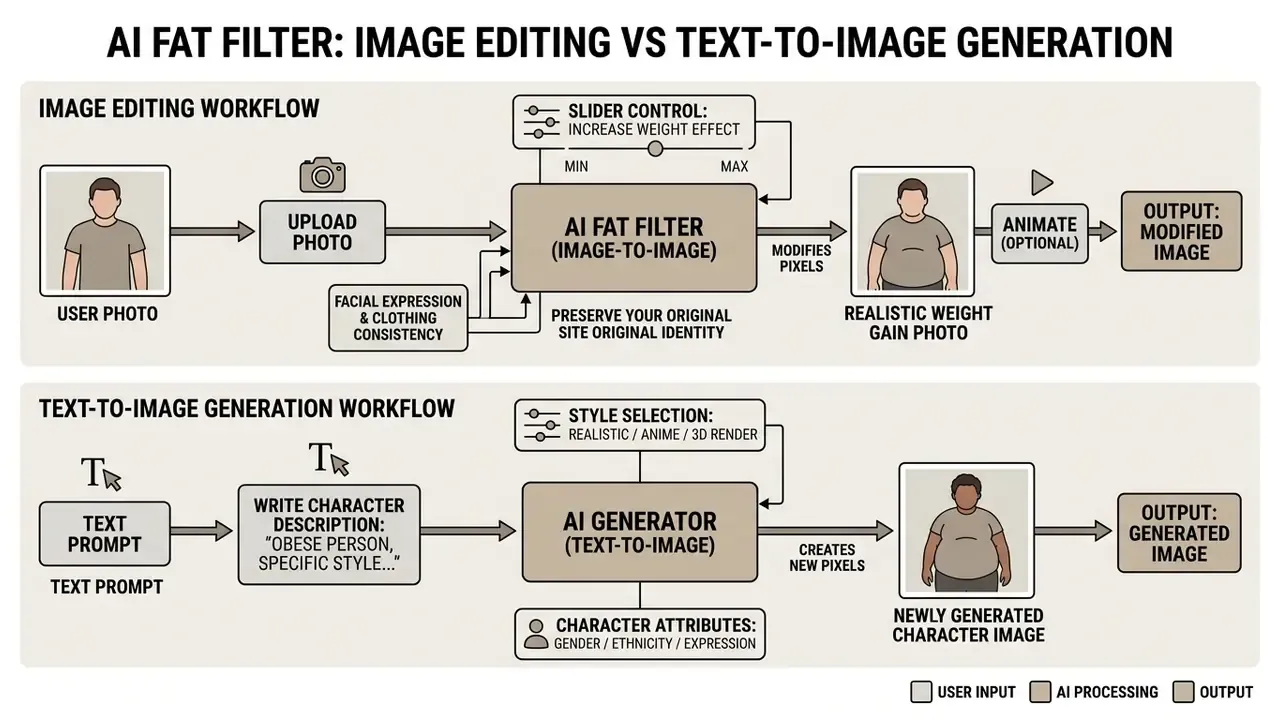
Digital image editors lean on deep learning frameworks, mainly Generative Adversarial Networks (GANs) and latent diffusion models, to locate facial and anatomical landmarks. When a fat filter runs, the algorithm expands defined regions: cheeks, jawline, abdomen, limbs. Use cases spread from playful social edits and character design to visual concept previews in media production. For broader context on media editing terminology, see our AI Media Glossary and the adjacent tooling overview on AI photo editors.
Three distinct operations get merged under one marketing label, and that confusion causes most disappointed downloads.
| Operation | Input | Typical control | Output |
|---|---|---|---|
| Attribute editing (classic fat filter) | Existing photo | Intensity slider, face/body toggle | Same person, higher visual mass |
| Local manual editing (fatify brush) | Existing photo plus user mask | Brush size, hardness, +% volume | Region-specific volume change |
| Text-to-image synthesis | Prompt only | Prompt, negative prompt, seed, ratio | A new, non-existent character |
AI Fat Filter for the Face: How the Fuller-Face Effect Is Built
A facial fat filter produces a fuller face by detecting landmarks and expanding geometric volume around cheeks, chin, and neck. Frameworks in the StyleGAN family use landmark-guided morphing: structural keypoints move outward, and colour plus shadow transitions are recalculated so the skin still reads as skin.
«E4S separates facial shape and texture per component: skin, brows, nose, lips, enabling cheek-silhouette edits without distorting eyes and mouth.»
In the E4S framework (2023), facial disentanglement allows regional shape editing without touching stable anchor points around eyes, nose, and mouth. That separation is what keeps a transformed portrait recognizable at full resolution rather than merely plausible in a thumbnail.
«UP-FacE builds deterministic formulations: changing the "cheek fullness" parameter yields a predictable landmark shift without random artifacts.»
Face-morphing literature adds one more practical variable: the blending weight α, which balances identity retention against the new shape. Published experiments swept α from 0.6 to 1.0 and settled on α = 0.9 as the most natural setting. A useful mental model for why a mid-range slider almost always beats a maximum one.
AI Fat Body Generator for Full-Length Portraits
An ai fat body generator reshapes full-body portraits by modifying parametric 3D human meshes, typically SMPL or SMPL-X, to scale torso, arm, waist, and leg volume in proportion. Diffusion systems such as DiffBody (2024) and Odo (2025) project the 2D photo onto that mesh, then refine the render.
«Odo was trained on 18,573 images of 1,523 subjects with body-shape variants (slim, muscular, heavy) while clothing and background remained unchanged.»
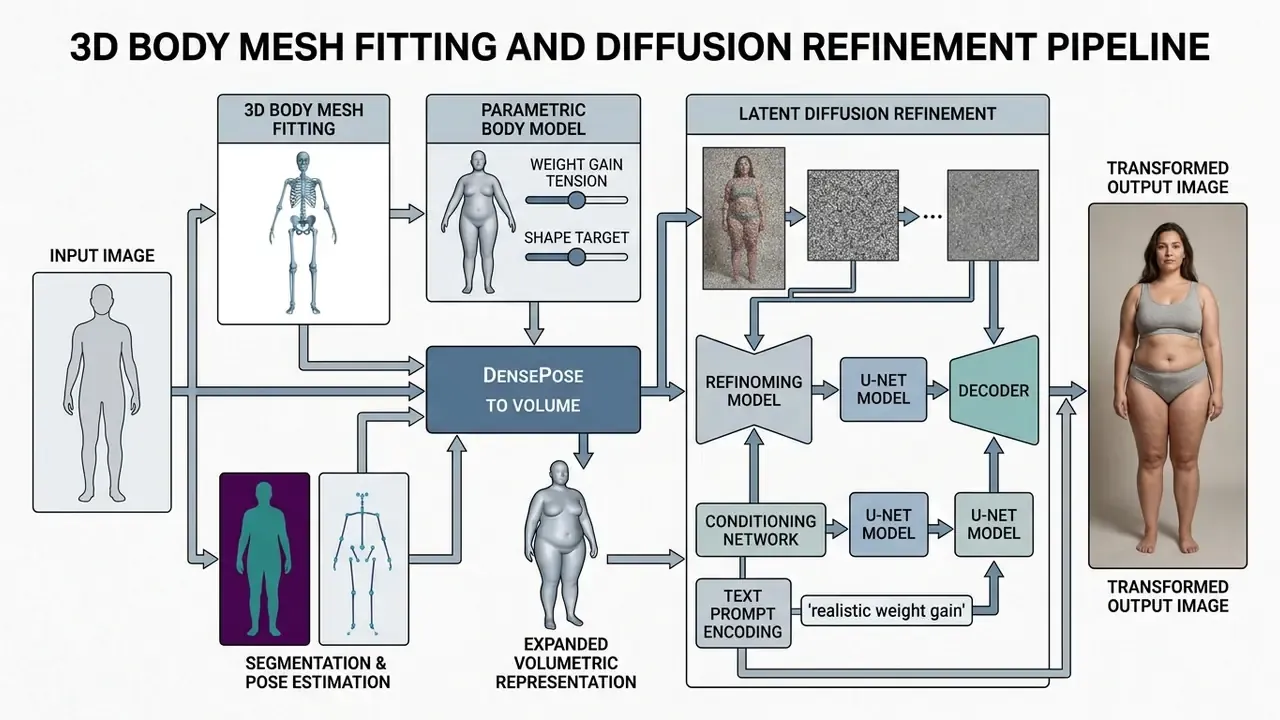
These architectures use depth-conditioned control networks to expand physical volume while holding clothing patterns, lighting, and background structure in place. In practice that means fewer bent doorframes and fewer smeared garment prints. Vendor documentation describes the same behaviour: full-body inputs scale proportionally, and garments stretch instead of being replaced. Whether that promise holds at high intensity is a question for your own test set.
Why the Weight Gain Effect Is a Visual Simulation, Not a Forecast
The output of an ai weight gain generator is a visual simulation drawn from learned image statistics. It is not a biological prediction of how a body will change.
These algorithms work on pixel data and distributions of human appearance. They do not calculate metabolism, muscle-to-fat ratios, genetic tissue distribution, or health trajectories. So results from any fat ai generator belong in the creative or illustrative column, never in the diagnostic one.
«Strong diffusion noise "destroys body structure and identity": the model optimizes visual plausibility, not medical accuracy.»
Consumer app listings say it in plainer language: generated images are fictional AI simulations and do not guarantee weight loss, body transformation, health changes, exercise results, or future appearance.
What Determines the Realism of an AI Fat Transformation
Realism in a fat ai image depends on four things: input resolution, lighting consistency, sensible volume scaling, and preservation of identity plus scene context. Clean, unobstructed source images let the model segment the subject properly and expand it in the right places.
«Single-image 3D body reconstruction is sensitive to occlusions and inaccurate shape estimation, which produces artifacts in the textured model.»
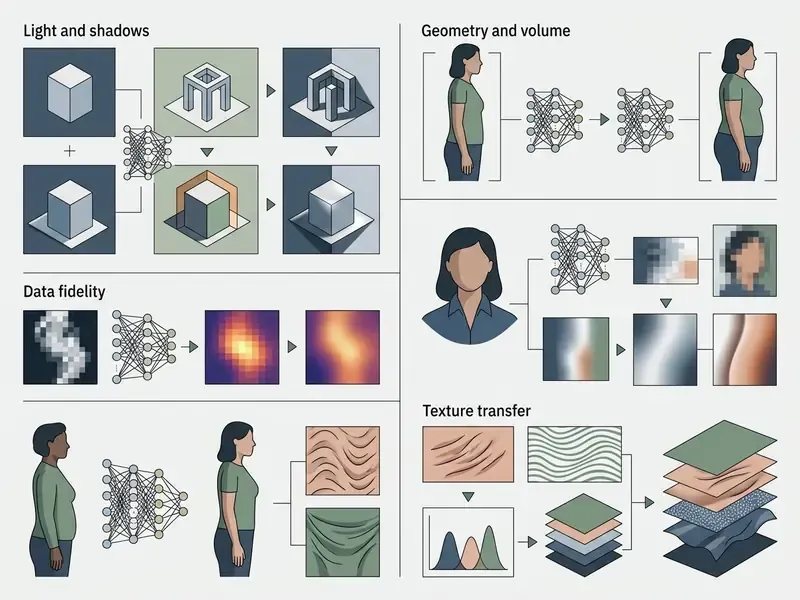
For professional or creative projects, the real trade-off is transformation strength against context retention. Readers comparing platforms on output quality can review our benchmark of AI image generators, while teams testing looser creative constraints can weigh a standard model against a no filter ai approach. One caution: fewer guardrails also means fewer refusals on inputs you would rather the tool declined.
Choosing a Weight Gain Level That Still Looks Natural
Natural results from an ai weight gain image generator come from moderate settings, not maximum ones. Pushing latent sliders to the ceiling introduces artifacts, rubbery skin stretching, and jawline collapse.
A progressive level, roughly a 10% to 25% volume increase, expands facial and body contours while keeping proportions and fine skin texture believable. (Those percentages reflect vendor slider conventions and editorial testing practice, not a standardized industry metric. The same range is labelled "subtle", "medium", or "level 2" depending on the interface.)
«UP-FacE maps semantic parameters (cheek width, chin) to landmark trajectories linearly, ensuring proportional and visually coherent output.»
A calibration ladder editors actually use:
| Intensity | Visual outcome | Best for |
|---|---|---|
| +5-10% | Barely noticeable softening | Portrait retouch, subtle concept variants |
| +10-25% | Clearly visible, still anatomically plausible | Before/after posts, character previews |
| +25-40% | Strongly exaggerated, cartoon-adjacent | Memes, comedic edits |
| +40% and above | Frequent artifacts, identity drift | Not recommended for photorealistic work |
Keeping the Face, Clothing, Background, and Composition Intact
Background stability and garment detail during an automated edit rest on mask-guided diffusion and latent inversion. Systems like InstaFace (2025) combine depth masks with reference networks to isolate the subject from its environment.
«ReferenceNet in Odo preserves clothing and background textures through a frozen UNet branch, while ControlNet drives body shape from target SMPL depth maps.»
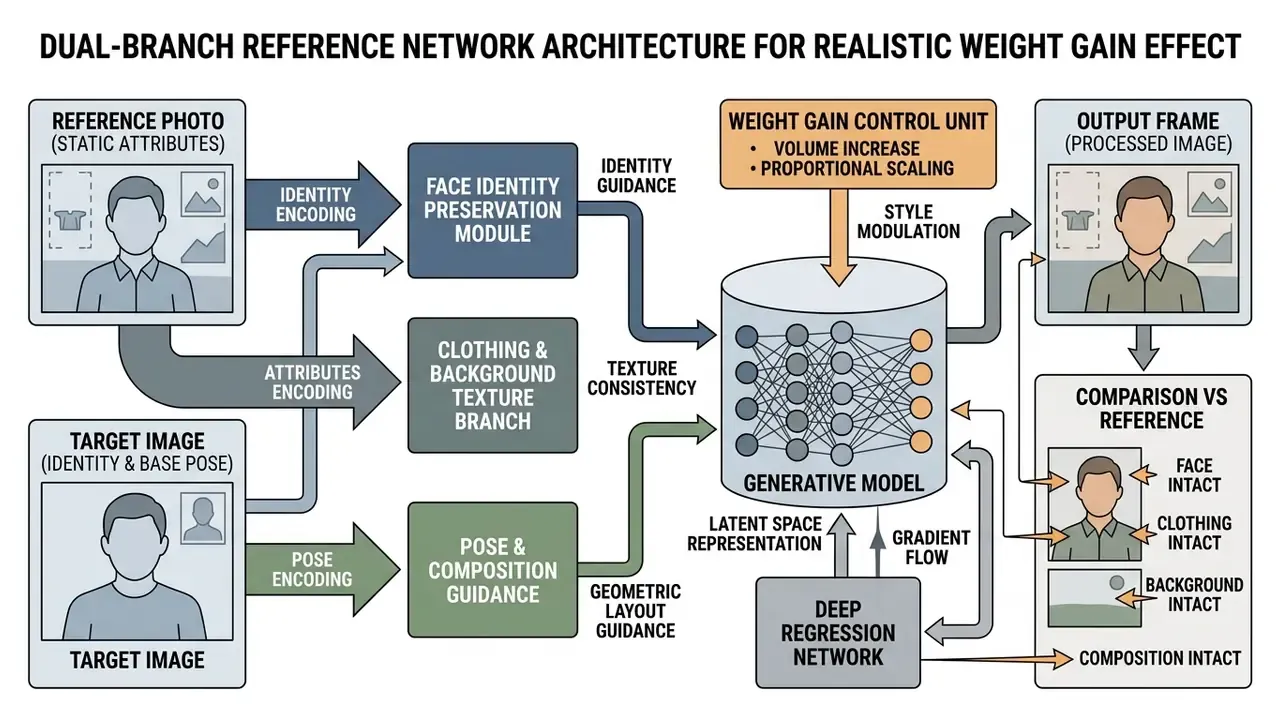
Structural isolation stops wallpaper patterns and furniture edges from bending as the silhouette grows. Preservation is conditional, though. Published pipelines show accuracy tracks mask quality, and that stronger edits raise drift in identity, garment edges, and background consistency. To review standard editing controls, see our guide on free photo editors.
Generating Plus-Size Characters from Text
No source photograph? An ai fat generator from text can produce hyper-realistic or stylized portraits from a written description alone. That closes the gap for concept artists, storyboard teams, and marketers who need a plus-size character but cannot, or should not, use a real person's likeness.
Build the prompt in four layers:
- Subject: "A 30-year-old man, full-body portrait, warm lighting"
- Body characteristics: "Plus-size build, natural soft facial volume, double chin, rounded waistline"
- Detailing: "Wearing a relaxed cotton t-shirt, indoor background, photorealistic 8k, realistic skin texture"
- Negative prompt: "sharp jawline, skinny, extra limbs, distorted background, artifacts"
Because text to fat ai workflows synthesize a person who does not exist, they sidestep consent issues entirely. That makes them the preferred route for commercial campaigns, editorial illustration, and body-positive stock imagery.
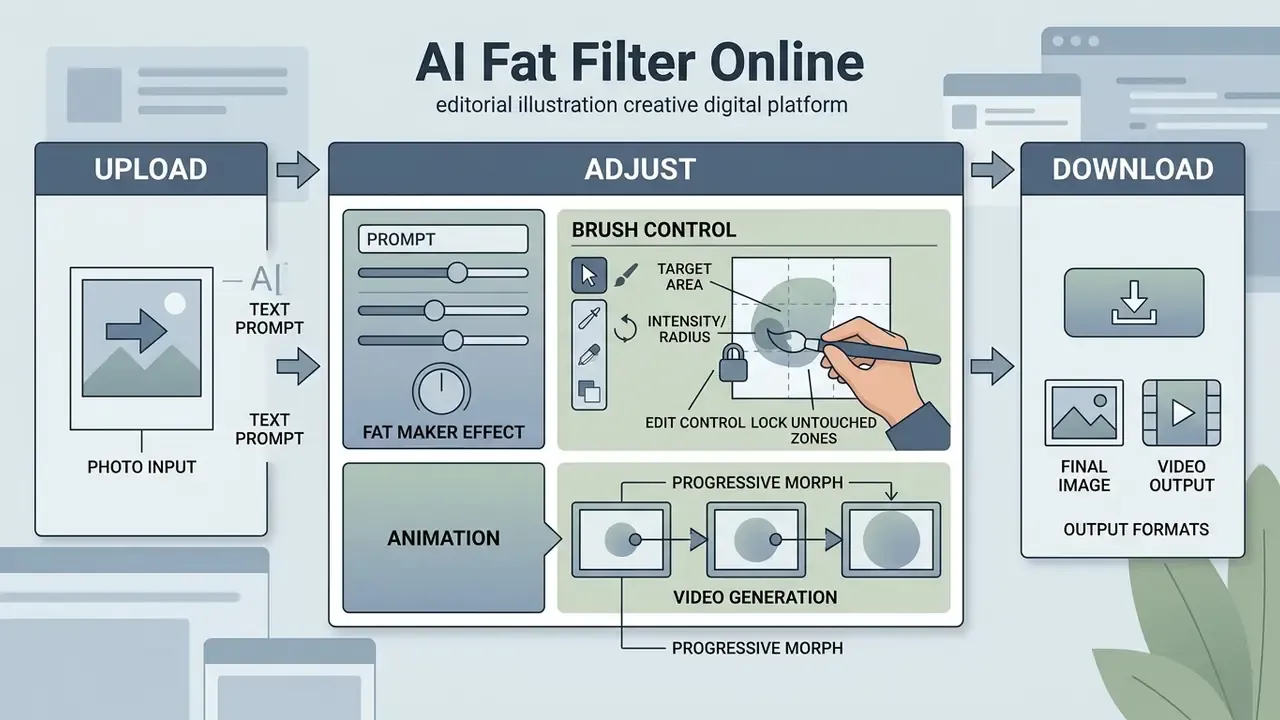
How to Use an AI Fat Filter Online: Upload, Adjust, Download
Most ai fat filter online free services run the same short loop: upload a photo, adjust parameters, export the rendered file. Simple enough on the surface. The quality lives in the details of each step.
Process flow: AI fat transformation
- Upload photo.Select a clear, well-lit JPG or PNG portrait.
- Select filter and settings.Choose the facial or full-body target, then set intensity.
- Configure prompt (optional).Add text guidance for specific adjustments.
- Generate image.Execute the latent transformation.
- Preview and download.Inspect quality, then export in HD.
Uploading a Photo to an AI Fat Generator
For usable output from a fat ai image generator, upload clear single-person portraits in JPG, PNG, or WebP. Front-facing angles, even lighting, and at least 1000 pixels on the longest side give the model something to work with.
Avoid heavily compressed screenshots, extreme low-angle shots, and frames where hands or accessories cover the jaw and neck. Upload rules vary by platform: some accept image URLs as well as files, some allow only one visible person, and stock-style pipelines enforce a 4 MP minimum for generative submissions.
Prompt Settings and the Fat Maker Effect
In an advanced ai fat maker or prompt-based editor, descriptive text steers the model toward a narrower result. A prompt like "modest facial fullness, natural chin expansion, preserved lighting" holds proportions closer to plausible.
"Prompt-based latent controls allow granular attribute editing, but boundary constraints are essential to prevent structural drift." Marcus Hale
Creativity parameters and seed values refine things further, letting you tune subtle shape changes without sliding into a different-looking person. The most effective constraints copy official image-model prompting guidance: state what must be preserved ("preserve identity, geometry, layout") and what must be excluded ("no heavy retouching, no background change"). An ai fat image generator that exposes seeds also makes your tests reproducible, which matters more than it sounds.
Manual Editing: The Weight Gain Filter Brush
When you need pinpoint correction rather than a whole-figure reshape, reach for the manual fatify brush. An automatic neural slider acts on the entire subject; a fat filter brush works locally.
- Select the target area.Paint only cheeks, chin, forearms, or the abdominal region.
- Set intensity and radius.Pick brush hardness (soft or hard) and a volume expansion between +5% and +50%.
- Lock untouched zones.Freeze the original clothing contour and nearby objects so they stay outside the diffusion mask.
This manual chubby editor approach is close to essential for concept art, where volume has to land on specific muscle groups: softening a jawline while leaving the neck alone, or thickening a torso without inflating the arms. Vendor implementations usually combine both modes, a preset slider for the base pass and a drag-and-pull brush for the corrective pass.
Animation and Weight-Gain Video (Progressive Morphing)
Turning a still portrait into a short clip is the most shared format on social platforms right now. An ai fat video generator uses morphing and keyframe interpolation to visualize a gradual mass-gain curve.
Transformation video workflow:
- Generate keyframes.Produce three or four variants of the same photo at different strengths (0% original, +15% moderate, +35% pronounced, +50% maximum).
- Interpolate frames.Feed the series into an image-to-video module so the silhouette expands smoothly instead of jumping.
- Set pacing and export.A 3-5 second transition reads best in short-form feeds. Export MP4 or GIF at 1080p, 9:16 for vertical placements.
Practical cautions for fat transformation video work: hold head position and camera framing identical across keyframes, never change the background between frames, and re-check identity in the middle frames, because interpolation artifacts surface first around the jaw and hairline. Progressive slim to normal to chubby sequences are also used for fitness-style comparisons, where facial consistency is the main quality signal. If the clip carries a soundtrack you have no licence for, strip it: you can mute video online before publishing.
Export and Download of the Finished AI Fat Image
Once generation completes, preview the fat ai picture at full size and check facial detail, clothing boundaries, and background integrity. Most web services export straight to JPG or PNG.
High-definition export keeps pixel sharpness for sharing or publication. If the source file was small, running the output through AI image enhancers recovers usable detail first. Documented export envelopes in major image APIs cover PNG (default), JPEG, and WebP, with presets from 1024×1024 up to 3840×2160 and quality tiers of low, medium, high, or auto. Handy reference points when a "free HD" claim needs verification. Teams looking at workflow tooling more broadly can explore the hub for content management options.
Free AI Fat Filter: What to Check Before Choosing a Tool
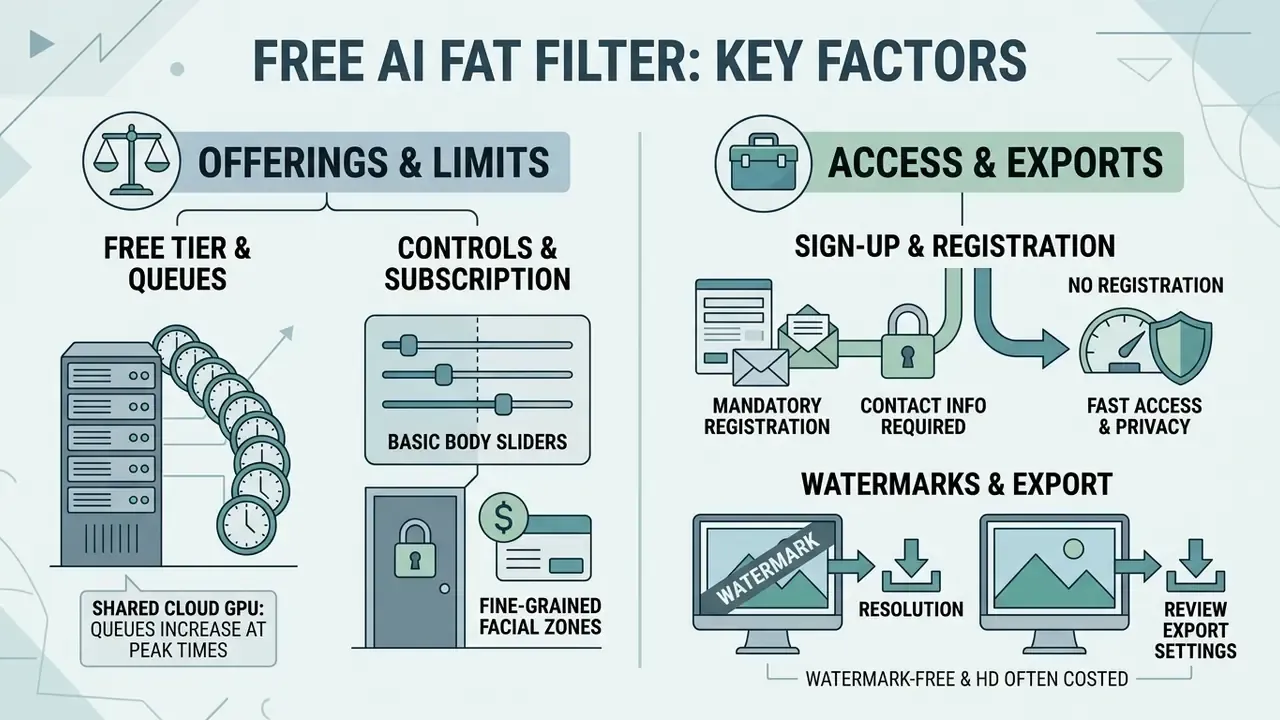
Picking a reliable ai fat filter free tool means checking access terms, generation caps, export limits, and watermark policy. Free tiers differ sharply in performance, queue priority, and privacy safeguards.
Comparison of free online AI fat generator features
| Evaluation criterion | Free tier standard | PRO tier standard | Key considerations |
|---|---|---|---|
| Account requirement | No sign-up or basic sign-up | Registration required | No-signup tools give instant access but keep no history |
| Daily generation limits | 3 to 10 images per day | Unlimited or credit-based | Free limits reset daily or monthly by vendor |
| Watermark policy | May include corner watermark | Watermark-free export | Check whether exports stay clean for public media use |
| Max export resolution | Standard HD (1024×1024 px) | High res (2K or 4K) | Lower resolution blurs subtle facial texture |
| Transformation controls | Preset intensity options | Advanced prompt and mask tools | Granular sliders prevent extreme distortion |
| Manual brush (local fatify) | Usually unavailable | Region brush with hardness and % volume | Needed when only cheeks, chin, or waist should change |
| Image-to-video morphing | Rarely included, short clips | Keyframe interpolation, 1080p MP4 | Check clip caps and whether a watermark is added |
| Seed and negative prompt | Fixed seed, no negative prompt | Custom seed, editable negative prompt | Negative prompts suppress artifacts and background warping |
| Canvas aspect ratios | 1:1 square only | 1:1, 3:2, 2:3, 16:9 | Flexible ratios needed for TikTok (9:16) and web stories (2:3) |
| Data retention and training opt-out | Often unstated in free terms | Documented retention window, no-training pledge | Critical for biometric inputs; prefer zero retention |
What a Free AI Fat Generator Offers and Where It Stops
Platforms with a fat ai generator free tier usually run on shared cloud GPU capacity, so queues lengthen at peak hours. Free versions often cap the canvas at 1024×1024 pixels and disable batch processing.
Fine-grained sliders for specific facial zones tend to sit behind a subscription, leaving free users with fixed presets. Reported caps in adjacent generative products range from 2-3 images per day in chat interfaces to 100 per day in studio environments, with rate limits near 10-15 requests per minute. The same brand can therefore behave very differently across app, web, and API surfaces. A fat ai generator online free promise on a landing page rarely specifies which surface it describes.
Sign-Up, Watermarks, and Image Export
Using an ai fat filter online free service without mandatory registration is fast and keeps your contact details out of a mailing list; readers who prefer that route can consult our list of no-sign-up AI image generators. Some platforms embed a subtle brand watermark in the lower corner, and a minority require attribution in published work.
If you need clean, unwatermarked files, review export settings before processing, including whether "HD" means true 2K or an upscaled 1024 px canvas. For related asset manipulation, see our guide to photo editors or extend a cropped frame with AI outpainting tools.
Which Photos Work Best for an AI Tool to Make a Person Look Fatter in a Photo
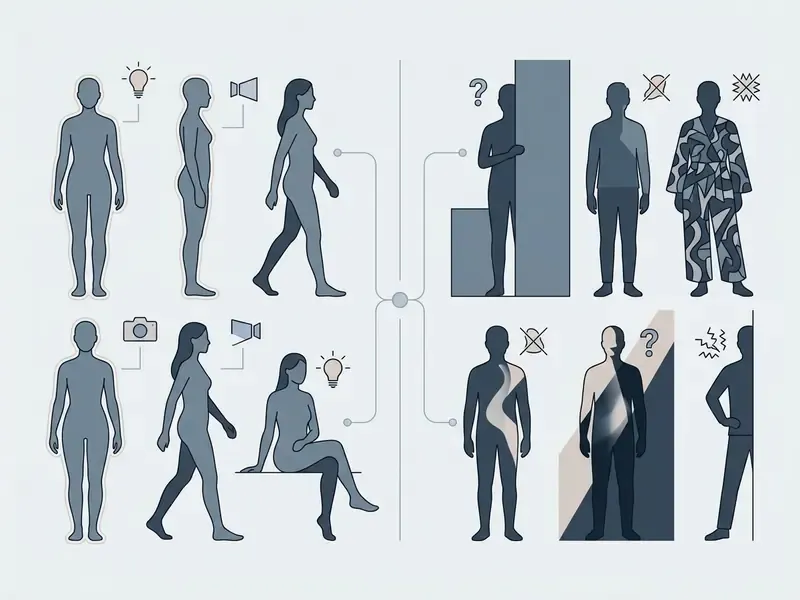
Results from an ai tool to make person look fatter in photo hinge on composition, subject position, and lighting uniformity. Generative networks need clear landmarks to map volume changes across facial and body structure.
«Odo and DiffBody show that frontal portraits with even lighting and minimal occlusions yield the most accurate 3D body-shape reconstruction.»
For comparative evaluations of editing platforms, creators can view the guide covering performance across leading generative suites.
Selfies and Portraits: When a Fat Face Filter Performs Best
Group Photos, Characters, and Animals
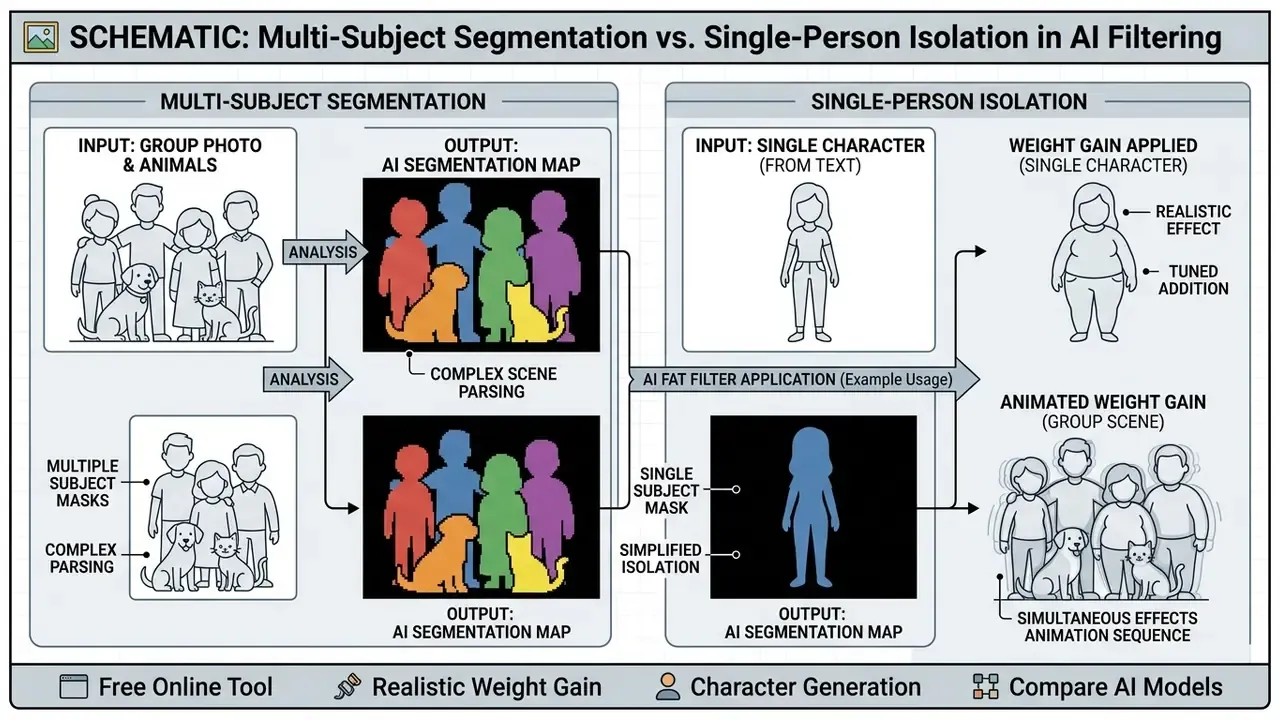
Running group photos through a chubby ai filter requires multi-face detection that can segment individuals inside one frame. Advanced models will transform every visible person, but crowded compositions increase processing complexity, and identity clarity per face drops as the headcount rises. Group-photo research addresses this with group-aware identity representations precisely because naive pipelines blur likeness.
Pets, Anime Characters, and Art Illustrations
Applying an ai chubby filter to non-human subjects means taking the network out of human-portrait mode. The old assumption that "models simply fail on animals" is half true. They fail when human landmark detectors are used, and they work reasonably well when the pipeline is configured for the species.
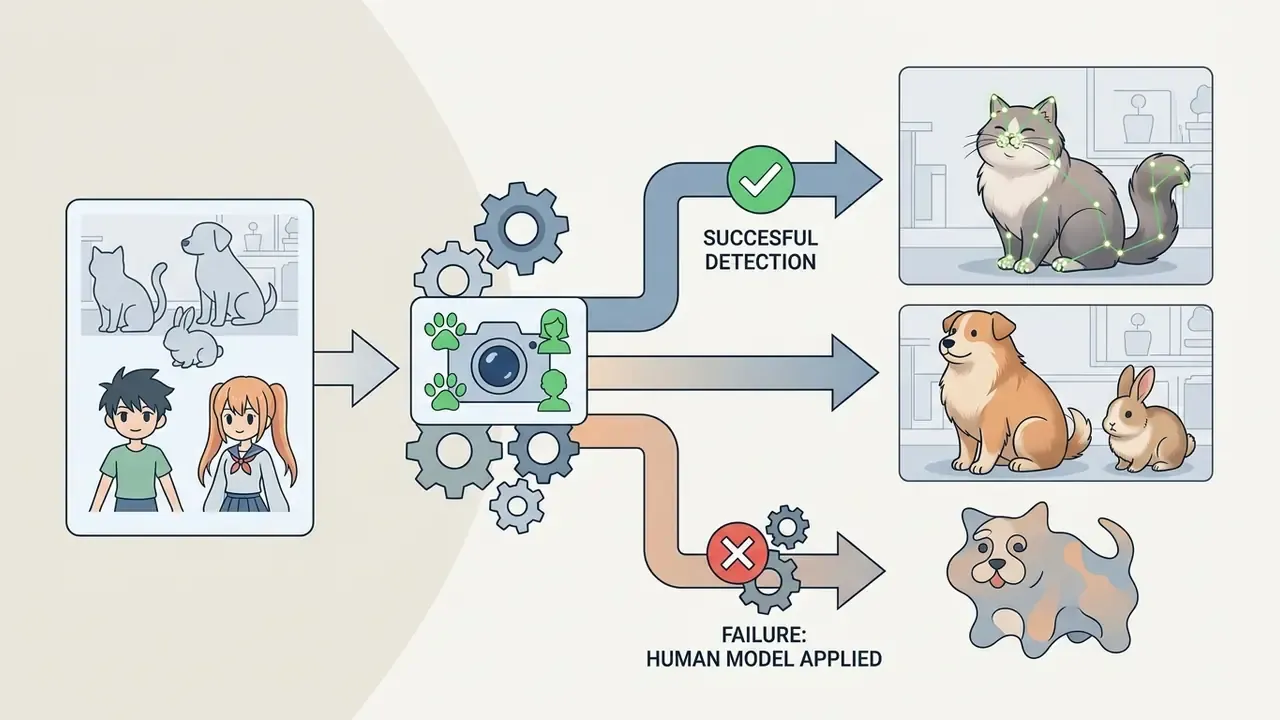
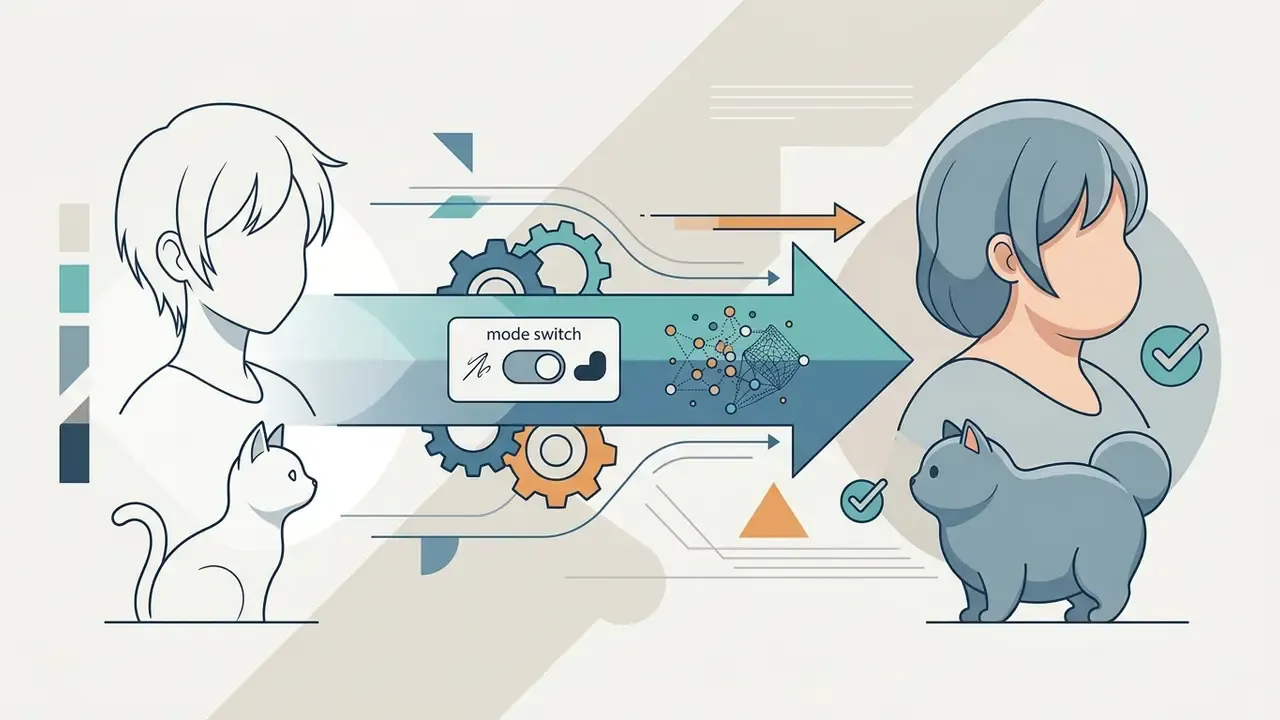
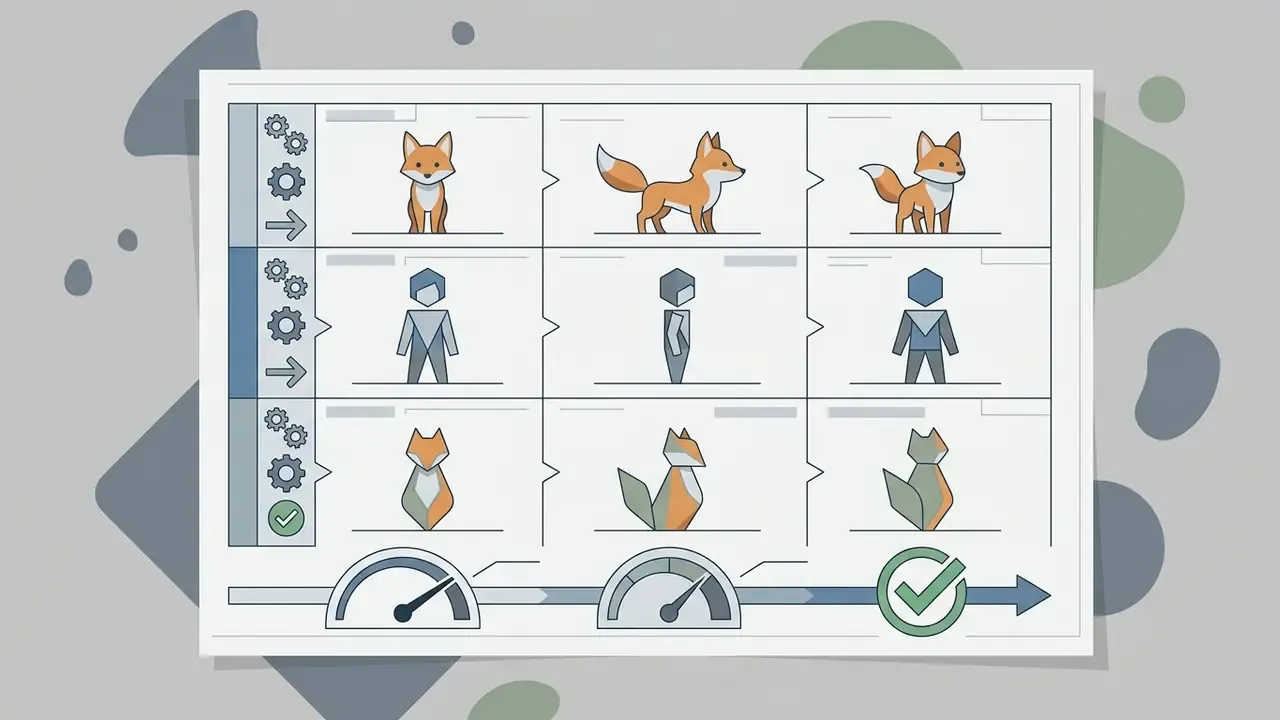

One boundary worth stating plainly here: body-editing prompts drift easily toward sexualized output. If a tool advertises itself as an nsfw ai photo editor, an nsfw ai art generator, an nsfw ai image animator, or an nsfw ai story engine, the acceptable-use terms and the consent requirements change materially. Read them before uploading anything involving a real person.
Privacy, Biometric Compliance, and Model Validation
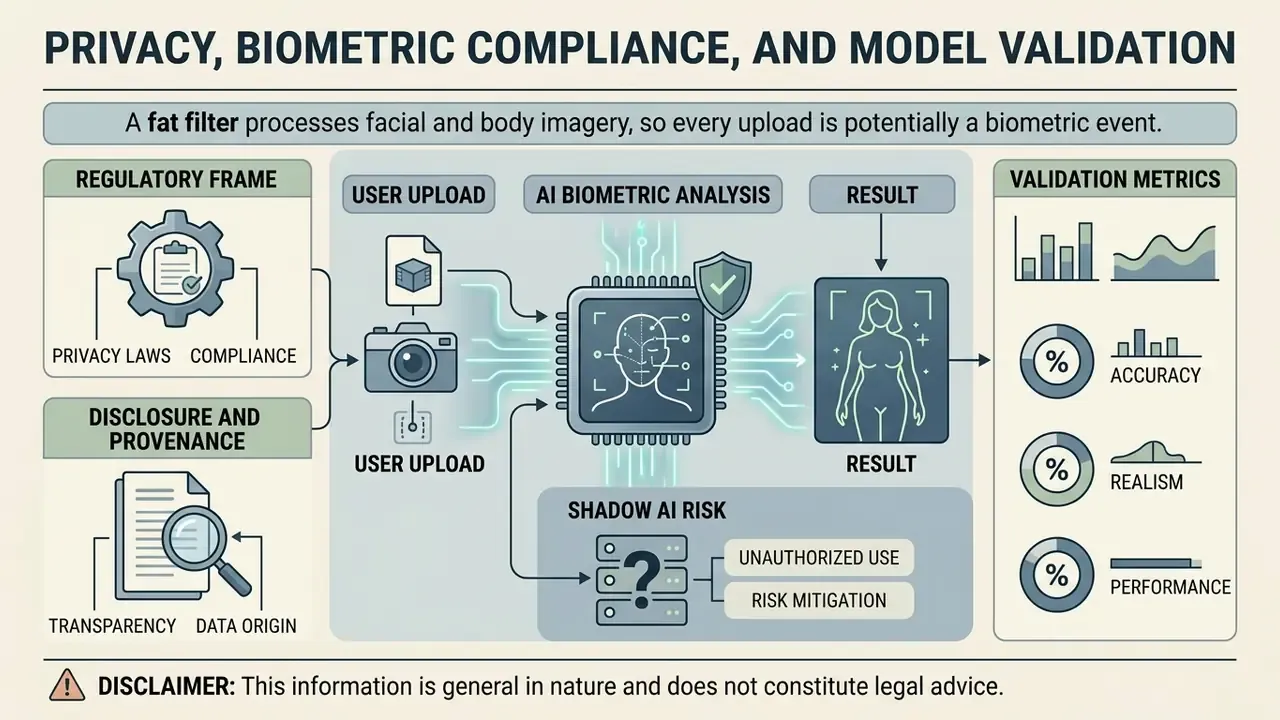
A fat filter processes facial and body imagery, so every upload is potentially a biometric event. That shifts the risk profile toward the organization, not just the individual. Teams evaluating these tools for marketing, editorial, or product work should treat them as third-party model deployments, not fun web widgets.
Regulatory frame. Identifiable photographs are personal data. Where processing enables unique identification, they can fall under stricter special-category rules: GDPR Article 9 in the EU, and biometric-privacy statutes such as Illinois BIPA in the United States. Consent guidance is consistent across regulators. EDPB Guidelines 05/2020 require consent that is freely given, specific, informed, and unambiguous, and reject pre-ticked or bundled consent. Canada's Office of the Privacy Commissioner requires meaningful consent explaining what is collected, why, with whom it is shared, and the risks. The Philippine National Privacy Commission requires the privacy notice to state retention period, security measures, and deletion after the purpose is fulfilled. Australia's OAIC takes a notice-centred approach for identifiable images. In short, the lawful basis has to be assessed per jurisdiction, not once globally.
Disclosure and provenance. NIST SP 100-4 (2024) recommends overt watermarks, in-content labels, and interface disclosures for synthetic content, including on social platforms. The European Commission's Code of Practice on Transparency of AI-generated Content (2026) pushes in the same provenance direction, and the Partnership on AI's Responsible Practices for Synthetic Media (2023) sets direct disclosure plus metadata as a baseline. Adobe's Generative AI User Guidelines (2026) additionally prohibit hateful, deceptive, and privacy-violating uses. For disputes that reach counsel, view the guide covering documentation practices for contested media.
Shadow AI risk. The common corporate failure is not a malicious edit. It is an employee dropping a customer or colleague photograph into a free no-signup tool whose terms say nothing about retention or model training. Before approving a vendor, verify: TLS in transit, a documented retention window (ideally zero-data retention), explicit opt-out from training on user uploads, deletion of derived embeddings rather than only source files, a security attestation such as SOC 2, and whether outputs are licensed for commercial use.
Validation metrics. If you already run a model-risk framework, test a fat filter like any other model. Practical acceptance checks:
| Check | Method | Suggested threshold |
|---|---|---|
| Identity preservation | Face-embedding similarity (for example ArcFace cosine distance) before and after the edit | Similarity stays above the vendor-independent verification threshold at target intensity |
| Background integrity | Pixel-difference map outside the subject mask | Change confined to the mask boundary |
| Garment consistency | Visual review of edges, prints, seams | No warped patterns or bleeding textures |
| Intensity monotonicity | Sweep the slider from 0 to max, record artifact onset | Document the intensity where artifacts appear |
| Multi-subject behaviour | Group input: does the tool edit all faces or only the primary subject? | Behaviour documented, not assumed |
| Data handling | Contract review plus traffic inspection | Retention, training opt-out, embedding deletion confirmed |
Limitations worth recording in the model file: identity drift and mask leakage grow with edit strength; occlusions and non-frontal poses degrade 3D reconstruction; and generative pipelines adjacent to body editing can replace clothing or regenerate backgrounds outright when inpainting is enabled. "Background unchanged" is a configuration property, not a guarantee.
Ideas for AI Fat Images and Rules for Responsible Use
A fat ai art generator opens obvious creative lanes: memes, stylized character design, social storytelling. Ethical use still requires respecting privacy rights and platform community standards, and the evidence on harm is not neutral.
Academic work also documents bias inside the models. Examining Anti-Fat and Pro-Thin Bias in AI-Generated Images (Findings of NAACL, 2025) reports systematic anti-fat and pro-thin patterns in generated imagery. Reason enough to review output critically before publishing at scale.
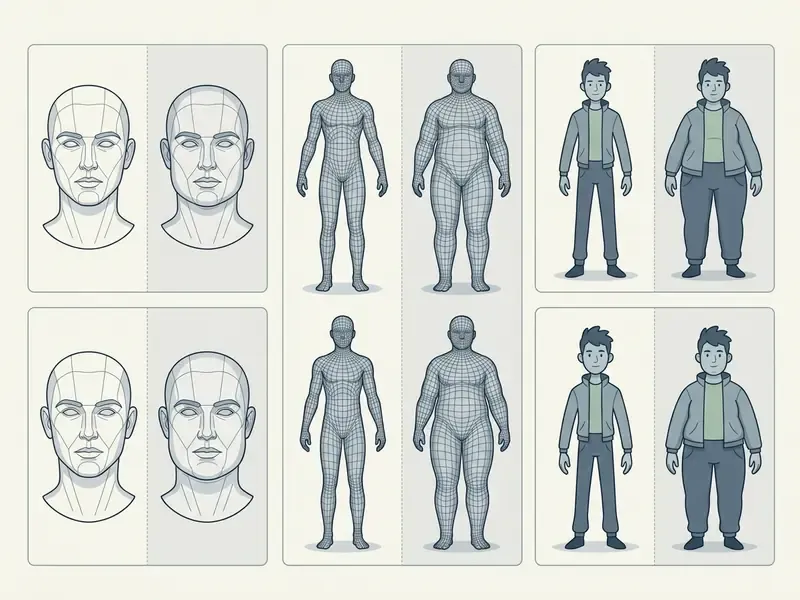
Creators working across expanded formats can also look at related technologies, including image-to-image AI generators for transformation-driven workflows and animation makers for sequencing keyframes into motion.
Content for Social Media, Memes, and Creative Projects
A viral chubby filter ai post usually rests on a side-by-side before-and-after. Creators on TikTok and Instagram use weight-shift transformations for character parodies, hypothetical lifestyle concepts, and fan art. There is documented precedent: in March 2025 a "chubby filter" spread as a CapCut-based effect on TikTok, with individual clips reportedly passing hundreds of thousands of likes, before the effect was pulled after backlash over body-shaming. Virality and platform tolerance are not the same thing.
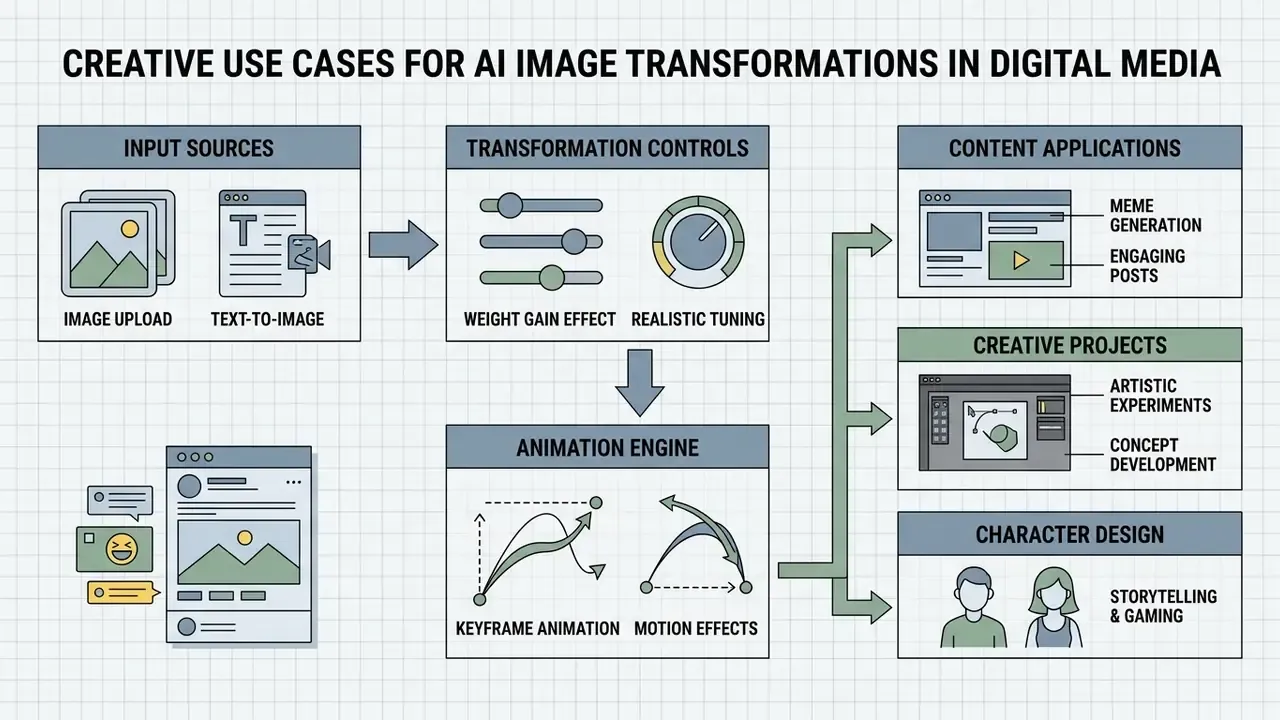
For narrative media projects, browse the hub to estimate production resources, or open the hub to check plans that unlock premium export tiers.
Post-Processing: Retouching, Text, and Meme Layouts
The reshaped silhouette is step one. Publication-ready assets almost always need a second pass.
- Remove digital artifacts.Spot-retouch where skin meets clothing. The seam between the diffused region and the untouched garment is where artifacts cluster.
- Fix background and clothing.If expansion clipped the backdrop, regenerate a clean scene with background replacement or outpainting instead of leaving a bent wall edge.
- Add text and stickers.Place high-contrast captions above and below the frame for the classic meme layout, and export at the ratio your platform expects (9:16 vertical, 1:1 square, 2:3 for stories).
- Label the output.Keep an "AI-generated" marker or provenance metadata attached, in line with synthetic-content disclosure guidance.
Consent, Photo Privacy, and Commercial Use of the Result
Running personal photographs through an online fat ai maker means processing biometric data under frameworks like GDPR. Uploading third-party photos without explicit consent breaches privacy standards and platform terms. Data-protection authorities are explicit: identifiable images should not be published online without prior consent or another lawful exception, and consent can be withdrawn at any time.
«A 2026 study found that an "AI-generated" label reduced trust in the technology but did not prevent a decline in body satisfaction (p < 0.001 in both groups).»
For platform compliance questions, open the hub, or see the overview for developer documentation on API integrations.
FAQ about AI Fat Filters
Does an AI fat filter change clothing or the background in a photo?
An advanced ai weight gain generator isolates the subject with neural segmentation masks, so background elements and clothing patterns normally survive the edit. Garment silhouettes stretch slightly to accommodate the larger body, while wallpaper, lighting, and surrounding objects stay put. This holds for mask-guided pipelines. Inpainting-based pipelines that explicitly regenerate attire or backdrop will change both, sometimes dramatically.
Does the filter crop the photo, and does it edit every person in the frame?
Standard fat ai filter web tools preserve the original canvas, aspect ratio, and framing without automatic cropping. With group photos, multi-subject models detect every visible face and apply the modification to all of them, unless you select a specific subject mask by hand. Implementations differ: some vendors state the effect applies to every visible person, while others process only the primary subject and recommend cropping to one person. Test that behaviour before any batch run.
Can I make a weight-gain video from a single photo?
Yes. Generate a graded series of keyframes at rising intensity, then feed them into an image-to-video module that interpolates the motion between them. A 3-5 second clip at 1080p is the standard social deliverable. Keep framing, lighting, and background identical across keyframes to avoid flicker.
Can I create a plus-size character without a source photo?
Yes, that is the text-to-image path. Describe subject, build, wardrobe, and scene in the prompt, add a negative prompt to suppress artifacts and unwanted thinness cues, then fix the seed once you find a character worth iterating on.
How does the manual brush differ from the automatic slider?
The slider applies a global latent shift to the whole subject. The brush applies a local, user-defined mask. Use the slider for the base transformation and the brush for corrections, for example adding cheek volume while leaving neck and shoulders untouched.
Does the filter accurately predict how I would look after gaining weight?
No. It simulates an appearance. It does not model metabolism, fat distribution, muscle mass, or health trajectories. Vendor documentation and app store listings state the same limitation.
Are biometric embeddings stored after generation?
That depends entirely on the provider. Deleting the uploaded JPEG is not the same as deleting the derived vector embedding. Ask for a written retention window covering both source files and embeddings, plus confirmation that uploads are excluded from model training.
What risks come with employees using free tools at work?
Unapproved use of consumer tools on employee or customer photos is textbook Shadow AI exposure: undocumented retention, unclear training reuse, no security attestation, no commercial licence for the output. Route those requests to an approved vendor with terms you can produce for an auditor.
Appendix: Prompt Library, Validation Checklist, Glossary
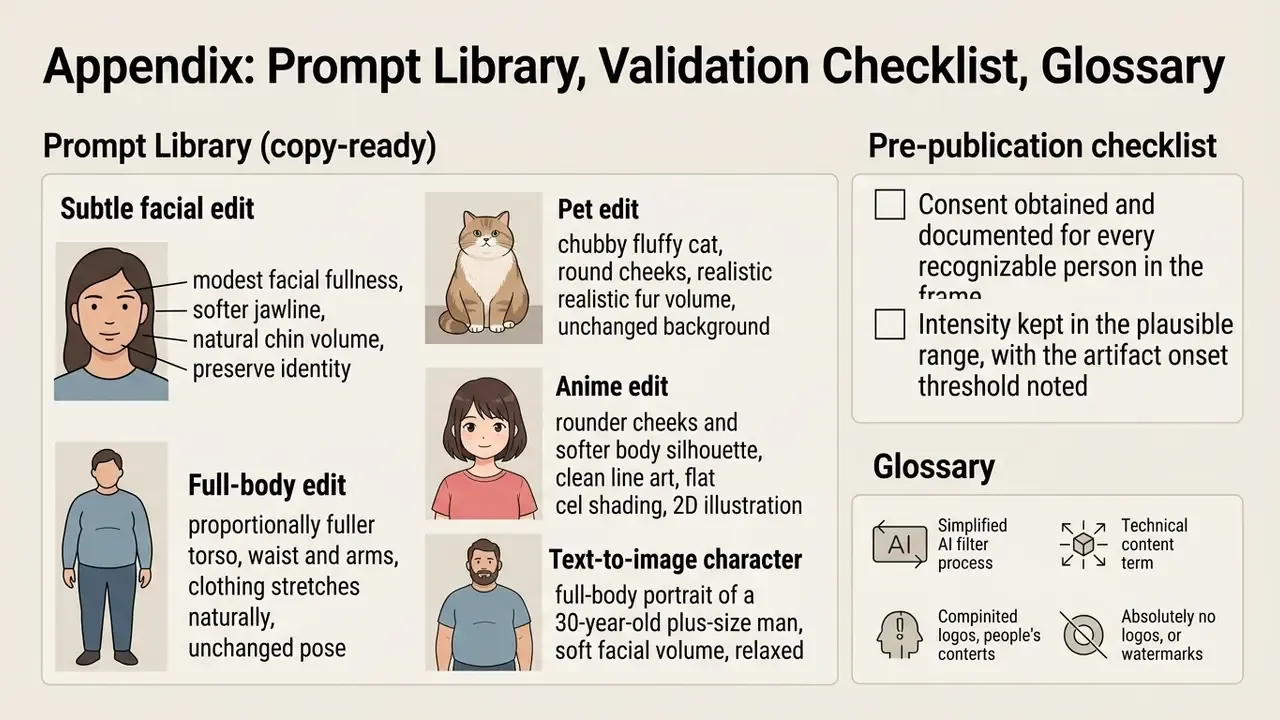
Prompt library (copy-ready).
- Subtle facial edit: "modest facial fullness, softer jawline, natural chin volume, preserve identity and lighting". Negative: "distorted eyes, plastic skin, changed hairstyle".
- Full-body edit: "proportionally fuller torso, waist and arms, clothing stretches naturally, unchanged pose and background". Negative: "extra limbs, warped background, replaced outfit".
- Pet edit: "chubby fluffy cat, round cheeks, realistic fur volume, unchanged background".
- Anime edit: "rounder cheeks and softer body silhouette, clean line art, flat cel shading, 2D illustration style".
- Text-to-image character: "full-body portrait of a 30-year-old plus-size man, soft facial volume, relaxed cotton t-shirt, indoor warm light, photorealistic 8k skin texture". Negative: "sharp jawline, skinny, artifacts".
Pre-publication checklist.
- Consent obtained and documented for every recognizable person in the frame.
- Intensity kept in the plausible range, with the artifact onset threshold noted.
- Identity, background, and garment integrity verified at full resolution, not in a thumbnail.
- Output labelled as AI-generated wherever the platform or regulation expects disclosure.
- Retention and training-opt-out terms reviewed before upload, not after.
- Commercial licence confirmed if the asset will be published or monetized.
- Content reviewed for body-shaming, harassment, or defamation risk before sharing.
Micro-glossary. Latent inversion: encoding an existing photo into a model's internal representation so it can be edited. Semantic direction: the vector along which one attribute, such as facial fullness, changes. Mask-guided diffusion: restricting generation to a defined region. SMPL and SMPL-X: parametric 3D human body models. Keyframe interpolation: synthesizing intermediate frames between two generated states. Negative prompt: text describing what the model must avoid. Seed: the fixed random state that makes a generation reproducible.
Summary and Further Resources
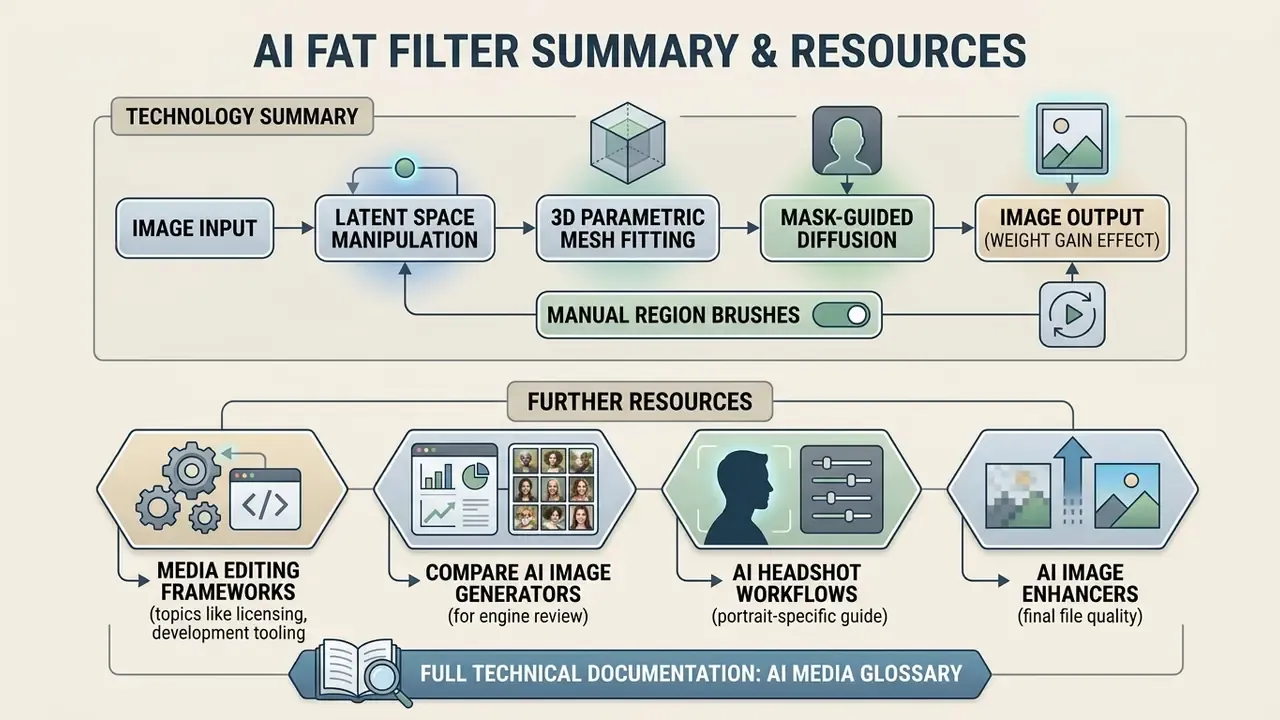
AI fat filters are a fairly sophisticated application of latent space manipulation, 3D parametric mesh fitting, and mask-guided diffusion, now extended by manual region brushes, progressive video morphing, and text-only character synthesis. Whether the goal is a lighthearted post or a serious character concept, good results depend on the same short list: a clean source photo, moderate intensity, verified identity preservation, and strict adherence to consent and privacy rules. The technical part is the easy half, honestly.
For further reading on media editing frameworks, licensing, and development tooling:
- Compare output quality across engines in our review of AI image generators.
- Review portrait-specific workflows in our guide to AI headshot generators.
- Improve final file quality with AI image enhancers.
- Access full technical documentation in the AI Media Glossary.