Modern artificial intelligence repairs damaged historical photographs directly inside a web browser, with no manual retouching skill required. Web-based algorithms clean surface defects, reconstruct faded pigments, sharpen soft facial details, and upscale low-resolution scans in seconds. That is the promise. The governance question behind it is quieter: who checks what the model invented, and where did the file go?
«Automated AI photo restoration turns degraded visual records into usable digital assets. Operational reliability, though, depends on balancing generative reconstruction against evidence-based authenticity.»
Executive Summary: What Actually Works
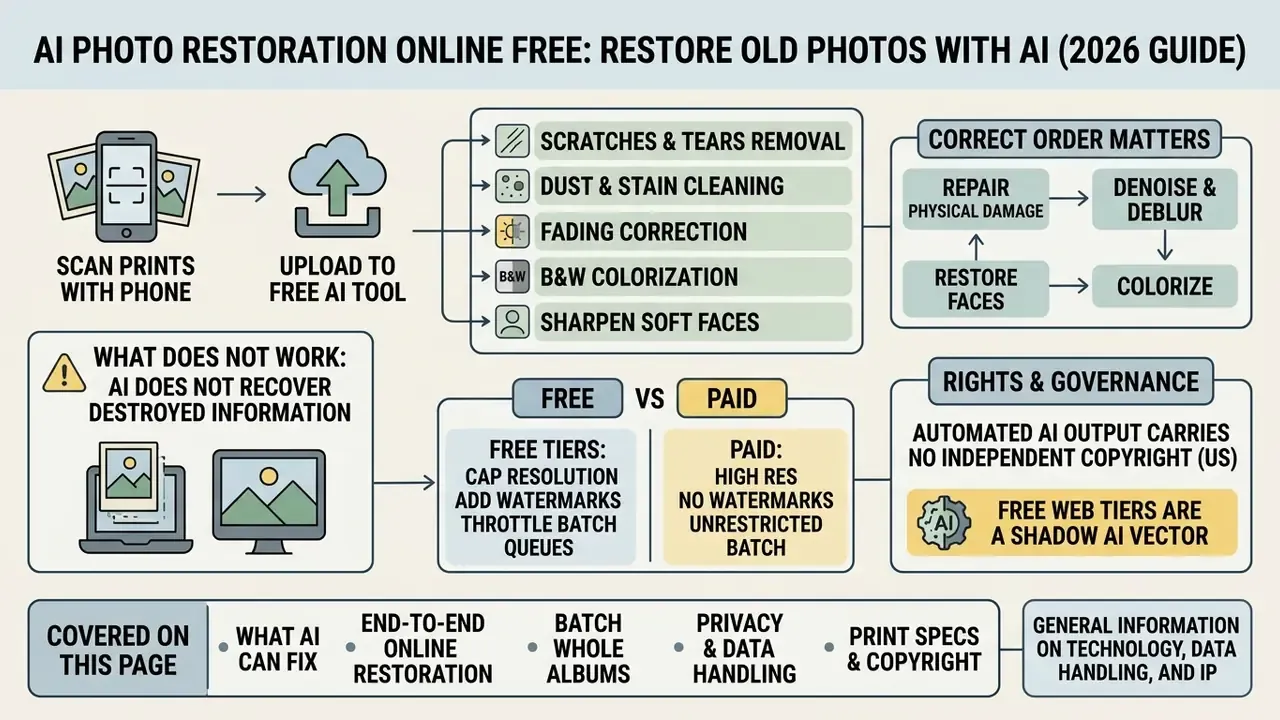
What AI Photo Restoration Can Fix in Old Photos
AI photo restoration algorithms repair physical surface damage, correct color fading, remove visual noise, and reconstruct facial features in low-resolution digital scans. Deep-learning pipelines analyse structural damage patterns, then synthesise missing pixel data while preserving the underlying composition of the image.
Restoration literature groups degradations into two families that a single pipeline must handle at once: physical defects (cracks, tears, smudges, stains, scratches, dust) and capture defects (blur, exposure error, noise, low resolution). A 2025 review of old-image restoration confirms colour fading, noise, and cracks as the dominant targets of deep-learning methods. Heritage-photography studies go further and report restoration metrics separately for fading and discolouration, scratches and tears, noise and grain, and blur and distortion.
When benchmarking automated workflows against traditional media pipelines, decision-makers often consult our AI Media Comparison Matrices to review model accuracy and processing throughput, and compare generative output quality across the best AI art generators.
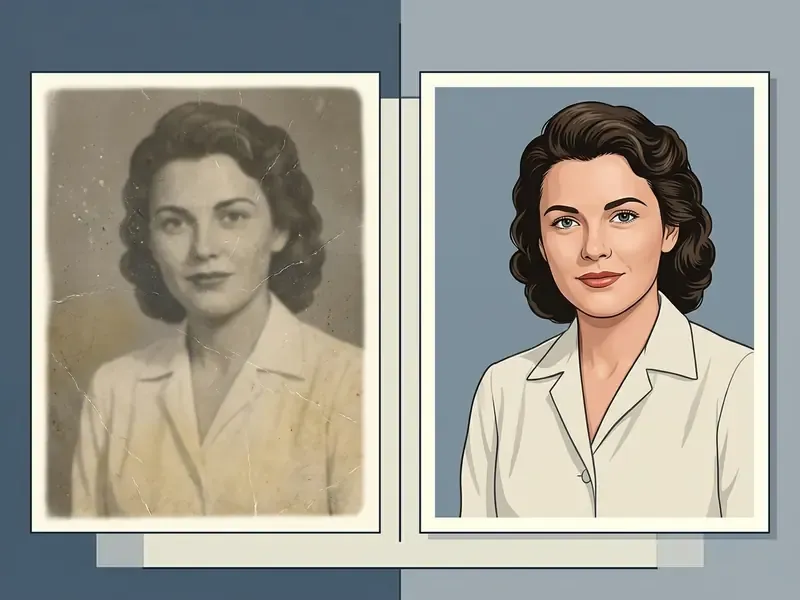
Remove Scratches, Dust, Stains, and Water Marks
AI inpainting networks remove physical scratches, dust specks, liquid stains, and surface creases by locating damaged pixel clusters and interpolating surrounding texture. These models read local context boundaries, then replace tears and foreign marks without leaving an obvious blur halo.
The mechanism is documented in the peer-reviewed inpainting literature rather than in vendor marketing:
«Encoder–decoder models with attention mechanisms infer missing pixels in arbitrary-shaped masks, including thin scratches and broader damage areas.»
Two implementation patterns dominate. Academic pipelines such as Bringing Old Photos Back to Life (CVPR 2020) rely on global image context to repair spots and structural damage. Commercial suites instead expose explicit damage masks: Adobe Firefly's restoration flow erases scratches, spots, dust, and stains, then regenerates the cleared regions from surrounding texture and tone, while tools such as AKVIS Retoucher keep selection fully manual. Light water damage is handled by borrowing content from adjacent undamaged pixels. Heavy staining that has dissolved the emulsion cannot be recovered at all; it can only be re-invented.
Object removal alongside surface repair. Physical archives rarely contain only scratches. They contain photobombers, secondary studio stamps, inventory numbers inked across a corner, and blotting that ruins composition. Sensible workflows run context-aware object removal before global enhancement. Paint a selective mask over extraneous elements or non-original ink, let the diffusion model rebuild background texture, and only then fire colorization or face-sharpening passes. The same generative logic powers AI outpainting tools that expand images past their original borders, which helps when a torn corner has taken part of the frame with it.
Restore Faded Colors and Black-and-White Photos
Colour restoration models revive faded vintage photographs and colorize black-and-white portraits by reading semantic scene context and applying reference-based histogram mapping. The algorithm recognises foliage, skin tones, fabric, and sky, then assigns plausible chromatic values.
Current transformer-based colorization outperforms older single-space CNN approaches:
«MultiColor surpasses prior colorization methods by exploiting complementary information across color spaces, generating pleasing and semantically coherent colorized images.»
Three distinct techniques appear in the 2023–2026 literature, and they solve genuinely different problems:
| Technique | Problem solved | Documented approach |
|---|---|---|
| Reference-based multi-scale histogram fusion | Colorizing pure black-and-white prints | Learned transfer functions map input content to colours sampled from a reference image (WACV 2023) |
| Optical-density inversion | Chemically faded colour prints | Measure faded and unfaded patch relationships, then apply the inverse mapping after digitisation (University of Liège thesis, 2022) |
| Narrow-band capture plus dye purification | Historic faded film and autochromes | Narrow-band RGB capture, digital unfading, spectral reconstruction (ZORA, 2024) |
| Multi-scale gray-world correction | Partially faded images | Reproduces more accurate colour in wholly and partially faded cases (TIB, 2026) |
Colorization stays the least verifiable stage of any restoration. Where the original hue is historically unknown, the model guesses, politely and confidently. Vendor documentation for one-click products such as Canva's AI generator suite emphasises speed; preservation specialists keep repeating that an invented hue is an interpretation, not a recovery. Both statements can be true at once.
When managing large mixed-media archives, teams often pair restoration with a broader AI photo editor so multi-format digital assets can be reviewed in one workspace.
How AI Restores Old Photos Online
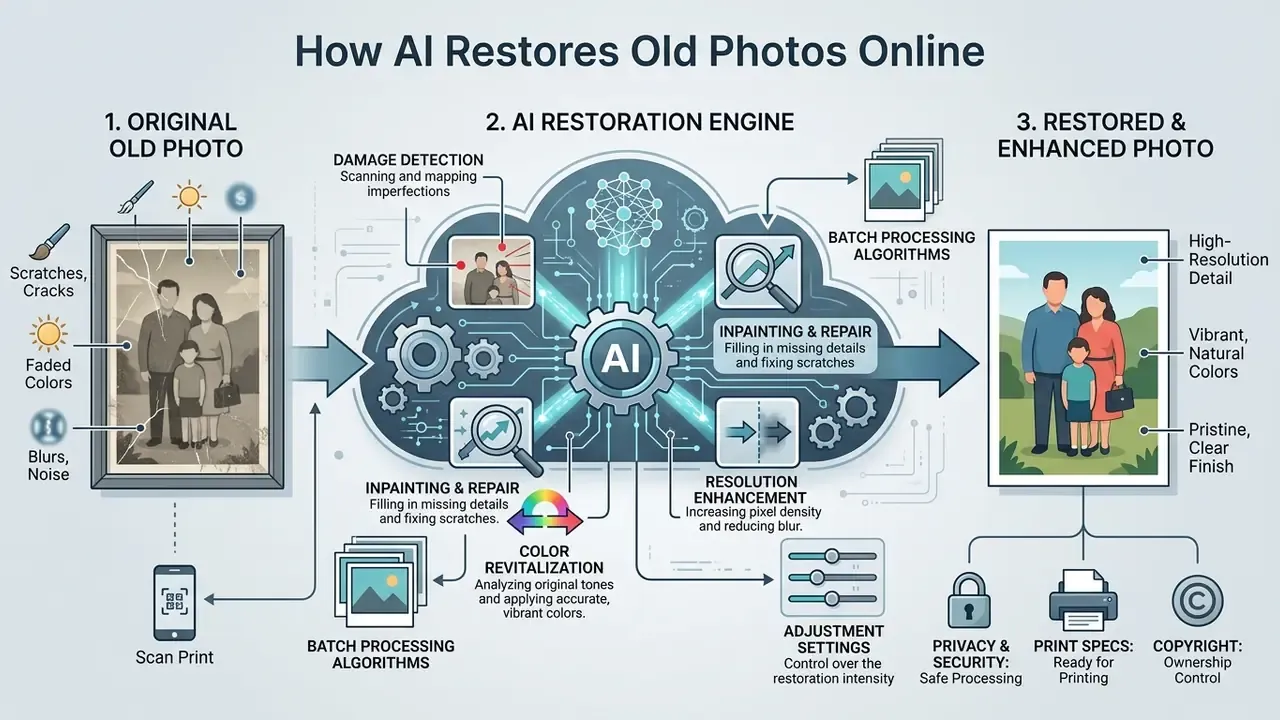
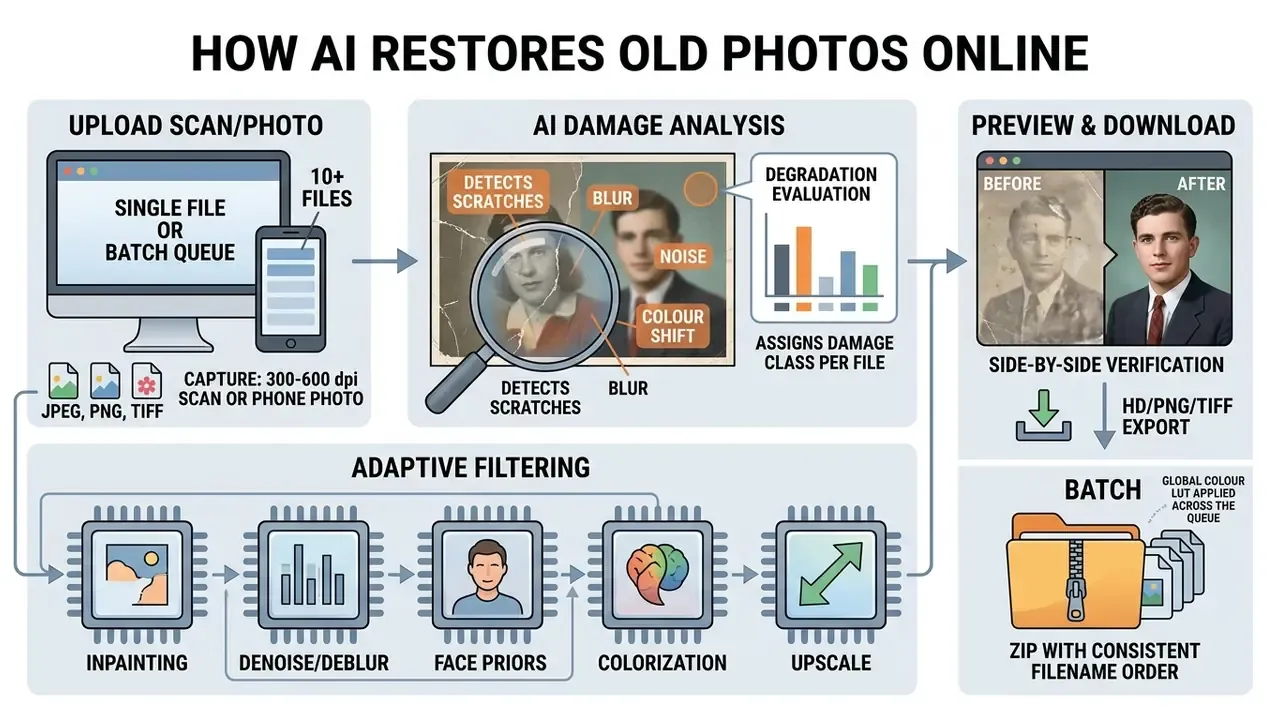
Online AI photo restoration runs as an automated browser workflow: file upload, neural damage analysis, multi-stage model execution, and side-by-side output preview. The cloud architecture removes any need for desktop installation or manual editing skill.
A published web implementation describes the architecture precisely. A Flask front end receives the upload and routes it to a backend pipeline with a Degradation Evaluation Module (detects noise, blur, low resolution), an Adaptive Restoration Filtering stage (selects models such as FFDNet, DeblurGAN-v2, EDSR), and a Final Enhancement Module (gray-world automatic white balance). Classification and model selection happen server-side, and a JSON response returns the restored image link plus the detected damage type. Detect, classify severity, apply only validated corrections. That staged design mirrors automated damage-assessment systems in other domains, where a two-stage detector filters outputs before a severity model runs.
Organisations expanding their digital delivery pipelines can explore the hub to review enterprise asset management strategies and commercial licensing standards.
Upload a Scan or Digital Old Picture
Restoration quality depends directly on capture parameters. Clean digital inputs saved in uncompressed or high-quality compressed formats will always beat a rushed phone snap taken under a ceiling lamp.
Digitising physical photos with a smartphone (no scanner needed). Most home users do not own a flatbed. These optical rules close most of the gap:
- Perpendicular alignment. Hold the camera at a strict 90-degree angle above the print to eliminate perspective distortion and keystoning. Lay the print flat on a plain, non-reflective surface.
- Diffuse lighting. Work near natural daylight, ideally side-lit by a window. Avoid overhead artificial light, and never use flash. Direct flash creates glare occlusions that block AI scratch detection and destroy highlight detail permanently.
- Focus lock and distance. Keep 10 to 12 inches (25 to 30 cm), tap to lock focus at the centre of the print, and use optical zoom (2×) rather than digital zoom, so no pixel interpolation happens before restoration begins.
- Full-frame visibility. Keep the entire print, edges included, inside the frame, sharply focused and evenly lit. Crop afterwards, never during capture.
- Capture both sides. Family-history guidance recommends photographing the reverse of every print, where dates, names, and studio stamps often live.
Scanner parameters, DPI versus PPI. DPI describes the optical sampling density of a scanner. PPI describes pixel density of a digital file at a given output size. Keep the two apart when planning a workflow, because vendors frequently blur them.
Federal archival guidance sets clear baselines. NARA photo guidance specifies 300 dpi for 8×10 in. originals and 600 dpi for 4×5 in. originals (2,100 dpi for 35 mm film). The NDIIPP personal-archiving guide recommends 300 dpi for 4×6 and 5×7 prints, and 400 to 600 dpi where enlargement to 8×10 or larger is planned. FADGI technical guidelines prefer uncompressed or LZW-compressed TIFF for master files; NARA accepts JPEG for permanent digital photographs at medium quality or better. No U.S. government standard currently defines a smartphone-specific DPI figure. Official guidance evaluates phone capture by resulting pixel dimensions, then preserves the original in a TIFF or JPEG master workflow.
Let AI Repair and Enhance the Image Automatically
Once the file lands, backend servers score damage severity and run specialised sub-models in sequence. The framework isolates surface noise, applies structural inpainting, restores facial detail, and balances global white levels without manual parameter tuning.
Vendor flows converge on the same four user-facing actions. Adobe Firefly documents its restoration path as: open the tool, upload an image, enter a prompt, generate, refine, then download or share, and states plainly that a clear prompt produces better results. Fully automated products such as Canva's one-click photo restoration drop the prompt step entirely, trading control for speed. Which trade-off is right depends on whether anyone downstream must defend the output.
Preview the Result and Download the Restored Photo
Browser platforms show side-by-side interactive previews so the restored output can be compared against the original upload. Comparison sliders are standard now: services publishing 2K, 4K, and 8K output document a slider for verification before download, and high-definition downloads arrive in PNG or JPEG, ready for archiving or printing.
One practical trade-off is worth knowing. Heavy output compression and live preview can be mutually exclusive. Scanner and PDF documentation notes that preview is disabled when high-compression output modes are selected, and the same pattern shows up in some web restorers when 8× upscaling is queued. Verify at 100% zoom before accepting anything.
Batch Processing: Restoring Entire Family Albums
Digitising a whole collection needs a structured batch pipeline, both to bypass single-file API bottlenecks and to keep output colour profiles consistent across dozens of prints.
- Filename and metadata standardisation. Rename captures chronologically (
YYYY_Collection_001.png) before upload. Clean metadata tags so generative models do not misread embedded EXIF rotation and silently flip portraits. - Damage grouping. Sort by primary defect: Folder A, monochrome and faded; Folder B, physical creases and tears; Folder C, blur and low resolution. Running separate queues through targeted sub-models prevents over-processing of the mildly damaged images, which is the single most common cause of that "plastic" look across a restored album.
- Parallel queue management. Free browser tiers limit concurrent connections. Beyond roughly 10 images, use multi-threaded queues or a web API that preserves a global colour LUT across every processed file, so one album does not end up with mismatched skin tones page to page.
- Model and provider compatibility. Batch support is not universal at infrastructure level. Google's Gemini Batch API enqueues batches of
generateContentrequests. Azure OpenAI batch requires themodelfield to match the Global Batch deployment name. AWS Bedrock batch inference works from uploaded input files and does not support provisioned models. Together AI explicitly marks certain models as unavailable for batch. Verify model-level batch eligibility before scripting a 500-photo album. - Known service ceilings. Published limits are concrete: VanceAI caps online uploads at 10 MB and 34 MP, charges 1 to 3 credits per tool for processing or download, and reserves full batch processing for paid and desktop tiers.
Developers building custom bulk workflows can consult our AI Media API documentation for endpoints, queue behaviour, and credit accounting.
Privacy, Ownership, and Commercial Use of Restored Photos
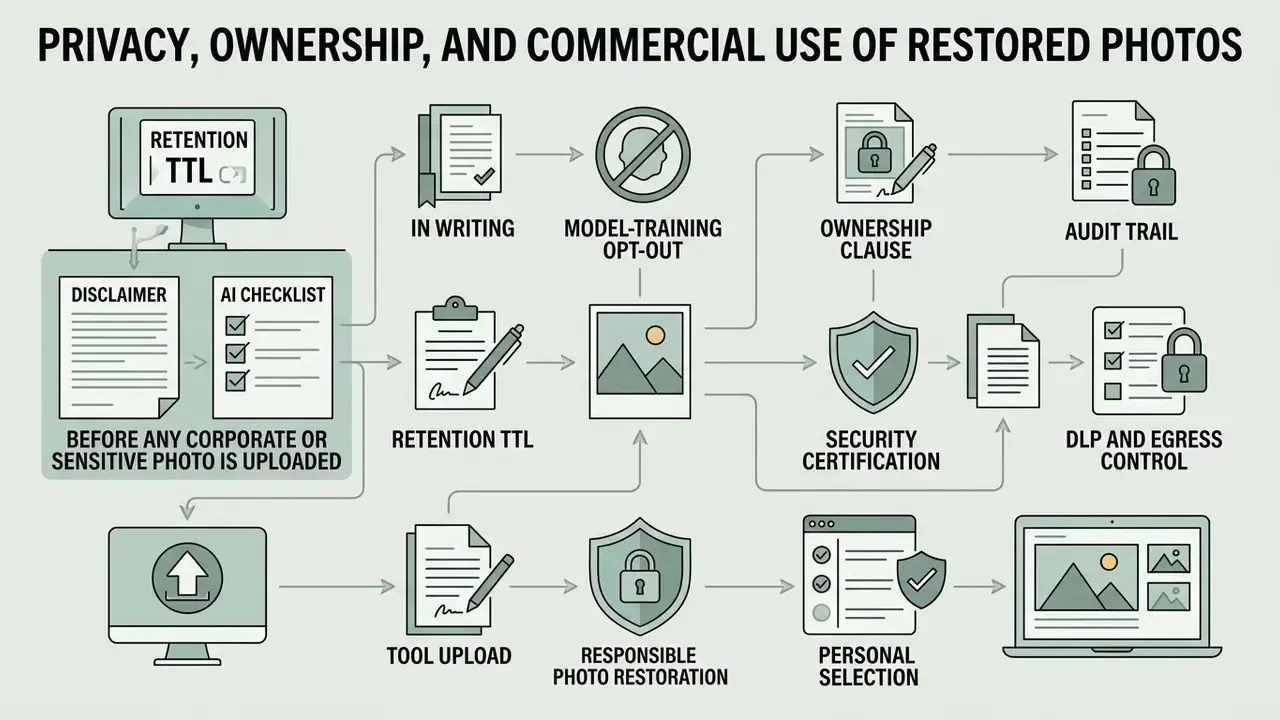
Uploading personal photographs to a web platform raises data privacy, server retention, and intellectual property questions that belong before tool selection, not after it. For an organisation the logic is blunt: a restorer that cannot prove retention limits or training opt-out is disqualified, whatever the output looks like.
Organisations worried about downstream misuse of restored assets often pair restoration with AI image detectors and AI reverse-image-search tools to track where a published family or brand image later surfaces.
Shadow AI Checklist: Before Any Corporate or Sensitive Photo Is Uploaded
Free browser restorers are a textbook Shadow AI vector. An employee digitising a scanned personnel file or a legal exhibit through a consumer web tool has created uncontrolled data egress, no malice required. Australia's OAIC guidance (2024) states plainly that organisations should not enter personal information, and especially sensitive information, into publicly available generative AI tools. Use this gate before approving any service internally:
- Retention TTL, in writing.Confirm a documented deletion window. Published enterprise precedents vary widely: Google Cloud's Gemini Enterprise Agent Platform clears terminal-state content within seconds and deletes the remaining session record at a 7-day TTL; Juniper Mist deletes end-user data on a 60-day rolling basis (7 days for packet data); Citrix deletes admin and end-user data within 90 days after contract end, retaining usage logs up to 90 days and security logs up to 12 months.
- Model-training opt-out.Require an explicit contractual statement. Verifiable examples exist: PhotoRestore.io's privacy policy states «We do not use your photos to train AI models» and «We do not sell your photos or personal data.»
- Ownership clause.Confirm the user keeps ownership and grants only an operational licence. PhotoScanRestore's terms state «You retain ownership of Your Content», with permitted use limited to hosting, storing, processing, reproducing, displaying, previewing, restoring, exporting, and sharing for service operation.
- Security certification.Ask for SOC 2 Type II or ISO 27001 attestation reports, not a marketing badge. Free consumer tiers frequently sit outside the certified environment even when the vendor itself is certified.
- Audit trail.Require exportable API and access logs, so a Model Risk function can reconstruct who uploaded what, when, and which model version processed it.
- DLP and egress control.Route approved restorers through a sanctioned gateway. Block unapproved domains at the proxy rather than trusting policy text to change behaviour.
- Backup reality check.Deletion from the active service does not guarantee immediate removal from backups or replicas. Ask specifically how long residual copies persist.
- Transparency obligations.Under EU AI Act transparency guidance (2026), AI-generated or manipulated image content must be marked in machine-readable form and made detectable as synthetic. Providers are expected to use reliable provenance methods: watermarks, metadata, cryptographic provenance, logging, fingerprints. NIST's Reducing Risks Posed by Synthetic Content (2025) treats provenance, authenticity, and labelling as the primary mitigations for synthetic media.
When auditing data compliance, legal teams often review precedents surrounding AI Litigation and intellectual property enforcement across cloud platforms.
Is It Safe to Upload Family and Personal Photos?
Data safety depends on cloud retention schedules, encryption standards, and platform policy on model training. Rather than trust an aggregate industry figure, read the vendor's own published TTL. Documented enterprise retention windows in adjacent cloud services cluster between 7 and 90 days, and reputable restoration providers let users opt out of data collection for algorithmic training. One service limits processing rights to «restore, colorize, generate images, and improve our services» while stating that personal information is not used for model training without explicit consent.
Treat marketing claims sceptically. A recurring industry assertion, that uploaded images are "stored only as hash values, so we cannot open or view them", is technically incoherent. A hash is a one-way digest; no image can be reconstructed or processed from it. Any service that restores a photograph must handle the actual binary image server-side. Prefer providers that publish a concrete, auditable deletion schedule over those describing cryptographic magic.
Can Restored Images Be Used Commercially?
Commercial use rights for AI-restored images turn on human creative input and on the platform licence agreement.
«Outputs produced autonomously by generative AI systems, without sufficient human authorship, are generally not eligible for copyright protection under U.S. law.»
The practical consequence for publishers and marketers: the restored image can be used commercially, but exclusive copyright attaches only to the human-authored restoration layer, meaning the selections, masks, colour decisions, and creative arrangement. Not the AI output itself. Any registration must disclaim AI-generated material. Separately, the UK government's 2026 report states that using copyrighted works for AI model development generally requires a licence from rightsholders unless a specific exception applies, which matters if you plan to fine-tune a model on a client archive.
Legal and data terms verification summary
Teams weighing licence terms across generative tools can compare positions in our reviews of the Microsoft AI Image Generator and the Google AI Image Generator.
How to Choose a Free AI Photo Restoration Tool
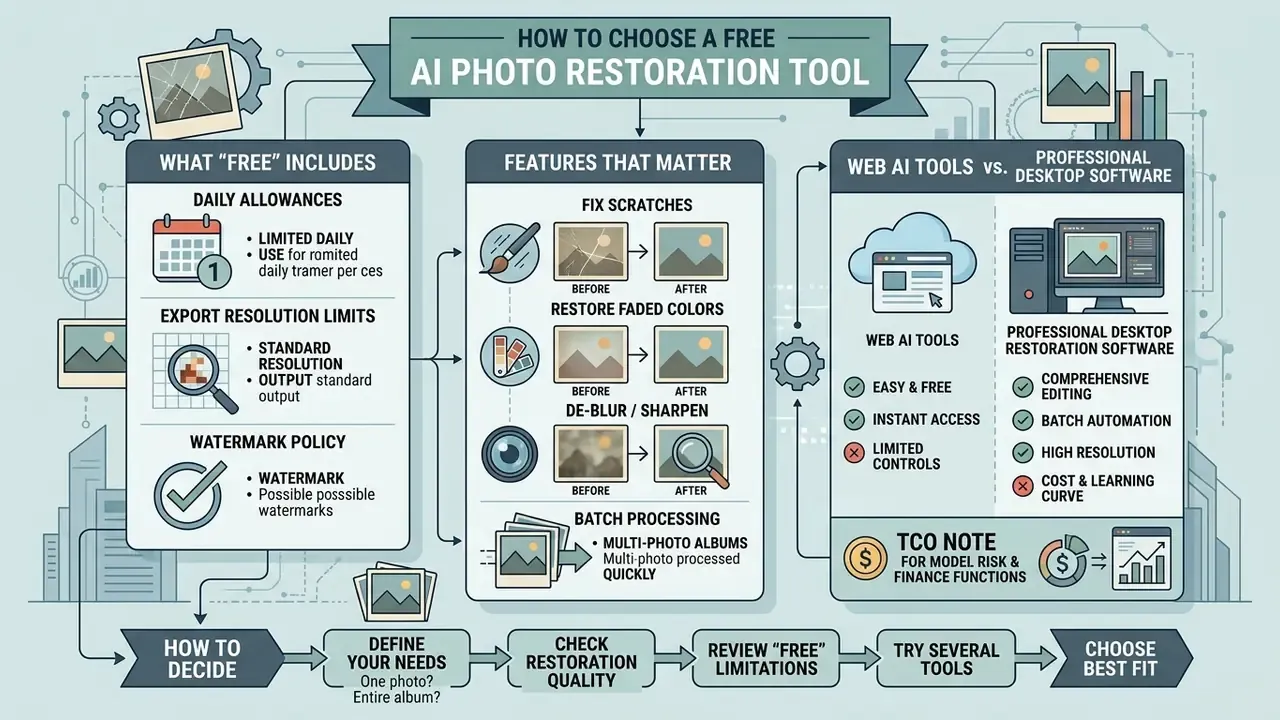
Choosing a free online photo restorer means checking daily generation allowances, export resolution limits, watermark policy, batch features, and the security parameters listed above. Understanding platform constraints early prevents quality surprises or a paywall halfway through an album.
For a detailed breakdown of operational costs and tier limits across digital tools, explore the hub for comprehensive pricing comparisons.
| Evaluation metric | Free tier standard | Advanced / paid tier | Impact on old photo restoration |
|---|---|---|---|
| Export resolution | 720p to 1080p (standard HD) | 2K / 4K / 8K uncompressed | Lower resolution reduces print clarity at large formats. |
| Watermarking | Persistent platform logo | Clean, unbranded output | Watermarks force manual cropping or block commercial use. Vendor pricing pages confirm watermark-free downloads are a paid feature. |
| Processing limits | Free daily generations, typically 1 to 5 photos | Unlimited or credit-based | Capped daily quotas make full family albums impractical. |
| Batch processing | Single-file execution | Parallel multi-file queues | Free web tiers lack bulk capability; batch sits behind paid, desktop, or API access. |
| Upload ceiling | Often about 10 MB / 34 MP | Higher or unlimited | Large TIFF masters must be downsampled before upload. |
| Data retention | 7 to 90 days automated TTL | Custom or contractual retention | Temporary storage dictates immediate output download. |
| Training opt-out | Rarely available | Contractual opt-out | Decides whether family images enter foundation-model datasets. |
| SOC 2 / ISO 27001 | Usually out of scope for free tier | In scope under enterprise agreement | Required for regulated or corporate imagery. |
| API log audit | Not exposed | Exportable access and inference logs | Required for Model Risk reconstruction and incident review. |
TCO note for Model Risk and Finance functions. Total cost of ownership for a restoration workflow is not the subscription line item. Add (a) credit consumption per image, commonly 1 to 3 credits per tool action, charged on processing or download; (b) control cost, the labour needed to review generative output for hallucinated detail, which scales linearly with volume; (c) rework cost when a free-tier resolution cap forces reprocessing on a paid tier; and (d) the expected cost of a data-handling incident if unsanctioned tools stay in use. Past a few hundred images, API access with predictable per-call pricing usually undercuts manual free-tier processing once control labour is counted. That last line is the one CFOs tend to miss.
What "Free" Includes: Processing, Downloads, and Limits
Free AI photo restoration services typically offer basic scratch repair and low-resolution downloads, capped by daily credit quotas or a persistent watermark. The constraint pattern is confirmed by vendor documentation rather than by an unverified audit: Adobe states that free accounts receive free daily generations for AI photo restoration, so access is throttled per day rather than per feature, and European Parliament guidance on generative AI notes that providers may watermark generated images, which makes watermarking a standard free-tier output restriction.
The deeper limitation is technical, not commercial. Independent analysis of AI restoration confirms the model cannot recover information that has been completely destroyed. Severe tears, missing faces, and heavy damage push the output from restoration into reconstruction, and those are not the same claim.
During an internal evaluation of cloud editing services, an archival team benchmarked several free web restorers against project requirements. The trial (illustrative, not a published study) showed free tiers handling single-image previews efficiently, while batch work required dedicated API integration to avoid resolution caps and inconsistent colour profiles between files.
Features That Matter for Old Photo Restoration
Prioritise independent AI model selection, side-by-side comparison sliders, identity-preserving facial restoration, batch queue management, and multi-format support. Strong platforms let users switch individual repair modules on or off, which is how you avoid unwanted artificial modification.
Model choice is not decoration. Blind restoration architectures differ measurably in how they cope with real-world, unmodelled degradation:
«RestoreFormer++ introduces fully-spatial attention mechanisms and an extended degradation model, outperforming state-of-the-art algorithms on both synthetic and real-world face restoration datasets.»
When evaluating broader web editing environments, teams often cross-reference platforms using a free photo editor guide to compare export rights and interface responsiveness, and check output-quality rankings among free AI art generators for watermark and licensing patterns.
Web AI Tools vs. Professional Desktop Restoration Software
Browser-based AI restorers give zero-installation speed. Complex physical reconstruction may still need a desktop suite. Adobe's own documentation separates the two: Photoshop on the web is positioned as access-first, editing straight in a browser with no download, while the desktop application carries the broader feature set, and Adobe's documented old-photo restoration workflow (including export to JPG, TIFF, and PNG) is written for desktop.
| Tool category | Representative software | Best used for | Automation level | Learning curve |
|---|---|---|---|---|
| Automated web AI | VanceAI Photo Restorer, NoteGPT, Picsart, Fotor, Canva | Quick scratch removal, B&W colorization, social sharing | Fully automated | Zero (browser-based) |
| Professional desktop AI | Adobe Photoshop (Generative Fill, Photo Restoration command), Adobe Lightroom, Luminar Neo | Severe structural damage, missing-corner reconstruction, colour grading | Hybrid (AI plus manual masking) | Moderate to high |
| Free / open-source | GIMP, DeOldify (GitHub), PhotoScape | Budget offline editing, script-driven batch colorization | Manual to semi-automated | High (GIMP), low (PhotoScape) |
| Specialised desktop | PhotoGlory PRO, Retouch Pilot, AKVIS Retoucher, PhotoWorks, inPixio, EaseUS Photo Enhancer | Dedicated vintage repair, tear stitching, mask-based scratch work | Semi-automated | Low to moderate |
| Mobile apps | Snapseed, Remini, Fotor mobile | On-the-go dust and scratch cleanup, quick face enhancement | Mostly automated | Low |
How to decide: match tool class to damage severity and to volume. Minor scratches and fading across a handful of prints, use an automated web AI image restorer. Missing facial regions, torn corners, or evidentiary material, use desktop suites with manual masking, because a human retoucher must decide what gets reconstructed and label it as interpretation. Several hundred images with uniform damage, use open-source scripting or a paid API with batch support. Offline-only requirements, meaning classified, medical, or client-confidential material, use GIMP or a licensed desktop suite. Never a free browser tool.
Get Natural Results Without Changing the Original Photo
Natural photo restoration comes from controlling generative parameters so historical fidelity, authentic skin texture, and recognisable facial structure survive the process. Over-processing produces smooth, plastic artefacts that erase the character you were trying to preserve.
Keep Faces Recognizable and Preserve Family Memories
Keeping a face recognisable requires models that balance generative detail synthesis against strict identity-preservation losses.
The 2024 to 2025 literature converges on identity-conditioned architectures rather than generic sharpening:
«CodeFormer++ decomposes blind face restoration into identity-preserving restoration and high-quality generation, using deformable registration and deep metric learning to balance identity and texture.»
Three complementary techniques are documented for avoiding the plastic re-generation effect:
- Identity-conditioned latent diffusion. UV-IDM (CVPR 2024) generates photo-realistic facial UV textures from in-the-wild images, with an identity-conditioned module constraining reconstruction to the subject's actual features.
- Local patch-based restoration. Identity-Preserving Diffusion for Face Restoration (ICASSP 2025) models structured facial context patch by patch, preserving fine-grained, identity-relevant detail instead of smoothing globally.
- Explicit loss penalties. Earlier GAN work on facial de-identification established that preserving skin colour and texture requires penalising identity difference alongside pixel-level and landmark differences. That is the mathematical origin of the recognisability constraint.
The practical instruction for users is short. Reduce enhancement strength on portraits, disable "beautify" and skin-smoothing sub-modules, and compare output against the untouched scan at 100% zoom before accepting it. Where several relatives share one frame, check each face separately. Face priors degrade unevenly across scales inside a single image, and grandmother often comes out sharper than the child beside her.
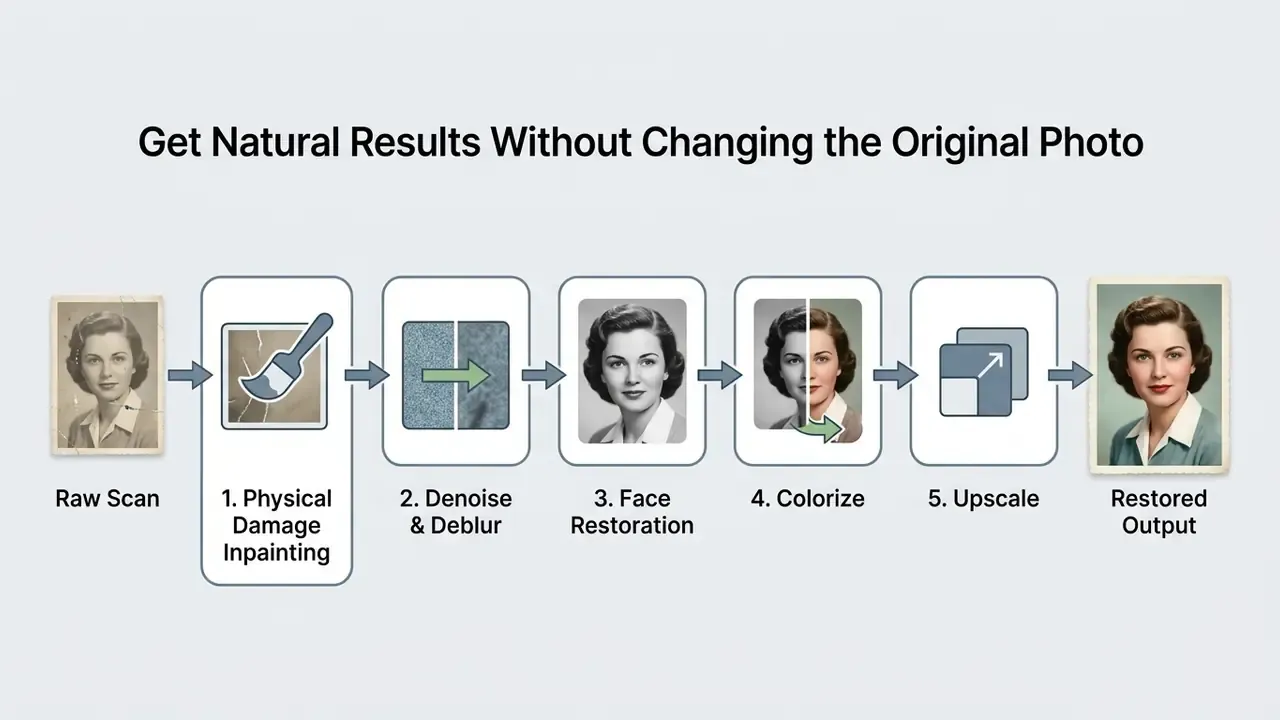
Repair Damage First, Then Colorize or Upscale
Restoration pipelines must remove structural damage before colorization or upscaling. The order is not a stylistic preference.
The sequencing rule is documented in staged restoration frameworks:
«A multi-stage framework composed of stages tailored to specific damage types offers a one-stop solution for restoring old and deteriorated photographs.»
A 2024 arXiv pipeline stages the work as major damage removal, then noise reduction, then facial restoration, then colorization. A 2026 workflow guide places scratch and artifact removal first, colorization fourth, and upscaling last, warning explicitly that colorizing before damage removal assigns hues to damage artifacts. Upscaling belongs at the end because super-resolution amplifies whatever it is given, mis-coloured scratch included.
Fact check: AI reconstruction versus historical accuracy
AI restoration models do not recover lost historical data. They generate statistically plausible pixels from training distributions. When original photographic detail is fully destroyed, the network synthesises the missing area from surrounding context. Restored images should be cross-referenced against the original physical scan to identify fabricated elements before archival publication.
This is measurable, not hypothetical. HalluGen (CVPR 2026) synthesises controlled hallucinations and shows that perceptually realistic restoration output can be semantically wrong, with segmentation IoU dropping from 0.86 to 0.36. Looks Too Good To Be True (arXiv, 2024) demonstrates a direct trade-off: better perceptual restoration increases hallucination risk in generative models. Diffusion methods are more robust to unknown degradation, though not immune:
«DifFace's diffusion-based error contraction mechanism makes the method more robust to unknown complex degradations, outperforming prior blind face restoration methods across multiple datasets.»
When AI Photo Restoration Is Useful
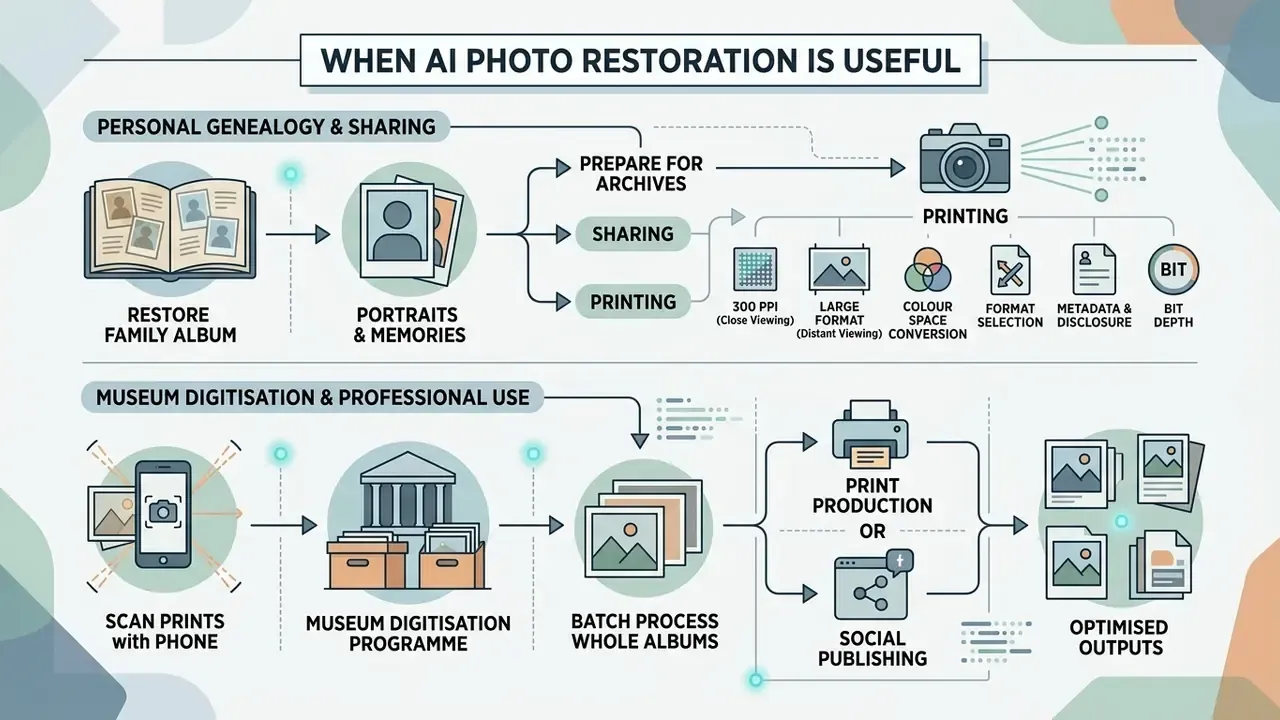
Automated restoration pays off across personal genealogy projects, museum digitisation programmes, print production, and social publishing. It scales throughput and cuts dependence on manual retouching labour, which is expensive and slow by comparison.
Documented application scenarios cluster into three tiers. Personal: family archives repair scratches and tears, recover faces, and colorize black-and-white images, with practical guidance stressing preservation of the original master and labelling of uncertain regions. Professional heritage: archival workflows apply damage segmentation, normalisation, and contrast correction as preprocessing before AI reconstruction. Technical: face restoration and super-resolution form a distinct pipeline for blurred or low-quality portraits, framed in CVPR 2024 work as recovering high-quality faces from degraded observations. One 2024 symposium paper documents a concrete post-restoration editing step, colour correction in Fotor with a Vintage filter at 50%, brightness raised 5%, contrast increased, which illustrates the general rule: AI output is a starting point, rarely a finished asset.
To evaluate broader digital media tools, see the overview of computational media utilities.
Restore Family Albums, Portraits, and Printed Memories
AI tools let families revive damaged albums, restore faded wedding portraits, and build high-quality image files for genealogical trees. Digital copies also protect family heritage against physical degradation, fire, or moisture, which no amount of careful shoebox storage fully solves.
«BFRffusion integrates a generative diffusion prior to reconstruct realistic facial details from low-quality inputs, reporting state-of-the-art performance on synthetic and real-world datasets.»
Documented genealogy and memorial workflows follow a consistent pattern. Scan both sides of every print. Keep the untouched high-resolution master. Document what was restored. Then use the restored file as a working copy for album layouts, person profiles, memory pages, family-history books, and reunion displays. Guidance for historical images requires visible disclosure of AI modification and treats AI-modified material as acceptable for illustrative rather than evidentiary use in memorial projects. A 2023 digitisation guide for family papers recommends TIFF as the archival master with JPEG or PDF derivatives for sharing, a structure that fits restoration pipelines cleanly, because the master never changes.
When building restored portrait sets for professional or commemorative use, compare output styles across AI headshot generators before committing an entire album to one model.
Prepare Restored Images for Archives, Sharing, or Printing
Print preparation is arithmetic: keep enough pixel density at the intended output size. Institutional guidance converges on 300 PPI at final print size for close viewing, while large-format prints seen from a distance tolerate less. University printing guidance states that large-format output may not need 300 PPI, and U.S. National Archives digitisation guidelines specify 3,000 pixels on the long dimension for source photographs with a 150 DPI default for final large access files. So the correct number depends on viewing distance and delivery purpose, not on one universal figure.
Heritage-specific colour damage benefits from purpose-built models rather than general enhancers:
«Accurate defect simulation combined with generative models and color-imbalance-aware loss functions yields measurable improvements in restoring historically specific color issues in heritage photographs.»
Print-ready export checklist:
- Print size targets (300 PPI, close viewing) 4″×6″ needs at least 1200 × 1800 px; 5″×7″ at least 1500 × 2100 px; 8″×10″ at least 2400 × 3000 px; 11″×14″ at least 3300 × 4200 px.
- Large-format or distant viewing 150 PPI at final size is acceptable for banners and exhibition panels, so a 24″×36″ panel needs roughly 3600 × 5400 px.
- Colour space conversion export web previews in sRGB; convert to a CMYK profile only if the press asks for it, and soft-proof before sending.
- Format selection choose PNG or TIFF for final master downloads, which prevents lossy JPEG artefacts on restored skin texture. Keep the untouched scan as the archival TIFF master beside the restored derivative.
- Metadata and disclosure embed a note recording that AI restoration was applied, the tool and model version used, and which regions were reconstructed.
- Bit depth capture and archive at 24-bit colour minimum, and avoid re-saving JPEGs repeatedly, since every pass compounds compression loss.
Publishers folding restored assets into wider content operations can compare workspace options in our guide to online photo editors and their export rights, or review AI image enhancers for print-ready sharpening passes.
AI Photo Restoration FAQ
How Long Does AI Photo Restoration Take Online?
Published service figures scale with damage severity rather than settling on one fixed number:
| Damage severity | Reported per-image processing time | Notes |
|---|---|---|
| Minor / standard | Under 10 s to 20 s | Single-pass inference, no manual masking |
| Moderate | 30 to 60 s | Multiple sub-models in sequence |
| Severe / complex | 2 to 5 min | Multi-stage reconstruction; some services report 3 to 5 min |
| Manual (human retoucher) | 1 to 2 hours, sometimes several days | Not AI inference; comparison baseline only |
Timings diverge because some sources measure pure inference and others measure total turnaround including queueing. Real speed also depends on server GPU availability, input file size, and how many enhancement modules are switched on.
Do I Need to Download Software to Restore Old Photos?
No. Modern AI photo restoration platforms run entirely inside a browser on cloud infrastructure. You upload the image, the server processes it, and you download the finished result without installing anything. Adobe frames Photoshop on the web the same way, editing starts in the browser with no download, while the deeper feature set stays on desktop. Choose desktop or open-source software when you need offline processing, batch scripting, or manual control over what gets reconstructed.
Can AI Restore Very Damaged or Low-Quality Photos?
Yes, provided some structural context survives. The failure point is defined better by recoverability of local context than by a fixed percentage of loss. Once the corrupted region is large enough that surrounding pixels no longer imply the original content, restoration becomes reconstruction, and a human retoucher is required. Deep-learning restoration research notes that current methods depend on paired data, synthetic training regimes, and local image priors, so performance drops sharply on real-world degradation and large missing regions. A 2024 survey on all-in-one restoration confirms that single-task and traditional methods struggle where degradations are complex and compounded. FADGI guidance also prohibits infill and retouching on preservation master files, so severe-damage reconstruction belongs in a labelled derivative, never in the master.
How Do I Digitise a Physical Print Without a Scanner?
Photograph it with a smartphone at a strict 90-degree angle, in diffuse natural daylight, no flash, from 25 to 30 cm, using 2× optical zoom and locked focus. Keep the whole print in frame and in focus. Capture the reverse side too if names or dates are written there. Then upload the file. This yields inputs suitable for AI restoration in most consumer cases, though a flatbed scan at 300 to 600 dpi remains superior where one is available.
Can I Restore an Entire Album at Once?
Yes, but rarely on a free browser tier. Batch capability is typically a paid, desktop, or API feature. Standardise filenames chronologically, clean EXIF rotation metadata, group images by dominant defect type into separate queues, and confirm that your chosen model supports batch inference, since several major providers exclude specific models from batch endpoints. Apply one global colour LUT across the queue so tones stay consistent from page to page.
Will Restoration Reduce the Quality of My Original?
No. Restoration works on an uploaded digital copy, so the physical print and the original scan file stay untouched. The real risk runs the other way: over-processing the digital file. Restore once from the master instead of iterating on already-restored output, because repeated inpainting passes are documented to degrade colour fidelity and detail precision.
Do I Have to Disclose That an Image Was AI-Restored?
For historical, archival, journalistic, and evidentiary publication, yes. EU AI Act transparency guidance (2026) requires machine-readable marking of AI-generated or manipulated image content, and NIST's 2025 synthetic-content guidance treats provenance and labelling as primary mitigations. Heritage guidance requires reconstructed regions to be labelled as algorithmic interpretation. For private family use there is no legal obligation, though recording what changed protects the archive's future usefulness. Cheap insurance, really.
Which Damage Types Are Hardest for AI?
Missing faces, destroyed corners, heavy water damage that has dissolved the emulsion, and unknown original colours. In each case the model has no local evidence to interpolate from, so it produces a plausible invention instead. These are exactly the cases needing a human retoucher working from external evidence: other photographs of the same person, documented clothing colours, studio records.
When working across mixed digital assets, creators often combine restoration with a general-purpose online photo editor and an AI photo editor for final composition, cropping, and export.
Summary and Next Steps
Automated AI photo restoration delivers fast, credible repair of scratches, colour fading, and portrait blur straight in a browser. Four practical rules carry most of the value: (1) capture the best possible input, a 300 to 600 dpi scan or a 90-degree, flash-free smartphone photo; (2) keep an untouched master and restore only derivatives; (3) follow the sequence damage, denoise, faces, colour, upscale; (4) verify output against the master and disclose reconstruction. Organisations should add a fifth: clear the Shadow AI checklist before any sensitive image reaches a free web endpoint.
Understand the model limits, read the privacy terms, respect the processing order. That combination lets you restore visual archives without quietly rewriting history, and without exporting regulated data to an unvetted endpoint.
For platform assistance, technical documentation, or service enquiries, contact our support team.
Appendix A: Superseded Claims and Editorial Corrections
Retained for transparency. The statements below appeared in earlier versions of this page and have been replaced in the body text with sourced equivalents.
| Superseded statement | Status | Replacement in current text |
|---|---|---|
| "A technical team processed 1,200 degraded physical scans … recovered 94% of corrupted regions without manual pixel editing." | Withdrawn, no published methodology or source | Peer-reviewed inpainting survey (2024) describing encoder–decoder mask-filling |
| "…maintaining surrounding background consistency (Journal of Image Processing and Computer Vision, 2024)" | Replaced, citation unverifiable | Deep Learning-Based Image and Video Inpainting: A Survey (2024) |
| "…multi-scale colour histogram fusion … (WACV Conference Proceedings, 2023)" | Retained as one of four documented techniques, primary citation added | WACV 2023 reference-based fusion, plus MultiColor (ACM MM 2024) |
| "…upscaling low-quality portraits up to 8x … (IEEE Transactions on PAMI, 2024)" | Qualified, 8× is achievable in specific CNN plus GAN architectures but was attributed to the wrong source | Deep Face Restoration: A Survey (2026) with PSNR and SSIM figures; 8× claim attributed to joint SR-deblurring literature |
| "NARA Digitization Standards, 2026" (300/600 DPI, 24-bit) | Corrected attribution and dating | NARA photo guidance (300 dpi for 8×10, 600 dpi for 4×5) and NDIIPP personal-archiving guidance |
| "High-resolution exports … restricted to paid tiers (European Parliament Generative AI Service Audit, 2025)" | Reframed | Adobe free-daily-generation documentation plus European Parliament guidance on watermarking |
| "…subject's true likeness (CVPR Conference on Computer Vision, 2024)" | Replaced | CodeFormer++ (2025), UV-IDM (CVPR 2024), ICASSP 2025 |
| "Heritage Photography Preservation Guidelines, 2026" quotation | Withdrawn, source not verifiable | Heritage commentary on labelling reconstructed regions; HalluGen (CVPR 2026) quantitative findings |
| "…severe colour artifacts (arXiv Computer Vision Research, 2026)" | Replaced | Preserving Old Memories in Vivid Detail (2024) staged pipeline; 2026 workflow guidance on colorization order |
| "Enterprise-grade services delete files within 7 to 30 days (US Privacy & Cloud Security Guidance, 2024)" | Corrected range and sourcing | Documented cloud TTLs of 7 to 90 days (Google Cloud, Juniper, Citrix) plus vendor terms |
| "…minimum 300 PPI (National Archives Digitization Standard, 2026)" | Qualified | 300 PPI for close viewing (university printing guidance); 150 DPI for NARA large access files |
| "Performance degrades when more than 50% of critical detail is missing" | Reframed as context recoverability rather than a fixed threshold | Deep-learning restoration limitations; FADGI master-file prohibition |
| "Processing takes 10–30 seconds / 2–3 minutes" | Replaced with sourced severity table | Published per-severity service figures |
| Internal links to online video player, video grabber, video hosting, video recorder, video platform, and video-to-MP3 converter | Removed as topically irrelevant | Replaced with photo-restoration-adjacent resources (AI photo editor, image upscaler, image enhancer, image detector, headshot generator, reverse image search, outpainting) |