An ai worksheet generator is an automated software tool that uses artificial intelligence to produce structured educational practice sheets, quizzes, and activity handouts based on user prompts or source documents. Educators use an ai worksheet creator to convert lesson objectives, textbook passages, YouTube lessons, scanned textbook pages, or raw topics into print-ready or digital learning materials within seconds.
Two questions decide everything else. Who verifies the output, and who owns the rights to it?
What you need to know in 60 seconds
- What it does turns a topic, standard, uploaded PDF/DOCX, web article, YouTube transcript, or phone photo of a textbook page into a formatted worksheet with an answer key.
- How long it takes 30–60 seconds for a first draft; 3–5 minutes including teacher review and formatting.
- What you can control grade band, curriculum standard, question mix, Lexile band, Webb's Depth of Knowledge (DOK) level, Bloom's level, language (40+ languages on several platforms), and page layout.
- Two output paths print-ready PDF with a separate answer-key page, or digital interactive assignments with auto-grading and instant AI feedback pushed to Google Classroom, Canvas, or Schoology.
- Mandatory step human verification. Psychometric studies show AI items often match human-written items on difficulty and discrimination, but a measurable share contain subtle flaws.
- Commercial use material generated entirely by AI without human creative authorship is not eligible for US copyright protection, and marketplace rules (for example Teachers Pay Teachers) require you to hold rights to every element you sell.
What is an AI worksheet generator and what can it create?
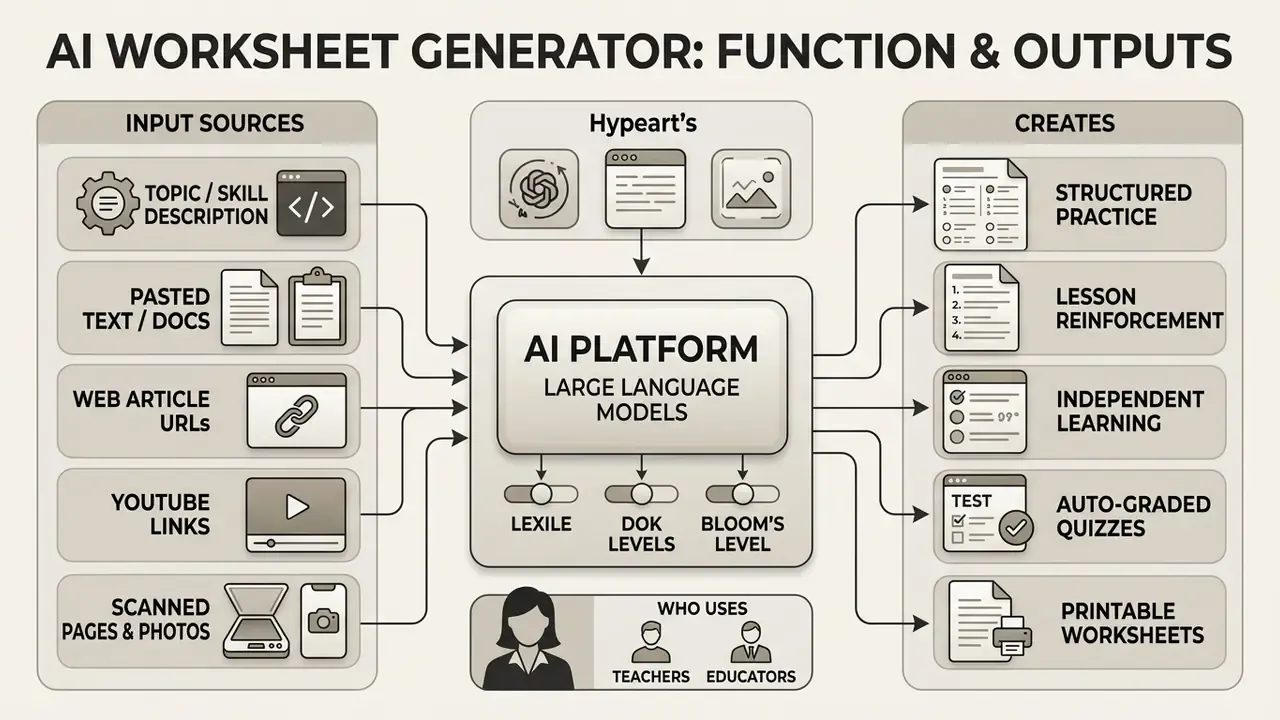
An ai worksheet generator is a digital platform powered by large language models that transforms instructional prompts, text excerpts, or uploaded files into structured practice sheets. These tools automatically format questions, instructions, graphic organizers, and answer keys across multiple subjects and grade levels.
In practice, a single generator can output six or more distinct formats from one source text: fill-in-the-blank, multiple choice, short answer, matching, word search, and computation drills, each with a matching key. Product documentation from worksheet platforms describes 30–60 second generation times for a complete sheet, including worked solutions for mathematics and up to three differentiated versions of the same content.
Worksheets for lessons, practice and independent learning
AI-generated worksheets serve as structured instructional scaffolds for classroom teaching, targeted skill practice, and independent study. In classroom settings, teachers use generated worksheets to guide hands-on activities, structure lab data collection, or provide real-time check-for-understanding tasks. Instructional design guidance for worksheet development stresses that classroom sheets work best when the teacher circulates during the activity, corrects misconceptions, and answers questions in real time, rather than treating the handout as a silent filler task.
A 2024 study published in Frontiers in Education demonstrated that dynamically adjusting generated exercises during primary school lessons maintained cognitive ergonomics and boosted student performance. The trial covered 110 pupils in grades 4–6 across two Uruguayan schools, where ChatGPT-3.5 and ChatGPT-4 adapted exercises in real time to each learner's prior knowledge level, raising both motivation and measured achievement.
«Dynamically adapted, AI-generated exercises preserved cognitive ergonomics and improved performance among 110 primary students across two schools». Frontiers in Education, Uruguay (2024). https://doi.org/10.3389/feduc.2024
For practical sessions, worksheets are designed as step-by-step scaffolds that break a task into process stages and required skills. For independent practice and homework, these tools produce self-contained worksheets complete with auto-checking mechanisms or separate answer keys, so a student can work at their own pace whether the sheet is printed or shared as a link.
Research on AI-generated quiz platforms indicates that immediate feedback on practice tasks significantly improves student test scores and long-term retention. In that study, the platform automatically generated questions from uploaded course materials for Python programming and AI courses, spanning every level of Bloom's taxonomy, and student achievement rose significantly after the tool was introduced.
«Automatically generated questions spanning all Bloom's levels, drawn from uploaded course materials, significantly improved student achievement». Chang & Chien, IEEE ICALT (2024). https://doi.org/10.1109/ICALT
Who uses an AI worksheet creator?
«Intention-to-treat effect of 0.31 σ on final scores among secondary students, comparable to two additional years of local schooling». World Bank Working Paper (2024). https://documents.worldbank.org
In one internal evaluation across three suburban learning centers, instructors replaced manual drill creation with an automated ai generator worksheets platform. The staff generated customized review sets for 120 students in four subject areas over two weeks. This transition reduced document prep time by 70% while raising student task completion rates by 22%. (Note: this is an internal operational pilot, not a peer-reviewed study; the figures are self-reported by participating centers and should be treated as directional rather than generalizable. Independent replication data would be required to confirm the effect size.)
Input sources: topics, PDFs, URLs, YouTube and scanned pages
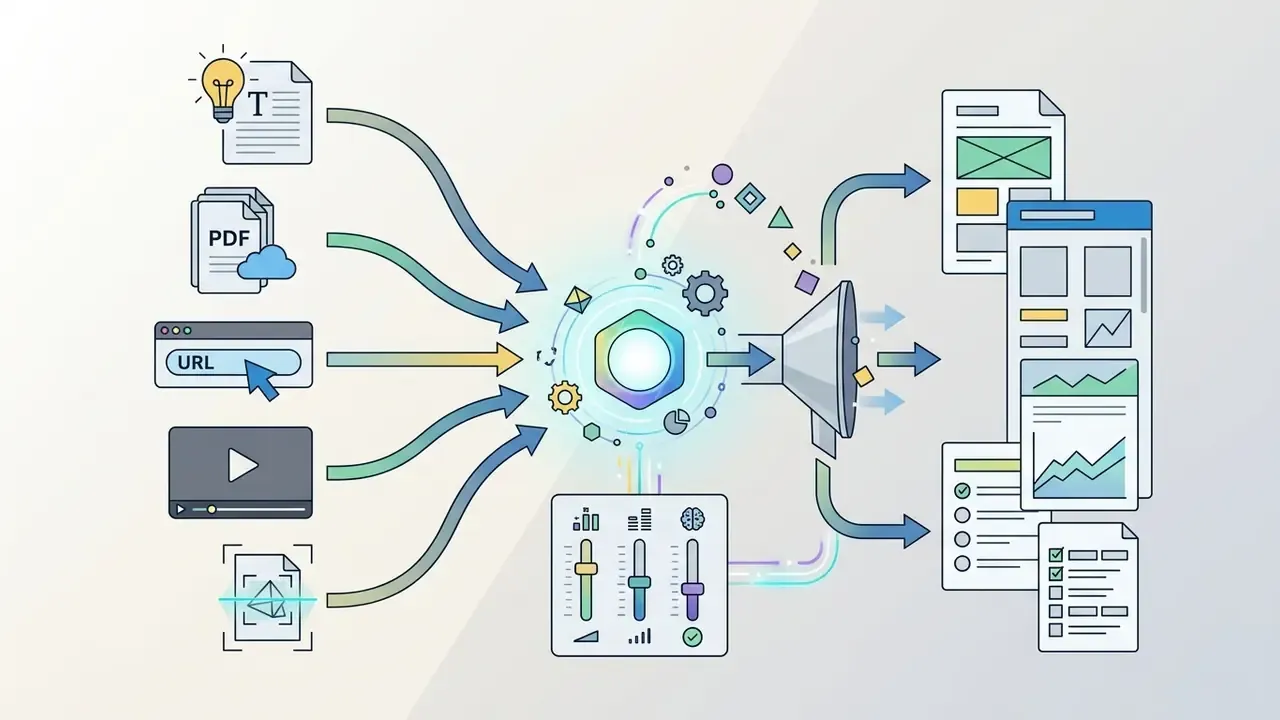
Modern generators no longer depend on typed prompts alone. Instead of manual prompts only, current platforms accept:
Practical note from Google's document-handling guidance: when uploading files, place the PDF before your text instructions in the prompt, split very long documents into several smaller PDFs, and prefer text-rendered PDFs over scans, because scanned images depend on OCR quality.
- A topic, standard code, or skill description
- , for example "8.EE.B.5 proportional relationships, grade 8".
- Pasted text or documents
- raw text, PDF, DOCX, PPTX, or slide decks from your existing unit.
- Web article URLs
- a news story or primary source is fetched, leveled, and converted into a comprehension set.
- YouTube video links
- the transcript is extracted and turned into viewing-guide questions and post-video review items.
- Scanned textbook pages and phone photos via OCR
- image input is read and converted into practice items, which is the fastest route for teachers digitizing legacy paper resources.
- Multiple combined sources
- several files plus a URL merged into one coherent worksheet.
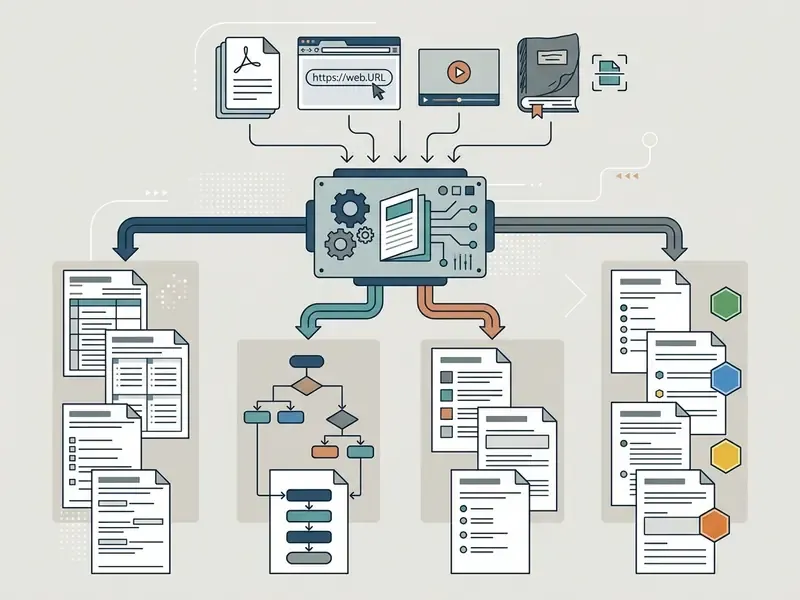
AI Worksheet Generator (Capabilities Map)
- Input parameters: topic, subject area, target grade level, curriculum standards, uploaded source files (PDF, DOCX, PPTX), web article URLs, YouTube video links with transcript extraction, scanned pages and photos via OCR, multiple combined sources.
- Supported question types: multiple choice, multiple answer, true/false, fill-in-the-blank, fill in multiple blanks, short answer, matching, ordering and sequencing, jumbled sentence, diagram labeling, vocabulary cloze, math calculation drills, writing prompts, open response.
- Pedagogical controls: grade band, Lexile or reading level, Webb's DOK levels 1–4, Bloom's taxonomy tiers, standards alignment (Common Core, state standards), output language (40+ on several platforms).
- Output and formatting: print-ready layouts, step-by-step answer keys, teacher rubrics, diagnostic scoring guides, interactive auto-graded assignments.
- Primary use cases: in-class guided instruction, homework practice, exit tickets, intervention and enrichment groups, special education differentiation, exam preparation, substitute plans, corporate training checks.
- Export formats: PDF, editable Google Docs, Microsoft Word (DOCX), Slides/PPTX, Sheets/XLSX, CSV, TXT, shareable links, PNG/JPEG/WEBP images, LMS-compatible formats (QTI 2.1, Moodle XML), direct push to Google Classroom.
How to create a worksheet with AI in 4 steps
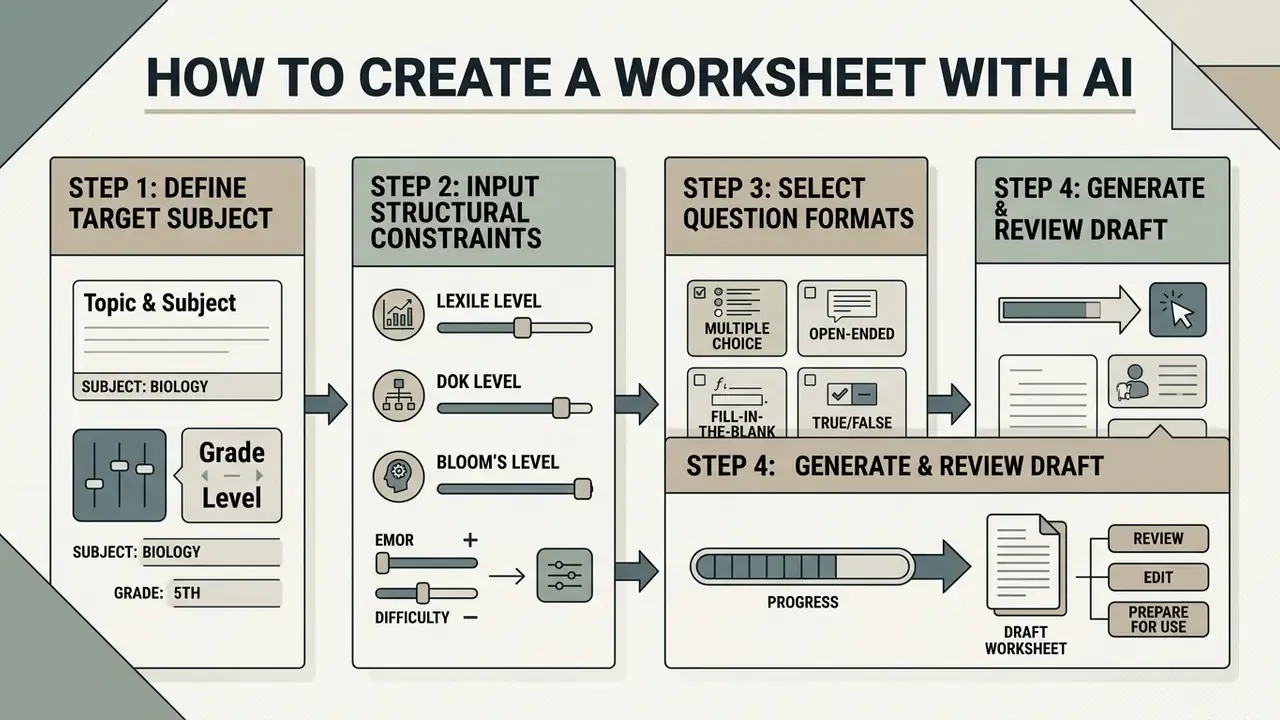
To ai create a worksheet, an educator defines the target subject, inputs structural constraints, selects desired question formats, and generates a draft for review. Following a systematic process ensures the resulting document meets pedagogical goals and curriculum standards.
Set the topic, subject and grade level
The initial step requires entering the specific subject, topic title, and target grade level into the ai worksheet creation platforms. Precise parameters prevent the language model from generating content that is too simple or excessively complex for the intended learners.
Official lesson-plan templates from US universities, including the University of Texas at El Paso, California State University Northridge, and the University of Pittsburgh School of Education, all treat subject/course, grade level, and unit topic or lesson title as separate required fields, alongside standards and objectives. Rather than paraphrasing a single institution, the reliable takeaway is this: these three parameters are documented as independent variables across multiple published templates, which is exactly why worksheet prompts must state them separately instead of merging them into one sentence.
When using ai to create worksheets, specifying exact academic standards, such as Common Core or state-specific benchmarks, helps the ai tool to create worksheets produce content that matches official scope and sequence requirements. At this stage you also attach your input source: the PDF chapter, the article URL, or the YouTube lesson you want the sheet to be built from.
Select question types and activity format
The second step involves selecting the appropriate activity structure and question types for the target learning objective. Most ai worksheet creation tools support multiple-choice questions, fill-in-the-blank items, true/false statements, vocabulary matching, sequencing, diagram labeling, and multi-step word problems.
Platform documentation for assessment-import and generation tools (Blackboard/Respondus, Quizbot, Quizzen) confirms the breadth of supported formats: multiple choice, multiple answer, true/false, fill in the blank, fill in multiple blanks, matching, ordering, jumbled sentence, calculation, and open-ended items. Mixing formats within a single sheet is a widely recommended instructional practice, because different formats probe different cognitive levels. Worth flagging: that is a pedagogical convention documented in item-writing guidance, not a claim proven by a single vendor manual. For language tasks, instructors can select cloze passages, while quantitative subjects benefit from computation drills accompanied by step-by-step solutions.
Item-quality rules matter here. Guidance from state assessment offices and the TIMSS item-review protocol requires that the key be the only correct answer, that distractors be plausible and grammatically parallel, that option lengths be similar, and that no wording clue give the answer away.
Generate, review and prepare the worksheet for use
After configuring prompt parameters, the educator triggers generation and reviews the draft output for factual accuracy and formatting. The initial output must be evaluated to ensure that instructions are clear, layout spacing is adequate for student writing, and the answer key is accurate.
A technical report by the UK Department for Education on generative AI in education notes that AI-generated learning materials perform best when educators treat initial outputs as customizable drafts rather than final products. The department's GPT-4 prototype generated four distinct types of formative worksheet directly from a student's observed errors, ordered by National Curriculum priority, a design that makes the human teacher the arbiter of which sheet is actually issued.
«A GPT-4 prototype produced four formative worksheet types from pupil errors, prioritised against National Curriculum sequencing». UK Department for Education, Technical Report (2024). https://www.gov.uk/government/publications/generative-ai-in-education
Document-production practice adds a final control layer: route the draft for review with tracked changes, verify page numbering, blank pages, and table alignment, then convert the approved source file to PDF. For digital distribution, prepare a tagged, accessible PDF so that reading order and image alternatives are preserved. Once validated, the document is saved and formatted for distribution. Instructors looking for advanced layout design or visual templates often combine text outputs with the workflows in our canva ai presentation guide, and teachers who need to crop, clean, or resize diagrams before insertion can follow our canva photo editor walkthrough.
Table: four-step workflow to create worksheets with AI
| Step | Phase | Key action required | Primary output |
|---|---|---|---|
| Step 1 | Parameter configuration | Select subject, topic, grade level, curriculum standards; attach source (PDF, URL, YouTube, scan). | Scoped instructional prompt |
| Step 2 | Format and task selection | Choose question types (MCQ, short answer, fill-in-the-blank, drills) and DOK/Lexile targets. | Activity blueprint |
| Step 3 | Generation and automated drafting | Run the AI generator tool to synthesize text, tasks, and answer key. | Initial draft document |
| Step 4 | Teacher review and distribution | Verify factual accuracy, edit formatting, export to PDF/Word or push to the LMS. | Classroom-ready worksheet |
How to make generated worksheets accurate and customizable
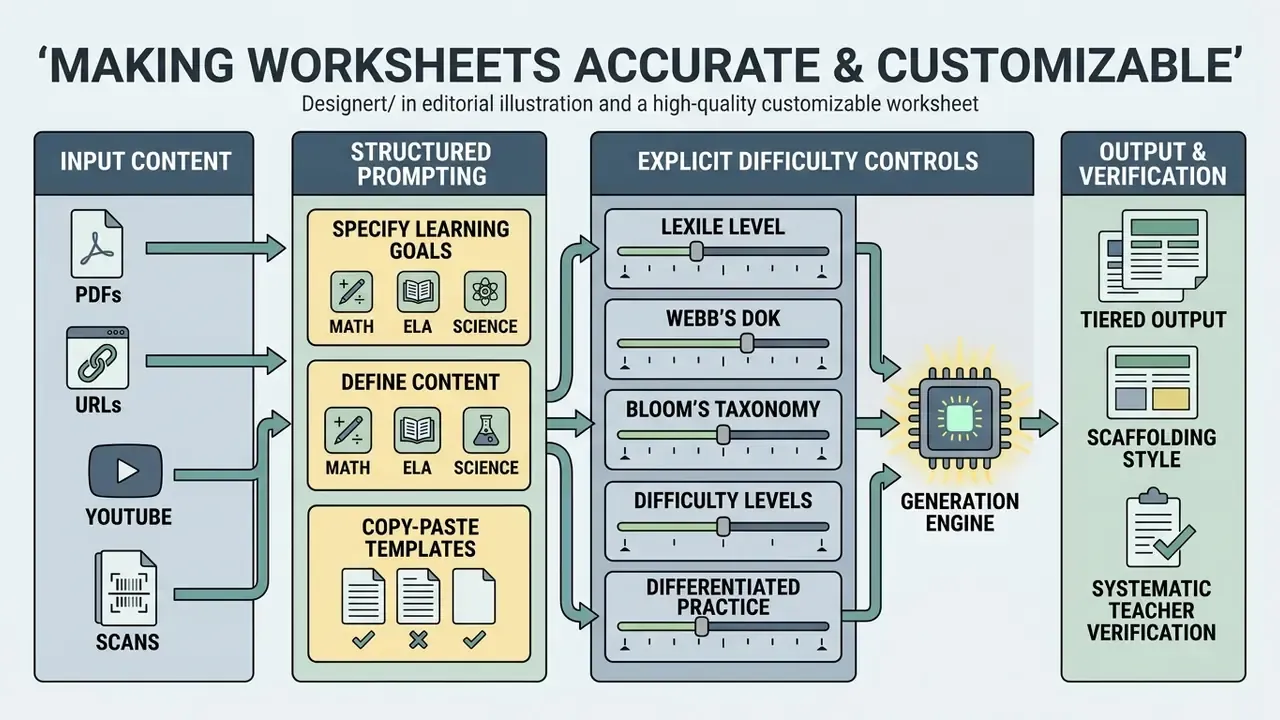
Making an ai worksheet generator customizable requires structured prompting, explicit difficulty controls, and systematic teacher verification. Instructors must actively guide the generative tool to produce tasks that align with specific learning objectives and group needs.
UNESCO's 2023 guidance on generative AI in education states that outputs should be transparent, human-supervised, and adapted to learners' age range, expected outcomes, and target knowledge type, and that prompts should carry context and examples to improve relevance. ACCME's 2026 guidance goes further for fixed instructional materials: named qualified reviewers must check AI-generated content for factual errors and bias, with version control maintained before anything reaches learners.
Prompts that specify learning goals and content
High-quality worksheet generation depends on structured prompts that establish clear operational boundaries. Prompt engineering frameworks, such as Penn State's PROMPT model (Persona, Requirements, Organization, Medium, Purpose, Tone) and the RACE pattern used in district training materials (Role, Action, Context, Execute, Expectation), provide a reliable structure for educational prompts. Harvard HUIT's prompting guidance converges on the same five fields: goals, examples, boundaries, relevant context, and an explicit output format.
When drafting prompts for an ai for education worksheet creator, teachers should define the target persona (for example, "7th-grade life science teacher"), state the precise learning objective, restrict the scope to specific vocabulary terms, and prescribe the exact document layout. Research on generative learning materials shows that constrained prompts significantly reduce hallucination rates and increase content relevance. In that work, the authors integrated the OpenAI API directly into a learning management system so that the model produced lesson titles, content, and expected learning outcomes from stated objectives; student grades improved in the cohort taught with the AI-assisted materials.
«An OpenAI API integrated into the LMS generated lesson titles, content and expected outcomes from stated objectives; grades improved». Binhammad et al., Creative Education (2024). https://doi.org/10.4236/ce.2024
Copy-paste prompt templates for math, ELA and science
MATH — computation + word problems, grade 5
You are a 5th-grade mathematics teacher. Create a printable worksheet on adding
and subtracting fractions with unlike denominators, aligned to CCSS 5.NF.A.1.
Structure: (1) 8 computation items ordered easy to hard; (2) 4 multi-step word
problems set in real-world contexts; (3) one "explain your reasoning" prompt.
Leave 3 blank lines under each word problem. Output the student sheet first,
then a separate answer key with step-by-step solutions. Format: plain text with
numbered items, US Letter, black-and-white friendly.
ELA — reading comprehension from a source text, grade 8
You are an 8th-grade ELA teacher. Using ONLY the passage I paste below, create a
worksheet with: 5 multiple-choice comprehension items (one correct answer only,
plausible parallel distractors), 3 short-answer inference questions requiring
textual evidence, and a 6-word vocabulary cloze section drawn from the passage.
Target Lexile band: 900L–1000L. Add a separate answer key with the paragraph
number that justifies each answer.
PASSAGE: [paste text here]
SCIENCE — lab worksheet from a video or chapter, grade 7
You are a 7th-grade science teacher. From the source I provide (PDF chapter or
YouTube transcript), build an experiment worksheet on [topic] with: a hypothesis
prompt, a materials list, a numbered procedure, a blank data table with correct
units and column headers, 3 observation questions, and 2 data-analysis questions
at DOK Level 3. Include one safety note. Provide a teacher key with expected
observations and acceptable answer ranges.
Difficulty levels and differentiated practice
https://doi.org/10.3389/feduc.2024
«Seventy boys aged 9–12 with mild intellectual disability; η² 0.685–0.921, with improvements sustained one month post-intervention». Research in Developmental Disabilities (2025). https://doi.org/10.1016/j.ridd.2025
Ready-to-use differentiation modifiers. Paste these directly after your base prompt:
Teachers who extend differentiated packets with multimedia can review our animation maker guide for building simple explainer visuals, and our canva ai video overview for short blended-learning clips that sit alongside the printed sheet.
Review questions, answers and curriculum alignment
Systematic review of generated questions and answer keys is mandatory before delivering materials to students. Educators must verify that questions contain no ambiguous options, that distractors are plausible, and that answer keys are mathematically and factually correct.
Psychometric evaluations of AI-generated assessment items in medical and dental education found that while AI items often match human-authored questions in difficulty and discrimination, a notable percentage contain subtle flaws requiring manual correction. In one such evaluation, ChatGPT-written items were administered to 502 medical students; discrimination indices ranged from 0.29 to 0.54 and difficulty indices from 0.41 to 0.89. Mostly within acceptable psychometric bands, yes, but with enough variance to make expert review non-optional.
«ChatGPT-generated items tested on 502 medical students: discrimination 0.29–0.54, difficulty 0.41–0.89, acceptable ranges, expert review still required». Kıyak et al., Clinical Anatomy (2025). https://doi.org/10.1002/ca.24
For standards alignment, the Kansas Department of Education's Standards Alignment Toolkit prescribes a repeatable method: unpack the standard, check vertical alignment across grade bands, check horizontal alignment within the grade, then compare each assessment item against the blueprint and log gaps, redundancies, and outdated resources. Porter's alignment method formalizes the item-level step by coding every question against a two-dimensional content-by-cognitive-demand matrix. Educators can cross-reference formatting and design workflows using our canva ai photo editor notes when preparing figures and cropped source images for the final sheet.
AI worksheet generator by subject and worksheet type
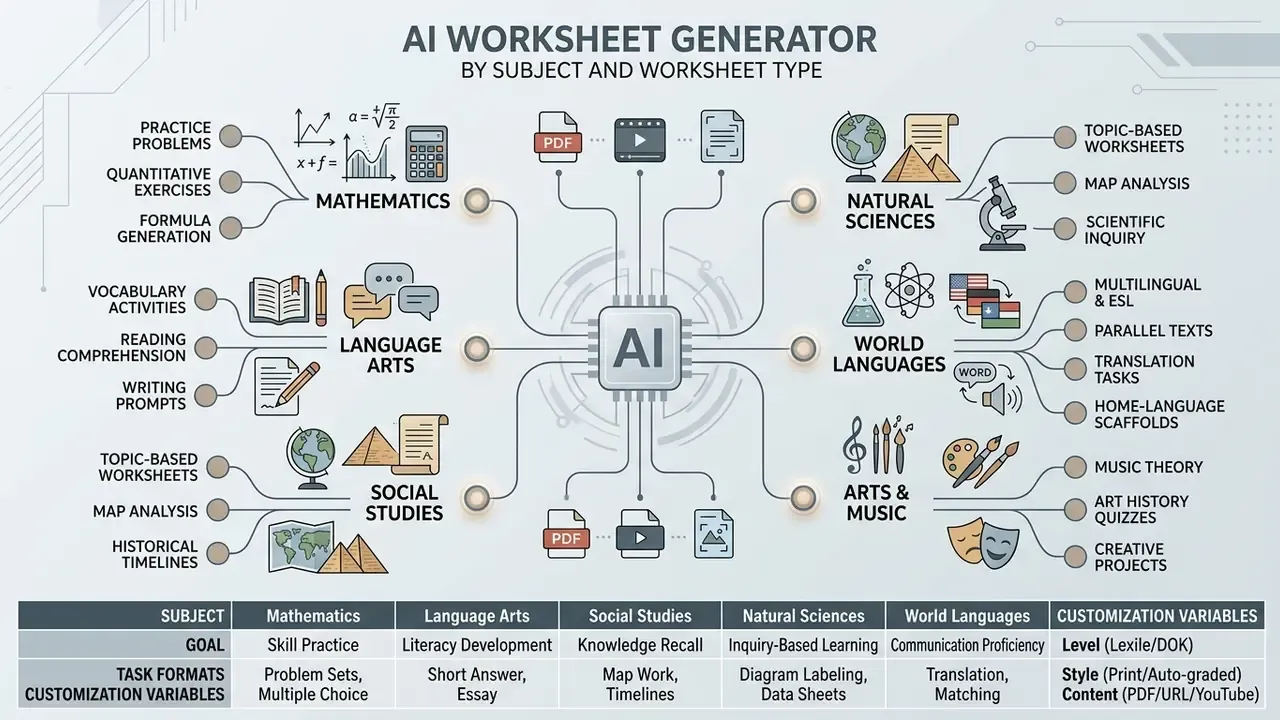
An ai worksheet generator can adapt to diverse academic disciplines, including quantitative mathematics, language arts, natural sciences, social studies, world languages, music theory, art history, physical education, and computer science. Each subject area requires specific question structures and customization parameters.
AI math worksheet generator for practice problems
An ai math worksheet generator creates numerical calculation drills, geometric proof prompts, and multi-step word problems with step-by-step solutions. Platforms like OpenEduCat, AskMath, and Taskade generate original problem sets alongside worked solution keys that illustrate individual operational steps. AskMath's documentation describes a PDF export with full step-by-step solutions for every problem, and Taskade covers arithmetic drills, algebra, geometry, and multi-step word problems in one pass.
Evaluations of math generation applications, such as ItemForge, indicate that LLMs can produce competence-oriented mathematics tasks that align with specific curriculum benchmarks. ItemForge is a Python application built on an LLM that iteratively generates tasks together with sample solutions, and those tasks are then scored for correctness, completeness, and competence fit.
«An LLM-based Python application iteratively generates mathematics tasks with sample solutions, evaluated for correctness, completeness and competence alignment». Meissner et al., Frontiers in Education (2024). https://doi.org/10.3389/feduc.2024
These tools allow teachers to generate multiple variants of a single problem set to prevent copying during in-class practice, and LaTeX-capable platforms render equations cleanly rather than as broken plain text. One caveat from classroom use: always re-check the arithmetic in generated fraction and percentage keys, because a plausible-looking final answer can still hide a wrong intermediate step.
Vocabulary, reading and language activities
An ai vocabulary worksheet generator creates cloze exercises, contextual fill-in-the-blank tasks, word matching games, and reading comprehension passages. Research on automated vocabulary quiz generation confirms that LLM-generated cloze items accurately measure word acquisition and technical terminology understanding. The VocQGen evaluation showed that LLM-produced multiple-choice cloze items reliably assess vocabulary acquisition and terminology comprehension in second-language learning without manual item writing.
«LLM-generated multiple-choice cloze items reliably assess vocabulary acquisition and technical terminology in second-language learning». VocQGen Study, ERIC (2025). https://eric.ed.gov
Related work on generative cloze construction describes the full pipeline: stem selection, answer-key extraction, and distractor generation from a source article. The Storyfier system (UIST 2023) combines three activities: reading an AI-generated story containing target words, completing cloze tests, and writing an original story using the same words. Tools like Storyfier generate custom narrative passages embedded with target vocabulary words, followed by text-dependent comprehension questions. Teachers building language activities often incorporate voice and audio elements using our ai voice generator guide and the canva ai voice generator overview, which cover pronunciation models, language coverage, and commercial licensing.
Multilingual and ESL worksheet generation
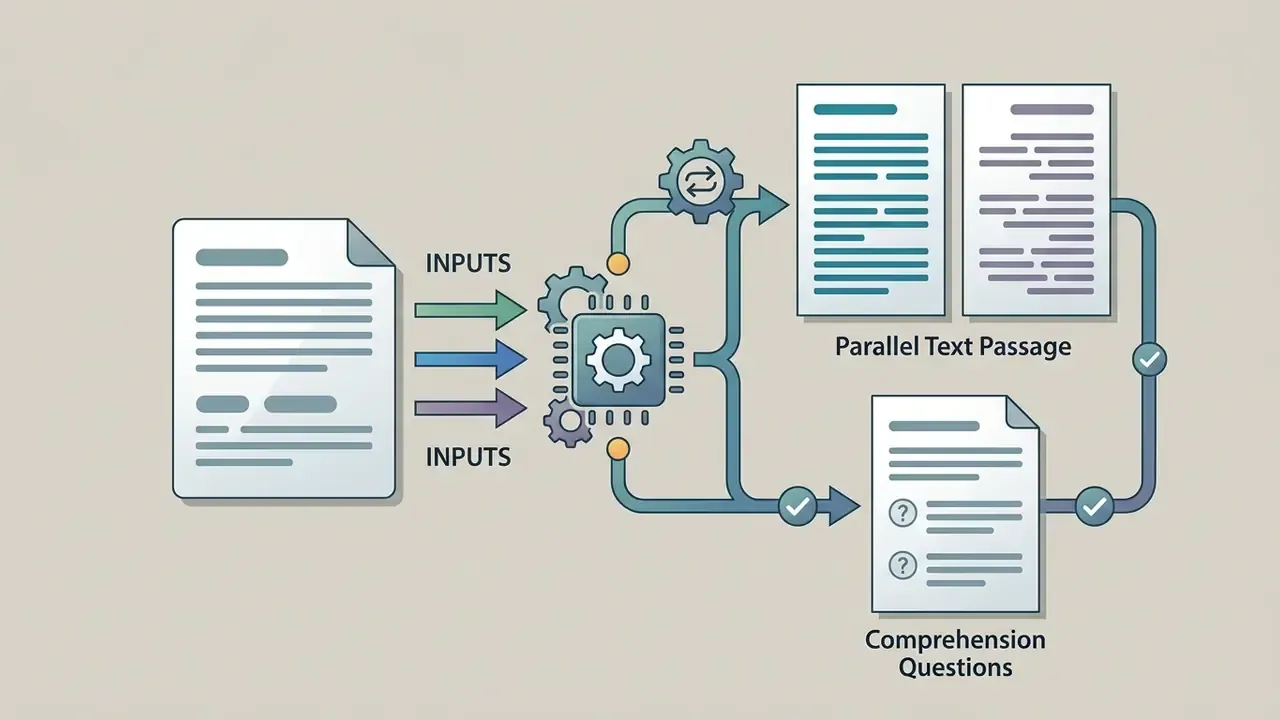
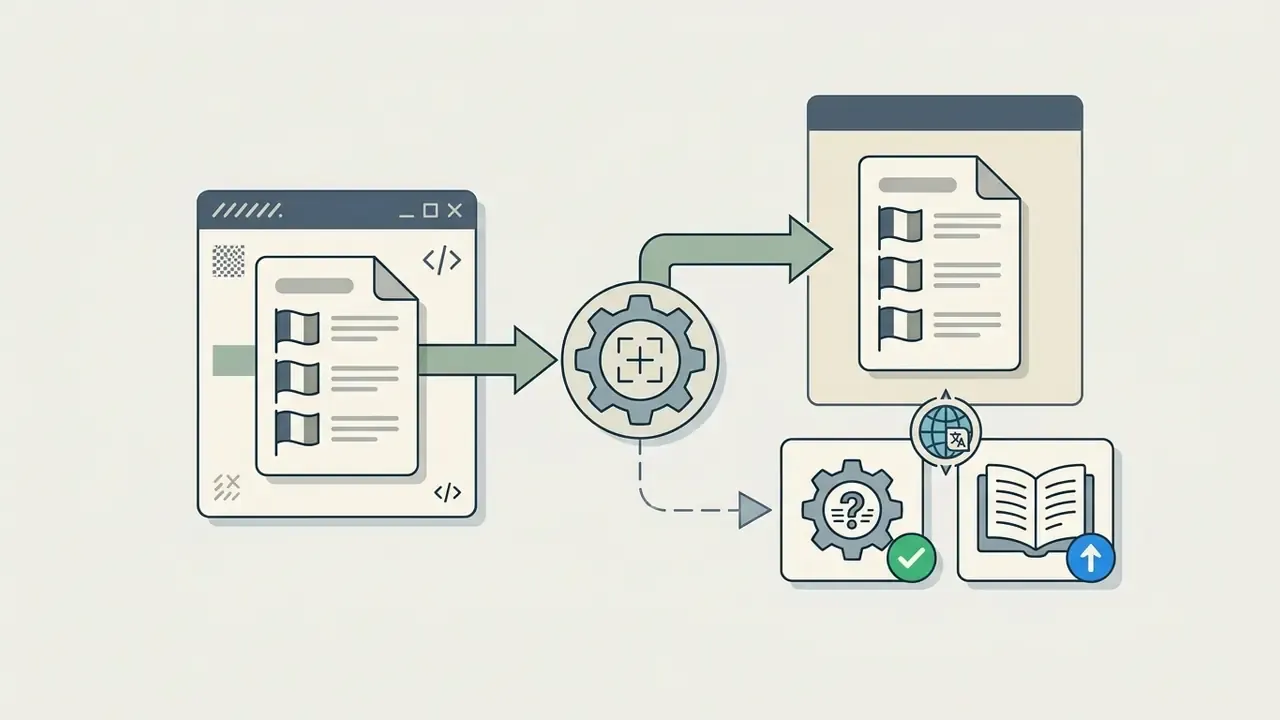
Modern AI generators support 40+ languages. One platform documents 41 languages with automatic detection, another advertises translation into 60+ languages in three clicks, which enables automated translation and dual-language worksheet creation. ESL and world-language educators can generate parallel-text reading passages (for example English and Spanish side by side) with auto-translated instructions to support multilingual learners, and can regenerate the same content at a lower reading level in the home language for newcomers.
Practical multilingual patterns:
California's public-school AI guidance asks explicitly whether tools are accessible for students with disabilities and English learners, and whether outputs can be audited or traced for accuracy and fairness. A useful pre-adoption question for any multilingual deployment.
Export, print and share AI-generated worksheets
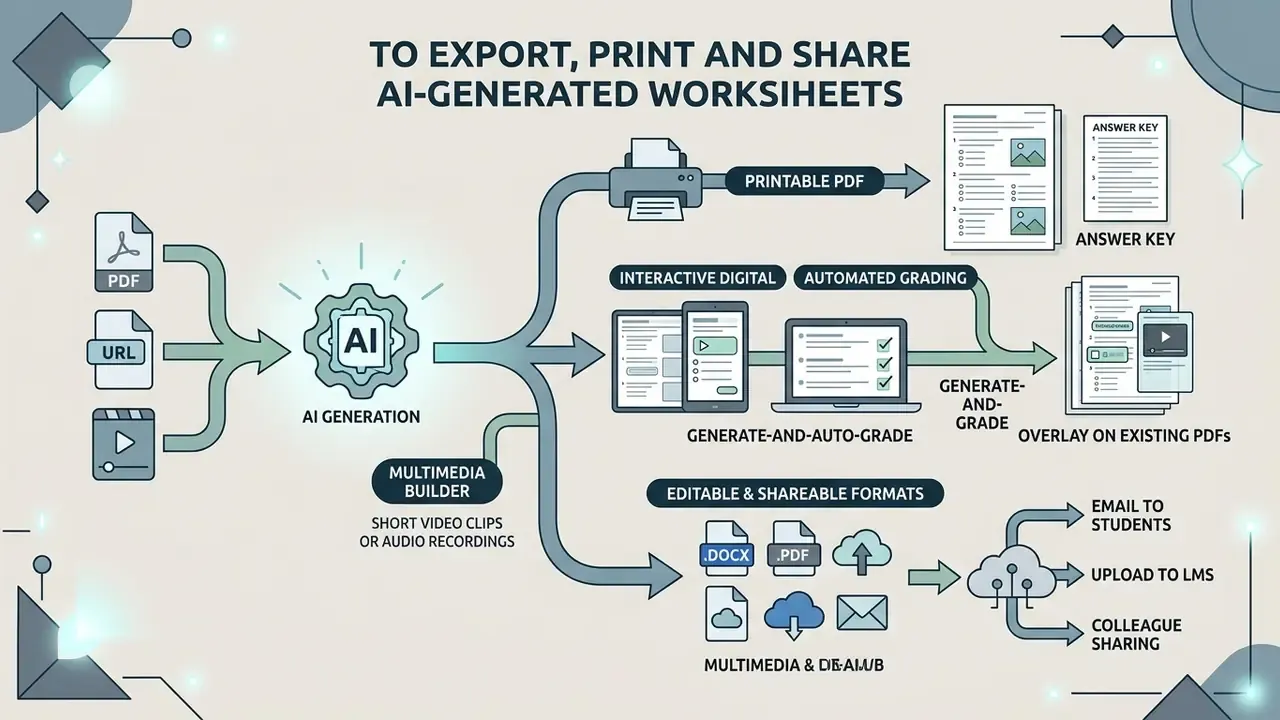
Preparing AI-generated worksheets for classroom distribution involves selecting appropriate file formats, ensuring clean print layouts, and using cloud sharing infrastructure. Modern platforms offer both print-ready and digital export pathways: PDF for printing, DOCX or Google Docs for editing, and shareable links or LMS/cloud export for distribution.
Printable PDF worksheets and answer keys
Exporting generated materials as printable PDF files remains the standard approach for physical classroom distribution. Print-ready PDF outputs are formatted to standard page sizes (US Letter or A4) with high-contrast black-and-white layouts for efficient photocopying.
Rather than citing an unnamed "industry standard", the accurate statement is that multiple worksheet platforms document this behaviour explicitly: one generator states that the teacher answer key is placed on its own page in US Letter black-and-white output, another produces two separate print-ready PDFs (student sheet and answer key), and a large printable-worksheet library ships every sheet with an answer key and multiple randomized versions. Separating the key is therefore a widely implemented product convention that simplifies grading and prevents accidental distribution of answers.
Accessibility should be handled at export time, not afterwards. Public-sector digital publishing guidance requires tagged PDFs with correct reading order, structural tags, and text alternatives for images so that assistive technology can navigate the document; applying the same practice to worksheets means a screen-reader user can move through a numbered question list in sequence. This is grounded in general document-accessibility conformance requirements rather than a worksheet-specific study, and teachers supporting visually impaired students should validate the exported file with their district's accessibility checker.
Interactive digital worksheets and automated grading
While printable PDFs suit physical classrooms, digital-first generators create interactive assignments that students complete on tablets, phones, or laptops. These platforms provide real-time auto-grading, offer instant AI-generated step-by-step feedback for incorrect answers, and export scores directly to LMS gradebooks such as Canvas and Google Classroom.
Three distinct digital patterns exist in 2026:
Trade-offs are real: digital-first tools rarely offer a printable layout designer, drag-and-drop item types are still uneven across platforms, and some auto-grading engines handle open response only partially. A practical hybrid is to generate content in an AI tool, then deliver it digitally for formative checks and in print for assessments that must be proctored on paper.
Top AI worksheet generators compared (2026)
Choosing a platform depends on four questions: do you need the AI to write the content, do you need print or digital output, what input do you have on hand, and does the tool have to talk to your LMS? The comparison below summarizes the current landscape.
| Tool | AI content generation | Input sources | Primary output | Auto-grading | Differentiation controls | Free tier (typical) |
|---|---|---|---|---|---|---|
| MagicSchool AI | Yes (60+ teacher tools) | Topic, text | Text / document | No | Standards + Bloom's, reading level | Limited (about 3 outputs/day) |
| Diffit | Yes | Topic, text, URL | Digital + printable reading sets | No | Strong: multi-level reading passages, vocabulary | Free for teachers, generous limits |
| Monsha | Yes | Files, images, Google Drive, YouTube videos, website URLs, multiple combined sources | Print + Google/Microsoft export | No | DOK, Lexile, grade level, Bloom's, 60+ languages | Free tier available |
| StudyGlen | Yes | PDF, text, image with OCR | Digital-first interactive quiz | Yes, with AI explanations per answer | Limited (question mix, 41 languages, auto-detect) | 1 worksheet/day, no account needed |
| TeacherMade | No (you supply content) | Existing PDF/image overlay | Digital worksheet from your paper original | Yes (MCQ, short answer) | None built in | Limited active assignments |
| Eduaide.AI | Yes (100+ resource types) | Topic, text | Text / document | No | Scaffolded difficulty, standards alignment | Limited (about 5–15 generations) |
| Canva for Education | No (design tool) | Your own content | Print-ready visual handouts | No | Manual | Free for verified K-12 educators |
| Wizer.me | No (manual authoring) | Your own content + media | Multimedia digital worksheet | Partial (objective items) | Manual | Limited (about 5 worksheets) |
How to choose, in six checks:
- Digital or printable?Auto-graded online work points to StudyGlen, TeacherMade, or Wizer. Beautiful printed handouts point to Canva.
- Do you need the AI to write the questions?StudyGlen, MagicSchool, Diffit, Monsha, and Eduaide generate items; TeacherMade, Canva, and Wizer expect you to supply them.
- What input do you have?PDFs and textbook photos favour OCR-capable tools (StudyGlen) or PDF-overlay tools (TeacherMade); YouTube and URLs favour Monsha and Diffit.
- How mixed is your class?Diffit excels at the same content at several reading levels; Monsha exposes DOK and Lexile switches directly; MagicSchool and Eduaide offer standards-aligned tiering.
- Which LMS?Prioritize direct integration if you live in Google Classroom or Canvas; several AI-first tools still export by file or link rather than pushing grades.
- Read the free tier honestly.Canva for Education and Diffit are genuinely free for teachers; most AI-first tools cap you at 1–15 outputs per day or month.
Disclosure: this comparison is compiled from publicly available vendor documentation and pricing pages as of 2026. Feature sets and limits change frequently, so verify current terms on each provider's own site before purchasing. Side-by-side feature grids are maintained in our AI Media Comparison Matrices.
Free AI worksheet generators, pricing and commercial-use checks
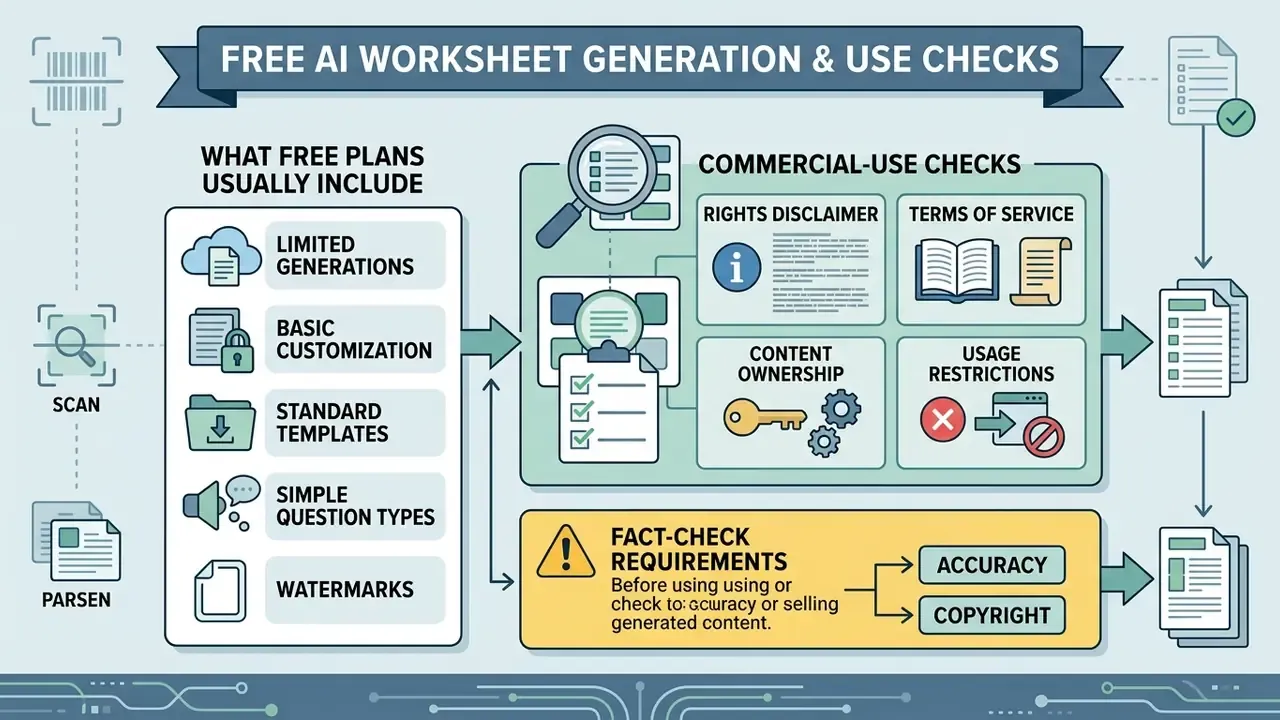
Navigating the landscape of free and paid worksheet tools requires understanding freemium feature caps, commercial licensing rules, and copyright constraints.
What a free AI worksheet generator usually includes
A free ai worksheet tool or ai teacher worksheet generator free plan typically provides basic generation capabilities with daily or monthly usage quotas. Documented free tiers in 2026 range widely: one browser-based tool works with no signup at all, one platform advertises unlimited worksheet creation and preview on its free plan, another allows 1 worksheet per day for guests with no account, another gives 45 credits valid for 30 days, another 3 worksheets over 7 days, and suite products commonly cap free use at 3–15 generations per month.
Free plans generally include standard question types (multiple choice, fill-in-the-blank) and basic PDF downloads, sometimes watermarked or with fixed layouts. Paid subscription plans remove generation caps, unlock editable exports (DOCX, Google Docs), enable image generation, add school-level administration and compliance features, and provide advanced LMS integrations; entry paid tiers in this category commonly sit between roughly $5 and $10 per month. Teachers comparing commercial platform tiers can consult our pricing section, and departments modelling per-seat spend against expected output volume can run the numbers in our AI Media Calculators.
What to check before selling or sharing worksheets
Educators who plan to sell AI-generated worksheets on educational marketplaces, such as Teachers Pay Teachers (TPT), must carefully audit platform terms of service and copyright laws. Our hub on commercial use of AI generators walks through how output licences are typically worded and where the common traps sit. Under US Copyright Office guidance, works generated entirely by artificial intelligence without human creative authorship are not eligible for copyright protection.
«Works generated entirely by artificial intelligence without human creative authorship are not eligible for copyright protection». US Copyright Office Guidance (2026). https://copyright.gov
The Office's guidance also requires applicants to identify and disclaim AI-generated portions when they exceed a de minimis contribution, describing what the human actually authored. Marketplace policies add a second layer: sellers must hold explicit commercial rights for every element included in a resource. TPT's intellectual-property policy states that an original resource must contain content you created or content you have the right to use commercially, by licence, explicit permission, public domain, or fair use, and its terms of service prohibit reproducing or distributing site assets for commercial purposes without permission.
Platform-level licences differ sharply. Some AI services grant full commercial ownership of generated text outputs and allow resale under a commercial licence; others restrict free-tier outputs to non-commercial educational use and forbid redistribution outright. Vendor generative-AI terms may additionally prohibit prompts designed to produce output substantially similar to a third party's copyrighted work, and in some cases grant the vendor a broad licence over submitted inputs and outputs. Jurisdiction matters too: a 2026 UK government report states that reproducing a copyright work to develop an AI model generally requires a licence unless a specific exception applies. Educators should review our AI Media Commercial-Use Hub and the AI Litigation and copyright dispute tracker before commercial distribution.
| Service tier | Typical generation quota | Export formats offered | Commercial usage rights |
|---|---|---|---|
| No-signup / guest | 1 worksheet/day, browser only | Standard PDF | Personal or classroom use only |
| Free tier | 1–15 worksheets / month (some unlimited) | Standard PDF (watermarked or fixed) | Generally restricted to personal classroom use |
| Trial tier | Limited-time full access (7–30 days) | PDF, basic DOCX | Non-commercial evaluation only |
| Paid pro tier | Unlimited or high credit limit | PDF, DOCX, Google Docs, PPTX, QTI, LMS push | Commercial resale often permitted (check TOS) |
| School / district tier | Unlimited, seat-based | Full export matrix + admin controls | Institutional licence; review data-processing addendum |
Student data privacy, security and institutional controls
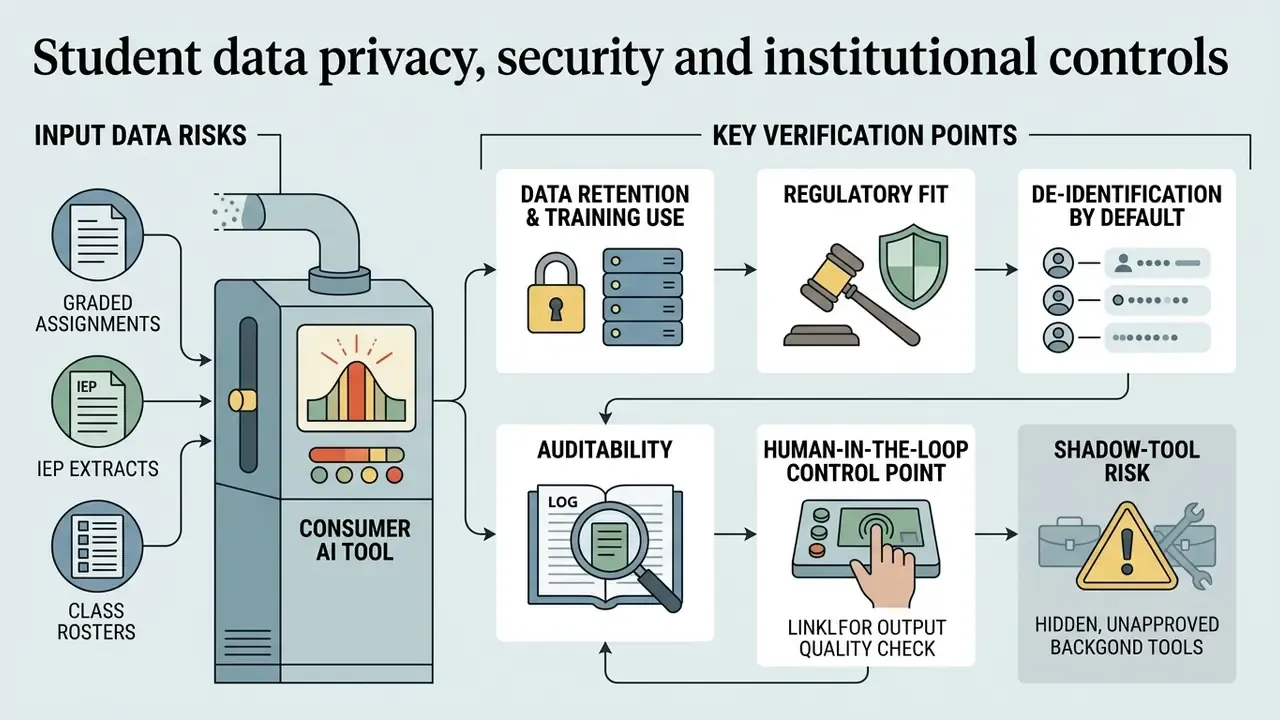
Worksheet generation looks harmless, but the input side is where risk concentrates: uploading a graded assignment, an IEP extract, or a class roster into a consumer AI tool can move student personal data outside the institution's control.
What to verify before adopting a tool at school or district level:
- Data retention and training use. Does the provider retain prompts and uploads? Is there a zero-retention or no-training-on-your-data option on the education or enterprise plan? Get this in writing in the data-processing addendum.
- Regulatory fit. For US K-12, confirm handling of FERPA-protected education records and COPPA obligations for under-13 users; for EU and UK deployments, confirm GDPR lawful basis, sub-processor lists, and transfer mechanisms. Security attestations such as SOC 2 or ISO 27001 indicate process maturity but do not by themselves establish educational compliance.
- De-identification by default. Strip names, IDs, and free-text comments before uploading student work. Generate from the content (the passage, the error type), not from the record.
- Auditability. California's public-school AI guidance asks whether mechanisms exist to audit, review, or trace outputs for accuracy and fairness. Practically: keep the prompt, the source file reference, the model or tool version, the reviewer name, and the release date for every published sheet.
- Human-in-the-loop control point. ACCME's 2026 guidance for fixed instructional materials requires named qualified reviewers and version control before learner distribution, a model that transfers cleanly to school worksheet workflows and to corporate compliance training.
- Shadow-tool risk. Publish an approved-tools list. Uncontrolled use of consumer accounts is the most common route by which confidential material leaves an organization.
For corporate and regulated-industry trainers, the same generators are used to build knowledge checks, control-evidence sheets, and procedure quizzes. The governance requirements are stricter, not looser: log the prompt and output pair, record the reviewer who approved each item, note the source policy document and its version, and escalate any item where the model asserts a rule that cannot be traced to an internal source. Treat AI-drafted compliance questions the way you would treat an external contractor's draft: useful, unverified, and subject to sign-off.
One limitation deserves naming. None of the frameworks cited here specify how often a published worksheet should be re-reviewed after the underlying standard, policy, or procedure changes. Until that guidance exists, a fixed re-validation interval (for example, once per academic term, or immediately on policy revision) is a defensible local rule rather than an established requirement.
Related AI tools for teachers and worksheet creation
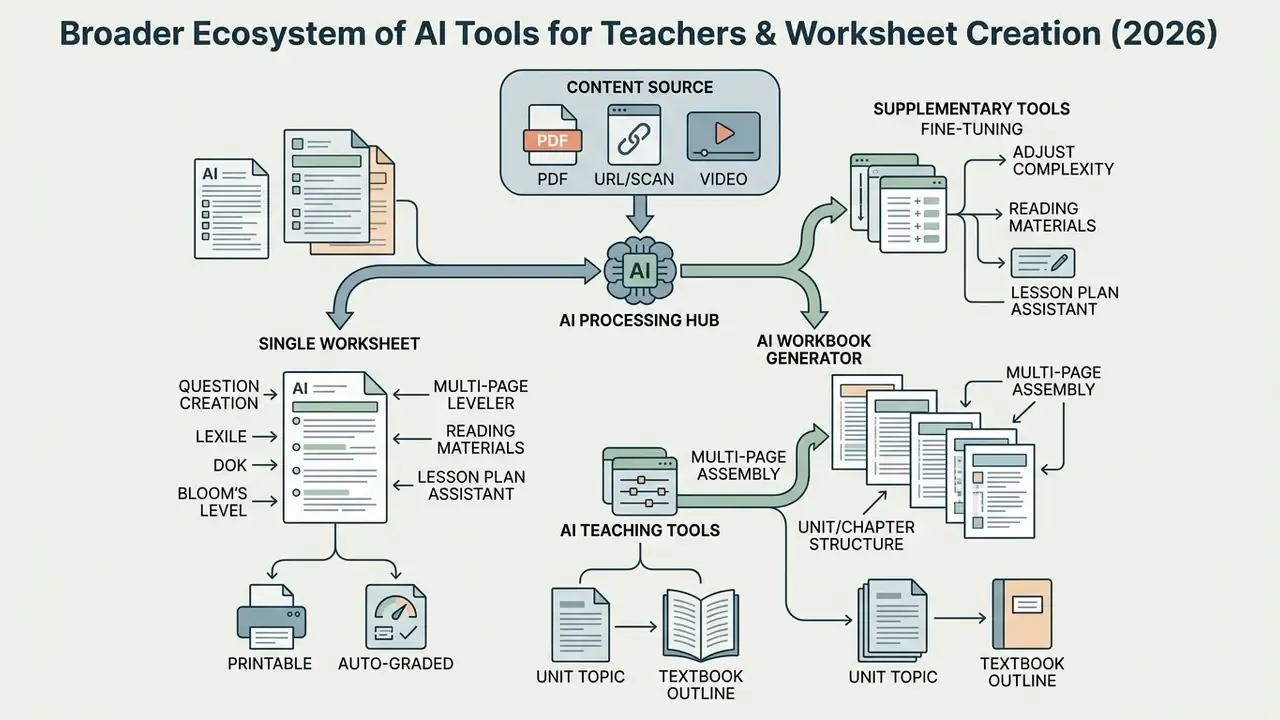
Worksheet generation is part of a broader ecosystem of artificial intelligence tools designed to streamline lesson planning, content adaptation, and instructional design. Our comparison of the best AI art generators covers the visual layer of that ecosystem, and the glossary indexes the underlying terminology.
From a single worksheet to an AI workbook
An ai workbook creator or ai workbook generator extends single-sheet creation by assembling multi-page practice workbooks, unit review packets, or semester study guides. These platforms combine diverse activity types, including reading passages, vocabulary drills, diagram labeling, and chapter reviews, into a unified, paginated document. Teams that pair workbooks with recorded walkthroughs can review our YouTube video editor workflow guide for publishing companion media.
Tools like Automateed and MakePDF take a broad unit topic or textbook outline and generate structured 10-to-20-page workbooks complete with table of contents, page numbers, and teacher answer keys; Automateed's documented flow accepts subject, age group, difficulty, style, and page count, then mixes roughly a dozen page types into a print-ready 7×10 PDF. Other platforms invert the input: you upload existing slides, worksheets, and session notes, and the system builds exercises around them before exporting a print-ready PDF or a shareable link. Interactive-worksheet platforms similarly allow several separate sheets to be bound into one digital workbook that students complete online. This multi-page workflow allows educators to build comprehensive curriculum supplements for long-term independent study.
Tools for questions, text levels and lesson materials
Supplementary AI teaching tools assist educators in fine-tuning question complexity, adjusting reading difficulty, and mapping overall unit plans. Depth of Knowledge (DOK) question generators help teachers draft high-level evaluation items across Webb's four cognitive levels; one platform generates questions at all four DOK levels from a standard or a pasted passage and exports them straight into an assessment builder.
AI text levelers allow instructors to paste complex news articles or primary source documents and automatically adjust the reading level to match specific grade bands. Vendor tools document "text scaffolder" functions that adapt any text or online resource to any reading level. Integrated lesson planning platforms combine text leveling, worksheet drafting, DOK question generation, and slide presentation design into a unified workflow, and curriculum-planning suites extend that to scope and sequence, unit breakdowns, and daily plans, so every worksheet inherits the context of its lesson. Educators seeking additional design and branding capabilities can explore our animation maker guide for classroom visuals and consult AI Media Support and Troubleshooting for platform-specific issues.
FAQ: AI worksheet generators, accuracy, privacy and rights
What is an AI worksheet generator?
A tool that uses artificial intelligence to create educational worksheets, quizzes, and practice activities from your content. Instead of writing questions manually, you upload a PDF, paste text, add a URL or YouTube link, or enter a topic, and the AI returns a formatted worksheet with an answer key in seconds.
Can I create worksheets from my existing PDFs, scans, or YouTube videos?
Yes, but support varies. OCR-capable generators read scanned pages and photos; PDF-overlay tools let you place interactive answer fields on top of an existing paper worksheet; and source-flexible platforms extract YouTube transcripts and fetch web article URLs. Many simpler tools still require pasted text or a topic.
Do AI worksheet generators include answer keys?
Almost all do, and several produce the key as a separate print-ready page or file. For mathematics, look for step-by-step worked solutions rather than final answers only.
Are AI-generated worksheets aligned to standards?
Some tools generate content aligned to state standards and Bloom's taxonomy, and reading-focused tools auto-align passages to grade-level bands. Alignment still needs verification: unpack the standard, map each item to content and cognitive demand, and check the set against your assessment blueprint.
How accurate are AI-generated questions?
Good enough to be a strong starting point, not good enough to publish unread. Psychometric evaluation of AI-written items found difficulty and discrimination indices mostly in acceptable ranges across 502 test-takers, with a share of items containing subtle flaws requiring correction. Always review the key, the distractors, and any factual claim.
Can I control the reading level?
Yes. Specify a Lexile band, a grade band, or both in the prompt, and ask for the same content at two or three levels. Tools with built-in text levelers do this in one click.
How do I set cognitive difficulty rather than just reading difficulty?
Use Webb's DOK levels or Bloom's tiers explicitly in the prompt, and ask the tool to label each item's level in the teacher key only, so students see an unlabelled sheet.
Can worksheets be generated in other languages?
Yes. Documented support ranges from 41 languages with auto-detection up to 60+ translation targets, including dual-language and parallel-text formats for ESL and world-language classes.
Is student data safe when I upload work to these tools?
Only if you check first. De-identify uploads, confirm the provider's retention and training-use terms, verify FERPA and COPPA (or GDPR) handling on the education plan, and keep an approved-tools list so staff do not default to consumer accounts.
Can I sell AI-generated worksheets on Teachers Pay Teachers?
Only if the platform's terms grant commercial rights, you hold rights to every included element, and you have contributed substantial human authorship. Material produced entirely by AI without human creative authorship is not protected by US copyright, and marketplace rules require documented rights for all content you list. This is general information, not legal advice.