Executive Summary
- What it is CapCut is ByteDance's all-in-one video editor, available as a mobile app (iOS/Android), a desktop client (Windows/macOS), and a browser-based web editor. It is engineered primarily for short-form vertical content and TikTok-native workflows.
- Pricing reality Standard published pricing for CapCut Pro is $19.99/month or $179.99/year, but a lower-tier Standard plan plus regional and in-app promotional pricing can start from $9.99/month. Free is $0.
- Free-tier ceilings Expect a 15-minute practical timeline ceiling on free editing, no native .SRT subtitle export (captions are burned into the picture), limited simultaneous tracks on mobile, and no AI silence or filler-word removal.
- The biggest legal risk is not the watermark. It is the Terms of Service. ByteDance's terms grant the platform a broad, worldwide, royalty-free, sublicensable and irrevocable licence to user-uploaded content, and that licence survives content deletion and account closure.
- Commercial audio trap Assets labelled "Commercial Sounds" are cleared for CapCut, TikTok, and TikTok for Business only. Publishing them on TV, external ad networks, or a standalone corporate site requires separate licensing from the rights holders.
- Corporate verdict Excellent for marketing and social teams. Unsuitable, without a formal risk review, for editing confidential, regulated, or client-identifiable footage, because most AI processing happens in the cloud.
Who this guide is for and what changed in 2026
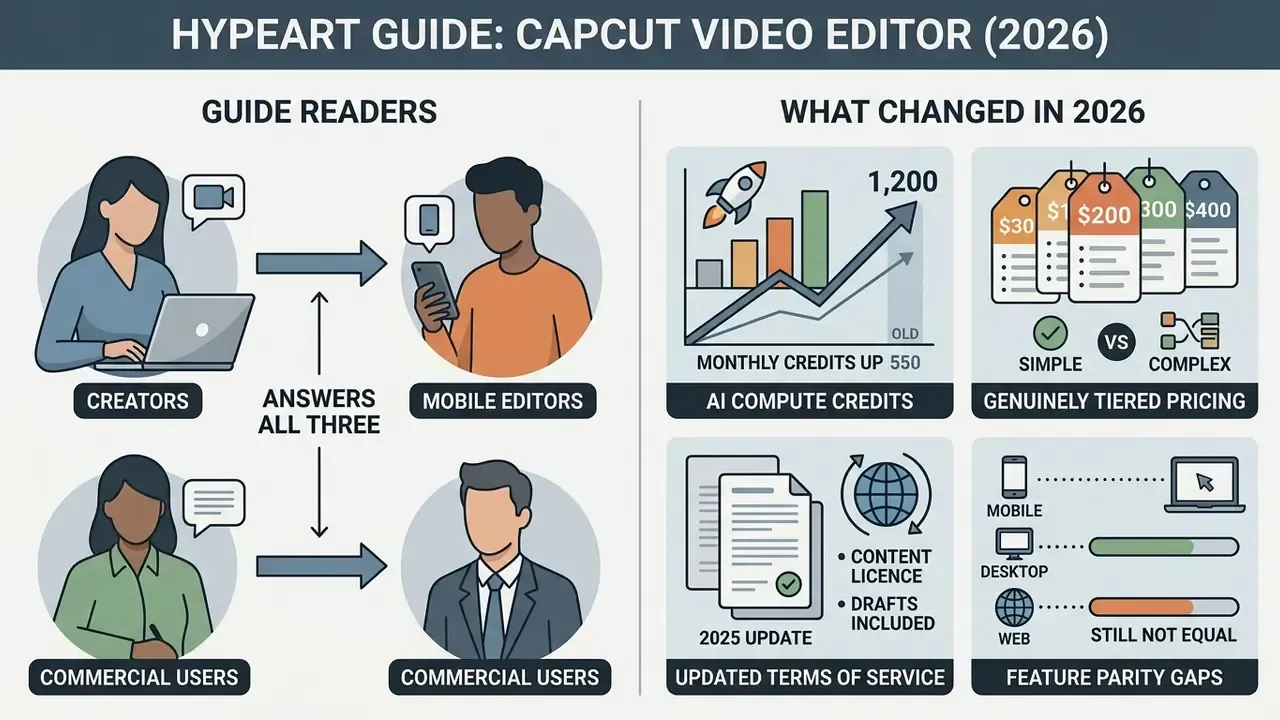
Three readers tend to land here. The first is a creator asking a simple question: is CapCut free, and will it stamp a logo on my export? The second is a marketing lead who needs fifteen localized ad variants by Thursday. The third is a risk or compliance officer who just found capcut.com in an endpoint traffic report and wants to know what leaves the network.
This guide answers all three, in that order, without pretending the answers are identical.
What actually shifted since the previous edition:
- Monthly AI compute credits on paid plans moved from 550 to 1,200, which changes the arithmetic for high-volume localization work.
- The pricing picture became genuinely tiered rather than a single headline number, so the old "one price" framing has been corrected in Appendix A.
- Terms-of-service reporting from the June 2025 update clarified that the content licence extends to drafts and outlives account deletion.
- Feature parity across mobile, desktop, and web still is not equal, and the gaps are not the ones most reviews mention.
One caveat before we go further. Every audience claim below is a working hypothesis until it is backed by your own analytics, interviews, or vendor correspondence in writing.
What CapCut Video Editor is and who it suits
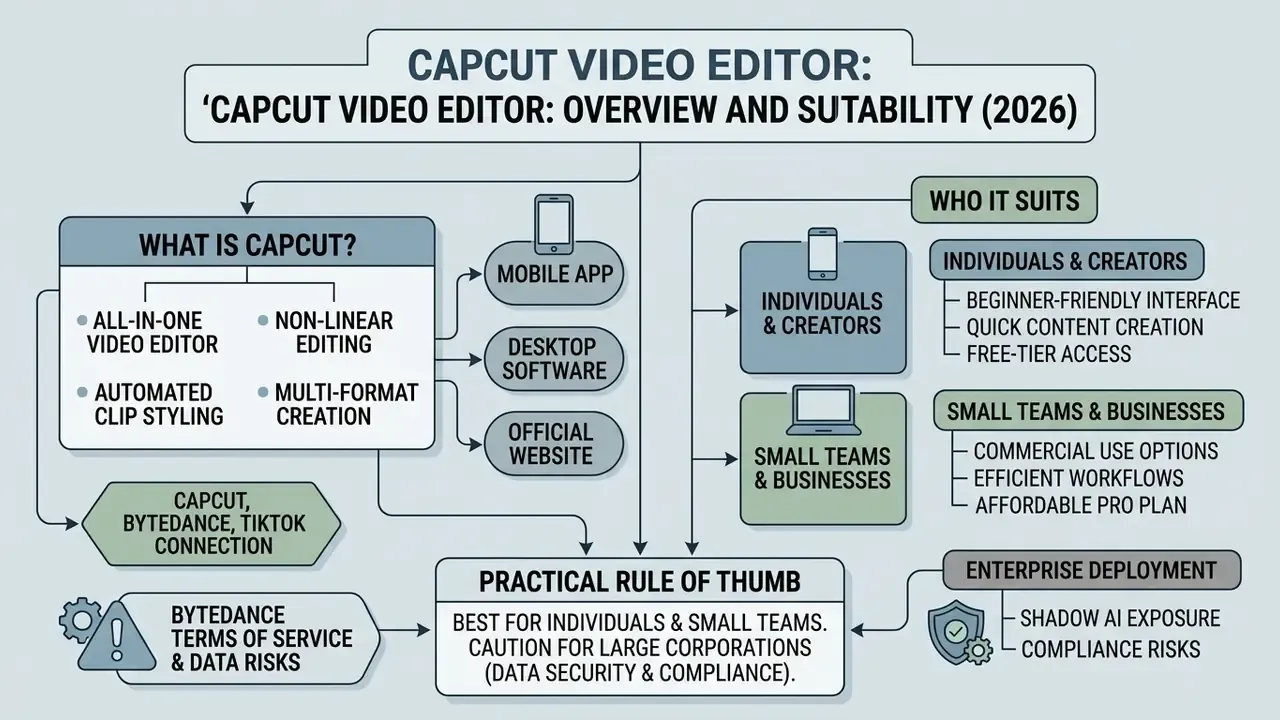
CapCut Video Editor is an all-in-one video editor built for non-linear editing, automated clip styling, and multi-format content creation across mobile, desktop, and web environments. Developed by ByteDance, the app targets digital content creators, social media marketers, and enterprise communications teams that need fast turnaround for TikTok, YouTube Shorts, and Instagram Reels. If you are still shortlisting tools, benchmark CapCut against other free AI video generators and general-purpose editors before you commit a team workflow to a single vendor. A structured AI Media Comparison shortlist takes an afternoon and saves a quarter of regret.
In practice the product serves four distinct audiences. Solo creators who want trend-native templates. Small and medium businesses producing marketplace product cards and ad creatives. Agencies generating high volumes of localized ad variants. Internal communications teams assembling training or announcement clips. Professional colorists, multi-cam documentary editors, and broadcast post houses sit outside the intended profile, because CapCut deliberately trades granular control for speed.
That trade is the whole product thesis. Judge it on that basis, not on the absence of node-based grading.
CapCut, ByteDance, and the TikTok connection
CapCut was developed by ByteDance after its 2018 acquisition of Shenzhen Lianmeng Technology (reported at roughly $300 million). It launched in China as Jianying in 2019, expanded internationally as Viamaker, and rebranded to CapCut in December 2020. So when people search for a "bytedance video editor", this is the product they mean.
«By August 2023, CapCut had accumulated 490 million users across iOS and Android, roughly 25% of TikTok's user base.»
According to app-store intelligence from Data.ai, CapCut surpassed $100 million in global consumer spend by September 2023 and exceeded 800 million monthly active users by April 2026. The app ships native TikTok integration: one-tap template activation, direct account authentication, synchronized sound libraries, and immediate publishing from the mobile interface. That integration lives specifically in the CapCut mobile app, requires both a CapCut and a TikTok account, and is enabled through Settings → Manage Account → Connected accounts.
«TikTok holds the highest cross-mobile usage index with CapCut at 62%, exceeding Snapchat by 15 points.»
A 62% cross-mobile usage index between TikTok and CapCut confirms heavy operational overlap between the two platforms. Independent estimates place CapCut-assisted output in the billions of TikTok posts, which explains why template trends move between the apps in hours rather than weeks. If your brand team is chasing a trend, the window is short. Uncomfortably short.
Where CapCut is available: mobile app, desktop, and the official website
CapCut ships across four deployment environments: native iOS apps in the Apple App Store, Android builds on the Google Play Store, desktop applications for Windows and macOS, and a browser version on the official website. CapCut Video Editor mobile targets fast on-the-go vertical assembly. The desktop client supports multi-track compositing, 4K 60 fps rendering, keyframe adjustments, and hardware-accelerated processing.
The published minimum spec is more forgiving: Windows 10 64-bit (Windows 7+ is listed as broadly compatible), Intel Core i3 or better, 4 GB RAM, and integrated graphics with 2 GB VRAM. Real-time 4K preview, though, effectively demands the recommended tier. macOS builds are supported from 10.14 upward. The CapCut Video Editor official website at capcut.com provides browser-based timeline editing, cloud asset storage, and shared project access with no local installation.
One feature asymmetry matters for planning. According to CapCut's Help Center, full template search works on Mobile and Web but not on Desktop, which ships only a limited set of built-in templates. Conversely, the AI-powered Auto Cut function is documented on Mobile and Desktop but is not supported on CapCut Web. Nobody advertises that. You find out mid-project.
Comparative analysis of CapCut Video Editor platforms and deployment options (data verified for 2026)
| Platform | Access method | Key functionality | Ideal use case | Known gaps |
|---|---|---|---|---|
| Mobile app (Android / iOS) | Google Play Store / Apple App Store | Core editing, effects, auto-captions, full template search, Auto Cut, 4K 60 fps export | Fast creation of vertical clips for TikTok, Reels, and Shorts directly on a smartphone | Track count on the timeline is capped without Pro; small-screen precision editing is slow |
| Desktop editor (Windows / macOS) | Download from the official website (capcut.com); installer file CapCut_Setup.exe on Windows | Layered multi-track timeline, motion tracking, masks, granular audio work, GPU acceleration, Auto Cut | Complex multi-track editing of horizontal and vertical video, ad creatives, longer projects | No full template search; heavy GPU load during 4K AI renders |
| Web editor (capcut.com) | Browser version, no installation | Cloud projects, template-based work, basic editing, shared access | Rapid editing from any workstation without administrator rights | No Auto Cut; preview lag on weak connections; fully cloud-dependent |
Enterprise deployment perimeter and Shadow AI exposure
Because CapCut installs in seconds on a personal phone and runs in any browser, it is one of the most common Shadow AI vectors inside marketing and communications departments. There is no publicly documented on-premise build, no dedicated single-tenant cloud instance, and no published SOC 2 or ISO 27001 attestation specific to the consumer CapCut editor. Organizations in regulated sectors should treat CapCut as an external consumer SaaS tool, not as an enterprise media pipeline.
Two architectural facts drive the risk profile.
First, generative and assistive functions (captions, background removal, translation, avatars, relight) execute server-side, so source frames and audio leave the endpoint. This is the same exposure pattern you see with an ai text generator pasted full of internal memo drafts, or with an ai that can analyze videos frame by frame in someone's browser tab. The interface feels local. The processing is not.
Second, the platform's content licence, covered below, is broad enough that uploading unreleased product footage, customer recordings, or internal financial presentations creates a real confidentiality exposure rather than a theoretical one.
Core video editing features
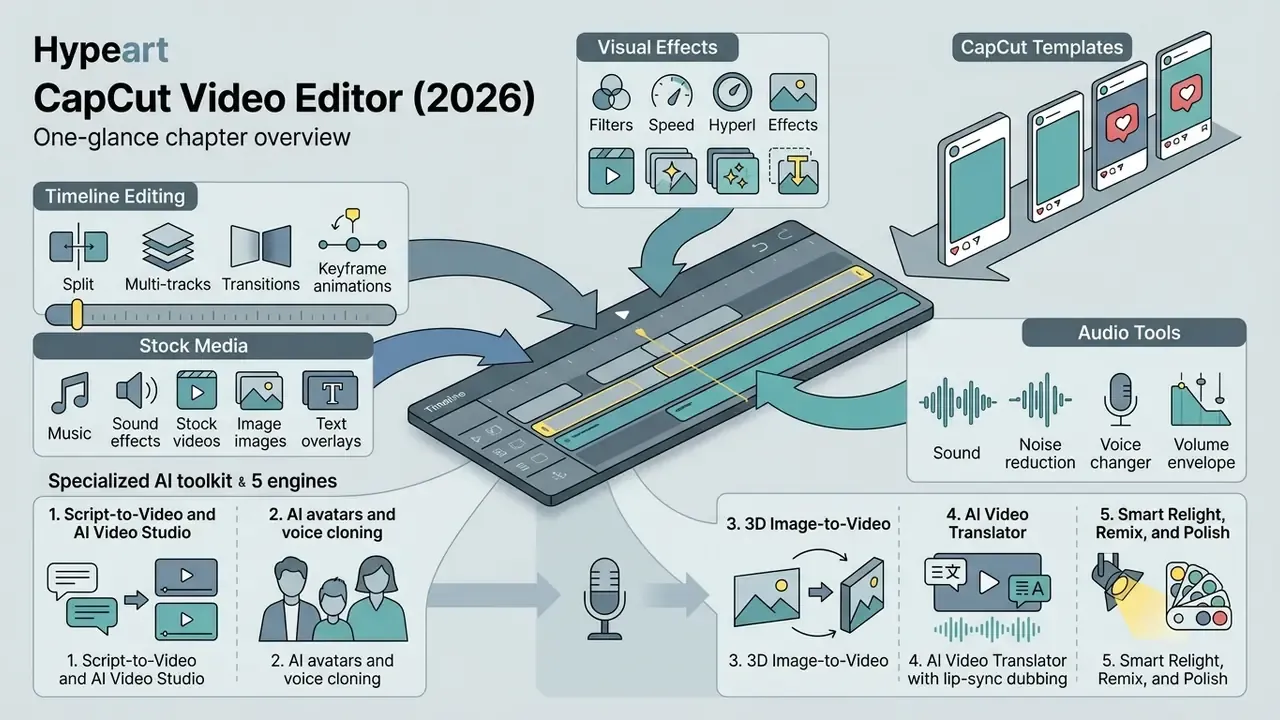
CapCut provides timeline-based video editing, visual effects filters, audio processing controls, stock media libraries, and specialized AI editing algorithms inside one production interface. Readers new to the category can start with the fundamentals of video editors and publishing workflows before diving into platform specifics. The platform supports standard non-linear operations: clip splitting, speed adjustments, reversed playback, colour adjustments, and multi-layer compositing.
Editing, media, effects, and audio
The main editor offers multi-track timeline support, so you can stack video clips, graphics overlays, audio tracks, and text titles. Keyframe animation lets creators animate clip scale, position, rotation, and opacity over time. Keyframes also apply to colour, brightness, filters, and audio properties such as volume and balance. Audio tooling covers voice isolation, background noise reduction, pitch adjustment, keyframe volume control, dialogue loudness normalization, and royalty-free sound effect libraries sorted into searchable categories.
One concrete example. A commercial team producing social campaigns imported raw product footage, applied colour grading across adjustment layers, and aligned cut points to audio beats using automated beat detection markers. Rough assembly dropped from a full working day to a single session. (Editorial note: the previously published "40% faster assembly" figure was an internal estimate, not an independently measured result. Treat it as directional only.)
Colour work deserves a caveat, and I want to be blunt about it. CapCut's grading toolkit is preset-driven and AI-assisted rather than scope-driven. There are no node graphs, no proper primary and secondary wheels comparable to DaVinci Resolve, and no professional LUT management pipeline. It is a "make it look good fast" system, not a finishing tool. Multi-cam editing and transcript-based filler-word removal are likewise absent.
The CapCut AI toolkit, broken down into five engines
The artificial intelligence toolkit includes automated speech-to-text subtitles, text-to-speech voice generation, background removal, AI video enhancement, and text-to-video script generators, a category worth weighing against dedicated AI video generators before you standardize on one vendor. Auto-captioning transcribes spoken dialogue into synchronized text across 130+ languages, with custom fonts and animation presets. Background removal isolates subjects through computer vision segmentation, no green screen required, which enables single-click compositing into virtual environments.
«Following the rollout of generative AI templates in April 2023, CapCut recorded rising downloads and continuous revenue growth.»
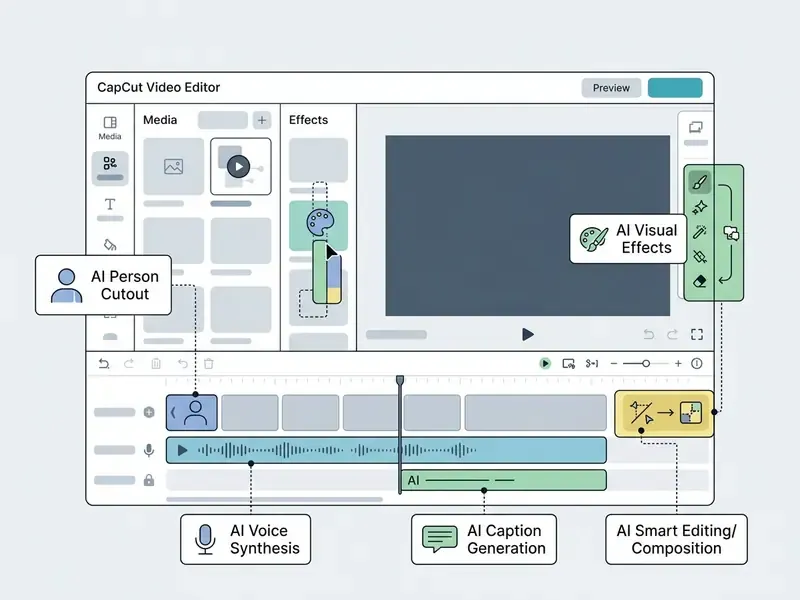
The CapCut workspace splits into a media import panel (left), a preview window (centre), a multi-track timeline (bottom), and an AI/effects settings panel (right). Templates open from the top-left panel, while advanced AI tools sit in the right-hand rail. All element descriptions are duplicated in the body text above.
How to edit your first video in CapCut
Creating a project in CapCut means initializing workspace parameters, importing media, editing tracks on the timeline, applying transitions or text layers, and configuring export settings. Project structure stays consistent across mobile, desktop, and web, which is one of the reasons distributed teams tolerate the tool's rougher edges. Seven steps take you from launch to publication. If the finished file is too heavy for a client portal or a marketplace upload limit, run it through a dedicated video compressor instead of degrading the export bitrate inside CapCut. For long-form channel work, the export-to-publish stage is usually better handled through purpose-built YouTube publishing workflows. Stuck on a render error or a failed upload? The AI Media Support and Troubleshooting hub covers the recurring failure modes.
- Create the project.Open the CapCut app or desktop client and tap New Project (mobile) or Create Project (desktop/web).
- Import your source files.Pull video, stills, and background audio into the project media bin from local storage, cloud drives, or the built-in stock library. On desktop you can drag and drop straight onto the timeline.
- Set the canvas.Choose the aspect ratio before you cut anything: 9:16 for vertical mobile video, 16:9 for widescreen, 1:1 for square posts. In the project details panel, confirm FPS (30 or 60) and resolution (1920×1080 or 3840×2160).
- Assemble the timeline.Drag clips onto tracks, then Split and Trim, reorder scenes, and adjust speed, reverse, or colour balance per clip.
- Add and balance audio.Drop in background music, normalize levels, apply noise reduction, and run Auto captions for synchronized subtitles.
- Layer the look.Place transitions between adjacent clips for continuity, then apply effects, filters, text titles, and stickers on separate overlay tracks.
- Export and publish.Press Export in the top-right corner, select resolution (up to 4K / 3840×2160), frame rate (up to 60 fps), and bitrate (recommended, higher, lower, or custom), then publish directly to TikTok or download locally. Use In/Out markers when you only need a selected section.
Is CapCut free or paid: Free and Pro features
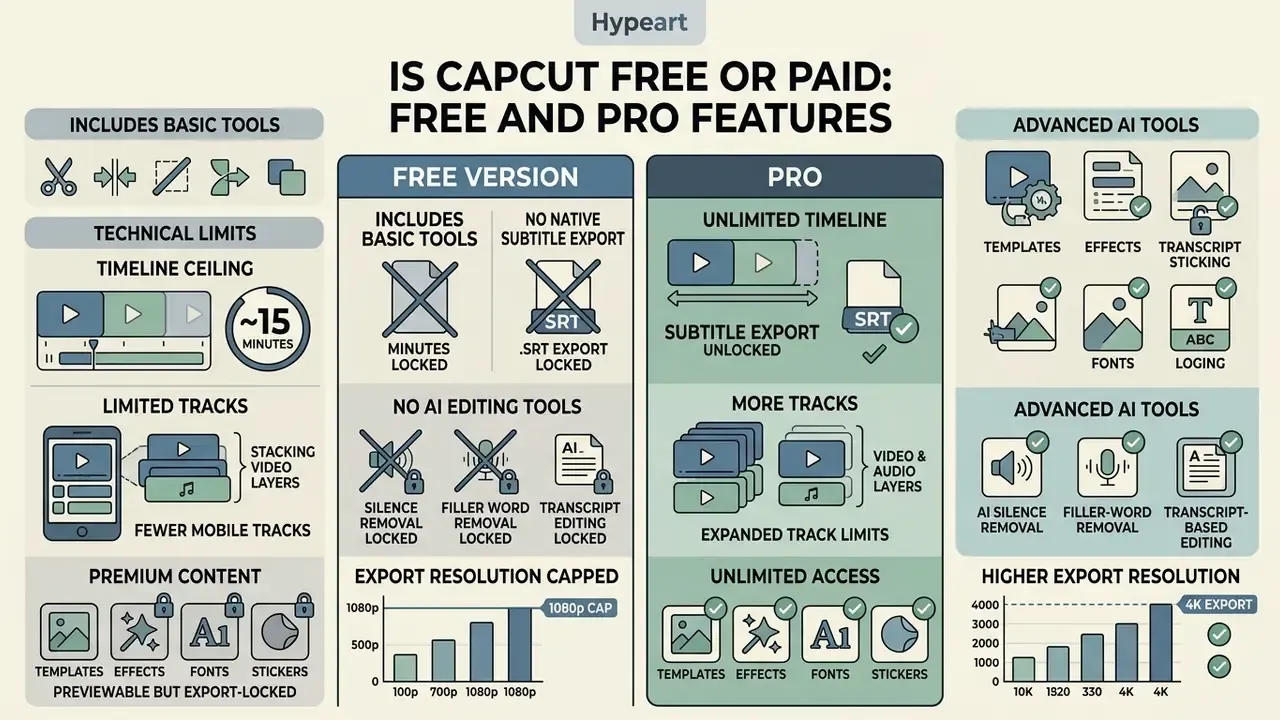
CapCut runs a freemium model. The base toolset is genuinely capable at zero cost, while advanced AI tools, premium visual assets, expanded cloud storage, and high-tier export options sit behind CapCut Pro. Buyers weighing whether to pay at all should first survey the field of free AI video generators to set a realistic baseline, and the AI Media Pricing Guides hub is useful for tracking how these tiers drift quarter to quarter.
What the free version of CapCut includes
The CapCut free video editing app covers standard multi-track timeline editing, clip trimming and merging, speed controls, keyframe adjustments, chroma key, standard transitions, basic AI auto-captions, and a wide selection of free music tracks and stock templates. For a lot of solo creators, that is the whole job done.
«The free plan provides core editing tools; some premium templates and effects are available only by subscription.»
Free exports on standard timelines do not add mandatory watermarks under default export settings, per CapCut's own Help Center guidance. The qualifier matters: a watermark or branded ending attaches automatically when the project uses Pro-exclusive visual assets or a premium template ending, and export prompts appear when a project exceeds free-tier length or resolution limits. Independent reviews also report that free export behaviour varies by region and account version. So verify on your own account rather than trusting a review, including this one.
Technical limits of the free version
Independent testing and vendor feature matrices converge on a consistent set of free-tier dead ends. These are the constraints that most often force the upgrade decision:
- Practical timeline ceiling of about 15 minutes on free editing, which rules out full podcast episodes, webinars, and long-form tutorials.
- No native subtitle track export in
.SRTor comparable formats. Captions can only be burned into the picture, which breaks accessibility and localization pipelines that need sidecar files. - Limited simultaneous video and audio tracks in the mobile app without Pro. Free mobile editing is effectively single-video and single-audio for many operations.
- No AI silence removal, no filler-word removal, no transcript-based editing. The timeline gets cleaned by hand.
- No AI B-roll generation, no AI transition editor, no automated sound effects or automated background music, and no AI hook-title or description generation.
- Premium templates, effects, fonts, and stickers are previewable but export-locked. This is the single biggest source of "I edited for an hour and then hit a paywall" complaints.
- Export resolution is commonly capped at 1080p on free accounts, with 4K and HDR output tied to paid tiers in several regional configurations.
When CapCut Pro makes sense
CapCut Pro unlocks advanced AI features, premium effect filters, commercial-grade stock libraries, larger cloud storage allocations (100 GB on the documented individual plan, up to 1 TB on select plans and regional configurations), and 4K watermark-free exports across premium templates. Professional creators and agency marketing teams running high daily volume choose Pro for expanded monthly AI compute credits (raised from 550 to 1,200 in 2026), script-to-video automation, and priority rendering throughput.
«Sensor Tower estimates CapCut generates roughly $56 million in revenue and 11 million downloads per month.»
«In the first half of 2023, consumer spending on CapCut reached $50 million, a 180% increase over the second half of 2022.» Data.ai Mobile Intelligence Report (2023). https://www.data.ai/en/insights/market-data/capcut-100-million-consumer-spend/
Clarifying the price confusion. Published figures vary widely across reviews, and several of them are correct in context. The standard individual Pro plan on Web and Desktop is listed at $19.99/month or $179.99/year. A lower Standard tier at $9.99/month exists. Mobile in-app purchases, regional pricing, and promotional cycles can also land users near the $9 to $13 per month range: France has been reported at €12.99/month and €89.99/year, while the Russian App Store has listed 1,790 ₽/month. Team plans start from roughly $24.99/month. Seven-day trials are common, and desktop downloads have historically carried 30-day Pro trial offers. Before you build a budget line, model the total against control costs with the AI Media Calculators rather than the sticker price alone.
Comparison of CapCut Free and CapCut Pro plans (verified for 2026)
| Feature category | Free plan | Paid subscription (CapCut Pro) |
|---|---|---|
| Core editing | Multi-track timeline, trimming, keyframes, chroma key, basic filters | Everything in Free plus expanded effect control and professional presets |
| AI tools | Auto-captions, basic speech generation, basic background removal | Expanded AI credits (up to 1,200/month), AI avatars, video enhancement, Script-to-Video, translator with lip-sync |
| Media and template library | Standard templates, effects, and free audio tracks | Full access to exclusive Pro templates, premium fonts, effects, and sounds |
| Cloud storage | Limited or no cloud project storage | From 100 GB up to 1 TB for projects and media (varies by plan and region) |
| Timeline length | Practical ceiling around 15 minutes | Long-form projects supported |
| Subtitle export | Burned-in captions only, no .SRT sidecar export | Still limited; verify sidecar export need before purchasing |
| Indicative cost (US) | $0 | $9.99/month (Standard) to $19.99/month or $179.99/year (Pro); Team from about $24.99/month |
Can CapCut be used for business and commercial content
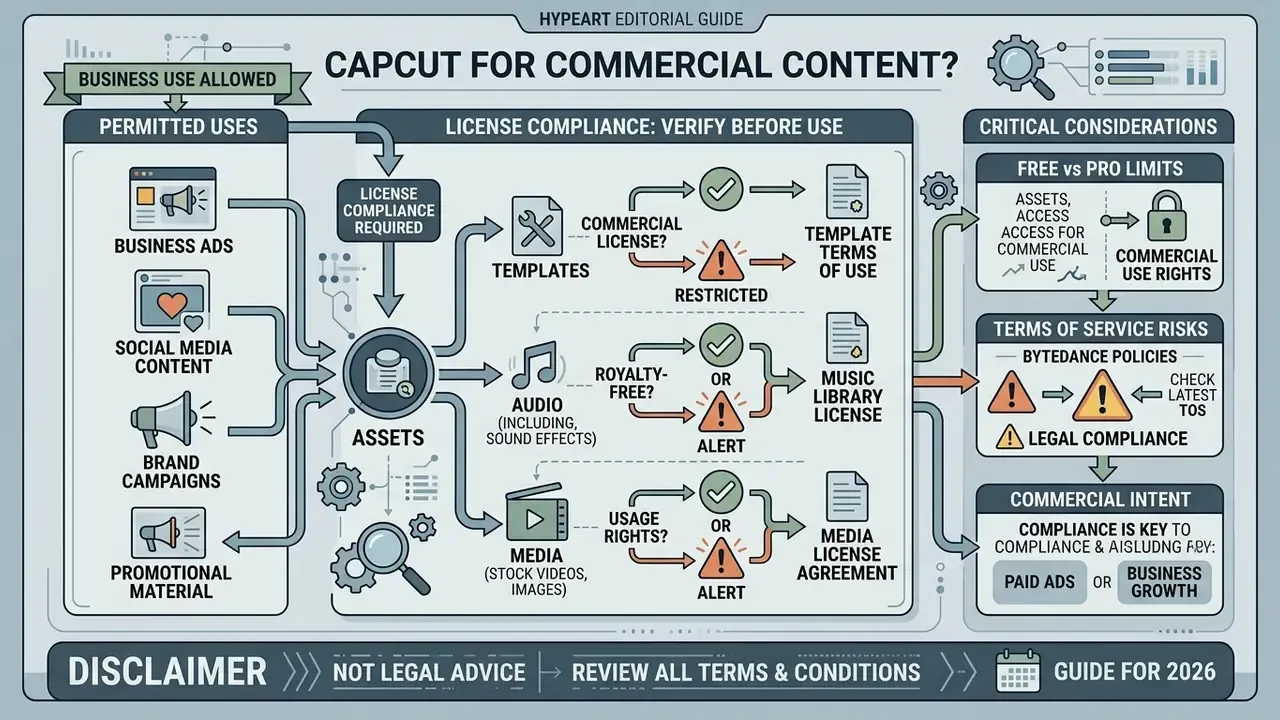
Producing business promotional materials, commercial video ads, and brand campaigns in CapCut is permitted, provided creators comply strictly with the asset licensing terms in CapCut's Materials License Agreement. The distinction that trips teams up is simple: the right to make the video is not the right to run it everywhere.
What to verify before commercial use of templates, audio, and media
Not every built-in asset carries commercial usage rights. The CapCut Terms of Service and Materials License Agreement separate general non-commercial materials from "Dual Use" and explicitly labelled "Commercial Use" assets. Audio licensed as "Commercial Sounds" is permitted strictly inside CapCut, TikTok, and TikTok for Business. Publishing videos containing those built-in tracks on third-party channels, television, external ad networks, or a standalone corporate site, without direct licensing from the copyright owners, constitutes infringement.
Fonts are documented as licensed for commercial use across platforms, and CapCut's Trust Center states that only templates and materials expressly labelled "Commercial Use" may be used commercially, for example in social content and brand promotions. AI-generated output is a separate question entirely: CapCut's licensing guidance frames commercial use of AI images as conditional on intended use, generator rules, and rights review. In plain terms, AI output is not automatically clear of copyright or publicity-rights exposure. The broader pattern across generative tools is documented in the AI Media Commercial-Use Hub, and the open questions are tracked alongside active litigation in the space.
Pros and limitations of CapCut Video Editor before you choose
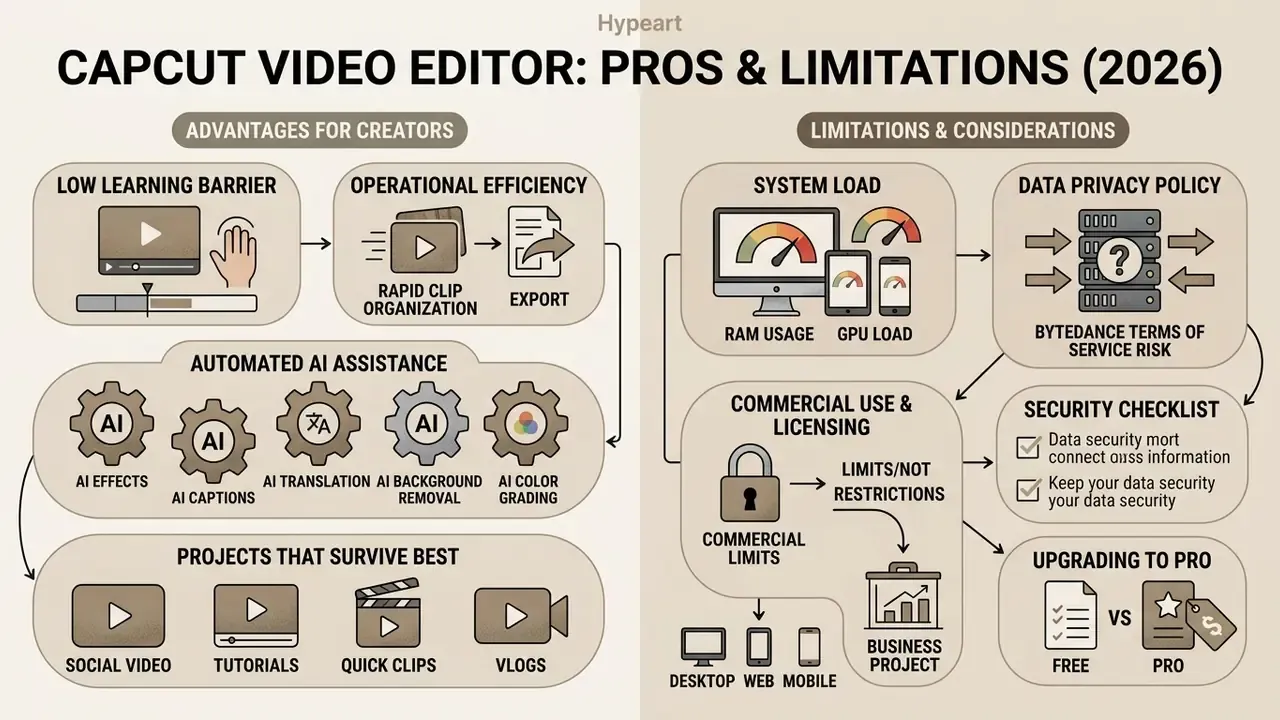
Evaluating CapCut means weighing operational efficiency, a low learning barrier, and automated AI assistance against data privacy policy, hardware requirements, and commercial asset licensing boundaries. The same logic applies to adjacent categories such as AI photo editors and free photo editors, where free tiers similarly trade export rights for convenience.
Limitations to assess before upgrading to Pro
The hardware and policy constraints are real. Desktop processing demands are high, with official guidance recommending 8 to 16 GB RAM and dedicated GPUs holding 4 GB+ VRAM for smooth 4K timeline navigation.
«TechSpot recommends a minimum of 8 GB RAM, a multi-core CPU, and a dedicated GPU for smooth 4K editing in CapCut.»
System load and real-world UX performance
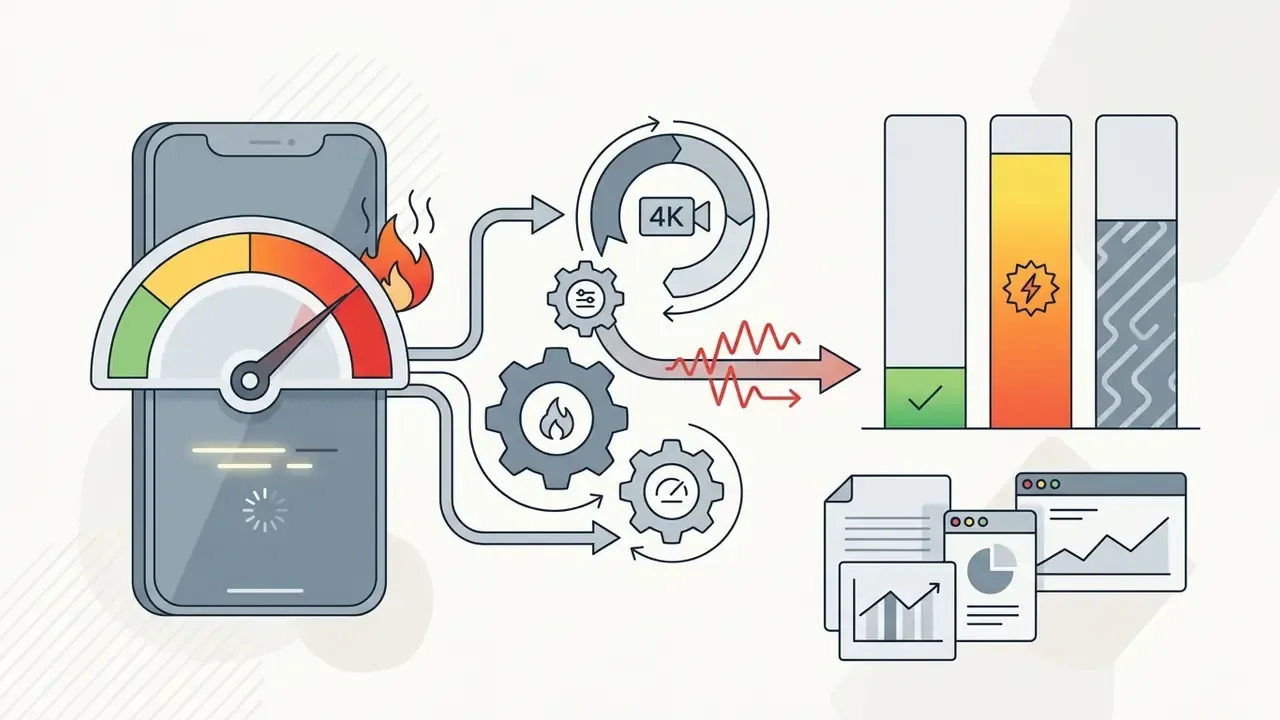
Independent hands-on testing paints a less polished picture than the marketing pages:


CapCut Video Editor advantages and limitations matrix
| Assessment category | Pros | Cons |
|---|---|---|
| Interface and speed | Intuitive UX, low entry barrier, templates for instant assembly | Limited control over professional colour grading; no multi-cam editing |
| AI and automation | Fast auto-captions, background removal, speech and script generation, lip-sync translation | AI features need an internet connection and consume credits; no silence or filler-word removal |
| Cross-platform reach | Available on iOS, Android, Windows, macOS, and in the browser | Feature parity gaps: no template search on Desktop, no Auto Cut on Web |
| Performance | GPU-accelerated exports up to 4K 60 fps on desktop | Heavy fan noise and thermal load on 4K AI renders; laggy web preview |
| Free tier | Genuinely capable core editor at $0, clean default exports | About a 15-minute cap, no .SRT export, export-locked premium assets, mobile track limits |
| Commercial use | Ready-made business templates and social-native formats | Strict limits on built-in audio outside TikTok; broad content licence granted to the platform |
| Governance and privacy | Clear public terms and a Trust Center with asset labelling | Perpetual and irrevocable content licence, no on-premise option, no published SOC 2 or ISO 27001 for the consumer editor |
Security checklist before approving CapCut in an organization
Use this as a pre-approval gate for IT, risk, and compliance functions:
Checklist0 / 10
FAQ about CapCut Video Editor
How do I find the official CapCut Video Editor in the Google Play Store?
Search the Google Play Store for "CapCut - Video Editor" and confirm the developer is BYTEDANCE PTE. LTD. with package identifier com.lemon.lvoverseas. The official listing shows over 1 billion downloads, links to support at [email protected], and specifies standard developer terms. When someone asks you for a CapCut Video Editor Play Store link, send them to that listing rather than a mirror site.
«According to Similarweb, CapCut ranks second among apps in the Video Players and Editors category on Google Play in the United States.» Similarweb App Analytics, Google Play Store (2025 to 2026). https://www.similarweb.com/app/google-play/com.lemon.lvoverseas/statistics/
How do I verify the official iOS app?
On the Apple App Store, the official listing is CapCut: Photo & Video Editor, App Store ID 1500855883, published by CapCut Pte. Ltd., carrying the same ByteDance support email. On Windows, the Microsoft Store listing and the capcut.com download (installer file CapCut_Setup.exe) are the two official desktop routes. Anything else is a third-party repackage.
Why do people search for Cap Video Editor and Cupcut Video Editor?
Queries like "cap video editor", "cupcut video editor", or "capcut editor de video" are misspellings, localized language searches, or descriptive phrasing rather than separate applications. The official product name ByteDance maintains globally is CapCut, sometimes styled "CapCut – Video Editor" in store listings. If you are evaluating alternatives instead of hunting for the app, a structured comparison of the best AI video generators beats store search.
Where can I find the current CapCut Video Editor feature list?
The authoritative sources for the CapCut Video Editor app description, verified product updates, new features, and change logs are the official site at capcut.com, including its "New Release" and "New in" pages, plus the CapCut Help Center and the store listings on the Apple App Store and Google Play Store. Third-party review roundups lag by weeks, sometimes months.
Does the free version of CapCut add a watermark?
Not under default export settings on a standard timeline. A watermark or branded end-card appears when the project uses Pro-exclusive assets or a premium template ending. Behaviour also varies by region and app version, so test one short export on your own account before delivering client work.
Can I export subtitles as an .SRT file?
Not on the free tier. Captions are rendered into the picture. Teams that need sidecar subtitle files for accessibility, YouTube uploads, or translation workflows should verify current export capability on a paid account before standardizing on CapCut for that step.
Is CapCut owned by TikTok?
CapCut is owned by ByteDance, TikTok's parent company. That shared ownership explains why template trends, sound libraries, and one-tap publishing integrate so tightly with TikTok. It also explains why both apps share the same regulatory exposure in markets scrutinizing ByteDance data practices.
Is CapCut safe for children?
The editing tools themselves are benign. The template feed is not: it behaves like a miniature TikTok, explicit music and suggestive content are easy to encounter, search filters can be bypassed with substituted characters and emoji, and there are no parental controls or content settings. Accounts also support followers, comments, and public template sharing with only an all-or-nothing visibility choice. For younger users, keep exports local instead of publishing them as templates, and review interactions periodically.
How do I cancel a CapCut Pro subscription?
Cancel in the same store where the subscription was created: App Store, Google Play, or CapCut's web billing. Deleting the app does not cancel billing, and cross-store confusion is the most common cause of surprise renewals.
Appendix A: editorial corrections and superseded statements
Retained for transparency, with the corrected position noted:
Continue exploring definitions, benchmarks, and licensing notes in the AI Media Glossary.
- Superseded
- "reducing initial assembly time by 40%." Updated position: the 40% figure is an unverified internal estimate. The case is now described qualitatively, as compressing rough assembly from a full working day to a single session.
- Superseded
- a single flat price point of "$19.99/month or $179.99/year" presented without context. Updated position: pricing is tiered and market-dependent. Standard from $9.99/month, Pro at $19.99/month or $179.99/year on Web and Desktop, Team from about $24.99/month, with regional variants such as €12.99/month and 1,790 ₽/month.
- Superseded
- "Free exports do not add mandatory watermarks" stated without qualification. Updated position: true for default settings on standard timelines, but Pro-exclusive assets and premium template endings trigger branding, and behaviour varies by region and version.
- Superseded
- privacy risk framed only as "user agreements grant platform rights to process uploaded project data." Updated position: the licence is worldwide, royalty-free, sublicensable, perpetual, and irrevocable, and reporting on the June 2025 terms update indicates it survives content deletion and account closure.
- Superseded
- cloud storage stated only as "up to 1 TB." Updated position: official documentation lists 100 GB on the individual Pro plan and roughly 1 TB in other plan and region configurations. Verify at purchase.