A free online photo editor is a browser-based application that lets you upload, adjust, retouch and export digital images without installing local desktop software. Modern web editors run client-side through WebAssembly, or call cloud-hosted AI microservices, and they handle everything from basic cropping to multi-layer vector composition and generative object manipulation.
Why should a compliance or risk lead care about a photo tool? Because these editors enter the enterprise without procurement, and a single AI click can send a screenshot to a third-party endpoint. That is the thread running through this guide.
What this guide covers: what a browser editor actually is and which tasks it fits; the security, data-governance and shadow-AI checklist; the upload-to-download workflow; a keyboard shortcut sheet; basic tools such as crop, resize, text and filters; aspect-ratio and platform presets; bulk and batch editing for e-commerce; AI background, object and enhancement features; generative expand, layer extraction and liquify; layers, PSD, RAW and format support; the free tier versus the paid tier and commercial licensing; plus troubleshooting answers at the end.
What a free online photo editor is and which tasks it fits
A free online photo editor is a web application designed for processing raster and vector graphics directly inside a browser interface. These tools serve individuals, digital marketers and enterprise teams that need rapid image adjustments without the operational overhead of desktop software deployment.
Modern browser based photo editor systems handle primary image workflows such as cropping, colour grading, text overlay and background extraction. They operate across standard web browsers, eliminating device-specific hardware dependencies and reducing local disk-space utilisation (Photopea product documentation, 2026).
Organisations use a free online photo editor web interface to streamline asset creation for social media, product catalogues and corporate communications. By standardising on web-based editing tools, teams keep graphic workflows consistent across distributed operating systems while lowering software licensing costs. For a broader market view of platforms, feature sets and pricing tiers, see our reference guide to online photo editors.
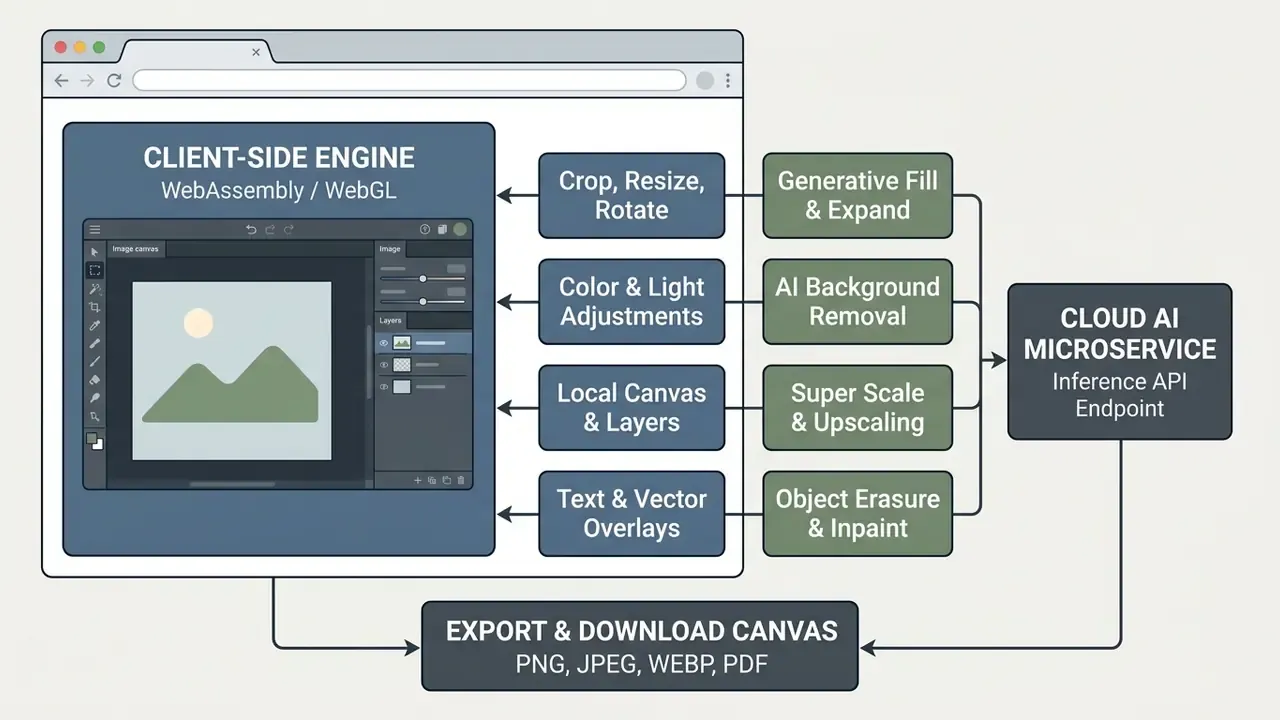
Diagram description (text alternative): local operations, that is crop, resize, rotate, colour and light adjustments, canvas and layers, text and vector overlays, execute in the client engine via WebAssembly and WebGL. Generative fill, background removal, upscaling and inpainting are dispatched to a remote inference endpoint. Both paths converge on the export canvas, which renders PNG, JPEG, WEBP or PDF output.
Editing photos without installation and the editor photo download question
Processing graphics directly in a browser photo editor removes traditional software installation procedures, licence management and local system requirements. Users reach enterprise-class photo editing tools through standard web protocols, executing tasks immediately after opening the application URL.
Bypassing the traditional editor photo download requirement reduces device endpoint exposure and security friction in managed corporate environments. Web applications run in isolated browser sandboxes, which prevents arbitrary file access on the host system while providing cross-platform execution.
«Each WebAssembly module executes in a sandboxed environment, with security policies enforced by the embedding runtime.»
Teams also avoid purchasing dedicated GPU hardware for routine graphic adjustments, because complex AI inference runs on remote cloud endpoints (AWS Web Application Architecture Overview, 2025). AWS defines web applications as software delivered through an internet browser that users do not install on their devices, which is the architectural reason browser editors carry no local footprint.
One caveat worth stating plainly: "no installation" is not the same as "no data movement". More on that in the governance section.
When an online editor can replace Photoshop and Lightroom
| Capability | Browser editor | Desktop Photoshop / Lightroom |
|---|---|---|
| Layers, masks, blend modes | Supported | Supported |
| PSD open/save with layer fidelity | Supported (depends on "Maximize Compatibility" flag in source file) | Native |
| RAW decode (DNG, CR2, CR3, NEF, ARW) | Supported, read-oriented, decoded in memory | Native, with profile and detail enhancement |
| Colour depth | 8-bit and 16-bit per channel | 8/16/32-bit per channel |
| Files above roughly 100 MB uncompressed | Unstable, tab-memory bound | Stable |
| Mesh gradients, puppet warp on complex meshes, 3D pipelines | Partial or unsupported | Supported |
| Offline operation | Limited | Full |
E-E-A-T verification: technical limits of browser editors (updated).
Browser editors support 8-bit and 16-bit colour channels, standard adjustment layers, layer masks, blend modes and cloud AI inference. Operational bottlenecks appear with uncompressed camera RAW files above roughly 100 MB, node-based vector mesh gradients, and 3D rendering pipelines that require dedicated GPU VRAM allocation. The practical constraint is the per-tab memory heap allocated by the browser, commonly in the 2 to 4 GB range depending on operating system, browser build and 32/64-bit architecture. Past that point the tab reloads and unsaved canvas state is lost. Cloud upscalers add a second ceiling: canvas texture limits cap typical super-scale output at approximately 25 MPx (about 5000 by 5000 px).
Security, data governance and the shadow-AI checklist
Free browser editors are among the most common shadow-IT entry points in regulated organisations, because they require no procurement, no installation and no administrator rights. The governance question is therefore not "is the tool good" but "where do the pixels go".
Two processing models must be assessed separately. Fully local tools decode and render inside the WebAssembly sandbox, so files never traverse the network. Hybrid tools perform manual edits locally but transmit images to inference endpoints whenever an AI action is triggered: background removal, upscaling, generative fill. One click converts a local edit into a third-party data transfer. That is the whole risk in a sentence.
Vendor assessment checklist for security, DLP and model-risk teams
- Processing locality.Confirm in writing which operations run client-side and which call remote endpoints, and require an explicit list of AI features that upload content.
- Zero data retention.Require contractual zero-retention, or a documented maximum retention window for uploaded assets and generated outputs, plus deletion-on-request procedures.
- Training opt-out.Verify that customer content is excluded from model training by default on the enterprise plan, not only on request.
- Transport and tenancy controls.Require TLS in transit, encryption at rest for cached projects, regional processing options, SSO and SCIM provisioning, and exportable audit logs.
- Attestations and browser-side hygiene.Ask for SOC 2 Type II or ISO/IEC 27001 scope covering the inference service, and confirm that temporary projects held in browser storage (IndexedDB, cache) are cleared by policy on managed endpoints.
«Insecure browser local storage is exposed to cross-site scripting risk, so storing sensitive data there is disfavoured.»
NIST publishes cybersecurity and privacy risk as two complementary frameworks. The Cybersecurity Framework 2.0 (2024) covers govern, identify, protect, detect, respond and recover, while the NIST Privacy Framework addresses privacy risk arising from authorised data processing. Both apply to image workflows that may contain personally identifiable information, customer documents or internal screenshots.
A practical control that costs almost nothing: name an owner for the tool. Even a free editor used by a marketing team should have a named accountable manager, an approved list of use cases, and a rule about what may never be uploaded. No evidence, no autonomy. That principle applies to a background-removal endpoint just as it applies to an agentic workflow in finance operations.
How to edit photos online: from upload to download
Editing in a web editor follows a structured three-step workflow: import the source asset, apply raster or AI-based transformations, then export the final file. Modern browser interfaces mirror traditional graphic-design layouts to minimise the learning curve.
To edit photos efficiently, users work on a central canvas surrounded by contextual toolbars, a layer stack and project settings. The whole lifecycle runs in session memory, which gives rapid feedback loops during visual adjustments. Multi-step editing consistency is now measured formally, too.
«I2EBench2.0 covers more than 2,000 images and 6,700 instructions, evaluating content consistency across sequential multi-step edits.»
That distinction matters operationally. A single edit rarely degrades an image, whereas five chained AI operations can drift in colour, geometry and identity. Benchmarks of this type are the reason production teams keep the untouched original as a separate layer or file version.
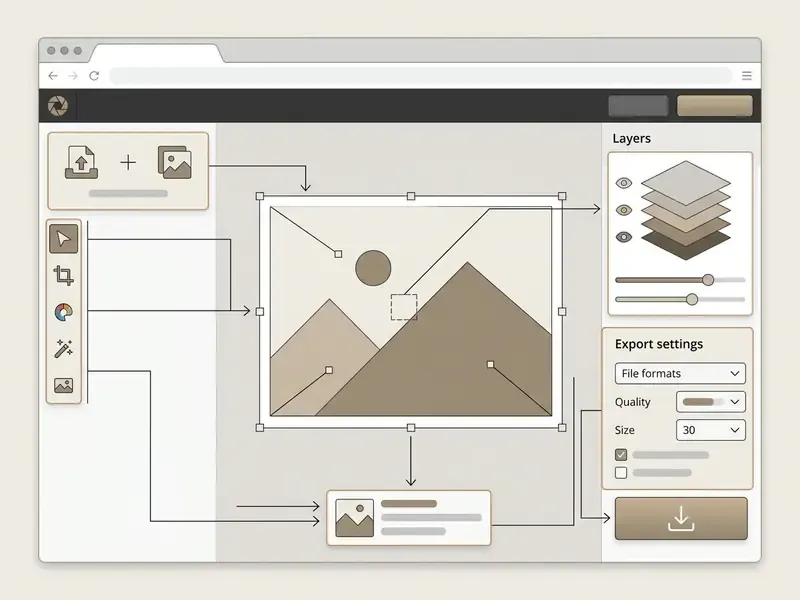
Text alternative for the interface map: zone 1 is the upload and open area, accepting drag-and-drop, file picker, clipboard paste and URL import; zone 2 is the left toolbar grouping selection, retouch, drawing and text tools; zone 3 is the central canvas workspace with zoom controls, histogram and EXIF readout; zone 4 is the right-hand layers panel with blend mode, opacity, lock and visibility controls; zone 5 covers export settings for format, quality, dimensions and metadata; zone 6 is the download button that rasterises visible layers.
Step 1: upload your photo into the online editor
Step 2: select tools and make your edits
After ingest, users apply modifications from the contextual tool palette adjacent to the workspace.
Primary adjustments include non-destructive cropping, aspect-ratio locking, colour balancing, exposure correction and typography insertion. Advanced editors allow stacking multiple adjustment layers to refine tone curves, selective colour channels and sharpness without permanently altering original pixels. The workflow order that minimises rework is consistent across professional guides: frame and straighten first, then correct exposure and colour, then apply filters, then add graphic overlays (Cambridge in Colour workflow guide, 2025). Preset filters, custom masks and graphic overlays are applied last in a sequential pipeline.
Step 3: download the finished image
The final phase renders canvas contents and saves the processed file to local storage or a cloud repository.
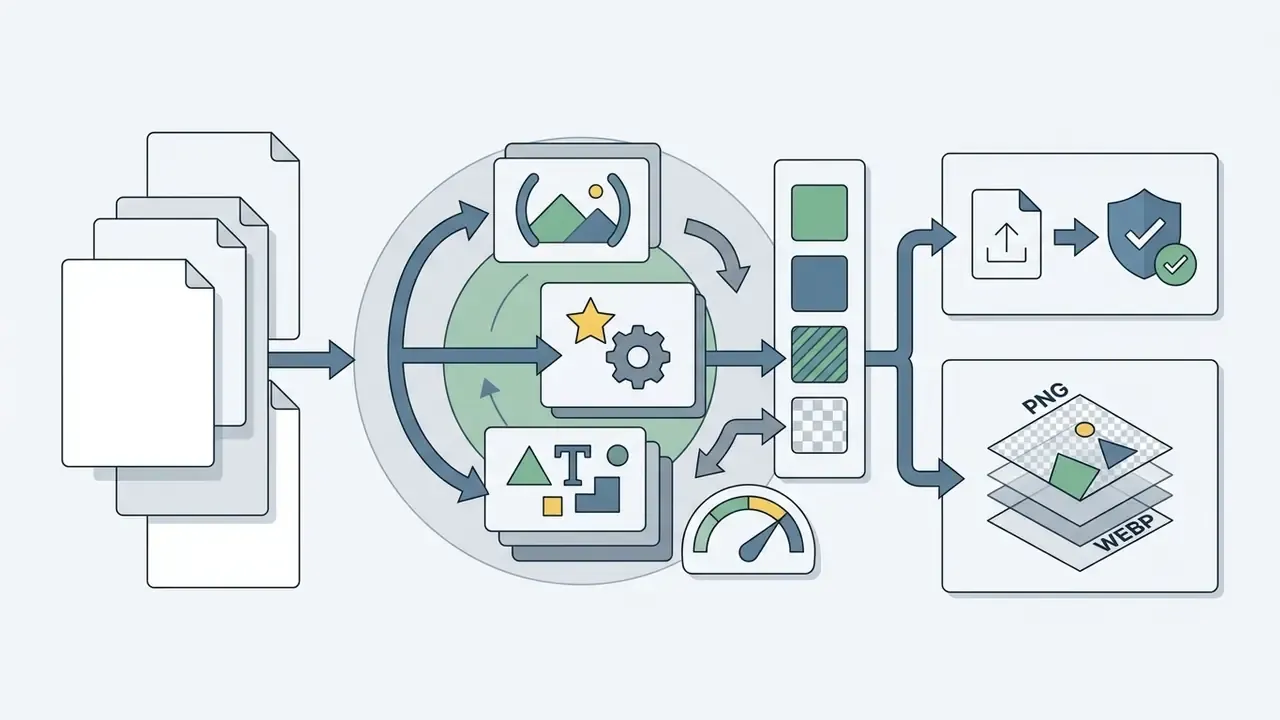
When the download command fires, the browser rasterises visible layers into the selected target format. Export extensions typically include JPEG for compressed web photos, PNG for lossless transparency, WEBP for optimised site performance, SVG for vector output and PDF for document distribution. Compression ratio, canvas dimensions and metadata retention are configurable before export.
Two format rules decide whether transparency survives. PNG stores an alpha value per pixel, where zero is fully transparent and the maximum value is fully opaque, so cut-outs stay clean (W3C PNG Specification, https://www.w3.org/TR/PNG/). JPEG has no alpha channel, so any transparent area is flattened to white or black. In PDF export, older compatibility levels such as PDF 1.3 have no live transparency and force flattening, while later levels preserve it (Adobe PDF export options, 2026).
| Export format | Transparency | Typical use | Notes |
|---|---|---|---|
| PNG | Yes (alpha) | Logos, cut-outs, UI assets | Lossless, larger files |
| JPEG | No | Photography, email, blogs | Quality slider 60 to 90 for web |
| WEBP | Yes | Web performance, Core Web Vitals | 25 to 35% smaller than JPEG at similar quality |
| Conditional | Print-ready documents, proofs | Flattened on PDF 1.3 compatibility | |
| SVG | Yes | Icons, logos, scalable vectors | Vector paths only, no photographic data |
| PXZ / PSD | Yes | Long-term project storage | Preserves layer stack for later editing |
Keyboard shortcuts cheat sheet
Shortcut fluency is the single fastest way to close the productivity gap between a browser editor and a desktop suite. Desktop browsers on Windows, macOS, Linux and ChromeOS support the full hotkey set. Touch-based mobile browsers do not.
| Command / action | Shortcut (Win / Mac) | Function |
|---|---|---|
| Open image | Ctrl + O / Cmd + O | Import a file into the workspace |
| New image | Ctrl + E / Cmd + E | Create a blank canvas |
| Paste from clipboard | Ctrl + V / Cmd + V | Insert a copied image directly |
| Save / export | Ctrl + S / Cmd + S | Open export dialog and format options |
Ctrl + P / Cmd + P | Send the canvas to a printer | |
| Undo / redo | Ctrl + Z / Ctrl + Y | Move backwards and forwards in history |
| Quick search for a filter | / | Find any effect or tool by name |
| Pan the canvas | Hold Space + drag | Move around a zoomed image |
| View the original | Hold Space (view mode) | Compare before and after instantly |
| Curves | Ctrl + M / Cmd + M | Tonal balance correction |
| Levels | Ctrl + L / Cmd + L | Histogram control of shadows and highlights |
| Hue / saturation | Ctrl + U / Cmd + U | Colour shift and intensity |
| Free transform | Ctrl + R / Cmd + R | Scale and rotate the active layer |
| Free distort | Ctrl + K / Cmd + K | Corner-pin perspective distortion |
| Select all / invert | Ctrl + A / Ctrl + I | Selection management |
| Duplicate layer | Ctrl + D / Cmd + D | Copy the active layer in place |
| Merge down / flatten | Ctrl + 6 / Ctrl + 8 | Combine layers |
| Zoom in / out / fit | Shift + / Shift - / Shift 0 | Viewport navigation |
| Fit screen / 100% | Ctrl + 0 / Ctrl + 1 | Zoom presets |
| Move tool | V | Arrange and transform |
| Lasso select | L | Freehand, polygon or magnetic selection |
| Marquee select | M | Rectangular and elliptical selection |
| Brush / eraser / text | B / E / T | Core drawing and typography tools |
| Cancel current operation | Esc | Abort an active tool action |
Basic tools: crop, resize, text and filters
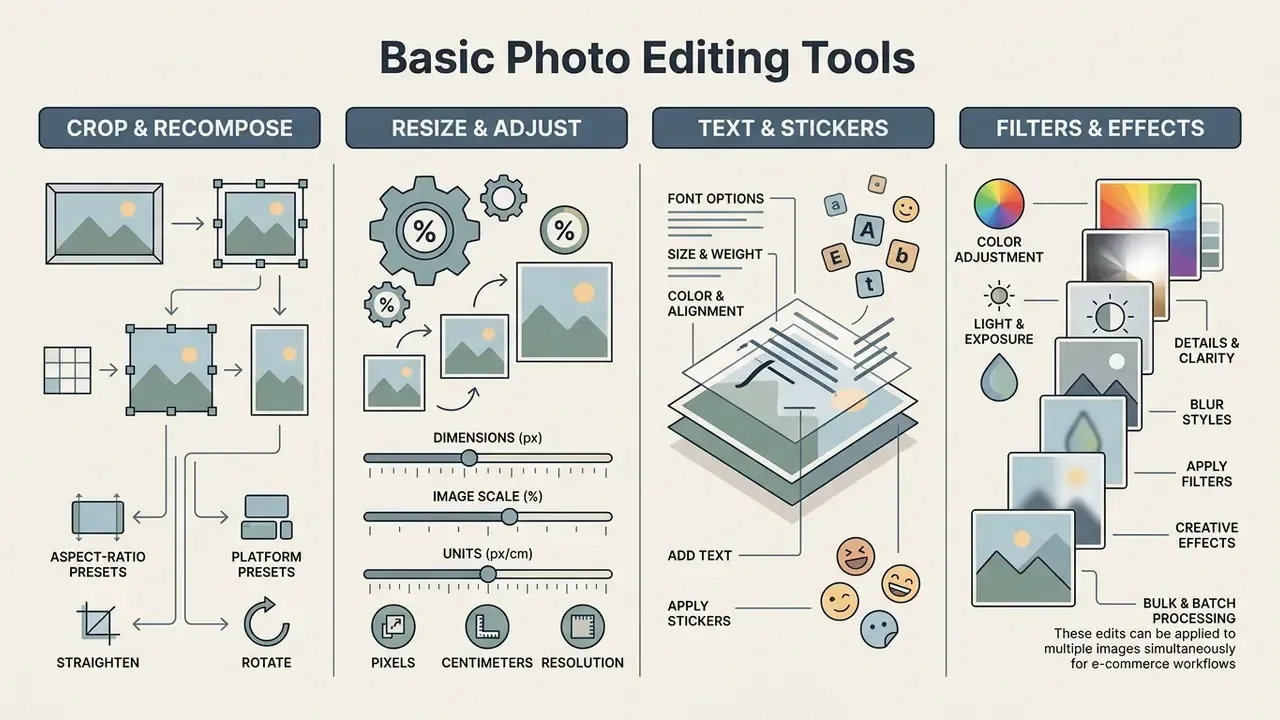
Core image editing tools form the foundation of both consumer and commercial graphic workflows. They adjust spatial boundaries, tonal balance and the graphic overlays required for standard web publication.
Selecting the appropriate free online photo editor tools depends on the target output: social-media formatting, website banner optimisation or promotional asset design.
| Tool | Primary purpose | Expected result | Recommended photo types |
|---|---|---|---|
| Crop | Trims unwanted outer regions and adjusts framing | Tighter composition and altered aspect ratio | Portraits, product shots, social graphics |
| Resize | Alters overall pixel dimensions (width and height) | Smaller file size or scaled resolution | Web banners, email assets, site thumbnails |
| Text | Inserts custom typography layers over graphics | Annotated image with readable vector text | Marketing banners, infographics, thumbnails |
| Filters | Applies algorithmic colour and tone presets | Stylised visual mood or unified colour grade | Lifestyle photos, social content, travel shots |
| Blur | Softens pixel detail across selected regions | Shallow depth-of-field or anonymised data | Backgrounds, sensitive data, portrait depth |
Crop, resize and recomposing images
Adjusting spatial dimensions with crop and resize tools ensures compliance with target display requirements across platforms.
Cropping reframes an image by removing peripheral pixels and establishing focal points according to framing conventions such as the rule of thirds (Canva Help Center, 2026). Resizing scales total pixel dimensions; locking the aspect ratio keeps width and height proportional so images never stretch or distort. When only an aspect ratio is supplied in a crop operation, the original width or height is preserved and the other dimension is trimmed to fit the requested ratio (Cloudinary image transformation guidelines, 2025).
Aspect-ratio and platform presets
| Platform / purpose | Ratio preset | Exact resolution (px) |
|---|---|---|
| Instagram post / portrait | 1:1 / 4:5 | 1080×1080 / 1080×1350 |
| Instagram, TikTok, Facebook story | 9:16 | 1080×1920 |
| Facebook cover | about 2.63:1 | 820×312 |
| Facebook / link-share post | 1.91:1 | 1200×630 |
| X (Twitter) header | 3:1 | 1500×500 |
| YouTube thumbnail | 16:9 | 1280×720 |
| YouTube channel art | 16:9 | 2560×1440 |
| Full HD / Ultra HD canvas | 16:9 | 1920×1080 / 3840×2160 |
| Web common desktop | about 16:9 | 1366×768 |
| Print A4 (300 DPI) | ISO 216 | 2480×3508 |
| Print A5 (300 DPI) | ISO 216 | 1748×2480 |
| US Letter (300 DPI) | 8.5×11 in | 2550×3300 |
| Ultrawide / Cinemascope | 21:9 | 2560×1080 |
| Super ultrawide | 32:9 | 3840×1080 |
| 35 mm film / panorama | 3:2 / 3:1 | Ratio-driven, source-dependent |
Vertical 9:16 frames are also the standard input for short-form video pipelines, so still exports from a browser editor often feed straight into an ai reel generator for campaign variants.
Colour, light, details and blur for better photos
Tonal correction instruments regulate brightness, contrast, colour temperature and localised sharpness across the canvas.
Updated (methodology). Exposure adjustments correct under-exposed shadows or blown highlights, balancing dynamic range across the frame. Exposure and contrast are normally adjusted together, and sharpening is kept moderate so sensor noise is not amplified. Noise reduction is applied before sharpening, and treated separately for colour noise and luminance noise, with stronger reduction in low-detail areas and masked sharpening to retain edge structure (technical photography workflow guidance, John Rowell, 2017; method reconfirmed in current editor documentation, 2025 to 2026). Because the 2017 reference predates current AI denoisers, validate settings against your own high-ISO test frames rather than trusting fixed slider values.
Saturation and vibrance sliders adjust colour intensity, and vibrance protects already-saturated skin tones. Localised blur, focus and bokeh simulation isolate the primary subject from cluttered backgrounds and improve visual hierarchy. The same tools anonymise faces, licence plates and document numbers before publication, which is a small but genuinely useful compliance habit. At capture time, bokeh depends on wide apertures such as f/1.4 to f/2.8 and accurate focus on the subject, with ISO kept low to limit noise (ifolor optical checklist, 2025).
Adding text, stickers, filters and creative effects
Graphic overlays convert simple photographs into composite marketing material, social posts and visual documentation.
Typography tools support custom font uploads (.TTF, .OTF), alignment, stroke borders, drop shadows, arc and circle warping, background highlight bars and opacity control (Adobe Photoshop Express documentation, 2026). Vector stickers, frames and overlays increase engagement on visual channels, and integrated filter presets such as HDR, bokeh, reflect and colorize duo- or tri-tone unify raw captures into a coherent visual theme with a single click. For accessibility, text placed over photography should sit on a solid background or a darkened overlay so contrast remains readable (U.S. federal accessibility guidance).
Add text to a photo in three steps
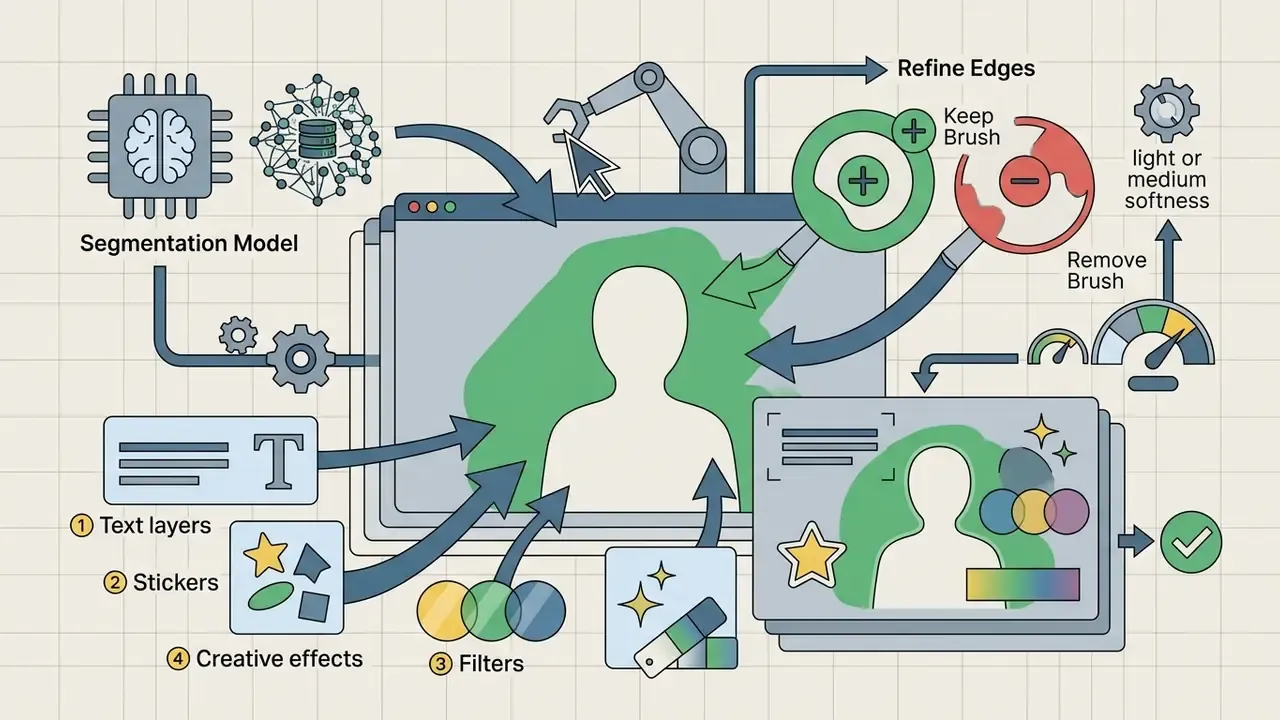
Remove a background in three steps

T or select the Text tool in the left toolbar.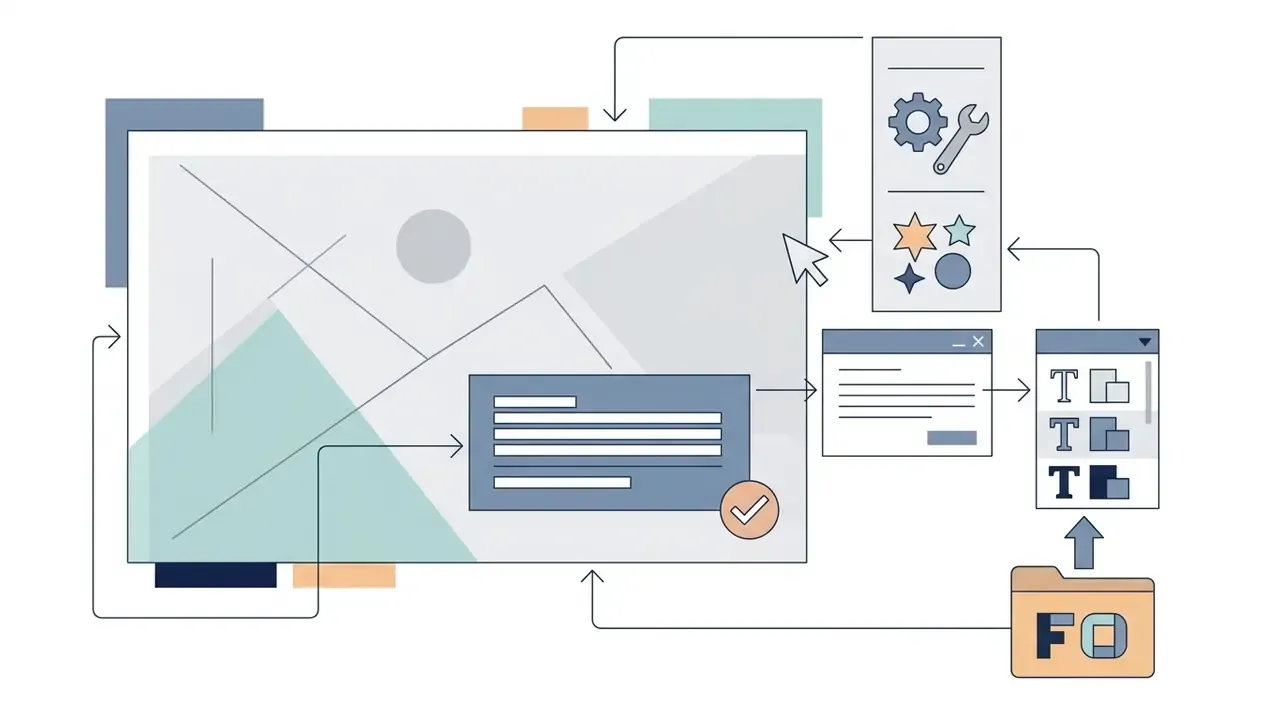
.TTF or .OTF file.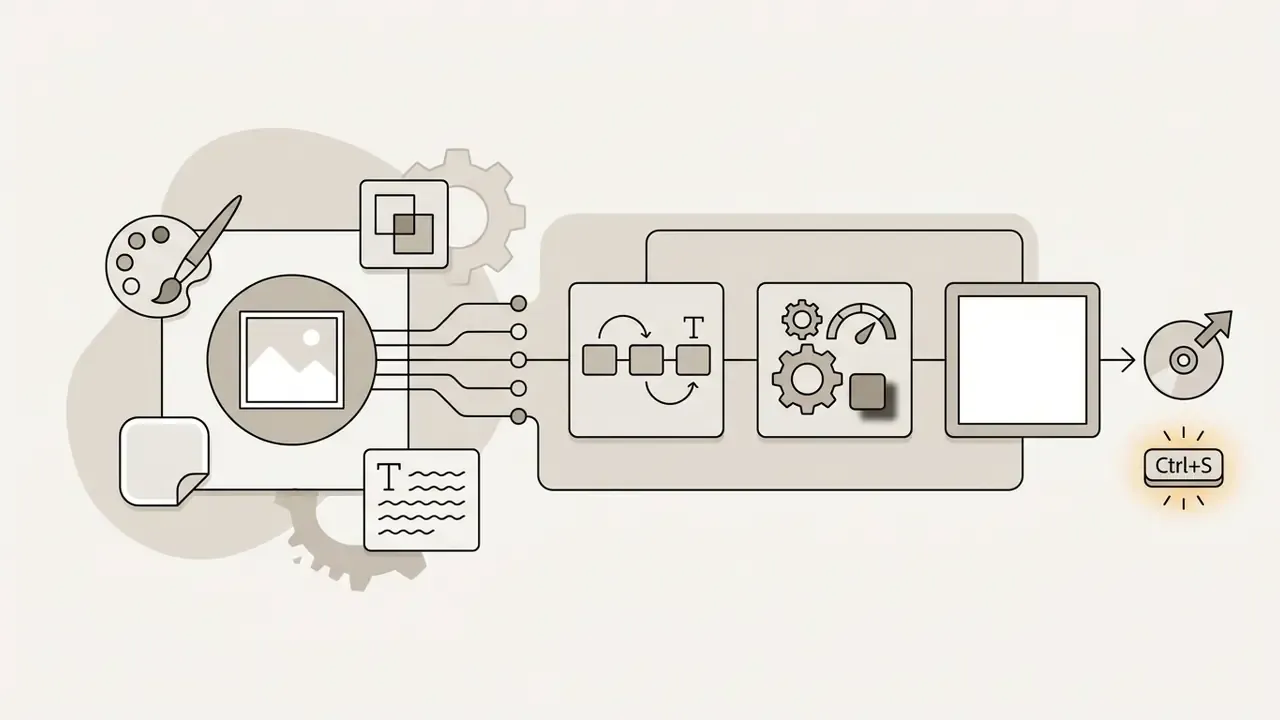
Ctrl + S to export.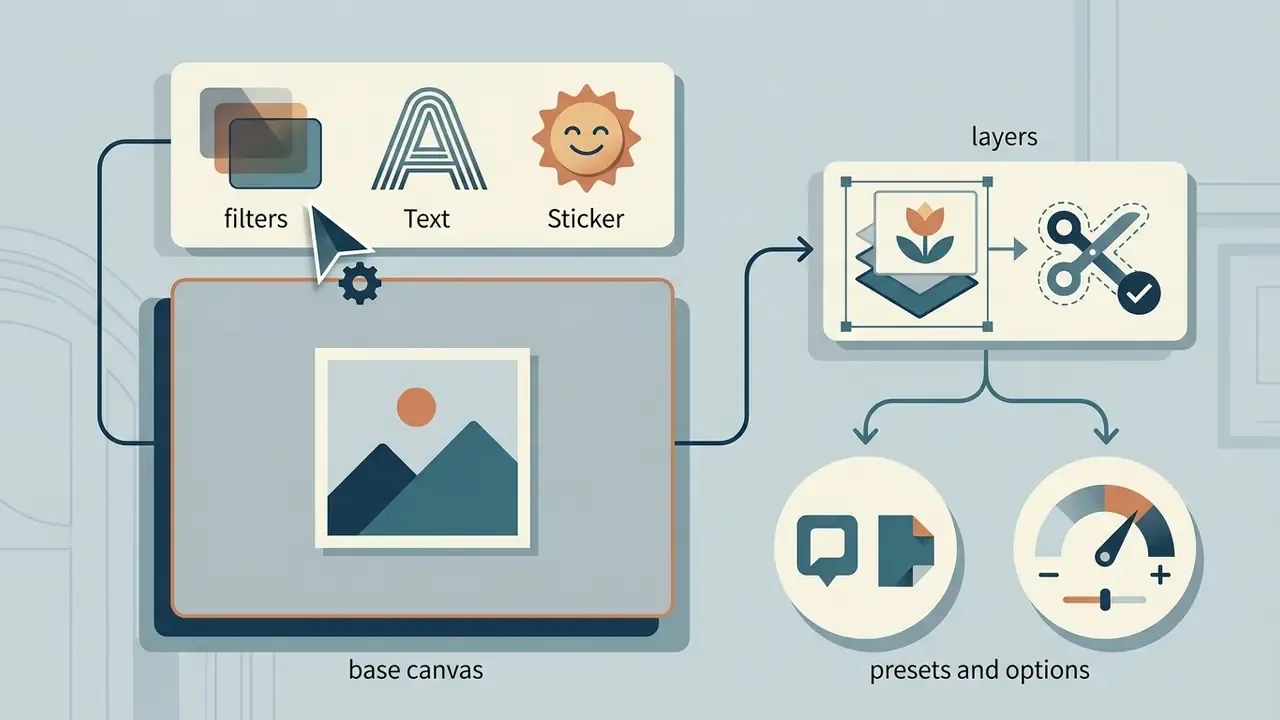
Bulk and batch editing for e-commerce
Batch mode is the feature that turns a browser editor from a design toy into a production tool. Contemporary web editors ingest and process groups of images at once, commonly up to 50 files on mid-tier plans and up to 100 on higher tiers, applying a single colour profile, watermark, 1:1 crop and WEBP conversion across the whole set in one pass.
For catalogue and marketplace work the sequence is repeatable: upload the folder, normalise canvas size to the marketplace standard, run background removal across the batch, apply the brand backdrop, stamp the watermark, then export in two formats, WEBP for the storefront and JPEG for feeds. Content teams that previously edited product shots individually reduce hands-on time sharply on large sets, because the only per-file work left is quality control on edge cases such as reflective glass, fur and semi-transparent packaging.
Two constraints govern batch reliability. First, per-tab memory: large batches of high-resolution RAW files can exhaust the heap and reload the tab, so split sets into chunks. Second, AI credits: batch background removal consumes one inference call per image, so a 100-image run on a free tier will usually hit the daily quota before it finishes.
For teams managing multi-channel content pipelines, reference materials are catalogued in our AI Media Glossary. Resource-cost modelling lives in the AI Media Calculators section, and operational workflows are documented across the AI Media Commercial-Use Hub. Adjacent content tooling, from an ai recipe generator for food brands to an ai reddit story generator for social scripting, sits in the same glossary tree and raises the same governance questions about data flow and licensing.
AI photo editor: background removal, object removal and image enhancement
Artificial intelligence has reshaped web-based graphics processing by automating complex selection, segmentation and generative restoration. Modern models complete segmentation and inpainting routines in seconds that previously required hours of manual masking.
Integrating an ai photo engine into a browser editor enables automated background isolation, object removal, high-resolution scaling and generative image expansion. The scale of current evaluation datasets shows how far the field has industrialised:
«ImgEdit provides 1.2 million image pairs across 13 editing categories and 110,000 multi-turn examples for evaluating realistic workflows.»
Those thirteen categories map almost exactly onto the commercial feature list below (add, remove, replace, restyle, expand, compose), which is why capability differences between vendors now come down to model choice rather than interface design. Readers new to the category can start with our primer on AI photo editors.
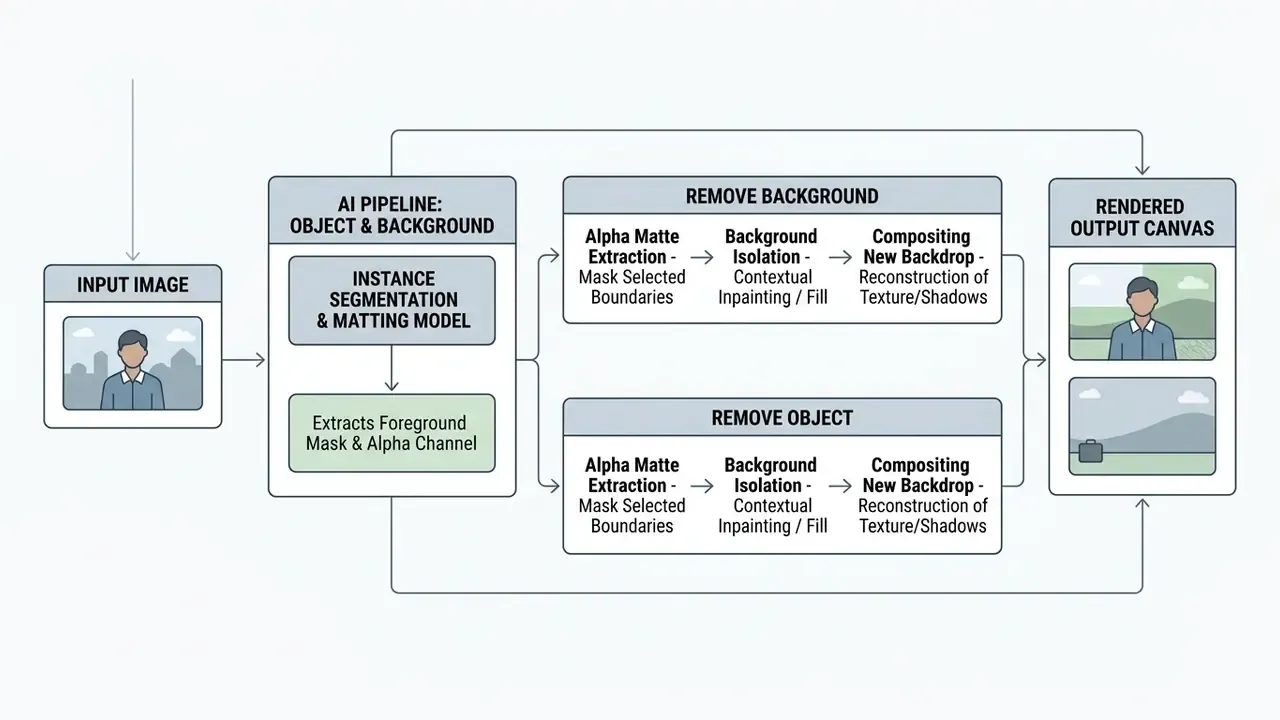
Diagram description (text alternative): the input image passes through an instance-segmentation and matting model that outputs a foreground mask plus alpha channel. The pipeline then branches. Background removal performs alpha-matte extraction, background isolation and new-backdrop compositing; object removal masks the selected boundaries, applies contextual inpainting and reconstructs texture and shadows. Both branches render to the same output canvas.
Remove background and replace backgrounds
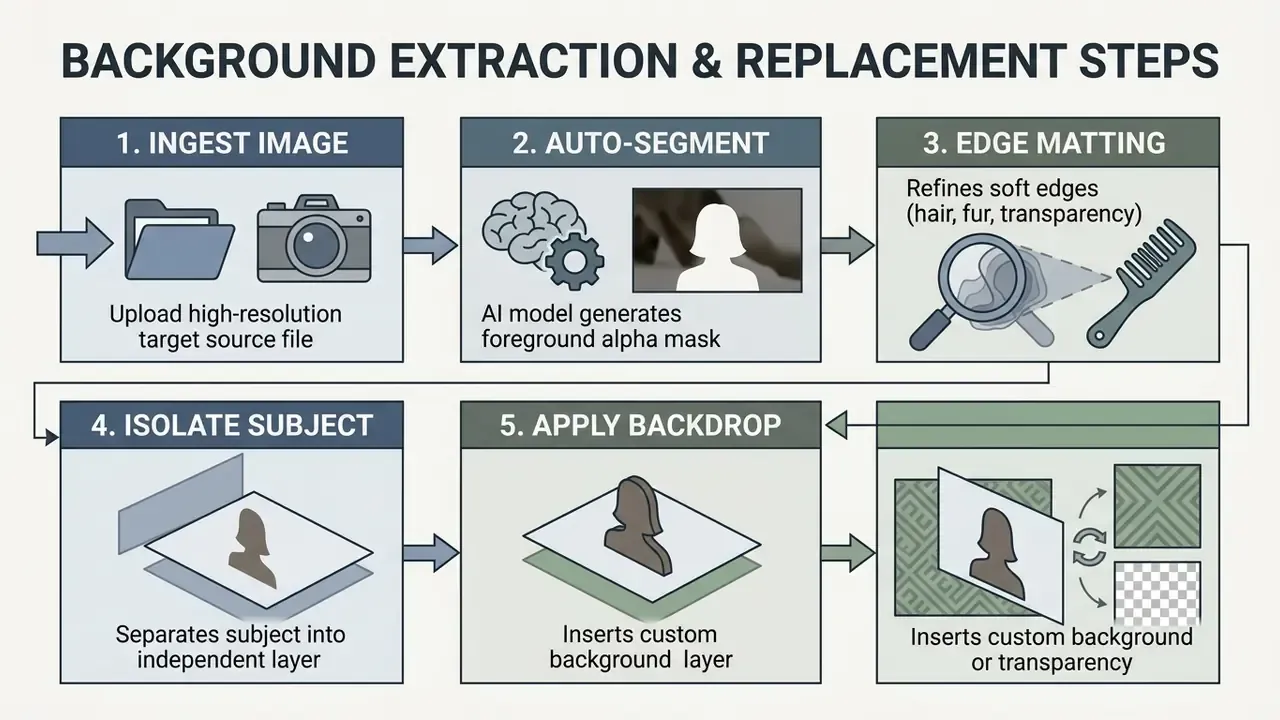
Automated background extraction separates foreground subjects from their surroundings using neural segmentation and alpha matting.
The remove background function calculates pixel probability maps, distinguishing complex edge boundaries such as hair, clothing fibres and transparent glass. The technical distinction matters: segmentation assigns a binary label per pixel, whereas matting estimates a continuous alpha value in the interval ([0,1]), which is what makes soft edges, smoke and semi-transparent fabric look believable (Image Matting Academic Survey, 2023).
«GIE-Bench evaluates preservation of non-target regions during background replacement across more than 1,000 examples in 20 content categories, using SAM- and DINO-based masks.»
That "non-target preservation" metric is the one to watch commercially. A background swap that silently alters product colour or crops a logo is a compliance problem, not a quality problem. Once the subject is isolated, the original background is replaced with solid colours, custom brand backdrops or a transparent PNG canvas suitable for e-commerce catalogues. When the new scene needs to be larger than the original frame, the natural next step is outpainting, compared in our review of AI outpainting tools.
Remove object, replace objects and photo cleanup
Generative inpainting erases unwanted elements, watermarks, text overlays and skin blemishes without leaving visible seams.
To remove object instances, the user paints a mask over the target boundaries. The AI engine analyses surrounding pixel textures, lighting vectors and structural patterns to fill the masked zone contextually (Adobe Firefly Generative Remove documentation, 2026). Advanced implementations let users replace erased items with newly generated objects guided by natural-language prompts (Cleanup.pictures technology overview, 2025).
«BenchHard contains 100 images with large masks, repeating patterns and complex shadows, precisely the scenarios where typical object-removal tools fail.»
Read that as a practical test protocol. Before rolling a removal tool into production, run it against your own hard cases: tiled floors, repeating shelf patterns, cast shadows and reflections. Tools that pass easy portraits often reconstruct patterned surfaces incorrectly, and customers notice it even at thumbnail size.
AI enhance, super sharp and super scale for image quality
Deep-learning restoration reconstructs fine detail, suppresses compression noise and scales image dimensions by factors typically ranging from 2× to 16×.
The enhance workflow uses super-resolution networks trained on millions of high-resolution image pairs.
«NTIRE 2026 evaluates ×4 super-resolution models on the DIV2K and LSDIR datasets, measuring detail-restoration accuracy through PSNR and SSIM.»
These models perform super-scale operations, increasing pixel density while preserving edge sharpness, colour fidelity and structural texture. For a side-by-side view of dedicated products, see our comparison of AI image upscalers. Specialised neural modules additionally colorize historical black-and-white photography and clear severe JPEG compression artefacts (Nero AI technology report, 2026), with adjacent options catalogued among AI image enhancers.
Efficiency research explains a visible product trade-off: browser-side upscaling must fit a constrained compute envelope, so vendors either cap output resolution or route the job to a cloud GPU. When a free tier limits super-scale to roughly 25 MPx, that limit reflects compute and canvas-texture constraints, not an arbitrary paywall. Academic surveys treat super-resolution, denoising, inpainting and enhancement as four distinct restoration tasks (Systematic Survey of Deep Learning-Based Image Restoration, 2024), whereas products bundle them behind a single "Enhance" button. Which is exactly why results vary so widely on mixed inputs.
Generative expand, layer extraction, liquify and creative distortion
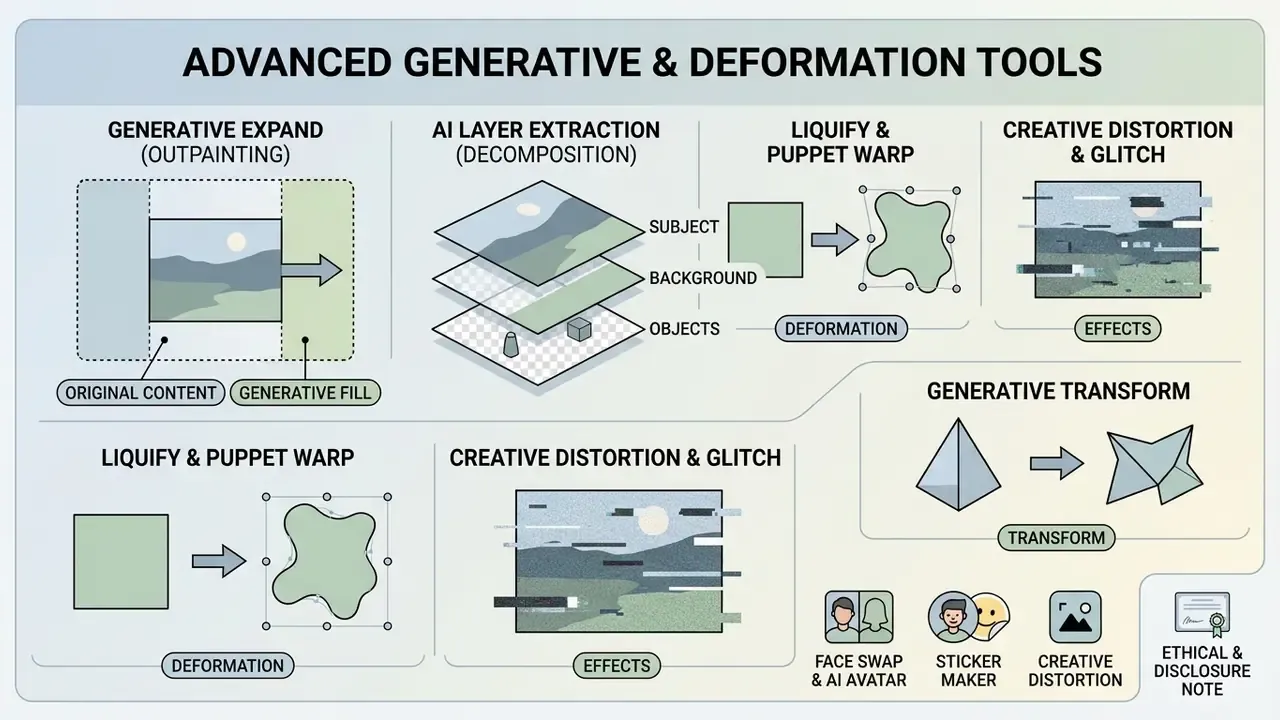
Beyond the three headline functions, browser editors now expose a second tier of generative and deformation tools that previously required desktop plug-ins.
Generative expand (outpainting). The model paints beyond the original frame, generating a seamless continuation of the environment with diffusion-based synthesis. It is the standard fix for converting a 4:5 portrait into a 16:9 banner, or a 9:16 story, without cropping the subject. Adobe's Firefly feature set documents generative expand alongside generative remove and generative upscale (Adobe Firefly features, 2026).
AI layer extraction (decomposition). A static flattened image is automatically decomposed into up to four independent layers (background, subject, text and effects), so a finished creative can be re-laid-out, re-translated or re-branded without rebuilding it. Processing typically runs longer than other AI actions, a few minutes, and consumes a larger credit allocation.
Generative transform. The tool separates an object from the scene, then lets you move, rotate or resize it freely while the model reconstructs the vacated background behind it, effectively combining segmentation, transformation and inpainting in one action.
Liquify and puppet warp. Point-based reshaping of forms, body proportions and product silhouettes, with skin texture and background structure preserved. Puppet warp pins mesh points so limbs, cables or packaging can be repositioned without global distortion.
Face swap and AI avatar. Identity transfer between a source face and a target image, used for avatars, profile photography and stylised concepts. Quality depends on both faces being clearly visible and similarly lit. For dedicated portrait workflows, see our guide to AI headshot generators.
Sticker maker. Prompt-driven generation of high-quality stickers with configurable width, height, quantity, outline and shadow, useful for messaging assets and campaign kits.
Creative distortion and glitch. Dispersion explodes a painted region into thousands of particles; glitch presets deliver RGB split, scanlines, interference, slicing and fringe; reflect, wave, fisheye, kaleidoscope and polar-coordinate filters bend geometry; colorize applies single, duo or tri-tone treatments; backdrop adds blur, motion or depth behind the subject; remove noise strips grain from high-ISO frames.
Ethical and disclosure note. Face swap, generative expand and object removal alter the evidentiary meaning of a photograph. Regulated advertisers should log which assets were AI-modified and retain the untouched original for audit. If the same campaign kit also includes generated audio, for example an ai rap song hook or an ai rapper voice track, apply the same disclosure log to those files rather than treating audio as a separate exception.
Layers, PSD and RAW: advanced browser photo editor capabilities
Professional graphic production demands multi-layer composition, non-destructive masks and compatibility with industry-standard file formats. Advanced web editors now maintain complex document trees directly inside the browser.
Using a free layer photo editor gives creative teams control over object hierarchy, adjustment stacking, vector paths and blend modes without a local installation.
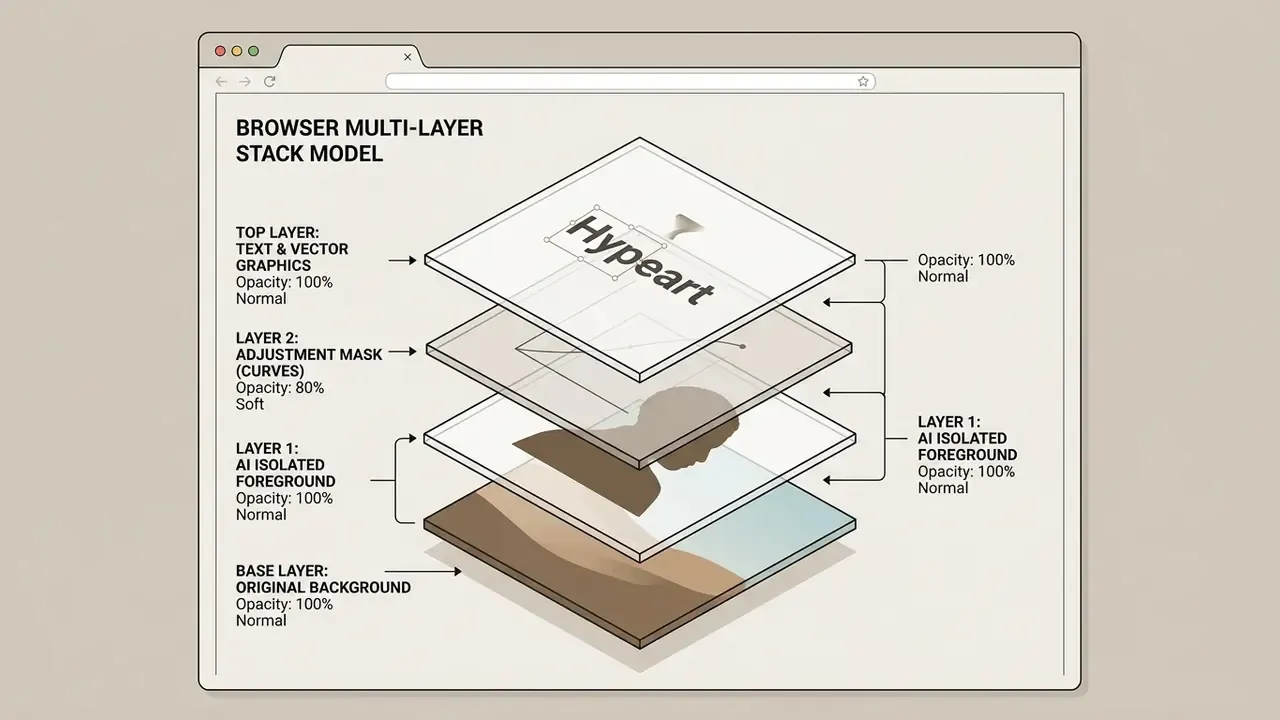
Diagram description (text alternative): four stacked layers, bottom to top, are the original background at 100% normal, an AI-isolated foreground at 100% normal, a curves adjustment mask at 80% soft light, and a text and vector layer at 100% normal.
Working with layers in a free online photo editor
A dedicated layer panel enables non-destructive editing and precise element positioning.
A robust free online photo editor layers system supports stacking-order reorganisation, opacity control, group folders and clipping masks (Photopea layer management manual, 2026). Blend modes such as Multiply, Screen, Overlay, Soft Light, Colour Dodge and Luminosity combine colour and light between overlapping raster assets. Masking hides or reveals localised regions without deleting underlying pixels. A group can be composited to an offscreen buffer first and then blended as a single image, which is the same model the W3C compositing specification defines for SVG groups and opacity. Non-normal blending creates a new stacking context, which is why a mis-ordered layer can silently change the appearance of everything beneath it.
PSD, RAW, vector graphics and full format support
Advanced web engines import, edit and export native Photoshop PSD files, camera RAW sensor formats and scalable SVG vector graphics.
Full PSD support keeps layer structures, text styles, smart objects and vector paths intact through browser import and export cycles (Photopea feature specification, 2026). One practical caveat carries over from the desktop world: layer fidelity in a PSD depends on the file being written with "Maximize PSD and PSB File Compatibility" enabled, and 32-bit-per-channel documents require TIFF or PSB rather than PSD (Adobe Help Center, 2026). Browser RAW decoders parse camera formats into editable RGB colour spaces in memory. RAW handling in web pipelines is typically read-only, decoded into a standard working format, and resource-intensive enough that some services disable it by default. Native SVG path editing scales shapes infinitely without pixelation (W3C SVG 2 Specification, https://www.w3.org/TR/SVG2/), and browsers render SVG natively via inline markup, an image element, an object element or an iframe (MDN Web Docs, 2026).
Supported file formats in a modern browser editor
| Category | Formats |
|---|---|
| Raster and web | JPEG/JPG, PNG, WEBP, GIF, AVIF, HEIC, BMP, TIFF, TGA, DDS |
| Project and vector | PSD, PSB, PXZ, AI, SVG, PDF, EPS, CDR, PDN, INDD, Figma |
| Camera RAW | DNG, CR2, CR3, NEF, ARW, RW2, RAF, ORF, FFF |
| Motion (frame extraction) | MP4 |
| Export targets | PNG, JPEG, WEBP, PDF, SVG, GIF, TIFF, PSD, PXZ |
Free online photo editor: what you get without paying, and what commercial work requires
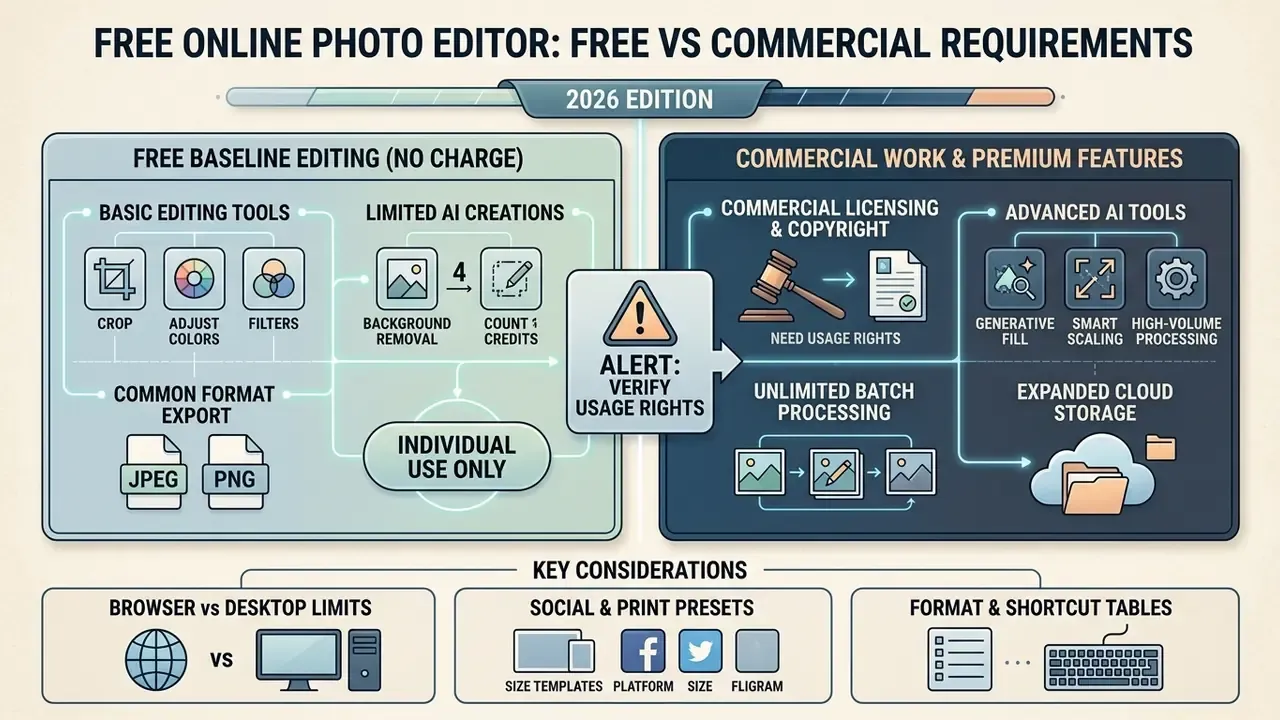
Free web photo editors run on freemium models: baseline editing at no charge, with advanced AI credits, cloud storage and high-volume batch processing reserved for premium tiers.
Evaluating a free photo editor for commercial projects means assessing functional limits, export-resolution caps, watermark policy and asset licensing (Pixlr pricing terms, 2026). Our dedicated overview of free photo editors breaks down where each limit typically bites.
| Capability | Free tier availability | Premium / paid tier availability | Commercial workflow impact |
|---|---|---|---|
| Basic editing | Unlimited access (crop, resize, adjustments) | Unlimited access plus batch processing | Ideal for daily web graphics creation |
| AI generation | Limited daily credits or trial allocations | High or unlimited credit quotas | Premium required for high-volume AI tasks |
| Export quality | Standard web resolutions (JPEG, PNG) | Full native resolution plus uncompressed PDF | Premium necessary for large-format print |
| Layer support | Full or partial layer stack access | Unlimited layer stacks plus smart objects | Essential for complex graphic composition |
| Batch editing | Usually unavailable or capped | 50 to 100 images per run | Decisive for e-commerce catalogues |
| Ads and watermarks | Ads common; watermarks vary by vendor | Ad-free, watermark-free | Watermarks block client deliverables |
| Storage and versioning | Browser cache only (temporary) | Cloud storage, brand kits, team seats | Required for auditable asset history |
| Commercial licence | Allowed for your own original assets | Extended licensing for stock and templates | Terms must be verified per asset source |
Regulatory context matters as much as feature parity when a tool is adopted at company scale:
«The EU AI Act obliges providers to disclose summaries of training data and to respect the text-and-data-mining opt-out mechanism under the DSM Directive.»
For a procurement team, that translates into two contract questions. Can the vendor produce a training-data summary, and does it honour opt-out signals for scraped material? Both determine whether generated assets carry downstream provenance risk.
Basic editing tools and export in a free photo editor
Free tiers generally include complete access to essential manual tools, standard export formats and basic canvas manipulation.
Without payment, and in several products without registration, users can perform unlimited cropping, resizing, colour grading, exposure balancing, text insertion and basic filter application (Photopea terms of use, 2026). Export to JPEG, PNG, WEBP, PDF, SVG and GIF at standard web resolutions is supported, and PSD open and save is available in the free editor of at least one major browser tool. Some platforms impose minor daily export limits or display short video advertisements before rendering finalised files. Remember that project history stored only in browser cache is deleted when the cache is cleared, so long-term projects must be downloaded as a project file, for example .PXZ or .PSD.
What to verify before using designs and images in business
Using web-generated graphics for commercial advertising, product packaging or client deliverables requires verifying intellectual-property rights and asset licensing.
ALERT: commercial licensing and copyright compliance.
According to the U.S. Copyright Office (2026), purely AI-generated visual output lacking human creative authorship cannot be registered for copyright protection. Mere prompting does not by itself create copyright, while human-authored selection, arrangement or modification can qualify. AI-generated material must be identified and disclaimed in a registration. When using template libraries, stock photography or AI elements in commercial projects, confirm that asset terms explicitly permit commercial distribution and that human creative input is documented (U.S. Copyright Office AI Guidance, 2026, https://www.copyright.gov/ai/).
Before deploying assets commercially, creative directors should verify whether stock components fall under permissive licences such as Creative Commons CC BY 4.0, which allows commercial reuse with attribution, a licence link and a change notice, or under non-commercial restrictions such as CC BY-NC 4.0, which requires separate permission for any use primarily intended for commercial advantage (Creative Commons licence framework, 2025).
«Authorship of AI content depends on the specific circumstances and may belong to the tool developer, to the user, or to no one.»
Jurisdiction therefore changes the answer, which is why multinational campaigns should not assume a single ownership rule. Also review whether platform terms grant full ownership of rendered export files or retain sub-licensing rights over user-uploaded content, and whether the vendor offers contractual indemnification, meaning a commitment to cover defence costs and damages if a generated output triggers a third-party copyright claim. Indemnity is normally limited to enterprise tiers, excludes outputs produced from user-supplied reference images, and requires that platform safety filters were not bypassed. Free tiers almost never include it. Teams comparing generation platforms on exactly these terms can start with our overview of AI image generators for commercial use.
For regulated advertisers, three internal controls reduce exposure: keep prompt logs and source files for every published asset, record the human editing steps that establish authorship, and route any campaign asset containing a recognisable person, brand or trademark through legal review before release. Litigation case studies relevant to generative copyright are tracked in our AI Litigation and Case Timelines.
Limitations and open questions
Two things in this guide remain unresolved, and it is more useful to say so than to smooth it over. First, independent benchmarking of browser versus desktop performance on identical hardware is scarce, so most capability claims trace back to vendor documentation. Second, retention and training-opt-out practices differ by plan and by region, and they change without announcement, so a checklist answer captured in January may not hold in June. Re-verify at renewal, not once at onboarding.
FAQ and troubleshooting for a free online photo editor
Are temporary projects saved, and how private and secure is browser editing?
Modern browser editors process images either through client-side WebAssembly execution or in temporary cloud sessions. When processing occurs locally within the browser sandbox, image data never leaves device memory (NIST SP 800-63B, 2024). For cloud-assisted edits such as AI background removal, files are transmitted over encrypted HTTPS to processing endpoints. Temporary projects held in local browser cache (IndexedDB) remain available until the cache is cleared or a cleaning routine runs. Clear the cache, and unsaved documents are gone. Users handling confidential enterprise assets should select editors offering documented local-processing guarantees, and download long-term work as a project file.
«Imago Obscura demonstrates that image privacy depends not only on retention policy but on content analysis: faces, licence plates and medical data.» Imago Obscura AI Privacy Co-pilot (2025). The governance implication is that "we do not store your files" is a necessary but insufficient assurance. A screenshot containing account numbers becomes a data-classification issue the moment it is uploaded, regardless of retention. Pair vendor controls with content rules: no customer PII, no unredacted documents, no medical imagery in general-purpose editors. Technical help is available through our AI Media Support and Troubleshooting portal.
Does a free browser photo editor work across devices?
Yes. Web photo editors run on all major desktop and mobile operating systems, including Windows, macOS, Linux, ChromeOS, iOS and Android, provided a modern HTML5-compliant browser is installed (Chrome and Edge browser specifications, 2026). Desktop environments offer the best performance and full keyboard-shortcut support (Ctrl+Z undo, V move, L lasso, Space pan). Touch-based mobile browsers handle basic edits and AI background removal well, but complex multi-layer composition remains better suited to desktop displays, and official vendor documentation for mobile shortcut parity is inconsistent.
Why did my upscaled image come out blurry or plastic?
Three causes dominate. First, upscaling a heavily compressed JPEG amplifies existing artefacts, so run denoise or artefact removal before super scale. Second, exceeding the model's practical ceiling, around 25 MPx for many browser upscalers, forces internal downscaling and softens detail. Third, stacking sharpen after an already-sharpened AI enhance produces halos and a waxy texture, so apply one sharpening pass, not two.
Why did my transparent background turn white?
The export format was JPEG, which has no alpha channel. Re-export as PNG or WEBP. In PDF output, choose a compatibility level above PDF 1.3, since older levels flatten live transparency.
Why did my browser tab reload and lose my work?
The document exceeded the per-tab memory heap, commonly 2 to 4 GB depending on operating system and browser build. Reduce canvas dimensions, flatten completed layer groups, close other tabs, and save project files incrementally rather than relying on cache-based history.
Can I edit multiple photos at once?
Yes, on plans that expose batch mode. Paid tiers of major editors process 50 to 100 images per run, applying identical crops, colour profiles, watermarks and format conversions. Free tiers usually restrict batch operations or exhaust AI credits partway through a large set.
Is a free online photo editor enough for a business?
For one-off social assets, thumbnails and internal documents, yes. For high-volume production the constraints are throughput, watermark-free export at native resolution, batch capacity, auditable version history and licence clarity. Those are the reasons teams move to a paid tier or a hybrid desktop workflow.
Can I edit AI-generated images in a browser editor?
Yes. Generated images are ordinary raster files, so they can be cropped, colour-graded, retouched, upscaled and composited with brand elements. Documenting these human edits is also what strengthens an authorship claim under current U.S. Copyright Office guidance.
What is a safe next step for a governance team?
Pick one team, one editor and one use case. Write down which operations stay local, which call an endpoint, and what data is forbidden. Run it for a month, keep the evidence, then decide whether to standardise. Small pilot, documented trail, no heroics. AI Media Glossary · Photo editors · Free photo editors · AI photo editors · Commercial-use hub · Calculators · Comparisons · API guides · Pricing guides · Support