Executive Summary
- An ai reel generator converts text prompts, scripts, product URLs, still photographs, and raw footage into 9:16 vertical videos (1080 × 1920, H.264/AAC, 30 FPS) formatted for Instagram Reels, TikTok, and YouTube Shorts.
- Copyright protection in the United States attaches only to human-authored expressive contributions. Purely prompt-generated output is not registrable.
- Synthetic media disclosure obligations apply under the EU AI Act, IAB frameworks, and several U.S. state advisories. Assume labeling is needed for paid distribution until counsel says otherwise.
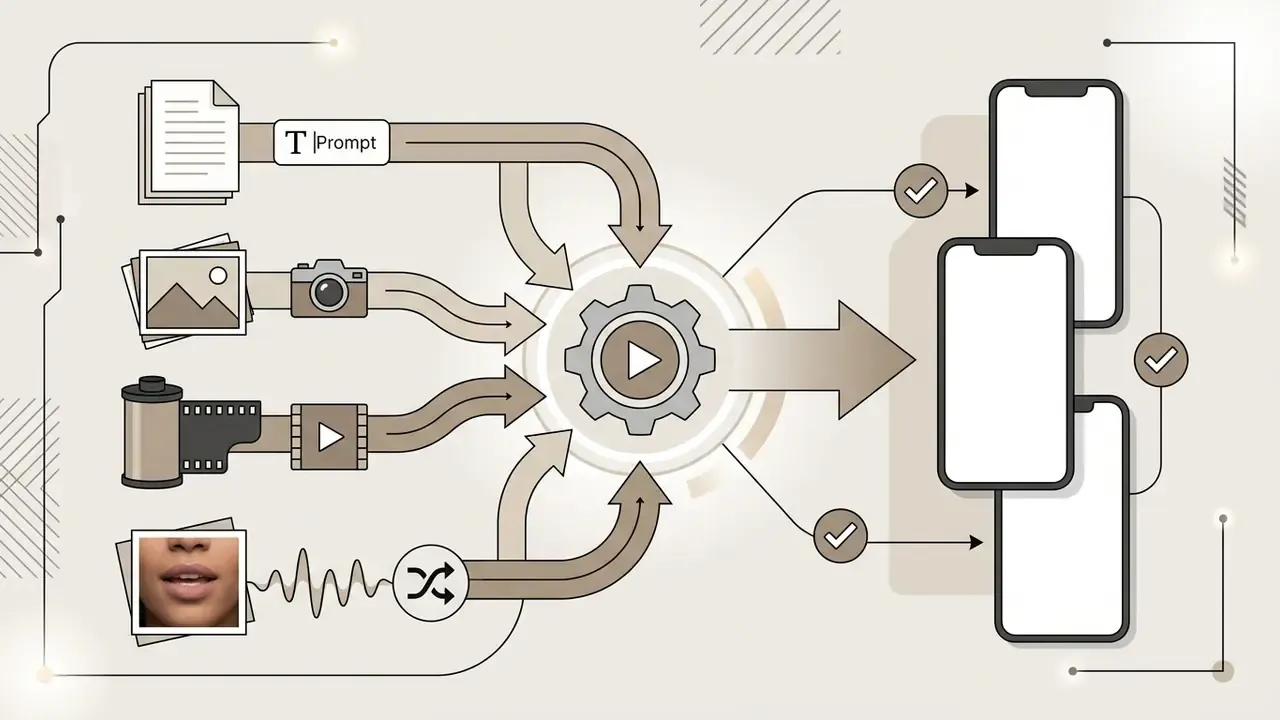
An ai reel generator is an automated video production system that uses multimodal artificial intelligence models to convert text prompts, scripts, static images, product photographs, and raw video clips into 9:16 vertical short-form videos optimized for Instagram Reels, TikTok, and YouTube Shorts. These platforms lean on neural networks to orchestrate scene composition, script timing, kinetic text overlays, synthetic voiceovers, and background audio synchronization inside a single web interface or API pipeline.

What Is an AI Reel Generator and What Kinds of Reels It Produces
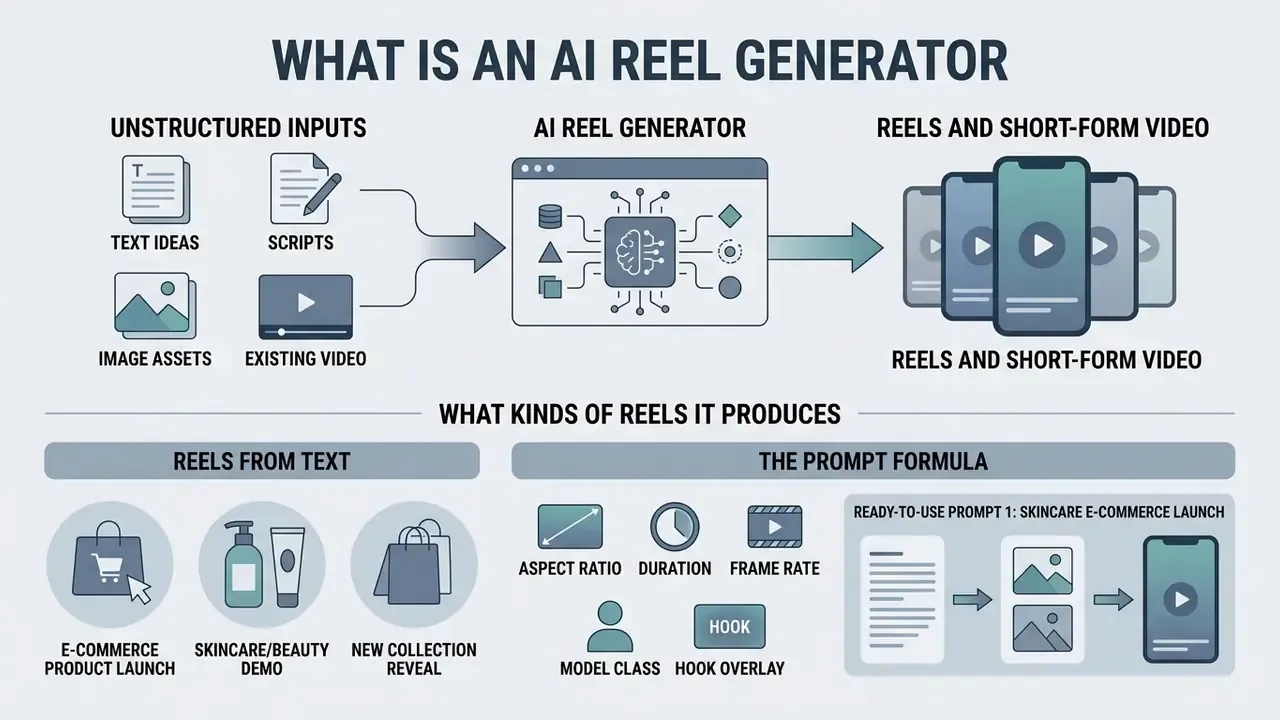
An ai reel generator is a software solution designed to synthesize vertical short-form video content from unstructured text inputs, image assets, or existing video media. By leaning on foundation models trained on spatiotemporal visual data, an ai generator reels tool automates asset assembly and produces platform-compliant 1080 × 1920 pixel videos for instagram reels, TikTok, and YouTube Shorts. Readers new to the underlying technology can start with our primer on AI video generators, which covers generation methods, credit models, and pricing structures.
Recent industry work shows that modern synthetic video architectures go well beyond template rendering. According to research on multimodal ad generation frameworks such as VC-LLM and Text-to-Edit, current ai video engines evaluate narrative flow, script alignment, and visual transition logic at the same time. Evaluations of these systems report output approaching human editing standards on narrative coherence:
«VC-LLM systems automatically produce short advertising videos from raw source material, with quality comparable to human editors on narrative coherence and overall quality.»
Reels from Text, Ideas, and Scripts
Text-to-reel generation converts raw prompts, bulleted ideas, or structured scripts into complete multi-scene sequences. The engine parses the prompt into discrete scenes, generates visual assets through diffusion or transformer models, applies a synthesized voiceover, and overlays kinetic captions timed to the speech rhythm. Teams comparing engines by input type can review our reference on text-to-video AI tools.
Effective text-driven generation depends on structured prompt engineering. Industry documentation, including Adobe Firefly and Amazon Nova Reel, specifies that strong prompts carry explicit detail on camera shot type, character action, environmental lighting, and visual aesthetic:
«Optimal prompts include explicit shot type, character action, lighting, and visual aesthetic to achieve the best generation result.»
To capture attention inside the first three seconds, scripts use concise hook lines of no more than 12 words, which double as high-contrast on-screen text on the opening frame. Amazon Nova Reel documentation also recommends caption-style phrasing, avoidance of negation words, and prompt lengths within a 512-character ceiling for standard clips.
The Prompt Formula
[Shot type / camera] + [Primary subject] + [Motion or action] + [Lighting and style] + [Technical parameters]
Ready-to-Use Prompt 1: E-Commerce Product Launch (Skincare / Beauty)
Prompt: "Vertical 9:16 Instagram Reel. Premium facial serum launch. Macro opening on the bottle, then a slow 360-degree camera orbit as natural window light refracts through the glass. Finish on a clean hero frame of the product, no text, no logos. Commercial cinematography, realistic liquid physics."
Recommended technical parameters
- Aspect ratio 9:16 (1080 × 1920)
- Duration 5 seconds, which is the practical sweet spot for retention testing
- Frame rate 30 FPS
- Model class diffusion transformer (Seedance-class, Sora-class, Veo-class)
- Hook overlay 8 words or fewer ("The glow secret dermatologists recommend")
Ready-to-Use Prompt 2: Faceless Educational Reel (Finance / B2B)
Prompt: "Vertical 9:16 reel, 4 scenes, 12 seconds total. Scene 1: overhead shot of a desk with notebook and coffee, soft morning light. Scene 2: close-up of a rising line chart on a tablet. Scene 3: slow push-in on a city skyline at dawn. Scene 4: clean neutral background reserved for kinetic text. Documentary style, muted color grade, no on-screen people, no text."
Recommended technical parameters
- Aspect ratio 9:16 · 30 FPS · 3-second scenes
- Voiceover neural TTS, 145 to 155 words per minute
- Caption style burned-in, high contrast, 42 to 48 px equivalent, inside the 9:16 safe zone
- Hook overlay 12 words or fewer ("Three numbers that decide your Q4 margin")
Ready-to-Use Prompt 3: UGC-Style Testimonial Ad (App / SaaS)
Prompt: "Vertical 9:16 handheld selfie-style reel, 8 seconds. A person speaking to camera in a bright apartment, natural window light, slight camera shake, phone-camera realism, shallow depth of field. Neutral wall behind the subject for caption placement. No brand marks, no text overlays."
Recommended technical parameters
- Aspect ratio: 9:16 (1080 × 1920) · 30 FPS · 8 to 15 seconds
- Lip sync: script-to-motion with automatic phoneme alignment
- Mandatory compliance layer: visible "AI-generated" label plus C2PA metadata before paid distribution
- Hook overlay: 10 words or fewer, tested in three variants
AI-Generated Videos from Photos, Images, and Footage
Image-to-video and footage-to-reel workflows turn static product photos, brand graphics, or long recordings into dynamic vertical clips. The generator uses spatiotemporal mask modules and frame-interpolation algorithms to estimate motion paths from stills, or to trim extended recordings into high-engagement highlights. A deeper technical breakdown of animation control and usage rights sits in our guide to image-to-video AI tools and our overview of animation makers. Consumer-grade ai animation tools for instagram reels, including stylization apps such as voila ai artist, sit at the light end of the same spectrum and are worth knowing about mainly so you can spot them in an audit.
When processing uploaded media, algorithms preserve primary subject detail while synthesizing camera motion: pans, zooms, or subtle parallax. For institutions evaluating model architectures, insights into what is sora show how diffusion transformers manage motion continuity across sequential frames. Training corpora for automated advertising edits are now published at scale:
«The DramaAD dataset contains 800+ short-drama episodes and 500+ professionally edited advertising clips at 720p to 1080p for training automatic editing models.»
Input quality dictates output quality. No exceptions. Reference images should be artifact-free and match the target output resolution; documented vendor constraints include JPEG, PNG, and WebP still inputs, plus 2 to 4 second, 720p to 1080p, 16:9 or 9:16 video references for video-conditioned generation.
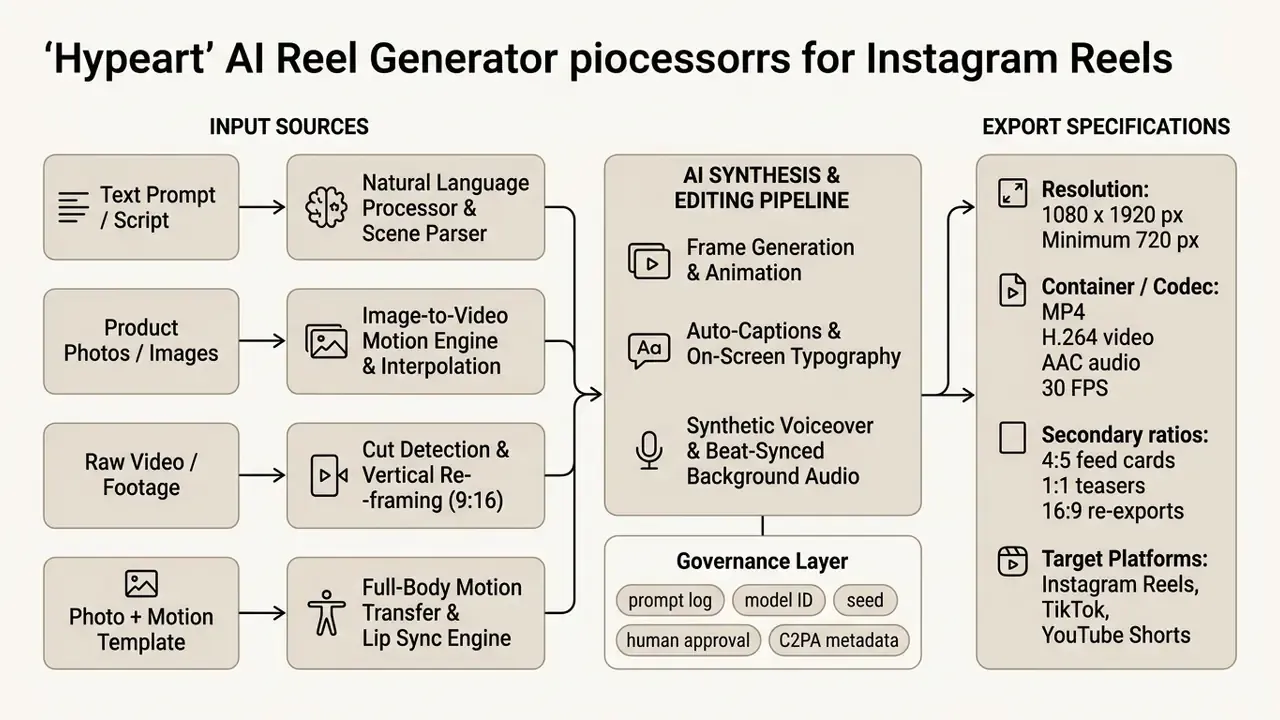
Schema: the data pipeline from raw input sources (prompts, photographs, video clips, motion templates) through the generative AI editing engine and governance layer to the platform-optimized vertical MP4 export.
Trend Reels, Dances, Memes, Lip Sync, and Faceless Motion
One class of reel generation does not synthesize scenes from language at all. It animates an existing character image with a pre-captured motion sequence. Physics-aware motion-transfer models take a single photograph, avatar, illustration, or brand mascot with a visible body and generate original full-body animation: dance choreography, meme recreations, sports gestures, or walking and gesturing performance. Libraries of several thousand motion templates (trending dances, viral clips, choreography sets) let a single still image drop into a movement while that trend is still alive.
Script-to-motion with lip sync extends the same idea to speech. The operator types or records a script, and the animated character delivers it with phoneme-accurate mouth movement and expressive body motion. That removes the on-camera requirement entirely, which is the core mechanic behind faceless commentary, product reviews, and character-driven micro-series. Real-time variants mirror a webcam feed onto the avatar for live streaming through OBS-style or Streamlabs-style pipelines.
Practical guardrails for this category:
- Animating a photograph of a real identifiable person without documented consent creates rights-of-publicity and digital-replica exposure. Use owned talent releases, licensed avatars, or fully synthetic characters.
- Reusing the same character image across a series builds visual recognizability, which is why consistency of the source photo matters more than template variety.
- Trending audio and choreography carry separate music licensing questions. Commercial accounts should rely on cleared or royalty-free audio rather than trend audio pulled from consumer libraries.
Commercial Use, Rights, Governance, and Audit Evidence for AI-Generated Reels
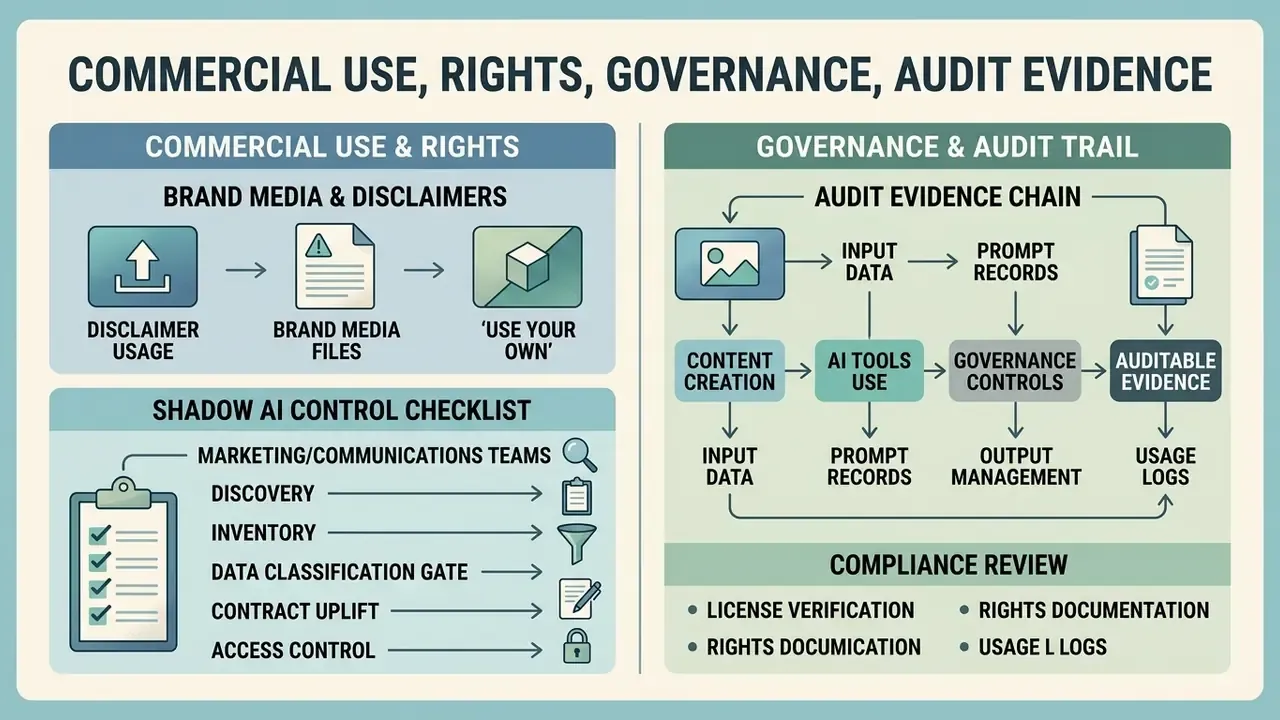
Deploying ai generated videos for instagram inside commercial marketing campaigns requires careful adherence to intellectual property rules, data privacy standards, and platform-specific advertising disclosures. Unintended liability appears fast when synthetic media absorbs unauthorized copyrighted works or digital likenesses.
In the United States, the legal framework for generative media centers on human authorship and data fair use. The U.S. Copyright Office states plainly that purely AI-generated output lacking sufficient human creative input cannot be registered:
The same guidance requires applicants to disclose and disclaim AI-generated material during registration, and separately addresses unauthorized lifelike digital replicas, where distributing a living person's likeness can trigger rights-of-publicity and privacy claims. In the European Union, Article 53 of the AI Act adds obligations for general-purpose model providers: respect for rightsholder text-and-data-mining opt-outs, plus publication of a sufficiently detailed training-data summary.
Using Your Own Brand Media Files
Bringing proprietary product photography, original recordings, custom audio, and official brand assets into an AI reel platform creates a clearer path to ownership. Raw outputs generated purely from text prompts stay unprotectable, yet the creative selection, arrangement, and editing of your own assets supply the human authorship that protection requires.
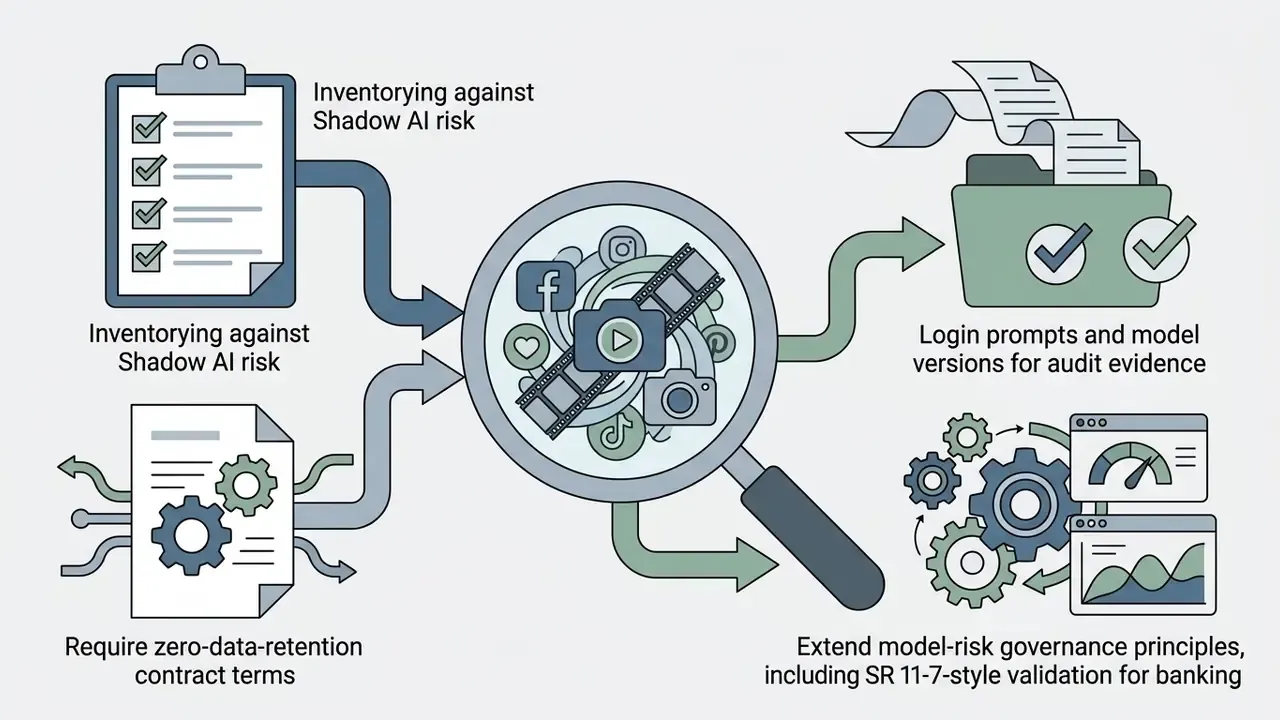
Organizations also need to confirm that input media uploaded to a third-party cloud does not breach existing vendor licensing agreements. Enterprise buyers should verify that providers do not use private customer uploads to train public foundation models without explicit consent. Contractually, that appears as zero data retention and no-training-on-customer-data clauses, ideally paired with SOC 2 Type II attestation, regional processing controls, configurable retention windows, and optional legal hold.
Shadow AI Control Checklist for Marketing and Communications Teams
Unmanaged trials of browser-based reel generators are the most common entry point for Shadow AI in regulated firms. Sign-up is frictionless, and no procurement ticket ever gets created.
- Discovery.Query egress logs, SSO and OAuth grants, and expense reports for video-generation domains and app authorizations; interview social and brand teams about tools used in the last 90 days.
- Inventory.Register every discovered tool in the central AI system inventory with owner, purpose, data categories processed, model provider, and hosting region.
- Data classification gate.Prohibit uploads of customer PII, unreleased financials, internal identifiers, employee likenesses, or confidential roadmaps into consumer-tier accounts.
- Contract uplift.Replace personal free accounts with enterprise agreements covering zero retention, no training, breach notification, subprocessor disclosure, and audit rights.
- Access control.Enforce SSO, role-based permissions, and shared brand-kit workspaces instead of individual logins; disable public share links by default.
- Approved-tool list.Publish a short allow-list with a documented exception path, and add generative video to the acceptable-use policy.
- Training and attestation.Run annual training for content owners covering disclosure duties, likeness rights, and audio licensing, with attestation recorded.
- Monitoring cadence.Re-run discovery quarterly. Treat any new unregistered generator as a policy exception requiring review.
Extending Model Risk Management to Multimodal Generators
Financial institutions already run validation frameworks for quantitative models. Generative video tools should inherit the same discipline in proportionate form: documented purpose and limitations for each tool; identification of the model provider and version in use; conceptual-soundness review of outputs against brand and disclosure requirements; ongoing performance monitoring (defect rate, caption error rate, compliance rejections); a named accountable owner; and independent review before the tool touches regulated or customer-facing communications. Where video output supports advertising claims, review must also cover claim substantiation, not visual polish alone.
One nuance worth stating openly: a reel generator is not a credit model, and treating it like one wastes validation capacity. Proportionality is the whole game. Tier the tool by exposure, not by novelty.
Audit Evidence: Logging, Data Lineage, and Human-in-the-Loop Approval
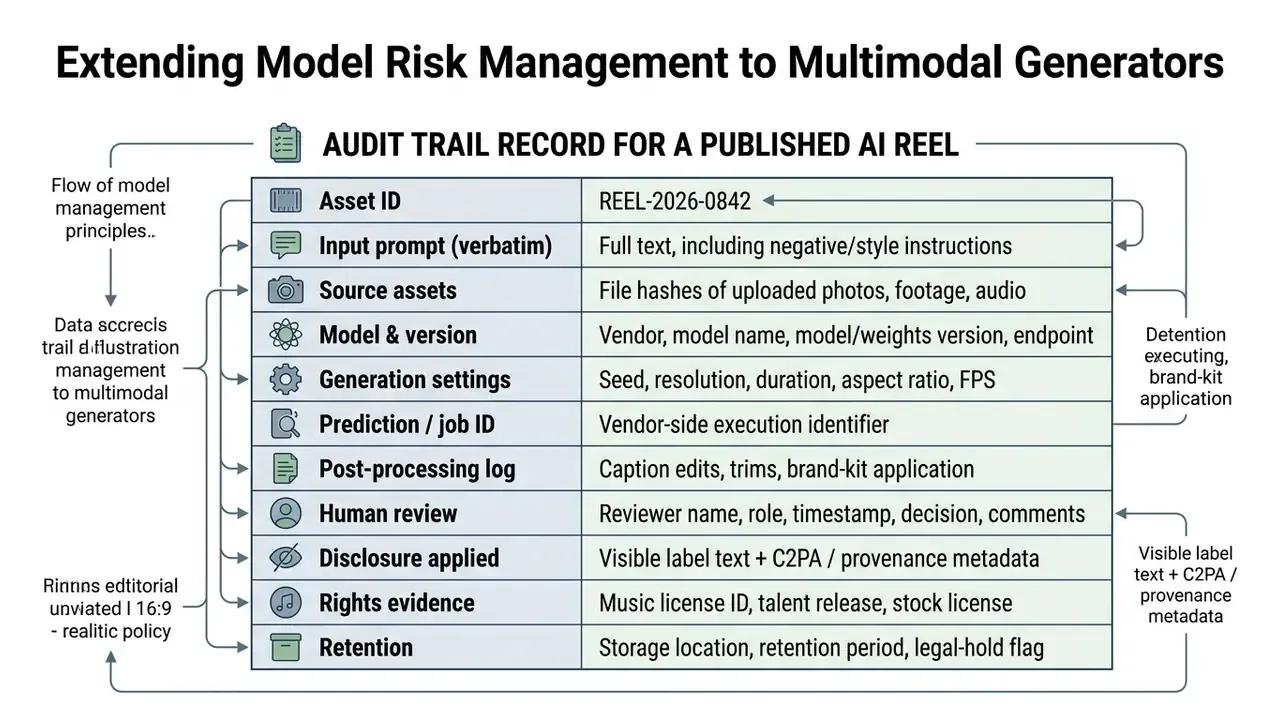
Public-sector AI guidance already converges on this pattern: human validation before publication, clear labeling of AI-generated public content, and documentation of the review and editing process. Provenance standards of the C2PA type (machine-readable metadata) complement consumer-facing labels; they do not replace them.
What to Verify Before Publishing Reels for Ads and UGC Campaigns
Before publishing AI-generated reels as paid targeted ads or user-generated content campaigns, compliance teams should run a formal verification pass. Synthetic media disclosures, rights-of-publicity clearances for digital actors, and metadata transparency standards all need to be satisfied before launch, not after a network flags the creative.
Compliance duties are reinforced internationally by rules such as the EU AI Act, which mandates clear disclosure for synthetic media that mimics real individuals:
«The EU AI Act requires clear disclosure of synthetic media that imitates real individuals when such content is published.»
Adjacent frameworks tighten the operational detail. The EU Code of Practice on Transparency of AI-Generated Content requires disclosure where manipulated image, audio, or video would falsely appear authentic. IAB transparency frameworks extend disclosure duties to text-to-video, image-to-video, and video-to-video generation even after human editing, and recommend machine-readable metadata alongside consumer labels. The Colorado Attorney General's deepfake advisory asks for clear and conspicuous disclosure in both the creative and the metadata, ideally in a form that is permanent or not easily removable. Note as well that U.S. federal law imposes no single universal "AI was used" requirement; platform policy and state law fill the gap, which is why per-channel review remains necessary. For broader legal context, teams can monitor developments in our tracker on AI Litigation and Case Timelines.
Pre-launch verification chain: human authorship contribution documented, source-asset licenses confirmed, music and SFX rights cleared, likeness consent or synthetic-character confirmation on file, factual and claim substantiation review, caption accuracy proofread, visible synthetic-media label applied where required, provenance metadata embedded, platform-specific ad policy check, approval signature logged.
How to Create an Instagram Reel with AI
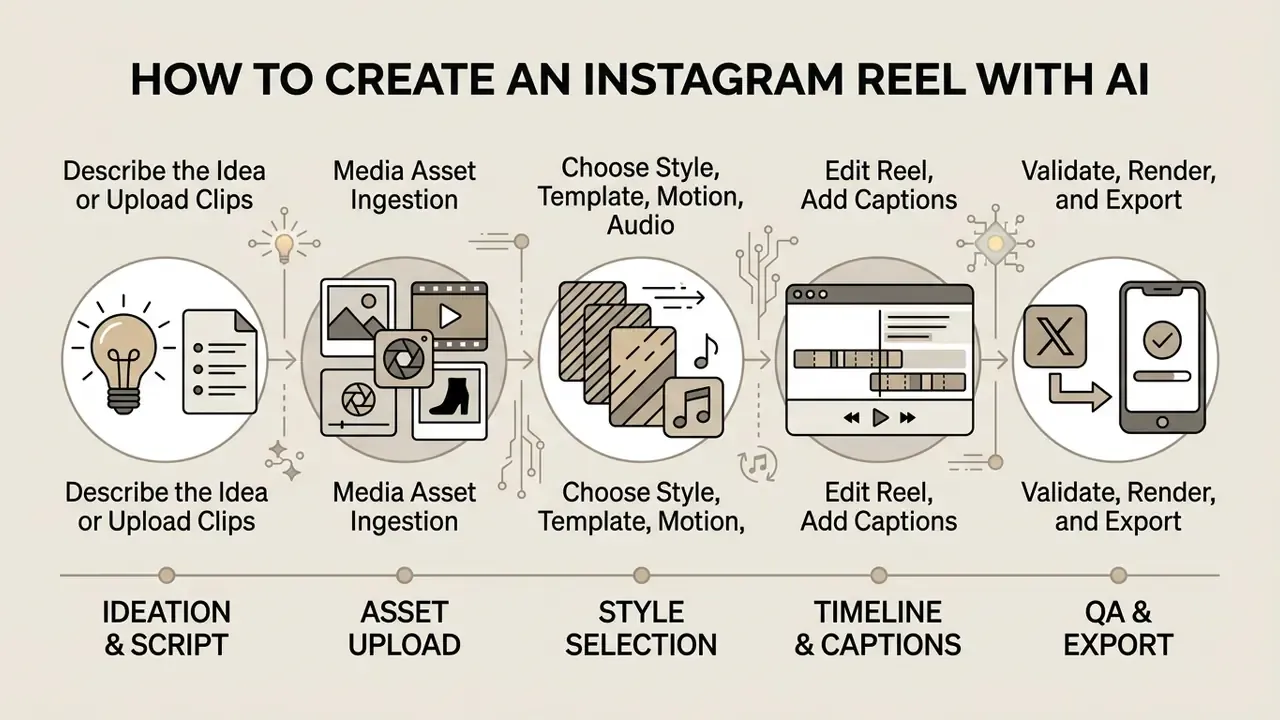
Creating a Reel with an ai app to create instagram reels runs end to end: ideation, asset upload, style selection, automated editing, and platform export. Standardized workflows keep output quality and platform compliance consistent across high-volume publishing schedules.
The process pairs generative synthesis with precise post-processing controls. With an ai create instagram reels pipeline, social media managers cut production timelines from hours to minutes while keeping control over visual branding and messaging. Teams that habitually ai create reels in batches feel the difference most at week three, when the review queue rather than the render queue becomes the bottleneck.
Describe the Idea or Upload Clips and Product Shots
Production starts by defining the creative input inside the ai instagram reel generator tool. Operators either write a detailed prompt outlining the narrative concept, or upload original assets: high-resolution product photography, brand graphics, raw footage.
Uploaded media has to meet baseline technical standards. Stills should match target aspect ratios (9:16 preferred, or high-resolution square) without compression artifacts, and raw clips should be captured at 1080p or better. Clean inputs let the vision models segment objects accurately and apply motion without unnatural noise or distorted weird ai images.
Choose Style, Template, Motion, and Audio
Once inputs are set, operators configure aesthetics inside the ai instagram reel maker interface: visual presets, transition styles, camera motion dynamics, background music, synthetic voiceover profiles.
Styling should track brand guidelines and audience expectations rather than whatever looks fun in the preview. Sound choices must respect commercial usage rights, so platform libraries or royalty-free tracks are safer than trend audio for a brand account. Tone and pacing follow the message: subtle transitions for a professional product showcase, aggressive movement for a high-energy promo. Public style manuals are blunt on two points. Audio and motion should match the message in volume, pace, tone, and rhythm; on-screen text must contrast strongly against the background. Production guides add that background noise should be suppressed, target audio isolated, and supporting effects kept subtle enough not to fight the narration.
Edit the Reel, Add Captions, and Export
The final phase requires scene-by-scene work inside the video editor module, subtitle verification, and platform-optimized rendering. Operators review auto-generated text for accuracy, adjust element timing, balance voiceover levels, and check safe zones so captions never hide behind the native platform interface.
- Idea and script validation. Input the prompt or product URL, set duration (15 to 60 seconds), and review the generated multi-scene storyboard.
- Media asset ingestion. Upload high-resolution brand photography or source footage; verify clarity and framing.
- Style and audio selection. Apply visual templates, choose an AI voiceover profile, select royalty-free background audio, set beat-synchronization parameters.
- Timeline and caption review. Edit auto-generated captions for grammar, adjust font contrast against the background video, verify placement inside 9:16 safe zones (and 4:5 margins if the same project gets re-exported as a feed card).
- Quality assurance and rendering. Export as MP4 (H.264/AAC, 1080 × 1920, 30 FPS) and run a final mobile preview before publishing through Meta Business Suite.
- Publishing. In Meta Business Suite, choose Create reel, add the exported media, confirm title and description, select the share destination, then publish or schedule. Drafts can be saved from the editing screen while approval is pending.
- Governance close-out. Record the audit-trail fields (prompt, model version, seed, reviewer, disclosure) before the asset goes live.
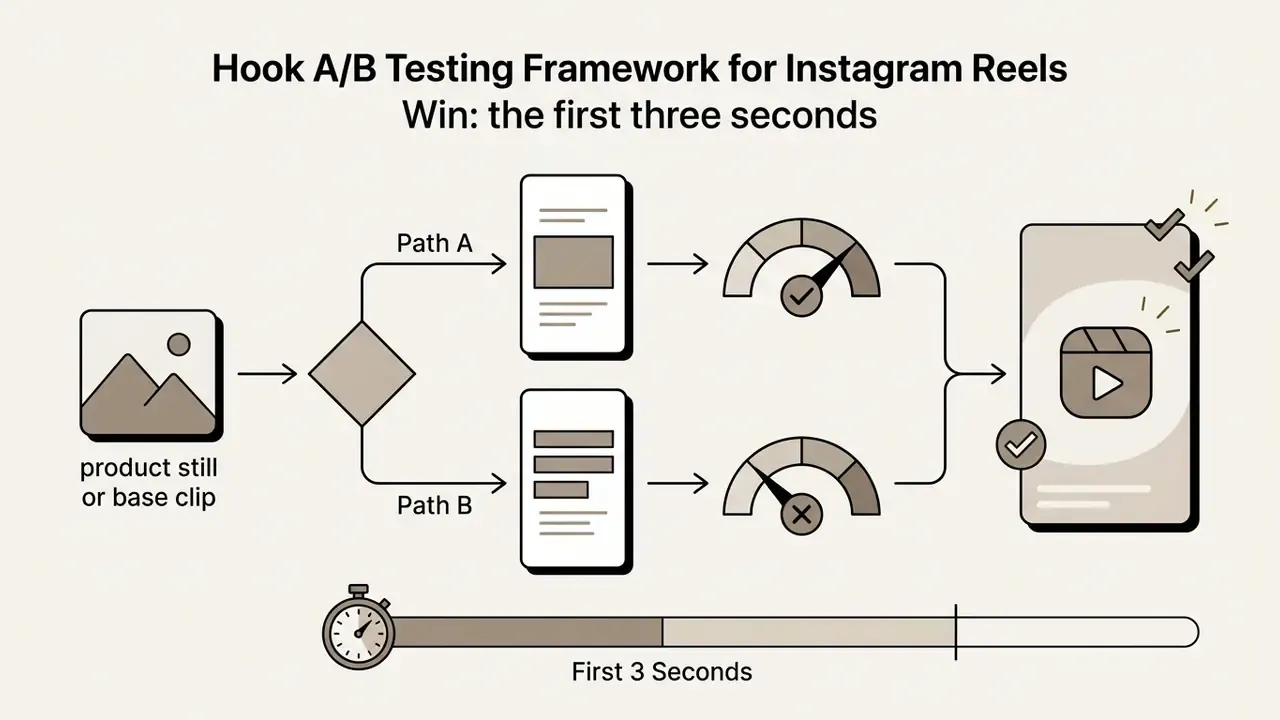
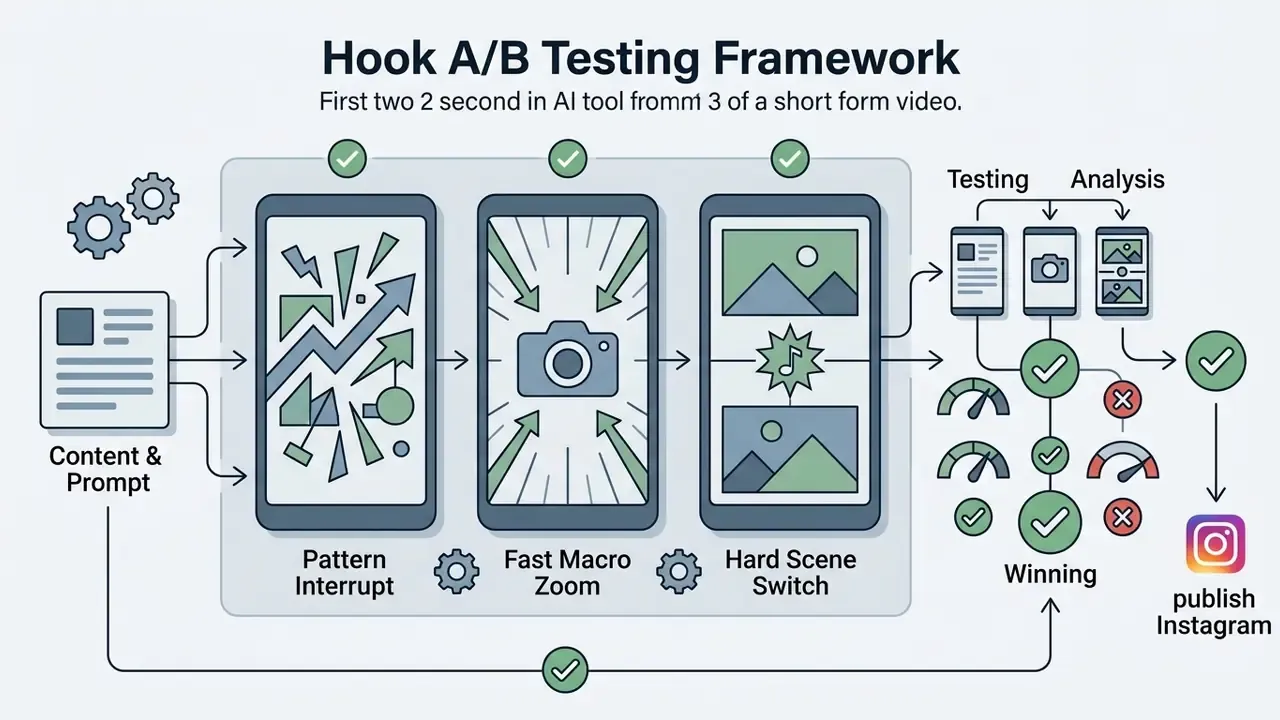
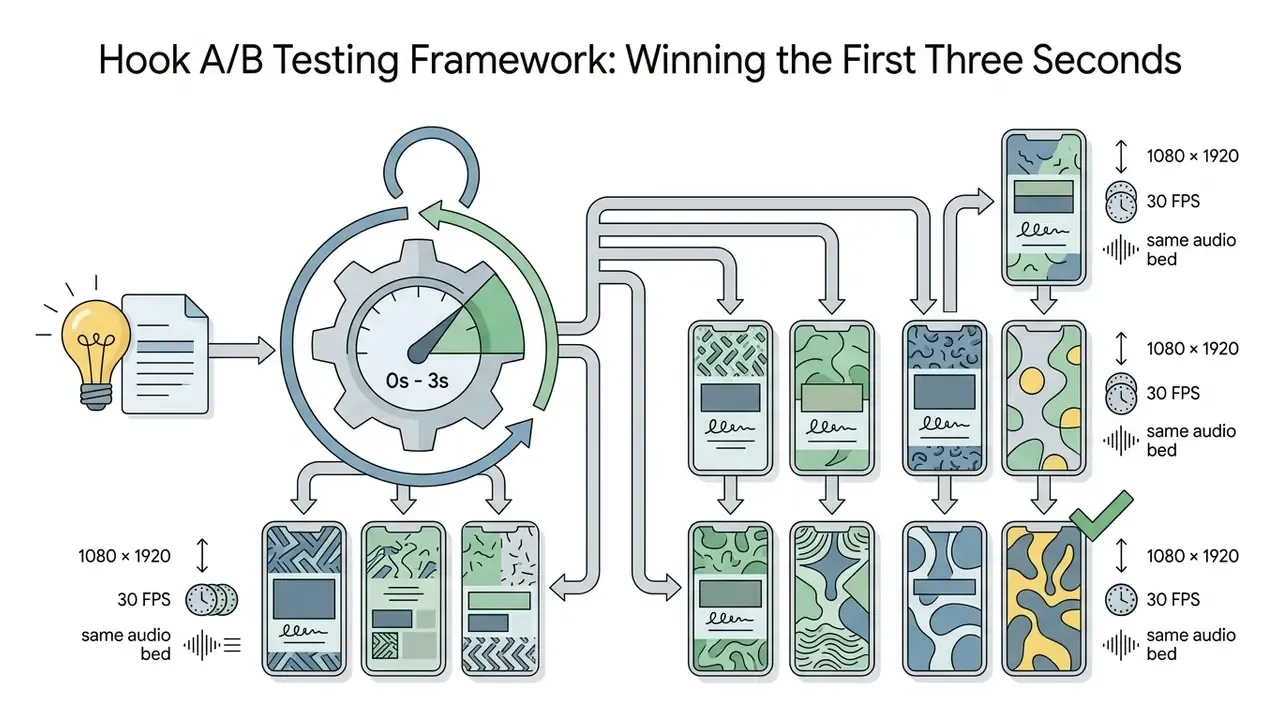
Hook A/B Testing Framework: Winning the First Three Seconds
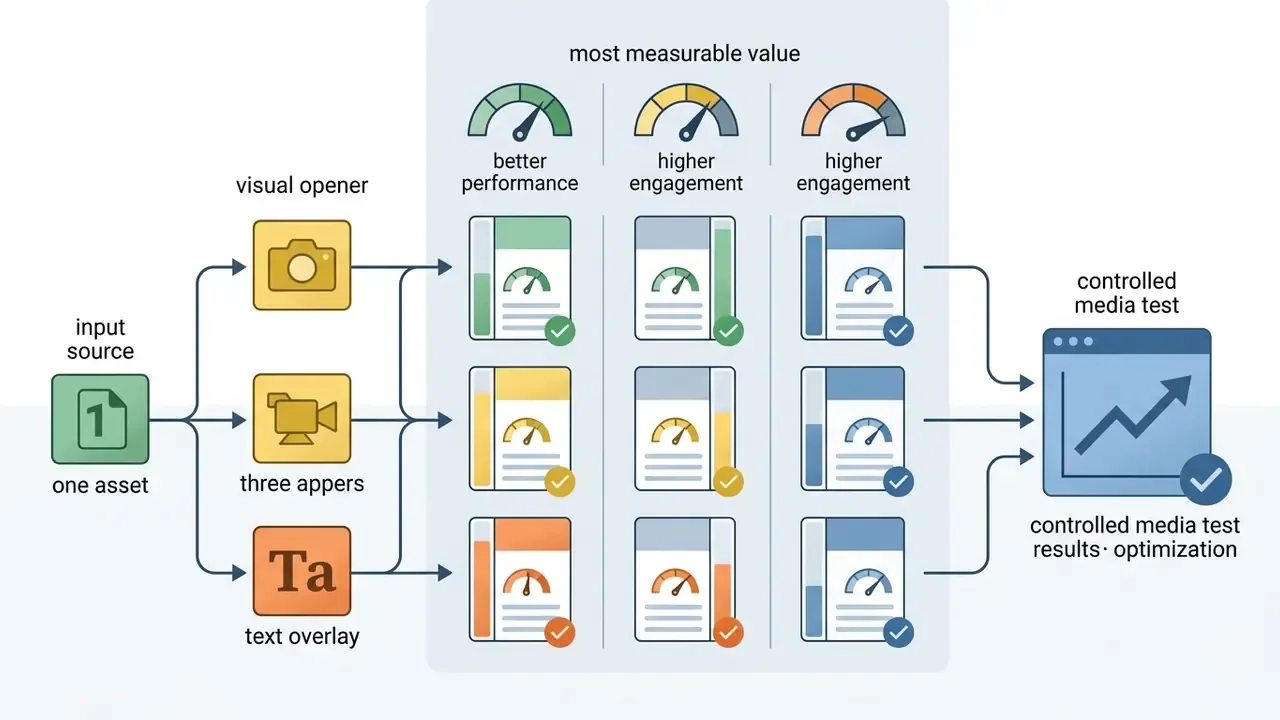
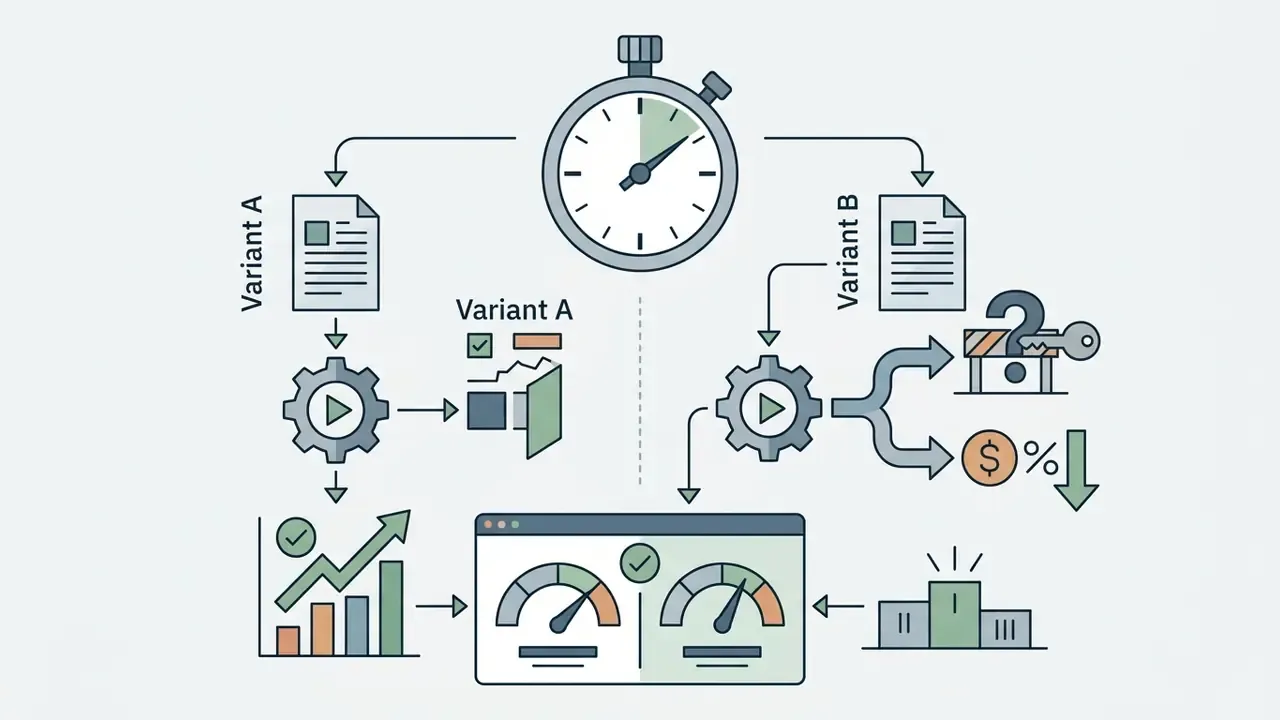
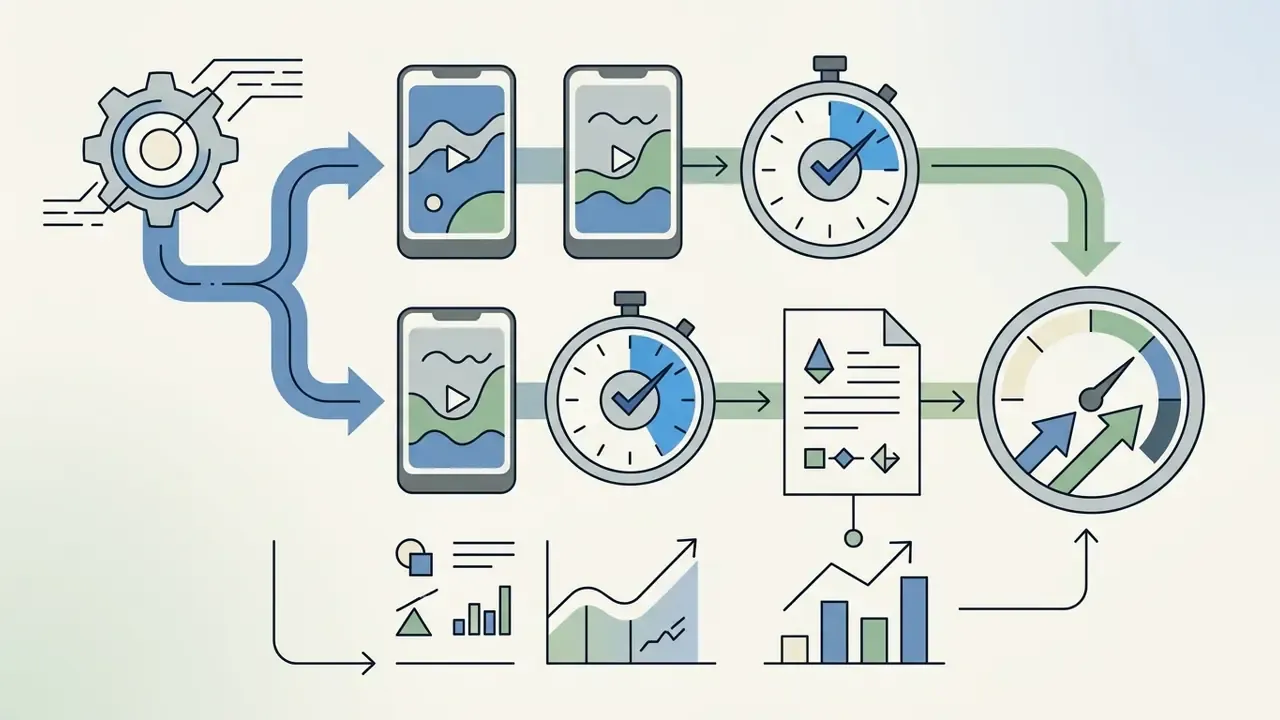
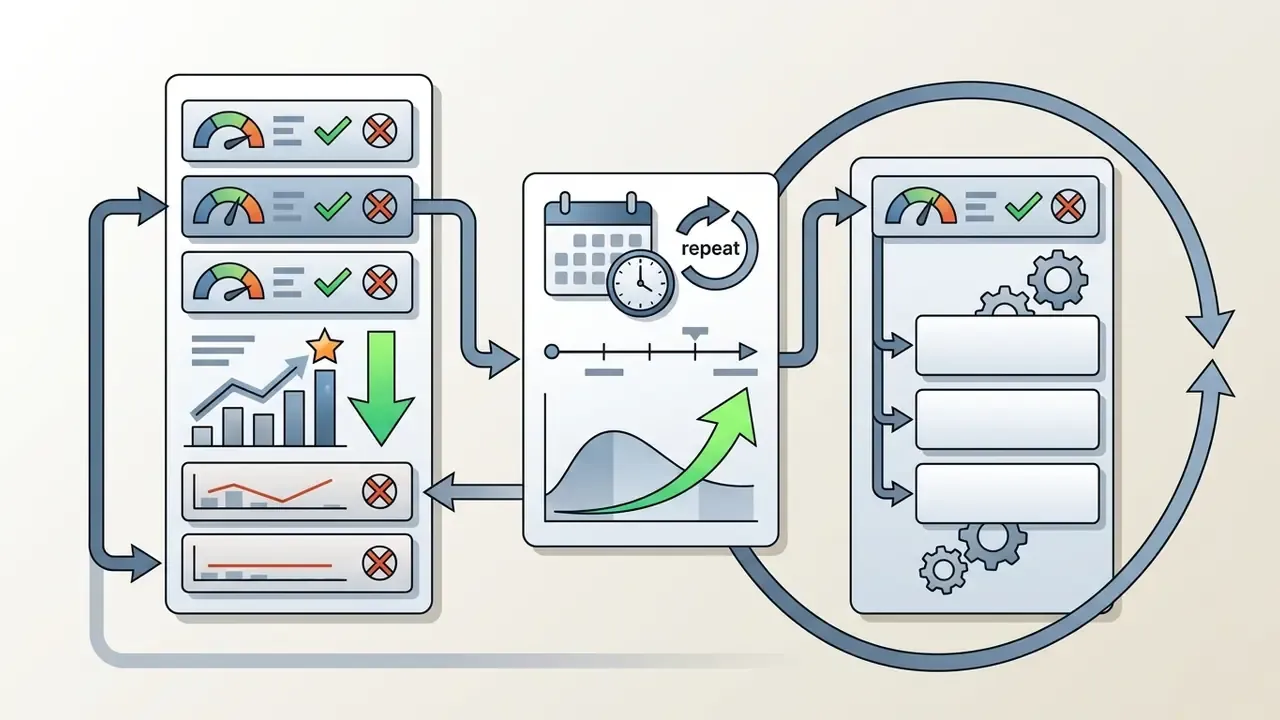
Generation speed only converts into performance when the opening frames get tested systematically. The lowest-effort protocol:
Evidence supports the underlying premise that generated creative can outperform manually written variants:
«In an experiment with 800 participants, AI-generated ads outperformed human-written ads by 18.2 percentage points (59.1% vs 40.9%, p<0.001, Cohen's h=0.37).»
Two constraints stay in force. Every variant still needs the same disclosure and rights review as the original, and hook copy must remain substantiated. Faster iteration is not a license for unverified claims.
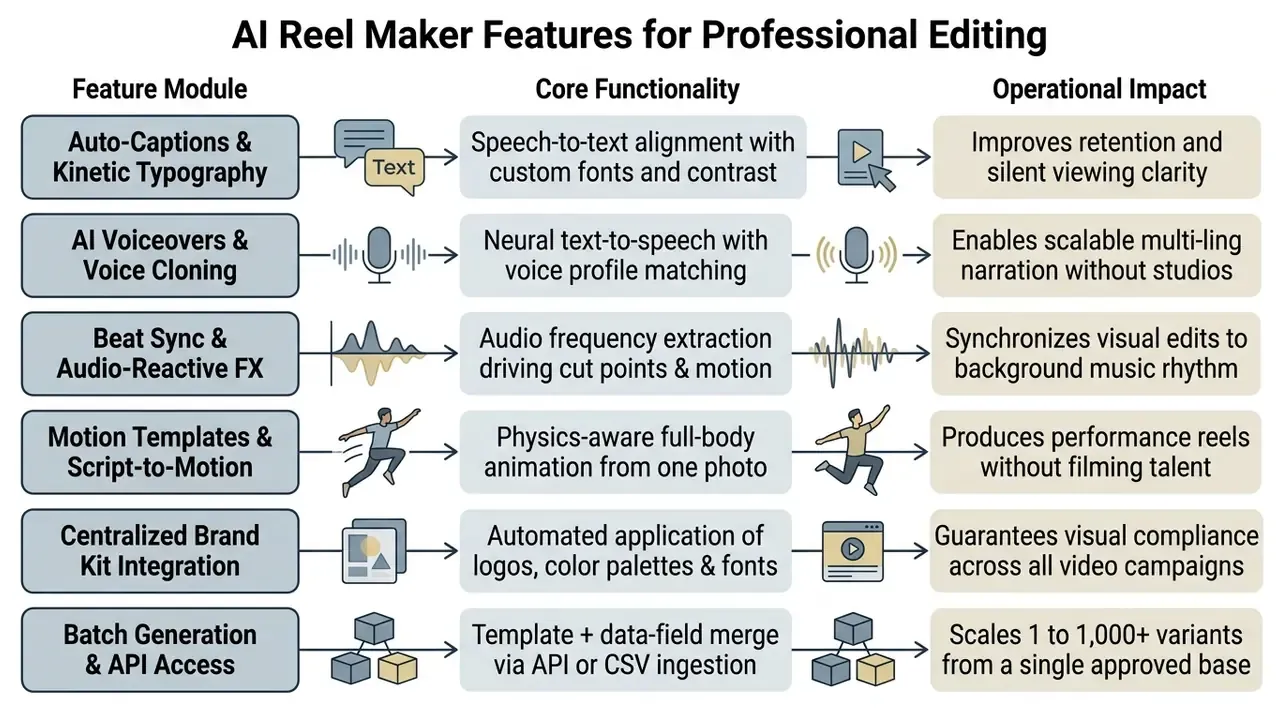
AI Reel Maker Features for Professional Editing
An ai based reel maker bundles specialized editing tools that turn raw generative output into publication-ready commercial video. These features automate repetitive work while keeping granular control over typography, audio mixing, and multi-language adaptation.
Professional social video teams depend on these capabilities to hold production value at scale. Automated subtitle generation, audio-driven visual synchronization, and centralized brand kits let marketing groups streamline video operations without letting brand consistency slip.
Auto-Captions, On-Screen Text, and Voiceovers
Auto-caption generators use speech-to-text models to build time-synchronized subtitles over the video feed. On-screen typography is widely used to support retention, largely because a big share of social content is consumed muted. That last point is practitioner consensus, not a measured constant, and it still lacks recent peer-reviewed quantification, so treat it as an operating assumption. The strongest available subtitle research is an eye-tracking comparison of fully automatic versus human subtitling. It found no significant attention difference but lower comprehension scores for fully automatic subtitles, which is exactly why human proofreading of auto-captions stays mandatory rather than optional.
Neural voiceover engines generate natural narration from written scripts and remove the need for studio recording. Our guide to AI voice generators covers voice quality, language coverage, and commercial licensing terms. A peer-reviewed study on voice clone perception found that listeners struggle to tell modern clones from real speech:
«Listeners cannot reliably distinguish modern AI-cloned voices from genuine human speech.»
That finding cuts both ways. It validates synthetic narration for commercial use, and it raises the disclosure and consent bar the moment a cloned voice resembles a real, identifiable person. Human verification during subtitle creation prevents technical errors and narrative drift. Where caption tracks ship separately, SRT and VTT remain the two most consistently supported export formats; where captions are burned in, keep a copy of the verified transcript for audit.
Music, Beat Sync, and Audio-Reactive Visuals
Beat-synchronization analyzes the background track to find rhythmic transients, then places scene cuts and motion transitions precisely on musical beats. Audio-reactive effects extract frequency bands, bass or snare energy for example, and map them to dynamic graphics, brightness shifts, or zoom moves.
Automating temporal alignment makes motion feel like it belongs to the audio. Research into visual rhythm shows that warping transitions to beats improves perceived coherence:
Related work formalizes motion-to-audio synchronization for dance generation. Audio-reactive styling research shows how low-, band-, and high-pass filtering plus RMS energy extraction map onto visual style parameters, which is the technical basis for bass-driven and snare-driven effects in consumer reel tools.
Scene-by-Scene Editing, Brand Kit, and Localization
Scene-by-scene interfaces give timeline-level control over clip durations, layer placement, and transition properties. Frame-accurate adjustments follow standard non-linear editing vocabulary: trimming, slipping, sliding, speed changes, fades and crossfades, plus keyframed motion. Centralized brand kits store corporate logos, color palettes, and typography rules and apply them automatically, so visual identity holds across teams. Enterprise implementations even let a brand-kit change re-apply to an already rendered video from the editor.
Multi-language localization translates spoken scripts, on-screen overlays, and voiceover audio into target languages. Advanced platforms hold pronunciation accuracy with custom brand glossaries:
«Brand kits store logos and fonts and can be re-applied to an existing video from the editor; brand glossaries control pronunciation and translation of key terms.»
For teams whose reel pipeline sits next to long-form publishing, our overview of video editors for social media and our YouTube video editor workflow guide map where AI generation ends and manual finishing begins. If finishing happens on a desktop workstation with no licence budget, tools in the vsdc free video editor category still handle trims, overlays, and export presets competently.
Free AI Instagram Reel Generator: Limits, Pricing, and Risk-Adjusted ROI
Testing an ai instagram reel generator free tier lets an organization evaluate interface usability, generation quality, and feature depth before committing budget. Free tiers, though, are built with deliberate constraints that push you toward a subscription.
«No academic studies systematically comparing free and paid tiers of AI reel generators on export limits and commercial rights were identified in the 2023 to 2026 literature.»
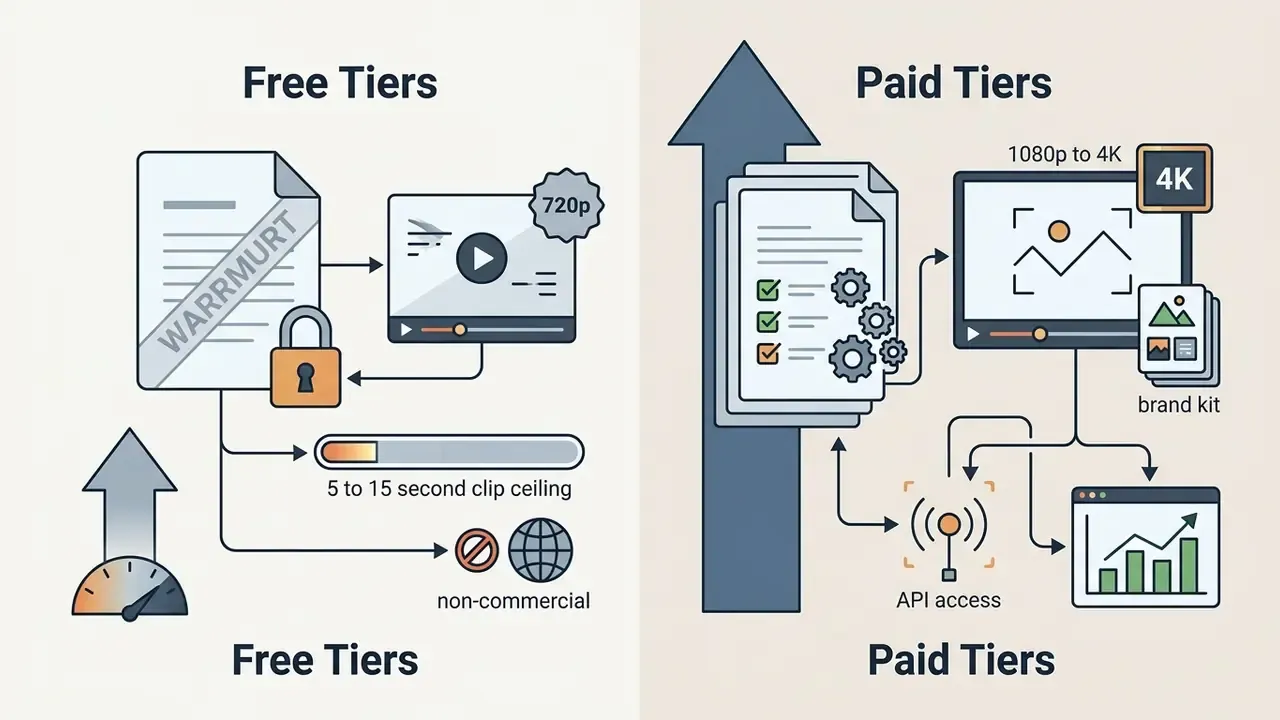
Because peer-reviewed comparison is missing, the matrix below reflects vendor-disclosed terms and should be re-verified against current plan pages before procurement.
Reading those limits correctly means separating evaluation previews from production-grade exports. Watermark policies, resolution caps, and commercial usage rights decide whether a plan can carry a real campaign.
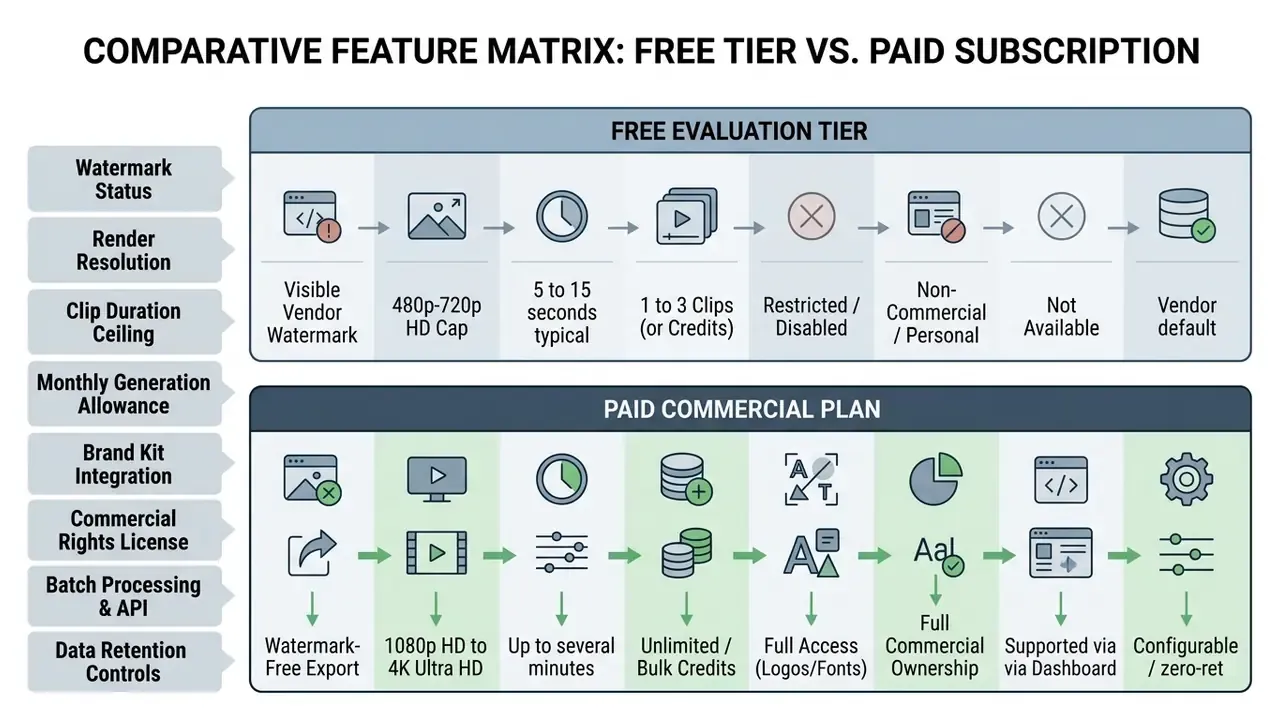
Values represent generalized industry baselines across major 2026 AI video platforms; individual vendor limits vary.
What's Available in a Free AI Reel Generator
Free access typically grants basic text-to-video and image-to-video generation in a browser. Users can test prompts, apply standard templates, render short low-resolution previews, and judge speech synthesis quality without paying. Some vendors also expose avatars, template libraries, and voiceover demos in the free environment while reserving project saving for registered accounts. An ai instagram reels generator app on mobile usually mirrors that same trial logic, with tighter export limits.
Several vendors advertise preview generation without mandatory registration, and at least one documents anonymous use restricted to models carrying an included free allowance. This policy shifts often and depends on browser and region, so treat "no sign-up" claims as vendor-specific and verify them against current terms before relying on them for legal or procurement review. Downloading finished files or saving project states almost always requires an account. Detailed evaluations of zero-cost options live in our analysis of the best free ai video generator and our reference on free AI video generators, including the "ai instagram reels maker online free" claims that circulate in app-store listings.
Export and Generation Limits That Affect Volume
Free plans enforce technical constraints that cap commercial utility: forced vendor watermarks on exports, resolution capped at 720p (480p on some engines), clip duration limits often between 5 and 15 seconds, and low monthly credit quotas that do not roll over. Some allowances are one-time grants rather than recurring credits, which makes long-run evaluation impossible without payment.
Watermarked or low-resolution output is not suitable for professional brand channels or paid advertising. Free plans also tend to withhold voice cloning, high-speed render queues, and timeline-level editing. Further context on watermark implications sits in our technical breakdown of AI Watermarking Explained.
Evaluating Pricing, Upgrades, and Risk-Adjusted ROI
Evaluating subscriptions means calculating total cost per exported video minute, seat pricing across the team, and the availability of commercial usage rights. Upgrading pays off when monthly output exceeds free credit caps, or when un-watermarked 1080p rendering becomes non-negotiable for distribution. Side-by-side quality and cost benchmarks are collected in our AI video generator comparison.
Three numbers decide most upgrade cases: price per seat, quota or credit ceiling, and batch discount. Asynchronous batch execution is frequently priced below interactive generation (a 50% batch discount is documented in mainstream API pricing), and managed batch orchestration itself is often billed only on underlying execution resources. High-volume variant testing therefore costs materially less when scheduled rather than generated interactively.
For regulated buyers, gross production savings overstate the benefit. Use a risk-adjusted formulation instead:
Risk-Adjusted ROI (%) =
   [ (Production & agency cost avoided + Cycle-time value)
     - (Licenses + Legal/compliance review effort + Governance & logging overhead
        + Residual risk provision) ]
   / (Licenses + Review + Governance overhead)  x 100
Populate each term with observable figures: hours saved per reel multiplied by the blended internal rate; reviewer minutes per asset multiplied by reviewer rate; storage and logging cost per asset; and a residual-risk provision reflecting the probability and cost of a disclosure or rights defect reaching production. Field evidence suggests the productivity side is real but uneven:
«A 2023 to 2024 field experiment on a large platform found that integrating generative AI into workflows significantly increased productivity, though effects varied by task.»
When video operations scale across larger teams, bulk generation workflows and centralized user management matter more than per-clip quality. Organizations comparing enterprise investments can review structural pricing frameworks, model unit economics with our AI Media Calculators, and study API-level cost modeling in our Google Veo implementation guide.
Use Cases for an AI Instagram Reels Maker
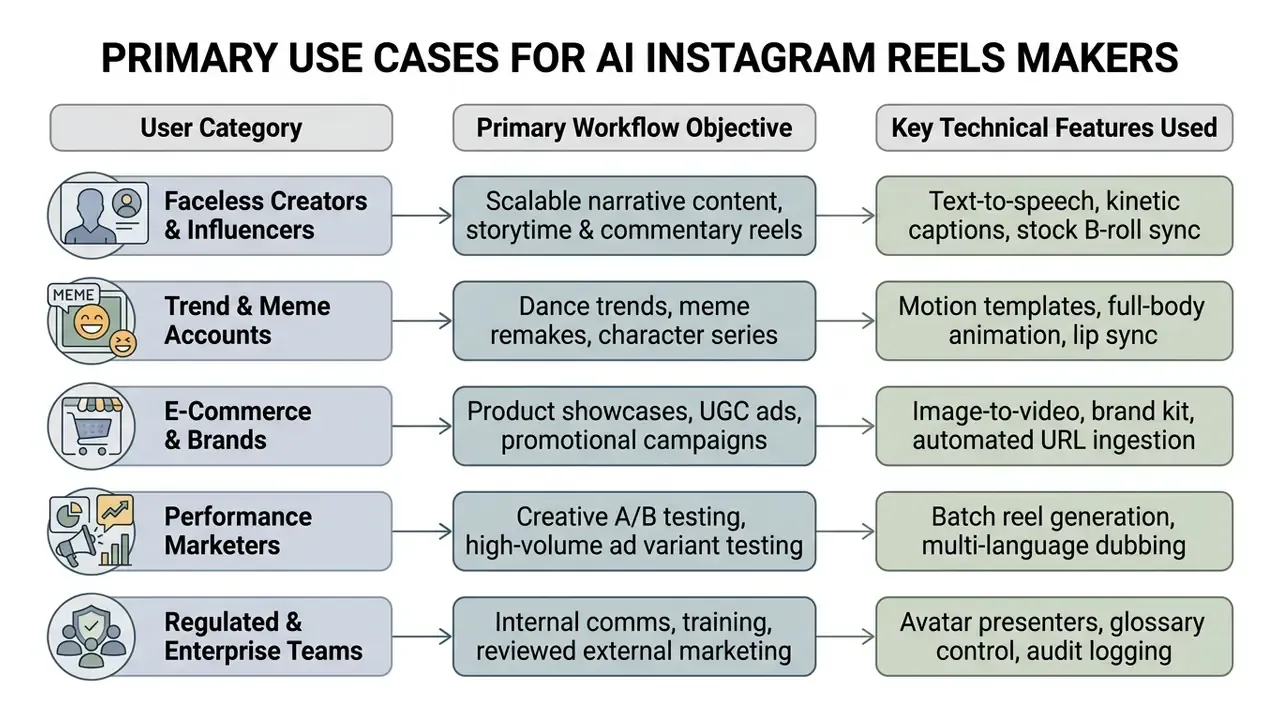
An ai instagram reels creator serves a wide span of production needs: individual creators, e-commerce brands, performance agencies, and corporate communications teams. The right workflow depends on campaign goals and resource constraints, not on which tool trends this month.
Automating routine assembly lets organizations raise content volume while holding production cost down. From faceless educational channels to high-tempo product advertising and internal enablement video, generative tools compress the vertical video pipeline.
Reels for Creators, Influencers, and Faceless Content
Creators and faceless-channel operators use an ai ig reel maker to produce high volumes of narrative video without appearing on camera or renting studio gear. These workflows combine synthesized voiceovers, stock footage matching, kinetic typography, and automated script structuring. Faceless video is best defined by what it removes: no human subject on screen, with storytelling carried by narration, kinetic text, animation, or generated characters.
Removing the on-camera requirement lets a channel test niche topics at high frequency, whether that is financial education, historical summaries, or tech commentary. Field data indicates AI assistance also lifts distribution metrics, not only production speed:
Additional strategies for managing visual assets appear in our overview of online photo editor tools, our guide to AI headshot generators for consistent character imagery, and our reference on video editors for social media.
Product Reels, UGC Ads, and Brand Content
E-commerce teams use an ai instagram reel maker online to convert static catalog listings or web pages into promotional video ads. The software extracts product images, features, and pricing data, then assembles them into short vertical ads tuned for social commerce. Vendor workflows commonly accept a store or product URL, auto-ingest photography, descriptions, and benefit statements, then render a UGC-style clip with a chosen avatar, voice, and aspect ratio.
The commercial case shows up on the demand side too:
«A 2023 study found that Instagram Reels promotion explained 61.2% of the variance in purchase decisions among coffee-shop consumers.»
Rather than promising a fixed count of variations, describe the mechanism precisely: performance teams use batch generation to produce multiple ad variants from one approved base asset for creative A/B testing, with variant count bounded by credit budget and review capacity. Varying opening hooks, visual pacing, background music, and call-to-action overlays surfaces the top-performing combination against live audience response. Practitioner guides describe the same discipline as testing several versions with different openers, presenters, scenes, benefits, and CTAs.
Regulated, Internal, and Enterprise Scenarios
Beyond consumer marketing, the same pipeline supports controlled corporate use: internal communications and town-hall recaps chaptered into short vertical segments; onboarding and compliance training modules with avatar presenters and glossary-controlled terminology; product demonstrations and "how it works" walkthroughs that need no shoot; and reviewed external marketing where every asset passes claim substantiation and disclosure review before publication. Here the differentiating features are not visual effects but governance features: SSO, role-based access, retention configuration, brand glossaries, prompt and version logging, exportable approval records. Public-sector AI guidance reinforces the same posture, namely human validation before publication, clear labeling of AI-generated public content, and documented review.
How to Choose an AI App to Create Instagram Reels for Your Workflow
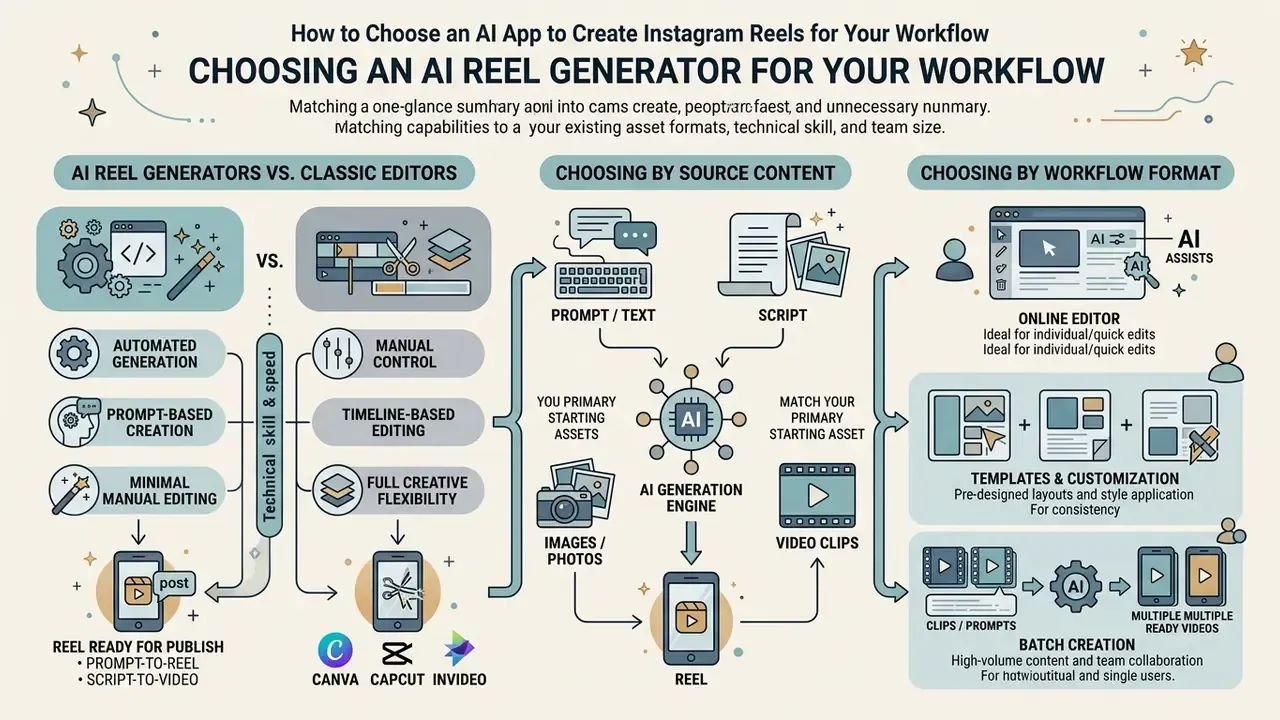
Selecting an ai app to create instagram reels means matching capabilities to your existing asset formats, technical skill, and team size. Platforms differ sharply depending on whether they prioritize prompt-driven generation, complex timeline editing, or automated bulk production.
Evaluating options against operational bottlenecks avoids unnecessary subscription spend and integration pain. The practical heuristic: map your pipeline into four stages, namely idea and script, visual creation, captions and editing, publishing and automation, then buy for the slowest stage instead of the longest feature list. Before signing, assess input media flexibility, browser editing interfaces, and batch processing limits.
AI Reel Generators vs Classic Editors: Canva, CapCut, InVideo
The most common selection mistake is comparing tools that solve different problems. Template editors arrange existing assets. Generators synthesize new frames and motion.
| Criterion / Capability | Specialized AI Reel Generator | Canva (Magic Video) | CapCut (Auto-Reel) | InVideo AI |
|---|---|---|---|---|
| Operating principle | Neural frame synthesis (3D physics / diffusion transformer) | Template assembly + stock library | Highlight cutting from existing footage | Script-driven stock assembly |
| Character animation from one photo | Full-body motion transfer | No (static or pan/zoom only) | Limited | No |
| Lip sync | Automatic, neural, phoneme-aligned | No | Basic | Basic avatars |
| Original motion generation | Yes (motion templates + prompt control) | No | No | No |
| Time to first draft | Under about 60 seconds | 5 to 15 minutes | 3 to 5 minutes | 2 to 4 minutes |
| 9:16 / 4:5 / 1:1 re-export from one project | Yes | Partial | Partial | Partial |
| Batch / API generation | Yes on paid tiers (template + data merge) | Limited | No | Limited |
| Beginner difficulty | Minimal (prompt or photo) | Medium | Medium | Low |
| Best for | Generated scenes, character performance, variant testing | Brand design systems and static-to-motion | Editing footage you already shot | Script-to-stock explainers |
Two practical implications. First, if you already own footage, a cutting tool beats a generator; if you own only a photo or a sentence, only a generator produces a watchable reel. Second, hybrid workflows are normal: design boards in a template editor, run motion passes in a generator, finish captions and safe zones in a timeline editor. Readers evaluating design-suite AI specifically can review our breakdown of the Canva AI generator, including export options and commercial licensing.
Choosing by Source Content: Prompt, Script, Image, or Clip
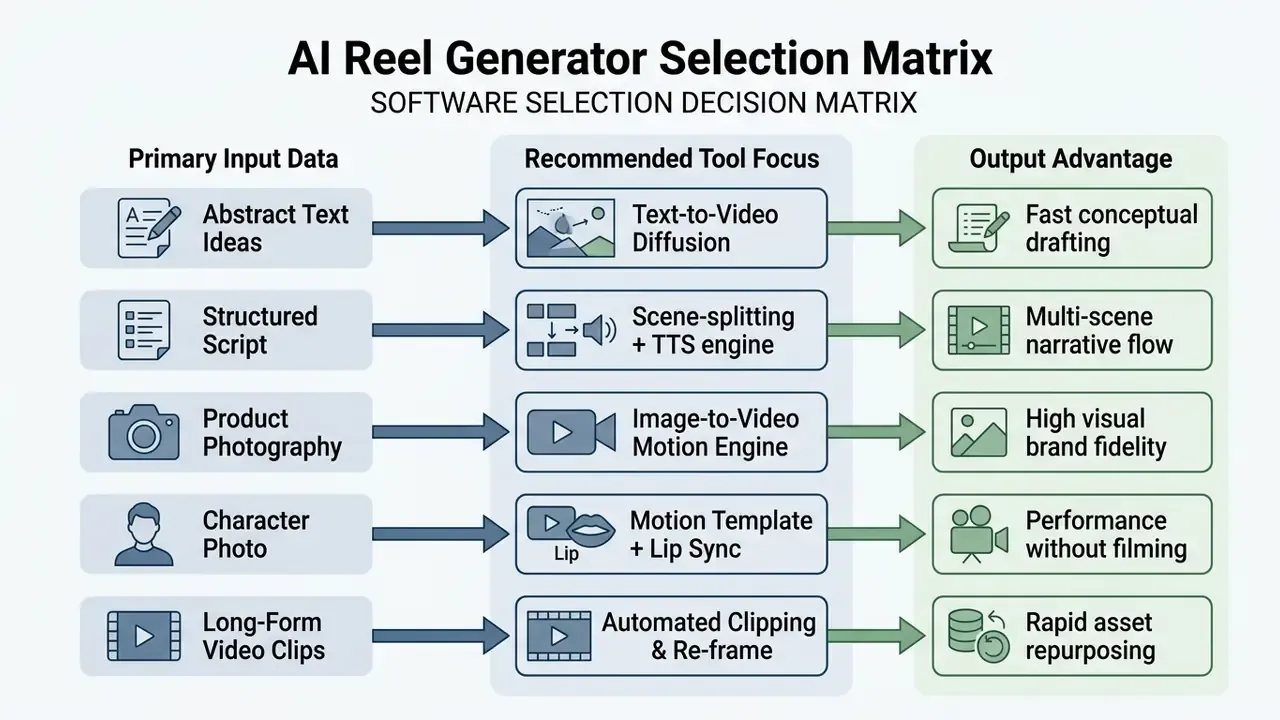
When inputs are written scripts or abstract concepts, pick tools optimized for text-to-video generation and automated storyboarding. These platforms are strongest at generating complementary B-roll and aligning voiceover to text.
If the workflow depends on existing visual assets, product photography or client recordings, the tool must offer robust image-to-video animation, precise subject masking, and automated 9:16 reframing. Vendors weight reference images differently, and that matters: some treat the supplied image as a strict first frame or scene anchor, others let the model decide how the reference is interpreted, which changes how predictable your brand visuals will be. Teams optimizing file management across editing workflows can consult our technical guide on video compressor software.
Choosing by Workflow Format: Online Editor, Templates, and Batch Creation
Individual creators and small teams usually benefit from browser-based editors with drag-and-drop interfaces, pre-designed social templates, and integrated audio libraries. These ai instagram reels maker tools minimize technical overhead and let non-technical staff publish finished reels quickly. Comparable no-cost desktop options are reviewed in our roundup of free video editing software.
Enterprise marketing departments and performance agencies need more: batch creation, API access, multi-user collaboration controls. Bulk pipelines typically pair a locked template with merge fields and an API or spreadsheet feed, generating one video or a thousand from the same approved base. Collaboration layers add real-time co-editing, shared brand kits, version history, and permissioned review. High-volume teams can explore integration options through our specialized AI Media API Guides to automate publishing at scale.
For teams managing broader creative assets, additional tools can be evaluated using our AI Media Comparison Matrices or cross-referenced through the centralized AI Media Commercial-Use Hub. Technical help lives at AI Media Support and Troubleshooting.
FAQ
What exactly is an AI reel generator?
Software that converts a prompt, script, product URL, photo, or clip into a short vertical video with captions, narration, music, and platform-ready formatting, typically 1080 × 1920, 9:16, MP4 (H.264/AAC), 30 FPS.
Can I make Instagram Reels with AI for free?
Yes, for evaluation. Free tiers usually cap resolution at 480p to 720p, apply a watermark, restrict clip length to roughly 5 to 15 seconds, and may exclude commercial rights. An ai instagram reel maker free plan rarely covers paid distribution; watermark-free 1080p export and commercial licensing generally require payment.
Do AI-generated reels get penalized by the Instagram algorithm?
Ranking is driven by engagement signals, meaning watch time, likes, shares, and saves, not by production method. What matters is that the clip looks native rather than like a stock slideshow, and that any required synthetic-media label is present.
Who owns the copyright to an AI-generated reel?
In the United States, purely AI-generated output is not registrable. Protection attaches to human-authored contributions such as creative selection, arrangement, editing, and incorporation of your own brand assets. Registration filings must disclose AI-generated material.
Do I have to disclose that a reel was made with AI?
There is no single universal U.S. federal disclosure rule, but the EU AI Act, EU transparency codes, IAB frameworks, several U.S. state advisories, and individual ad platforms impose labeling duties, especially for synthetic depictions of real people. Assume disclosure is required for paid distribution unless legal review says otherwise.
What should a good reel prompt include?
Shot type, subject, action, environment and lighting, style, camera motion, plus technical parameters (aspect ratio, duration, FPS). Avoid negation phrasing. Describe what should appear, not what should not.
How long should the hook be?
Zero to three seconds, ideally 12 words or fewer, written so it doubles as a legible on-screen overlay on the first frame.
Can the character in my reel speak my script?
Yes. Script-to-motion with lip sync generates phoneme-aligned mouth movement and body motion. Consent and likeness documentation is mandatory when the source photograph shows a real, identifiable person.
Can I cross-post the same export to TikTok and YouTube Shorts?
Yes. A 9:16 MP4 at 1080 × 1920 is accepted across the major short-form platforms. Usually only captions, hashtags, and cover frames need per-platform adjustment.
What should a bank or regulated firm require before approving a reel generator?
An enterprise contract with zero data retention and no training on customer data, SOC 2 attestation, SSO and role-based access, configurable retention with legal hold, exportable prompt, model, and approval logs, plus a named owner registered in the AI inventory.
Pre-Publication Checklist (Content, Technical, Audit)
Checklist0 / 17
Limitations, Open Questions, and a Safe Next Step
Some of the evidence in this guide is thinner than the confident tone of vendor marketing suggests. Three gaps deserve to be named.
First, there is no peer-reviewed comparison of free versus paid reel generator tiers, so every limit in the matrix above is vendor-disclosed and perishable. Second, the "most social video is watched muted" claim, while operationally useful, lacks a current measured figure; the only solid subtitle study points at comprehension loss from unedited automatic captions. Third, uplift numbers from AI-generated advertising come largely from single experiments and preprints, which is enough to justify a controlled pilot but not enough to underwrite a business case.
A safe sequence for a regulated team, roughly 60 days: No evidence, no autonomy. That principle applies to a video pipeline exactly as it applies to a credit model.
- Days 1 to 15.Run Shadow AI discovery, register discovered tools, and classify the data actually being uploaded today.
- Days 16 to 30.Select one candidate platform, negotiate zero-retention terms, and enable SSO plus role-based access for a single pilot workspace.
- Days 31 to 45.Produce ten internal or low-exposure assets end to end, logging every audit-trail field. Measure reviewer minutes per asset, not just render time.
- Days 46 to 60.Compute risk-adjusted ROI with real reviewer costs, then decide whether external, customer-facing use is warranted. If the evidence is ambiguous, extend the pilot rather than the permissions.
About This Guide and Editorial Standards
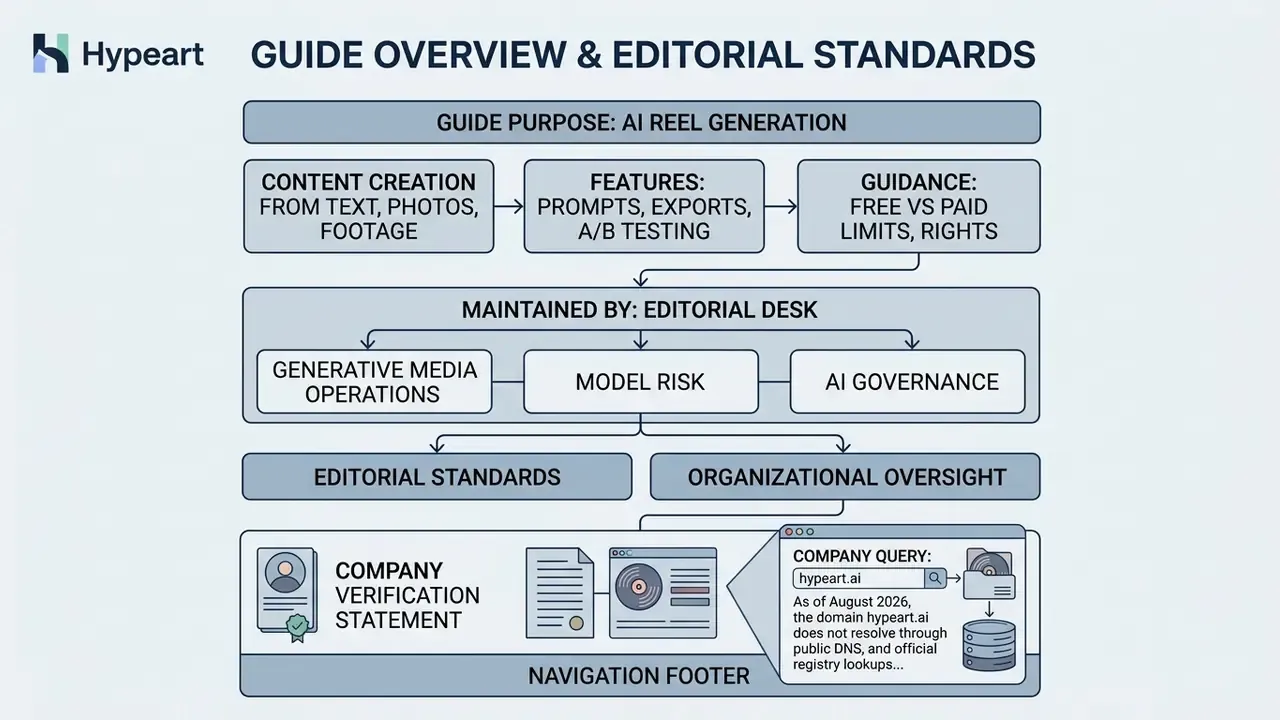
This guide is maintained by an editorial desk focused on generative media operations, model risk, and AI governance for regulated organizations. It combines vendor documentation review (Adobe, Amazon, Google, Runway, Synthesia, HeyGen, Descript), primary regulatory sources (U.S. Copyright Office, European Commission), and peer-reviewed or preprint research on video generation, voice cloning, beat synchronization, and AI-generated advertising. Pricing and plan limits change often; every figure carries a verification date and should be re-checked on the vendor's live plan page before procurement. Where evidence is thin or absent, the text says so instead of substituting vendor marketing claims. Nothing here constitutes legal, regulatory, or investment advice.
Company Verification Statement
Company query: hypeart.ai
As of August 2026, the domain hypeart.ai does not resolve through public DNS, and official registry lookups return no verified business registration, product catalog, or commercial history. No verified information is available regarding commercial services or proprietary tools for this domain. This statement appears for transparency because the domain showed up in the research brief for this article. It is not a vendor recommendation, and all operational scenarios described above remain illustrative and hypothetical.