Since Pixar's Toy Story introduced fully computer-generated 3D animation to mainstream audiences in 1995, the technology has moved from multi-million-dollar studio pipelines into real-time, browser-based engines that a single marketer can run from a laptop. An animation maker 3d is a digital platform or software suite designed to build, rig, animate, and render three-dimensional assets into moving visual sequences or interactive files. Modern systems range from lightweight browser tools and mobile applications to enterprise desktop environments and generative artificial intelligence engines. Selecting the right solution means matching your project's technical pipeline (web delivery, commercial video production, game development, or augmented reality) with format support, motion controls, and verified commercial licensing rights.
«In 3D animation and automated media workflows, control precedes creativity: without verifiable motion constraints and clear asset licensing, autonomy creates operational risk, not business value.»
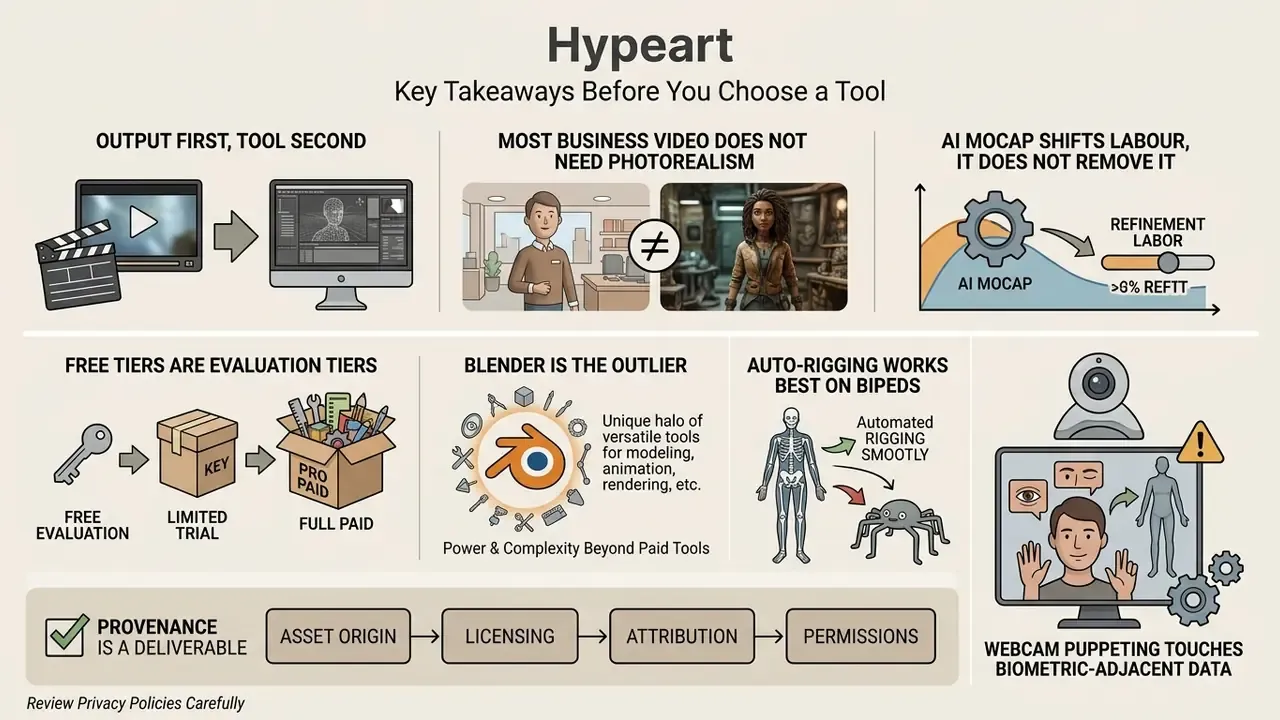
Key Takeaways Before You Choose a Tool
Read this before opening a viewport. It saves rework later.
- Output first, tool second. The delivery target (MP4, FBX, GLB, USDZ, ProRes) determines the software category, not the other way round.
- Most business video does not need photorealism. 3D-style depth, camera motion, and pacing usually outperform cinematic realism for explainers.
- AI mocap shifts labour, it does not remove it. Keyframing time moves into cleanup and review time.
- Free tiers are evaluation tiers. Watermarks, 720p caps, and blocked mesh export are the norm; commercial rights usually sit behind a paid plan.
- Blender is the outlier. GPL licensing means renders and animation files belong to the creator, royalty-free.
- Auto-rigging works best on bipeds. Quadrupeds are improving; wings, tails, and tentacles still need hands on the bones.
- Provenance is a deliverable. Source files, model versions, cleanup logs, and named approvals belong in the handoff, not in someone's head.
- Webcam puppeting touches biometric-adjacent data. Confirm on-device versus cloud processing before customer-facing broadcasts.
- Audio decides perceived quality. Foley, ducking, and a muted-playback QA pass separate amateur output from broadcast-grade work.
- TCO beats sticker price. Add hardware, render compute, validation labour, and governance overhead to the subscription line.
What Is an Animation Maker 3D and What Problems Does It Solve?
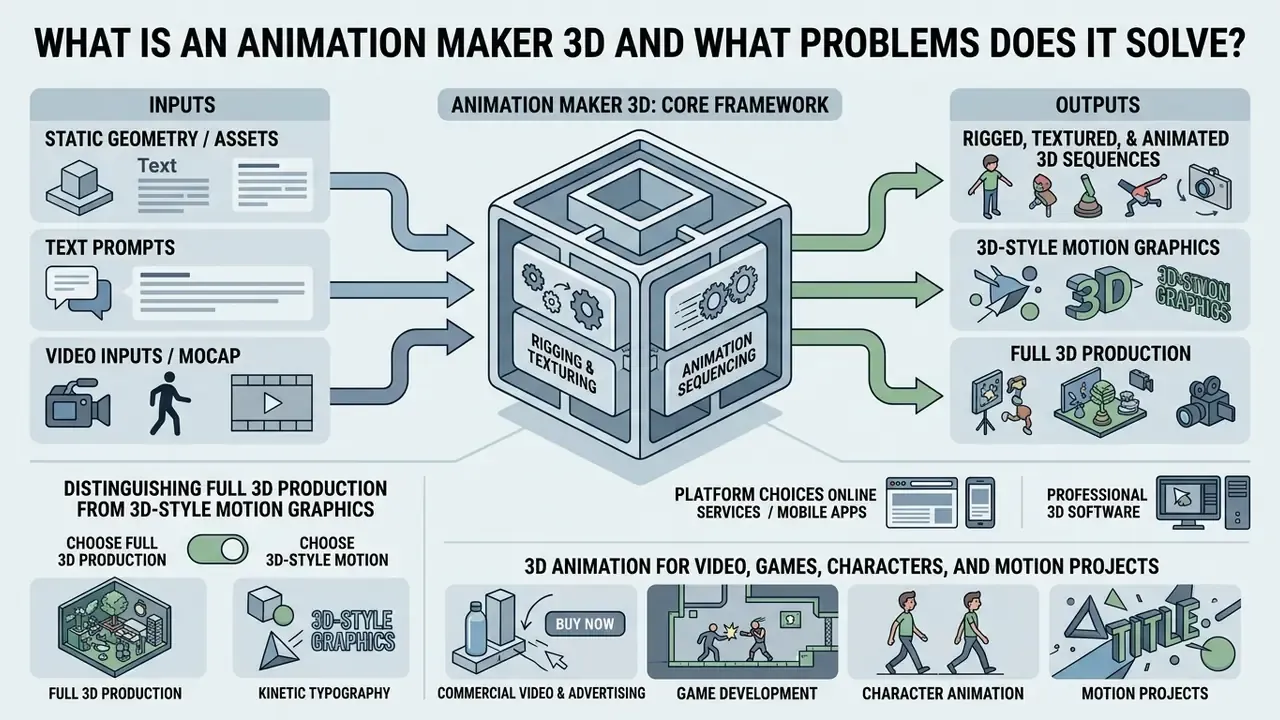
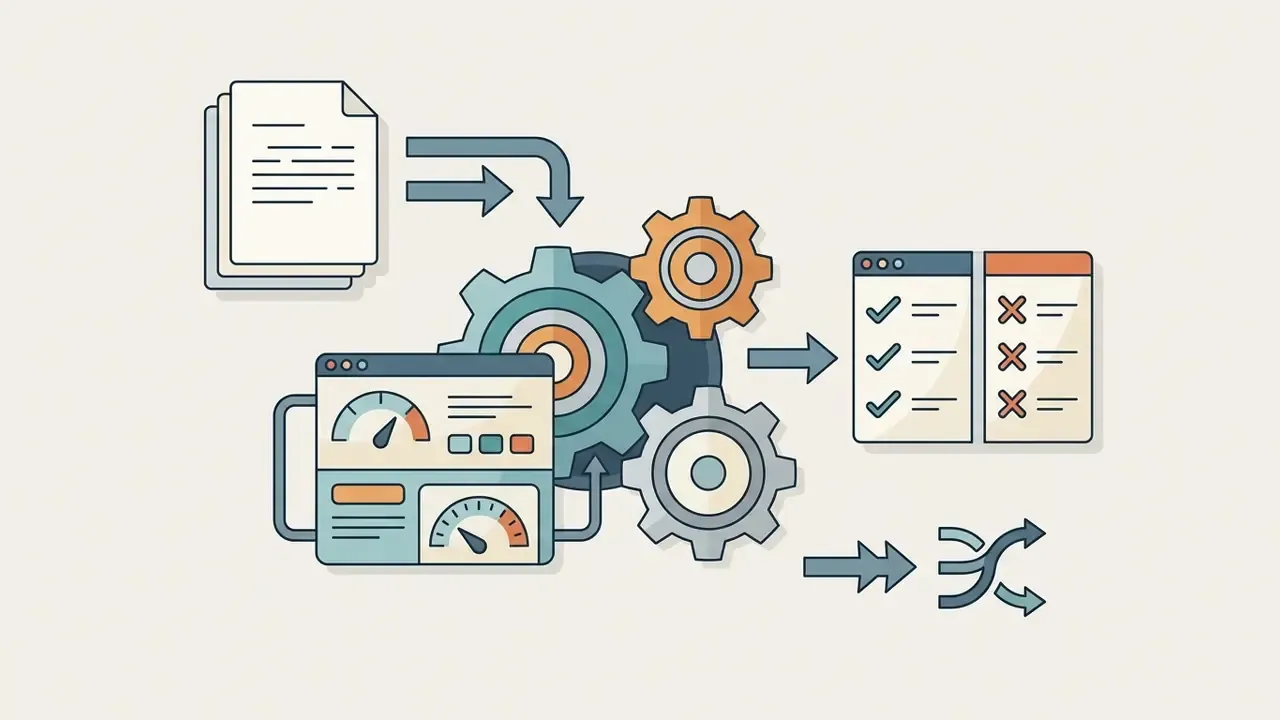
An animation maker 3d is a complete or specialized software framework that converts static geometry, text prompts, or video inputs into rigged, textured, and animated 3D sequences. These systems solve the operational bottleneck of manual keyframing by supplying pre-built character rigs, motion capture retargeting, automated physics, and cloud rendering. Businesses and creative teams use a 3d animation creator to produce marketing assets, product visualizers, explainer clips, and game-engine-ready characters without building a motion pipeline from scratch.
«Modern 3D animation systems span three paradigms: diffusion-guided optimization, amortized inference, and geometry-aware synthesis, each balancing speed against realism.»
The main functional split runs between web-based tools and full digital content creation (DCC) software. Web applications prioritize speed, template assets, and automated rigging for quick marketing output. Professional suites such as Blender, Autodesk Maya, and Maxon Cinema 4D give granular control over topology, inverse kinematics, procedural shading, and multi-pass compositing. According to ISO/IEC 12113:2022 (the glTF 2.0 open standard specification, https://www.iso.org/standard/83990.html), runtime 3D delivery relies on unified scene structures where animation channels, skeletal hierarchies, and material properties coexist in a single binary payload such as GLB, so web engines and native applications can execute real-time motion without a conversion step.
Distinguishing Full 3D Production from 3D-Style Motion Graphics
Online Services, Mobile Apps, and Professional 3D Software
Choosing between online 3d animation software, a mobile 3d animation maker app, and desktop DCC software depends on hardware, pipeline depth, and how much customization you actually need. Cloud platforms render on remote servers, so they run from a standard browser without a dedicated GPU. Mobile apps to make 3d animation lower onboarding friction for quick social clips, although touch interfaces, battery limits, and thermal throttling make dense polygon editing and detailed weight painting impractical.
| Feature / Criteria | Online Animation Maker | 3D Animation Maker App | Desktop DCC Software |
|---|---|---|---|
| Primary Deployment | Web Browser (SaaS) | iOS / Android Native | Windows / macOS / Linux |
| Hardware Overhead | Minimal (Cloud Rendered) | Low to Medium (Device GPU) | High (Dedicated Workstation GPU & RAM) |
| Rigging Control | Auto-rigging & Presets | Basic Skeleton Presets | Custom Armatures, IK/FK, Constraints |
| Primary Formats | MP4, WebM, GLB | MP4, GIF, USDZ | FBX, OBJ, USD, GLB, Alembic (.abc) |
| Best Use Case | Rapid Marketing & Web Clips | On-the-go Social Concepts | AAA Games, VFX, Feature Film |
Reference hardware baselines confirm the split. Professional desktop suites publish workstation-class requirements: Windows 10/11 64-bit, 8 GB RAM minimum with 32 GB recommended, DirectX 12-capable GPUs, and up to RTX 4090-class hardware for heavy texture authoring. Browser-based systems specify a supported browser and a stable connection. That is the whole spec sheet.
Readers evaluating adjacent generation tooling can compare browser-based AI video generators that render motion with no local GPU dependency, and check running costs against our AI Media Calculators.
«HumanRig contains 11,434 AI-generated T-posed meshes aligned to a standard Mixamo skeleton, enabling auto-rigging systems to train on diverse character proportions.»
3D Animation for Video, Games, Characters, and Motion Projects
The functional goal of the motion dictates the pipeline beneath it:
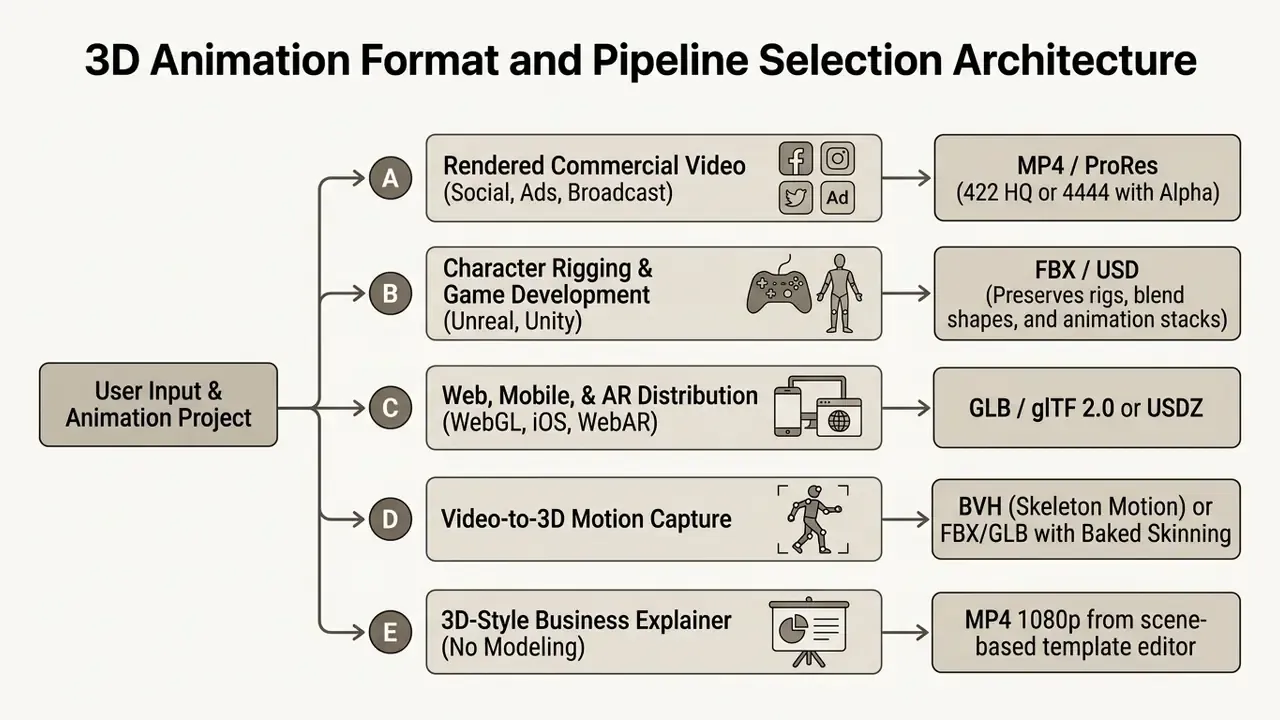
- Commercial Video & Advertising High visual fidelity, photorealistic lighting, precise temporal control. Output centres on rendered video files: MP4 for web delivery, Apple ProRes 4444 for multi-layer compositing with alpha transparency.
- Game Development Real-time performance optimization, low polygon counts, baked textures, clean skeleton hierarchies. Files export as FBX or glTF 2.0 to preserve animation clips and blend shapes for Unity and Unreal Engine 5.
- Character Animation Bipedal or quadruped deformation, facial expression blend shapes, lip-sync precision. Rigging maps bone hierarchies to mesh vertices through vertex skinning weights. The European Broadcasting Union's TR 071 Part 2 (2023) defines dedicated workflow architectures for animating 3D CG characters in live and recorded-as-live production.
- Motion Graphics & Product Design Kinetic typography, procedural dynamics, abstract shapes. Cinema 4D and Spline excel at embedding interactive 3D elements directly into web interfaces or corporate collateral. ISO/TS 32007:2024 even standardizes glTF as a valid 3D artwork format inside PDF rich-media annotations, which tells you motion-design pipelines increasingly target lightweight embedded playback rather than video files alone.
To understand foundational definitions across animation categories, explore our comprehensive glossary resource and our dedicated reference on animation makers.
How to Choose Software to Create 3D Animation
Selecting the right software to create 3d animation means weighing team expertise, budget, hardware, and export requirements together. Decision-makers should audit candidates with a weighted matrix covering polygon capacity, auto-rigging accuracy, real-time viewport performance, and commercial licensing terms. Asking "what software can i use to make 3d animation" leads to different tool categories depending on whether the project calls for quick template assembly or custom procedural creation.
«Unified S³ fields outperform sequential baselines in rig validity and animation quality across all evaluated benchmarks.»
That gives procurement teams a quantitative anchor. Rig validity (does the generated skeleton animate without the mesh collapsing?) and animation quality should be measured on your own test asset before you license anything. Marketing demos are, by construction, best-case takes. Competency standards used in vocational 3D animation training (for example TESDA's 3D Animation NC III, 2025) formalize the same logic: identify industry-standard software, assess hardware and software against creative and technical requirements, then select the tool for the specified delivery platform.
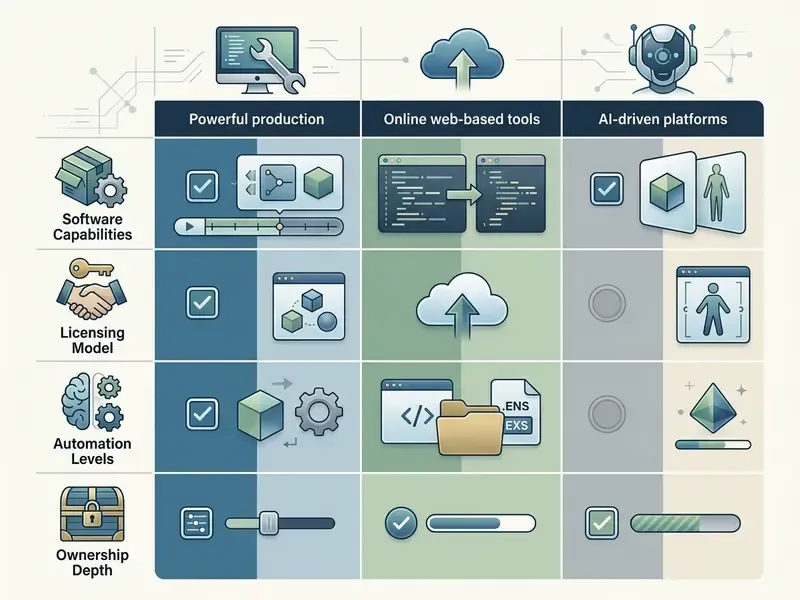
| Category | Primary Strengths | Technical Limitations | Licensing & Export Scope | Recommended For |
|---|---|---|---|---|
| Online Animation Maker (e.g., Spline, Canva) | Zero installation; web-based real-time collaboration; quick template deployment. | Limited custom polygon editing; capped render resolutions on basic tiers. | Tiered SaaS; free tiers often restrict commercial monetization or add watermarks. | Web designers, marketers, social media creators. |
| AI Motion & Generative Tools (e.g., DeepMotion, Krikey AI, Meshy) | Converts video to 3D motion capture; removes manual keyframing; auto-rigging; 600+ preset motions. | Requires manual noise cleanup; joint swapping on occluded frames; humanoid and quadruped bias. | Paid plans unlock commercial rights and raw FBX/BVH exports; freemium output is evaluation-only. | Animators needing rapid motion capture prototyping. |
| Professional DCC Suites (e.g., Blender, Maya, Cinema 4D) | Full control over modeling, procedural shading, rigging, and simulation. | Steep learning curve; high hardware requirements; manual setup time. | Blender is free under GPL; Maya and C4D require commercial licenses (Maya offers a 30-day trial and a 1-year education plan). | Game studios, VFX houses, commercial production agencies. |
Teams building hybrid pipelines should also weigh adjacent generation categories, including prompt-driven text-to-video AI tools that produce reference footage before 3D layout begins.
Total Cost of Ownership (TCO): Beyond the Subscription Line Item
Subscription price is rarely the dominant cost. A defensible TCO model for a 3D animation stack sums five components across a 12-month horizon:
- Licence cost seats multiplied by monthly tier (or a perpetual licence amortized), including render-credit overages.
- Hardware capital workstation GPU and VRAM, RAM, storage, and refresh cycle. Near-zero for cloud-rendered browser tools, substantial for local ray-tracing.
- Compute and render time cloud render minutes, or in-house electricity plus machine occupancy per finished minute of animation.
- Human validation and cleanup the hidden line item. AI mocap and auto-rigging shift labour from keyframing to review: foot-slide correction, occlusion repair, weight-paint fixes.
- Governance overhead licence auditing, asset provenance records, third-party clearance, and legal review before commercial release.
Rule of thumb from enterprise media operations: for AI-assisted pipelines, budget validation labour at 20 to 40 percent of the time saved on manual animation, and treat that residual as permanent rather than temporary. It does shrink with process maturity, though slower than most plans assume. Before rolling software out organization-wide, teams weighing options can consult our detailed compare framework and audit subscription structures in the pricing index.
Beginner Tools: Templates, Ready-Made Characters, and Simple Animation
For users asking where to make 3d animations without prior modeling experience, beginner-focused platforms remove manual rigging and geometry construction entirely. Services such as Mixamo, Spline, and web-based video creators offer libraries of pre-textured characters, drag-and-drop environment assets, and pre-baked motion presets: walking, waving, jumping. Mixamo supplies ready-to-use 3D characters plus automatic rigging for uploaded meshes and thousands of full-body motion-captured animations. Spline's library exposes free 3D scenes, objects, and open templates that load straight into the editor. Krikey AI animates AI-generated characters from its own motion-capture library.
These platforms let non-technical teams assemble scenes, apply lighting presets, adjust camera angles, and publish animated clips within hours. By decoupling motion generation from manual keyframing, beginner tools cut production costs for promotional videos, web graphics, and educational explainers. Cost-sensitive teams can also start with free AI video generators to validate a concept before licensing a paid 3D suite. Wondering how to make a 3d animation on your first attempt? Start from a template, change one variable at a time, and export early.
Industry-Specific Template Applications
Generic template libraries convert poorly. Vertical kits convert. The strongest categories in 2026 template catalogues map directly to business use cases:
- Healthcare & Biotech: cellular interactions, drug mechanisms of action, or medical-device mechanics rendered in isometric, pre-lit environments that avoid uncanny photorealism in patient-facing material.
- Logistics & Delivery: route diagrams, warehouse flow, last-mile handoff sequences, and animated fulfilment timelines built as depth-layered 3D-style scenes.
- E-Commerce & Retail: 360-degree interactive product rotations, exploded-view feature callouts, and GLB embeds for product detail pages.
- EdTech & Corporate Training: character-driven compliance scenarios with auto-generated lip-sync, branching module structure, and reusable scene libraries for annual policy updates.
- Mascot & Brand Storytelling: recurring pre-rigged mascot characters reused across campaigns, building recognition at near-zero marginal animation cost.
- YouTube & Social Editing Kits: vertical-first 3D intros, kinetic typography stingers, and subscribe animations sized for 1080x1920.
The operational advantage of scene-based template systems is maintainability. Teams swap copy, visuals, or a product SKU and re-export, instead of rebuilding the animation from zero. Anyone maintaining a shared clip library will feel the difference by the third revision cycle.
Tools for Games, Film, VFX, and Detailed Model Work
«Puppeteer uses text-to-video diffusion models to generate reference videos that guide optimization of joint rotations and root motion for rigged 3D models.»
Features of a 3D Animation Maker: What Should Be Included
A comprehensive 3d animation video software suite has to balance asset creation, manipulation, and rendering. Evaluating a 3d video animation software platform means auditing core technical modules across mesh import, character manipulation, scene environment controls, and final media export. Miss one module and the pipeline leaks time somewhere downstream.
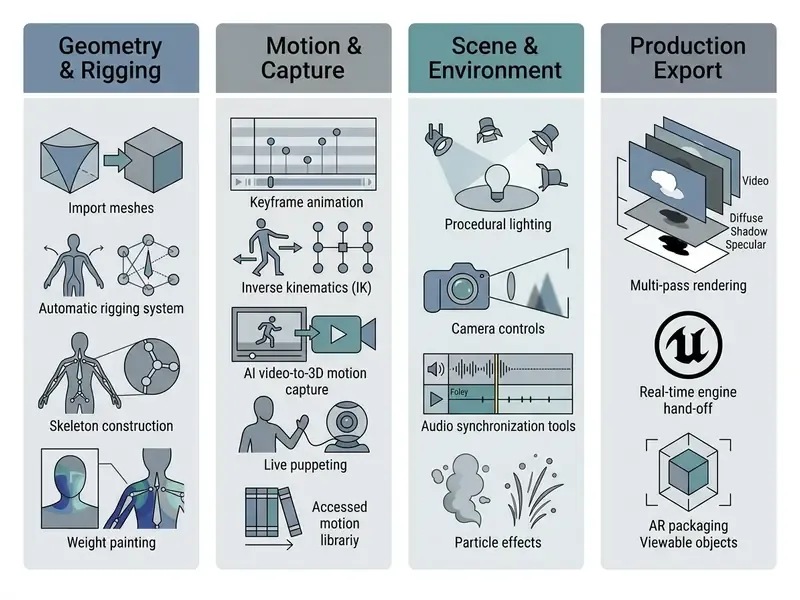
A practical feature checklist for 2026 platforms: mesh import (FBX, OBJ, GLB/glTF, USDZ), automatic skeleton assignment for humanoid and quadruped meshes with bone-binding preview, editable skin-weight maps, constraint-driven procedural rigs, drivers and shape keys, motion-path visualization, preset motion libraries, AI motion generation from text or video, and rig-preserving export.
Models, Characters, Rigging, and Motion Libraries
At the core of character animation sits the armature system. A robust animation creator 3d platform must support mesh importing (FBX, OBJ, GLB) and ship built-in rigging tools:
- Auto-Rigging Enginesanalyze bipedal or quadruped meshes, position internal bone hierarchies, and assign skinning weights to vertices without manual bone placement. Autodesk's FBX SDK also converts OBJ, DXF, DAE, and 3DS to and from FBX, so an import chain can begin with OBJ geometry and end with a rigged FBX ready for animation.
- Skinning & Deformationsvertex skin weights dictate how mesh geometry deforms as bones rotate, which is what prevents unnatural collapse around elbows and knees.
- Motion Librariespre-recorded motion-capture files (locomotion, gestures, combat moves) retargeted onto custom armatures. In FBX, that motion data lives as animation stacks, layers, curve nodes, curves, and keys. That structure determines what survives an export, and what quietly does not.
«RigAnything, a transformer-based autoregressive model, achieves state-of-the-art auto-rigging for humanoids, quadrupeds, marine creatures, and insects without templates.»
Academic research also shows real scaling in auto-rigging datasets. The Anymate Dataset (Liang et al., 2025, https://anymate3d.github.io/) introduced 230,000 rigged 3D assets with expert-crafted bone structures, roughly a 70-fold increase over legacy auto-rigging benchmarks, which is what lets modern AI auto-riggers process unusual custom geometry with any reliability.
Scenes, Camera Motion, Audio, and Visual Effects
Telling a story in 3D requires full scene composition, not just a moving character:
- Camera System & Depth of Field virtual cameras simulate real focal lengths, sensor sizes, aperture settings, and animated depth of field to direct attention. Camera position, orientation, field of view, and DoF are all keyframable, which is why depth blur belongs to the camera rig rather than a fixed post effect.
- Lighting Systems point, directional, spot, and HDRI environment lighting calculate shadows, reflections, and ambient occlusion. Light position, direction, beam angle, intensity, and colour animate alongside camera motion.
- Audio Synchronization & Lip-Sync multi-track timelines carry background music, voiceover, and automated mouth-shape matching (phoneme-to-viseme lip-sync). The W3C Multimodal Interaction Requirements (https://www.w3.org/TR/mmi-reqs/) state that systems must support synchronized output media and explicitly list audio, TTS, and lip-sync face synthesis as output modes. The Web Audio API 1.1 (W3C, 2024) additionally specifies spatialized audio for 3D games and immersive environments.
- Visual Effects (VFX) particle emitters, smoke and fire dynamics, and motion blur that keep rendered output from looking synthetic.
«AniSora is trained on over 10 million text-video pairs and includes a spatiotemporal masking module for aligning keyframes with audio cues.»
Live Puppeting & Webcam Face Tracking
Modern suites allow real-time character control by linking hardware inputs (webcams, depth sensors, MIDI controllers, keyboards, mice) directly to facial morph targets and skeleton joints. With real-time facial feature tracking, animators and live streamers capture performance without suits or optical marker rigs. The system maps visemes, eyebrow raises, head rotation, and gaze direction onto 3D blend shapes on the fly, which cuts production time sharply on dialogue-heavy sequences.
A production-grade puppeting workflow runs in four stages:
- Import and scale artwork or meshbring in background plates, props, and character geometry; group layers by anatomical function (head, jaw, left arm, right arm) so the rigger resolves them automatically.
- Bind controlsassign the webcam to facial features, the MIDI device to gestures or pose triggers, and keyboard or mouse keys to discrete actions such as blinking, prop swaps, or camera cuts.
- Build armaturesadd bones and joints so the puppet responds with lifelike secondary motion instead of rigid layer translation. Auto-rigging speeds this up when layer group names follow the expected naming convention.
- Record, hold, and streamperform live, apply pose-to-pose minimum hold intervals to suppress jitter (lip-sync behaviour stays excluded so speech reads naturally), then save the take as an editable sequence or broadcast it to YouTube, Facebook Live, or a third-party streaming app for multi-character shows.
Governance note for enterprise teams: webcam puppeting streams biometric-adjacent facial data. Confirm whether the vendor processes tracking on-device or in the cloud, and whether captured facial telemetry is retained or used for model training, before any customer-facing broadcast. This is the kind of question that is cheap to ask in procurement and expensive to ask after launch.
How to Create 3D Animation: Step-by-Step Workflow
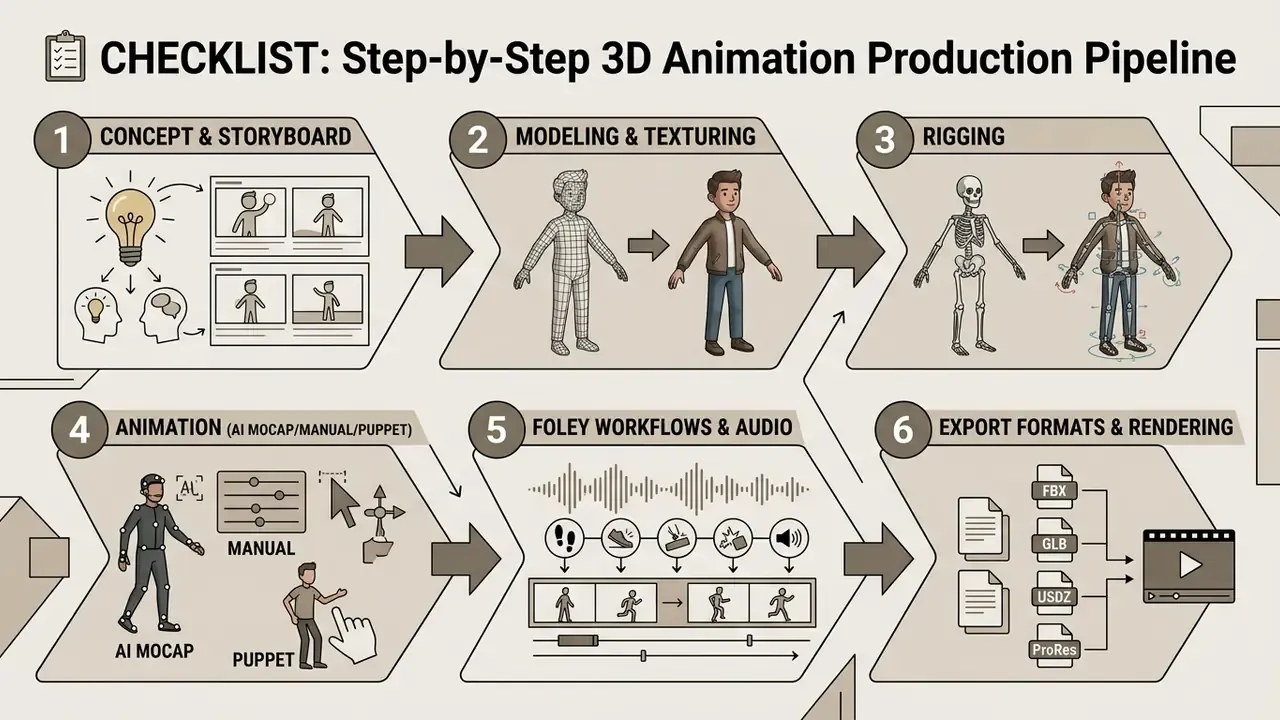
Understanding how to create 3d animation or how to make 3d animation comes down to following a structured pipeline. Whether you are learning how to make 3d animations for a personal project or shipping enterprise deliverables, skipping pre-production or layout creates expensive rework at render time. Every experienced animator has paid that bill at least once.
Developers automating asset transformations through code can review our technical AI Media API Guides for programmatic workflow documentation. If a batch job fails mid-render, our AI Media Support and Troubleshooting index covers the usual culprits.
- Pre-Production & Planning
- define campaign goals, write the script, design character concept art, and build a shot-by-shot storyboard plus a visual animatic.
- Asset Creation or Acquisition
- model custom geometry in 3d modeling software or import pre-built assets, applying PBR (physically based rendering) materials and textures. Texture cleanup, reference retouching, and colour matching often run through AI photo editors before UV mapping.
- Rigging & Setup
- construct skeletal armatures, set up inverse kinematics (IK) handles, assign skin weights, and configure facial morph targets.
- Scene Assembly & Layout
- place characters, props, lights, and virtual cameras in the 3D scene; establish initial shot blocking.
- Animation Execution
- apply keyframe animation, load motion capture files, or generate movement with video to 3d animation software engines; refine timing in the graph editor. This is the insertion point for AI video-to-3D mocap, live puppeting, and auto-rigging; the full technical architecture for that path sits in sections 14 to 16 below.
- Audio Integration
- import voiceovers, sound effects (foley), and soundtrack elements; sync mouth movement to speech waveforms.
- Lighting & Rendering
- configure ray-tracing or rasterization settings, light sources, and volumetric fog; run multi-pass renders or real-time frame capture.
- Post-Production & Export
- composite render passes, apply colour grading, add final effects, and export to target video formats (MP4, ProRes) or 3D containers (FBX, GLB).
Pre-Production: Defining Goals, Scriptwriting, and Storyboarding
Every successful project starts before anyone opens a viewport. Pre-production sets the narrative and visual foundation:
- Scriptwriting defines dialogue, voiceovers, action beats, and transitions. Feature studios invest heavily here. Pixar has spent up to two years locking a script before sketches begin, because narrative rework after asset production costs exponentially more.
- Concept Art determines aesthetics, tone, character design, proportions, environments, and props. Pre-production documentation places concept art immediately after the script, as the start of visual development.
- Storyboarding translates the script into comic-strip panels, establishing camera angles, framing, cinematic direction, and character placement.
- Animatic assembles storyboard panels into a timed clip against temp audio, letting directors lock pacing before expensive 3D asset generation begins.
Production: Scene Assembly, Depth, Lighting, and Animation
Production converts 2D concepts into dimensional reality. Artists assemble assets in the viewport, position key, fill, and rim lights, then configure virtual camera parameters such as field of view and motion paths.
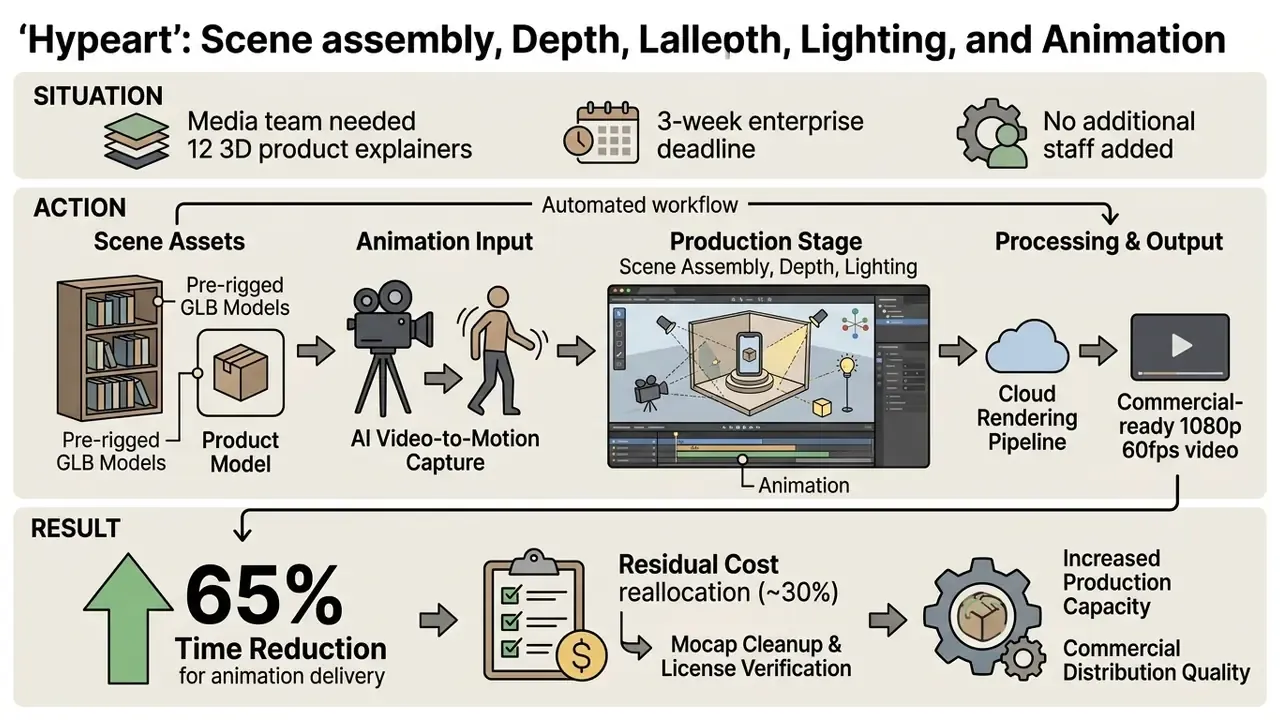
During keyframing, animators set major pose points on specific frames and let interpolation curves calculate the in-betweens. Alternatively, motion capture data maps real actor movement onto character bone structures for natural motion. Blocked-out scenes get reviewed and approved before refinement, and refined shots pass further approval rounds before anyone marks them final. Those gates look bureaucratic until the first render farm bill arrives.
«AnimateDiff-Lightning applies progressive adversarial diffusion distillation, enabling few-step video generation while preserving temporal consistency and visual quality.»
Post-Production: Compositing, Audio Sync, Review, and Export Video
Post-production turns raw renders into polished commercial media. Renders usually leave the engine as multi-pass image sequences (diffuse, specular, depth map, shadow, reflection, ambient occlusion) and get combined in compositing software such as Nuke or After Effects, where each pass grades independently. This stage also integrates 3D elements into live-action plates and adds depth of field, motion blur, and colour correction so the composite reads as one photographed image.
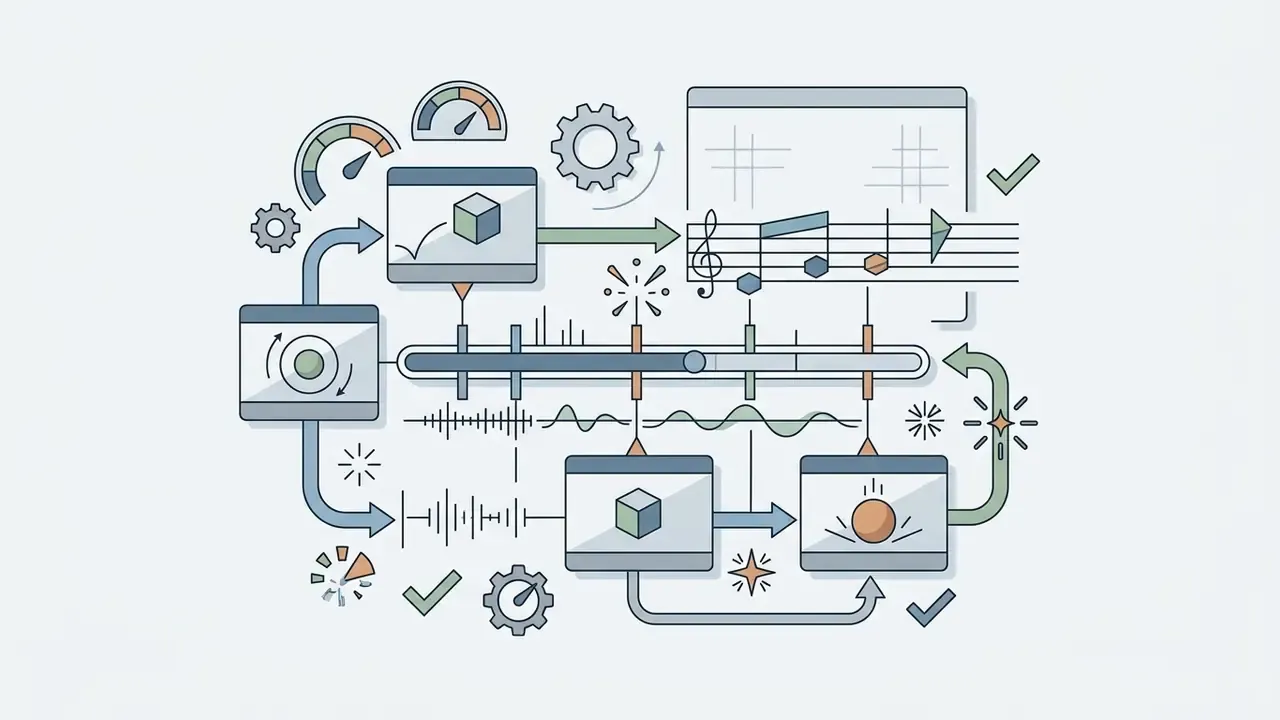
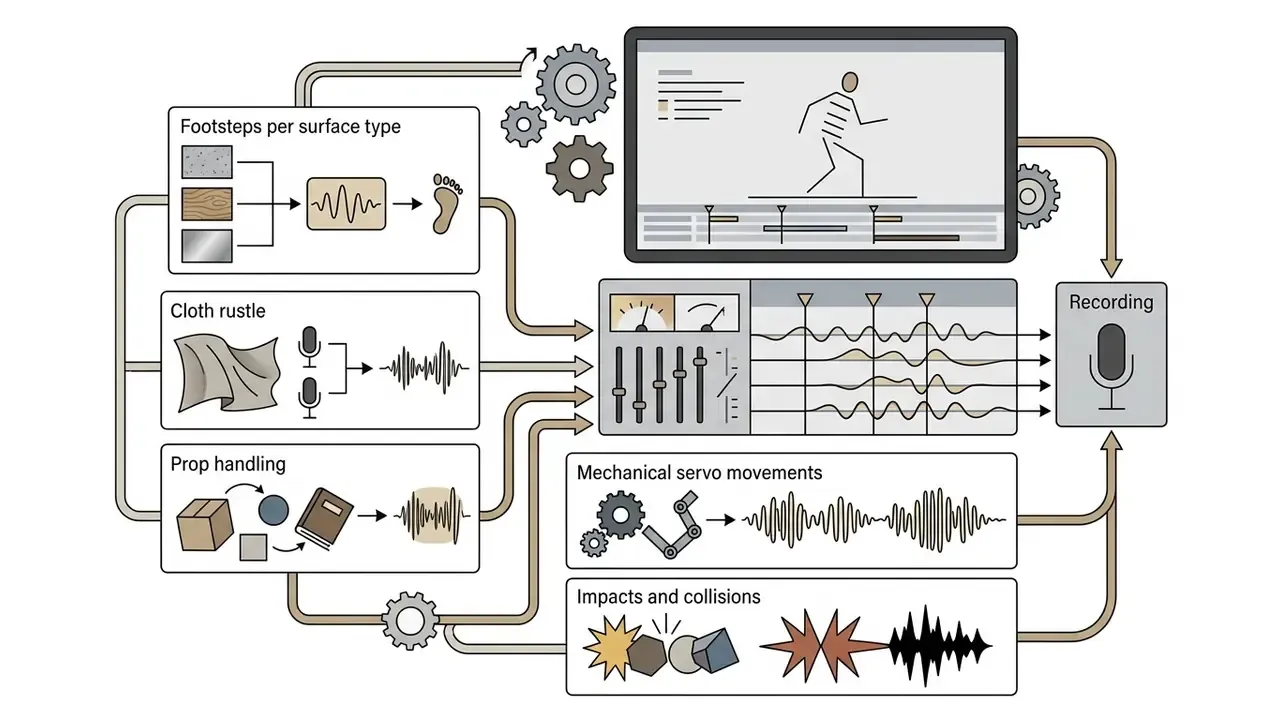
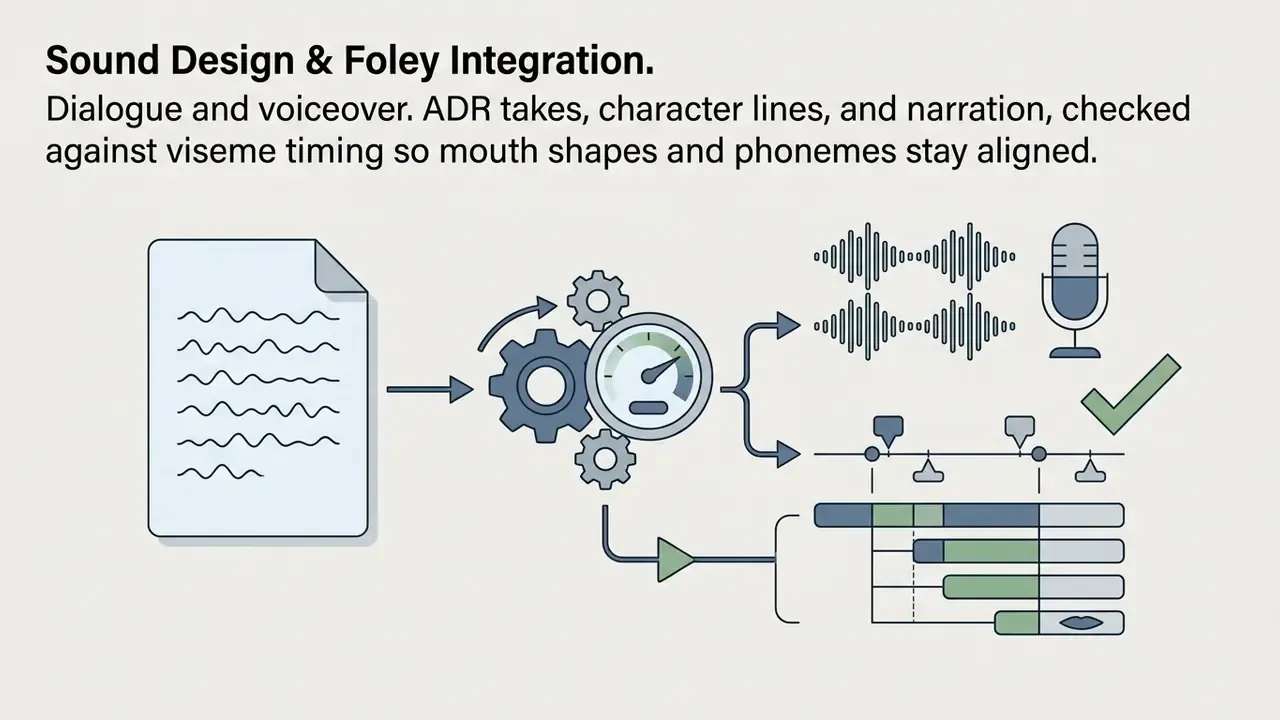
Sound Design & Foley Integration
Visual immersion in 3D animation leans heavily on spatial audio post-production. Sound elements are typically created in a dedicated studio and delivered in three layers:
Once locked, these elements go through a sound edit and mix: multi-channel panning matched to on-screen position, dynamic EQ to separate frequency ranges, reverb matched to scene geometry, and audio ducking so effects and music never mask dialogue. Industry production-data guidance, including the VES On-Set VFX Data Collection and Usage Guide, treats lip sync and character audio as tracked production data, precisely because desync becomes visible before it becomes audible.
Even fully storyboarded animation needs an edit pass to time sequences, trim cuts, and lock the mix. After stakeholder review and QA checks for visual glitches, popping textures, flickering shadows, and audio drift, the project renders to its final distribution file. Practical QA rule worth stealing: review the cut twice, once with sound and once muted, because a video that only works with audio will fail on autoplay-muted social feeds.
AI and Video-to-3D Animation Software: How to Automate Motion
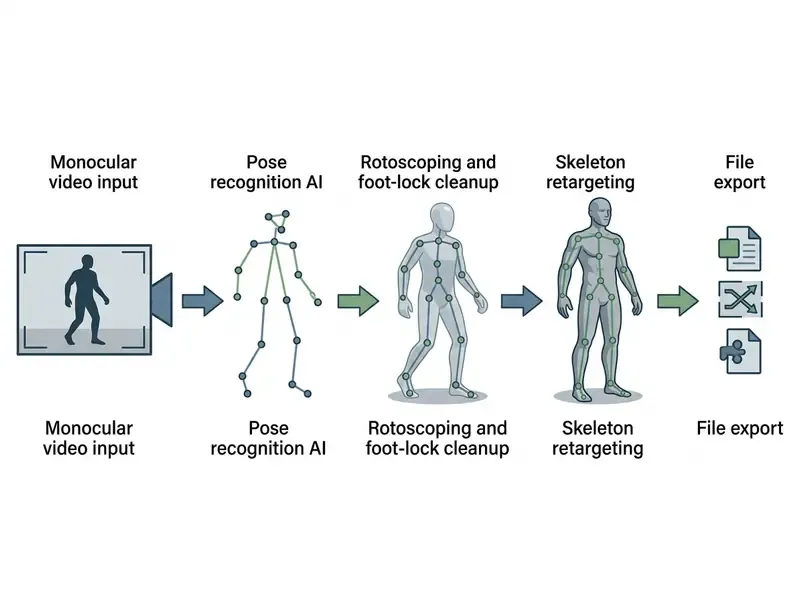
Generative artificial intelligence brought scalable automation into 3D creation. Using video to 3d animation software, creators extract human skeletal motion directly from ordinary monocular smartphone video, with no multi-camera optical suits or specialized capture hardware. This section expands step 5 of the pipeline above.
Creating Motion from Video and AI Motion Capture
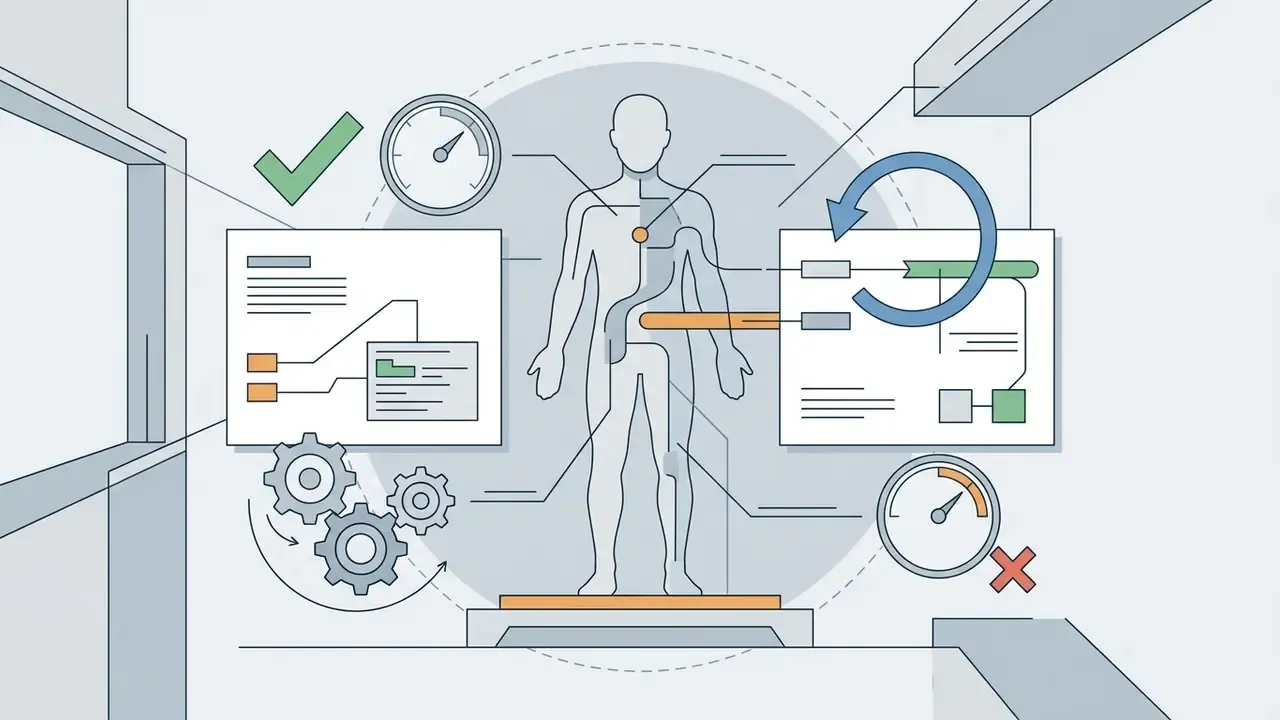
Modern AI motion-capture engines analyze monocular video uploads with deep neural networks trained on volumetric pose datasets. Updated: peer-reviewed and preprint literature now confirms that single-camera pipelines can yield production-usable articulation.
«AnimaMimic transfers 2D motion signals into coherent 3D articulation without full 4D reconstruction, using differentiable rendering and physically grounded refinement.»
https://www.iso.org/standard/89030.html
Auditability Checklist for AI-Generated Motion
AI Auto-Rigging and Pre-Rigged Animation Presets for Characters
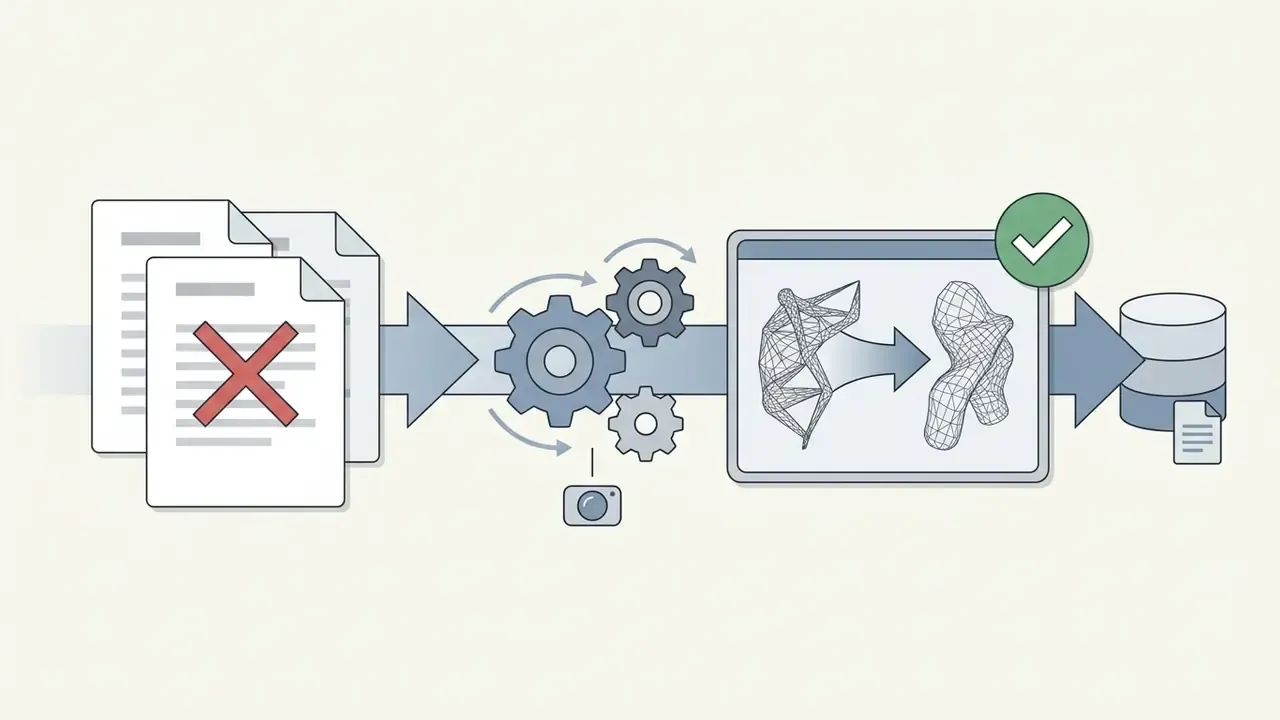
Automated rigging tools remove manual bone placement and weight painting. AI models read mesh topology, detect anatomical features (head, shoulders, elbows, knees), and generate a full armature in seconds.
Research in humanoid auto-rigging, notably HumanRig (Chu et al., 2024, https://arxiv.org/abs/2411.17443), which evaluated 11,434 AI-generated T-pose meshes against standard Mixamo topology, shows that neural mesh-skeleton attention networks predict joint placement and vertex skin weights reliably even across unusual character proportions.
«DRiVE predicts joint positions as spatial distributions in a 3D Gaussian representation, achieving state-of-the-art skeleton accuracy and skinning weights on the AnimeRig dataset.»
Related work extends the same logic: ASMR (2025) performs adaptive skeleton-mesh rigging and skinning, then retargets source skeletal motion onto the predicted articulation. Coverage is strongest for bipedal humanoids. Quadruped auto-rigging remains less mature, and non-standard anatomies (wings, tails, tentacles, multi-limbed creatures) still often need manual bone placement. Pre-rigged models, meanwhile, accept thousands of standardized motion presets instantly, which makes it trivial to test locomotion, facial expressions, or a dance loop before committing to a character design.
Free Plans, Subscriptions, and Commercial Use of 3D Animation Software
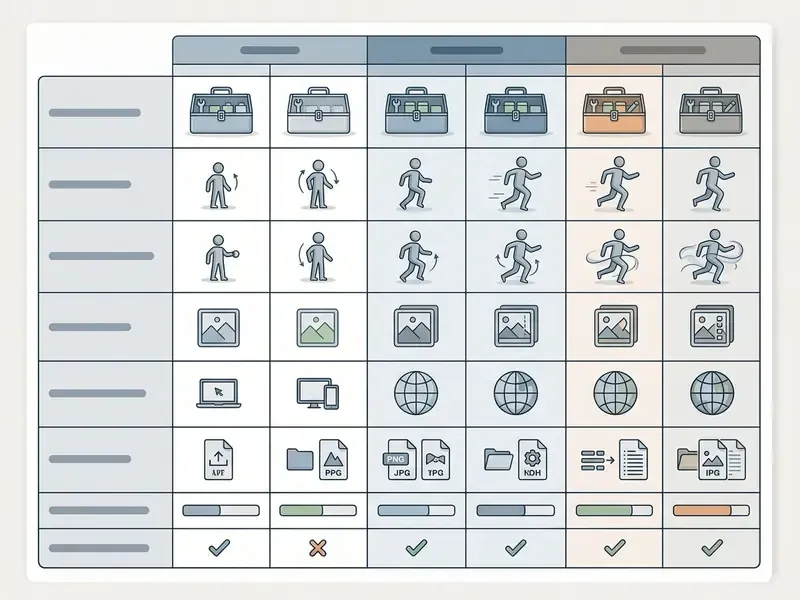
Evaluating licensing means looking past the sticker price at feature caps, export restrictions, and usage rights. Many platforms advertise a free 3d animation maker or 3d animation maker free tier, but those tiers are generally built for non-commercial evaluation, personal learning, or platform testing.
| License Tier | Typical Monthly Cost | Resolution & Export Limits | Watermarking | Commercial Usage Rights |
|---|---|---|---|---|
| Free / Freemium | $0 | Limited to 720p or 1080p MP4; no raw 3D mesh export (FBX/GLB restricted); trial exports may cap clips near 30 seconds. | Yes (mandatory platform logo overlay). | Restricted to personal, educational, or non-commercial testing. |
| Pro / Creator | $15 to $49 / mo | Uncapped 1080p and 4K MP4 exports; standard GLB/OBJ export. | No watermark | Full commercial rights for monetization, client projects, and social ads. |
| Enterprise / Studio | $100+ / mo or custom | Full 4K/8K multi-pass EXR, native FBX/USD scenes, raw animation clips. | No watermark | Perpetual royalty-free commercial licence, multi-user seat pooling, NDA protection. |
Representative 2026 examples of these patterns: watermarked output plus restricted character-pass, PNG-sequence, and USD-scene export on free tiers; trial versions limiting video export to 30 seconds at 720p with a capped number of FBX/OBJ/ABC/USD exports; community editions restricted to non-commercial use while the paid tier grants a commercial licence, removes watermarks, and unlocks AI features. Asset vendors often add a third axis entirely, with Standard, Extended, and Enterprise content licences carrying different rights for workgroup sharing and assignment of finished works.
For operational breakdowns of commercial asset usage, review our AI Media Commercial-Use Hub, and compare adjacent rules governing the commercial use of AI image generators.
What Is Typically Included in a Free Animation Maker
A free 3d animation maker app or web tier usually gives you enough to test core functionality: basic template libraries, standard stock characters, viewport preview tools, and low-resolution video rendering. Enough to answer "does this tool fit my workflow?" and not much more.
Free plans almost universally enforce technical restrictions, though. Expect watermarks on rendered video, capped export resolutions (720p or 480p MP4, 1024px stills), limited clip duration, limited render queues, restricted 3D mesh export, monthly caps on generated animation seconds, and prohibitions on commercial monetization. Some tools do permit commercial use on free plans; many explicitly do not. The only reliable method is reading the current terms page for the exact tier you are exporting from, on the day you export.
Key Checks Before Commercial Video Export
«GPT-4V evaluates text-to-3D generations across text-asset alignment, 3D plausibility, texture detail, and geometry detail, showing strong correlation with human judgement.»
Exporting 3D Animation and Deployment in Games, Video, AR, and VR
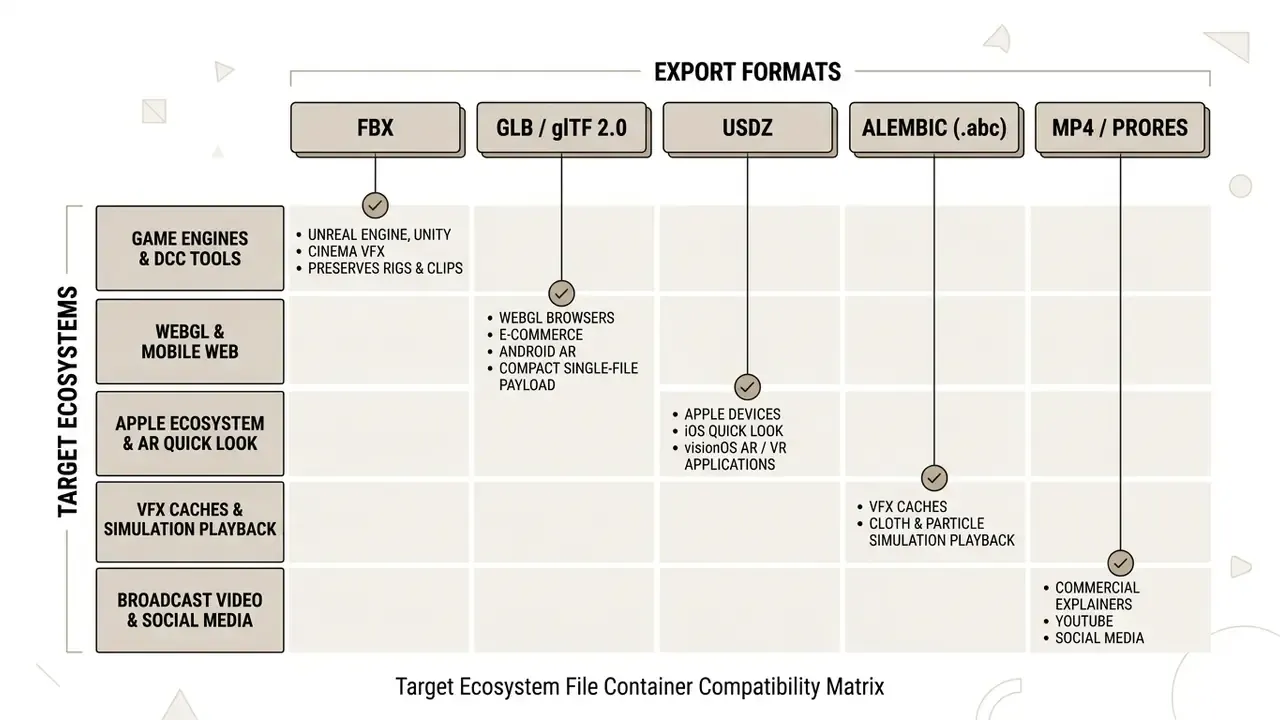
The final phase is exporting files into formats matched to specific distribution channels. Pick the wrong container and you break skeletal motion, strip material textures, or ship a payload far too heavy for web delivery.
Exporting Animation for Game Development, AR/VR, and Film Production
When exporting interactive assets into real-time engines, WebGL viewports, or immersive extended reality (XR) applications, technical standards drive format choice:
- Game Engines (Unity & Unreal Engine) export as FBX. It preserves complex armatures, vertex skinning weights, multiple animation layer clips, morph targets, and LOD (level of detail) settings. Unreal documents FBX 2020.2 as the native path for static meshes, skeletal meshes, animations, morph targets, and LODs; Unity treats
.fbxas its native import format. - Web Delivery & WebAR export as GLB or glTF 2.0. Standardized under ISO/IEC 12113:2022, glTF 2.0 is the runtime delivery standard for 3D web graphics, packing mesh geometry, PBR material textures, and skeletal keyframes into one compressed binary payload (.glb). Unity accepts glTF version 2.0 only, imported via the glTFast package.
«Articulation-XL2.0 contains 59,400 rigged 3D models in glb/gltf, fbx, dae, and blend formats, confirming compatibility across major engines and DCC tools.»
To evaluate non-3D media workflows such as speech generation or image editing, explore our related resources on AI voice generators, online photo editors, and specialized video compressors.
- Apple Ecosystem & Vision Pro
- export as USDZ. Developed by Pixar and adopted by Apple, USDZ is required for native iOS AR Quick Look and visionOS spatial computing applications. Teams sourcing textures and stylized reference plates for these builds often start with AI image generators before UV projection.
- Visual Effects & Film Caching
- export as Alembic (.abc). Alembic bakes vertex geometry over time, capturing cloth simulation and particle physics without depending on live bone armatures.
- 3D Printing & Physical Prototypes
- export as STL or 3MF when the animated concept also has to exist as a physical prop or product model.
FAQ: Animation Maker 3D, Pricing, and Commercial Use
What is the easiest 3d animation maker for beginners?
Browser-based tools like Spline and web platforms like Mixamo are the gentlest entry points. They skip polygon modeling and manual rigging entirely, offering drag-and-drop pre-built 3D characters, template scenes, and ready motion libraries that run in a browser with no hardware configuration at all.
Do I need advanced 3D software to create effective 3D animations for business?
No. For most explainer, training, and internal-communication work, a scene-based animation maker with 3D-style depth, perspective, and spatial motion is enough. Full modeling and rendering pipelines become necessary only when the deliverable demands photorealism, physical accuracy, character acting, or interactive engine assets.
How is 3D-style animation different from traditional 3D animation?
Traditional 3D animation prioritizes detailed geometry, materials, simulation, and realism, and renders frames from a complete 3D scene. 3D-style animation prioritizes perspective, layered depth, camera movement, and visual structure to support comprehension. It renders faster, updates more easily, and requires no rigging or shader authoring.
How do you make 3d animations from a 2d video?
Use video to 3d animation software powered by AI, such as DeepMotion or Plask. Upload a clear 2D clip of a person moving. The AI analyzes joint positions frame by frame, extracts 3D skeletal motion vectors, and maps that movement onto a custom character mesh, exporting a rigged FBX or GLB. Motion-only output exports as BVH. Budget cleanup time for occluded frames; that step is not optional.
Readers exploring adjacent conversion paths can also review image-to-video AI tools, which animate a single still frame rather than tracking a performance.
Can I animate a character live with my webcam?
Yes. Live puppeting systems bind webcam facial tracking, MIDI controllers, keyboard, and mouse inputs to a character's morph targets and armature, giving you real-time performance capture without a mocap suit. Auto-rigging recognizes predefined layer group names, pose-hold intervals suppress jitter without disturbing lip-sync, and the finished take records as an editable sequence or streams live to YouTube or Facebook Live for multi-character broadcasts.
What is Foley in 3D animation, and do I need it?
Foley is the recording of every physical sound the animation needs: footsteps, cloth movement, prop handling, mechanical motion, performed against picture and timed to the character's keyframes. It is what makes motion feel weighted. For short marketing clips, a music bed plus a few library effects may be fine. For character-driven or narrative work, custom foley, dynamic EQ, and ducking against dialogue are what separate amateur audio from broadcast-grade audio.
What is the difference between FBX and GLB export formats?
FBX is a proprietary interchange format used widely in desktop game development (Unity, Unreal Engine) and film pipelines, because it preserves complex rigging armatures, multiple animation clips, and high-density production assets. GLB, the binary form of glTF 2.0, is an open ISO standard optimized for real-time web delivery, AR, and mobile viewports thanks to its compact size and efficient GPU loading.
Can I use free 3d animation tools for commercial projects?
It depends on the licence. Open-source software like Blender allows unrestricted commercial use under the GNU GPL, and artwork created in it belongs solely to the creator. Most freemium online animation makers and AI generators, though, restrict free tiers to non-commercial evaluation and require a paid upgrade for legal commercial rights and watermark-free export.
What exactly qualifies as "commercial use" on a free plan?
Vendors generally treat any monetized, client-facing, advertising, or revenue-supporting deployment as commercial. That includes social posts on a business account, sales decks, videos on a monetized YouTube channel, and internal training used by a for-profit employer. Personal portfolios and coursework usually fall outside it. Two extra traps: commercial rights are often tied to the plan active when the asset was generated, so downgrading may not revoke prior rights, but upgrading rarely legalizes earlier free-tier exports retroactively; and freemium raw mesh or motion data frequently cannot be redistributed standalone even when the rendered video can. Read the current terms for your exact tier and keep a dated screenshot.
Which industries benefit most from 3D animation templates?
Healthcare and biotech (mechanism-of-action and device visualizations), logistics and delivery (route and fulfilment flows), e-commerce (360-degree product rotations and exploded views), EdTech and corporate training (character-driven compliance scenarios with lip-sync), and brand storytelling (recurring pre-rigged mascots reused across campaigns).
How long does it take to make a 3d animation from scratch?
Honestly, it depends more on approval cycles than on rendering. A template-based 3D-style explainer of 60 to 90 seconds can ship in two to five working days, including one review round. A custom-rigged character sequence with foley and grading usually runs three to six weeks. AI mocap compresses the animation stage sharply, then hands part of that time back as cleanup and validation.
Summary Checklist for 3D Animation Selection
To keep technical compatibility and legal exposure under control when selecting a 3d animation maker:
- Define target outputrendered commercial video (MP4 or ProRes), 3D-style explainer motion, or interactive 3D assets (FBX, GLB, USDZ).
- Audit hardware requirementsdecide whether cloud-based web software suffices or GPU workstations are genuinely needed.
- Model total cost of ownershipadd hardware, render compute, cleanup labour, and governance overhead to the subscription line.
- Verify licensing termsconfirm that your subscription and every third-party asset explicitly grant commercial monetization rights.
- Confirm data handlingcheck retention, model-training use, and deletion guarantees before uploading client geometry or facial data.
- Validate export capabilitiestest that the software exports cleanly into your team's editing software or target game engine, using a real asset.
- Audit AI motion outputretain source inputs, raw pre-cleanup exports, cleanup logs, and named approvals for every AI-generated take.
- Finish the audiobudget for foley, mixing, ducking, and a muted-playback QA pass before final delivery.
Appendix A: Editorial, Author, and Citation Notes
For transparency, superseded formulations from earlier revisions of this guide are recorded here alongside their replacements.