One more thing worth saying early. If your organization is regulated, the interesting part of this topic is not the art. It is the audit trail behind it.
Executive Summary
- What it is Anime generators are diffusion models fine-tuned on annotated anime corpora (Illustrious, Animagine XL 4.0, SDXL derivatives). They differ from general-purpose models by a narrower training distribution and anime-specific visual priors: expressive iris geometry, cel shading, stylized anatomy.
- How to control output Prompt hierarchy (subject → face → outfit → pose → scene → lighting → camera → render style), style and outfit tag matrices, negative prompts, and structural conditioning via ControlNet (lineart, tile, depth, pose).
- Photo-to-anime Denoising strength
0.35–0.50preserves likeness;>0.65allows radical restyling. Adapter modules decouple appearance from pose. - Canvas workflows Inpainting fixes local defects, outpainting extends scenes, pose-to-image locks camera and body geometry from a 3D mannequin or a rough doodle.
- Characters at scale OC turnaround sheets and VTuber-ready art require locked identity attributes, fixed seeds, neutral poses and layer-friendly backgrounds.
- Free vs paid Free tiers typically grant 10 to 30 credits, standard resolution, public queues and non-commercial licenses. Paid tiers unlock 4K upscaling, ControlNet conditioning, priority GPU and commercial rights.
- Governance Purely machine-generated output is not copyrightable in the U.S. without substantial human creative input. Generating recognizable franchise characters, or using personal photos without consent, creates legal exposure. Enterprise deployments need Shadow AI controls, data-retention review and a reproducible generation log (prompt, seed, model hash, ControlNet parameters).
Who This Guide Is For and How to Read It
Three reader profiles keep showing up in this topic, and they need different things from the same page.
Individual creators want a working recipe: prompt, model, aspect ratio, refinement. Sections 1 to 13 answer that end to end, and the tag matrix in section 3 is the fastest shortcut to repeatable results.
Studio and marketing teams care about consistency across dozens of assets. The OC and VTuber workflow, plus the defect table in section 13.1, are the parts to bookmark. Consistency is a parameter-locking discipline, not a talent question.
Risk, compliance and procurement leads are usually here for one reason: someone already used a free anime generator on company material. For that reader, the vendor screening list, the audit-trail requirements and the licensing section matter more than prompt craft. Treat every claim about user behavior in this guide as a working hypothesis until your own analytics, interviews or CRM data confirm it.
What Is an Anime AI Generator and What Images It Creates
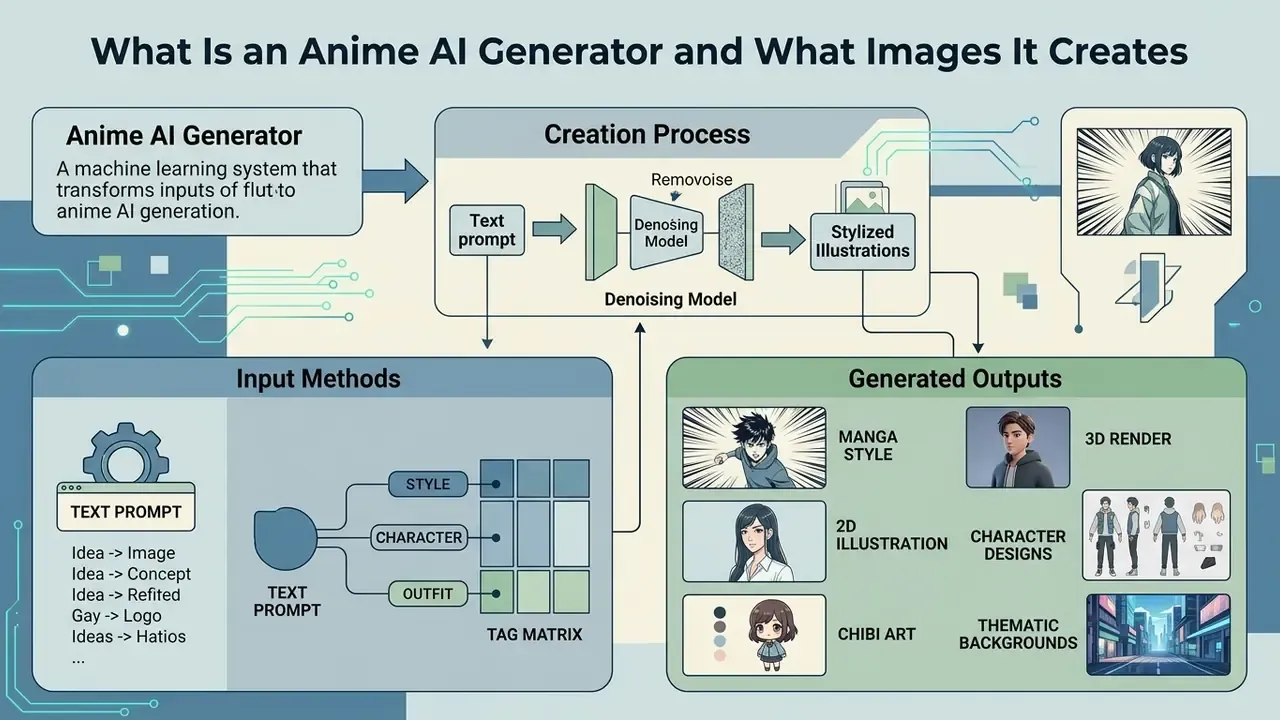
An anime ai generator is a machine learning system engineered to produce stylized illustrations, character designs and thematic backgrounds by denoising latent images guided by text prompts or reference pictures. Unlike general-purpose text-to-image models optimized for photorealism, an ai anime art generator relies on fine-tuned architectures such as Stable Diffusion XL variants, Illustrious, Animagine XL or dedicated GANs, trained on millions of annotated anime and manga images (Illustrious: Open Advanced Illustration Model, arXiv, 2024). These systems read specific artistic conventions well: expressive eye geometry, distinct linework, cel shading, exaggerated hair volume. Outputs range from digital concept sheets to atmospheric environment art.
«Diffusion models such as Imagen (FID 7.27) and Stable Diffusion (FID 12.63) outperform autoregressive systems on MS-COCO image quality.»
For broader context on adjacent tooling and terminology, see our overview of AI image generators and the comparative breakdown of the best AI art generators.
Generated content categories include anime portraits, full-body characters, expression sheets, stylized environments, wallpapers, chibi stickers, manga panels, photo-to-anime conversions, sketch-to-color translations and, in newer research pipelines, short anime video sequences.
AI Anime Art from Text: From Idea to Finished Image
Text-to-image ai anime art generation translates written descriptions or structured tag sequences into rendered artwork through iterative latent denoising. Research shows diffusion models process text inputs via encoders like CLIP, mapping descriptive attributes such as hair color, clothing details, camera perspective and lighting into latent feature space (Text-to-Image Diffusion Survey, arXiv, 2024).
«Illustrious was trained on roughly 7.5M images at 1024×1024 resolution, batch size 192, across 781,250 training steps.»
Users can generate complex ai anime drawings and full-body anime images by naming exact visual elements, turning a loose idea into polished generated anime artwork in seconds. Research published in 2025 confirms diffusion architectures remain the core backbone for anime-style generation from textual prompts, with DiffSensei (CVPR 2025) adding multimodal LLM identity adapters for multi-character manga generation. That work targets a long-standing weakness directly: keeping two or more characters visually distinct inside one frame.
Available Anime Styles: Manga, 2D, 3D, Chibi, and Beyond
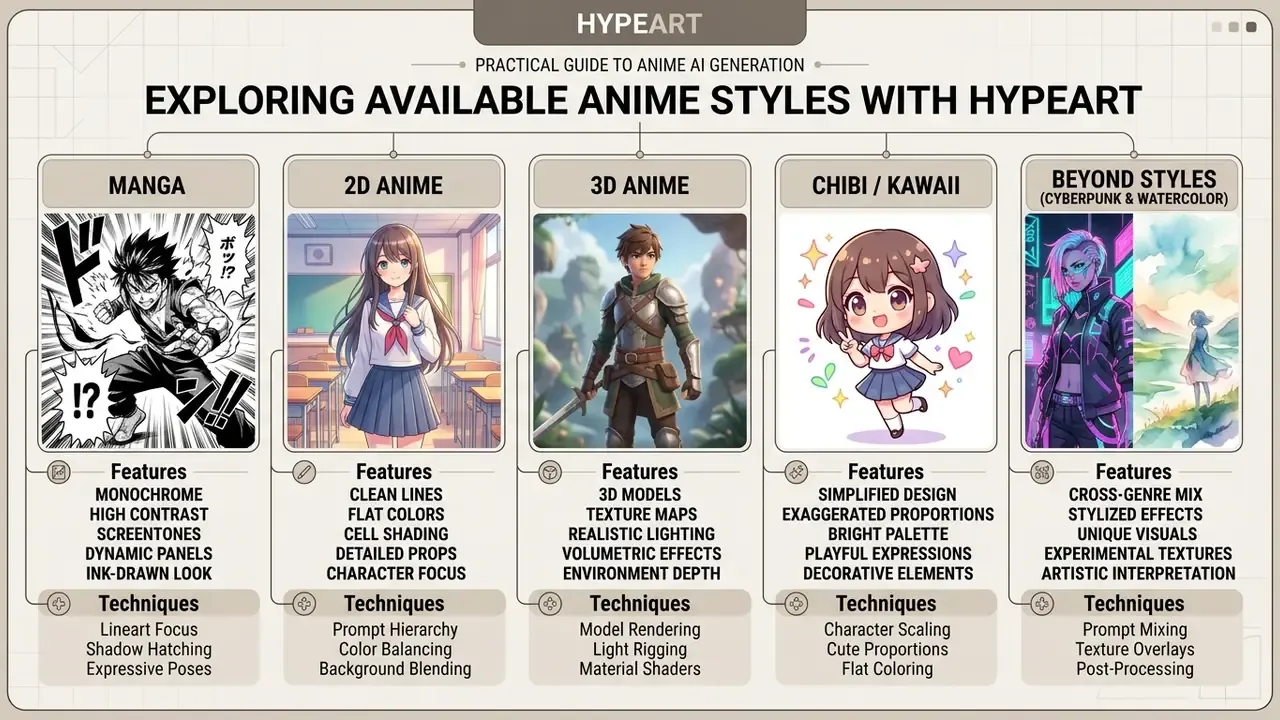
Modern ai anime creator platforms cover a wide spectrum of visual formats: monochrome manga line art, classic 2D cel-shaded looks, painterly fantasy illustration, chibi proportions, stylized 3D. By switching baseline checkpoints or inserting trigger words, a 3d anime ai generator shifts lighting depth, line weight and surface shading to mimic physical rendering or digital sculpts. Style is model-dependent as much as prompt-dependent. Anime Illustration Diffusion XL ships with 800+ built-in illustration styles activated by dedicated trigger words, while Diffutoon (2024) showed that diffusion architectures can convert photorealistic video into high-resolution toon shading. Dedicated style controllers and LoRA adapters hold a consistent aesthetic across art styles, whether you are generating an ai anime art girl portrait, a shojo halftone panel or an intricate mechanical scene.
Style, character and outfit tag matrix. Rather than browsing an opaque list of "100+ filters", build prompts from four controllable layers. One tag from each layer produces reproducible, describable results:
| Tag category | Popular keywords | Example prompt modifier | Expected visual effect |
|---|---|---|---|
| Character / archetype | Chibi, Catgirl (nekomimi), Kawaii girl, Elf, Mecha pilot, Furry / fursona, Chubby, DnD class | chibi style, 2 head-tall proportions, cute oversized head | Simplified proportions, oversized head, expressive eyes |
| Visual style / render | Cyberpunk, Retro 90s, Manga ink, Pixel art, Watercolor, Cinematic 3D, Ghibli-esque, Dark fantasy | retro 90s anime style, hand-drawn cel shading, vintage film grain | Aesthetic of classic 1990s TV anime, softer palettes, visible grain |
| Outfit / wardrobe | Gothic lolita, Techwear, School uniform, Maid, Mecha suit, Kimono, Office wear, Stockings, Miniskirt | gothic lolita dress, intricate black lace, ribbons, dark aesthetic | Detailed fabric texture, layered accessories, styled silhouette |
| Lighting and scene | Cinematic key light, Volumetric fog, Neon glow, Sunset rim light, Candlelight, Backlight | dramatic rim lighting, volumetric rays, neon ambient light | Volumetric depth, believable highlights on hair and iris |
| Quality / fidelity tags | masterpiece, best quality, highly detailed, sharp focus, intricate details | masterpiece, best quality, highly detailed, sharp focus | Higher perceived detail density and cleaner linework |
| Negative prompt layer | blurry, low quality, distorted, pixelated, extra fingers, watermark, text | negative: blurry, extra fingers, watermark, low quality | Suppression of recurring artifacts and unwanted overlays |
Together AI's image parameter documentation confirms that negative_prompt exists specifically to exclude unwanted elements, listing artifact terms such as blurry, low quality, distorted and pixelated, plus targeted exclusions for extra fingers and watermarks. A 2025 study on negative prompting explains the mechanism: negatives work through mutual cancellation of concepts in latent space. That is why they perform best when they name a concrete artifact instead of an abstract quality. "Not ugly" does nothing. "extra fingers" does.
Free Anime AI Art Generator: What to Check Before Generating
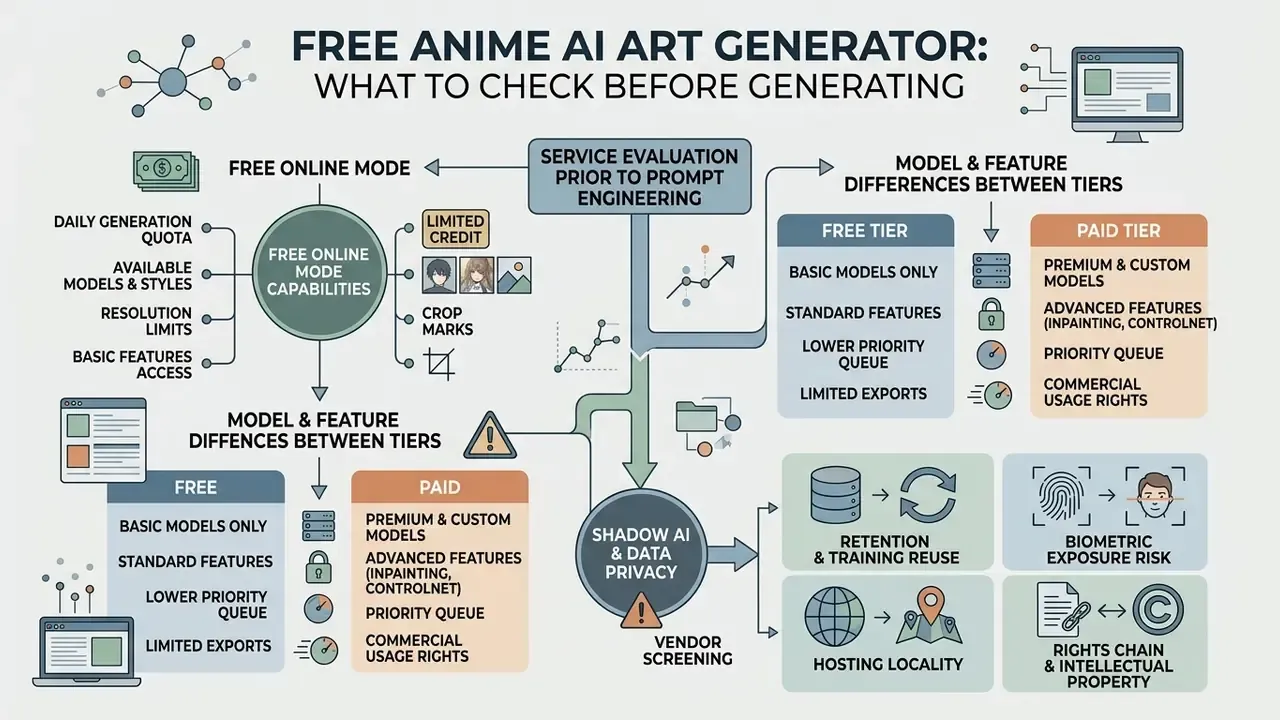
Platform selection logically precedes prompt engineering, so evaluate the service before investing hours in parameters. Before launching generations on an ai anime art generator free web platform, check credit limits, feature restrictions, export quality, data retention and licensing scope. Most web tools offer trial tiers so creators can test ai anime free generator capabilities before paying. See our comparison of free AI generators without sign-up for entry points that require no account. Still, reviewing system parameters keeps your workflow aligned with project resolution needs, privacy expectations and internal policy.
Capabilities of the Free Online Mode
An ai anime art generator free online platform typically provides daily or one-time promotional credit allowances (commonly 10 to 30 generation credits per day or per registration), basic text-to-image functionality and access to standard fine-tuned anime models. Vendor documentation confirms the pattern: Stability AI grants 25 free credits on account creation and then charges from $1 per 100 credits; NovelAI's free tier allows 30 generations up to 1024×1024, while its $10/month tier keeps 1024×1024 and extends single-image generation to 28 steps; AnimeGenius refreshes free-user credits at 00:00 UTC daily. While an ai anime generator online free mode lets creators test basic prompt engineering, free tiers often enforce queue priority limits, restrict batch sizes, apply watermarks or output standard resolution files. Compare available options in our roundup of the best free AI image generators, the parallel review of free AI art generators and the full set of AI Media Comparison Matrices.
How Models, Features, and Results Differ Between Tiers
Comparing free tiers against premium plans exposes real performance gaps in rendering speed, model access and resolution scaling. Advanced architectures like SDXL-based Illustrious or high-parameter checkpoints demand more compute, which pushes high-resolution upscaling (4K exports, for example), image-to-image ControlNet conditioning and commercial licensing behind paid tiers.
«Illustrious is an open SDXL-based model trained on ~7.5M images; NovelAI operates as a closed, Danbooru-tag-oriented system with proprietary prompting conventions.»
Speed differences are plan-bound rather than model-bound. Midjourney documents Draft Mode as roughly 10× faster at half the GPU cost, restricts HD 720p video to higher plans and reserves Relax Mode for video to Pro and Mega tiers. API-first anime services advertise a different economic model entirely, for example $0.009 per image with 4 to 8 second generation and up to 1280×1280 output without a monthly subscription. For budget modelling across vendors, our AI Media Pricing Guides break down credit packs against per-image API rates.
| Feature / Criteria | Free Online Tier | Premium / Commercial Tier |
|---|---|---|
| Credit allowance | 10–30 daily or trial credits; resets at a fixed UTC hour | Unlimited or high-volume monthly credits |
| Model access | Standard 2D anime base models | Advanced SDXL anime models, 3D and manga checkpoints, LoRA slots |
| Export resolution | Standard resolution (512×512 to 1024×1024) | High-resolution upscaling (up to 4K / 4096×4096) |
| Img2img and ControlNet | Basic reference uploads | Advanced lineart, pose, depth and tile conditioning |
| Canvas tools | Limited or absent | Inpainting, outpainting, 3D pose editor, character reference |
| Generation speed | Standard public queue | Priority GPU threads, draft and fast modes |
| Watermark | Frequently applied on free exports | Removed |
| Data retention / training opt-out | Often unclear; uploads may be reused or cached | Contractual retention windows, opt-out, deletion SLAs |
| Security attestations | Rarely published | SOC 2 / ISO reports, DPA, regional hosting, on-prem or VPC options |
| Commercial usage rights | Personal use / non-commercial license | Full commercial usage rights (per platform terms) |
The table summarizes the functional boundary between trial tiers and enterprise subscriptions. Free tiers work well for preliminary testing. Commercial projects that need high resolution and batch consistency almost always end up on dedicated processing plans, and that shift usually arrives sooner than teams expect.
Shadow AI, Data Privacy, and Vendor Screening
Free anime generators are among the easiest tools for employees to adopt without approval, which makes them a textbook Shadow AI vector. Source photos, unreleased character designs, storyboards and marketing concepts get uploaded to public SaaS endpoints with unknown retention policies. NIST's synthetic-content guidance (AI 100-4, 2024) frames the pre-generation checks that matter: provenance, misuse potential and whether output requires disclosure or labeling. NIST AI 600-1 (2024) adds that generative systems can reproduce verbatim fragments of training data, so reliance on upstream data sources must be documented.
«Provenance data for generated content can include creator, time, location, modifications, sources, and metadata across text, images, video, and audio.»
Screening questions to answer before allowing a generator into a production workflow:
A pragmatic control pattern, and one that survives audit questions: allow one approved generator for public-facing concept work, block uncontrolled endpoints at the network layer, and route any workflow touching real human photographs through an internal deployment with logging enabled. Simple. Enforceable.
How to Create Anime Art in an AI Generator
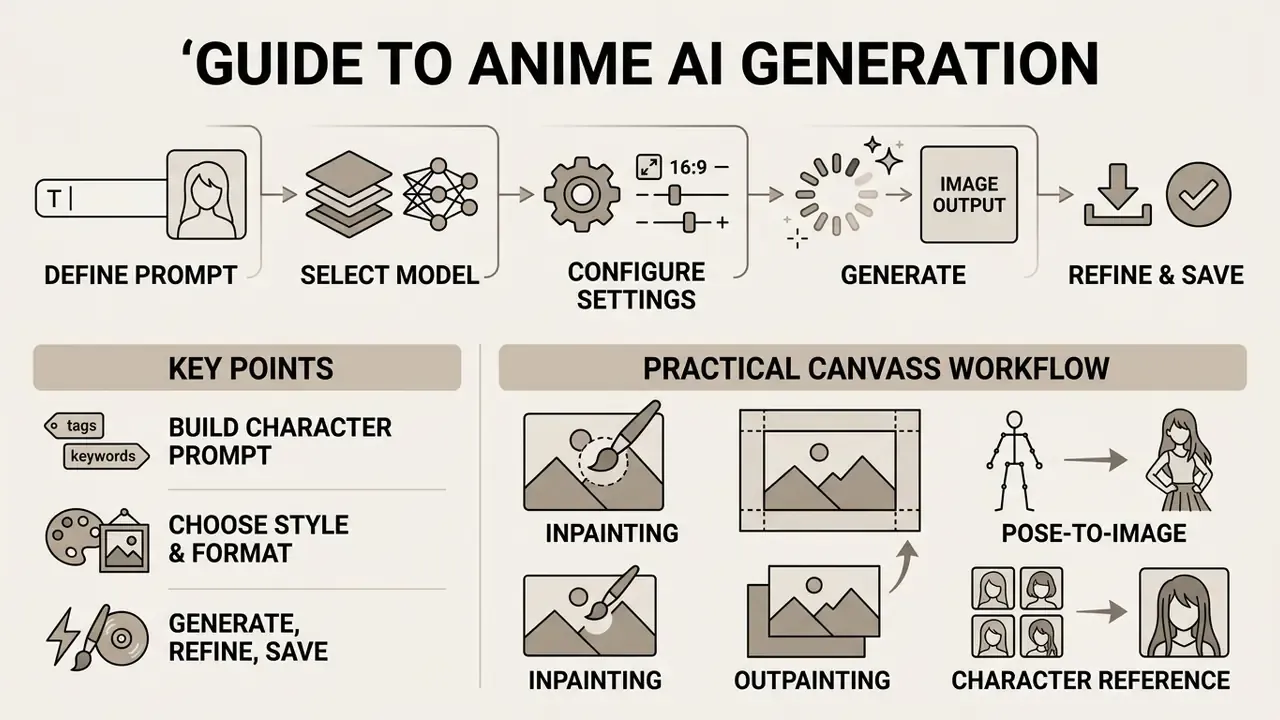
Generating artwork with an ai anime art creator follows a structured workflow: define the text prompt, select the target model and visual style, configure dimensions, then run generation. Operating an ai anime art maker requires no illustration background, since the neural pipeline translates visual concepts into finished artwork. A systematic method buys you predictable character geometry, crisp line resolution and outputs that match the brief.
Build a Prompt for an Anime Character or Anime Girl
Building an effective prompt for ai anime character art generator tools means organizing details into a clear hierarchy: subject identity, facial detail, clothing, pose and expression, background context, lighting, camera angle. Generating an ai anime art girl yields higher fidelity when the prompt names exact attributes, for example "silver hair, detailed blue iris, school uniform, dynamic standing pose, cherry blossom street, soft morning lighting", rather than leaning on vague adjectives.
«DALL·E 3 averages 4.3/5 on basic prompts but degrades significantly on multi-step compositional tasks.»
Specific attribute framing stops character features from blurring into default tropes. A practical nine-field template used in character-sheet workflows locks identity, face, hair, body, outfit, palette, signature item, style and composition, then varies only pose, expression, lighting and background between generations.
Choose the Model, Style, and Anime Image Format
The neural model and aspect ratio you pick determine structural quality and final resolution of the anime art. Specialized fine-tuned models such as Animagine XL 4.0 or Illustrious support native sizes like 1024×1024 (square), 832×1216 (portrait) or 1216×832 (landscape), holding feature density without anatomical distortion (Animagine XL 4.0 Docs, 2025). Animagine XL 3.1 additionally documents a Danbooru-style aesthetic tagging system with multi-aspect buckets up to 1536×640 and 640×1536, and newer anime checkpoints recommend operating near 1 MP (1024×1024, 896×1152, 1152×896). Choosing between a traditional 2D aesthetic, monochrome manga linework or a 3d anime ai generator sets the primary rules for lighting, shading and texture. When narrowing candidates, consult our comparison of the best AI image generators and the head-to-head review of Midjourney image generation.
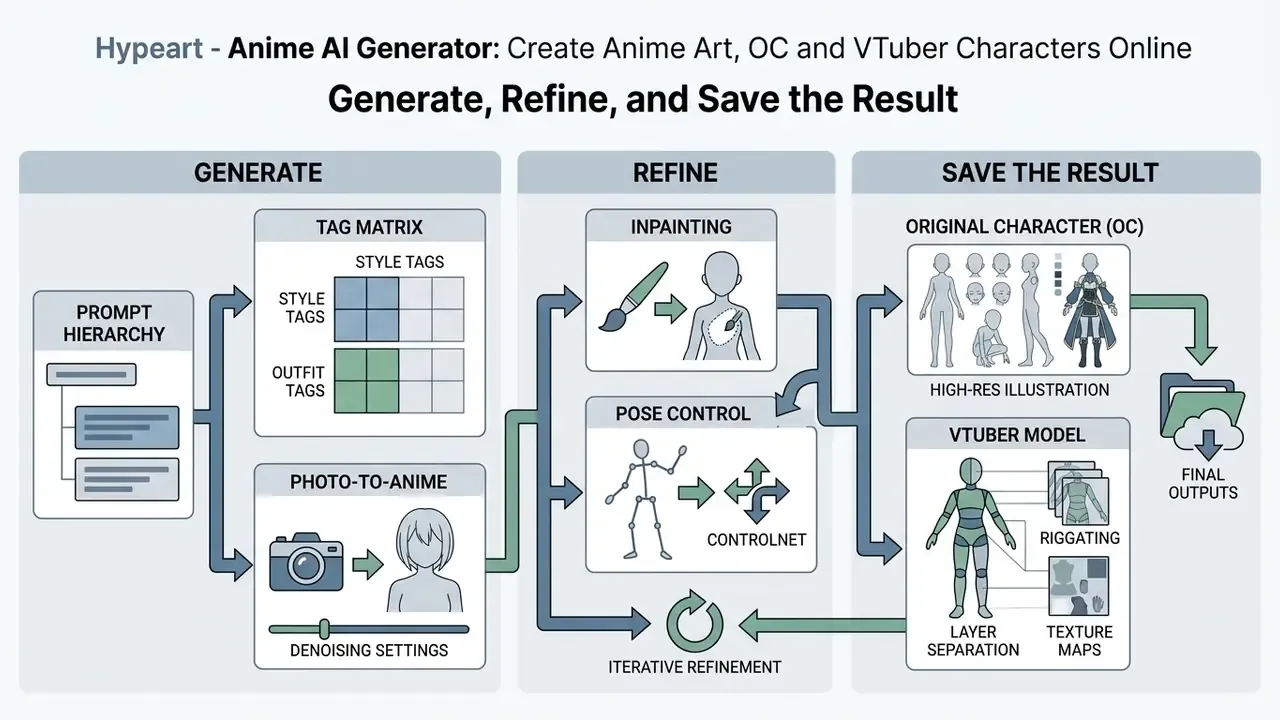
Generate, Refine, and Save the Result
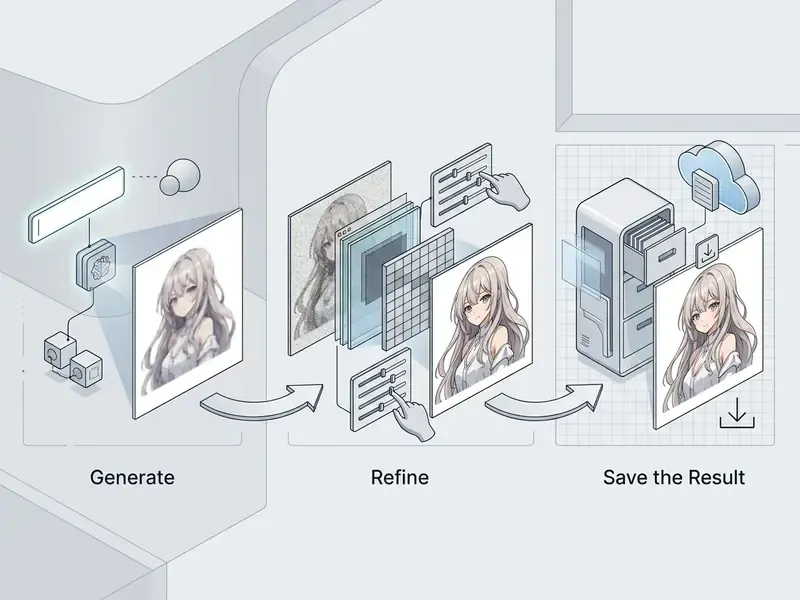
Clicking generate starts the denoising process and returns one or several candidate variations from your parameter settings. If minor artifacts show up, apply localized refinement (inpainting), run upscale workflows via waifu2x or APISR, or adjust prompt weights before final export ( (https://openaccess.thecvf.com)). APISR restores anime by rescaling images back to 720P to match production feature density, while waifu2x remains the classic 2× denoise-and-upscale baseline that preserves linework. In Stable Diffusion pipelines, Refiner passes redraw with reference at identical resolution, and tile-based Ultimate SD Upscale redraws at higher resolution for final detail cleanup. More on that in our guide to AI image upscalers.
«Frontier models such as Gemini 3 Pro Image (84.8/100) and FLUX.2 (82.3/100) lose points primarily on object counting and geometric artifacts.»
Once the output holds up under review, save high-resolution PNG or JPEG files to your storage for publishing or project integration.
Practical canvas-editing workflow. Refinement is not limited to re-rolling the seed. Three canvas mechanics cover most production fixes:
- Inpainting (local correction)
- Mask the defective region, whether malformed fingers, a wrong expression or a stray accessory, set
denoising strengthto0.40–0.50, and enter a narrow corrective prompt such ascorrectly proportioned hand, five fingers, clean lineart. Only the masked area is repainted, so composition and palette outside the mask stay byte-stable. - Outpainting (scene extension)
- Expand the canvas horizontally or vertically and let the model continue the environment beyond the original frame. A portrait crop becomes a full scene, a key-visual banner or a wide cinematic composition while the central character's style holds. See our breakdown of AI outpainting tools for expanding images.
- Pose-to-image (pose control)
- Load a 3D mannequin from a virtual pose editor (OpenPose skeletons or an in-app 3D editor) or a hand-drawn doodle, then generate final anime art following the exact camera angle and body curvature of the reference. Real-time doodle modes render candidate art as you draw, which is effective for blocking composition before committing GPU time to a high-resolution pass.
- Character reference
- Re-pose an existing character while identity stays constant. That is the operational basis for the OC and VTuber workflows below.
Creating Anime Art from Photos: Photo-to-Anime and Image-to-Image
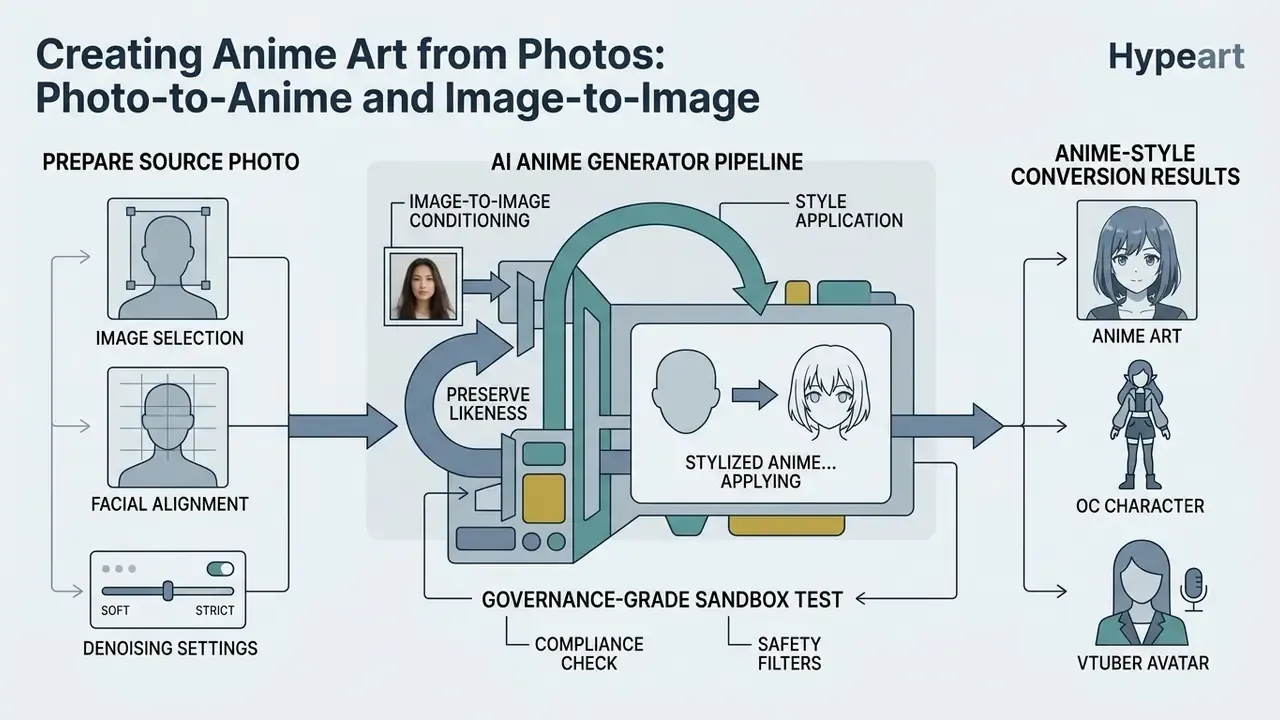
Transforming source images through ai anime from image pipelines uses image-to-image (img2img) conditioning to retain original facial composition while applying stylized anime textures. The ai anime art photo workflow relies on structural adapters like ControlNet to anchor spatial boundaries, letting the diffusion model repaint skin, hair and clothing into cel-shaded or manga aesthetics.
«ControlNet uses structural adapters (lineart, tile, depth) that preserve spatial boundaries while the style layer is repainted.»
The official ControlNet repository documents a model trained specifically on anime line drawings, which is why anime-lineart checkpoints are the default choice for photo-to-anime structure retention. This technique lets creators turn personal portraits or landscape photography into recognizable anime compositions. We go deeper in our guide to image-to-image generators and the style-specific review of Ghibli-style AI image generators. Novelty transforms built on the same img2img mechanics, an ai bald filter for instance, behave identically under the hood: structure conditioning holds, appearance gets repainted.
How to Prepare a Photo for Anime-Style Conversion
Clean photo-to-anime conversion starts with source photographs that have strong lighting contrast, sharp facial focus and minimal motion blur. Front-facing or three-quarter portraits with balanced illumination keep shadow artifacts from warping facial features during conditioning; profile shots retain identity least reliably. Even, soft light, whether window light, open shade or overcast daylight, beats harsh flash, strong backlight and dim interiors. Avoid motion blur and low-resolution inputs. 512×512 is the practical floor, and higher-resolution inputs give preprocessors cleaner structural lines, which leads to stable character translation.
«AnimeAdapter injects CLIP patch tokens into U-Net cross-attention layers with foreground masking, decoupling character appearance from pose.»
For portrait-specific preparation standards, our guide to AI headshot generators covers framing, lighting and privacy considerations in more depth.
How to Preserve Likeness While Changing the Style
Balancing resemblance against artistic transformation comes down to the image-to-image denoising strength, sometimes labeled transformation weight. Setting denoising strength between 0.35 and 0.50 preserves strong facial similarity and structural layout, while values above 0.65 let the ai anime generator online push radical stylistic change into manga or 3D territory (AUTOMATIC1111 Workflows, 2024). Reference behavior is documented across ecosystems: a denoise of 0 reproduces the input exactly, 1 effectively ignores it. A1111 practitioners report 0.3 to 0.5 as the likeness-preserving band, 0.2 to 0.6 for enhancement passes and 0.6 to 0.8 for pronounced anime restyling. Adapter modules such as AnimeAdapter further decouple character appearance from pose, keeping visual features intact across style settings.
Governance-grade sandbox test. In a controlled evaluation inside a media department, designers compared lineart-conditioned diffusion conversion against manual tracing on a fixed batch of studio portraits. The pipeline was locked to a single checkpoint, a fixed 0.42 denoising strength, tile ControlNet and recorded seeds, so every output was reproducible from the logged parameters. Reviewers scored facial-feature alignment against the source photo and flagged failures for inpainting rather than full regeneration. The findings that mattered operationally were qualitative and repeatable: fixed denoising plus structural conditioning kept facial geometry inside acceptable review margins; batch consistency depended more on seed and checkpoint locking than on prompt wording; and the largest residual defect class was hands and small background text, precisely the artifact categories flagged in frontier-model benchmarks. Throughput gains were recorded internally per asset class. Since no public methodology supports a universal percentage, we report the direction rather than a headline number and recommend teams measure their own baseline before and after adoption.
How to Build an Original Character (OC) and a VTuber Model with AI
Designing an original character in the visual language of a popular franchise (Genshin Impact, Demon Slayer, Honkai: Star Rail, Sonic, Pokémon-adjacent fan designs) depends on character consistency, a single repeatable visual code that survives across poses, expressions and scenes. The mechanic that makes it work is separating permanent traits from variable ones.
Step 1. Lock the identity block. Write one canonical description that never changes: face shape, eye color and iris pattern, hairstyle and hair color, body proportions, palette (2 to 3 dominant colors), outfit and one signature item such as a weapon, a pendant, a mask or a mechanical arm. Store it as a reusable prompt fragment.
Step 2. Generate a turnaround or character sheet. Use a structure such as:
[identity block], full body turnaround, multiple views, front view, side view, back view, expression sheet, anime reference sheet, neutral studio lighting, plain light gray background, consistent proportions
Character-sheet guidance recommends neutral gray or white backgrounds and consistent lighting precisely because they make later segmentation and re-posing trivial.
Step 3. Vary only one axis at a time. Change pose, expression, lighting or background, never two at once, and hold the seed fixed when you want minimal drift. Character-reference and IP-adapter modes re-pose the same character while appearance stays constant, which is far more reliable than re-describing the character each time.
Step 4. Build the expression set. Generate a standard emotion grid (neutral, smile, laugh, angry shout, shy blush, surprised, crying, determined) at identical framing so the set reads as one character rather than eight cousins.
Step 5. Prepare VTuber-ready art for Live2D. Rigging requirements differ from illustration:
- Generate base art with a neutral expression and a standard standing or T-pose (
neutral expression, standing pose, arms slightly away from body, symmetrical composition), avoiding hair or clothing that overlaps the face. - Separate subject from background using automated segmentation (Segment Anything-class models or an AI background remover), then export layered assets: hair front, hair back, face, eyes, mouth, torso, arms.
- Rig motion in a Live2D-style toolchain, or test motion quickly with single-image avatar systems.
«Talking Head Anime 4 accepts a single anime character image and a 45-dimensional pose vector, generating new poses in real time via improved distillation models.»
Known limits. Current research on avatar and character animation reports unresolved difficulty preserving fine detail at high resolution and animating hair and loose clothing convincingly. Plan rigging around simpler silhouettes if your avatar has to survive long live streams. For end-to-end animation options, see our guide to animation makers.
Fan art and IP boundaries. Building an OC "in the style of" a franchise is materially different from generating that franchise's protagonists. Commercial stock platforms already prohibit prompt terms referencing imaginary characters or copyrighted works, and the legal section below explains why similarity plus dependence on an existing work is the operative infringement test.
How to Get High-Quality AI Anime Art: Prompts, Details, and Composition
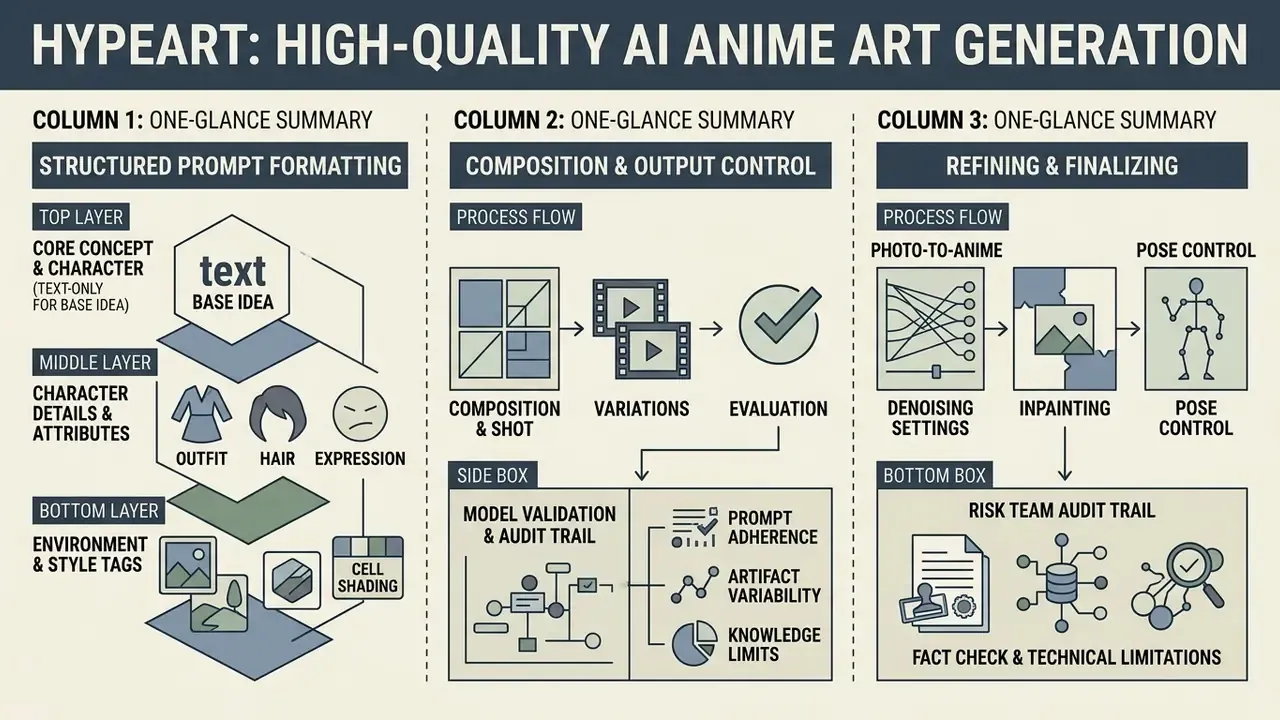
Producing high-fidelity quality anime art requires structured prompt formatting, deliberate composition tags and systematic evaluation of variations. Empirical research shows generic diffusion models often struggle with complex spatial relationships or multi-subject logic, while detailed attribute tags measurably improve prompt alignment (GenAI-Bench Study, arXiv, 2024).
«An analysis of 3M+ prompts shows users concentrate on surface aesthetics, reproducing cultural norms and popular visual archetypes.»
Negative prompts, precise camera angles and character reference sheets remove most common artifacts such as distorted hands or mushy backgrounds. That cleanup layer is covered further in our overview of AI image enhancers.
Which Details to Add for an Expressive Character
To raise character expressiveness in an ai anime drawing generator, prompts should name micro-details: eyes, hair texture, costume accents, emotional lighting. Descriptive phrases such as "expressive detailed iris, light reflections in eyes, flowing individual hair strands, intricate costume embroidery" produce noticeably clearer fidelity than a stack of general quality words.
«Repeated prompts account for 40–50% of all requests on CivitAI; lexical prompt similarity correlates directly with visual homogeneity of results.»
The practical implication? Uniqueness comes from unusual descriptor combinations, not from piling on more quality tags. Reference modifier sets worth keeping on hand: quality (masterpiece, best quality, highly detailed, sharp focus, intricate details), eyes (expressive eyes, detailed iris, reflections in the eyes, sharp eyes, gentle eyes), hair (twin braids, wavy hair, messy hair, flowing hair, stylized hair strands) and clothing (school uniform, traditional kimono, fantasy outfit, detailed armor, intricate costume). When writing lore for original characters, creators often pair visual design with text tools like an ai backstory generator to build coherent narratives around the design.
Controlling Composition, Style, and Output Variants
Controlling framing and perspective in an ai anime generator relies on explicit shot descriptors such as "close-up portrait", "low-angle dynamic shot", "overhead", "wide cinematic background" or "Dutch angle", placed early in the prompt (GenAI-Bench Study, arXiv, 2024). Composition tags split into three groups, and only the camera-work group actually moves the viewpoint: camera work (angle, distance, rotation), character pose and scene arrangement. Batch outputs let you review varied compositions, pick the strongest candidate for refinement, then iterate the prompt from the winning structure rather than from scratch.
«VQAScore enables best-of-N selection from candidate images, delivering 2–3× improvements in alignment metrics compared with alternative scoring methods.»
Model Validation and Audit Trail for Risk Teams
Teams extending model-risk-management practice to diffusion systems need acceptance criteria, not aesthetic judgment. A workable structure:
| Risk / defect class | Typical manifestation | Detection method | Control action |
|---|---|---|---|
| Anatomical artifacts | Extra fingers, merged limbs, broken hands | Human review plus targeted negative prompts | Inpaint at 0.40–0.50 denoise; reject if repeated across seeds |
| Attribute bleed | Two characters exchanging hair or outfit traits | Side-by-side attribute checklist | Identity adapters, single-subject framing, sequential composition |
| Prompt misalignment | Missing objects, wrong count, wrong camera angle | Automated scoring (VQAScore) best-of-N | Re-rank candidates; escalate prompt rewrite |
| Style drift across a set | Character looks different between assets | Fixed identity block plus seed and checkpoint lock | Regenerate from locked parameters, not fresh prompts |
| Resolution or detail loss | Soft linework after upscaling | Compare pre and post upscale crops | Anime-specific upscalers (APISR, waifu2x), tile redraw |
| Training-data echo | Output resembling a specific existing work | Reverse image search, similarity review | Reject asset; document decision |
Reverse-search checks can be operationalized with the tools reviewed in our guide to AI reverse-image-search, and origin verification with AI image detectors.
Audit trail requirements. To defend authorship in a compound work, and to reproduce any asset under review, log for every export: prompt and negative prompt, model name and checkpoint hash, LoRA or adapter versions and weights, sampler and step count, seed, resolution, denoising strength, ControlNet preprocessor and weight, all inpainting masks with their prompts, plus the human edit history and the reviewer who approved the asset. That log is three artifacts at once: model-validation evidence, copyright-disclosure evidence and incident-response record. Most teams skip it until the first takedown notice. Do it earlier.
Fact check and technical limitations
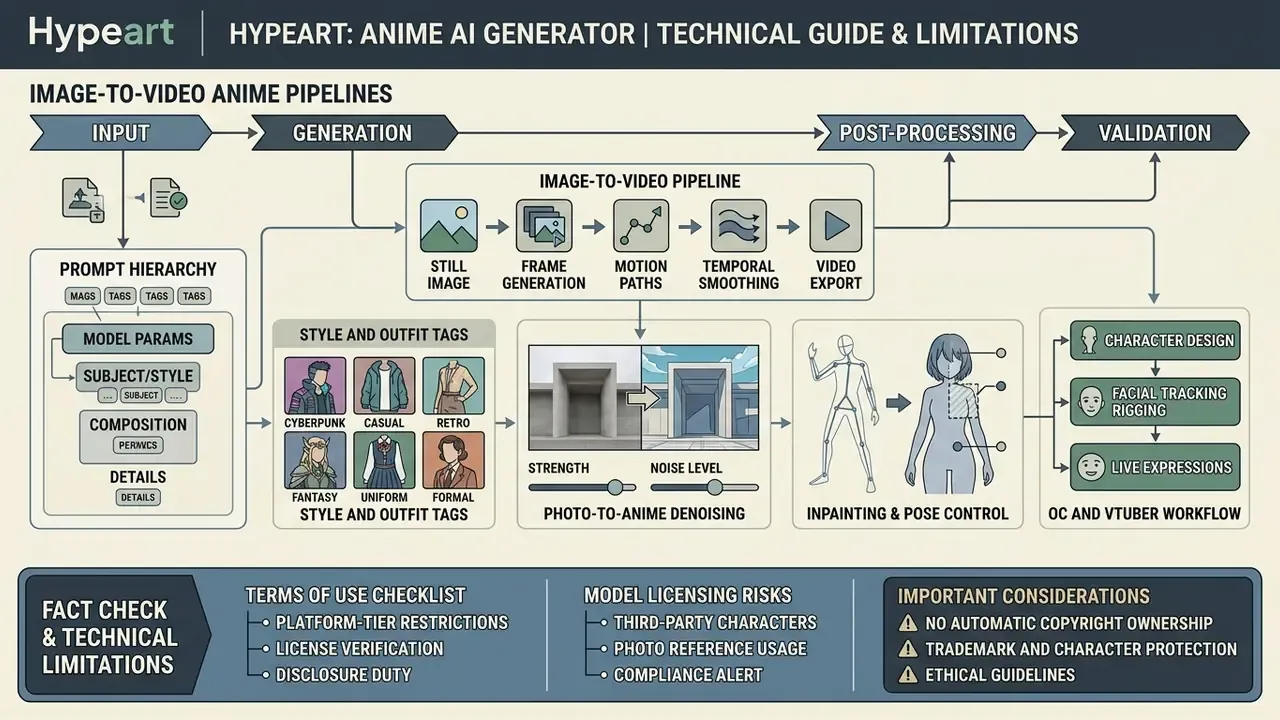
From Static Art to Motion: Image-to-Video Anime Pipelines
Turning a finished anime illustration into a moving shot is a three-stage pipeline, and each stage fails differently.
Known limitations still apply. Research from 2026 reports unresolved difficulty preserving fine detail at high resolution and animating hair and loose clothing, so keep hero shots short and favor camera motion over complex character motion when quality matters most.
Can You Use AI Anime Art in Commercial Projects?
«The Copyright Office recommends establishing a federal right protecting individuals from unauthorized distribution of digital replicas.»
The Office's Part 2 Copyrightability Report (2025) reinforces that protection turns on human control over expression, and registration guidance requires applicants to identify and disclaim AI-generated portions of a mixed work. Japan's framework separates the two questions: copyrightability is assessed case by case based on prompts, iterations and editing, while infringement turns on similarity to and dependence on an existing work. WIPO's 2024 review notes a case where copyright was accepted because the user's prompts and parameters reflected the user's own aesthetic choices. Which is exactly why the audit trail described above has commercial value, not just compliance value. Creators commercializing synthetic assets should review structured guidance on commercial use of AI image generators, browse the wider AI Media Commercial-Use Hub, and track pending cases through our AI Litigation and Case Timelines before distributing at scale.
What to Check in Terms of Use and Model Licensing
Before deploying generated images commercially, inspect both the platform's Terms of Use and the underlying open-source baseline license. Outputs generated via models governed by CreativeML Open RAIL-M licenses, for example, permit commercial sale of both model and outputs while enforcing use-based ethical restrictions, whereas commercial availability on proprietary web platforms often depends on keeping an active paid tier (Stable Diffusion RAIL License, 2024). The nuance is scope. Some model cards make the model non-commercial while still allowing commercial use of generated images, and may separately prohibit API hosting or resale of the model on paid platforms. Others assign output ownership outright, including reprint, sale and merchandising rights.
Audit tier pricing against distribution volume too, verifying that the license attached to your plan actually covers the number of end products, impressions or client deliverables involved. Per-image API pricing, monthly credit bundles and enterprise seats grant materially different commercial rights, and the gap tends to surface right before launch. Our comparisons of Canva AI Generator licensing, Microsoft AI image generation terms, Google AI image generator usage rights and Bing AI image commercial terms show how widely conditions vary between vendors.
Risks When Using Photos, References, and Third-Party Anime Characters
Generating artwork based on copyrighted anime characters, trademarked designs or recognizable public figures introduces substantial intellectual property risk. Copyright rules in key jurisdictions, including Japan's Agency for Cultural Affairs 2024 guidance, hold that synthetic outputs showing strong visual similarity to and structural reliance on existing copyrighted works can constitute infringement (Agency for Cultural Affairs Japan, 2024).
«A digital replica is a video, image, or audio recording that realistically but falsely depicts a specific individual using AI.»
Using personal photos without consent may also violate evolving publicity rights and digital replica legislation. Assume, too, that AI provenance is technically detectable rather than invisible:
«AnimeDL-2M contains ~2M annotated images for detecting AI-generated anime with localization of synthetic regions.»
Origin can be traced through digital signatures, watermarking, metadata analysis, reverse image search and forensic analysis (NIST AI 100-4, 2024), and provenance verification tooling is surveyed in our guide to AI image detectors. Practical mitigations: obtain written consent and model releases for any real person's photograph, prohibit franchise-character prompt terms in production briefs, retain the generation log for every published asset, and route ambiguous cases to legal review before release rather than after a takedown.
Compliance alert
FAQ About Anime AI Generators
Do You Need Drawing Skills to Create Anime Art?
No. Drawing skill is not required to create anime art with modern text-to-image generators. An ai anime creator operates on natural language descriptions, structured tags and visual reference parameters. Vendor documentation frames the workflow as prompt-led rather than drawing-led: describe the character, place and context, optionally attach a reference image for composition and style, then refine. Users concentrate on prompt engineering, composition framing and iterative selection instead of sketching or brushwork. Art training still helps at the refinement stage, though: spotting anatomy errors, judging value structure and directing inpainting passes are all trained skills.
Can You Make an Anime Avatar, OC, or Anime Video?
Yes. Creators can generate original character (OC) designs, social avatars, character sheets and short animated loops with specialized pipelines. Tools like Talking Head Anime 4 animate a static upper-body anime portrait into real-time avatar movement using pose vectors (Talking Head Anime 4 Paper, 2023), while the OC and VTuber workflow above covers turnaround sheets, expression grids and layer preparation for rigging. For broader media production, creators combine art generation with adjacent tooling: an ai band name generator for imaginary groups, promotional key visuals via an ai banner generator, background tracks composed with an ai beat maker, layout and retouch passes in an online photo editor or a free photo editor, motion assembly in an animation maker and narration through an AI voice generator. Technical teams can wire these pipelines together using AI Media API Guides, and troubleshoot operational issues via AI Media Support and Troubleshooting.
What Do "Anime AI Generator No Filter" and "No Restrictions" Mean?
Search queries for ai anime generator no filter or ai anime generator no restrictions point to tools that claim to run without content moderation boundaries. Major commercial platforms enforce strict safety guidelines prohibiting harmful, non-consensual or illegal content generation, in line with regulatory frameworks like the EU AI Act (EU AI Act Standards, 2025).
«Major platforms apply strict safety rules prohibiting harmful and illegal content generation in line with EU AI Act 2025 standards.» EU AI Act Standards, artificialintelligenceact.eu (2025). https://artificialintelligenceact.eu The EU AI Act sets prohibited, high-risk, transparency and minimal-risk tiers, requires disclosure of AI-generated content and obliges providers to prevent illegal content generation, with general-purpose AI systemic-risk obligations applying from 2 August 2025. Google's Generative AI Prohibited Use Policy separately bans circumvention of abuse protections or safety filters, including manipulating a model to contravene policy. Attempting to bypass safety filters through prompt manipulation therefore violates Terms of Service across reputable services, and inside an enterprise it is a policy incident rather than a creative technique. Outfit-focused tools such as an ai bikini generator sit closer to those moderation boundaries, so they need explicit policy review before any team touches them for client work.
Can You Generate Anime Art Completely Free and Without Registration?
Most professional services require an account so they can allocate GPU capacity and enforce rate limits. Some web interfaces do offer demo modes without registration, usually capped by resolution (often up to 512×512), watermarked exports and a shared public queue. Free platform tiers most commonly grant 10 to 30 daily refreshing credits, resetting at a fixed hour, frequently 00:00 UTC. Vendor examples differ: one provider grants 25 one-time starter credits and then charges per credit pack; another gives 10 credits per month with PNG original-quality download; a third resets 30 credits daily. Read the license attached to the free tier before publishing. "Free to generate" is not the same as "free to sell."
What Are the Most Common Quality Complaints?
Recurring issues reported by users and documented in research include inconsistent outlines, anatomical distortion, blending errors when multiple characters share a frame, incorrect shading logic and perspective mismatch between character and background. Vendor feature limits add practical constraints, such as input file caps (50 MB for PDF inputs in some methods) and uploads expiring after 48 hours. Policy documentation also warns that outputs can contradict real-world circumstances or user intent, which is the visual equivalent of hallucination. Hence best-of-N selection, negative prompts and human review stay mandatory in production pipelines.
How Do You Keep One Character Consistent Across Many Images?
Lock four things: the identity prompt block, the checkpoint (with LoRA versions), the seed for minimal-drift variants, and the lighting and background convention. Then change one variable per generation. Use character-reference or identity-adapter modes instead of re-describing the character, and treat the turnaround sheet as the single source of truth every later asset gets compared against.
Appendix A: Editorial Corrections and Source Notes
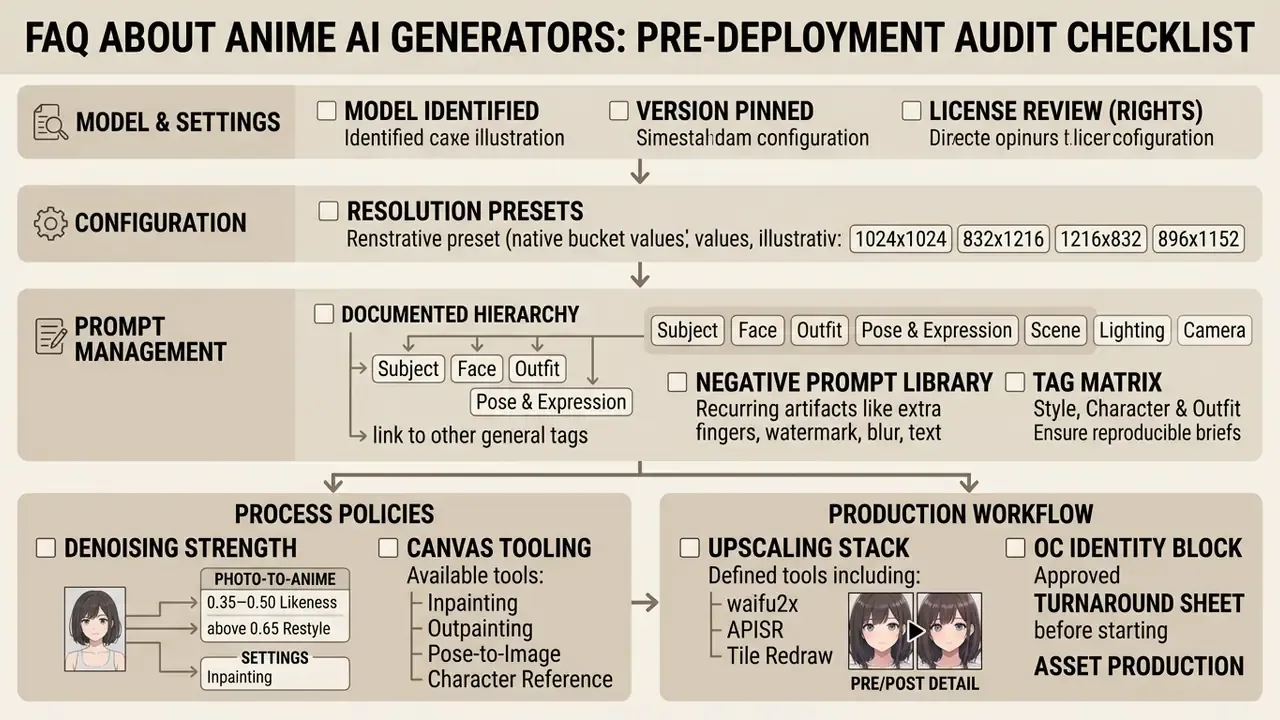
Appendix B: Pre-Deployment Audit Checklist
A Safe Next Step
You do not need a program-wide policy to start. Pick one asset class, say social key visuals, and run it through a single approved generator for two weeks with the full generation log switched on. Compare defect rate, review time and license fit against your current process. If the log reproduces every published asset from recorded parameters, you have the evidence base for a wider rollout. If it does not, you have found your first control gap, which is arguably more useful.