Editorial independence: This is an independent review. It is not affiliated with, sponsored by, or endorsed by AKOOL Inc.
Akool Image to Video AI is a cloud-based generative media solution built by AKOOL Inc. It converts static images into dynamic, studio-quality motion video clips at resolutions up to 4K, and up to 16K on business tiers. The platform combines proprietary multimodal generative AI models with a production-grade inference engine, so creators, marketers, and enterprise teams can animate photos, build talking avatars, and produce high-fidelity visual assets straight from a browser.
Why does that matter to a risk or finance leader rather than a creative director? Because the moment a real employee likeness enters a paid campaign, the tool stops being a design toy and becomes a controlled process with consent artifacts, audit logs, and a named owner.
Key Takeaways
- What it does Converts a single PNG or JPEG into an animated clip (talking photo, talking avatar, or stylized creative motion video) with lip sync, emotion presets, and camera-motion prompts.
- Quality ceiling 1080p on the free Starter tier, 4K on Pro, 8K on Pro Max, up to 16K on Business, custom on Enterprise.
- Credit economics roughly 5 credits per 10 seconds at 1080p, about 10 credits per 10 seconds at 4K, about 15 credits per video face swap, and 1 to 2 credits per generated image.
- Hard limits that shape planning maximum video length runs from 15 minutes (Starter) to 60 minutes (Business); storage from 5 GB (Starter) to 1 TB or more (Enterprise); concurrency from 2 videos to 20 or more videos in parallel.
- Commercial licensing Business is the first tier with an explicit business license. Using stock Akool avatars in paid or boosted ads and TV placements requires written consent from Akool.
- Team billing every invited Admin or Editor seat is charged at the workspace owner's rate, for example +$30 per month per editor on a PRO plan.
- Governance gap to close before rollout biometric retention windows, model-training opt-out, and C2PA content credentials are not fully documented in public materials. Confirm them contractually.
Who This Review Is For and What It Answers
This review is written for three buyer profiles, and each one reads it differently.
Marketing operations leads want the workflow and the export ceiling. Finance and procurement want credit math, seat billing, and total cost per published asset. Risk, compliance, and model-risk owners want retention terms, licensing scope, provenance marking, and a defensible review gate.
The article answers seven questions in order: what the tool actually produces, which modules sit around it, how the eight-step workflow runs, how to pick a model for realistic output, which tasks it fits, what has to be governed before launch, and what the plan tiers really cost once human review is priced in. Where public documentation is silent, the text says so instead of guessing.
What Is Akool Image to Video AI and What Videos It Creates
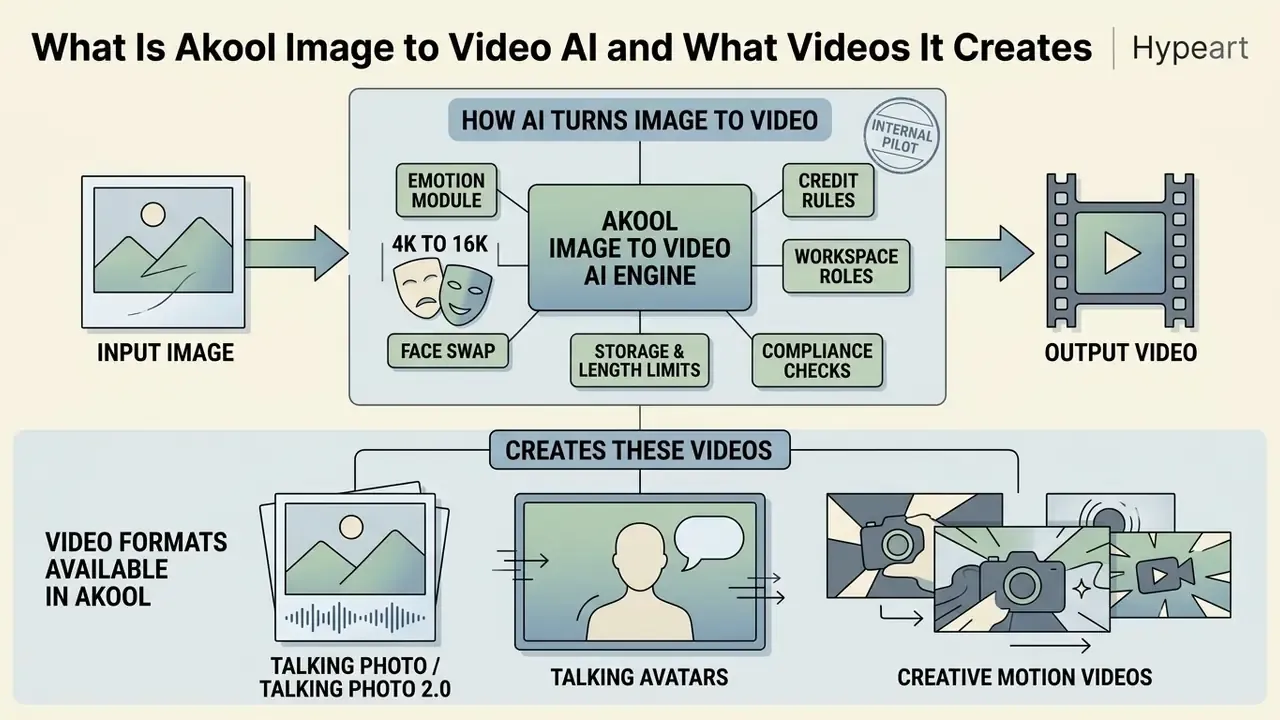
Akool Image to Video AI is an automated image-to-video generation module inside the broader Akool platform. It turns static portrait photos, product shots, graphics, or artwork into animated short video clips. The tool combines image-to-video diffusion algorithms, temporal neural frame interpolation, and facial landmark tracking to produce fluid motion, believable expressions, and customizable visual effects.
The vendor frames the module as a way to extract narrative value from minimal input. As AKOOL's founder and CEO Jiajun (Jeff) Lu put it at launch:
Company context matters for procurement due diligence. AKOOL Inc. was founded in 2022 and is headquartered at 471 Emerson Street, Palo Alto, California, with Dr. Jeff (Jiajun) Lu as Founder and CEO and Sid Bao as Chief AI Scientist. According to the company's official press materials, AKOOL has grown to nearly $40 million in invoiced ARR, states that over 300 million assets have been created on the platform, and lists Fortune 500 organizations among its customers. One discrepancy is worth flagging: public AKOOL materials say "founded in 2022," while some secondary company profiles cite 2020. The gap appears to come from source type and how company history is labeled, not from a contested fact.
How AI Turns an Image or Photo into Motion Video
AI converts a static image into motion video by encoding the reference photo into a latent appearance representation, then applying conditional spatiotemporal diffusion models or deformation fields to synthesize motion over time. This architecture decouples identity features from motion trajectory. Facial geometry stays intact while movement, expression, and head pose are generated.
"Diffusion-based I2V models synthesize temporally consistent frames from a single reference image by iteratively denoising a noise sequence conditioned on spatiotemporal structure."
In technical literature on talking-head and image-to-video generation, such as research on SadTalker (Zhang et al., 2023) and DREAM-Talk (Ma et al., 2024), static images are processed through explicit 3D deformation models or neural radiance fields (NeRF) to disentangle identity from motion.
"SadTalker predicts 3D motion coefficients from audio and feeds them into a 3D-aware renderer, removing the identity distortion typical of 2D-only approaches."
"DREAM-Talk uses an emotion-conditioned diffusion module (EmoDiff) plus a separate lip-refinement stage to align speech and expression precisely." DREAM-Talk, Ma et al. (2024). https://arxiv.org/abs/2312.06661
Which Video Formats Are Available in Akool
Akool supports three primary output formats: talking photos, animated avatars, and stylized creative videos driven by text prompts or reference clips. Together they cover personalized customer communications, corporate presenter videos, and social visual content. Readers who want a broader conceptual grounding can consult our reference material on image-to-video AI as a technology class.
- Talking Photo and Talking Photo 2.0.Converts a single portrait headshot into a video where the subject speaks in sync with an uploaded or text-to-speech audio track, with facial expression control through the Emotion Module. Akool's documentation describes Talking Photo 2.0 as advanced AI animation that "turns any image into an animated video instantly."
- Talking Avatars.Combines custom headshots or pre-designed digital presenters with voice cloning, text-to-speech, and localized script translation for presentations and brand video. Akool's translation layer supports 155+ languages across all plan tiers, with upload quality up to 4K (8K on Business) and translation lengths from 5 minutes (Starter) to 120 minutes (Business).
- Creative Motion Videos.Takes static images, product photos, or PPT and PDF graphics, then applies motion trajectory prompts, camera moves, and artistic background effects for marketing material.
Creators looking for fully automated generation pipelines can review our AI Media Comparison Matrices and the head-to-head comparison of AI video generators to see how Akool holds up against alternative synthetic video platforms.
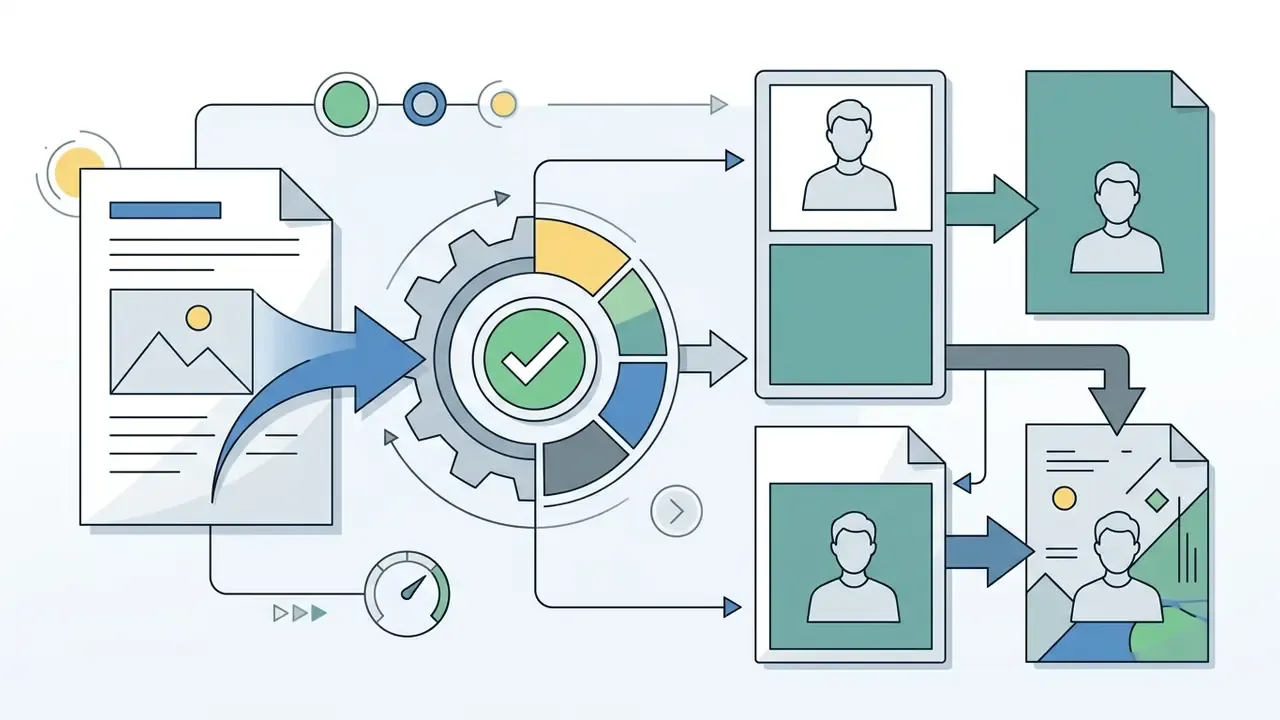
Figure 1. Before and after: static portrait versus generated Akool clip.
Left (before): source frame, PNG, 1920×1080, frontal headshot, even key lighting.
Right (after): generated talking photo, lip-synced audio track, preserved facial proportions, subtle head tilt and blink cycle, exported as MP4.
Akool Tools for Creating and Editing AI Video
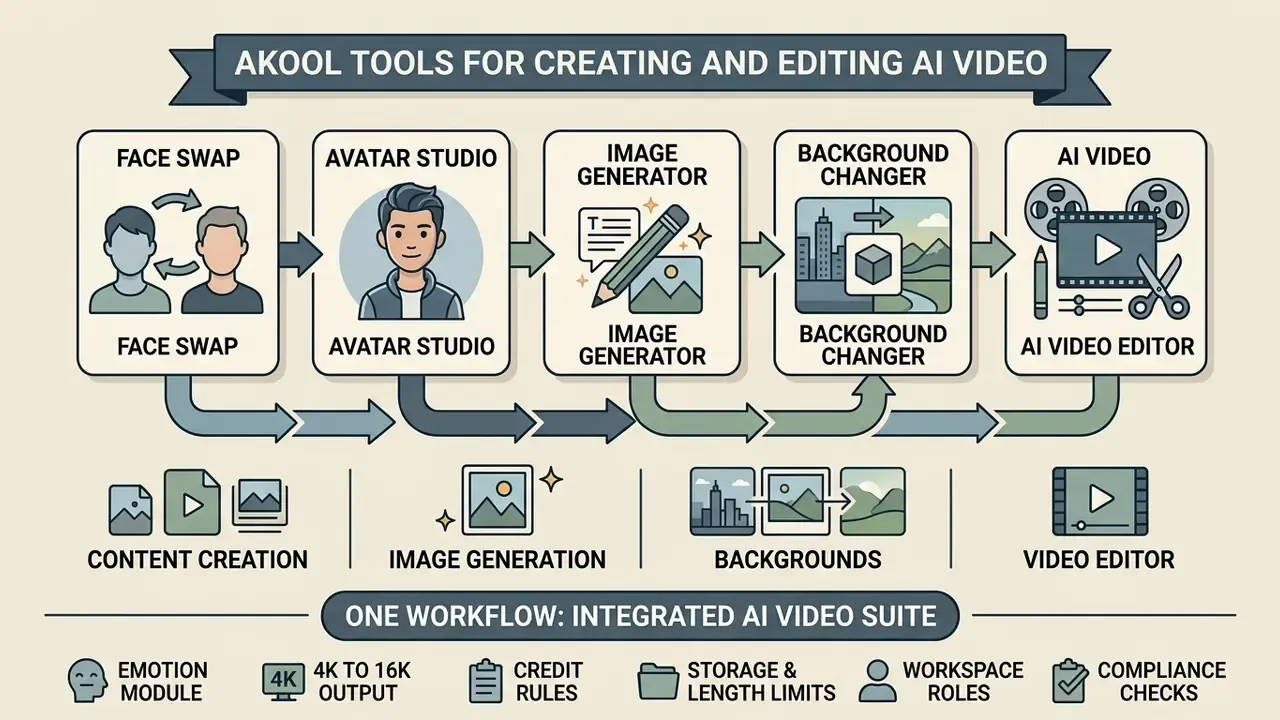
The Akool AI video suite pulls five media processing tools into one workflow: face swap, avatar studio, image generator, background changer, and a built-in AI video editor. That unified environment lets a team generate the initial visual asset, perform face replacement on photos or video, and finish the edit without opening external software.
Face Swap, Avatars, and Talking Video for Content
Akool provides dedicated face swap and talking avatar modules for identity replacement across images and video, plus synthetic voice synchronization. The Face Swap Plus and Video Faceswap V3 engines handle single-face and multi-face replacement in high-definition photos and footage within seconds.
Face swap here relies on target landmark alignment and neural skin blending to match lighting, angle, and expression between source and target media. Video Faceswap V3 additionally requires face detection in a representative frame plus landmark extraction for both source and target, and it runs asynchronously, because video swaps take materially longer than image swaps.
"GaussianTalker encodes 3D Gaussian attributes into a shared implicit representation and fuses them with audio features, enabling rendering at up to 120 FPS with high lip-sync accuracy."
Paired with talking photo and the avatar generator, marketers can swap a brand representative's face onto an existing video asset, or generate personalized video messages localized through automated voice translation. Teams building repeatable personalization pipelines can also review how AI video generators for personalized content differ in identity handling, consent workflows, and export licensing.
Platform limits are worth checking before anyone promises a delivery date. Face swap upload quality runs from 720p (Starter) to 16K on paid tiers. Upload size runs from 150 MB and 30 seconds on Starter to 1 GB and 15 minutes on Business, with multi-face detection, re-age, and face enhance gated by tier. Live face swap ranges from 5 minutes of free session time up to 120 minutes on Business.
Image Generator, Background, and Video Editor in One Workflow
Akool connects its AI Image Generator, Background Change tool, and browser-based AI Video Editor into a single asset pipeline. You can generate source artwork from text, replace or remove the background, then sequence generated clips on one timeline.
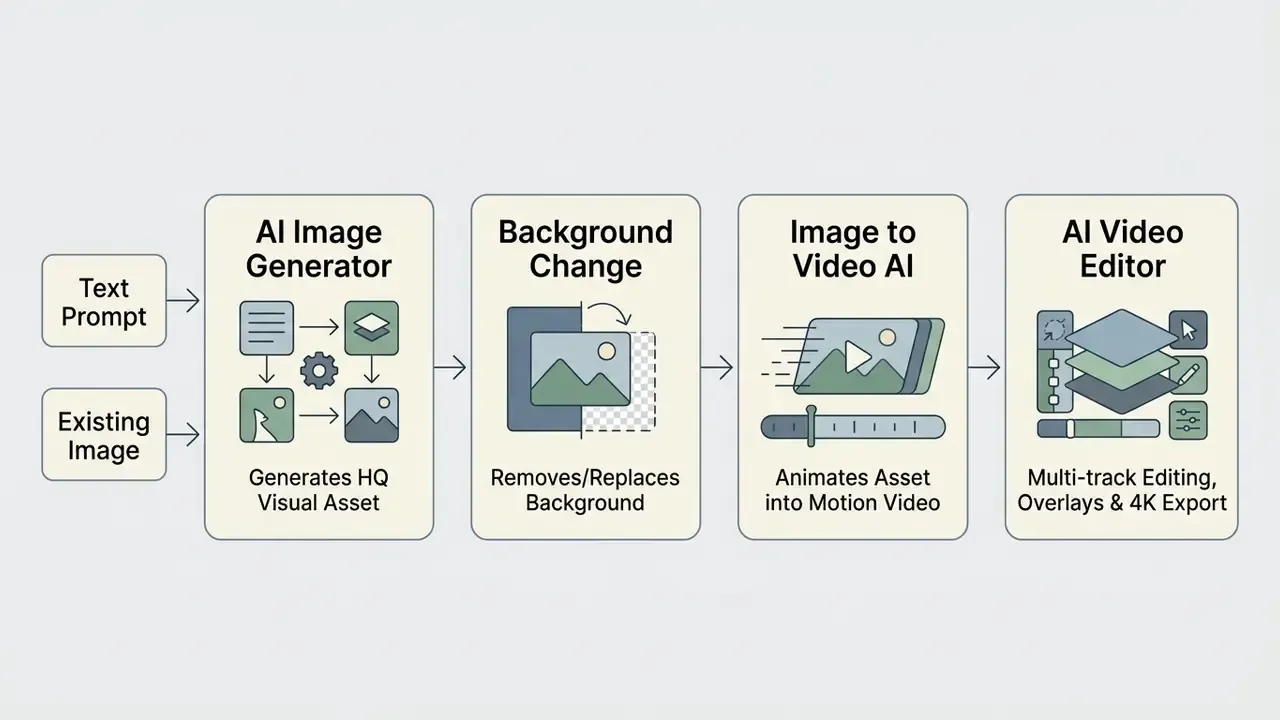
In this integrated workflow:

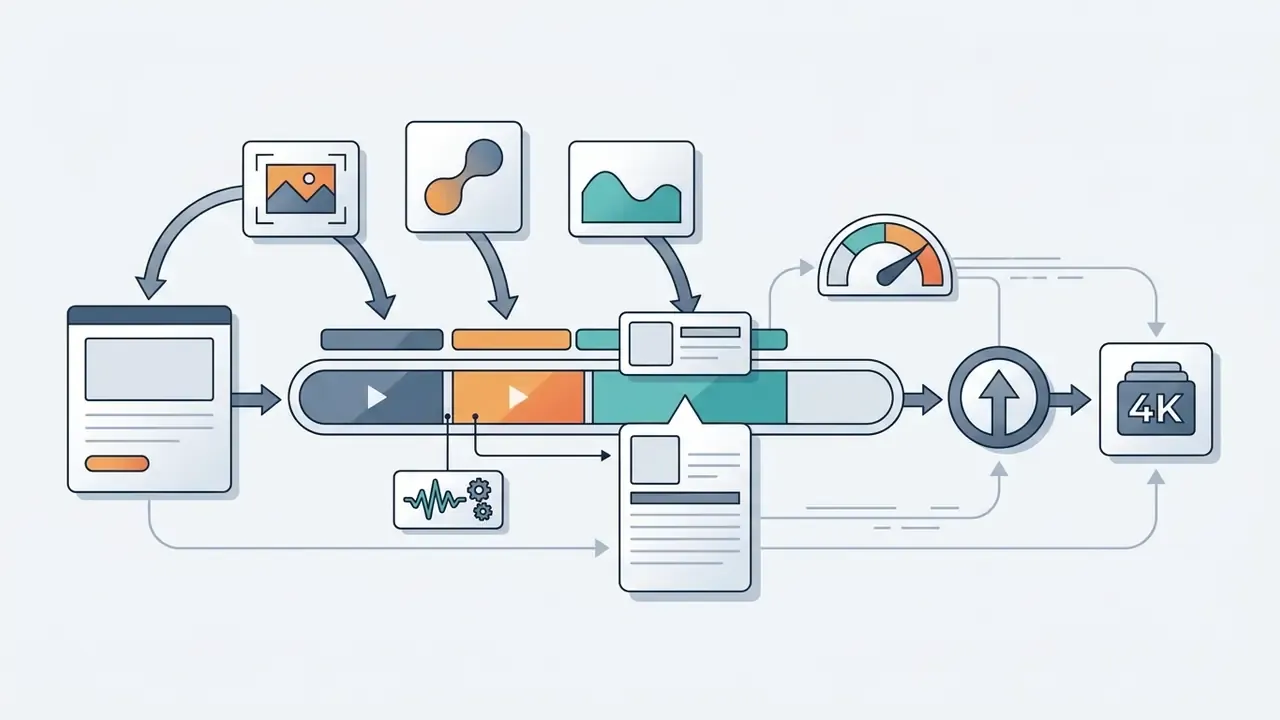
Documented export parameters: the final step in the editor is Create, then choose export resolution, with 1080p or 4K options. Supported containers are MP4 and MOV, and supported still formats are JPG and PNG. Akool's public help documentation does not expose a manual bitrate control, so teams with strict delivery specs should plan a downstream transcode step. Our guide to video compressors covers file-size and quality-loss trade-offs at that stage.
Organizations weighing photo-editing capability inside the same workflow can consult our guide to online photo editors for feature and licensing comparisons, and our guide to animation makers for template-driven alternatives.
How to Create Video from an Image in Akool: Step-by-Step Workflow
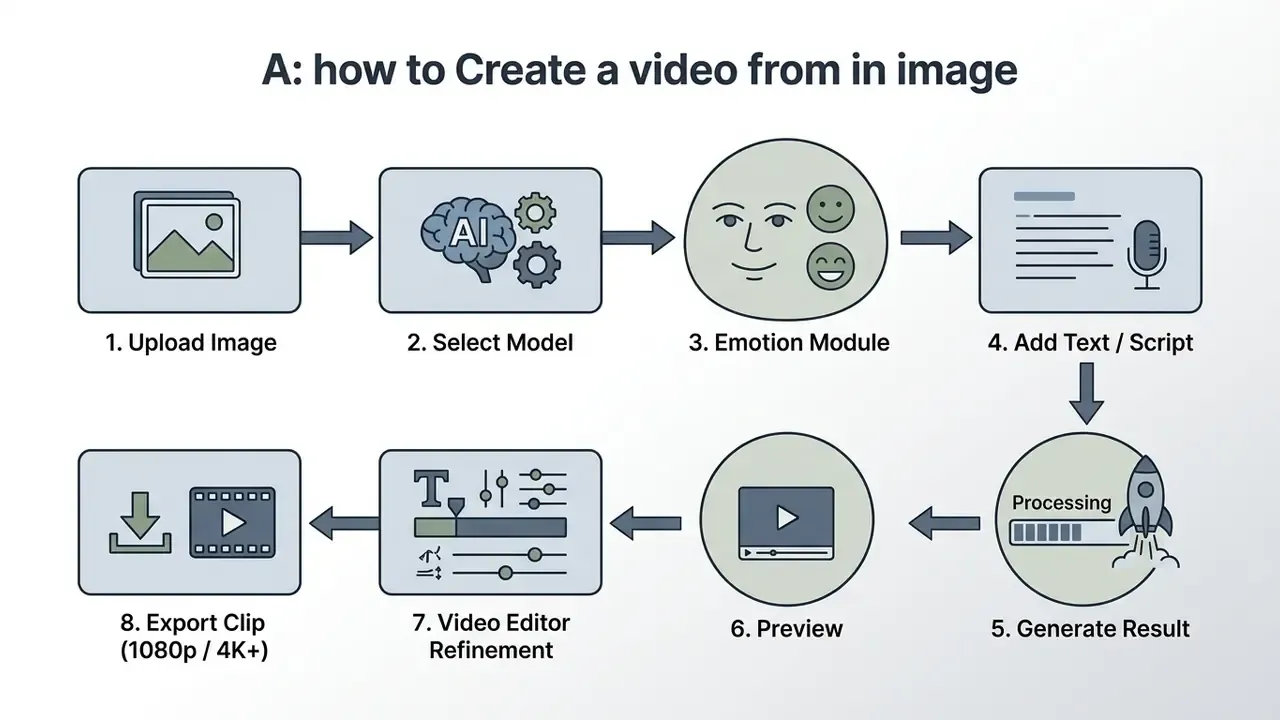
Creating a video from an image in Akool follows eight steps: upload the source media, select the generative model, choose the Emotion Module, provide text or a script, generate, preview the output, refine in the video editor, and export the final file.
Step 1. Uploading the Image and Preparing the Source Photo
Start in the Image to Video module inside the Akool web interface and upload a clear, well-lit PNG or JPEG. High-resolution frontal headshots with unobstructed facial features give the best animation and talking photo results. That single choice drives more of the final quality than any prompt you write later.
"Real3D-Portrait reconstructs a detailed 3D face from a single image and generates realistic full-frame video including torso and background."
To hold output quality and prevent artifacting during face swap or motion rendering, input photos should follow the technical specifications in the official Akool API Documentation (2026):
- Resolution
- minimum recommended 1080p (1920×1080) or higher.
- Facial prominence
- the face must be fully visible, without heavy shadows, sunglasses, or hair obstruction, with a minimum facial bounding box of 80×80 pixels.
- Lighting and angle
- direct frontal or slight three-quarter lighting produces stable motion trajectories without distortion.
Teams that need to produce a compliant source portrait from scratch can review our overview of AI headshot generators for portrait preparation, then use photo preparation tooling for AI animation to normalize crop, exposure, and background before upload.
Pre-flight input validation checklist (run before every batch):
| # | Check | Pass criterion | Owner |
|---|---|---|---|
| 1 | Rights and consent | Written release on file for every depicted person; model release covers synthetic animation | Legal / Marketing |
| 2 | Third-party PII | No bystanders, badges, screens, or documents containing PII in frame | Marketing ops |
| 3 | Resolution | ≥1920×1080; face bounding box ≥80×80 px | Marketing ops |
| 4 | Occlusion | No sunglasses, masks, heavy hair coverage, or hard shadows across the face | Marketing ops |
| 5 | Pose | Frontal or ≤30° three-quarter angle | Marketing ops |
| 6 | Lighting | Even key light; no blown highlights, no single-side extreme contrast | Marketing ops |
| 7 | Brand safety | Background free of competitor marks, regulated claims, or unapproved product versions | Brand / Compliance |
| 8 | Output review | Human sign-off on the generated clip for identity drift, lip-sync error, and artifacting before publication | Risk / Compliance |
Step 2. Selecting the AI Model and the Emotion Module
After the upload, pick the generative engine and set the emotional register of the motion. In Akool, the Emotion Module lets you specify a state (cheerful, serious, surprised, empathetic) through a text prompt or a reference video. Models such as Model Type 1501 or the SEEDANCE 2.5 engine adapt expression dynamics to the chosen scenario, while movement-strength presets (Low, Medium, High) control how far the head and shoulders travel.
Model selection is exposed at API level too. Akool documents model type 1501 ("Image to Video, animate static images into videos") plus an AI model list endpoint that returns currently available generation models at runtime. For teams that pin model versions for reproducibility, that endpoint is the whole ballgame.
Step 3. Configuring the Text Prompt and Motion Trajectory
The text prompt defines scene context and key action triggers, for example "gentle smile, look to camera, subtle tilt." Reference clips or movement-strength sliders control motion pacing and frame fidelity.
Akool's own guidance splits control across two levers: the prompt defines the "what," and a reference clip defines motion rhythm, camera movement pattern, and pacing. In the Kling 2.6 Motion Control flow, you choose Pro or Standard mode, upload a motion reference video, then generate. Pro follows the framing of the source image or video, while Standard relies on front, side, or back orientation. Teams working mainly from written briefs rather than images may also want to compare text-to-video AI approaches, where the prompt carries the entire scene description.
Step 4. Preview, Editing, and Exporting the Finished Video
Once generation finishes, the system shows an inline preview in your result library, so playback review happens before final rendering or any editing work.
If something needs fixing, send the clip straight to the AI Video Editor timeline to trim duration, add audio, or change the background. Final export parameters include 1080p Full HD or 3840×2160 (4K UHD) in standard MP4 or MOV containers, which is production-ready for commercial distribution. Higher tiers push the ceiling to 8K on Pro Max and 16K on Business.
Figure 2. Workflow map. The eight-step generation sequence in text form for accessibility: 1. Upload image, 2. Select model, 3. Choose Emotion Module, 4. Add text or script, 5. Generate, 6. Preview, 7. Video editing, 8. Export output (1080p / 4K / 8K / 16K). Alt text used in production: "akool image to video workflow diagram."
How to Choose a Model and Get Realistic Quality Output
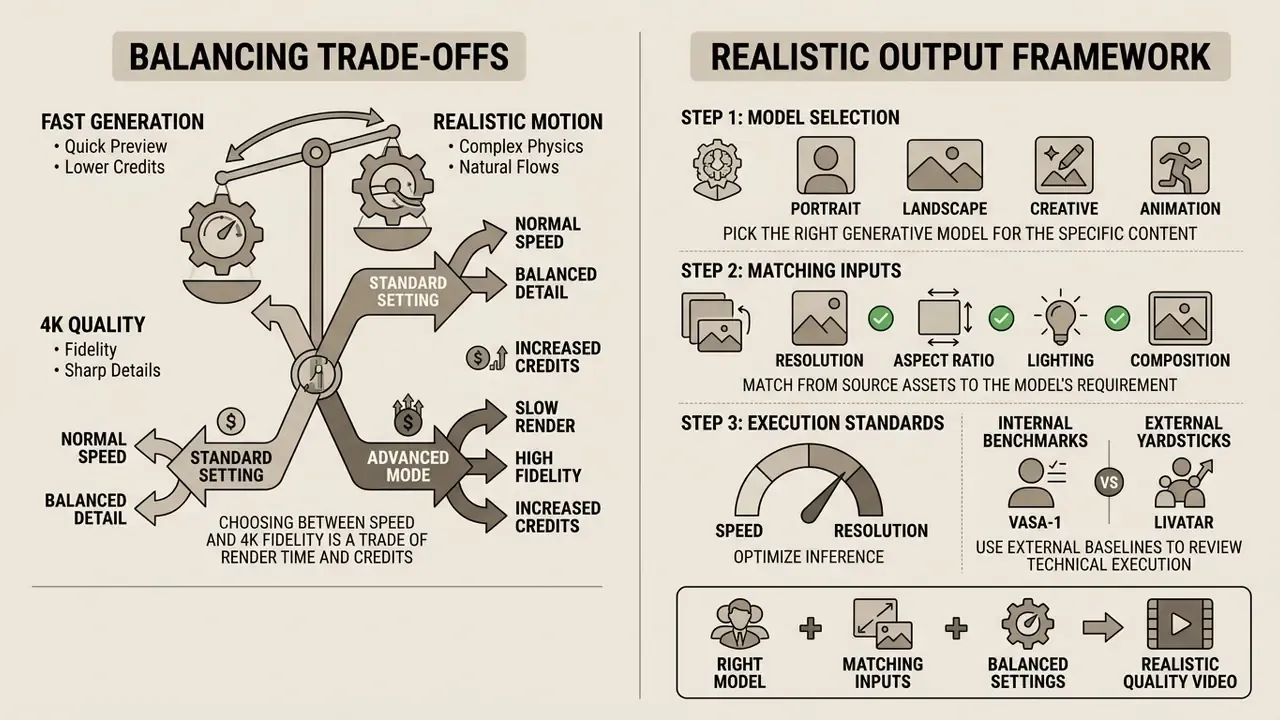
Realistic output in Akool depends on three things: picking the right generative model, matching input asset parameters, and balancing inference speed against resolution.
Balancing Fast Generation, Realistic Motion, and 4K Quality
Choosing between speed and 4K fidelity is a trade of render time and credits. Standard 1080p clips come back fast enough for quick preview loops, while native 4K output needs neural frame interpolation and heavier GPU allocation.
According to technical reviews and platform benchmarks documented in Akool API Pricing (2026), standard 1080p avatar generation consumes roughly 5 credits per 10-second clip. A 4K output processes in 30 to 60 seconds and consumes about 10 credits per 10 seconds. The real-time generation engine applies spatial-temporal frame interpolation to hold motion smooth without visible jitter or motion blur.
"Livatar reaches a LipSync Confidence of 8.50 and 141 FPS throughput at 0.17 s latency on a single NVIDIA A10 GPU."
| AI Model / Processing Mode | Primary Use Case | Realistic Motion Quality | Max Resolution | Processing Speed | Credit Consumption Rate |
|---|---|---|---|---|---|
| Model Type 1501 (Static Animation) | Animating static photos, art and graphics | High (subtle facial and camera motion) | Yes (3840×2160) | Fast (15 to 30 sec) | Standard (5 credits / 10s at 1080p) |
| Talking Photo 2.0 Engine | Lip-synced headshots and talking faces | High (photorealistic lip sync and expression) | Yes (up to 4K) | Balanced (30 to 45 sec) | Standard (5 credits / 10s at 1080p) |
| SEEDANCE 2.0 | General image-to-video motion synthesis; available on all tiers including Starter | High (stable trajectories, low flicker) | Up to plan ceiling (1080p to 16K) | Balanced | Standard (plan-dependent) |
| SEEDANCE 2.5 🔥 | Current flagship engine for expressive motion and complex scenes | Very high (nuanced expression, camera dynamics) | Up to plan ceiling (1080p to 16K) | Balanced to high-fidelity | Standard to premium (plan-dependent) |
| Kling 2.6 Motion Control (Pro) | Character swap and full motion control from reference video | Very high (complex gestures and trajectories) | Yes (native 4K) | High-fidelity (45 to 60 sec) | Premium (10 credits / 10s at 4K) |
| Video Faceswap V3 | HD video face replacement | Exceptional (landmark-aligned blending) | Yes (4K UHD, up to 16K upload) | Asynchronous (60+ sec) | Specialized (15 credits per video swap) |
"VASA-1 generates 512×512 talking-face video at up to 40 FPS with negligible starting latency, using a disentangled latent space to control expression and head pose."
Research baselines like Livatar and VASA-1 work well as external yardsticks. If a vendor demo shows visible lip-sync drift or sub-real-time throughput at comparable resolution, the gap becomes measurable instead of a matter of taste.
To review technical execution standards and developer integration patterns across video models, engineers can examine our AI Media API Guides and the implementation analysis of the Google Veo AI video generator, which documents comparable API access, cost, and rate-limit structures.
Which Tasks Akool Image to Video Suits
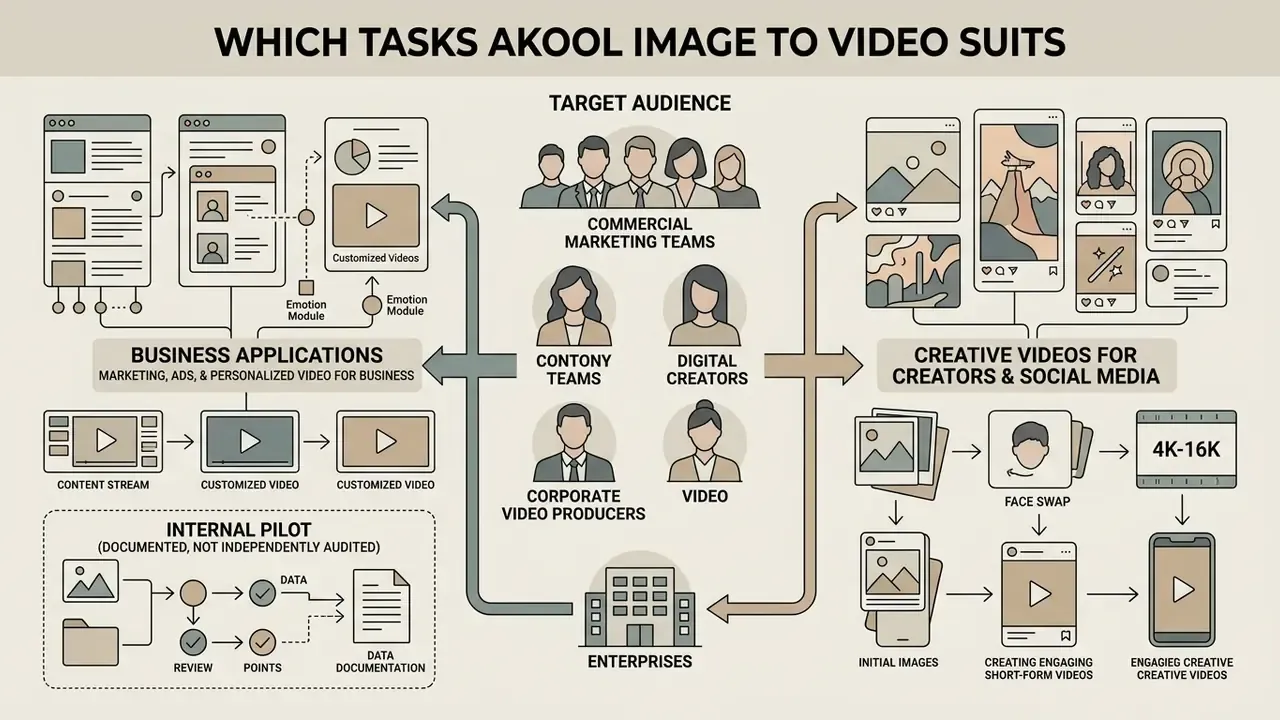
Akool Image to Video AI targets commercial marketing teams, digital creators, corporate video producers, and enterprises that need scalable automated visual media.
Marketing, Ads, and Personalized Video for Business
Businesses use Akool to turn static product photos, brand imagery, and executive portraits into marketing ads, localized promo videos, and personalized email video campaigns.
"No evidence, no autonomy. Controlled execution, transparent credit economics, and documented usage compliance must govern every deployment of a generative media pipeline."
In published commercial case studies, consumer brands such as Graze deployed Akool's personalized video campaign solution for email marketing, delivering interactive video content intended to lift engagement, support cross-sell, and reinforce loyalty (Akool Case Study, 2025). The vendor reports directional improvements in subscriber engagement and click-through. The published case does not disclose sample size, control-group design, or measurement window, so read the uplift as a vendor claim, not a verified benchmark.
Global campaigns have also used Akool's translation and avatar tools to push one executive video message into 10 or more languages, which simplifies international event invitations. Akool's own resource library describes a single script localized into ten languages and personalized by audience segment: executives, partners, developers. The vendor further cites face swap in promotional videos and advertising, including Qatar Airways' "AI Adventure" and UGC-style ad creation for skincare brands. Organizations mapping full-funnel video deployment options can explore our AI Media Commercial-Use Hub and review design-suite integration in our Canva AI Generator guide.
Internal pilot (documented, not independently audited). During an enterprise ad campaign audit, an e-commerce agency used Akool's image-to-video tool to convert 50 static catalog photos into short social ads. Pairing background generation with automated motion templates, the agency reported per-video production cost falling from roughly $350 (external studio quote) to under $12 in credits and labor, with a full variation set produced in under two hours. These figures come from that agency's internal cost accounting on one batch. No conversion-rate testing, holdout group, or third-party verification accompanied the exercise, so "high-converting" stays unverified until A/B results are published.
Governance, Compliance, and Safety Before Commercial Deployment
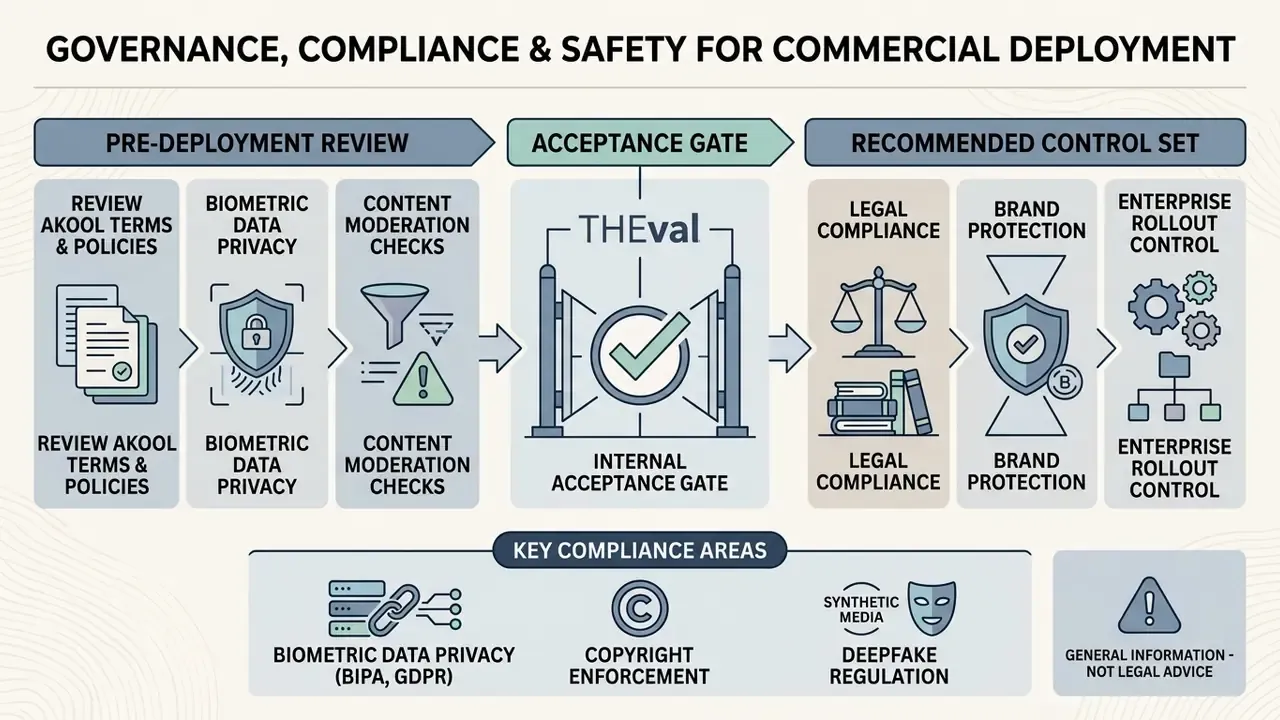
Before AI-generated video reaches a paid campaign or public distribution, review Akool's Terms of Service and Content Moderation Policy for legal compliance and brand protection. In regulated industries this review belongs before the pricing decision, not after it. Get that order wrong and you end up negotiating controls against a signed contract.
According to Akool Terms of Service (2026, last updated 2026-07-10), commercial use of pre-built AI Avatars in promoted, boosted, or paid social advertising, and in TV advertising, requires explicit written consent from Akool. The same terms grant only a limited, non-exclusive license to display Akool marks when promoting API usage, and confirm that paid features consume credits while purchased credits do not roll over.
Akool also enforces content moderation rules that prohibit sexual content, nudity, non-consensual nudity, sexualized deepfakes, hate and harassment, illegal activity, copyright infringement, impersonation, and content that misrepresents or harms individuals, celebrities, or brands. Safety issues route to [email protected]; compliance questions route to [email protected]. Publishing teams should pair vendor-side moderation with independent verification. Our overview of AI image detection tooling covers how to flag synthetic assets before they enter paid distribution, and AI reverse-image-search tools help confirm a source photo is not already licensed elsewhere.
"THEval scores talking-head video across eight metrics in three dimensions (quality, naturalness, synchronization), reaching Spearman ρ = 0.87 agreement with human ratings."
A framework like THEval is directly usable as an internal acceptance gate. Define minimum thresholds per dimension, sample a fixed percentage of each generated batch, and block publication on failure rather than trusting ad-hoc visual review.
Biometric Data Privacy and Compliance Governance
For banks, insurers, healthcare providers, and any organization under BIPA, GDPR, or an equivalent biometric regime, the questions below must be answered contractually before the first production upload. Akool's public documentation does not fully resolve them, so treat each row as an open diligence item that needs written vendor confirmation.
| Diligence item | Why it matters | Status in public documentation |
|---|---|---|
| Retention window for facial embeddings and biometric templates | BIPA and GDPR require defined retention and destruction schedules for biometric identifiers | Not specified publicly; request in writing |
| Training opt-out for uploaded faces and voices | Determines whether employee or customer likenesses can enter general model training | Enterprise tier advertises "enterprise-grade security and privacy"; specific opt-out language not published |
| Sub-processor list and data residency | Cross-border transfer assessments and DPIA requirements | Not published; Enterprise offers dedicated server resources |
| C2PA / Content Credentials provenance marking | Emerging disclosure requirements for synthetic media in advertising | No public C2PA commitment found; must be confirmed |
| Security certifications (SOC 2 Type II, ISO 27001, HIPAA) | Standard vendor-risk gate for regulated buyers | Not published on public pricing pages; request attestation reports under NDA |
| Audit logs and export to GRC systems | Needed for model-risk evidence and incident reconstruction | API access available from Pro Max upward; log export format and retention require confirmation |
| Consent artifacts for depicted persons | Defense against non-consensual likeness claims | Vendor policy prohibits impersonation; consent capture stays the customer's obligation |
Akool Pricing, Credits, and Plan Selection for Commercial Use
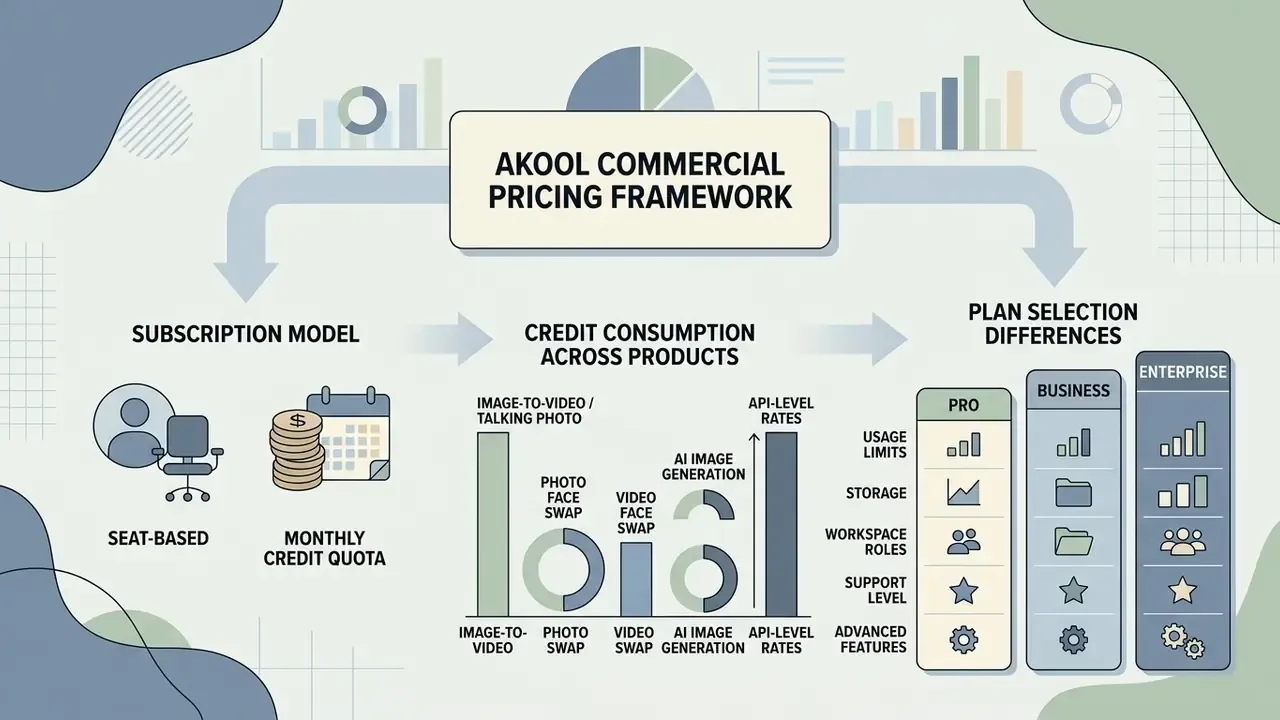
Akool runs a seat-based subscription model with a monthly credit quota. Credits are consumed by task type, output resolution, and the processing speed you select.
Free Access and Credit Consumption Across Products
Akool offers a permanent free "Starter" plan with an initial allotment of trial credits, typically 50 to 200 on registration, at 1080p. Starter also includes access to all face swap models, SEEDANCE 2.0 and 2.5, the Video Agent and Agentic Canvas, and, notably, no watermark.
Credit deduction rates vary by tool:
- Image to Video / Talking Photo about 5 credits per 10 seconds at 1080p; about 10 credits per 10 seconds at 4K.
- Photo Face Swap about 5 credits per image swap.
- Video Face Swap about 15 credits per swap execution, or roughly 2 credits per second of video.
- AI Image Generation 1 to 2 credits per generated image.
- API-level rates Akool's API pricing lists granular per-model rates, including tiers such as 1.2 credits per 10s at 1080p and 2.4 credits per 10s between 1080p and 4K for certain models. The AI Model endpoint also exposes a 2160-height entry with a unit_credit value of 20.
Teams that need precise cost estimates for high-volume video campaigns can use our interactive calculators to model monthly credit spend against expected output minutes.
What Differs Between Pro, Business, and Enterprise Plans
Paid tiers expand credit allowances, raise output resolution (4K to 16K), grant commercial licensing rights, lift storage and duration ceilings, increase concurrency, and unlock workspace collaboration.
| Plan | Price / seat / mo | Credits / mo | Max resolution | Max video length | Storage | Concurrent generations | Processing speed | License |
|---|---|---|---|---|---|---|---|---|
| Starter (Free) | $0 | ~50 to 200 trial | 1080p | Up to 15 min | 5 GB | 2 videos / 4 images | Medium | Personal |
| Pro | ~$21 to $30 | ~600 | 4K UHD | Up to 30 min | 25 GB | 6 videos / 8 images | Fast | Personal |
| Pro Max | ~$41 to $59 | ~1,200 | 8K | Up to 45 min | 50 GB | 8 videos / 8 images | Faster | Personal (creator) |
| Business | ~$174 to $249 | ~6,000+ | 16K | Up to 60 min | 500 GB | 20 videos / 24 images | Fastest | Business |
| Enterprise | Custom quote | Custom (credits do not expire) | Custom / 16K | Customized | 1 TB / customized | Customized VIP | VIP dedicated servers | Enterprise |
Additional tier-level differentiators worth checking against your requirements:
| Capability | Starter | Pro | Pro Max | Business | Enterprise |
|---|---|---|---|---|---|
| Watermark | Removed | Removed | Removed | Removed | Removed |
| API access | No | No | Yes | Yes | Yes |
| Workspace collaboration | No | No | Yes | Yes | Yes |
| Instant avatars | 1 to 2 | 3 | 5 | 10 | Customized |
| Studio avatar / Ultra avatar | No | No | No | 1 studio avatar | Customized, Ultra supported |
| Voice clone slots | No | 5 voices | 30 voices | 500 voices | Customized |
| TTS character limit per request | 1,000 (5 uses total) | 2,000 | 5,000 to 10,000 | 50,000 | Customized |
| Video translation length | 5 min | 30 min | 60 min | 120 min | Customized |
| Streaming session time | 5 min free | Up to 15 min | Up to 30 min | Up to 60 min | Customized |
| Video campaign variables per video | 0 | 1 | 1 to 3 | 5 | Customized |
| SSO login | No | No | No | No | Yes |
| Dedicated customer success manager | No | No | No | No | Yes |
A note on price variance: published third-party snapshots disagree on exact monthly figures because they capture different scraping dates, annual versus monthly billing, and plan renames. Confirm the live figure on the official pricing page before you budget. For plan breakdowns and pricing updates across generative platforms, consult our AI Media Pricing Guides.
Workspace Management, Roles, and Per-Member Billing
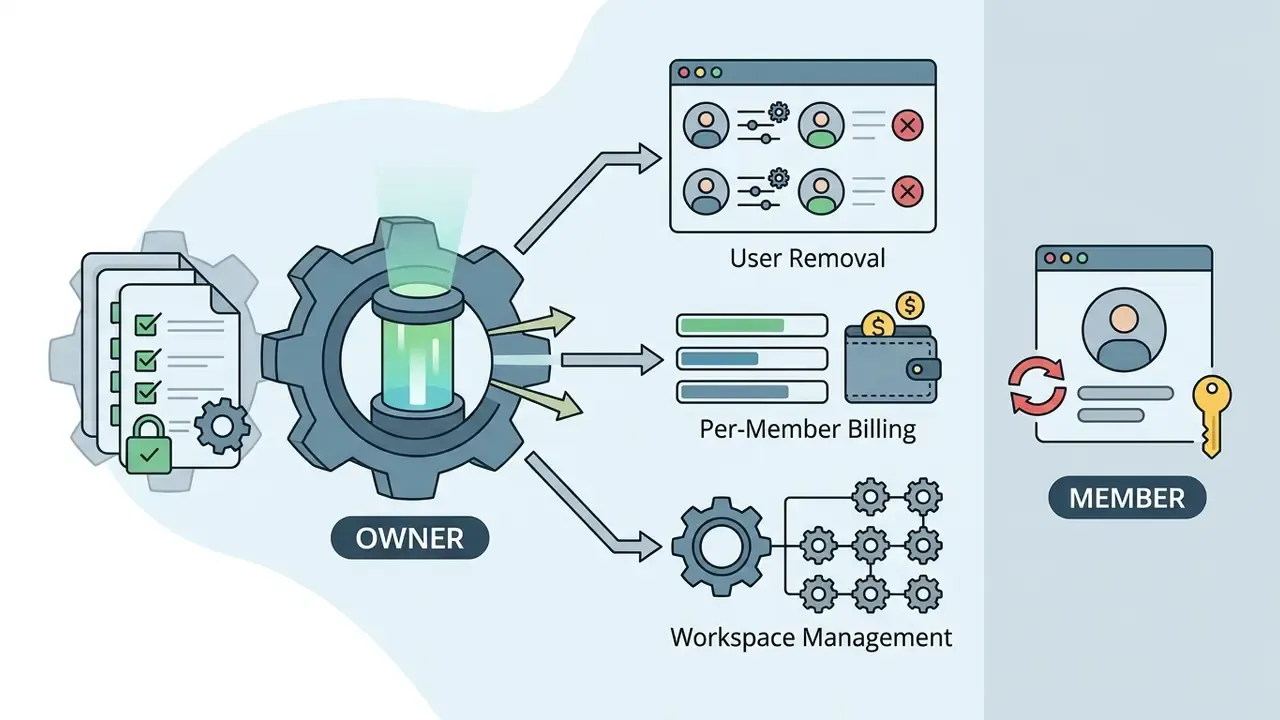
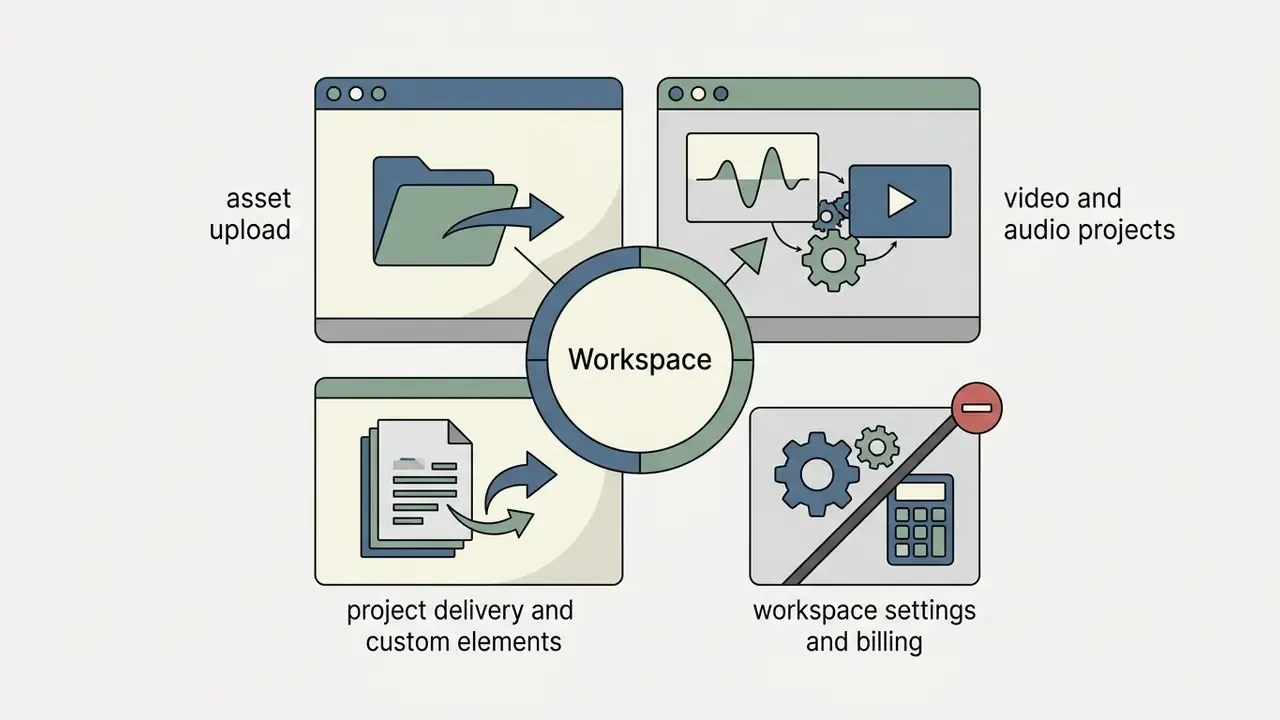
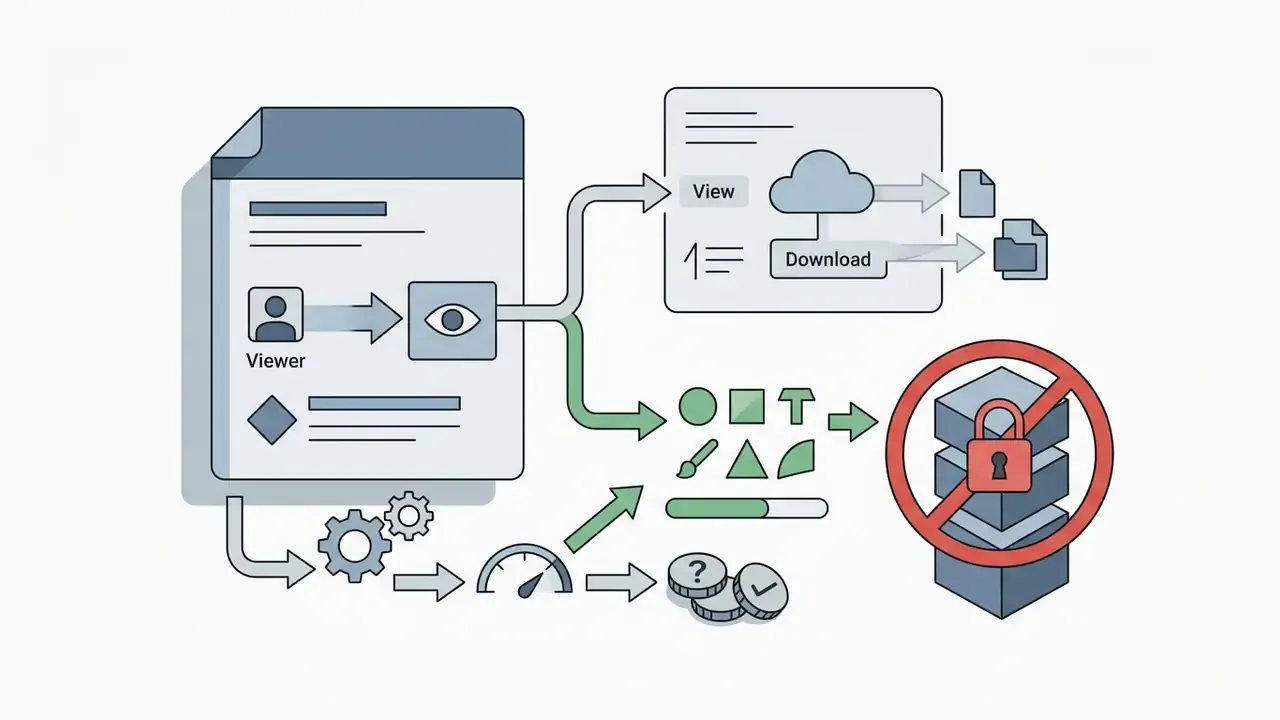
Team collaboration in Akool is organized under Workspace Settings > Members, where the account owner distributes roles. Invitations go out by email with a secure acceptance link, and roles can be changed at any time from the dropdown in the Role column.

| Task | Viewer | Editor | Admin | Owner |
|---|---|---|---|---|
| View results and assets | ✔ | ✔ | ✔ | ✔ |
| Download results and assets | ✔ | ✔ | ✔ | ✔ |
| Use AI tools that do not require credits | ✔ | ✔ | ✔ | ✔ |
| Generate video / generate audio | no | ✔ | ✔ | ✔ |
| Create, use, and export video projects | no | ✔ | ✔ | ✔ |
| Create, share, delete custom elements | no | ✔ | ✔ | ✔ |
| Add / remove workspace users | no | no | ✔ | ✔ |
| Change user role | no | no | ✔ | ✔ |
| View credit-spend table | no | no | ✔ | ✔ |
| Change workspace name / logo | no | no | ✔ | ✔ |
| Change billing information | no | no | no | ✔ |
Member billing rule. Every invited Admin or Editor is charged at the rate paid by the initial workspace owner. If the owner pays $30 per month on a PRO plan, each added Admin or Editor is charged $30 per month on invitation. Removing an invited user converts the remaining balance of their plan into Invoice Credits on the owner's account, a monetary balance spent on future transactions before the payment method is charged again. Viewer seats do not consume generation credits, which makes Viewer the correct default for reviewers, legal, and compliance stakeholders who only need to inspect output. Small detail, real money: three idle Editor seats on a PRO plan quietly cost about $1,080 a year.
Cost of Ownership: A Simple TCO and ROI Model
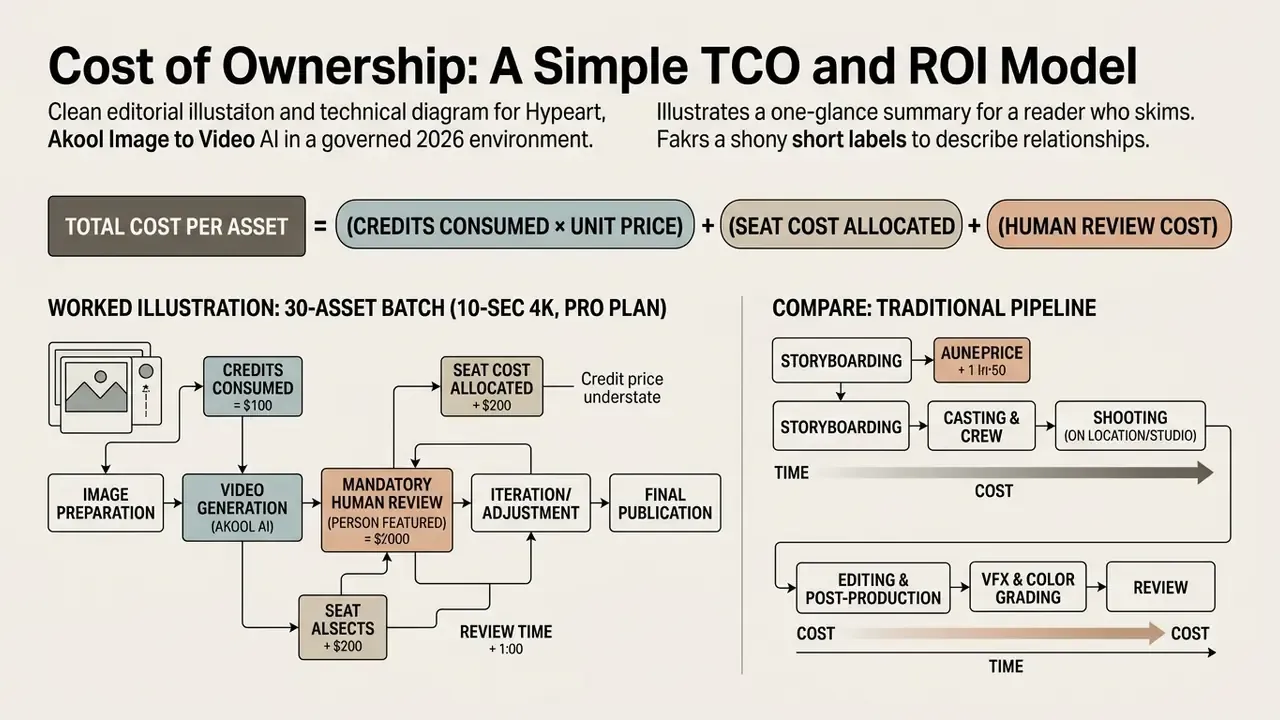
Credit price alone understates real cost in a governed environment, because human review is mandatory for any asset featuring a real person. A workable formula:
Total cost per published asset = (credits consumed × credit unit price) + (seat cost allocated per asset) + (review labor hours × loaded hourly rate) + (rework rate × regeneration cost)
Worked illustration for a 30-asset monthly batch of 10-second 4K clips on a Pro plan:
| Cost component | Assumption | Monthly cost |
|---|---|---|
| Generation credits | 30 clips × 10 credits (4K, 10s) = 300 credits, inside the ~600-credit Pro allowance | Covered by subscription |
| Subscription | 1 Pro seat | ~$30 |
| Review labor | 30 clips × 8 min human QA at $60/hr loaded | ~$240 |
| Rework | 15% regeneration rate, credits within allowance, plus 4 min re-review each | ~$18 |
| Total | ~$288, roughly $9.60 per published asset |
Now compare a traditional pipeline. A single external studio clip commonly quoted at $350 or more per asset puts a 30-asset batch above $10,000. Even with conservative review overhead and a high rework rate, the governed AI pipeline lands roughly two orders of magnitude cheaper. The savings, though, are contingent on the review step actually happening. Cutting human QA does not raise ROI; it converts a cost line into a legal exposure line. That trade rarely looks good in hindsight.
Fact Check and Official Documentation Verification
Re-checked August 2026:
- Official pricing and plan breakdown: Akool Pricing Overview (2026)
- Developer and credit rates: Akool API Pricing and Credit Rules (2026)
- Terms of Service and business licensing, last updated 2026-07-10: Akool Terms of Service (2026)
- Product and API behavior: Akool API Documentation (2026)
- Trust, safety, and moderation contacts:
[email protected]and[email protected] - Company facts: AKOOL Inc., 471 Emerson Street, Palo Alto, CA 94301; founded 2022; Founder and CEO Dr. Jeff (Jiajun) Lu; Chief AI Scientist Sid Bao; approximately $40M invoiced ARR per company press materials.
FAQ: Frequently Asked Questions About Akool Image to Video
Does Akool support 4K video export?
Yes. Akool exports at 4K UHD (3840×2160). The capability starts on Pro and consumes more credits, roughly 10 credits per 10 seconds versus 5 credits per 10 seconds at 1080p. Pro Max raises the ceiling to 8K and Business to 16K, while Starter is capped at 1080p.
What are the source photo requirements for face swap and animation?
Upload a sharp, frontal image at 1080p or higher with even lighting. The face must be fully visible, no sunglasses, no heavy shadows, with a facial bounding box of at least 80×80 pixels. Frontal or slight three-quarter angles perform best; extreme profiles and occlusions cause identity drift and edge artifacts.
Can generated videos be used in commercial advertising campaigns?
Commercial use is licensed on Business and Enterprise. However, using Akool's stock AI avatars in promoted, boosted, or paid advertising, or in TV placements, requires explicit written consent from Akool under its Terms of Service. Before running paid media, confirm both the plan license and the avatar-specific consent in writing.
"A standardized 2026 benchmark covers 20 talking-head generation methods across 15 metrics, including synchronization, identity preservation, and computational efficiency." Temporally Aligned Evaluation for Audio-Driven Talking-Head Generation (2026). https://arxiv.org/abs/2211.12194 That benchmark literature helps buyers who want an independent yardstick instead of a curated vendor demo.
What are the storage and video-length limits on free and paid plans?
The free Starter plan provides 5 GB of storage and a maximum single-video length of up to 15 minutes. Pro raises that to 25 GB and 30 minutes, Pro Max to 50 GB and 45 minutes, and Business to 500 GB and 60 minutes. Enterprise starts at 1 TB with customized ceilings, and Enterprise credits do not expire.
How are additional team members billed?
Inviting Admin or Editor users is charged at the workspace owner's current per-seat rate, for example an extra $30 per month per editor on a PRO plan. Removing an invited member converts their remaining plan balance into Invoice Credits on the owner's account. Viewer seats can view and download results without consuming generation credits.
How many videos can be generated in parallel?
Concurrency is tier-bound: 2 videos and 4 images on Starter, 6 videos and 8 images on Pro, 8 videos and 8 images on Pro Max, 20 videos and 24 images on Business, and customized VIP concurrency with dedicated server resources on Enterprise. Extra concurrency and credit packs can be bought as add-ons.
Which models are currently available, and can a version be pinned?
Akool exposes SEEDANCE 2.5 and SEEDANCE 2.0 across all tiers, plus Model Type 1501 for static-image animation, the Talking Photo 2.0 engine, Kling 2.6 Motion Control, and Video Faceswap V3. The AI Model list API endpoint lets developers retrieve currently available generation models at runtime, which is the mechanism to use when you need reproducibility across a campaign cycle.
Who owns the generated content, and is a watermark applied?
No watermark is applied, even on Starter. Usage rights follow the plan license: Starter and Pro are personal, Pro Max is creator-level, Business carries a business license, and Enterprise is a negotiated custom license. Rights to the depicted likeness are separate. The customer remains responsible for holding valid consent for every real person animated.
How long are uploaded faces and voices retained, and are they used for training?
Akool's public documentation does not publish a specific biometric retention window or a training opt-out clause. The Enterprise tier advertises enterprise-grade security and privacy plus dedicated servers. Regulated buyers should obtain written answers on retention, deletion, sub-processors, data residency, and training exclusion, along with any available SOC 2 or ISO 27001 attestations, before uploading employee or customer imagery.
Does Akool support C2PA content credentials?
No public C2PA commitment was found in the vendor's documentation at the time of this review. Until provenance marking is confirmed, teams under synthetic-media disclosure obligations should apply their own labeling in campaign metadata and creative copy.
Which export formats and resolutions are supported, and can bitrate be controlled?
Supported video containers are MP4 and MOV; supported image formats are JPG and PNG. The editor's final step lets you choose 1080p or 4K, with higher ceilings on Pro Max and Business. Akool's public help documentation does not expose a manual bitrate setting, so strict delivery specifications will need a downstream transcode.
Which languages does video translation cover?
Video translation supports 155 or more languages across all tiers. What changes by tier is upload quality (4K on lower tiers, 8K on Business), upload length (5 minutes on Starter up to 120 minutes on Business), and access to the proofread editor, SRT and ASS upload and download, and the voice dictionary, all gated to higher plans.
A Safe Next Step
If you are still deciding, keep the sequence boring on purpose. Run one Starter-tier batch of five clips using only stock or fully released imagery. Score the output against a THEval-style acceptance gate. Then send Akool a written diligence list covering retention, training opt-out, sub-processors, and attestation reports before any employee likeness is uploaded. Only after those answers arrive should you compare Business versus Enterprise pricing.
No evidence, no autonomy. The tool is good; the control set decides whether it is usable in a regulated environment.
Appendix A: Superseded Fragments