Executive Summary (30-second read)
- Architecture matters more than brand. A desktop editor talks directly to system RAM and the GPU. A browser tab usually lives inside a 2-4 GB memory budget, and some web services add hard project caps (Adobe Express, for example, allows up to 32 images per project).
- Free does not mean unlimited. Open source (GIMP, Darktable, RawTherapee, Paint.NET) places no restriction on commercial use of your output. Freemium does: Fotor will not export without a watermark on the free tier, Canva puts background removal and AI Expand behind Pro (about $120/year, or £13/month), Pixlr removes ads and raises AI credits from $2.49/month, Photopea drops the sidebar ad for $5/month, and BeFunky reserves object removal for its $14.99/month plan.
- Do not pay for what you already own. Camera owners have free first-party converters: Canon Digital Photo Professional, Nikon NX Studio, Sony Imaging Edge Desktop, Fujifilm X Raw Studio, OM Workspace, plus tools from Panasonic and Pentax/Ricoh.
- The main enterprise risk is not malware. It is Shadow AI. Uploading client, personal, or financial imagery to a cloud AI editor without security sign-off is an uncontrolled transfer of data to a third party. For sensitive material, keep processing local: desktop software or client-side web apps.
- AI accelerates routine work but still needs a human reviewer. Diffusion models fail consistently on spatial edits, and automated quality metrics (PSNR, SSIM) track poorly against human judgment. A validation step before publication is not optional.
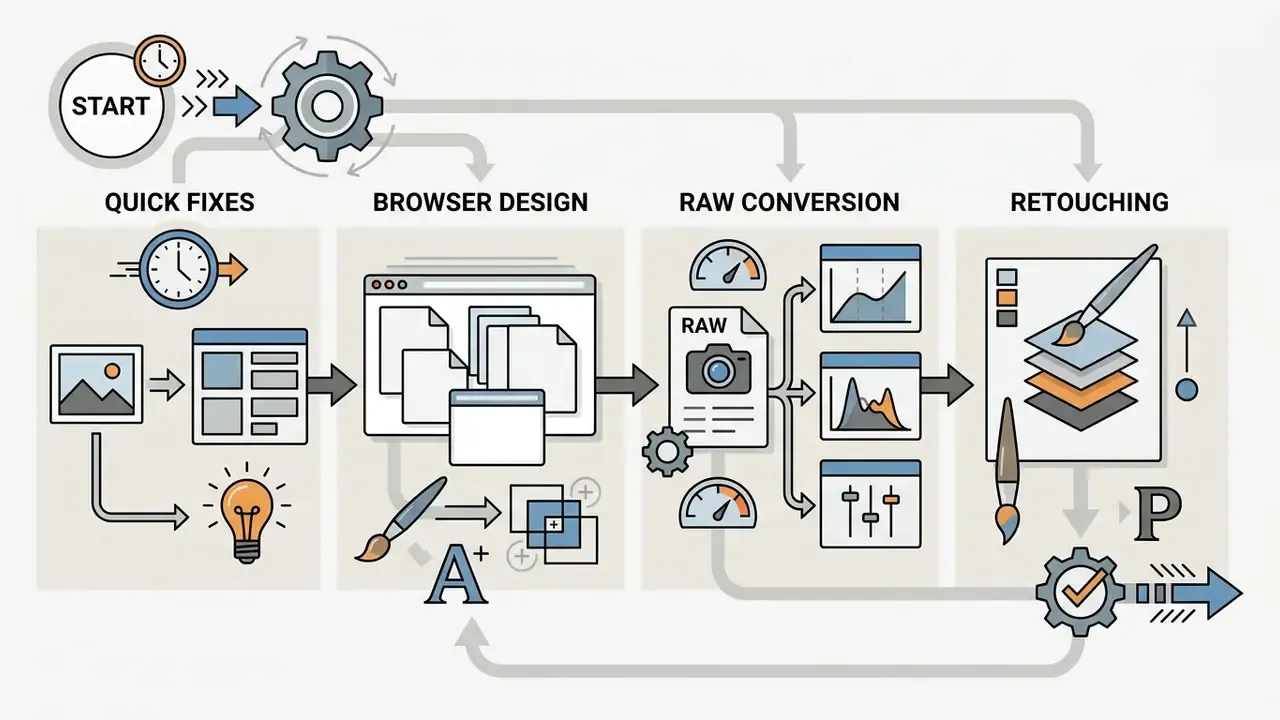
How to use this guide
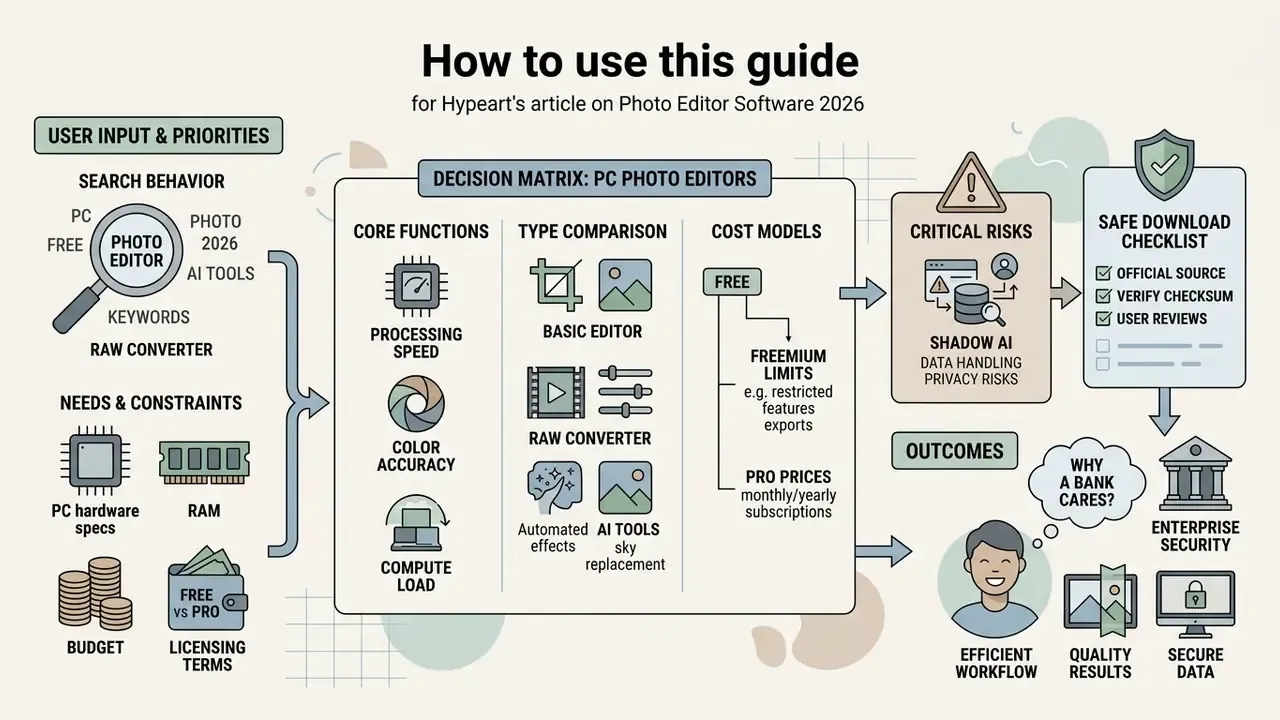
One practical note on search behavior. Queries such as "best free photo editor software download", "best picture editing software free download", "editing picture software free", and "free editing picture software" almost always resolve to the same short list of eight to ten products. The wording of the query changes; the shortlist barely moves. So the useful question is not which name ranks first, but which architecture you can defend to your security and audit teams.
Choosing the right photo editor software determines processing speed, color accuracy, and the compute load on a workstation. In 2026 the PC graphics market splits into three camps: standalone desktop applications, browser platforms, and AI-first editors that sit somewhere in between.
The practical meaning is straightforward. Hardware sets the performance ceiling. The license sets the legal boundary of the output. The data-handling path decides whether the source file ever leaves your organization's perimeter. All three are measurable, so every tool class below is examined through exactly those lenses: browser tab memory limits, actual subscription prices, and processing location (local or cloud).
Why should a bank care about a photo editor at all? Because KYC document scans, card dispute evidence, branch security stills, and marketing assets all pass through the same casual pipeline. Usually the same browser tab, too.
How to choose photo editor software for your tasks
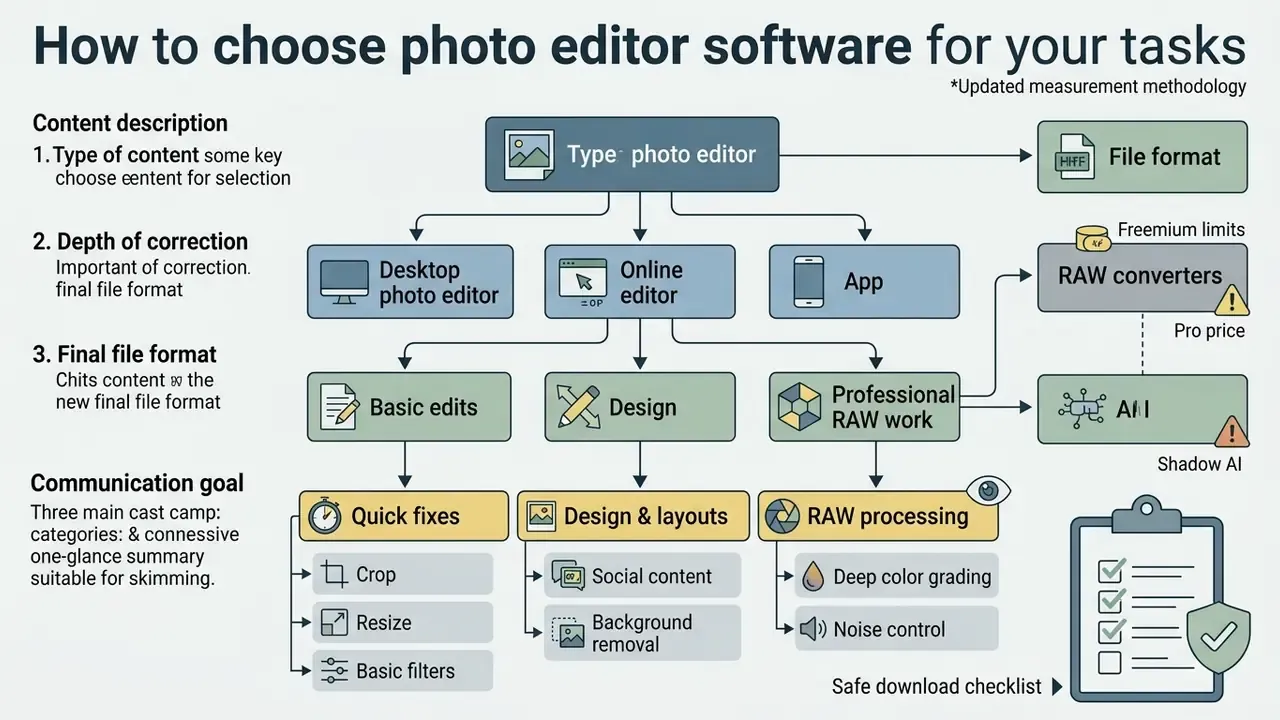
The right photo editing software follows from three inputs: the type of content, the depth of correction you need, and the final file format. One-off cropping is fine in a lightweight web service. Multi-layer retouching and deep color grading call for a full desktop photo editor.
Each class of editing software covers a specific band of tasks, and they differ in RAM appetite, availability of local processing, and the depth of their built-in photo editing tools. Pick the wrong architecture and you pay for it twice: once in upload time on large files, and again in crashes when video memory runs out.
Desktop photo editor, online editor, or app
In the same test set, Pixlr X applied a Gaussian blur to 12-megapixel images in under 180 milliseconds.
Web services remain capped by the memory the browser allocates, typically 2-4 GB per tab, while installed software reaches system RAM and video memory directly. That shows up in product limits, not just in synthetic tests. Photopea's own developers state that an opened PSD occupies 4 to 15 times its compressed size in memory, which is why a 10 GB layout can take a Chrome tab down. Adobe Express caps the project itself at 32 images and accepts only AI, GIF, HEIC, JPEG/JPG, PNG, PSD/PSDT, SVG, and WebP at a maximum of 65 MP.
In most corporate settings, teams end up combining both. A marketing group runs first-pass batch processing in a local application, verifies commercial rights in the AI Media Commercial-Use Hub, then finalizes publication assets in a web editor. Not elegant. It works.
Basic edits, design, or professional RAW work
Short version: basic edits do not need high-precision math. RAW conversion does. That, rather than the interface, is what really separates these product classes.
A free basic photo editor exists for quick operations: crop, resize, a workable white balance, and fast color correction. Design-first applications concentrate on multi-layer composition, text, vector elements, grids, and social media layouts.
Professional handling of RAW images requires demosaicing algorithms, sensor profiling, and non-destructive editing. Standard 8-bit JPEG files carry far less headroom than RAW data at 12-14 bits per channel, which is why floating-point math is needed to recover highlight and shadow detail. For web delivery the final export still collapses to JPEG in sRGB. Industry photography handbooks recommend preparing those files on a display calibrated to gamma 2.2 and a 6500K white point.
An illustrative case from a graphics-pipeline review at a large online retailer: product card preparation had slowed to a crawl because RAW files were being opened in a browser editor. Engineers moved the first conversion step to a desktop converter and kept the web service only for banner layout. Per-image handling dropped from roughly 4 minutes to 45 seconds, and the out-of-memory tab crashes stopped. Treat the numbers as a composite example, not a published study.
There is also a functional ceiling on generative tools, which matters if you plan to replace manual retouching with automation:
"Most diffusion-based editing methods fail at spatial operations, such as moving an object within the frame."
That finding came from testing eight models across 13 edit types.
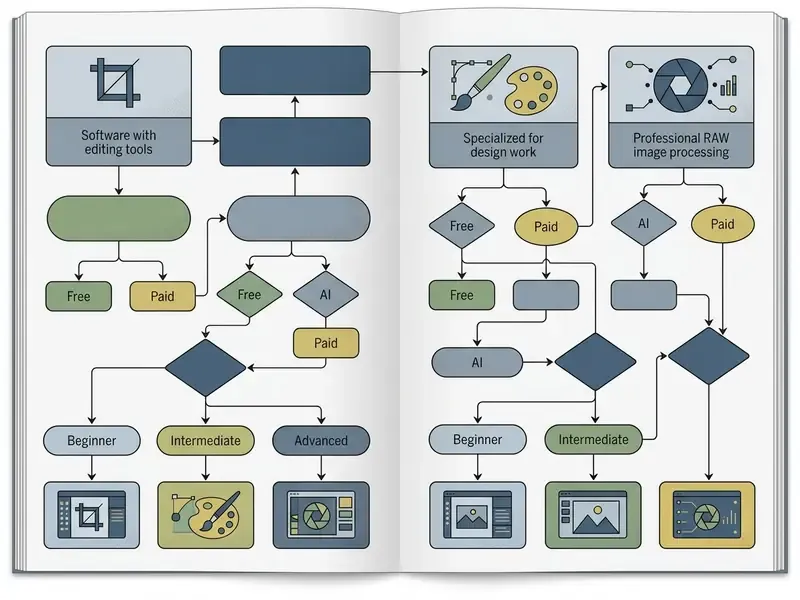
Figure 1. Decision tree for selecting a photo editor
- Goal: quick fixes (crop, resize, basic filters) → an online image editor (Pixlr X, Canva) or the software already bundled with the OS (Apple Photos, IrfanView).
- Goal: design, layouts, social content, background removal → browser platforms (Photopea, Adobe Express).
- Goal: RAW processing, deep color grading, noise control → desktop RAW converters (Darktable, RawTherapee) or the camera vendor's own software.
- Goal: multi-layer retouching, montage, raster plus vector work → a desktop editor (GIMP, Paint.NET).
- Goal: AI generation, one-click object removal → AI-enabled web or desktop tools.
- Constraint: files contain personal or client data → local processing only (desktop or a client-side web app).
Best free photo editors by use case
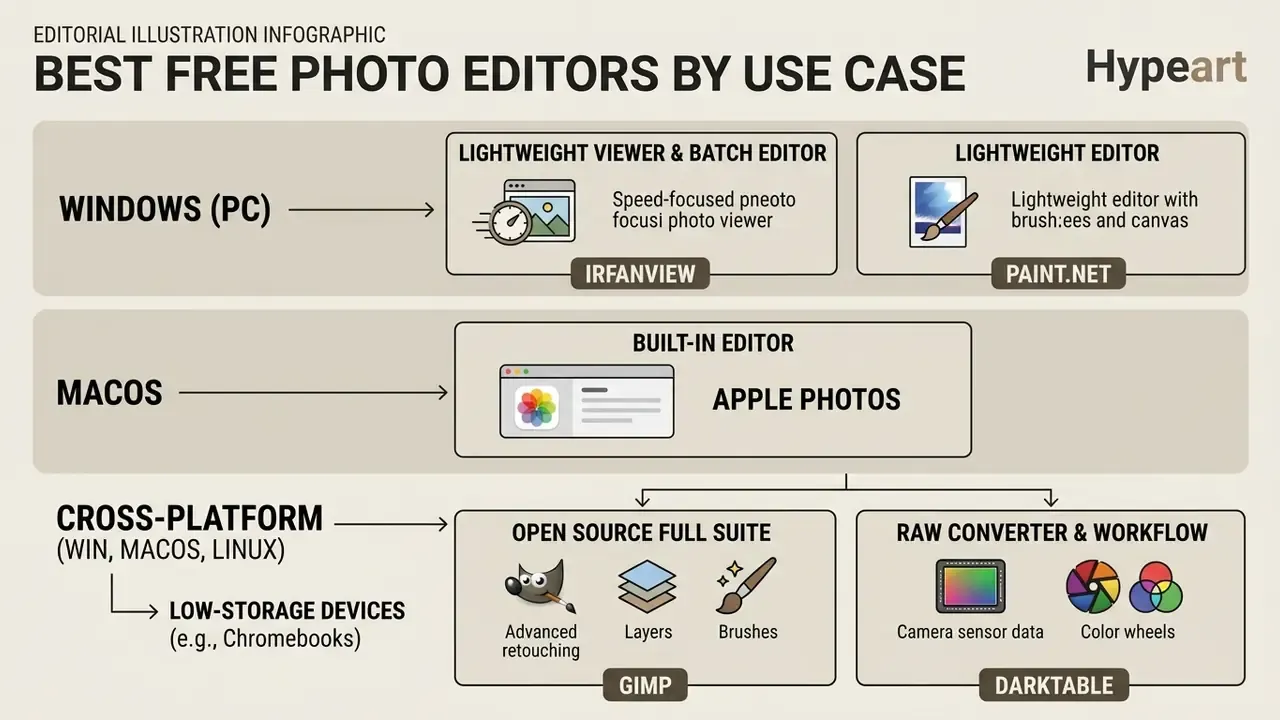
The best free photo editor category stretches from lightweight viewers with edit buttons to full open source suites. What fits depends on operator skill and on the shape of your graphics pipeline.
To assess tools honestly, separate them by architecture, by the presence of paid tiers, and by what the free version actually withholds.
Free editors for beginners and quick fixes
For basic work, the low-friction options are PhotoPad, Apple Photos, IrfanView, Google Photos, and Canva. A closer look at functional caps and export rules across those products lives in our review of free photo editors. Each offers a legible interface for quick transforms (crop, resize), tonal work (brightness and contrast), and preset application (filters, effects).
IrfanView and PhotoPad stand out for raw speed on weak hardware and for batch processing, which lets you resize and rename hundreds of shots in seconds. Google Photos and Apple Photos sync a library across devices and add competent exposure fixes plus content search.
Differentiation by operating system. The same scenario needs different software depending on the platform:
- Best viewer and batch editor for Windows: IrfanView. With plug-ins it reads RAW files (showing the embedded preview), converts and renames in bulk, displays an RGB histogram, builds slideshows, and captures the screen. It is not a catalog: no star ratings, no keywords. Its role is fast selection before handing files to an editor.
- Best built-in editor for macOS: Apple Photos. Preinstalled, non-destructive on RAW, with a genuinely strong auto-enhance, and iCloud Photos syncs the library across iPhone, iPad, Mac, iCloud.com, and PC. The limit is the Apple ecosystem itself.
- Best lightweight editor for Windows: Paint.NET. Layers and selections are supported, and its Noise menu covers both adding random grain and reducing digital noise.
- Cross-platform choice (Windows, macOS, Linux): GIMP and Darktable. Both ship official builds for all three platforms, which helps in a mixed workstation fleet. A free desktop photo editor with that reach reduces support overhead.
- Low-storage devices (Chromebooks, thin clients): browser editors are more practical. They take no disk space and push the load into the tab. If your users work on a free laptop photo editor with 64 GB of storage, this is the honest answer.
Editors for RAW, retouching, and advanced work
For complex raster projects and RAW files, the free specialists are GIMP, Paint.NET, RawTherapee, and Darktable. A full photo editor software for pc free at GIMP's level supports unlimited layers, channels, masks, and brushes, and accepts external modules written in Python and C++. If you want the best photo image editor you can install without a purchase order, this is where the conversation starts.
GIMP is not an isolated editor. It is the hub of an open desktop publishing workflow. The project's own documentation calls its color management "top-notch" and positions it alongside sibling tools: Inkscape for vector graphics, Scribus for professional layout and prepress. For repetitive work, GIMP acts as a scripted image-editing framework with support for C, C++, Python, Scheme, and more. Version 3.x added non-destructive layer effects, a refreshed GTK3 interface, and better text handling. Built-in plug-ins need no installation; externally downloaded modules must match the GIMP version exactly, and that mismatch is the single most common cause of post-update breakage.
For RAW conversion at zero cost, use Darktable or RawTherapee. Darktable runs a modular color pipeline built on ICC profiles and sensor calibration matrices. RawTherapee supports DCP profiles, LUTs, and separate treatment of luminance and chroma noise in Lab space.
The difference between the two converters is architectural. Darktable applies the standard or enhanced camera matrix by default, accepts custom input and output ICC profiles, and can build a profile from a color target in its color calibration module. RawTherapee treats DCP as the preferred input profile, supports DCP LUTs, embedded curves and look tables, and searches for camera matrices in a strict order: profile file, then DNG metadata, then the internal camconst.json database. A separate working space handles saturation, RGB contrast, and tone curves. The short version: Darktable is a pipeline of modules, RawTherapee is a pipeline of profiles.
In an illustrative production review at a photo studio, the requirement was to convert 45-megapixel files without buying commercial licenses. The team deployed Darktable with pre-exported camera color profiles, which gave fully controlled color reproduction and no license fees. Again, composite example rather than published benchmark.
Native vendor software from camera makers
If you would rather avoid third-party editors entirely, start with your camera maker's free utility. It understands the proprietary RAW format by definition and applies in-camera color profiles correctly. Bundled discs are long gone, so the program comes from the vendor's site, and a few brands still ask for the camera serial number before the download unlocks.
- Canon Digital Photo Professional (DPP) reproduces Canon Picture Style profiles precisely and handles Dual Pixel RAW in depth.
- Nikon NX Studio merges viewing and conversion while preserving in-camera NEF processing settings.
- Sony Imaging Edge Desktop (Viewer / Edit / Remote) supports tethered shooting and accurate ARW conversion.
- Fujifilm X Raw Studio borrows the camera's own processor over USB for very fast RAW conversion with native film simulations.
- OM Workspace (Olympus / OM System) is one of the most capable free vendor packages, with lens aberration correction and perspective fixes.
- Panasonic and Pentax/Ricoh publish their own free converters for their sensors.
The shared limitation: vendor software is rarely as fast or as polished as a paid specialist converter, and it almost never opens other brands' RAW files. As a predictable, cost-free first step into RAW, though, it is hard to beat.
Online image editor for design work in the browser
Photopea, Pixlr, Adobe Express, and Canva together form a credible best free photo editor set for browser-only work. Photopea reproduces almost all of Photoshop's interface and keyboard shortcuts, works directly with .psd, .ai, and .sketch, opens RAW files (DNG, CR2, CR3, NEF, ARW, RW2, RAF, ORF, FFF), and exports to PSD, PNG, JPG, SVG, PDF, GIF, and WebP. It also installs as a PWA and keeps working offline after the first load, opening files from disk without sending them anywhere.
Web editors arrive with template libraries, automatic background removal, and stock element collections. They suit banner assembly, collage building, and typography work. Photopea removes a background in one click through Select → Remove BG, Pixlr uses automatic AI subject detection, and Adobe Express strips the background from the image panel with an option to restore it and export a transparent PNG. The Adobe Express template library now exceeds 227,000 items. To weigh different graphics stacks side by side, see our AI Media Comparison Matrices.
| Product | OS / platform | Delivery | Data processing | RAW support | WebP | 16-bit TIFF | AI features | Primary purpose | Commercial use of output | Free-tier limitation |
|---|---|---|---|---|---|---|---|---|---|---|
| GIMP | Windows, macOS, Linux | Desktop | Local | Limited (via UFRaw/Darktable) | Yes | Yes | Basic, via plug-ins | Multi-layer retouching, raster art, DTP | Allowed (GNU GPL) | None |
| Darktable | Windows, macOS, Linux | Desktop | Local | Full | Yes | Yes | Local masks, denoising | RAW conversion, color grading | Allowed (GNU GPL) | None |
| RawTherapee | Windows, macOS, Linux | Desktop | Local | Full | Via conversion | Yes | AI-assisted masking | Precise RAW finishing, profiling | Allowed (GNU GPL) | None |
| Paint.NET | Windows | Desktop | Local | No (plug-in only) | Yes (plug-in) | Yes | No | Lightweight editing with layers | Allowed | None |
| PhotoPad (NCH) | Windows, macOS | Desktop | Local | Yes (from camera) | Yes | Yes | Auto-Colorize, Remove Object, Super Resolution | Home editing, collages, cards | Free version is non-commercial only | Free for home use only; Pro is paid |
| IrfanView | Windows | Desktop | Local | Via plug-ins (preview) | Yes | Yes | No | Viewing, batch convert and rename | Free for personal use | Minimal editing set |
| Apple Photos | macOS, iOS | Desktop + cloud | Local + iCloud | Yes (non-destructive) | Yes | Limited | Auto-enhance, content search | Home library, basic correction | Allowed | Tied to the Apple ecosystem |
| Photopea | Web (PWA), any OS | Browser | Client-side, in browser RAM | Yes (DNG, CR2, CR3, NEF, ARW, RW2, RAF, ORF, FFF) | Yes | Yes | Background removal, Magic Cut | Design, PSD layout, in-browser retouching | Allowed | Sidebar ads; shortened undo history; $5/month removes ads and doubles AI credits |
| Pixlr X / E | Web, iOS, Android | Browser | Cloud | No | Yes | No | Auto background removal, AI Touch-up, AI credits | Fast edits, social content | Allowed under service terms | Ads, daily AI credit cap; Pro from $2.49/month |
| Adobe Express | Web, iOS, Android | Browser | Cloud | No | Yes | No | Remove Background, generative features | Social graphics, templates, collages | Restricted by content license terms | Up to 32 images per project; 65 MP cap; some assets are premium |
| Canva | Web, iOS, Android | Browser | Cloud | No | Yes | No | Remove Background, AI Expand, Generative Fill | Design, presentations, social | Free Content is commercially usable with caveats | Background removal and AI studio require Pro (about $120/year, £13/month) |
| Fotor | Web, desktop, mobile | Browser | Cloud | No | Yes | No | Magic Eraser, image generation | Quick edits, templates | Restricted by service terms | Watermark on free export; Pro from $3.33/month |
| BeFunky | Web | Browser | Cloud | No | Yes | No | Smart tools, object removal | Exposure and color correction | Restricted by service terms | Object removal and AI only on the $14.99/month plan |
If automated features and their pricing are your first concern, read our overview of AI photo editors alongside this table. Many of the web platforms listed here push generative tools into separate paid tiers, and the tier names change more often than the features do.
AI photo editor: which tasks AI actually speeds up
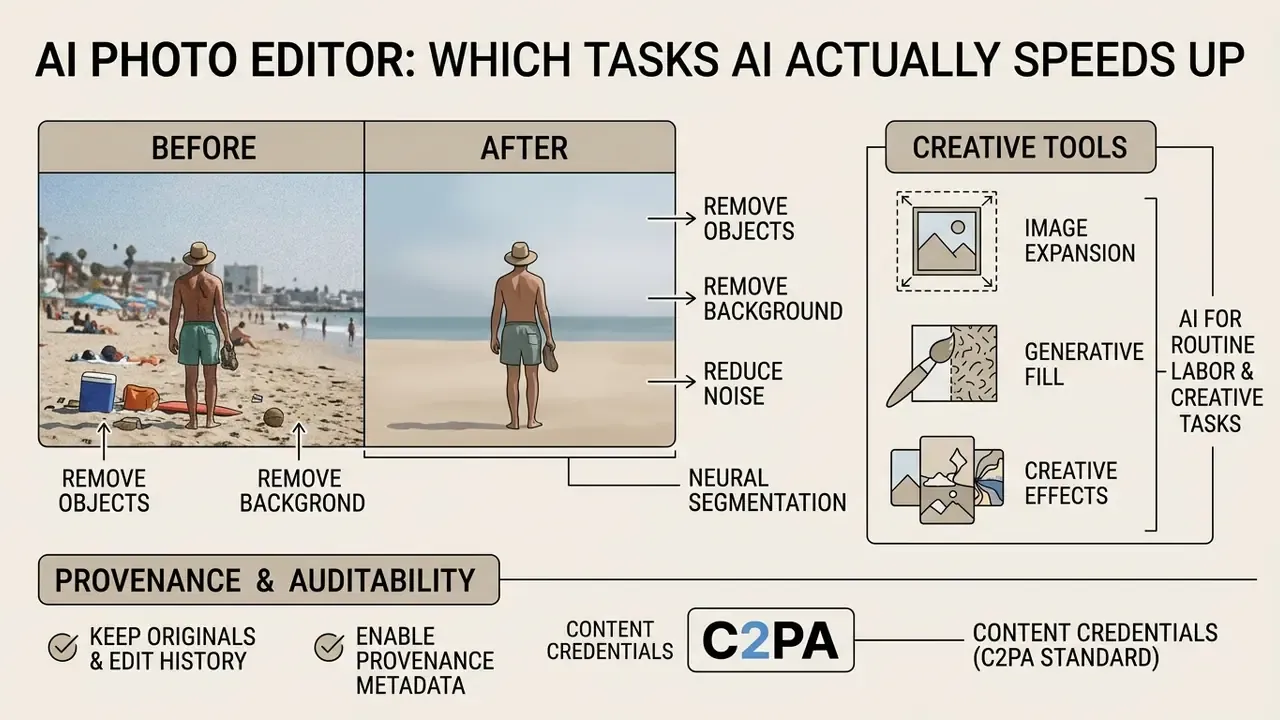
A modern AI photo editor cuts routine labor through neural segmentation, inpainting, and super-resolution. These tools automate work that once required painstaking selections with the Pen tool.
By 2026, neural features live in both standalone desktop releases and cloud platforms. Teams integrating that functionality into their own products can start with our AI Media API Guides.
AI for removing objects, backgrounds, and noise
AI detects object boundaries automatically, so background removal becomes a single click. Inpainting algorithms then read the surrounding context and fill the cleared region with plausible texture.
The workflow implication is blunt. An automated "quality score" inside the editor is not proof of a correct result. Object removal has to be reviewed by eye, at 100% zoom, with attention to shadow edges, reflections, and repeating textures.
Neural denoising and sharpening now outperform classical filters. Diffusion-based methods separate real detail from sensor noise, which makes high-ISO frames recoverable. The academic base here is solid: image restoration with iteratively preconditioned guidance (CVPR 2024), blind restoration of degraded photos in DiffBIR (ECCV 2024), and a survey of inpainting methods pushing processing to 8K (arXiv, 2024).
Even so, accepting output on numeric metrics alone is a mistake:
The EditProbe framework in that paper reaches a Spearman coefficient of 0.80 on instruction-following accuracy. Its conclusions rest on 512 images, 20 expert annotators, and 307,200 pairwise judgments.
Scenario: frame restoration and cleanup
Five before-and-after cases are worth reproducing on your own files before AI enters the pipeline: object removal through inpainting, sky or background replacement, digital noise suppression, super-resolution upscaling, and edge extension (outpainting or uncrop). Run them on your worst files, not your best ones.
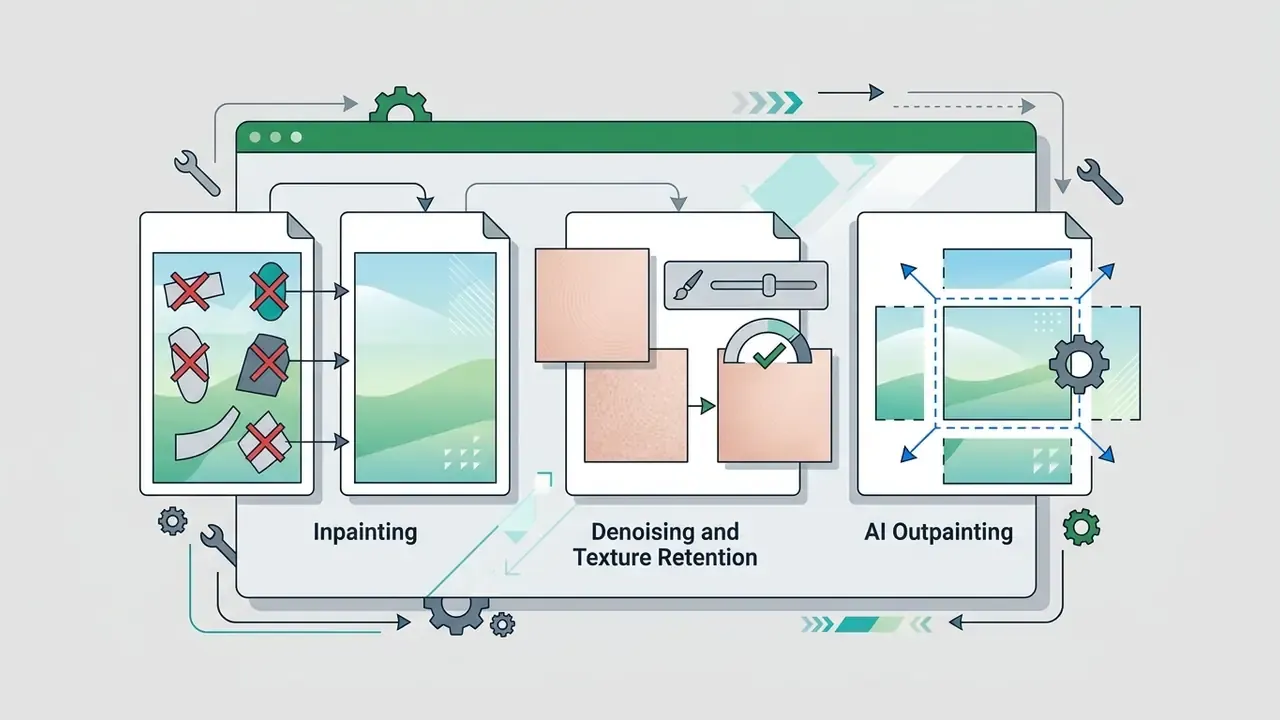
Generative fill, image expansion, and creative effects
Provenance and auditability (C2PA / Content Credentials)
Where reproducibility and audit matter, ordinary retouching acquires an extra requirement: recording the origin of the content. The practical minimum:
- Keep originals and edit history.Non-destructive formats (PSD, XCF,
.pp3and.xmpsidecars from RAW converters) let you prove which operations were applied. - Enable provenance metadata (Content Credentials under the C2PA standard)wherever the editor supports it. These attach a signed record of generative model use to the file.
- Do not strip embedded watermarks from generative modelswhere service terms require them. Removal is a direct EULA breach, and detection schemes such as synthid exist precisely to make that visible.
- Set an automation threshold.Define internally which operations AI may perform unreviewed (denoising, resizing) and which demand mandatory validation (object removal, generative expansion, background replacement in news or legally significant material).
- Disclose synthetic contentused in public communication. The mechanics are covered in Synthetic Media Disclosure Explained.
For a regulated institution, this list is the difference between an edited image and an auditable artifact. Auditors do not ask whether the retouch looked good. They ask who approved it, and when.
Short notes on niche AI services
- Claid.ai targets product and catalog photography: automated light and shadow correction, studio backdrops, and visual consistency across marketplace listings.
- MagicHour leans creative: outfit changes, background generation, stylized portraits, and multiple variations of a single frame for personal branding.
- General-purpose AI bundles cover the daily grind, background removal, upscaling, lighting fixes, and usually run on a credit model, which suits irregular use.
The general verdict for the whole class: no AI editor does everything well. Assembling two or three tools around specific operations beats hunting for a single universal one.
Core photo editing tools for image processing
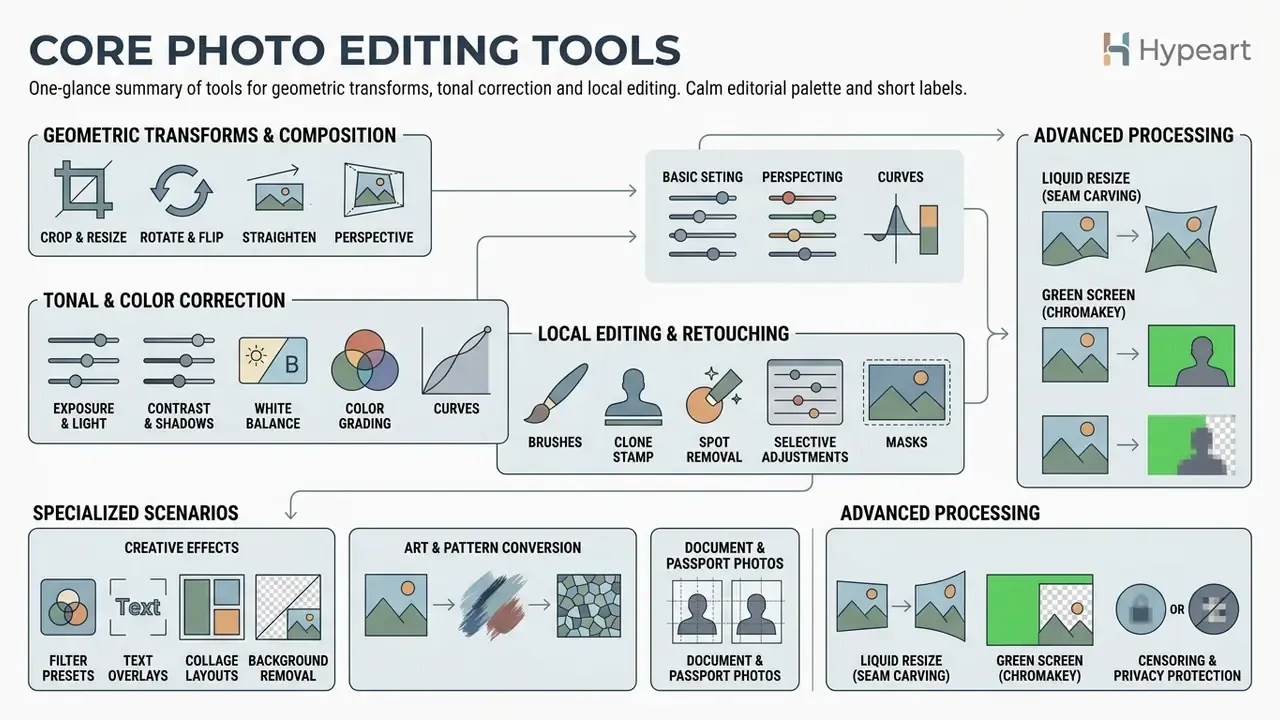
A capable best photo image editor carries a full set of basic and advanced instruments for geometric transforms, tonal correction, and local editing.
Understanding how these editing tools behave lets you order operations correctly and avoid degrading the source frame. It helps to split them in two: geometric operations (rotate, flip, crop, resize, straighten) and object or layer operations (layers, adjustment layers, alignment and stacking order, opacity, background removal, erasing, effects, text).
Correcting color, light, size, and composition
A sound correction sequence opens with cropping and horizon straightening, then moves to tonal range. The histogram is your objective read on pixel distribution from black (0) to white (255), and it warns you before highlights or shadows clip into featureless blocks.
Exposure, contrast, and white balance work belongs before any resize. If output resolution has to increase, look at AI image upscalers rather than plain interpolation. For precise tonal control, use the histogram, Levels, and Curves. An S-curve raises midtone contrast while protecting detail at both ends of the range.
The operation order adopted in industry handbooks runs like this: white balance, exposure, contrast, crop and straighten, local corrections, resize for the final medium. White balance removes color casts through temperature and tint sliders or an eyedropper on a neutral patch. Horizon leveling happens with the straighten tool or a grid-guided rotation. Free photo editing suites follow that same order, which is convenient, since a habit learned in GIMP transfers to a paid tool almost unchanged.
Retouching, background, text, collage, and creative effects
Local retouching relies on the Clone Stamp, the Healing Brush, and selection tools. The stamp copies pixels from a source area onto the target. The healing brush goes further and adapts texture, luminance, and lighting to surrounding pixels. In professional editors, the stamp's sampling source is configurable, current layer, current and below, or all layers, which allows non-destructive retouching on a separate empty layer.
Background replacement and object removal both depend on accurate masks. Automatic background removal is a decent first pass, but the mask nearly always needs brush work afterwards. Advertising material adds text layers with tracking and leading control, plus vector shapes and filters. Consumer-facing portrait features follow the same masking logic, whether you are smoothing skin or running a teeth whitening app style correction, and both call for restraint. If filter behavior turns unpredictable, our AI Media Support and Troubleshooting section covers the usual causes.
Specialized and everyday scenarios
There is a whole layer of functionality that professional reviews skip, yet it answers a large share of real requests:
- Document and passport photos. A Passport Photo tool (in PhotoPad, for example) crops to passport and visa standards automatically and tiles copies onto a print sheet.
- Art and pattern conversion. Turning a photo into a paint-by-numbers layout, a cross stitch pattern, an oil painting, a sketch, or a caricature-style rendering.
- Liquid Resize (seam carving). Changing aspect ratio without distorting key subjects. Available in PhotoPad and achievable in GIMP.
- Green screen work (chromakey). Fast replacement of a flat background without building complex layer masks.
- Censoring and privacy protection. Pixelating or blurring faces, license plates, and document fields with adjustable strength. Mandatory before publishing any internal screenshot.
- Archive colorization. Machine learning auto-colorize on black and white images, followed by manual refinement.
- HDR merging. Combining bracketed frames into one image with extended dynamic range.
- Photo mosaics and collages. Building an image from thousands of thumbnails in a chosen folder, plus fixed and freeform collage layouts.
- Double exposure and montage. Overlaying two or more frames with adjustable layer opacity.
- Batch watermarking and renaming. Bulk logo application and filename normalization, the baseline scenario for stock libraries and catalogs.
- Calendars, cards, and thumbnails. Calendar and card generators, plus cover preparation for YouTube and stories at exact platform dimensions.
- Screenshots and annotation. Screen capture with arrows, shapes, and callouts for documentation and presentations.
Information security, privacy, and Shadow AI
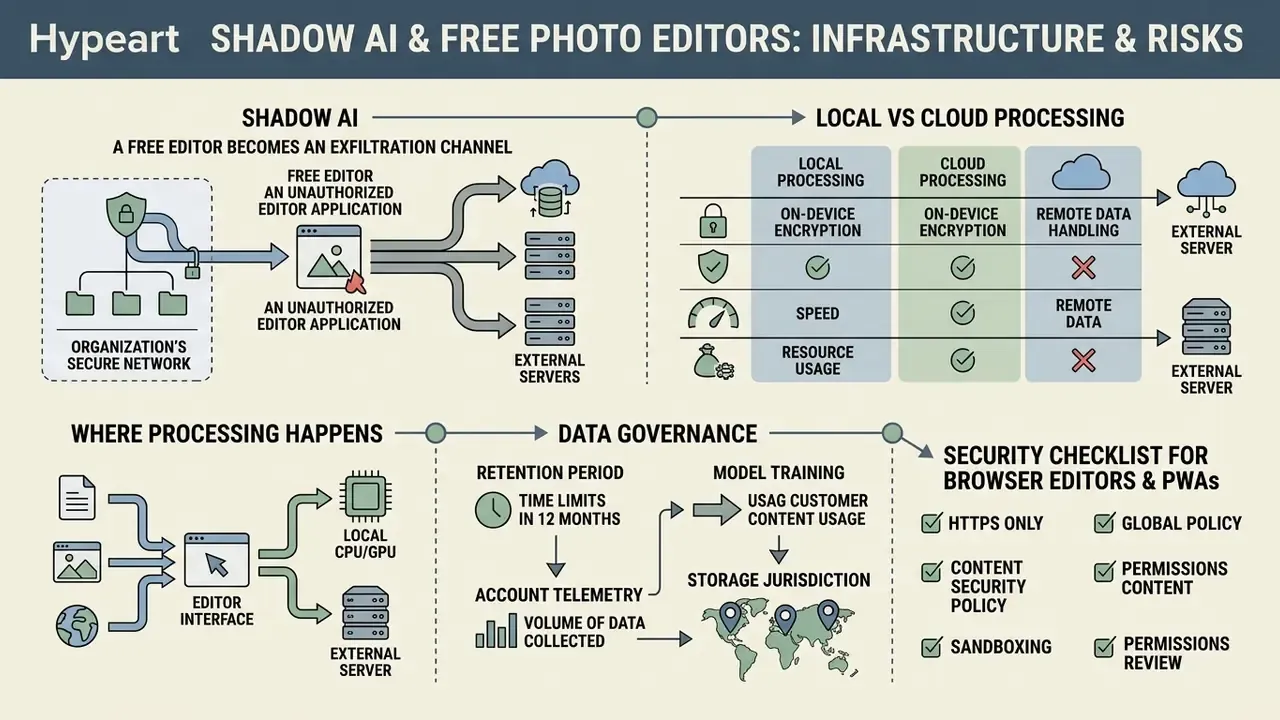
Short version: the main risk from free editors inside an organization is not malicious code. It is uncontrolled transfer of images into cloud AI services. The distinction between client-side and cloud processing decides whether a tool may touch sensitive data at all.
Shadow AI: how a free editor becomes an exfiltration channel
Shadow AI appears when an employee uploads a work file to a free web service, unreviewed, just to "quickly remove the background". At that moment the image, a contract scan, a payment document, a client photo, an unreleased product mock-up, leaves the corporate perimeter and falls under service terms that may permit storage on the provider's servers and use for model improvement.
Is that a security incident? In most banks, yes. It is also almost never logged as one.
Risk indicators to check before approving any tool:
- Where processing happens.Client-side applications (Photopea, some browser utilities) compute pixel arrays inside the tab's memory, and you can verify that by disconnecting the network after the app loads. Cloud services (Canva, Pixlr, Adobe Express, Fotor, BeFunky, and niche AI platforms) send the file to a server, because their generative features require it.
- Retention period for uploaded files, and whether forced deletion is available.
- The service's right to use customer content for model training, which is the decisive clause for confidential material.
- Account requirements and the volume of telemetry collected.Account requirements and the volume of telemetry collected.
- Storage jurisdiction, critical whenever personal data is involved.
Local versus cloud processing matrix
| Tool class | Where the file is processed | Works offline | Fit for confidential images | Typical enterprise verdict |
|---|---|---|---|---|
| Desktop open source (GIMP, Darktable, RawTherapee, Paint.NET) | Locally, on the workstation | Yes | High | Allow, if downloaded from the official source |
| Camera vendor software (Canon DPP, Nikon NX Studio, Sony Imaging Edge, X Raw Studio, OM Workspace) | Locally | Yes | High | Allow |
| Client-side web app / PWA (Photopea) | In browser RAM | Yes, after first load | Medium to high (verify network activity) | Allow with conditions |
| Cloud web editor (Canva, Pixlr, Adobe Express, Fotor, BeFunky) | On provider servers | No | Low for sensitive data | Public marketing content only |
| Cloud AI service (generation, upscaling, background swap) | On provider servers, possibly used for training | No | Low | Requires explicit approval and a defined list of permitted file types |
| OS tools with sync (Apple Photos, Google Photos) | Local plus account cloud | Partly | Medium | Depends on policy toward personal accounts |
Security checklist for browser editors and PWAs
- Verify the domain and the service owner, and confirm the PWA installs from the official address.
- Read the policy sections on retention of uploaded files and on training models with customer content.
- Run a locality test: load the app, disconnect the network, then try to open and edit a file.
- Inspect outbound requests in the browser developer panel while opening a test image.
- Restrict extensions and add-ons in the browser profile used for corporate graphics.
- Create a separate browser profile or an isolated container for graphics services.
- Whitelist approved services and block the rest at the proxy layer.
- Train the team on one simple rule: personal data, financial documents, and unreleased material are processed locally, full stop.
What "free photo editor" means for work and commercial projects
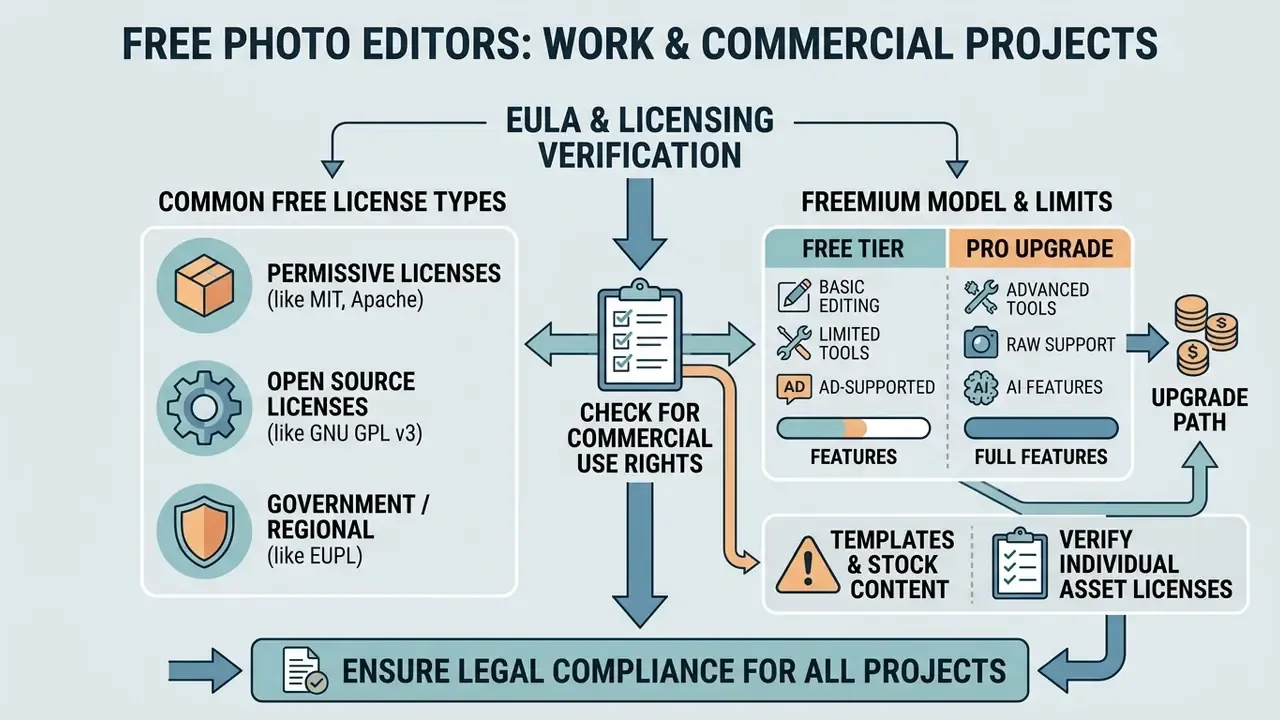
Using a free photo editor commercially demands a careful read of the EULA. "Free" can mean free for personal, non-commercial use only. PhotoPad is the clearest example: the free build is officially for home use, and commercial work needs a Pro license. Other vendors follow the same pattern, stating plainly that the free license covers personal non-commercial use while businesses need a separate commercial one. A free computer photo editor is not automatically a business-ready one.
To reduce legal exposure, keep open source and freemium in separate mental buckets. They fail in different ways.
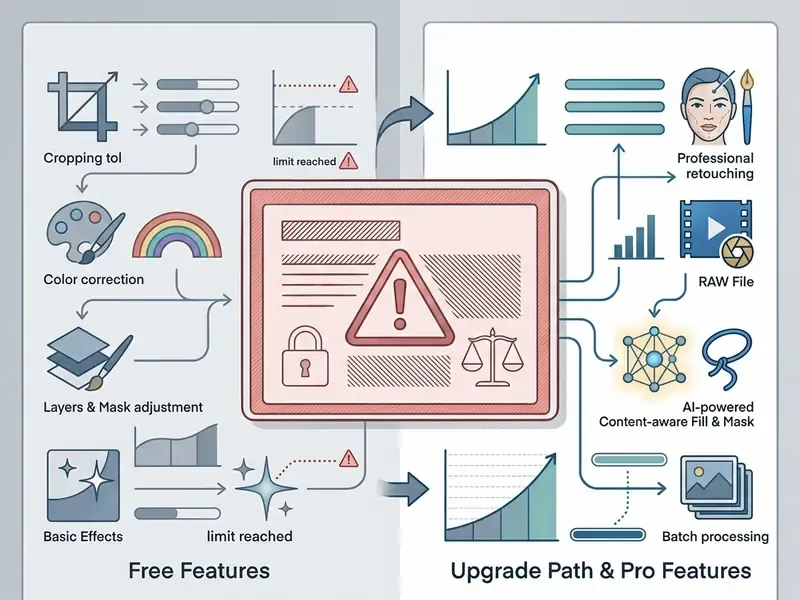
Free features, limits, and the upgrade path
Freemium tiers typically restrict several things at once: watermarks on export, a resolution ceiling (1080p is common), a monthly AI credit quota, and locked stock libraries.
Freemium limits across popular editors (as of early 2026):
| Service | What the free tier withholds | Paid access |
|---|---|---|
| Fotor | Free export carries a watermark; several tools are locked | from $3.33/month billed annually |
| Pixlr | In-app ads, daily AI credit cap, limit on saved projects | from $2.49/month |
| Photopea | All editing functions available, but sidebar ads run and undo history is trimmed | $5/month (ad-free, double AI credits) |
| Canva | Background removal, AI Expand, and Generative Fill are Pro only | about $120/year (roughly £13/month) |
| BeFunky | Object removal and smart tools unavailable on free | $14.99/month |
| Adobe Express | Up to 32 images per project, 65 MP cap, some templates and assets are premium | per Adobe plans |
| Credit-based AI editors | Generative features are metered (typically 20-25 free credits) | depends on the credit pack |
The logic behind those limits almost never varies, and it falls into four groups: branding the output with watermarks, capping export resolution and quality, metering AI operations, and paywalling the premium stock library. A paid tier either removes those ceilings or raises them.
Meanwhile, the market keeps growing alongside AI functionality:
"The photo editing software market will grow from $313.5 million in 2023 to $448.1 million by 2031."
The stated CAGR is 4.6%, with AI face recognition named as the leading driver.
As output volume rises, the move to a Pro tier usually becomes cheaper than the workarounds. For legalizing commercial graphics pipelines, review the mechanisms described in our material on commercial use of AI image generators and in the Synthetic Media Disclosure breakdown.
- GNU GPL v3
- permits running, modifying, and distributing, but derivative builds must keep the same license terms and provide source access. Selling the product is allowed, though the recipient may redistribute and modify it further without paying the rights holder again.
- MIT and similar permissive licenses
- minimal obligations, usually retaining the license text and the attribution notice.
- EUPL and analogues
- impose no prohibition on any activity, commercial use by any enterprise included.
- Freemium
- free access is often limited to "personal non-commercial use", while commercial exploitation requires a paid plan.
- Templates and stock content
- free content licenses may allow commercial design while forbidding registration of that content as a trademark or trade name, and anything marked "Editorial Use Only" is excluded from commercial scenarios altogether (advertising, promotion, merchandise, endorsement).
Choosing an editor for ongoing photo and design work
For continuous commercial production, the decisive criteria are CMYK and sRGB profile support, PDF/X export, batch processing, and speed on multi-layer documents. Automated solutions that accelerate those pipelines are surveyed in our piece on AI image enhancers.
Updated (why these criteria). The list comes from print production requirements, not interface preference. The PDF/X-3 profile expects color profiles embedded in the file, whereas PDF/X-1a converts all colors into the target CMYK space with no embedded profiles. That is precisely why prepress export cannot be treated as "just a PDF". Batch work in prepress runs through automated verification: in Acrobat, for instance, Preflight converts into a "Preflight Droplet", a mechanism for bulk conversion and file validation. Web delivery, by contrast, wants JPEG in sRGB prepared on a calibrated display (gamma 2.2, 6500K white point). Also test for 16-bit TIFF export, WebP support, macro and scripting support (Python or Scheme in GIMP, preset and sidecar export in RAW converters), and the ability to open partner project formats (PSD, AI, PDF).
Developers and designers can automate routine time and cost estimates with our AI Media Calculators. When content disputes escalate, the material in our AI Litigation and enforcement tracker is a useful starting point. For a fast read on web service tiers, use the AI Media Pricing Guides.
Enterprise deployment: how to download and install a free photo editor for Windows
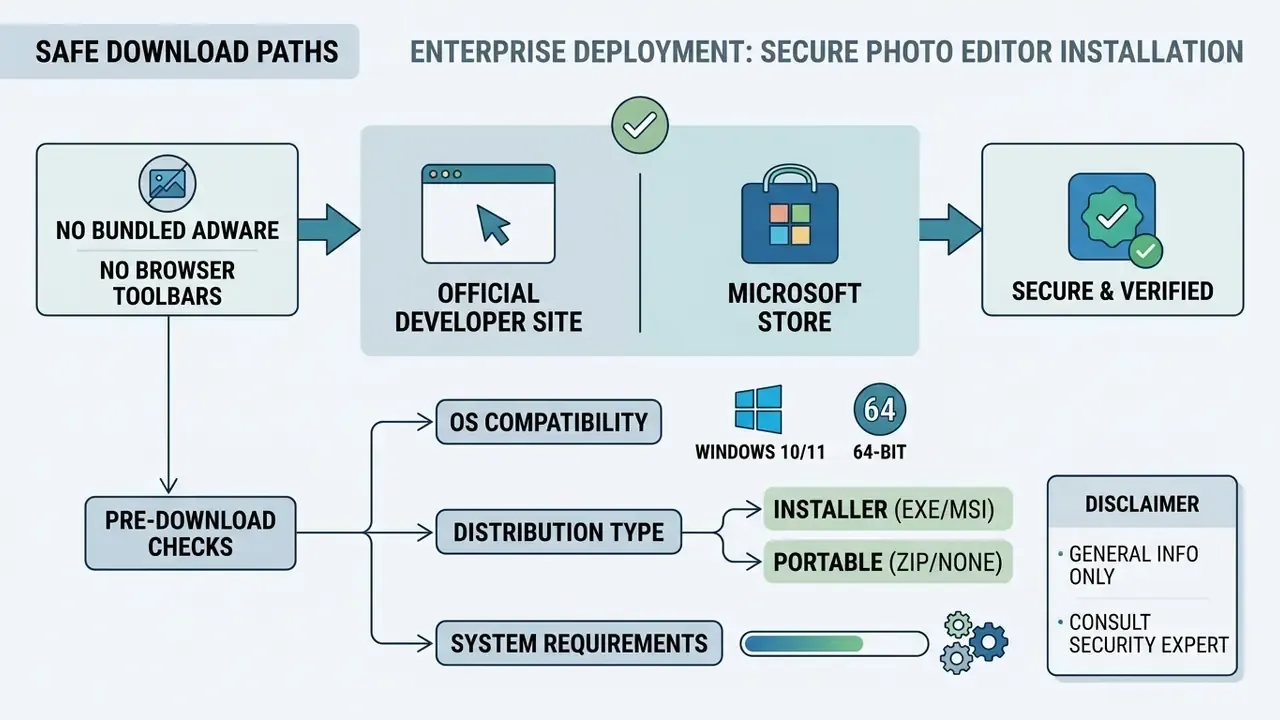
For a safe download photo editor for pc operation, distributions must come only from the developer's official site or the Microsoft Store. Microsoft's own current guidance says the same: install only from trusted publishers, save the file first and run it from the Downloads folder, while Windows Defender scans downloads in transit.
An official download free photo editor path guarantees no bundled adware, no browser toolbars, and no altered binaries. At the platform level, Secure Boot adds another layer, an industry standard under which a device loads only manufacturer-trusted software. Do this once, properly, and you will not need to repeat the free download photo editor software exercise every quarter.
What to check before you download photo editor software
Before you start a free download photo editor for pc, confirm OS bit depth (Windows 10 or 11, 64-bit) and available memory. Modern graphics packages want at least 8 GB of RAM and a GPU supporting DirectX 12 with 2-4 GB of video memory. For reference, commercial vendors publish similar figures: Photoshop Elements 2026 lists 64-bit Windows, 8 GB of RAM, and 1.5 GB of video memory, while desktop Photoshop asks for 8 GB of RAM and 4 GB of VRAM. Check installer constraints separately, since some products refuse to install on removable flash drives or on case-sensitive volumes.
"Verify software source authenticity and exclude tools with excessive telemetry collection."
When you download photo editor builds, note the distribution type: installer (EXE/MSI) or portable. Portable versions need no administrator rights and write nothing to the system registry, which helps on locked-down workstations. Searches for "download photo editor free" often surface repackaged mirrors first; skip them. For IT departments and centralized rollout, different parameters dominate:
- Availability of an MSI package or silent install switches, a precondition for deployment through GPO, SCCM/Intune, or other fleet management tooling.
- Operation in an isolated network with no internet access. Verify whether the application demands online activation or a cloud account at first launch.
- Update manageability. With GIMP, plug-in versions must match the application version, so updates are better rolled out in waves than automatically.
- Compatibility with AppLocker and WDAC policies, plus signed binaries.
- Format verification during the pilot. Compare the specific version's import and export list against your working formats, because supported format sets shift between releases (some builds add JPEG-XL or PDF import only at a particular version).
safe download and installation of photo editor software
- Source verification.Go to the developer's official domain or the Microsoft Store. Avoid third-party file hosts and torrent trackers.
- Hardware compatibility.Confirm a 64-bit OS, free SSD space (5 GB minimum for cache), and current GPU drivers.
- Correct architecture.Download the x64 or ARM64 build only. Do not use 32-bit builds for heavy graphics work.
- Installer control.Choose "Custom" or "Advanced" and uncheck any bundled software (PUP/adware).
- First-run check.Scan the file with Windows Defender before executing the installer.
- Distribution type.For a fleet, request MSI or silent install keys. For machines without admin rights, use a portable build.
- Format check.Immediately after install, open test files in your production formats (your camera's RAW, PSD, 16-bit TIFF, WebP) and run a test export.
- Initial color setup.Set the working color space (sRGB for web), attach the monitor ICC profile, and load the camera profile in the RAW converter.
- Network control.Record which outbound connections the program opens at launch and while processing a file.
When a downloadable editor beats online tools
An installed free downloadable photo editor is the better choice for regular high-volume processing, for offline work, and wherever confidentiality requirements are elevated. Local programs never upload sources to external servers, which removes an entire exfiltration path for personal data and intellectual property. Two more arguments: no upload and download time on heavy files, and no dependence on server-side quotas. Teams running a free editor photo software stack locally also keep working during provider outages.
Browser-based online tools win for one-off tasks on someone else's machine or on corporate hardware where installing software is forbidden. They start instantly, with no installation step, and they open from a tablet or phone. Their natural limits are tab memory, upload caps, and, for server-side services, mandatory file transfer to the provider. Searching for a free good photo editor in 2026 usually ends in a mix of both, and that is fine, as long as the routing rule is written down.
FAQ: free photo editors, RAW, security, and licensing
Which free photo editor best replaces Adobe Photoshop on a PC?
The closest matches in features and interface are GIMP for desktop installation and Photopea for browser work. GIMP supports multi-layer editing, channels, masks, and automation scripts in Python and Scheme. Photopea handles PSD fully, mirrors most Photoshop shortcuts, opens RAW files, and saves the project back to PSD.
Is it safe to use online editors for confidential documents?
Client-side browser editors such as Photopea process files locally in your browser's memory without sending them to a server. Even so, for personal data and banking documents, an installed desktop photo editor running fully offline is the safer answer. Cloud services (Canva, Pixlr, Adobe Express, Fotor) transfer the file to the provider, so applying them to sensitive material needs security policy approval first.
Can RAW files be processed professionally in free programs?
Yes. The open source converters Darktable and RawTherapee provide professional tools for non-destructive RAW conversion. They support camera profiling, mathematical noise reduction, tone curve work, and 16-bit TIFF export. The alternative is your camera maker's free converter (Canon DPP, Nikon NX Studio, Sony Imaging Edge, Fujifilm X Raw Studio, OM Workspace).
What is the key difference between open source and freemium?
Open source programs (GIMP, Darktable, RawTherapee, Paint.NET) are entirely free, carry no ads or in-app purchases, and place no restriction on commercial use of results. Freemium services (Canva, Pixlr, Fotor, BeFunky) give away a basic feature set while locking advanced AI tools, high-resolution export, and stock elements behind a subscription. A third model exists too, "free for home use only", as in PhotoPad, where commercial work requires a Pro license.
How many images can one online editor project hold?
The service sets the cap. Adobe Express, for example, permits up to 32 images per project (extra files live in Libraries) and accepts images up to 65 MP in AI, GIF, HEIC, JPEG/JPG, PNG, PSD/PSDT, SVG, and WebP. Client-side editors such as Photopea have no formal cap but hit tab memory instead, since an opened PSD occupies 4 to 15 times its compressed size.
Which editor suits my operating system?
Windows: IrfanView for viewing and batch operations, Paint.NET for light layered editing, GIMP for complex projects. macOS: the preinstalled Apple Photos for fast non-destructive RAW correction, GIMP or browser editors for anything harder. Linux: GIMP, Darktable, and RawTherapee, all with official builds. Chromebooks and weak machines: browser editors that consume no disk space.
Does the free version leave a watermark on exports?
It depends on the service. Fotor will not save an image without a watermark on its free tier. Photopea, Pixlr, and Adobe Express export clean, but restrict other things: interface ads, daily AI credits, files per project, and premium asset access. Open source editors add no watermarks at all.
How should I review AI output before publishing?
Do not lean on automated numbers. Research shows PSNR and SSIM correlating weakly with human judgment in semantic editing, and diffusion models failing consistently on spatial operations. The practical minimum: inspect at 100% zoom, check shadow and reflection edges, watch for repeating textures, retain the original and the edit history, and record provenance metadata (Content Credentials / C2PA) wherever the editor supports it.
Can free templates be used in advertising?
Not always. Free content licenses often permit commercial designs while forbidding registration of that content as a trademark or trade name, and items marked "Editorial Use Only" are excluded from advertising, promotional, and merchandise use without additional rights. Check the specific library's terms before a campaign launches.
Are searches for "free photo editor 2025" still relevant in 2026?
Mostly, yes, though the version numbers have moved. Queries phrased around a free photo editor 2025 release now land on 2026 builds: GIMP 3.x, current Darktable and RawTherapee cycles, and reworked freemium tiers with different AI credit allowances. Prices and limits change faster than the software itself, so verify pricing on the vendor page before you budget.
Appendix A. Corrections to the previous edition
For editorial transparency, here are the statements revised in the current version and the reasons behind each change.
Reason for revision: no methodology or test bench was described, so the figures read like a marketing claim.
Current version: the same values now carry the protocol (KLM-GOMS), the benches (Dell XPS 13 on Windows and an macOS M2 Pro system), the Puppeteer automation, and the exact measurement configuration (MacBook Air M1, 8 GB of RAM), supplemented by a comparable Pixlr X versus ImageMagick CLI resize test.
- Previous wording: "According to LifeTips Benchmark research on web editor performance, modern browser engines can handle complex layer operations at up to 60 frames per second, and applying Gaussian blur to 12-megapixel images takes under 180 milliseconds."
- Previous wording: "However, academic research (TIEdit Benchmark 2024) shows that generative AI models frequently make spatial errors and random hallucinations during complex transformations."
Reason for revision: the claim arrived without metrics and merged two different problems, model error and evaluation-metric error.
Current version: spatial failures are backed by EditVal data (eight models, 13 edit types), while the unreliability of automated scoring rests on TIEdit/EditProbe data (512 images, 20 experts, 307,200 pairwise judgments, SRCC 0.80). A separate study on object-removal evaluation methods (arXiv, 2024) was added to explain why comparing a result against an original that still contains the object is invalid.
Limitations, open questions, and a safe next step
A few things this guide cannot settle. Freemium prices and AI credit allowances change without notice, sometimes mid-quarter, so treat every figure above as a snapshot dated January 2026. Vendor documentation on training data use is often vaguer than a security reviewer would like, and the honest answer is that "we may use content to improve our services" covers a wide range of behaviors. Benchmark numbers from a single lab, ours included, should be reproduced on your own files before they influence a purchase.
The safe next step is small and reversible. Pick two tasks your team performs weekly, run them through one local editor and one browser editor, and log processing time, output quality, and outbound network activity. Then write the routing rule down in one paragraph and attach it to your existing tooling policy. That paragraph, not a product name, is what your auditors will ask for.
For terminology, standards, and definitions used throughout this material, see the AI Media Glossary.