Evaluating a desktop media editing tool is a small procurement decision with real downstream effects: functional range, licensing overhead, endpoint security, and who owns the render output. The shotcut video editor answers most of those questions in an unusually blunt way. It is a completely free, open-source, cross-platform video editor built for timeline-based multi-track work on Windows, macOS, and Linux, with no commercial paywall and no watermark overlay on export.
Worth saying up front: free software still costs process time. We will get to that.
Executive Summary
- Cost model
- 100% free under GPLv3. No subscription, no trial clock, no locked export tier, no in-app advertising banners.
- Watermarks
- none. Exports are clean at any resolution and any duration.
- Platforms
- 64-bit Windows 10 (build 1809 or newer) and Windows 11, macOS 12 through the current macOS 26 line, 64-bit GNU/Linux with glibc 2.35 or newer, plus FreeBSD builds. Both x86-64 and ARM64 (Apple Silicon, Snapdragon X) are supported.
- Engine
- the MLT (Media Lovin' Toolkit) framework with FFmpeg decoding and encoding. Hundreds of codecs, native timeline editing, no pre-transcoding step.
- Data handling
- all rendering is local. No mandatory account, no cloud upload, no project telemetry needed to edit or export. That single fact shortens most Shadow-IT reviews in regulated environments.
- What it does not do
- no automated AI captioning, no AI voice isolation, no multi-camera auto-sync, and only rudimentary screen capture (pair it with a dedicated recorder such as OBS Studio).
- Verification
- official installers publish SHA-256 and MD5 checksum files. Hash validation takes under a minute and leaves an auditable artefact behind.
- Current stable build
- 26.8.1, released 1 August 2026, which added the built-in Elements stock-asset panel and restored VST2 and LV2 audio-plugin support.
Key Questions This Guide Answers
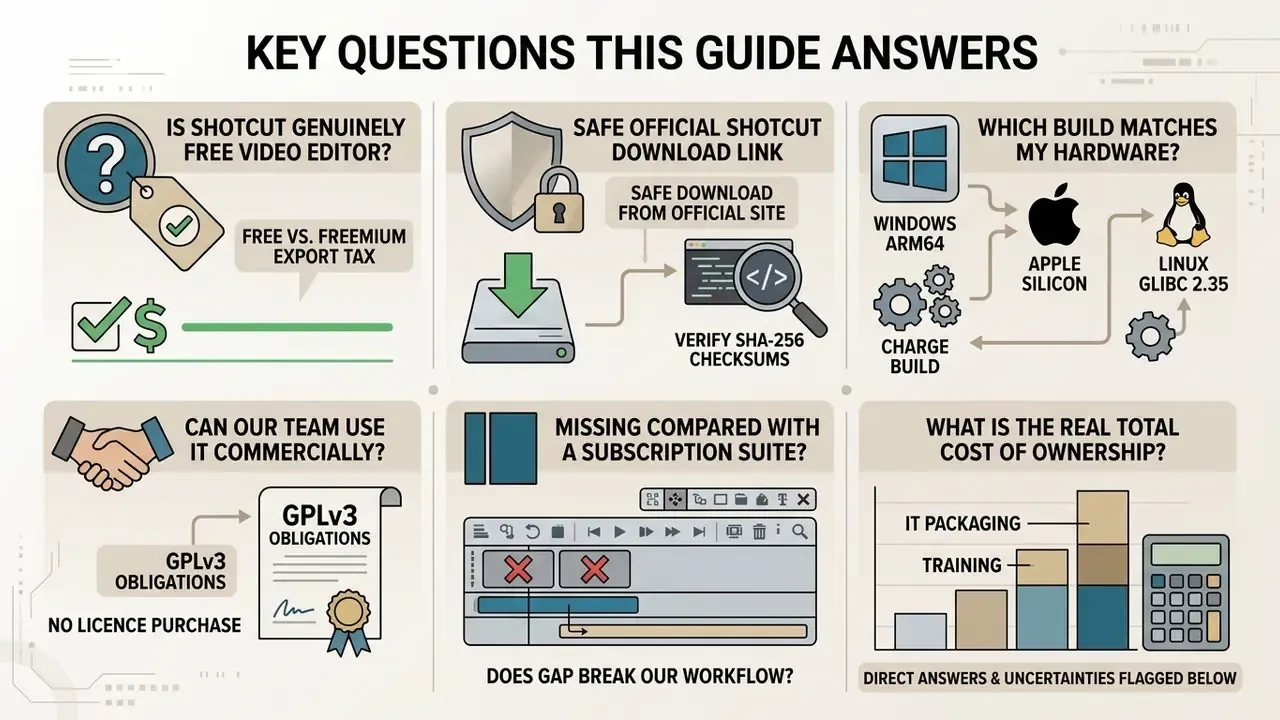
Before you spend twenty minutes on an installer, check whether your question is on this list:
- Is this genuinely a free video editor, or a freemium editor with an export tax?
- Where is the safe, official shotcut video editor download link, and how do I prove the file was not tampered with?
- Which build matches my hardware: Windows ARM64, Apple Silicon, or a glibc 2.35 Linux box?
- Can our team use it commercially without a licence purchase, and what does GPLv3 actually oblige us to do?
- What is missing compared with a subscription suite, and does that gap break our workflow?
- What does the real total cost of ownership look like once IT packaging and training are counted?
Each of those gets a direct answer below, with the uncertain parts flagged as uncertain.
What Is Shotcut Video Editor and Who Is It For?
Shotcut is a free, open-source, cross-platform non-linear video editor built on the MLT multimedia framework and powered by FFmpeg for broad codec compatibility. It targets independent creators, corporate media teams, and editors who need professional multi-track timeline editing without a recurring subscription line item. Readers new to the category can start with our reference material on video editing tools before committing to any desktop application.
One small naming note. People type shortcut video editor into search almost as often as the correct spelling. Same product, one stray letter.
Shotcut was originally conceived in 2004 by Charlie Yates, an MLT co-founder. The version distributed today is a complete rewrite by Dan Dennedy of Meltytech, LLC, also an MLT co-founder and its current lead developer. That shared lineage explains something practical: the editor and the framework evolve in lockstep, so new FFmpeg capabilities reach users fast rather than a year later.
Unlike cloud-based platforms, the shotcut free video editor processes high-bitrate media directly on local hardware. For secure corporate video workflows, educational content production, and high-resolution assembly, that keeps footage inside your own storage perimeter. Teams benchmarking media creation options can cross-reference desktop editors against browser-based tools in our comparison of free AI video generators and in the broader AI Media Comparison Matrices. In most of those pipelines, open-source software like Shotcut ends up as the reliable local rendering engine at the very end of the chain.
Free Open-Source Video Editor Without Subscription
Shotcut ships under the GNU General Public License version 3 (GPLv3). That is what keeps this shotcut open source video editor free for personal and commercial use alike. No trial period, no locked premium features, no mandatory cloud account before you touch the full feature set.
Under GPLv3, you retain complete ownership of everything you export, and the maintainers cannot retroactively bolt a paywall onto baseline timeline features. The licence travels with the code.
For teams clarifying copyright and usage boundaries across the wider media stack, our AI Media Commercial-Use Hub documents attribution and rights questions for adjacent asset-generation tools, and the AI Litigation and rights tracker collects the disputes that shape those boundaries.
Supported Platforms for Shotcut
Shotcut delivers effectively identical non-linear editing features across Microsoft Windows, Apple macOS, and GNU/Linux. This cross platform video editor design lets media teams pass .mlt project files between mixed desktop environments without conversion drama.
- Windows 64-bit Windows 10 (build 1809, the October 2018 Update, or newer) and Windows 11, with dedicated builds for x86-64 (Intel and AMD) and ARM64 hardware such as the Qualcomm Snapdragon X. Machines still on Windows 7 or 8 can run the final compatible build, version 22.12.21. So a shotcut free video editor windows deployment covers almost every fleet, including the stragglers.
- macOS macOS 12 (Monterey) through the current macOS 26 release line listed on the official download page, with native binary performance on Apple Silicon M-series and Intel processors. The last release supporting macOS 11 is 24.11.17; the last supporting macOS 10.14 and 10.15 is 24.01.31.
- GNU/Linux 64-bit distributions with glibc 2.35 or newer, including Mint 21+, Ubuntu and Pop!_OS 22.04+, Debian 12+, Fedora 36+, Manjaro 21.3+, MX Linux 23+, and elementary OS 7+. Delivery via official AppImage, Flatpak, Snap (
snap install shotcut --classic), and portable tar packages.
Hardware baseline published by the project:
| Workload | CPU | RAM | GPU |
|---|---|---|---|
| SD editing | 1 core at 2 GHz or faster (x86-64 or ARM64) | 4 GB | OpenGL 2.0 (Linux) / Direct3D 11 (Windows) |
| HD editing | 4 cores | 8 GB | Same baseline |
| 4K editing | 8 cores | 16 GB | Same baseline, GPU encoder recommended |
How to Download Shotcut Video Editor from the Official Site
For software integrity and endpoint security, anyone hunting a shotcut video editor free download should take the installation package only from the project's own domain, shotcut.org. The project pledges its downloads are free of malware, spyware, and adware, but that promise applies to files served from that website. Third-party portals bring bundled adware, unwanted toolbars, oversized fake green download buttons, and occasionally modified executables.
Fact check and source verification. Always confirm that your shotcut video editor download link points to https://shotcut.org/download/ or the official repository at github.com/mltframework/shotcut. Official releases publish matching SHA-256 and MD5 checksum files (sha256sums.txt), and GitHub Releases exposes per-asset digests.
Reproducible verification procedure, audit ready:
A mismatch means the file was altered, truncated, or pulled from a stale mirror. Discard it and re-download from source. One minute of hashing, one defensible record.
Table 1: Shotcut official download packages and operating system compatibility
- Download the installer and the matching
sha256sums.txtfrom the official page. - On Windows, run
Get-FileHash .\shotcut-win64-26.8.1.exe -Algorithm SHA256in PowerShell. - On macOS or Linux, run
shasum -a 256 shotcut-*.dmgorsha256sum shotcut-*.AppImage. - Compare the computed digest character for character against the published value.
- Archive the command output, the digest, the download URL, and the timestamp as evidence for internal audit.
| Platform | Supported system versions | Package types available | Recommended package choice |
|---|---|---|---|
| Windows (64-bit) | Windows 10 (1809+) and Windows 11; legacy 7 and 8 via v22.12.21 | Installer (.exe), Portable (.zip), ARM64 installer and portable | Standard .exe installer for a primary PC; Portable .zip for USB use or managed machines without install rights. |
| macOS (64-bit) | macOS 12 through macOS 26 (older: 24.11.17 for macOS 11, 24.01.31 for 10.14 and 10.15) | Universal disk image (.dmg) | Download the .dmg, mount the image, drag Shotcut.app into Applications. |
| GNU/Linux (64-bit) | Distributions with glibc 2.35 or newer | AppImage, Flatpak, Snap, portable tar | AppImage for standalone execution; Flatpak via Flathub for sandboxed integration and automatic updates. |
Shotcut Versions for Windows, macOS, and Linux
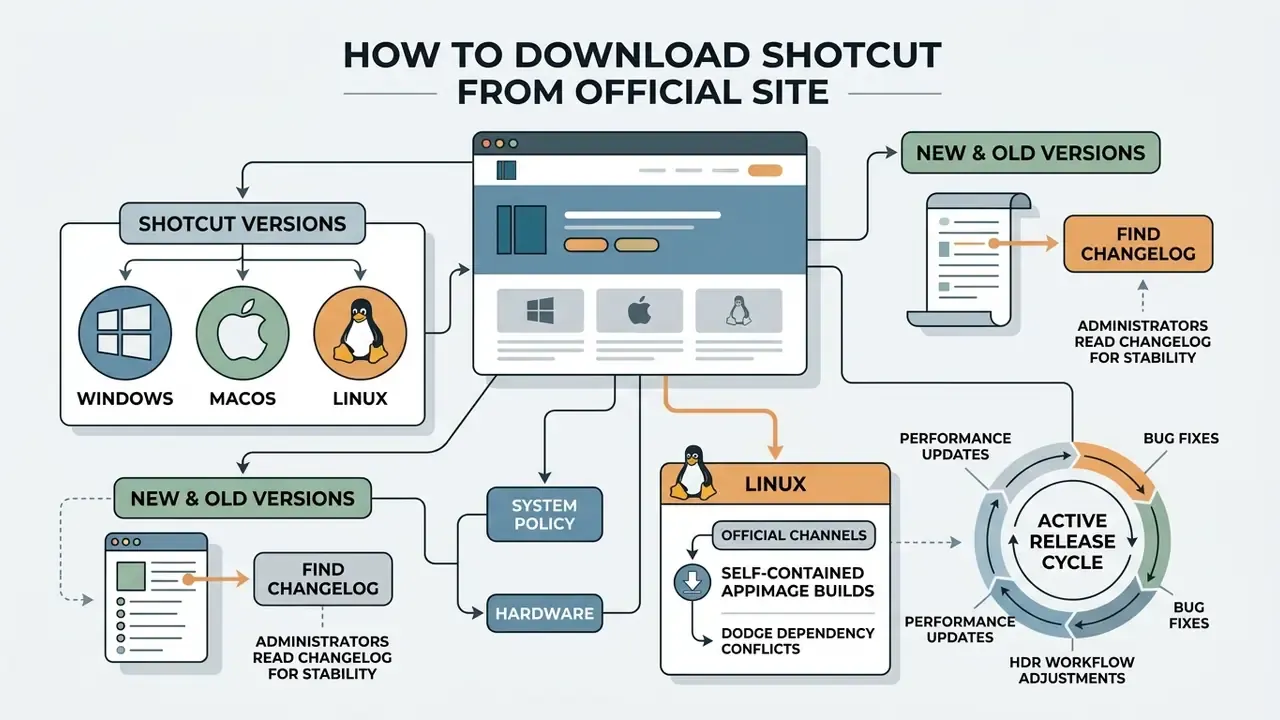
Which file you pick depends on your system administration policy and your hardware. A search for a dependable shotcut video editor download for pc surfaces two Windows options: the standard executable setup wizard, and a standalone portable zip that never touches the registry.
For Linux, the official channels offer self-contained AppImage builds that dodge dependency conflicts entirely, plus sandbox-enforced Flatpak builds on Flathub. Portable tar users extract the archive and launch the shotcut shell script inside Shotcut.app, never bin/shotcut directly. That detail trips people up more often than you would expect. macOS users get one universal disk image tuned for both ARM64 Apple Silicon and x86-64 Intel machines.
New and Old Versions: Where to Find the Changelog
The development team keeps an active release cycle: performance updates, HDR workflow adjustments, and bug fixes land several times a year, historically a fresh dated build roughly every two months. The canonical version history and changelog live at shotcut.org/download/releasenotes/.
«The stable release 26.8.1 shipped on 1 August 2026, confirming continuous project maintenance.»
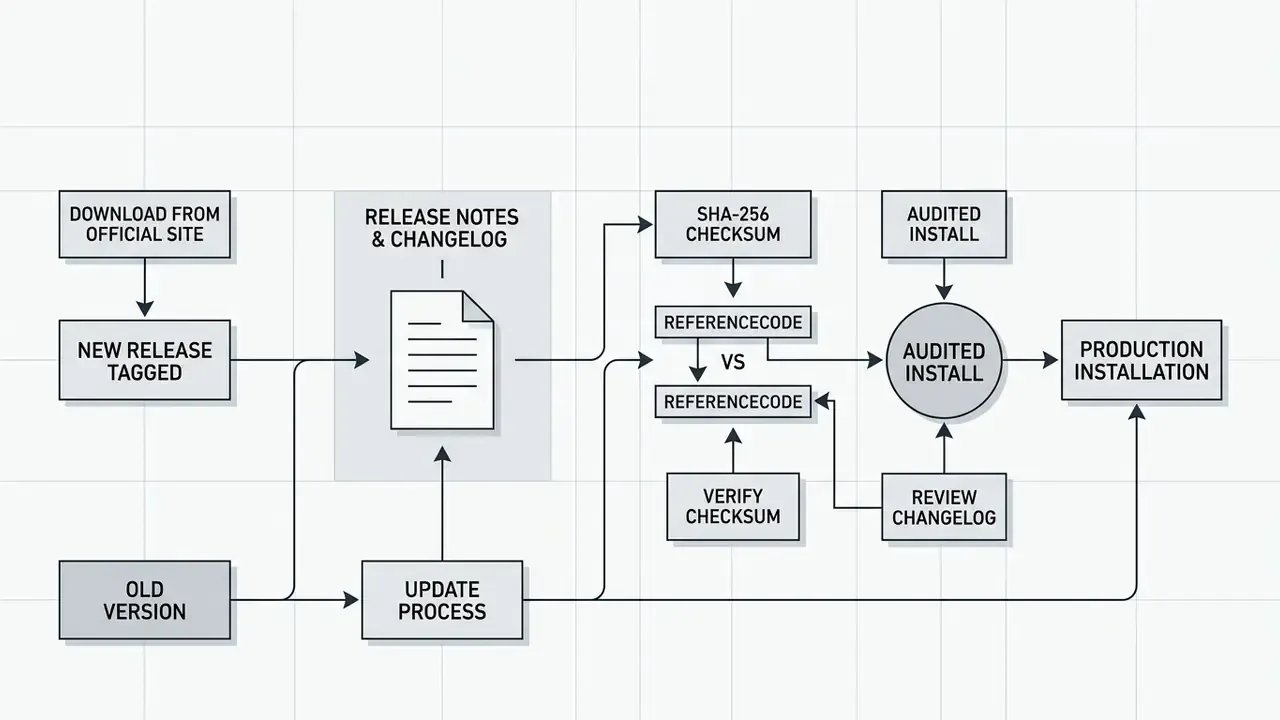
Administrators reviewing software spend through our pricing resources tend to read changelogs as a stability signal, and it is a reasonable habit. Because Shotcut versions are date-based, several versions can coexist on one workstation, and the official portal keeps an archive of previous stable builds for rollback. That matters in practice: the 2026 notes record fixes for Motion Tracker keyframes, dissolve-transition colour in linear 10-bit CPU mode, and the restoration of VST2 and LV2 plugin support that had gone missing from earlier builds.
Is Shotcut Free? Watermarks, Ads, and Paid Versions
The shotcut free video editor no watermark claim holds up under testing. Rendered files come out without forced watermarks, branding overlays, resolution limits, or duration caps. There are no advertisement banners in the interface and no paywalled export presets waiting at the finish line.
«Shotcut exports finished videos with absolutely no watermark, no time limit and no hidden paid features, unlike most free editors.»
Table 2: Shotcut monetization, licensing, and functional limitation matrix
| Evaluation criterion | Shotcut status | Detailed operational terms |
|---|---|---|
| Licence model | GPLv3 open source | Free for personal, educational, and commercial video production. |
| Export watermarks | None (clean export) | No logo overlays or forced branding applied to rendered media. |
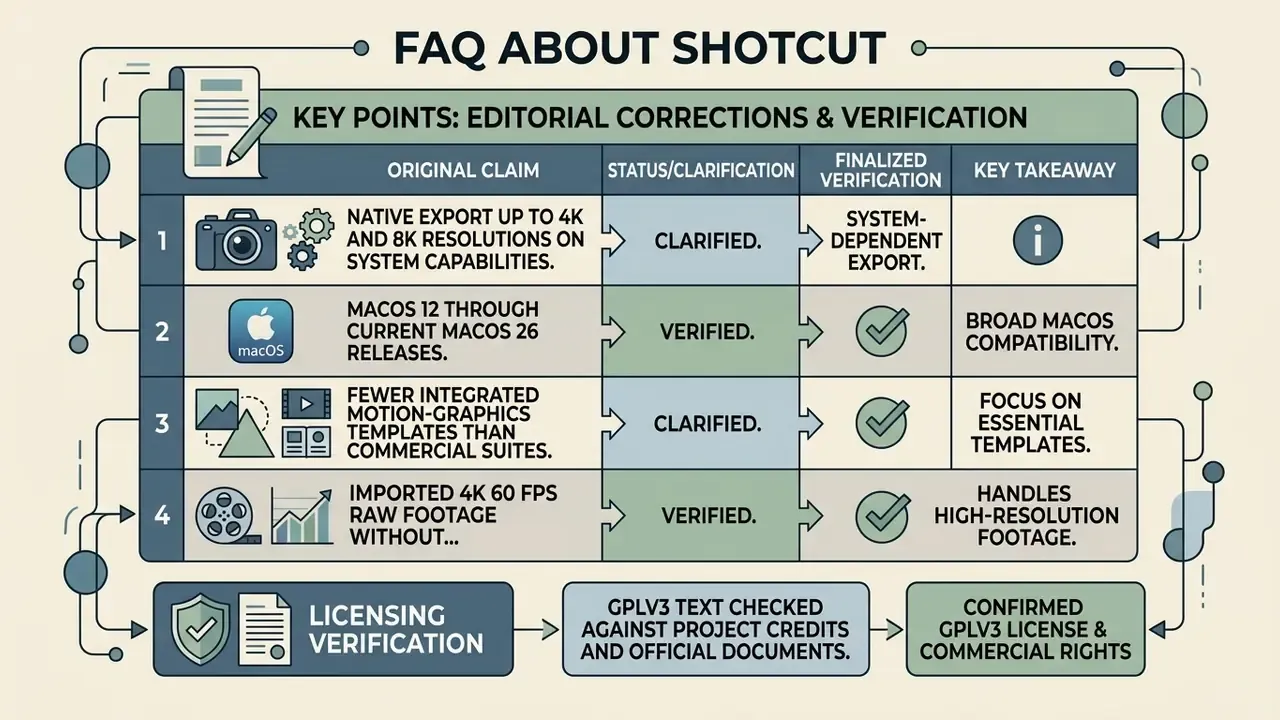
| Resolution and format caps | No operational caps | Updated: native export up to 4K UHD is confirmed by official documentation; 2026 release notes raised the maximum vertical resolution to 8640 px for 8K VR180 work, so 8K output depends on system capability rather than licensing. |
| In-app advertising | Zero ads, zero pop-ups | Clean interface without sponsor banners or upsell prompts. Note that some third-party mirrors wrap the download page in ads; the project's own store and Flathub channels do not. |
| Paid upgrade tier | No paid tier exists | All timeline features, filters, and export codecs are unlocked from first launch. |
| Account or cloud requirement | None | No sign-up, no licence key, no cloud dependency; projects stay on local or network storage. |
Cost structure often decides adoption, and the contrast becomes obvious the moment you compare a desktop editor with a subscription-metered generator. Our reference on free video generators explains how credit systems and watermark tiers usually work, and an ai video generator online almost always meters output somewhere. Sourcing a genuine shotcut free video editor no watermark download is how creators avoid the hidden export fee that freemium tools tend to reveal at the last click.
Core Shotcut Features for Video Editing
Shotcut offers a full non-linear editing environment: multi-track video and audio timelines, keyframe animation, transitions, colour grading, and real-time preview monitoring. The media engine is FFmpeg, which means diverse formats open directly, with no pre-transcoding queue in front of your edit.
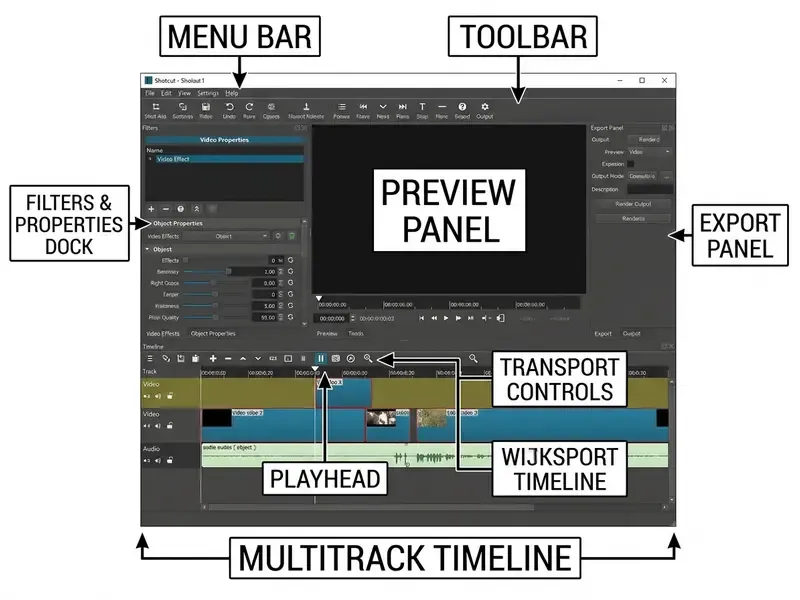
Quickstart: Essential Keyboard Shortcuts for Fast Editing
Speed comes from the transport keys, which Shotcut inherits from broadcast editing convention:
- Playback speed and direction J rewinds, K pauses, L fast forwards. Tap J or L repeatedly to climb through playback speeds.
- In and out points I sets the clip start, O sets the end. That is three-point editing in two keystrokes.
- Frame stepping Left Arrow and Right Arrow move frame by frame; Page Up and Page Down jump a second at a time.
- Cut navigation Alt + Left Arrow or Alt + Right Arrow hop between clip start, in point, out point, and clip end.
- Assembly A appends the source clip, S splits at the playhead, Z ripple-deletes, and Ctrl + Z with Ctrl + Shift + Z walk through unlimited undo history.
- File loading drag and drop from the file manager works alongside menu and toolbar methods. No import wizard, no conversion dialogue.
Timeline, Projects, and Non-Destructive Video Editing
The timeline works on non-destructive principles. Your source files stay untouched on disk while every edit is recorded inside an XML project file with the .mlt extension.
- Multitrack editing
- unlimited video and audio tracks for overlays, titles, and layered audio, with per-clip thumbnails and waveforms.
- Editing tools
- append, insert, overwrite, lift, ripple delete, and split directly on timeline clips, plus three-point editing from the source player.
- Track filters
- apply visual filters and audio equalizers across an entire track instead of clip by clip.
- Project state
- the title bar shows the active project and video mode, a modified indicator warns about unsaved work, auto-save runs quietly in the background, and a trimmed clip or a whole
.mltfile can be loaded as a nested clip. - Organisation
- the Playlist panel supports bins, smart bins including "Not In a Bin", thumbnail views, and search across recent files.
Formats, Effects, Preview Monitoring, and Video Export
Through FFmpeg, Shotcut handles hundreds of audio and video codecs natively: ProRes, DNxHR, H.264, HEVC (H.265), AV1, VP9, WebM, plus image formats such as BMP, GIF, JPEG, PNG, SVG, TGA, TIFF and image sequences.
«Shotcut opens practically any format directly: phone footage, screen recordings, legacy AVI, modern HEVC, with no import step.»
Exported masters are usually too heavy for direct distribution, so most teams follow the render with a video compression pass tuned to the destination platform. Render-time and storage estimates for that step live in our AI Media Calculators.
- 4K and high-resolution editing
- 4K UHD compositing and export on modern hardware, with multi-format timelines that mix resolutions and frame rates inside one project.
- Keyframe controls
- simple and advanced keyframes with easing (Ease In, Ease Out) for animating filter parameters over time, including speed filters and Size, Position & Rotate.
- Colour work
- three-way colour wheels for shadows, mids and highlights, Colour Grading, 3D LUT support, a white-balance eye-dropper, and linear 10-bit processing modes for HDR-adjacent grading.
- Compositing
- blend modes (Over, Add, Multiply, Screen, Overlay, Darken, Dodge, Burn, Hard and Soft Light, Difference, Exclusion, HSL Hue, Saturation, Colour, Luminosity), simple and advanced chroma key, key spill suppression, stabilisation, lens correction, and 360-degree VR filters such as Equirectangular Wrap and Cap Top & Bottom.
- Audio engine
- balance, bass and treble, band, high and low pass, compressor, expander, limiter, notch, pan, reverb, delay, gain, downmix, channel copy and swap, Normalize One Pass and Two Pass, plus loudness, peak, waveform and spectrum scopes. Recent builds restored full support for third-party VST2 and LV2 audio plugins and added Reduce Noise: Audio (RNNoise) for dialogue clean-up. JACK transport sync is available on Linux.
- Monitoring
- Blackmagic Design SDI and HDMI output for external preview monitoring, secondary-display full-screen preview, preview scaling for real-time effect playback, and DeckLink SDI keyer output. For anyone grading on a calibrated reference display, that external preview monitoring path is the feature that makes the free price tag feel slightly absurd.
- Export presets
- adjustable configurations for codecs, framerates, aspect ratios, and hardware acceleration (NVENC, AMD AMF, Intel Quick Sync), with stock presets for YouTube, Vimeo and mobile plus user-saved custom presets across the Video, Codec, Audio and Other tabs. Batch encoding runs through a jobs queue, and EDL (CMX3600) export supports handover to other suites.
- Quality control
- built-in PSNR and SSIM video quality measurement, media integrity checks, and Export Frame to PNG, BMP, JPEG, PPM, TIFF or WebP.
Built-In Stock Assets: The Elements Panel
From release 26.8.1 onward, Shotcut ships a lightweight 22 MB native stock-asset library, reachable via File > New > Elements, the View menu, or the Generate buttons. Inside:
- Royalty-free audio clips and sound effects under the Sonniss #GameAudioGDC bundle agreement. Commercial use permitted, no attribution required.
- Vector emoji stickers and animated text built on Open Font License 1.1 typefaces and Lottie motion-graphics templates for dynamic title overlays.
- Video overlay transitions and graphics that drag straight onto the timeline, which removes the mid-edit detour to hunt for external asset downloads.
The same release added a Shake video filter and a Settings > Graphics Adapter selector on Windows and Linux for machines with more than one GPU.
For creators turning scripts into finished video with an ai video maker, a standard ai video generator, or an ai video generator no restrictions, Shotcut works as the desktop assembly layer. Teams refine generated segments, align audio, and export clean final renders. The full publishing sequence is documented in our YouTube video editing workflow. Adjacent asset needs are covered in our guides to animation makers, AI voice generators and free photo editors for thumbnail production.
Enterprise Deployment: Security, GPLv3 Compliance, and Total Cost of Ownership
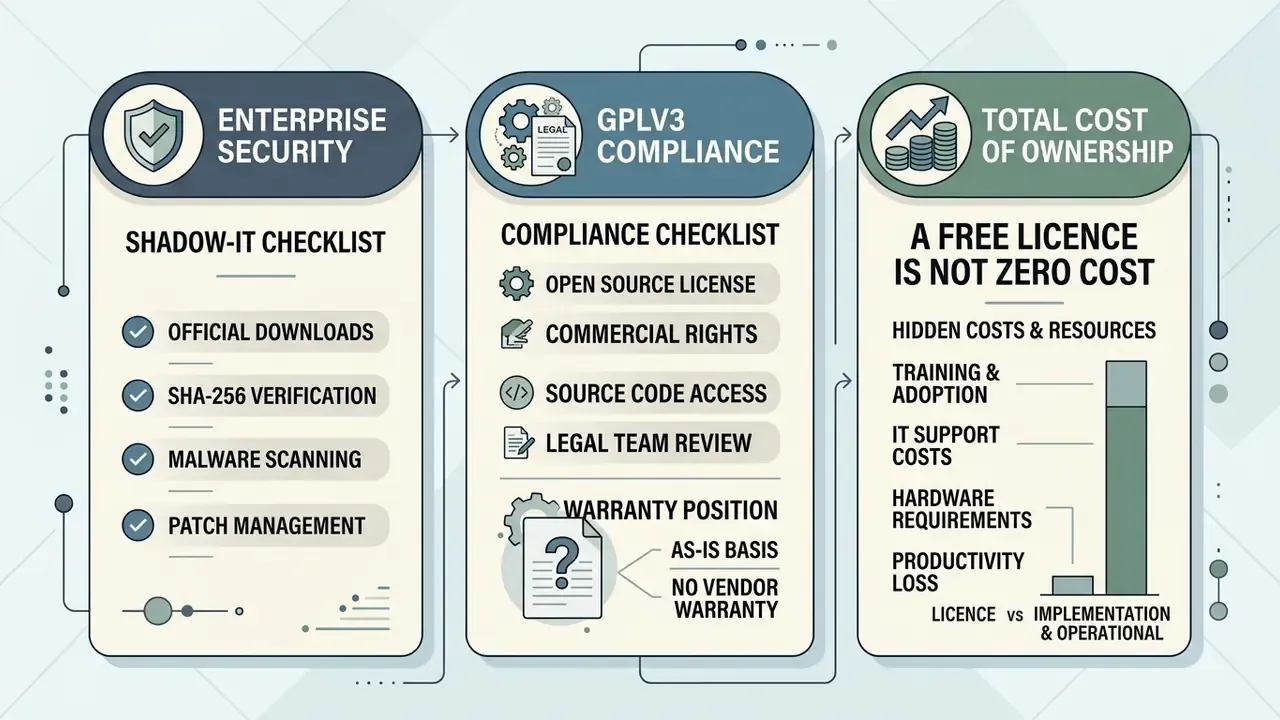
Free software is rarely free of process. Before a media or communications team installs Shotcut on managed endpoints, IT, compliance, and finance each need an answer they can defend in a review meeting.
Enterprise Security and Shadow-IT Checklist
Checklist0 / 8
GPLv3 Compliance Checklist for Legal and Compliance Teams
- Using the editor as-is to produce corporate video creates no copyleft obligation over your content. Output files are yours; the licence governs the software, not the media you make with it.
- Distributing modified binaries, for example an internally patched build, does trigger source-availability obligations toward the recipients of those binaries.
- Do not statically link or embed Shotcut or MLT code into proprietary internal applications without legal review. That is the one scenario where copyleft inheritance concerns are legitimate rather than folklore.
- Bundled asset licences need separate tracking: Elements content is royalty-free under Open Font License 1.1, the Sonniss bundle agreement, and the Lottie Simple License, while any third-party VST plugin you add carries its own terms.
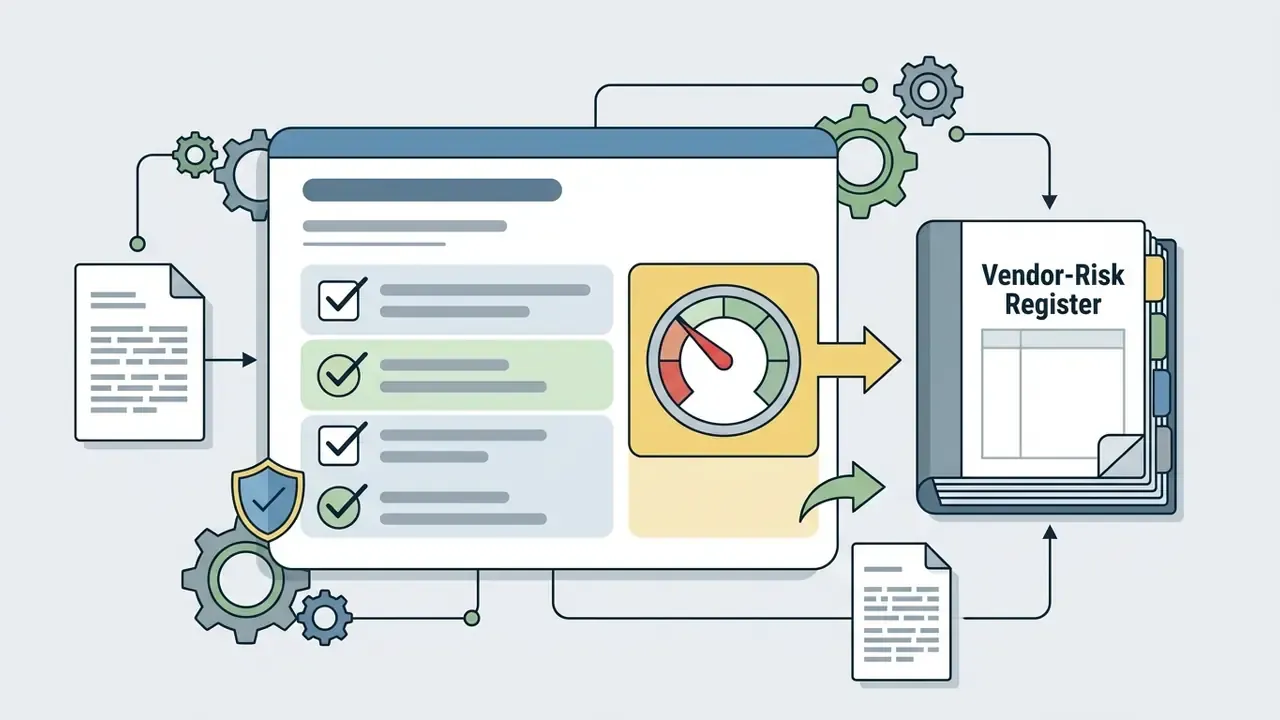
Total Cost of Ownership: A Free Licence Is Not Zero Cost
| Cost component | Shotcut (open source) | Typical SaaS or commercial editor |
|---|---|---|
| Licence or subscription | $0 | Recurring per-seat fee |
| Security review and checksum validation | One-off internal effort per approved build | Vendor questionnaire, SOC 2 review |
| Packaging and endpoint deployment | Internal IT effort (SCCM, Jamf, Flatpak) | Often vendor-provided installers and MDM packages |
| Vendor support and SLA | Community forum, no contractual SLA | Paid support tiers, guaranteed response |
| Training and onboarding | Moderate, thanks to the interface learning curve | Varies; often template-driven onboarding |
| Upgrade and regression testing | Internal, per date-based release | Vendor-managed, sometimes forced |
| Residual risk | No SLA; dependency on maintainer capacity | Vendor lock-in, price escalation, feature deprecation |
The honest conclusion: Shotcut removes licence spend and vendor lock-in, then shifts a modest, predictable cost into internal IT and training. For teams producing occasional to regular video with no contractual support requirement, the risk-adjusted arithmetic looks favourable. For a 24/7 broadcast-critical pipeline with SLA mandates, a supported commercial stack can still be the defensible choice. Both answers are legitimate; they answer different questions.
Shotcut Pros and Cons Before Installation
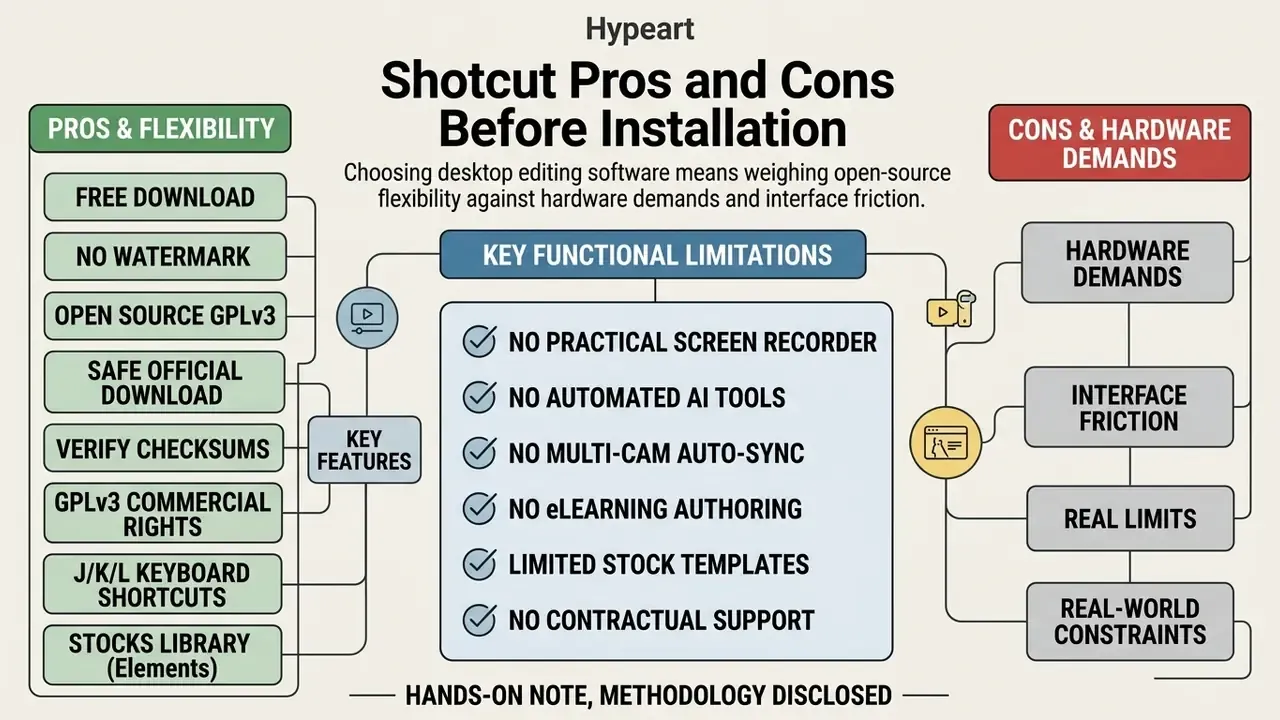
Choosing desktop editing software means weighing open-source flexibility against hardware demands and interface friction. A side-by-side view helps, so see our overview of free video editing software for the wider field.
«Shotcut is best suited to beginners, Windows users and straightforward projects; the interface still takes time to learn.»
Table 3: Pros, cons, and use-case match for Shotcut
| Advantages | Limitations | Recommended use cases |
|---|---|---|
| 100% free and open-source under GPLv3, free for commercial use. | Learning curve for complete beginners; the UI is functional rather than fashionable. | Corporate media production that must stay local. |
| No export watermarks, time limits, or ads. | No automatic multi-camera sync; alignment is manual on the audio waveform. | YouTube creators and educational video editors. |
| Native FFmpeg format support, 4K UHD confirmed and 8K-capable timelines. | Playback lag on older PCs during dense 4K multi-layer edits; proxies and preview scaling become mandatory. | Open-source advocates and privacy-conscious teams. |
| Cross-platform consistency across Windows, macOS, Linux and FreeBSD, with portable builds. | Updated: fewer 3D motion-graphics templates than commercial suites, although the Elements panel now supplies built-in 2D Lottie animations, titles and stickers. | Editors who need a portable USB editing setup. |
| No account, no cloud dependency, a mature codebase past its 13th year, VST2 and LV2 audio plugin support. | No screen recorder worth the name, no AI captions or AI assistance, no SCORM or xAPI eLearning export. | Small businesses shooting product demos on a zero-software budget. |
Key Functional Limitations to Consider
Practical Shotcut Workflows: 3 Real-World Use Cases
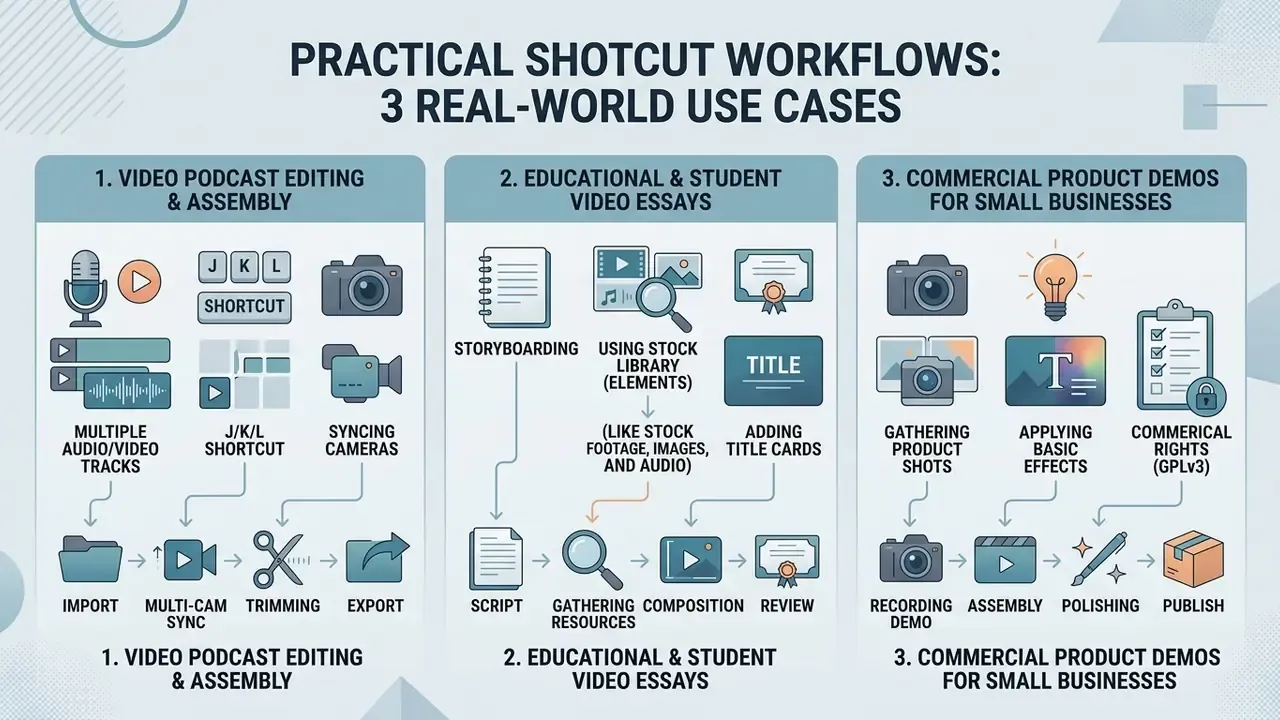
1. Video Podcast Editing and Assembly
Import the multi-track microphone recording next to the camera or webcam capture, then nudge one track until the waveforms line up. There is no auto-sync, so use a clap or the first hard plosive as your anchor. Lock the synced tracks, place intro and outro segments, and add lower-thirds for guest names with the Text: Rich filter. Run Normalize: Two Pass across the dialogue track to hold consistent broadcast loudness without clipping, add Reduce Noise: Audio (RNNoise) if the room was untreated, and glance at the loudness scope before you commit. Render with the YouTube preset for video, then an audio-only preset for the podcast feed.
2. Educational and Student Video Essays
Drop mixed sources onto a multi-track timeline: 4K MP4 phone footage, OBS screen recordings, PNG diagrams, stills. The multi-format timeline absorbs different resolutions and frame rates without a conversion step. Use non-destructive Size, Position & Rotate with keyframe easing for Ken Burns moves on stills, plus text presets for citation lower-thirds. On a school-issued laptop, enable Preview Scaling and generate proxies through Properties > Convert so scrubbing stays responsive, then export at full resolution. The result is a clean, watermark-free MP4 that satisfies submission rules.
3. Commercial Product Demos for Small Businesses
Trim promo clips in the source player with I and O, append them with A, and apply a 3D LUT or the three-way colour wheels for brand-consistent grading. Save that stack as a filter set so every future video starts from the same look. Pull royalty-free background music and a subtle whoosh transition from the Elements panel, place the logo PNG on an upper video track with a blend mode, and export with the built-in YouTube preset for H.264 and AAC in MP4. For paid social variants, Export > Reframe produces a vertical crop from the very same timeline. No second project needed.
FAQ About Shotcut
Can You Run Shotcut Without Installation?
Yes. The project publishes official portable versions that run from a folder or an external USB drive without writing into system directories or touching the Windows Registry. Windows users download the Shotcut Portable .zip package from the official download site, x86-64 or ARM64, extract it, and launch shotcut.exe. Linux users grab the standalone AppImage, mark it executable with chmod +x, and run it across distributions; the portable tar variant is extracted and started through the shotcut shell script. Portable builds are the standard answer for shared computers, exam labs, and managed corporate machines where installation rights are withheld.
Does Shotcut Record Your Screen?
Not in any meaningful sense. Basic capture sources exist (X11 screen, DirectShow, webcam, JACK and PulseAudio), but there is no recording UI, no region picker, no cursor emphasis, no system-audio mixdown. Record with OBS Studio, then bring the file into Shotcut for the edit.
Does Shotcut Generate Subtitles Automatically?
Subtitles can be created, imported, edited on a dedicated subtitle track, styled with text presets, and burned in through the Subtitle Burn In filter. Automated AI captioning, though, is not a headline feature. There is no one-click auto-caption button comparable to the commercial cloud editors.
Will Shotcut Run on an Older or Low-Spec PC?
For SD and HD work, yes. The project lists 4 GB RAM and a single 2 GHz core as the SD floor, and 8 GB with 4 cores for HD. For 4K, plan on 8 cores and 16 GB. On weaker hardware: enable Preview Scaling, generate proxy media, disable GPU effects if the driver misbehaves, and split long projects into segments.
Is Shotcut Really Free for Commercial Work?
Yes. The official FAQ states that Shotcut is free for commercial use because it is distributed under GPLv3, which permits use for any purpose. No separate commercial licence, no seat count, no revenue threshold. Just keep the licence-versus-content distinction straight, as covered above.
Where Can You Find Shotcut Tutorials, Guides, and Support?
Anyone after technical guidance, keyboard shortcut maps, or troubleshooting help has several official routes:
- Official documentation: how-to guides, getting-started articles and the main User Guide at
shotcut.org/howtos/. - Community forum: user discussion, feature requests, documentation and tutorial categories at
forum.shotcut.org. - Video tutorials: curated playlists on the official Shotcut YouTube channel, indexed from the site's Tutorial Videos page.
- Release notes:
shotcut.org/download/releasenotes/for per-version fixes and additions. For wider media processing questions, technical teams can consult our AI Media Support and Troubleshooting hub or explore integration endpoints in the AI Media API Guides and the Google Veo implementation guide.
Appendix A: Editorial Corrections and Verification Notes
Decision Snapshot: When Shotcut Fits and When It Does Not
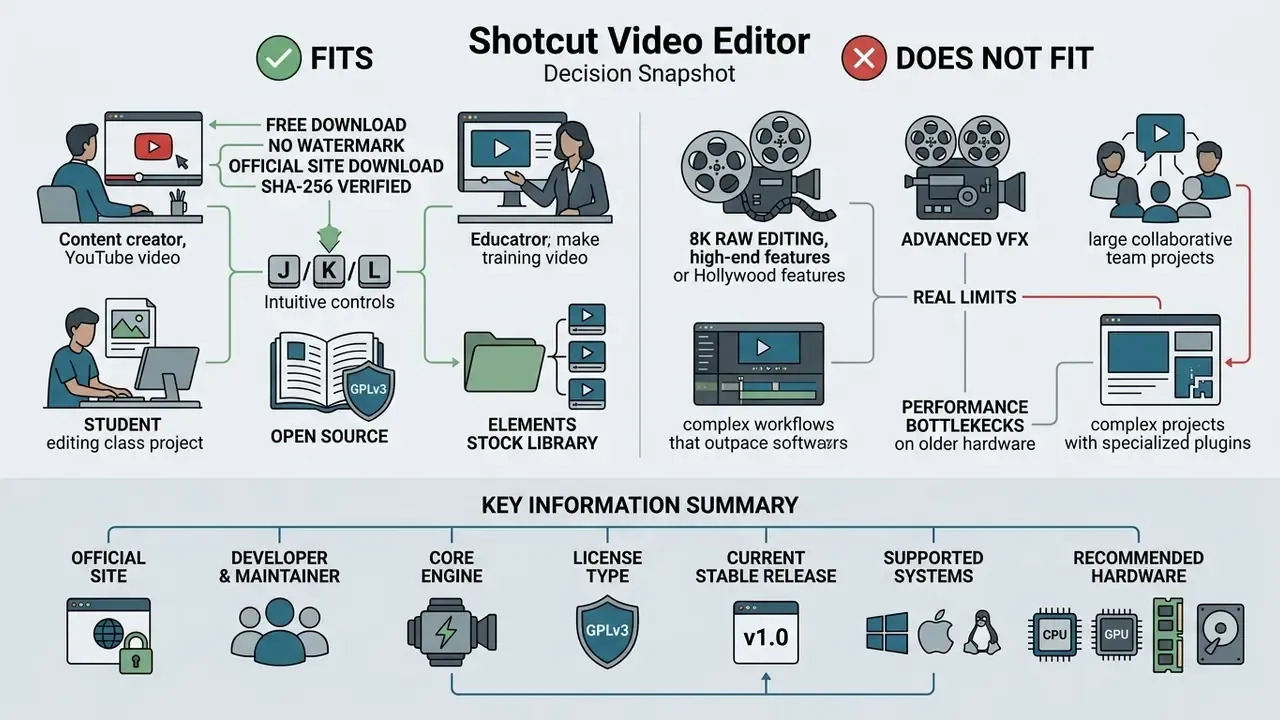
A quick way to close the evaluation without another meeting:
- Approve it when the workload is HD or 4K assembly, the team needs local processing, licence spend must be zero, and support can come from a community forum.
- Approve it with conditions when hardware is marginal (mandate proxies and preview scaling), or when a build must be pinned and rollback documented for change control.
- Look elsewhere when you need contractual SLA support, automated captioning at volume, multi-cam auto-sync, or SCORM and xAPI eLearning packaging.
- Pair it with OBS Studio for capture and a compression pass for delivery. Shotcut is the assembly and render stage, not the whole pipeline.
Owner, approved build, verification record, rollback path. Four items. That is the whole governance story for this tool, which is more than can be said for most.
Key Information Summary
- Official website
shotcut.org- Developer and maintainer
- Dan Dennedy, Meltytech, LLC (original concept by Charlie Yates in 2004; current rewrite by Dennedy)
- Core engine
- MLT framework with FFmpeg
- Licence type
- GNU General Public License v3.0 (GPLv3), free for commercial use
- Current stable release
- 26.8.1, dated 1 August 2026
- Supported systems
- Windows 10 (1809+) and 11 including ARM64, macOS 12 to 26, GNU/Linux with glibc 2.35 or newer, FreeBSD
- Recommended hardware
- 4 GB and 1 core for SD, 8 GB and 4 cores for HD, 16 GB and 8 cores for 4K
- Watermark policy
- zero watermarks, no time limits, no ads on any exported video
- Verification
- SHA-256 and MD5 checksum files published per release
Explore related media infrastructure guides in our AI Media Glossary, size hardware and render budgets with the AI Media Calculators, compare desktop options in the free video editing software comparison, plan publishing with the YouTube video editor workflow, or trim delivery file sizes using our video compressor guide.