Last updated: February 2026 · Reviewed by: Editorial Risk and AI Governance Desk
Executive Summary for Decision-Makers
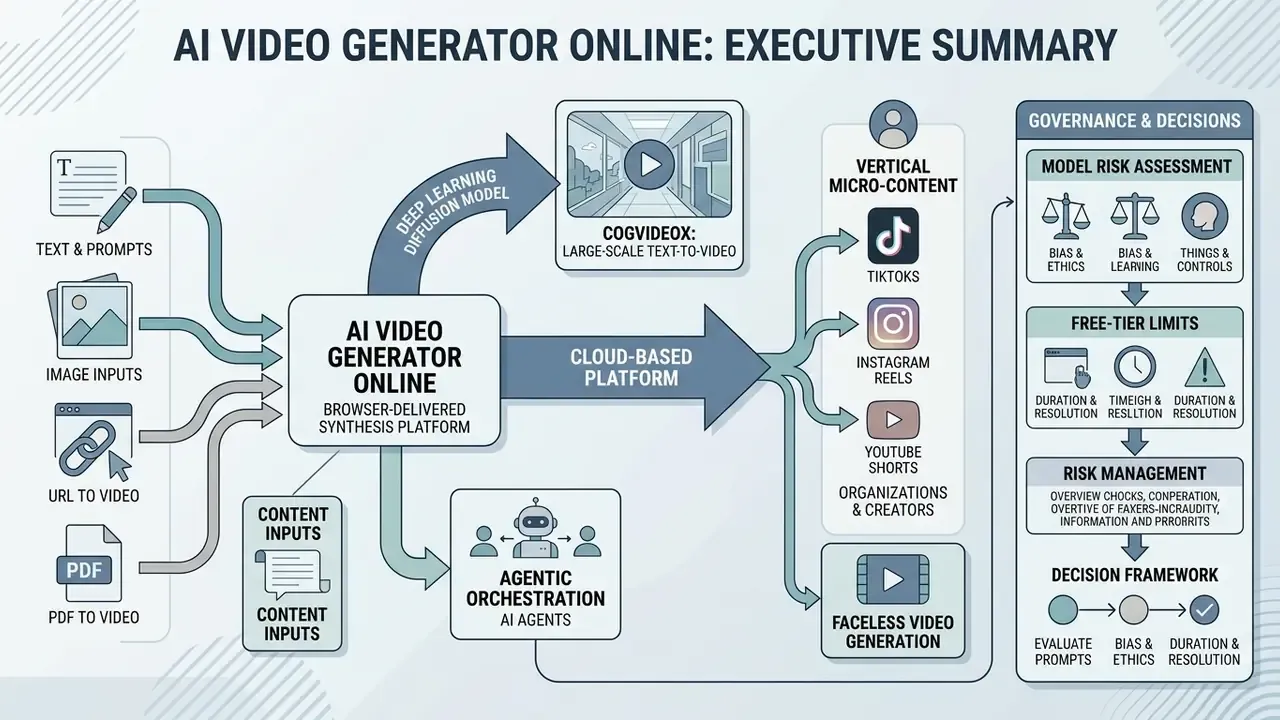
- What the category is: an ai video generator online is a browser-delivered synthesis platform. It converts text prompts, scripts, images, URLs, PDFs or long-form footage into rendered MP4/WebM video using cloud-hosted diffusion transformers. No local GPU. No installed software.
- What changed in 2026: static "prompt to clip" pipelines are giving way to agentic video orchestration, where an LLM-driven agent plans storyboards, casts avatars and voices, renders scenes, then revises output through conversational instructions.
- Where the operational risk sits: unmanaged browser-based generation is a primary vector for Shadow AI. Employees paste confidential scripts, customer data or unreleased product imagery into consumer-tier SaaS endpoints that sit entirely outside DLP coverage.
- What governance must cover: prompt-and-output audit logging, human-in-the-loop review gates before publication, C2PA provenance verification, model validation aligned with existing model risk management (MRM) frameworks, and explicit commercial-license verification.
- What the economics look like: free tiers are evaluation instruments, not production licenses. Real total cost of ownership includes subscription spend, human review labor and residual reputational risk. There is a risk-adjusted ROI formula further down that captures all three.
- What the evidence says: distilled models now render a 5-second 720p clip in roughly 8 seconds on an H100. Yet benchmark research documents stubborn failures in attribute binding, physical causality and multi-entity spatial relations. Which is precisely why review gates stay mandatory.
An ai video generator online is a cloud-based software platform that uses deep learning diffusion architectures and multimodal generative models to turn text prompts, scripts, static images or existing video footage into synthetic video clips inside a web browser. Modern web-based synthesis platforms remove the need for dedicated local GPU infrastructure by shifting model inference, temporal rendering and video encoding to cloud clusters, then exporting finished assets in standard containers such as MP4 or WebM.
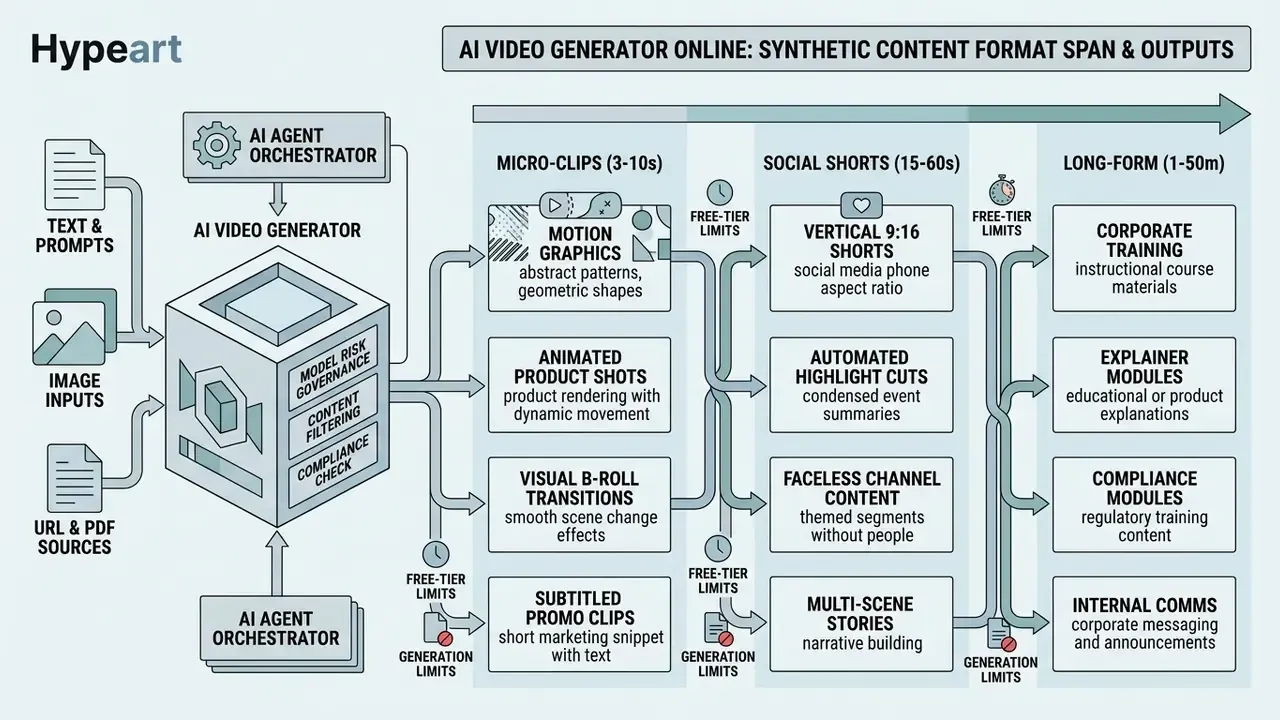
Organizations and independent creators use these tools for vertical micro-content (TikToks, Instagram Reels, YouTube Shorts) as well as long-form explainers, product advertisements, corporate training modules, compliance walkthroughs and internal communications packages. Research on technical video diffusion benchmarks shows that current architectures synthesize high-fidelity 5-to-10-second scenes at up to 4K resolution, while bundling automated timeline editing, AI voice synthesis and auto-captioning into a single web interface. Search demand mirrors that spread: people look for ai video free online experiments, an ai small video generator for quick social posts, and an ai long form video generator for training libraries, often in the same week.
«LanDiff achieves a VBench score of 85.43, surpassing the state-of-the-art open-source models and commercial models.»
«CogVideoX is a large-scale text-to-video generation model with a 3D causal VAE and expert transformer for coherent, long-duration motion.» CogVideoX Technical Report, Yang et al., ICLR (2025). https://arxiv.org/abs/2408.06072
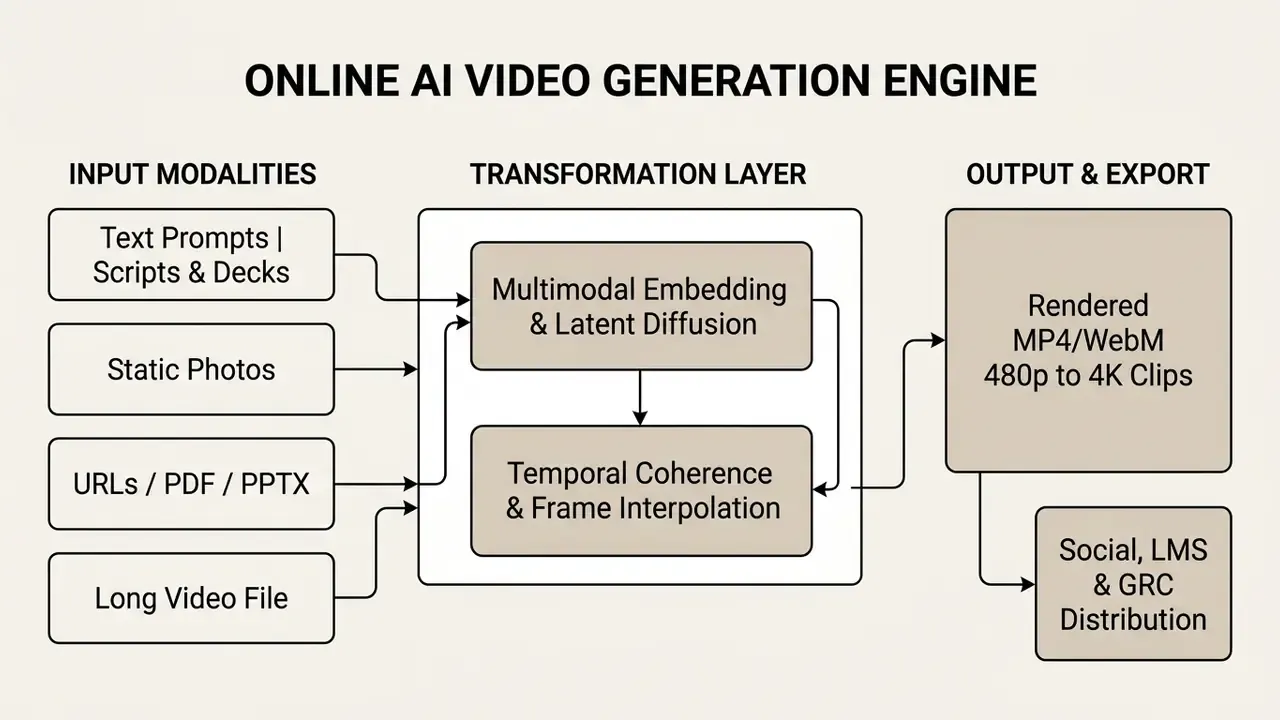
What Is an AI Video Generator Online and What Videos It Creates
An ai online video generator works as a browser-native software suite. It converts unstructured inputs (raw text ideas, uploaded product photos, multi-page PDF documents, live web page URLs, social posts) into motion visuals without local rendering hardware. Output spans a wide spectrum of synthetic assets: 3-second social clips, animated product showcases, interactive talking-head avatars, multi-scene corporate presentations. By merging generative inference with a familiar temporal editing interface, an ai video creator online aligns video synthesis, audio composition and visual trimming inside one browser session.
Worth noting: the same engine that produces a throwaway meme clip can also produce a mandatory compliance module. The technology does not distinguish between the two. Your controls have to.
Text to Video: Creating Clips from Ideas, Prompts, or Scripts
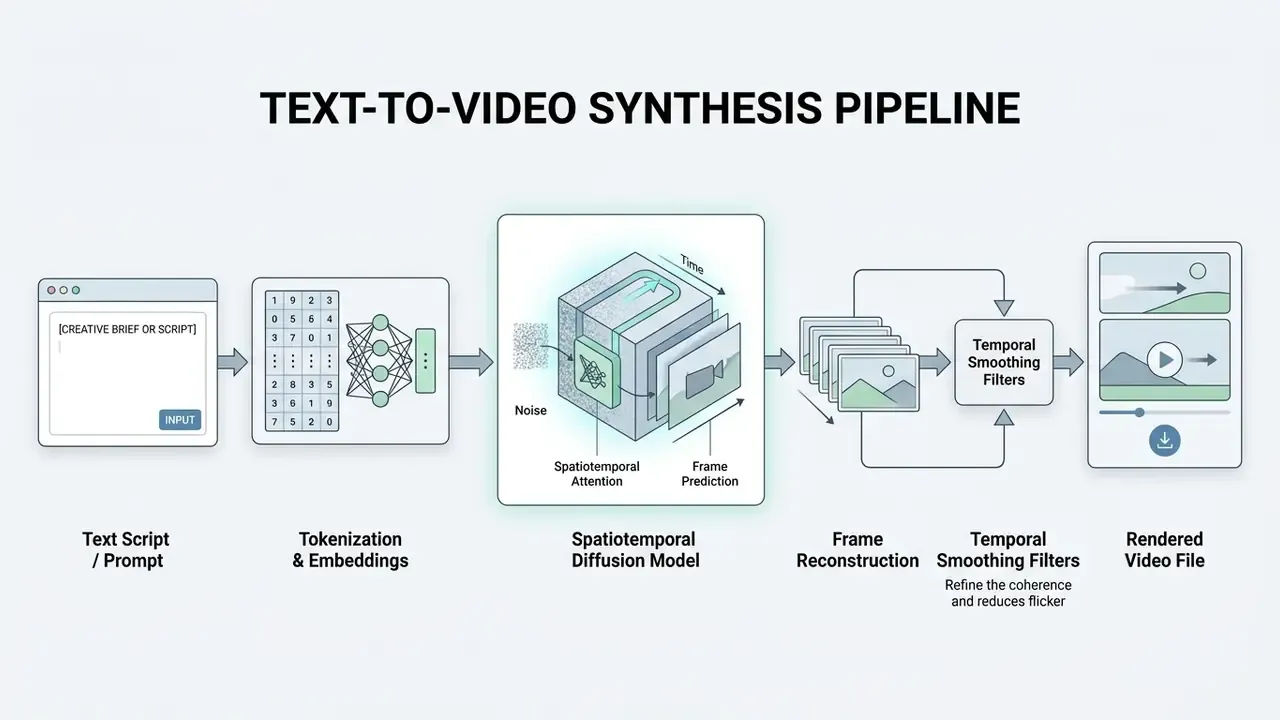
Text-to-video (T2V) technology converts natural language descriptions, structured prompts or complete scripts into synthesized motion sequences by mapping text tokens into a shared spatiotemporal latent space. Modern diffusion transformers translate the key elements (subject definition, motion vectors, camera directives, visual style tags) into frame-by-frame rendering. Teams building a repeatable prompt library usually start from a structured reference such as our overview of text-to-video AI tools, which documents how each directive component maps to model behavior.
An ai story to video generator free tier is the common entry point here: paste a narrative outline, get a rough multi-scene cut, decide whether the quality justifies a paid plan. Benchmarks show that leading open and proprietary pipelines, LanDiff and CogVideoX among them, hold high structural coherence across synthetic frames thanks to specialized semantic tokenizers. Coherence, however, is not the same thing as compositional logic:
«T2V-CompBench covers 1,400 prompts across seven categories; models struggle with attribute binding, spatial relationships, and numeracy.»
Practitioners structure textual inputs using standardized frameworks that spell out camera trajectory, lighting conditions and environment context:
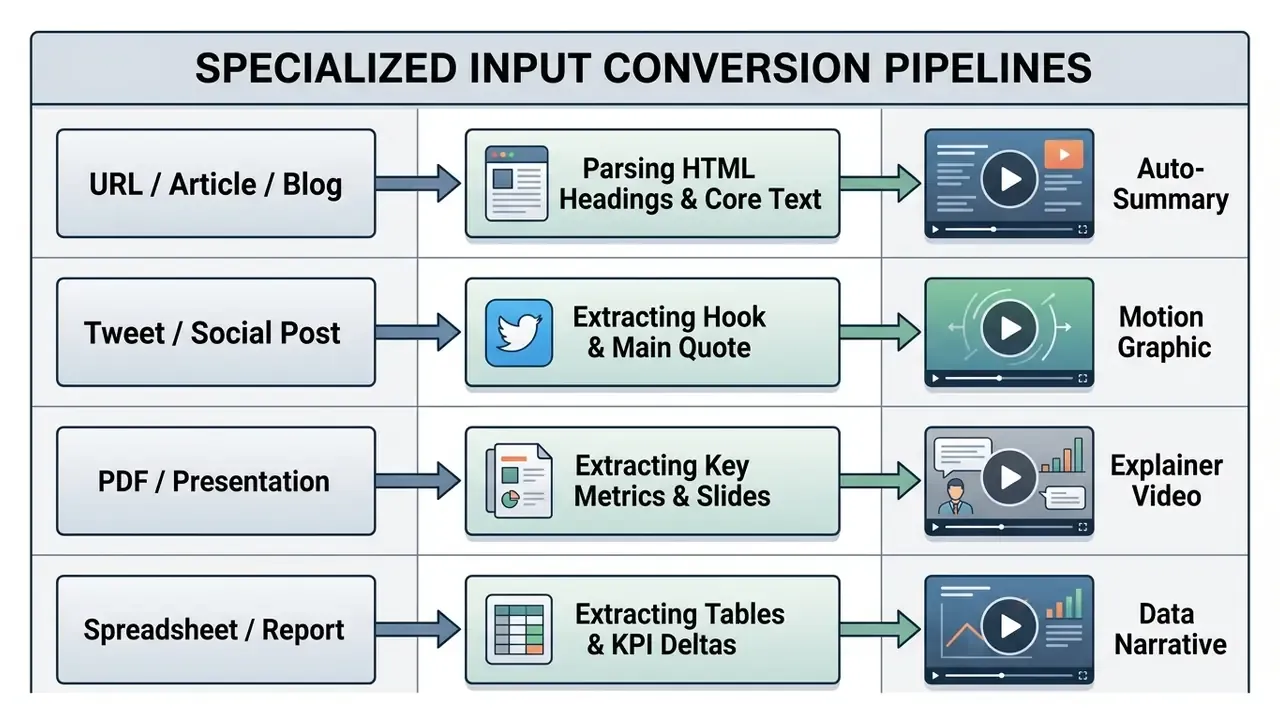
Specialized Input Conversion: URL, Blog, Tweet, and PDF to Video
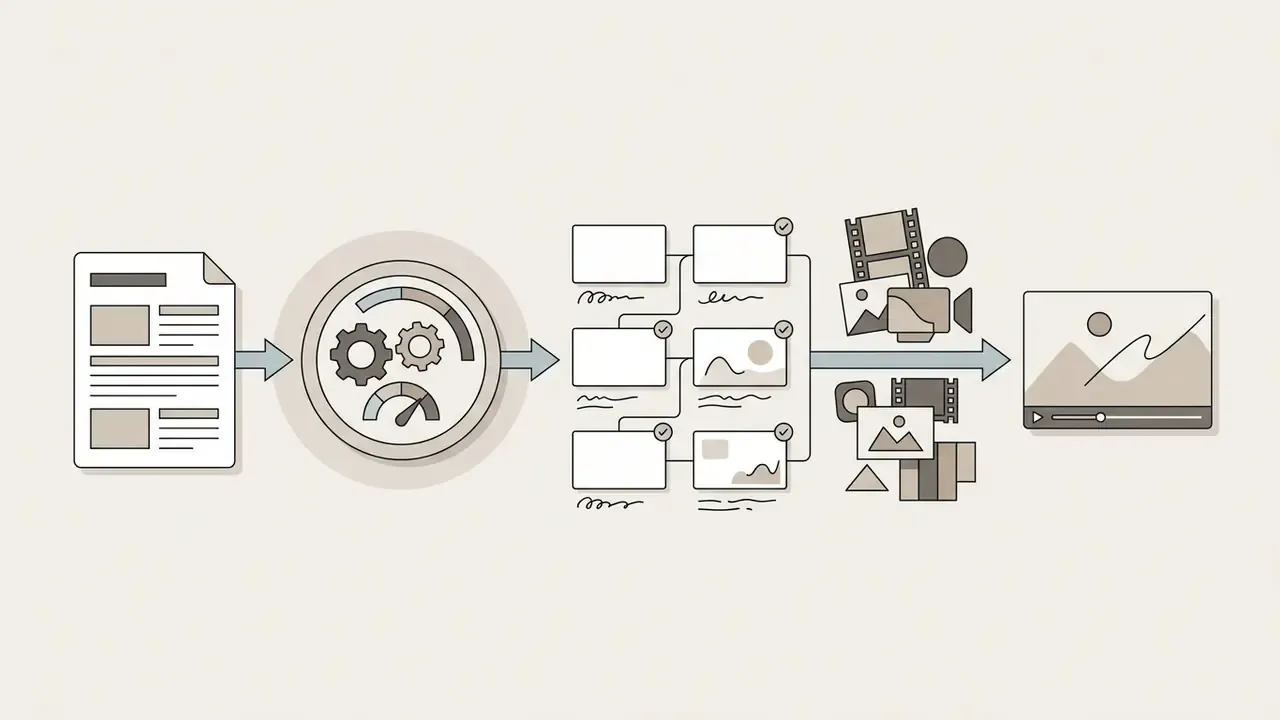
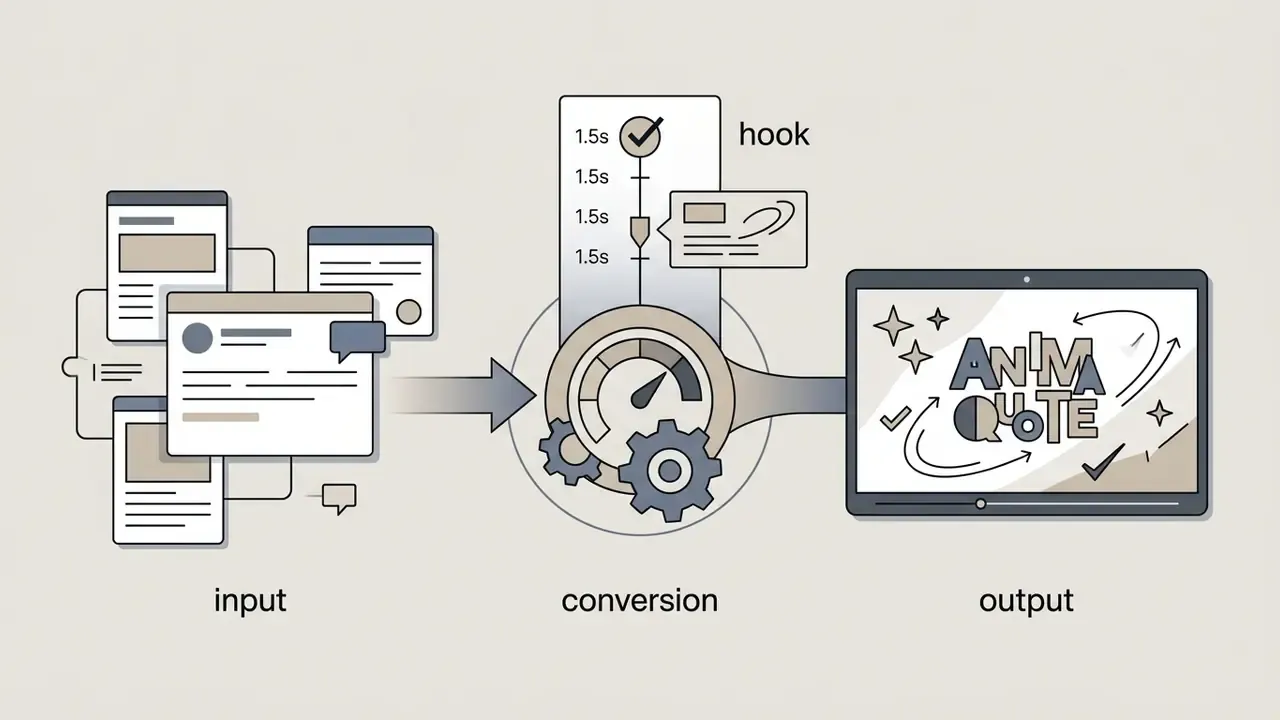
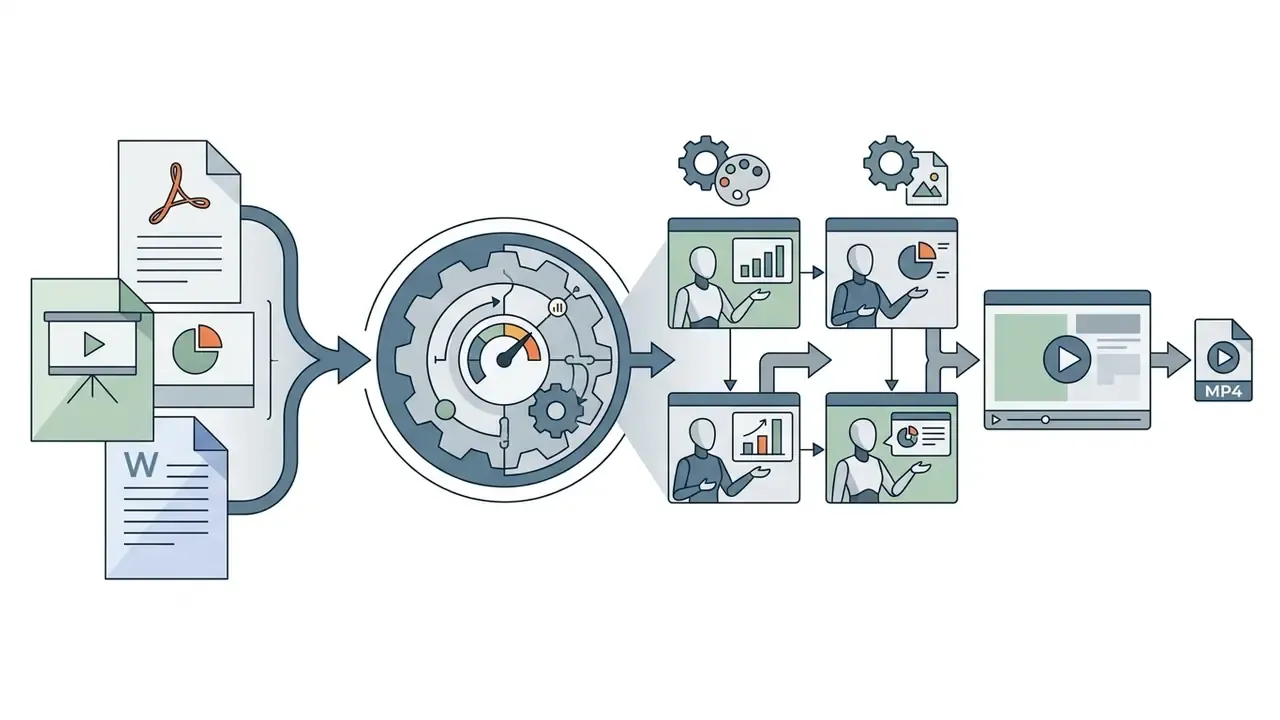
Beyond raw prompts, modern online engines ship specialized content ingestors that parse structured documents and live web assets into scene-level scripts:
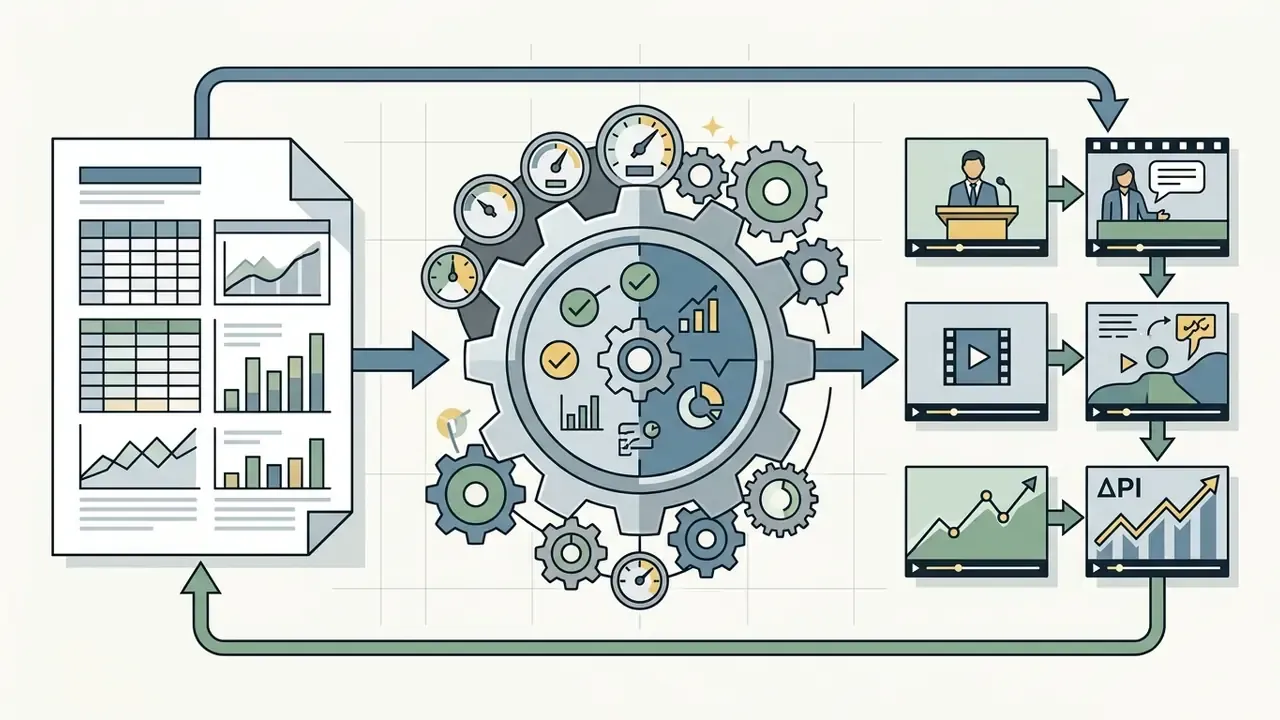
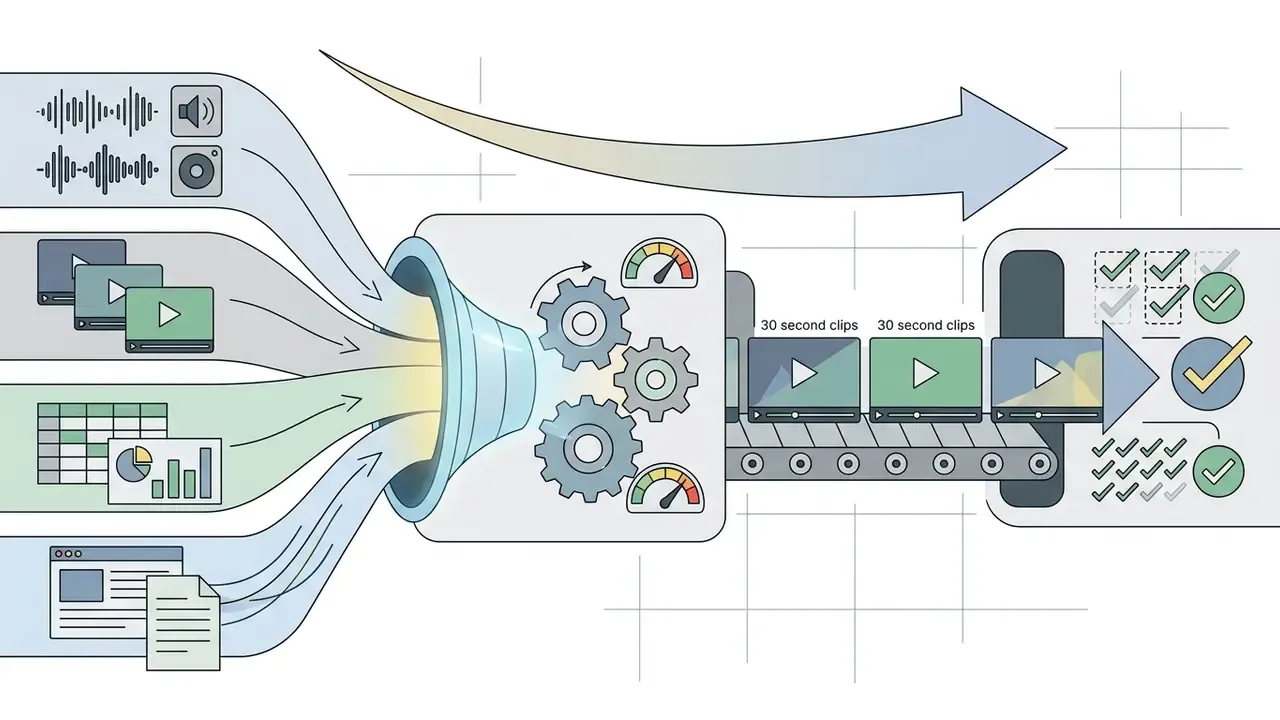
When evaluating model capability for creative automation, operators often check comprehensive reference guides, such as our analysis of the Google Veo AI video generator, to weigh cost-per-second against structural prompt adherence.
Image to Video: Animating Photos, Products, and Visual Assets
Image-to-video (I2V) synthesis animates static source assets (brand photographs, digital illustrations, product shots) by applying temporal diffusion guided by visual reference conditioning. Unlike text-only generation, I2V algorithms pull spatial structure, identity features and color distributions from a keyframe image, then generate frame sequences that simulate camera movement, surface reflections or contextual motion.
Recent computer vision work highlights identity-preserving diffusion models that use reward optimization to hold exact product logos and brand features steady during optical flow animation. Reinforcement-learning reward tuning improves identity preservation without touching the base architecture, which matters directly for packaging fidelity in commercial spots. Single-step and distilled latent architectures collapse the latency budget further:
Enterprise teams often evaluate these dynamic capabilities alongside tools for expanding keyframes. Comparing outpainting mechanics in our breakdown of AI expand image solutions helps workflow architects keep asset ratios consistent across placements, while our reference on image-to-video AI tools details motion-strength and camera-trajectory controls per model family. For stylized or game-adjacent visual sources, the parallel workflow sits closer to an ai sprite generator than to a photographic pipeline.
Generation, Editing, and Export in a Single Online Tool
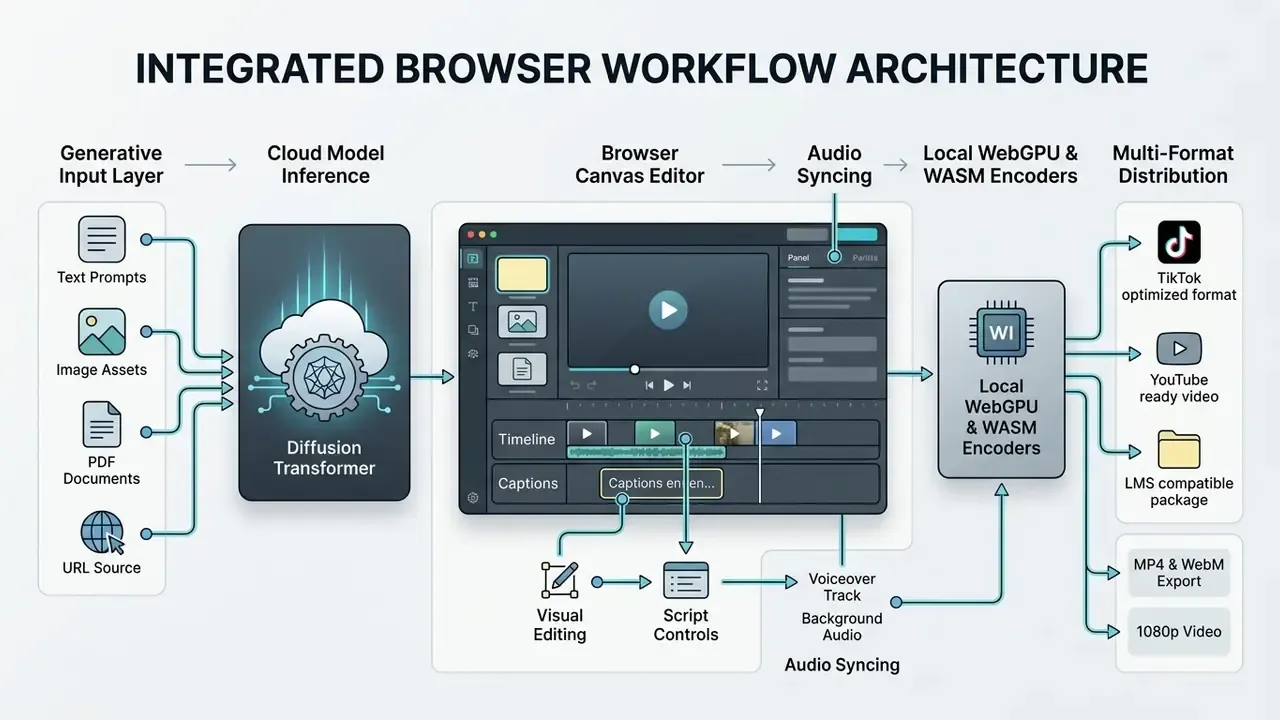
Browser-based platforms combine generative inference with multi-track timeline editing, so non-technical users can generate ai video assets and restructure them without opening a desktop post-production suite. These integrated web environments carry web-native tracks for video clips, synthesized audio layers, text overlays, dynamic background music and auto-generated captions.
Modern web apps implement browser-level rendering pipelines using WebAssembly (WASM) and WebGPU standards. Users trim scenes, overlay animated assets and burn in subtitles locally before finalizing a cloud export. Local rendering shifts encode work to the client. Generation itself, though, stays energy-intensive on the cloud side:
«Generating a single video consumes between 26 kJ and 1.16 MJ, one to two orders of magnitude more than image generation.»
Users preparing background photography before video input often reference operational guides such as the guide to online photo editors, or evaluate automated background generation via the Canva AI generator review.
Agentic AI Video Orchestration: Prompt to Final Cut via Autonomous Agents
Platforms in 2026 are moving from static generation pipelines to autonomous agentic architectures driven by large language models such as Claude and GPT-class reasoning systems. An AI video agent orchestrates the whole production flow through conversational prompts. It reads the brief, breaks it into a multi-scene storyboard, selects a visual model per scene, casts neural avatars, generates matching voiceover audio and compiles the final cut. Revisions happen by typing chat instructions (for example, "make the pacing faster and swap the voiceover to a female British accent"), which removes manual timeline editing for non-technical creators.
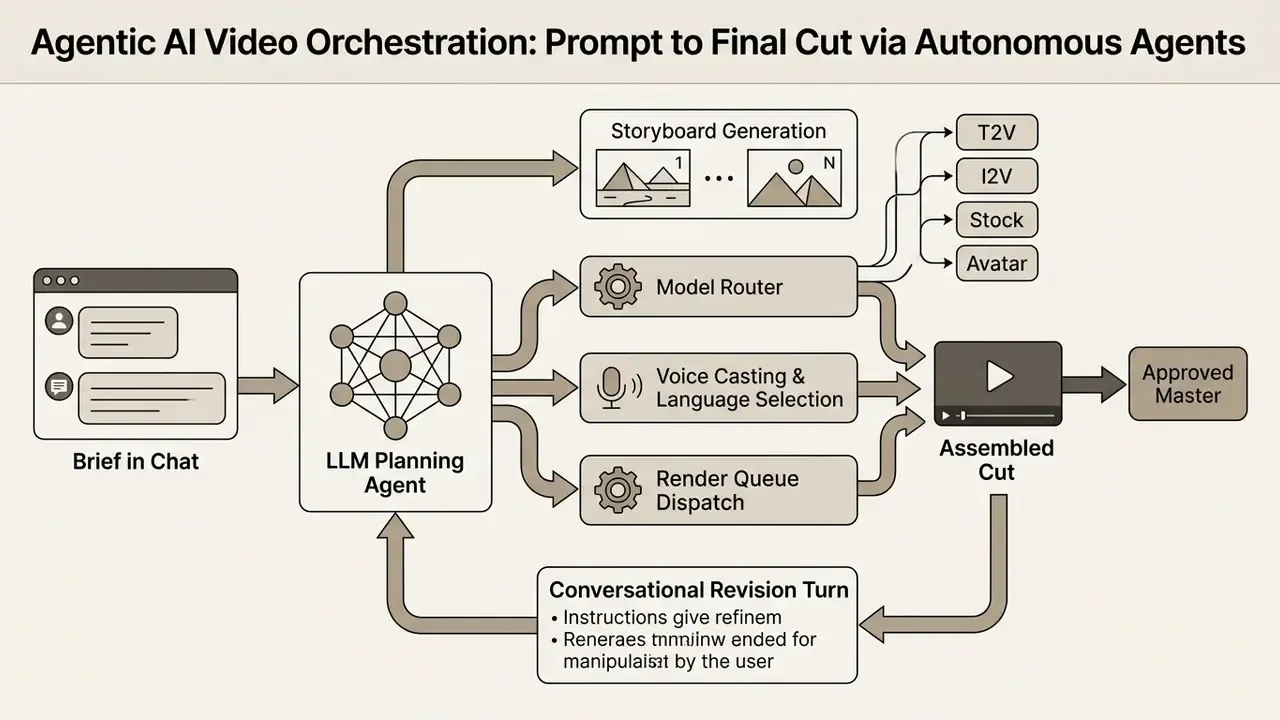
Agentic systems are also what make long-form synthesis practical at all. Because a single diffusion call typically yields 5 to 10 seconds of footage, the agent's real job is continuity management: holding character descriptions, palette locks and narrative state across dozens of sequential renders, then stitching them into explainers, tutorials, ads and multi-scene episodes that run several minutes. Vendors currently advertise agent-planned runtimes up to 10 minutes in one conversational session, with multi-scene continuity handled automatically instead of by manual re-prompting. An ai 1 minute video generator brief, in this architecture, is simply a shorter plan against the same loop.
Multi-model aggregation (single subscription, many engines). A parallel commercial trend consolidates access to 30+ generation models behind one interface and one bill: Sora-class, Veo-class, Kling, Seedance, MiniMax, PixVerse, Luma, Vidu and others. The operational advantage is routing. Cinematic realism, stylized animation and typography-heavy commercial output each go to whichever engine scores best for that task, without maintaining separate vendor accounts. Buyers who want side-by-side numbers before committing can start from our AI Media Comparison Matrices.
Risk framing for agentic pipelines. Autonomy compounds review burden rather than removing it. When an agent selects models, writes copy and casts a synthetic presenter with no human checkpoint, the organization inherits four exposures at once: factual error in agent-authored script, unlicensed likeness in avatar casting, missing AI disclosure at publication, and no reproducible record of which model produced which scene. The control answer is a mandatory approval gate plus per-scene generation logging. Both are specified later in this guide.
How to Choose an AI Video Generator for Your Needs
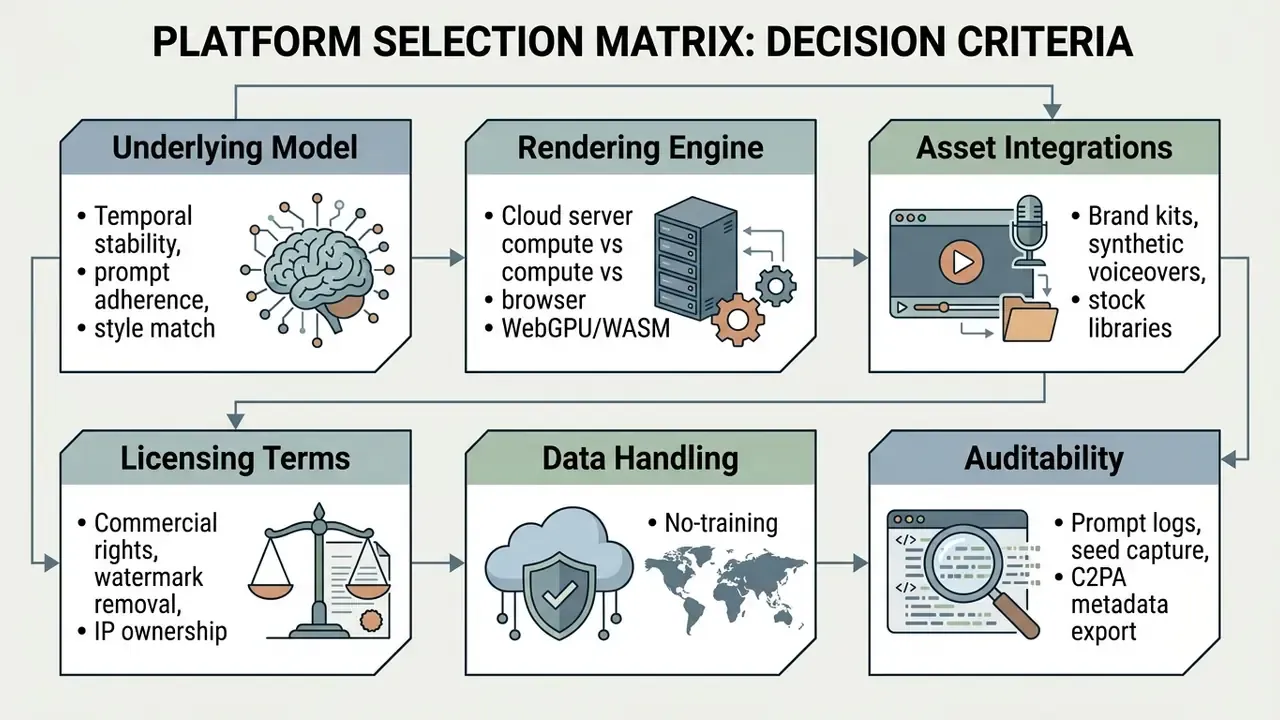
Selecting the right ai video generator means matching production objectives (micro-content scaling, marketing personalization, L&D module assembly, product explainers) against platform architecture, licensing terms, data-handling commitments and rendering efficiency. Operational teams should establish whether a solution leans on external cloud APIs or client-side accelerated inference, how well it preserves brand guidelines, and whether its export terms permit commercial deployment. Buyers comparing named products by quality-per-dollar can start from our matrix of leading AI video generators.
Shadow AI, Data Leakage, and DLP Controls for Browser-Based Generation
Because an ai video generator online needs nothing more than a browser tab and an email address, it is one of the highest-velocity Shadow AI vectors in regulated organizations. A marketing associate pasting an unreleased product roadmap into a script field, or an L&D specialist uploading a compliance SOP containing customer identifiers, has just transmitted that content to a third-party inference cluster outside sanctioned data boundaries. No approval. No log.
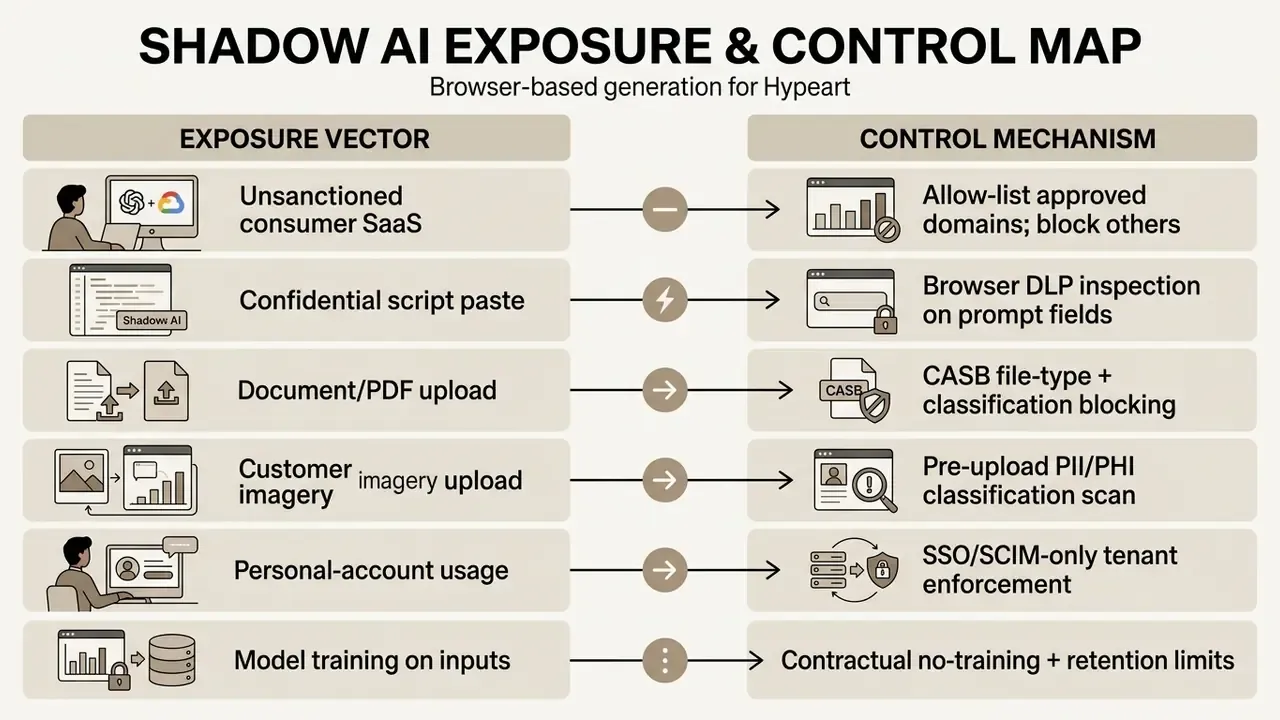
Practical control set for regulated deployment:
- Tenant isolationprocure enterprise plans with dedicated or logically isolated tenants, SSO/SCIM provisioning, and administrative revocation of individual sessions.
- Contractual no-training clausesrequire written confirmation that prompts, uploaded documents and rendered outputs are excluded from model training, with a defined retention window and a deletion SLA.
- DLP at the prompt boundaryinspect prompt text and file uploads with the same classification rules you apply to email and file-sharing egress. A prompt field is an egress channel. Treat it like one.
- Allow-listing over prohibitionblanket bans push usage onto personal devices and personal accounts, which removes all visibility. Approving one or two sanctioned platforms and blocking the long tail preserves logging.
- Regional processing constraintsconfirm inference and storage regions where data residency obligations apply, including sub-processors used for voice synthesis or transcription.
- Egress loggingcapture who generated what, when, with which prompt, and under which model version. The same evidentiary standard you already apply to other production-affecting tooling.
Extending Model Risk Management (MRM) to Generative Video Models
Institutions with mature model risk frameworks already hold the governance scaffolding needed for generative video. The task is scope extension, not new invention. Supervisory expectations for model development, validation and independent review, including the long-established U.S. supervisory guidance on model risk management (Federal Reserve SR 11-7 / OCC 2011-12), map onto T2V and I2V systems along four dimensions.
| MRM Dimension | Traditional Model Application | Generative Video Application | Evidence to Retain |
|---|---|---|---|
| Conceptual soundness | Model theory, variable selection | Model family, training-data provenance, known failure classes | Vendor model card, benchmark scores, documented limitations |
| Ongoing monitoring | Backtesting, drift detection | Version-change regression tests on a fixed prompt suite | Prompt suite, rendered outputs per version, reviewer scores |
| Outcomes analysis | Error rates, calibration | Factual accuracy, attribute fidelity, disclosure compliance rate | Reviewer sign-off log, rejected-output register |
| Independent validation | Validator challenge | Second-line review of prompt library and approval gates | Validation report, exception register, remediation dates |
Benchmark literature supplies the quantitative basis for the "known limitations" section of a validation report. Composition and world-knowledge benchmarks both document measurable ceilings in attribute binding, numeracy, physics and causality. Meaning: any control design that assumes literal prompt compliance has no evidence behind it. The defensible validation conclusion is not "the model is accurate" but "the model requires human verification for factual, numeric and physical claims."
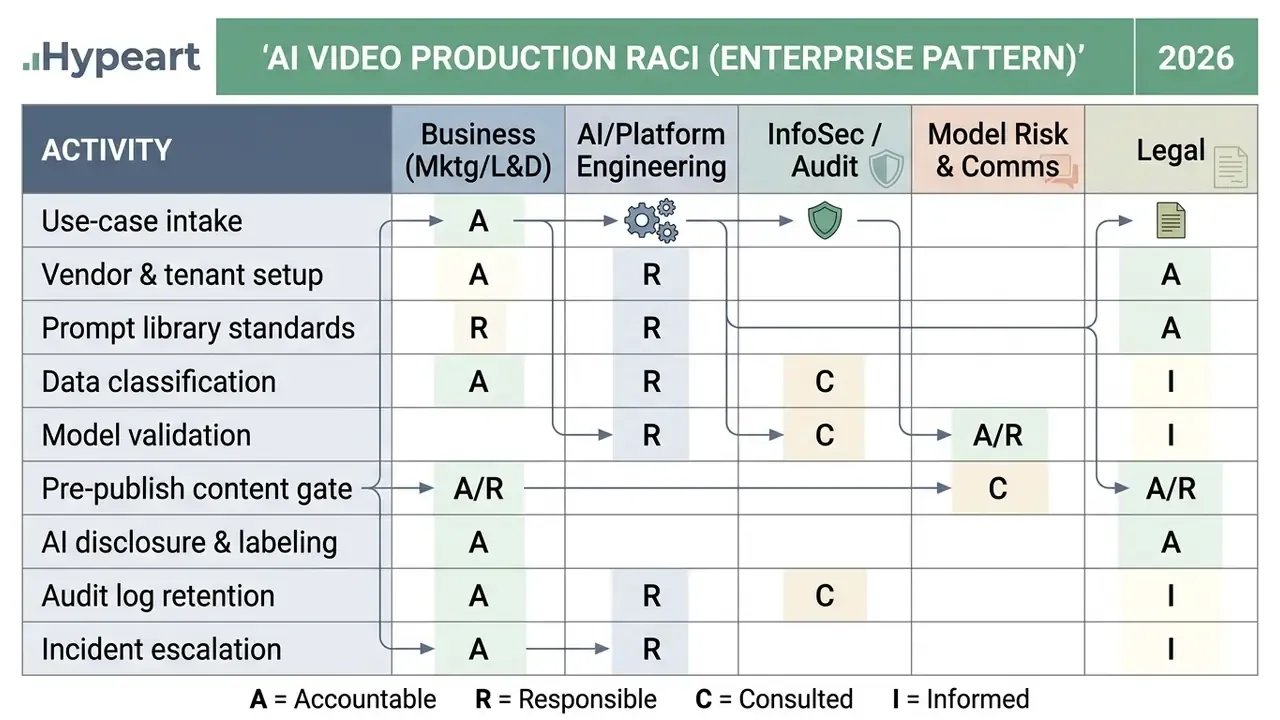
RACI Matrix: Who Owns What in an Enterprise AI Video Pipeline
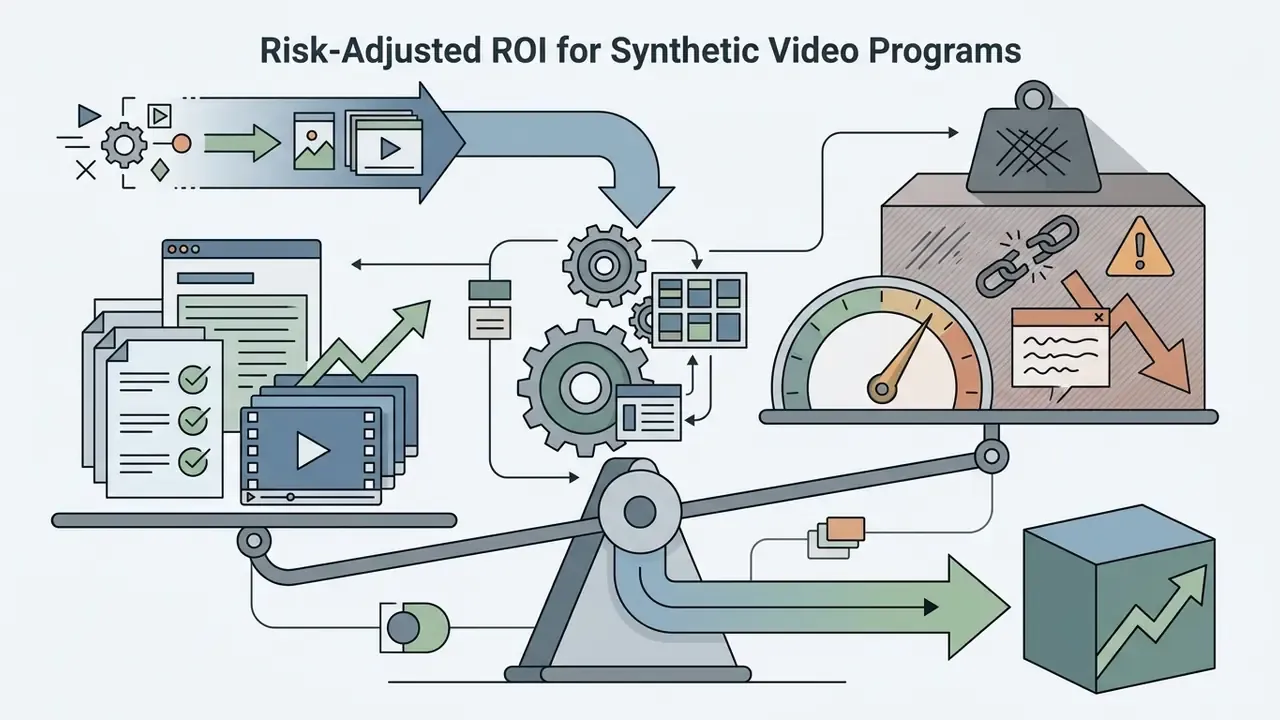
Risk-Adjusted ROI for Synthetic Video Programs
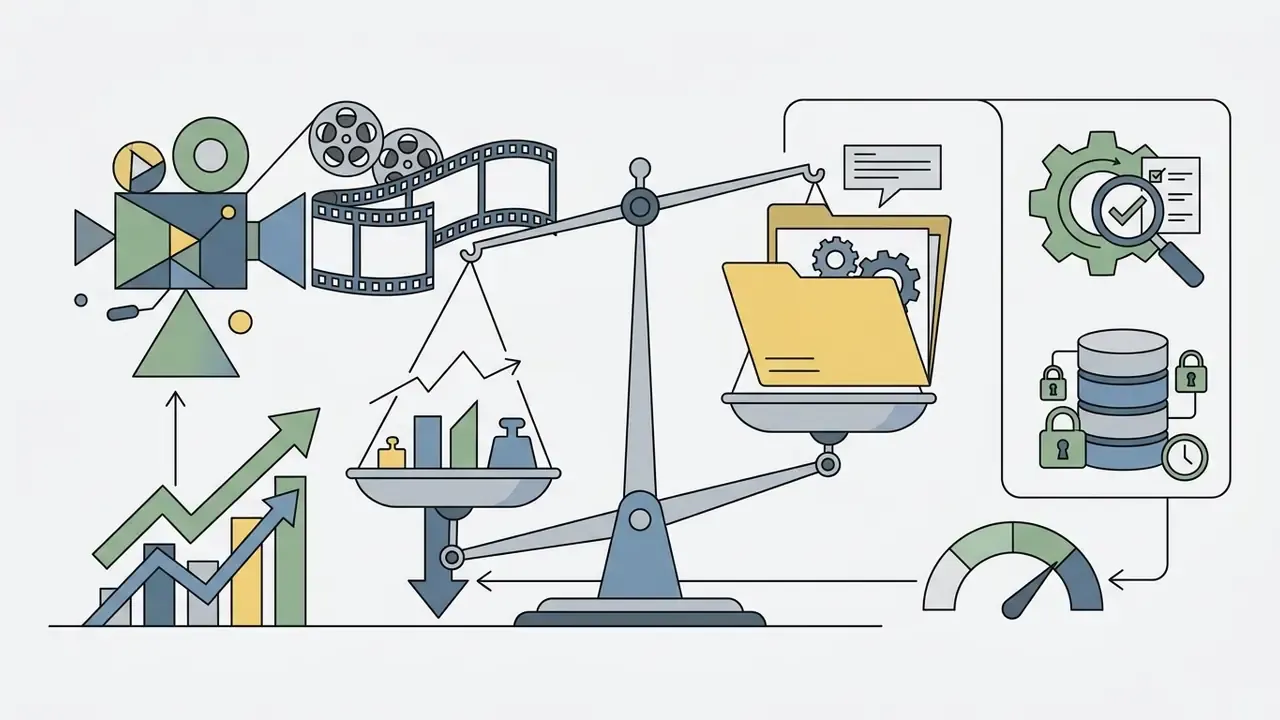
Vendor ROI claims usually compare generation cost against agency production cost and stop there. That understates true cost, because it omits the control layer. A defensible calculation:
Where:
- is the fully loaded cost of the incumbent production method: agency fees, filming, editor hours, reshoots.
- is subscription plus per-second inference spend, including regeneration attempts.
Two implications follow. First, review labor scales with output volume, so "unlimited generations" plans never deliver unlimited throughput. The review desk becomes the constraint. Second, programs that skip the control layer report inflated ROI early and absorb the variance later, which is exactly the pattern audit functions are positioned to challenge. Finance teams who want to model this properly can build from our interactive AI Media Calculators.

AI Video Generator Functional Comparison
| Generator Category | Primary Inputs | Typical Output Format | Built-in Editing Features | Primary Target Use Case |
|---|---|---|---|---|
| Text-to-Video | Natural language prompt, text script | MP4, WebM (5–10s clips, up to 4K) | Prompt iteration, style selection, negative prompts | Creative concepting, visual B-roll |
| Image-to-Video | Static photograph, reference frame + prompt | MP4 (3–10s animated sequence) | Camera trajectory control, motion strength adjustment | Product showcases, animating static marketing photos |
| URL / Document-to-Video | Live URL, blog post, PDF, PPTX, spreadsheet | Multi-scene MP4 with narration | Scene reordering, summary length control, avatar casting | Content repurposing, SOP-to-training conversion |
| AI Clip Maker | Long-form MP4/WebM video file, video URL | Vertical MP4 (9:16 Shorts/Reels/TikTok) | Dynamic subtitle styling, auto-reframing, scene trimming | Repurposing webinars, podcasts, long interviews |
| AI Movie Maker | Structured multi-scene script, storyboard | Multi-minute compiled MP4 | Timeline editing, multi-track audio, voiceover alignment | Long-form explainers, corporate training, educational content |
| AI Avatar Tool | Written speech script, avatar selection, audio file | MP4 talking-head video | Script text editing, synthetic voice selection, multi-language translation | Presenter-led training, personalized video sales outreach |
| Agentic Video Platform | Conversational brief in chat | Multi-scene MP4 up to ~10 minutes | Chat-based revision, automatic model routing, avatar/voice casting | End-to-end production without timeline skills |
Hybrid rendering: generative diffusion plus curated stock. The most reliable commercial platforms do not trust pure diffusion output for every frame. They blend generative rendering with large licensed asset libraries (vendors advertise catalogs exceeding 16 million premium stock videos and photos) and route scenes accordingly. Establishing shots, crowd scenes, hands, text signage and recognizable real-world locations are exactly where diffusion artifacts cluster. Substituting cleared stock for those scenes cuts both artifact risk and rights risk in paid advertising. Terminology caution: "AI Clip Maker" and "AI Movie Maker" are vendor workflow labels, not standardized technical classes, so compare documented input/output specifications rather than category names.
AI Models for Realistic, Cinematic, and Stylized Scenes
The generative fidelity and movement realism of an ai generator video maker depend on the underlying video model architecture, training dataset composition and spatiotemporal attention mechanisms. Leading models in 2026, including Google Veo 3.1, Kling 3.0 and Seedance 2.0, show distinct operational strengths across photographic realism, physical motion simulation and stylized art direction. An ai model video generator free tier usually exposes a smaller or older checkpoint, so treat free output as a floor rather than a fair sample of the paid engine.
Distillation has become the decisive variable for interactive, browser-first workflows:

«Alice v1, a 14B distilled model, generates 5-second 720p video in 4 steps (~8s on an H100) and scores 91.2 on VBench.»
Capability claims have to be read next to documented ceilings:
«T2VWorldBench evaluates 1,200 prompts across six categories; leading models score no higher than 0.68–0.70 on physics, causality and cultural knowledge.»
The governance reading of that result is blunt: any video asserting a physical process, a regulatory procedure or a culturally specific depiction needs subject-matter review before publication. Organizations comparing foundational image and visual generation baselines frequently review our analysis of the best AI art generators and compare desktop-to-web workflows in our breakdown of Midjourney AI image generator alternatives.
Online Video Generators for Low-End Devices and No-Download Workflows
A cloud-based ai video generator for low end devices moves processing away from client hardware, executing resource-intensive neural inference on remote enterprise GPUs. Users on lightweight laptops, tablets or Chromebooks interact with the engine purely through a browser, with no local install and no discrete graphics card. This is also the practical answer to the frequent query for an ai video generator free no download: the render happens elsewhere.
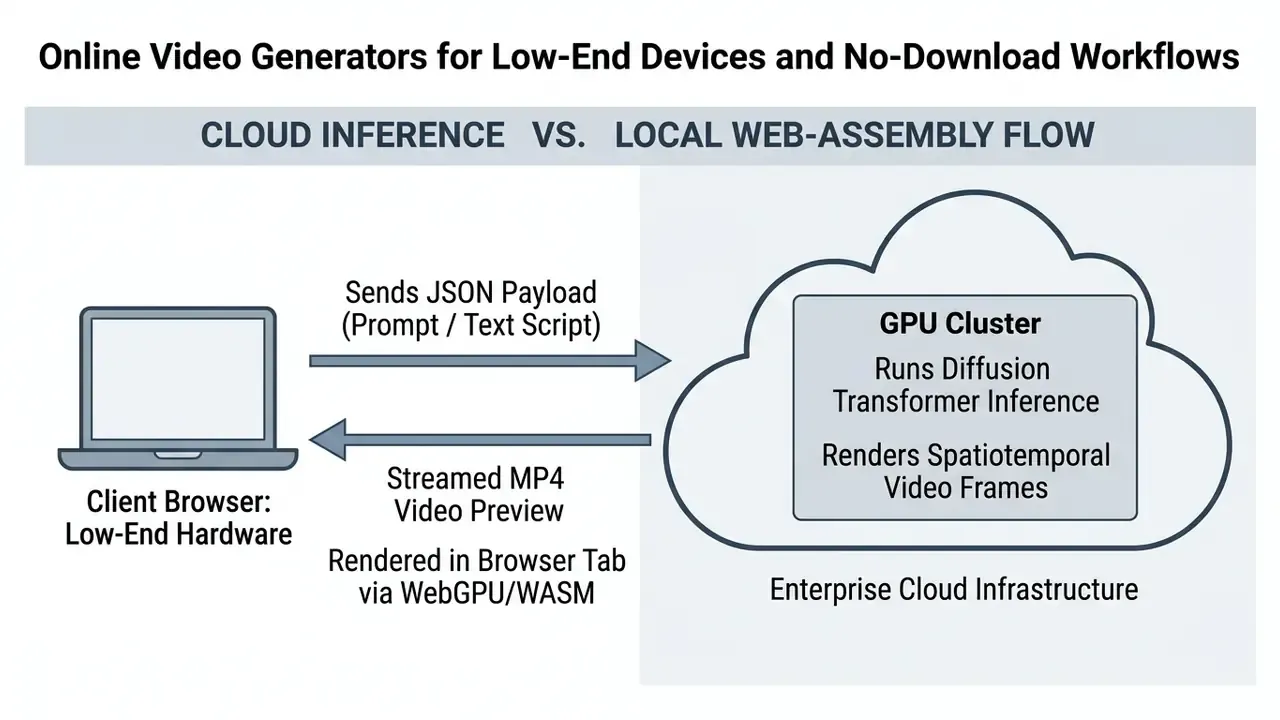
Recent benchmarks show that browser-only engines using WebGPU for client inference and ffmpeg.wasm for local assembly can approach near-native compilation performance inside a tab. Hardware constraints still bite, though. Documented browser-only implementations report roughly a 1 GB first-download model cache and multi-threaded rendering only where SharedArrayBuffer is available, so pure cloud-rendered SaaS backends remain the more reliable path for genuinely low-end machines. Where WebGPU acceleration is missing, the fallback is CPU-bound WebAssembly, with the latency penalty you would expect. Creators working on non-video static assets can gauge lightweight browser performance in our guide to free photo editors.
Capabilities Essential for Creators, Marketing, and Content Teams
Enterprise marketing departments, internal communications functions and independent social creators all need platforms that support multi-user workflows, brand identity governance and high-volume output. Production platforms bundle specialized suites designed to hold visual consistency across large campaigns:
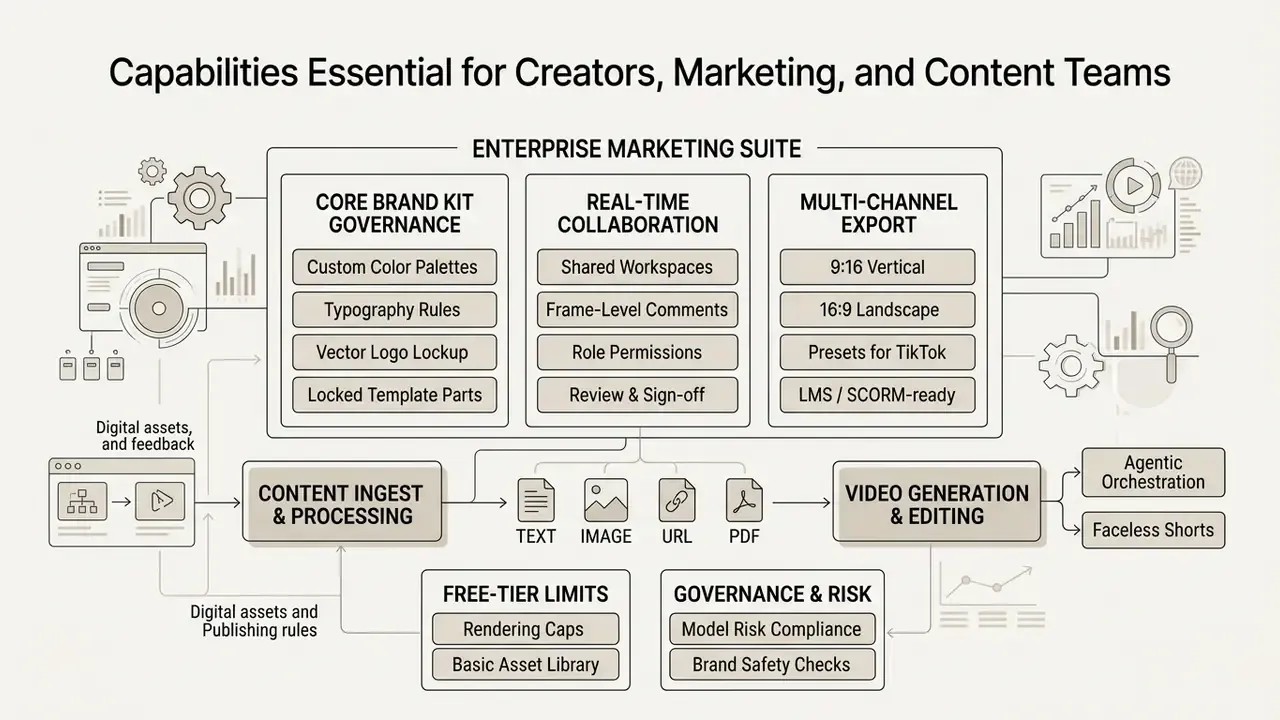
Field research conducted by MIT researchers found that personalized synthetic video campaigns featuring digital brand ambassadors outperformed static personalized imagery while cutting production overhead sharply:
«In a randomized field experiment with 21,328 shoppers, AI avatar video raised click-through rates by 9.4 percentage points versus personalized images, at roughly 90% lower cost.»
Vendor documentation confirms the same feature triad across the category: real-time collaboration with commenting and review in a shared workspace, centralized brand kits holding logos, colors and fonts for reuse across every video, and platform-ready export presets for TikTok, Reels, Shorts and Facebook. When selecting asset management ecosystems, creative leads also cross-reference specialized design platforms via our detailed breakdown of the Microsoft AI image generator.
How to Create AI Video Online: Step-by-Step from Prompt to Export
Producing professional synthetic video online follows a structured lifecycle: script preparation, iterative latent diffusion, timeline post-processing, governance review, then multi-platform compilation. Following a fixed framework improves prompt compliance, temporal stability, brand alignment and, crucially, auditable approval.
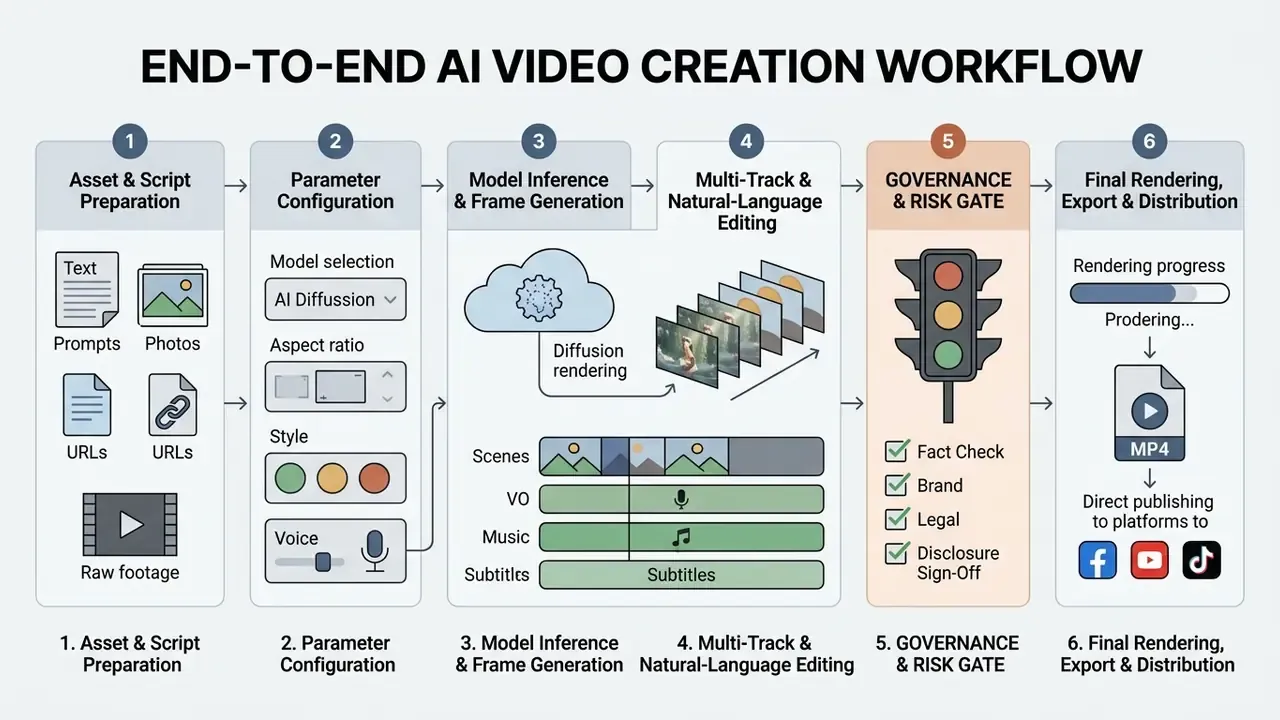
1. Prepare Prompts, Scripts, Images, or Raw Footage
Generation starts with structuring textual directives or uploading source visuals into the browser platform. Effective prompts define the visual subject, character actions, environment, camera movement and aesthetic style explicitly. Before writing the generation prompt, practitioner guidance recommends fixing the goal, audience, key message, narrative arc and scene list. Prompt quality is downstream of script clarity, always.
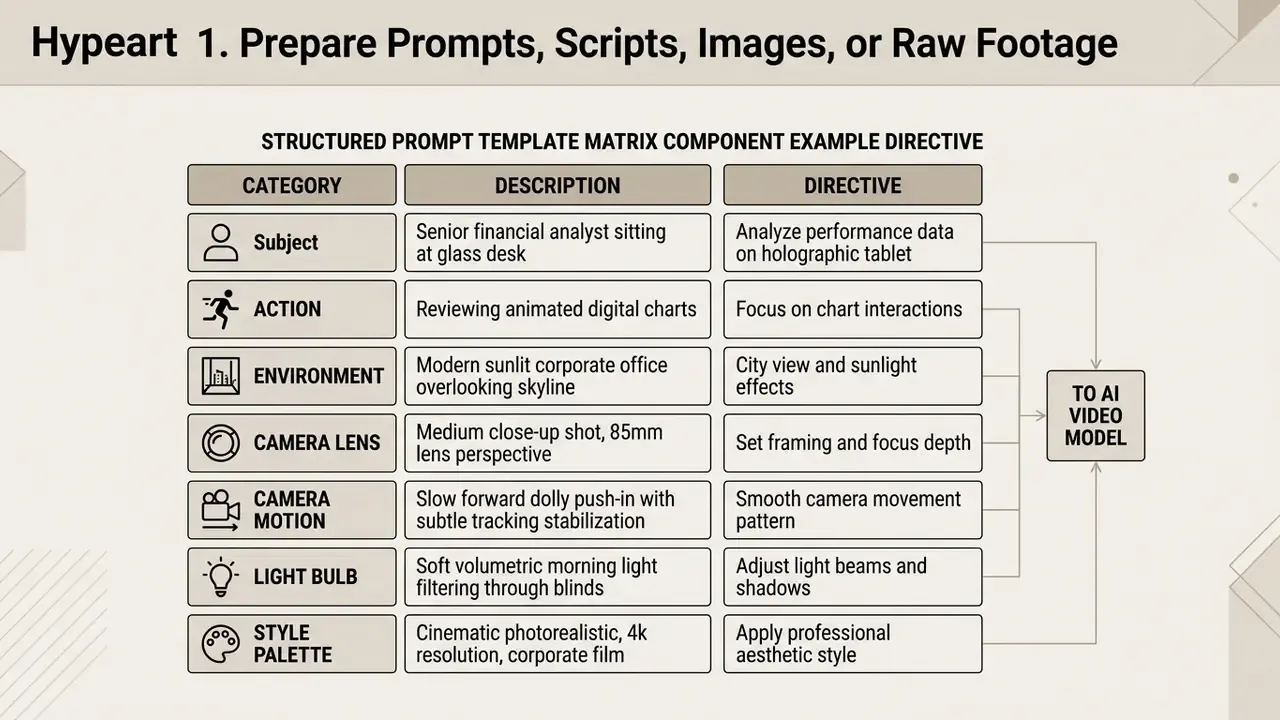
Official prompting documentation from leading model developers stresses negative prompts, meaning explicit instructions about what to exclude (for example, "no optical flicker, no distorted hands, no camera jitter"), to keep scenes stable. Vendor guidance also converges on one camera move and one subject action per shot, because compound directives degrade adherence. When starting from pre-rendered image inputs, creators often use the specialized tools analyzed in our guide to AI headshot generators to prepare consistent corporate subjects.
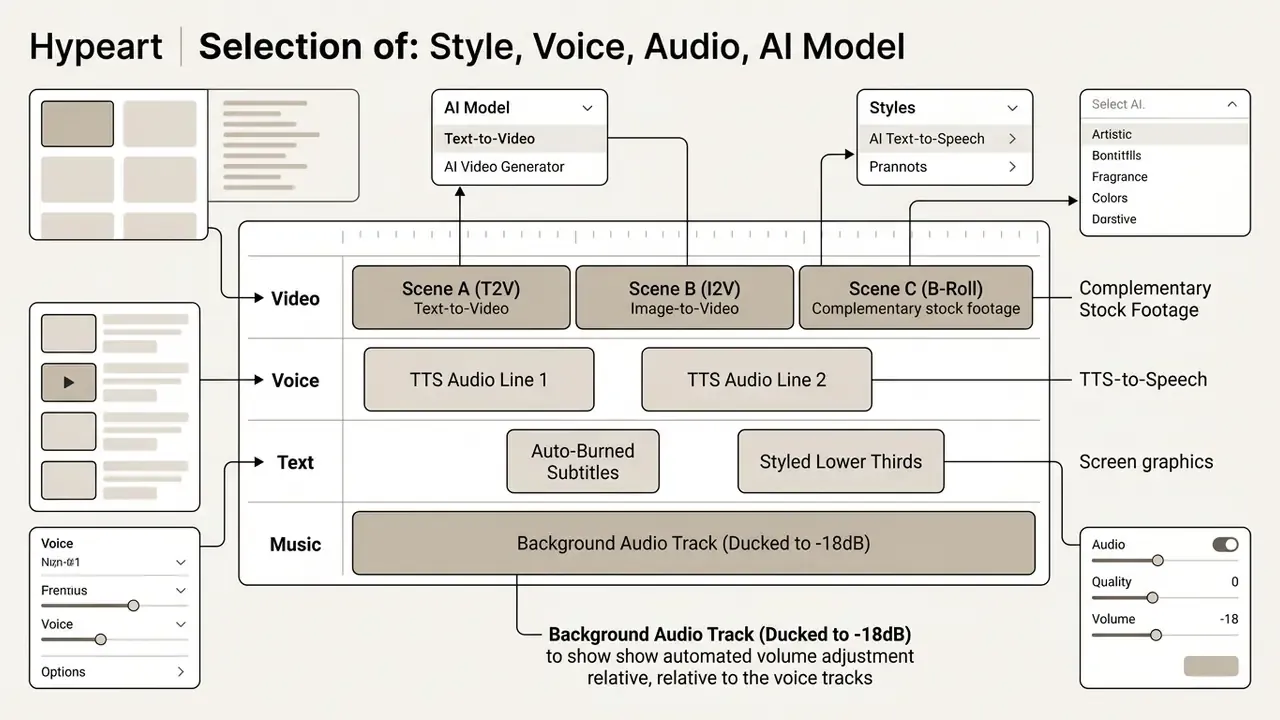
2. Select Style, Voice, Audio, and AI Model
Once inputs are uploaded, creators pick visual style filters, voiceover assets, audio beds and the generative backend that fits the goal. You choose between realistic photographic synthesis, animated illustration or 3D render styles, then configure output aspect ratio (16:9 for YouTube, 9:16 for TikTok).
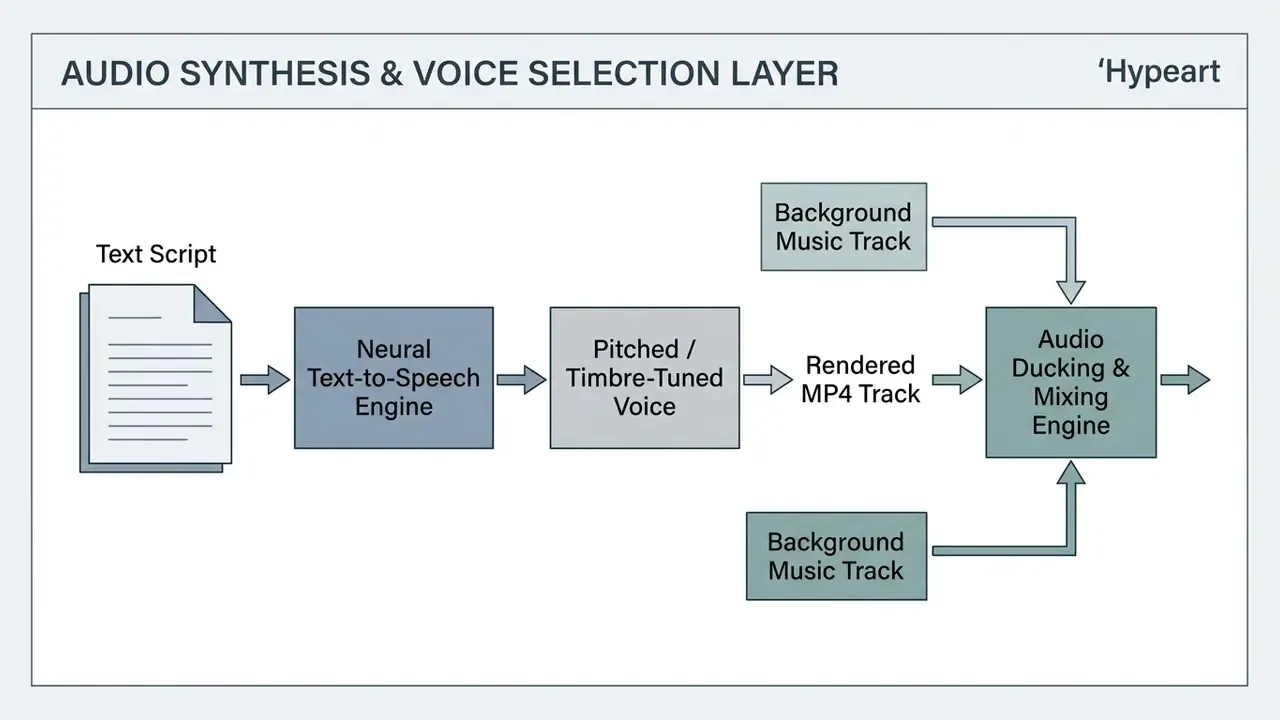
Synthetic voice systems map written scripts to neural speech models, matching tone, pacing and regional accent across 30 to 50+ language options, with optional voice cloning from a short sample. Music and sound design follow a parallel path: teams scoring an explainer often pair the video engine with an ai song generator for a branded music bed, use an ai song generator from lyrics when the campaign needs a written hook set to melody, test an ai song maker free tier before licensing anything, and reach for an ai sound generator for stingers and UI effects. Guidance published by the U.S. Department of Energy underlines the review imperative across all of it:
«GenAI outputs, including informational videos with voice narration, graphics, captions and translations, should be verified by a human in the loop.»
Two licensing traps recur at this step. First, some providers restrict synthetic voice output to non-commercial use and forbid redistribution as a standalone audio file. Second, cloned voices require documented consent from the voice owner. Teams evaluating independent synthetic audio solutions can examine dedicated capabilities in our comprehensive guide to AI voice generators.
3. Edit Scenes, Captions, and Subtitles Before Publishing
4. Governance and Risk Gate: Human Review Before Anything Ships
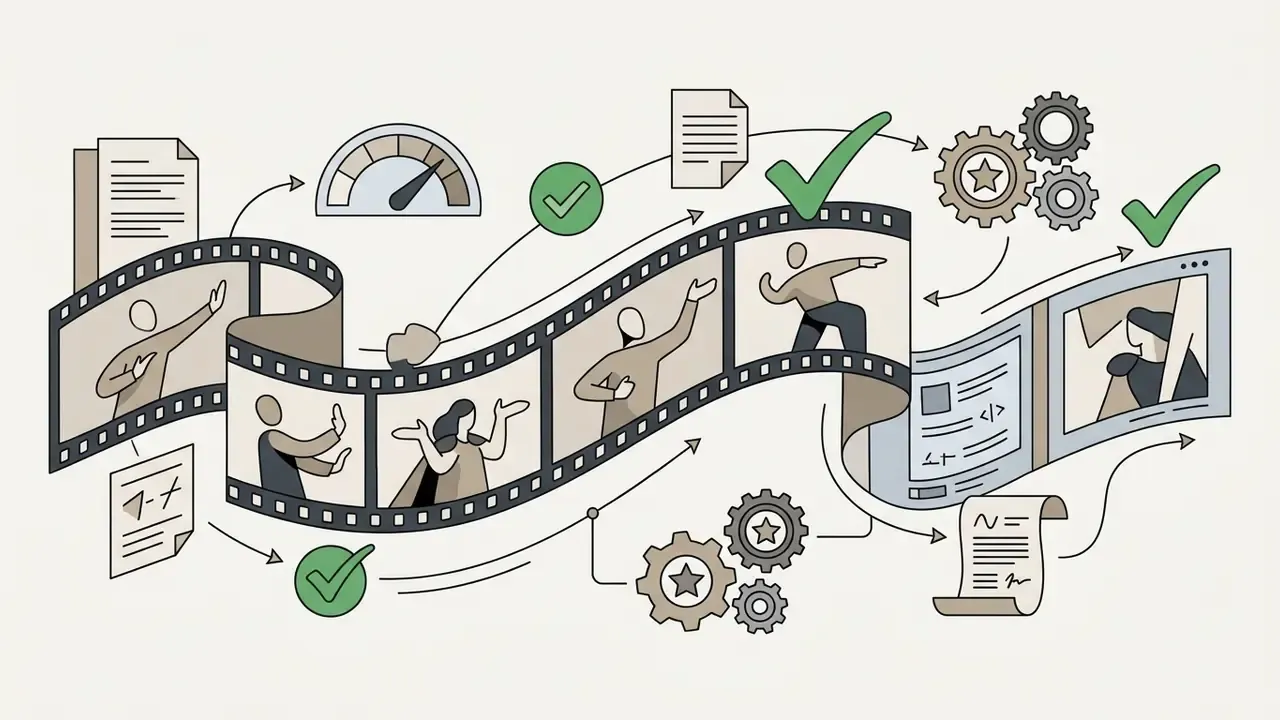
No synthetic asset should move from editor to distribution without a recorded approval. This single step is the difference between a pilot and a controlled production capability.
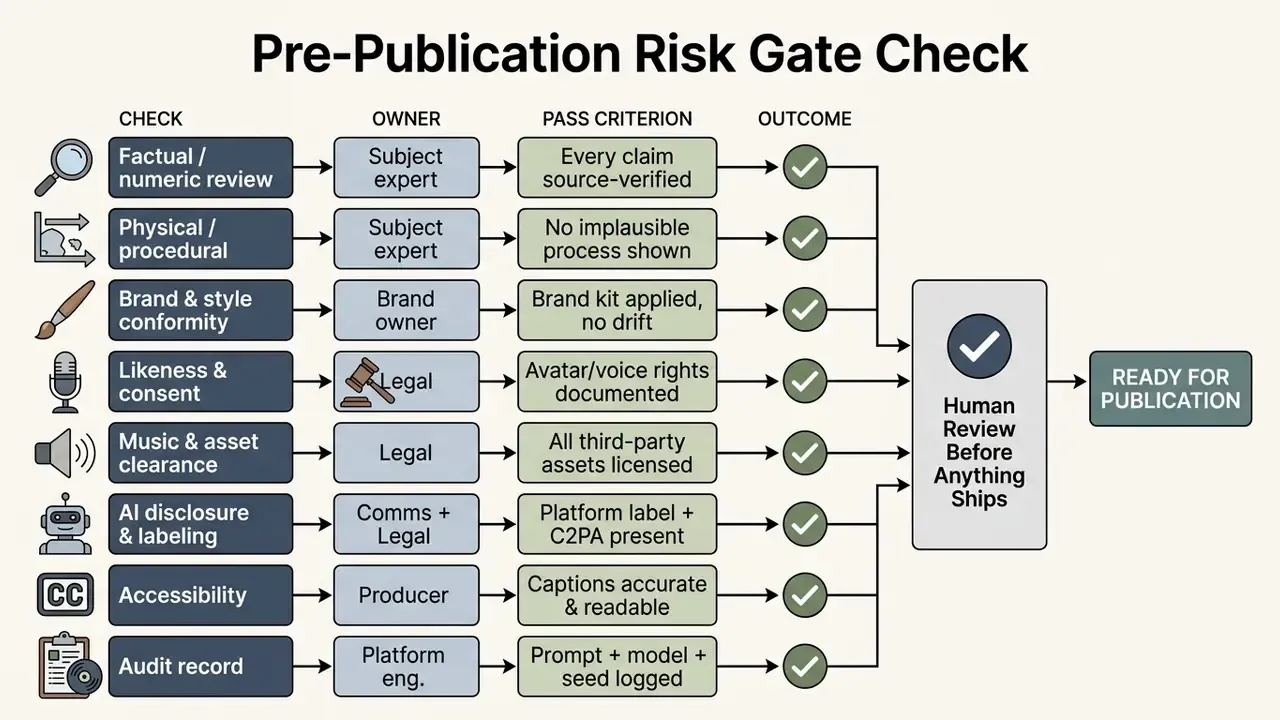
Escalation path. A failed check returns the asset to the producer with a documented reason code. Repeated failures of the same type trigger prompt-library revision. A failure that reaches publication triggers takedown, incident logging and notification to the second line.
Audit export. For institutions running GRC or MRM tooling, the retained record should be machine-readable: prompt text, model identifier and version, seed or generation ID, reviewer identity, timestamp, and the C2PA provenance manifest attached to the exported file. That bundle is what converts "we used AI video" into evidence a regulator or internal auditor can actually test.
AI Short Video Creator for Shorts, TikTok, Reels, and Clips
An ai short video creator specializes in high-velocity vertical micro-content for mobile distribution. These platforms run automated long-to-short extraction engines that analyze podcasts, webinars, lectures, livestreams or interviews, identify engaging segments, reframe horizontal footage into 9:16, and burn in dynamic animated subtitles. Readers new to the category can start from our foundational overview of the AI video generator landscape before evaluating short-form specialists. Query variants abound here (ai short video maker free, ai short video maker online, ai short video generator free online, ai short videos free, ai video clip generator free online), and they mostly describe the same clipping engine behind different free-tier caps.
The same machinery serves two very different audiences. Consumer creators run faceless channels at volume. Enterprise communications and L&D teams cut a 60-minute all-hands, compliance briefing or product training session into short, indexable segments for internal distribution. That second use case is the highest-value and lowest-risk application of clip automation inside a regulated organization, for one reason: the source footage was already approved.
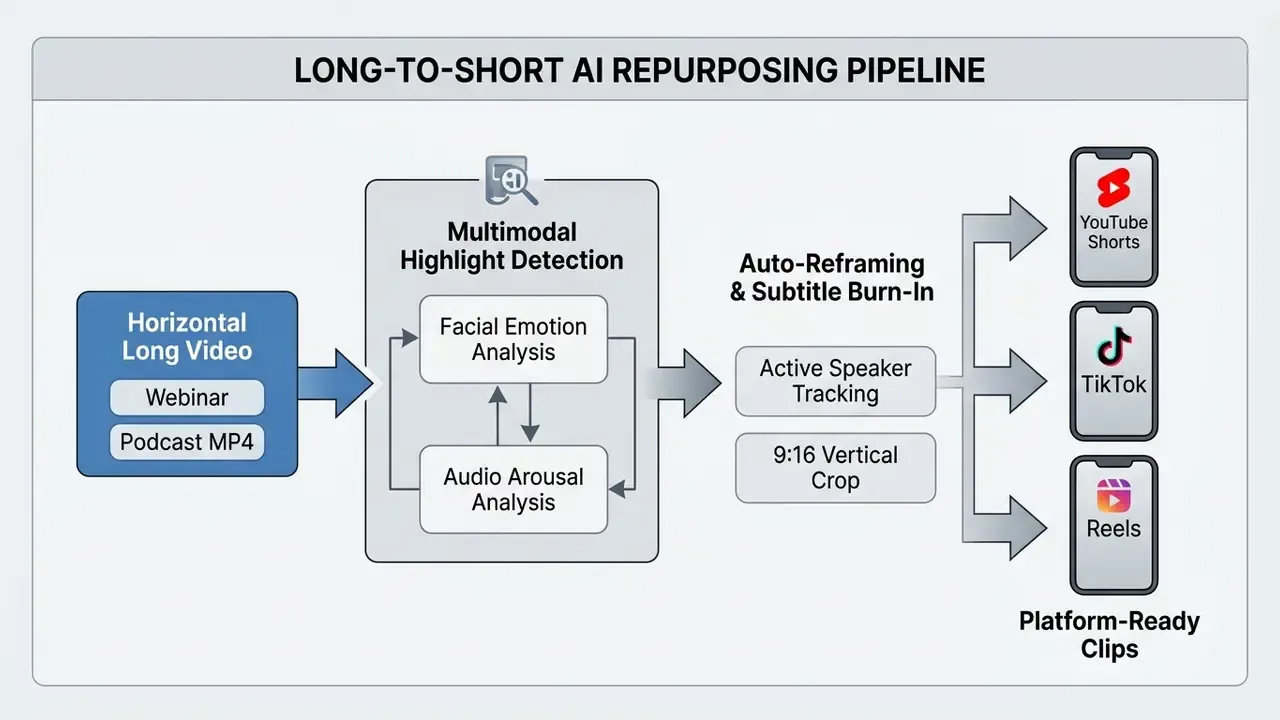
How AI Identifies Best Moments in Long Video and Converts Them into Clips
Automated segmentation algorithms use multimodal detection to find highlight-worthy passages inside long-form source footage. These systems read visual facial expression changes, acoustic arousal (laughter, pitch inflection, speech-rate spikes), head-movement displacement and semantic density in the transcript, then assign frame-by-frame engagement probability scores.
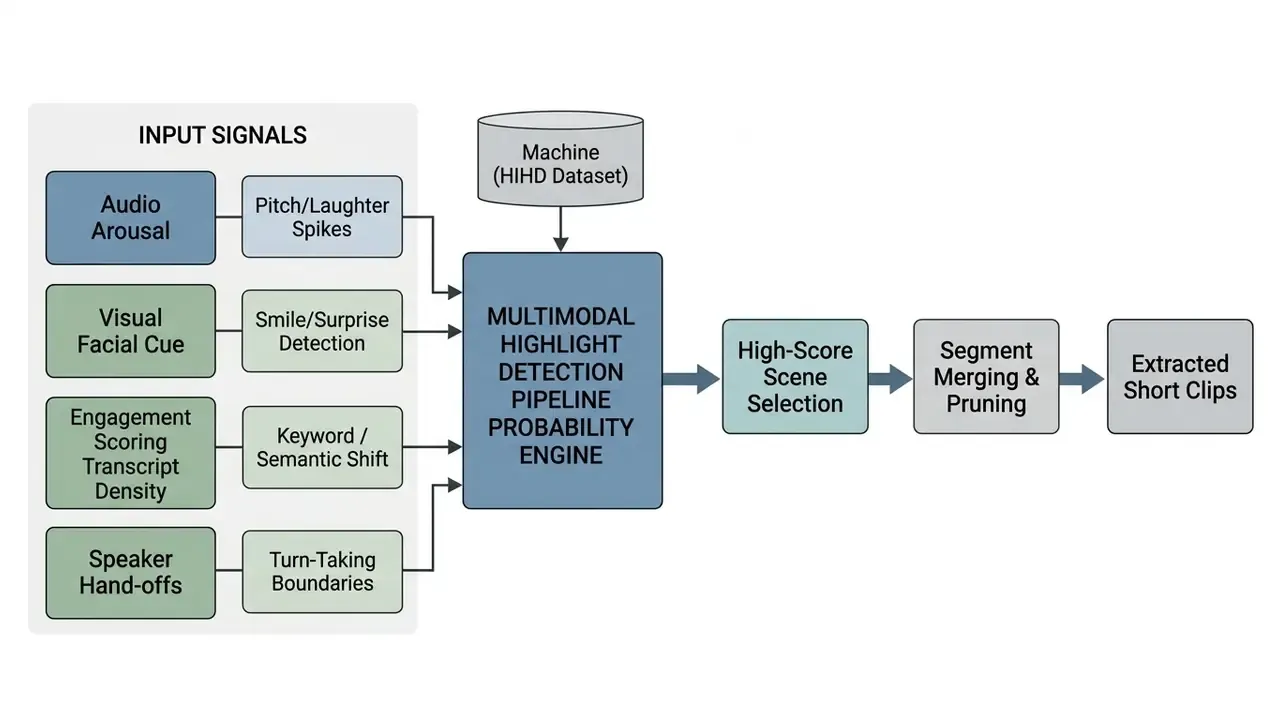
Machine learning frameworks trained on engagement datasets, including the Human Intuition Highlight Dataset (HIHD) and replay-labeled corpora, evaluate sequences sequentially without lookahead and predict peak interest points with high precision:
«Aha surpasses prior methods by 5.9 points mAP on TVSum and 8.3 points on Mr. HiSum, trained on 22,463 videos with frame-level engagement scores.»
Related research lines confirm the signal diversity: replay-based engagement labels (Mr. HiSum, NeurIPS 2023), human-centric pose and face scoring (HighlightMe, ICCV 2021), and affect embeddings for arousal and valence in audiovisual highlight detection. Once a segment is identified, the engine trims it to a complete thought so clips never cut mid-sentence, applies active-speaker tracking to reframe 16:9 into 9:16, adds zooms and camera splits, then compiles standalone shorts. Published throughput sits around 20 to 40 ready-to-post clips from a 60-minute source in 10 to 15 minutes, against 4 to 6 hours of manual scrubbing for 3 to 8 clips.
Multi-speaker handling. Conversational content is where clip automation pays off most, and where naive segmentation fails hardest. Purpose-trained systems detect speaker hand-offs, keep a question and its answer together as a single shippable exchange, and rank candidates by clip objective (trust-building, educational, promotional) rather than by raw virality score alone.
Captions, Subtitles, and Voice for Retention in Short Videos
On-screen subtitles and synchronized synthetic voiceovers carry most of the retention load in social feeds, where a large share of viewing happens with sound off.
Automated captioning modules use Whisper-class speech recognition to generate stylized, high-retention overlays. Current engines ship distinct presets:
- Hormozi style bold yellow or green keyword emphasis with pop-on animation, built for business, sales and educational content.
- Karaoke style real-time color highlighting that tracks each word as it is spoken.
- Word-by-word pop-on high-energy sequential reveal tuned for fast cuts and hook-driven openings.
- Clean minimal subtitles restrained white-on-transparent styling for documentary, interview and corporate compliance material where brand tone forbids gimmick typography.
- Multi-speaker color coding assigns unique palettes per speaker in podcasts, panels or interviews, so muted viewers can still follow dialogue.
- Automated profanity filtering bleeps or censors sensitive language in burned-in captions to protect YouTube and TikTok monetization eligibility and brand-safety standards.
Every preset should stay customizable at the level of font, color, stroke, shadow, position and animation timing, so output matches brand guidelines rather than a vendor default look.
Human-factors research supports captioning on comprehension, attention and retention grounds: a review by the National Center on Accessible Media reports that more than 100 empirical studies found captioning improves comprehension, attention and memory. Evidence for short-form specifically is more nuanced. A 2025 exploratory study using eye-gaze and facial-expression measurement found that subtitles shifted attention patterns and raised engagement, yet did not significantly change immediate recall. So the operational conclusion is measured: captions are justified on attention and accessibility grounds, and retention gains should be measured per channel rather than assumed. Automated voiceover synthesis also lets creators localize short clips into multiple languages while holding voice timbre steady across international campaigns.
Publishing AI Shorts to YouTube, TikTok, Facebook, and Social Platforms
Distributing synthetic short content means complying with strict platform disclosure mandates built to counter deceptive deepfakes and unlabeled synthetic media. Major video platforms enforce precise policy guidelines for artificially generated or altered content:
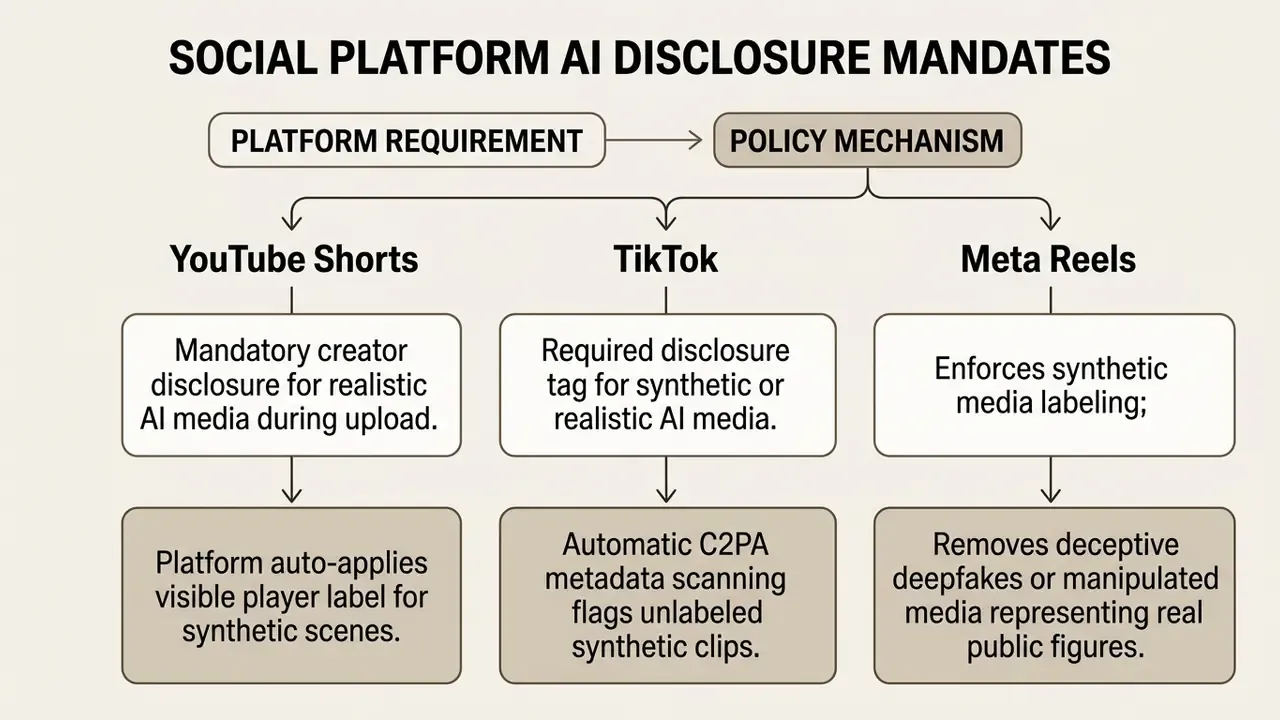
Auto-publishing earns no exemption. Enforcement turns on whether the clip is realistic, deceptive or impersonating a real person, not on whether a human or a scheduler pressed publish. Perception research also shows how narrow the detection margin gets when synthetic and authentic footage are spliced together:
«95% of boundary judgments between real and AI-generated segments fell within [−0.20 s, 1.98 s] of the true transition.»
That finding argues for provenance metadata over any reliance on viewer discernment. Regulatory frameworks, including the EU AI Act (Regulation 2024/1689), require providers of synthetic video systems to embed machine-readable watermarks and hidden metadata such as C2PA tags for transparency and provenance verification, while deployers using deepfakes must clearly disclose artificial origin. Jurisdictional emphasis differs: the EU centers machine-readable detectability, whereas Hong Kong's 2025 Generative AI Technical and Application Guideline additionally requires visible video labeling plus hidden metadata fields carrying provider name or code and content ID.
AI Movie Maker for Long-Form, Branded, and Product Videos
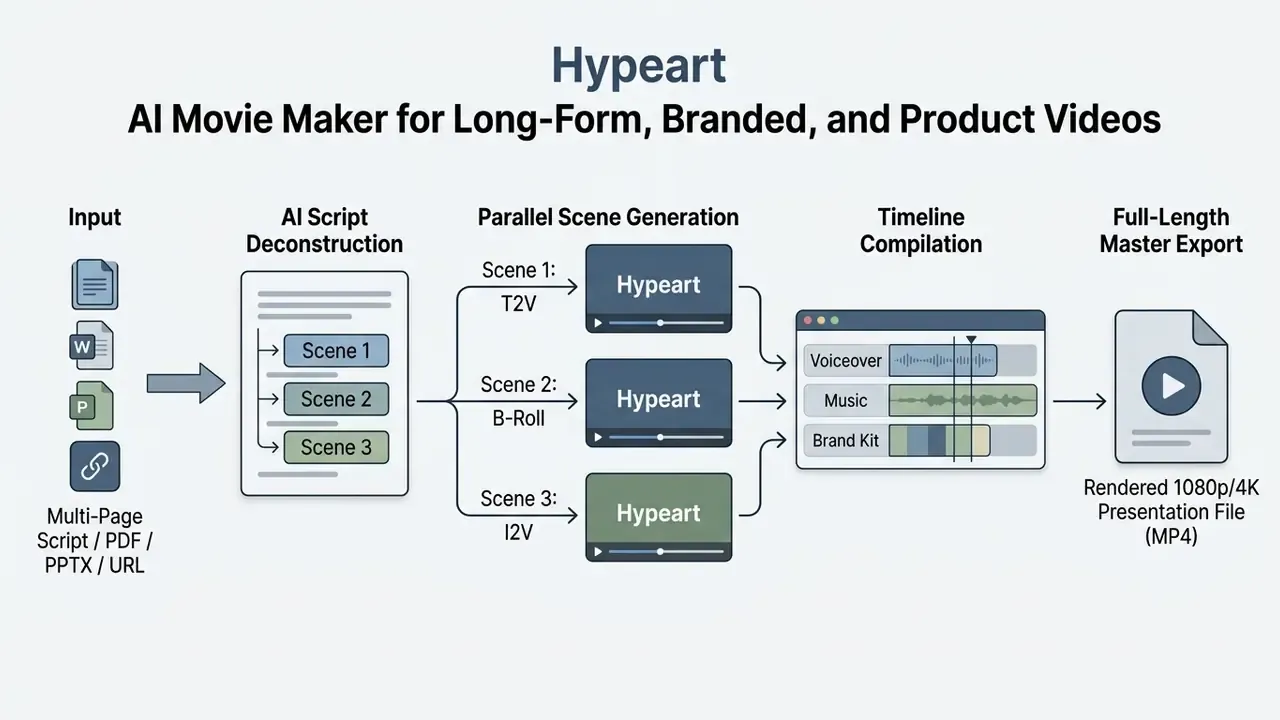
An ai movie maker provides extended scene compiling for long-form assembly, commercial advertisements, product launches and educational courseware. Unlike single-clip generators, these platforms structure multi-minute narrative arcs: sequential scene storyboards, contextual B-roll selection, brand asset kits, audio ducking under a synthetic narrator. Vendors currently advertise 30- and 50-minute runtimes with storyboard review, captions and standard export. Searches for ai movie maker online, ai movie maker free online and ai movie maker for free all land in this bracket, though free plans almost always cap runtime long before the 30-minute mark. An ai brand video generator positioning usually signals the same engine plus locked brand governance on top.
Long-Form Video from Script: Scenes, B-Roll, Voiceovers, and Music
Assembling multi-minute synthetic content from a structured script relies on sequential shot generation plus intelligent asset retrieval. The engine parses input text into discrete scenes, writes dedicated visual prompt directives for each, retrieves or synthesizes matching B-roll, then syncs the visual track against a continuous narrator voiceover.
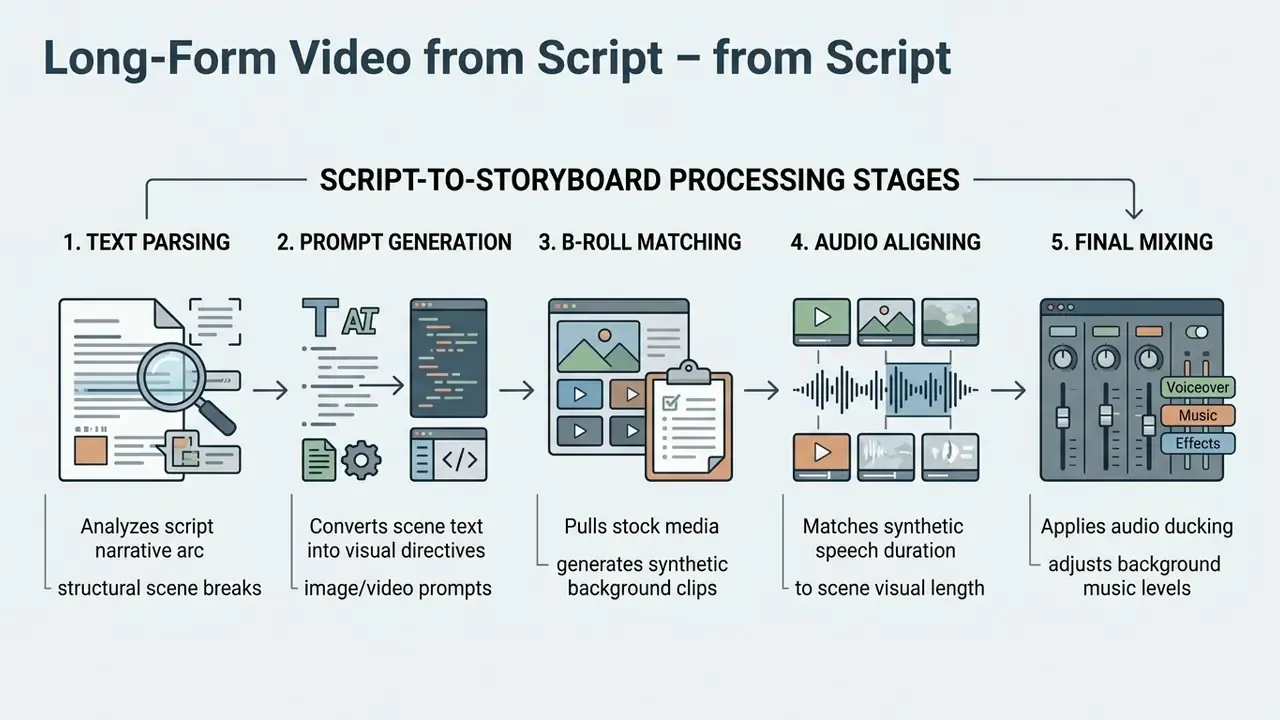
Recent technical surveys on long video synthesis define the problem space and the two dominant architectural responses:
«We define long video generation as exceeding 100 frames, and organize approaches into divide-and-conquer and autoregressive temporal extension.»
By chaining discrete 5-to-10-second diffusion clips with smooth transition algorithms and continuity state held by an orchestration agent, current platforms produce coherent presentations running 30 to 50 minutes. Practical B-roll strategy mirrors what commercial engines already do: match cleared stock automatically against script keywords, and insert generated footage only where stock coverage is thin. Teams handling post-production outside the browser can compare desktop options in our roundup of free video editing software.
Brand Kits, Product Visuals, and Consistent Style for Marketing Videos
Holding brand identity standards steady (logo lockups, corporate palettes, custom typography, physical product appearance) is critical for commercial video. Enterprise platforms run centralized Brand Kit modules that inject locked assets across synthesized timelines, applying one set of colors, fonts and logos to covers, title cards, lower thirds and other broadcast-style elements.
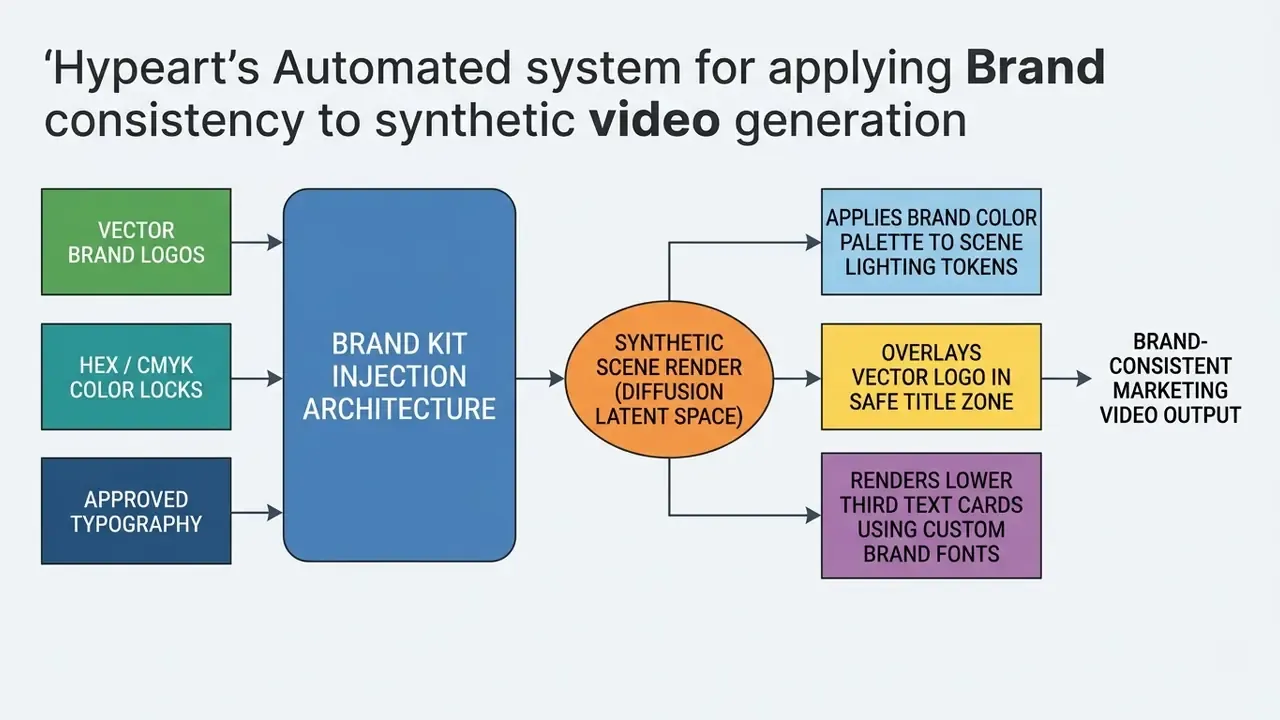
Model evaluation research confirms that raw text-to-video systems struggle with precise attribute control, which is exactly the failure mode that wrecks product fidelity:
«Models frequently violate exact attribute binding and numeracy constraints even when individual frames look visually convincing.»
The mitigation is explicit image-reference conditioning. Anchoring scenes with approved product photography (I2V frame anchoring) preserves packaging, labeling and corporate visual standards far more reliably than prompt text alone. Creative leads building multi-channel visual assets can also benchmark image editing capabilities via our review of Canva AI generator commercial workflows.
Videos for Explainers, Education, Training, and Compliance Communications
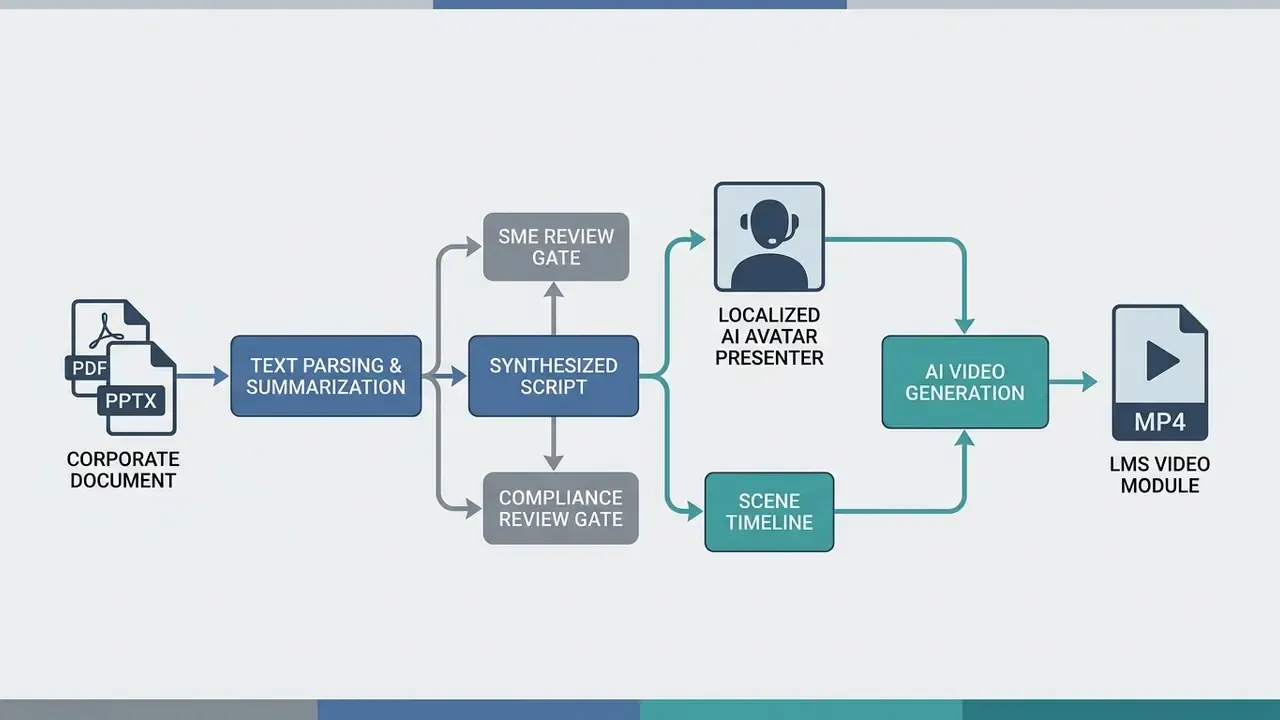
Enterprise learning and development teams use automated video engines to turn flat training documents, compliance PDFs, standard operating procedures and slide decks into video courses led by synthetic presenters. The transformation compresses production from weeks to hours, and it allows instant script updates when a policy or control changes. For compliance content, that last property is the whole argument, because a regulatory amendment would otherwise trigger a full reshoot.
Free AI Video Generator: Limits, Export, and Commercial Use
Free-tier ai generator video maker free offerings let creators test prompt adherence, interface responsiveness and export quality before committing budget. Free accounts, though, impose clear restrictions: resolution caps, visible platform watermarks, monthly or weekly credit quotas, and outright commercial-use prohibitions. Audit all four before pushing synthetic media into revenue-generating campaigns. For regulated buyers, the more consequential gap is not the watermark at all. Free tiers rarely include SSO, tenant isolation, no-training guarantees, audit logging, retention controls or a data processing agreement, which rules them out for anything derived from internal material regardless of watermark status.
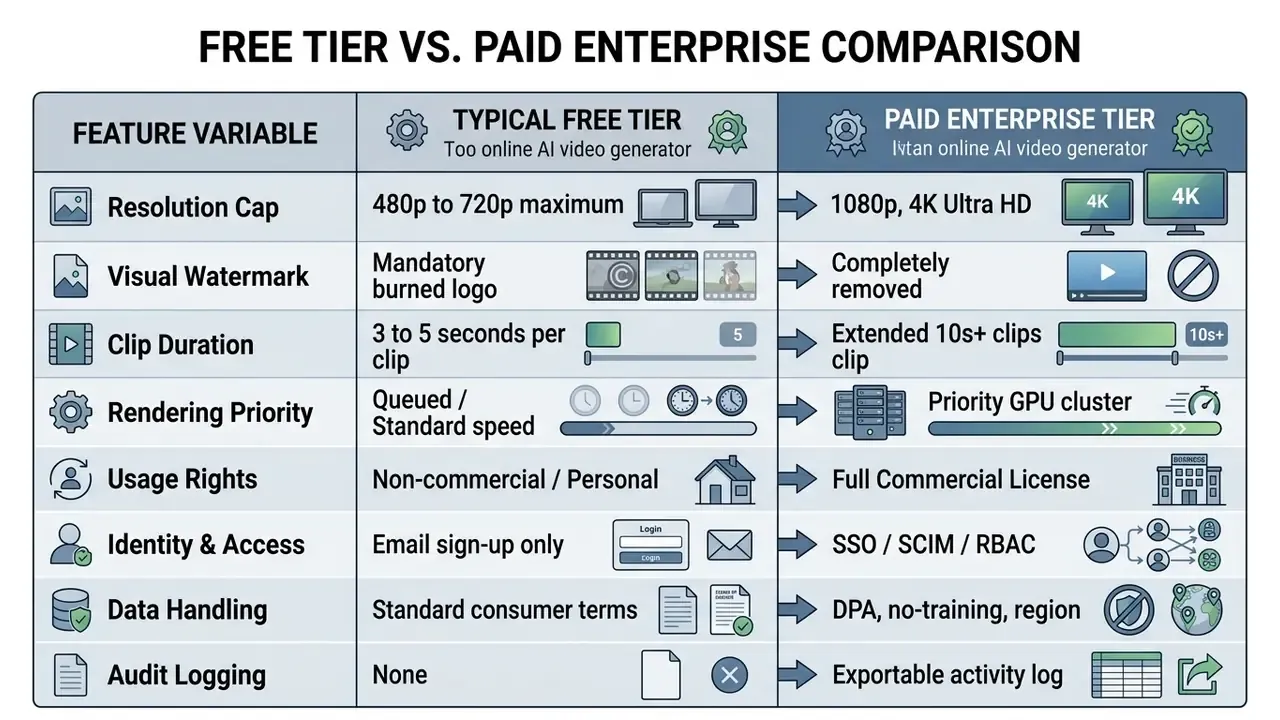
Free Plan Limits and Features Verification Matrix
| Platform Tier / Model Access | Monthly Credit Allocation | Max Clip Duration | Resolution Cap | Visual Watermark | Commercial Use Rights | Direct File Download |
|---|---|---|---|---|---|---|
| OpenAI Sora (ChatGPT Plus) | Included in plan (~50 videos/mo) | 5 seconds | 480p / 720p | None | Subject to Service Terms | Yes (MP4 format) |
| Runway (Free Tier) | 125 one-time credits | 4 seconds | 720p | Mandatory | Non-commercial only | Yes (watermarked) |
| Pika (Basic Plan) | 80 monthly credits | 3 seconds | 480p | Optional / varies | Non-commercial only | Yes (MP4 format) |
| HeyGen (Free Plan) | 1 credit (~3 videos/mo) | 1 minute | 720p | Mandatory | Non-commercial only | Yes (watermarked) |
| InVideo (Free Tier) | Weekly reset credits | 10 minutes | 720p | Mandatory | Non-commercial only | Yes (watermarked) |
| Multi-Model Aggregators | Limited trial credits per premium engine | Varies by engine | Varies (often 720p on trial) | Varies | Typically paid-tier only | Yes (varies) |
Buyers assessing adjacent static-asset tooling can compare options in our matrix of the best AI image generators, and cross-check tier costs against our AI Media Pricing Guides.
What "Free" Typically Entails: Generation, Watermark, Download, and Limits
Vendors structure free plan restrictions to balance server compute overhead against user acquisition. Because running multi-billion parameter diffusion transformers burns real GPU cloud energy, they enforce hard operational boundaries:
«Zeus-framework measurements show text-conditioned video generation consumes 1.3× to 15× more energy per token than text-only workloads.»
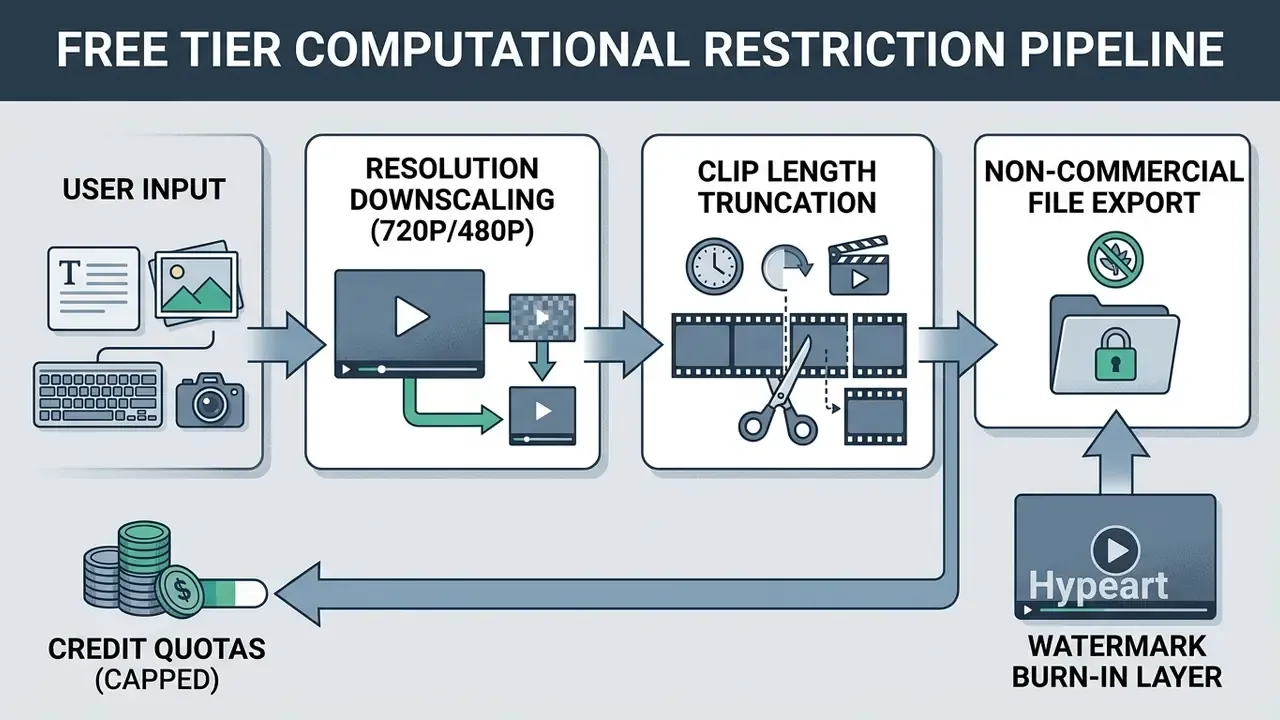
Practice varies meaningfully rather than uniformly. Some free plans drop the watermark but hold you to 3-second clips at 480p; others allow longer runtimes and brand every single frame. Note also that "ai video generator free no copyright" queries usually mean royalty-free stock and music inside the editor, not a grant of copyright in the generated output, which is a separate question addressed below. Users comparing free tiers can explore detailed feature matrices in our guide to the best free AI video generators, review category-level limits in our reference on free AI video generators, or weigh file reduction options via our guide to video compressors.
Verifying Terms and Rights for AI-Generated Videos Before Commercial Use
Deploying synthetic media into commercial advertising, broadcast or monetization pipelines requires verifying platform user agreements, copyright law and asset licensing terms. Guidance issued by official intellectual property authorities sets clear operational boundaries:
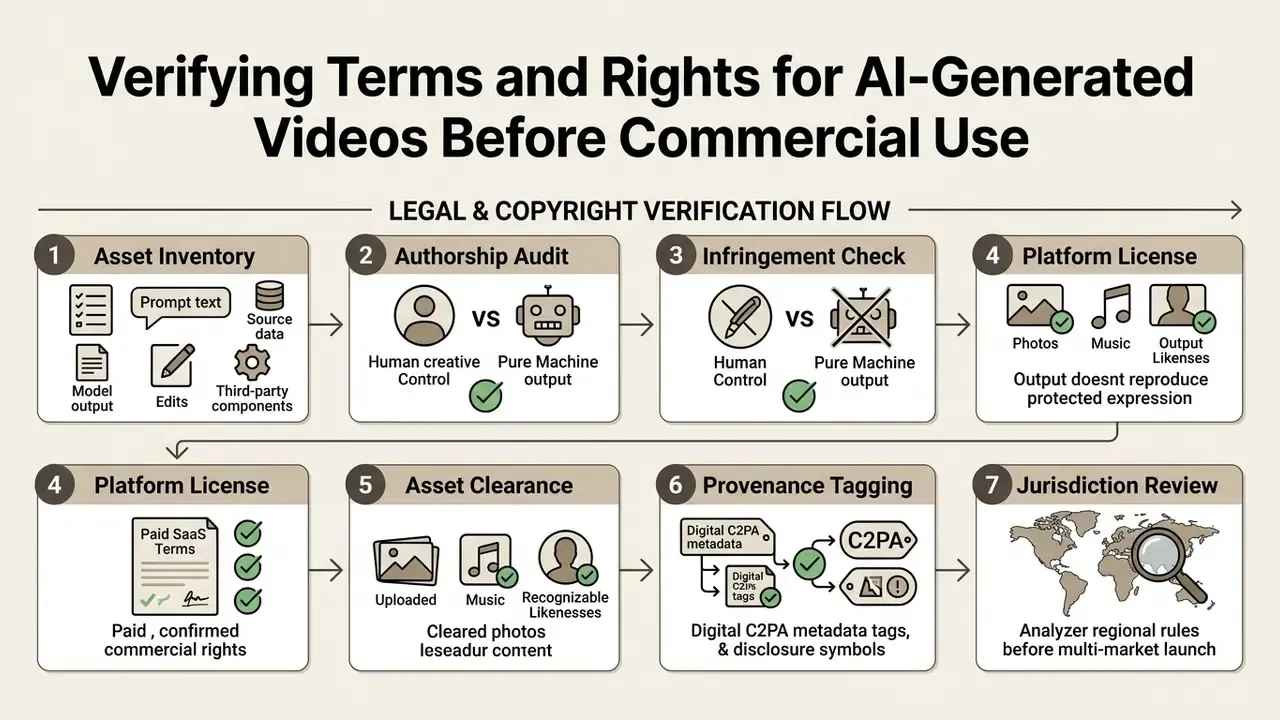
Formal guidance from the U.S. Copyright Office establishes that purely machine-generated visual content lacking sufficient human authorship is not eligible for protection:
«The term "author" excludes non-humans; material generated by AI without sufficient human authorship is not registrable.»
Registration practice follows directly. Applicants must disclaim AI-generated portions and claim only human contributions, which turns contemporaneous documentation of human editorial input into a rights-preservation activity rather than a formality. Jurisdictions diverge in emphasis: U.S. guidance centers human authorship and registration, while Hong Kong's copyright-and-AI consultation and Japan's 2024 AI copyright guidance focus more on licence and permission triggers by use purpose, including the commercial versus non-commercial distinction.
Terms of service across major generative engines also restrict free-tier outputs to personal non-commercial use, requiring a paid upgrade for full commercial rights. Specific clauses worth reading before launch: publicly sharing generated video on some platforms grants the provider broad rights to reproduce, distribute, modify and display that content for operating and promoting the service; other users may receive an in-service remix right; synthetic voice output may be restricted to non-commercial use and barred from redistribution as a standalone audio file; and the user typically warrants they hold all necessary rights in any uploaded footage or likeness. Third-party logos and licensed material embedded in an otherwise cleared publication may fall outside the platform licence and need separate clearance.
Enterprise legal teams assessing synthetic media risk often cross-reference our tracking resources in the database of AI Litigation and Case Timelines and audit platform tiers through our guidance on commercial use rights.
FAQ: AI Video Generator Online
What is the best free online AI video generator available?
It depends on production requirements. For watermark-free output, OpenAI Sora inside ChatGPT Plus offers strong quality capped at 480p/720p with roughly 50 monthly generations. For multi-track browser timeline editing, InVideo and HeyGen offer accessible free evaluation plans, though free exports keep visible watermarks and restrict commercial usage. For long-to-short clipping, free tiers usually allow generation and preview while gating bulk export and direct posting.
Can I generate AI videos on my smartphone or lightweight browser?
Yes. Cloud-based engines run model inference on remote server GPU clusters, so you access the platform through a standard mobile or desktop browser (Chrome, Safari, Edge) with no local high-end graphics hardware and no downloads. Browser-only engines that run inference locally via WebGPU are more hardware-sensitive: expect an initial model cache near 1 GB and reduced performance where multi-threading support is missing.
What is an AI video agent, and how is it different from a normal generator?
A standard generator turns one prompt into one clip. An AI video agent, driven by a large language model, decomposes a conversational brief into a scene-by-scene storyboard, routes each scene to a suitable model, casts avatars and voices, renders, assembles, then accepts further chat instructions to revise the cut. Practically, it swaps timeline skill for prompt clarity, and it raises the importance of a human approval gate, because more decisions get made without a person in the loop.
Can I turn a blog post, URL, tweet, or PDF into a video?
Yes. Specialized ingestors crawl a live URL or parse an uploaded document, extract headings, key claims and metrics, condense them into a scene script, then pair each scene with generated or licensed footage. Tweet-to-video converters isolate the hook and main quote as animated typography, while PDF and PPTX conversion is the standard path for turning SOPs and training decks into avatar-narrated modules. Confirm the vendor's data-handling terms before ingesting internal documents.
Can I edit an AI video by typing instructions instead of using a timeline?
Yes. Natural-language editing boxes accept commands such as "delete scene 3", "change the voiceover accent", "add a faster-tempo music bed" or "replace the background". The system re-renders only the affected segments, which makes iteration cheap and enables high-volume faceless channel workflows without manual editing.
Are faceless AI Shorts eligible for YouTube monetization?
AI-assisted videos, Shorts included, can be monetized, but eligibility depends on meeting content guidelines, originality and reused-content requirements, and disclosure obligations for realistic synthetic media. Channels that mass-publish thinly transformed automated content carry the most policy-enforcement exposure. Short-form monetization rules change often, so verify current policy before building a business case.
Are free AI video generator outputs allowed for commercial business use?
Generally no. Most terms of service restrict free-tier output to non-commercial personal evaluation. Commercial deployment, meaning paid ad campaigns, client deliverables or monetized channels, typically requires a paid plan that grants explicit commercial licensing rights. Synthetic voice output can carry extra non-commercial restrictions even on paid plans.
How long does it take to generate an AI video clip online?
Latency depends on model size, prompt complexity, resolution and queue priority. Distilled 4-step diffusion models synthesize a 5-second 720p clip in roughly 8 to 15 seconds. Standard multi-step cloud rendering on free queues usually takes 1 to 3 minutes per scene. Long-to-short clipping of a 60-minute source, including reframing and captions, is commonly reported at 10 to 15 minutes.
Can I convert static product photos into moving video clips?
Yes. Image-to-video features accept static product photography, corporate headshots or illustrations, then animate the asset with temporal camera motion, background movement or lighting shifts while preserving key subject details. Identity-preserving reward-tuned models are the stronger choice where packaging and logo fidelity are contractual requirements.
How do I remove watermarks from my generated AI videos?
Removing platform watermarks requires upgrading to a paid tier. Cropping or blurring a watermark manually degrades visual quality and grants you no commercial rights if the asset was generated under a non-commercial free plan.
How should a regulated organization control Shadow AI use of browser video tools?
Allow-list one or two sanctioned enterprise tenants with SSO, contractual no-training clauses and audit logging. Block the consumer long tail at the network and CASB layer. Apply DLP inspection to prompt fields and file uploads. Require a recorded human approval before any asset publishes. Blanket prohibition without a sanctioned alternative simply relocates the activity to personal accounts, eliminating visibility rather than risk.
Can I publish directly to TikTok, Reels, and Shorts from the generator?
Yes on platforms with integrated distribution hubs. Connect the accounts once, then schedule or publish rendered clips across TikTok, YouTube Shorts, Instagram Reels, Facebook Reels and LinkedIn from one workspace, with platform-specific hashtags generated automatically. Treat publishing tokens as privileged credentials and route scheduled posts through your approval gate instead of allowing direct publish from the editor.
Operational Summary and Next Steps
Integrating an ai video generator online into marketing, communications or content operations enables fast visual scaling, lower production cost and simpler cross-platform distribution. Enterprise deployment, though, means balancing generative speed against model governance, data protection, visual consistency and legal compliance. And the constraint that actually determines throughput is review capacity, not render capacity.
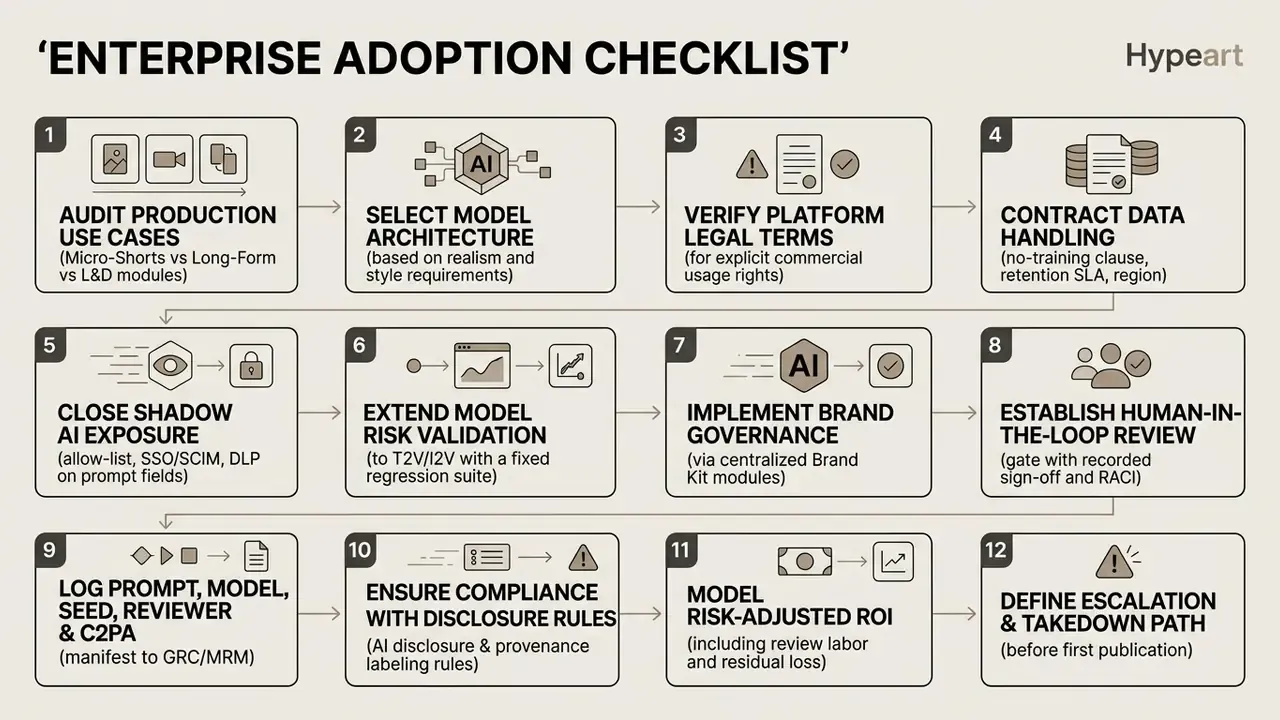
One safe next step, if you are early: pick a single low-sensitivity use case, run it end to end through the gate above, and measure what the control layer actually costs. That number is more persuasive in a governance committee than any vendor deck.
Organizations evaluating implementation paths, cost models and workflow integrations can explore our specialized analytical suites:
- Examine model cost structures in our breakdown of Google Veo API costs and implementation.
- Review developer documentation via our AI Media API Guides.
- Explore domain terms in our master AI Media Glossary.
Appendix A: Revised Statements and Source Notes
This appendix preserves earlier formulations that were revised in the body text, so readers can see exactly what changed and why.
Revision rationale: the cited vendor case material is not independently verifiable. No URL, methodology, sample size or control group is published. Updated position (in body text): document-to-video capability is confirmed by vendor documentation; completion-rate uplift is stated as an unverified hypothesis requiring internal LMS validation.
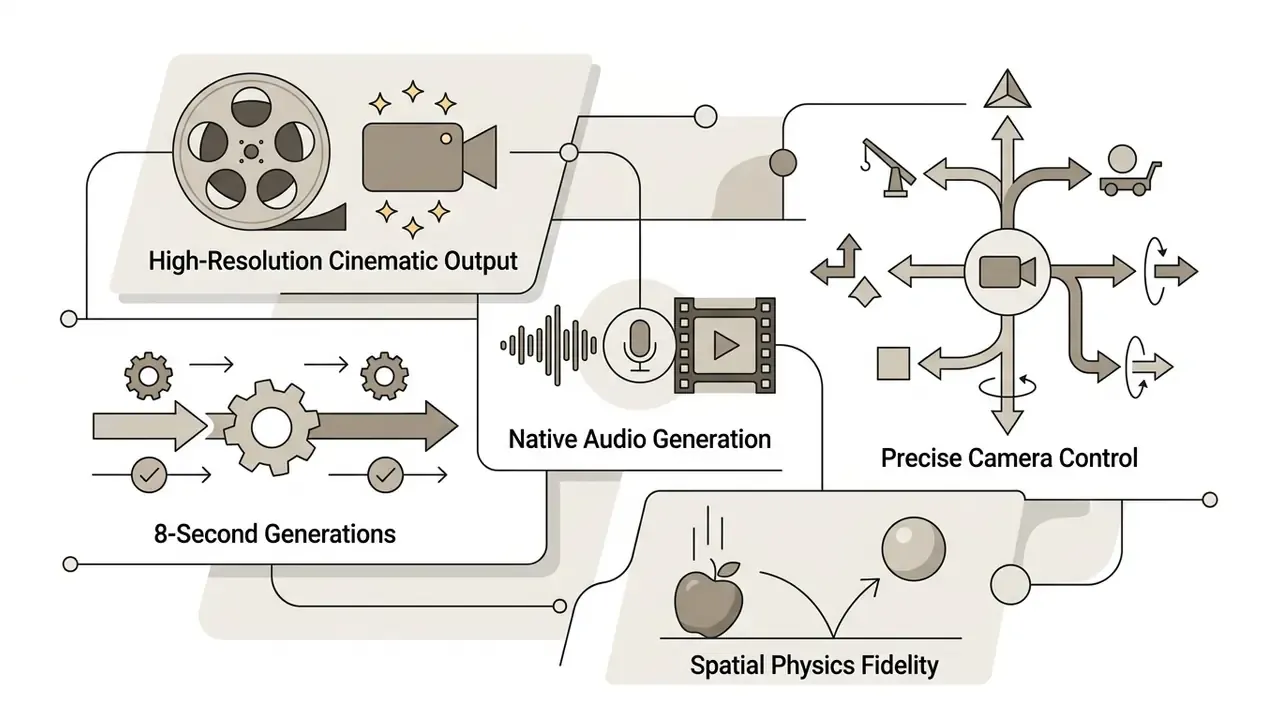
Revision rationale: the framework reference carried no figures. Updated position: replaced with quantified benchmark citations (LanDiff VBench 85.43; CogVideoX architecture report; Alice v1 at 91.2 VBench with 4-step ~8 s H100 inference) plus explicit vendor resolution specifications for Veo 3.1 (720p/1080p/4K, 8-second generations).
Updated position: retained the 26 kJ to 1.16 MJ range and added the Zeus-framework measurement basis plus the 1.3× to 15× per-token energy comparison against text workloads.
Updated position: added FVD 171.15 single-step result on OpenWebVid-1M versus 8-step AnimateLCM at FVD 184.79.
Updated position: added randomized field-experiment design and the 21,328-shopper sample alongside the 9.4 percentage-point CTR lift and ~90% cost reduction.
Updated position: added +5.9 mAP on TVSum, +8.3 mAP on Mr. HiSum, and the 22,463-video frame-level engagement training corpus.
- Original statement
- "Enterprise use cases documented across corporate training environments confirm that converting static Standard Operating Procedures (SOPs) into synthetic explainer videos improves employee course completion rates while facilitating multi-language localization (Synthesia & Powtoon Enterprise Case Analysis, 2026)."
- Original statement
- "state-of-the-art architectures can synthesize high-fidelity 5-to-10-second scenes at up to 4K resolution (VBench Evaluation Framework, 2024)."
- Original statement
- general reference to "ML.ENERGY Benchmark Study, 2026" without measurement methodology.
- Original statement
- general reference to "OSV One-Step Diffusion Study, 2025" without metrics.
- Original statement
- general reference to "MIT Personalized AI Video Study, 2025" without design details.
- Original statement
- general reference to "Aha Highlight Detection Study, 2025" without accuracy figures.
- Unverified vendor claim recorded for transparency
- aggregator marketing asserting "every top model, up to 10 minutes, 100% free forever, no watermark." Assessed as economically unsupported given frontier-model GPU inference costs; treated in the body as trial credits plus paid metering.
- Vendor-reported metric flagged, not endorsed
- transcription accuracy figures near 95% appear in product marketing without independent benchmarking. Verify against your own audio conditions.
- Terminology note
- "AI Clip Maker" and "AI Movie Maker" are vendor workflow labels rather than standardized technical categories. Compare documented input/output specifications instead of category names.
- Author note
- Marcus Hale, author. No employment, clients, regulatory authority or documented business results should be inferred from the attribution.
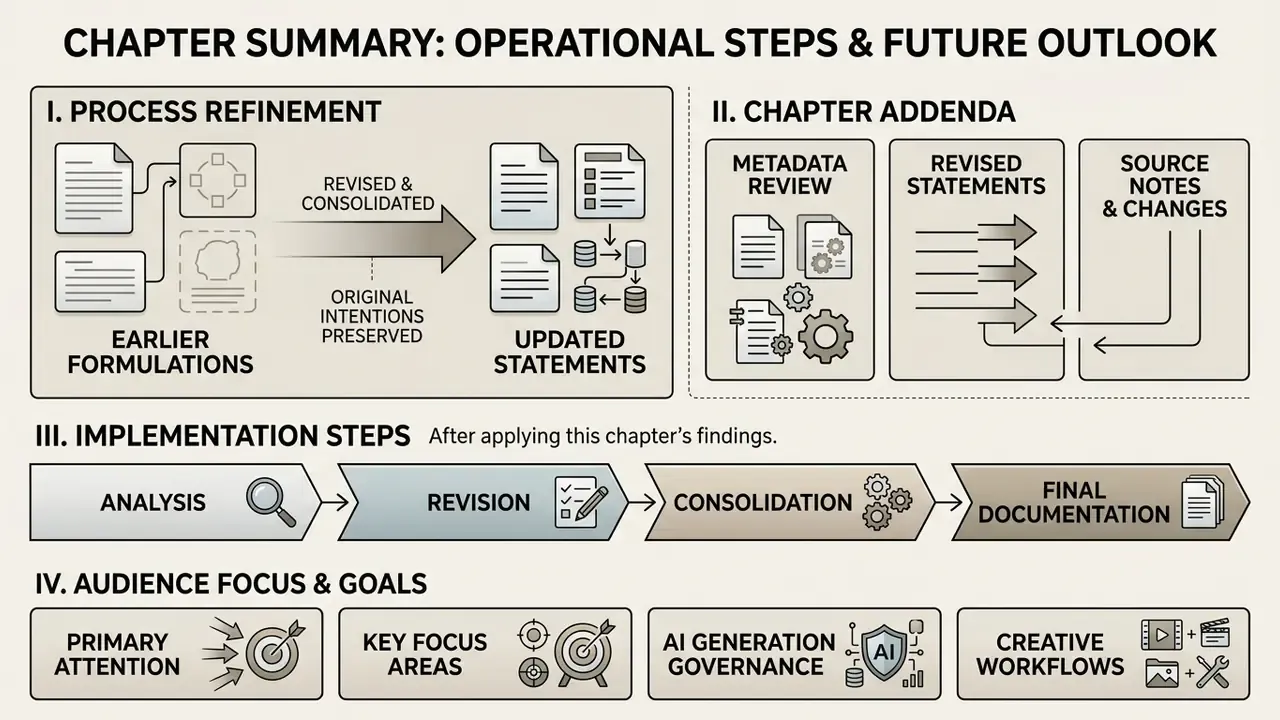
Metadata and Page Specifications
- SEO title AI Video Generator Online: Free AI Video, Agents, URL-to-Video and Auto-Posting
- Meta description Complete 2026 guide to AI video generators online: agentic video creation, text/image/URL/PDF-to-video, natural-language editing, faceless Shorts, Hormozi captions, direct TikTok and Reels posting, free-tier limits, governance and commercial-use rights.
- Target audience creative directors, marketing executives, content operations leads, SMM managers, L&D specialists, AI governance and model risk leaders, compliance and audit owners.
- Primary focus areas AI governance, Shadow AI and DLP controls, model risk validation, agentic video orchestration, controlled video automation, model selection, commercial license verification, workflow integration and distribution.