«Automating video production from structured text reduces cycle times, but autonomy without editorial control increases risk. A script-driven pipeline must maintain strict visual alignment, verifiable data lineage, and human oversight before enterprise deployment.»
Reviewed by: Marcus Hale, AI Governance & Model Risk Editorial · Last updated: February 2026 · Vendor independence: This guide contains no affiliate placements or paid rankings for HeyGen, Synthesia, Fliki, Kapwing, Visla, Vyond, Runway, or Pika.
Executive Summary
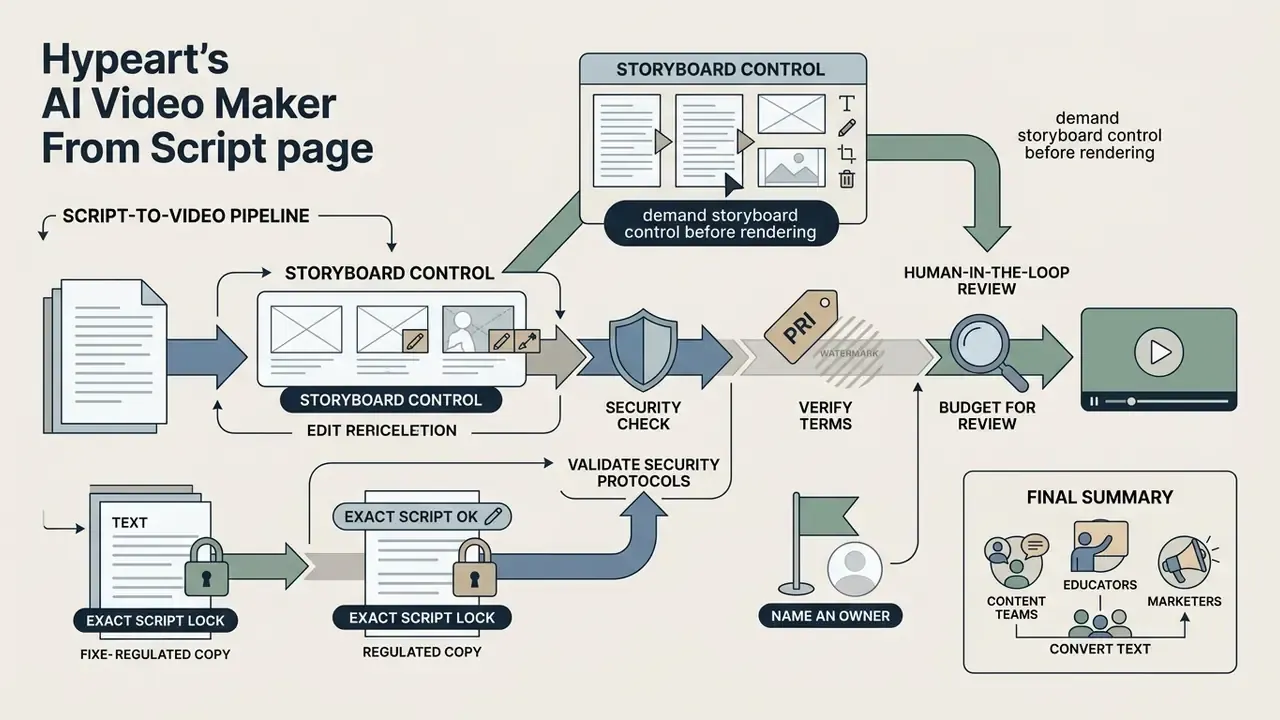
- Script-to-video is a controlled pipeline, not a prompt lottery. A written script dictates scene count, pacing, and voiceover timing, whereas single-prompt text to video leaves timing to model sampling. Benchmarks show standard text-to-video models execute fewer than 20% of requested temporal changes from one prompt.
- Demand storyboard-level control before rendering. Mature platforms expose an unrendered, frame-by-frame storyboard so shot lists, captions, and aspect ratio can be corrected before credits or GPU minutes are consumed, and they support incremental regeneration of a single scene after script edits.
- Insist on Exact Script Lock for regulated copy. Compliance, legal, and onboarding scripts must pass through the engine unchanged; script-driven tools lock the text track and use hard line breaks to determine scene timing.
- Validate security before functionality. Uploading proprietary scripts into unvetted consumer SaaS is a Shadow AI exposure; require SOC 2 Type II, GDPR terms, and Zero Data Retention (no training on customer inputs).
- Verify pricing and watermark terms at checkout. Vendor tiers, free-plan resolution caps, and commercial-use grants change frequently and differ by region.
- Budget for human-in-the-loop review. On-screen text rendering, multi-step physical transitions, and caption timing remain the three most common defect classes in generated output.
- Name an owner. Every automated video pipeline needs a named accountable person, an approved use scope, an escalation path, and a documented shutdown switch. No evidence, no autonomy.
An ai video maker from script allows content teams, educators, and marketers to convert written text into complete, rendered videos using artificial intelligence. By automating scene layout, visual matching, voice synthesis, and audio alignment, these platforms remove traditional camera setups and manual timeline assembly. For a bank or fintech, the same automation compresses a two-week vendor cycle into an afternoon, which is precisely why the control set matters.
What Is an AI Video Maker From Script and How Does It Work?
An ai video maker from script is a software system that converts text documents into structured video files by automating video editing, speech synthesis, and media retrieval. The system ingests a written script, parses the natural language, segments the text into distinct scenes, and selects or generates corresponding visual and audio assets.
How AI Converts a Script Into Scenes, Visuals, and Audio
An ai tool create video from script operates through a sequential multi-stage processing pipeline. First, a document parser cleans the text input and passes it to a script planning model. The model analyzes sentence structure, identifies visual keywords, and breaks the script into timed scenes.
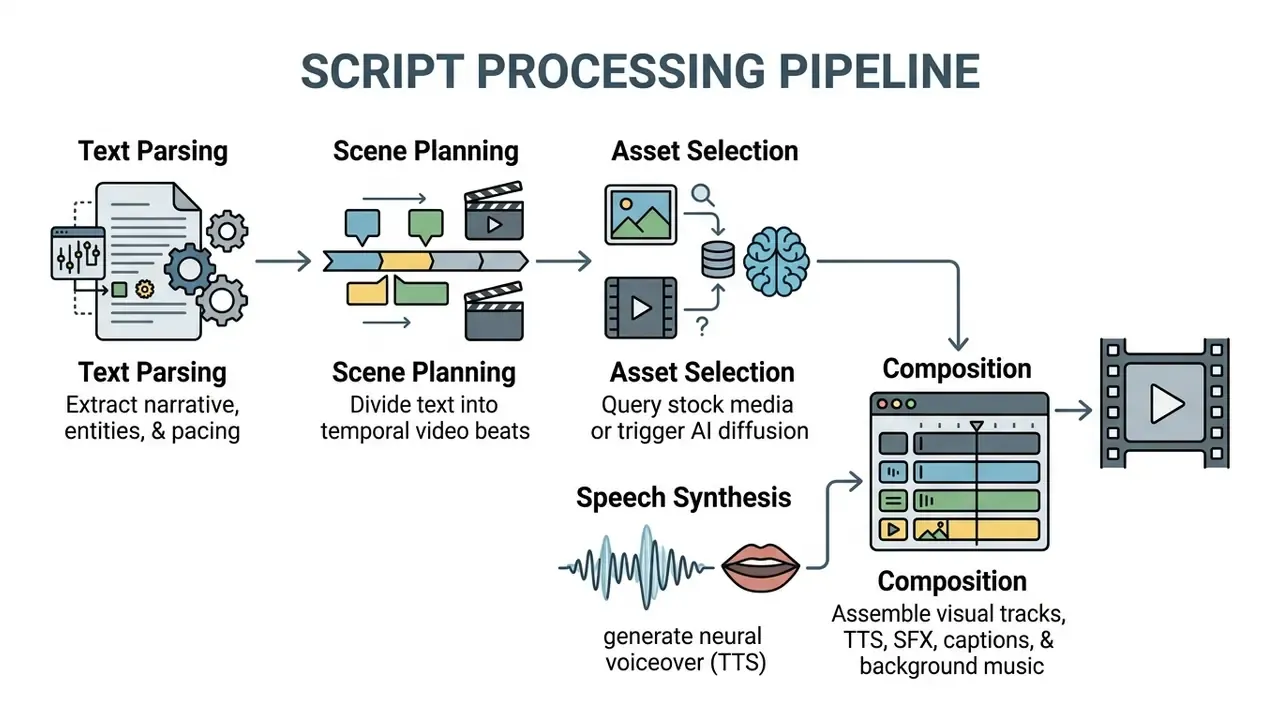
Next, the visual selection module retrieves matching B-roll footage from stock libraries or executes text-to-image diffusion models. In parallel, a Text-to-Speech (TTS) engine synthesizes voiceovers, aligning spoken cadence with scene durations. Research on document-to-video systems, such as the Doc2Video (2024) pipeline, shows that explicit script planners improve scene layout and lip-sync rendering compared with unstructured generation. The published architecture separates four components: a document parser, a script planner that turns a document into an ordered list of scenes with narrations and graphical layouts, a video synthesizer for lip-synced talking-head rendering, and an editing interface.
Large-scale datasets such as VidGen-1M (2024) and CI-VID (2025) indicate that training models on descriptive multi-sentence captions improves temporal consistency across consecutive visual beats.
«Models trained on VidGen-1M show improved FVD and CLIPSIM scores versus earlier datasets, indicating better visual quality and text alignment.»
One practical read: the more your input looks like an ordered narrative, the less the model has to guess. That is the whole argument for ai tools for creating videos from scripts rather than one-line prompts.
Script to Video vs Text to Video AI
Script-to-video platforms differ from prompt-based text-to-video generators in input structure, narrative control, and output predictability. Text-to-video tools generate short clips from single prompts, leaving timing and visual transitions to the model's internal sampling.
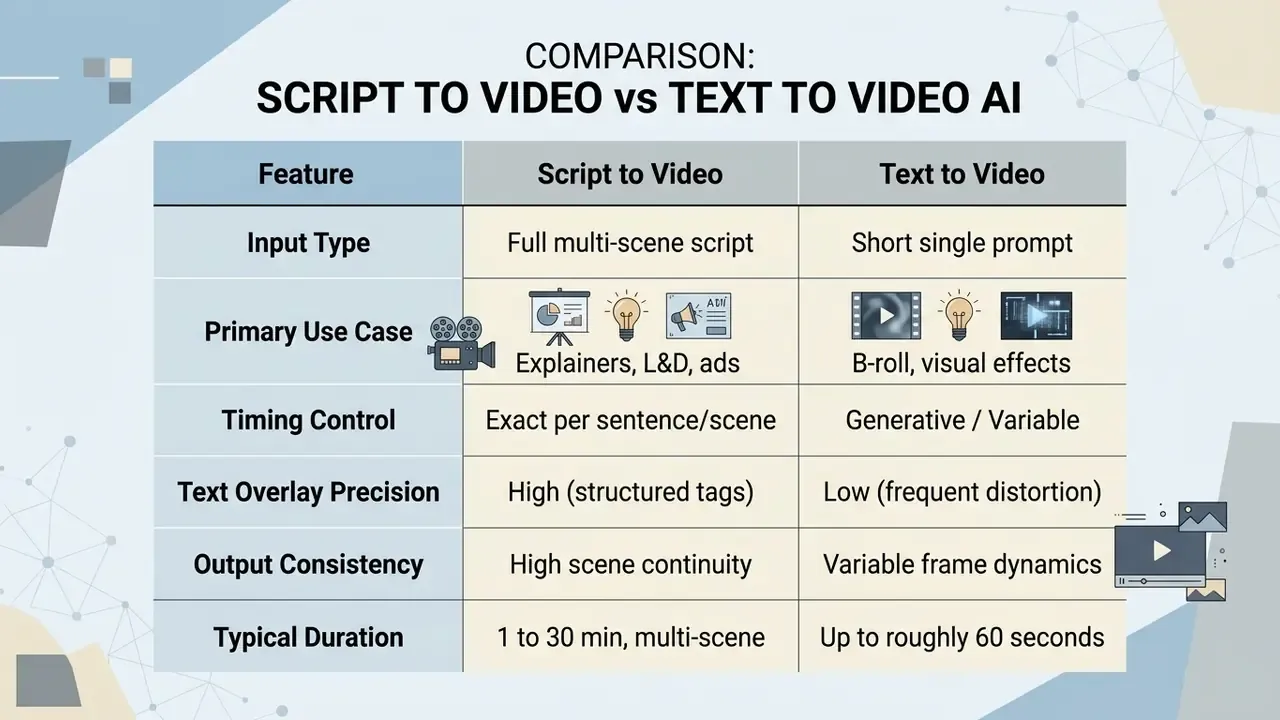
An ai script to video platform uses structured text to dictate scene lengths, visual actions, and voiceover timing. Empirical evaluation benchmarks, such as TC-Bench (2024), reveal that standard text-to-video models successfully execute less than 20% of requested temporal compositional changes from single prompts.
«Most video generators realize fewer than 20% of requested compositional changes, even with explicitly formulated prompts.»
Script-to-video tools resolve this limitation by dividing the workflow into discrete, editable scene blocks. Control-conditioned research systems reinforce the same principle: adding motion sequences, pose maps, or structured constraints on top of a prompt measurably improves controllability compared with text-only conditioning. Readers wanting broader contextual research on media tools can consult the AI Media Glossary, while creators focused on stylized motion output can review our guide to animation makers. Teams starting from a single still asset instead of text should look at free image to video ai workflows, which follow a different control model entirely.
What Videos Can You Create From a Script With AI?
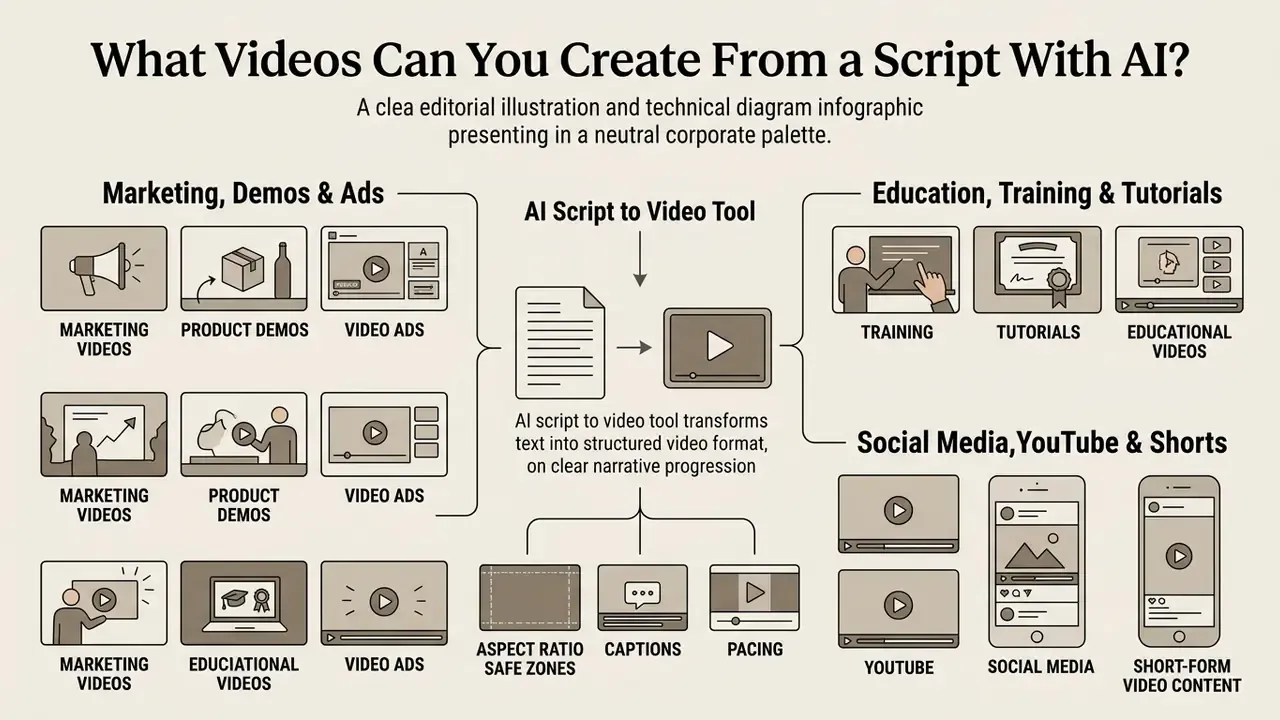
An ai script to video tool generates structured video formats where clear narrative progression matters more than complex cinematic camera work. Organizations deploy these systems to produce repeatable, high-volume video content across internal and external channels.
Marketing Videos, Product Demos, and Video Ads
Marketing teams use an ai tool generate video from script automatically to produce product feature explainers, personalized sales outreach, and digital ad variations. According to the Wyzowl Video Marketing Survey (2024), a self-reported practitioner survey rather than a controlled study, 91% of businesses use video as a primary marketing tool, with 87% reporting direct sales increases.
Here is a concrete pattern we see repeatedly. An enterprise software team needed 20 localized product demo videos within three days for a multi-region launch. Traditional agency production was quoted at $15,000 per video with a three-week turnaround. By implementing an automated script-to-video pipeline, the team converted technical documentation into scripted scenes, selected branded avatars, and generated localized MP4 files in 4.5 hours at a total software cost under $200. Figures of this type are vendor- or practitioner-supplied and should be treated as directional benchmarks rather than audited results; comparable published cases describe 60-second marketing videos falling from 13 days to 27 minutes, and per-video costs dropping from the $150 to $1,000 range toward single-digit dollar amounts.
Enterprise deployments report similar acceleration in global localization. Enterprise HR platform Workday scaled video production across 10 to 15 languages per project using automated voice cloning and lip-sync dubbing, reducing multi-region deployment timelines from several weeks to under 30 minutes per module while cutting production costs substantially. Vendor-published creator cases claim comparable operational savings, roughly 15.5 hours reclaimed per week and up to a 100% increase in publishing capacity for teams that standardized on a script-driven pipeline. Treat all of it as hypothesis until your own cycle-time data agrees.
For teams comparing specialized ad tools, evaluating options in our guide to compare top generative platforms helps isolate performance features, and buyers assessing design-suite bundles can review Canva AI commercial licensing terms alongside standalone video engines.
Training, Tutorials, and Educational Videos
Learning and Development (L&D) departments deploy ai script to video software to convert policy documents, compliance manuals, and slide decks into training modules. A 2026 quasi-experimental study published in an educational technology journal evaluated business mathematics students, comparing human-recorded lectures against AI-generated avatar videos. The study found no statistically significant difference in knowledge retention or transfer scores between the two groups.
«A 2026 study (69 students) found no significant difference in learning outcomes between AI video and human lectures, though engagement and instructor presence were rated lower.»
However, a 2026 structural equation modeling study on educational video drivers showed that synthetic instructors with robotic speech patterns reduce learner motivation.
«Mediation analysis indicates AI instructors are perceived as less human, lowering motivation and indirectly impairing retention.»
To hold engagement, creators should use realistic neural voices, slide overlays, and multi-avatar formats. Research from the Virtual Omnibus Lecture (2023) experiment confirms that varying avatar appearances across instructional modules improves audience memory retention compared with single-avatar presentations. Systematic reviews of instructional video report strong learning gains when video supplements existing teaching (reported effect size g = 0.80), which explains why L&D teams treat script-to-video as an amplifier of curriculum rather than a replacement for instructors.
Practical L&D configuration usually includes document-to-script ingestion (DOCX, PDF, PPTX), per-language script variants, SCORM export for LMS tracking, and template reuse through duplicate-and-swap workflows, where a locked master template is copied and only the script text and language are exchanged. In regulated training, add one more step: record which version of the approved script produced each published module.
YouTube, Social Media, and Short-Form Video Content
Short-form output is not only a creator channel. Corporate communications, employer branding, recruiting, and executive updates increasingly ship in the same vertical formats as consumer content, which is why enterprise teams treat 9:16 as a mandatory brand-controlled export preset rather than an experiment. Content creators and brand teams use ai tools for video creation from script to publish long-form YouTube explainers and vertical short-form content for TikTok, YouTube Shorts, and Instagram Reels. Platform analytics from Emplifi (2024 to 2025), a commercial benchmark dataset rather than peer-reviewed research, show that vertical video formats yield higher median engagement rates across major social platforms, with TikTok posting the highest worldwide median engagement rate and Facebook live video reaching 37.5 median interactions per post.
Vertical video workflows require specific formatting:

Creators focused on long-form video production can explore publishing automation strategies in our guide to YouTube video editors. Teams shipping large volumes of vertical assets across regional accounts should also plan storage and delivery, which our overview of video compressors addresses.
One acceptable-use note for compliance teams: when you write the policy, define what employees may not generate on corporate accounts. Vendor moderation categories differ widely, and consumer-grade categories such as free nsfw ai video generator tools or free image to video variants belong on an explicit prohibited list rather than in a grey zone.
How to Create a Video From a Script With AI
Creating professional videos using an ai app create video from script follows a structured five-step workflow, from text ingestion to final rendering. Readers new to the category can first review the underlying tool types in our AI Media Glossary.
Figure 2 = Five Steps to Build a Video From a Script
- Step 1, script input.Paste or upload text, split it into scenes, and add visual direction tags.
- Step 2, visuals and avatars.Configure digital presenters, stock footage, and AI-generated imagery.
- Step 3, audio setup.Select the TTS engine and language, clone a voice, add sound effects and background music.
- Step 4, timeline editing.Adjust layers, transitions, captions, and brand assets.
- Step 5, generation and export.Render the MP4 file at the chosen resolution and aspect ratio.
Paste or Upload Your Script
The workflow begins by pasting a written script into the platform's editor or uploading source documents such as DOCX, PDF, or PPTX files. Vendor documentation draws an important distinction here: pasting text word-for-word preserves the exact script, whereas uploading a document or deck often instructs the model to generate a new script from that material. System guidelines from OpenAI and Microsoft Azure recommend formatting scripts with clear scene breaks and visual directional tags in brackets, such as [screen: product dashboard] or [overlay: dynamic growth chart].
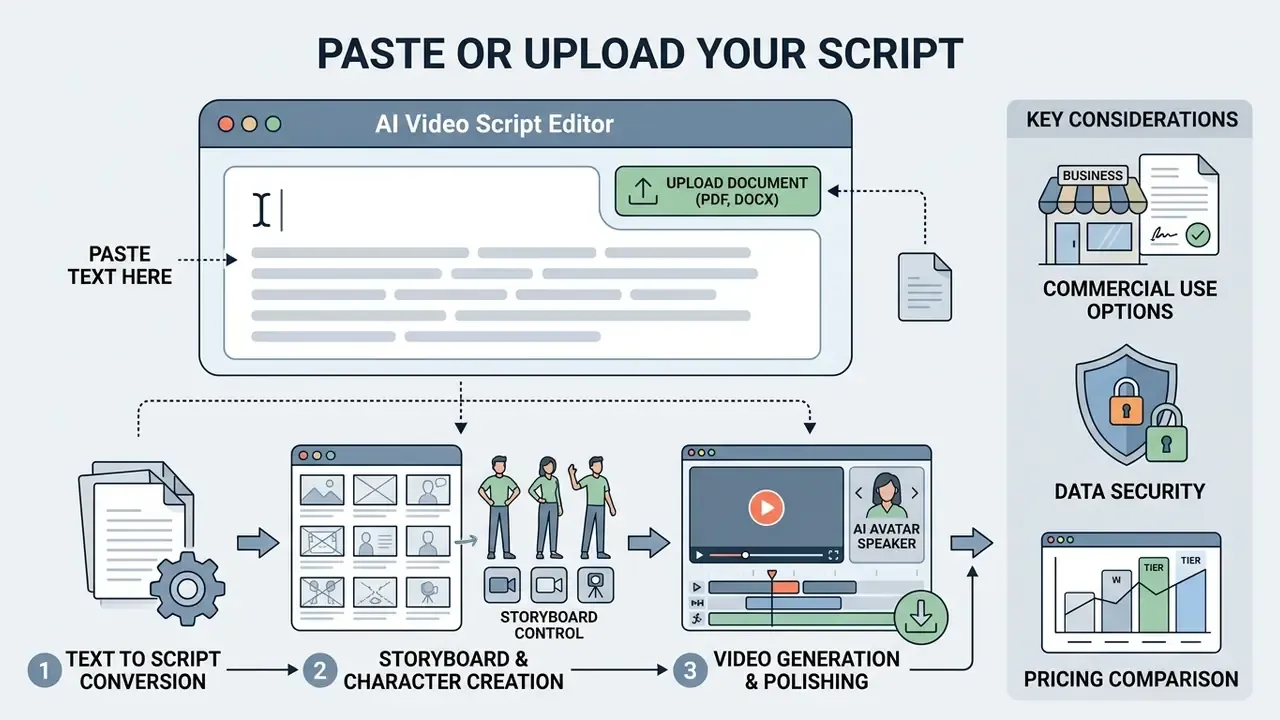
Pacing should target roughly 120 to 150 spoken words per minute (about 2 to 2.5 words per second) for natural speech cadence and comfortable visual comprehension. Modern ingestion layers also accept URL imports, file IDs from a files API, or Base64 payloads for programmatic pipelines, and most platforms cap the number of attached reference files per request. Engineering teams wiring this into a content system can review integration patterns in our AI Media API Guides.
Exact Script Lock vs. AI Refinement
For regulated industries (healthcare compliance, legal onboarding, corporate policy, financial disclosures), platforms offer an Exact Script Lock mode. While standard prompt-to-video tools may rephrase inputs for creative variance, script-driven engines explicitly lock the underlying text track: the words are not rewritten, edited, or summarized. The AI relies strictly on hard-coded line breaks to establish scene timing and to attach matching B-roll, ensuring zero deviation from approved corporate copy. Before purchase, confirm in writing whether the vendor's "script to video" flow preserves text verbatim or silently optimizes it. The two behaviors carry very different review burdens for compliance sign-off.
Choose Visuals, Voice, Avatar, and Music
After parsing the text, configure the visual elements, digital presenters, and audio tracks.
- Digital Avatars Select a photorealistic presenter or upload a custom studio avatar. Modern enterprise engines support full-body motion, multi-angle consistency, and long-form lip-sync stability.
- Visual Assets Assign stock B-roll footage, generate custom diffusion images, or upload proprietary media assets.
- Voiceover (TTS) Choose a neural voice model based on gender, accent, tone, and language. Advanced tools support custom voice cloning from 15-second audio samples; some pipelines also accept a pre-recorded audio upload instead of TTS when exact timing and pronunciation are mandatory.
- Background Audio Select an instrumental track from a royalty-free library. The platform automatically lowers music volume during spoken dialogue.
- Sound Effects (SFX) and Audio Layering Automated insertion of contextual sound design (UI clicks, scene-transition whooshes, ambient environment beds) aligned with visual cue markers on the multi-track timeline. SFX is a distinct layer from music: it reinforces on-screen action, while music carries emotional tone, and both must sit below the narration bus.
Creators adding static visual touch-ups before video assembly can review features in our guide to free online photo editor platforms, or compare full-feature options in our photo editor guide.
Review, Edit, and Generate the Final Video
Before triggering final rendering, inspect the project in the editor's multi-track timeline preview. Adjust the timing of visual overlays, correct auto-generated subtitle text, and place cross-fade transitions between visual cuts. On a standard timeline, upper tracks overlay lower tracks, transitions are dropped onto clip edges or between clips, and each subtitle set behaves as separate, independently editable timeline data.
Pre-Render Storyboard Control and Incremental Editing
Advanced script-to-video platforms separate the parsing phase from final rendering by generating an unrendered, frame-by-frame storyboard. Editors can then adjust shot lists, camera angles, visual prompts, voiceover selection, aspect ratio, and caption placement before consuming rendering credits or GPU compute time. Practically, this is the single largest cost-control lever in the workflow: a corrected storyboard costs nothing, while a rejected 4K render burns both credits and queue time.
Storyboard first. Render second.
If a script change is required after generation, say updating a product metric, replacing a legal phrase, or fixing a typo, enterprise-grade engines use incremental scene regeneration. Instead of re-rendering the entire timeline, the system recalculates only the modified scene block, preserving synced audio waveforms, caption offsets, and background music continuity across the rest of the project. Ask vendors two direct questions: does editing one line regenerate only the affected scene, and does regeneration cost credits proportional to that scene or to the whole video?
Standard subtitling guidelines (SUBTLE 2023 criteria, an industry subtitling standard) require caption text to appear within 2 to 3 frames of speech onset, recommend 3 to 4 frame gaps between consecutive subtitles, and cap average reading speed at 12 to 15 characters per second (roughly 150 to 180 words per minute). Subtitles should generally not fall below 1 second or exceed 6 seconds on screen. ITU-T guidance adds that captions must be synchronized with visible action, not audio alone, which means lip-sync and subtitle timing are verified against the picture during review.
Once timing and subtitle layout are verified, select your target output resolution (720p, 1080p, or 4K) and aspect ratio (16:9, 9:16, 1:1), then generate the final MP4 file. For file conversion options after export, consult our overview of free online video converter utilities.
How to Choose an AI Script to Video Platform
Selecting the right ai script to video software means evaluating platform capabilities against enterprise security, operational volume, and localization needs. Teams working to a zero budget may also want to review our comparison of free video editing options before committing to a paid seat.
| Platform | Primary Input Options | AI Avatars | Languages Supported | Max Export Resolution | Watermark Policy | Free Tier Allocation | Enterprise Security Signals | Target Business Use |
|---|---|---|---|---|---|---|---|---|
| HeyGen | Script, Prompt, URL, Document | 100+ Studio Avatars | 175+ languages and dialects (177+ for translation) | 4K (Pro/Enterprise) | No watermark on standard free exports (verify current terms) | Free plan, no card required; 3 videos/mo (1 min max) | Brand kits via API, enterprise plans, SOC 2 claimed (confirm current attestation) | Enterprise sales and L&D |
| Synthesia | Script (word-for-word paste), PPTX, Doc, URL | 160+ photorealistic | 140+ languages | 1080p Full HD | Watermarked on trial output | Free trial / limited free plan | Brand kits (TTF/OTF/WOFF/WOFF2), enterprise governance tier | Corporate training and onboarding |
| Fliki | Script, Blog URL, Idea Prompt | Standard avatars | 80+ languages | 4K (paid plans) | Small watermark on free | About 5 min credits/mo | Standard SaaS terms | Social media and content marketing |
| Vyond | Script, Document, URL, Prompt | Animated and photo avatars | 95+ languages (650+ TTS voices) | 1080p HD | Watermarked on trial | 14-day free trial | Enterprise IT deployment, SSO on higher tiers | Internal communications |
| Kapwing | Script, B-roll Upload, URL | Basic AI presenters and custom characters | 40 to 70+ languages | 4K (Pro plan) | Watermarked on free | Limited exports/mo | Content moderation and ethics policy published | Collaborative video teams |
| Visla | Script paste (text unchanged) | Stock presenters | 7 UI languages for prompts, multi-language voices | 1080p+ | Watermark removed on Premium | Free plan with core script-to-video | Shared workspaces, comment-level review | HR, L&D, marketing teams |
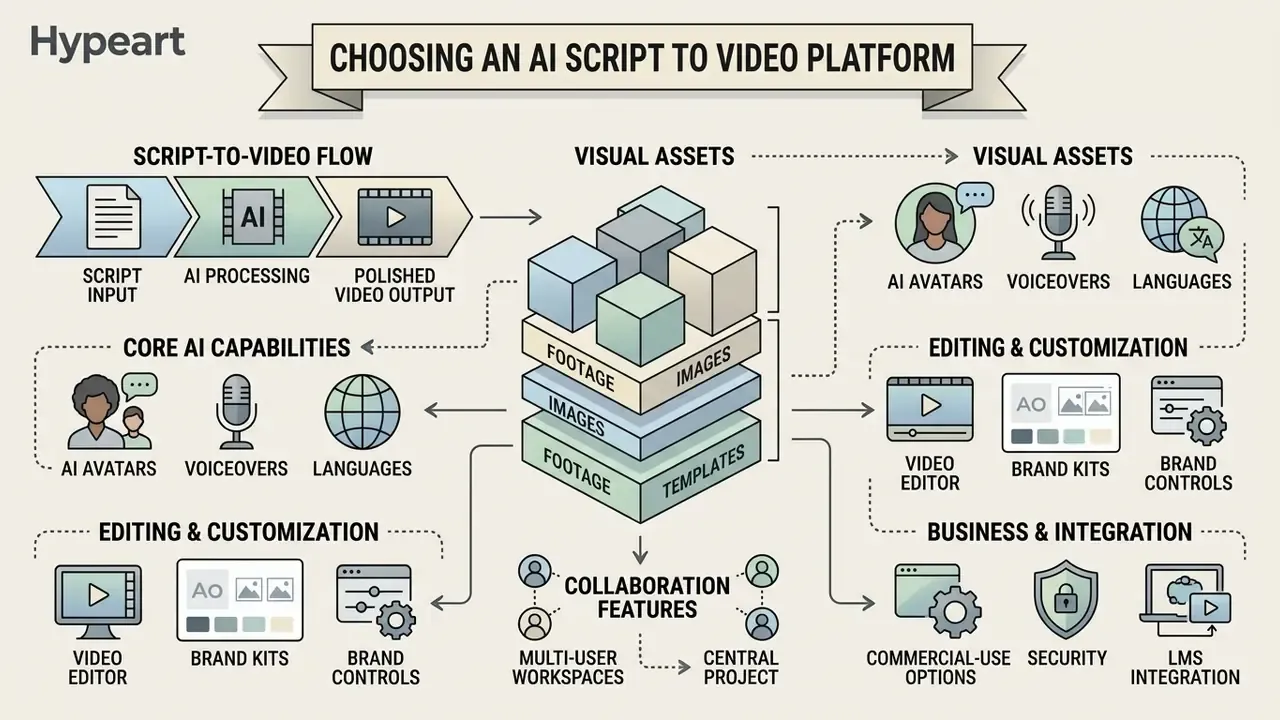
AI Avatars, Voiceovers, and Languages
Leading ai script to video platforms use neural rendering models to generate photorealistic digital presenters. Enterprise systems provide precise lip-sync synchronization, matching mouth movements to synthesized audio across 140+ languages, with the widest vendor-claimed coverage reaching 175+ languages for lip-synced dubbing. Specialized speech engines, such as those integrated into ElevenLabs and Synthesia, handle technical jargon, brand names, and phonetic pronunciations through custom dictionary and brand-glossary management. Academic dubbing research documents Wav2Lip-class models as the technical basis for aligning synthesized speech with facial motion.
«A 2025 international study reported mixed stakeholder attitudes toward synthetic lecturer avatars: scalability is valued, but reduced human contact raises concern.»
Visual Libraries, Footage, Images, and Templates
The quality of an ai video creation tool from script depends on its visual asset integrations. Leading platforms offer native API access to stock repositories containing millions of commercial-grade videos and images, such as Adobe Stock or Shutterstock; enterprise animation suites expose libraries in the range of 4 million or more licensed assets, while free-license catalogs such as Mixkit publish roughly 46,000+ clips usable in commercial projects without attribution.
Figure 3 = Media Library Composition in an AI Video Generator. Integration of licensed stock catalogs, generative image and video models, and customer-owned brand kits.
Modern platforms use a multi-model orchestration layer, dynamically routing prompt tasks across specialized foundation models such as Google Gemini for context parsing and shot selection, OpenAI DALL·E 3, ChatGPT Image, Flux, or Google Nano Banana for static asset generation, and MiniMax, Seedance, Luma Dream Machine, or Google Veo for visual video synthesis. Because each model carries distinct licensing and provenance rules, procurement should request the routing map rather than assuming a single vendor-owned model.
When stock B-roll is insufficient, generative diffusion models fill gaps by generating scene-specific images directly from text descriptions. Enterprise API implementations, such as Google Veo, embed digital watermarks (for example, SynthID) into synthetic frames to establish data provenance and verify synthetic origin. Licensing asymmetry matters here: some template marketplaces permit stock footage inside end products but forbid redistribution, while Adobe's contributor rules prohibit third-party stock inside submitted video templates entirely. Developers integrating generative video APIs can inspect infrastructure models in the Google Veo API Guide and compare image-side rights in our Google AI image generator commercial-use review.
Video Editor, Brand Controls, and Collaboration Features
Enterprise deployment requires centralized brand management and multi-user administrative governance.
- Brand Kits Store corporate brand guidelines, logos, custom typography (TTF/OTF/WOFF/WOFF2), hex color palettes, and standardized lower-thirds. Documented implementations support large palettes; Synthesia stores up to 120 brand colors, with API-level application of a brand kit to every scene via a single identifier.
- Multi-User Workspaces Role-based access controls (RBAC) let writers, editors, and compliance officers review projects concurrently, with shared asset libraries, comment threads, and version history instead of email round-trips.
- LMS Integration Export SCORM-compliant packages (alongside MP4, SRT, and audio-only variants) directly to Learning Management Systems for automated employee training tracking.
«Brand kits let teams add logos, upload custom fonts, and store brand colors so every video ships on-brand.»
«Brand Kits are saved sets of colors, fonts, and logos applied to every scene through brand_kit_id.» Source: Brand Kits, HeyGen Developer Documentation (2026). https://developers.heygen.com/docs/brand-kits
To calculate infrastructure and license expenditure across generative platforms, use our AI Media Calculators.
Enterprise Data Security, Shadow AI, and Script Confidentiality
Script-to-video adoption usually begins bottom-up: an individual manager pastes an unreleased product brief, an internal policy draft, or customer-identifying training material into a free consumer tier. That is a Shadow AI exposure, not a productivity win, because the sensitive asset in this workflow is the script itself, often the earliest written form of unannounced pricing, litigation posture, or regulated procedure.
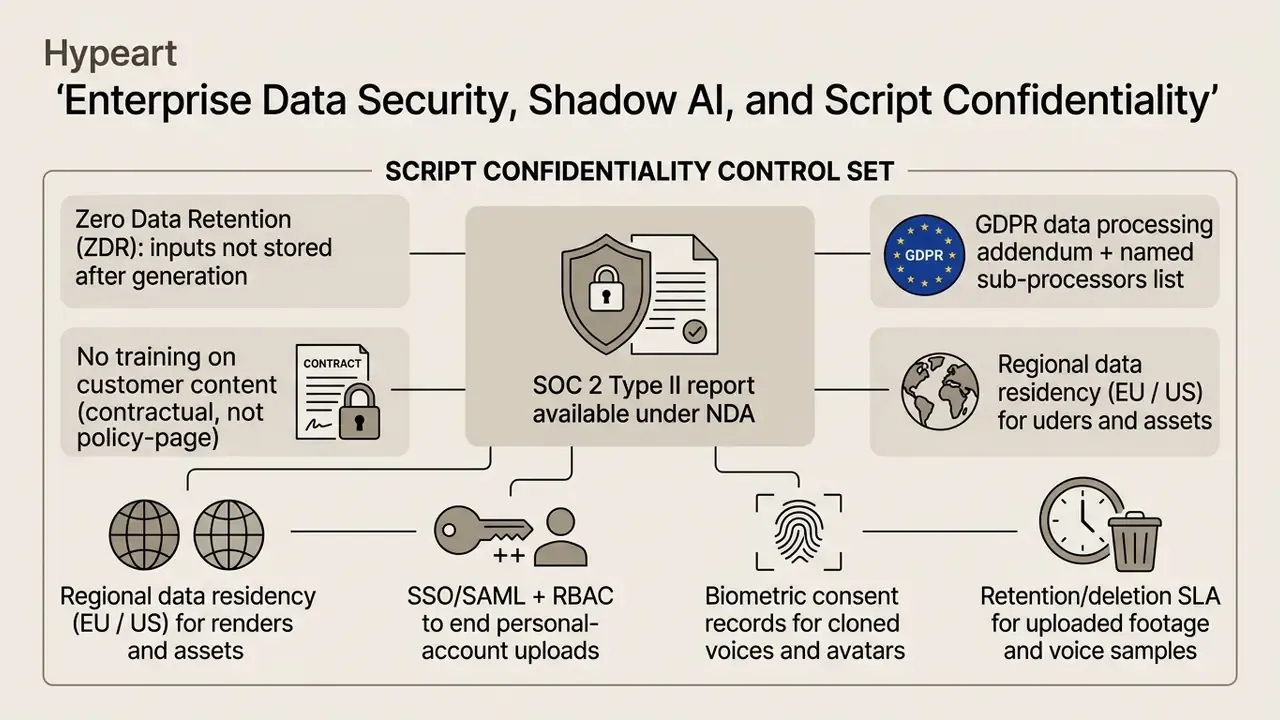
Practical controls that reduce exposure without blocking the workflow:
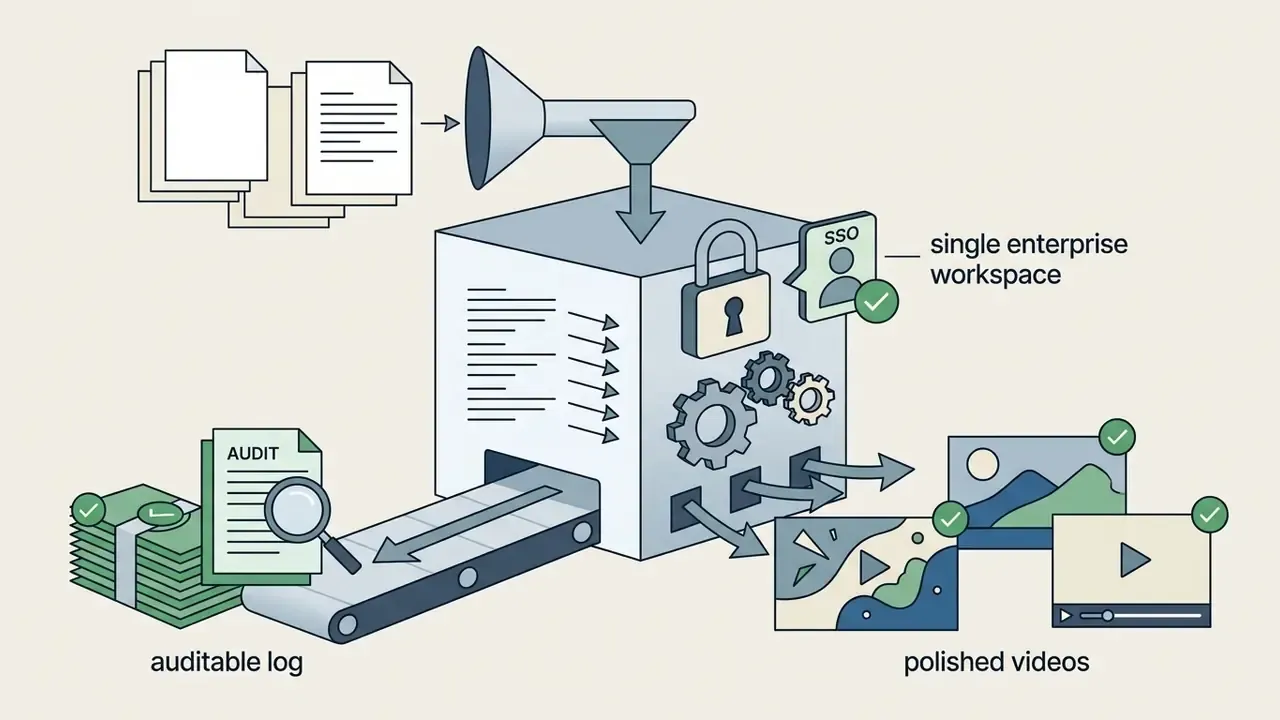
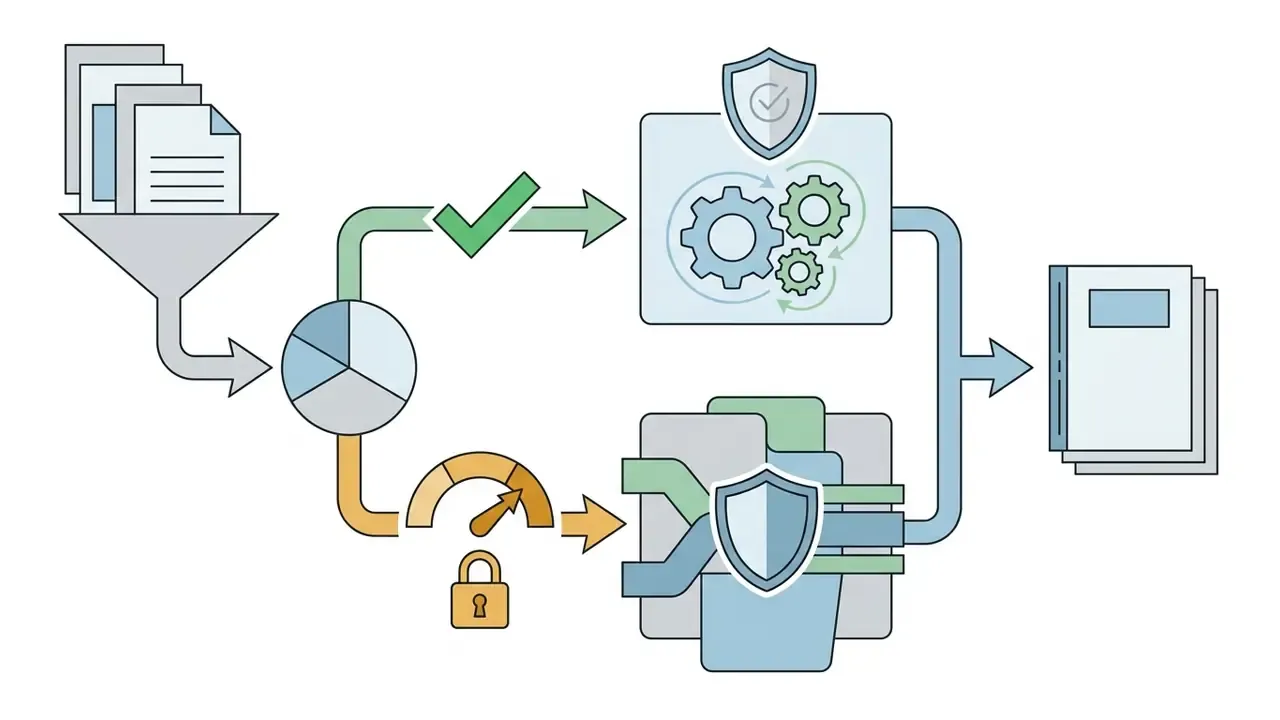
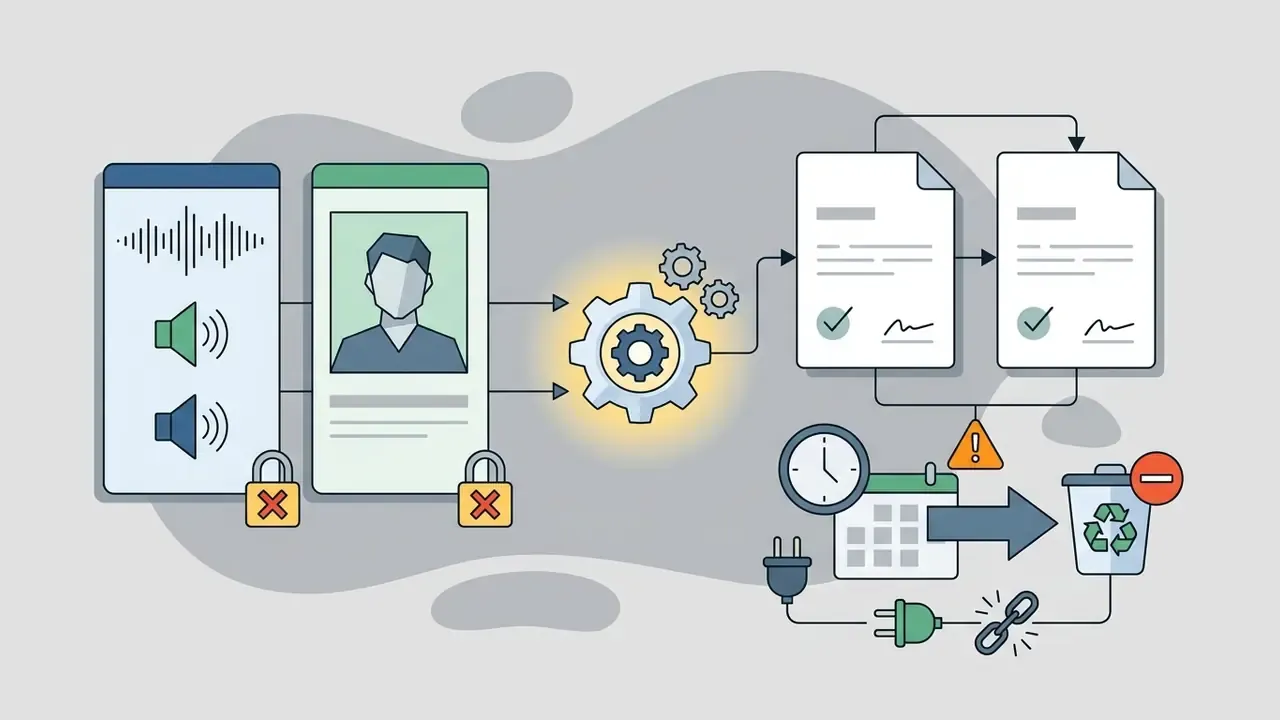
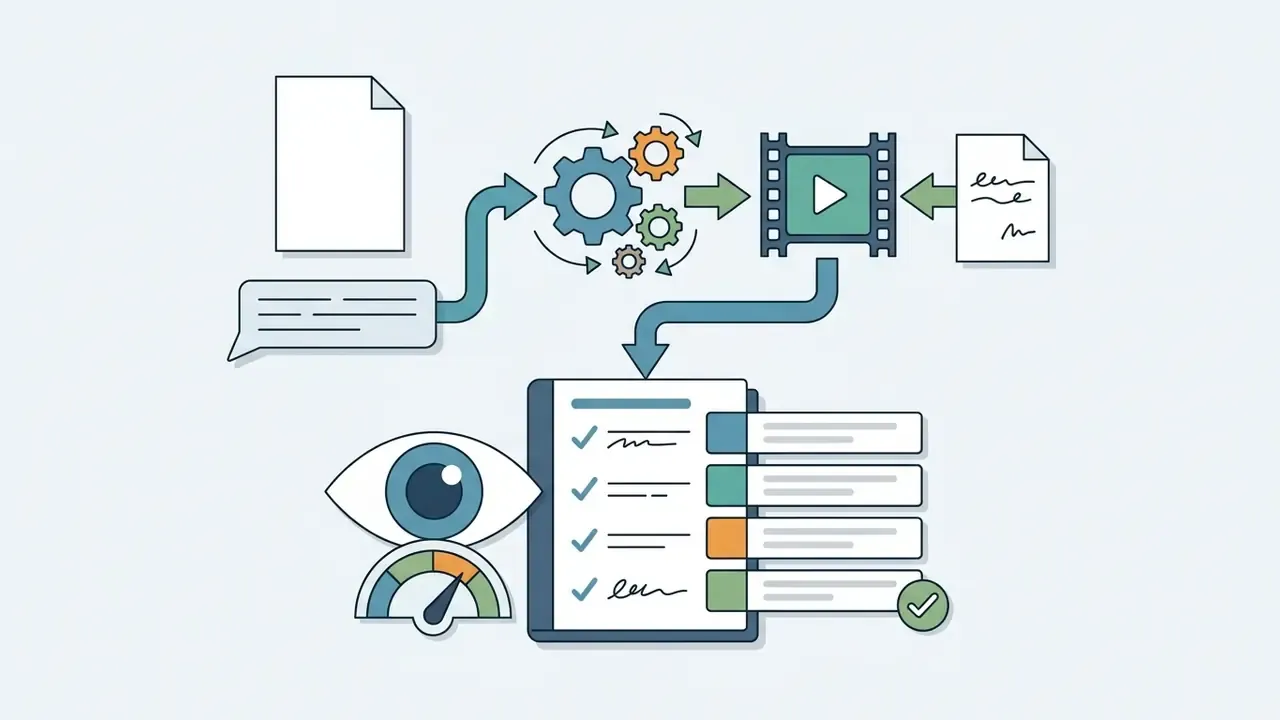
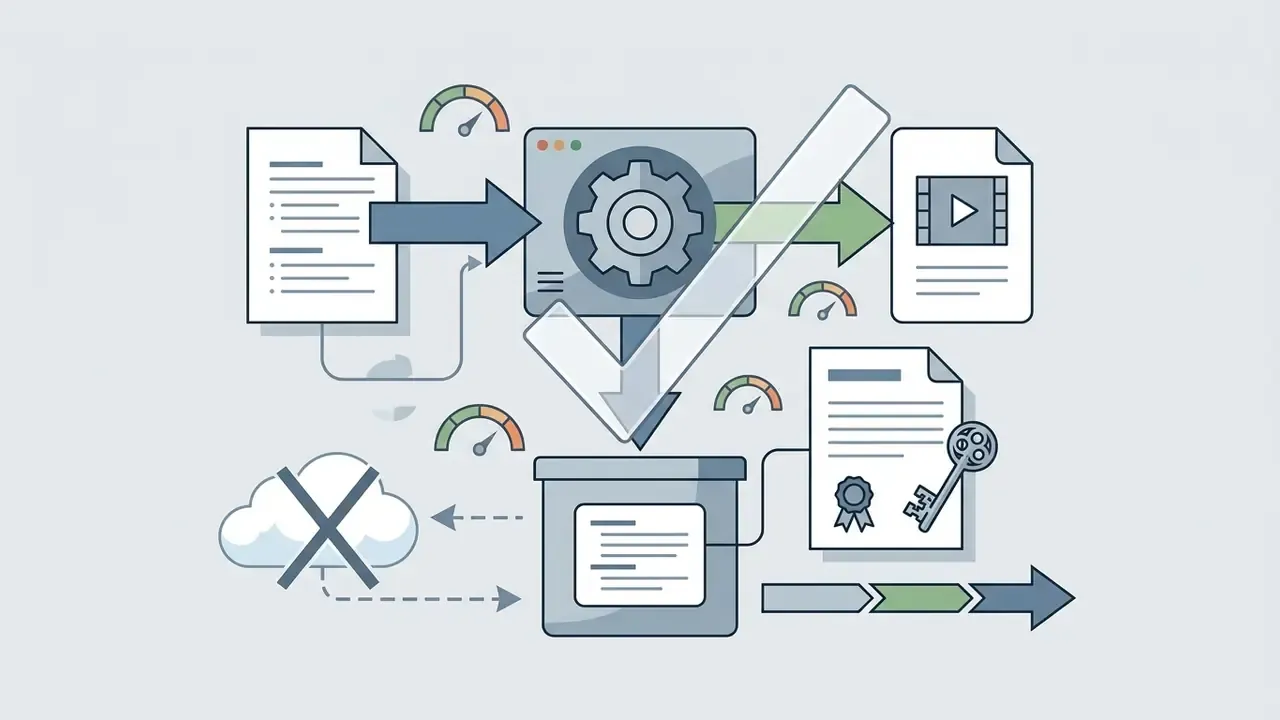
«Public-facing documentation for AI systems supports traceability of prompt, source script, and edits.»
Ownership, Escalation, and the Right to Switch It Off
An automated video pipeline is a digital worker, not a feature. Treat it that way in your inventory. Name the accountable owner (usually the communications or L&D lead, not the vendor administrator), record the approved scope of use, and define which categories of script require a second reviewer before render. Add the pipeline to the AI inventory that already carries your credit and AML models, even if it never touches a customer decision; unified inventories are what make audit sampling possible.
Two mechanisms are easy to skip and expensive to miss. The first is an escalation path: who decides when a generated module is pulled after a factual error is published? The second is a shutdown switch: can access be revoked at the tenant level within one working day, with all queued renders cancelled? If the answer to either is unclear, the pilot is not production-ready, whatever the demo showed.
How to Improve AI-Generated Videos From Your Script
Raw script outputs from ai tools convert script to video usually need editorial refinement to reach publication quality.
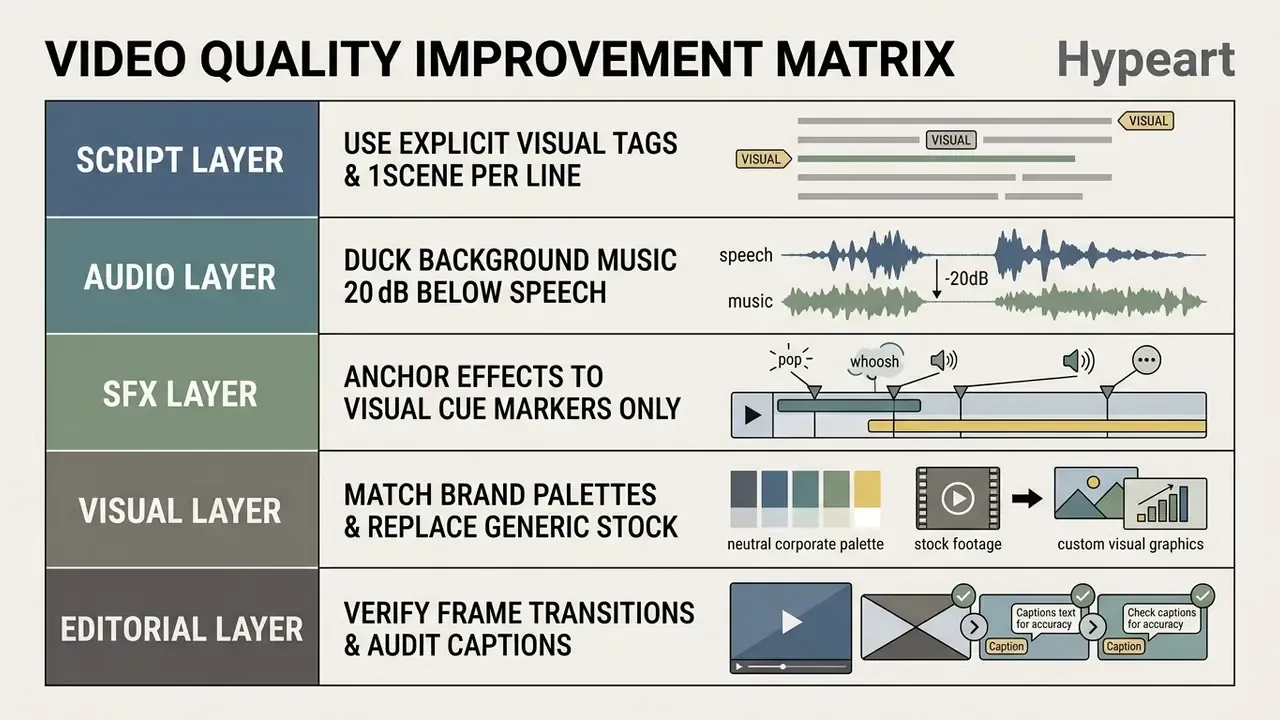
Write a Script That Produces Clear Video Scenes
To get better output from ai tools that generate video from script, structure scripts with concise, explicit scene instructions.
- One Scene per Line Separate script beats with hard line breaks to enforce automatic scene splitting.
- Structured Keyword Tags Format visual B-roll prompts using core parameters:
[Subject + Action, Environment, Camera Detail, Lighting/Mood, Motion]. Explicit parameterization measurably reduces generic stock matches. - Word Count Constraints Keep scenes between 15 and 30 words to prevent visual monotony and hold steady pacing; target roughly 120 to 150 words per 60 seconds of narration.
- Beat Planning for Short Form Structure the first 60 seconds as hook, context or problem, main demonstration, result or benefit, and closing call to action.
Creators seeking comprehensive evaluations of image generation systems for custom visuals can read our review of the best AI art generators.
Match Tone, Voice, Music, and Visual Style
Brand identity standards require strict audio and visual alignment across all media assets. Educational brand guidelines, such as those published by Yeshiva University, specify that background music must be instrumental in most contexts and ducked at least 20 dB below spoken dialogue during voiceovers, with genre selected to match the video's mood and subject.
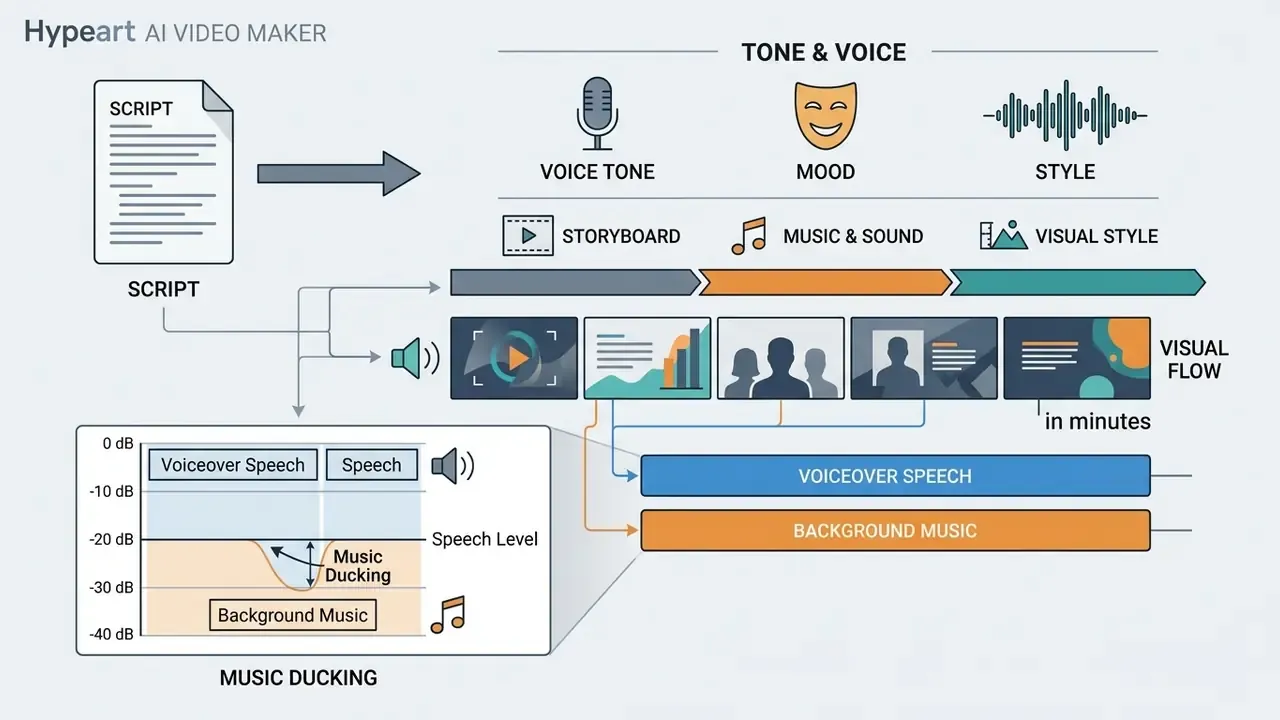
Keep visual consistency by setting mandatory brand color palettes across templates, standardizing intro animation and lower-thirds, and selecting voice tones (professional, empathetic, authoritative) that match the core message. Brand systems that govern verbal expression, content style, and visual identity in one document produce far fewer rejected renders than ad-hoc per-project decisions. A small thing, but it saves credits.
Edit AI Output Before Publishing
Human-in-the-loop review is essential before public distribution. Academic benchmarks reveal specific, repeatable weaknesses in automated generation:
- Text Rendering FlawsEmpirical findings from T2VTextBench (2025) indicate that most text-to-video models generate illegible, misspelled, or inconsistent on-screen text overlays during dynamic scene changes.
- Temporal InconsistenciesBenchmark testing in TC-Bench (2024) shows that models frequently miss multi-step physical transitions described in prompts.
- Caption DriftAuto-generated subtitles routinely violate reading-speed and minimum-duration thresholds after scene edits, so captions must be re-audited whenever a scene is regenerated.
Inspect every scene transition, verify subtitle alignment against audio waveforms, confirm lip-sync against visible speech onset, and manually replace generic B-roll before exporting. For regulated copy, add a final line-by-line comparison against the approved source document; a rendered caption is the version your audience actually reads. Teams evaluating zero-cost image utilities can review our analysis of free AI art generators.
Pricing, Free Plans, Watermarks, and Commercial Use
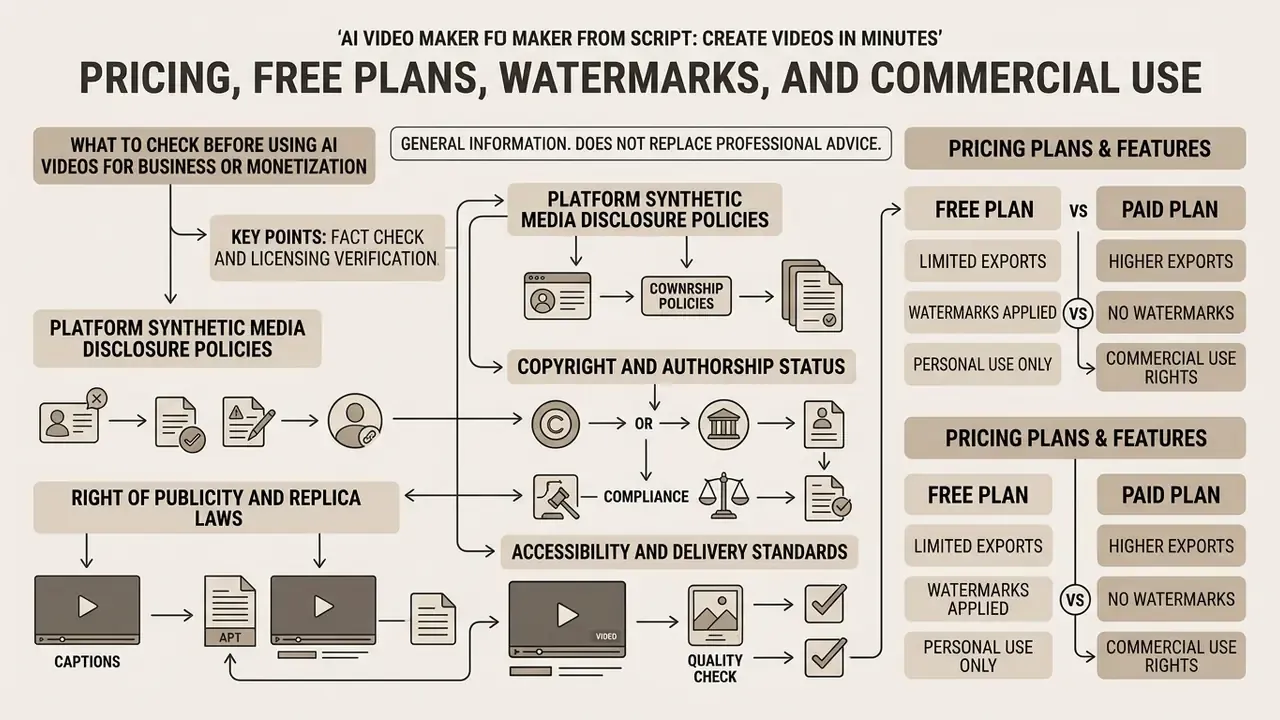
This information is general in nature and does not replace professional advice. Tariffs, free-plan limits, and commercial-use conditions are updated regularly. Verify current terms directly on the provider's site before purchase.
Selecting an ai script to video tool for commercial operations requires evaluating pricing structures, platform usage limits, and intellectual property rights.
| Vendor / Platform | Free Tier Allocations | Starting Paid Plan | Watermark Removal | Commercial Rights |
|---|---|---|---|---|
| HeyGen | Free plan, no card required; 3 videos/mo (up to 1 min), 1080p | $24/month (current page); older docs list $29 Creator | Standard free exports reported watermark-free; paid tiers add longer runtime and 4K | Tied to paid licensing terms |
| Synthesia | Free trial (limited export) | $22/month (Starter) | No watermark on paid | Included in paid subscriptions |
| Fliki | About 5 min credits/month | $21/month (Standard) | Paid plans only | Included in paid plans |
| Kapwing | Limited exports with watermark | Pro tier (4K + watermark removal) | Pro plan only | Stock assets cleared for commercial use, including YouTube monetization |
| Visla | Free plan with core script-to-video | Premium (watermark removal) | Premium only | Premium licensing |
| Pika Labs | 80 monthly credits, 480p | $10/month (Standard) | Paid plans only | Commercial rights on paid |
| Runway ML | 125 one-time credits, 720p | $15/month (Standard) | Paid plans only | Commercial rights on paid |
Pricing checked February 2026. For complete breakdowns across top generative platforms, explore our AI Media Pricing Guides.
Fact Check and Licensing Verification
Free plan exports across most AI video platforms cap resolution at 480p to 720p, restrict monthly minutes or credits, and frequently prohibit commercial deployment; several, though not all, also apply a visible watermark. Commercial rights, high-resolution exports (1080p or 4K), and watermark removal typically require an active paid subscription. Free-credit cadence differs materially between vendors, and even between a vendor's pricing page and third-party summaries, so commercial usage policies must be verified directly against vendor terms before monetizing media assets.
«Academic benchmarks, including LOVE/AIGVE-60K (2025), TC-Bench (2024) and DEVIL (2024), evaluate generation quality but contain no pricing or watermark-policy data.»
That boundary matters for buyers: no independent academic source validates vendor pricing claims, so procurement must rely on contracts, not benchmarks, for commercial terms. And one budgeting reminder that ROI models often miss: control costs (review hours, SSO seats, legal review of consent artifacts) belong in the same total as the subscription line.
What to Check Before Using AI Videos for Business or Monetization
Deploying AI-generated videos in commercial campaigns or monetized YouTube channels means navigating legal and regulatory frameworks.
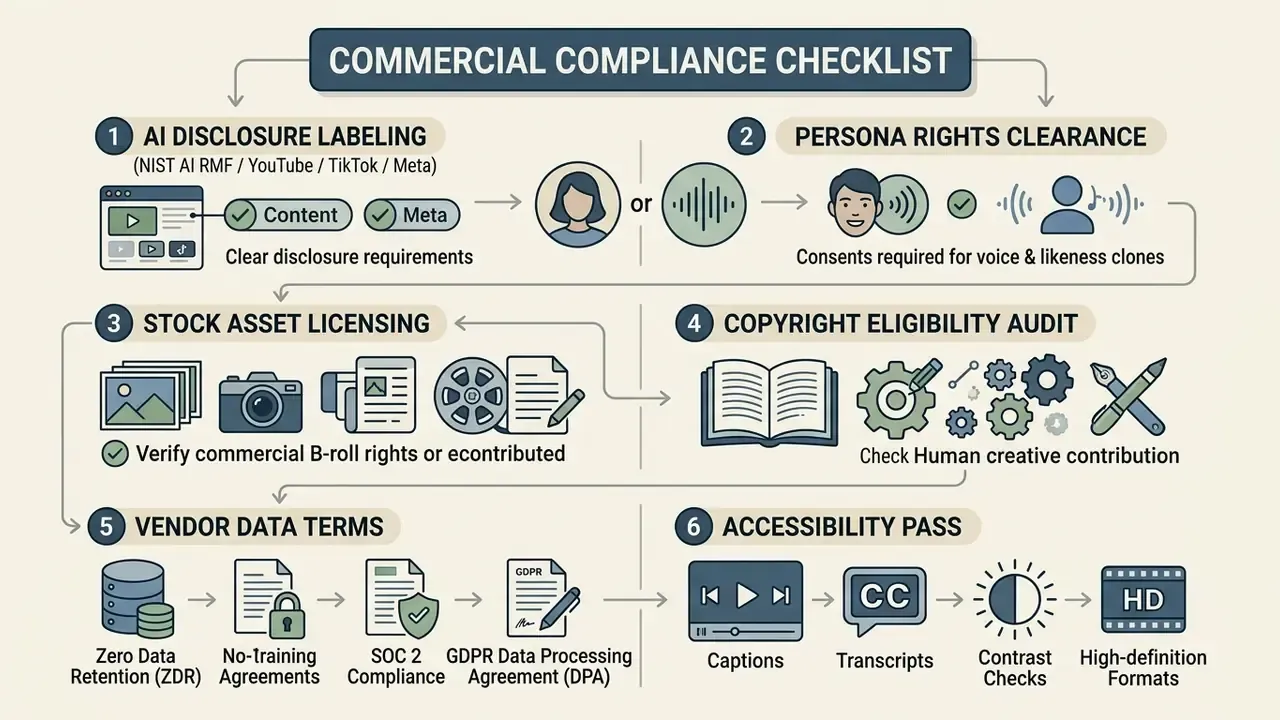
AI Script to Video FAQ
Can You Use Your Own Footage or Images in an AI Script to Video Project?
Yes. Modern ai script to video conversion tools allow users to upload custom B-roll footage, product photos, branded graphics, and pre-recorded narration into video projects. Diffusion-based video editing research confirms that models can integrate user-supplied media files as baseline tracks, applying scripted edits, text overlays, and background replacements while preserving original object motion.
«Text-guided methods such as Tune-A-Video apply prompt-driven edits to uploaded video while preserving original object motion.» Source: Survey on Video Diffusion Models (2024), section on text-guided video editing
When incorporating custom media, make sure your team holds commercial usage rights for all uploaded assets, and remember that copyright in your source recordings does not automatically grant rights to a depicted person's voice or likeness. Creators comparing no-cost options can explore our evaluation of free AI video generators and leading AI video generators for paid professional tiers.
How Long Does AI Video Generation From a Script Take?
Generation time depends on scene length, export resolution, and avatar complexity. Vendor-reported figures for standard 720p or 1080p avatar renders indicate Time-To-First-Frame (TTFF) under 5 seconds and throughput above 27 FPS, with a typical 60-second script completing in roughly 2 to 5 minutes; one platform documents about 30 seconds of processing per minute of finished video. These numbers are self-published and vary with queue load, so treat them as best-case estimates rather than SLAs.
Rendering 4K video or complex 3D scenes increases compute workload substantially. Research systems report that 1280×720 synthesis can take tens of minutes, while scaling to 3840×2160 extends runtime to several hours; real-time interactive 3D avatars require dedicated multi-GPU hardware. For troubleshooting generation errors and latency, visit our AI Media Support and Troubleshooting portal.
How Do You Protect Confidential Scripts From Data Leakage?
Treat the script as the sensitive asset. Restrict regulated or unreleased copy to a vendor that contractually commits to Zero Data Retention and no model training on customer inputs, provides a SOC 2 Type II report and a GDPR data processing addendum with a named sub-processor list, and supports regional data residency. Enforce access through SSO/SAML so employees cannot route confidential text through personal free accounts, and store voice-clone and avatar consent artifacts with defined deletion triggers. Simple test: any script that would require an NDA if emailed externally deserves the same scrutiny before it is pasted into a generation tool.
Will an AI Video Maker Rewrite My Script?
It depends on the mode you select. Prompt-to-video and "generate from document" flows are designed to draft new copy and will rephrase your input. Script-to-video flows with Exact Script Lock split the text into scenes for timing and visual matching but leave the wording untouched. For compliance, legal, and onboarding material, confirm which mode is active before generating, then re-verify the rendered captions against the approved source document.
Can You Regenerate a Single Scene Instead of the Whole Video?
Yes on enterprise-grade platforms. After an edit, the engine recalculates only the affected scene block and preserves the rest of the timeline, including voiceover sync and background music continuity. This matters commercially as well as operationally: per-scene regeneration consumes a fraction of the credits required for a full re-render, which is why storyboard review plus incremental editing is the recommended cost-control pattern for high-volume teams.
Who Should Own an AI Video Generation From Script Service Inside a Bank?
A named business owner, with model risk and information security as reviewers rather than operators. In most institutions the owner sits in corporate communications, marketing, or L&D, because that team is accountable for published content. Model risk defines the review depth by content class, security owns tenant configuration and data terms, and internal audit samples published assets against source scripts. Keep the decision rights written down; unclear ownership is the most common reason a promising pilot stalls before production.
Appendix A: Source Verification Notes
This appendix preserves the original claim wording alongside its verification status, so readers can weigh evidence quality directly.
| Claim as originally stated | Verification status | Note for readers |
|---|---|---|
| "Doc2Video (2024) improves scene layout versus unstructured generation" | Supported | Academic pipeline description; architecture published. |
| "TC-Bench (2024) shows under 20% success on temporal changes" | Supported | Empirical benchmark; preprint. |
| "VidGen-1M / CI-VID improve temporal consistency" | Supported | Dataset papers report FVD and CLIPSIM gains. |
| "T2VTextBench (2025): on-screen text is often illegible" | Supported | Empirical benchmark; preprint. |
| "HeyGen: Watermarked on Free, $29/month" | Contradictory | Current vendor page states no watermark on standard free exports and paid entry at $24/month; corrected in main text. |
| "Synthesia: 140+ languages" | Supported | Vendor documentation; language definitions vary. |
| "Wyzowl (2024): 91% use video; 87% report sales lift" | Practitioner survey | Self-reported marketing survey, not a controlled study. |
| "Emplifi (2024 to 2025): vertical formats yield higher engagement" | Commercial benchmark | Platform analytics dataset; not peer-reviewed. |
| "SUBTLE 2023: captions within 2 to 3 frames, 12 to 15 cps" | Industry standard | Subtitling criteria; corroborated by ITU-T synchronization guidance. |
| "Agency case: $15,000 to under $200; 3 weeks to 4.5 hours" | Directional case data | Practitioner-reported; no independent audit. |
| "Workday: 10 to 15 languages per project" | Vendor case study | Published by the platform vendor; treat as directional. |
| "TTFF under 5 seconds for 720p avatars" | Vendor-reported | Self-published performance figure; varies with queue load. |
| "Tennessee ELVIS Act covers voice and biometric use" | Supported | Tennessee legislation (2024). |
| "U.S. Copyright Office: purely AI output is not protected" | Supported | USCO guidance 2023 to 2026 and 2024 digital-replicas report. |
About the Reviewer
Marcus Hale is the author used by this publication for the AI Governance and Model Risk desk. Its editorial focus covers synthetic-media provenance, human-in-the-loop controls, and vendor due diligence for regulated industries. Review scope for this guide included pipeline architecture claims, benchmark interpretation, pricing verification, and the legal and data-security sections. This publication accepts no vendor compensation for placement or ranking.
Technical and Commercial Disclaimers
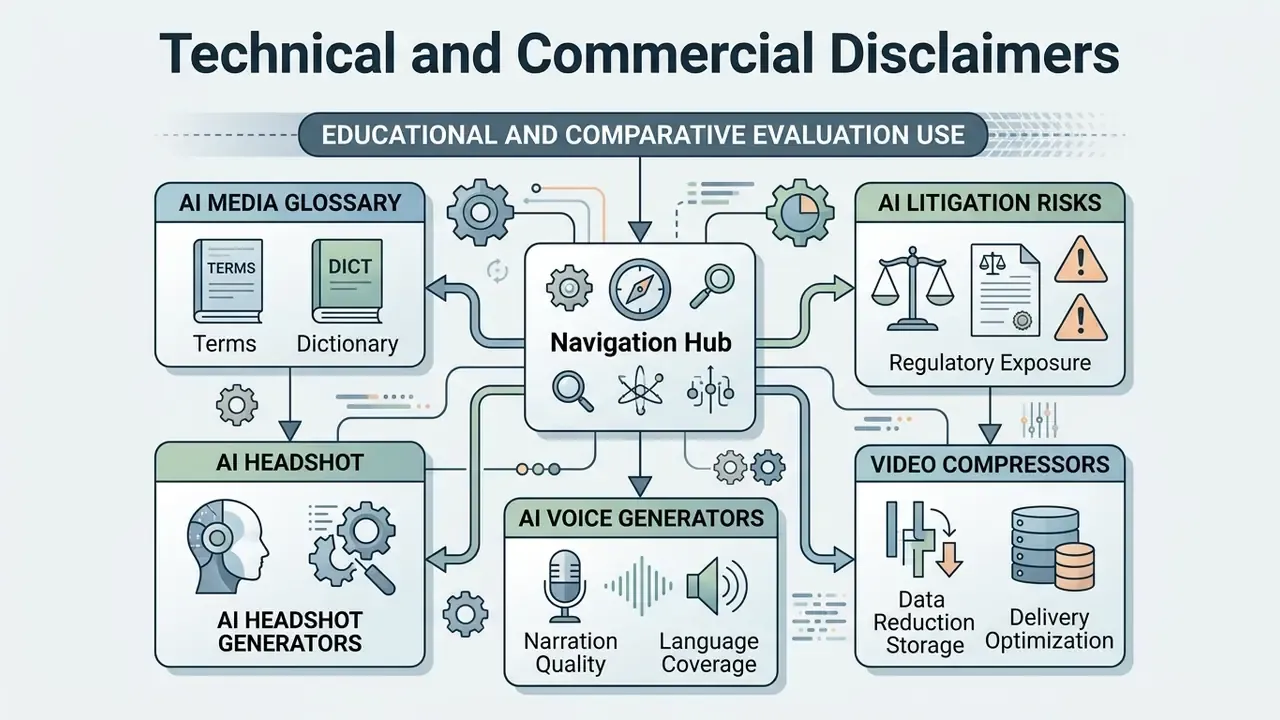
This document is prepared for educational and comparative evaluation purposes. Operational parameters, vendor API rules, credit pricing structures, security attestations, and licensing policies are subject to change. Readers must verify current Terms of Service, data processing terms, and commercial-use grants directly with software providers before deploying automated video generation tools in commercial or regulated environments. Nothing here constitutes legal, financial, or compliance advice. Audience assumptions in this guide remain hypotheses until confirmed by analytics, interviews, or verified customer research.