There is a governance angle too, and it is the one most buyers miss. A quota is a control. A licence is a control. If your team cannot say which model produced an asset, under which plan, and with which reuse rights, you do not have an auditable workflow. You have a habit.
Quick summary for busy readers
- Free tier general text-to-image generation is minimal or unavailable depending on region and rollout. The documented allowance covers "limited image generations" plus 3 "Perplexify Me" posters per day. Free accounts also receive only about 3 to 5 Pro searches per day and cannot select a model.
- Pro ($20/mo) unlocks image generation and the model picker. Practical testing in 2026 shows throttling after roughly 10 to 15 priority renders inside a rolling 24-hour window, not the 50 per day figure repeated across half the web.
- Max ($200/mo) expanded priority allowance (around 30+ renders per day), Nano Banana Pro as the default image model, and 15 cinematic video generations per month via Sora 2 Pro or Google Veo.
- Model stack in 2026 the default router points to Nano Banana 2 (Gemini 3.1 Flash Image), with Seedream 4.5 (capped at 2048x2048 px) and GPT Image 2 selectable on paid tiers. Perplexity trains no image model of its own.
- Licensing images produced on Free, Pro, and Max are personal, non-commercial use only. Commercial distribution rights require Enterprise Pro or Enterprise Max seats.
- Reset logic quotas roll off continuously through a rolling window, not at calendar midnight, and the interface shows no live numeric counter.
- Getty Images results are not generations attributed stock and editorial photos surfaced in answers consume search capacity, not your generative quota.
Who this guide is written for, and what changed in 2026
This article assumes a reader who has to justify a tool choice to somebody else. Risk owners, finance transformation leads, research and communications teams inside regulated firms. The audience profile below remains a working hypothesis until confirmed by analytics, interviews, or verified customer research.
Three things shifted during the 2026 documentation cycle, and each one changes the answer to "how many images can I make?":
- The default router changed.Nano Banana 2 replaced the older FLUX.1 and DALL·E 3 rotation as the documented default, which altered both output style and per-request cost.
- The practical Pro ceiling came down in visible testing.Community benchmarks cluster around 10 to 15 priority renders, well below older published figures.
- Licensed stock entered the answer surface.After the Getty Images agreement, some images inside answers are not generated at all, which matters for reuse rights far more than for quota maths.
Keep that third point in mind. It is the difference between a compliant asset and an awkward call with counsel.
What image generation limits actually apply in Perplexity AI
Perplexity controls image generation through dynamic rolling-window quotas, plan-tier gating, and third-party model rate limits rather than a single static calendar cap. The system treats text-based search queries and visual creation as distinct functional assets with separate operational budgets. Reading through perplexity ai image generation capabilities helps, but the mechanics only make sense once you see how the answer engine routes generative requests to external architectures.
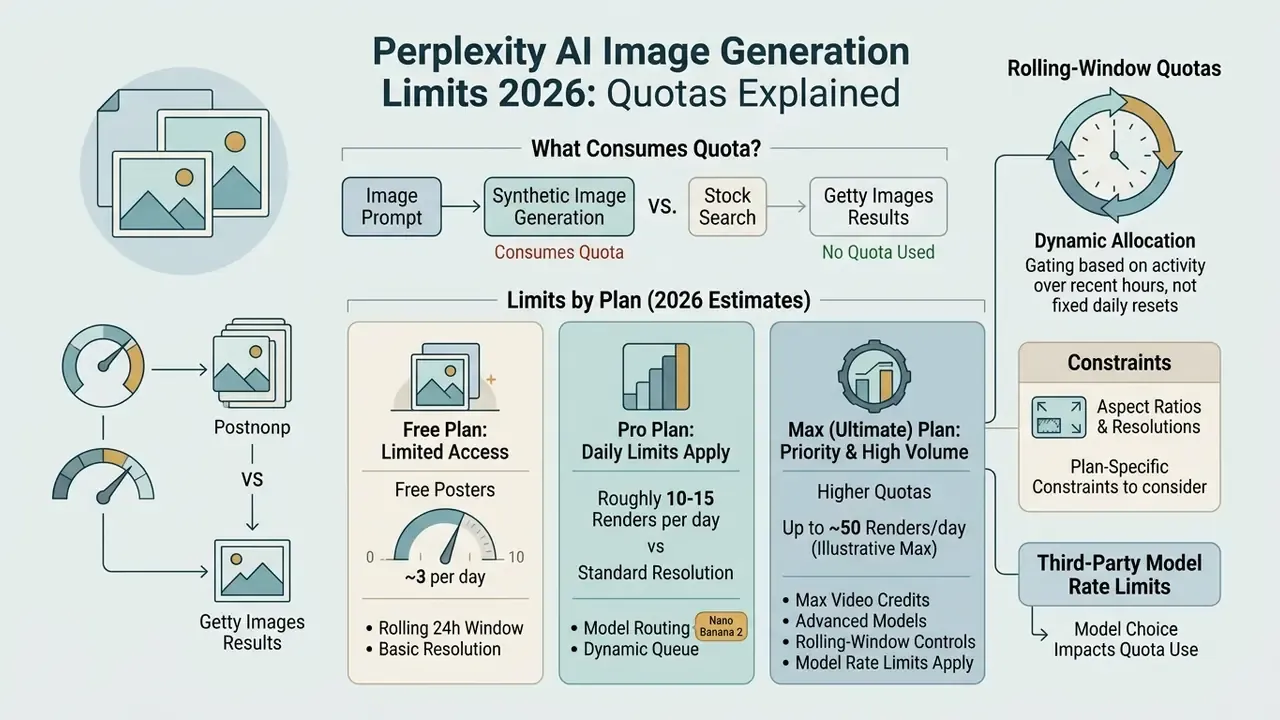
| Step | Decision point | Free tier outcome | Pro / Max tier outcome |
|---|---|---|---|
| 1 | User submits prompt | Prompt accepted | Prompt accepted |
| 2 | Subscription tier check | Standard search only; generation limited or gated | Model selector available (Nano Banana 2 / Seedream 4.5 / GPT Image 2) |
| 3 | Rolling quota check | Poster feature capped at 3 per day | ~10 to 15 priority renders per rolling 24 h (Pro); ~30+ (Max) |
| 4 | Quota available? | If exceeded, upgrade notice appears and a text answer is returned | If exceeded, limit warning appears with fallback to text or web-indexed imagery |
| 5 | Routing | Default router only | Routed to the chosen third-party model endpoint |
| 6 | Render | Asset returned, usually flattened to 1:1 | Asset returned; Max receives the Nano Banana Pro quality tier |
Purpose of the figure: it walks through, step by step, how Perplexity evaluates tier status, checks the rolling quota, and forwards the request to an underlying model. On the page it is published as a semantic figure block with a caption and descriptive alt text, so the logic stays readable on narrow mobile viewports where ASCII diagrams fall apart.
What counts as an image generation and consumes quota
An image generation event occurs whenever a user prompt successfully triggers a text-to-image synthesis pipeline through Perplexity's model router. According to official platform documentation, generating a new image, editing an existing image, and regenerating a result all deduct units from your active quota pool. Standard search operations, factual web lookups, and textual citation queries do not touch the image generation allowance.
«Regenerating or editing an image counts as a new generation, and processed but failed attempts may still draw down quota.»
Every prompt iteration meant to alter a visual attribute, whether colour palette, framing, or lighting, is classified as a separate enhanced query. If the backend processes an image request that then fails on a downstream provider timeout or a moderation filter, the event may still decrement your balance. So the mental model is closer to a metered API than to a creative canvas.
One more distinction worth writing on a sticky note: retrieving a stock photo from a third-party index such as Getty draws on general search capacity, not on generative tokens.
Generated synthetic assets versus Getty Images search results
It matters, practically and legally, whether an image was synthesised or simply found. Following Perplexity's licensing agreement with Getty Images (announced October 2025), the answer engine surfaces attributed editorial and stock photography inside standard query results, complete with an image credit and a link back to the source. Pulling a Getty photo relies on web search capacity and does not deduct units from your daily image generation limit. Triggering a text-to-image prompt, for example "Generate an image of...", invokes third-party neural networks and reduces your active visual pool.
The licensing consequences diverge just as sharply. A licensed Getty photograph shown inside an answer stays governed by Getty's own terms and is not yours to republish freely. A model-generated asset falls under Perplexity's usage policy plus the terms of the underlying model provider. Whenever you read a claim that "Perplexity improved its image capabilities," check which of the two pipelines is meant before you draw conclusions about reuse rights. Teams auditing rights across vendors can cross-check our overview of Google AI Image Generator usage rights for a comparable licensing breakdown.
Why the limit depends on your plan and the selected model
Image generation caps vary by subscription tier because Perplexity operates as an aggregation and routing layer, not as a proprietary image-model developer.
«Perplexity does not train its own image model; it acts as a routing layer passing prompts to third-party generators.»
Aspect ratio and resolution constraints to plan around
Unlike standalone platforms such as Midjourney or DALL·E 3, Perplexity's answer-first interface flattens most generated assets to a 1:1 square ratio at display time, and full manual control over framing is not exposed. Specific models add their own ceilings: Seedream 4.5 restricts maximum output to 2048x2048 pixels. If your workflow needs widescreen 16:9 assets, vertical 9:16 social cuts, or print-ready 4K renders, run those prompts through direct model APIs or a dedicated design tool instead of the answer engine. For production pipelines, pairing Perplexity research with an online photo editor for reframing and upscaling is usually faster than fighting the router with repeated prompts.
A composite, illustrative scenario shows how model choice affects efficiency. A financial research team evaluated automated visual reporting tools across internal departments. By standardising prompt structures before submitting requests, the team cut unnecessary regenerations, and internal tracking indicated a double-digit percentage drop in wasted renders. The figure is team-specific and not independently verified, so treat it as directional. Their data handling policy stayed intact throughout, which mattered more to their CRO than the render count. Comparative benchmarks in our evaluation of ChatGPT image generation versus alternative tools show how routing choices shape output consistency.
Perplexity AI free image generation limit: what the free plan includes
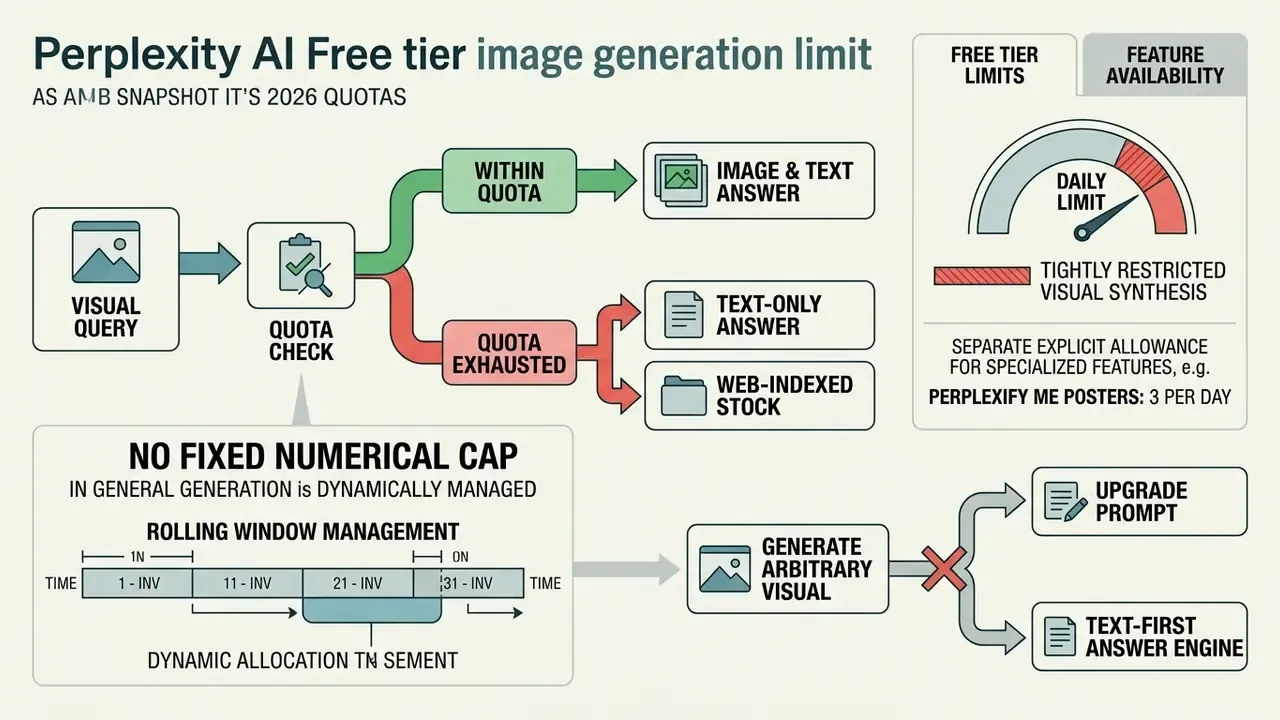
The Free tier is designed as a text-first answer engine with tightly restricted visual synthesis. Free users get unlimited basic searches and a small daily allocation of Pro searches, while general text-to-image generation is largely restricted or gated behind specific promotional features. Reviewing the available perplexity ai image generation features sets realistic expectations for unpaid accounts.
«General image generation is unavailable on the Free plan; users receive only five Pro searches per day and cannot select models.»
| Parameter / Feature | Free Tier | Pro Subscription ($20/mo) | Max Subscription ($200/mo) | Enterprise Tier |
|---|---|---|---|---|
| General Image Generation | Limited / Restricted | ~10 to 15 high-priority renders per day (rolling-window throttling) | Expanded priority allowance (~30+ renders per day) | High-volume organizational caps |
| Default Model | Default router only | Nano Banana 2 (Gemini 3.1 Flash Image) | Nano Banana Pro | Custom routing policy |
| Model Selection | Not available | Nano Banana 2, Seedream 4.5, GPT Image 2 | Full picker plus earliest access to new models | Full custom routing |
| Video Generation | No | ~3 to 5 short renders per month (credit allowance) | 15 cinematic clips per month (Sora 2 Pro / Google Veo) | Negotiated per contract |
| Pro Searches Allocation | ~3 to 5 per day | Extended rolling allowance | Maximum individual allowance | Maximum organizational quota |
| Perplexify Me Posters | 3 per day | Unlimited | Unlimited | Unlimited |
| Aspect Ratio Control | None | Limited, output often flattened to 1:1 | Limited, 1:1 bias persists | Limited |
| Commercial Usage Rights | Personal use only | Personal use only | Personal use only | Full commercial license |
| File / Media Uploads | Basic, limited size | Advanced, up to 25 to 40 MB per file | Advanced plus priority processing | Enterprise repository integration |
Daily image generation limit and the Free tier quota
«Perplexify Me gives non-subscribers up to 3 posters per day; Pro subscribers receive unlimited posters.»
Outside those feature modules, unpaid users who try to generate arbitrary visuals hit an upgrade notification pointing at Pro. Where any general free daily image generation limit has appeared at all, it has been minimal and gated by regional rollout. That explains why two users in different countries can report opposite experiences on the same afternoon, and why a free tier image generation limit quoted in a forum thread is rarely portable.
Which features remain available after the limit is exhausted
Reaching the visual quota does not knock out the rest of the product. Standard queries, citation extraction, source verification, and ordinary questions answered through the answer engine keep working, because text search runs on an independent resource pool (Tickerr Limit Tracker, 2026).
If a visual query fails on quota exhaustion, the platform still returns text answers and web-indexed stock images, licensed Getty results included. Users who want broader visual capability without upgrading can review our guide to free photo editors and feature limits for asset editing options, or compare no-cost generators in our roundup of free AI art generators by quality, limits, and watermarks. If watermarking is part of your review chain, a dedicated watermark generator handles attribution more reliably than a prompt ever will.
Perplexity Pro and Max limits: when the subscription pays off
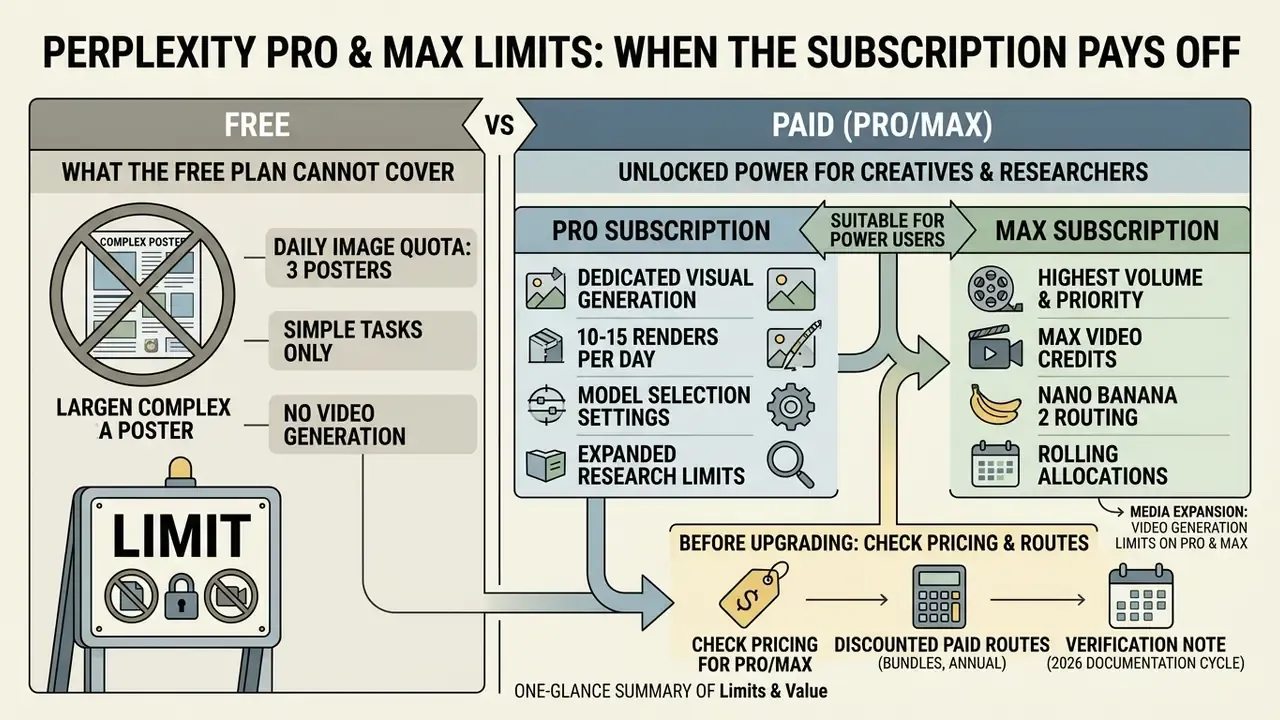
A Pro subscription unlocks dedicated visual generation, model selection settings, and expanded research limits suited to power users. Pro accounts receive a structured quota of high-quality image generations governed by a rolling 24-hour window. Working through core perplexity ai image generation flows shows where the paid tiers genuinely speed up asset creation, and where they simply move the bottleneck.
Updated, the real Pro ceiling. Promotional materials reference larger search allowances, yet community benchmarks and hands-on testing point to throttling after roughly 10 to 15 image generation calls inside a rolling 24-hour window on standard Pro accounts. Anyone needing higher volume or video output has to move to the $200 per month Max tier or to Enterprise seats. Treat any single published number as indicative, not contractual. Perplexity adjusts models, quotas, and regional rollout often, so validate against your own account behaviour before you promise throughput to a stakeholder.
«Paid plans run on a rolling window, and the exact number of remaining generations is not shown to the user.»
Media expansion: video generation limits on Pro and Max
Alongside static images, Perplexity integrates text-to-video powered by Google Veo and OpenAI Sora 2 Pro. Pro subscribers get a basic monthly credit allowance, roughly 3 to 5 short renders. Max subscribers receive 15 cinematic video generations per month, documented at up to 12 seconds per clip via Sora 2 Pro. Video requests draw on an entirely separate compute budget from the daily image rolling window, so burning your image allowance does not touch video credits, and the reverse holds as well. Developers modelling per-second costs before committing to a tier can consult our Google Veo implementation guide covering API access, costs, and limits.
Which tasks the Free plan cannot cover
The Free plan falls short for professional workflows built on frequent image iteration, visual storyboarding, or multi-model comparison. Custom illustrations for reports, analysis of uploaded infographics, prompt-variation testing: each of these drains a basic account fast. Free accounts also face limited file uploads and a hard cap on advanced reasoning queries, which blocks document-heavy research loops long before the visual quota becomes the real constraint.
Power users running content pipelines need access to specific engines, Nano Banana 2 or GPT Image 2, to hold visual consistency across a campaign. Without model selection, free users cannot match a task to the most suitable engine, for instance routing photorealistic product mockups to one model while sending diagrammatic or typographic work to another. That inability to choose is, in practice, the sharper limitation. Not the render count.
What to check in pricing before upgrading to Pro
Before upgrading, read the pricing terms, the commercial usage clause, and the dynamic quota policy in that order. Official pricing lists Pro at $20 per month or $200 annually, about $16.67 per month on the annual plan, roughly a 17% saving. Max is listed at $200 per month. Team tiers are priced per seat, with Enterprise Pro around $40 per seat per month and Enterprise Max around $325 per seat per month. That spread matters, because the commercial-use licence only appears at the Enterprise end, roughly a tenfold step up from the Pro plan most individuals start on.
Individual Pro subscriptions grant rights for personal, non-commercial use only. Commercial exploitation requires an Enterprise Pro or Enterprise Max seat.
«Enterprise Pro and Enterprise Max users may use generated images commercially; Free, Pro, and Max are personal use only.»
Also worth knowing before you click upgrade: cancelling mid-cycle is rarely as smooth as subscribing. Our notes on AI Credits Refund and Cancel Friction cover the patterns to expect across major platforms.
Discounted routes to paid image generation
There are cheaper doors into the paid tier. Verified university students can access Education Pro for $10 per month, and as low as $5 per month during promotional windows, through SheerID verification. Selected telecom partners, Bell Mobility in Canada being a documented example, periodically bundle 12 months of complimentary Pro access with qualifying mobile data plans. Referral and trial promotions circulated by affiliates usually grant one free Pro month. Use that window to stress-test real workloads, file uploads, model switching, batch image prompts, rather than casual queries, so the renewal decision rests on measured throughput instead of first impressions.
This information is general in nature and does not replace professional advice. Perplexity AI quotas, prices, and licensing terms may change without notice. For commercial and legal decisions, consult the platform's current official documentation.
When the daily image generation quota resets
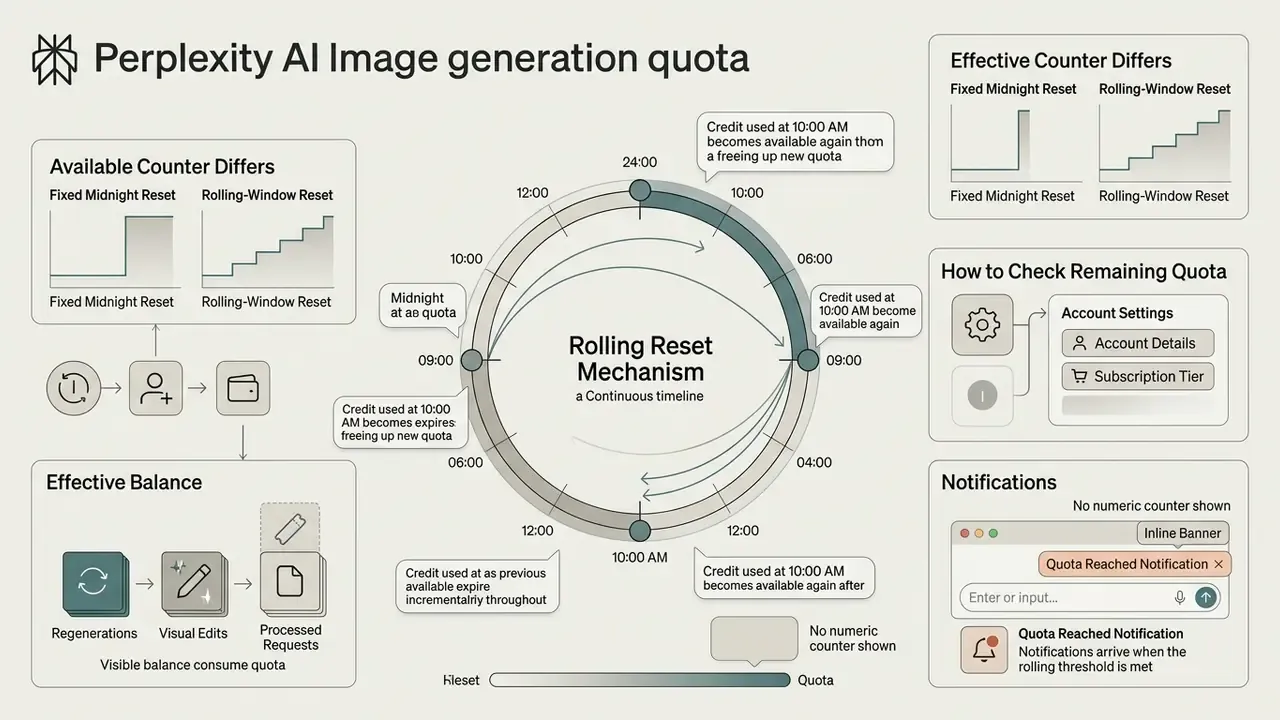
Perplexity uses a rolling-window reset for image generation rather than a fixed calendar midnight. Your allowance restores incrementally as individual generation events age past the active window. No UTC reset hour is published anywhere official, which is why third-party articles promising "midnight resets" contradict the platform's own help centre.
Why the available generation counter differs from expectations
Your effective balance can look wrong because regenerations, visual edits, and processed requests that trip safety filters all draw from the same rolling pool. Generate ten images in a burst at 2:00 PM and those specific allocations only return around 2:00 PM the next day. Not at midnight, not at the start of your billing cycle.
Perplexity also shows no live numeric countdown for remaining image generations in the standard dashboard.
«The exact number of remaining generations is not displayed in account settings; users learn the limit only on hitting it.»
Notifications arrive only once the rolling threshold is fully reached, typically as an inline banner near the composer or a greyed-out generation control rather than a modal dialog. Separate sessions, separate devices, and separate browser profiles all draw from the same account-level pool, so parallel work does not multiply your daily image creation limit. Tempting theory, wrong answer.
How to check the remaining quota in your account
What to do if Perplexity AI stops generating images
When generation suddenly stops, the cause is usually quota exhaustion, a safety filter, or upstream model instability. Perplexity's own troubleshooting article names three documented causes: explicit or moderated content, an unstable connection, and a technical issue on Perplexity's side. Work the list in order and you will isolate the root cause quickly.
Before escalating, cross-check the provider status pages, status.openai.com for GPT Image incidents and status.perplexity.com for platform-level degradation. OpenAI has publicly logged "image generation unavailable" partial outages that blocked rendering regardless of remaining user quota. Two minutes on a status page saves an hour of blaming your own prompt.
What to do if Perplexity AI stops generating images
Verify account status.
Confirm an active Pro, Max, or Enterprise subscription at perplexity.ai/account/details.Check the rolling window.
Review generation frequency over the past 24 hours. On Pro, more than about 10 to 15 renders in that window explains silent throttling.Inspect prompt content.
Ensure compliance with safety filters: no explicit material, graphic violence, medical or political sensitivity, named public figures, or trademarked characters.Test model selection.
Switch the preferred image model in Settings > Preferences, for example from Nano Banana 2 to GPT Image 2 or Seedream 4.5, to route around a single provider's outage.Refresh session and network.
Clear browser cache, disable aggressive VPN or ad-blocking extensions, re-authenticate, then retry on desktop web. Image generation is web-first, with uneven mobile parity.Submit a bug report.
If quota remains and prompts are compliant, send Perplexity Support the prompt text, timestamp, and selected model.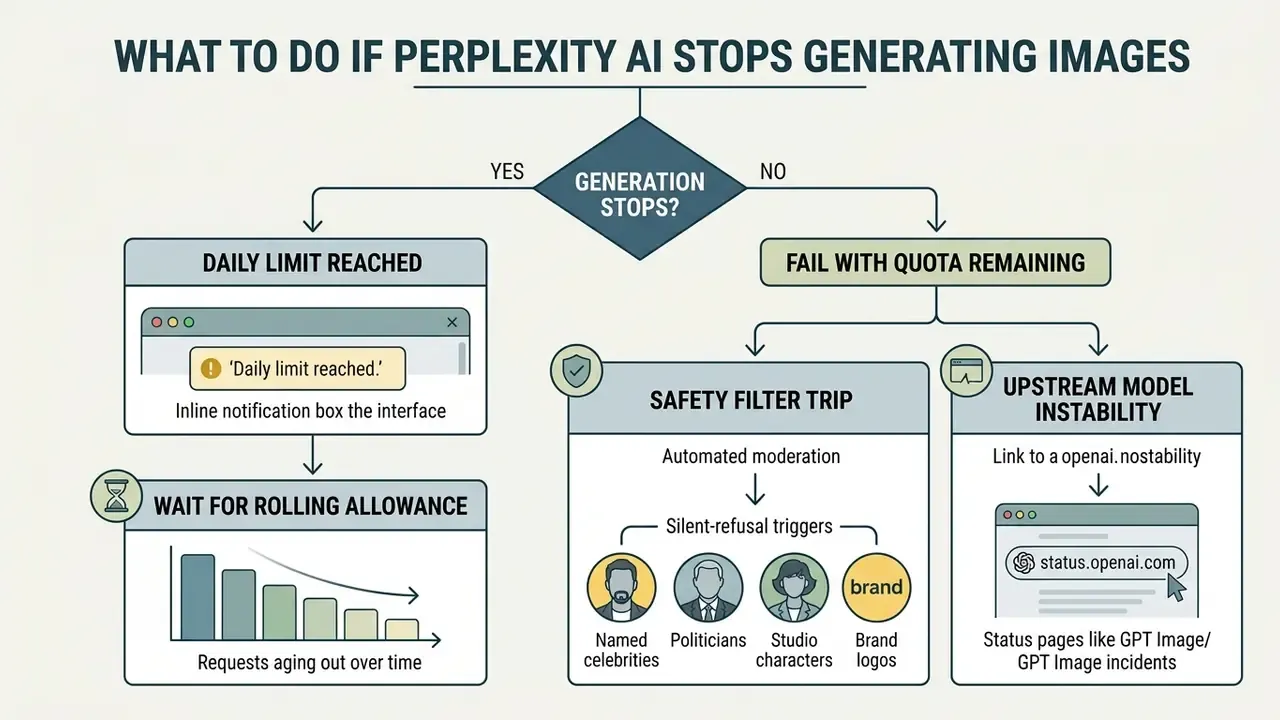
Limit reached: how to recognise the notice and what to do next
When the rolling allowance runs out, the interface shows an inline notice such as "Daily limit reached" or "You've reached your image generation limit," or it simply disables the generation button while still returning the text answer. No countdown appears. The help centre states only that access "returns automatically as older generations roll out of the usage window."
At that point, let older requests age out before submitting new visual prompts. Repeated retries do not restore access, and if a request is processed, they can deepen the deficit. For teams against an urgent deadline, upgrading to Max or an Enterprise seat, or offloading heavy visual work to a dedicated platform, is the more honest fix. Our guide to the best AI art generators by quality and pricing helps shortlist a fallback.
Generation fails while quota remains: what to check
If visual creation fails with quota still available, either the prompt tripped automated moderation or the selected model is having an outage. Upstream providers filter hard on photorealistic public figures, sensitive political content, copyrighted characters, medical imagery, and explicit material. OpenAI documents that "all image requests are filtered under the OpenAI policy," meaning a rejection can happen with your rate limits untouched.
Typical silent-refusal triggers: named celebrities or politicians, studio-owned characters, brand logos, real-world minors, weapons in a violent context, and clinical anatomy. Rewording toward neutral descriptive attributes usually clears the flag, for instance "a middle-aged newsreader in a studio" rather than a named anchor. Switching the active model router in preferences also bypasses localised provider outages. Where the blocker is compositional rather than generative, editing an existing asset in a dedicated photo editor costs less than burning further quota on regeneration.
How to use the image generation limit economically
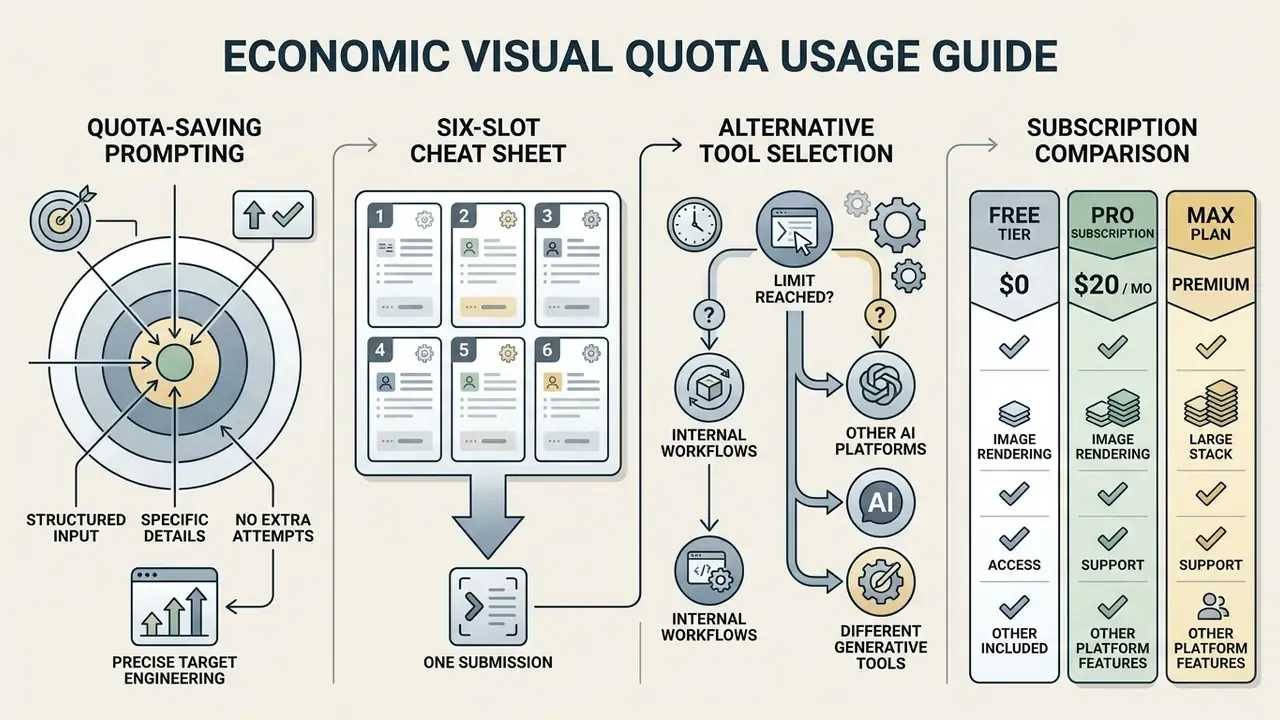
Getting value from a limited visual quota comes down to structured prompt engineering and disciplined workflow management. Fewer unnecessary iterations, more capacity left for the work that actually ships.
How to write a prompt that does not waste quota on extra attempts
To land a usable result on the first attempt, state the subject, style, lighting, composition, aspect ratio, and intended context in one instruction. Perplexity's own guidance is to "be as specific as possible" and to say how the image will be used, for example "a professional-looking banner image for a tech blog about AI." Vague prompts force regenerations, and regenerations are what burn a daily photo generation limit before lunch.
Instead of "a cat," write "a high-detail photographic close-up of a domestic short-hair cat resting on a wooden windowsill, soft warm afternoon sunlight, shallow depth of field." Structured natural language input cuts trial-and-error edits sharply.
Quota-saving prompt cheat sheet, six slots, one submission:
| Slot | What to state | Example fragment |
|---|---|---|
| 1. Subject | Concrete noun plus defining detail | "a stainless-steel espresso machine, brushed finish" |
| 2. Environment | Setting and background | "on a dark walnut café counter, blurred interior behind" |
| 3. Style | Medium and reference register | "editorial product photography, no illustration" |
| 4. Light | Direction, quality, colour temperature | "soft side lighting, cool morning daylight" |
| 5. Composition | Framing, crop, depth | "three-quarter view, shallow depth of field, centred" |
| 6. Purpose | Downstream use | "hero image for a B2B SaaS landing page" |
An illustrative example, composite rather than documented: a digital media specialist ran graphics production for executive briefings. After the team adopted structured prompt templates, the group reported a substantial drop in failed generations and cleared a recurring bottleneck before the quarterly cycle. The improvement was measured internally, so read it as directional, not benchmarked. Organisations reviewing asset options can consult our guide on commercial use of AI image generators for further practices worth copying.
When to switch to alternative AI tools
Perplexity is an answer engine with integrated visual tools, not a graphics suite. High-volume asset creation, layered editing, and precise vector manipulation belong on dedicated platforms. Our comparison of free AI image generators for high-volume tasks maps which tools tolerate batch throughput without collapsing on licensing.
Power users managing bulk creation usually end up pairing Perplexity's research strength with a separate image suite. Readers optimising for stylistic control rather than cited context can weigh Midjourney against competing image generators, while Google-ecosystem users can reach the same Nano Banana engine natively through Gemini, without Perplexity's square-flattening wrapper. Teams evaluating replacements can explore our analysis of AI Media Alternatives by Reason or run our interactive calculators to estimate credit burn rates across platforms.
The $20 per month tier comparison: what each subscription actually gives you
| Capability (at ~$20/mo) | Perplexity Pro | ChatGPT Plus | Gemini Advanced |
|---|---|---|---|
| Default image engine | Nano Banana 2 router, with Seedream 4.5 and GPT Image 2 selectable | GPT Image, single-vendor stack | Nano Banana family, native |
| Model switching for images | Yes, via Settings > Preferences | No cross-vendor switching | No cross-vendor switching |
| Practical daily image throughput | ~10 to 15 priority renders, rolling window | Higher, subject to undisclosed dynamic caps | Higher, subject to dynamic caps |
| Aspect ratio control | Limited, output often flattened to 1:1 | Multiple ratios supported | Multiple ratios supported |
| Cited web research around the image | Core strength, answers ship with sources | Browsing available, citations secondary | Grounding available |
| Commercial use of generated images | Not permitted, Enterprise only | Permitted per OpenAI terms | Permitted per Google terms |
| Image generation via public API | Not exposed | Available | Available |
The pattern is consistent. At the same price point, Perplexity trades output control and commercial licensing for multi-model routing and citation-backed research context. Choose it when the image supports a research artefact. Choose a dedicated generator when the image is the deliverable.
Limits of this analysis, and what we could not verify
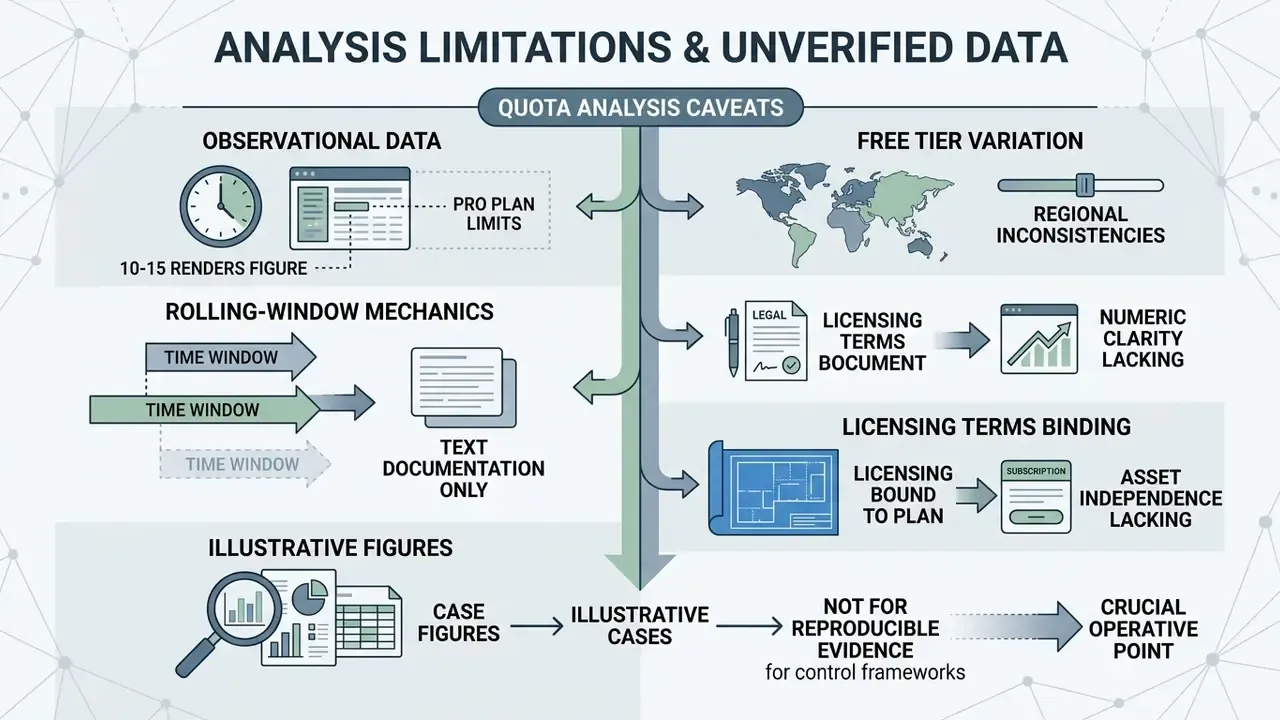
Honest caveats, because quota articles age badly.
- The 10 to 15 render figure is observational. It comes from community benchmarks and hands-on testing, not from a published service level. Perplexity may raise, lower, or regionalise it without an announcement.
- Free tier behaviour is inconsistent by region. Two documented sources describe slightly different scopes, and rollout gating explains most contradictory user reports.
- Rolling-window mechanics are documented in prose, not in numbers. There is no exposed counter, so any remaining-quota estimate is inference.
- Licensing terms bind the plan, not the asset. A generated file does not carry its own licence metadata, which is why governance teams should record plan, model, date, and prompt alongside each asset used externally.
- Case figures in this article are illustrative. They are composite scenarios, clearly labelled, and should not be read as verified client results.
If your control framework requires reproducible evidence, that last point is the operative one. Log the render event, not just the file.
FAQ about Perplexity AI image generation limits
Does Perplexity AI use its own image generation model?
No. Perplexity does not develop or maintain a proprietary text-to-image foundation model. The platform runs a routing architecture that forwards prompts to external third-party models. In 2026 that means Nano Banana 2 (Gemini 3.1 Flash Image) as the default, plus ByteDance's Seedream 4.5 and OpenAI's GPT Image 2, with earlier engines such as FLUX.1 and DALL·E 3 having rotated out of the main menu. Output quality, safety constraints, and processing speed all reflect the connected provider rather than Perplexity itself. For a side-by-side of those providers, see our comparison of leading AI art generators by quality and rights.
Can I get image generation through API access?
No, image generation is not exposed as a standard public endpoint in the general Perplexity Sonar API.
«The Sonar API has no documented stable endpoint for image generation; it supports text search and multimodal analysis of input images only.» Perplexity API Documentation (2026). https://docs.perplexity.ai/
The API supports text generation, web-grounded search, and multimodal input analysis, including uploading images for visual interpretation, where base64 payloads are capped at 50 MB and PNG, JPEG, WEBP, and GIF are accepted. Synthetic visual generation stays inside the user-facing web and mobile apps under standard subscription controls, so image output cannot be scripted the way search can.
Are image limits linked to Pro searches limits?
No. Visual generation quotas and Pro search allowances run on independent counters.
«Exhausting the daily image generation limit does not restrict Pro search, Deep Research, or standard queries; each pool resets on its own rules.» Tickerr Limit Tracker (2026); Perplexity Help Center (2026). https://www.perplexity.ai/help-center/en/articles/11187416-which-perplexity-subscription-plan-is-right-for-you
Hitting your daily image cap will not block text-based Pro searches, Deep Research queries, or ordinary web lookups. Each feature pool, images, video credits, Pro searches, research queries, and file or app creation, resets on its own operational rules.
Can I publish Perplexity Pro images on a website or in a client presentation?
No, not under Free, Pro, or Max. Those plans grant personal, non-commercial use only, which excludes monetised blogs, client decks, product listings, and advertising creative. Commercial distribution rights start at Enterprise Pro and Enterprise Max seats. This is the single most overlooked constraint in the whole feature set, because paying $20 a month intuitively feels like buying a licence. It is not.
Why do the images come out square?
Because the answer interface flattens most rendered assets to a 1:1 display ratio and exposes no reliable aspect-ratio parameter. Seedream 4.5 adds its own 2048x2048 pixel ceiling. For 16:9, 9:16, or print-resolution deliverables, generate through a dedicated tool or the provider's own interface, then reframe.
Editorial and Regulatory Disclaimer
The commentary in this article is for educational and informational purposes only. It does not constitute legal, regulatory, model compliance, or financial advice. Quotas, model availability, pricing, and licensing terms described here reflect publicly documented conditions during the 2026 documentation cycle and may change without notice. Always verify against Perplexity's current official pricing page and Help Center before making purchasing or publication decisions. Enterprise deployments of AI systems should be independently audited for regulatory compliance and operational risk alignment, and commercial reuse of generated assets should be reviewed by qualified counsel. Marcus Hale, author.
Authority Hub and Technical Navigation
To keep site architecture and authority flow structured, review our related resources:
- AI Media Support and Troubleshooting
- Understanding AI Watermarks and Export Constraints
- Watermark Generator Tools and Asset Management
- Managing AI Credits Refund and Cancel Friction
- Guide to free photo editors, feature limits, and paid upgrades
- Comparison of the best AI art generators by quality, control, and licensing