Last updated: September 2026. Author: AI Media research desk, based on hands-on evaluation of Perplexity Free, Pro, Max, and Enterprise workspaces across web, iOS, desktop, WhatsApp, and Spaces surfaces.
Executive Summary for Risk, Compliance, and Content Leaders
| Decision question | Short answer (September 2026) |
|---|---|
| Can Perplexity generate images? | Yes. Generation is triggered from the standard search input and routed to third-party frontier models (GPT Image 1, Nano Banana, Seedream 4.5, plus Nano Banana Pro on Max tiers). |
| Who may use outputs commercially? | Enterprise Pro ($40/seat) and Enterprise Max ($325/seat) only. Free, individual Pro ($20) and individual Max ($200) outputs are personal and non-commercial per Perplexity's help center. |
| Is there an image-generation API? | No. The documented API surface covers Router, Agent, Search, and Embeddings plus image input analysis. No public image-synthesis endpoint exists. |
| Can you upload a reference image to steer generation? | No. Uploaded images are analyzed multimodally. They are not used as image-to-image references, style transfers, or pose guides. |
| How predictable are quotas? | Low predictability by design. Limits reset on a rolling window rather than a calendar date, and regenerations, edits, and some processed failures all consume quota. |
| Where do third-party model risks sit? | Perplexity is an orchestration layer over OpenAI, Google, and ByteDance models. Provider rate-limit, pricing, and policy changes propagate into the product. Treat this as vendor risk inside your existing model-risk framework. |
| Biggest gaps for regulated teams | No documented seed fixing for bit-level reproducibility, no aspect-ratio UI controls, no canvas or layer editing, and security attestations must be requested directly from Perplexity for Enterprise contracts. |
Bottom line: Perplexity AI image generation is excellent for fast, research grounded visual explanation inside an existing search workflow. It is not yet a controlled production pipeline. Commercial publishing requires an Enterprise seat, while deterministic reproduction, batch throughput, and programmatic access still require a dedicated generator.
Where This Fits in a Regulated Workflow
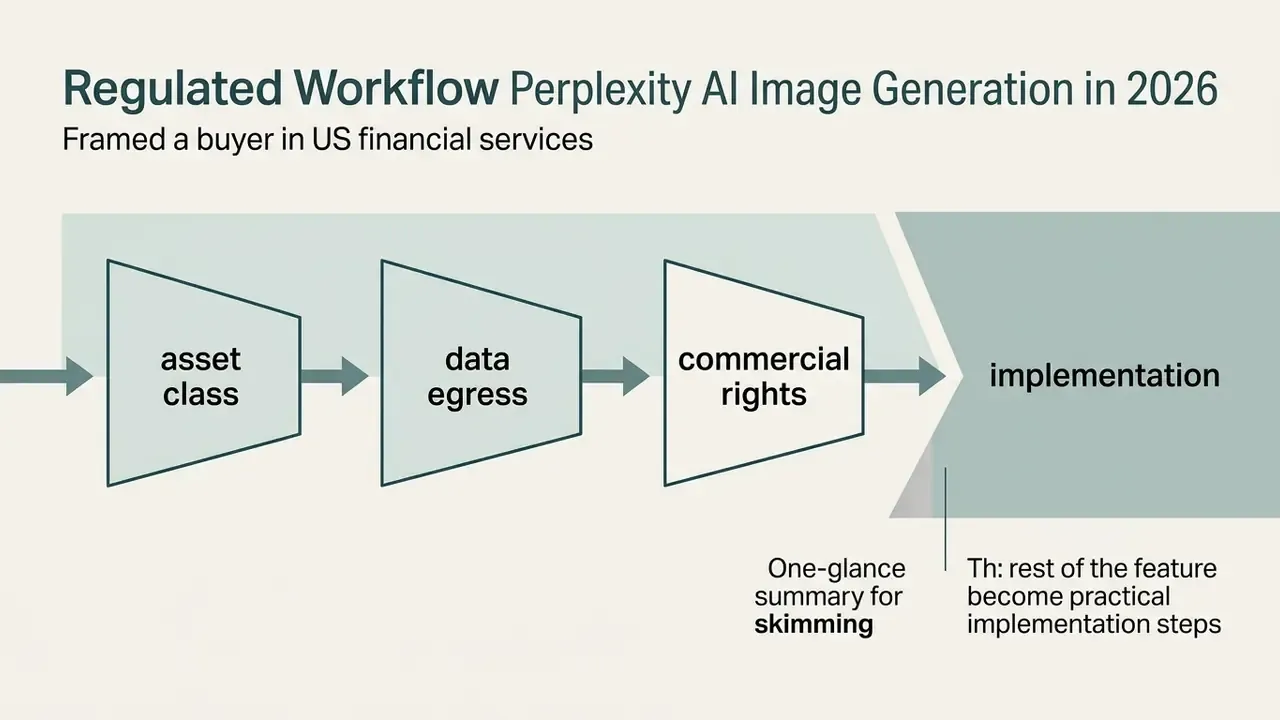
Before any of the feature detail matters, a buyer in US financial services has to settle three gates. They are unglamorous. They also decide whether the tool ever reaches a client-facing deliverable.
Gate one: asset class. A generated illustration used in a sector report is governed as content, not as a decision model. That distinction keeps the review proportionate. It does not exempt the tool from inventory, ownership, and sign-off requirements, and a governance team that skips the inventory entry will find the gap during the next internal audit cycle.
Gate two: data egress. Every image prompt leaves your tenant and reaches a third-party generator. So the control question is not «is the vendor safe», it is «what may an analyst type into the prompt field». Policy plus enforcement, in that order.
Gate three: commercial rights. Individual paid plans, including the $200 Max tier, remain personal use. That single line in the help center has stopped more deployments than any technical limit we tested. Finance teams sizing the Enterprise seat spend against realistic monthly asset volume can sanity-check the arithmetic with our calculators before committing to a per-seat contract.
Pass those three gates and the rest of this guide becomes an implementation question rather than a policy argument.
Does Perplexity AI Generate Images?
Perplexity AI can generate custom images directly inside its conversational answer engine by routing user prompts to specialized neural image models. Rather than operating as a standalone drawing tool, Perplexity embeds visual creation into a search driven workflow, so a user moves from factual research to visual output without leaving the interface.
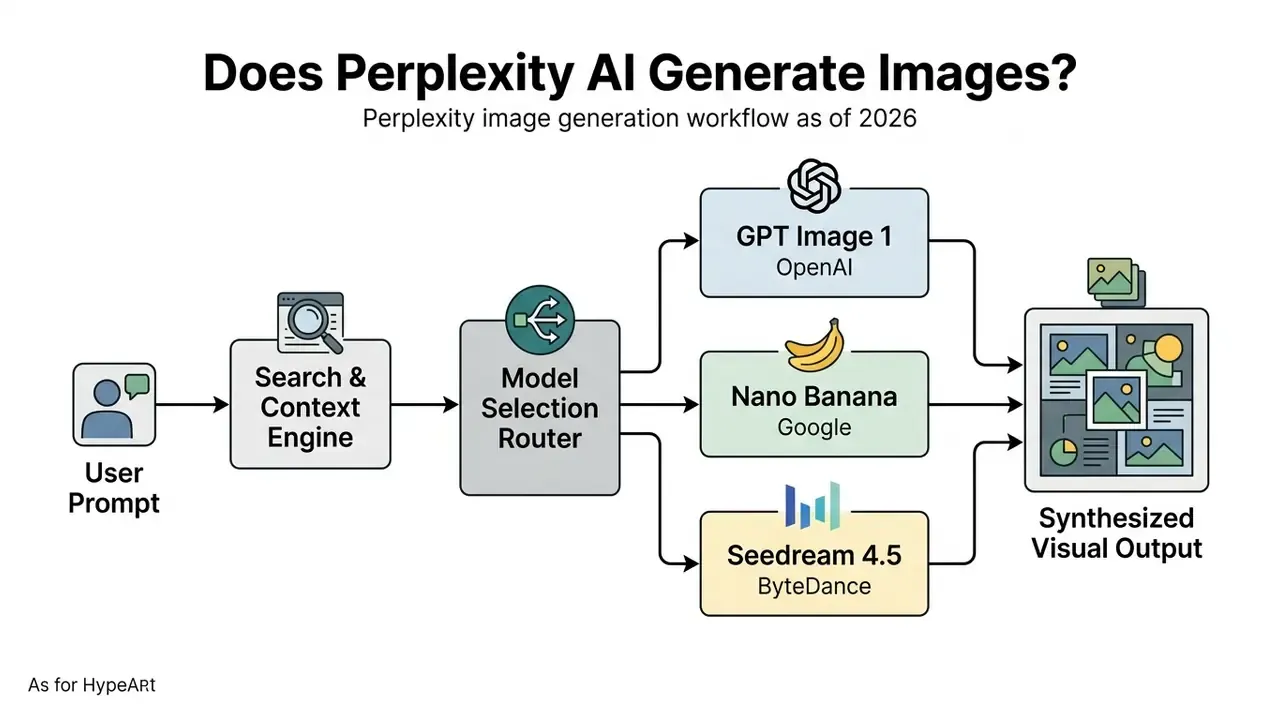
The platform operates as an orchestration layer over frontier text-to-image systems rather than training proprietary base diffusion models. When a user submits a descriptive visual query, Perplexity parses the natural language instruction, determines context requirements, and forwards the prompt to external generators such as OpenAI's GPT Image, Google's Nano Banana, or ByteDance's Seedream 4.5. The result is an ai powered search environment where text explanations and generated visuals reinforce each other, as documented in Generating Images with Perplexity (Perplexity Help Center, 2026). Readers benchmarking this architecture against stand-alone engines can review our comparison of the best AI image generators.
That is the architectural justification for the design. The retrieval step supplies vocabulary, entity names, and recent factual context that a bare text prompt would simply lack.
A historical note worth keeping straight: earlier coverage of perplexity ai dall e image generation reflected a product generation in which DALL·E 3 sat in the model list. The list has since rotated. Any internal document that names one engine will age faster than the control it supports.
Architectural and Vendor Risk: What the Routing Layer Implies
Because generation is delegated, the failure surface spans three vendors plus Perplexity's own routing tier. Three consequences matter for third-party risk management.
- Cascading dependency an upstream outage, a rate-limit reduction, or a policy tightening at OpenAI, Google, or ByteDance can quietly reduce model availability inside Perplexity. The Third-Party Models & Terms page states that model usage varies by provider terms and policies (https://www.perplexity.ai/hub/legal/third-party-models).
- Model-pool volatility the selectable list has already changed across product generations. Earlier documentation referenced DALL·E 3 and Gemini 2.0 Flash Experimental; current documentation emphasizes GPT Image 1, Nano Banana, Seedream 4.5, and FLUX.1 in some locales. Write controls to tolerate substitution.
- No SLA visibility at sub-model level public documentation describes rate limits and usage tiers for the API stack, but publishes no per-model uptime commitment for in-product image generation. Enterprise buyers should request that commitment in writing during procurement.
Image Generation vs. Image Search: What Is the Difference?
Image search retrieves pre-existing web photographs and licensed media. Image generation synthesizes entirely new visual assets from textual instructions. The distinction is essential for content governance, editorial accuracy, and intellectual property management.
When Perplexity performs an image search, it queries public web indexes and licensed media partners such as Getty Images. The output is an existing photograph with publisher credits, source links, and fixed composition.
Conversely, perplexity ai image generation triggers a neural synthesis pipeline. The system interprets natural language text prompts, generates new pixel matrices through models such as GPT Image or Nano Banana, and returns an original visual asset that did not previously exist on the web. Retrieved search results carry fixed copyright parameters from their original publishers; generated visuals are governed by Perplexity's platform terms and the user's subscription tier.
Why this matters operationally. Two visuals that look interchangeable in a report can carry entirely different legal statuses. A Getty-sourced image inherits licensed-stock obligations, including attribution, publisher credit, and no derivative misuse. A generated image inherits plan-based usage terms. Editorial checklists should therefore record, per asset, whether it was retrieved or synthesized. One field. It saves a legal review later.
What Problems Does Perplexity AI Image Generation Solve?
Perplexity AI image generation removes context switching. Research driven teams can create custom visuals, presentation illustrations, and social media graphics next to cited text answers.
Traditional visual asset creation splits across three tools: research in one application, copy in another, then a jump to a standalone local ai image generator or a stock photography library. Perplexity consolidates that path. A financial analyst preparing a sector brief on renewable infrastructure can synthesize market data, verify primary sources, and then generate an infographic diagram of an offshore wind turbine using the exact technical terms retrieved during search.
Perplexity's own product surface reinforces these use cases. The official Hub lists company and sector report building alongside image and video generation, and poster-style shareable outputs appear as a first-class feature. That maps cleanly to slide decks, sector reports, and social posts.
Field observation (updated). During an evaluation of research tools for a regional financial services firm, an analytics team folded Perplexity into its reporting workflow. The team needed custom visual diagrams alongside daily market intelligence briefs without breaching licensing terms or slipping publication deadlines, a question that ultimately routed through the same review path as any commercial use of AI image generators. Using prompt templates grounded in cited answers, the team reported that diagram preparation moved from roughly 45 minutes of manual sourcing and layout to a few minutes per brief. Those figures are a self-reported internal estimate from one team. They were not independently audited and should not be treated as a benchmark; independent time-motion data for research-embedded generation is not yet public. Approval was also conditional. Compliance permitted the tool only for non-confidential, publicly sourced market inputs, and commercial publication of any generated visual required an Enterprise seat.
Enterprise Data Governance, Privacy, and Audit Trails
Where Prompt Data Travels
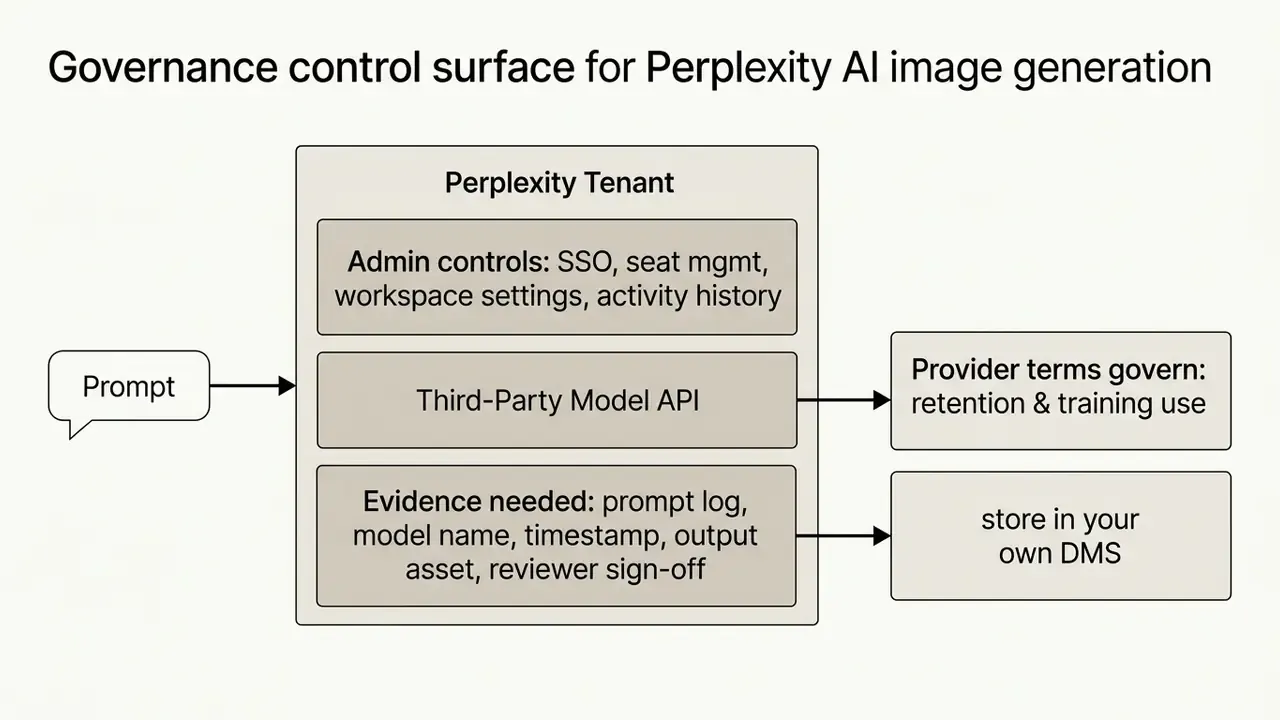
Every image prompt leaves Perplexity's tenant and reaches an external generator. That single fact drives most governance conclusions.
- Two sets of terms apply. Perplexity's platform terms govern your relationship with Perplexity. The provider terms referenced on the Third-Party Models & Terms page govern the downstream model call.
- Treat prompts as egress. Any confidential identifier, client name, unreleased product code name, or internal metric typed into an image prompt should be considered transmitted to a third-party processor. This is the practical control against shadow AI: prohibit confidential inputs, then enforce it with policy and network controls rather than trust in defaults.
- Verify before you rely. Claims circulating in secondary blogs about zero data retention, training exclusions, SOC 2 Type II scope, or HIPAA posture for Enterprise tiers require direct verification. Request the current security package, sub-processor list, and data-processing addendum from Perplexity Enterprise sales, then attach them to your vendor file instead of citing third-party summaries. Public help-center documentation reviewed for this article does not enumerate those attestations for the image-generation feature specifically.
Reproducibility and Audit Trail: What Exists and What Does Not
Model-risk reviewers ask for the same four artifacts: the input, the model version, the output, and a way to regenerate the result.
- Prompts and results persist in thread history. Generation happens inside a normal Perplexity thread, so the prompt text and the resulting asset remain in the conversation record and, for team deployments, inside the relevant Space. This is the most reliable audit surface available today.
- Enterprise workspaces centralize access, not forensics. Admin controls govern seats, SSO, and workspace membership. That is access governance. It is not a purpose-built prompt-audit export tool.
- No documented seed control. Public documentation exposes no generation seed, sampler, or step count. Bit-level reproducibility therefore cannot be guaranteed, because re-running an identical prompt produces a new variation. Where a reviewer needs the exact asset, the asset itself is the record of truth, not the prompt.
- Practical control. Export each approved visual with a metadata sidecar recording prompt text, selected model, plan tier, timestamp, operator, and reviewer approval. Store that record in your own document management system. This converts a non-deterministic tool into an auditable one without waiting on vendor features.
Enterprise Readiness Checklist (Compliance & Security)
Checklist0 / 8
Positioning note for model-risk teams: generative image output used in external reporting is normally governed as content rather than as a decision model. Even so, aligning documentation with your existing AI risk-management taxonomy, covering inventory, purpose, owner, review cadence, and human sign-off, keeps the tool inside an approved control envelope instead of outside it.
Perplexity AI Models, Pricing Plans, and Limits for Image Generation
Perplexity structures image generation access across Free, Pro, Max, and Enterprise tiers, and it enforces dynamic rolling usage limits rather than fixed calendar resets. Practical 2026 testing reported by independent technical reviewers suggests Pro users may hit throttling after roughly ten generations in a day, even though no visible counter appears in the interface. Plan capacity with a margin, not against a published number.
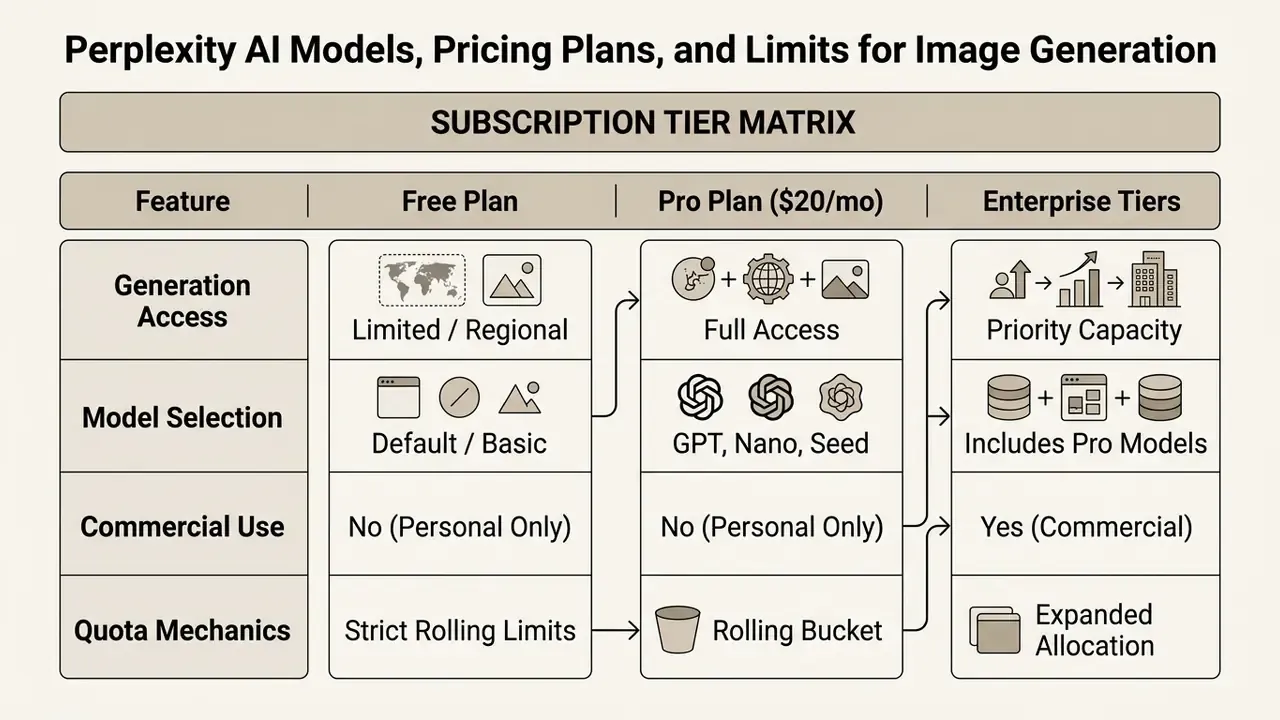
| Subscription Plan | Monthly Price | Image Generation Access | Available Image Models | Commercial Usage Rights | Priority Queue Handling |
|---|---|---|---|---|---|
| Free Tier | $0 | Limited (regional rollout) | Default / basic options | No (personal use only) | Standard priority |
| Pro Tier | $20 / month | Full access (rolling quotas) | Default, GPT Image 1, Nano Banana, Seedream 4.5 | No (personal use only) | High priority |
| Max Tier | $200 / month | Expanded capacity | Includes Nano Banana Pro and frontier models | No (personal use only) | Maximum priority |
| Enterprise Pro | $40 / seat/mo | Enterprise capacity | Full model picker access | Yes (full commercial) | Dedicated capacity |
| Enterprise Max | $325 / seat/mo | Maximum enterprise capacity | Full model picker plus Nano Banana Pro | Yes (full commercial) | Dedicated capacity |
Note: pricing and platform conditions verified as of September 2026. Consult the official Perplexity pricing page for live updates.
Can You Use Perplexity AI Image Generation for Free?
The Free plan provides limited access to basic image generation, subject to regional rollouts and strict rolling usage constraints.
Public documentation on perplexity ai free version image generation reflects product updates over time. Earlier platform documentation restricted visual synthesis to paid tiers; current help center guidelines confirm that free accounts receive a minimal allocation of generations (Generating Images with Perplexity, Perplexity Help Center, 2026, https://www.perplexity.ai/help-center/en/articles/10354781-generating-images-with-perplexity). Worth flagging: the plan-comparison page has at times shown «Image Generation: No» for Free, which conflicts with the image-generation help article. That is a documentation inconsistency rather than a hidden rule. Free tier generation still operates under real constraints. Premium engines such as Nano Banana Pro stay locked, requests sit in standard queue priority, and regional availability can hide the feature entirely. Users who want dedicated free creative tools can compare standalone best free AI art generator platforms for higher daily volume.
When Do You Need a Pro Plan or Higher Tier?
Upgrading to the Pro plan ($20 per month) or above becomes necessary when workflows require model selection, expanded rolling quotas, faster response times, and visual research integration.
Pro unlocks full model selection preferences in account settings, so users can switch between GPT Image 1, Nano Banana, and Seedream 4.5. Pro subscribers also receive higher rolling query allowances, priority queue execution during peak server load, and access to advanced research tools such as Deep Research and file analysis. Teams comparing enterprise-grade suites may also evaluate the leonardo ai image generation platform, or read our narrower breakdown of leonardo ai image workflows, when the priority is repeatable brand output rather than research context.
Field observation (updated). A mid-sized design consultancy tested Perplexity Pro to streamline preliminary visual ideation for client pitches. The team wanted consistent access to GPT Image 1 for conceptual wireframes during live research sessions. After upgrading, queue delays disappeared and model switching let them pick the engine that suited technical diagrams versus looser perplexity ai art concepts. They reported a clear increase in pitch-deck concept visuals produced per week. No audited baseline exists behind that improvement, so read it as directional rather than measured. Run a two-week internal pilot against your own asset counts before budgeting on it.
Why Available Models and Usage Limits Change
Quotas and model availability fluctuate with server load, third-party provider API rate limits, and infrastructure optimization updates.
Perplexity integrates third-party APIs from OpenAI, Google, and ByteDance, so changes to rate limits, API pricing, or usage policies at those providers land directly in platform quotas (Third-Party Models & Terms, Perplexity, 2026, https://www.perplexity.ai/hub/legal/third-party-models). The developer changelog shows how fast those ceilings move: on 10 September 2026 the default rate limit for Sonar online models rose to 50 requests per minute for all users. Limits inside the product also reset on a rolling window, typically a sliding 4 to 24 hours, rather than on a fixed calendar day. When load spikes across the platform, automated rate limiters trim throughput to protect stability. Two details that quietly burn allowance: regenerating or editing an image counts as a new generation, and failed attempts can still consume quota once the request has been processed.
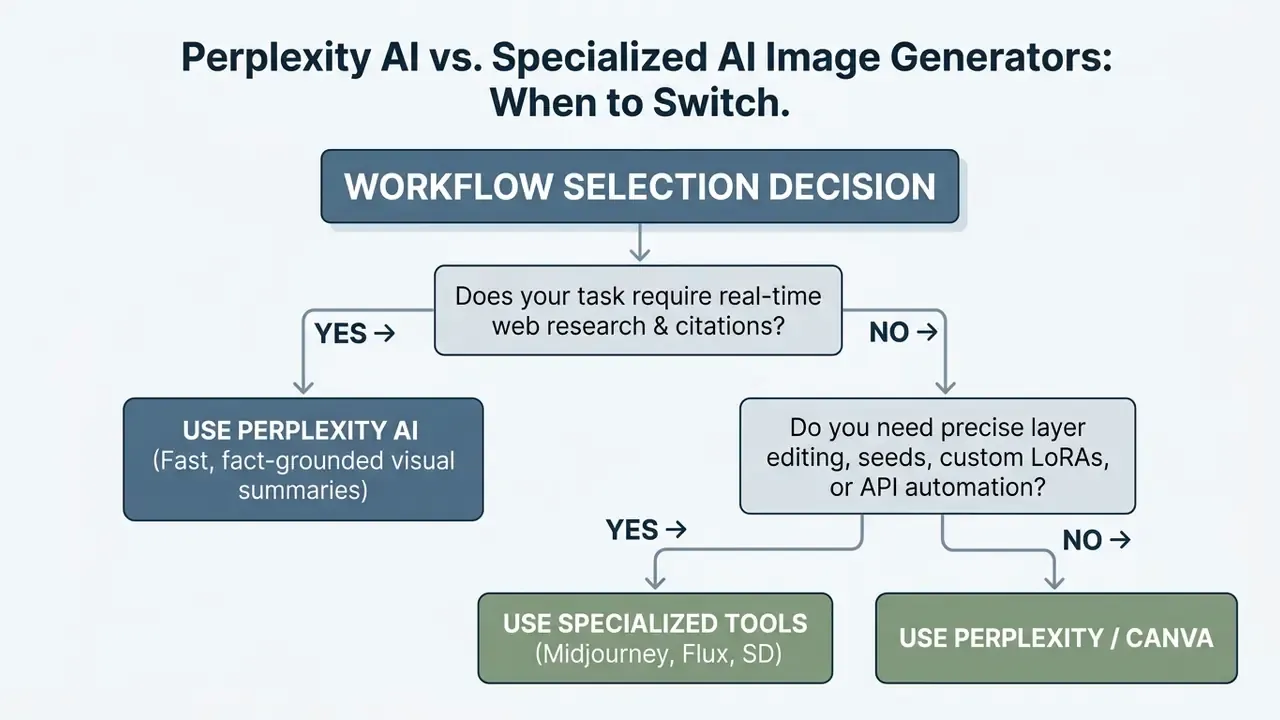
Perplexity AI vs. Specialized AI Image Generators: When to Switch
Perplexity is optimal for research grounded visual summaries. Specialized tools such as Midjourney, Stable Diffusion, DALL-E, and Flux excel at advanced artistic direction, character consistency, and high-resolution export.
| Evaluation Criterion | Perplexity AI Image Generation | Specialized Generators (Midjourney, SD, Flux) |
|---|---|---|
| Primary Focus | Search-grounded contextual visuals | Advanced artistic synthesis and editing |
| Research Grounding | High (tied directly to web search) | None (standalone prompt execution) |
| Artistic Control | Moderate (prompt-based styling) | High (LoRA, control nets, seeds, samplers) |
| Reference / Image-to-Image | Not supported | Supported (reference images, style locks) |
| Aspect Ratio & Canvas | Fixed standard aspect ratios | Full custom ratios and outpainting |
| Output Formats | Web bitmaps (PNG / JPEG) | PNG, JPEG, WebP, TIFF, layered and vector exports |
| Reproducibility (seeds) | No exposed seed control | Deterministic seed reproduction |
| Commercial Licensing | Enterprise plans only | Included in standard paid plans |
| API Availability | No public image generation API | Full programmatic API access |
| Batch Processing | Single image per request flow | High-volume batch generation pipelines |
| GRC / MRM Integration | None documented (manual evidence capture) | Varies; API logs enable automated evidence capture |
Content strategists hunting dedicated tools or alternative visual engines can explore reviews of AI Media Alternatives to compare platform strengths. Teams that need print-grade output from a web-resolution asset should review AI upscalers for increasing resolution before rejecting Perplexity outright on export quality alone.
When Perplexity Is Better for Creating Visuals
Perplexity wins when visual creation depends on real time web research, cited sources, immediate text-to-visual synthesis, and a unified research workflow.
Because the platform integrates retrieval-augmented generation, it can pull domain-specific terminology and recent real-world data into the answer context before invoking the image model.
That makes the ai image generator perplexity offers unusually suited to academic explainers, sector reports, news summaries, and educational graphics where factual alignment with surrounding text is the point. Deep Research mode strengthens the same pattern by building a research plan, pulling primary sources across many sites, and citing each claim before you visualize it.
When to Choose a Dedicated Image Generator or Editor
Pick a specialized tool when a project requires precise layer editing, custom LoRA training, exact seed reproducibility, high-resolution print export, or programmatic API pipelines.
General-purpose search tools offer no advanced canvas controls, no fine-grained diffusion samplers, and no character consistency tooling.
Model choice is task-dependent rather than absolute. Organizations needing bulk production, brand style fine-tuning, or integration with external creative workflows should deploy dedicated platforms. Teams tied to a social ecosystem can evaluate meta ai image tooling, while teams already standardized on a conversational assistant can compare ChatGPT as an image generator on prompt fidelity, access, and controls. Character consistency across many scenes remains a distinct technical problem, not a default capability of general-purpose generation. That is why projects needing a recurring mascot, spokesperson, or product hero shot almost always migrate to a dedicated pipeline.
Core Functional Limitations of Perplexity AI Image Synthesis
Perplexity streamlines research driven visual generation, yet creators should account for structural constraints before building a heavy production pipeline on it.
- No reference image support (no image-to-image) you cannot upload source photos or sketches to guide composition, style transfer, or pose replication. Uploaded images are analyzed for understanding, not used as generation references.
- Fixed aspect ratio controls the engine returns standard square or landscape ratios based on container specifications. Precise ratios such as 9:16 or 21:9 cannot be set through UI toggles and must be requested inside the prompt text, with no guarantee of exact compliance.
- Output format constraints generated assets arrive as standard web bitmaps, PNG or JPEG. No documented TIFF, layered PSD, SVG, or CMYK print export path exists.
- No canvas or layer editing there is no native inpainting, outpainting, layer mask, or vector export. For frame extension work, a dedicated AI outpainting tool is required.
- No public image generation API developer access covers Router, Agent, Search, and Embeddings endpoints plus image input handling. Standalone synthesis cannot be called programmatically.
- No deterministic seeds or batch queues one image per request, no seed reuse, no bulk job submission.
- Quota opacity no visible counter, rolling reset windows, and regenerations that consume allowance make deadline-critical planning risky.
How to Generate Images with Perplexity AI: A Step-by-Step Guide
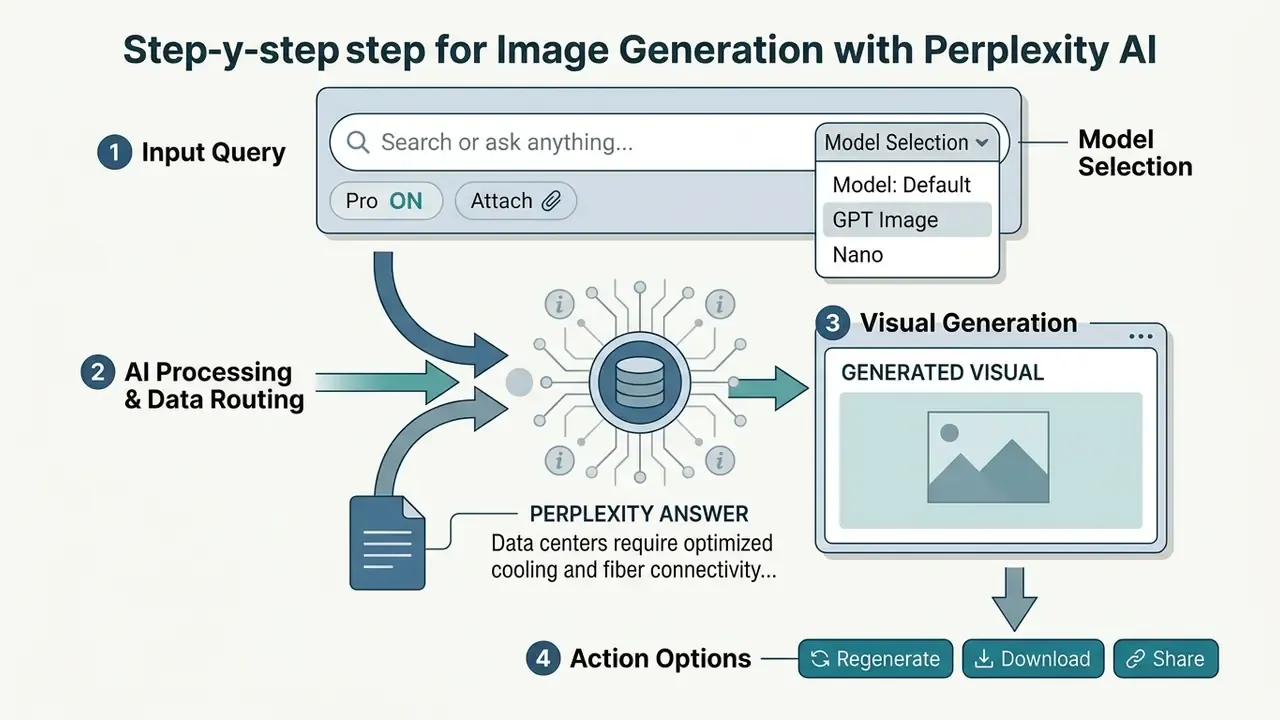
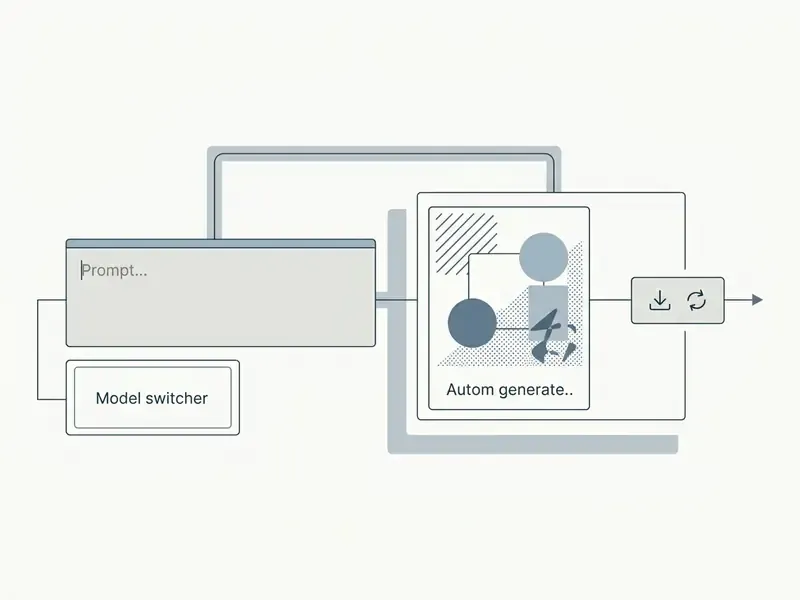
To generate images using Perplexity AI, type a detailed descriptive prompt into the main search box, let the system synthesize the visual automatically, then refine or download the output.
The interface needs no command syntax and no separate creation tab. Users can start visual generation on web, desktop, or mobile by following one standardized path.
- Sign into an active Perplexity AI account on web or mobile. Image generation is unavailable to signed-out visitors.
- Open Settings > Preferences to verify or change the default image generation model.
- Enter a clear visual instruction into the primary search input, for example: "Generate an image of a modern data center with blue fiber optic lighting, photorealistic style."
- Submit the query and let the answer engine process both the text summary and the synthesized visual. There is no separate «create» button; generation starts from the prompt itself.
- Review the visual asset embedded below the textual answer, then use Regenerate or the download control beneath the image.
How to Generate Images via Perplexity AI on WhatsApp
Perplexity lets users generate visuals inside WhatsApp without installing another application or creating a separate web account. Handy for mobile-first operators, field teams, and client chats.
To use Perplexity image generation on WhatsApp:
- Save the official Perplexity AI contact number: +1 (833) 436-3285.
- Open WhatsApp and start a new conversation with the saved contact.
- Send a natural language prompt that begins with a visual instruction, for example:
"Generate an image of a futuristic electric car in watercolor style". - The bot processes the prompt through default server routing and replies in-thread with the generated image.
- Refine conversationally in the same chat, for instance
"make it more colorful"or"add a sunset background", since the assistant retains context across the exchange.
Constraints on this channel are tighter than on the web. Advanced model selection (switching to GPT Image 1 or Nano Banana Pro) and custom aspect ratios are not exposed, the bot returns one image per prompt instead of a grid of variants, and asking for «three versions» yields sequential single replies. Users who need model control, higher volume, or commercial rights must work in a web or desktop Enterprise workspace. For governance purposes, treat WhatsApp generation as a consumer-grade surface. It sits outside SSO, outside admin controls, and outside your audit perimeter.
Generating Images Within Perplexity Spaces
For team collaboration and project-based research, image generation can run directly inside Perplexity Spaces.
Generating visuals in a dedicated Space binds the synthesized images, cited sources, and uploaded documents to that project context. Every member with access can review, regenerate, or download assets from the shared activity feed, which ends the usual scatter of files across personal folders and chat exports. For regulated teams this is the most valuable surface available today. Prompt, cited answer, and resulting asset all persist in one container, so a Space works as a lightweight evidence trail during internal review, provided your policy still requires an external record of the approved asset and its metadata.
Typical patterns: a per-campaign Space for marketing creative, a per-report Space for sector research illustrations, and a per-client Space where instructions such as tone, palette, and forbidden elements are stored once and reused instead of retyped into every prompt.
How to Formulate an Image Prompt
An effective image prompt uses clear natural language to specify subject, visual style, color palette, lighting, and composition in a single instruction. Vague prompts produce unpredictable visuals and waste rolling quota.
Avoid single-word queries such as "chart" or "building". Build prompts on a five-part framework instead.
- Primary subject the core object, person, or scene, for example "a corporate board room meeting".
- Visual style the aesthetic medium, such as "flat vector illustration", "photorealistic 35mm photograph", or "3D render".
- Lighting and atmosphere environmental detail, such as "bright morning sunlight" or "soft studio lighting".
- Composition and framing viewpoint and camera angle, such as "wide-angle view", "isometric perspective", or "close-up portrait".
- Color palette dominant tones, such as "monochromatic blue and slate grey palette".
Prompt order matters as much as prompt content. Keep a consistent sequence (scene and background, subject, key details, constraints) so that edits stay traceable and a reviewer can see exactly which variable changed between two versions.
Production-Ready Prompt Templates for Business Workflows
eCommerce product photography:
"Photorealistic studio shot of a matte black wireless headphone on a polished concrete pedestal, soft directional key lighting, neutral warm background, 85mm lens perspective, high detail --no harsh shadows, no reflections, no text"Marketing campaign banner:
"Flat vector style illustration of a software engineering team analyzing data charts on digital screens, isometric angle, corporate blue and slate gray palette, clean lines, white background, no watermark"Sector report diagram:
"Technical schematic illustration of an offshore wind turbine nacelle, labeled component callouts, isometric cutaway view, muted teal and grey palette, flat vector style, white background, no photographic texture"Social quote card:
"Minimalist square social graphic with large empty central area reserved for text, soft gradient background in deep navy to violet, subtle geometric grid, no lettering, no logos"Localized campaign variant:
"Lifestyle photograph of a family using a mobile banking app at a kitchen table, natural window light, warm neutral palette, 35mm documentary style, generic non-branded interface on screen, no readable text"
Every template follows the same discipline: a concrete subject, a named medium, one lighting instruction, one framing or lens cue, a palette, and explicit exclusions.
How to Select an Image Generation Model
Pro and Max users can pick specific neural image models in Settings based on aesthetic requirements, output detail, and generation speed. The platform exposes several model backends alongside a Default auto-routing mode.
That finding is the empirical case for a multi-model router. Quality, prompt alignment, aesthetics, and robustness do not co-occur in one engine, so matching the task to the model beats defending a favorite. Understanding model behavior also shapes how long does generation take and the visual fidelity you get, a useful comparison point against the generation speed of free AI image tools.
- GPT Image 1 (OpenAI) advanced general-purpose visual creation. Strong on complex visual reasoning, prompt adherence, detailed scenes, and legible text rendering inside graphics.
- Nano Banana (Google, Gemini-based) high-speed generation optimized for clean, context-driven visuals and fast iteration. Max and Enterprise Max subscribers gain Nano Banana Pro for higher resolution processing.
- Seedream 4.5 (ByteDance) a design-oriented engine tuned for graphic layouts, visual editing tasks, and artistic compositions, capped at 2048×2048 pixels on export.
- FLUX.1 (Black Forest Labs) listed as a creative model in some help-center locales; availability varies by region and product version.
- Default mode automated routing that reads prompt semantics and selects the most suitable underlying image engine.
Getting More Precise Results: Prompts, Context, and Refinement
Precise output in Perplexity comes from structured prompt construction, explicit negative constraints, and iterative follow-up requests in the same conversational thread.
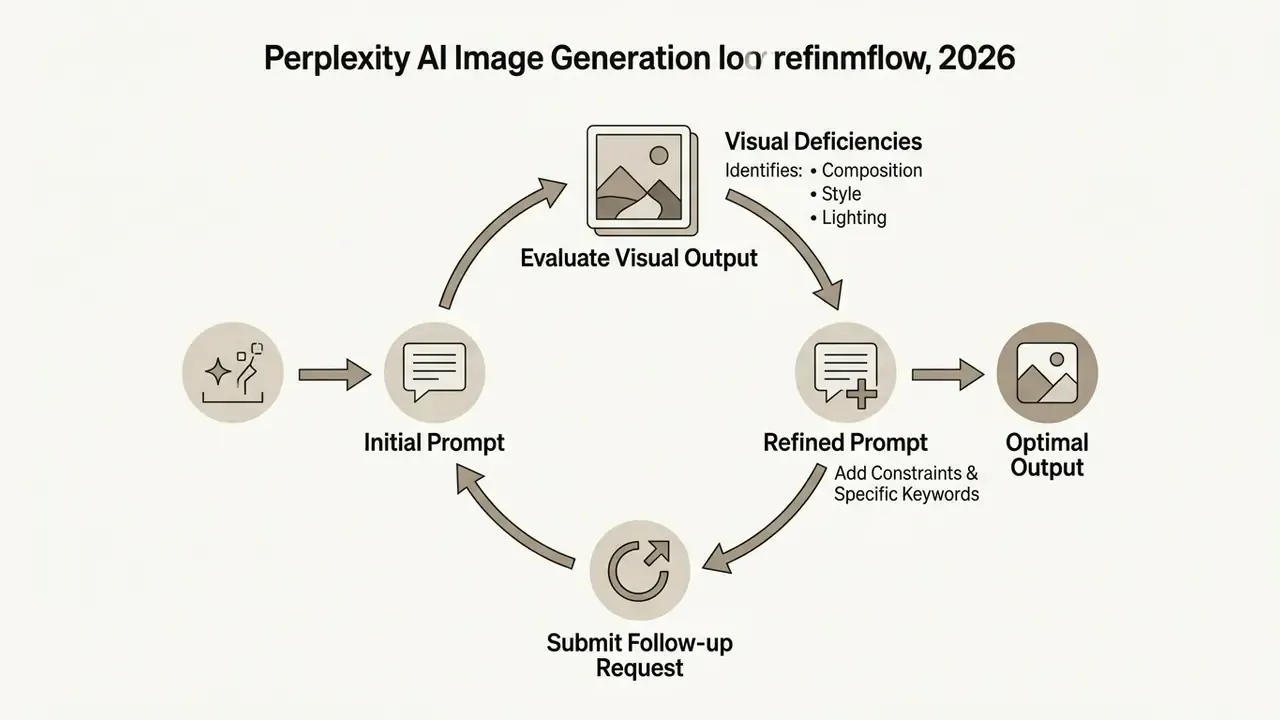
Because Perplexity processes queries through advanced language models, conversational context becomes a refinement tool. Treat visual creation as a loop rather than a single shot, and accuracy climbs.
What Details to Add to an Image Prompt
High-precision prompts carry five essentials: primary subject, atmospheric lighting, artistic style, framing angle, and explicit exclusions.
For professional workflows, add technical photography terminology and hard boundaries.
- Specify camera and lens mechanics terms such as "50mm lens", "f/2.8 aperture", or "macro lens" control depth of field.
- Define spatial layout indicate background and foreground, for example "subject centered in foreground with a blurred modern office background".
- State explicit exclusions negative constraints suppress common diffusion artifacts, for example "no watermarks, no extra text, no oversaturated colors, no distorted geometry, no logos or trademarks".
- Name invariants you want preserved when refining, state what must not change, such as "keep the same layout, palette, and camera angle".
- Leverage search context reuse technical terms retrieved in the preceding text answer to keep the visual domain-accurate.
Checklist for image prompt quality:
Checklist0 / 7
How to Refine and Regenerate Images After the First Result
To refine an image, click Regenerate for an automated variant, or send a follow-up text prompt specifying exact adjustments to composition, colors, or subject placement.
Regenerate re-runs the same prompt through the selected model and returns a new random variation. If the first visual has structural errors, though, such as wrong subject placement or the wrong palette, re-rolling the identical prompt rarely fixes the underlying defect.
The better move is a follow-up conversational prompt in the same thread. Say what to retain and what to change: "Regenerate the previous image, but change the background from a dark night scene to a bright sunlit office, and remove the clutter from the desk." Keep intent explicit, because including the phrase "generate an image" prevents the thread from sliding back into a purely textual answer. Each refinement counts as a new visual generation against your rolling window, so change one variable per iteration instead of rewriting the whole prompt. One variable. It also makes the change log readable for a reviewer later.
Why Perplexity AI Fails to Generate Images: Troubleshooting and Solutions
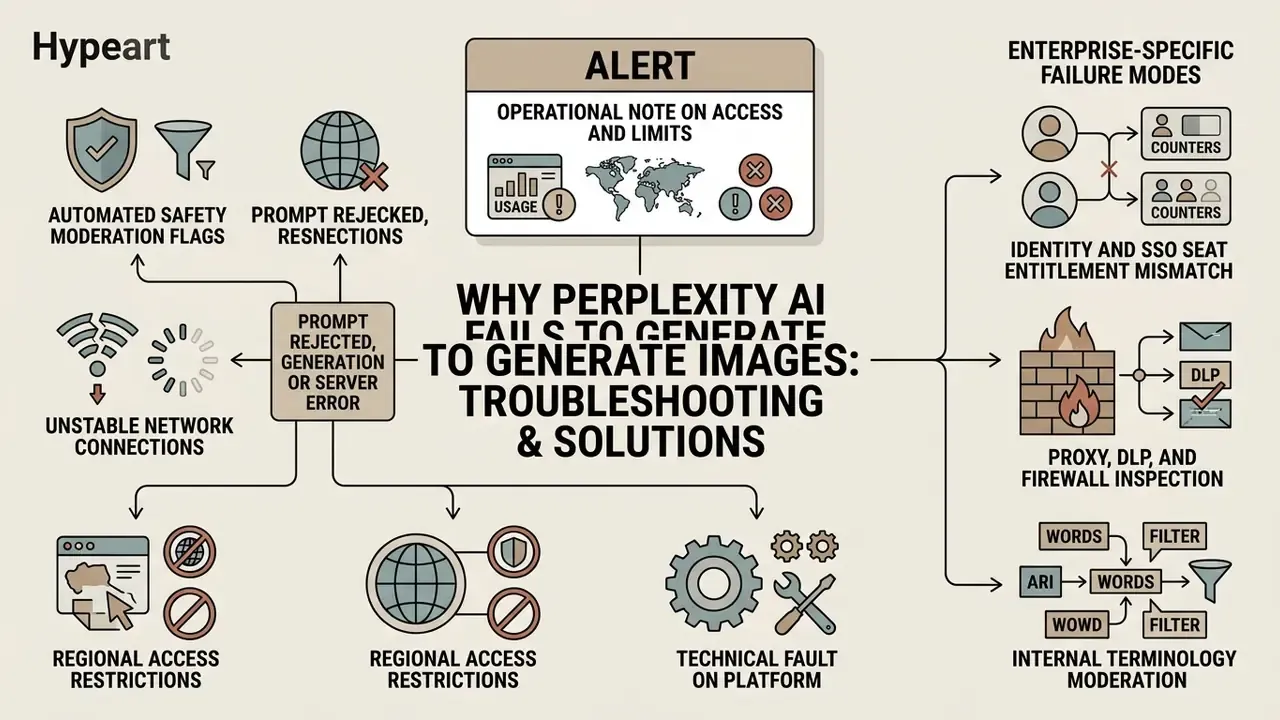
Failures in Perplexity AI image generation trace back to automated safety moderation flags, unstable network connections, regional access restrictions, or a technical fault on Perplexity's side.
ALERT: Operational Note on Access and Limits
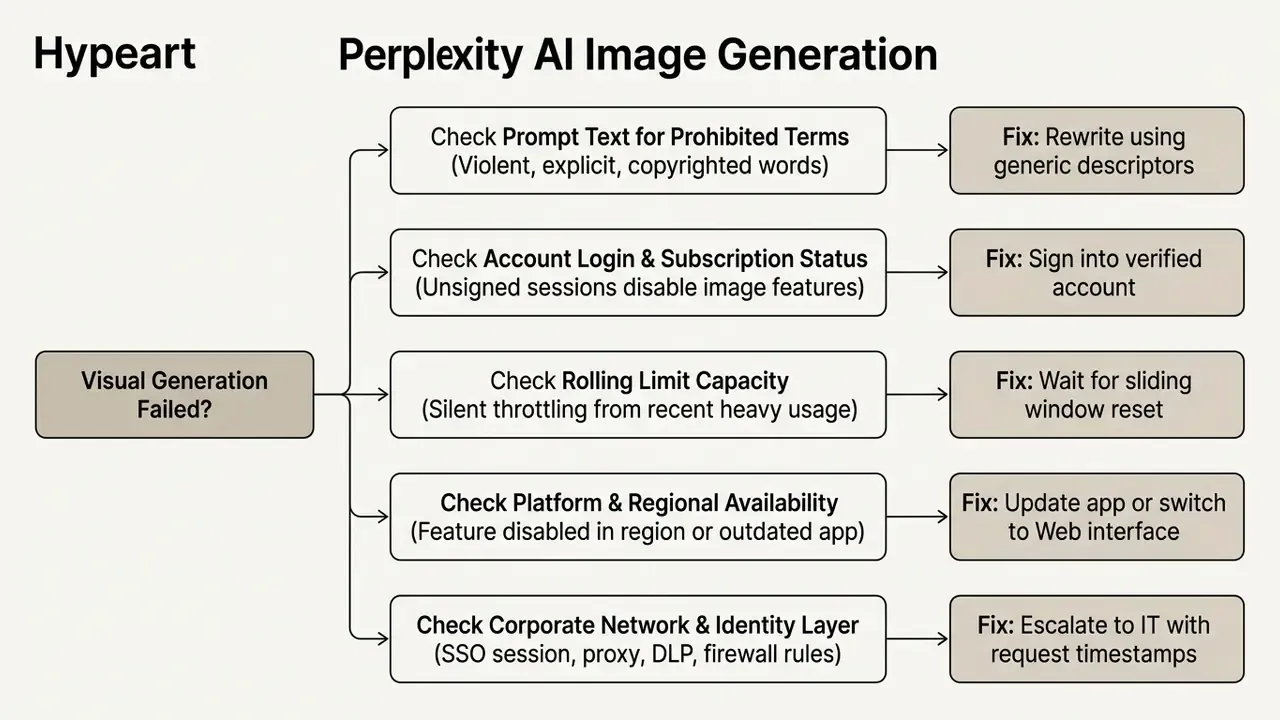
When a visual request fails to render, the platform usually returns a text notice saying the request could not be completed. Systematic diagnosis identifies the root cause and restores the perplexity ai generate image feature faster than repeated retries.
Prompt Rejected, Generation Frozen, or Server Error
Rejections happen when safety classifiers detect a policy violation. Frozen generations usually signal a temporary server timeout or exhausted rolling quota.
When a prompt trips automated moderation, typically over terms tied to explicit content, violence, sensitive political figures, or trademarked characters, synthesis halts. Rephrase with neutral, generic descriptions and drop named celebrities, brand marks, and franchise characters. If the interface freezes indefinitely, check network stability or wait for the sliding quota window to reset. If errors persist across simple prompts, file a bug report through official support channels and include the prompt text, timestamp, plan tier, and platform.
Enterprise-Specific Failure Modes
Corporate environments break for reasons that never appear in consumer troubleshooting guides. Check these before opening a vendor ticket.
- Identity and SSO an expired SSO session can leave search usable while silently disabling signed-in-only features such as image generation. Re-authenticate rather than refreshing.
- Seat entitlement mismatch a user on an Enterprise seat may still see personal-use behavior if the workspace assignment is wrong. Verify seat type in admin settings before calling it a bug.
- Proxy, DLP, and firewall inspection corporate egress filtering can truncate the media response while the text answer loads normally, which looks exactly like a frozen generation. Capture request timestamps and escalate to network operations.
- Internal terminology moderation project code names, security-sensitive jargon, or client names can read as restricted content to an upstream classifier. Substitute generic descriptors, which is also the correct data-hygiene behavior.
- Shared quota exhaustion in team workspaces, heavy use by a few members throttles everyone inside a rolling window. Stagger deadline-critical generation instead of batching it.
- Region-locked workspaces where inference residency or regional configuration applies, image generation may be out of scope for that deployment. Confirm with your account team rather than retrying.
FAQ: Frequently Asked Questions About Perplexity AI Image Generation
Can You Generate Images in the Perplexity AI Mobile App?
Yes. Perplexity ai app image generation works on iOS by typing natural language prompts into the search input, with Android availability rolling out across regions and documentation varying by page date. Users can select models in application settings where the picker has shipped, and export generated assets straight to the camera roll.
Can You Generate Images Through Perplexity on WhatsApp?
Yes. Save +1 (833) 436-3285, start a chat, and send a descriptive prompt such as "create an image of a rocket launch in watercolor style". No Perplexity account is required for the basic flow, but model selection, aspect-ratio control, and commercial rights are unavailable on this channel, and the surface sits outside enterprise SSO and admin governance.
Can Teams Generate and Store Images Inside Perplexity Spaces?
Yes. Images generated inside a Space stay attached to that project alongside its cited sources and uploaded files, so members can review, regenerate, and download assets from one shared context instead of circulating files by chat.
Does Perplexity Support Image-to-Image or Reference Images?
No. You cannot upload a reference photo to drive style transfer, character consistency, or pose replication. Uploaded images serve multimodal analysis only. Projects that need reference-driven consistency require a dedicated generator.
What File Formats and Resolutions Does Perplexity Output?
Generated assets arrive as standard web bitmaps, PNG or JPEG. Perplexity does not publish fixed output resolutions or aspect-ratio specifications for generated visuals, and Seedream 4.5 is documented with a 2048×2048 ceiling. For print-grade dimensions, plan an upscaling step.
Is Perplexity AI Suitable for Creating Social Media Visuals?
The assistant produces solid quality for personal social media posts, but commercial publishing requires Enterprise Pro or Enterprise Max. Free and individual Pro users are restricted to personal, non-commercial use. Publishers verifying the provenance of inbound or archived creative before reuse can also run assets through AI image detectors as a pre-publication check.
Can You Use Perplexity for Image Generation via API?
No. Perplexity does not currently offer a public API endpoint for standalone image generation. The documented surface, covering Router, Agent, Search, and Embeddings, supports text search, web citations, image attachments, and multimodal image input analysis, but synthesis endpoints are not exposed to external developer pipelines (Perplexity API Reference Documentation, 2026, https://docs.perplexity.ai).
Can You Use a Perplexity AI Assistant Picture in Client Deliverables?
Only under an Enterprise plan. A perplexity ai assistant image produced on a Free, Pro, or Max individual seat remains personal use, which excludes client-facing decks, pitch documents, and monetized channels. Confirm the seat type in admin settings before an asset reaches an external audience.
How Do You Produce an Audit Trail for Generated Visuals?
Rely on thread and Space history for the prompt and output record, then export an external log per approved asset containing prompt text, model name, plan tier, timestamp, operator, and reviewer approval. Because no generation seed is exposed, exact regeneration is not guaranteed, so the stored asset is the authoritative record.
Do Generated Images Come With Copyright Indemnification?
Public help documentation addresses commercial-use permissions by plan, not intellectual-property indemnification. Any indemnity for third-party copyright claims should be confirmed as a contractual term during Enterprise procurement rather than assumed from product documentation.
Appendix A: Revision Notes
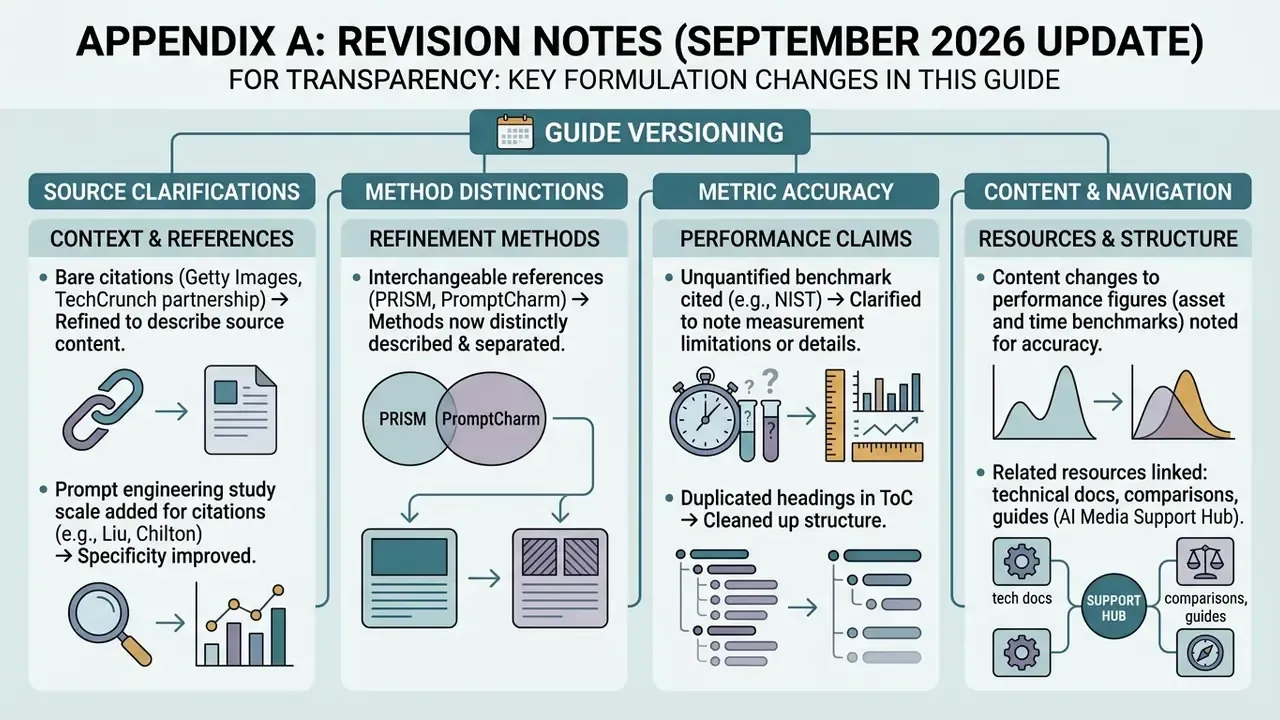
For transparency, the following formulations from earlier versions of this guide were revised in the September 2026 update.
- The Getty Images reference previously appeared as a bare citation, "(TechCrunch, Getty Images Partnership Announcement, 2025)", with no quotation or agreement detail. Updated: replaced with a dated, quoted summary of the multi-year licensing agreement and its attribution requirement.
- The prompt-engineering claim previously cited Liu and Chilton without study scale. Updated: now quoted with sample size, 5,493 generations across 51 subjects and 51 styles.
- The refinement claim previously cited PRISM and PromptCharm interchangeably without describing either method. Updated: PromptCharm now supports the interactive-refinement claim, and PRISM supports the automated prompt-optimization claim, each with its own quotation.
- Two performance figures, "45 minutes to under three minutes per brief" and "increasing pitch deck asset production by 60%", were self-reported by individual teams without an audited baseline. Updated: retained as directional field observations with explicit caveats, not as benchmarks.
- The dedicated-tool section previously cited an unquantified NIST benchmark. Updated: replaced with the EvalMuse-40K annotation study, which reports a measurable methodology.
- The earlier table of contents duplicated the on-page heading structure. Updated: replaced with a decision-gate section covering asset class, data egress, and commercial rights, which is the sequence a regulated buyer actually works through.