Why should a CRO or Head of Model Risk care about a picture tool? Because the same prompt box that drafts a hero image also accepts confidential material. Understanding Perplexity AI image generation capabilities therefore means reading five things together: search context, model selection, rolling usage limits, licensing boundaries, and the data-governance controls available during live execution.
On this page: availability and output types, the subscription matrix (Free, Pro, Enterprise Pro, Max), step-by-step generation including WhatsApp, quality and model architecture, enterprise data governance and audit trail, editing, export and commercial licensing, failure diagnostics, Perplexity versus specialized art generators, and a closing FAQ.
Can Perplexity AI Generate Images?
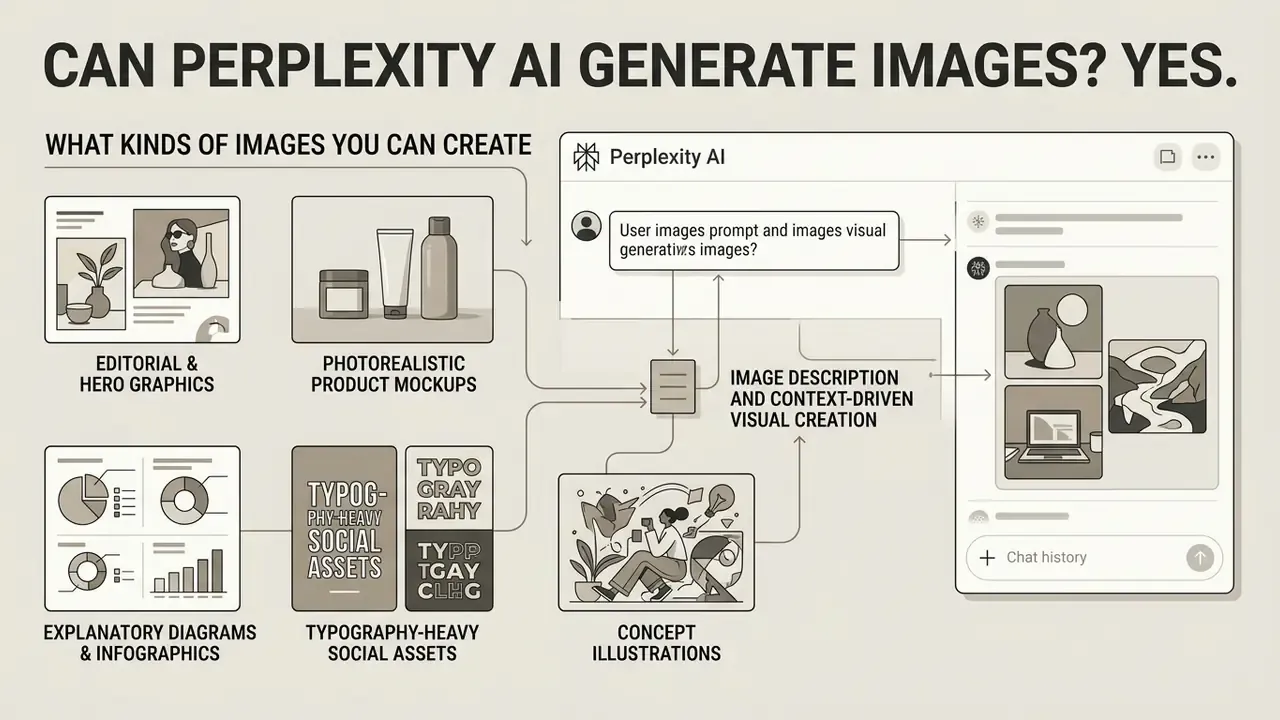
Yes. Perplexity AI can generate images directly inside its conversational interface, with no separate portal and no manual render button. Submit natural language text prompts into the primary search bar, and the engine evaluates whether the query asks for a visual, then passes the prompt to an integrated text-to-image model.
Traditional search engines retrieve pre-existing web images. Standalone art tools demand a dedicated prompting canvas. Perplexity does neither: it embeds visual creation into research threads. You can generate AI generated visuals alongside factual summaries, and real-time search context shapes the generated graphics. According to the Perplexity Official Help Center (2026), image generation behaves as an enhanced query feature, letting users move from gathering search data to creating custom figures, social media visual assets, and illustrative diagrams without leaving the thread.
«GPT-Image-1 achieves the highest alignment scores across all reasoning categories among the evaluated text-to-image systems.»
Official documentation also confirms that generation and inline editing are available on every client surface: web, desktop application, iOS, and Android. Limits refresh on a rolling basis rather than on a fixed calendar date. That distinction matters operationally. A team that burns its allowance during a Monday campaign sprint regains capacity gradually, as older queries roll out of the tracking window, not at the start of the next month.
What Kinds of Images Can You Create With Perplexity AI
Perplexity AI supports a wide spectrum of visual formats: photorealistic product mockups, marketing graphics, stylized digital illustrations, and data-driven infographics. Output structure follows the text prompts you provide and the underlying model selected in preferences.
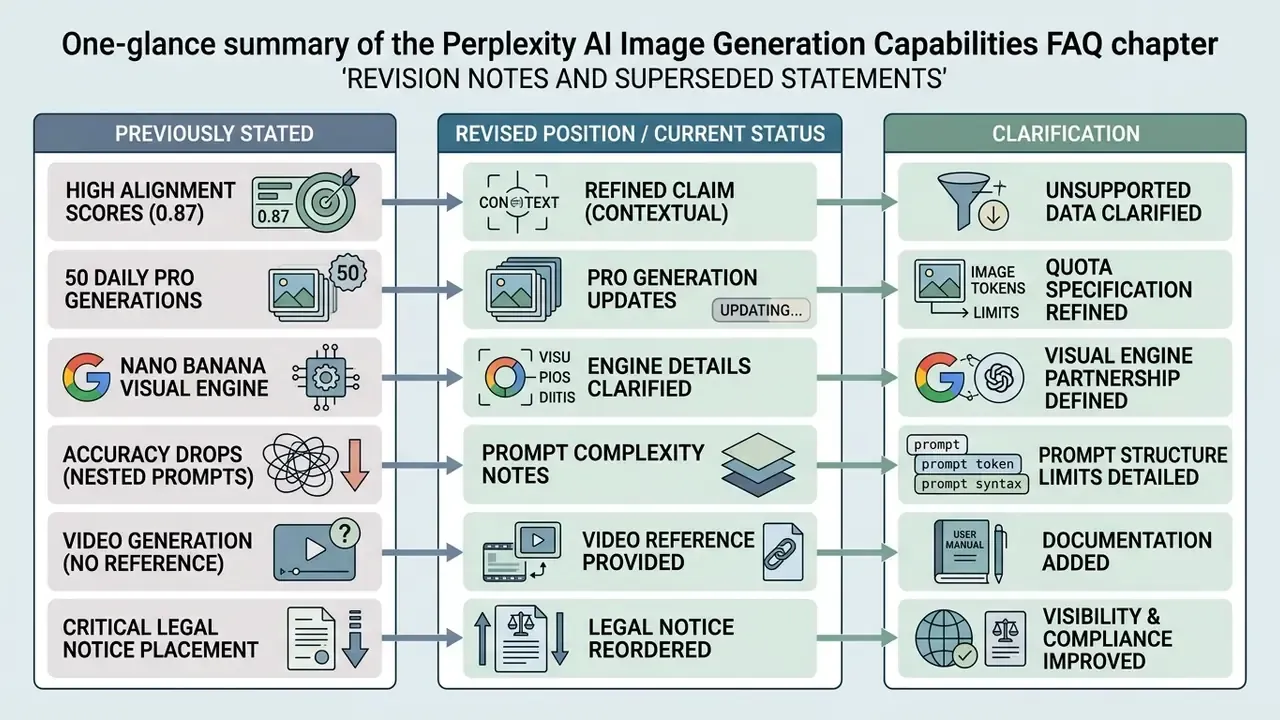
According to technical benchmarks in the R2I-Bench Study (arXiv, 2025), advanced models integrated into Perplexity, GPT-Image-1 in particular, excel at reasoning-driven image synthesis. Updated for precision: the figure of 0.87 is the compositional reasoning sub-score, while the model's overall R2I-Score is 0.77, a 71.1% improvement over the strongest open-source baselines evaluated in the same study. Treating 0.87 as a general quality index would overstate performance on mathematical or counting-dependent scenes. Small nuance, big consequence for charts.
«GPT-Image-1 outperforms the best open-source models by 71.1% on the overall R2I-Score, reaching a value of 0.77.»
Documentation for ByteDance's Seedream 4.5 highlights native support for high-resolution renders (up to 4K UHD), flexible aspect ratios (16:9, 1:1, 9:16), and precise bilingual typography rendering. Perplexity's own product changelog adds that the current image stack performs best on marketing-quality hero images, photorealistic product mockups, creative infographics, and inline image edits. That makes the platform practical for photo generation assets, editorial headers, visual concepts, and promotional material produced inside research sessions. Teams benchmarking output tiers across vendors can compare Perplexity against dedicated AI image generators before standardizing an internal stack.
Practical output categories reported in official documentation and verified in hands-on testing include:
- Editorial and hero graphics for reports, newsletters, and breaking-news headers.
- Photorealistic product mockups for concept validation and internal pitch decks.
- Explanatory diagrams and infographics derived from retrieved technical documentation.
- Typography-heavy social assets where legible in-image text is mandatory (strongest on Seedream 4.5 and GPT-Image-1).
- Concept illustrations for workshops, training decks, and internal enablement material.
Image Description and Context-Driven Visual Creation
Perplexity AI enables contextual visual creation through its multimodal vision pipeline and conversational history, refining image prompts from your questions and prior search outputs. Upload an existing file, request a detailed image description, then instruct Perplexity to synthesize a new visual that carries the analyzed traits forward. Official API documentation describes image analysis as a two-step pipeline: identify the content of the uploaded visual, then research the identified subjects against live web sources for real-world context. Images can be supplied as HTTPS URLs or base64 data URIs.
When a user asks follow-up questions during a research thread, Perplexity retains session context and source citations. The initial question, the follow-ups, the model responses, and the cited sources are stored and can be reopened later. This conversational awareness lets the system ground image generation in retrieved web data. For instance: summarize a technical architecture from an industry report, then generate an explanatory diagram reflecting that specific text.
You can also run visual generation inside Perplexity Spaces, keeping generated graphics, search threads, and cited sources organized within shared project workspaces. For governance-sensitive organizations, Spaces doubles as a provenance container: the visual asset, the prompt that produced it, and the citations that informed it live on the same collaborative surface. That simplifies later review by internal audit or compliance reviewers, who rarely accept a bare file as evidence.
When evaluating alternative multimodal setups, teams often review our guide to open ai image workflows to compare direct vision capabilities against multi-model search routing. Institutions with strict residency requirements sometimes add a third option and test a local ai image deployment, where prompts never leave managed infrastructure.
One structural caveat before we move to pricing. Because uploaded reference files become part of the session context, source-data classification (public, internal, confidential, restricted) should be resolved before any upload. That control is detailed in the enterprise governance section below.
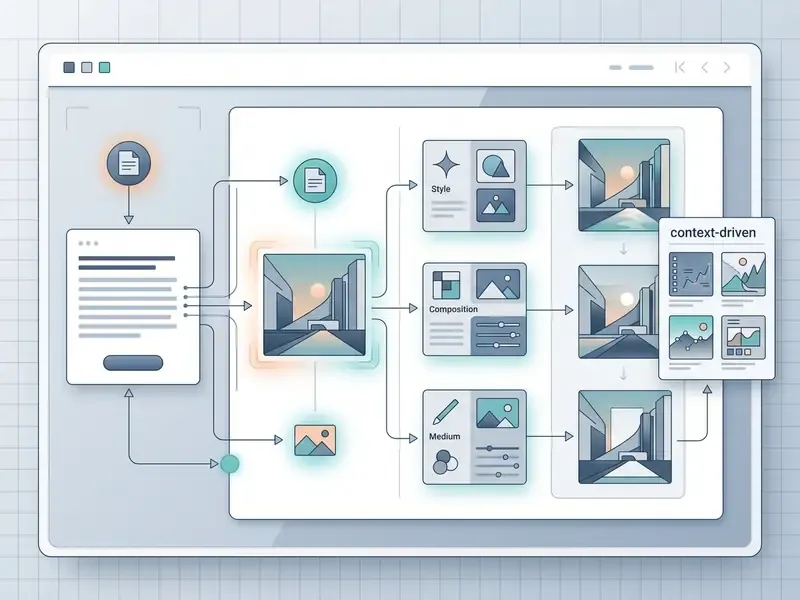
Interface Overview: Perplexity AI search bar showing an automated text-to-image prompt, inline generated visual output, the model selection menu in Settings, and the lower regeneration controls. Alt text to use on publication: "perplexity ai image generation capabilities interface annotation".
Free and Paid Perplexity AI Image Generation Plans
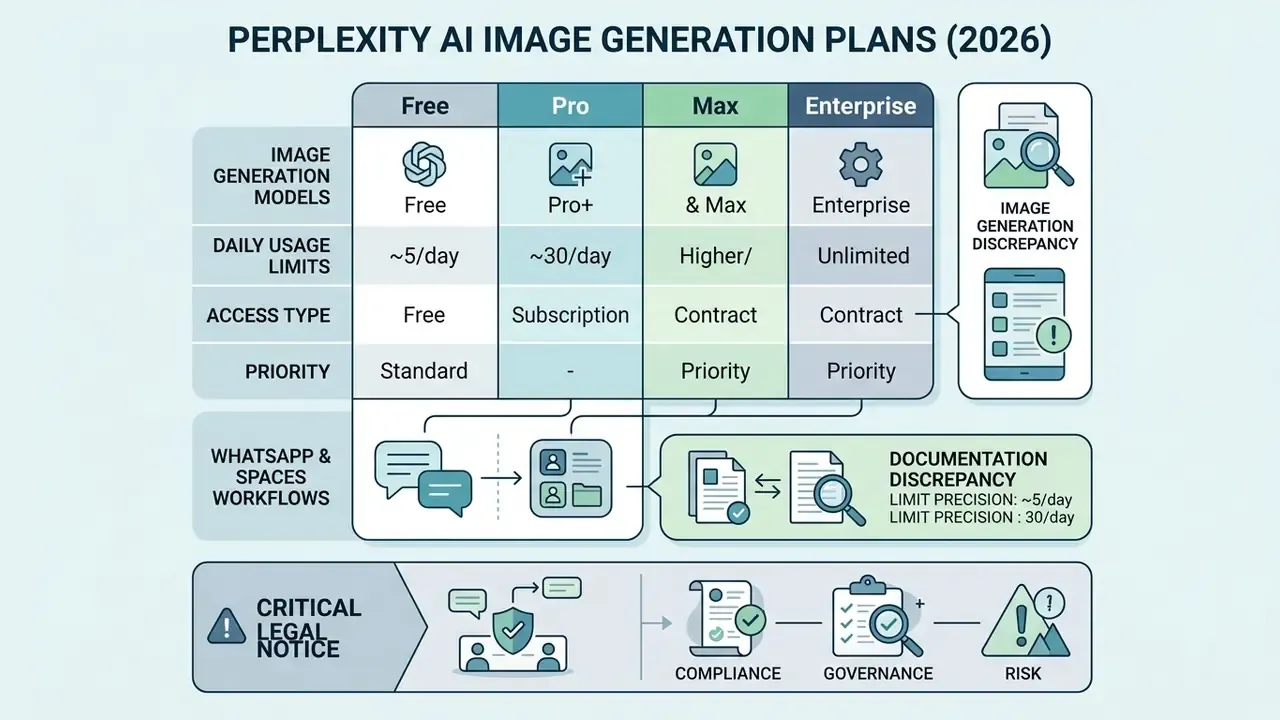
Access to image generation in Perplexity AI is tiered. Free accounts get limited generations; paid tiers unlock volume and model choice. Free access is fine for feature exploration, but high-frequency image creation and manual model selection require Pro, Max, or an Enterprise subscription.
According to official pricing documentation from Perplexity (2026), usage caps run on a rolling reset window rather than a fixed calendar month. Free plan accounts provide a restricted number of standard visual renders per rolling window. Upgrading to a Pro plan ($20/month, or $17/month billed annually) unlocks higher query allocations, access to premier image models such as Nano Banana Pro and Seedream 4.5, and higher-resolution outputs. Perplexity Max ($200/month, or $167/month billed annually) sits above Pro and carries the most generous generation allowances plus priority access to newly released visual engines. Individual consumer plans, Free, Pro, and Max, restrict image usage to personal, non-commercial purposes. Enterprise Pro ($40/seat/month) and Enterprise Max grant explicit commercial licensing rights.
What Is Available in the Free Version of Perplexity AI
The free version of Perplexity AI offers entry-level image creation integrated into standard conversational search. Free plan users can issue natural language prompts and test the default image generator router, which automatically picks an available baseline model.
The constraints are clear enough. Free users face strict rolling usage caps, have limited or no ability to switch between premium model backends in settings, and cannot use generated assets for commercial projects. For organizations assessing cost structures across visual AI tools, our AI Media Pricing Guides break down free versus tier-limited enterprise licenses, while buyers seeking higher unpaid allowances can compare free AI image generators that publish explicit daily quotas. Finance teams modelling seat counts against control overhead may also want our calculators to sanity-check the total cost per approved asset, not just the sticker price.
Documentation discrepancy worth noting: Perplexity's dedicated image-generation help article states that the Free plan includes limited image generations, while the plan-comparison table on a separate help page marks image generation as unavailable on Free. The difference appears to reflect page scope and wording rather than conflicting policy dates; both pages were refreshed in September 2026. Enterprise buyers should verify current entitlements inside the account dashboard rather than trusting either table in isolation.
When Image Generation Requires a Pro Plan
| Feature / Parameter | Free Plan ($0) | Pro Plan ($20/mo or $17/mo annual) | Enterprise Pro ($40/seat/mo) | Perplexity Max ($200/mo or $167/mo annual) |
|---|---|---|---|---|
| Image Generation Access | Limited baseline renders per rolling window | Expanded quota (up to 50 high-quality renders/day in dedicated creation modes) | High-volume enterprise quotas | Maximum priority rendering quotas and high-frequency processing |
| Available Models | Default automated router only | GPT-Image-1, Nano Banana, Seedream 4.5, Default | Full access plus Nano Banana Pro / API controls | Full access plus priority access to new experimental visual engines |
| Usage Rights | Personal, non-commercial use only | Personal, non-commercial use only | Full commercial use rights permitted | Personal and team internal use (commercial rights via Enterprise) |
| Model Selection Toggle | Disabled or limited | Enabled (Settings → Preferences → Image generation model) | Enabled plus custom administrative policies | Enabled plus earliest access to new model defaults |
| Spaces and Collaboration | Basic access | Full Spaces support | Administrative policy controls in Spaces | Advanced collaborative Spaces integration |
| Quota Reset Mechanism | Rolling time window | Rolling time window | Contractual enterprise limits | Rolling window at highest ceiling |
How to Generate Images in Perplexity AI: Step-by-Step Process
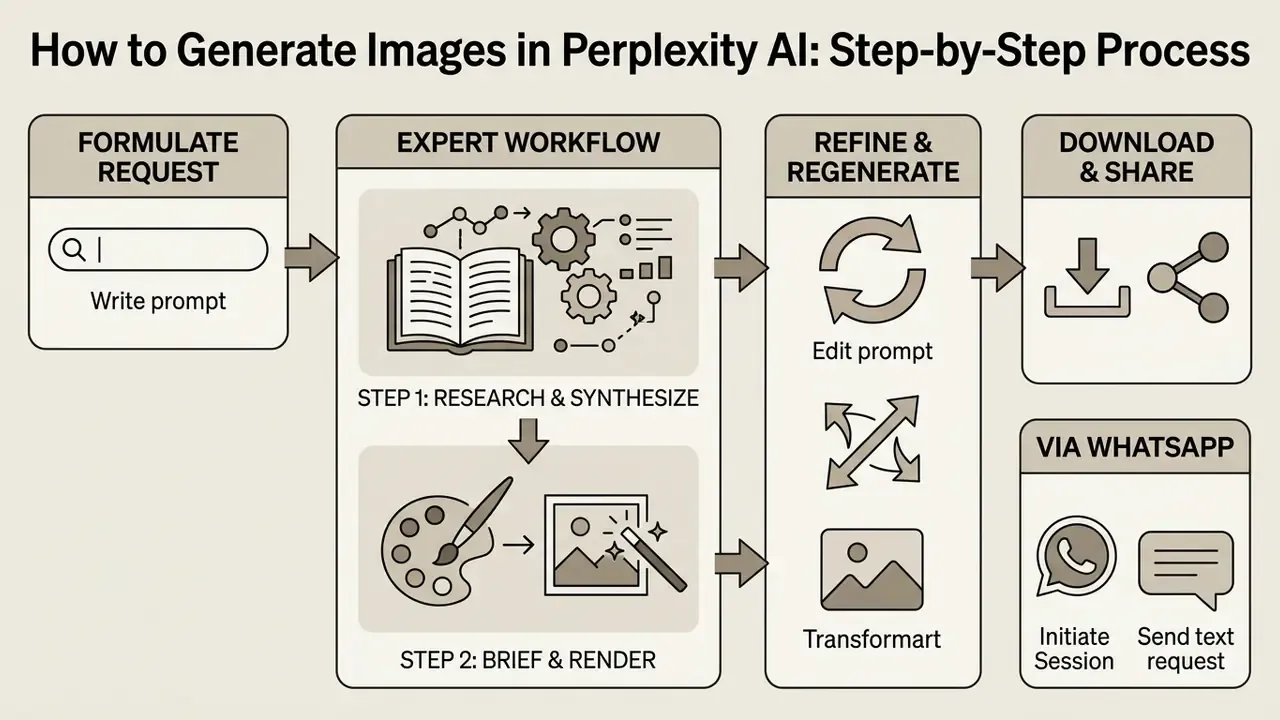
Generating images in Perplexity AI means writing a descriptive prompt in the primary search bar, letting the system process the request, then managing the output. The whole workflow stays inside one chat thread. No external API configuration, no canvas switching.
For consistent results, operators should follow a structured generation and refinement pipeline. The point is to settle subject details, spatial orientation, lighting, and style constraints in the text prompts before executing the query.
How to Formulate an Image Generation Request
Effective text prompts in Perplexity AI use clear natural language to specify five core parameters: core subject, surrounding context, visual style, lighting or colour palette, and structural composition. Disconnected keywords underperform. Full sentences that define the exact output requirement work better. Perplexity's own prompt-engineering guidance decomposes a strong request into five parts, instruction, context, input, keywords, and output format, and recommends one objective per prompt.
Entering "Generate a photorealistic corporate boardroom illustration, warm overhead lighting, minimalist glass architecture, isometric perspective, 16:9 aspect ratio" yields noticeably higher fidelity than "boardroom picture". Official guidance also recommends declaring the intended asset type explicitly, such as a product mockup, editorial hero graphic, or vector chart, to steer the model's layout logic.
For high-stakes deliverables, run a Deep Research or focused query before Step 1 so the engine digests a broader source set. The richer the retrieved evidence base, the more specific and more defensible the resulting image brief.
How to Refine a Prompt and Regenerate the Result
When the first generated visual misses technical or aesthetic requirements, iterate with follow-up refinement prompts or use the inline "Regenerate" control. Clicking "Regenerate" resamples the prompt through the selected model and returns a new variation.
To change a specific element, a background colour, say, or an added secondary object, submit an explicit conversational edit in the chat input. Replying "Regenerate the previous image but change the background setting to a modern financial trading floor" directs the system to modify contextual variables while preserving core subject themes. Perplexity's help documentation lists subject, style, colours, mood, setting, and context as the refinement variables that respond best to iteration. Keep one thing in mind: every regeneration attempt counts as an additional query against your rolling usage cap.
Generating Images via Perplexity AI on WhatsApp
Perplexity AI supports direct image generation inside WhatsApp, with no app install and no browser login. Useful for mobile operators drafting instant social assets, quote cards, event reminders, or visual replies during client conversations.
To generate images on WhatsApp:
Two operational constraints apply. First, WhatsApp generation returns one visual output per prompt, so a request for three variations arrives sequentially rather than as a grid. Second, the channel runs under your account's standard rolling query caps and the same content-moderation filters as the web client. For regulated organizations, note that the WhatsApp surface sits outside most corporate device-management perimeters. Treat it as a consumer channel and exclude it from workflows touching confidential or material non-public information.
- Save the official Perplexity contact number +1 (833) 436-3285 to your device.
- Open a new WhatsApp thread with the contact and submit a natural language search query to confirm the bot responds.
- Prompt the bot with explicit action verbs: "Create an image of a futuristic logistics hub in watercolor style."
- Refine conversationally in the same thread, "make it more colorful", "add a sunset background", exactly as you would on web.
- Receive the synthesized visual inline within the chat thread.
- Initiate SessionLog into your verified Perplexity AI account on web, desktop, or mobile app (image generation requires a signed-in account).
- Configure Model PreferencesGo to Settings → Preferences → Image generation model and select your target engine, for example Seedream 4.5 or GPT-Image-1.
- Run the Research PassFor fact-dependent visuals, submit the factual query first and review the returned citations.
- Submit Natural Language PromptType a detailed instruction into the search box, starting with "Generate an image of..." or "Create an illustration of...".
- Review Inline RenderInspect the output for compositional accuracy, typography legibility, and visual alignment.
- Refine or RegenerateSubmit follow-up text adjustments to edit details, or click "Regenerate" below the image for a fresh variation.
- Export Visual AssetExpand the image viewer and save the file locally in PNG or JPEG, or bundle it with citations through Labs and Deep Research for internal documentation.
What Determines Image Quality and Style in Perplexity AI
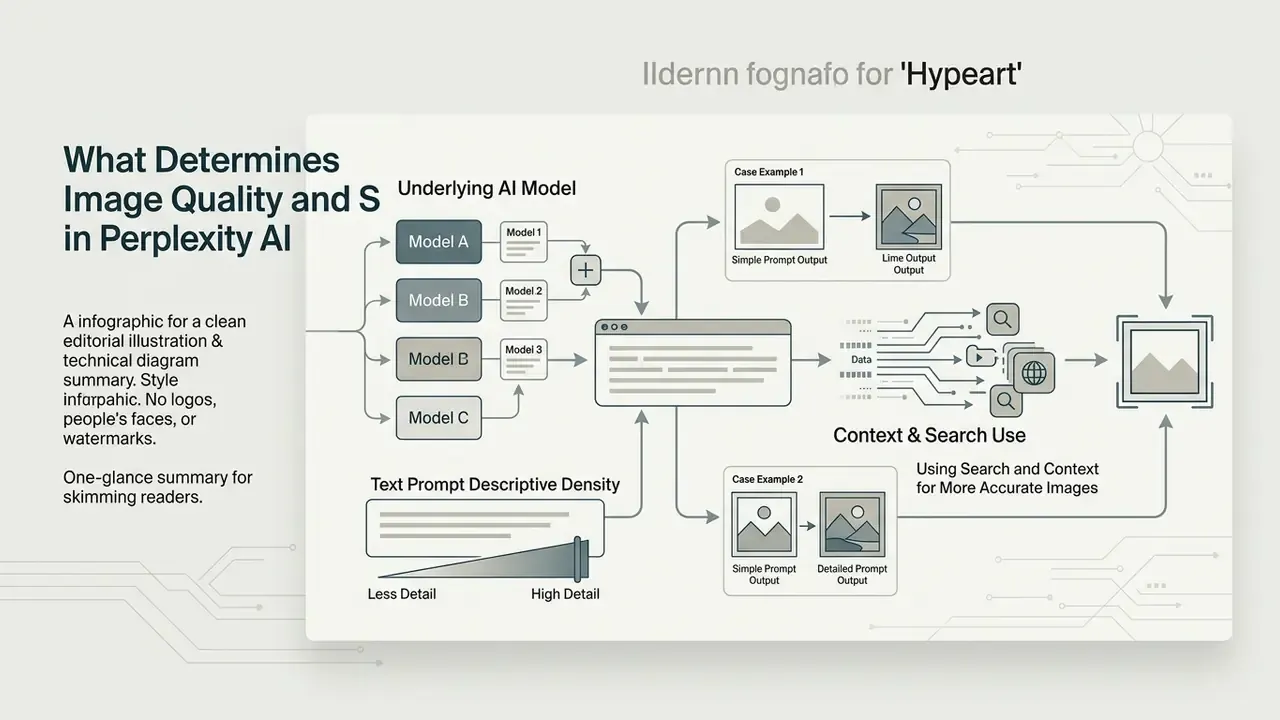
Visual quality and stylistic outcome in Perplexity AI depend on three factors: the active underlying AI model, the descriptive density of the text prompt, and the presence of real-time search context in the thread.
Dedicated art platforms prioritize aesthetic diffusion filters. Perplexity prioritizes search-grounded visual accuracy. Once you understand how model architecture interacts with prompt specificity, you can systematically improve render resolution, reduce visual hallucinations, and hit target artistic styles. Buyers who need maximum raw fidelity should still benchmark against the best AI image generators before committing to a single vendor.
Expectations, though, should be calibrated against independent evidence on professional design work:
«Even the best specialized model scores only 22.48 out of 100 on professional design tasks; the best general-purpose model scores just 6.81.»
For enterprise users, that gap carries one direct operational consequence. Generative output is a first draft, not a finished deliverable. Any diagram destined for regulatory reporting, investor material, or client-facing collateral needs human design review and factual validation before release.
The Role of AI Models in Image Generation
Perplexity AI operates as a multi-model router. Pro, Max, and Enterprise users can select specific text-to-image foundation models depending on the project. The primary integrated options include OpenAI's GPT-Image-1, the Google-powered Nano Banana family (with Nano Banana Pro reserved for Max and Enterprise Max), and ByteDance's Seedream 4.5.
Each underlying model shows distinct technical strengths in independent benchmark evaluations:
Using Search and Context for More Accurate Images
Enterprise Data Governance, PII Protection, and Audit Trail
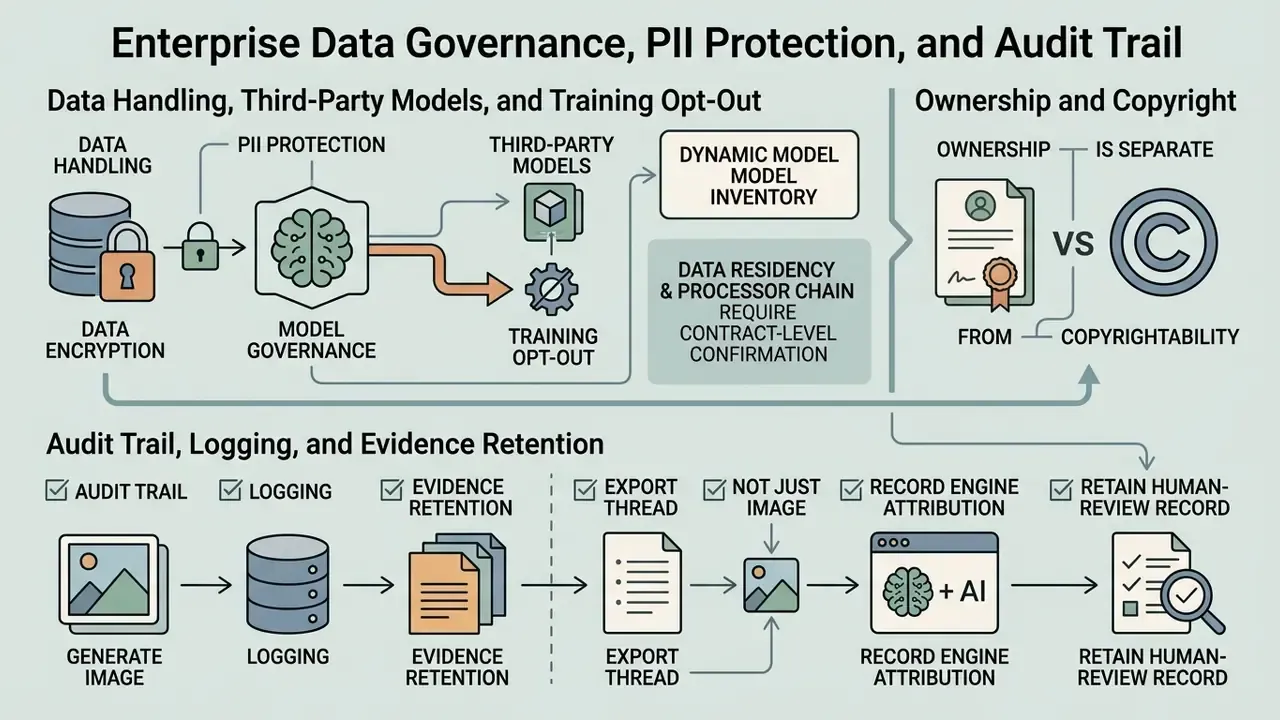
For risk, compliance, and model-governance functions, the operative question is not whether Perplexity can render an image. It demonstrably can. The real question is whether the generation path satisfies internal Model Risk Management (MRM) standards, data-handling policy, and examiner expectations. Image generation introduces three distinct control surfaces: what enters the prompt, where it is processed, and what evidence remains afterward.
Data Handling, Third-Party Models, and Training Opt-Out
Perplexity's Enterprise Terms of Service state that the service may route requests through third-party models, and that customers must comply with the applicable third-party terms for those models. The API Terms add that Perplexity may update the third-party model list, that updates take effect upon notification, and that the sole recourse for a customer who disagrees with a given provider's terms is to stop using that model.
Three governance implications follow directly:
Where verified public documentation stays silent, for example on exact retention periods for generated image artifacts, or on whether SOC 2 Type II and ISO 27001 attestation scope covers the image pipeline specifically, treat the gap as an open due-diligence item and request the vendor's current attestation package directly. Required data: published attestation scope statements covering multimodal generation endpoints.
Data Handling, Third-Party Models, and Training Opt-Out
Model inventory is dynamic.
Because engines rotate (GPT-Image-1, Nano Banana, Seedream 4.5, FLUX.1, DALL·E lineage), your Unified Model Inventory entry should describe the router plus the currently permitted engine set, with a review trigger tied to vendor change notifications.Data residency and the processor chain require contract-level confirmation.
Prompt text and uploaded reference images may traverse infrastructure operated by OpenAI, Google, or ByteDance depending on routing. Whether those providers may retain or train on enterprise inputs is governed by the enterprise agreement and the referenced third-party terms, not by the consumer help center. Request written confirmation of training opt-out and retention windows during procurement, and require that the permitted-engine list be contractually enumerated rather than left open.Ownership is separate from copyrightability.
Perplexity's Enterprise Terms provide that, as between Perplexity and the customer, the customer retains ownership of Input and owns Output, with Perplexity assigning any rights it may acquire. Owning output, however, does not create a registrable copyright. See the licensing section below.Audit Trail, Logging, and Evidence Retention
Shadow AI, Policy Enforcement, and DLP Considerations
The highest-probability governance failure here is not a flawed render. It is an employee pasting confidential material into a consumer-tier account. Because image generation works on Free accounts and through the public WhatsApp bot, the surface for uncontrolled usage is wide.
Recommended enforcement controls:
- Channel restriction. Permit generation only through the Enterprise Pro or Max tenant with SSO. Explicitly prohibit personal Free and Pro accounts, plus the WhatsApp channel, for any work product.
- Modality policy. Use Enterprise administrative policy controls in Spaces to constrain which teams may generate media at all, shrinking the population able to transmit sensitive context.
- Pre-prompt data classification. Prohibit PII, PHI, MNPI, customer identifiers, and unreleased financial data in prompts and reference uploads. Make this a named rule in the acceptable-use standard, not informal guidance.
- DLP alignment. Coordinate with security so corporate DLP and egress-filtering rules recognize the generation endpoints. Conversely, expect that some generation failures inside the corporate network originate from DLP or firewall interception rather than from Perplexity itself.
Model Risk and Compliance Verification Checklist
Before authorizing generative image use in a regulated environment, confirm each of the following:
- Licensing tier verified.Commercial use is authorized only on Enterprise Pro or Enterprise Max; consumer tiers are excluded in policy, not just in practice.
- No sensitive data in the prompt or uploads.PII, PHI, MNPI, and customer identifiers screened out before submission.
- Factual validation by a subject-matter expert.Every label, figure, and relationship in diagrams confirmed against the cited primary source, with mathematical and counting content treated as high-risk.
- Provenance captured.Prompt chain, selected engine, citation list, and reviewer identity exported and retained.
- Inventory registration.The tool, its permitted engine set, and its approved use cases recorded in the Unified Model Inventory with a defined review cadence.
- Third-party terms and indemnity reviewed.Applicable provider terms accepted, and the presence or absence of IP indemnification documented in the contract file.
Editing, Export, and Use of Perplexity-Generated Images
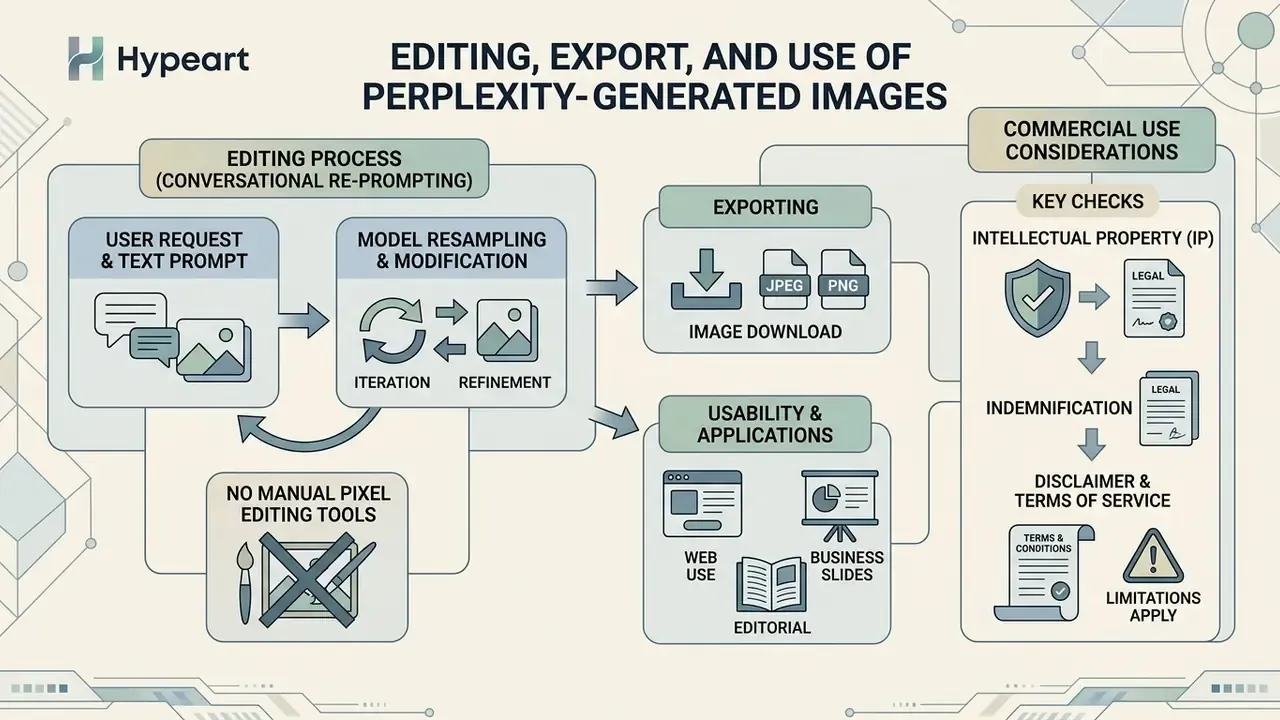
Image modification inside Perplexity AI happens through conversational re-prompting and model-driven resampling, not through manual pixel-level canvas tools. You can adjust visual parameters, export high-resolution renders, and deploy generated media subject to your plan's commercial usage terms.
Knowing where conversational image editing ends and dedicated graphics software begins is essential for enterprise compliance. Perplexity is excellent at rapid iterative adjustments via text. Complex brand assets will often still need an exported file and an external editing suite.
Can You Edit an Image After Generation
Perplexity AI supports prompt-driven image editing. Reference the previous output and instruct the model to alter lighting, substitute backgrounds, or add secondary elements, all within the active chat session.
What it does not offer: localized canvas controls such as inpainting brushes, manual erasers, or pixel selection layers. When an advanced model like Seedream 4.5 processes an edit request, it performs an image-to-image generative transformation. The system re-creates the visual from an updated brief rather than surgically modifying a masked region, which means unrelated details can shift between iterations.
«Automated GPT-4o-based evaluation reaches 79.64% agreement with human judgments on concept preservation and 93.18% on prompt following.»
That divergence is instructive. Concept-preservation agreement sits at 79.64%, prompt-following at 93.18%. In plain terms, image-to-image systems follow new instructions more reliably than they preserve the original subject. For brand assets with fixed logos, faces, or product geometry, verify identity retention manually after every edit pass.
For workflows requiring precise localized retouching, teams often pair Perplexity drafts with specialized editors covered in our Guide to online photo editors and with dedicated AI photo editors that expose masking, layers, and non-destructive adjustment stacks.
What to Check Before Commercial Use of an Image
Before publishing Perplexity-generated visuals in external commercial campaigns, legal and risk teams must verify subscription licensing rights and third-party model policies. Standard consumer accounts (Free, Pro, Max) grant personal, non-commercial rights only. Commercial deployment is restricted to Enterprise Pro and Enterprise Max plans. Perplexity's Acceptable Use Policy separately forbids copying, licensing, transferring, creating derivative works of, or using the service to build competing or substitute products without express prior written permission.
US copyright regulations established by the U.S. Copyright Office Guidance (2024) add a second layer: purely AI-generated visual outputs lacking substantial human creative expression are not eligible for copyright registration.
«Purely AI-generated visual material without substantial human creative contribution is not eligible for copyright registration.»
Enterprises must therefore document human creative direction and review when folding generative assets into commercial products. Note the two-layer structure carefully. Enterprise Terms may grant you ownership of Output, while copyright law may still deny registrability to that same Output. Both questions need separate answers in any brand-asset decision.
IP indemnification. Several enterprise AI vendors publish explicit copyright-infringement indemnity commitments for generated output. Perplexity's publicly available enterprise documentation reviewed for this guide does not enumerate an equivalent image-generation indemnity. Procurement should request the indemnity clause in writing and compare it against existing vendor baselines before approving external publication. Required data: vendor-confirmed indemnification scope for generated visual output.
Finally, verify provenance before distribution. Enterprise teams commonly screen inbound and outbound creative through AI image detectors and AI reverse-image-search tools to confirm that a render does not closely reproduce an identifiable third-party work prior to public release.
Why Perplexity AI Is Not Generating Images: Common Errors
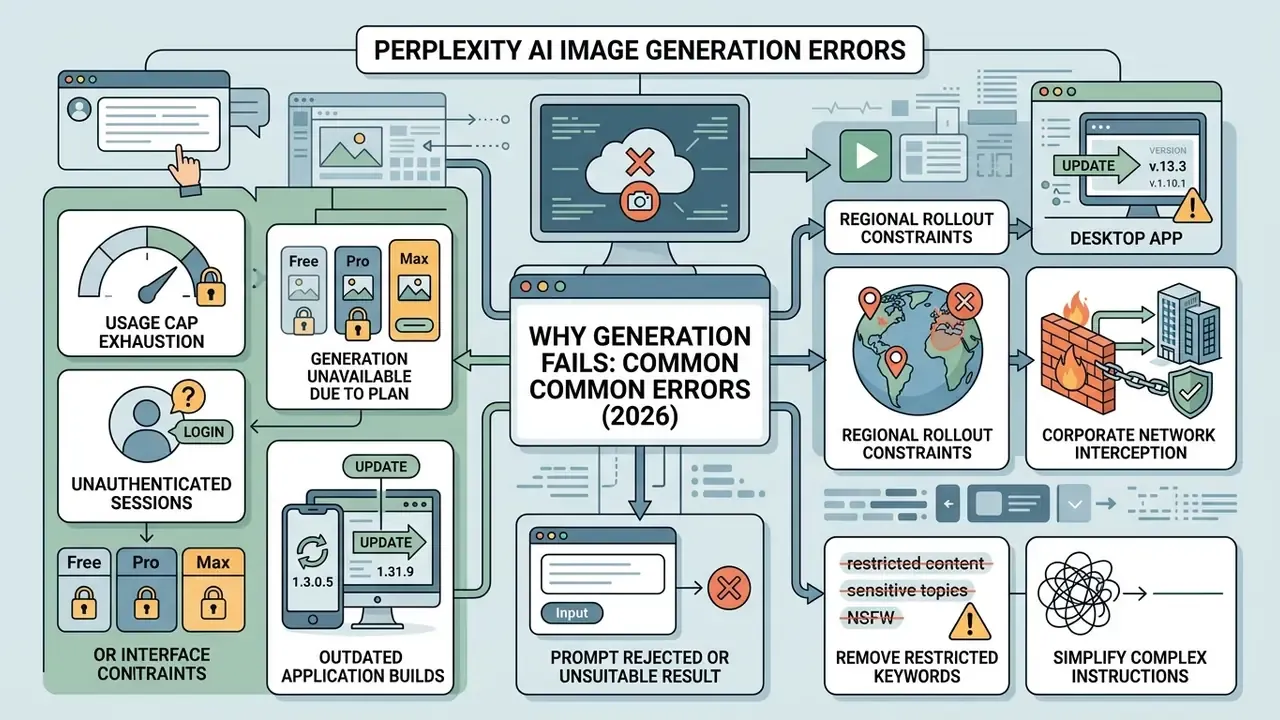
Image generation requests in Perplexity AI can fail or return error messages for several reasons: usage cap exhaustion, automated content moderation triggers, connectivity problems, regional restrictions, or interface-level session timeouts. Identify the root cause and the fix is usually quick. Perplexity's own troubleshooting documentation names four primary causes: explicit or moderated content, an unstable connection, a technical issue on Perplexity's side, and sign-in requirements.
Diagnosis means checking both account-level parameters and prompt structure. The sub-sections below split technical blockages from moderation constraints.
Prompt Rejected or Producing an Unsuitable Result
When a prompt is accepted but returns blocked-status notifications or distorted output, the cause is usually automated safety filters or excessive prompt complexity. Perplexity enforces moderation filters aligned with provider safety guidelines to block explicit content, graphic violence, and copyright infringement attempts, and it notifies the user when a request cannot be completed.
«Models perform substantially worse on advanced skills, counting, comparison, and logic, than on basic scenes and attributes.»
To clear prompt blockages and improve output reliability:
- Remove Restricted Keywords Eliminate terms that trigger policy filters or imply trademarked characters, named public figures, or studio-specific styles.
- Simplify Complex Instructions Research in GenAI-Bench (arXiv, 2024) shows accuracy degrades sharply on compositional prompts involving counting, comparison, differentiation, and nested logic. Split complex visual requests into simple, direct sentences and build detail across iterations.
- Rank Candidates Rather Than Accepting the First Render Generate several variations, then select deliberately.
«Ranking candidate images with VQAScore improves alignment scores by 2 to 3 times over PickScore and HPSv2 on hard compositional prompts.»
Perplexity AI or a Standalone AI Image Generator: When to Switch
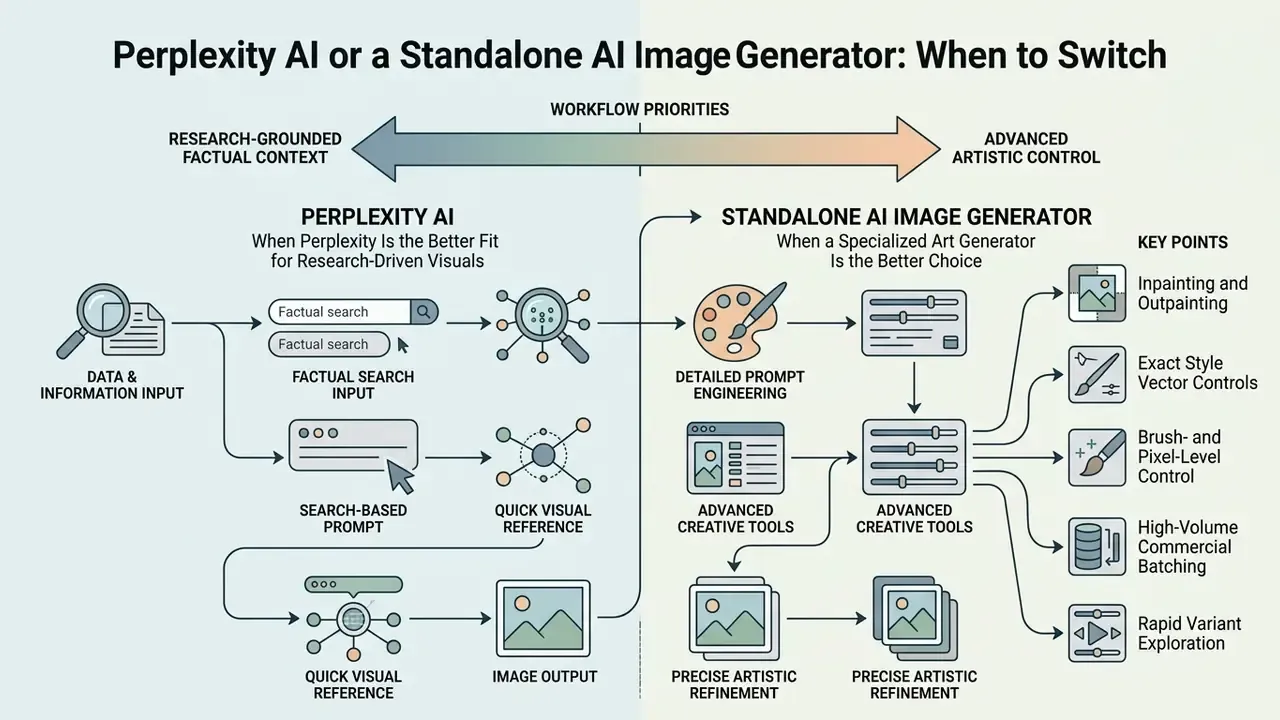
Choosing between Perplexity AI and a dedicated AI image generator comes down to one question: does your workflow prioritize search-grounded factual context or advanced artistic canvas control? Perplexity streamlines research-to-visual tasks. Dedicated generators give you pixel-level command.
Evaluating this decision requires looking at specific business use cases, export requirements, and budget allocations. Buyers frequently triangulate a third option too, the assistant-embedded route represented by ChatGPT as a picture generator, since access model, editing depth, and licensing terms differ meaningfully across all three categories.
When Perplexity Is the Better Fit for Research-Driven Visuals
Perplexity AI is the optimal tool when visual creation depends on real-time web research, factual summaries, and cited documentation. It removes context switching by letting you investigate a topic and generate supporting graphics in one interface, and it keeps the research thread attached to the asset. Effectively, a visual fact-check trail.
Ideal operational scenarios for Perplexity include:
- Drafting visual figures for market research briefs and executive summaries.
- Generating editorial headers from real-time news analysis, where generic art models lack knowledge of the underlying event.
- Creating factual diagrams grounded in retrieved technical or regulatory documentation.
- Producing academic and slide-deck visuals where every figure needs a citation trail.
- Illustrating newly announced or niche products informed by the latest press release and specifications.
- Packaging research, charts, citations, and images into a single exportable client deliverable through Labs.
For a detailed analysis of alternative search-integrated generators, enterprise teams often review our comprehensive guide on microsoft ai image generator capabilities and the corresponding Google AI image generator overview.
When a Specialized Art Generator Is the Better Choice
Dedicated art platforms, Midjourney, Stable Diffusion, or specialized canvas suites, are required when projects demand fine-grained artistic direction, localized brush retouching, or complex multi-layer composition. Published benchmark evidence shows how wide the professional gap still is for general-purpose systems:
«The best general-purpose model scores only 6.81 out of 100 on professional design tasks, indicating a substantial gap from professional expectations.»
Specialized platforms become necessary when workflows require:
Feature Comparison: Perplexity AI versus Specialized AI Art Generators
| Evaluation Criterion | Perplexity AI (Integrated Engine) | Specialized AI Generators (e.g., Midjourney) |
|---|---|---|
| Search Context Integration | Native real-time web search integration with citations | None (standalone prompt execution) |
| Primary Operating Workflow | Conversational Q&A plus inline image creation (web, desktop, iOS, Android, WhatsApp) | Dedicated creation canvas, Discord, or web UI |
| Model Selection Flexibility | Multi-model router (GPT-Image-1, Nano Banana, Seedream 4.5, FLUX.1, DALL·E lineage) | Proprietary single-family architecture |
| Advanced Canvas Controls | Conversational re-prompting and regeneration only | Inpainting, outpainting, pan, zoom, seed control, brush parameters |
| Commercial Licensing (Individual) | Restricted to Enterprise Pro and Enterprise Max plans only | Typically included in standard paid subscription tiers |
| Typography and Text Rendering | Strong (via Seedream 4.5 or GPT-Image-1) | Variable depending on active model version |
| Provenance and Audit Packaging | Thread history, Spaces, Labs and Deep Research exports to PDF and spreadsheets | Generally none; provenance assembled manually |
| Enterprise Policy Controls | Administrative policy controls in Spaces on Enterprise tiers | Varies; often limited on creator-oriented plans |
Read the table as a trade-off, not a ranking. Perplexity wins on grounding, citation packaging, and policy enforcement at the tenant level. Specialized suites win on artistic control, batch throughput, and licensing simplicity for individual creators. Neither line contains a measured quality score, deliberately, because published benchmarks do not support that kind of head-to-head claim yet.
For additional tool comparisons across specialized creation suites, operators can explore our comparative review of the best AI art generators and the Ghibli-style AI image generator comparison for style-accuracy-driven selection.
FAQ on Perplexity AI Image Generation Capabilities
Can I generate images using the Perplexity mobile app on iOS and Android?
Yes. Image generation is fully supported in the Perplexity mobile app for iOS and Android, as well as on web and desktop clients. Mobile users can type natural language prompts into the search bar, view inline rendered visuals, and save images to local device storage with standard long-press menu controls.
Can I generate images through Perplexity on WhatsApp?
Yes. Save the official Perplexity contact +1 (833) 436-3285, open a WhatsApp thread, and send a prompt such as "Create an image of a rocket launch in watercolor style." The bot returns one visual per prompt and supports conversational refinement in the same thread. Because WhatsApp sits outside most corporate device-management perimeters, regulated organizations should exclude this channel from workflows involving confidential data.
Can generated images be organized for team projects?
Yes. Generation can run inside Perplexity Spaces, which keeps generated graphics, prompt threads, and cited sources grouped in a shared workspace. Enterprise tiers add administrative policy controls at the Spaces level, and that is the practical mechanism for restricting who may generate media at all.
Does Perplexity AI support video generation in addition to static images?
Yes. According to the Perplexity Help Center (2026), video generation is available on web, iOS, and Android for Max, Pro, Enterprise Pro, and Enterprise Max subscribers, producing clips of up to 8 seconds with audio via Veo 3.1. For standalone video integration guidelines, consult our documentation on Google Veo API implementation.
What image generation models are available inside Perplexity AI?
Pro, Max, and Enterprise subscribers can select between multiple integrated foundation models via Settings → Preferences → Image generation model: OpenAI's GPT-Image-1, Google-powered Nano Banana (with Nano Banana Pro on Max and Enterprise Max), ByteDance's Seedream 4.5, and, across select router profiles, FLUX.1 and DALL·E-lineage engines. Free plan accounts use an automated Default router that picks the best available baseline model. The lineup has rotated over time, so treat the list in your live account as authoritative.
How much does Perplexity image generation cost?
Free accounts include limited generations. Pro is $20/month, or $17/month billed annually. Perplexity Max is $200/month, or $167/month billed annually, and carries the most generous allowances plus priority access to new visual engines. Enterprise Pro is $40 per seat per month and is the entry point for commercial usage rights.
Can I use images generated in Perplexity AI for commercial projects?
Commercial usage is limited to Enterprise Pro and Enterprise Max plans. Images generated under individual Free, Pro, and Max plans are restricted to personal, non-commercial applications under Perplexity's Terms of Service. Separately, purely AI-generated output may not be registrable for copyright under U.S. Copyright Office guidance (2024), so ownership and copyrightability must be assessed independently.
Does Perplexity provide IP indemnification for generated images?
Publicly available enterprise documentation reviewed for this guide does not enumerate a specific copyright-infringement indemnity for generated visual output. Because several competing vendors do publish such commitments, procurement should request the indemnity clause in writing and compare it against your existing vendor baseline before approving external publication.
Can I export images together with their sources into a report or spreadsheet?
Yes. Perplexity's Labs and Deep Research capabilities can bundle synthesized text, citations, charts, and generated visuals into exportable deliverables. Native export formats include PDF and DOCX for documents, PPTX and HTML for presentations, and XLSX and HTML for spreadsheets, with Google Drive export available when connected. That suits client deliverables and internal audit trails equally well.
How do I fix errors where Perplexity fails to render an image?
First, verify that your account is signed in and has not exhausted its rolling enhanced query limit. Second, make sure the text prompt contains no terms that trigger automated moderation filters. Third, check connection stability and update your mobile application to the latest build. Fourth, confirm the feature is available in your region. Finally, in managed corporate environments, rule out DLP, proxy, or firewall interception before escalating to vendor support.
Appendix A: Revision Notes and Superseded Statements