What This Guide Covers
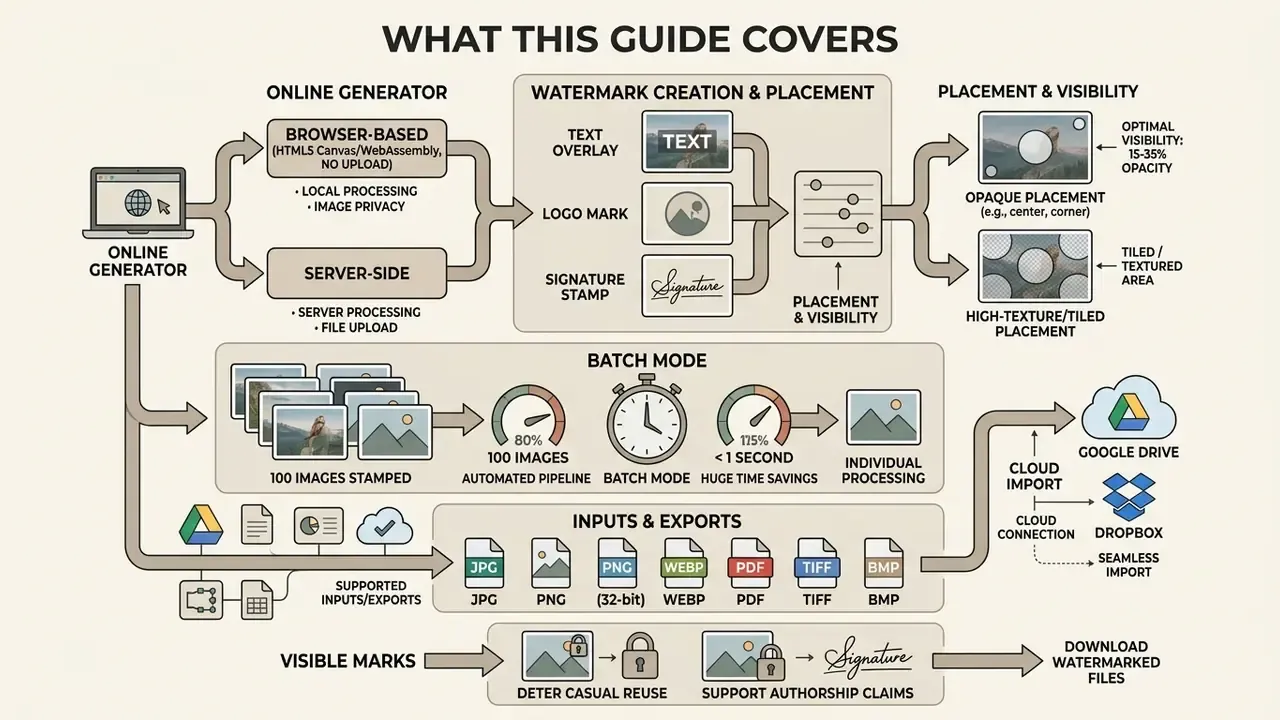
- An online watermark generator composites text, logo, or signature overlays onto images either locally in the browser (HTML5 Canvas / WebAssembly, no upload) or server-side (for API automation and multi-page documents).
- Optimal visible protection sits at 15 to 35% opacity, with high-texture or tiled placement, percentage-based scaling, and a minimum source resolution of 256×256 px.
- Batch mode is the single biggest time saver: automated pipelines stamp 100 images in under a second, versus 30 to 60 seconds per file by hand.
- Supported inputs and exports span JPG, PNG (32-bit), WebP, PDF, TIFF, BMP, with cloud import from Google Drive, Dropbox, and OneDrive.
- Visible marks deter casual reuse and support authorship claims. They are not absolute protection against generative AI inpainting. Combine visible overlays, invisible spectral marks, metadata, and monitoring.
Who This Guide Is For, and How To Read It
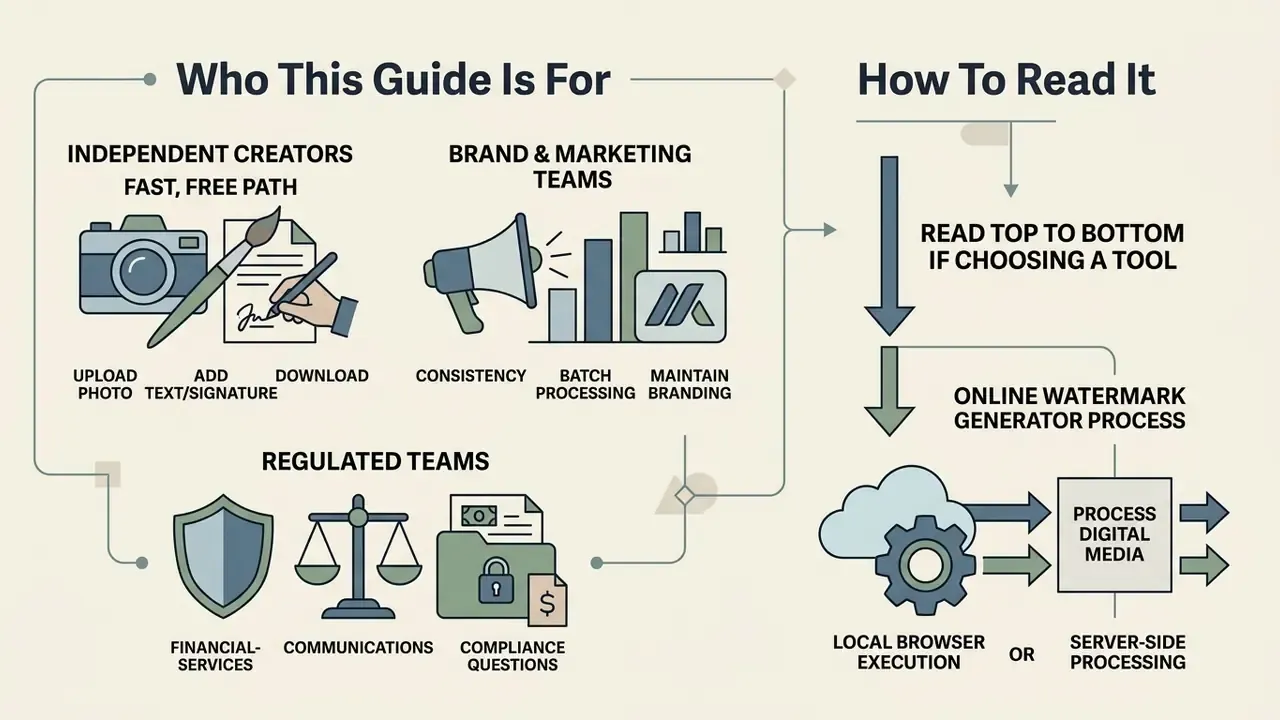
Three groups usually land on a watermark maker for different reasons, and they need different parts of this page.
Independent creators and artists want a fast, free path: upload a photo, add text or a signature, download. Sections on adding a watermark to photos online, mobile workflow, and the FAQ cover that in full.
Brand and marketing teams care about consistency. Same logo watermark, same opacity, same anchor, across hundreds of watermarked files. Batch processing, preset libraries, and the migration checklist matter most.
Regulated teams, including financial-services marketing and communications functions, have a fourth question that consumer tools rarely answer: where do the image bytes actually go? For an internal deck, an unreleased product graphic, or a client-facing document, "processed in the browser" and "uploaded to a hosted API" are two very different control profiles. The privacy and data-governance section addresses that split directly.
Read top to bottom if you are choosing a tool. Jump to troubleshooting if something already broke.
An online watermark generator processes digital media through local browser execution or server-side rendering to apply protective text, logo, or signature overlays. Financial institutions, enterprise brands, and content creators rely on systematic watermarking to signal content provenance, establish visual ownership, build brand awareness, and reduce unauthorized reuse across open platforms.
How the Watermark Generator Works
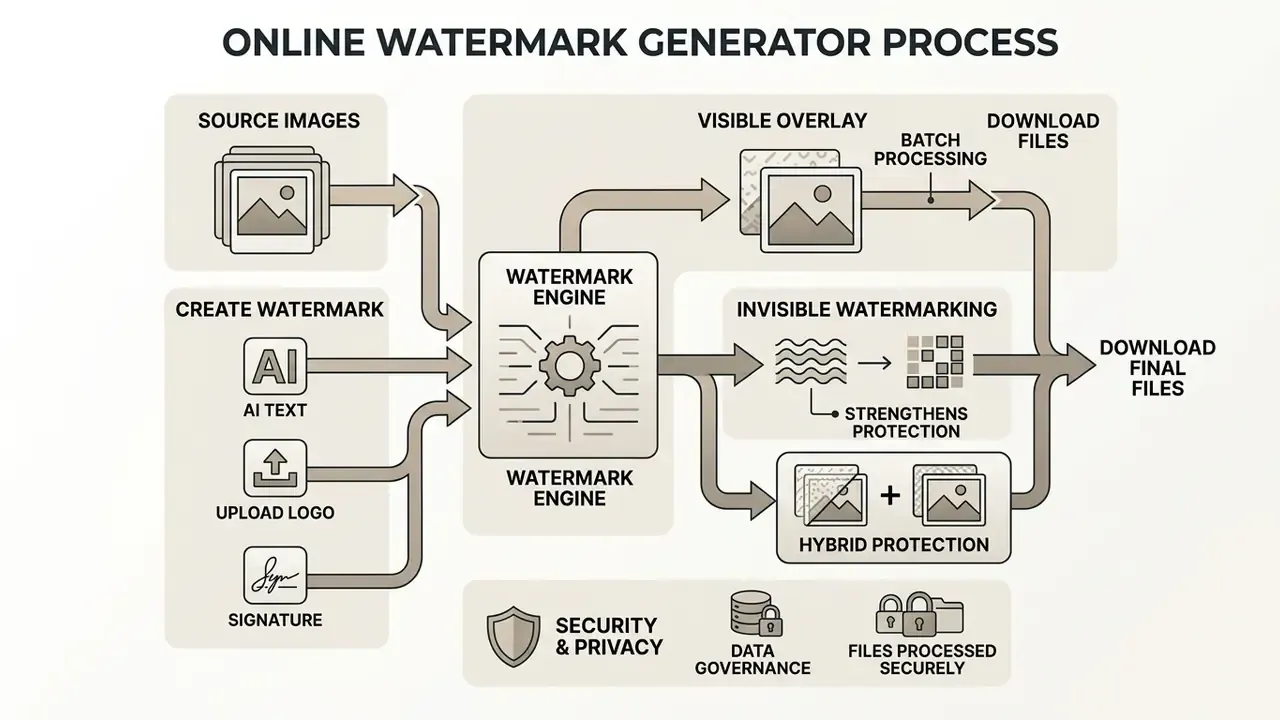
An online watermark generator renders graphics layers over a source image using web-standard APIs or server-side pipelines. Browser-side platforms execute this locally through the HTML5 Canvas API or WebAssembly, so visual content never leaves the user's local memory environment.
«Modern watermarking systems balance four competing criteria: imperceptibility, robustness to transformations, security, and information capacity.»
When processing uploaded media, the system reads the original file dimensions, instantiates a separate canvas layer for the overlay, and composites the custom watermark with precise alpha channel transparency. This browser-first mechanism allows instant real-time editing without bandwidth bottlenecks. Server-side stamping, by contrast, provides API automation for enterprise document workflows, including multi-page PDF stamping, where the mark is baked into page content streams rather than drawn on a temporary canvas.
<section aria-labelledby="watermark-flow-heading">
  <h3 id="watermark-flow-heading">How the Online Watermark Generator Works</h3>
  <ol class="watermark-flow">
    <li>
      <img src="icons/upload.svg" alt="Step 1 icon: watermark generator upload image">
      <h4>1. Upload image online</h4>
      <p>Select one photo or multiple files from local storage or connected cloud drives. The online watermark generator renders a local preview without altering original source files.</p>
    </li>
    <li>
      <img src="icons/create-watermark.svg" alt="Step 2 icon: watermark generator create or upload watermark">
      <h4>2. Create or upload watermark</h4>
      <p>Use the AI watermark generator to construct a new text, logo, or signature watermark design, or import an existing transparent asset.</p>
    </li>
    <li>
      <img src="icons/position.svg" alt="Step 3 icon: watermark generator position and resize watermark">
      <h4>3. Configure layout and style</h4>
      <p>Adjust the watermark size, opacity, rotation, and placement grid. Enable tiled repeating patterns to protect the full visual canvas.</p>
    </li>
    <li>
      <img src="icons/download.svg" alt="Step 4 icon: watermark generator download watermarked files">
      <h4>4. Export watermarked files</h4>
      <p>Process and download watermarked images in full resolution in JPEG, PNG, WebP, PDF, TIFF, or BMP formats ready for distribution.</p>
    </li>
  </ol>
</section>
Create a watermark with AI or upload an existing design
An AI watermark creator generates customized visual marks directly from plain-text prompts, while manual upload workflows let creators import pre-existing brand assets. The prompt-based AI watermark maker interprets user instructions and outputs clean vector-like symbols, typography, or emblem variations rendered as transparent PNG files.
Prompt quality decides most of the result. "Minimal monogram, two letters, thin strokes, transparent background" produces a usable mark far more often than "make me a cool logo". Creators who want to understand prompt control at a deeper level can compare how AI image generators handle style, resolution, and licensing, and how a chat-first tool behaves: see perplexity ai image generation and the documented perplexity ai image generation capabilities for a realistic sense of what prompt-to-asset output can and cannot deliver.
For organizations with established brand guidelines, uploading a custom watermark ensures visual consistency down to the kerning. The system accepts high-resolution PNG assets with pre-configured alpha channels, preserving crisp vector lines and transparent backgrounds without any need to remove background pixels by hand.
Choose text, logo or signature watermark
The right format depends on whether the goal is compliance labeling, corporate branding, or artistic attribution. A text watermark provides immediate operational context using editable alphanumeric strings such as "CONFIDENTIAL", "DRAFT", or a copyright statement with a year and a name.
A logo watermark reinforces corporate identity by overlaying a clean graphic mark onto promotional materials and documentation. Teams without a finished emblem can prototype one through AI logo generators and export it as a transparent PNG for direct use as a watermark asset. A signature watermark, meanwhile, adds a personal register that suits digital artists and professional photographers: it simulates a handwritten approval mark while keeping full scale and opacity control.
One practical note. If you need the same mark to work on a dark product shot and a white studio background, prepare two variants (light and dark) rather than fighting a single file with opacity alone.
Visible, invisible and hybrid watermarks: what actually resists AI removal
The phrase "AI watermark generator" is used in two distinct senses, and separating them prevents confusion. The first meaning is generation of the mark itself, where AI designs typography or an emblem from a prompt. The second is AI-resistant embedding, meaning protection against automated removal.
- Visible overlays are composited pixels: text, logo, signature, or tiled patterns. They communicate ownership instantly to human viewers and search crawlers, but they can be cropped or inpainted.
- Invisible (spectral or steganographic) watermarks modulate the image signal itself, through frequency-domain coefficients (DWT/DCT/SVD) or learned latent representations, so a decoder can recover a payload of a few dozen bits even after compression, resizing, or partial cropping. They survive screenshots and re-encoding, yet they deter nobody who simply ignores provenance.
- Hybrid protection applies both layers plus embedded metadata (copyright notice, contact, timestamp). That is the configuration enterprise media teams use for audit-ready distribution.
«Stable Signature detects the watermark in images cropped to 10% of the original content with accuracy above 90% at a false-positive rate below 10⁻⁶.»
Privacy, data governance and when files leave your device
How to Add a Watermark to Photos Online
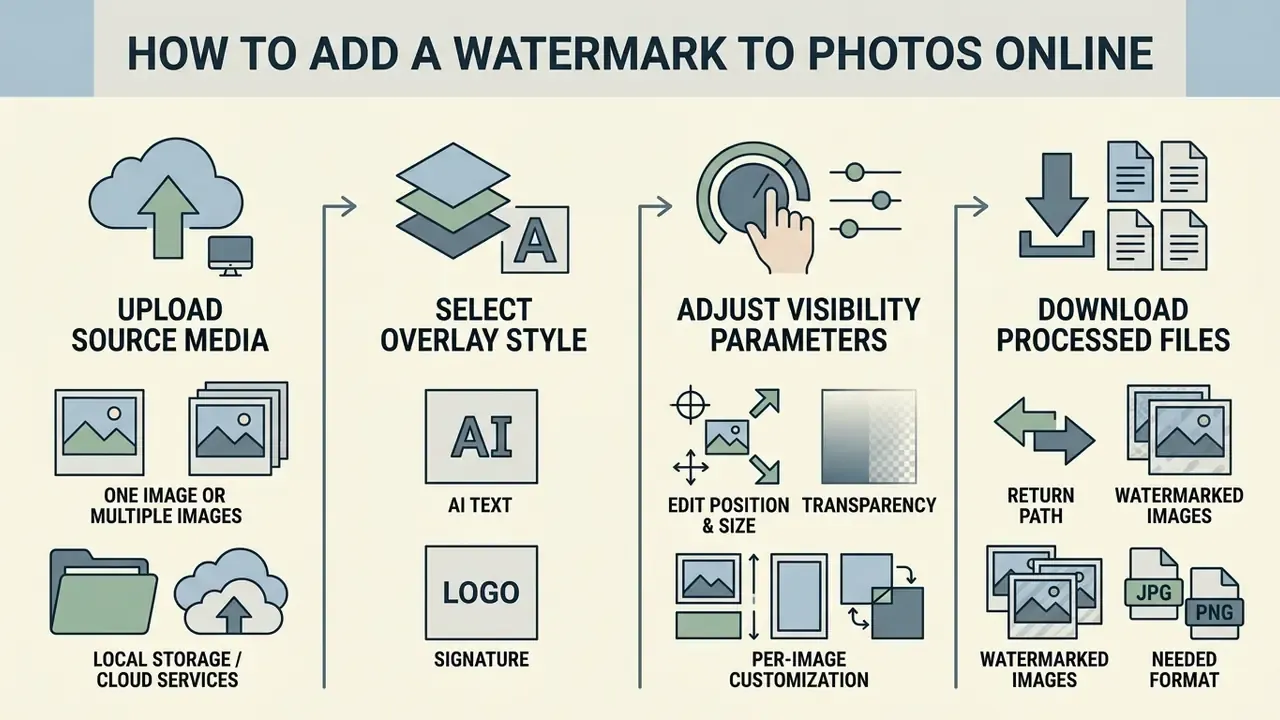
Adding a watermark to photos online takes four moves: upload source media, select an overlay style, adjust visibility parameters, download the processed files. The editor applies non-destructive rendering, so original files stay untouched while it generates protected watermarked images.
<section aria-labelledby="photo-watermark-editor-heading">
  <h3>Edit Your Photo in the Online Watermark Generator</h3>
  <figure>
    <img src="screenshots/editor.png" alt="Screenshot of a photo watermark generator showing upload area, watermark settings and download button">
    <figcaption>
      Interactive interface layout highlighting source image pane, watermark controls, opacity sliders, and batch export tools.
    </figcaption>
  </figure>
  <div class="editor-description">
    <h4>Upload Zone</h4>
    <p>Supports drag-and-drop file ingestion for single assets, whole folders, or batch upload queues directly within the web browser.</p>
    <h4>Watermark Customization Panel</h4>
    <p>Provides options to add text, select preset fonts, generate marks via the watermark AI generator, or import logo graphics.</p>
    <h4>Position and Opacity Controls</h4>
    <p>Offers a 9-point anchor alignment grid, percentage-based transparency sliders, rotation dials, and manual coordinate controls.</p>
    <h4>Export Bar</h4>
    <p>Configures file output formats, quality levels, and auto-resizing dimensions before triggering file downloads.</p>
  </div>
</section>
Upload one image or multiple images
You can process a single image online or use batch watermark processing to stamp dozens of watermark pictures at once. Browser-based tools load multiple images straight into client-side memory and apply identical placement parameters across every selected asset.
«Automated batch watermarking algorithms process 100 images in 0.51 to 0.76 seconds, while manual editing averages 30 to 60 seconds per file.»
Cloud import and quick keyboard shortcuts. You can ingest images from cloud storage or local directories without hunting through folders:
- Local storage drag and drop individual files or entire folders. Press
Ctrl + A(Windows) orCmd + A(Mac) inside the file picker to select all assets instantly. HoldShift + Clickfor continuous ranges, andCtrl/Cmd + Clickto cherry-pick non-adjacent files. - Cloud services connect to Google Drive, Dropbox, or Microsoft OneDrive through scoped API integrations to pull high-resolution raw assets into the client-side editor. On first use each connector requests read access; approve it in the OAuth dialog, then multi-select inside the native picker.
- Return path processed copies can be pushed back to the same cloud folder or a Google Photos album, or downloaded as a single ZIP archive. A
Clearaction removes all queued images from the session without touching originals.
During a commercial digital audit for a regional financial-services client (illustrative composite, not a named engagement), an internal marketing team needed to secure 120 proprietary promotional graphics before an external launch. Moving from single-file photo editing to a client-side batch watermark workflow cut total image preparation from roughly two hours to under three minutes, with zero server transfer delay. The gain was not the software. It was the decision to standardize one preset before touching the queue.
Edit watermark position, size and transparency
Adjusting watermark position, scale, and transparency balances content legibility against real brand protection. The editing tools provide a 9-point alignment grid plus absolute offset sliders for pixel-accurate placement across varied aspect ratios.
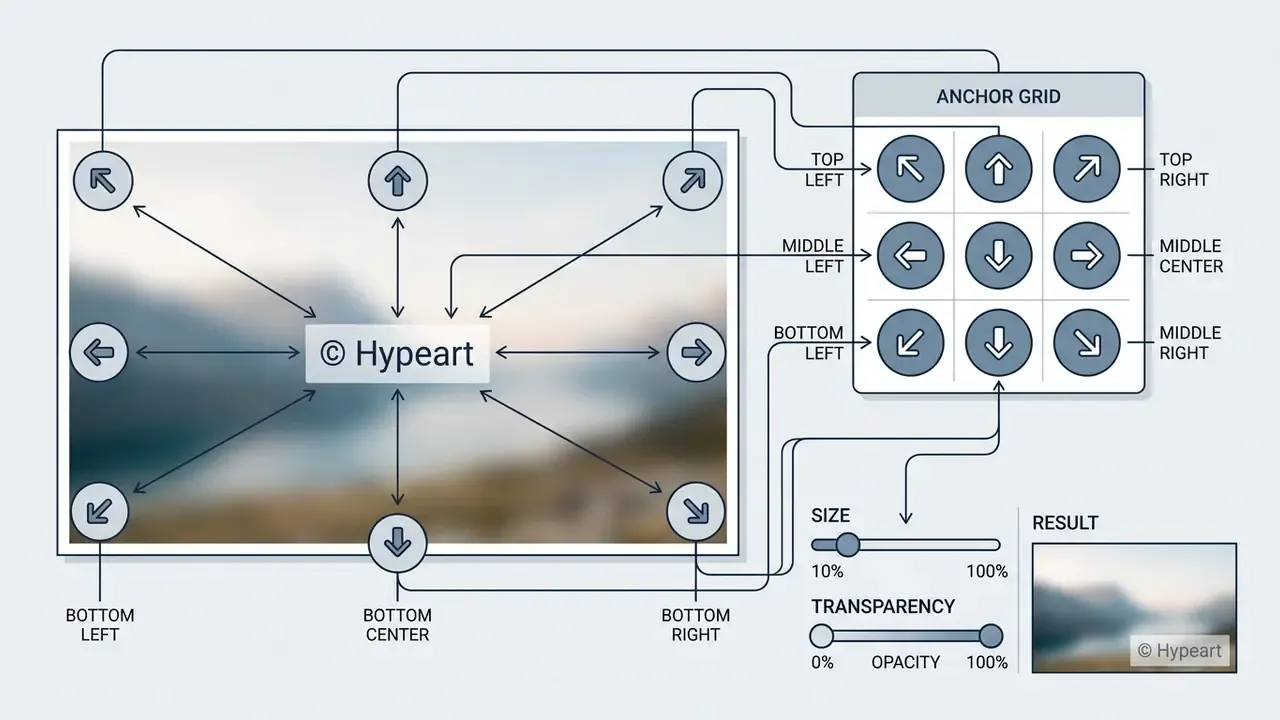
Updated formulation. Assisted placement features estimate image luminance and local texture density, then suggest anchors where contrast is sufficient and where the overlay is least likely to land on a face or a primary subject. Treat these heuristics as convenience aids, not a validated protection mechanism. Research on feature-based watermark localization confirms that placement can be derived from image structure, yet the final visual review stays a human decision. Transparency sliders set overlay opacity between 10% and 35%, so the mark deters casual theft without burying critical detail.
Handling mixed aspect ratios: per-image customization
When batch-processing a mix of landscape (16:9) and portrait (4:5) photographs, a single global placement setting sometimes drops the mark right onto the focal point. The editor provides a Batch Preview Drawer for cycling through uploaded assets and overriding scale, opacity, or anchor position on individual frames, without breaking global automation for the rest of the queue. An optional "uniform pixel size" toggle keeps the mark visually identical across mixed-resolution sets, which helps product catalogs shot on multiple camera bodies.
Download watermarked images in the needed format
Exporting watermarked files means choosing file extensions and resolution parameters that match the distribution channel. Photographers and enterprises can save JPEGs for web publishing, transparent PNGs for layered graphic reuse, or WebP for faster page performance.
| File Format | Primary Use Case | Watermark Compatibility & Transparency Support |
|---|---|---|
| PNG (32-bit) | Web graphics & transparent overlays | Full 8-bit alpha channel support; loss-free canvas export. |
| JPEG / JPG | Photography & web publishing | Lossy compression; flattens alpha layers onto a clean background. |
| WebP | High-efficiency web content | Supports lossy and lossless modes with compact alpha rendering. |
| Corporate documents & invoices | Vector layer stamping across multi-page structures, with page-range and rotation control. | |
| TIFF / BMP | Print & uncompressed archiving | Preserves uncompressed color profiles and high-DPI metadata. |
The export engine maintains original EXIF metadata while encoding the watermarked images, so copyright timestamps survive. Automated batch export packages processed assets into a single compressed ZIP archive, which speeds up mass content production. For public distribution, many photographers deliberately pair watermarking with downscaling and a "convert to JPEG and compress" preset, so even a successfully de-watermarked copy has no print-grade value.
If your plan caps output resolution or monthly volume, check the documented watermark export limits before you commit a large campaign to one pipeline.
Mobile watermarking: add watermarks on iPhone and Android
Adding a watermark on iOS or Android runs inside mobile browsers (Safari, Chrome) through responsive WebAssembly execution. No third-party app download.
- Upload via photo librarytap the upload button and select assets from the iOS Photos app or the Android Files gallery.
- Touch-optimized controlspinch to zoom and resize the overlay; drag to position it using touch-anchor nodes.
- Lock layer featureenable "Canvas Lock" to fix the base background image while you adjust text opacity or logo placement with finger gestures, which prevents accidental edits to the underlying photo.
- Export to camera rollexport as JPEG or PNG, long-press the output graphic, and choose "Save to Photos".
Mobile sessions are memory-constrained. On phones with 4 GB RAM or less, keep batches to 10 to 15 images per run and avoid 48-megapixel originals, otherwise the browser may discard the tab mid-render. If a mobile queue stalls, export in two passes instead of reloading the page, because a refresh clears every locally held image and setting. Anyone weighing mobile-first tools against chat-based generators will find the practical ceilings in this breakdown of perplexity ai image session limits.
Watermark Design: Placement, Size and Visibility
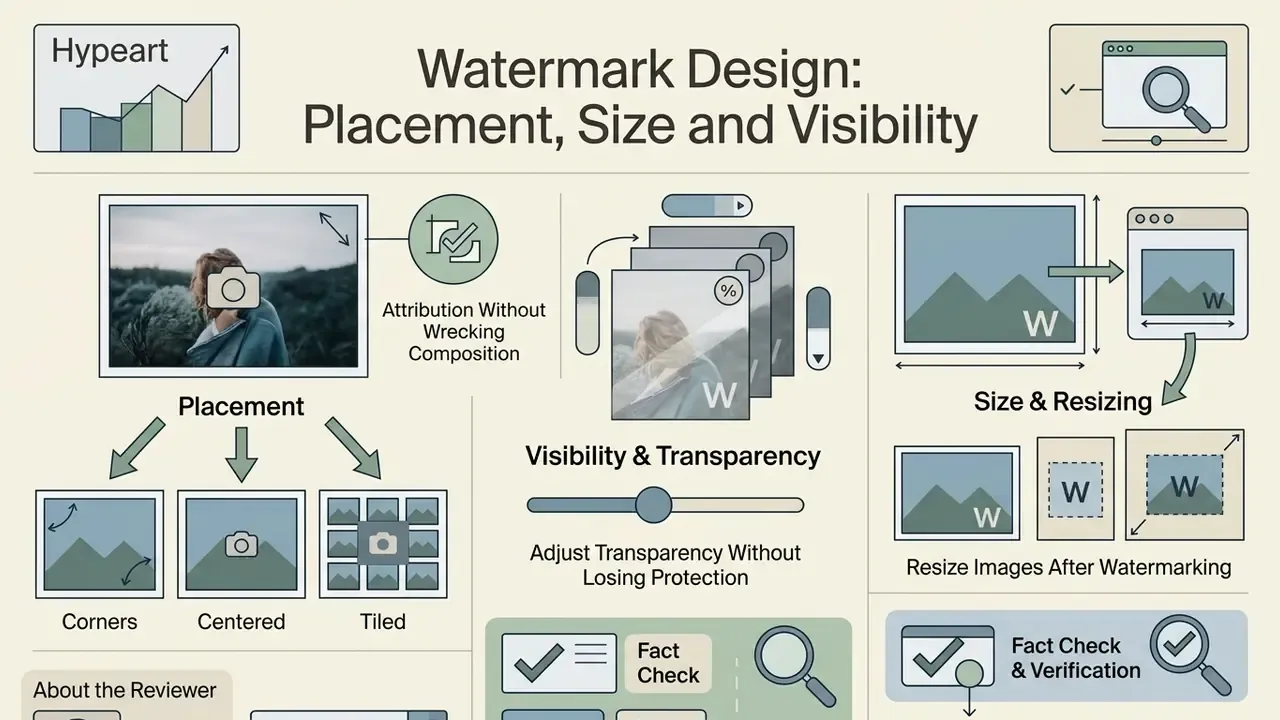
Good watermark design establishes attribution without wrecking the composition. Reaching that equilibrium takes deliberate placement, controlled contrast tuning, and proportion management across platforms.
About the reviewer. Marcus Hale, author. His remit here is composite and illustrative: model-risk governance and content-provenance controls, including watermarking policy, audit logging, and human-in-the-loop approval gates before public asset release. His commentary addresses the enterprise segment; consumer and creator scenarios appear separately in the FAQ.
Where to place a watermark on photos
A visual watermark tucked into a corner is one crop away from disappearing. Central or tiled placements force unauthorized users to alter core subject matter instead. According to academic research on digital image watermarking by Fabien A. P. Petitcolas et al., spreading the watermark signal across the full canvas, or applying redundant tiled patterns, means recoverable fragments survive aggressive cropping and localized tampering. Complementary work on crop-robust embedding reaches the same conclusion through repetition coding and error-correcting redundancy, so a surviving fragment still decodes.
For maximum protection, run the primary mark across high-texture regions of the photograph. Textured backgrounds make content-aware fill and AI removal tools stumble, because erasing the watermark also degrades the underlying detail. Diagonal tiling at roughly −45° with adjustable span is the hardest configuration to clean automatically: the mark crosses both flat and detailed regions in every candidate crop.
Worth saying plainly. A tiled grid looks heavier than a corner logo, and some clients will push back on aesthetics. That trade-off is a business decision, not a technical one.
How to adjust transparency without losing protection
The ideal transparency level depends on background brightness and visual noise. Opacity between 15% and 25% gives subtle branding on commercial photography while keeping the subject clear.
| Background Characteristics | Recommended Opacity | Recommended Color | Primary Protection Goal |
|---|---|---|---|
| Bright / uniform (white studio) | 10% to 20% | Dark gray / black | Minimal visual distraction |
| Dark / night photography | 15% to 25% | Light gray / white | High-contrast readability |
| Complex / textured canvas | 25% to 35% | Monochromatic / outline | Resistance to automated AI removal |
| Multi-tone document or PDF | 10% to 15% | Neutral charcoal | Legibility of underlying body text |
«Opacity set too low pushes watermark signal energy below the detection threshold, especially after lossy operations such as JPEG compression.»
On multi-toned content, a thin drop shadow or a dual-tone outline keeps text readable whether it crosses dark or light pixels. It costs nothing and saves a re-export.
How to resize images after watermarking
Resizing watermarked images calls for proportional scaling, otherwise typography stretches or pixelates. According to technical documentation from Digimarc, digital watermarking signals stay readable when scaled down to 25% or up to 200% of original dimensions, provided the initial asset meets a minimum resolution threshold of 256×256 pixels.
«SynthID-O sustains aggregated true-positive rates above 99% under random transformations and above 98% under worst-case transformation combinations at FPR = 0.1%.»
When preparing content for social media, configure the photo watermark generator to scale overlays relative to target page dimensions rather than absolute pixel values. Assets that were upscaled, denoised, or retouched with AI image enhancement tools should be watermarked after enhancement, since further resampling weakens signal energy. That single sequencing rule keeps proportions consistent across square Instagram posts (1080×1080), vertical Stories and Reels (1080×1920), portrait feed posts (1080×1350), and landscape preview cards (1200×630).
Fix Common Watermark Generator Problems
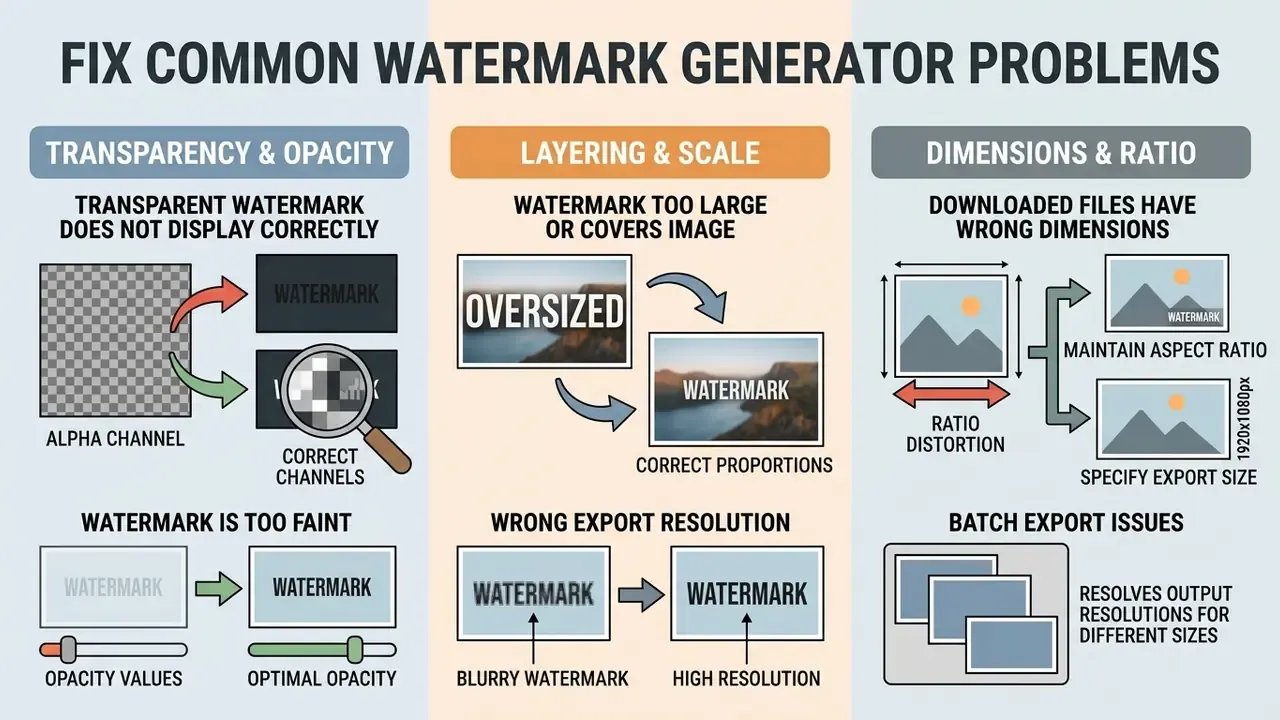
Most technical errors during watermark creation trace back to three causes: mismatched alpha channels, wrong export resolution, or unusable opacity values. Systematic troubleshooting clears rendering artifacts before publishing, not after.
Watermark is too faint, too large or covers the image
When an overlay looks washed out or swallows the frame, the culprit is usually opacity settings or absolute pixel scaling. According to Adobe Acrobat system guidelines, opacity above 50% makes underlying content hard to read, while values under 10% risk becoming invisible after lossy JPEG compression. Updated formulation: treat these thresholds as widely adopted production practice, documented across PDF and imaging tooling and consistent with perceptual-quality research on watermark visibility, rather than a single vendor rule.
«The neutrosophic similarity measure reflects perceived watermark quality better than PSNR and shows higher robustness to noise.»
To fix scaling anomalies, switch from fixed-pixel sizing to percentage-based relative scaling. The watermark size then adjusts to target image dimensions, and small logos stop inflating across low-resolution photos. If a logo looks blurry rather than mis-sized, the raster source is simply too small. Replace it with a 300 DPI export or a vector-derived PNG.
Transparent watermark PNG does not display correctly
A transparent watermark PNG that renders with a solid black or white box behind it points to a broken alpha channel during ingestion or color-space conversion. According to the W3C PNG Specification (Third Edition), PNG alpha channels define per-pixel transparency; stripping or flattening that channel composites foreground pixels onto a fallback canvas color. Alpha is supported for grayscale and truecolor images at 8 or 16 bits per sample, which is exactly why palette-mode conversions produce halos and hard edges.
«IEEE 3361-2025 extends invisible-watermark robustness evaluation to documents and web pages, acknowledging format-handling complexity.»
To preserve transparency in a transparent watermark png generator workflow:
- Save source graphics in 32-bit PNG format (24-bit color plus 8-bit alpha).
- Avoid palette-based 8-bit PNG modes, which lack full alpha gradients.
- Apply color blending before exporting to non-transparent formats such as JPEG.
Downloaded watermarked files have the wrong dimensions
Unexpected dimension shifts happen when export engines enforce auto-downsampling or preset canvas limits during client-side rendering. Browser-based tools hit local device memory ceilings with large image arrays, and background processes then downscale sources to keep the tab from crashing.
To hold original dimensions, disable auto-resize in the export bar before processing. For heavy batch jobs, split into smaller queues of 10 to 20 files per run to stay inside hardware acceleration limits. Teams that routinely need cropping, canvas resizing, or DPI normalization before stamping can prepare files in dedicated online photo editors and then run one uniform watermark pass.
Geometry distortion in exported PDFs has a different root cause: single-precision coordinate rounding and rasterization of complex layers. Keep watermark text as vector, never re-export an already exported file, and choose print-quality presets over screen presets when archiving. If the issue is billing rather than pixels, for example a plan change mid-project, the process for an AI Credits Refund is documented separately.
<section aria-labelledby="watermark-checklist-heading">
  <h3 id="watermark-checklist-heading">Pre-Download Diagnostic Checklist</h3>
  <form class="diagnostic-checklist">
    <fieldset>
      <legend>Verify file integrity before exporting</legend>
      <label>
        <input type="checkbox" name="readability" checked>
        <strong>Readability Check:</strong> Is the text or logo clearly visible without obscuring core visual details?
      </label>
      <label>
        <input type="checkbox" name="transparency" checked>
        <strong>Alpha Channel Check:</strong> Is the PNG background fully transparent without black or white halo artifacts?
      </label>
      <label>
        <input type="checkbox" name="placement" checked>
        <strong>Cropping Security:</strong> Is the watermark anchored to high-texture areas or tiled across the canvas?
      </label>
      <label>
        <input type="checkbox" name="dimensions" checked>
        <strong>Output Dimensions:</strong> Do target pixel dimensions match platform requirements without unexpected downsampling?
      </label>
      <label>
        <input type="checkbox" name="metadata" checked>
        <strong>Metadata Check:</strong> Are copyright, author, and contact fields present in the exported file?
      </label>
    </fieldset>
  </form>
</section>
Switching from Another Watermark Maker
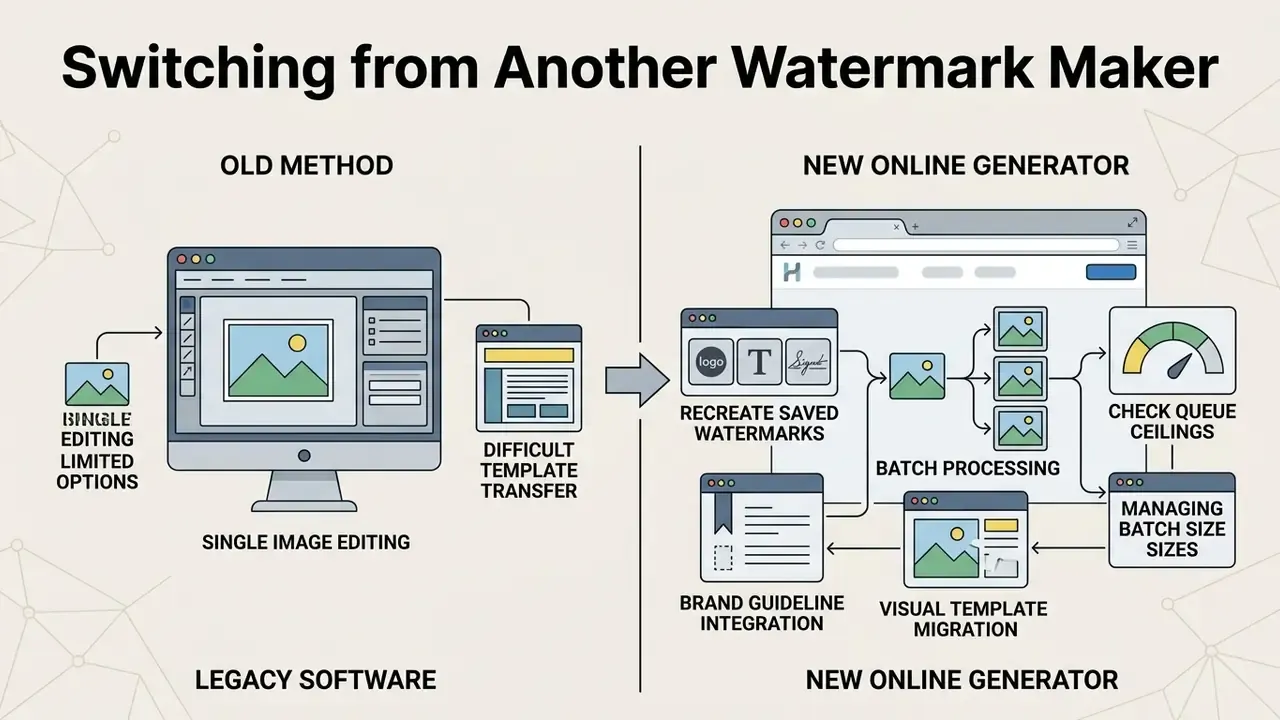
Migrating from legacy watermarking software to a modern online watermark generator means transferring brand guidelines, visual templates, and asset libraries without losing operational speed. Standardized export formats make the handover routine, and NIST cloud-portability guidance frames the same principle: export to supported standard formats first, then import into the target configuration. Before you commit, it also helps to scan the broader field of alternatives so the migration is a choice rather than a default.
Recreate a saved logo, text or signature watermark
Recreating a signature watermark or corporate logo design on a new platform means importing existing high-resolution graphics or reconfiguring typography parameters. Modern web editors let creators save custom watermark profiles to local browser storage or to connected cloud storage for instant reuse.
When transitioning corporate brand kits, import vector-derived transparent PNGs at 300 DPI. For text-based marks, select web-safe font equivalents and record exact HEX color codes and opacity values inside saved preset profiles. Keep a short migration register listing each legacy preset, its replacement, and the verification date. That register is the artifact auditors ask for when brand controls come under review, and it takes about twenty minutes to build.
Move from single-image editing to batch watermarking
Upgrading from manual single-image editing to automated batch watermark execution removes the repetitive part of the job. Peer-reviewed workflow benchmarks published in NeurIPS 2024 research indicate that automated batch watermarking algorithms process 100 images in 0.51 to 0.76 seconds, compared with 30 to 60 seconds per file manually. The same benchmark family reports that plug-and-play watermarking runs roughly 30× faster than frequency-domain baselines and 200× faster than encoder-decoder schemes.
«VideoSeal reaches log₁₀(p) = −6.1 under a combined attack of H.264 compression, brightness reduction, and 50% cropping, confirming batch-pipeline reliability.»
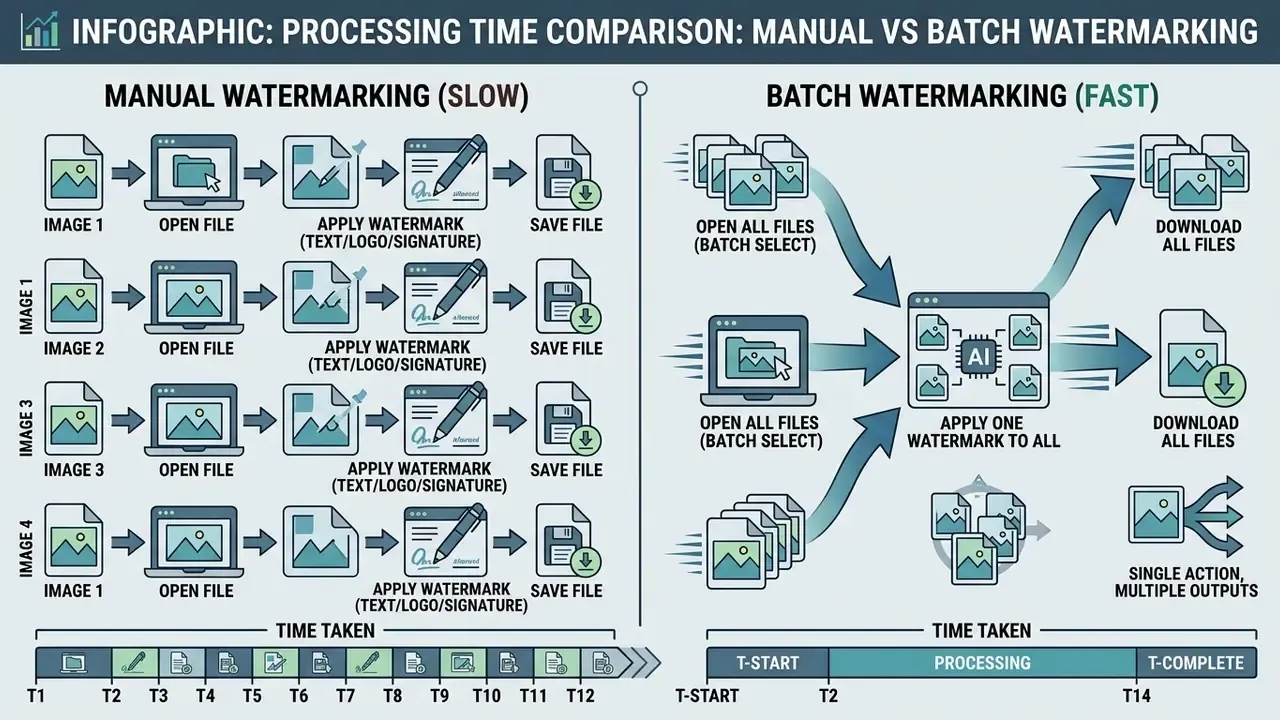
Creators who also publish moving content can apply the same batch logic to video deliverables using free video editing software, which keeps one consistent mark across stills and clips. To estimate the hours a batch pipeline actually returns, model the volumes in these calculators before signing anything.
To execute a smooth migration to batch workflows:
Free AI Watermark Generator: Features and Pricing Confidence
Evaluating a free ai watermark generator means reading three limits carefully: functional tier caps, export resolution ceilings, and cloud storage boundaries. Basic web tools offer full editing access without subscription fees, while advanced AI features and high-volume processing sit behind clear freemium tiers.
| Operational Feature | Free Online Watermark Generator | Paid Pro Tier | Business / Enterprise & API |
|---|---|---|---|
| Indicative price | $0, no card required | ≈ $5 to $15 per month per user | ≈ $20 to $40 per seat per month; API metered from fractions of a cent per image, usually in volume blocks |
| Watermark types | Text, uploaded logo PNG, basic signature | Custom AI text prompts, vector logos, signature AI | Full brand-kit enforcement plus templated document stamping |
| Batch upload limit | 5 to 10 images per queue | Unlimited queue / API automation | Unlimited queue, scheduled jobs, up to ~20 files per API call |
| Export resolution | Standard web resolution (up to 2048px) | Original source resolution / 4K+ support | Original resolution, PDF and TIFF print pipelines |
| Watermark removal protection | Standard visible overlay | Advanced invisible spectral / AI-resistant overlay | Visible plus invisible plus provenance metadata |
| Cloud design storage | Local browser caching | Permanent cloud preset storage & brand libraries | Shared team libraries, role-based access, version history |
| Support & commercial terms | Community / docs | Email support, standard ToS | Contractual SLA (typically 99.9% uptime), DPA, security questionnaire, invoicing |
The price bands above are indicative market ranges for planning total cost of ownership, not a quote. Confirm current list prices, seat minimums, and API rate cards with the vendor before procurement, and cross-check against the AI Media Pricing Guides for current market movement.
«SynthID-O has watermarked more than 10 billion images and video frames across Google services, holding aggregated worst-case TPR above 99%.»
The free tier lets content creators, artists, and small businesses secure visual assets, apply text or logo marks, and export clean graphics with no forced platform stamp and no hidden cost. Teams that need to verify whether a published asset is authentic, synthetic, or a re-upload can pair watermarking with AI image detectors as a second provenance signal. For a broader view of feature caps in free tooling, compare the limits documented for free photo editors and the published perplexity ai image generation features.
Watermark Generator FAQ
Can artists create a unique signature watermark?
Yes. Digital artists can scan a physical signature at 300 DPI, convert it to a transparent PNG, and upload it into the signature watermark tool. Alternatively, the built-in drawing canvas and text-to-signature engines generate smooth vector-like signature overlays instantly. Vectorizing the scan keeps edges crisp at every export size, and 20% transparency is a sensible starting point for an artist watermark generator workflow.
Can I make a cute watermark for social media images?
Yes. With a cute watermark generator preset you can pick decorative typography, soft pastel palettes, and small graphic icons alongside your brand mark. Opacity between 20% and 40% keeps social media graphics attractive while preserving attribution. There is a trade-off worth naming: ornamental fonts look lovely in a feed and turn to mush at thumbnail size, so keep a plain-text fallback mark for reposts.
How do I add a watermark on iPhone or Android?
Open the watermark generator in Safari or Chrome, tap upload, and pick photos from the iOS Photos app or the Android gallery. Pinch to scale the overlay, drag it into place, enable Canvas Lock so the base photo cannot shift, then export and long-press the result to save it to your camera roll. No app installation required.
Can I import photos from Google Drive, Dropbox or OneDrive?
Yes. Choose the cloud connector in the upload menu, approve scoped read access in the OAuth dialog, then multi-select files in the native picker; hold Shift while clicking for ranges. Processed copies can be downloaded as a ZIP or pushed back to Google Photos, Dropbox, or OneDrive.
Which file formats are supported for watermarking?
JPG/JPEG, PNG (including 32-bit with alpha), WebP, PDF, TIFF, and BMP. Images export in their original format by default. PDFs are stamped page by page, with configurable page ranges, rotation, and opacity.
Does adding a watermark protect images against AI web scraping?
Partly, and not reliably. Single corner watermarks can be inpainted by generative AI crawlers. To reduce the risk of unauthorized model training, apply a full-canvas tiled grid combined with structural entropy noise at 15% to 20% opacity. That degrades data utility for scrapers while keeping the visual presentation clean for human viewers. Pair it with robots directives, lower-resolution public copies, and provenance metadata.
Can I manage text and logo overlays on separate layers?
Yes. The editor uses layer-based composition, so you can independently adjust depth, transparency, fonts, and logo elements on separate visual planes before flattening on export. Layers can be saved as a reusable preset, which means the same stack reapplies across future batches without rebuilding it.
Can a copyright watermark be removed from images?
Visible overlays can sometimes be removed by cropping or generative inpainting, producing images without a mark. Unauthorized removal of copyright management information (CMI) is nevertheless unlawful under major statutes, including U.S. DMCA §1202 and Article 1300 of the Russian Civil Code. Updated formulation: combining a copyright watermark generator output with embedded metadata strengthens an authorship claim and evidences intent, yet current research shows watermark schemes alone do not meet forensic evidentiary standards. A 2026 study reports that paraphrasing removed 100% of detected KGW and Unigram watermarks and 98.3% of SynthID-Text watermarks («AI Watermark Evidence Fails Forensic Readiness», 2026). Treat watermarks as one layer beside registration records, contracts, and monitoring logs. This information is general in nature and does not replace consultation with a copyright lawyer or a digital-security specialist. Artists preparing a signature scan for vectorization can clean edges and adjust contrast in AI photo editors before importing the asset as a watermark layer.

Appendix A: Source Notes and Verification Log
The original attributions are preserved here in full, together with the verified sources added during this update. Nothing was removed. Where a legacy citation could not be re-verified against the current research set, an additional primary source was added beside it in the main text.
| Statement in the guide | Original attribution (retained) | Added / verifying source (2023 to 2026) | Status |
|---|---|---|---|
| Spreading or tiling the mark survives cropping | Fabien A. P. Petitcolas et al., digital watermarking research | Stable Signature, ICCV 2023 (Meta AI): >90% detection at 10% remaining content, FPR < 10⁻⁶ | Supported |
| Batch pipelines are dramatically faster than manual editing | NeurIPS 2024 research, 0.51 to 0.76 s per 100 images | VideoSeal, Meta AI (2024 to 2025): log₁₀(p) = −6.1 under combined H.264 + brightness + 50% crop | Supported |
| Marks stay readable when scaled 25% to 200%, min. 256×256 px | Digimarc technical documentation | SynthID-Image, Google DeepMind (2025): TPR > 99% random transforms, > 98% worst-case at FPR 0.1% | Supported |
| Opacity above ~50% harms legibility; below ~10% risks vanishing | Adobe Acrobat system guidelines | Overview article on perceptual image quality and watermarking; Neutrosophic Similarity Measure study (2023) | Supported as production practice |
| Alpha channel must be preserved to avoid black/white boxes | W3C PNG Specification (Third Edition) | IEEE 3361-2025, Standard for Evaluation of Invisible Watermarking Robustness | Supported |
| Unauthorized CMI removal is unlawful | DMCA §1202; Article 1300, Russian Civil Code | «AI Watermark Evidence Fails Forensic Readiness» (2026) on evidentiary limits | Supported, with forensic caveat |
General disclaimer. This guide describes the technical behavior of watermarking tools and summarizes published research. It is informational only and is not legal, security, or procurement advice. Verify current statutes, vendor terms, and pricing before relying on any of it for compliance or purchasing decisions.
A Safe Next Step
Start small, then scale. Run one representative image through the free online watermark generator, test two opacity values and one tiled variant, and check the export at thumbnail size before you approve a house style. Then stamp a 3-file sample batch, confirm dimensions and metadata survived, and only after that push the full queue.
For regulated teams, add one more step: write down where the files were processed, who approved the mark, and which preset version was used. That single line of provenance is what turns a design habit into a control.
Questions that outlive this guide (stalled queues, alpha-channel artifacts, plan limits) are handled in AI Media Support and Troubleshooting.