A local AI image generator runs machine learning models directly on your hardware without sending prompts or images to remote servers. That single architectural choice removes third-party retention from the picture, cancels the monthly cloud invoice, and hands the workflow back to you.
For a bank or a mature fintech, the question is rarely "can we make a pretty picture?" It is "where did the data go, and can we prove it?"
Executive Summary: What Decision-Makers Need First
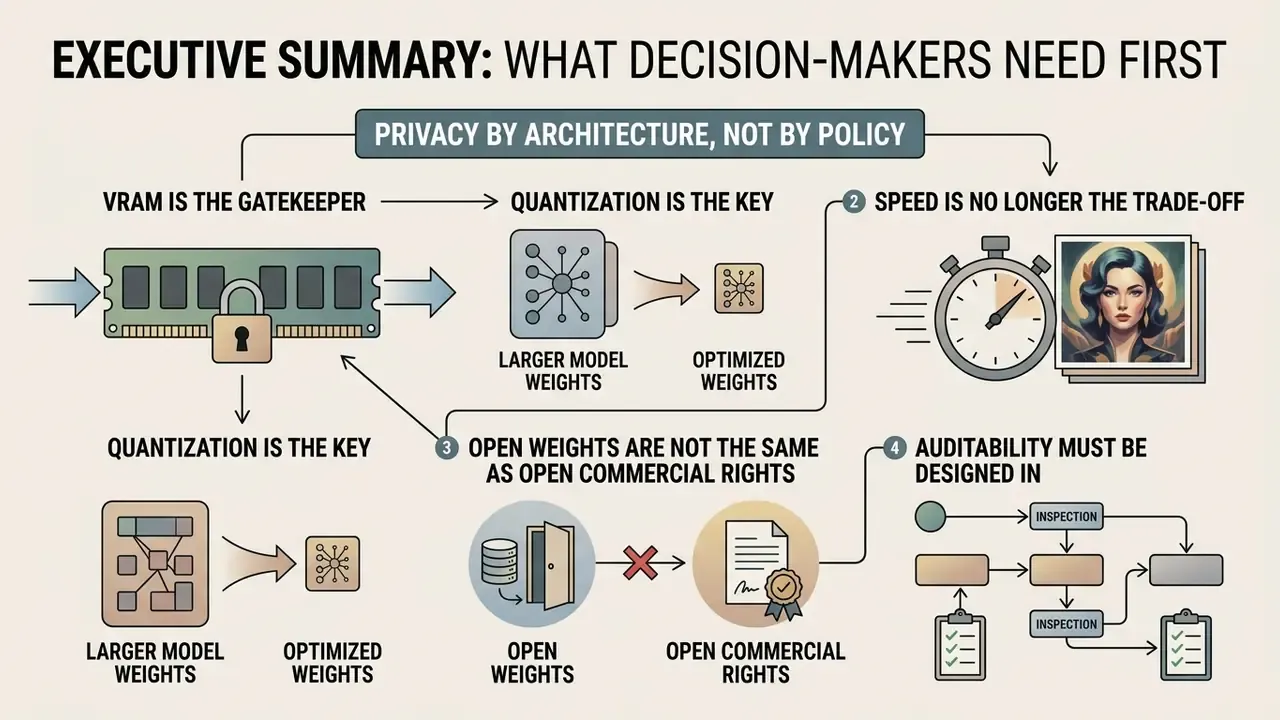
- Privacy by architecture, not by policy. Every prompt, reference image and render stays inside your machine. Third-party retention, provider logging and cross-border transfer leave the risk register entirely, rather than being mitigated by a contract clause.
- VRAM is the gatekeeper, quantization is the key. SDXL runs comfortably on 6–8 GB. FLUX.1 needs roughly 12 GB at GGUF Q4 (24 GB at FP16). Qwen-Image, despite its 20B MMDiT backbone, fits into about 12–13 GB at Q4, not the 40 GB+ often quoted for full precision.
- Speed is no longer the trade-off. Step-distilled 2025–2026 releases such as Z-Image Turbo (6B, 8 steps, roughly 2.3 s at 1024×1024 on an RTX 4090) and FLUX.2 [klein] 4B (4 steps, about 13 GB, Apache 2.0) deliver near-real-time local generation on mid-range cards.
- Open weights are not the same as open commercial rights. FLUX.1 [schnell], FLUX.2 [klein], SDXL and Qwen-Image permit commercial use. FLUX.1 [dev] and FLUX.2 [dev] are non-commercial. Check the
LICENSE.txtin the repository before you monetize a single asset. - Auditability must be designed in. Persist Prompt, Negative Prompt, Seed, Sampler, Steps, CFG, Model Hash and the exported workflow JSON for every production render. Skip that, and the pipeline fails model-risk review no matter how good the output looks.
What Is a Local AI Image Generator and Why Run It on Your Own Device
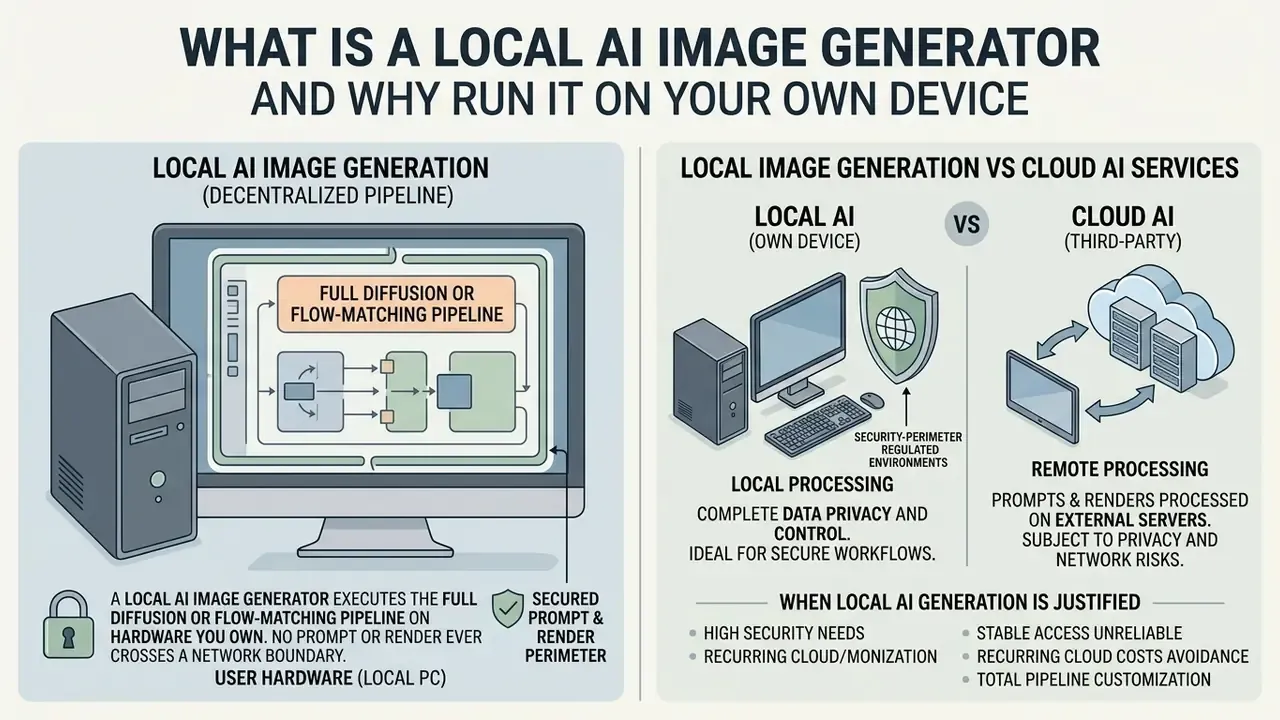
In two sentences: a local AI image generator executes the full diffusion or flow-matching pipeline on hardware you own, so no prompt or render ever crosses a network boundary. The trade-off is that VRAM budgeting, weight provenance and update hygiene become your job.
A local AI image generator is a software environment that executes latent diffusion or flow-matching models on consumer hardware. Unlike cloud platforms, an AI image generator run locally processes every matrix operation on your own GPU, NPU or CPU.
"MobileDiffusion achieves sub-second text-to-image generation, 0.2 seconds for a 512×512 image on iPhone 15 Pro."
That figure matters less as a benchmark than as a signal. On-device inference has moved from "technically possible" to "faster than a network round trip," and that shifts the default for anyone handling sensitive visual material.
Running AI image generation locally lets organizations and creative professionals draw a hard no cloud operational boundary. Before committing to a local stack, benchmark the alternatives: our overview of AI image generators maps hosted options against on-premise deployments on cost, rights and control. By leveraging open source architectures, teams keep full custody of sensitive visual assets across very different corporate use cases, from internal training material to pre-release product renders.
One caveat worth stating early. Some of the strongest current models, Google's Nano Banana among them, are hosted only. No amount of local tuning will bring them onto your workstation, so a local strategy means choosing from open-weight families and accepting that trade.
Local Image Generation vs Cloud AI Services
In two sentences: cloud services optimize for convenience and charge per image; local stacks optimize for custody and charge once for hardware. The decision is rarely about quality, it is about where the data is allowed to live.
Local execution eliminates the data exposure inherent to third party web services. When you generate AI images locally, prompts, input references and final renders never leave the physical machine.
"Participants did not know their data was being analysed, nor did they understand the implications of platform-side model processing."
Cloud platforms also impose rate limits, content filtering and recurring subscription fees. A local setup gives architectural control over AI models: custom samplers, unconstrained resolutions, offline processing, no API latency. Teams that want a like-for-like feature matrix before committing capital can review our comparison of the best AI image generators and the head-to-head analyses of Midjourney image generation and ChatGPT image generation. Understanding how does ai process visual tokens locally clarifies why local inference sidesteps external network bottlenecks altogether.
Security-perimeter note for regulated environments. Local does not automatically mean governed. I have seen that assumption cost a team a quarter of remediation work. In banking and fintech deployments, treat the generator host as a managed endpoint: block outbound traffic from the UI process except to an internal model mirror, apply RBAC to the /models/ directory so only a model-operations role can add or replace weights, and forward UI and process logs to the corporate SIEM. DLP policies should cover the output directory too, because generated marketing drafts frequently embed unreleased product names.
When Local AI Image Generation Is Justified
In two sentences: the business case for local inference is strongest where data classification, not cost, drives the decision. Confidential IP, regulated customer data and high-volume production pipelines each justify the hardware line item on their own.
Running a local AI generator makes sense when the material involves confidential intellectual property, trade secrets or regulated customer data. Financial institutions and enterprise design teams need strict governance over proprietary concepts long before those concepts are public.
"A symmetric activation mechanism protects prompts and images without compromising generation quality and converges faster than comparable approaches."
Local environments also enable deeper experimentation with diffusion models, fine tuned checkpoints and custom adapters. And high-volume production pipelines benefit plainly: zero per-image API cost after the initial hardware outlay.
Comparison between local AI image generators and cloud AI services
| Evaluation dimension | Local AI image generator | Cloud AI service (third-party) |
|---|---|---|
| Data privacy and sovereignty | Complete on-device boundary. Prompts and outputs remain local. | Data transmitted to external servers. Subject to provider logs. |
| Internet dependency | Fully offline after the initial model download. | Requires an active high-speed connection. Vulnerable to outages. |
| Model control and fine-tuning | Full access to base weights, LoRAs, custom nodes and samplers. | Restricted to provider parameters and standard UI features. |
| Recurring operating cost | No per-image API fees. Costs limited to electricity and storage. | Monthly subscriptions or token-based usage charges. |
| Auditability | Full control of seeds, model hashes and workflow JSON exports. | Limited to provider-exposed metadata and retention windows. |
| Change control | You pin versions; nothing updates behind your back. | Provider may swap model versions without notice. |
Conclusion: local generation suits enterprise teams that need strict privacy and custom pipelines. Cloud services suit occasional users who would rather not manage hardware at all.
What You Need to Run an AI Image Generator Locally
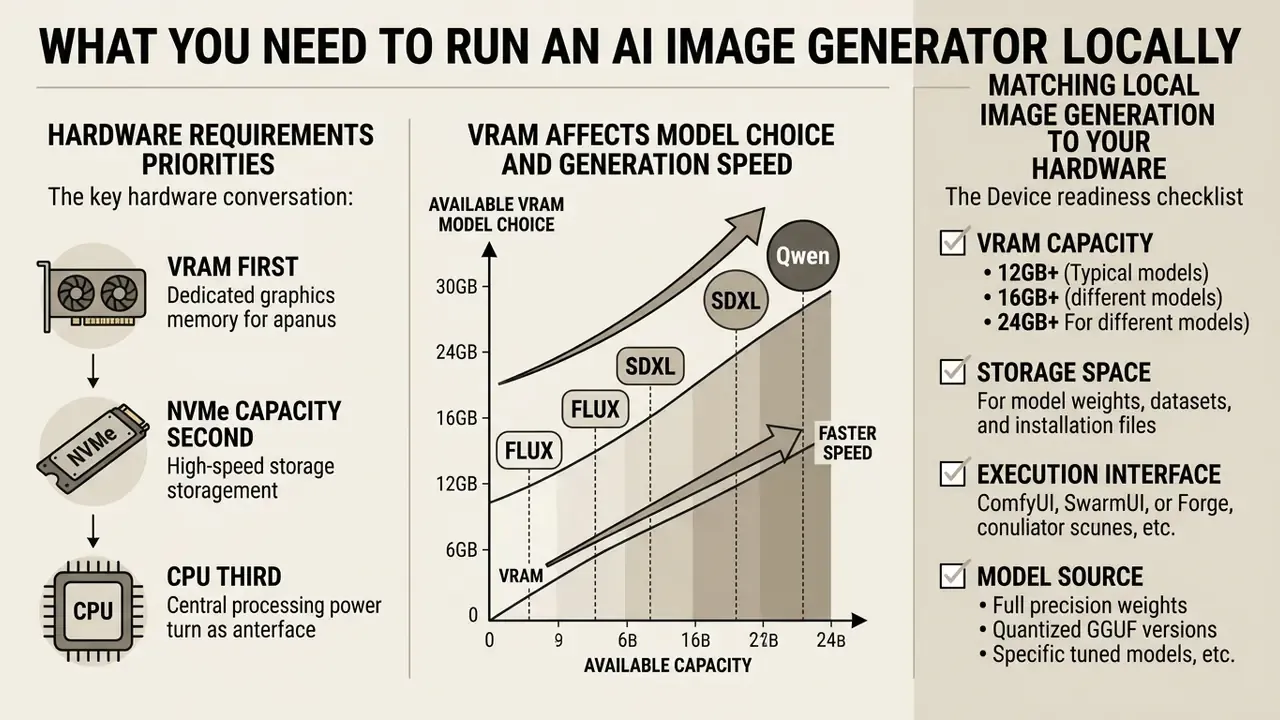
In two sentences: the hardware conversation reduces to VRAM first, NVMe capacity second and CPU third. Match the model class to the card before installing anything, and the setup becomes uneventful.
Running an image generator ai local environment demands specific hardware requirements, centred almost entirely on graphics hardware. Getting those constraints right up front is what makes rendering performance predictable instead of mysterious.
The target user interface and the selected generation models together dictate system RAM and VRAM utilization. Matching your specs to the appropriate image generation models prevents instability and out-of-memory errors. A practical baseline: 16 GB of system RAM as the floor, 32 GB recommended for batch jobs and multiple extensions, a modern 4–8 core CPU for data loading and preprocessing, and 50–100 GB of NVMe storage reserved for checkpoints and caches.
How VRAM Affects Model Choice and Generation Speed
In two sentences: if weights, text encoders and execution buffers do not fit in VRAM, the framework spills to system RAM and throughput collapses. Quantization is the standard remedy, and it is the reason 12 GB cards can run 12B–20B models at all.
Video RAM is the single hardest bottleneck when you generate images locally. The image model has to fit inside VRAM alongside its execution buffers to hit optimal sampling speed.
When VRAM falls short, the framework offloads weights to system RAM or storage, and performance degrades severely, sometimes by an order of magnitude. Running a base model in full FP16 precision, for example, demands substantially more VRAM than quantized INT8 or FP8 variants of the same checkpoint.
"FLUX.1-dev in FP16 requires roughly 24 GB of VRAM and generates a 1024×1024 image in 30–60 seconds on an RTX 3090 at 50 sampling steps."
Matching Local Image Generation to Your Hardware
In two sentences: quantized weights and memory-saving flags make mid-range GPUs viable for models that nominally demand workstation cards. Verify capacity before download, not after the first out-of-memory crash.
To locally generate ai images on limited hardware, pick optimized diffusion models or quantized weight files. Low-VRAM flags switch on memory-saving techniques such as VAE tiling and sequential offloading.
Modern lightweight architectures now produce quality images on mid-range GPUs that would have needed a workstation two years ago.
"SnapGen (379M parameters) generates a 1024×1024 image in about 1.4 seconds on-device, outperforming SDXL on the GenEval and DPG benchmarks."
Assessing hardware capacity before deployment is what keeps the setup boring, which is exactly what you want. If the assessment shows your workstation cannot host the model class you need, hosted options such as free AI image generators without sign-up are a reasonable interim path while procurement runs its course.
- VRAM capacity
- verify available VRAM (4 GB for SD 1.5, 6–8 GB for SDXL, 12–13 GB for FLUX.1 or Qwen-Image at GGUF Q4, 24 GB for FP16/FP8 builds).
- Storage space
- allocate at least 50–100 GB of fast NVMe SSD for checkpoint weights, VAEs, LoRAs and upscalers.
- Execution interface
- choose between Fooocus (entry-level), Forge (balanced), SwarmUI (simple front end on a ComfyUI backend) or ComfyUI (advanced).
- Model source
- use trusted releases such as Hugging Face repository downloads, and confirm the SHA256 checksum published on the model card.
- Access control
- restrict write access to the models directory to a dedicated model-operations role (RBAC) and log every weight addition.
- Test scenario
- run one fixed-seed reference prompt after installation and archive the result as the baseline for future regression checks.
Hardware readiness assessment: systems with at least 8 GB VRAM reliably run SDXL models. 12–16 GB covers quantized FLUX.1 and Qwen-Image. 24 GB or more is recommended for unquantized FLUX pipelines and FLUX.2 [dev].
Inference speed reference (indicative; community-reported and vendor-reported figures).
| GPU | Model | Format | Resolution | Generation time |
|---|---|---|---|---|
| RTX 3060 (12 GB) | SDXL 1.0 | FP16 | 1024×1024 | ~12 s (30 steps) |
| RTX 4070 (12 GB) | FLUX.1 [dev] | GGUF Q4 | 1024×1024 | ~8 s (20 steps) |
| RTX 3090 (24 GB) | FLUX.1 [dev] | FP16 | 1024×1024 | 30–60 s (50 steps) |
| RTX 3090 (24 GB) | FLUX.1 [schnell] | FP16 | 1024×1024 | 4–8 s (4 steps) |
| RTX 4090 (24 GB) | Z-Image Turbo | FP16 | 1024×1024 | ~2.3 s (8 steps) |
Reading the table: step count, not parameter count, dominates wall-clock time. Distilled models collapse 20–50 steps into 4–8, which is why a 6B turbo model beats a 12B model by an order of magnitude on the same card. Treat these numbers as directional; driver version, attention backend and resolution all move them.
Which AI Models to Choose for Local AI Image Generation
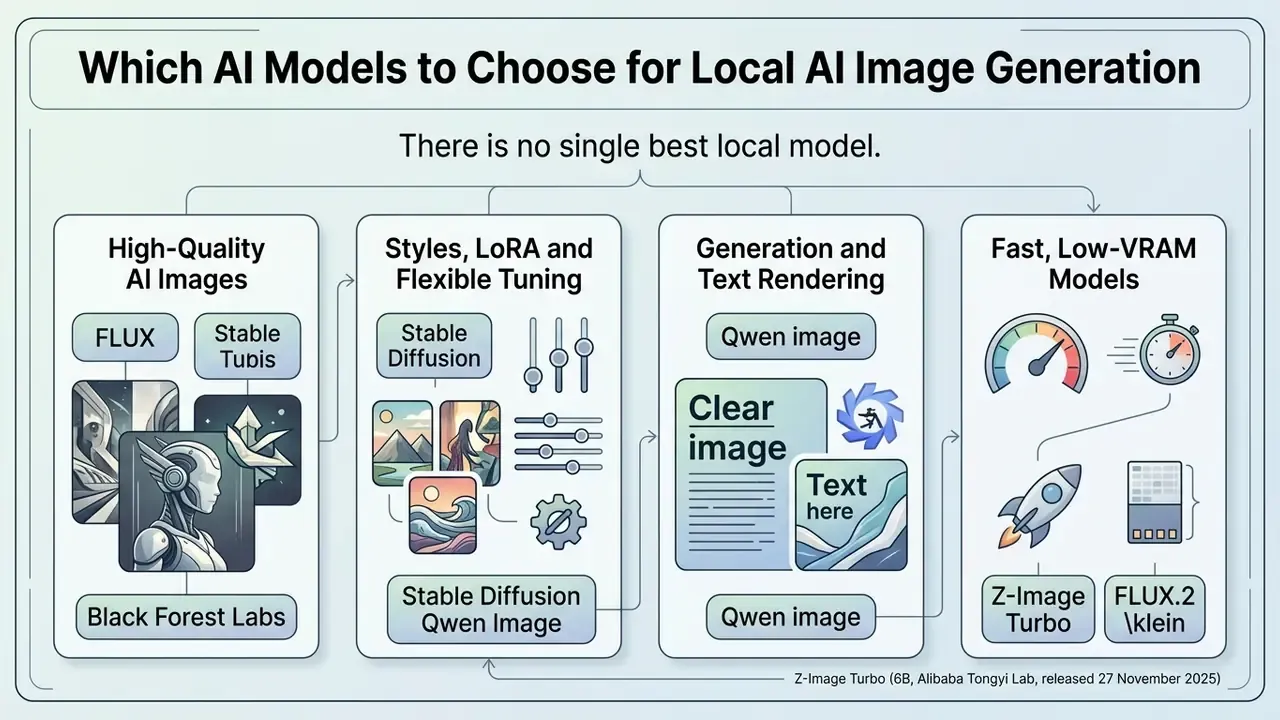
In two sentences: there is no single best local model. FLUX leads on photorealism and prompt adherence, Stable Diffusion owns the LoRA ecosystem, and Qwen-Image owns text inside the image; speed and licensing then narrow the shortlist further.
Selecting the best local image generation ai depends on target fidelity, prompt complexity and styling requirements. Open-weight AI models differ sharply in architecture and memory footprint, and the differences are not subtle.
Whether the priority is realistic portraiture, complex text rendering or custom style adaptation, the image model you pick largely determines whether your local ai image gen pipeline succeeds. For a wider stylistic survey, see our ranking of the best AI art generators and its zero-cost counterpart, the free AI art generator comparison.
FLUX and Black Forest Labs for High-Quality AI Images
In two sentences: FLUX is the reference point for prompt adherence and photoreal texture among open-weight models. The catch is licensing, because the highest-quality variants are explicitly non-commercial.
Developed by Black Forest Labs, the FLUX family represents state-of-the-art flow-matching architecture. FLUX.1 [dev] and FLUX.1 [schnell] both excel at hyper-realistic detail and precise prompt adherence.
"FLUX.1-schnell is released under Apache 2.0 and generates a 1024×1024 image in 4–8 seconds on an RTX 3090 at 4 steps, roughly 10× faster than FLUX.1-dev."
FLUX models deliver exceptional quality images, but their 12-billion parameter scale asks for about 12 GB of VRAM at GGUF Q4 and up to 24 GB at FP16. FLUX.2 [dev] (32B, November 2025) pushes quality and editing further, though realistically it needs an RTX 4090 with a quantized build locally, and it remains non-commercial. Readers weighing architectures side by side can consult our AI image generator comparison. For anyone comparing image tools against conversational engines, asking can perplexity ai handle local rendering explains why dedicated local FLUX pipelines still win on enterprise visual work.
Stable Diffusion for Styles, LoRA and Flexible Tuning
In two sentences: SDXL remains the lowest-VRAM, highest-flexibility option because its ecosystem of LoRAs, ControlNets and community checkpoints is unmatched. It trails FLUX on raw prompt adherence but wins on stylistic reach.
Stable diffusion is still the most versatile ecosystem for local generation. Models across SD 1.5, SDXL and SD 3.5 support extensive customization through LoRA (Low-Rank Adaptation) modules, small adapter files that steer style or identity without retraining the checkpoint.
You can pair a standard base model with specialized fine tuned checkpoints to enforce a specific visual identity across a whole campaign.
"SDXL uses a UNet backbone three times larger than previous versions plus a second text encoder, which significantly improves prompt alignment and visual fidelity."
That flexibility keeps Stable Diffusion the primary choice for iterative creative production. Released in July 2023 under the permissive CreativeML OpenRAIL++-M license, SDXL 1.0 (3.5B base) accumulated the largest library of community adapters of any local model, which is precisely why it refuses to be retired.
Qwen Image for Generation and Text Rendering
In two sentences: Qwen-Image is the model to pick when words must be legible inside the render. Community GGUF quants bring its 20B MMDiT backbone down to a consumer-card footprint.
Qwen image is a 20B parameter model from Alibaba Cloud, built specifically for native text rendering. It addresses the long-standing failure of diffusion models to produce readable typography inside a generated frame.
"Qwen-Image applies progressive training, from simple text to paragraph-level layouts, and achieves leading results including on logographic languages."
Using Multimodal Diffusion Transformer (MMDiT) backbones, Qwen Image renders complex multilingual text and dense layouts accurately, which makes it a natural fit for marketing materials, disclosure slides and infographics. Updated VRAM guidance: community Q4 GGUF builds run in roughly 12–13 GB, comfortable on a 16 GB card, while FP8 builds target about 24 GB. Earlier 40 GB+ figures describe uncompressed FP16 inference only, and should not be read as a minimum requirement.
Fast, Low-VRAM Models: Z-Image Turbo and FLUX.2 [klein]
| Model architecture | Photorealism and detail | Text rendering | LoRA ecosystem | Practical minimum VRAM | License / commercial use |
|---|---|---|---|---|---|
| FLUX.1 [dev] (12B, Aug 2024) | Industry-leading photorealism | High accuracy | Rapidly growing | ~12 GB (GGUF Q4) / 24 GB (FP16) | FLUX [dev] non-commercial, not for production |
| FLUX.1 [schnell] (12B, Aug 2024) | High, 4-step distilled | High accuracy | Shared with FLUX.1 | ~12 GB (GGUF Q4) | Apache 2.0, commercial use allowed |
| FLUX.2 [dev] (32B, Nov 2025) | Highest quality plus editing | Very high | Emerging | RTX 4090 class (quantized) | FLUX non-commercial |
| FLUX.2 [klein] 4B (Jan 2026) | High for its size | High | Emerging | ~13 GB | Apache 2.0, commercial use allowed |
| SDXL 1.0 (3.5B, Jul 2023) | High, checkpoint dependent | Moderate | Extensive maturity, the broadest library | 6–8 GB | CreativeML OpenRAIL++-M, commercial use allowed |
| Stable Diffusion 3.5 Large (8.1B, Oct 2024) | High | Moderate to high | Growing | ~12 GB (FP8) | Stability Community License |
| Qwen-Image (20B MMDiT, Aug 2025) | High compositional accuracy | Superior (multilingual, paragraph-level) | Developing | ~12–13 GB (GGUF Q4) / ~24 GB (FP8) | Apache 2.0, commercial use allowed |
| Z-Image Turbo (6B, Nov 2025) | High, 8-step distilled | Good | Minimal so far | under 16 GB | Apache 2.0, commercial use allowed |
Selection criteria: choose FLUX for uncompromised photorealism, Stable Diffusion for rich custom styling via LoRAs, Qwen Image for graphic design and embedded text rendering, and Z-Image Turbo or FLUX.2 [klein] when latency and commercial licensing both matter. VRAM figures reflect the quantized builds practitioners actually run, so read them as practical minimums, not theoretical floors.
Verified model sources and licensing terms (audited June 2026):
UI Selection and Deployment Workflow
In two sentences: the front end decides how much control you get and how much friction you accept. Pick the interface first, because it dictates directory layout, model formats and the shape of your audit trail.
Choosing the right user interface is a balance between operational control and ease of use. Local frontends connect hardware drivers to the underlying model backends, and nothing else in the stack shapes daily work as much.
Options range from streamlined one click installers to full visual programming environments. In practice they fall into three bands: guided prompt builders (Fooocus), parameter panels (Automatic1111, Forge), and node or workflow editors (ComfyUI), with SwarmUI bridging the last two by putting a simple panel in front of a ComfyUI backend.
ComfyUI for Node-Based Workflows and Full Control
In two sentences: ComfyUI exposes the pipeline as an explicit graph, which is both its learning curve and its governance advantage. Every production render can be reproduced from an exported JSON graph.
ComfyUI uses a modular, node based architecture that visualizes each step of the generation pipeline. Nodes represent discrete operations: text encoding, latent sampling, VAE decoding. Downstream retouching often pairs with a dedicated photo editor or an AI headshot generator for portrait-specific finishing.

That granularity optimizes VRAM usage through deferred execution, and it lets advanced users build custom, reproducible workflows rather than re-deriving settings from memory.
"ComfyUI is the fastest way to get started with FLUX.1: place the weights in the
models/checkpointsdirectory."
Architecturally, ComfyUI splits into a Python server that handles model execution and a JavaScript/Vue client that renders the graph. The custom-node registry matters for governance: teams can pin approved extensions instead of installing arbitrary community code.
SwarmUI: ComfyUI Power With a Simple Interface
In two sentences: SwarmUI is a graphical front end that uses ComfyUI as its backend, so you keep ComfyUI's optimizations without wiring nodes by hand. For most teams it is the fastest path from a bare machine to reproducible, preset-driven production output.
SwarmUI acts as a friendly shell over the ComfyUI engine. Instead of assembling a graph for every task, you apply a preset (realism, stylization, upscaling) and the underlying node chain is generated for you.
Why it wins for mixed-skill teams:
- Automatic hardware optimization. SwarmUI manages VRAM and RAM distribution plus offloading, which keeps mid-range cards usable without manual
--lowvramtuning. - Multi-GPU support. Additional ComfyUI backends can be registered, letting queued jobs fan out across cards.
- Built-in presets and 4K upscaling. Style presets and a two-stage upscale workflow ship ready to use, including high-realism presets built around FLUX SRPO and the Wan 2.2 model repurposed for stills.
- Image history tab. Every render is archived with its parameters, which doubles as a lightweight audit log.
Deployment sequence:
- Install ComfyUI first and confirm it generates a test image. It will act as the backend engine.
- Install SwarmUI into a separate directory on a drive with sufficient free space.
- Complete the first-run configuration wizard (theme, model root, backend type).
- In Server → Backends, add a ComfyUI Self-Starting or ComfyUI API backend and point it at your existing ComfyUI installation path.
- For multiple GPUs, register one backend per device and set the GPU index for each.
- Import your preset pack under Presets, then run Quick Tools → Reset Params to Default before applying any preset, so stale parameters do not leak into the new configuration.
Forge, Fooocus and WebUI for a Fast Start
In two sentences: panel-based interfaces remain the shortest route to a first image for users who do not want a graph. Forge optimizes memory on the Automatic1111 codebase; Fooocus hides almost everything behind style presets.
If you prefer intuitive control panels, Fooocus and WebUI Forge are accessible alternatives to a classic Automatic1111 setup.
Fooocus compresses parameters into streamlined style presets, which makes it ideal for quick generations and for colleagues who just need to create images without learning sampler theory. Forge is built on top of the Stable Diffusion WebUI to improve resource management and inference speed while staying compatible with A1111 models and extensions, though some legacy startup parameters behave differently because the backend was replaced. Automatic1111 itself is still the most feature-rich and extension-dense option, launched via webui-user.bat on Windows or webui.sh on Linux and macOS, but it is the least streamlined for a first run. Teams reviewing software costs should consult our AI Media Pricing Guides to weigh local hardware overhead against cloud tier pricing.
How to Launch a Local AI Image Generator: Install and First Generation
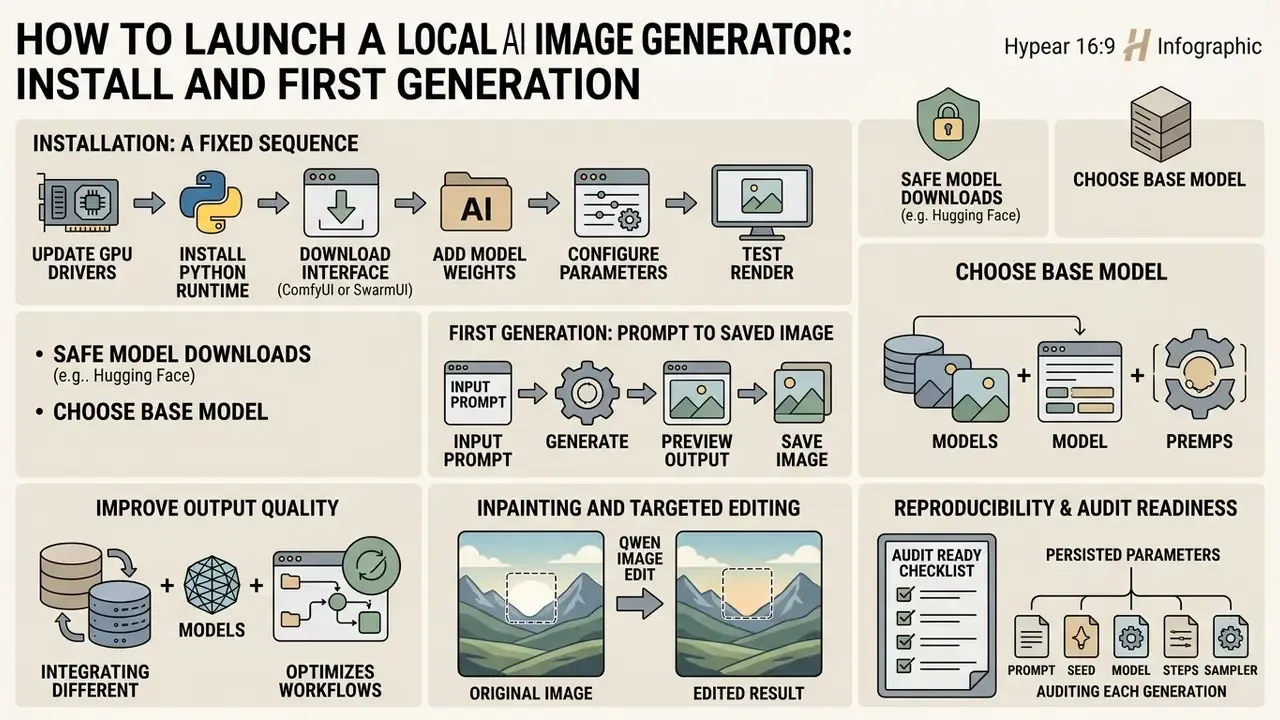
In two sentences: installation is a fixed sequence, driver, runtime, interface, weights, parameters, render. Follow it in order and most dependency conflicts never occur.
Learning how to run local ai image generator environments means systematically setting up dependencies, interfaces and model weights. The canonical order: install the GPU driver, install Python or conda (or a standalone build), install the chosen interface, download model weights, then launch the UI and load a checkpoint.
A structured installation routine prevents software conflicts and keeps your local ai for image generation stack reliable across updates.
Where to Download Models Safely and How to Pick a Base Model
In two sentences: weight files are executable-adjacent artifacts and must be treated as controlled assets. Prefer .safetensors, verify checksums, and record provenance before anything enters a production directory.
Always download model checkpoints from reputable sources such as Hugging Face or Civitai. Make sure files use the .safetensors format rather than legacy .ckpt.
The .safetensors format prevents the arbitrary code execution risk that comes with Python pickle files. .ckpt archives are pickle-based and can execute code on load, whereas .safetensors stores only binary tensors behind a JSON header. Hugging Face's own security audit found no critical arbitrary-code-execution flaw in safetensors, and Civitai's guidance notes that safetensors cannot contain dangerous imports, yet still recommends a malware scan.
"Hugging Face hosts FLUX.1-schnell weights under Apache 2.0 and FLUX.1-dev under a non-commercial license, requiring explicit acceptance of terms before download."
Model provenance procedure (recommended for regulated teams):
- Record the exact repository, variant and revision hash of every downloaded weight file.
- Compute and compare the SHA256 checksum against the value published on the model card:
certutil -hashfile model.safetensors SHA256on Windows,sha256sum model.safetensorson Linux. - Archive a copy of the
LICENSE.txtand the model card as they existed on the download date. - Register the model in your central AI model inventory with owner, purpose, license class and approved use cases.
- Scan the file with your endpoint protection suite before moving it into the shared models directory.
First Generation: From Prompt to Saved Image
In two sentences: the first render is a parameter exercise, not an art exercise. Match resolution to the model's native training size and keep steps modest until the pipeline is proven.
To generate images locally for the first time, load your chosen base model into the UI. Enter a structured prompt describing subject, lighting and style, in that order; the model weights early tokens more heavily.
Set the core parameters: sampler (Euler a or DPM++ 2M, for instance), sampling steps (20–30), CFG scale (4.5–7.0), and a base resolution that matches the model (512×512 for SD 1.5, 1024×1024 for SDXL and FLUX, up to 2048×2048 for Qwen-Image). CFG controls how tightly the sampler follows the prompt, and at CFG = 1 the negative prompt has no effect at all, which surprises a lot of first-time users. Distilled models are the exception to the step guidance: FLUX.1 [schnell] and FLUX.2 [klein] expect 4 steps, Z-Image Turbo expects 8, and raising the count only adds time.
How to Improve Output Quality With Models and Workflows
In two sentences: quality gains come from a second high-resolution pass plus targeted adapters, not from raising step counts indefinitely. Hi-Res Fix and tiled upscaling handle resolution; LoRA handles identity and style.
Improve output by applying Hi-Res Fix or tile-based upscaling. Hi-Res Fix typically runs a 2× upscale with denoising strength of 0.3–0.5 in a second diffusion pass. Ultimate SD Upscale instead splits the frame into tiles and reassembles them, which is friendlier to memory on very large outputs, although higher denoise values can weaken prompt-image correlation because tiles are sampled independently. Practitioners refining outputs further should review image-to-image generators, AI outpainting tools for expanding images and dedicated AI image upscalers.
Adding LoRA adapters allows subtle style adjustments without touching core checkpoint weights. Strengths of roughly 0.3–0.5 are a sensible default when the LoRA is applied during the high-resolution pass.
"DreamLite reduces denoising to 4 steps via distillation and generates 1024×1024 images in under one second on a Xiaomi 14 while retaining a GenEval score of 0.72."
Enterprise deployment pattern (illustrative; internal figures, not independently audited). In one reference architecture documented with a regional banking design team, a local ComfyUI pipeline ran quantized FLUX weights on a single 24 GB workstation GPU behind the internal firewall, with a brand LoRA trained on approved marketing assets. Draft asset turnaround dropped from a multi-day agency cycle to a single working session, because iteration no longer required an external vendor round trip. The controls that made it approvable mattered as much as the speed: weights registered in the model inventory with SHA256 hashes, the models directory writable only by a model-operations role, every render persisting its seed and workflow JSON, and no draft asset ever leaving the on-premise share. Treat the cycle-time improvement as a directional internal figure, not a benchmarked result. Measurement methodology and baseline definitions vary widely between organizations, and I would not present that number to a board without a stated baseline. Exploring AI Media Alternatives by Reason adds further context on choosing between local setups and specialized software.
Inpainting and Targeted Editing With Qwen Image Edit
In two sentences: local editing closes the loop between generation and production, letting you fix one element without regenerating the frame. Qwen Image Edit Plus and Wan 2.2 preserve original texture and lighting while applying a text-described change.
To modify specific details in a finished image, swapping a garment, changing hair colour, removing an object, replacing a background, use a masked edit rather than a fresh generation:
- Load the source frame into the Inpaint / Edit tab (SwarmUI, Forge and ComfyUI all expose an equivalent).
- Paint a mask over the region to change, keeping a small feathered margin so the blend is not visibly hard-edged.
- Enter a plain-language instruction describing only the change, for example
change jacket color to dark redorremove the logo from the mug. - Select an editing-capable model: Qwen Image Edit Plus for text-command edits with strong layout preservation, Wan 2.2 presets for photoreal skin and lighting continuity, or FLUX.2 [klein] when you need editing and multi-reference generation from a single checkpoint.
- Keep denoising strength low (0.35–0.6) so the model respects surrounding pixels, then run the 4× upscale pass to restore detail lost inside the masked region.
For multi-reference consistency, the same character or product across a campaign, FLUX.2 accepts up to ten reference images in a single generation. That is the practical route to recurring brand characters without training a bespoke LoRA.
Reproducibility and Audit Readiness
In two sentences: a render that cannot be reproduced cannot be defended in a model-risk review. Persist the full parameter set and the workflow graph alongside every production asset.
ComfyUI graphs export to JSON, and its ModelSave node can embed workflow prompt metadata directly into a saved .safetensors checkpoint. Both mechanisms turn an ad-hoc creative session into an archivable artifact. SwarmUI's image history tab stores the parameter set per render automatically, which is the cheapest audit win available.
Audit readiness checklist, parameters to persist for every production generation:
| Parameter | Why it is required | Where to capture it |
|---|---|---|
| Prompt | Reconstructs intent and supports content review | UI metadata / workflow JSON |
| Negative prompt | Explains suppressed content and filter behaviour | UI metadata / workflow JSON |
| Seed | Makes the render bit-reproducible | UI metadata |
| Sampler, steps, CFG | Reproduces the denoising trajectory | UI metadata |
| Resolution and upscale chain | Documents post-processing applied | Workflow JSON |
| Model name plus SHA256 hash | Proves which weights produced the asset | Model inventory and render log |
| LoRA names, versions, strengths | Documents style and identity conditioning | Workflow JSON |
| Workflow JSON export | Full pipeline reconstruction | Versioned repository |
| Operator ID and timestamp | Accountability and retention tracking | SIEM / render log |
Conclusion: store these nine fields next to the output file itself, not in a separate spreadsheet that drifts. Organizations aligning this to formal governance can map the log to the transparency and monitoring expectations of the NIST AI Risk Management Framework generative-AI profile, and, for US banking institutions, to model documentation practices under SR 11-7 and OCC 2011-12.
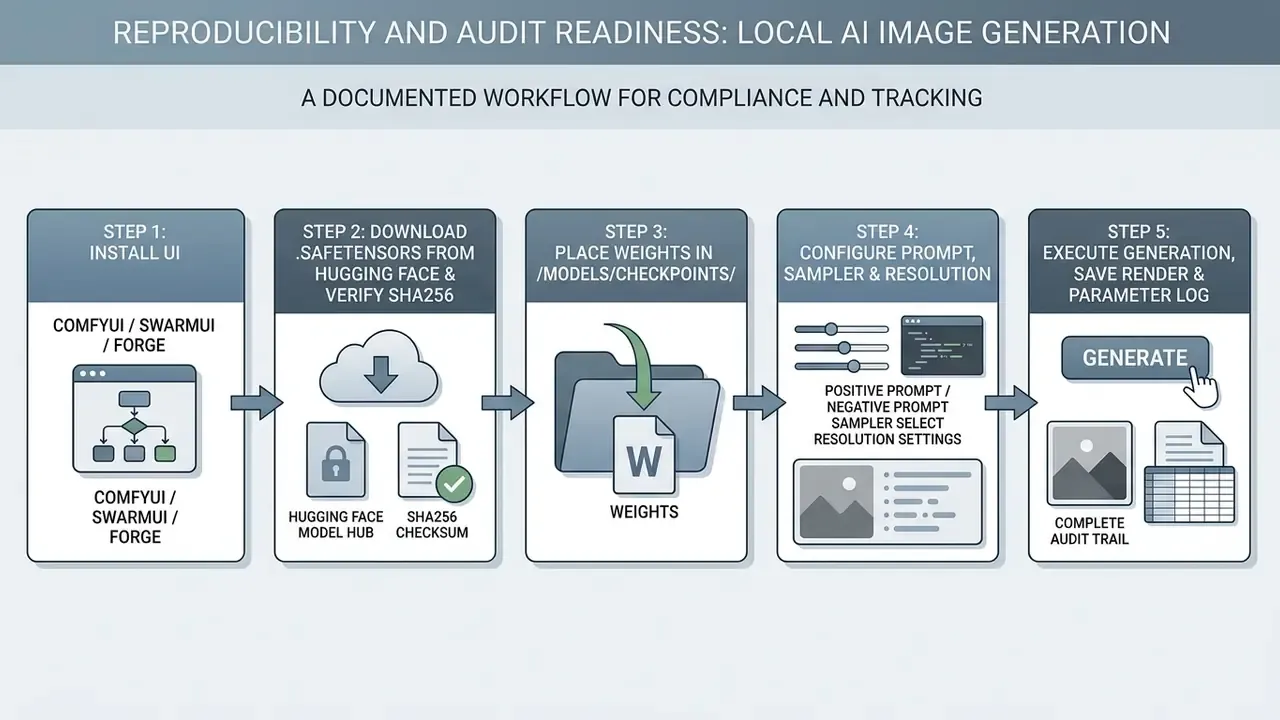
Process summary: select the interface, securely acquire and checksum the .safetensors checkpoint, place it in the models directory, set generation parameters, render, then save the output and archive the parameter set.
Troubleshooting and Migrating Between Local Generators
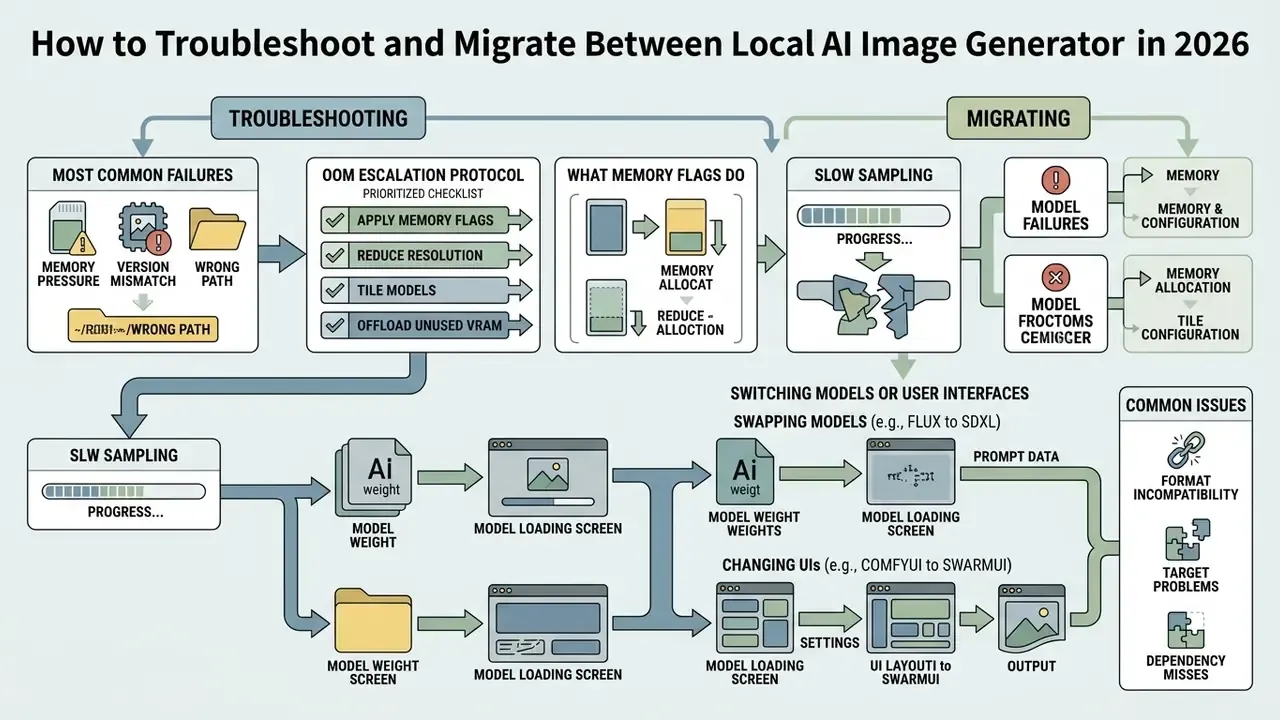
In two sentences: nearly every local failure traces back to memory pressure, a version mismatch or a wrong path. Standardized storage and a written escalation order handle the rest.
Operating a local ai art generator occasionally means resolving memory allocation issues or migrating workflows between interfaces. Neither is dramatic once you have a runbook.
Standardized storage structures simplify model management and troubleshooting across every UI frontend you might add later.
Memory Errors, Slow Sampling and Model Failures
In two sentences: out-of-memory errors are a budgeting problem, not a hardware verdict. Flags, tiling and quantization reclaim several gigabytes before you consider a new GPU.
Out of Memory (OOM) errors occur when model allocations exceed physical VRAM. The first response is to append launch flags such as --lowvram or --medvram to your startup script.
What the memory flags actually do:
| Flag | Behaviour | When to use |
|---|---|---|
--lowvram | Loads UNet or transformer in parts and offloads aggressively to system RAM between stages | 4–6 GB cards, or large models on 8 GB |
--medvram | Keeps the active module on GPU, offloads the text encoder and VAE | 6–10 GB cards, balanced speed and memory |
--highvram | Keeps all components resident in VRAM for maximum throughput | 24 GB+ cards running batches |
--offload-to-cpu / enable_sequential_cpu_offload() | Moves pipeline components to CPU sequentially during inference | Last resort on 4 GB cards |
--max-vram <GiB> | Caps the VRAM budget explicitly; -1 uses most free VRAM, leaving about 1 GiB headroom | Shared workstations and multi-process hosts |
Reducing batch size, enabling VAE tiling or switching to quantized FP8/INT4 weights cuts the VRAM footprint substantially. Changing model class entirely is the other lever:
"NanoFLUX (2.4B parameters), distilled from the 17B FLUX.1-schnell, generates 512×512 images in roughly 2.5 seconds on mobile hardware."
OOM escalation protocol (run in order, stop when the render completes):
- Reduce batch size to 1 and return to the model's native resolution.
- Enable VAE tiling and attention slicing.
- Add
--medvram, then--lowvramif the failure persists. - Switch from FP16 to an FP8 or GGUF Q4 build of the same checkpoint.
- Cap the budget with
--max-vramif another process shares the GPU. - Confirm no CUDA-graph reservation is consuming 1–5 GB unnecessarily.
- If the failure remains, verify driver, PyTorch and CUDA compatibility against the official PyTorch install matrix. A version mismatch presents as a CUDA error, not as OOM, which is why step 7 comes late.
- Escalate with the full log, the flag set, the model hash and the exact resolution, so the platform team can reproduce it.
For slow sampling specifically, check three things: that steps match the model class (4–8 for distilled models), that the sampler is not an unnecessarily expensive ancestral variant, and that weights are not silently offloading to disk. When troubleshooting consumption in hybrid cloud platforms, review our guidance on developer economics and API cost for video and image generation alongside issues like credits disappeared and Failed Generation Charged Credits to see how metered cloud billing differs from unlimited local runs.
Switching Models or User Interfaces
In two sentences: never re-download multi-gigabyte checkpoints when changing front ends. One shared directory, referenced by every UI, kills duplication and simplifies backup.
Migrating between Fooocus, Forge, SwarmUI and ComfyUI does not require fetching those weights again. Configure shared model directories across all installed tools instead.
By editing the extra_model_paths.yaml configuration file in ComfyUI, you can point your node graph at an existing WebUI or Fooocus model folder. Copy extra_model_paths.yaml.example to extra_model_paths.yaml in the ComfyUI root and adapt it:
automatic1111:
    base_path: C:/webui/
    checkpoints: models/Stable-diffusion
    configs: models/Stable-diffusion
    vae: models/VAE
    loras: |
        models/Lora
        models/LyCORIS
    upscale_models: |
        models/ESRGAN
        models/RealESRGAN
    embeddings: embeddings
    controlnet: models/ControlNet
shared_nvme:
    base_path: D:/ai-models/
    checkpoints: checkpoints
    loras: loras
    vae: vae
    clip: clip
    unet: unet
    upscale_models: upscale
Restart ComfyUI after editing, because the paths are read at startup only. On the Fooocus side, edit config.txt and point path_checkpoints and path_loras at the same D:/ai-models/ tree. In ComfyUI's Shared Models settings, every listed directory is scanned by each instance, and the directory marked Primary becomes the default save location for newly downloaded models. In SwarmUI, set the model root to that same directory during first-run configuration. The result: one governed, backed-up, access-controlled model store instead of three divergent copies nobody owns.
Cost, Licensing and Commercial Use
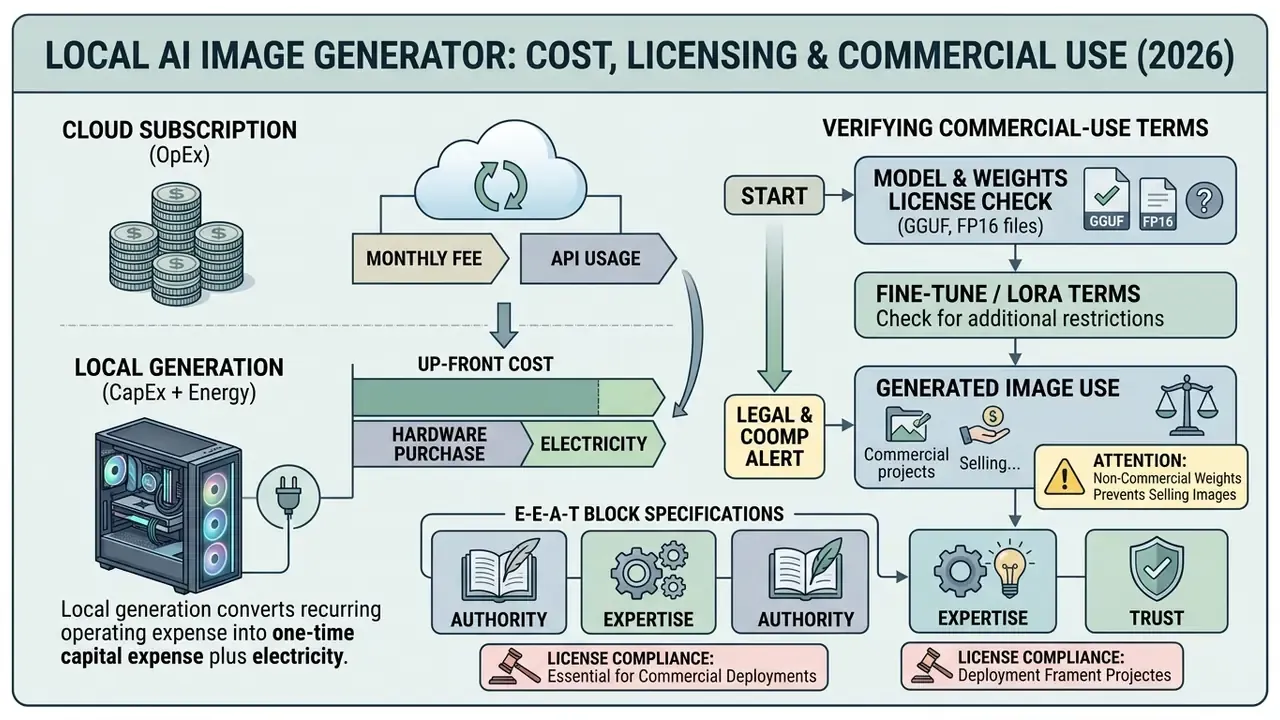
In two sentences: local generation converts a recurring operating expense into a one-time capital expense plus electricity. The licensing question is separate and stricter, because the weights you choose determine whether the output can be monetized at all.
Understanding the legal and financial sides of local generation is essential for commercial use. Local software avoids recurring cloud subscriptions, but hardware overhead belongs in total cost of ownership.
Model weight licenses also vary sharply on commercial exploitation rights, and the variance sits at the variant level.
Which Costs Replace the Cloud Subscription
In two sentences: the break-even point depends almost entirely on monthly volume. Below a few thousand images per month, hosted APIs usually win; above that, the GPU pays for itself inside a year.
Local generation trades recurring SaaS billing for upfront capital expenditure. Hardware costs cover workstation-grade GPUs, high-speed NVMe storage and electricity during heavy sampling workloads.
"FLUX.1.1-pro via the Puter.js API is priced at USD 0.04 per 1 MP image with generation time around 10 seconds."
Illustrative TCO model (single-workstation deployment, 36-month horizon):
| Cost line | Local deployment | Cloud API / SaaS |
|---|---|---|
| GPU (24 GB class, e.g. RTX 4090) | ~$2,000 one-time | $0 |
| Workstation, 64 GB RAM, 2 TB NVMe | ~$1,500 one-time | $0 |
| Electricity (450 W under load, 4 h/day, $0.15/kWh) | ~$8–10 per month | $0 |
| Per-image generation fee | $0 | ~$0.04 per 1 MP image |
| 5,000 images per month | ~$10 per month | ~$200 per month |
| 20,000 images per month | ~$10 per month | ~$800 per month |
| Break-even vs cloud at 5,000 img/month | ~18 months | n/a |
| Break-even vs cloud at 20,000 img/month | ~4–5 months | n/a |
How to read this: cloud GPU rental is billed per GPU-hour (commonly $0.88–$2.50 depending on provider and commitment), with block and object storage charged separately per GB regardless of instance state. That is why high-utilization teams reach break-even faster than the raw hardware price suggests. Substitute your own energy tariff, depreciation schedule and volume before taking the number to finance. The table is a model, not a quote.
To weigh hardware depreciation against recurring SaaS fees, teams can use specialized financial calculators to fix an accurate break-even point. Anyone still evaluating zero-cost options should also review the best free AI image generators and the free AI video generator comparison before committing capital. For teams restructuring existing vendor commitments, our guidance on cancel downgrade switch decisions helps reallocate cloud budget toward local GPU infrastructure without stranding a contract.
How to Verify Commercial-Use Terms for Models and Images
"The Apache 2.0 license grants a perpetual, worldwide, non-exclusive, no-charge, royalty-free right to use, modify and distribute, including commercially."
Then there is the output-side question, which trips up more teams than the weights do. In the EU, purely AI-generated images with no substantial human input are generally not eligible for copyright protection, and the EU AI Act imposes transparency and labelling duties on certain generated content. In the United States, registration still requires human authorship. Commercial use and copyright ownership are therefore two different questions, and a permissive model licence answers only the first.
Always inspect the model card and licence text on Hugging Face before deploying generated assets in commercial products. Teams formalizing this step can cross-check our guidance on AI image generators for commercial use and platform-specific terms such as Canva AI Generator licensing, Microsoft AI Image Generator terms and Google AI Image Generator usage rights. Where brand and logo assets are in scope, review the compliance guidance on ai logo generator free without watermark before publication.
Disclaimer: this information is general in nature and does not replace consultation with qualified legal counsel on software licensing, intellectual property and copyright matters. Model licences change between versions; verify current terms at the time of deployment.
Option 1
Identify the exact model, variant and revision hash actually loaded in production.Option 2
Archive the licence file and any separate usage policy as of the download date.Option 3
Confirm whether the licence restricts redistribution of weights, derivatives or outputs.Option 4
Confirm whether use-based restrictions (OpenRAIL-style) apply to your sector or application.Option 5
Check dataset provenance statements where available, and record known gaps as residual risk.Option 6
Log the approval decision, the approver and the date in the AI model inventory.Limitations and Open Questions
A candid section, because the evidence here is uneven.
Published inference timings come from vendor blogs and community benchmarks, not from a standardized suite. Driver versions, attention implementations and quantization method all move the numbers, sometimes by 30% or more on identical hardware. Treat every figure in this article as directional.
Licence interpretation is unsettled too. Non-commercial clauses in model licences have not been extensively litigated, and the boundary between "internal experimentation" and "commercial benefit" is not defined with the precision a compliance officer would like. Conservative reading is the cheaper mistake.
Finally, local does not resolve provenance of training data. If your institution needs assurance about the datasets behind a checkpoint, open weights help you inspect behaviour but rarely disclose the corpus. Record that as residual risk rather than assuming it away, and revisit the entry when the vendor publishes a data statement.
FAQ: Local AI Image Generation
What is the minimum GPU for a local AI image generator?
A 4 GB card runs SD 1.5 at 512×512 with low-memory flags. Realistically, 8 GB unlocks SDXL, and 12–16 GB covers quantized FLUX.1, Qwen-Image and Z-Image Turbo. Full-precision FLUX.2 [dev] needs 24 GB.
Which local model is fastest?
Z-Image Turbo (8 steps, roughly 2.3 s at 1024×1024 on an RTX 4090) and FLUX.2 [klein] 4B (4 steps, sub-second in optimized deployments). Both are Apache 2.0, so speed does not cost you commercial rights.
Can I sell images generated locally?
It depends on the model licence, not on where the model ran. FLUX.1 [schnell], FLUX.2 [klein], SDXL, SD 3.5 and Qwen-Image permit commercial use. FLUX.1 [dev] and FLUX.2 [dev] do not, absent a separate agreement. Copyright protection of the output is a separate jurisdictional question.
Is .ckpt really unsafe?
.ckpt really unsafe?.ckpt uses Python pickle serialization, which can execute arbitrary code at load time. Prefer .safetensors, which stores only tensors behind a JSON header, and scan the file anyway.
Do I need ComfyUI, or is SwarmUI enough?
SwarmUI runs on a ComfyUI backend, so you get ComfyUI's optimizations behind a panel interface. Use SwarmUI for production presets, and ComfyUI directly when you need custom graph logic or exportable workflow JSON for audit.
How do I avoid duplicating model files across interfaces?
Point every UI at one shared directory: extra_model_paths.yaml for ComfyUI, config.txt for Fooocus, and the model root setting in SwarmUI. Mark one directory as Primary so new downloads land in a single governed location.
Can a local generator satisfy a model-risk review on its own?
No. Local hosting removes data transfer risk, but reviewers will still ask for inventory registration, licence evidence, reproducible parameters and a named owner. The generator is the easy part; the evidence trail is the deliverable.
A Safe Next Step
Start small and reversible. Stand up one workstation, one Apache 2.0 checkpoint, one fixed-seed reference prompt, and one render log with the nine fields listed above. Run it for two weeks against a real internal use case, then review the log with model risk before anyone talks about scaling.
For installation frameworks, hardware benchmarks and enterprise risk controls, visit our primary support portal.
Appendix A: Revision Notes (superseded wording retained for transparency)
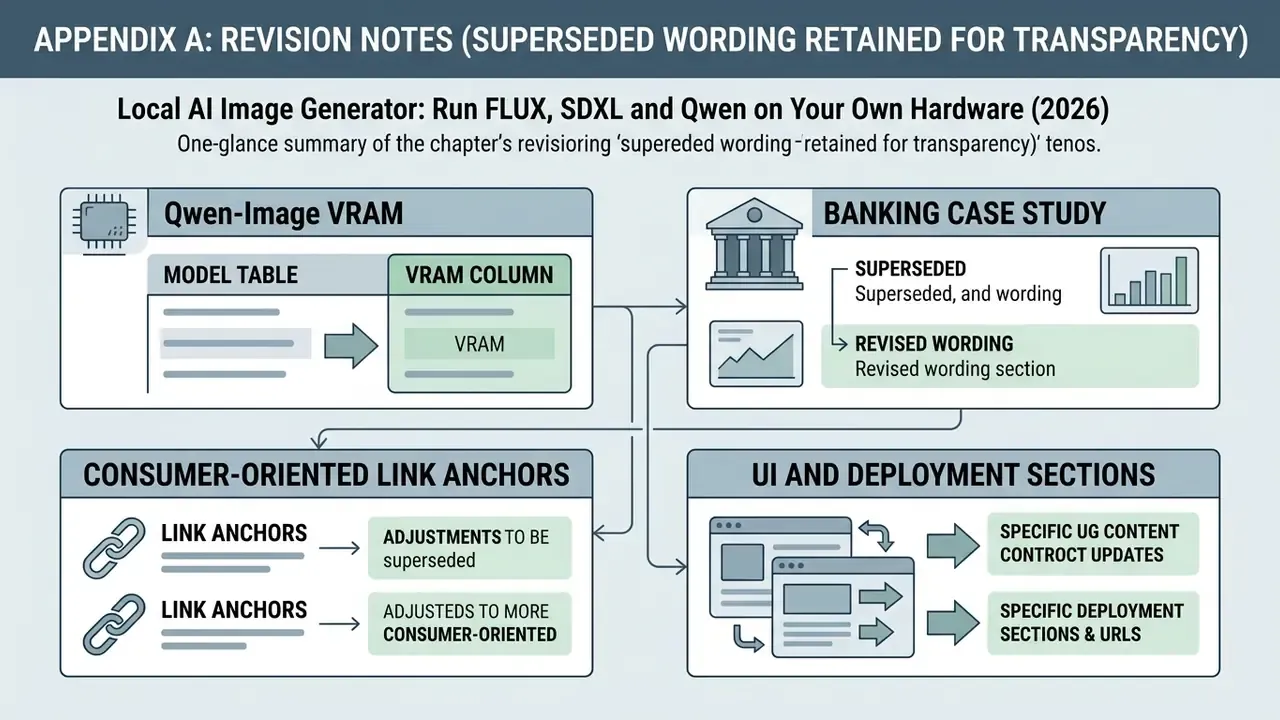
- Qwen-Image VRAM. Previous wording: "16 GB (Quantized) / 40 GB+". Superseded because 40 GB+ describes uncompressed FP16 inference only; community GGUF Q4 builds run in roughly 12–13 GB, and the earlier figure discouraged readers whose hardware was in fact sufficient. Current guidance: about 12–13 GB (GGUF Q4) or about 24 GB (FP8).
- Model table VRAM column. Previous wording listed a single "Minimum VRAM" value per family. Superseded by a per-variant table with explicit quantization format and licence class, because FLUX.1 and FLUX.2 variants differ in both memory footprint and commercial-use rights.
- Banking case study. Previous wording: "a regional banking client established a local ComfyUI pipeline with quantized FLUX weights. They integrated a custom brand LoRA, reducing asset production cycles from 3 days to 4 minutes." Retained here because the figures were internal and unaudited; the main text now presents the same deployment as an illustrative reference architecture with explicit controls and a measurement caveat.
- Consumer-oriented link anchors. Earlier drafts used anchors aimed at individual creators. These have been supplemented with commercial-use, comparison and API-economics resources appropriate to enterprise readers; the original support references remain in place for continuity.
- UI and deployment sections. Previously separated by an unrelated transition, now presented as one continuous "UI Selection and Deployment Workflow" chain, so the reader moves from interface choice straight into installation.