That convenience is exactly why it lands on a risk committee agenda. When a free generator sits one tap away inside WhatsApp, adoption happens before procurement hears about it. So the practical question for a bank or a mature fintech is not «can it draw?» but «what enters the prompt box, what leaves it, and who owns the record?»
This guide covers both halves: the hands-on mechanics of image generation, and the control layer a regulated organization needs around it.
Last functional verification of interfaces, commands, and output limits: April 2026. Meta ships silent backend upgrades, so re-verify feature availability before publishing internal guidance.
Executive Summary: The 30-Second Read
| Decision Question | Verified Answer (April 2026) |
|---|---|
| What runs the generator? | Meta's proprietary Emu (Expressive Media Universe) diffusion family, extended by the 2026 Muse Image generation for multi-reference blending and precision edits. |
| What does it cost? | Free for standard consumer use. No per-image fees, no mandatory subscription. Compute-intensive features sit behind tested daily and monthly usage limits that reset. |
| What is the maximum output? | Hard-capped at 1280x1280 pixels native resolution, which sits below print-ready and 4K thresholds. |
| Is output marked? | Yes, in two layers: a visible "Imagined with AI" badge on web surfaces plus an invisible C2PA-compliant Content Seal in metadata and output signal. |
| Where does it work? | meta.ai web, Meta AI app, WhatsApp, Instagram, Messenger, Facebook. Availability varies by region and language. |
| Can I use output commercially? | Ambiguous. Meta's Terms grant broad personal-use rights; commercial licensing lacks explicit IP indemnification. Treat paid-media use as legal risk. |
| Why is it missing in parts of the EU? | Staged rollout gated by GDPR data-processing reviews and EU AI Act compliance assessments. |
| Enterprise verdict | Usable for ideation and internal moodboarding under documented guardrails. Not SOC 2, GLBA, or HIPAA compliant out of the box. Never submit PII, MNPI, or confidential briefs. |
A quick note on how to read what follows. The early sections answer the practical «how do I make a picture» question, because that is what employees are already doing. The governance section right after it answers the question a CRO or Head of Model Risk actually asked. The middle sections cover commands, features, and prompt craft. The last three deal with cost, limits, licensing, and privacy, which is where most internal policy disputes end up.
If you only read two blocks, read the guardrail table and the commercial-rights subsection. Those carry the decisions. Everything else is craft.
What Is Meta AI Image Generator and What Can It Create?
Meta AI Image Generator is a free conversational text-to-image feature built into Meta AI that converts natural-language prompts into synthetic visual media. It works in web browsers, in the Meta AI mobile app, and inside WhatsApp, Instagram, and Messenger, with native image generation and no paid API subscription. If you are shortlisting tools before committing a workflow, compare it against the field of best AI image generators and the wider set of best AI art generators.
Model architecture and output specifications. Meta AI Image Generator does not run on a single consumer-branded "Muse Image" engine alone. Generation is served by Meta's proprietary Emu (Expressive Media Universe) diffusion architecture, developed by Meta's GenAI research group and optimized for ultra-fast multi-step inference. The 2026 Muse Image generation extends that lineage with stronger prompt reasoning, multi-photo blending, and precision region editing. Emu was published in September 2023 as an image-generation model trained on roughly 1.1 billion image-text pairs, then quality-tuned on a small, aesthetically ranked subset. That tuning step is why free-tier portraits look better than the parameter count suggests. Distilled Emu variants return images in roughly one second each, which produces the near-instant four-image grid.
Outputs are hard-capped at a maximum native resolution of 1280x1280 pixels. Every export carries a dual-layer provenance footprint: a visible "Imagined with AI" corner badge on web surfaces and an invisible C2PA-compliant metadata watermark. Under C2PA guidance, invisible watermarking is a supported soft-binding method that must be declared in the manifest through a c2pa.watermarked.bound action.
Critically, you do not choose a model version. Meta upgrades the backend quietly, so an asset generated in January and one generated in April may come from different Emu or Muse variants with different characteristics. For any brand-consistency program, that is model drift by another name.
The tool provides an integrated mechanism for ai image generation, returning four candidate visual outputs per request. Users can perform direct creation (create images and create ai images), image restyling, background modification, text rendering inside images, uploaded-image analysis, and short animation generation. Each new AI feature arrives through the same chat surface rather than a separate product, which is convenient and, from a control standpoint, slightly unnerving.
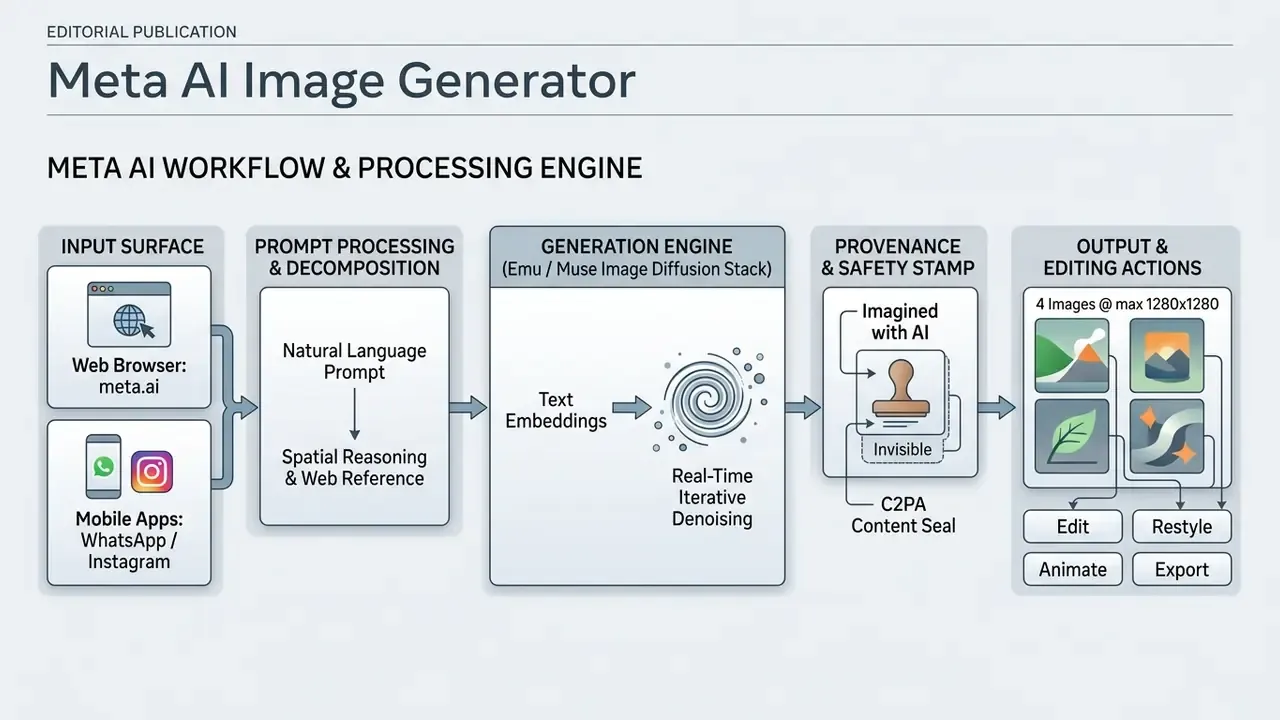
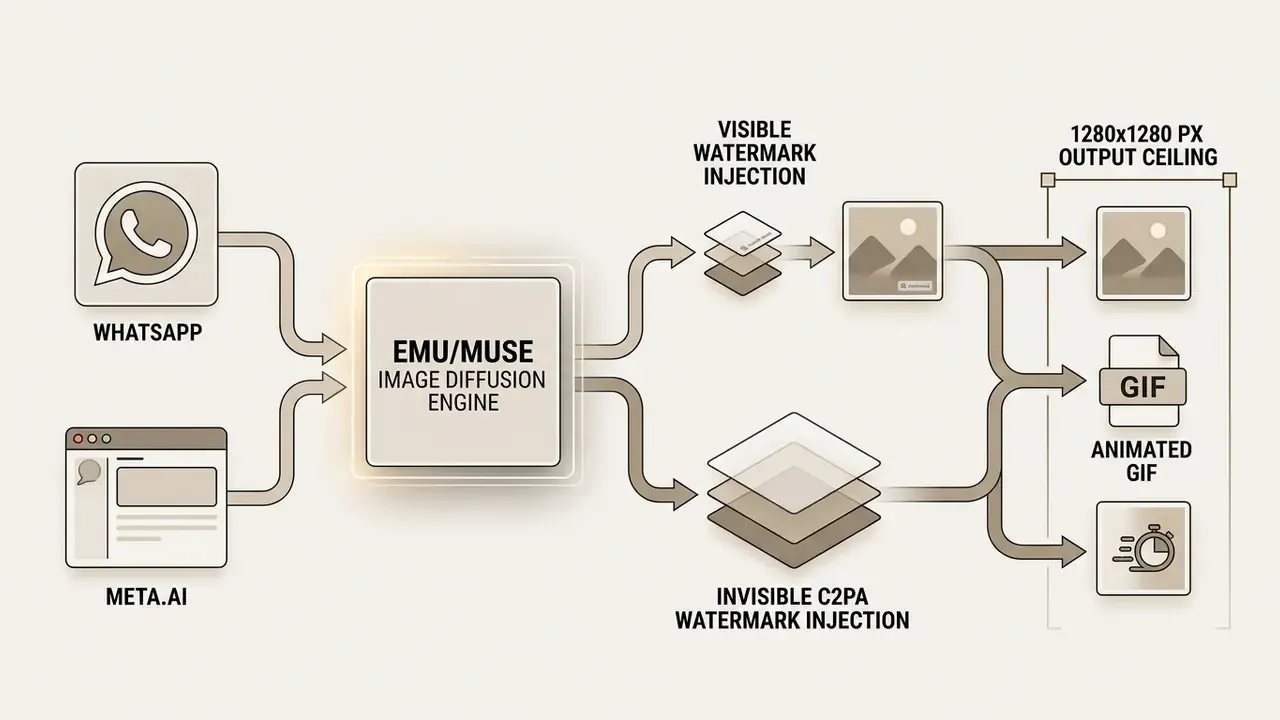
According to Meta's technical documentation, the system uses multi-step reasoning to interpret complex compositions and to keep subject consistency across conversational turns. Every set of generated images carries the persistent Content Seal invisible watermark for C2PA provenance, and web-surface exports additionally display the visible AI label.
Meta AI vs Dedicated Generators: Feature-by-Feature Benchmark
| Feature / Benchmark | Meta AI (Imagine) | Midjourney v7 | ChatGPT (GPT Image 1.5) |
|---|---|---|---|
| Cost and license | Free (personal use; commercial terms ambiguous) | $10 to $120/mo (commercial rights on paid plans) | $20/mo (commercial rights) |
| Max native resolution | 1280x1280 px | Up to 4K+ | 1792x1024 / 1024x1024 px |
| Underlying architecture | Emu / Muse Image / MovieGen | Proprietary v7 | DALL·E 3 / GPT-Image |
| Models selectable by user | None (silent backend upgrades) | Single proprietary line, version-pinnable | Single model |
| Seed and parameter control | None exposed | Full parameter access | Not exposed |
| Inpainting / region edit | Basic conversational edits | Yes | Yes |
| Watermarking | Visible badge plus invisible C2PA | None on paid plans | Invisible metadata only |
| In-chat native access | WhatsApp, Instagram, Messenger, Facebook | Discord plus web app | Web / native app |
| Video generation | Limited (MovieGen-powered animation previews) | Multiple video models | Separate (Sora) |
| Regional availability | Uneven; parts of the EU still gated | Global | Global |
The honest read: Meta AI wins decisively on distribution, latency, and price. Dedicated platforms win on resolution ceiling, reproducibility, licensing clarity, and audit control. For a like-for-like look at how reproducibility differs in a chat-native competitor, see our ChatGPT picture generator evaluation and our Midjourney image generation assessment.
Enterprise pilot framing. One enterprise technology team documented a controlled internal trial of messaging AI. They published structured prompt guidelines, restricted submissions to non-confidential creative categories, and logged every request in a shared channel. The goal was narrow: test whether messaging-based generation could hold brand consistency while staying inside approved data boundaries. The reported outcome, a roughly 40% reduction in asset request turnaround time alongside a documented audit trail for synthetic media, reflects a single internal pilot rather than a peer-reviewed benchmark. Methodology, sample size, and baseline were all defined internally and cannot be verified externally. Read the figure as directional evidence of workflow compression, not a generalizable performance claim. Teams deciding whether outputs can ship externally should first review the rules of commercial use of AI image generators.
Enterprise Data Lineage, Shadow AI, and Model Risk Guardrails
Because Meta AI lives inside the messaging apps employees already use, adoption happens without procurement, architecture review, or a model inventory entry. That is the working definition of Shadow AI. A creative convenience quietly becomes an unlogged processing surface.
| Risk Vector | What Actually Happens | Practical Guardrail |
|---|---|---|
| Data leakage | Prompts and uploads are processed by Meta and may be used to evaluate model safety and performance. Opt-out paths are uneven by region. | Written policy: no PII, MNPI, client names, unreleased product data, or confidential briefs in prompts. |
| No audit log | Chat threads are not an auditable model-risk record. There is no request ID, model version, or retention receipt. | Mirror approved prompts and outputs into a governed asset repository at generation time. |
| Model drift | Backend Emu and Muse variants change silently, so identical prompts drift across a campaign. | Re-baseline brand prompts monthly. Pin production renders to a version-controlled platform. |
| Provenance obligations | Outputs carry visible and invisible AI marks that survive sharing. | Verify marks before external use with dedicated AI image detectors. |
| Licensing exposure | Commercial-use language is ambiguous and there is no IP indemnification. | Restrict to internal ideation. Route shipped creative to licensed tooling. |
| No SLA | Free consumer tiers publish no uptime guarantee and no support ticket path. | Never place Meta AI on a critical content release path. |
Ownership matters more than tooling here. A digital assistant used by fifty employees needs a named owner, an approved use-case list, an escalation path, and a documented retention position. No evidence, no autonomy.
This is also where prompt research stops being a creative nicety and becomes a governance instrument. More predictable prompt structures reduce output variance, cut rejected generations, and shrink the volume of unreviewed synthetic assets floating around in chat threads.
Text Prompts and AI-Generated Images
Text prompts are the primary instructional interface, mapping human ideas into the visual latent spaces of Meta's diffusion models. When a user submits a description, the underlying natural-language processing layer converts text tokens into spatial layout conditions and attribute bounds. Meta's own Emu research describes training on web-scale image-text pairs so the model maps language directly onto visual concepts. Related Meta work on spatial layout conditioning shows text can be bound to specific image regions, effectively a natural-language layout interface.
Research on human-AI interaction by Mahdavi Goloujeh et al. (CHI 2024) sorts user prompts into five structural archetypes: descriptive sentences, templates, overview-plus-detail, chunks, and word sequences. Structured overview-plus-detail prompts produced higher semantic accuracy than unstructured conversational input.
Quantified effect of prompt granularity. Empirical work on automatic prompt enrichment shows that refining coarse inputs into fine-grained descriptions measurably improves output quality, rather than merely lengthening the text.
The governance read-through is simple. A 5% alignment gain compounds across hundreds of generations into fewer discarded drafts, fewer off-brand assets, and less unreviewed synthetic media in circulation. Real-time typing interfaces also update draft images as tokens are added, giving immediate visual feedback while you write.
Where You Can Use Meta AI for Image Generation
Meta AI offers image creation in both browser-based environments and integrated messaging surfaces. You can run standalone creation workflows via meta.ai, or trigger in-context generation inside group and individual chats.
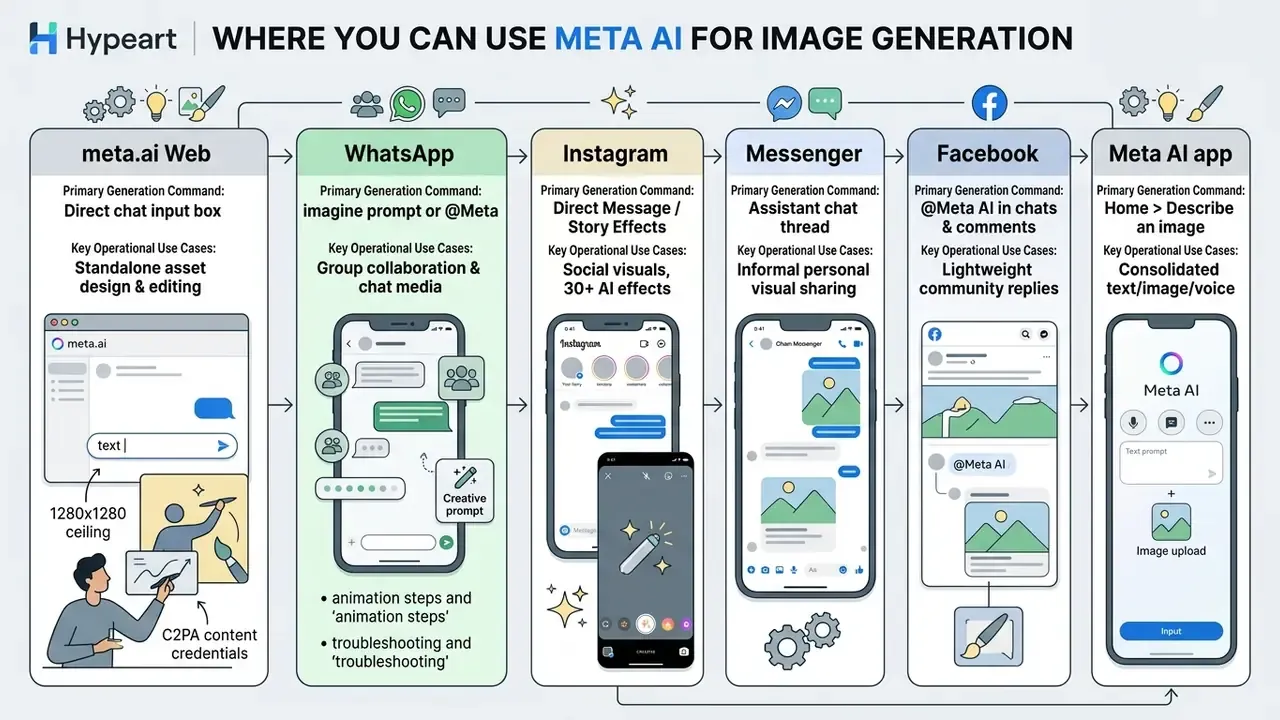
Both public routes, the deliberate web page in the imagine.meta.com style and in-chat invocation, hit the same backend. The difference is intent. Web sessions suit sequential prompt testing and downloads. In-chat generation suits impulse creation without leaving the conversation. That conversational placement is Meta's genuine moat, since no dedicated generator can replicate a messaging graph of roughly three billion users.
Cross-platform synchronization lets you test prompts on desktop before carrying the winning asset into messaging channels. Some features, likeness generation among them, need a one-time on-screen setup inside the Meta AI app before they work on the website. Worth knowing before you promise a colleague a portrait.
That finding is the right lens for platform choice. Meta AI's advantage is surface-level convenience, not universal superiority. For dedicated messaging workflows, our detailed guide on whatsapp ai image generation features covers team media sharing in more depth.
How to Use Meta AI Image Generator on the Web
Using Meta AI Image Generator on the web means opening meta.ai in a modern browser and signing in with a supported Meta account, either Facebook or Instagram. The browser version gives you a wider view for long prompts, easier management of visual variations, and a fair look at full-size outputs. Logged-in status is mandatory for image editing on the web surface.
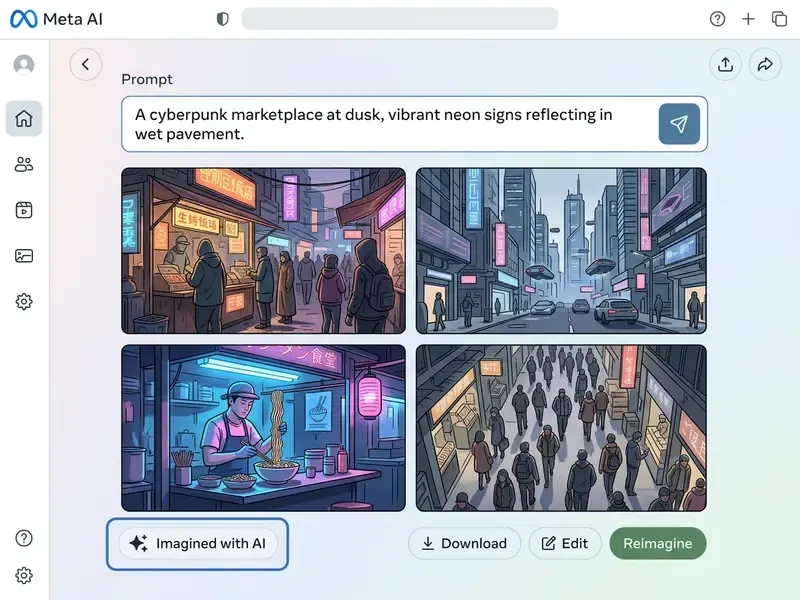
To begin using how to use meta ai image generator workflows, open the web interface and find the central prompt box. Web users get full keyboard control and a larger display area, which makes it easier to judge subtle differences between ai generated images in the grid.
Start a New AI Image Request
A new visual generation request starts with framing your idea clearly in the main chat prompt line. State the central subject immediately, then add environmental parameters, lighting characteristics, and stylistic preferences. Meta's own prompt guidance recommends leading with an explicit instruction such as "Create an image of [subject]" and keeping each request focused on one core task.
To keep control over what the generator creates, drop conversational filler and unnecessary background context. Meta advises including only the details that matter and omitting the backstory. No fixed character limit is published, though overloaded prompts do degrade spatial attention allocation across scene elements. One primary visual task per input keeps the model's attention where you want it.
Review, Refine, and Generate New Variations
After processing a prompt, Meta AI displays a grid of four candidates. You can inspect each output, download the file, tap Regenerate for more options, or send a follow-up description to modify specific regions of an image.
In their steerability study on text-to-image systems, Vodrahalli and Zou (2024) found that iterative refinement depends on a continuous feedback loop between user intent and model response.
Practical implication. Their Markov chain analysis of real user sessions showed higher steerability for natural-world and architectural prompts than for abstract concepts. For Meta AI, that becomes a budgeting rule. Architectural, product, and landscape briefs usually converge within two or three refinement rounds. Abstract, surreal, or fantasy briefs can burn far more cycles, which makes them the worst possible category for rate-limited free-tier work or a deadline-bound deliverable.
When refining on meta.ai, adjust one prompt variable at a time instead of rewriting the whole thing. This preserves the elements you liked while correcting the attribute that failed. Readers comparing iteration behaviour across assistants can review how refinement works in ChatGPT image generation.
Meta AI Image Generation in WhatsApp: Step-by-Step Guide
Meta AI image generation inside WhatsApp brings automated image creation directly into private and group conversations. Teams and individual users can generate, edit, and forward synthetic images without leaving the messaging interface. WhatsApp documents image generation as available on web, iOS, and Android in supported regions.
Executing meta ai image generation whatsapp workflows relies on lightweight syntax triggers the built-in assistant recognizes. These turn an ordinary chat input line into an interactive asset creation canvas. The same mechanics power what people search for as a whatsapp ai photo generator, and the underlying meta ai whatsapp image generation stack is identical to the web one.
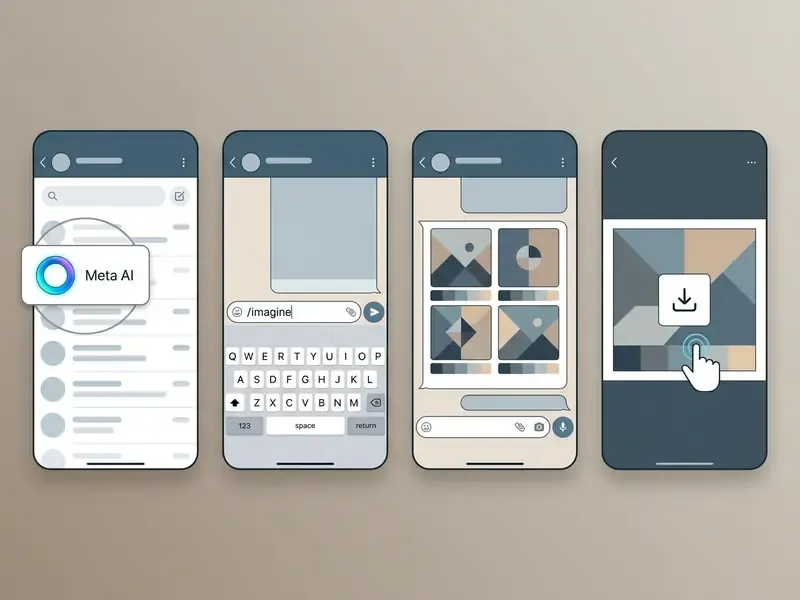
Collaboration pilot framing. During an internal evaluation of collaboration tooling, an asset management team folded WhatsApp AI generation into the earliest moodboarding stage. Using group mention triggers, creative directors and copywriters co-created visual concepts inside the thread, which shortened early approval loops and left a timestamped chat record of initial creative direction. The team published no measured baseline, iteration count, or approval-cycle metric, so read this as a qualitative workflow observation rather than a quantified result. Anyone replicating the pattern should pair it with the guardrail table above, because a chat thread is not an audit log. Not even a tidy one.
How to Access Meta AI in a WhatsApp Chat
To reach Meta AI in WhatsApp, open the app on an iOS or Android device running the latest release. In supported regions the Meta AI contact appears at the top of your chats list, plus a dedicated entry indicator in the main chat interface.
Exact UI markers by operating system:
In group conversations, access is triggered by typing @ and picking Meta AI from the pop-up list. Meta AI only reads messages where it is explicitly mentioned, plus direct prompts sent inside its own chat window. In some regions Meta is testing a variant flow where Meta AI joins as a group member rather than being mentioned, so a staged rollout may change what you see on any given week.
How to Access Meta AI in a WhatsApp Chat
iOS users: look for the circular multi-coloured gradient ring at the top of the chats screen, immediately before the blue "+" button.
Android users: the Meta AI ring floats directly above the green "+" action button in the bottom-right corner.
If the ring is not visible: fully close WhatsApp, open the Apple App Store or Google Play Store, search "WhatsApp", tap Update if offered, then reopen the app. The Meta AI entry point should now appear.
If it still does not appear: the cause is almost always regional or language rollout status rather than a device fault. See the availability section below.
WhatsApp Meta AI Image Generation Commands
Generating visual media in WhatsApp follows specific syntax rules. In a one-to-one thread with the assistant, start your message with the word imagine, then your visual description.
Syntax 1 (Direct Chat):   imagine [subject] [environment] [style]
Syntax 2 (Group Mention): @Meta AI imagine [subject] [environment] [style]
Syntax 3 (Personal AI):   imagine me [action/setting description]
Syntax 4 (Web/Chat Web):  /imagine [prompt]   <-- bot-style variant, not official WhatsApp syntax
Worked examples:
imagine a golden retriever in a sunlit glass office, 85mm portrait lens, soft shadows, photorealistic@Meta AI imagine a minimal flat-design poster of a coffee cup in morning light, muted paletteimagine me as a 1970s film-noir detective in a rain-soaked street, cinematic lighting
Using the correct whatsapp meta ai image generation commands makes the assistant read your input as an image creation request rather than a text question. WhatsApp's official help documents imagine and @ plus imagine. The /imagine slash form shows up mainly in third-party bot guides and older coverage, so treat it as folklore rather than documentation. The imagine me feature needs a one-time setup with reference selfies and is currently English-only with limited country availability. One more limitation that trips people up: voice chats cannot generate images. Image requests must be typed.
Meta AI Image Generation Features: Photos, Cartoons, Text, Vision, and Editing
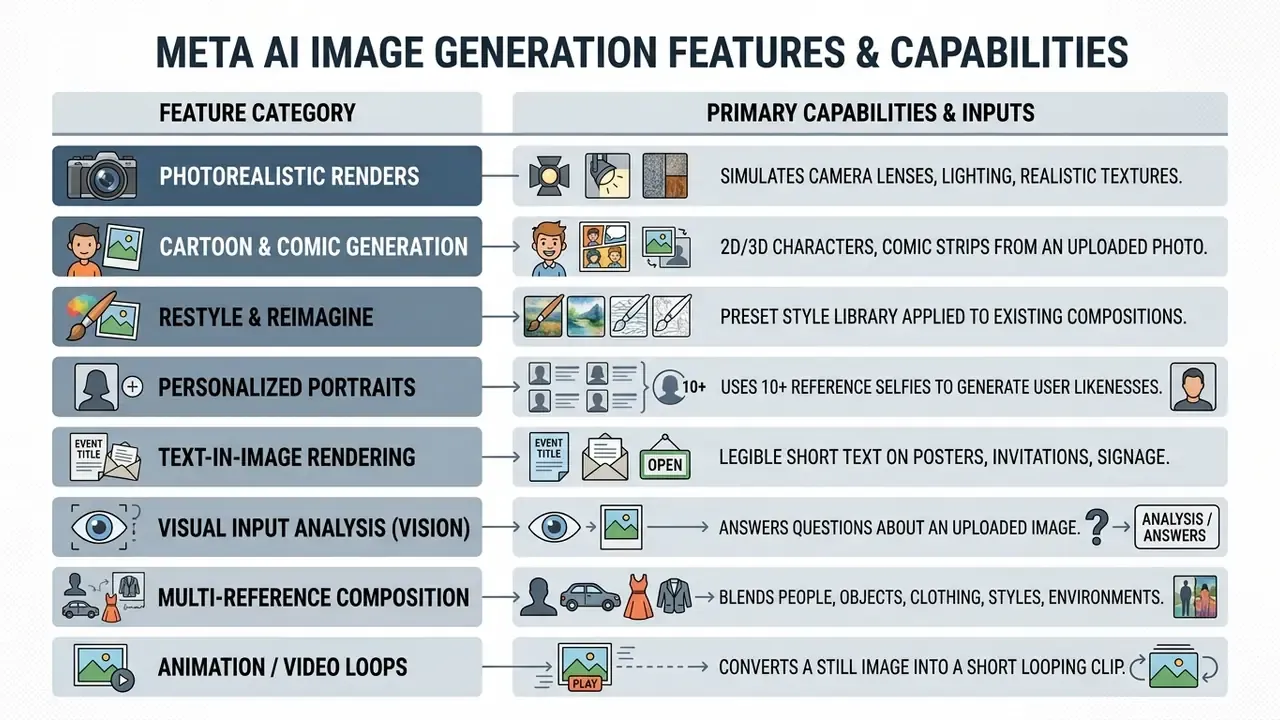
Meta AI supports a broad taxonomy of visual styles, from photorealistic camera simulations to stylized illustrations and vector art. Knowing these internal capabilities lets you target the right visual output the first time, across marketing, personal, and operational workflows.
The system includes specialized sub-generators: a meta ai photo generator engine for hyper-realistic renders and a meta ai cartoon generator for animated assets. Whether you call the result a meta ai pic, a meta ai picture, or output from a meta ai picture generator, it comes from the same diffusion stack. You can also upload existing images to run localized region edits and style transfers, which is the same conceptual toolkit covered in our overview of AI photo editors and general online photo editors.
Text In-Image Rendering
Unlike early diffusion models, Meta AI can render short legible phrases onto surfaces such as posters, storefront signage, greeting cards, and invitations. Wrap the required copy in double quotation marks inside the prompt:
imagine a neon storefront sign reading "Open 24/7" in cyberpunk style, wet asphalt reflections
Keep in-image copy short. Long strings degrade into glyph soup, and platform guidance for comparable systems suggests staying at roughly 25 characters or fewer for reliable results. Specify the text in the original prompt rather than trying to add it in a later edit round.
Visual Input Analysis (Vision)
You can upload an external image and question the assistant about it: identify objects, describe visual elements, read signage, summarize a scene, or ask for complementary graphic assets built from the uploaded sample. That turns the assistant into a lightweight visual QA layer, handy for checking whether an existing brand asset already contains the elements a brief requires before you generate derivatives. Because uploads leave your device, the confidentiality rules in the governance section apply in full. No exceptions for "just a quick check".
How to Animate Still Images into Video Loops
Meta AI converts static synthetic visuals into short animated loops directly inside Instagram, WhatsApp, and the Meta AI app, powered by previews of Meta's MovieGen stack:
- Generate or upload an image.Produce a visual baseline with the
imagineprompt, or upload a still you already own. - Trigger the animate engine.Tap the generated image and select the Animate option where available.
- Apply motion parameters.Add directional motion instructions such as "add falling snow", "pan camera left", "gentle parallax drift", or "flicker the neon sign".
- Export and layer audio.Download the result as a short MP4 loop, or add ambient music and text overlays before publishing to Stories or Reels.
Loops typically run two to four seconds and inherit the same provenance marking as still exports. Instagram also exposes more than 30 AI-powered Story effects that call the same backend. For longer-form motion work that outgrows a chat-native loop, review our guides to animation makers and free AI video generators.
Create Photos, Illustrations, and Cartoon-Style Images
For realistic photographic renders, include technical camera descriptors in your prompt: "shot on 35mm lens", "natural morning sunlight", "shallow depth of field". These modifiers push the Emu and Muse Image diffusion stack toward photo-like noise distributions and lens-consistent depth cues.
For stylized assets, use explicit genre keywords such as "vector illustration", "cel-shaded animation", "watercolor", "digital art", or "3D claymation". The meta ai cartoon generator path reads these prompts and delivers clean lines, brighter palette shifts, and simplified geometry. Meta's media-generation documentation also supports sequential formats through requests like "create a comic strip from my photo". Headshot-style personal portraits follow the same descriptor logic covered in our guide to AI headshot generators.
Edit and Restyle Images with Meta AI
Meta AI supports conversational editing of both freshly generated visuals and uploaded personal photographs. Select an image in your chat interface or under Media, then Creations, tap Edit, and describe the change in plain language. Documented edit operations include removing objects, changing backgrounds, swapping styles, adding or replacing elements, and making precise changes to specific regions. If you need finer transformation control, compare dedicated image-to-image generators and AI outpainting tools for expanding images.
The Restyle feature applies preset visual filters such as watercolor, pop art, collage with torn edges, or vintage film to an existing composition. The spatial engine isolates foreground subjects while altering background patterns and colour balance. Meta's 2026 Muse Image materials extend this with multi-reference composition, letting the model draw a person from one image, clothing from another, and an environment from a third.
That mechanism sits behind the Good and Bad feedback buttons on generated images. Aggregated preference signals are a primary lever for tuning perceived quality, which also means output aesthetics shift over time independently of your prompt. Something to remember before you build a brand guideline on top of this month's look.
Create Images of Yourself and Use Reference Photos
The "Imagine Me" capability generates personal avatar portraits across varied hypothetical scenes. Setup requires uploading at least 10 reference selfies to build an internal facial embedding, and it must be configured once inside the Meta AI app before it works on the website.
What the policy actually states. Meta's AI image disclosure materials state that images supplied for likeness generation are transformed into an embedding, that these embeddings are deleted within seconds of processing, and that the embedding alone cannot identify the person. Meta explicitly characterizes this as not being facial recognition. Meta also states that it may use provided images and prompts to evaluate system performance and to meet compliance obligations, and that when a generated image is shared, the prompt may be shared alongside it. Users must represent that uploaded photos depict themselves and contain no other people. Safety controls automatically block attempts to generate unauthorized images of third-party individuals or public figures.
Vendor policy is one layer. Regulators are another. Australia's OAIC guidance states that the Privacy Act applies to the collection, use, and disclosure of personal information used for generative AI training, including image data, and that AI systems generating or inferring personal information constitute a collection of personal information subject to APP 3. Put plainly: assurances about deletion and non-identification do not remove your own compliance duty when employees upload identifiable faces from a corporate device.
How to Write Better Prompts for Meta AI Images
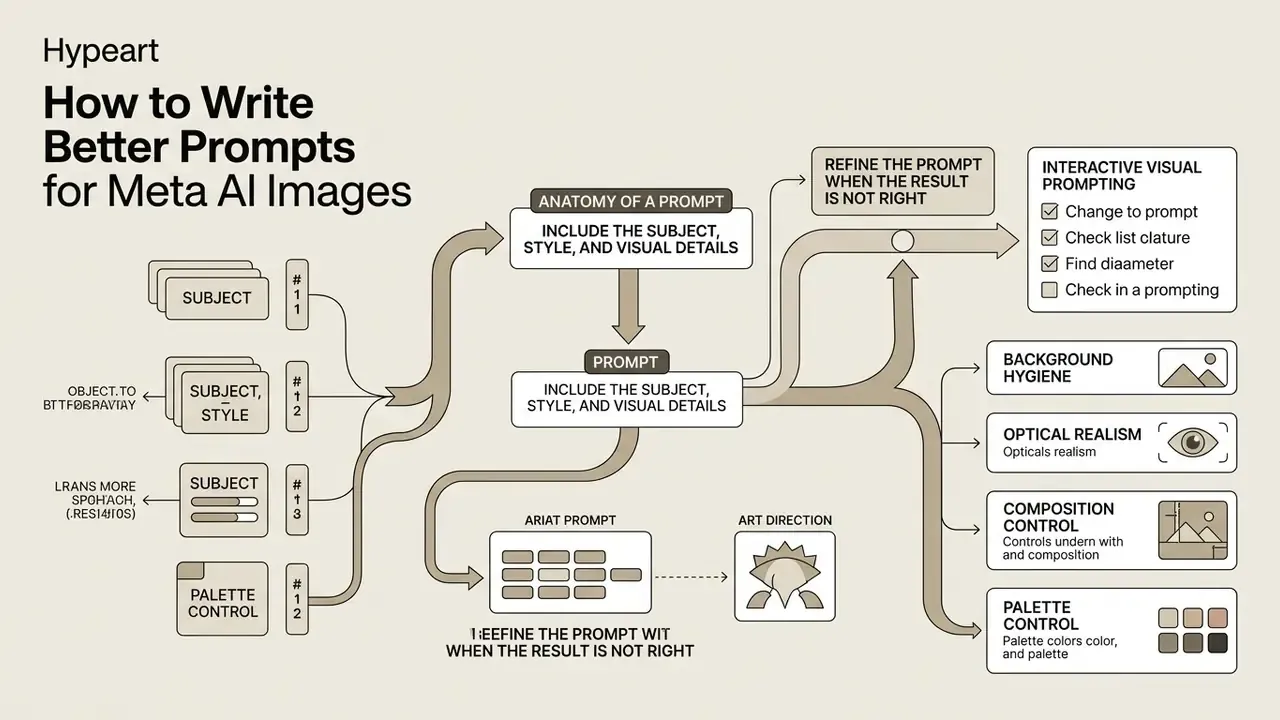
Writing better prompts for Meta AI means combining descriptive clarity with structural precision. Because diffusion models map text tokens directly to visual features, vague or contradictory descriptions tend to produce artifacts or wrong spatial layouts.
Mastering prompt construction makes ai image generation more predictable on both web and mobile. Structured prompting frameworks yield higher semantic accuracy and waste fewer generation cycles, which in a rate-limited free tier is the difference between finishing a moodboard and staring at a cooldown timer.
Include the Subject, Style, and Visual Details
Strong image prompts combine six structural elements: subject, action, environment, lighting, camera framing, and visual style. Structuring the request around these categories gives the model clear boundary conditions. Meta's own prompt guidance follows the same shape: set the scene, shape the style, then add key details such as lighting, mood, composition, and quality specifications.
| Prompt Level | Example Text Input | Expected Visual Output Quality |
|---|---|---|
| Weak (Unstructured) | "A dog in an office building" | Generic render, uncertain lighting, plain background. |
| Moderate (Basic Detail) | "A golden retriever sitting in a modern glass office at noon" | Clearer subject, defined lighting, modern environment. |
| Advanced (Structured) | "A golden retriever sitting by a sunlit window, modern office interior, 85mm portrait lens, soft shadows, photorealistic" | High detail, precise depth of field, balanced shadows and highlights. |
A practical composition order that maps to the table above: subject, then action or pose, then environment, then lighting, then camera and framing, then style or medium, then technical specs. Explicit descriptors help the model prioritize key features and keep unintended visual noise out of complex compositions.
Refine the Prompt When the Result Is Not Right
When an output shows distortions or a missing subject, resist the urge to throw the prompt away. Isolate the failing element and apply incremental text adjustments instead. Meta's guidance is blunt on this point: change only one thing per round.
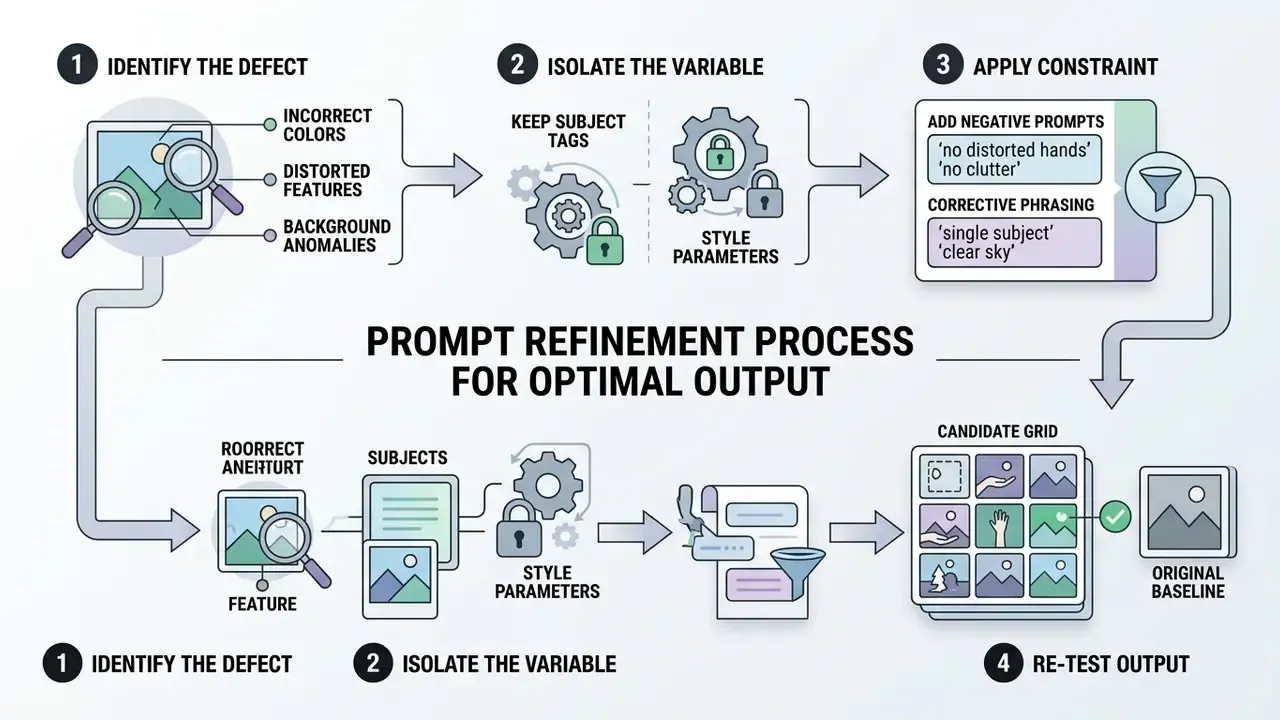
That result explains most "it ignored half my prompt" complaints. Alignment degrades as object count and attribute bindings rise, not as prompt length rises. Split multi-subject briefs into sequential single-subject generations, then composite.
Negative prompting templates. Meta AI exposes no dedicated negative-prompt field, so exclusions have to be written as corrective constraints inside the prompt itself:
If exports show persistent compression or quality artifacts, consult our operational analysis on watermark export limits and watermark generator tools to manage output standards, and review AI image enhancers for upscaling and artifact cleanup beyond the 1280x1280 ceiling.
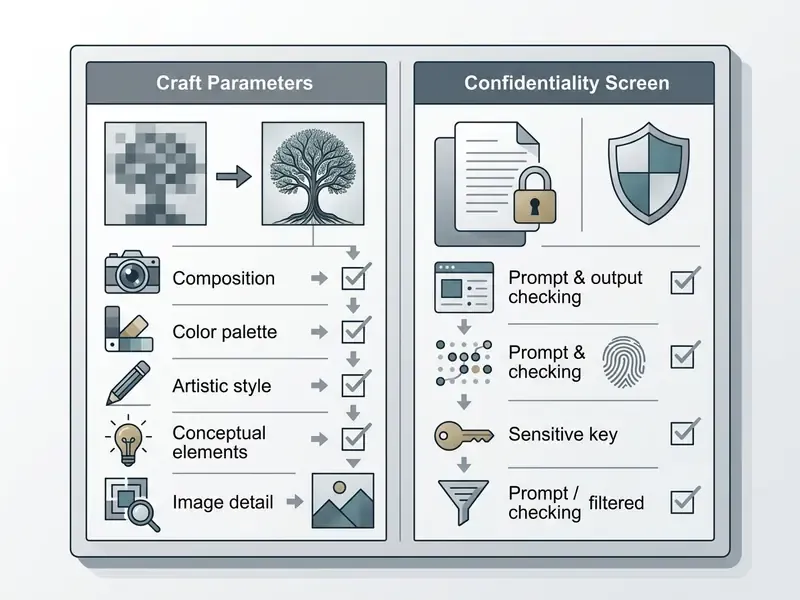
Interactive Visual Prompting Checklist
Verify every parameter below before you spend a generation cycle:
Checklist0 / 9
Meta AI Image Generator Troubleshooting: Common Problems and Fixes
Operational issues with Meta AI Image Generator fall into three buckets: regional service unavailability, slow prompt execution, and model output distortion. Identify the root cause and access usually comes back quickly.
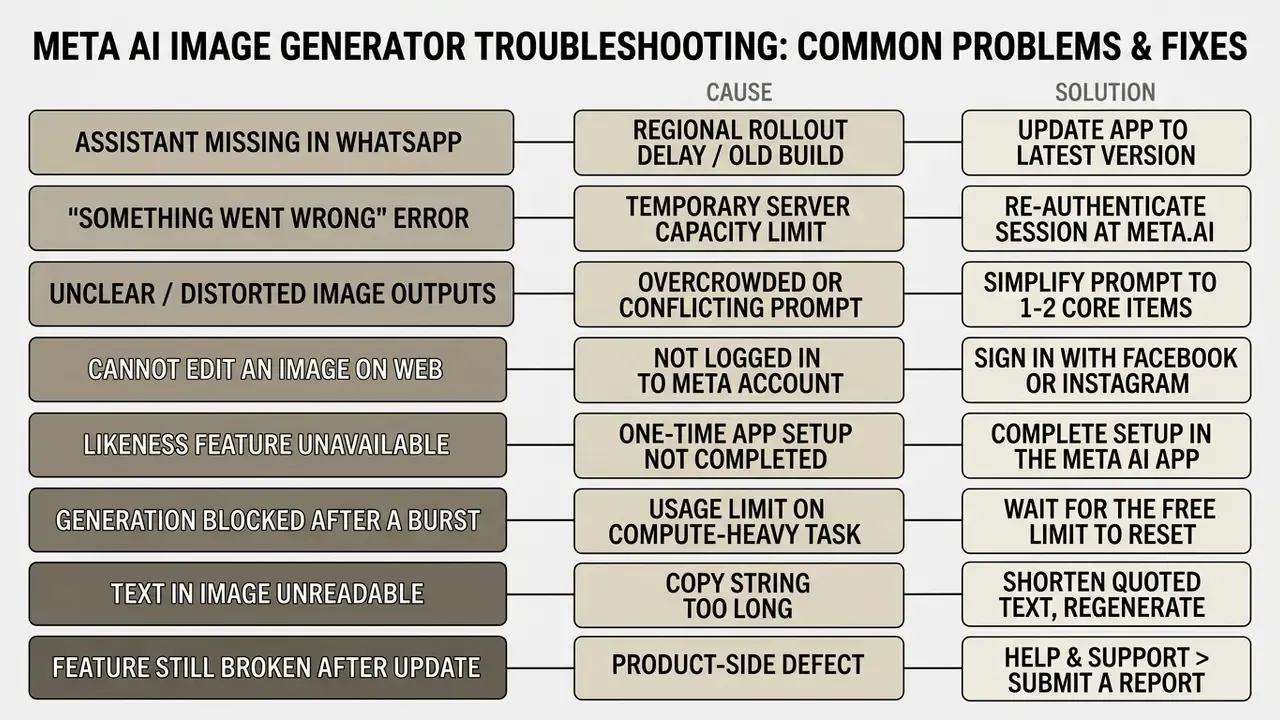
The takeaway for users: prompt-mismatch failures are often a scheduling artifact of how fast different image regions get denoised, not simply bad wording. Fewer competing regions in a prompt means fewer regions competing for denoising attention. Another argument for single-subject generations.
Meta's remediation path for genuinely broken features is documented. Update the app first, then use Help and support, then Submit a report, attach screenshots, and optionally share diagnostics. Meta publishes no public error-code list for image generation, so expect generic failure states rather than actionable codes. For a regulated environment, that absence matters: there is no vendor-side reference you can cite in an incident write-up.
Meta AI Image Generation Is Not Available in WhatsApp
If Meta AI features do not appear in your WhatsApp app, the usual cause is geographic availability or a pending app update. Meta deploys AI capabilities gradually across regions and language packs.
The specific reasons, region by region. WhatsApp's own FAQ states that Meta AI is available only in limited countries and languages, and that some users will not have access yet even when others in the same country already do. Access is a rollout state, not an app error. Supported languages currently include English, Arabic, French, German, Hindi, Indonesian, Italian, Portuguese, Spanish, Tagalog, Thai, and Vietnamese. Meta began rolling Meta AI across 41 European countries and 21 overseas territories from March 2025, yet several EU jurisdictions stayed gated longer than other markets specifically because of GDPR reviews of data processing and training practices and compliance assessments under the EU AI Act, not because of technical capacity. WhatsApp also serves some help pages with a "not yet available in your country" state, which is itself a confirmation of regional gating.
To resolve access issues, update WhatsApp through the official Apple App Store or Google Play Store, confirm your interface language is on the supported list, and re-check in a few days instead of reinstalling repeatedly. If access limits persist across other AI image platforms, review our technical breakdown of perplexity ai image limits and general perplexity ai image generation workflows for alternatives, or consider region-agnostic tools covered in our Microsoft AI image generator overview and Bing AI image guide.
The Generated Image Is Slow, Unclear, or Different From the Prompt
Slow processing and rendering errors cluster around periods of high server load or overly complex inputs. Prompts holding contradictory statements, "a sunny day at midnight" being the classic, confuse the model and produce layout artifacts.
To improve speed and clarity, shorten the prompt and cut redundant adjectives. Focus on a single primary subject per generation cycle for consistent performance. Three further tactics carry across image platforms. State changes and constraints separately, for example "change only the background, preserve the subject's pose and lighting". Keep any rendered text extremely short. And order descriptive elements consistently, subject then environment then pose then lighting then framing then style, so the parser resolves complex briefs the same way every time.
Official Service Verification Notice:
Is Meta AI Image Generator Free and What Should You Know Before Using It?
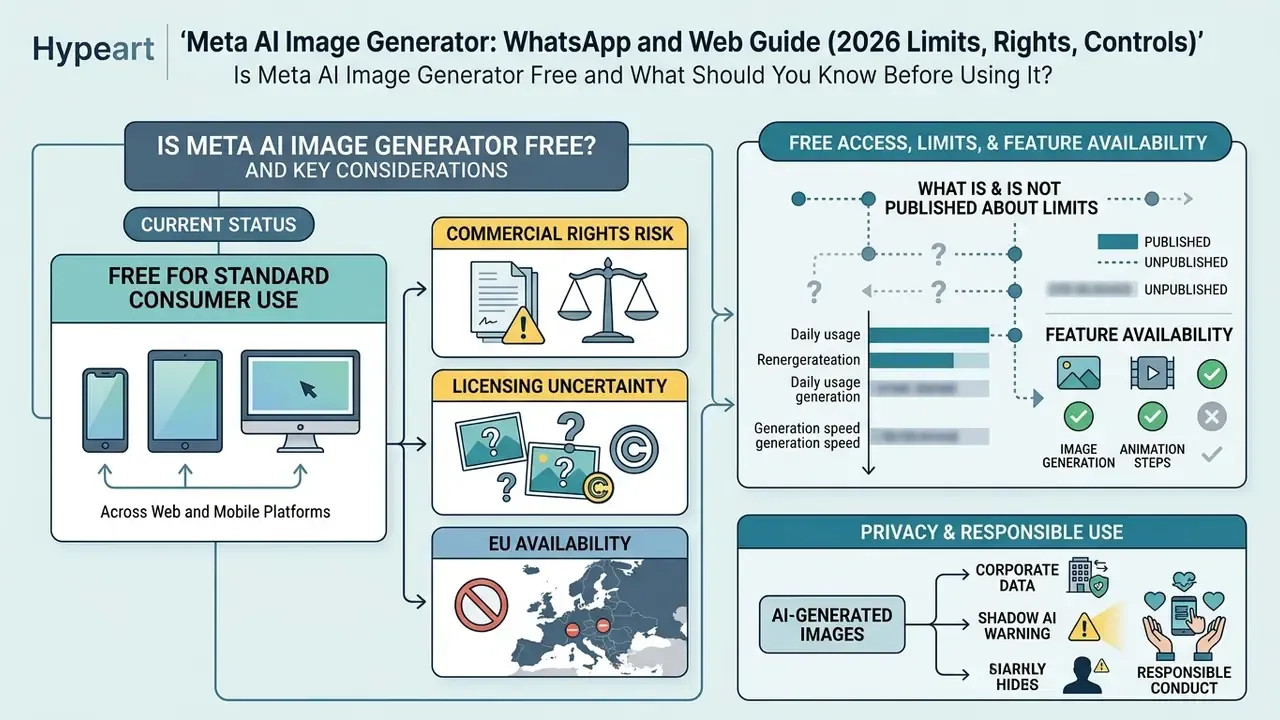
Meta AI Image Generator is currently free for standard consumer use across all supported web and mobile platforms. Meta charges no per-image fee and requires no monthly subscription for basic generation. Readers benchmarking no-cost options can compare our roundups of best free AI image generators and best free AI art generators.
High-volume workflows still meet server rate limits and compute availability constraints. Meta states that it tests usage limits on compute-intensive features, and that users who reach a daily or monthly limit can either wait for the free allowance to reset or purchase additional usage. Teams evaluating enterprise asset pipelines should review overall pricing options and use operational calculators to project resource requirements before committing a workflow.
Commercial Rights, Licensing Risk, and EU Availability
Commercial rights risk. Meta's Terms of Service grant broad personal display and sharing rights, but commercial licensing language remains ambiguous. Outputs are expressly prohibited for deceptive content, rights-infringing content, and restricted categories such as weapons, adult content, and political manipulation. Agencies and in-house teams should keep raw Meta AI outputs out of paid media campaigns, client deliverables, and product listings, because the licence grant lacks the explicit IP indemnification offered by enterprise-oriented generators. On top of that, both the visible "Imagined with AI" badge and the invisible C2PA seal make a clean export impossible, which alone disqualifies most published commercial use. Under US copyright doctrine, purely AI-generated output without meaningful human authorship is generally not registrable, one more reason not to treat these assets as proprietary brand property. For a structured view of what "commercial use" actually permits across tools, see our analysis of commercial use of AI image generators and the licensing comparison in our Canva AI generator overview.
European Union availability. Meta AI image features remain gated in several EU jurisdictions pending regulatory risk assessments tied to GDPR rules on data processing and model training, plus conformity work under the EU AI Act framework. Availability there is a compliance outcome, not a capacity decision, and it can change independently of global feature releases.
Free Access, Limits, and Feature Availability
Basic creation stays free, and Meta enforces rate limiting to manage server load during peak windows. Users who cross volume thresholds hit a temporary generation cooldown.
What is and is not published about limits. Meta confirms that usage limits exist and are feature-dependent, and that hitting a daily or monthly cap produces either a wait-for-reset state or a paid upgrade prompt. Meta does not publish an exact per-day image count for web or WhatsApp, and no third-party number should be treated as authoritative. Guides quoting precise daily figures are inferring, not documenting. Operationally, plan around three constraints: unpublished burst limits on rapid sequential generations, heavier throttling on compute-intensive features such as animation and likeness generation, and no uptime SLA or support ticket entitlement on a free consumer tier. None of those are acceptable dependencies for a deadline-bound release pipeline. If a campaign ships on Friday, this is not the tool holding the critical path.
Organizations managing consumer billing friction or subscription cancellations across other commercial generation tools can explore our operational guide on AI Credits Refund and Cancel Friction. If you are evaluating non-Meta visual tools, check our curated directory of AI Media Alternatives by Reason, the Google AI image generator overview, or AI generators without sign-up for account-free options.
Privacy and Responsible Use of AI-Generated Images
Prompts submitted to Meta AI are processed under Meta's Unified Privacy Policy and may be used to evaluate model safety and performance. Meta also states that when a generated image is shared, the prompt that produced it may travel with it. That is a non-obvious disclosure channel for anything typed into the box. Generated images must still comply with intellectual property guidelines and platform community standards.
One technical boundary usefully limits exposure inside group conversations:
All synthetic outputs carry C2PA-compliant Content Seal watermarks for public transparency and provenance tracking, alongside the visible label on web exports. Users must not generate deceptive media, unauthorized likenesses, or dangerous content. Teams verifying whether an incoming asset is synthetic can cross-check provenance with dedicated AI image detectors or trace reuse with AI reverse-image-search tools.
Corporate data and Shadow AI warning. The consumer version of Meta AI is not certified SOC 2, HIPAA, or GLBA compliant out of the box, and it does not provide the request-level audit logging a Model Risk Management framework expects. Prompts and uploads are processed by Meta and may be used to improve its models by default, with uneven opt-out mechanisms across regions. So:
- Do not enter personal data (PII), material non-public information (MNPI), client identifiers, unreleased product specifications, or confidential creative briefs into any Meta AI surface.
- Do not upload identifiable third-party faces. Regulators treat generated or inferred personal information as a collection event subject to privacy law.
- Treat any employee use inside corporate WhatsApp as Shadow AI until it is registered in the model inventory with a named owner, an approved use-case list, and a retention position.
- Mirror approved prompts and outputs into a governed repository, so the organization holds the provenance record rather than a chat thread.
A reasonable next step is small and reversible: inventory where Meta AI is already in use, publish a one-page prompt policy, and pick two low-risk use cases to run under logging for a quarter. Then review the evidence before widening access.
FAQ
Which model actually generates Meta AI images?
Meta's Emu (Expressive Media Universe) diffusion family, extended by the 2026 Muse Image generation for multi-reference composition and precision editing. Short animations use previews of Meta's MovieGen stack. Users cannot select or pin a version.
What is the maximum resolution I can export?
1280x1280 pixels native. Anything print-ready or 4K requires upscaling in a separate tool, or a different generator entirely.
Does the watermark survive downloading to my phone?
Yes. The invisible C2PA-compliant Content Seal is embedded in metadata and the output signal and persists through downloads and forwards. Web exports additionally carry the visible "Imagined with AI" badge.
Can I turn Meta AI off in a corporate WhatsApp deployment?
There is no universal consumer toggle that removes the assistant entirely, and availability is controlled by Meta's rollout. In group chats, Meta AI only reads messages that explicitly mention it, so a policy-level control, prohibiting @Meta AI mentions in work threads, is currently more reliable than a technical one. Enforce it through written policy plus mobile-device-management guidance.
Is Meta AI free forever, and are there daily caps?
It is free for standard consumer use with no per-image fee. Meta confirms feature-dependent daily and monthly usage limits that reset, but publishes no exact numbers. There is no uptime SLA on the free tier.
Can I use the images in a paid ad campaign?
Not safely. Commercial-use language is ambiguous, there is no IP indemnification, and mandatory watermarking makes a clean commercial export impossible. Route shipped creative through a tool with explicit commercial licensing.
Why can't I see Meta AI in my country?
Regional and language rollout. Several EU jurisdictions were gated pending GDPR data-processing reviews and EU AI Act compliance work. Update the app, confirm a supported interface language, and re-check later.
How do I get readable text inside an image?
Wrap the copy in double quotation marks inside the prompt and keep it very short. Long strings degrade into unreadable glyphs, every time.
Appendix A: Editorial Revisions Log
For transparency and version traceability, the statements below from the previous edition of this guide have been superseded. The originals are retained here; corrected versions appear in the main text above.
| Superseded statement (previous edition) | Correction applied in this edition |
|---|---|
| "utilizing Meta's Muse Image model architecture" | Generation is served by Meta's Emu (Expressive Media Universe) diffusion family, extended by the 2026 Muse Image generation. Users cannot select a version. |
| Diagram label: "GENERATION ENGINE (Muse Image Diffusion Model)" | Relabelled "GENERATION ENGINE (Emu / Muse Image Diffusion Stack)". |
| "direct the Muse Image diffusion model to prioritize photo-like noise distributions" | Rephrased to "direct the Emu and Muse Image diffusion stack". |
| "Every generated images output carries a persistent Content Seal invisible watermark" | Expanded to dual-layer marking: visible "Imagined with AI" badge on web surfaces plus invisible C2PA-compliant Content Seal. |
| "Meta deploys AI capabilities gradually across specific regions and language packs." (no cause given) | Cause specified: limited country and language rollout, with several EU jurisdictions gated pending GDPR data-processing reviews and EU AI Act compliance assessments. |
| "reduced asset request turnaround times by 40%" (presented as a finding) | Reframed as a single internal pilot with internally defined methodology and no external verification. Directional, not generalizable. |
| "reduced back-and-forth approval loops" (presented as a measured outcome) | Reframed as a qualitative workflow observation with no published baseline or metric. |
| No stated resolution ceiling | Added: outputs are hard-capped at 1280x1280 px native resolution. |
| Interactive checklist delivered as embedded markup | Rewritten as a plain checklist so the full text is readable without scripts, with a confidentiality screen added. |
Review cadence. Because Meta ships backend upgrades without release notes, treat every specification in this guide as time-stamped rather than permanent. Re-verify commands, limits, and regional availability quarterly, and immediately before any figure is quoted in internal policy or a vendor assessment.