Last content audit: pricing, token allowances, and model availability re-verified against the official Leonardo.Ai pricing and documentation pages for 2026.
Key Takeaways for Risk, Finance, and Governance Leaders
| Decision area | What you need to know |
|---|---|
| Access control | Entry is centralized on leonardo.ai and app.leonardo.ai; Team plans (Starter $72/mo, Growth $144/mo) provide shared token pools and centralized billing, which is the primary lever against Shadow AI usage on personal accounts. |
| Confidentiality | The Free tier publishes every generation to the community feed. Private generation mode starts on the first paid tier, so any pre-release brand or product concept must never be rendered on a free account. |
| Cost predictability | Costs scale with GPU load, not with headcount: a base 768×768 render costs roughly 1 token, while Alchemy-enhanced renders consume 8 to 16 tokens. Budget against workload mix, not seat count. |
| Reproducibility | Seed values, model version, guidance scale, and Alchemy/Resonance settings are the four parameters that must be logged for any asset that later requires validation or audit review. |
| Content risk | Text-to-image systems degrade in specialized technical domains and can be pushed into unsafe outputs through multimodal prompt combinations; human review before publication remains mandatory. |
| Commercial rights | Commercial usage rights are tied to paid plans; free-tier output should be treated as evaluation-only material. |
On this page: platform purpose, safe official access, interface map, first generation (text-to-image and image-to-image), ready-to-use prompt templates, advanced modes (Alchemy 2.0, RAW, Tiling), model catalog, platform comparison, pricing and tokens, data privacy, provenance and audit trail, troubleshooting, FAQ.
What the Leonardo AI Image Generation Platform Is, and Which Jobs It Fits
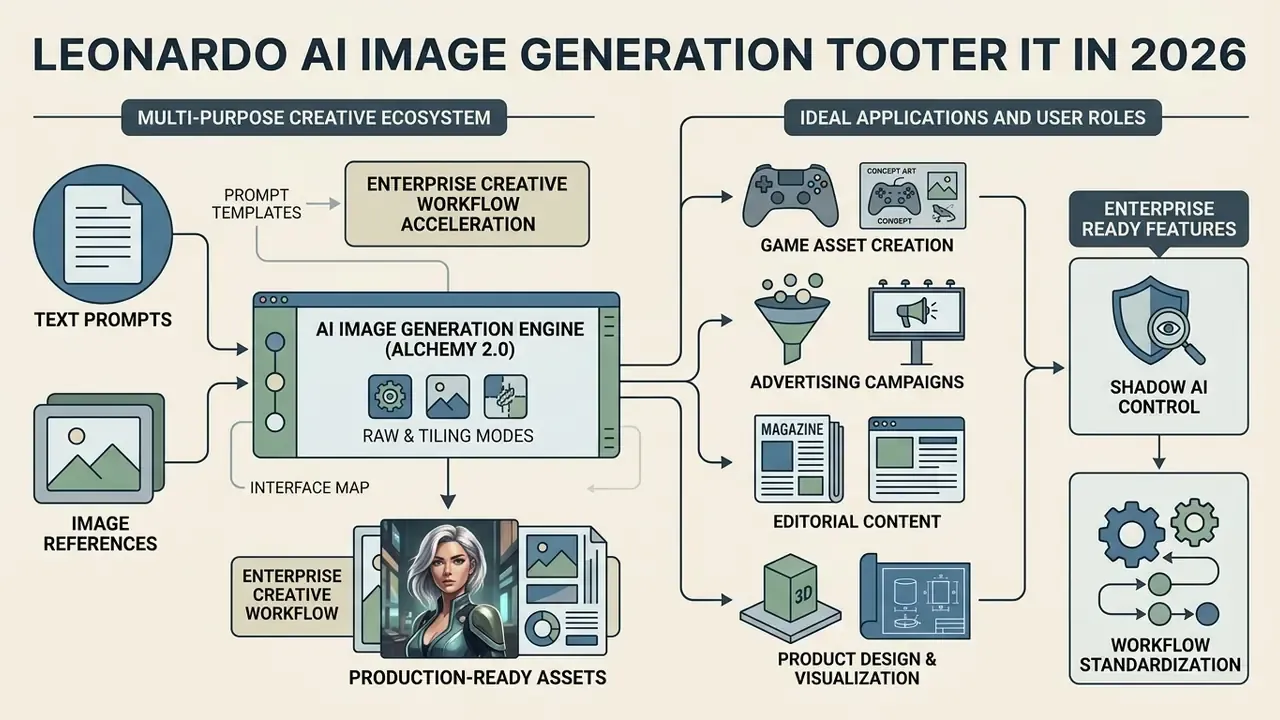
The Leonardo AI image generation platform is a multi-purpose generative asset ecosystem that transforms natural text prompts and baseline image references into production-ready graphics, 3D textures, and short video renders. Designed to support diverse visual pipelines, the platform combines proprietary foundational architectures with fine-tuned community models under a unified operational workspace. Creative operators lean on it to accelerate visual iteration while preserving aesthetic consistency across large-scale assets.
Put plainly: it is a generative art platform with production controls, not a novelty prompt box.
«More than 18 million creators use the platform to build characters, game assets, marketing visuals, and architectural renders.»
What Kinds of Images You Can Create in Leonardo AI
Leonardo AI produces a broad spectrum of visual media, ranging from photorealistic product mockups and architectural renders to stylized concept art and complex game assets. Production teams generate detailed character turnarounds, atmospheric environment backgrounds, promotional graphics for social media posts, and seamless PBR textures for 3D OBJ models. Readers comparing output categories across vendors can review a broader landscape of AI image generators before standardizing on a single stack. By leveraging explicit control parameters, teams ensure that every new image aligns precisely with pre-defined brand guidelines and artistic directions.
Officially documented style presets map directly onto these production categories: Concept Art, Graphic Design, Anime, Cinematic, Illustration, 3D Render, PhotoReal, and Stock Photo. Game studios additionally use the platform for location art, props, monsters, NPCs, and sketch-to-final-design rendering. A quick sanity check from daily practice: photoreal packaging shots and flat vector marks rarely respond to the same prompt structure, so treat each category as its own recipe.
Who Should Use Leonardo AI
The platform serves content creators, game developers, performance marketers, and enterprise design teams who require high-volume visual output without sacrificing granular aesthetic control. Game studios use the engine to iterate quickly on environment concepts and sprite variations, while marketing teams produce targeted visual variations for multi-channel digital campaigns. Organizations that want to streamline visual asset production rely on the structured workflows to manage team concurrency, audit model inputs, and standardize output quality. The learning curve is real but short: most operators become productive after a few dozen generations, once prompt weighting and guidance scale stop feeling arbitrary.
«UsagePricing segments users as follows: Free for casual creators, the entry paid tier for enthusiasts, mid tier for semi-professionals, and top tier for professionals and small business.»
Enterprise Readiness: Shadow AI Control and Workflow Standardization
For governance owners, the practical question is not whether the tool generates attractive images. It is whether usage can be contained inside an auditable perimeter. Three platform properties determine that answer.
First, Team plans consolidate token consumption into a shared pool with centralized billing, which converts invisible personal-card subscriptions into a single, reportable cost line. Second, private generation mode on paid tiers prevents prompts and outputs from surfacing in the public community feed, which is the single largest leakage vector for unreleased creative material. Third, the documented API surface (docs.leonardo.ai) allows generation requests to be wrapped in internal services, where prompts, model IDs, and seeds can be logged by the organization rather than only by the vendor.
Where those three controls are absent, typically on free personal accounts, the platform should be classified as unmanaged consumer tooling and restricted to non-confidential exploration. That classification is a decision, not a technicality, and it belongs in your AI inventory with a named owner.
How to Find the Official Leonardo AI Site and Start Safely
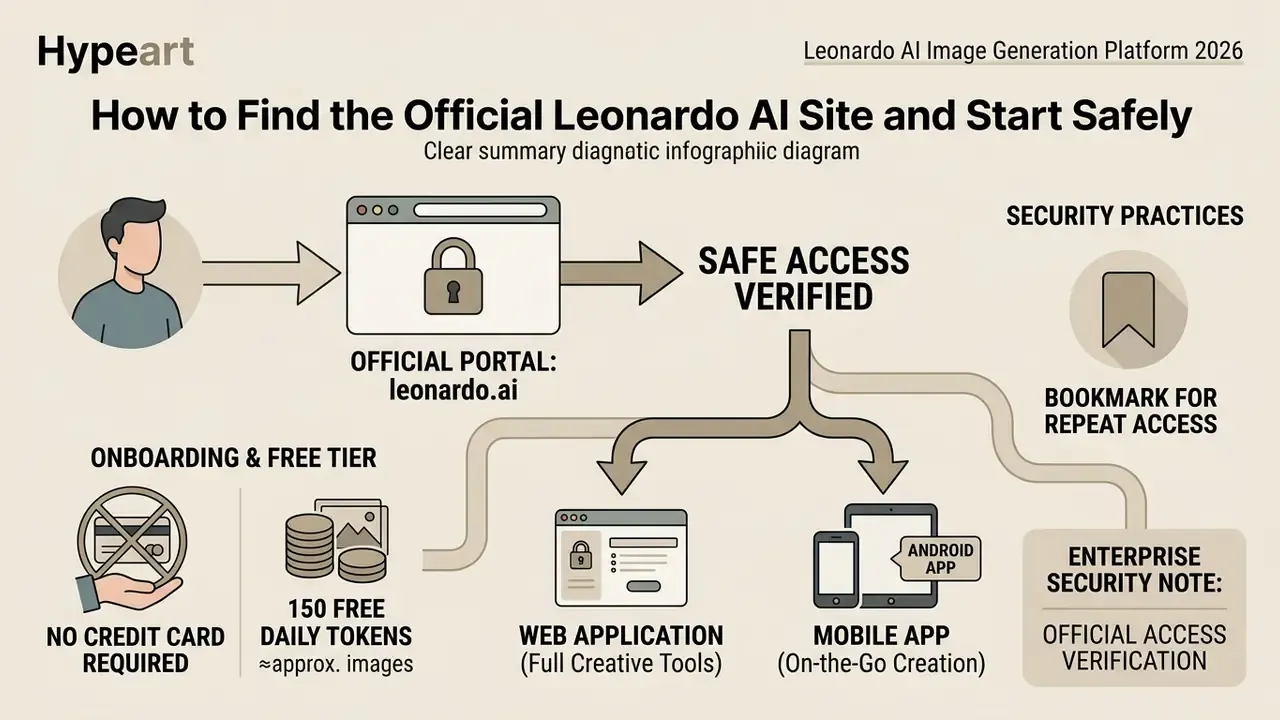
To access the platform safely and avoid unauthorized third-party proxy sites or credential-harvesting domain clones, users must navigate directly to the verified official portal at leonardo.ai. Web application entry and workspace management are hosted on the primary subdomain at app.leonardo.ai, with the sign-in path at app.leonardo.ai/auth/login. Establishing an authentic connection ensures that data handling practices, API keys, and account credit allocations remain protected inside official infrastructure.
Enterprise security note, official access verification. Always confirm that the web application URL matches https://app.leonardo.ai/ and that the SSL certificate is issued directly to the official domain owner. Official API access is documented exclusively at docs.leonardo.ai, API keys are issued from app.leonardo.ai/api-access, and support queries are handled via [email protected]. Verify the exact domain spelling, leonardo.ai, because homoglyph and hyphenated clones are the most common phishing pattern in the generative-media segment. Treat any page requesting card details outside these domains as fraudulent.
One more habit worth enforcing: bookmark the Leonardo AI art generator official site once, then reach it only through that bookmark. Search-ad impersonation is cheaper than domain squatting, and it works.
Registration, Free Tier, and Free Credits
New users can onboard onto the platform without providing credit card details through an ongoing free tier that grants 150 daily tokens. These free credits reset automatically every 24 hours, allowing creators to test model capabilities, explore prompt mechanics, and execute base image generations at zero initial expense. Because unused daily tokens do not roll over to the next day, casual users operate within a predictable daily allocation. Teams benchmarking entry-level access can also review comparable free AI image generators to calibrate expectations before committing budget.
«The free plan provides 150 fast tokens per day with no card required; public generations and watermarked video are the only meaningful limits.»
At roughly one token per basic image, the free allowance covers approximately 150 standard generations per day, and materially fewer once Alchemy, high resolution, or upscaling are enabled. Free accounts are also restricted to public creations and exclude API access and custom model training.
Leonardo AI in the Browser and in the Android App
The primary web application available at leonardo.ai provides the full suite of creative tools, including model training, API administration, and granular canvas editing. For mobile workflows, the official native application is distributed by Leonardo Interactive Pty Ltd through the Google Play store and the iOS App Store; search for the publisher name directly in the store rather than following third-party download mirrors. The Leonardo AI image generator Android app supports rapid prompt entry, generation previews, and basic video rendering, while complex multi-layer editing and fine-tuned model management stay optimized for desktop web browsers.
App features on mobile are close to the web set for generation, yet feature parity is not fully documented by the vendor. Production teams should therefore treat the app as a review and ideation surface rather than an approval environment. If an asset needs sign-off, sign off on the desktop, where parameters are visible.
Leonardo AI Interface: Where to Create and Edit Images
The Leonardo AI image generation interface presents a consolidated workspace dividing parameter controls, model management, and asset canvas toolsets into distinct functional zones. The main navigation sidebar on the left provides access to the primary generation engine, personal asset libraries, fine-tuned models, and editing suites. The central viewport displays real-time generation queues, active prompts, and high-resolution visual previews.
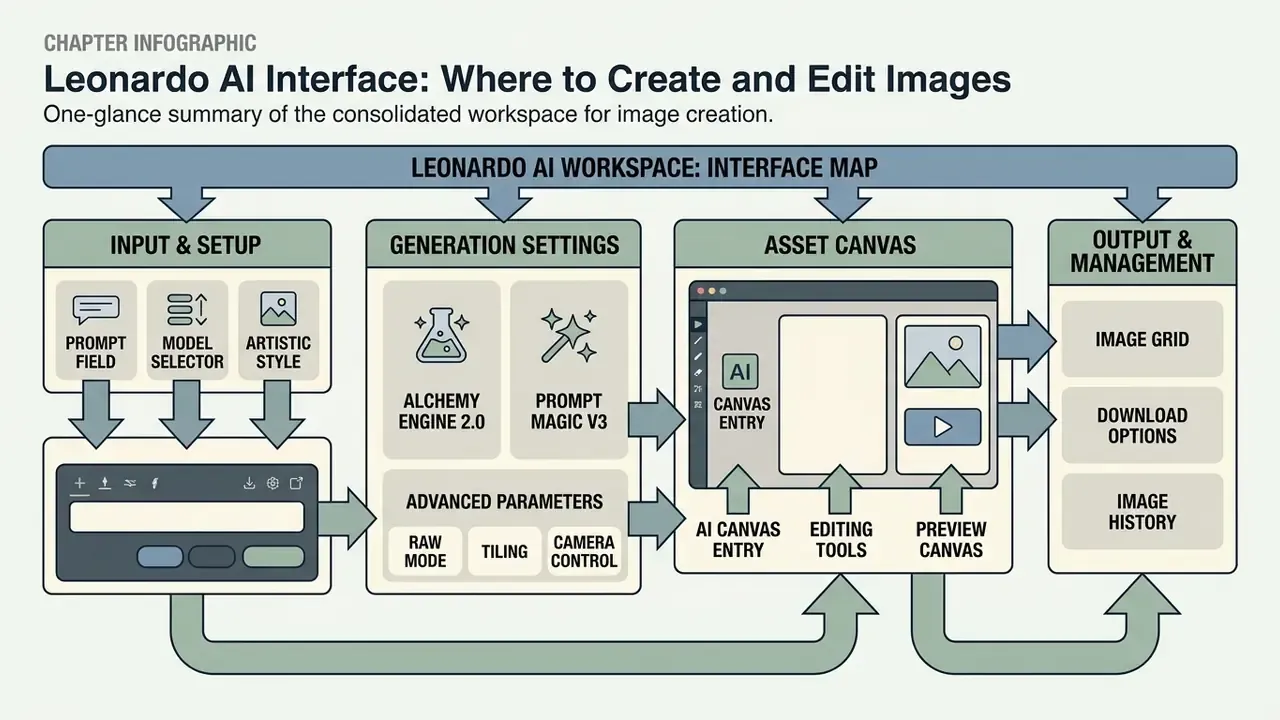
- Prompt field located centrally at the top of the generation view, for prompt strings and negative prompts.
- Model selector dropdown menu for selecting base architectures (Phoenix, Flux, Lucid Origin, SDXL and others); the full catalog opens through the Models menu in the left sidebar and the “View More” control.
- Control panel left sidebar for setting aspect ratios, image counts, and guidance strength.
- AI Canvas entry sidebar button launching the localized inpainting and outpainting editor.
Everything else in the Leonardo AI image generator interface is secondary until those four controls feel automatic.
Generation Settings: Prompt, Model, and Artistic Style
Successful asset generation depends on aligning text prompt structure with the appropriate foundational AI model and preset artistic style. Users select baseline models tailored to specific aesthetic requirements, such as photorealism or stylized illustration, and apply preset style guides to enforce atmospheric consistency. Adjusting parameters such as guidance scale, Alchemy strength, and prompt weighting allows operators to refine output fidelity systematically. Note that style application differs by model family: preset styles apply to SDXL-based models, while style UUIDs and image-based style references apply to Phoenix, Flux, and Lucid Origin/Realism.
«A controlled experiment found that goal-oriented prompting correlated with design quality more strongly than prompt length or editing time.»
Alchemy Engine 2.0 and Prompt Magic V3. Alchemy 2.0 is the platform's proprietary post-processing pipeline, improving light-and-shadow accuracy and pushing render detail toward 4K. The Alchemy Resonance parameter controls how tightly output follows the text description: values of 0.3 to 0.5 grant the model interpretive freedom, while 0.7 to 0.9 lock prompt geometry firmly in place. Prompt Magic increases the weighting of key tokens, preventing small objects from dropping out of the composition. Official guidance also recommends Alchemy V2 specifically because it improves prompt adherence and image coherence, though it warns that Resonance set too high introduces unwanted positioning artifacts.
Advanced Parameters: RAW Mode, Tiling, and Camera Control
Professional operators rely on three specialized switches in the control panel for fine-grained output management:
- RAW Mode disables automatic prompt stylization by the model. Direct control over texture and contrast returns to the author, which prevents the smoothing of fine detail, and that matters for material studies, fabric, skin, and product surfaces.
- Tiling (seamless textures) with the
Tilingtoggle enabled, the generator aligns opposite edges of the image. This produces looping patterns suitable for 3D material maps, web backgrounds, wallpaper, and textile prints, with no visible seams on repeat. - Visual perspective control scene depth is set by declaring the camera position inside the prompt, for example
bird's-eye view,low-angle shot, orextreme close-up, which changes generation geometry without switching base models.
Two additional habits raise the hit rate. Lock the aspect ratio before generation rather than cropping afterwards, and use the prompt-guidance tools to tighten phrasing before spending tokens on a full batch of four.
AI Canvas and Editing Tools for the Result
The AI Canvas environment gives creators precise spatial control over post-generation edits through localized masking, inpainting, and outpainting workflows. Instead of regenerating an entire visual composition when minor flaws appear, operators isolate specific bounding boxes to alter elements, correct lighting artifacts, or expand scene borders seamlessly. This localized control minimizes token expenditure while accelerating final asset approval. Teams standardizing post-processing steps often pair Canvas with conventional AI photo editors for colour management and export preparation.
«AI Flow Review (2026) describes Canvas as the pivotal tool: masking the label area lets you change material without regenerating the whole scene.»
Canvas accepts images uploaded from a computer, pulled from previous generations, or selected from the community feed; programmatic use of Canvas Inpainting through the API requires the canvasRequest = True flag. A caution worth repeating: every Canvas edit changes the asset after the original render, so the edit history belongs in your record.
How to Create Your First Image: Text-to-Image and Image-to-Image
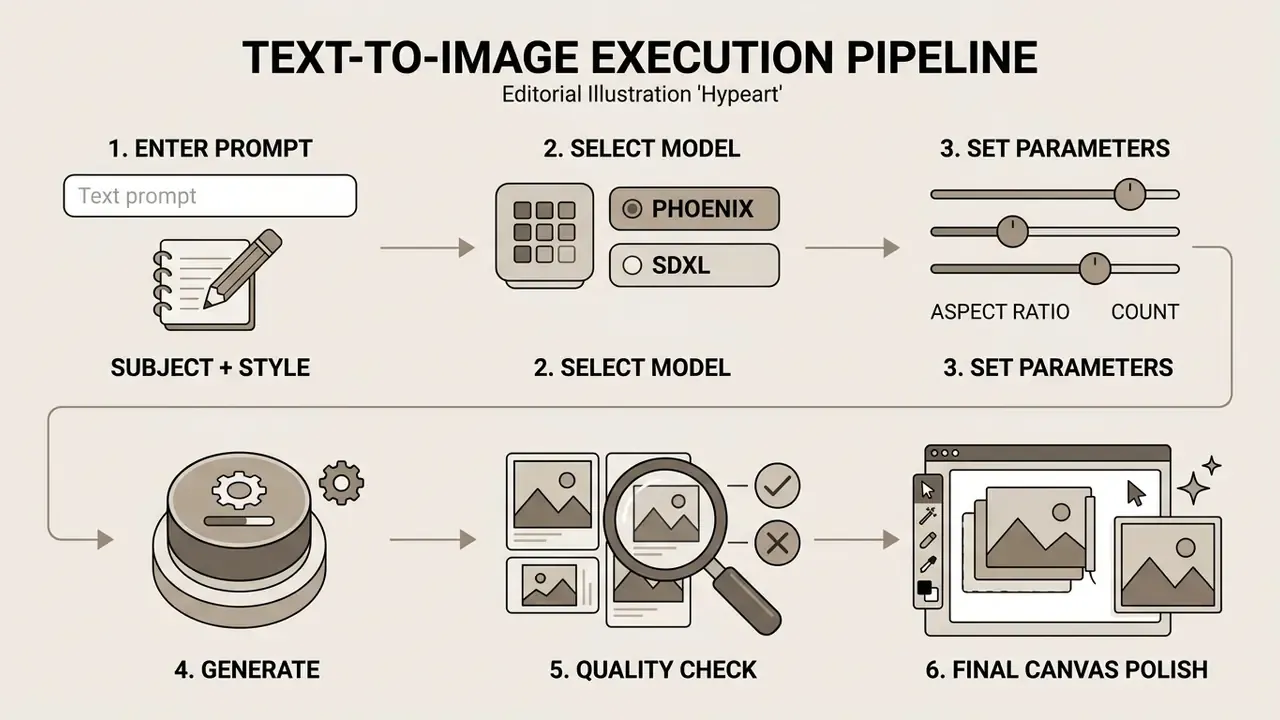
Generating an initial visual asset requires selecting either a pure text-to-image pipeline or an image-to-image reference workflow within the central prompt engine. The platform processes textual descriptors or input reference files through the selected neural weights, producing a structured grid of candidate images for review. Six simple steps, no code required.
- Select the base AI modelchoose an architecture aligned with your target media (photorealism versus concept sketch, for instance).
- Input the text promptdefine subject, lighting, composition, and style constraints clearly.
- Configure generation settingsset aspect ratio, image count, and guidance parameters.
- Execute generationinitiate processing and evaluate token consumption against your balance.
- Inspect and refine qualityreview the candidate outputs; refine prompt descriptors or open AI Canvas for localized corrections.
- Save or exportdownload the approved frame, then log the parameters that produced it.
Generating an Image from a Text Prompt
Executing a text-to-image generation begins by entering a detailed descriptor string into the primary prompt box, specifying subject matter, environmental context, camera angle, and lighting conditions. For optimal model adherence, creators structure prompts by prioritizing core subjects first, followed by stylistic modifiers and technical rendering details. Using the integrated "Improve Prompt" tool can automatically enrich simple seed phrases and lift composition quality; the improvement field accepts up to 200 characters, so seed phrases should stay short. Quality-mode renders typically complete in roughly 30 to 40 seconds.
Practical Prompt Templates for Leonardo AI
The templates below are structured for direct reuse: each one pairs a prompt with a recommended model and the exact parameter set used to produce a stable result. Copy, run, then adjust one variable at a time.
1. Photorealistic product design (model: Leonardo PhotoReal)
- Prompt:
A high-end luxury perfume bottle made of frosted glass, placed on a dark basalt stone, soft studio photography, subtle water droplets, cinematic volumetric lighting, 8k resolution, photorealistic - Negative prompt:
blur, low quality, distortion, text, watermark, cartoon, oversaturated - Settings: aspect ratio 4:5 | guidance scale 7 | Alchemy: ON
2. Game asset concept art (model: Dreamshaper v7)
3. Vector-style logo design (model: Absolute Reality v1.6)
4. Food and hospitality advertising (model: Leonardo Kino XL)
5. Seamless surface texture (model: SDXL 1.0)
- Prompt
Isometric fantasy health potion in a crystal flask, glowing red liquid, intricate gold filigree casing, dark background, UI game asset style, highly detailed- Settings
- aspect ratio 1:1 | guidance scale 8 | Tiling: OFF
- Prompt
Minimalist logo of a majestic owl, geometric vector lines, golden ratio composition, flat colors, isolated on white background- Settings
- aspect ratio 1:1 | Prompt Magic V3: enabled
- Prompt
Vibrant sushi platter, 8K ultra-realistic food photography, fresh glossy fish, lively garnishes, subtle soy sauce droplets, elegant Japanese dining backdrop, culinary advertising quality- Settings
- aspect ratio 3:2 | guidance scale 7 | Alchemy Resonance 0.7
- Prompt
Weathered Nordic oak plank surface, fine grain detail, matte finish, neutral daylight, PBR material reference- Settings
- aspect ratio 1:1 | Tiling: ON | RAW Mode: ON
Image-to-Image: How to Use an Uploaded Image
«AI Flow Review recommends a "single reference image" strategy: lock the style, then vary only angle, props, or background for campaign consistency.»
Updated production example. In an enterprise rebranding project, an operational team uploaded baseline packaging photos, masked the label regions, and rendered updated material variations while retaining exact product geometry and ambient reflections. The documented benefit was the elimination of repeated studio re-shoots for each material variant. The exact saving depends on shoot rates, variant count, and internal review cycles, and should be modelled per project rather than assumed from a single reported figure. Honest caveat: we could not verify a percentage, so we are not quoting one.
Leonardo AI Capabilities: Models, Fine-Tuned Models, AI Canvas, and Video
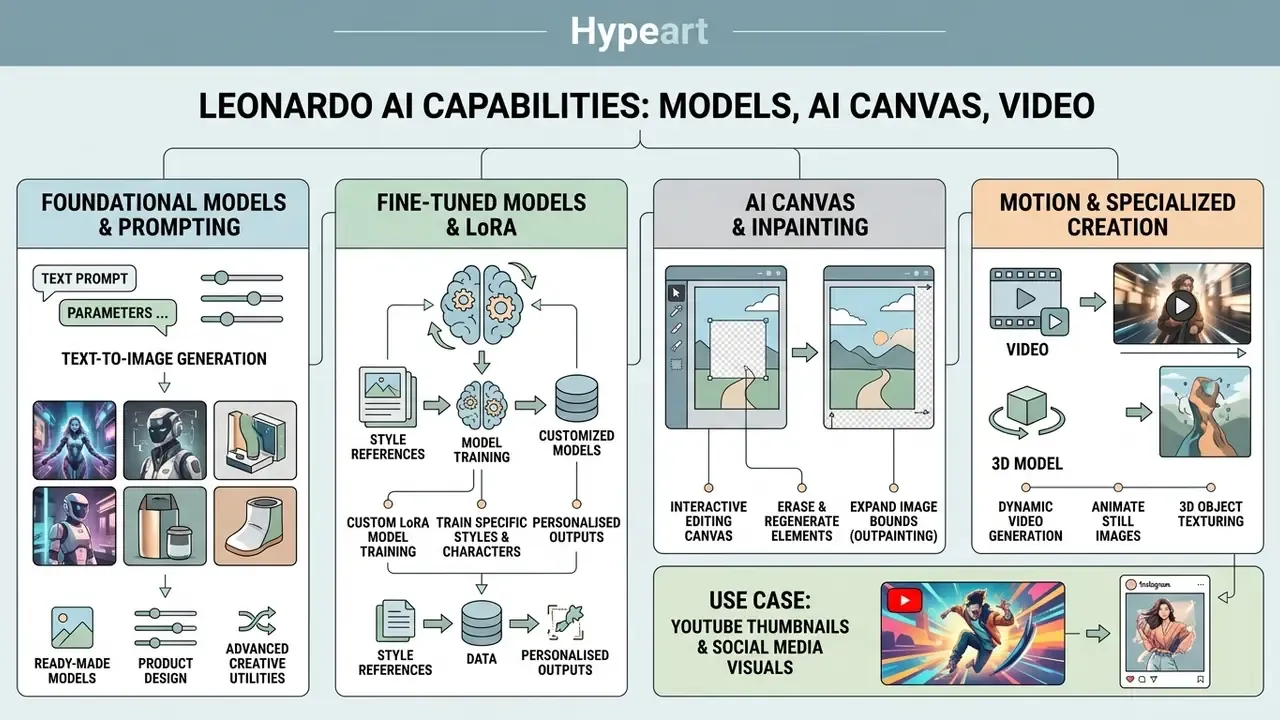
Leonardo AI combines foundational text-to-image generation with advanced creative utilities, including custom LoRA model training, 3D object texturing, and dynamic video generation. This integrated toolset lets technical teams construct scalable visual pipelines inside a single operational environment.
Ready-Made and Custom Models for Images
The platform features a broad library of pre-trained fine-tuned models optimized for specific aesthetic categories, such as photorealism, dynamic anime, and architectural rendering. Frequently used flagship and community models include:
| Model | Primary strength | Typical application |
|---|---|---|
| Lucid Realism / Lucid Origin | Cinematic lighting, natural skin tones | Portraits, thumbnails, editorial visuals |
| Leonardo Phoenix | Strong prompt adherence, style references | Brand-consistent campaign art |
| Leonardo PhotoReal | Studio-grade photorealism | Product mockups, packaging renders |
| Absolute Reality v1.6 | Clean composition, flat-graphic control | Logos, iconography, minimal design |
| Dreamshaper v5 to v7 | Stylized fantasy rendering | Game items, isometric assets |
| AlbedoBase XL | Balanced general-purpose SDXL output | Mixed creative production |
| Leonardo Anime XL | Anime and manga aesthetics | Character sheets, stylized promos |
| Leonardo Kino XL / Vision XL | Film-grade framing and colour | Advertising and cinematic stills |
| Leonardo Diffusion XL | Versatile detail and texture | Concept art, environments |
Compared with the 2025 roster, the 2026 line-up leans harder on Lucid and Phoenix for brand work, while the SDXL family remains the pragmatic default for textures and flat graphics.
Organizations can also run custom model training by uploading dedicated datasets of 10 to 50 curated reference images through Models & Training, then Train New Model, selecting Style, Object, or Character as the training target. Training proprietary LoRA elements lets brand teams enforce strict visual consistency across custom characters, proprietary products, and corporate brand assets. Programmatic training runs through the “Train a Custom Element” endpoint using an instance_prompt.
«According to Cybernews (2025), the Apprentice, Artisan, and Maestro plans allow training of 10, 20, and 50 AI models respectively within a single account.»
Advanced Visual Creation Tools
Beyond static 2D generation, Leonardo AI provides multi-modal production tools designed for complex asset development. Creators use the Motion and video generation modules to turn static images into short video clips with controlled camera movements; the documented 2026 model roster includes Motion 2.0 alongside third-party engines such as Veo 3.1, Kling 2.1 Pro, and Seedance 2.0. Teams building a broader motion pipeline often evaluate dedicated AI video generators in parallel.
Game developers upload UV-mapped .OBJ files directly into the platform's 3D texturing engine to render high-resolution PBR material textures from textual prompts. Real-time upscaling then raises final deliverables to HD or print resolution, a step readers can benchmark against specialized AI image upscalers when print output is the deliverable.
Comparing Leonardo AI with Alternative Platforms
| Criterion | Leonardo AI | Canva AI | Adobe Firefly | Midjourney |
|---|---|---|---|---|
| Realism and detail | High (Alchemy 2.0) | Medium | High | Very high |
| Model customization | Yes (LoRA, fine-tuned) | No | Limited | No |
| Canvas / inpainting control | Yes (interactive Canvas) | Basic | Yes (Generative Fill) | Via commands |
| Commercial rights | On paid plans | Yes | Yes (safe for commercial use) | On paid plans |
| Speed | Fast | Fast | Medium | Fast |
| Primary audience | Game dev, designers, artists | Social media, content makers | Corporate brand teams | Illustrators, concept art |
When an alternative is the better choice. Midjourney suits fast, high-aesthetic ideation in a browser or Discord workflow where model control is not required. Stable Diffusion is preferable when weights must run on local hardware under full organizational control. Canva AI wins when the task is not only generation but immediate placement into layouts, decks, and social templates. Leonardo AI occupies the middle ground: more creative control than Canva, less ecosystem lock-in than Adobe, and deeper model customization than Midjourney.
Leonardo AI Pricing: Free Tier, Tokens, and Confidence Before Payment
Leonardo AI operates a credit-metered pricing architecture where resource usage is calculated from model complexity, resolution, and processing feature load. Subscriptions range from free daily token allocations to high-capacity individual and team tiers designed for professional production.
| Plan tier | Monthly price (USD) | Fast tokens / month | Rollover bank | Private generations | Custom model training | Video generation |
|---|---|---|---|---|---|---|
| Free tier | $0 | 150 / day (no rollover) | None | No (public) | No | No |
| Apprentice (listed on some official pages as Essential) | $12 / mo | 8,500 | 25,500 | Yes | Up to 10 models | Standard access |
| Artisan (formerly Premium) | $30 / mo | 25,000 | 75,000 | Yes | Up to 20 models | Expanded queues |
| Maestro (formerly Ultimate) | $60 / mo | 60,000 | 180,000 | Yes | Up to 50 models | Unlimited relaxed mode |
| Team Starter | $72 / mo | Shared pool | Shared | Yes | Shared capacity | Priority queues |
| Team Growth | $144 / mo | Larger shared pool | Shared | Yes | Shared capacity | Priority queues |
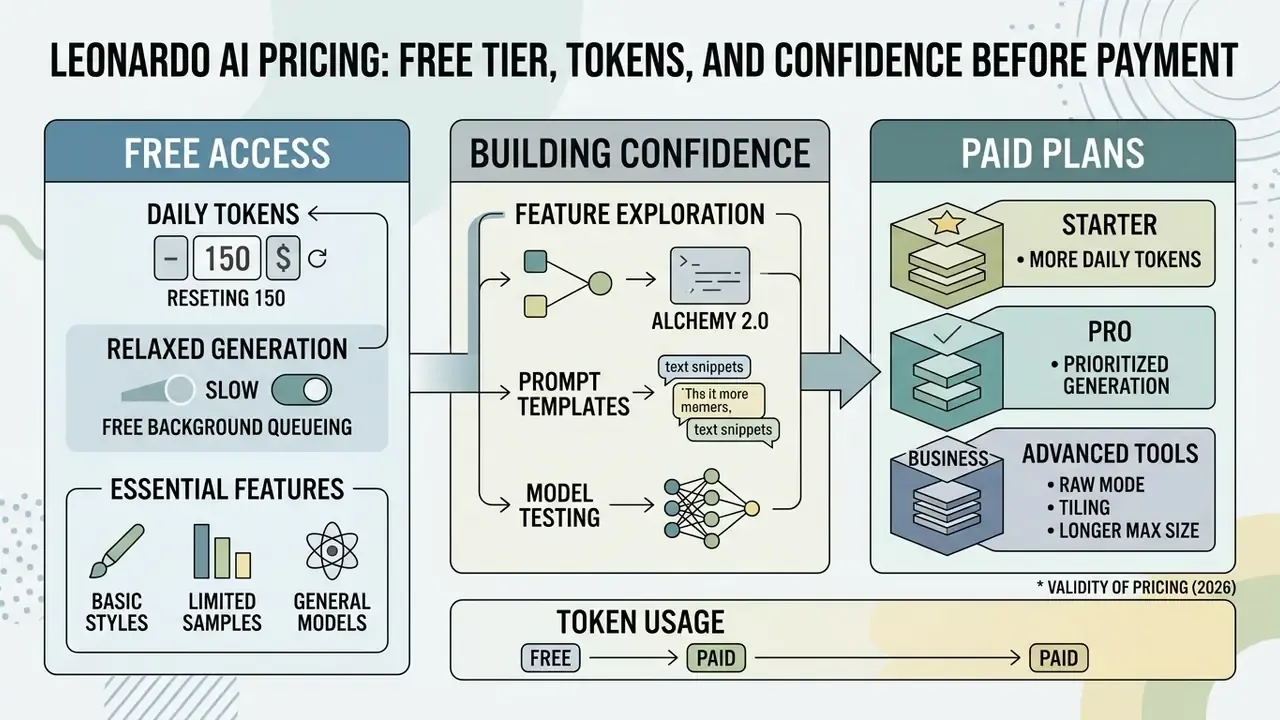
Table data verified against official platform documentation and 2026 third-party pricing summaries. Usage charges scale with GPU resource demand per render action. Third-party 2026 summaries use the Apprentice / Artisan / Maestro naming, while some official surfaces still display the legacy Essential / Premium / Ultimate labels; prices and token allowances match across both naming schemes.
Relaxed Generation mode. On the Artisan and Maestro plans, users gain access to Relaxed Generation. When the monthly fast token balance is depleted, Relaxed Mode enables continued image generation at reduced processing speed without forcing additional token purchases; Maestro extends relaxed mode to video. Note that relaxed generation is supported only on selected models.
«UsagePricing (2026) clarifies: a base 768×768 image costs roughly 1 token, while Alchemy mode consumes 8 to 16 tokens per generation.»
Price validity note. Pricing structures and token allocations above reflect official plan updates confirmed for 2026. Unused tokens on paid monthly plans roll into rollover banks up to the tier limits shown. Because the official pricing page does not publish a machine-readable “last checked” timestamp, re-verify figures directly at leonardo.ai/pricing before signing procurement documents.
What Free Access to Leonardo AI Gives You
The free plan provides a recurring daily allowance of 150 fast tokens with no credit card requirement at registration. This tier gives access to core image generation tools, standard model selections, and basic prompt engineering. However, all generations created under the free tier remain public inside the community feed, and advanced functions such as private generation, API access, and custom LoRA training are restricted. Free accounts are also constrained to single-task execution, which limits throughput for multi-step workflows.
When Paid Plans Are Justified
Moving to paid plans becomes necessary when production requirements demand data privacy, continuous volume, custom model training, or commercial video output. Upgrading unlocks private generation mode, which keeps intellectual property and pre-release brand concepts out of public feeds.
Concrete upgrade triggers are easy to test against a workload: Apprentice for private generations and up to 10 personal models; Artisan for unlimited relaxed image generation and 20 models; Maestro for 60,000 fast tokens, 50 models, six simultaneous generations, and relaxed video. Team plans apply when shared token pools, collaboration, and centralized billing matter more than per-seat cost. API usage is pay-as-you-go with no monthly fee, but it remains a paid consumption model.
Teams scaling up visual production rely on paid token pools, priority generation queues, and API access to integrate automated workflows alongside alternative platforms such as midjourney ai image generation or open-source setups covered in open source ai image generator. Before committing budget, a side-by-side look at the best AI image generators helps confirm that the chosen tier matches actual output requirements.
- midjourney ai image generation
- open source ai image generator
- best AI image generators
Data Privacy, Provenance, and Governance: What to Check Before Rollout
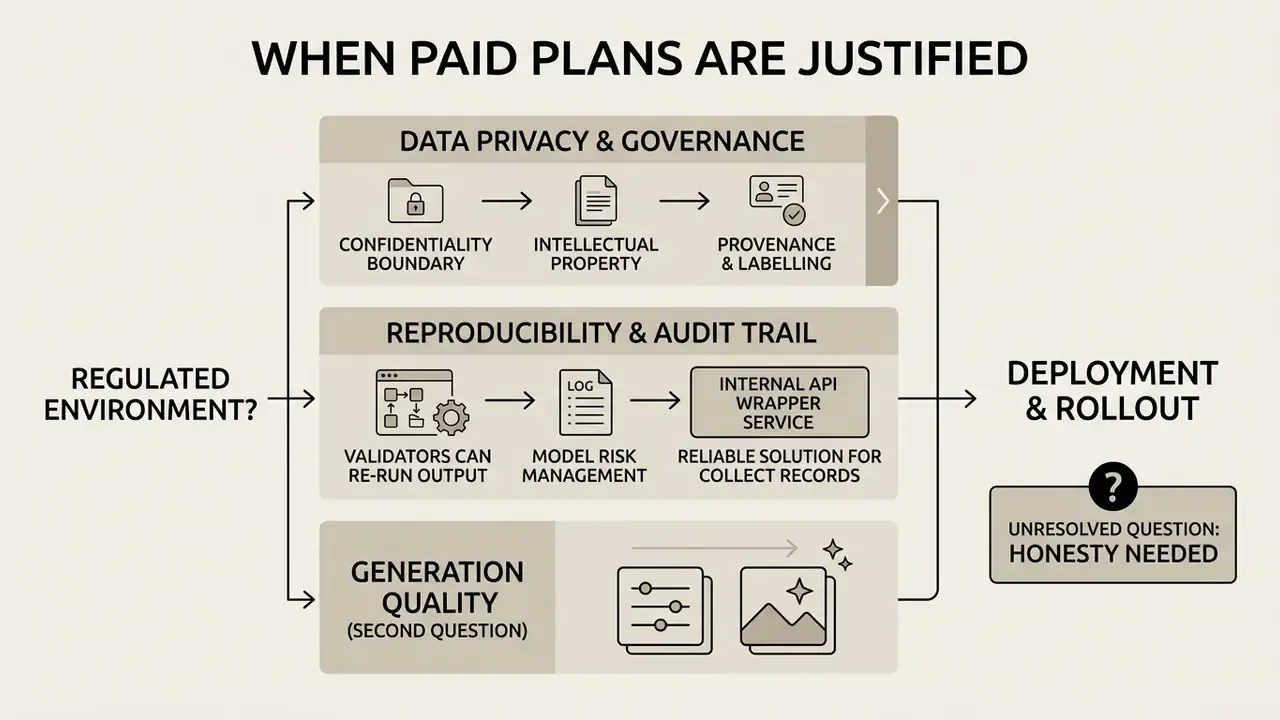
Reproducibility and Audit Trail (Model Risk Management)
Validators need to re-run an output, not admire it. Reproducibility on this platform rests on capturing a minimal parameter record for every asset that enters a controlled process:
| Field to log | Why it matters |
|---|---|
| Model name and version | Fine-tuned models are updated; version drift silently changes output. |
| Seed value | Without a fixed seed, identical prompts produce divergent results. |
| Full prompt and negative prompt | The primary input; must be stored verbatim, not summarized. |
| Guidance scale, Alchemy state, Resonance | These parameters materially alter geometry and detail. |
| Reference image ID and guidance weight | Required to reproduce any image-to-image output. |
| Canvas edit history | Local inpainting changes content after the initial render. |
| Operator and review sign-off | Establishes human oversight in the record. |
Wrapping generation in an internal API service is the most reliable way to collect this record automatically: request payloads already contain prompt, modelId, and parameter fields, and responses carry generation IDs that can be mapped to stored assets. Reviews should also account for stated state semantics, since an empty generated_images: [] array indicates a PENDING job, not a failure.
One unresolved question deserves honesty. Vendor-side retention windows for prompts and uploaded references are not always published in machine-readable form, so evidence of deletion usually depends on contractual attestation rather than a technical control you can test yourself. Ask for it in writing, and record the answer in your AI inventory.
Common Leonardo AI Problems and How to Fix Them
Operational disruptions during asset generation usually stem from credit depletion, misconfigured prompt parameters, invalid model selections, or network timeouts. A systematic troubleshooting sequence keeps downtime across creative pipelines short.
Diagnostic flow for generation errors
- Is the generation status returning
PENDING? The job is queued, not broken. Check queue status and remaining credit balance before retrying. - Is the response a generic
Service Error? Verify that you are passing the correct identifier, becausegenerationIdand the image ID required by the next endpoint are not interchangeable. Then confirm authorization token validity. - Does the interface fail to load at all? Move to the browser and network checklist below.
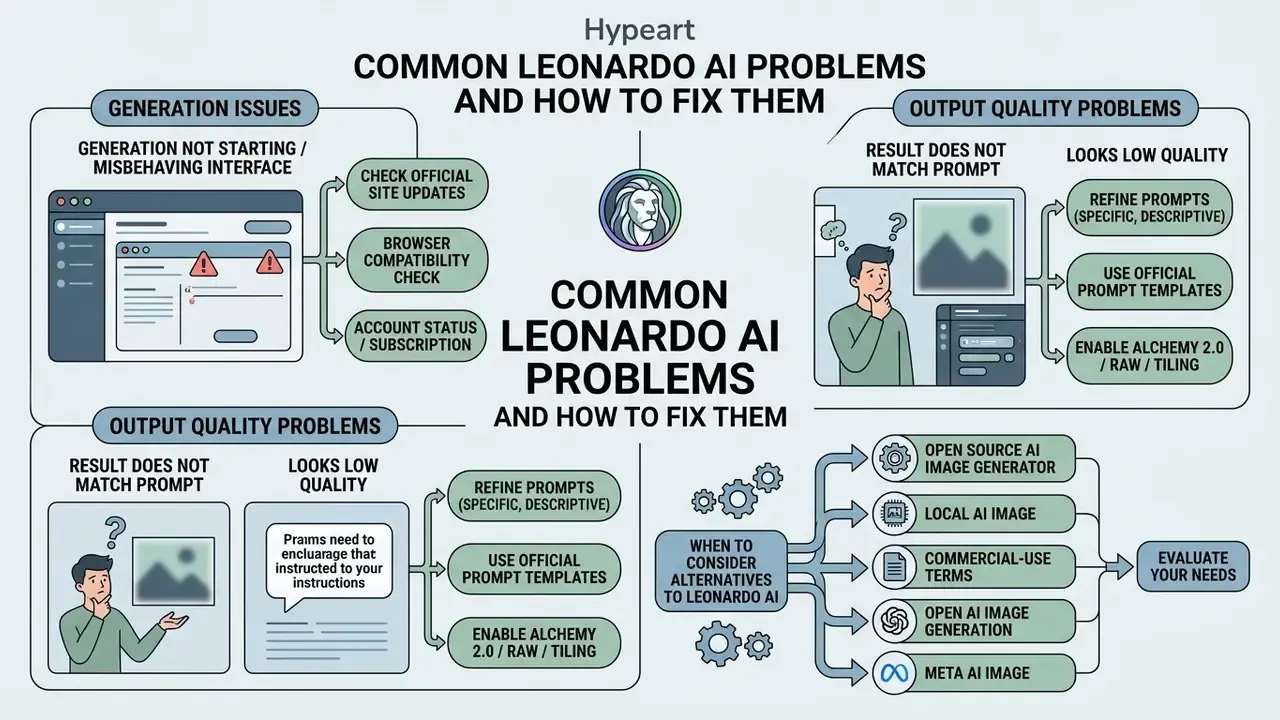
What to Check If Generation Will Not Start or the Interface Misbehaves
When generation requests fail to launch or the Leonardo AI image generation service becomes unresponsive in the browser, verify account status and configuration in order:
- Confirm that your daily credit balance or monthly fast token pool has not been exhausted.
- Verify that you are signed into the correct account email and the correct authentication method for your paid plan tier. Logging in through a different provider creates a separate account where premium features and tokens appear missing.
- Clear browser cache and disable conflicting extensions, VPNs, or aggressive ad-blockers that may disrupt WebSocket connections to
app.leonardo.ai. - For
ERR_CONNECTION_TIMED_OUT, test DNS resolution, proxy settings, firewall and antivirus rules, and try an alternative browser. - Inspect API integration key formats to ensure valid UUID Bearer string structures (
authorization: Bearer …) when calling programmatic endpoints. - If the issue persists, report it through the in-app support widget or
[email protected]with the generation ID attached.
Small thing, big effect: mismatched sign-in providers account for a surprising share of “my tokens disappeared” tickets.
Why the Result Does Not Match the Prompt or Looks Low Quality
Suboptimal image quality, or a stubborn refusal to follow instructions, usually indicates conflicting parameter settings or improper prompt weighting. Overly complex sentences confuse neural weighting; restructuring the text prompt to place the primary subject first improves adherence. Setting Alchemy Resonance too high can introduce unwanted spatial artifacts, whereas setting it too low grants the model excess freedom and leads to composition drift. Practical remediation order: shorten the prompt and lead with the subject, enable Improve Prompt, switch to Alchemy V2, then tune Resonance in small increments. If the subject is still wrong, change the fine-tuned model before you change anything else.
«A 2024 technical report showed that generative models systematically distort images of complex physical phenomena, limiting their use in scientific domains.»
«Research into multimodal vulnerabilities of T2I systems found that visual text and imagery can combine to form unsafe content even when each component is safe in isolation.» Study of multimodal jailbreak attacks on text-to-image systems.
When to Consider Alternatives to Leonardo AI
Leonardo AI excels at fine-tuned model control, canvas editing, and multi-modal asset creation, yet specific project requirements may warrant a specialized platform. Teams seeking local hardware control and full open-weight autonomy often evaluate an open source ai image generator or local deployment frameworks via local ai image, and should weigh the commercial-use terms of AI image generators before migrating production workloads. Organizations focused strictly on conversational web interfaces or ecosystem-specific tools compare these capabilities against open ai image generation, meta ai image, or review options inside comprehensive AI Media Pricing Guides and AI Media Alternatives by Reason. Where motion output is the deciding factor, a comparison of the best AI video generators clarifies whether Leonardo's video modules are sufficient. Estimating production throughput with cost tools on calculators helps governance leads select a generative stack that matches their operational risk profile.
«A thematic analysis of 566 posts by creative professionals found that generative tools raise productivity but create tension around authorship and blur the line between human and algorithmic creativity.»
FAQ
Is Leonardo AI free?
There is a permanent free tier with 150 daily tokens and no credit card requirement. It is public-only and excludes private generation, API access, and custom model training.
Can I use Leonardo AI images commercially?
Commercial rights are tied to paid plans. Free-tier output should be treated as personal or evaluation use; always review the current licence terms before distribution or resale.
How do tokens actually get consumed?
A base 768×768 render costs about one token; Alchemy-enhanced generations consume roughly 8 to 16 tokens. Upscaling, video, and high resolution increase cost further, which is why budgets should be modelled on workload mix.
What is Relaxed Mode?
On Artisan and Maestro, once the monthly fast token pool is exhausted, Relaxed Mode continues generation at reduced speed on supported models, without forcing additional token purchases.
Is RAW mode available?
Yes. RAW mode disables automatic stylization so that textures, contrast, and fine detail stay under direct author control, which is useful for material and product work.
Can Leonardo AI produce print-ready files?
High-resolution output suitable for print is achievable with quality modes and correct dimensions; final colour and sharpening passes are usually handled in an external editor.
Can I keep a consistent brand style?
Yes, through fine-tuned model selection, style references, and custom Element (LoRA) training on your own dataset of 10 to 50 curated images.
What should a compliance reviewer request before approval?
Confirmation of private-mode usage, documented retention and opt-out terms for uploaded assets, commercial licence scope for the active plan, and a parameter log (model version, seed, prompt, guidance settings) for each approved asset.
A Safe Next Step: A 30-Day Controlled Pilot
If the platform looks useful but the risk picture is unfinished, run a bounded pilot instead of a broad rollout. A workable shape, illustrative rather than prescriptive:
- Week 1. Register two Team seats, disable free personal accounts for pilot participants, and record the tool in your AI inventory with a named owner.
- Week 2. Generate only non-confidential assets. Log model version, seed, prompt, and guidance settings for every output that reaches a stakeholder.
- Week 3. Wrap ten generations through the API so prompts and IDs land in your own logs, then test whether a validator can reproduce two of them from the record alone.
- Week 4. Compare cost per approved asset against your existing production route, including review time and control overhead, not just token spend.
The exit criterion is simple. If reproduction from your log fails, the control gap is yours, not the vendor's, and the pilot should not graduate to production.
Appendix A: Editorial Corrections Log
For transparency, the following statements from earlier versions of this guide were revised during the latest audit:
- Plan naming.Earlier wording listed the individual tiers as Essential ($12/mo), Premium ($30/mo), and Ultimate ($60/mo). Prices were accurate, but 2026 naming is Apprentice, Artisan, and Maestro; both schemes are now shown side by side because official and third-party surfaces differ.
- Quantified re-shoot saving.The earlier claim that a rebranding workflow was “reducing studio re-shoot overhead by 65%” has been removed, because the figure could not be traced to a verifiable published source. The qualitative outcome, elimination of repeated shoots per material variant, is retained.
- Mobile download anchor.The earlier link to the Android application pointed to a third-party domain. The reference now directs readers to the official publisher listing (Leonardo Interactive Pty Ltd) in the app stores.