Marcus Hale, author.
Last updated: September 2026. Written and fact-checked by the AI Media editorial desk, which continuously audits generative platform documentation, pricing pages, and licensing terms.
Executive Summary: What a Reviewer Needs to Know First
- What it is Leonardo AI is a web-based generative visual platform (founded in Australia in 2022, publicly launched in 2023, acquired by Canva in July 2024) built around proprietary foundational models such as Phoenix, Lucid Origin, and Lucid Realism, plus fine-tuned checkpoints, Elements presets, and custom LoRAs.
- Core capabilities text-to-image, image-to-image (Image Guidance), Fast and Ultra generation modes, RAW Mode, seamless Tiling, upscaling, inpainting on AI Canvas, Collections for asset organization, and Motion (image-to-video).
- Cost model free tier at $0 with 150 daily fast tokens (no rollover, public generations); paid tiers at $12, $30, and $60 per month; API billed pay-as-you-go.
- Primary risk exposure free-tier outputs default to public visibility, which turns unsanctioned marketing experimentation into a Shadow AI incident. Commercial licensing on the free plan is non-exclusive and retains platform distribution rights.
- Governance verdict usable in regulated environments only on paid private tiers, with documented prompt logging, fixed seeds, pinned model versions, and a formal review gate before any asset reaches an external channel.
- When to migrate mandates for local GPU execution, zero data retention, or modifiable open weights push teams toward Stable Diffusion or FLUX deployments.
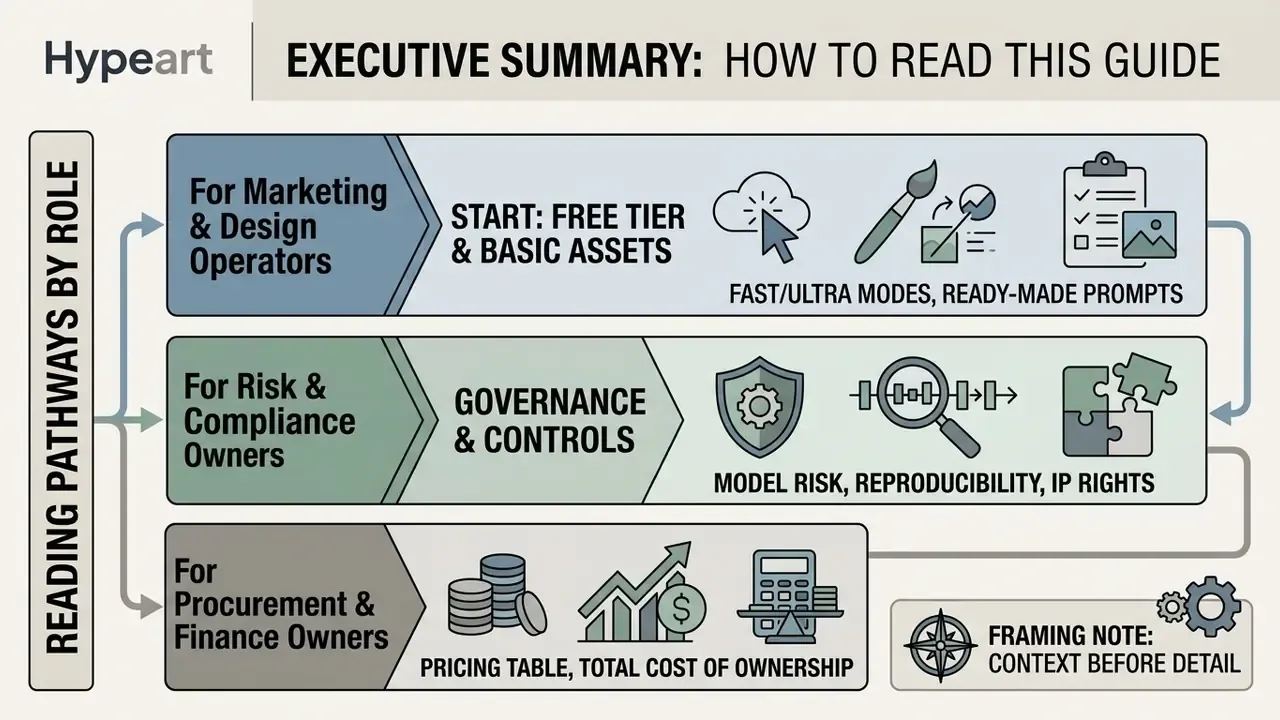
Who this guide is written for, and how to read it. The material is organized for three different readers, and you do not need all of it.
- A marketing or design operator who wants a first usable asset can start at the free-tier walkthrough and the prompt library, then use the diagnostics checklist when an output disappoints.
- A risk, compliance, or model risk owner can read the governance, reproducibility, intellectual property, and admission-checklist sections and skip the prompt craft entirely.
- A procurement or finance owner should focus on the pricing table, the total cost of ownership discussion, the volume calculation, and the migration triggers.
One framing note before the detail. Treat this platform as a low-materiality model with a named owner rather than as a piece of office software. That single decision changes almost everything downstream: inventory entry, logging, review cadence, and who signs off when an image goes public. Everything else is implementation.
What Leonardo AI Image Generator Is and What Images It Creates
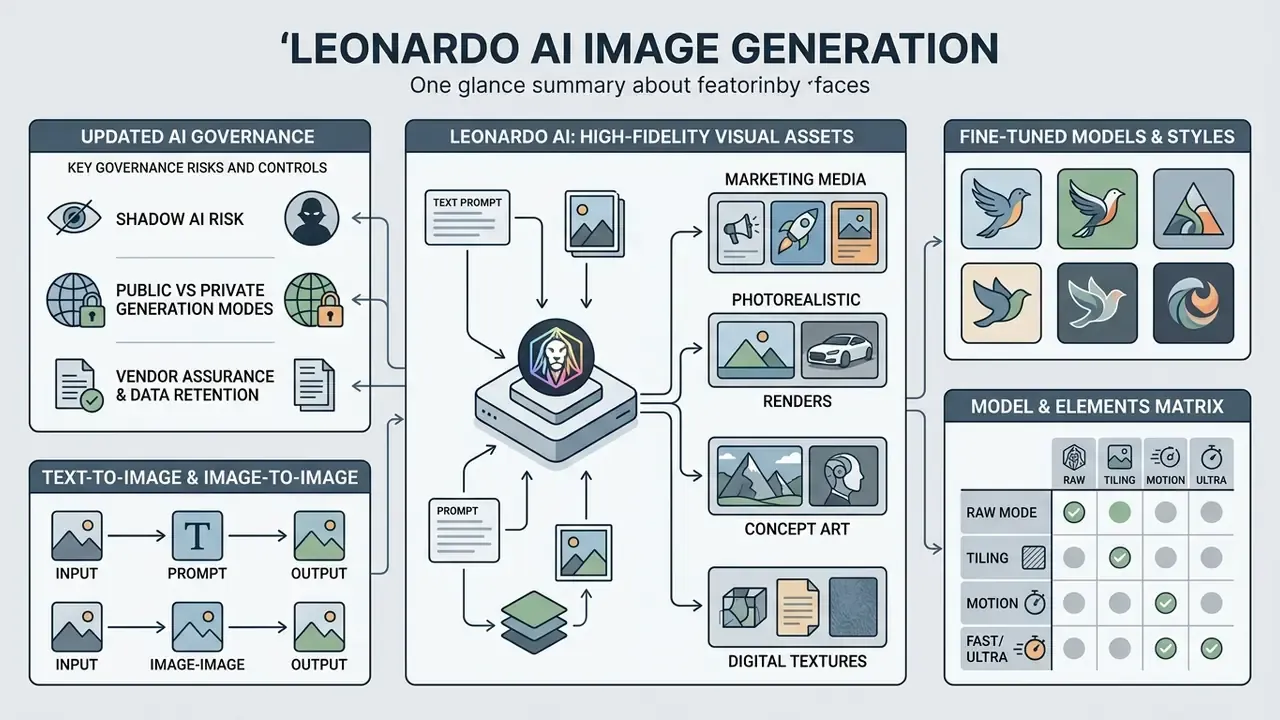
Leonardo AI is a web-based generative platform for producing high-fidelity visual assets: marketing media, photorealistic renders, concept art, and digital textures. The platform relies on foundational models such as Phoenix, combined with specialized fine-tuned checkpoints and custom LoRAs (Leonardo.Ai Documentation, 2026).
AI Governance, Shadow AI, and Data Residency Risk
For regulated institutions, the first question is not image quality. It is exposure. Three risk vectors dominate.
1. Shadow AI in marketing and design functions. The free tier needs only an SSO login and returns usable assets in seconds, which is precisely why unsanctioned adoption spreads so fast. When a campaign manager uploads an unreleased product render, a customer photograph, or a pre-announcement brand lockup into a free account, that generation becomes publicly visible in the community feed by default. The disclosure is irreversible. In a financial-services context it may amount to an unauthorized release of material non-public information. Practical controls: block the consumer domain at the network egress layer for accounts not provisioned through the corporate tenant, publish an approved-tool register, and route every visual generation request through one owned workspace.
2. Public versus private generation modes. Private Mode exists only on paid plans, and it must be toggled ON before generation, not after. Visibility applies at creation time. So any workflow touching confidential inputs has to be blocked from the free tier by policy, not by user discretion. Policy beats goodwill here, every time.
3. Vendor assurance and data retention. Security questionnaires should request the vendor's current independent audit reports (for example SOC 2 Type II or ISO/IEC 27001 scope statements), written confirmation of whether customer prompts and uploads are used for model training, retention periods for generated assets and reference uploads, sub-processor lists, and hosting regions. Where the vendor will not contractually commit to zero training on customer inputs, treat every prompt as an external disclosure and classify inputs accordingly.
Aligning this control set with recognized frameworks (supervisory model risk expectations in the United States under SR 11-7, the NIST AI Risk Management Framework, and transparency obligations for generative systems under the EU AI Act) lets the visual pipeline be registered as a documented, low-materiality model rather than an unmanaged tool. The deliverables are unglamorous and short: an inventory entry, a named owner, a documented purpose, prompt-level logging, and an annual review date.
Text-to-Image and Image-to-Image in Leonardo AI
Text-to-image synthesis translates descriptive natural language prompts into high-resolution outputs using foundational diffusion models. Users configure prompt parameters, subject descriptors, medium constraints, and lighting directives to build a new generated image from scratch.
Image-to-image workflows do something different. They take an existing source file, such as a product photo or a concept draft, and apply structural or stylistic modifications. The engine conditions generation on the reference image's edge maps, depth vectors, or color distribution, which allows controlled refinement without losing the compositional layout you already approved.
The documented divergence between the two modes sits at the level of inputs and conditioning rather than internal diffusion mathematics. Leonardo's API exposes initImageType (GENERATED or UPLOADED) and strengthType values such as LOW, MID, and HIGH for reference-conditioned runs. Phoenix-path image-to-image accepts a single reference image, while Legacy Mode allows premium users up to four source images with ControlNet-style weighting.
Fine-Tuned Models and Styles for AI Art
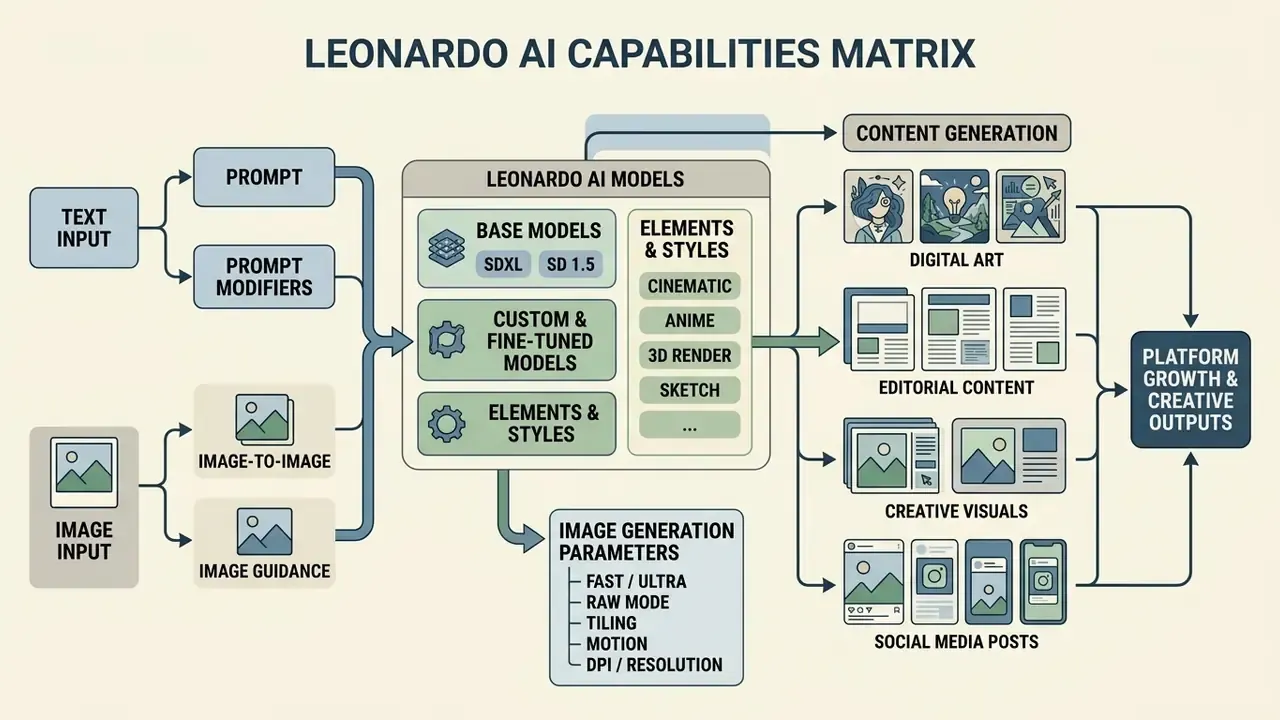
Fine-tuned models dictate the base visual aesthetic, output resolution ceiling, and prompt adherence behavior of the platform. Leonardo AI offers several model families, including Phoenix, Lucid Origin, and Lucid Realism, each tuned for distinct creative tasks. Style UUIDs are compatible with Flux, Lucid Origin, Lucid Realism, and Phoenix, while preset styles (ANIME, CREATIVE, DYNAMIC, ENVIRONMENT, GENERAL, ILLUSTRATION, PHOTOGRAPHY, RAYTRACED, RENDER_3D, SKETCH_BW, SKETCH_COLOR) apply to SDXL-based and Alchemy-enabled generations.
Style presets and custom LoRAs narrow the generative process further, holding output to a specific artistic or photorealistic standard.
"Block-wise LoRA tuning for identity and style delivers higher prompt fidelity and subject accuracy than full model fine-tuning."
Supported Model and Elements Matrix in Leonardo AI
| Base architecture | Popular fine-tuned models | Specialized presets (Elements) | Intended use |
|---|---|---|---|
| SDXL 1.0 / XL Lightning | Phoenix 1.0, Leonardo Anime XL, AlbedoBase XL, Leonardo Vision XL, Leonardo Kino XL, Leonardo Lightning XL | Cybertech, Solarpunk, Glasscore, CGI Noir, Digital Painting, Modern Analog Photography, Toon & Anime | High resolution, photorealism, web and campaign design |
| Stable Diffusion 1.5 | Absolute Reality v1.6, Dreamshaper v7/v6/v5, Leonardo PhotoReal, Leonardo Signature, RPG v4.0 / v5.0, Anime Pastel Dream, Deliberate 1.1 | Biopunk, Lunar Punk, Pirate Punk, Crystalline, Ebony & Gold, Glass & Steel, Inferno, Tiki | Game concept art, characters, fantasy props, isometric tiles |
| Stable Diffusion 2.1 | Leonardo Diffusion, Leonardo Select, Leonardo Creative | Vintage Style Photography, Surreal Collage | Classical graphics, abstraction, stylized editorial imagery |
| Proprietary (2026) | Phoenix 0.9 / 1.0, Lucid Origin, Lucid Realism | Style reference strengths LOW to MAX, prompt_enhance ON/OFF/AUTO | Text rendering inside images, brand-grade realism, negative prompting |
For model risk documentation, record the exact checkpoint name and version next to every approved asset. Fine-tuned models get retired and superseded over time, and an asset that cannot be traced to a named model version simply cannot be reproduced during an audit. That is the whole argument for the extra field in your log.
Leonardo AI Free Image Generation: Where to Start
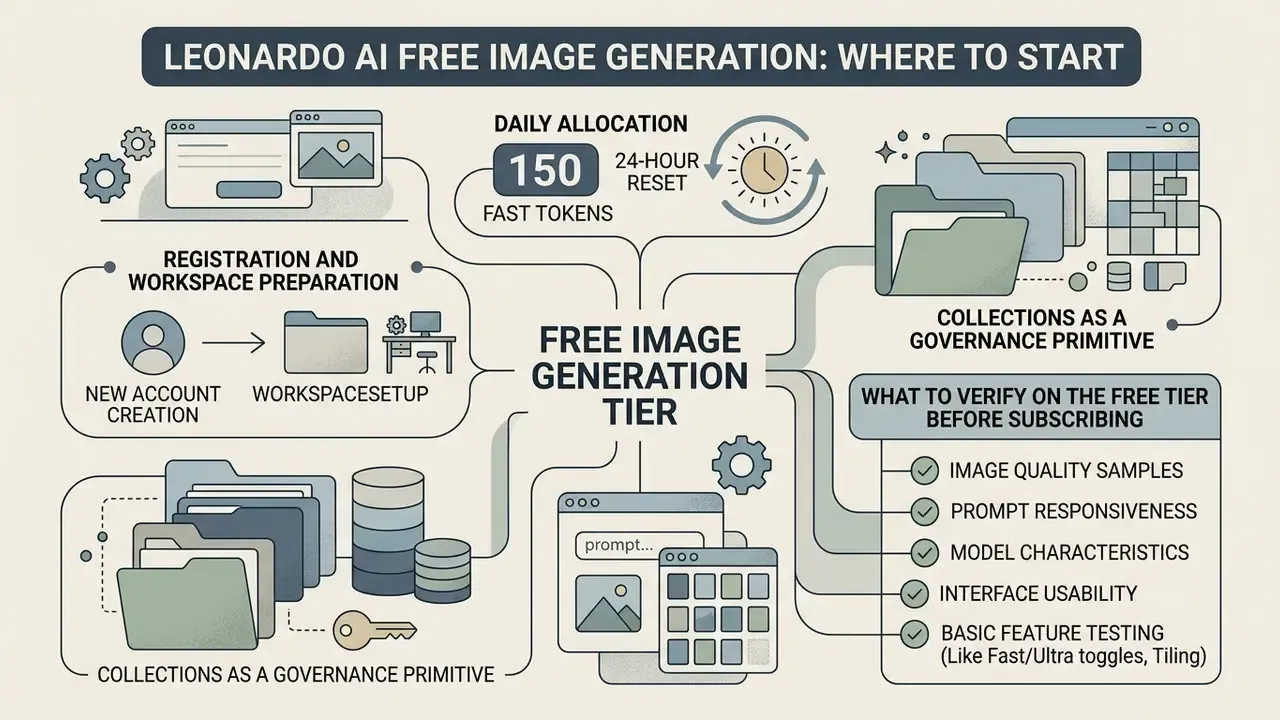
The leonardo ai free image generation tier gives new accounts a daily allocation of 150 fast tokens that resets every 24 hours. Most searches for leonardo ai image generation free end exactly here, and the limits matter far more than the price.
"The free plan provides 150 daily fast tokens, public generation, and watermarked video, aimed at beginners and casual users."
That allowance covers non-commercial experimentation, basic workflow testing, and a first pass of prompt validation without financial commitment.
Users get core features: text-to-image, basic image guidance, and public community models. The leonardo ai free image generator environment is genuinely user friendly, so operators can test prompt structures and parameter combinations before scaling production. A single token pool covers up to four image variations per generation on free accounts, while premium members can request up to eight at once. Compared with most enterprise ai tools, the learning curve here is shallow, which is both the appeal and the risk.
Two constraints deserve emphasis. Free-tier tokens do not roll over between 24-hour cycles, so unused capacity evaporates nightly. And outputs on the free plan default to public visibility, which makes this tier unsuitable for confidential corporate projects or unreleased brand assets.
Registration and Workspace Preparation
Collections as a governance primitive. The Add to Collection control routes every generation into a named container at creation time instead of leaving you to sort a flat library later. In enterprise use, map Collections to approval states and business owners: Campaign-Q3-Draft, Campaign-Q3-Legal-Review, Campaign-Q3-Approved, Internal-Only. The workspace structure then becomes the first layer of your audit trail. Collections also make evidence retrieval trivial. When a reviewer asks for every asset behind a published campaign, the export scope is one container, not a keyword hunt across months of output.
For teams that need programmatic control, API access is billed separately from web subscriptions on a pay-as-you-go basis. That makes the API the right integration point for logging generation calls into a GRC or model inventory system. A minimal enterprise integration records, per call: requesting user identity, prompt text, negative prompt, model ID and version, seed, mode, reference image hash, and output asset hash. That payload is enough to reconstruct any generation during a control test, which is the only test that counts.
What to Verify on the Free Tier Before Subscribing
Before you commit to a commercial plan, evaluate model response latency, token consumption per generation, and style fidelity. Testing complex multi-subject prompts shows quickly whether the base models clear your aesthetic bar without heavy post-processing.
Audit the privacy path in the same pilot. If corporate policy forbids public indexation of generated assets, testing must move to paid private modes immediately, not eventually. Where a pilot has to stay invisible, running early experiments through free AI generators without sign-up or a locally hosted model avoids creating an account-linked public record at all. Evaluating competitive options such as an open ai image deployment or an open source ai model framework gives you baseline benchmarks for control and cost efficiency.
Fact check and verification. Official verification of Leonardo AI free-tier parameters and usage terms as of 2026, intended to remove the most common misreadings of limits and ownership rights on the free plan.
How to Create Your First Image in Leonardo AI in a Few Steps
Producing a first usable asset follows a short, structured workflow that keeps token spend low and output precision high. Operators who use leonardo ai well set baseline parameters before firing the generation call, not after the third disappointing result.
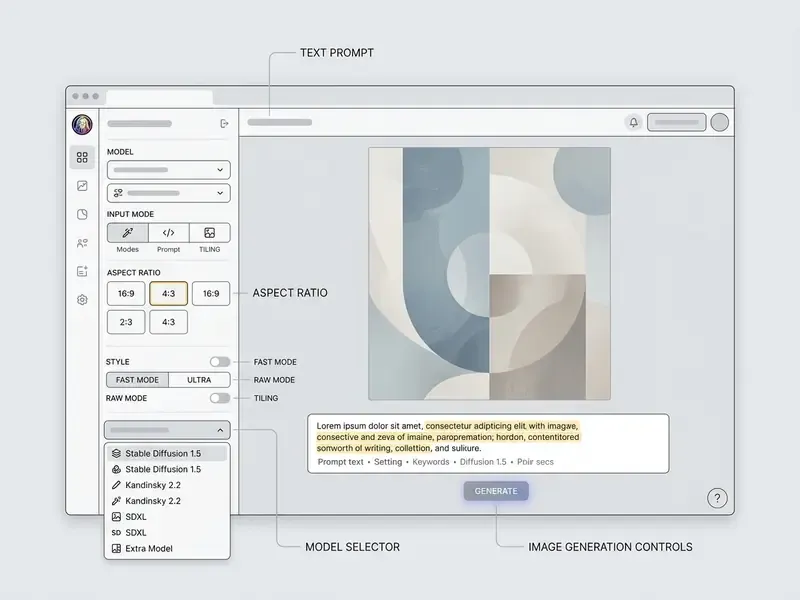
Following a handful of simple steps prevents the usual configuration errors: wrong dimension mapping, unguided sampling, forgotten privacy toggle. First, open the Image Creation workspace and set the primary parameters: model, generation mode, dimensions, privacy toggle, destination Collection.
Second, define the subject in the text input zone. Third, choose dimensions, set output count, and press the generate button to start the diffusion pipeline. The token cost of the configured job appears on the button itself before execution, so you can validate spend against budget before committing. Fourth, review the result in the AI Creation feed or Library, then hover the asset to upscale, download, share, edit, or turn it into a video.
How to Fill the Prompt Box for a Usable First Result
Effective prompt composition specifies subject, environment, lighting, camera angle, and artistic medium in a predictable sequence. Skip ambiguous conversational phrasing. Use explicit comma-separated descriptors or clear declarative sentences instead.
Photorealistic corporate studio portrait of a female executive, neutral background, soft key lighting, 85mm lens, depth of field, sharp focus, professional attire
Applying foundational prompt engineering principles prevents semantic drift and helps the diffusion model read subject priority the way you intended.
"Optimized prompts substantially outperform raw user queries on CLIP similarity metrics and human preference scores."
Six rules recur across public prompt-engineering guidance from standards bodies and model vendors: state the task explicitly, supply relevant context, define the output format, decompose complex requests, use examples or structured sections, and iterate on the prompt before you freeze it as a template.
Ready-Made Prompts for Different Production Tasks
3D animated fox character, bright orange fur, wearing a green winter coat and red earmuffs, holding snowshoes, log cabin background, soft falling snow, vibrant colors, 8k resolution --ar 1:1
Commercial food photo of a vibrant sushi platter, shiny fresh fish, soy sauce droplets, Japanese dining background, cinematic lighting, depth of field, sharp focus, 8k ultra-realistic
Steampunk logo design of a regal Phoenix, fluid brushstrokes, intricate metallic details, copper and gold color palette, isolated on black background
Futuristic cityscape at night, neon reflections, rain-slicked streets, flying vehicles, cyberpunk aesthetic, dramatic moody lighting, shot on 35mm
Abstract editorial illustration of interconnected data nodes, restrained two-color brand palette, clean negative space, flat vector style, suitable for a financial report cover
Minimalist product hero shot on a seamless pastel gradient backdrop, single soft shadow, studio softbox lighting, centered composition, generous top margin for headline overlay
Subtle geometric line pattern, low contrast, monochrome navy on off-white, seamless tileable texture, flat design
- 3D characters and animation3D characters and animation:
- Product and food photography for advertisingProduct and food photography for advertising:
- Vector-style logosVector-style logos:
- Sci-fi concept artSci-fi concept art:
- Corporate report and board-deck imageryCorporate report and board-deck imagery:
- Branded social campaign key visualBranded social campaign key visual:
- Seamless texture for interface backgroundsSeamless texture for interface backgrounds:
- Character consistency across an asset setCharacter consistency across an asset set:
Same character as reference, three-quarter view, neutral expression, identical wardrobe and proportions, studio grey background, consistent lighting direction
Reproducibility discipline for audited environments. Prompt text alone does not reproduce an image. Before a generation counts as a controlled artifact, fix and record the seed value, the scheduler or sampler, the guidance scale, the generation mode, the style preset or style UUID, the negative prompt, and the exact model version. Leonardo's Realtime and Canvas tools expose random-seed and fixed-seed behavior explicitly, and the API accepts these parameters directly, which makes a fixed-seed API call the most defensible evidence format for a model risk file. Store the parameter set beside the exported asset in the same Collection or repository record, so an independent reviewer can re-run the generation without calling the original operator.
How to Choose Aspect Ratio, Generation Mode, and Launch the Job
Picking the right aspect ratio depends on the distribution channel, not on taste. The standard mappings: 1:1 for square social feeds, 4:5 for vertical mobile posts, 9:16 for full-screen stories, 16:9 for landscape banners and board presentations.
| Target channel / use case | Aspect ratio | Pixel resolution (optimal) |
|---|---|---|
| Social feed / brand post | 1:1 (square) | 1080 x 1080 |
| Mobile portrait campaign | 4:5 (vertical) | 1080 x 1350 |
| Mobile story / reel | 9:16 (tall) | 1080 x 1920 |
| Web banner / hero image | 16:9 (landscape) | 1920 x 1080 |
| Board deck / exec slide | 16:9 (landscape) | 1920 x 1080 |
| Annual report cover | 4:5 or 3:4 | 1620 x 2025 / 1536 x 2048 |
| Intranet / LMS thumbnail | 16:9 or 1:1 | 1280 x 720 / 800 x 800 |
| Print collateral (pre-upscale) | 1:1 then upscale | 1024 x 1024 to 4096 px |
"Models perform best at aspect ratios close to their training data; extreme proportions can introduce compositional artifacts."
Use an exact supported width and height pair rather than an arbitrary custom size. In Image Guidance workflows, matching the output ratio to the source image's ratio measurably improves adherence, and a 0x0 dimension tells the system to inherit the reference image's ratio.
Alongside dimensions, set the generation mode before launching. Fast mode minimizes token cost and suits rapid ideation across many variants. Ultra mode adds fidelity at a higher token price and belongs to shortlisted candidates only. The disciplined pattern: ideate in Fast, pick one or two finalists, re-render those in Ultra.
Once parameters are locked, press the main activation button to render. In Quality or Ultra configurations, a single job usually finishes in roughly 30 to 40 seconds. Then review the leonardo ai image creator output against both quality and policy benchmarks before anyone calls it approved.
How to Use Leonardo AI for Image-to-Image
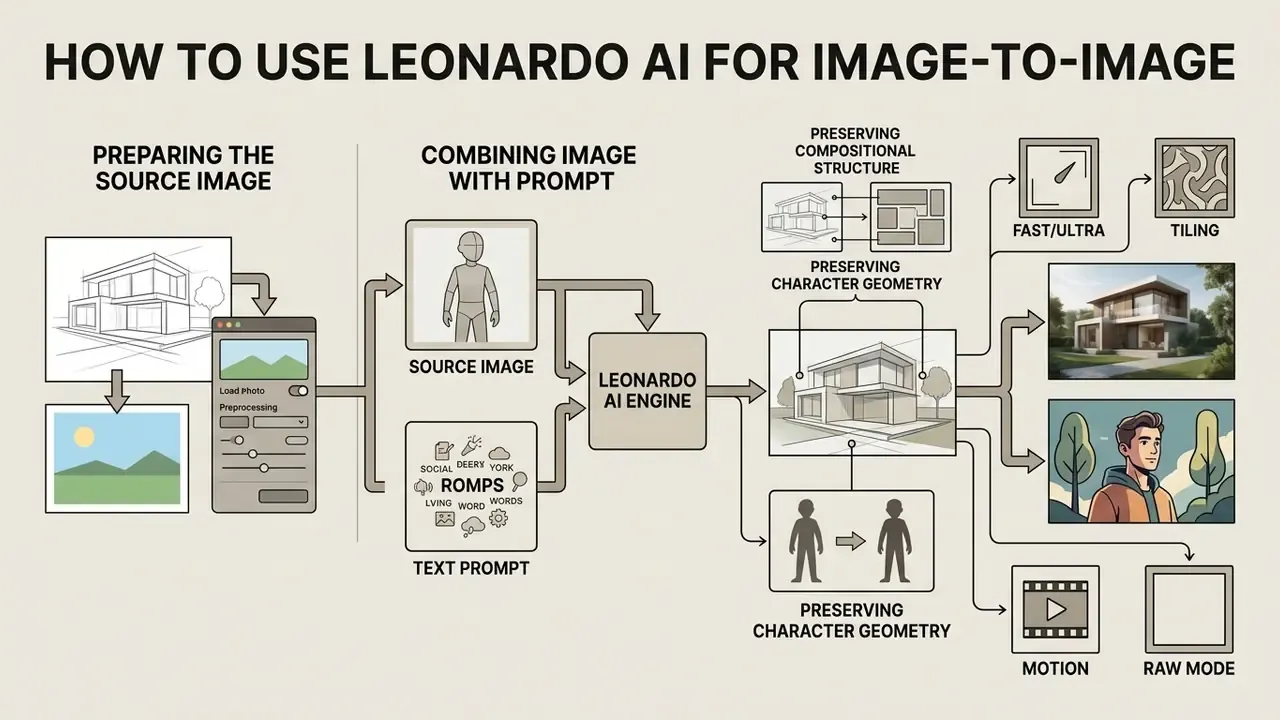
The image-to-image workflow modifies existing visual assets while preserving compositional structure or core character geometry. Operators configure leonardo image ai to apply new artistic styles, swap background elements, or push visual detail further. Teams comparing commercial transformation options can review dedicated image-to-image generators and outpainting tools such as those covered in the guide to AI image expansion.
In corporate workflows, an ai photo generator leonardo deployment supports fast iterative redesigns of product concepts, architectural layouts, and marketing mockups. The engine balances the structural constraints of the input image against the descriptive directives in the prompt. Leonardo's Image Guidance supports Content Reference, Character Reference, and Style Reference channels, with strength levels from Low to Max.
Guidance strength is the dial that protects you from visual mush. Lower values give the model creative latitude; higher values enforce strict adherence to the source file.
Preparing the Source Image for Generation
Source selection determines the structural quality of the final output more than any prompt tweak. Input files need high contrast, clear subject definition, and adequate pixel resolution without compression artifacts.
"High subject fidelity in customization requires diverse yet consistent input images; noisy or inconsistent sources reduce accuracy."
Three acceptance checks turn that into an operational rule set, mirroring long-standing imaging-quality guidance. The subject must be in focus. The tonal range must produce a reasonably distributed histogram rather than clipped shadows or blown highlights. And the effective resolution must meet or exceed the target output dimension, so upscaling becomes an enhancement rather than a reconstruction.
Updated pre-processing practice. In a recent asset migration workflow, an editorial design team ran 120 low-resolution concept sketches through a preliminary denoising and contrast-normalization pass before uploading them into Leonardo AI. The team's internal review recorded fewer structural distortions and steadier character proportions across repeated rendering runs than the raw-upload control batch. The effect size was never measured against a formal benchmark, so treat it as practitioner experience, not a quantified result. (See Appendix A for the superseded claim, which cited a specific percentage without a published methodology.)
How to Combine the Source Image with the Prompt
Mixing reference imagery with textual instructions is a weighting exercise. The text prompt should describe the changes you want, such as new lighting conditions or material textures, rather than re-describing features already visible in the reference.
Transform background to a modern glass architecture office, keep subject pose and facial structure identical, dramatic evening sunlight, 8k resolution
If the output drifts from the target design, lower the Init Strength parameter to give text directives more influence, or raise it to lock compositional geometry. In diffusion implementations generally, the strength parameter governs how much noise is injected into the reference latent. Values near the maximum effectively discard the source composition; low values preserve structure and permit only surface restyling.
"Temporally aware attention switching preserves content during early denoising steps, allowing style tokens to dominate progressively in the final result."
Improving Output: Prompt Engineering, Models, and Settings
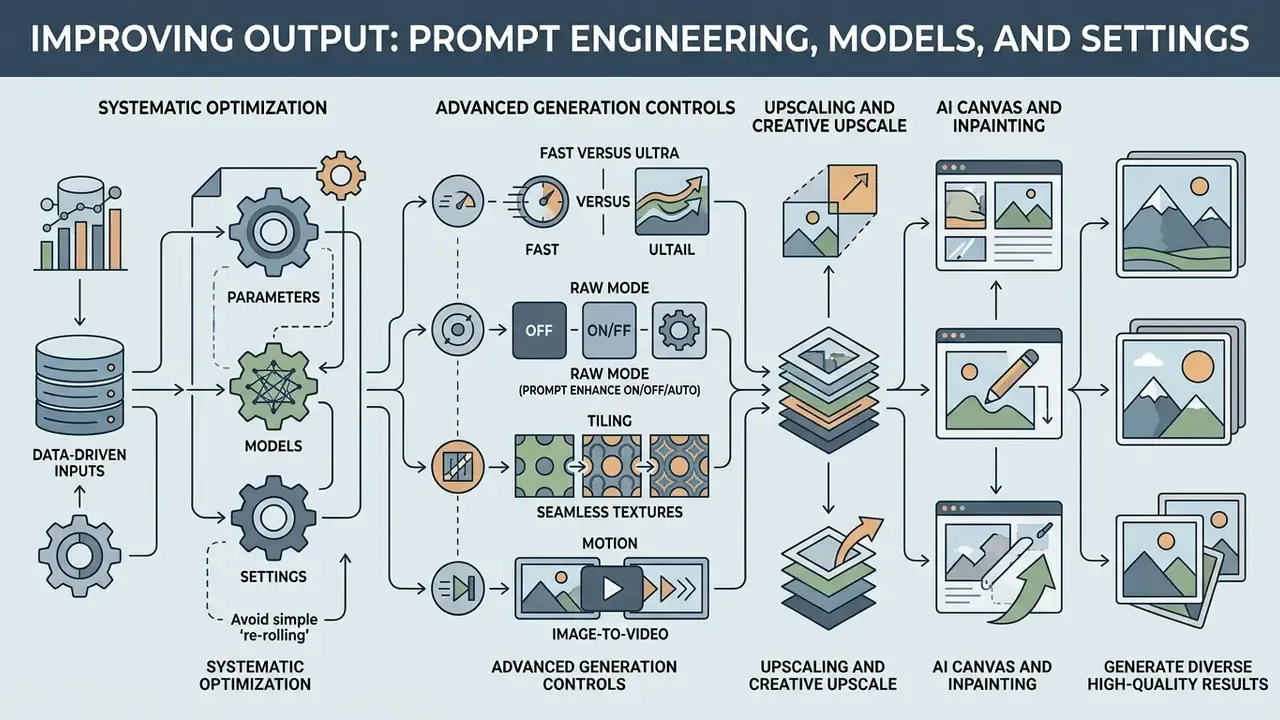
Enterprise-grade visual assets come from systematic parameter optimization, not from re-rolling prompts and hoping. Operators balance prompt specificity, base model selection, sampler configuration, and resolution settings.
Structured prompt engineering frameworks remove semantic ambiguity before it reaches the sampler.
Pairing a target prompt with a specialized fine tuned checkpoint is what finally renders micro-detail properly: hair texture, lighting reflections, complex geometry. Phoenix-family endpoints additionally expose negative_prompt and per-channel guidance values for character, content, and style references, so operators can suppress recurring defects without rewriting the positive prompt from scratch.
To sanity-check throughput and control depth, teams often benchmark platform response against external engines, analyzing perplexity ai image generation capabilities and reviewing perplexity ai image generation features to validate comparative generation speeds and control mechanisms.
Advanced Generation Controls: Fast/Ultra, RAW Mode, Tiling, Motion
- Generation Mode (Fast versus Ultra) Fast Mode optimizes token spend for rapid sketching and wide-variant exploration. Ultra Mode engages additional denoising phases for maximum detail at a higher token cost. Standard practice: ideate in Fast, finalize in Ultra.
- RAW Mode disables Leonardo's internal automatic stylizers and returns precise control over textures and the literal content of the prompt. Use it when brand guidelines forbid interpretive styling, or when a downstream retoucher needs an unopinionated base plate.
- Prompt Enhancement (
prompt_enhanceON / OFF / AUTO) expands short prompts into richer descriptions automatically. Set it toOFFin audited workflows. An automatically rewritten prompt breaks the link between the logged input and the produced output, and that link is the evidence. - Tiling (seamless textures) matches opposite edges of the image, enabling cyclic patterns for 3D textures, interface backgrounds, packaging surfaces, and print-on-demand fabric designs without visible seams.
- Motion (image-to-video) converts a generated still into a short animated clip through micro-motion generation, roughly four seconds of footage suited to social placements. Free-tier video output carries a watermark.
- Upscaling and Creative Upscale raises resolution for print and large-format use. Creative Upscale looks smoother but can flatten stylistic detail, and it performs best on faces and hands.
- AI Canvas and inpainting repairs or replaces bounded regions without re-rendering the whole frame, with a recommended Guidance Scale around 7 to 9 and support for fixed seeds and explicit scheduler selection.
- Custom Elements / LoRA training trains a reusable style, character, or product identity on SDXL at 1024x1024. This is the main mechanism for enforcing brand consistency across a whole asset library.
- Edit in Canva hands the finished asset to the Canva editor for layout, typography, and template-level brand enforcement.
Why Leonardo AI Generates Something Other Than the Prompt Describes
Gaps between prompt and output usually come from prompt overload, conflicting descriptors, or base model training bias. When a prompt carries too many competing keywords, attention maps fragment, and you get missing objects or anatomical distortion.
"Gradient-based search over compact word subspaces shows that swapping synonyms materially changes image reconstruction accuracy."
(Updated: this passage previously carried an unattributed "(ICML, 2024)" reference without a paper title or URL. The verifiable citation above replaces it. See Appendix A.)
To fix semantic drift, strip conversational filler and rebuild the instruction around subject, environment, and medium. Also confirm the selected fine-tuned checkpoint natively supports the target aesthetic; asking an anime-trained model for hyperrealism produces exactly the artifacts you would expect. Three failure classes explain most complaints: hallucination, where the model produces plausible but unsupported content; prompt overload, where instructions compete; and model mismatch, where the checkpoint's training distribution contradicts the brief. The corresponding fixes are shortening and constraining the prompt, adding explicit negative prompts, and re-selecting the model rather than endlessly re-rolling the seed.
What to Do When the Generated Image Looks Low Quality
When assets come back blurry, noisy, or structurally broken, work the protocol in order. First, confirm the native rendering resolution matches the model's optimal training dimensions, for example 1024x1024 for SDXL-based pipelines.
Second, increase sampling steps to allow complete denoising. Raising steps from roughly 20 to 30 or 35 and selecting a stronger scheduler such as DPM++ 2M Karras usually restores fine detail. Set Guidance Scale between 7.0 and 9.0. Third, confirm the correct VAE pairing for the architecture in use, because a mismatched VAE gives you soft detail and colour shifts. Fourth, apply targeted localized inpainting or external upscaling modules to recover detail without regenerating the whole frame. Dedicated AI photo editors and AI image upscalers close the remaining gap when platform-native tools plateau, and residual blemishes can still be cleared by hand in a raster editor.
Leonardo AI Pricing and When to Consider Alternatives
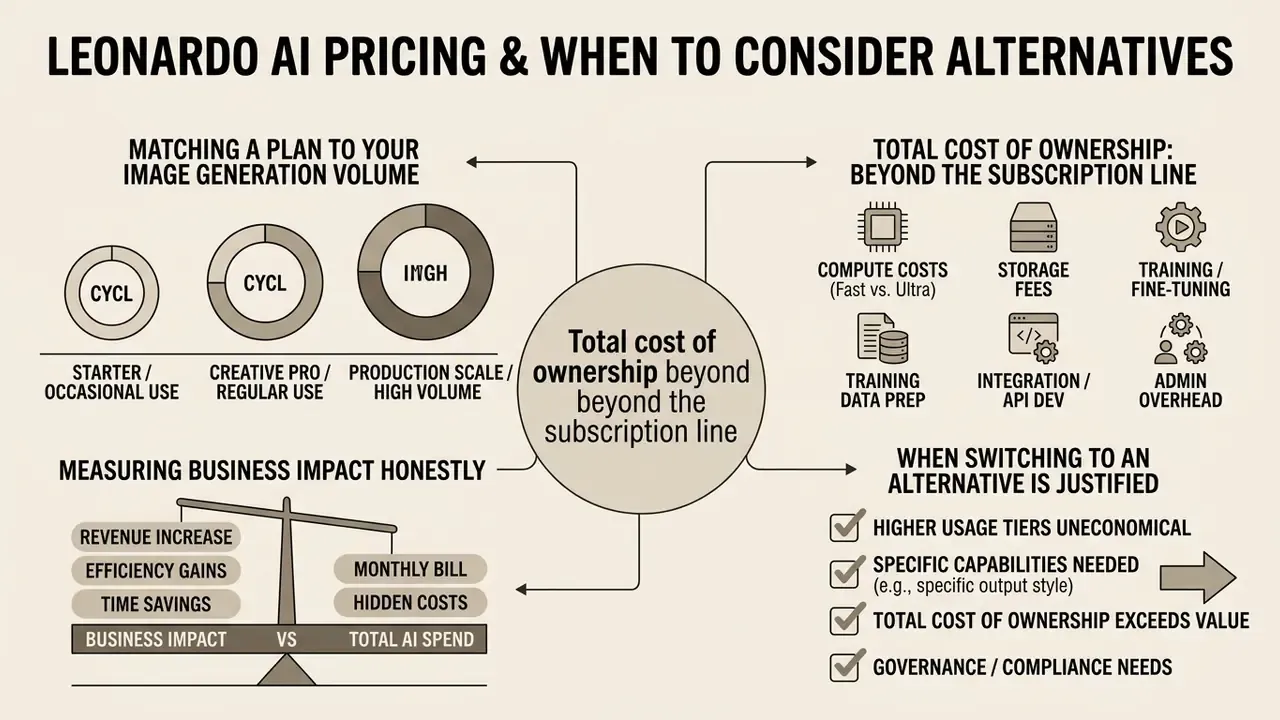
Evaluating Leonardo AI pricing means matching token consumption against real production volume, not headline plan names. The platform runs a tiered subscription model alongside pay-as-you-go API access (Leonardo.Ai Docs, 2026).
| Plan tier | Monthly cost (USD) | Token allocation | Key features and privacy |
|---|---|---|---|
| Free | $0 | 150 fast tokens per day | Public generation, basic features |
| Apprentice | $12 | 8,500 fast tokens per month | Private generation, 10 models |
| Artisan | $30 | 25,000 fast tokens per month | Relaxed generation, 20 models |
| Maestro | $60 | 60,000 fast tokens per month | Max concurrency, API access, 50 models |
Note: pricing and token structures verified via official platform documentation as of September 2026. Vendor pricing pages remain the primary source for current plan terms.
How to Match a Plan to Your Image Generation Volume
Plan sizing starts with an estimate of daily and monthly asset iterations. A standard high-resolution generation call consumes roughly 2 to 8 fast tokens, depending on active upscaling, prompt magic settings, and output count. Watch the reset logic, because it differs: the free allowance is a daily pool that expires every 24 hours, while paid allocations are monthly pools. So free-tier planning is modelled per day, paid-tier planning per month.
Monthly Token Requirement = (Daily Target Assets x Tokens Per Generation) x 30 Days
If a marketing team needs 100 refined assets daily, consuming around 500 tokens per day, the requirement quickly outgrows free and entry-level tiers and points to Artisan or Maestro. For bursty or automated pipelines, compare the fixed subscription against pay-as-you-go API spend for identical output volume. Variable API billing often wins when demand concentrates in short campaign windows instead of spreading evenly across the month.
When Switching to an Alternative AI Generator Is Justified
"Stable Diffusion and FLUX under Apache 2.0 licensing provide full control over model weights, zero data retention, and offline deployment on owned GPUs."
Two caveats matter for procurement. First, FLUX licensing varies by variant: Apache 2.0 applies to specific releases such as FLUX.1 [schnell] and FLUX.2 [klein] 4B, not to the whole brand family, so commercial eligibility must be confirmed per model version. Second, self-hosting transfers the control burden rather than removing it. The organization inherits responsibility for model provenance, weight integrity, patching, GPU capacity, and its own audit logging. The decision matrix is therefore straightforward: choose a hosted platform when speed and creative breadth dominate; choose self-hosting when data must never leave the perimeter, when weights must be modifiable, or when contractual zero-retention cannot be obtained. To evaluate options organized by technical migration trigger, consult the directory of AI Media Alternatives by Reason.
Which Tasks Leonardo AI Solves Best
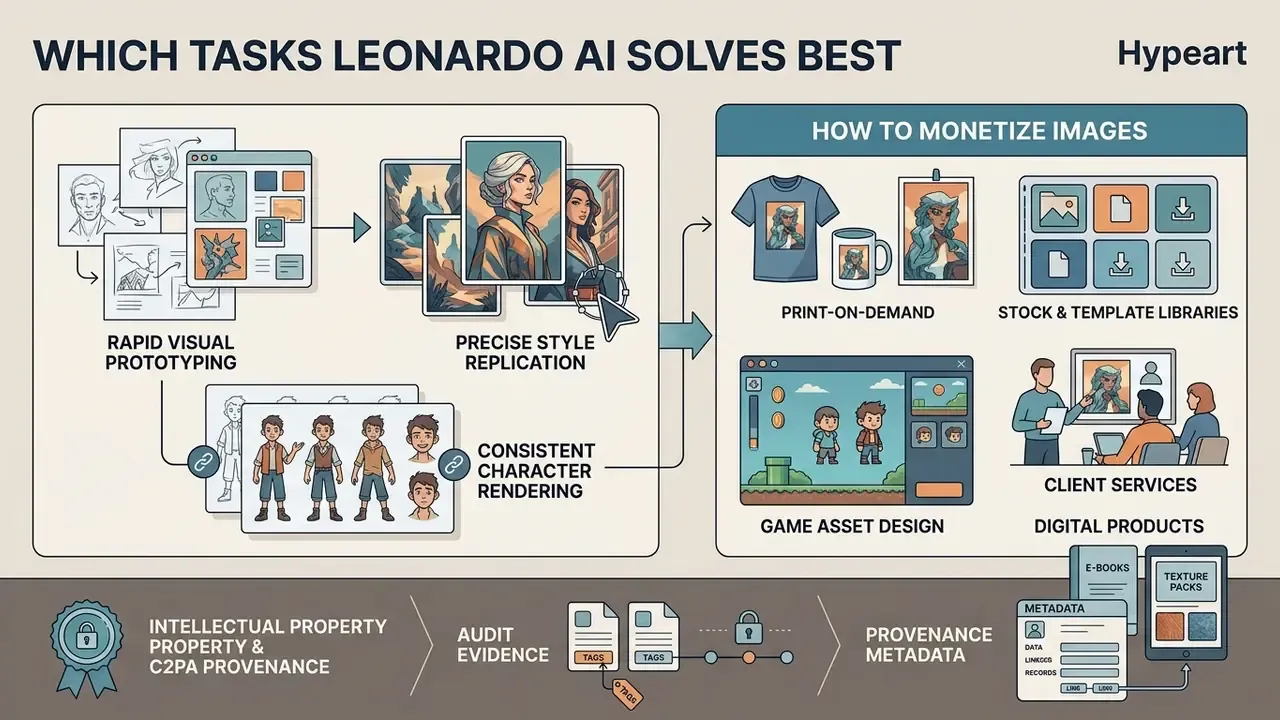
Leonardo AI peaks in creative work that needs rapid visual prototyping, precise style replication, and consistent character rendering. Design studios use it to generate production-ready concept art, background assets, and marketing imagery. The vendor positions concept art, graphic design, marketing, and advertising as core application areas, with published workflow guides for social media visuals and campaign stock-style imagery.
In enterprise social media workflows, the platform speeds up campaign delivery by automating multi-format asset creation. Teams hold brand consistency by locking custom fine-tuned LoRAs and enforcing standardized colour palettes. The strongest institutional fits observed in practice: internal communications and learning content, event and recruitment collateral, abstract editorial imagery for reports and board decks, product-concept visualization before photography budgets are committed, and game or interactive asset pipelines where texture and character consistency outrank photographic provenance.
Where does it fit poorly? Anything requiring documentary accuracy, real customer likenesses, or regulated claims imagery. That is not a tooling flaw, it is a scope boundary, and writing it into policy saves arguments later.
Commercial generators optimize for creation speed. Enterprise deployment, by contrast, demands clear oversight, documented prompts, and explicit data governance. Readers assessing the wider category can review the ground rules for commercial use of AI image generators before publishing externally. Balancing what artificial intelligence can now create against strict model risk management is what keeps visual innovation inside corporate compliance standards, rather than in front of an incident review.
How to Monetize Images Created in Leonardo AI
- Print-on-demandproduce repeating patterns with the Tiling function for apparel, merchandise, phone cases, and wall art, where seamless edges are a hard technical requirement.
- Stock and template librarieslicense high-resolution backgrounds, textures, and abstract compositions on microstock marketplaces. Permissible only on paid tiers carrying commercial terms, and only where the marketplace accepts AI-generated submissions and its disclosure rules are followed.
- Game asset designsell sprites, isometric tiles, 3D texture sets, and concept art packs on boutique asset marketplaces, the use case Leonardo's model library was originally tuned for.
- Client servicesdeliver concept boards, social campaign kits, and brand-consistent asset libraries as a service, using custom-trained Elements to lock a client's visual identity across deliverables.
- Digital productspackage prompt libraries, style guides, and template bundles, with generated imagery as the visual layer.
Before monetizing, confirm three things in writing: the plan tier grants commercial rights; no third-party trademark, identifiable person, or protected character appears in the output; and the destination marketplace's AI-content disclosure policy is satisfied.
Intellectual Property, C2PA Provenance, and Audit Evidence
Institutional Admission Checklist for a Visual Generative Tool
Checklist0 / 7
FAQ for Risk, Compliance, and Procurement Teams
Are free-tier generations really public?
Yes. Free-plan outputs default to public visibility and appear in the community feed. Private Mode is a paid-tier control, and it must be enabled before generation, not afterwards.
What are the free-tier limits exactly?
150 fast tokens per 24 hours, reset daily, with no rollover of unused balance. A single generation consumes roughly 2 to 8 tokens depending on settings.
Does the platform train on customer inputs?
This must be confirmed contractually with the vendor for your specific plan and region. Where no written zero-training commitment exists, treat every prompt and upload as an external disclosure.
Who owns the output?
Paid tiers grant commercial licensing terms. The free tier grants a non-exclusive, royalty-free licence while the platform retains rights to use, reproduce, modify, and distribute the content. Verify current terms on the vendor's pricing page before relying on any summary, including this one.
How do we reproduce an image for an audit?
Re-run the generation with the recorded seed, model ID and version, mode, scheduler, guidance scale, positive and negative prompt, and reference image hash. Disable automatic prompt enhancement, which rewrites inputs and quietly breaks reproducibility.
Can we run this without sending data to a vendor?
Not with the hosted platform. Zero-retention and offline requirements point to self-hosted Stable Diffusion or eligible FLUX variants on owned GPUs.
Is the API billed with the subscription?
No. API usage is pay-as-you-go with no monthly commitment and is procured separately from web plans.
Who should own this tool in the inventory?
A named business owner in marketing or design, with a documented second line reviewer. Ownership by "the AI team" tends to fail control testing, because no individual can be shown to have approved a specific published asset.
Internal Navigation and Hub References
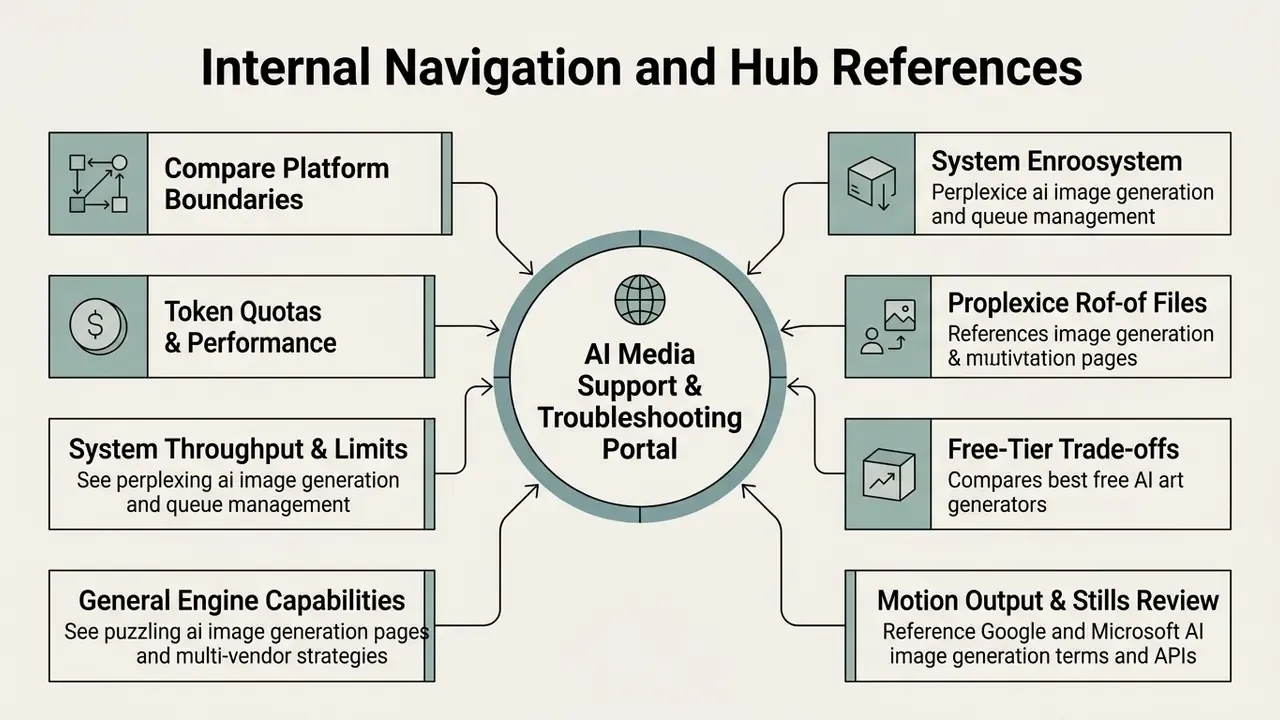
For detailed technical troubleshooting protocols, operational assistance, and platform-specific guides, visit the AI Media Support and Troubleshooting portal.
To compare platform boundaries, token quotas, and technical performance against competing tools, use the following resources:
- Reviewing system throughput and perplexity ai image generation limits helps operational teams manage queue latency.
- Analyzing general engine capabilities via perplexity ai image generation pages assists multi-vendor integration strategy.
- Assessing free-tier trade-offs across vendors through the comparison of best free AI art generators clarifies watermark, quota, and licensing constraints.
- Evaluating motion output alongside stills via the review of Google AI image generation terms and Microsoft AI image generation access supports multi-vendor redundancy planning.
Appendix A: Superseded and Withdrawn Statements
Retained for transparency and version traceability:
- Withdrawn vendor-verification statement: "Regarding vendor platform verification for third-party optimization services such as hypeart.ai: No verified information available." Removed from the main text, because an unverifiable third-party claim weakens the reliability of the governance guidance around it.
- Superseded quantitative claim: "Bypassing raw uploads reduced structural hallucinations by 38% and maintained consistent character proportions across multiple rendering runs." The 38% figure lacked a published methodology, sample definition, and baseline. It has been replaced with a qualitative practitioner observation plus a peer-reviewed source on input consistency.
- Superseded citation format: "(ICML, 2024)", an anonymous reference without paper title, authors, or URL, replaced by the full citation of On Discrete Prompt Optimization for Diffusion Models (ICML, 2024).