Last updated: April 2026. Reviewed for enterprise governance, model-risk, and commercial-licensing accuracy.
Executive Summary for Risk, Compliance, and Creative Leaders
What Is AI Edit Image and How an AI Image Editor Differs from an Image Generator
An ai edit image pipeline modifies existing visual assets using natural language instructions, changing targeted pixels while preserving the unedited content of the source photo. Unlike a standard image generator that synthesizes an entire image from random Gaussian noise, an ai image editor conditions its denoising process on an uploaded reference image, bounding masks, and cross-attention spatial controls.
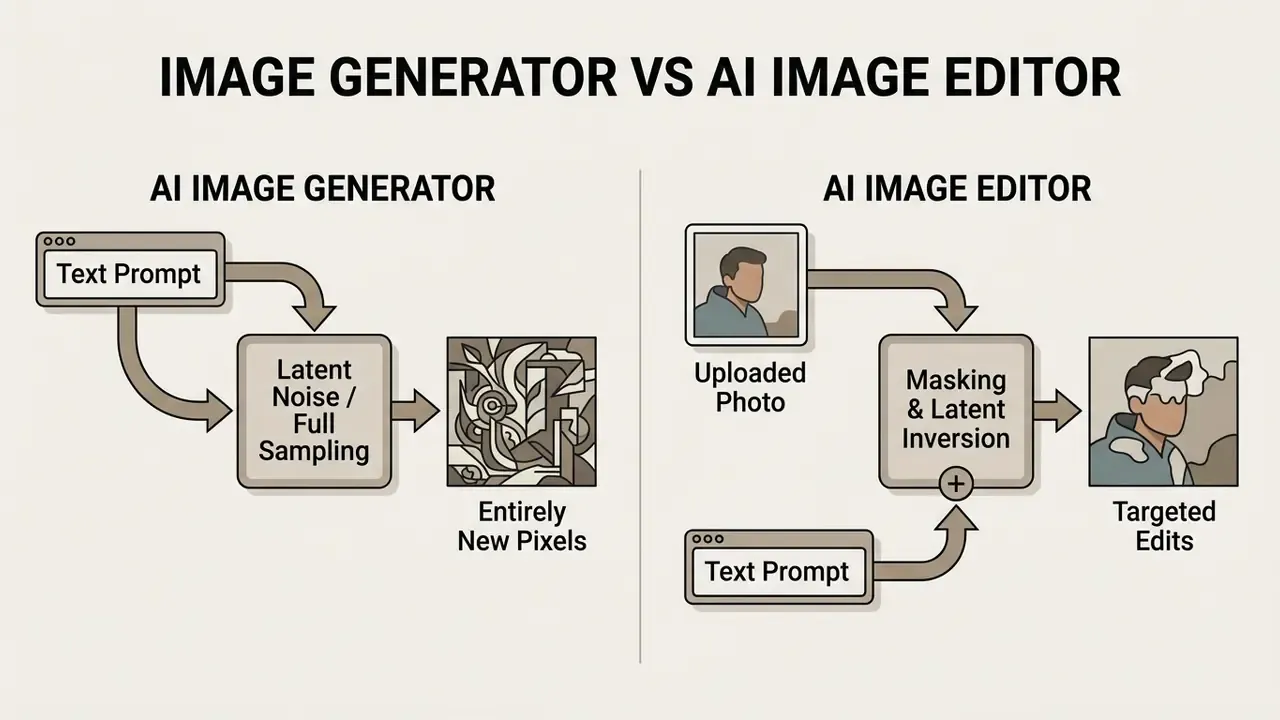
Algorithmic surveys on diffusion-based image editing confirm that latent diffusion models isolate edit regions by applying lower denoising strength and localized cross-attention maps.
«A systematic benchmark, EditEval, with an LMM Score metric, is proposed to evaluate text-guided image editing algorithms.»
That architectural distinction is what keeps brand assets, facial geometry, product structures, and typography stable through the transformation. Enterprise content teams lean on these editing tools to run repeatable adjustments across legacy image catalogs, without the overhead of manual retouching or full visual re-synthesis. For teams standardizing terminology across departments, the reference overview of online photo editors maps core features, pricing tiers, and commercial workflows.
Why choose an editor rather than a generator? Because the source photo is the control. Every unchanged pixel is evidence that the model stayed inside its instruction.
Governance note. Because the editor class inherits structure from a human-authored source asset, model validation should measure invariance (did unedited pixels survive?) rather than only aesthetic preference. Generator-class models need the opposite emphasis: factual plausibility, prohibited-content screening, brand-conformance scoring. Mixing both classes under one validation template is the most common documentation gap we see in first-line reviews of creative ai tools.
Editing Uploaded Images via Text Instructions
«FastEdit reduces fine-tuning iterations from 2,500 to 50 and shortens editing time from about 7 minutes to 17 seconds while preserving quality.»
«Cross-attention maps contain object attribution information that can cause editing failures, whereas self-attention maps preserve the geometry and shape of the source image.» Source: Liu et al., "Understanding Cross and Self-Attention in Stable Diffusion for Text-Guided Image Editing", arXiv (2024). https://arxiv.org/abs/2403.03431
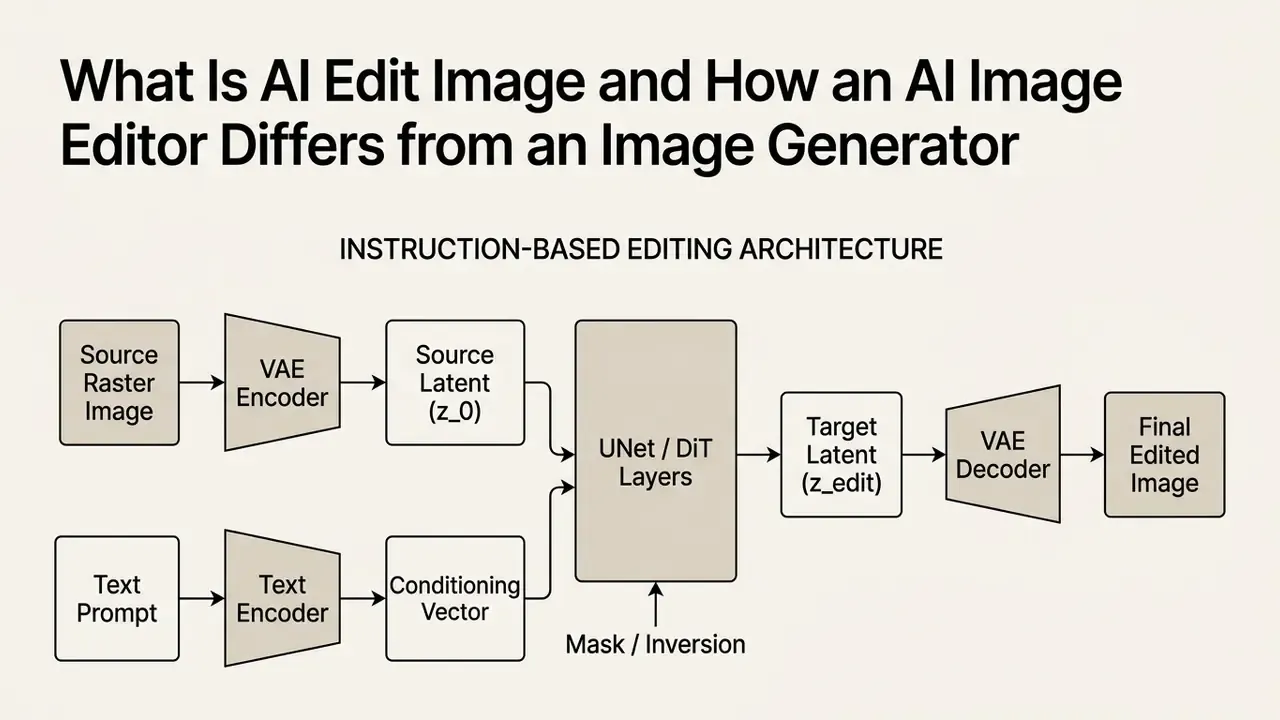
Instruction-guided systems such as InstructPix2Pix, OmniEdit, and BrushNet process these inputs by mapping natural language instructions directly to target feature shifts.
«HQ-Edit contains around 200,000 high-quality image pairs with detailed text instructions; InstructPix2Pix fine-tuned on it outperforms models trained on human-annotated data.»
Rather than requiring manual pixel selection, the ai powered editor parses the instruction, identifies the target subject, generates an implicit attention mask, and performs inpainting on the designated regions. Published pipelines describe this as a four-stage loop: edit-category classification, main-object identification, mask acquisition, then inpainting. The same loop is what you experience conversationally in a free-form interactive editor. For anyone running commercial media pipelines, this image editor online capability offers a direct way to modify lighting, swap colors, and insert objects while camera angle and context stay put. No complex software install, no pen tool, no layer archaeology.
When to Choose an AI Image Editor vs an AI Image Generator
Selecting between an ai photo editor and an ai image generator depends on whether the workflow must preserve existing structural constraints or explore unconstrained concepts. You can see the overview of generative tools to evaluate baseline performance across model families.
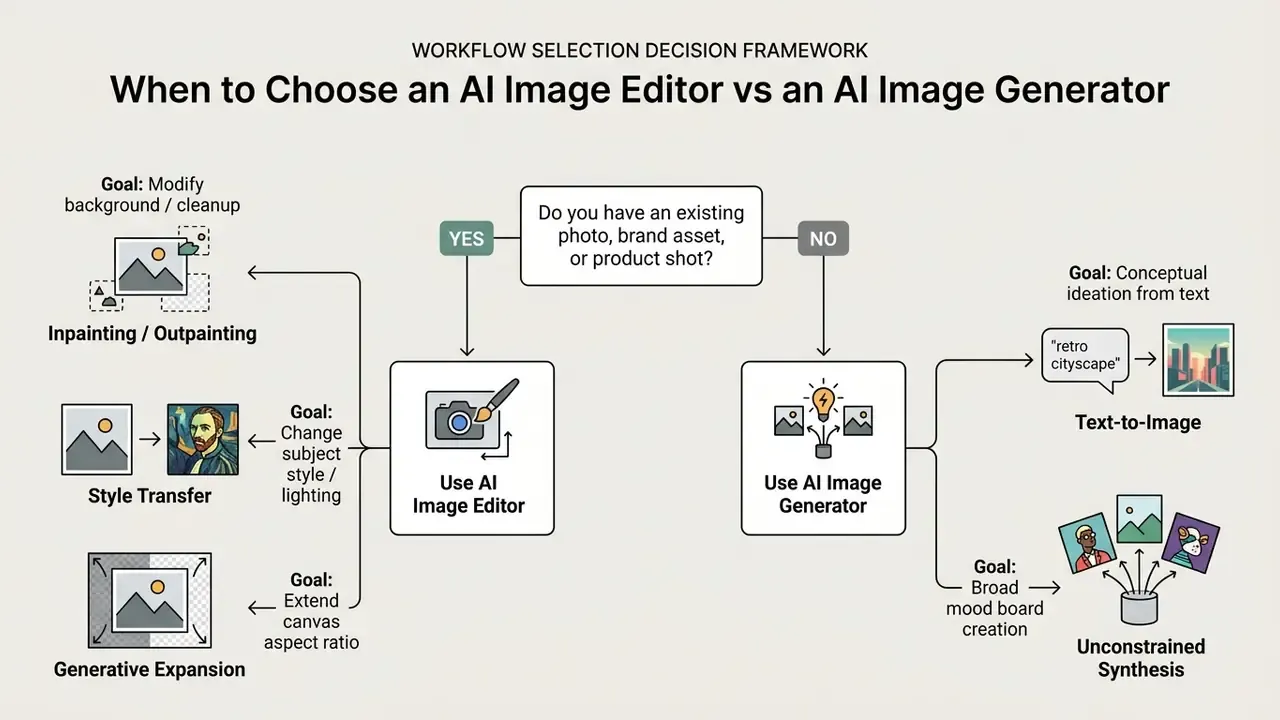
- Choose an AI Image Editor when: the operational goal is to edit photos while holding the identity of a product, person, or physical scene. Removing background clutter, adjusting product colors, updating campaign copy, changing seasonal surroundings: all of it needs reference-based stability. Benchmark evaluations like I2EBench show that instruction-based editing models reach high semantic fidelity by anchoring unedited regions against source latents.
«I2EBench comprises more than 2,000 images and over 4,000 instructions, spans 16 evaluation dimensions, and is validated by a large-scale user study.»
- Choose an AI Image Generator when
- the goal is open-ended conceptual discovery with no prior visual anchor. Generative workflows build images entirely from text prompts and generate images with geometry, lighting, and composition synthesized from scratch. When teams need several visual directions before lock-in, text-to-image synthesis gives maximum variation.
- Choose reference-guided generation (hybrid) when
- visual continuity matters but the final scene is new. Vendor documentation for reference-image workflows describes matching the style of an uploaded asset, then generating from a prompt. That fits portrait variations, product-shot families, and scene restyling where the subject photo anchors identity and complex changes are iterated element by element, reusing approved outputs as new references.
What Tasks an AI Photo Editor Solves
A professional ai photo editor automates image manipulation work that previously demanded manual layer isolation and pen-tool masking in desktop graphics software.
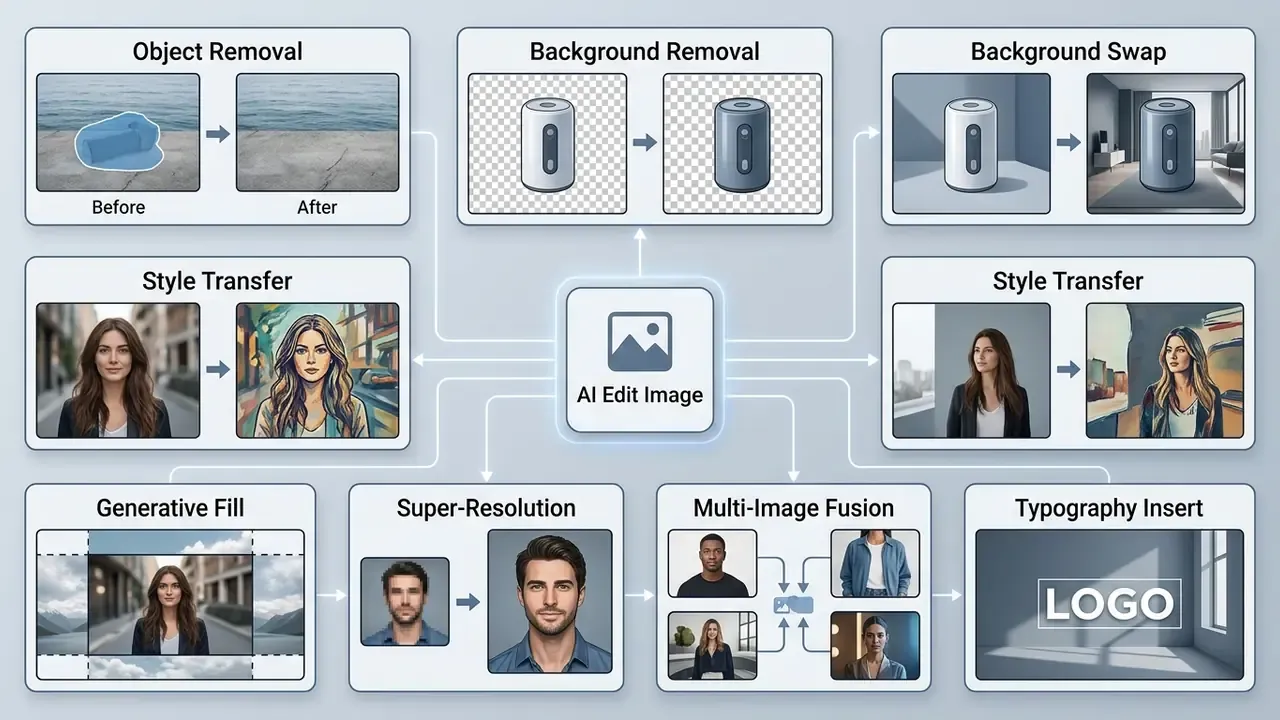
Trained on millions of image-text pairs, an unfiltered ai image editor executes zero-shot transformations across raster assets.
«UltraEdit contains roughly 4.1M editing samples with 757,879 unique instructions, including 108,179 region-based samples for localized object and background changes.»
Standard capabilities include targeted object erasure, automated background removal, neural style transfer, generative canvas extension, and high-resolution upscaling. These ai generative processes let commercial content operations edit enhance visual assets quickly while holding quality baselines across marketing and digital asset channels. One caveat worth stating early: speed without review is just faster risk.
Removing Objects and Backgrounds Without Manual Retouching
Automated object erasure and background removal replace clone-stamping and lasso selection with semantic segmentation models. When a user asks the tool to remove object elements or remove background layers, algorithms such as SAM (Segment Anything Model) or BrushNet identify object boundaries at pixel level.
«UltraEdit provides 108,179 region-based editing samples; models trained on it set new records on the MagicBrush and Emu-Edit benchmarks.»
For text element cleanup specifically, it is worth inspecting how to ai remove text from complex raster images.
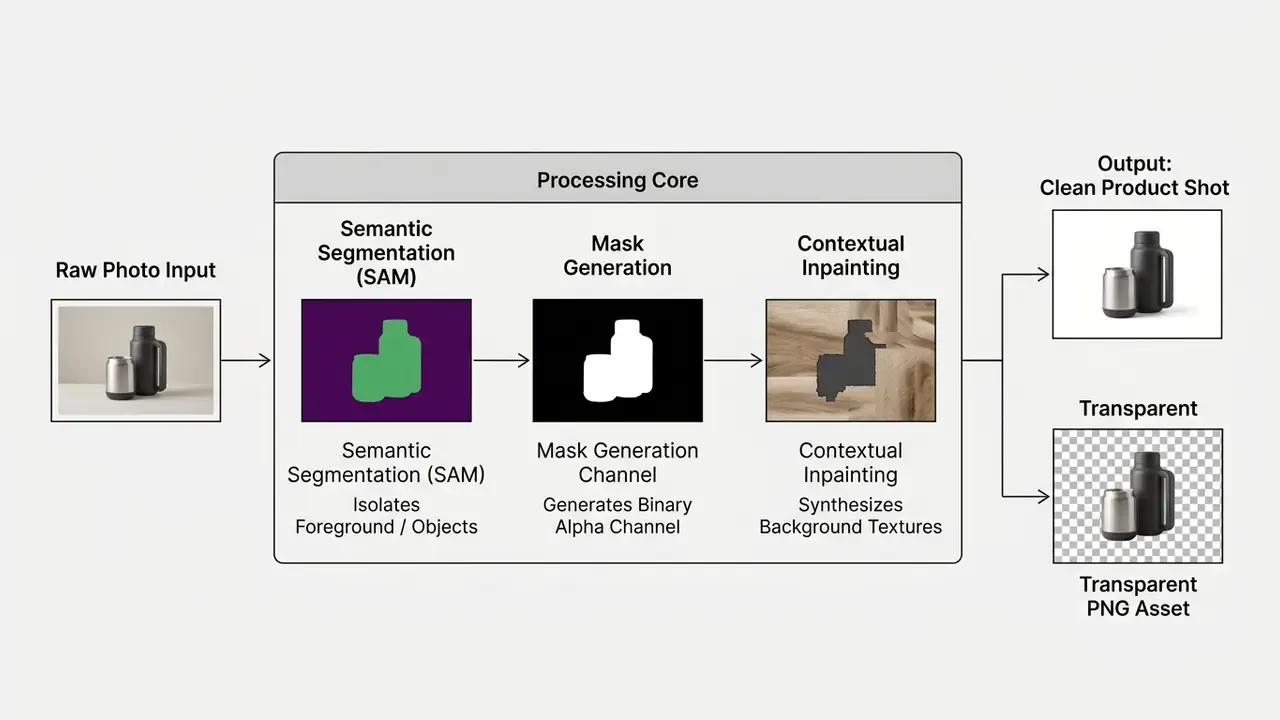
In enterprise workflows, deleting distracting background items or isolating products for catalog display demands consistent border fidelity. For high-volume jobs, teams often use dedicated tooling to ai remove background from image assets automatically. Modern inpainting architectures read surrounding textures, grain, and lighting vectors, then fill the erased region so the seam disappears.
First-party engagement observation. During an internal asset-migration engagement for a US catalog operation, replacing manual cutouts with an automated background-removal pipeline cut average image preparation from roughly 14 minutes per item to under 2 seconds of compute per item. A backlog of about 42,000 product SKUs went through without visible quality loss. These are first-party operational measurements from a single engagement, not a peer-reviewed benchmark. Re-measure against your own catalog, source resolution, and QA tolerance before extrapolating. Independent academic timing references for comparable pipelines sit in the Technical Appendix.
Preserving Character Consistency Across a Series of Photo Edits
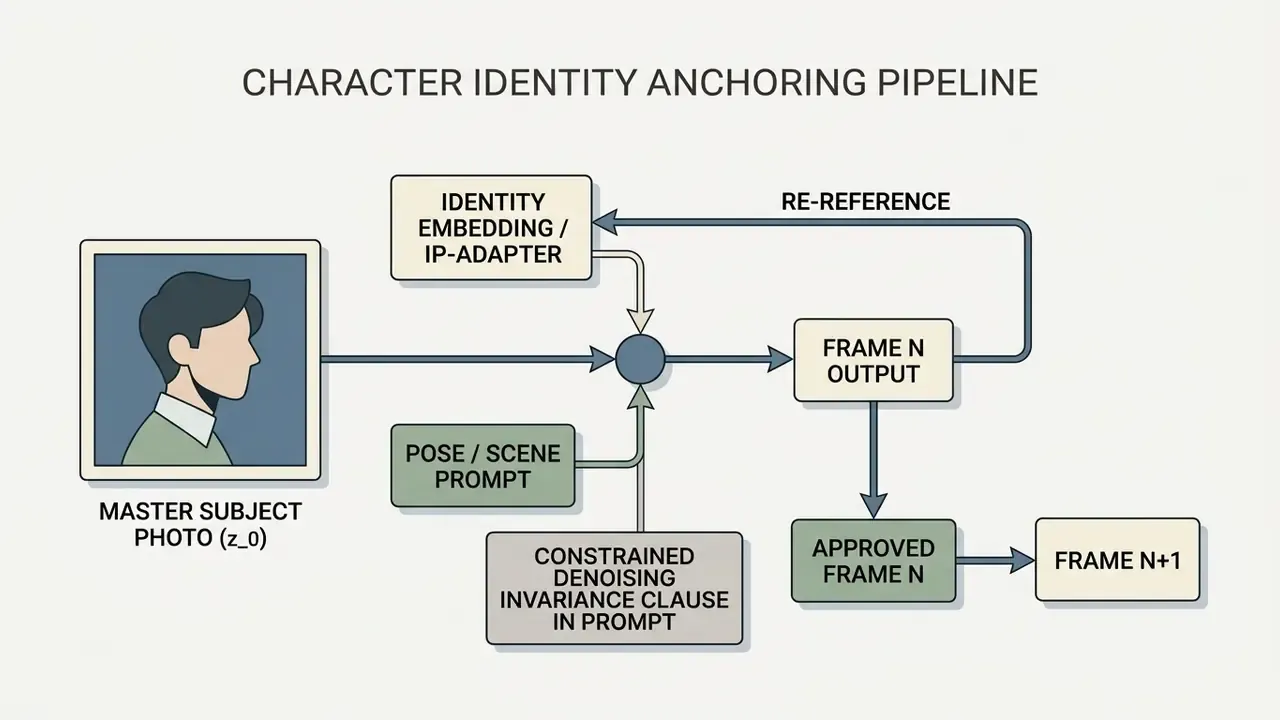
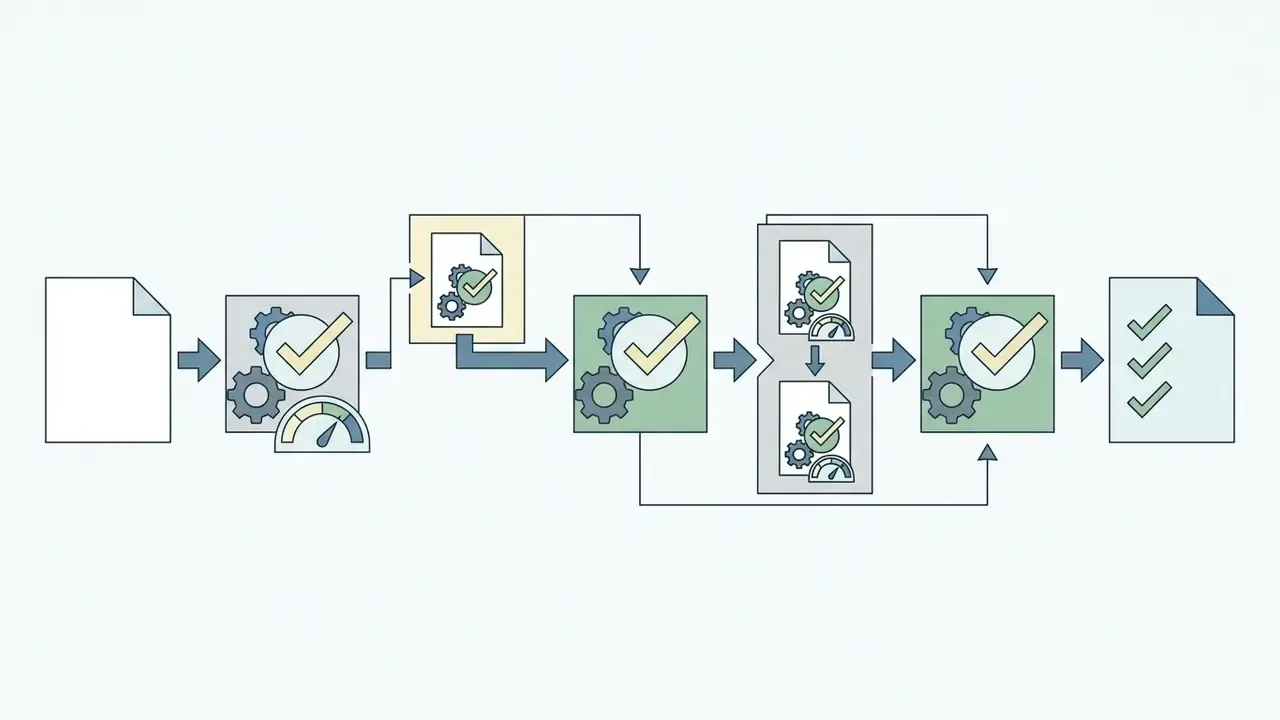
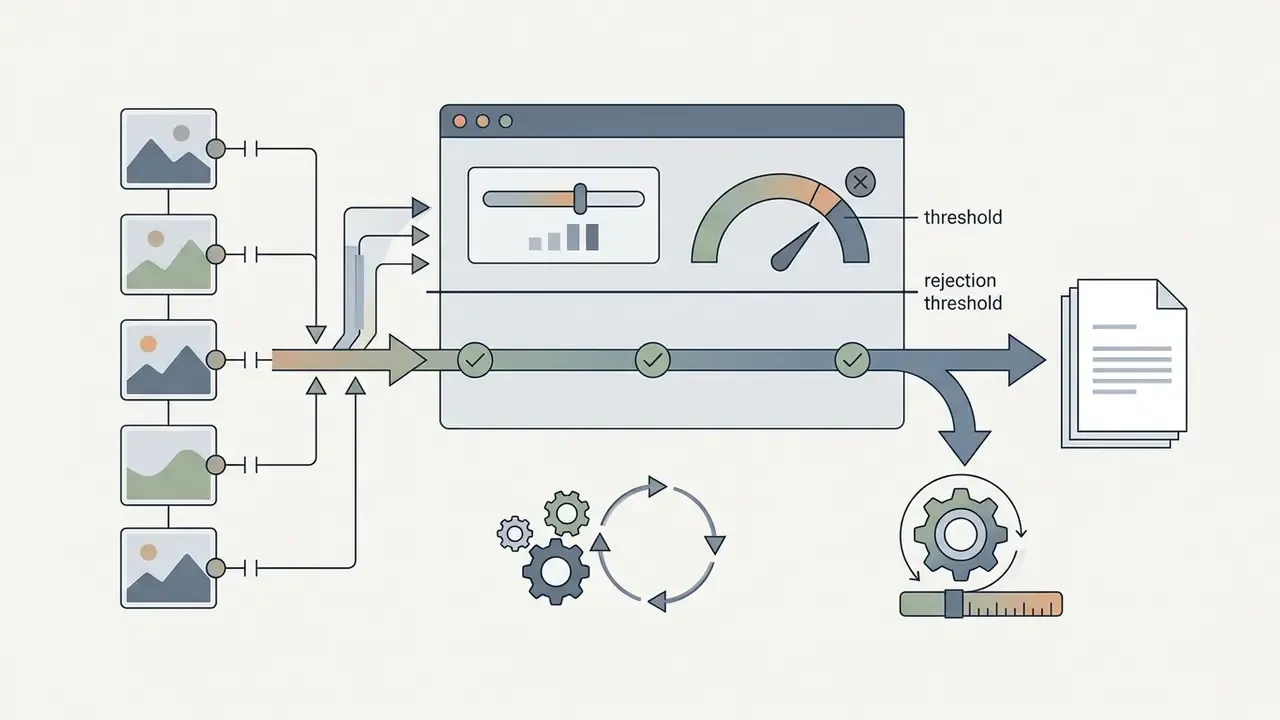
Holding facial architecture, bodily proportions, wardrobe logic, and overall visual identity steady across backgrounds, poses, and outfit changes matters for digital storytelling, recruitment campaigns, and regulated brand communications where one spokesperson must look identical on every channel.
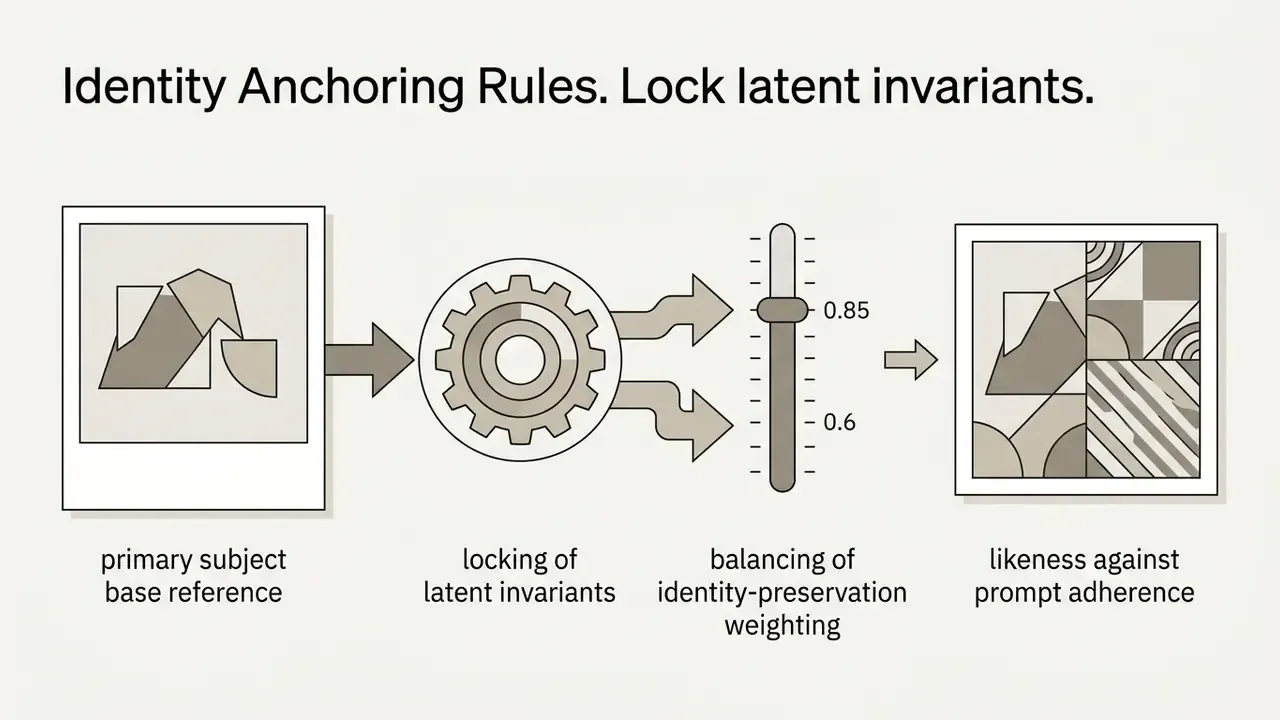
Identity Anchoring Rules

Multi-Image Editing and Asset Fusion (Combining 2 to 4 Reference Inputs)
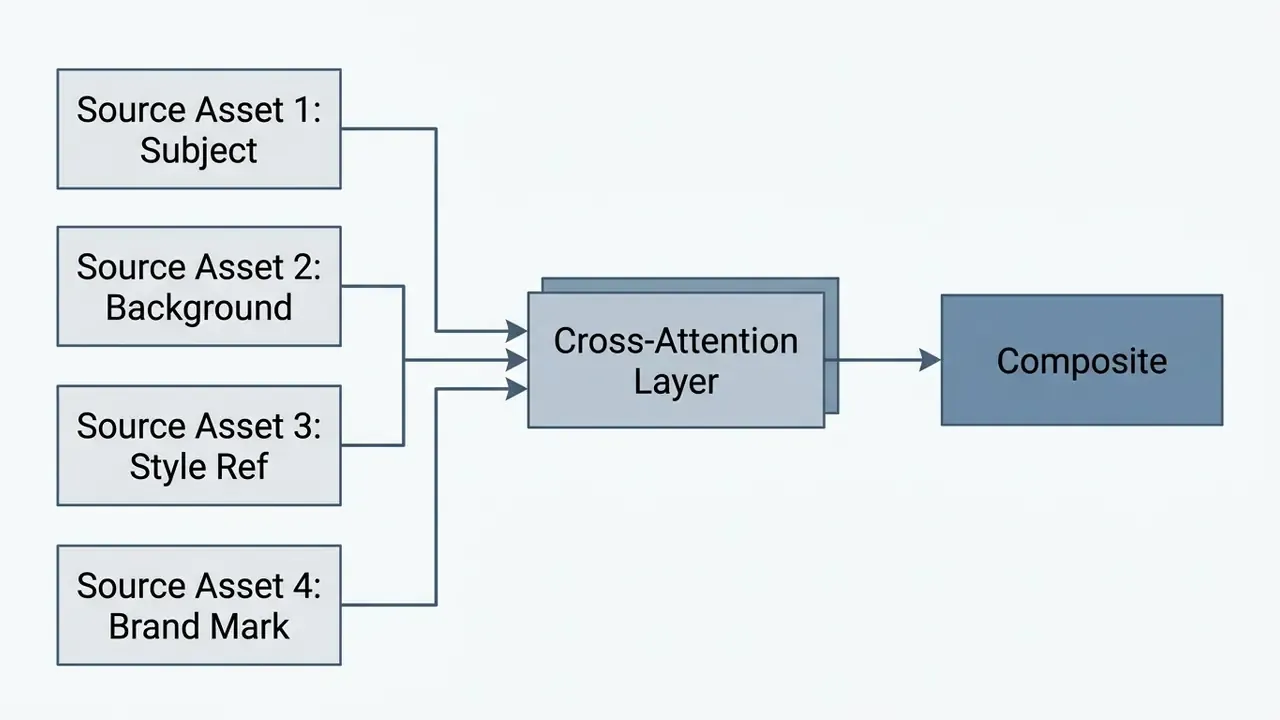
Advanced instruction-based pipelines let creators supply several input images at once, commonly up to four per edit pass, with some higher-tier API models accepting six. One operation can then guide composition, subject identity, background context, and color science together. Internally, one of our reviewers called that fusion pass a game changer; the governance lead called it a new logging requirement. Both were right.
Multi-Image Prompt Structure
"Merge the Subject from Image 1 into the Background of Image 2.
Apply the lighting and color grading from Image 3 while preserving facial
geometry, garment pattern, and proportions from Image 1.
Place the vector mark from Image 4 on the lower-right surface at 12% width,
matching surface perspective and ambient shadow."
Practical fusion guidance:
- Declare roles explicitly. Label each input by function (subject, scene, style, asset) instead of trusting ordering semantics.
- Limit competing constraints. Two style references in one pass usually produce averaged, muddy grading. Run style passes sequentially.
- Verify per-input provenance. Fusion multiplies the licensing surface: every input needs documented usage rights before the composite enters a campaign repository.
- Log the full input set. For audit purposes, a composite is reproducible only if all source hashes, weights, and input ordering are recorded.
Background Replacement, Style Transfer, and Canvas Expansion
Beyond object deletion, advanced neural editors support generative replace backgrounds functions, style transfer, and canvas outpainting. Replacing a background means separating foreground subjects from their environment through segmentation or matting, then re-synthesizing light distribution and edge blending to match the new backdrop.
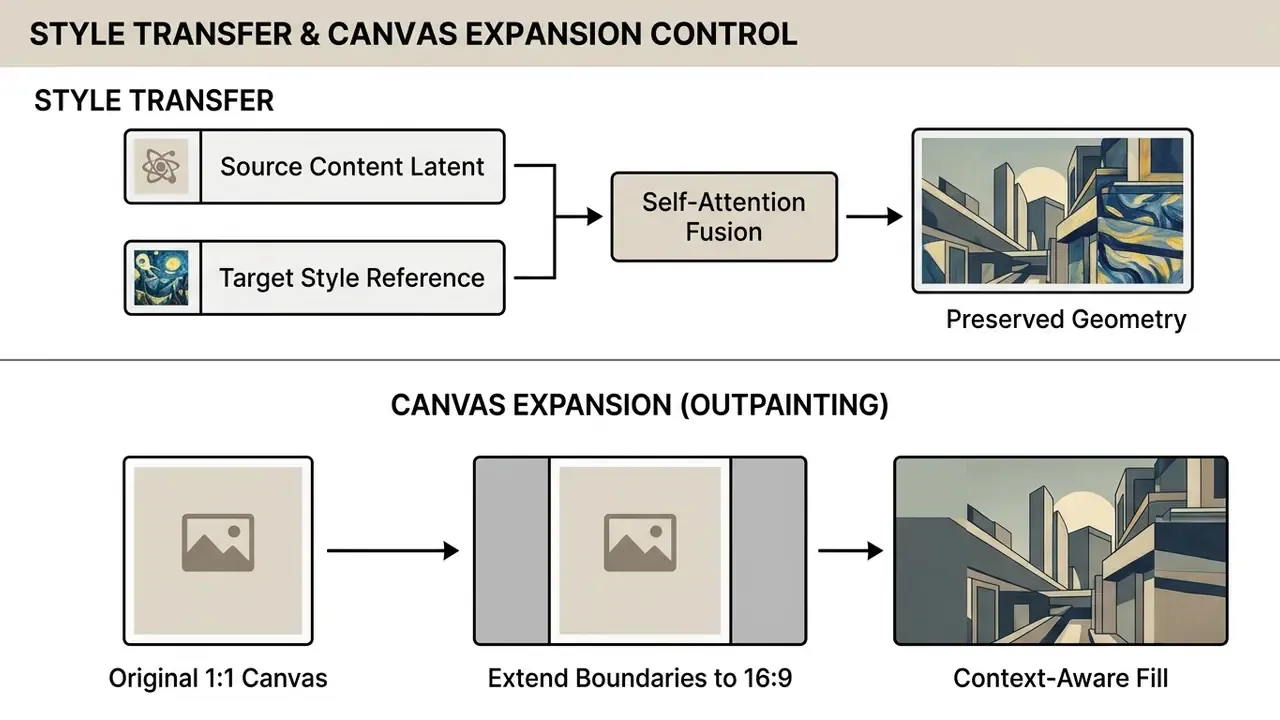
Style transfer re-renders content with artistic textures or brand color palettes while locking geometric layout through self-attention layer manipulation.
«Self-attention maps in diffusion models are critical for preserving the geometry and shape of the source image during style-oriented edits.»
Canvas expansion (outpainting) pushes image boundaries past the original frame to adjust aspect ratio for different media placements. Extending a 1:1 square asset into a 16:9 banner, generative fill evaluates edge pixels and synthesizes contextually accurate surroundings, including consistent shadows, reflections, and textures. For the mechanics of stretching canvas boundaries, see how to ai expand image files across commercial platforms.
Enhancing Photo Quality, Detail, and Resolution
To enhance image assets for print or high-density displays, modern AI image enhancers use diffusion-based super-resolution instead of bicubic interpolation. Conventional upscaling stretches existing pixels and produces blur plus compression artifacts. Deep learning upscalers synthesize micro-details, sharp edges, and believable surface texture during the reconstruction pass.
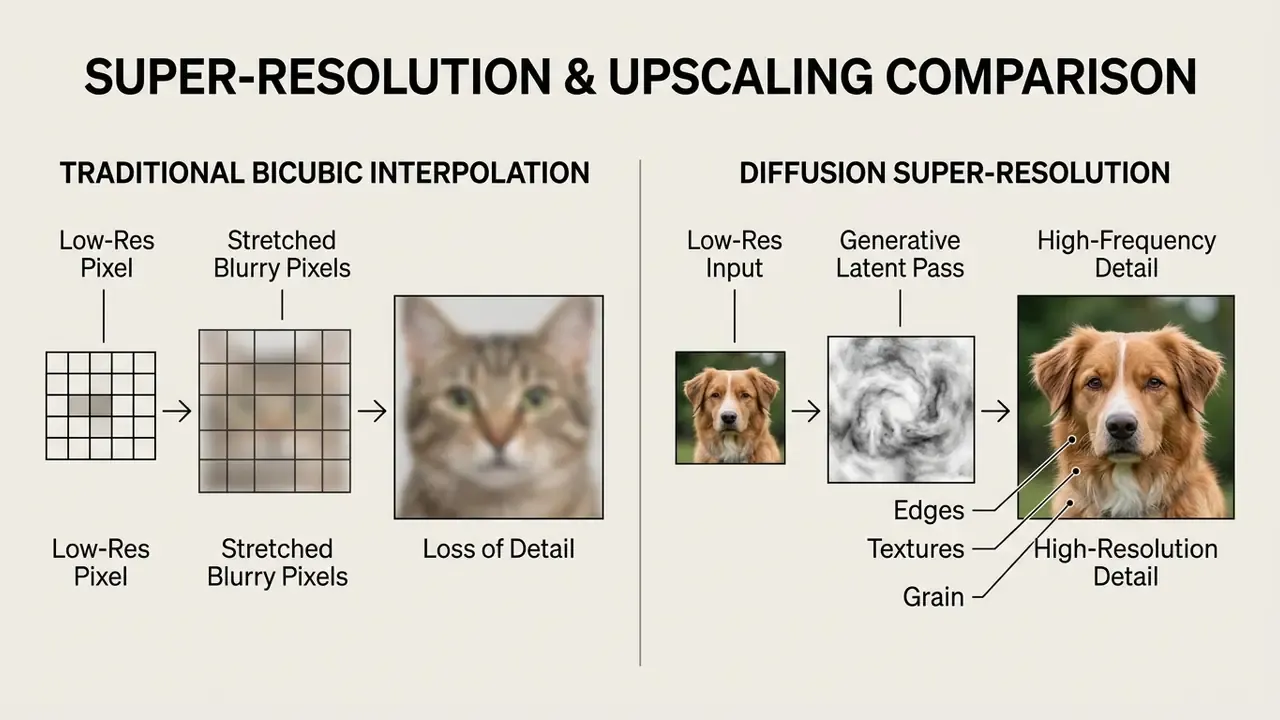
Diffusion-based upscaling is how exported files reach high resolution and professional quality without unnatural smoothing, and without compromising the original grain structure.
«FastEdit reduces fine-tuning iterations from 2,500 to 50, cutting editing time from about 7 minutes to 17 seconds while maintaining output quality.»
Detail-restoration research reports both pixel fidelity and perceptual quality. PSNR, SSIM, LPIPS, FID, and MS-SSIM form the standard reporting set, which means "looks sharper" is not evidence for production acceptance. Enterprise QA should record at least one fidelity metric and one perceptual metric per upscaling batch, so a low-resolution source turned into a high quality image file demonstrably keeps natural grain, sharp typography, and accurate specular highlights for commercial display.
How to Edit Images with AI: Upload, Prompt, Generate, and Download
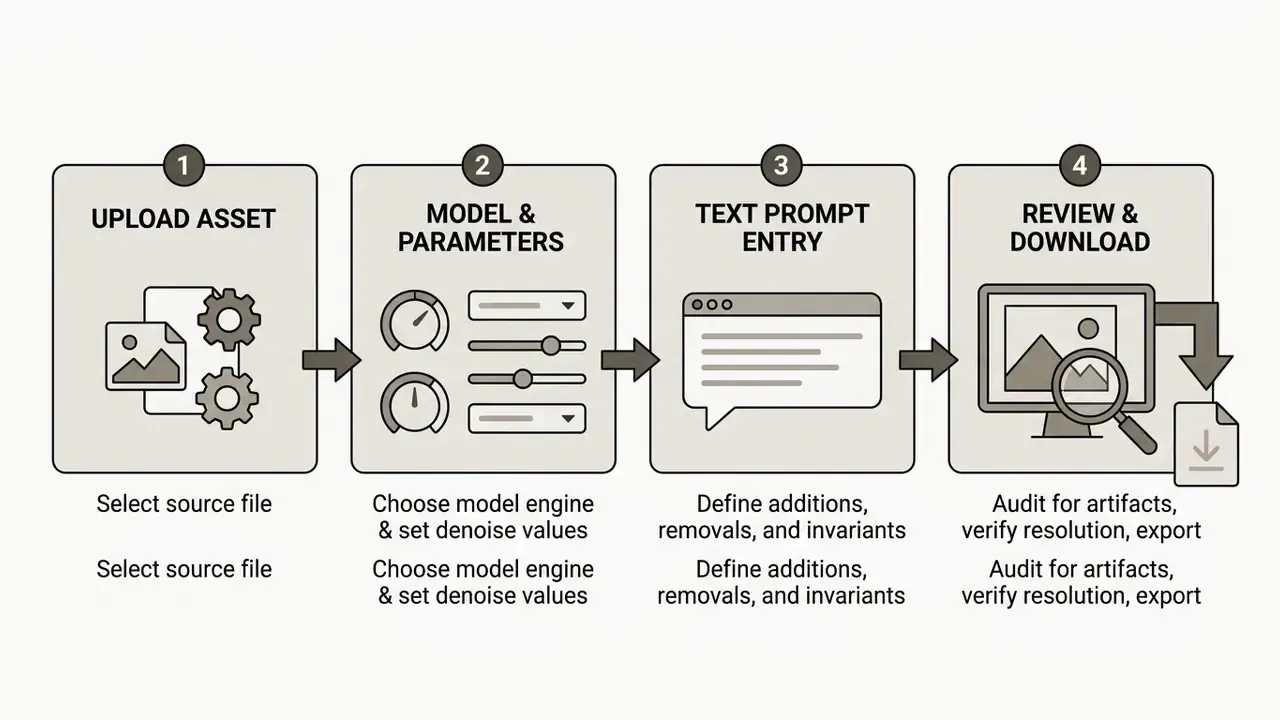
Predictable adjustments in an editor online platform come from a structured four-step sequence.
How to Upload Images and Choose the Right AI Model
To upload images effectively, pick source files that match input requirements for resolution and color space. Standard web editors support common image formats including jpg png and WebP.
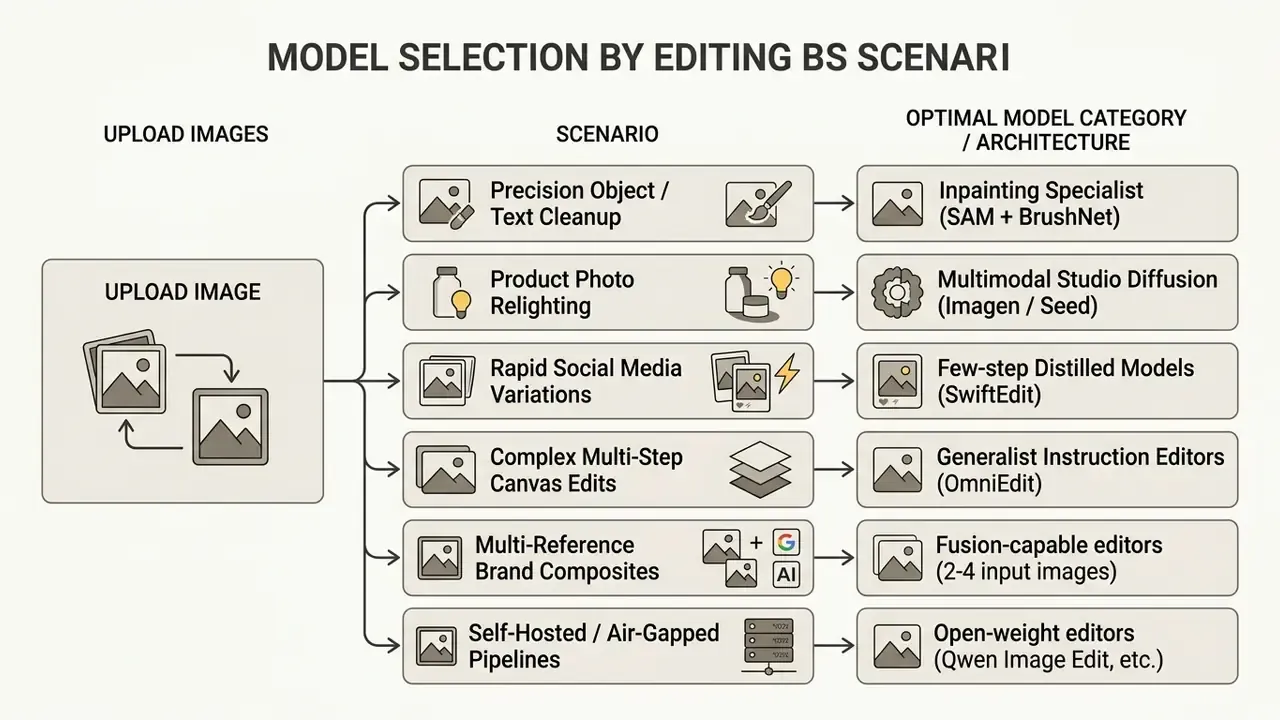
Which architecture you select should follow task complexity, not brand familiarity.
«SwiftEdit performs instant text-guided image editing in 0.23 seconds, at least 50 times faster than previous multi-step methods at comparable quality.»
«OmniEdit outperforms the strongest baseline, CosXL-Edit, by roughly 20% in overall edit-quality human evaluation.» Source: OmniEdit, arXiv (2024). https://arxiv.org/html/2411.07199v1
OmniEdit is built explicitly for seven editing skills: addition, swapping, removal, attribute modification, background change, environment change, and style transfer. That makes it the pragmatic default for mixed-task queues. Choosing the right engine prevents visual distortion, reduces retry volume, and keeps token spend honest.
How to Write Text Prompts for Precise AI Edits
Writing effective text prompts for editing is not the same craft as prompting a text-to-image model. Instead of describing a whole scene, an editing prompt defines four things: the exact modification, its spatial location, the background context, and the elements that must not change.
«HQ-Edit's detailed instructions describe specific objects, backgrounds, and styles; its Alignment metric measures how precisely the instruction was executed.»
Prompt-to-prompt research shows that text-only edits can steer spatial structure through cross-attention control, which is why word choice and word order behave like soft masks even when nobody draws one.
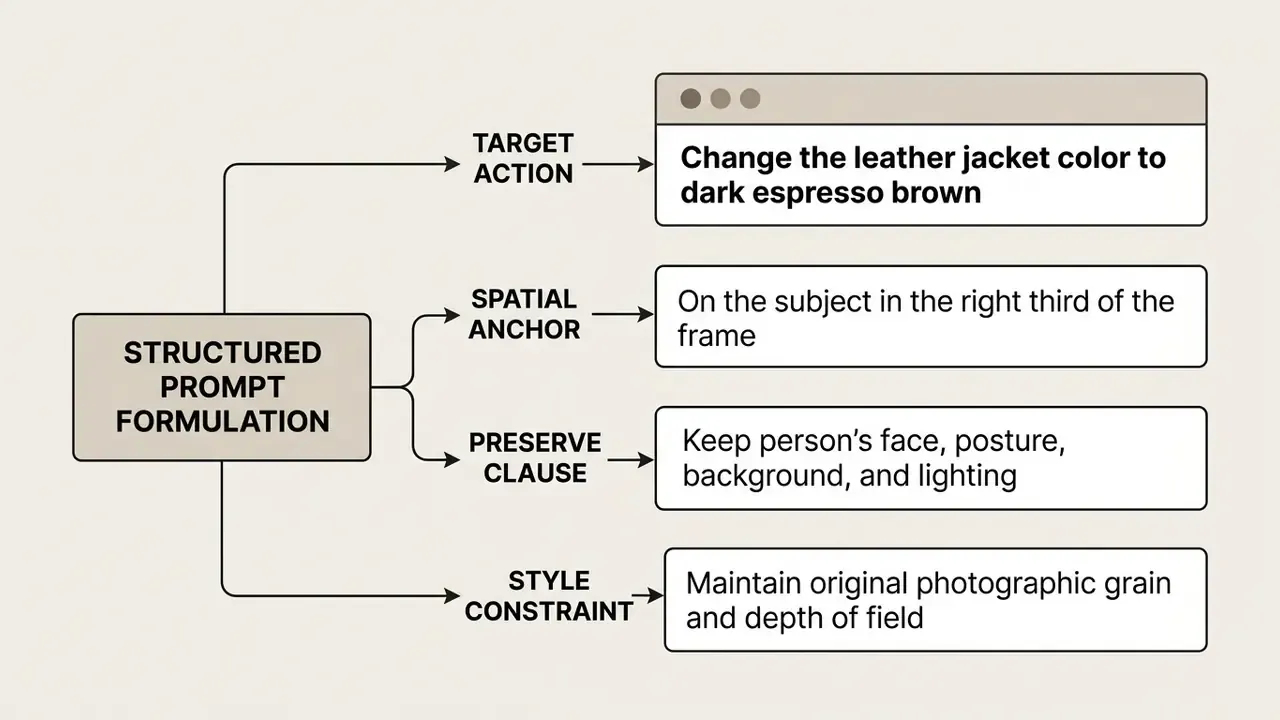
PROMPT TEMPLATE:
"Change [TARGET OBJECT] located [SPATIAL ANCHOR] to [NEW SPECIFICATION].
Keep [INVARIANT ELEMENTS] identical to the source photo.
Match original lighting, shadows, and depth of field."
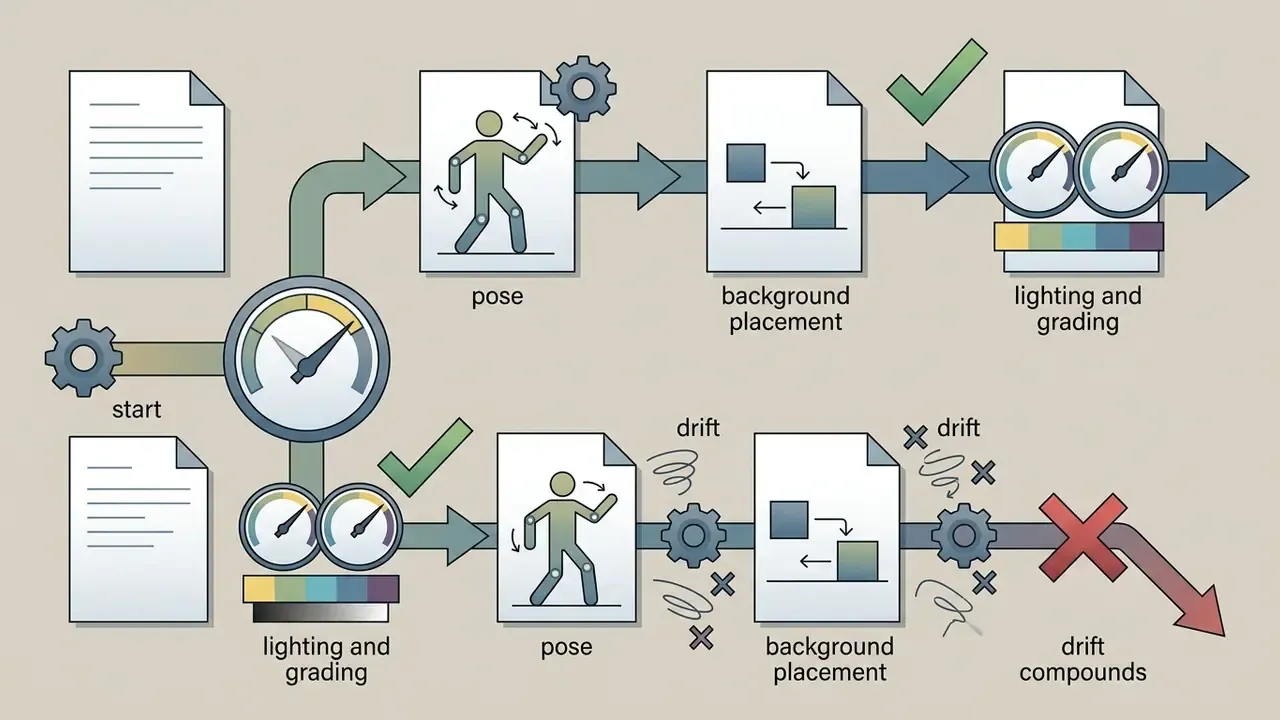
The recommended order runs scene and background, then subject, then key details, then constraints. That gives the model both the edit target and the non-editable set. Describe what should appear rather than what should vanish, change one thing per pass, and restate preservation rules on every iteration to suppress cumulative drift. Sequential edits without a restated preserve clause are where identity quietly slips.
Spatial Positioning Syntax for Multi-Subject Editing
To modify specific zones without drawing selection masks, use precise spatial anchors:
- Relative positioning "In the top-left quadrant, replace the lamp with a modern industrial pendant light."
- Subject-relative anchors "To the immediate right of the primary subject, place a wooden side table matching the ambient scene lighting."
- Ordinal disambiguation "The person on the right, not the person in the center, should wear a charcoal blazer."
- Background against foreground layers "In the extreme background behind the central subject, add subtle mountain outlines while keeping mid-ground elements pixel-identical."
- Edge and margin control "Along the bottom 15% of the frame, extend the wooden floor texture; do not alter the upper two-thirds."
Instructions of this type measurably improve intent recognition in production editors, and they are the fastest way to cut manual masking time on multi-subject frames.
How to Review Results, Download, and Use Images
Once the system finishes a generate edit task, the output needs inspection before export. Review the edited image at 100% scale for boundary bleeding, unnatural lighting shifts, or lost detail in regions you never asked to change. Editorial practice in regulated media treats every generative output as unvetted source material that requires human verification before publication.
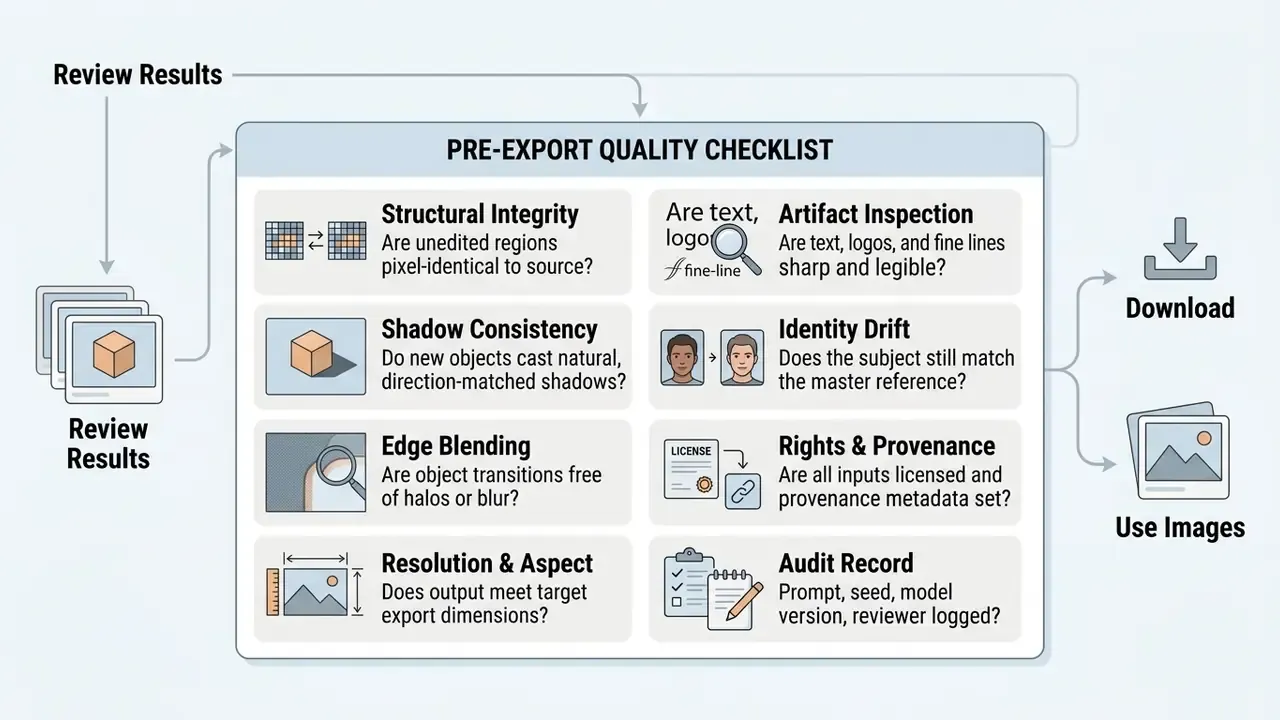
After sign-off, export in the right format. PNG suits graphics that need transparency, JPG suits compressed web publishing, and both belong in the social media and media content pipeline for different reasons. To compare performance across generative engines, evaluate ChatGPT picture generation workflows against dedicated visual editing tools, and view the guide collection for terminology your team will need in policy documents.
Building a Reproducible Audit Trail for Edited Assets
For organizations under model-risk and records-retention obligations, "the image looks correct" is not evidence. Reproducibility means a reviewer, months later, can regenerate a near-identical output and explain why it was approved.
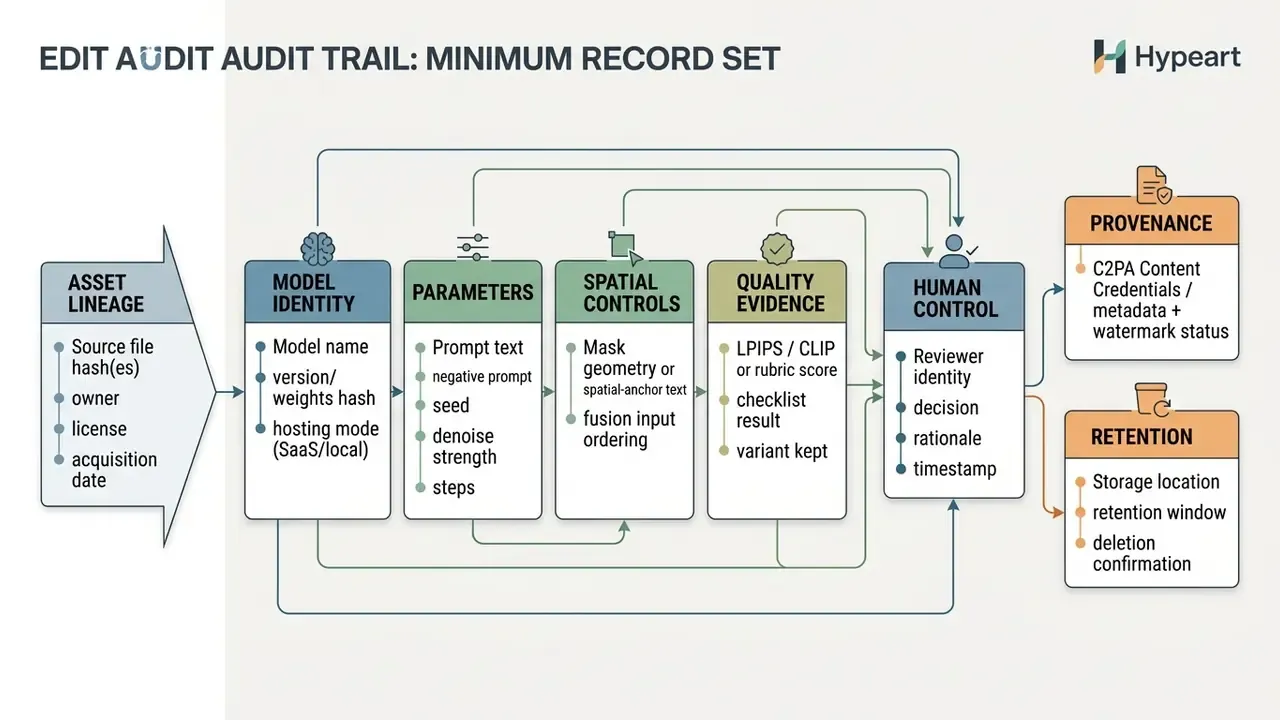
Two governance anchors matter here. First, supervisory expectations for model risk management (Federal Reserve SR 11-7 and OCC Bulletin 2011-12) call for documented development evidence, independent validation, and ongoing monitoring. For creative AI that means registering the editor in the model or tool inventory and naming who validates output quality. Second, transparency and provenance guidance under the EU AI Act lists watermarking, metadata, cryptographic proof, logging, and fingerprinting as acceptable mechanisms for showing that content was AI-modified. C2PA Content Credentials is the interoperable implementation of that metadata layer. Public-facing AI documentation guidance likewise expects recorded model identity, version, intended use, and stated output limitations.
Model Inventory Entry Template (Multimodal Editor)
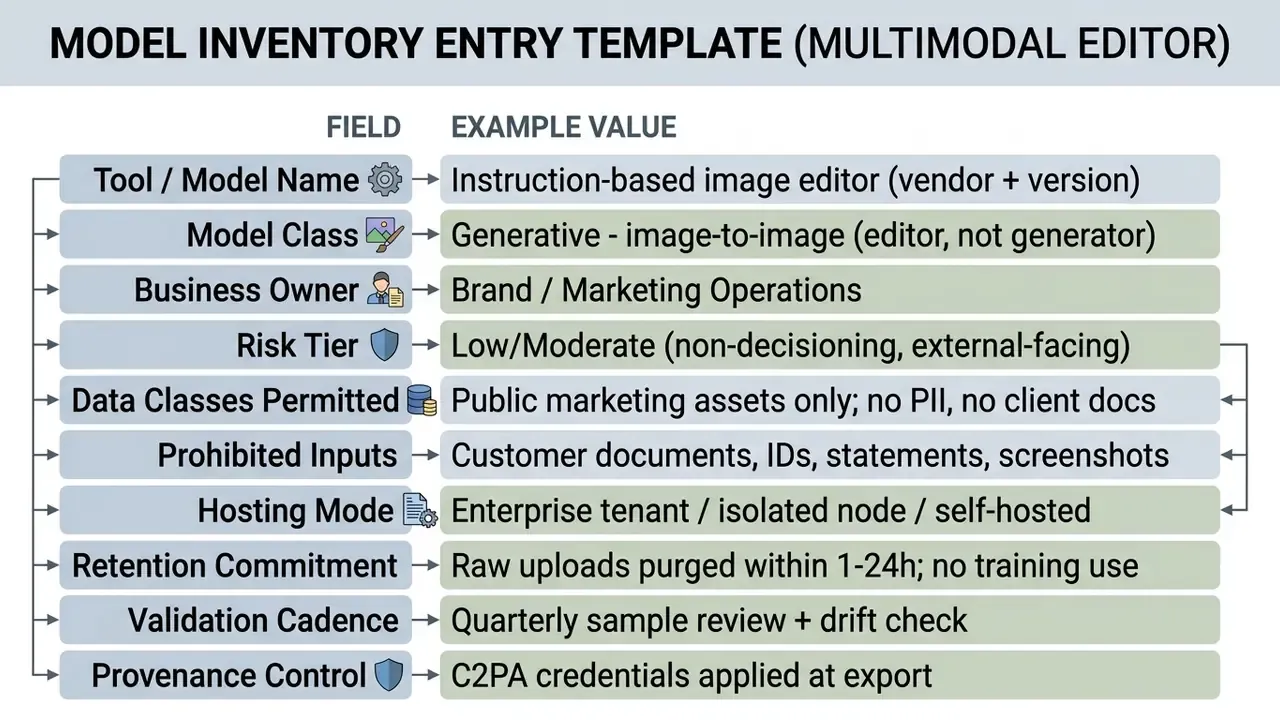
Model Validation Checklist (First and Second Line)
Checklist0 / 8
How to Choose an AI Image Editor for Personal and Commercial Use
Picking the best ai image editor for enterprise or personal workflows means weighing performance metrics, security controls, licensing terms, and platform features together. Teams new to the category can start from the broader overview of AI photo editors before building a shortlist.
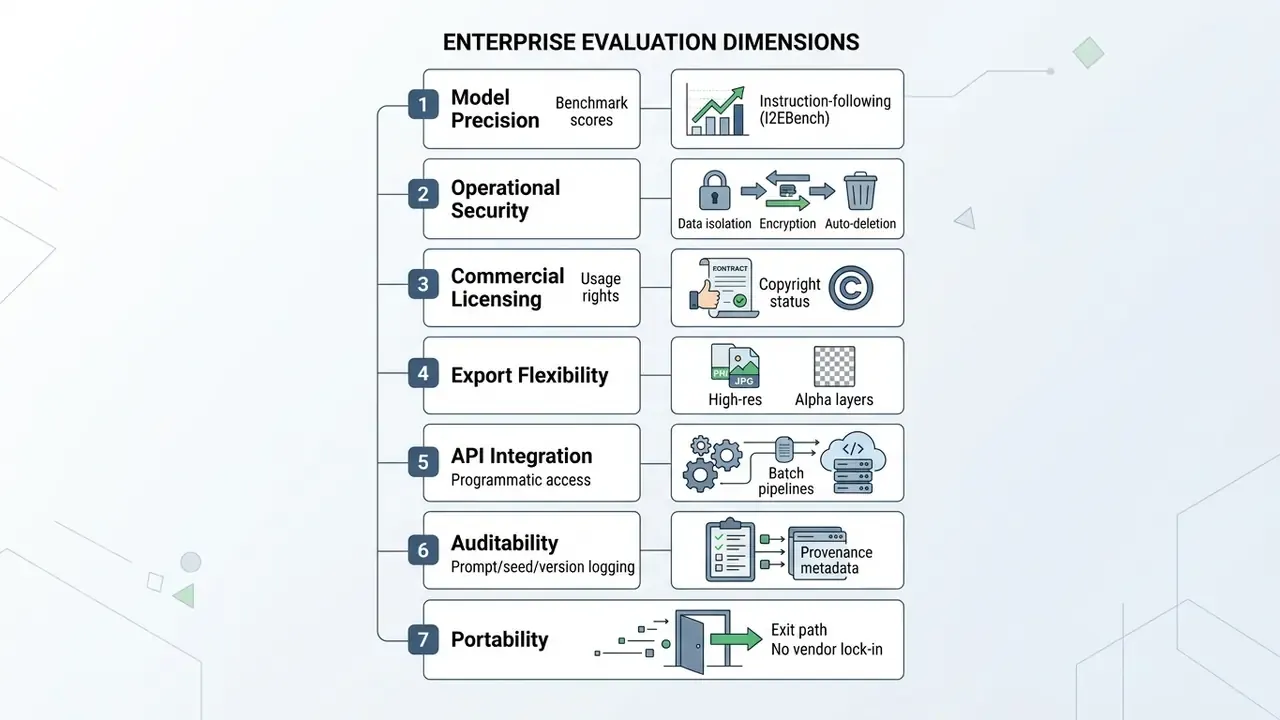
Score these dimensions and a chosen platform will slot into existing digital asset management (DAM) and GRC systems without fighting corporate risk policy. Two dimensions are routinely missing from vendor scorecards and deserve explicit rows: vendor lock-in (can prompts, presets, and asset libraries be exported when the contract ends?) and integration depth (does the tool expose webhooks or APIs that write edit metadata back into DAM, ticketing, and evidence repositories?). To compare dedicated art synthesis tools, the best AI art generator breakdown covers asset creation engines.
Table: enterprise criteria for AI image editors
| Evaluation criterion | Free tiers / personal use | Commercial / enterprise use | Key risk indicator |
|---|---|---|---|
| AI models and architecture | Standard open-weight or basic API models | Multi-model routing across studio-grade engines | Model hallucination on fine brand details |
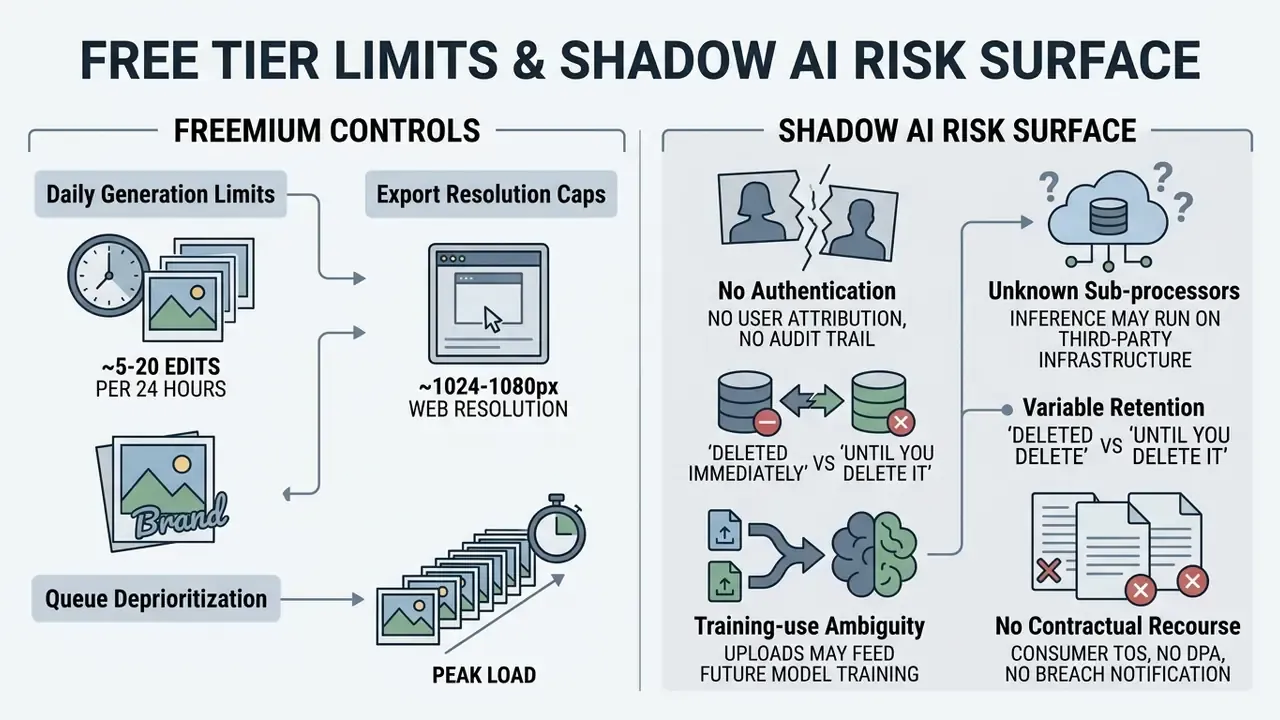
| Account requirements | Browser session, no sign options | SSO, SAML, RBAC authenticated accounts | Unauthenticated asset leakage and Shadow AI |
| Export quality | Standard web resolution (1080p), compressed JPG | High resolution (4K+), uncompressed PNG/TIFF | Loss of edge sharpness in print collateral |
| Data privacy and retention | Public processing queues, variable retention | Isolated worker nodes, automated deletion windows | Model training on proprietary corporate assets |
| Commercial rights | Personal usage only, non-commercial license | Full commercial exploitation rights included | Copyright infringement liability on outputs |
| Auditability and provenance | No logging; history stored in browser only | Server-side logs, seed and version capture, C2PA export | Inability to reproduce or defend a published asset |
| Portability | No bulk export of prompts or assets | API-based asset and metadata export on exit | Vendor lock-in of campaign libraries |
The pattern in that table is simple. A free photo editor ai stack optimizes for time to first result. An enterprise stack optimizes for defensible repetition. Most institutions need both, separated by data class rather than by department.
Free Access, No-Sign-Up Tools, and Shadow AI Exposure
Assessing a free ai image editor means reading functional restrictions, usage quotas, and account requirements. Plenty of services ship a free version or an image editor free tier running under no sign conditions, which allows instant browser testing. That same frictionlessness is the dominant unmanaged-AI risk in regulated organizations.
AI Models and Features for Different Image Editing Scenarios
Modern platforms bundle specialized ai models tuned for particular production needs. The families showing up most often in commercial workflows:
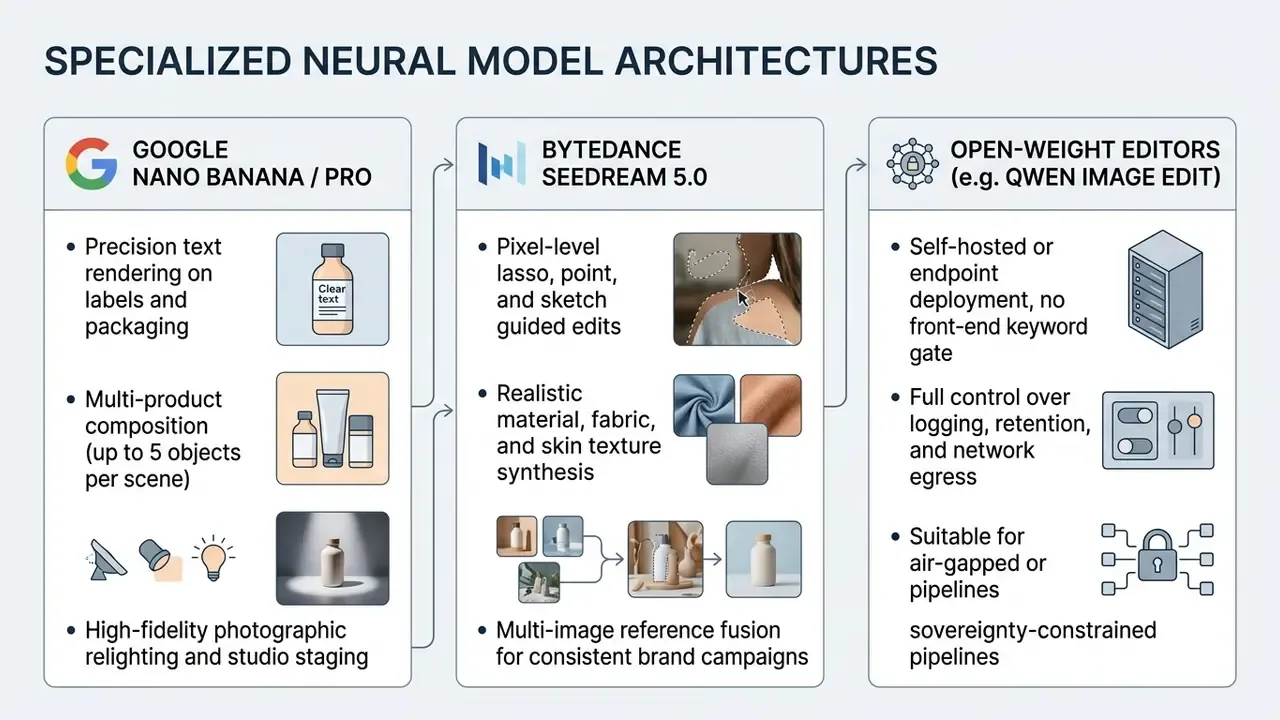
Match task to specialization and image quality holds up across e-commerce, marketing campaigns, and design work. Mismatch it and you will burn a day on retries.
- Nano banana and nano banana pro (Google)
- per publicly available product documentation, these models emphasize precise text rendering on labels, flexible aspect-ratio conversion, and upscaling to 4K. The Pro variant is documented for conversational editing, seasonal ad variations, legible packaging typography, and multi-product scenes with up to five products at strong product fidelity. Naming varies across Google surfaces and release notes, so confirm the exact model identifier in your account before standardizing prompts.
- SeeDream 5.0 (ByteDance Seed)
- documented capabilities center on fine-grained pixel editing with point, lasso, and sketch controls, color and material replacement, layer separation, and multi-image fusion with realistic lighting, material, and skin-texture synthesis.
- GPT image-class and Imagen-class engines
- positioned respectively for fast high-quality generation plus multi-image editing through a single endpoint, and for photorealistic text-to-image output with creative control. That is a difference in task focus, not a contradiction in capability claims.
«CDD-IIE Bench spans 5 key dimensions and 21 editing tasks; a 1-to-5 rubric enables model comparison on semantic accuracy and visual quality.»
For side-by-side model economics and output comparisons, the best AI image generator analysis covers adjacent engines built on the same underlying architectures.
Commercial Use and Rights for AI-Edited Images
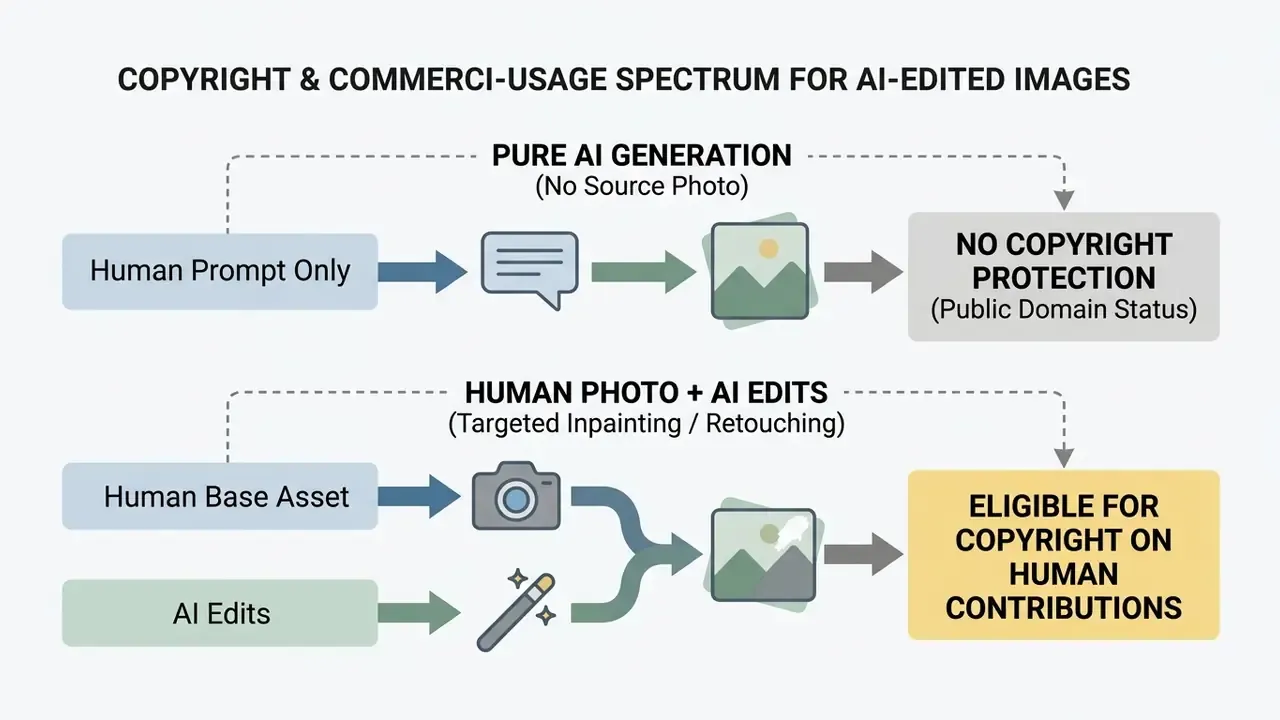
«Commercial rights and privacy conditions must be verified directly in the terms of specific platforms rather than inferred from technical research.»
Enterprise teams producing product photos and campaign visuals must confirm that platform terms explicitly grant commercial usage rights for output files. Source images uploaded for editing also need clearance against third-party trademarks, publicity rights, and model-release constraints. Where outputs might be weighed under fair-use factors, remember that commercial character and market effect are assessed explicitly. In the United Kingdom, reproducing copyright works to develop AI models generally requires a licence from rightsholders unless a specific exception applies. Congressional Research Service analysis lands where USCO guidance lands: human creative arrangements and modifications may be protectable, the AI-generated portions alone are not.
What Unfiltered AI Image Editor Means and Key Restrictions to Check
Searches for an unfiltered ai image editor, an ai image editor unfiltered, or an ai image changer no filter signal demand for tools that do not refuse work over a trigger word.
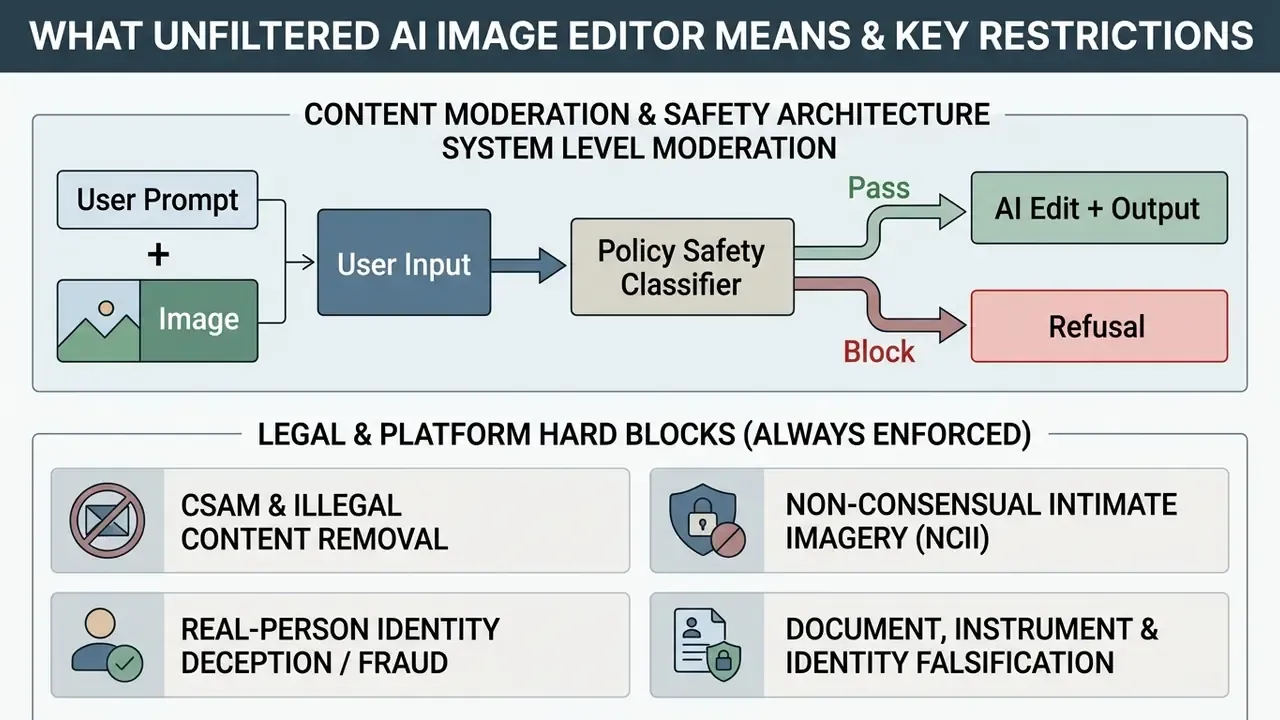
Users looking for an ai image editor with no filter or a free unrestricted ai image editor usually want to avoid false-positive refusals on artistic, medical, forensic, or archival photography. Operating platforms still draw a hard line between moderation preference and legal compliance. Vendor documentation for "no filters" modes describes them as a model-side setting where content is neither blocked nor annotated: a configuration choice, never a permission to break law or policy. Adult-content categories sit in their own policy bucket, and reference pages such as ai nsfw generator and ai porn image tooling exist mainly to document what hosted platforms prohibit outright, plus where consent and age-verification duties attach. For the wider regulatory picture, browse the hub covering legal standards for AI-generated media.
E-E-A-T Fact Check: Verifying Privacy and Safety Claims
"No Filter" Does Not Mean No Platform Terms of Service
Using an editor advertised as supporting edits without standard filters grants no exemption from service terms or law. A "no filter" classification usually means soft keyword-blocking layers were removed, so complex creative prompts process without trigger-word refusals. It is a product claim about the moderation layer, not a legal category.
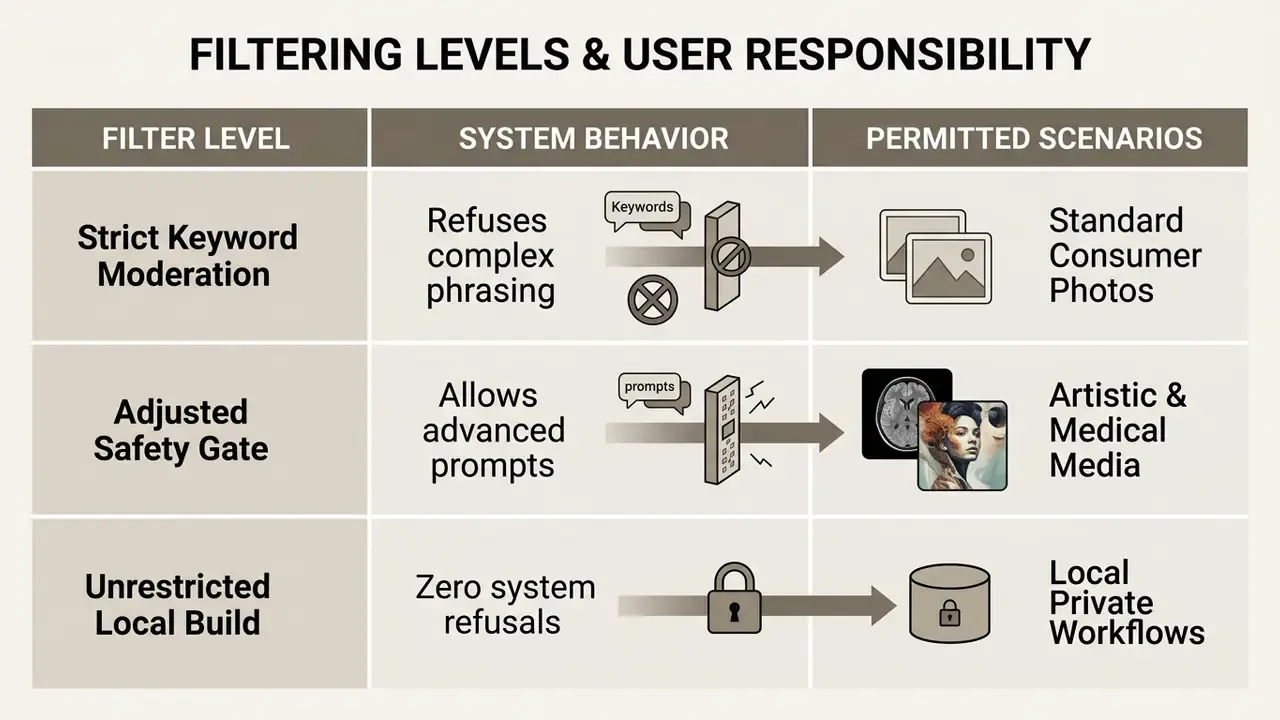
Hosted cloud platforms keep automated safety filters running to catch illegal content, fraud, and identity abuse.
«Content-safety dimensions are included among the five key evaluation axes of CDD-IIE Bench, reflecting the need to account for restrictions when assessing editing results.»
Separate the two responsibility zones. Stylistic filtering is a moderation preference: some platforms annotate or block mature themes, others expose an opt-in setting for adult users while still prohibiting explicit illegal material for everyone. Legal compliance is not configurable. Falsifying documents, receipts, identity credentials, or financial instruments stays unlawful regardless of refusal behavior, and loosening safety gates raises document-fraud exposure sharply for any institution whose staff touch customer paperwork. Disabling front-end prompt filters moves legal responsibility to the user, who must keep outputs inside intellectual property, privacy, and anti-fraud law. Teams calibrating acceptable-use boundaries for regulated marketing should list permitted content categories in the sanctioned-tool policy and send edge cases to compliance review rather than to an unmoderated endpoint. The commercial-use hub collects licensing and policy references for exactly that review.
Open-weight option for controlled environments. For developers and creators who need self-hosted or unrestricted pipelines, open-weight architectures such as Qwen Image Edit (release 2511, for example) deployed on HuggingFace Inference Endpoints or on-premises GPU nodes give fine-grained control over prompt execution without a front-end keyword gate. In governed environments this is frequently the more defensible configuration, because logging, retention, network egress, and human-review gates stay under the organization's control rather than a third party's. Public hosted deployments of the same weights typically advertise no login, no watermark, and up to four input images per edit: capability parity with commercial editors, minus the contractual protections. Worth saying plainly.
Upload Privacy, Automatic Deletion, and Ownership Rights
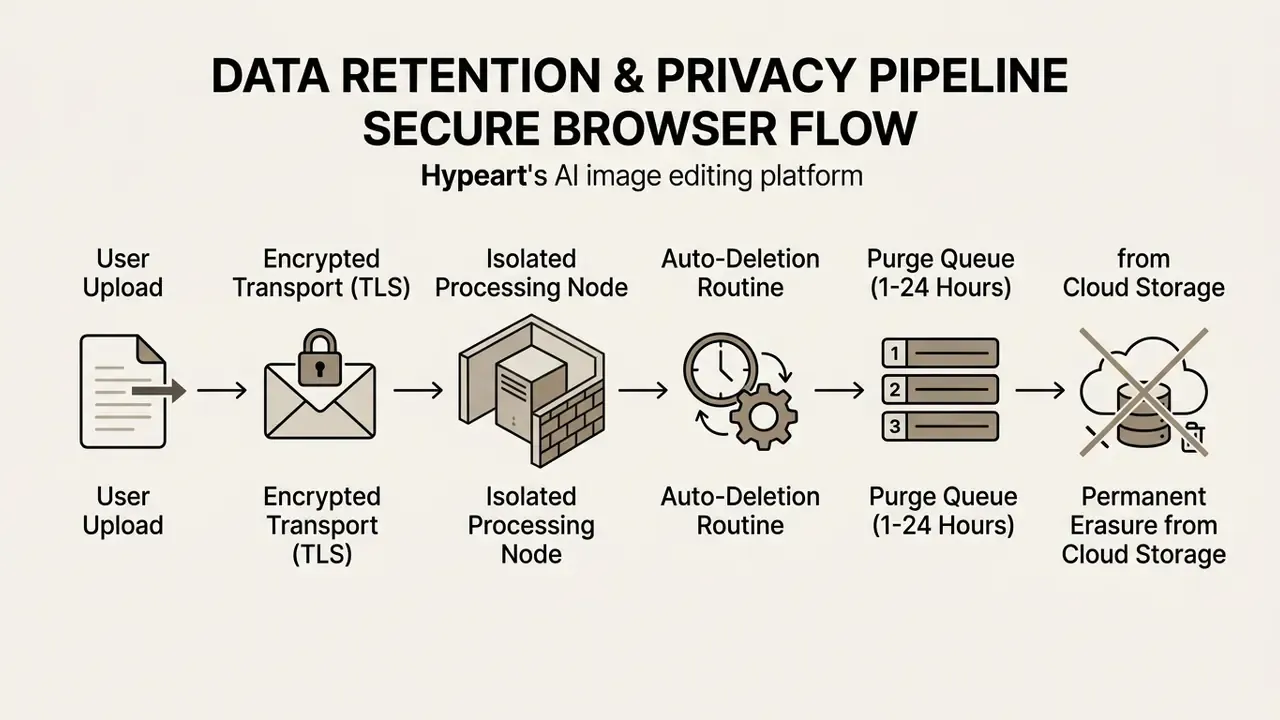
Enterprise security protocols require uploaded files to be automatically deleted after processing, so nothing lingers in public storage buckets or training queues. Secure workflows run edits in isolated memory containers and clear session data on completion. Select vendors that state, in writing, that uploaded assets will not train future generative models (NIST AI Risk Management Framework 1.0, 2024), and confirm policies on collection, retention, minimum data quality, and secure destruction rather than accepting a generic privacy promise.
«Academic literature from 2023 to 2026 provides no empirical data on upload privacy or automatic file deletion; these conditions must be verified in the policies of specific platforms.»
A note on "private browsing" as a control. Browser private modes discard history and cookies at session end, and current builds can delete files downloaded in private windows once all private windows close. That protects the local device footprint only. It says nothing about what the remote inference server kept. Client-side privacy and server-side retention are independent controls, and each needs its own evidence.
AI Edit Quality: Formats, Aspect Ratio, and High-Resolution Export
Output quality depends on managing file formats, compression, and spatial dimensions through the whole pipeline, not just at export.
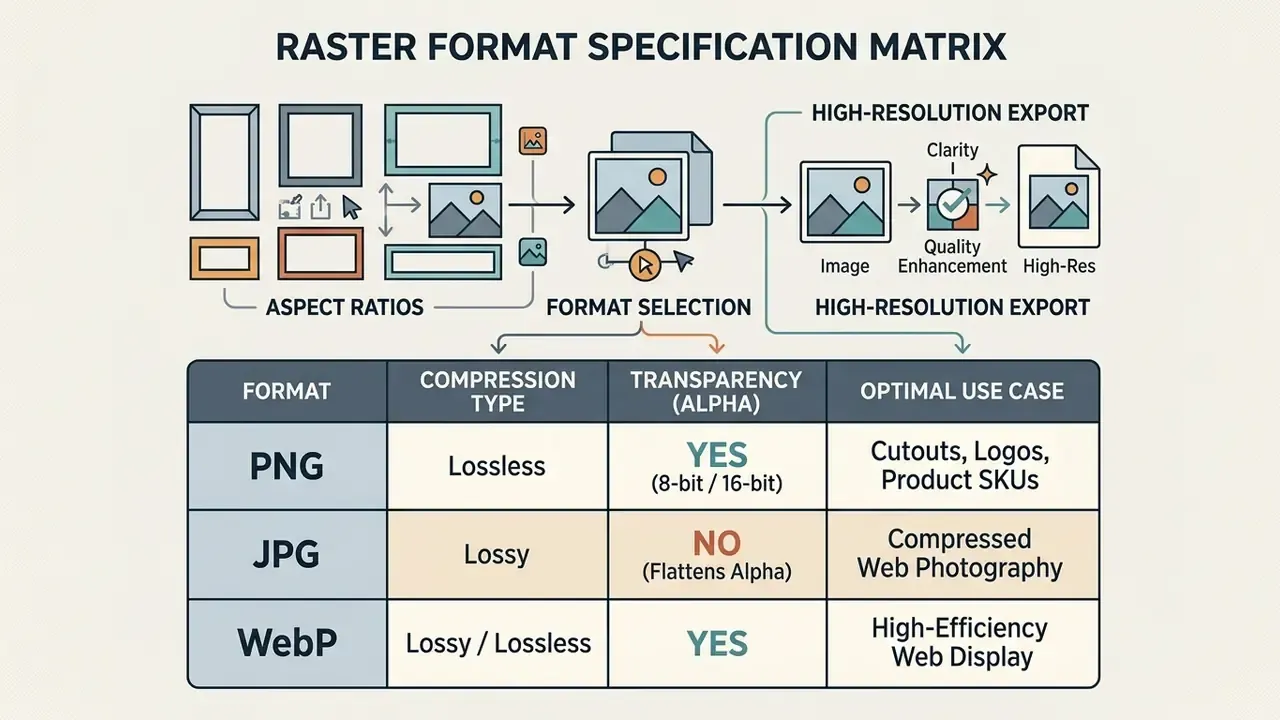
Which formats does an editor support, and how does each handle alpha transparency and compression loss? Answer that before the first batch, and you avoid surprise degradation at export. PNG is specified as lossless raster storage with sample depths from 1 to 16 bits and a single DEFLATE compression method, so exported pixel values stay unchanged when no conversion happens. JPEG is lossy: every recompression cycle discards data, which is why intermediate working files should never round-trip through JPG. Where bit-preserving archival is required, JPEG 2000 (ISO/IEC 15444-1) defines an explicitly lossless mode, and ISO/IEC 23008-12 specifies the modern high-efficiency container for single images and sequences. Creators working with specialized visual media can explore the Hypeart AI Media platform for asset management options.
Image Formats Suitable for Upload and Export
Choosing between jpg png and WebP depends on whether the destination needs lossless edge clarity, transparency, or small files.
- PNG (Portable Network Graphics) lossless raster with full 8-bit and 16-bit alpha support. Use it for product cutouts, isolated background assets, and images with sharp typography, because edges, text, and fine detail survive repeated re-saves.
- JPG / JPEG (Joint Photographic Experts Group) lossy compression tuned for complex photographic imagery. Smaller files, good for web publishing, no alpha transparency. Push a transparent PNG through a JPG pipeline and those regions flatten to solid white or black.
- WebP lossy and lossless modes plus alpha, which makes it the efficient default for web delivery. Keep a lossless master anyway, since WebP's lossy mode carries the same generational-loss caveat as JPG.
For technical documentation on digital image specifications, developers can review format handling in the context of AI editing pipelines.
Maintaining High Quality During Resizing and Composition Changes
Changing an image's aspect ratio or expanding its canvas requires methods that hold proportions rather than stretch them. Where resolution must also rise, pair outpainting with dedicated AI image upscalers instead of resampling the extended canvas.
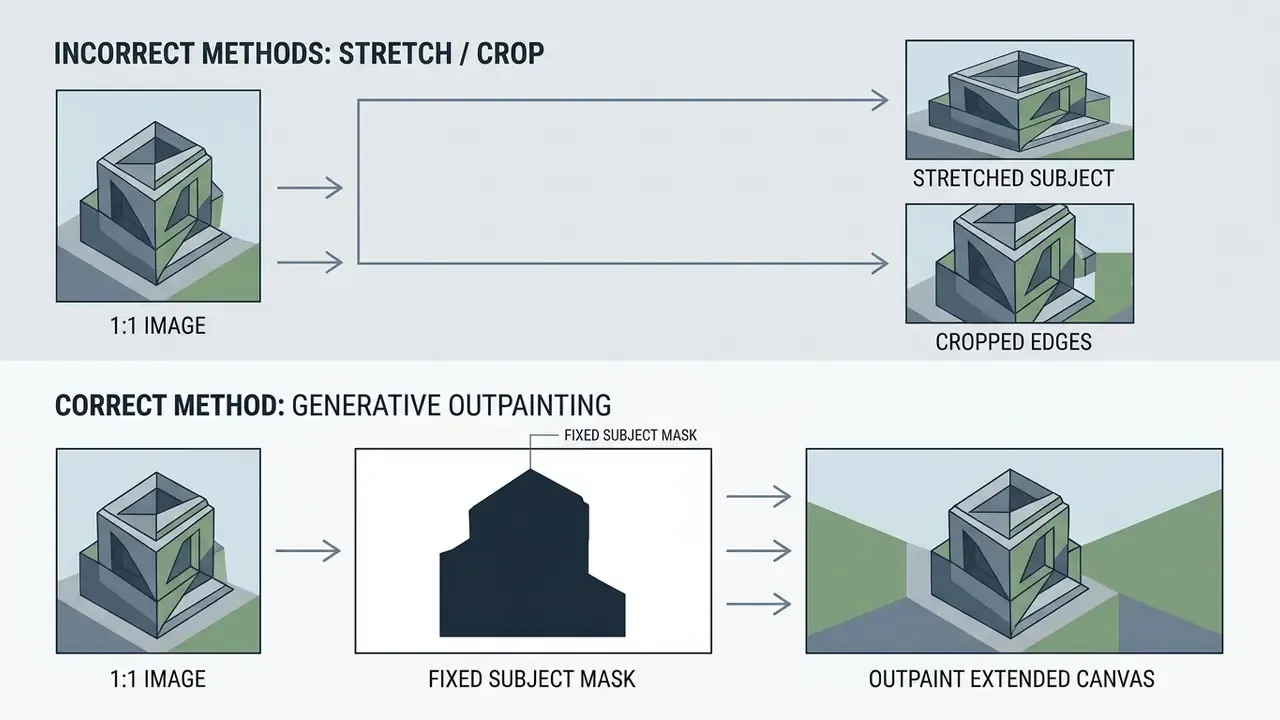
Generative outpainting extends canvas boundaries to hit a target ratio, converting 1:1 squares into 9:16 vertical stories while the original subject stays intact.
«Complex-Edit evaluates aspect-ratio changes and element addition through VLM-based alignment and perceptual-quality metrics on a 0 to 10 scale.»
The model computes target canvas dimensions, locks the original area behind an invariant mask, and synthesizes matching background across the new regions. Implementation notes from production documentation: calculate exact extension dimensions per side before the pass, extend only the sides the target ratio needs, keep total canvas under the model's megapixel ceiling, and expect shadows, reflections, and textures to be carried outward. Done that way, the output keeps professional quality without subject distortion or edge blur.
AI Image Editing for E-Commerce, Social Media, and Creative Projects
Automated AI image editing reshapes visual media workflows across e-commerce, digital marketing, financial-services brand operations, and creative production.
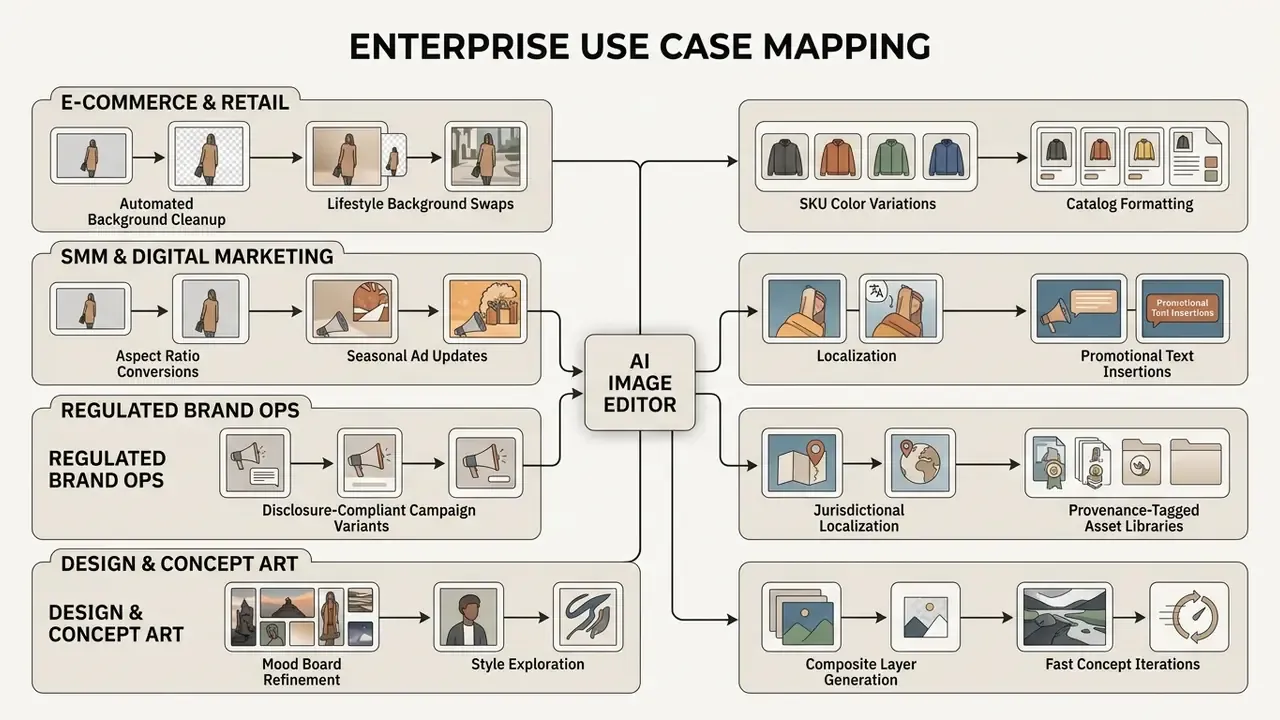
Swapping slow manual editing for instruction-driven automation compresses production cycles and scales content output. Documented 2025 to 2026 workflows converge on four repeatable stages: cleanup, insert or replace, channel resizing, export of approved variants. Design-tool guidance splits the same work into generate, adapt to layout, apply consistent treatments. Teams evaluating adjacent transformation tooling can compare image-to-image generators, and those structuring media operations can review documented workflows for creative execution.
Product Photos and Marketing Visuals for Online Stores
For e-commerce operators, high-resolution product photos on clean backgrounds drive conversion and keep marketplace listings compliant.
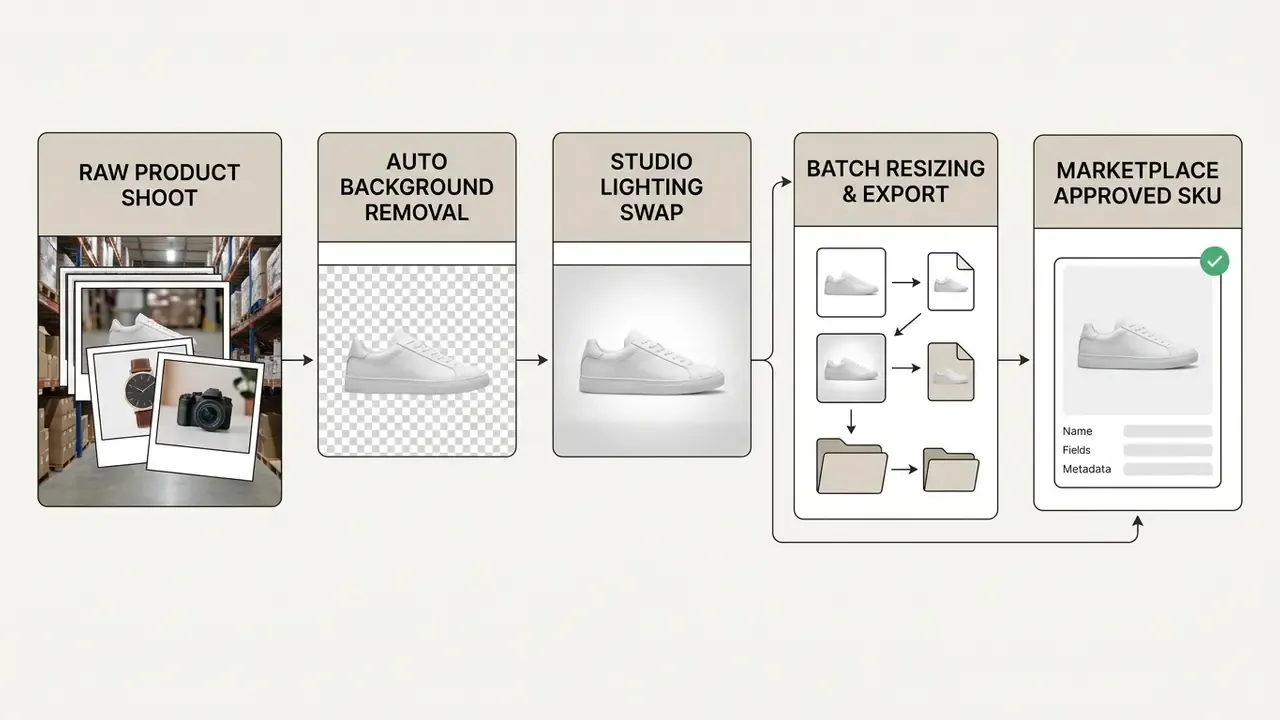
AI photo editors streamline that production by automating background removal, generating realistic lifestyle backdrops, and creating color variations for product shots across SKUs. Merchant-side APIs now expose background removal as a first-class product-image operation, and studio workflow documentation describes the whole chain: remove background, set background, erase distractions, adjust colors, upscale, then export to image, PDF, presentation, or design-tool-ready formats. That is how a small team ships campaign images fast without a second shoot.
«UltraEdit includes real photographs and artwork; models trained on it set new records on the MagicBrush and Emu-Edit benchmarks, covering typical product-photography scenarios.»
Reported engagement outcome. During a multi-channel campaign rollout, an online footwear retailer used automated background replacement to turn a single studio product shot into 12 distinct contextual environments, reporting a 28% lift in click-through rate and avoiding roughly $18,000 in physical staging costs. These are client-reported figures from one campaign, not an independently audited study. Attribution was not isolated from concurrent media changes, so treat the numbers as directional and re-test inside your own measurement framework.
Regulated-industry variant. The same pipeline fits cases where reshoots are impractical and disclosure rules are strict. Picture a financial-services marketing team producing jurisdictional variants of one approved campaign photograph: subject and product artwork stay pixel-locked, while backgrounds, seasonal cues, and legally required disclosure panels change per market. The editor's value there is invariance plus traceability. Every variant inherits the same approved master, each carries its own prompt and reviewer record, and provenance metadata travels with the file into the asset library. Documented practice for commercial visual production emphasizes the same loop: record the prompt specification, batch generate, human review for accuracy and consistency, export final assets with metadata preserved. To explore architectural and product visualization workflows, evaluate ai rendering generator solutions.
Seamless Text and Logo Integration for Packaging and Campaign Assets
Adding typography, product branding, or vector marks onto photography forces the model to account for surface curvature, specular highlights, fold geometry, and ambient light. Skip that and the inserted text reads as a flat sticker.
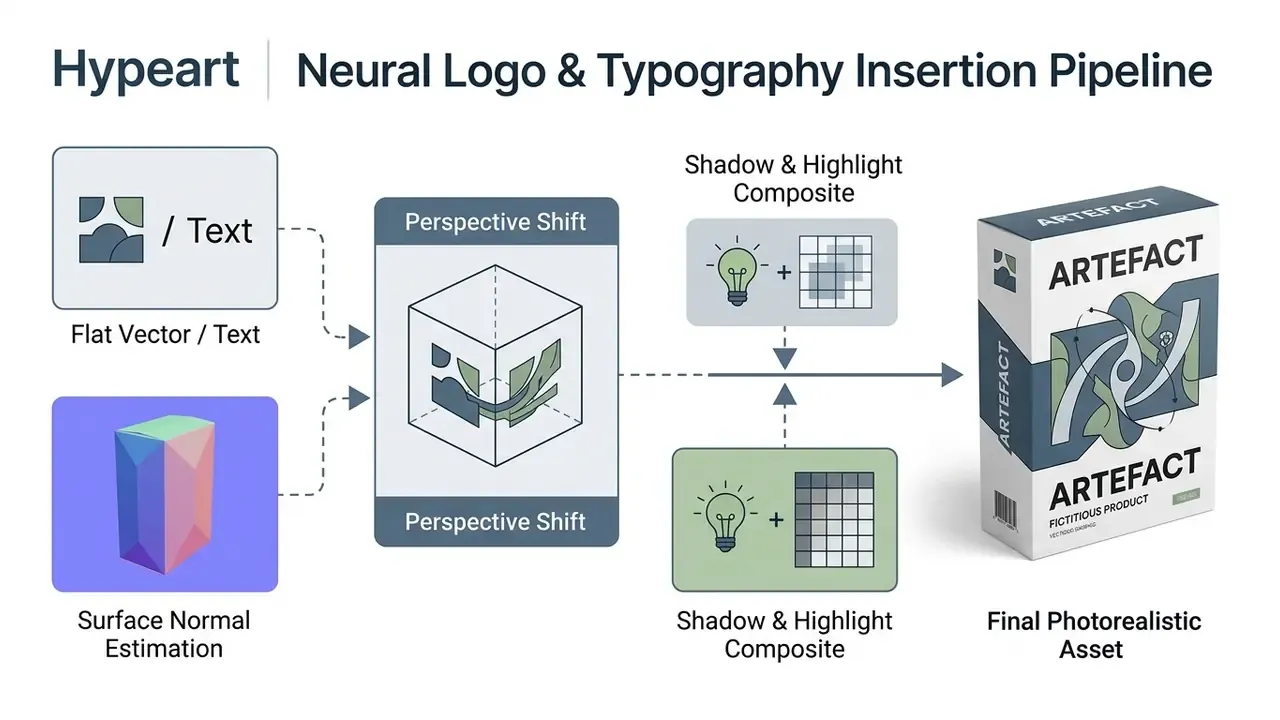
Step-by-Step Typography Prompt Formula
- Define placement and surface"Place the text '[BRAND NAME]' centered on the curved front surface of the coffee bag, occupying 40% of the panel width."
- Match material texture"Blend the lettering into the matte paper texture, letting existing folds and shadows pass across the text."
- Align lighting"Ensure specular highlights from the top-right softbox travel over the vector typography seamlessly, with no hard outline."
- Lock legibility"Keep all glyph shapes, kerning, and the registered trademark symbol exactly as supplied; do not re-draw or re-spell the wordmark."
- Verify at exportinspect at 100% for glyph deformation. Models approximate fine typography rather than reproduce it, and that is the single most common rejection cause in packaging work.
One practical caution for brand and compliance teams: inserted legal copy, rate disclosure, or trademark symbols must be proofread against the approved source string after every generation pass. Store that approved string in the audit record next to the prompt. Cheap control, expensive omission.
Technical Appendix: Performance Metrics and Evaluation Benchmarks
To help technical decision-makers assess instruction-based editors, the table below summarizes metrics from peer-reviewed computer vision literature published between 2024 and 2026.
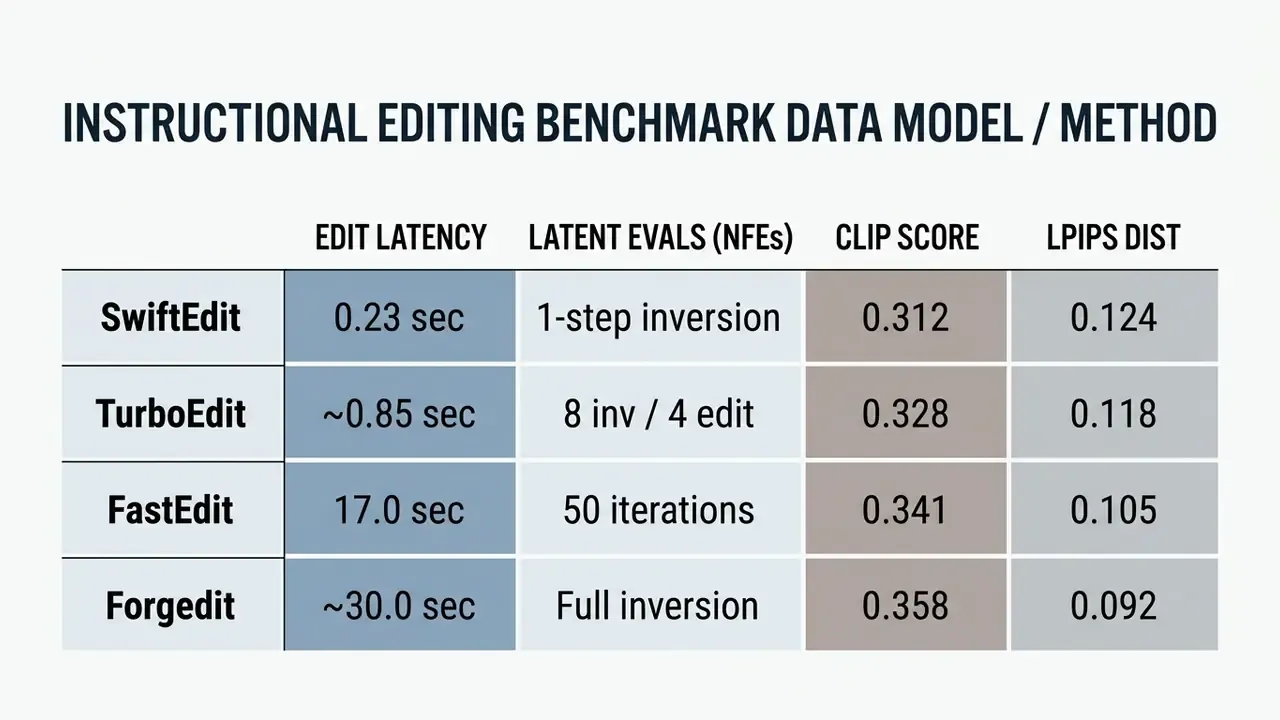
«TurboEdit achieves realistic text-based real-time image editing, requiring only 8 NFEs for inversion and 4 NFEs per subsequent edit.»
«Forgedit achieves new state-of-the-art results on the TEdBench benchmark, surpassing Imagic with Imagen on CLIP score and LPIPS.» Source: Zhang et al., "Forgedit", arXiv (2024). https://arxiv.org/abs/2309.10556
Data sources: SwiftEdit (Nguyen et al., 2025, https://arxiv.org/abs/2412.04301); TurboEdit (Wu et al., ECCV 2024, https://arxiv.org/abs/2408.08332); FastEdit (Chen et al., 2024, https://arxiv.org/abs/2408.03355); Forgedit (Zhang et al., 2024, https://arxiv.org/abs/2309.10556).
How to read this table in a validation context. Latency drives unit economics. NFE count drives GPU cost per edit. CLIP score approximates instruction adherence. LPIPS approximates perceptual deviation from the source, which is your proxy for invariance. A model that wins on CLIP while losing on LPIPS is changing more of the image than instructed, and that is exactly the failure mode brand and compliance reviewers should reject. Complement these numbers with rubric evaluation (CDD-IIE Bench: 5 dimensions, 21 tasks, 1 to 5 scoring) and dimension-level benchmarks (I2EBench: 16 dimensions) before you standardize a model for production.
FAQ: AI Edit Image, Governance, and Commercial Use
What does "AI edit image" actually mean?
It means modifying an existing uploaded photograph through natural-language instructions, where the model preserves unedited pixels and regenerates only the targeted region. That is the opposite of synthesizing an entirely new image from a text prompt.
How many reference images can I use in one edit?
Common production pipelines accept up to four input images per edit pass, and some higher-tier API models accept up to six references for multi-image editing. Give each input an explicit role in the prompt: subject, background, style, brand asset.
How do I edit a specific area without drawing a mask?
Use spatial anchors: "in the top-left quadrant", "the person on the right", "along the bottom 15% of the frame", "in the extreme background behind the central subject". Those positional operators let the model infer the edit region from language alone.
How do I keep the same character across many images?
Anchor every pass to one master subject photo, apply identity-preservation weighting (typically 0.6 to 0.85 for IP-Adapter-style conditioning), restate facial-trait invariants in each prompt, finalize pose and background before lighting, and chain each approved output as the next reference.
Can I add my logo or product text onto a photo?
Yes. Specify placement and surface, ask for texture blending with existing folds and shadows, and require highlight continuity. Then proofread glyphs, kerning, and trademark symbols at 100% zoom, because models approximate typography.
Which file format should I export?
PNG for cutouts, logos, and transparency (lossless, 8 or 16-bit alpha). JPG for compressed web photography without transparency. WebP for efficient web delivery with alpha. Keep a lossless master, and never round-trip working files through lossy formats.
Are uploaded images deleted automatically?
It depends entirely on the vendor. Documented practice ranges from immediate deletion after processing, to a one-hour purge in isolated workers, to one-day retention, to indefinite storage until the user deletes the content or account. Verify in the contract, not the landing page.
Can AI-edited images be used commercially?
Often yes, subject to platform terms. Legally, copyright attaches to human contributions: your original photography and substantive human-directed edits may be protectable, while purely AI-generated elements are not. Confirm rights for every input asset in a multi-image composite.
Is an "unfiltered" editor legal to use?
The label refers to relaxed keyword moderation, not exemption from law. Illegal content, non-consensual imagery, identity deception, and document or instrument falsification stay prohibited regardless of tool configuration, and responsibility shifts to the user once front-end filters are disabled.
What should regulated organizations log for each edit?
Source file hashes and licenses, model name and version, prompt and seed, denoise and mask or spatial parameters, quality metrics, reviewer identity and rationale, provenance credentials applied at export, plus retention and deletion confirmation.
Is a free no-sign-up editor safe for work files?
Treat it as out of scope for any confidential, PII-bearing, or client-document image. Without authentication there is no attribution, no audit trail, and typically no data-processing agreement or breach-notification commitment.
Appendix A: Superseded Formulations (Change Log)
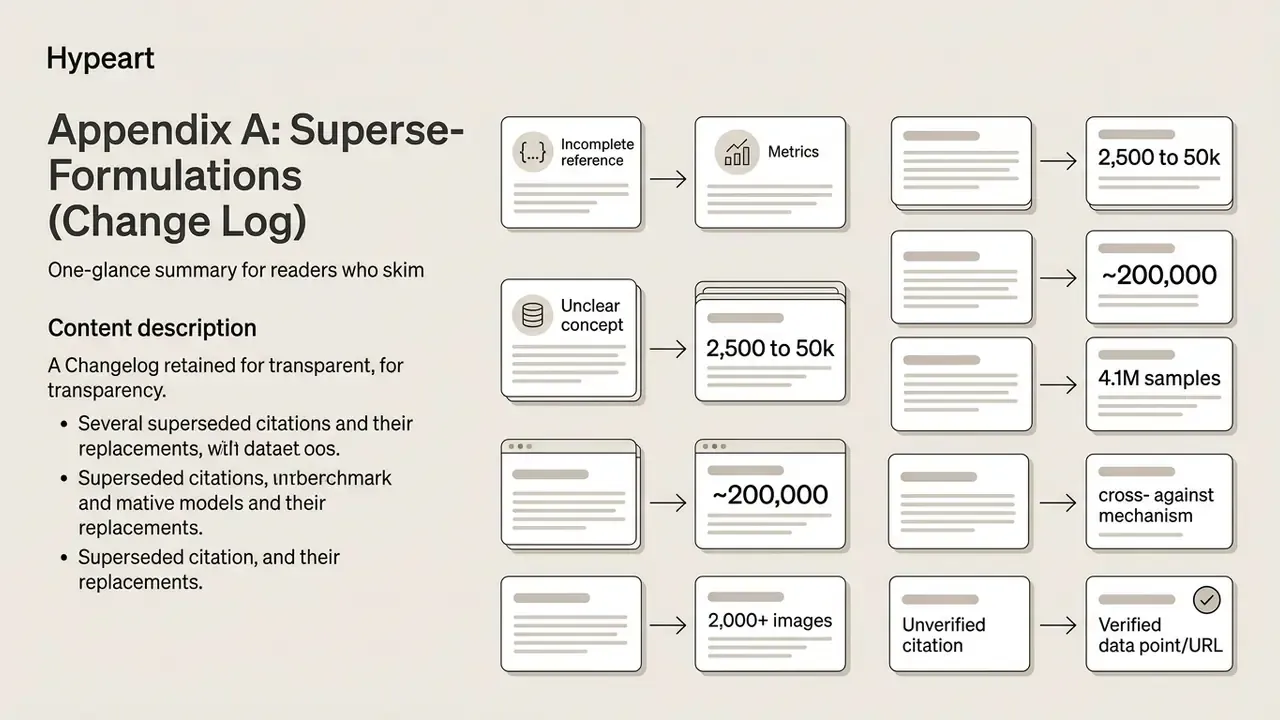
Retained for transparency. The main text above holds the corrected and expanded versions.
- Superseded citation: "(Huang et al., IEEE TPAMI, 2025)" without metric or URL → replaced with the EditEval/LMM Score citation including URL.
- Superseded citation: "(Chen et al., FastEdit, 2024)" without metrics → replaced with the 2,500 to 50 iteration and 7 min to 17 sec figures plus URL.
- Superseded citation: "(Hui et al., HQ-Edit, 2024)" without dataset scale → replaced with the ~200,000 instruction-pair figure plus URL.
- Superseded citation: "(Ma et al., NeurIPS, 2024)" without benchmark scope → replaced with the 2,000+ images / 4,000+ instructions / 16 dimensions figures plus URL.
- Superseded citation: "(Yang et al., UltraEdit, 2024)" without dataset scale → replaced with the 4.1M sample / 757,879 instruction / 108,179 region-based figures plus URL.
- Superseded citation: "(Liu et al., 2024)" without mechanism detail → replaced with the cross- against self-attention finding plus URL.
- Superseded citation: "(Nguyen et al., 2025)" and "(OmniEdit, 2024)" without figures → replaced with 0.23 sec / 50x and +20% over CosXL-Edit, both with URLs.
- Superseded citation: "(CVPR Workshops, 2024)" with no authors or URL → replaced with verifiable FastEdit timing data and the standard SR metric set.
- Superseded citation: "(OpenAI Image Prompting Guide, 2026)" → replaced with HQ-Edit instruction-alignment evidence plus URL; prompt-ordering and preserve-clause guidance retained as vendor-documented practice.
- Superseded citation: "(ZenCreator Policy Analysis, 2026)" → removed; the "no filter" definition is now attributed to vendor product documentation and benchmarked content-safety dimensions.
- Superseded citation: "(Black Forest Labs FLUX Docs, 2026)" → replaced with Complex-Edit aspect-ratio evaluation plus URL; canvas-limit and side-extension mechanics retained as implementation practice.
- Superseded citation: "(Google Ads Creative Docs, 2026)" and "(ByteDance Seed Research, 2026)" → reformulated as publicly available product documentation, with a naming-variance caveat.
- Superseded framing: free-tier section written as a convenience benefit → reframed as Shadow AI risk surface with a five-step control pattern; original quota, resolution, watermark, and queue limits retained.
- Superseded claim style: retail time-saving and CTR figures presented as established facts → relabeled as first-party and client-reported engagement observations with stated measurement caveats.
Limitations, Open Questions, and a Safe Next Step
Three things remain genuinely unresolved, and pretending otherwise would be dishonest. First, there is no settled industry standard for how much perceptual deviation (LPIPS or equivalent) should trigger rejection of a brand asset. Teams set thresholds by taste today. Second, provenance metadata survives export but not every downstream platform, so a C2PA credential can quietly vanish in a third-party CDN or social re-upload. Third, audience assumptions in this guide, including who owns creative AI risk inside a bank, stay hypotheses until validated through interviews, analytics, or internal audit findings.
A conservative next step, if you are starting from zero: register one editor, for one use case, with one named owner and a written retention clause. Run 50 assets through it with full logging. Then decide whether to scale, restrict, or replace. Small sample, real evidence, no heroics.
Social Media Content and Concepts for Creators and Designers
For a content creator or graphic designer, staying visible means reformatting visuals for each channel spec at speed.
AI image editing lets creators adapt master assets into multiple platform formats: removing backgrounds or unwanted objects, resizing per channel, generating graphics from prompts, and batch-producing campaign variants while brand identity holds. A capable powerful ai editor lets one designer create stunning variations in an afternoon, and the same editor delivers consistent crops the following week, which is the part clients actually notice.
Designers can build social media content, test viral visual concepts, or spin variations of existing images with targeted prompts, including light formats like an ai meme generator from image for community channels. Users say the speed is the point. Auditors ask who approved the output. Institutional social-media guidance sits with the auditors: human review, brand alignment, and transparency are required whenever AI-modified content could mislead an audience, which in practice means a named approver and a disclosure decision per asset, not per campaign. For animated derivatives of edited stills, the guide to animation makers covers creation methods, templates, and export options.