An AI clip generator is an automated software system that analyzes long-form video files or hosted URLs, identifies high-engagement segments, and outputs short, platform-ready video clips. These tools read transcript text, audio pacing, visual cues, and scene transitions, then turn raw recordings into formatted vertical videos for social distribution.
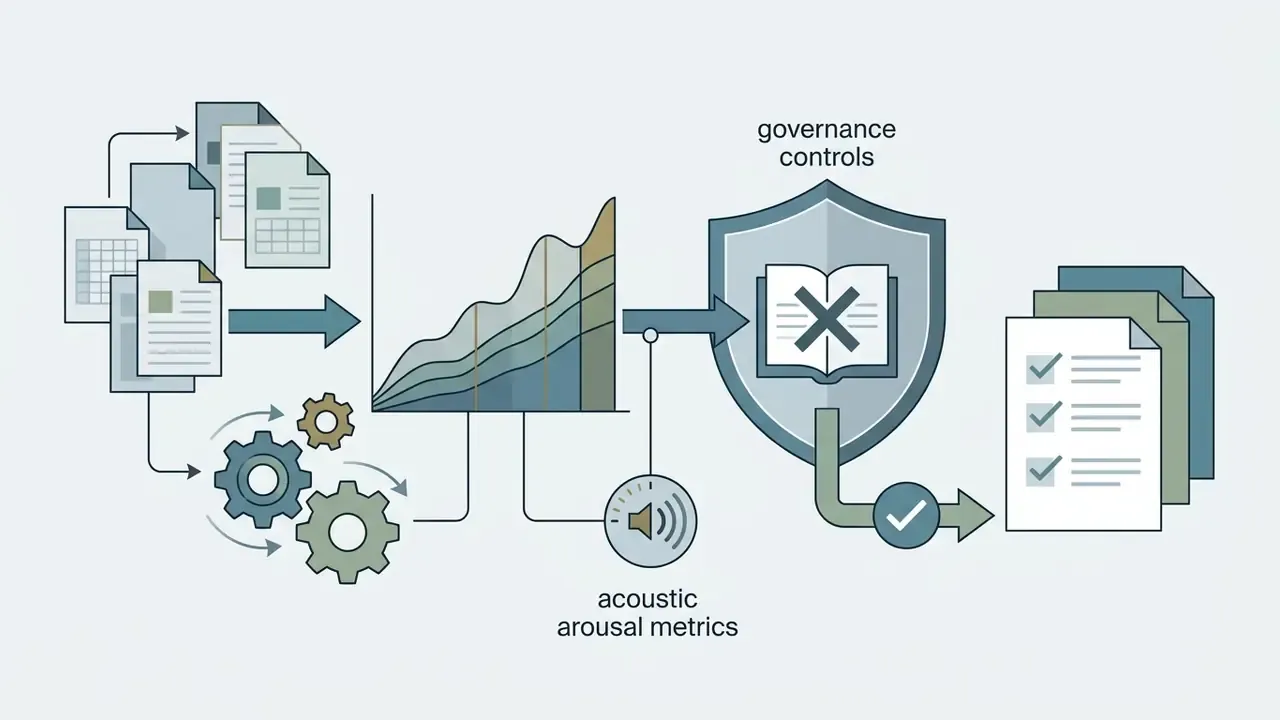
For media teams, financial institutions, and corporate communications departments, deploying an ai clip generator cuts post-production labor from hours to minutes. That is the easy part. The harder part is governance: automated clipping still requires controls to verify source rights, confirm transcript accuracy, and hold brand and disclosure compliance steady across public channels.
"An automated video clipping pipeline should be treated like a digital worker: it needs defined operational parameters, source data verification, explicit output controls, and clear human oversight before any content reaches a public feed."
— Marcus Hale, author
«LAVE reduces manual effort by delegating footage search and editing decisions to an LLM agent; the authors position the system as a meaningful reduction in operational load for novice editors.»
Executive Summary for Decision Makers
- What it is: An AI clip generator ingests long-form video (podcasts, earnings calls, webinars, livestreams), builds a time-stamped transcript, scores segments for salience, and renders vertical 9:16 clips with captions. A 60-minute source file typically turns around in 10 to 22 minutes instead of 4 to 6 human hours.
- Where the value is: Teams processing more than 10 hours of source footage per month see the clearest return. A two-hour podcast usually yields 15 to 30 social-ready clips; a 20-minute video yields 8 to 15.
- Where the risk is: Free tiers restrict output to non-commercial use, apply watermarks, and expire exports. Cloud processing of internal recordings can expose PII and material non-public information (MNPI) when vendor retention and model-training terms are not contractually constrained.
- What governance requires: Human-in-the-loop transcript verification, documented source-asset rights, machine-readable AI disclosure metadata under EU AI Act Article 50, caption verification under US Section 508, and an audit log recording who reviewed and approved each clip.
- What to procure: Enterprise tiers with zero data retention, no model training on customer footage, SAML SSO, role-based approval workflows, exportable audit trails, and explicit commercial licensing.
What Is an AI Clip Generator and What Can It Create?
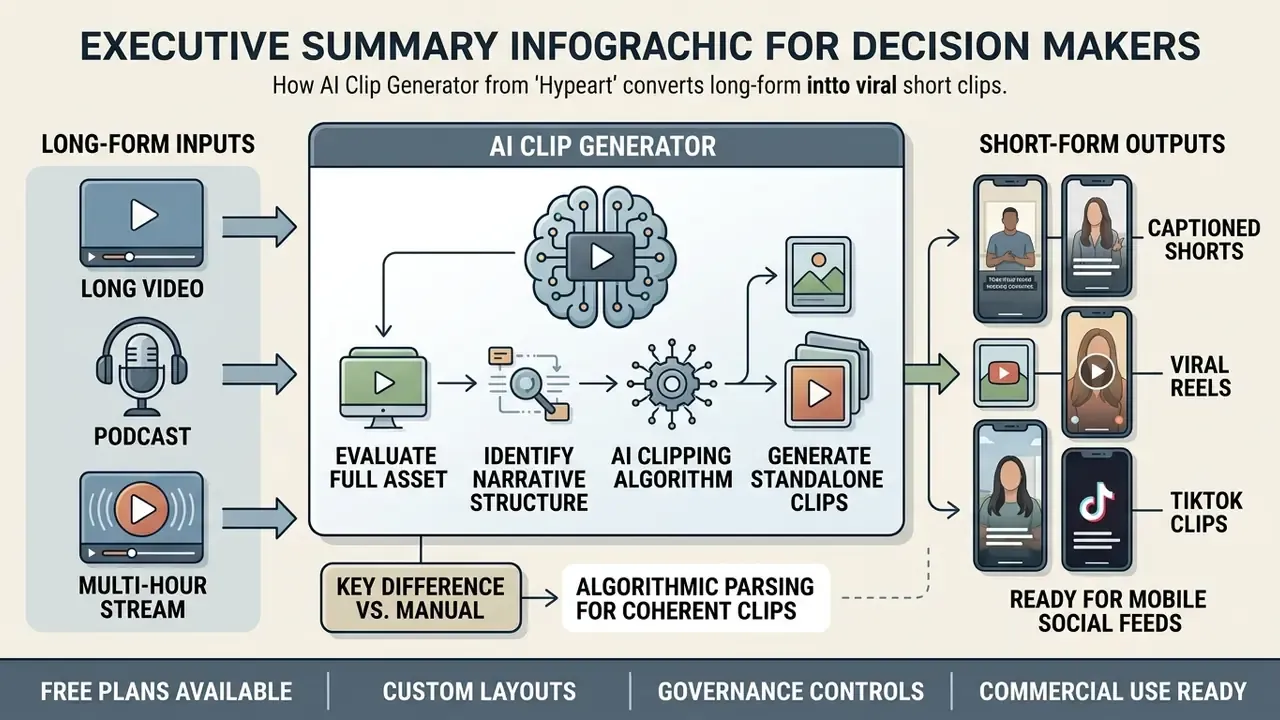
AI Clipping: From Long Video to Ready Clips
AI clipping is the algorithmic process of parsing a long video into semantically coherent, standalone segments using natural language processing and computer vision. The system identifies distinct topics, speaker turns, and emotional hooks, then assembles ready clips that need minimal post-processing.
Research on repurposing frameworks shows that long-to-short transformation depends on joint classification and temporal regression over visual, audio, and subtitle features, benchmarked at dataset scale.
«Repurpose-10K formalizes the task as joint classification and regression over segments, audio, and subtitles, covering more than 120,000 annotated clips drawn from 10,000 videos.»
Rather than sampling at random, ai clipping videos means evaluating frame-level transitions and dialogue boundaries so you avoid awkward cuts or truncated sentences. Technically, segmentation runs in three stages. Shot-boundary detection compares adjacent frames using colour-difference and coherency metrics to mark abrupt or gradual transitions. Semantic grouping merges shots into segments a human could summarize in one sentence. Candidate ranking then decides which segments become clips.
That sequence lets media teams generate clips with ai that keep narrative context while respecting 30-to-90-second platform constraints.
«The HIVE framework decomposes editing into highlight detection, opening/ending selection, and removal of redundant content, consistently outperforming automated baselines.»
AI Clip Generator vs. Traditional Video Editing
An ai clip maker automates the slow parts of the job: highlight identification, audio transcription, frame cropping, caption placement. Reported time savings reach roughly 85% against manual workflows. Traditional video editing, by contrast, asks a human to watch raw footage in real time, set in/out points by hand, perform keyframe tracking, and render each aspect ratio separately.
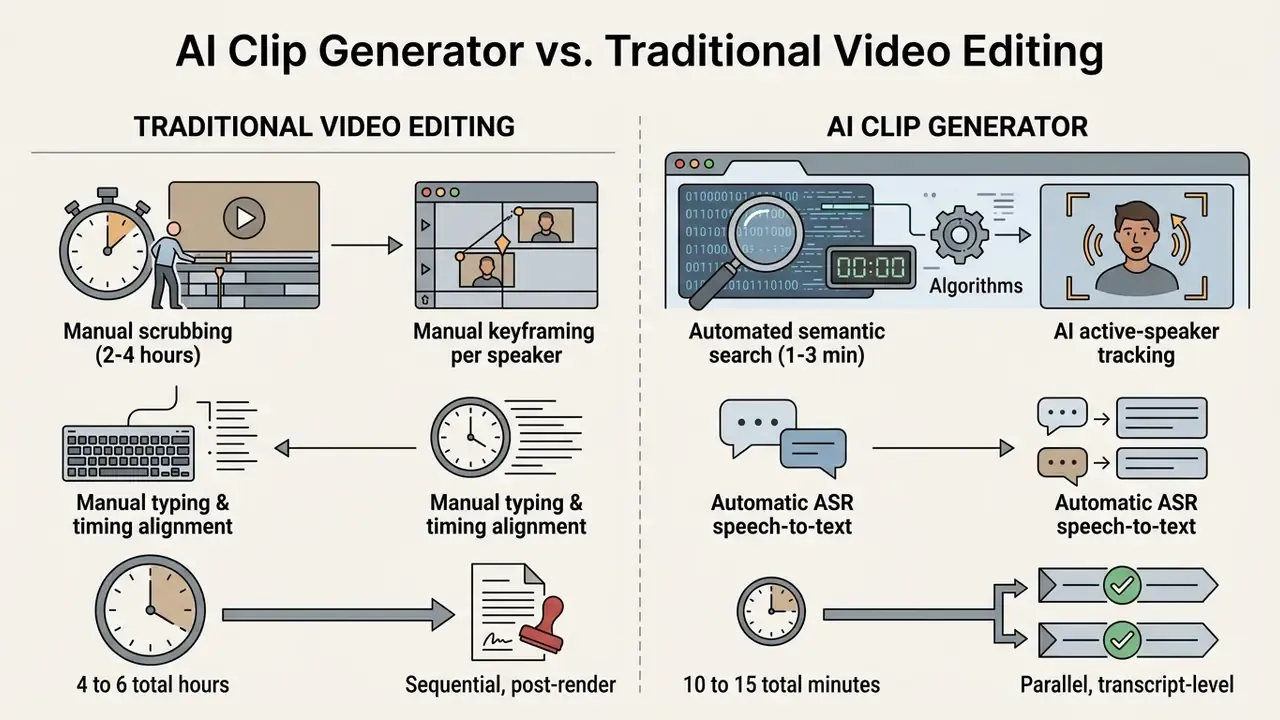
By moving routine work to an automated ai for clipping videos pipeline, editorial teams redirect creative and engineering hours toward narrative strategy and compliance oversight. Teams benchmarking categories before procurement can review comparative analysis of free AI video generators alongside dedicated clipping engines.
Adoption, though, is narrower than the marketing narrative suggests. That gap matters when you estimate internal change-management effort:
«An analysis of 274 YouTube videos (CHI 2025) found that only 1.8% demonstrate tools for automatically cutting long videos into short clips — clipping automation remains a niche practice.»
For additional guidance on media editing infrastructure, creators can browse the hub for standardized technical specifications.
How to Create Clips from a Video with AI
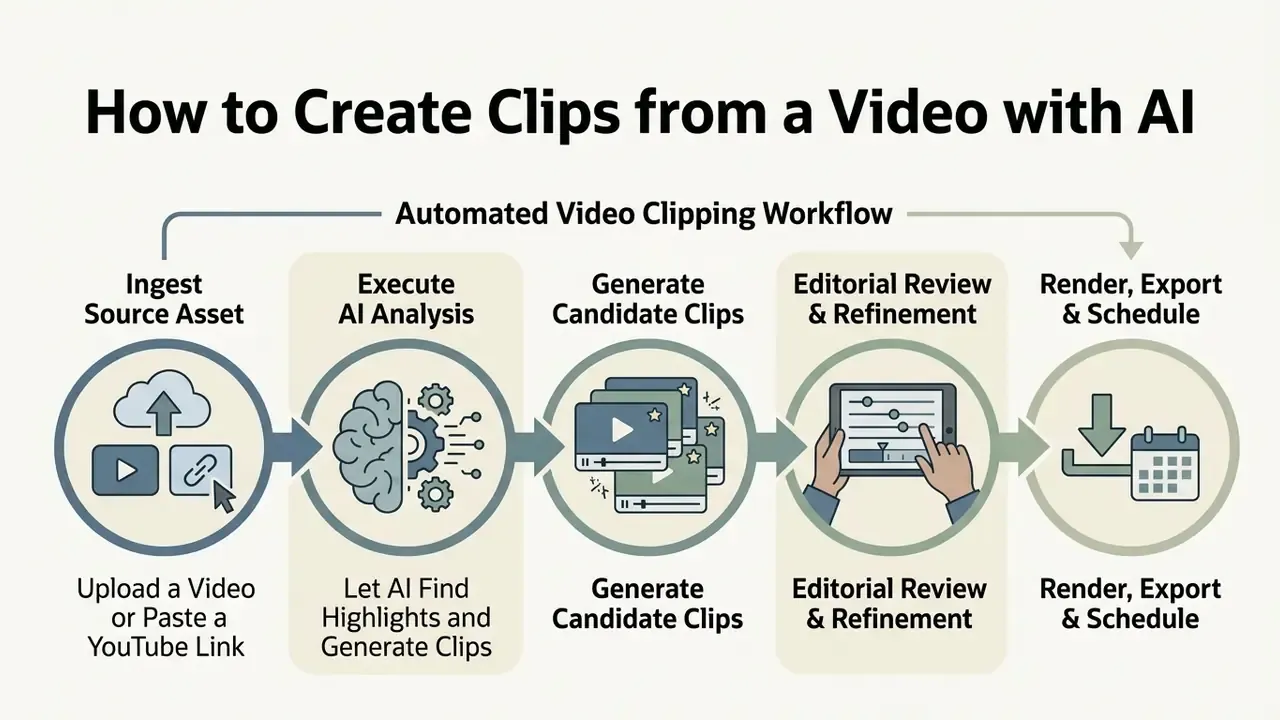
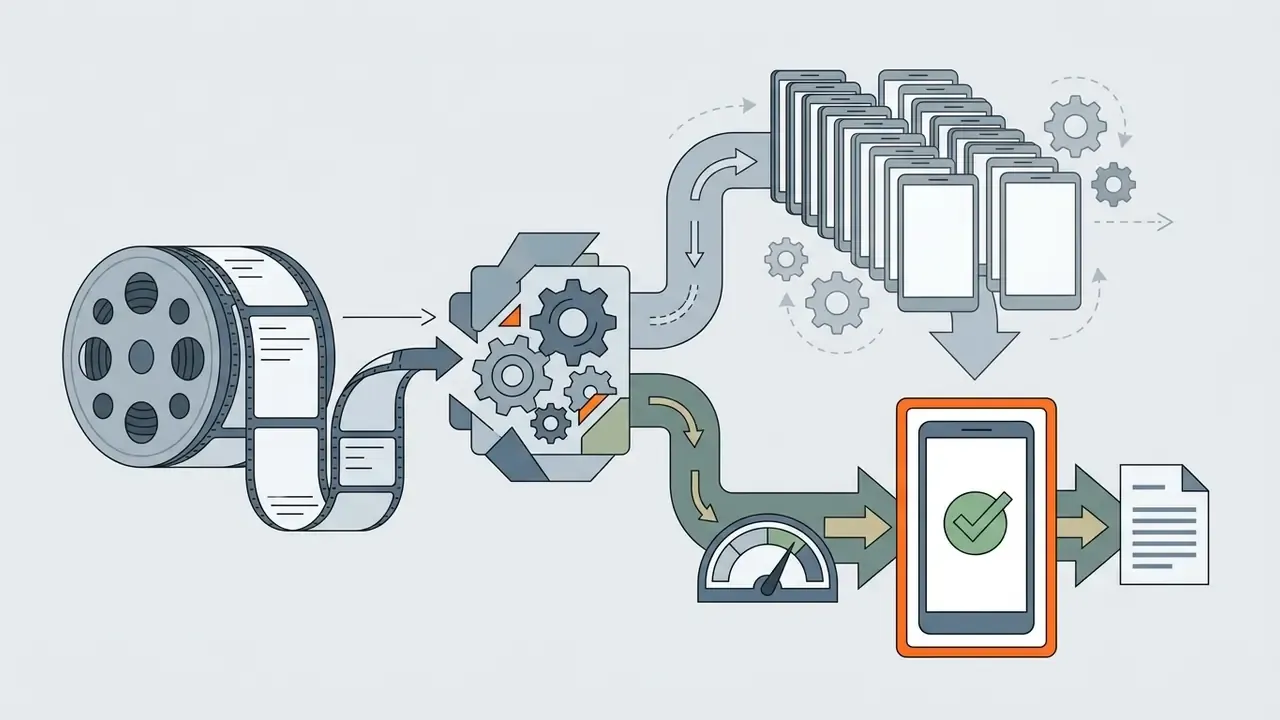
Creating short clips with an ai clip creator follows three moves: ingest the source asset, run automated highlight analysis, review as a human before export. Modern platforms accept both direct file uploads and hosted media URLs, and return formatted video clips in minutes.
The end-to-end pipeline stitches together speech-to-text models, computer vision framing, and programmatic rendering engines.
Automated Video Clipping Workflow
- Ingest Source AssetUpload a local video file (MP4, MOV) or submit a supported platform URL (YouTube, Vimeo, Twitch, Facebook, Dailymotion).
- Execute AI AnalysisThe system generates a time-stamped transcript, evaluates audio-visual salience, and detects highlight boundaries.
- Generate Candidate ClipsRanking algorithms isolate key segments and apply vertical 9:16 active-speaker tracking.
- Editorial Review & RefinementHuman operators check transcript accuracy, adjust crop boundaries and styling; approvals are written to the audit log.
- Render, Export & ScheduleOutput high-resolution files, push via direct API integrations, or queue clips inside a social publishing calendar for automated posting across targeted time slots.
Upload a Video or Paste a YouTube Link
To ai create clips from video assets, users start by uploading a local file or providing a hosted media link. Most platforms accept MP4, MOV, WebM, and MKV containers, with size limits from 2 GB to 10 GB depending on infrastructure tier.
When users paste a link into ai clip generator from youtube free workflows, the system retrieves video streams and associated metadata through platform APIs.
«vSTREAM processes more than 150 TikTok, Instagram, and YouTube clips, automatically downloading video, transcribing audio via Whisper, and extracting metadata — without manual annotation.»
Enterprise clipping engines now handle extra-long source assets, ingesting footage up to 10 hours in continuous duration. Full-length Twitch livestreams, multi-part conference recordings, extended podcast sessions: no manual file segmentation needed before processing. Consumer and mid-tier plans commonly cap input at 2 to 4 hours, so verify duration ceilings against the specific subscription tier rather than the marketing page.
For URL-based ingestion, supported platforms are processed directly, while unsupported links and local files are uploaded first to obtain an identity token; the job then polls until status returns SUCCEEDED or FAILED. Pipelines take any video format, converting multi-channel audio and variable frame rates into standardized working formats before model inference. Where storage or bandwidth constrains ingestion, teams often pre-process assets with a video compressor to cut upload time without materially degrading transcript accuracy.
Let AI Find Highlights and Generate Clips
Once ingestion completes, the ai clips generator runs multimodal analysis across the audio track, visual frames, and generated transcript. Neural architectures weigh speaker pitch, narrative density, and visual activity to locate high-interest moments.
Academic benchmarks describe an explicit scoring-and-assembly mechanism rather than a black-box selection step.
«HIVE scores each scene by its match against highlight patterns, merges adjacent non-zero scenes into clips, and selects compelling openings and endings for the top-ranked segments.»
The system produces multiple candidate ai short clip generator outputs at once, ranked by calculated interest metrics. Highlight probability is usually approximated through multimodal attention over audio-visual streams, affect features such as valence and arousal, and clustering-based pseudo-labels, not a directly predicted "virality" target. So even an ai clip maker free run yields a structured candidate set. Platform readiness is a separate question, and it still depends on human verification of transcript accuracy, caption placement, and rights clearance, since no published benchmark certifies unedited output as publish-ready.
Natural Language Scene Extraction. Beyond automated salience scoring, advanced pipelines expose Natural Language Processing prompt engines. Operators issue explicit semantic search commands: "extract all product demo interactions," "find moments discussing Q3 guidance," "isolate frames featuring the primary keynote speaker." The AI co-pilot indexes and clips specific visual or thematic events on demand. Prompt-driven retrieval also supports visual attribute queries, for example locating every appearance of a speaker in a specific outfit or every on-screen product mention. On multi-hour panel recordings and compliance-sensitive footage, where one disclosure must be located and excerpted precisely, that cuts review time sharply.
Review, Edit, Export, and Publish
After automated processing finishes, operators enter a web-based editor to refine output before distribution. They inspect auto-generated subtitles, adjust boundary timestamps, and modify graphic overlays through a text-based interface.
Text-based editing models let creators delete unwanted sentences directly from the transcript, trimming the underlying video track automatically.
«LAVE automatically generates language descriptions of footage and enables an LLM agent to plan and execute editing operations from the user's text instructions.»
Once transcript edits and visual adjustments are verified, the operator exports final files in 1080p or schedules automated publishing to target networks. Teams evaluating supplementary desktop options can compare free video editing software for tasks that sit outside browser-based clipping, such as multi-track colour work. To analyze specialized pricing models for production tools, teams can review pricing options across enterprise media software.
AI Features That Make Short Clips Social-Ready
To turn raw footage into short clips that perform, an ai clip maker free online engine bundles automated post-production. The core functions: smart highlight scoring, word-by-word subtitle styling, active speaker tracking, dynamic visual framing.
Together they remove the need for a secondary desktop suite, delivering platform-compliant video clips straight from the browser.
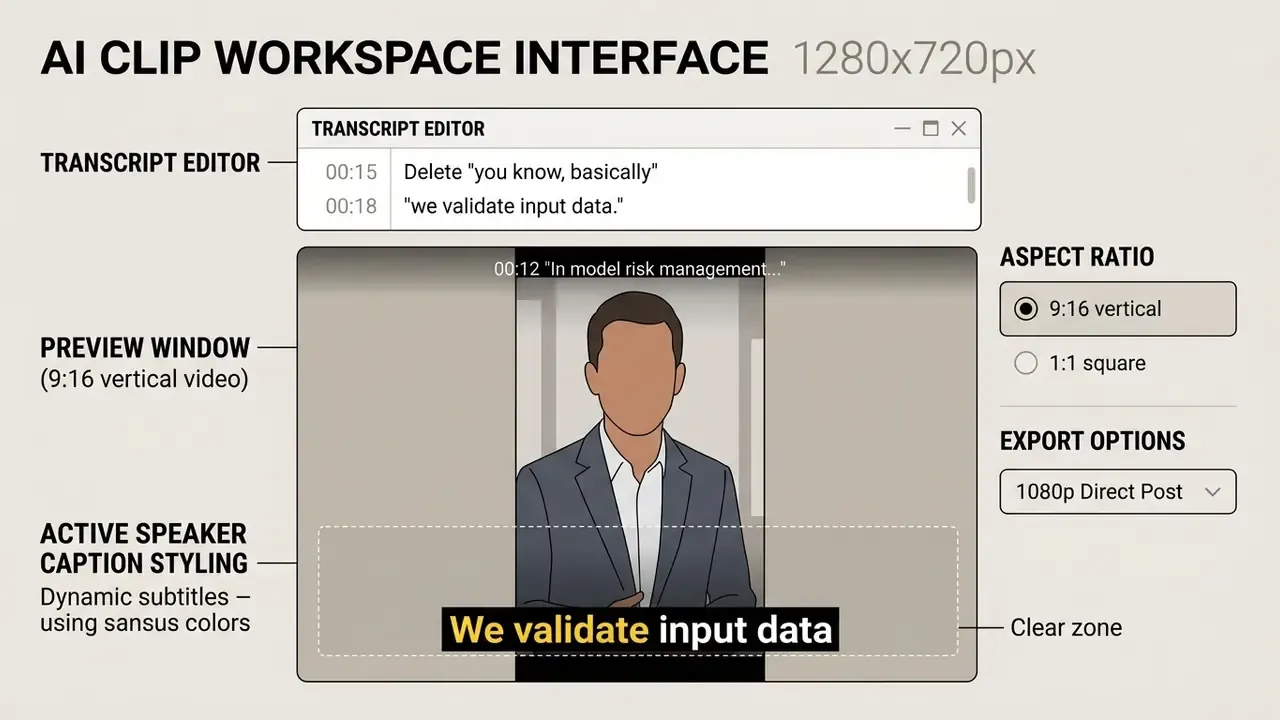
Automatic Captions, Text Editing, and Audio Cleanup
Because a large share of mobile feed viewing happens with audio muted, automatic caption generation is not decoration. It is the delivery mechanism. An ai free clip generator transcribes dialogue with automatic speech recognition (ASR) engines and aligns text word by word.
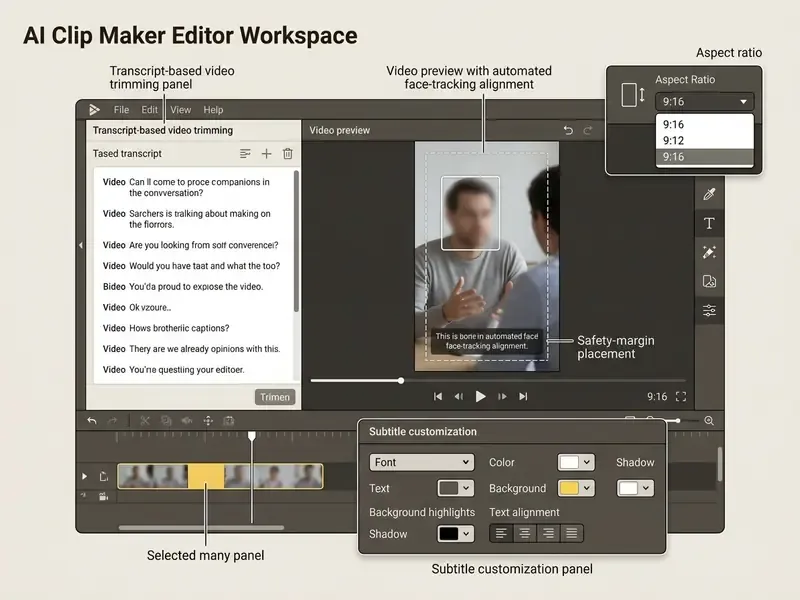
To satisfy accessibility standards such as US Section 508, automated captions must pass human verification for capitalization, technical punctuation, speaker identification, and non-speech audio such as sound effects, music, pauses, and background noise (Section508.gov Accessibility Guidelines, 2025). Official guidance also states plainly that a transcript is not a substitute for timed captions.
«A study of 300 TikTok videos (CHI 2024) found that users require a dedicated caption standard for social video: synchronization, accuracy, and stylistic alignment with the tone of the content.»
«A comparison of professional and automatic captions (ACM 2023) showed that punctuation, segmentation into meaning units, and timing significantly affect viewer comprehension and satisfaction.» — ACM (2023), professional vs. automatic caption comparison
Smart Reframing, Layouts, and Visual Effects
Turning widescreen 16:9 footage into vertical 9:16 requires subject tracking that keeps the active speaker inside frame. An ai video clip generator uses facial recognition and speaker diarization to adjust framing dynamically. Documented implementations expose motion-tracking speed controls (slower, default, faster), so operators tune how aggressively the crop chases movement. Readers wanting broader context on adjacent tooling can review how AI video generators differ from reframing-only pipelines.
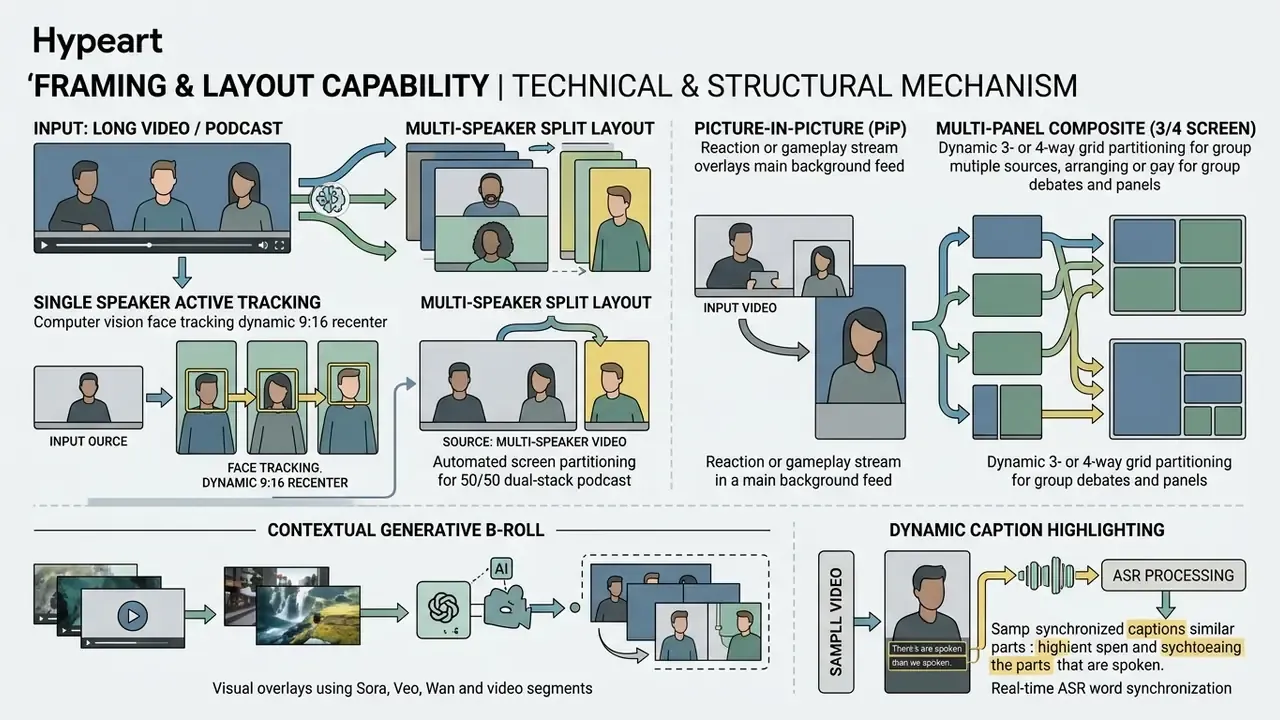
Layout choice follows content. Split-screen suits debates and two-host interviews; picture-in-picture suits gaming reactions and screen-share demos; 3- or 4-panel grids suit conference panels where four speakers alternate quickly. Static center crops, the default fallback, tend to slice off edge speakers during multi-person panels. Smart reframing tracks movement across the canvas instead.
Advanced platforms go past static stock libraries by integrating current video generation architectures, including Sora, Veo, Kling, and Wan models. When the transcript hits an abstract technical concept, the system synthesizes contextually relevant 3-to-5-second B-roll inserts to keep visual momentum without a manual asset hunt. Teams building programmatic pipelines around these engines can review implementation detail and cost structure for the Google Veo video generation API. Platforms can also add image to video tracks to reinforce concepts discussed in the audio.
Bulk operations finish the production layer. Operators select multiple clips from a library and apply reframing, templates, subtitle fonts, colours, and animation styles across the whole selection in one pass. That is the practical prerequisite for a daily posting cadence without extra editorial headcount.
Create Clips for YouTube Shorts, TikTok, Reels, and Facebook
Distributing video across social networks means tailoring file specs, aspect ratios, and layouts to each delivery feed. An ai short clip generator streamlines cross-platform publishing by rendering dedicated exports per requirement set.
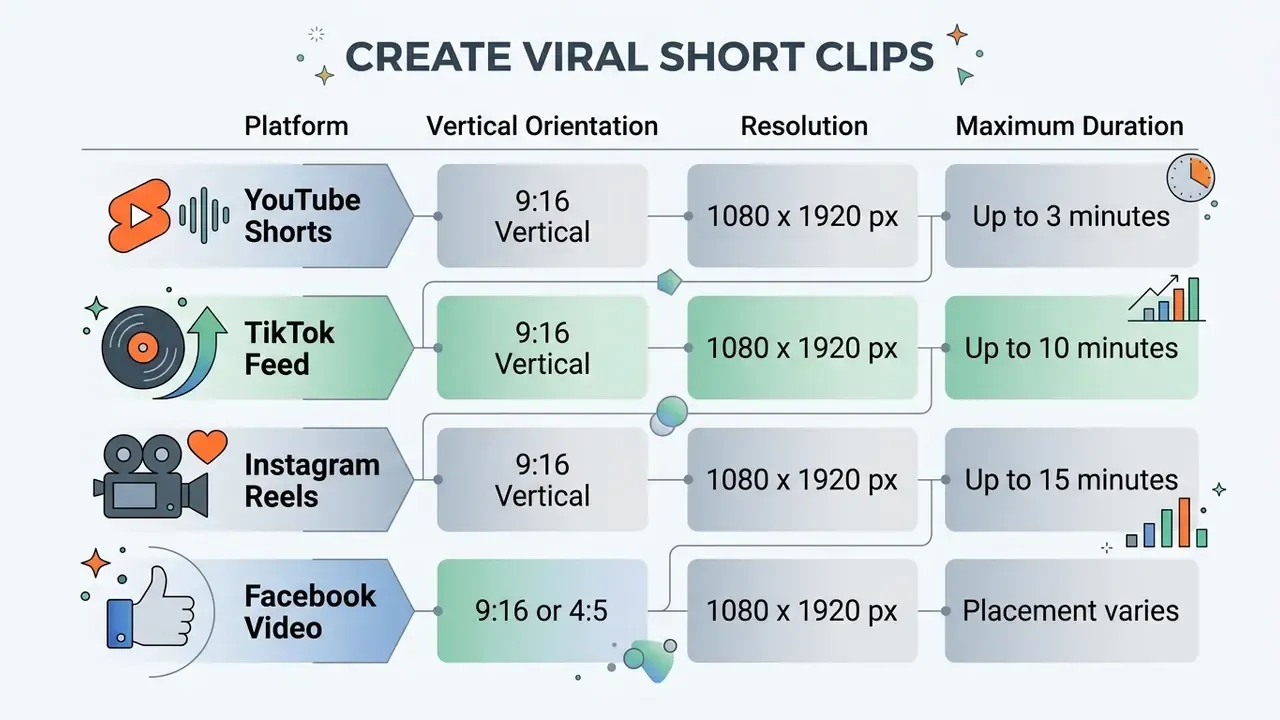
Published limits shift by surface, account type, and revision date. Verify duration ceilings against current platform help documentation before you lock render presets into an automated pipeline.
Turn Long YouTube Videos into Shorts
Converting existing YouTube long-form content into vertical Shorts extends asset reach without shooting anything new. Using an ai clip generator from youtube free pipeline, teams paste links directly to extract high-retention segments; a complementary walkthrough of YouTube video editing workflows covers the publishing side of the same pipeline.
The conversion method has three steps:
When configuring output specs, operators can add subtitles to video online inside the web workspace, keeping text legible on small displays.
Prepare Vertical Clips for TikTok, Reels, and Facebook
Publishing to TikTok, Instagram Reels, and Facebook demands respect for visual safe zones, or interface elements will cover your text and crop your faces. Mobile UI stacks overlay buttons, account handles, and caption descriptions along the top, bottom, and right edges.
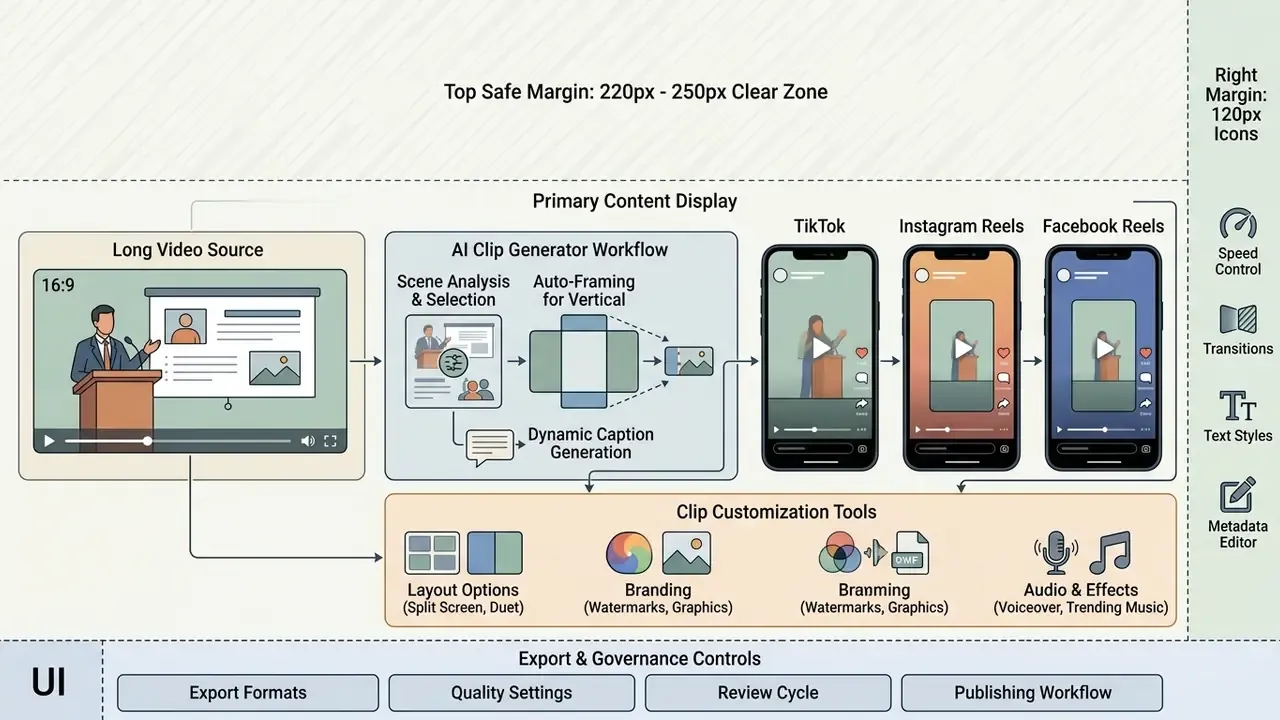
Automated reframing templates place subtitles and graphic callouts inside those central margins. YouTube Shorts supports vertical uploads up to 3 minutes (for videos uploaded after October 15, 2024), yet feed engagement on TikTok and Reels usually peaks with tighter edits between 15 and 60 seconds. Creators who need to add text to video online can configure standardized safe-zone rules across every social export.
Who Uses an AI Clip Creator?
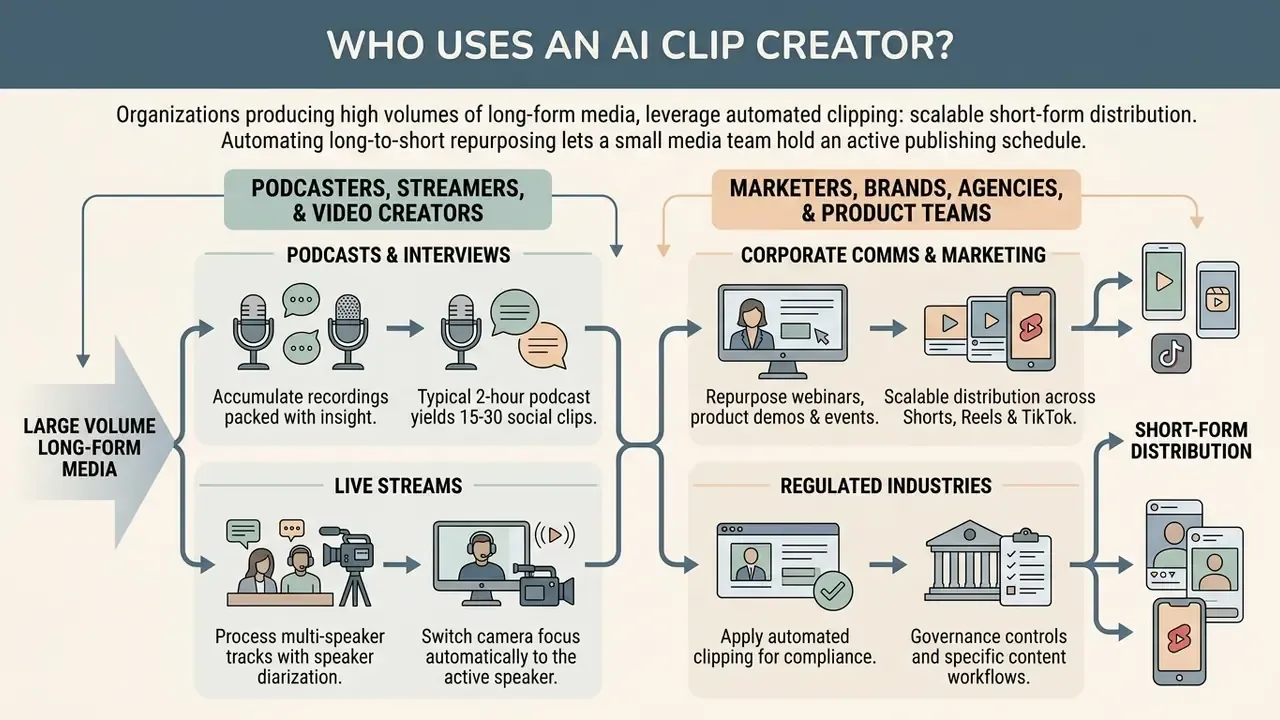
An ai clip creator serves organizations producing large volumes of long-form media that need scalable short-form distribution. The main groups: corporate media departments, digital marketers, executive communications teams, independent podcasters, educational institutions.
Automating long-to-short repurposing lets a small media team hold an active publishing schedule across several platforms at once. Industry analysis puts the clearest return with teams processing more than ten hours of source footage monthly, where webinar-to-social and long-YouTube-to-Shorts work dominates the queue.
Podcasters, Streamers, and Video Creators
Podcasters, live streamers, and interviewers accumulate recordings packed with standalone insight. An ai short clip generator free plan lets a creator convert multi-hour interview sessions into a running series of short promotional clips.
In a typical production environment, a two-hour podcast yields 15 to 30 social-ready clips, while a 20-minute video yields 8 to 15 candidates depending on topic density.
«An experiment with 62 students (CHI 2025) showed that AI-generated 30–60 second videos produce comparable test outcomes with higher perceived focus and material recall.»
Automated tools process multi-speaker tracks with speaker diarization, switching camera focus to whoever is actively speaking. Streamers can also add music to highlight clips to build background tension and lift production values, and can layer synthetic narration with an AI voice generator when the original stream audio is unsalvageable.
Marketers, Brands, Agencies, and Product Teams
Marketing and corporate communications teams use an ai movie clip maker to repurpose webinars, product demonstrations, and conference keynotes into promotional collateral. Instead of producing social ads from scratch, agencies generate targeted clip variations and test audience response across paid social. Teams standardizing on one toolchain often weigh general-purpose video editing tools against dedicated clipping engines to avoid duplicated licence spend.
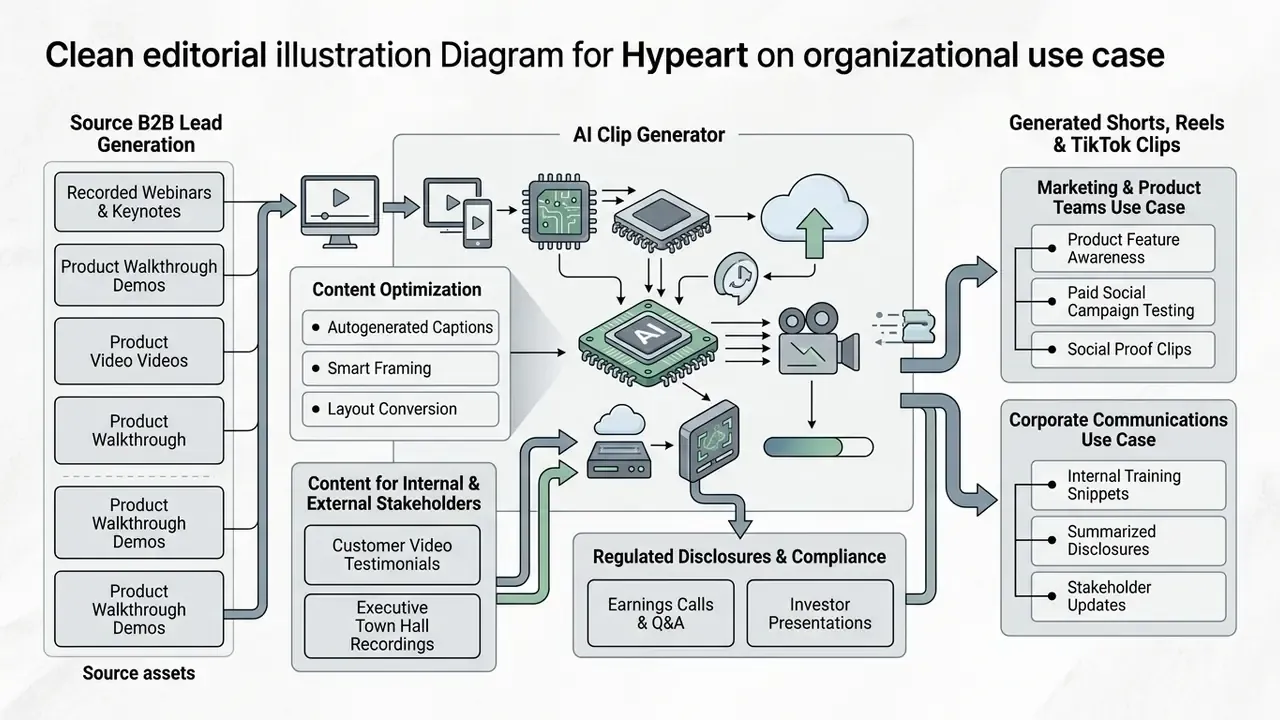
In regulated-industry deployments described by practitioners, communications teams apply automated clipping to quarterly earnings calls and regulatory webinars, producing 45-second executive summaries with verified captions. Reported cycle-time reductions are directional, not audited. The recurring pattern is that compliance review shifts from watching rendered video to reading an editable transcript, which compresses approval loops from multi-day to same-day in the accounts that publish such figures. Validate those gains against your own baseline before you reallocate headcount, because no independently verified public dataset quantifies the improvement.
«HIVE, developed with the participation of professional commercial-content editors, consistently narrows the gap between automated and human editing on advertising-oriented tasks.»
Marketing teams calculating operational savings across campaign channels can open the hub to evaluate internal resource metrics.
Governance, Data Privacy, and Regulatory Controls
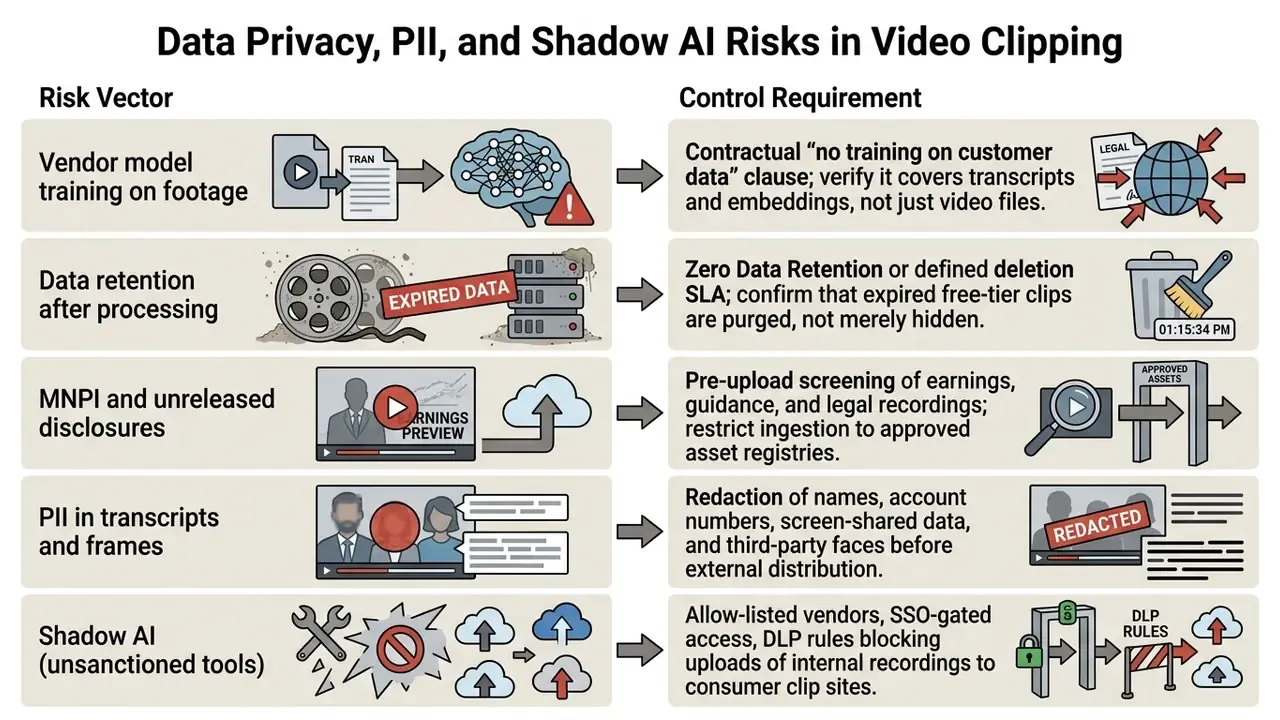
Automated clipping moves internal recordings into third-party cloud infrastructure. Board updates, earnings calls, product roadmaps, customer interviews. For a regulated organization, the control question is not whether the model makes good clips. It is what happens to the source asset, the transcript, and the derived metadata after processing.
Data Privacy, PII, and Shadow AI Risks in Video Clipping
Five exposure vectors need explicit controls:
Human-in-the-Loop Approval and Audit Trail
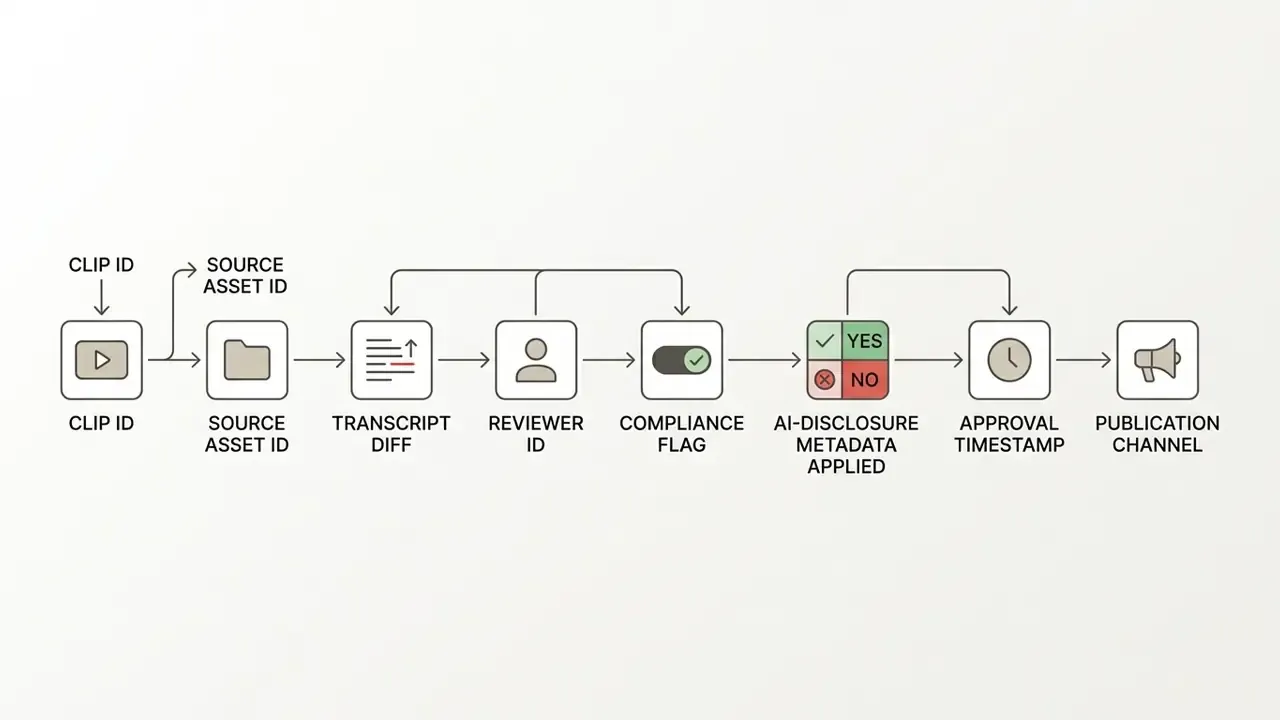
A defensible pipeline records five artefacts per published clip: the source asset identifier with documented usage rights, the transcript diff showing every human edit, the identity of the reviewer who approved caption text, the compliance disposition (approved, escalated, rejected), and confirmation that AI-disclosure metadata was applied. Without the audit log, an organization can assert that review happened but cannot evidence it during examination. Assertion is not evidence.
Pre-Publication Compliance Checklist
Checklist0 / 10
Free AI Clip Generator Plans, Limits, and Commercial Use
Selecting an ai clip generator free online tool means reviewing operational parameters, feature limits, watermark policies, data-handling terms, and the underlying commercial usage rights. Free tiers open the door to basic clipping; enterprise workflows generally need paid subscription infrastructure. Buyers benchmarking entry-level options can also review comparative coverage of free AI video generators and their upgrade thresholds.
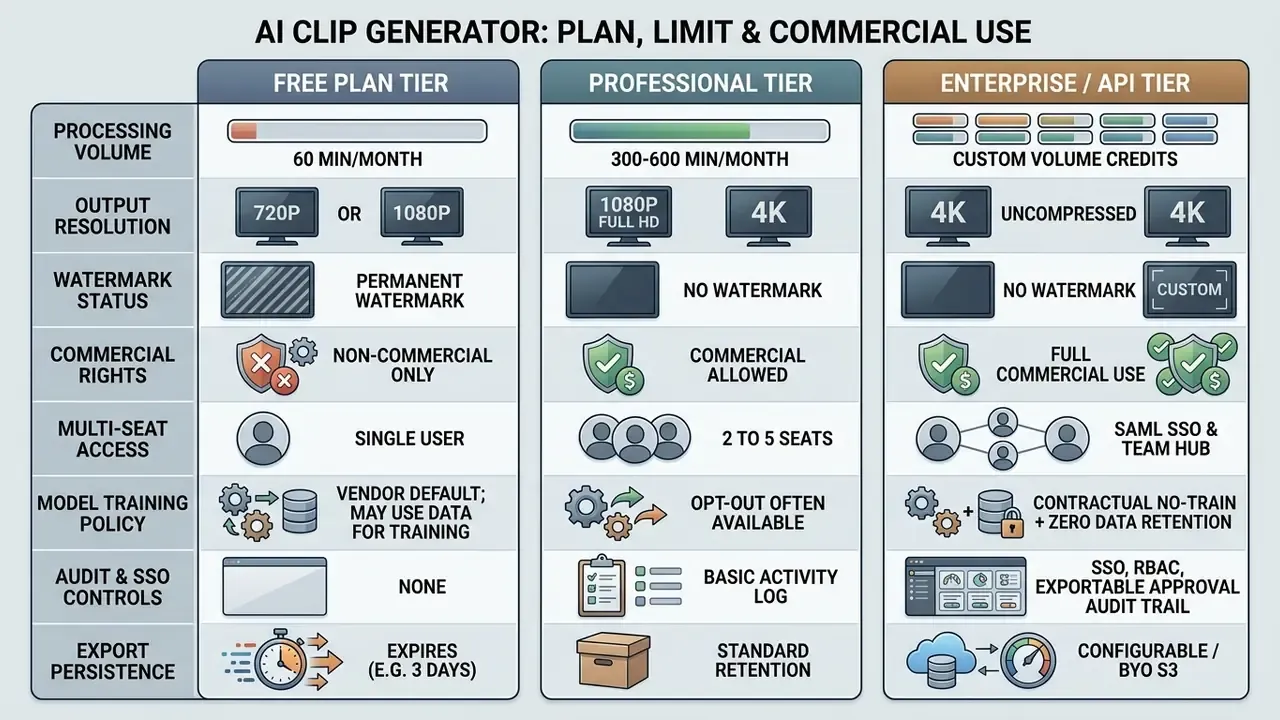
Watermark and resolution policies differ sharply between vendors, so read the table as a common pattern, not a universal rule. Some free tiers export watermark-free at 1080p while capping clip duration; others watermark every export regardless of length.
What Is Included in an AI Clip Creator Free Plan?
An ai clip maker free tier lets a buyer test transcription accuracy and clipping quality with no upfront commitment. Most free plans run on credit allocations, usually 30 to 60 processing minutes per month.
«OpusClip's free tier provides 60 credits per month (~1 credit per minute of video): watermarked clips, exports unavailable after 3 days, editing disabled.»
Free access rarely requires a credit card at registration; documented examples range from a single free video to 75 monthly clipping credits at 720p. These accounts still enforce baseline restrictions: limited export persistence with clips expiring from server storage after a few days, disabled batch processing, and no access to advanced AI B-roll overlays or automated multi-language translation.
Watermarks, Exports, and Usage Limits
Free platforms enforce operational caps to separate trial tiers from commercial product. The most common constraint is a hardcoded vendor watermark stamped across every exported file.
Resolution caps are the second standard threshold:
- Free Tier Accounts Export limited to 720p or standard 1080p, with strict single-file input size limits (roughly 250 MB to 2 GB) and, in some products, a hard export-duration ceiling near one minute.
- Paid Subscription Accounts Full HD (1080p) and 4K exports, file inputs up to 10 GB, and input duration limits from 2 hours up to 10 hours per file on enterprise tiers.
«Riverside.fm's free tier includes Magic Clips and unlimited single-track recording, but caps video quality at 720p and applies a platform watermark to all material.»
Creators looking to strip branding elements or handle advanced headshot formatting can evaluate specialized ai headshot generator tools for alternative asset preparation.
Can You Use AI-Generated Clips for Commercial Content?
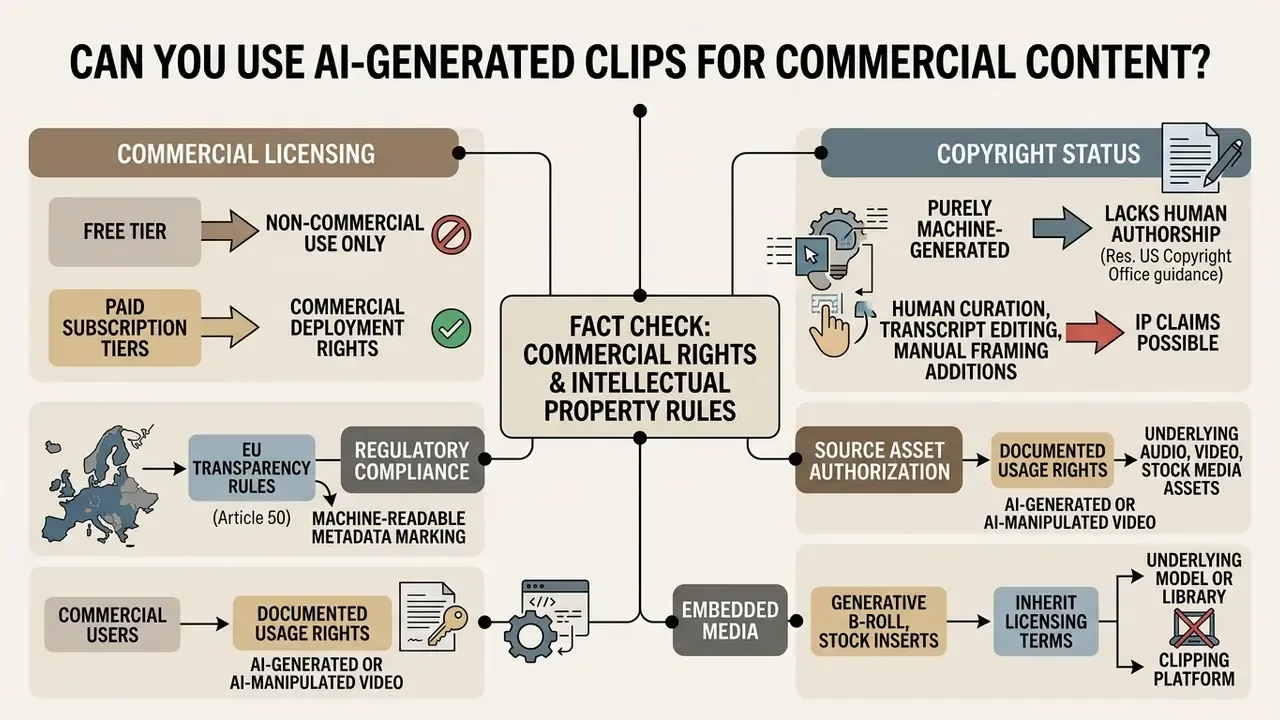
Whether ai clip videos can run in monetized channels or paid social campaigns depends on the provider's end-user licence agreement and on governing intellectual property law. Under terms enforced by major video AI vendors, free-tier outputs are explicitly restricted to personal, non-commercial use.
«OpusClip states that paid-plan users are licensed for commercial use "to the maximum extent permitted by applicable law," while free accounts are limited to personal, non-commercial application.»
FAQ About AI Clip Generators
Is an AI Clip Maker Free Online, or Do You Need to Download an App?
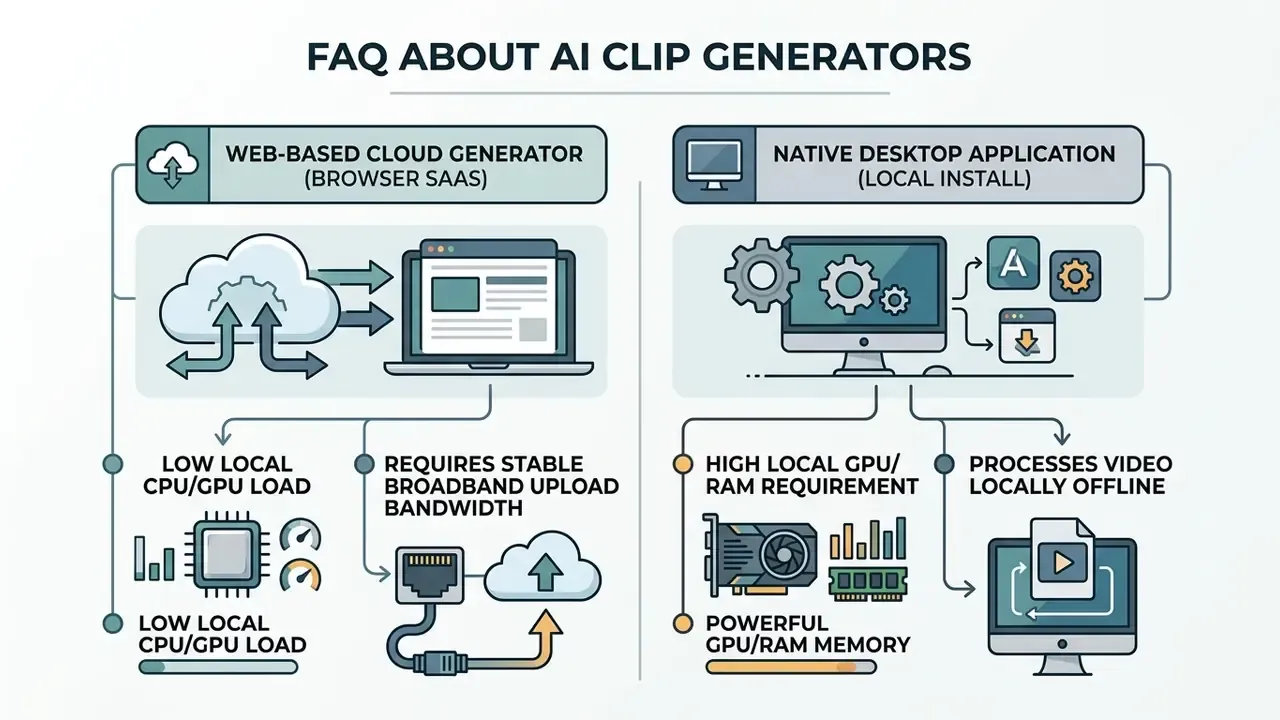
Most AI clip generators run as cloud-based web applications inside a standard browser, with no local desktop install. Cloud infrastructure offloads AI processing, speech recognition, and rendering to server clusters, so operators work comfortably on low-spec laptops.
«OpusClip and Riverside.fm operate as web platforms on a credit model: users upload video through the browser while all AI processing runs on the provider's servers.» — OpusClip Pricing Analysis, opus.pro/pricing (2026-06-11). https://opus.pro/pricing Cloud tools are not automatically faster end to end. They lower local device load, but upload and export throughput becomes network-bound, whereas a well-provisioned desktop GPU can render faster locally. While primary processing happens online, professional platforms offer optional desktop plugins for non-linear editors like Adobe Premiere Pro and DaVinci Resolve. Teams comparing adjacent categories can review text-to-video AI tools for prompt-based generation rather than clipping. Users modifying static image assets before video assembly can add person to photo online free with web-based graphic tools, or prepare thumbnails in a browser-based photo editor.
How Long Does It Take to Generate Multiple Clips?
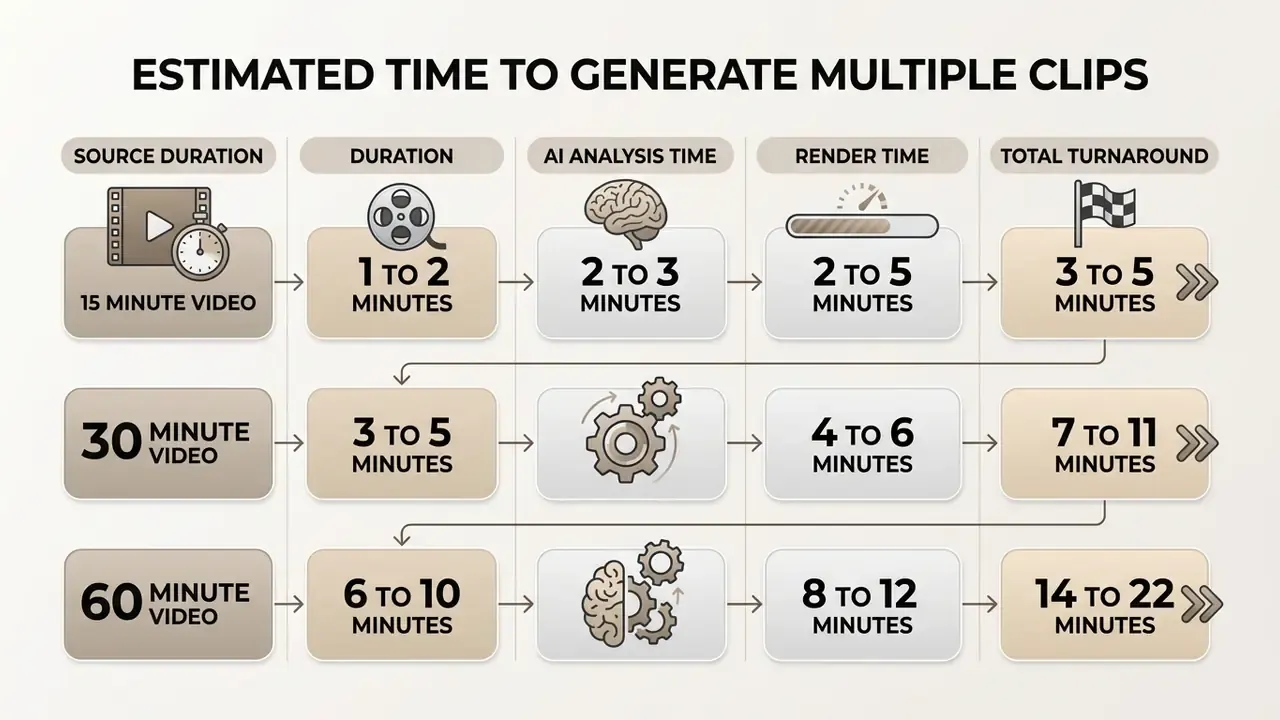
Processing time for an ai clips generator free job depends on source length, server queue congestion, and export options. Automated analysis (transcription, semantic segmentation, active-speaker tracking) typically runs at a 3x to 5x speed multiplier relative to video duration. Published benchmarks show near-linear scaling for analysis workloads: a CLIP-based summarization framework processed a 1-minute clip in roughly 16.8 seconds and a 1-hour video in about 14.8 minutes. Note that end-to-end measurement includes queue time, inference, encoding, and download, so vendor-reported "30 seconds" figures usually describe analysis only. A standard 60-minute recorded webinar generally yields 5 to 10 candidate short clips within 15 minutes of total processing. After rendering, operators typically spend 5 to 10 minutes checking transcript accuracy and caption safe zones before anything reaches a live feed.
Can I Search for Specific Moments Instead of Accepting AI Suggestions?
Yes. Prompt-based retrieval takes natural-language instructions and returns matching segments: all product mentions, every reference to a named metric, all frames featuring a specific speaker. For compliance excerpting, where the required moment is already known and salience scoring is irrelevant, this is the fastest route.
Does the AI Clip Generator Handle Multi-Hour Livestreams?
Enterprise tiers ingest continuous footage up to 10 hours without manual pre-splitting, covering full Twitch broadcasts, multi-session conferences, and marathon podcast recordings. Mid-tier plans commonly cap input between 2 and 4 hours, and credit consumption scales with source duration rather than with the number of clips produced.
Can Generated Clips Be Published Automatically?
Yes. Connected accounts for YouTube, TikTok, Instagram, Facebook, X, and LinkedIn support direct publishing or calendar-based scheduling, so one long recording can populate a multi-week posting plan. For regulated publishers, scheduling belongs behind the approval gate: the audit log entry must exist before a clip enters the queue, not after it goes live.
Will AI-Selected Clips Cut Off Mid-Sentence?
Boundary detection follows dialogue, emphasis, and topic shifts, so each clip should open and close on a complete thought. Where the automated cut misses, transcript-level editing lets operators extend or trim the boundary without re-running the whole job.
Does AI Clipping Work on Videos Without Speech?
Highlight detection leans heavily on transcript and audio-affect signals, so speech-light footage produces weaker candidate sets. Most platforms also require the selected transcription language to match the spoken language, otherwise no clips are returned at all.
What Should a First Controlled Pilot Look Like?
Start narrow. Pick one non-sensitive asset class, for example recorded product webinars with no MNPI exposure, name a single accountable owner, and run 30 days with the audit trail switched on. Measure three things: transcript correction rate per clip, reviewer minutes per published clip, and the number of clips rejected at compliance. If correction rates stay high after 30 days, the issue is usually audio capture quality, not the model. Only then extend scope to earnings and regulatory material. For teams building custom API pipelines, developers can explore the hub to examine technical integration specifications. Further information on organizational video deployment workflows sits in our main resource index, and users can contact technical support for infrastructure guidance. To review broader media asset creation frameworks, creators can open the hub for enterprise licensing documentation.
Appendix A: Superseded Formulations
The following original formulations were revised in this edition and are retained for transparency and version traceability:
Dating note: Several vendor pricing and terms references carry 2026 timestamps reflecting the pages as retrieved at time of review. Pricing, retention windows, and commercial-use language change frequently; treat all figures as point-in-time and re-verify against the vendor's live documentation.

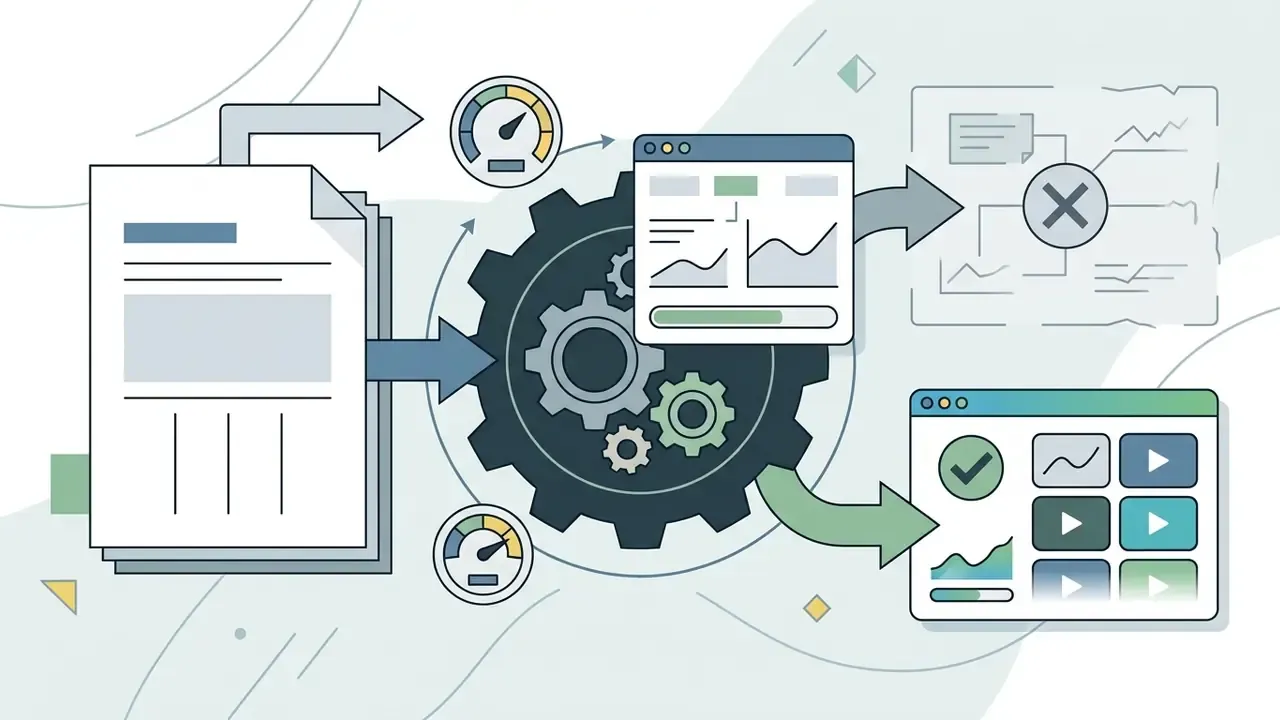
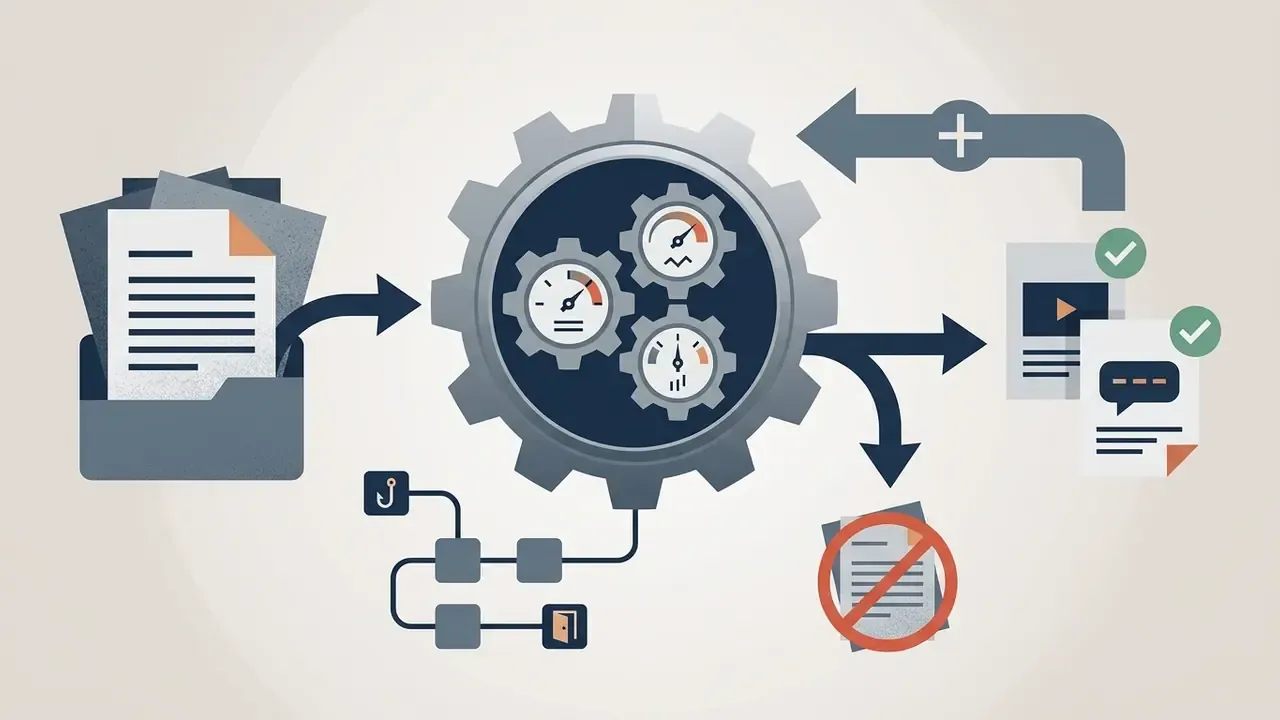
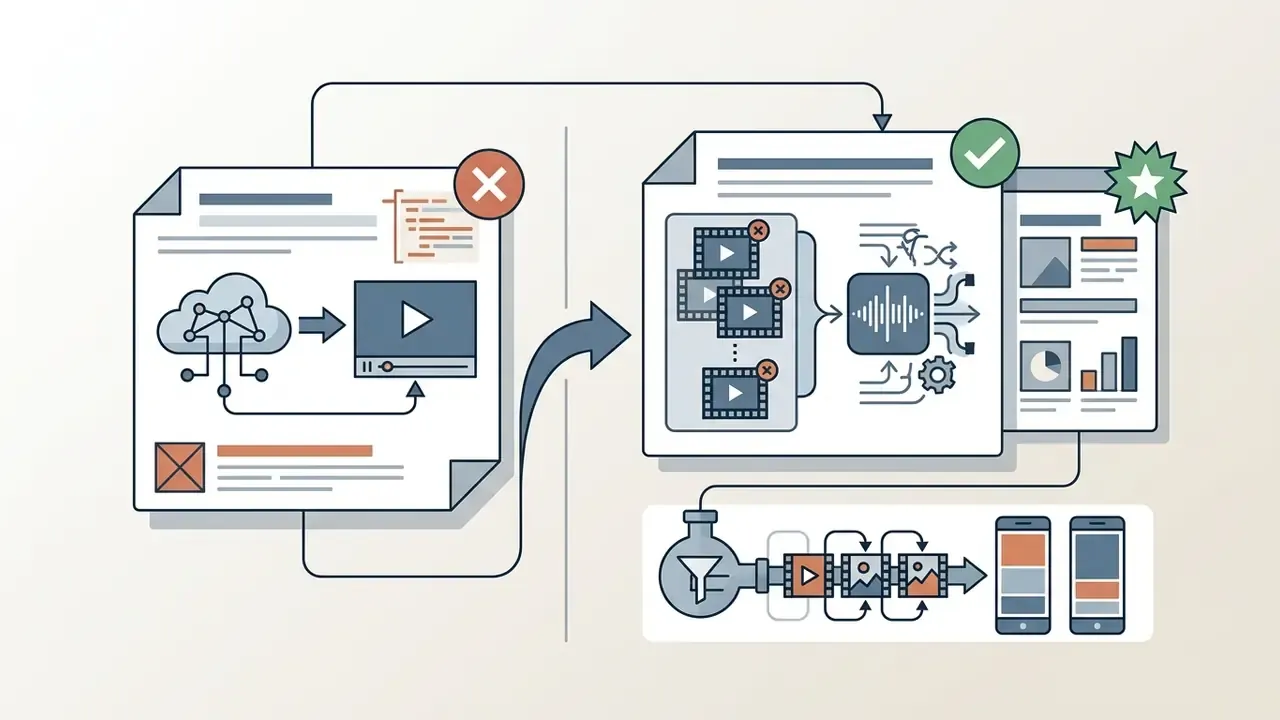
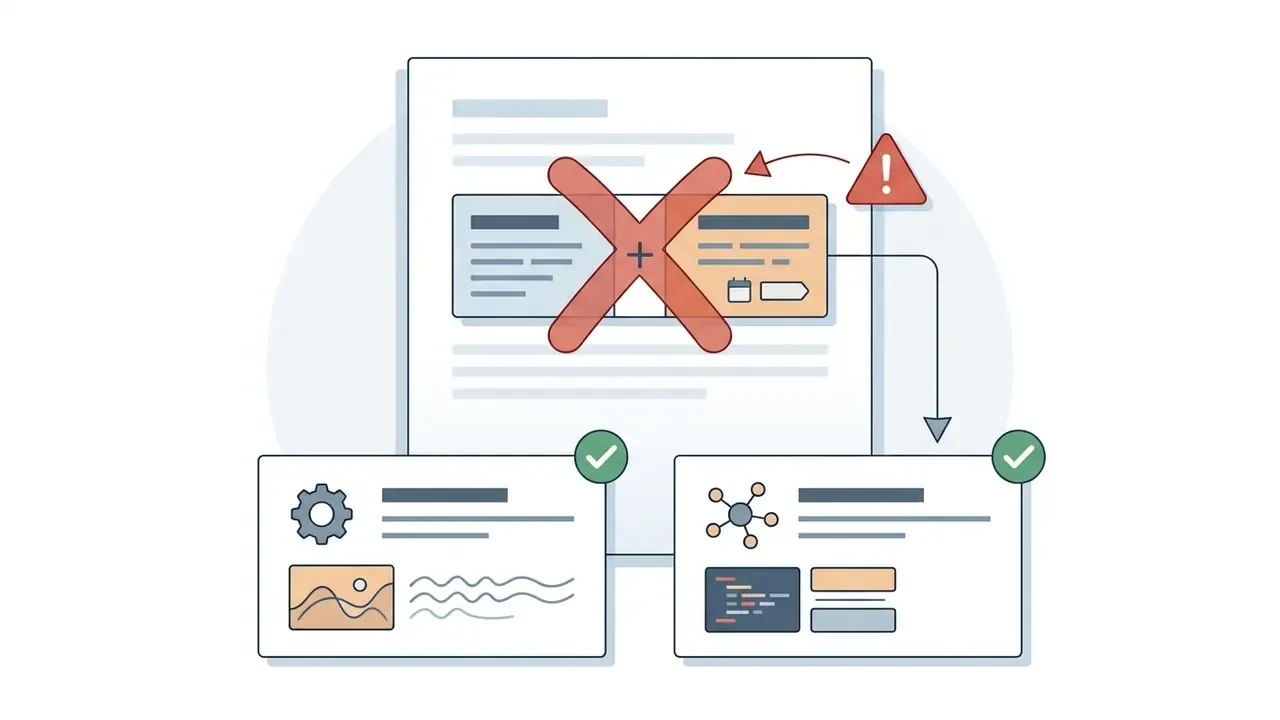

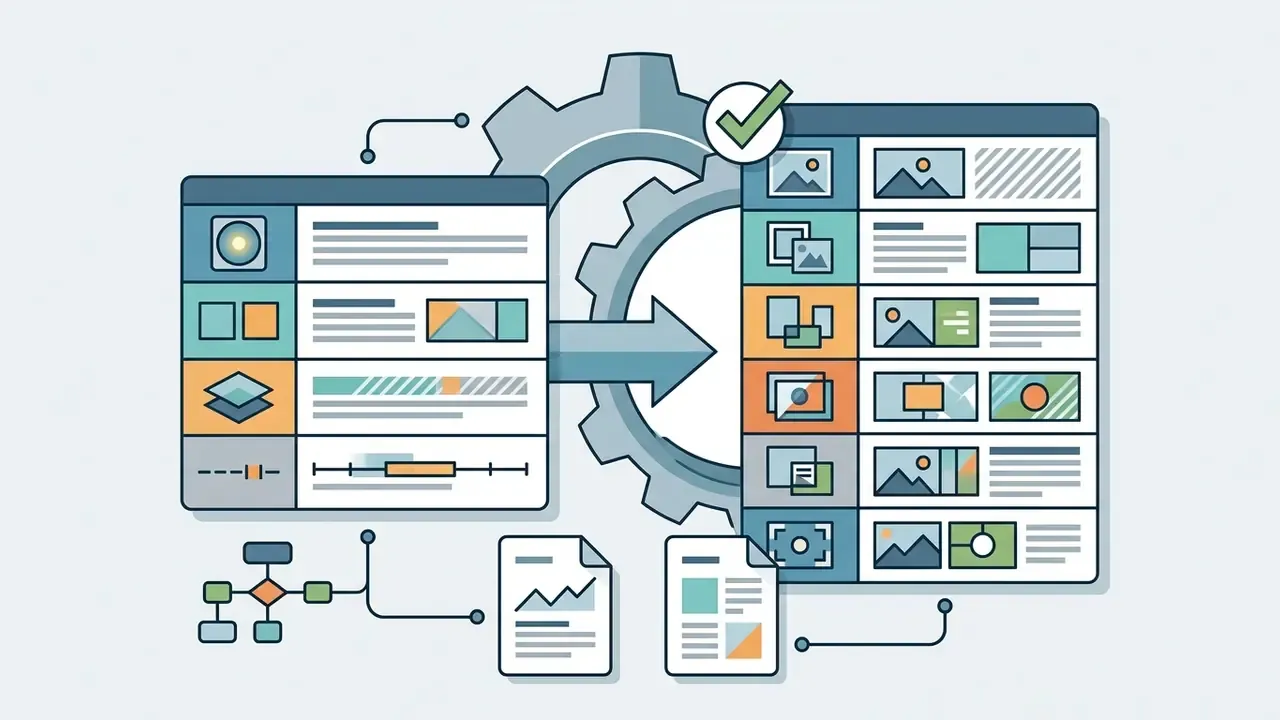
Framing & Effect Capability table (Active Speaker Auto-Reframe, Multi-Speaker Split Layout, B-Roll Overlay Insertion, Dynamic Caption Highlighting) — superseded by the six-row layout matrix including picture-in-picture and multi-panel composites.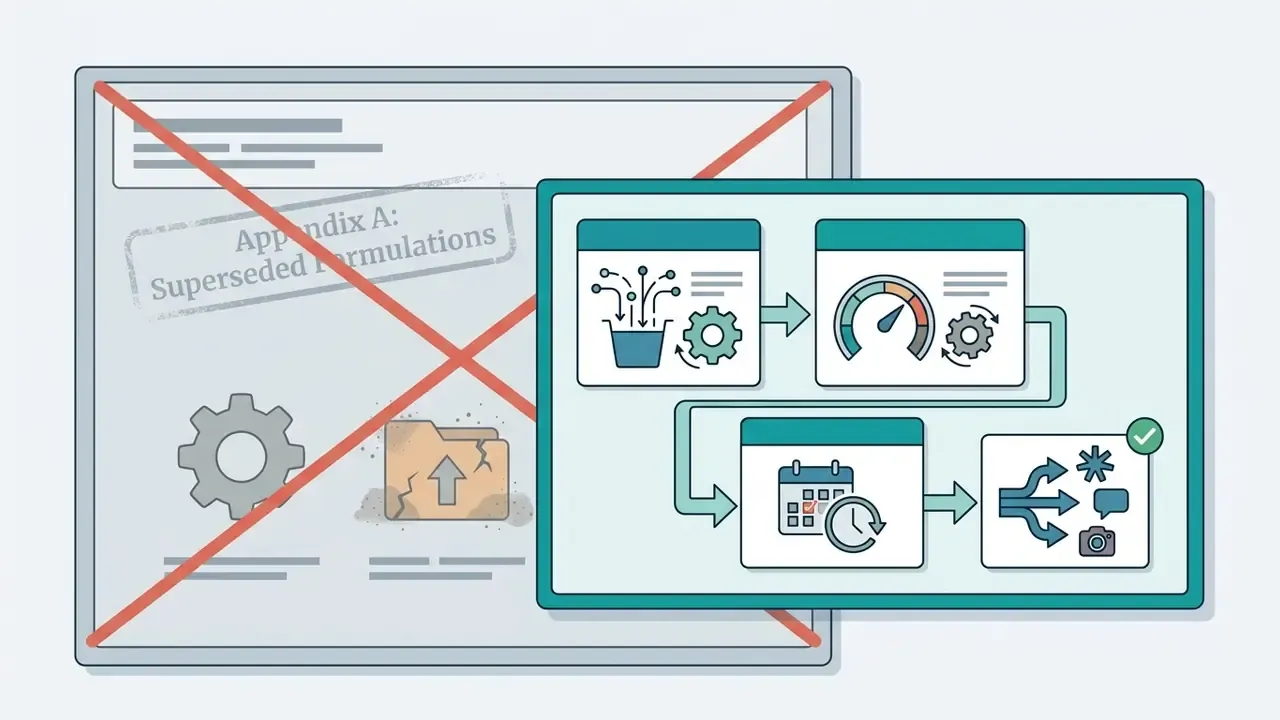
Technical Article Metadata
- SEO Title: AI Clip Generator: Turn Long Videos Into Viral Short Clips
- SEO Description: AI clip generator guide: turn long videos, podcasts and 10-hour streams into captioned Shorts, Reels and TikTok clips. Compare free plans, layouts, governance controls and commercial-use rights.
- Company Status Note: No verified company USP available at time of review; none has been asserted in this article.