If you sit in a control function at a US bank or a mature fintech, the question is rarely "can AI write this?" It is narrower and harder: who owns the output, and what evidence proves a human reviewed it?
Executive Summary
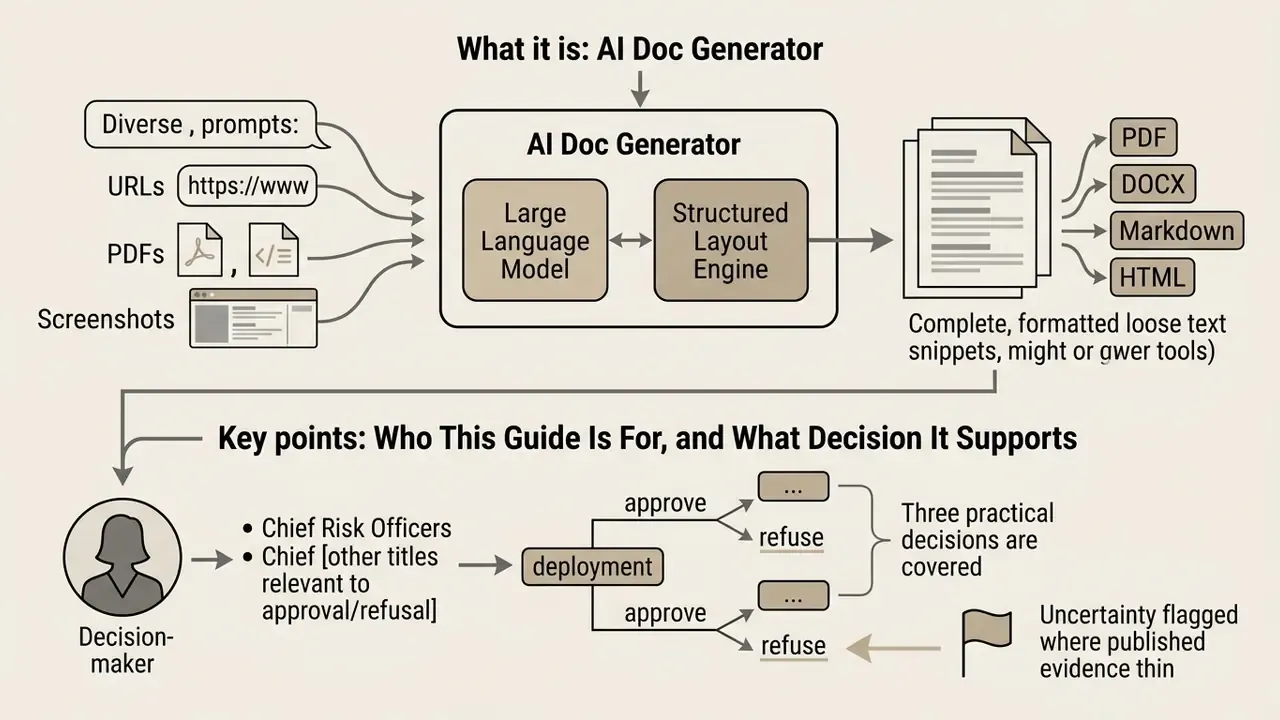
- What it is: An ai doc generator pairs a large language model with a structured layout engine, producing complete multi-page files (PDF, DOCX, Markdown, HTML) instead of loose paragraphs.
- Adoption is already mainstream: By late 2024, roughly one in four corporate press releases showed measurable LLM assistance (arXiv, 2025).
- Where it wins: First drafts, restructuring legacy documentation, standardizing templates, multilingual output across 50+ languages, and converting screenshots or URLs into editable layouts.
- Where it fails: Specialized legal research, precedent citation, regulatory interpretation, and any output requiring decision ownership.
- What governance requires: Human-in-the-loop sign-off, prompt/model/version logging, source-hash retention, and Zero Data Retention or client-side execution for confidential inputs.
- Biggest institutional risk: Not the model. It is Shadow AI, where staff paste confidential material into free, no-sign-up guest interfaces outside the monitored perimeter.
Who This Guide Is For, and What Decision It Supports
This guide is written for people who must approve or refuse a deployment: Chief Risk Officers, Chief Compliance Officers, Heads of Model Risk, and AI governance leads. Finance transformation owners running accounts payable, reconciliations, and close documentation will also find the control mapping usable.
Three practical decisions are covered. First, whether a document generation pipeline belongs inside your model inventory (it usually does). Second, which document classes may touch a public cloud model at all. Third, what evidence an examiner will accept as proof that human review actually happened, rather than being asserted in a policy nobody tested.
We flag uncertainty where the published evidence is thin. Productivity claims, in particular, are heterogeneous and vendor-reported far more often than independently measured.
What Is an AI Document Generator?
An ai document generator is an automated software application that leverages large language models (LLMs) and structured layout engines to synthesize, format, and build complete documents from minimal textual inputs. Standard document creation tools require users to write content paragraph by paragraph and manually configure margins, fonts, and headings. In contrast, an ai doc generator processes context prompts or ingested data files, infers required document sections, and populates those sections with structured text (DealHub, 2026; DocSynthv2, arXiv, 2024, https://arxiv.org/abs/2406.08354).
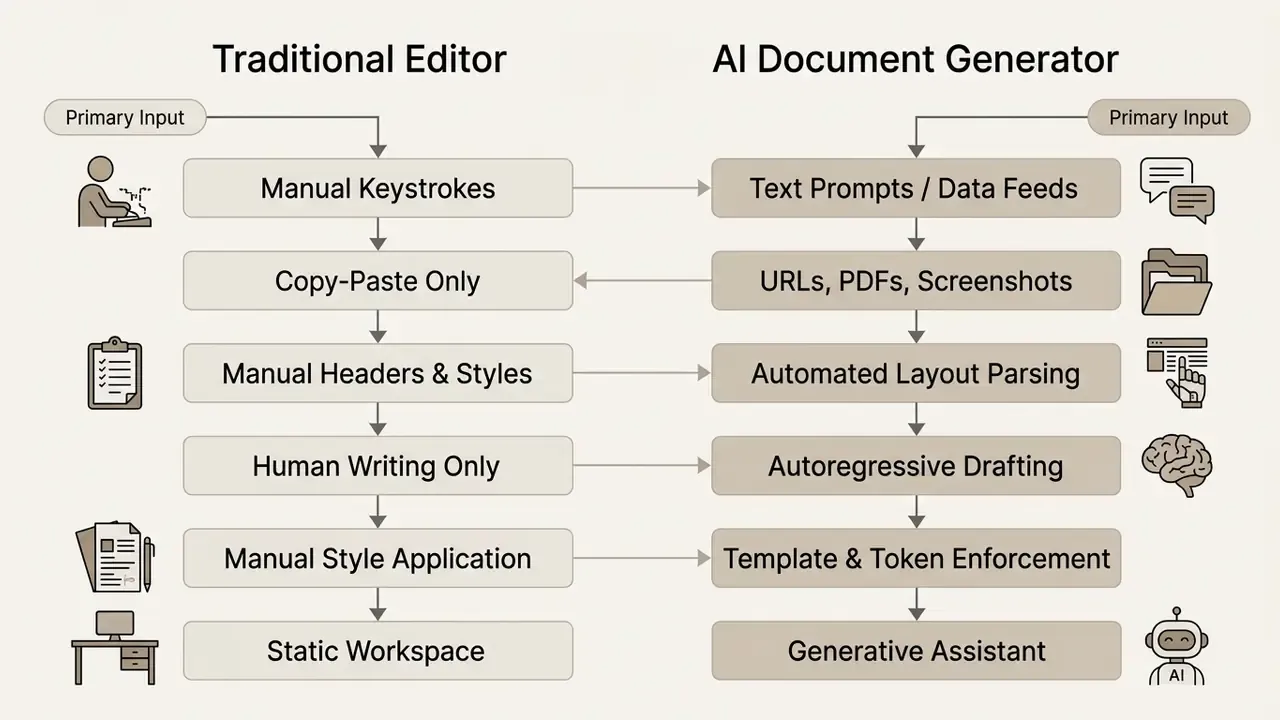
Recent empirical research shows that ai document creation has moved rapidly from experimental pilots into core institutional workflows. A 2025 large-scale observational study analyzing over 305 million public and corporate texts found that by late 2024, approximately 24% of corporate press releases, 18% of financial consumer complaint responses, and nearly 10% of small-firm job postings were at least partially generated or edited using LLMs.
«By late 2024, roughly 24% of corporate press releases and 18% of financial consumer complaints showed measurable LLM assistance.»
These tools combine generative text capabilities with predefined visual templates to turn raw ideas into export-ready business artifacts. The practical consequence for governance functions is blunt: documentation automation is no longer a pilot-stage question. It is an existing production dependency that requires controls, logging, and validation equivalent to any other model-driven process.
For teams evaluating adjacent generative capabilities beyond text documents, you can review AI voice generation capabilities and licensing terms, browse the hub for platform-tier pricing structures, or explore the hub for administrative assistance.
From a Text Prompt to a Structured Document
Transforming a raw text prompt into a multi-page ai generated document requires parsing user intent, establishing logical section hierarchies, and executing sequential text generation. When a user submits an instruction, such as requesting an executive summary or an operational risk evaluation, the underlying model identifies key topics, determines appropriate subheadings (H2, H3), and drafts body text tailored to the specified audience (NIST SP 1353, 2026).
Advanced architectures like DocSynthv2 model layout tokens jointly with textual tokens, allowing the system to place callout boxes, bulleted lists, and tables without relying on external visual design modules.
«DocSynthv2 generates coherent multi-section documents by modelling layout structure and content as a single autoregressive sequence.»
A well-constructed prompt guides the ai document maker on document purpose, tone, required disclosures, and structural boundaries. In enterprise architectures, this generation layer sits behind an orchestration service: the prompt is enriched with retrieved internal context, passed to the model, and the resulting token stream is compiled by a rendering engine (WeasyPrint, Prince, or a DOCX XML writer) that enforces page geometry, running headers, and pagination independently of the model itself.
Separating content synthesis from layout compilation is what allows institutions to standardize visual output even when the underlying model version changes. That separation also simplifies validation, because a formatting defect can be attributed to the compiler rather than to the model.
What an AI Document Creator Can and Cannot Do
An ai document creator automates draft generation, language refinement, text summarization, and initial layout formatting. It cannot guarantee absolute factual accuracy, independently conduct legal research, or take decision ownership.
- What it can do Synthesize complex data feeds, build structured outlines, convert rough meeting notes into formatted memos, ingest external PDFs and URLs, rephrase text for target audiences, translate content while preserving pagination, and generate uniform document layouts in seconds.
- What it cannot do Substitute for expert human judgment, ensure compliance with evolving regulatory standards without oversight, verify its own citations, or prevent hallucinated references (U.S. Department of Energy Reference Guide, 2024; Saudi Arabia Government Generative AI Guidelines, 2026).
Empirical evaluations in legal drafting demonstrate that top-tier models like Claude 3 and GPT-4 achieve quality ratings matching or exceeding junior professionals in issue spotting and clause generation (averaging around 3.9 on a 5-point scale). However, these same models systematically fail in specialized legal research due to fabricated case citations.
«All tested models systematically fabricated case names and citations when performing specialised legal research tasks.»
Consequently, human validation remains mandatory before any generated documents are approved for formal business execution. Not advisable. Mandatory.
How AI Document Generation Works
An ai document generator operates through a multi-stage workflow: context ingestion, prompt parsing, structural generation, human revision, and final file export. Modern enterprise architectures connect frontend text interfaces to indexed data repositories, allowing users to ai create a document based on internal records rather than generic training data (Microsoft Azure Architecture Center, 2025).
Document creation flow (four stages):
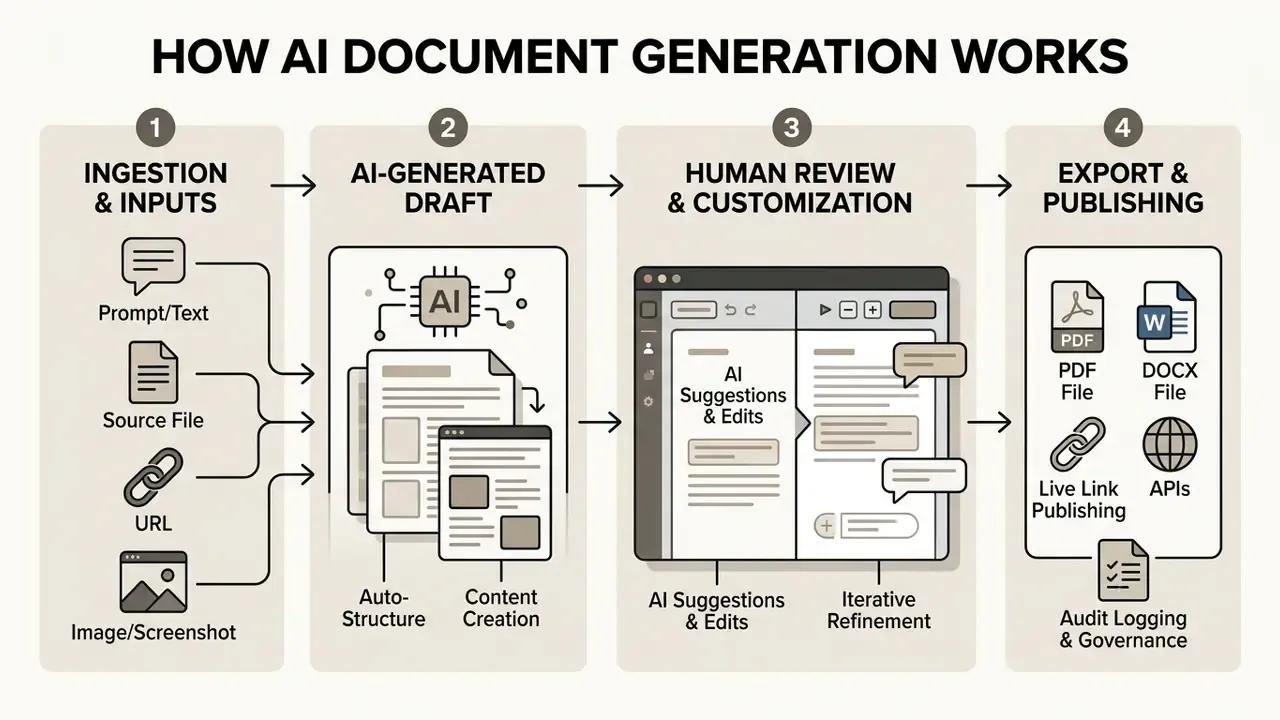
- Stage 1: Ingestion. The user submits a text prompt detailing purpose and target audience, uploads source files (PDFs, DOCX, notes, spreadsheets), supplies a live URL, or uploads an image of a target layout.
- Stage 2: Generative Drafting. The system parses inputs, creates a hierarchical document layout, and generates section-by-section text incorporating headings, tables, and callouts.
- Stage 3: Editing. The user reviews the generated draft in an interactive workspace, manually editing text or prompting the AI assistant to refine specific sections, adjust tone, or expand data analysis.
- Stage 4: Export. The final document is rendered into fixed-layout formats (PDF) or editable word-processing files (DOCX), published as a tracked live link, and saved to secure storage with a complete review log.
Stage 3 is where most governance programs fail in practice. The workflow exists, the sign-off field exists, and yet nobody can show what the reviewer changed.
Describe the Purpose, Audience and Required Content
To ai create document drafts that meet institutional requirements, users must provide precise operational constraints. Frameworks established by regulatory bodies recommend structuring input prompts around four core parameters: Objective, Audience, Tone, and Response Format (NIST SP 1353, 2026).
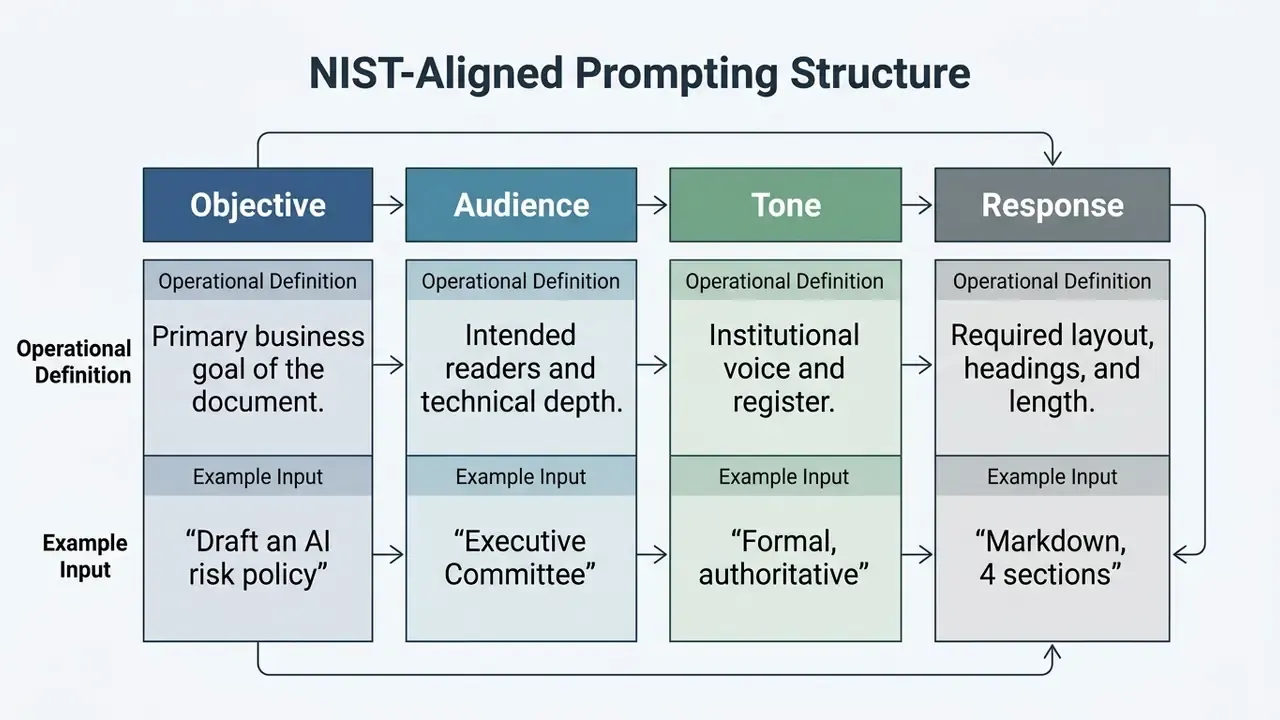
When prompt inputs lack explicit structural guidance, modern ai document creation tool platforms frequently use follow-up clarification loops, prompting the user for target length, audience seniority, and data sources before executing the draft.
«Systems that ask clarifying questions before generation produce more structured and more relevant documents than single-prompt systems.»
Automated URL Scraping and Profile Ingestion
Beyond raw text prompts and static file uploads, high-velocity ai document creators incorporate automated web-scraping pipelines. Instead of manually pasting background research, users can supply live target URLs, public professional profiles, or external web documents. The system ingests the page DOM, isolates core body content while stripping navigation overhead and boilerplate, and feeds the extracted metadata directly into the document's structure, automatically tailoring resumes, competitive analyses, tender responses, or client proposals to external web contexts in real time.
Operationally, this collapses the research-to-draft cycle. A proposal that previously required manual extraction of a client's public positioning, product taxonomy, and terminology can be assembled from the source URL in a single ingestion pass.
For institutional use, scraping pipelines must be scoped by an allow-list of domains and logged. Externally retrieved content becomes part of the document's evidentiary chain and inherits the reliability of its source, including its errors.
From Static Images and Wireframes to Editable Layouts
Modern ai document creation tools are no longer limited to processing text prompts. Advanced multimodal layout engines allow users to upload an image, screenshot, or design mock-up, such as a PDF layout, portfolio page, tender template, or complex resume design, and convert it directly into a structured, editable document.
Using computer vision and dynamic document parsing, the system identifies structural containers, column ratios, visual hierarchy, table boundaries, and typography styles. It then generates a matching vector layout (in HTML/CSS or DOCX XML node structures) populated with synthesized or placeholder text. This image-to-document workflow eliminates manual design replication and allows non-designers to clone high-performing layout geometries in seconds (Chatly AI Docs, 2026).
The same parsing stack underpins two adjacent workflows that institutional teams use heavily: reconstructing editable templates from scanned legacy documents where no source file survives, and normalizing inconsistent third-party submissions into a single corporate layout standard before internal circulation. Teams working with visual assets alongside documents may also find the comparison of online photo editing feature sets and export limits useful when preparing branded imagery for insertion.
Generate, Edit and Customize the Draft
Once initial parameters are set, the system generates a complete draft. Professional document creation requires iterative refinement rather than accepting first-pass outputs. Controlled editing methodologies advocate changing one variable at a time, such as length, structural order, tone, or empirical evidence, during subsequent refinement passes (University of Florida Libraries, 2025).
Iterative refinement is not a neutral operation. Randomized evidence shows that the assistant itself shapes what ends up in the document:
«A randomized experiment with 200 participants found AI assistants shifted topic choice in documents even when suggestions were not explicitly accepted.»
For governance functions this is a material finding. Model-induced framing drift is a documentation risk, not merely a stylistic one. Review protocols should therefore verify what was omitted as well as what was written. A risk memo that quietly drops a mitigating control is worse than one with a typo.
Split-Screen Workspaces and Real-Time Editing
Enterprise document generation platforms increasingly adopt a split-screen interactive workspace. The interface displays the prompt engineering control panel on the left and a live, dynamically reflowing document preview on the right. As users select specific text blocks or issue secondary micro-prompts (for example, "shorten this section," "convert paragraph to bullet list," "add a regulatory reference row," or "update the colour palette"), the generative layout engine re-renders the document in real time without disturbing adjacent visual blocks or page margins.
Two supporting mechanisms make this workflow safe for institutional use. Layout reflow protection prevents a local text edit from cascading into broken pagination across subsequent pages. Built-in version control records every revision as a restorable state, allowing reviewers to compare variants, revert a rejected rewrite, and evidence exactly which draft was approved. Together they convert what used to be an opaque "black box" generation step into an inspectable editing session.
Counter-example. In a parallel pilot at the same institution, an unreviewed AI-generated quarterly summary reproduced a superseded capital-ratio threshold that appeared plausible but had been amended in the prior reporting cycle. The error was caught at second-line review only because atomic figure verification was mandatory. Had the document followed a single-reviewer path, an inaccurate figure would have reached the management committee pack. The failure mode was not fabrication of a citation but silent use of stale context, which is why source-of-truth binding matters as much as fact-checking.
To review complementary automated content utilities, you can compare options across specialized generation engines, review best-in-class generative tool comparisons, or view the guide for enterprise integration options. Teams building internal training material from the same source documents often pair this workflow with an ai quiz generator to convert approved policy text into assessment items.
Which Documents Can AI Generate?
An ai business document generator can produce a wide variety of organizational artifacts, ranging from public-facing press releases and internal status reports to complex business proposals, operational plans, policy documentation, and candidate contract clauses.
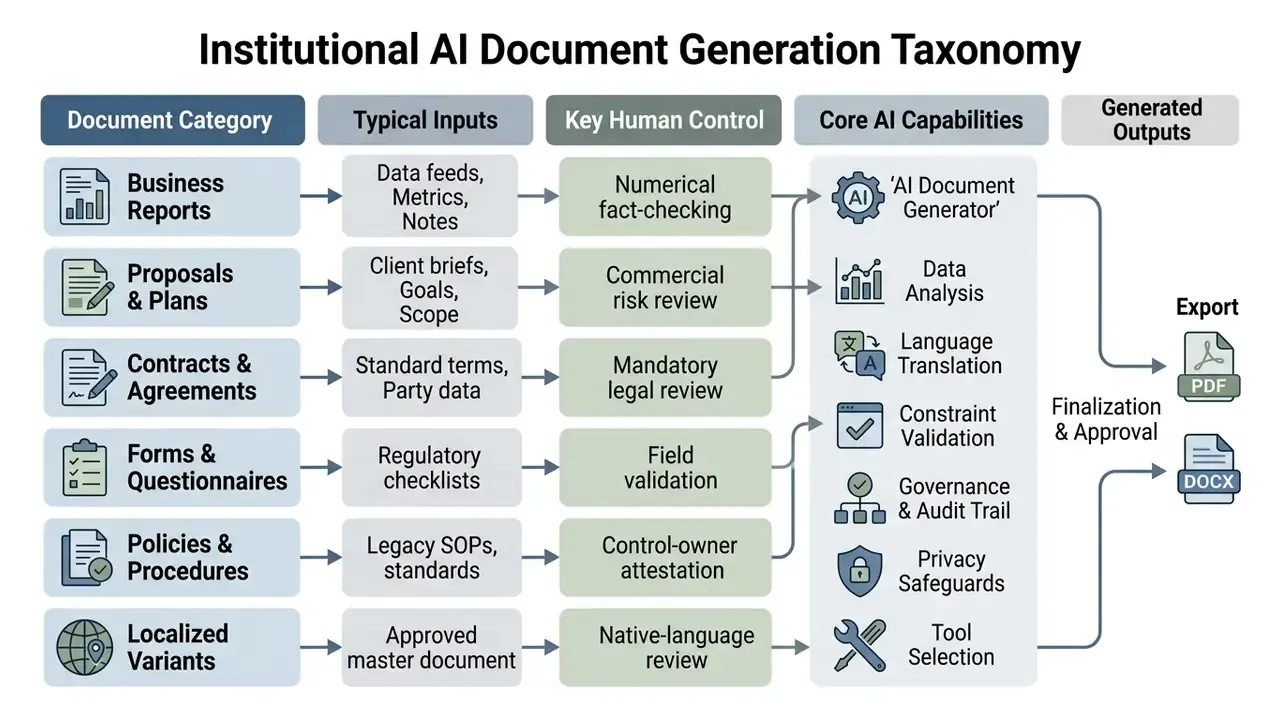
Business Reports, Proposals and Business Plans
Business reports, executive proposals, and strategic plans benefit significantly from AI-assisted drafting. An ai create word document tool can ingest raw quarterly performance metrics or market analysis, organize the data into logical chapters, and draft narrative sections explaining trends (NIST Quick-Start Guide for CSF Analysis, 2026). Generative models help teams overcome initial drafting inertia, improve structural organization, and speed up the production of complex planning documents.
«This study positions itself as the first quantitative analysis of LLM deployment across core business operations, including strategic planning and decision-making.»
Cross-Border Operations and Multilingual Output
For global enterprises, modern ai doc generators feature native multilingual synthesis across 50+ languages. Rather than executing post-hoc machine translation, which often corrupts document formatting, table alignments, and typographic metrics, the engine generates structured documents directly within the target language's syntax and cultural register, preserving visual pagination across localized variants (DocPDF, 2026).
This matters operationally because localized documents frequently break at the layout level rather than the linguistic level. German compound terms overflow fixed-width table cells, right-to-left scripts invert callout geometry, and CJK typography changes line-height calculations. Generating within the target language allows the layout compiler to reflow at build time.
Regulated content still requires native-speaker legal review per jurisdiction, since terminology equivalence is a compliance question, not a translation quality metric.
Contracts, Agreements and Signable Documents
While an ai doc maker can rapidly synthesize boilerplate clauses, non-disclosure agreements (NDAs), service contracts, and consent forms, legal documents present high operational risk. AI models can hallucinate precedent citations, misinterpret statutory conditions, or introduce unenforceable clauses (LLMs in Interpreting Legal Documents, 2024).
«Claude 3 and GPT-4 scored comparably to a junior lawyer (~3.9 out of 5) on drafting tasks, but failed on legal research.»
IMPORTANT: Mandatory Human Legal Review
Perception research also indicates that authorship provenance affects acceptance of the final document:
«Participants preferred documents written by humans, even while expecting that most documents would be automatically generated in future.»
A further, frequently overlooked exposure is privilege. Transmitting privileged legal analysis, litigation strategy, or client-identifying facts to a third-party API may jeopardize attorney-client privilege and confidentiality obligations depending on jurisdiction and the provider's retention terms (Singapore Ministry of Law, Guide for Using Generative AI in the Legal Sector, 2026). Where privilege must be preserved, legal drafting should be executed inside a zero-retention enterprise tenancy, a private cloud deployment, or a client-side environment. Never in a public consumer interface.
In institutional settings, AI tools should therefore be restricted to generating candidate contract drafts or summarizing incoming third-party redlines, leaving decision ownership and final sign-off exclusively to authorized legal counsel.
PDF, Word and Other Export-Ready Documents
Modern ai doc creator tools export directly to fixed-layout PDFs or fluid Microsoft Word files. Converting AI-generated structures into DOCX relies on style mapping that translates heading tags into Word styles, while PDF generation uses layout engines like WeasyPrint or Prince to enforce fixed page boundaries, running headers, and footers (Pandoc Documentation, 2026).
Two conversion modes deserve explicit attention when documents move between formats. Adobe's Retain Page Layout mode reconstructs a PDF into Word using positioned text boxes to match the original geometry, which preserves appearance but complicates later editing. Retain Flowing Text prioritizes editability at the cost of exact positional fidelity (Adobe Acrobat Documentation, 2026). Choosing the wrong mode is the single most common cause of "the AI broke my formatting" complaints. The model produced valid structure; the conversion profile discarded it.
Model Risk, Audit Trail and Validation Governance
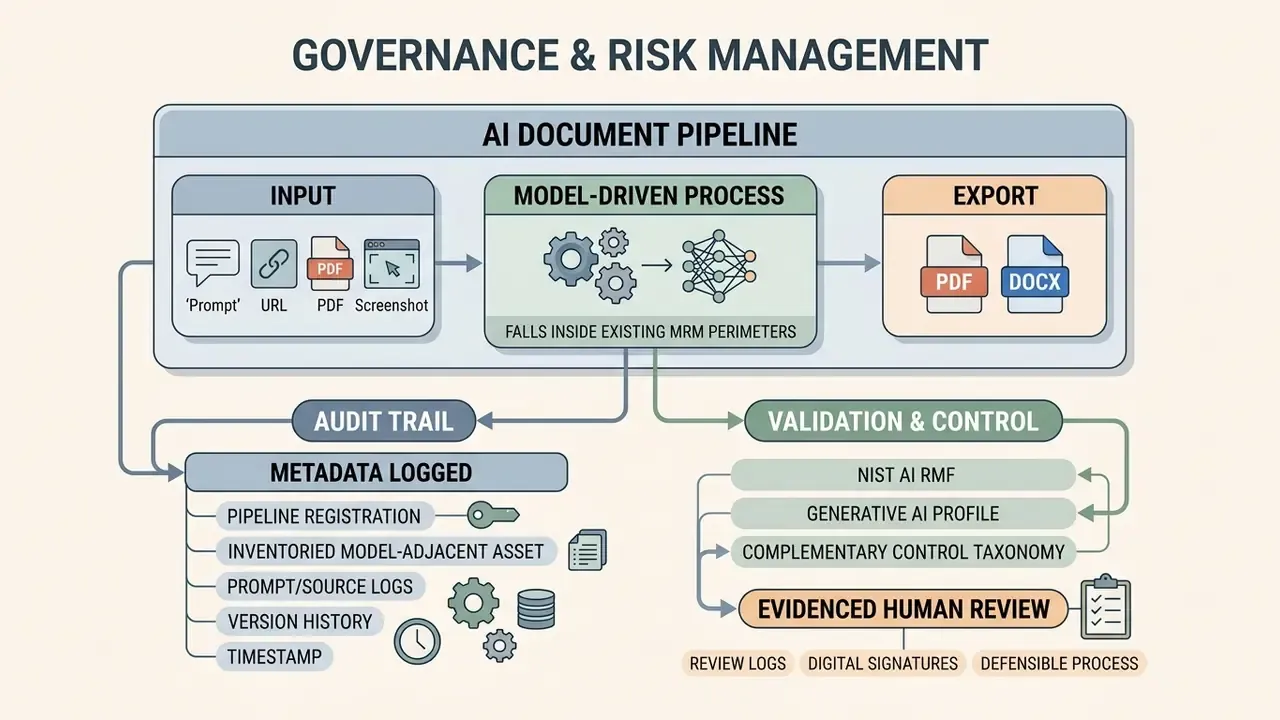
Generative document pipelines are model-driven processes and therefore fall inside existing model risk management (MRM) perimeters. Established supervisory expectations for model risk management, notably the Federal Reserve and OCC guidance (SR 11-7 / OCC 2011-12), were written for quantitative models, but their core requirements map directly onto document generation: clear model inventory entry, documented purpose and limitations, independent validation, ongoing monitoring, and defined ownership.
Institutions adopting an ai document generator should register the pipeline as an inventoried model-adjacent process rather than treating it as an office productivity tool outside governance scope. That single classification decision determines whether examiners see a controlled process or an ungoverned one.
NIST's AI Risk Management Framework and its Generative AI Profile provide the complementary control taxonomy (Govern, Map, Measure, Manage), including the requirement that legal and regulatory obligations involving AI be understood, managed, and documented (NIST AI RMF 1.0, 2023; NIST AI RMF Generative AI Profile, 2024).
Audit Trail: What Metadata Must Be Logged
Human review is only defensible if it is evidenced. The following metadata set should be written to the GRC/MRM record for every externally distributed AI-assisted document:
| Log Field | Purpose | Example Value |
|---|---|---|
| Prompt version ID | Reproduce the exact instruction set used | POL-RISK-v3.2 |
| Model & version | Attribute output to a specific model release | gpt-4o-2026-01 |
| Decoding parameters | Explain output variability | temperature 0.2, top_p 0.9 |
| Source document hashes | Bind output to verified inputs | SHA-256 of 4 ingested PDFs |
| Retrieval scope | Show which repositories were queried | Policy index, Q4 metrics index |
| Reviewer ID & role | Establish human accountability | SME-114, Second-line Compliance |
| Correction log | Evidence what the human changed | 3 citations corrected, 1 figure amended |
| Approver ID & timestamp | Record decision ownership | Head of Compliance, 2026-02-11 14:20 UTC |
| Distribution channel | Track where the document went | PDF filing + tracked live link |
| Retention class | Align with records management policy | Regulatory - 7 years |
Without these fields, an examiner cannot distinguish a validated document from an unreviewed model output. The institution also cannot demonstrate that the human-in-the-loop control actually operated, only that it was written down somewhere.
How to Choose an AI Document Creation Tool
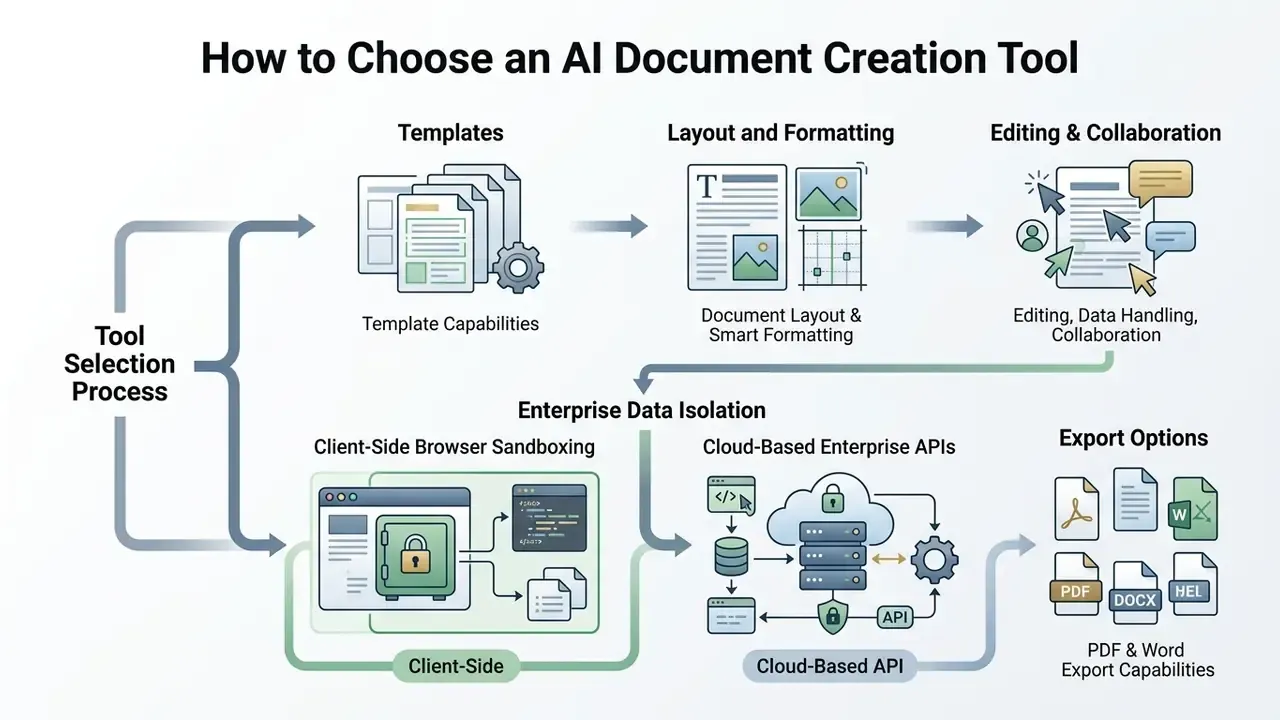
Selecting an enterprise-grade ai document creation tool requires evaluating criteria beyond basic text generation, including template capabilities, smart layout formatting, multimodal input support, data security controls, execution privacy, collaborative editing, and multi-format export fidelity (NIST AI RMF 1.0, 2023; European Commission Transparency Guidelines, 2026).
| Selection Criterion | Key Operational Capabilities | Evaluation Questions |
|---|---|---|
| Templates & Layout | Pre-built institutional structures, smart heading alignment, dynamic sectioning | Does the tool offer customizable templates that enforce corporate visual standards? (Gamma, 2026) |
| Prompt Engineering | Follow-up clarification loops, natural language parsing, contextual memory | Can the tool refine underspecified prompts into structured multi-page drafts? (NIST SP 1353, 2026) |
| Multimodal Inputs | Image-to-layout parsing, URL scraping, PDF restructuring | Can the platform clone a document layout directly from an uploaded screenshot or URL? |
| Execution Privacy | Client-side sandboxing, WebAssembly parsing, VPC isolation | Are inputs processed entirely inside local client memory without persistent server logs? |
| Data Governance | Zero data retention options, local deployment capabilities, encryption | Are inputs excluded from public LLM re-training pipelines? (Singapore Ministry of Law, 2026) |
| Editing & Collaboration | Real-time co-authoring, section-level AI rewrites, change tracking, comments | Does the workspace support concurrent multi-user editing and audit logging? (Google Docs, 2026) |
| Export Fidelity | Lossless PDF export, clean DOCX style mapping, Markdown output | Does the tool maintain table formatting and margin spacing upon export? (Docx_creator, 2026) |
| Localization | Native multilingual generation, layout-preserving localization | Does the engine generate in-language rather than post-translating? (DocPDF, 2026) |
| Auditability | Prompt/model version logs, reviewer attribution, exportable trails | Can logs be exported into GRC or MRM systems such as Archer or MetricStream? |
| Commercial Terms | Clear copyright ownership, transparent usage limits, API availability | Do service terms permit unrestricted commercial redistribution of outputs? (US Copyright Office, 2026) |
For a broader view of how generative tooling is evaluated across categories, see our comparison of leading generative AI tools by output quality, controls, and licensing.
Templates, Document Layout and Smart Formatting
Smart formatting features separate advanced ai document generator tools from simple text completion interfaces. Systems equipped with ai document layout generator capabilities automatically adjust paragraph spacing, apply uniform typographic scales, format tables, and insert page breaks according to target style guides (Box Doc Gen, 2026; Docmosis, 2026). Templates ensure that generated reports match brand geometry without requiring post-hoc design adjustments.
Template-driven platforms differ in the level of page control they expose. Rule-based engines such as Docmosis surface explicit page size, margin, header/footer, table, numbered list, and table-of-contents controls, while visually oriented platforms apply themed layout automatically and accept brand kits (Docmosis, 2026; Gamma, 2026). Institutions with prescribed filing formats generally need the former; marketing and proposal teams usually prefer the latter.
Editing, Data Handling and Collaboration Options
Enterprise adoption depends heavily on data protection and team collaboration features. Inputting proprietary business metrics, customer data, or unannounced financial results into public AI models creates data exposure risks. Official guidance states that individual or company data, financial records, and proprietary content submitted to generative services can be retained, reproduced in later outputs, or used for training unless contractually excluded (Singapore Ministry of Law, Guide for Using Generative AI in the Legal Sector, 2026; U.S. OMB M-24-18, 2024; U.S. OMB M-25-21, 2025).
Enterprise platforms respond with zero-data-retention guarantees, isolated virtual private cloud (VPC) deployments, or on-premises execution (Legal Documents Drafting with Finetuned Pre-Trained LLM, 2024). Built-in collaborative editors additionally enable multi-user commenting, version comparison, and role-based review workflows (Adobe Acrobat Studio, 2026).
Enterprise Data Isolation: Client-Side vs. Cloud Execution
When handling sensitive financial disclosures, medical records, or proprietary trade secrets, organizations must evaluate where model execution and rendering occur:
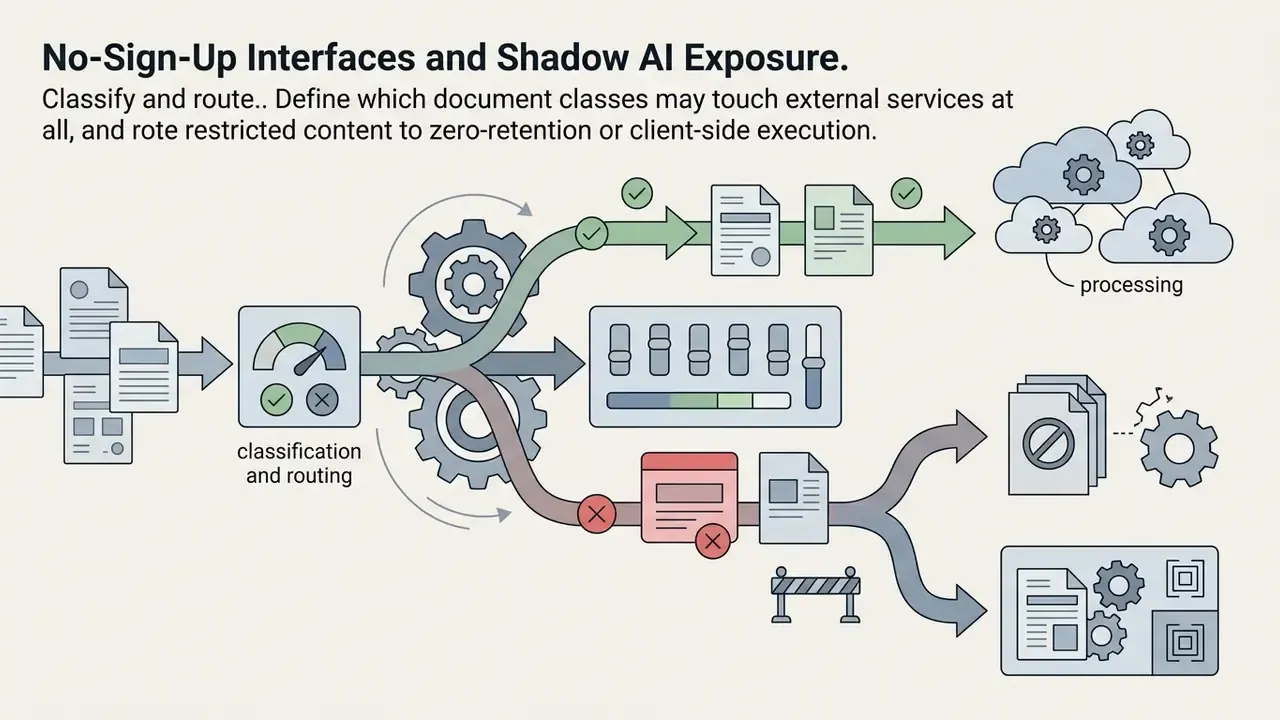
- Client-Side Browser Sandboxing Leverages local browser memory (WebAssembly / ONNX runtime) to parse files, format layouts, and compute metrics locally. Data never leaves the endpoint device, guaranteeing data privacy with zero persistent server footprints; temporary artifacts are destroyed when the session closes (FDM AI Architecture, 2026).
- Cloud-Based Enterprise APIs Uses isolated Virtual Private Clouds (VPC) with zero data retention (ZDR) agreements. While data travels across TLS-encrypted tunnels, it allows teams to leverage large-scale frontier models for complex document synthesis, retrieval over enterprise indexes, and cross-team collaboration.
The trade-off is capability against containment. Client-side execution is well suited to formatting, redaction, resizing, receipt and invoice assembly, and template population from local files. Cloud execution remains necessary for long-context synthesis, retrieval-augmented policy drafting, and multilingual generation at scale.
Mature institutions route documents by classification: public and internal-use content to the cloud tenancy, restricted and privileged content to sandboxed or on-premises execution. The routing rule should live in the data classification policy, not in a team's habit.
PDF and Word Export Capabilities
A high-performing ai doc generator must deliver lossless file export. Converting AI drafts into Word documents should maintain clean XML node structures, allowing users to edit text without breaking document styles. Conversely, PDF rendering must lock fonts, images, and visual callouts into precise coordinates to prevent page reflow during printing or client delivery (Microsoft Support, 2026; Adobe Acrobat Documentation, 2026).
Independent, cross-vendor benchmarks of export fidelity remain scarce; most published figures are vendor claims. Where document integrity is contractually significant, procurement teams should run a controlled bake-off using their own worst-case artifacts, including multi-column layouts, nested tables, embedded charts, and non-Latin typography, and record failure rates per format. Teams handling large embedded media in exported documents may also want to review guidance on file-size reduction and quality trade-offs before distribution.
Free Tiers, Sign-Up Requirements and Shadow AI Exposure
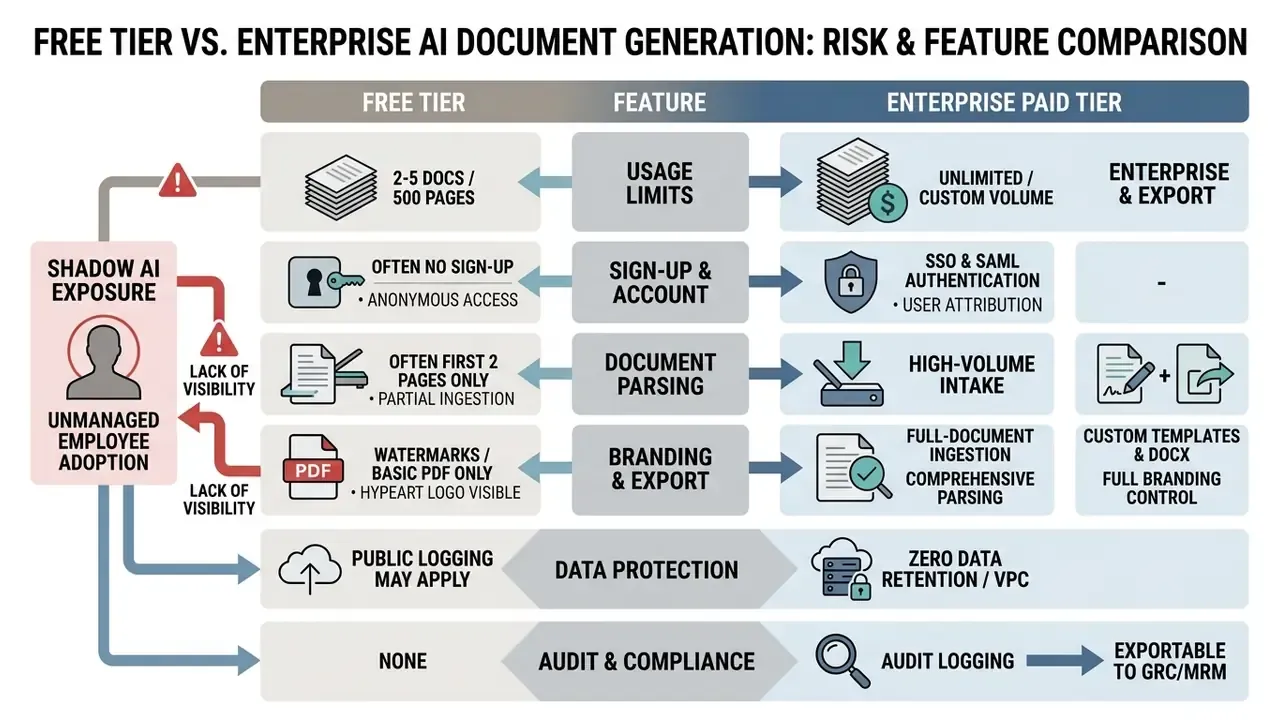
Navigating the landscape of an ai document generator free offering requires understanding usage caps, functional restrictions, and, most critically for regulated institutions, the unmanaged data exposure created when staff adopt these services outside the controlled perimeter.
What "Free" Access Usually Includes
An ai document generator free online service typically operates under strict usage caps. Free tiers generally limit generation to a small monthly credit quota (for example, 60 AI credits or 2 to 5 document generations), cap parsing at the first pages of an uploaded file, impose file-size ceilings around 4 MB, restrict inputs to brief prompts, and limit export options to plain text or watermarked PDF files (Azure Document Intelligence Limits, 2026; Piktochart AI Pricing, 2026). Basic features allow users to evaluate prompt responsiveness and template quality without financial commitment. An ai doc maker free tier is a procurement probe, not a deployment.
Comparable dynamics appear across adjacent categories. See our breakdown of free-tier feature limits, export restrictions and privacy trade-offs.
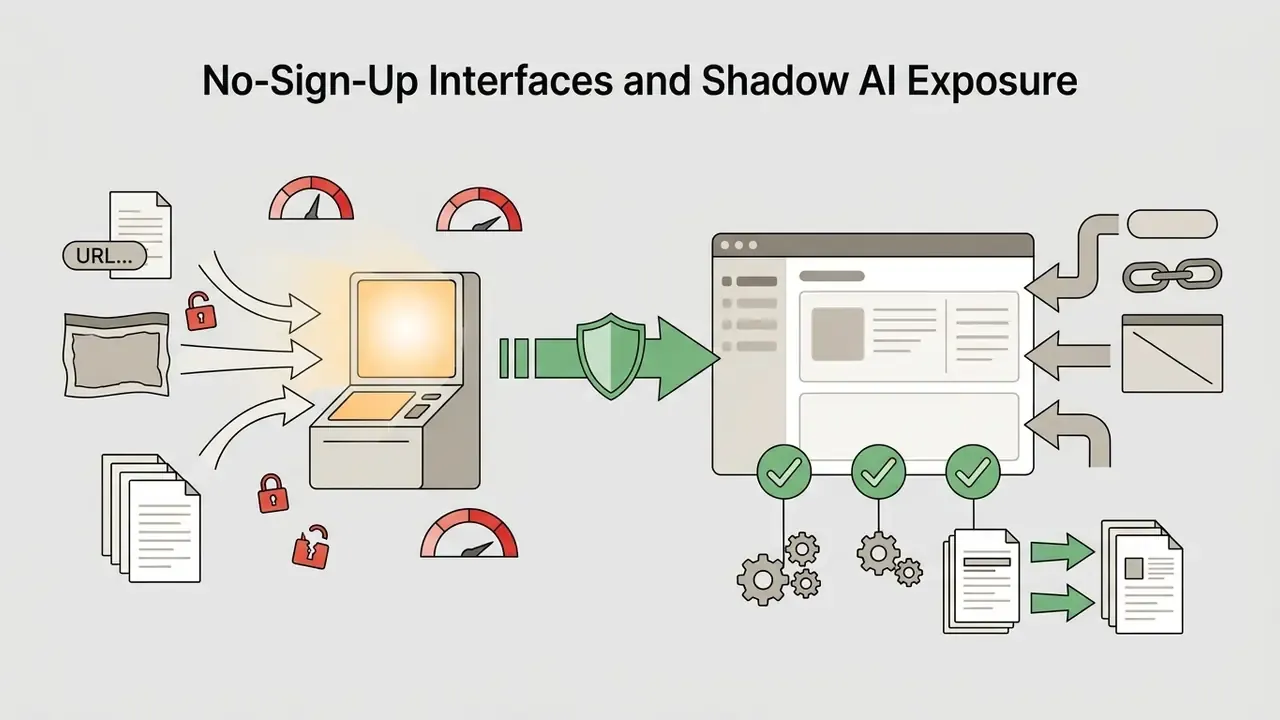
No-Sign-Up Interfaces and Shadow AI Exposure
An ai document generator free no sign up or ai document creator free utility without login requirements is genuinely useful for quick, low-stakes, non-confidential tasks. Drafting an outline for a public blog post, generating a sample invoice layout, resizing a document, or rephrasing a short public memo can be completed efficiently using an ai document generator online free tool (ToolsMio, 2026; Homiwork, 2026). Readers evaluating that category in adjacent domains can review no-sign-up generative tooling and its licensing limits.
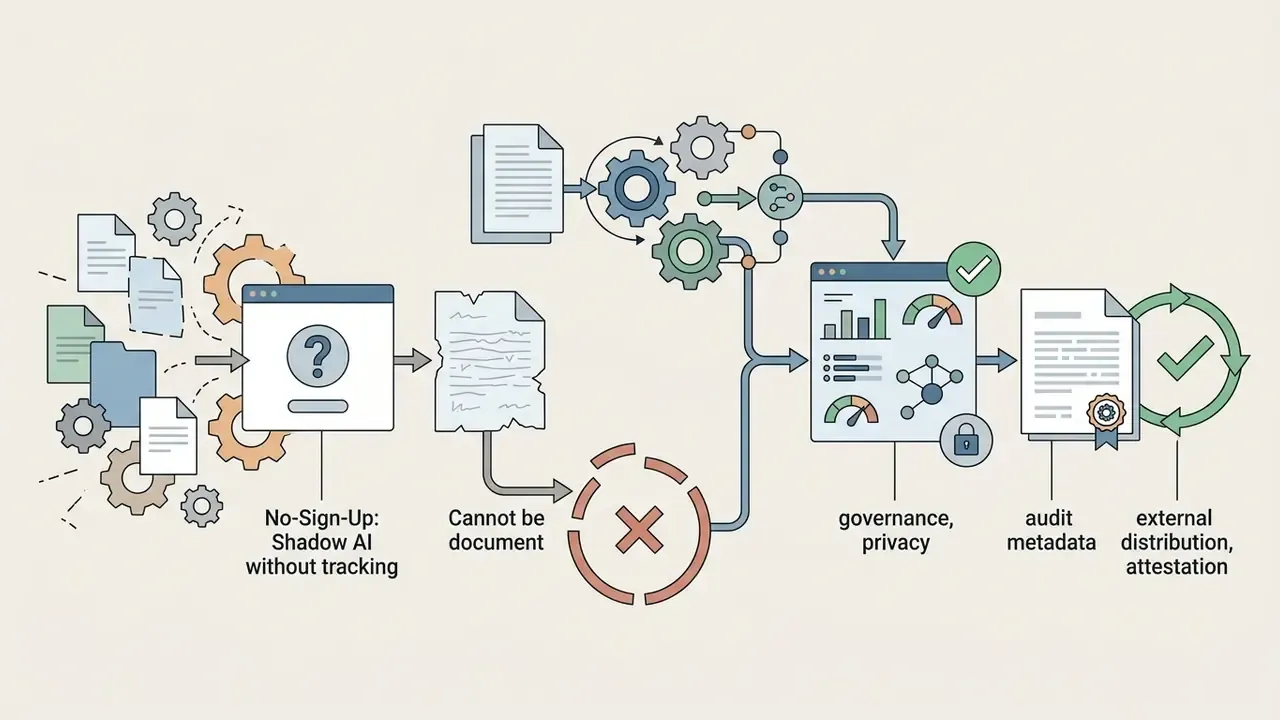
For a bank, insurer, or regulated intermediary, however, the more important question is not what these interfaces enable but what they invite. Shadow AI, the unsanctioned use of consumer AI services for work tasks, is the dominant realistic breach vector in document automation, because guest interfaces:
- require no authentication and therefore leave no attributable log of who submitted what;
- frequently reserve the right to retain prompts for model improvement, meaning pasted PII, customer records, or unannounced financial results may persist outside the institution's control;
- produce outputs with no audit trail, making the resulting document unusable as evidence of a controlled process;
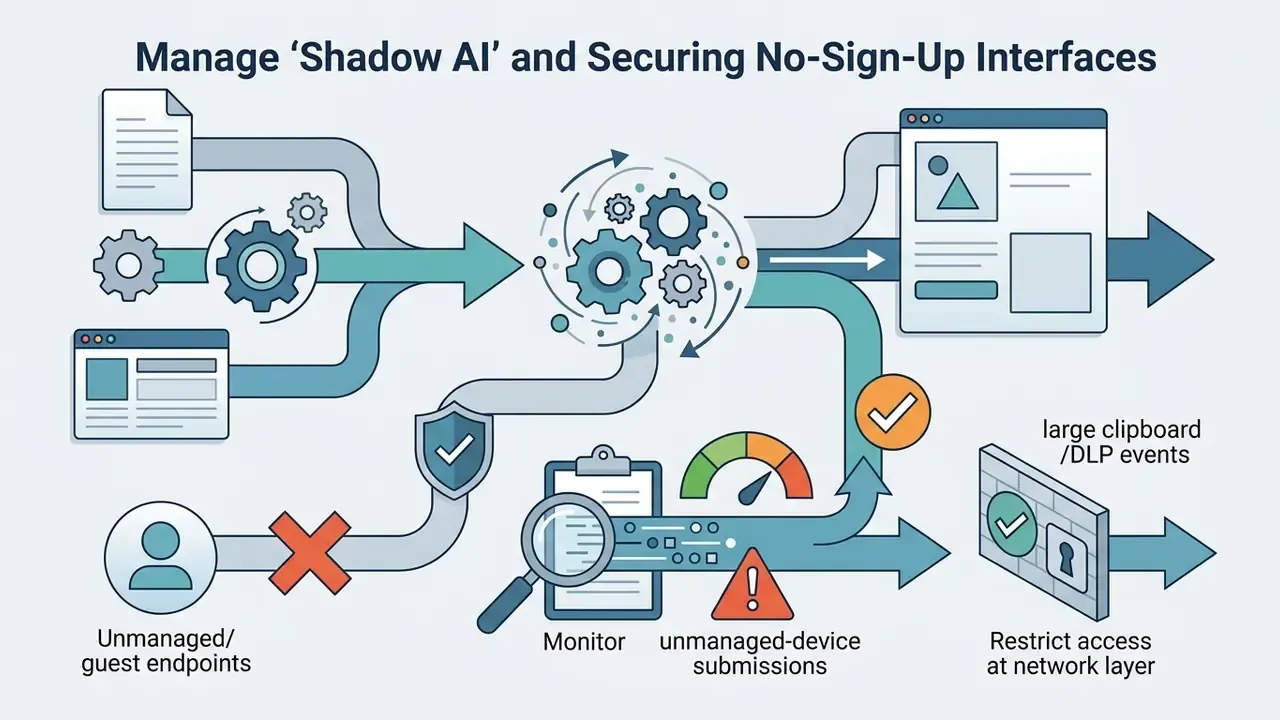
- bypass DLP inspection when submission occurs over personal devices or unmanaged browsers.
Practical mitigations that control functions can implement without blocking innovation:
Under no circumstances should confidential corporate data, customer PII, privileged legal analysis, or trade secrets be pasted into guest interfaces lacking a verified enterprise data protection agreement.
When Plans and Paid Features Become Necessary
Using AI-Generated Documents for Business and Commercial Work
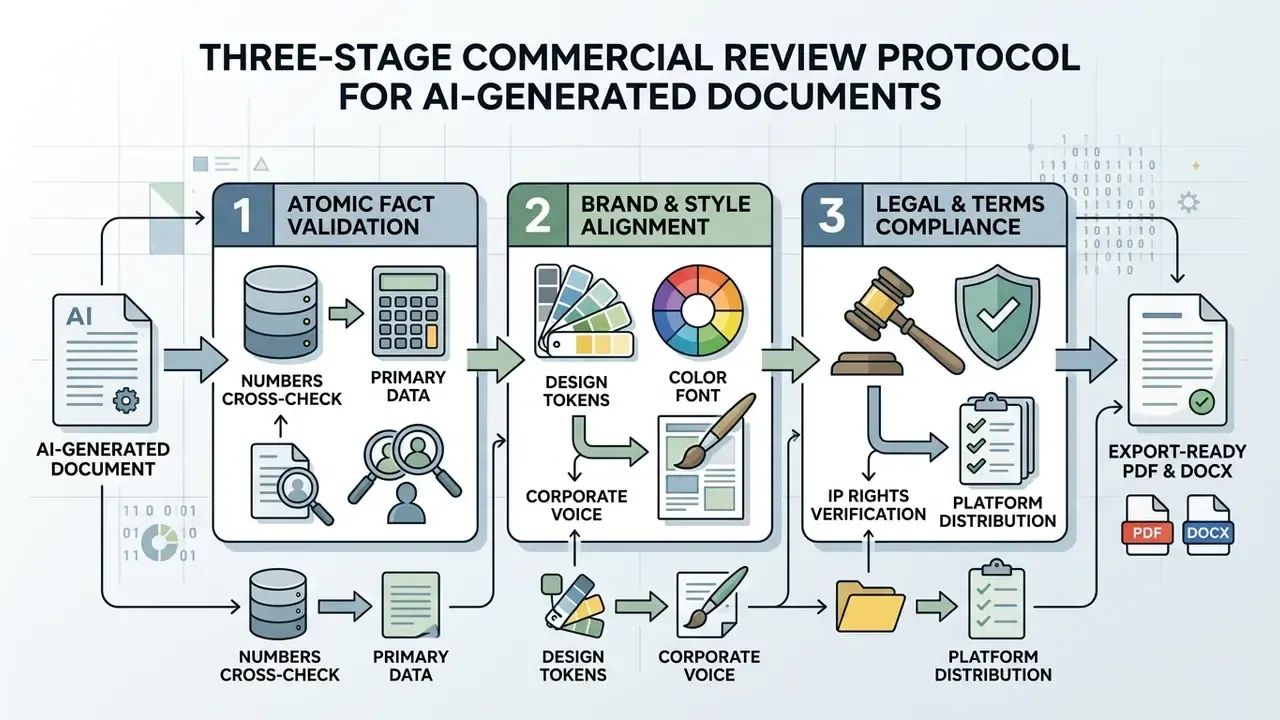
Deploying an ai business document generator within commercial operations requires clear governance protocols to ensure factual accuracy, brand alignment, and legal compliance.
Review Facts, Data and Generated Content Before Use
Customize the Document for Brand and Scenario
Generic AI outputs often sound overly formal or repetitive. Customizing documents requires applying institutional brand kits, including official logo assets, corporate typography scales, primary and secondary color swatches, design tokens, and standardized industry terminology (SigmaQu Brand Tools, 2025; UPDF AI Brand Guide, 2026; Magnt Style Guide Generator, 2026). Injecting domain-specific case studies and proprietary data ensures the final document reflects the organization's unique market position rather than the model's median register.
A small practical tell: if three business units submit documents that share identical transition phrases, you are reading the model's voice, not your institution's. Style token enforcement fixes that faster than editorial coaching. Teams pulling approved language into short-form assets sometimes also use an ai quote generator to standardize attributed pull-quotes across decks and reports.
Check Terms of Use Before Commercial Distribution
Before distributing an ai document maker output commercially, organizations must evaluate copyright and contractual constraints:
For additional insights on commercial rights and IP exposure, explore our analysis on AI Litigation and emerging platform terms, or check our guide to compare options for enterprise licensing.
Production Readiness Checklist
| # | Control | Owner | Status |
|---|---|---|---|
| 1 | Pipeline registered in model/process inventory with documented purpose and limitations | Model Risk | ☐ |
| 2 | Data classification map defines which document classes may use cloud vs. sandboxed execution | Information Security | ☐ |
| 3 | Zero Data Retention / VPC terms executed with vendor; training exclusion confirmed in writing | Procurement / Legal | ☐ |
| 4 | Prompt library version-controlled and aligned to Objective / Audience / Tone / Response structure | Process Owner | ☐ |
| 5 | Human-in-the-loop review mandated for all externally distributed documents | First-line Business | ☐ |
| 6 | Audit metadata (prompt ID, model version, source hashes, reviewer, approver) exported to GRC | Compliance | ☐ |
| 7 | Legal review gate enforced for contracts, NDAs, disclosures and consent forms | Legal Counsel | ☐ |
| 8 | Shadow AI controls deployed: sanctioned alternative published, egress monitoring active | Information Security | ☐ |
| 9 | Export fidelity bake-off completed on worst-case internal artifacts (PDF and DOCX) | Process Owner | ☐ |
| 10 | Localized variants reviewed by native-language specialist per jurisdiction | Regional Compliance | ☐ |
| 11 | Live-link publishing configured with expiry, domain restriction and download permissions | Information Security | ☐ |
| 12 | Retention class assigned per document type in line with records management policy | Records Management | ☐ |
Limitations, Open Questions and a Safe Next Step
Two things in this guide remain unsettled. Independent benchmarks of export fidelity and drafting productivity are thin, so treat both as hypotheses to test internally. And validation methodology for agentic document workflows, where the system retrieves, drafts, and distributes with limited human touchpoints, is still immature relative to traditional model validation.
A conservative next step: pick one document class with high volume and low regulatory sensitivity, such as internal meeting summaries or reconciliation narratives. Run it end to end with the full audit metadata set for one quarter. Measure authoring hours, review hours, and defect rate. Then decide whether to extend scope, not before.
AI Document Generator FAQ
Can an AI document generator create a document directly from an uploaded PDF or link?
Yes. Modern AI document creation tools ingest external PDFs, Word files, text documents, or web URLs using optical character recognition (OCR) and layout parsing engines. Systems like Docling or Adobe Acrobat extract structural text, tables, and section hierarchies from source files, allowing the LLM to summarize, restructure, or generate a new document based on the uploaded material. Advanced platforms additionally scrape live URLs and public professional profiles, stripping navigation boilerplate before feeding core content into the template (Docling Documentation, 2026; Adobe Acrobat PDF Export, 2026).
Can an AI document generator build an editable layout from a screenshot or image?
Yes. Multimodal AI document creators use vision parsing models to analyze uploaded screenshots, graphic layouts, or photo-scanned pages. The engine extracts visual hierarchies, typography styles, column ratios, and structural containers, converting static image pixels into fully editable Markdown, HTML, or DOCX template structures. This is also the standard route for reconstructing editable templates from legacy documents where no source file survives.
How do AI document tools preserve data privacy for sensitive corporate files?
Enterprise AI document generators protect confidential data through two architectures: client-side processing (executing tasks inside local browser memory via WebAssembly so data never leaves the user's device) or cloud enterprise tiers featuring Zero Data Retention (ZDR) protocols, VPC isolation, SOC-2 compliance, and contractual terms that prevent prompts from being used for model retraining. Free, no-sign-up interfaces typically provide neither, which is why they are the primary Shadow AI exposure in regulated environments.
How do AI document generators handle tables, charts, and embedded images?
Advanced ai document layout generator tools process tabular data by converting table structures into intermediate formats, such as Markdown or HTML tables, before rendering them into fixed page layouts. Visual elements and charts can be automatically generated from numerical data feeds or extracted from source documents and re-inserted into target sections during the final export pass (NIST Guidance on Public-Facing AI Documentation, 2026).
Will exporting an AI document to Word or PDF break its formatting?
Export fidelity depends on the underlying layout engine and conversion mode. Exporting to PDF uses fixed-coordinate rendering (via engines like WeasyPrint or Prince) that locks fonts, margins, and visual elements in place, ensuring identical presentation across devices. Exporting to Word (DOCX) maps document sections to standard Word styles; "Retain Page Layout" preserves geometry using text boxes, while "Retain Flowing Text" prioritizes editability. Complex multi-column layouts may reflow, but standard text, headings, and simple tables retain high fidelity (Microsoft Support, 2026; Adobe Acrobat Documentation, 2026; Pandoc Index, 2026).
Can AI generate documents in multiple languages without breaking the layout?
Yes. Leading platforms support native generation across 50+ languages rather than post-hoc translation, which is what typically corrupts table alignment and pagination. Because the layout compiler reflows at build time in the target language, localized variants preserve visual structure. Regulated content still requires native-speaker legal review per jurisdiction, since terminology equivalence is a compliance matter rather than a translation-quality metric.
Is it legal to use AI-generated documents for commercial business purposes?
Yes, provided that the service provider's Terms of Service grant commercial usage rights and the document undergoes human review. Purely AI-generated content cannot be copyrighted in the United States without human authorship additions, but organizations can freely use, distribute, and monetize AI-assisted documents once verified for factual accuracy and regulatory compliance (U.S. Copyright Office, 2026).
What is the difference between an AI document generator and an AI writer?
An AI writer primarily focuses on generating unstructured prose, such as paragraphs, blog posts, or marketing copy. An ai document generator combines text generation with structural layout engines, automatically producing complete multi-page files with dynamic headers, footers, cover pages, tables of contents, branded styling, live-link publishing, and direct PDF/DOCX export capabilities (DocSynthv2, arXiv, 2024, https://arxiv.org/abs/2406.08354).
Do AI document generators belong in the model inventory?
In most regulated institutions, yes. If the output informs a decision, is distributed externally, or supports a regulatory submission, treat the pipeline as an inventoried model-adjacent process with an owner, documented limitations, periodic review, and an audit trail. Purely internal formatting utilities operating on non-sensitive files may be scoped out, but that exclusion should be documented rather than assumed.
Footer & Hub Navigation
Explore related technical documentation and terminology across our network:
- AI Media Glossary - Complete technical index of generative media, document automation, and model risk frameworks.
- Tool Comparisons - Side-by-side evaluations of generative platforms by capability, pricing, and licensing.
- Commercial Use Guides - Rights, terms of service, and distribution constraints for AI-generated assets. Adjacent generative categories in the glossary, for teams mapping the wider tooling landscape: ai rap generator, ai rap lyrics generator, ai rap song, and ai rapper voice generator. The same governance logic applies to each: documented owner, approved use, retention terms, and a verifiable review record.