Executive Summary: Key Takeaways
- An ai label generator turns a text prompt into editable label artwork for bottles, jars, pouches, cartons, apparel tags, and shipping stickers, usually in under a minute.
- Generative output is a starting point, not a print file. Retail-ready labels require vector text overlays, CMYK conversion, 300 DPI resolution at final size, 3 mm bleed, and a 3 mm safe zone.
- Enterprise teams must treat public generators as third-party data processors. Prompts, product roadmaps, and unreleased artwork uploaded to a free web tool can leave the organisation's control. That is Shadow AI, plain and simple.
- Use the audit-trail checklist and prepress canvas calculator in this guide to document every generated asset before it reaches a printer.
One more framing point before the mechanics. Whether you sit in brand marketing or in a control function, the question is identical: who signed off, on what evidence, using which model version?
What Is an AI Label Generator and What Can It Create?
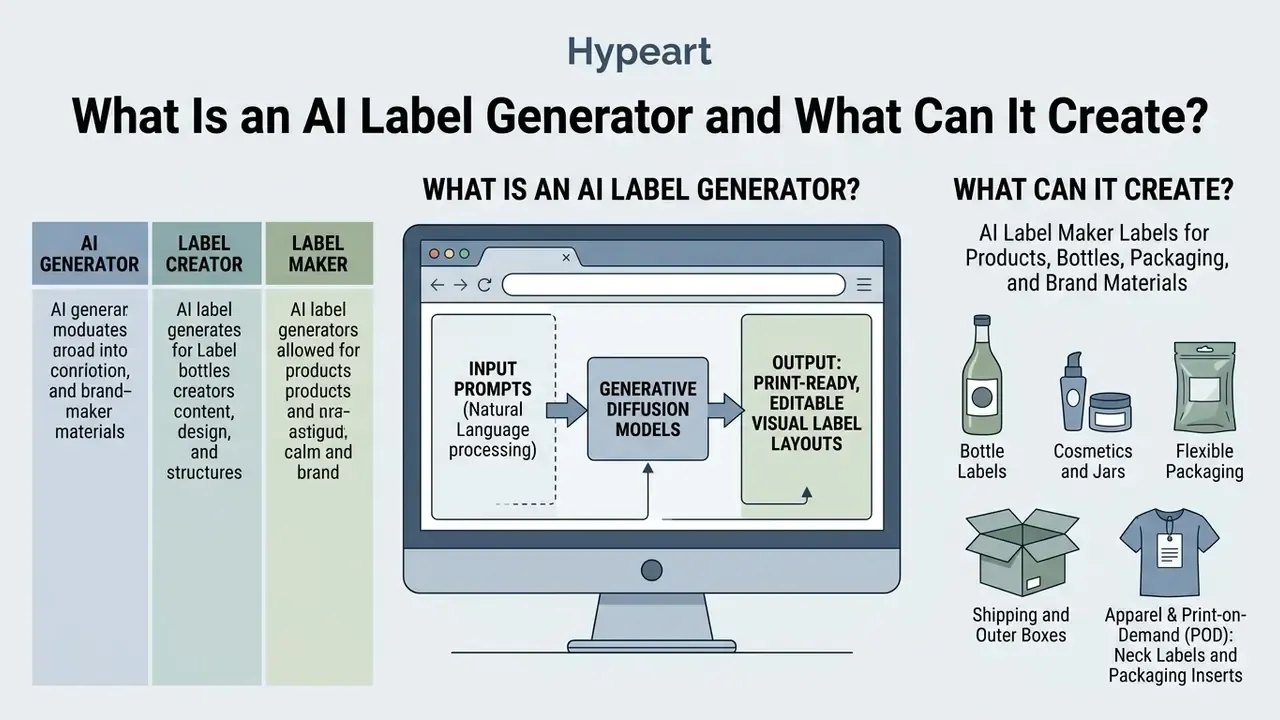
An ai label generator is a web-based or desktop application that leverages generative diffusion models and natural language processing to produce editable visual label layouts for physical products. Users input descriptive text prompts specifying product parameters, visual aesthetics, and brand requirements, and the label generator ai synthesizes high-resolution visual artwork tailored for consumer packaging.
Generative label technology creates visual elements across diverse physical formats, including glass containers, flexible plastic pouches, corrugated boxes, and cosmetic jars. Controlled research on human and AI co-creation (N = 27 designers, NASA-TLX workload measurement) confirms that text-to-image tools compress the earliest ideation stage rather than guarantee final quality.
«AI assistance reduced perceived cognitive load during ideation and accelerated exploration of design alternatives, without automatically guaranteeing high final design quality.»
That distinction matters commercially. Speed gains occur before the layout is print-ready, so the savings must not be spent skipping prepress or compliance review. Tempting, though. Teams do it all the time, and the reprint invoice arrives later.
AI Generator, Label Creator, and Label Maker: What Is the Difference?
Vendors use these terms interchangeably, yet the technical capabilities differ across three functional scopes:
- AI Label Generator: Focuses on pure prompt-to-image synthesis. An ai label design generator takes text inputs and creates flat visual concepts without native structural editing or prepress tools.
- AI Label Creator: Combines generative synthesis with interactive design controls. An ai label creator lets users adjust prompt parameters, select visual themes, and restructure prompts to refine baseline artwork.
«Prompt optimization reduced average time consumption by 35.6% for junior designers and 21.6% for senior designers, with higher expert selection rates for optimized outputs.»
- AI Label Maker: Represents a comprehensive web platform. An ai label maker integrates generative visual creation with manual layout editing, vector logo placement, barcode generation, exact metric dimensioning, and print-ready PDF exports. Search demand for this tier is messy, incidentally: the phrase is frequently mistyped as "ai lable maker", which is why brand-name searches and tool comparisons rarely line up.
When evaluating design tools, users looking for quick visual inspiration prefer an ai label generator online, while commercial teams requiring precise dielines and print specifications rely on a full ai product label maker. A mobile-first ai label generator app sits between the two: fast, convenient, and almost always raster-only. If you are still selecting an underlying engine, our comparison of AI art generators and of free AI art generators breaks down output quality, style control, watermarks, and licensing tiers.
Labels for Products, Bottles, Packaging, and Brand Materials
An ai product label generator supports multiple physical package formats, each with its own structural constraints:
- Bottle Labels An ai bottle label generator creates narrow vertical or wrap-around designs tailored for wine, spirits, craft beer, and sauces. Placement rules require accounting for container curvature and panel margins, including a typical 3 mm clearance from moulded ridges (FDA Food Labeling Guide, 2024). https://www.fda.gov/food/food-labeling-nutrition
- Cosmetics and Jars Jars and personal care containers require high visual contrast and chemical-resistant substrate compatibility. Label artwork must fit small dimensions while keeping the ingredient hierarchy clear. In the EU, that includes the full INCI ingredient list and net content. Because the logo mark anchors the entire composition, review how AI logo generators and brand-kit tools export vector marks before you lock the layout grid.
- Flexible Packaging Stand-up pouches and plastic wraps demand flexible substrate considerations. Industry guidelines recommend consistent polyethylene (PE-LD), polypropylene, or BOPP label materials to prevent thermal distortion and to keep the pack mono-material for recycling (ISO/TR 18568:2021 Packaging Material Standards). https://www.iso.org/standard/66933.html
- Shipping and Outer Boxes Secondary packaging labels focus on structural legibility, linear barcodes, and 2D symbol accuracy in compliance with ISO 22742 (product-package labels) and ISO 15394 (transport-unit labels). https://www.iso.org/standard/35115.html
Apparel and Print-on-Demand (POD): Neck Labels and Packaging Inserts
Beyond rigid containers, an ai label creator is used heavily in direct-to-consumer e-commerce and apparel branding:
- Custom Neck LabelsPrinted inside garment collars to replace itchy woven tags. AI generators synthesize minimalist care-instruction icons and sizing frameworks. Print specifications require single-colour vector masks (usually pure white or black) to avoid bleed-through on thin cotton substrates, and the mandatory fibre-content and care symbols must remain unaltered by the model.
- Packaging Inserts and Thank-You CardsSecondary unboxing assets designed to drive repeat purchases. Generative models construct custom background patterns, while vector layers inject dynamic QR codes linking to loyalty discounts or digital user manuals. If that QR code leads to an onboarding video, an explainer video maker keeps the insert and the landing asset visually consistent.
- Custom Shipping StickersExternal poly-mailer labels balancing brand graphics with clear 2D barcode scan zones compliant with carrier requirements, including quiet zones around each symbol.
- Print-on-demand pipelinesPOD platforms let sellers design directly inside a product print area, so generated artwork is constrained by the manufacturer's dieline from the start. That removes most resizing errors and also removes control over bleed. Always order a physical sample before a first production run.
How to Create a Label with AI: From Prompt to Final Design
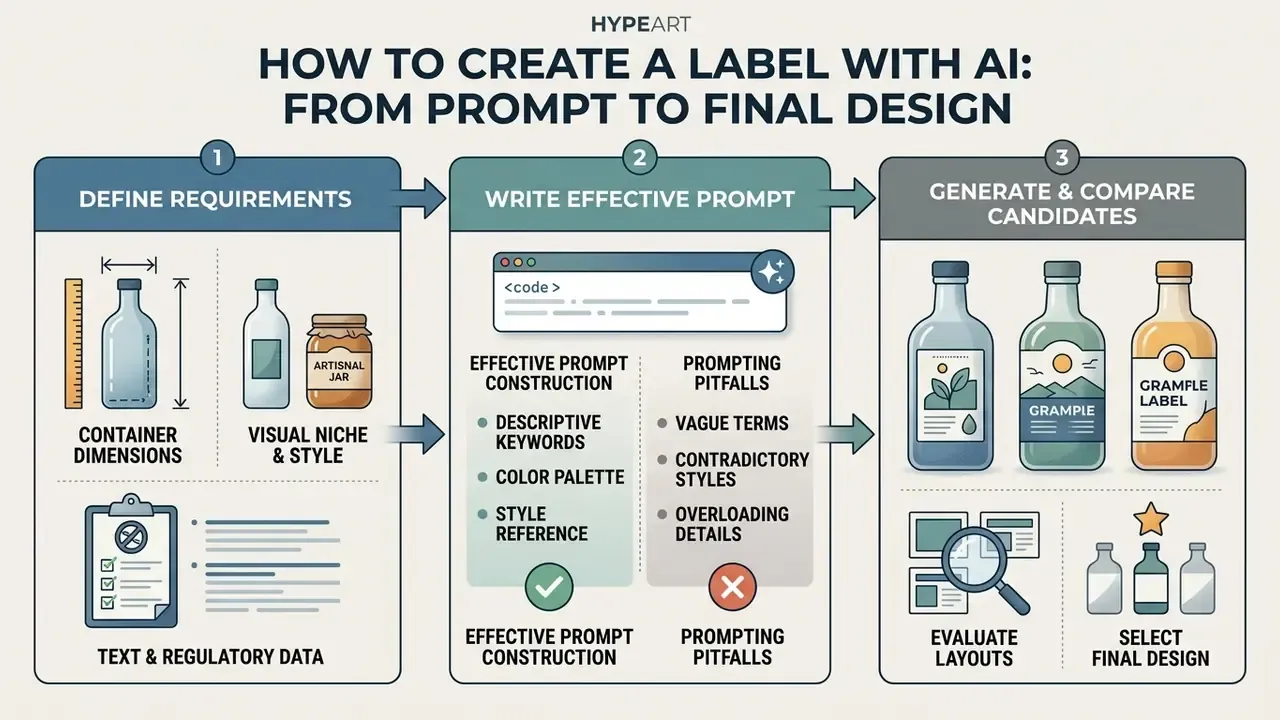
Creating a custom product label with generative AI means moving systematically from conceptual requirements to technical print assets. The five-step workflow below merges the creative brief, the generation loop, and the prepress handoff into one continuous instruction. Each step ends with a verifiable artefact you can log for audit purposes.
Step 1: Define the Product, Label Size, Style, and Visual Direction
Before opening a label creator ai or typing prompts, establish the structural and regulatory baseline for your product:
- Container DimensionsMeasure the principal display panel (PDP) height and width, accounting for container curves, ridges, and tapered edges. Define safe zones 1.5 mm to 3 mm inside the trim line.
- Visual Niche and StyleSelect a direction, such as minimalist, vintage craft, high-tech industrial, or luxury organic.
- Required Text and Regulatory DataCompile mandatory information, including net weight, ingredient statements, allergen warnings, date marking, storage instructions, and manufacturer addresses. Regulatory standards mandate minimum font scales relative to panel size, and lettering must not be more than three times as high as wide for US consumer packages (NIST SP 1020 Technical Guidelines; FDA Food Labeling Guide, 2024). https://www.nist.gov/publications
Artefact produced: a one-page specification sheet (dimensions, bleed, safe zone, mandatory copy). Fixed dimensional boundaries prevent text distortion during post-generation cropping.
Step 2: Write a Prompt That Produces Relevant Label Designs
To get accurate artwork from a label maker ai, format your prompt as a structured descriptive specification rather than a conversational question (NIST GenAI Evaluation Framework, 2025). https://ai-challenges.nist.gov Specify layout orientation, central subject matter, visual style, background colours, intended typography, and, critically, that the output must be flat label artwork rather than a 3D mockup.
- Effective Prompt Construction "Flat product label design for a 12 oz cold brew coffee bottle, modern minimalist style, deep navy blue and metallic copper colour palette, central geometric coffee bean icon, clean sans-serif typography header, off-white background, high-contrast print layout, 300 dpi."
- Prompting Pitfalls Avoid requesting complex text strings inside early prompts. Generative image models still introduce typographic artifacts when synthesizing long sentences. Reserve text insertion for post-processing layers, and ask the model to leave blank panels where regulated copy will sit.
Artefact produced: the exact prompt string, model name, and version. Both are required later for the audit trail.
Step 3: Generate and Compare Candidate Layouts
Run the query through a free ai label generator to evaluate spatial compositions, then apply the Generate, Compare, Select, Reconstruct framework:
- GenerateSynthesize 4 to 8 initial label variations.
- CompareReview candidates against your core brand guidelines, examining colour harmony, composition balance, and whether the blank copy panels survived generation.
- SelectChoose the design that keeps spatial balance without crowding container margins.
«Under AI-assisted conditions participants produced 1.8× more unique concepts per minute, while cognitive load dropped 22.4% on the NASA-TLX scale.»
Artefact produced: a contact sheet of all candidates with the selected option marked and the rejection reasons noted.
Step 4: Reconstruct with Vector Overlays
Import the raster image into an editor to apply precise vector text, upload high-resolution logos, and add valid GS1-128, UPC, EAN-13, or QR barcodes. Layer editing keeps corporate assets crisp: background illustration, vector typography, and logo paths must stay in separate editable layers. Post-generation retouching (contrast, clarity, dehaze, grain) belongs in adjustment layers rather than destructive edits. Our overview of AI photo editors and of free photo editors compares the non-destructive toolsets available in browser-based apps, and when a founder portrait sits on the insert card, a dedicated face photo editor handles skin tone more predictably than a generic filter stack.
Artefact produced: a layered working file (.PSD, .AI, or platform-native) with fonts still live.
Step 5: Prepress Export
Export the completed layout as a 300 DPI CMYK PDF with 3 mm bleed margins, dieline on its own vector layer, and all fonts outlined or embedded. Verify barcode contrast and quiet zones before handoff.
Artefact produced: the print-ready PDF plus a signed prepress checklist.
Controlling Aspect Ratios, AI Inpainting, and Resolution Upscaling
Professional results from a free ai label maker depend on controlling generation geometry and post-processing filters:
- Aspect Ratio Mapping: Match your generation aspect ratio to physical label proportions prior to synthesis:
- Square Labels (1:1): Set canvas to 1024 × 1024 px, ideal for jar tops and candle containers.
- Vertical Bottle Labels (3:4 or 2:3): Set canvas to 1200 × 1600 px to avoid vertical cropping of central illustrations.
- Landscape or Document Labels (4:3): 1200 × 900 px is a common default in raster generators and works for wide front panels.
- Wide Wrap-Around Labels (16:9 or 2:1): Use wide aspect ratios to cover container circumferences cleanly.
- Local AI Inpainting (Generative Fill): If the model synthesizes an ideal background but garbles a sub-region, mask the defective area and prompt specifically for a replacement (for example, mask centre, then prompt: "clean matte black background with subtle gold foil line art"). Selection- and mask-based editing changes only the masked pixels and preserves everything outside the selection.
- 4K Raster Upscaling: Standard AI image models generate outputs at 72 to 96 DPI raster resolution. Use a neural super-sampling upscaler to boost raw resolution by 4× (minimum 4096 × 3072 px) before importing into prepress software, which keeps physical printing crisp at 300 DPI. See our guide to AI image upscalers for the trade-offs between detail synthesis and artefact amplification.
Example prompt templates for copying:
Bottle Label: "Flat front bottle label design for organic olive oil, Tuscan rustic style, olive branch illustration, cream background, forest green and gold foil details, clean typography, 300 dpi."
Food Packaging: "Flat label design for artisanal hot sauce jar, bold vibrant style, red chili illustration, black matte background, sharp yellow headline text space, high contrast."
Cosmetics: "Minimalist skincare jar label design, pastel rose and white color palette, clean elegant layout, botanical line art, ample negative space for text overlays."
Craft Beverage (regulated): "Flat 330 ml craft beer label, vintage engraving style, blank panels reserved for ABV, ingredients, net quantity, allergen notice and batch/date fields."
Apparel Neck Label: "Flat single-colour neck label artwork, minimalist wordmark placeholder, care symbol row, size block, pure black on transparent background, vector-ready."
What Makes an AI-Generated Label Look Professional?
A professional product label balances visual appeal with strict legibility and structural utility. An ai label maker free tier can generate visual concepts quickly, but turning that artwork into retail-ready packaging means following established prepress design standards.
Brand Consistency: Logo, Color Palette, Fonts, and Style
Maintaining brand identity means locking core assets before you generate background artwork:
- Unmodified Logos Brand identity guidelines prohibit AI models from reinterpreting vector logos. Upload original SVG or PNG logo files onto the generated layout, preserving colour and proportion (DZNE AI Brand Guidelines, 2026).
- Controlled Color Palettes Restrict AI outputs to explicit HEX colour ranges so shelf recognition holds across a product line. Approved-palette discipline is what stops generated accents from drifting between SKUs.
- Standardized Font Families Combine visual graphics with fixed brand typefaces, including a documented fallback (Roboto with Arial as substitute, for example). Use primary fonts for product titles and secondary sans-serif fonts for mandatory nutrition and safety panels.
«Across five global brands, AI showed high fluency and flexibility, but strategic coherence of brand identity was delivered by human designers.»
In practice, a model can propose fifty accent-colour variants in a minute, yet the shortlist that ships must be curated against the brand book. Teams exploring directions before locking a palette often prototype in general-purpose engines. See our overviews of the Canva AI generator and Google AI image generator for palette-control behaviour.
Product Information, Images, and Readability on Small Labels
Small packaging formats need strict typographic hierarchy to stay legible on store shelves:
- Minimum Type Sizes European Union regulations (EU Regulation No 1169/2011, Annex IV) require mandatory food details to keep an x-height of at least 1.2 mm (roughly 7 pt to 8 pt font). Canada requires characters at least 1.6 mm high for consumer prepackaged foods; EU medicinal-label guidance sets a practical floor of 7 to 9 pt with an x-height of 1.4 mm. https://eur-lex.europa.eu/eli/reg/2011/1169/oj
- Contrast Ratios Text overlays must maintain a minimum contrast ratio of 4.5:1 against background imagery (3:1 for graphical labels and icons) to satisfy accessibility standards (WCAG 2.2 / EN 301 549 Guidelines). https://www.w3.org/TR/WCAG22/
- Opaque Backing on Glass Transparent or clear glass containers need opaque backing labels or white under-inking so liquid contents do not obscure text; contrasting inks and colourless glues are recommended (Health Canada Packaging Guidance).
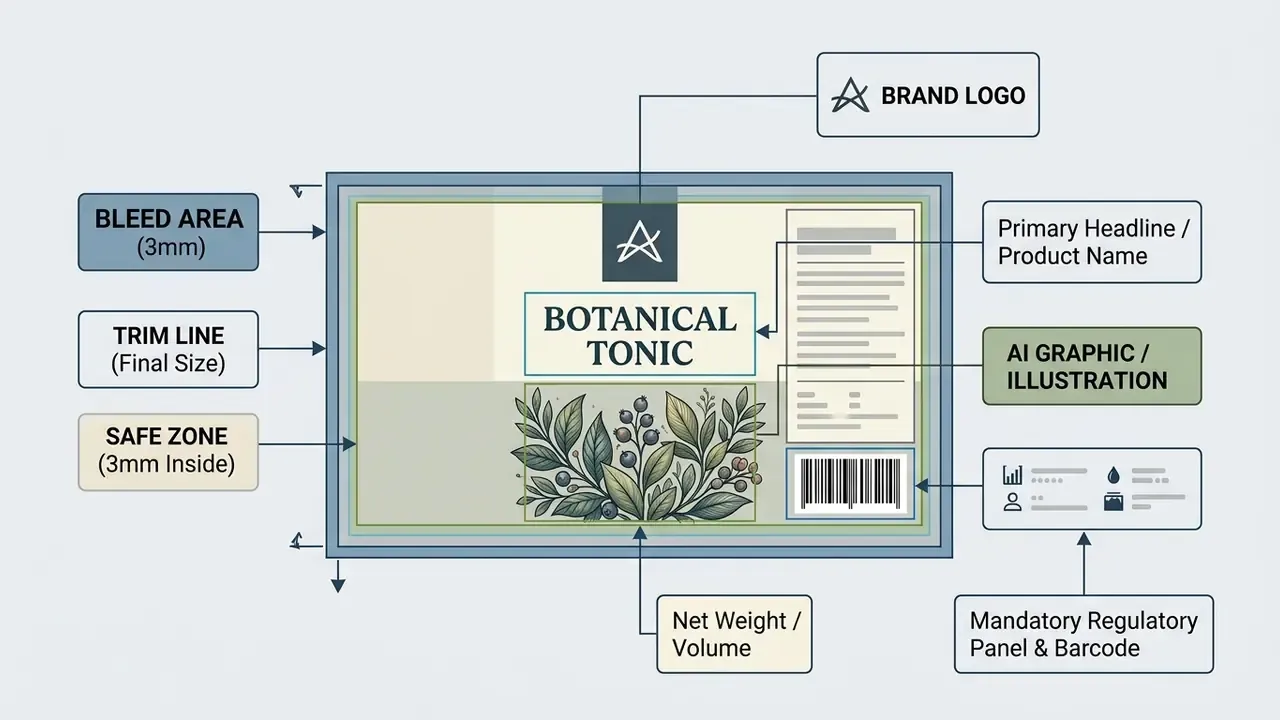
- Mandatory Field of Vision In the EU, the food name, net quantity, and alcoholic strength must appear in the same field of vision, a constraint an image model will not respect unless you reserve the panel manually.
«Without a clear typographic hierarchy and sufficient contrast, AI-generated labels lose on-shelf readability.»
Size, Shape, Margins, and Print-Ready Layout
Preparing generated designs for physical printing involves strict spatial geometry:
- Bleed Margins Extend background artwork 3 mm (0.125 inches) beyond the trim line to prevent white edges during automated die-cutting, and include the bleed in the exported PDF.
- Safe Zone Keep critical text, icons, and regulatory logos at least 3 mm inside the trim line (1.5 mm is the absolute minimum some converters accept).
- Color Mode and Resolution Convert RGB artwork generated by AI into CMYK colour profiles, hold a minimum resolution of 300 DPI at final print scale, and name any spot or Pantone colours explicitly.
Prepress Canvas Calculator: Converting Physical Metrics to Digital Pixels
To calculate exact digital canvas dimensions at 300 DPI, including the mandatory 3 mm (0.125 in) bleed margin on all sides, use the following formula:
Total Width (px)  = (Physical Width (in)  + 2 × 0.125) × 300

Total Height (px) = (Physical Height (in) + 2 × 0.125) × 300
Example calculation table for common label sizes:
| Physical Label Size | Bleed Margin | Final Trim Size (in) | Canvas Size @ 300 DPI (px) |
|---|---|---|---|
| 2" × 3" (Jar / small bottle) | 0.125" (3 mm) | 2.25" × 3.25" | 675 × 975 px |
| 3" × 5" (Standard bottle) | 0.125" (3 mm) | 3.25" × 5.25" | 975 × 1575 px |
| 4" × 6" (Outer box / shipping) | 0.125" (3 mm) | 4.25" × 6.25" | 1275 × 1875 px |
| 2" × 2" (Square candle lid) | 0.125" (3 mm) | 2.25" × 2.25" | 675 × 675 px |
Because most generators cap native output near one megapixel, the canvas figures above are the post-upscaling targets. Generate at the correct aspect ratio, upscale to at least the pixel count in column four, then place vector text on top. For material volumes, ink coverage, and per-SKU unit economics, our online design calculators give you a rough estimate in a couple of minutes.
AI Label Generator Features to Look For
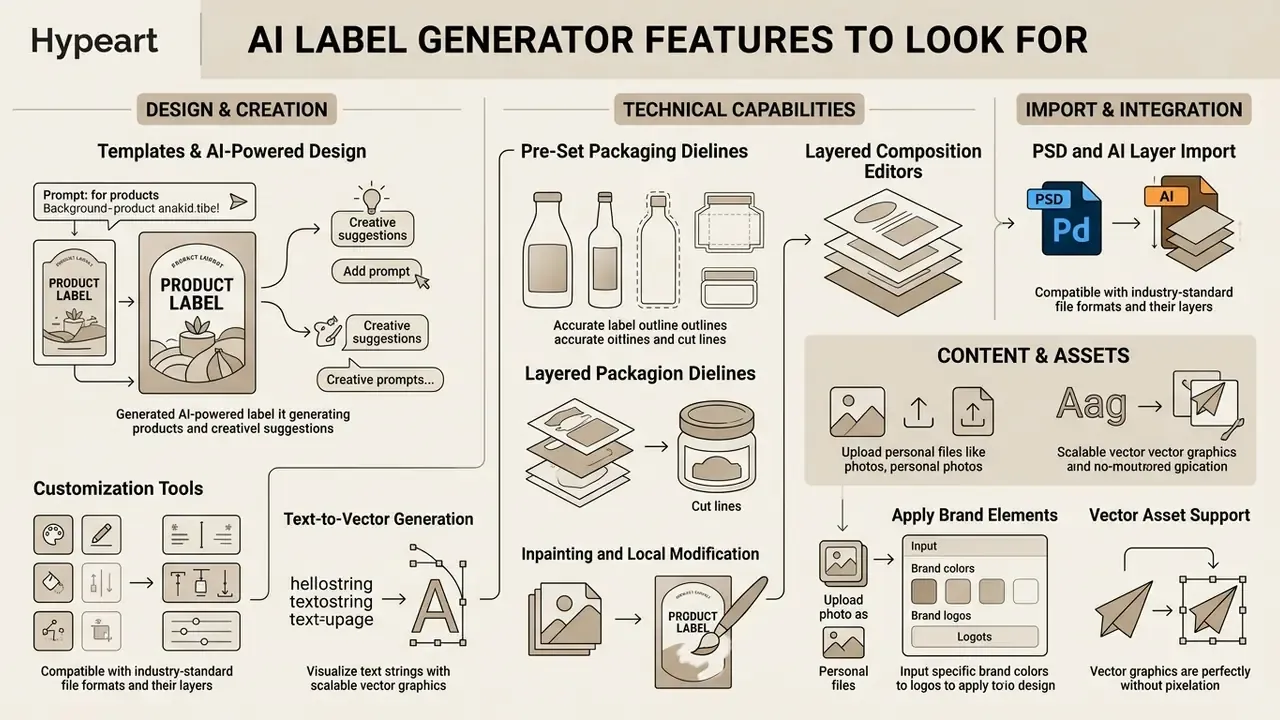
Selecting the best ai label generator comes down to technical features, editor capabilities, and export flexibility. Modern design platforms range from lightweight web generators to full prepress publishing suites.
Templates, AI-Powered Design, and Customization Tools
Effective label platforms pair generative engine power with intuitive structural templates:
- Pre-Set Packaging Dielines Look for applications offering pre-configured templates for standard bottles, cans, and pouches, with true cut, crease, and glue layers exported separately.
- Layered Composition Editors Advanced platforms separate background AI illustrations, vector text frames, and logo elements into distinct, editable RGBA layers, supporting object deletion, resizing, and repositioning inside a single image.
- Inpainting and Local Modification Superior tools include generative fill, so you can alter specific label sub-regions without regenerating the whole canvas.
- PSD and AI Layer Import Advanced visual editors import layered Adobe Photoshop (.PSD) or Illustrator (.AI) master files. The platform recognises distinct graphic layers, permitting insertion of AI-synthesised background artwork beneath existing vector text and logo paths without rasterising corporate branding elements.
- Text-to-Vector Generation Some suites generate scalable vector icons, subjects, and seamless patterns directly from prompts, plus generative recolour to preview palette variants across an entire packaging file.
«Current AI tools accelerate specific aspects of graphic design, but do not fully replace nuanced human creative contribution.»
Upload Content, Add Images, and Apply Brand Elements
Professional software must support importing external media assets directly into the editing canvas:
- Vector Asset Support The platform should accept SVG, AI, and EPS files to keep logo lines crisp.
- Dynamic Barcode Generation Built-in barcode engines synthesize valid UPC, EAN-13, GS1-128, DataMatrix, PDF417, and QR codes directly on the label design layer.
- Variable Data Fields Counters, database fields, date offsets, formulas, and prompt-at-print fields enable batch and SKU-specific output without rebuilding the template.
- Font Uploads and Unicode Custom font loading keeps you compliant with corporate typographic standards, while full Unicode support handles multilingual and mixed-script panels.
Mockups, High-Quality Export, and Download Formats
Visualising label artwork on physical containers prevents layout errors before jobs reach commercial printers:
- 3D Packaging Previews: High-end applications project flat label artwork onto rendering models of 3D bottles, jars, and cans, supporting 4K and 8K preview renders and MP4 turntable video.
- Export File Formats: Ensure the application supports uncompressed print-ready PDF, vector SVG, DXF dielines, and high-resolution transparent PNG files.
- Dieline Handoff Layers: Professional prepress tools export dielines, crease marks, and glue zones on dedicated PDF vector layers.
Top 6 AI Label Generators Compared (2026 Overview)
An ai label design generator converts text into visuals quickly, yet platforms diverge sharply in technical output, precision control, and pricing:
- Limitations: Operation still leans on Discord; native output resolution is limited and requires manual upscaling; there is no free plan, with pricing from about $8/month (roughly 200 image jobs on the entry tier). Our Midjourney comparison details controls and licensing.
- Limitations: No built-in editing tools, so most changes require re-prompting; output resolution is capped near one megapixel (1024 × 1024, with 1792 × 1024 and 1024 × 1792 variants), and there is no native CMYK conversion or vector layer editing. See our ChatGPT picture generator evaluation.
- Limitations: Free credits cover roughly one image job and add visible plus metadata watermarks; paid tiers start near $9.99/month for 2,000 credits, and full print production usually requires additional Creative Cloud apps.
- Limitations: Free plan is personal-use only with PNG/JPG exports capped around 800 px at 72 dpi; vector PDF/SVG export and commercial rights require a paid tier (Pro listed at roughly $15/month).
- Limitations: Generates flat raster images (PNG/JPG) requiring manual vector text overlays for legal print compliance; free tier is credit-limited.
- Limitations: Some regions are geo-locked, and vector plus high-resolution brand-kit downloads require an annual subscription (about $96/year).
- Midjourney (v6)Best for high-end artistic concept art. Generates exceptionally detailed visual textures for wine and cosmetic packaging, and supports image references plus reusable seeds for style consistency across a line.
- DALL·E 3 (via ChatGPT and Bing Image Creator)Best for precise prompt comprehension, handling long multi-element layout instructions in plain language.
- Adobe Firefly and ExpressBest for corporate workflow integration. Offers generative fill (inpainting), text-to-vector graphics, generative recolour, and PSD/AI file import with layer recognition.
- Kittl ProBest for print-ready typography and dieline compliance. Ships dedicated packaging-label templates with editable vector artwork, so text sits on live vector paths.
- DreaminaBest for fast raster upscaling. Features native AI inpainting, retouch, and automated 4K upscaling tailored for e-commerce product graphics, with a recommended 4:3 / 1200 × 900 px starting canvas.
- LookaBest for cohesive brand identity setup. Automatically generates packaging mockups and label variations directly from a central logo mark, with a large font and symbol library and unlimited edits while designing.
Two extra categories matter for production teams: credit-based utility generators (Media.io, for instance, offered three free credits per day and charged for watermark-free downloads) and production-first packaging platforms built on real dielines that export SVG/PDF with cut, crease, and glue layers. The second group is the correct choice when the file goes straight to a converter rather than to a moodboard. To compare subscription tiers against export capability side by side, open the hub.
How to Choose the Best AI Label Generator
To choose the best ai label generator free or paid option for your operational needs, compare platforms across feature coverage, technical export capabilities, and commercial licensing terms.
| Feature / Criteria | Free AI Label Generators | Paid AI Design Platforms | Enterprise Packaging Suites |
|---|---|---|---|
| Generation Quota | Limited daily credits (3 to 5 runs) | Unlimited or high monthly quota | Custom enterprise API limits |
| Export Resolution | Low-res raster (72 DPI PNG/JPG, often under 800 px) | High-res print (300 DPI PDF/SVG) | Vector PDF with dielines and layers |
| Layer Editing | Single flat image output | Multi-layer RGBA editing, PSD/AI import | Full vector plus CAD layer control |
| Mockup Rendering | Basic 2D canvas preview | Standard 3D bottle and box renders | 4K/8K interactive 3D packaging |
| Commercial Rights | Personal use only, attribution or watermark | Full commercial license included | Legal IP indemnification option |
| Barcode Integration | Not supported, manual paste | Integrated 1D/2D generator | Dynamic GS1 database linkage |
| Data Handling | Prompts may train the model | Opt-out or no-training tiers | Contractual DPA, tenant isolation |
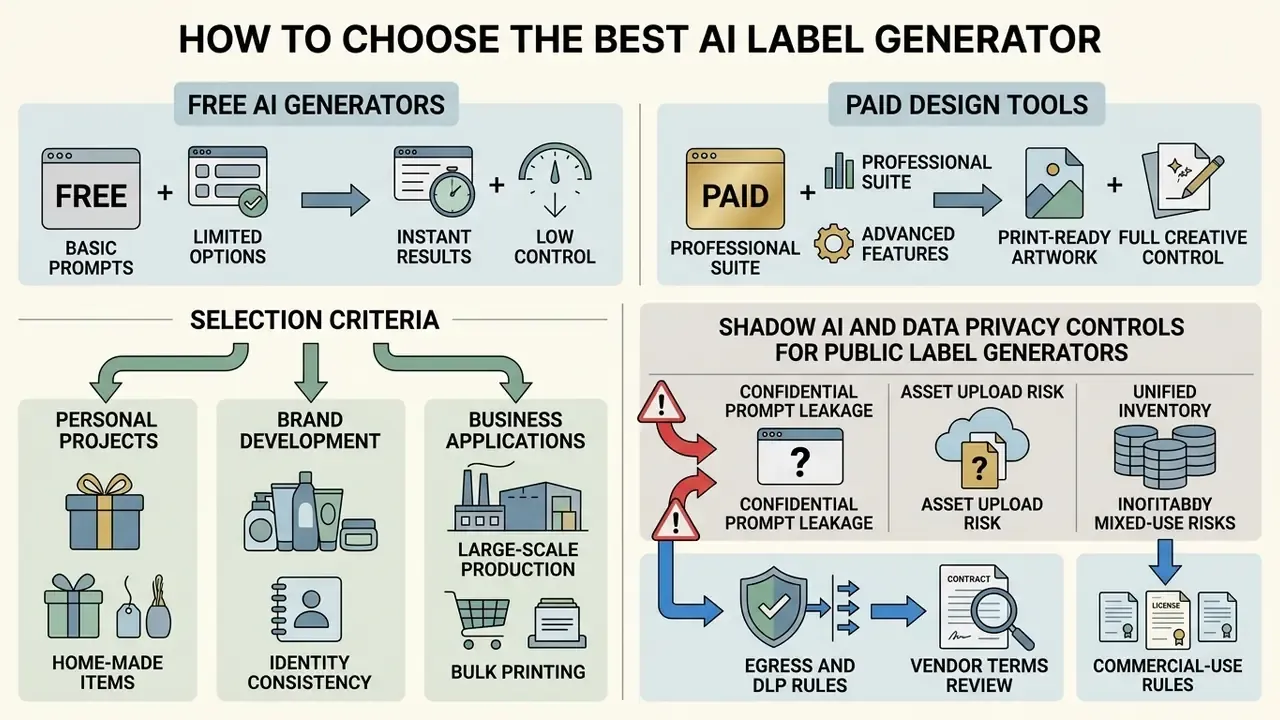
Table note: criteria compiled from published vendor documentation and pricing pages, including Kittl's plan comparison and licensing pages, Adobe Express and Firefly help documentation, Canva's pricing and Content License Agreement, Media.io's credit policy, and packaging platforms documenting SVG/PDF/DXF dieline export. Verify current limits directly with each vendor before purchase, because tiers change frequently.
Free AI Label Generator vs Paid Design Tools
Free web tools allow rapid visual ideation, but they enforce strict operational limits. A free ai label generator typically exports compressed 72 DPI images with embedded watermarks, which restricts use to preliminary concept reviews.
Paid platforms, by contrast, provide high-resolution PDF exports, vector SVG output, precise CMYK colour conversion, and explicit commercial usage rights. Businesses planning full commercial runs should evaluate paid tools to avoid prepress errors and licensing conflicts.
«WIPO advises organisations to prefer tools trained on licensed or public-domain data and to verify who owns the outputs.»
Before committing budget, read the licence, not the landing page. Our guide to the commercial use of AI-generated images explains where "free" ends and indemnified commercial use begins; to map plan levels against export features, browse the hub.
Selection Criteria for Personal, Brand, and Business Projects
Matching your operational scale to the right design tool prevents overspending while keeping you compliant:
- Home Production and Hobbyists: Prioritize easy web tools with simple prompt workflows, quick canvas edits, and low-cost PNG exports. Add one lightweight control: an approved-tool list plus human review of every output before printing.
- Growing Startups and Direct-to-Consumer Brands: Choose platforms offering editable templates, font uploads, 3D mockup previews, and commercial rights. Weight the decision roughly as business alignment 40%, technical viability 35%, operational readiness 25%, and validate true cost including credits, seats, and reprint risk.
- Enterprise Brands and Multi-SKU Retailers: Require strict integration with enterprise Product Information Management (PIM) systems, automated variable data printing, dynamic dieline layers, documented board-level accountability, and formal IP governance frameworks.
«WIPO advises organisations to check training-data provenance, output ownership terms, and whether the vendor provides IP infringement warranties.»
Shadow AI and Data Privacy Controls for Public Label Generators
For regulated organisations, the risk of a public label ai generator is rarely aesthetic. It is data and provenance. Unmanaged use by marketing or packaging teams creates classic Shadow AI exposure:
- Confidential prompt leakage Unreleased product names, launch dates, formulations, and pricing pasted into a consumer-tier generator may be retained and used for model improvement. Restrict inputs to non-confidential descriptors, or use tiers with contractual no-training guarantees.
- Asset upload risk Uploading master logo files, unpublished dielines, or supplier artwork transfers copies outside the controlled environment. Treat every upload as an external data transfer requiring a data-processing agreement.
- Unified inventory Record every generative tool used for packaging work in the same AI system inventory as production models, including owner, purpose, data classes, and licence tier. Tools discovered outside the inventory are findings, not conveniences.
- Egress and DLP rules Block or gate consumer-tier image generators at the network layer for teams handling regulated artwork, and allow-list vetted enterprise tenants instead.
- Vendor terms review Vendor terms increasingly require users to hold sufficient rights to all inputs and to disclose AI involvement in published outputs. Those obligations must be pushed down into agency and freelancer contracts.
- Human review gate No generated label reaches a printer without named human sign-off on brand, regulatory, and IP checks. If your workflow also verifies whether third-party assets are synthetic, our overview of AI image detectors covers provenance checking tools.
One caveat worth stating plainly: the controls above reduce exposure, they do not eliminate it. Where the evidence is thin, for example on how long a given vendor retains prompt logs, treat the gap as an open question in your risk register rather than a solved item.
Free Use, Export Limits, and Commercial Use of AI Labels
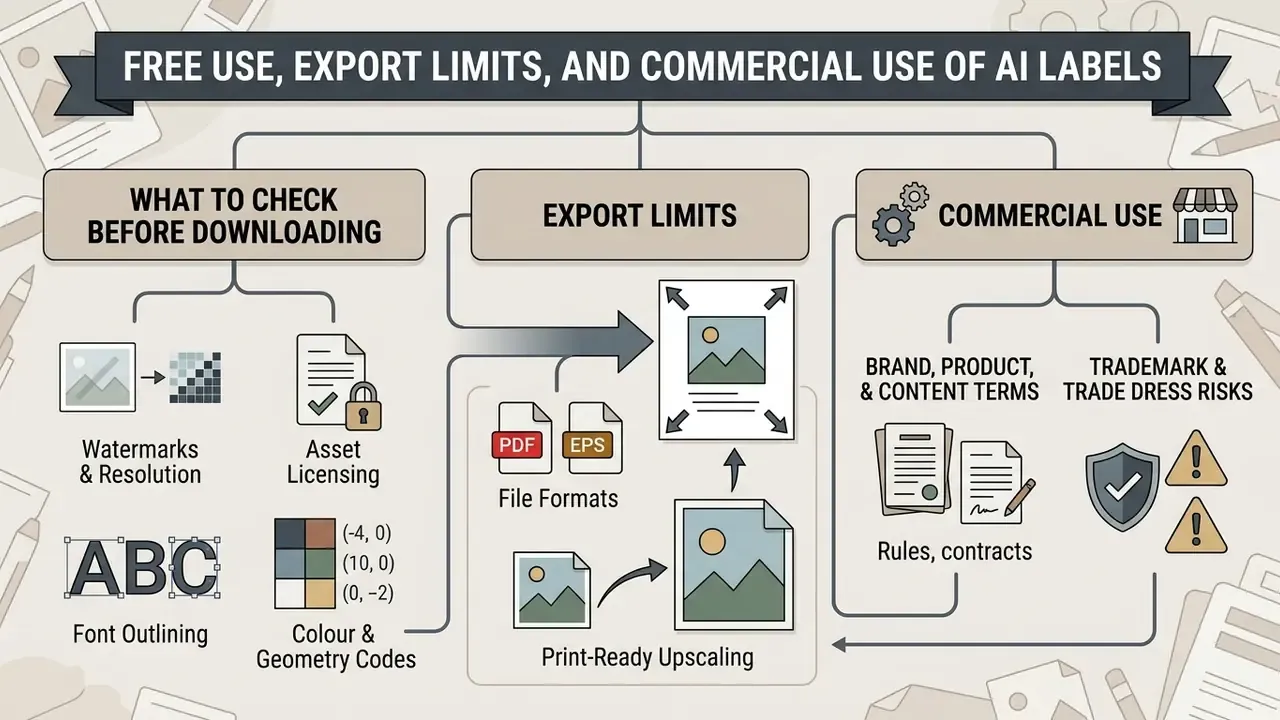
Using an ai label generator free tier for commercial products calls for careful legal and technical review. Open access generation does not automatically grant unrestricted commercial rights, and claims such as "use it for commercial purposes with no restrictions", common on free generator landing pages, are no substitute for reading the licence.
What to Check Before Downloading a Free Label Design
Before sending a generated label design to production, verify the following technical and legal parameters:
- Watermarks and Resolution Confirm the download file is free of watermarks (visible and metadata) and meets the 300 DPI resolution threshold at target physical dimensions.
- Asset Licensing Check that stock elements, fonts, and background graphics bundled into the template carry commercial licences, and that you hold rights to every uploaded image and logo.
- Font Outlining Convert all embedded text objects to vector outlines before PDF export to prevent missing-font errors at the printer, or embed fonts and supply linked images.
- Colour and Geometry CMYK not RGB, correctly named spot colours, 3 mm bleed, safe area respected, dieline on its own layer.
- Codes Barcodes and QR codes sized correctly with strong contrast and intact quiet zones.
Commercial Use: Brand, Product, and AI-Generated Content Terms
Disclaimer: the following is general information, not legal advice. Consult qualified counsel on copyright, trademark, and AI-disclosure obligations in your markets.
Commercial deployment of AI-synthesized visual assets is governed by evolving global regulatory frameworks:
- United States Copyright Status: The US Copyright Office maintains that copyright protection applies only to human-authored creative elements. Purely AI-generated images lacking substantial human modification cannot be registered, and applicants must identify and exclude more-than-de-minimis AI-generated material.
«Works in which AI determines the expressive elements, without human creative control, are not eligible for registration.»
- Trademark and Trade Dress Risks: Generative models trained on public web datasets may inadvertently reproduce trademarked logos or recognizable brand trade dress. Conduct trademark clearance searches prior to commercial release, because outputs containing source-identifying elements can infringe even when no copyright attaches to the image itself.
- Global Disclosure Requirements: Legal frameworks diverge sharply by jurisdiction, and that divergence is now the main compliance planning variable.
«Any use of copyright-protected content, including for AI training, requires authorisation from rightholders.» Source: Development of Generative AI from a Copyright Perspective, European Parliament study (2025). https://www.europarl.europa.eu/thinktank/
| Jurisdiction | Labelling / disclosure status | Key dates and mechanics |
|---|---|---|
| European Union | Transparency obligations under the AI Act, supported by a voluntary Code of Practice on marking AI-generated content | Provider and deployer transparency duties apply from 2 August 2026; machine-readable marking encouraged |
| China | Mandatory | Measures for Labelling AI-Generated Synthetic Content in force since 1 September 2025; explicit labels plus embedded metadata |
| United States | No general federal mandate; proposals pending | AI Labeling Act draft text would require clear disclosure and contractual bans on removing disclosures; copyright registration disclosure already required |
| United Kingdom | No current obligation to label AI-generated content | Government reporting (2025) confirms no general labelling mandate |
«Disclosing AI origin lowered perceived authenticity, aesthetic appeal, and social presence, particularly for utilitarian products.»
For packaging teams, the practical implication is that disclosure design matters. Place required AI-provenance metadata in machine-readable fields and product documentation rather than as a prominent on-pack graphic, unless the target jurisdiction demands visible marking.
Reproducible Audit Trail: Documentation Checklist Before Production
Model-risk and quality teams should be able to reconstruct any label from its record. Log the following per SKU:
| Field | Example entry | Why it matters |
|---|---|---|
| Tool, model, version | Firefly Image 3, web, 2026-06 build | Reproducibility and vendor-term mapping |
| Exact prompt and negative prompt | Stored verbatim in the asset record | Re-generation and dispute defence |
| Seed / reference images | Seed 448210; reference: internal moodboard only | Style consistency across variants |
| Input data classification | Public / internal / confidential | Shadow AI and DLP compliance |
| Human modifications | Vector wordmark, barcode, panel copy, recolour | Copyright registration eligibility |
| Clearance checks | Trademark search ref; font licence; stock licence | Infringement risk closure |
| Prepress verification | CMYK, 300 DPI, 3 mm bleed, dieline layer confirmed | Print quality assurance |
| Disclosure handling | Metadata tag; jurisdiction rule applied | EU AI Act and China labelling readiness |
| Named approver and date | Brand lead plus regulatory lead, signed | Accountability trail |
Nine fields. That is the whole overhead, and it is what turns "we think a designer changed something" into evidence an auditor can follow.
How to Reuse One Label Design for Product Variants
Scaling a master label design across multiple product variants, such as different flavours, scents, volumes, or net weights, means holding brand consistency while changing specific product details. In product-line terms, you are separating a common domain design from per-application instantiation, exactly as ISO/IEC 26552:2019 structures variability management. https://www.iso.org/standard/69195.html
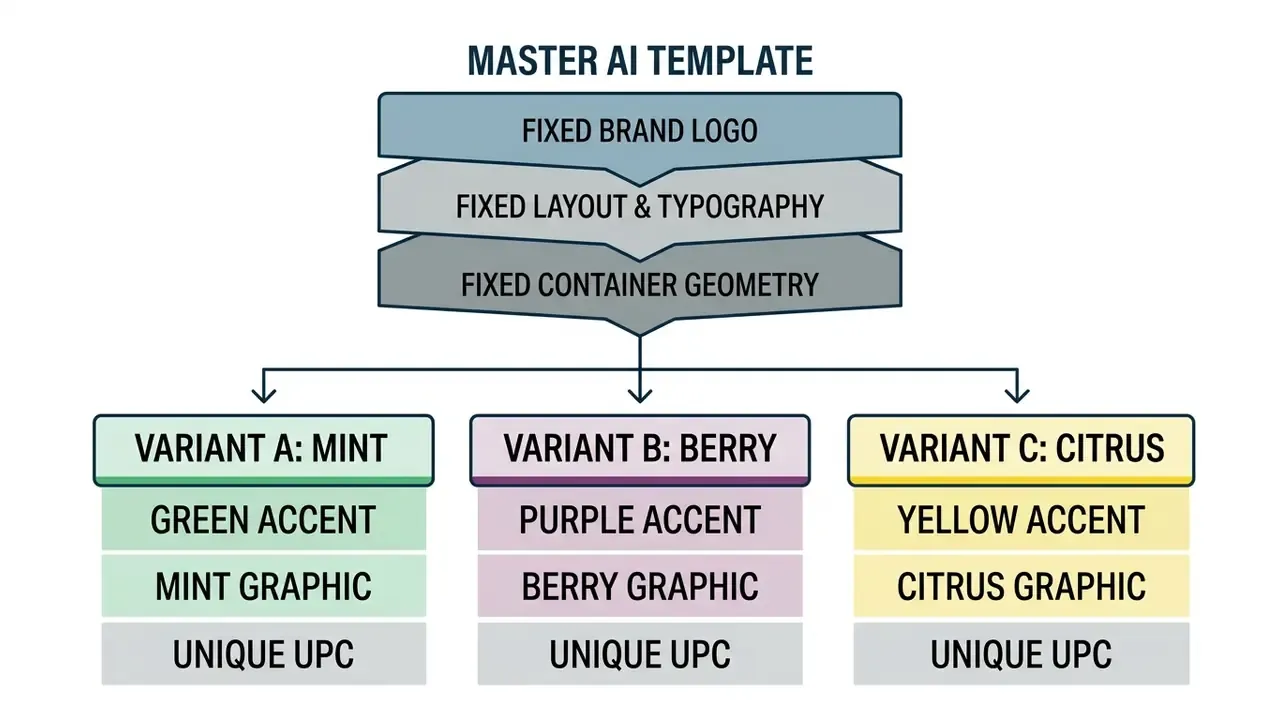
Change Product Names, Colors, Images, and Flavor Variants
When deploying an ai product label generator for line extensions, apply systematic variations across a fixed grid structure:
- Color-Coded Variants Alter secondary accent colours while leaving primary brand colours intact. Verify that modified combinations preserve accessible text contrast ratios of at least 4.5:1 for text and 3:1 for graphical labels.
- Flavor and Scent Graphics Replace central focal illustrations (swapping a mint leaf graphic for a raspberry icon, say) while preserving exact spatial scale and positioning. Image-to-image workflows are the efficient route here. Our guide to image-to-image AI generators covers structure-preserving transformation, and Ghibli-style and stylised generators show how far style transfer can drift from a locked brand look.
- Variable Data and Barcodes Update flavour titles, ingredient lists, nutrition panels, allergen emphasis, and UPC barcodes for each stock keeping unit. Variable-data fields, counters, and database links automate this without rebuilding the template. For developers integrating automated media asset pipelines into custom systems, compare options in our API documentation.
- Quality Uplift Across Variants When a variant graphic is regenerated at lower fidelity than the master, run it through an AI image enhancer workflow (denoise, clarity, controlled sharpening) so texture and grain match the rest of the line.
Keep Packaging Output Consistent Across a Product Line
To hold a strong shelf presentation, maintain visual unity across every variant in a product line:
- Lock Core Grid ElementsPosition the brand logo, net weight indicator, and primary product claims in identical coordinates across every label size.
- Maintain Typographic UniformityUse identical font families, line spacing, and font weights for variant descriptors.
- Use Shared Dieline TemplatesStandardize physical label shapes across container sizes to streamline commercial printing setup.
- Match Primary and Secondary PackagingRegulatory design guidance for medicines is explicit that the vial label should match the carton and that colour schemes must be applied consistently across primary and secondary packaging. Worth importing that discipline into consumer goods (FDA, Design for Patient Safety, 2021; SFDA Guidance for Graphic Design of Medication Packaging).
- Version the Master, Not the VariantsKeep one approved master file under version control, and derive SKUs from it. Editing individual variants independently is how product lines quietly lose visual unity between print runs.
«Case studies of five global brands showed AI delivers fluency and flexibility, but brand unity is achieved only through curation by human designers.»
Broader tool coverage sits in our commercial-use library, so see the overview if you are still shortlisting engines. For setup questions, export defaults, and file-format troubleshooting, view the guide in our support documentation.
Summary and Next Steps
An ai label generator gives you unusual speed during the ideation and visual design phases of product packaging. Converting AI-generated visuals into retail-compliant physical labels, however, still demands human oversight, prepress adjustment, and regulatory verification. A safe next step, if you are formalising this: run one existing SKU through the checklist above and see how much of the record you can actually reconstruct today. The gaps you find are your real backlog.
- Define ConstraintsFix container dimensions, safe zones, and mandatory regulatory text before generating artwork.
- Structure PromptsFeed clear style, colour, and compositional parameters into the ai label maker, reserving blank panels for regulated copy.
- Control GeometryMatch aspect ratio to the physical label, inpaint local defects, and upscale to the 300 DPI canvas figure from the prepress calculator.
- Refine with Vector OverlaysLayer crisp typography, vector logos, and compliant barcodes over synthesized background graphics.
- Prepress ValidationExport artwork as a 300 DPI CMYK PDF with 3 mm bleed margins, and confirm commercial usage rights before printing.
- Document EverythingComplete the audit-trail table so the asset can be reproduced, defended, and disclosed under the rules of every market you ship to.
FAQ: AI Label Generators, Prompts, and Commercial Use
What is the best AI label generator for small business product packaging?
The best tool depends on your design requirements. Kittl Pro and Adobe Express offer strong combinations of AI-powered graphic generation, vector logo integration, editable text layers, and print-ready PDF exports. Midjourney and DALL·E 3 excel at concept art but lack prepress features; Dreamina is strong for raster upscaling; Looka works best when the label must extend an existing logo-driven brand kit. Free generators suit preliminary visual concepts, while paid platforms provide the prepress features and commercial licensing rights a production run needs.
Can I legally use a free AI-generated label on commercial products?
It depends on the service's Terms of Service and on copyright law. In the United States, purely AI-generated artwork cannot be registered for copyright unless combined with substantial human creative input. Free tools may restrict commercial usage, cap resolution, or embed visible and metadata watermarks. Always review platform terms, conduct trademark clearance searches, and check whether your target market (EU, China) requires disclosure or machine-readable marking before commercial printing.
How do I ensure an AI-generated label prints at high quality without blurriness?
Do not print web preview images directly. Generate at the correct aspect ratio, upscale to at least the pixel dimensions given by the prepress calculator (975 × 1575 px for a 3" × 5" label, for example), then export as a 300 DPI CMYK file. Make sure background artwork includes a 3 mm bleed margin beyond the trim line, and keep all text layers as vector graphics or outlined fonts.
What canvas size and aspect ratio should I use for a bottle label?
Start with 3:4 or 2:3 for vertical bottle panels (1200 × 1600 px is a safe generation size) and 16:9 or 2:1 for wrap-around labels. After generation, upscale to the 300 DPI target for your physical trim size plus 3 mm bleed on all four sides.
Can AI generate apparel neck labels and packaging inserts?
Yes. Neck labels should be produced as single-colour vector masks (pure black or white) with care symbols and size blocks placed manually, because thin cotton substrates show bleed-through. Packaging inserts and thank-you cards typically combine an AI-generated background pattern with a vector QR code linking to loyalty offers or digital manuals.
How should an enterprise control employee use of public AI label generators?
Add every generative tool to the unified AI system inventory, publish an approved-tool list, block consumer-tier generators at the network layer for teams handling regulated artwork, forbid uploading confidential formulations or unreleased dielines, require contractual no-training terms, and gate every output behind named human sign-off with a completed audit-trail record.
Does disclosing that a label was AI-designed hurt sales?
Research indicates disclosure can reduce perceived authenticity and aesthetic appeal, especially for utilitarian goods (Yang et al., 2026). Where disclosure is legally required, such as China's labelling measures or EU AI Act transparency duties from August 2026, prefer machine-readable metadata and documentation over prominent on-pack graphics, unless visible marking is mandated.
Is a mobile AI label generator app enough for a real production run?
Usually not on its own. App-based generators are excellent for concepting on the move, but most export flat raster files at screen resolution with no CMYK conversion, no dieline layer, and no live typography. Use the app for exploration, then finish the file in a desktop or browser editor that supports vector overlays and print-ready PDF export.
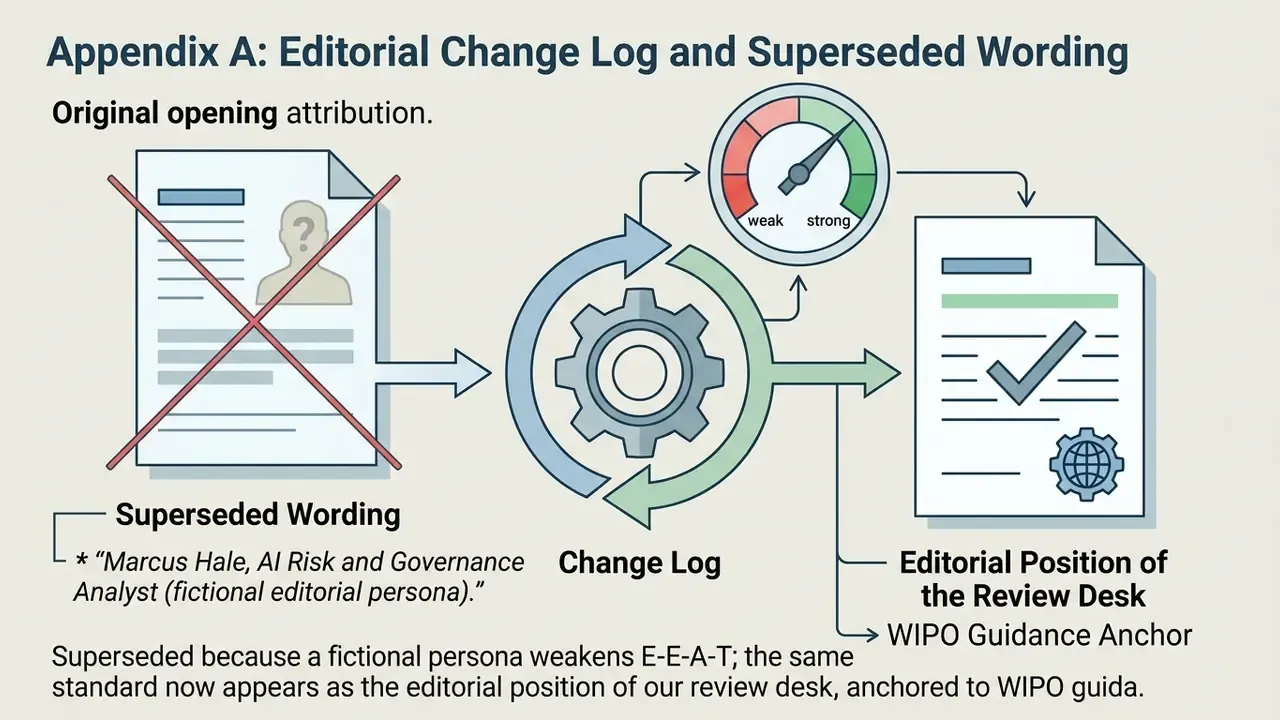
Appendix A: Editorial Change Log and Superseded Wording
For transparency, the following formulations from earlier versions of this guide were revised rather than removed:
For definitions of the terms used throughout this guide, from bleed and dieline to inpainting and variable data printing, see the overview in our glossary hub.