Why should a risk or compliance leader care about a clipping tool? Because in a regulated firm, a 45-second Reel is a public communication, produced by a model, from source data that may contain client information. That is a governance object, not a marketing toy.
Executive Summary
Last updated: August 2026.
- Two distinct architectures, one category name. Text-to-video (T2V) engines synthesize new frames from prompts; long-to-short engines analyze existing footage and re-edit it. Choosing the wrong architecture is the single most common procurement error.
- Ranking beats cutting. Production-grade long-to-short systems assign each candidate segment an AI Virality Score (0–100) derived from hook strength, speech pacing, and emotional or visual spikes.
- Inputs and exports decide integration cost. Look for MP4/MOV/WebM uploads plus direct links (YouTube, Twitch VODs, Zoom, Loom, StreamYard, Vimeo, Google Drive, Dropbox) and subtitle exports in SRT, VTT, and TXT.
- Localization is measurable. Enterprise engines auto-caption in 75+ languages and provide voice-cloned dubbing in 35+ languages.
- Monetization is duration-bound. YouTube Shorts supports vertical video up to 3 minutes; the TikTok Creator Rewards Program requires original video longer than 1 minute.
- Compliance is the gating factor in regulated firms. Before granting autonomy, verify SOC 2 Type II attestation, Zero Data Retention (ZDR), SSO/SAML, IP indemnity, PII/MNPI masking, C2PA provenance manifests, and an auditable human-in-the-loop (HITL) approval chain.
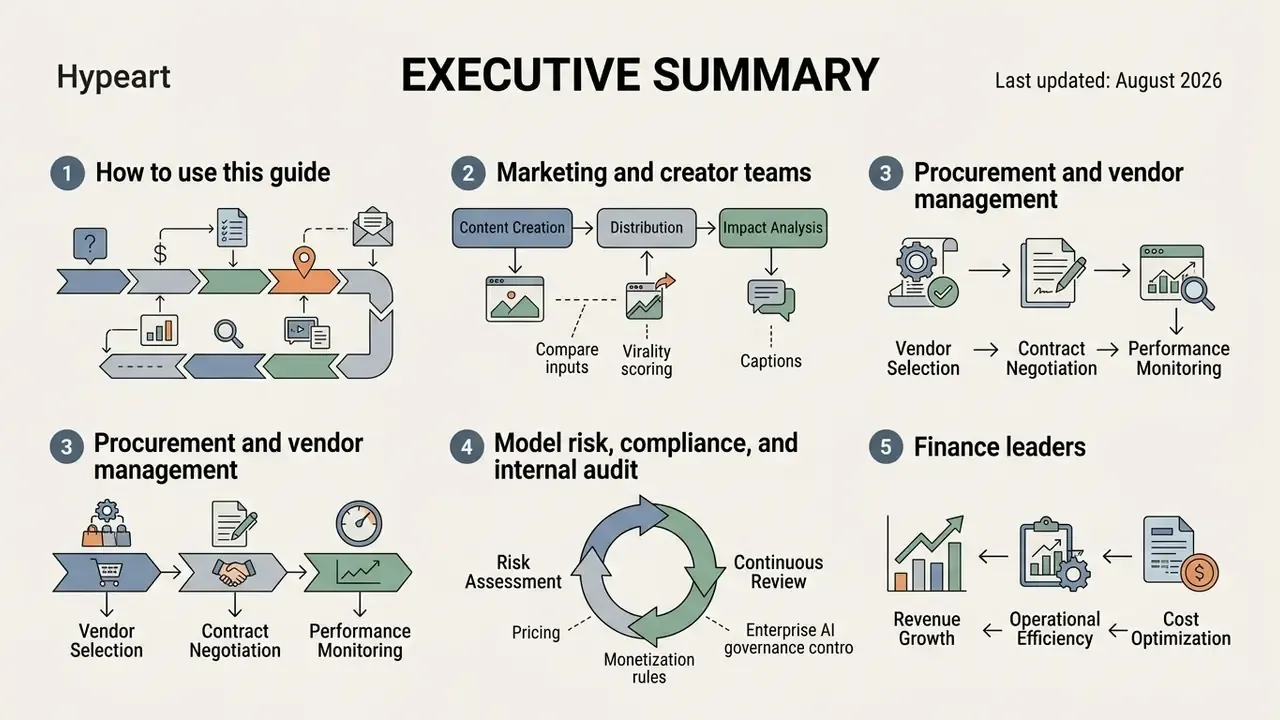
How to use this guide
Different readers arrive with different questions, so pick your entry point.
- Marketing and creator teamsstart with the workflow and feature sections: source preparation, clip ranking, captions, voiceover, export.
- Procurement and vendor managementwork from the selection matrix and the due-diligence checklist, then price the control overhead, not just the seat cost.
- Model risk, compliance, and internal auditread the governance section first: shadow AI exposure, HITL approval chain, provenance, recordkeeping.
- Finance leaderscompare tier pricing against review labour, because a cheap clipper with a heavy manual QA tail is not cheap. Our calculators can help you model that trade-off before a purchase decision.
One caveat before the details. Vendor documentation moves faster than any published guide, so treat every number here as a checkpoint to verify, not as a settled fact.
What Is an AI Short Video Generator?
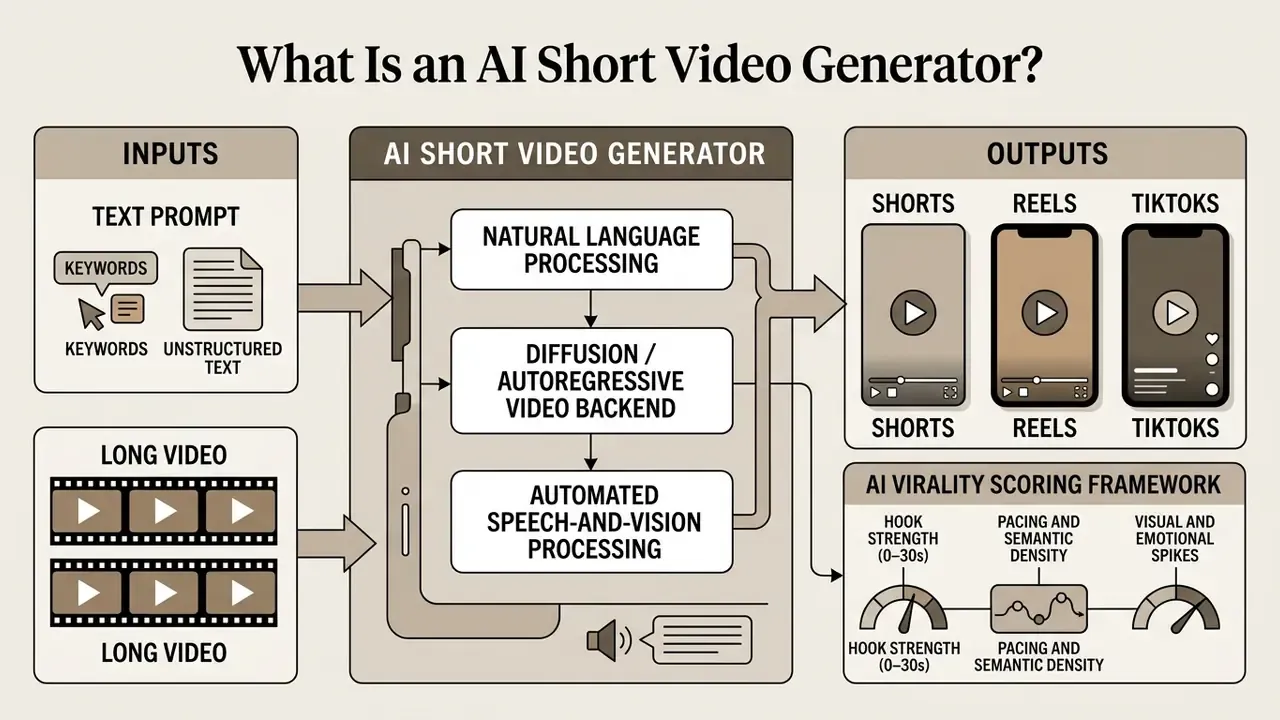
An ai short video generator combines natural language processing, diffusion or autoregressive video backends, and automated speech-and-vision processing to turn unstructured text or source media into vertical 9:16 video clips. These tools solve two core production bottlenecks: generating original scene sequences from scratch without camera equipment, and re-editing multi-hour long videos into condensed, high-engagement highlights.
By removing manual timeline trimming and manual transcription, an ai generated short video pipeline lets teams scale content velocity while enforcing explicit visual styles and audio compliance. Whether you deploy an ai for short videos strategy for corporate communications or social media marketing, the operational architecture rests on automated scene segmentation, speaker tracking, and automated captioning.
A useful mental model: the tool is a production line, not a creative partner. It ranks, cuts, captions, and renders. Judgment stays with you.
Generate short videos from a text prompt
Text-to-video engines synthesize complete vertical scenes from descriptive text prompts, structured scripts, or uploaded documents. Modern architectures map text embeddings into temporally coherent video frames using spatial-temporal diffusion transformers or autoregressive backends. Readers who need a functional overview of the model layer can review the text-to-video AI tooling reference before comparing vendors.
Official technical specifications demonstrate that prompt crafting acts as the primary control surface for visual output. See OpenAI Sora 2 Prompting Guide (2026), https://developers.openai.com/cookbook/examples/sora/sora2_prompting_guide. The same documentation set specifies discrete clip lengths of 4, 8, 12, 16, and 20 seconds, plus image input as a first frame and continuation from a source video (OpenAI Video Generation API docs, 2026, https://developers.openai.com/api/docs/guides/video-generation).
Prompt formulas typically structure input data into specific elements:
For example, when using an ai story generator for youtube shorts, the system interprets narrative scripts, generates multi-shot storyboard sequences, and maintains character consistency across scene transitions without requiring physical filming (Tencent HunyuanVideo-1.5 Prompt Handbook, 2025). Empirical evaluations on causal video generation architectures confirm that text-conditioned models now reach production-grade temporal stability:
«CausVid reaches an 84.27 total score on VBench-Long with a temporal quality score of 94.7, confirming reliable narrative video generation.»
That benchmark pairing matters operationally. Total score reflects overall fidelity across VBench-Long dimensions, while the temporal quality sub-score predicts whether a generated Short will hold visual coherence across a full 20-second render rather than degrading mid-clip. Updated: the earlier version of this section referenced the study without benchmark name, score, or methodology; the metrics above replace that generic attribution.
Multilingual prompting adds another variable. Right-to-left scripts and non-Latin typography behave differently in burned-in captions, which is covered separately in the Arabic text-to-video generator reference.
Turn long videos into Shorts, Reels, and clips
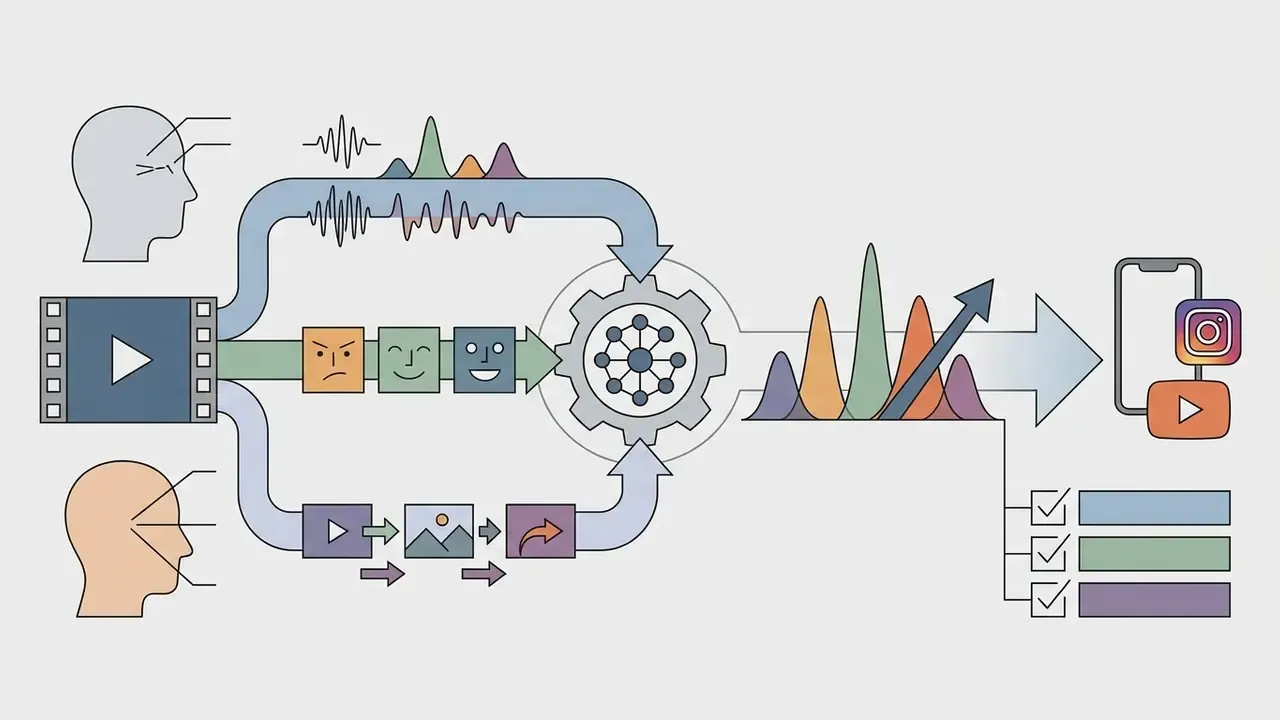
Long-to-short repurposing algorithms analyze existing horizontal media, such as podcasts, webinars, product demos, and executive interviews, to extract key highlight segments and reframe them vertically. This workflow relies on multimodal transformers that process transcript text, audio volume spikes, facial movement, and scene changes simultaneously. Academic framing of the task is explicit: Repurpose-10K defines long-to-short conversion as turning source videos longer than 30 minutes into engaging clips of roughly 60 seconds each.
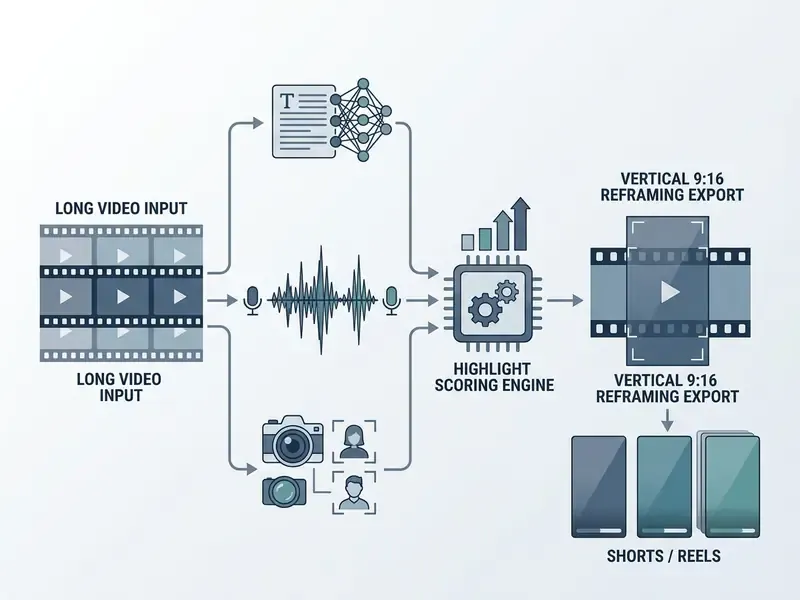
Advanced highlight-detection models evaluate sliding window segments across multi-hour footage, ranking clips by topic density and emotional delivery. Benchmark data quantifies the gain:
«SVHighlights contains 320 full sports videos totalling 640 hours; TF-SELECTOR improves HIT@1 by 2.50 and IoU by 2.95 over baseline models.»
«A recurrence-based method trains a highlight detector without manual annotation, outperforming prior approaches on three standard benchmarks.»
Once candidate clips are identified, automated active-speaker detection tracks facial motion and reframes standard 16:9 widescreen video into a vertical 9:16 aspect ratio, centering the active speaker automatically. Vendor implementations describe the same three-signal stack: transcription, highlight detection, and per-frame face and motion tracking executed jointly, with crop safe areas evaluated before export.
AI Virality Scoring Framework
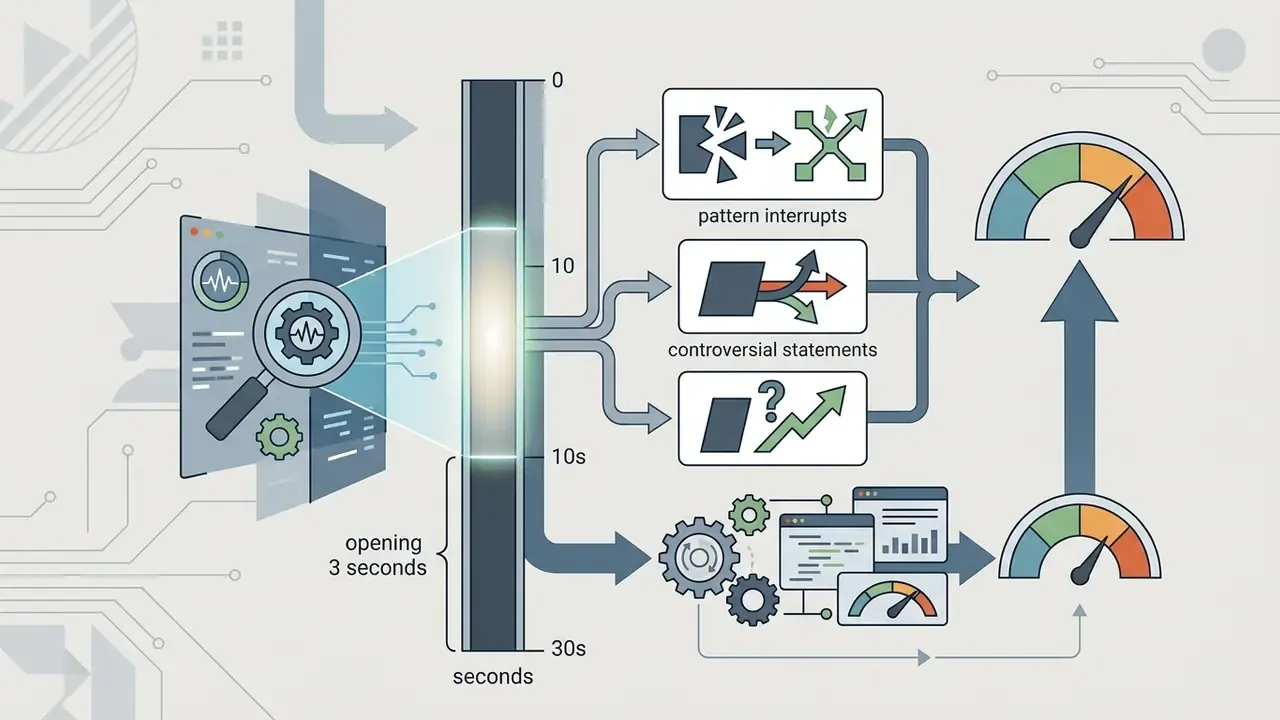
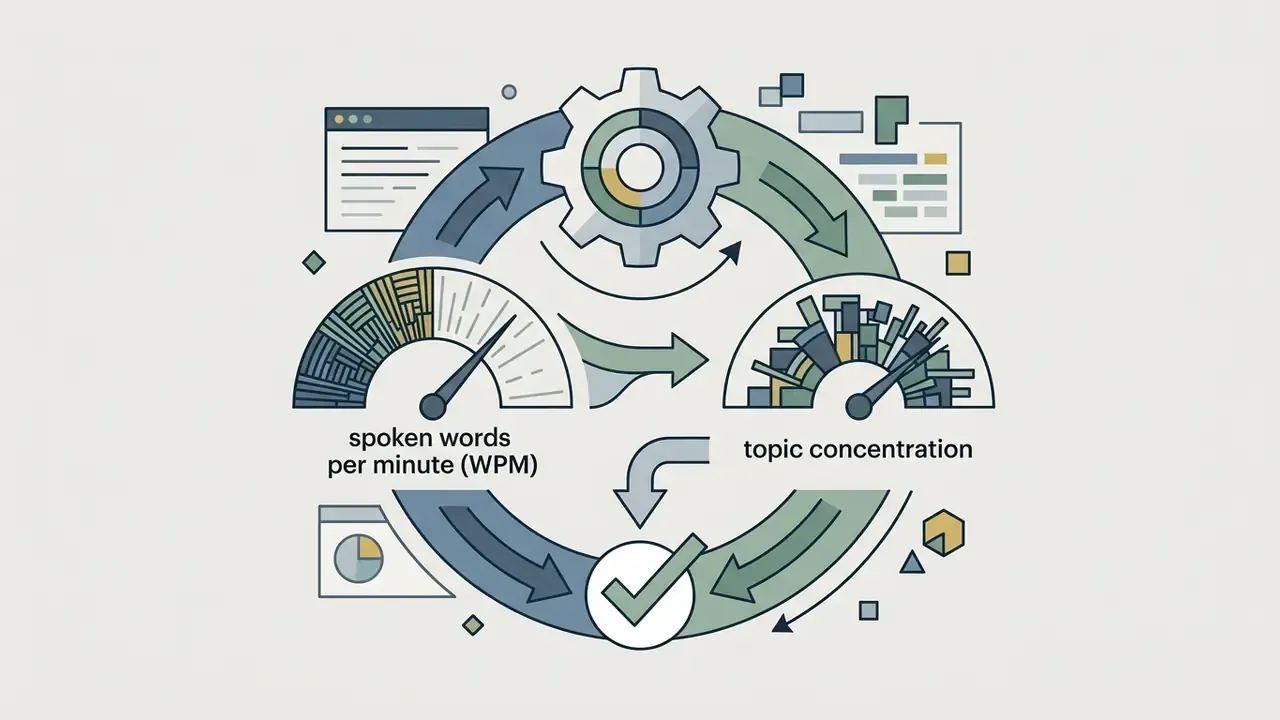
High-performance long-to-short engines do not merely cut video; they rank extracted segments using a multi-factor AI Virality Score (0–100). This scoring mechanism relies on three real-time analytical vectors:
| Scoring Vector | Measured Signal | Typical Weight | Publishing Decision Rule |
|---|---|---|---|
| Hook Strength | First 3s pattern interrupt, question, or claim | 0.40 | Below threshold, re-cut the in-point earlier |
| Speech Pacing | Words per minute, filler-word density, dead air | 0.25 | Trim silences over 0.6s; target 150–190 WPM |
| Emotional / Visual Spikes | Pitch delta, laughter, applause, scene change rate | 0.20 | Use spike timestamp as clip anchor |
| Platform Fit | Duration, aspect ratio, safe-zone compliance | 0.15 | Reject clips breaching platform duration rules |
Interpretation guidance used by media desks: 80–100 publish first, 60–79 publish after a manual hook re-cut, below 60 archive or merge with an adjacent segment. Scores are predictive rankings, not guarantees. No vendor documentation in the current source set demonstrates causal uplift from a score value alone.
A small governance note that teams often skip: if the score drives publishing order, the score is a model output influencing external communications. Inventory it accordingly.
How to Choose an AI Short Video Generator Tool
Selecting the right ai short video generator tool depends on input flexibility, rendering quality, built-in editing capabilities, auto-caption accuracy, enterprise security controls, and pricing transparency. Teams benchmarking vendors side by side can start from our index of leading AI video generators, then apply the criteria matrix below. Evaluating tools across these criteria prevents enterprise integration bottlenecks and workflow friction.
| Selection Criterion | Core Capability | Key Technical Metric / Feature | Primary Use Case |
|---|---|---|---|
| Input Modalities | Prompt, script, PDF, audio, MP4/MOV/WebM, direct links (YouTube, Twitch VODs, Zoom, Loom, StreamYard, Vimeo, Google Drive, Dropbox) | Transcript extraction and multimodal parsing; source duration ceiling (up to 3–10 hours) | Content repurposing and prompt-based story generation |
| Generation Architecture | Text-to-Video (T2V) vs. long-video clipping | Temporal consistency, VBench scores above 80, clip lengths of 4–20s | Faceless video production vs. podcast clipping |
| Automated Editing | Timeline, active-speaker reframing | 9:16 / 1:1 / 16:9 smart cropping, face-tracking stability, safe-zone padding | Converting 16:9 webinars to TikTok and Reels |
| Subtitles & Captions | Auto-captions, WER reduction, multilingual coverage | Word Error Rate below 10%, 75+ caption languages, word-level timecodes | Muted mobile video retention and accessibility |
| Audio & Voiceovers | Text-to-speech (TTS), voice cloning, BGM, dubbing | Neural voice naturalness, dubbing in 35+ languages, mood-based music sync | Multilingual video localization and narrator control |
| Clip Ranking | Virality and highlight scoring | 0–100 score across hook, pacing, emotion, platform fit | Prioritizing publishing order across a clip batch |
| Enterprise Controls & Security | SSO/SAML, RBAC, audit logs, data governance | SOC 2 Type II, Zero Data Retention (ZDR), encryption at rest and in transit, IP indemnity, DPA, data residency | Regulated communications in banking, insurance, healthcare |
| Export & Rights | Resolution, watermark removal, commercial license | 1080p/4K MP4 export, subtitle exports (SRT, VTT, TXT), unbranded commercial license | Paid advertising and monetized brand content |
| Distribution | Auto-scheduling and publishing | Direct posting to TikTok, YouTube, Instagram, Facebook, LinkedIn, X/Twitter, Pinterest | Always-on multi-platform calendars |
Note: feature availability and performance limits vary by software tier. For detailed terminology, refer to the AI Media Glossary.
Input options: prompt, image, uploaded video, or link
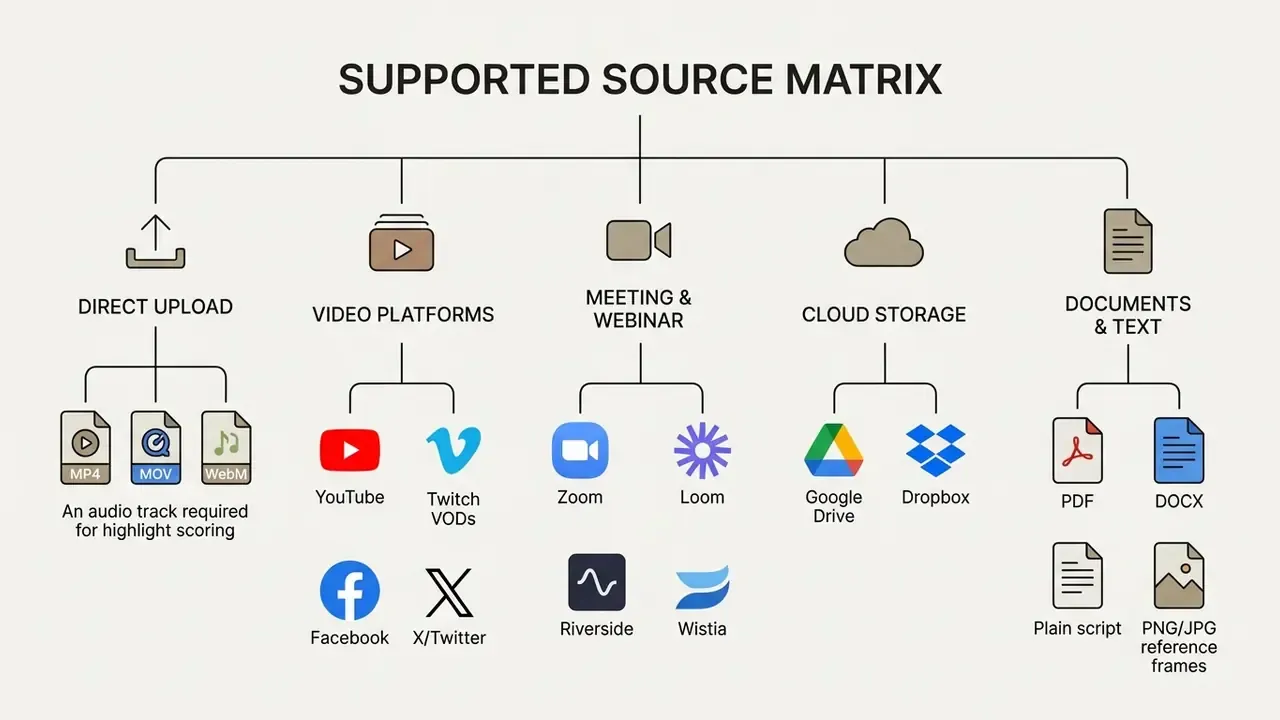
Two constraints repeat across vendor documentation: highlight engines need spoken audio to score segments, and source duration ceilings usually sit between 3 and 10 hours. Uploading a recording longer than 10 minutes generally yields stronger highlights than a 90-second clip, because the scoring model has more context to compare against. Matching input types to team workflows keeps operational speed high across both prompt-driven and repurposing pipelines.
Editing, captions, voiceovers, and brand styling
An effective ai short video maker must offer robust post-generation editing tools alongside automated processing. Synthetic outputs frequently require manual corrections to subtitle timing, visual cropping, and audio balance. Expect that. Budget for it.
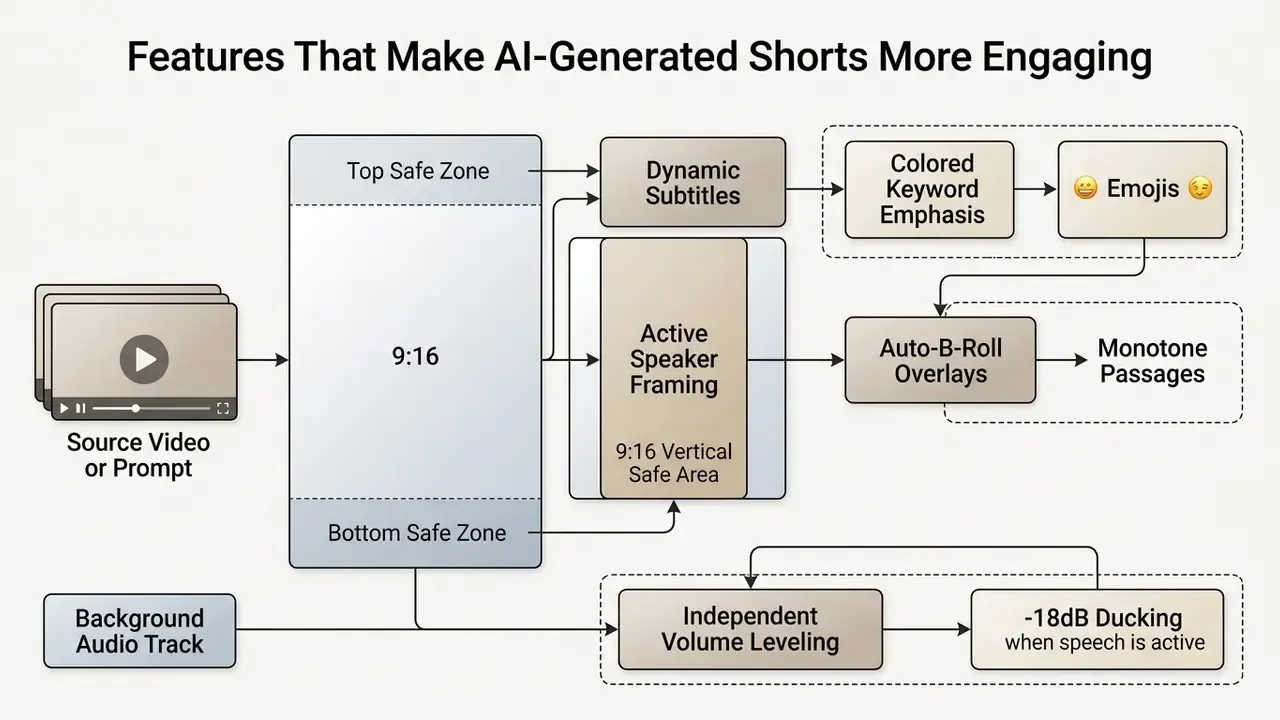
- Custom subtitle styles edit transcript typos, customize font hierarchies, apply color highlights on key trigger words, and use animated caption presets favoured by high-volume creators.
- Multilingual auto-subtitles and neural dubbing enterprise engines support auto-captioning in over 75 languages and dialects with word-level timecode sync. Advanced translation backends provide voice-cloned AI dubbing in 35+ languages, pitch-matching the original speaker's emotional cadence while preserving background audio tracks.
- Voice and audio controls neural text-to-speech with selectable accents, voice cloning, and independent background music volume. Vendor documentation notes usable voice clones from as little as 3 seconds of reference audio, with speaker similarity improving at 30 seconds or more (Inworld AI voice cloning docs, 2026). Teams evaluating narration quality can compare options in the AI voice generator guide.
- Subtitle export formats confirm downloadable transcripts and caption files in SRT, VTT, and TXT so localization vendors, accessibility teams, and archiving systems can consume them independently of the rendered MP4.
- Brand kits saved global presets containing custom brand fonts, watermark logos, hex color palettes, and standard intro or outro stingers.
To review broader pricing models across different asset types, explore our detailed AI Media Pricing Guides.
Enterprise Governance, Shadow AI, and Regulatory Controls
Regulated organizations rarely fail at generating clips. They fail at proving how a clip was produced, what data entered the model, and who approved publication. This section closes that gap before the step-by-step production workflow.
Shadow AI and confidential data exposure
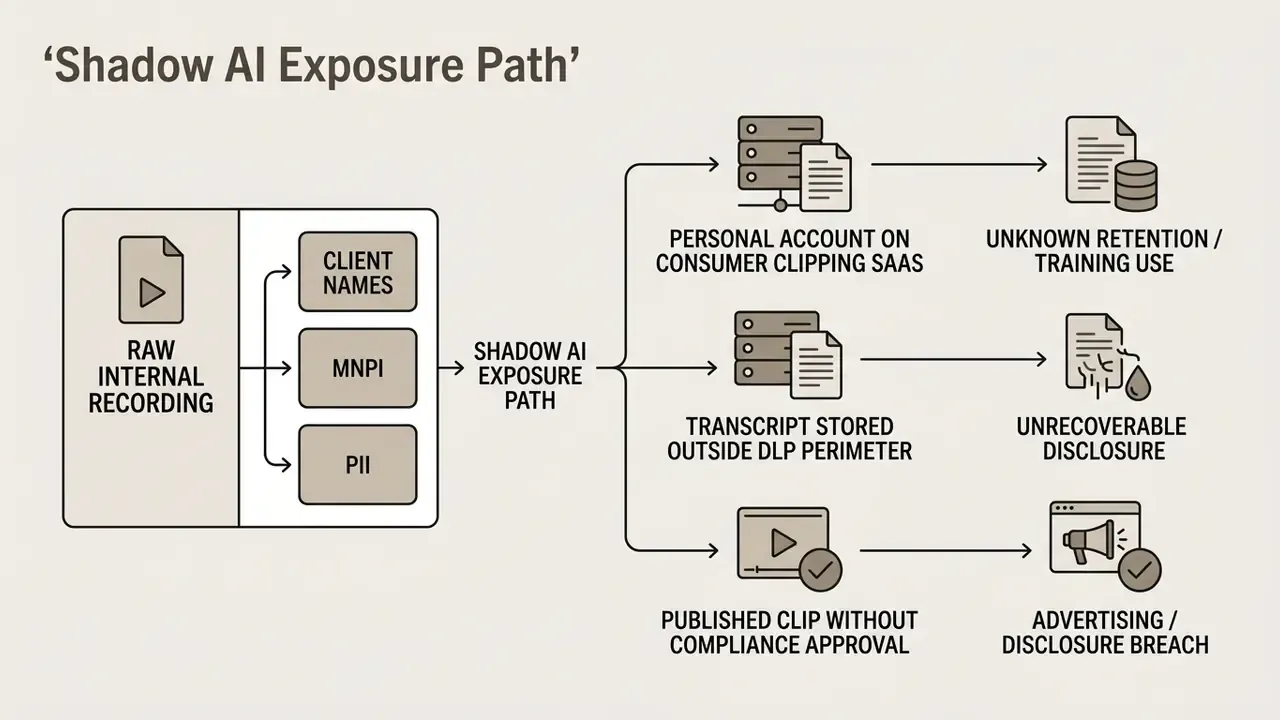
The dominant enterprise risk is not model hallucination. It is unsanctioned upload. When an employee pastes a raw earnings webinar, a client onboarding recording, or an internal strategy call into a consumer SaaS clipper, the organization may expose PII and material non-public information (MNPI) to a third-party processor with unclear retention terms.
One more line item that ROI models usually omit: control cost. Redaction, review, archiving, and vendor attestation consume real hours. A risk-adjusted business case counts them alongside licence fees, otherwise the payback number is fiction.
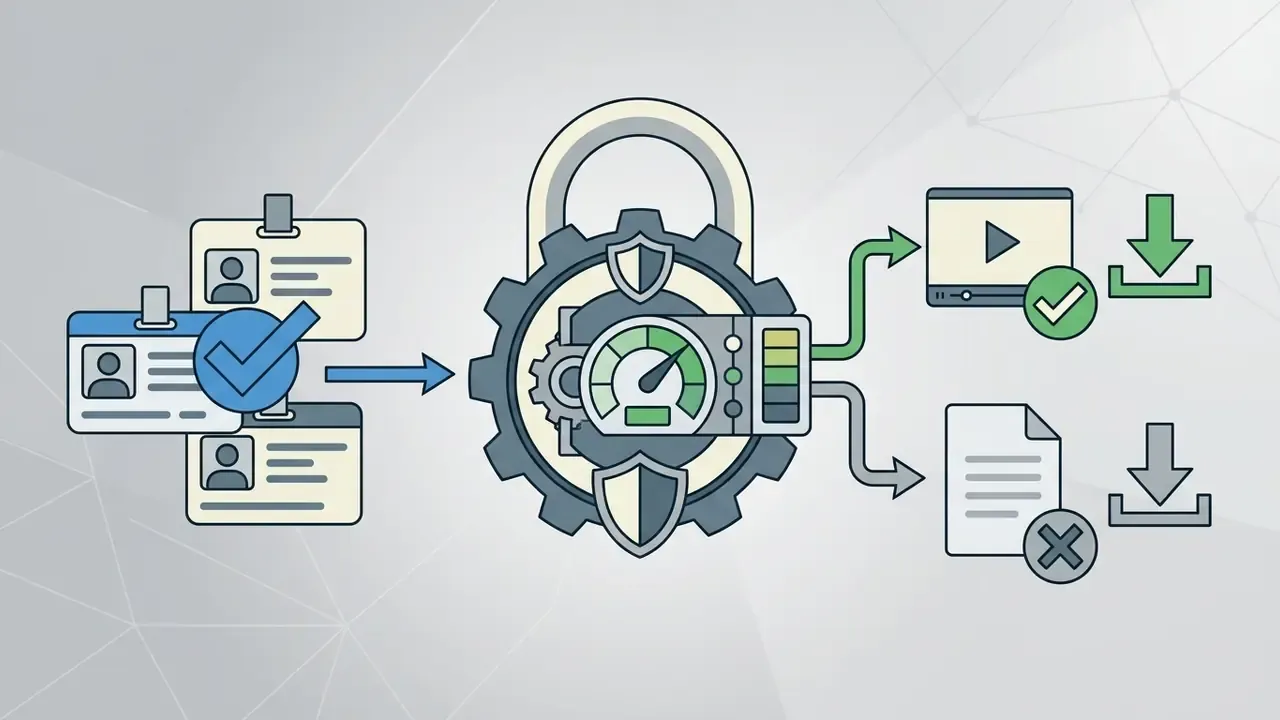

Vendor due-diligence checklist before granting autonomy
| Control Domain | Minimum Requirement | Evidence to Request |
|---|---|---|
| Security attestation | SOC 2 Type II (or ISO/IEC 27001) | Current report with bridge letter |
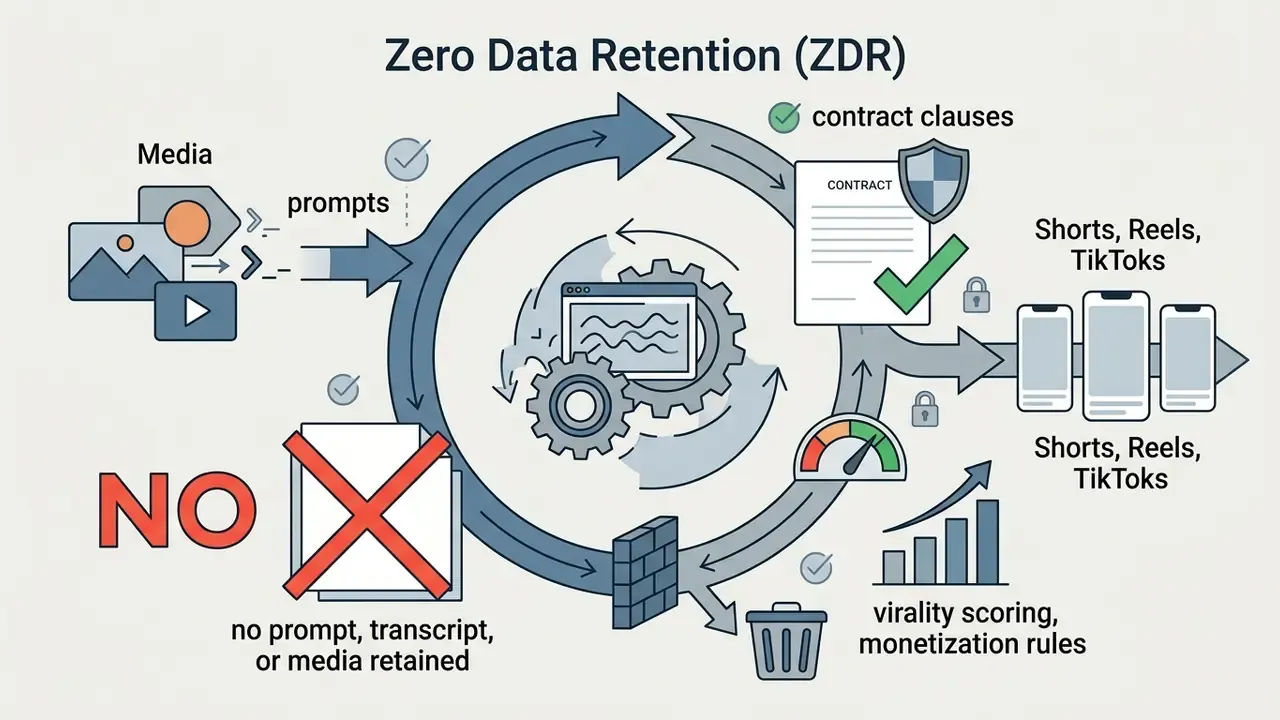
| Data retention | Zero Data Retention option; opt-out of training | Contract clause plus DPA addendum |
| Access control | SSO/SAML, SCIM provisioning, RBAC | Configuration documentation |
| Encryption | TLS in transit, AES-256 at rest | Architecture whitepaper |
| Residency | Region-pinned processing where required | Sub-processor list |
| IP protection | Commercial license plus IP indemnity for generated output | Terms of service / enterprise agreement |
| Auditability | Exportable event logs, model and version stamping | API log sample |
| Provenance | C2PA-compliant content credentials on export | Sample manifest |
| Availability | Contractual SLA with render-queue priority | SLA schedule |
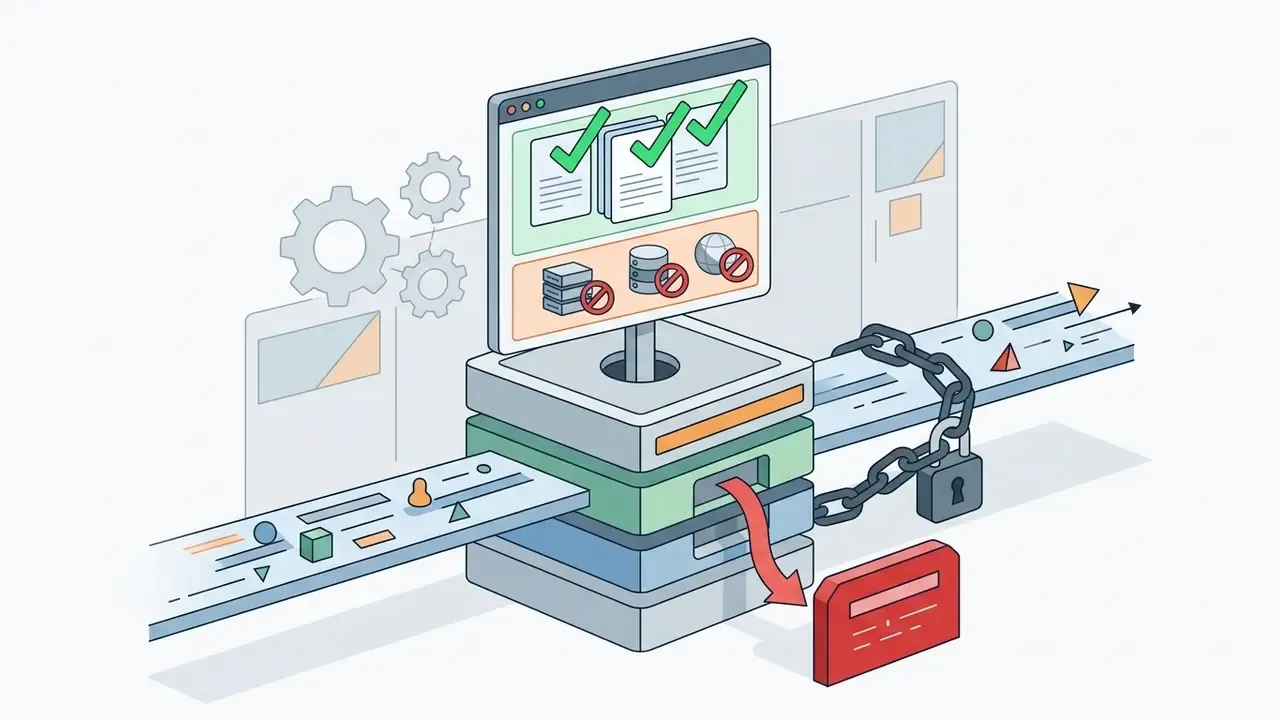
Human-in-the-loop approval chain with audit trail
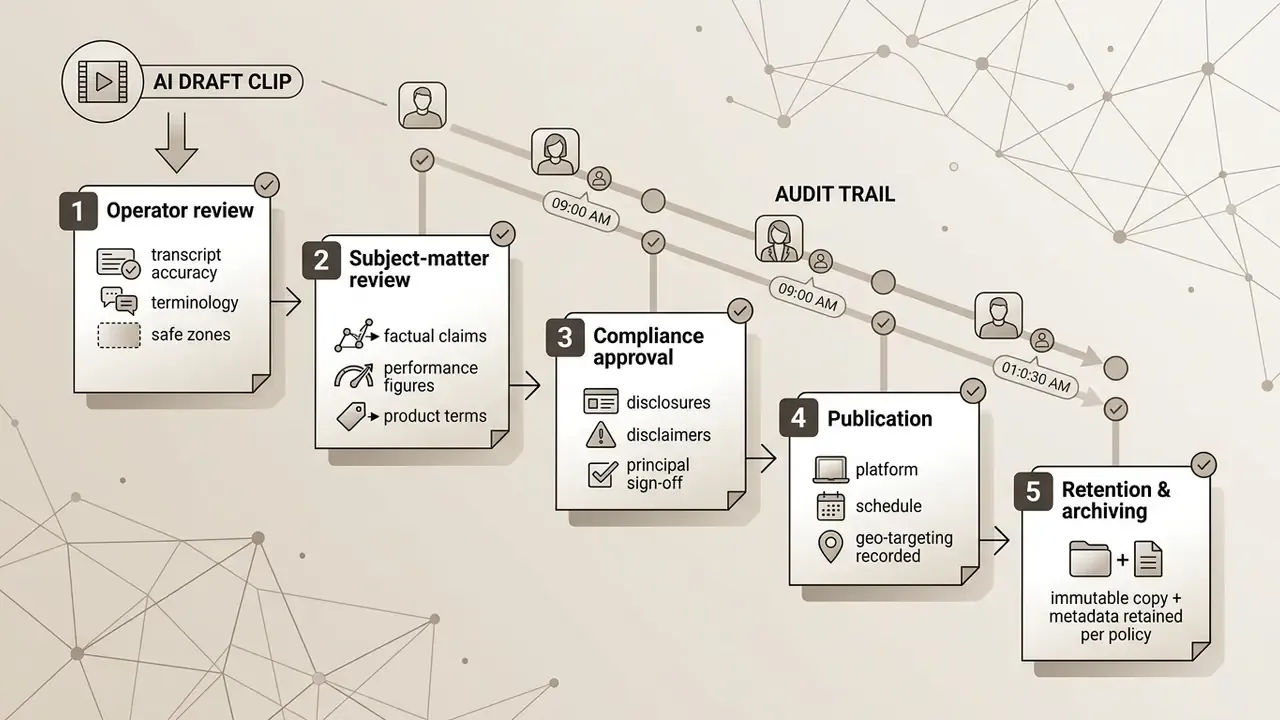
For broker-dealer and investment-adviser communications, retail-facing video is treated as advertising or retail communication and is subject to principal review and recordkeeping obligations (see FINRA Rule 2210 for communications with the public and SEC Rule 17a-4 for record preservation). Model risk teams typically map the generation pipeline to the NIST AI Risk Management Framework functions (Govern, Map, Measure, Manage) and to existing model risk management guidance (OCC 2011-12 / SR 11-7) so that a video generator is inventoried, validated, and monitored like any other model.
Copyright disputes are a moving backdrop here. For precedent tracking on synthetic media claims, see our AI Litigation and Case Timelines.
Provenance and synthetic-media disclosure
Auditors and regulators increasingly ask a single question: can you prove this asset is synthetic and show its edit history? The C2PA (Coalition for Content Provenance and Authenticity) standard answers it by attaching cryptographically signed Content Credentials, covering capture or generation source, model identifier, and subsequent edit actions, to the exported file. Governance teams should require C2PA manifests on export, preserve the manifest alongside the archived master, and document any platform re-encoding that strips metadata.
Checklist0 / 10
How to Create a Short Video with AI
Creating high-performing vertical videos requires a structured, multi-stage workflow. A standardized framework keeps output quality, brand safety, and platform compliance consistent when you use an ai for creating short videos.
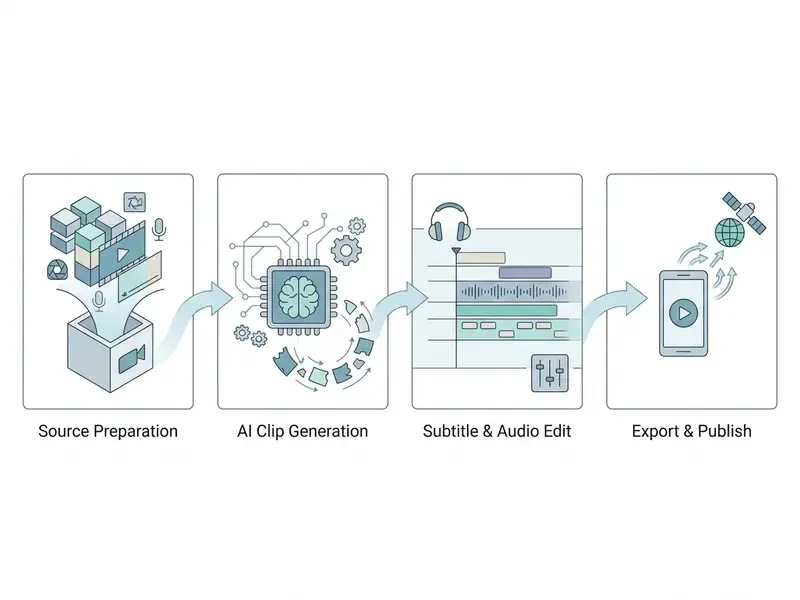
Start with a script, prompt, or existing content
The production process begins by establishing the primary source material. When you use an ai for making short videos from scratch, operators construct a structured prompt specifying subject, action, camera movement, lighting, and visual style. That element order (subject and action, then context, then camera, then lighting and style) is recommended across current prompt guides, with positive phrasing and one camera move plus one subject action per shot.
When repurposing existing assets, operators upload long-form video files or paste a target URL into the system, which starts automated transcription and semantic analysis. Recordings with clear audio and minimal background noise produce materially better transcripts, and therefore better highlight scores. Garbage audio in, weak clips out. It really is that direct.
Let AI select clips and create a vertical video
Once source inputs are validated, the video generator ai processes the media through its analysis pipeline. For prompt-driven generation, the rendering engine synthesizes discrete shot sequences. For long-form repurposing, natural language algorithms evaluate transcript density and speech patterns to isolate high-impact moments, then rank them with the virality scoring vectors described above. Active-speaker tracking then applies dynamic 9:16 framing, keeping the subject centered while cropping out extraneous horizontal background space. Preset duration windows (20–40s, 40–60s, 60–120s) or custom lengths let teams align output with platform monetization rules.
Review, edit, and export the final video
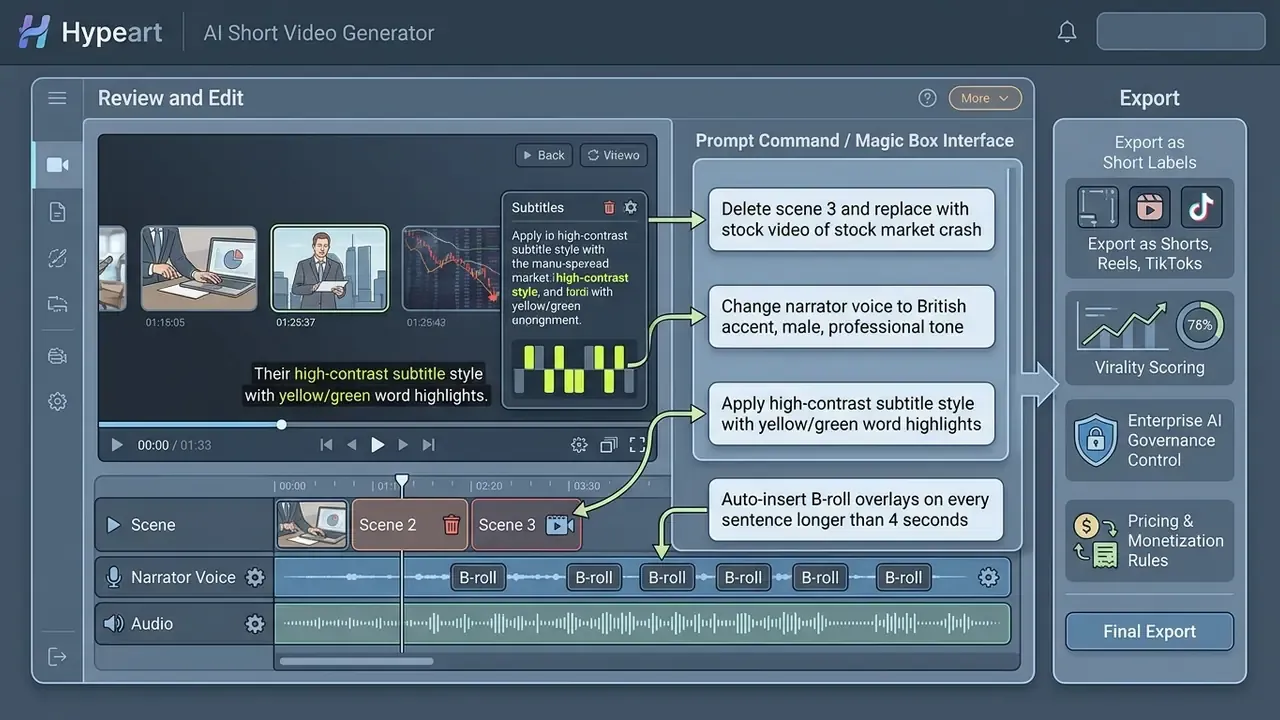
Before publishing, human-in-the-loop validation verifies visual alignment and subtitle accuracy. Operators must inspect audio synchronization, confirm that dynamic subtitles do not obscure critical visual elements, and review active-speaker tracking quality. Teams standardizing this stage across a channel can adapt our YouTube video editing workflows as the review baseline.
Pre-export checklist derived from accessibility and caption standards: captions timed to audio within roughly 3 frames, minimum 1-second display duration, short gaps between caption events, bottom-center placement moved to top-center when burned-in graphics occupy the lower third, and independently controllable audio levels.
Many current editors expose these operations through natural-language command interfaces rather than timeline menus:
To compare specialized editing toolsets for specific workflows, consult our AI Media Comparison Matrices.
Features That Make AI-Generated Shorts More Engaging
Audience retention on vertical video platforms depends heavily on immediate visual hooks, dynamic pacing, and effortless legibility. Modern ai generated shorts video platforms incorporate targeted technical features designed to maximize watch time.
AI captions and animated text for retention
Because a large share of mobile users watch short-form videos with sound muted, dynamic subtitles are critical for retention. Automated speech recognition engines generate aligned subtitles, while LLM post-processing corrects syntax and lexical errors:
«ChatGPT-3.5 reduces WER from 23.07% to 9.75% and raises BLEU from 0.67 to 0.85 compared with raw YouTube ASR subtitles.»
AI-selected clips, B-roll, and dynamic layouts
To prevent visual monotony during extended speaking segments, an advanced ai short generator automatically inserts contextually relevant B-roll footage and dynamic screen layouts. The platform analyzes speech transcripts, identifies key concepts, and retrieves licensed stock footage or generates custom AI images to overlay on the primary timeline (Kapwing AI B-Roll Generator, 2026, https://www.kapwing.com/ai/b-roll-generator). Comparable implementations place stock or generated visuals directly on the editing timeline at the exact timestamp where the matching sentence occurs (AutoCut AutoB-Rolls, 2026, https://www.autocut.com/en/autobroll/).
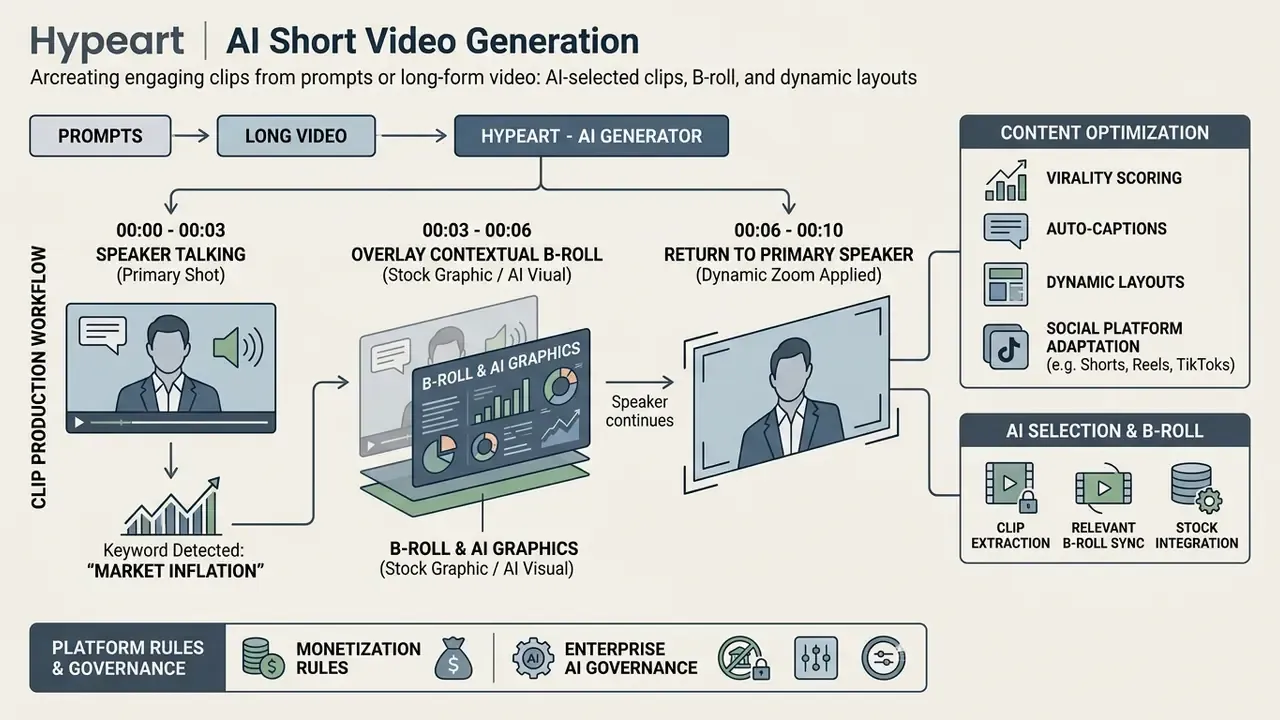
Automated split-screen modes also display the speaker and related visual media at once, preserving engagement without manual timeline keyframing. One caution for regulated content: auto-inserted B-roll can imply a claim the speaker never made. Review overlays for implied performance or guarantee messaging. For detailed API integration guides on automated video processing, visit our AI Media API Guides.
Voiceovers, music, and visual style options
Professional audio synthesis lets creators generate clear, studio-grade narration directly from text scripts using an ai that creates short videos. Neural voice generators match vocal cadence, pitch, and emotion to script context, while automated background music ducking lowers music volume during active speech intervals. Creators can select defined visual style presets, such as cinematic, anime, corporate, or 3D render, to enforce stylistic consistency across all generated assets; adjacent motion-design capabilities are covered in our animation maker overview.
Voice cloning carries a distinct compliance layer. U.S. regulators have treated synthetic voice as a consent and disclosure issue, including FCC guidance that AI-cloned voices fall under existing artificial-or-prerecorded-voice rules requiring prior express consent for covered calls. Obtain written consent from any speaker whose voice is cloned, and retain that consent with the asset record.
Use Cases for AI Short Video Creation
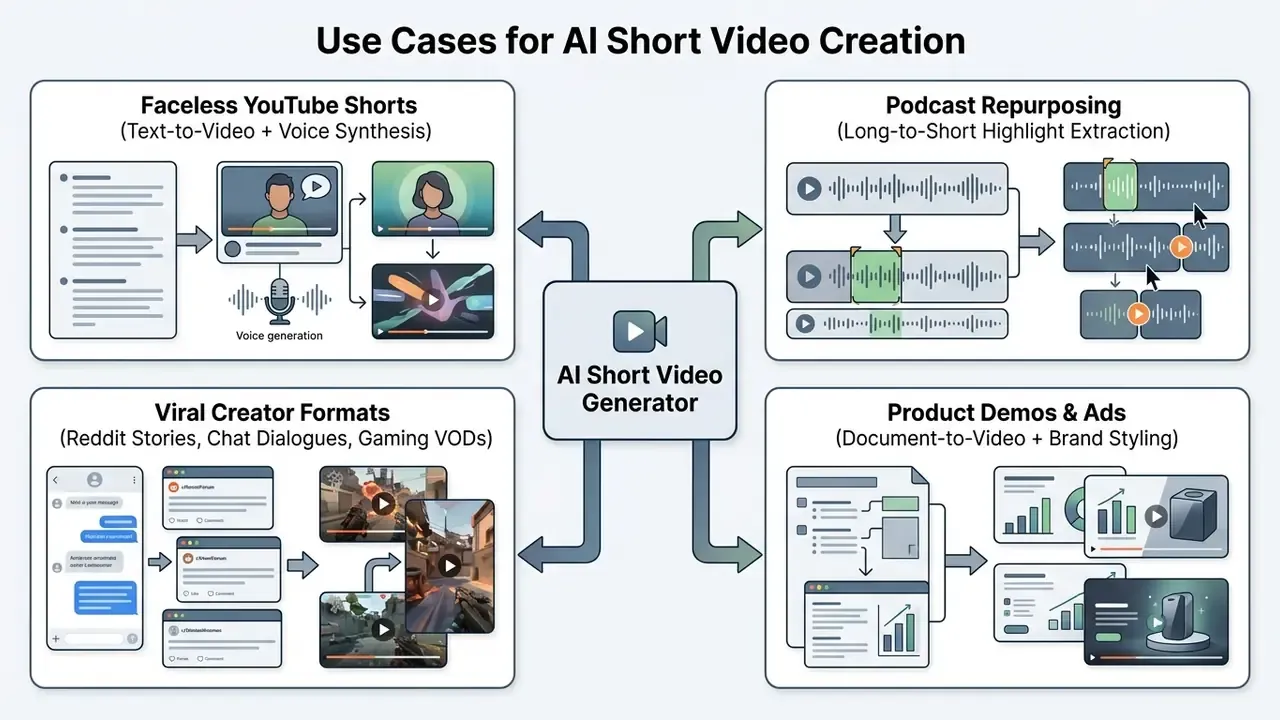
Automated video creation tools support diverse operational needs across marketing teams, digital media publishers, financial communications, and independent content creators. For a category-level primer on the tooling landscape, see our AI video generator guide.
YouTube Shorts and faceless video creation
Channels running faceless automation models use an ai to create short videos without on-camera talent. The workflow integrates automated script generation, text-to-speech narration, stock visual assembly, and automatic subtitling into a single production line. In practice, this is where ai for youtube shorts demand concentrates.
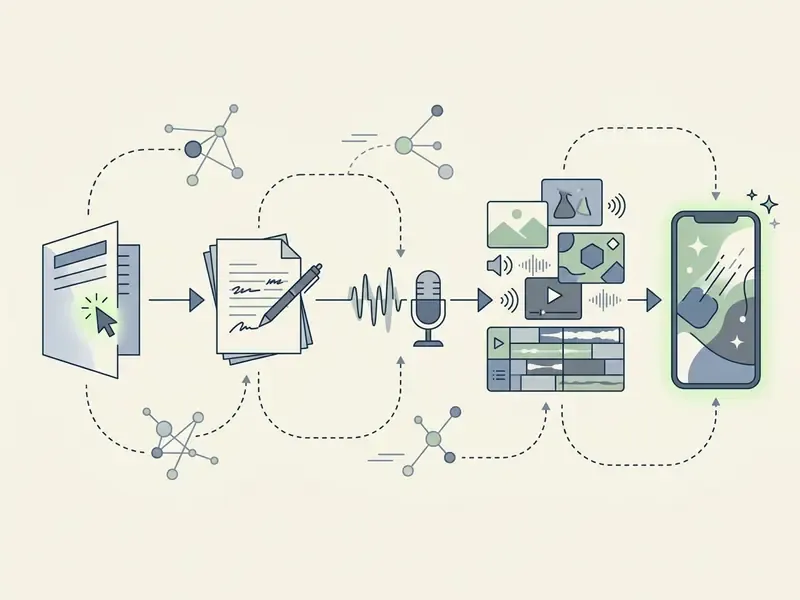
By configuring an ai that makes short videos, creators publish consistent daily upload schedules across channels dedicated to history, finance, motivation, and educational trivia (HeyGen Faceless Video Workflow, 2026, https://www.heygen.com/en-gb/tool/faceless-video). Research now measures how competitive such pipelines are against manual production:
«The LLMPopcorn pipeline with DeepSeek-V3 generates micro-videos whose predicted popularity slightly exceeds human-created content.»
Worth reading that carefully: predicted popularity, not measured revenue. To research web-accessible creation options without mandatory account registration, review the ai video generator free no sign up guide, and compare capacity limits across free AI video generators without registration.
Repurpose podcasts, interviews, and long-form videos
Digital publishers and podcast hosts use an ai to generate short videos to extract viral highlights from extended recordings. Long-form repurposing turns one interview into multiple bite-sized promotional clips tailored for social distribution.
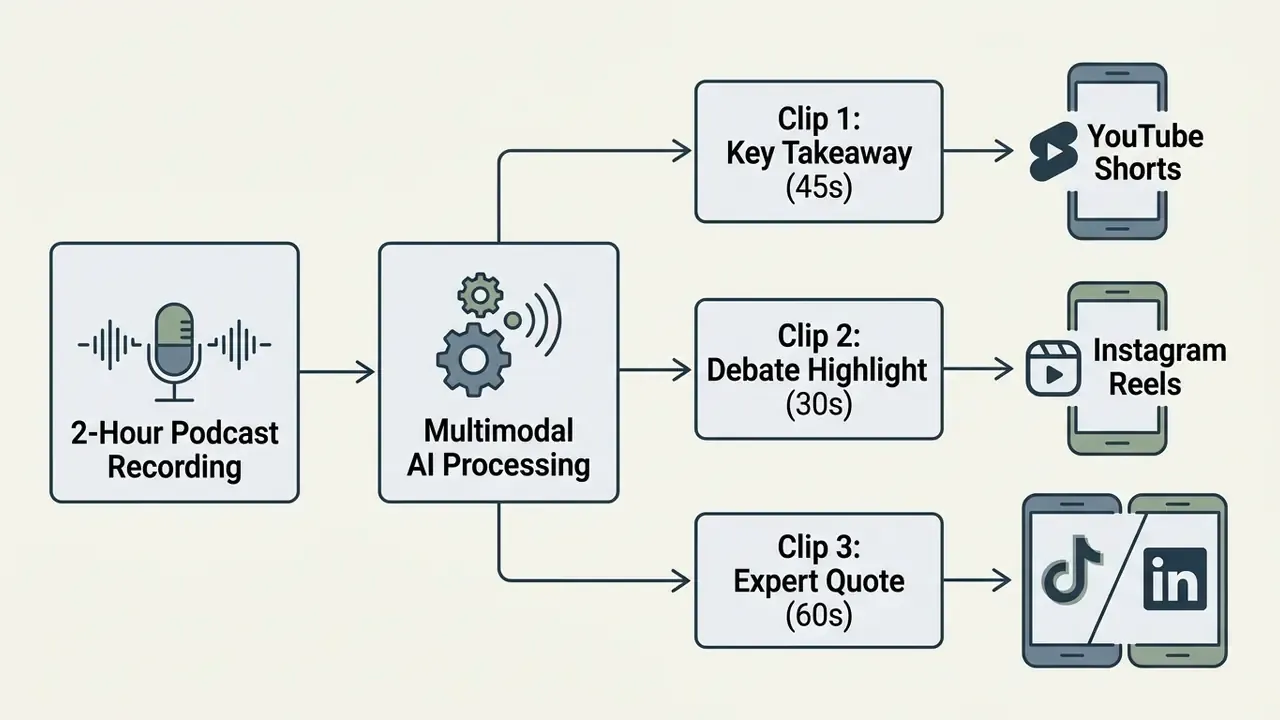
In an enterprise deployment for a financial services media desk, a marketing team implemented an ai for short video creation workflow to process weekly 90-minute executive podcasts. The system extracted 5 standout discussion clips per episode, applied company brand colors and subtitles, and exported platform-ready vertical files.
Human-centric highlight detection is the research backbone of this use case:
«HighlightMe reaches 0.64 mAP on the DSH dataset, exceeding the previous best result by 7 percentage points through pose and facial-expression modelling.»
Free AI Short Video Generators, Pricing, and Commercial Use
Evaluating free-tier limitations, subscription tiers, and commercial usage rights is essential before adopting an ai create short video workflow for business operations; our reference on free AI video generators breaks down credit systems and export caps in more depth.
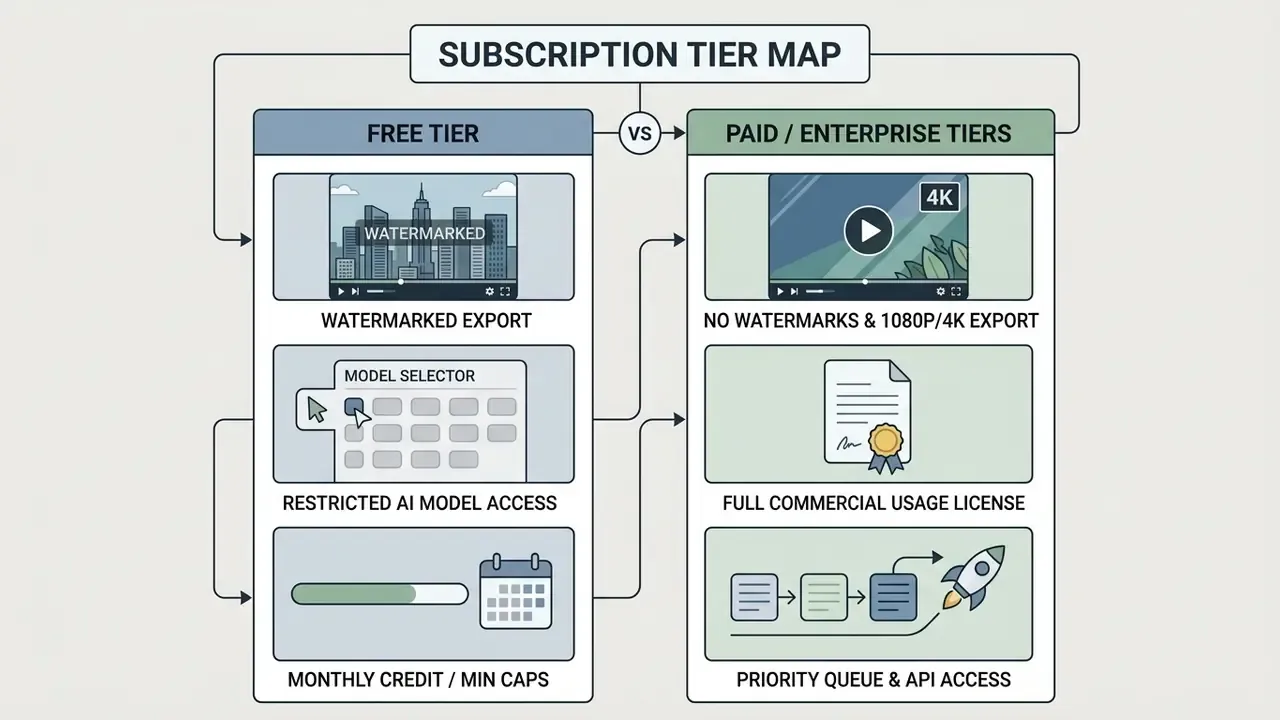
| Service Tier | Average Monthly Cost | Video / Credit Allocation | Export Quality & Watermark | Commercial License Status |
|---|---|---|---|---|
| Free Tier | $0 | 5–60 processing min/month or one-time credits | 420p–720p, watermark included | Personal / non-commercial use only |
| Starter / Hobbyist | $12 – $29 | 60–200 min/month | 1080p, no watermark | Standard commercial license |
| Pro / Creator | $30 – $89 | 300–600 min/month | 1080p–4K, no watermark | Full commercial and monetization rights |
| Enterprise / API | Custom / usage-based | Metered per minute or second | Custom resolution, no watermark | Enterprise indemnity and custom licensing |
Note: pricing and plan structures checked as of August 2026. Published examples in the current source set include a $0 free plan with 60 processing minutes per month, paid creator plans at $15–$29 per month, and per-use API metering around $0.05–$0.20 per second depending on model and feature set. Review official vendor documentation before purchase.
What a free AI short video generator usually includes
A standard ai free short video generator plan offers basic entry capabilities designed for platform testing. Free plans typically provide a limited allotment of monthly processing minutes or one-time rendering credits, export resolutions capped at 480p–720p, visible vendor watermarks, lower queue priority, and shorter maximum clip lengths. Advanced features such as brand kit integration, voice cloning, and high-resolution exports are generally locked behind paid upgrades (Descript Pricing & Plan Terms, 2026). Searches for an ai short video generator free or an ai shorts video generator free usually land on exactly these constrained tiers, which is fine for evaluation and risky for production. Users looking for mobile-first options can review our guide on the ai video generator app.
What to compare before choosing a paid plan
When selecting a paid subscription for an ai shorts video generator, organizations should audit key operational parameters:
- Rendering queue prioritydedicated rendering capacity to prevent export slowdowns during peak hours.
- AI model accessavailability of advanced generative backends (for example Sora 2, Veo 3, HunyuanVideo) for superior visual coherence.
- Watermark removal and resolutionunbranded 1080p or 4K MP4 exports suitable for broadcast and advertising use.
- Multi-seat collaborationteam management features, shared workspace assets, and brand kit synchronization.
- Enterprise security add-onsSSO/SAML, ZDR, audit logging, and IP indemnity, which are frequently gated to business tiers only.
- Distribution and APIauto-scheduling to social platforms and programmatic clipping endpoints for pipeline automation.
To evaluate free tools across quality metrics and credit limits, consult our index of the best free ai video generator options.
Commercial-use rights, watermarks, and export terms
Commercial use of synthetic media requires strict compliance with copyright regulation and platform licensing agreements. Under current legal frameworks, purely synthetic AI outputs lacking substantial human authorship cannot receive standard copyright registration (U.S. Copyright Office Guidance, 2025–2026). Registration materials must exclude more-than-de-minimis AI-generated portions and identify the human author's contributions; prompts alone are not treated as sufficient expressive authorship. Commercial protection therefore depends on provider contract terms and user-added editorial elements.
[Raw Synthetic Output] + [Human Editorial Control / Scripting / Editing] = [Valid Commercial Asset]
Organizations must verify that paid subscriptions explicitly grant commercial monetization rights, and that embedded stock media assets carry valid commercial distribution licenses (Adobe Express & Canva Commercial Terms, 2026). Watermark and licensing status often depends on the asset class rather than the plan alone: free-tier content may be usable at no cost while premium library content triggers watermarking until licensed.
Platform-specific monetization and duration constraints (2026 rules)
To keep monetization eligibility across ad-revenue programs, generated shorts must match precise platform duration parameters:
- YouTube Shorts supports vertical videos up to 3 minutes. Maximum ad-revenue retention is typically observed in the 30–60 second window, and Shorts must still satisfy originality and content-policy requirements to remain monetizable.
- TikTok Creator Rewards Program requires original video content longer than 60 seconds (1+ minute) to qualify for high-RPM revenue sharing.
- Instagram Reels allows up to 90-second reels, requiring custom safe-zone padding to avoid cover-crop issues on the grid profile.
| Platform | Max Duration | Monetization-Optimal Length | Practical Constraint |
|---|---|---|---|
| YouTube Shorts | 3 min | 30–60 s | Original content requirement; UI overlay safe zones |
| TikTok | 10 min+ | Over 60 s for Creator Rewards | Originality and qualified-view thresholds |
| Instagram Reels | 90 s | 15–45 s | Grid cover cropping; audio licensing |
| ~10 min | 30–90 s | Professional-context framing, burned-in captions |
Platform monetization terms change frequently. Re-verify duration and eligibility rules against official creator documentation before locking a production template.
Provenance labelling for audit and disclosure
Where synthetic media disclosure is required by platform policy or internal standards, preserve C2PA Content Credentials on export and archive the manifest with the master file. Provenance metadata is the cheapest available evidence chain: it documents generation source, model version, and edit history without forcing anyone to reconstruct the story from project files nine months later.
Fact check and verification matrix
- OpenAI Sora 2 API and terms commercial rights granted under paid API terms; output subject to usage policies (OpenAI Services Agreement, 2025–2026, https://openai.com/policies/services-agreement).
- Adobe Express and Firefly commercial licensing included for Firefly-generated assets without watermarks on paid tiers (Adobe Commercial Licensing, 2026).
- Canva free content usable at no cost; Pro content requires a Pro license or one-off purchase to remove watermarking (Canva Content License Terms, 2026).
- Opus Clip and video SaaS platforms watermark removal and monetization rights gated strictly behind paid subscription tiers; free plan documented at 60 processing minutes per month (Opus Clip Terms & Pricing, 2026).
- Anthropic commercial terms customers retain rights to inputs and own outputs, with fees tied to the published model pricing page (Anthropic Commercial Terms of Service, 2025, https://www.anthropic.com/legal/commercial-terms).
For additional regulatory frameworks regarding commercial content creation, explore the AI Media Commercial-Use Hub.
Common Mistakes When Creating AI Short Videos
Deploying an ai generated short video pipeline without human oversight can produce severe quality flaws, poor engagement, reputational damage, and, in regulated industries, reportable compliance failures. Identifying and correcting the usual operational errors keeps output professional.
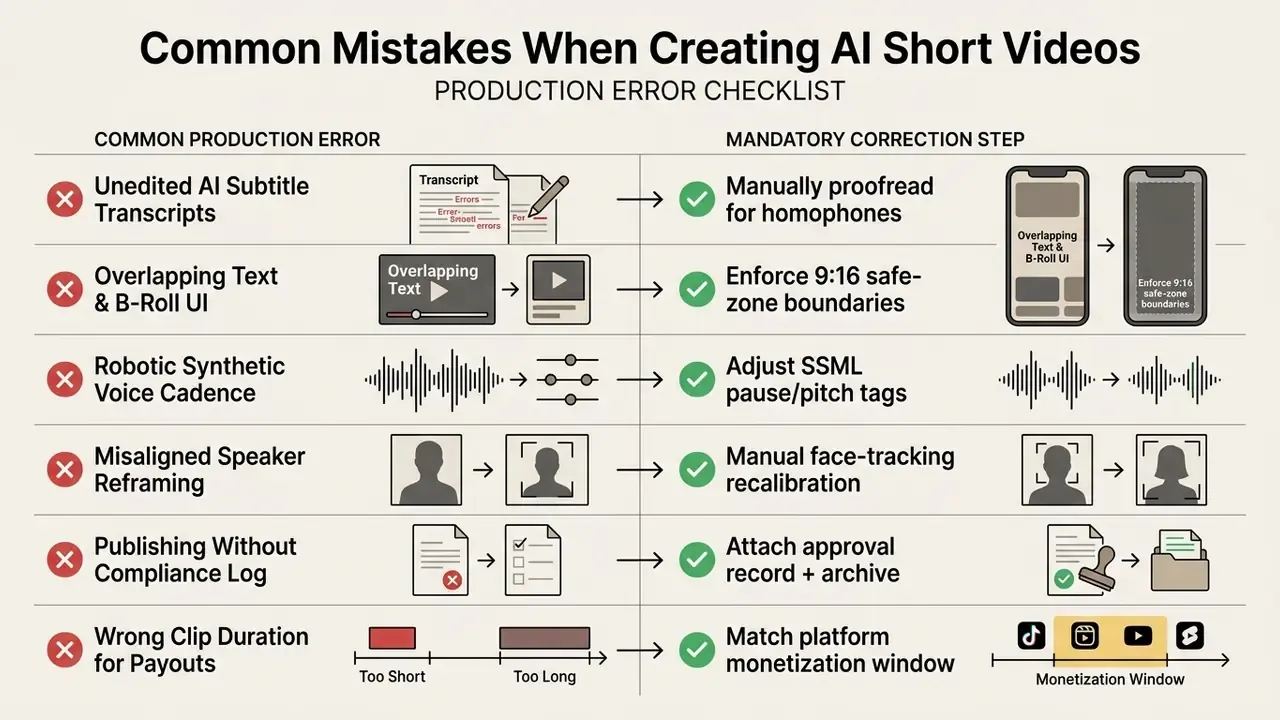
- Leaving auto-captions unedited: raw ASR transcription frequently misreads specialized jargon, proper nouns, and brand names. Research measured a 23.07% Word Error Rate in unprocessed ASR subtitles before LLM correction. Operators must review subtitle text before export to remove errors that would otherwise be burned into the render.
«ProgressCaptioner improves caption quality by 1.8–2.7× over open VLM baselines and wins 31.6% of user-study preferences, outperforming GPT-4o and Gemini.» ProgressCaptioner: Progress-Aware Video Frame Captioning (2024)
- Ignoring platform safe zones: burn-in captions or graphics at the extreme top or bottom of vertical videos get covered by platform UI overlays (YouTube Shorts titles, TikTok action buttons). Place subtitles in the center-lower third, and move them to top-center when source footage already carries lower-third graphics.
- Monotonous vocal cadence: unadjusted synthetic text-to-speech sounds artificial and drives viewers away. Customizing pitch, inserting natural pauses, and blending subtle background music improves auditory realism.
- Flawed vertical reframing: automated cropping occasionally jumps erratically between subjects during multi-speaker conversations. Editors must review active-speaker tracking points to keep transitions smooth.
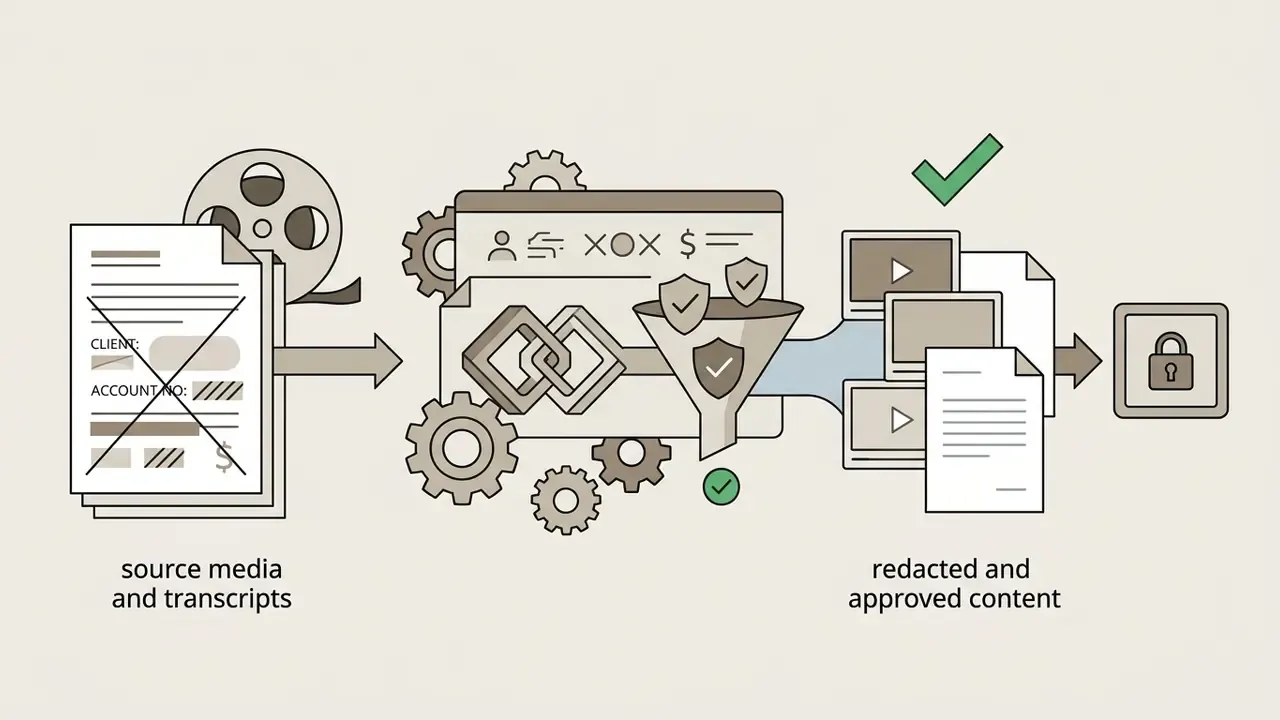
- Uploading unredacted source material: feeding raw internal recordings containing client PII or MNPI into a consumer-tier tool is the highest-severity error in regulated environments. Redact first, upload to approved vendors only.
- Ignoring duration rules before batch rendering: rendering 300 clips at 45 seconds, then discovering the target program requires a 60-second minimum, wastes an entire production cycle. Set duration templates per platform before batch generation.
Limitations and Open Questions
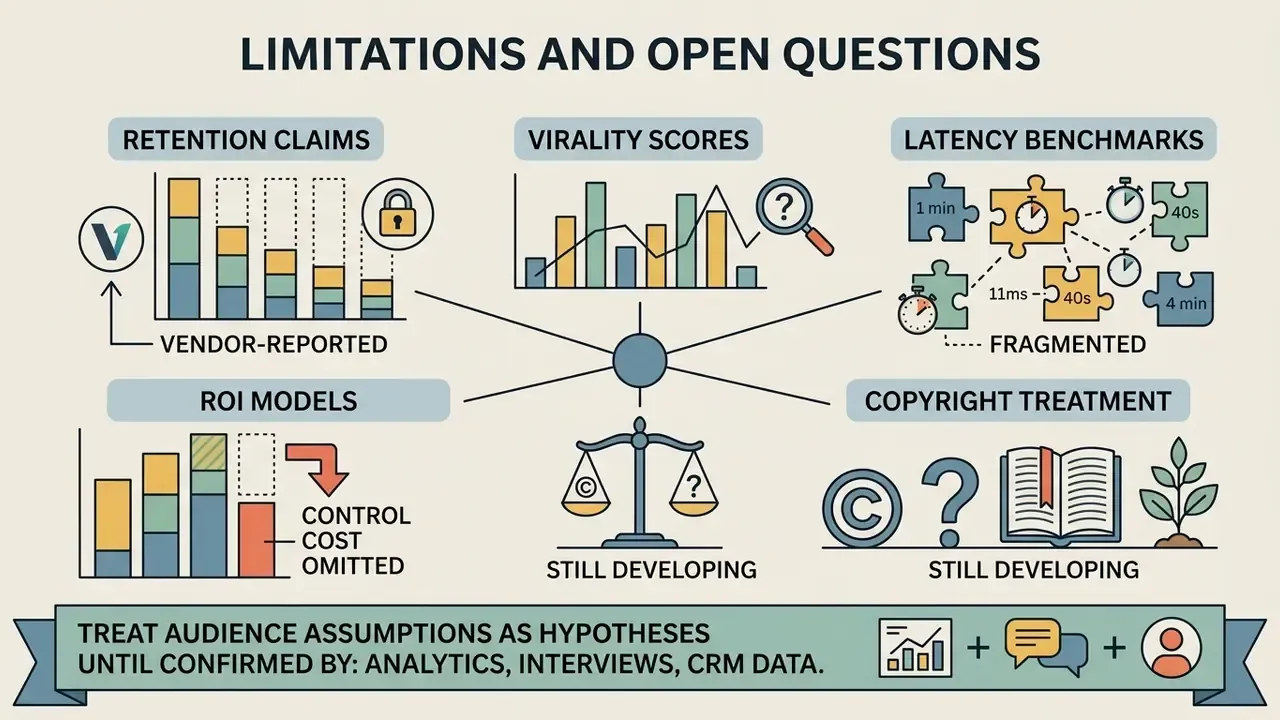
Honest scope statement, because the evidence base here is uneven.
- Retention claims are mostly vendor-reported. Peer-reviewed support exists for subtitles and split-screen attention effects; controlled comparisons of animated versus static captions are thin.
- Virality scores are proprietary. Weights, training data, and calibration are rarely disclosed, so cross-vendor score comparison is not meaningful.
- Latency benchmarks are fragmented. No public benchmark in the current source set measures prompt-to-clip latency and two-hour-source clipping latency on the same platform under identical load.
- Copyright treatment is still developing. U.S. registration guidance is clearer than case law; commercial reliance rests largely on vendor licence terms.
- ROI models omit control cost. Most published payback figures exclude redaction, review, archiving, and attestation labour.
Treat audience assumptions in this article as hypotheses until analytics, interviews, or CRM data confirm them.
A Safe Next Step
Run one bounded pilot instead of a platform-wide rollout. Pick a single content stream, for instance a monthly webinar, define the owner, restrict access to two trained operators, log every generation event, and require compliance sign-off on all published clips for the first quarter. Then measure three things: turnaround, review hours per clip, and the number of clips rejected at approval. If review hours fall while rejection rates stay flat, extend the scope. If not, fix the source material before buying more seats.
No evidence, no autonomy. That principle holds for a clipping tool exactly as it holds for a credit model.
FAQ About AI Short Video Generators
How long does it take to generate an AI short video?
Generating an ai generated shorts video typically takes between 30 seconds and 5 minutes, depending on the generation method, source file length, and server queue status. Prompt-to-video engines synthesizing original 5-to-10-second diffusion clips usually require 45 to 120 seconds of processing (Artificial Analysis Benchmarks, 2026, which defines generation time as end-to-end latency measured as a trailing median). Long-video repurposing platforms extracting highlights from a 60-minute source file need 3 to 8 minutes for transcription, scene analysis, active-speaker reframing, and rendering. Manual adjustments to subtitles, audio ducking, and B-roll overlays add roughly 5 to 10 minutes of human review per final clip. Note that no public benchmark in the current source set directly compares prompt-input latency against two-hour-source clipping latency on the same platform.
Which video sources and file formats are supported?
Mainstream tools accept MP4, MOV, and WebM uploads, plus direct links from YouTube, Vimeo, Twitch VODs, Facebook, X/Twitter, Zoom, Loom, StreamYard, Riverside, Wistia, Google Drive, and Dropbox. Source duration ceilings commonly range from 3 to 10 hours. Highlight detection depends on spoken audio, so silent footage generally produces no usable clips.
In which formats can I export captions and transcripts?
Standard caption and transcript exports are SRT (SubRip), VTT (WebVTT), and TXT (plain text), alongside the rendered 1080p or 4K MP4. SRT and VTT serve platform caption uploads and accessibility compliance; TXT feeds repurposing into blog posts, newsletters, and search indexing.
How many languages are supported for subtitles and dubbing?
Enterprise-grade engines auto-caption in 75+ languages and dialects with word-level timecode sync and provide neural, voice-cloned dubbing in 35+ languages. Speech-to-text accuracy varies by language, audio quality, and background noise, so verify high-stakes terminology manually after translation.
How many clips will AI generate from one long video?
Output volume depends on source length, density of high-engagement moments, and the clip duration selected. A 90-minute podcast commonly yields 5 to 7 standout moments, repackaged into 3 to 5 publishable vertical clips. Vendor documentation recommends sources of at least 10 minutes so the model has enough context to rank highlights meaningfully.
Can AI-generated Shorts be monetized?
Yes, subject to platform policy and duration rules. YouTube Shorts supports up to 3 minutes and requires original content compliant with platform guidelines; the TikTok Creator Rewards Program requires original videos longer than one minute. Separately, confirm that your subscription tier grants commercial monetization rights and that embedded stock assets carry valid commercial licenses.
Do we own the copyright to AI-generated video?
Purely synthetic output lacking substantial human authorship is not registrable under current U.S. Copyright Office guidance; registration must exclude more-than-de-minimis AI-generated material and identify human contributions. Commercial usability therefore rests on the vendor's licence grant plus your own editorial contribution: scripting, selection, arrangement, and editing. This is general information, not legal advice.
How do we prove to auditors that a clip is AI-generated?
Retain C2PA Content Credentials on the exported master, preserve generation logs (source asset ID, model and version, operator, timestamp), and archive the approval record from your human-in-the-loop chain. Together these form the documented evidence chain that model risk and compliance functions require.
How do we prevent confidential data leakage through video AI tools?
Publish an approved-vendor list, block unapproved domains at egress, redact PII and MNPI before upload, contract for Zero Data Retention and no-training use, require SOC 2 Type II attestation and SSO/SAML with RBAC, and log every generation event. Treat unsanctioned personal-account usage as a shadow AI incident with a defined response playbook.
What review steps are mandatory before publishing regulated video content?
Operator QA (transcript, terminology, safe zones), then subject-matter review of factual and performance claims, then compliance or principal approval including required disclosures, then recorded publication, then immutable archiving of the asset, transcript, and approval evidence in line with recordkeeping obligations such as SEC Rule 17a-4 and communications standards such as FINRA Rule 2210. For web-accessible video creation tools running directly in browser environments, explore the ai video generator online guide.
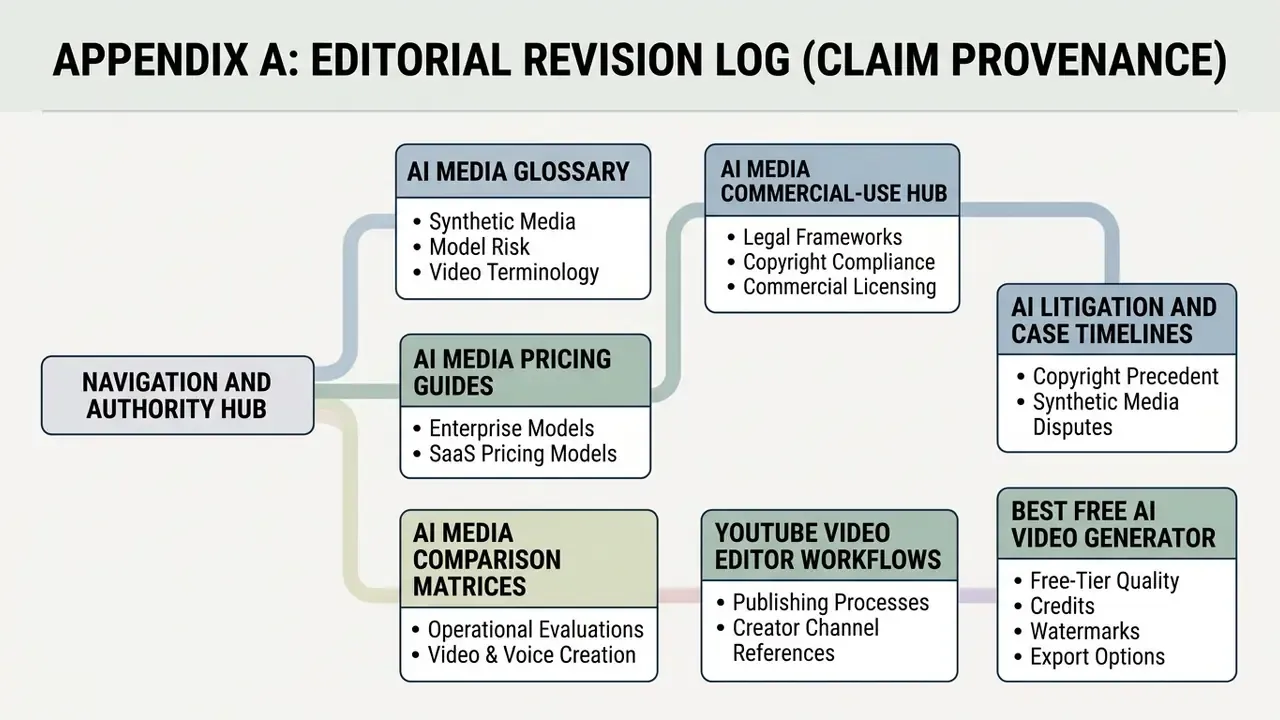
Appendix A: Editorial Revision Log (Claim Provenance)
Retained for transparency; the main text carries the corrected or reframed versions.
| # | Original wording (superseded) | Status | Replacement in main text |
|---|---|---|---|
| 1 | "temporal quality scores above 94.7 on benchmark tests … (CausVid Study, 2024)" | Replaced: no benchmark, metric set, or methodology named | VBench-Long total score 84.27 with temporal quality 94.7, with source title |
| 2 | "(SVHighlights Study, 2026)" | Replaced: no dataset size or metrics | 320 videos / 640 hours; TF-SELECTOR HIT@1 +2.50, IoU +2.95 |
| 3 | "reduces Word Error Rates (WER) from 23% down to under 10% (Enhancing Video Captions Study, 2024)" | Replaced: missing BLEU and method | WER 23.07% to 9.75%; BLEU 0.67 to 0.85 with ChatGPT-3.5 post-processing |
| 4 | Duplicate citation "(Enhancing Video Captions Study, 2024)" in Common Mistakes | Consolidated | Single inline metric reference (23.07% raw ASR WER) |
| 5 | "increased social impressions by 210% over two quarters" | Reframed: self-reported, no methodology, baseline, or sample definition | Directional multi-quarter impression growth, flagged as unverified |
| 6 | "reduced production turnaround from 14 days to 4 hours per episode while maintaining 100% regulatory audit compliance" | Reframed: anonymized engagement, not independently audited | Multi-week to same-day turnaround with principal review on every clip, flagged as directional |