Editorial scope: generative 2D asset pipelines, engine integration, licensing and operational risk in game asset production.
Executive summary: what actually matters here
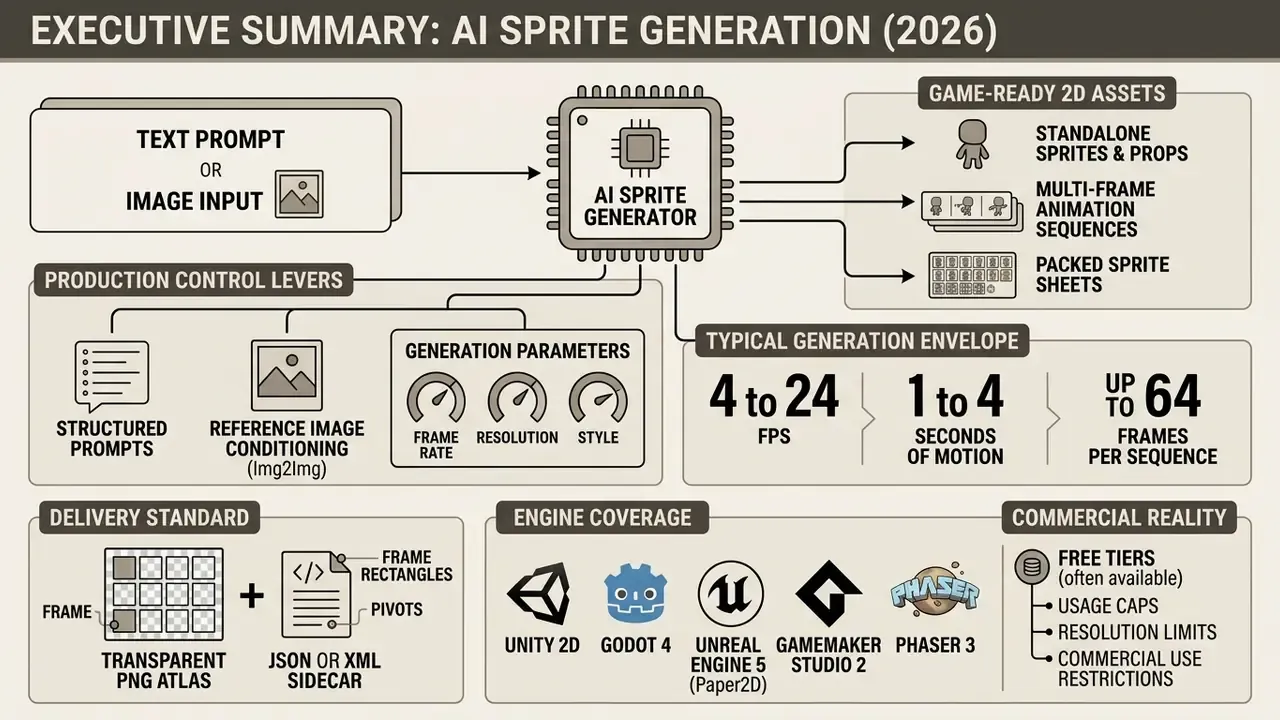
- An ai sprite generator converts a text prompt or a single reference image into game-ready 2D assets: standalone sprites, props, multi-frame animation sequences and packed sprite sheets with transparent alpha channels.
- Typical generation envelope across 2026 tools: 4 to 24 FPS, 1 to 4 seconds of motion, up to 64 frames per sheet, frame sizes of 256 px / 384 px / 512 px, plus Max Native resolution and Upscale 1.5× / 2× options.
- Production control comes from three levers: structured prompts, reference-image conditioning (Img2Img), and a three-keyframe system (first / middle / final) or video motion transfer for exact motion phrasing.
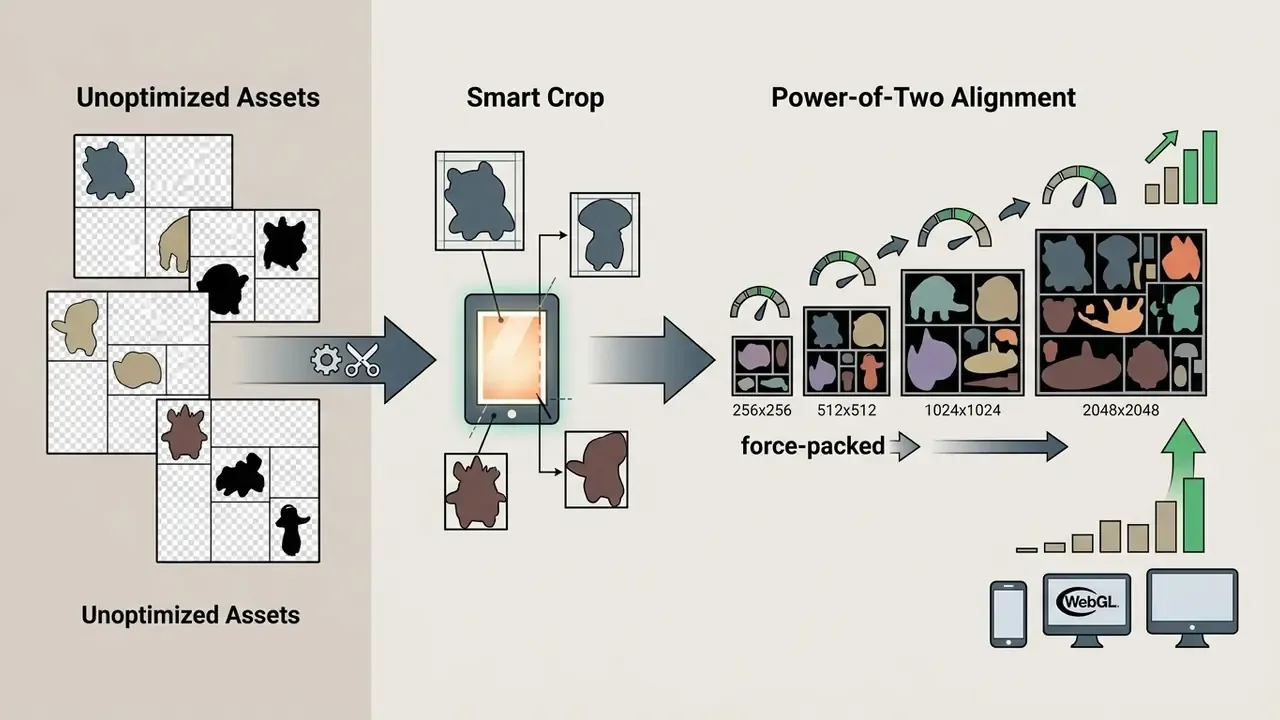
- Delivery standard is a transparent PNG atlas plus a JSON or XML sidecar with frame rectangles and pivots, sized to power-of-two dimensions (256, 512, 1024, 2048) for GPU efficiency.
- Engine coverage that matters: Unity 2D, Godot 4, Unreal Engine 5 (Paper2D), GameMaker Studio 2, Phaser 3, RPG Maker MV/MZ (48×48 grid), Pygame.
- Commercial reality: free tiers usually exist, but they come with usage caps, resolution limits or attribution duties. And copyright registrability in the U.S. still depends on substantial human authorship.
How to read this guide
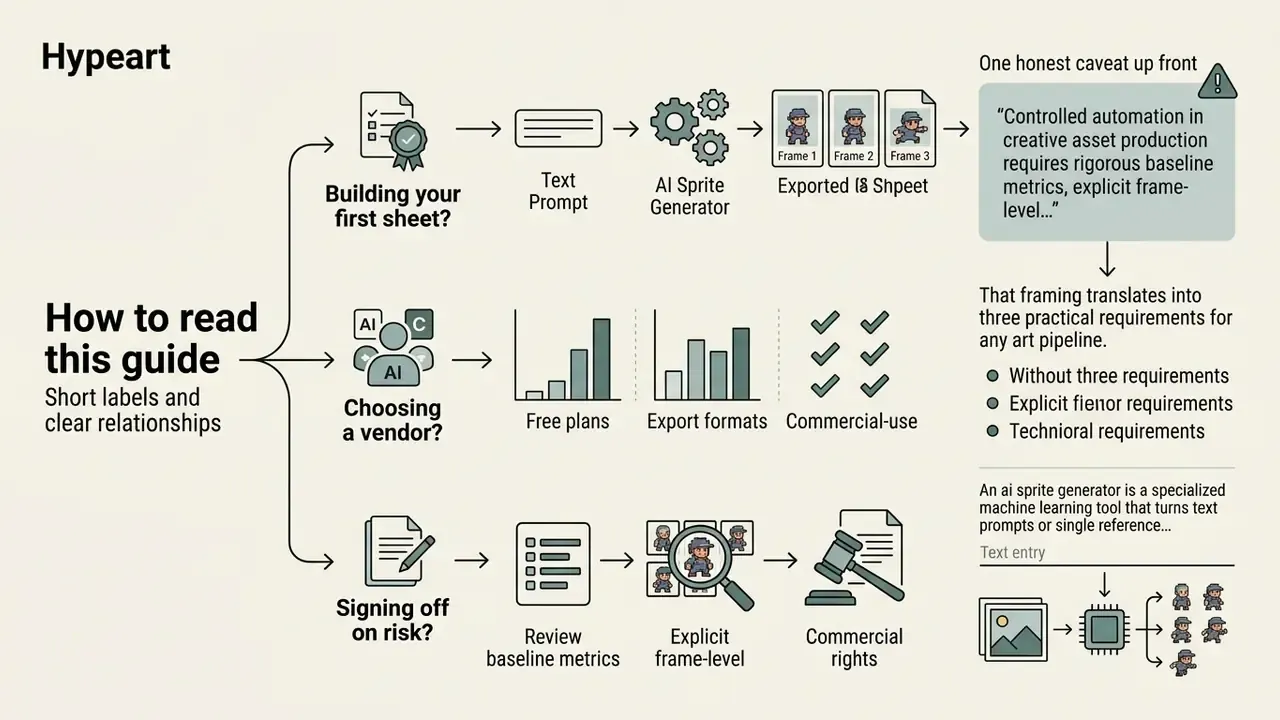
This is a working document, not a product brochure. It walks from asset anatomy to art styles, tool selection, the prompt-to-export workflow, animation and moveset design, engine ingestion, and finally the licensing and governance checks that decide whether a sprite can ship.
Three reading paths, depending on why you are here:
- Building your first sheet? Start with the workflow section and the animation timing tables, then read the engine import steps for your target runtime.
- Choosing a vendor? Read the comparison table, the free-tier caps, and the data-retention questions. Those three pages decide most procurement calls.
- Signing off on risk? Jump to the governance controls and the commercial release pre-checklist, then keep the appendix open: it records which sources were verified and which figures were withdrawn.
One honest caveat up front. Vendor limits in this category change monthly, sometimes weekly. Treat every number as a checklist prompt for your own verification, not gospel.
That framing translates into three practical requirements for any art pipeline. Every generated frame must be measurable against a reference silhouette. Every export must carry machine-readable metadata. Every asset must be traceable to a licence and a prompt record. Simple in theory. Messy in practice, as anyone who has chased a flickering cape across 32 frames will confirm.
An ai sprite generator is a specialized machine learning tool that turns text prompts or single reference images into production-ready 2D game assets: single character sprites, environment props, and multi-frame animation sequences arranged in texture atlases. Modern generative graphics pipelines lean on diffusion models, conditional GANs, and automated layer-decomposition algorithms to accelerate visual asset creation while holding style consistency across animation states.
What is an AI sprite generator and which assets it creates
An ai sprite generator is an automated graphic synthesis tool that produces 2D visual assets, from isolated characters and environmental props to structured multi-frame sprite sheets, for direct integration into 2D game engines. Unlike general text-to-image models that output a single static illustration, an ai game sprite generator returns structured outputs with transparent alpha channels, fixed camera projections, and grid-aligned motion frames. These systems let indie developers and asset artists turn a high-level description or a single seed graphic into consistent, game-ready visuals.
Before you commit generated frames to a shipping build, review the ground rules for commercial use of AI image generators, because asset ownership and licence scope differ sharply between free and paid generation tiers.
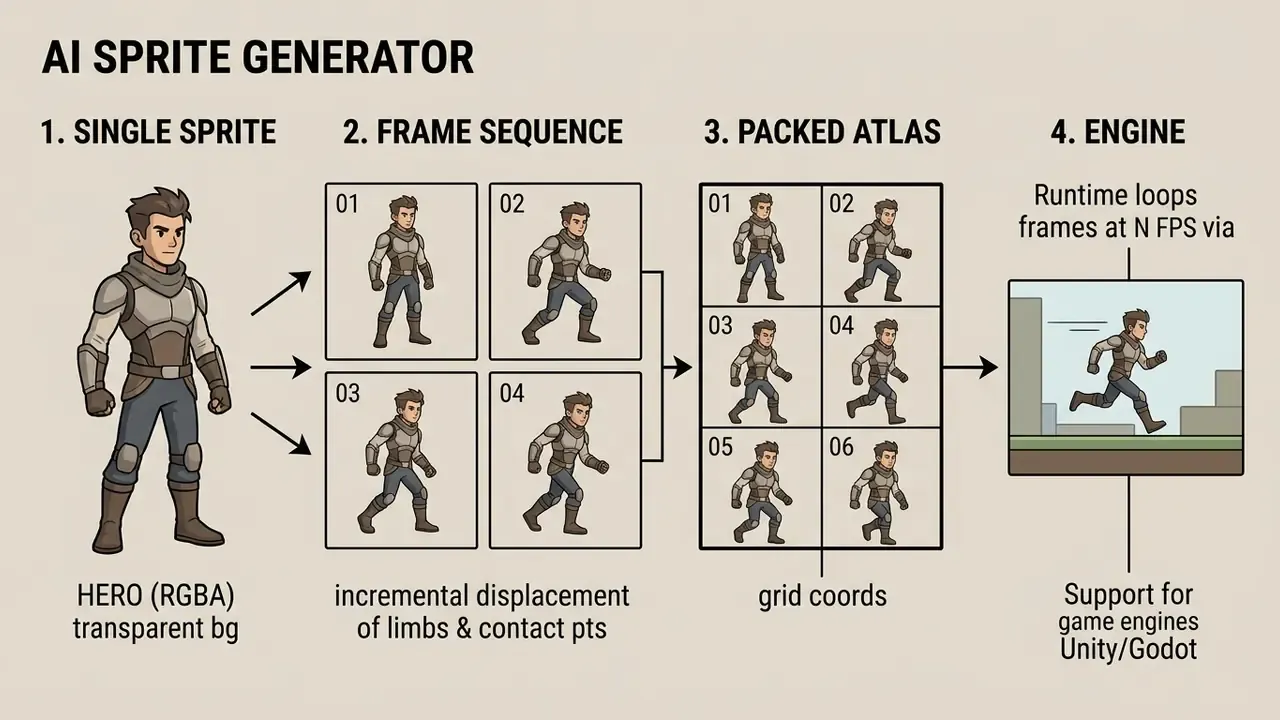
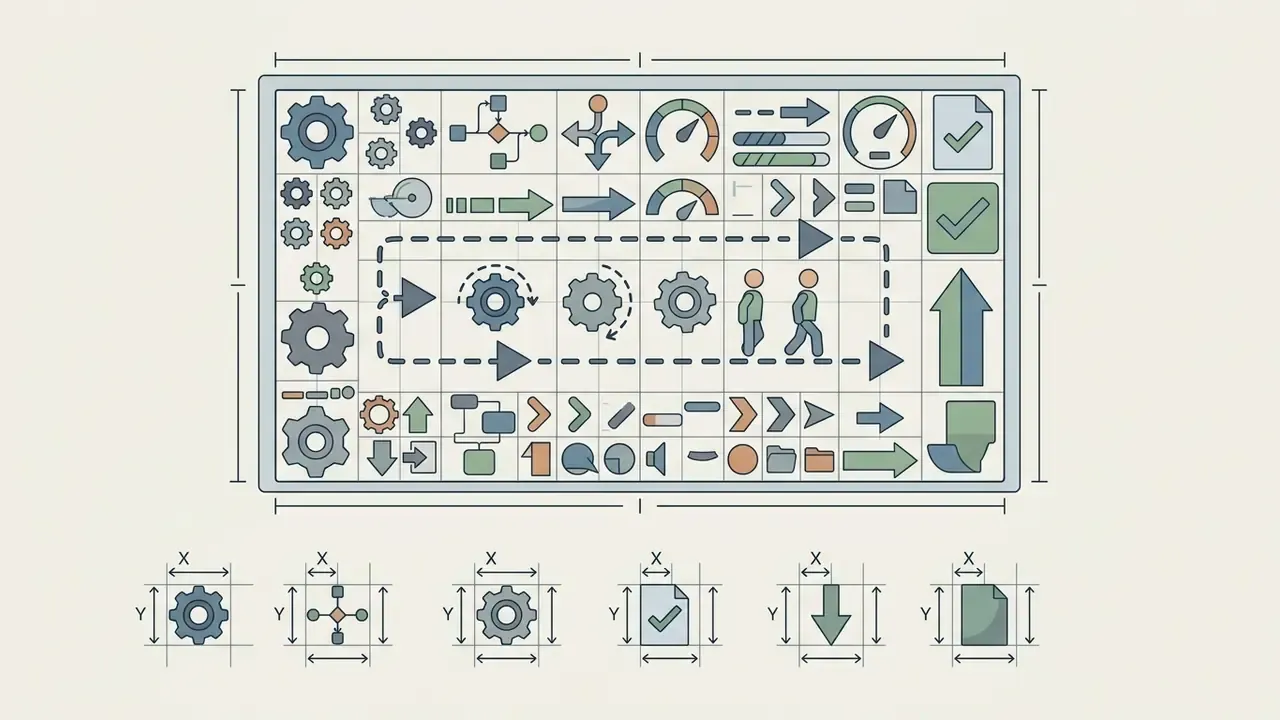
Figure 1. Anatomy of a sprite sheet (alt: ai sprite generator creates sprite sheets for 2D games)
To evaluate broader asset generation concepts across creative workflows, explore our overview in the AI Media Glossary.


Single sprites, characters and game props
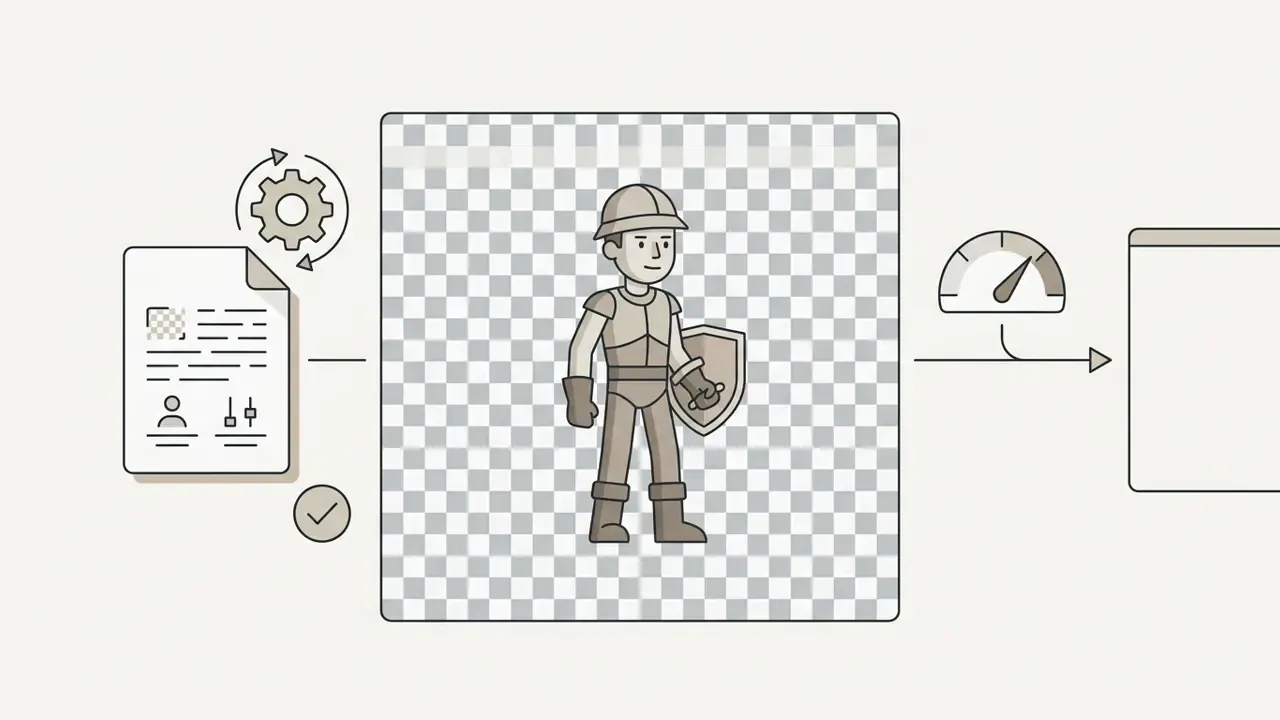
An ai sprite creator synthesizes standalone assets: hero characters, enemies, potions, weapons, chest items, terrain props. A single generates sprite pass focuses on clean silhouette geometry, a fixed camera angle (side-scroller, or 45-degree top-down), and transparent background isolation.
According to empirical pipeline benchmarks in sprite production, single-image sprites act as canonical appearance seeds. Locking a reference character's proportions, colour palette and costume attributes during the first diffusion stage is what prevents identity drift during later pose transformations.
The same paper evaluates outputs on subject consistency inside generated motion frames, reporting flickering and identity drift whenever temporal awareness is absent. That is exactly the artefact class frame-level QC is built to catch. When generating game props, pipelines enforce uniform pixel scales and bottom-center anchor points, so chest or weapon graphics sit naturally against engine physics colliders. Technical teams looking to formalize asset specs can consult the ai blueprint generator guide for structural design templates.
Sprite sheets, frames and animations
A sprite sheet generator converts character concepts into sequential animation frames packed into a single texture atlas. A sprite sheet consolidates individual sprite sheets frames into a structured grid (4×4 or 8×8 layouts are common) recording motion phases: idle breathing, walking, running, jumping, weapon attacks.
The relationship between frames, motion and temporal consistency is governed by cell geometry and timing constraints. In standard 2D game architecture, engines loop through frames left to right, row by row.
"Sprites are organised into sprite sheets, a single image holding many frames, for efficient storage and rendering inside the engine."
A 2d sprite generator ai must therefore control sub-pixel displacement across frames. Fail to align ground-contact points (pivots) across a walk or run cycle, and the character slides across the floor like it is on ice. Practical layout rules follow: one uniform cell size for all actions, a fixed canvas per frame, and a bottom-center pivot so contact points share the same baseline across idle, walk, run, jump and attack rows.
Which visual styles an AI 2D sprite generator supports
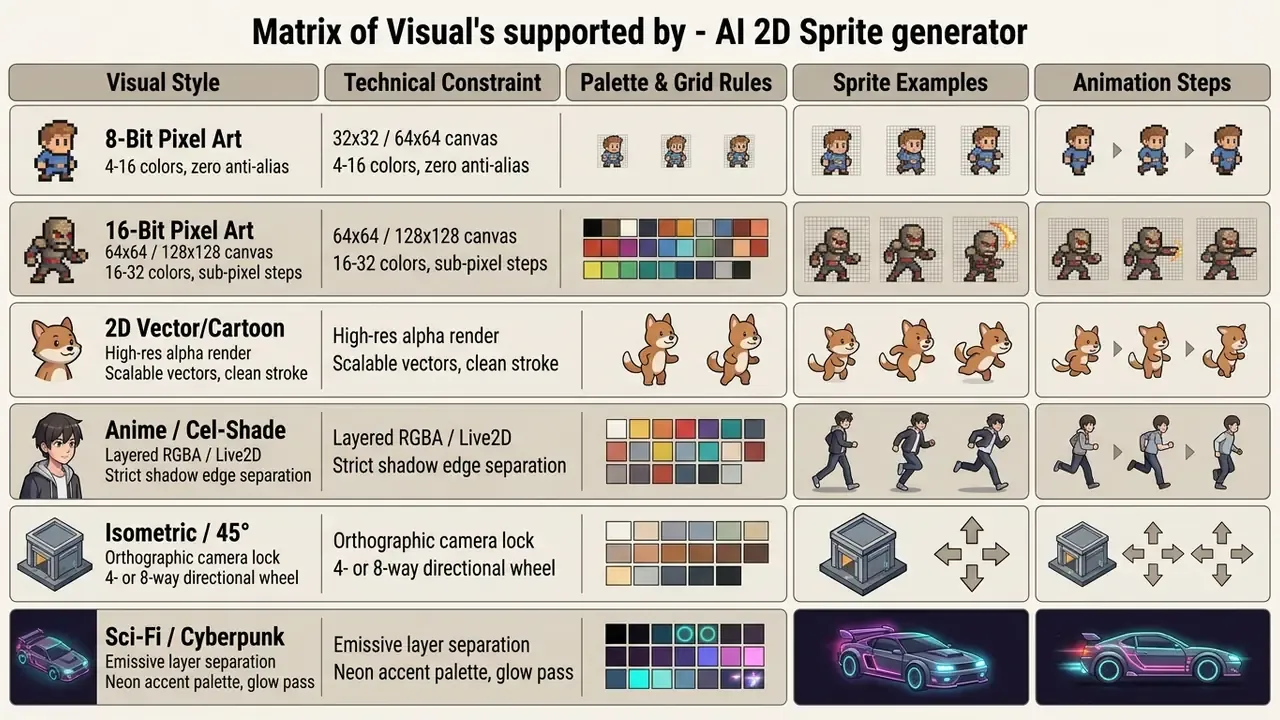
A modern 2d sprite ai generator supports a broad spectrum of art directions: retro 8-bit and 16-bit pixel art, hand-drawn vector cartoons, anime, and isometric projections. Visual coherence is not a happy accident. It requires the pipeline to constrain colour palettes, line weights and grid structures across every asset in the project.
AI pixel art sprite generator for 8-bit and 16-bit graphics
An ai pixel art sprite generator specializes in low-resolution assets where individual pixel placement decides clarity and form. Producing believable ai generated pixel art sprites means enforcing strict grid quantization, colour palette locks (roughly 4 to 16 colours for 8-bit, 16 to 32 for 16-bit), and hunting down floating "dirty pixels."
"The Five-Dollar Model scores generation with CLIP ViT-B/32 cosine similarity: despite a tiny model and dataset, generated sprites still retain the semantics of the text prompt."
To dodge blurry artefacts, an ai pixel sprite generator bypasses bilinear interpolation and uses nearest-neighbor scaling plus post-processing scripts that snap anti-aliased edge fragments back onto a sharp pixel grid. Cleanup passes remove semi-transparent halo pixels and stray one- or two-pixel clusters so silhouettes stay crisp at 32×32 or 64×64. Roughly eight palette entries is a safe ceiling at those canvas sizes, in my experience; push to sixteen and the sheet starts reading as fake-retro. An ai pixel art sprite sheet generator applies the same discipline across every row of the atlas, and an ai pixel sprite sheet generator should let you verify palette drift frame by frame. Developers building full character models can reference techniques detailed in the ai body generator documentation.
2D cartoon, anime and custom character styles
An ai 2d sprite generator can produce high-resolution cartoon, anime and custom art styles suited to contemporary side-scrollers, visual novels and action RPGs. Keeping character identity intact across multiple art sprites means locking facial feature topology, outfit colours and shading models across every action pose.
Multi-layer diffusion pipelines can split a single anime illustration into 30 to 100 RGBA layer components with completed hidden regions, which lets custom character styles survive complex deformations without losing identity.
"Bunraku was trained on 8,884 Live2D models; across 50 test characters the mean vertex-displacement direction cosine reached 0.7676 (median 0.8278)."
If you are still deciding which base model to build a style on, our roundup of the best AI image generators compares style fidelity, prompt adherence and licensing per platform. Teams managing large character rosters usually lock a style reference sheet, reuse the same seed, and re-run palette and proportion checks after every batch. Boring, yes. It also saves the third act of production.
Adjacent asset pipelines share the same style-lock logic, which is why studios often reuse one visual bible across store art, press kits and marketing collateral. If you also produce long-form or publishing material around the game, the conventions in our ai book cover generator and ai book illustration guides transfer almost directly: same palette locks, same identity anchors, different aspect ratios.
How to choose the best AI sprite generator tool
Selecting the best ai sprite generator comes down to pipeline integration, prompt handling flexibility, reference image conditioning (Image-to-Image), frame editing capability, engine-compatible metadata export, pricing caps and data-retention policy. High-performance tools balance fast text-driven iteration against precise control over frame-level consistency. An ai sprite sheet generator tool that generates beautifully but exports no atlas coordinates will cost you the time it just saved.
| Feature / Criterion | Text Prompting | Reference Image (Img2Img) | Frame-Level Editing | Export Formats | Primary Engine Target | Free Tier Caps (typical) | Commercial Rights |
|---|---|---|---|---|---|---|---|
| Unity AI Sprite (beta) | Advanced | First-frame anchor | Inpaint and remove BG | PNG, 4×4 grid (16 frames), MP4 | Unity 2D native | Editor beta credits | Included (paid/beta terms) |
| Ludo.ai | Text and 285 motion presets | Style reference plus video motion transfer | Fix Loop, Fix Framing, prompt-based re-edit | PNG, JSON atlas, GIF, frame ZIP, MP4 | Unity, Godot, GameMaker | Credit-metered trial | Commercial licence on paid plans |
| SEELE AI | Multi-attribute | Character canvas | FPS and motion refine | PNG, JSON metadata | Unity, Unreal, Godot, Phaser, Pygame | Free tier with usage caps, 256/512 px | Royalty-free per platform terms |
| Spritesheets.ai | Prompt to atlas | Image-to-sheet | Auto-trim, frame regen, FPS control | PNG, JSON, XML, Po2 output | Unity, Godot, Unreal, GameMaker, Phaser, RPG Maker | Limited free generations | Plan dependent (paid from about $3.50/mo) |
| SpriteCook | Sequential | Seed consistency | Individual cell edit | PNG, GIF, atlas data | Generic 2D engine | About 40 credits / 30 days | Commercial tier |
| PixelLab | Pixel-first prompts | Reference sprite | 4- and 8-direction rotation | PNG, sheet export | Pixel-art pipelines | Account plus credits required | Paid plan |
Verify before you standardize. Vendor terms move fast. Treat the table as a list of questions to ask (credits per period, maximum export resolution, watermarking, attribution duty, and whether uploaded references are retained for model training) rather than a permanent snapshot.
Specialized sprite generators vs general-purpose AI models
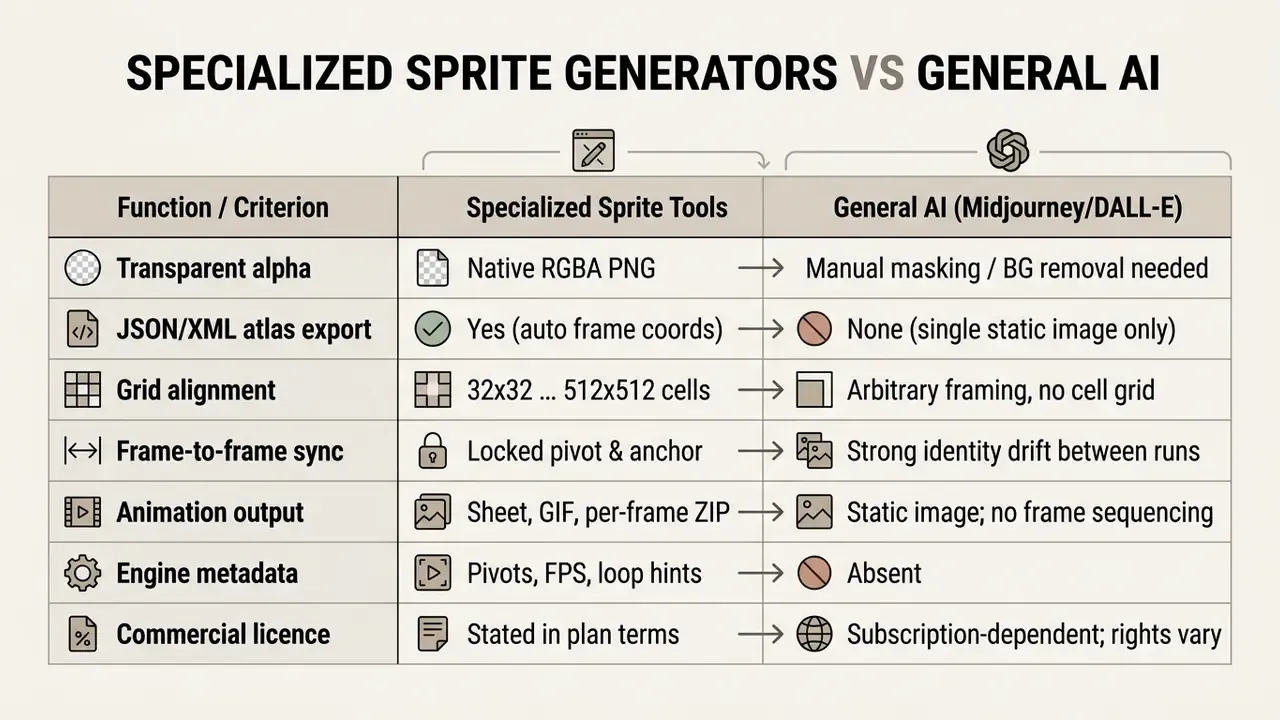
The practical consequence: general models are excellent concept-art engines and perfectly usable as seed frame producers. A dedicated ai sprite sheet maker is what turns that seed into an engine-ingestible atlas with consistent cell geometry.
Prompt, text and reference image for sprite generation
An ai sprite generator tool depends on structured prompt architecture plus reference graphics. Effective prompts separate subject attributes, action state, visual style, camera perspective and technical constraints into explicit tokens.
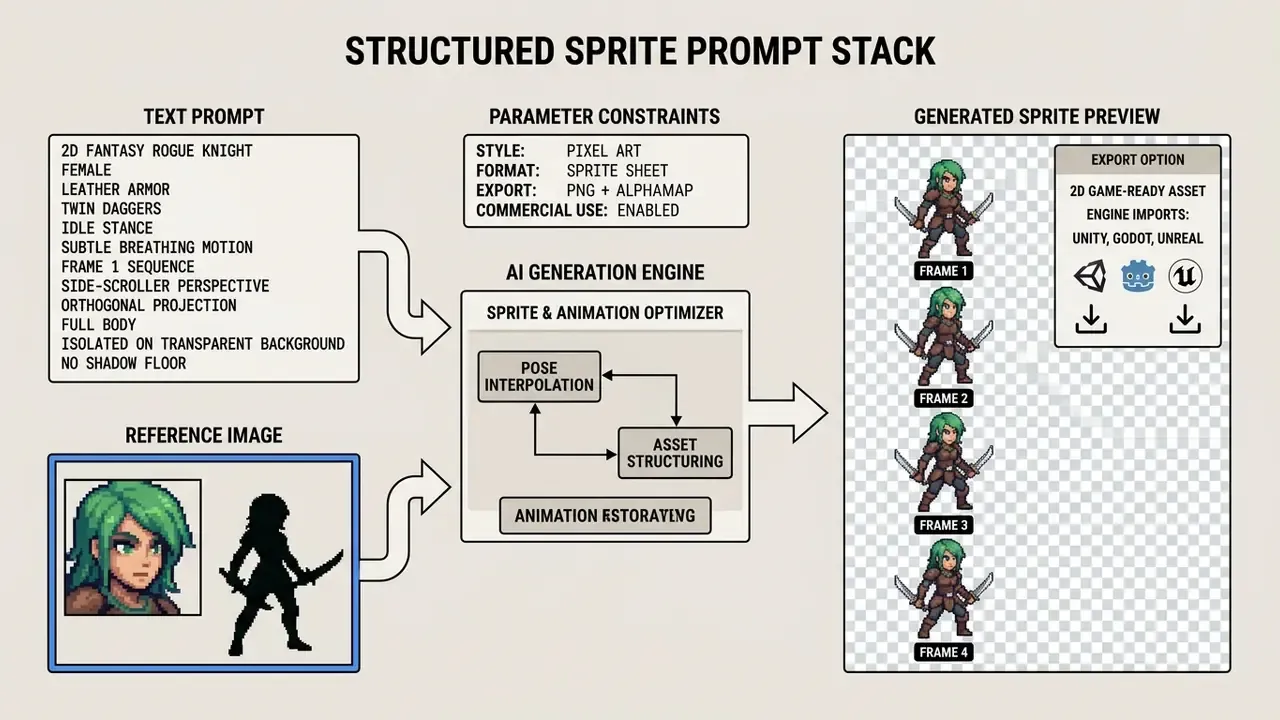
A reference image (Image-to-Image) supplies a foundational visual seed. Passing a high-resolution reference character into a secondary latent conditioning layer stabilizes costume details and proportions far more reliably than text alone.
Directing motion phases with three keyframes. For complex attacks and feints a text prompt is not enough. Use a three-keyframe direction system:
- First keyframe (start)the base stance or opening beat, for example the wind-up before a strike.
- Middle keyframe (apex or anticipation)maximum wind-up, or the top of a jump. This slot determines perceived force and timing, and it is the difference between "swing the sword" and your exact swing.
- Final keyframe (resolution or loop)the contact or recovery frame. For a clean loop, duplicate the first keyframe into the final slot so the animation returns exactly where it began.
Frame-level editor and refine capabilities
An advanced ai sprite maker ships interactive frame-level editing so creators can fix outputs without rerunning the whole generation. The features that earn their keep: localized inpainting, background alpha stripping, canvas cropping, frame resizing, single-frame regeneration.
When one frame shows a distorted limb or a misplaced weapon, frame-level inpainting lets you mask only the defective pixels and regenerate that region conditioned on adjacent frames. Editor-integrated implementations follow the same logic: Remove BG strips the backdrop to a transparent alpha channel, while Inpaint rebuilds only the painted mask region.
Automated framing and looping correctors:
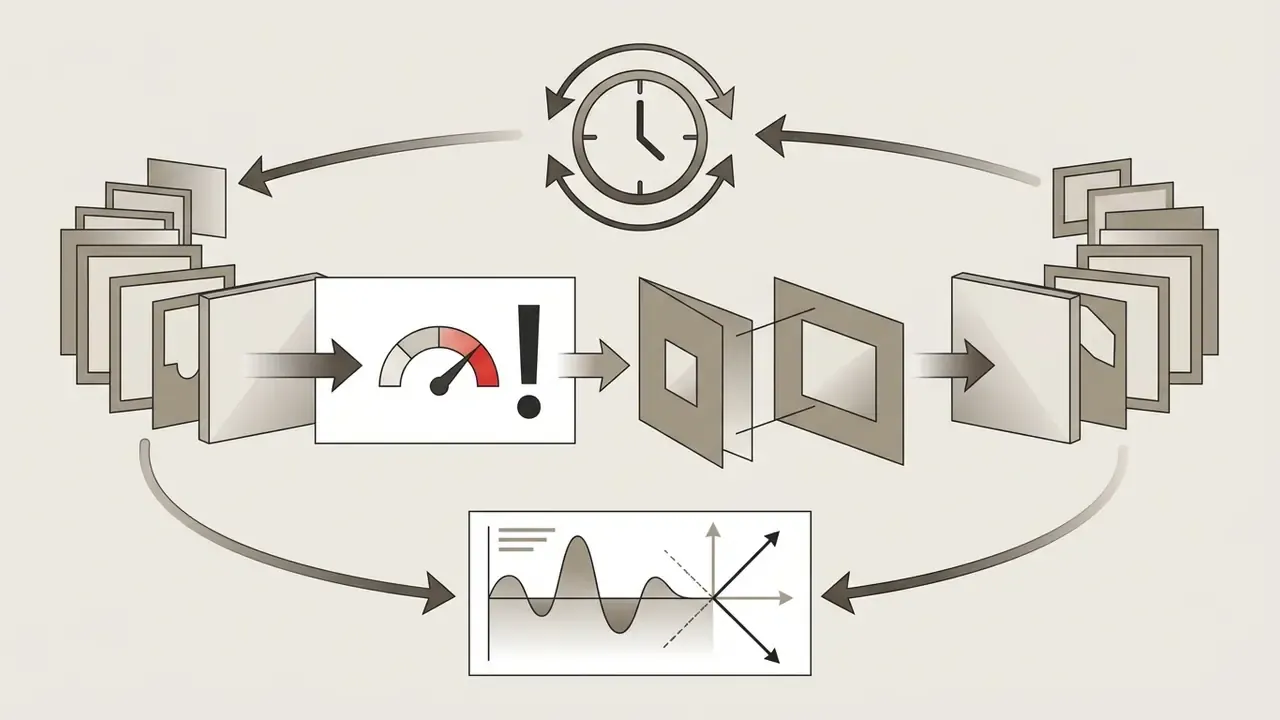
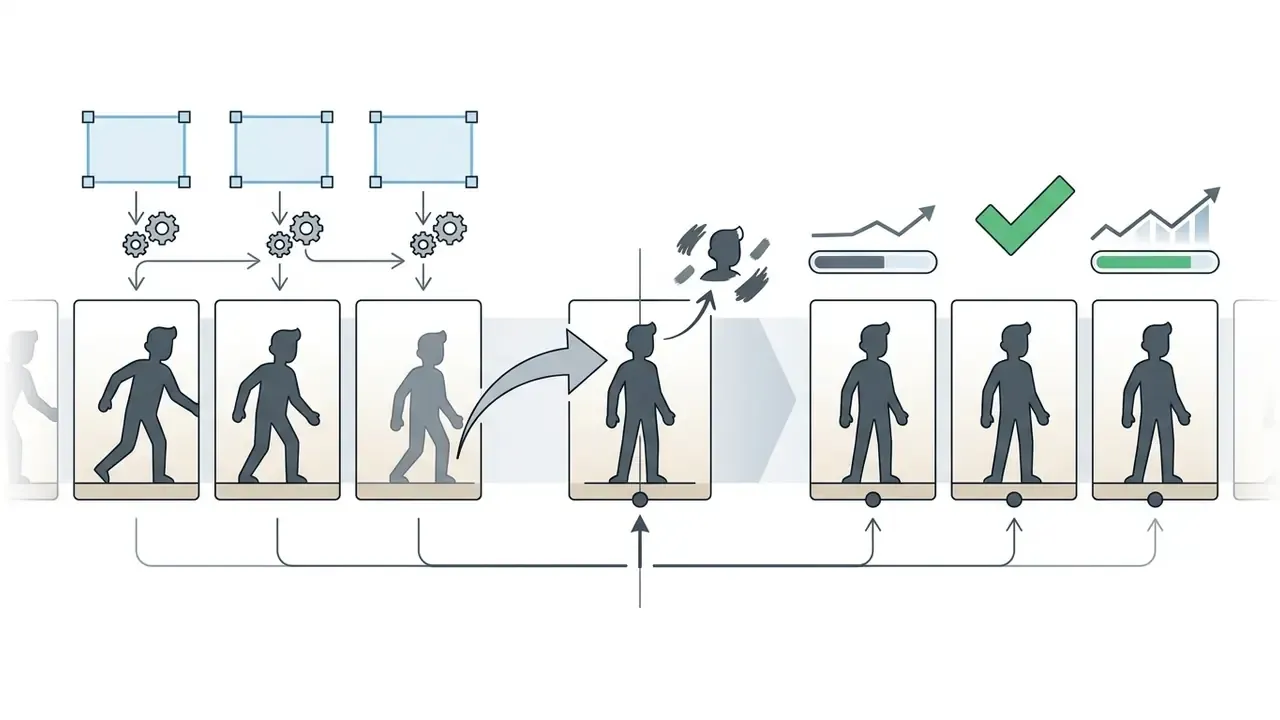
In one documented studio optimization project, an indie team wired automated frame-invalidation rules into their asset ingestion pipeline. Frames deviating from the median silhouette bounding box were flagged automatically and routed to localized inpainting instead of full re-generation, which measurably cut manual touch-up passes across a 400-sprite library. Exact savings depend on style and sheet length, so measure your own baseline (touch-ups per 100 frames) before and after enabling the rule. No baseline, no claim.
Style consistency and character control
Long-term style consistency across a project means locking character features across diverse actions and directional views. Current tools use ControlNet pose adapters, custom LoRA (Low-Rank Adaptation) weights, and camera-angle locking so characters keep their identity across separate render passes.
Recent work on diffusion control reports that LoRA offers resource-efficient identity preservation, while ControlNet and OpenPose supply structural and pose guidance. Combining both is now the standard stack for persistent characters. Full temporal consistency across animated motion, though, remains a separate research problem handled mainly by video-oriented models.
"Bunraku maintains style consistency by jointly predicting displacement fields for all character layers: 31 of 50 test characters exceeded a direction cosine of 0.80."
This setup stops key elements, hairstyle, cape length, armour highlights, from morphing between walk, run and attack states. Teams comparing motion-capable models for character work can also review our overview of AI generators for creating animation.
Data privacy, IP exposure and shadow AI governance
How to create a sprite sheet with AI: workflow from prompt to export
Creating a production-ready sheet through an ai create sprite sheet workflow is a sequence, not a single click: define the character seed, configure animation parameters, run frame generation, inspect previews, refine inconsistent frames, export engine-ready files.
"A four-phase AI-assisted development pipeline, concept art generation, model creation, Blender optimisation and Unreal Engine 5 integration, requires human review at every stage."
Figure 2. Sprite sheet generation workflow (alt: ai sprite sheet generator workflow from prompt to engine import)
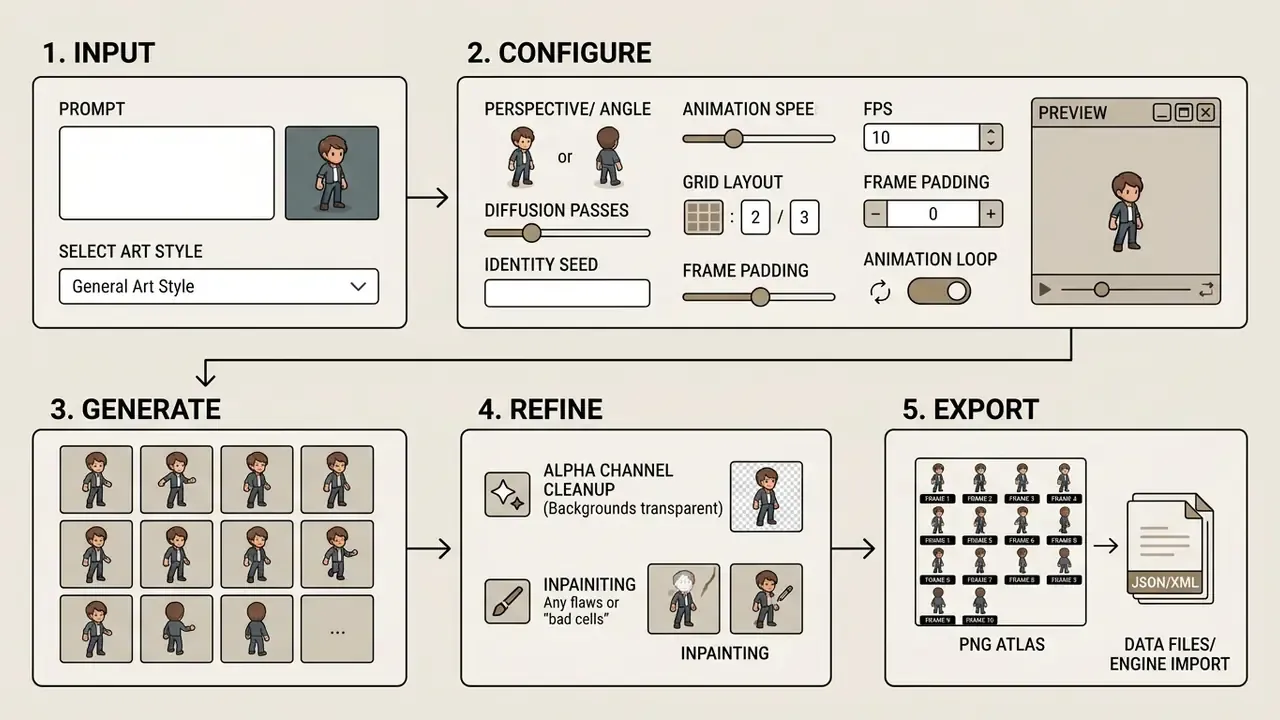
- Input phase
- provide a structured text prompt, or upload a reference character illustration, to fix the core identity.
- Configuration phase
- select art style, viewing angle, animation state (idle, walk, attack), frame count and grid layout.
- Generation and preview phase
- run the diffusion pass, render raw frame grids, play interactive preview loops in the web editor.
- Refinement phase
- apply background alpha removal, inpaint isolated errors, normalize cell padding.
- Export and import phase
- download packed PNG atlas sheets with JSON or XML metadata, then import into Unity or Godot.
Describe or upload: creating the source character or image
The workflow starts by defining base visual identity, through prompt-to-character generation or image-to-character input. Prompt-to-character relies entirely on descriptive text to build a concept from scratch, often generating several candidates and clustering them to extract a repeatable identity.
Image-to-character ingestion instead lets you upload existing artwork or a concept painting. The ai sprite sheet generator online platform extracts key features, silhouette, colour scheme, costume geometry, and locks them as an immutable conditioning seed for later frame passes. If your seed art comes from another tool, our guide to image-to-image generators for style transformation explains how conditioning strength affects identity retention.
Choose animation, frames and motion settings
Once the concept is locked, pick motion states and timing. Configuring an ai sprite sheet generator pass means defining frame counts, playback speed (FPS), grid arrangement and motion state presets.
Standard industry timing parameters for 2D game loops:
- Idle motion 2 to 4 frames, 4 to 6 FPS (subtle breathing, looping; 300 to 500 ms per frame).
- Walk cycle 4 to 8 frames, 8 to 12 FPS (contact, passing and apex poses, looping; 80 to 150 ms per frame).
- Run cycle 6 to 8 frames, 10 to 14 FPS (forward lean, high stride displacement, looping; 50 to 100 ms per frame).
- Jump sequence 3 to 5 frames, one-shot trigger (anticipation, launch, apex hold, landing).
- Attack combo 3 to 6 frames, one-shot trigger (wind-up, impact frame hold, recovery).
Generation envelope and resolution options
- Frame count and FPS range
- supported framerates typically span 4 to 24 FPS, clip length from 1 to 4 seconds, with a maximum of 64 frames per exported sheet.
- Frame resolution
- common fixed cell sizes are 256 px, 384 px and 512 px. Max Native keeps the sprite at the model's full native resolution, while Upscale 1.5× / 2× applies nearest-neighbor scaling to preserve pixel crispness.
- Video motion transfer
- upload a reference clip (a real fight sequence, a dance, a specific gait) and the pipeline extracts a pose map, projecting the movement onto your sprite without manual rigging. Preset libraries, hundreds of game-ready motions spanning locomotion, idles, melee, magic and dances, serve the same purpose in one click.
- Directional wheel pairing
- combine either method with an 8-way directional wheel to produce a consistent character-controller moveset in a single batch.
Generate, preview and iterate to a finished output
Running the generation stage produces the full frame array. Evaluate quality in interactive preview viewports, playing real-time loops to judge motion fluidity and spot defects.
If individual frames show artefacts, flickering details or misaligned limbs, iterate with selective regeneration instead of re-rolling the whole atlas. Cell-level regeneration keeps correct frames and rebuilds only the broken ones, which is how you land on a sheet that meets engine requirements. Locking the first frame back to the approved seed sprite makes this loop non-destructive: identity stays anchored, only the faulty phase gets rebuilt.
AI sprite animation generator: building movesets, directions and audio
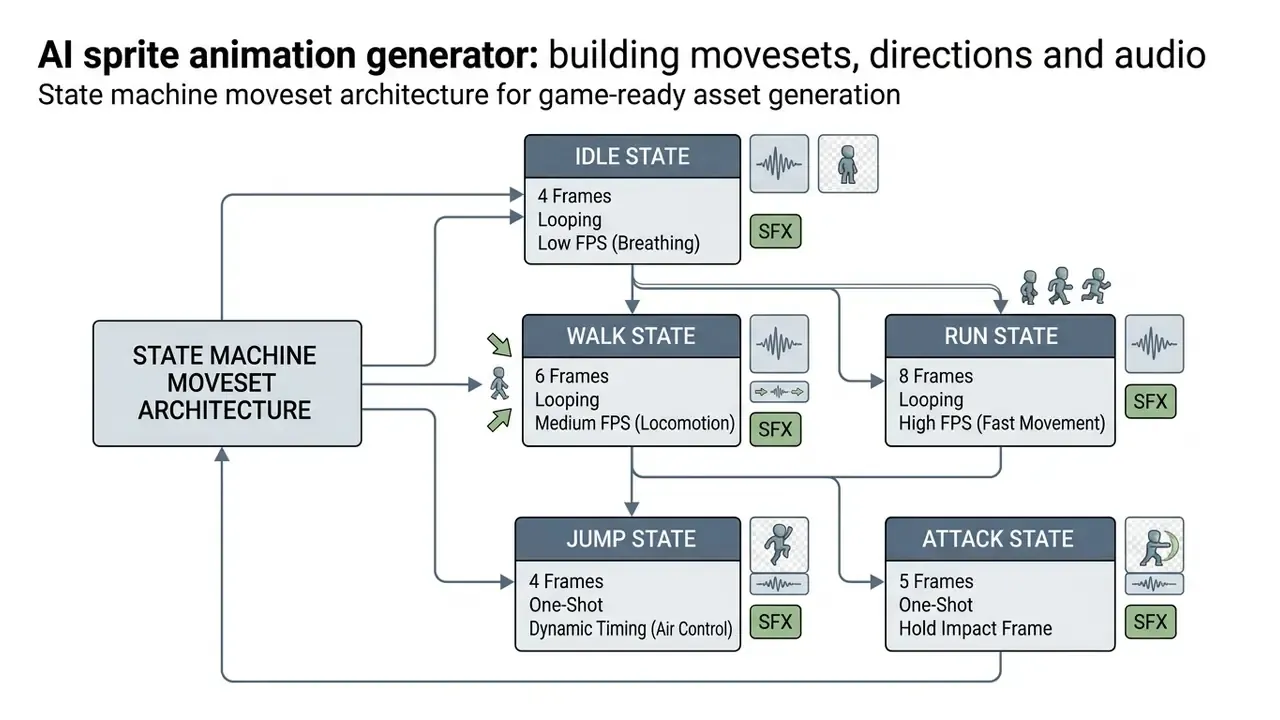
An ai sprite animation generator synthesizes complete character movesets, producing synchronized frame sequences for complex action categories, directional perspectives and isometric projections, while holding temporal object permanence.
Teams that need generalist motion tooling alongside sprite work can compare options in our guide to animation makers.
Idle, walk, run, jump and attack animations
Building a full moveset means structuring state transitions inside the game's animation controller. Each state has its own timing profile and frame budget, and those numbers decide whether the character feels responsive or sluggish.
Idle cycles use low frame counts with subtle displacement, conserving memory while keeping the character visually alive. Walk and run cycles need equal stride displacement across frames: measure distance per frame, keep it constant, and the sprite stops sliding when bound to engine velocity vectors.
"Each character action, walking, running, jumping, attacking, consists of several frames for smooth animation; frames are organised into a sprite sheet by action sections."
Attack sequences use asymmetrical timing, holding impact frames slightly longer to convey physical weight. Sequences should play out inside a state and transition at sequence end, with looping reserved for idle, walk and run, and one-shot playback for jump and attack.
8-directional sprites and isometric animation
Top-down RPGs and isometric action titles need multi-directional sets, 4-way or 8-way movement: north, south, east, west and the diagonals. Generating 8-directional sets multiplies asset complexity fast. Hand-drawn production for eight directions costs roughly 5 to 5.5× a single-direction baseline, against about 2 to 2.5× for isometric 4-direction work.
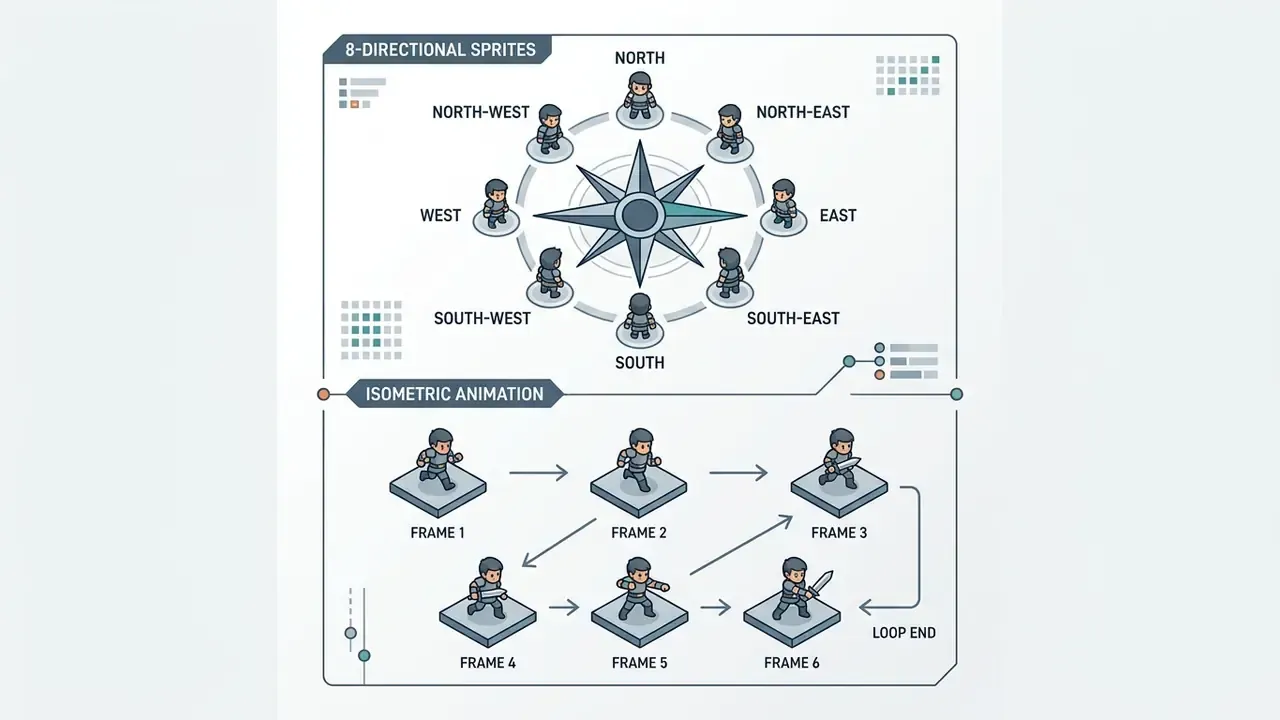
To preserve object permanence across eight viewing angles, pipelines generate cardinal reference anchors first (a south-facing idle frame, typically), then produce walk and attack cycles per direction, aligning every frame to a shared anchor point. Usually the feet.
The ai sprite animation generator then derives diagonal perspectives using 3D proxy camera models or specialized directional control layers, aiming to keep weapon positioning, shield placement and shoulder proportions stable as the character rotates. Isometric projection itself relies on an orthographic camera with the axonometric mapping x' = x − z, y' = y + ½(x + z), with typical game view angles near 27°, 30° and 45°.
How to fix inconsistent frames after generation
Inconsistent frames show up as flickering clothing detail, popping limbs, floating artefacts. They appear when generative models lose temporal awareness between sequential diffusion steps. The fix is targeted frame-level refinement, not another full re-generation.
"Missing-frame generation for character sprites is treated as an imputation problem: the model receives all available poses and reconstructs the missing one while preserving style."
Automatic correction workflows evaluate frame-to-frame variance with temporal photometric loss and frame-consistency detectors that separate spatial from temporal artefacts. When a frame strays past tolerance, post-processing scripts apply localized edge smoothing, recolour mismatched palette regions to match the seed frame, or re-project keypoint positions from adjacent frames to enforce structural stability. Two zero-prompt operations cover the most frequent defects: Fix Loop repairs cycles that do not close cleanly, and Fix Framing rescues characters drifting outside the cell. Whole-clip repairs use two-phase optimization, first the latent code, then the generator, with temporal loss across frames to suppress residual inconsistency.
Integrating and syncing audio (SFX) with sprites
Modern pipelines can generate a synchronised audio layer straight from the visual frames. Multimodal analysis reads animation control points, the foot-contact frame in a walk cycle, the flash frame in an attack combo, the impact frame of a hammer slam, and produces procedural WAV or MP3 assets: footsteps, blade clangs, magical chimes, UI stingers. Files export with timecode triggers mapped to frame indices from the JSON atlas, so an idle, run and attack pack arrives as one coherent audio-visual bundle rather than two unsynchronised deliveries.
Export sprite sheets and import into Unity, Godot and other engines
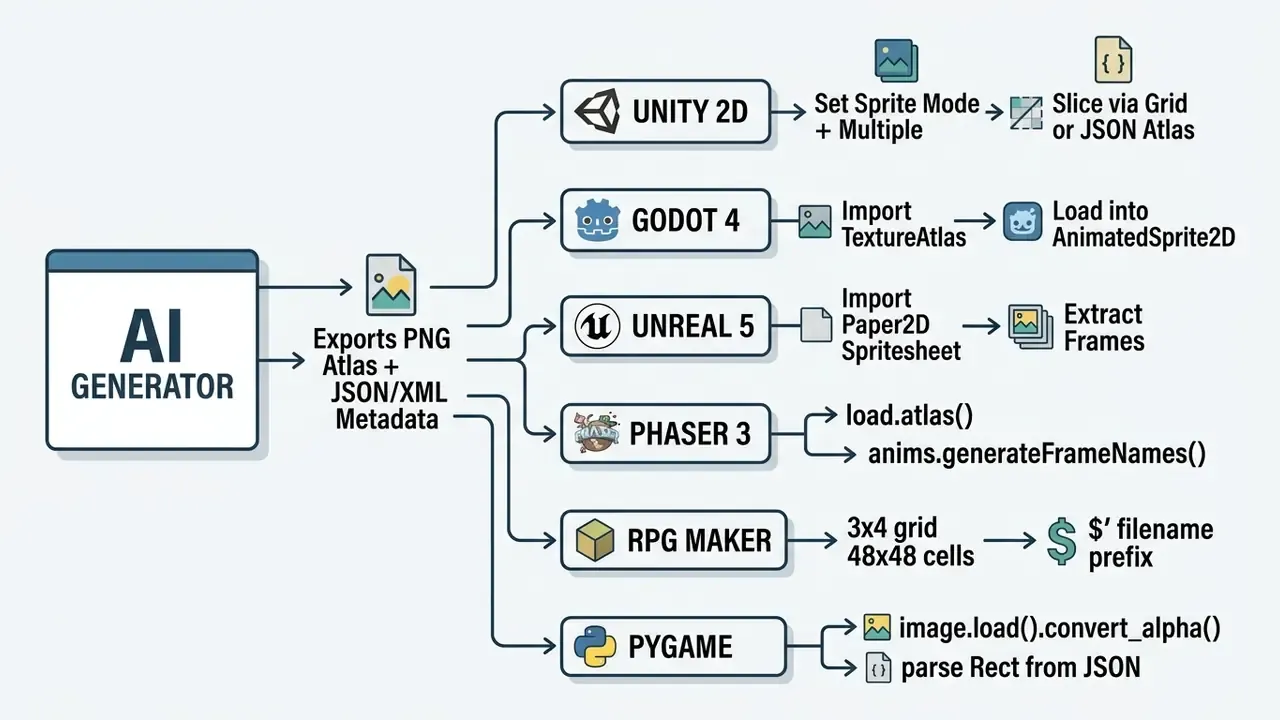
An ai spritesheet generator must output standard file formats and structured metadata atlases so ingestion into commercial engines (Unity, Godot 4, Unreal Engine 5, GameMaker Studio, Phaser 3, RPG Maker, Pygame) stays boring and predictable.
"A training-free pipeline converts static mockups into editable, engine-ready assets, closing the gap between artistic intent and in-engine implementation."
PNG sprite sheets, JSON and XML metadata
The industry standard for 2D asset delivery pairs a packed transparent PNG with a structured metadata document, JSON or XML.
The PNG holds all visual assets arranged compactly to maximize GPU texture memory efficiency, often sized to power-of-two dimensions such as 1024×1024 or 2048×2048 pixels. If your seed art arrives below the target cell resolution, review the trade-offs of AI image upscaling before packing, since bilinear upscales destroy pixel-art edges. The sidecar file maps precise coordinates for every frame:
{
  "frames": {
    "hero_walk_01.png": {
      "frame": {"x": 0, "y": 0, "w": 64, "h": 64},
      "rotated": false,
      "trimmed": false,
      "spriteSourceSize": {"x": 0, "y": 0, "w": 64, "h": 64},
      "sourceSize": {"w": 64, "h": 64},
      "pivot": {"x": 0.5, "y": 0.0},
      "duration": 100
    }
  },
  "meta": {
    "app": "AI Sprite Sheet Generator Tool",
    "version": "1.0",
    "format": "RGBA8888",
    "size": {"w": 512, "h": 512},
    "scale": "1"
  }
}
XML atlases carry the same rectangle data through TextureAtlas and SubTexture nodes, adding optional frameX, frameY, frameWidth and frameHeight attributes to describe trimmed source bounds.
Unity, Godot, Unreal and GameMaker integration
Importing generated sheets into modern 2D engines follows engine-specific steps:
- Unity 2D: import the PNG into Assets. In the Inspector set
Texture TypetoSprite (2D and UI)and switchSprite ModetoMultiple. OpenSprite Editor, runSlice(Grid by Cell Size or Cell Count), verify pivot points, then build Animation Clips in the Animation Window. Sprite Atlas packing enables draw-call batching in both the built-in 2D renderer and URP. - Godot 4: drag the PNG atlas into the FileSystem dock. Create an
AnimatedSprite2Dnode, selectSpriteFrames, chooseAdd frames from a Sprite Sheet, define horizontal (Hframes) and vertical (Vframes) divisions, select active sequence frames and assign loop properties. Godot'sResourceImporterTextureAtlascan also import a PNG as a texture atlas with an optionalcrop_to_regionflag. - Unreal Engine 5 (Paper2D): import the PNG, right-click the asset, choose
Create Sprite, or useExtract Spritesto parse texture regions from background transparency boundaries, then build a Flipbook from the extracted frames. - GameMaker Studio 2: import the PNG as a Sprite asset, adjust frame count in the Sprite Properties dock, and set collision mask bounds. Horizontal strip layouts match GMS2's default strip importer and keep collision masks accurate.
Phaser 3, RPG Maker and Pygame integration
this.anims.create({ key: 'walk', frames: this.anims.generateFrameNames('hero', { prefix: 'hero_walk_', start: 1, end: 6 }), frameRate: 10, repeat: -1 }).
Once registered, sprite.play('walk') needs no manual frame-range definitions. For simple strips, this.load.spritesheet() with fixed frameWidth and frameHeight is enough.
- Phaser 3 load the pair with
this.load.atlas('hero', 'hero.png', 'hero.json'). Animations are then created natively: - RPG Maker (MV/MZ) requires a strict 3×4 frame grid per character with a fixed cell resolution of 48×48 px. Single-character sheets must use the
$filename prefix (for example$Hero_Walk.png), auto-trimming must be disabled, and background padding preserved so the engine's grid parser reads cells correctly. Four-directional walk sheets are the default; extra poses are requested through the prompt. - Pygame load with
pygame.image.load('atlas.png').convert_alpha(), read frame coordinates from the sidecar JSON, and buildpygame.Rect(x, y, width, height)per frame before blitting the sub-surface.
FPS, loop and reusable presets for game-ready animation
Turning raw sprites into polished animation requires explicit framerates, defined loop points and saved presets. Uniform configuration is what keeps playback speed consistent across varying screen refresh rates.
Production pipelines store timing metadata next to exported graphics: scene start and end frame ranges, loop toggles, fixed preview FPS values (60, 50, 30, 25, 24, 20, 15, 12, 10, 6, 5), and import presets such as FPS scaling, scene-FPS alignment and cyclic playback. Reusable presets let you apply identical walk, run and attack timing templates across dozens of character models at once, which cuts setup overhead during engine integration substantially. Pack-level normalization goes further: it equalizes character height across idle, run and attack sheets with snap-to-ground alignment, while sequence chaining ensures the last frame of one clip meets the first frame of the next. To size computational resources for game tooling, check our AI Media Calculators.
Free AI sprite generator, pricing tiers and commercial use
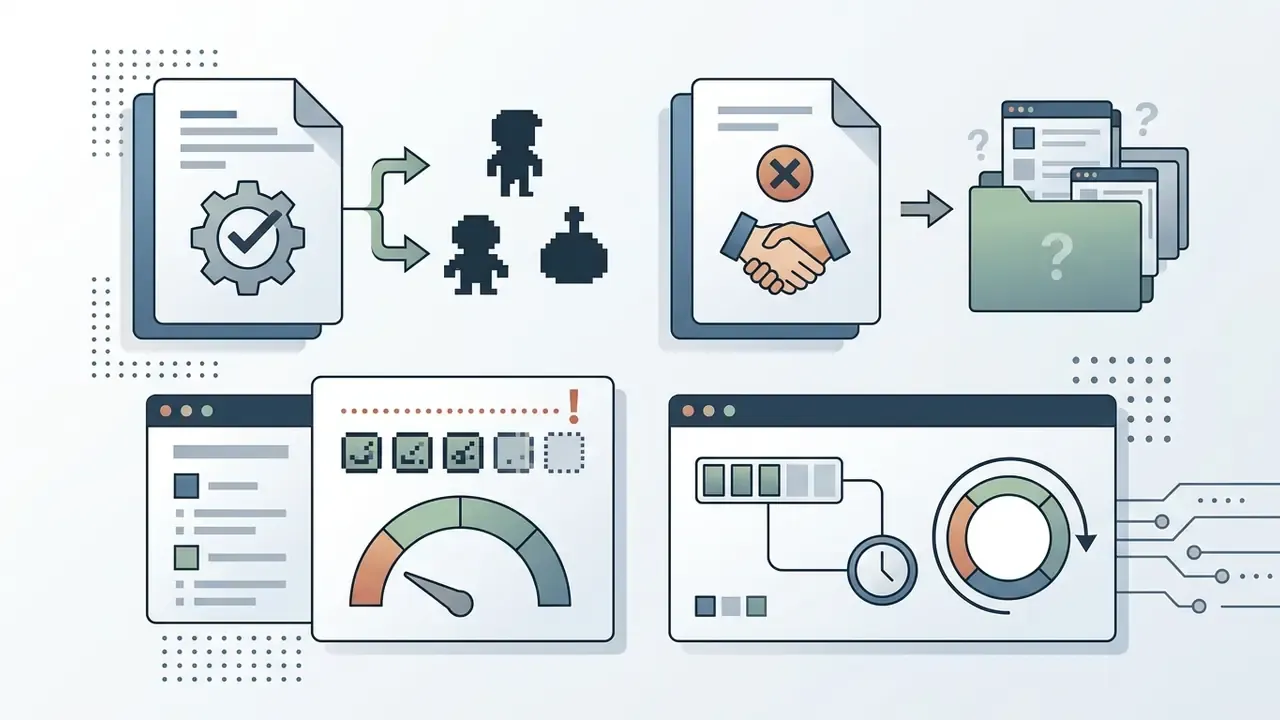

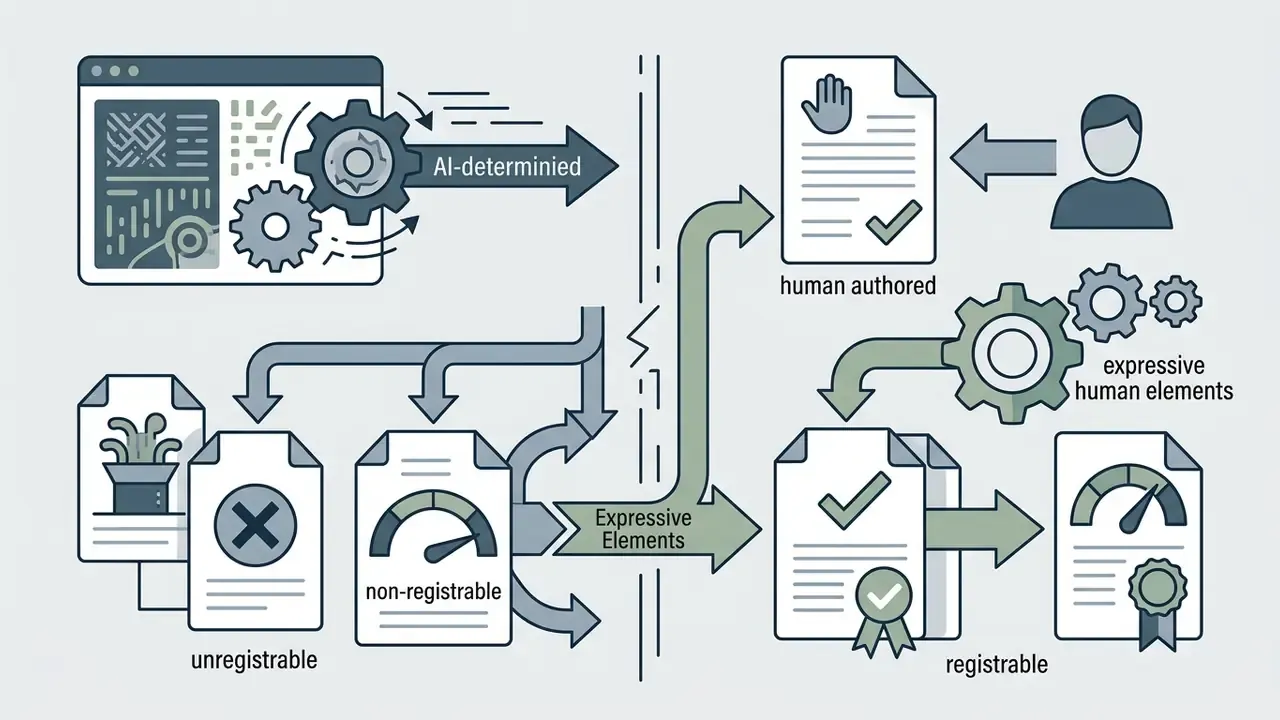
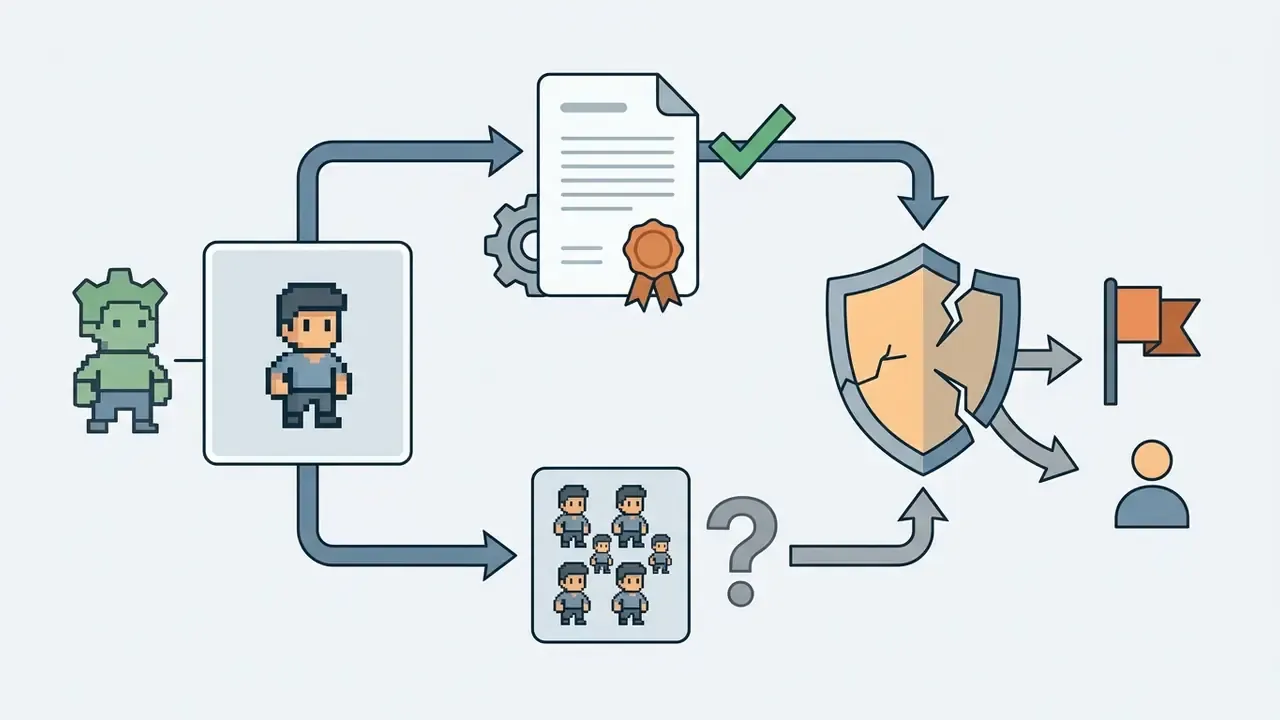
"In AI-assisted works, authorship is generally attributed to the human developer rather than to the AI system, though the question remains contested."
What to verify before commercial use of generated sprites
Before embedding graphics from an ai sprite sheet generator free plan into a commercial Steam or mobile release, run a full legal and technical checklist. Start by confirming the commercial-use rights for AI images attached to the exact plan that was active at generation time.
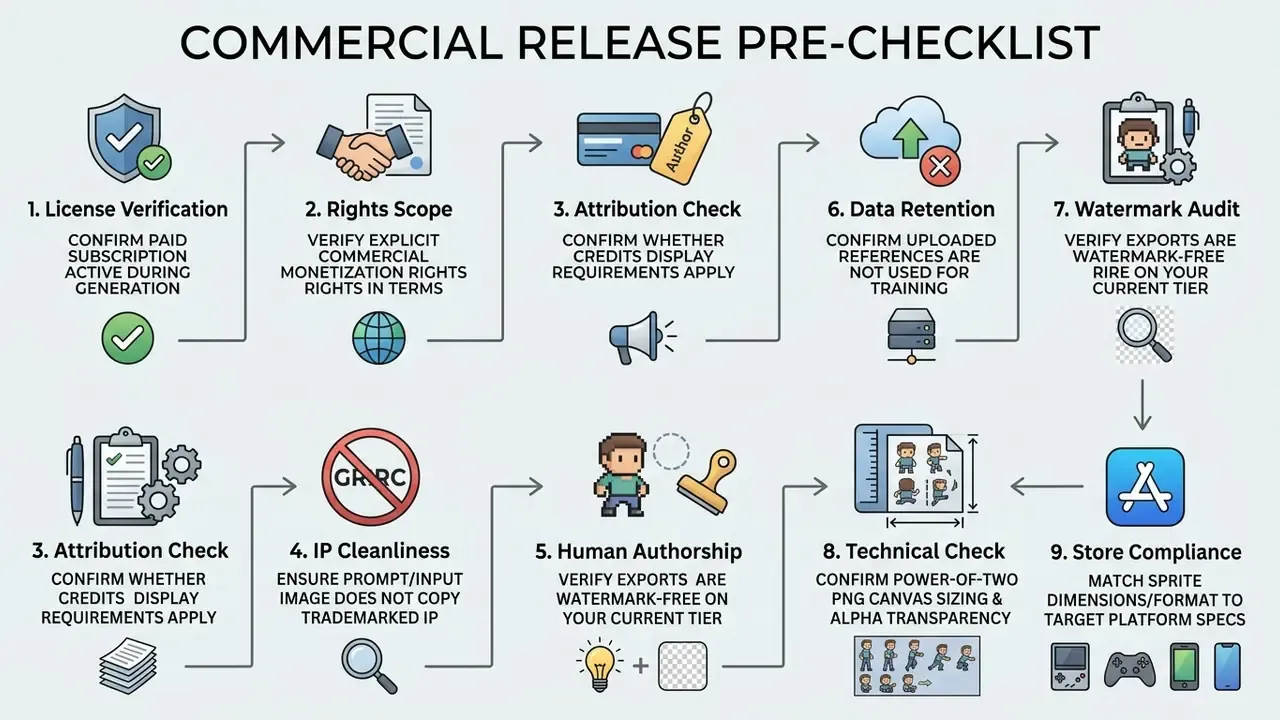
If budget is the binding constraint, compare entry options among free AI image generators with no sign-up and check whether their terms actually allow shipping.
Documentation matters as much as pixels here. Studios that publish companion material, art books or lore volumes usually keep the same licence log across formats; the workflow notes in our ai book generator and ai book title guides cover how to record prompts and human edits for text assets, which is the same evidentiary habit applied to a different medium.
For detailed pricing breakdowns across creative AI platforms, review our AI Media Pricing Guides. If technical issues arise during asset processing, visit AI Media Support and Troubleshooting. To compare alternative generative art tools, refer to our AI Media Comparison Matrices, explore developer integration options via AI Media API Guides, browse commercial licensing policies in our AI Media Commercial-Use Hub, or review legal precedents in AI Litigation and Case Timelines.
FAQ: common questions about AI sprite generation
Can I use a free ai sprite generator for commercial games on Steam or itch.io?
It depends on the platform's specific Terms of Service. Many free plans restrict usage to personal projects, cap daily generations, or require attribution under a Creative Commons licence. Paid tiers typically grant full commercial rights without attribution. Verify licence agreements, and keep a dated record of the plan active at generation time, before commercial deployment. For a shortlist of licence-friendly options, see our comparison of free AI image generators.
What is the difference between a single sprite and a sprite sheet?
A single sprite is an isolated graphic showing one object or character in one static pose. A sprite sheet is a consolidated texture atlas holding multiple animation frames in a grid, letting engines play sequential motion loops from one texture binding.
How do AI sprite generators handle transparent backgrounds?
Modern tools run background removal automatically, producing RGBA PNGs with fully transparent alpha channels. Pre-multiplied alpha plus cleanup of semi-transparent halo pixels ensures correct blending in Unity, Godot and Unreal.
How many frames and what resolution can an AI sprite sheet contain?
Typical limits are up to 64 frames per exported sheet, clip lengths of 1 to 4 seconds, framerates of 4 to 24 FPS, and per-frame sizes of 256 px, 384 px or 512 px, with Max Native and Upscale 1.5× options for extra sharpness.
Which engines can consume the exported atlas without manual slicing?
Unity, Godot and GameMaker slice automatically from JSON atlas data. Phaser 3 reads the same JSON through load.atlas(). Unreal's Paper2D extracts sprites from transparency boundaries. RPG Maker needs a fixed 48×48 grid instead of atlas metadata, and Pygame parses frame rectangles from the JSON manually.
How do I fix an animation that does not loop cleanly?
Run a loop-repair pass: duplicate the first keyframe into the final slot, or use an automated Fix Loop operation that measures optical-flow divergence between last and first frames and interpolates two transition frames. For characters drifting outside the cell, run a framing correction that re-centers the silhouette on the bottom-center pivot and inpaints clipped edges.
Can generated sprites come with sound effects?
Yes. Multimodal pipelines read animation trigger frames (foot contact, impact flash) and generate matching WAV or MP3 effects with timecodes tied to frame indices in the atlas, producing a synchronised audio-visual asset pack.
What should I log to defend human authorship later?
Keep prompt text, seed values, model and tool versions, dates, plan tier, and a record of manual repaints or composites per asset. Store it with the build, not in someone's local notes. That log is the difference between an arguable authorship claim and a shrug.
Appendix A: source verification and revision log
This log records citation corrections made during editorial review, so readers can audit which claims are verified and which were withdrawn.
| Original statement | Status | Action taken |
|---|---|---|
| "Research by Hsieh et al. (2024) in Sprite Sheet Diffusion…" (no URL, no metrics) | Supported | Replaced with quoted finding plus URL https://arxiv.org/abs/2412.03685 |
| "Academic research on procedural content generation (arXiv, 2024)…" (no URL) | Supported | Replaced with Procedural Content Generation via Generative AI, https://arxiv.org/abs/2407.09997 |
| "The Five-Dollar Model, AIIDE 2023" (no URL, no metric) | Supported | Replaced with CLIP ViT-B/32 evaluation note plus URL https://arxiv.org/abs/2308.04052 |
| "Bunraku (arXiv, 2026)" (no URL, no quantitative data) | Needs external verification | Replaced with dataset size and direction-cosine metrics plus URL https://arxiv.org/abs/2607.13398 |
| "diffusion control literature (CVPR Workshop, 2025)" | Unverified source | Replaced with Sprite Sheet Diffusion reference-conditioning finding |
| "academic benchmarks in 2D animation mechanics (Cornell CS, 2025)" | Unverified citation format | Replaced with arXiv PCG survey (2024); lecture-derived rule retained as practice guidance |
| "temporal photometric loss algorithms (ECCV research archives)" | Partially verified | Method retained; primary sprite-specific citation added (Missing Data Imputation GAN, https://arxiv.org/abs/2406.10604) |
| "reduced manual touch-up requirements by 68%" | Unsupported figure | Figure withdrawn; replaced with instruction to measure touch-ups per 100 frames as an internal baseline |
| "reduces visual drift by over 40%" (DreamBooth & LoRA Evaluation, 2025) | Unsupported figure and source | Figure withdrawn; replaced with Bunraku layer-consistency metrics |
| "U.S. Copyright Office guidelines (2024/2026)" | Supported in substance | Clarified to the Office's copyright-and-AI reports and registration guidance; SSRN legal analysis added |
| Competitor claim "100% free" | Contradictory | Not reproduced; article states free tiers typically carry usage caps |
Explore comprehensive asset creation tools and developer references in our AI Media Glossary, compare motion tooling in the animation maker guide, and check licensing terms in the Commercial-Use Hub.