Why should a governance-minded reader care about cover art? Because a "free, no sign up" image tool is still a data pipeline. Prompts leave your perimeter, licenses stay unread, and nobody logs who generated what. That is a small problem for one novel, and a real control gap for a bank publishing thought-leadership reports.
Executive Summary
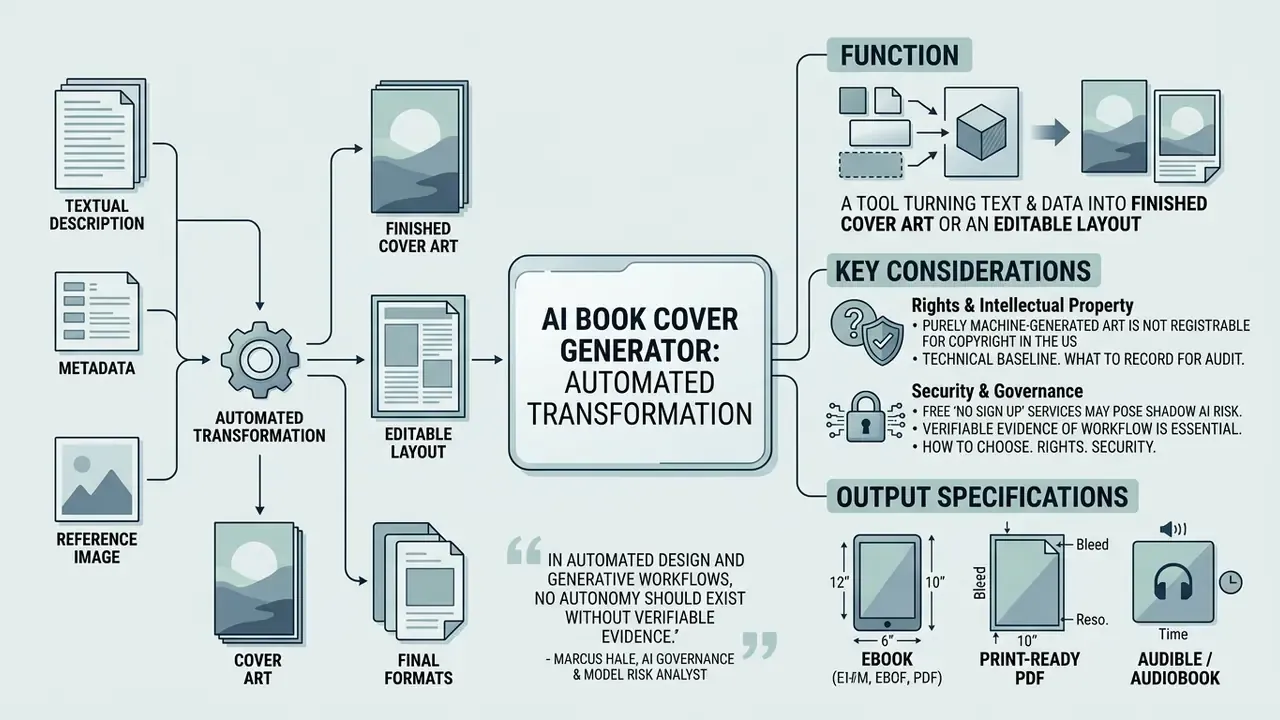
- What it is. An ai book cover generator is an automated tool that turns a text description, metadata or reference image into finished cover art, an editable layout, or a print-ready file.
- How to choose. Weigh four parameters: editor flexibility, style and model variety (FLUX.1, Midjourney, DALL·E 3, SDXL), export quality (300 DPI, CMYK, PDF/X), and explicit commercial rights in the Terms of Service.
- Rights. Purely machine-generated art is not registrable for copyright in the United States. Only human contributions are protected: text, typography, arrangement. Amazon KDP requires authors to declare AI-generated images at submission.
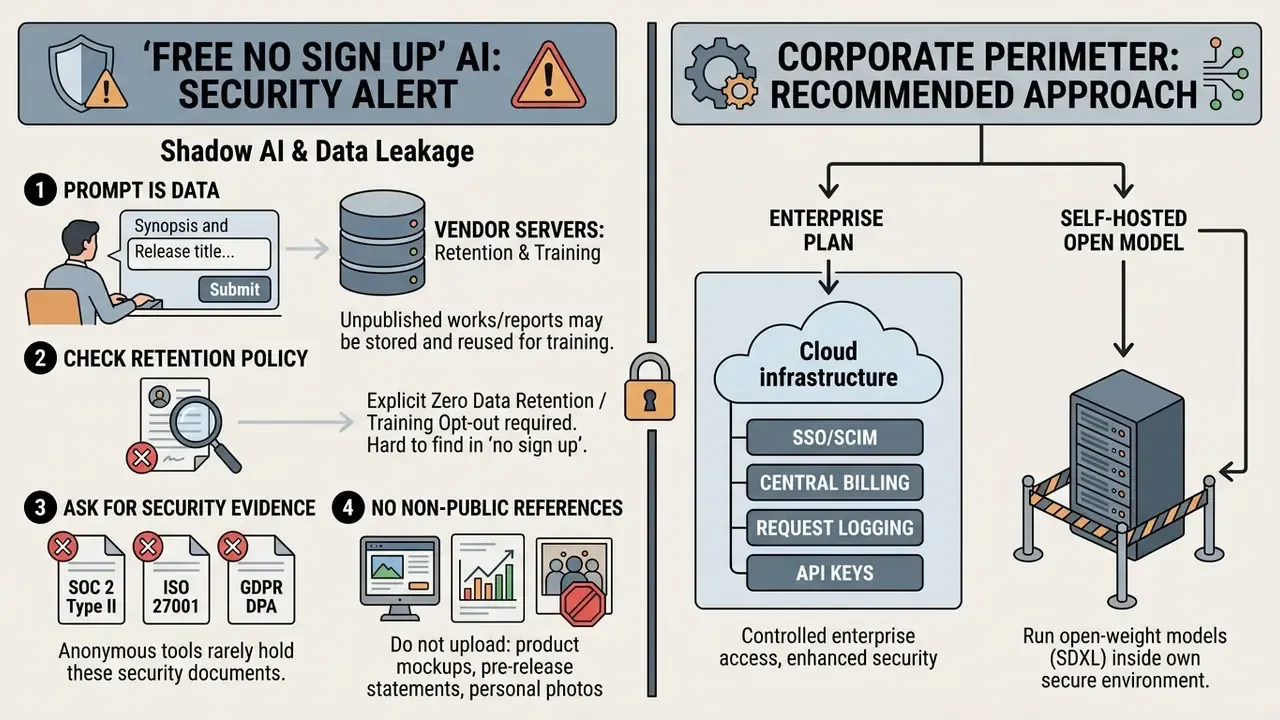
- Security. Free "no sign up" services are a classic Shadow AI channel. Prompts, drafts and reference uploads can end up in training sets. Corporate publishing needs Zero Data Retention, SOC 2 or ISO 27001 evidence, and vendor IP indemnity.
- Technical baseline. Ebook: one front cover, 1600 × 2560 px, RGB. Print: full wrap PDF,
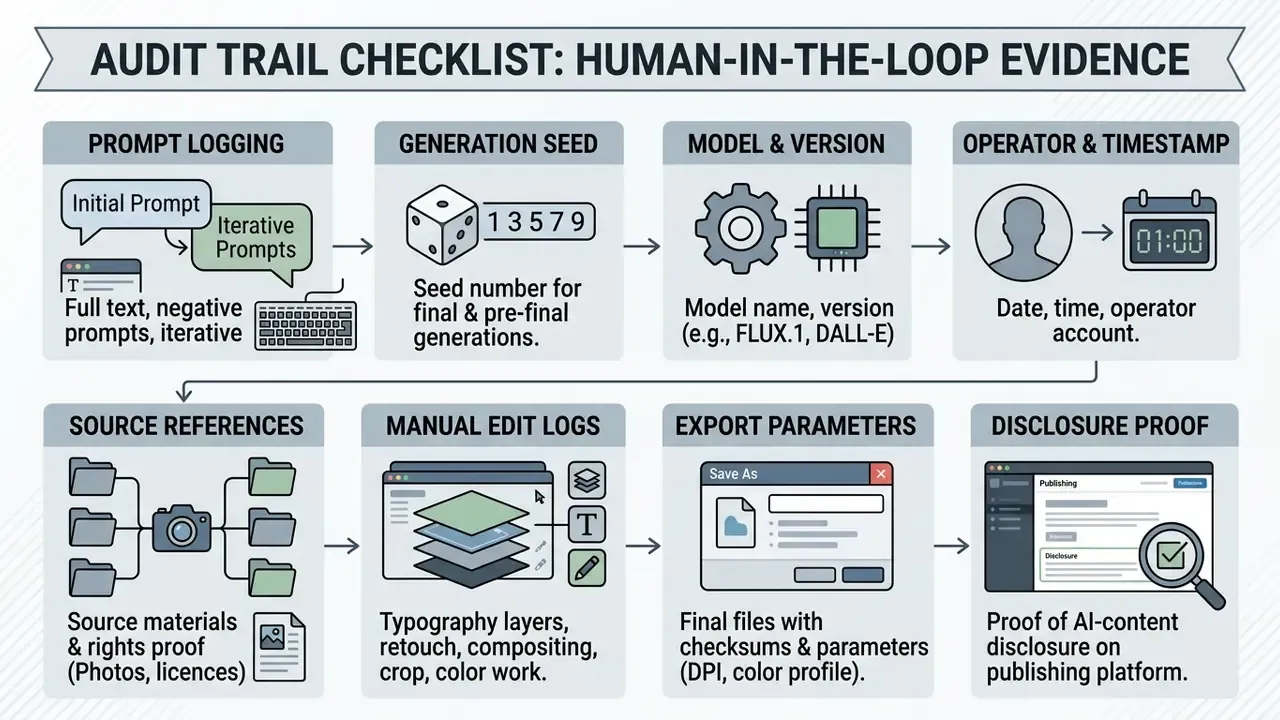
Spine Width = Page Count × Paper Thickness Basis, bleed 0.125 in (3.175 mm), CMYK, 300 DPI. Audiobook: square 2400 × 2400 px, RGB, 300 DPI. - What to record for audit. Prompt, seed, model version, manual edit logs. That set is your evidence of human-in-the-loop authorship and of commercial rights.
An ai book cover generator is an automated software tool that transforms textual descriptions, metadata, or layout prompts into visual cover artwork, editable layouts, or digital front-cover graphics. Modern generative design platforms combine text-to-image diffusion models with structured canvas editors to streamline publishing workflows for indie authors, commercial publishers, and self-publishing platforms.
What an AI Book Cover Generator Is and Which Covers It Produces
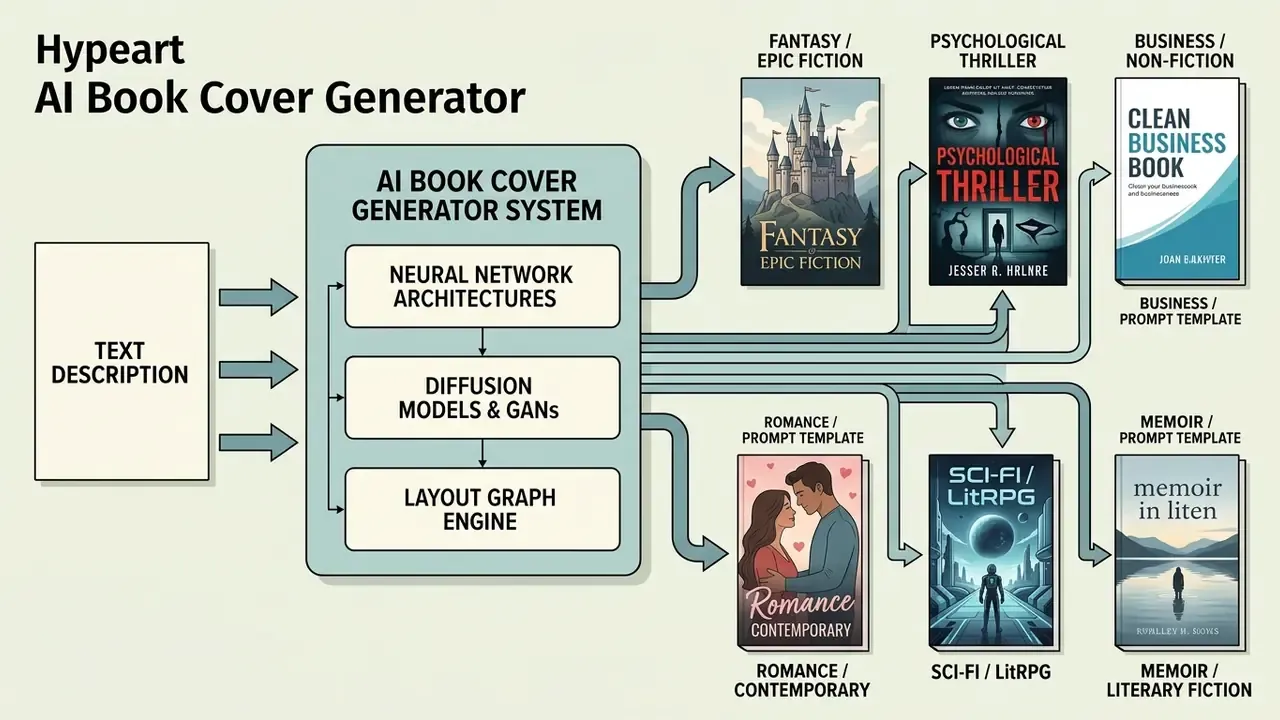
An ai book cover generator is a software system that uses neural network architectures, primarily diffusion models, generative adversarial networks (GANs), and layout graph engines, to produce visual cover art and page layouts from text prompts. These tools parse instructions describing narrative themes, genre conventions, and title constraints, then render high-resolution imagery for digital and physical publishing formats.
When classifying systems, it helps to separate pure AI image generators from layout-aware engines. The second group returns not only a picture but a layout structure, with space reserved for the title block.
Generative models evaluate semantic input to construct an ai book cover art asset, with outputs ranging from raw conceptual sketches to multi-layered design templates. Research on GANs combined with knowledge graphs for book cover design (arXiv, 2023) suggests that adding structured knowledge graphs improves contextual relevance and aesthetic alignment compared with standalone image synthesis.
Authors can use an ai book cover image generator to explore visual concepts quickly, before locking typography and file formatting. In practice, pipelines from 2023 through 2026 chain two components: a layout-graph generator that fixes composition and text zones, plus a diffusion model that lifts image quality. That pairing explains why layout-aware tools give results that survive real typesetting, while image-only engines often do not.
Generating AI Book Cover Art from a Text Description
Generating cover art through prompts requires giving the network explicit structural parameters: genre, primary subject, spatial composition, mood, and colour palette. A structured formula such as [genre] + [main subject] + [setting] + [mood] + [composition] + [art style] + [color palette] + [title-safe area] pushes the ai book cover art generator toward artwork with negative space reserved for title and author text.
The production-grade version of that formula adds two service elements: [negative prompts] (for example --no text, no distorted letters) and [aspect ratio] (--ar 1:1.6 for ebook, --ar 2:3 for a print front cover).
Research on text-to-image prompt journeys (CHI 2024) indicates that a first prompt execution rarely produces a final cover. Designers refine prompts across several iterations to align visual output with story concepts.
By describing atmospheric lighting or specific character placement, writers turn an ai book cover generator from text into a way of converting a synopsis into genre-consistent artwork.
Ready-to-Copy Prompt Templates
Fantasy / Epic Fiction:
Book cover illustration for an epic fantasy novel, a glowing magical staff embedded in an ancient stone altar, enchanted forest background, dark atmospheric lighting, deep blue and gold color palette, top third reserved for title negative space, 8k resolution, cinematic composition --no text --ar 1:1.6Psychological Thriller:
Minimalist thriller book cover, a dark silhouette of a lone figure walking into a dense misty alleyway, high-contrast street lamp lighting, cool gray and crimson accent palette, stark dramatic shadows, clean top area for bold typography, photorealistic style --no text --ar 1:1.6Business / Non-Fiction:
Modern corporate non-fiction book cover background, abstract geometric blue translucent layers, clean diagonal lines, professional minimal aesthetic, dark navy background, central light exposure for title legibility, 3D render style --no text --ar 1:1.6Romance / Contemporary:
Contemporary romance book cover background, soft golden hour sunlight, watercolor texture of two hands almost touching, warm pastel tones, vibrant watercolor washes, romantic serene mood, top negative space for serif title --no text --ar 1:1.6Sci-Fi / LitRPG:
Science fiction book cover art, a lone armored explorer facing a colossal orbital structure, sharp geometric forms, cold cyan and steel-gray palette, volumetric rim lighting, wide cinematic framing, bottom third clean for author name --no text --ar 1:1.6Memoir / Literary Fiction:
Literary memoir cover background, minimalist single symbolic object on textured paper, muted earth tones, soft diffused daylight, generous whitespace in upper half for serif title, fine-art editorial aesthetic --no text --ar 1:1.6
Edit templates by swapping subject, scene and palette. Keep the service parts (negative prompts, aspect ratio, title-safe area) untouched, because those are the elements that make the art usable in later layout work.
Covers for Ebooks, Print Books and Cover Pages
Cover generation systems create three distinct asset types depending on the publishing medium: standalone digital front covers (ai ebook cover generator), full-wrap print covers, and interior cover pages. Digital ebook covers need a single vertical image optimised for screens. Print covers demand a unified wraparound file combining front cover, spine and back cover.
An ai cover page generator produces interior title pages that follow manuscript typography standards rather than outer packaging specs. A title page sits inside the block, so bleed, spine and barcode zone rules simply do not apply to it. The same distinction holds for an ai book page generator, which handles interior page templates rather than retail-facing artwork.
To evaluate visual asset workflows across digital platforms, publishers frequently compare multi-format editors. You can browse the hub to review asset frameworks across media categories.
Free AI Book Cover Generator: Sign-Up, Limits, Models and Data Security
Evaluating a free ai book cover generator starts with access models, credit allocations, and resolution constraints. Many platforms advertise browser-based generation, yet permissions differ sharply between trial tiers, guest sessions and authenticated accounts.
Free online design utilities usually operate under token-based daily quotas or watermarked downloads. When testing tools, check whether an ai book cover generator online free offers uncompressed exports, or caps free output at low-resolution previews. All three models appear in the market: a fixed monthly generation quota (for example 15 per month on a free plan), a daily image limit without registration, and a free trial covering two or three covers before credits go on sale. An ai book cover maker free plan is rarely a production tool; treat it as a sandbox.
Comparison of AI models for book cover generation (2025 to 2026)
| AI model / engine | Strengths for covers | Limitations | Best-fit genre |
|---|---|---|---|
| FLUX.1 (Kontext / Pro) | Accurate prompt adherence, predictable composition, clean lighting | Needs external graphics editors for typography | Fantasy, sci-fi, thriller |
| Midjourney v6 | High aesthetics, painterly photorealism, rich textures | Risk of distorted lettering rendered onto the art | Romance, memoir, literary fiction |
| DALL·E 3 (via ChatGPT) | Handles complex multi-part prompts, relatively accurate lettering | Less "painterly", sometimes overly vector-like | Business books, non-fiction, comics |
| Stable Diffusion XL (SDXL) | Full composition control via ControlNet, local runs, data privacy | Steep learning curve, needs negative-prompt tuning | All genres, for advanced designers |
| Niche engines (Seedream, Nano Banana, Topaz Upscale) | Style presets and upscaling to print resolution | Limited layout control, often PNG-only export | Post-processing and print prep |
Read the table as a control matrix, not a beauty contest: prompt controllability, art quality, and text-artefact risk pull in different directions.
When You Can Create a Cover Without Sign Up
A guest-access ai book cover generator free no sign up tool lets users generate concepts directly in the browser with no account. Platforms such as Pixelbin and Free.ai provide initial runs without login, so creators preview designs immediately. It is worth comparing free AI image generators with no registration before you attach payment details to any service.
Guest workflows, however, tend to restrict high-resolution downloads, advanced layout tools and project saving. An ai book cover generator no sign up session works well for brainstorming; a commercial export licence normally requires registration. Typical guest limits: 3 to 10 generations, 1024 × 1536 px output, and a watermark or preview file instead of an HD asset.
What a Free AI Book Cover Generator Usually Includes
Standard free tiers in an ai book cover generator tool typically cover basic style presets, a set of pre-made templates, and web-resolution raster exports in JPG or PNG. Some platforms add an integrated canvas editor for simple text placement, filters and cropping. Current online editors also support multilingual typography, including Cyrillic, Arabic script and CJK glyphs, so one AI concept can be adapted to international localisations in a single pass. Several vendors claim 20 or more interface and text-layer languages.
Empirical studies of graphic design tools (ACM DIS 2024) describe free AI generators as "clay to play with": designers use them mainly for rapid concept generation, not for final print-ready deliverables without secondary editing.
How to Compare AI Book Cover Generator Tools Before You Choose
| Parameter / mode | Free online (registered) | Free, no sign up (guest) | Pro / subscription (paid) |
|---|---|---|---|
| Generation limits | 10 to 15 credits per month | 3 to 10 test runs | Unlimited or 1000+ credits |
| Editor access | Basic (text, filters) | Limited preview only | Full WYSIWYG, layers, grids |
| Download quality | 72 to 150 DPI (JPG/PNG) | Low resolution, watermark | 300 DPI, print-ready PDF, vector |
| Templates and styles | Standard presets | Minimal selection | Extended library and LoRA |
| Commercial rights | Defined in ToS, often non-commercial | Personal use only | Full commercial licence |
| Corporate perimeter | No SSO, no central billing | No DPA, Shadow AI exposure | SSO/SCIM, DPA, Zero Data Retention, API, IP indemnity by plan |
The pattern is dull but stable: the cheaper the access, the more of the risk you keep yourself.
Commercial Use, Rights to an AI Cover, and Tool Cost
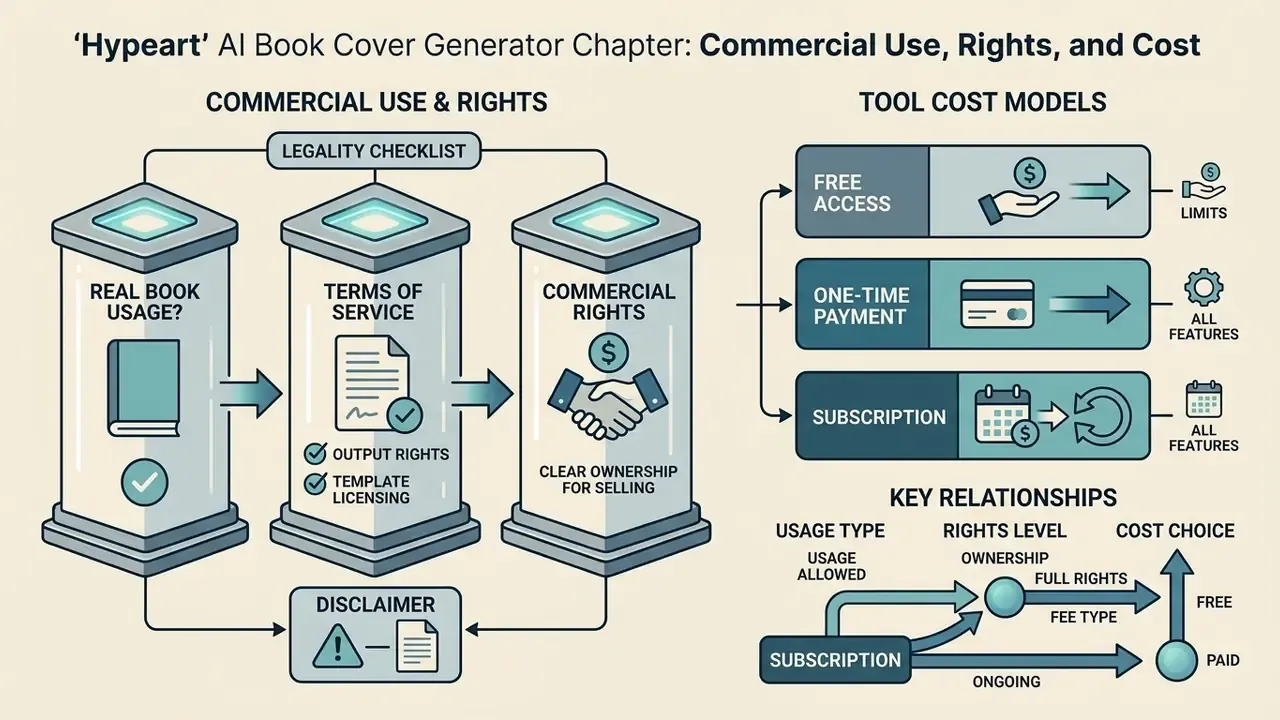
Commercial deployment of AI-generated cover graphics means navigating copyright rules, platform disclosures, and software licensing models. Using output from an ai cover book generator in a published book requires verifying whether the platform grants full commercial exploitation rights.
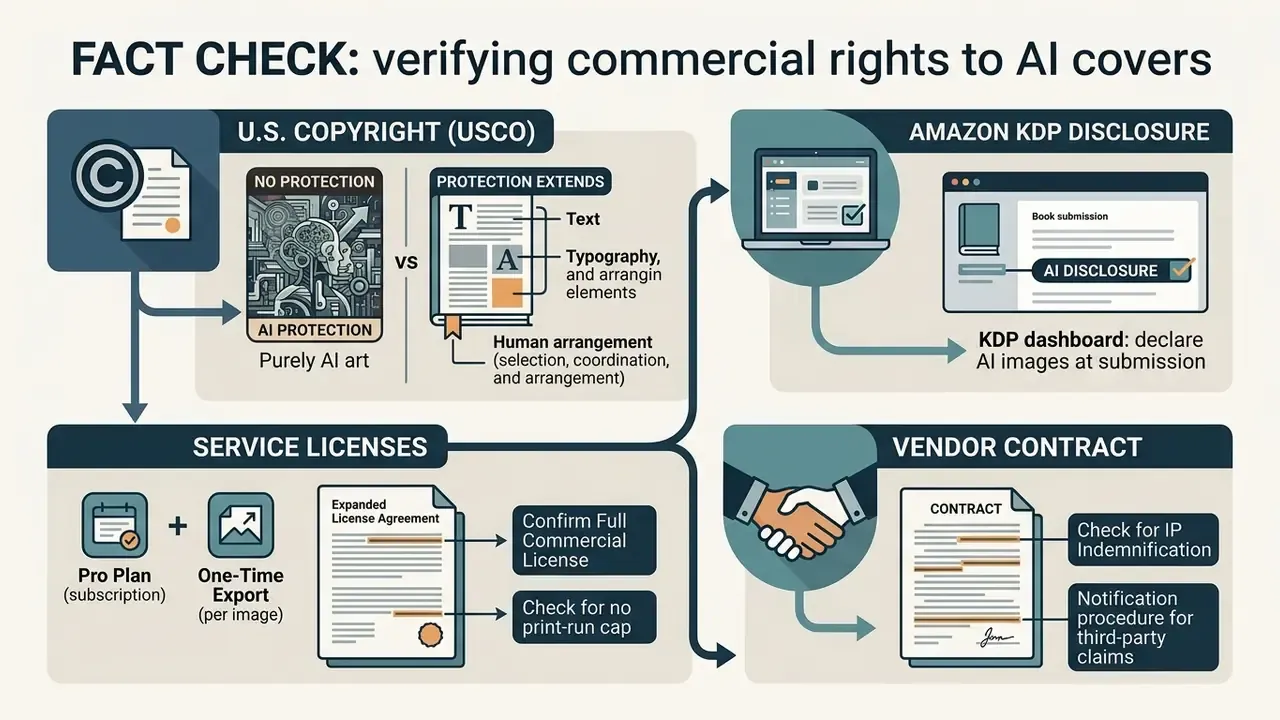
Guidance from the U.S. Copyright Office (2023 to 2026 AI policy guidance) states that purely machine-generated visual output, lacking human authorship, cannot be registered.
Human-authored contributions remain registrable: original text, custom layout arrangements, substantial artistic editing. The practical conclusion is narrow but useful. What you protect is not the generated art itself, but your selection, coordination and arrangement, plus your typography and any meaningful manual rework of the image.
Can You Use AI Book Cover Art for a Real Book
Yes. Authors can publish commercially with AI-generated cover art, provided the tool's Terms of Service grant commercial rights and platform policy is satisfied. A detailed breakdown of those conditions appears in the analysis of commercial use of AI image generators.
Amazon KDP, for instance, allows AI-generated cover imagery but requires disclosure during title submission. KDP separates two modes. AI-generated means the image was created by an AI tool, and disclosure stays mandatory even after substantial editing. AI-assisted means your own illustration was merely refined with AI help, and no disclosure is required.
There is a marketing implication worth naming. When a service advertises "copyright-free" covers, that means no usage restriction, not exclusive ownership. With a similar prompt and seed, another author may reproduce close to the same art, and you cannot stop them. If the cover must work as a unique brand asset, add a substantial human layer: your own photography, hand illustration, custom typography, collage.
To manage compliance across enterprise software deployments, media teams should read platform licensing terms line by line. Review guidance at the AI Media Commercial-Use Hub to keep deployments aligned.
What to Check in the Terms Covering Images and Templates
Inspect software terms on stock asset usage, template redistribution limits, and secondary commercial rights. Some tools allow free cover creation yet forbid selling standalone cover templates, or restrict stock components beyond a defined print run.
Stock marketplace clauses deserve separate attention. Adobe Stock, for example, accepts generative content only when the contributor holds all rights needed for commercial licensing, requires the label "Created using generative AI tools", and rejects material produced from prompts that reference a named living artist's style without permission.
Creators managing intellectual property risk should also watch how compensation models evolve.
To track ongoing copyright cases and policy shifts, check AI Litigation and Case Timelines for updated precedents.
Choosing Between Free Access, One-Time Payment and Subscription
Pricing for AI cover software follows three structures: free tiers with credit caps, one-time per-download fees of roughly $4.99 to $9.97, or monthly subscriptions from about $9.99 to $29. Hybrids exist too: per-title credit packs at around $0.20 to $0.33 per AI action without a subscription, plus 7-day and 30-day passes.
Indie authors publishing single titles usually gain most from one-time high-resolution asset purchases. High-volume publishers and book packagers reach better unit economics through recurring plans. Corporate buyers should model total cost of ownership wider than the price per generation: enterprise licence, SSO, API calls, upscaling to 300 DPI, plus legal review and storage of audit artefacts. That last line item is the one most often forgotten in ROI decks.
How to Create a Book Cover with AI: From Idea to Download
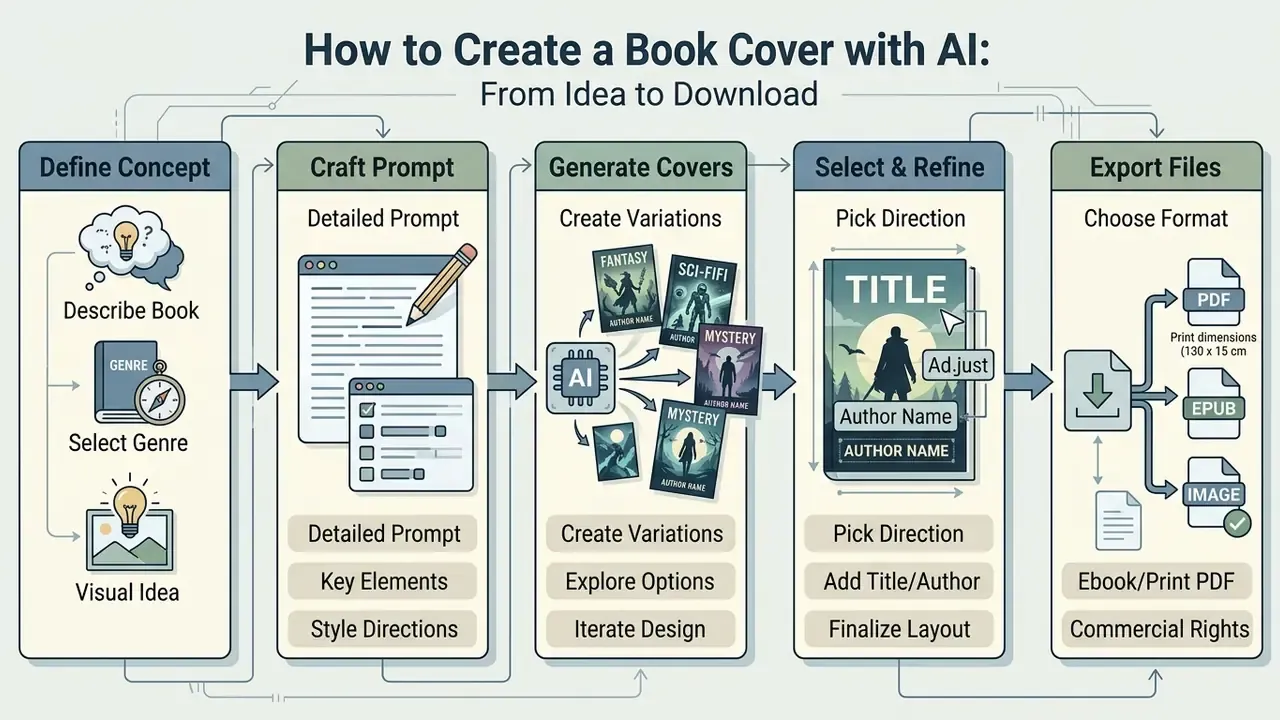
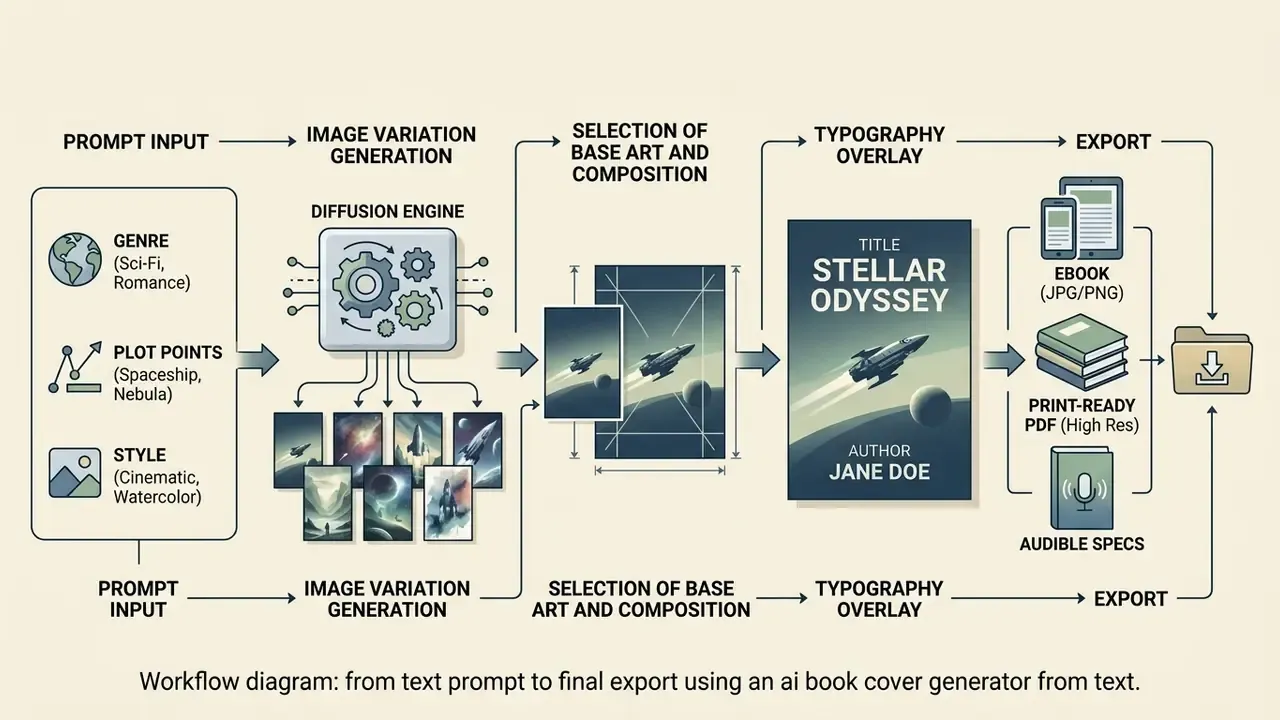
Creating a professional cover with an ai create book cover system runs through a five-stage pipeline: define concept parameters, craft detailed prompts, generate multiple variations, overlay readable typography, export technical files.
An ai book cover maker speeds up early visual discovery. Reaching publication standards still needs active human intervention at title placement and composition refinement. No shortcut there.
Describe the Book, Genre and Visual Idea in the Prompt
Start by translating core themes into concrete visual descriptors. With an ai book cover generator from text, state the genre explicitly (epic fantasy, contemporary romance, business non-fiction), then the main subject, background environment, lighting style and camera angle.
Include spatial instructions such as "clean top area for title text, centered subject, dark minimalist background" so the ai book cover creator reserves title-safe negative space.
Hence a working rule: do not try to compress the whole plot into one prompt. Encode one key metaphor, and move narrative detail into the blurb and the typography.
Generate Several Cover Designs and Pick a Direction
Run the prompt to produce three to six distinct variations. Parallel variants surface unexpected visual metaphors and let you test contrasting compositional directions.
Compare options against competing titles in your genre. Choose the image that still lands when scaled down to a small retail thumbnail. For a more formal selection, use pairwise comparison: build a dominance matrix on three criteria (genre signal, thumbnail legibility, absence of artefacts) and pick the leader. With an existing audience, run an A/B test on covers and compare click-through rates.
How to Make an AI Book Cover Professional and Genre-Appropriate
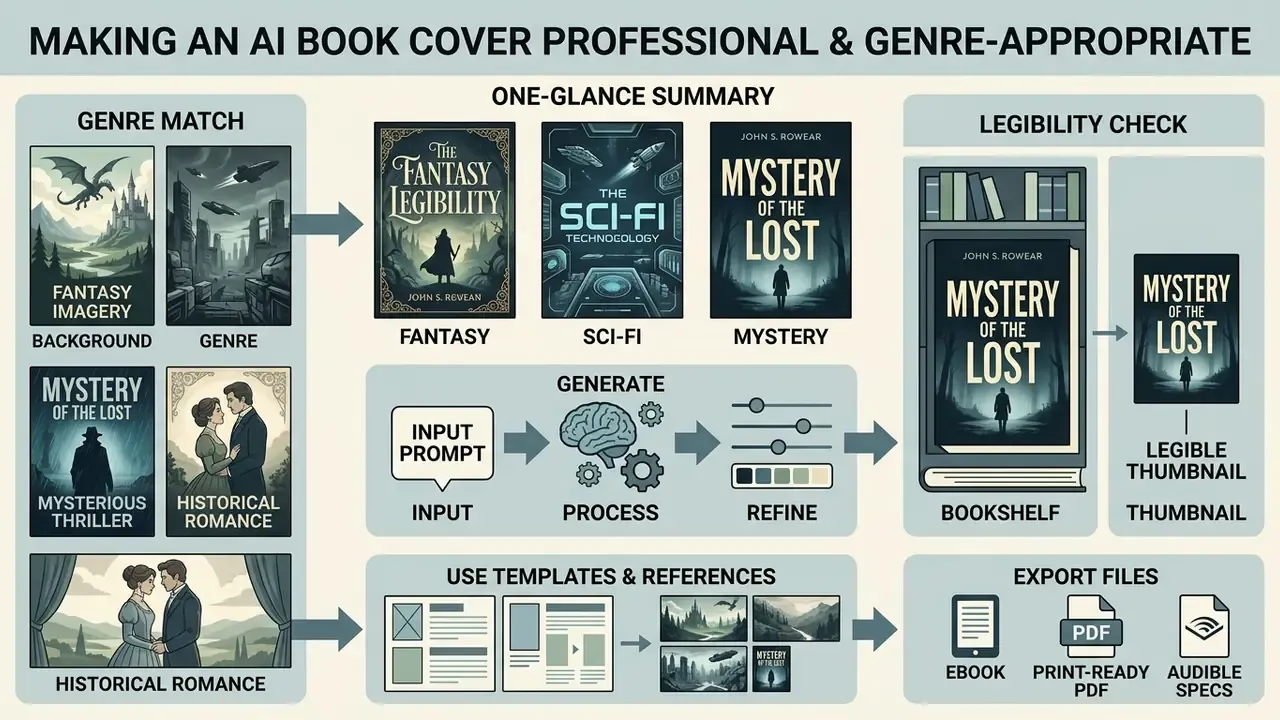
A successful cover communicates genre instantly and stays legible across viewing formats. Using an ai book cover design generator means applying established design principles, visual hierarchy, colour theory, typographic contrast, to turn raw AI images into market-ready covers.
Genre conventions dictate the visual grammar: thrillers lean on stark shadows and high-contrast accents, romance highlights warm emotional tones, business non-fiction favours clean typography over busy imagery. An ai cover design generator can imitate the surface of these conventions; only a human reliably judges whether the signal reads correctly on a store shelf.
The practical takeaway: the tool does not replace a trained eye. The gap between raw output and a market cover is closed by human expertise, through frame selection, compositional correction and typography.
Choose Style, Imagery and Background to Match the Genre
Align background artwork and colour with recognised genre signals. Fantasy covers usually carry rich illustrative texture and a heroic central figure; sci-fi favours sharp geometric forms and cool atmospheric lighting. Crime fiction rests on a dark field, a single silhouette, fog, and one accent colour, red or yellow, with a tight condensed sans-serif. Business non-fiction relies on a flat or minimally metaphorical background, a large title, and a strict "title to subtitle to author" hierarchy.
Make sure background complexity does not crowd the focal points. When cleaning secondary elements and background layers, the capability review in the online photo editor guide is useful: some defects are cheaper to retouch than to regenerate across the whole cover.
Check Title and Typography for Legibility
Typographic contrast has to satisfy accessibility standards. Under WCAG 2.2, title and body type should hold a minimum contrast ratio of 4.5:1 against background imagery, and 3:1 for large display titles.
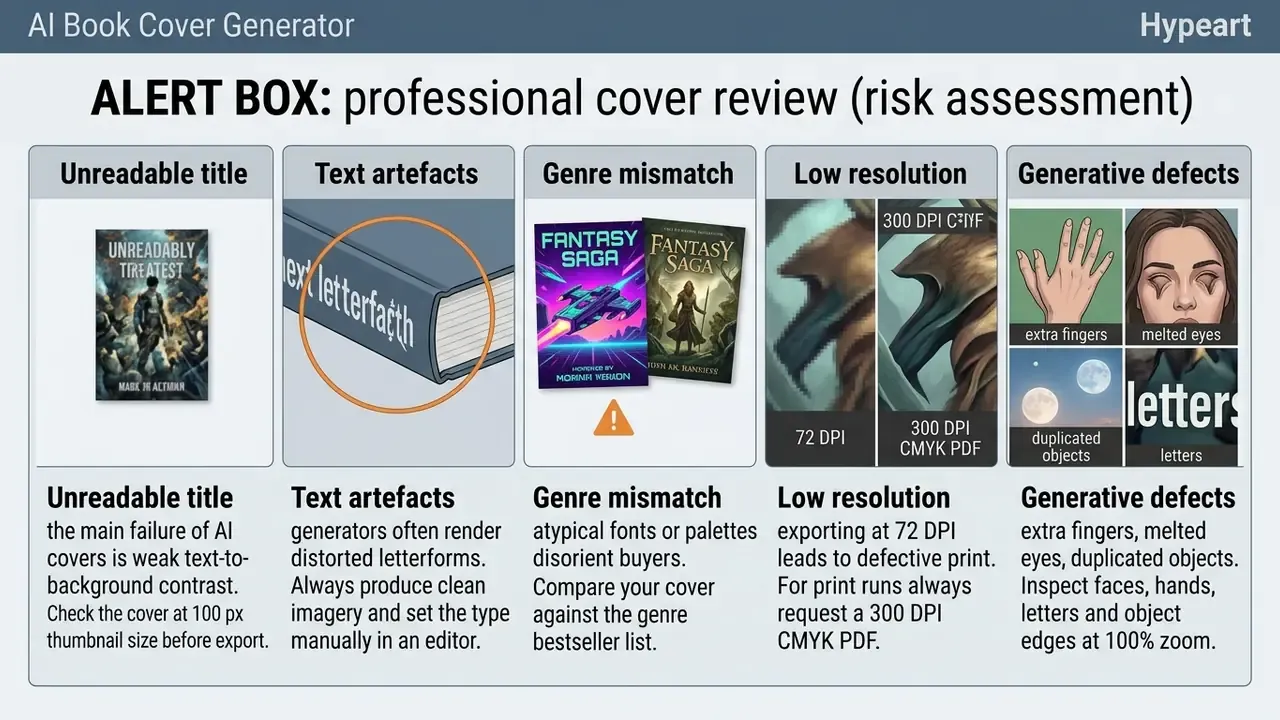
Test legibility by scaling the layout down to a 100-pixel-wide thumbnail. If the title dissolves into background texture, apply drop shadows, dark gradient overlays, or solid backing shapes to restore contrast. Cover audits repeatedly show that a large share of published titles fail the WCAG threshold, while minimal fixes, a darkening plate under the text or a bump in type size, restore accessibility without touching the visual identity.
Use Templates and References to Refine the Concept
Bring in visual references or pre-built layout templates to steer generation parameters. Image-to-image workflows let users upload structural wireframes or mood boards to guide composition without copying existing artwork; practical reference scenarios are covered in the material on image-to-image generators. Current engines accept from one to six reference images, allow combination with a text instruction, and support masking for local regeneration.
In a typical publishing workflow, problem number one is distorted lettering, garbled text rendered by the model straight onto the art. The working fix is decomposition: generate clean imagery with the negative prompt --no text, then set the title and author name manually in the editor over the art, using reference frames to keep the title-safe zone stable. That split gives predictable typography and a much better chance of passing store contrast requirements.
Covers for Ebook, Print and Audiobook: Formats, Page, Full Wrap, Export
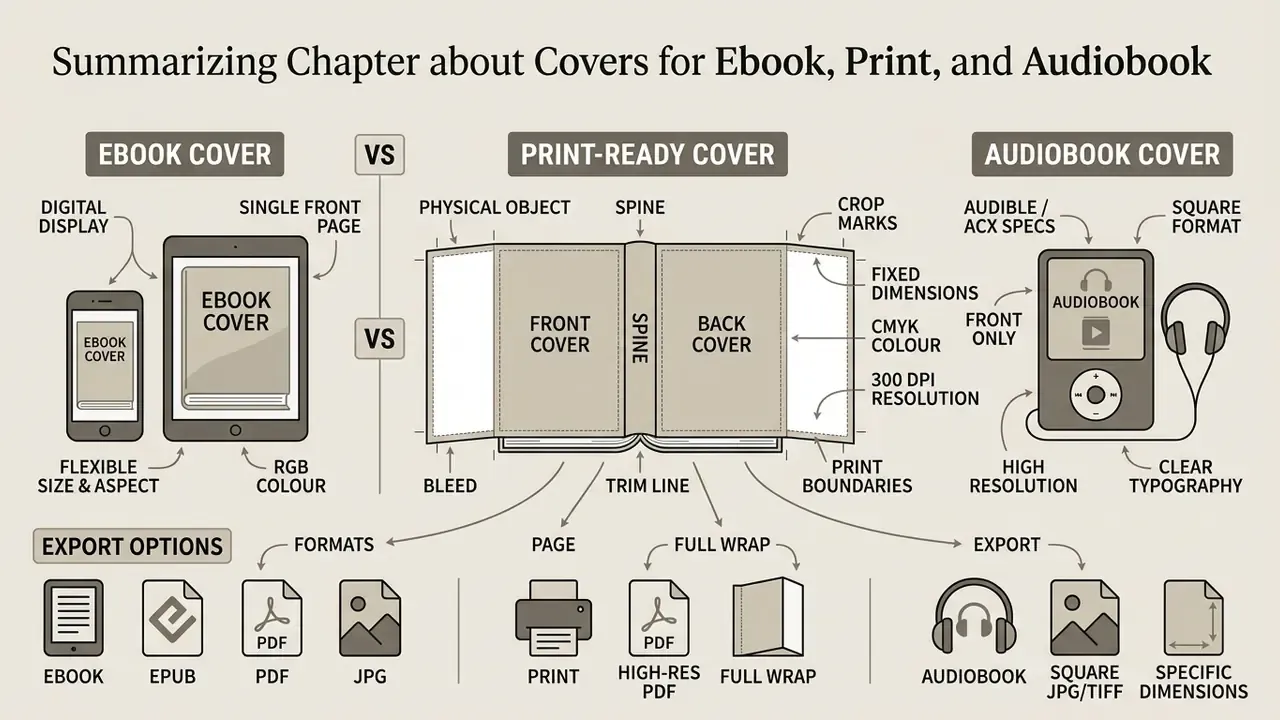
Preparing a cover file for publication means meeting strict technical specifications that differ between digital e-readers and printing presses. An ai ebook cover generator free plan produces digital display files, while print production requires a complete wraparound layout with spine dimensions and bleed margins.
Understanding these distinctions prevents layout distortion, clipped text, and colour shift during manufacturing.
How an Ebook Cover Differs from a Print Cover
An ebook cover is a single front-facing rectangular image in RGB. Standard specifications recommend 1600 × 2560 pixels, a 1:1.6 aspect ratio, saved as JPEG or PNG at 72 to 150 DPI. Some distributors accept files from 625 × 1000 px with a size cap around 5 MB, but 1600 × 2560 px remains the production standard.
A print cover, by contrast, is one flattened PDF spread holding back cover, spine and front cover side by side. Print files require CMYK conversion and a minimum of 300 DPI for sharp reproduction. Platform requirements diverge here: KDP and IngramSpark ask for 300 DPI or ppi, while some local print services still accept 150 dpi. Build to the stricter number.
When You Need Spine, Bleed and a Full Wrap Cover
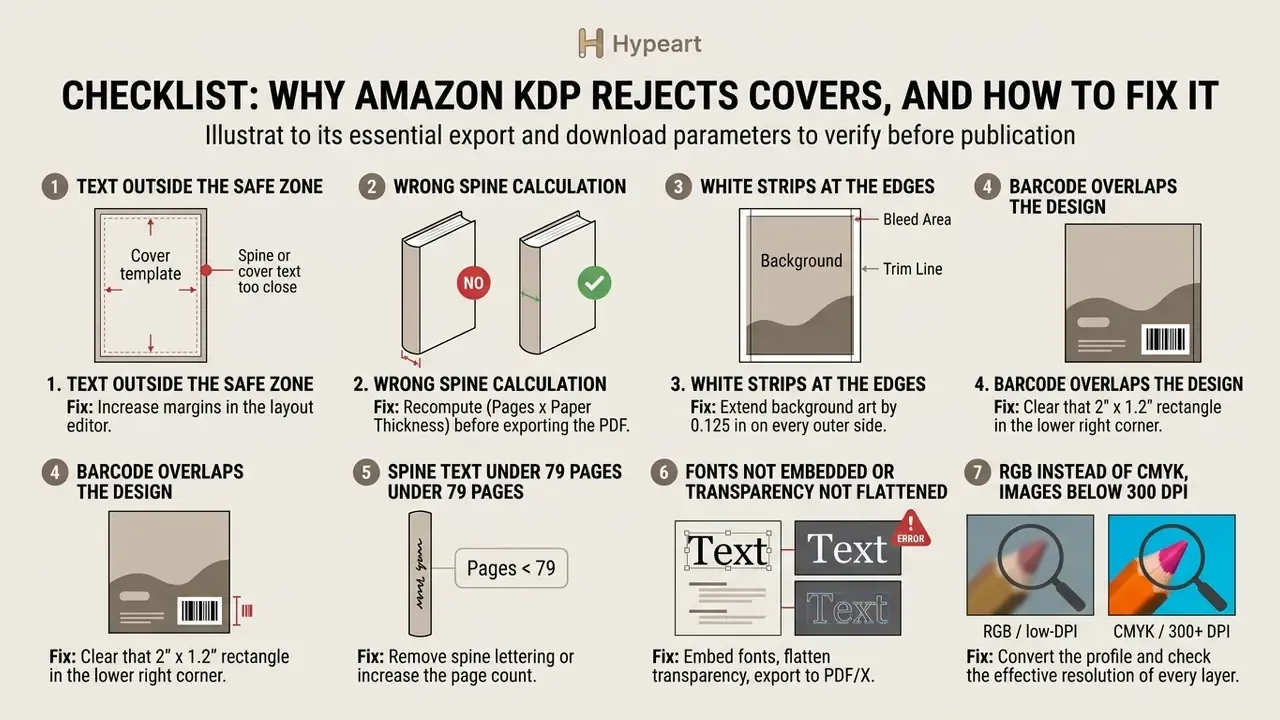
Full wrap covers are mandatory for softcover (paperback) and hardcover books. Printers require a 0.125-inch (3.175 mm) bleed on all outer edges to absorb trimming variation during binding.
Spine width is calculated from total page count and paper stock thickness with the standard formula Spine Width = Page Count × Paper Thickness Basis. On platforms such as Amazon KDP, spine text is printed only for books of at least 79 pages.
Full spread dimensions for a paperback come out as Full Width = (2 × Trim Width) + Spine Width + 0.25 in and Full Height = Trim Height + 0.25 in. The 0.25 in equals 0.125 in of bleed on each outer side; the spine itself needs no bleed, since it is not a trim line. For hardcover, edge bleed is replaced by a turn-in or wrap allowance folded over the board, and that value comes from the specific printer's template, depending on board thickness.
Audiobook Cover Requirements (Audible / ACX)
Audiobook covers follow strict square standards set by distributors such as Audible, ACX, Findaway Voices and Apple Books:
- Resolution and size exactly
2400 × 2400 pixels, 1:1 square ratio. - Colour mode and format RGB, minimum 24-bit, JPG or PNG.
- Print resolution 300 DPI.
- Boundaries and rules title and author text must stay at least 50 px from the image edges. Sales devices are banned, including "Bestseller", "CD Version", URLs and prices.
- Compositional adaptation do not mechanically crop a vertical ebook layout to a square. Re-frame the art and re-set the typography, otherwise the title drifts outside the safe zone.
- Multimedia formats some platforms support "talking covers", a short video or animation with narration built on the static cover. For those, prepare a version with no critical elements near the frame edges.
Which Export and Download Parameters to Verify Before Publication
Before uploading to self-publishing distributors such as Amazon KDP, IngramSpark or Draft2Digital, verify four technical parameters: PDF/X compliance, embedded fonts, colour mode, and image resolution. If the original generation lands below 300 DPI at physical size, raise resolution through an AI image upscaler before export, not after.
Publishers handling multi-format promotional media can also explore the hub to evaluate automated asset converters across photo and video workflows.
Technical specifications: ebook cover vs print full wrap vs audiobook
| Technical parameter | Front cover (ebook) | Full wrap spread (print) | Audiobook (Audible / ACX) |
|---|---|---|---|
| Layout composition | Front cover only | Back cover + spine + front cover | Square front cover |
| Colour profile | RGB (sRGB) | CMYK (GRACoL or Coated FOGRA) | RGB, 24-bit |
| Resolution (DPI/PPI) | 72 to 150 DPI, min 1600 × 2560 px | 300 DPI at final physical size | 300 DPI, 2400 × 2400 px |
| Bleed | None (0 in) | 0.125 in (3.175 mm) on outer edges | None; 50 px safe zone from edge |
| Spine calculation | Not required | Mandatory, depends on pages and paper | Not required |
| Export formats | JPG, PNG, TIFF | Print-ready PDF, flattened, fonts embedded | JPG, PNG |
In plain terms: ebook files forgive mistakes, print files do not, and audiobook squares punish lazy cropping.
Limitations, Open Questions and a Safe Next Step
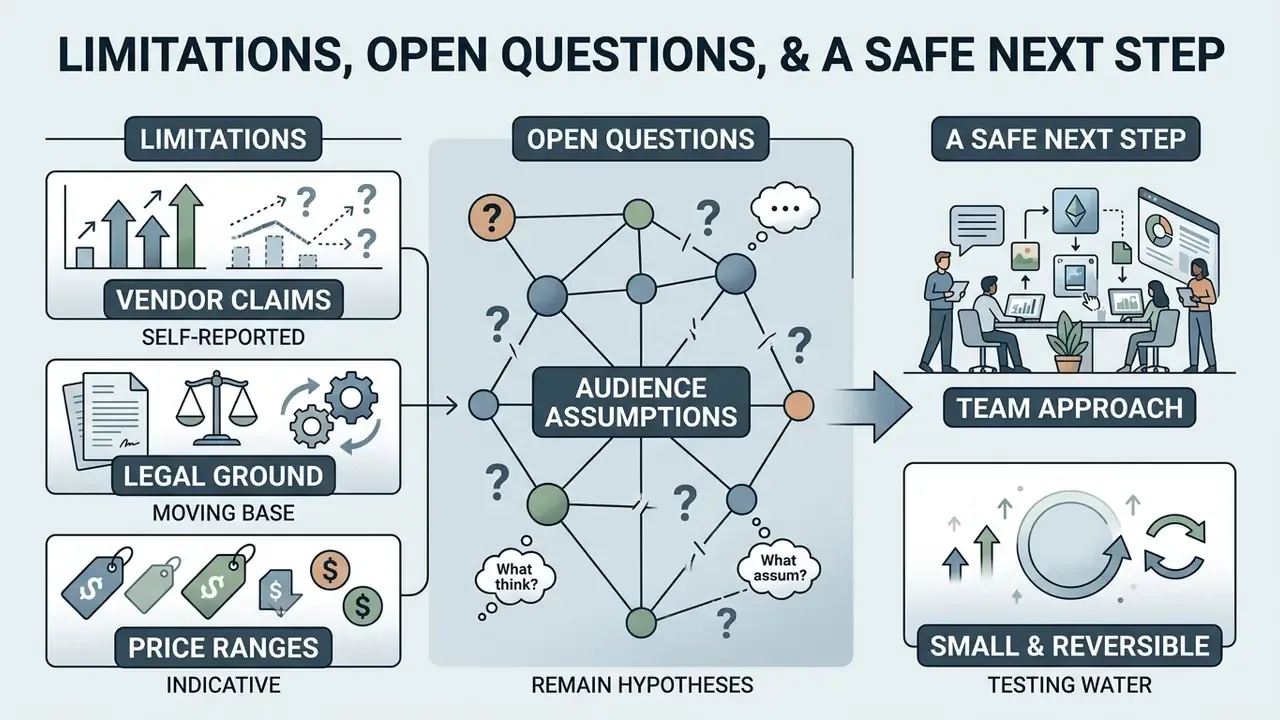
Some of the evidence here is thinner than it looks, and that should be said plainly.
- Vendor claims are self-reported. Retention policies, "copyright-free" language and licence scope come from marketing pages. Treat them as claims until confirmed in a signed contract or DPA.
- Legal ground keeps moving. The registrability of hybrid human and AI works is still being litigated. A cover that seems safe in 2026 may need a documented human-contribution record later, which is exactly why the audit trail matters.
- Price ranges are indicative. The figures above reflect publicly listed plans and change often. Re-verify before budgeting.
- Audience assumptions remain hypotheses. Statements about what publishers or governance teams prefer stay hypotheses until supported by analytics, interviews, CRM data or verified customer research.
A safe next step, for a team rather than a solo author, is small and reversible. Pick one non-sensitive title. Run the benchmark prompt protocol across two approved tools. Log prompt, seed, model version and manual edits. Then review the artefacts with legal and security before anything touches a production cover. If that dry run feels bureaucratic, it is still cheaper than an unwinding exercise after publication.
FAQ on AI Book Cover Generators
Can I upload my own photo or reference into an AI book cover generator?
Yes. Most current cover generators support image-to-image work and user reference uploads. You can supply a sketch, a character photo or a composition grid, then apply a text prompt to stylise the art while keeping the underlying structure. Some engines accept up to six reference images at once and allow masking for local regeneration.
How do I create a series of covers in a single style?
To hold visual unity across a series, fix the seed number, reuse identical style keywords in the prompt, and apply shared palette presets. You can also feed the first book's cover back as a control reference (image guidance) for later volumes, and move typography into a template with a fixed grid and type sizes.
What should I do if the AI renders garbled text or extra fingers?
Generate clean art with no lettering: state the title-safe area in the prompt and add negative prompts (no text, no distorted letters). Graphic defects are fixed by targeted retouch or masked local regeneration in an editor. Inspect faces, hands and object edges at 100% zoom before export.
Do AI generators handle rare or narrow book genres?
Generally yes. These models were trained on millions of images and recognise specific genre tropes, from LitRPG and cyberpunk to academic non-fiction. The key is describing genre attributes precisely instead of using generic phrasing, and attaching one or two references for rare visual traditions.
Do I have to declare AI use when publishing on Amazon KDP?
Yes. Amazon KDP rules from 2024 through 2026 require authors to declare AI-generated images while completing the title record. Ordinary editorial retouch or correction, classed as AI-assisted, does not require disclosure.
Which format is best for downloading an ebook cover?
For Kindle, Apple Books and Kobo, use JPG or PNG at 1600 × 2560 pixels, RGB colour, with a 1:1.6 aspect ratio.
How do I prepare an audiobook cover if I already have the ebook layout?
Do not crop the vertical layout into a square. Re-frame the art at 2400 × 2400 px, re-set the title and author name with at least 50 px clearance from the edges, save in RGB at 300 DPI, and strip any sales badges or format mentions.
Is it safe to use free generators for corporate publications?
Only under verified conditions. Confirm that the service does not train models on your prompts and uploads (Zero Data Retention or a documented opt-out), that a DPA exists, that security posture is evidenced by SOC 2 Type II or ISO/IEC 27001, and that corporate administration is available through SSO/SCIM and request logs. Otherwise uploading non-public material creates textbook Shadow AI exposure.
What should I record to prove the human contribution to a cover?
Keep a project log: initial and iterative prompts, seed, model version, date and operator, rights to references, manual edit logs covering typography, retouch and compositing, checksums of export files, and confirmation of AI disclosure on the publishing platform. Those artefacts evidence human-in-the-loop work and mark the boundary of protectable elements.