In enterprise visual workflows, unverified generative output creates real technical debt and a quiet compliance exposure. Without deterministic geometric paths, transparent node structures, and auditable asset lineage, digital visual content cannot scale reliably across multi-platform production environments. The governing technical baseline is the open web standard itself:
Executive Summary for Decision Makers
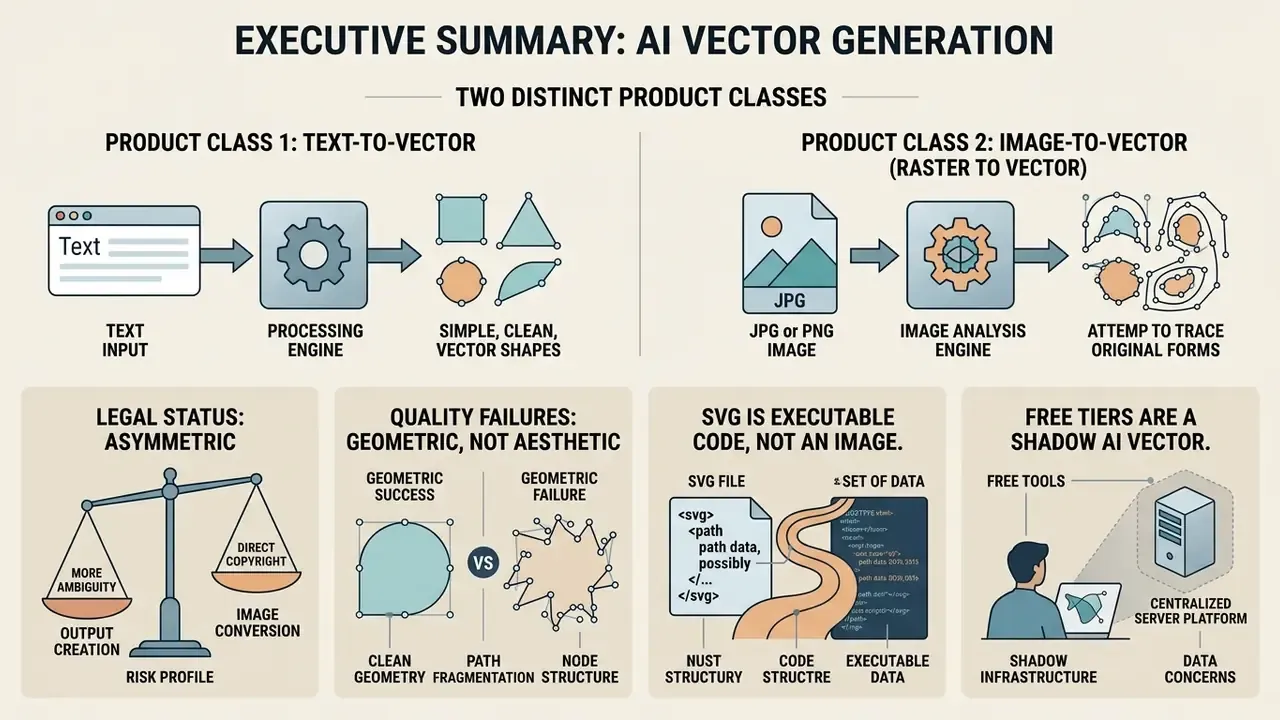
- Two distinct product classes. Native text-to-vector models (Recraft V4, Adobe Illustrator Text to Vector Graphic) synthesize SVG path code directly from prompts. Image-to-vector engines (Vectorizer.AI, Inkscape Trace, Recraft Vectorizer) trace existing PNG/JPG assets into curves. Choosing the wrong class is the most common source of unusable output.
- Legal status is asymmetric. Under US Copyright Office guidance, purely AI-generated visual output lacking human authorship cannot be registered for federal copyright protection. Platform Terms of Service, separately, control whether you may use that output commercially. Copyright eligibility and license permission are two different layers, and teams routinely confuse them.
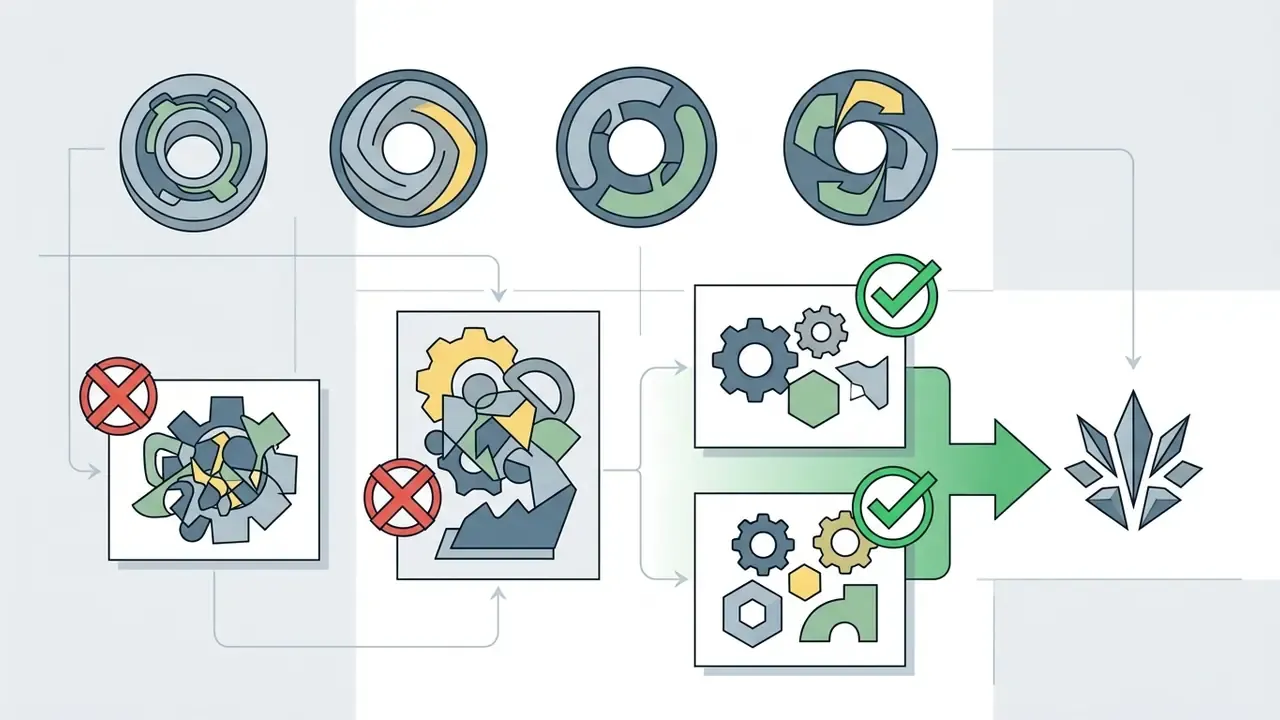
- Quality failures are geometric, not aesthetic. The dominant defect is path fragmentation: solid backgrounds arriving as dozens of overlapping micro-shapes. Enterprise selection criteria must include unified geometry, node density, and layer hierarchy, not just whether the thumbnail looks nice.
- SVG is executable code, not an image. Because SVG is XML that supports
<script>, event handlers, and external references, every AI-generated SVG entering a production application must pass sanitization and lineage logging before deployment. - Free tiers are a Shadow AI vector. Free plans frequently publish generations publicly, prohibit commercial use, and transmit proprietary logos to third-party APIs. Approved-software lists should evaluate data-retention and model-training terms alongside pricing.
How to Use This Guide
Read it as a procurement and control document, not a tutorial. The first three sections explain the mechanics: what separates raster from vector, how text-to-vector synthesis works, and how AI turns an existing PNG into curves. The middle sections cover use cases and tool selection, including the fragmentation diagnostic that decides whether an asset survives brand-system maintenance. The governance, pricing, and licensing sections are for whoever signs the purchase order or owns the approved-tools list.
Three roles get different value here. Designers will care most about prompt structure and node cleanup. Engineering leads should jump straight to the SVG sanitization checklist. Risk, legal, and procurement readers should start with the licence and lineage material, then return to the selection matrix. One caveat before we start: vendor terms in this category change quietly and often, so treat every pricing or licence statement below as a prompt to verify, not as settled fact.
What Is an AI Vector Generator and How Vectors Differ from Raster Graphics
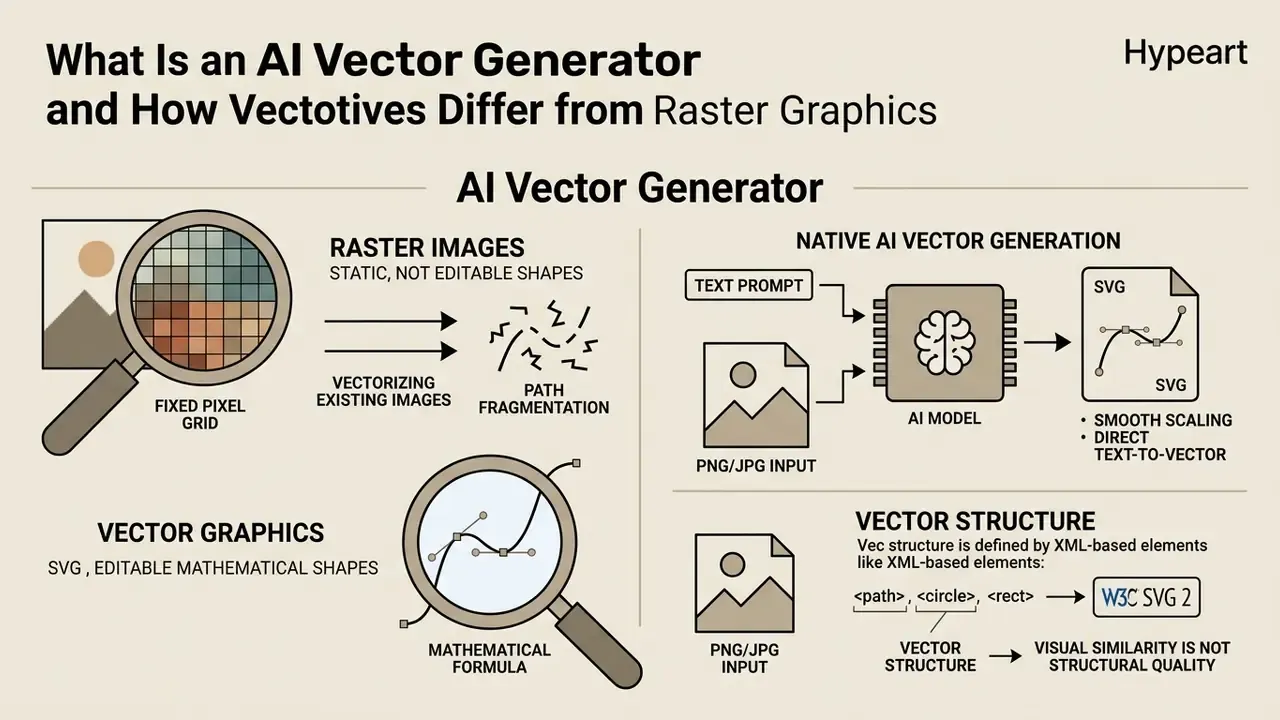
An AI vector generator is an automated visual synthesis tool designed to produce editable mathematical shapes rather than static pixel matrices. By processing natural language instructions or analyzing uploaded visual inputs, these algorithms construct clean XML-based SVG code. That distinction lets designers and software engineering teams scale graphic assets almost infinitely without pixelation, distortion, or file size inflation.
«Scalable Vector Graphics are vital for modern image rendering due to their scalability and versatility; prior methods often lacked semantic understanding of SVG primitives.»
Raster Images, PNG, and JPG vs SVG Vectors
Raster images, such as PNG and JPG files, store visual information as fixed rectangular grids of colored pixels. When an operator enlarges a PNG or JPG file beyond its native sampling resolution, the rendering engine has to interpolate adjacent pixels. The result is blurriness, lost edge definition, and jagged contours.
According to the W3C SVG 2 Specification, vector graphics describe two-dimensional graphics using an XML path coordinate space. Because SVG vectors represent shapes with mathematical formulas, scaling an SVG file simply recalculates coordinate transformations across display resolutions. So SVG vectors stay sharp on high-DPI retina displays, respond to CSS styling, and keep compact file sizes for web interfaces.
Visual similarity, though, is a poor proxy for structural quality:
«Pixel-level metrics such as MSE fail to capture the unique qualities of vector graphics: two SVGs may render similarly yet differ drastically in path structure.»
The operational consequence is blunt. Reviewing an AI-generated vector as a flattened preview thumbnail tells you almost nothing. Production QA must open the underlying path tree.
Native AI Vector Generation vs Vectorizing Existing Images
Native AI vector generation creates mathematical graphics directly from natural language prompts using multimodal transformer or diffusion models. AI vectorization, by contrast, converts existing raster images, such as PNG or JPG logos, into clean SVG paths using contour-tracing and segmentation algorithms. Search behaviour reflects the split: queries like "ai art vector" and "ai art generator vector" usually come from someone who wants novel artwork, while "ai generate vector from image" comes from someone holding a legacy file.
Research on multimodal SVG modeling shows that native text-to-vector systems, such as StarVector (CVPR 2025) and SVGFusion, construct SVG code by predicting sequential drawing commands or decoding continuous latent spaces. Image-to-vector converters, including Vectorizer.AI, analyze pixel contrast boundaries and fit Bézier curves over raster shapes. Native generation excels at synthesizing new graphic concepts; vectorization specializes in turning legacy art, sketches, and bitmap logos into editable vector artwork. Teams comparing pixel-based and geometry-based pipelines can review our reference material on AI image generators to see where raster synthesis is still the better tool.
Practical limits differ by class. Native generators are bounded by model context windows and code-generation fidelity, and published research notes token-context caps that are inadequate for highly complex SVG documents. Vectorizers are bounded by source quality: compression artifacts, anti-aliased edges, and gradient banding in the input propagate straight into the output path set. In other words, using AI for vector art and using AI for vector images that already exist are two separate engineering problems with two separate failure modes.
To streamline asset workflows, teams frequently use our AI Media Calculators to estimate rendering latency and compare raster-to-vector bandwidth consumption across web applications.
Table 1: Structural comparison between raster images (PNG/JPG) and SVG vectors in digital production
| Functional Property | Raster Images (PNG / JPG) | SVG Vectors |
|---|---|---|
| Internal Data Structure | Fixed grid of pixel samples with discrete color values | XML math formulas, Bézier curves, and geometric paths |
| Resolution Scaling | Lossy interpolation; degrades upon enlargement | Infinite resolution-independence without quality loss |
| Layer & Element Editability | Requires pixel selection, painting, or destructive edits | Node-by-node path manipulation, fill adjustments, and CSS edits |
| File Size Dynamics | Increases significantly with higher pixel dimensions | Remains lightweight; scales with path and node complexity |
| Animation & Interactivity | Frame-sequence formats (GIF, APNG, WebP) required | Native CSS, SMIL, and JavaScript animation on individual path IDs |
| Primary Production Use Cases | Complex photography, detailed textures, static bitmaps | UI icons, design systems, logos, typography, flat art |
| Import Formats (typical AI editors) | PNG, JPG, WebP, GIF, BMP, AVIF | SVG, SVGZ, EPS, AI (Adobe Illustrator), PDF |
| Export Formats | PNG, JPG, WebP, AVIF | SVG, SVGZ (compressed SVG), EPS, AI (Adobe Illustrator), PDF, DXF |
The comparison confirms that raster formats remain necessary for photographic media, while SVG vectors perform better for interface assets, responsive branding, and programmatic design systems. Note the format asymmetry in commercial tools: browser-native SVG and PNG handling is usually free, whereas opening proprietary or compressed containers such as .AI, .EPS, .PDF, and .SVGZ often consumes paid credits or requires a desktop application. The reason is mundane. Those formats need dedicated parsers, not a standard XML reader.
How an AI Text to Vector Generator Works
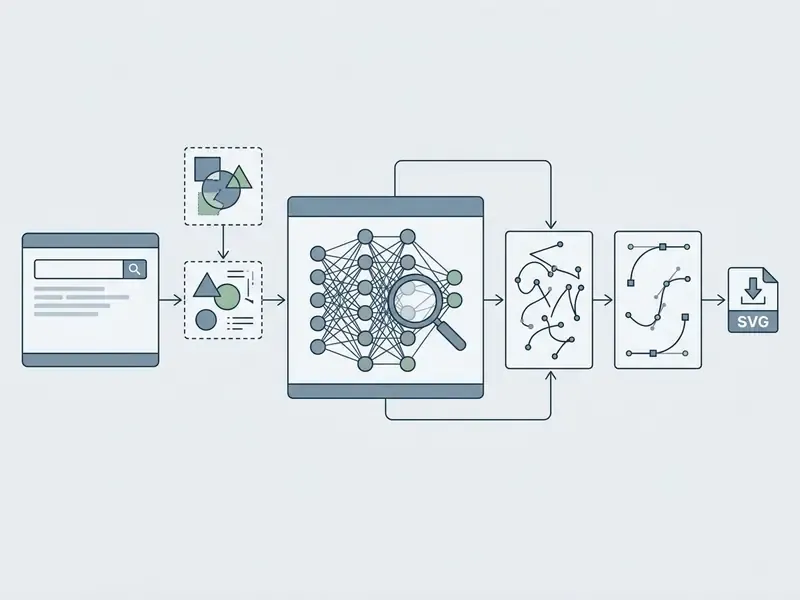
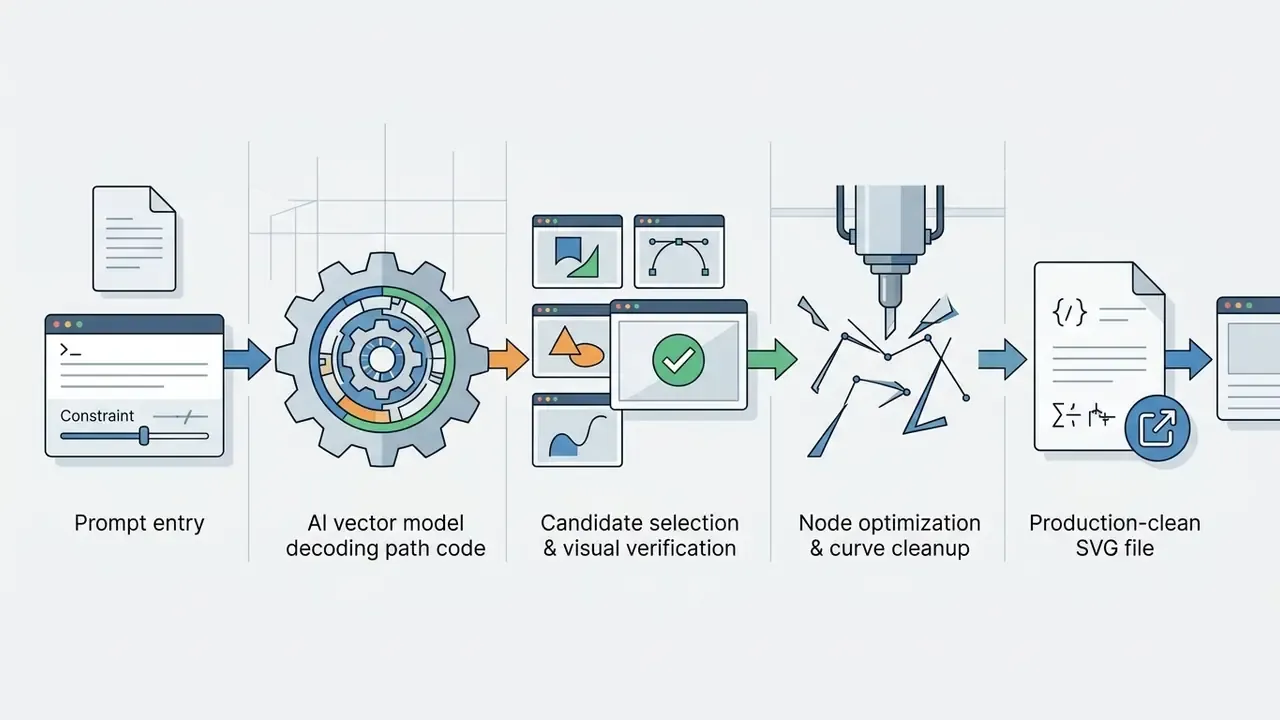
An ai text to vector generator translates descriptive text prompts into functional SVG code through a two-stage computational process. First, an encoder reads the prompt and extracts semantic attributes, spatial relationships, and aesthetic styles. Second, a specialized vector decoder synthesizes discrete path tokens or optimizes continuous control points to produce resolution-independent vector illustrations.
«StrokeNUWA tokenizes vector graphics into compact stroke tokens, achieving up to 94× inference speed-up and 6.9% better SVG code compression than prior methods.»
How to Draft a Prompt for Vector Illustrations, Icons, and Logos
Drafting effective prompts for an ai generate vector art pipeline means specifying visual geometry, line weight, color palettes, and output constraints. Vague prompts produce cluttered paths and unwanted gradients that make downstream vector editing miserable.
«The SVG-1M dataset provides 65,745 examples with chain-of-thought annotations, showing that step-by-step shape and layout instructions improve generation accuracy and interpretability.»
To get clean ai generated vector art, operational teams should structure prompts around four parameters:
When you need scalable UI assets, a prompt like "flat vector icon of a security shield, minimal geometric shapes, 2px uniform stroke, solid blue and dark slate color palette, isolated on plain white background" produces clean, production-ready paths. Creators who want comprehensive design terminology can review our curated glossary to standardize prompt syntax across teams, and can cross-reference conventions used by general AI art generators when style transfer is required.
Generating Variants and Preparing SVG for Export
Modern ai text to vector generator platforms return multiple visual candidates for every prompt. Operators then have to judge each set of ai generated vector images on path continuity, node density, and layer organization before anything ships.
Updated (evidence-based replacement for anonymous internal case data, see Appendix A): peer-reviewed work on hybrid SVG pipelines quantifies why post-generation optimization matters.
«Chat2SVG outperforms existing methods in visual fidelity, path regularity, and semantic alignment by combining template-based code generation with diffusion-based geometry refinement.»
Published SVG optimization pipelines typically run in sequential stages, namely latent inversion, latent optimization, and point-level optimization, and they may repeat iteratively until the candidate matches the target specification. Reproducing that logic in-house means treating cleanup as a defined stage with an owner, not as something a designer squeezes in before lunch.
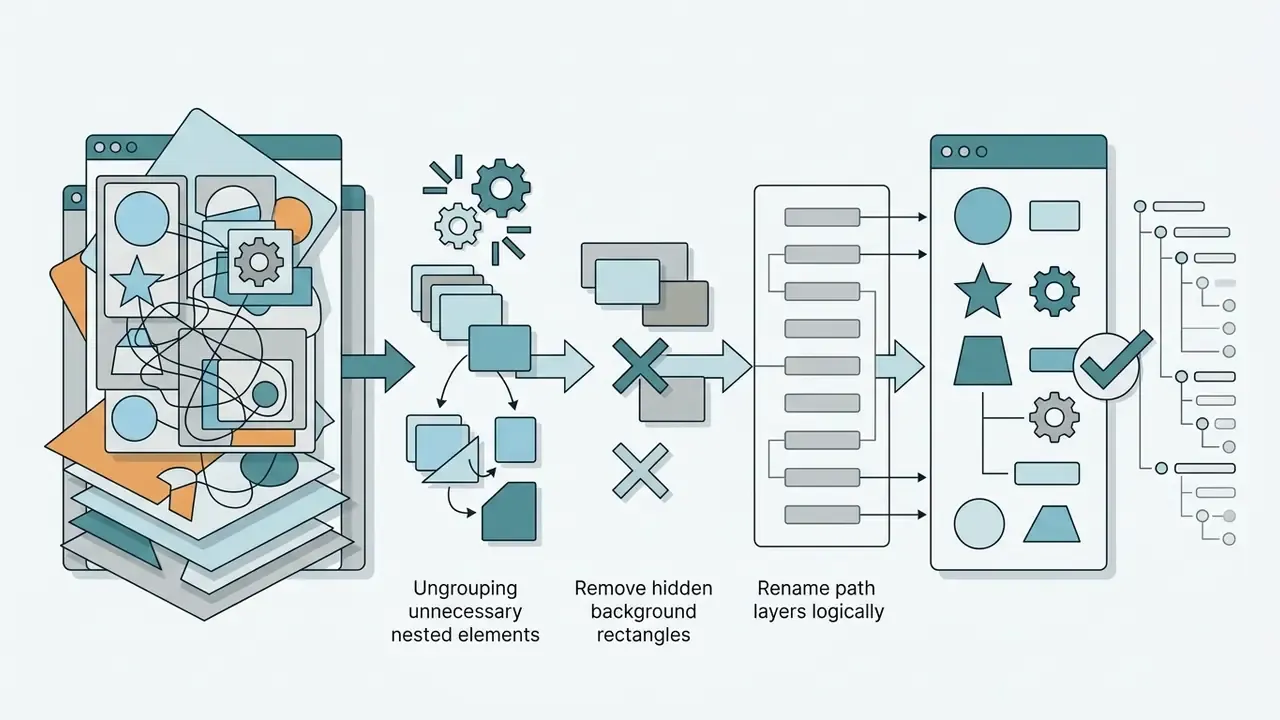
To prepare generated SVG vectors for production deployment, follow a standardized cleanup protocol:





How AI Creates Vector from Image: Converting PNG and JPG to SVG
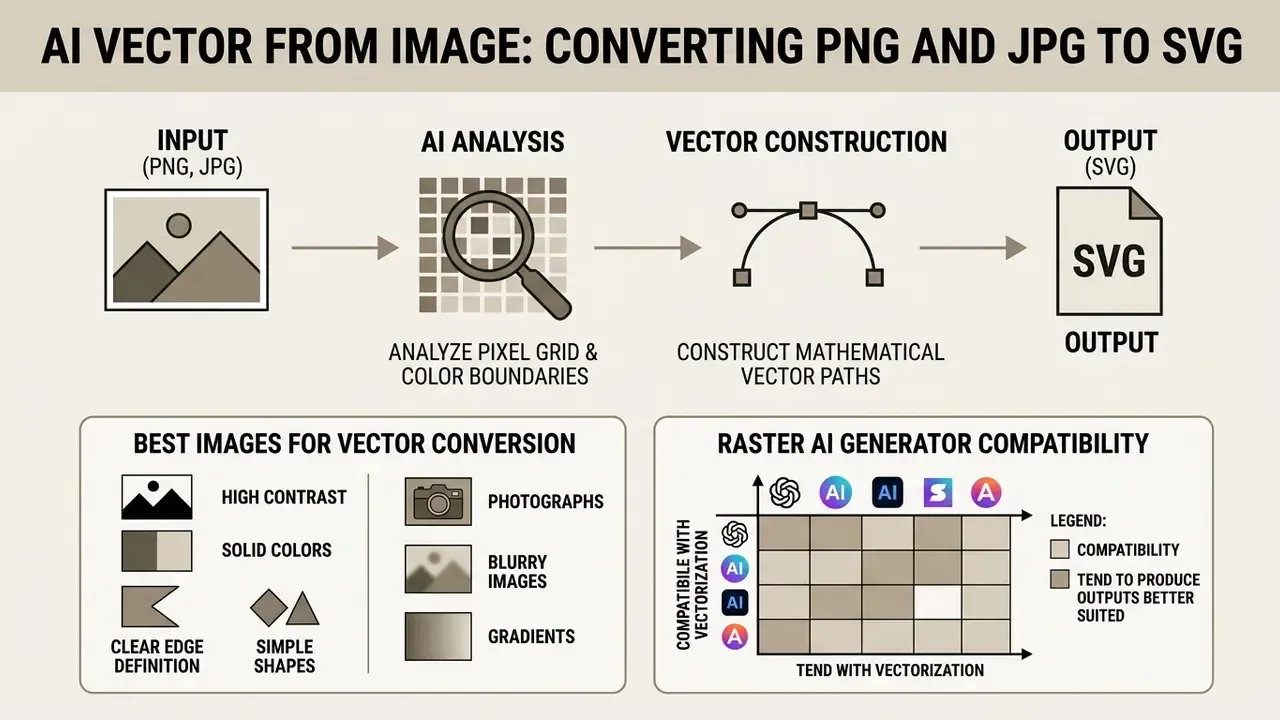
An ai create vector from image tool analyzes the pixel grid of a raster file, identifies color boundaries, and constructs matching mathematical vector paths. Legacy auto-trace engines relied purely on basic thresholding. An ai image to vector generator instead uses machine learning segmentation to infer intended shapes, which yields smoother curve geometry and calmer node placement.
Formalizations of image vectorization describe the canonical pipeline as color quantization to group regions, followed by boundary approximation with Bézier curves. Newer multi-stage systems swap hand-tuned thresholding for learned segmentation masks, a global optimization pass, and a second detection pass that recovers missing components.
Which Images Work Best for Image to Vector Conversion
Raster images with high contrast, sharp edges, and limited color counts convert most cleanly. Logos, line art, icons, and hand-drawn doodles trace well because their distinct boundaries let algorithms fit accurate Bézier curves.
Updated (replaces an unverifiable general reference to "CVPR research", see Appendix A):
Complex photographic images tell the opposite story. Continuous gradients, soft shadows, and high-frequency noise produce grotesquely complex vector output. Photos converted into SVG routinely generate hundreds of thousands of microscopic path fragments, which bloats file size and drags rendering performance. Where the source resolution is genuinely too low for tracing, improving the raster first with AI image upscalers beats tightening trace thresholds.
Raster AI Generator Compatibility Matrix for Vectorization
Most teams do not vectorize photographs. They vectorize output from another AI model, and compatibility varies sharply by generator:
- GPT-4o / ChatGPT Highly compatible. Flat lighting, crisp silhouettes, non-overlapping color regions, and low color counts make it a strong upstream source for standard AI vectorization workflows. Capability boundaries are covered in our overview of ChatGPT image generation.
- Midjourney Moderately difficult. It injects soft gradients, ambient occlusion, semi-transparent opacity layers, and micro-textures even when you ask for minimalism. An image that looks simple in preview often collapses once traced, producing bloated SVG files with unwanted color banding. Fix: append
--no shadows, gradients, realistic texturesbefore attempting raster-to-vector tracing; see our breakdown of Midjourney output characteristics. - Recraft Dual-path. It offers dedicated native vector generation and high-quality raster output that vectorizes cleanly when prompted for flat, geometric design.
- Adobe Firefly / Illustrator Strongest on technically complex imagery with lighting, shadow, and depth, which is exactly where most vector models still fail. Weaker on unified geometry, as the fragmentation analysis below explains.
- Stable Diffusion (including FLUX checkpoints) Highly variable. Excellent with flat-art LoRAs and line-art conditioning, poor on default photorealistic checkpoints.
Whatever sits upstream, prompting for minimalism, flat color, and high contrast measurably improves the trace.
How to Get a Clean Vector After Image Conversion
Getting a clean vector from a raster source takes systematic preprocessing and post-conversion adjustment. With an advanced ai image vector generator or a specialized service such as vectorizer ai, designers can tune tracing parameters to control node distribution and shape fidelity.
To maximize output quality, run this workflow:
- Pre-Trace Background RemovalRemove background colors, chromatic aberration, and compression artifacts from input PNG or JPG files. Standard AI photo editors, the open-source gimp photo editor, and the free alternatives documented in our free photo editor guide all handle this step without licence friction.
- Color Quantization AdjustmentLimit the palette to the exact number of required flat colors, typically 2 to 12, to prevent path fragmentation.
- Threshold & Corner TuningSet corner preservation to keep sharp geometric angles while smoothing natural curves. Published Illustrator walkthroughs commonly start around 80–90% on Paths and 50–70% on Corners for logo-class artwork.
- Transparency & Alpha PreservationConfirm transparent backgrounds survive export, so converted assets do not arrive inside a solid bounding box. Alpha holds up cleanly in SVG and PNG; PDF-based handoffs may need transparency-aware export or explicit flattening, depending on the receiving editor.
Design teams converting legacy marketing graphics usually clean input noise in a general-purpose photo editor before starting automated vector tracing. That single habit reduces stray path count more than any trace-setting adjustment I have seen documented.
Converting Hand-Drawn Sketches and Doodles into Vectors
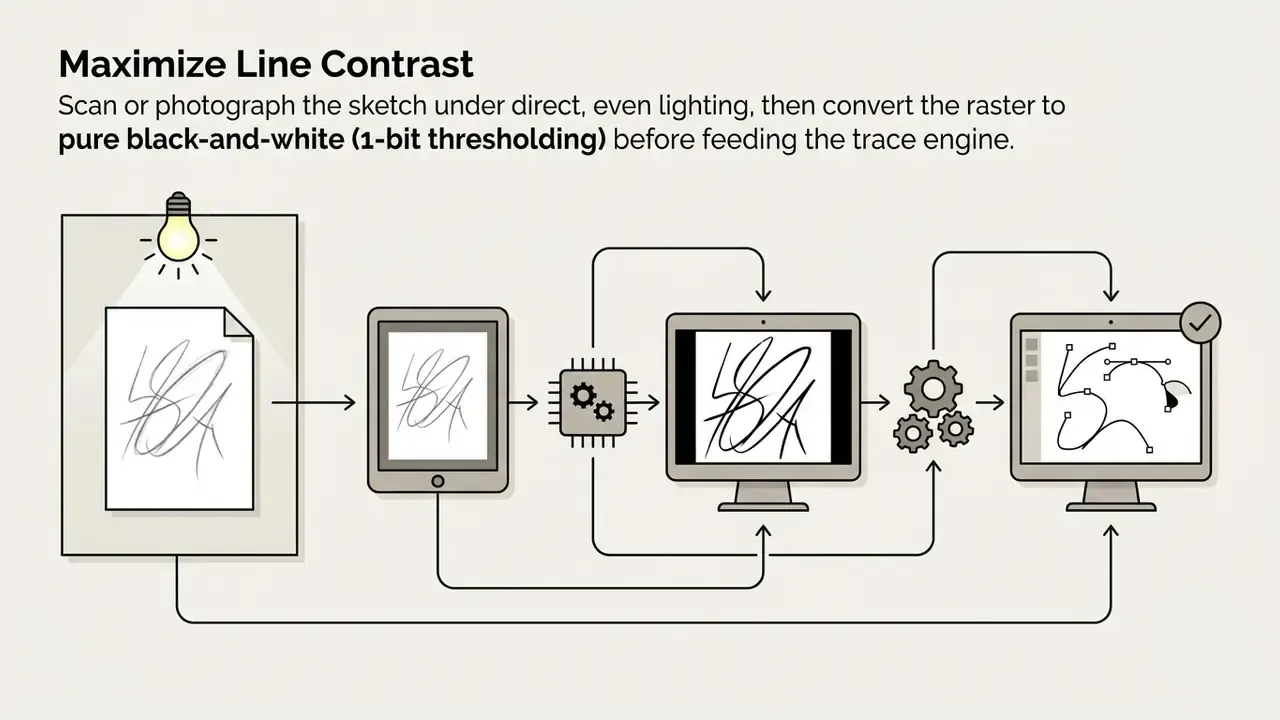
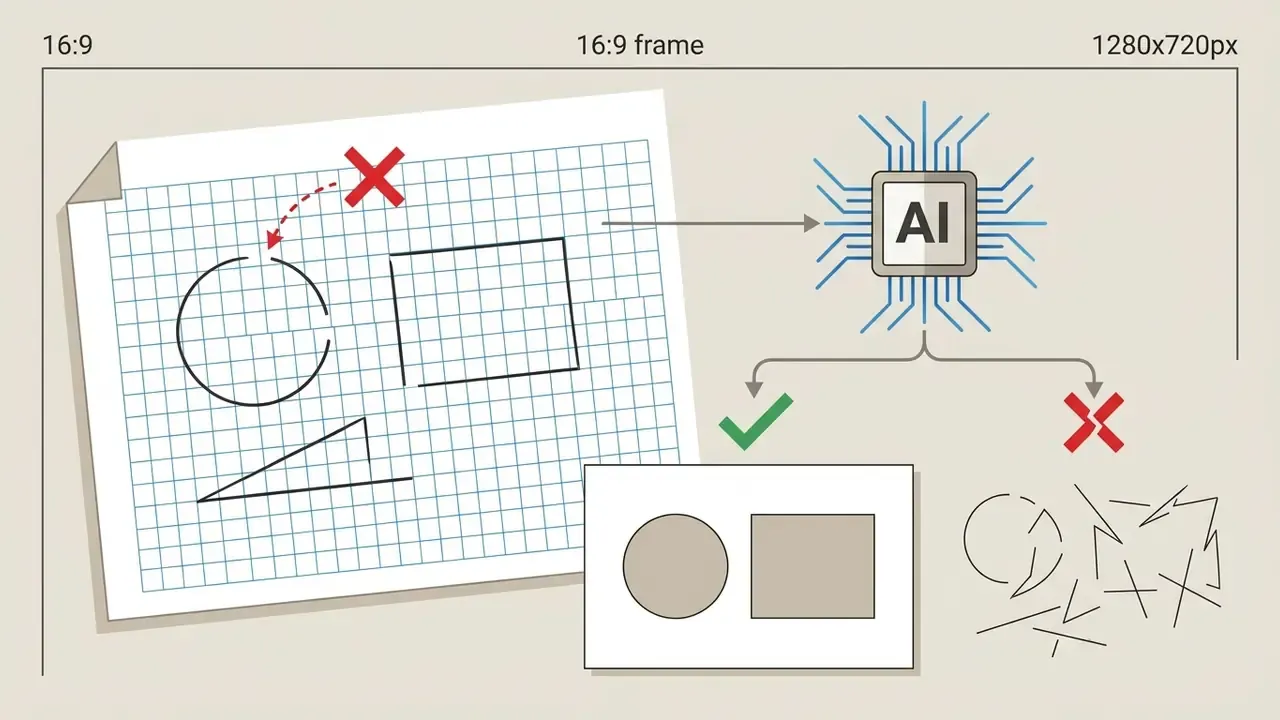
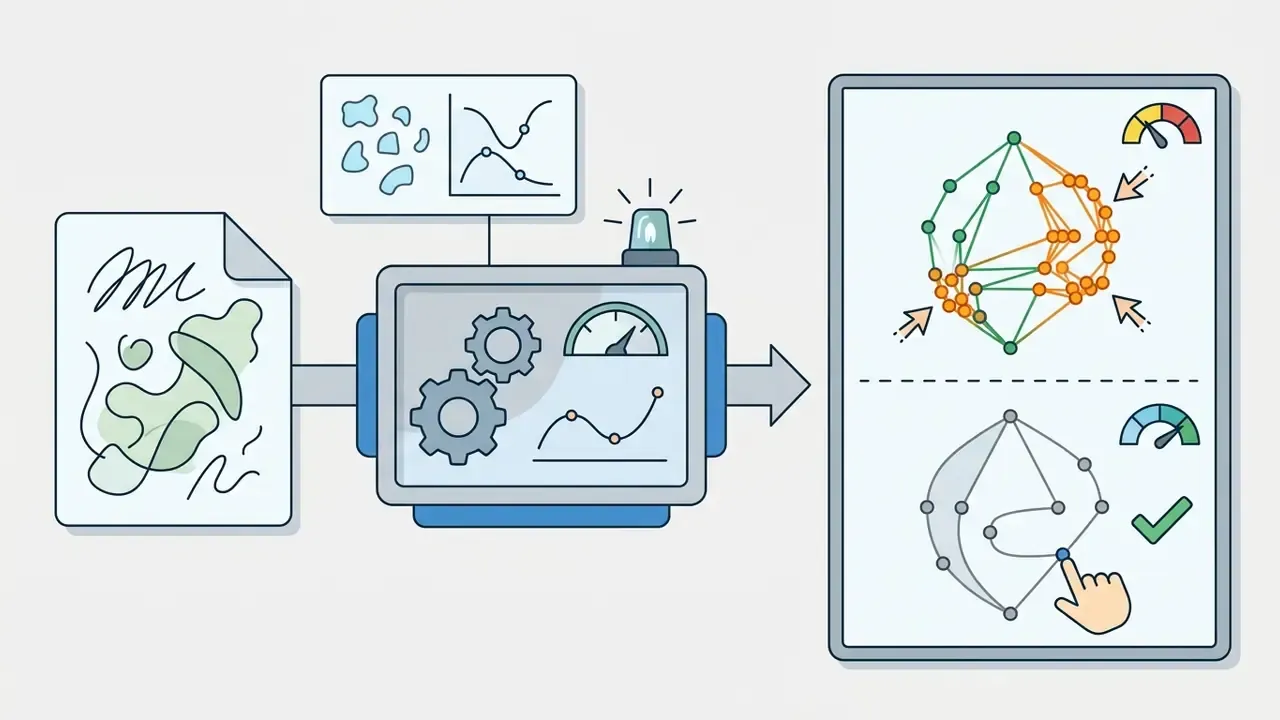
Sketch-to-vector is a separate sub-workflow, not a variation on photo tracing, because the model must infer stroke centerlines and closure intent rather than region boundaries.
«The SKETIkZ dataset contains 3,231 sketch–TikZ code pairs, including paper, whiteboard, and tablet drawings; evaluations show that current vision-language models struggle with this task.»
For hand-drawn doodles or whiteboard sketches:

What You Can Create with an AI Generator for Vector Art
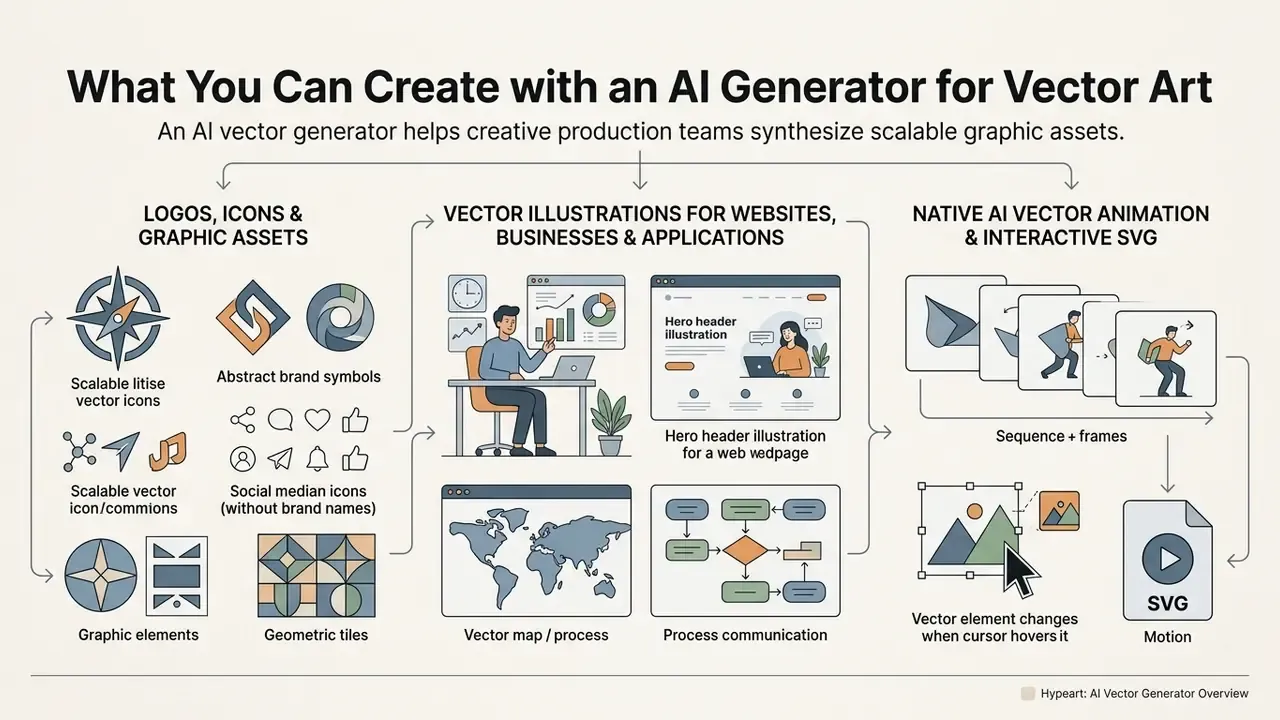
An ai generator for vector art lets creative production teams synthesize scalable graphic assets for both digital and print media. Because generated vector assets hold their mathematical geometry, organizations can deploy the same visual element across mobile app interfaces, executive web dashboards, responsive design systems, and large-format print marketing.
Logos, Icons, and Graphic Assets
Designers use AI vector software to produce scalable logos, interface icons, and design tokens that stay crisp across screen resolutions. System icons need precise pixel-grid alignment, and AI vector generators speed up unified icon sets by holding line weights and geometric proportions consistent.
Apple's Human Interface Guidelines and Google's Material Design both require interface icons to scale smoothly across display scales while staying legible. Apple recommends PDF or SVG precisely because vector assets rescale automatically on high-resolution displays, and Material Design pins system icons to a 24 × 24 dp grid.
«StarVector surpasses vectorization baselines on DinoScore in six of eight benchmarks by using semantically aware SVG primitives such as ellipses, polygons, and text elements.»
An ai image generator vector art pipeline lets engineering teams export SVG icon libraries that drop into modern UI frameworks without rework. Brand teams focused on marks and wordmarks can review our dedicated notes on AI logo generators for licence-safe workflows, and programmatic teams can route batch jobs through the AI Media API rather than clicking through a web canvas.
Vector Illustrations for Websites, Businesses, and Applications
Organizations use AI to create vector image suites for landing pages, mobile onboarding screens, and corporate presentation materials. Generating vector illustrations in one visual style strengthens brand identity across touchpoints. Academic work on interactive style transfer for vector graphics models each design as a graph of primitive elements and semantic relations, computes correspondence, then transfers style. That is the structural reason "same-prompt, same-style" consistency is achievable in vectors and unreliable in raster generation.
When building interactive decks, corporate communications teams often combine generated vector elements with specialized presentation software. Content creators can study design integrations in our gamma ai presentation guide to optimize slide templates and interactive visual assets.
Native AI Vector Animation and Interactive SVG
Emerging foundational models are pushing text-to-vector synthesis into procedural vector animation. Because AI-generated SVG output consists of discrete, addressable code elements, CSS or GSAP keyframes can be bound programmatically to generated path IDs. That enables interactive web UI icons that respond to hover, focus, and loading states out of the box, with no sprite sheets and no frame sequences.
Two requirements follow. First, path IDs and layer names must be deterministic and semantically labelled at export time, since randomly hashed IDs break animation bindings on every regeneration. Second, animated SVG must pass the same sanitization checklist as static SVG, because SMIL animation and event attributes are legitimate scripting surfaces. Teams weighing vector animation against frame-based output can review our animation maker guide, the format trade-offs in our gif animation maker notes, and the workflow described in our gif maker from video walkthrough.
How to Choose an AI Tool for Vector Art and Vectorizer AI
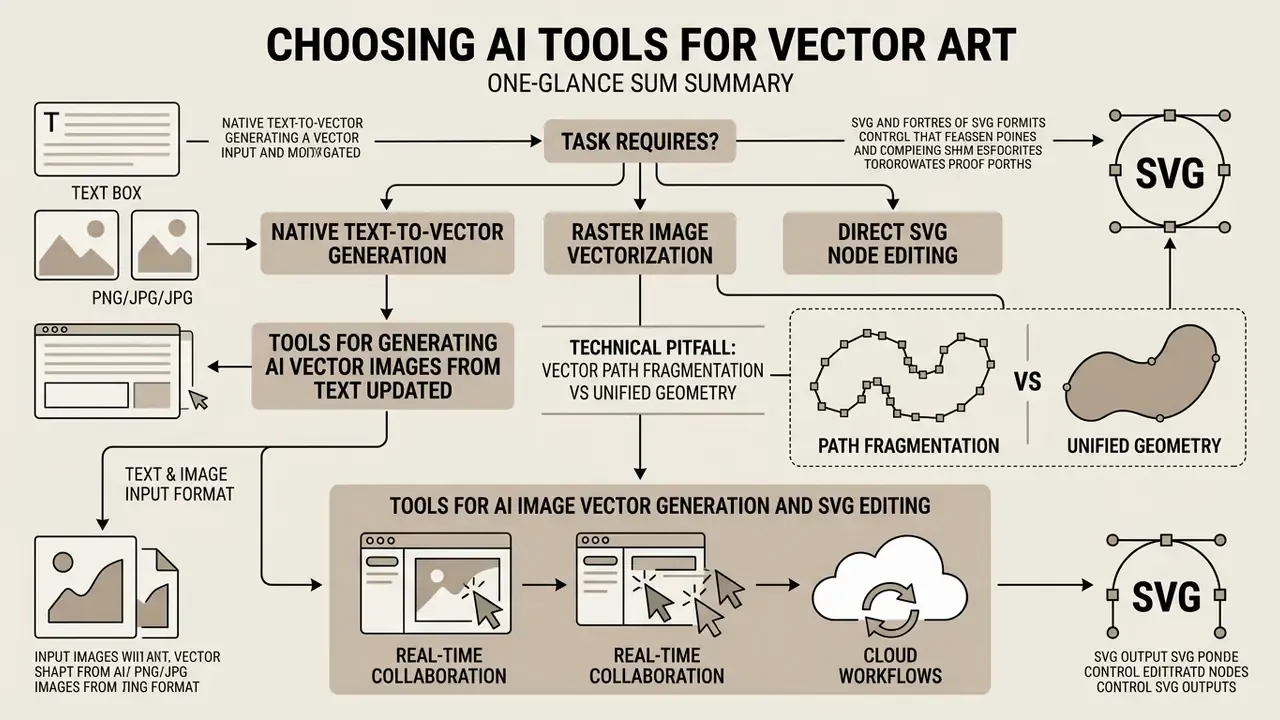
Choosing an ai tool for vector art depends on one question: does the task need native text-to-vector generation, raster image vectorization, or direct node editing inside an SVG environment? Creative teams should evaluate input capability, path generation accuracy, editor integration, and licensing constraints before committing to a platform.
Tools for Generating AI Vector Images from Text
Dedicated text-to-vector platforms create original graphics straight from descriptive prompts. Enterprise environments such as Adobe Illustrator's Text to Vector Graphic and Recraft V4 generate multi-layered SVG assets with organized path hierarchies and editable color swatches. Adobe exposes generation for subjects, scenes, icons, and patterns from the Contextual Task Bar and Properties panel, with an option to match the active artboard style. Recraft publishes vector-specific models with documented generation times and API access that returns production-ready SVG.
Updated (replaces an unsourced claim about "superior semantic alignment", see Appendix A):
«SVGFusion achieves lower FID, higher CLIPScore, and better aesthetic and human-preference scores than IconShop, at significantly lower generation time cost.»
When you use AI to generate vector images from prompts, prioritize tools that expose explicit control over line weight, layer separation, and style consistency.
Technical Pitfall: Vector Path Fragmentation vs Unified Geometry
The most consequential quality difference between text-to-vector models is also the least advertised: path fragmentation. In fragmented output, solid color areas and simple backgrounds arrive split into dozens of overlapping segments instead of a single fill. Adobe Firefly-based generation is a documented example, where backgrounds that should be clean fields of color often arrive broken into many unnecessary fills. That inflates file size, multiplies DOM nodes at render time, and makes manual node editing practically impossible.
Unified geometry keeps broad color fills intact as single scalable shapes with minimal artifacts, which is what makes downstream recoloring, theming, and animation feasible. When evaluating a generator, run this three-minute diagnostic on any candidate export:
- Open the SVG in Inkscape or Illustrator and check the object count for a flat background. A single-color background should be one or two objects, not forty.
- Select the largest fill and count anchor points. A rectangle with more than a handful of nodes signals trace-style fragmentation rather than native geometry.
- Attempt a global recolor by fill value. If a visually uniform area needs several separate recolors, the file has fragmented geometry and will not survive brand-system maintenance.
Prioritize tools built on continuous spatial or code-generation models, such as Recraft V4, StarVector-class architectures, and diffusion-refined pipelines like Chat2SVG, where path regularity is an explicit optimization objective rather than a lucky byproduct of tracing.
Tools for AI Image Vector Generation and SVG Editing
Dedicated ai image vector generator engines focus on turning existing raster images into editable paths. Specialized vectorizers such as Vectorizer.AI use deep learning to predict underlying geometry and produce smoother curve fits than classic tracing software. Documented input support spans PNG, JPG, GIF, BMP, and WebP, with export to SVG, EPS, DXF, and PDF, plus SDK, CLI, and authenticated HTTP access for programmatic workflows. Vectorizer.io-class tools take the opposite stance, exposing contouring, color counts, and line-rounding controls, so quality depends on operator tuning rather than automated cleanup. Teams comparing adjacent platforms can consult our roundup of the best AI image generators before locking a stack.
Post-conversion work needs real editing features. Inkscape, Figma, and Adobe Illustrator let artists edit individual anchor points, adjust Bézier handles, and modify path fill attributes. Inkscape also supports export to plain SVG, which strips application-specific namespaces, a practical requirement for cross-editor interchange. Organizations extending static vector assets into motion deliverables can review our guidance on animation makers and frame-based export formats.
Real-time collaboration and cloud workflows. Cloud-based vector editors increasingly ship live workspace sharing. Collaboration starts by sharing a project URL, with concurrent editing, integrated chat, and cross-device sync, so the same SVG continues on another machine without manual file transfer. For agencies and distributed design-system teams, that removes the version-drift problem that plagues desktop-only pipelines. From a governance angle, though, URL-based sharing is also an access-control surface. Link permissions, expiry, and workspace membership need review before proprietary brand geometry gets uploaded anywhere.
Table 2: Selection matrix for enterprise AI vector generation and editing software
| Platform / Tool | Primary Input Type | Vector Output Quality | Node Editability | Data Privacy / Model Training Posture | Commercial IP Position | Pricing Model | Ideal Operational Scenario |
|---|---|---|---|---|---|---|---|
| Recraft V4 | Text prompts & raster reference | High precision; unified geometry; clean layer organization | Built-in canvas editing; full SVG export | Free tier publishes generations publicly; paid tiers keep generations private | Commercial rights granted on paid plans; free tier commercial use restricted or attribution-conditional | Freemium (paid tier required for unrestricted commercial rights) | Generating brand illustration suites and UI design assets |
| Adobe Illustrator AI | Text prompts & active artboard | High precision; professional native paths; prone to fill fragmentation | Complete node and path control within Illustrator | Enterprise agreements and admin console controls available via Creative Cloud | Enterprise-oriented licensing with indemnity terms on business plans | Paid subscription (Adobe Creative Cloud) | Enterprise design workflows requiring native Creative Cloud integration |
| Vectorizer.AI | Bitmap images (PNG, JPG, WebP, GIF, BMP) | Exceptional curve fit; smooth path generation | Export-oriented; requires external SVG editor | Third-party API upload, so proprietary source art leaves the perimeter; verify retention terms | Output rights follow the source asset you own; watermarked free previews | Paid API & monthly subscription (credit-based) | Converting legacy logos, raster graphics, and doodles into clean SVG |
| Canva AI Vector | Text prompts & design assets | Moderate complexity; simplified path structure | Basic color recoloring and element grouping | Team/Enterprise tiers offer admin governance; consumer tiers less granular | Commercial use tied to subscription tier; SVG export on Pro | Included in Canva Pro subscription | Marketing teams producing rapid social media and web graphics |
| Inkscape (Native Trace) | Bitmap images | Variable; depends on manual threshold settings | Complete open-source node editing environment | Fully local and offline processing, no data egress, strongest posture for regulated environments | No platform licence layer; rights follow source material | Open source / free | Cost-sensitive or regulated teams requiring offline vector editing and manual tracing |
Two selection rules fall out of the matrix. First, in regulated environments, local processing (Inkscape, desktop Illustrator) removes the third-party upload question entirely and should be the default for unreleased brand marks. Second, in cloud tools, "free" and "commercially usable" are rarely the same tier, so treat the free plan as an evaluation sandbox rather than a production pipeline. Comparable licence trade-offs in adjacent categories are documented in our Canva AI generator overview.
Enterprise Governance: SVG Security, Data Privacy, and Audit Trail
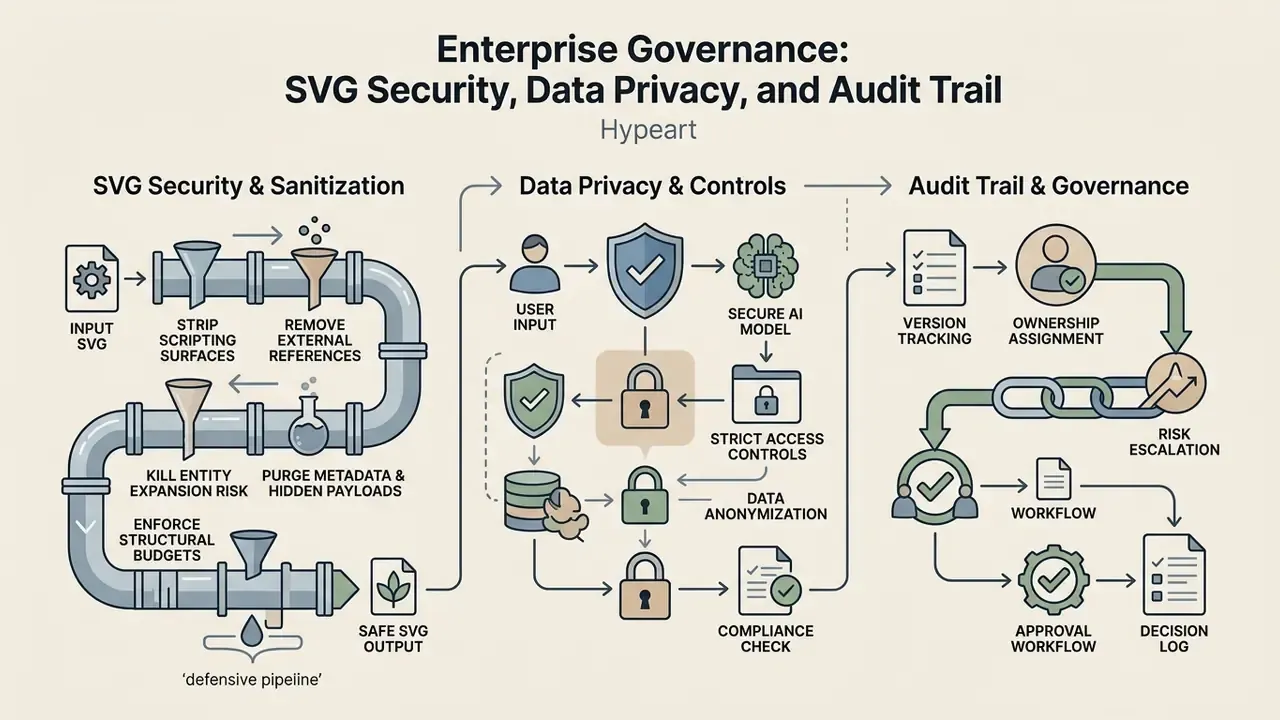
SVG is not an image file in the security sense. It is an XML document that browsers parse and execute. That single fact changes the risk profile of AI-generated vector assets in any production application, and it explains why vector output needs a validation gate that raster output does not.
SVG Sanitization Checklist Before Production Deployment
- Strip scripting surfaces.Remove
<script>elements,on*event attributes (onload,onclick,onmouseover), andjavascript:URIs. Inline SVG injected into the DOM without sanitization is a documented cross-site scripting vector. - Remove external references.Eliminate
<foreignObject>, externalxlink:hrefandhreftargets, remote font imports, and<image>tags pointing outside your own domain. Each one creates silent outbound requests from user browsers. - Kill entity expansion risk.Delete
DOCTYPEdeclarations and internal entity definitions to prevent XML external entity (XXE) and billion-laughs style parsing attacks on server-side renderers. - Purge metadata and hidden payloads.Strip editor-specific namespaces, comments,
<metadata>blocks, and embedded proprietary binary data. Adobe's "Preserve Illustrator Editing" option in particular embeds hidden data that bloats files and breaks round-tripping between editors. - Enforce structural budgets.Set CI thresholds for node count, path count, and file size per asset class, for example ≤ 40 nodes and ≤ 6 paths for a 24 dp system icon, then fail the build when generated output exceeds them.
- Serve defensively.Where possible, deliver untrusted SVG as
<img>rather than inline markup, apply a Content Security Policy, and serve user-supplied vectors from a separate origin.
Ownership, Approval, and Escalation
A checklist without a named owner is decoration. Assign one accountable owner for the vector pipeline, usually the design systems lead, plus one reviewer from application security who signs off on the sanitization gate. Define escalation before you need it: who can approve an exception for a rush campaign asset, what evidence that exception requires, and how long it stays valid. A short standing rule works well in practice. No generated SVG enters a customer-facing repository without a logged sanitization pass and a named human editor.
Copyright and Asset Lineage Log
Shadow AI Exposure
The practical risk in most organizations is not the approved tool. It is the unapproved one. A designer under deadline pressure uploads an unreleased logo to a free browser vectorizer, and proprietary brand geometry moves to a third party whose retention and training terms nobody read. Free tiers, remember, frequently publish generations publicly by default. Mitigations are unglamorous but effective: publish an approved-tools list carrying the privacy posture column from Table 2, provide a sanctioned local fallback (Inkscape trace) for confidential material, and block unapproved vectorizer domains at the network layer for teams handling unreleased assets.
Free AI Vector Generators, Pricing, and Commercial Use
Evaluating an ai vector generator free tier means reading the pricing terms, export restrictions, and commercial licensing rights, in that order. Many free tools offer basic web previews while keeping vector exports, high-resolution downloads, or commercial permissions behind a paid subscription.
What to Check in Free Tiers and Pricing Models
Free tiers impose technical and legal limits that quietly block enterprise deployment. Comparable restriction patterns across adjacent categories are catalogued in our review of free AI art generators. Before wiring a free vector tool into production, inspect four factors:
- SVG Export Lockout Some platforms let users generate vectors for free but restrict downloads to low-resolution PNG, charging for SVG export. Credit-gated formats commonly include
EPS,AI,PDF, andSVGZ. - Watermarking Policies Free output may carry visible watermarks or non-removable XML metadata tags. Some vectorizers deliver watermarked PNG previews and charge only at the download step.
- Daily Generation Quotas Free accounts typically cap daily exports, often 5 to 50 credits per day, or push jobs into lower-priority queues.
- Resolution Caps Raster preview exports on free tiers may be capped at web resolutions, for instance 72 DPI and 800px maximum width, with personal-use-only licensing attached.
Teams working through procurement options can review our AI Media Pricing Guides to compare subscription tiers, API usage credits, and enterprise licensing terms across creative software platforms.
Commercial Use of AI Generated Vector Art
Deploying ai generated vector assets inside commercial products, client branding, web applications, or marketing campaigns requires strict adherence to licensing agreements and regional intellectual property law.
Under US Copyright Office guidance issued in 2025, purely AI-generated visual output lacking human authorship cannot be registered for federal copyright protection. Protection attaches only to human-authored creative contributions, such as manual path adjustments, complex layout arrangements, or composite design modifications, and AI-generated portions must be disclaimed in a registration application. Platform licence agreements then dictate commercial rights separately. Free tier terms frequently prohibit commercial exploitation, while paid subscriptions typically assign commercial usage rights to subscribers, a distinction examined further in our analysis of commercial use of AI-generated images.
Jurisdiction matters too. Several countries, including the United Kingdom, India, Ireland, New Zealand, and South Africa, recognize a category of "computer-generated works" with no human author, attributing authorship to the person who made the necessary arrangements for creation. Multinational brand programs therefore cannot lean on a single global assumption about vector asset ownership.
One honest limitation, stated plainly: no peer-reviewed study published in the 2023–2026 window offers systematic comparative data on pricing structures, free-tier terms, or the legal boundaries of commercial use for AI vector output. Technical claims in this article rest on published research and vendor documentation. Licensing claims rest on vendor terms and official copyright guidance, and both change without notice.
To review legal frameworks and ongoing copyright litigation around synthetic media, design executives can consult our AI Litigation and Case Timelines resource hub. Organizations assessing broader commercial asset usage rights should explore our AI Media Commercial-Use Hub for enterprise guidance.
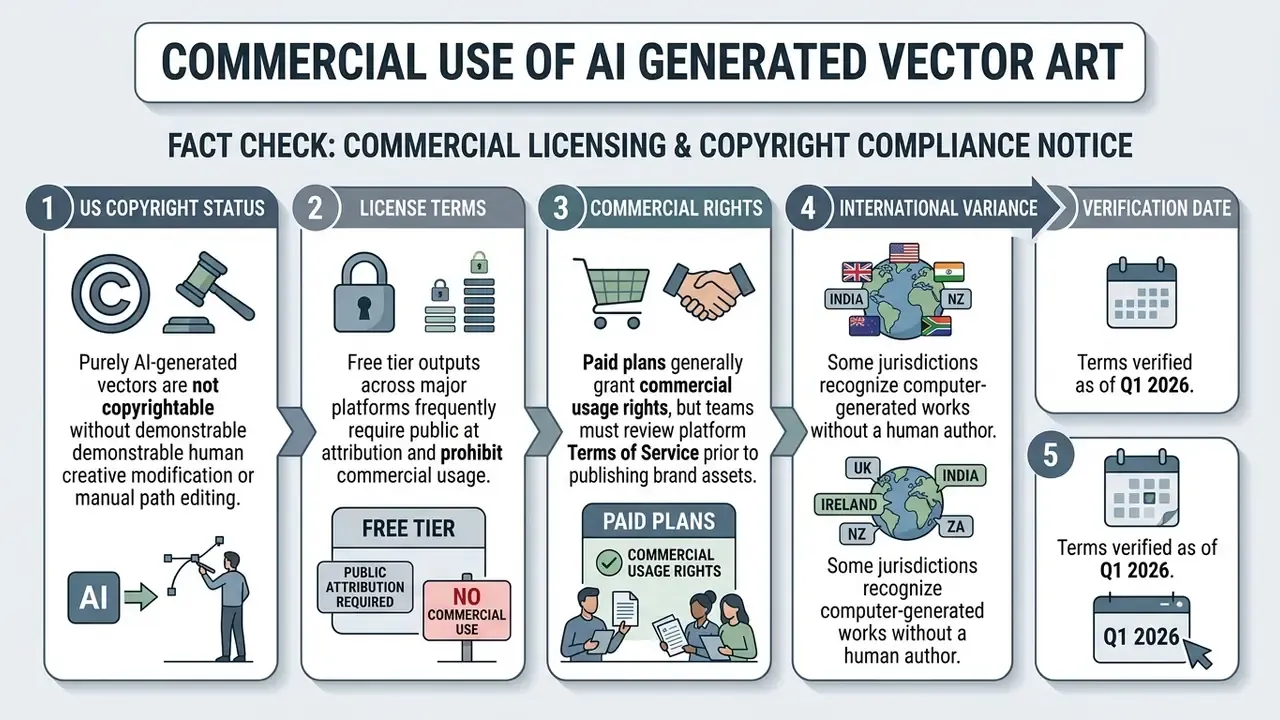
Disclaimer. This material is general information. It does not constitute legal advice and does not replace consultation with qualified intellectual property counsel. Platform licensing terms, credit systems, and copyright guidance update frequently, so verify current Terms of Service and applicable national law before any commercial deployment of AI-generated vector assets.
FAQ About AI Vector Generators
Is Design Experience Required to Create Vectors with AI?
No, basic design experience is not required to generate a first draft, since natural language prompts automate path creation. Editing is another matter. Intermediate knowledge of vector concepts, including nodes, handles, and path grouping, is necessary to clean and integrate generated SVG files in professional software. Vendor documentation reflects that split: Illustrator's generative flow expects the user to group, ungroup, duplicate, recolor, and edit individual parts in the Layers panel after generation, and auto-tracing tools build a "review and edit" step into the workflow before download.
Operators without deep design experience can lean on pre-formatted prompt templates. To weigh standalone creation tools against general design software, users can compare feature sets across leading platforms.
Can AI That Turns Doodles into Vector Art Process Simple Sketches?
Yes. Specialized ai that turns doodles into vector art engines process rough hand-drawn sketches and convert them into clean vector graphics. The algorithms analyze line orientation and shape geometry, smoothing irregular strokes into precise Bézier curves, and research systems additionally predict stroke centerlines, keypoints, and undersampled regions rather than tracing outlines naively.
Upload high-contrast line drawings on clean backgrounds. Sketch-to-vector tools then fill closed paths, correct asymmetrical lines, and export organized SVG artwork ready for refinement. Apply the three preparation rules described above, namely 1-bit thresholding, Bézier smoothing, and fully closed contours, and budget for a short manual node-cleanup pass, since measured benchmarks show current models still stumble on ambiguous hand-drawn lines.
What Is the Difference Between SVG and SVGZ Files in AI Workflows?
SVGZ is a gzip-compressed version of a standard XML SVG file. It cuts raw SVG payload size by roughly 50 to 80%, which helps with heavy vector illustrations carrying high node counts, complex gradient meshes, or large icon sprite documents. Most AI vector editors export SVGZ natively, but decompressing and editing requires XML-compliant software such as Inkscape or Illustrator, and some web platforms refuse to render SVGZ without correct Content-Encoding headers. For a small UI icon, plain SVG plus server-side gzip is simpler. For a multi-megabyte generated illustration bound for offline distribution, SVGZ is the better container.
Are AI-Generated SVG Files a Security Risk in Web Applications?
Yes, if deployed unsanitized. Because SVG is XML that supports scripting, event attributes, external references, and entity declarations, a generated or user-uploaded SVG can carry cross-site scripting payloads or trigger XML external entity processing on a server-side renderer. AI generation does not introduce malice. It introduces volume, which is arguably worse: hundreds of unreviewed files entering a repository in a week. Run every vector asset through the sanitization checklist in the governance section, prefer delivery over inline injection for untrusted files, and enforce a Content Security Policy on any origin serving vector assets.
Can AI Generated Vector Files Be Opened in Illustrator and Other Editors?
Yes. AI-generated SVG files conform to standard XML graphic specifications and open in industry-standard vector editors, including Adobe Illustrator, Figma, Inkscape, and CorelDRAW.
Cross-editor compatibility issues do surface, usually when files contain platform-specific XML namespaces, complex gradient meshes, or unexpanded stroke attributes. Documented interchange failures include hidden Adobe binary payloads that cause Illustrator to ignore edits made elsewhere, Illustrator export options such as "Preserve Adobe Illustrator Editing" and "Optimize for Adobe SVG Viewer" that break round-tripping, and version-specific clipboard regressions where vector copy-paste into Figma fails unless SVG code inclusion is explicitly enabled. For smooth interchange, strip proprietary metadata tags, export to plain SVG, and prefer file-based handoff over clipboard transfer between design teams.
For platform support or technical troubleshooting on file integrations, creative teams can contact our dedicated AI Media Support team.
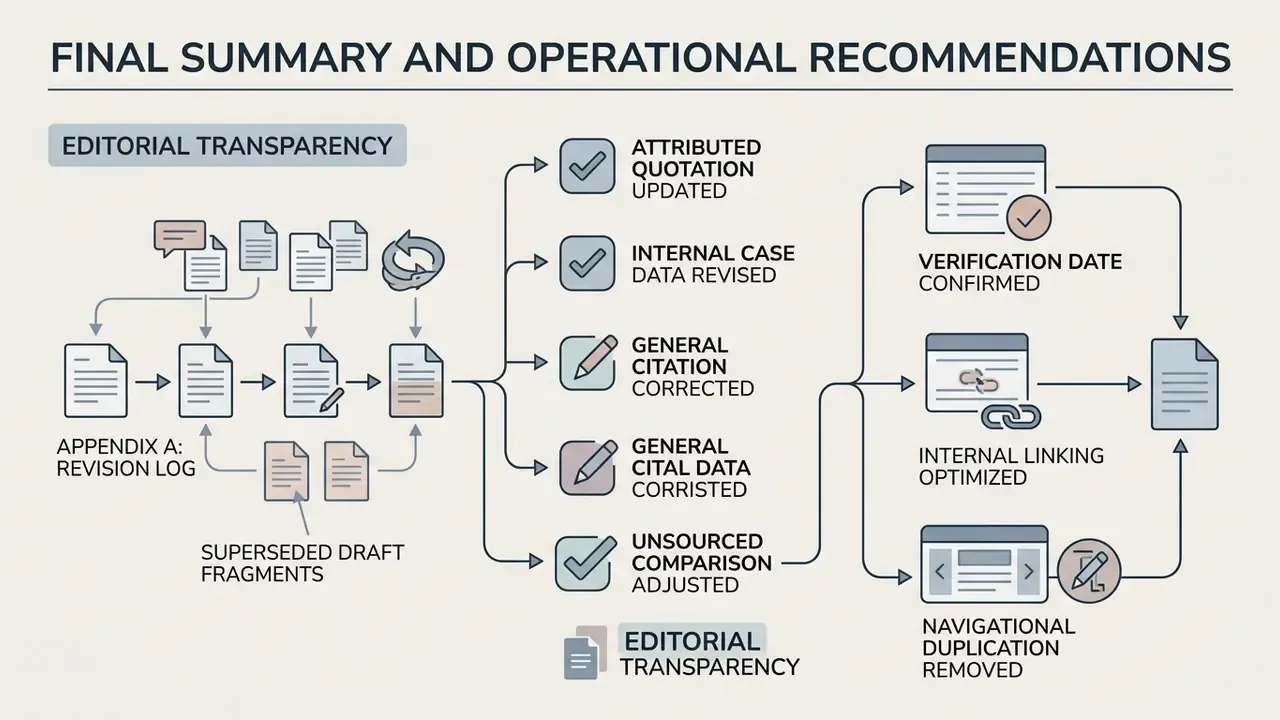
Final Summary and Operational Recommendations
AI vector generators have changed digital asset production by automating both the synthesis and the vectorization of scalable graphics. Understand the structural difference between raster pixels and vector math, pick the right tool class, apply systematic node cleanup, and an organization can ship high-quality SVG across web and mobile applications without accumulating hidden debt.
For compliance and production reliability, creative operations teams should adopt a five-point management rule:
- Verify Asset LineageCheck platform licensing terms to confirm commercial rights before brand deployment, and log model, prompt, timestamp, licence tier, and human editor for every published asset.
- Sanitize Path GeometrySimplify node density, merge fragmented fills into unified geometry, and strip redundant XML metadata to protect web rendering performance.
- Sanitize Code, Not Just ShapesRemove scripts, event handlers, external references, and DOCTYPE declarations before any generated SVG reaches a production application.
- Match Tool Class to TaskNative text-to-vector for new concepts, dedicated vectorizers for legacy raster conversion, local offline tracing for confidential or unreleased material.
- Maintain Human OversightApply manual design adjustments to AI-generated assets, both for brand alignment and to establish copyright eligibility.
For continued exploration of creative software tools, prompt engineering workflows, and enterprise design strategies, visit our comprehensive platform glossary.
Appendix A: Revision Log and Superseded Draft Fragments