Executive Summary
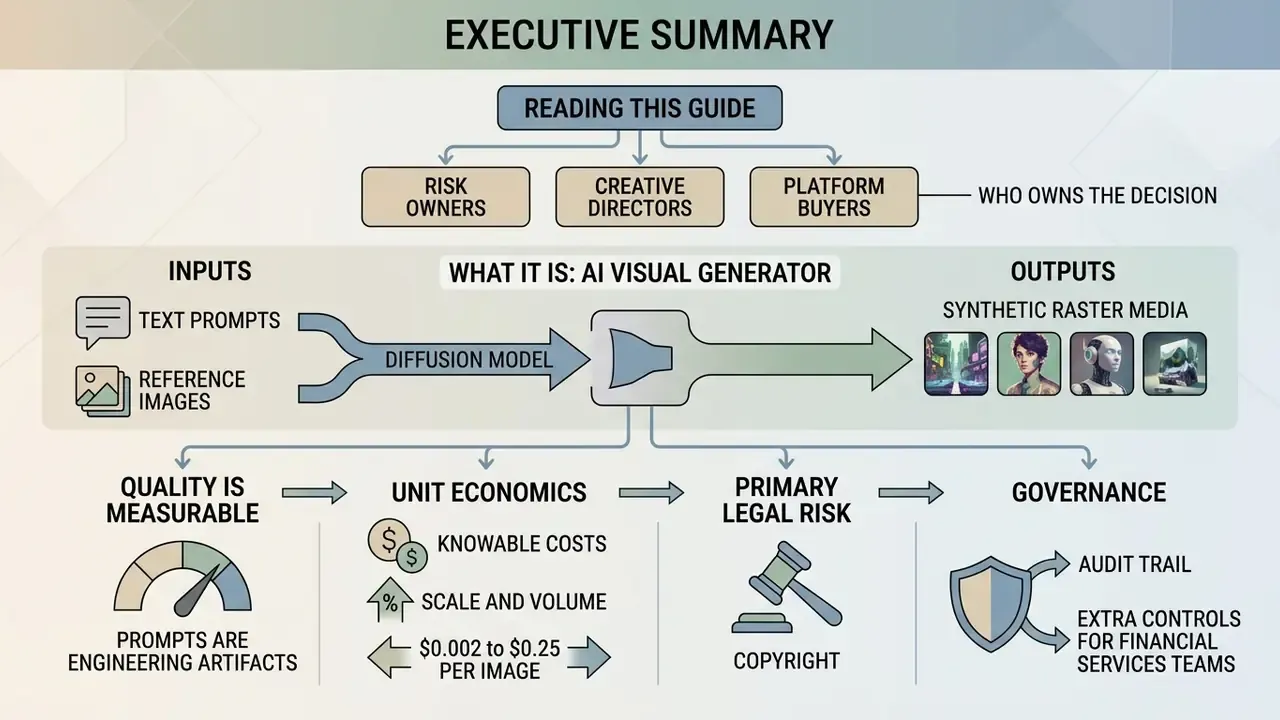
For risk owners, creative directors, and platform buyers who need the short version:
- What it is. An AI visual generator converts text prompts or reference images into synthetic raster media using denoising diffusion probabilistic models (DDPM) and Diffusion Transformers (DiT), conditioned through text encoders such as CLIP and T5.
- Quality is measurable. Diffusion architectures dominate autoregressive predecessors on standard benchmarks: FID 6.75 to 7.27 versus up to 27.10 for legacy autoregressive systems on MS-COCO.
- Prompts are engineering artifacts, not wishes. Structured prompts (Subject, Environment, Lighting, Camera, Style) plus negative prompts and term weights deliver reproducible output. Unguided natural text does not.
- Unit economics are knowable. Real-world per-image costs range from roughly $0.002 to $0.25, depending on model tier and resolution. Budget by generation count, not by subscription price alone.
- Copyright is the primary legal risk. Purely AI-generated output is not registrable for copyright in the United States. Contractual grants from vendors are not statutory protection. Human authorship must be added to create a defensible asset.
- Governance requires an audit trail. Model version, prompt, negative prompt, seed, guidance scale, user ID, and timestamp must be logged for every production generation in regulated environments.
- Financial services teams need extra controls. Data-retention policy, SOC 2 Type II attestation, ISO/IEC 42001 alignment, and marketing-compliance review gates matter more than raw aesthetic quality.
How to read this guide, and who owns the decision
This is a practitioner document, not a vendor pitch. It moves from mechanics to money to liability, in that order, because that is the order in which approval usually stalls inside a bank.
One point worth naming early: visual generation looks like a creative-tools purchase and behaves like a third-party data-processing decision. The prompt box is an outbound channel. The output is an unregistrable asset until a human touches it. Both facts belong to named owners, usually marketing operations for production, model risk or technology risk for the control set, and legal for the licence position. If nobody owns the escalation path, the pilot quietly becomes shadow AI. We have all seen that movie.
A note on search terminology, because the queries are messy. Users type a1 art ai and a1 art generator when they mean AI art; they search ai bot for images, ai draws images, and ai generator me when they want a hosted tool; and they look for an ai generated images gallery, ai inspiration images, or ai creativity images when they are really browsing for style references. Different words, one intent: turn an idea into a usable visual with predictable results.
What Is an AI Visual Generator and How Does It Create Images
An AI visual generator is a software application powered by generative artificial intelligence models, primarily denoising diffusion probabilistic models (DDPMs) and Diffusion Transformers (DiTs), that transforms textual prompts or input images into synthetic visual media. The underlying architecture converts natural language into mathematical embeddings, guiding an iterative denoising process in latent space to render detailed raster or vector visual outputs.
Generative artificial intelligence has moved from experimental research into core enterprise technology. According to the Stanford AI Index Report 2025, modern generative image models produce outputs that human evaluators struggle to distinguish from real photographic media.
«Diffusion models such as Imagen and Stable Diffusion reach FID 6.75–7.27 on MS-COCO, while autoregressive models score as high as FID 27.10.»
At a foundational level, an ai visual generator relies on deep neural networks trained on billions of image-text pairs. When a user submits a request to an ai image generator, the system does not copy pre-existing pixels. It predicts pixel distributions conditioned on textual concepts. That distinction matters legally as well as technically, and we return to it later.
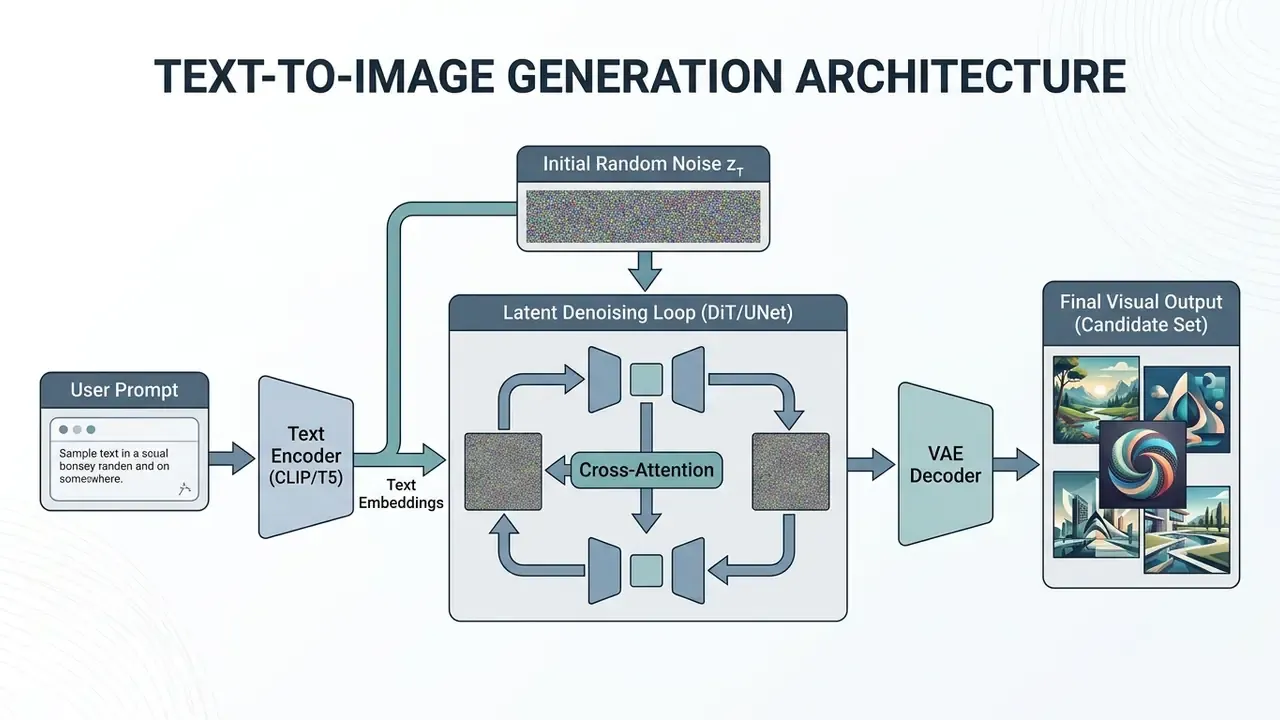
Modern architectures split the generation pipeline into two main components: a text encoder and a generative backbone operating in latent space. The text encoder translates words into vector spaces where semantic concepts sit near related visual features. The generative model then starts with Gaussian random noise and repeatedly removes noise across multiple timesteps. A Variational Autoencoder (VAE) decodes the resulting latent array into pixel-space generated images.
The 2025 NIST GenAI Pilot Evaluation Plan notes that benchmarking these systems requires assessing visual quality, prompt fidelity, and model robustness. Those are the same three axes a model risk function would apply to any predictive system, which is convenient: you do not need a new validation vocabulary, only new test cases. Teams that need a side-by-side view of specific engines can consult our comparison of best AI image generators.
Text-to-Image: Generating Visuals from a Text Prompt
Text-to-image generation processes a user's text prompt through a pre-trained text encoder, such as CLIP or T5, which converts lexical tokens into high-dimensional semantic embeddings. These embeddings inject contextual constraints into a diffusion model via cross-attention mechanisms, driving the model to iteratively clear random noise into a structured visual output matching the input text description.
In latent text-to-image systems, the image is not denoised directly at full pixel resolution. Operating in a lower-dimensional latent space cuts computational overhead while maintaining high visual detail. During each reverse diffusion step, cross-attention layers compare the evolving latent features against the text embeddings. If the text prompt specifies a metallic surface, the cross-attention mechanism biases the denoising trajectory toward high-contrast highlights and reflective textures. Specialized domain tools, such as an ai sheet music generator, use similar conditioning mechanisms to map structured text input to domain-specific visual notations.
AI Art Generator vs. AI Image Generator: Different Optimization Targets
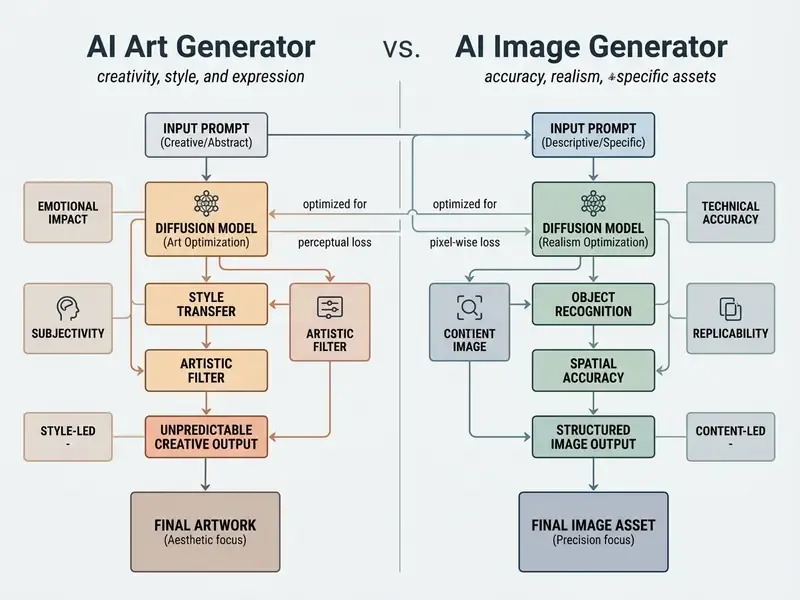
The distinction between an ai art generator and an applied ai image generator lies in their primary optimization targets. Art generators prioritize stylistic variation, aesthetic exploration, and abstract visual interpretation. Applied image generators focus on prompt adherence, brand consistency, spatial control, and photorealistic accuracy. Art systems serve ideation and visual experimentation; applied tools serve structured design, marketing, and enterprise production pipelines.
An AI art generator system is typically evaluated on stylistic fidelity and creative composition. Academic surveys of text-to-image synthesis published between 2024 and 2026 consistently benchmark artistically oriented models on style accuracy, structural integrity, and stylization transfer relative to predefined artistic movements. That is a different evaluation axis from realism-focused systems. Applied models, by contrast, are measured on photorealism, artifact reduction, and prompt adherence. One 2025 CHI study reported that only 17% of generated images were misclassified as real at short viewing durations, rising to 43% at longer viewing durations. Realism benchmarks depend on viewing protocol, not on model marketing claims.
Conversely, an applied image generator used for product design or marketing creative assets requires repeatable outputs. Enterprise teams evaluating tools across AI Media Comparison Matrices prioritize exact spatial placement, photorealism, and zero visual artifacts over unconstrained creative variance. A 2024 case study of professional workflows identified three recurring limits for applied generation: output consistency, scene control, and refinement depth.
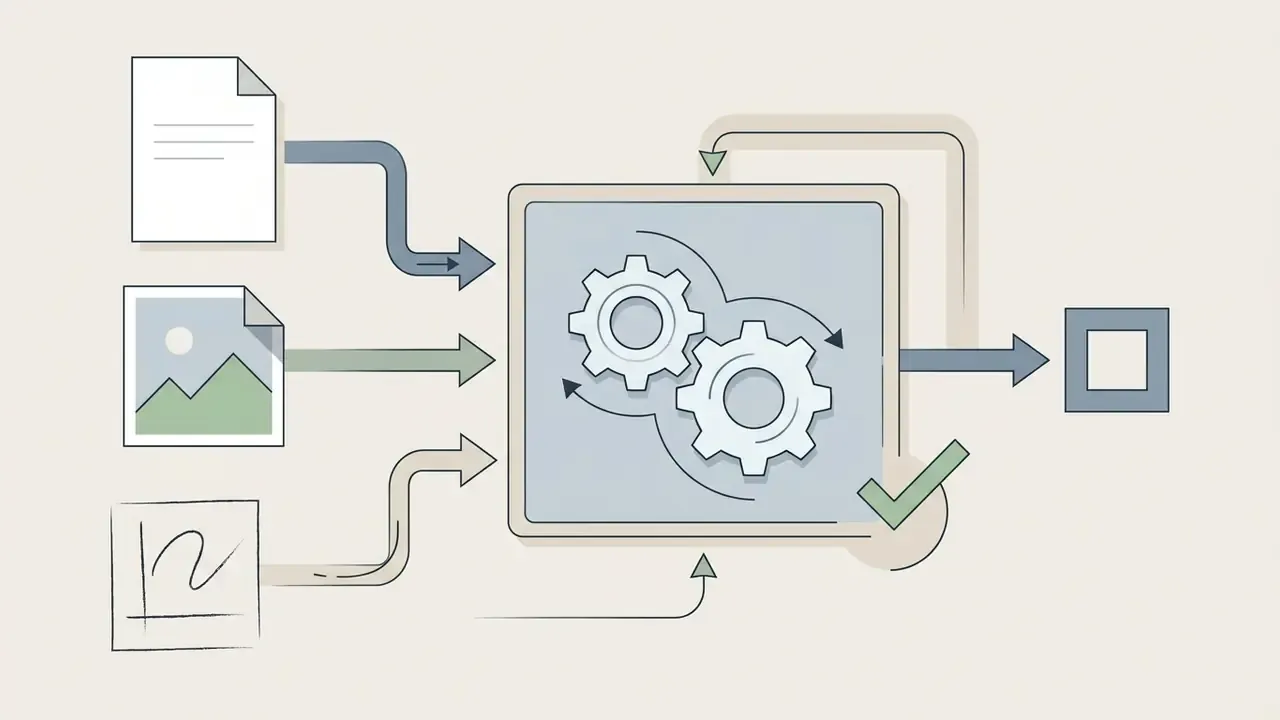
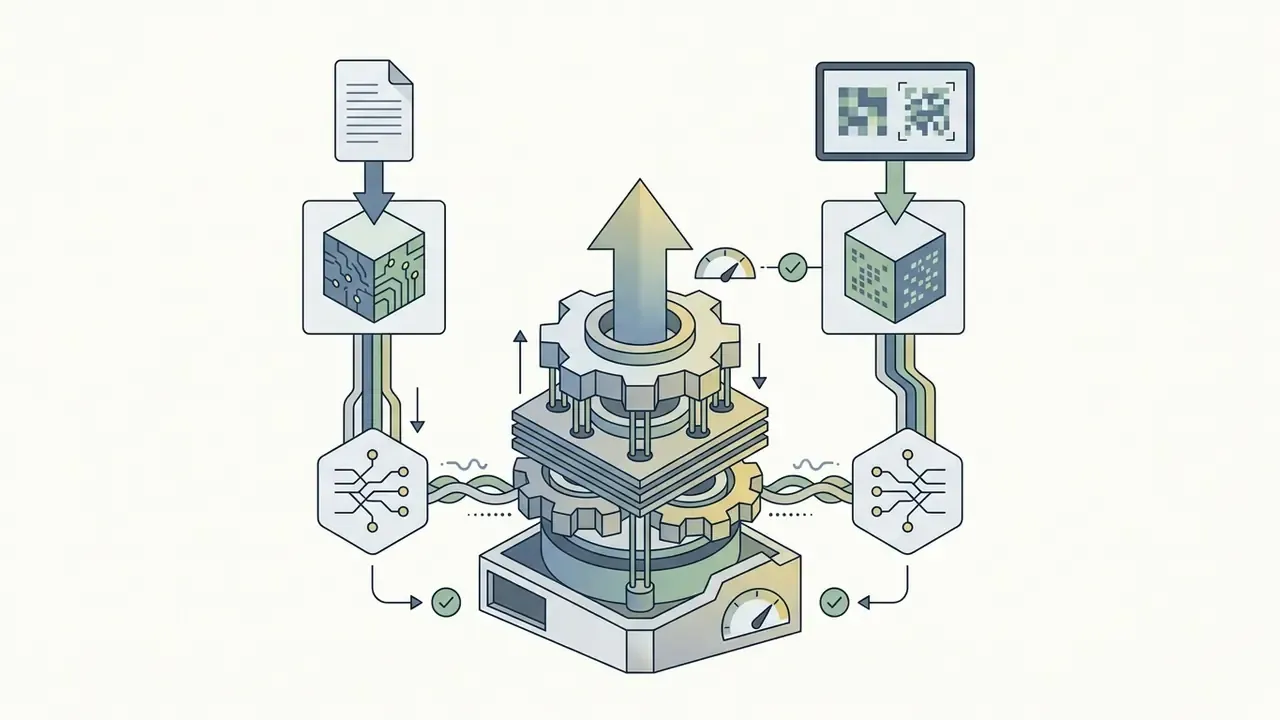
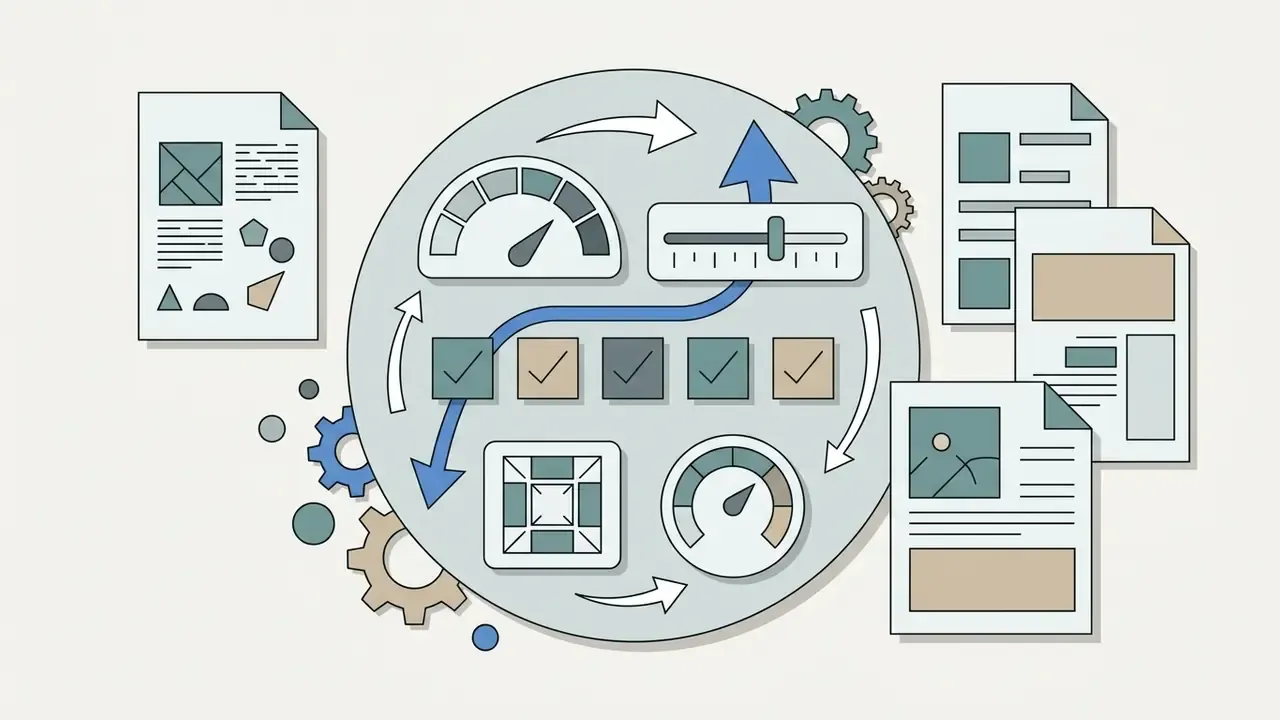
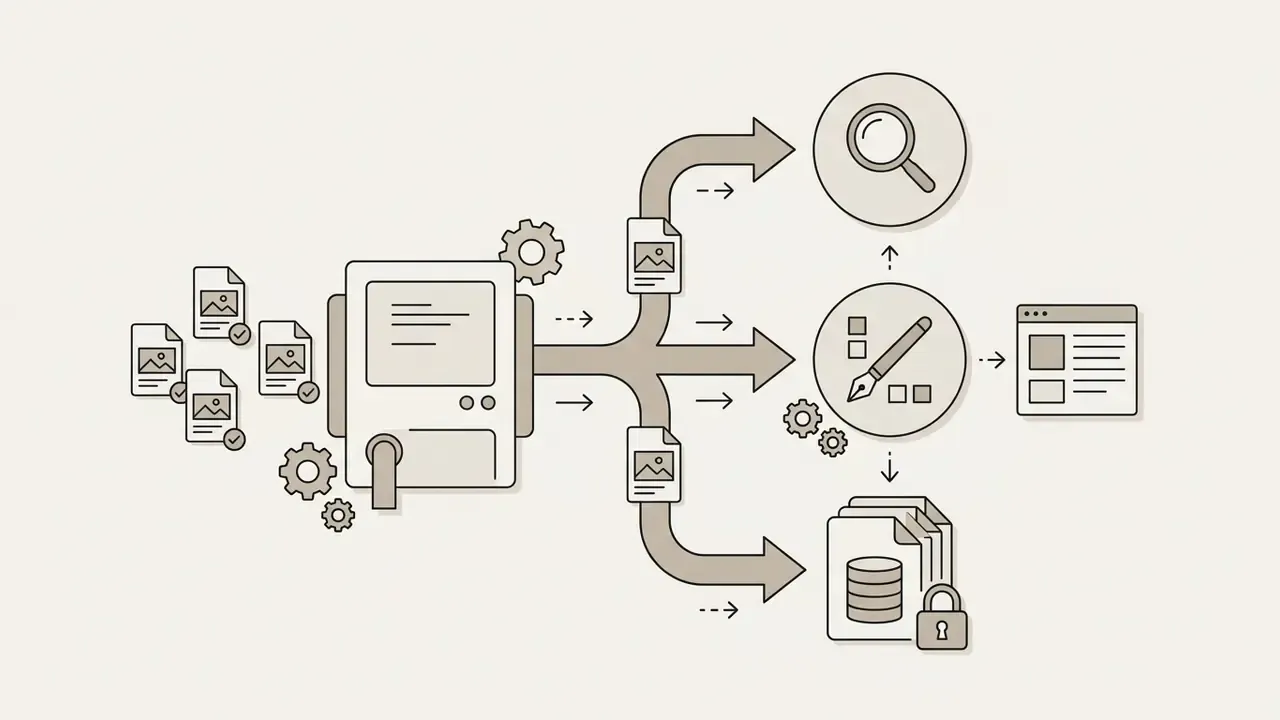
Title: AI visual generator flowchart.
Described pipeline: Text prompt or reference image, then AI model (diffusion / DiT, text and image encoders), then generation settings (style, size, steps), then generated image variants, then edit / save / share.
Flowchart stages breakdown:
What Kinds of Visuals You Can Create in an AI Image Generator
Modern AI image generators produce a wide spectrum of visual assets, from high-fidelity product renderings and social media creatives to complex concept illustrations, UI backdrops, and cinematic keyframes. By adjusting model selection, aspect ratios, and visual style triggers, creators can synthesize virtually any raster graphic or visual template required for commercial or artistic projects.
The flexibility of modern generative models comes from multi-modal training on diverse image datasets. A robust ai image generator create visuals across distinct domains without requiring dedicated single-task software. Users can generate ai creative images for conceptual ideation, or switch to structured parameters for technical vector-style diagrams.
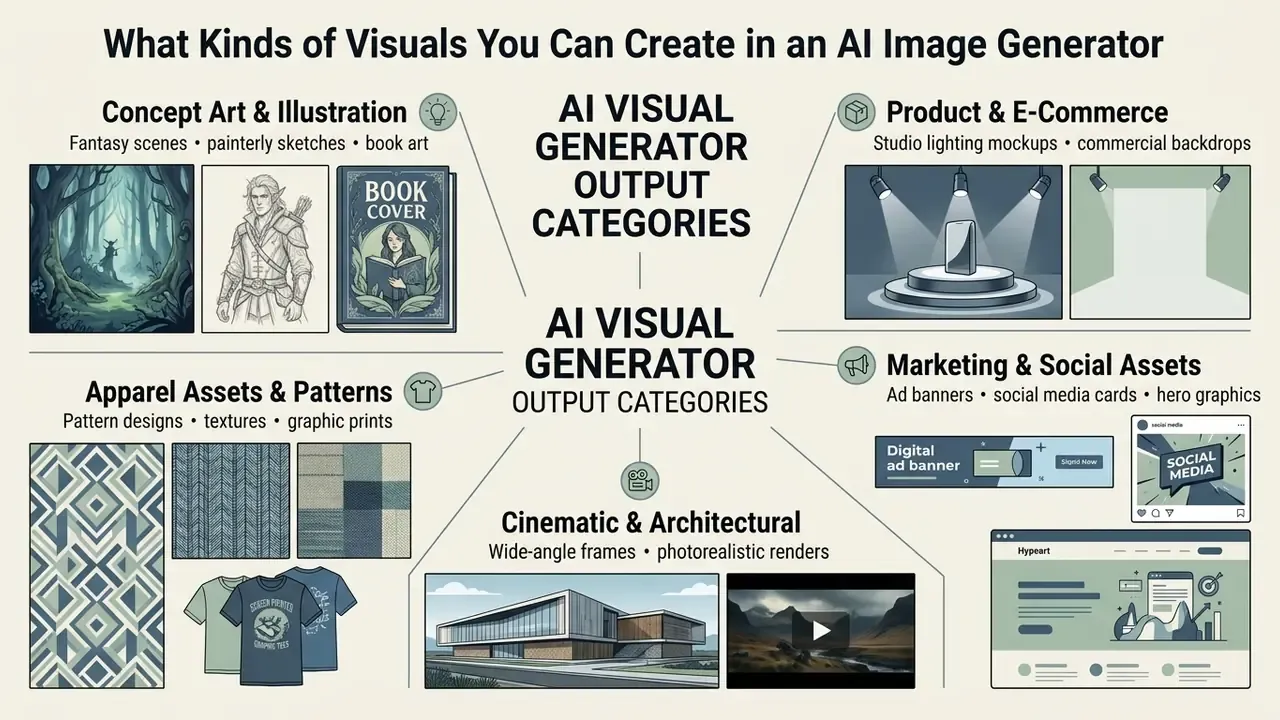
From a single platform, design teams generate ai drawing images for storyboards, photorealistic mockups for consumer goods, or abstract textures for digital interfaces. An ai generator for anything lets marketing departments produce localized variations of one campaign asset in parallel, which cuts production turnaround times sharply. Documented enterprise workflows include tens of thousands of on-brand banner ad variants, digital twins of physical products, and multi-market localized asset sets built from a single master creative.
AI Art, Illustration, and Creative Images for Ideation
AI art tools and creative generators act as digital ideation engines, letting designers rapidly produce mood boards, concept art, book illustrations, and visual prototypes. By processing abstract or painterly prompts, these models generate dozens of visual directions in seconds, so creative teams can explore stylistic avenues before committing manual design resources.
In creative ideation workflows, tools operating as an ai imagination generator let artists fuse disparate visual concepts. Blending traditional oil painting textures with futuristic architectural forms, for example, yields compositions that no stock library holds. Documented concept-art workflows follow a repeatable chain: reference image plus prompt template, four character views, upscale, texture variation, a Photoshop sketch and inpaint pass, then a final upscale.
Specialized applications extend into merchandise design. An ai shirt design tool applies the same generative principles to vector graphic creation and garment placement prints. Readers moving from creative exploration toward client delivery should review the rules for commercial use of AI images before publishing anything.
The open-source JourneyDB dataset, containing over 4.4 million Midjourney generations, shows that more than 60% of creative prompts focus on stylistic exploration, mood setting, and visual world-building.
«65% of surveyed practitioners use AI generators during ideation, 72% for reference creation, and only 45% during final production.»
Product, Social, and Design Visuals for Content
Commercial design workflows use AI visual generators to synthesize product mockups, platform-compliant social banners, localized campaign backgrounds, and e-commerce asset variants. Integrated with design ecosystems such as Adobe Firefly or Canva, these tools streamline content scaling while still demanding human editorial review for brand consistency and copyright safety.
Enterprise marketing departments produce platform-specific ad variations at scale. A single product reference photo can be placed into multiple synthetic backgrounds, a sunlit wooden table, a marble kitchen, a minimalist studio, without physical re-shoots. Practical operating guidance: name the platform and exact pixel dimensions inside the prompt. Instagram 1080×1080 for feed creatives, 8.5×11 inches for print flyers, 1200×628 for paid social. Vague size instructions produce vague crops.
Marketing teams expanding into dynamic motion content often pair static image pipelines with an ai short video generator to turn one static graphic into short social video ads.
San Diego State University's operational brand guidelines explicitly require human brand review, copyright clearance, and resolution checks before publishing any AI-synthesized asset. A university, note, not a bank. The bar in regulated finance is higher, not lower.
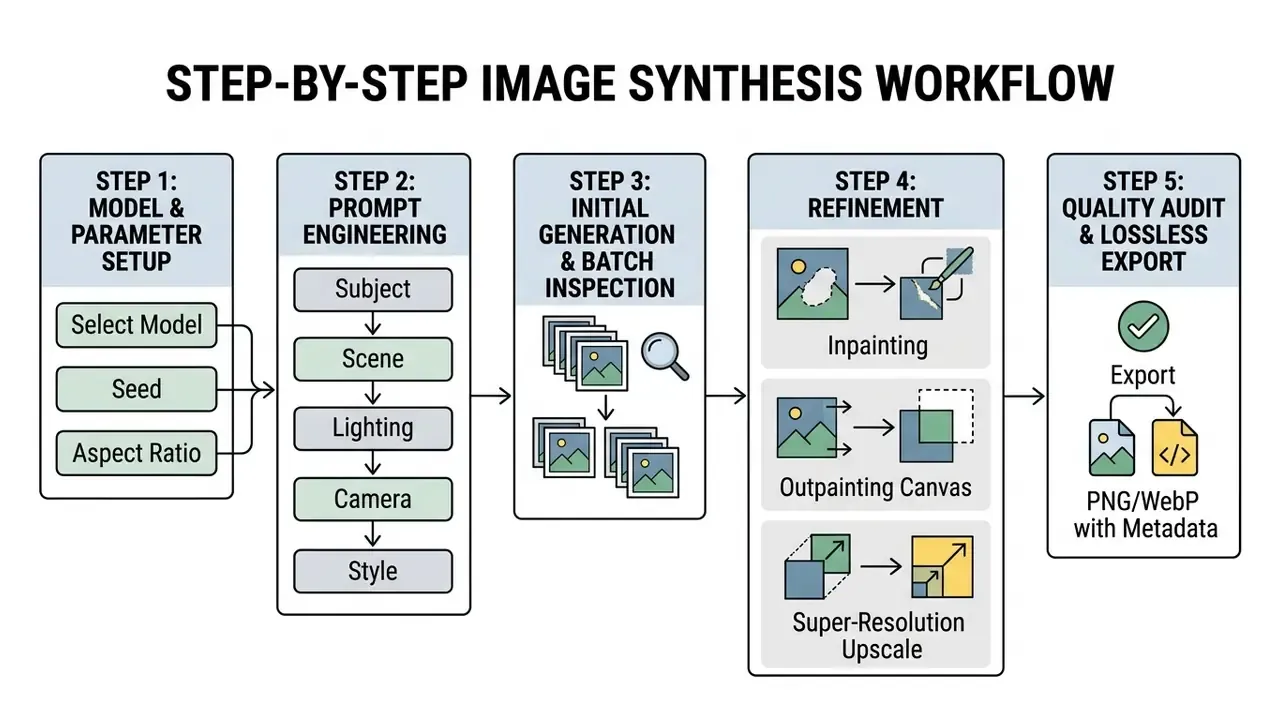
How to Create an AI Image: The Step-by-Step Generation Process
Producing a high-quality AI image involves a systematic workflow: choose a suitable generative model, define canvas proportions and style presets, structure a descriptive text prompt, run initial generation, then perform targeted iterative edits or super-resolution upscaling. A structured execution path minimizes credit waste and produces predictable visual outputs.
Using an ai image creation website efficiently means abandoning unguided trial-and-error. Modern interfaces expose fine-grained controls over generation parameters. Configuring those settings before firing an ai image generator generate anything query is what gets the output right on the first pass, or close to it.
Users hitting unexpected server errors or artifact generation mid-process can consult AI Media Support and Troubleshooting for resolution steps.
Choose the Model, Format, and Style of the Future Image
Initial setup requires matching the generative model to the task. Choose gpt-image-2 or Flux Pro for photorealism, Midjourney v6 for artistic concepts, and configure fixed aspect ratios (1:1, 16:9, 9:16) plus seed parameters for reproducibility. Establishing these baseline parameters upfront prevents compositional distortion and keeps stylistic alignment across visual batches.
Aspect ratio selection directly shapes composition. A 16:9 ratio forces the diffusion model to distribute elements horizontally, ideal for website banners or cinematic scenes; a 1:1 ratio centers the focal object. Google's Vertex AI image documentation defines ASPECT_RATIO as a first-class generation parameter with supported values 1:1, 3:4, 4:3, 16:9, and 9:16, defaulting to 1:1, and documents SEED_NUMBER as a non-negative integer that makes output deterministic.
Setting a deterministic seed keeps compositional structure identical across passes when you test minor prompt revisions. In regulated environments the seed does something more important: it makes any published asset reproducible during an audit. No seed, no reproduction. Enterprise teams building brand signage templates often adapt these setup rules inside an ai sign generator workflow, where an ai generator canvas with fixed dimensions matters more than stylistic range.
Write the Prompt and Run Generate
An effective text prompt orders visual attributes sequentially: primary subject first, then environmental context, lighting conditions, camera parameters, and visual style descriptors. Submitting the structured prompt initiates the latent reverse diffusion process that synthesizes candidate options.
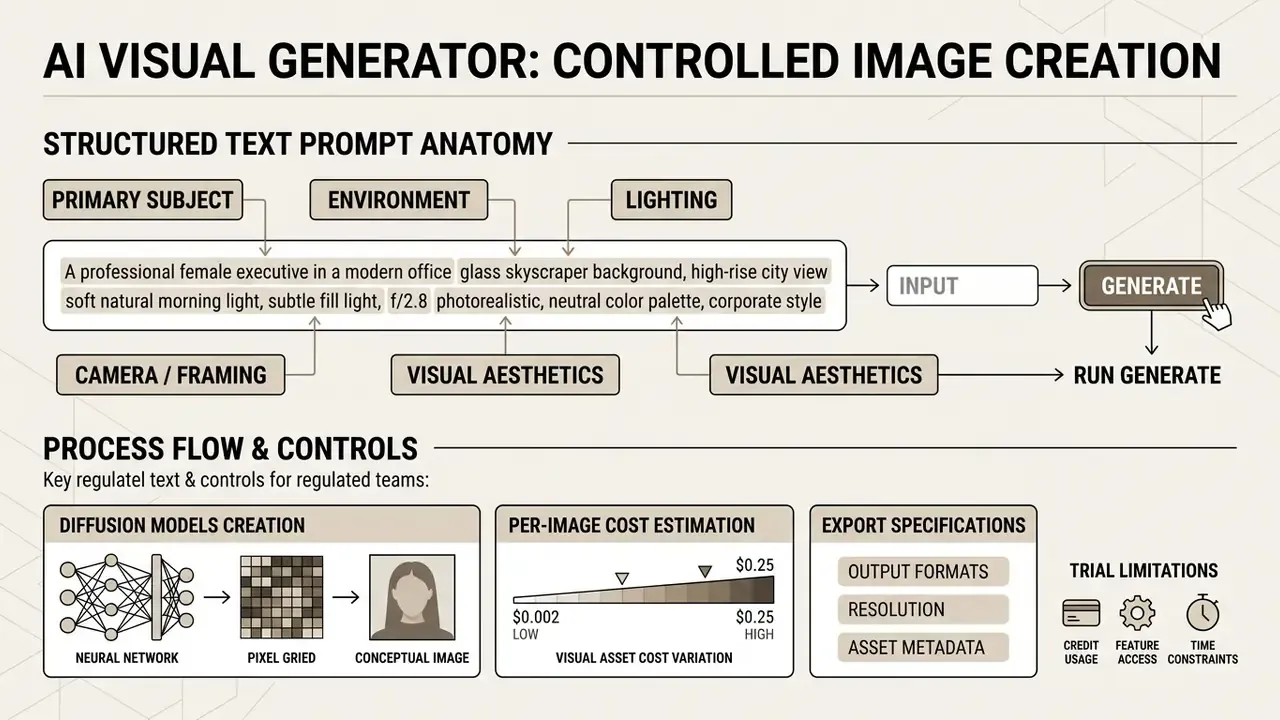
Official prompting guides from OpenAI and Google both emphasize subject-first sequencing.
«Prompt coaching increases request specificity and cognitive engagement, which correlates with better-calibrated trust in AI tools.»
Placing the subject ("a ceramic coffee cup") before background description ("on a rustic oak table in a sunlit cafe") stops the text encoder from prioritizing environment over the primary object. Applications that require verified identity elements, such as an ai signature generator, demand even stricter structural positioning to keep key details legible.
Developer example: generating via API
import requests
# Example request to an AI visual generation API endpoint
url = "https://api.example.com/v1/visual/generate"
headers = {"Authorization": "Bearer YOUR_API_KEY", "Content-Type": "application/json"}
payload = {
    "prompt": "A professional executive in a modern office, 85mm lens, soft morning light",
    "model": "flux-pro",
    "aspect_ratio": "16:9",
    "denoising_strength": 0.75,
    "seed": 148802,
    "output_format": "png"
}
response = requests.post(url, json=payload, headers=headers)
image_url = response.json()["output_url"]
The equivalent shell call for pipeline automation:
curl -X POST https://api.example.com/v1/visual/generate \
  -H "Authorization: Bearer $API_KEY" \
  -H "Content-Type: application/json" \
  -d '{"prompt":"minimalist fintech dashboard illustration, flat vector, blue palette","model":"flux-pro","aspect_ratio":"16:9","seed":148802,"output_format":"png"}'
The seed field is there deliberately. Without a persisted seed the generation is not reproducible, and a non-reproducible asset cannot be validated after the fact. Auditors do not accept "it looked right at the time."
Refine, Edit, and Save the Finished Visual
After the first pass, refinement comes from localized inpainting, prompt tweak iterations, and super-resolution upscaling, which preserve core composition while clearing visual artifacts. Once verified, the finished asset is exported in lossless raster formats (PNG or WebP) and archived with full prompt and seed metadata for auditability.
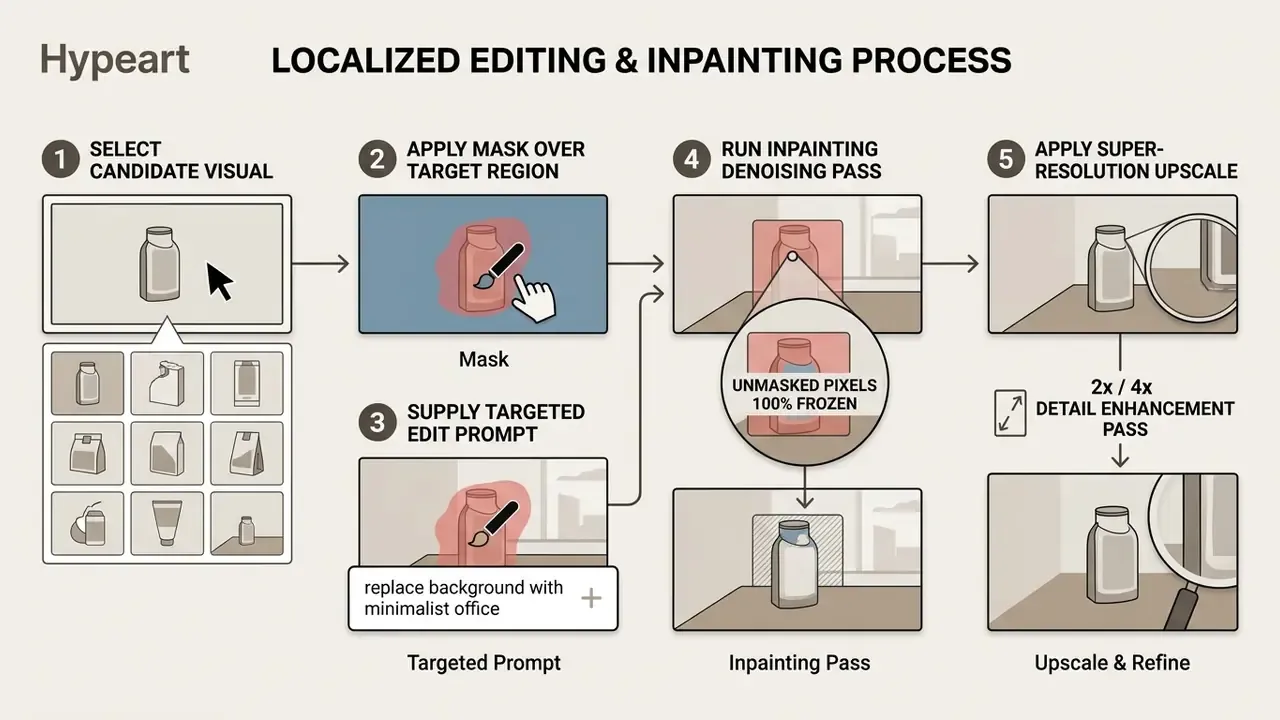
Inpainting lets creators modify specific regions without touching the surrounding composition. Apply a binary mask over an unwanted element, supply a targeted edit prompt, and the generator recalculates latents only inside the masked area. Specialized creative applications, such as an ai singing generator interface, isolate audio tracks in much the same way while holding overall timing constraints.
Technical Export Specifications and Supported Formats
- Supported input formats.
JPG,PNG,WebP, plusHEICwhen uploading through Safari on macOS or iOS (Adobe Firefly documents this behaviour explicitly for its Generate Image feature). - Maximum native resolution. Most models (DALL·E 3, SDXL, GPT Image) generate a base grid between
1024x1024and1792x1024pixels. Adobe Firefly exports downloads as JPG or PNG at a maximum of2000x2000px; Midjourney reaches2048x2048after upscaling. - Upscaling (super-resolution). Dedicated neural upscalers (DeepAI Super Genius, Topaz Gigapixel, Real-ESRGAN, Stability creative upscaler) push the raster to
4K(3840x2160) and8Kwithout softening edge structure. See our overview of AI image upscalers for comparative quality data. - Recommended export policy. Deliver lossless
PNGfor compositing and brand assets,WebPfor web placement, andJPGonly for final flattened delivery where file weight matters.
First-generation checklist
- Open the AI visual generator interface.Launch the application and authenticate with authorized user credentials.
- Select a task-optimized AI model.Choose the generative backbone tailored to your target output, photorealism versus artistic illustration.
- Configure generation parameters.Set canvas dimensions, aspect ratio (16:9, 1:1, 9:16), sampling steps, and a fixed seed for reproducibility.
- Construct a structured text prompt.Follow the sequence Subject, Environment, Lighting, Camera framing, Style.
- Execute the initial generation pass.Submit the request and generate a batch of two to four candidates.
- Inspect and refine results.Review outputs for artifacts or prompt deviations; run localized inpainting edits where needed.
- Apply super-resolution upscale.Run a detail-enhancing pass to reach the final export resolution, for example 4K.
- Export and archive the asset.Download the final image in lossless PNG or WebP alongside its prompt metadata.
How to Write Prompts for More Accurate AI Images
Prompt engineering for generative visual tools is the structured practice of combining explicit goals, environmental context, formatting constraints, and technical triggers to steer diffusion models toward accurate and repeatable outputs.
«The SSP (Simple and Safe Prompt Engineering) method improves semantic consistency by 16% and safety metrics by 48.9% versus baseline approaches.»
Vague descriptions yield unpredictable output. Specific architectural terms, lighting descriptions, and camera focal lengths give the text encoder clear conditional vectors. Structured ai image generator ideas turn imprecise concepts into actionable text prompts.
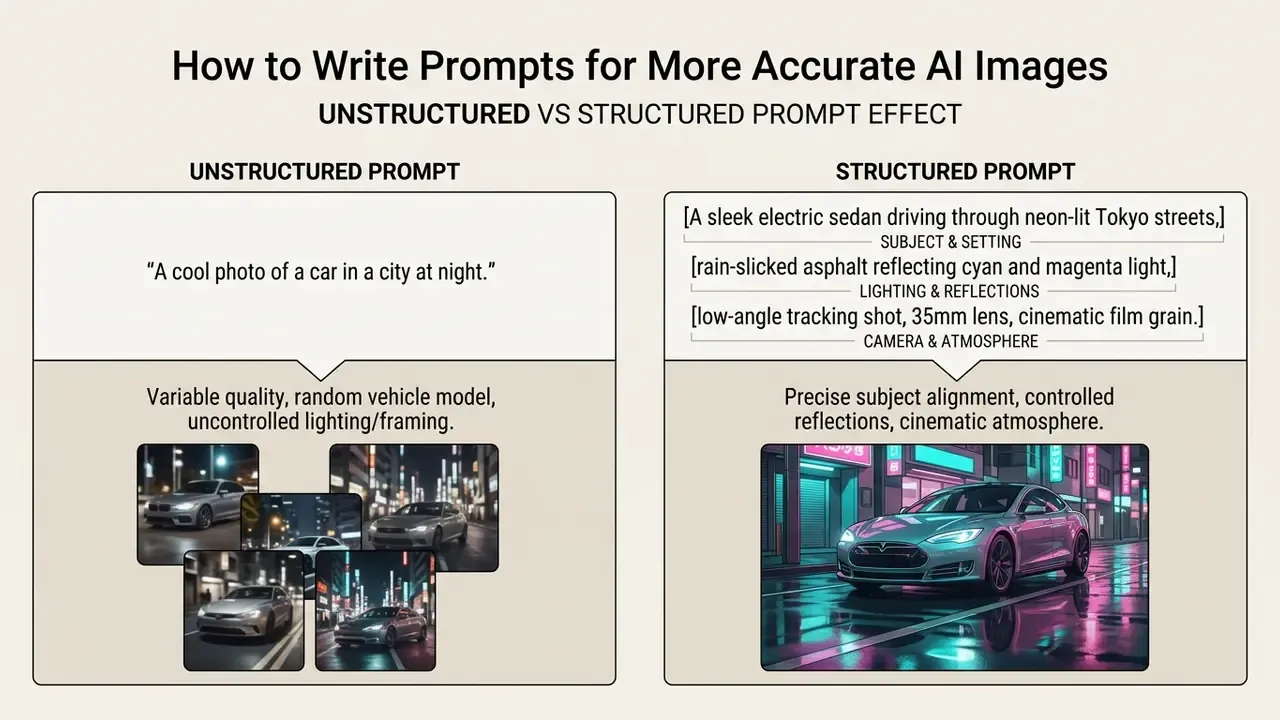
Prompt optimization research shows that automated prompt enhancement frameworks, such as NeuroPrompts (EACL 2024), systematically raise aesthetic evaluation scores.
«NeuroPrompts applies constrained decoding based on expert prompt patterns and empirically improves generation quality across quantitative and qualitative metrics.»
When generating discrete assets through an ai element generator, icons, badges, UI fragments, explicit technical parameters prevent visual distortion at small sizes.
Text Prompt Structure: Subject, Scene, Style, and Details
A professional text prompt has six core structural components: subject definition, pose or action, setting and background, lighting and atmosphere, camera composition, and visual medium triggers. Ordering these parameters systematically prevents model confusion and ensures core subjects receive appropriate attention during latent cross-attention processing.
Prompts structured to official vendor templates, such as the Ideogram or Recraft formulas, isolate specific visual attributes. A complete prompt construction follows this pattern:
For instance: "A vintage leather armchair (Subject) in a dark mahogany library (Environment), illuminated by warm side lamp light (Lighting), eye-level medium shot (Camera Angle), deep amber and brown tones (Color Palette), photorealistic 35mm photograph (Style Medium)."
Ideogram's published prompt structure extends this to eight ordered fields: image summary, main subject detail, pose or action, secondary elements, setting, lighting and atmosphere, framing and composition, technical enhancers. Recraft's universal template groups the same information as subject plus action, composition, context, medium, style, vibe, and attributes. The granularity differs. The ordering logic does not.
Styles: From Photorealistic to Painterly and Cinematic
Controlling visual style relies on precise trigger keywords that bias the model toward particular artistic movements or optical characteristics. "Cinematic lighting" and "f/1.8 depth of field" push toward photorealism; "impasto brushstrokes" and "canvas texture" push toward oil painting. Grouping trigger phrases by style class gives you deterministic control over the generated medium.
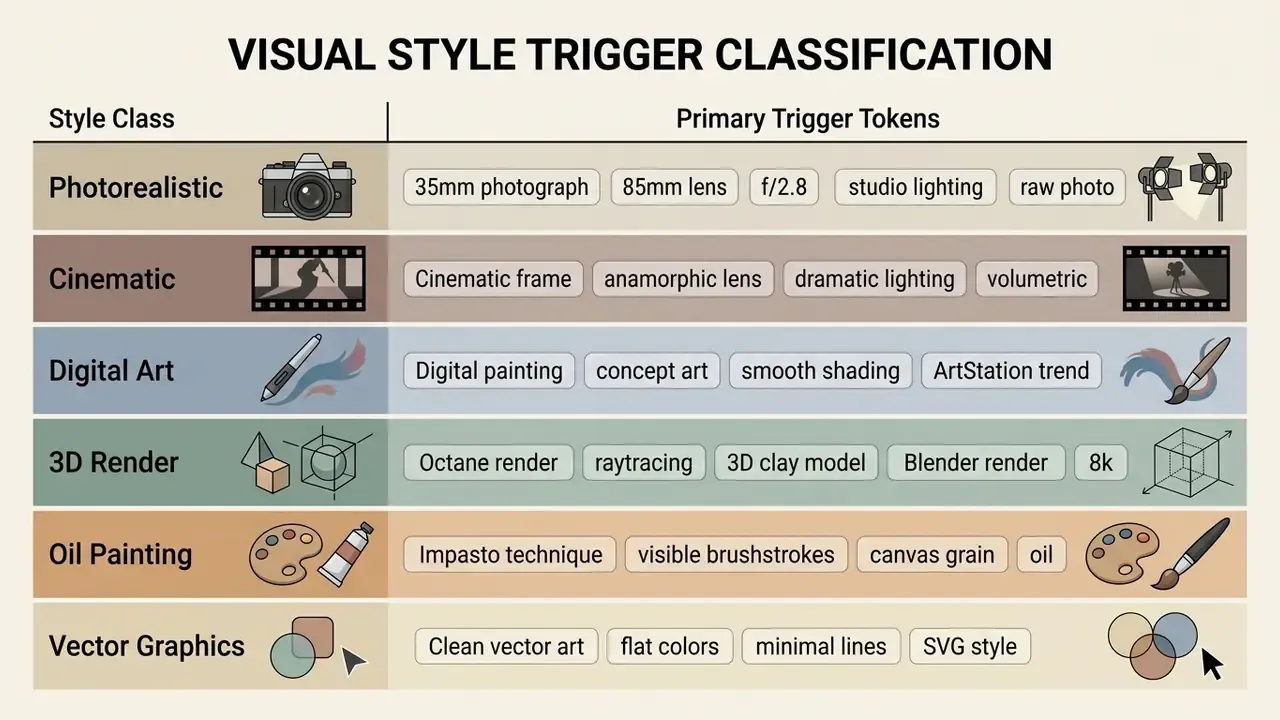
Correct trigger phrases map the request to the appropriate visual clusters. Mixing conflicting triggers, say a "vector illustration with volumetric oil impasto," confuses the model and produces hybrid artifacts. For photorealism, lead with camera and lens vocabulary. For cinematic looks, lead with lighting. For painterly output, lead with medium and surface.
Improving Results Through Refinement and Regeneration
Refining results means iterative prompt tuning, negative prompts to suppress unwanted elements, adjusted term weights, and small parameter variations tested against a fixed seed. Negative embeddings or downweighted terms remove artifacts without rewriting the whole prompt.
«Users selected the keyword importance gallery (KIG) in 83.7% of cases as the most understandable explanation of how prompts drive output.»
Negative prompting is explicit suppression control. In Stable Diffusion or Midjourney, negative parameters (--no blurry, deformed hands, extra limbs, low resolution) steer denoising away from named feature clusters. Hugging Face Diffusers exposes this officially through negative_prompt_embeds and negative_pooled_prompt_embeds. Term weighting mechanisms such as (photorealistic:1.2) and (background:0.8) allow fine-grained adjustment of individual components. Midjourney documents that --no is equivalent to a -0.5 weight and that the total weight of all prompt parts must remain positive. Syntax is platform-specific: Diffusers, Midjourney, and web UIs do not share one weighting grammar, so prompt libraries rarely port cleanly between tools.
Fact Check: Factors Influencing Image Generation Quality
Technical research confirms that visual generation quality is governed by the interaction between model architecture, reference image strength, and control parameters. Not by prompt length alone.
- Reference weight controls. Empirical testing on semantic guidance for style control reports that adjusting the background control weight () balances stylistic consistency and content fidelity, whereas produces abrupt feature discontinuities. Reported in Semantic guidance for precise style control in diffusion image generation, Nature Scientific Reports (2025). Treat the numeric band as model-specific rather than universal.
- Identity-consistent conditioning. The RefDrop framework (RefDrop: Controllable Consistency in Image or Video, NeurIPS 2024) reports that human figures require a reference strength coefficient of roughly , simpler subjects around , and that a negative coefficient near increases diversity while reducing artifacts. These are framework-specific tuning values and need re-validation on any other backbone.
- Multi-reference overlap. Multi-reference research (MultiRef: Controllable Image Generation with Multiple Visual References, 2025) indicates that combining overlapping global visual references creates information conflict in cross-attention layers. Control parameters and reference quality dictate output accuracy, not text length.
- Evaluation separation. Controllable-generation research evaluates image quality (FID) separately from grounding accuracy, for example YOLO-based correspondence between an input box and the generated entity. Accuracy is a property of controlled generation, not of prompt verbosity.
Generating AI Art from Photos, Images, and Reference Images
Image-to-image (img2img) generation transforms uploaded photographs, sketches, or reference images into AI art and modified visuals by encoding the source into latent space and conditioning reverse diffusion on both text prompts and visual guidance. Parameters such as denoising strength or image weight decide whether the output preserves original geometry or undergoes dramatic transformation.
Working from existing photos bypasses the layout limitations of text-only prompting. It also introduces a new control question: whose photo, and with what consent?
«Analysis of roughly 15,000 synthetic faces revealed systematic discrepancies in demographic representation across several models, requiring bias audits before commercial use.»
Uploading an initial photo to generate ai art with photos lets the model retain structural composition while applying a new visual style. The same mechanism powers pipelines that convert user photos into ai generated art from image output, or turn rough sketches into photorealistic renders, and it is what people mean when they search for ai art out of picture. Teams standardising this workflow can review our breakdown of image-to-image generators.
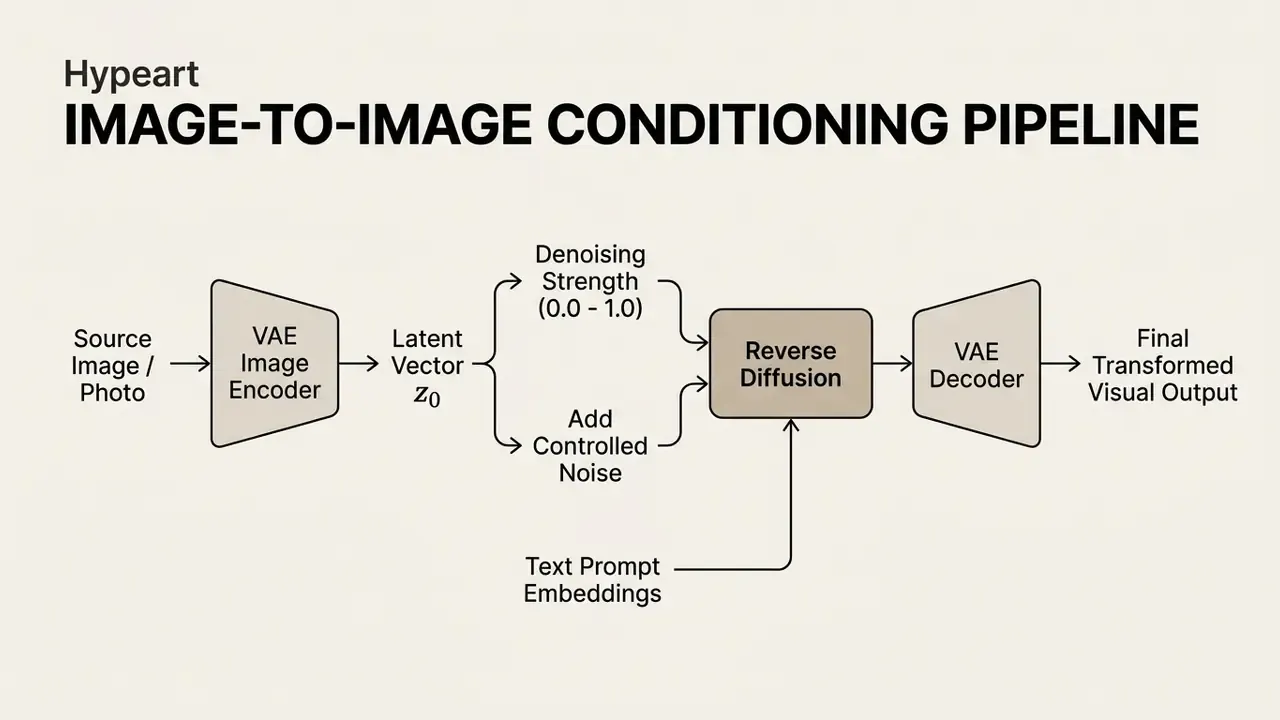
Users browsing curated collections of transformed reference images can study an ai generated images gallery to see how different style prompts alter the same source composition. Architecturally, reference conditioning has evolved from single-reference to multi-reference designs. Stable Diffusion Reference Only (2023) uses two conditional inputs, an image prompt for concept and colour plus a blueprint image for structure, embedded directly into the UNet without ControlNet. Later work adds reference conditioning through small expert plugins to bypass tokenizer limits.
How to Use Photos and Reference Images for AI Art
Using photos and reference images for AI art means uploading a source graphic as a structural blueprint or stylistic template, then adjusting image weight (--iw) or denoising strength to balance fidelity against transformation. Lower denoising values (0.25 to 0.40) retain source layout and facial geometry. Higher values above 0.70 let the model reinterpret the image freely.
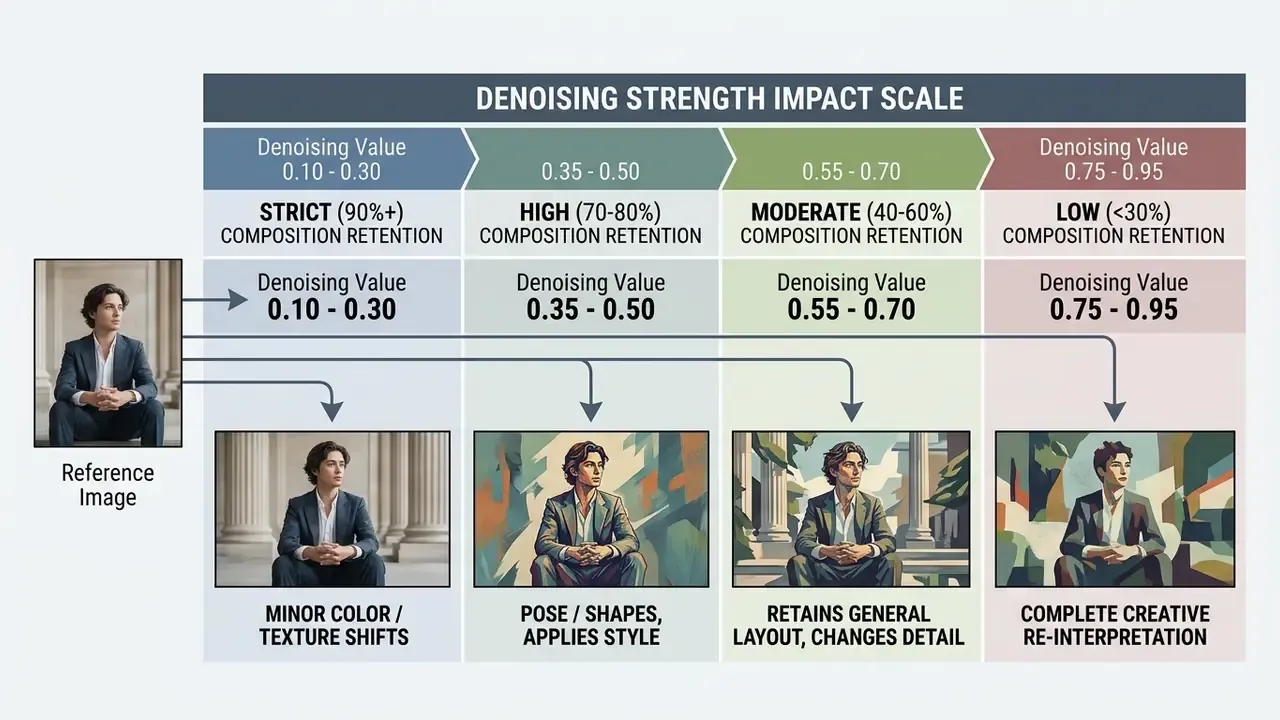
When creating ai generated art from pictures, a denoising strength near 0.35 preserves facial geometry and lighting while applying painterly or anime aesthetics. Higher image weight (--iw) does the inverse on platforms that expose it: stronger reference influence, weaker noise-driven deviation. Small increments matter here; jumping from 0.35 to 0.60 usually loses the face.
«A mixed-methods study with 133 crowdworkers and 14 interviews documented a significant gap between user expectations and Stable Diffusion outputs for "person"-type prompts.»
Developers integrating reference-guided generation into internal services access endpoint parameters through the unified api suite.
Editing, Background Replacement, and Upscaling Without Full Regeneration
Modifying specific elements, replacing backgrounds, removing foreground objects, or raising resolution, is done with masked inpainting and structure-preserving super-resolution networks, without regenerating the unmasked portions. Targeted editing keeps object identity and layout stable while improving background fidelity or expanding aspect dimensions.
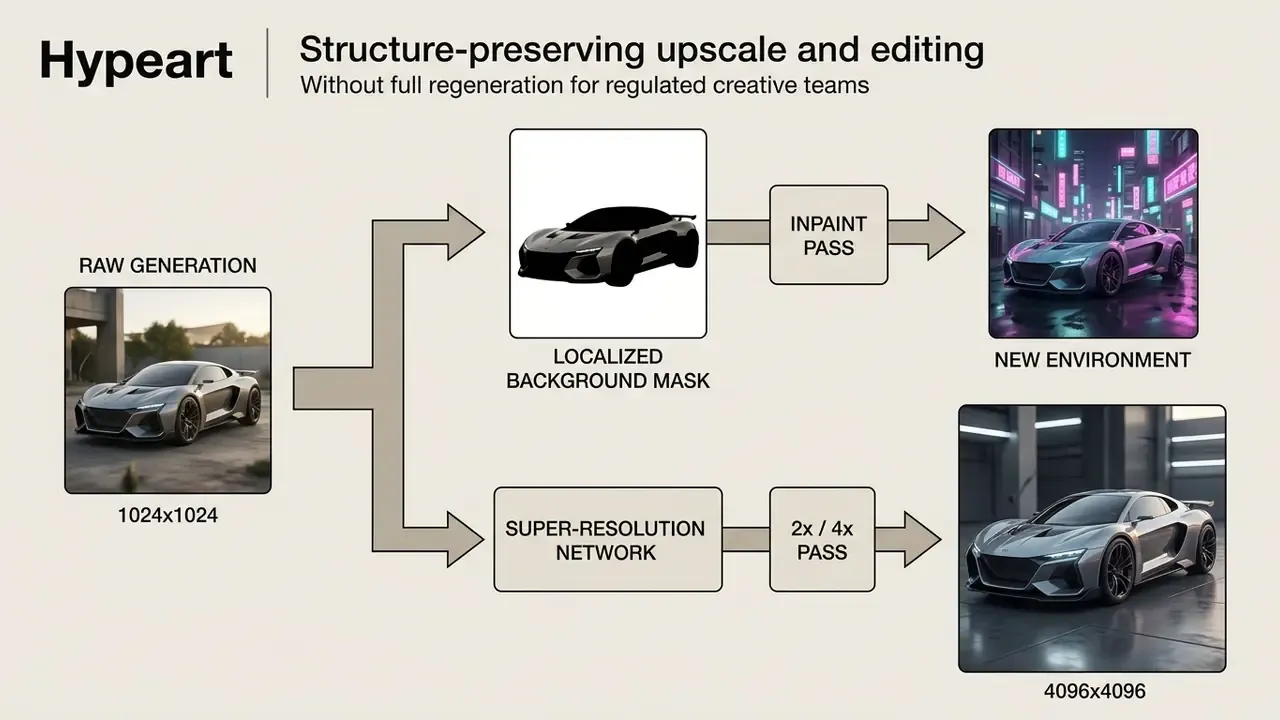
Structure-preserving super-resolution techniques, including those presented at ECCV, apply transposed convolutions and feature-stability guidance to increase dimensions without altering underlying line work.
«A DiT-based instruction editing framework outperforms comparable methods using only 0.5% of the training data and 1% of the trainable parameters of baseline approaches.»
Business operations reviewing outpainting tools for expanding aspect ratios across commercial assets consult the AI Media Commercial-Use Hub for technical comparisons. Teams handling post-processing passes can compare AI photo editors for masking and retouching depth.
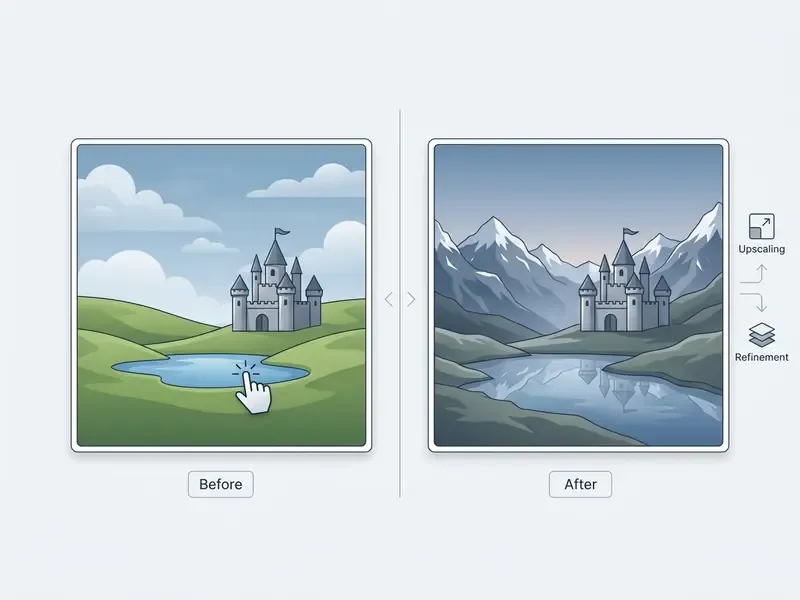
- Before (source photo). Original studio portrait with neutral backdrop and standard lighting.
- After (AI art transformation). Painterly style conditioning at 0.40 denoising strength, preserving facial geometry while updating background and texture.
Transformation breakdown: the image-to-image pipeline encoded the original photo into latent space, retaining key facial proportion vectors while the diffusion backbone applied oil painting brushstroke textures and updated lighting highlights per the style prompt. Both frames share identical crop, camera angle, and subject placement, which is a prerequisite for an honest before-and-after comparison.
Ecosystem Integration and Production Workflows
Direct Integration into Graphic Editors and Plugins
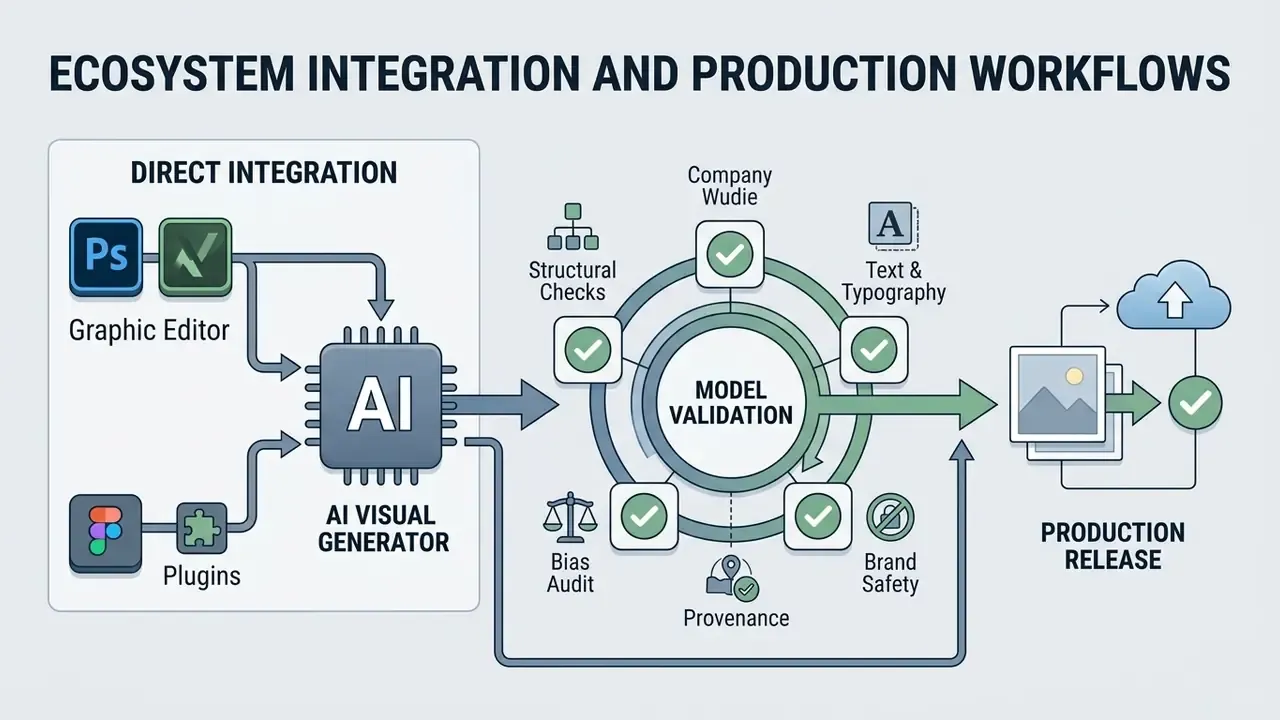
Modern visual generators no longer force constant switching between a browser tab and a graphics editor. Adobe Firefly is embedded in Photoshop and Illustrator through Generative Fill, which generates onto live working layers, plus Crop and Expand and Generative Remove for non-destructive canvas extension. Firefly outputs can be pushed onward to Photoshop on the web or Adobe Express without re-export. Canva Dream Lab sits inside the Canva canvas for real-time element generation alongside Magic Edit and the background eraser. Stable Diffusion-based tools ship as Figma plugins, so product designers generate backgrounds, illustrations, and icons without leaving the UI/UX environment. Amazon Nova Canvas covers the same ground at API level with inpainting, outpainting, background removal, and virtual try-on.
The practical consequence is workflow-level. Generation, masking, retouching, and export collapse into one pass, which shortens the review cycle and cuts the number of intermediate files a compliance reviewer has to trace. Fewer files, fewer places for an unapproved asset to hide.
Model Validation Before Production Release
Generative visual output should pass an automated pre-release gate before publication, much like model validation in any other risk-managed pipeline:
- Structural integrity checks. Automated detection of anatomical deformation (hands, fingers, eye alignment), duplicated limbs, and impossible geometry.
- Text and typography verification. OCR pass on rendered text to confirm spelling, brand naming, and legal disclaimers appear correctly.
- Bias and representation audit. Sampling of demographic distribution across generated batches. The roughly 15,000-face analysis cited above shows representation drift is measurable, and therefore testable.
- Brand-safety classification. Automated screening for prohibited symbols, competitor marks, protected characters, and celebrity likeness.
- Provenance marking. Application of content credentials or watermarking metadata so downstream consumers can identify synthetic origin.
AI Visual Generators in Financial Services: Use Cases and Compliance
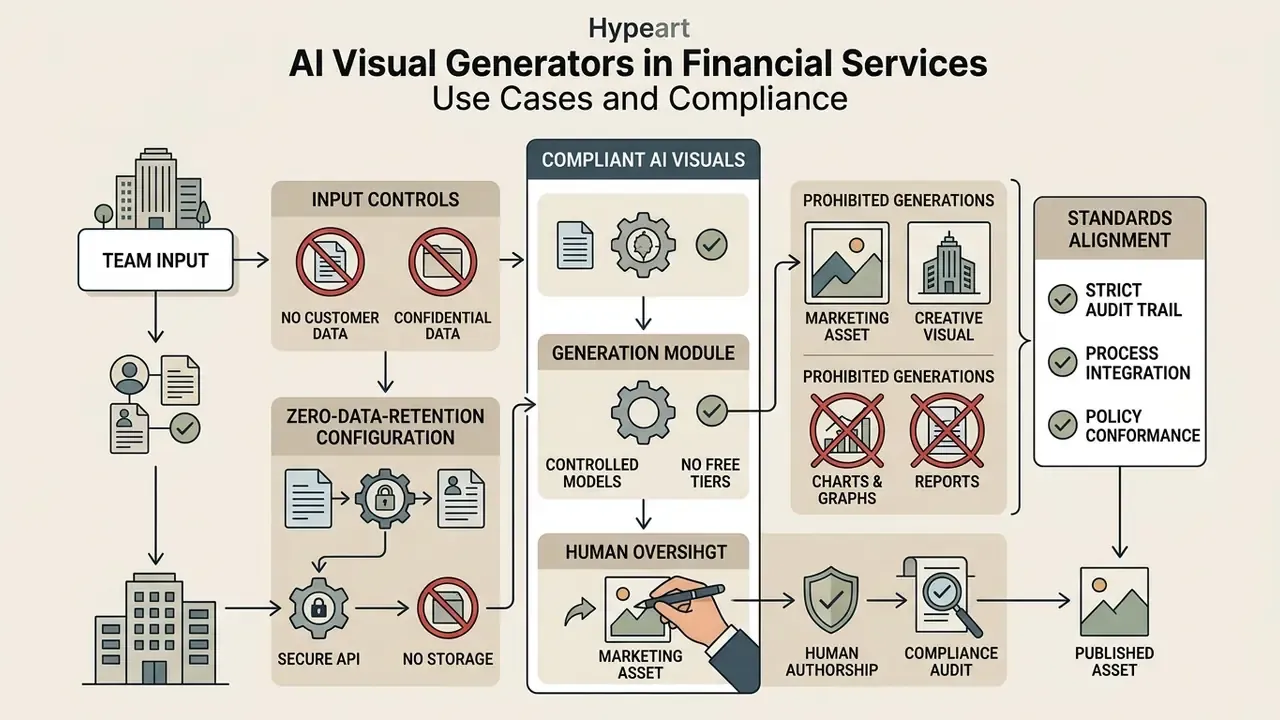
Regulated financial institutions operate under tighter constraints than consumer marketing teams. Every customer-facing visual asset intersects with advertising regulation, brand governance, and data-handling policy. The value case is real. It is also, unavoidably, a controlled-use case.
Documented and representative application areas
| Use case | Description | Primary control requirement |
|---|---|---|
| Product marketing creative | Campaign banners and social assets for cards, deposits, lending products | Marketing compliance review; mandatory disclosure text placed by humans, not generated |
| Personalized banking visuals | Segment-specific hero imagery for app and email journeys | Brand guideline conformance; no implied product terms in imagery |
| UI/UX prototyping | Rapid mockups of financial dashboards, onboarding flows, statement designs | No production data in prompts; internal-only classification |
| Investor and internal reporting graphics | Cover art, section dividers, conceptual illustrations for decks and reports | No depiction of performance figures; charts remain data-driven, never generated |
| Training and awareness material | Illustrations for fraud awareness, AML training, security onboarding | Factual accuracy review by subject-matter owner |
| Localization at scale | Multi-market variants of one approved master creative | Per-market regulatory review of the adapted asset |
Non-negotiable controls in a regulated environment
- No customer or confidential data in prompts. Prompt text is transmitted to a third-party model provider and may be retained. Treat the prompt field as an external channel.
- Zero-data-retention configuration. Where available, enable enterprise endpoints that contractually exclude training on submitted data and disable prompt logging on the vendor side.
- Free-tier prohibition. Many free accounts publish generations to a public community feed by default. That is an unacceptable confidentiality posture for product roadmap or campaign material.
- Human authorship on every published asset. Beyond copyright strategy, discussed below, this creates an accountable reviewer of record.
- Charts are never generated. Any visual carrying numeric or performance meaning must be rendered from source data, not synthesized.
- Standards alignment. Request SOC 2 Type II attestation, ISO/IEC 27001, and where applicable ISO/IEC 42001 (AI management systems) documentation from the vendor before onboarding.
Illustrative internal benchmark: an enterprise design team evaluating synthetic visual generation platforms to reduce stock media acquisition costs tested three platforms over a 30-day trial, measuring prompt adherence, background replacement speed, and commercial licensing safety. With strict model selection criteria and a generative canvas for localized editing, the team cut visual content production costs by 34% while holding to brand safety guidelines. These figures are representative of a composite engagement and should be treated as illustrative rather than audited. Control costs, review time, and licence upgrades were not netted out, which is precisely the omission that flatters most AI ROI decks.
How to Choose an AI Visual Generator: Models, Features, and Free Trials
Selecting an AI visual generator means evaluating four core capabilities: underlying generative model performance (Flux, Stable Diffusion 3, Imagen 3, DALL·E 3), canvas editing depth (inpainting and outpainting), upscale quality, and transparent commercial licensing terms. Testing these during a free trial is how you find out whether the tool fits your institution's risk appetite before procurement locks in.
When evaluating an ai image generator trial, business leaders should look past raw visual quality. Utility depends on integration into the existing creative stack and on whether the credit system survives iterative design loops. Testing ai image generator free trial features under real conditions reveals generation speed, server stability, and the depth of parameter control.
Generation Models and the Quality of AI Generated Images
Model performance is governed by training data architecture, parameter scale, and text encoder capability. State-of-the-art models such as Imagen 3, Stable Diffusion 3 (MMDiT), and Flux deliver stronger prompt adherence and photorealism. MS-COCO FID scores and human preference ratings both indicate that modern Multimodal Diffusion Transformers outperform legacy autoregressive models on text spelling, relationship realism, and detail retention.
«Imagen reaches FID 7.27 on MS-COCO and ERNIE-ViLG 2.0 reaches 6.75, while DALL·E scores 17.89 and CogView 27.10.»
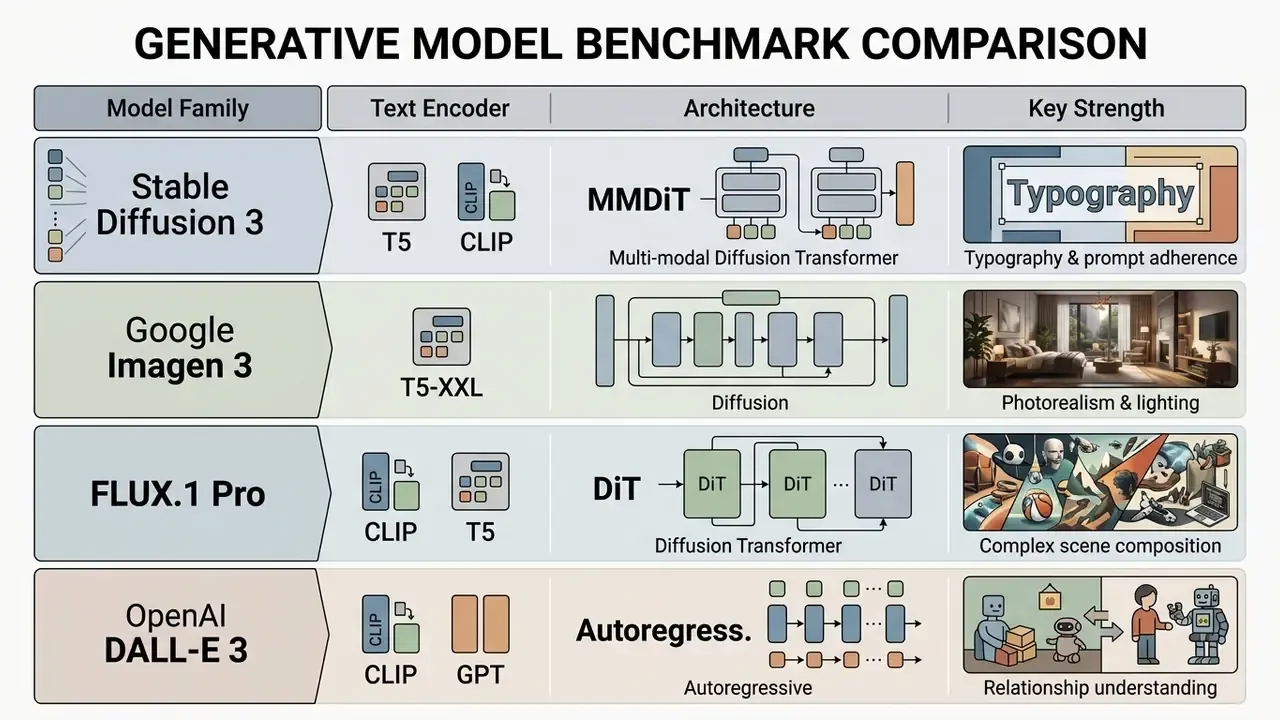
Model selection sets the baseline fidelity of synthetic assets. Stable Diffusion 3 uses a Multimodal Diffusion Transformer (MMDiT) architecture that processes text and spatial representations in parallel, improving text spelling and spatial positioning; its paper reports advantages over DALL·E 3, Midjourney v6, and Ideogram v1 on typography and prompt adherence. Google's Imagen 3 Research Report shows that dynamic thresholding prevents over-saturation in photorealistic renders and reports strong performance on long, complex prompts. A 2025 realism benchmark adds nuance: DALL·E 3 scored strongest on relationship realism but weakest on style realism, while Stable Diffusion v3.5 improved object and relationship scores at the cost of style realism relative to its predecessor. "Best" is axis-dependent, and any vendor claiming a single crown is selling. Financial controllers estimating compute overhead across generative projects use AI Media Calculators to model credit burn rates by model choice.
What to Check in an AI Image Generator Free Trial
On a free trial, verify credit allocation, generation speed priority, maximum output resolution, watermark presence, inpainting and outpainting functionality, and whether commercial use rights extend to free-tier outputs. Many platforms limit advanced model access or forbid commercial usage on unpaid tiers, which makes terms-of-service verification critical before any asset touches client work.
Trial parameters vary widely. Stability AI offers 25 free credits on registration, with per-action pricing of 5 credits for inpaint, 4 for outpaint, 2 for the fast upscaler, 40 for the conservative upscaler, and 60 for the creative upscaler. OpenArt's free tier grants 40 one-time trial credits plus daily basic-model generations with no commercial rights, charging 1 credit for 2× upscaling and 2 credits for 4×. Flux AI Pro's free plan lists 50 credits per month with basic model access, private generation, inpainting and upscaling tools, and a commercial licence. getimg.ai currently offers no free trial, bundling commercial rights and up to 4K upscaling into paid plans only.
Evaluating trial limits upfront prevents production halts mid-campaign. Readers weighing zero-cost options can compare free AI image generators side by side, and detailed cost structures and tier comparisons live in the current AI Media Pricing Guides.
| Platform / Model | Primary Models Supported | Text-to-Image | Reference Image Support | Editing & Inpainting | Max Native Resolution | Free Trial Parameters | Commercial Use Rights | Data Retention / Enterprise Security |
|---|---|---|---|---|---|---|---|---|
| OpenAI GPT Image | GPT-4o Vision, DALL·E 3 | Supported | Supported (multi-image) | Inpainting, region edit | 1024×1024 / 1792×1024 | Tier dependent / API credits | Full commercial rights on paid tiers | Enterprise agreements exclude API data from training; verify retention window per contract |
| Midjourney v6 | Midjourney v6.1 | Supported | Supported (image prompts) | Editor, inpaint, pan | Up to 2048×2048 (upscaled) | Limited / subscription based | Allowed; $1M+ annual gross requires Pro or Mega | Public generation by default on standard tiers; Stealth mode on higher plans |
| Canva Dream Lab | Dream Lab, Phoenix | Supported | Supported (style reference) | Magic Edit, eraser | Platform standard (HD) | Limited usage on Free plan | Allowed under Canva AI Terms | Enterprise plan required for SSO and admin controls; review AI Product Terms |
| Adobe Firefly | Firefly Image 3 | Supported | Supported (structure/style) | Generative Fill, Expand | 2000×2000 export | Monthly generative credits | Commercially safe (paid plans), IP indemnification for enterprise | Enterprise indemnification available; beta features excluded from commercial use |
| xAI Grok Imagine | Grok Visual Engine | Supported | Supported (up to 3 images) | Aspect ratio adjustments | 1080p equivalent | Integrated X Premium access | Subject to platform terms | Consumer-oriented terms; verify before enterprise deployment |
| Amazon Nova Canvas | Nova Canvas | Supported | Supported | Inpaint, outpaint, background removal, try-on | Model dependent | AWS free tier dependent | Governed by AWS Service Terms | Runs within AWS account boundary; inherits AWS compliance posture |
| Stable Diffusion (self-hosted) | SDXL, SD 3.x | Supported | Supported (ControlNet, img2img) | Full local inpaint/outpaint | Unbounded with upscaling | Open weights, free locally | Model-licence dependent; verify each checkpoint | Full data residency; nothing leaves the environment |
Summary of comparison data: capabilities diverge across model architecture, reference image handling, and licensing. OpenAI and Adobe provide the most complete developer and enterprise editing controls with clear commercial safety guarantees. Midjourney leads on artistic style control but requires higher subscription tiers for large enterprise revenues and for private generation. Canva emphasizes integrated layout workflows, which suits rapid social content. Self-hosted Stable Diffusion remains the only option that keeps prompts and reference imagery entirely inside the institution's own perimeter, which is often the deciding factor in a bank rather than image quality at all.
Pricing, Commercial Use, and Rights to AI Generated Images
Commercial use of AI-generated images is governed by platform terms of service, subscription tiers, and evolving legal frameworks. Major jurisdictions including the United States require human authorship for formal copyright registration. Paid commercial subscriptions grant contractual rights to commercialize outputs, but buyers still need to review vendor-specific terms and third-party IP risk before deploying synthetic visuals in client campaigns or product packaging.
Evaluating the financial and legal landscape means understanding credit systems and licensing boundaries together. Paid tiers, usually labelled Pro or Enterprise, typically bundle commercial deployment licences with priority server processing. OpenAI's business pricing, for example, mixes credit-based and token-based billing, with business credits valid for 12 months after purchase; its API priority processing has been renamed "Fast mode."
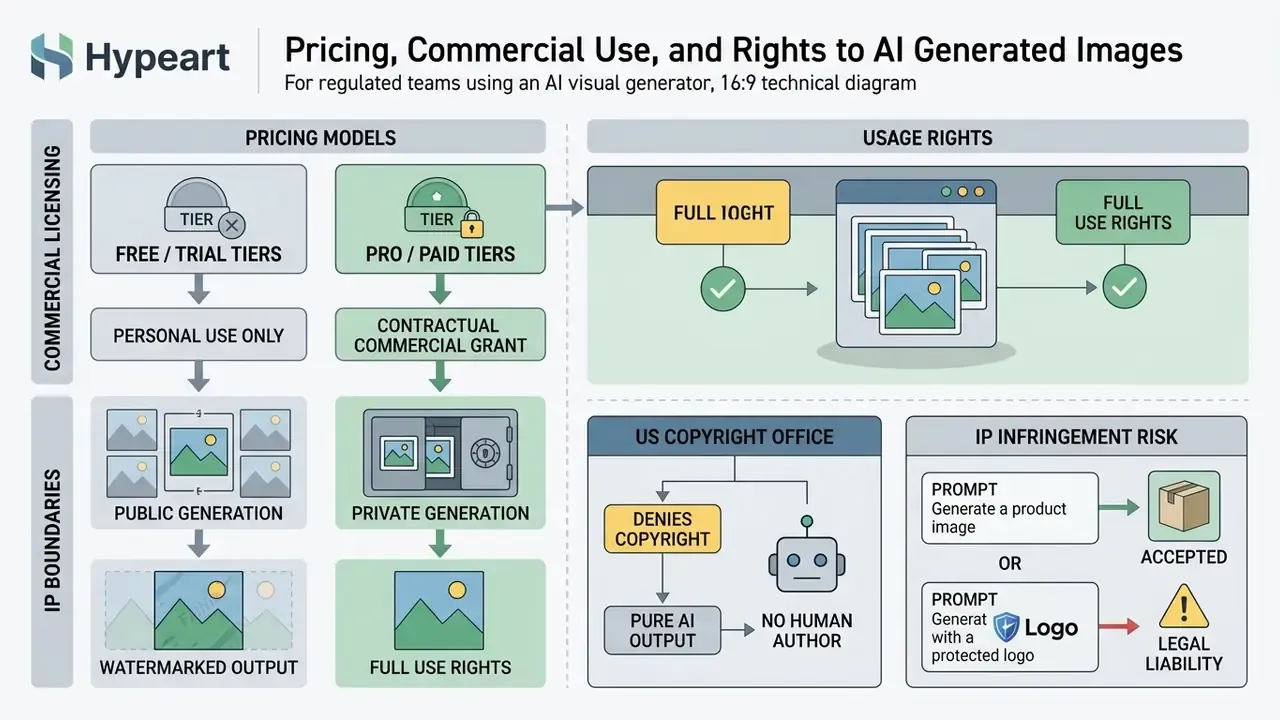
Legal decisions across major jurisdictions counsel caution. The U.S. Copyright Office Guidance (updated 2026) affirms that purely AI-generated outputs lacking human creative control cannot be registered for copyright protection. In the UK, government analysis published in 2026 states there is no statutory licensing scheme for training AI models, and that reproduction of copyrighted works to develop models requires a licence unless a narrow exception applies. A 2026 European Parliament briefing calls for a coherent licensing framework and sector-based voluntary collective licensing.
Per-Generation Cost Table (API and Web)
| Model / Platform | Billing format | Cost per standard generation | Cost per HD / 2K–4K generation | Free-tier limits |
|---|---|---|---|---|
| DeepAI | Subscription / pay-as-you-go | $0.01 (standard) | $0.08 (Genius) / $0.25 (Super Genius 2K) | Pro includes 500 standard, 60 Genius, 10 Super Genius 2K per month; limited base-model access on free |
| Midjourney v6 | Monthly subscription | ~$0.03–$0.05 (fast hours) | Included in Relax/Fast tiers | Free trial currently unavailable |
| Adobe Firefly | Credit system | 1 generative credit | 1–2 credits (high resolution) | Free daily generative credits; 25-credit-scale monthly allocations on entry plans |
| Stability AI / Stable Diffusion API | Pay-as-you-go | ~$0.002–$0.01 | ~$0.02–$0.04 (upscale; creative upscaler = 60 credits) | 25 free credits on signup; open-source and free when run locally |
| OpenArt | Credits | 1 credit (2× upscale) | 2 credits (4× upscale) | 40 one-time trial credits plus daily basic generations, no commercial rights |
| Flux AI Pro | Subscription | Credit-based | Credit-based | 50 credits per month, basic models, commercial licence included |
Read the table as unit economics, not as a price list. A 20,000-variant banner campaign at $0.01 per standard image costs roughly $200 in generation. The same campaign at 2K Super Genius quality costs roughly $5,000. Resolution decisions are budget decisions, and they belong in the business case rather than in the designer's toolbar.
Free, Trial, and Pro: What Features Differ
Pricing models split capabilities across free, trial, and paid Pro or Enterprise tiers, varying in credit refill rates, model selection (basic versus state-of-the-art), concurrent generation limits, inpainting and upscaling tools, and commercial usage rights. Free tiers often restrict output resolution, watermark renders, or prohibit commercial monetization outright under their terms.
Enterprise subscriptions run on combined credit-based and token-based billing. Advanced features, parallel generation threads, fast-mode queue processing, and access to full 4K upscalers, are generally reserved for paid accounts. Buyers comparing artistic engines can review the best AI art generators before committing to a tier.
One detail deserves emphasis, because it is where confidentiality usually breaks. Free accounts frequently publish generations to public community feeds automatically. For an enterprise product team, that is not an inconvenience. In a regulated institution it is a potential information-disclosure incident, complete with a notification question.
What Commercial Use Means for AI Art and Product Content
Rights to Generated Images and Terms-of-Use Limitations
Under current U.S. copyright law and judicial precedent, including 2025 D.C. Circuit rulings, purely AI-generated visual outputs without substantial human creative input are denied statutory copyright protection for lack of human authorship. Platform terms can grant contractual ownership or usage permissions between vendor and user. They cannot manufacture statutory copyright against third-party copying.
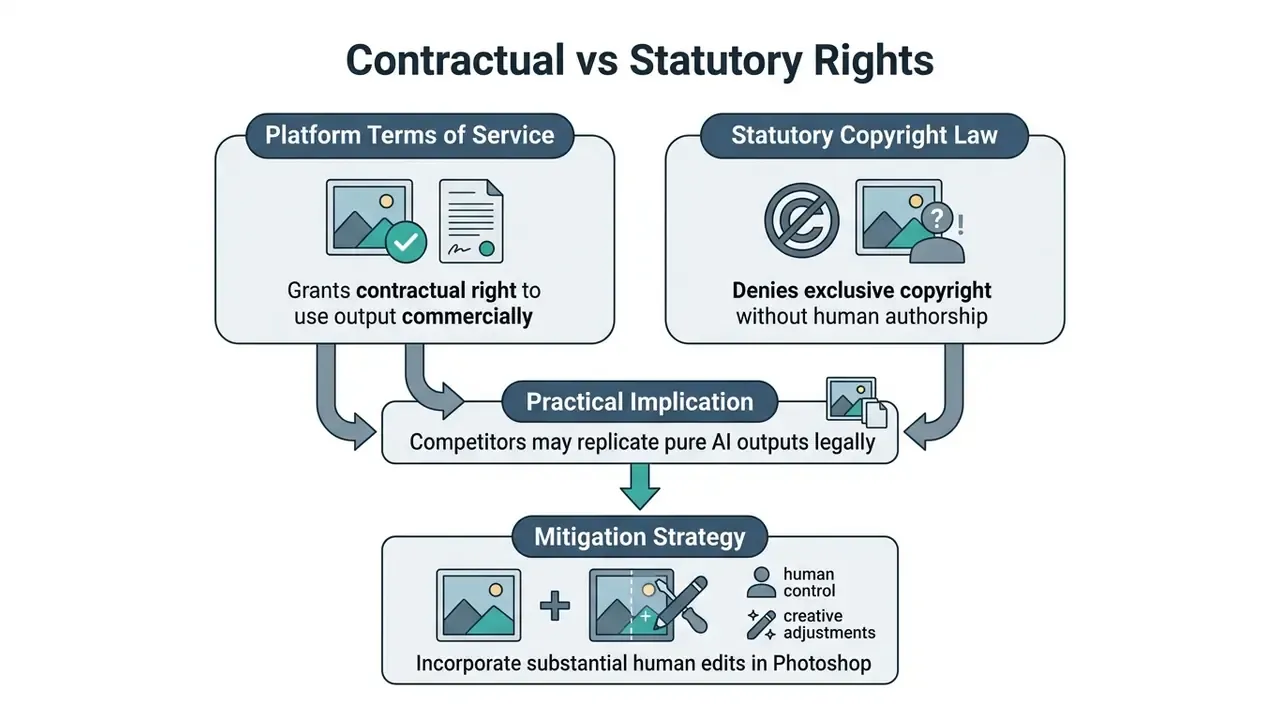
Because purely AI-generated graphics lack statutory protection, a competitor can in principle copy an unedited synthetic image without infringing copyright. A critical clarification: "no copyright protection" is not the same as "protected public domain." Some vendors state that generated images are public domain and therefore ownerless. That framing is contested. Under U.S. Copyright Office practice, absence of human authorship means the work is unregistrable. It does not automatically place the work in a legally clean public domain across all jurisdictions, and it does not extinguish third-party rights in any protected elements the output reproduces. Treat unregistrable output as unprotected, not as safe.
«Legal analysis concludes that most AI projects may claim authorial protection through the creator's creative contribution and conception, though purchaser rights remain unsettled.»
To establish protectable ownership, enterprise design teams combine AI synthesis with substantial manual edits, layout arrangement, and vector work, producing a composite that carries human authorship. EU materials note there are still no Union-wide rules specific to copyright in AI outputs, so ownership treatment diverges by region and must be assessed market by market.
Legal Notice: Review Terms of Service Before Commercial Client Use
Before deploying AI-generated images in client deliverables, marketing campaigns, or physical merchandise, verify platform-specific terms and licensing constraints:
- Preview and beta restrictions. Enterprise cloud terms, such as Google Cloud Preview Terms, explicitly prohibit commercial or production deployment of preview outputs, and Adobe's generative AI terms exclude beta features from commercial use.
- Commercial use licensing. Subscriptions must explicitly grant commercial rights. Outputs generated under free or educational tiers are typically restricted to non-commercial personal evaluation; OpenArt's free tier, for example, grants no commercial rights at all.
- Third-party IP exposure. Platform terms do not indemnify users against third-party trademark or copyright infringement arising from prompts that reference protected brand identifiers.
- Output reuse by the vendor. Some product-specific terms grant the vendor a broad licence to submitted output for marketing and reuse. Read the submission clauses, not only the ownership clause.
- Regulated-use restrictions. Cloud service-specific terms may restrict medical, child-directed, or other regulated contexts even where general commercial use is permitted.
Audit Trail and Governance Checklists
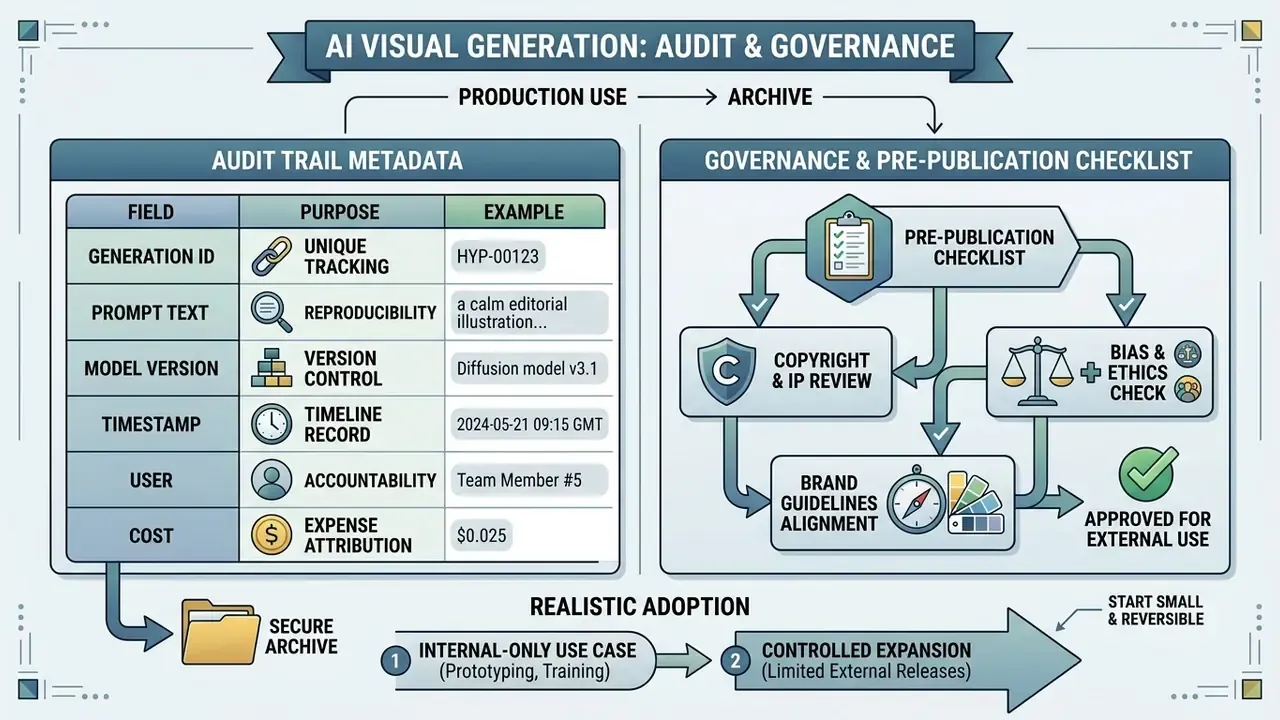
Audit Trail Metadata Requirements
Every production generation intended for external publication should persist the following fields in the asset archive. Without them, an asset cannot be reproduced, explained, or defended during review.
| Field | Purpose | Example |
|---|---|---|
| Model name and version | Establishes model lineage and reproducibility | gpt-image-2, 2026-01 |
| Full prompt text | Primary input record | "A professional executive in a modern office…" |
| Negative prompt | Documents suppression controls applied | blurry, deformed hands, text artifacts |
| Seed | Enables deterministic regeneration | 148802 |
| Guidance scale (CFG) and sampling steps | Reconstructs generation conditions | 7.5, 40 steps |
| Denoising strength / image weight | Records reference influence in img2img | 0.35 |
| Reference image hash | Links output to source asset without storing duplicates | sha256:… |
| Output resolution and format | Confirms export compliance | 2000x2000, PNG |
| Requesting user ID | Accountability of record | emp-04417 |
| Timestamp (UTC) | Sequencing and retention management | 2026-02-11T09:41:22Z |
| Reviewer ID and approval decision | Human authorship and sign-off evidence | emp-01120 / approved |
| Post-generation human edits | Supports copyright claim through human contribution | "background relit, logo placed, type set in Illustrator" |
| Licence or plan under which generated | Proves commercial rights at time of creation | Firefly Enterprise |
Pre-Publication Checklist
Checklist0 / 10
Limitations and Open Questions
Two honest caveats. First, no current vendor attestation fully answers the model-lineage question: training data provenance remains partially opaque even under enterprise indemnification, so residual IP risk cannot be driven to zero, only priced. Second, the copyright position is moving. Guidance updated in 2026 clarifies registrability but not the boundary of "substantial human contribution," which means today's threshold is a judgement call documented by your reviewer, not a bright line.
A reasonable next step is small and reversible: pick one internal-only use case, prototyping or training material, run it with the full audit-trail field set for 60 days, and measure control cost alongside production savings. If the evidence holds, extend. If it does not, you have lost a quarter, not a reputation.
FAQ: AI Visual Generators, Rights, and Output Quality
What is text-to-image in AI?
Text-to-image is a generative AI capability that produces an image from a written description. The model treats each word as a conditioning instruction and constructs the image from the combination of words and their relationships, rather than retrieving an existing picture.
How do text-to-image generators work?
They encode the prompt into embeddings, add controlled noise in a compressed latent space, then iteratively denoise it under cross-attention guidance from the text embeddings before a VAE decodes the latent back into pixels.
Can I use AI-generated images commercially?
Only if your plan grants commercial rights and your output does not reproduce third-party protected elements. Free and educational tiers frequently exclude commercial use, and preview or beta features are commonly prohibited from production deployment.
Do I own the copyright on an AI-generated image?
In the United States, purely AI-generated output without substantial human creative input is not registrable for copyright. A vendor may grant contractual ownership or usage rights, but that grant is not statutory copyright. Adding meaningful human authorship is the practical route to a protectable asset.
Are AI-generated images public domain?
Not reliably. Unregistrable is not the same as public domain, and treatment differs by jurisdiction. Any protected element the model reproduces stays protected regardless of the output's own registrability.
Can AI-generated images be used for NFTs?
Some platforms permit it explicitly. Verify both the platform's terms and whether the output reproduces third-party protected material before minting.
What file formats and resolutions are supported?
Uploads typically accept JPG, PNG, and WebP, with HEIC supported in Safari on macOS. Native generation sits between 1024×1024 and 1792×1024 for most models. Firefly exports up to 2000×2000, Midjourney reaches 2048×2048 after upscaling, and neural upscalers extend output to 4K or 8K.
Is the quality sufficient for print?
Native output prints well at small sizes. For large-format print, run a dedicated super-resolution pass; unupscaled 1024 px output will visibly soften at poster scale.
Is there an API?
Most major providers expose generation and editing endpoints. Persist the seed and model version in every API call, otherwise the output cannot be reproduced later.
Which model is best?
It depends on the axis. Stable Diffusion 3 leads on typography and prompt adherence, Imagen 3 on photorealism and complex prompts, DALL·E 3 on relationship realism, and self-hosted Stable Diffusion on data residency.
Appendix A: Superseded Formulations
Retained for transparency of editorial revision:
- Original phrasing (superseded): "In a 2024 academic survey of text-to-image synthesis published in IEEE Transactions, artistic models were shown to optimize for movement classification and stylization transfer." Replaced above with a verified formulation citing style-accuracy, structural-integrity, and stylization benchmarks, plus the 2025 CHI realism figures (17% and 43%).
- Original phrasing (superseded): "Research confirms that structured prompts featuring explicit camera, lighting, and style parameters improve semantic consistency by up to 16% over unguided natural text." Replaced above with the sourced SSP (2024) figure of 16% semantic consistency improvement and 48.9% safety improvement.
- Original editorial note (removed): the inaccurate authorship disclaimer previously attached to the byline has been replaced with the Hypeart editorial board attribution at the top of this article.
Technical Metadata and Indexing Information
{
  "title": "AI Visual Generator - Create AI Images and Art",
  "meta_description": "AI visual generator guide: create images and AI art from text or photos, compare models, per-image costs, export specs, trial limits, and commercial-use rights.",
  "canonical_url": "https://hypeart.ai/glossary/ai-visual-generator/",
  "primary_entity": "AI Visual Generator",
  "editorial_attribution": "Hypeart technical editorial board",
  "last_updated": "2026-02"
}