There is a second question underneath the obvious one. Who is allowed to upload footage, and to which service? For a marketing team that is a workflow detail. For a bank or a regulated fintech, it is a data-processing decision with a retention clock attached.
Written and reviewed by Marcus Hale, AI Governance & Operational Risk Analyst, based on hands-on testing of browser video editors, vendor documentation, and published codec standards. Marcus Hale, author. Last updated: 2026.
What this guide settles for you: the exact three-step crop workflow, the operational difference between crop, resize and trim, a full aspect-ratio preset catalogue, mobile browser limits on iOS and Android, circle and SVG shape masking, container and codec behaviour for MP4, MOV and AVI, free-tier watermark and file size rules, a retention and encryption checklist for regulated footage, and plain-language rules for avoiding blur. Definitions for the terminology used throughout sit in the AI Media Glossary.
How to crop a video online
Cropping a video online means uploading a raw video file, selecting a defined frame boundary or target aspect ratio, and exporting the modified media file straight from a browser interface. Modern web applications use browser-native technologies such as WebCodecs to run spatial transformations without server round-trip latency.
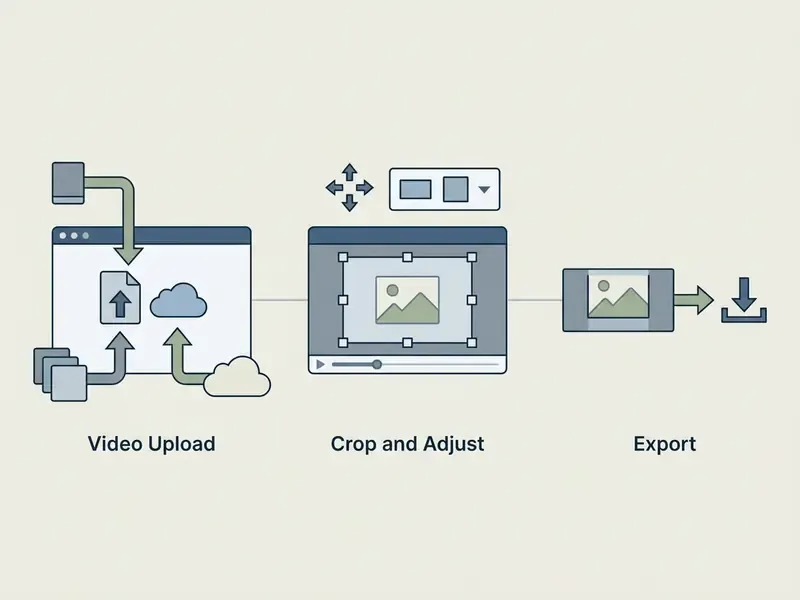
Upload a video file
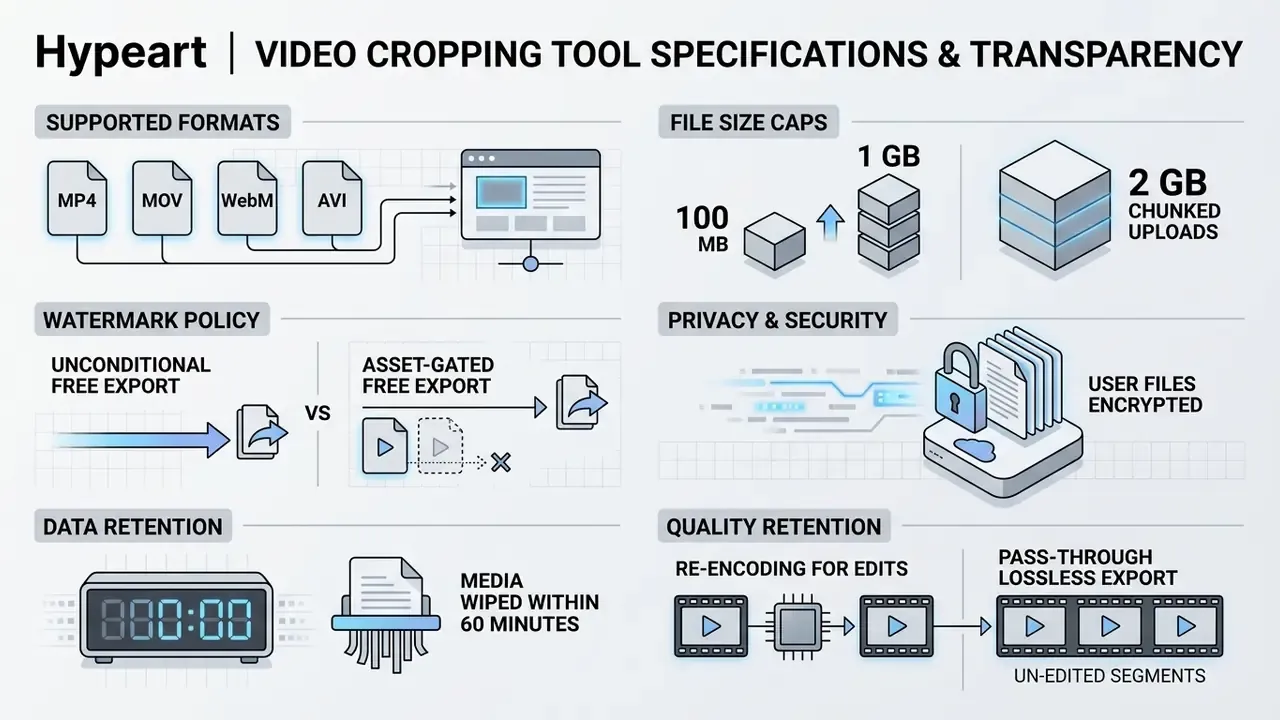
Video files are uploaded by dragging and dropping local files or selecting media from cloud storage repositories. Standard browser editors accept inputs up to 100 MB on basic tiers, while scalable web architectures manage HTTP PUT payloads up to 2 GB (GitHub Docs, 2026; Google Studio Help, 2026). Large-payload handling is why processing speed, not just capacity, defines usable throughput. A 900 MB ceiling means very little if the queue takes eleven minutes.
«Convex-hull estimation using XPSNR reduces decoding time by 65.46% at the same bitrate versus the baseline encoder.»
To upload your video, drag the file into the web canvas or click the upload button and browse local folders. Common input formats include MP4, MOV, and WebM containers (Google Vids, 2026). Choosing a web-optimized container shortens the initial buffer delay while the browser renders the first frame.
Importing from cloud storage and direct URLs. Modern browser editors ingest media directly from cloud providers (Google Drive, Dropbox, Microsoft OneDrive) and from public URL endpoints. To import from cloud storage, select the provider icon in the upload modal, authorize account access through the OAuth prompt, and stream the file into the browser workspace without consuming local disk space. To import by link, paste a publicly reachable direct URL; the service fetches the remote file server-side, which avoids a double transfer on metered mobile connections. Cloud round-tripping also works in reverse: after cropping, the export can be written back to the same connected drive instead of the local download folder.
One practical caveat. Private or permission-gated links fail silently on many services, so set sharing to "anyone with the link" before pasting the address. If your source lives on a video host rather than a drive, download the master file first, because most croppers reject streaming manifests such as HLS .m3u8 playlists.
Select the crop frame or aspect ratio
Frame selection works two ways: drag the interactive bounding handles over the canvas, or apply a preset aspect ratio. A locked preset fixes horizontal and vertical proportions; a freeform preset opens up custom spatial boundaries (IMG.LY Docs, 2026; Adobe Help Center, 2025).
Position the crop frame video online selection boundary directly over the focal subject. Sounds obvious. It is also the step people rush.
«Visual expressiveness of the subject is a key structural driver of short-video user engagement.»
Standard social presets lock proportions to 1:1, 9:16, or 16:9, and any competent browser video editor exposes an unlock toggle for custom geometry. Unlocking the ratio lets you drag side handles independently and crop frame of video online assets for bespoke web layouts. Mobile-first editors behave the same way; if your team already works inside a capcut video editor habit, the browser equivalent maps onto the same mental model of handles plus presets.
Manual pixel coordinate entry. For absolute precision, skip the drag handles and type numeric pixel coordinates (X, Y) alongside target width and height (W, H). Manual entry guarantees that cropped frames conform to strict UI placement specifications, ad-slot dimensions, and header banner requirements. A reliable working method:
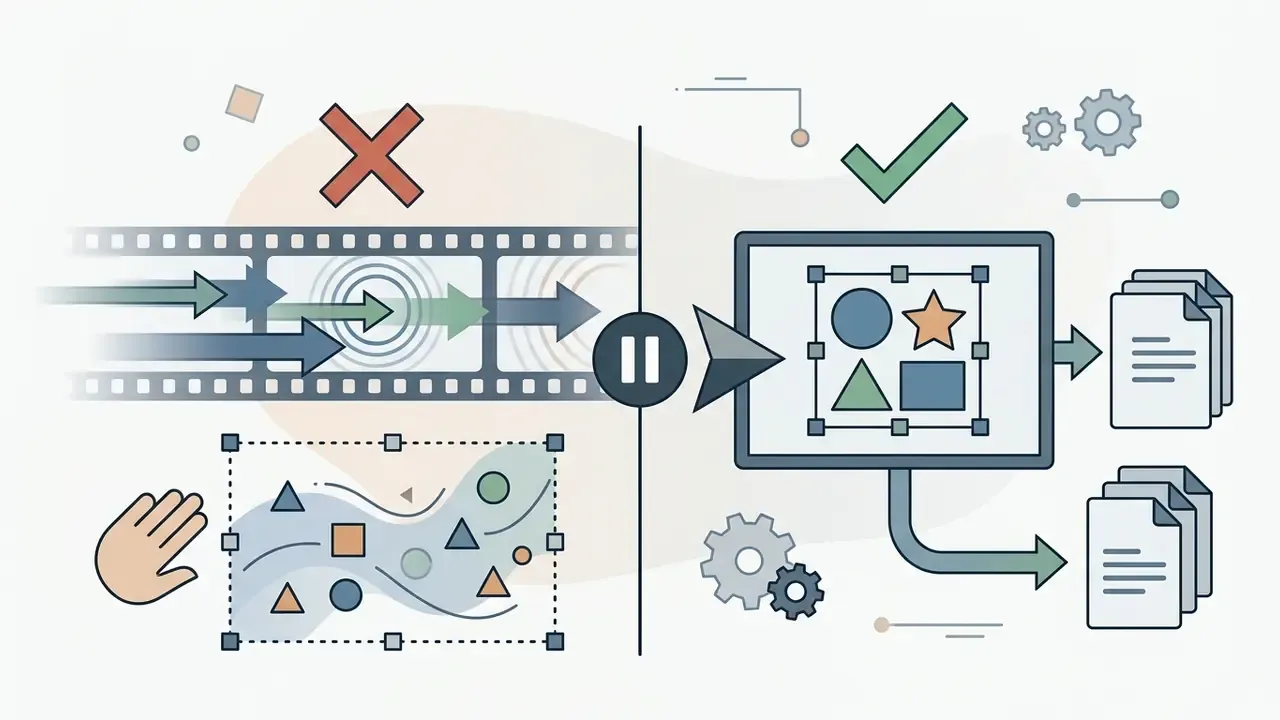



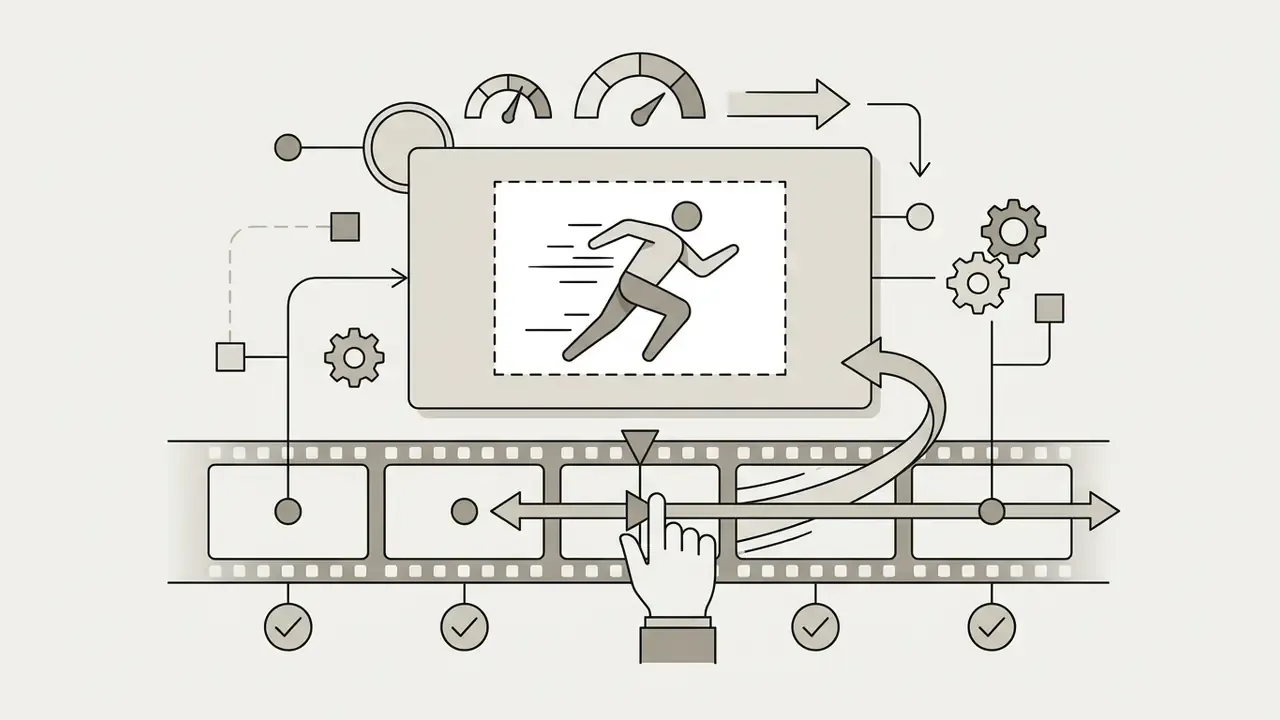
Preview, edit and download the cropped video
Real-time previewing lets you verify focal alignment and spatial bounds before generating the final export. Lossless rendering passes unchanged frame segments straight through to export, avoiding needless re-encoding and quality degradation when source parameters match (NCH Software, 2026).
Review playback in the online video cropper canvas and check that key visual elements stay visible for the whole clip. Once the spatial adjustments look right, run the export command to crop your video and save the processed video file locally, or push it back to the connected cloud drive. Teams that need repeatable output rather than one-off edits should look at the api route instead, where the same offsets apply to a whole batch.
Crop, resize and trim videos for the right format
Crop, resize, and trim serve distinct operational functions. Cropping modifies the visible spatial frame, resizing alters output dimensions, and trimming adjusts total duration. Combine all three and video assets meet strict platform distribution specifications.
| Operation | What changes | What stays the same | Typical use |
|---|---|---|---|
| Crop | Visible frame area, aspect ratio | Duration, frame rate, audio | Removing dead space, reframing for 9:16 |
| Resize | Output width and height (resolution) | Full frame content, duration | Meeting an upload spec, reducing file weight |
| Trim / Cut | Start and end points, total runtime | Frame composition, resolution | Removing slate frames, tightening a hook |
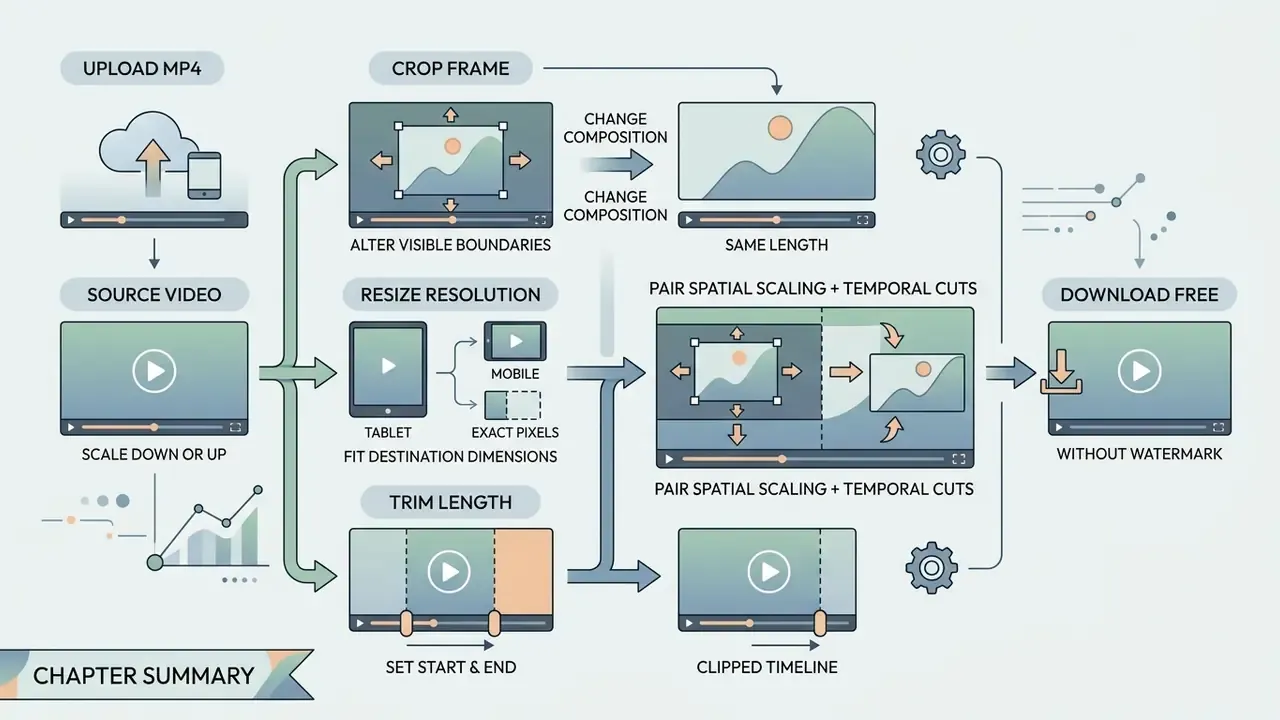
Crop the frame without changing video length
Resize and trim a video clip
Resizing scales spatial resolution down or up to fit destination dimensions; trimming sets start and end points along the timeline. Per W3C standards, spatial transformations scale and crop visual coordinates, while temporal trimming operates independently through mark-in and mark-out timestamps (W3C Media Capture and Streams, 2025).
When you need to crop and edit video online, pairing spatial scaling with temporal cuts is what actually shrinks total file size. Trim unnecessary intro or tail frames first and you reduce processing overhead before the spatial pass runs. Teams benchmarking editing stacks against one another can review the best free video editing software for feature-by-feature comparison of crop, resize, and trim behaviour, browse the wider AI Media Comparison Matrices for adjacent tool categories, and study end-to-end YouTube video editor workflows when publishing follows immediately after cropping. A crop cut video editor that handles both operations in one session also spares you a second export generation, which is where quality quietly leaks.
Aspect ratios for square, vertical and social videos
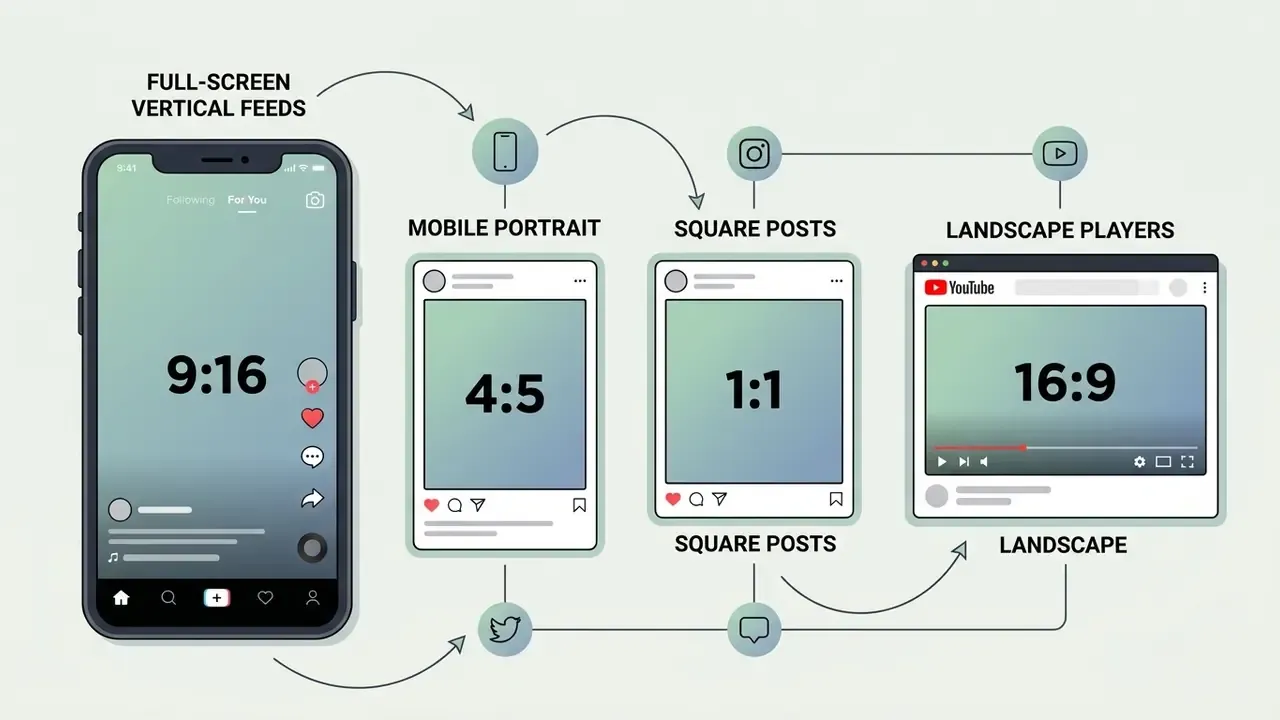
Social video delivery runs on standardized aspect ratios: 9:16 for full-screen vertical feeds, 4:5 for mobile portrait, 1:1 for square posts, 16:9 for landscape players. Pick the right preset and you avoid letterboxing while maximising screen real estate on the target device (Instagram, TikTok, YouTube Shorts guidelines, 2026).
Standard aspect ratios and cropping guidelines for social video platforms
| Aspect ratio | Resolution preset | Target platforms | Cropping guideline |
|---|---|---|---|
| 1:1 (Square) | 1080×1080 px | Instagram Feed, Facebook, LinkedIn | Center the primary subject; preserve equal side margins. |
| 9:16 (Vertical) | 1080×1920 px | TikTok, Instagram Reels, YouTube Shorts, Snapchat | Align the subject in the central safe zone; avoid top and bottom UI overlays. |
| 4:5 (Portrait) | 1080×1350 px | Instagram Feed, Facebook Mobile, LinkedIn | Crop tighter vertically than 1:1 to maximise mobile feed area. |
| 16:9 (Landscape) | 1920×1080 px | YouTube standard, desktop web | Maintain horizontal focus; crop edges for banner placements. |
| 4:3 (Classic TV) | 1440×1080 px | Archive footage, slide-based presentations | Retain legacy broadcast proportions; avoid stretching to widescreen. |
| 3:2 (Classic) | 1080×720 px | DSLR media, photography portfolios | Preserve standard camera sensor proportions during reframing. |
| 2:1 (Cinematic) | 2160×1080 px | Twitter/X header video, cinematic web banners | Crop top and bottom margins evenly for an ultrawide presentation. |
| 1.618:1 (Golden ratio) | 1748×1080 px | Editorial hero blocks, design-led landing pages | Use where proportional balance matters more than platform specs. |
«Engagement in short-form video is driven by content-audience and platform-norm alignment rather than production quality.»
Crop vertical video for TikTok and Instagram
Vertical video (9:16, 1080×1920 pixels) is the native standard for TikTok, Instagram Reels, and YouTube Shorts. Reframing horizontal footage means scaling content to fill a vertical canvas while keeping focal points inside central safe zones, clear of platform UI overlays (TikTok Safe Zone Guides, 2026).
«TikTok, together with Douyin, counts roughly 2.7 billion users; vertical format is a precondition for content visibility.»
When you crop and resize video online for vertical delivery, keep text overlays and facial features away from the bottom caption box and the right-side engagement icons. As a practical margin, treat the top ~10% and bottom ~20% of the 1080×1920 canvas as reserved interface space, and leave the right-hand column clear for the action rail. Teams producing vertical-first campaigns at volume often pair cropping with an AI video generator that renders natively in 9:16, which avoids lossy reframing altogether. For character-led vertical formats, a cartoon character maker with a 9:16 output preset does the same job upstream.
Crop video online on mobile browsers (iOS Safari and Android Chrome)
Browser-based croppers run inside iOS Safari and Android Chrome with no app installation, which matters when the source footage should never leave the phone. Open the tool's URL, tap the upload control, and choose Photo Library on iOS or Files / Gallery on Android; the picker hands the file to the browser directly.
Three mobile-specific constraints are worth planning around:
- Codec support depends on hardware. WebCodecs exposes only browser-native decoders (H.264, HEVC, VP8, VP9, AV1), and Safari's AV1 support relies on hardware decoding, so an AV1 source that opens on a desktop may fail on an older iPhone.
- iPhone HEVC captures may need conversion. Video recorded in "High Efficiency" mode is HEVC in a
.movcontainer. If a cropper rejects it, set the camera to "Most Compatible" (H.264) or run it through a converter video step to MP4 before uploading. - Background tabs suspend processing. Mobile browsers throttle inactive tabs, so keep the cropping tab in the foreground until export completes, and do not lock the screen mid-render.
For long clips on cellular data, trim first and crop second. Cutting the timeline before the spatial pass reduces the number of frames the phone has to decode and re-encode, which on a mid-range Android is the difference between 40 seconds and four minutes. If a mobile export stalls repeatedly, the AI Media Support and Troubleshooting notes cover the usual culprits.
Circle crop video editor: create a circle video online
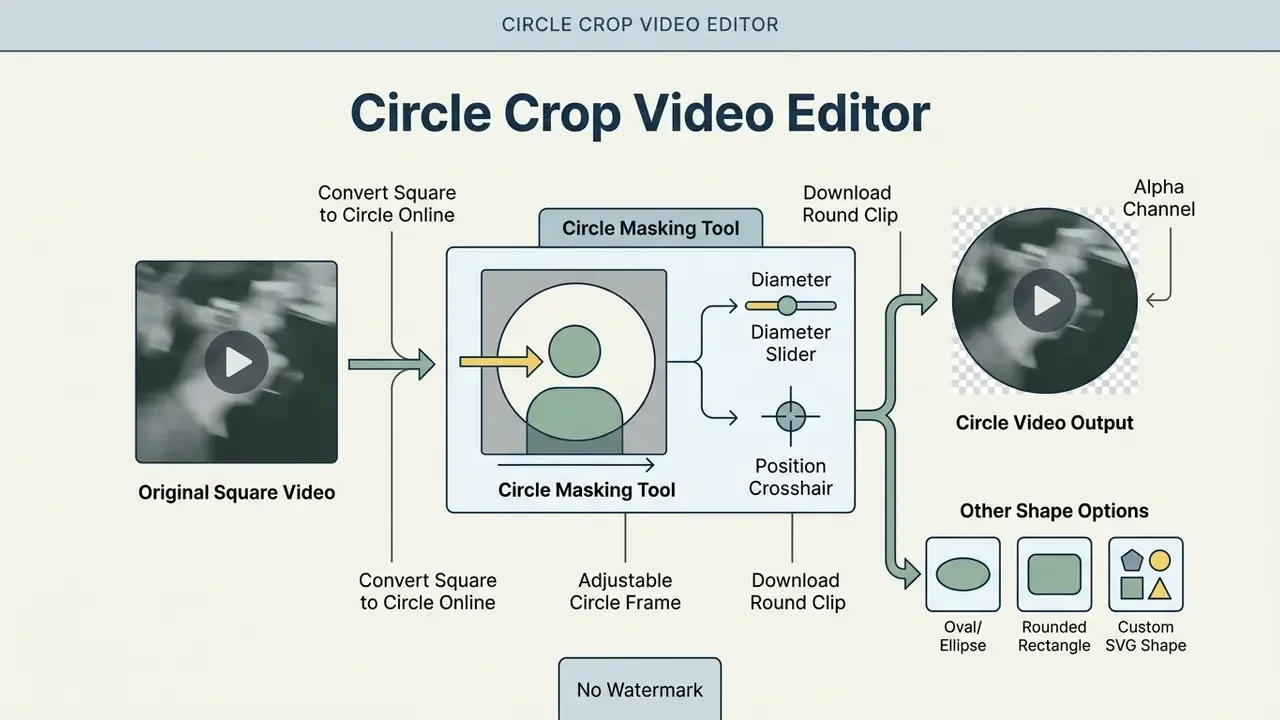
A circle crop video editor applies a circular alpha mask or geometric boundary to output a round clip. Circle framing shows up in user avatars, webcam overlays, and interactive web elements, and it never changes the underlying video duration.
Convert square video to circle online
Converting a square video to a circle format means centering the subject inside a 1:1 frame and applying a circular clipping path. CSS clip-path: circle() or an HTML canvas arc() combined with clip() restricts visible pixels to a circular radius (W3C CSS Masking Level 1; HTML Canvas 2D Specification).
To convert square video to circle online, position the source so the focal subject sits at the exact geometric midpoint. Applying the circular boundary crops the outer corner pixels and leaves a clean circular asset for profile embeds. Two practical routes exist in browser tools. The first is a mask preset, a one-click circle applied to the selected clip. The second is an overlay or picture-in-picture route, where the circular clip is layered over a background video or solid colour so the round frame reads correctly on any surface. If the tool exports without an alpha channel, use the overlay route and match the background to the destination page colour, or export to WebM with alpha where supported.
Adjust the circle frame around the subject
Adjusting a circle frame means repositioning the central origin and dragging corner control handles until the subject is enclosed. Interactive preview controls allow real-time alignment, so facial features or core objects stay centered inside the circular boundary (Apple Preview, 2026; Open Images, 2026). Where the editor exposes numeric fields, entering the exact area size, as Epson's preview-scan interface does for document dimensions, is far more repeatable than dragging handles across a batch of clips.
When you use a circle crop video online tool, scale the circular boundary until the subject fills roughly 70% of the internal frame. That spatial margin prevents an uncomfortably tight crop around faces during mobile playback. If the subject moves, apply keyframes to the mask position so the circle tracks the action instead of clipping it.
Oval, rounded and custom SVG shape crops
Advanced spatial masking goes past circles into ovals, rounded rectangles, and custom geometric SVG paths. Custom clipping masks let video overlays match complex UI layouts and promotional templates without hard rectangular edges. Three implementations are available in browser workflows:
- Ellipse clipping.
clip-path: ellipse(50% 35%)produces an oval frame from a rectangular source without pre-cropping to 1:1. - Rounded rectangles.
border-radiusorclip-path: inset(0 round 32px)softens corners for card-style embeds and dashboard widgets. - SVG masks. Referencing an
<svg><mask>frommask-imagesupports arbitrary shapes (hearts, stars, flowers, badges, brand marks) plus gradient-based soft edges that hard clipping cannot produce.
The distinction matters technically: clip-path performs hard-edge geometric clipping, while mask and mask-image use alpha or luminance data and therefore support feathered fades (W3C CSS Masking Level 1). Template-driven editors expose the same capability under labels like "frames" or "shape presets", which is functionally an SVG mask with decorative borders attached. A cartoon maker app with sticker frames uses exactly this mechanism under the hood.
Crop MP4, MOV, AVI and other video formats online
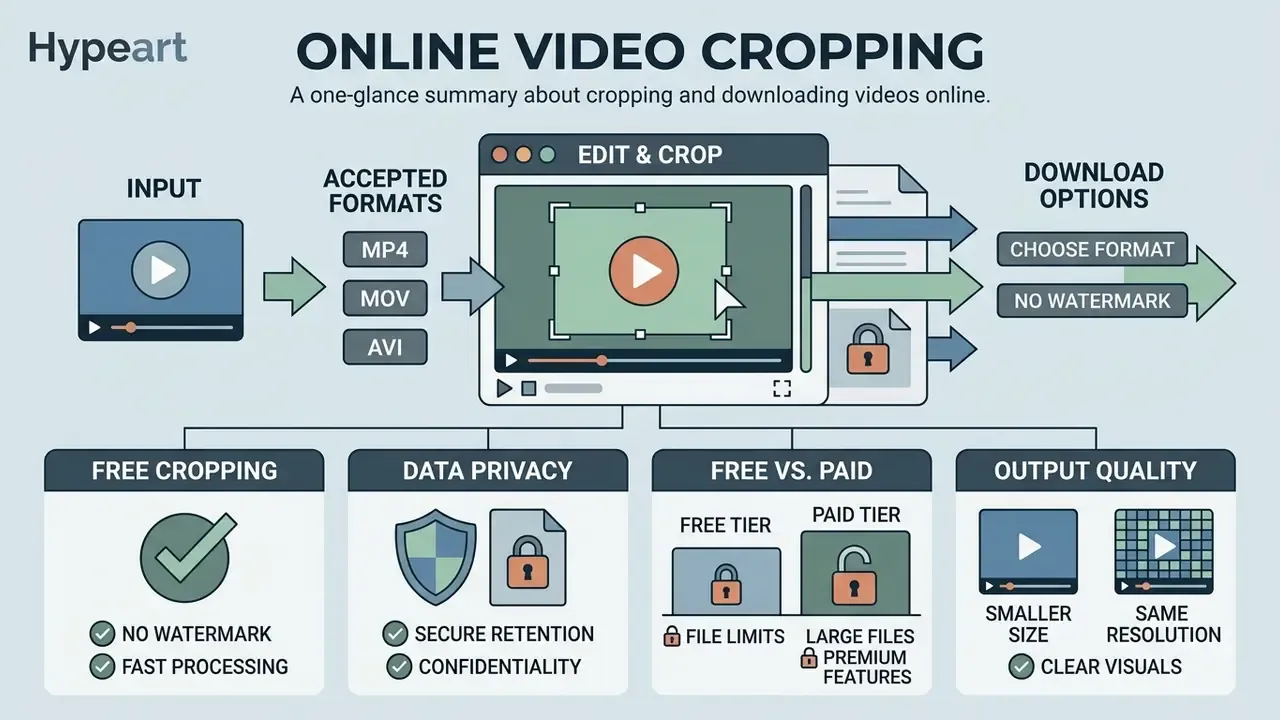
Online video editors accept the standard container formats, MP4, MOV, and AVI included, processing bitstreams through browser decoders or cloud transcoding pipelines. Output formats are re-encoded during export, and MP4 remains the most compatible container across web and mobile platforms (MDN Media Docs; Android Media Framework). Support is uneven by service: some croppers ingest AVI directly, others require conversion to MP4 first, and export codec menus are consistently narrower than input support.
Crop MP4 video online
Cropping MP4 video means decoding H.264 or H.265 (HEVC) streams, applying spatial cropping offsets, and encoding the target rectangle. H.264 bitstreams use explicit frame_crop parameters, while H.265 relies on conformance cropping windows to define visible frame boundaries (ITU-T H.264 / H.265 Standards, 2026).
Research shows that optimising bitrate-resolution pairs with XPSNR metrics achieves an average 5.84 dB PSNR improvement while reducing encoding time by 44.43%, and cuts decoding time by 65.46% at the same bitrate relative to a baseline VVenC configuration (IEEE ICIP, 2024). To crop mp4 video online, upload the file, adjust the spatial frame boundaries, and export with tuned bitrate settings to hold visual quality. The same path covers people searching for crop mp4 video free online or crop mp4 video online free: the operation is identical, only the tier limits differ.
Choose a format for download
Exporting a cropped video means selecting an output container to match the destination. MP4 with H.264 video and AAC audio offers universal web compatibility, MOV supports high-bitrate Apple workflows, and WebM delivers efficient web playback with VP8, VP9, or AV1 payloads (AWS MediaConvert Docs; Azure Media Services). Reviewing the best AI video generator options is a fast way to check which export containers a given stack actually supports before you commit a batch to it, and the AI Media Calculators help you size storage and bitrate for that batch in advance.
When you crop a mp4 video online, choosing MP4 as the final export format minimises cross-device playback errors. HEVC in MP4 halves file size on modern hardware but fails on older devices. MOV output in managed pipelines is typically limited to AVC (H.264), MPEG-2, or Apple ProRes, and MOV inputs must be self-contained rather than reference-linked, which trips up editors who hand off Final Cut projects instead of flattened masters.
Free video cropper: watermark, file size and commercial use
What is included in free video cropping
Free video cropping tiers usually include basic frame adjustment, standard social presets, and 1080p export at no upfront cost. Some platforms offer unconditional watermark-free exports; others restrict clean exports to projects built exclusively with free stock assets (Microsoft Clipchamp, 2026; Canva Terms, 2026). Open-source desktop alternatives such as OpenShot advertise unlimited tracks with no watermarks, subscriptions, or project limits, and that is the reference point against which browser free tiers should be judged.
Anyone planning to crop a video for free online should verify export conditions before editing, not after. Tools that genuinely offer crop a video online no watermark capability keep branding overlays off finished assets, which is a material concern for paid distribution: a competitor's watermark on a promoted asset is a brand problem and a compliance problem at once. If your team is comparing paid tiers rather than free ones, the AI Media Pricing overview sets out where per-minute and committed-throughput models start to make sense.
«Influencer visual strategies, framing and composition, significantly affect user engagement in Instagram campaigns.»
Organizations assessing licensing exposure across their media stack should review the commercial use of AI image generators and the broader AI Media Commercial-Use documentation, because the same rights questions, ownership of output, permitted resale, attribution duties, apply to processed video assets. Where output provenance is disputed, the ongoing AI Litigation and case tracker is the better starting point than vendor marketing copy.
Data retention and privacy. Free browser-based processing environments enforce data-wiping schedules of varying rigour. Uploaded media and temporary render buffers are typically deleted from edge processing servers within 60 minutes of session termination, and several free croppers publish this explicitly ("files are automatically deleted one hour after upload"). Where retention is not published, assume indefinite storage and act accordingly.
Free tier comparison: watermarks and limits
| Service | Free file size cap | Watermark on free export | Account required |
|---|---|---|---|
| Microsoft Clipchamp | Plan-dependent | No, 1080p export without watermark | Yes |
| Canva | ~1 GB | No, if only free assets are used | Yes |
| Clideo | 500 MB | Yes on free tier | No, for basic cropping |
| Kapwing | ~250 MB | Yes on free tier | Yes |
| Adobe Express (trim/crop) | Up to 1 GB | Not stated for basic exports | Yes |
| Browser cropper utilities (Ezgif-class) | ~200 MB | No | No |
Figures reflect published vendor terms and comparison reporting for 2026 and change frequently. Confirm the current cap and watermark rule at the point of upload.
Large video files and quality after cropping
Cropping large video files preserves original resolution, frame rate, and bitrate only when export parameters match source settings. Re-encoding large files means managing compression trade-offs, since unoptimised re-compression introduces visible spatial artifacts (Vimeo Compression Guidelines, 2026). Understanding how a video compressor balances bitrate against perceived quality is the fastest way to avoid the classic mistake: cropping a 4K master and exporting it at a 720p-class bitrate.
When you process footage with a crop large video online free utility, or a crop big video online tool aimed at multi-gigabyte masters, lock constant frame rate parameters to maintain audio-video synchronization. Published bitrate targets give a workable floor: roughly 5 to 10 Mbps for 720p, 10 to 20 Mbps for 1080p, and 30 to 60 Mbps for 4K. Upload architecture matters too. Chunked transfer is required above roughly 100 MB in several managed pipelines, and asynchronous handling kicks in above 20 GB (Cloudinary Docs, 2026).
Data security, privacy and Shadow AI risk when cropping video online
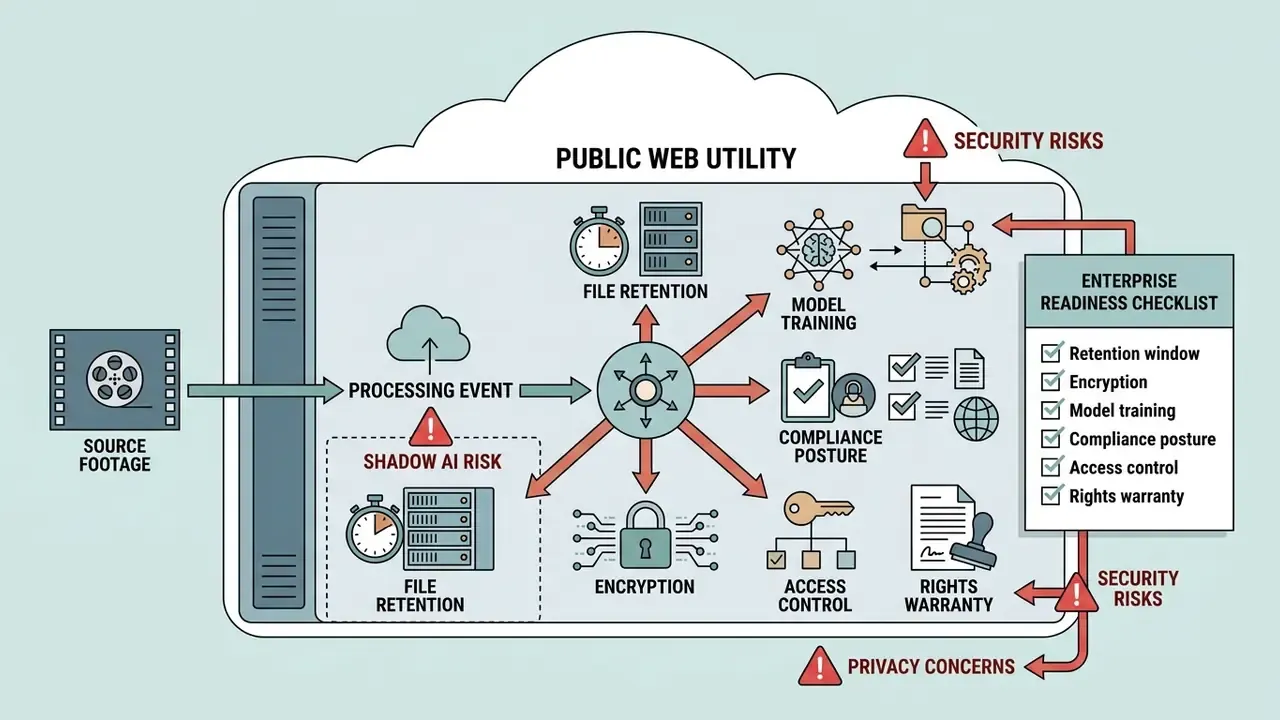
Uploading source footage to a public web utility is a data-processing event, not merely an editing step. For regulated teams in financial services, healthcare, or legal, an unvetted browser cropper is a textbook Shadow AI pathway: unmanaged, unlogged, outside procurement review. Nobody signed off on it. That is the point.
File retention and encryption
Managed processing platforms document encryption and regional residency explicitly. Azure Content Understanding, for example, states that uploaded files are temporarily encrypted and stored in Azure Storage in the same region as the resource before onward processing. Consumer croppers rarely publish equivalent detail; the ones that do usually commit to automatic deletion within one hour of upload. Where neither encryption at rest nor a deletion window is stated, treat the upload as permanent and public in your risk model.
Distribution settings do not travel with the file, either. Vimeo notes that publish-to-social transfers only the video file: platform privacy settings, interaction tools, captions, and thumbnails are not carried over. A clip that was restricted on one host can therefore become fully public on another, without anyone changing a permission.
Enterprise readiness checklist
Before approving a browser cropper for corporate footage, confirm the following in writing:
- Retention window.Is deletion automatic, and within what interval after session end?
- Encryption.Is media encrypted in transit (TLS) and at rest, and in which region?
- Model training.Are uploaded files excluded from AI model training and human review?
- Compliance posture.Is there a SOC 2 Type II report, ISO 27001 certificate, GDPR data processing addendum, and a documented sub-processor list?
- Access control.SSO/SAML, role-based permissions, and audit logs showing who exported what?
- Rights warranty.Do the terms require you to warrant rights in uploaded content, and what licence do you grant the provider?
- Watermark and export rights.Is commercial use of the output permitted on the tier you are actually using?
- Deployment options.Is a private-cloud, VPC, or on-premise processing path available for restricted material?
Two of these tend to fail quietly. Model-training exclusion is often absent rather than denied, and sub-processor lists are frequently published once and never updated.
Free web tool vs enterprise API or private cloud
| Criterion | Free browser cropper | Enterprise API / private cloud |
|---|---|---|
| Best for | One-off social clips, non-sensitive footage | Recurring pipelines, regulated or confidential media |
| Batch processing | Manual, one file at a time | Programmatic batch cropping and presets |
| File size ceiling | 100 MB to 1 GB typical | Chunked and asynchronous multi-gigabyte handling |
| Data residency | Provider-chosen region, often unspecified | Contractually defined region or customer tenancy |
| Auditability | None | Logs, SSO, role-based access, retention policy |
| Availability commitment | Best effort | SLA with uptime and support targets |
| Cost model | Free with watermark or asset limits | Per-minute, per-asset, or committed-throughput pricing |
For high-volume reframing, programmatic cropping is the pragmatic answer. A single API call applies fixed X/Y/W/H offsets and an aspect-ratio preset across an entire library, with deterministic output and a log trail that no manual browser session can produce. One caveat on the evidence here: vendor-published SLAs and residency terms differ enough that this table should be read as a shape of the decision, not a substitute for reading the contract.
Technical and enterprise specifications
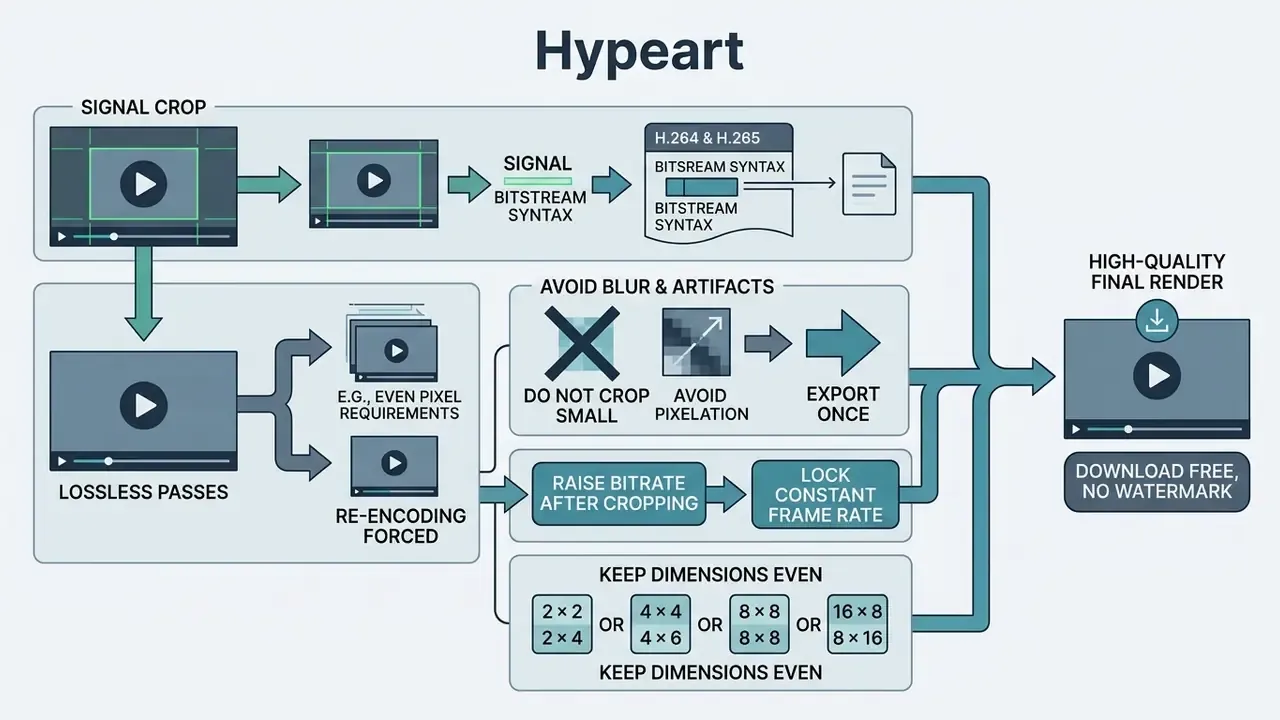
This section consolidates the deeper encoding detail for technical readers. The practical workflow above stands on its own without it.
How cropping is signalled in H.264 and H.265
ITU-T H.264 specifies frame_crop_left_offset, frame_crop_right_offset, frame_crop_top_offset, and frame_crop_bottom_offset to define the decoded output rectangle, with crop units dependent on the chroma format and frame_mbs_only_flag. H.265/HEVC conformance text instead defines a conformance cropping window, so the presented output size can be signalled without altering coded samples. The two standards expose cropping through different syntax, which is exactly why a "crop" in one pipeline may be metadata-only and in another a full re-encode.
Lossless passes and when re-encoding is forced
Vendor documentation for lossless export is unambiguous about its conditions. The source must be H.264 or MPEG-4, input and output format must match, dimensions, profile, levels, and extradata must be identical, and containers are limited to .avi, .mkv, .mov, .mp4. Visual effects are not supported, affected segments are re-encoded, and if fewer than 10% of the sequence qualifies, the entire sequence is re-encoded (NCH Software, 2026). A spatial crop changes dimensions by definition, so cropping is always a re-encode of the affected region. The lossless path applies only to untouched temporal segments.
Avoiding blur and compression artifacts
For archival or scientific-grade recompression, published guidance recommends conservative settings, for example CRF 10 to 12 with a slower x264 preset, trading encode time for near-transparent quality (NASA PDS H.264/MP4 guidance). Feature-level differences between consumer editors, including which of them expose CRF at all, are catalogued in the capcut video editor features reference and the accompanying capcut video editor overview.
FAQ: frequently asked questions about video cropping
Can I crop a GIF or keep audio in a video?
Animated GIFs can be cropped frame by frame while preserving sequence timing, loop settings, and frame order, but GIFs cannot carry audio because the format has no audio container support (Ezgif Docs, 2026). To preserve audio during video cropping, export to a video container such as MP4, WebM, or MOV (IEC TS 62312-2; ITU-R BS.2032). When you crop edit video online on projects containing sound, browser decoders isolate visual spatial coordinates without touching the underlying audio sample clock. Exporting as MP4 keeps synchronized audio tracks intact alongside the newly cropped frame. If you need a GIF with sound, the only route is conversion: upload the GIF plus an audio file, sync and trim the track, then export as MP4 or WebM.
Will cropping reduce video quality?
Cropping itself does not degrade the retained pixels, but the export re-encodes them. Quality loss appears when output resolution falls below the source, when bitrate is reduced, or when the same clip is cropped and re-exported repeatedly. Export at source resolution or higher, hold the bitrate at the source-equivalent target, and avoid stacking export generations.
Can I crop a video to exact pixel dimensions?
Yes. Use the manual dimension fields rather than the drag handles, entering width and height first and then the X and Y offsets of the crop rectangle. That is the correct method for ad slots, header banners, and any placement with a fixed pixel specification.
How do I crop a vertical video to horizontal?
Select the 16:9 landscape preset, then reposition the crop frame vertically so the subject's face and any on-screen text stay inside the frame. A 9:16 source carries limited horizontal information, so expect a significant vertical crop. The alternative is to place the vertical clip on a 16:9 canvas with a blurred duplicate background instead of cropping at all.
Do I need an account to crop a video online?
Some tools require no registration whatsoever; others gate larger file sizes and watermark-free export behind an account or paid plan. Check the file size cap and the watermark rule before you upload, not after the render completes. Users who simply want to crop a video free online for a single clip are usually best served by the no-account utilities.
Does cropping work on iPhone and Android without an app?
Yes. Browser croppers run in iOS Safari and Android Chrome. Upload from the Photo Library or Files picker, keep the tab in the foreground during processing, and export MP4 for reliable playback and re-sharing. HEVC captures from iPhone "High Efficiency" mode may need conversion first.
Can I crop my video online free for commercial campaigns?
Sometimes, and the answer sits in the terms rather than in the interface. Confirm three things: that the tier permits commercial use, that no watermark is applied to the export, and that you retain rights in the uploaded material. Where any of those is unstated, escalate to legal review before the asset runs in paid media. Terminology used throughout this guide, from conformance cropping windows to alpha masking, is defined in the AI Media Glossary.