An online cartoon maker is a software platform that turns text prompts, scripts, storyboard frames, or media assets into animated video, without frame-by-frame illustration by hand. Modern platforms combine template libraries, character builders, and generative models to compress animation workflows for commercial, educational, and internal communication use.
Why does a compliance or risk leader care about a cartoon tool at all? Because these products now ingest scripts, brand kits, employee voices, and sometimes customer-facing policy language. That makes the choice a procurement and disclosure decision, not just a creative one.
Executive Summary
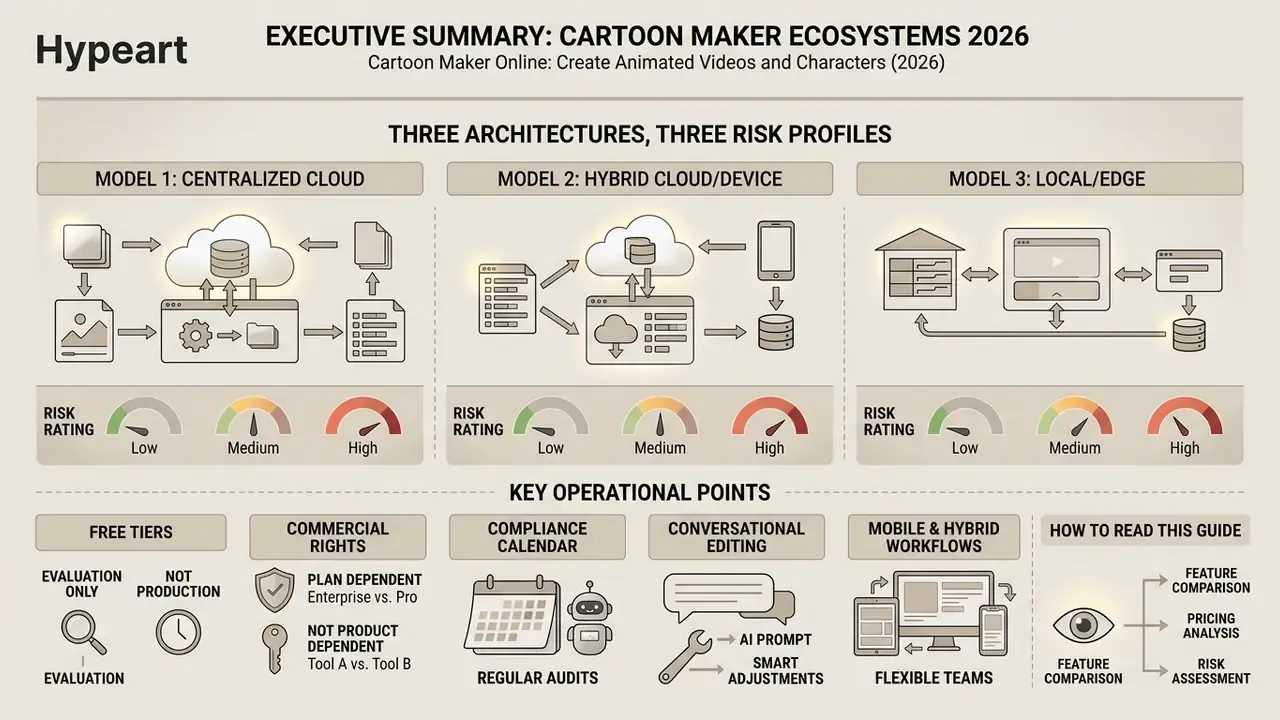
- Three architectures, three risk profiles. Template-based editors deliver predictable, auditable output; AI text-to-video generators deliver speed with lower determinism; character animation makers deliver reusable brand assets with the deepest rigging control.
- Free tiers are evaluation tools, not production licenses. Expect watermarks, 720p ceilings, 3-downloads-per-month caps, and explicit non-commercial restrictions.
- Commercial rights are plan-dependent, not product-dependent. Vyond charges a separate $99 per-video fee to transfer rights to third-party clients; Powtoon limits commercial use to Pro, Pro+, and Agency subscriptions.
- Compliance is now a calendar item. Transparency obligations under Article 50 of the EU AI Act apply from 2 August 2026, requiring machine-readable marking plus visible disclosure for AI-generated or AI-altered video.
- Editing is increasingly conversational. Modern generators accept plain-text edit commands ("delete scene", "change voiceover", "change accent") instead of manual timeline manipulation.
- Mobile and hybrid workflows matter. Leading suites ship iOS and Android apps and support overlaying animated characters on live-action footage. Both are standard e-learning and social-first requirements.
How to read this guide. The first three sections cover definitions and architecture, useful if you are scoping a category. Sections four through six are the operational core: features, character pipelines, and production steps. The pricing, limitations, and FAQ sections are written for the person who has to sign the contract and later defend it in an audit review.
What a Cartoon Maker Is and What Videos You Can Create
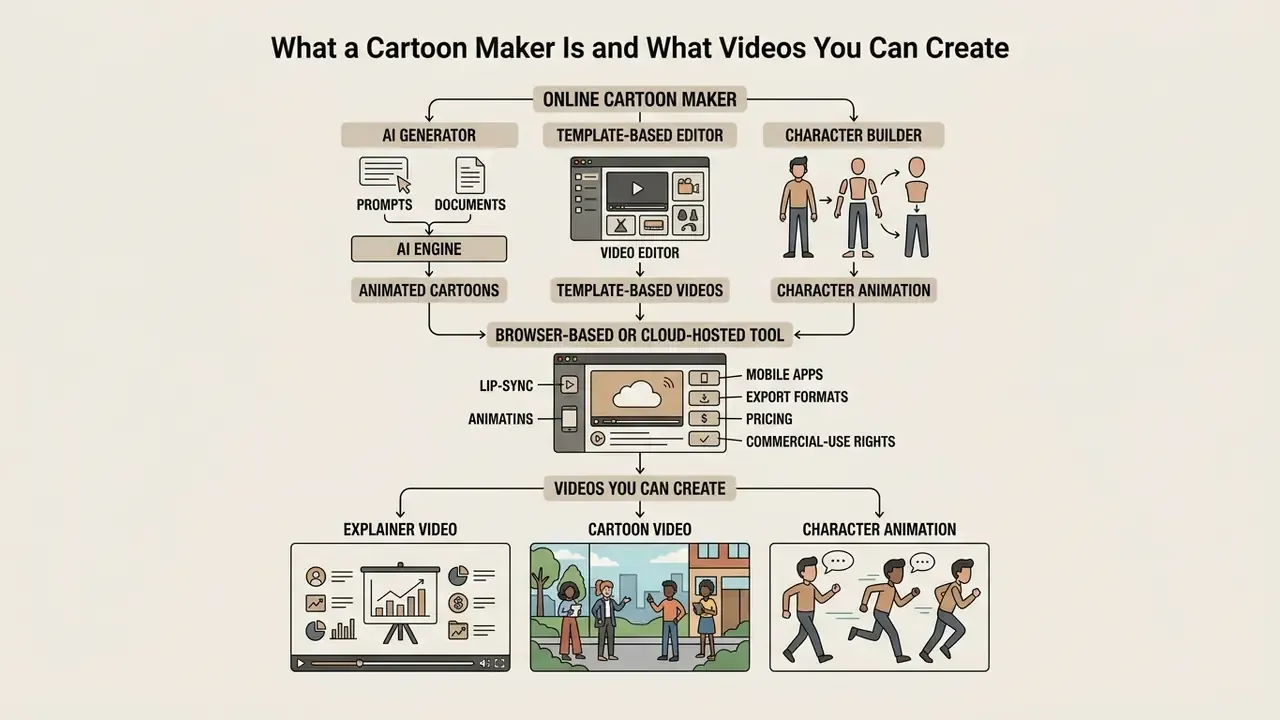
An online cartoon maker is a browser-based or cloud-hosted tool that automates video creation by translating prompts, documents, or pre-built assets into animated cartoon sequences. Users generate marketing explainers, educational modules, social clips, and corporate presentations from structured templates or automated generative workflows.
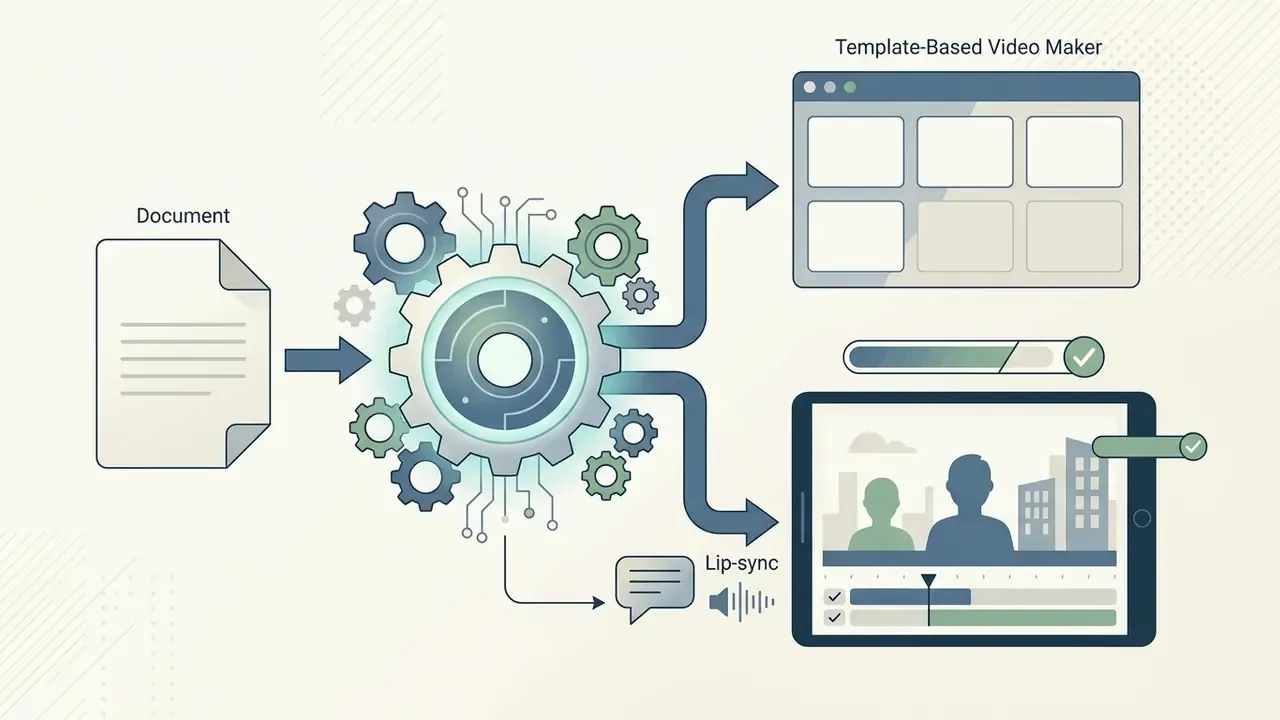
In practical terms, the category spans three product families. Explainer-video makers convert documents and PDFs into narrated animated scenes with subtitles and MP4 export. Commercial animation tools target product demos, animated ads, and presentation-style videos. Educational animation makers turn lesson materials into classroom-ready tutorials for teachers and L&D teams.
One nuance worth flagging early: the phrase "animation maker cartoon" gets typed into search boxes far more often than any vendor's official product name. People are describing an outcome, not a category. That gap between intent and vocabulary is exactly why shortlists drift.
Cartoon Video, Explainer Video, and Character Animation
A cartoon video focuses on visual storytelling through stylized graphics. An explainer video structures information to clarify a complex product or process. Character animation is the technical method that brings a digital persona to life, building emotional resonance and audience engagement across commercial and educational media.
The three terms overlap in production style but diverge in purpose: cartoon describes the style, explainer describes the communication format, and character animation describes the animation method. Apply a cartoon style inside an explainer and the format tilts toward engagement and sales. Apply character animation to education and the emphasis shifts toward retention and comprehension.
A caricature video maker produces exaggerated portraits for light social content. An animation cartoon creator built for enterprise use prioritizes narrative clarity and brand compliance instead. Controlled experimental evidence supports the pedagogical value of cartoon styling:
"The cartoon-character group achieved higher scores on knowledge-transfer tests and reported more positive emotions than the group shown neutral illustrations."
That result matters for procurement. The measurable gain sits in transfer performance, meaning the ability to apply knowledge to new problems, rather than in subjective satisfaction scores. Satisfaction is the metric most corporate L&D dashboards already track, which is precisely why it is the weaker signal.
Online Editor, AI Generator, or Template-Based Video Maker
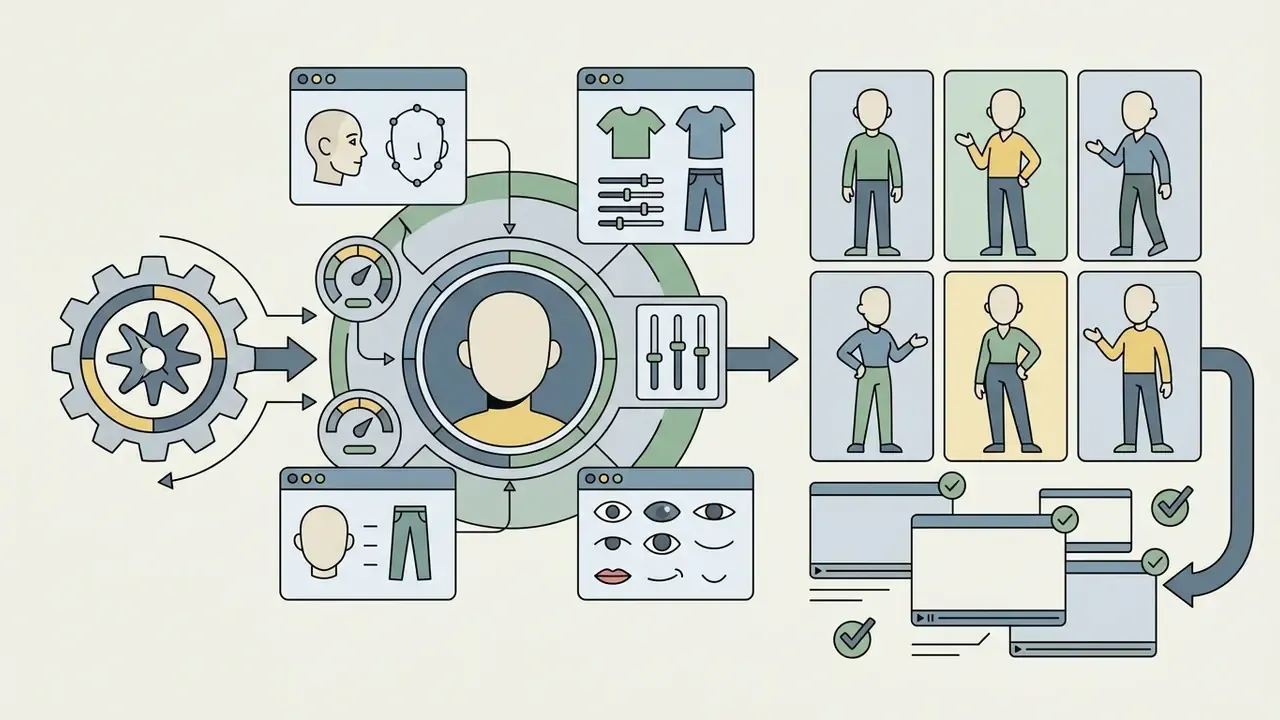
Online animation tools rely on three architectural approaches: template-driven timeline editors, custom character builders, and AI-powered text-to-animation engines. Each carries distinct trade-offs in design speed, asset uniqueness, and granular creative control.
A useful decision heuristic: template editors when output must be predictable and brand-locked; character builders when a mascot must survive dozens of videos; AI generators when volume and iteration speed outrank pixel-level determinism.
How to Choose the Best Cartoon Maker Online
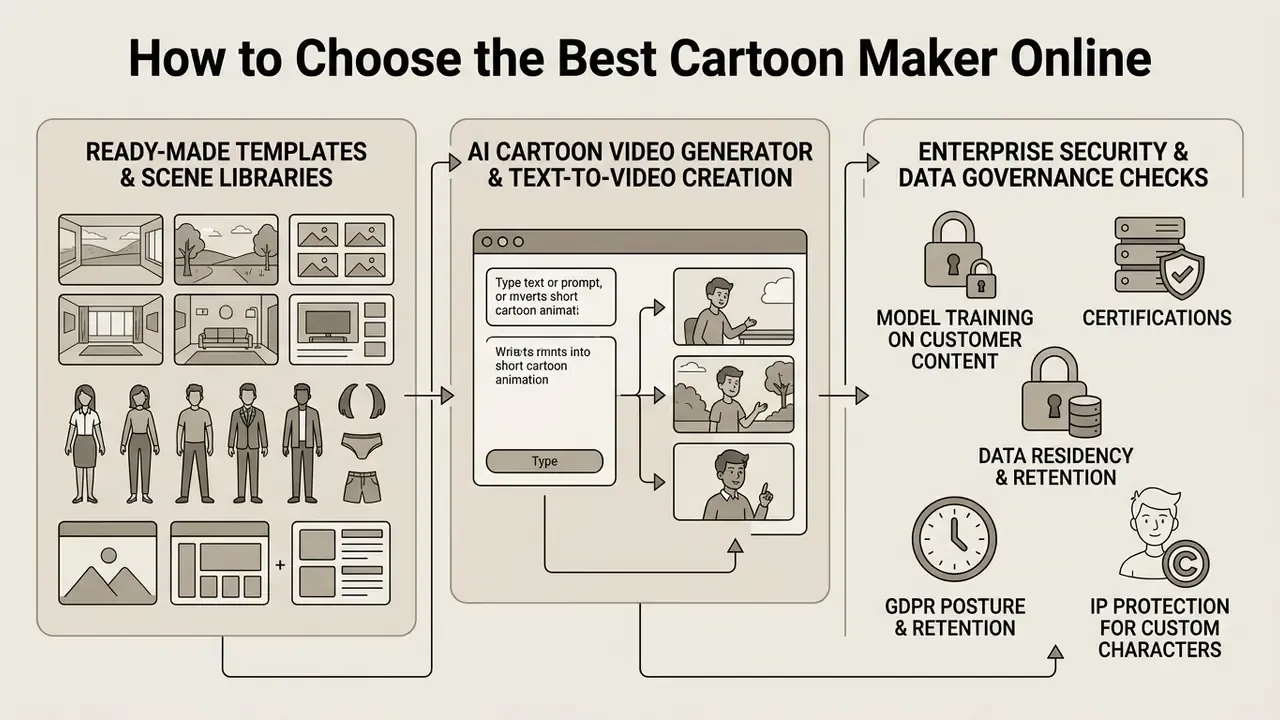
Selecting the best cartoon maker online means evaluating timeline precision, asset library breadth, AI automation, export controls, and licensing terms. Decision-makers should align software specifications with institutional risk appetite, target output resolution, and commercial distribution needs. The same discipline applies when the search phrase is softer, for example "best cartoon maker online free": the free label changes the cost line, not the compliance obligations.
Table 1. Comparison of online cartoon maker system architectures (2026 capabilities)
| Architecture type | Character customization | Template library | Editing and control | Audio and voice integration | Export formats | Mobile support | Free tier restrictions |
|---|---|---|---|---|---|---|---|
| Template-based video editor | Pre-built avatars with basic color and outfit swaps; limited custom rigging. | Extensive pre-assembled scenes for business, education, and social media (1,000+ templates on leading suites). | Timeline drag-and-drop, keyframe presets, manual layer arrangement. | Basic text-to-speech, stock audio overlays, manual lip-sync alignment. | MP4, WebM, GIF; up to 4K on paid tiers. | iOS and Android companion apps; 9:16 vertical export presets. | Watermarked exports, 720p cap, 3 downloads per month, restricted premium assets. |
| AI text-to-video generator | Generative prompt-based avatars; subject identity managed via specialized embeddings. | Prompt-driven dynamic scene generation rather than fixed templates. | High-level text prompting, conversational "magic box" edit commands, localized mask re-generation, camera movement tags. | Automated multilingual TTS (800+ voices, 170+ languages on large suites), multi-voice dialogue, automated lip-sync matching. | MP4 output, cloud URL hosting, API rendering streams. | Browser-based on mobile Safari and Chrome; app-assisted publishing. | Strict credit or minute monthly caps, watermarking, commercial use prohibited. |
| Character animation maker | Deep structural builders; facial sliders, custom pose sets, vector and 3D rigging (200+ actions, 20+ expressions on major platforms). | Character-centric stages and specialized action libraries. | Fine-grained pose manipulation, frame-by-frame mouth keying, physics strokes. | Advanced phoneme-to-viseme mapping, multi-track audio scrubbing. | MP4, MOV, transparent PNG sequences, GLB and FBX export to Unity or Unreal. | Partial: rigging on desktop, review and export on mobile. | Restricted action sets, locked advanced rigging export formats. |
Teams building a shortlist can cross-reference our ranked evaluation of the best AI video generators before running internal pilots.
Ready-Made Templates and Scene Libraries
Comprehensive template libraries accelerate video creation by supplying pre-packaged scene structures, color palettes, and motion presets. Leading platforms ship thousands of themed scenes, from corporate onboarding layouts to animated whiteboard tutorials, which cuts manual timeline layout effort.
Library depth is a measurable procurement criterion, not a marketing flourish. Vyond documents full video templates "pre-filled with scenes, avatars, characters, and styles" plus scene templates pre-populated with backgrounds, animated effects, props, and characters. Animaker publishes a library of 100 million+ stock assets, 70,000+ icons and stickers, and 30,000+ music tracks. InVideo indexes 16 million+ stock photos and videos. Powtoon lists 10,000+ animated assets including characters, props, motion graphics, and data visuals.
High-quality libraries include vector elements, background environments, and animated props built to consistent visual parameters. Creators evaluating alternative media pipelines can consult our benchmark matrix for adobe video editor options.
AI Cartoon Video Generator and Text-to-Video Creation
An AI cartoon video generator converts natural language scripts into staged animated video clips using diffusion models and large multimodal transformers. Current pipelines let users define characters, setting, and mood through prompts, then apply frame-level localized edits to fix specific visual anomalies. In everyday use it feels less like animating and more like directing a fast, occasionally stubborn junior artist.
Research on generative systems highlights several technical breakthroughs:
- Multi-character identity preservation. Frameworks like Character Mixing (2025) prevent visual style dilution when several distinct characters interact in one generated scene.
"Character Mixing consistently outperforms prior approaches in identity preservation, motion synthesis, and stylistic consistency across multi-character scenes." Character Mixing for Video Generation, arXiv (2025). https://arxiv.org
- Physics-guided motion. Systems such as PhysAnimator (2025) combine physical deformation models with generative AI to produce fluid, stylized motion from static 2D anime illustrations.
"PhysAnimator generates physically plausible, temporally coherent, stylized anime motion from static illustrations, steered by user-controllable energy strokes." PhysAnimator: Physics-Guided Generative Cartoon Animation, arXiv (2025). https://arxiv.org
- Generative post-keyframing. Models like ToonComposer (2025) take sparse line-art keyframes and generate fully shaded inbetween frames automatically, cutting production overhead sharply.
"AniSora is trained on more than 10 million high-quality animation videos and ships a 948-clip benchmark for animation generation evaluation." AniSora: Animation Video Generation in the Sora Era, arXiv (2024 to 2025). https://arxiv.org
Two operational caveats belong in any 2026 evaluation. First, output constraints remain tight in public APIs: some flagship systems cap duration at a few seconds and resolution at 720p, with aspect ratio configurable per request. Second, product availability is itself a risk variable. OpenAI stated that Sora was no longer available as a standalone product as of 26 April 2026, a concrete reminder to avoid single-vendor dependency in production pipelines.
Enterprise Security and Data Governance Checks
Because cartoon makers ingest scripts, brand kits, employee voices, and sometimes customer data, security review should run in parallel with feature review, not after it. Request written answers before a pilot starts:
- Model training on customer content.Is there a contractual "no training on customer data" guarantee covering prompts, uploaded media, and brand kits?
- Certifications.SOC 2 Type II, ISO 27001, and a documented penetration-test cadence. Enterprise-grade vendors advertise SOC 2 and organization-wide collaborative workspaces explicitly.
- Data residency and retention.Where render jobs and source assets are stored, plus the deletion SLA after project closure.
- GDPR posture.Lawful basis for processing voice samples and likeness data, DPA availability, and a current sub-processor list.
- IP protection for custom characters.Whether uploaded brand mascots are isolated from shared generative pools.
- Access control.SSO or SAML, role-based permissions, and audit logs detailed enough to reconstruct who published which asset.
Treat item 6 as the audit backbone. Without it, every later question about provenance becomes a reconstruction exercise rather than a lookup.
What to Check Before Choosing a Free Tool
Evaluating a cartoon animation maker free version means inspecting technical caps on output resolution, monthly generation minutes, mandatory watermarks, and legal licensing terms. Most free AI video generators work as functional evaluations rather than production-ready commercial solutions, and the honest search for the best free cartoon animation maker online usually ends in a paid tier once distribution begins.
Before committing to a platform, verify these parameters:
- Watermark enforcement. Determine whether branding watermarks overlay exported media. Documented examples include Animaker (watermark plus 3 downloads per month), Renderforest (watermark plus up to five HD720 videos monthly), Toonkit (watermark plus 300 credits per month), and SVGator (watermark-free SVG, watermarked Lottie, video, and image exports).
- Resolution ceilings. Confirm whether free exports are capped at 720p or lower. HeyGen's free tier documents 720p, 10 AI generation minutes weekly, and four exports per week.
- Usage rights. Ensure content produced on a free tier is not restricted to non-commercial personal viewing. Vidu, for example, forbids commercial use on the free plan outright. Organizations managing media infrastructure should refer to our guide on AI Media Pricing Guides.
Features of an Animated Cartoon Maker
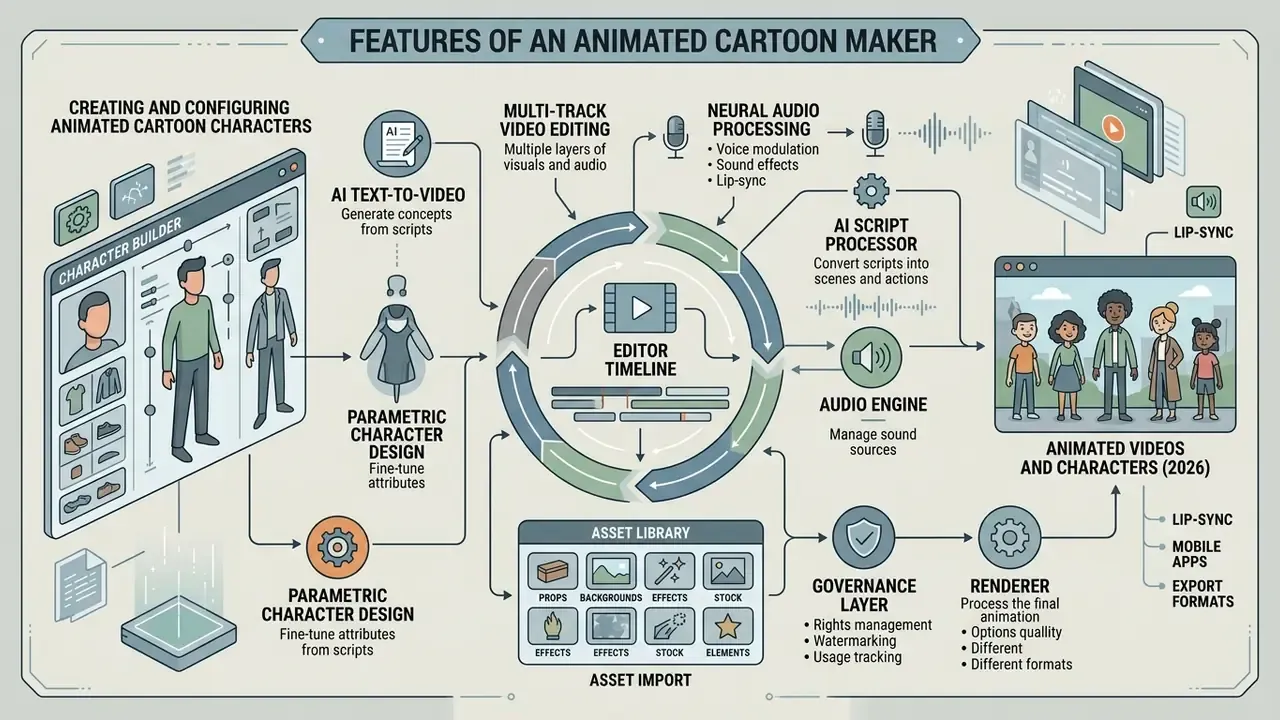
A modern animated cartoon maker integrates multi-track video editing, parametric character design, neural audio processing, and asset import. Readers comparing categories can start from our overview of online animation creation tools. These functional layers let creators combine vector graphics, custom text overlays, and automated voice tracks into cohesive animated videos.
Figure 1. Module architecture of an online cartoon maker: how the character builder, AI script processor, audio engine, editor timeline, and renderer interconnect.
- AI script processor accepts prompt, script, document, or URL input; produces a scene-by-scene plan, shot list, and draft narration.
- Character builder stores rigged avatars, expression sets, and action libraries; publishes reusable character IDs to the timeline.
- Asset library backgrounds, props, icons, motion presets, and licensed stock media, filtered by plan entitlements.
- Audio engine TTS synthesis, uploaded voice tracks, phoneme extraction, music beds, and SFX mixing; emits viseme data.
- Editor timeline multi-track sequencing of scenes, characters, captions, and audio; conversational edit commands write back to this layer.
- Renderer cloud encode to MP4, MOV, GIF, or PNG sequence with resolution, bitrate, and watermark rules applied per subscription tier.
- Governance layer brand-kit locks, approval workflow, AI-disclosure metadata, and audit logging.
The governance layer is the module most buyers skip in a demo. It is also the one that determines whether an EU disclosure obligation is a checkbox or a project.
Creating and Configuring Animated Cartoon Characters
An animated cartoon character maker gives granular control over avatar aesthetics: facial structure, eye shape, hairstyle, wardrobe, and emotional expressions. Advanced engines support custom skeletal rigging and predefined action suites such as walking, gesturing, or speaking, which keeps motion smooth during rendering. Platform documentation quantifies that depth: standard avatar rigs commonly expose around 15 poseable joints, while commercial builders advertise 200+ actions and 20+ expressions, yielding effectively unlimited character combinations.
Tools with stylized character pipelines let creators maintain consistent brand mascots across long campaigns, which is the real payoff of an animated character video maker over a one-off generator. Teams building custom 3D or stylized avatars may examine specialized asset workflows in our guide to ai 3d model solutions, or explore character transformation concepts in our review of age progression app utilities.
Voice, Music, and Audio for Animated Videos
Professional voiceovers, atmospheric background music, and accent sound effects carry more of a cartoon video than most teams expect. Modern platforms include text-to-speech engines that generate natural-sounding narration in dozens of languages straight from script text. Large suites publish 800+ voices across 170+ languages, and readers can dig deeper into synthesis quality in our guide to AI voice generators.
Automatic lip-sync matches audio phonemes to mouth visemes on the animated avatar. Technical documentation for Runway Lip Sync, Toon Boom Harmony automatic lip-sync detection, and Reallusion iClone AccuLIPS describes neural phoneme mapping that removes manual frame-by-frame mouth placement and aligns dialogue with facial geometry. Amazon Polly speech marks expose the same capability at API level, returning timing data that can drive mouth-shape switching programmatically.
"In a 2024 production case study, generative AI automated lip-sync and voice integration, accelerating the creation of an educational cartoon."
Technical requirements for uploaded audio (updated)
- Supported formats
- MP3 and WAV across all major browsers; AIF when working in Safari; MP4 accepted as an audio-only source, with the video track discarded.
- Direct recording limit
- most in-browser recorders, including the free Adobe Express character animation module, cap a single microphone take at two minutes. Longer narration should be split into sequential clips or uploaded as a pre-rendered file.
- Script length per dialogue
- TTS-driven lip-sync tools such as Runway impose per-dialogue text limits of roughly 600 characters, which effectively enforces scene-level chunking.
- Automatic lip-sync behavior
- head, eye, and arm movement plus mouth shapes are generated from the audio waveform, so clean, noise-free source audio directly improves animation quality.
- Music and SFX
- background beds sit on separate tracks with independent gain. Keep narration at least 10 to 12 dB above the music bed for intelligibility.
Text, Images, and Custom Assets in the Video Editor
Enterprise animation editors support importing custom brand assets: SVG vector logos, high-resolution PNG images, custom fonts, and pre-recorded video clips. Documented font support includes TTF, OTF, WOFF, and WOFF2 in Synthesia brand kits, and OTF, TTF, and WOFF up to 10 MB in Clipchamp, where brand kits can be exchanged as shareable .brandkit files. Brand Kit modules let organizations lock primary color palettes and font choices across all user accounts to preserve visual compliance.
For subtitles and caption layers, modern platforms import standardized .srt or .vtt files with custom styling. Most importers require UTF-8 encoding; skip that step and diacritics or Cyrillic characters arrive mangled. Authors reviewing brand asset management workflows can check our detailed comparison within the AI Media Commercial-Use Hub.
Creating Animations on Mobile Devices (iOS and Android)
Need to ship a clip while travelling? Use the mobile applications published by major vendors: Animaker App for iPhone, Renderforest mobile, and Adobe Express for mobile and web. They are adapted for touch input, allow narration recording straight from the phone microphone, and export vertical 9:16 masters for TikTok, Shorts, and Reels in a single tap. Browser-based generators such as InVideo AI also run without any download on mobile Safari and Chrome, so prompt-to-video drafting works from a phone even where the vendor ships no native app.
Practical constraints to plan around: render queues are cloud-side, so battery drain stays low but network dependence is high; fine-grained rigging remains desktop-only in most character builders; and per-clip recording limits of roughly two minutes apply identically to mobile capture.
Integrations: Canva Apps, Plugins, and Game Engines
Design-ecosystem integration. If you build decks in Canva, manual export and re-import is avoidable. Tools such as Krikey AI ship native Canva apps: pick a 3D character and a voice, type the script inside the Canva interface, click generate, and the animated talking-avatar clip lands on the slide within seconds.
Production-pipeline integration. Character animation makers export GLB, glTF, and FBX rigs that drop into Unity, Unreal Engine, Blender, and Mixamo. That is how studios reuse one brand character across marketing video, in-game NPC cutscenes, and interactive kiosks. API-first vendors also expose asynchronous render endpoints, for example avatar creation from video footage, a single photo, or a text prompt, enabling batch generation from a CMS.
Keyboard Shortcuts for Web-Based Cartoon and Comic Editors
Advanced users working in browser-based scene and comic editors (ToonyTool-class tools, for instance) speed up layout with direct key bindings:
| Action | Shortcut |
|---|---|
| Move object | B |
| Rotate object | F |
| Send backwards or to back | Shift + B |
| Bring forward or to front | Shift + F |
| Copy object or group | Ctrl + C |
| Paste object or group | Ctrl + V |
| Create or extend a group | Shift + click |
| Delete object or group | Delete |
| Cancel selection | Esc |
| Download cartoon as image | Ctrl + S |
| Center horizontally or vertically | h / v |
| Zoom or pan background image | Shift + Z |
How to Create an Animated Character for Video
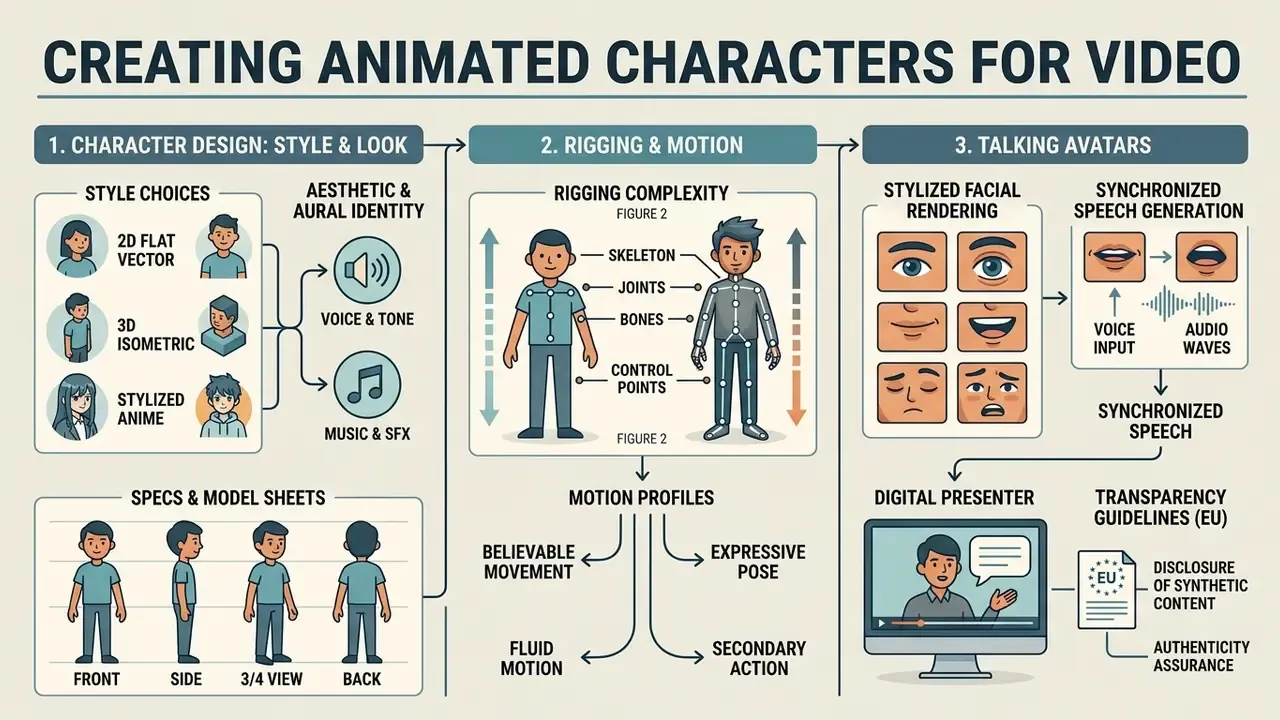
Designing a custom avatar means configuring visual style parameters, setting facial geometry, and establishing believable movement profiles. An animation character maker provides the digital framework for building recognizable personas for corporate branding, educational channels, or interactive applications. Assets get built before the edit: a locked character sheet prevents costly re-renders once the timeline stage begins.
Figure 2. Visual styles and rigging complexity across character families.
| Style | Typical rigging load | Branding control levers | Best fit |
|---|---|---|---|
| 2D flat vector | Low: bone or puppet rig, limited joints | Hex or RGB palette, line thickness, head-height ratio | Explainers, onboarding, whiteboard-style training |
| 3D | High: full skeleton, blend shapes, lighting setup | Material presets, turnaround model sheets, camera rules | Product demos, virtual tours, game cutscenes |
| Anime or stylized 2D | Medium-high: expressive shape language, physics strokes | Silhouette rules, expression sheets, motion easing | Youth-facing content, entertainment, music videos |
| Isometric | Medium: constrained perspective, tile-aligned motion | Fixed camera angle, grid alignment, depth cues | Process diagrams, SaaS workflows, dashboards |
Character Design: Style, Look, and Animation
Character design starts with an aesthetic choice: 2D flat vector, 3D isometric, or stylized anime, the last of which is what most people mean when they search for an anime cartoon maker. Designers then specify body proportions, facial features, color swatches, and wardrobe layers using model sheets so the figure stays spatially consistent across camera angles. Static illustrations from that sheet can later be brought to life with image-to-video AI tools when a full rig is not justified.
In enterprise contexts, specifications live in turnaround model sheets (front, side, three-quarter, and back views) alongside approved motion constraints. An animation character design maker used under an institutional style guide is more restricted than it looks: published university and corporate animation guides require an approved character library, define head-height ratios, mandate exact RGB or hex values, restrict line thickness, list permitted transition types, and in some cases prohibit motion blur outright. Recognized character-sheet practice includes full-body key art, secondary poses, three to six expressions, and color swatches as the minimum deliverable. For physical collectible rendering or stylized avatar workflows, teams can reference our guide on ai action figure creation.
Talking Avatars and Voiced Characters
A talking avatar combines stylized facial rendering with synchronized speech generation to act as a digital presenter or virtual instructor. Platforms like HeyGen, Synthesia, and D-ID produce lip-synced facial motion from audio files or written scripts, in real time or as asynchronous batch renders. Vendor documentation separates the creation paths clearly: a digital twin built from uploaded video footage of a real person requires recorded consent before generation, whereas a prompt-generated synthetic avatar does not. Real-time conversational modes chain speech-to-text, an LLM, and TTS with turn-taking and context memory.
Under EU regulatory frameworks, specifically the European Commission transparency guidelines published on 20 July 2026 ahead of the 2 August 2026 start date for Article 50 of the AI Act, synthetic video featuring AI-generated talking avatars or altered human likenesses must carry machine-readable metadata marking and visible user disclosure when deployed in EU jurisdictions. The accompanying EU Code of Practice on Transparency of AI-generated Content (June 2026) details the technical methods: digitally signed metadata, imperceptible watermarking, and optional fingerprinting or logging.
"The Animi instrument (2026) uses co-designed animated characters to assess mental-health symptoms in young people, demonstrating the acceptability of animation in sensitive contexts."
That finding is directly relevant to regulated communication. Animated presenters are tolerated, sometimes even preferred, in sensitive contexts, provided the synthetic nature of the character is disclosed rather than concealed.
How to Create a Cartoon Video in an Online Editor
Producing an animated cartoon video follows a structured pipeline: script formulation, template selection, character configuration, audio alignment, timeline editing, and MP4 export. A standardized method keeps quality consistent and shortens delivery time. Anyone hunting for the best online cartoon video maker will still spend most of their hours inside steps three and five below, whichever vendor wins.
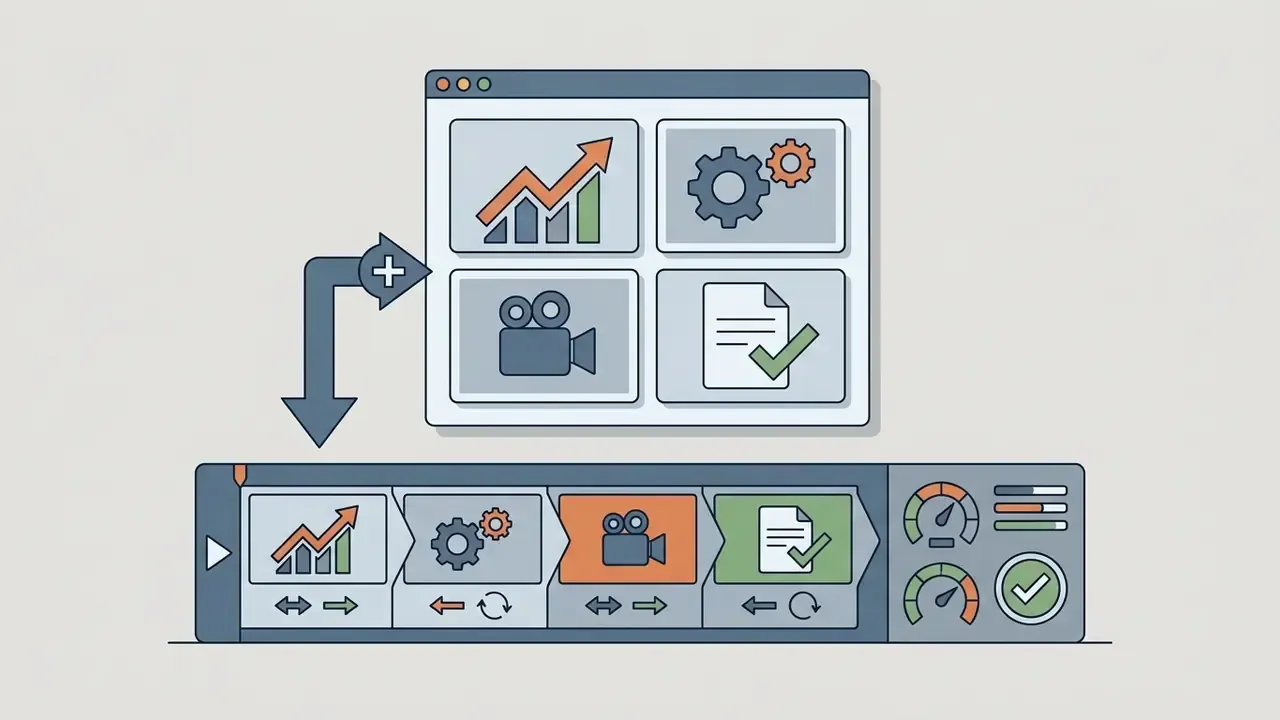
Figure 3. End-to-end cartoon video production pipeline with indicative effort per stage.
- Idea and AI promptdefine audience, message, duration, platform. Indicative effort: 10 to 20% of the total cycle.
- Template selection or AI scene generationstart from a template or let the model build a scene-by-scene plan. 5 to 10%.
- Character and scene configurationswap stock avatars for brand characters, apply the brand kit, set scene durations. 25 to 30%.
- Voiceover and audioTTS or uploaded narration, music bed, SFX, automatic lip-sync. 15 to 20%.
- Timeline editingtransitions, camera moves, caption alignment, pacing against the waveform. 25 to 30%.
- Export and publishingH.264 MP4 at 1080p or 4K, plus 9:16 and 1:1 derivatives, then distribution. 5 to 10%.
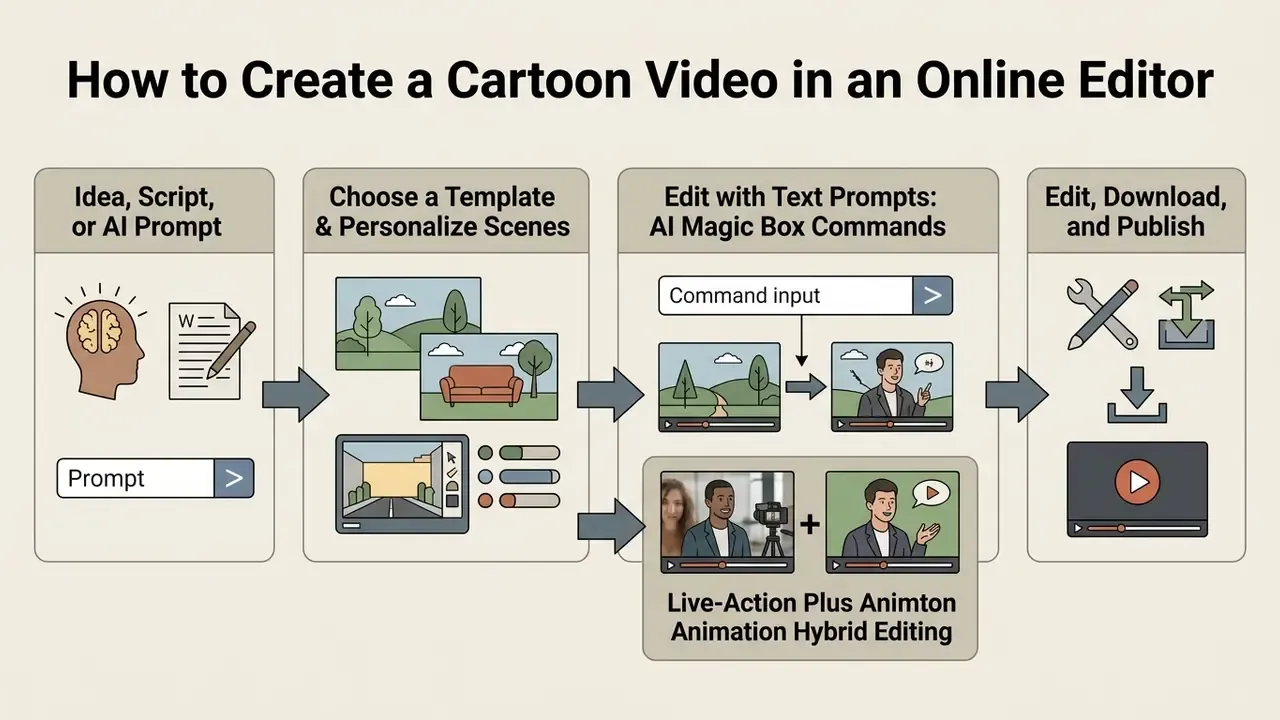
Start with an Idea, Script, or AI Prompt
Production begins by defining the core message, then translating it into a structured script or a natural language prompt. Structured prompt engineering patterns (persona role, output format, visual constraints, shot-by-shot beats) yield noticeably better automated storyboards. Public prompt-engineering playbooks converge on the same primitives: explicit role, explicit task, explicit format, hard constraints, few-shot examples, stepwise decomposition.
A reusable storyboard prompt pattern looks like this. One sentence stating the scene goal. Then a global visual package covering style, palette, lens, and mood. Then three to five narrative beats. Then standalone shot prompts specifying shot size, camera behavior, and negative boundaries, meaning what must not appear.
For automated pipelines, an animation cartoon generator converts textual scene descriptions into visual keyframes. Systems like AniMaker (2025) use multi-agent orchestration in which specialized sub-agents draft narratives, generate background visuals, and evaluate composite frame quality against technical benchmarks.
"AniMaker demonstrates superior quality on VBench and AniEval metrics while substantially improving the efficiency of generating multiple animation candidates."
Academic work on text-based animated-show generation (Seppälä, 2024) and panel-level systems such as Story2Board (2025) confirm the same architecture: an LLM splits the narrative into a shared reference prompt plus scene-specific panel prompts, which a diffusion model then renders.
Choose a Template and Personalize Scenes
Once the script structure is set, creators pick a baseline template or generate custom scene layouts. Personalization means substituting default avatars with configured brand characters, updating text overlays, adjusting scene durations, and applying brand-compliant color schemes. Documented template-personalization workflows follow three moves: apply brand assets (fonts, colors, logos, media), enforce video-specific rules (lower thirds, title treatments, permitted transitions), then adapt layout, motion, and aspect ratio to the target scene type and channel.
Modelled pilot scenario (validated hypothesis, not audited vendor data). A commercial bank working on digital customer onboarding ran a controlled comparison across four consumer pilot groups, deploying short animated explainers about account privacy controls with custom-designed avatars. Under the modelled parameters, standardizing scene layouts through template presets and applying verified brand guidelines compressed the production cycle from three weeks to two days and lifted onboarding completion by roughly 24% against the text-and-screenshot control. Treat these figures as a directional planning model to be re-validated with your own A/B instrumentation, not as a published third-party benchmark.
Edit with Text Prompts: AI Magic Box Commands
Contemporary AI cartoon generators expose a conversational command box instead of forcing manual timeline surgery. Rather than dragging elements frame by frame, you type direct instructions:
Delete the third scene and make the intro more dynamicChange the voiceover to a female voice with a British accentReplace the background music with calm jazz and lower the volume by 30%Add a funny 3-second intro before scene oneTranslate all captions to Spanish and keep the original narration
InVideo AI documents exactly this pattern, with commands like "delete scene", "change voiceover", and "accent". Meta Movie Gen research describes localized add, remove, and replace edits from video-plus-text input that preserve unrelated pixels. In practice: one instruction per command, verify after each render pass, and fall back to the manual timeline for frame-accurate audio alignment, where conversational editing remains least precise.
Live-Action Plus Animation Hybrid Editing
Modern tools (Powtoon, Animaker, Adobe Express) allow animated characters, text plates, and pop-up icons to be layered over real footage: a screen recording, a webcam take, or a studio shoot of a presenter. This is now the default e-learning format. The learner sees the live trainer and an explaining animated mascot at once, which practitioners report reduces the feeling of studying alone. Powtoon states plainly that animated elements can be combined with real footage, with characters, titles, and graphics overlaid on clips, or animations inserted between live-action segments for emphasis.
Implementation notes: export animated overlays as transparent PNG sequences or MOV with alpha to preserve edges; match the animation frame rate to the footage frame rate, typically 25 or 30 fps, to avoid judder; and keep overlay characters inside the safe area so vertical crops for Shorts and Reels do not decapitate the mascot. Yes, that happens more often than anyone admits.
Edit, Download, and Publish the Video
The editing phase covers fine-tuning element entry and exit animations, adjusting camera transitions, scrubbing audio waveforms for pacing, and verifying subtitle alignment. Once timeline adjustments are done, the project moves to cloud rendering.
Final assets typically export as H.264 MP4 at 1080p or 4K for distribution across corporate portals, YouTube, VK, and social platforms. Two export rules recur across creator guidance. Match export resolution and frame rate to the source footage, so a 1080p/30 source leaves as 1080p/30. And default to MP4 with H.264 for compatibility and smaller files. For GIF derivatives, trim to 15 seconds or less before conversion. A cartoon animated video maker that hides its bitrate settings is a poor fit for teams with archival requirements. Creators seeking automated campaign assembly can review our detailed analysis of ai ad generator tools.
Using a Cartoon Maker for Business, Education, and Content
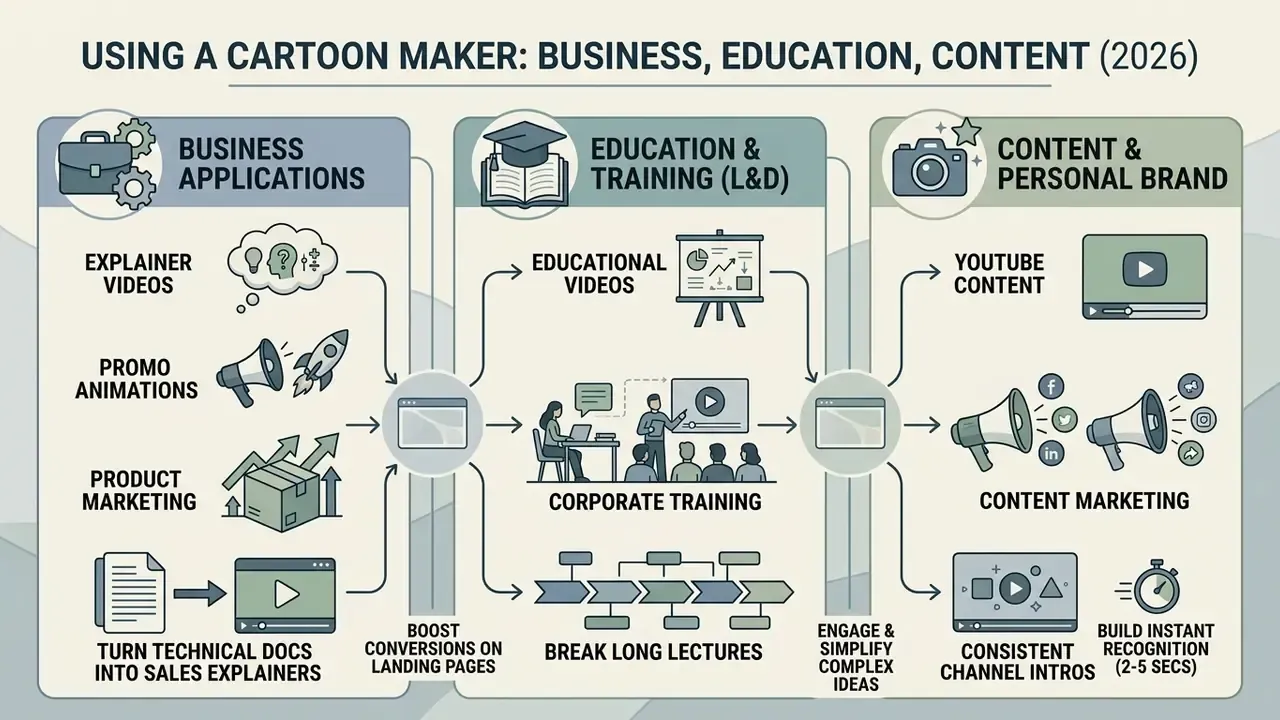
An animation cartoon maker supports communication across corporate training, product marketing, customer support, and content marketing. Replacing static presentations with animated content tends to improve retention, visual engagement, and message comprehension, though the size of the effect varies by format.
Table 2. Enterprise and educational applications for online cartoon makers
| Use case domain | Primary format | Key functional objective | Core metrics impacted |
|---|---|---|---|
| Corporate onboarding | Explainer video | Simplify compliance policy and software workflow training. | Module completion rate, policy retention score. |
| Product marketing | Animated promo clip | Highlight product features and value propositions in ad units. | Click-through rate, landing page conversion. |
| Higher education and L&D | Animated lecture snippets | Deconstruct abstract theoretical concepts using visual metaphors. | Learner comprehension, recall scores on post-tests. |
| Brand content creation | YouTube intro or mascot short | Build audience recognition and consistent channel branding. | Audience retention at 30 seconds, subscriber growth. |
| Internal communications | Announcement or policy micro-video | Deliver launches, safety procedures, and org updates consistently. | Open-to-view rate, time-to-comprehension, support tickets avoided. |
| Patient and customer education | Procedure explainer | Clarify sensitive or complex procedures with relatable characters. | Comprehension, appointment show-up rate, call-center volume. |
Explainer Video and Promo Animation for Business
Enterprise teams use an animated video maker to turn dense technical documentation into sales explainers and product teasers. Visual metaphors, simplified character interactions, and concise voice tracks help demystify intricate software architectures or financial products for prospective clients. This is also where an animation cartoon video maker earns its keep: one script, many localized cuts.
Marketing summaries claim that embedding video explainers on landing pages can raise conversion rates by up to 86% in specific commercial contexts. Treat that number with caution. It comes from vendor case-study aggregation rather than a peer-reviewed controlled trial, and it is not reproducible as a planning baseline. Rigorous controlled ad studies point the other way: one experimental study of Instagram advertising found animation did not significantly increase click-through rate, click-through intention, attention, recall, or recognition compared with static graphics. A separate thesis on animated video did find a recall advantage over an article carrying identical information (mean recall 4.045 versus 3.402). The synthesis, then: animation reliably helps comprehension and recall when the motion carries meaning, while its effect on click behavior depends on message alignment. Visual novelty must support the core value claim, not compete with it.
"In a 2023 experiment, children in the cartoon-image condition on touchscreens achieved significantly higher learning outcomes than the group without cartoon elements."
Educational Videos, YouTube, and Personal Brand
In education and corporate L&D, use a cartoon maker to create animated videos that break long lectures into modular learning objects. Instructional design research recommends capping individual educational modules at 5 to 6 minutes (roughly 5 for secondary students, 6 for tertiary) and using explicit visual signaling, such as animated callouts, to reduce cognitive load. Complementary guidance adds one learning objective per video, captions and transcripts by default, and animation reserved for conceptual content while screen capture handles procedural "how to" instruction.
"Media interventions with animated content produced notable improvements in self-regulation, emotional expression, and classroom engagement among children aged 3 to 6."
For YouTube creators and personal brands, consistent 2 to 5 second animated channel intros build instant recognition without delaying the main content. Creator guidance in 2026 converges on hook first, branding sting immediately after, and the payoff visible in the opening seconds. Teams operationalizing this can follow our practical guide to YouTube video editors, and creators comparing platform cost models can consult our interactive resources within AI Media Calculators.
Free Cartoon Maker, Pricing, and Commercial Use
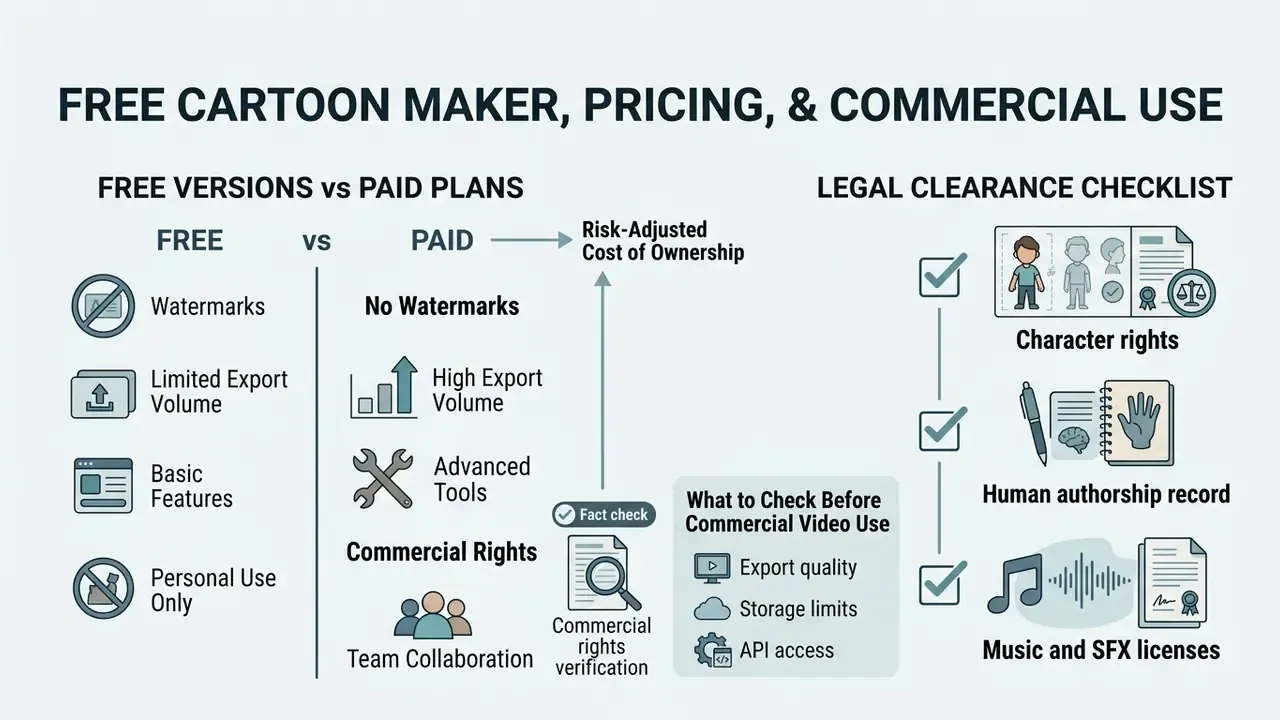
Deciding whether the best free cartoon maker online is enough, or whether a commercial tier is mandatory, depends on export volume, watermark tolerance, collaboration requirements, and licensing needs. Teams weighing zero-cost options should also review our comparison of free video editors. Commercial deployment requires verified rights to every embedded visual asset, stock audio track, and AI-generated model. In other words, a best free cartoon video maker shortlist is a trial plan, not a distribution plan.
Table 3. Standard commercial tier feature breakdown across SaaS cartoon makers
| Feature category | Free tier baseline | Pro or commercial tier | Enterprise tier |
|---|---|---|---|
| Export quality | 720p HD maximum, standard bitrate. | 1080p Full HD to 4K UHD, high bitrate. | Uncompressed 4K, ProRes, PNG sequences. |
| Branding and watermarks | Mandatory platform watermark embedded. | Watermark removed; custom logo upload. | White-label distribution, custom domain hosting. |
| Volume limits | Typically 3 to 5 downloads per month or weekly generation-minute caps. | Tens of downloads per month, expanded credit pools. | Contracted volume, API render quotas. |
| Asset and voice access | Basic characters, limited stock audio tracks. | Full library access, commercial TTS voices. | Custom voice cloning, bespoke character creation. |
| Mobile and integrations | Mobile viewing and editing, limited export presets. | Mobile apps, Canva and plugin apps, social publishing. | SSO, API, GLB and FBX pipeline export, custom integrations. |
| Commercial rights | Strictly non-commercial or personal use only. | Full commercial distribution rights included. | Third-party client transfer rights, indemnification. |
How Free Versions Differ from Paid Plans
Free plans function as product trials. They impose hard-coded watermarks, monthly download limits (3 per month is common), weekly generation-minute quotas, and restricted video durations. Paid subscriptions remove watermarks, unlock high-bitrate 1080p and 4K exports, grant access to advanced AI voice suites and text-to-video AI tools, and provide dedicated customer service via support.
The transition point, the moment a paid plan becomes mandatory rather than merely convenient, arrives when any one of these thresholds is crossed:
To compare alternative creative software suites, consult our AI Media Comparison Matrices.
Risk-Adjusted Cost of Ownership
Sticker price is rarely the largest cost line. A defensible total-cost model for animated video production sums: (a) subscription seats multiplied by months; (b) per-video rights-transfer fees where third-party delivery is planned; (c) internal production hours at a loaded rate; (d) review and legal-clearance hours; (e) a remediation reserve for compliance failures such as relabelling, re-render, or takedown. Compare that total against the displaced baseline, meaning agency or studio invoices plus internal coordination hours.
Where a pilot compresses a three-week cycle to two days, the dominant saving is (c) and the dominant new risk is (e). That asymmetry is the whole argument for budgeting disclosure and licensing controls rather than improvising them at publish time.
What to Check Before Commercial Video Use
Limitations and Open Questions
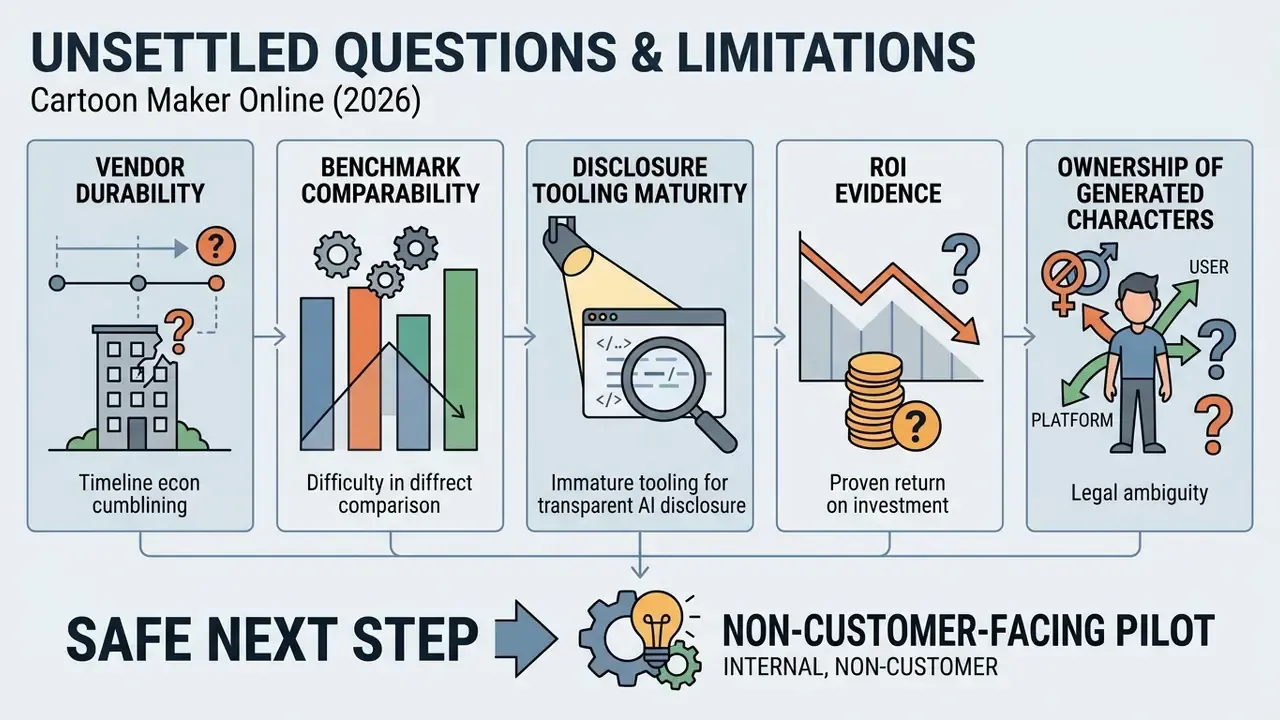
Some parts of this category remain genuinely unsettled, and pretending otherwise would be dishonest.
- Vendor durability. Standalone generative video products have been withdrawn mid-cycle. Export-format portability (MP4, MOV, GLB, FBX, PNG sequence) is the practical hedge, not a contractual promise.
- Benchmark comparability. VBench and AniEval scores are useful for research ranking but do not translate into brand-consistency guarantees for a specific mascot.
- Disclosure tooling maturity. Machine-readable marking is mandated from 2 August 2026, yet vendor implementations of signed metadata and watermarking differ in robustness after re-encoding and social-platform compression.
- ROI evidence. Public conversion statistics for explainer video are mostly vendor-sourced. Controlled evidence supports recall and comprehension gains far more strongly than click-rate gains.
- Ownership of generated characters. Where a character emerges largely from a prompt, the protectable scope of that design remains narrow in the United States. Document the human contribution.
A safe next step, if this is new territory for your institution: run one non-customer-facing pilot (internal policy micro-video), instrument it, and require the vendor to answer the six security questions in writing before any brand asset is uploaded. No evidence, no autonomy.
FAQ
Do I need animation skills to use a cartoon maker?
No. Template editors are drag-and-drop: characters, props, and text drop into pre-built scenes, and AI generators build a first cut from a prompt. Skills matter only when you need custom rigging, frame-accurate lip-sync, or brand-level motion design.
Can I make a cartoon video on my phone?
Yes. Major vendors ship iOS and Android apps (Animaker, Adobe Express, Renderforest), and browser-based generators run on mobile Safari and Chrome with no download. Recording narration from the phone microphone and exporting 9:16 verticals are standard; deep rigging usually stays on desktop.
Which audio files can I upload?
MP3 and WAV work across browsers, MP4 is accepted as audio-only, and AIF is supported in Safari. In-browser microphone takes are commonly limited to two minutes per clip.
Will my video have a watermark?
On free plans, almost always, together with a 720p ceiling and a small monthly download allowance. Paid tiers remove the watermark and unlock 1080p or 4K.
Can I mix animation with live-action footage?
Yes. Animated characters, titles, and graphics can be overlaid on real clips, or animations inserted between live segments. Export overlays with an alpha channel and match frame rates to avoid judder.
Do I own the videos I create, and can I sell them to clients?
Ownership and distribution rights are set by your subscription tier, not by the tool category. Some vendors grant perpetual commercial use to paying subscribers but charge a per-video fee to transfer rights to a third party; others restrict commercial use to specific paid plans. Verify before invoicing a client.
Is AI-generated animation copyrightable?
In the United States, purely AI-generated expressive material without substantial human creative control is not protected, and non-de-minimis AI content must be disclosed in registrations. Other jurisdictions, including the UK, treat computer-generated works differently. Document your human contribution.
Do I have to label AI-generated cartoons in the EU?
From 2 August 2026, transparency obligations under Article 50 of the EU AI Act require machine-readable marking and user-visible disclosure for AI-generated or AI-altered media, including synthetic avatars, when deployed to EU users.
Is a cartoon maker safe for enterprise data?
Only if contractually confirmed. Ask for SOC 2 Type II or ISO 27001 evidence, a written commitment not to train on customer data, data-residency and retention terms, a GDPR DPA, SSO, and audit logs.
Appendix A: Editorial Revision Notes