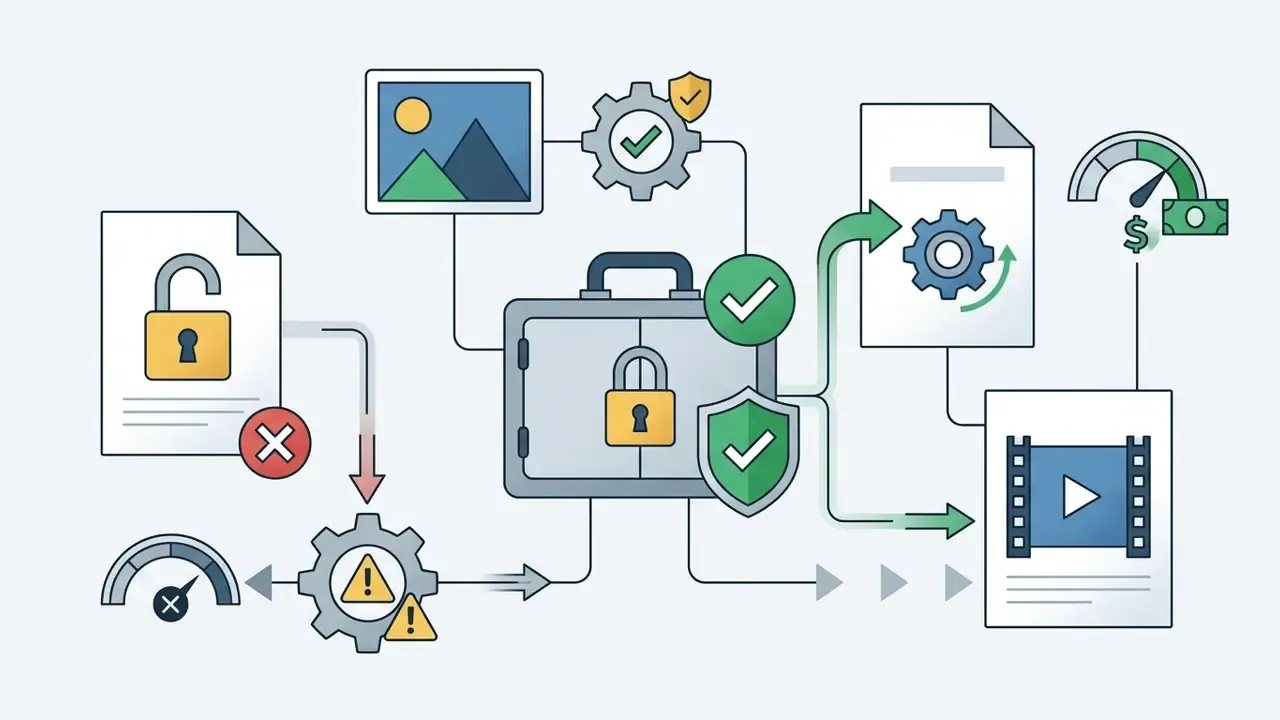
Why should a CRO or Head of Model Risk care about a consumer video tool? Because staff are already using one. A "free unlimited" generator is, in practice, an unmanaged third-party model with an upload channel pointed at your data.
Executive Summary
- "Free unlimited" does not exist on hosted cloud platforms.Every audited vendor enforces at least one of four constraints: daily credit caps, 480p to 720p resolution ceilings, low-priority render queues, or export paywalls. GPU inference cost makes uncapped free rendering economically impossible.
- Free tiers frequently forbid commercial use.Pika Basic and Luma Free restrict output to personal, non-monetized use. Stability AI Core Models are free only below $1M annual organizational revenue. Runway grants full user ownership but issues one-time credits with no refresh.
- Purely machine-generated video is not copyrightable in the United States.Only human-authored edits, arrangements, and creative selections qualify for protection.
- EU AI Act Article 50 mandates machine-readable provenance markingfor synthetic media, with penalties reaching €15 million or 3% of global annual turnover.
- Clip length is architecture-bound, not marketing-bound.Native diffusion clips run 2 to 20 seconds. Ten-minute "AI movies" are produced by autoregressive frame extension and agentic scene stitching, not by a single denoising pass.
- Claims of "100% in-browser generation, no GPU needed" are technically false.Multi-billion-parameter diffusion transformers require server-side tensor compute. The browser is a thin client.
- Model choice materially changes output.Sora 2, Veo 3.1, Seedance 2.5, Kling O3, MiniMax H3, and Wan 3.0 differ in native resolution, physics fidelity, audio integration, and trajectory control.
What This Analysis Covers
- How an unlimited ai image to video generator works under the hood.
- How to choose the best free ai image to video generator unlimited for a regulated environment.
- Whether free image to video ai output is safe for commercial projects.
- A step-by-step generation workflow, including prompt and motion setup.
- Business use cases, from training modules to vertical social ads.
- FAQ, a policy rollout sequence, and a pre-flight checklist with source notes.
What Image to Video AI Free Unlimited Means: Limits, Tiers, and Realities
An image to video ai free unlimited system converts static reference photos into animated video clips using conditional diffusion or transformer-based generative models without charging per-generation subscription fees. In US enterprise operations and commercial media workflows, software labeled as a free unlimited ai image to video tool implies unconstrained compute access, full creative control, and unrestricted high-definition exports. Readers evaluating entry-level options can also review the dedicated breakdown of free AI video generators covering quality, duration limits, credits, watermarks, and export rules.
Primary market audits from 2024 to 2026 tell a different story. True unconstrained access does not exist on hosted cloud platforms, mainly because GPU inference overhead has to be paid by somebody.
"Global traffic to the sixty leading consumer generative AI tools shows dominant services operating on freemium models rather than genuinely unlimited free access."
Vendors use terms like free, unlimited, and unrestricted to signal tier benefits, not absolute operational freedom.
Consider a platform advertising an ai image to video generator unlimited. It may allow uncapped prompt submissions while enforcing low-priority server queues, 480p resolution caps, or mandatory platform watermarks. Regulatory frameworks enforced by the Federal Trade Commission and state authorities require clear and conspicuous disclosure whenever a service advertises "free" or "unlimited" access that carries material operational restrictions. The Vermont Attorney General settlement (2024) established that advertisers promoting "unlimited" service must disclose every material restriction, including throughput throttling, in the advertisement itself rather than in buried footnotes.
Without verified enterprise disclosures, claims of an image to video ai free unrestricted engine usually represent promotional trial credits, non-commercial personal usage tiers, or daily resetting quotas. Permanent enterprise-grade access is rarely what is on offer.
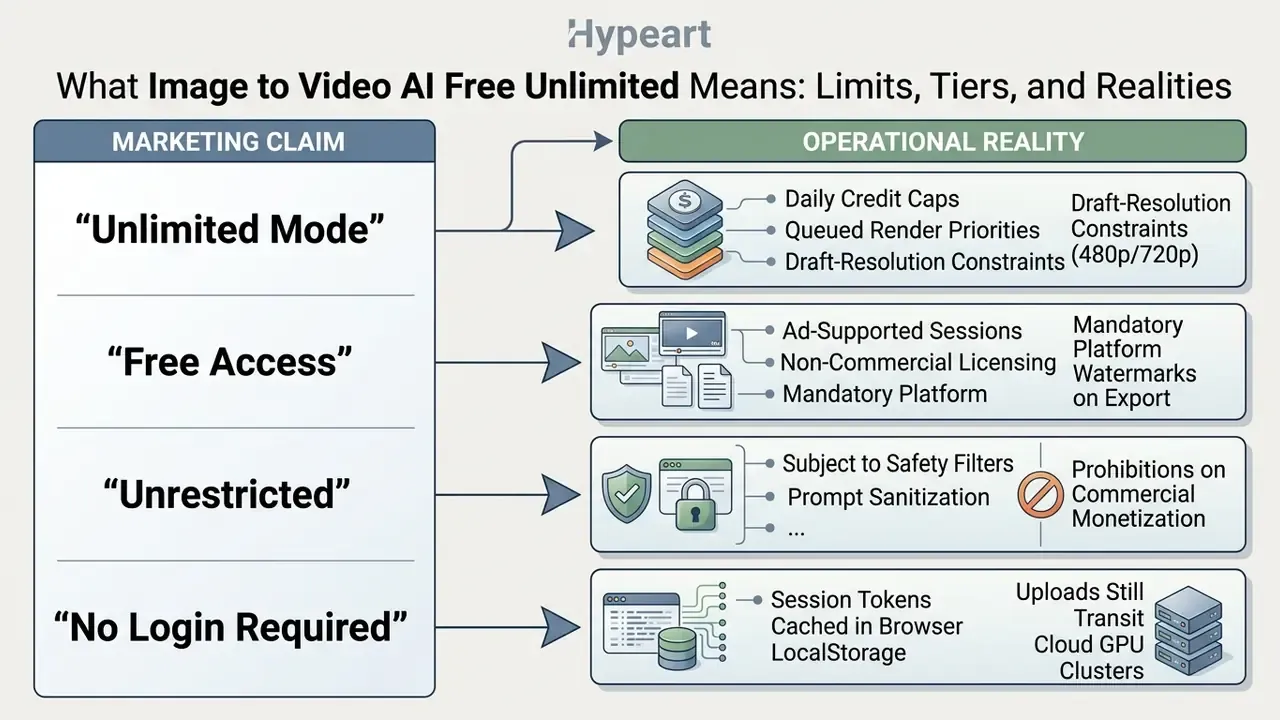
One caution on the word unrestricted. In vendor copy it usually describes billing, not content policy. Every mainstream engine still applies prompt sanitization and prohibited-category filters, which is why an image to video ai generator unrestricted label deserves a second look before procurement signs anything.
Free, Unlimited, and Unrestricted: Which Restrictions Remain
The phrase free unlimited almost universally hides technical limits designed to manage cloud infrastructure expense. When testing a free image to video ai tool unlimited in access, operators typically hit four structural constraints:
- Clip duration and resolution ceilings. Free plans usually restrict output to 5 to 10 seconds per clip and cap renders at standard definition (480p) or 720p, reserving 1080p and 4K exports for paid tiers.
- Model availability restrictions. Advanced architectures, such as multi-billion parameter diffusion transformers, are frequently paywalled, leaving free users on older or downscaled base models. Public free deployments of WAN 2.2, for example, expose one model at 5 seconds and 480p, with render time dependent on queue conditions and provider availability.
- Queue prioritization. Free requests route to low-priority compute clusters. Wait times stretch from minutes to hours during peak traffic.
- Usage quotas. Daily or monthly generative credit pools (roughly 50 to 80 credits per day) reset periodically but cap continuous rendering capacity. Pika's free Basic plan allocates 80 monthly credits at 480p, and a single 5-second image-to-video render consumes 12 of them. Kling's free tier resets roughly 50 to 66 credits per day at 720p.
The resolution ceiling is not arbitrary. It tracks the practical compute frontier of publicly documented research models.
"The STIV model at 8.7B parameters and 512-pixel resolution achieves a VBench I2V score of 90.1, representing the practical quality ceiling for moderately accessible compute."
To benchmark these limits across popular creative workflows, creators often consult niche guides, such as the ai french kiss generator directory or specialized ai generated animal motion templates. In every instance, operational boundaries are set by the provider's backend compute availability, not by user ambition. Teams building a permitted-tools registry should cross-check candidates against consolidated reviews of the best AI video generators rather than trusting landing-page copy.
Why "Unlimited" Mode Does Not Always Mean Free Export
A platform offering an ai image to video unlimited free generation queue frequently separates clip creation from clip retrieval. You can synthesize draft iterations all afternoon inside a browser workspace, then meet a monetization trigger the moment you request a high-resolution MP4.
Those triggers appear in two shapes: hard export paywalls or mandatory visual branding. Kapwing's published product documentation states that exports made from a free account carry a visible watermark, removed only on the Pro plan. Watermark removal is the explicit upgrade trigger rather than an incidental limitation (Kapwing AI Video Generator documentation, 2026, https://www.kapwing.com/ai-video-generator).
InVideo advertises "unlimited exports without watermark" on its published pricing page, yet access to the AI generation models themselves is bundled exclusively into paid plans. That is a paid-export monetization model, not free high-resolution delivery (InVideo pricing page, 2026, https://invideo.io/pricing/). Independent 2026 reviews of "unlimited" AI video generators reached the same conclusion: no truly uncapped plan existed, and every audited case cited queues, resolution ceilings, or daily rendering limits.
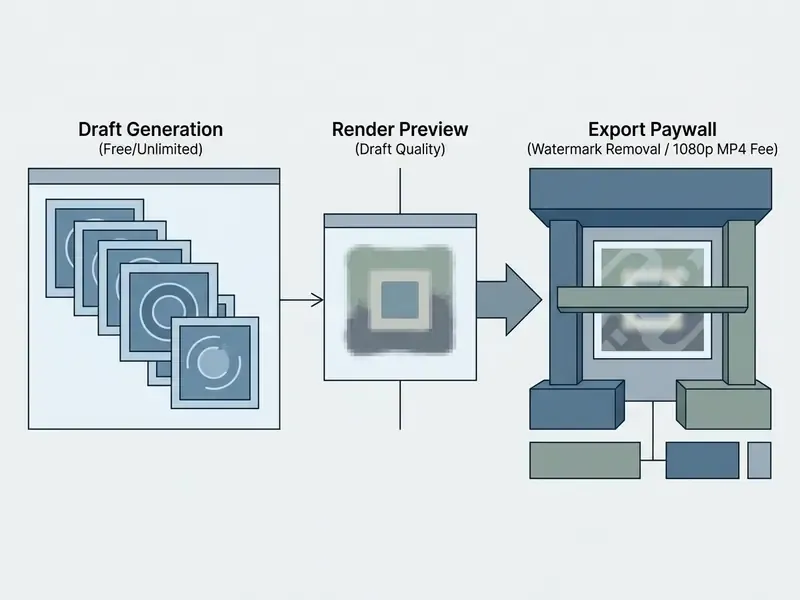
When evaluating tools for commercial campaigns, governance teams should inspect the full delivery pipeline. The question is narrow and practical: can the final video file be legally downloaded and published without a secondary licensing fee?
Fact Check: Verification Methodology for "Free Unlimited" Vendor Claims
Fact Check: Can AI Video Generation Really Run Entirely In Your Browser?
How an AI Image to Video Generator Works
An unlimited ai image to video generator applies conditional noise-reduction processes to turn a static input frame into a temporally coherent sequence of images. Modern architectures use space-time Latent Diffusion Models (LDMs) or Diffusion Transformers (DiTs) to process spatial detail alongside motion vectors.
"The image-to-video task is formally defined as synthesizing a temporally coherent clip from a single static image while preserving character identity and scene structure across all frames."
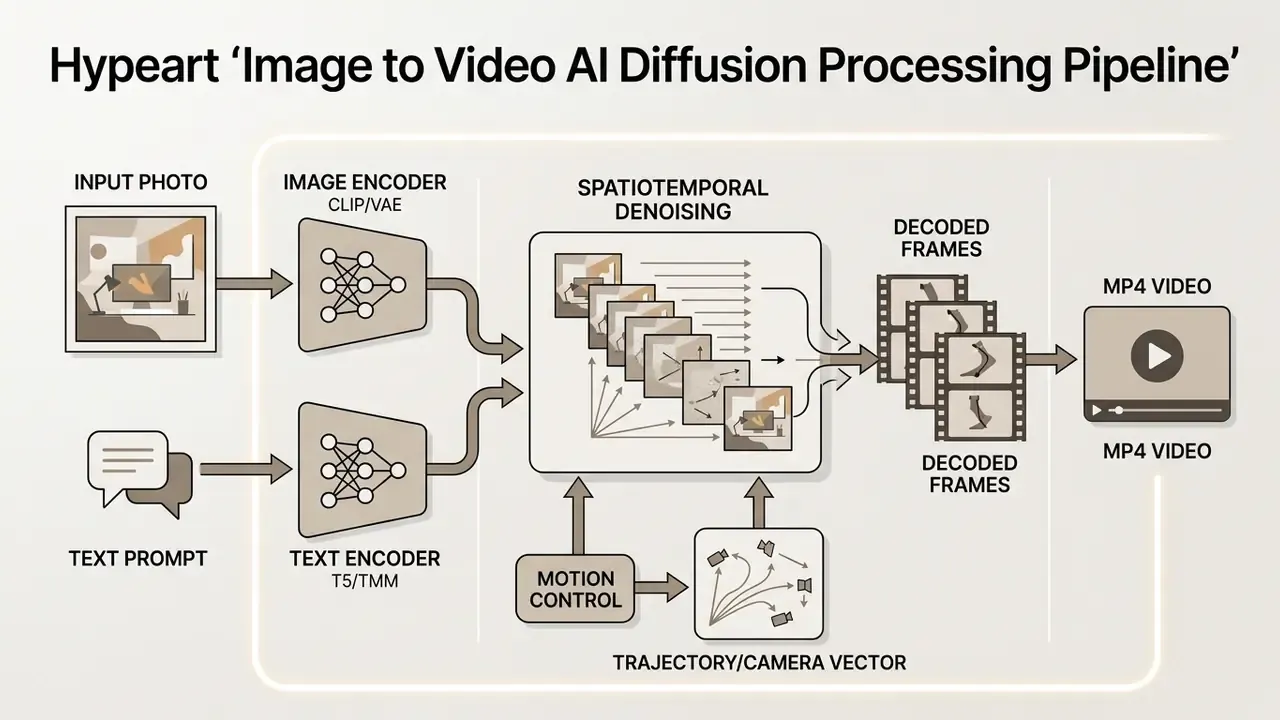
The system accepts a high-resolution reference image, converts it into a lower-dimensional latent representation, and injects spatial features into cross-attention layers. Readers new to the category can review the foundational overview of AI video generators covering creation methods, templates, AI features, and export options. In parallel, a text encoder translates natural language prompts into motion instructions. The network then iteratively denoises Gaussian noise added to the latent frames while holding character identity and background structure across time.
Architectural approaches differ mainly in how the still image is injected. Diffusion-based systems such as VideoBooth (CVPR 2024) steer synthesis with an image prompt while preserving reference content across frames. PiLife (2024) combines motion-aware diffusion inversion, motion-aware noise initialization, and probabilistic cross-frame attention. Transformer-based systems such as CogVideoX (2024) model spacetime patches directly and generate 10-second clips at 16 fps and 768x1360 resolution, while W.A.L.T. cascades a base latent video diffusion model with super-resolution diffusion stages. The architectures diverge. The objective, coherent motion anchored to a fixed visual prior, does not.
Image, Prompt, and Motion as Input Signals
Generating stable video from a single static image relies on three distinct input channels.
- Source image (visual prior). Establishes composition, lighting, character features, and artistic style. The visual quality and aspect ratio of the source dictate baseline fidelity of the output clip.
- Text prompt (motion specification). Directs action, temporal progression, and scene behaviour. Prompts should describe change rather than static appearance, for example "slow camera pan right as wind blows the character's hair".
- Motion range vector. Adjusts frame-to-frame movement intensity. Higher settings increase dynamic action but risk distortion, while lower settings preserve fine detail and background stability. Midjourney exposes this as an explicit Low Motion or High Motion setting, selectable by button or prompt parameter.
"MotionRAG retrieves realistic motion trajectories from a reference video database and injects them into the diffusion model with negligible computational overhead at inference time."
Motion-conditioned research confirms that explicit motion prompts or point-track trajectories act as a separate control signal, governing where and how objects move. That signal is distinct from the appearance signal supplied by the reference frame.
In specialized workflows, such as animating ai generated art examples or extending ai generated images examples, the balance between motion intensity and image conditioning is what prevents temporal drift. Push motion too hard and faces melt. Keep it too low and the clip reads as a slow zoom on a photo.
Model, Duration, and Output Video Format
Technical specifications of exported clips vary by underlying model and compute allocation. Standard outputs across modern commercial generators cluster like this:
| Technical Parameter | Standard Free Tier Capability | Enterprise / Paid Tier Capability |
|---|---|---|
| Output Resolution | 480p to 720p (HD) | 1080p (Full HD) to 4K Native |
| Frame Rate (FPS) | 16 to 24 FPS | 24 to 30 FPS (smooth cinematic) |
| Clip Duration | 2 to 5 seconds | 10 to 60 seconds (autoregressive) |
| Aspect Ratios | 1:1 square, 16:9 landscape | 1:1, 16:9, 9:16, 4:3, 3:4, 21:9 ultra-wide |
| Container Format | Compressed MP4 (H.264) | Uncompressed MP4 / ProRes / WebM |
Officially documented specifications confirm the pattern. OpenAI's Sora 2 Pro exports at 1920x1080 or 1080x1920 with clip lengths of 4, 8, 12, 16, and 20 seconds. Alibaba Cloud Model Studio documents 720P and 1080P output at 30 fps in MP4/H.264, with durations from 2 to 15 seconds. Claims of native 4K output appear predominantly in third-party marketing rather than primary model documentation.
Advanced models such as CogVideoX (5B) and STIV operate at 512-pixel to 768-pixel native latent resolutions, using temporal interpolation modules to deliver smooth 1080p exports (STIV, arXiv:2412.07730, 2024).
"Progressive autoregressive video diffusion models demonstrate generation of videos up to one minute in length, 1,440 frames at 24 FPS, without noticeable quality degradation."
For broader orientation across the category, consult the reference guide to image-to-video AI tools covering animation control, template libraries, and rights.
Aspect Ratio Matrix and Platform Mapping
Choosing the wrong frame shape wastes credits, because most engines crop or letterbox rather than re-compose. Select the ratio closest to the native proportions of your source image.
| Aspect Ratio | Typical Pixel Dimensions | Primary Platform Targets | Notes |
|---|---|---|---|
| 9:16 vertical | 1080 x 1920 | TikTok, Instagram Reels, YouTube Shorts, Stories | Highest consumer engagement format; keep the subject centred in the safe zone |
| 16:9 widescreen | 1920 x 1080 | YouTube long-form, corporate decks, web hero headers | Standard for B-roll, explainers, and LinkedIn native video |
| 1:1 square | 1080 x 1080 | Instagram feed, LinkedIn posts, Facebook carousel ads | Neutral crop tolerance across feed placements |
| 4:3 classic | 1440 x 1080 | Retro aesthetics, archival footage, iPad displays | Useful for documentary and museum animation of archive photography |
| 3:4 vertical alternative | 1080 x 1440 | Pinterest, specialized mobile ad placements, product cards | Less aggressive crop than 9:16 for tall product photography |
Extending Clip Duration: Autoregressive Frame Extension vs. Agentic Assembly
Standard image to video models generate 2 to 20-second clips because memory consumption in spatiotemporal attention scales sharply with frame count. Vendors advertising "AI videos up to 10 minutes" do not achieve that length in a single denoising pass. Two production techniques are used instead, and risk officers should know which one a vendor actually runs.
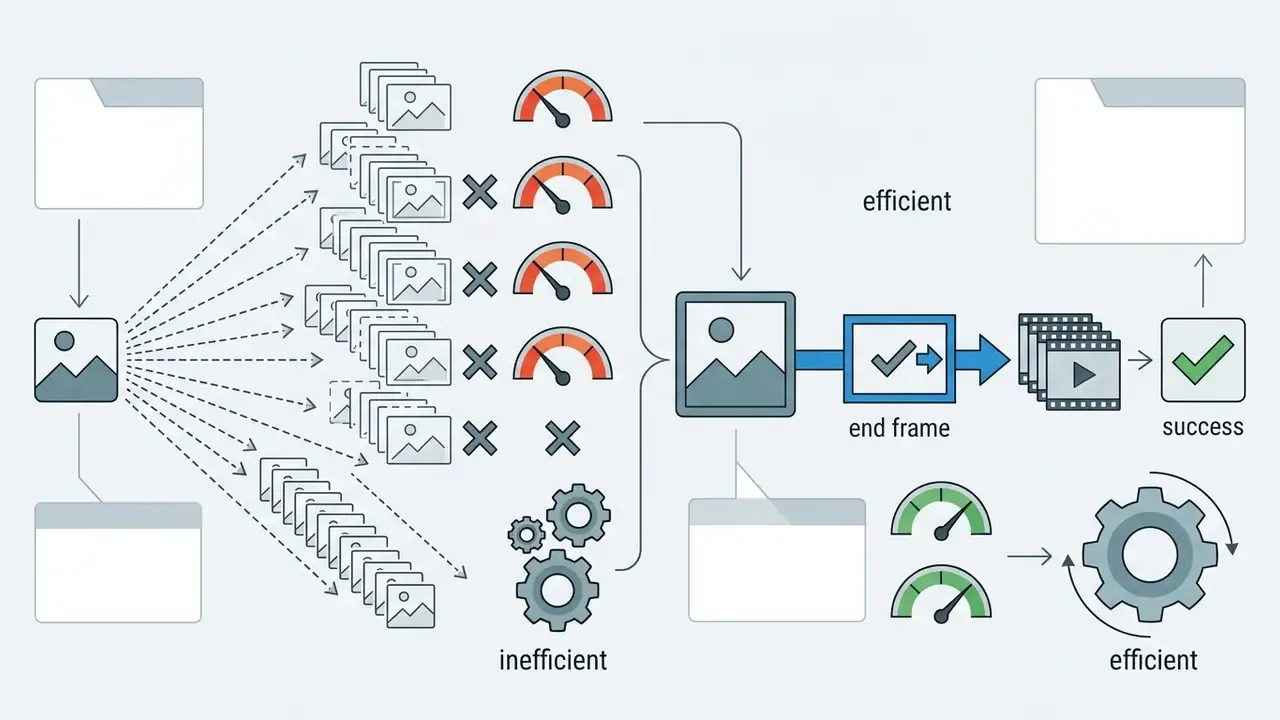
- Autoregressive conditioning (frame extension).The final frame of clip N is extracted and supplied as the initial conditioning prior for clip N+1. Wardrobe, lighting direction, and character identity survive the seam. Google's Veo documentation exposes this explicitly as video extension and first-and-last-frame generation. Progressive autoregressive research (arXiv:2410.08151) shows the technique holds coherence to roughly one minute before drift becomes visible.
- Agentic scene stitching.An LLM orchestrator parses a long script into a shot list, casts consistent characters and voices, generates an individual image-to-video clip per keyframe, then applies optical-flow crossfades and audio-driven pacing to assemble a single timeline. This is how "script-to-finished-cut" and "PDF-to-video" pipelines reach eight to ten-minute runtimes for explainers, tutorials, training modules, and social episodes.
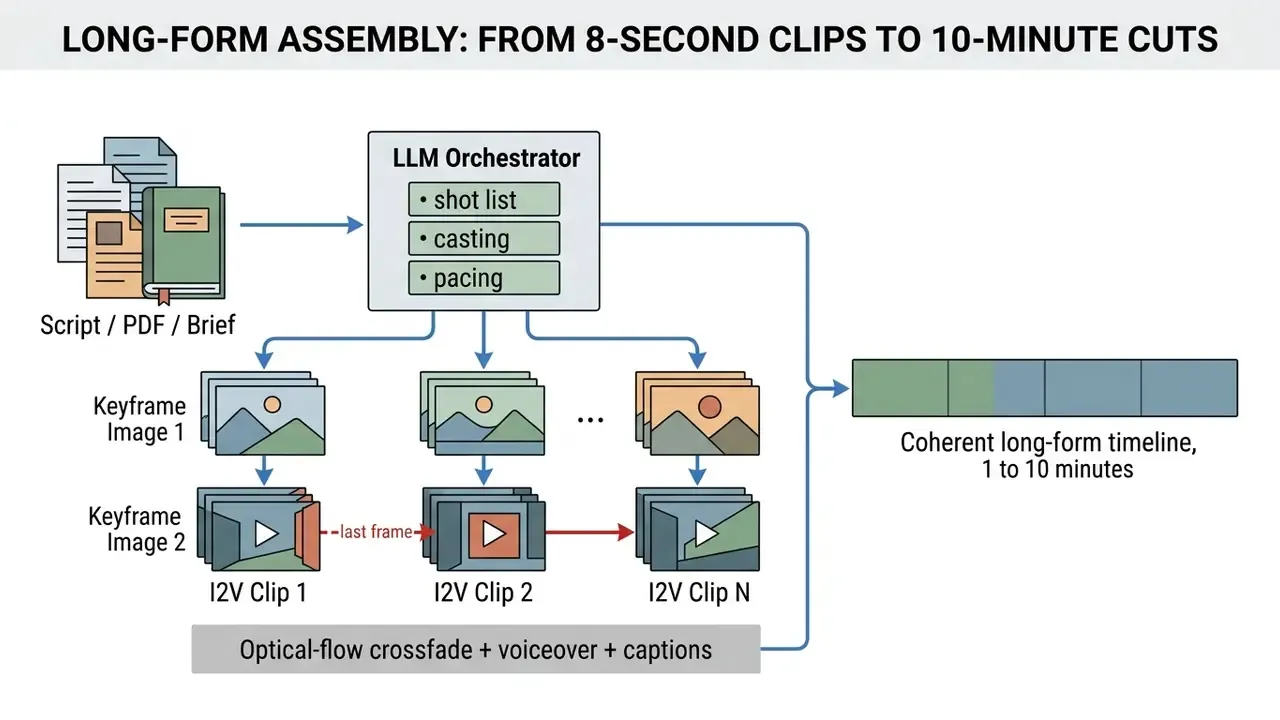
Audit implication: a "10-minute AI video" claim is supported with clarification, not false. Verify whether continuity comes from autoregressive conditioning (higher fidelity, shorter safe horizon) or from agentic stitching (longer horizon, visible scene boundaries). For regulated communications, review scene boundaries individually. Provenance metadata can be stripped during re-encoding at the stitch stage, which is exactly where disclosure obligations quietly break.
Integrating Audio-Driven Lip-Sync and AI Avatars from Still Portraits
Spatial motion alone does not produce a presenter. Commercial workflows convert a single static portrait into a talking avatar by combining image-to-video diffusion with audio-conditioned implicit keypoint predictors, the family that includes SadTalker and LivePortrait-style architectures. The pipeline maps spectral audio features, effectively phoneme energy over time, onto facial landmark deformations. That lets single-image inputs produce lip-synced video without building or rendering a full 3D mesh.
Three production patterns dominate.
- Photo-to-presenter. One front-facing portrait plus a generated or cloned voice track produces a narrating avatar for onboarding, product explainers, or multilingual training. Expression and lip-sync are applied automatically.
- Digital twin. A short reference clip or selfie set trains a reusable avatar identity, re-cast across dozens of scripts without a reshoot.
- Voice layer. A library voice, a designed synthetic voice, or a cloned voice built from a short consented sample. Multilingual delivery commonly spans 30 to 50 or more languages.
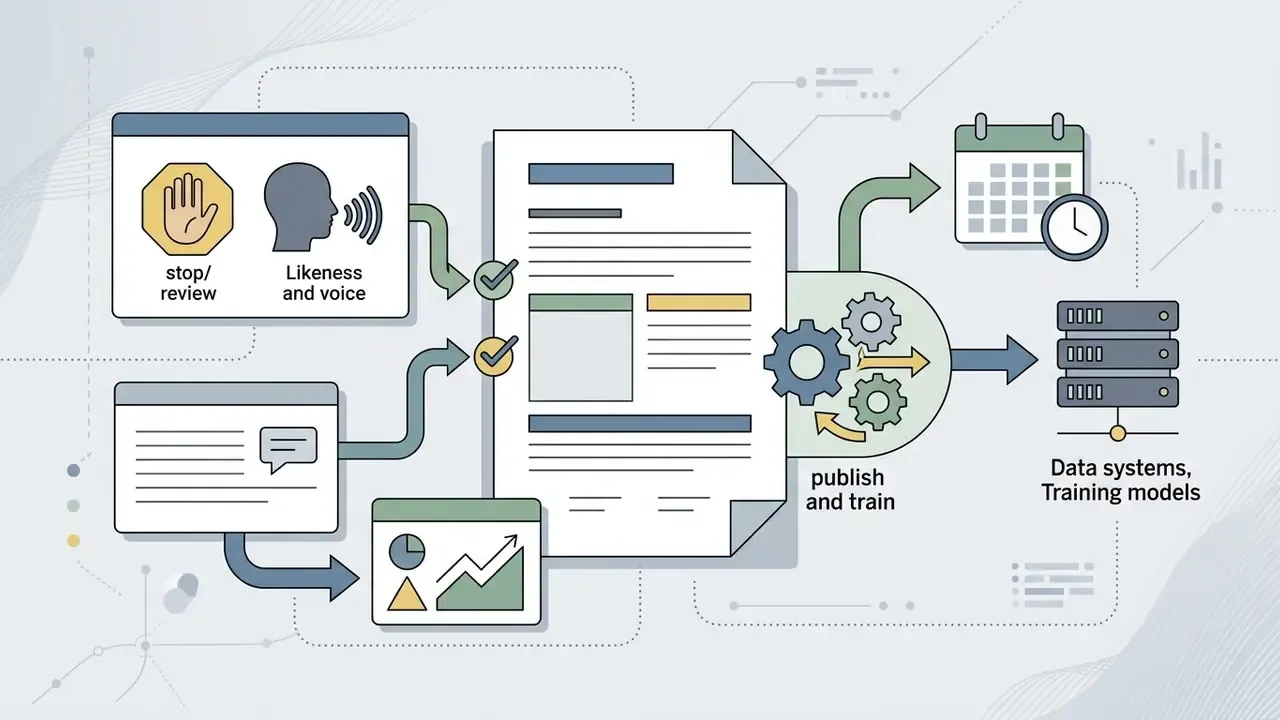
Compliance note: talking-avatar generation is the highest-risk sub-category in this article. It combines biometric likeness, voice, and synthetic speech in one asset. Written, documented consent is mandatory for any depicted human, and the U.S. Copyright Office digital replicas work treats licensing of images and voices for AI use as requiring explicit rights documentation. Never generate an avatar from a customer photograph, an employee badge image, or a public figure's likeness without cleared rights. Teams building avatar pipelines should also review guidance on AI voice generators covering voice quality, language support, pricing, and commercial licensing.
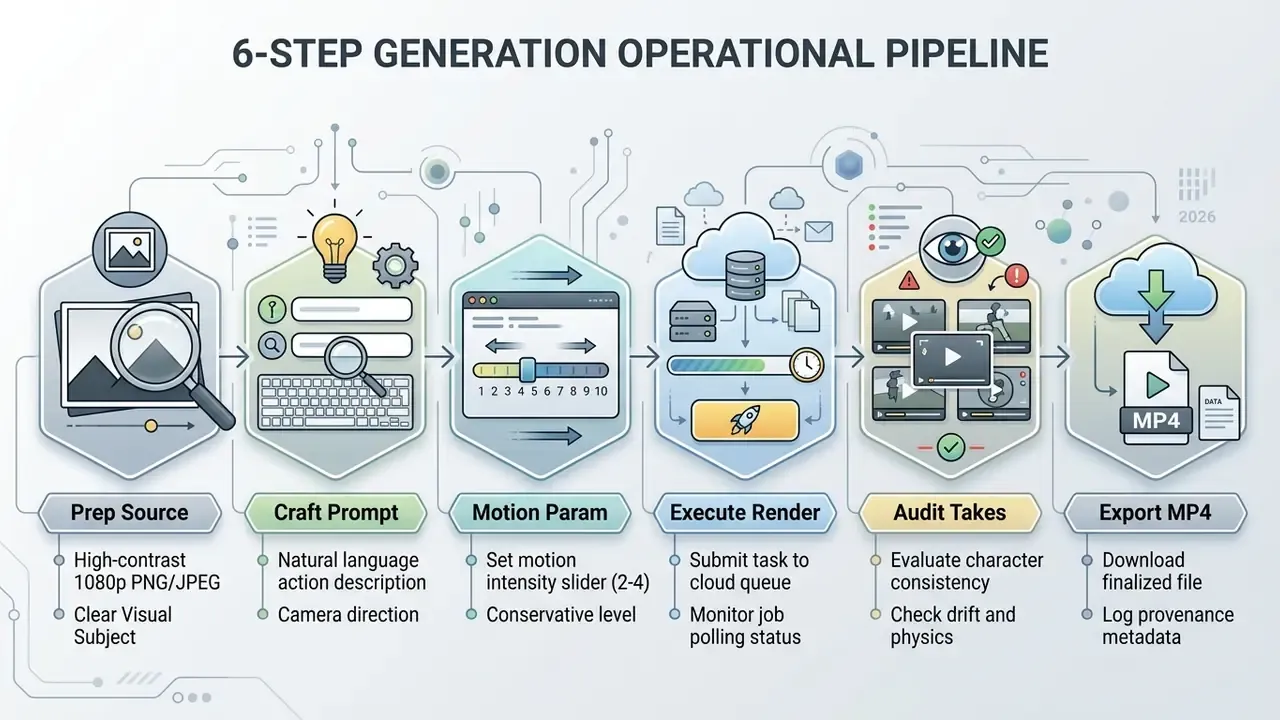
Figure 1: End-to-End Image-to-Video Generation Workflow
- Upload source image.Select a high-contrast, artifact-free PNG or JPEG file, 1080p recommended.
- Formulate motion prompt.Write a concise prompt detailing character action, camera trajectory, and environmental change.
- Set generation parameters.Configure aspect ratio, duration (for example 5 seconds), and motion range slider at low to medium.
- Initialize generation.Submit the task for latent denoising and frame synthesis.
- Evaluate takes.Preview variations, checking visual consistency, character drift, and motion artifacts.
- Export MP4.Download the finalized, temporally stabilized clip in standard MP4 format.
How to Choose the Best Free AI Image to Video Generator Unlimited
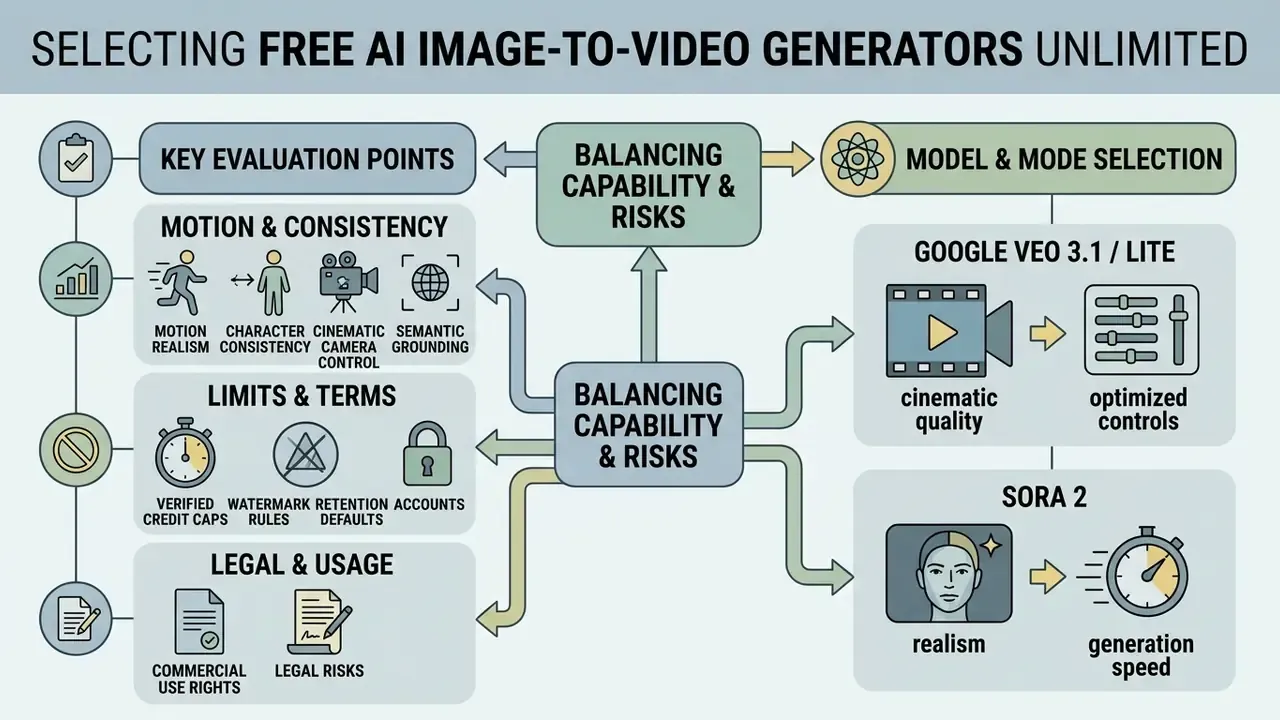
Selecting the best free ai image to video generator unlimited tool means weighing generation capability against legal, operational, and technical risk. Hosted platforms differ widely in camera precision, character consistency mechanisms, and privacy architecture.
Organizations analyzing creative suites often cross-reference candidates using specialized compare frameworks to balance cost against control. The selection criteria that matter: motion stability, data security, model transparency, retention defaults, and export quality.
Motion Quality, Character Consistency, and Camera Control
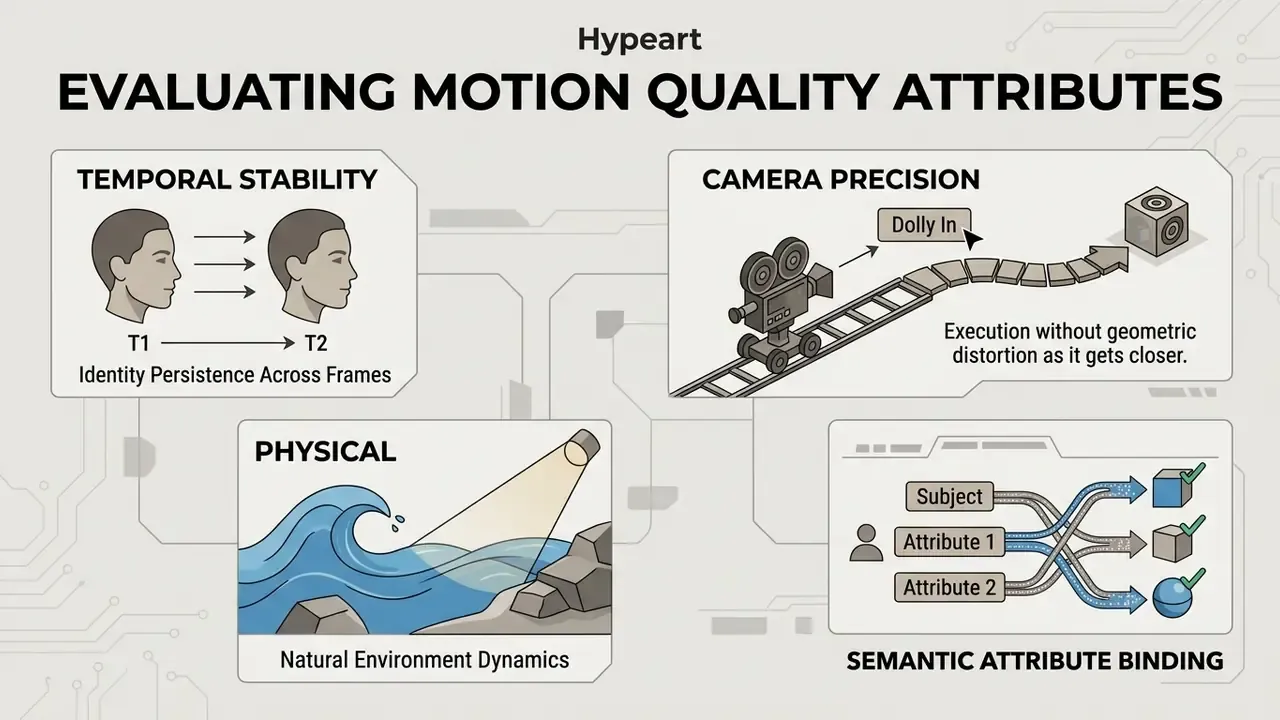
The core technical challenge in image-to-video synthesis is preventing subject distortion across consecutive frames. State-of-the-art platforms use specialized spatial-temporal attention mechanisms to maintain character consistency (ConsistI2V, arXiv:2402.04324, TMLR 2024).
"VBench decomposes video generation quality into multiple dimensions, temporal consistency, motion smoothness, visual fidelity, and evaluates 28 text-to-video and 12 image-to-video models."
- Character consistency. Advanced frameworks use low-frequency noise initialization from the reference frame to anchor global geometry, keeping face and body structure intact across scene transitions (ConsistI2V, arXiv:2402.04324, TMLR 2024). Multi-shot approaches add framewise self-attention sharing, query injection for motion guidance, and de-artifacted refinement injection to hold identity across cuts.
- Cinematic camera control. Leading generators accept explicit camera trajectory inputs: pan, tilt, dolly in and out, crane up, arc, handheld, gimbal, and locked-off static shots. Runway publishes prompt-level camera terminology with paired visual outcomes, and script-to-video research such as VideoStudio (ECCV 2024) maps script-described camera movement into generated footage.
- Motion realism. Retrieval-augmented motion injection frameworks extract realistic trajectories from reference video libraries, applying plausible physics to fluid, clothing, and background motion (MotionRAG, arXiv:2509.26391, 2025).
- Semantic grounding. Motion accuracy is not only physical. It is also semantic.
"UI2V-Bench evaluates image-to-video models across four dimensions, spatial understanding, category understanding, attribute binding, and reasoning, using MLLM pipelines validated against human perception."
Quotas, Watermarks, Accounts, and Privacy
Data privacy and authentication models are the decisive compliance factors for financial and enterprise users. Running an image to video ai unlimited workflow should never compromise institutional data security.
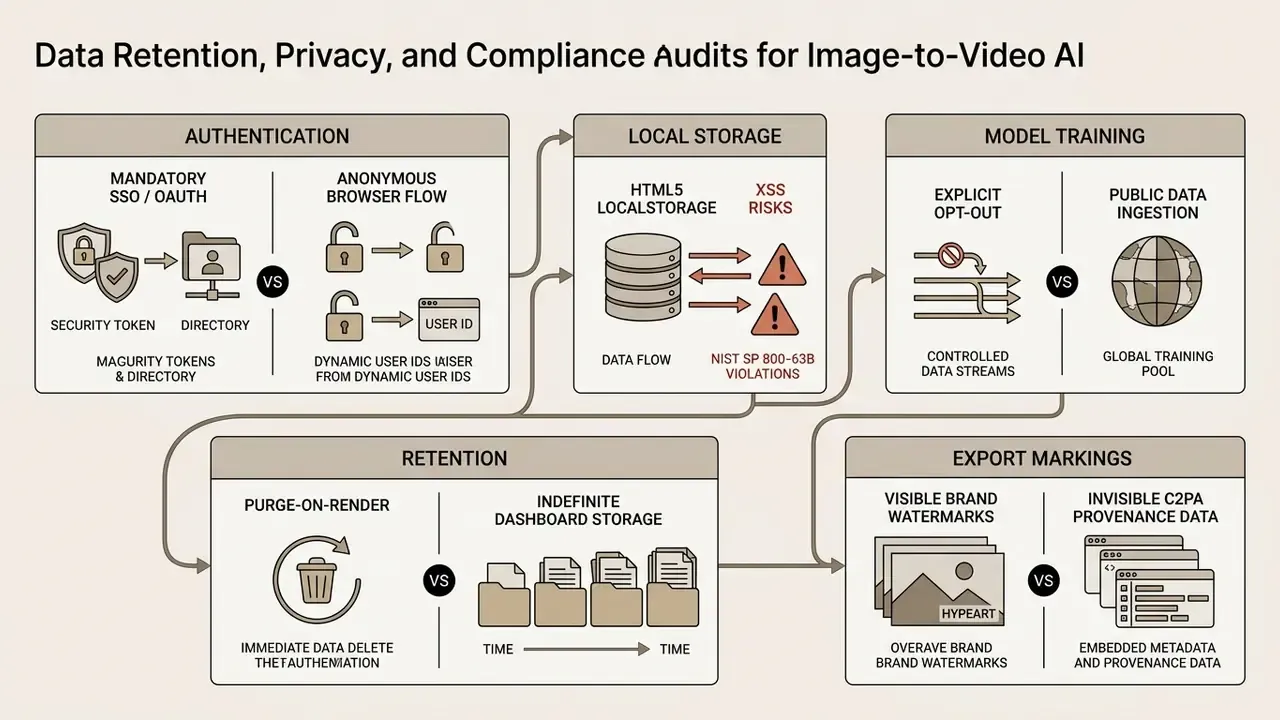
Many web-based platforms offer "no login" access, then store session credentials in browser LocalStorage.
Secure platforms enforce non-persistent, HTTPS-only, HttpOnly session cookies and guarantee that uploaded reference assets are purged from cloud storage after rendering. Comments filed with NIST by the Electronic Privacy Information Center (2023) noted that many generative AI tools require login and retain user-generated content, and identified "no sign-in plus no retention after active use" as the safer architecture. Public-sector policy points the same way: Arizona's 2024 Generative AI Policy prohibits submitting confidential data to publicly accessible AI services or training models, and requires security review of all AI software, browser plug-ins included.
Before approving a tool, compare candidates against the consolidated review of free AI video generators, with attention to watermark and privacy policies rather than headline quotas.
Models and Modes: When the Choice of Video AI Model Matters
Different foundational models excel at distinct visual styles and movement types. Model selection should follow project requirements, not brand familiarity.
- Google Veo (3.1 / Lite). Built for high-fidelity physics, native audio integration, image-to-video, first-and-last-frame generation, and multi-frame extension via the Gemini API. Veo 3 reached public preview on Vertex AI for all Google Cloud customers. Veo 3.1 Lite is accessible through a paid tier on the Gemini API and Google AI Studio, while consumer access is tiered across Google AI Pro and Ultra plans.
- Runway Gen-3 Alpha / Turbo. Optimized for cinematic motion, granular camera control, and precise text-prompt alignment. Gen-3 Alpha treats input images as optional; Gen-3 Alpha Turbo requires an input image.
- Luma Dream Machine. Fast draft rendering and convincing lighting, though free outputs are draft-resolution, watermarked, and personal-use only.
- Kling AI and Pika 2.5. Popular for short social clips with daily credit resets: Pika's 80 monthly credits at 480p, Kling's roughly 50 to 66 daily credits at 720p. Readers exploring adjacent categories can review the guide to text-to-video AI tools with comparable quota structures.
Multi-Model Comparison Matrix (2025 to 2026 Stack)
| Model Architecture | Max Native Resolution | Max Single Clip Duration | Motion Control Precision | Best Use Case |
|---|---|---|---|---|
| OpenAI Sora 2 / Sora 2 Pro | 1080p (1920x1080 / 1080x1920) | 4 to 20 sec (fixed steps) | High (physics-aware) | Photorealistic cinematic scenes |
| Google Veo 3.1 / 3.1 Fast | 1080p (4K claimed on paid tiers) | 4 to 8 sec native, extendable to 60 sec | High (native audio sync, frame extension) | Commercial ads with ambient sound |
| ByteDance Seedance 2.5 / 2.0 | 1080p (4K on higher tiers) | 5 to 20 sec | Medium-high | Viral social clips and UGC |
| Kling O3 / Kling V3 / Motion Control | 1080p | 5 to 10 sec | Very high (trajectory control) | Complex character motion and choreography |
| MiniMax H3 | 2K | About 5 sec | Medium | Fast stylized drafts and iteration |
| Alibaba Wan 3.0 / 3.0 Prime | 720p to 1080p | 2 to 15 sec (30 fps, MP4/H.264) | Medium | Cost-efficient batch rendering |
| Runway Gen-3 Alpha Turbo | 720p to 1080p | 5 to 10 sec | High (explicit camera vectors) | Directed camera language, previz |
| Luma Dream Machine | Draft to 1080p | About 5 sec | Prompt-based | Rapid lighting and mood exploration |
Reading the matrix: trajectory-controlled models such as Kling Motion Control win on choreography. Audio-native models such as Veo 3.1 win on finished ads. 2K draft models such as MiniMax H3 and Wan 3.0 win on cost per iteration. No single model dominates all four axes, which is precisely why multi-model platforms have become the default procurement pattern.
For developers wiring video creation into automated software pipelines, checking specifications in the AI Media API Guides keeps integration predictable. Teams evaluating credit-based alternatives can also examine PixVerse AI and comparable engines through the animation tooling guide.
Vendor Matrix: Free Access, Rights, Retention, and Training Opt-Out
| Tool / Platform | Free Access Quota | Watermark Policy | Registration | Camera Control | Export Quality | Commercial Rights | Data Retention | Training Opt-Out | Verified Date |
|---|---|---|---|---|---|---|---|---|---|
| Adobe Firefly Video | Daily resetting credits | No visible watermark | Required | Pan, zoom, tilt | Up to 1080p | Permitted (commercially safe if inputs are rights-cleared) | Account-bound project storage | Enterprise terms; verify per plan | Sep 2026 |
| Renderforest | Unlimited HD on own model | Platform watermark | Required | Basic preset moves | 720p HD | Allowed under Terms (marketing, client work, ads) | Project library retained | Verify in ToS | Sep 2026 |
| Runway Gen-3 | One-time 125 credits (about 25 sec), no refresh | Watermarked (Free) | Required | Advanced 3D vectors | 720p / 1080p | Full user ownership, no non-commercial restriction | Account asset storage | Verify in ToS | Sep 2026 |
| Luma Dream Machine | Daily trial allocation, no time limit | Watermarked (Free) | Required | Prompt-based moves | Draft resolution | Personal use only; restriction persists on generations after upgrade | Cloud gallery retained | Verify in ToS | Sep 2026 |
| Pika 2.5 | 80 monthly credits (12 per 5-sec clip) | Watermarked (Free) | Required | Basic sliders | 480p SD | Non-commercial on Basic and Standard | Cloud retained | Verify in ToS | Sep 2026 |
| Kling AI | About 50 to 66 daily credits, 5 sec, 720p | Watermarked (Free) | Required | High (Motion Control tiers) | 720p | No official primary-source confirmation retrieved, treat as unverified | Cloud retained | Unverified | Sep 2026 |
Note: access terms, credit structures, and licensing rules change frequently. Data verified via platform terms as of September 2026. Where vendor documentation and third-party comparisons disagreed, the discrepancy is logged rather than averaged.
Platform Category Comparison: Single-Model Tools vs. Multi-Model Suites
| Capability | Multi-Model AI Suites | General Design Tools (Canva-class) | Single-Model Labs (Runway-class) | Avatar Platforms (Synthesia-class) | Mobile Editors (CapCut-class) |
|---|---|---|---|---|---|
| 15 to 30+ video models in one plan | Yes | No | No | No | No |
| Text, image, and photo to video | Yes | Limited | Yes | Limited | Limited |
| AI avatars and talking video | Yes | No | Limited | Yes | No |
| Voice cloning and multilingual voices | Yes | Limited | Limited | Yes | Limited |
| Brand kits applied across scenes | Yes | Yes | Limited | Limited | Limited |
| Agentic script-to-cut orchestration | Yes | No | No | No | No |
| Long-form output (up to 10 minutes) | Yes | Limited | No | Limited | Limited |
| Documented commercial rights on free tier | Varies | Varies | Yes | No | Varies |
Capability rows reflect commonly offered features and vary by plan. Treat this matrix as a procurement heuristic, not a vendor endorsement.
Can You Use Free Image to Video AI for Commercial Projects
Commercial deployment of AI-generated video runs through three gates at once: intellectual property law, platform terms of service, and emerging transparency mandates. Publishing for commercial benefit without verifying licensing conditions is where the real exposure sits. Before publishing, teams may also wish to verify synthetic provenance using AI content detection and reverse-image workflows.
Organizations planning commercial deployments can audit legal risk and case timelines on the AI Litigation and Case Timelines database.
Rights to Source Images, Prompts, and Exported Video
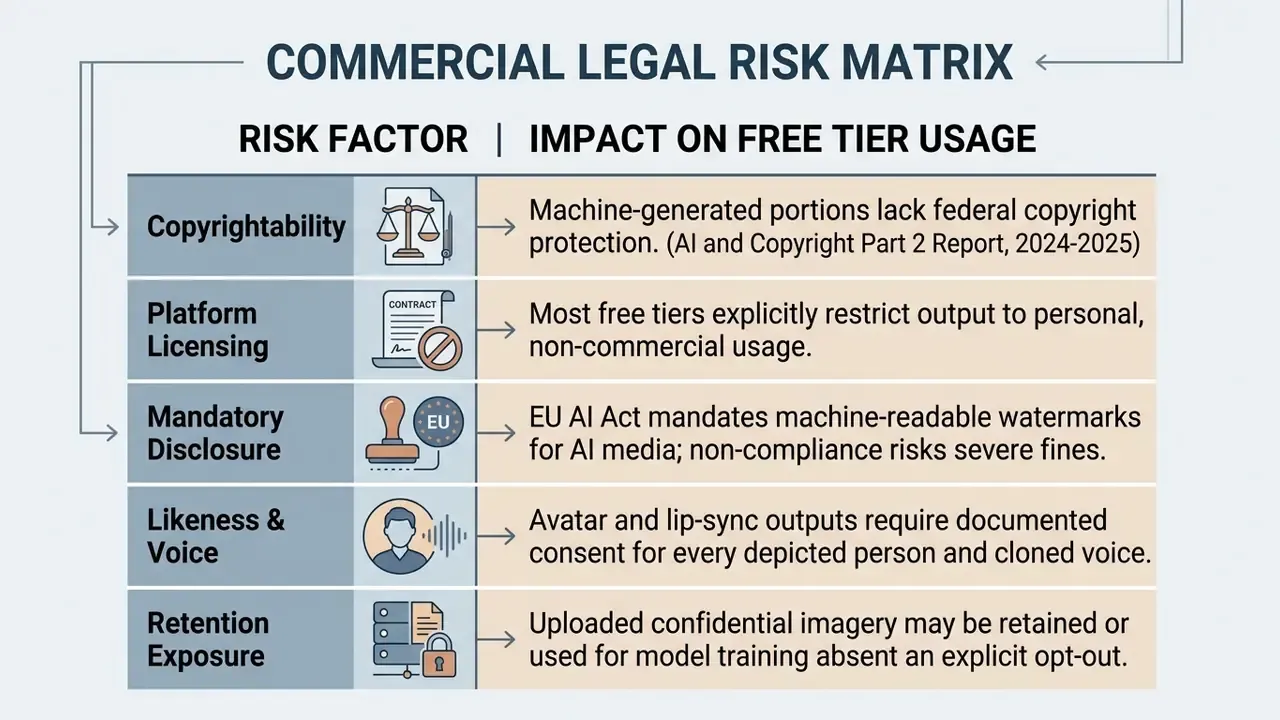
Under United States copyright law, material synthesized purely by artificial intelligence without human creative control is not eligible for protection (U.S. Copyright Office policy guidance, 2024 to 2026, https://www.copyright.gov/ai/ai_policy_guidance.pdf).
Adjacent categories follow the same logic. Teams can review parallel rules on commercial use of AI generators for still imagery.
- Source image rights.
- Pre-existing copyrighted images keep their original protection. Uploading an image to an AI tool transfers nothing and clears no third-party claim.
- Prompt ownership.
- Text prompts attract copyright only where they express sufficient human creativity. Generic prompts confer no ownership over generated results (U.S. Copyright Office, Part 2 Report, 2025).
- Exported video file.
- Purely machine-determined outputs cannot be registered. Only human-authored edits, human visual arrangements, or complex creative sequences added after generation qualify. Registration applicants must identify and disclaim AI-generated material.
- Downstream reuse risk.
- UNESCO's 2024 guidance warns that AI-generated images, sounds, or code uploaded online may infringe intellectual property rights, and may later be ingested by other generative systems. Worth weighing before branded assets go public.
What to Check in Model Terms and Free Plans Before Publishing
Before any clip lands in paid marketing, broadcast media, or client work, inspect specific licensing language.
- Platform commercial prohibition. Many popular free tiers, Pika Basic and Luma Free among them, restrict output to personal, non-commercial use. Commercial use requires a paid plan. Luma's licensing states the personal-use restriction persists on generations created under a free plan even after the account is upgraded.
- Revenue threshold rules. Some providers permit free usage only below a revenue ceiling. Stability AI's Core Model terms make usage free unless an organization generating over USD 1,000,000 in annual revenue uses it commercially. Midjourney similarly requires Pro or Mega plans for businesses grossing over USD 1,000,000 per year.
- Regulatory marking compliance. Under the European Union AI Act (Regulation 2024/1689), synthetic media must embed machine-readable metadata or invisible watermarks identifying AI origin. Deployers face fines up to €15 million or 3% of global annual turnover for failure to disclose synthetic deepfake media.
"Article 50(2) of the EU AI Act obliges providers to embed machine-readable markings in generative AI output; non-compliance risks fines up to €15 million or 3% of global turnover."
The rationale for mandatory marking is empirical, not theoretical.
"A meta-analysis of 56 studies covering 86,155 participants found deepfake detection accuracy of only 55.54% (95% CI [48.87, 62.10]), barely above chance."
Since human audiences cannot reliably separate synthetic from filmed footage, provenance obligations land on the publisher. For legal guidance on commercial licensing across AI media suites, teams can consult the AI Media Commercial-Use Hub.
Alert Box: Legal Disclaimer and Commercial Publication Risk Warning
Notice: information in this article serves educational and risk-evaluation purposes only and does not constitute formal legal advice. Commercial rights in AI-generated media depend strictly on individual vendor Terms of Service, jurisdiction-specific copyright rulings, and source image rights clearance.
Before publishing AI-generated video in commercial campaigns:
- Obtain written proof of commercial licensing from the vendor for the exact plan used.
- Secure explicit written consent for any human likeness or cloned voice depicted.
- Confirm compliance with jurisdiction transparency law, including EU AI Act Article 50 provenance marking obligations.
- Confirm that source imagery is owned or licensed, and that no confidential or customer data was uploaded to a public tier.
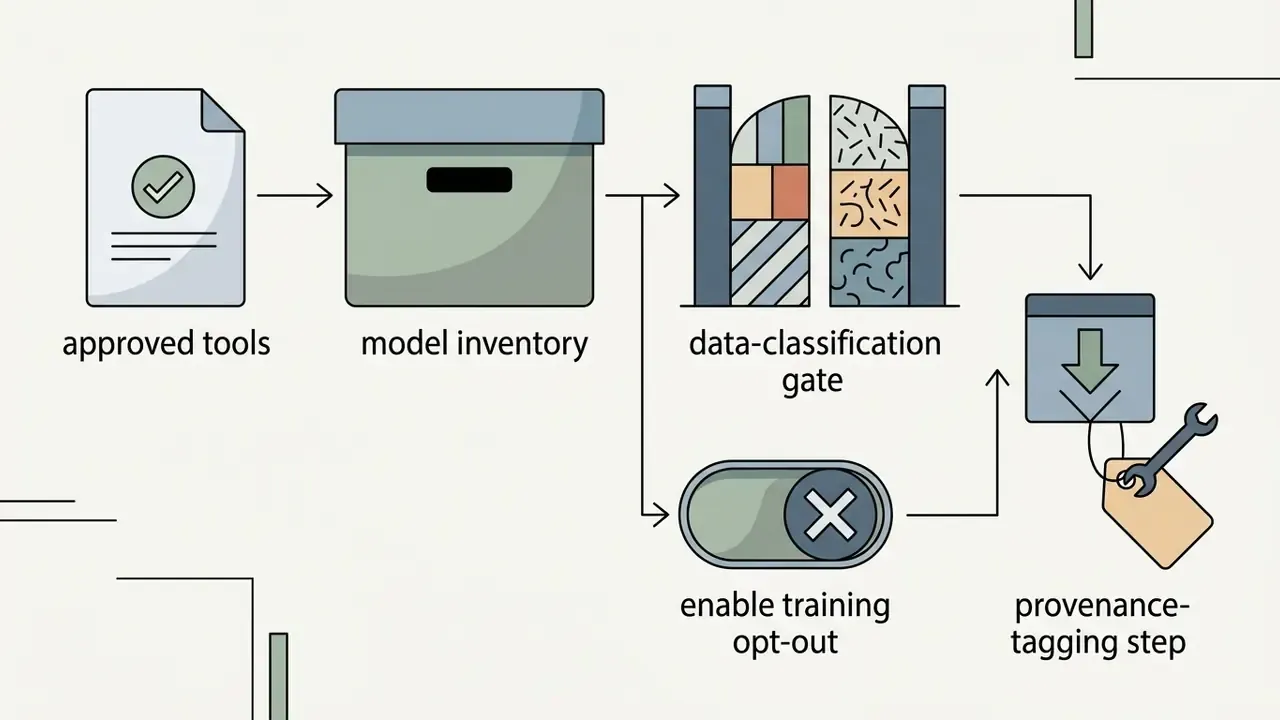
- Log model name, version, plan, generation date, and prompt in the model inventory for audit traceability.
Risk-Adjusted ROI and Integration with MRM and GRC Systems
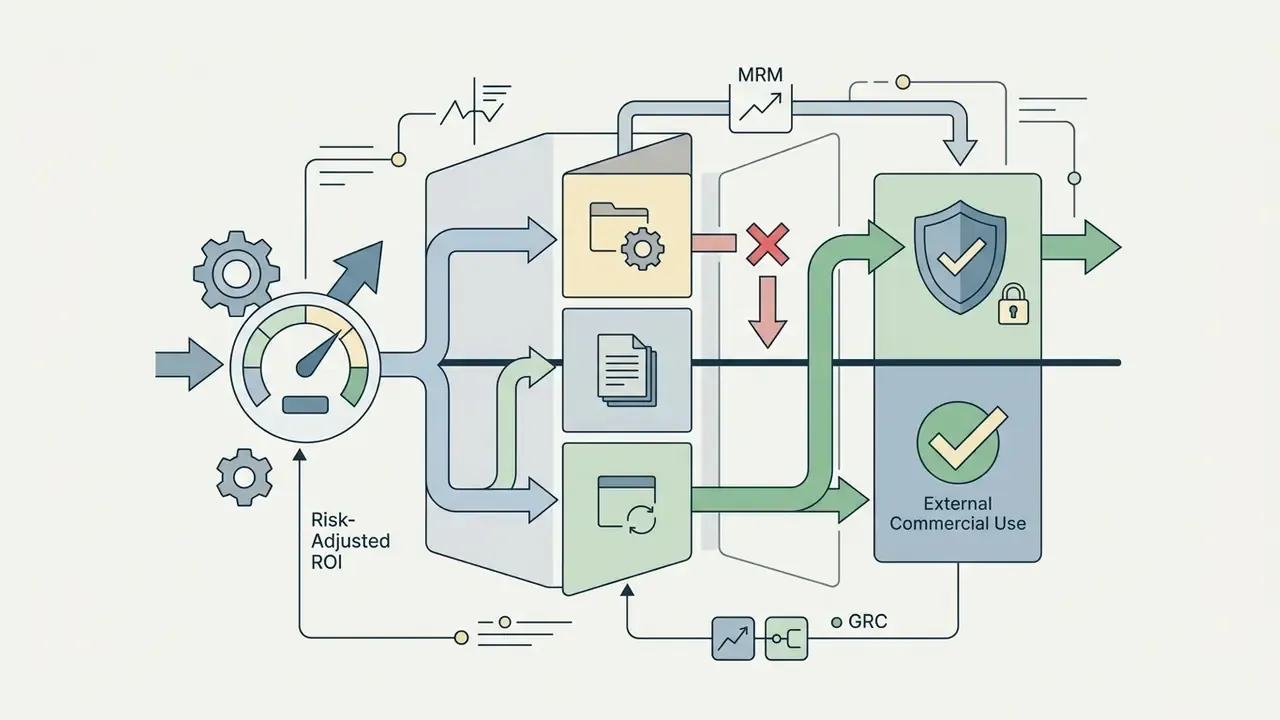
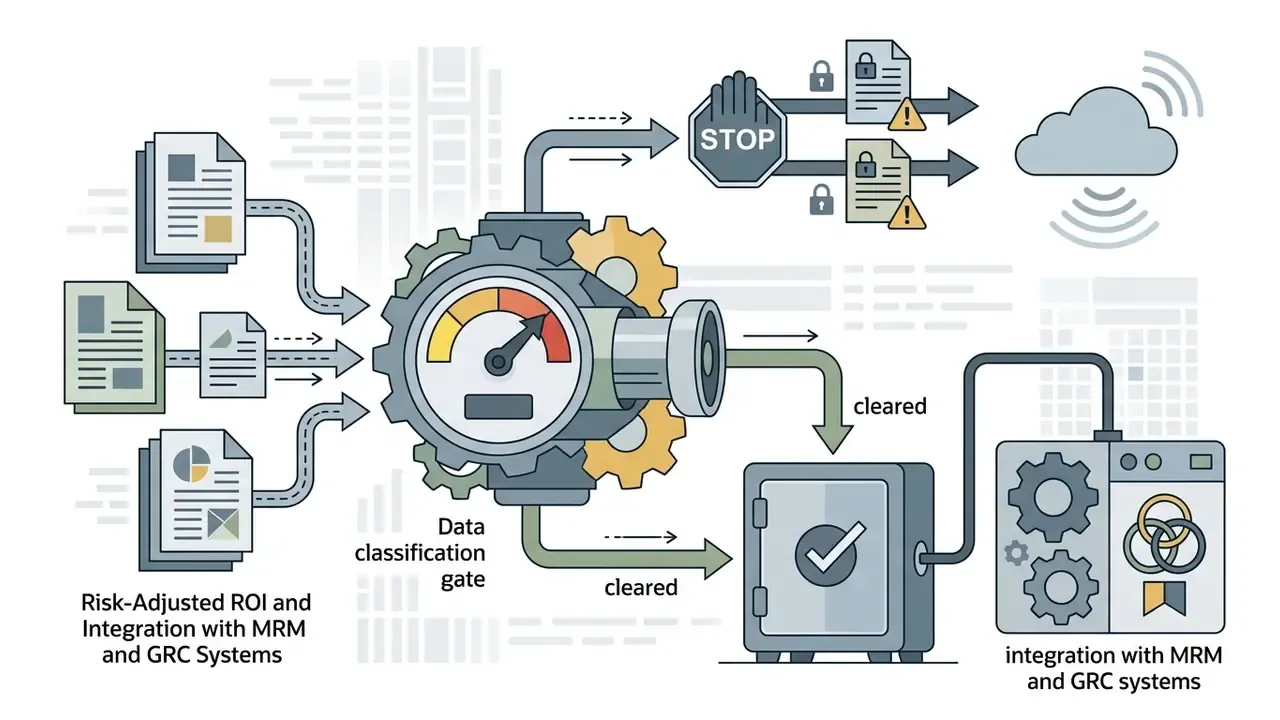
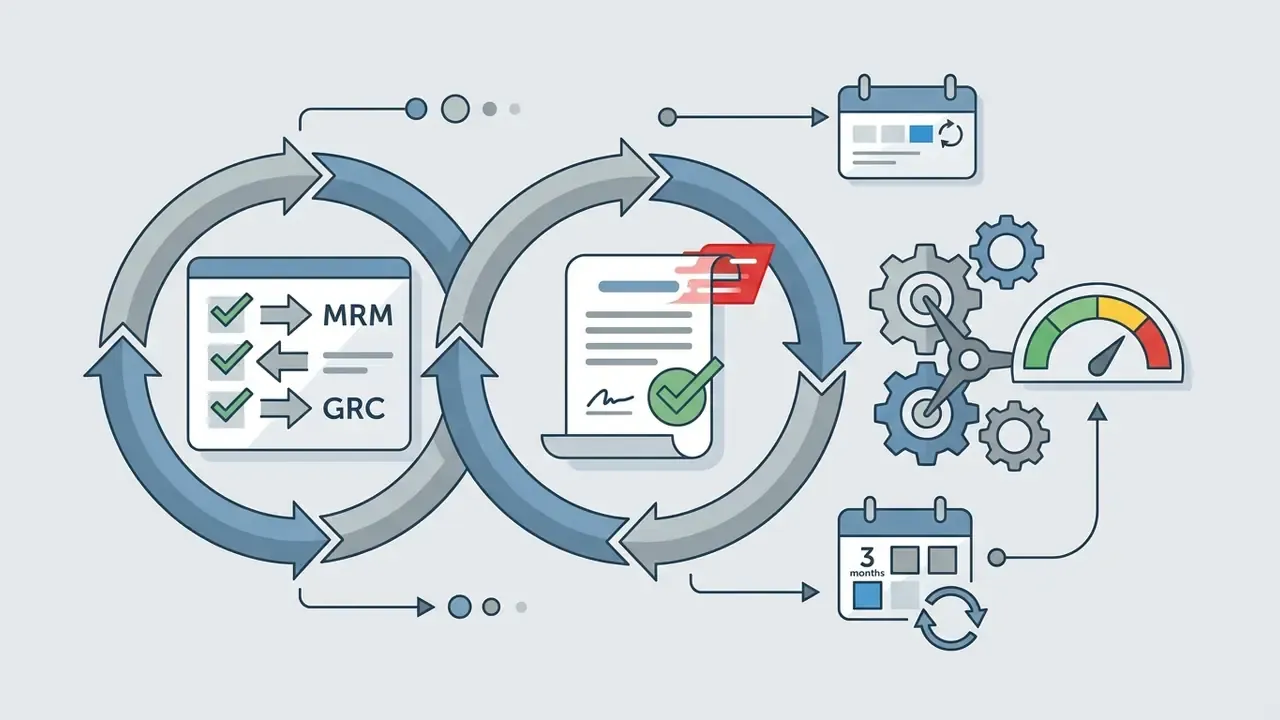
Approving a generative video tool is a model risk decision, not a software purchase. Institutions operating under model risk management expectations, including SR 11-7-style inventories, should treat each approved generator as an inventoried third-party model with an owner, a use restriction, and a review cadence.
A workable evaluation formula for cost-conscious governance teams:
Risk-Adjusted ROI = (Production Cost Avoided + Speed-to-Market Value)
                    - (Licensing Upgrade Cost
                       + Legal Review Hours
                       + Provenance Tagging Effort
                       + Expected Compliance Loss)
Expected Compliance Loss = P(disclosure failure) x Statutory Exposure
                           + P(rights defect) x Remediation Cost
Finance teams modelling cost per finished minute can sanity-check assumptions with the AI Media Calculators and the per-credit breakdowns in the AI Media Pricing Guides. One point often missed: control cost, not licence cost, drives the denominator.
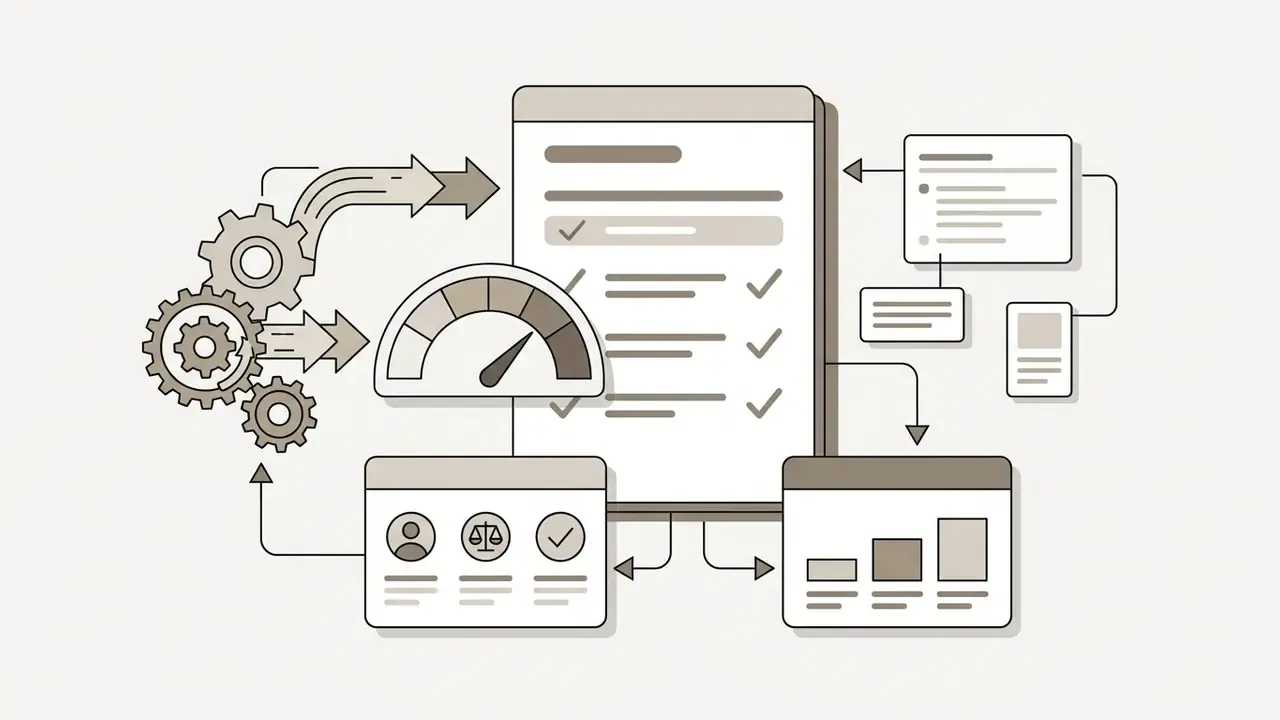
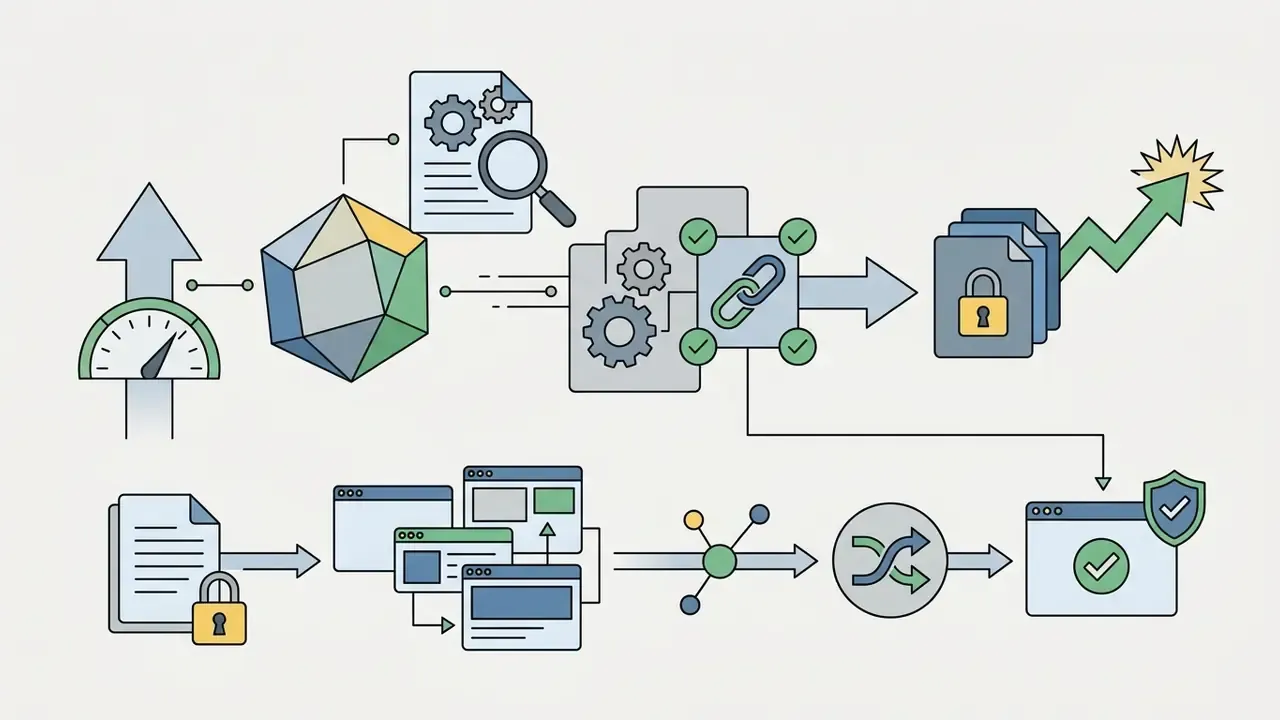
Practical integration checkpoints:

How to Create Video From an Image: Step-by-Step Workflow
To maximize output quality and stop burning generation credits, adopt a structured pipeline. A standardized workflow produces consistent renders across marketing, training, and creative assets.
Prepare the Photo or AI-Generated Image for Video Creation
The source image is the architectural foundation for the model. Poorly lit or heavily compressed inputs produce severe rendering artifacts, and no prompt rescues them.
- Resolution and contrast. Supply 1080p (1920x1080) or 1024x1024 source images with crisp subject boundaries and neutral, even lighting. Published vendor guidance converges on this range: NVIDIA's 2026 image guidance recommends plain or removed backgrounds, neutral even lighting, and clear front-facing or three-quarter views, with 1024x1024 optimization and iteration starting at 1280x720 before moving to 1920x1080. Adobe Firefly recommends 1080p for best results. Practical 2026 workflow guides advise 2K or higher source resolution and warn explicitly against compression artifacts, motion blur, and low-contrast scenes. Where a source file falls short, AI image upscalers can raise usable resolution before generation.
"Lumiere generates full-frame-rate video in a single pass through a Space-Time U-Net, leveraging a pretrained text-to-image diffusion model for appearance processing."
Describe Motion and Visual Style in the Prompt
Prompts for video AI should focus on dynamic events, camera behaviour, and lighting transitions rather than static description.
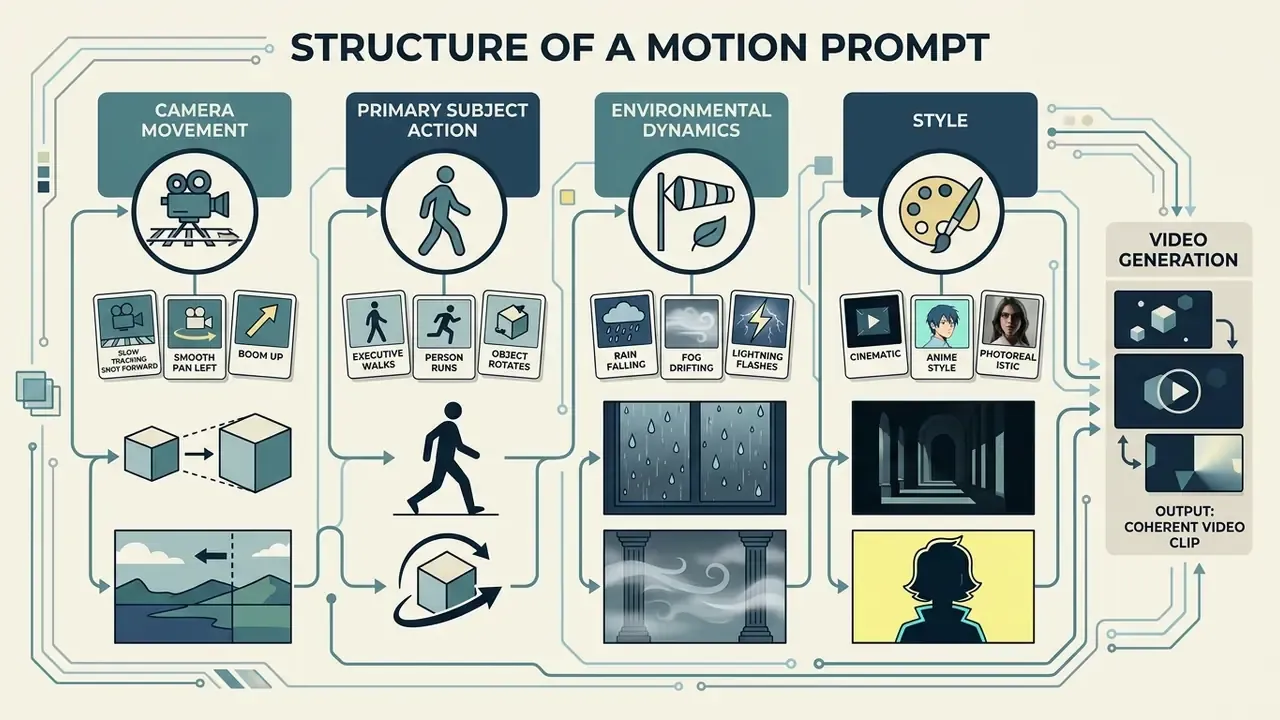
Avoid vague descriptors such as "photorealistic" or "hyper-detailed". Use precise cinematic terms: "slow pan right", "dolly out", "crane up", "crash zoom", "handheld", "steadicam", "locked-off static", or "35mm film aesthetic". Runway's published camera vocabulary pairs each term with its visual effect and typical use case, which makes it a reliable starting lexicon.
A dependable ordering across models: camera framing and movement, then subject and action, then start and end position, then pace, then lighting and grade, then style reference. Putting camera control before style detail stops the model from prioritizing texture over motion.
Prompt engineering here stays shallow rather than deep. Google's own definition frames prompt engineering as instructing the model toward a desired output, and vendor guidance confirms that one clear sentence is enough for a first usable take. Semantic benchmarks (UI2V-Bench, arXiv:2509.24427) still show measurable gains when attribute binding is explicit, so name which object performs which action when several are present.
Generate, Compare Takes, and Download the Clip
Generative video rendering is asynchronous. Published API documentation for hosted video models describes a submit, poll, download pattern: a request returns a job ID, the job is polled until status reports completed, and the video is then retrieved from a content URL. Single renders may take several minutes, and 1080p or long-duration jobs take materially longer than short 480p or 720p renders (OpenAI video generation API documentation, 2026, https://platform.openai.com/docs/guides/video-generation).
- Generate multiple takes.Render 2 to 4 variations under identical prompt settings, then compare motion paths and pick the cleanest temporal sequence. Some platforms cap simultaneous results at 1 to 4, so choosing close parameters first limits credit burn.
- Inspect for artifacts.Review playback at 0.5x speed to catch face distortion, flickering backgrounds, or unnatural limb movement. Iterate one variable at a time, motion intensity, then camera term, then style, and switch models if two consecutive passes miss the brief.
- Download and store.Export the selected clip as MP4 and keep provenance metadata such as C2PA tags intact for the audit trail. For final assembly, sequencing, and audio layering, teams commonly move into free video editing software or a comparable editing workflow.
- Log the render.Record model version, plan, prompt, seed where exposed, and export settings alongside the file. This log is the artifact regulators and internal reviewers will ask for.
What Unlimited Image to Video AI Is Used For
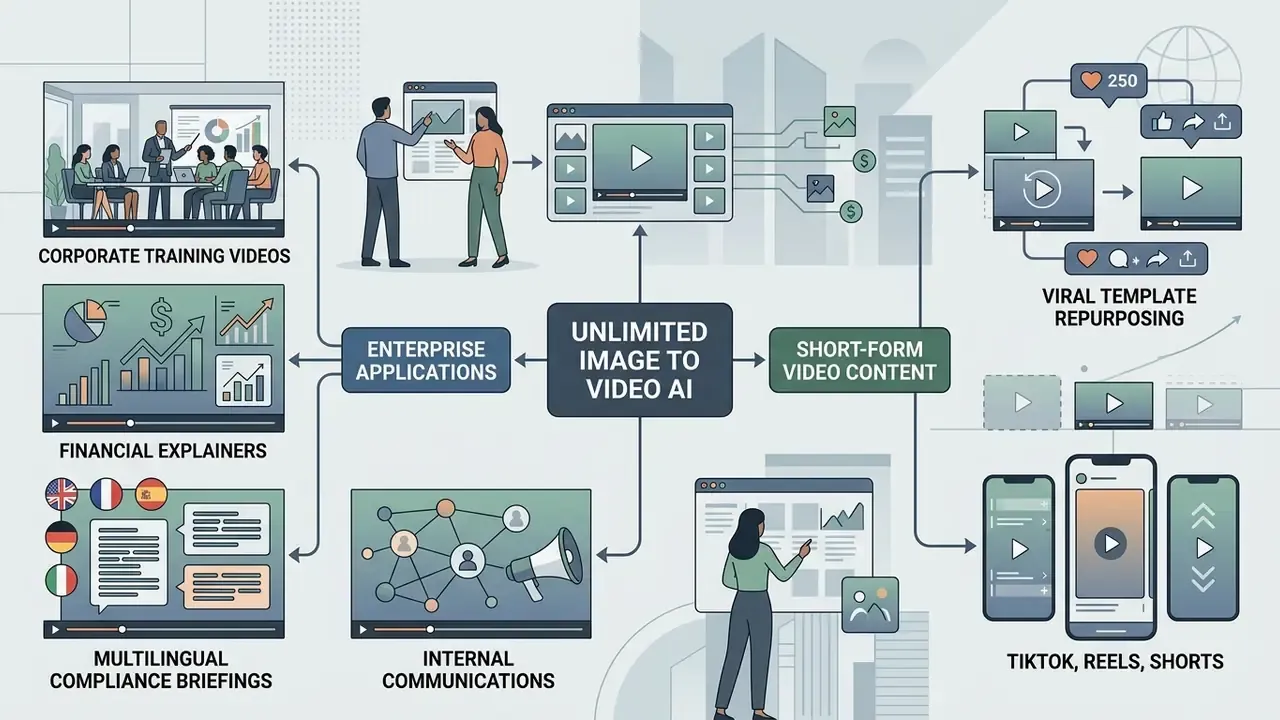
An unlimited image to video ai workflow lets organizations expand media output without multiplying traditional production budgets. Automated video creation turns static corporate asset libraries into dynamic media across business channels.
Teams building interactive web experiences alongside motion graphics sometimes wire video generators into custom platforms built with an ai game maker framework.
Enterprise Training, Internal Communications, and Financial Product Explainers
The highest-value institutional applications are internal and instructional rather than viral. They carry lower likeness risk and clearer rights provenance.
- Corporate training and onboarding. Converting instructional diagrams, PDF manuals, and process maps into animated sequences for employee onboarding. Vendor documentation confirms the pattern: PDFs can be repurposed into onboarding, internal-update, and lesson videos, and free plans permit real project testing rather than locked demos.
- Financial product explainers. Animating rate-structure diagrams, fee schedules, and product comparison charts so retail customers can follow a mortgage amortization or a fund fee waterfall visually. Provenance marking is mandatory here, since the content is both synthetic and financially material.
- Multilingual compliance and policy briefings. One approved script rendered with an avatar and multilingual voices across 30 to 50 languages, replacing repeated studio bookings for each regional entity.
- Regulatory and audit walkthroughs. Animating architecture diagrams and control-flow charts for examiner briefings, with each scene logged against the model inventory.
- Internal comms at volume. Turning a static quarterly-results deck into short animated summaries for the intranet.
"In a controlled experiment with 83 participants, knowledge gain in the AI-video group (M=1.00) was statistically indistinguishable from the traditional-video group (M=0.94), t(82)=8.31, p<0.001."
That equivalence is the core enterprise argument. Comprehension outcomes hold while production cost and turnaround collapse. Explainer-heavy programmes can also draw on the reference guide to animation creation tools for template and export planning.
Short Videos for TikTok, Reels, and Shorts
Vertical formats (9:16) dominate consumer social engagement. Generative AI lets media teams turn static marketing graphics into short, high-impact loops.
"ChatGPT traffic grew 123% year over year across 2024 to 2025, reflecting explosive growth in generative AI content consumption on consumer platforms."
- Viral template repurposing. Converting product photographs into 5-second dynamic B-roll clips overlaid with text hooks.
- Rapid content iteration. Generating 10 to 15 clip variations from a single catalog photo to test engagement across platform algorithms.
- Educational micro-hooks. Animating chart infographics or illustrations to hold attention during informational reels. Peer-reviewed work on AI-powered short video creation (ACM, 2024, https://dl.acm.org/doi/10.1145/3613904.3642476) describes human-AI collaboration, script generation, summarization, and workflow support, as the core design pattern for compressing long text into short video. Research on academic-paper-to-short-video pipelines (arXiv:2601.18218, 2026) shows the same extraction-then-script structure applied to dense source material.
- Platform-specific structuring. Practical 2026 guidance maps format to platform: TikTok rewards surprise or contrarian openings, Reels suits episodic tip series, and Shorts favour 50 to 60 second compressed explainers built around one takeaway.
Product, Marketing, and UGC-Style Ads From Static Images
Ecommerce brands use image-to-video AI to convert flat product catalogs into dynamic user-generated-content style advertisements.
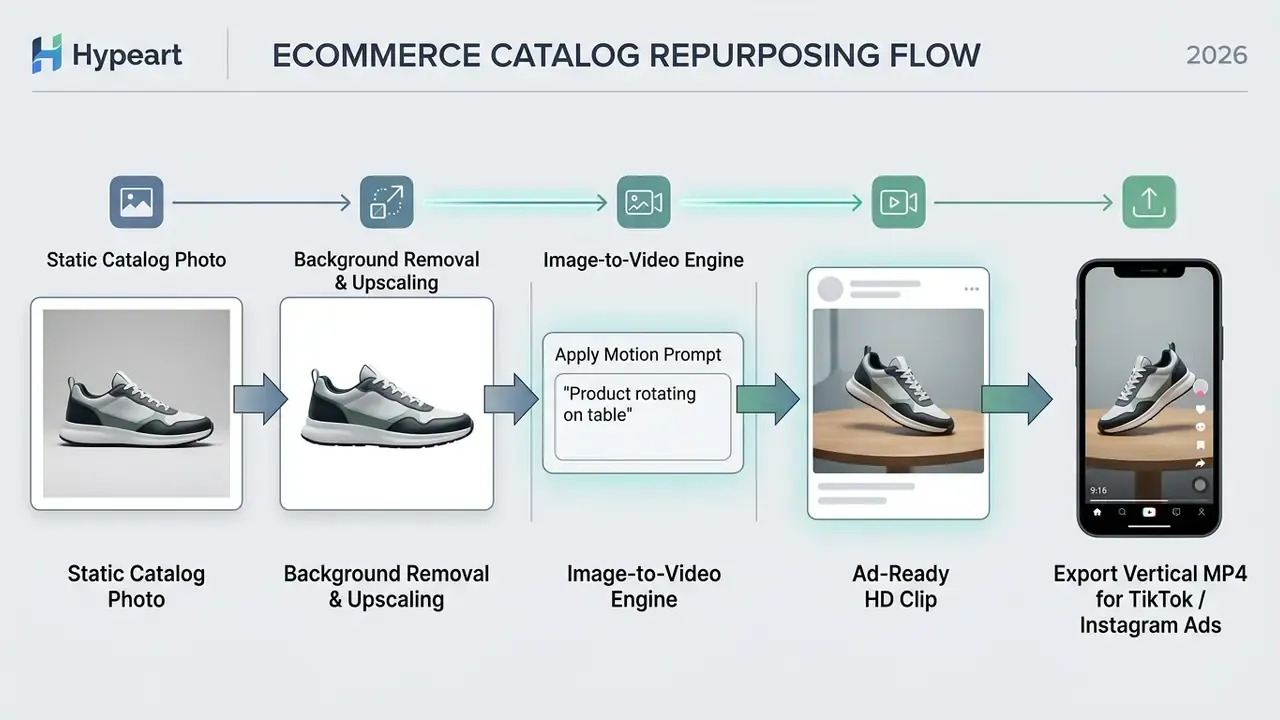
The documented method runs in three stages. First, select clean, well-lit catalog photography and apply background removal, enhancement, and upscaling. Second, generate a vertical short-form clip with a benefit-led prompt, an on-screen hook, and captions. Third, clear rights before any paid distribution. IAB guidance on user-generated content marketing treats UGC reuse as distinct from influencer marketing, and requires consent and rights management before a creator asset or customer submission enters a paid channel.
Marketers can test more hooks in a day than a traditional production team ships in a month. Every variant inherits the same licensing and disclosure obligations as the first, though. That part does not scale for free.
Property Tours, Explainers, and Educational Videos
Real estate agencies and corporate training departments animate static assets into walkthroughs and explainer modules.
- Real estate walkthroughs. Applying camera pan, zoom, crab, bounce, and light-sweep motion vectors to high-resolution room photos, simulating a 3D virtual property tour (Home Design AI, Animate Virtual Room Tours from Images, 2026, https://home-design.ai/animate). Panoramic tour platforms extend the same asset base with information hotspots, video hotspots, floor-plan overlays, and QR-based distribution.
- Corporate training explanations. Converting instructional diagrams and PDF manual graphics into animated sequences for onboarding. Vendor documentation states that PDFs can be turned into sales, marketing, onboarding, internal-update, and lesson videos on a no-credit-card free plan.
- Historical and archival animation. Animating archive photography for documentary and museum displays, where 4:3 framing often matches the source better than modern ratios.
- Course production at scale. Turning curricula and training documents into module videos with AI voiceovers, building a library in hours rather than weeks.
For complex technical platforms, reviewing operational documentation or requesting technical support keeps asset deployment across corporate intranets predictable.
FAQ About AI Image to Video Free Unlimited
Is any AI image to video generator genuinely free and unlimited?
No hosted platform audited as of September 2026 offered a clearly verified permanent unlimited free plan. The closest verified positions are Adobe Firefly, which grants free daily generations that reset each day with commercially safe output when inputs are rights-cleared, and Renderforest, which advertises unlimited HD generation on its own model with commercial use permitted under its terms and a platform watermark applied. Independent 2026 comparisons documented one free plan offering 125 total credits with no monthly refresh. So treat free ai image to video generator unlimited usage as a tier label requiring verification, not a technical description.
Do I need video editing or prompt engineering skills?
Advanced editing skills and elaborate prompt engineering are not strictly required to generate basic clips on an unlimited image to video ai free platform. Modern models interpret natural language instructions, so describing a simple action produces functional motion. Published vendor guidance says plainly that no advanced technical skills are needed if you can write a clear description of what you want to see. Professional, commercial-grade results are a different matter. They call for basic familiarity with cinematic terminology such as framing, camera motion, and lighting. Post-production refinement also stays essential: trimming clip boundaries, adjusting colour grading, and layering audio tracks. Teams can review options in the guide to video editing tools before committing to a workflow.
Can I close the page after starting generation, and where are the files stored?
It depends on whether rendering happens locally or on cloud servers.
- Cloud server processing. Most hosted platforms render asynchronously on cloud GPUs. Once a task is submitted and assigned a job ID, the tab can be closed without interrupting generation. The completed file stays in the account dashboard.
- Browser data privacy. Client-side session state stored in
sessionStorageis partitioned by origin and by tab. It survives reload but is lost when the tab or browser closes. Session cookies clear when the browser session ends, though the browser defines that session, and session-restore features can extend cookie lifetime beyond a simple tab close (W3C client-side storage guidance; MDN HTTP cookies documentation). Server-side asset storage, by contrast, persists according to vendor retention policy. If a vendor tells you to keep the tab open or the task will fail, that signals a client-held request rather than an asynchronous queue. As covered in the browser fact-check above, it is not evidence of local model inference. Anyone working with sensitive corporate media should verify whether the privacy policy permits permanent cloud storage or purges uploads after rendering.
How long can a single AI-generated clip actually be?
Native single-pass clips run 2 to 20 seconds depending on model and tier. Documented ranges include 4 to 20 seconds for Sora 2 Pro at 1080p, 2 to 15 seconds at 30 fps for Alibaba Cloud Model Studio, and 5 seconds on most free tiers. Longer runtimes are assembled, not generated in one pass. Autoregressive frame extension holds coherence toward roughly one minute (arXiv:2410.08151), and agentic scene stitching stretches that to ten minutes across multiple scenes.
How should a bank or regulated institution register these tools in its model inventory?
Treat each approved generator as a third-party model with an inventory record covering vendor, model version, plan tier, business owner, permitted use tier, data classification limit, retention default, training opt-out status, and review date. Under SR 11-7-style expectations, the material risks are misrepresentation (undisclosed synthetic content), rights defect (uncleared source imagery or likeness), and data leakage (confidential uploads to a public tier). Re-attest quarterly, since vendor terms change faster than annual review cycles.
How do we prevent Shadow AI use of "free unlimited" video tools?
Three controls do most of the work. First, publish a short permitted-tools list with an approved default, because staff reach for unapproved tools mainly when no sanctioned option exists. Second, monitor network egress to known generative video endpoints and treat uploads of customer imagery as a data-loss event. Third, run a data-classification gate at the point of use, so any asset marked confidential or containing personal data is blocked from public tiers. That mirrors public-sector policies prohibiting confidential data submission to publicly accessible AI services.
Are watermarks and provenance metadata the same thing?
No. A visible watermark is a monetization and attribution device controlled by the vendor's plan. Provenance metadata, such as C2PA tags or invisible machine-readable marking, is a regulatory artifact required under EU AI Act Article 50 for synthetic media. Removing a visible watermark by upgrading a plan does not satisfy the disclosure obligation. Worse, transcoding or stitching can strip provenance metadata even when the vendor applied it correctly at export. Verify provenance after post-production, not before.
Can free-tier output be used in paid advertising?
Only if the vendor's plan-specific terms say so in writing. Runway states that content created in Runway carries no non-commercial restriction and that users retain ownership. Pika restricts Basic and Standard subscribers from commercial use. Luma limits Free and Lite plans to personal use, with the restriction persisting on generations after upgrade. Where no official primary source confirms commercial rights, as with Kling in the sources reviewed, record the status as unverified and do not publish commercially. To inspect broader domain terminology across generative text, image, and motion tools, visit the central AI Media Glossary.
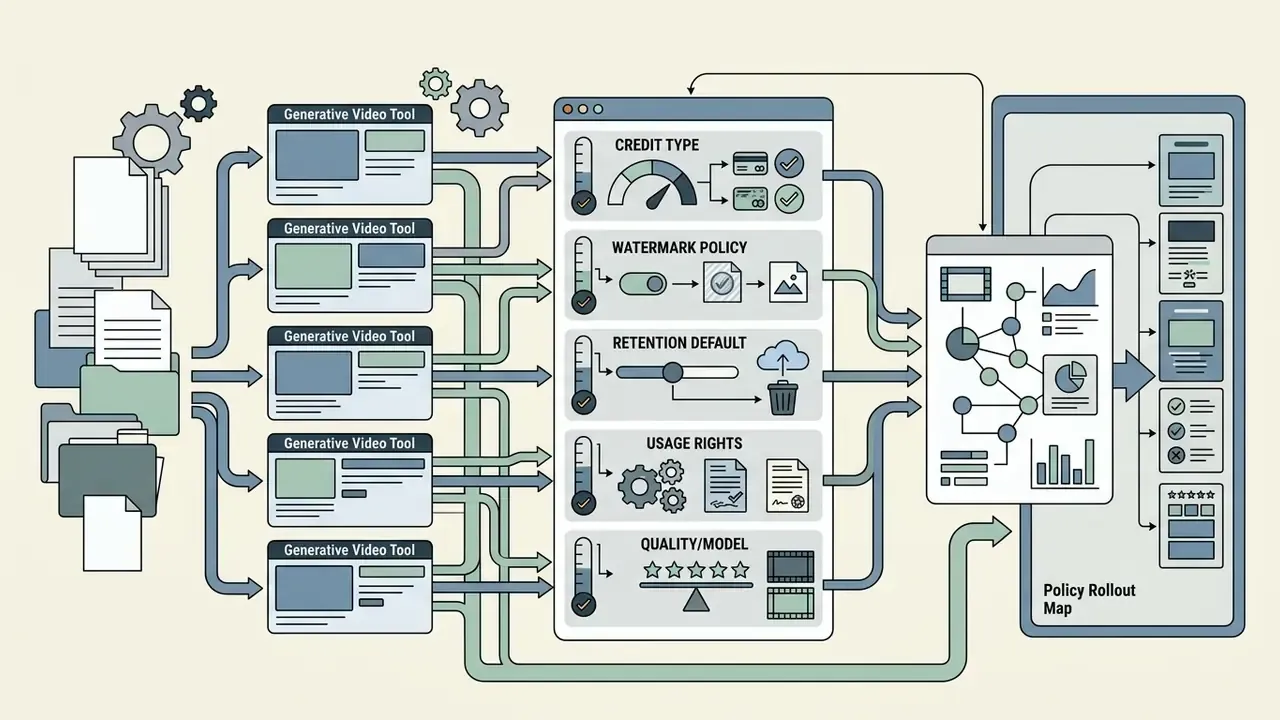
What to Do Next: Generative Media Policy Rollout
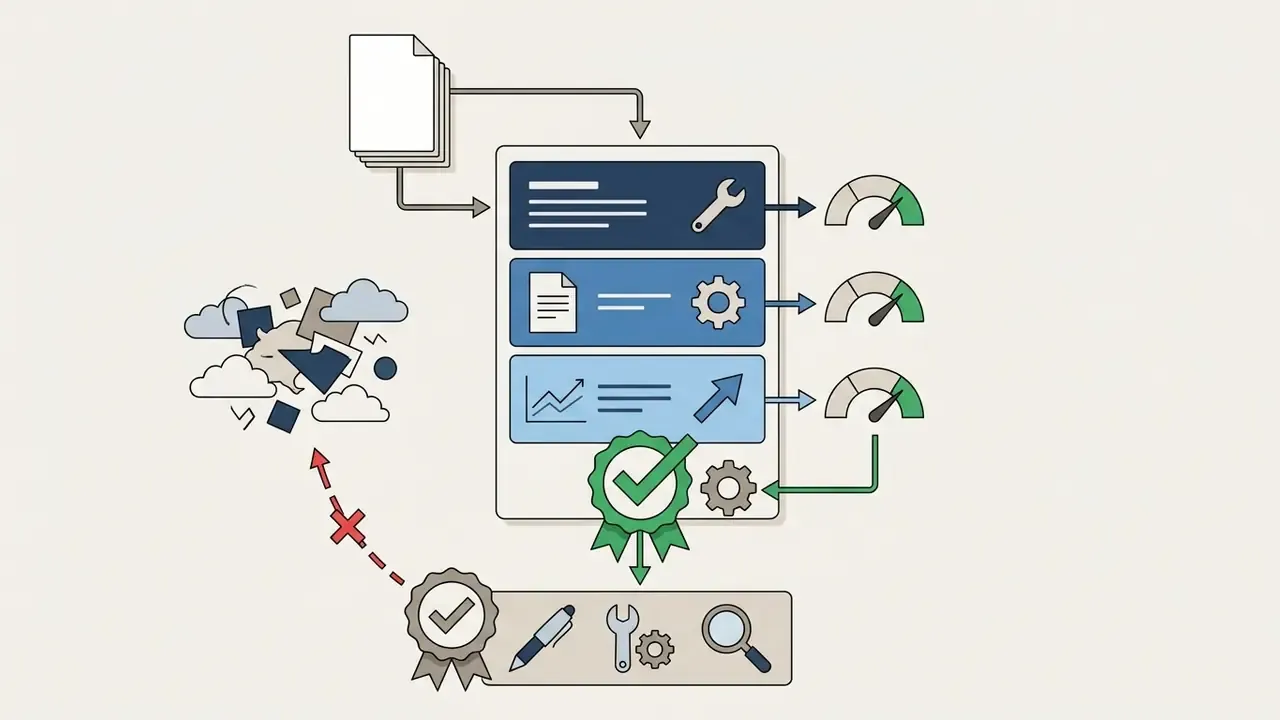
A four-week sequence converts this analysis into an operating control.
Start with the free AI video generator comparison to shortlist candidates, then run each finalist through the pre-flight checklist below before the first production render.
Appendix A: Pre-Flight Checklist and Superseded Source Notes
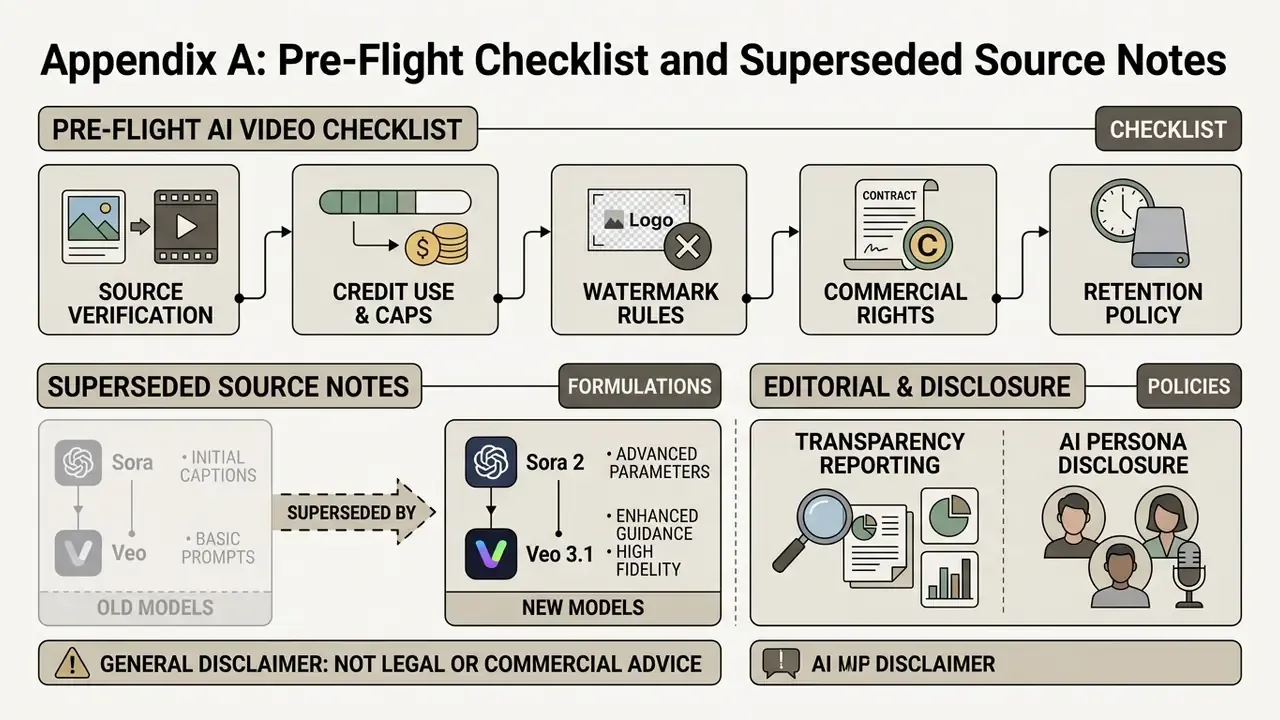
A.1 Pre-Flight AI Video Generation Checklist
Verify these operational parameters before clicking Generate.
Checklist0 / 10
A.2 Superseded Source Formulations (Retained for Transparency)
The citations below appeared in earlier revisions of this analysis and were replaced above with verifiable identifiers. They stay here so readers can trace the correction history rather than meeting silent edits.
| Superseded reference | Replaced with | Reason |
|---|---|---|
| World Bank GenAI Traffic Report, 2025 | World Bank Working Paper, Who on Earth is Using Generative AI? (2025) | Original lacked methodology and figures |
| Image-to-Video Diffusion Survey, 2026 | arXiv:2605.17248 (2026) | Missing identifier and authorship |
| STIV Technical Report, 2024 | arXiv:2412.07730 (2024) | Missing arXiv identifier |
| ConsistI2V, TMLR 2024 | ConsistI2V, arXiv:2402.04324 (TMLR 2024) | Incomplete citation |
| MotionRAG Research, 2025 | MotionRAG, arXiv:2509.26391 (2025) | Missing identifier |
| US Copyright Office AI Guidance, 2024 to 2026 | U.S. Copyright Office, AI and Copyright, Part 2 Report (2024 to 2025) | Document not specified |
| Synthesia Micro-Learning Experiment, IJIRSET 2024 | IJIRSET Vol. 13, Issue 6 (2024), n=83, t(82)=8.31 | Original omitted statistics |
| Runway Camera Control Architecture, 2025 | Runway published camera-term documentation; VideoStudio (ECCV 2024) | No verifiable document existed |
| NVIDIA SANA & I2V Guidelines, 2026; NVIDIA Technical Guidelines, 2026 | NVIDIA 2026 image guidance (1024x1024 optimization, 1280x720 iteration) plus arXiv:2401.12945 | Unverifiable as originally cited |
| OpenAI Sora API Docs, 2026 (no URL) | OpenAI video generation API documentation, 2026, submit-poll-download pattern | Missing URL |
| PaperTok Study, 2026; ACM Short Video Research, 2024 | arXiv:2601.18218 (2026); ACM 10.1145/3613904.3642476 (2024) | Missing identifiers |
| HeyGen Enterprise Case Analysis, 2025 | Vendor product documentation on PDF-to-video repurposing | Case document not verifiable |
| Kapwing AI Terms, 2026; InVideo Pricing, 2026 | Kapwing AI Video Generator documentation and InVideo pricing page, with URLs | Original lacked URLs and dates |
A.3 Editorial and Author Disclosure
Marcus Hale, author. Any framework, example, or observation attributed to Nothing here implies real employment, clients, regulatory authority, endorsement, or documented business results.
Audience assumptions in this article, including which roles approve generative media tooling inside US banks, remain hypotheses until supported by analytics, interviews, CRM data, or verified customer research.
General disclaimer: this article addresses regulated subject matter including copyright, advertising disclosure, data protection, and AI transparency law. It is provided for educational and risk-evaluation purposes and does not constitute legal, financial, or compliance advice. Verify all vendor terms and regulatory obligations against current primary sources and qualified counsel before commercial deployment.