A photo background editor is a digital image processing application built to isolate primary subjects, erase unwanted backdrops, and substitute or generate new environments. In modern digital operations, automated background editing lets organizations streamline visual asset workflows, enforce catalog consistency, and scale content production across commercial channels. The same toolchain serves two very different audiences: enterprise catalog teams processing thousands of SKUs, and individual creators preparing a passport photo, a LinkedIn headshot, or an Instagram Story sticker on a phone.
There is a third reader worth naming. Risk and compliance leaders in US financial services keep meeting this category from an unexpected angle, because marketing teams, HR, and onboarding staff quietly upload employee portraits, customer selfies, and card images into free browser tools. That is a data flow, not a design task. Treated casually, a background changer becomes an unmanaged Shadow AI channel with no retention policy, no audit trail, and no named owner.
This page walks through what a background editor actually does, how AI matting works under the hood, which background colors official documents require, how to export without losing quality, the step-by-step online workflow, AI shadows and mobile or Instagram routes, privacy and PII guardrails, practical use cases, free versus paid licensing, and a closing FAQ.
What a photo background editor can do
A photo background editor isolates foreground subjects, modifies or removes existing backdrops, and creates new visual environments using deep learning matting and segmentation algorithms. Modern systems combine automatic subject detection, solid color replacement, template compositing, and generative backdrop synthesis into a single unified workflow.
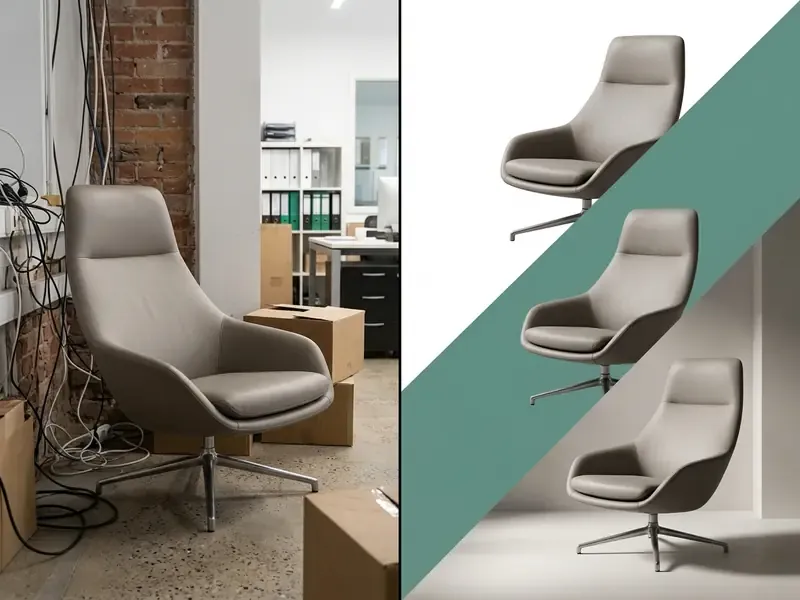
Remove a background or make it transparent
Removing a background converts the original backdrop pixels into an alpha transparency channel (PNG), separating the subject for downstream compositing. Automated background removers evaluate pixel opacity values along subject boundaries to generate a precise cutout without manual mask selection. Empirical benchmark testing on the RefMatte-RW dataset shows that modern matting models reach Mean Squared Error (MSE) scores as low as 0.010 and Sum of Absolute Differences (SAD) around 21.31, which confirms high edge fidelity during automatic background removal.
«The leading method on RefMatte-RW reaches MSE 0.010 and SAD 21.31, while the competing CLIPMat baseline records MSE 0.0474 and SAD 85.83, a fourfold gap in total absolute deviation.»
These quantitative scores confirm that a dedicated photo background editor can isolate complex image backgrounds while preserving foreground structural integrity. In practical terms, a four-times reduction in SAD is the difference between a hairline that renders cleanly against a white marketplace canvas and one that shows a gray halo when the asset is enlarged for zoom view. Small number, visible consequence.
Replace the background with a new image or design
Background replacement composites the isolated foreground onto a solid color, studio template, custom upload, or generated backdrop using alpha blending. Once the initial background is removed, the background and photo editor aligns the subject with new visual layers while maintaining spatial proportions. Editors let operators choose background designs from curated asset libraries or insert custom brand imagery.
This capability allows visual teams to update product photos, refresh corporate marketing assets, and keep visual alignment across diverse distribution channels without re-shooting primary photography. Vendor documentation from Adobe Express, Photoshop Express, and Deep-Image confirms the same three-way choice: built-in library backgrounds, user-uploaded imagery, and prompt-generated scenes, with transparency preserved when the export target is PNG or WebP. One nuance often missed: if the new background carries its own gradient, the subject usually needs a light color match, otherwise the cutout reads as pasted.
AI background changer: how automatic background removal works
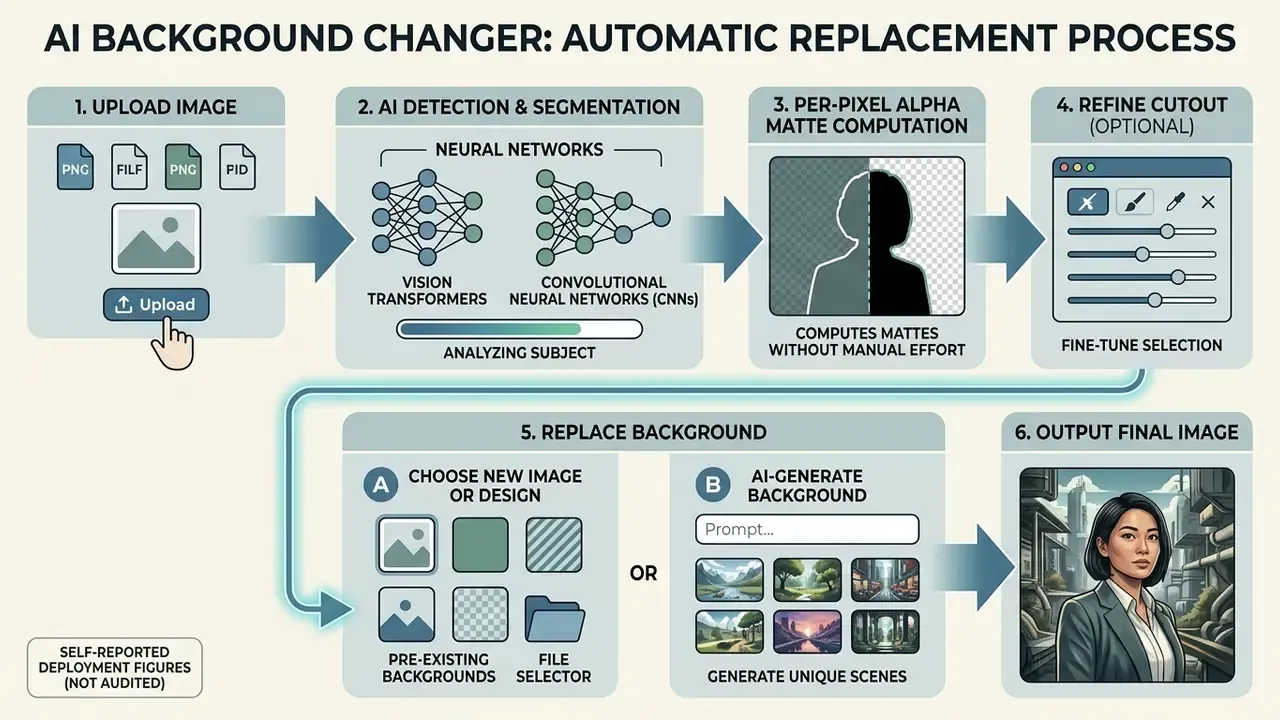
Upload image and let AI detect the subject
Upon image ingestion, the neural network parses pixel arrays, generates bounding boxes, and predicts coarse instance boundaries for the primary subject. The runtime sequence is deterministic: file decode, tensor conversion, model inference, class and box scoring, then post-processing such as non-maximum suppression. Modern semantic matting systems, such as SAMA (Segment and Matte Anything, arXiv:2601.12147, 2026) and SAM2Matting (SAM2Matting: Generalized Image and Video Matting, arXiv:2606.27339, 2026), process input photos through unified segmentation architectures. The same family of models also powers ai that can read images for captioning and moderation, so the perception stack is increasingly shared across tasks.
«SAMA, trained on DIS-5K and ThinObject-5K, delivers substantial MSE and SAD improvements over the interactive baselines MAM, SMat and MatAny on AM-2K and P3M-500.»
«SAM2Matting is trained across eight matting datasets and consistently outperforms prior foundation baselines in zero-shot SAD, MSE, Grad and Conn on P3M-500-NP, AM-2K and PPM-100.» - SAM2Matting: Generalized Image and Video Matting, arXiv:2606.27339 (2026). https://arxiv.org/abs/2606.27339
Because SAM2Matting extends to sequences, the same weights sit close to ai that can analyze videos for frame-level masking, and teams running review pipelines with ai that can watch long recordings often reuse that segmentation layer.
Operators working inside a browser-based photo editor can separate human figures, commercial products, and physical objects from complex backgrounds in a couple of seconds. In high-volume operations, this automated detection stage eliminates the manual tracing steps traditionally required in heavier photo editing software.
Refine the cutout before changing the background
Cutout refinement applies sub-pixel alpha matting to resolve difficult boundary elements such as hair, fur, semi-transparent glass, and fine textiles. Models like ViTMatte (ViTMatte: Boosting Image Matting with Pretrained Plain Vision Transformers, arXiv:2305.15272) evaluate local gradient transitions and connectivity errors to remove edge halos and background color bleed.
«ViTMatte, built on pretrained plain Vision Transformers, reaches state-of-the-art results on Composition-1k and Distinctions-646, clearly surpassing earlier matting methods on SAD and MSE.»
Manual correction still belongs to professional practice when automatic segmentation misreads a boundary. Adobe Photoshop exposes Select and Mask with dedicated edge tools, anti-aliasing, and feathering. Capture One provides a Refine Mask radius control up to 300 px, which separates hard edges from fine detail such as hair. Research on boundary patch refinement and click-guided mask correction (CVPR 2021, CVPR 2023) formalizes the same instinct: repair only the boundary band instead of re-segmenting the whole frame.
Reported deployment figure (self-reported, not independently audited): in a commercial credit card asset migration program, a regional financial institution reported processing 2,500 product images with automated subject matting plus zero-shot validation, cutting per-image handling time from roughly 15 minutes to 4 seconds while holding a 99.2% edge-accuracy threshold on internal sampling. Readers evaluating comparable pipelines should treat that as vendor-side reporting and validate throughput and accuracy on their own sample set. Refinement tools make sure that when you change photo backgrounds, the final output keeps high resolution and structural clarity.
Change background color or add a new background
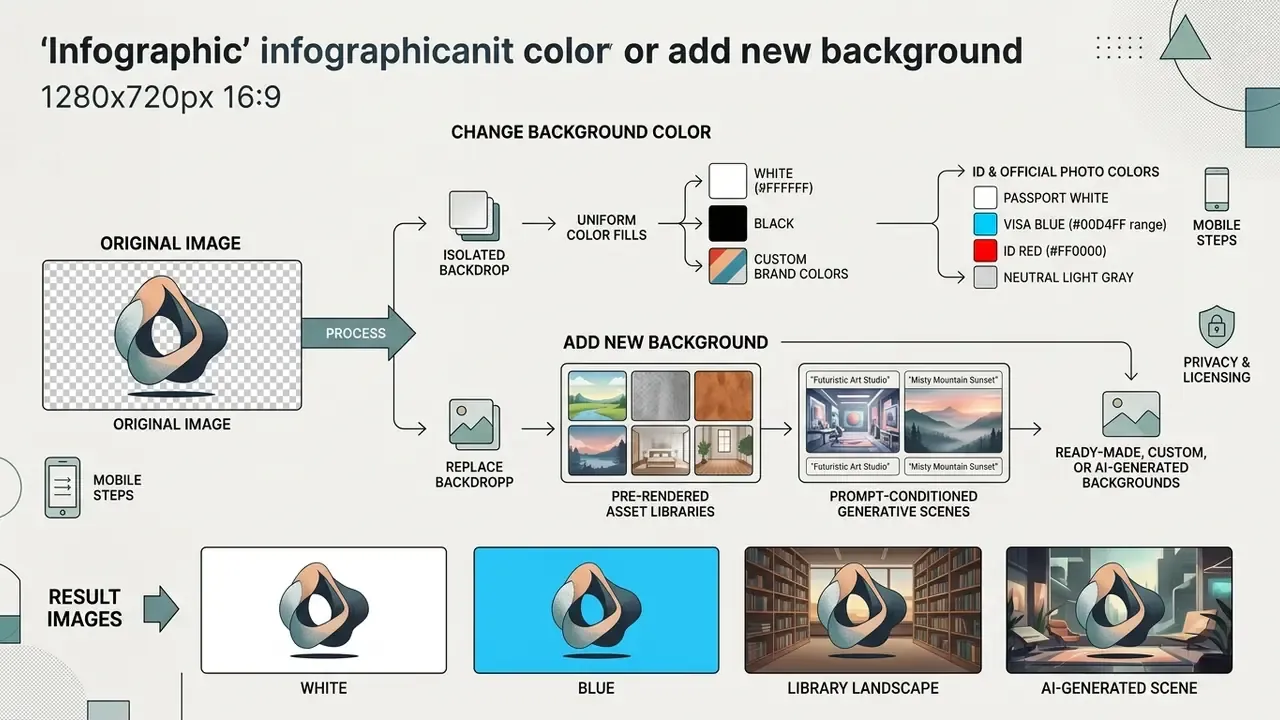
Editors replace isolated backdrops with uniform color fills, pre-rendered asset libraries, or prompt-conditioned generative scenes. The right background treatment depends on compliance requirements, distribution channel standards, and audience engagement goals.
Use white, black, or custom brand colors
Uniform color fills establish standardized contrast ratios and satisfy commercial catalog guidelines such as WCAG 2.2 and major marketplace specifications. Applying a pure white background (#FFFFFF) or pure black background (#000000) delivers maximum visual clarity for product images and digital catalogs. Section 508 accessibility guidance confirms that high-contrast monochrome backdrops keep optimal contrast ratios (up to 21:1) across display devices, and sets minimum ratios of 4.5:1 for normal text and 3:1 for large text placed over a background. WCAG 2.2 also specifies that when no background color is declared, white is assumed. Organizations using a background photo editor can save standardized brand color palettes so that visual consistency holds across every corporate media asset.
Marketplace rules are stricter than accessibility minimums. Amazon requires main images on a pure white background (RGB 255,255,255) with no shadows or borders touching the frame edge, clear focus, a minimum longest side of 500 px, and 1,000 px or larger to enable zoom. GS1 product-image guidance similarly specifies transparent or white backgrounds, with white defined as #FFFFFF for JPG delivery.
Apply official background colors for ID, passport, and visa photos
Official identification documents mandate strict background color standards so that biometric pipelines can measure facial geometry without interference:
- Pure white (#FFFFFF) required for US passport, Schengen visa, and US Diversity Visa submissions. A flat white field removes edge-shadow interference during facial recognition scans.
- Light or mid blue (#00D4FF to #003399 range) standardized across several ASEAN passport specifications, Kuwaiti national IDs, and many corporate access badges.
- Bright red (#FF0000) used for Indonesian passport photography and certain East Asian civil-service examination registrations.
- Neutral light gray the common fallback for résumé photos and internal HR directories, where a pure white field would blend into the page background.
When preparing document visuals, pick a background photo editor that recalculates head-to-canvas ratios (eye line typically positioned between 50% and 69% of vertical frame height), keeps the subject centered, and eliminates halo reflections around hair contours. Always verify the current requirement with the issuing authority before submission, since dimension and color rules differ by country and document type.
Choose ready-made, custom, or AI-generated backgrounds
Users can select curated library patterns, upload bespoke corporate assets, or synthesize new environments with latent diffusion models. Research on multi-stage generative pipelines (An Inpainting-Infused Pipeline for Attire and Background Replacement, Perche-Mahlow et al., arXiv:2402.03501, 2024) shows that depth-conditioned diffusion architectures can generate custom studio backdrops while preserving primary foreground subjects.
«The pipeline combines MiDaS depth estimation, depth-map-derived masks and Latent Consistency Models to generate prompt-driven backgrounds without hand-drawn masks.»
When users choose to generate new background scenes from prompt inputs, the software evaluates lighting vectors and depth maps to composite plausible environments. Some platforms additionally accept an "inspiration image" instead of a text prompt, deriving palette and lighting from an existing reference frame. Prompt quality matters more than most people expect, and teams that draft prompts with an ai text generator tend to get steadier lighting language across a campaign. Teams evaluating software choices can review structured asset management criteria in our AI Media Comparison Matrices, and readers comparing tool categories can start with our overview of AI photo editors.
Image quality, HD downloads, and supported file formats
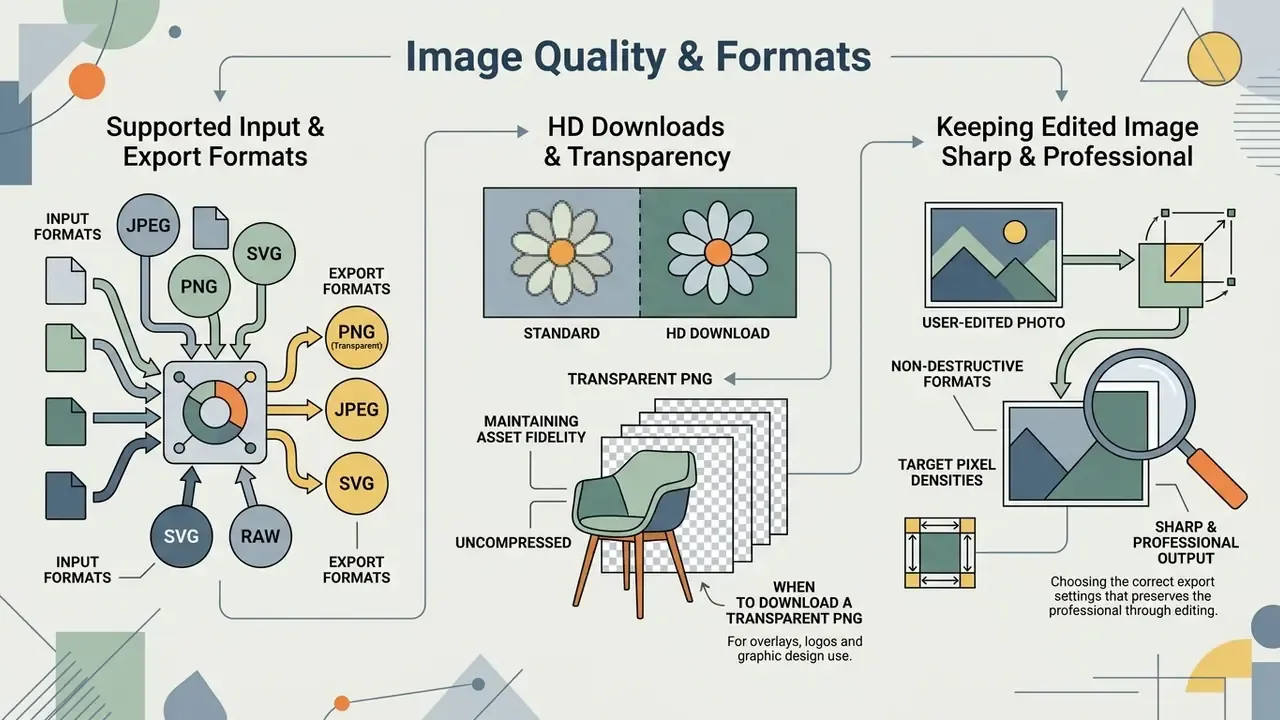
Maintaining asset fidelity means exporting in non-destructive formats such as PNG or uncompressed JPEG at target pixel densities. Choosing the right export format and resolution settings prevents compression artifacts and preserves professional sharpness. Understanding these constraints before running the editing steps prevents rework: the choice between a transparent PNG and a flattened JPEG decides whether the same asset can be reused across a storefront, a print catalog, and a social overlay.
Supported input and export formats
| Image format | Transparency support | Color bit depth | Target use case | Handling in background editors |
|---|---|---|---|---|
| PNG | Yes (8-bit alpha, 0–255) | 24-bit / 32-bit | Web compositing, logos, product cutouts | Non-destructive export; preserves crisp edge matting and per-pixel opacity. |
| JPEG / JPG | No (solid fill only) | 24-bit | E-commerce catalogs, print photography | Flattens transparency; editors auto-apply a default white (#FFFFFF) backdrop on export. |
| WebP | Yes (lossless alpha) | 24-bit | High-speed web publishing | Reduces payload by roughly 30% versus PNG while retaining alpha edges. |
| HEIC / HEIF | No (converted on ingestion) | 10-bit / 12-bit | Native Apple iOS camera captures | Decoded in-browser before matting inference to prevent color-profile shifting. |
| AVIF | Yes (alpha channel) | 10-bit / 12-bit | Next-generation e-commerce media | High compression efficiency for responsive delivery networks. |
| TIFF | Yes (alpha, layered) | 24-bit / 48-bit | Archival and print reproduction | Lossless master; used as the source before deriving PNG or JPEG variants. |
Practical implication for mobile users: iPhone photos captured in HEIC or HEIF are converted during upload, so verify color rendition after export rather than assuming a byte-identical match with the camera roll preview. Scanning and reproduction standards reinforce the resolution baseline: 300 ppi for color and grayscale photographs, and 600 to 1200 ppi for line art or mixed text-and-image content.
When to download a transparent PNG
Exporting a transparent PNG is essential when the asset will be layered over dynamic web design backgrounds, composite graphics, or marketing collateral. The PNG format supports an 8-bit alpha channel, encoding per-pixel opacity from fully transparent (0) to fully opaque (255) according to W3C specifications. This non-destructive transparency prevents boxy background halos when assets are embedded into responsive website templates or multi-layered promotional graphics. W3C documentation also notes that the alpha channel can act as a mask that constructs a non-rectangular visible area, which is exactly what collages, sticker packs, and overlay UI assets require. Preview the cutout against white, black, gray, and the final scene before download. Edge fringing that is invisible on white often becomes obvious on a dark backdrop.
How to keep the edited image sharp and professional
To preserve sharpness, avoid lossy downsampling, keep source resolution above 300 DPI, and select lossless export settings. Downsampling mid-edit introduces pixelation and soft edges along matting boundaries. HD export configurations let high-density displays render clean subject edges without compression noise. Where the editor exposes compression controls, the anti-loss rule set from vendor documentation is consistent: choose lossless (or "none") compression, disable downsampling, and reserve JPEG quality sliders for final web delivery only. Organizations reviewing enterprise infrastructure expenditures can estimate processing overheads with dedicated AI Media Calculators.
How to change the background of a photo online for free
Changing a photo background online means uploading an image, letting AI algorithms extract the subject, selecting a replacement background, and downloading the output file. Readers comparing broader creative toolchains can also review AI image generators that produce backdrops from scratch. Following a structured step-by-step workflow protects cutout accuracy and prevents loss of detail during export.
- Step 1: Upload Image
- Step 2: Automatic AI Background Removal
- Step 3: Select Background (Color, Image, or Transparent PNG
- Step 4: Refine, Add Shadows & Download HD Image
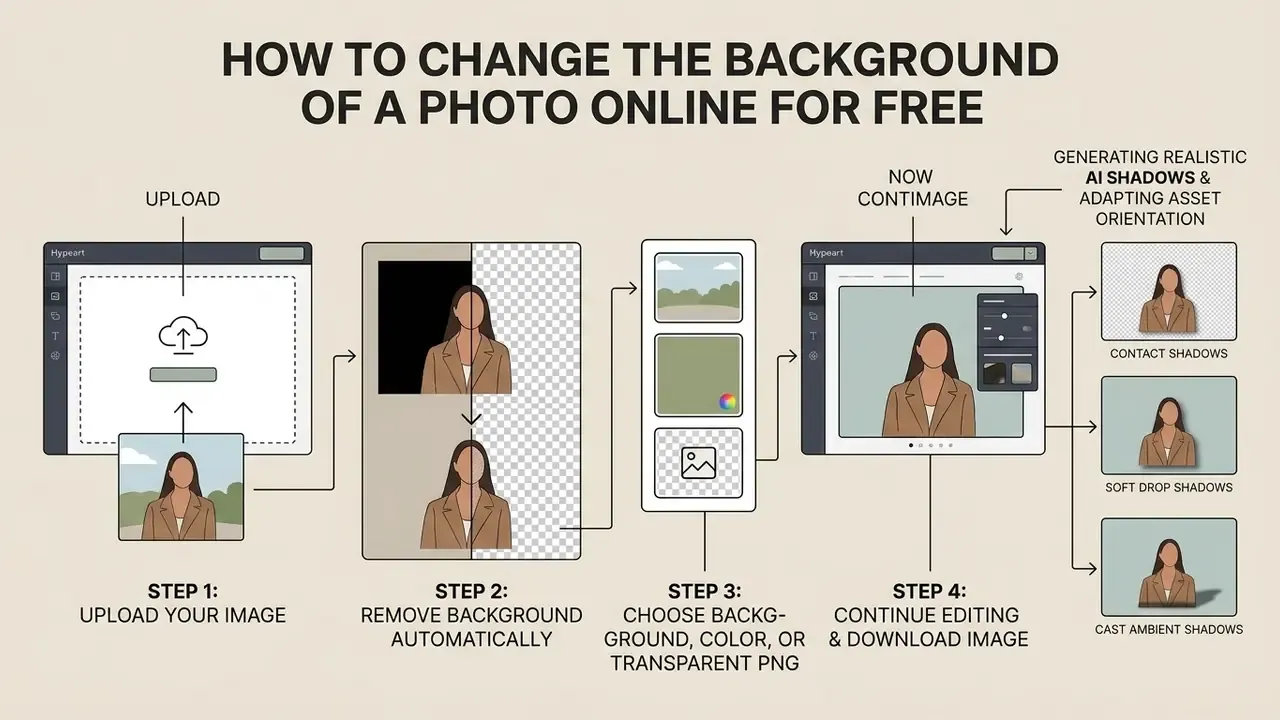
Step 1: Upload your image
Step 1 ingests the source file through browser upload, clipboard paste, URL fetch, or drag-and-drop mechanics into the web editor's memory buffer. High-resolution input files (minimum 300 DPI) with sharp subject focus and clear subject-to-background contrast produce the most accurate automatic detection; readers on constrained plans should review the practical export caps of free photo editors before committing a production batch. For corporate volumes, prefer platforms that accept ZIP archives, cloud storage buckets, or REST API ingestion instead of single-file drag-and-drop. Technical teams building automated ingestion flows can reference endpoint architectures in the AI Media API Guides.
Step 2: Remove the background automatically
Step 3: Choose a background, color, or transparent PNG
Step 3 applies a solid color fill, custom backdrop image, generated scene, or transparent background settings to the canvas. You can pick neutral tones for product photography, set custom brand hues via hex entry, or preserve a transparent PNG alpha channel for later design work. Preview the composite at 100% zoom and against the destination background before committing.
Step 4: Continue editing and download the image
Step 4 applies post-processing adjustments such as shadow casting, text overlays, color harmonization, and canvas resizing before exporting the final high-resolution file. Editors typically expose text insertion with shadow parameters (blur, angle, distance, shadow color), plus brightness, contrast, saturation, and hue controls for matching the subject to the new plate. When copy accompanies the visual, some teams draft the overlay line and the caption with an ai text generator, then edit it by hand. Once edits are complete, operators export the file to local storage or a connected asset library. Teams building automated media workflows can pair the editor with catalog-side automation and standardized output naming, so assets land in the correct channel folder without manual renaming.
Generating realistic AI shadows and adapting asset orientation
Compositing a cutout onto a solid background creates a visually flat "floating" effect. Professional background synthesis needs mathematically plausible shadow structures:
- Contact shadows subtle dark occlusion lines rendered directly beneath the subject's base anchor points, grounding the object onto the plane.
- Soft drop shadows diffused directional shadows projected away from the primary light vector to establish depth and separation from the backdrop.
- Cast ambient shadows environmental lighting gradients calculated by diffusion or relighting models to match the color temperature of the new background scene.
Canvas aspect ratio and orientation adaptation. When distributing product visuals across multiple marketplace standards, operators must adjust canvas orientation, for example converting a 4:5 vertical fashion portrait into a 1:1 square hero asset, or a landscape banner into a 9:16 story frame. Modern AI background editors extend missing background pixels through outpainting algorithms rather than stretching or cropping the primary subject, which preserves product proportions across channels. Compare approaches in our review of AI outpainting tools.
How to change photo backgrounds on iPhone and Instagram Stories
Mobile creators can substitute backgrounds directly in iOS Safari, Android Chrome, or a native app interface without desktop design software:
- Open Instagram Stories and create a backdrop using a photo or a solid fill via the Draw tool (select a color, then tap and hold the canvas to flood-fill), or apply a gradient preset.
- Tap the Photo sticker icon in the Story overlay menu, select your exported transparent PNG, and scale it over the new background canvas.
- Alternatively, paste the PNG straight from the mobile clipboard to overlay product graphics without background clipping artifacts.
- Mobile browser extraction (iOS/Android)upload the image to the web editor in Safari or Chrome. The browser execution engine can run matting inference locally via WebAssembly, or send the file to a server endpoint. Check which model applies before you upload sensitive imagery.
- Transparent PNG sticker exportsave the isolated subject as an 8-bit transparent PNG straight to Apple Photos or Google Files. HEIC captures are converted on ingestion, so confirm color fidelity after export.
- Instagram Story integrationInstagram Story integration:
- Profile pictures across platformsthe same transparent asset can be recolored per platform, a solid brand fill for LinkedIn, a themed backdrop for Discord or YouTube channel art, without re-shooting the portrait.
Data privacy, PII, and security guardrails for online background editors
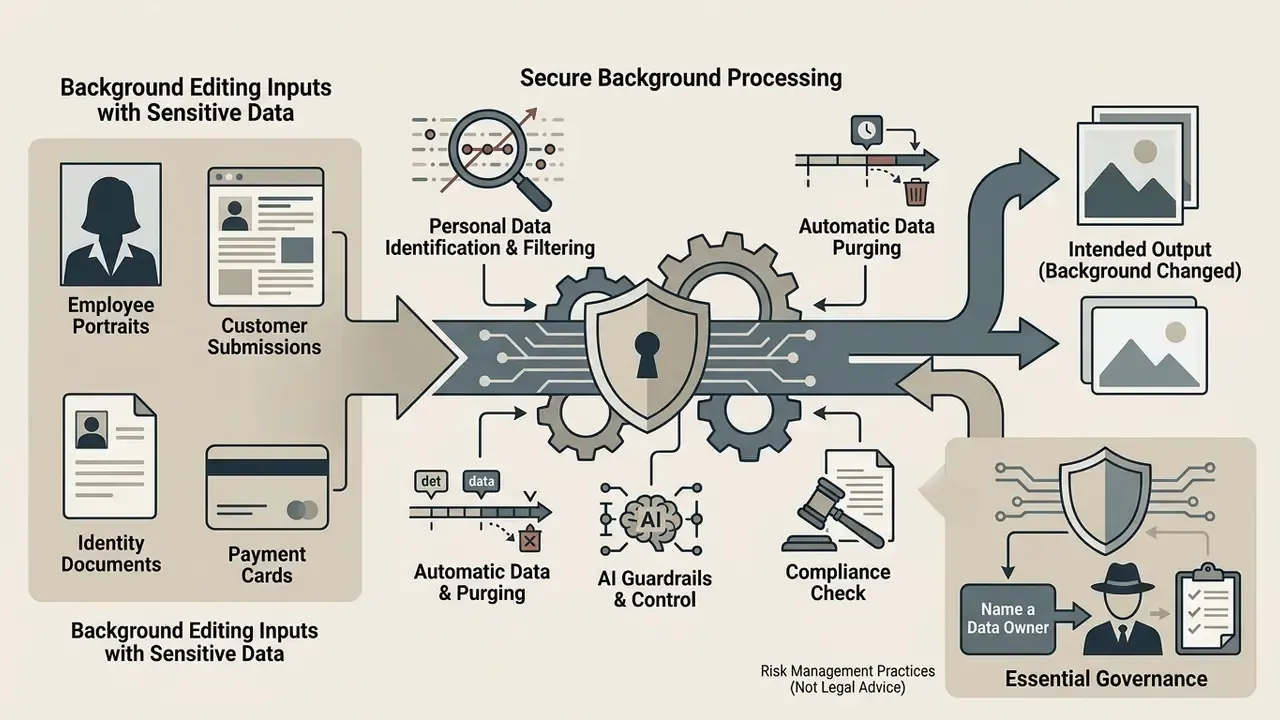
Background editing frequently involves personally identifiable information: employee portraits, customer submissions, identity documents, and photographs of payment cards or contracts. Because most browser editors are third-party SaaS services, uploading such files can constitute an unmanaged Shadow AI transfer. Evaluate the following controls before you approve a tool for organizational use:
| Control area | What to verify | Why it matters |
|---|---|---|
| Data retention | Documented deletion window (ideally zero-retention or ≤24 hours) for uploads and derivatives | Limits exposure window if the vendor is breached |
| Processing locus | On-device processing (WebAssembly or native app) versus cloud inference | On-device processing keeps PII off third-party servers |
| Transport encryption | TLS 1.2+ (TLS 1.3 preferred) for upload and download endpoints | Prevents interception of identity documents in transit |
| Model training reuse | Explicit contractual opt-out from using customer images to train models | Prevents corporate assets from leaking into generative outputs |
| Compliance attestations | SOC 2 Type II, ISO 27001, GDPR/DPA availability, sub-processor list | Required evidence for vendor risk assessment |
| Access governance | SSO/SAML, role-based permissions, audit logs of exports | Enables traceability for regulated review |
| Residency | Region-pinned processing and storage | Supports cross-border transfer requirements |
Practical guardrails. Restrict identity-document and payment-artifact processing to on-premise or contracted enterprise endpoints. Use consumer free tiers only for non-sensitive marketing imagery. Strip EXIF geolocation before external upload. And require an IP indemnification clause when generative backgrounds come from latent diffusion models, because indemnity scope varies sharply between free and enterprise agreements.
One more governance detail that gets skipped: name an owner. A background editor approved for a marketing squad should have a documented role, an access limit, an escalation path, and a shutdown mechanism, exactly like any other digital worker. No evidence, no autonomy.
This section describes general risk-management practice and does not constitute legal advice. Confirm obligations with your own compliance function.
Where to use edited photo backgrounds
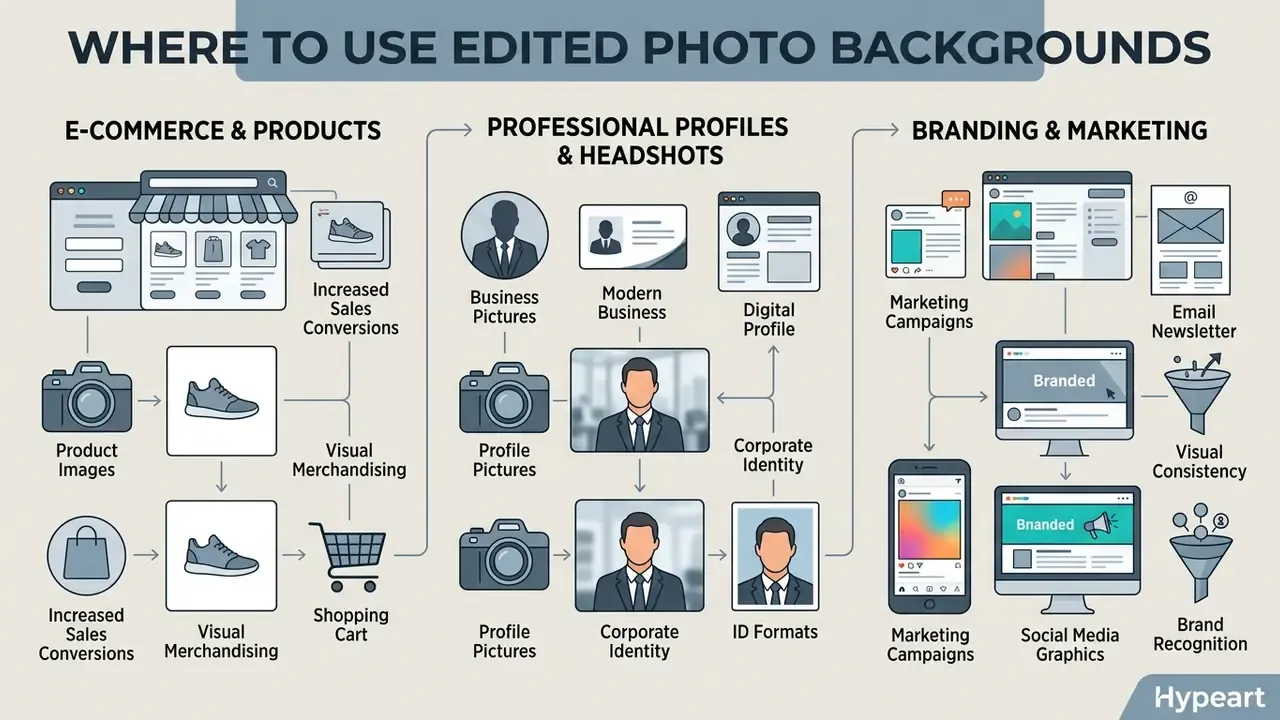
Edited photo backgrounds serve critical functions in e-commerce storefronts, executive corporate headshots, and multi-channel marketing campaigns. Matching backdrop characteristics to the target distribution channel strengthens visual hierarchy and viewer engagement.
Product images and e-commerce visuals
E-commerce listings need uniform backdrops to maintain visual hierarchy, comply with marketplace standards, and support conversion. A 2025 eye-tracking study found that contextual product backgrounds produced higher image appeal (Mean = 4.103) and product perception (Mean = 4.106) than isolated, background-free graphics.
«Contextual backgrounds also improved willingness to pay depending on product category, confirmed through analysis of variance alongside eye-tracking metrics.»
Marketplace main images still require clean white fills, while secondary promotional images benefit from contextually rich backdrops that show product utility. A workable pattern: white (#FFFFFF) for the compliant hero frame, lifestyle or generated scenes for gallery positions 2 to 5, and a branded color plate for paid social variants. Teams building these variants at scale can compare AI image generators for product visuals.
Profile pictures and professional headshots
Professional headshots use neutral or contextual backgrounds to communicate corporate authority across platforms such as LinkedIn and internal directories. LinkedIn guidance recommends a recent, high-resolution head-and-shoulders photograph: square, at least 400×400 px, cropped from the shoulders to just above the head, with the face occupying roughly 40 to 60% of the frame, a neutral background, and direct eye contact.
Reported deployment figure (self-reported, not independently audited): a fintech firm reported standardizing 400 executive headshots during a brand refresh by combining automated portrait matting with lighting harmonization models, compositing varied employee portraits onto a unified corporate backdrop and finishing ahead of its internal schedule without manual retouching. The schedule claim is company-reported and cannot be externally verified. The underlying technique, however, is documented in peer-reviewed work.
«Relightful Harmonization encodes target-background illumination through an environment-map alignment module and outperforms existing harmonization methods in visual fidelity and lighting consistency.»
Teams standardizing portrait libraries can also evaluate purpose-built AI headshot generators alongside manual matting workflows, and should confirm that any synthetic alteration stays inside platform authenticity policies, since non-compliant profile images can be removed.
Is a free photo background editor enough for professional use?
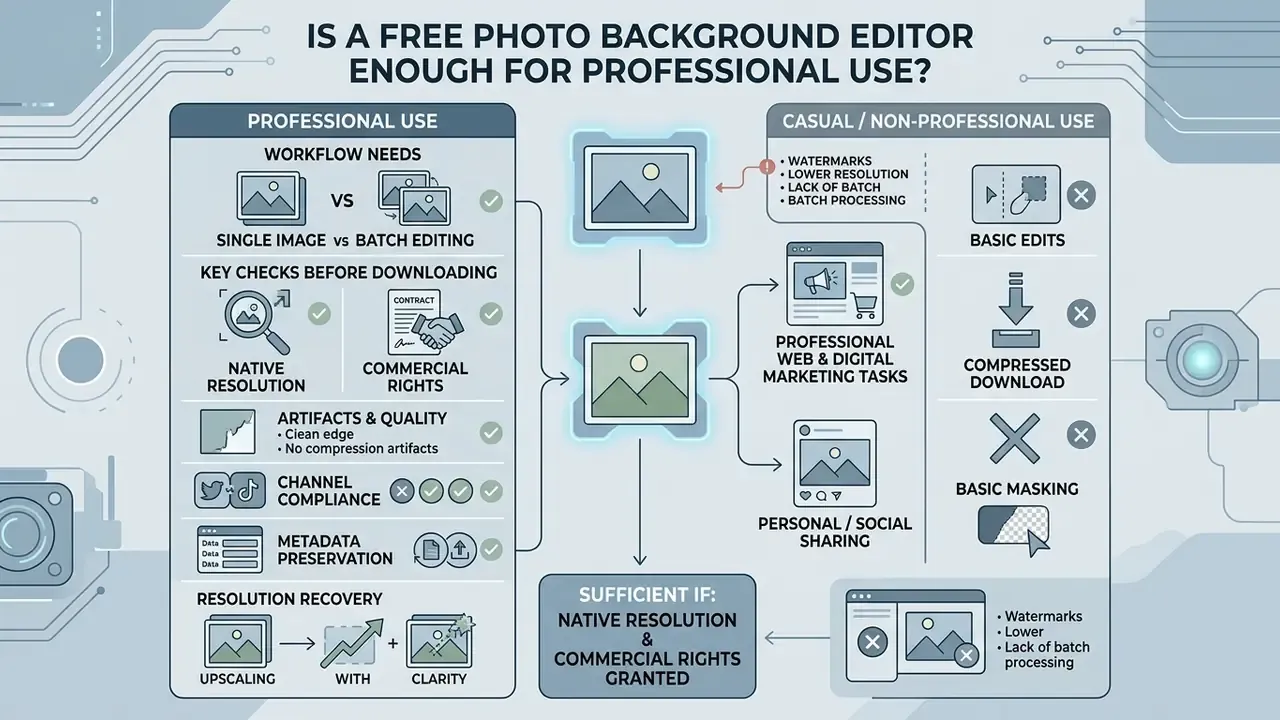
A free photo background editor is sufficient for professional web and digital marketing tasks if it keeps native export resolution and grants commercial usage rights.
«Professional and non-professional users in art and design rated AI image tools as relatively easy to use on a 1–5 scale.»
Adoption friction, in other words, is rarely the blocker. Licensing is. Enterprise workflows regularly hit restrictions on batch export volume, generation credits, full-resolution downloads, or the display channels where outputs may legally appear. Adobe, for instance, limits certain background-removal outputs to digital web display and excludes out-of-home billboards and public digital signage, while Canva's content license permits advertising, packaging, and print promotion without reproduction quantity limits.
| Feature / Scenario | Free Photo Background Editor Tier | Paid / Enterprise Tier | Professional Usage Recommendation |
|---|---|---|---|
| Background Removal Precision | Standard trimap-free AI segmentation | High-precision matting and edge matting models | Verify edge matting around hair and fine details prior to commercial publication. |
| Export Resolution Limits | Capped at web resolution (720p to 1080p) | Full native resolution (4K / 300+ DPI) | Use free tiers for digital ad testing; upgrade to HD for print and catalog production. |
| Watermark Enforcement | May apply watermarks on HD exports | 1080p+ unlimited exports without watermarks | Ensure exports carry no watermarks for professional client work. |
| Commercial License Scope | Often restricted to personal or non-commercial use | Full commercial usage and resale rights | Audit vendor terms of service to avoid licensing compliance risks. |
| AI Background Generation | Limited prompt credits per month | Unlimited or high-volume API and prompt credits | Use pre-rendered templates, or upgrade for custom generative campaign assets. |
| Format Coverage | Usually JPG/PNG, sometimes WebP | Adds HEIC/HEIF, AVIF, TIFF and layered exports | Confirm HEIC handling if source photography comes from iPhones. |
| Data Governance | Cloud processing, opaque retention, possible training reuse | Zero-retention options, DPA, SOC 2 evidence, training opt-out | Mandatory gate for any PII or identity-document workload. |
| IP Indemnification | Typically none | Contractual indemnity for generated assets | Required before generative backgrounds enter paid media. |
Single image vs. batch background editing workflows
| Metric / Parameter | Browser single-asset editor | Enterprise batch processing engine |
|---|---|---|
| Concurrency limit | 1 image per drag-and-drop session (some free tools allow up to 5) | 50 to 5,000 images per batch queue |
| Supported ingestion | Drag-and-drop, URL paste, clipboard | ZIP archives, cloud storage buckets (S3/GCS), REST API |
| Throughput speed | Roughly 3 to 5 seconds per file | Up to about 120 images per minute via asynchronous queue |
| Export naming | Manual rename per download | Automated schema, for example {original_name}_white_bg.png |
| Quality control | Visual spot check per file | Sampled QA plus automated alpha-channel validation |
| Audit trail | None | Job logs, operator identity, export history |
That last row is the one risk teams care about. A free tool with no export history cannot produce reproducible evidence for internal audit, whatever its matting quality. Readers weighing zero-cost options can also compare free AI image generators for backdrop creation alongside the editor's own generative credits.
What to check before downloading images for products and marketing
Before commercial publishing, verify resolution thresholds, licensing terms, and edge artifact boundaries.
«Improvements of even one or two points in SAD and MSE correspond to visually noticeable reductions in edge artifacts and transparency halos.»
Compliance checks prevent copyright disputes and keep brand visual standards intact across published channels. A practical pre-publication checklist:
- Resolution
- 300 ppi for photographic reproduction; 600 to 1200 ppi for line art or mixed text-and-image assets.
- Rights
- written permission for any copyrighted element, plus confirmation that the tier you used permits commercial distribution.
- Artifacts
- inspect boundary bands at 100% zoom against white, black, and the destination background for halos, jagged edges, or color bleed.
- Channel compliance
- pure white (RGB 255,255,255) for marketplace hero frames, with no shadows or borders touching the frame edge.
- Metadata
- strip location EXIF from customer-facing assets; retain color profile documentation for print handoff.
- Resolution recovery
- where a source file falls below the print threshold, evaluate AI image upscalers before re-shooting.
FAQ: common questions about photo background editors
Can I upload photos containing PII to an online background editor?
Only if the vendor documents a retention window, encrypts transport with TLS 1.2 or higher, and contractually excludes your uploads from model training. For identity documents, employee portraits, or payment artifacts, prefer on-device processing or a contracted enterprise endpoint with a signed data processing agreement.
Who owns the rights to an AI-generated background?
Ownership and permitted use are defined by the provider's content license, not by default copyright assumptions. Free tiers frequently limit output to personal or non-commercial use, and indemnification against third-party claims is usually an enterprise-tier feature. Confirm both clauses before the asset enters paid media.
How do I change a photo background to white for a marketplace listing?
Upload the image, let the matting model isolate the product, apply a pure white fill (#FFFFFF), verify that no shadow or border touches the frame edge, then export at a longest side of at least 1,000 px so zoom activates.
Which background color should I use for a passport or visa photo?
Pure white for US passport and Schengen visa applications, light or mid blue for several ASEAN and Gulf documents, red for Indonesian passports and some East Asian examination registrations. Always confirm the current specification with the issuing authority.
Can I edit HEIC photos from my iPhone?
Yes, if the editor supports HEIC or HEIF ingestion. The file is decoded in-browser or server-side before matting inference. Check color rendition after export, because profile conversion can shift tones slightly compared with the camera-roll preview.
How do I make the subject look natural on the new background?
Add a contact shadow at the base anchor points, then a soft directional drop shadow aligned with the new plate's light vector, and match color temperature between subject and backdrop. Skipping shadow work is the most common cause of a "floating cutout" look.
Is batch background replacement available on free plans?
Rarely at scale. Free tools typically cap uploads at one to five files per session, while batch queues, API ingestion, and automated file naming sit behind paid or enterprise plans.
Does removing a background require disclosure as an AI edit?
Research on authenticity perception suggests audiences treat simple retouching, background cleanup included, as less consequential than generative changes that add or remove objects or alter a face. Apply your own platform and advertising disclosure policies for that second category.
Limitations, open questions, and a safe next step
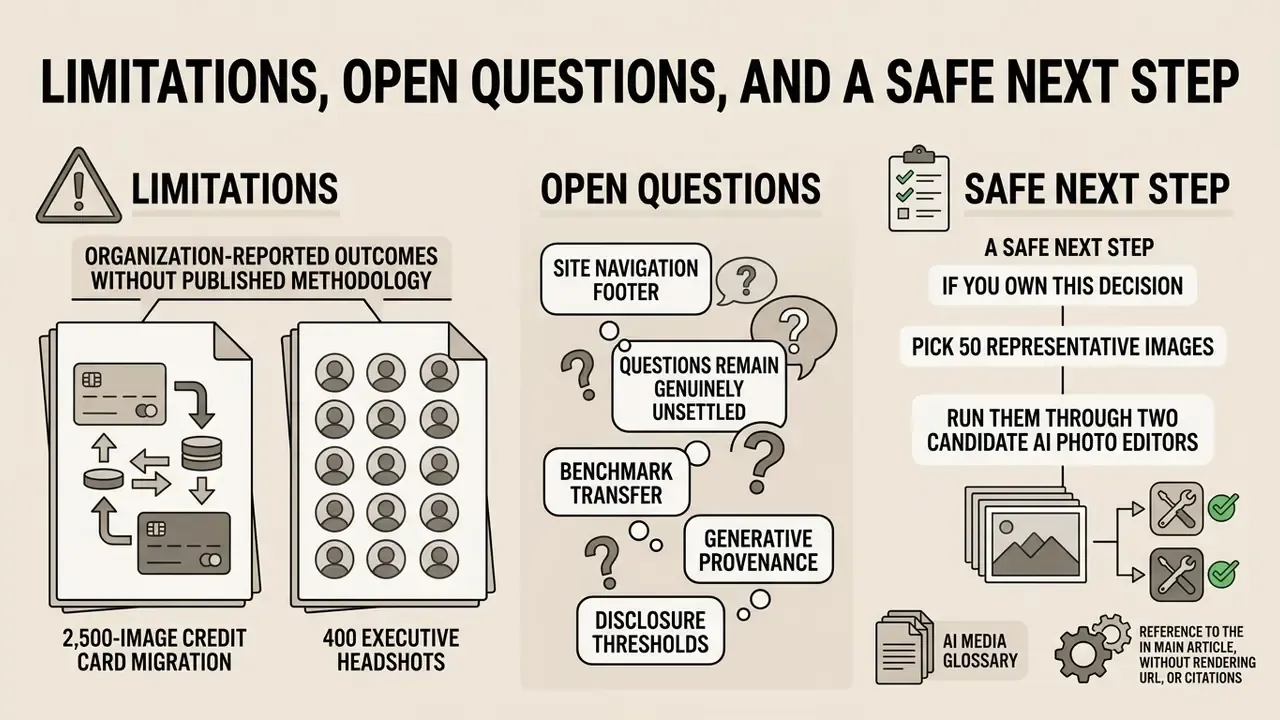
Two claims in this article, the 2,500-image credit card migration and the 400 executive headshots, are organization-reported outcomes without published methodology. They are labeled as such in the body text, and the technical mechanisms behind them, sub-pixel alpha matting and lighting-aware harmonization, are documented in the peer-reviewed sources cited above. Treat the numbers as directional, not as benchmarks.
Several questions remain genuinely unsettled:
- Benchmark transfer. Published SAD and MSE gains come from curated datasets. Whether they hold on your own photography, with its lighting and lens mix, is an empirical question, not a given.
- Generative provenance. Prompt-generated backdrops rarely arrive with clear training-data lineage, so indemnity language matters more than visual quality.
- Disclosure thresholds. No stable industry line separates "cleanup" from "synthetic scene" yet. Platform policies keep moving.
A safe next step, if you own this decision: pick 50 representative images, run them through two candidate editors, and score edge quality against white and against a dark plate. Then read the license and the retention clause before anyone opens a batch queue. Small pilot, documented evidence, named owner. That order.