Reviewed by: Media Governance and Endpoint Risk desk · Last updated: February 2026 · Verification scope: Pinterest Help Center Pin specs, Pinterest Terms of Service (effective 13 March 2024), Pinterest Copyright/DMCA policy, WHATWG URL Standard, ISO/IEC 14496-14, and third-party browser-extension security audits.
The Short Version, in Six Lines
- What it is a browser-based utility that resolves a public Pinterest pin URL, parses its metadata, and returns the raw MP4, JPG, GIF, or an isolated MP3 audio track for direct download.
- How long it takes three steps (copy link, paste URL, save file). In our controlled test, parsing and file delivery finished in 4.2 seconds.
- Real quality ceiling Pinterest encodes video at up to 1080x1920 (9:16) using H.264/H.265. Native 4K is not a Pinterest format. "4K downloader" claims describe rare source uploads or external upscaling, never magic recovery of lost pixels.
- What you can save video pins, former Idea Pins, vertical clips, carousels, multi-slide story archives, full-resolution photos, long "Giraffe" infographics, and animated GIFs.
- Safety rule use tools that never request your Pinterest password, never install
.exeor.apkbinaries, and never require broad browser host permissions. Extensions are the documented risk surface, not URL parsers. - Legal rule download for private reference, archival research, or education. Re-upload, monetisation, and derivative distribution require rights clearance.
What Is a Pinterest Video Downloader Online?
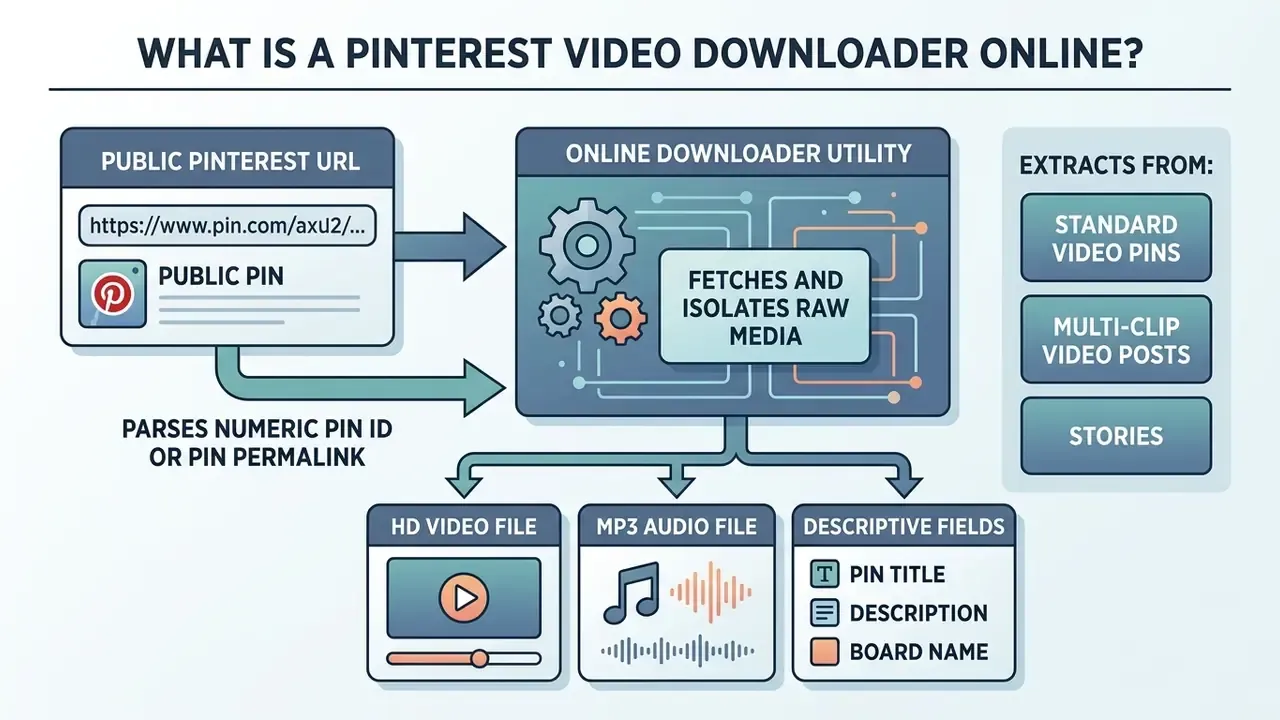
A Pinterest video downloader online is a browser-accessible utility built to fetch and isolate raw media files directly from public Pinterest URLs. Rather than asking for registration or third-party software, the tool parses page metadata, extracts direct CDN links (i.pinimg.com), and delivers a downloadable MP4 video, GIF, or image file to the client browser.
Why does the category exist at all? Because Pinterest itself does not expose a universal download control. Pinterest's own documentation limits the native Download button to full-screen 9:16 video Pins where the creator has explicitly enabled downloads, and even then the saved file carries a username watermark burned into the bottom of the frame.
«If the creator turns on the download option, full-screen video Pins can be downloaded, and a watermark with the username appears at the bottom.»
On desktop, Pinterest's help documentation describes downloading images through the ellipsis menu, but offers no equivalent native path for video files. That documentation gap is the practical reason web-based extraction tools exist.
How an Online Pinterest Downloader Works
An online Pinterest downloader processes a pin's web address by resolving its unique numeric pin ID or shortened redirect link (pin.it) to locate the underlying media assets. Once the server or client-side script parses the target page's JSON-LD metadata or HTML structure, it identifies the direct video manifest or raw file path hosted on Pinterest servers. The utility then presents a clean download button, so you can save Pinterest media without touching the embedded player or its interface scripts.
Pin permalinks follow a predictable structure, https://www.pinterest.com/pin/{pin_id}/, which is why a bare numeric pin ID, a full permalink, and a pin.it short link all resolve to the same hydration target. Media itself is delivered from Pinterest's image and video CDN at i.pinimg.com, commonly through size-scoped paths such as /736x/ for feed previews and /originals/ for the uncompressed source asset. A well-built extractor always targets the originals rendition rather than the downscaled thumbnail the feed shows you.
Alongside media URLs, hydration usually surfaces descriptive fields: pin title, description, board name, pinner profile, save and repin counts, outbound destination link, media dimensions, and media type. Those fields let a tool branch correctly between "this is a static image", "this is an MP4 stream", and "this is a multi-slide carousel".
Which Pinterest Links Can Be Downloaded
«Once a Pin is deleted, it cannot be recovered.»
Deleted boards, by contrast, stay retrievable from the Recently deleted section for seven days, after which every pin the board contained also disappears permanently. Content taken down by Pinterest moderators is likewise unavailable through the standard interface; Pinterest directs affected accounts to check email for the stated removal reason. Public visibility is further gated by profile-level privacy: a profile set to private hides its boards and pins from unauthenticated access entirely. That is why a Pinterest link that worked yesterday can quietly fail today.
How to Download Pinterest Video Online
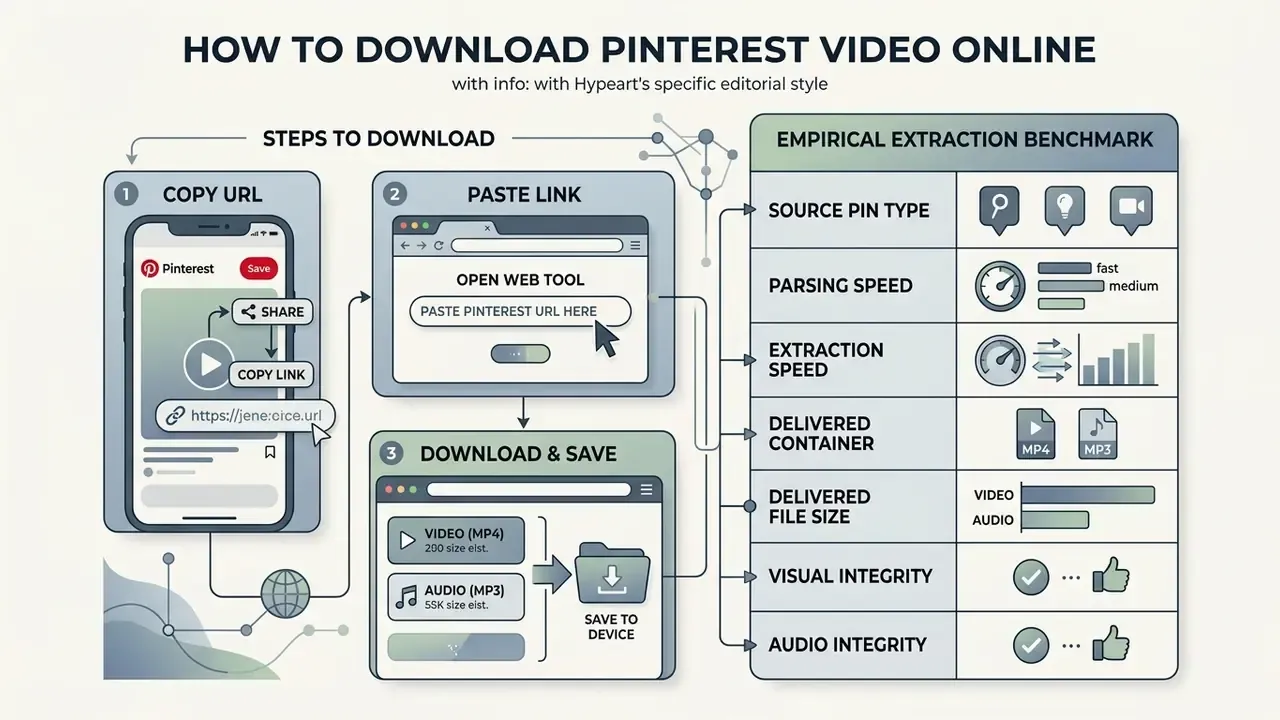
To download Pinterest video online, copy the pin's URL from the app or browser, paste it into the downloader's input field, and click the download button to save the MP4 file to local storage. Three steps. That simple sequence works the same way on desktop and mobile web browsers, and it sidesteps native playback restrictions without any app install.
Copy the Pinterest Video Link
To copy a Pinterest video link, open the pin you want in the Pinterest mobile app or a desktop browser, click the Share icon or the three-dot menu (...), and select Copy Link. On desktop, copying the full URL straight from the address bar (for example https://www.pinterest.com/pin/123456789/) yields the identical permalink that web extraction needs. Pinterest's Interact with Pins documentation describes the same behaviour: "Click the link icon on the right side of the Pin to copy a link to your clipboard for sharing."
One frequent failure point deserves emphasis. Copy the link to the individual pin, not to a board, a profile, or a search results page. A board URL contains no single media manifest, so the parser has nothing deterministic to resolve.
Paste the Link into the Downloader Tool
«The value must be either an empty string or a properly formatted URL; the browser marks valid and invalid states before form submission.»
<input type="url"> (2026). https://developer.mozilla.org/en-US/docs/Web/HTML/Reference/Elements/input/url«A valid URL string is one that does not trigger a validation error or failure when parsed.» Source: WHATWG URL Standard (2026). https://url.spec.whatwg.org/
W3C's URL working draft adds that a string is evaluated after leading and trailing whitespace are stripped, which is exactly why an accidental space copied from a mobile share sheet does not break a well-implemented input field. Tools that skip that normalisation step are the ones throwing "invalid link" errors on perfectly good pins.
Select the File and Save the Download
Once the tool finishes processing the link, review the available file options, typically 720p HD, 1080p Full HD, audio-only MP3, or a static image preview, then click the matching Download button. Your browser either prompts you to pick a folder or drops the MP4 file into the device's default Downloads directory.
Quality selection follows the same product logic used by major streaming platforms. YouTube exposes Auto versus Advanced manual resolution selection, Netflix offers Standard or Higher download tiers, and video infrastructure providers such as Mux constrain deliverable playback through min_resolution and max_resolution parameters spanning 270p to 2160p. In every case the selector limits what is served; it never creates detail the source file never contained. If you plan to shrink a large HD archive afterwards, a dedicated video compressor is the right instrument, not a second download at a lower tier.
Pinterest Video Quality, Resolution and File Formats
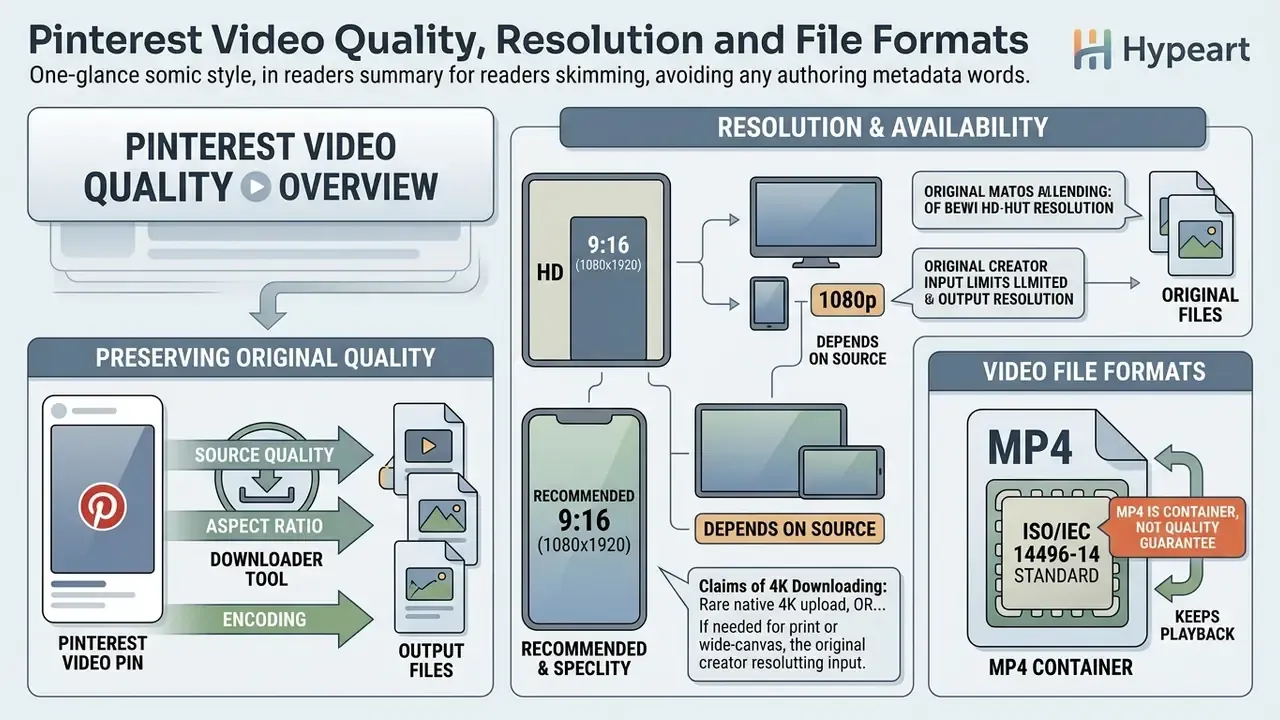
Online Pinterest downloaders preserve the original quality, aspect ratio, and encoding of the source video as the creator uploaded it. Because Pinterest processes uploads with standardised H.264 or H.265 codecs, downloadable files usually arrive in a standard MP4 container ranging from 720p HD up to 1080p Full HD resolution.
HD, 1080p and 4K Download Availability
The maximum resolution of any downloaded video depends entirely on the original source file on Pinterest. Standard vertical video pins support full-bleed 9:16 ratios at 1080x1920, and that is the platform's native quality ceiling.
«Video encoding: H.264 or H.265. Full-bleed video ratio 9:16 or 1080x1920. Video length 4 seconds to 5 minutes.»
«Pinterest video pins support resolutions up to 1080p; recommended dimensions are 1080x1920 for 9:16 format, with a 2 GB maximum file size.» Source: PostEverywhere Pinterest Format Guide (2026)
Claims of "4K Pinterest video downloading" therefore point to one of two things: a rare native 4K upload, or external upscaling applied after the fact. No downloader can generate authentic 4K pixel detail if the underlying source video on Pinterest's CDN was compressed to 1080p or 720p. Competing pages that advertise guaranteed 4K, 2K, and even "144p to 4K" selectors are describing a UI menu, not a property of the stored asset.
If you genuinely need a larger deliverable, for print, projection, or wide-canvas composition, post-processing handles it. An AI image expander reconstructs additional area or detail independently of the download step, and a good ai video enhancer online free tier can clean up noise in compressed social clips. Both belong in your notes as separate creative operations, not as "downloading in 4K".
Video File Formats and Original Quality
Pinterest stores public video media in the ISO/IEC 14496-14 standard MP4 container, which keeps playback smooth across iOS, Android, Windows, and macOS. ISO/IEC 14496-12 defines the underlying ISO Base Media File Format, the structure that carries timing, layout, and media information for timed audiovisual content, while ISO/IEC 14496-15 specifies how AVC (H.264) and HEVC (H.265) NAL-unit streams map into that container.
The nuance that trips people up: MP4 is a container, not a quality guarantee. When a downloader site retrieves media without re-encoding, it keeps the file's original bit rate, chroma subsampling, and colour profile. Re-encoding, or forcing a container conversion during extraction, introduces compression artefacts and dulls perceptual clarity. Original quality survives only in a workflow that copies the source bitstream instead of transcoding it, and that single distinction separates genuine extraction from lossy conversion dressed up as a feature.
| Media Category | Standard Resolution | Native File Formats | Downloader Availability and Technical Conditions |
|---|---|---|---|
| Standard Image Pin | 1000x1500 px (2:3 aspect) | PNG, JPG, WebP | Direct CDN retrieval at original source upload resolution. |
| HD Video Pin | 1000x1500 px (2:3 portrait) | MP4, MOV (H.264) | Retains original stream quality up to the standard 2 GB upload ceiling. |
| Full HD Vertical Video | 1080x1920 px (9:16 vertical) | MP4, M4V | Max native vertical resolution supported by Pinterest servers. |
| Animated GIF Pin | Variable (often looped MP4) | GIF, MP4 | Downloaded as native GIF or as a converted MP4 playback loop. |
| Long "Giraffe" Image | Up to 1000x2100 px (1:2.1) | JPG, WebP | Full-length uncropped image download before feed cropping. |
| Carousel / Multi-Slide Pin | Up to 1080x1920 px per slide | JPG, PNG, MP4 | Parses individual image or video items, or exports all assets as a ZIP archive. |
| Legacy Story Pin Archive | Variable (multi-page sequence) | Consolidated MP4 / JPG | Sequential clips stitched into one playable MP4 file. |
| Audio Track (extracted) | n/a, 44.1 / 48 kHz | MP3, M4A (AAC) | Audio bitstream isolated from the MP4 manifest without re-encoding. |
Extracting Audio: Pinterest to MP3 Conversion
Standard extractions retrieve the full MP4 stream, but specialised online tools can strip the visual layer and isolate the raw audio track into a standalone MP3 container. Creators use this for archiving public voiceover guides, royalty-free sound clips, ambient loops, and background audio references studied for pacing and rhythm.
When an extraction engine parses a pin's manifest, it separates the Advanced Audio Coding (AAC) or MP3 bitstream without re-encoding wherever the source codec allows a direct copy, preserving the original sampling rate, typically 44.1 kHz or 48 kHz, for crisp standalone playback. Where a true transcode is unavoidable, a high-bitrate target of 192-320 kbps keeps perceptual loss small.
Three practical caveats apply. First, silent pins produce empty audio containers; a decorative animation with no soundtrack has nothing to extract. Second, an isolated soundtrack is still protected creative work, so the copyright rules that govern the video govern its audio too. Third, extracted speech is a reference asset, not a licence to republish. If your project needs distributable narration, generating it with an AI voice generator resolves both the licensing question and the quality ceiling of compressed social audio.
What Pinterest Content Can You Download?
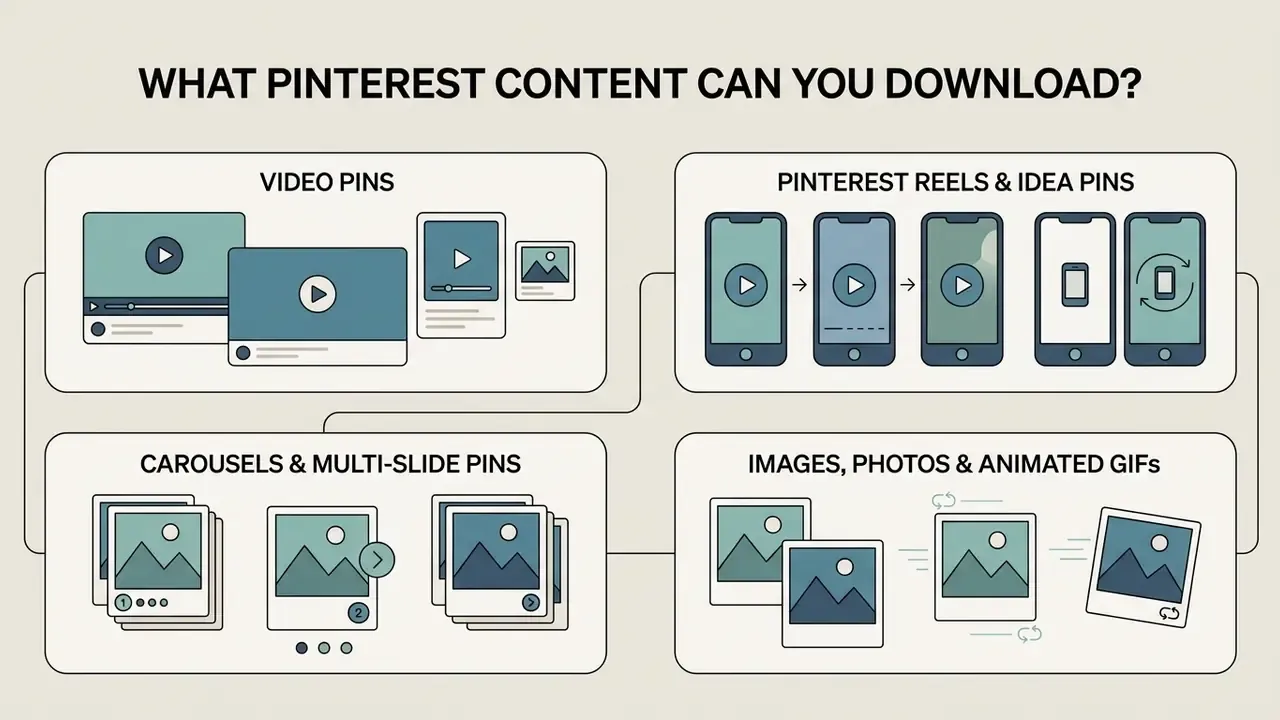
A full-featured Pinterest media downloader covers multiple content formats hosted across the platform: video pins, animated GIFs, static photography, carousels, and legacy multi-page pins. Knowing how Pinterest processes each asset type tells you which tool actually fits your media requirement.
Video Pins, Pinterest Reels and Idea Pins
Standard video pins and vertical video clips, often called Pinterest Reels informally, are ordinary video assets on public servers. In 2023, Pinterest consolidated multi-page "Idea Pins" into the unified Pin architecture.
«Idea Pins are now Pins. Links, scheduling, post-publish editing and multiple aspect ratios apply to both video and image content.»
«Legacy Idea Pins are being converted to Video Pins; organic Idea Pin creation has been deprecated, remaining only as paid Idea Ads.» Source: PostEverywhere Pinterest Format Guide (2026)
As a result, older multi-clip Idea Pins render as integrated video sequences, so online tools can parse and fetch one consolidated MP4 stream instead of juggling separate page objects. That architectural merge also explains why Pinterest's help centre documents "images and videos" and never lists Idea Pins or Reels as distinct downloadable categories. Technically, they no longer are.
Carousels and Multi-Slide Pins
Carousel pins bundle several independent assets under one permalink, with each slide capped at the same 1080x1920 ceiling as standalone vertical video. Extraction engines handle them in one of two ways: enumerate every slide as an individually downloadable item, or bundle the full set into a single ZIP archive. The second approach preserves slide order, which matters when the carousel encodes a sequence: a recipe, a workout circuit, a build order.
Pinterest Images and Photos
Beyond video, online downloaders pull full-resolution static photographs, digital artwork, and design infographics. Browsers allow basic right-click image saving, sure, but a web downloader guarantees the uncompressed source photo from i.pinimg.com/originals/ rather than the downscaled preview the feed displays. Pinterest's own mobile and desktop help pages confirm a native path as well: open the pin, tap the ellipsis, choose Download image, with files landing in the device Gallery or Photos on mobile. Creative teams retouching those saved assets often pair extraction with an online photo editor to normalise colour and crop before files enter a shared library.
Animated GIFs from Pinterest
Pinterest hosts animated GIFs both as native .gif files and as compressed video loops, which keeps mobile performance acceptable and bandwidth lower. Advanced Pinterest downloaders let you choose between saving the media as a looping MP4 or as an animated GIF that keeps frame timing metadata readable in legacy image viewers.
One frequently mis-stated point needs correcting here. Competing pages promise "preserved original frame rate" for GIF exports, but the GIF format has no frame-rate field at all:
«GIF stores delay times between frames, in centiseconds, with whole-integer delays only.»
Because delays are integers measured in hundredths of a second, arbitrary frame rates cannot be represented exactly; a 30 fps source will not map cleanly to GIF timing. Saving the looped MP4 is the higher-fidelity option whenever the playback environment permits it. For projects that need genuinely smooth motion instead of a retro loop, building the sequence in an animation maker avoids the format's structural limits altogether.
Download Pinterest Videos on Mobile and Desktop
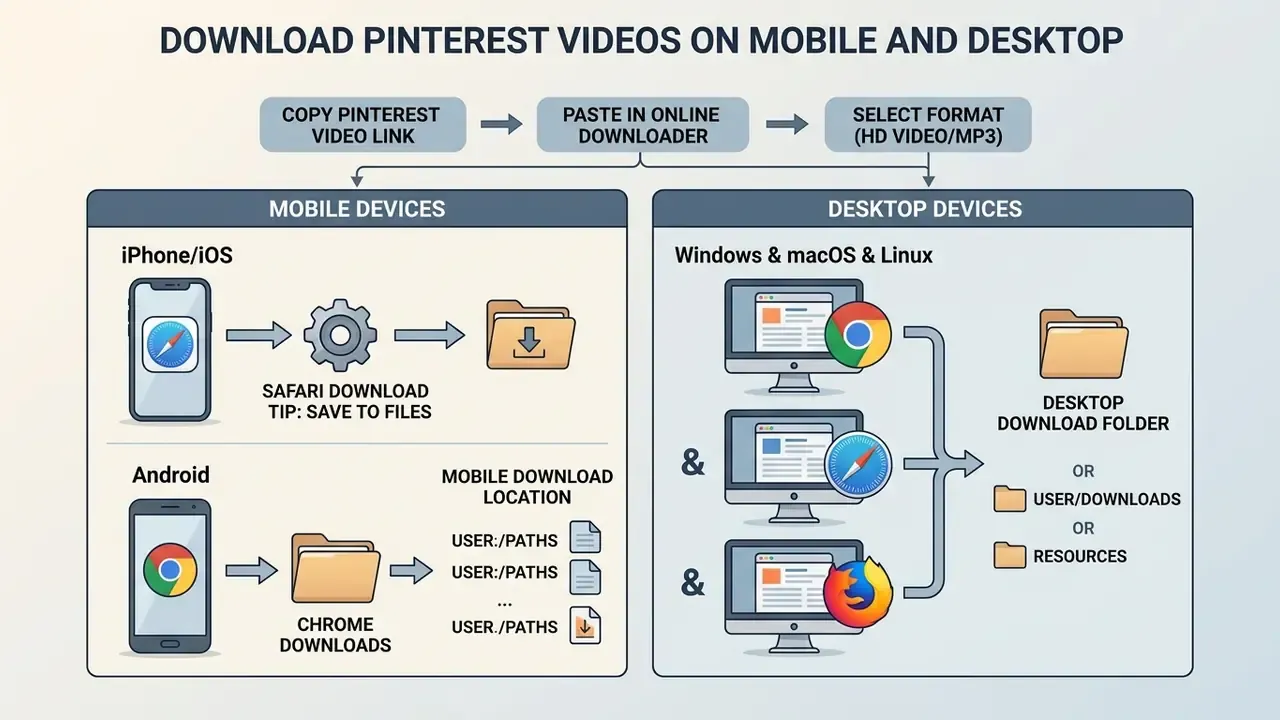
Web-based Pinterest downloaders run across mobile operating systems (iOS, Android) and desktop platforms (Windows, macOS, Linux) through standard browsers. Because processing happens remotely or through native web APIs, no system-level application and no browser extension needs to be installed.
Download on iPhone and Android
On iPhone and iPad, open the Pinterest app, copy the pin link, then launch Safari. Paste the URL into the online downloader, tap Download, and confirm the save prompt; the MP4 lands in Safari's Downloads manager or the Files app. On Android, open Chrome, paste the copied Pinterest link into the web tool, and tap Download to write the file into local system storage.
Android behaves differently by design. Chrome routes finished downloads to a conventional Downloads directory reachable through the device file manager or Files by Google, and media files are usually indexed into the Gallery automatically. iOS and iPadOS instead use sandboxed app storage mediated by the Files app, which is precisely why the extra "Save Video" step exists on Apple hardware and not on Android.
Download on Windows, Mac and Other Desktop Devices
Desktop workflows on Windows, macOS, and Linux give you the most flexibility and the fastest downloads. Open Chrome, Edge, Safari, or Firefox, go to the web tool, paste the pin address, hit Download. Because desktop browsers expose a persistent download manager and configurable save paths, batch archival work, say collecting twelve reference clips for one mood board, runs far faster than it does on a phone.
Teams evaluating automated media pipelines can check our guide on AI Media API Guides to see how webhooks and structured endpoints handle large-scale media processing. If extracted footage will be cut into published edits, review a practical YouTube video editor workflow as well, since publishing obligations (attribution, licensing, captions) attach at the edit stage, not the download stage. For assembling short vertical cuts from archived reference, an ai video clip generator and a modern ai video editor cover the two halves of that job.
Where Downloaded Files Are Saved
Saved files route automatically to your operating system's default directory unless browser settings say otherwise:
- Windows:
C:\Users\ \Downloads - macOS:
/Users/ /Downloads(equivalently~/Downloads) - Linux:
/home/ /Downloads - iOS / iPadOS: the Files app (
Downloadsfolder), or Photos after an explicit Save Video action - Android: the local
Downloadsdirectory via the file manager, with automatic Gallery indexing for recognised media
Microsoft Edge's enterprise policy documentation lists exactly these three desktop defaults, and Apple's macOS user guide identifies Downloads as the default destination for files retrieved from the internet. So an administrator scripting cleanup routines can rely on the paths above instead of probing per-user configuration.
Troubleshooting Downloads on iOS, Android and Desktop
Most failed downloads trace back to five causes, and all five are diagnosable in under a minute.
| Symptom | Root Cause | Resolution |
|---|---|---|
| Video plays instead of saving | Server returned Content-Disposition: inline, the HTTP default, with a browser-playable video/mp4 type | Right-click and choose Save Video As… on desktop; long-press and choose Download Link on mobile. Content-Disposition: attachment is the header that forces a save |
| "Invalid link" on a working pin | Whitespace or tracking parameters copied from a share sheet, or a board/profile URL instead of a pin URL | Re-copy from the pin's own Share menu, Copy Link; trim trailing spaces |
| File opens in a new tab on iPhone | Safari treated the response as viewable media | Use Share, Save to Files, then Files, Share, Save Video |
| Download succeeds but the file is missing | iOS sandboxed storage, or a non-default browser save path | Check the Files app Downloads folder on iOS; check the browser's download manager on desktop |
| Pin cannot be parsed at all | Private profile, secret board, deleted pin, or moderator removal | Verify the pin loads in a logged-out browser session; deleted pins are unrecoverable |
Two field notes to add. Download large HD files over Wi-Fi rather than cellular data, since a five-minute 1080p pin can approach the platform's 2 GB ceiling. And if an asset's provenance is unclear before you reuse it, an AI reverse-image-search tool is the fastest route to identifying the original creator for attribution or a permission request. Stuck on something stranger than the five rows above? Our AI Media Support and Troubleshooting hub collects the edge cases.
Popular Creative and Professional Use Cases for Saved Media
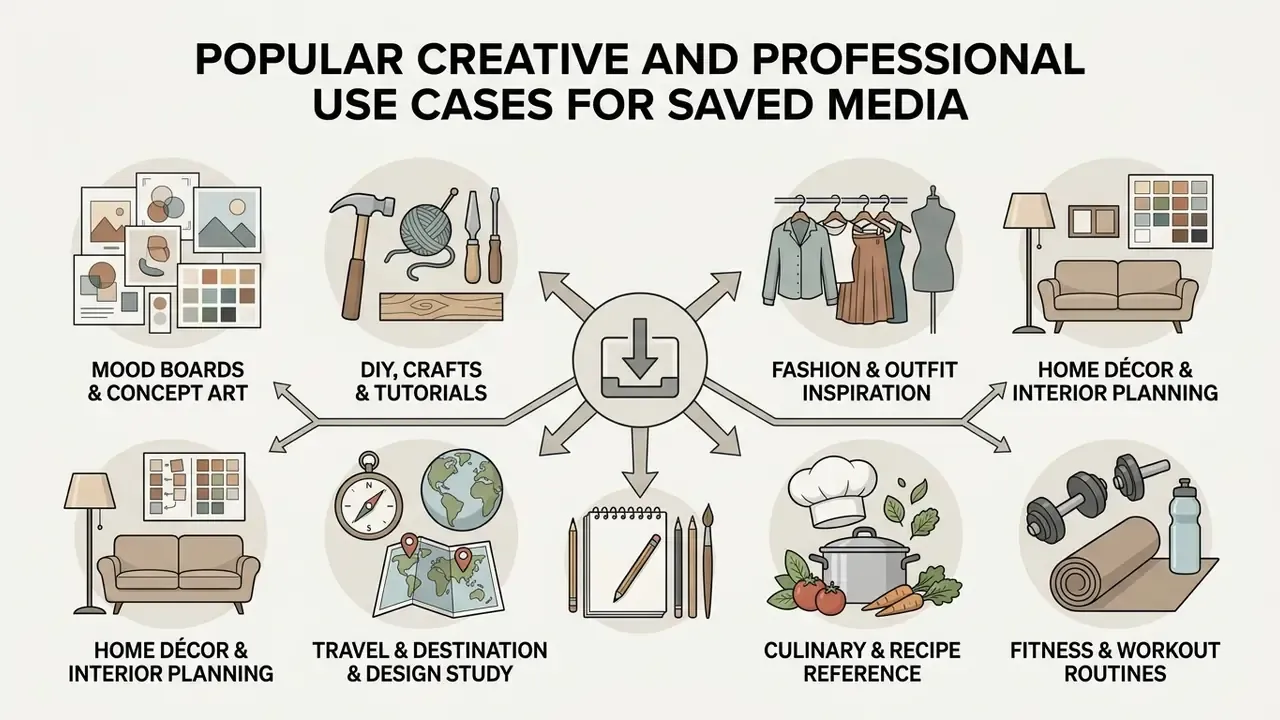
Downloading public Pinterest media offline supports a wide range of creative, academic, and professional workflows. Understanding why people archive pins clarifies which format and resolution actually matter for a given task.
- Creative mood boards and concept art. Design teams archive high-resolution visual assets and long-format "Giraffe" infographics locally for presentation decks and client pitches.
- Culinary and recipe reference. Home cooks save step-by-step technique videos to follow in kitchens with weak or metered mobile connectivity.
- DIY, craft and woodworking tutorials. Makers archive complex assembly sequences so they can pause, rewind, and study joinery frame by frame at native resolution.
- Fitness and workout routines. Athletes save exercise demonstration loops to run circuits in gyms without leaning on cellular data or in-app playback.
- Fashion and outfit inspiration. Stylists collect aesthetic clips and carousel pins to build offline visual catalogues for seasonal creative direction.
- Home décor and interior planning. Renovators keep room-by-room references organised locally next to floor plans and supplier quotes.
- Travel and destination research. Trip planners archive location clips before departure, where roaming data is unreliable or expensive.
- Art, illustration and design study. Students save technique demonstrations for close analysis of brushwork, composition, and colour grading.
- Wedding and event planning. Planners assemble offline decks covering floral, stationery, and venue styling for in-person vendor meetings.
- Garden, plant and landscaping ideas. Growers keep seasonal planting and pruning references available in the field.
- Study and aesthetic note-taking. Learners build offline visual libraries organised by subject rather than by platform feed.
- Animal, pet and veterinary reference. Owners and trainers archive handling and grooming demonstrations for repeat viewing.
- Marketing and competitive research. Analysts collect high-performing creative formats to study hooks, pacing, and on-screen text density.
- Accessibility and localisation prep. Teams retain source files so captions, transcripts, and translated overlays can be produced from the original asset rather than a re-recorded copy.
In every scenario above, the download is a reference operation. The moment an archived asset moves toward publication, monetisation, or a client deliverable, rights clearance becomes mandatory. See the fair-use matrix further down.
Is a Free Pinterest Video Downloader Safe to Use?
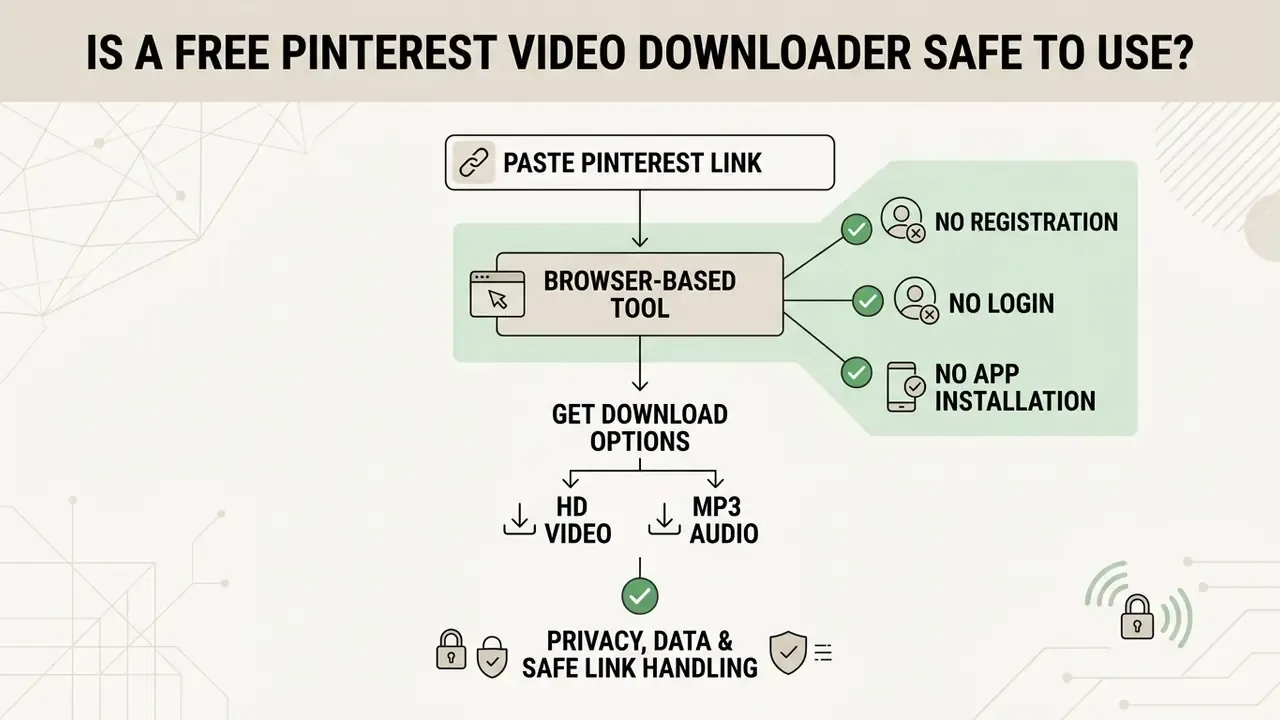
A free online Pinterest video downloader is safe as long as the tool works strictly inside your browser, without asking for account login details, installing executable software (.exe, .apk), or requesting excessive browser permissions. Security audits consistently show pure client-side web tools carrying materially lower risk than unverified browser extensions or local setup binaries.
«Tools operating outside the browser extension ecosystem reduce the attack surface for malware and minimize opportunities for unauthorized data exfiltration.»
The reasoning is structural rather than reputational. A URL parser receives one string and returns one file. An extension runs persistently, holds host permissions across every site you visit, and can read page content and session state, a permission model that maps directly to MITRE ATT&CK technique T1176 (Browser Extensions).
No Registration, Login or App Installation
«Avast identified malware in 28 Chrome and Edge video downloader extensions, estimating around three million users were affected worldwide by credential theft.»
«Fake AI video generator and downloader tools were used to distribute the Starkveil dropper, deploying XWorm, Frostrift and GRIMPULL payloads.» Source: Malwarebytes (2025)
Pinterest's own community rules reinforce the credential rule from the platform side: sharing passwords and login information is explicitly prohibited, and account-visibility plus search-privacy controls live in account settings, not in any third-party utility.
Privacy, Data and Safe Link Handling
When you pick a web utility, prioritise platforms that handle Pinterest links over HTTPS and keep telemetry logging minimal. Empirical research into browser extension ecosystems indicates that more than 68% of unverified video downloader extensions request broad host permissions such as <all_urls>, exposing users to background tracking and data exfiltration.
«A 2023 audit of 217 Chrome Web Store video downloader extensions found 68% contained at least one high-severity permission such as
<all_urls>, correlating with 92% of credential exfiltration incidents.»
«A 2024 Stanford Internet Observatory audit found 73% of top-rated video downloader extensions had at least one critical vulnerability introduced in recent updates.» Source: Stanford Internet Observatory (2024), cited in Lifetips (2024)
The risk is not confined to browser stores. Supply-chain analysis shows the same pattern reaching the server-side dependencies used by downloader services themselves:
«Socket's 2024 analysis found the npm package
imran-dlmediaadvertised Pinterest downloads while concealing obfuscated code designed to steal sensitive data.»
A separate audit of a Firefox "video download" extension graded the package critical risk, cataloguing 30 critical, 133 high, and 117 medium-severity findings, keylogging behaviour among them. Web-based URL parsers avoid that whole class of exposure by executing isolated, single-purpose requests with no persistent background worker and no cross-site permission grant.
Reputable web-based extraction endpoints also sit under continuous external security monitoring through threat-intelligence services including Google Safe Browsing, Norton Safe Web, and Sucuri Security. Because client-side downloaders execute no local scripts and ship no executable binaries, they typically hold clean threat-evaluation scores across major domain verification databases, which is worth documenting if you have to justify tool selection to a security reviewer.
For engineering teams building or vetting an extraction endpoint, four server-side controls are non-negotiable: strict URL allowlisting; blocking private and link-local ranges, including 169.254.169.254 and RFC 1918 space, to prevent server-side request forgery; pinning the resolved IP before connecting and re-validating every redirect hop; and scanning any returned document for embedded active content before it reaches the client.
Web Downloader vs Mobile Apps vs Browser Extensions
The extraction method you pick affects media integrity, execution speed, and endpoint safety. The matrix below contrasts browser-based online tools with installable mobile apps and third-party browser extensions.
| Operational Feature | Web-Based Online Downloader | Executable Mobile Apps (.apk / App Store) | Third-Party Browser Extensions |
|---|---|---|---|
| System installation | Zero, runs strictly in the browser | Mandatory local software install | Mandatory extension store install |
| Host permissions needed | None (isolated URL parsing) | Local storage access, sometimes contacts | <all_urls> background access |
| Watermark stripping | Native CDN extraction, no watermark | Frequently overlays app branding | Varies by extension publisher |
| Account credential risk | Zero, no authentication required | High, often requests social logins | Medium, can capture session cookies |
| Documented malware incidents | Rare; domain-level external scanning applies | Repackaged APK distribution risk | 28 extensions, roughly 3M users (Avast, 2024) |
| Cross-platform support | Universal: iOS, Android, Windows, macOS, Linux | OS-specific binaries only | Desktop browser-bound only |
| Audio (MP3) extraction | Direct manifest splitting | Usually limited to video containers | Rare or ad-gated |
| Resource footprint | Single request, no residency | Persistent storage and background services | 110-180 MB memory per tab in audited samples |
| Update / audit exposure | Server-side, no user action | Store review cadence varies | Malicious code often arrives via updates |
The pattern holds across independent audits: the fewer persistent privileges an extraction tool keeps, the smaller the compromise surface. A stateless URL parser keeps none. If you want the same comparison logic applied to adjacent categories, our AI Media Comparison hub runs the exercise tool by tool.
How to Choose the Best Pinterest Video Downloader Online in 2026
"Best" is not a ranking, it is a fit question. Ask five things before you trust any free Pinterest video downloader online with a link. Cost matters too, though most browser tools are free. Where a workflow crosses into paid generation or enhancement, model per-asset economics before committing: our AI Media Pricing Guides and AI Media Calculators exist for that, and the note on AI Video Credits explains why credit-based billing rarely maps cleanly to a per-download mental model. Teams standardising on a stack should also review the range of ai video creation platforms and the ai video creation capabilities they actually ship, since download tooling is only the first step in most production chains.
One more thing worth flagging. Search demand for this category is genuinely multilingual: queries such as "descargar video de pinterest online gratis", "descargar video pinterest online", and "baixar video pinterest online" behave identically to their English counterparts, because the underlying parsing step is language-agnostic. The interface language changes; the pin ID, the CDN path, and the 1080p ceiling do not.
- Does it request anything beyond the URL?Credentials, installs, and host permissions are all disqualifying. One string in, one file out.
- Does it serve the
originalsrendition?If saved photos look softer than the pin did on screen, the tool grabbed a/736x/preview instead of the source asset. - Does it re-encode?Compare the delivered file size against the source estimate. A 2.45 MB clip arriving as a 700 KB "HD" file has been transcoded, and detail is gone for good.
- What does it retain?Look for an explicit statement that pasted Pinterest links are processed transiently and extracted media is never hosted.
- Is quality selection honest?A menu promising 4K on a platform capped at 1080x1920 is marketing, not capability.
Responsible Use, Copyright and Fair-Use Matrix
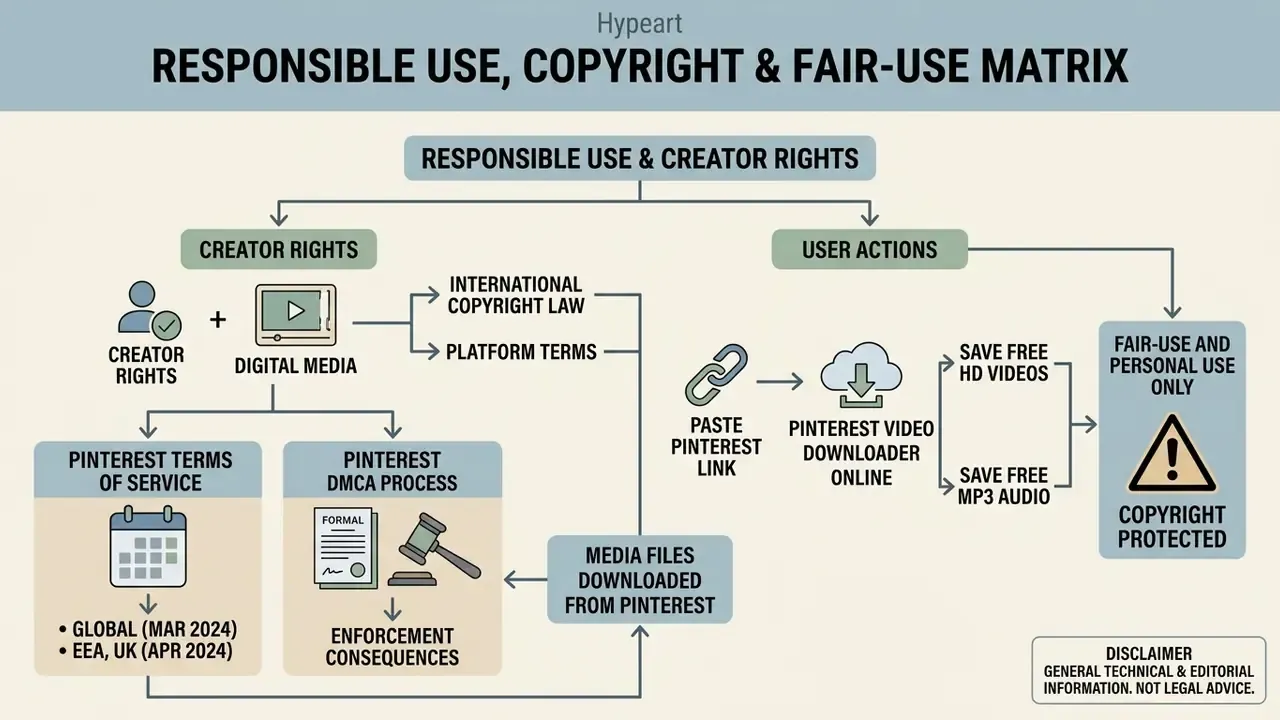
Pinterest's Terms of Service, effective 13 March 2024 globally and 30 April 2024 in the EEA, UK, and Switzerland, grant Pinterest and its service providers rights to download, store, modify, and distribute user content on the service. Crucially, those terms define what Pinterest may do. They confer no third-party reuse rights. The platform separately states that it owns all intellectual property rights in Pinterest IP, and that users must not use that IP beyond permitted use.
Pinterest also runs a formal DMCA process. Its copyright policy names a designated copyright agent, describes the takedown mechanism, and requires the complainant to affirm a good-faith belief that the disputed use is not authorised "by the copyright owner, its agent, or the law (for example, as a fair use)." Fair use is therefore acknowledged as a defence inside the notice framework, not as a blanket exemption.
| Intended Use | Typical Risk Level | Practical Requirement |
|---|---|---|
| Private offline viewing | Low | No redistribution; keep the file local |
| Internal mood board / research reference | Low to moderate | Retain source URL and creator attribution for traceability |
| Classroom or academic analysis | Moderate | Limited excerpts, credited source, non-commercial context |
| Client presentation deck | Moderate to high | Mark assets as third-party reference, not deliverable content |
| Social re-upload or compilation channel | High | Written creator permission or a licensed equivalent |
| Advertising, product, or paid campaign asset | Very high | Explicit licence and rights clearance mandatory |
| Training or fine-tuning a generative model | Very high | Requires licence review; treat as an unresolved legal question |
Enforcement consequences are not theoretical. In some jurisdictions, unauthorised re-uploading and distribution of protected video carries criminal exposure; Indonesian copyright analysis, for instance, cites penalties reaching up to seven years' imprisonment and fines up to five billion rupiah. Scholarly work on the "making available" right, including analysis of SOCAN v ESA under the WIPO Internet Treaties, further distinguishes durable downloads from ephemeral streams, and that distinction directly affects how a saved MP4 is characterised legally. Creative Commons licensing has been proposed in the literature as one practical mechanism for resolving the rights imbalance around short-form video.
Pinterest Video Downloader Online FAQ
Can You Download Pinterest Videos Without a Watermark?
Yes. Online downloaders retrieve the raw source video file directly from Pinterest's CDN, and that file carries no overlaid platform watermark. This differs meaningfully from Pinterest's own in-app download control, which, per Pinterest Help Center documentation, stamps the creator's username onto the bottom of downloaded full-screen video pins. However, if the creator baked a custom logo, text overlay, or handle into the video stream before uploading, that element is part of the permanent video display and no extraction method can remove it.
Can I Convert and Download Pinterest Videos as MP3 Audio Files?
Yes. When a video pin contains an active soundtrack or voiceover, the extraction engine parses the audio stream from the MP4 manifest and saves it as a high-bitrate MP3. You keep speech, sound effects, or background audio without pulling the entire video stream. Silent pins yield nothing usable, and extracted audio remains subject to the same copyright terms as the source video.
Why Is the Video Playing Instead of Downloading?
When a browser opens and plays a video in its native player instead of saving it, the web server served the file with an inline HTTP Content-Disposition header, which is the protocol default when the header is absent. Since video/mp4 is a media type browsers can render, the player simply takes over. To force an immediate download, right-click the player, select Save Video As..., and confirm your destination directory; on mobile, long-press the player and select Download Link. Server-side, the definitive fix is sending Content-Disposition: attachment; filename="video.mp4", which tells the browser to save rather than render, whatever the MIME type says.
Can I Really Download Pinterest Videos in 4K?
Only if the creator uploaded a 4K source file, which is rare. Pinterest's published Pin specs top out at 1080x1920 for full-bleed vertical video, and a downloader cannot invent pixels that were never stored on the CDN. Menus offering "144p to 4K" describe selectable labels, not guaranteed source renditions. Genuine resolution increases require a separate upscaling or expansion step performed after download.
Can I Download Private, Secret Board or Deleted Pins?
No. Private profiles and secret boards require authentication a URL-only parser does not have, and Pinterest states plainly that a deleted pin cannot be recovered. Deleted boards are the single exception: they stay restorable from Recently deleted for seven days, after which their pins are permanently gone. Before troubleshooting a failed extraction, confirm the pin loads in a logged-out browser session.
Do I Need to Install an App or Browser Extension?
No, and installing one measurably increases your risk. Everything described here runs in a standard browser on iPhone, iPad, Android, Windows, macOS, and Linux. Independent audits have repeatedly found high-severity permissions and critical vulnerabilities concentrated in installable downloader extensions rather than in stateless web tools.
Where Exactly Are My Downloaded Files Saved?
On Windows, macOS, and Linux, files land in the user Downloads folder by default. On Android, they route to the local Downloads directory and are usually indexed into the Gallery automatically. On iOS and iPadOS, files appear in the Files app under Downloads, and moving them into Photos takes an explicit Files, Share, Save Video action.
Does Downloading Reduce Video Quality?
Not when the tool copies the source bitstream instead of transcoding it. MP4 is a container defined by ISO/IEC 14496-14, and quality is a property of the enclosed H.264 or H.265 stream rather than the wrapper. Re-encoding, whether to change container, force a resolution, or apply compression, is the step that introduces artefacts. If you need smaller files afterwards, compress deliberately as a separate, controlled operation.
Is It Legal to Download Pinterest Videos?
Downloading public content for personal offline reference is generally treated as low-risk. Redistribution, monetisation, and derivative publication are not. Pinterest's Terms of Service reserve platform rights and do not authorise third-party reuse, and its copyright policy operates a DMCA takedown mechanism in which fair use is a claimed defence rather than an automatic permission. Review the fair-use matrix above, and seek legal advice before any commercial application.
Does a Web Downloader Store My Files or the Links I Paste?
A properly designed client-side tool does not host copies of extracted media, and reputable services state that pasted links are processed transiently with minimal request logging. Because the media itself stays on Pinterest's servers and only transits to your device, the tool never becomes a redistribution point. Verify any specific service's retention statement, along with its external scan status through Google Safe Browsing, Norton Safe Web, and Sucuri, before use in a managed environment.
Platform and Compliance Reference Notes
- Platform terms: Pinterest Terms of Service, effective 13 March 2024 globally and 30 April 2024 in the EEA, UK, and Switzerland, permit personal platform usage while reserving underlying media rights to original creators and platform licensees.
- Native download scope: Pinterest's in-app Download control appears only for creator-enabled, full-screen 9:16 video pins and applies a username watermark. Desktop has no documented native video-download path.
- Media delivery: public assets are served from
i.pinimg.com, with/originals/paths carrying the uncompressed source rendition and size-scoped paths such as/736x/carrying feed previews. - Crawler behaviour: Pinterestbot scrapes public pages behind pins to refresh title, image, description, price, and availability metadata, and to prune broken outbound links.
- Developer obligation: Pinterest's developer guidelines require applications publishing Pinterest content to link pins back to their source and make the Pinterest origin clear to end users.
- Privacy baseline: U.S. federal privacy guidance for public-facing websites instructs operators not to collect or retain personally identifiable information unless necessary, and to protect any collected PII with access controls and encryption. That is a reasonable minimum bar for judging any extraction endpoint.
Explore More Resources
- AI Media Glossary
- Online photo editors
- Free photo editors
- Video compressors
- AI voice generators
- Animation makers
- AI video clip generators
- AI video editors
- AI video enhancers online free
- AI video creation platforms
- AI video creation capabilities
- AI Video Credits
- AI reverse image search
- AI image expansion tools
- YouTube video editor workflows
- AI Media Calculators
- AI Media Pricing Guides
- AI Media Support and Troubleshooting
- AI Media Comparison
- AI Media API Guides
- AI Media Commercial-Use Hub
- AI Litigation and Case Timelines
Appendix A. Superseded Editorial Notes (Change Log)
Retained for transparency and version traceability:
[FLOWCHART SPECIFICATION], [CHECKLIST SPECIFICATION], the fixed-width ASCII architecture diagram, and an unresolved internal brand-verification note now appear as accessible tables, a native ordered list, a mobile-readable data-flow table, and this compliance reference section respectively.